14. 第 9 版:使用 Primefaces 实现 Web 层
先决条件:请阅读 [ref3] 中的“Primefaces 入门”。
问题 1:创建一个 [Web Application] 类型的新 Maven 项目,其中前一示例中的 XHTML 页面将使用 Primefaces 组件构建。Bean 部分保持不变。
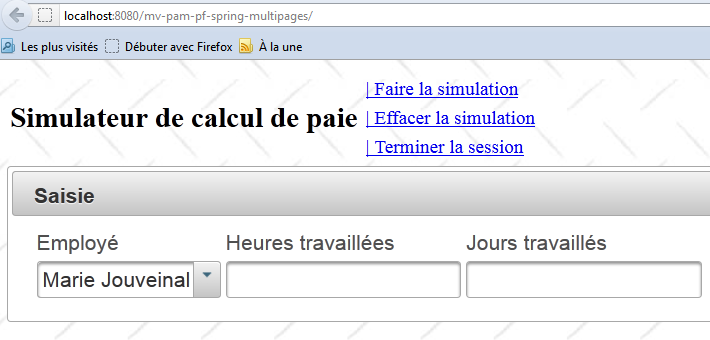
首页使用以下组件:<p:panel>、<p:inputText>、<p:selectOneMenu>、<p:message>:
 |
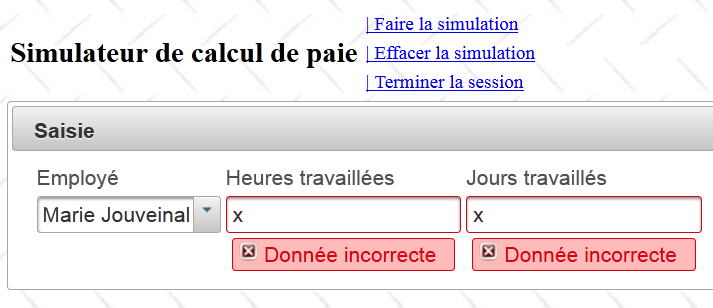
输入错误:
 |
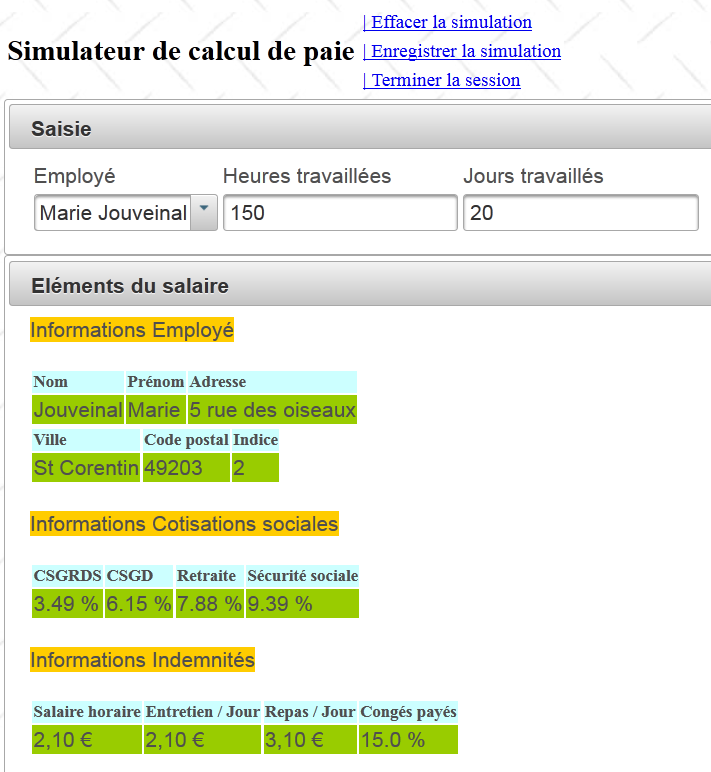
模拟示例:
 |
模拟列表使用了组件 <p:dataTable>、<p:commandLink>:
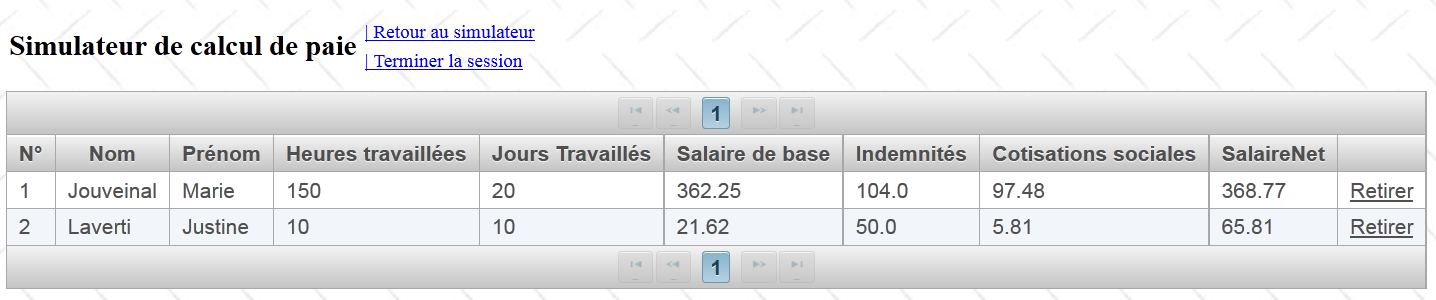 |
方法 AJAX 将更新 id='formulaire' 的区域,该区域包含整个页面(参见下文第 11 行):
<?xml version='1.0' encoding='UTF-8' ?>
<!DOCTYPE html PUBLIC "-//W3C//DTD XHTML 1.0 Transitional//EN" "http://www.w3.org/TR/xhtml1/DTD/xhtml1-transitional.dtd">
<html xmlns="http://www.w3.org/1999/xhtml"
      xmlns:h="http://java.sun.com/jsf/html"
      xmlns:f="http://java.sun.com/jsf/core"
      xmlns:ui="http://java.sun.com/jsf/facelets">

  <f:view locale="#{sessionData.locale}">
    ...
    <h:body style="background-image: url('${request.contextPath}/resources/images/standard.jpg');">
      <h:form id="formulaire">
        <!-- 页眉 -->
        <ui:include src="entete.xhtml" />
        <!-- 内容 -->
        <ui:insert name="part1" >
          Gestion des assistantes maternelles
        </ui:insert>
        <ui:insert name="part2"/>
      </h:form>
    </h:body>
  </f:view>
</html>
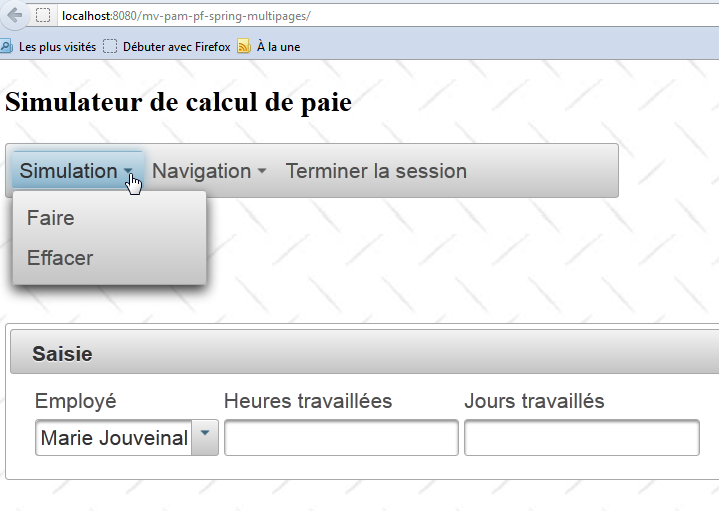
一旦您的应用程序运行正常,请将页面 [entete.xhtml] 替换为以下页面:
<?xml version='1.0' encoding='UTF-8' ?>
<!DOCTYPE html PUBLIC "-//W3C//DTD XHTML 1.0 Transitional//EN" "http://www.w3.org/TR/xhtml1/DTD/xhtml1-transitional.dtd">
<html xmlns="http://www.w3.org/1999/xhtml"
      xmlns:h="http://java.sun.com/jsf/html"
      xmlns:p="http://primefaces.org/ui"
      xmlns:f="http://java.sun.com/jsf/core"
      xmlns:ui="http://java.sun.com/jsf/facelets">


  <!-- 页眉 -->
  <h:panelGroup>
    <h2><h:outputText value="#{msg['form.titre']}"/></h2>
  </h:panelGroup>

  <p:menubar id="menu" header="Menu" style="width: 500px">
    <p:submenu label="#{msg['form.menu.simulation']}">
      <p:menuitem  id="cmdFaireSimulation" style="width: 200px" value="#{msg['form.menu.faireSimulation']}" actionListener="#{form.faireSimulation}" rendered="#{sessionData.menu.faireSimulation}" update=":formulaire:contenu"/>
      <p:menuitem id="cmdEffacerSimulation" style="width: 200px" onclick="raz();" immediate="true" value="#{msg['form.menu.effacerSimulation']}" actionListener="#{form.effacerSimulation}" rendered="#{sessionData.menu.effacerSimulation}" update=":formulaire:contenu"/>
      <p:menuitem id="cmdEnregistrerSimulation" style="width: 200px" immediate="true" value="#{msg['form.menu.enregistrerSimulation']}" actionListener="#{form.enregistrerSimulation}" rendered="#{sessionData.menu.enregistrerSimulation}" update=":formulaire:contenu"/>
    </p:submenu>
    <p:submenu label="Navigation">
      <p:menuitem id="cmdRetourSimulateur" style="width: 200px" immediate="true" value="#{msg['form.menu.retourSimulateur']}" actionListener="#{form.retourSimulateur}" rendered="#{sessionData.menu.retourSimulateur}" update=":formulaire:contenu"/>
      <p:menuitem id="cmdVoirSimulations" style="width: 200px" immediate="true" value="#{msg['form.menu.voirSimulations']}" actionListener="#{form.voirSimulations}" rendered="#{sessionData.menu.voirSimulations}" update=":formulaire:contenu"/>
    </p:submenu>
    <p:menuitem id="cmdTerminerSession" immediate="true" value="#{msg['form.menu.terminerSession']}" actionListener="#{form.terminerSession}" rendered="#{sessionData.menu.terminerSession}" update=":formulaire:contenu"/>
  </p:menubar>

  <p:spacer height="50px"/>

</html>
- 第 15 行:一个 Primefaces 菜单栏,
- 第 16 行:该栏中的一个菜单选项,
- 第 17 行:该菜单选项中的一个子项。
此更改不会影响模板。新的视图如下: