5. 版本 1:Spring 架构 / JPA
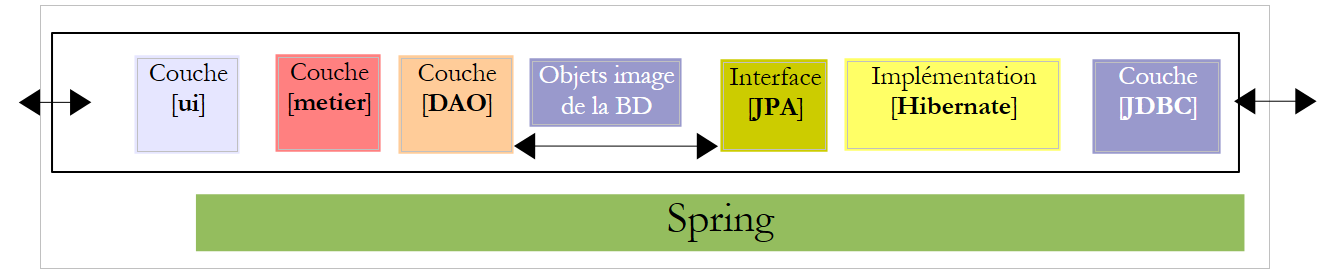
我们计划编写一个控制台应用程序以及一个图形界面应用程序,用于生成某市“幼儿之家”雇佣的保育员的工资单。该应用程序将采用以下架构:
 |
5.1. BD 数据库
用于生成工资单的静态数据将存储在一个数据库中,我们将其命名为 dbpam。该数据库可能包含以下表:
结构:
主键 | |
版本号——每修改一行即递增 | |
员工社保号——唯一编号 | |
员工姓名 | |
其名字 | |
他的地址 | |
他的城市 | |
他的邮政编码 | |
表 [INDEMNITES] 中字段 [ID] 的外键 |
其内容可能如下:

结构:
主键 | |
版本号——每修改一行即递增 | |
百分比:普遍社会缴费 + 社会债务偿还缴费 | |
百分比:可抵扣的通用社会保险费 | |
百分比:社会保险、丧偶保险、养老保险 | |
百分比:补充养老金 + 失业保险 |
其内容可能如下:

社会保险费率与员工无关。上表仅有一行。
主键 | ||
版本号——每修改一行即递增 | ||
处理索引 - 唯一 | ||
每小时看护服务的净价(欧元) | ||
每日看护生活津贴(欧元) | ||
每日看护的餐费补贴(欧元) | ||
带薪休假补贴。该金额为基本工资的百分比。 | ||
其内容可能如下:

需注意,不同保育员的津贴可能有所不同。这些津贴实际上是通过保育员的薪级指数与特定保育员关联的。 例如,薪级指数为2的玛丽·朱维纳尔女士(表EMPLOYES),其时薪为2.1欧元(表INDEMNITES)。
5.2. 保育员工资的计算方法
下面介绍保育员月薪的计算方法。此方法并非实际使用的计算方式。我们以玛丽·朱维纳尔女士为例,她在应付薪资的当月工作了20天,共计150小时。
计算时考虑了以下要素: | | |
保育员的基本工资 由以下公式计算得出: | ||
部分社会保险费 需从该 : | | |
社会保险费总额: | ||
此外,家庭保育员每工作一天,有权获得生活津贴和餐费补贴。为此,她将获得以下补贴: | | |
最终,应支付给保育员的净工资如下: |
5.3. 控制台应用程序的工作原理
以下是在DOS窗口中运行该控制台应用程序的一个示例:
我们将编写一个程序,该程序将接收以下信息:
- 保姆的社会保险号(示例中为 254104940426058 — 第 1 行)
- 总工作小时数(示例中为 150 — 第 1 行)
- 总工作日数(示例中为20天——第1行)
可以看出:
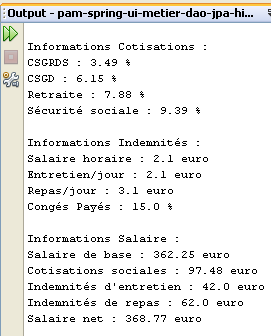
- 第9-14行:显示与所给社会保障号对应的员工信息
- 第17-20行:显示各项缴费的费率
- 第23-26行:显示与员工薪级指数相关的津贴(此处为指数2)
- 第29-33行:显示应付工资的构成部分
该应用程序会提示可能出现的错误:
无参数调用:
dos>java -jar pam-spring-ui-metier-dao-jpa-eclipselink.jar
Syntaxe : pg num_securite_sociale nb_heures_travaillées nb_jours_travaillés
调用时数据有误:
dos>java -jar pam-spring-ui-metier-dao-jpa-eclipselink.jar 254104940426058 150x 20x
Le nombre d'heures travaillées [150x] est erroné
Le nombre de jours travaillés [20x] est erroné
使用错误的社会保险号进行查询:
dos>java -jar pam-spring-ui-metier-dao-jpa-eclipselink.jar xx 150 20
L'erreur suivante s'est produite : L'employé de n°[xx] est introuvable
5.4. 图形应用程序的操作
图形应用程序通过一个Swing表单计算保育员的工资:
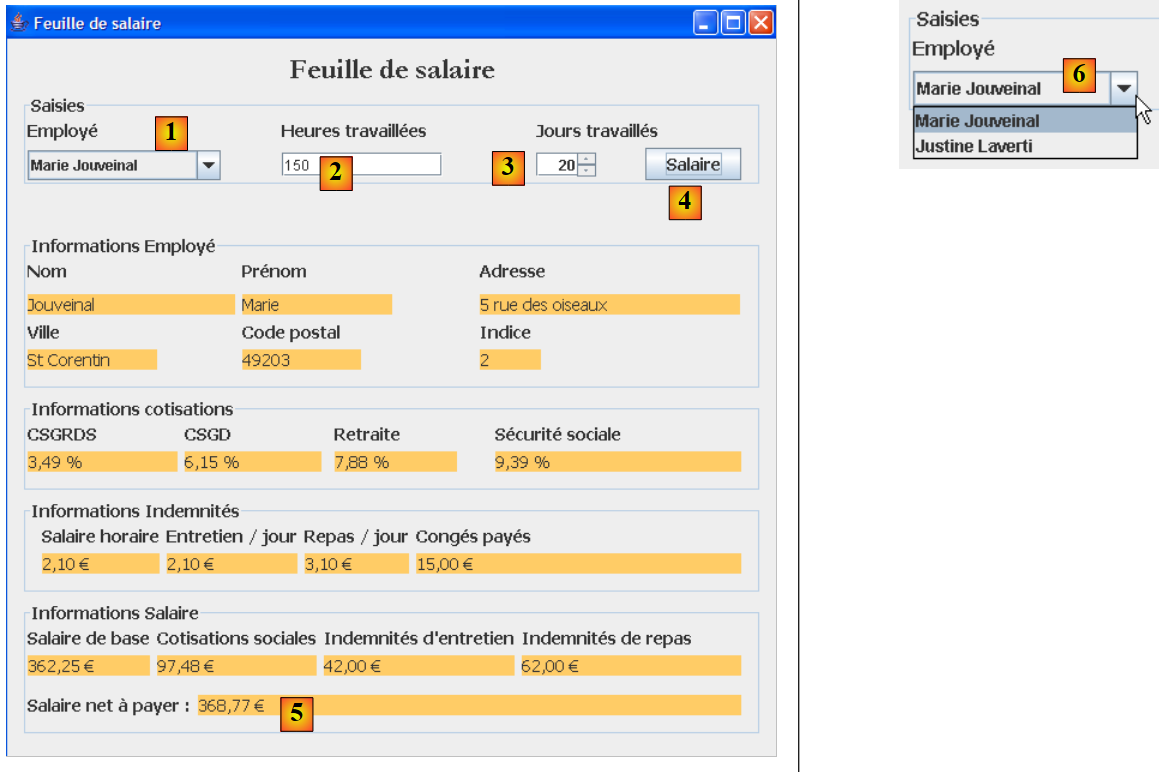 |
- 以前作为参数传递给控制台程序的信息,现在通过输入字段 [1, 2, 3] 进行输入。
- 按钮 [4] 用于发起工资计算
- 表单会显示工资的各项组成部分,直至应付净工资 [5]
下拉列表 [1, 6] 不显示员工的编号 SS,而是显示其姓名。此处假设不存在两名姓名完全相同的员工。
5.5. 创建数据库
我们运行 WampServer,并使用工具 PhpMyAdmin [1]:
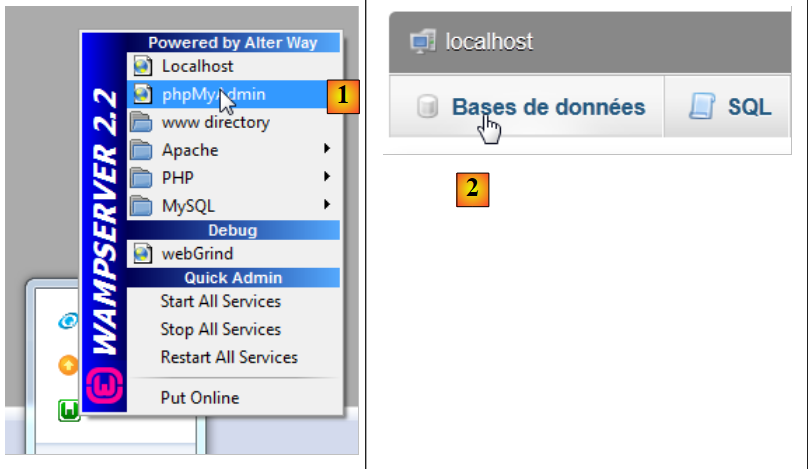 |
- 在 [2] 中,选择 [Bases de données] 选项,
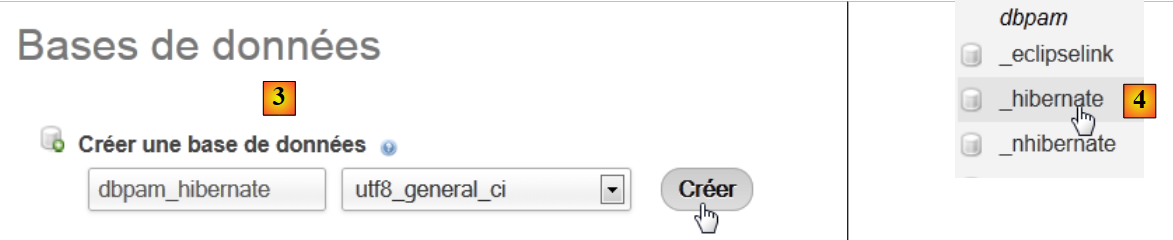 |
- 在 [3] 中,创建一个名为 [dbpam_hibernate] 的数据库,
- 在 [4] 中,数据库已创建。选中它,
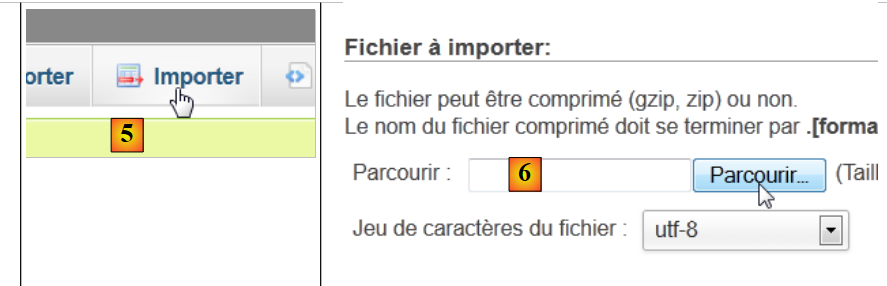 |
- 在 [5] 中,需要导入脚本 SQL,
- 在 [6] 中,使用 [Parcourir] 按钮指定文件,
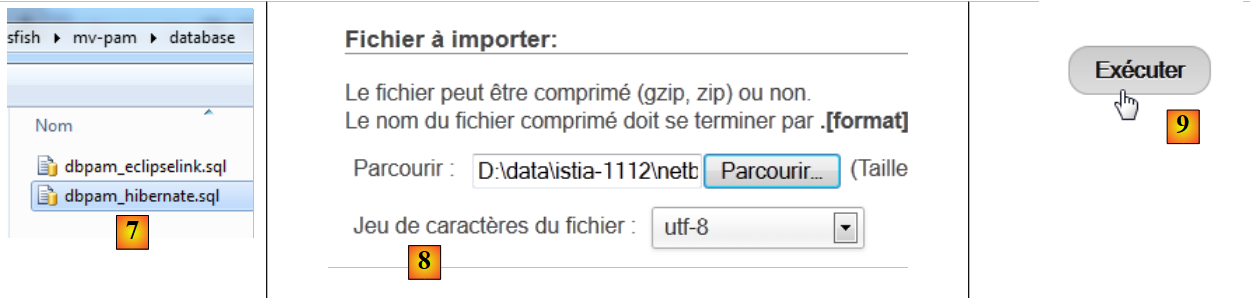 |
- 在 [7,8] 中,选择脚本 SQL,
- 在 [9] 中,执行该脚本,
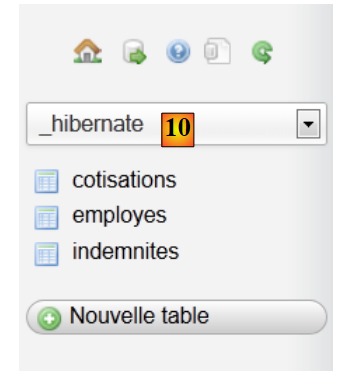 |
- 生成 [10],此时表已创建。其内容如下:
表 EMPLOYES

表 INDEMNITES

表 COTISATIONS

5.6. 实现 JPA
5.6.1. JPA 层 / Hibernate
我们将在以下环境中配置 JPA 层:
 |
一个控制台程序将与数据库进行交互。为此,需要:
- 拥有一个数据库,
- 拥有 JDBC 的驱动程序(即 SGBD,此处为 MySQL),
- 使用 Hibernate 实现 JPA 层,
- 编写控制台程序。
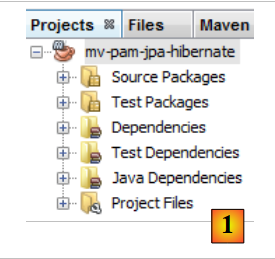
我们创建 Maven 项目 [mv-pam-jpa-hibernate] [1]:
 |
在应用程序架构中,我们需要以下组件:
- 数据库、
- JDBC驱动程序(用于SGBD和MySQL),
- JPA / Hibernate 层(实体和配置),
- 测试控制台程序。
5.6.1.1. 数据库
首先创建一个空数据库。我们启动 WampServer,并使用工具 PhpMyAdmin [1]:
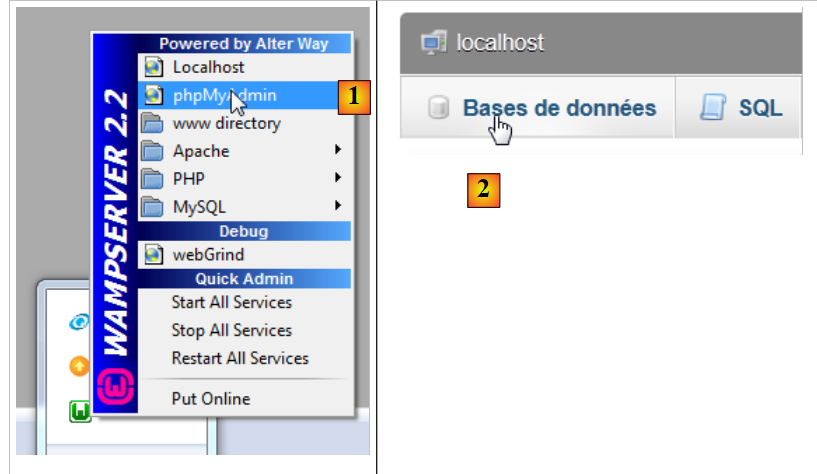 |
- 在 [2] 中,选择 [Bases de données] 选项,
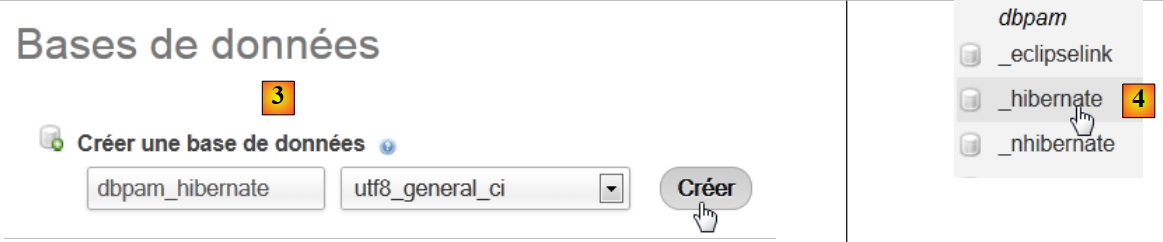 |
- 在 [3] 中,创建一个 [dbpam_hibernate] 数据库,
- 在 [4] 中,数据库已创建。
5.6.1.2. 配置 JPA 层
JDBC 层与数据库的连接是在 [persistence.xml] 文件中实现的,该文件用于配置 JPA 层。该文件可使用 NetBeans 进行构建:
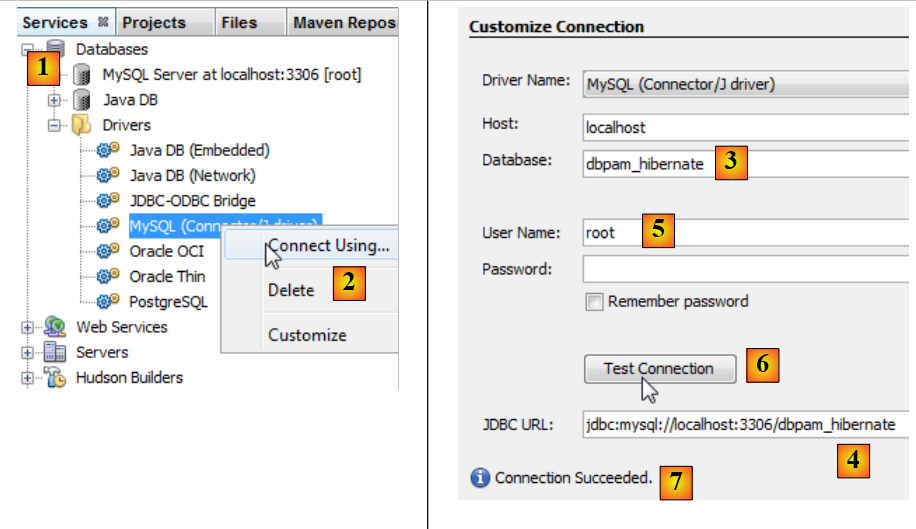 |
- 在 [services] [1] 选项卡中,使用 MySQL [2] 的驱动程序 JDBC 连接数据库,
- 在 [3] 中,填写要连接的数据库名称。
- 在 [4] 中,指定数据库的 URL JDBC,
- 在 [5] 中,以 root 身份无密码登录,
- 在 [6] 中,可测试连接,
- 在 [7],连接成功。
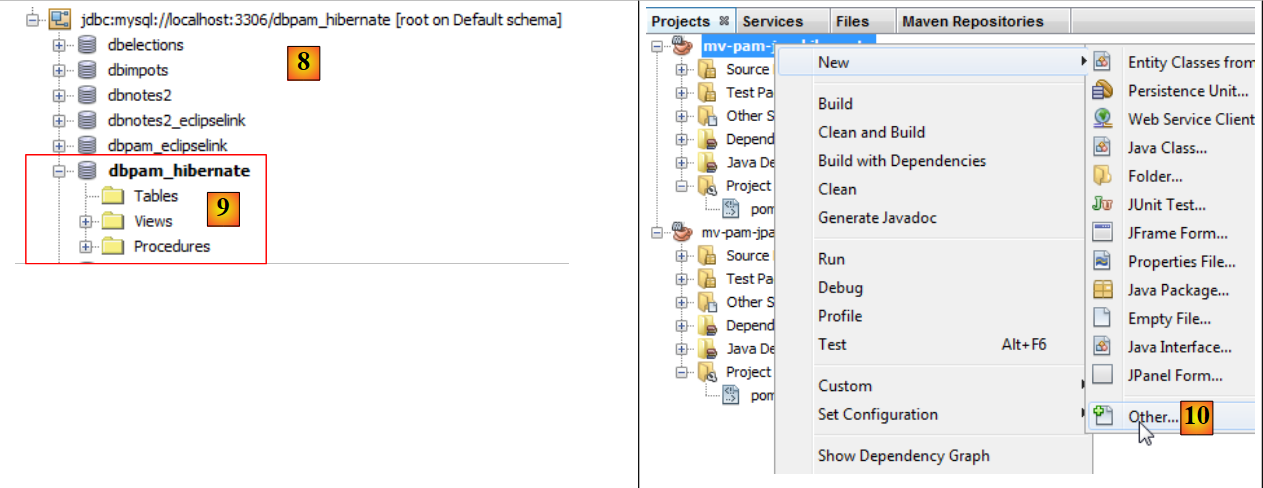 |
- 连接状态显示在 [8] 和 [9] 中,
- 在 [10] 中,向项目添加了一个新元素,
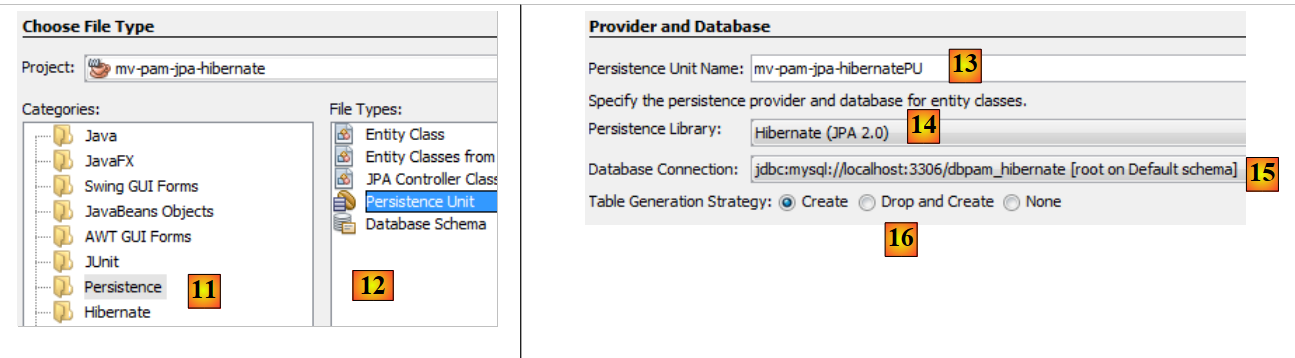 |
- 在 [11] 中选择类别 [Persistence],并在 [12] 中选择元素 [Persistence Unit],
- 在 [13] 中,为该持久化单元命名,
- 在 [14] 中,选择 Hibernate 实现,
- 在 [15] 中,指定我们刚刚创建的连接至数据库 MySQL,
- 在 [16] 中,指定在实例化 JPA 层时,该层必须创建(create)项目中 JPA 实体对应的表。
向导结束时会生成文件 [persistence.xml]:
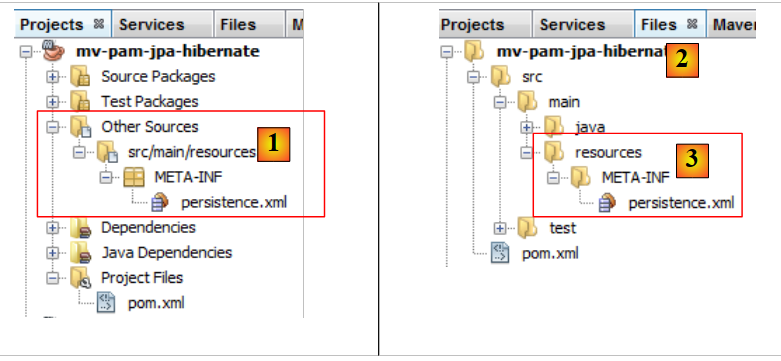 |
- 该文件出现在项目的一个新分支中,位于名为 [META-INF] [1] 的文件夹内,
- 该文件夹对应于项目 [2,3] 中的 [src/main/resources] 文件夹。
其内容如下:
<?xml version="1.0" encoding="UTF-8"?>
<persistence version="2.0" xmlns="http://java.sun.com/xml/ns/persistence" xmlns:xsi="http://www.w3.org/2001/XMLSchema-instance" xsi:schemaLocation="http://java.sun.com/xml/ns/persistence http://java.sun.com/xml/ns/persistence/persistence_2_0.xsd">
<persistence-unit name="mv-pam-jpa-hibernatePU" transaction-type="RESOURCE_LOCAL">
<provider>org.hibernate.ejb.HibernatePersistence</provider>
<properties>
<property name="javax.persistence.jdbc.url" value="jdbc:mysql://localhost:3306/dbpam_hibernate"/>
<property name="javax.persistence.jdbc.password" value=""/>
<property name="javax.persistence.jdbc.driver" value="com.mysql.jdbc.Driver"/>
<property name="javax.persistence.jdbc.user" value="root"/>
<property name="hibernate.cache.provider_class" value="org.hibernate.cache.NoCacheProvider"/>
<property name="hibernate.hbm2ddl.auto" value="create-drop"/>
</properties>
</persistence-unit>
</persistence>
- 第3行:持久化单元的名称和事务类型。RESOURCE_LOCAL 表示该项目自行管理事务。此处应由控制台程序负责处理,
- 第4行:所使用的实现JPA是Hibernate,
- 第6-9行:数据库连接的属性,
- 第11行:请求创建与实体JPA对应的表。实际上,NetBeans在此生成的配置有误。正确的配置应如下所示:
<property name="hibernate.hbm2ddl.auto" value="create"/>
使用 create 选项时,Hibernate 在实例化 JPA 层时,会先删除再创建与 JPA 实体对应的表。 create-drop 选项的作用相同,但在 JPA 层生命周期结束时,它会删除所有表。还有另一个选项:
<property name="hibernate.hbm2ddl.auto" value="update"/>
该选项会在表不存在时创建,但若表已存在则不会删除。
我们将向 Hibernate 配置中添加另外三个属性:
<property name="hibernate.show_sql" value="true"/>
<property name="hibernate.format_sql" value="true"/>
<property name="use_sql_comments" value="true"/>
这些属性要求 Hibernate 显示其发送给数据库的 SQL 命令。因此,完整的文件如下:
<?xml version="1.0" encoding="UTF-8"?>
<persistence version="2.0" xmlns="http://java.sun.com/xml/ns/persistence" xmlns:xsi="http://www.w3.org/2001/XMLSchema-instance" xsi:schemaLocation="http://java.sun.com/xml/ns/persistence http://java.sun.com/xml/ns/persistence/persistence_2_0.xsd">
<persistence-unit name="mv-pam-jpa-hibernatePU" transaction-type="RESOURCE_LOCAL">
<provider>org.hibernate.ejb.HibernatePersistence</provider>
<class>jpa.Cotisation</class>
<class>jpa.Employe</class>
<class>jpa.Indemnite</class>
<properties>
<property name="javax.persistence.jdbc.url" value="jdbc:mysql://localhost:3306/dbpam_hibernate"/>
<property name="javax.persistence.jdbc.password" value=""/>
<property name="javax.persistence.jdbc.driver" value="com.mysql.jdbc.Driver"/>
<property name="javax.persistence.jdbc.user" value="root"/>
<property name="hibernate.cache.provider_class" value="org.hibernate.cache.NoCacheProvider"/>
<property name="hibernate.hbm2ddl.auto" value="create"/>
<property name="hibernate.show_sql" value="true"/>
<property name="hibernate.format_sql" value="true"/>
<property name="use_sql_comments" value="true"/>
</properties>
</persistence-unit>
</persistence>
5.6.1.3. 依赖关系
让我们回到项目架构:
 |
我们通过文件 [persistence.xml] 配置了 JPA 层。所选的实现方案是 Hibernate。这导致项目中引入了以下依赖:
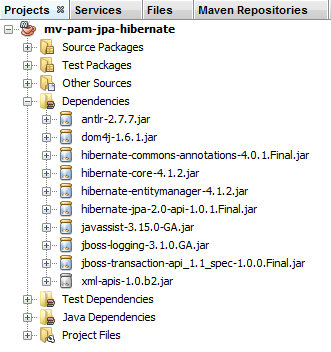 |
这些依赖关系源于项目中引入了Hibernate。我们需要添加另一项依赖,即MySQL的驱动程序JDBC,该驱动程序实现了架构中的JDBC层。 我们将文件 [pom.xml] 修改如下:
<dependencies>
<dependency>
<groupId>junit</groupId>
<artifactId>junit</artifactId>
<version>3.8.1</version>
<scope>test</scope>
</dependency>
<dependency>
<groupId>mysql</groupId>
<artifactId>mysql-connector-java</artifactId>
<version>5.1.6</version>
</dependency>
<dependency>
<groupId>org.hibernate</groupId>
<artifactId>hibernate-entitymanager</artifactId>
<version>4.1.2</version>
</dependency>
...
<dependency>
<groupId>org.hibernate.common</groupId>
<artifactId>hibernate-commons-annotations</artifactId>
<version>4.0.1.Final</version>
</dependency>
</dependencies>
第 8-12 行添加了 JDBC 驱动程序对 MySQL 的依赖。
5.6.1.4. 实体 JPA
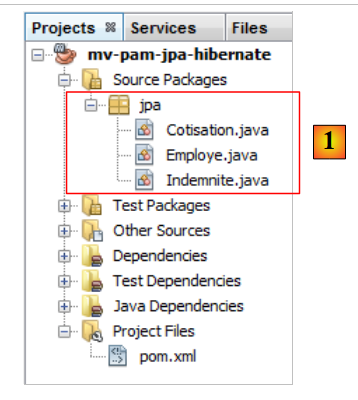 |
问题:按照第 4.4 节示例中的步骤,生成实体 [Cotisation, Indemnite, Employe]。
注:
- 这些实体将属于一个名为 [jpa] 的包,
- 每个实体将有一个版本号,
- 若两个实体通过关系关联,仅构建主关系 @ManyToOne,反向关系 @OneToMany 将不被构建。
5.6.1.5. 主类的代码
我们将之前开发的实体 JPA 和 [1] 包含到项目中:
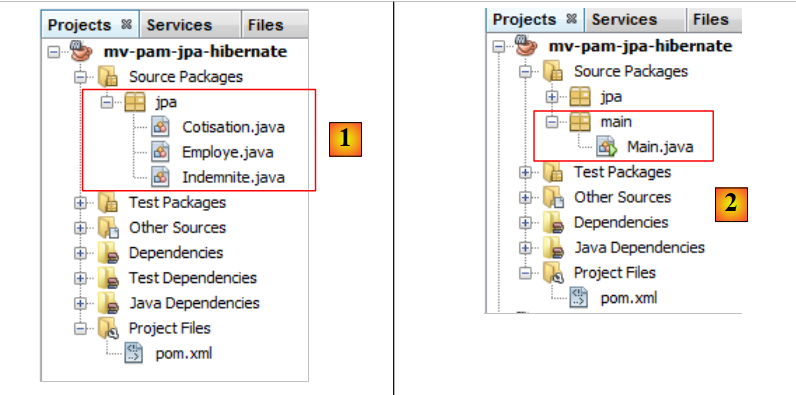 |
然后我们添加 [2],以及以下 [main.Main] 类:
package main;
import javax.persistence.EntityManager;
import javax.persistence.EntityManagerFactory;
import javax.persistence.Persistence;
public class Main {
public static void main(String[] args) {
// 创建实体管理器即可构建该层JPA
EntityManagerFactory emf = Persistence.createEntityManagerFactory("mv-pam-jpa-hibernatePU");
EntityManager em=emf.createEntityManager();
// 释放资源
em.close();
emf.close();
}
}
- 第 10 行:创建名为 EntityManagerFactory 的持久化单元,其父单元名为 [mv-pam-jpa-hibernatePU]。该名称源自文件 [persistence.xml]:
<persistence-unit name="mv-pam-jpa-hibernatePU" transaction-type="RESOURCE_LOCAL">
...
</persistence-unit>
- 第12行:创建EntityManager。此操作将生成JPA层。文件[persistence.xml]将被处理,因此数据库表将被创建,
- 第14-15行:释放资源。
5.6.1.6. Tests
让我们回到项目的架构:
 |
所有层都已实现。现在运行项目 [2]。
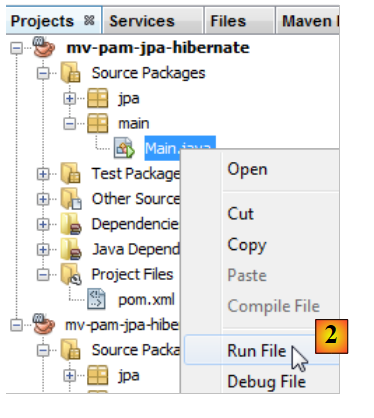 |
控制台输出结果如下:
1 2 3 4 5 6 7 8 9 10 11 12 13 14 15 16 17 18 19 20 21 22 23 24 25 26 27 28 29 30 31 32 33 34 35 36 37 38 39 40 41 42 43 44 45 46 47 48 49 50 51 52 53 54 55 56 57 58 59 60 61 62 63 64 65 66 67 68 69 70 71 72 73 74 75 76 77 78 79 80 81 82 83 84 85 86 87 88 89 90 91 92 93 94 95 96 97 98 99 100 101 102 103 104 105 | |
由于所执行的程序除了实例化 JPA 层外未执行其他操作,因此控制台中仅显示 Hibernate 日志。请注意以下几点:
- 第 43 行:Hibernate 尝试删除表 [EMPLOYES] 中的外键,
- 第51-55行:删除三个表,
- 第 57 行:创建表 [COTISATIONS],
- 第 67 行:创建表 [EMPLOYES],
- 第 80 行:创建表 [INDEMNITES],
- 第 91 行:创建表 [EMPLOYES] 的外键。
在 NetBeans 中,可以在之前创建的连接中看到这些表:
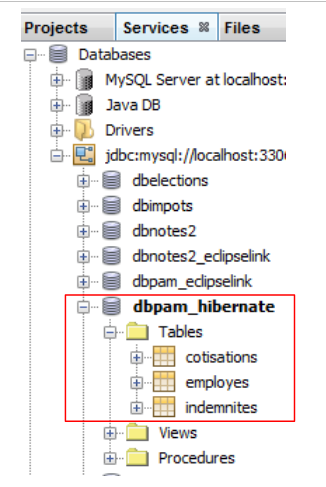 |
所创建的表既取决于所使用的 JPA 层实现,也取决于所使用的 SGBD。 因此,使用相同数据库的 JPA / EclipseLink 实现可能会生成不同的表。接下来我们将对此进行探讨。
5.6.2. JPA / EclipseLink 层
我们将在以下环境中构建一个新的 Maven 项目:
 |
我们将遵循上一段的步骤:
- 创建 MySQL 和 [dbpam_eclipselink] 数据库。我们将使用脚本 [dbpam_eclipselink.sql] 来生成它们,
- 创建项目文件 [persistence.xml]。采用 JPA 2.0 版本的实现 EclipseLink,
- 在生成的依赖项中添加 MySQL 的驱动程序 JDBC,
- 添加实体 JPA 和控制台程序,
- 进行测试。
[persistence.xml]文件内容如下:
<?xml version="1.0" encoding="UTF-8"?>
<persistence version="2.0" xmlns="http://java.sun.com/xml/ns/persistence" xmlns:xsi="http://www.w3.org/2001/XMLSchema-instance" xsi:schemaLocation="http://java.sun.com/xml/ns/persistence http://java.sun.com/xml/ns/persistence/persistence_2_0.xsd">
<persistence-unit name="pam-jpa-eclipselinkPU" transaction-type="RESOURCE_LOCAL">
<provider>org.eclipse.persistence.jpa.PersistenceProvider</provider>
<class>jpa.Cotisation</class>
<class>jpa.Employe</class>
<class>jpa.Indemnite</class>
<properties>
<property name="eclipselink.target-database" value="MySQL"/>
<property name="javax.persistence.jdbc.url" value="jdbc:mysql://localhost:3306/dbpam_eclipselink"/>
<property name="javax.persistence.jdbc.password" value=""/>
<property name="javax.persistence.jdbc.driver" value="com.mysql.jdbc.Driver"/>
<property name="javax.persistence.jdbc.user" value="root"/>
<property name="eclipselink.logging.level" value="FINE"/>
<property name="eclipselink.ddl-generation" value="drop-and-create-tables"/>
</properties>
</persistence-unit>
</persistence>
- 属性 9-13 由 NetBeans 向导生成,
- 第14行:此属性用于设置EclipseLink的日志级别。 FINE 级别让我们能够了解 SQL 基于 EclipseLink 向数据库发出的命令,
- 第15行:在实例化JPA / EclipseLink层时,JPA的实体表将被销毁后重新创建。
获得的控制台结果如下:
- 第 26-30 行:连接到数据库 MySQL,
- 第 31-34 行:确认连接成功,
- 第 36 行:删除表 [EMPLOYES] 的外键,
- 第 37 行:删除表 [COTISATIONS],
- 第 38 行:创建表 [COTISATIONS]。值得注意的是,主键 ID 并不包含属性 MySQL auto_increment。 这意味着主键的值并非由 MySQL 生成,
- 第 39 行:删除表 [EMPLOYES],
- 第 40 行:创建表 [EMPLOYES]。其主键 ID 缺少属性 MySQL auto_increment,
- 第 41 行:删除表 [INDEMNITES],
- 第 42 行:创建表 [INDEMNITES]。其主键 ID 缺少属性 MySQL auto_increment,
- 第 43 行:创建表 [EMPLOYES] 指向表 [INDEMNITES] 的外键,
- 第 44 行:创建表 [SEQUENCE]。该表将用于生成前三个表的主键,
- 第47行:因该表已存在,引发异常,
- 第 51-53 行:初始化表 [SEQUENCE]。
可在 NetBeans 中验证生成的表是否存在:[1]:
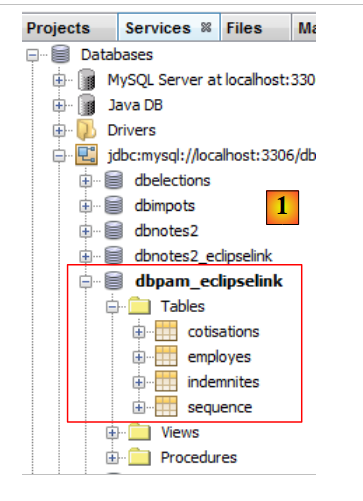 |
因此,基于相同的实体 JPA,实现 JPA、Hibernate 和 EclipseLink 生成的表并不相同。 在本文档的后续部分中,当使用的实现为 JPA 时:
- Hibernate,则使用数据库 [dbpam_hibernate];
- EclipseLink,则将使用数据库 [dbpam_eclipselink]。
5.6.3. 待完成的工作
按照之前的步骤,
- 创建并测试一个 [mv-pam-jpa-hibernate-oracle] 项目,该项目使用 JPA 的 Hibernate 实现和 SGBD 的 Oracle 实现,
- 创建并测试一个 [mv-pam-jpa-hibernate-mssql] 项目,该项目使用 JPA Hibernate 实现和 SGBD SQL 服务器,
- 创建并测试一个 [mv-pam-jpa-eclipselink-oracle] 项目,使用 JPA EclipseLink 实现以及 SGBD Oracle,
- 创建并测试一个 [mv-pam-jpa-eclipselink-mssql] 项目,使用 JPA、EclipseLink 实现以及 SGBD、SQL 服务器,
5.6.4. 延迟加载还是立即加载?
让我们回到对 [Employe] 实体的可能定义:
package jpa;
...
@Entity
@Table(name="EMPLOYES")
public class Employe implements Serializable {
@Id
@GeneratedValue(strategy = GenerationType.AUTO)
private Long id;
@Version
@Column(name="VERSION",nullable=false)
private int version;
@Column(name="SS", nullable=false, unique=true, length=15)
private String SS;
@Column(name="NOM", nullable=false, length=30)
private String nom;
@Column(name="PRENOM", nullable=false, length=20)
private String prenom;
@Column(name="ADRESSE", nullable=false, length=50)
private String adresse;
@Column(name="VILLE", nullable=false, length=30)
private String ville;
@Column(name="CP", nullable=false, length=5)
private String codePostal;
@ManyToOne(fetch= FetchType.LAZY)
@JoinColumn(name="INDEMNITE_ID",nullable=false)
private Indemnite indemnite;
...
}
第27至29行定义了表[EMPLOYES]指向表[INDEMNITES]的外键。 第27行的fetch属性定义了第29行中字段indemnite的检索策略。共有两种模式:
- FetchType.LAZY:当查询某位员工时,不会返回其对应的津贴。只有在首次引用字段 [Employe].indemnite 时,才会返回该津贴。
- FetchType.EAGER:当查询某位员工时,会返回其对应的津贴。若未指定模式,此为默认模式。
为理解选项 FetchType.LAZY 的作用,可参考以下示例。网页上显示一份不含津贴信息的员工列表,并附有链接 [Details]。点击该链接即可显示所选员工的津贴信息。由此可见:
- 显示第一页时,无需包含员工及其津贴信息。因此,模式 FetchType.LAZY 更为合适;
- 而要显示包含详细信息的第二页,则需向数据库发起额外查询以获取所选员工的津贴信息。
模式 FetchType.LAZY 可避免检索过多应用程序当前不需要的数据。让我们看一个示例。
复制项目 [mv-pam-jpa-hibernate]:
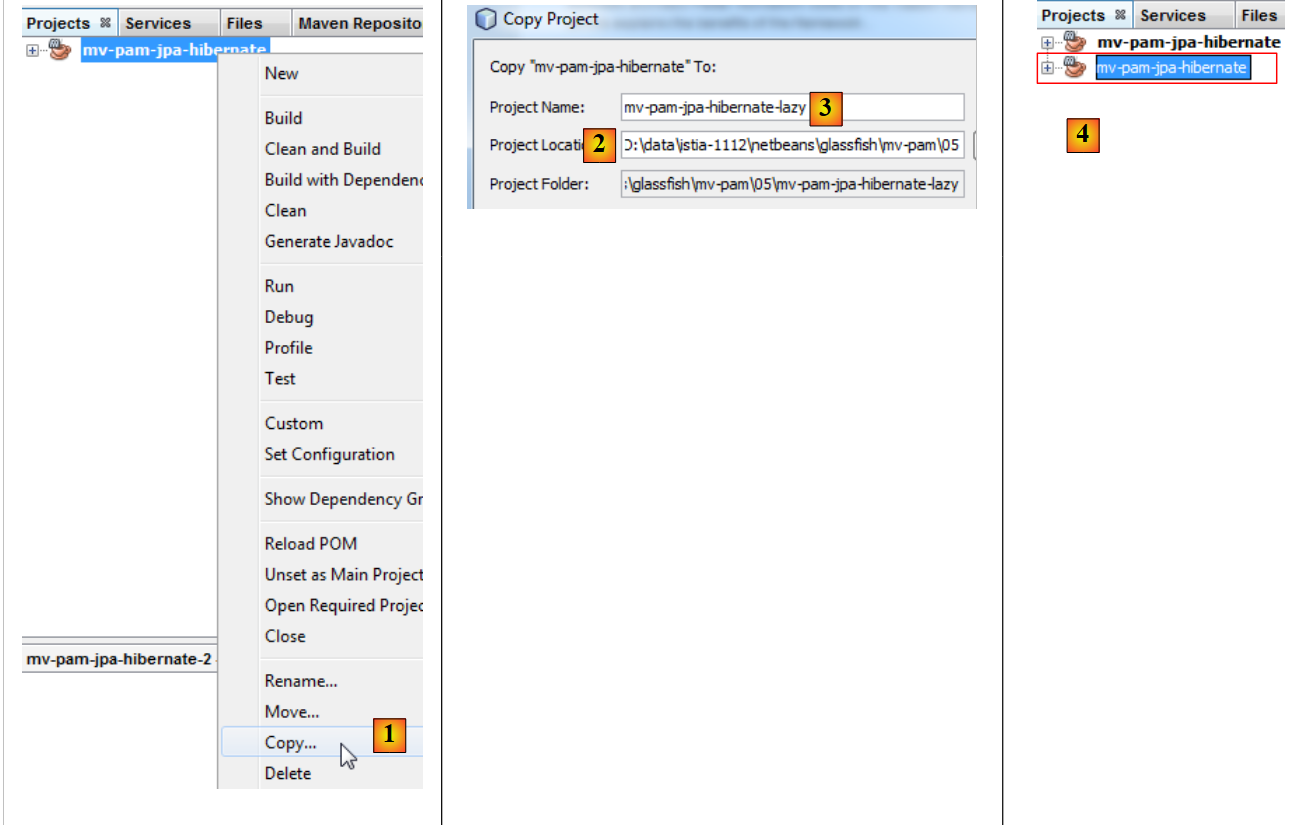 |
- 复制为 [1],
- 在 [2] 中,指定了复制的文件夹,而在 [3] 中指定了其名称,
- 在 [4] 中,新项目与旧项目名称相同。我们将此修改为:
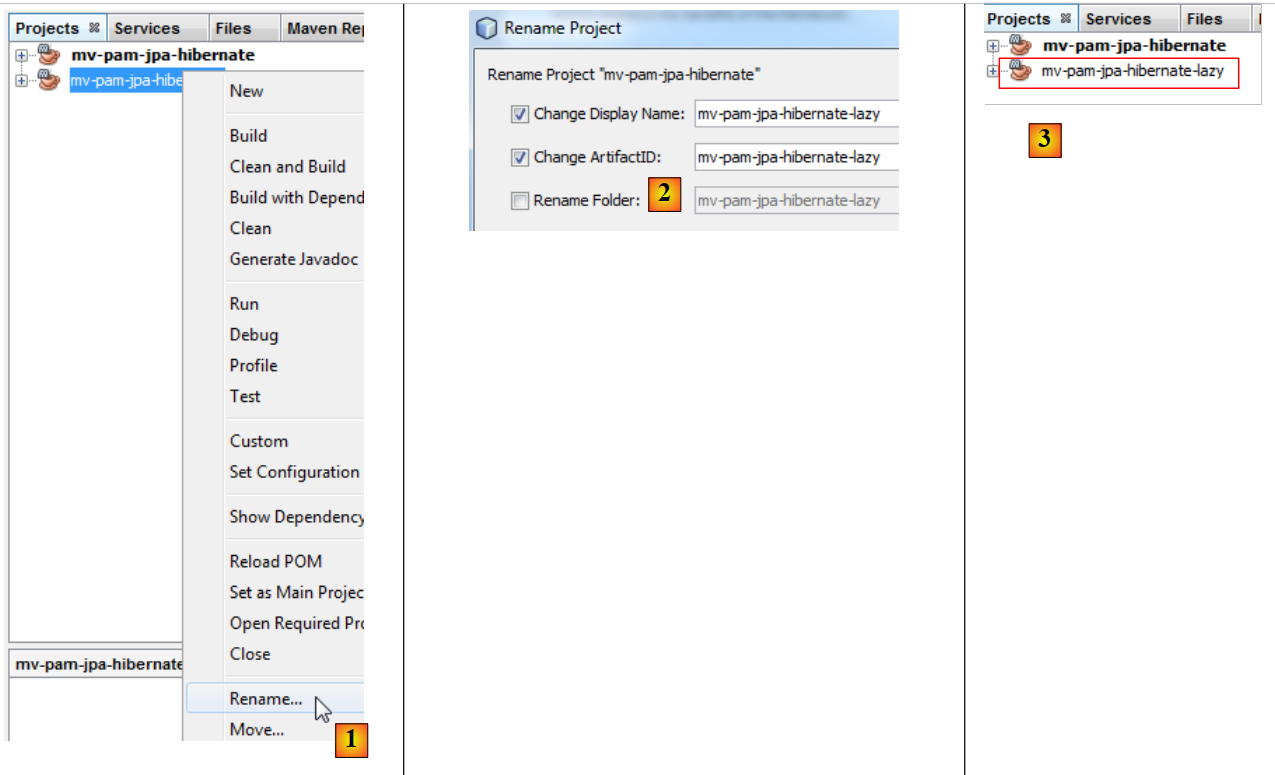 |
- 改为 [1],重命名项目,
- 将其重命名为 [2],并将项目及其 artifactId,
- 更名为 [3],即新项目。
我们将程序 [Main.java] 修改如下:
package main;
import java.util.List;
import javax.persistence.EntityManager;
import javax.persistence.EntityManagerFactory;
import javax.persistence.Persistence;
import jpa.Employe;
public class Main {
// 以下查询 JPQL 返回了一名员工
// 外键 [Employe].indemnite 位于 FetchType.LAZY
public static void main(String[] args) {
// 创建 Entity Manager 即可构建 JPA 层
EntityManagerFactory emf = Persistence.createEntityManagerFactory("pam-jpa-hibernatePU");
// 首次尝试
EntityManager em = emf.createEntityManager();
Employe employe = (Employe) em.createQuery("select e from Employe e where e.nom=:nom").setParameter("nom", "Jouveinal").getSingleResult();
em.close();
// 显示员工
try {
System.out.println(employe);
} catch (Exception ex) {
System.out.println(ex);
}
// 第二次尝试
em = emf.createEntityManager();
employe = (Employe) em.createQuery("select e from Employe e left join fetch e.indemnite where e.nom=:nom").setParameter("nom", "Jouveinal").getSingleResult();
// 释放资源
em.close();
// 显示员工
try {
System.out.println(employe);
} catch (Exception ex) {
System.out.println(ex);
}
// 释放资源
emf.close();
}
}
- 第15行:基于JPA层创建EntityManagerFactory,
- 第17行:生成EntityManager,该层用于与JPA层进行交互,
- 第18行:查询名为Jouveinal的员工,
- 第19行:关闭EntityManager。这将关闭持久化上下文。
- 第22行:显示接收到的员工信息。
类 [Employe] 如下:
package jpa;
...
@Entity
@Table(name="EMPLOYES")
public class Employe implements Serializable {
@Id
@GeneratedValue(strategy = GenerationType.AUTO)
private Long id;
@Version
@Column(name="VERSION",nullable=false)
private int version;
@Column(name="SS", nullable=false, unique=true, length=15)
private String SS;
@Column(name="NOM", nullable=false, length=30)
private String nom;
@Column(name="PRENOM", nullable=false, length=20)
private String prenom;
@Column(name="ADRESSE", nullable=false, length=50)
private String adresse;
@Column(name="VILLE", nullable=false, length=30)
private String ville;
@Column(name="CP", nullable=false, length=5)
private String codePostal;
@ManyToOne(fetch= FetchType.LAZY)
@JoinColumn(name="INDEMNITE_ID",nullable=false)
private Indemnite indemnite;
/**
* Returns a string representation of the object. This implementation constructs
* that representation based on the id fields.
* @return a string representation of the object.
*/
@Override
public String toString() {
return "jpa.Employe[id=" + getId()
+ ",version="+getVersion()
+",SS="+getSS()
+ ",nom="+getNom()
+ ",prenom="+getPrenom()
+ ",adresse="+getAdresse()
+",ville="+getVille()
+",code postal="+getCodePostal()
+",indice="+getIndemnite().getIndice()
+"]";
}
...
}
- 第27行:将字段indemnite恢复为LAZY模式,
- 第47行:使用字段indemnite。 如果在 indemnite 字段尚未被重置的情况下调用了 toString 方法,则该字段将在此时被重置。除非持久化上下文已被关闭,如示例中所示。
让我们回到 [Main] 的代码:
- 第 21-25 行:此处应会抛出异常。因为 toString 方法即将被调用。该方法将使用 indemnite 字段,系统将尝试查找该字段。 由于持久化上下文已被关闭,返回的 [Employe] 实体已不存在,因此引发异常。
- 第 27 行:创建一个新的 EntityManager,
- 第28行:查询员工Jouveinal,并在查询JPQL时显式指定其对应的津贴。此显式指定是必要的,因为该津贴的查询模式为LAZY,
- 第30行:关闭EntityManager,
- 第32-36行:重新显示该员工。此处不应出现异常。
要运行该项目,需要一个已填充的数据库。我们将按照第5.5节的步骤创建该数据库。此外,文件[persistence.xml]必须进行修改:
<?xml version="1.0" encoding="UTF-8"?>
<persistence version="2.0" xmlns="http://java.sun.com/xml/ns/persistence" xmlns:xsi="http://www.w3.org/2001/XMLSchema-instance" xsi:schemaLocation="http://java.sun.com/xml/ns/persistence http://java.sun.com/xml/ns/persistence/persistence_2_0.xsd">
<persistence-unit name="mv-pam-jpa-hibernatePU" transaction-type="RESOURCE_LOCAL">
<provider>org.hibernate.ejb.HibernatePersistence</provider>
<class>jpa.Cotisation</class>
<class>jpa.Employe</class>
<class>jpa.Indemnite</class>
<properties>
<property name="javax.persistence.jdbc.url" value="jdbc:mysql://localhost:3306/dbpam_hibernate"/>
<property name="javax.persistence.jdbc.password" value=""/>
<property name="javax.persistence.jdbc.driver" value="com.mysql.jdbc.Driver"/>
<property name="javax.persistence.jdbc.user" value="root"/>
<property name="hibernate.cache.provider_class" value="org.hibernate.cache.NoCacheProvider"/>
</properties>
</persistence-unit>
</persistence>
- 已移除了创建表的选项。此处数据库已存在且已填充数据,
- 我们移除了导致 Hibernate 记录其向数据库发送的 SQL 命令的选项。
运行该项目后,控制台将显示以下两条信息:
- 第 1 行:在会话已关闭的情况下尝试查询缺失的补偿金时发生的异常。可见,由于 LAZY 模式,该补偿金未被检索到;
- 第 2 行:通过绕过 LAZY 模式的查询获取的员工及其津贴。
5.6.5. 待办事项
按照与刚才类似的步骤,创建一个名为 [mv-pam-pa-eclipselink-lazy] 的项目,以展示 EclipseLink 在 LAZY 模式下的行为。
结果如下:
在 LAZY 模式下,这两条查询都将补偿金与员工关联在了一起。当我们在网上查询这一异常情况时,发现注释 [FetchType.LAZY](第 1 行):
@ManyToOne(fetch= FetchType.LAZY)
@JoinColumn(name="INDEMNITE_ID",nullable=false)
private Indemnite indemnite;
并非强制指令,而仅为建议。实现者JPA无需遵循该注释。 由此可见,代码有时会受所用实现 JPA 的影响。可以通过配置让 EclipseLink 呈现 LAZY 模式下的预期行为。
5.6.6. 后续说明
待构建应用程序的架构如下:
 |
在本文档的后续部分,我们将把 Maven 项目 [mv-pam-jpa-hibernate] 复制到项目 [mv-pam-spring-hibernate] 和 [1, 2, 3] 中:
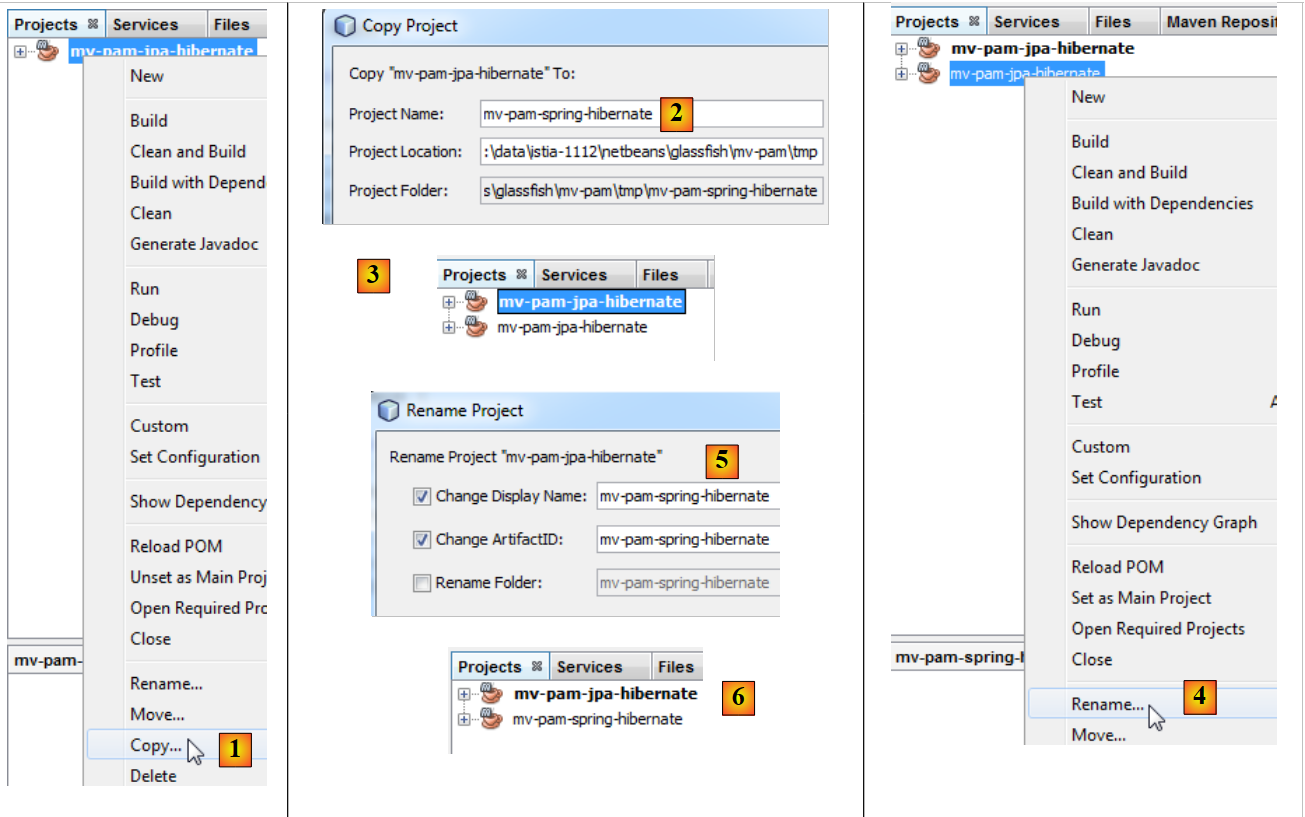 |
- 然后将新项目重命名为 [4, 5, 6]。
我们将修改新项目的依赖关系。文件 [pom.xml] 内容如下:
<project xmlns="http://maven.apache.org/POM/4.0.0" xmlns:xsi="http://www.w3.org/2001/XMLSchema-instance"
xsi:schemaLocation="http://maven.apache.org/POM/4.0.0 http://maven.apache.org/xsd/maven-4.0.0.xsd">
<modelVersion>4.0.0</modelVersion>
<groupId>istia.st</groupId>
<artifactId>mv-pam-spring-hibernate</artifactId>
<version>1.0-SNAPSHOT</version>
<packaging>jar</packaging>
<name>mv-pam-spring-hibernate</name>
<url>http://maven.apache.org</url>
<repositories>
<repository>
<url>http://repo1.maven.org/maven2/</url>
<id>swing-layout</id>
<layout>default</layout>
<name>Repository for library Library[swing-layout]</name>
</repository>
</repositories>
<properties>
<project.build.sourceEncoding>UTF-8</project.build.sourceEncoding>
</properties>
<dependencies>
<dependency>
<groupId>junit</groupId>
<artifactId>junit</artifactId>
<version>4.10</version>
<scope>test</scope>
<type>jar</type>
</dependency>
<dependency>
<groupId>commons-dbcp</groupId>
<artifactId>commons-dbcp</artifactId>
<version>1.2.2</version>
</dependency>
<dependency>
<groupId>commons-pool</groupId>
<artifactId>commons-pool</artifactId>
<version>1.6</version>
</dependency>
<dependency>
<groupId>org.springframework</groupId>
<artifactId>spring-tx</artifactId>
<version>3.1.1.RELEASE</version>
<type>jar</type>
</dependency>
<dependency>
<groupId>org.springframework</groupId>
<artifactId>spring-beans</artifactId>
<version>3.1.1.RELEASE</version>
<type>jar</type>
</dependency>
<dependency>
<groupId>org.springframework</groupId>
<artifactId>spring-context</artifactId>
<version>3.1.1.RELEASE</version>
<type>jar</type>
</dependency>
<dependency>
<groupId>org.springframework</groupId>
<artifactId>spring-orm</artifactId>
<version>3.1.1.RELEASE</version>
<type>jar</type>
</dependency>
<dependency>
<groupId>org.hibernate</groupId>
<artifactId>hibernate-entitymanager</artifactId>
<version>4.1.2</version>
<type>jar</type>
</dependency>
<dependency>
<groupId>mysql</groupId>
<artifactId>mysql-connector-java</artifactId>
<version>5.1.6</version>
</dependency>
<dependency>
<groupId>org.swinglabs</groupId>
<artifactId>swing-layout</artifactId>
<version>1.0.3</version>
</dependency>
</dependencies>
</project>
- 第25-31行:测试依赖项 JUnit,
- 第 32-41 行:Apache 连接池的依赖项 DBCP,
- 第 42-65 行:Spring 框架的依赖项,
- 第 67-71 行:JPA / Hibernate 实现的依赖项,
- 第 72-76 行:MySQL 的驱动程序 JDBC 的依赖项,
- 第 77-81 行:Swing 接口的依赖。当向项目中添加 Swing 接口时,NetBeans 会自动添加此依赖。
此外,还将根据脚本 [dbpam_hibernate.sql] 生成两个基础类 MySQL:
- [dbpam_hibernate] 由脚本 [dbpam_hibernate.sql] 生成,
- [dbpam_eclipselink] 由脚本 [dbpam_eclipselink.sql] 生成,
5.7. 是[metier]和[DAO]层面的接口
让我们回到应用程序的架构:
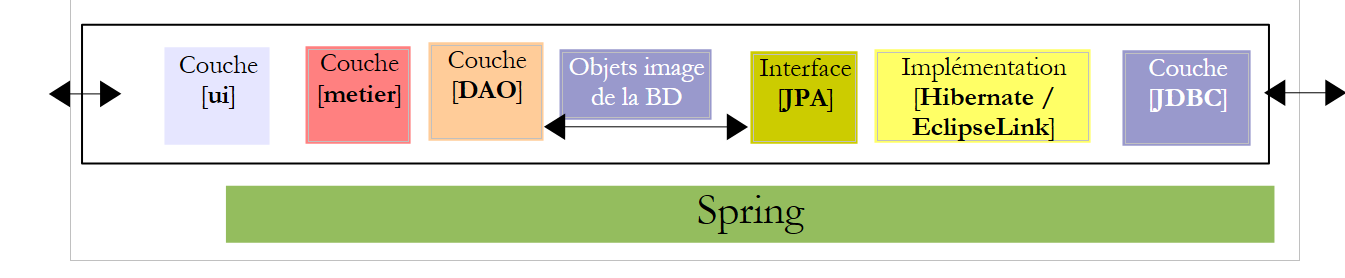 |
在上述架构中,[DAO]层应向[metier]层提供哪些接口?[metier]层又应向[ui]层提供哪些接口? 定义各层接口的一种初步方法是分析应用程序的不同用例(use cases)。在此,根据所选的用户界面(控制台或图形表单),我们有两种用例。
让我们来分析控制台应用程序的使用模式:
应用程序从用户处接收三项信息(参见上文第 1 行)
- 保姆的社会保险号
- 当月工作小时数
- 当月工作天数
基于这些信息以及配置文件中记录的其他信息,应用程序将显示以下内容:
- 第4-6行:输入的数值
- 第8-10行:与已提供社保号的员工相关的信息
- 第12-14行:各类社会保险费率
- 第16-17行:支付给保育员的各项津贴
- 第19-24行:保育员工资单的各项内容
[metier]层需向[ui]层提供以下信息:
- 通过社会保障号标识的保育员相关信息。这些信息存储在表 [EMPLOYES] 中。这使得可以显示第 6-8 行。
- 从毛工资中扣除的各类社会保险费率金额。这些信息存储在表 [COTISATIONS] 中。这使得可以显示第 10-12 行。
- 与保育员职务相关的各项津贴金额。这些信息存储在表 [INDEMNITES] 中。这使得可以显示第 14-15 行。
- 显示在第18-22行的工资构成要素。
据此,我们可以决定将[metier]层向[ui]层呈现的[IMetier]接口进行首次写入:
- 第 1 行:将 [metier] 层的元素放入 [metier] 包中
- 第 5 行:方法 [ calculerFeuilleSalaire ] 接收 [ui] 层获取的三个参数,并返回一个类型为 [FeuilleSalaire] 的对象,该对象包含 [ui] 层将在控制台上显示的信息。 类 [FeuilleSalaire] 可能如下所示:
- 第 9 行:工资单涉及的员工——由层 [ui] 显示的信息 1
- 第 10 行:各种缴费率——由层 [ui] 显示的信息 2
- 第 11 行:与员工指数相关的各项津贴——由层 [ui] 显示的信息 3
- 第 12 行:工资构成要素——由层 [ui] 显示的信息编号 4
图层 [métier] 的第二个用例出现在图形界面中:
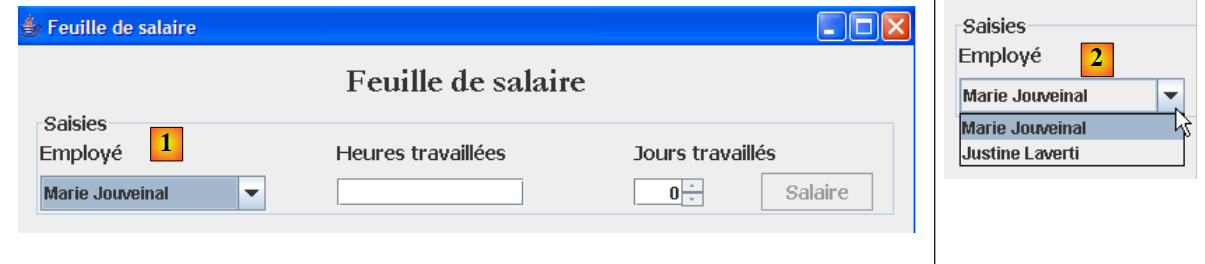 |
上图可见,下拉列表[1, 2]显示了所有员工。该列表需从层[métier]中获取。其对应接口 的实现随之发生如下变化:
- [10] 行:该方法将使 [ui] 层能够向 [métier] 层请求所有员工的列表。
[metier]层只能通过查询[DAO]层来初始化上述[FeuilleSalaire]对象的[Employe, Cotisation, Indemnite]字段,因为这些信息存储在数据库表中。 获取所有员工列表的情况也是如此。我们可以创建一个唯一的接口 [DAO] 来管理对三个实体 [Employe, Cotisation, Indemnite] 的访问。但在此我们决定为每个实体分别创建一个接口 [DAO]。
用于访问表 [COTISATIONS] 中实体 [Cotisation] 的接口 [DAO] 将如下所示:
- 第 6 行,接口 [ICotisationDao] 管理对实体 [Cotisation] 的访问,从而管理对数据库中表 [COTISATIONS] 的访问。 我们的应用程序仅需第16行中的[findAll]方法,该方法可用于检索[COTISATIONS]表中的全部内容。 此处我们希望处理一种更普遍的情况,即所有 CRUD 操作(创建、读取、更新、删除)都在该实体上执行。
- 第 8 行:方法 [create] 创建了一个新的实体 [Cotisation]
- 第 10 行:方法 [edit] 修改现有实体 [Cotisation]
- 第 12 行:方法 [destroy] 删除现有的实体 [Cotisation]
- 第 14 行:方法 [find] 允许通过其标识符 id 检索现有的 [Cotisation] 实体
- 第 16 行:方法 [findAll] 返回所有现有的 [Cotisation] 实体的列表
让我们重点关注方法 [create] 的签名:
方法 create 有一个类型为 Cotisation 的参数 cotisation。参数 cotisation 必须被持久化,c.a.d 此处存储在表 [COTISATIONS] 中。在此次持久化之前,参数 cotisation 具有标识符 id,但该标识符无值。 持久化后,字段 id 的值即为添加到表 [COTISATIONS] 中的记录的主键。 因此,参数 cotisation 是方法 create 的输入/输出参数。方法 create 似乎没有必要再将参数 cotisation 作为结果返回。 由于调用方法持有对象 [Cotisation cotisation] 的引用,因此如果该对象被修改,它可以通过该引用访问被修改的对象。 因此,它能够获知方法 create 为对象 [Cotisation cotisation] 的字段 id 赋予的值。因此,该方法的签名可以简化为:
编写接口时,需注意它可能在两个不同的上下文中使用: local 和 distant。 在 local 上下文中,调用方法和被调用方法在同一个 JVM 中执行:
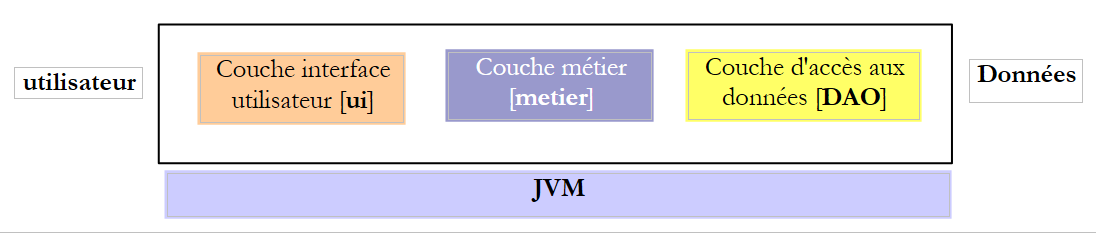 |
如果 [metier] 层调用 [DAO] 层中的 create 方法,那么它确实会在传递给该方法的 [Cotisation cotisation] 参数上保留一个引用。
在 distant 上下文中,调用方法和被调用方法是在不同的 JVM 中执行的:
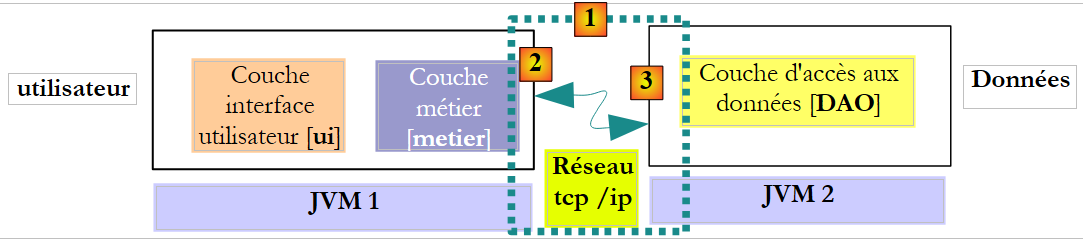 |
在上文中,[metier] 层在 JVM 1 中运行,而 [DAO] 层在 JVM 2 中运行,且位于两台不同的机器上。 这两个层之间并不直接通信。它们之间插入了一个称为 [1] 通信层的层。该层由一个发送层 [2] 和一个接收层 [3] 组成。 通常情况下,开发人员无需编写这些通信层。它们由软件工具自动生成。 [metier]层的编写方式,使其仿佛与[DAO]层在同一个JVM中运行。因此无需修改代码。
[metier]层与[DAO]层之间的通信机制如下:
- [metier]层调用[DAO]层的create方法,并向其传递参数[Cotisation cotisation1]
- 该参数实际上被传递给了发送层 [2]。该层将通过网络传输参数 cotisation1 的值,而非其引用。该值的具体形式取决于所使用的通信协议。
- 接收层 [3] 将获取该值,并据此重建一个 [Cotisation cotisation2] 对象,该对象是 [metier] 层发送的初始参数的镜像。 现在,我们在两个不同的 JVM 中拥有两个(就内容而言)相同的对象:cotisation1 和 cotisation2。
- 接收层将对象 cotisation2 传递给 [DAO] 层的 create 方法,该方法将该对象持久化到数据库中。 此操作完成后,对象 cotisation2 的字段 id 已被初始化为添加到表 [COTISATIONS] 中的记录的主键。 但对于对象 cotisation1 并非如此,因为层 [metier] 引用了该对象。 如果希望 [metier] 层引用 cotisation2 对象,则必须将其发送给该层。 因此,我们需要修改 [DAO] 层中 create 方法的签名:
- 采用此新签名后,方法 create 将返回持久化对象 cotisation2。该结果将返回给调用 [DAO] 层的接收层 [3]。 该接收层将 cotisation2 的值(而非引用)返回给发送层 [2]。
- 发送层 [2] 将获取该值,并据此重建一个 [Cotisation cotisation3] 对象,该对象是 [DAO] 层中 create 方法返回结果的映射。
- 对象 [Cotisation cotisation3] 被传递给 [metier] 层的方法,而正是该层对 [DAO] 层中 create 方法的调用,启动了整个机制。 因此,[metier]层可以得知其请求持久化的[Cotisation cotisation1]对象的主键值:即cotisation3中id字段的值。
上述架构并非最常见的形式。更常见的是在同一个 JVM 中包含 [metier] 和 [DAO] 这两个层:
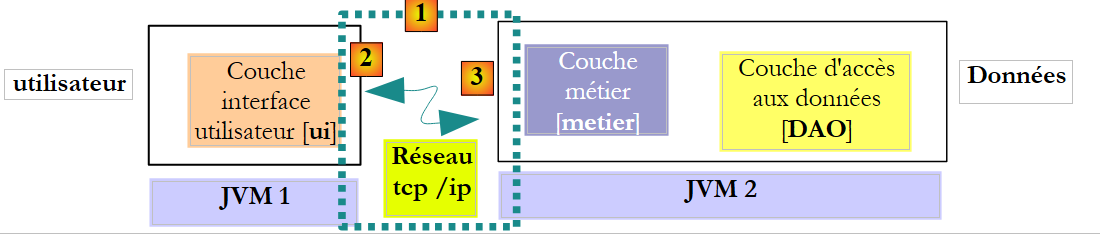 |
在此架构中,应由 [metier] 层的方法返回结果,而非 [DAO] 层的方法。然而,[DAO] 层中 create 方法的签名如下:
使我们无需对实际部署的架构做出任何假设。使用无论采用何种架构(本地或远程)都能正常运行的签名,意味着当被调用方法修改其某些参数时:
- 这些参数也必须作为被调用方法的返回结果
- 调用方必须使用被调用方法的返回值,而非其传递给被调用方法的、已被修改的参数引用。
这样,我们便能够在不修改代码的情况下,从 locale 架构平滑过渡到 distante 架构。基于此,让我们重新审视 [ICotisationDao] 接口:
- 第 8 行:已处理方法 create 的情况
- 第 10 行:方法 edit 使用其参数 [Cotisation cotisation1] 来更新表 [COTISATIONS] 中与对象 cotisation 具有相同主键的记录。 该方法返回对象 cotisation2,即修改后记录的映像。 参数 cotisation1 则保持不变。无论是在 distante 还是 locale 架构下,该方法都应返回 cotisation2 作为结果。
- 第 12 行:方法 destroy 会删除表 [COTISATIONS] 中与作为参数传递的对象 cotisation 具有相同主键的记录。该对象未被修改,因此无需返回。
- 第 14 行:方法 find 的参数 id 未被该方法修改。因此,它无需包含在结果中。
- 第 16 行:方法 findAll 没有参数。因此无需对其进行分析。
最终,仅需调整方法 create 的签名,使其可在 distante 架构中使用。上述推理同样适用于其他 [DAO] 接口。 我们不再赘述,而是直接采用既适用于 distante 架构,也适用于 locale 架构的签名。
用于访问表 [INDEMNITES] 中实体 [Indemnite] 的接口 [DAO] 如下所示:
- 第6行,接口[IIndemniteDao]负责管理对实体[Indemnite]的访问,从而也管理对数据库中表[INDEMNITES]的访问。 我们的应用程序仅需第16行的[findAll]方法,该方法可用于检索[INDEMNITES]表中的全部内容。 此处我们希望处理一种更普遍的情况,即所有 CRUD 操作(创建、读取、更新、删除)都在该实体上执行。
- 第 8 行:方法 [create] 创建了一个新的实体 [Indemnite]
- 第 10 行:方法 [edit] 修改现有实体 [Indemnite]
- 第 12 行:方法 [destroy] 删除现有实体 [Indemnite]
- 第 14 行:方法 [find] 允许通过其标识符 id 检索现有实体 [Indemnite]
- 第 16 行:方法 [findAll] 返回所有现有 [Indemnite] 实体的列表
用于访问表 [EMPLOYES] 中 [Employe] 实体的接口 [DAO] 将如下所示:
- 第 6 行,接口 [IEmployeDao] 管理对实体 [Employe] 的访问,从而管理对数据库中表 [EMPLOYES] 的访问。 我们的应用程序仅需第16行中的方法 [findAll],该方法可用于检索表 [EMPLOYES] 的全部内容。 此处我们希望处理一种更普遍的情况,即所有 CRUD 操作(创建、读取、更新、删除)都在该实体上执行。
- 第 8 行:方法 [create] 创建了一个新的实体 [Employe]
- 第 10 行:方法 [edit] 修改现有实体 [Employe]
- 第 12 行:方法 [destroy] 删除现有实体 [Employe]
- 第 14 行:方法 [find] 允许通过其标识符 id 查找现有实体 [Employe]
- 第 16 行:方法 [find(String SS)] 允许通过其编号 SS 检索现有的 [Employe] 实体。我们已经看到,该方法对于控制台应用程序是必要的。
- 第 18 行:方法 [findAll] 返回一个包含所有现有 [Employe] 实体的列表。我们已经看到,该方法对于图形应用程序是必需的。
5.8. [PamException] 类
[DAO] 层将与 Java 中的 API 和 JDBC 协同工作。 该 API 会抛出 [SQLException] 类型的受控异常,这存在两个缺点:
- 它们增加了代码负担,因为必须使用 try/catch 语句来处理这些异常。
- 必须在 [IDao] 接口的方法签名中通过 "throws SQLException" 进行声明。 这导致无法由会抛出与 [SQLException] 类型不同的受控异常的类来实现该接口。
为解决此问题,[DAO] 层将仅“向上传递”类型为 [PamException] 的非受控异常。
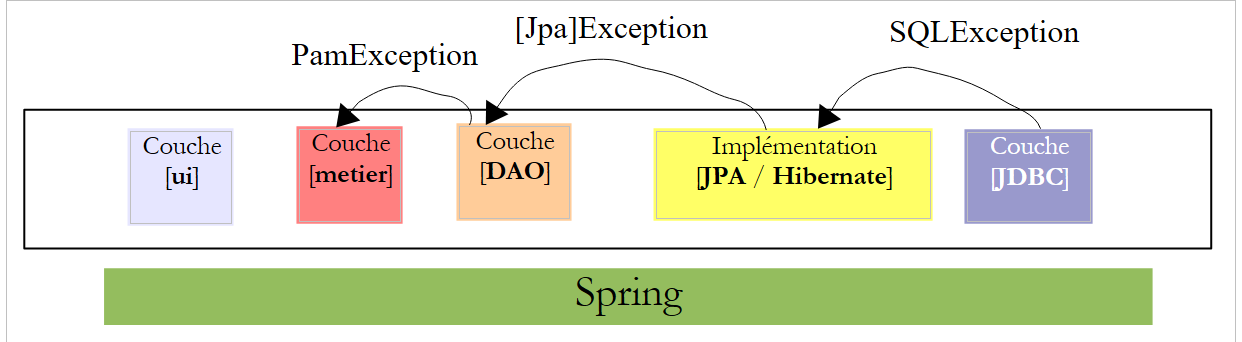 |
- [JDBC] 层抛出类型为 [SQLException] 的异常
- [JPA] 层会抛出与所用 JPA 实现相关的异常
- [DAO] 层抛出未受控的 [PamException] 类型异常
这会产生两个后果:
- [metier] 层无需使用 try/catch 语句来处理 [DAO] 层的异常。它可以直接让异常向上传播至 [ui] 层。
- [IDao] 接口的方法无需在其签名中指定 [PamException] 异常的类型,这使得可以通过抛出其他类型未受控异常的类来实现该接口。
类 [PamException] 将放置在 NetBeans 项目的 [exception] 包中:
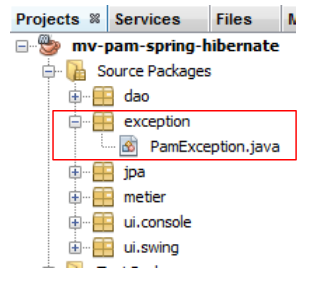 |
其代码如下:
- 第 4 行:[PamException] 继承自 [RuntimeException]。 因此,这是一种编译器不强制我们通过 try/catch 进行处理,也不要求在方法签名中声明的异常类型。正因如此,[PamException] 并未出现在接口 [IDao] 的方法签名中。 这使得该接口可以由抛出其他类型异常的类来实现,前提是该类也继承自 [RuntimeException]。
- 为了区分可能发生的错误,我们使用第 7 行中的错误代码。第 14、19 和 24 行中的三个构造函数是父类 [RuntimeException] 的构造函数,我们向其中添加了一个参数:即要赋予该异常的错误代码。
从异常处理的角度来看,应用程序的工作原理如下:
- [DAO]层将把遇到的所有异常封装为[PamException]类型的异常,并将其抛给[métier]层。
- [métier]层将允许[DAO]层抛出的异常向上传播。 它将 [métier] 层中发生的任何异常封装为 [PamException] 类型的异常,并将其抛给 [ui] 层。
- [ui] 层拦截来自 [métier] 和 [DAO] 层的所有上行异常。它仅需将异常显示在控制台或图形界面中。
现在让我们依次查看 [DAO] 和 [metier] 层的实现。
5.9. 应用程序 [PAM] 中的 [DAO] 层
我们处于以下架构框架中:
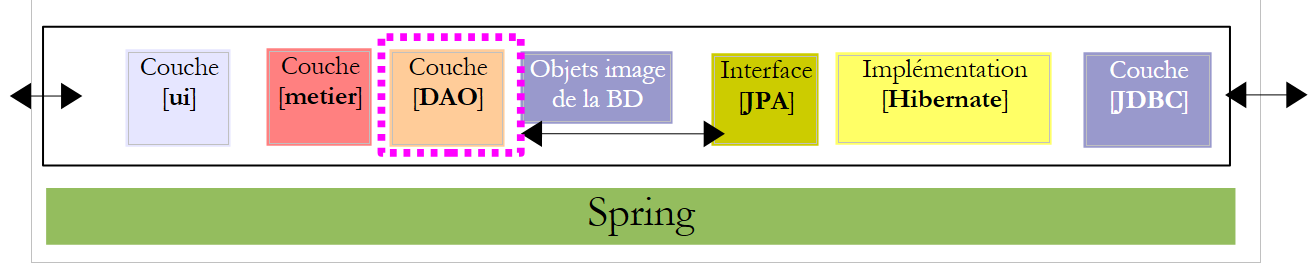 |
5.9.1. 实现
推荐阅读:[ref1] 的第 3.1.3 节
问题:利用 Spring / JPA 集成,编写实现 [ICotisationDao, IIndemniteDao, IEmployeDao] 接口的 [CotisationDao, IndemniteDao, EmployeDao] 类。 每个类的方法都将捕获可能发生的异常,并将其封装为类型为 [PamException] 的异常,同时包含针对该捕获异常的特定错误代码。
这些实现类将属于 [dao] 包:
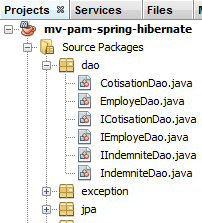 |
5.9.2. 配置
推荐阅读:[ref1] 的第 3.1.5 节
DAO / JPA 的集成由 Spring 文件 [spring-config-dao.xml] 和文件 JPA [persistence.xml] 进行配置:
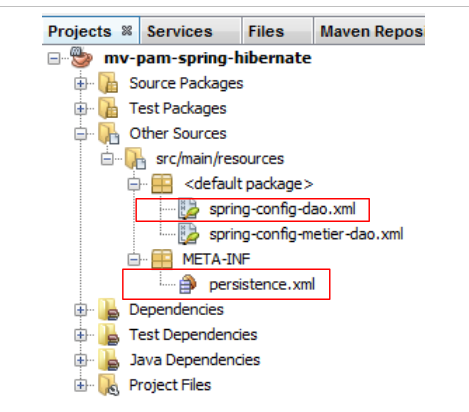 |
问题:请写出这两个文件的内容。假设所使用的数据库是由脚本 SQL [dbpam_hibernate.sql] 生成的 MySQL5 [dbpam_hibernate] 数据库。 Spring 文件将定义以下三个 Bean:类型为 EmployeDao 的 employeDao、类型为 IndemniteDao 的 indemniteDao, 类型为 CotisationDao 的 cotisationDao。此外,将使用的 JPA 实现为 Hibernate。
5.9.3. 测试
推荐阅读:[ref1] 的第 3.1.6 和 3.1.7 节
现在 [DAO] 层已编写并配置完毕,我们可以对其进行测试。测试架构如下:
 |
5.9.4. InitDB
我们将为 [DAO] 层创建两个测试程序。 这些程序将放置在 NetBeans 项目中 [Test Packages] [1] 分支下的 [dao] [2] 包中。 该分支未包含在由选项 [Build project] 生成的项目中,这确保了我们放置在其中的测试程序不会被包含在项目的最终 .jar 文件中。
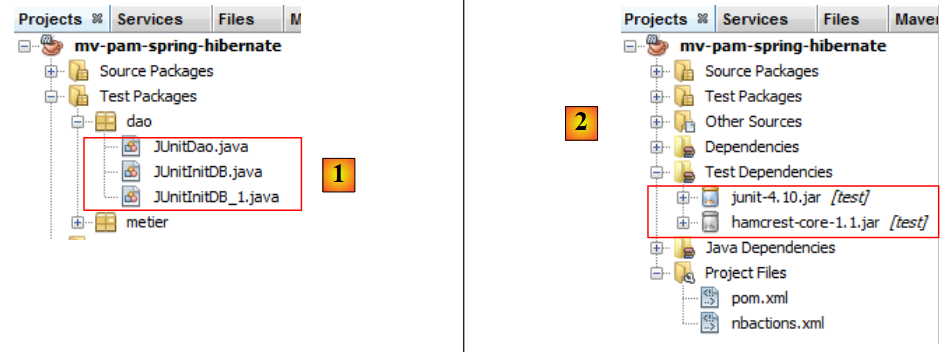 |
放置在 [Test Packages] 分支中的类可以访问 [Source Packages] 分支中的类以及项目中的类库。 如果测试需要项目以外的库,则必须在分支 [Test Libraries] [2] 中声明这些库。
测试类使用单元测试工具 JUnit:
- [JUnitInitDB] 不执行任何测试。它向数据库中插入若干记录,然后在控制台上显示这些记录。
- [JUnitDao] 执行一系列测试并验证结果。
[JUnitInitDB] 类的框架如下:
- 在测试系列开始前会执行方法 [init](注解 @BeforeClass)。该方法会实例化 [DAO] 层。
- 方法 [clean] 在每次测试之前执行(注解 @Before)。它清空数据库。
- 方法 [initDB] 是一个测试(注解 @Test)。这是唯一的测试。一个测试必须包含 Assert.assertCondition 断言语句。但此处不会包含任何断言语句。 因此,该方法是一个伪测试。其作用是向数据库中插入几行数据,然后在控制台上显示数据库的内容。这里使用的是 [DAO] 层中的 create 和 findAll 方法。
问题:完善类 [JUnitInitDB] 的代码。可参考 [ref1] 第 3.1.6 节中的示例。生成的代码将呈现第 5.1 节中的内容。
5.9.5. 的测试实施
现在我们可以运行 [InitDB] 了。我们将以 SGBD 和 MySQL5 为例说明操作步骤:
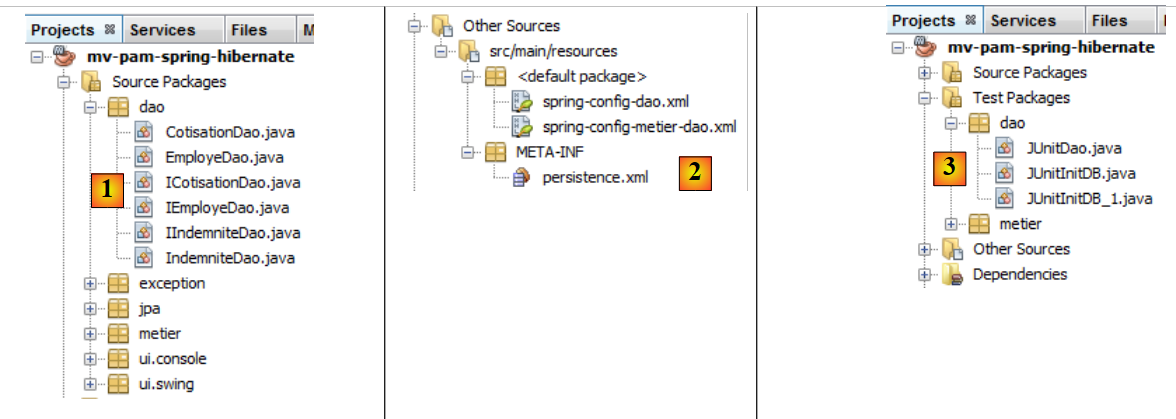 |
- [1]类、[2]配置文件以及[DAO]和[3]测试类已部署完毕,
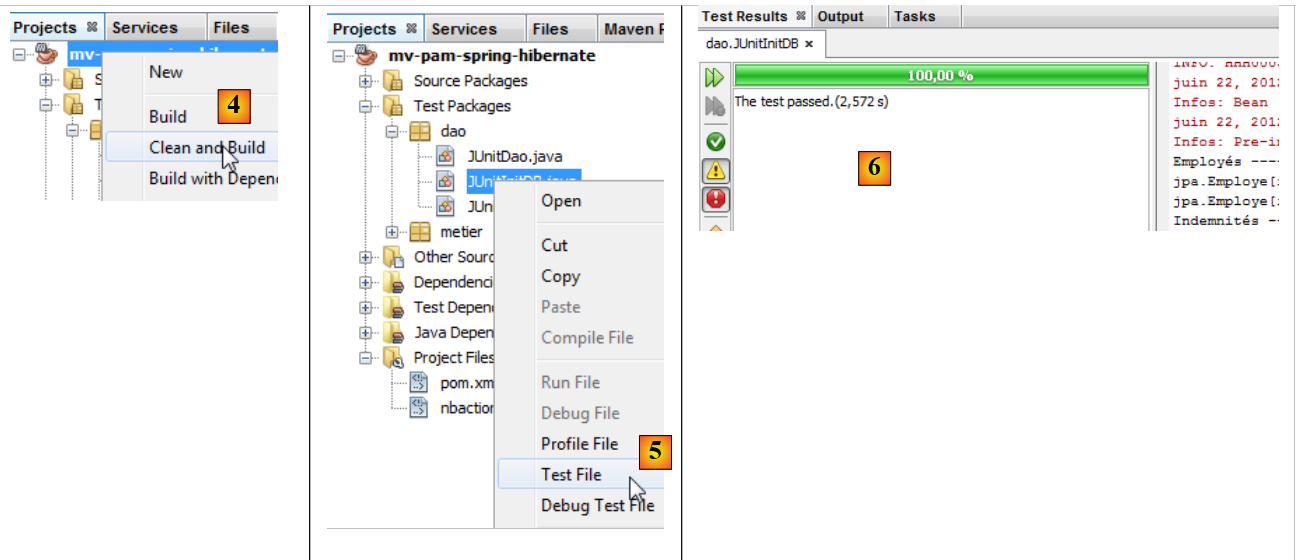 |
- 构建项目 [4]
- 执行类 [JUnitInitDB] [5]。基于现有数据库 [dbpam_hibernate] 启动 SGBD MySQL5,
- [Test Results] 和 [6] 窗口显示测试已成功。 此消息在此处并不重要,因为程序 [JUnitInitDB] 中不包含任何可能导致测试失败的断言指令 Assert.assertCondition。尽管如此,这表明测试执行过程中未发生异常。
[Output]窗口包含运行日志、Spring日志以及测试本身的日志。[JUnitInitDB]类输出的内容如下:
[EMPLOYES, INDEMNITES, COTISATIONS]表已填充数据。可通过NetBeans连接至[dbpam_hibernate]数据库进行验证。
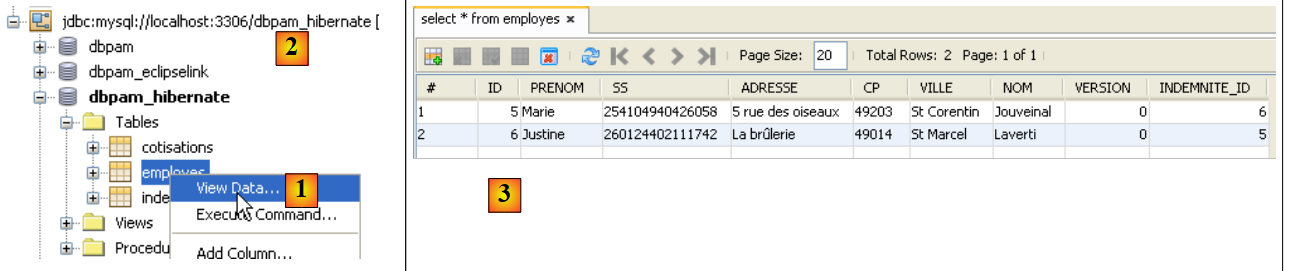 |
- 在 [1] 的 [services] 选项卡中,显示了连接 [dbpam_hibernate] [2] 中的 [employes] 表的数据,
- 在 [3] 中显示结果。
5.9.6. JUnitDao
现在我们关注第二类测试 [JUnitDao]:
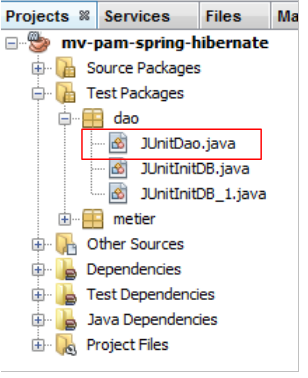 |
该类的框架如下:
1 2 3 4 5 6 7 8 9 10 11 12 13 14 15 16 17 18 19 20 21 22 23 24 25 26 27 28 29 30 31 32 33 34 35 36 37 38 39 40 41 42 43 44 45 46 47 48 49 50 51 52 53 54 55 56 57 58 59 60 61 62 63 64 65 66 67 68 69 70 71 72 73 74 75 76 77 78 79 80 81 82 83 84 85 86 87 88 89 90 91 92 93 94 95 96 97 98 99 100 101 102 103 104 105 106 107 108 109 110 111 112 113 114 115 116 117 118 119 120 121 122 123 124 125 126 127 128 129 130 131 132 133 134 135 136 137 138 139 140 141 142 143 144 145 146 147 148 149 150 151 152 153 154 155 156 157 158 159 160 161 162 163 164 165 166 167 168 169 170 171 172 173 174 175 176 177 178 179 180 181 182 183 184 185 186 187 | |
在之前的测试类中,每次测试前都会清空数据库。
问题:编写以下方法:
1 - test02:参考 test01 编写
2 - test03:某员工有一个字段类型为 Indemnite。因此需要创建实体 Indemnite 和实体 Employe
3 - test04.
按照与测试类 [JUnitInitDB] 相同的方法操作,可得到以下结果:
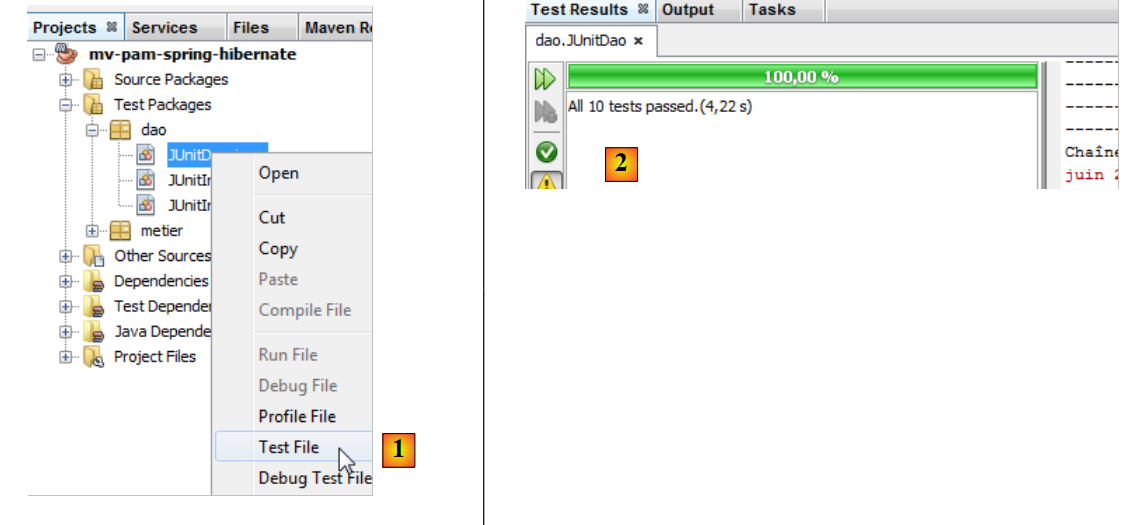 |
- 在 [1] 中,执行测试类
- 在 [2] 中,测试结果显示在 [Test Results] 窗口中
让我们引发一个错误,看看结果页面中是如何报告的:
第 13 行,由于 Csgrds 的值为 3.49(第 8 行),断言将引发错误。执行测试类后得到以下结果:
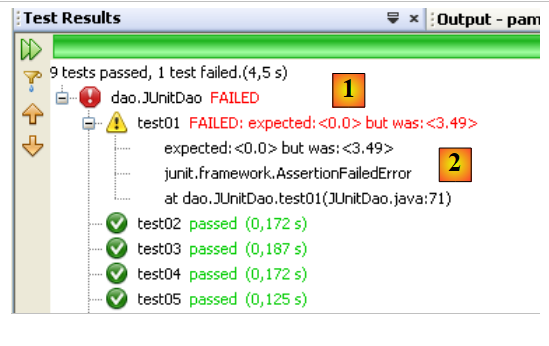 |
- 结果页面 [1] 现在显示有测试未通过。
- 在 [2] 中,显示了导致测试失败的异常摘要。其中包含发生异常的 Java 代码行号。
5.10. 应用程序 [PAM] 的 [metier] 层
现在 [DAO] 层已经编写完成,我们将转而研究业务层 [2]:
 |
5.10.1. Java 接口 [IMetier]
该接口已在第 5.7 节中描述。现将其内容重述如下:
[metier] 层的实现将位于 [metier] 包中:
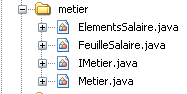 |
[metier] 包除包含 [IMetier] 接口及其实现 [Metier] 外, 另外两个类:[FeuilleSalaire] 和 [ElementsSalaire]。[FeuilleSalaire] 类已在第 5.7 节中简要介绍过。现在我们再次讨论它。
5.10.2. 类 [FeuilleSalaire]
接口 [IMetier] 中的方法 [calculerFeuilleSalaire] 返回一个类型为 [FeuilleSalaire] 的对象,该对象表示工资单中的各个元素。其定义如下:
- 第 7 行:该类实现了 Serializable 接口,因为其实例可能会在网络上进行交换。
- 第 9 行:与工资单相关的员工
- 第10行:各种缴费率
- 第 11 行:与员工指数相关的各项津贴
- 第12行:其工资的构成要素
- 第 14-22 行:该类的两个构造函数
- 第25-27行:标识特定对象[FeuilleSalaire]的方法[toString]
- 第29行及之后:类私有字段的公共访问器
上文第11行中引用的类[ElementsSalaire],汇总了构成工资单的各项要素。其定义如下:
- 第3行:该类实现了接口Serializable,因为它是类FeuilleSalaire的组成部分,而该类必须可序列化。
- 第 6 行:基本工资
- 第 7 行:基于该基本工资缴纳的社会保险费
- 第 8 行:子女抚养津贴
- 第 9 行:儿童每日伙食补贴
- 第 10 行:应支付给保育员的净工资
- 第12-24行:类构造器
- 第27-31行:标识特定对象[ElementsSalaire]的方法[toString]
- 第34行及之后:类私有字段的公共访问器
5.10.3. [metier] 层的实现类 [Metier]
[metier] 层的实现类 [Metier] 可能如下所示:
- 第 5 行:Spring 的 @Transactional 注解确保该类的每个方法都在事务中执行。
- 第 9-10 行:对 [Cotisation, Employe, Indemnite] 实体的引用位于 [DAO] 层
- 第14-17行:方法 [calculerFeuilleSalaire]
- 第 20-22 行:方法 [findAllEmployes]
- 第24行及之后:该类私有字段的公共访问器
问题:编写方法 [findAllEmployes] 的代码。
问题:编写方法 [calculerFeuilleSalaire] 的代码。
需注意以下几点:
- 薪资计算方式已在第5.2节中说明。
- 如果参数 [SS] 不对应任何员工(层 [DAO] 返回了指针 null), 该方法将抛出类型为 [PamException] 的异常,并附带相应的错误代码。
5.10.4. [metier] 层的测试
我们创建两个测试程序:
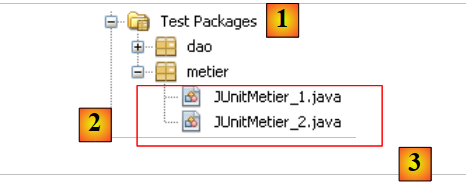 |
测试类 [3] 创建在项目分支 [Test Packages] [1] 下的包 [metier] [2] 中。
[JUnitMetier_1] 类可能如下所示:
该类中没有 Assert.assertCondition 断言。我们只是想计算一些工资,以便随后手动进行验证。执行上述类后得到的屏幕显示如下:
- 第 4 行:Justine Laverti 的工资单
- 第 5 行:玛丽·朱维纳尔的工资单
- 第6行:由于编号为SS的员工“xx”不存在,因此抛出异常。
问题:[JUnitMetier_1] 的第 17 行使用了名为 metier 的 Spring Bean。请给出该 Bean 在文件 [spring-config-metier-dao.xml] 中的定义。
类 [JUnitMetier_2] 可能如下所示:
类 [JUnitMetier_2] 是类 [JUnitMetier_1] 的副本,只不过这次在方法 test01 中添加了断言。
问题:编写方法 test01。
在执行类 [JUnitMetier_2] 时,如果一切正常,将得到以下结果:
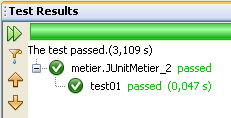
5.11. 应用程序 [PAM] 的 [ui] 层 – 版本 控制台
现在 [metier] 层已编写完成,接下来我们需要编写 [ui] 和 [1] 层:
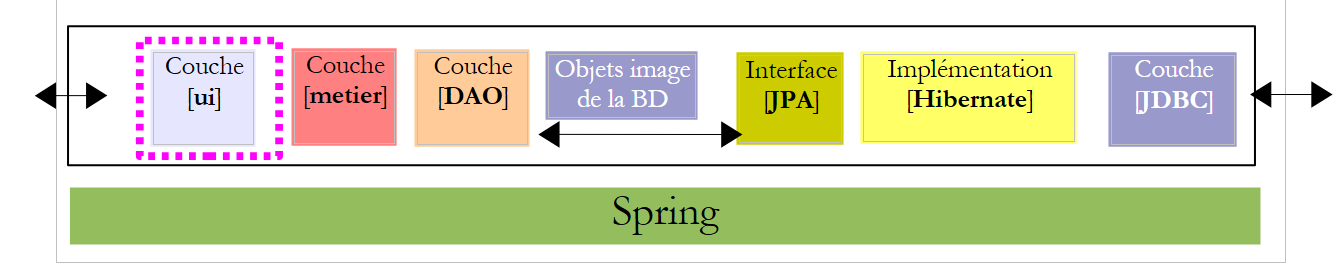 |
我们将为 [ui] 层创建两个不同的实现:一个是 console 版本,另一个是图形化版本 swing:
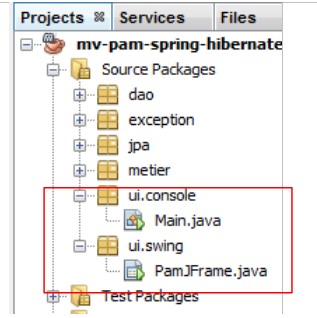 |
5.11.1. 类 [ui.console.Main]
首先,我们关注由上述 [ui.console.Main] 类实现的控制台应用程序。其工作原理已在第 5.3 节中描述。[Main] 类的框架可能如下所示:
问题:请补充上述代码。
5.11.2. 执行
要执行类 [ui.console.Main],请按以下步骤操作:
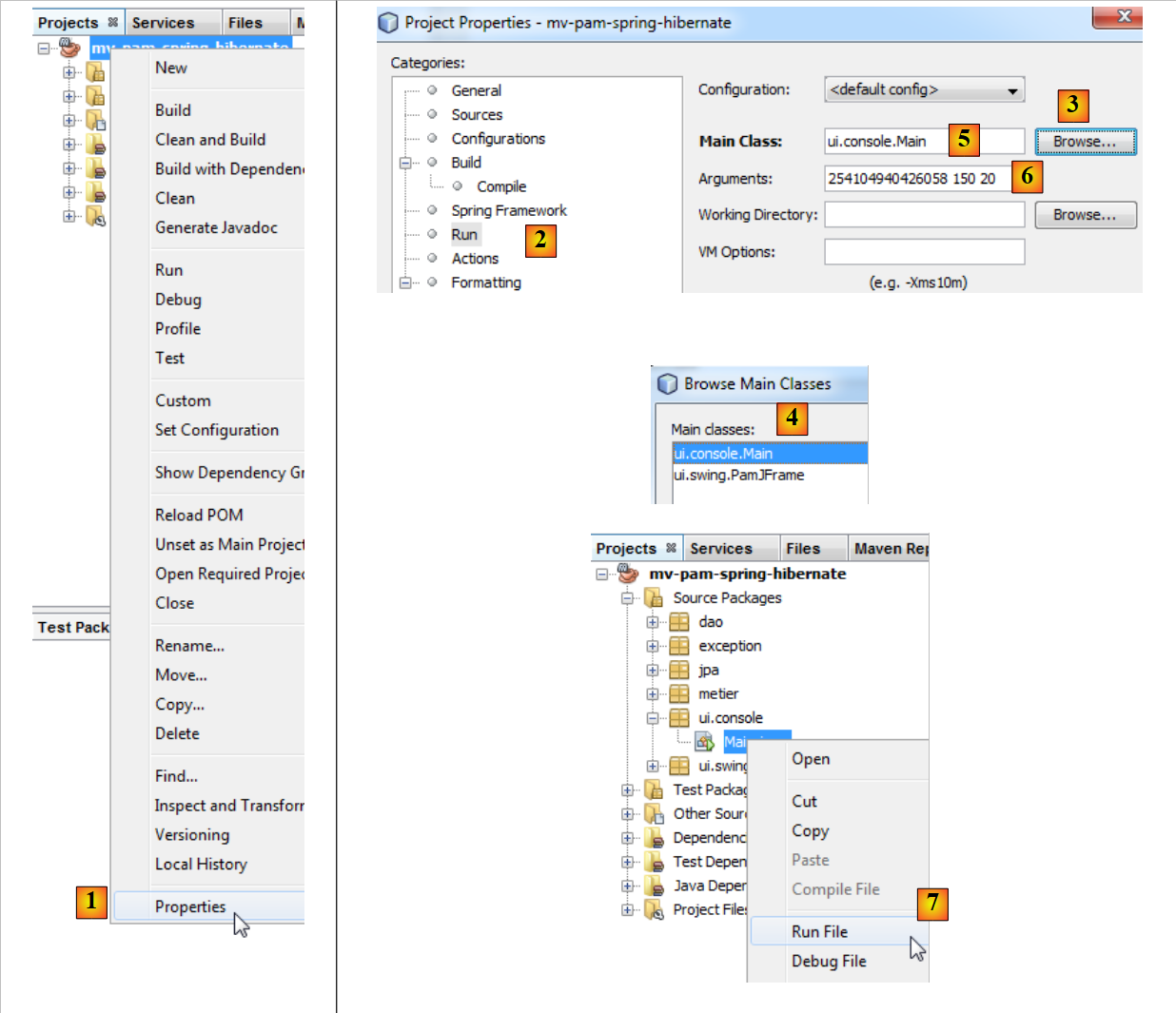 |
- 在 [1] 中,选择项目属性,
- 在 [2] 中,选择项目的 [Run] 属性,
- 使用按钮 [3] 指定要执行的类(即主类),
- 选择类 [4],
- 该类将显示在 [5] 中。该类需要三个参数才能运行(编号 SS、工作小时数、工作日数)。这些参数被放置在 [6] 中,
- 完成上述操作后,即可执行项目 [7]。根据上述配置,将执行类 [ui.console.Main]。
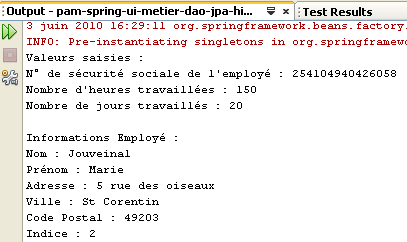
执行结果显示在窗口 [output] 中:
 |  |
5.12. 应用程序 [PAM] 的 [ui] 层 – 图形化版本
现在,我们将为 [ui] 层实现图形化界面:
 |
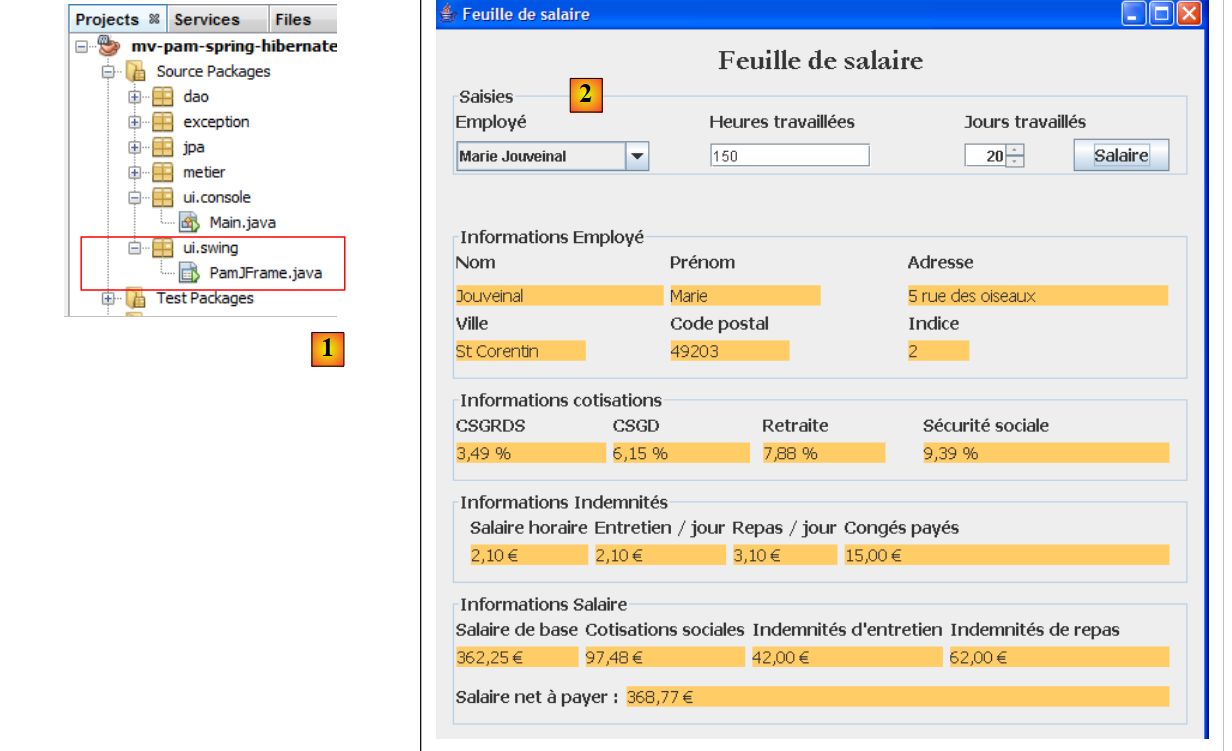 |
- 在 [1] 中,图形界面的 [PamJFrame] 类
- 转换为 [2]:图形用户界面
5.12.1. 快速教程
要创建图形用户界面,可以按照以下步骤操作:
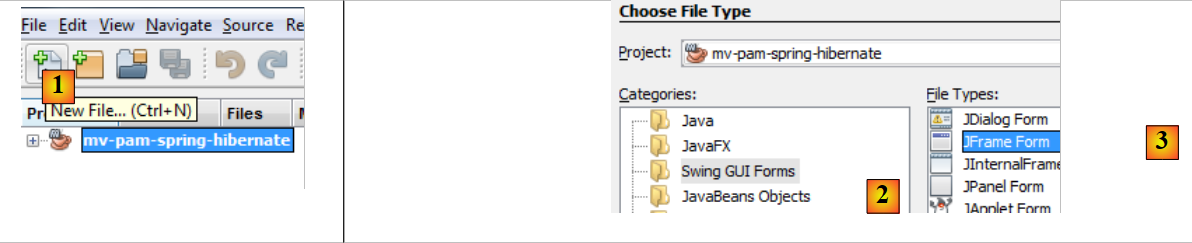 |
- [1]:使用按钮创建新文件 [1] [New File...]
- [2]:选择文件类别 [Swing GUI Forms]、c.a.d。图形表单
- [3]:选择类型 [JFrame Form],即空表单类型
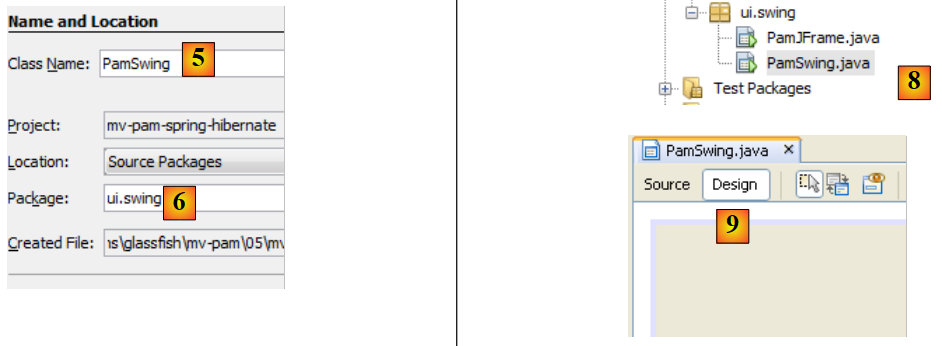 |
- [5]:为表单命名,该名称也将作为类名
- [6]:将表单放置到包中
- [8]:表单被添加到项目树中
- [9]: 可以通过两个视图访问表单:[Design] [9](用于绘制表单的各个组件),以及 [Source] [10 ci-dessous](用于访问表单的 Java 代码)。 归根结底,表单与其他Java类并无二致。[Design]视图是用于绘制表单的辅助工具。每当在[Design]模式下添加组件时,系统都会在[Source]视图中自动生成相应的Java代码以实现该组件的功能。
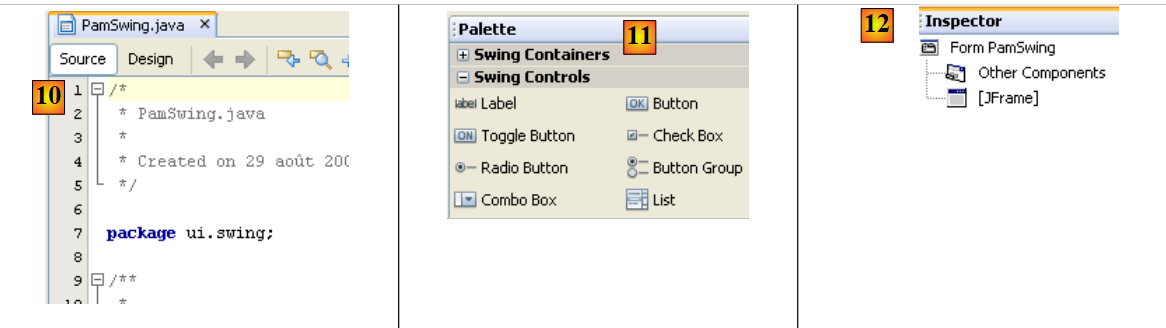 |
- [11]:表单可用的 Swing 组件列表位于 [Palette] 窗口中。
- [12]:[Inspector] 窗口显示表单组件的树形结构。具有可视化表示的组件位于 [JFrame] 分支中,其余组件位于 [Other Components] 分支中。
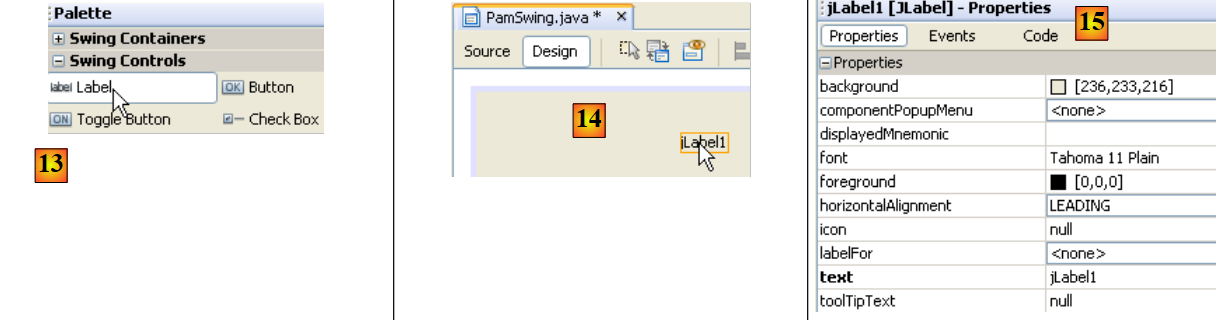 |
- 在 [13] 中,我们通过单击选择一个 [JLabel] 组件
- 在 [14] 中,将其拖放到表单上,进入 [Design] 模式
- 在 [15] 中,我们定义 JLabel 的属性(文本、字体)。
 |
- 在 [16] 中,显示最终结果。
- 在 [17] 中,请求表单预览
- 在 [18] 中,显示结果
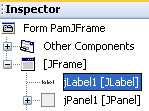
- 在 [19] 中,标签 [JLabel1] 已添加到窗口 [Inspector] 中的组件树中
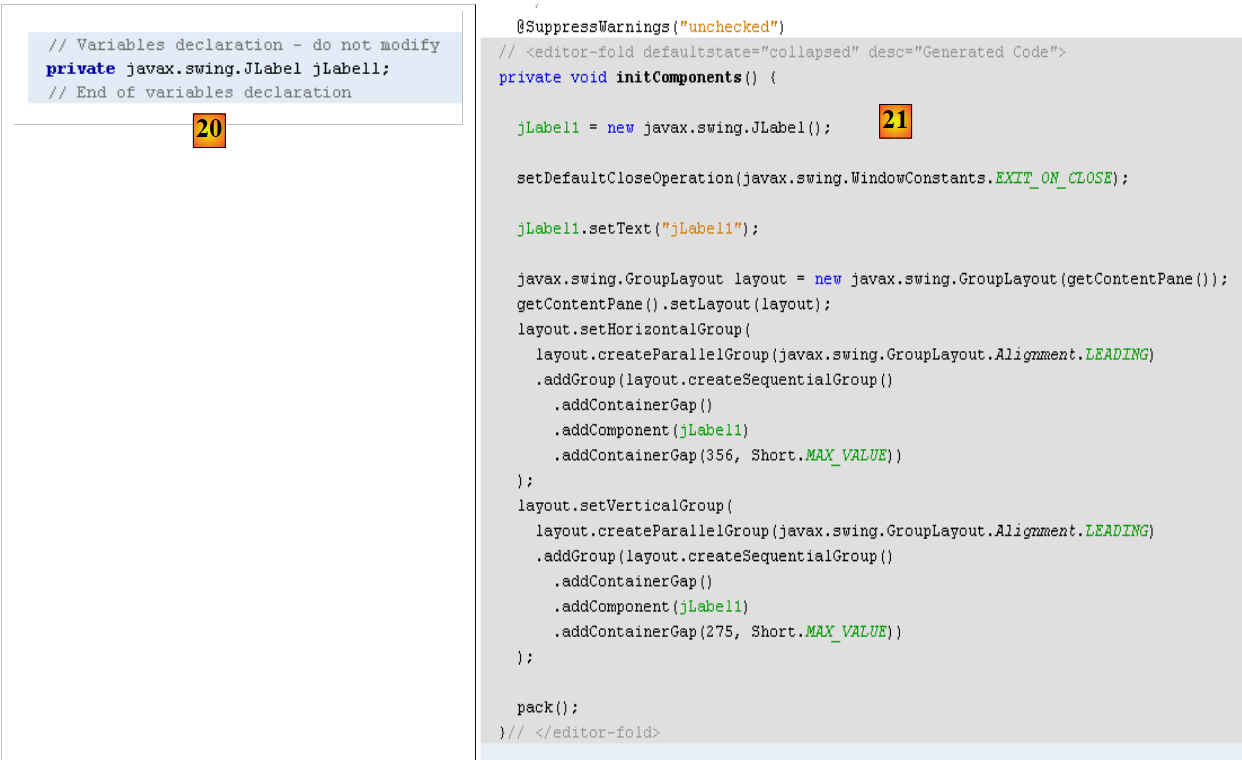 |
- 在 [20] 和 [21] 中:在表单的 [Source] 视图中,已添加 Java 代码以管理新增的 JLabel。
有关使用 NetBeans 构建表单的教程,请访问网址 [http://www.netbeans.org/kb/trails/matisse.html]。
5.12.2. 图形用户界面 [PamJFrame]
我们将构建以下图形界面:
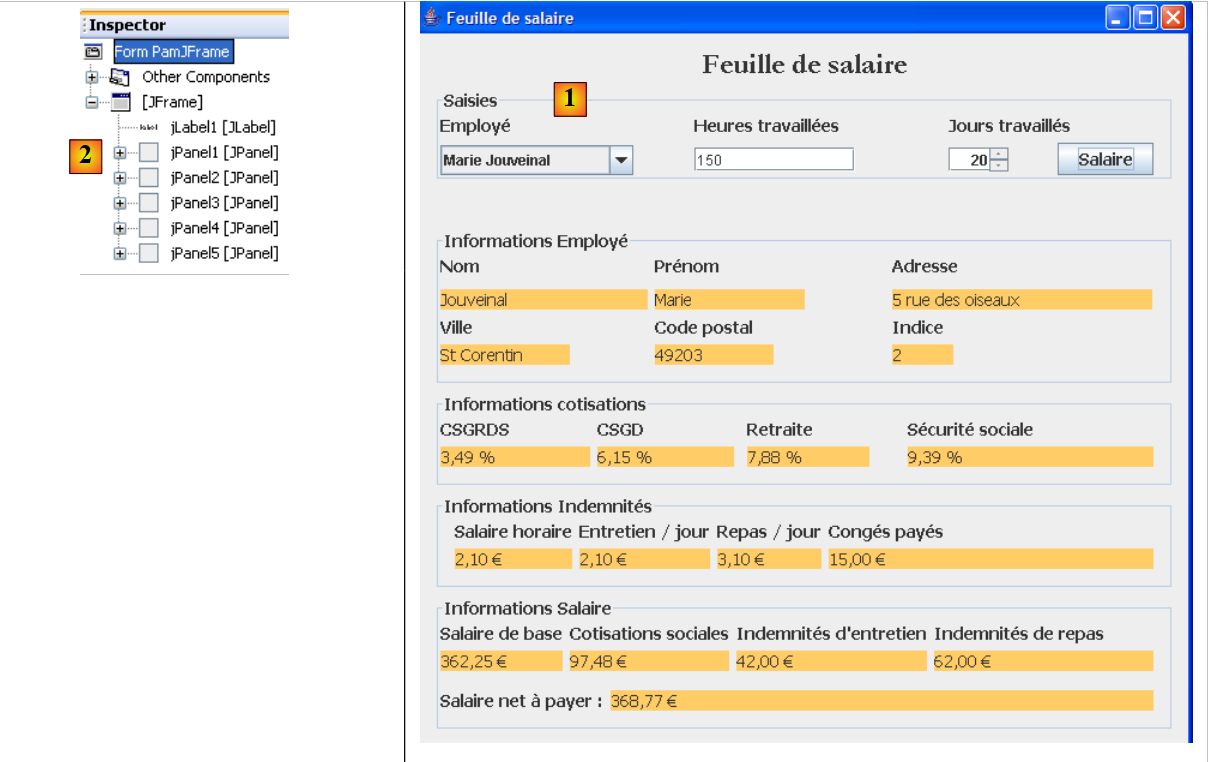 |
- 在 [1] 中,图形界面
- 在 [2] 中,其组件树:一个 JLabel 和六个 JPanel 容器
JLabel1
 |  |
JPanel1
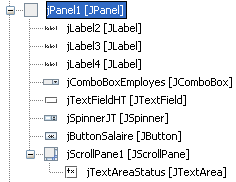 | 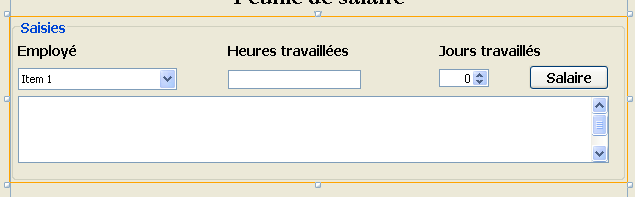 |
JPanel2
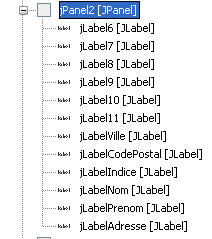 | 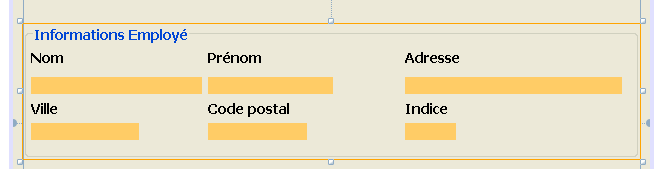 |
JPanel3
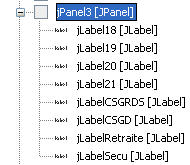 |  |
JPanel4
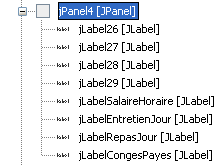 |  |
JPanel5
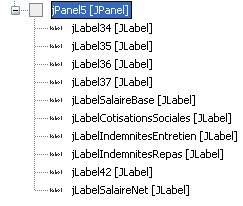 | 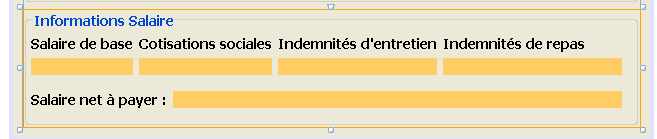 |
实践作业:参考教程 [http://www.netbeans.org/kb/trails/matisse.html] 构建上述图形界面。
5.12.3. 图形界面的事件
推荐阅读:[ref2]中的[Interfaces graphiques]章节。
我们将处理按钮的点击事件 [jButtonSalaire]。要创建处理此事件的方法,可以按以下步骤进行:
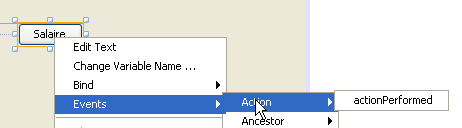 |
[JButtonSalaire]按钮点击处理程序已生成:
将上述方法与按钮 [JButtonSalaire] 的点击关联的 Java 代码也已生成:
第 2-5 行表明,对按钮 [jButtonSalaire](第 2 行)的点击(事件类型为 ActionPerformed)应由方法 [jButtonSalaireActionPerformed](第 4 行)进行处理。
我们还将处理输入字段 [jTextFieldHT] 上的事件 [caretUpdate](光标移动)。要创建该事件的处理程序,我们按照之前的步骤进行:
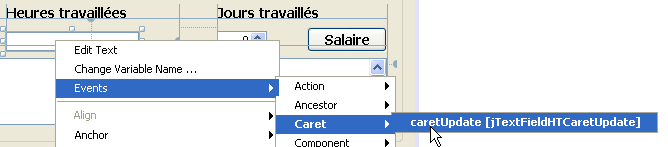 |
输入字段 [jTextFieldHT] 上的事件 [caretUpdate] 的处理程序已生成:
将上述方法与输入字段 [jTextFieldHT] 上的事件 [caretUpdate] 关联的 Java 代码也已生成:
第 1-4 行表明,按钮 [jTextFieldHT](第 1 行)上的事件 [caretUpdate](第 2 行)应由方法 [ jTextFieldHTCaretUpdate](第 3 行)处理。
5.12.4. 图形用户界面的初始化
让我们回到应用程序的架构:
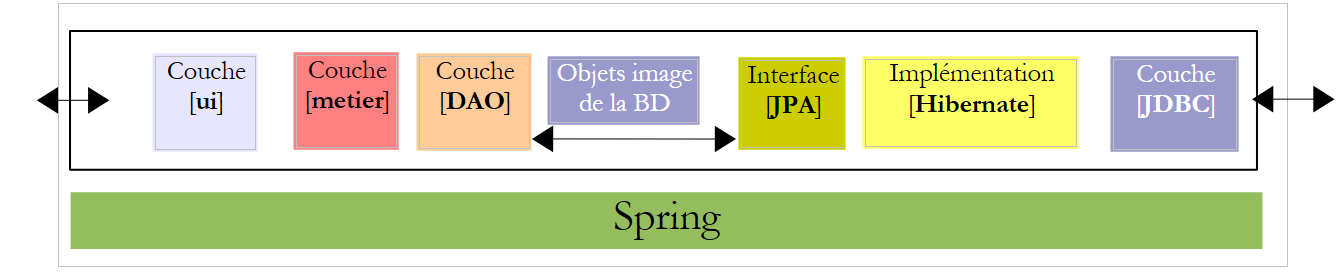 |
[ui] 层需要对 [metier] 层的引用。回顾一下该引用是如何在 console 应用程序中获取的:
在图形应用程序中,方法相同。当该应用程序初始化时,必须同时初始化上述第3行中的引用[IMetier metier]。目前为图形界面生成的代码如下:
- 第29-35行:静态方法[main],用于启动应用程序
- 第 32 行:创建图形用户界面的实例 [PamJFrame] 并使其可见。
- 第 7-9 行:图形用户界面的构造函数。
- 第 8 行:调用第 17 行定义的方法 [initComponents]。该方法是根据 [Design] 模式下的工作自动生成的。请勿修改此方法。
- 第 21 行:用于管理光标在字段 [jTextFieldHT] 中移动的方法
- 第 25 行:用于处理 [jButtonSalaire] 按钮点击事件的方法
若要在上述代码中添加我们自己的初始化代码,可按以下步骤操作:
- 第4行:调用一个专有方法来执行自定义初始化。这些初始化操作由第10至42行的代码定义
问题:请参考注释,补充过程 [doMyInit] 的代码。
5.12.5. 事件处理程序
问题:编写方法 [jTextFieldHTCaretUpdate]。该方法应确保:如果字段 [jTextFieldHT] 中的数据不是大于等于 0 的实数,则按钮 [jButtonSalaire] 应处于禁用状态。
问题:编写方法 [jButtonSalaireActionPerformed],该方法应显示在 [jComboBoxEmployes] 中选定的员工的工资单。
5.12.6. 运行图形界面
要运行图形界面,需修改项目中的配置 [Run]:
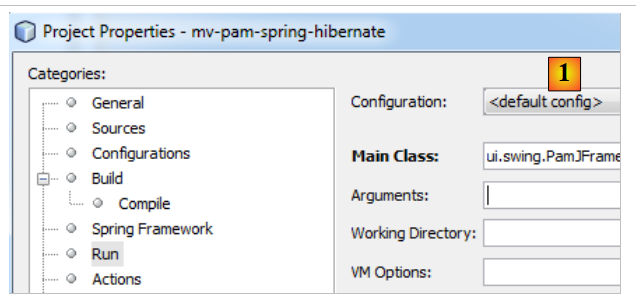 |
- 将其修改为 [1],并设置图形界面的类
该项目必须包含完整的配置文件(persistence.xml、spring-config-metier-dao.xml)以及图形用户界面的类。在运行项目之前,需先启动目标SGBD。
5.13. 使用 EclipseLink 实现 JPA 层
我们关注以下架构,其中 JPA 层现由 EclipseLink 实现:
 |
5.13.1. NetBeans 项目
新的 NetBeans 项目是通过复制之前的项目获得的:
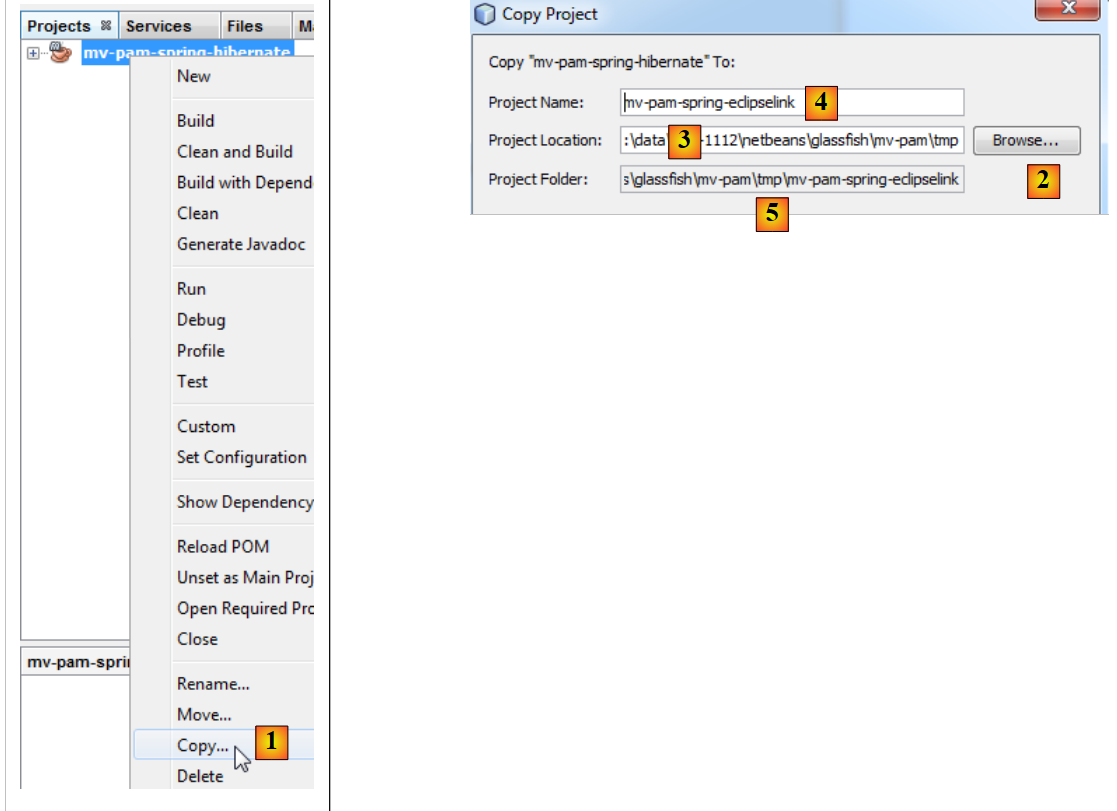 |
- 在 [1] 中:右键单击 Hibernate 项目,选择 Copy
- ,通过按钮 [2] 选择新项目的父文件夹。文件夹名称将显示在 [3] 中。
- 在 [4] 中,为新项目命名
- 在 [5] 中,输入项目文件夹名称
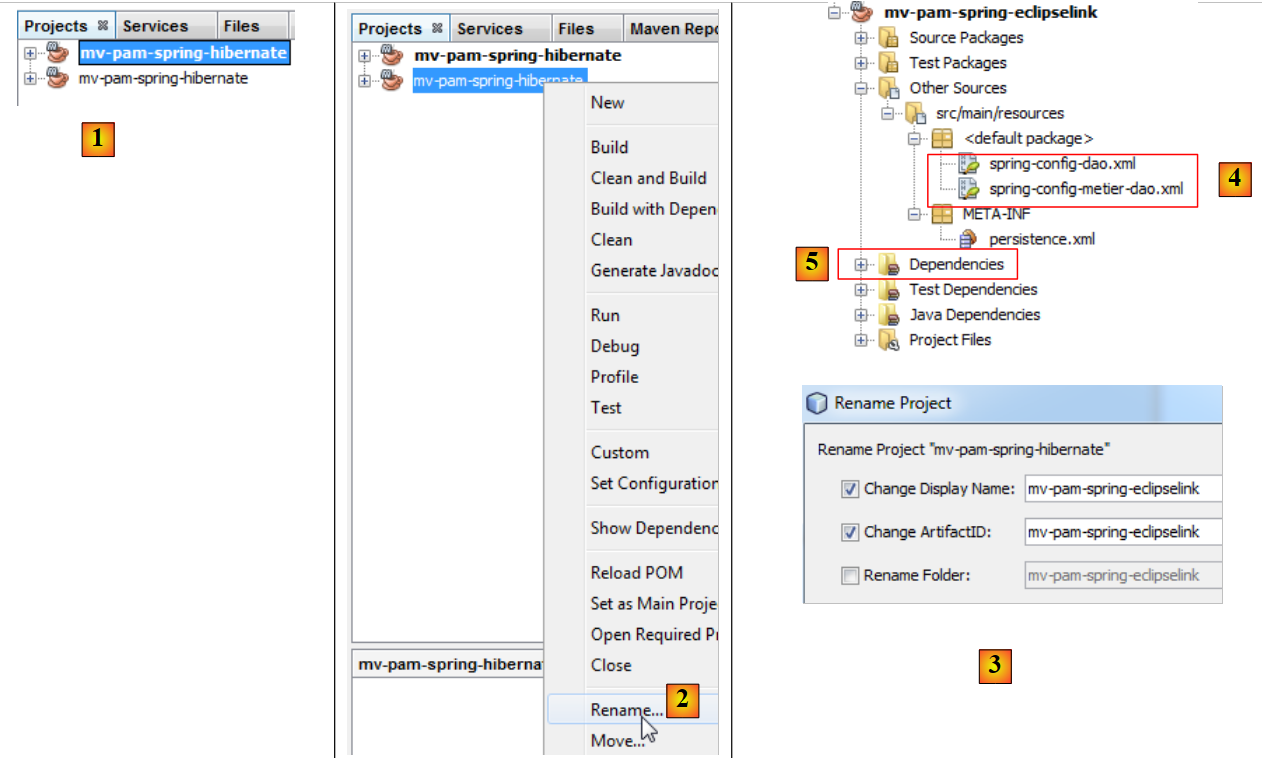 |
- 在 [1] 中,新项目已创建。其名称与原始项目相同,
- 在 [2] 和 [3] 中,将其重命名为 [mv-pam-spring-eclipselink]。
为适配新的 JPA / EclipseLink 层,该项目需进行两处修改:
- 在 [4] 中,需修改 Spring 的配置文件。因为其中包含 JPA 层的配置。
- 在 [5] 中,需要修改项目的库:Hibernate 的库应替换为 EclipseLink 中的库。
我们先从最后一点开始。新项目的 [pom.xml] 文件如下:
<project xmlns="http://maven.apache.org/POM/4.0.0" xmlns:xsi="http://www.w3.org/2001/XMLSchema-instance"
         xsi:schemaLocation="http://maven.apache.org/POM/4.0.0 http://maven.apache.org/xsd/maven-4.0.0.xsd">
  <modelVersion>4.0.0</modelVersion>

  <groupId>istia.st</groupId>
  <artifactId>mv-pam-spring-eclipselink</artifactId>
  <version>1.0-SNAPSHOT</version>
  <packaging>jar</packaging>

  <name>mv-pam-spring-eclipselink</name>
  <url>http://maven.apache.org</url>
  <repositories>
    <repository>
      <url>http://repo1.maven.org/maven2/</url>
      <id>swing-layout</id>
      <layout>default</layout>
      <name>Repository for library Library[swing-layout]</name>
    </repository>
    <repository>
      <url>http://download.eclipse.org/rt/eclipselink/maven.repo/</url>
      <id>eclipselink</id>
      <layout>default</layout>
      <name>Repository for library Library[eclipselink]</name>
    </repository>
  </repositories>

  <properties>
    <project.build.sourceEncoding>UTF-8</project.build.sourceEncoding>
  </properties>

  <dependencies>
    <dependency>
      <groupId>junit</groupId>
      <artifactId>junit</artifactId>
      <version>4.10</version>
      <scope>test</scope>
      <type>jar</type>
    </dependency>
    <dependency>
      <groupId>commons-dbcp</groupId>
      <artifactId>commons-dbcp</artifactId>
      <version>1.2.2</version>
    </dependency>
    <dependency>
      <groupId>commons-pool</groupId>
      <artifactId>commons-pool</artifactId>
      <version>1.6</version>
    </dependency>
    <dependency>
      <groupId>org.springframework</groupId>
      <artifactId>spring-tx</artifactId>
      <version>3.1.1.RELEASE</version>
      <type>jar</type>
    </dependency>
    <dependency>
      <groupId>org.springframework</groupId>
      <artifactId>spring-beans</artifactId>
      <version>3.1.1.RELEASE</version>
      <type>jar</type>
    </dependency>
    <dependency>
      <groupId>org.springframework</groupId>
      <artifactId>spring-context</artifactId>
      <version>3.1.1.RELEASE</version>
      <type>jar</type>
    </dependency>
    <dependency>
      <groupId>org.springframework</groupId>
      <artifactId>spring-orm</artifactId>
      <version>3.1.1.RELEASE</version>
      <type>jar</type>
    </dependency>
    <dependency>
      <groupId>org.eclipse.persistence</groupId>
      <artifactId>eclipselink</artifactId>
      <version>2.3.0</version>
    </dependency>
    <dependency>
      <groupId>org.eclipse.persistence</groupId>
      <artifactId>javax.persistence</artifactId>
      <version>2.0.3</version>
    </dependency>
    <dependency>
      <groupId>mysql</groupId>
      <artifactId>mysql-connector-java</artifactId>
      <version>5.1.6</version>
    </dependency>
    <dependency>
      <groupId>org.swinglabs</groupId>
      <artifactId>swing-layout</artifactId>
      <version>1.0.3</version>
    </dependency>
  </dependencies>
</project>
- 第 73-82 行:JPA 和 EclipseLink 实现的依赖项,
- 第 19-24 行:EclipseLink 的 Maven 仓库。
必须修改 Spring 配置文件,以表明 JPA 实现已发生变更。在这两个文件中,仅配置 JPA 层的段落发生了变化。例如在 [spring-config-metier-dao.xml] 中有:
第 19-36 行配置了 JPA 层。所使用的 JPA 实现是 Hibernate(第 22 行)。此外,目标数据库是 [dbpam_hibernate](第 41 行)。
若要切换至 JPA / EclipseLink 实现,请将上述第 19-35 行替换为以下内容:
- 第 5 行:所使用的 JPA 实现为 EclipseLink
- 第 9 行:属性 databasePlatform 设置目标 SGBD,此处为 MySQL
- 第 11 行:用于在实例化 JPA 层时生成数据库表。此处该属性已被注释掉。
- 第 7 行:用于在控制台上显示由 JPA 层发出的 SQL 命令。此处该属性已被注释掉。
此外,目标数据库变为 [dbpam_eclipselink](见下文第 4 行):
5.13.2. 测试的实施
在测试整个应用程序之前,建议先验证 JUnit 测试用例是否能在新的 JPA 实现中通过。 在执行测试前,需先删除数据库中的表。为此,在 NetBeans 的 [Runtime] 选项卡中,如有需要,需建立与 dbpam_eclipselink / MySQL5 数据库的连接。 连接到 dbpam_eclipselink / MySQL5 数据库后,即可按照下图所示删除表:
- [1]:删除前
- [2]:删除后
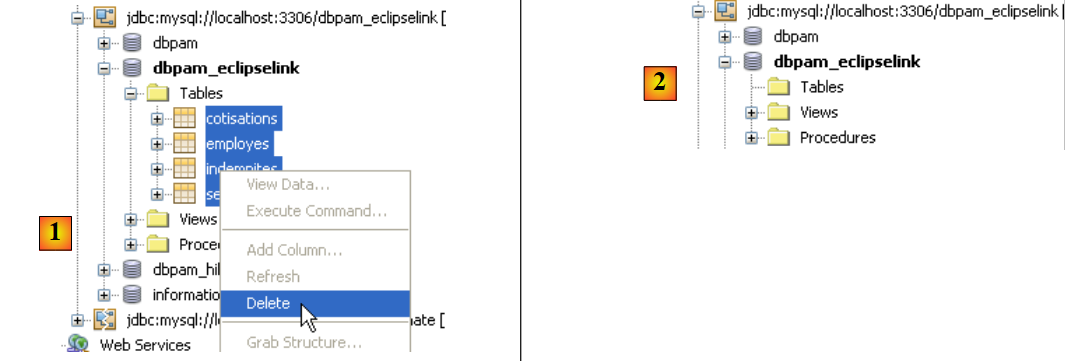 |
完成上述操作后,可在 [DAO] 层上执行首次测试:InitDB 将填充数据库。 为了让应用程序重新创建之前删除的表,必须确保在 Spring 的 JPA / EclipseLink 配置中,以下行:
存在且未被注释掉。
我们构建项目(Build),然后执行测试 [JUnitInitDB] :
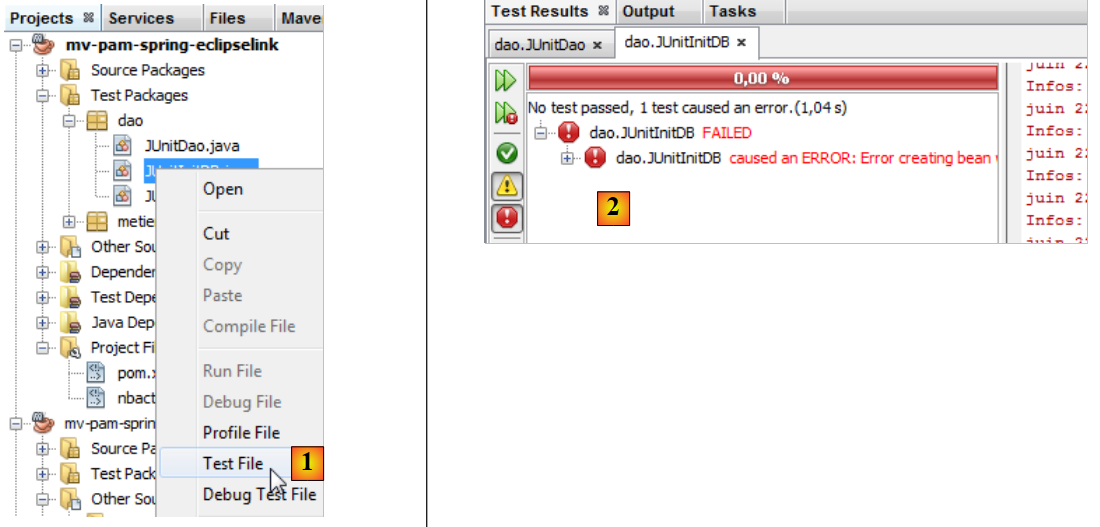 |
- 在 [1] 中,会执行测试 InitDB。
- 在 [2] 中,该测试失败。该异常是由 Spring 抛出的,而非由某个失败的测试引发的。
原因:org.springframework.beans.factory.BeanCreationException:在类路径资源 [spring-config-DAO.xml] 中定义的名称为“entityManagerFactory”的 Bean 创建失败: 调用 init 方法失败;嵌套异常为 java.lang.IllegalStateException:必须先启动 Java 代理才能使用 InstrumentationLoadTimeWeaver。请参阅 Spring 文档。
Spring 提示存在配置问题。该消息表述不明确。异常原因已在 [ref1] 的第 3.1.9 节中进行了解释。 为了使 Spring / EclipseLink 配置正常工作,运行应用程序的 JVM 必须使用一个特殊参数(Java 代理)启动。该参数的格式如下:
[spring-agent.jar] 是 JVM 管理 Spring / EclipseLink 配置所需的 Java 代理。
在运行项目时,可以向 JVM 传递参数:
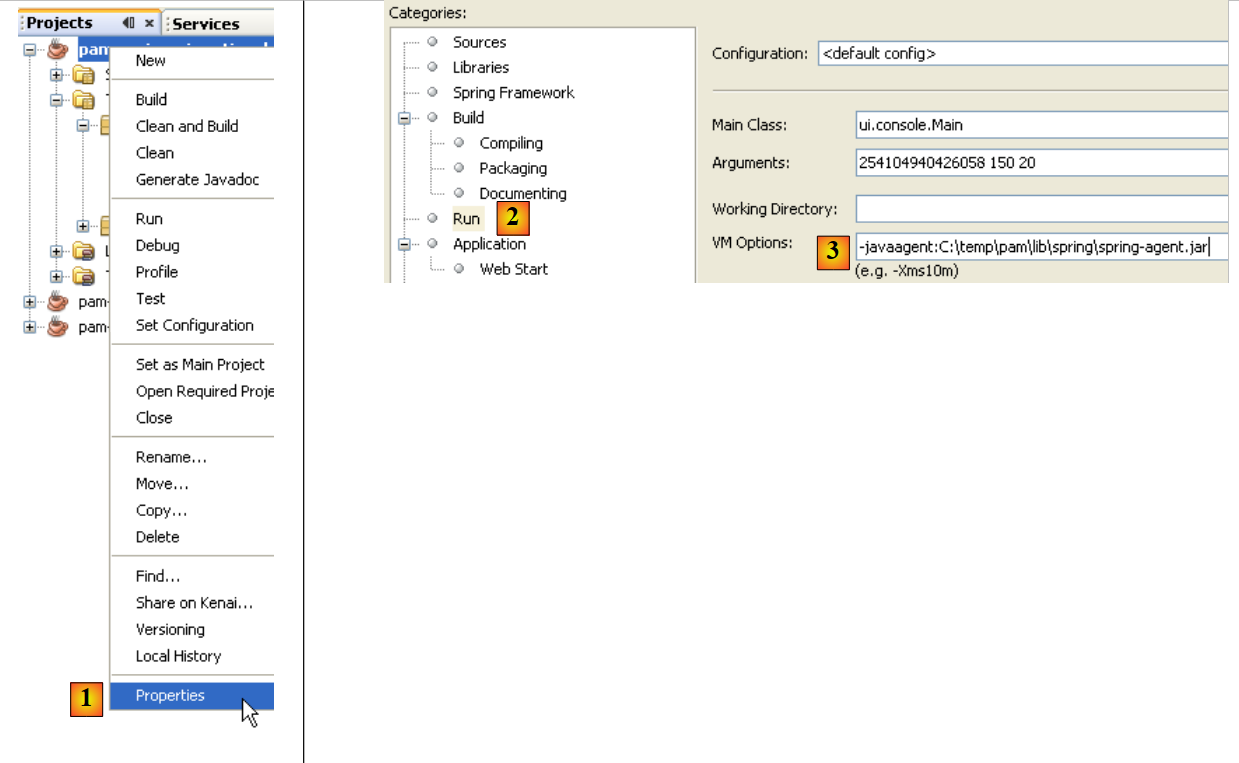 |
- 在 [1] 中,可访问 [2] 项目的属性
- 在 [2] 中,可查看 Run 的属性
- 在 [3] 中,将参数 -javaagent 传递给 JVM
5.13.3. InitDB
现在,我们可以再次测试 [InitDB]。这次得到的结果如下:
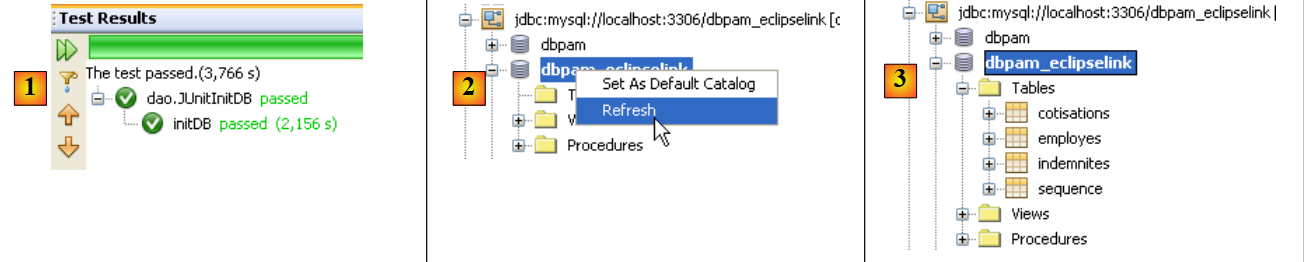 |
- 在 [1] 中,测试成功
- 在 [2] 中,于 [Services] 选项卡中,刷新了 NetBeans 与 [dbpam_eclipselink] 数据库的连接
- 在 [3] 中,已创建四个表
 |
- 在 [5] 中,查看 [employes] 表的内容
- 在 [6] 中,显示结果。
5.13.4. JUnitDao
测试类 [JUnitDao] 的执行可能会失败,尽管在使用 JPA / Hibernate 实现时,它曾成功通过。为了理解原因,让我们分析一个示例。
被测试的方法是以下 IndemniteDao.create 方法:
- 第 15-22 行:被测方法
测试方法如下:
package dao;

...

public class JUnitDao {

// 层DAO
  static private IEmployeDao employeDao;
  static private IIndemniteDao indemniteDao;
  static private ICotisationDao cotisationDao;

  @BeforeClass
  public static void init() {
    // 日志
    log("init");
    // 应用程序配置
    ApplicationContext ctx = new ClassPathXmlApplicationContext("spring-config-DAO.xml");
    // 图层DAO
    employeDao = (IEmployeDao) ctx.getBean("employeDao");
    indemniteDao = (IIndemniteDao) ctx.getBean("indemniteDao");
    cotisationDao = (ICotisationDao) ctx.getBean("cotisationDao");
  }

  @Before()
  public void clean() {
    // 清空数据库
    for (Employe employe : employeDao.findAll()) {
      employeDao.destroy(employe);
    }
    for (Cotisation cotisation : cotisationDao.findAll()) {
      cotisationDao.destroy(cotisation);
    }
    for (Indemnite indemnite : indemniteDao.findAll()) {
      indemniteDao.destroy(indemnite);
    }
  }

  // 日志
  private static void log(String message) {
    System.out.println("----------- " + message);
  }

  // 测试
….
  @Test
  public void test05() {
    log("test05");
    // 创建两个具有相同索引的补偿
    // 违反了索引唯一性约束
    boolean erreur = true;
    Indemnite indemnite1 = null;
    Indemnite indemnite2 = null;
    Throwable th = null;
    try {
      indemnite1 = indemniteDao.create(new Indemnite(1, 1.93, 2, 3, 12));
      indemnite2 = indemniteDao.create(new Indemnite(1, 1.93, 2, 3, 12));
      erreur = false;
    } catch (PamException ex) {
      th = ex;
      // 验证
      Assert.assertEquals(31, ex.getCode());
    } catch (Throwable th1) {
      th = th1;
    }
    // 验证
    Assert.assertTrue(erreur);
    // 异常链
    System.out.println("Chaîne des exceptions --------------------------------------");
    System.out.println(th.getClass().getName());
    while (th.getCause() != null) {
      th = th.getCause();
      System.out.println(th.getClass().getName());
    }
    // 第一个赔偿金必须被保留
    Indemnite indemnite = indemniteDao.find(indemnite1.getId());
    // 验证
    Assert.assertNotNull(indemnite);
    Assert.assertEquals(1, indemnite.getIndice());
    Assert.assertEquals(1.93, indemnite.getBaseHeure(), 1e-6);
    Assert.assertEquals(2, indemnite.getEntretienJour(), 1e-6);
    Assert.assertEquals(3, indemnite.getRepasJour(), 1e-6);
    Assert.assertEquals(12, indemnite.getIndemnitesCP(), 1e-6);
    // 第二笔赔偿金未被持久化
    List<Indemnite> indemnites = indemniteDao.findAll();
    int nbIndemnites = indemnites.size();
    Assert.assertEquals(nbIndemnites, 1);
  }

...
}
问题:请说明测试 test05 的作用,并指出预期结果。
使用 JPA / Hibernate 层获得的结果如下:
测试通过,c.a.d。表明断言已验证,且测试方法未抛出异常。
问题:请解释发生了什么。
使用 JPA / EclipseLink 层获得的结果如下:
与之前使用 Hibernate 时一样,测试通过,c.a.d。断言已验证,且测试方法中未抛出异常。
问题:请解释发生了什么。
问题:从这两个例子中,我们可以得出关于 JPA 实现互换性的什么结论?这里是否完全互换?
5.13.5. 其他测试
一旦 [DAO] 层经过测试并被认定为正确,即可转而测试 [metier] 层,以及该项目在控制台版或图形版中的测试。 JPA 实现的变更对 [metier] 和 [ui] 层没有任何影响,因此如果这些层原本能与 Hibernate 配合运行, 它们在 EclipseLink 环境下同样可行,但有少数例外:前面的示例确实表明,[DAO] 层抛出的异常可能有所不同。 因此,在测试场景中,Spring / JPA / Hibernate 会抛出类型为 [PamException] 的异常,这是 [pam] 应用程序特有的异常;而 Spring / JPA / EclipseLink 则会抛出类型为 [TransactionSystemException] 的异常,这是 Spring 框架的异常。 如果在测试用例中,[ui]层因使用Hibernate构建而预期接收[PamException]类型的异常,那么当切换到EclipseLink时,该层将无法正常工作。
5.13.6. 待完成的工作
实践任务:使用不同的 SGBD 实例(MySQL5、 Oracle XE、SQL 服务器。