9. Exploiting a Data Source
Here, we aim to lay the groundwork for working with databases within a Struts application.
9.1. The Struts /listarticles application
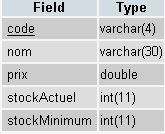
We want to display the contents of a table that stores the characteristics of items sold by a store.
 |
|
The table contains the following:
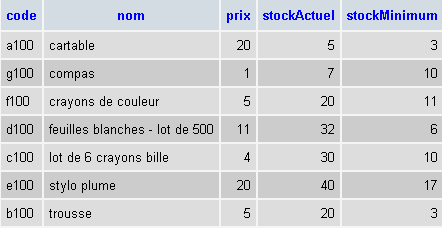
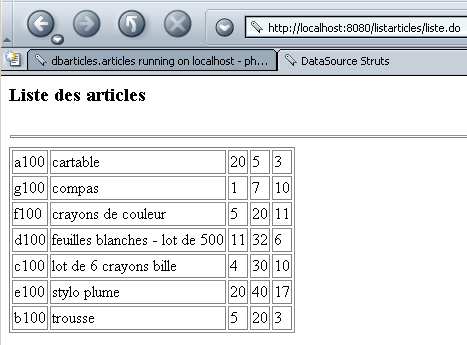
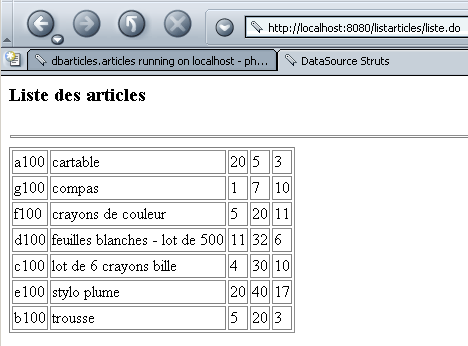
The listarticles application will give us the same result (though not as well) on a web page:
9.2. Configuration of the Struts /listarticles application
The application's web.xml file is standard:
web.xml
<?xml version="1.0" encoding="ISO-8859-1"?>

<!DOCTYPE web-app
    PUBLIC "-//Sun Microsystems, Inc.//DTD Web Application 2.3//EN"
    "http://java.sun.com/dtd/web-app_2_3.dtd">

<web-app>
    <servlet>
      <servlet-name>action</servlet-name>
    <servlet-class>org.apache.struts.action.ActionServlet</servlet-class>
    <init-param>
        <param-name>config</param-name>
      <param-value>/WEB-INF/struts-config.xml</param-value>
    </init-param>
    <load-on-startup>1</load-on-startup>
  </servlet>
  <servlet-mapping>
      <servlet-name>action</servlet-name>
    <url-pattern>*.do</url-pattern>
  </servlet-mapping>

  <taglib>
      <taglib-uri>/WEB-INF/struts-bean.tld</taglib-uri>
    <taglib-location>/WEB-INF/struts-bean.tld</taglib-location>
  </taglib>
  <taglib>
      <taglib-uri>/WEB-INF/struts-logic.tld</taglib-uri>
    <taglib-location>/WEB-INF/struts-logic.tld</taglib-location>
  </taglib>

</web-app>
The struts-config.xml file introduces a new <data-sources> section that allows you to declare and configure data sources:
struts-config.xml
<?xml version="1.0" encoding="ISO-8859-1" ?>

<!DOCTYPE struts-config PUBLIC
          "-//Apache Software Foundation//DTD Struts Configuration 1.1//EN"
          "http://jakarta.apache.org/struts/dtds/struts-config_1_1.dtd">

<struts-config>
    <data-sources>
        <data-source key="dbarticles">
            <set-property property="driverClass" value="com.mysql.jdbc.Driver"></set-property>
            <set-property property="url" value="jdbc:mysql://localhost/dbarticles"></set-property>
            <set-property property="user" value="admarticles"></set-property>
            <set-property property="password" value="mdparticles"></set-property>
            <set-property property="minCount" value="2"></set-property>
            <set-property property="maxCount" value="5"></set-property>
        </data-source>
    </data-sources>

    <action-mappings>
        <action path="/liste" type="istia.st.struts.articles.ListeArticlesAction">
            <forward name="afficherListeArticles" path="/vues/listarticles.jsp"/>
            <forward name="afficherErreurs" path="/vues/erreurs.jsp"/>
        </action>
    </action-mappings>

    <message-resources parameter="istia.st.struts.articles.ApplicationResources"
        null="false" />

</struts-config>
9.2.1. Data Sources
The <data-sources> section is used to declare all of the application's data sources, each of which is described by a <data-source> section. This tag supports several attributes:
identifies the data source when there are multiple sources. | |
the name of the class to be instantiated to access the database. This class is typically found in a class library (.jar) provided by the SGBD publisher. This library contains the JDBC database access driver. The driverClass property refers to this driver. The .jar file containing the classes for accessing the SGBD database will be placed in the application’s WEB-INF/lib folder. | |
connection string to a specific database. The JDBC driver allows access to all databases managed by SGBD. The url property allows us to specify which one we will use. | |
Access to the databases is protected. The SGBD manages users identified by a username and password. These are specified in the tag’s user and password attributes. | |
Struts will manage a pool of connections to SGBD. Opening a connection to SGBD is a resource-intensive operation in terms of time and memory. Rather than opening and closing a connection to SGBD for each request made to the application, the application manages a pool of n connections, where n is within the range [minCount, maxCount]. If, during a request, the application needs a connection: - it will attempt to obtain one from the connection pool. If it finds a free one, it uses it. - if there are no free connections in the pool and there are fewer than maxCount connections in the pool, a new connection is opened and added to the pool. The current request can use it. - If there are no free connections and no way to create a new one, the request is put on hold. When the current request closes the connection, it is not actually closed but returned to the pool. |
Here, we have the following properties:
dbarticles - this is the name under which the data source will be known in the application context | |
com.mysql.jdbc.Driver. We are using a MySQL database. | |
jdbc:mysql://localhost/dbarticles. The database is named dbarticles and is located on the local machine. | |
adarticles, mdarticles. This user has been granted full privileges on the darticles database. | |
2, 5. Minimum of 2 connections in the pool, maximum of 5. |
9.2.2. Actions
The actions declared in the Struts configuration file are as follows:
    <action-mappings>
        <action path="/liste" type="istia.st.struts.articles.ListeArticlesAction">
            <forward name="afficherListeArticles" path="/vues/listarticles.jsp"/>
            <forward name="afficherErreurs" path="/vues/erreurs.jsp"/>
        </action>
    </action-mappings>
The single action is named /list and is associated with the class istia.st.struts.articles.ListArticlesAction. This action results in either the display of:
- the articles page (/views/listarticles.jsp)
- the error page (/views/erreurs.jsp)
9.2.3. The message file
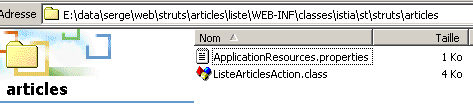
The message file ApplicationResources.properties will be placed in the WEB-INF/classes/istia/st/struts/articles folder. Its contents will be as follows:
# errors
errors.header=<ul>
errors.footer=</ul>
erreur.dbarticles=<li>Erreur d'accès à la base des articles ({0})</li>
Only one error can occur: a database access error. In fact, there are several possible types of errors, all grouped under the same error message. The exact cause of the error will, however, be specified in the {0} parameter.
9.3. Views
9.3.1. The erreurs.jsp view
This view is intended to display a list of errors. We have encountered it several times already.
<%@ taglib uri="/WEB-INF/struts-html.tld" prefix="html" %>

<html>
    <head>
      <title>Liste d'articles - erreurs</title>
  </head>
  <body>
      <h2>Les erreurs suivantes se sont produites</h2>
        <html:errors/>
  </body>
</html>
This view simply displays the list of errors using the <html:errors/> tag.
9.3.2. The listarticles.jsp view
This view must display the contents of the ARTICLES table in the database. Its code is as follows:
<%@ taglib uri="/WEB-INF/struts-bean.tld" prefix="bean" %>
<%@ taglib uri="/WEB-INF/struts-logic.tld" prefix="logic" %>

<%
     // listarticles : ArrayList in the query
     // listArticles(i): array (String[5]) of 5 elements
%>

<html>
    <head>
        <title>DataSource Struts</title>
    </head>
    <body>
        <h3>Liste des articles</h3>
        <hr>
        <table border="1">
            <logic:iterate id="ligne" name="listArticles">
                <tr>
                    <logic:iterate id="colonne" name="ligne">
                        <td><bean:write name="colonne"/></td>
                    </logic:iterate>
                </tr>
            </logic:iterate>
        </table>
    </body>
</html>
The /list action will place the contents of the ARTICLES table into a ArrayList object, which is included in the query under the name listArticles. Each element of the listArticles object is an array of 5 strings representing the 5 pieces of information (code, name, price, stockActuel, stockMinimum) associated with an item in the table. The view must display the contents of the listArticles object in a HTML table. To do this, it uses the <logic:iterate> tag:
            <logic:iterate id="ligne" name="listArticles">
                <tr>
                    <logic:iterate id="colonne" name="ligne">
                        <td><bean:write name="colonne"/></td>
                    </logic:iterate>
                </tr>
            </logic:iterate>
There are two iterations here. The first loops over the elements of the ArrayList listArticles object. The current element of listArticles is called "row" here. The "row" element represents a String[5] object that is traversed using the second iteration. The element of this second iteration is called a column. It represents the current element of an array of strings and is therefore a string (code, name, price, stockActuel, stockMinimum). Its value is displayed using the <bean:write> tag.
The view uses tags from the struts-logic and struts-bean libraries. You must therefore declare their use:
<%@ taglib uri="/WEB-INF/struts-bean.tld" prefix="bean" %>
<%@ taglib uri="/WEB-INF/struts-logic.tld" prefix="logic" %>
9.4. The /list action
The purpose of the /list action is to include an object ArrayList in the request, representing the contents of the table ARTICLES, so that a view can use it. Its code is as follows:
package istia.st.struts.articles;

import java.io.IOException;
import java.sql.Connection;
import java.sql.ResultSet;
import java.sql.Statement;
import java.util.ArrayList;

import javax.servlet.ServletException;
import javax.servlet.http.HttpServletRequest;
import javax.servlet.http.HttpServletResponse;
import javax.sql.DataSource;

import org.apache.struts.action.Action;
import org.apache.struts.action.ActionError;
import org.apache.struts.action.ActionErrors;
import org.apache.struts.action.ActionForm;
import org.apache.struts.action.ActionForward;
import org.apache.struts.action.ActionMapping;

public class ListeArticlesAction extends Action {

    public ActionForward execute(
        ActionMapping mapping,
        ActionForm form,
        HttpServletRequest request,
        HttpServletResponse response)
        throws IOException, ServletException {

         // reads the contents of a connection's items table
         // performed at context init
         // retrieve the dbarticles data source
        DataSource dataSource = this.getDataSource(request, "dbarticles");
        if (dataSource == null) {
             // the data source could not be created
            ActionErrors erreurs = new ActionErrors();
            erreurs.add(    "dbarticles",new ActionError("erreur.dbarticles","La source de données n'a pu être créée"));
            this.saveErrors(request, erreurs);
            return mapping.findForward("afficherErreurs");
        }
         // here the data source exists - we use it Conne        ction connexion = null;
        Statement st = null;
        ResultSet rs = null;
        String requête = null;
        ArrayList alArticles = new ArrayList();
         // error handling
        try {
             // get a connection
            connexion = dataSource.getConnection();
             // prepare query SQL
            requête =
                "select code, nom, prix, stockActuel, stockMinimum from articles order by nom";
             // execute it
            st = connexion.createStatement();
            rs = st.executeQuery(requête);
             // exploit results
            while (rs.next()) {
                 // save current line
                alArticles.add(
                    new String[] {
                        rs.getString("code"),
                        rs.getString("nom"),
                        rs.getString("prix"),
                        rs.getString("stockactuel"),
                        rs.getString("stockMinimum")});
                // next line
            } //while
             // free up resources
            rs.close();
            st.close();
            connexion.close();
        } catch (Exception ex) {
             // errors have occurred
            ActionErrors erreurs = new ActionErrors();
            erreurs.add("dbarticles",new ActionError("erreur.dbarticles", ex.getMessage()));
            this.saveErrors(request, erreurs);
            return mapping.findForward("afficherErreurs");
        }
         // it's good
        request.setAttribute("listArticles", alArticles);
        return mapping.findForward("afficherListeArticles");
    } //execute
} //class
The reader is likely able to grasp the essence of the code above. We will focus only on the single new element: the use of a DataSource object provided by the Struts framework. This DataSource object represents the connection pool configured by the <data-source key="dbarticles"> section of the configuration file. After its creation, the DataSource object was placed in the application context so that all objects in that context can access it. It is therefore retrieved as follows:
         // retrieve the dbarticles data source
        DataSource dataSource = this.getDataSource(request, "dbarticles");
Here, we are requesting the data source identified by the key "dbarticles". If we receive a null pointer, it means that the data source could not be created during application initialization. In this case, we log the error in a ActionErrors object and redirect to the error page identified by the key "afficherErreurs" in the configuration file:
        <action path="/liste" type="istia.st.struts.articles.ListeArticlesAction">
            <forward name="afficherListeArticles" path="/vues/listarticles.jsp"/>
            <forward name="afficherErreurs" path="/vues/erreurs.jsp"/>
        </action>
    </action-mappings>
Once the data source is obtained, we have access to the connection pool. A connection to the database is obtained via the code:
Here, the pool will provide us with a reused connection or a newly created one if there are still available connections.
9.5. Deployment
The application context is defined in Tomcat’s server.xml configuration file:
<Context path="/listarticles" reloadable="true" docBase="E:\data\serge\web\struts\articles\liste" />
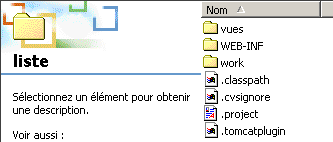
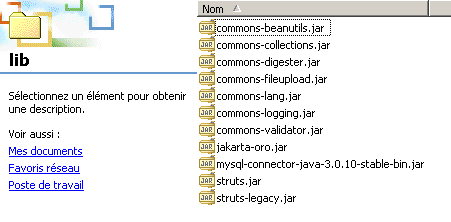
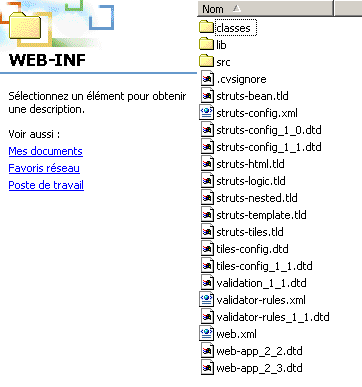
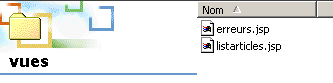
The application directory structure is as follows:
  | ||
  | ||
 | ||
Note the library mysql-connector-java-3.0.10-stable-bin.jar in WEB-INF/lib. This library contains the JDBC driver for the MySQL database used here.
9.6. Tests
We start Tomcat and request the URL http://localhost:8080/listarticles/liste.do:
9.7. A second data source
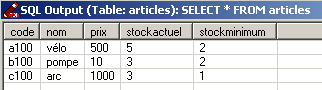
We now use a second data source located in a Postgres database. Here too, the data is in a table named ARTICLES with the same columns as before. Its contents are as follows:
This new data source is declared in the Struts configuration file:
    <data-sources>
        <data-source key="dbarticles" >
            <set-property property="driverClass" value="com.mysql.jdbc.Driver"></set-property>
            <set-property property="url" value="jdbc:mysql://localhost/dbarticles"></set-property>
            <set-property property="user" value="admarticles"></set-property>
            <set-property property="password" value="mdparticles"></set-property>
            <set-property property="minCount" value="2"></set-property>
            <set-property property="maxCount" value="5"></set-property>
        </data-source>
        <data-source key="pgdbarticles" type="org.apache.commons.dbcp.BasicDataSource">
            <set-property property="driverClassName" value="org.postgresql.Driver" />
            <set-property property="url" value="jdbc:postgresql://localhost/dbarticles" />
            <set-property property="username" value="serge" />
            <set-property property="password" value="serge" />
            <set-property property="maxActive" value="10" />
            <set-property property="maxWait" value="5000" />
            <set-property property="defaultAutoCommit" value="false" />
            <set-property property="defaultReadOnly" value="false" />
        </data-source>
    </data-sources>
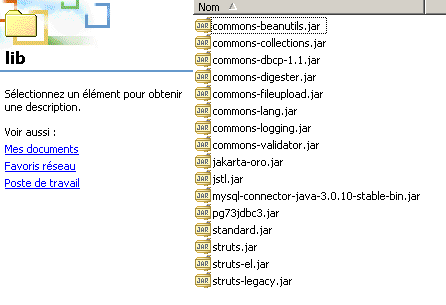
The new source will have the identifier (key) pgdbarticles. The new feature comes from the class implementing the javax.sql.DataSource interface. The default class is org.apache.struts.util.GenericDataSource, defined in the struts.jar library. This class will be deprecated in future versions of Struts, and for Struts 1.1, it is recommended to use the org.apache.commons.dbcp.BasicDataSource class found in the commons-dbcp-1.1.jar library. This class is not necessarily included with the Struts package. It can be found at url http://jakarta.apache.org/commons/index.html and more specifically at url http://jakarta.apache.org/site/binindex.cgi. You must download the product named Commons DBCP. For Windows, you can download the .zip file. This file contains the library’s source code as well as the corresponding .jar file. You must extract this file from the .zip archive and place it in the application’s WEB-INF/lib folder. You must also place the driver for the SGBD being used in this same folder:
To use this source, we change one line in the code of the /list action:
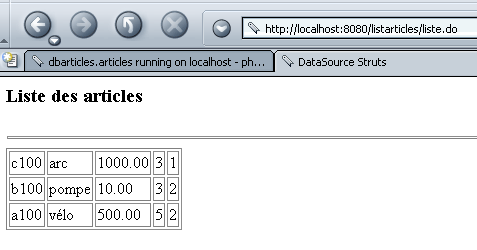
This time, we request the data source named pgdbarticles, c.a.d, the Postgres data source.
All that’s left is to compile everything, start Tomcat, and request the URL http://localhost:8080/listarticles/liste.do:
9.8. Conclusion
We have shown how to use a connection pool to access a database. Note here that we did not follow the MVC architecture. In fact, the /list action itself makes the SQL queries to access the data. It would have been preferable for it to call an intermediate business class that would hide the fact that data is being retrieved from a SGBD. It is likely that the business class would then create the connection pool, and there would be no need to declare it in the Struts configuration file. Here’s a clue: the presence of a <data-sources> section in the configuration file may indicate that our application does not adhere to the MVC architecture.