5. The IMPOTS application
5.1. Introduction
Here we revisit the IMPOTS application, which is used repeatedly in the Java handout by the same author. Let’s review the problem. The goal is to write an application that calculates a taxpayer’s tax. We’ll consider the simplified case of a taxpayer who has only a single salary to report:
- we calculate the number of tax brackets for the employee nbParts=nbEnfants/2 +1 if they are unmarried, nbEnfants/2+2 if they are married, where nbEnfants is the number of children.
- if he has at least three children, he has an additional half-share
- his taxable income is calculated as R=0.72*S, where S is his annual salary
- we calculate his family coefficient QF = R / nbParts
- We calculate his tax I. Consider the following table:
12,620.0 | 0 | 0 |
13,190 | 0.05 | 631 |
15,640 | 0.1 | 1,290.5 |
24,740 | 0.15 | 2072.5 |
31,810 | 0.2 | 3,309.5 |
39,970 | 0.25 | 4,900 |
48,360 | 0.3 | 6898.5 |
55,790 | 0.35 | 9,316.5 |
92,970 | 0.4 | 12,106 |
127,860 | 0.45 | 16,754.5 |
151,250 | 0.50 | 23,147.5 |
172,040 | 0.55 | 30,710 |
195,000 | 0.60 | 39,312 |
0 | 0.65 | 49,062 |
Each row has 3 fields. To calculate tax I, we look for the first row where QF <= field1. For example, if QF = 23000, we will find the row
Tax I is then equal to 0.15*R - 2072.5*nbParts. If QF is such that the relationship QF<=field1 is never satisfied, then the coefficients of the last line are used. Here:
which gives the tax I=0.65*R - 49062*nbParts.
The data defining the various tax brackets is stored in an ODBC database named MySQL. MySQL is a public-domain SGBD file that can be used on various platforms, including Windows and Linux. With this SGBD, a database named dbimpots has been created, containing a single table called impots. Access to the database is controlled by a username/password, in this case admimpots/mdpimpots. The following screenshot shows how to use the dbimpots database with MySQL:
C:\Program Files\EasyPHP\mysql\bin>mysql -u admimpots -p
Enter password: *********
Welcome to the MySQL monitor.  Commands end with ; or \g.
Your MySQL connection id is 18 to server version: 3.23.49-max-nt

Type 'help;' or '\h' for help. Type '\c' to clear the buffer.

mysql> use dbimpots;
Database changed

mysql> show tables;
+--------------------+
| Tables_in_dbimpots |
+--------------------+
| impots             |
+--------------------+
1 row in set (0.00 sec)

mysql> describe impots;
+---------+--------+------+-----+---------+-------+
| Field   | Type   | Null | Key | Default | Extra |
+---------+--------+------+-----+---------+-------+
| limites | double | YES  |     | NULL    |       |
| coeffR  | double | YES  |     | NULL    |       |
| coeffN  | double | YES  |     | NULL    |       |
+---------+--------+------+-----+---------+-------+
3 rows in set (0.02 sec)

mysql> select * from impots;
+---------+--------+---------+
| limites | coeffR | coeffN  |
+---------+--------+---------+
|   12620 |      0 |       0 |
|   13190 |   0.05 |     631 |
|   15640 |    0.1 |  1290.5 |
|   24740 |   0.15 |  2072.5 |
|   31810 |    0.2 |  3309.5 |
|   39970 |   0.25 |    4900 |
|   48360 |    0.3 |    6898 |
|   55790 |   0.35 |  9316.5 |
|   92970 |    0.4 |   12106 |
|  127860 |   0.45 |   16754 |
|  151250 |    0.5 | 23147.5 |
|  172040 |   0.55 |   30710 |
|  195000 |    0.6 |   39312 |
|       0 |   0.65 |   49062 |
+---------+--------+---------+
14 rows in set (0.00 sec)

mysql>quit
The dbimpots database is converted into the ODBC data source as follows:
- Launch the 32-bit ODBC data source manager
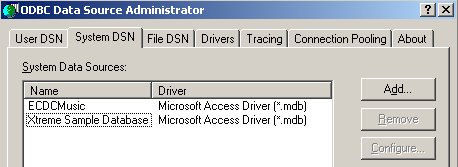
- Use the [Add] button to add a new ODBC data source
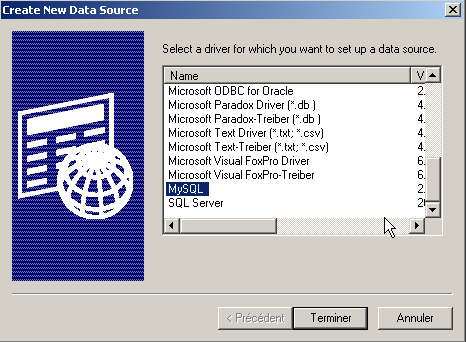
- Select the MySQL driver and perform [Terminer]
54321
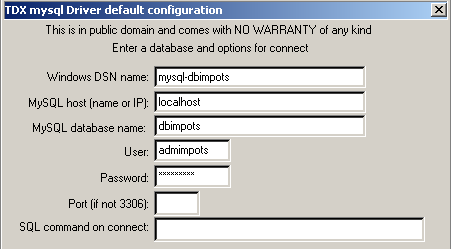
- The driver MySQL requests certain information:
1 | the name DSN to be given to the data source ODBC - perhaps any name |
2 | the machine on which SGBD MySQL runs—here, localhost. It is worth noting that the database could be a remote database. Local applications using the ODBC data source would not be aware of this. This would be the case, in particular, for our Java application. |
3 | the database MySQL to be used. MySQL is a SGBD that manages relational databases, which are sets of tables linked together by relationships. Here, we specify the name of the managed database. |
4 | The name of a user with access rights to this database |
5 | their password |
Two classes have been defined to calculate the tax: impots and impotsJDBC. An instance of the impots class is constructed using the tax bracket data passed as parameters in arrays:
// creation of an impots class

public class impots{

  // data required for tax calculation
   // come from an external source

  protected double[] limites=null;
  protected double[] coeffR=null;
  protected double[] coeffN=null;

   // empty builder
  protected impots(){}

   // manufacturer
  public impots(double[] LIMITES, double[] COEFFR, double[] COEFFN) throws Exception{
     // check that the 3 arrays have the same size
    boolean OK=LIMITES.length==COEFFR.length && LIMITES.length==COEFFN.length;
    if (! OK) throw new Exception ("Les 3 tableaux fournis n'ont pas la même taille("+
      LIMITES.length+","+COEFFR.length+","+COEFFN.length+")");
    // it's good
    this.limites=LIMITES;
    this.coeffR=COEFFR;
    this.coeffN=COEFFN;
  }//manufacturer

   // tAX CALCULATION
  public long calculer(boolean marié, int nbEnfants, int salaire){
     // calculating the number of shares
    double nbParts;
    if (marié) nbParts=(double)nbEnfants/2+2;
    else nbParts=(double)nbEnfants/2+1;
    if (nbEnfants>=3) nbParts+=0.5;
         // calculation of taxable income & family quota
        double revenu=0.72*salaire;
        double QF=revenu/nbParts;
         // tAX CALCULATION
        limites[limites.length-1]=QF+1;
        int i=0;
        while(QF>limites[i]) i++;
        // return result
        return (long)(revenu*coeffR[i]-nbParts*coeffN[i]);
    }//calculate
}//class
The impotsJDBC class is derived from the previous impots class. An instance of the impotsJDBC class is created using tax bracket data stored in a database. The information needed to access this database is passed as parameters to the constructor:
// imported packages
import java.sql.*;
import java.util.*;

public class impotsJDBC extends impots{
  // addition of a constructor for building
   // limit tables, coeffr, coeffn from table
   // database taxes
  public impotsJDBC(String dsnIMPOTS, String userIMPOTS, String mdpIMPOTS)
      throws SQLException,ClassNotFoundException{

    // dsnIMPOTS: DSN database name
     // userIMPOTS, mdpIMPOTS: database login/password

     // data tables
    ArrayList aLimites=new ArrayList();
    ArrayList aCoeffR=new ArrayList();
    ArrayList aCoeffN=new ArrayList();

    // connection to base
    Class.forName("sun.jdbc.odbc.JdbcOdbcDriver");
    Connection connect=DriverManager.getConnection("jdbc:odbc:"+dsnIMPOTS,userIMPOTS,mdpIMPOTS);
    // creation of a Statement object
    Statement S=connect.createStatement();
    // select request
    String select="select limites, coeffr, coeffn from impots";
    // query execution
    ResultSet RS=S.executeQuery(select);
    while(RS.next()){
      // running line operation
      aLimites.add(RS.getString("limites"));
      aCoeffR.add(RS.getString("coeffr"));
      aCoeffN.add(RS.getString("coeffn"));
    }// next line
     // closing resources
    RS.close();
    S.close();
    connect.close();
     // data transfer to bounded arrays
    int n=aLimites.size();
    limites=new double[n];
    coeffR=new double[n];
    coeffN=new double[n];
    for(int i=0;i<n;i++){
      limites[i]=Double.parseDouble((String)aLimites.get(i));
      coeffR[i]=Double.parseDouble((String)aCoeffR.get(i));
      coeffN[i]=Double.parseDouble((String)aCoeffN.get(i));
    }//for
  }//manufacturer
}//class
Once an instance of the impotsJDBC class has been created, its calculate method can be called repeatedly to calculate the tax:
The three required pieces of data can be obtained in multiple ways. The advantage of the impotsJDBC class is that we only need to worry about obtaining this data. Once the three pieces of information (marital status, number of children, annual salary) have been obtained, calling the calculate method of the impotsJDBC class gives us the tax due.
5.2. Version 1
Consider a web application that presents a HTML interface to a user to obtain the three parameters needed to calculate the tax:
- marital status (married or not)
- number of children
- annual income
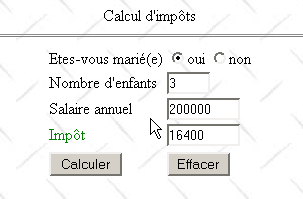
The form is displayed by the following page: JSP:
<%@ page import="java.util.*" %>

<%
     // retrieve the attributes passed by the main servlet
  String chkoui=(String)request.getAttribute("chkoui");
  String chknon=(String)request.getAttribute("chknon");
  String txtEnfants=(String)request.getAttribute("txtEnfants");
  String txtSalaire=(String)request.getAttribute("txtSalaire");
  String txtImpots=(String)request.getAttribute("txtImpots");
  ArrayList erreurs=(ArrayList)request.getAttribute("erreurs");
%>

<html>

    <head>
      <title>impots</title>
    <script language="JavaScript" type="text/javascript">
        function effacer(){
           // raz du formulaire
        with(document.frmImpots){
            optMarie[0].checked=false;
          optMarie[1].checked=true;
          txtEnfants.value="";
          txtSalaire.value="";
          txtImpots.value="";
        }//with
      }//delete
        </script>
  </head>

  <body background="/impots/images/standard.jpg">
      <center>
        Calcul d'impôts
        <hr>
      <form name="frmImpots" action="/impots/main" method="POST">
          <table>
            <tr>
              <td>Etes-vous marié(e)</td>
            <td>
                    <input type="radio" name="optMarie" value="oui" <%= chkoui %>>oui
              <input type="radio" name="optMarie" value="non" <%= chknon %>>non
            </td>
          </tr>
          <tr>
              <td>Nombre d'enfants</td>
            <td><input type="text" size="5" name="txtEnfants" value="<%= txtEnfants %>"></td>
          </tr>
          <tr>
              <td>Salaire annuel</td>
            <td><input type="text" size="10" name="txtSalaire" value="<%= txtSalaire %>"></td>
          </tr>
          <tr>
              <td><font color="green">Impôt</font></td>
            <td><input type="text" size="10" name="txtImpots" value="<%= txtImpots %>" readonly></td>
          </tr>
          <tr></tr>
          <tr>
              <td><input type="submit" value="Calculer"></td>
            <td><input type="button" value="Effacer" onclick="effacer()"></td>
          </tr>
        </table>
      </form>
    </center>
    <%
         // are there any errors
      if(erreurs!=null){
           // error display
        out.println("<hr>");
        out.println("<font color=\"red\">");
        out.println("Les erreurs suivantes se sont produites<br>");
        out.println("<ul>");
        for(int i=0;i<erreurs.size();i++){
            out.println("<li>"+(String)erreurs.get(i));
        }
        out.println("</ul>");
        out.println("</font>");
      }
   %>
 </body>
</html>
The JSP page simply displays information passed to it by the application's main servlet:
     // retrieve the attributes passed by the main servlet
  String chkoui=(String)request.getAttribute("chkoui");
  String chknon=(String)request.getAttribute("chknon");
  String txtEnfants=(String)request.getAttribute("txtEnfants");
  String txtSalaire=(String)request.getAttribute("txtSalaire");
  String txtImpots=(String)request.getAttribute("txtImpots");
  ArrayList erreurs=(ArrayList)request.getAttribute("erreurs");
attributes of the yes/no radio buttons—possible values are "checked" or "" to enable or disable the corresponding radio button | |
the taxpayer's number of children | |
their annual salary | |
the amount of tax due | |
a list of errors, if any, if errors!=null |
The page sent to the client contains a javascript script with a "clear" function associated with the "Clear" button, which resets the form to its initial state: unchecked button, empty input fields. Note that this result could not be achieved with a HTML button of type "reset". Indeed, when this type of button is used, the browser resets the form to the state in which it received it. However, in our application, the browser receives forms that may not be empty.
The application’s main servlet is named main.java, and its code is as follows:
import java.io.*;
import javax.servlet.*;
import javax.servlet.http.*;
import java.util.regex.*;
import java.util.*;

public class main extends HttpServlet{

    // instance variables
    String msgErreur=null;
    String urlAffichageImpots=null;
    String urlErreur=null;
    String DSNimpots=null;
    String admimpots=null;
    String mdpimpots=null;
    impotsJDBC impots=null;

    //-------- GET
    public void doGet(HttpServletRequest request, HttpServletResponse response)
    throws IOException, ServletException{

        // was the initialization successful?
        if(msgErreur!=null){
             // we hand over to the error page
            request.setAttribute("msgErreur",msgErreur);
            getServletContext().getRequestDispatcher(urlErreur).forward(request,response);
        }

         // query attributes
        String chkoui=null;
        String chknon=null;
        String txtImpots=null;

        // retrieve query parameters
        String optMarie=request.getParameter("optMarie");              // marital status
        String txtEnfants=request.getParameter("txtEnfants");       // no. of children
        if(txtEnfants==null) txtEnfants="";
        String txtSalaire=request.getParameter("txtSalaire");       // annual salary
        if(txtSalaire==null) txtSalaire="";

         // do we have all the expected parameters
        if(optMarie==null || txtEnfants==null || txtSalaire==null){
             // missing parameters
            request.setAttribute("chkoui","");
            request.setAttribute("chknon","checked");
            request.setAttribute("txtEnfants","");
            request.setAttribute("txtSalaire","");
            request.setAttribute("txtImpots","");
             // we hand over to the url tax display
            getServletContext().getRequestDispatcher(urlAffichageImpots).forward(request,response);
        }

         // we have all the parameters - we check them
        ArrayList erreurs=new ArrayList();
         // marital status
        if( ! optMarie.equals("oui") && ! optMarie.equals("non")){
             // error
            erreurs.add("Etat marital incorrect");
            optMarie="non";
        }
         // number of children
        txtEnfants=txtEnfants.trim();
        if(! Pattern.matches("^\\d+$",txtEnfants)){
            // error
            erreurs.add("Nombre d'enfants incorrect");
        }
         // salary
        txtSalaire=txtSalaire.trim();
        if(! Pattern.matches("^\\d+$",txtSalaire)){
            // error
            erreurs.add("Salaire incorrect");
        }

         // if there are errors, they are passed as query attributes
        if(erreurs.size()!=0){
            request.setAttribute("erreurs",erreurs);
            txtImpots="";
        }else{
             // you can calculate the tax payable
            try{
                int nbEnfants=Integer.parseInt(txtEnfants);
                int salaire=Integer.parseInt(txtSalaire);
                txtImpots=""+impots.calculer(optMarie.equals("oui"),nbEnfants,salaire);
            }catch(Exception ex){}
        }

         // other query attributes
        if(optMarie.equals("oui")){
            request.setAttribute("chkoui","checked");
            request.setAttribute("chknon","");
        }else{
            request.setAttribute("chknon","checked");
            request.setAttribute("chkoui","");
        }
        request.setAttribute("txtEnfants",txtEnfants);
        request.setAttribute("txtSalaire",txtSalaire);
        request.setAttribute("txtImpots",txtImpots);

         // we hand over to the tax display url
        getServletContext().getRequestDispatcher(urlAffichageImpots).forward(request,response);
    }

     //-------- POST
    public void doPost(HttpServletRequest request, HttpServletResponse response)
    throws IOException, ServletException{
        doGet(request,response);
    }

     //-------- INIT
    public void init(){
         // retrieve initialization parameters
        ServletConfig config=getServletConfig();
        urlAffichageImpots=config.getInitParameter("urlAffichageImpots");
        urlErreur=config.getInitParameter("urlErreur");
        DSNimpots=config.getInitParameter("DSNimpots");
        admimpots=config.getInitParameter("admimpots");
        mdpimpots=config.getInitParameter("mdpimpots");

         // parameters ok ?
        if(urlAffichageImpots==null || DSNimpots==null || admimpots==null || mdpimpots==null){
            msgErreur="Configuration incorrecte";
            return;
        }

         // create an instance of impotsJDBC
        try{
            impots=new impotsJDBC(DSNimpots,admimpots,mdpimpots);
        }catch(Exception ex){
            msgErreur=ex.getMessage();
        }
    }
}
- The servlet's init method does two things:
- It retrieves its initialization parameters. These allow it to connect to the database ODBC containing data for the various tax brackets (DSNimpots, admimpots, mdpimpots) and the URL files for the pages associated with the application: urlAffichageImpots for the form, urlErreur for the error page.
- it creates an instance of the impotsJDBC class
In both cases, possible errors are handled and the error message is placed in the variable msgErreur.
- The doGET method
- first checks that the servlet has initialized correctly. If not, the error page is displayed
- retrieves the expected parameters from the tax form: optMarie, txtEnfants, txtSalaire. If any of them is missing (==null), an empty tax form is submitted. One might think that validating the optMarie parameter is unnecessary. This is the value of a radio button and can only take one of the values "yes" or "no" here. However, this overlooks the fact that nothing prevents a program from directly querying the servlet by sending it the parameters it wants. You can never be certain that you are actually connected to a browser. Overlooking this point can lead to security vulnerabilities in the application, and it is, in fact, common to find such vulnerabilities even in commercial applications.
- The validity of each of the three retrieved parameters is checked. Any errors found are added to an error list (ArrayList errors). If there are no errors, the tax amount is calculated; otherwise, it is not.
- The information needed to display the page is set as request attributes, and the tax form is then displayed
The error page JSP is as follows:
<%
    // jspService
  // une erreur s'est produite
  String msgErreur= (String)request.getAttribute("msgErreur");
  if(msgErreur==null) msgErreur="Erreur non identifiée";
%>
<!-- top of page HTML -->
<html>
  <head>
      <title>impots</title>
  </head>
  <body>
      <h3>calcul d'impots</h3>
      <hr>
    Application indisponible(<%= msgErreur %>)
  </body>
</html>
The web application is named "impots" and is configured in the Tomcat server.xml file as follows:
The application folder contains the following folders and files:
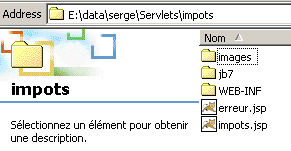
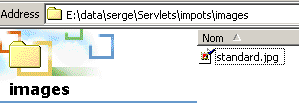
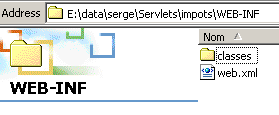
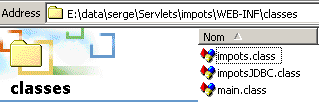
The web.xml configuration file for the impots application is as follows:
<?xml version="1.0" encoding="ISO-8859-1"?>

<!DOCTYPE web-app
    PUBLIC "-//Sun Microsystems, Inc.//DTD Web Application 2.3//EN"
    "http://java.sun.com/dtd/web-app_2_3.dtd">

<web-app>
    <servlet>
      <servlet-name>main</servlet-name>
    <servlet-class>main</servlet-class>
    <init-param>
          <param-name>urlAffichageImpots</param-name>
        <param-value>/impots.jsp</param-value>
    </init-param>
    <init-param>
          <param-name>DSNimpots</param-name>
        <param-value>mysql-dbimpots</param-value>
    </init-param>
    <init-param>
          <param-name>admimpots</param-name>
        <param-value>admimpots</param-value>
    </init-param>
    <init-param>
          <param-name>mdpimpots</param-name>
        <param-value>mdpimpots</param-value>
    </init-param>
    <init-param>
          <param-name>urlErreur</param-name>
        <param-value>/erreur.jsp</param-value>
    </init-param>
  </servlet>
  <servlet-mapping>
      <servlet-name>main</servlet-name>
    <url-pattern>/main</url-pattern>
  </servlet-mapping>
</web-app>
The main servlet is named main and has the alias /main. It is therefore accessible via URL http://localhost:8080/impots/main.
Here are some application examples:
To initialize correctly, the servlet must have access to the mysql-dbimpots database. Here is the page displayed if, for example, the MySQL server is not running and the mysql-dbimpots database is therefore inaccessible:
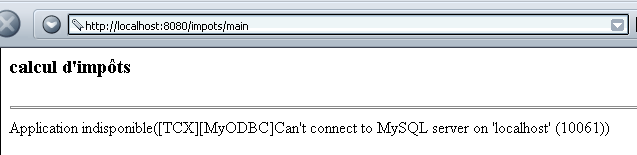
The page displayed in case of incorrect input is as follows:
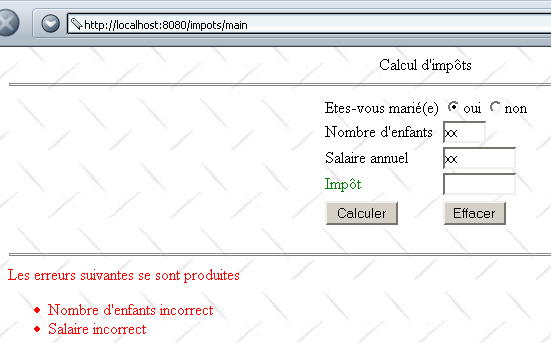
If the entries are correct, the tax is calculated:
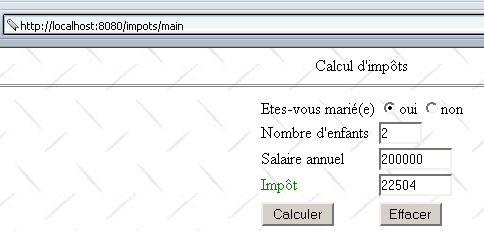
5.3. Version 2
In the previous example, the server verifies the validity of the form parameters txtEnfants and txtSalaire. Here, we propose verifying them using a Javascript script included in the form page. The browser then performs the parameter validation. The server is only contacted if the parameters are valid. This saves "bandwidth." The display page JSP becomes the following:
<%@ page import="java.util.*" %>
............

<html>

    <head>
      <title>impots</title>
    <script language="JavaScript" type="text/javascript">
        function effacer(){
.......
      }//delete

      function calculer(){
           // check parameters before sending them to the server
        with(document.frmImpots){
          //no. of children
          champs=/^\s*(\d+)\s*$/.exec(txtEnfants.value);
          if(champs==null){
            // the model is not verified
            alert("Le nombre d'enfants n'a pas été donné ou est incorrect");
            nbEnfants.focus();
            return;
          }//if
          //salary
          champs=/^\s*(\d+)\s*$/.exec(txtSalaire.value);
          if(champs==null){
            // the model is not verified
            alert("Le salaire n'a pas été donné ou est incorrect");
            salaire.focus();
            return;
          }//if
          // that's it - we send the form to the server
          submit();
        }//with
      }//calculate
        </script>
  </head>

  <body background="/impots/images/standard.jpg">
........
              <td><input type="button" value="Calculer" onclick="calculer()"></td>
          <td><input type="button" value="Effacer" onclick="effacer()"></td>
.....
 </body>
</html>
Note the following changes:
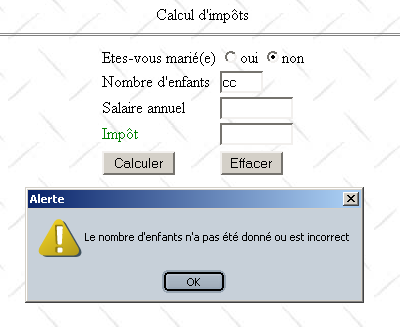
- The Calculate button is no longer of type submit but is a button associated with a function called calculate. This function will analyze the fields txtEnfants and txTsalaire. If they are correct, the form values will be sent to the server (submit); otherwise, an error message will be displayed.
Here is an example of what is displayed in the event of an error:
5.4. Version 3
We will slightly modify the application to introduce the concept of a session. We now consider the application to be a tax calculation simulation application. A user can then simulate different taxpayer "configurations" and see what the tax payable would be for each one. The page WEb below provides an example of what could be obtained:
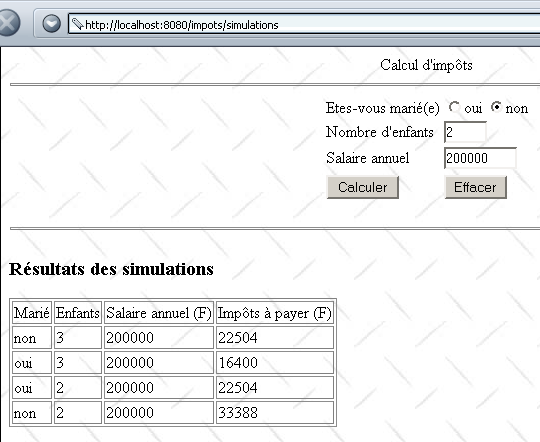
The main servlet has been modified and is now called simulations. It is configured as follows within the impots application:
<?xml version="1.0" encoding="ISO-8859-1"?>

<!DOCTYPE web-app
    PUBLIC "-//Sun Microsystems, Inc.//DTD Web Application 2.3//EN"
    "http://java.sun.com/dtd/web-app_2_3.dtd">

<web-app>
    ....
</servlet>
    <servlet>
      <servlet-name>simulations</servlet-name>
    <servlet-class>simulations</servlet-class>
    <init-param>
          <param-name>urlSimulationImpots</param-name>
        <param-value>/simulationsImpots.jsp</param-value>
    </init-param>
    <init-param>
          <param-name>DSNimpots</param-name>
        <param-value>mysql-dbimpots</param-value>
    </init-param>
    <init-param>
          <param-name>admimpots</param-name>
        <param-value>admimpots</param-value>
    </init-param>
    <init-param>
          <param-name>mdpimpots</param-name>
        <param-value>mdpimpots</param-value>
    </init-param>
    <init-param>
          <param-name>urlErreur</param-name>
        <param-value>/erreur.jsp</param-value>
    </init-param>
  </servlet>
......
  <servlet-mapping>
      <servlet-name>simulations</servlet-name>
    <url-pattern>/simulations</url-pattern>
  </servlet-mapping>
</web-app>
The main servlet is called simulations and is based on the class file simulations.class. It has the alias /simulations, which makes it accessible via URL http://localhost:8080/impots/simulations. It has the same initialization parameters as the main servlet discussed earlier regarding database access. A new parameter appears, urlSimulationsImpots, which is the URL for the JSP simulation page (the one just presented above).
The simulations.java servlet is similar to the main.java servlet. It differs from it in the following main ways:
- the main servlet calculates a value txtImpots based on the parameters optmarie, txtEnfants, and txtSalaire and passes this value to the display page JSP
- The simulations servlet calculates the value txtImpots in the same way, stores the parameters (optMarie, txtEnfants, txtsalaire, txtImpots) in a list named simulations. This list is passed as a parameter to the JSP display page. To ensure that this list contains all simulations performed by the user, it is saved as an attribute of the current session.
The simulations servlet is as follows (only the lines of code that differ from those in the previous application have been included):
import java.io.*;
.......

public class simulations extends HttpServlet{

    // instance variables
    String msgErreur=null;
    String urlSimulationImpots=null;
    String urlErreur=null;
...........

    //-------- GET
    public void doGet(HttpServletRequest request, HttpServletResponse response)
    throws IOException, ServletException{

...........

         // retrieve previous simulations from the session
        HttpSession session=request.getSession();
        ArrayList simulations=(ArrayList)session.getAttribute("simulations");
        if(simulations==null) simulations=new ArrayList();
        // put the simulations in the current query
        request.setAttribute("simulations",simulations);

         // other query attributes
...........

         // do we have all the expected parameters
        if(optMarie==null || txtEnfants==null || txtSalaire==null){
........
             // we hand over to the url for displaying tax calculation simulations
            getServletContext().getRequestDispatcher(urlSimulationImpots).forward(request,response);
        }

         // we have all the parameters - we check them
...........

         // if there are errors, they are passed as query attributes
        if(erreurs.size()!=0){
            request.setAttribute("erreurs",erreurs);
        }else{
            try{
                 // you can calculate the tax payable
                int nbEnfants=Integer.parseInt(txtEnfants);
                int salaire=Integer.parseInt(txtSalaire);
                txtImpots=""+impots.calculer(optMarie.equals("oui"),nbEnfants,salaire);
                 // the current result is added to the previous simulations
                String[] simulation={optMarie.equals("oui") ? "oui" : "non",txtEnfants, txtSalaire, txtImpots};
                simulations.add(simulation);
                 // the new simulations value is added to the session
                session.setAttribute("simulations",simulations);
            }catch(Exception ex){}
        }

         // other query attributes
..........

         // we hand over to the url for displaying simulations
        getServletContext().getRequestDispatcher(urlSimulationImpots).forward(request,response);
    }

     //-------- POST
    public void doPost(HttpServletRequest request, HttpServletResponse response)
    throws IOException, ServletException{
        doGet(request,response);
    }

     //-------- INIT
    public void init(){
         // retrieve initialization parameters
        ServletConfig config=getServletConfig();
        urlSimulationImpots=config.getInitParameter("urlSimulationImpots");
        urlErreur=config.getInitParameter("urlErreur");
        DSNimpots=config.getInitParameter("DSNimpots");
        admimpots=config.getInitParameter("admimpots");
        mdpimpots=config.getInitParameter("mdpimpots");

         // parameters ok ?
.........................
    }
}
The display page JSP for simulationsImpots.jsp has become the following (only the code that differs from the display page JSP of the previous application has been retained).
<%@ page import="java.util.*" %>

<%
     // retrieve attributes passed by the main servlet
...........
  ArrayList simulations=(ArrayList)request.getAttribute("simulations");
%>

<html>

    <head>
      <title>impots</title>
    <script language="JavaScript" type="text/javascript">
........
        </script>
  </head>

  <body background="/impots/images/standard.jpg">
      <center>
        Calcul d'impôts
        <hr>
      <form name="frmImpots" action="/impots/simulations" method="POST">
.......................
           </form>
</center>
    <hr>
    <%
         // are there any mistakes?
      if(erreurs!=null){
..................
      }else if(simulations.size()!=0){
          // simulation results
        out.println("<h3>Résultats des simulations<h3>");
        out.println("<table \"border=\"1\">");
        out.println("<tr><td>Marié</td><td>Enfants</td><td>Salaire annuel (F)</td><td>Impôts à payer (F)</td></tr>");
        for(int i=0;i<simulations.size();i++){
            String[] simulation=(String[])simulations.get(i);
            out.println("<tr><td>"+simulation[0]+"</td><td>"+simulation[1]+"</td><td>"+simulation[2]+"</td><td>"+simulation[3]+"</td></tr>");
        }
        out.println("</table>");
      }
   %>
 </body>
</html>
5.5. Version 4
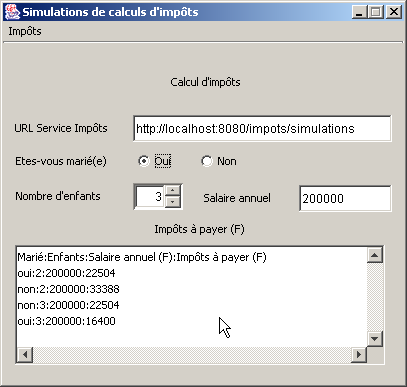
We will now create a standalone application that will serve as a web client for the previous /impots/simulations application. This application will have the following graphical interface:
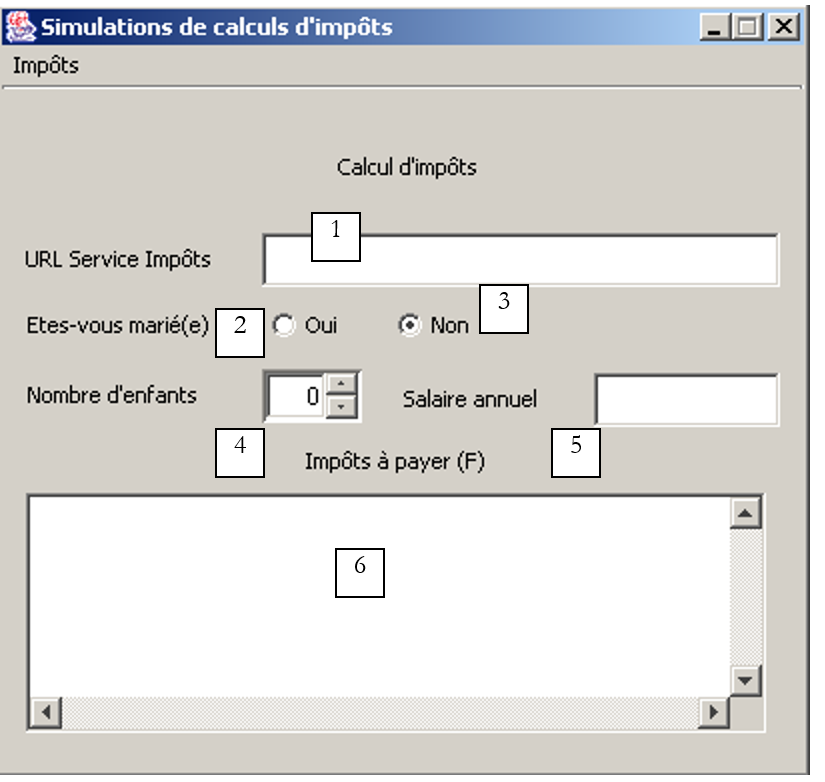 |
No. | type | name | role |
1 | JTextField | txtUrlServiceImpots | URL from the tax calculation simulation service |
2 | JRadioButton | rdOui | Checked if married |
3 | JRadioButton | rdNon | check if unmarried |
4 | JSpinner | spinEnfants | number of the taxpayer's children (minimum=0, maximum=20, increment=1) |
5 | JTextField | txtSalaire | taxpayer's annual salary in F |
6 | JList in JScrollPane | lstSimulations | List of simulations |
The Tax menu consists of the following options:
option Main | option secondary | name | Role |
Taxes | |||
Calculate | mnuCalculer | Calculates the tax payable when all data required for the calculation is present and correct | |
Clear | mnuEffacer | resets the form to its initial state | |
Exit | mnuQuitter | exits the application |
Operating Rules
- The "Calculate" menu item remains disabled if either field 1 or 5 is empty
- a syntactically incorrect URL is detected in field 1
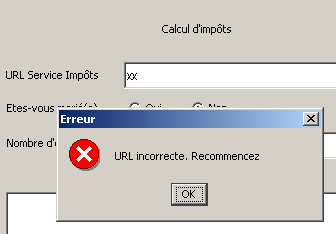
- an incorrect salary is detected
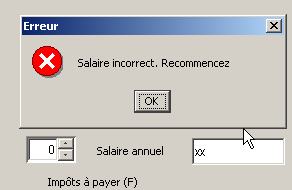
- any server connection error is reported (in example 1 below, the port is incorrect—in example 2, the requested URL does not exist—in example 3, the MySQL database was not running)
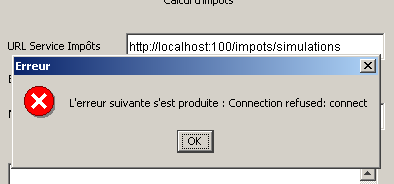
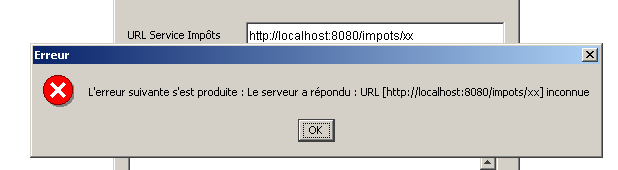
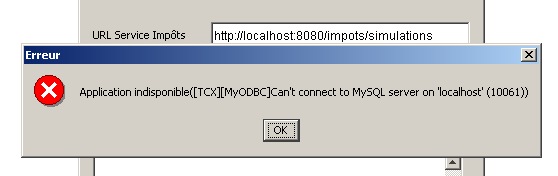
- If everything is correct, the simulations are displayed
When writing a custom web client, it is necessary to know exactly what the server sends in response to the various possible requests from a client. The server sends a set of HTML lines containing useful information and other data that is only there for layout purposes HTML. Java regular expressions can help us find the useful information in the stream of lines sent by the server. To do this, we need to know the exact format of the server’s various responses. Here we will use the web client we encountered earlier, which displays a server’s response to a request on the screen. The requested URL will be that of our tax calculation simulation service http://localhost:8080/impots/simulations, to which we can pass parameters in the form http://localhost:8080/impots/simulations?param1=vam1¶m2=val2&...
Let’s request URL even though the MySQL database used to create a tax-type object is not running:
Dos>java clientweb http://localhost:8080/impots/simulations GET

HTTP/1.1 200 OK
Content-Type: text/html;charset=ISO-8859-1
Date: Fri, 16 Aug 2002 16:31:04 GMT
Connection: close
Server: Apache Tomcat/4.0.3 (HTTP/1.1 Connector)
Set-Cookie: JSESSIONID=9DEC8B27966A1FBE3D4968A7B9DF3331;Path=/impots


<!-- dÚbut from page HTML -->
<html>
  <head>
        <title>impots</title>
  </head>
  <body>
        <h3>calcul d'impôts</h3>
        <hr>
    Application indisponible([TCX][MyODBC]Can't connect to MySQL server on 'localhost' (10061))
  </body>
</html>
To retrieve the error, the web client must search the web server's response for the line containing the text "Application unavailable". Now let's launch the MySQL database and request the same URL by passing it the values it expects (it expects them in either the form of a GET or a POST—see the server's Java code):
Dos>java clientweb "http://localhost:8080/impots/simulations?ptMarie=oui&txtEnfants=2&txtSalaire=200000" GET

HTTP/1.1 200 OK
Content-Type: text/html;charset=ISO-8859-1
Date: Fri, 16 Aug 2002 16:42:36 GMT
Connection: close
Server: Apache Tomcat/4.0.3 (HTTP/1.1 Connector)
Set-Cookie: JSESSIONID=C2A707600E98A37A343611D80DD5C8A2;Path=/impots


<html>

        <head>
        <title>impots</title>
    <script language="JavaScript" type="text/javascript">
        function effacer(){
...................................................
      }//delete

      function calculer(){
...................................................
      }//calculate
                </script>
  </head>

  <body background="/impots/images/standard.jpg">
        <center>
        Calcul d'imp¶ts
        <hr>
      <form name="frmImpots" action="/impots/simulations" method="POST">
...................................................
      </form>
    </center>
    <hr>
    <h3>Résultats des simulations<h3>
<table "border="1">
<tr><td>Marié</td><td>Enfants</td><td>Salaire annuel (F)</td><td>Impôts à payer (F)</td></tr>
<tr><td>oui</td><td>2</td><td>200000</td><td>22504</td></tr>
</table>

 </body>
</html>
Here is the entire HTML document sent by the server. The results of the various simulations are found in the single table contained in this document. The regular expression allowing us to retrieve the relevant information from the document could be the following:
where the four expressions in parentheses represent the four pieces of information to be retrieved.
We now have the guidelines for what to do when the user requests a tax calculation from the previous graphical interface:
- verify that all data in the interface is valid and report any errors.
- connect to the URL specified in field 1. To do this, we will follow the model of the generic web client already presented and studied
- in the server response stream, use regular expressions to either:
- find the error message, if there is one
- find the simulation results if there are no errors
The code related to the "Calculate" menu is as follows:
  void mnuCalculer_actionPerformed(ActionEvent e) {
    // tAX CALCULATION
         // verification URL service
        URL urlImpots=null;
        try{
            urlImpots=new URL(txtURLServiceImpots.getText().trim());
            String query=urlImpots.getQuery();
            if(query!=null) throw new Exception();
        }catch (Exception ex){
             // error msg
            JOptionPane.showMessageDialog(this,"URL incorrecte. Recommencez","Erreur",JOptionPane.ERROR_MESSAGE);
             // focus on wrong field
            txtURLServiceImpots.requestFocus();
             // back to interface
            return;
        }
     // salary verification
    int salaire=0;
    try{
      salaire=Integer.parseInt(txtSalaire.getText().trim());
      if(salaire<0) throw new Exception();
    }catch (Exception ex){
       // error msg
            JOptionPane.showMessageDialog(this,"Salaire incorrect. Recommencez","Erreur",JOptionPane.ERROR_MESSAGE);
       // focus on wrong field
      txtSalaire.requestFocus();
       // back to interface
      return;
    }
     // no. of children
    Integer nbEnfants=(Integer)spinEnfants.getValue();

    try{
             // tax calculation
            calculerImpots(urlImpots,rdOui.isSelected(),nbEnfants.intValue(),salaire);
    }catch (Exception ex){
             // error is displayed
            JOptionPane.showMessageDialog(this,"L'erreur suivante s'est produite : " + ex.getMessage(),"Erreur",JOptionPane.ERROR_MESSAGE);
        }
  }//mnuCalculer


    public void calculerImpots(URL urlImpots,boolean marié, int nbEnfants, int salaire)
          throws Exception{
         // tAX CALCULATION
         // urlImpots : URL of the tax department
         // married: true if married, false otherwise
         // nbEnfants : number of children
         // salary: annual salary

         // remove from urlImpots the info needed to connect to the tax server
        String path=urlImpots.getPath();
        if(path.equals("")) path="/";
        String query="?"+"optMarie="+(marié ? "oui":"non")+"&txtEnfants="+nbEnfants+"&txtSalaire="+salaire;
        String host=urlImpots.getHost();
        int port=urlImpots.getPort();
        if(port==-1) port=urlImpots.getDefaultPort();

         // local data
        Socket  client=null;                        // the customer
        BufferedReader IN=null;                    // the customer's reading flow
        PrintWriter OUT=null;                        // the customer's writing flow
        String réponse=null;                        // server response
         // the model searched in HTTP headers
        Pattern modèleCookie=Pattern.compile("^Set-Cookie: JSESSIONID=(.*?);");
        // the model of a correct answer
        Pattern réponseOK=Pattern.compile("^.*? 200 OK");
         // the result of the model comparison
        Matcher résultat=null;

        try{
             // connect to the server
            client=new Socket(host,port);

            // create customer input/output flows TCP
            IN=new BufferedReader(new InputStreamReader(client.getInputStream()));
            OUT=new PrintWriter(client.getOutputStream(),true);

            // request URL - send HTTP headers
            OUT.println("GET " + path + query + " HTTP/1.1");
            OUT.println("Host: " + host + ":" + port);
            if(! JSESSIONID.equals("")){
                OUT.println("Cookie: JSESSIONID="+JSESSIONID);
            }
            OUT.println("Connection: close");
            OUT.println("");

             // read the 1st line of the answer
            réponse=IN.readLine();
             // compare the HTTP line with the model of the correct answer
            résultat=réponseOK.matcher(réponse);
            if(! résultat.find()){
                // we have a URL problem
                throw new Exception("Le serveur a répondu : URL ["+ txtURLServiceImpots.getText().trim() + "] inconnue");
            }//if(result)

             // we read the response through to the end of the headers, looking for any cookies
            while((réponse=IN.readLine())!=null){
                 // empty line?
                if(réponse.equals("")) break;
                // line HTTP not empty
                 // if you don't have the session token, look for it
                if (JSESSIONID.equals("")){
                    // compare the HTTP line with the cookie template
                    résultat=modèleCookie.matcher(réponse);
                    if(résultat.find()){
                        // we found the token cookie
                        JSESSIONID=résultat.group(1);
                    }//if(result)
                }//if(JSESSIONID)
            }//while

             // that's it for HTTP headers - move on to HTML code
             // to retrieve simulations
            ArrayList listeSimulations=getSimulations(IN,OUT,simulations);
            simulations.clear();
            for (int i=0;i<listeSimulations.size();i++){
                simulations.addElement(listeSimulations.get(i));
            }

            // it's over
            client.close();
        }catch (Exception ex){
            throw new Exception(ex.getMessage());
        }
    }//calculerImpots

    private ArrayList getSimulations(BufferedReader IN, PrintWriter OUT, DefaultListModel simulations) throws Exception{

        // the model of a line in the simulation table
        Pattern ptnSimulation=Pattern.compile("<tr>\\s*<td>(.*?)</td>\\s*<td>(.*?)</td>\\s*<td>(.*?)</td>\\s*<td>(.*?)</td>\\s*</tr>");
        // the template for a line in the error list
        Pattern ptnErreur=Pattern.compile("(Application indisponible.*?)\\s*$");
         // the result of the model comparison
        Matcher résultat=null;
         // simulations
        ArrayList listeSimulations=new ArrayList();

         // read all the lines to the end
        String ligne=null;
        boolean simulationRéussie=false;
        while((ligne=IN.readLine())!=null){
             // follow-up
             // the line is compared with the error model if the simulation part has not yet been encountered
            if(! simulationRéussie){
                résultat=ptnErreur.matcher(ligne);
                if(résultat.find()){
                    // error msg
                    JOptionPane.showMessageDialog(this,résultat.group(1),"Erreur",JOptionPane.ERROR_MESSAGE);
                    // it's over
                    return listeSimulations;
                }//if
            }//if
             // the line is compared with the simulation model
            résultat=ptnSimulation.matcher(ligne);
            if(résultat.find()){
                // we found a row in the
                listeSimulations.add(résultat.group(1)+":"+résultat.group(2)+":"+résultat.group(3)+
                                                ":"+résultat.group(4));
                 // the simulation was a success
                simulationRéussie=true;
            }//if
        }//while
        // end
        return listeSimulations;
    }
Let's explain this code a bit:
- The procedure mnuCalculer_actionPerformed checks that the interface data is valid. If it is not, an error message is displayed and the procedure terminates. If it is valid, the procedure calculerImpots is executed.
- The calculerImpots procedure begins by constructing the URL that it needs to request
         // remove from urlImpots the info needed to connect to the tax server
        String path=urlImpots.getPath();
        if(path.equals("")) path="/";
        String query="?"+"optMarie="+(marié ? "oui":"non")+"&txtEnfants="+nbEnfants+"&txtSalaire="+salaire;
        String host=urlImpots.getHost();
        int port=urlImpots.getPort();
        if(port==-1) port=urlImpots.getDefaultPort();
........................
- then connects to this URL by sending the appropriate HTTP headers:
             // connect to the server
            client=new Socket(host,port);

            // create customer input/output flows TCP
            IN=new BufferedReader(new InputStreamReader(client.getInputStream()));
            OUT=new PrintWriter(client.getOutputStream(),true);

            // request URL - send HTTP headers
            OUT.println("GET " + path + query + " HTTP/1.1");
            OUT.println("Host: " + host + ":" + port);
            if(! JSESSIONID.equals("")){
                OUT.println("Cookie: JSESSIONID="+JSESSIONID);
            }
            OUT.println("Connection: close");
            OUT.println("");
- Once the request is made, our web client waits for the response. It first retrieves the HTTP headers from the server’s response. It parses these headers to find the session token. In fact, it must send this token back to the server so that the server can keep track of the various simulations performed. Note that it would have been simpler for the client to store the various simulations performed by the user itself. However, we are sticking with the idea of sending back the token to provide a new example of session management. The first line of the response is handled separately. It must be in the form HTTP/version 200 OK to indicate that the requested URL does indeed exist. Therefore, if it is not in this format, we conclude that the user requested an incorrect URL and inform them of this.
         // the model searched in HTTP headers
        Pattern modèleCookie=Pattern.compile("^Set-Cookie: JSESSIONID=(.*?);");
        // the model for a correct answer
        Pattern réponseOK=Pattern.compile("^.*? 200 OK");
..........

             // read the 1st line of the answer
            réponse=IN.readLine();
             // compare the HTTP line with the model of the correct answer
            résultat=réponseOK.matcher(réponse);
            if(! résultat.find()){
                // we have a URL problem
                throw new Exception("Le serveur a répondu : URL ["+ txtURLServiceImpots.getText().trim() + "] inconnue");
            }//if(result)

             // we read the response through to the end of the headers, looking for any cookies
            while((réponse=IN.readLine())!=null){
                 // empty line?
                if(réponse.equals("")) break;
                // line HTTP not empty
                 // if you don't have the session token, look for it
                if (JSESSIONID.equals("")){
                    // compare the HTTP line with the cookie template
                    résultat=modèleCookie.matcher(réponse);
                    if(résultat.find()){
                        // we found the token cookie
                        JSESSIONID=résultat.group(1);
                    }//if(result)
                }//if(JSESSIONID)
            }//while
- once the HTTP headers have been processed, we move on to the HTML part of the response
             // that's it for HTTP headers - move on to HTML code
             // to retrieve simulations
            ArrayList listeSimulations=getSimulations(IN,OUT,simulations);
            simulations.clear();
            for (int i=0;i<listeSimulations.size();i++){
                simulations.addElement(listeSimulations.get(i));
            }
- The getSimulations procedure returns the list of simulations if they exist; this list will be empty if the server returns an error message. In this case, the error message is displayed in a message box. If the list is not empty, it is displayed in the drop-down list of the graphical user interface.
- The procedure getSimulations compares each line of the response from HTML to the regular expression representing the error message (Application unavailable...) and to the regular expression representing a simulation. If the error message is found, it is displayed and the procedure terminates. If the result of a simulation is found, it is added to the list of simulations. At the end of the procedure, this list is returned as the result.
    private ArrayList getSimulations(BufferedReader IN, PrintWriter OUT, DefaultListModel simulations) throws Exception{

        // the model of a line in the simulation table
        Pattern ptnSimulation=Pattern.compile("<tr>\\s*<td>(.*?)</td>\\s*<td>(.*?)</td>\\s*<td>(.*?)</td>\\s*<td>(.*?)</td>\\s*</tr>");
        // the template for a line in the error list
        Pattern ptnErreur=Pattern.compile("(Application indisponible.*?)\\s*$");
5.6. Version 5
Here, we convert the previous standalone graphical application into a Java applet. The graphical interface is slightly different. With the standalone application, the user provided the URL for the tax calculation simulation service, and then the application connected to that URL. Here, the client application is a browser, and the user will request the URL from the HTML document containing the applet. It is important to remember that a Java applet can only establish a network connection with the server from which it was downloaded. The URL of the simulation service will therefore be on the same server as the HTML document containing the applet. In our example, an applet initialization parameter will be placed in the txtUrlServiceImpots field, which will be non-editable by the user. We will thus have the following client:
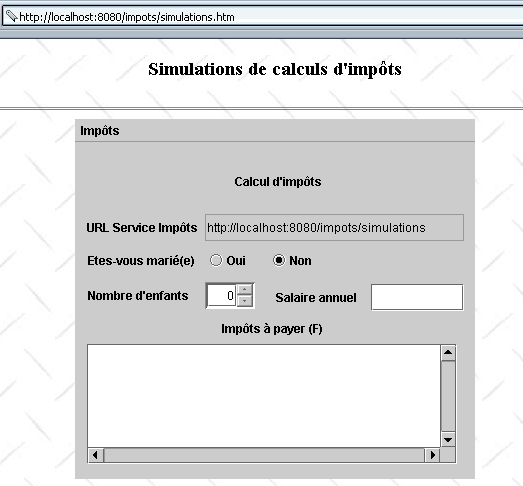
The document HTML containing the applet is named simulations.htm and is as follows:
<html>
    <head>
      <title>Simulations de calculs d'impôts</title>
  </head>
  <body background="/impots/images/standard.jpg">
      <center>
          <h3>Simulations de calculs d'impôts</h3>
        <hr>
        <applet code="appletImpots.class" width="400" height="360">
            <param name="urlServiceImpots" value="simulations">
            </applet>
    </center>
  </body>
</html>
The applet has a parameter urlServiceImpots, which is the URL of the tax calculation simulation service. This URL is relative to and measured against the URL of the document HTML simulations.htm. Thus, if a browser retrieves this document with the URL http://localhost:8080/impots/simulations.htm, the URL for the simulation service will be http://localhost:8080/impots/simulations. If this URL had been http://stahe:8080/impots/simulations.htm, the URL for the simulation service would have been http://stahe:8080/impots/simulations.
The appletImpots.java applet fully incorporates the code from the previous standalone graphical application while adhering to the rules for converting a graphical application into an applet.
public class appletImpots extends JApplet {
  // window components
  JPanel contentPane;
  JMenuBar jMenuBar1 = new JMenuBar();
  JMenu jMenu1 = new JMenu();
  JMenuItem mnuCalculer = new JMenuItem();
.............


   //Building the frame
  public void init() {
    try {
      jbInit();
    }
    catch(Exception e) {
      e.printStackTrace();
    }
     // other initializations
    moreInit();
  }

   // form initialization
  private void moreInit(){
         // retrieve the urlServiceImpots parameter
        String urlServiceImpots=getParameter("urlServiceImpots");
        if(urlServiceImpots==null){
            // missing parameter
            JOptionPane.showMessageDialog(this,"Le paramètre urlServiceImpots de l'applet n'a pas été défini","Erreur",JOptionPane.ERROR_MESSAGE);
             // end
            return;
        }
         // put the URL in its field
        String codeBase=""+getCodeBase();
        if(codeBase.endsWith("/"))
           txtURLServiceImpots.setText(codeBase+urlServiceImpots);
      else txtURLServiceImpots.setText(codeBase+"/"+urlServiceImpots);
    // calculate menu disabled
    mnuCalculer.setEnabled(false);
     // spinner Children - between 0 and 20 children
    spinEnfants=new JSpinner(new SpinnerNumberModel(0,0,20,1));
    spinEnfants.setBounds(new Rectangle(130,140,50,27));
    contentPane.add(spinEnfants);
  }//moreInit

   //Initialize component
  private void jbInit() throws Exception  {
    contentPane = (JPanel) this.getContentPane();
    contentPane.setLayout(null);
...............
  }
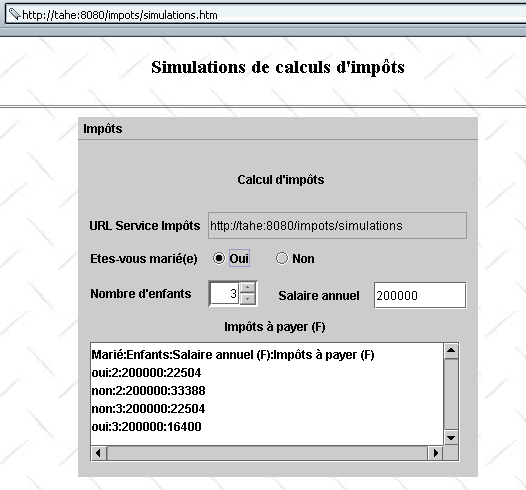
When a browser loads an applet, it first executes its init method. In this method, we retrieved the value of the applet’s urlServiceImpots parameter, then calculated the full name of the simulation service’s URL and placed this value in the txtURLServiceImpots field as if the user had typed it. With this done, there is no longer any difference between the two applications. In particular, the code associated with the Calculate menu is identical. Here is an example of the execution:
5.7. Conclusion
We have demonstrated different versions of our client-server tax calculation application:
- version 1: the service is provided by a set of servlets and pages JSP; the client is a browser. It performs a single simulation and does not retain a history of previous ones.
- version 2: We add some browser-side capabilities by placing javascript scripts in the HTML document loaded by the browser. It checks the validity of the form parameters.
- version 3: The service is now able to remember the various simulations performed by a client by managing a session. The HTML interface has been modified accordingly to display these simulations.
- version 4: The client is now a standalone graphical application. This allows us to revisit the implementation of the clients web applications.
- version 5: The client is transformed into a Java applet. We now have a client-server application fully programmed in Java, both on the server side and the client side.
At this point, a few observations can be made:
- Versions 1 through 3 support browsers with no capabilities other than the ability to execute javascript scripts. Note that a user always has the option to disable the execution of these scripts. The application will then function only partially in version 1 (the "Clear" option will not work) and not at all in versions 2 and 3 (the "Clear" and "Calculate" options will not work). It might be worth considering a version version of the service that does not use javascript scripts.
- version 4 requires that the client workstation have a Java 2 virtual machine.
- version 5 requires that the client workstation have a browser with a Java 2 virtual machine.
When writing a web service, you must consider which types of clients you are targeting. If you want to target the largest number of clients, you will write an application that sends only HTML to browsers (no javascript or applets). If you are working within an intranet and have control over the configuration of the workstations on it, you can then afford to be more demanding on the client side, and the previous version 5 may then be acceptable.
Versions 4 and 5 are web-based clients clients that retrieve the information they need from the HTML stream sent by the server. Very often, you do not control this stream. This is the case when we have written a client for an existing web service on the network that is managed by someone else. Let’s take an example. Suppose our tax calculation simulation service was written by Company X. Currently, the service sends the simulations in a HTML table, and our client uses this fact to retrieve them. It thus compares each line of the server’s response to the regular expression:
         // the model of a line in the simulation table
        Pattern ptnSimulation=Pattern.compile("<tr>\\s*<td>(.*?)</td>\\s*<td>(.*?)</td>\\s*<td>(.*?)</td>\\s*<td>(.*?)</td>\\s*</tr>");
Now suppose the application developer changes the visual appearance of the response by placing the simulations not in an array but in a list in the form:
In this case, our web client will need to be rewritten. This is the constant threat facing web applications that we do not control ourselves. XML can provide a solution to this problem:
- instead of generating HTML, the simulation service will generate XML. In our example, this could be
<simulations>
    <entetes marie="marié" enfants="enfants" salaire="salaire" impot="impôt"/>
  <simulation marie="oui" enfants="2" salaire="200000" impot="22504" />
  <simulation marie="non" enfants="2" salaire="200000" impot="33388" />
</simulations>
- A stylesheet could be associated with this response, instructing browsers on the visual format to apply to this response XML
- The programmed web applications would ignore this style sheet and retrieve the information directly from the response stream
If the service designer wishes to modify the visual presentation of the results provided, they will modify the style sheet rather than the XML. Thanks to the style sheet, browsers will display the new visual format, and the programmed clients web pages will not need to be modified. New version files for our simulation service could therefore be written:
- version 6: the service provides a XML response accompanied by a stylesheet intended for browsers
- version 7: the client is a standalone graphical application utilizing the server’s XML response
- version 8: the client is a Java applet using the server's response XML