3. Introduction to Java Servlets and JSP Pages
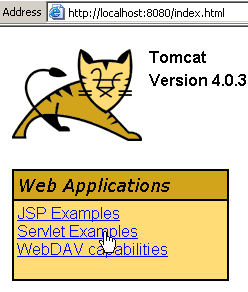
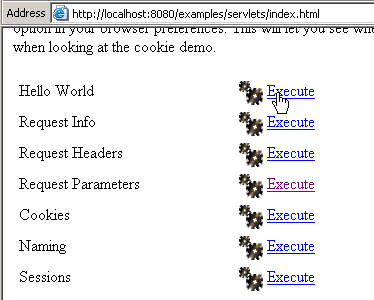
This chapter contains various examples of servlets and JSP pages. They have been tested with the Tomcat server, which runs on port 8080. By following the links on the home page, you can access examples of servlets and JSP pages. Most of the examples below are taken from the Tomcat examples. To test them, simply start Tomcat, request URL http://localhost:8080 with a browser, and follow the servlet link.
 |  |
3.1. Java Servlets
3.1.1. Sending Content to a Web Client
We’ll look at the Hello World example above. The servlet is as follows:
import java.io.*;
import javax.servlet.*;
import javax.servlet.http.*;

public class HelloWorld extends HttpServlet {

    public void doGet(HttpServletRequest request, HttpServletResponse response)
    throws IOException, ServletException
    {
        response.setContentType("text/html");
        PrintWriter out = response.getWriter();
        out.println("<html>");
        out.println("<head>");
        out.println("<title>Hello World!</title>");
        out.println("</head>");
        out.println("<body>");
        out.println("<h1>Hello World!</h1>");
        out.println("</body>");
        out.println("</html>");
    }
}
When this servlet is executed, the following is displayed:
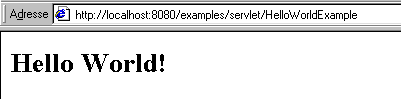
Note the following points:
- You must import special classes for servlets:
import javax.servlet.*;
import javax.servlet.http.*;
The javax.servlet library is not always included by default with jdk. In this case, you can download it directly from the Sun website.
- A servlet extends the HttpServlet class
public class HelloWorld extends HttpServlet {
- A GET request made to the servlet is handled by the doGet method
    public void doGet(HttpServletRequest request, HttpServletResponse response)
    throws IOException, ServletException
- Similarly, a request POST made to the servlet is handled by the method doPost
    public void doPost(HttpServletRequest request, HttpServletResponse response)
    throws IOException, ServletException
- The HttpServletRequest request object is the object that gives us access to the request made by the web client. The servlet’s response will be sent via the HttpServletResponse response object
- The response object allows us to set the headers that will be sent to the client. For example, the Content-type: text/HTML header is set here by:
- To send the response to the client, the servlet uses an output stream provided by the response object:
- Once this output stream is obtained, the code HTML is written to it and thus sent to the client:
        out.println("<html>");
        out.println("<body>");
        out.println("<head>");
        out.println("<title>Hello World!</title>");
        out.println("</head>");
        out.println("<body>");
        out.println("<h1>Hello World!</h1>");
        out.println("</body>");
        out.println("</html>");
3.1.2. Retrieving parameters sent by a web client
The following example shows how a servlet can retrieve parameters sent by the web client. An input form:
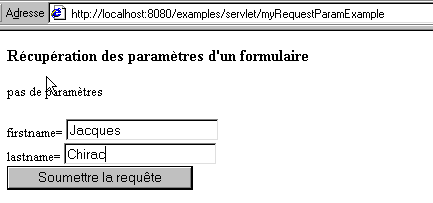
The response sent by the servlet:
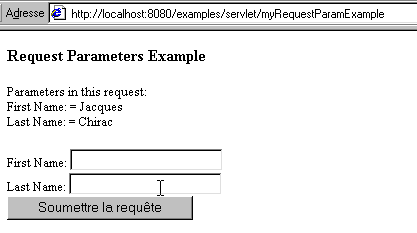
The source code for the servlet is as follows:
import java.io.*;
import java.util.*;
import javax.servlet.*;
import javax.servlet.http.*;

public class myRequestParamExample extends HttpServlet {

    String title="Récupération des paramètres d'un formulaire";

    public void doGet(HttpServletRequest request,
                      HttpServletResponse response)
        throws IOException, ServletException
    {
        response.setContentType("text/html");
        PrintWriter out = response.getWriter();
        out.println("<html>");
        out.println("<body>");
        out.println("<head>");
        out.println("<title>" + title + "</title>");
        out.println("</head>");
        out.println("<body bgcolor=\"white\">");
        out.println("<h3>" + title + "</h3>");
        String firstName = request.getParameter("firstname");
        String lastName = request.getParameter("lastname");
        if (firstName != null || lastName != null) {
            out.println("firstname= " + firstName + "<br>");
            out.println("lastname= " + lastName);
        } else {
            out.println("pas de paramètres");
        }
        out.println("<P>");
        out.print("<form action=\"RequestParamExample\" method=\"POST\">");
        out.println("firstname= <input type=text size=20 name=firstname>");
        out.println("<br>");
        out.println("lastname= <input type=text size=20 name=lastname>");
        out.println("<br>");
        out.println("<input type=submit>");
        out.println("</form>");
        out.println("</body>");
        out.println("</html>");
    }

    public void doPost(HttpServletRequest request,
                      HttpServletResponse response)
        throws IOException, ServletException
    {
        doGet(request, response);
    }

}
Note the following changes compared to the previous example:
- The parameters sent by the browser are retrieved as follows:
        String firstName = request.getParameter("firstname");
        String lastName = request.getParameter("lastname");
The request.getParameter method returns a null pointer if the nomParamètre parameter is not among the parameters sent by the web client.
- The form specifies that the browser must send the parameters using the POST method
- The received parameters will be processed by the servlet’s doPost method. Here, this method simply calls the doGet method. Thus, this servlet processes the form values regardless of whether they are sent via a GET or a POST.
    public void doPost(HttpServletRequest request,
                      HttpServletResponse response)
        throws IOException, ServletException
    {
        doGet(request, response);
    }
3.1.3. Retrieving the http headers sent by a web client
The following servlet demonstrates how to retrieve the http headers sent by the web client:
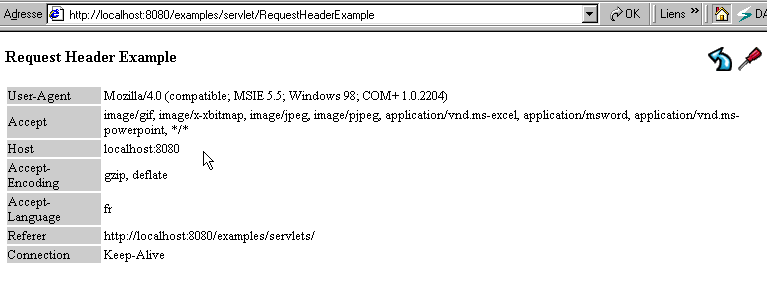
The source code for the servlet is as follows:
import java.io.*;
import java.util.*;
import javax.servlet.*;
import javax.servlet.http.*;

public class RequestHeaderExample extends HttpServlet {

    public void doGet(HttpServletRequest request, HttpServletResponse response)
    throws IOException, ServletException
    {
        response.setContentType("text/html");
        PrintWriter out = response.getWriter();
        Enumeration e = request.getHeaderNames();
        while (e.hasMoreElements()) {
            String name = (String)e.nextElement();
            String value = request.getHeader(name);
            out.println(name + " = " + value);
        }
    }
}
Points to note:
- It is the request object and its getHeaderNames method that gives us access to the http headers sent by the browser in the form of an enumeration:
- The request.getHeader("header") method allows us to retrieve a specific http header. The example above provides a few of them. Note that the headers presented here are sent by the browser. The server also has its own http headers, which sometimes mirror those of the browser. The http headers sent by the browser are intended to inform the server about the browser’s capabilities.
Header | Meaning |
Browser identity | |
formats MIME accepted by the browser. Thus, image/gif means that the browser can handle images in the GIF format | |
in the format host:port. Indicates which machine and port the browser wants to contact. | |
encoding format accepted by the browser for documents sent by the server. Thus, if a server has a document in a normal, uncompressed form and one in gzip format, and the browser has indicated that it can handle the gzip format, then the server can send the document in gzip format to save bandwidth. | |
Languages accepted by the browser. If a server has the same document in multiple languages, it will send the one in a language accepted by the browser. | |
The URL that was requested by the browser | |
The connection mode requested by the browser. Keep-alive means that the server should not close the connection after serving the requested page to the browser. If the browser discovers that the received page contains links to images, for example, it can make new requests to the server to retrieve them without needing to establish a new connection. The browser will then take the initiative to close the connection once it has received all the elements of the page. |
3.1.4. Retrieving Environment Information
The following servlet demonstrates how to access the servlet’s runtime environment information. Some of this information is sent as http headers by the browser and can therefore be retrieved using the previous method.
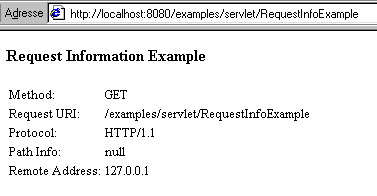
The servlet code is as follows:
import java.io.*;
import javax.servlet.*;
import javax.servlet.http.*;

public class RequestInfo extends HttpServlet {

    public void doGet(HttpServletRequest request, HttpServletResponse response)
    throws IOException, ServletException
    {
        response.setContentType("text/html");
        PrintWriter out = response.getWriter();
        out.println("<html>");
        out.println("<body>");
        out.println("<head>");
        out.println("<title>Request Information Example</title>");
        out.println("</head>");
        out.println("<body>");
        out.println("<h3>Request Information Example</h3>");
        out.println("Method: " + request.getMethod());
        out.println("Request URI: " + request.getRequestURI());
        out.println("Protocol: " + request.getProtocol());
        out.println("PathInfo: " + request.getPathInfo());
        out.println("Remote Address: " + request.getRemoteAddr());
        out.println("</body>");
        out.println("</html>");
    }


    public void doPost(HttpServletRequest request, HttpServletResponse response)
    throws IOException, ServletException
    {
        doGet(request, response);
    }
}
The information here is obtained using various methods:
        out.println("Method: " + request.getMethod());
        out.println("Request URI: " + request.getRequestURI());
        out.println("Protocol: " + request.getProtocol());
        out.println("PathInfo: " + request.getPathInfo());
        out.println("Remote Address: " + request.getRemoteAddr());
A list of some of the available methods and their meanings is as follows:
method | meaning |
the name of the web server | |
the web server's working port | |
the GET or POST method used by the browser to make its request | |
the name of the client machine from which the browser made its request | |
the IP address of that same machine | |
the content type sent by the browser (http Content-type header) | |
the number of characters sent by the browser (http Content-length header) | |
the version of the http protocol requested by the browser | |
the URL requested by the browser. Corresponds to the part of the URL following the host:port identifier in URL://host:port/ |
3.1.5. Create a servlet with JBuilder, deploy it with Tomcat
We will now describe how to create and run a Java servlet. We will use two tools: JBuilder to compile the servlet and Tomcat to run it. Tomcat alone might suffice. However, it offers limited debugging capabilities. We will use the example developed previously, which displays the parameters received by the server. The servlet first sends the following input form:
The response sent by the servlet:
The source code for the servlet is as follows:
import java.io.*;
import java.util.*;
import javax.servlet.*;
import javax.servlet.http.*;

public class myRequestParamExample extends HttpServlet {

    String title="Récupération des paramètres d'un formulaire";

    public void doGet(HttpServletRequest request,
                      HttpServletResponse response)
        throws IOException, ServletException
    {
        response.setContentType("text/html");
        PrintWriter out = response.getWriter();
        out.println("<html>");
        out.println("<body>");
        out.println("<head>");
        out.println("<title>" + title + "</title>");
        out.println("</head>");
        out.println("<body bgcolor=\"white\">");
        out.println("<h3>" + title + "</h3>");
        String firstName = request.getParameter("firstname");
        String lastName = request.getParameter("lastname");
        if (firstName != null || lastName != null) {
            out.println("firstname= " + firstName + "<br>");
            out.println("lastname= " + lastName);
        } else {
            out.println("pas de paramètres");
        }
        out.println("<P>");
        out.print("<form action=\"RequestParamExample\" method=\"POST\">");
        out.println("firstname= <input type=text size=20 name=firstname>");
        out.println("<br>");
        out.println("lastname= <input type=text size=20 name=lastname>");
        out.println("<br>");
        out.println("<input type=submit>");
        out.println("</form>");
        out.println("</body>");
        out.println("</html>");
    }

    public void doPost(HttpServletRequest request,
                      HttpServletResponse response)
        throws IOException, ServletException
    {
        doGet(request, response);
    }

}
- Create a project named myRequestParamExample using JBuilder and include the previous program myRequestParamExample.java in it.
- During compilation, you may encounter the following issue: your JBuilder may not have the javax.servlet library required to compile the servlets. In this case, you must configure JBuilder to use additional class libraries. The procedure is described in the appendices of this document for JBuilder 7. We have partially reproduced it here:
- Enable option Tools/Configure JDKs or (Options/Configure JDK)
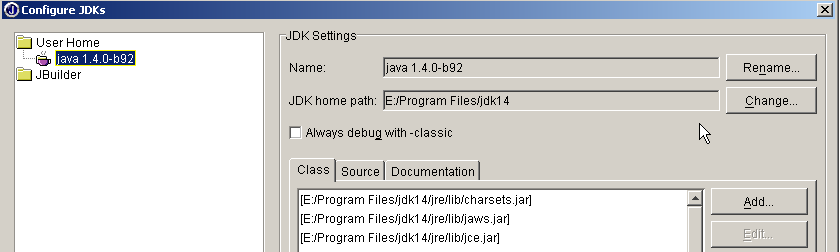
In the JDK Settings section above, the Name field normally contains JDK 1.3.1. If you have a newer version of JDK, use the Change button to specify its installation directory. Above, we have specified the directory E:\Program Files\jdk14 where a JDK 1.4 was installed. From now on, JBuilder will use this JDK for its compilations and executions. In the (Class, Source, Documentation) section, you’ll find a list of all the class libraries that will be explored by JBuilder—in this case, the classes from JDK 1.4. The classes in this version are not sufficient for Java web development. To add other class libraries, use the Add button and select the additional .jar files you want to use. The .jar files are class libraries. Tomcat 4.x includes all the class libraries necessary for web development. They are located in <tomcat>\common\lib, where <tomcat> is the Tomcat installation directory:
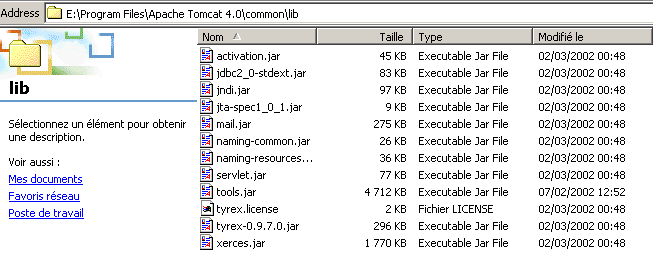
Using the Add button, we will add these libraries, one by one, to the list of libraries scanned by JBuilder:
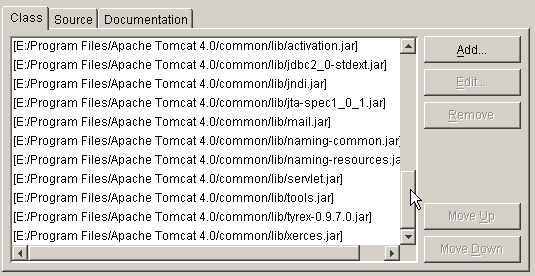
From now on, you can compile Java programs compliant with the J2EE standard, including Java servlets. JBuilder is used only for compilation; execution is subsequently handled by Tomcat.
- Now you can compile the myRequestParamExample.java program and generate the myRequestParamExample.class servlet. Where should this servlet be placed? If the initial Tomcat configuration has not been changed, the servlet .class files must be placed in <tomcat>\webapps\examples\WEB-INF\classes (Tomcat 4.x).
- Verify that Tomcat is running, and using a browser, request the URL http://localhost:8080/examples/servlet/myRequestParamExample:
3.1.6. Examples
For the following examples, we used the method described above:
- compiling the XX.java source code of the servlet with JBuilder
- deploying the XX.class servlet to <tomcat>\webapps\examples\WEB-INF\classes
- Tomcat started; request URL via a browser at http://localhost:8080/examples/servlet/XX
3.1.6.1. Dynamic Form Generation - 1
Let’s take as an example the generation of a form with only one control: a list. The content of this list is built dynamically using values taken from an array. In reality, these values are often retrieved from a database. The form is as follows:
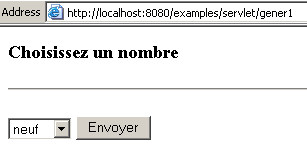
If you click Submit on the example above, you get the following response:
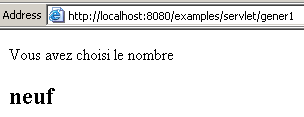
Note that the URL that generates the response is the same one that displays the form. Here, we have a servlet that processes the response to the form it sent. This is a common scenario. The HTML code for the form is as follows:
<html>
    <head><title>Génération de formulaire</title></head>
    <body>
    <h3>Choississez un nombre</h3><hr>
    <form method="POST">
      <select name="cmbValeurs" size="1">
        <option>zéro</option>
        <option>un</option>
        <option>deux</option>
        <option>trois</option>
        <option>quatre</option>
        <option>cinq</option>
        <option>six</option>
        <option>sept</option>
        <option>huit</option>
        <option>neuf</option>
      </select>
      <input type="submit" value="Envoyer">
    </form>
    </body>
</html>
Note that the values sent by the form are sent using the POST method. The HTML code in the response:
<html>
    <head><title>Voici ma réponse</title></head>
  <body>
      Vous avez choisi le nombre<h2>neuf</h2>
  </body>
</html>
The servlet code that generates this form and this response is as follows:
import java.io.*;
import javax.servlet.*;
import javax.servlet.http.*;

public class gener1 extends HttpServlet{
    // instance variables
    private String title="Génération d'un formulaire";
    private final String[] valeurs={"zéro","un","deux","trois","quatre","cinq","six",
      "sept","huit","neuf"};
    private final String HTML1=
                "<html>" +
                  "<head>" +
                    "<title>Génération de formulaire</title>"+
                    "</head>" +
                  "<body>" +
                     "<h3>Choississez un nombre</h3>"+
                     "<hr>" +
                     "<form method=\"POST\">";
        private final String HTML2="<input type=\"submit\" value=\"Envoyer\">";
        private final String HTML3="</form>\n</body>\n</html>";

    // GET
    public void doGet(HttpServletRequest request,HttpServletResponse response)
          throws IOException, ServletException{

      // the customer is informed of the type of document sent
      response.setContentType("text/html");
       // we send the form
      PrintWriter out=response.getWriter();
            // start
      out.println(HTML1);
            // combo
            out.println("<select name=\"cmbValeurs\" size=\"1\">");
            for (int i=0;i<valeurs.length;i++){
                out.println("<option>"+valeurs[i]+"</option>");
            }//for
            out.println("</select>");
            // end form
            out.println(HTML2+HTML3);
    }//GET

         // POST
        public void doPost(HttpServletRequest request,HttpServletResponse response)
          throws IOException, ServletException{

             // we retrieve the user's choice
            String choix=request.getParameter("cmbValeurs");
            if(choix==null) doGet(request,response);

             // we prepare the answer
            String réponse="<html><head><title>Voici ma réponse</title></head>";
            réponse+="<body>Vous avez choisi le nombre <h2>"+choix+"</h2></body></html>";
             // the customer is informed of the type of document sent
            response.setContentType("text/html");
             // we send the form
            PrintWriter out=response.getWriter();
            out.println(réponse);
    }//POST
    }//class
The doGet method is used to generate the form. There is a dynamic part, which is the content of the list, derived here from an array. The doPost method is used to generate the response. Here, the only dynamic part is the value of the user’s selection in the form’s list. This value is obtained by request.getParameter("cmbValeurs"), where cmbValeurs is the name of the list:
Finally, note the following points:
- The browser sends the form values to the servlet that generated the form because the <form> tag has no <action> attribute. In this case, the browser sends the data entered in the form to the servlet that provided it.
- The <form> tag specifies that the form data must be sent using the POST method. This is why these values are retrieved by the doPost method of the servlet.
3.1.6.2. Dynamic Form Generation - 2
We’ll revisit the previous example and modify it as follows. The form remains the same:
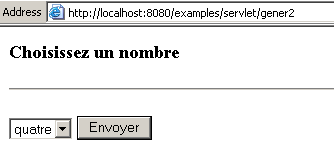
But the response is different:
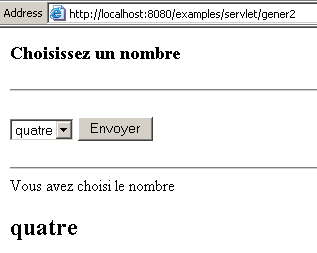
In the response, the form is returned, with the number selected by the user indicated below it. Furthermore, this number is the one that appears as selected when the list is displayed. The user can then choose another number:
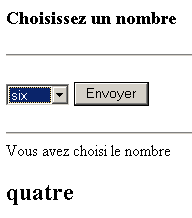
then click Submit. They receive the following response:
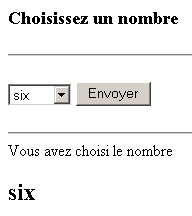
The code for the servlet named gener2.java is as follows:
import java.io.*;
import javax.servlet.*;
import javax.servlet.http.*;

public class gener2 extends HttpServlet{
        // instance variables
        private String title="Génération d'un formulaire";
        private final String[] valeurs={"zéro","un","deux","trois","quatre","cinq","six",
            "sept","huit","neuf"};
        private final String HTML1=
                "<html>" +
                    "<head>" +
                        "<title>Génération de formulaire</title>"+
                    "</head>" +
                    "<body>" +
                         "<h3>Choisissez un nombre</h3>"+
                         "<hr>" +
                         "<form method=\"POST\">";
        private final String HTML2="<input type=\"submit\" value=\"Envoyer\"></form>\n";
        private final String HTML3="</body>\n</html>";

        // GET
        public void doGet(HttpServletRequest request,HttpServletResponse response)
                    throws IOException, ServletException{

            // we retrieve the user's possible choice
            String choix=request.getParameter("cmbValeurs");
            if(choix==null) choix="";

             // the customer is informed of the type of document sent
            response.setContentType("text/html");
             // we send the form
            PrintWriter out=response.getWriter();
            // start
            out.println(HTML1);
            // combo
            out.println("<select name=\"cmbValeurs\" size=\"1\">");
            String selected="";
            for (int i=0;i<valeurs.length;i++){
                if(valeurs[i].equals(choix)) selected="selected"; else selected="";
                out.println("<option "+selected+">"+valeurs[i]+"</option>");
            }//for
            out.println("</select>");
            // continued form
            out.println(HTML2);
            if(! choix.equals("")){
                // the user's choice is displayed
                out.println("<hr>Vous avez choisi le nombre <h2>"+choix+"</h2>");
            }//if
             // end of form
            out.println(HTML3);
        }//GET

        // POST
        public void doPost(HttpServletRequest request,HttpServletResponse response)
                    throws IOException, ServletException{

            // returns to GET
            doGet(request,response);
        }//POST
    }//class
The doGet method does everything: it builds the form that it sends to the client and processes the values that the client returns. The following points are worth noting:
- We check if the cmbValeurs parameter has a value.
- If so, when building the list content, each list item is compared to the user’s selection to set the selected attribute on the item chosen by the user: <option selected>item</option>. Additionally, the value of the selection is displayed below the form.
3.1.6.3. Dynamic Form Generation - 3
We revisit the same problem as before, but this time the values are retrieved from a database. In our example, this is a database named MySQL:
- The database is named dbValeurs
- Its owner is admDbValeurs with the password mdpDbValeurs
- The database has a single table named tvaleurs
- This table has only one integer field named value
E:\Program Files\EasyPHP\mysql\bin>mysql --database=dbValeurs --user=admDbValeurs --password=mdpDbVa
leurs

mysql> show tables;
+---------------------+
| Tables_in_dbValeurs |
+---------------------+
| tvaleurs            |
+---------------------+
1 row in set (0.00 sec)

mysql> describe tvaleurs;
+--------+---------+------+-----+---------+-------+
| Field  | Type    | Null | Key | Default | Extra |
+--------+---------+------+-----+---------+-------+
| valeur | int(11) |      |     | 0       |       |
+--------+---------+------+-----+---------+-------+

mysql> select * from tvaleurs;
+--------+
| valeur |
+--------+
|      0 |
|      1 |
|      2 |
|      3 |
|      4 |
|      6 |
|      5 |
|      7 |
|      8 |
|      9 |
+--------+
10 rows in set (0.00 sec)
The database MySQL dbValeurs was made accessible by a driver ODBC for MySQL. Its name DSN (Data Source Name) is odbc-values. The servlet code is as follows:
import java.io.*;
import javax.servlet.*;
import javax.servlet.http.*;
import java.sql.*;
import java.util.*;

public class gener3 extends HttpServlet{
        // page title
        private final String title="Génération d'un formulaire";
         // the list values database
        private final String DSNValeurs="odbc-valeurs";
        private final String admDbValeurs="admDbValeurs";
        private final String mdpDbValeurs="mdpDbValeurs";
         // list values
        private String[] valeurs=null;
         // error msg
        private String msgErreur=null;
        // code HTML
        private final String HTML1=
                "<html>" +
                    "<head>" +
                        "<title>Génération de formulaire</title>"+
                    "</head>" +
                    "<body>" +
                         "<h3>Choisissez un nombre</h3>"+
                         "<hr>" +
                         "<form method=\"POST\">";
        private final String HTML2="<input type=\"submit\" value=\"Envoyer\"></form>\n";
        private final String HTML3="</body>\n</html>";

        // GET
        public void doGet(HttpServletRequest request,HttpServletResponse response)
                    throws IOException, ServletException{

            // the customer is informed of the type of document sent
            response.setContentType("text/html");
             // output flow
            PrintWriter out=response.getWriter();

            // was the servlet initialized successfully?
            if (msgErreur!=null){
                 // an error has occurred - an error page is generated
                out.println("<html><head><title>"+title+"</title></head>");
                out.println("<body><h3>Application indisponible ("+msgErreur+
                                        ")</h3></body></html>");
                return;
            }//if

             // we retrieve the user's possible choice
            String choix=request.getParameter("cmbValeurs");
            if(choix==null) choix="";

             // we send the form
             // start
            out.println(HTML1);
            // combo
            out.println("<select name=\"cmbValeurs\" size=\"1\">");
            String selected="";
            for (int i=0;i<valeurs.length;i++){
                if(valeurs[i].equals(choix)) selected="selected"; else selected="";
                out.println("<option "+selected+">"+valeurs[i]+"</option>");
            }//for
            out.println("</select>");
            // continued form
            out.println(HTML2);
            if(! choix.equals("")){
                // the user's choice is displayed
                out.println("<hr>Vous avez choisi le nombre <h2>"+choix+"</h2>");
            }//if
             // end of form
            out.println(HTML3);
        }//GET

        // POST
        public void doPost(HttpServletRequest request,HttpServletResponse response)
                    throws IOException, ServletException{

            // returns to GET
            doGet(request,response);
        }//POST

        // servlet initialization
        public void init(){
             // fills the table of values from a ODBC database
             // name DSN : DSNvaleurs
            Connection connexion=null;
            Statement st=null;
            ResultSet rs=null;
            try{
                 // connection to the ODBC database
                Class.forName("sun.jdbc.odbc.JdbcOdbcDriver");
                connexion=DriverManager.getConnection("jdbc:odbc:"+DSNValeurs,admDbValeurs,mdpDbValeurs);
                 // statement object
                st=connexion.createStatement();
                 // execute select query to retrieve values
                rs=st.executeQuery("select valeur from Tvaleurs");
                // values are retrieved and put into a dynamic table
                ArrayList lstValeurs=new ArrayList();
                while(rs.next()){
                    // the value is saved in the
                    lstValeurs.add(rs.getString("valeur"));
                }//while
                 // transformation list --> table
                valeurs=new String[lstValeurs.size()];
                for (int i=0;i<lstValeurs.size();i++){
                    valeurs[i]=(String)lstValeurs.get(i);
                }
            }catch(Exception ex){
                 // problem
                msgErreur=ex.getMessage();
            }finally{
                try{rs.close();}catch(Exception ex){}
                try{st.close();}catch(Exception ex){}
                try{connexion.close();}catch(Exception ex){}
            }//try
        }//init
    }//class
The key points to note are as follows:
- A servlet can be initialized by a method whose signature must be public void init(). This method is executed only when the servlet is initially loaded
- Once loaded, a servlet remains in memory at all times. This means that once it has served a client, it is not unloaded. It thus responds more quickly to requests from clients.
- In our servlet, a list of values must be retrieved from a database. Since this list does not change over time, the init method is the ideal time to retrieve it. The database is thus accessed only once by the servlet, at the time of its initial loading, and not with every client request.
- Database access may fail. Our servlet’s init method sets an error message msgErreur in case of failure. This message is checked in the doGet method, and if an error occurred, doGet generates a page indicating it.
- The implementation of the init method uses standard database access with ODBC-JDBC drivers. If necessary, the reader is encouraged to review the database access methods JDBC.
When the servlet is executed and the MySQL server has not been started, the following error page appears:

If you now start the MySQL server, you will see the following page:
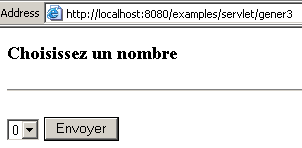
If you select the number 6 and click "Submit":
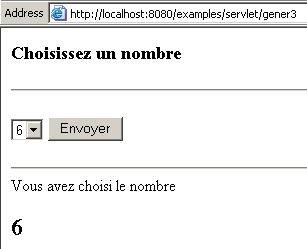
3.1.6.4. Retrieving values from a form
Let’s revisit an example we’ve already seen, that of the following web form:
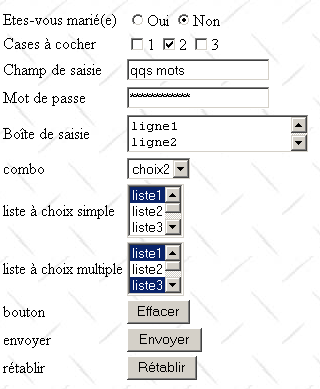
The code HTML for the form balises2.htm is as follows:
<html>

  <head>
      <title>balises</title>
    <script language="JavaScript">
        function effacer(){
          alert("Vous avez cliqué sur le bouton Effacer");
      }//delete
        </script>
  </head>

  <body background="/images/standard.jpg">
...

    <form method="POST" action="http://localhost:8080/examples/servlet/parameters">

      <table border="0">
        <tr>
          <td>Etes-vous marié(e)</td>
          <td>
              <input type="radio" value="Oui" name="R1">Oui
              <input type="radio" name="R1" value="non" checked>Non
          </td>
        </tr>
        <tr>
          <td>Cases à cocher</td>
          <td>
              <input type="checkbox" name="C1" value="un">1
              <input type="checkbox" name="C2" value="deux" checked>2
              <input type="checkbox" name="C3" value="trois">3
          </td>
        </tr>
        <tr>
          <td>Champ de saisie</td>
          <td>
              <input type="text" name="txtSaisie" size="20" value="qqs mots">
          </td>
        </tr>
        <tr>
          <td>Mot de passe</td>
          <td>
              <input type="password" name="txtMdp" size="20" value="unMotDePasse">
          </td>
        </tr>
        <tr>
          <td>Boîte de saisie</td>
          <td>
               <textarea rows="2" name="areaSaisie" cols="20">
ligne1
ligne2
ligne3
</textarea>
          </td>
        </tr>
        <tr>
          <td>combo</td>
          <td>
              <select size="1" name="cmbValeurs">
                <option>choix1</option>
                <option selected>choix2</option>
                <option>choix3</option>
              </select>
          </td>
        </tr>
        <tr>
          <td>liste à choix simple</td>
          <td>
              <select size="3" name="lst1">
                <option selected>liste1</option>
                <option>liste2</option>
                <option>liste3</option>
                <option>liste4</option>
                <option>liste5</option>
              </select>
          </td>
        </tr>
        <tr>
          <td>liste à choix multiple</td>
          <td>
              <select size="3" name="lst2" multiple>
                <option selected>liste1</option>
                <option>liste2</option>
                <option selected>liste3</option>
                <option>liste4</option>
                <option>liste5</option>
              </select>
          </td>
        </tr>
        <tr>
          <td>bouton</td>
          <td>
              <input type="button" value="Effacer" name="cmdEffacer" onclick="effacer()">
          </td>
        </tr>
        <tr>
          <td>envoyer</td>
          <td>
              <input type="submit" value="Envoyer" name="cmdRenvoyer">
          </td>
        </tr>
        <tr>
          <td>rétablir</td>
          <td>
              <input type="reset" value="Rétablir" name="cmdRétablir">
          </td>
        </tr>
      </table>
      <input type="hidden" name="secret" value="uneValeur">
    </form>
  </body>
</html>
The <form> tag in the form has been defined as follows:
The browser will "post" the form values to URL http://localhost:8080/examples/servlet/parameters, which is a servlet managed by Tomcat and displays the values from the previous form. If we call the parameters servlet directly, we get the following results:
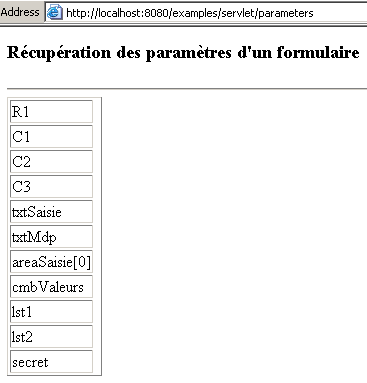
If the form balises2.htm entered is this one:
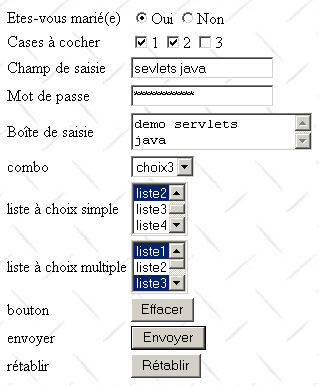
and you click the Submit button (of type submit), the parameters servlet is called this time with parameters. It then returns the following response:
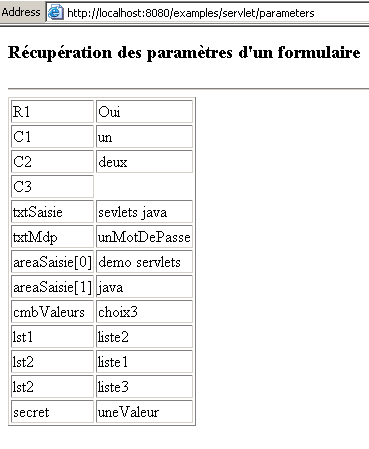
This response clearly contains the values entered in the form. The servlet code is as follows:
import java.io.*;
import java.util.*;
import javax.servlet.*;
import javax.servlet.http.*;

public class parameters extends HttpServlet{
    // instance variables
    String title="Récupération des paramètres d'un formulaire";

    private String getParameter(HttpServletRequest request, String contrôle){
      // returns the value request.getParameter(control) or "" if it doesn't exist
      String valeur=request.getParameter(contrôle);
      if(valeur==null) return ""; else return valeur;
    }//getParameter

    // GET
    public void doGet(HttpServletRequest request,HttpServletResponse response)
        throws IOException, ServletException
    {
      // we start by retrieving the form parameters
      String R1=getParameter(request,"R1");
      String C1=getParameter(request,"C1");
      String C2=getParameter(request,"C2");
      String C3=getParameter(request,"C3");
      String txtSaisie=getParameter(request,"txtSaisie");
      String txtMdp=getParameter(request,"txtMdp");
      String areaSaisie=getParameter(request,"areaSaisie");
      String[] lignes=areaSaisie.split("\\r\\n");
      String cmbValeurs=getParameter(request,"cmbValeurs");
      String lst1=getParameter(request,"lst1");
      String[] lst2=request.getParameterValues("lst2");
      String secret=getParameter(request,"secret");

      // document content is indicated
        response.setContentType("text/html");
       // we send the document
        PrintWriter out = response.getWriter();
        out.println("<html>");
        out.println("<body>");
        out.println("<head>");
        out.println("<title>" + title + "</title>");
        out.println("</head>");
        out.println("<body bgcolor=\"white\">");
        out.println("<h3>" + title + "</h3>");
        out.println("<hr>");
        out.println("<table border=\"1\">");
        out.println("<tr><td>R1</td><td>"+R1+"</td></tr>");
        out.println("<tr><td>C1</td><td>"+C1+"</td></tr>");
        out.println("<tr><td>C2</td><td>"+C2+"</td></tr>");
        out.println("<tr><td>C3</td><td>"+C3+"</td></tr>");
        out.println("<tr><td>txtSaisie</td><td>"+txtSaisie+"</td></tr>");
        out.println("<tr><td>txtMdp</td><td>"+txtMdp+"</td></tr>");
        for(int i=0;i<lignes.length;i++)
          out.println("<tr><td>areaSaisie["+i+"]</td><td>"+lignes[i]+"</td></tr>");
        out.println("<tr><td>cmbValeurs</td><td>"+cmbValeurs+"</td></tr>");
        out.println("<tr><td>lst1</td><td>"+lst1+"</td></tr>");
        if(lst2==null)
          out.println("<tr><td>lst2</td><td></td></tr>");
        else
          for(int i=0;i<lst2.length;i++)
            out.println("<tr><td>lst2</td><td>"+lst2[i]+"</td></tr>");
        out.println("<tr><td>secret</td><td>"+secret+"</td></tr>");
        out.println("</body>");
        out.println("</html>");
    }

     // POST
    public void doPost(HttpServletRequest request,HttpServletResponse response)
        throws IOException, ServletException
    {
       // returns to GET
      doGet(request,response);
    }
}
This code uses the techniques presented earlier in another example. Note the following two points:
- The lst2 control is a multi-select list, so multiple items can be selected. This is the case in our example, where the items "list1" and "list3" have been selected. The values of lst2 were sent by the browser to the server in the format lst2="list1"&lst2="list3". The Java servlet can retrieve these values into an array using the getParameterValues method: here, request.getParameterValues("lst2") returns an array of two strings ["liste1","liste3"].
- The areaSaisie control is a multi-line input field. request.getParameter("areaSaisie") returns the field’s content as a single string. If you want to extract the individual lines that make up this string, you can use the split function of the String class. The following code
retrieves the lines from the input field. These lines are terminated by the characters \r\n (0D0A).
To perform the tests, we have:
- built and compiled the servlet parameters with JBuilder as explained previously
- placed the generated class in <tomcat>\webapps\examples\WEB-INF\classes, where <tomcat> is the Tomcat installation directory.
- requested the URL http://localhost:81/html/balises2.htm URL, whose code was presented above
- filled out the form and clicked the Submit button.
3.1.6.5. Retrieving the HTTP headers from a web client
We use the same example as before, but in response to the web client that sent the form values, we send back the HTTP headers that it sent at the same time. We make a single change to our form:
The form values will be sent via the GET method to a Java servlet named headers located in <tomcat>\webapps\examples\WEB-INF\classes. The headers servlet was built and compiled with JBuilder:
import java.io.*;
import java.util.*;
import javax.servlet.*;
import javax.servlet.http.*;

public class headers extends HttpServlet {

    public void doGet(HttpServletRequest request, HttpServletResponse response)
    throws IOException, ServletException
    {
       // determine the nature of the document
        response.setContentType("text/html");
       // we obtain a writing flow
        PrintWriter out = response.getWriter();
      // display header list HTTP
        Enumeration e = request.getHeaderNames();
        while (e.hasMoreElements()) {
            String name = (String)e.nextElement();
            String value = request.getHeader(name);
            out.println("<b>"+name + "</b> = " + value + "<br>");
        }
    }//GET

    public void doPost(HttpServletRequest request, HttpServletResponse response)
    throws IOException, ServletException
    {
      //GET
      doGet(request,response);
    }//POST
}
We request URL http://localhost:81/html/balises2.htm and click Submit without modifying the form. We receive the following response:
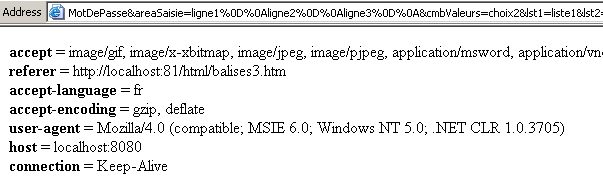
Note the parameter URL in the browser's Address field, which shows the method (GET) used to transmit the parameters. We'll use the same example but change the way the parameters are sent (POST):
We get the following new response:
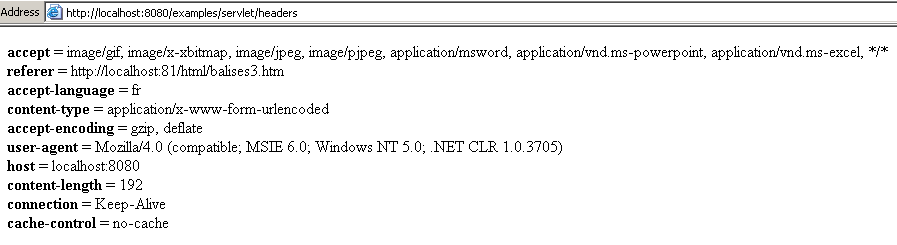
Note the HTTP content-type and content-length headers, which are characteristic of a POST submission. Additionally, note that the form values no longer appear in the browser’s Address field.
3.2. JSP Pages
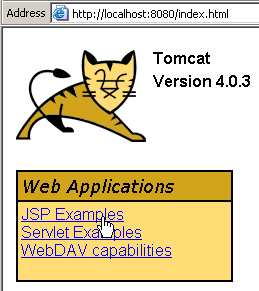
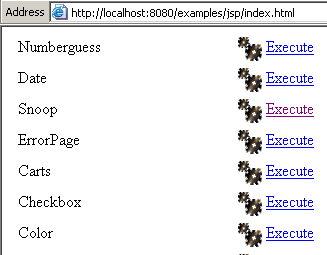
JSP pages (Java Server Pages) are another way to write web server applications. In fact, these JSP pages are translated into servlets before being executed, and we then see the servlet technology at work. JSP pages help better highlight the structure of the generated HTML pages. Below are some examples, some of which can be accessed by following the JSP link on the Tomcat homepage:
 |  |
3.2.1. Retrieving Environment Information
Here we revisit an example previously covered with a servlet: displaying a servlet’s environment variables. This is the snoop example from the JSP examples:
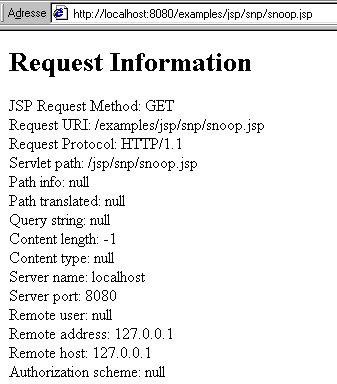
The source code for the JSP page is located in <tomcat>\jakarta-tomcat\examples\jsp\snp\snoop.jsp (Tomcat 3.x) or <tomcat>\examples\jsp\snp\snoop.jsp (Tomcat 4.x)
<html>
<!--
  Copyright (c) 1999 The Apache Software Foundation.  All rights
  reserved.
-->

  <body bgcolor="white">
    <h1> Request Information </h1>
    <font size="4">
      JSP Request Method: <%= request.getMethod() %>
      <br>
      Request URI: <%= request.getRequestURI() %>
      <br>
      Request Protocol: <%= request.getProtocol() %>
      <br>
      Servlet path: <%= request.getServletPath() %>
      <br>
      Path info: <%= request.getPathInfo() %>
      <br>
      Path translated: <%= request.getPathTranslated() %>
      <br>
      Query string: <%= request.getQueryString() %>
      <br>
      Content length: <%= request.getContentLength() %>
      <br>
      Content type: <%= request.getContentType() %>
      <br>
      Server name: <%= request.getServerName() %>
      <br>
      Server port: <%= request.getServerPort() %>
      <br>
      Remote user: <%= request.getRemoteUser() %>
      <br>
      Remote address: <%= request.getRemoteAddr() %>
      <br>
      Remote host: <%= request.getRemoteHost() %>
      <br>
      Authorization scheme: <%= request.getAuthType() %>
      <hr>
      The browser you are using is <%= request.getHeader("User-Agent") %>
      <hr>
    </font>
  </body>
</html>
Note the following points:
- The code here closely resembles HTML. However, it contains <%= expression %> tags that are specific to the JSP language. The JSP compiler replaces the entire tag in the HTML text with the value of expression.
- This example uses the methods of the Java request object, which is the same request object encountered in the study of servlets. It is therefore a HttpServletRequest object. Thus, the tag <%= request.getRemoteHost() %> will be replaced in the code HTML with the name of the web client machine that made the request.
- We can achieve the same result with a servlet, but here the structure of the web page is more obvious.
3.2.2. Retrieving parameters sent by the web client
Here we revisit the example we previously studied using a servlet. A form is presented to the browser:
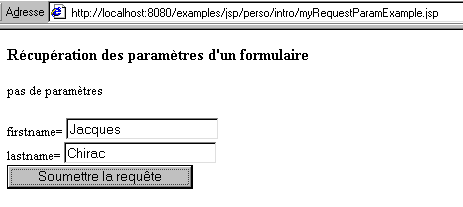
In response to the request above, the browser receives the following page:
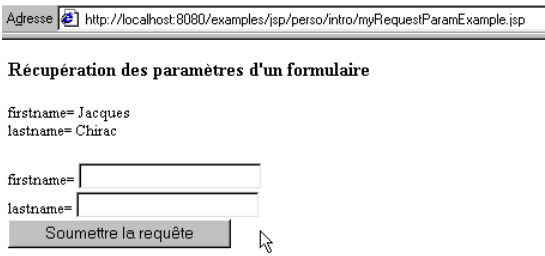
The code for page JSP is as follows:
<%
  // variables locales à la procédure principale
  String title="Récupération des paramètres d'un formulaire";
  String firstName = request.getParameter("firstname");
  String lastName = request.getParameter("lastname");
%>

<!-- code HTML -->
<html>
  <head>
    <title><%= title %></title>
  </head>
  <body bgcolor="white">
    <h3><%= title %></h3>
    <%
      if (firstName != null || lastName != null) {
        out.println("firstname= " + firstName + "<br>");
        out.println("lastname= " + lastName);
      } else {
        out.println("pas de paramètres");
      }
    %>
    <P>
    <form method="POST">
      firstname= <input type="text" size="20" name="firstname">
      <br>
      lastname= <input type="text" size="20" name="lastname">
      <br>
      <input type="submit">
    </form>
  </body>
</html>
- While the <%= expression %> tag is the same as in the previous example, a new tag appears: <% Java instructions; %>. The <% tag introduces Java code. This code ends when it encounters the closing code tag %>.
- The entire preceding code (HTML + JSP) will be converted into a Java servlet. It will be enclosed within a single method, called the main method of the JSP page. This is why the Java variables declared at the beginning of the JSP page are accessible in the other code segments of JSP that are interspersed within the HTML code: these variables and code segments will be part of the same Java method. However, if our JSP code were to contain methods, the variables title, firstname, and lastname would not be known within them due to method scoping. We would need to make them global variables or pass them as parameters to the methods. We will return to this later.
- To include dynamic parts in the HTML code, two methods are possible: <%= expression %> or out.println(expression). The out object is an output stream similar to the one of the same name found in the servlet examples, but not of the same type: it is a JspWriter object and not a PrintWriter. It allows writing to the HTML stream using the print and println methods.
- The JSP page better reflects the structure of the generated HTML page than the equivalent servlet.
3.2.3. JSP Tags
Here is a list of tags that may be found in a JSP page and their meanings.
tag | Meaning |
comment HTML. Sent to the client. | |
comment JSP. Is not sent to the client. | |
Declares global variables and methods. The variables will be available in all methods | |
The value of the expression will be inserted into the HTML page in place of the tag | |
contains Java code that will be part of the main method of the JSP page | |
sets attributes for the JSP page. For example: import="java.util.*,java.sql.*" to specify the libraries required for the JSP page extends="aParentClass" to have the JSP page inherit from another class |
3.2.4. The implicit objects JSP
In the previous examples, we encountered two undeclared objects: request and out. These are two of the objects that are automatically defined in the servlet into which the page JSP is converted. They are called implicit or predefined objects. There are others, but these are the most commonly used along with the response object:
object | meaning |
the object through which we access the web client’s request (getParameter, getParameterNames, getParameterValues) | |
The object used to construct the web server’s response to the client. Allows you to set the headers to be sent to the web client. | |
the output stream that allows us to send code to the client (print, println) |
3.2.5. Converting a JSP page into a servlet
Let’s revisit the JSP code from myRequestParamExample.jsp:
<%
  // variables locales à la procédure principale
  String title="Récupération des paramètres d'un formulaire";
  String firstName = request.getParameter("firstname");
  String lastName = request.getParameter("lastname");
%>

<!-- code HTML -->
<html>
  <head>
    <title><%= title %></title>
  </head>
  <body bgcolor="white">
    <h3><%= title %></h3>
    <%
      if (firstName != null || lastName != null) {
        out.println("firstname= " + firstName + "<br>");
        out.println("lastname= " + lastName);
      } else {
        out.println("pas de paramètres");
      }
    %>
    <P>
    <form method="POST">
      firstname= <input type="text" size="20" name="firstname">
      <br>
      lastname= <input type="text" size="20" name="lastname">
      <br>
      <input type="submit">
    </form>
  </body>
</html>
When the browser requests this page JSP from the Tomcat server, the server will convert it into a servlet. If the requested URL is
http://localhost:8080/examples/jsp/perso/intro/myRequestParamExample.jsp, Tomcat 4.x will place the generated servlet in the directory <tomcat>\work\localhost\examples\jsp\perso\intro:
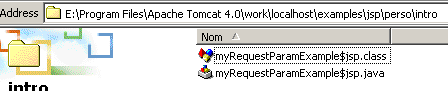
This name includes the URL http://localhost:8080/examples/jsp/perso/intro/myRequestParamExample.jsp from the JSP page. As shown above, we have access to the Java code of the servlet generated for the page JSP. In our example, it is as follows:
package org.apache.jsp;

import javax.servlet.*;
import javax.servlet.http.*;
import javax.servlet.jsp.*;
import org.apache.jasper.runtime.*;


public class myRequestParamExample$jsp extends HttpJspBase {


    static {
    }
    public myRequestParamExample$jsp( ) {
    }

    private static boolean _jspx_inited = false;

    public final void _jspx_init() throws org.apache.jasper.runtime.JspException {
    }

    public void _jspService(HttpServletRequest request, HttpServletResponse  response)
        throws java.io.IOException, ServletException {

        JspFactory _jspxFactory = null;
        PageContext pageContext = null;
        HttpSession session = null;
        ServletContext application = null;
        ServletConfig config = null;
        JspWriter out = null;
        Object page = this;
        String  _value = null;
        try {

            if (_jspx_inited == false) {
                synchronized (this) {
                    if (_jspx_inited == false) {
                        _jspx_init();
                        _jspx_inited = true;
                    }
                }
            }
            _jspxFactory = JspFactory.getDefaultFactory();
            response.setContentType("text/html;charset=ISO-8859-1");
            pageContext = _jspxFactory.getPageContext(this, request, response,
                        "", true, 8192, true);

            application = pageContext.getServletContext();
            config = pageContext.getServletConfig();
            session = pageContext.getSession();
            out = pageContext.getOut();


                   // variables local to the main procedure
                  String title="Récupération des paramètres d'un formulaire";
                  String firstName = request.getParameter("firstname");
                  String lastName = request.getParameter("lastname");

                out.write("\r\n\r\n<!-- code HTML -->\r\n<html>\r\n  <head>\r\n    <title>");
                out.print( title );
                out.write("</title>\r\n  </head>\r\n  <body bgcolor=\"white\">\r\n    <h3>");
                out.print( title );
                out.write("</h3>\r\n    ");

                      if (firstName != null || lastName != null) {
                        out.println("firstname= " + firstName + "<br>");
                        out.println("lastname= " + lastName);
                      } else {
                        out.println("pas de paramètres");
                      }

                out.write("\r\n    <P>\r\n    <form method=\"POST\">\r\n      firstname= <input type=\"text\" size=\"20\" name=\"firstname\">\r\n      <br>\r\n      lastname= <input type=\"text\" size=\"20\" name=\"lastname\">\r\n      <br>\r\n      <input type=\"submit\">\r\n    </form>\r\n  </body>\r\n</html>\r\n");

        } catch (Throwable t) {
            if (out != null && out.getBufferSize() != 0)
                out.clearBuffer();
            if (pageContext != null) pageContext.handlePageException(t);
        } finally {
            if (_jspxFactory != null) _jspxFactory.releasePageContext(pageContext);
        }
    }
}
The generated code is quite complex. We will focus only on the following points:
- The servlet's main method is as follows:
    public void _jspService(HttpServletRequest request, HttpServletResponse  response)
        throws java.io.IOException, ServletException {
This method is called when the servlet starts. We can see that it receives two parameters: the client’s request and a response object to generate its response to the web client.
- In the main method, a JspWriter out object is declared and then initialized. This object will be used to send HTML code to the client via out.print("codeHTML") instructions.
- The Java code
<%
   // variables local to the main procedure
  String title="Récupération des paramètres d'un formulaire";
  String firstName = request.getParameter("firstname");
  String lastName = request.getParameter("lastname");
%>
has been copied in its entirety into the servlet’s main method _jspService. The same applies to all code located within the <%… %> tags
- The code HTML on page JSP is subject to instructions out.print("codeHTML") or out.write(...). For example
out.write("</title>\r\n </head>\r\n <body bgcolor=\"white\">\r\n <h3>");
- In this example, there are no methods other than the main method _jspService.
3.2.6. Methods and global variables of a JSP page
Consider the following JSP page:
<%!
   // the preceding tag starts the global variables and methods section
   // this part will be adopted unchanged in the servlet

   // global variability
  String prenom="inconnu";

   // a method
  private String sonChien(){
    return "milou";
  }//sonChien

   // another method
  private void afficheAmi(JspWriter out) throws Exception{
    out.println("<p>Son ami s'appelle Haddock</p>");
  }//afficheAmi

   // end of the global part of the servlet
%>

<%
   // the preceding tag indicates that the following code will be saved
   // in the servlet's main method

   // variable local to the main method
  String nom="tintin";
%>


<%-- code HTML --%>
<html>
  <head>
    <title>Page JSP</title>
  </head>
  <body>
    <center>
      <h2>Page JSP</h2>
      <p>Son nom est <%= nom %></p>
      <p>Son prénom est <%= prenom %></p>
      <p>Son chien s'appelle <%= sonChien() %></p>
      <%
         // his friend's name
        afficheAmi(out);
      %>
    </center>
  </body>
</html>
This JSP page generates the following web page:
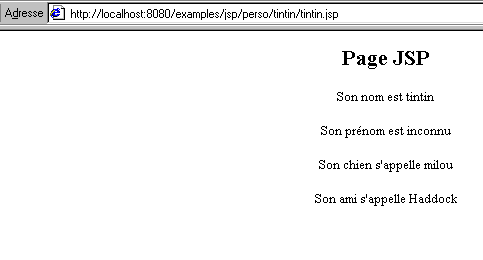
Let’s take a look at how the four lines above are generated:
      <p>Son nom est <%= nom %></p>
      <p>Son prénom est <%= prenom %></p>
      <p>Son chien s'appelle <%= sonChien() %></p>
      <%
         // his friend's name
        afficheAmi(out);
      %>
The lines above are within a <%..%> tag and will therefore be part of the main method _jspService of the servlet that will be generated. How do they access the variables lastName, firstName, and methods sonChien and afficheAmi?
is a local variable of the main method of the JSP page and is therefore known within it | |
is a global variable of the JSP page and is therefore known within the main method | |
is a public method of the JSP page and is therefore accessible from the main method | |
is a public method of the JSP page and is therefore accessible from the main method. Note that the out object is passed as a parameter to the method. This is mandatory here. In fact, the out object is declared and initialized in the servlet’s main method and is not a global variable. |
Let’s now look at the code for the Java servlet generated from this JSP page, once the unnecessary code has been removed:
package org.apache.jsp;

import javax.servlet.*;
import javax.servlet.http.*;
import javax.servlet.jsp.*;
import org.apache.jasper.runtime.*;


public class tintin$jsp extends HttpJspBase {

          // the preceding tag starts the global variables and methods section
           // this part will be adopted unchanged in the servlet

           // global variability
          String prenom="inconnu";

           // a method
          private String sonChien(){
            return "milou";
          }//sonChien

           // another method
          private void afficheAmi(JspWriter out) throws Exception{
            out.println("<p>Son ami s'appelle Haddock</p>");
          }//afficheAmi

           // end of the global part of the servlet

    static {
    }
    public tintin$jsp( ) {
    }

    private static boolean _jspx_inited = false;

    public final void _jspx_init() throws org.apache.jasper.runtime.JspException {
    }

    public void _jspService(HttpServletRequest request, HttpServletResponse  response)
        throws java.io.IOException, ServletException {

        JspFactory _jspxFactory = null;
        PageContext pageContext = null;
        HttpSession session = null;
        ServletContext application = null;
        ServletConfig config = null;
        JspWriter out = null;
        Object page = this;
        String  _value = null;
        try {

            if (_jspx_inited == false) {
                synchronized (this) {
                    if (_jspx_inited == false) {
                        _jspx_init();
                        _jspx_inited = true;
                    }
                }
            }
            _jspxFactory = JspFactory.getDefaultFactory();
            response.setContentType("text/html;charset=ISO-8859-1");
            pageContext = _jspxFactory.getPageContext(this, request, response,
                        "", true, 8192, true);

            application = pageContext.getServletContext();
            config = pageContext.getServletConfig();
            session = pageContext.getSession();
            out = pageContext.getOut();

                out.write("  \r\n\r\n");
                  // the preceding tag indicates that the following code will be saved
                   // in the servlet's main method

                   // variable local to the main method
                  String nom="tintin";

                out.write("\r\n\r\n\r\n");
                out.write("\r\n<html>\r\n  <head>\r\n    <title>Page JSP</title>\r\n  </head>\r\n  <body>\r\n    <center>\r\n      <h2>Page JSP</h2>\r\n      <p>Son nom est ");
                out.print( nom );
                out.write("</p>\r\n      <p>Son prénom est ");
                out.print( prenom );
                out.write("</p>\r\n      <p>Son chien s'appelle ");
                out.print( sonChien() );
                out.write("</p>\r\n      ");

                        // his friend's name
                        afficheAmi(out);

                out.write("\r\n    </center>\r\n  </body>\r\n</html>\r\n");
        } catch (Throwable t) {
            if (out != null && out.getBufferSize() != 0)
                out.clearBuffer();
            if (pageContext != null) pageContext.handlePageException(t);
        } finally {
            if (_jspxFactory != null) _jspxFactory.releasePageContext(pageContext);
        }
    }
}
As shown above, the Java code that was located between the JSP <%! .. %> tags has been included in its entirety and is not part of the servlet’s main method _jspService. The variables declared in this section are instance variables and are therefore global to the methods; this is also where methods other than _jspService can be defined.
  // this part will be adopted unchanged in the servlet

   // global variability
  String prenom="inconnu";

   // a method
  private String sonChien(){
    return "milou";
  }//sonChien

   // another method
  private void afficheAmi(JspWriter out) throws Exception{
    out.println("<p>Son ami s'appelle Haddock</p>");
  }//afficheAmi

   // end of the global part of the servlet
3.2.7. Deploying and debugging JSP pages on the Tomcat server
When you want to build a JSP page and use it with the Tomcat server, the question arises of where to place the page in the server directory structure. There are different ways to do this, which we will discuss later. For now, the simplest approach is to place the JSP page in a folder within the <tomcat>\webapps\examples\jsp directory (Tomcat 4.x), where <tomcat> is the Tomcat installation directory. Thus, the URL from the previous example was http://localhost:8080/examples/jsp/perso/tintin/tintin.jsp. This means that the page tintin.jsp was located in the folder <tomcat>\webapps\examples\jsp\perso\tintin.
A page named JSP is translated into a Java source file, which is then compiled by Tomcat when the URL file for the JSP page is requested by a browser. Compilation errors may occur. Tomcat 4.x reports them in its response to the browser. In particular, it indicates which lines of the .java file contain errors. Errors can have various causes:
- the JSP code on the page is incorrect (e.g., errors in the JSP tags used)
- the Java code included in the JSP page is incorrect
The first cause can be eliminated by checking the JSP code on the page. The second can be eliminated by checking the Java code. This can be done by directly compiling the .java file generated for the JSP page using a tool such as JBuilder, which offers more advanced debugging capabilities than Tomcat.
3.2.8. Examples
We’ll revisit the example we covered earlier involving a servlet where a user selects a number from a list, and the server tells the user which number they selected while returning the same list with the user’s chosen element highlighted:
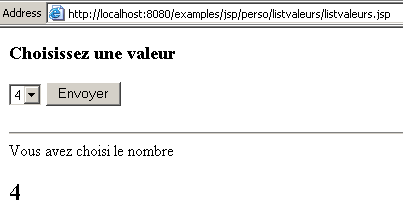
To build this page, we retrieved the servlet code and modified it as follows:
- we kept the Java code that did not generate the code HTML as-is
- The Java code that generated HTML code was converted into a mix of HTML and JSP code
This results in the following JSP page:
<%@ page import="java.sql.*, java.util.*" %>

<%!

        // variables globales de l'application
        // le titre de la page
        private final String title="Génération d'un formulaire";
        // la base de données des valeurs de liste
        private final String DSNValeurs="odbc-valeurs";
        private final String admDbValeurs="admDbValeurs";
        private final String mdpDbValeurs="mdpDbValeurs";
        // valeurs de liste
        private String[] valeurs=null;
        // msg d'erreur
        private String msgErreur=null;

        // initialisation de la page JSP - n'est exécutée qu'une seule fois
        public void jspInit(){
            // remplit le tableau des valeurs à partir d'une base de données ODBC
            // de nom DSN : DSNvaleurs
            Connection connexion=null;
            Statement st=null;
            ResultSet rs=null;
            try{
                // connexion à la base ODBC
                Class.forName("sun.jdbc.odbc.JdbcOdbcDriver");
                connexion=DriverManager.getConnection("jdbc:odbc:"+DSNValeurs,admDbValeurs,mdpDbValeurs);
                // objet Statement
                st=connexion.createStatement();
                // exécution requête select pour récupérer les valeurs
                rs=st.executeQuery("select valeur from Tvaleurs");
                // les valeurs sont récupérées et mises dans un tableau dynamique
                ArrayList lstValeurs=new ArrayList();
                while(rs.next()){
                    // on enregistre la valeur dans la liste
                    lstValeurs.add(rs.getString("valeur"));
                }//while
                // transformation liste --> tableau
                valeurs=new String[lstValeurs.size()];
                for (int i=0;i<lstValeurs.size();i++){
                    valeurs[i]=(String)lstValeurs.get(i);
                }
            }catch(Exception ex){
                // problème
                msgErreur=ex.getMessage();
            }finally{
                try{rs.close();}catch(Exception ex){}
                try{st.close();}catch(Exception ex){}
                try{connexion.close();}catch(Exception ex){}
            }//try
        }//init

%>

<%
    // code de _jspService exécuté à chaque requête cliente
  // y-at-il eu une erreur lors de l'initialisation de la page JSP ?
  if(msgErreur!=null){
%>
       <!-- code HTML -->
    <html>
        <head>
          <title>Erreur</title>
      </head>
      <body>
          <h3>Application indisponible (<%= msgErreur %></h3>
      </body>
    </html>
<%
      // fin de jspService
    return;
  }//if

    // on récupère l'éventuel choix de l'utilisateur
    String choix=request.getParameter("cmbValeurs");
    if(choix==null) choix="";
%>

  <%-- pas d'erreur - code HTML de la page normale --%>
      <html>
        <head>
          <title><%= title %></title>
      </head>
      <body>
          <h3>Choisissez une valeur</h3>
          <form method="POST">
            <select name="cmbValeurs">
              <%
                // affichage dynamique des valeurs
                          String selected="";
                          for (int i=0;i<valeurs.length;i++){
                              if(valeurs[i].equals(choix)) selected="selected"; else selected="";
                              out.println("<option "+selected+">"+valeurs[i]+"</option>");
                          }//for
            %>
          </select>
          <input type="submit" value="Envoyer">
        </form>
<%
        // y-avait-il une valeur choisie ?
                if(! choix.equals("")){
        // on affiche le choix de l'utilisateur
%>
                <hr>Vous avez choisi le nombre<h2><%= choix %></h2>
<%
                }//if
%>
      </body>
    </html>
Note the following points:
- the servlet's import statements are enclosed in a <% page import="..." %> directive
- the <%! ... %> tags enclose the application's global variables and Java methods
- The servlet’s init method, which is executed only once when the servlet loads, is called JSP for a page named jspInit. These two methods serve the same purpose. Therefore, the code for the servlet’s init method has been included here in its entirety.
- The servlet’s instance variables—those that must be accessible across multiple methods—have been included verbatim. These are primarily the variables title, values, and msgErreur, which are subsequently used in the code JSP.
- The <% ... %> tags enclose Java code that will be included in the _jspService method executed when a client makes a request.
- As with the servlet, the _jspService method will first check the value of the msgErreur variable to determine whether it should generate an error page. If there is an error, it generates the error page and terminates (return).
- If there is no error, it generates the form with the list of values
- Once this is done, it checks whether the user selected a number; if so, it displays that number on the generated page
What have we gained compared to the servlet? Undoubtedly a better view of the generated HTML code. But there is still a lot of Java code that "clutters" this view. We will see later another method called delegation, where we can place most of the Java code in a servlet, with the JSP page retaining only the HTML and JSP code. This clearly separates the processing part from the presentation part.
3.3. Deploying a Web Application on the Tomcat Server
We will now explain how to deploy Java web applications using the Tomcat server. While the following instructions are specific to this server, deploying a Java web application within another container will have characteristics similar to those described here.
3.3.1. The configuration files server.xml and web.xml
Until now, to test our JSP servlets and pages, we placed
- the servlets in the <tomcat>\webapps\examples\WEB-INF\classes folder. They were then accessible via the URL http://localhost:8080/examples/servlet/nomServlet
- the pages JSP in the <tomcat>\webapps\examples\jsp directory. They were then accessible via the URL http://localhost:8080/examples/jsp/nomPageJSP
We never explained why this was the case. The Tomcat server configuration is defined in a text file named server.xml located in the <tomcat>\conf folder:
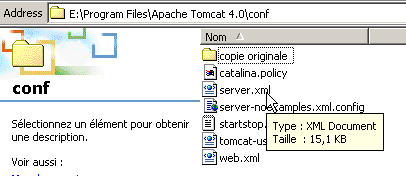
This text file is actually a XML file (eXtended Markup Language). A XML document is a text document containing tags, just like a HTML document. However, while the tags in the HTML language are well-defined, those in the XML language are not. Thus, the following document is a XML document:
A XML document is simply a "marked-up" document that follows certain markup rules:
- a text element in the form <xx att1="val1" att2="val2" ....>text</xx>
- a tag can stand alone and have the form <xx att1="val1" att2="val2" ..../>
The "att" fields are called attributes of the xx tag, and the "val" fields are the values associated with these attributes. Some HTML documents are not valid XML documents. For example, the HTML tag <br> is not a valid XML tag. It should be written as <br/> to be valid, in order to comply with the rule that all XML tags must be closed. A variant of HTML called XHTML was created to make any XHTML document a valid XML document. Some recent browsers are capable of displaying XML files. So if we name the XML document shown in the example above "person.xml" and view it with IE6, we get the following display:
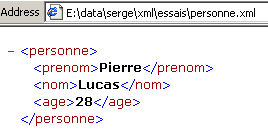
IE6 recognizes the tags and colors them. It also recognizes the document’s structure based on the tags. So, if we name the following document personne2.xml:
and view it with IE6, we get the same display:
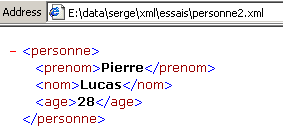
IE6 correctly recognized the document’s structure and content. The whole point of the XML document lies in this property: it is easy to retrieve the structure and content of a XML document. This is done using a program called a XML parser. XML documents are becoming the standard for document exchange on the web. Consider machine A, which needs to send a DOC document to machine B. The DOC document is constructed from the information contained in a database DB-A. Machine B must store the DOC document in a database DB-B. The exchange can take place as follows:
- Machine A retrieves the data from database DB-A and encapsulates it in a text document XML
- The document XML is sent to machine B over the network
- Machine B analyzes the received document using a XML parser and extracts both the structure and the data (as IE6 did in our example). It can then store the received data in database DB-B
We won’t say any more about the XML language, which deserves a book all its own.
Here, then, Tomcat is configured by the file XML server.xml. If we view this file with IE6, we get a complex document. We will simply focus on the following lines:
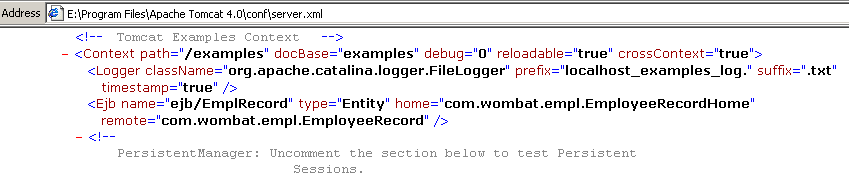
It is the <Context ...> tag that interests us here. It is used to define web applications. Two of its attributes are worth noting:
- path: this is the name of the web application
- docBase: this is the folder in which it is located. Here it is a relative name: examples. Relative to which folder? The answer is also found in the server.xml file in the following line:

The line above defines the web server:
- name: name of the web server
- appBase: root of the document tree it serves. Again, we have a relative name: webapps. It is relative to the Tomcat server installation directory <tomcat>. Therefore, this refers to the folder <tomcat>\webapps.
The examples web application stores its documents in the examples folder (see docBase above). This name is relative to the root of the server's web directory tree, c.a.d. <tomcat>\webapps. This is therefore the <tomcat>\webapps\examples folder. Let’s take a closer look at this folder:
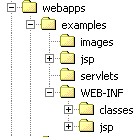
We find the WEB-INF\classes folder there, where we stored our servlets for testing. The WEB-INF folder contains a file named web.xml:
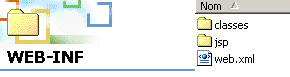
This file is used to configure the examples web application. We won’t go into the details of this file, which is too complex for now. We’ll simply focus on the following few lines:
    <servlet>
      <servlet-name>
          servletToJsp
      </servlet-name>
      <servlet-class>
          servletToJsp
      </servlet-class>
    </servlet>
The <servlet> tag is used to define a servlet within a web application. Note that the web application in question is examples. The servlet tag contains two other tags:
- <servlet-name>servletToJsp</servlet-name>: defines the name of the servlet
- <servlet-name>servletToJsp</servlet-name>: defines the name of the class to be executed when the servlet is requested. In this example, the servlet and its class have the same name. This is not mandatory.
How does a browser request the servletToJsp servlet from the Tomcat server?
- The browser requests the servlet URL via the URL http://localhost:8080/examples/servlet/servletToJsp
- Tomcat analyzes the servlet path /examples/servlet/servletToJsp. It interprets the first part of the path /examples as the name of a web application and searches its configuration file server.xml to determine where the documents for this application are stored. As we saw earlier, this is in the <tomcat>\webapps\examples folder.
- Tomcat uses the rest of the servlet’s path to locate it within the examples web application. This path /servlet/servletToJsp indicates that it must execute the servlet named servletToJsp. Tomcat will then read the web.xml configuration file for the examples application, which it will find in <tomcat>\webapps\examples\WEB-INF. It will find in this file that the servletToJsp servlet is linked to the Java class servletToJsp (see the web.xml file above). It will then look for this class in the WEB-INF\classes folder of the examples web application, c.a.d, located in <tomcat>\webapps\examples\WEB-INF\classes, and execute it.

3.3.2. Example: Deploying the "list" web application
We’ll revisit a servlet we’ve already studied, which presented the user with a list of numbers from which they selected one. The servlet then confirmed the number they had chosen:
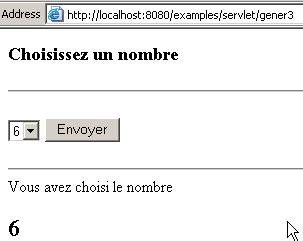
As shown in the browser’s Address field above, the servlet’s class file was named gener3. Based on the explanations provided earlier:
- URL /examples/servlet/gener3 indicates that this is a servlet named gener3 from the examples web application
- In the web.xml file in the examples application, there is no mention of a gener3 servlet. So how did Tomcat find it? Having gone through the entire web.xml file, I can't say for sure... The question remains...
We choose to deploy the gener3.class servlet under the name lstValeurs in a web application called liste located in the folder E:\data\serge\Servlets\lstValeurs:
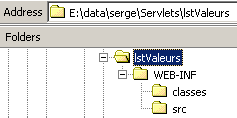
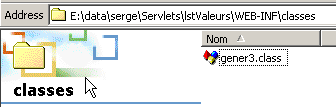
We place the file gener3.class in the WEB-INF\classes folder mentioned above:
We configure the "liste" web application by adding the following lines to the server.xml file above the lines that define the "manager" web application:
                 <!-- Perso : lstValeurs -->
                <Context path="/liste" docBase="e:/data/serge/servlets/lstValeurs" />

                <!-- Tomcat Manager Context -->
                <Context path="/manager" docBase="manager" debug="0" privileged="true" />
                <!-- Tomcat Examples Context -->
                <Context path="/examples" docBase="examples" debug="0" reloadable="true" crossContext="true">
........
The line defining the application indicates that it is located in the folder e:/data/serge/servlets/lstValeurs. We now need to define the web.xml file for this application. This file will define the application’s single servlet:
<?xml version="1.0" encoding="ISO-8859-1"?>

<!DOCTYPE web-app
    PUBLIC "-//Sun Microsystems, Inc.//DTD Web Application 2.3//EN"
    "http://java.sun.com/dtd/web-app_2_3.dtd">

<web-app>
    <servlet>
      <servlet-name>lstValeurs</servlet-name>
    <servlet-class>gener3</servlet-class>
  </servlet>
</web-app>
The file above indicates that the servlet named lstValeurs is associated with the class file gener3.class. This web.xml file must be created and saved in the WEB-INF folder of the list application:
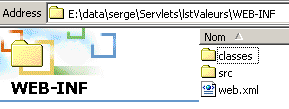
The screenshot above shows a src folder in which the source file gener3.java has been placed. This folder may not exist. It serves no purpose in this demonstration. We are ready to run the tests:
- Stop and restart Tomcat so that it re-reads its configuration file server.xml. Here we are running on Windows. On Unix, you can force Tomcat to re-read its configuration file without stopping it.
- Using a browser, request the URL http://localhost:8080/list/servlet/lstValeurs
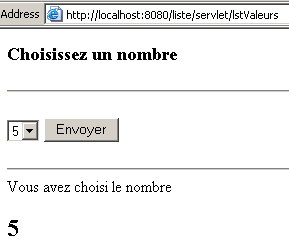
We can see that the previous URL contains the servlet keyword, just like all the URL servlet files used so far. We can do without it by associating the lstValeurs servlet with a URL pattern (url-pattern) in the application's web.xml file:
<?xml version="1.0" encoding="ISO-8859-1"?>

<!DOCTYPE web-app
    PUBLIC "-//Sun Microsystems, Inc.//DTD Web Application 2.3//EN"
    "http://java.sun.com/dtd/web-app_2_3.dtd">

<web-app>
    <servlet>
      <servlet-name>lstValeurs</servlet-name>
    <servlet-class>gener3</servlet-class>
  </servlet>
  <servlet-mapping>
      <servlet-name>lstValeurs</servlet-name>
    <url-pattern>/valeurs</url-pattern>
  </servlet-mapping>
</web-app>
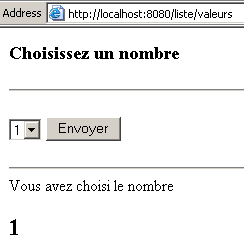
In the <servlet-mapping> tag, we associate the path /values with the lstValeurs servlet defined in the preceding lines. We save the new file web.xml and request the URL http://localhost:8080/list/values:
3.3.3. Deploying the public pages of a web application
We have just seen the deployment of a web application consisting of a single servlet. A web application can have many components: servlets, JSP pages, HTML files, Java applets, etc. Where do we place these application elements? If <application> is the web application directory defined by the application’s docBase attribute in the Tomcat configuration file server.xml, we saw that servlets are placed in <application>\WEB-INF\classes. The other application components can be placed anywhere in the <application> folder tree except in the WEB-INF folder. Consider the JSP listvaleurs.jsp application we previously examined:
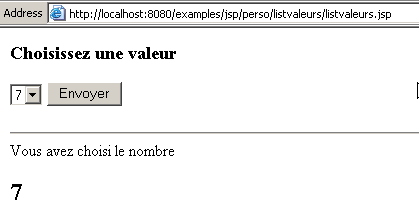
This page, JSP, was stored in the <tomcat>\webapps\examples\jsp\perso\listvaleurs folder. This page could be a component of the list application deployed previously. Let’s place the listvaleurs.jsp file directly in this application’s folder:
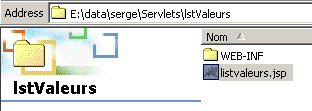
Recall the configuration of the liste application in the server.xml file:
Any URL file starting with the path /list is considered part of the list application and will be searched for in the specified folder. Let’s request the URL http://localhost:8080/list/listvaleurs.jsp using a browser:
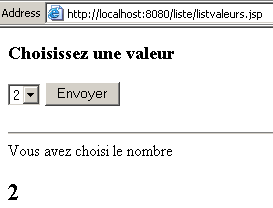
We have successfully obtained the expected JSP page.
3.3.4. Servlet initialization parameters
We have seen that a servlet is configured by the file <application>\WEB-INF\web.xml, where <application> is the directory of the web application to which it belongs. It is possible to include servlet initialization parameters in this file. Let’s return to our lstValeurs servlet from the “list” web application, whose configuration file was as follows:
<?xml version="1.0" encoding="ISO-8859-1"?>

<!DOCTYPE web-app
    PUBLIC "-//Sun Microsystems, Inc.//DTD Web Application 2.3//EN"
    "http://java.sun.com/dtd/web-app_2_3.dtd">

<web-app>
    <servlet>
      <servlet-name>lstValeurs</servlet-name>
    <servlet-class>gener3</servlet-class>
  </servlet>
  <servlet-mapping>
      <servlet-name>lstValeurs</servlet-name>
    <url-pattern>/valeurs</url-pattern>
  </servlet-mapping>
</web-app>
The class associated with the servlet is the gener3 class. The source code for this class contains the definition of several constants:
public class gener3 extends HttpServlet{
        // page title
        private final String title="Génération d'un formulaire";
         // the list values database
        private final String DSNValeurs="odbc-valeurs";
        private final String admDbValeurs="admDbValeurs";
        private final String mdpDbValeurs="mdpDbValeurs";
Let’s review the meaning of the four constants defined above:
title of the HTML document generated by the servlet | |
name DSN of the ODBC database from which the servlet retrieves data | |
username of a user with read access to the previous database | |
their password |
If the administrator of the DSNValeurs database changes the password for user admDbValeurs, the servlet source code must be modified and recompiled. This is not very practical. The servlet configuration file web.xml offers an alternative by allowing the definition of servlet initialization parameters using the <init-param> tag:
allows you to define the parameter name | |
defines the value associated with the previous parameter |
The servlet can access its initialization parameters using the following methods:
A method of the Servlet class from which the HttpServlet class used for web programming is derived. Returns a ServletConfig object providing access to the servlet's configuration parameters. | |
A method of the ServletConfig class that returns the value of the initialization parameter "parameter" |
We configure the list application with the following new web.xml file:
<?xml version="1.0" encoding="ISO-8859-1"?>

<!DOCTYPE web-app
    PUBLIC "-//Sun Microsystems, Inc.//DTD Web Application 2.3//EN"
    "http://java.sun.com/dtd/web-app_2_3.dtd">

<web-app>
    <servlet>
      <servlet-name>lstValeurs</servlet-name>
    <servlet-class>gener3</servlet-class>
  </servlet>
    <servlet>
      <servlet-name>lstValeurs2</servlet-name>
    <servlet-class>gener5</servlet-class>
    <init-param>
        <param-name>title</param-name>
      <param-value>Génération d'un formulaire</param-value>
    </init-param>
    <init-param>
        <param-name>DSNValeurs</param-name>
      <param-value>odbc-valeurs</param-value>
    </init-param>
    <init-param>
        <param-name>admDbValeurs</param-name>
      <param-value>admDbValeurs</param-value>
    </init-param>
    <init-param>
        <param-name>mdpDbValeurs</param-name>
      <param-value>mdpDbValeurs</param-value>
    </init-param>
  </servlet>
  <servlet-mapping>
      <servlet-name>lstValeurs</servlet-name>
    <url-pattern>/valeurs</url-pattern>
  </servlet-mapping>
  <servlet-mapping>
      <servlet-name>lstValeurs2</servlet-name>
    <url-pattern>/valeurs2</url-pattern>
  </servlet-mapping>
</web-app>
In the list application, we define a second servlet named lstValeurs2 linked to the class file gener5. This file has been placed in <application>\WEB-INF\classes:
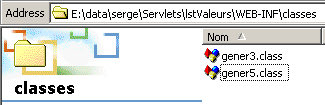
The lstValeurs2 servlet has four initialization parameters: title, DSNValeurs, admDbValeurs, mdpDbValeurs. In addition, the alias /values2 has been defined for the servlet using the <servlet-mapping> tag. Therefore, the lstValeurs2 servlet in the "liste" application will be accessible via URL http://localhost:8080/liste/valeurs2.
The servlet's source code has been modified as follows to retrieve the servlet's initialization parameters:
public class gener5 extends HttpServlet{
    // page title
    private String title=null;
    // the list values database
    private String DSNValeurs=null;
    private String admDbValeurs=null;
    private String mdpDbValeurs=null;
...............

         // servlet initialization
        public void init(){
             // retrieve servlet initialization parameters
            ServletConfig config=getServletConfig();
            title=config.getInitParameter("title");
            DSNValeurs=config.getInitParameter("DSNValeurs");
            admDbValeurs=config.getInitParameter("admDbValeurs");
            mdpDbValeurs=config.getInitParameter("mdpDbValeurs");

             //have all the parameters been recovered?
            if(title==null || DSNValeurs==null || admDbValeurs==null
                 || mdpDbValeurs==null){
                msgErreur="Configuration incorrecte";
                return;
            }

             // table of values is filled from a ODBC database
             // name DSN : DSNvaleurs
...............
To test the servlet, you must restart Tomcat so that it takes into account the new web configuration file xml for the list application. Using a browser, request the URL of the http servlet at: URL://localhost:8080/liste/valeurs2:
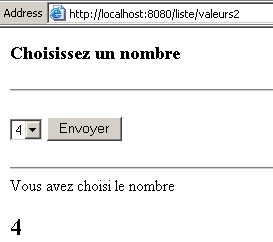
If any of the initialization parameters required by the servlet are missing from the web.xml file, the following page is displayed:

3.3.5. Web Application Initialization Parameters
In the previous example, only the lstValeurs2 servlet has access to the parameters title, DSNValeurs, admDbValeurs, and mdpDbValeurs. It is possible that another servlet in the same application might need data from the same database used by the lstValeurs2 servlet. In that case, you would need to redefine the parameters DSNValeurs, admDbValeurs, and mdpDbValeurs in the configuration section of the web.xml file for the new servlet. Another solution is to define parameters common to multiple servlets at the application level rather than at the servlet level. The new web.xml file for the application becomes the following:
<?xml version="1.0" encoding="ISO-8859-1"?>

<!DOCTYPE web-app
    PUBLIC "-//Sun Microsystems, Inc.//DTD Web Application 2.3//EN"
    "http://java.sun.com/dtd/web-app_2_3.dtd">

<web-app>

  <context-param>
      <param-name>DSNValeurs</param-name>
    <param-value>odbc-valeurs</param-value>
  </context-param>
  <context-param>
      <param-name>admDbValeurs</param-name>
    <param-value>admDbValeurs</param-value>
  </context-param>
  <context-param>
      <param-name>mdpDbValeurs</param-name>
    <param-value>mdpDbValeurs</param-value>
  </context-param>

    <servlet>
      <servlet-name>lstValeurs</servlet-name>
    <servlet-class>gener3</servlet-class>
  </servlet>
    <servlet>
      <servlet-name>lstValeurs3</servlet-name>
    <servlet-class>gener6</servlet-class>
    <init-param>
        <param-name>title</param-name>
      <param-value>Génération d'un formulaire</param-value>
    </init-param>
  </servlet>
  <servlet-mapping>
      <servlet-name>lstValeurs</servlet-name>
    <url-pattern>/valeurs</url-pattern>
  </servlet-mapping>
  <servlet-mapping>
      <servlet-name>lstValeurs3</servlet-name>
    <url-pattern>/valeurs3</url-pattern>
  </servlet-mapping>
</web-app>
The new servlet is named lstValeurs3, is linked to the gener6 class file, and has been associated with the alias /values3 (servlet-mapping). The parameter title is the only parameter that has been retained in the servlet definition. The others have been placed in the application configuration within <context-param> tags. This tag is used to define information specific to the application and not to a particular servlet or page JSP. How does the Java servlet access these parameters, often referred to as context parameters? The methods available for obtaining context information are very similar to those used to obtain servlet-specific initialization parameters:
method of the Servlet class from which the HttpServlet class used for web programming is derived. Returns a ServletContext object providing access to the application’s configuration parameters | |
method of the ServletContext class that returns the value of the initialization parameter "parameter" |
The gener6.java class makes only the following changes to the Java code of gener5.java used previously:
             // retrieve servlet initialization parameters
            ServletConfig config=getServletConfig();
            title=config.getInitParameter("title");

            ServletContext context=getServletContext();
            DSNValeurs=context.getInitParameter("DSNValeurs");
            admDbValeurs=context.getInitParameter("admDbValeurs");
            mdpDbValeurs=context.getInitParameter("mdpDbValeurs");

             //have all the parameters been recovered?
            if(title==null || DSNValeurs==null || admDbValeurs==null
                 || mdpDbValeurs==null){
                msgErreur="Configuration incorrecte";
                return;
            }

             // table of values is filled from a ODBC database
             // name DSN : DSNvaleurs
...............
The servlet-specific parameter title is obtained via a ServletConfig object. The other three parameters defined at the application level are obtained via a ServletContext object. We compile this class and place it, like the others, in <application>\WEB-INF\classes:
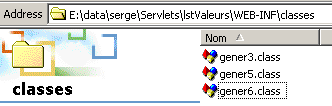
We restart Tomcat so that it takes into account the application’s new web.xml file and request the URL http://localhost:8080/list/values3:
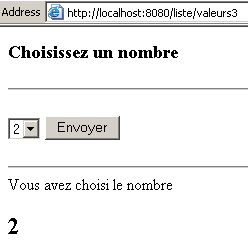
3.3.6. Initialization parameters for a page JSP
We have seen how to define initialization parameters for a servlet or a web application. Can we do the same for a JSP page? Let’s go back to the beginning of the code for the listvaleurs.jsp page we already examined:
<%@ page import="java.sql.*, java.util.*" %>

<%!
         // application global variables
         // page title
        private final String title="Génération d'un formulaire";
         // the list values database
        private final String DSNValeurs="odbc-valeurs";
        private final String admDbValeurs="admDbValeurs";
        private final String mdpDbValeurs="mdpDbValeurs";
.........
The four constants title, DSNValeurs, admDbValeurs, and mdpDbValeurs are defined in the application's web.xml file. The constants DSNValeurs, admDbValeurs, and mdpDbValeurs have now been defined at the application level, so we can assume that a page JSP belonging to this application will have access to them. This is indeed the case. We know that the page JSP will be translated into a servlet. This servlet will have access to the context via the method getServletContext(). The case of the constant title is more delicate. In fact, we defined it at the servlet level rather than the application level as follows:
    <servlet>
      <servlet-name>lstValeurs3</servlet-name>
    <servlet-class>gener6</servlet-class>
    <init-param>
        <param-name>title</param-name>
      <param-value>Génération d'un formulaire</param-value>
    </init-param>
  </servlet>
For the JSP page, the previous syntax is no longer appropriate because the concept of a class file no longer applies. However, the configuration syntax for a JSP page is very similar to that of a servlet. It is as follows:
    <servlet>
      <servlet-name>JSPlstValeurs</servlet-name>
    <jsp-file>/listvaleurs2.jsp</jsp-file>
...
  </servlet>
In fact, a page named JSP is treated as a servlet to which a name is assigned (servlet-name). Instead of associating a class file with this servlet, we associate the source file of the JSP page to be executed (jsp-file). Thus, the preceding lines define a servlet named JSPlstvaleurs associated with the page JSP /listvaleurs2.jsp. The path /listvaleurs2.jsp is relative to the application root. Thus, in the case of our list application, the file listvaleurs2.jsp would be located in the docBase folder (see server.xml) of the list application:
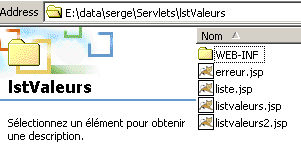
The configuration of the JSP page will be as follows in the web.xml file of the application:
<?xml version="1.0" encoding="ISO-8859-1"?>

<!DOCTYPE web-app
    PUBLIC "-//Sun Microsystems, Inc.//DTD Web Application 2.3//EN"
    "http://java.sun.com/dtd/web-app_2_3.dtd">

<web-app>
  <context-param>
      <param-name>DSNValeurs</param-name>
    <param-value>odbc-valeurs</param-value>
  </context-param>
  <context-param>
      <param-name>admDbValeurs</param-name>
    <param-value>admDbValeurs</param-value>
  </context-param>
  <context-param>
      <param-name>mdpDbValeurs</param-name>
    <param-value>mdpDbValeurs</param-value>
  </context-param>
.......
    <servlet>
      <servlet-name>JSPlstValeurs</servlet-name>
    <jsp-file>/listvaleurs2.jsp</jsp-file>
    <init-param>
        <param-name>JSPtitle</param-name>
      <param-value>Génération d'un formulaire</param-value>
    </init-param>
  </servlet>
..........
  <servlet-mapping>
      <servlet-name>JSPlstValeurs</servlet-name>
    <url-pattern>/jspvaleurs</url-pattern>
  </servlet-mapping>
  <servlet-mapping>
........
</web-app>
The page JSP listvaleurs2.jsp is located in the root of the "liste" application and associated with the servlet name JSPlstValeurs (servlet-name), which is itself associated with the alias /jspvaleurs (servlet-mapping). Thus, our page JSP will be accessible via URL http://localhost:8080/list/jspvalues.
The initial page JSP (listvaleurs.jsp) is modified to listvaleurs2.jsp and retrieves its four initialization parameters in the jspInit() method:
<%!
         // application global variables
         // page title
        private String title=null;
        // the list values database
        private String DSNValeurs=null;
        private String admDbValeurs=null;
        private String mdpDbValeurs=null;
         // list values
        private String[] valeurs=null;
         // error msg
        private String msgErreur=null;

         // initialization of page JSP - executed only once
        public void jspInit(){

             // retrieve servlet initialization parameters
      ServletConfig config=getServletConfig();
            title=config.getInitParameter("JSPtitle");
      ServletContext context=getServletContext();
            DSNValeurs=context.getInitParameter("DSNValeurs");
            admDbValeurs=context.getInitParameter("admDbValeurs");
            mdpDbValeurs=context.getInitParameter("mdpDbValeurs");

             //have all the parameters been recovered?
            if(title==null || DSNValeurs==null || admDbValeurs==null
                 || mdpDbValeurs==null){
                msgErreur="Configuration incorrecte";
                return;
            }

             // fills the table of values from a ODBC database
             // name DSN : DSNvaleurs
..............
The JSP page retrieves its initialization parameters in the same way as servlets. The previous file is saved in the root directory of the web application:
The Tomcat server is restarted to force it to re-read the application’s new web configuration file xml. You can then request the URL http://localhost:8080/liste/jspvaleurs:
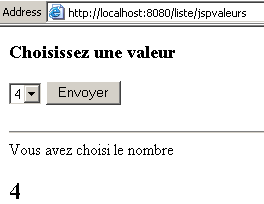
3.3.7. Collaboration between servlets and pages within a web application
When a client sends a request to a web server, the response can be generated by multiple servlets and pages JSP. Until now, the response had been generated by a single servlet or page JSP. We have seen that the JSP page improves the readability of the generated HTML document structure. However, it also generally contains a lot of Java code. We can improve this by placing
- the Java code that does not generate the HTML response code into one or more servlets
- into JSP pages, the code for generating the various HTML documents sent in response to the client
This should help improve the separation between Java code and HTML code. We will apply this new structure to our list application: a Java servlet lstValeurs4 will be responsible for reading the values from the database at startup and then analyzing the requests from clients. Depending on the result of this analysis, the client’s request will be directed to an error page (erreur.jsp) or to the page displaying the list of numbers (liste.jsp). The list application will therefore consist of a servlet and two pages JSP.
How can a servlet pass the request it received from a client to another servlet or to a JSP page? We will use the following methods:
method of the ServletContext class, which returns a RequestDispatcher object. The url parameter is the name of the URL to which we want to forward the client’s request. This request forwarding can only occur within the same application. Therefore, the url parameter is a path relative to the web directory structure of that application. | |
method of the RequestDispatcher interface that passes the client’s request and the response object—which must be used to construct the response—to the preceding URL. | |
When a JSP servlet or page passes a request to another JSP servlet or page, it generally needs to pass additional information to it beyond just the client’s request—information derived from its own processing of the request. The setAttribute method of the ServletRequest class allows you to add attributes to the client’s request object in a format resembling a dictionary of (attribute, value) pairs, where attribute is the name of the attribute and value is any object representing its value. | |
allows you to retrieve the values of a request’s attributes. This method will be used by the servlet or the JSP page to which a request was forwarded to obtain the information added to it. |
The servlet responsible for processing the form will be configured as follows in the web.xml file:
<?xml version="1.0" encoding="ISO-8859-1"?>

<!DOCTYPE web-app
    PUBLIC "-//Sun Microsystems, Inc.//DTD Web Application 2.3//EN"
    "http://java.sun.com/dtd/web-app_2_3.dtd">

<web-app>
  <context-param>
      <param-name>DSNValeurs</param-name>
    <param-value>odbc-valeurs</param-value>
  </context-param>
  <context-param>
      <param-name>admDbValeurs</param-name>
    <param-value>admDbValeurs</param-value>
  </context-param>
  <context-param>
      <param-name>mdpDbValeurs</param-name>
    <param-value>mdpDbValeurs</param-value>
  </context-param>

............
    <servlet>
      <servlet-name>lstValeurs4</servlet-name>
    <servlet-class>gener7</servlet-class>
    <init-param>
        <param-name>title</param-name>
      <param-value>Génération d'un formulaire</param-value>
    </init-param>
    <init-param>
        <param-name>JSPerreur</param-name>
      <param-value>/erreur.jsp</param-value>
    </init-param>
    <init-param>
        <param-name>JSPliste</param-name>
      <param-value>/liste.jsp</param-value>
    </init-param>
    <init-param>
        <param-name>URLservlet</param-name>
      <param-value>/liste/valeurs4</param-value>
    </init-param>
  </servlet>
...........
  <servlet-mapping>
      <servlet-name>lstValeurs4</servlet-name>
    <url-pattern>/valeurs4</url-pattern>
  </servlet-mapping>
.......
</web-app>
The lstValeurs4 servlet will have four initialization parameters specific to it:
the title of the HTML document to be generated | |
the URL of the JSP error page | |
The URL page from the JSP page displaying the list of numbers | |
the URL associated with the action attribute of the form displayed on the JSPliste page. This URL will be that of the lstValeurs4 servlet |
The servlet will have the alias /values4 (servlet-mapping) and will therefore be accessible via the URL URL http://localhost:8080/list/values4. It is linked to the class file gener7.java, whose complete source code is as follows:
import java.io.*;
import javax.servlet.*;
import javax.servlet.http.*;
import java.sql.*;
import java.util.*;

public class gener7 extends HttpServlet{
        // page title
        private String title=null;
        // the list values database
        private String DSNValeurs=null;
        private String admDbValeurs=null;
        private String mdpDbValeurs=null;
         // JSP display pages
        private String JSPerreur=null;
        private String JSPliste=null;
        // the URL of the servlet
        private String URLservlet=null;
        // list values
        private String[] valeurs=null;
         // error msg
        private String msgErreur=null;

        // -----------------------------------------------------------------
        // GET
        public void doGet(HttpServletRequest request,HttpServletResponse response)
                    throws IOException, ServletException{

            // put msgErreur,title in the query attributes
            request.setAttribute("msgErreur",msgErreur);
            request.setAttribute("title",title);
            request.setAttribute("URLservlet",URLservlet);

             // was there an error loading the servlet?
            if(msgErreur!=null){
                 // we hand over to a JSP error page
                getServletContext().getRequestDispatcher(JSPerreur).forward(request,response);
                 // end
                return;
            }

             // there was no error
             // put the list of values in the query attributes
            request.setAttribute("valeurs",valeurs);

             // we retrieve the user's possible choice
            String choix=request.getParameter("cmbValeurs");
            if(choix==null) choix="";
            request.setAttribute("choix",choix);

             // hand over to the JSP list presentation page
            getServletContext().getRequestDispatcher(JSPliste).forward(request,response);
            // end
            return;
        }//GET

        // -----------------------------------------------------------------
        // POST
        public void doPost(HttpServletRequest request,HttpServletResponse response)
                    throws IOException, ServletException{

             // returns to GET
            doGet(request,response);
        }//POST

        // -----------------------------------------------------------------
         // servlet initialization
        public void init(){

             // retrieve servlet initialization parameters
            ServletConfig config=getServletConfig();
            title=config.getInitParameter("title");
            JSPerreur=config.getInitParameter("JSPerreur");
            JSPliste=config.getInitParameter("JSPliste");
            URLservlet=config.getInitParameter("URLservlet");

            ServletContext context=getServletContext();
            DSNValeurs=context.getInitParameter("DSNValeurs");
            admDbValeurs=context.getInitParameter("admDbValeurs");
            mdpDbValeurs=context.getInitParameter("mdpDbValeurs");


             //have all the parameters been recovered?
            if(title==null || DSNValeurs==null || admDbValeurs==null
                 || mdpDbValeurs==null || JSPerreur==null || JSPliste==null || URLservlet==null){
                msgErreur="Configuration incorrecte";
                return;
            }

             // fills the table of values from a ODBC database
             // name DSN : DSNvaleurs
            Connection connexion=null;
            Statement st=null;
            ResultSet rs=null;
            try{
                 // connection to the ODBC database
                Class.forName("sun.jdbc.odbc.JdbcOdbcDriver");
                connexion=DriverManager.getConnection("jdbc:odbc:"+DSNValeurs,admDbValeurs,mdpDbValeurs);
                 // statement object
                st=connexion.createStatement();
                 // execute select query to retrieve values
                rs=st.executeQuery("select valeur from Tvaleurs");
                // values are retrieved and put into a dynamic table
                ArrayList lstValeurs=new ArrayList();
                while(rs.next()){
                    // the value is saved in the
                    lstValeurs.add(rs.getString("valeur"));
                }//while
                 // transformation list --> table
                valeurs=new String[lstValeurs.size()];
                for (int i=0;i<lstValeurs.size();i++){
                    valeurs[i]=(String)lstValeurs.get(i);
                }
            }catch(Exception ex){
                 // problem
                msgErreur=ex.getMessage();
            }finally{
                try{rs.close();}catch(Exception ex){}
                try{st.close();}catch(Exception ex){}
                try{connexion.close();}catch(Exception ex){}
            }//try
        }//init
    }//class
The new feature in this class is that the client request is forwarded to the JSPerreur page in case of an error, and to the JSPliste page otherwise. The class does not generate the response itself. This is handled by the pages JSP, JSPerreur, and JSPliste. Previously, the servlet added attributes (setAttribute) to the client request:
- an error message (msgErreur) in case of an error for the page (JSPerreur)
- the values (values) to display, the value selected (choice) by the user, the title (title) of the form, the URL (URLservlet) of the form's action attribute for page JSPliste
This class is compiled and placed in the application's classes:
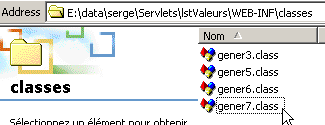
The page JSP, which displays an error message, is configured as follows:
    <servlet>
      <servlet-name>JSPerreur</servlet-name>
    <jsp-file>/erreur.jsp</jsp-file>
    <init-param>
        <param-name>mainServlet</param-name>
      <param-value>/valeurs4</param-value>
    </init-param>
  </servlet>
.........
<servlet-mapping>
      <servlet-name>JSPerreur</servlet-name>
    <url-pattern>/JSPerreur</url-pattern>
  </servlet-mapping>
The file JSP associated with the error page is named erreur.jsp and is located in the application root:
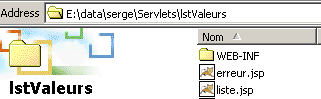
It has the alias /JSPerreur, which makes it accessible via URL http://localhost:8080/list/JSPerreur. It has an initialization parameter named mainServlet, whose value is the alias of the main servlet described above. Note that this alias is relative to the root of the liste application; otherwise, it would be /liste/valeurs4. The code for the erreur.jsp page is as follows:
<%
    // code de _jspService
  // on récupère le paramètre d'initialisation mainServlet
  String servletListValeurs=config.getInitParameter("mainServlet");
  // on récupère l'attribut msgErreur
  String msgErreur=(String)request.getAttribute("msgErreur");
  // attribut valide ?
  if(msgErreur!=null){
%>
       <!-- code HTML -->
    <html>
        <head>
          <title>Erreur</title>
      </head>
      <body>
          <h3>Application indisponible (<%= msgErreur %>)</h3>
      </body>
    </html>
<%
    } else { // attribut msgErreur invalide - retour à la servlet principale
%>
    <jsp:forward page="<%= servletListValeurs %>" />
<%
  }
%>
This page should normally be called by the previous servlet, which should pass it the attribute msgErreur. However, there is nothing preventing you from calling it directly if you know its URL. Also, if you find that the msgErreur attribute is missing, you pass the request to the main servlet. Here, we use a tag specific to JSP pages, with the following syntax:
where URL is the URL of the servlet to which the client request is forwarded. If the msgErreur attribute is present, the error page is displayed.
The JSP page displaying the list of numbers is configured as follows:
    <servlet>
      <servlet-name>JSPliste</servlet-name>
    <jsp-file>/liste.jsp</jsp-file>
    <init-param>
        <param-name>mainServlet</param-name>
      <param-value>/valeurs4</param-value>
    </init-param>
.........
  <servlet-mapping>
      <servlet-name>JSPliste</servlet-name>
    <url-pattern>/JSPliste</url-pattern>
  </servlet-mapping>
The file JSP associated with the error page is named liste.jsp and is located in the application root:
The servlet has the alias /JSPliste, which makes it accessible via URL http://localhost:8080/liste/JSPliste. It has an initialization parameter named mainServlet, whose value is the alias of the main servlet. The code for the liste.jsp page is as follows:
  <%-- value list display page --%>
  <%
       // code of jspService
       // we retrieve the initialization parameter
      String servletListValeurs=config.getInitParameter("mainServlet");

     // retrieve request attributes from the main servlet
    String title=(String) request.getAttribute("title");
    String[] valeurs=(String[]) request.getAttribute("valeurs");
    String choix=(String) request.getAttribute("choix");
    String URLservlet=(String) request.getAttribute("URLservlet");

     // valid attributes?
    if(title==null || valeurs==null || choix==null){
         // there is an invalid attribute - hand over to the servlet
   %>
   <jsp:forward page="<%= servletListValeurs %>" />
    <%
    }//if
  %>

  <%-- code HTML --%>
      <html>
        <head>
          <title><%= title %></title>
      </head>
      <body>
          <h3>Choisissez une valeur</h3>
          <form method="POST" action="<%= URLservlet %>">
            <select name="cmbValeurs">
              <%
                 // dynamic display of values
                          String selected="";
                          for (int i=0;i<valeurs.length;i++){
                              if(valeurs[i].equals(choix)) selected="selected"; else selected="";
                              out.println("<option "+selected+">"+valeurs[i]+"</option>");
                          }//for
            %>
          </select>
          <input type="submit" value="Envoyer">
        </form>
                <%
             // was there a chosen value?
                    if(! choix.equals("")){
                // the user's choice is displayed
                %>
                <hr>Vous avez choisi le nombre<h2><%= choix %></h2>
                <%
                    }//if
                %>
      </body>
    </html>
This page behaves like the erreur.jsp page. It should normally be called by the /liste/valeurs4 servlet and receive the title, valeurs, and choix attributes. If any of these parameters is missing, control is passed to the URLservlet servlet (/liste/valeurs4). If all parameters are present, the list of numbers is displayed along with the number chosen by the user, if any.
If you request the URL from the main servlet, you get the following result:
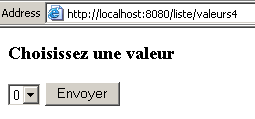
with the following source code (View/Source):
<html>
    <head>
      <title>Génération d'un formulaire</title>
  </head>
  <body>
      <h3>Choisissez une valeur</h3>
      <form method="POST" action="/liste/valeurs4">
        <select name="cmbValeurs">
          <option >0</option>
        <option >1</option>
        <option >2</option>
        <option >3</option>
        <option >4</option>
        <option >6</option>
        <option >5</option>
        <option >7</option>
        <option >8</option>
        <option >9</option>
      </select>
      <input type="submit" value="Envoyer">
    </form>

  </body>
</html>
This document HTMl was generated by the page JSP liste.jsp. We can see that the attributes title, values, and URLservlet have been successfully retrieved.
To conclude on the servlet/page collaboration JSP, we observe that the pages JSP are very short here and lack the Java code that does not directly contribute to creating the response HTML. The structure of the generated documents is thus more visible.
3.4. Lifecycle of JSP servlets and pages
3.4.1. The Lifecycle
Here we are interested in the servlet lifecycle. The lifecycle of JSP pages follows from this. Consider a servlet being called for the first time. A class instance is then created by the web server and loaded into memory. It will then serve the request. Once this is done, the servlet is not unloaded from memory. It remains there to serve other requests in order to optimize the server’s response times. It will be unloaded when a sufficient amount of time has passed without it having served any new requests. This time is generally configurable within the web server.
While in memory, the servlet can handle multiple requests simultaneously. The web server creates one thread per request, all of which use the same servlet instance:
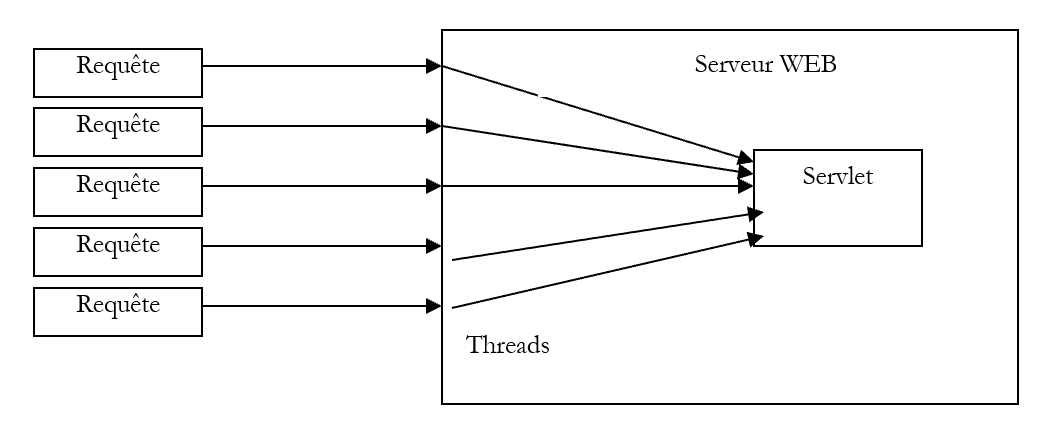 |
All of the above threads share the servlet instance’s variables. It may be necessary to synchronize the threads to prevent corruption of the servlet’s data. We will return to this later.
When a servlet is loaded, a specific method of the servlet is executed:
For a page named JSP, this is the method
  public void jspInit(){
  }
that is executed. Here is an example of a JSP page using the jspInit method:
<html>
  <head>
    <title>Compteur synchronisé</title>
  </head>
  <body>
    Compteur= <%= getCompteur() %>
  </body>
</html>

<%!
   // variables and global methods on the JSP page

   // instance variable
  int compteur;

   // method for incrementing the counter
  public int getCompteur(){
     // increment the counter
    int myCompteur=compteur;
    myCompteur++;
    compteur=myCompteur;
     // we give it back
    return compteur;
  }

   // the method executed on initial page load
  public void jspInit(){
     // init counter
    compteur=100;
  }
%>
The preceding page JSP initializes a counter to 100 in jspInit. Any subsequent request to the servlet increments and then displays the value of this counter:
The first time:

The second time:

As can be seen above, between the two requests, the servlet was not unloaded; otherwise, the counter would have been 101 during the second request. When the servlet is unloaded, the method
is executed if it exists. For the JSP pages, it is the method
  public void jspDestroy(){
  }
In these methods, you can, for example, close database connections that were opened in the corresponding init methods.
3.4.2. Synchronizing requests with a servlet
Let’s return to the previous JSP page, which increments a counter and returns it to the web client. Suppose there are two simultaneous requests. Two threads are then created to execute them; these threads will use the same servlet instance, and thus the same counter. Recall the code that increments the counter:
  public int getCompteur(){
     // increment the counter
    int myCompteur=compteur;
    myCompteur++;
    compteur=myCompteur;
     // we give it back
    return compteur;
  }
The counter increment was intentionally written in a clumsy manner. Suppose that the execution of the two threads proceeds as follows:
 |
- At time T1, the thread TH1 is executed. It reads the counter (=145) from myCompteur, then it is interrupted and loses the processor. It therefore did not have time to increment myCompteur and copy the new value to `counter`.
- At time T2, the thread TH2 is executed. It reads the counter (=145) from myCompteur, then it is interrupted and loses the processor. Note that the two threads have different myCompteur variables. They share only the instance variables, those that are global to the methods.
- At time T3, the thread TH1 regains control and finishes. It therefore returns 146 to its client.
- At time T4, the thread TH2 resumes and finishes. It also returns 146 to its client, when it should have returned 147.
This is a thread synchronization issue. When TH1 wants to increment the counter, it must prevent any other thread from doing so as well. To highlight this problem, we rewrite the JSP page as follows:
<html>
  <head>
    <title>Compteur synchronisé</title>
  </head>
  <body>
    Compteur= <%= getCompteur() %>
  </body>
</html>

<%!
   // variables and global methods on the JSP page

   // instance variable
  int compteur;

   // method for incrementing the counter
  public int getCompteur(){
     // read the counter
    int myCompteur=compteur;
     // we stop for 10 seconds
    try{
      Thread.sleep(10000);
    }catch (Exception ignored){}
     // increment the counter
    compteur=myCompteur+1;
     // we give it back
    return compteur;
  }

   // the method executed on initial page load
  public void jspInit(){
     // init counter
    compteur=100;
  }
%>
Here, we have forced the thread to stop 10 seconds after reading the counter. It should therefore release the CPU, allowing another thread to read a counter that has not been incremented. When we make requests with a browser, we don’t notice any difference other than the 10-second wait before getting the result.
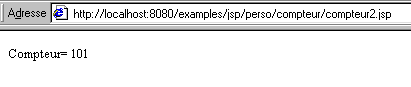
Now, if we open two browser windows and make two requests close enough together in time:
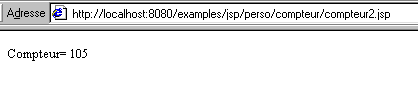
We get the same counter value. We can better highlight the problem with a programmed client rather than a manual one like the browser. Here is a Perl client that is called as follows:
program URL N
where
URL is the URL of the counter servlet
N is the number of requests to be made to this servlet
Here are the results obtained for 5 requests, which clearly demonstrate the problem of poor thread synchronization: they all return the same counter value.
DOS>java clientCompteurJSP http://localhost:8080/examples/jsp/perso/counter/compteur2.jsp 5
Compteur=121
Compteur=121
Compteur=121
Compteur=121
Compteur=121
The Java client code is as follows.
import java.net.*;
import java.util.regex.*;
import java.io.*;

public class clientCompteurJSP {

    public static void main(String[] params){

         // data
        String syntaxe="Syntaxe : pg URL nbAppels";

         // parameter verification
        if(params.length!=2){
            System.err.println(syntaxe);
            System.exit(1);
        }//if
         // URL
        URL urlCompteur=null;
        try{
            urlCompteur=new URL(params[0]);
            String query=urlCompteur.getQuery();
            if(query!=null) throw new Exception();
        }catch (Exception ex){
            System.err.println(syntaxe);
            System.err.println("URL ["+params[0]+" incorrecte");
            System.exit(2);
        }//try-catch
         // number of calls
        int nbAppels=0;
        try{
            nbAppels=Integer.parseInt(params[1]);
            if(nbAppels<=0) throw new Exception();
        }catch(Exception ex){
            System.err.println(syntaxe);
            System.err.println("Nombre d'appels ["+params[1]+" incorrect");
            System.exit(3);
        }//try-catch

         // parameters are correct - connections can be made to the URL
        try{
            getCompteurs(urlCompteur,nbAppels);
        }catch(Exception ex){
            System.err.println(syntaxe);
            System.err.println("L'erreur suivante s'est produite : "+ex.getMessage());
            System.exit(4);
        }//try-catch
    }//hand

    private static void getCompteurs (URL urlCompteur, int nbAppels)
            throws Exception {
         // does nbAppels at URL urlCompteur
         // displays the counter value returned by the web server each time


         // remove from urlCompteur the info needed to connect to the tax server
        String path=urlCompteur.getPath();
        if(path.equals("")) path="/";
        String host=urlCompteur.getHost();
        int port=urlCompteur.getPort();
        if(port==-1) port=urlCompteur.getDefaultPort();

         // calls are made to the URL
        Socket[] clients=new Socket[nbAppels];
        for(int i=0;i<nbAppels;i++){
             // connect to the server
            clients[i]=new Socket(host,port);
             // create a write stream to the server
            PrintWriter OUT=new PrintWriter(clients[i].getOutputStream(),true);
             // request URL - send HTTP headers
            OUT.println("GET " + path + " HTTP/1.1");
            OUT.println("Host: " + host + ":" + port);
            OUT.println("Connection: close");
            OUT.println("");
        }//for

         // local data
        String réponse=null;                        // server response
         // the model searched for in the HTML server response
        Pattern modèleCompteur=Pattern.compile("^\\s*Compteur= (\\d+)");
         // the model of a correct answer
        Pattern réponseOK=Pattern.compile("^.*? 200 OK");
         // the result of the model comparison
        Matcher résultat=null;

        for(int i=0;i<nbAppels;i++){
             // each client reads the response sent by the server

             // create customer input/output flows TCP
            BufferedReader IN=new BufferedReader(new InputStreamReader(clients[i].getInputStream()));

             // read the 1st line of the answer
            réponse=IN.readLine();
             // compare the HTTP line with the model of the correct answer
            résultat=réponseOK.matcher(réponse);
            if(! résultat.find()){
                 // we have a URL problem
                throw new Exception("Client n° " + i + " - Le serveur a répondu : URL ["+ urlCompteur + "] inconnue");
            }//if

             // the response is read through to the end of the headers
            while((réponse=IN.readLine())!=null && ! réponse.equals("")){
            }//while

             // that's it for HTTP headers - move on to HTML code
             // to retrieve the counter value
            boolean compteurTrouvé=false;
            while((réponse=IN.readLine())!=null){
                 // compare the line with the counter model
                if(! compteurTrouvé){
                    résultat=modèleCompteur.matcher(réponse);
                    if(résultat.find()){
                         // meter found
                        System.out.println("Compteur="+résultat.group(1));
                        compteurTrouvé=true;
                    }//if
                }//if
            }//while

             // it's over
            clients[i].close();
        }//for
    }//getCompteurs

}//class
Let's explain the previous code:
- the program accepts two parameters:
- the URL of the JSP page of the counter
- the number of clients to create for this URL
- The program therefore begins by verifying the validity of the parameters: that there are indeed two, that the first resembles a URL syntactically, and that the second is an integer >0. To verify that the URL is syntactically correct, we use the URL class and its constructor URL (String), which constructs a URL object from a string such as http://istia.univ-angers.fr. An exception is thrown if the string is not syntactically valid URL. This allows us to verify the validity of the first parameter.
- Once the parameters have been verified, control is passed to the getCompteurs procedure. This procedure will create nbAppels and clients, all of which will connect simultaneously (or nearly so) to URL and urlCompteur.
- The port and the machine to which the clients instances must connect are derived from URL and urlCompteur: [URL].getHost() returns the machine name, and [URL].getPort() returns the port.
- A first loop allows each client to:
- connect to the web server
- to request the URL urlCompteur
In this loop, the client does not wait for the server’s response. This is because we want the server to receive nearly simultaneous requests.
- A second loop allows each client to receive and process the response sent by the server. The processing consists of finding the line in the response that contains the counter value and displaying it.
To resolve the issue highlighted earlier (the same counter being sent to all five clients), we need to synchronize the threads of the counting service on a single object before entering the critical section for reading and updating the counter. The new page JSP is as follows:
<html>
  <head>
    <title>Compteur synchronisé</title>
  </head>
  <body>
    Compteur= <%= getCompteur() %>
  </body>
</html>

<%!
   // variables and global methods on the JSP page

   // instance variables
  int compteur;
  Object verrou=new Object();

   // method for incrementing the counter
  public int getCompteur(){

     // we synchronize the critical section
    synchronized(verrou){
       // read the counter
      int myCompteur=compteur;
       // we stop for 10 seconds
      try{
        Thread.sleep(10000);
      }catch (Exception ignored){}
       // increment the counter
      compteur=myCompteur+1;
    }//synchronized
     // we give it back
    return compteur;
  }//getCompteur

   // the method executed on initial page load
  public void jspInit(){
     // init counter
    compteur=100;
  }
%>
Upon execution, the following results are obtained:
dos>c:\perl\bin\perl.exe client2.pl http://localhost:8080/examples/jsp/perso/counter/compteur3.jsp 5
    Compteur= 104
    Compteur= 106
    Compteur= 105
    Compteur= 107
    Compteur= 108
The documentation indicates that the web server may sometimes create multiple instances of the same servlet. In this case, the previous synchronization no longer works because the lock variable is local to a single instance and is therefore not known to the other instances. The same applies to the counter variable. To make them global to all instances, we write:
// class variable
  static int compteur;
  static Object verrou=new Object();
The rest of the code remains unchanged.