9. Program source code
9.1. The generic TCP client
Many services created at the dawn of the Internet operate according to the echo server model studied earlier: client-server communication occurs via the exchange of text lines. We will write a generic tcp client that will be launched as follows: java cltTCPgenerique server port
This TCP client will connect to port port on the server server. Once connected, it will create two threads:
- a thread responsible for reading commands typed on the keyboard and sending them to the server
- a thread responsible for reading responses from the server and displaying them on the screen
Why two threads? Each TCP-IP service has its own specific protocol, and the following situations sometimes arise:
- the client must send several lines of text before receiving a response
- a server’s response may contain multiple lines of text
Therefore, the loop that sends a single line to the server and receives a single line from the server is not always suitable. We will therefore create two separate loops:
- a loop to read commands typed on the keyboard to be sent to the server. The user will signal the end of the commands with the keyword "end."
- a loop to receive and display responses from the server. This will be an infinite loop that will only be interrupted by the server closing the network connection or by the user typing the "end" command on the keyboard.
To have these two separate loops, we need two independent threads. Let’s look at an example of execution where our generic client tcp connects to a service SMTP (SendMail Transfer Protocol). This service is responsible for routing email to its recipients. It runs on port 25 and uses a text-based exchange protocol.
Dos>java clientTCPgenerique istia.univ-angers.fr 25
Commandes :
<-- 220 istia.univ-angers.fr ESMTP Sendmail 8.11.6/8.9.3; Mon, 13 May 2002 08:37:26 +0200
help
<-- 502 5.3.0 Sendmail 8.11.6 -- HELP not implemented
mail from: machin@univ-angers.fr
<-- 250 2.1.0 machin@univ-angers.fr... Sender ok
rcpt to: serge.tahe@istia.univ-angers.fr
<-- 250 2.1.5 serge.tahe@istia.univ-angers.fr... Recipient ok
data
<-- 354 Enter mail, end with "." on a line by itself
Subject: test

ligne1
ligne2
ligne3
.
<-- 250 2.0.0 g4D6bks25951 Message accepted for delivery
quit
<-- 221 2.0.0 istia.univ-angers.fr closing connection
[fin du thread de lecture des réponses du serveur]
fin
[fin du thread d'envoi des commandes au serveur]
Let's comment on these client-server exchanges:
- the SMTP service sends a welcome message when a client connects to it:
- Some services have a `help` command that provides information on the commands available for the service. This is not the case here. The SMTP commands used in the example are as follows:
- mail from: sender, to specify the email address of the message sender
- rcpt to: recipient, to specify the email address of the message recipient. If there are multiple recipients, the rcpt to: command is repeated as many times as necessary for each recipient.
- data, which signals to the server SMTP that the message is about to be sent. As indicated in the server’s response, this is a sequence of lines ending with a line containing only a period. A message may have headers separated from the message body by a blank line. In our example, we included a subject using the Subject: keyword.
- Once the message is sent, you can tell the server that you are done using the quit command. The server then closes the network connection. The read thread can detect this event and stop.
- The user then types "end" on the keyboard to also stop the thread reading keyboard commands.
If we check the received email, we see the following (Outlook):
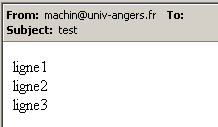
Note that the SMTP service cannot detect whether a sender is valid or not. Therefore, you can never trust the "From" field of a message. Here, the sender machin@univ-angers.fr did not exist.
This generic tcp client can help us discover the Internet service communication protocol and, from there, build specialized classes for the clients components of these services. Let’s explore the POP service protocol (Post Office Protocol), which allows users to retrieve their emails stored on a server. It operates on port 110.
Dos> java clientTCPgenerique istia.univ-angers.fr 110
Commandes :
<-- +OK Qpopper (version 4.0.3) at istia.univ-angers.fr starting.
help
<-- -ERR Unknown command: "help".
user st
<-- +OK Password required for st.
pass monpassword
<-- +OK st has 157 visible messages (0 hidden) in 11755927 bytes.
list
<-- +OK 157 visible messages (11755927 bytes)
<-- 1 892847
<-- 2 171661
...
<-- 156 2843
<-- 157 2796
<-- .
retr 157
<-- +OK 2796 bytes
<-- Received: from lagaffe.univ-angers.fr (lagaffe.univ-angers.fr [193.49.144.1])
<--     by istia.univ-angers.fr (8.11.6/8.9.3) with ESMTP id g4D6wZs26600;
<--     Mon, 13 May 2002 08:58:35 +0200
<-- Received: from jaume ([193.49.146.242])
<--     by lagaffe.univ-angers.fr (8.11.1/8.11.2/GeO20000215) with SMTP id g4D6wSd37691;
<--     Mon, 13 May 2002 08:58:28 +0200 (CEST)
...
<-- ------------------------------------------------------------------------
<-- NOC-RENATER2 Tl.  : 0800 77 47 95
<-- Fax : (+33) 01 40 78 64 00 , Email : noc-r2@cssi.renater.fr
<-- ------------------------------------------------------------------------
<--
<-- .
quit
<-- +OK Pop server at istia.univ-angers.fr signing off.
[fin du thread de lecture des réponses du serveur]
fin
[fin du thread d'envoi des commandes au serveur]
The main commands are as follows:
- user login, where you enter your login on the machine that holds your emails
- pass password, where you enter the password associated with the previous login
- list, to get a list of messages in the format number, size in bytes
- retr i, to read message #i
- quit, to end the session.
Let’s now explore the communication protocol between a client and a web server, which typically runs on port 80:
Dos> java clientTCPgenerique istia.univ-angers.fr 80
Commandes :
GET /index.html HTTP/1.0

<-- HTTP/1.1 200 OK
<-- Date: Mon, 13 May 2002 07:30:58 GMT
<-- Server: Apache/1.3.12 (Unix) (Red Hat/Linux) PHP/3.0.15 mod_perl/1.21
<-- Last-Modified: Wed, 06 Feb 2002 09:00:58 GMT
<-- ETag: "23432-2bf3-3c60f0ca"
<-- Accept-Ranges: bytes
<-- Content-Length: 11251
<-- Connection: close
<-- Content-Type: text/html
<--
<-- <html>
<--
<-- <head>
<-- <meta http-equiv="Content-Type"
<-- content="text/html; charset=iso-8859-1">
<-- <meta name="GENERATOR" content="Microsoft FrontPage Express 2.0">
<-- <title>Welcome to ISTIA - Universite d'Angers</title>
<-- </head>
....
<-- face="Verdana"> - Last updated on <b>January 10, 2002</b></font></p>
<-- </body>
<-- </html>
<--
[fin du thread de lecture des réponses du serveur]
fin
[fin du thread d'envoi des commandes au serveur]
A web client sends its commands to the server according to the following pattern:
The web server responds only after receiving the empty line. In this example, we used only one command:
which requests the file URL /index.html from the server and indicates that it is using the HTTP version 1.0 protocol. The most recent version of this protocol is 1.1. The example shows that the server responded by returning the contents of the index.html file and then closed the connection, as we can see the response read thread terminating. Before sending the contents of the index.html file, the web server sent a series of headers ending with an empty line:
<-- HTTP/1.1 200 OK
<-- Date: Mon, 13 May 2002 07:30:58 GMT
<-- Server: Apache/1.3.12 (Unix) (Red Hat/Linux) PHP/3.0.15 mod_perl/1.21
<-- Last-Modified: Wed, 06 Feb 2002 09:00:58 GMT
<-- ETag: "23432-2bf3-3c60f0ca"
<-- Accept-Ranges: bytes
<-- Content-Length: 11251
<-- Connection: close
<-- Content-Type: text/html
<--
<-- <html>
The line <html> is the first line of the file /index.html. The preceding text is called the HTTP headers (HyperText Transfer Protocol). We won’t go into detail about these headers here, but keep in mind that our generic client provides access to them, which can be helpful for understanding them. For example, the first line:
indicates that the contacted web server understands the HTTP/1.1 protocol and that it successfully found the requested file (200 OK), where 200 is a HTTP response code. The lines
tell the client that it will receive 11,251 bytes of text in HTML (HyperText Markup Language) and that the connection will be closed once the data has been sent.
So here we have a very handy tcp client. It undoubtedly does less than the telnet program we used previously, but it was interesting to write it ourselves. The generic tcp client program is as follows:
// imported packages
import java.io.*;
import java.net.*;
public class clientTCPgenerique{
// receives the characteristics of a service as a parameter in the form
// server port
// connects to the service
// creates a thread to read keyboard commands
// these will be sent to the
// creates a thread to read server responses
// these will be displayed on the screen
// the whole thing ends with the command end typed on the keyboard
// instance variable
private static Socket client;
public static void main(String[] args){
// syntax
final String syntaxe="pg serveur port";
// number of arguments
if(args.length != 2)
erreur(syntaxe,1);
// note the server name
String serveur=args[0];
// port must be integer >0
int port=0;
boolean erreurPort=false;
Exception E=null;
try{
port=Integer.parseInt(args[1]);
}catch(Exception e){
E=e;
erreurPort=true;
}
erreurPort=erreurPort || port <=0;
if(erreurPort)
erreur(syntaxe+"\n"+"Port incorrect ("+E+")",2);
client=null;
// there may be problems
try{
// connect to the service
client=new Socket(serveur,port);
}catch(Exception ex){
// error
erreur("Impossible de se connecter au service ("+ serveur
+","+port+"), erreur : "+ex.getMessage(),3);
// end
return;
}//catch
// create read/write threads
new ClientSend(client).start();
new ClientReceive(client).start();
// end thread main
return;
}// hand
// error display
public static void erreur(String msg, int exitCode){
// error display
System.err.println(msg);
// stop with error
System.exit(exitCode);
}//error
}//class
class ClientSend extends Thread {
// class for reading keyboard commands
// and send them to a server via a client tcp passed in parameter
private Socket client; // customer tcp
// manufacturer
public ClientSend(Socket client){
// customer tcp is noted
this.client=client;
}//manufacturer
// thread Run method
public void run(){
// local data
PrintWriter OUT=null; // network write streams
BufferedReader IN=null; // keyboard flow
String commande=null; // command read from keyboard
// error management
try{
// create network write stream
OUT=new PrintWriter(client.getOutputStream(),true);
// keyboard input stream creation
IN=new BufferedReader(new InputStreamReader(System.in));
// order entry-send loop
System.out.println("Commandes : ");
while(true){
// read command typed on keyboard
commande=IN.readLine().trim();
// finished?
if (commande.toLowerCase().equals("fin")) break;
// send order to server
OUT.println(commande);
// next order
}//while
}catch(Exception ex){
// error
System.err.println("Envoi : L'erreur suivante s'est produite : " + ex.getMessage());
}//catch
// end - we close the feeds
try{
OUT.close();client.close();
}catch(Exception ex){}
// signals the end of the thread
System.out.println("[Envoi : fin du thread d'envoi des commandes au serveur]");
}//run
}//class
class ClientReceive extends Thread{
// class responsible for reading lines of text intended for a
// customer tcp passed as parameter
private Socket client; // the customer tcp
// manufacturer
public ClientReceive(Socket client){
// customer tcp is noted
this.client=client;
}//manufacturer
// thread Run method
public void run(){
// local data
BufferedReader IN=null; // network read stream
String réponse=null; // server response
// error management
try{
// create network read stream
IN=new BufferedReader(new InputStreamReader(client.getInputStream()));
// loop read text lines from IN stream
while(true){
// network streaming
réponse=IN.readLine();
// closed flow?
if(réponse==null) break;
// display
System.out.println("<-- "+réponse);
}//while
}catch(Exception ex){
// error
System.err.println("Réception : L'erreur suivante s'est produite : " + ex.getMessage());
}//catch
// end - we close the feeds
try{
IN.close();client.close();
}catch(Exception ex){}
// signals the end of the thread
System.out.println("[Réception : fin du thread de lecture des réponses du serveur]");
}//run
}//class
9.2. The generic Tcp server
Now we are looking at a server
- that displays on the screen the commands sent by its clients
- sends them, in response, the lines of text typed on the keyboard by a user. It is therefore the user who acts as the server.
The program is launched by: java serveurTCPgenerique portEcoute, where portEcoute is the port to which clients must connect. The client service will be handled by two threads:
- one thread dedicated exclusively to reading the lines of text sent by the client
- a thread dedicated exclusively to reading the responses typed by the user. This thread will signal, using the `fin` command, that it is closing the connection with the client.
The server creates two threads per client. If there are n clients instances, there will be 2n active threads at the same time. The server itself never stops unless the user presses Ctrl-C on the keyboard. Let’s look at a few examples.
The server is running on port 100, and we use the generic client to communicate with it. The client window looks like this:
E:\data\serge\MSNET\c#\réseau\client tcp générique> java clientTCPgenerique localhost 100
Commandes :
commande 1 du client 1
<-- answer 1 to customer 1
commande 2 du client 1
<-- answer 2 to customer 1
fin
L'erreur suivante s'est produite : Impossible de lire les données de la connexion de transport.
[fin du thread de lecture des réponses du serveur]
[fin du thread d'envoi des commandes au serveur]
Lines beginning with <-- are those sent from the server to the client; the others are from the client to the server. The server window is as follows:
Dos> java serveurTCPgenerique 100
Serveur générique lancé sur le port 100
Thread de lecture des réponses du serveur au client 1 lancé
1 : Thread de lecture des demandes du client 1 lancé
<-- order 1 from customer 1
réponse 1 au client 1
1 : <-- order 2 from customer 1
réponse 2 au client 1
1 : [fin du Thread de lecture des demandes du client 1]
fin
[fin du Thread de lecture des réponses du serveur au client 1]
Lines beginning with <-- are those sent from the client to the server. Lines N: are those sent from the server to client N. The server above is still active even though client 1 has finished. We launch a second client for the same server:
Dos> java clientTCPgenerique localhost 100
Commandes :
commande 3 du client 2
<-- answer 3 to customer 2
fin
L'erreur suivante s'est produite : Impossible de lire les données de la connexion de transport.
[fin du thread de lecture des réponses du serveur]
[fin du thread d'envoi des commandes au serveur]
The server window then looks like this:
Dos> java serveurTCPgenerique 100
Serveur générique lancé sur le port 100
Thread de lecture des réponses du serveur au client 1 lancé
1 : Thread de lecture des demandes du client 1 lancé
<-- order 1 from customer 1
réponse 1 au client 1
1 : <-- order 2 from customer 1
réponse 2 au client 1
1 : [fin du Thread de lecture des demandes du client 1]
fin
[fin du Thread de lecture des réponses du serveur au client 1]
Thread de lecture des réponses du serveur au client 2 lancé
2 : Thread de lecture des demandes du client 2 lancé
<-- order 3 from customer 2
réponse 3 au client 2
2 : [fin du Thread de lecture des demandes du client 2]
fin
[fin du Thread de lecture des réponses du serveur au client 2]
^C
Now let's simulate a web server by running our generic server on port 88:
Dos> java serveurTCPgenerique 88
Serveur générique lancé sur le port 88
Now let’s open a browser and request the URL http://localhost:88/example.html page. The browser will then connect to port 88 on the localhost machine and request the page /example.html:
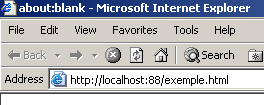
Now let’s look at our server window:
Dos>java serveurTCPgenerique 88
Serveur générique lancé sur le port 88
Thread de lecture des réponses du serveur au client 2 lancé
2 : Thread de lecture des demandes du client 2 lancé
<-- GET /exemple.html HTTP/1.1
<-- Accept: image/gif, image/x-xbitmap, image/jpeg, image/pjpeg, application/msword, */*
<-- Accept-Language: fr
<-- Accept-Encoding: gzip, deflate
<-- User-Agent: Mozilla/4.0 (compatible; MSIE 6.0; Windows NT 5.0; .NET CLR 1.0.3705; .NET CLR 1.0.2
914)
<-- Host: localhost:88
<-- Connection: Keep-Alive
<--
We can thus see the HTTP headers sent by the browser. This allows us to gradually uncover the HTTP protocol. In a previous example, we created a web client that sent only the single command GET. That had been sufficient. Here we see that the browser sends other information to the server. The purpose of this information is to tell the server what type of client it is dealing with. We also see that the HTTP headers end with a blank line.
Let’s craft a response for our client. The user at the keyboard is the actual server here and can craft a response manually. Recall the response sent by a web server in a previous example:
<-- HTTP/1.1 200 OK
<-- Date: Mon, 13 May 2002 07:30:58 GMT
<-- Server: Apache/1.3.12 (Unix) (Red Hat/Linux) PHP/3.0.15 mod_perl/1.21
<-- Last-Modified: Wed, 06 Feb 2002 09:00:58 GMT
<-- ETag: "23432-2bf3-3c60f0ca"
<-- Accept-Ranges: bytes
<-- Content-Length: 11251
<-- Connection: close
<-- Content-Type: text/html
<--
<-- <html>
Let's try to provide a similar response:
...
<-- Host: localhost:88
<-- Connection: Keep-Alive
<--
2 : HTTP/1.1 200 OK
2 : Server: serveur tcp generique
2 : Connection: close
2 : Content-Type: text/html
2 :
2 : <html>
2 :   <head><title>Serveur generique</title></head>
2 :   <body>
2 :     <center>
2 :       <h2>Reponse du serveur generique</h2>
2 :     </center>
2 :    </body>
2 : </html>
2 : fin
L'erreur suivante s'est produite : Impossible de lire les données de la connexion de transport.
[fin du Thread de lecture des demandes du client 2]
[fin du Thread de lecture des réponses du serveur au client 2]
Lines beginning with 2: are sent from the server to client #2. The end command closes the connection from the server to the client. In our response, we have limited ourselves to the following headers: HTTP
HTTP/1.1 200 OK
2 : Server: serveur tcp generique
2 : Connection: close
2 : Content-Type: text/html
2 :
We do not specify the size of the file we are sending (Content-Length), but simply indicate that we will close the connection (Connection: close) after sending it. This is sufficient for the browser. When it sees that the connection is closed, it will know that the server’s response is complete and will display the page HTML that was sent to it. The page is as follows:
2 : <html>
2 :   <head><title>Serveur generique</title></head>
2 :   <body>
2 :     <center>
2 :       <h2>Reponse du serveur generique</h2>
2 :     </center>
2 :    </body>
2 : </html>
The user then closes the connection to the client by typing the command "fin". The browser then knows that the server's response is complete and can display it:
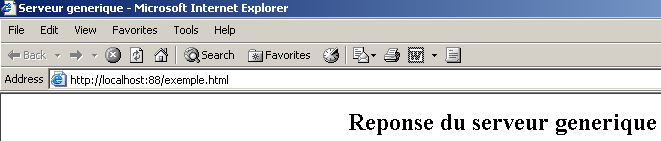
If, in the example above, you select View/Source to see what the browser received, you get:
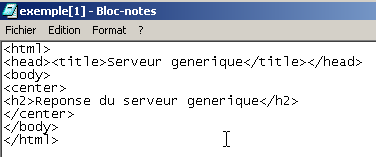
that is, exactly what was sent from the generic server.
The code for the generic tcp server is as follows:
// packages
import java.io.*;
import java.net.*;

public class serveurTCPgenerique{

    // main program
    public static void main (String[] args){

    // receives listening port for clients requests
     // creates a thread to read client requests
     // these will be displayed on the screen
     // creates a thread to read keyboard commands
     // these will be sent as a reply to the customer
     // the whole thing ends with the command end typed on the keyboard

    final String syntaxe="Syntaxe : pg port";
   // instance variable
         // is there an argument
     if(args.length != 1)
        erreur(syntaxe,1);

         // port must be integer >0
        int port=0;
        boolean erreurPort=false;
        Exception E=null;
        try{
            port=Integer.parseInt(args[0]);
        }catch(Exception e){
            E=e;
            erreurPort=true;
        }
        erreurPort=erreurPort || port <=0;
        if(erreurPort)
            erreur(syntaxe+"\n"+"Port incorrect ("+E+")",2);

     // we create the listening service
    ServerSocket ecoute=null;
    int nbClients=0;    // number of clients processed
        try{
             // create the service
            ecoute=new ServerSocket(port);
             // follow-up
            System.out.println("Serveur générique lancé sur le port " + port);

             // service loop at clients
            Socket client=null;
            while (true){ // infinite loop - will be stopped by Ctrl-C
                 // waiting for a customer
                client=ecoute.accept();

                 // the service is provided by separate threads
                nbClients++;

                 // create read/write threads
        new ServeurSend(client,nbClients).start();
        new ServeurReceive(client,nbClients).start();

                // back to listening to requests
            }// fin while
        }catch(Exception ex){
             // we report the error
            erreur("L'erreur suivante s'est produite : " + ex.getMessage(),3);
        }//catch
    }// fine hand

     // error display
    public static void erreur(String msg, int exitCode){
         // error display
        System.err.println(msg);
         // stop with error
        System.exit(exitCode);
    }//error
}//class

class ServeurSend extends Thread{
    // class responsible for reading typed responses
     // and send them to a client via a tcp client passed to the builder

    Socket client;    // customer tcp
    int numClient;        // customer no

     // manufacturer
    public ServeurSend(Socket client, int numClient){
         // customer tcp is noted
        this.client=client;
         // and its
        this.numClient=numClient;
    }//manufacturer

     // thread Run method
    public void run(){

        // local data
        PrintWriter OUT=null;        // network write streams
        String réponse=null;        // answer read from keyboard
    BufferedReader IN=null;    // keyboard flow

        // follow-up
        System.out.println("Thread de lecture des réponses du serveur au client "+ numClient + " lancé");
         // error management
        try{
             // network write stream creation
            OUT=new PrintWriter(client.getOutputStream(),true);
      // keyboard flow creation
      IN=new BufferedReader(new InputStreamReader(System.in));
            // order entry-sending loop
            while(true){
                 // customer identification
                System.out.print("--> " + numClient + " : ");
                 // read response typed on keyboard
                réponse=IN.readLine().trim();
                // finished?
                if (réponse.toLowerCase().equals("fin")) break;
                // send response to server
                OUT.println(réponse);
                 // following response
            }//while
        }catch(Exception ex){
             // error
            System.err.println("L'erreur suivante s'est produite : " + ex.getMessage());
        }//catch
         // end - we close the feeds
        try{
            OUT.close();client.close();
        }catch(Exception ex){}
         // signals the end of the thread
        System.out.println("[fin du Thread de lecture des réponses du serveur au client "+ numClient+ "]");
    }//run
}//class

class ServeurReceive extends Thread{
    // class responsible for reading text lines sent to the server
     // via a tcp client passed to the builder

    Socket client;    // the customer tcp
    int numClient;        // customer no

     // manufacturer
    public ServeurReceive(Socket client, int numClient){
         // customer tcp is noted
        this.client=client;
         // and its
        this.numClient=numClient;
    }//manufacturer

     // thread Run method
    public void run(){

        // local data
        BufferedReader IN=null;        // network read stream
        String réponse=null;        // server response

         // follow-up
        System.out.println("Thread de lecture des demandes du client "+ numClient + " lancé");
         // error management
        try{
             // create network read stream
            IN=new BufferedReader(new InputStreamReader(client.getInputStream()));
            // loop read text lines from IN stream
            while(true){
                 // network streaming
                réponse=IN.readLine();
                 // closed flow?
                if(réponse==null) break;
                // display
                System.out.println("<-- "+réponse);
            }//while
        }catch(Exception ex){
            // error
            System.err.println("L'erreur suivante s'est produite : " + ex.getMessage());
        }//catch
         // end - close flows
        try{
            IN.close();client.close();
        }catch(Exception ex){}
         // signals the end of the thread
        System.out.println("[fin du Thread de lecture des demandes du client "+ numClient+"]");
    }//run
}//class