4. Session tracking
4.1. The problem
A web application may consist of multiple form exchanges between the server and the client. The process works as follows:
- Step 1
- Client C1 establishes a connection with the server and makes its initial request.
- The server sends form F1 to client C1 and closes the connection opened in step 1.
- Step 2
- Client C1 fills it out and sends it back to the server. To do this, the browser opens a new connection with the server.
- The server processes the data from form 1, calculates information I1 from it, sends form F2 to client C1, and closes the connection opened in step 3.
- Step 3
- The cycle of steps 3 and 4 repeats in steps 5 and 6. At the end of step 6, the server will have received two forms, F1 and F2, and will have calculated information I1 and I2 from them.
The problem is: how does the server retain the information I1 and I2 associated with client C1? This problem is called tracking the session of client C1. To understand its root cause, let’s examine the diagram of a server application TCP-IP serving multiple clients simultaneously:
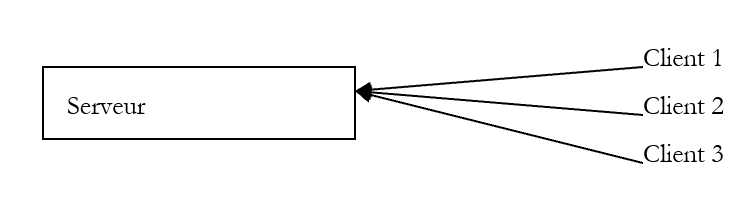 |
In a traditional TCP-IP client-server application:
- the client establishes a connection with the server
- exchanges data with the server through this connection
- the connection is closed by one of the two parties
The two key points of this mechanism are:
- a single connection is created for each clients
- this connection is used for the entire duration of the server's dialogue with its client
What allows the server to know, at any given moment, which client it is working with is the connection—or, in other words, the "channel"—that links it to that client. Since this channel is dedicated to a specific client, everything that comes through it originates from that client, and everything sent through it reaches the client.
The HTTP client-server mechanism closely follows the previous diagram, with the exception that the client-server dialogue is limited to a single exchange between the client and the server:
- the client opens a connection to the server and makes its request
- the server responds and closes the connection
If at time T1, a client C makes a request to the server, it obtains a connection C1 that will be used for the single request-response exchange. If, at time T2, this same client makes a second request to the server, it will obtain a connection C2 that is different from connection C1. For the server, there is then no difference between this second request from user C and their initial request: in both cases, the server treats the client as a new client. For there to be a link between client C’s different connections to the server, client C must be “recognized” by the server as a “regular” and the server must retrieve the information it has on this regular.
Let’s imagine a system that works as follows:
- There is a single queue
- There are multiple counters. Therefore, multiple clients can be served simultaneously. When a counter becomes available, a customer leaves the queue to be served at that counter
- If this is the customer’s first visit, the person at the counter gives them a token with a number. The customer may ask only one question. Once they have their answer, they must leave the counter and go to the end of the queue. The counter clerk records the customer’s information in a file bearing their number.
- When it is their turn again, the customer may be served by a different teller than the previous time. The teller asks for their token and retrieves the file with the token number. Once again, the customer makes a request, receives an answer, and information is added to their file.
- And so on... Over time, the customer will receive answers to all their requests. The connection between the different requests is maintained through the token and the file associated with it.
The session tracking mechanism in a client-server web application works similarly to the previous example:
- upon their first request, a client is given a token by the web server
- they will present this token with each subsequent request to identify themselves
The token can take various forms:
- a hidden field in a form
- the client makes its first request (the server recognizes it by the fact that the client has no token)
- The server sends its response (a form) and places the token in a hidden field within it. At this point, the connection is closed (the client leaves the server with its token). The server may have associated information with this token.
- The client makes a second request by resubmitting the form. The server retrieves the token from the form. It can then process the client’s second request by accessing, via the token, the information calculated during the first request. New information is added to the record associated with the token, a second response is sent to the client, and the connection is closed for the second time. The token has been included again in the response form so that the user can present it during their next request.
- and so on...
The main drawback of this technique is that the token must be placed in a form. If the server’s response is not a form, the hidden field method can no longer be used.
- The cookie method
- The client makes its first request (the server recognizes this because the client has no token)
- The server responds by adding a cookie to its headers. This is done using the Set-Cookie command:
Set-Cookie: param1=value1;param2=value2;....
where param1 and param2 are parameter names and their respective values. Among the parameters will be the token. Often, only the token is included in the cookie, with the server storing the other information in the folder associated with the token. The browser that receives the cookie will store it in a file on the disk. After the server’s response, the connection is closed (the client leaves the session with its token).
- (continued)
- The client makes its second request to the server. Each time a request is made to a server, the browser checks among all the cookies it has to see if it has one from the requested server. If so, it sends it to the server in the form of a HTTP command, the Cookie command, which has a syntax similar to that of the Set-Cookie command used by the server:
Cookie: param1=value1;param2=value2;....
Among the parameters sent by the browser, the server will find the token that allows it to recognize the client and retrieve the information associated with it.
This is the most commonly used form of token. It has one drawback: a user can configure their browser to reject cookies. Such users then cannot access web applications that use cookies.
- rewrite of URL
- The client makes its first request (the server recognizes this because the client has no token)
- The server sends its response. This response contains links that the user must use to continue with the application. In the URL of each of these links, the server appends the token in the form URL;token=value.
- When the user clicks on one of the links to continue the application, the browser sends a request to the web server, including the requested token in the headers as HTTP;token=value. The server is then able to retrieve the token.
4.2. Java for session tracking
We now present the main methods useful for session tracking:
retrieves the Session object to which the current request belongs. If the request was not yet part of a session, a session is created. | |
identifier of the current session | |
creation date of the current session (number of milliseconds elapsed since January 1, 1970, 00:00). | |
date of the client's last access to the session | |
Maximum duration in seconds of inactivity for a session. After this period, the session is invalidated. | |
Sets the maximum duration of inactivity for a session in seconds. After this period, the session is invalidated. | |
true if the session has just been created | |
associates a value with a parameter in a given session. This mechanism allows you to store information that will remain available for the duration of the session. | |
removes the parameter from the session data. | |
Returns the value associated with the parameter in the session. Returns null if the parameter does not exist. | |
lists all attributes of the current session as an enumeration | |
Closes the current session. All information associated with it is destroyed. |
4.3. Example 1
We present an example taken from the excellent book "Programming with J2EE" published by Wrox and distributed by Eyrolles. This book is a treasure trove of high-level information for developers of Java web solutions. The application presented in this book as a single Java servlet has been adapted here as a main servlet that calls upon JSP pages to display the various possible responses to the client.
The application is called sessions and is configured as follows in the <tomcat>\conf\server.xml file:
In the docBase folder above, the following items are found:
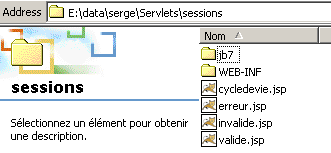
The files erreur.jsp, invalide.jsp, and valide.jsp are all associated with the sessions application. In the WEB-INF folder above, you will find:
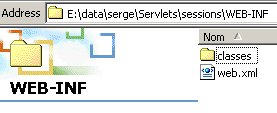
Shown above is the web.xml configuration file for the sessions application. In the classes folder, you will find the servlet class file:
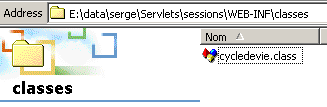
The application's web.xml file is as follows:
<?xml version="1.0" encoding="ISO-8859-1"?>

<!DOCTYPE web-app
    PUBLIC "-//Sun Microsystems, Inc.//DTD Web Application 2.3//EN"
    "http://java.sun.com/dtd/web-app_2_3.dtd">

<web-app>
    <servlet>
      <servlet-name>cycledevie</servlet-name>
    <servlet-class>cycledevie</servlet-class>
    <init-param>
          <param-name>urlSessionValide</param-name>
        <param-value>/valide.jsp</param-value>
    </init-param>
    <init-param>
          <param-name>urlSessionInvalide</param-name>
        <param-value>/invalide.jsp</param-value>
    </init-param>
    <init-param>
          <param-name>urlErreur</param-name>
        <param-value>/erreur.jsp</param-value>
    </init-param>
  </servlet>
  <servlet-mapping>
      <servlet-name>cycledevie</servlet-name>
    <url-pattern>/cycledevie</url-pattern>
  </servlet-mapping>
</web-app>
The main servlet is called cycledevie (servlet-name) and is associated with the class file cycledevie.class (servlet-class). It has an alias /cycledevie (servlet-mapping) that allows it to be called via URL http://localhost:8080/sessions/cycledevie. It has three initialization parameters:
url of the page displaying the characteristics of the current session | |
url for the page displayed after the current session has been invalidated | |
url of the page displayed in the event of an initialization error of the main servlet cycledevie |
The components of the sessions application are as follows:
main servlet - analyzes the client request:
| |
| |
is displayed when the user has invalidated the current session. It then offers to create a new one. | |
displayed when the main servlet encounters errors during initialization. |
The main servlet, *cycledevie,* is as follows:
import java.io.*;
import javax.servlet.*;
import javax.servlet.http.*;

public class cycledevie extends HttpServlet{

    // instance variables
    String msgErreur=null;
    String urlSessionInvalide=null;
    String urlSessionValide=null;
    String urlErreur=null;

    //-------- GET
    public void doGet(HttpServletRequest request, HttpServletResponse response)
    throws IOException, ServletException{

        // was the initialization successful?
        if(msgErreur!=null){
             // we hand over to the error page
            getServletContext().getRequestDispatcher(urlErreur).forward(request,response);
        }

         // retrieve the current session
        HttpSession session=request.getSession();

         // analyze the action to be taken
        String action=request.getParameter("action");
        // invalidate current session
        if(action!=null && action.equals("invalider")){
            // the current session is invalidated
            session.invalidate();
             // we hand over to the url urlSessionInvalide
            getServletContext().getRequestDispatcher(urlSessionInvalide).forward(request,response);
        }
         // other cases
         // we hand over to the url urlSessionInvalide
        getServletContext().getRequestDispatcher(urlSessionValide).forward(request,response);
    }

     //-------- POST
    public void doPost(HttpServletRequest request, HttpServletResponse response)
    throws IOException, ServletException{
        doGet(request,response);
    }

     //-------- INIT
    public void init(){
         // retrieve initialization parameters
        ServletConfig config=getServletConfig();
        urlSessionInvalide=config.getInitParameter("urlSessionInvalide");
        urlSessionValide=config.getInitParameter("urlSessionValide");
        urlErreur=config.getInitParameter("urlErreur");

        // parameters ok ?
        if(urlSessionValide==null || urlSessionInvalide==null){
            msgErreur="Configuration incorrecte";
        }
    }
}
Note the following points:
- In its initialization method, the servlet retrieves its three parameters
- in the request processing (doGet), the servlet:
- first checks that no errors occurred during initialization. If there were any, it passes control to page erreur.jsp.
- checks the value of the action parameter. If the latter has the value "invalidate," the servlet passes control to page invalide.jsp; otherwise, to page valide.jsp.
The JSP valide.jsp page displaying the characteristics of the current session:
<%@ page import="java.util.*" %>

<%
    // jspService
  // ici on est dans le cas où on doit décrire la session en cours
  String etat= session.isNew() ? "Nouvelle session" : "Ancienne session";
%>
<!-- top of page HTML -->
  <html>
      <meta http-equiv="pragma" content="no-cache">
    <head>
        <title>Cycle de vie d'une session</title>
    </head>
    <body>
        <h3>Cycle de vie d'une session</h3>
        <hr>
        <br>Etat session : <%= etat %>
      <br>ID session : <%= session.getId() %>
      <br>Heure de création : <%= new Date(session.getCreationTime()) %>
      <br>Heure du dernier accès : <%= new Date(session.getLastAccessedTime()) %>
      <br>Intervalle maximum d'inactivité : <%= session.getMaxInactiveInterval() %>
      <br><a href="/sessions/cycledevie?action=invalider">Invalider la session</a>
      <br><a href="/sessions/cycledevie">Recharger la page</a>
    <body>
  </html>
Note that in the line
, a session object appears out of nowhere. In fact, this object is one of the implicit objects made available to pages such as JSP, just like the request, response, and out objects, config (ServletConfig), and context (ServletContext) that we have already encountered. The two links on the page reference the lifecycle servlet presented earlier:
      <br><a href="/sessions/cycledevie?action=invalider">Invalider la session</a>
      <br><a href="/sessions/cycledevie">Recharger la page</a>
The link to invalidate the session includes the action=invalidate parameter, which allows the cycledevie servlet to recognize that the user wants to invalidate the current session. The other link reloads the page. To prevent the browser from fetching the page from a cache, the HTML directive:
has been used. It instructs the browser not to use the cache for the page it receives.
The invalide.jsp page is as follows:
<!-- top of page HTML -->
<html>
  <head>
      <title>Cycle de vie d'une session</title>
  </head>
  <body>
      <h3>Cycle de vie d'une session</h3>
      <hr>
    Votre session a été invalidée
    <a href="/sessions/cycledevie">Créer une nouvelle session</a>
  </body>
</html>
It provides a link to the cycledevie servlet without the action parameter. This link will cause the cycledevie servlet to create a new session.
The erreur.jsp page is as follows:
<%
    // jspService
  // ici on est dans le cas où on doit décrire la session en cours
  String msgErreur= request.getAttribute("msgErreur");
  if(msgErreur==null) msgErreur="Erreur non identifiée)";
%>
<!-- top of page HTML -->
<html>
  <head>
      <title>Cycle de vie d'une session</title>
  </head>
  <body>
      <h3>Cycle de vie d'une session</h3>
      <hr>
    Application indisponible(<%= msgErreur %>)
  </body>
</html>
Its role is to display the error message sent to it by the lifecycle servlet. Let’s now look at some examples of execution. The servlet is requested for the first time:
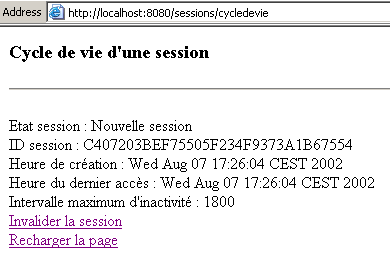
The page above indicates that we are in a new session. We use the "Reload page" link:
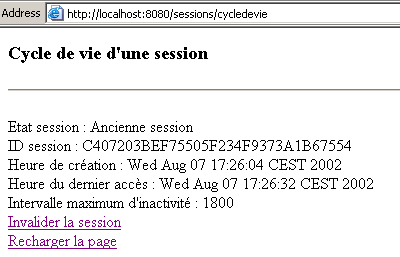
The previous result indicates that we are still in the same session as on the previous page (same ID). Note that the time of the last access to this session has changed. Now let’s use the “Invalidate session” link:
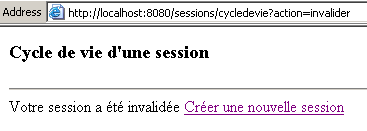
Note the URL in this new page with the action=invalidate parameter. Let's use the "Create a new session" link to create a new session:
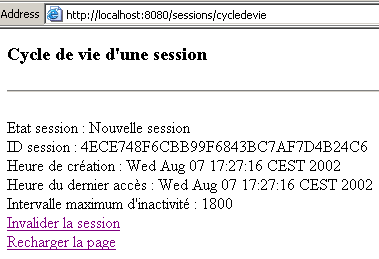
We can see that a new session has started. In the previous examples, the session relies on the cookie mechanism. Let’s now disable cookies in our browser and repeat the tests. The following examples were performed using Netscape Communicator. For some unexplained reason, the tests performed with IE6 yielded unexpected results, as if IE6 continued to use cookies even though they had been disabled. The cycledevie servlet is requested for the first time:
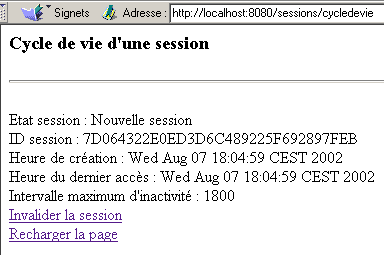
We now use the "Reload Page" link:
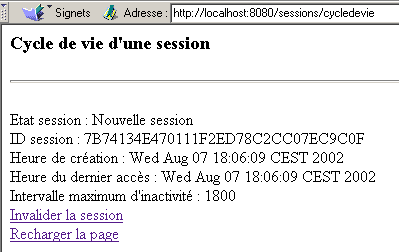
Two things can be observed:
- the session's ID has changed
- the servlet detects the session as a new session
The Tomcat server provides a solution to the problem of users who disable cookies in their browsers. It uses two mechanisms to implement the token mentioned at the beginning of this paragraph: cookies and URL rewriting. If the session cookie is not available, it will attempt to retrieve the token from the URL requested by the client. For this to work, the URL must contain the token. Generally speaking, all links generated in a HTML document to the web application must contain the application’s token. This can be done using the encodeURL method:
adds the current session token to the URL passed as a parameter in the form URL;jsessionid=xxxx |
We modify our application as follows:
- In the cycledevie.java servlet, the URL values are encoded:
             // we hand over to the error page
            getServletContext().getRequestDispatcher(response.encodeURL(urlErreur)).forward(request,response);
....
             // we hand over to the url urlSessionInvalide
            getServletContext().getRequestDispatcher(response.encodeURL(urlSessionInvalide)).forward(request,response);
....
         // we hand over to the url urlSessionInvalide
        getServletContext().getRequestDispatcher(response.encodeURL(urlSessionValide)).forward(request,response);
- In the valide.jsp page, the URL values are encoded:
<%
     // jspService
   // in this case, we need to describe the current session
  String etat= session.isNew() ? "Nouvelle session" : "Ancienne session";
   // encoding URL lifecycle
  String URLcycledevie=response.encodeURL("/sessions/cycledevie");
%>
............
      <br><a href="<%= URLcycledevie %>?action=invalider">Invalider la session</a>
      <br><a href="<%= URLcycledevie %>">Recharger la page</a>
- On the invalide.jsp page, the URL values are encoded:
<%
     // jspservice - the current session is invalidated
  session.invalidate();
   // encoding URL lifecycle
  String URLcycledevie=response.encodeURL("/sessions/cycledevie");
%>
..........
    <a href="<%= URLcycledevie %>">Créer une nouvelle session</a>
Now we are ready for testing. We are using Netscape 4.5 and cookies have been disabled. We make an initial request to the cycledevie servlet:
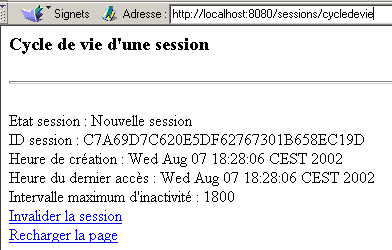
and we reload the page using the "Reload page" link:
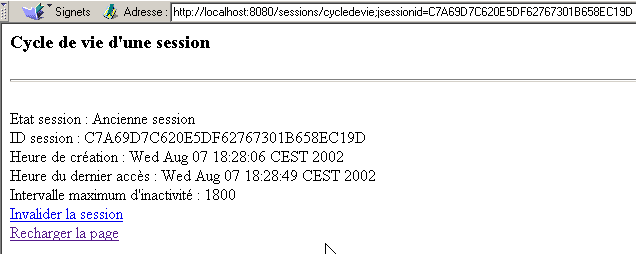
We can see that:
- the session has not changed (same ID)
- the URL from the cycledevie servlet does indeed contain the token, as shown in the Address field above
- the Tomcat server therefore retrieves the session token from the requested URL (if the developer took care to encode it).
4.4. Example 2
We will now present an example showing how to store information in a client's session. In this case, the only piece of information will be a counter that is incremented each time the user calls the URL servlet. When the servlet is called for the first time, the following page is displayed:
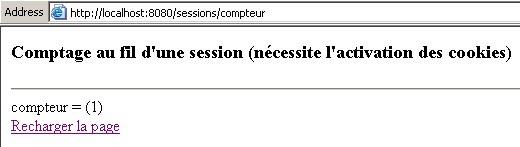
If you click the "Reload page" link above, you get the following new page:
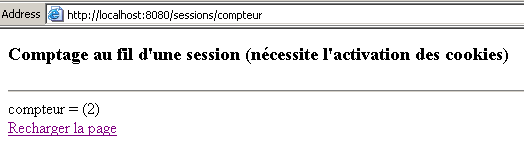
The application has three components:
- a servlet that processes the client's request
- a JSP page that displays the counter value
- a JSP page that displays any errors
These three components are installed in the web application sessions already in use. The web.xml file for this application has been modified to configure the new servlets:
<?xml version="1.0" encoding="ISO-8859-1"?>

<!DOCTYPE web-app
    PUBLIC "-//Sun Microsystems, Inc.//DTD Web Application 2.3//EN"
    "http://java.sun.com/dtd/web-app_2_3.dtd">

<web-app>
...
  <servlet>
      <servlet-name>compteur</servlet-name>
    <servlet-class>compteur</servlet-class>
    <init-param>
          <param-name>urlAffichageCompteur</param-name>
        <param-value>/compteur.jsp</param-value>
    </init-param>
    <init-param>
          <param-name>urlErreur</param-name>
        <param-value>/erreurcompteur.jsp</param-value>
    </init-param>
  </servlet>
...
  <servlet-mapping>
      <servlet-name>compteur</servlet-name>
    <url-pattern>/compteur</url-pattern>
  </servlet-mapping>
</web-app>
- The servlet is named counter (servlet-name) and is linked to the class file compteur.class (servlet-class)
- It has two initialization parameters:
- urlAffichageCompteur: URL from the JSP page displaying the counter
- urlErreur: URL from the JSP page for displaying any errors
- and an alias /counter, which means it will be called via URL http://localhost:8080/sessions/counter
The compteur.java servlet is as follows:
import java.io.*;
import javax.servlet.*;
import javax.servlet.http.*;

public class compteur extends HttpServlet{

     // instance variables
    String msgErreur=null;
    String urlAffichageCompteur=null;
    String urlErreur=null;

    //-------- GET
    public void doGet(HttpServletRequest request, HttpServletResponse response)
    throws IOException, ServletException{

        // was the initialization successful?
        if(msgErreur!=null){
             // we hand over to the error page
            getServletContext().getRequestDispatcher(urlErreur).forward(request,response);
        }

         // retrieve the current session
        HttpSession session=request.getSession();
         // and the
        String compteur=(String)session.getAttribute("compteur");
        if(compteur==null) compteur="0";
         // counter incrementation
        try{
            compteur=""+(Integer.parseInt(compteur)+1);
        }catch(Exception ex){}
         // save counter in session
        session.setAttribute("compteur",compteur);
         // and in the query
        request.setAttribute("compteur",compteur);

         // hand over to the counter display url
        getServletContext().getRequestDispatcher(urlAffichageCompteur).forward(request,response);
    }

     //-------- POST
    public void doPost(HttpServletRequest request, HttpServletResponse response)
    throws IOException, ServletException{
        doGet(request,response);
    }

     //-------- INIT
    public void init(){
         // retrieve initialization parameters
        ServletConfig config=getServletConfig();
        urlAffichageCompteur=config.getInitParameter("urlAffichageCompteur");
        urlErreur=config.getInitParameter("urlErreur");

         // parameters ok ?
        if(urlAffichageCompteur==null){
            msgErreur="Configuration incorrecte";
        }
    }
}
This servlet has the same structure as the servlets we have already encountered. Note the counter handling:
- the session is retrieved via request.getSession()
- the counter is retrieved from this session via session.getAttribute("counter")
- if a null value is retrieved, it means the session has just started. The counter is then set to 0.
- the counter is incremented, returned to the session (session.setAttribute("counter", counter)), and placed in the request that will be passed to the display servlet (request.setAttribute("counter", counter)).
The display page compteur.jsp is as follows:
<%
    // jspService
  // on récupère le compteur
  String compteur= (String) request.getAttribute("compteur");
  if(compteur==null) compteur="inconnu";
%>
<!-- top of page HTML -->
<html>
  <head>
      <title>Comptage au fil d'une session</title>
  </head>
  <body>
      <h3>Comptage au fil d'une session (nécessite l'activation des cookies)</h3>
      <hr>
    compteur = (<%= compteur %>)
    <br><a href="/sessions/compteur">Recharger la page</a>
  </body>
</html>
The page above simply retrieves the counter attribute (request.getAttribute("counter")) passed to it by the main servlet and displays it.
The error page erreurcompteur.jsp is as follows:
<%
    // jspService
  // une erreur s'est produite
  String msgErreur= request.getAttribute("msgErreur");
  if(msgErreur==null) msgErreur="Erreur non identifiée";
%>
<!-- top of page HTML -->
<html>
  <head>
      <title>Comptage au fil d'une session</title>
  </head>
  <body>
      <h3>Comptage au fil d'une session (nécessite l'activation des cookies)</h3>
      <hr>
    Application indisponible(<%= msgErreur %>)
  </body>
</html>
4.5. Example 3
We propose to write a Java application that would act as a client for the previous counter application. It would call it N times in a row, where N is passed as a parameter. Our goal is to demonstrate a programmed web client and how to manage cookies. Our starting point will be a generic web client presented in the Java handout by the same author. It is called as follows:
webclient URL GET/HEAD
- URL: url requested
- GET/HEAD: GET to request the code HTML from the page, HEAD to limit the request to headers only, HTTP
Here is an example using URL http://localhost:8080/sessions/compteur:
E:\data\serge\JAVA\SOCKETS\client web>java clientweb http://localhost:8080/sessions/compteur GET

HTTP/1.1 200 OK
Content-Type: text/html;charset=ISO-8859-1
Date: Thu, 08 Aug 2002 14:21:18 GMT
Connection: close
Server: Apache Tomcat/4.0.3 (HTTP/1.1 Connector)
Set-Cookie: JSESSIONID=B8A9076E552945009215C34A97A0EC5D;Path=/sessions


<!-- top of page HTML -->
<html>
  <head>
        <title>Comptage au fil d'une session</title>
  </head>
  <body>
        <h3>Comptage au fil d'une session (nécessite l'activation des cookies)</h3>
        <hr>
    compteur = (1)
    <br><a href="/sessions/compteur">Recharger la page</a>
  </body>
</html>
The clientweb program displays everything it receives from the server. Above, we see the command HTTP Set-cookie, which the server uses to send a cookie to its client. Here, the cookie contains two pieces of information:
- JSESSIONID, which is the session token
- Path, which defines the URL to which the cookie belongs. Path=/sessions instructs the browser to send the cookie back to the server every time it requests a URL starting with /sessions. In the sessions application, we used various servlets, including the /sessions/cycledevie and /sessions/compteur servlets. If we call the /sessions/cycledevie servlet, the browser will receive a J token. If, using the same browser, we then call the /sessions/compteur servlet, the browser will send the J token back to the server because it applies to all URL requests starting with /sessions. In our example, the cycledevie and compteur servlets do not need to share the same session token. They should therefore not have been placed in the same web application. This is an important point to remember: all servlets within the same application share the same session token.
- A cookie can also have an expiration time. Here, this information is missing. The cookie will therefore be deleted when the browser is closed. A cookie can have an expiration time of N days, for example. As long as it is valid, the browser will send it back every time one of the URL pages in its domain (Path) is visited. Consider an online store for CD. It can track a customer’s browsing path through its catalog and gradually determine their preferences—classical music, for example. These preferences can be stored in a cookie with a lifespan of 3 months. If that same customer returns to the site after a month, the browser will send the cookie back to the server application. Based on the information contained in the cookie, the server application can then tailor the generated pages to the customer’s preferences.
The web client code follows. It will later serve as the starting point for another client.
// imported packages
import java.io.*;
import java.net.*;

public class clientweb{

    // requests a URL
     // displays its contents on the screen

    public static void main(String[] args){
        // syntax
        final String syntaxe="pg URI GET/HEAD";

        // number of arguments
        if(args.length != 2)
            erreur(syntaxe,1);

         // note the URI required
        String URLString=args[0];
        String commande=args[1].toUpperCase();

        // URI validity check
        URL url=null;
        try{
            url=new URL(URLString);
        }catch (Exception ex){
             // URI incorrect
            erreur("L'erreur suivante s'est produite : " + ex.getMessage(),2);
        }//catch
         // order verification
        if(! commande.equals("GET") && ! commande.equals("HEAD")){
            // incorrect order
            erreur("Le second paramètre doit être GET ou HEAD",3);
        }

         // extract useful information from URL
    String path=url.getPath();
    if(path.equals("")) path="/";
    String query=url.getQuery();
    if(query!=null) query="?"+query; else query="";
    String host=url.getHost();
    int port=url.getPort();
    if(port==-1) port=url.getDefaultPort();

         // we can work
        Socket  client=null;                        // the customer
        BufferedReader IN=null;                    // the customer's reading flow
        PrintWriter OUT=null;                        // the customer's writing flow
        String réponse=null;                        // server response
        try{
             // connect to the server
            client=new Socket(host,port);

            // create customer input/output flows TCP
            IN=new BufferedReader(new InputStreamReader(client.getInputStream()));
            OUT=new PrintWriter(client.getOutputStream(),true);

            // request URL - send HTTP headers
            OUT.println(commande + " " + path + query + " HTTP/1.1");
            OUT.println("Host: " + host + ":" + port);
            OUT.println("Connection: close");
            OUT.println();
             // we read the answer
            while((réponse=IN.readLine())!=null){
                 // the answer is processed
                System.out.println(réponse);
            }//while
             // it's over
            client.close();
        } catch(Exception e){
            // we handle the exception
            erreur(e.getMessage(),4);
        }//catch
    }//hand

     // error display
    public static void erreur(String msg, int exitCode){
         // error display
        System.err.println(msg);
         // stop with error
        System.exit(exitCode);
    }//error
}//class
We now create the program clientCompteur, which is called as follows:
clientCompteur URL N [JSESSIONID]
- URL: url from the counter servlet
- N: number of calls to be made to this servlet
- JSESSIONID: optional parameter - session token
The purpose of the program is to call the counter servlet N times by managing the session cookie and displaying the counter value returned by the server each time. At the end of the N calls, the counter value must be N. Here is a first example of execution:
E:\data\serge\Servlets\sessions\jb7>java.bat clientCompteur http://localhost:8080/sessions/counter 3
--> GET /sessions/compteur HTTP/1.1
--> Host: localhost:8080
--> Connection: close
-->

HTTP/1.1 200 OK
Content-Type: text/html;charset=ISO-8859-1
Date: Thu, 08 Aug 2002 18:25:00 GMT
Connection: close
Server: Apache Tomcat/4.0.3 (HTTP/1.1 Connector)
Set-Cookie: JSESSIONID=92DB3808CE8FCB47D47D997C8B52294A;Path=/sessions
cookie trouvÚ : 92DB3808CE8FCB47D47D997C8B52294A

compteur : 1

--> GET /sessions/compteur HTTP/1.1
--> Host: localhost:8080
--> Cookie: JSESSIONID=92DB3808CE8FCB47D47D997C8B52294A
--> Connection: close
-->

HTTP/1.1 200 OK
Content-Type: text/html;charset=ISO-8859-1
Date: Thu, 08 Aug 2002 18:25:00 GMT
Connection: close
Server: Apache Tomcat/4.0.3 (HTTP/1.1 Connector)

compteur : 2

--> GET /sessions/compteur HTTP/1.1
--> Host: localhost:8080
--> Cookie: JSESSIONID=92DB3808CE8FCB47D47D997C8B52294A
--> Connection: close
-->

HTTP/1.1 200 OK
Content-Type: text/html;charset=ISO-8859-1
Date: Thu, 08 Aug 2002 18:25:00 GMT
Connection: close
Server: Apache Tomcat/4.0.3 (HTTP/1.1 Connector)

compteur : 3
The program displays:
- the headers HTTP that it sends to the server in the form -->
- the headers HTTP that it receives
- the counter value after each call
We can see that during the first call:
- the client does not send a cookie
- the server sends one
For subsequent calls:
- the client systematically sends back the cookie it received from the server during the first call. This is what allows the server to recognize it and increment its counter.
- the server no longer sends a cookie
We rerun the previous program by passing the token above as the third parameter:
E:\data\serge\Servlets\sessions\jb7>java.bat clientCompteur http://localhost:8080/sessions/compteur 3 92DB3808CE8FCB47D47D997C8B52294A

--> GET /sessions/compteur HTTP/1.1
--> Host: localhost:8080
--> Cookie: JSESSIONID=92DB3808CE8FCB47D47D997C8B52294A
--> Connection: close
-->

HTTP/1.1 200 OK
Content-Type: text/html;charset=ISO-8859-1
Date: Thu, 08 Aug 2002 18:25:25 GMT
Connection: close
Server: Apache Tomcat/4.0.3 (HTTP/1.1 Connector)

compteur : 4

--> GET /sessions/compteur HTTP/1.1
--> Host: localhost:8080
--> Cookie: JSESSIONID=92DB3808CE8FCB47D47D997C8B52294A
--> Connection: close
-->

HTTP/1.1 200 OK
Content-Type: text/html;charset=ISO-8859-1
Date: Thu, 08 Aug 2002 18:25:25 GMT
Connection: close
Server: Apache Tomcat/4.0.3 (HTTP/1.1 Connector)

compteur : 5

--> GET /sessions/compteur HTTP/1.1
--> Host: localhost:8080
--> Cookie: JSESSIONID=92DB3808CE8FCB47D47D997C8B52294A
--> Connection: close
-->

HTTP/1.1 200 OK
Content-Type: text/html;charset=ISO-8859-1
Date: Thu, 08 Aug 2002 18:25:25 GMT
Connection: close
Server: Apache Tomcat/4.0.3 (HTTP/1.1 Connector)

compteur : 6
Here we see that as soon as the client makes its first request, the server receives a valid session cookie. It’s important to note that for Tomcat, the default maximum inactivity time for a session is 20 minutes (though this is actually configurable). If the program’s second request sends the cookie received during the first request quickly enough, the server will treat it as the same session. This highlights a potential security vulnerability. If I am able to intercept a session token on the network, I can then impersonate the user who initiated the session. In our example, the first call represents the user who initiates the session (perhaps with a username and password that grant them the right to receive a token), and the second call represents the user who has "hacked" the session token from the first call. If the current operation is a banking transaction, this can become very problematic...
The client code is as follows:
// imported packages
import java.io.*;
import java.net.*;
import java.util.regex.*;

public class clientCompteur{

     // requests a URL
     // displays its contents on the screen

    public static void main(String[] args){
        // syntax
        final String syntaxe="pg URL-COMPTEUR N [JSESSIONID]";

         // number of arguments
        if(args.length !=2 && args.length != 3)
            erreur(syntaxe,1);

         // note the URL required
        String URLString=args[0];

        // URL validity check
        URL url=null;
        try{
            url=new URL(URLString);
        }catch (Exception ex){
             // URI incorrect
            erreur("L'erreur suivante s'est produite : " + ex.getMessage(),2);
        }//catch
         // check number of calls N
        int N=0;
        try{
            N=Integer.parseInt(args[1]);
            if(N<=0) throw new Exception();
        }catch(Exception ex){
             // incorrect N argument
            erreur("Le nombre d'appels N doit être un entier >0",3);
        }
         // has the JSESSIONID token been passed as a parameter?
        String JSESSIONID="";
        if (args.length==3) JSESSIONID=args[2];

        // extract useful information from URL
        String path=url.getPath();
        if(path.equals("")) path="/";
        String query=url.getQuery();
        if(query!=null) query="?"+query; else query="";
        String host=url.getHost();
        int port=url.getPort();
        if(port==-1) port=url.getDefaultPort();

         // we can work
        Socket  client=null;                        // the customer
        BufferedReader IN=null;                    // the customer's reading flow
        PrintWriter OUT=null;                        // the customer's writing flow
        String réponse=null;                        // server response
         // the model searched for in HTTP headers
        Pattern modèleCookie=Pattern.compile("^Set-Cookie: JSESSIONID=(.*?);");
        // the model searched for in the HTML code
        Pattern modèleCompteur=Pattern.compile("compteur = .*?(\\d+)");
         // the result of the model comparison
        Matcher résultat=null;
         // a Boolean giving the result of the counter search
        boolean compteurTrouvé;

        try{
             // we make N calls to the server
            for(int i=0;i<N;i++){
                // connect to the server
                client=new Socket(host,port);

                // create customer input/output flows TCP
                IN=new BufferedReader(new InputStreamReader(client.getInputStream()));
                OUT=new PrintWriter(client.getOutputStream(),true);

                // request URL - send HTTP headers
                envoie(OUT,"GET " + path + query + " HTTP/1.1");
                envoie(OUT,"Host: " + host + ":" + port);
                if(! JSESSIONID.equals("")){
                    envoie(OUT,"Cookie: JSESSIONID="+JSESSIONID);
                }
                envoie(OUT,"Connection: close");
                envoie(OUT,"");

                 // we read the response through to the end of the headers, looking for any cookies
                while((réponse=IN.readLine())!=null){
                     // follow-up response
                    System.out.println(réponse);
                     // empty line?
                    if(réponse.equals("")) break;
                     // line HTTP not empty
                     // if you don't have the session token, look for it
                    if (JSESSIONID.equals("")){
                        // compare the HTTP line with the cookie template
                        résultat=modèleCookie.matcher(réponse);
                        if(résultat.find()){
                            // we found the cookie
                            JSESSIONID=résultat.group(1);
                        }
                    }
                }//while

                 // that's it for HTTP headers - move on to HTML code
                compteurTrouvé=false;
                while((réponse=IN.readLine())!=null){
                     // does the current line contain the counter?
                    if (! compteurTrouvé){
                        résultat=modèleCompteur.matcher(réponse);
                        if(résultat.find()){
                            // counter found - displayed
                            System.out.println("compteur : " + résultat.group(1));
                            compteurTrouvé=true;
                        }
                    }
                }//while
                 // it's over
                client.close();
            }//for
        } catch(Exception e){
            // we handle the exception
            erreur(e.getMessage(),4);
        }//catch
    }//hand

     // error display
    public static void erreur(String msg, int exitCode){
         // error display
        System.err.println(msg);
         // stop with error
        System.exit(exitCode);
    }//error

     // monitoring client-server exchanges
    public static void envoie(PrintWriter OUT,String msg){
        // sends message to server
        OUT.println(msg);
         // screen tracking
        System.out.println("--> "+msg);
    }//error
}//class
Let's break down the key points of this program:
- We need to perform N client-server exchanges. That is why they are in a loop
- For each exchange, the client opens a connection TCP-IP with the server. Once the connection is established, it sends the server the headers HTTP of its request:
                 // request URL - send HTTP headers
                envoie(OUT,"GET " + path + query + " HTTP/1.1");
                envoie(OUT,"Host: " + host + ":" + port);
                if(! JSESSIONID.equals("")){
                    envoie(OUT,"Cookie: JSESSIONID="+JSESSIONID);
                }
                envoie(OUT,"Connection: close");
                envoie(OUT,"");
If the token JSESSIONID is available, it is sent as a cookie; otherwise, it is not.
- Once its request is sent, the client waits for the server's response. It begins by examining the headers of this response for a potential cookie. To find it, it compares the lines it receives to the cookie's regular expression:
         // the model searched in HTTP headers
        Pattern modèleCookie=Pattern.compile("^Set-Cookie: JSESSIONID=(.*?);");
...........................
                 // we read the response through to the end of the headers, looking for any cookies
                while((réponse=IN.readLine())!=null){
                     // follow-up response
                    System.out.println(réponse);
                     // empty line?
                    if(réponse.equals("")) break;
                     // line HTTP not empty
                     // if you don't have the session token, look for it
                    if (JSESSIONID.equals("")){
                        // compare the HTTP line with the cookie template
                        résultat=modèleCookie.matcher(réponse);
                        if(résultat.find()){
                            // we found the cookie
                            JSESSIONID=résultat.group(1);
                        }
                    }
                }//while
- Once the token has been found the first time, it will no longer be searched for in subsequent calls to the server. Once the HTTP headers in the response have been processed, we move on to the HTML code in that same response. In this code, we look for the line that provides the counter value. This search is also performed using a regular expression:
         // the counter model searched for in the HTML code
        Pattern modèleCompteur=Pattern.compile("compteur = .*?(\\d+)");
..................................
                 // that's it for HTTP headers - move on to HTML code
                compteurTrouvé=false;
                while((réponse=IN.readLine())!=null){
                     // does the current line contain the counter?
                    if (! compteurTrouvé){
                        résultat=modèleCompteur.matcher(réponse);
                        if(résultat.find()){
                            // counter found - displayed
                            System.out.println("compteur : " + résultat.group(1));
                            compteurTrouvé=true;
                        }
                    }
                }//while
4.6. Example 4
In the previous example, the web client returns the token as a cookie. We saw that it could also return it within the requested URL itself in the form URL;jsessionid=xxx. Let’s verify this. The program clientCompteur.java is transformed into clientCompteur2.java and modified as follows:
....
                 // request URL - send HTTP headers
                if(JSESSIONID.equals(""))
                    envoie(OUT,"GET " + path + query + " HTTP/1.1");
                else envoie(OUT,"GET " + path + query + ";jsessionid=" + JSESSIONID + " HTTP/1.1");
                envoie(OUT,"Host: " + host + ":" + port);
                envoie(OUT,"Connection: close");
                envoie(OUT,"");
....
The client therefore requests the URL counter via GET URL;jsessionid=xx HTTP/1.1 and no longer sends a cookie. This is the only change. Here are the results of an initial call:
E:\data\serge\Servlets\sessions\jb7>java.bat clientCompteur2 http://localhost:8080/sessions/counter 2

--> GET /sessions/compteur HTTP/1.1
--> Host: localhost:8080
--> Connection: close
-->

HTTP/1.1 200 OK
Content-Type: text/html;charset=ISO-8859-1
Date: Thu, 08 Aug 2002 18:49:30 GMT
Connection: close
Server: Apache Tomcat/4.0.3 (HTTP/1.1 Connector)
Set-Cookie: JSESSIONID=48A6DBA8357D808EC012AAF3A2AFDA63;Path=/sessions
cookie trouvÚ : 48A6DBA8357D808EC012AAF3A2AFDA63

compteur : 1

--> GET /sessions/compteur;jsessionid=48A6DBA8357D808EC012AAF3A2AFDA63 HTTP/1.1
--> Host: localhost:8080
--> Connection: close
-->

HTTP/1.1 200 OK
Content-Type: text/html;charset=ISO-8859-1
Date: Thu, 08 Aug 2002 18:49:30 GMT
Connection: close
Server: Apache Tomcat/4.0.3 (HTTP/1.1 Connector)

compteur : 2
On the first request, the client requests URL without a session token. The server responds by sending the token. The client then re-requests the same URL, appending the received token to it. We can see that the counter has indeed been incremented, proving that the server correctly recognized that this was the same session.
4.7. Example 5
This example shows an application consisting of three pages, which we will call page0, page1, and page2. The user must access them in this order:
- page0 is a form requesting information: a name
- page1 is a form received in response to submitting the form on page0. It requests a second piece of information: an age
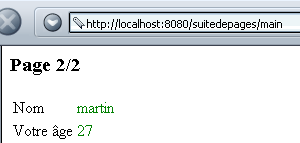
- page2 is a document named HTML that displays the name obtained from page0 and the age obtained from page1.
There are three client-server exchanges here:
- In the first exchange, the page0 form is requested by the client and sent by the server
- In the second exchange, the page1 form is requested by the client and sent by the server. The client sends the name to the server.
- In the third exchange, the page3 document is requested by the client and sent by the server. The client sends the age to the server. The page3 document must display the name and age. The name was obtained by the server in the second exchange and has since been "forgotten." A session is used to store the name from exchange 2 so that it is available during exchange 3.
The page0 obtained in the first exchange is as follows:
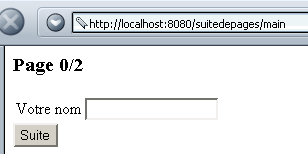
We fill in the name field:
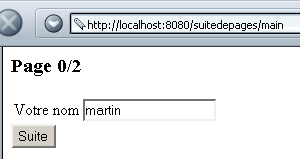
We click the Continue button and then get the following page1:
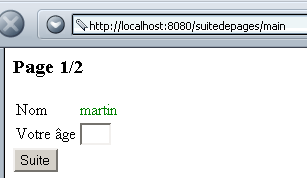
We fill in the age field:
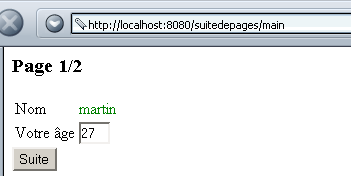
We click the "Next" button and are then presented with the following page2:
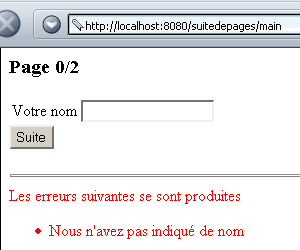
When page0 is submitted to the server, the server may return it with an error code if the name field is empty:
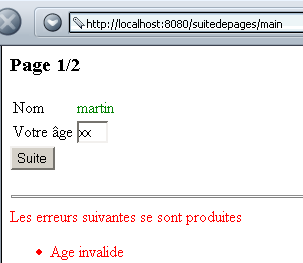
When you submit page1 to the server, the server may return it with an error code if the age is invalid:
The application consists of a servlet and four pages: JSP:
displays page0 | |
displays page1 | |
displays page2 | |
displays an error page |
The web application is named suitedepages and is configured as follows in Tomcat's server.xml file:
The web.xml configuration file for the suitedepages application is as follows:
<?xml version="1.0" encoding="ISO-8859-1"?>

<!DOCTYPE web-app
    PUBLIC "-//Sun Microsystems, Inc.//DTD Web Application 2.3//EN"
    "http://java.sun.com/dtd/web-app_2_3.dtd">

<web-app>
    <servlet>
      <servlet-name>main</servlet-name>
    <servlet-class>main</servlet-class>
    <init-param>
          <param-name>urlPage0</param-name>
        <param-value>/page0.jsp</param-value>
    </init-param>
    <init-param>
          <param-name>urlPage1</param-name>
        <param-value>/page1.jsp</param-value>
    </init-param>
    <init-param>
          <param-name>urlPage2</param-name>
        <param-value>/page2.jsp</param-value>
    </init-param>
    <init-param>
          <param-name>urlErreur</param-name>
        <param-value>/erreur.jsp</param-value>
    </init-param>
  </servlet>
  <servlet-mapping>
      <servlet-name>main</servlet-name>
    <url-pattern>/main</url-pattern>
  </servlet-mapping>
</web-app>
The main servlet is named "main" and, thanks to its alias (servlet-mapping), is accessible via URL http://localhost:8080/suitedepages/main. It has four initialization parameters, which are the URL of the four JSP pages used for the different views. The code for the main servlet is as follows:
import java.io.*;
import javax.servlet.*;
import javax.servlet.http.*;
import java.util.*;
import java.util.regex.*;

public class main extends HttpServlet{

    // instance variables
    String msgErreur=null;
    String urlPage0=null;
    String urlPage1=null;
    String urlPage2=null;
    String urlErreur=null;

    //-------- GET
    public void doGet(HttpServletRequest request, HttpServletResponse response)
    throws IOException, ServletException{

        // was the initialization successful?
        if(msgErreur!=null){
             // we hand over to the error page
            getServletContext().getRequestDispatcher(urlErreur).forward(request,response);
        }
         // we retrieve the step parameter
        String étape=request.getParameter("etape");
         // retrieve the current session
        HttpSession session=request.getSession();
         // the current step is processed
        if(étape==null) étape0(request,response,session);
        if(étape.equals("1")) étape1(request,response,session);
        if(étape.equals("2")) étape2(request,response,session);
         // other cases are invalid
        étape0(request,response,session);
    }

     //-------- POST
    public void doPost(HttpServletRequest request, HttpServletResponse response)
    throws IOException, ServletException{
        doGet(request,response);
    }

     //-------- INIT
    public void init(){
         // retrieve initialization parameters
        ServletConfig config=getServletConfig();
        urlPage0=config.getInitParameter("urlPage0");
        urlPage1=config.getInitParameter("urlPage1");
        urlPage2=config.getInitParameter("urlPage2");
        urlErreur=config.getInitParameter("urlErreur");

         // parameters ok ?
        if(urlPage0==null || urlPage1==null || urlPage2==null){
            msgErreur="Configuration incorrecte";
        }
    }

     //-------- step0
    public void étape0(HttpServletRequest request, HttpServletResponse response, HttpSession session)
            throws IOException, ServletException{
        // we set a few attributes
        request.setAttribute("nom","");
         // we present page 0
        request.getRequestDispatcher(urlPage0).forward(request,response);
    }

     //-------- step1
    public void étape1(HttpServletRequest request, HttpServletResponse response, HttpSession session)
            throws IOException, ServletException{
         // retrieve the name from the query
        String nom=request.getParameter("nom");
        // name positioned?
        if(nom==null) étape0(request,response,session);
         // remove any spaces from the name
        nom=nom.trim();
         // we put it in a query attribute
        request.setAttribute("nom",nom);
         // empty name?
        if(nom.equals("")){
             // it's a mistake
            ArrayList erreurs=new ArrayList();
            erreurs.add("Nous n'avez pas indiqué de nom");
             // put the errors in the query
            request.setAttribute("erreurs",erreurs);
             // back to page 0
            étape0(request,response,session);
        }
         // valid name - stored in the current session
        session.setAttribute("nom",nom);
         // set the age attribute in the query
        request.setAttribute("age","");
         // we present page 1
        request.getRequestDispatcher(urlPage1).forward(request,response);
    }

     //-------- step2
    public void étape2(HttpServletRequest request, HttpServletResponse response, HttpSession session)
            throws IOException, ServletException{
         // retrieve the name from the session
        String nom=(String)session.getAttribute("nom");
         // name positioned?
        if(nom==null) étape0(request,response,session);
         // we put it in a query attribute
        request.setAttribute("nom",nom);
         // the age is retrieved from the query
        String age=request.getParameter("age");
        // age positioned?
        if(age==null){
            // back to page 1
            request.setAttribute("age","");
            request.getRequestDispatcher(urlPage1).forward(request,response);
        }
         // the age is stored in the query
        age=age.trim();
        request.setAttribute("age",age);
        // valid age?
        if(! Pattern.matches("^\\s*\\d+\\s*$",age)){
            // this is a mistake
            ArrayList erreurs=new ArrayList();
            erreurs.add("Age invalide");
            // put the errors in the query
            request.setAttribute("erreurs",erreurs);
             // back to page 1
            request.getRequestDispatcher(urlPage1).forward(request,response);
        }
         // age valid - page 2 is presented
        request.getRequestDispatcher(urlPage2).forward(request,response);
    }
}
- The init method retrieves the four initialization parameters and sets an error message if any of them are missing
- We have seen that the request consists of three exchanges. To track the progress of these exchanges, the page0 and page1 forms have a hidden variable named etape, which has a value of 1 (page0) or 2 (page1). This number can be interpreted as the number of the next page to be displayed. In the doGet method, this parameter is retrieved from the request, and depending on its value, processing is delegated to three other methods:
- étape0 processes the initial request and sends page0
- step1 processes the form from page0 and sends page1 or page0 again if an error occurred
- step2 processes the form on page1 and sends page2 or page1 again if an error occurred
- step0
- displays page0 with an empty name
- Step 1
- Retrieves the "name" parameter from the page0 form.
- Checks that the name exists (is not null). If not, displays page0 again as if it were the first call.
- checks that the name is not empty. If it is not, displays page0 again with an error message.
- saves the name in the current session and displays page1 if the name is valid.
- step2
- retrieves the name parameter from the current session.
- checks that the name exists (is not null). If not, page0 is displayed again as if it were the first call.
- retrieves the age parameter from the current request sent by page1.
- checks that the age is valid. If not, page1 is displayed again with an error message.
- Stores the name and age as request attributes and displays page2 if the name and age are valid.
The page page0.jsp is as follows:
<%@ page import="java.util.*" %>

<% // page0.jsp
     // retrieve query attributes
  String nom=(String)request.getAttribute("nom");
  ArrayList erreurs=(ArrayList)request.getAttribute("erreurs");
   // valid attributes?
  if(nom==null){
       // back to main servlet
    request.getRequestDispatcher("/main").forward(request,response);
  }
%>

<html>
  <head>
    <title>page 0</title>
  </head>
  <body>
    <h3>Page 0/2</h3>
    <form name="frmNom" method="POST" action="/suitedepages/main">
        <input type="hidden" name="etape" value="1">
      <table>
        <tr>
          <td>Votre nom</td>
          <td><input type="text" name="nom" value="<%= nom %>"></td>
        </tr>
      </table>
      <input type="submit" value="Suite">
    </form>
    <% // mistakes?
      if (erreurs!=null){
    %>
      <hr>
      <font color="red">
        Les erreurs suivantes se sont produites
        <ul>
        <% for(int i=0;i<erreurs.size();i++){ %>
            <li><%= erreurs.get(i) %>
        <% }//for %>
        </ul>
     <% }//if %>
  </body>
</html>
- The page page0.jsp can be called by the main servlet in two cases:
- during the initial request
- after processing the form on page0 when an error occurs
- The parameter for the name to be displayed is provided by the main servlet, along with any error list. The page0.jsp servlet therefore begins by retrieving these two pieces of information.
- The form is "posted" to the main servlet with the hidden field "etape," which indicates which stage of the application is currently being processed.
The page page1.jsp is as follows:
<%@ page import="java.util.*" %>

<% // page1.jsp
     // retrieve query attributes
  String nom=(String)request.getAttribute("nom");
  String age=(String)request.getAttribute("age");
  ArrayList erreurs=(ArrayList)request.getAttribute("erreurs");
  // valid attributes?
  if(nom==null || age==null){
      // back to main servlet
    request.getRequestDispatcher("/main").forward(request,response);
  }
%>

<html>
  <head>
    <title>page 1</title>
  </head>
  <body>
    <h3>Page 1/2</h3>
    <form name="frmAge" method="POST" action="/suitedepages/main">
        <input type="hidden" name="etape" value="2">
      <table>
        <tr>
          <td>Nom</td>
          <td><font color="green"><%= nom %></font></td>
        </tr>
        <tr>
          <td>Votre âge</td>
          <td><input type="text" name="age" size="3" value="<%= age %>"></td>
        </tr>
      </table>
      <input type="submit" value="Suite">
    </form>
    <% // mistakes?
      if (erreurs!=null){
    %>
      <hr>
      <font color="red">
        Les erreurs suivantes se sont produites
        <ul>
        <% for(int i=0;i<erreurs.size();i++){ %>
            <li><%= erreurs.get(i) %>
        <% }//for %>
        </ul>
     <% }//if %>
  </body>
</html>
The page page1.jsp has a structure similar to that of the page page0.jsp, with the exception that it now receives two attributes from the main servlet: name and age. Finally, the page page2.jsp is as follows:
<%
     // page2.jsp
     // retrieve query attributes
  String nom=(String)request.getAttribute("nom");
  String age=(String)request.getAttribute("age");
  // valid attributes?
  if(nom==null || age==null){
      // back to main servlet
    request.getRequestDispatcher("/main").forward(request,response);
  }
%>


<html>
  <head>
    <title>page 2</title>
  </head>
  <body>
    <h3>Page 2/2</h3>
      <table>
        <tr>
          <td>Nom</td>
          <td><font color="green"><%= nom %></font></td>
        </tr>
        <tr>
          <td>Votre âge</td>
          <td><font color="green"><%= age %></font></td>
        </tr>
      </table>
  </body>
</html>
The page page2.jsp also receives the name and age attributes from the main servlet. It simply displays them. Finally, the page erreur.jsp, which is responsible for displaying an error in the event of incorrect servlet initialization, is as follows:
<%
    // jspService
  // une erreur s'est produite
  String msgErreur= request.getAttribute("msgErreur");
  if(msgErreur==null) msgErreur="Erreur non identifiée";
%>
<!-- top of page HTML -->
<html>
  <head>
      <title>Suite de pages</title>
  </head>
  <body>
      <h3>Suite de pages</h3>
      <hr>
    Application indisponible(<%= msgErreur %>)
  </body>
</html>
It displays the attribute msgErreur passed to it by the main servlet.
In conclusion, we can see that during the three stages of the application, it is always the main servlet that is queried first by the browser. However, it is not the main servlet that generates the response to be displayed, but one of the four pages JSP. The user does not see this, as the browser continues to display the initially requested URL—that is, the main servlet’s URL—in its “Address” field.