6. XML and JAVA
In this chapter, we introduce the use of XML documents with Java. We will do so in the context of the tax application discussed in the previous chapter.
6.1. XML files and XSL style sheets
Consider the following XML simulations.xml file, which could represent the results of tax calculation simulations:
<?xml version="1.0" encoding="ISO-8859-1"?>
<simulations>
  <simulation marie="oui" enfants="2" salaire="200000" impot="22504"/>
  <simulation marie="non" enfants="2" salaire="200000" impot="33388"/>
</simulations>
If we view it with IE 6, we get the following result:
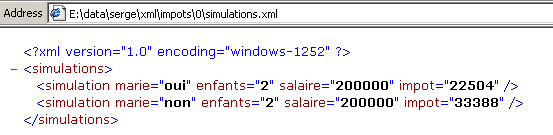
IE6 recognizes that it is dealing with a XML file (thanks to the file’s .xml suffix) and formats it in its own way. With Netscape, you get a blank page. However, if you look at the source code (View/Source), you can see the original XML file:
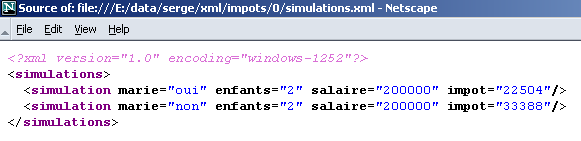
Why doesn’t Netscape display anything? Because it needs a stylesheet to tell it how to transform the XML file into a HTML file that it can then display. It turns out that IE 6 has a default stylesheet, whereas the XML file does not provide one, which was the case here.
There is a language called XSL (eXtended StyleSheet Language) that allows you to describe the transformations needed to convert a XML file into any text file. XSL supports numerous instructions and closely resembles programming languages. We will not go into detail here, as it would take dozens of pages. We will simply describe two examples of XSL style sheets. The first is the one that will transform the file XML simulations.xml into HTML code. We modify the latter so that it specifies the style sheet that browsers can use to convert it into the HTML document, which they can then display:
<?xml version="1.0" encoding="ISO-8859-1" ?>
<?xml-stylesheet type="text/xsl" href="simulations.xsl"?>
<simulations>
  <simulation marie="oui" enfants="2" salaire="200000" impot="22504"/>
  <simulation marie="non" enfants="2" salaire="200000" impot="33388"/>
</simulations>
The XML command
designates the file simulations.xsl as a stylesheet (xml-stylesheet) of type text/xsl c.a.d. a text file containing code XSL. This stylesheet will be used by browsers to transform the text XML into a document HTML. Here is the result obtained with Netscape 7 when loading the file XML simulations.xml:
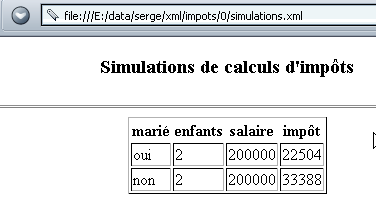
When we view the document’s source code (View/Source), we see the original XML document and not the displayed HTML document:
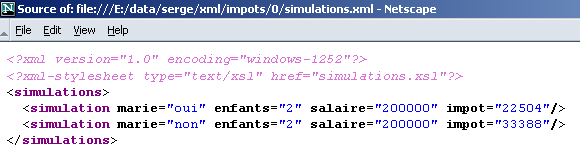
Netscape used the simulations.xsl stylesheet to transform the XML document above into the displayable HTML document. It is now time to look at the contents of this stylesheet:
<?xml version="1.0" encoding="ISO-8859-1"?>
  <xsl:stylesheet version="1.0" xmlns:xsl="http://www.w3.org/1999/XSL/Transform">
      <xsl:output method="html" indent="yes"/>

    <xsl:template match="/">
        <html>
          <head>
            <title>Simulations de calculs d'impôts</title>
        </head>
          <body>
            <center>
              <h3>Simulations de calculs d'impôts</h3>
            <hr/>
            <table border="1">
                    <th>marié</th><th>enfants</th><th>salaire</th><th>impôt</th>
                          <xsl:apply-templates select="/simulations/simulation"/>
                        </table>
         </center>
       </body>
     </html>
        </xsl:template>


    <xsl:template match="simulation">
          <tr>
            <td><xsl:value-of select="@marie"/></td>
            <td><xsl:value-of select="@enfants"/></td>
            <td><xsl:value-of select="@salaire"/></td>
            <td><xsl:value-of select="@impot"/></td>
        </tr>
       </xsl:template>
  </xsl:stylesheet>
- A XSL stylesheet is a XML file and therefore follows its rules. Among other things, it must be "well-formed," meaning that every open tag must be closed.
- The file begins with two commands, XML, which can be included in any XSL stylesheet:
<?xml version="1.0" encoding="ISO-8859-1"?>
  <xsl:stylesheet version="1.0" xmlns:xsl="http://www.w3.org/1999/XSL/Transform">
The encoding="ISO-8859-1" attribute allows accented characters to be used in the stylesheet.
- The <xsl:output method="html" indent="yes"/> tag instructs the XSL processor to generate "indented" HTML.
- The <xsl:template match="element"> tag is used to define the element in the XML document to which the instructions found between <xsl:template ...> and </xsl:template> will be applied.
In the example above, the "/" element refers to the root of the document. This means that as soon as the start of the XML document is encountered, the XSL commands located between the two tags will be executed.
- Anything that is not a XSL tag is placed as-is in the output stream. The XSL tags are executed. Some of them produce a result that is placed in the output stream. Let’s examine the following example:
    <xsl:template match="/">
        <html>
          <head>
            <title>Simulations de calculs d'impôts</title>
        </head>
          <body>
            <center>
              <h3>Simulations de calculs d'impôts</h3>
            <hr/>
            <table border="1">
                    <th>marié</th><th>enfants</th><th>salaire</th><th>impôt</th>
                          <xsl:apply-templates select="/simulations/simulation"/>
                        </table>
          </center>
        </body>
      </html>
        </xsl:template>
Note that the document XML analyzed is as follows:
<?xml version="1.0" encoding="ISO-8859-1"?>
<simulations>
  <simulation marie="oui" enfants="2" salaire="200000" impot="22504"/>
  <simulation marie="non" enfants="2" salaire="200000" impot="33388"/>
</simulations>
From the beginning of the analyzed XML document (match="/"), the XSL interpreter will output the text
<html>
          <head>
            <title>Simulations de calculs d'impôts</title>
        </head>
          <body>
            <center>
              <h3>Simulations de calculs d'impôts</h3>
            <hr>
            <table border="1">
                    <th>marié</th><th>enfants</th><th>salaire</th><th>impôt</th>
Note that in the original text, we had <hr/> and not <hr>. In the original text, we could not write <hr>, which, while a valid HTML tag, is an invalid XML tag. However, we are dealing here with a XML text that must be "well-formed," meaning that every tag must be closed. We therefore write <hr/>, and because we wrote <xsl:output text="html ...>, the XSL interpreter will transform the text <hr/> into <hr>. Following this text will be the text produced by the XSL command:
We will see later what this text is. Finally, the interpreter will add the text:
The command <xsl:apply-templates select="/simulations/simulation"/> instructs the interpreter to apply the "template" to the /simulations/simulation element. It will be executed every time the XSL interpreter encounters a <simulation>..</simulations> or <simulation/> tag inside a <simulations>..</simulations> tag in the parsed XML text. Upon encountering the <simulation> tag, the interpreter will execute the instructions in the following template:
<xsl:template match="simulation">
<tr>
<td><xsl:value-of select="@marie"/></td>
<td><xsl:value-of select="@enfants"/></td>
<td><xsl:value-of select="@salaire"/></td>
<td><xsl:value-of select="@impot"/></td>
</tr>
</xsl:template>
Consider the following lines XML:
The line <simulation ..> corresponds to the template for the XSL instruction <xsl:apply-templates select="/simulations/simulation">. The XSL interpreter will therefore attempt to apply the instructions corresponding to this template to it. It will find the template <xsl:template match="simulation"> and execute it. Recall that anything that is not a XSL command is passed through unchanged by the XSL interpreter, and that XSL commands are replaced by the result of their execution. The XSL instruction <xsl:value-of select="@champ"/> is thus replaced by the value of the "champ" attribute of the parsed node (here a <simulation> node). Parsing the preceding XML line will produce the following output:
XSL | output |
<tr><td> | <tr><td> |
<xsl:value-of select="@marie"/> | yes |
</td><td> | </td><td> |
<xsl:value-of select="@children"/> | 2 |
</td><td> | </td><td> |
<xsl:value-of select="@salary"/> | 200000 |
</td><td> | </td><td> |
<xsl:value-of select="@tax"/> | 22504 |
</td></tr> | </td></tr> |
In total, line XML
will be converted to line HTML:
All these explanations are a bit rudimentary, but it should now be clear to the reader that the following text XML:
<?xml version="1.0" encoding="ISO-8859-1"?>
<?xml-stylesheet type="text/xsl" href="simulations.xsl"?>
<simulations>
<simulation marie="oui" enfants="2" salaire="200000" impot="22504"/>
<simulation marie="non" enfants="2" salaire="200000" impot="33388"/>
</simulations>
accompanied by the following stylesheet XSL simulations.xsl:
<?xml version="1.0" encoding="ISO-8859-1"?>
<xsl:stylesheet version="1.0" xmlns:xsl="http://www.w3.org/1999/XSL/Transform">
<xsl:output method="html" indent="yes"/>
<xsl:template match="/">
<html>
<head>
<title>Simulations de calculs d'impôts</title>
</head>
<body>
<center>
<h3>Simulations de calculs d'impôts</h3>
<hr/>
<table border="1">
<th>marié</th><th>enfants</th><th>salaire</th><th>impôt</th>
<xsl:apply-templates select="/simulations/simulation"/>
                    </table>
          </center>
        </body>
      </html>
</xsl:template>
    <xsl:template match="simulation">
          <tr>
            <td><xsl:value-of select="@marie"/></td>
            <td><xsl:value-of select="@enfants"/></td>
            <td><xsl:value-of select="@salaire"/></td>
            <td><xsl:value-of select="@impot"/></td>
        </tr>
       </xsl:template>
</xsl:stylesheet>
produces the following text: HTML:
<html>
<head>
<title>Simulations de calculs d'impôts</title>
</head>
<body>
<center>
<h3>Simulations de calculs d'impots</h3>
<hr>
<table border="1">
<th>marié</th><th>enfants</th><th>salaire</th><th>impôt</th>
<tr>
<td>oui</td><td>2</td><td>200000</td><td>22504</td>
</tr>
<tr>
<td>non</td><td>2</td><td>200000</td><td>33388</td>
</tr>
</table>
</center>
</body>
</html>
The file XML simulations.xml, along with the style sheet simulations.xsl, when viewed in a modern browser (here Netscape 7), is displayed as follows:
6.2. Tax application: version 6
6.2.1. The XML files and XSL style sheets for the tax application
Let’s return to the tax web application and modify it so that the response to clients is in the XML format rather than a HTML response. This XML response will be accompanied by a XSL stylesheet so that browsers can display it. In the previous paragraph, we presented:
- the simulations.xml file, which is the prototype of a XML response containing tax calculation simulations
- the file simulations.xsl, which will be the stylesheet XSL accompanying this response XML
We must also account for the case of a response containing errors. The prototype for the response XML in this case will be the following errors.xml file:
<?xml version="1.0" encoding="windows-1252"?>
<?xml-stylesheet type="text/xsl" href="erreurs.xsl"?>
<erreurs>
<erreur>erreur 1</erreur>
<erreur>erreur 2</erreur>
</erreurs>
The erreurs.xsl stylesheet used to display this XML document in a browser will be as follows:
<?xml version="1.0" encoding="windows-1252"?>
<xsl:stylesheet version="1.0" xmlns:xsl="http://www.w3.org/1999/XSL/Transform">
<xsl:output method="html" indent="yes"/>
<xsl:template match="/">
<html>
<head>
<title>Simulations de calculs d'impôts</title>
</head>
<body>
<center>
<h3>Simulations de calculs d'impôts</h3>
</center>
<hr/>
Les erreurs suivantes se sont produites :
<ul>
<xsl:apply-templates select="/erreurs/erreur"/>
</ul>
</body>
</html>
</xsl:template>
<xsl:template match="erreur">
<li><xsl:value-of select="."/></li>
</xsl:template>
</xsl:stylesheet>
This stylesheet introduces a XSL command not yet encountered: <xsl:value-of select="."/>. This command outputs the value of the parsed node, in this case a <error>text</error> node. The value of this node is the text between the opening and closing tags, in this case "text".
The code errors.xml is transformed by the erreurs.xsl stylesheet into the following HTML document:
<html>
<head>
<title>Simulations de calculs d'impots</title>
</head>
<body>
<center>
<h3>Simulations de calculs d'impots</h3>
</center>
<hr>
Les erreurs suivantes se sont produites :
<ul>
<li>erreur 1</li>
<li>erreur 2</li>
</ul>
</body>
</html>
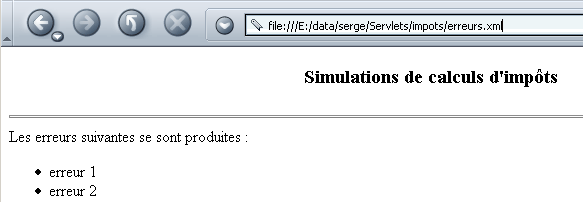
The file **erreurs.xml,** along with its style sheet, is displayed by a browser as follows:
6.2.2. The xmlsimulations servlet
We create a file named index.html and place it in the impots application directory. The displayed page is as follows:
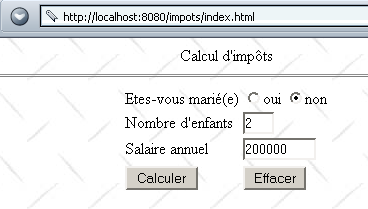
This HTML document is a static document. Its code is as follows:
<html>
<head>
<title>impots</title>
<script language="JavaScript" type="text/javascript">
function effacer(){
// raz du formulaire
with(document.frmImpots){
optMarie[0].checked=false;
optMarie[1].checked=true;
txtEnfants.value="";
txtSalaire.value="";
txtImpots.value="";
}//with
}//delete
function calculer(){
// check parameters before sending them to the server
with(document.frmImpots){
//no. of children
champs=/^\s*(\d+)\s*$/.exec(txtEnfants.value);
if(champs==null){
// the model is not verified
alert("Le nombre d'enfants n'a pas été donné ou est incorrect");
nbEnfants.focus();
return;
}//if
//salary
champs=/^\s*(\d+)\s*$/.exec(txtSalaire.value);
if(champs==null){
// the model is not verified
alert("Le salaire n'a pas été donné ou est incorrect");
salaire.focus();
return;
}//if
// that's it - we send
submit();
}//with
}//calculate
</script>
</head>
<body background="/impots/images/standard.jpg">
<center>
Calcul d'impôts
<hr>
<form name="frmImpots" action="/impots/xmlsimulations" method="POST">
<table>
<tr>
<td>Etes-vous marié(e)</td>
<td>
<input type="radio" name="optMarie" value="oui">oui
<input type="radio" name="optMarie" value="non" checked>non
</td>
</tr>
<tr>
<td>Nombre d'enfants</td>
<td><input type="text" size="3" name="txtEnfants" value=""></td>
</tr>
<tr>
<td>Salaire annuel</td>
<td><input type="text" size="10" name="txtSalaire" value=""></td>
</tr>
<tr></tr>
<tr>
<td><input type="button" value="Calculer" onclick="calculer()"></td>
<td><input type="button" value="Effacer" onclick="effacer()"></td>
</tr>
</table>
</form>
</center>
</body>
</html>
Note that the form data is posted to URL /impots/xmlsimulations. This application is a Java servlet configured as follows in the web.xml file of the impots application:
<?xml version="1.0" encoding="ISO-8859-1"?>
<!DOCTYPE web-app
PUBLIC "-//Sun Microsystems, Inc.//DTD Web Application 2.3//EN"
"http://java.sun.com/dtd/web-app_2_3.dtd">
<web-app>
...........
<servlet>
<servlet-name>xmlsimulations</servlet-name>
<servlet-class>xmlsimulations</servlet-class>
<init-param>
<param-name>xslSimulations</param-name>
<param-value>simulations.xsl</param-value>
</init-param>
<init-param>
<param-name>xslErreurs</param-name>
<param-value>erreurs.xsl</param-value>
</init-param>
<init-param>
<param-name>DSNimpots</param-name>
<param-value>mysql-dbimpots</param-value>
</init-param>
<init-param>
<param-name>admimpots</param-name>
<param-value>admimpots</param-value>
</init-param>
<init-param>
<param-name>mdpimpots</param-name>
<param-value>mdpimpots</param-value>
</init-param>
</servlet>
........
<servlet-mapping>
<servlet-name>xmlsimulations</servlet-name>
<url-pattern>/xmlsimulations</url-pattern>
</servlet-mapping>
</web-app>
- The servlet is called xmlsimulations and is based on the xmlsimulations.class class.
- Its parameters are DSNimpots, admimpots, and mdpimpots, which are required to access the tax database. Additionally, it accepts two other parameters:
- xslSimulations, which is the name of the style file that must accompany the response XML containing the simulations
- xslErreurs, which is the name of the style file that must accompany the response XML containing any errors
- It has an alias, xmlsimulations, which makes it accessible via URL http://localhost:8080/impots/xmlsimulations.
The skeleton of the xmlsimulations servlet is similar to that of the simulations servlet already discussed. The main difference is that it must generate XML instead of HTML. This will result in the removal of the JSP files used in previous applications. Their main purpose was to improve the readability of the generated HTML code by preventing it from being buried within the servlet’s Java code. This purpose is no longer necessary. The servlet has two types of XML code to generate:
- one for simulations
- code for errors
We previously presented and examined the two types of XML responses to be provided in these two cases, as well as the style sheets that must accompany them. The servlet code is as follows:
import java.io.*;
import javax.servlet.*;
import javax.servlet.http.*;
import java.util.regex.*;
import java.util.*;
public class xmlsimulations extends HttpServlet{
// instance variables
String msgErreur=null;
String xslSimulations=null;
String xslErreurs=null;
String DSNimpots=null;
String admimpots=null;
String mdpimpots=null;
impotsJDBC impots=null;
//-------- GET
public void doGet(HttpServletRequest request, HttpServletResponse response)
throws IOException, ServletException{
// retrieve the write stream to the client
PrintWriter out=response.getWriter();
// specify the type of response
response.setContentType("text/xml");
// error list
ArrayList erreurs=new ArrayList();
// was the initialization successful?
if(msgErreur!=null){
// that's it - we send the response with errors to the server
erreurs.add(msgErreur);
sendErreurs(out,xslErreurs,erreurs);
// it's over
return;
}
// retrieve previous simulations from the session
HttpSession session=request.getSession();
ArrayList simulations=(ArrayList)session.getAttribute("simulations");
if(simulations==null) simulations=new ArrayList();
// retrieve the parameters of the current query
String optMarie=request.getParameter("optMarie"); // marital status
String txtEnfants=request.getParameter("txtEnfants"); // no. of children
String txtSalaire=request.getParameter("txtSalaire"); // annual salary
// do we have all the expected parameters
if(optMarie==null || txtEnfants==null || txtSalaire==null){
// missing parameters
// send response with errors
erreurs.add("Demande incomplète. Il manque des paramètres");
sendErreurs(out,xslErreurs,erreurs);
// it's over
return;
}
// we have all the parameters - we check them
// marital status
if( ! optMarie.equals("oui") && ! optMarie.equals("non")){
// error
erreurs.add("Etat marital incorrect");
}
// number of children
txtEnfants=txtEnfants.trim();
if(! Pattern.matches("^\\d+$",txtEnfants)){
// error
erreurs.add("Nombre d'enfants incorrect");
}
// salary
txtSalaire=txtSalaire.trim();
if(! Pattern.matches("^\\d+$",txtSalaire)){
// error
erreurs.add("Salaire incorrect");
}
if(erreurs.size()!=0){
// if there are errors, we report them
sendErreurs(out,xslErreurs,erreurs);
}else{
// no errors
try{
// you can calculate the tax payable
int nbEnfants=Integer.parseInt(txtEnfants);
int salaire=Integer.parseInt(txtSalaire);
String txtImpots=""+impots.calculer(optMarie.equals("oui"),nbEnfants,salaire);
// the current result is added to the previous simulations
String[] simulation={optMarie.equals("oui") ? "oui" : "non",txtEnfants, txtSalaire, txtImpots};
simulations.add(simulation);
// we send the answer with simulations
sendSimulations(out,xslSimulations,simulations);
}catch(Exception ex){}
}//if-else
// we put the list of simulations back into the session
session.setAttribute("simulations",simulations);
}//GET
//-------- POST
public void doPost(HttpServletRequest request, HttpServletResponse response)
throws IOException, ServletException{
doGet(request,response);
}//POST
//-------- INIT
public void init(){
// retrieve initialization parameters
ServletConfig config=getServletConfig();
xslSimulations=config.getInitParameter("xslSimulations");
xslErreurs=config.getInitParameter("xslErreurs");
DSNimpots=config.getInitParameter("DSNimpots");
admimpots=config.getInitParameter("admimpots");
mdpimpots=config.getInitParameter("mdpimpots");
// parameters ok ?
if(xslSimulations==null || DSNimpots==null || admimpots==null || mdpimpots==null){
msgErreur="Configuration incorrecte";
return;
}
// create an instance of impotsJDBC
try{
impots=new impotsJDBC(DSNimpots,admimpots,mdpimpots);
}catch(Exception ex){
msgErreur=ex.getMessage();
}
}//init
//-------- sendErreurs
private void sendErreurs(PrintWriter out,String xslErreurs,ArrayList erreurs){
String réponse="<?xml version=\"1.0\" encoding=\"windows-1252\"?>"
+ "<?xml-stylesheet type=\"text/xsl\" href=\""+xslErreurs+"\"?>\n"
+"<erreurs>\n";
for(int i=0;i<erreurs.size();i++){
réponse+="<erreur>"+(String)erreurs.get(i)+"</erreur>\n";
}//for
réponse+="</erreurs>\n";
// we send the answer
out.println(réponse);
}
//-------- sendSimulations
private void sendSimulations(PrintWriter out, String xslSimulations, ArrayList simulations){
String réponse="<?xml version=\"1.0\" encoding=\"windows-1252\"?>"
+ "<?xml-stylesheet type=\"text/xsl\" href=\""+xslSimulations+"\"?>\n"
+ "<simulations>\n";
String[] simulation=null;
for(int i=0;i<simulations.size();i++){
// simulation no. i
simulation=(String[])simulations.get(i);
réponse+="<simulation "
+"marie=\""+(String)simulation[0]+"\" "
+"enfants=\""+(String)simulation[1]+"\" "
+"salaire=\""+(String)simulation[2]+"\" "
+"impot=\""+(String)simulation[3]+"\" />\n";
}//for
réponse+="</simulations>\n";
// we send the answer
out.println(réponse);
}
}
Let’s break down the main new features of this code compared to what we already knew:
- The init procedure retrieves new parameters from the web.xml configuration file: the names of the two XSL style sheets that must accompany the response are stored in the variables xslSimulations and xslErreurs. These two style sheets are the simulations.xsl and erreurs.xsl files discussed earlier. These are placed in the impots application directory:
dos>dir E:\data\serge\Servlets\impots\*.xsl
27/08/2002 08:15 1 030 simulations.xsl
27/08/2002 09:23 795 erreurs.xsl
- The procedure GET begins by checking whether an error occurred during initialization. If so, it calls the procedure sendErreurs, which generates the response XML appropriate for this case and then terminates. In this response, XML, the instruction specifying the style sheet to be used is inserted.
- If there were no errors, the GET procedure analyzes the parameters of the client’s request. If it finds any error, it reports it using the sendErreurs procedure. Otherwise, it calculates the new simulation, adds it to the previous ones stored in the current session, and concludes by sending its response XML via procedure sendSimulations. The latter proceeds in a manner analogous to procedure sendErreurs.
- Note that the servlet declares its response as being of type text/xml:
Here are some examples of execution. The initial form is filled out as follows:
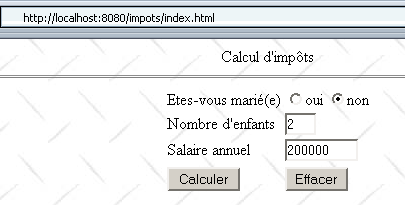
The database MySQL was not started, making it impossible to create the impots object in the servlet's init method. The servlet's response is as follows:
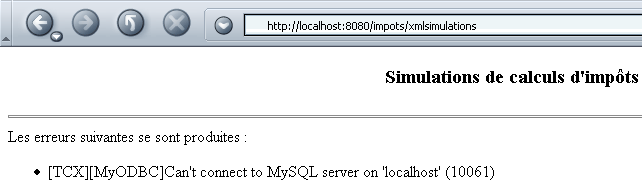
The code received by the browser (View/Source) is as follows:

If we now run two more simulations after starting the MySQL database, we get the following result:
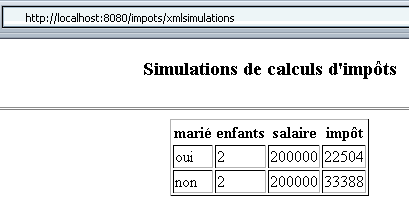
This time, the browser received the following code:

Note that our new application is simpler than before due to the removal of the JSP files. Part of the work performed by these pages has been transferred to the XSL style sheets. The advantage of our new task distribution is that once the XML format of the servlet’s responses has been established, the development of the style sheets is independent of that of the servlet.
6.3. Analysis of a XML document in Java
Versions 7 and 8 of our impots application will be clients files generated by the previous xmlsimulations servlet. These will receive XML code that they will need to parse to extract the information they need. We will now take a break from our various versions to learn how to parse a XML document in Java. We will do this using an example included with JBuilder 7 called MySaxParser. The program is named as follows:
The MySaxParser application accepts one parameter: the URI (Uniform Resource Identifier) of the XML document to be parsed. In our example, this URI will simply be the name of a XML file located in the MySaxParser application directory. Let’s consider two examples of execution. In the first example, the XML file being parsed is the errors.xml file:
<?xml version="1.0" encoding="ISO-8859-1"?>
<?xml-stylesheet type="text/xsl" href="erreurs.xsl"?>
<erreurs>
<erreur>erreur 1</erreur>
<erreur>erreur 2</erreur>
</erreurs>
The analysis yields the following results:
dos> java MySaxParser erreurs.xml
Début du document
Début élément <erreurs>
Début élément <erreur>
[erreur 1]
Fin élément <erreur>
Début élément <erreur>
[erreur 2]
Fin élément <erreur>
Fin élément <erreurs>
Fin du document
We hadn't yet explained what the MySaxParser application does, but here we can see that it displays the structure of the analyzed XML document. The second example parses the file XML simulations.xml:
<?xml version="1.0" encoding="ISO-8859-1"?>
<?xml-stylesheet type="text/xsl" href="simulations.xsl"?>
<simulations>
  <simulation marie="oui" enfants="2" salaire="200000" impot="22504"/>
<simulation marie="non" enfants="2" salaire="200000" impot="33388"/>
</simulations>
The analysis yields the following results:
dos>java MySaxParser simulations.xml
Début du document
Début élément <simulations>
Début élément <simulation>
marie = oui
enfants = 2
salaire = 200000
impot = 22504
Fin élément <simulation>
Début élément <simulation>
marie = non
enfants = 2
salaire = 200000
impot = 33388
Fin élément <simulation>
Fin élément <simulations>
Fin du document
The MySaxParser class contains everything we need in our tax application since it was able to retrieve both the errors and the simulations that the web server might send. Let’s examine its code:
import java.io.IOException;
import org.xml.sax.*;
import org.xml.sax.helpers.*;
import org.apache.xerces.parsers.SAXParser;
import java.util.regex.*;

// the class
public class MySaxParser extends DefaultHandler {

     // value of a tree element XML
    private StringBuffer valeur=new StringBuffer();
    // a regular expression for the value of an element when you want to ignore
     // the "blanks" that precede or follow it
    private static Pattern ptnValeur=null;
    private static Matcher résultats=null;

    // -------- hand
    public static void main(String[] argv) {
        // check number of parameters
        if (argv.length != 1) {
            System.out.println("Usage: java MySaxParser [URI]");
            System.exit(0);
        }
         // retrieve the URI from the XML file to be analyzed
        String uri = argv[0];
        try {
            // creation of a XML analyzer (parser)
            XMLReader parser = XMLReaderFactory.createXMLReader("org.apache.xerces.parsers.SAXParser");
             // we indicate to the parser the object that will implement the methods
             // startDocument, endDocument, startElement, endElement, characters
            MySaxParser MySaxParserInstance = new MySaxParser();
            parser.setContentHandler(MySaxParserInstance);
            // on initialise le modèle de valeur d'un élément
            ptnValeur=Pattern.compile("^\\s*(.*?)\\s*$");
             // we indicate to the parser the XML document to be analyzed
            parser.parse(uri);
        }
        catch(Exception ex) {
             // error
            System.err.println("Erreur : " + ex);
             // trace
            ex.printStackTrace();
        }
    }//hand


     // -------- startDocument
    public void startDocument() throws SAXException {
         // procedure called when the parser encounters the start of the document
        System.out.println("Début du document");
    }//startDocument

     // -------- endDocument
    public void endDocument() throws SAXException {
         // procedure called when the parser reaches the end of the document

        System.out.println("Fin du document");
    }//endDocument

     // -------- startElement
    public void startElement(String uri, String localName, String qName,
        Attributes attributes) throws SAXException {
         // procedure called by the parser when it encounters the start of a tag
         // uri : URI of the analyzed document?
         // localName: name of element being analyzed
         // qName: ditto, but "qualified" by a namespace if there is one
         // attributes: list of element attributes

         // follow-up
        System.out.println("Début élément <"+localName+">");
         // does the element have attributes?
        for (int i = 0; i < attributes.getLength(); i++) {
            System.out.println(attributes.getLocalName(i) + " = " + attributes.getValue(i));
        }//for
    }//startElement

    // -------- characters
    public void characters(char[] ch, int start, int length) throws SAXException {
        // procedure called repeatedly by the parser when it encounters text
         // between two <tag>text</tag> tags
         // the text is in ch from the start character on length characters

         // the text is added to the value buffer
        valeur.append(ch, start, length);
    }//characters

        // -------- endElement
    public void endElement(String uri, String localName, String qName)
            throws SAXException {
         // procedure called by the parser when it encounters an end of tag
         // uri : URI of the analyzed document?
         // localName: name of element being analyzed
         // qName: ditto, but "qualified" by a namespace if there is one

         // the value of the
        String strValeur=valeur.toString();
        if (ptnValeur==null) System.out.println("null");
        résultats=ptnValeur.matcher(strValeur);
        if (résultats.find() && ! résultats.group(1).equals("")){
            System.out.println("["+résultats.group(1)+"]");
        }//if
         // set element value to empty
        valeur.setLength(0);

         // follow-up
        System.out.println("Fin élément <"+localName+">");
    }//endElement

}//class
First, let’s define an acronym that frequently appears in the analysis of XML documents: SAX, which stands for Simple Api for Xml. This is a set of Java classes that facilitate working with XML documents. There are two versions of API: SAX1 and SAX2. The application above uses API and SAX2.
The application imports a number of packages:
The first two come with JDK 1.4, but the third does not. The xerces.jar package is available on the Apache Web Server website. It comes with JBuilder 7 but also with Tomcat 4.x:
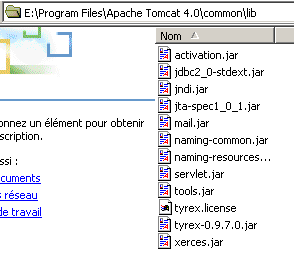
So if you want to compile the previous application outside of JBuilder 7 and you have JDK 1.4 and Tomcat 4.x, you can write:
When running the program, do the same:
dos>java -classpath ".;E:\Program Files\Apache Tomcat 4.0\common\lib\xerces.jar" MySaxParser simulations.xml
The MySaxParser class derives from the DefaultHandler class. We’ll come back to this later. Let’s examine the code for the main procedure:
// retrieve the URI from the XML file to be analyzed
String uri = argv[0];
try {
// creation of a XML analyzer (parser)
XMLReader parser = XMLReaderFactory.createXMLReader("org.apache.xerces.parsers.SAXParser");
// we indicate to the parser the object that will implement the methods
// startDocument, endDocument, startElement, endElement, characters
MySaxParser MySaxParserInstance = new MySaxParser();
parser.setContentHandler(MySaxParserInstance);
// on initialise le modèle de valeur d'un élément
ptnValeur=Pattern.compile("^\\s*(.*?)\\s*$");
// we indicate to the parser the XML document to be analyzed
parser.parse(uri);
}
catch(Exception ex) {
// error
System.err.println("Erreur : " + ex);
// trace
ex.printStackTrace();
}
To parse a XML document, our application needs a XML code parser called "parser".
The XML parser used is the one provided by the xerces.jar package. The retrieved object is of type XMLReader. XMLReader is an interface from which we use two methods here:
tells the parser which ContentHandler object will handle the events it generates while parsing the document XML | |
starts parsing the XML document passed as a parameter |
When the parser parses the document XML, it will emit events such as: "I encountered the start of the document, the start of a tag, a tag attribute, the content of a tag, the end of a tag, the end of the document, ...". It passes these events to the ContentHandler object that was provided to it. ContentHandler is an interface that defines the methods to be implemented to handle all the events that the XML parser can generate. DefaultHandler is a class that provides a default implementation of these methods. The methods implemented in DefaultHandler do nothing but they exist. When you need to tell the parser which object will handle the events it will generate using the statement
, it is convenient to pass an object of type DefaultHandler as a parameter. If we stopped there, no parser events would be handled, but our program would be syntactically correct. In practice, we pass an object derived from the DefaultHandler class as a parameter to the parser, in which the methods handling only the events that interest us are redefined. This is what is done here:
// we indicate to the parser the object that will implement the methods
// startDocument, endDocument, startElement, endElement, characters
MySaxParser MySaxParserInstance = new MySaxParser();
parser.setContentHandler(MySaxParserInstance);
// we indicate to the parser the XML document to be analyzed
parser.parse(uri);
We pass to the parser an instance of the mySaxParser class, which is our class and was defined earlier by the declaration
and we start parsing the document, passing the URI as a parameter. From there, the parsing of the XML document begins. The parser emits events and, for each one, calls a specific method of the object responsible for handling these events—in this case, our MySaxParser object. This object handles five specific events; the others are ignored:
event emitted by the parser | handling method |
void startDocument() | |
void endDocument() | |
public void startElement(String uri, String localName, String qName, Attributes attributes) uri: ? localName: name of the parsed element. If the encountered element is <simulations>, we will have localName="simulations". qName: namespace-qualified name of the parsed element. A document XML can define a namespace, such as XX. The qualified name of the preceding tag would then be XX:simulations. attributes: list of attributes for the tag | |
public void characters(char[] ch, int start, int length) ch: character array start: index of the first character to use in the ch array length: number of characters to take from the ch array The characters method can be called repeatedly. To construct the value of an element, a buffer is used that is:
| |
void endElement(String uri, String localName, String qName) The parameters are those of the startElement method. |
The startElement method retrieves the element's attributes using the attributes parameter of type Attributes:
- the number of attributes is available in attributes.getLength()
- the name of attribute i is available in attributes.getLocalName(i)
- the value of attribute i is available in attributes.getValue(i)
- the value of the attribute named localName is available in attributes.getValue(localName)
With this explanation, the previous program and its execution examples are self-explanatory. A regular expression was used to retrieve the values of the elements so that text such as XML:
returns the text "error 1" as the value associated with the <error> tag, stripped of any spaces and line breaks that might precede and/or follow it.
6.4. Tax application: version 7
We now have all the elements to write clients programs for our tax service that generates XML. We reuse the version 4 from our application to act as the client and keep the version 6 for the server. In this client-server application:
- the tax calculation simulation service is handled by the xmlsimulations servlet. The server’s response is therefore in the XML format, as we saw in version 6.
- the client is no longer a browser but a standalone Java client. Its graphical interface is that of version 4.
Here are a few examples of execution. First, an error scenario: the client queries the xmlsimulations servlet even though it was unable to initialize correctly because SGBD and MySQL were not running:
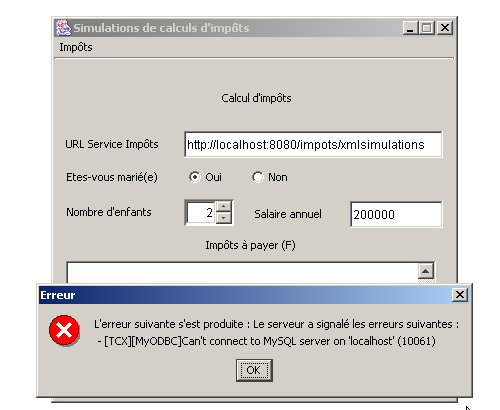
We launch MySQL and run a few simulations:
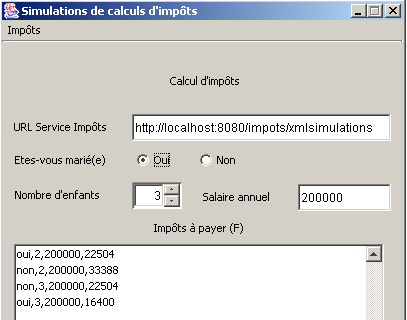
The client for this new version differs from the client for version 4 only in the way it handles the server’s response. Nothing else changes. In version 4, the client received HTML code from which it extracted the information it needed using regular expressions. Here, the client receives XML code from which it retrieves the information it needs using a XML parser.
Let’s review the main steps of the procedure associated with the Calculate menu in our client’s version 4, since that is where the changes are primarily made:
void mnuCalculer_actionPerformed(ActionEvent e) {
....
try{
// tax calculation
calculerImpots(urlImpots,rdOui.isSelected(),nbEnfants.intValue(),salaire);
}catch (Exception ex){
// error is displayed
JOptionPane.showMessageDialog(this,"L'erreur suivante s'est produite : " + ex.getMessage(),"Erreur",JOptionPane.ERROR_MESSAGE);
}
....
}//mnuCalculer_actionPerformed
public void calculerImpots(URL urlImpots,boolean marié, int nbEnfants, int salaire)
throws Exception{
// tAX CALCULATION
// urlImpots : URL of the tax department
// married: true if married, false otherwise
// nbEnfants : number of children
// salary: annual salary
// remove from urlImpots the info needed to connect to the tax server
....
try{
// connect to the server
....
// create customer input/output flows TCP
....
// request URL - send HTTP headers
....
// read the 1st line of the answer
....
// we read the response through to the end of the headers, looking for any cookies
while((réponse=IN.readLine())!=null){
.... }//while
// that's it for HTTP headers - move on to HTML code
// to retrieve simulations
ArrayList listeSimulations=getSimulations(IN,OUT,simulations);
simulations.clear();
for (int i=0;i<listeSimulations.size();i++){
simulations.addElement(listeSimulations.get(i));
}
// it's over
....
}//calculerImpots
private ArrayList getSimulations(BufferedReader IN, PrintWriter OUT, DefaultListModel simulations) throws Exception{
....
}
All of this code remains valid in the new version. Only the processing of the server's HTML response (boxed section above) and its display need to be replaced by the processing of the server's XML response and its display:
// that's it for HTTP headers - move on to XML code
// to recover simulations or errors
ImpotsSaxParser parseur=new ImpotsSaxParser(IN);
ArrayList listeErreurs=parseur.getErreurs();
ArrayList listeSimulations=parseur.getSimulations();
// close server connection
client.close();
// display list cleaning
simulations.clear();
// errors
if(listeErreurs.size()!=0){
// concatenate all errors
String msgErreur="Le serveur a signalé les erreurs suivantes :\n";
for(int i=0;i<listeErreurs.size();i++){
msgErreur+=" - "+(String)listeErreurs.get(i);
}
// error display
throw new Exception(msgErreur);
}//if
// simulations
for (int i=0;i<listeSimulations.size();i++){
simulations.addElement(listeSimulations.get(i));
}
return;
What does the code snippet above do?
- It creates a XML parser and passes it the IN stream, which contains the XML code sent by the server. This stream also contained the HTTP headers, but these have already been read and processed. Therefore, only the XML portion of the response remains. The parser produces two lists of character strings: the list of errors if there were any, or the list of simulations if there were none. These two lists are mutually exclusive.
- If the error list is not empty, the messages in the list are concatenated into a single error message, and an exception is thrown with this message as a parameter. This exception is displayed in the mnuCalculer_actionPeformed procedure that called calculerImpots.
- If the list of simulations is not empty, it is displayed in the jList component of the graphical interface.
Let’s now examine the parser for the server’s XML response, a parser that stems directly from our previous study on how to parse a XML document in Java:
import java.io.IOException;
import org.xml.sax.*;
import org.xml.sax.helpers.*;
import org.apache.xerces.parsers.SAXParser;
import java.util.regex.*;
import java.io.*;
import java.util.*;
import javax.swing.*;
// the class
public class ImpotsSaxParser extends DefaultHandler {
// value of a tree element XML
private StringBuffer valeur=new StringBuffer();
// a regular expression of an element's value when you want to ignore
// the "blanks" that precede or follow it
private Pattern ptnValeur=null;
private Matcher résultats=null;
// lists of XML elements
private ArrayList listeSimulations=new ArrayList();
private ArrayList listeErreurs=new ArrayList();
// elements XML
private ArrayList éléments=new ArrayList();
String élément="";
// -------- manufacturer
public ImpotsSaxParser(BufferedReader IN) throws Exception{
// creation of a XML analyzer (parser)
XMLReader parser = XMLReaderFactory.createXMLReader("org.apache.xerces.parsers.SAXParser");
// we indicate to the parser the object that will implement the methods
// startDocument, endDocument, startElement, endElement, characters
parser.setContentHandler(this);
// on initialise le modèle de valeur d'un élément
ptnValeur=Pattern.compile("^\\s*(.*?)\\s*$");
// initially no current XML element
éléments.add("");
// document analysis
parser.parse(new InputSource(IN));
}//manufacturer
// -------- startElement
public void startElement(String uri, String localName, String qName,
Attributes attributes) throws SAXException {
// procedure called by the parser when it encounters the start of a tag
// uri : URI of the analyzed document?
// localName: name of element being analyzed
// qName: ditto, but "qualified" by a namespace if there is one
// attributes: list of element attributes
// note the name of the element
élément=localName.toLowerCase();
éléments.add(élément);
// does the element have attributes?
if(élément.equals("simulation") && attributes.getLength()==4){
// it's a simulation - we retrieve the attributes
String simulation=attributes.getValue("marie")+","+
attributes.getValue("enfants")+","+
attributes.getValue("salaire")+","+
attributes.getValue("impot");
// add the simulation to the list of simulations
listeSimulations.add(simulation);
}//if
}//startElement
// -------- characters
public void characters(char[] ch, int start, int length) throws SAXException {
// procedure called repeatedly by the parser when it encounters text
// between two <tag>text</tag> tags
// the text is in ch from the start character on length characters
// the text is added to the value buffer if it is the error element
if (élément.equals("erreur"))
valeur.append(ch, start, length);
}//characters
// -------- endElement
public void endElement(String uri, String localName, String qName)
throws SAXException {
// procedure called by the parser when it encounters an end of tag
// uri : URI of the analyzed document?
// localName: name of element being analyzed
// qName: ditto, but "qualified" by a namespace if there is one
// case of error
if(élément.equals("erreur")){
// retrieve the value of the error element
String strValeur=valeur.toString();
// we strip it of its useless "blanks" and register it in the
// errors if non-empty
résultats=ptnValeur.matcher(strValeur);
if (résultats.find() && ! résultats.group(1).equals("")){
listeErreurs.add(résultats.group(1));
}//if
}
// set element value to empty
valeur.setLength(0);
// reset element name
éléments.remove(éléments.size()-1);
élément=(String)éléments.get(éléments.size()-1);
}//endElement
// --------- getErreurs
public ArrayList getErreurs(){
return listeErreurs;
}
// --------- getSimulations
public ArrayList getSimulations(){
return listeSimulations;
}
}//class
- The system receives the XML and IN data streams for analysis and immediately performs this analysis. Once this is complete, the object has been constructed, and the lists (ArrayList) of errors (listeErreurs) and simulations (listeSimulations) have been generated. All that remains for the procedure that built the object is to retrieve the two lists using the methods getErreurs and getSimulations.
- Only three events generated by the XML parser are of interest here:
- Start of a XML element, an event that will be handled by the startElement procedure. This procedure will handle the tags <simulation marie=".." enfants=".." salaire=".." impot=".."> and <erreur>...</erreur>.
- value of an element XML, an event that will be handled by the characters procedure.
- end of an element XML, an event that will be handled by procedure endElement.
- In the procedure startElement, if dealing with the element <simulation wife=".." children=".." salary=".." tax="..">, retrieve the four attributes using attributes.getValue("attribute name"). In all cases, the element name is stored in a variable `element` and added to a list (ArrayList) of elements: elem1, elem2, ..., elemN. This list is managed as a stack whose last element is the element currently being parsed (XML). When the "end of element" event occurs, the last element of the list is removed and the new current element is set. This is done in the procedure endElement.
- The characters procedure is identical to the one studied in a previous example. We simply take care to verify that the current element is indeed the <error> element, a precaution that is normally unnecessary here. This type of precaution was also taken in the startElement procedure to verify that we were dealing with a <simulation> element.
6.5. Conclusion
Thanks to its XML response, the impots application has become easier to manage for both its designer and the designers of client applications.
- The design of the server application can now be entrusted to two types of people: the Java developer of the servlet and the graphic designer who will manage the appearance of the server’s response in browsers. The latter simply needs to know the structure of the server’s XML response to build the style sheets that will accompany it. Note that these are contained in separate XSL files that are independent of the Java servlet. The graphic designer can therefore work independently of the Java developer.
- Client application designers, too, simply need to know the structure of the server’s XML response. Any changes the graphic designer might make to the style sheets have no impact on this XML response, which always remains the same. This is a huge advantage.
- How can the developer update their Java servlet without breaking anything? First of all, as long as their XML response remains unchanged, they can organize their servlet however they like. They can also update the XML response as long as they keep the <error> and <simulation> elements expected by their clients. This allows them to add new tags to this response. The graphic designer will account for them in their style sheets, and browsers will be able to display the updated versions of the response. The pre-programmed clientss will continue to function with the old model, with the new tags simply being ignored. For this to be possible, the tags being searched for must be clearly identified in the XML analysis of the server’s response. This is what was done in our XML client for the tax application, where the procedures specifically stated that we were processing the <error> and <simulation> tags. As a result, the other tags are ignored.