10. Version 5 - PAM Web / JSF Application
10.1. Application Architecture
The architecture of the PAM web application will be as follows:
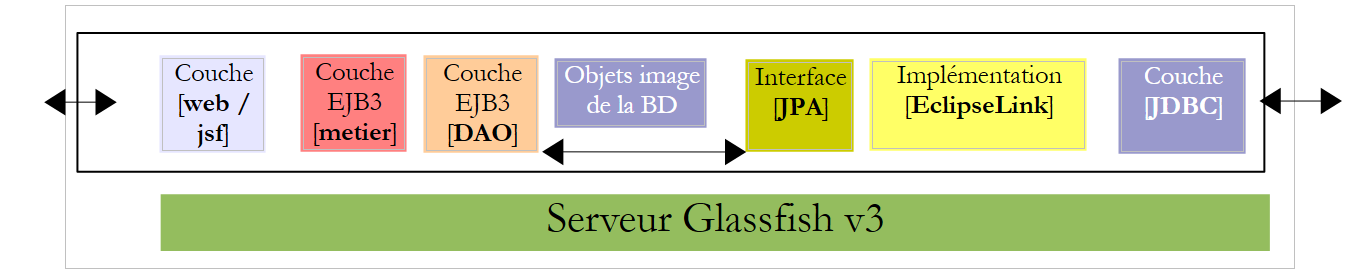 |
In this version, the GlassFish server will host all layers of the application:
- the [web] layer is hosted by the server’s servlet container (1 below)
- the other layers [business logic, DAO, JPA] are hosted by the server’s EJB3 container (2 below)
 |
The [business logic, DAO] components of the application running in the EJB3 container have already been implemented in the client/server application discussed in Section 7.1, which had the following architecture:
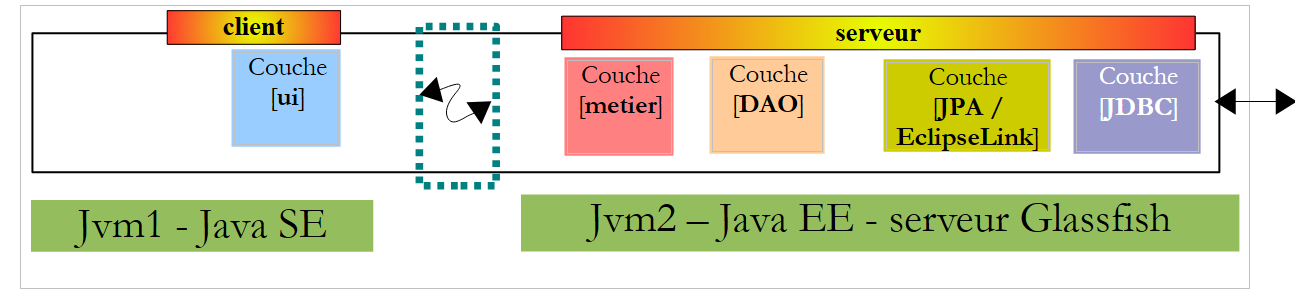 |
The [business logic, DAO] layers ran in the GlassFish server’s EJB3 container, and the [UI] layer ran in a console or Swing application on another machine:
 |
In the architecture of the new application:
 |
only the [web / jsf] layer needs to be written. The other layers [business, DAO, JPA] are already in place.
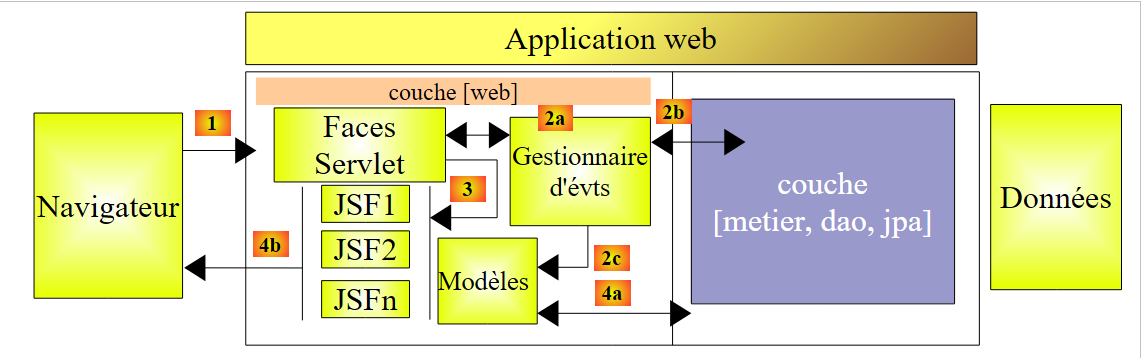
In document [ref3], it is shown that a web application where the web layer is implemented with Java Server Faces has an architecture similar to the following:
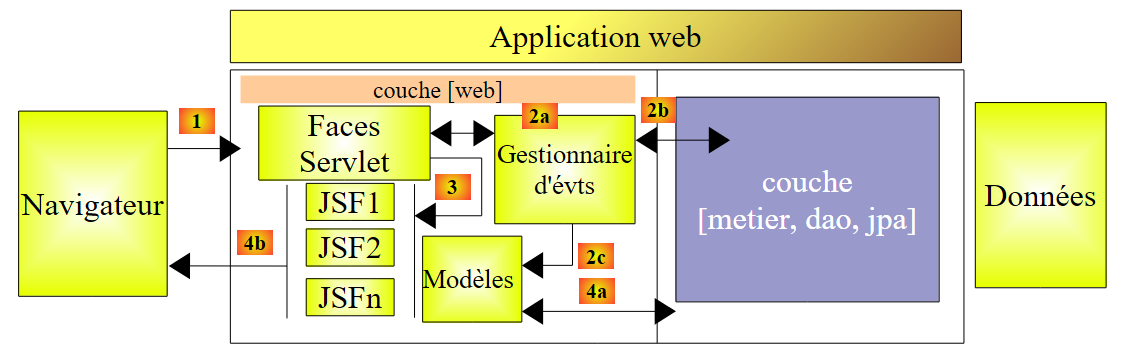 |
This architecture implements the MVC (Model, View, Controller) design pattern. The processing of a client request proceeds as follows:
If the request is made using a GET, the following two steps are executed:
- request - the client browser sends a request to the controller [Faces Servlet]. The controller handles all client requests. It is the application’s entry point. It is the C in MVC.
- response - the C controller instructs the selected JSF page to render. This is the view, the V in MVC. The JSF page uses an M model to initialize the dynamic parts of the response it must send to the client. This model is a Java class that can call upon the [business] layer [4a] to provide the V view with the data it needs.
If the request is made via a POST, two additional steps occur between the request and the response:
- request - the browser client makes a request to the [Faces Servlet] controller.
- processing - the C controller processes this request. Indeed, a POST request is accompanied by data that must be processed. To do this, the controller is assisted by event handlers specific to the application [2a]. These handlers may require the business layer [2b]. The event handler may need to update certain M models [2c]. Once the client’s request has been processed, it may trigger various responses. A classic example is:
- an error page if the request could not be processed correctly
- a confirmation page otherwise
The event handler returns a string-type result called a navigation key to the controller [Faces Servlet].
- navigation - the controller selects the JSF page (= view) to send to the client. This selection is based on the navigation key returned by the event handler.
- response - the selected JSF page sends the response to the client. It uses its M model to initialize its dynamic parts. This model can also call upon the [business] layer [4a] to provide the JSF page with the data it needs.
In a JSF project:
- the controller C is the [javax.faces.webapp.FacesServlet] servlet. This is found in the [jsf-api.jar] library.
- The V views are implemented by JSF pages.
- The M models and event handlers are implemented by Java classes often called "backing beans".
- In JSF 1.x versions, bean definitions and the rules for navigating from one page to another are defined in the [faces-config.xml] file. It contains the list of views and the rules for transitioning from one to another. Starting with JSF version 2, bean definitions can be made using annotations, and page transitions can be hard-coded directly in the bean code.
10.2. How the application works
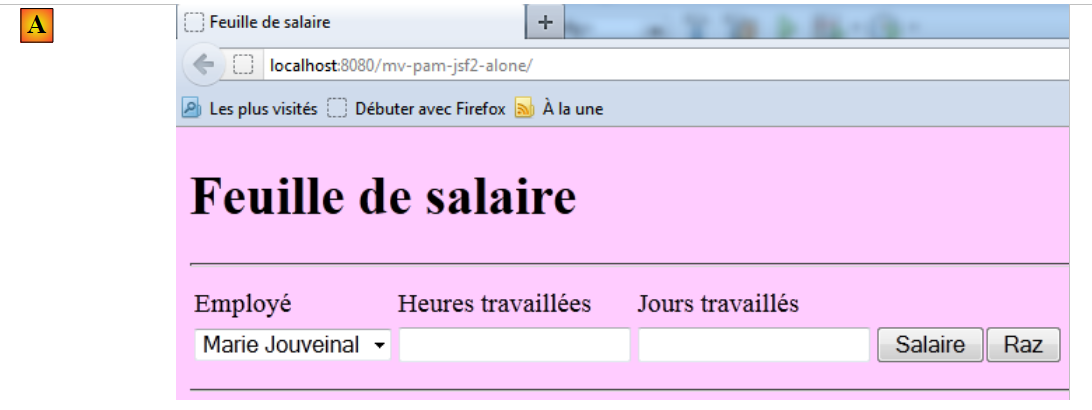
When the application is requested for the first time, the following page appears:
 |
You then fill out the form and request the salary:
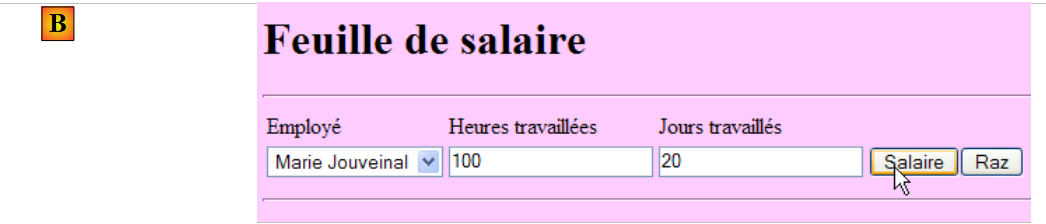 |
The following result is displayed:
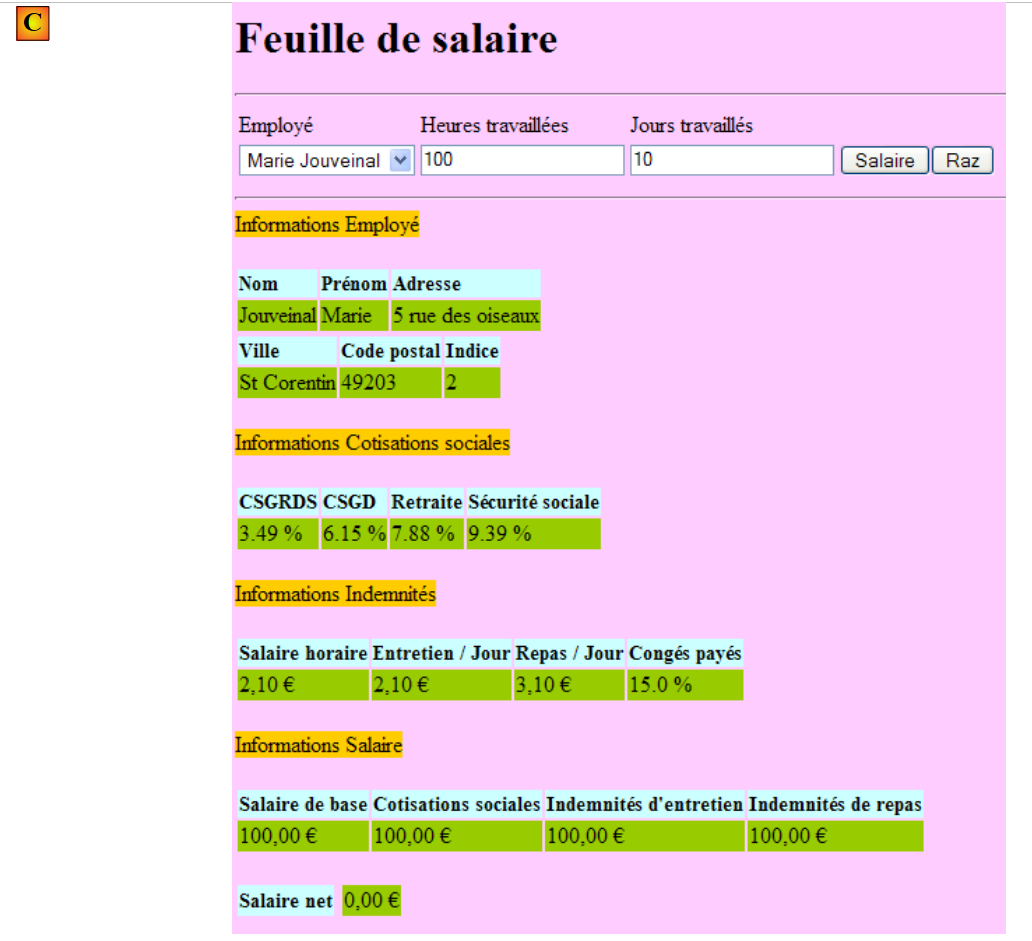 |
This version calculates a fictitious salary. Do not pay attention to the page’s content, but rather to its layout. When you click the [Reset] button, you return to page [A].
Incorrect entries are flagged, as shown in the following example:
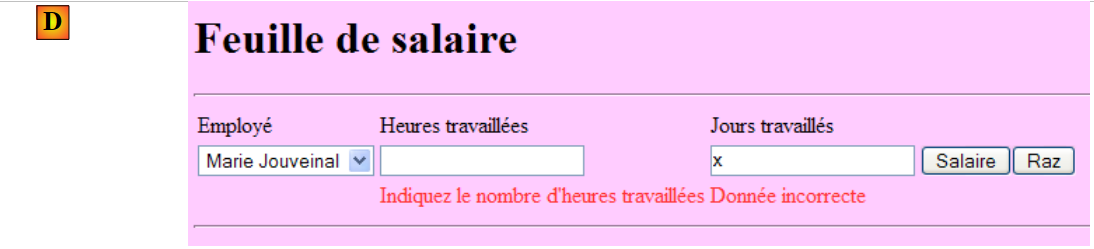 |
10.3. The NetBeans Project
We will build an initial version of the application where the [business] layer will be simulated. We will have the following architecture:
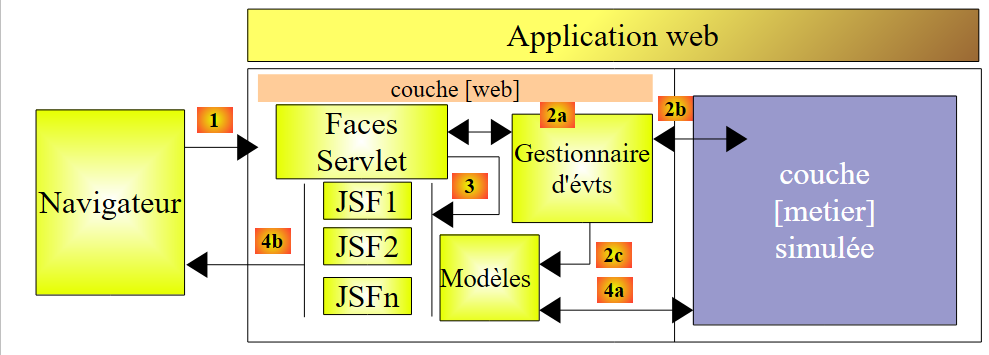 |
When event handlers or models request data from the [business] layer [2b, 4a], it will provide them with fictitious data. The goal is to obtain a web layer that responds correctly to user requests. Once this is achieved, all that remains is to install the server layer developed in Section 7.1:
 |
This will be version 2 of the web version of our PAM application.
The NetBeans project for version 1 is the following Maven project:
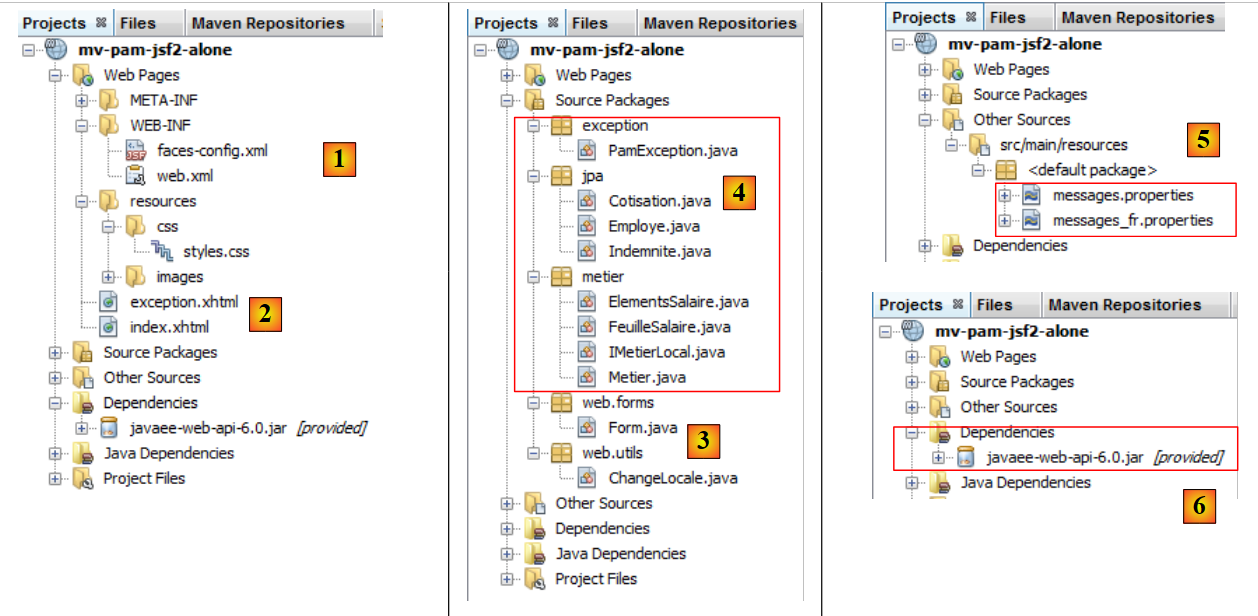 |
- in [1], the configuration files
- in [2], the XHTML pages and the stylesheet
- in [3], the [web] layer classes
- in [4], the objects exchanged between the [web] layer and the [business] layer, and the [business] layer itself
- in [5], the message file for the application's internationalization
- in [6], the application dependencies
We will review some of these elements.
10.3.1. Configuration files
The [web.xml] file is the one generated by default by NetBeans, along with the configuration for an exception page:
<?xml version="1.0" encoding="UTF-8"?>
<beans xmlns="http://www.springframework.org/schema/beans" xmlns:xsi="http://www.w3.org/2001/XMLSchema-instance"
       xmlns:tx="http://www.springframework.org/schema/tx"
       xmlns:jaxws="http://cxf.apache.org/jaxws"
       xsi:schemaLocation="http://www.springframework.org/schema/beans
       http://www.springframework.org/schema/beans/spring-beans-2.0.xsd
       http://www.springframework.org/schema/tx
       http://www.springframework.org/schema/tx/spring-tx-2.0.xsd
       http://cxf.apache.org/jaxws
       http://cxf.apache.org/schemas/jaxws.xsd">

  <!-- Apache CXF -->
  <import resource="classpath:META-INF/cxf/cxf.xml" />
  <import resource="classpath:META-INF/cxf/cxf-extension-soap.xml" />
  <import resource="classpath:META-INF/cxf/cxf-servlet.xml" />

  <!-- lower layers -->
  <import resource="classpath:spring-config-metier-dao.xml" />

  <!-- web service -->
  <bean id="wsMetier" class="pam.ws.PamWsMetier">
    <property name="metier" ref="metier"/>
  </bean>
  <jaxws:endpoint id="wsmetier"
                  implementor="#wsMetier"
                  address="/metier">
  </jaxws:endpoint>

</beans>
- line 30: [index.html] is the application's home page
- lines 32–39: configuration of the exception page
The [exception.html] page is taken from [ref3]. Its code is as follows:
Any exception not explicitly handled by the web application code will cause a page similar to the one below to be displayed:
 |
The [faces-config.xml] file will be as follows:
Note the following points:
- Lines 9–14: The [messages.properties] file will be used for page internationalization. It will be accessible in XHTML pages via the msg key.
- line 15: defines the [messages.properties] file as the priority source for error messages displayed by the <h:messages> and <h:message> tags. This allows you to override certain default JSF error messages. This feature is not used here.
10.3.2. The style sheet
The [styles.css] file is as follows:
Here are some examples of JSF code using these styles:
| 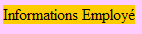 |
| 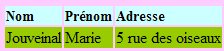 |
| 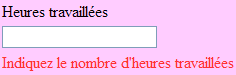 |
10.3.3. The message file
The message file [messages_fr.properties] is as follows:
.libelle{
   background-color: #ccffff;
   font-family: 'Times New Roman',Times,serif;
   font-size: 14px;
   font-weight: bold
}
body{
   background-color: #ffccff
}

.error{
   color: #ff3333
}

.info{
   background-color: #99cc00
}

.titreInfos{
   background-color: #ffcc00
}
These messages are all used in the [index.xhtml] page, except for those in lines 11–15, which are used in the [exception.xhtml] page.
10.3.4. The scope of beans
The [web.forms.Form] bean will have a request scope:
form.titre=Feuille de salaire
form.comboEmployes.libell\u00e9=Employ\u00e9
form.heuresTravaill\u00e9es.libell\u00e9=Heures travaill\u00e9es
form.joursTravaill\u00e9s.libell\u00e9=Jours travaill\u00e9s
form.heuresTravaill\u00e9es.required=Indiquez le nombre d'heures travaill\u00e9es
form.heuresTravaill\u00e9es.validation=Donn\u00e9e incorrecte
form.joursTravaill\u00e9s.required=Indiquez le nombre de jours travaill\u00e9s
form.joursTravaill\u00e9s.validation=Donn\u00e9e incorrecte
form.btnSalaire.libell\u00e9=Salaire
form.btnRaz.libell\u00e9=Raz
exception.header=L'exception suivante s'est produite
exception.httpCode=Code HTTP de l'erreur
exception.message=Message de l'exception
exception.requestUri=Url demand\u00e9e lors de l'erreur
exception.servletName=Nom de la servlet demand\u00e9e lorsque l'erreur s'est produite
form.infos.employ\u00e9=Informations Employ\u00e9
form.employe.nom=Nom
form.employe.pr\u00e9nom=Pr\u00e9nom
form.employe.adresse=Adresse
form.employe.ville=Ville
form.employe.codePostal=Code postal
form.employe.indice=Indice
form.infos.cotisations=Informations Cotisations sociales
form.cotisations.csgrds=CSGRDS
form.cotisations.csgd=CSGD
form.cotisations.retraite=Retraite
form.cotisations.secu=S\u00e9curit\u00e9 sociale
form.infos.indemnites=Informations Indemnit\u00e9s
form.indemnites.salaireHoraire=Salaire horaire
form.indemnites.entretienJour=Entretien / Jour
form.indemnites.repasJour=Repas / Jour
form.indemnites.cong\u00e9sPay\u00e9s=Cong\u00e9s pay\u00e9s
form.infos.salaire=Informations Salaire
form.salaire.base=Salaire de base
form.salaire.cotisationsSociales=Cotisations sociales
form.salaire.entretien=Indemnit\u00e9s d'entretien
form.salaire.repas=Indemnit\u00e9s de repas
form.salaire.net=Salaire net
The [web.utils.ChangeLocale] bean will have application scope:
import java.io.Serializable;
import javax.faces.bean.ManagedBean;
import javax.faces.bean.RequestScoped;

@ManagedBean
@RequestScoped
public class Form implements Serializable {
10.3.5. The [business] layer
The [business] layer implements the following IMetierLocal interface:
package web.utils;

import java.io.Serializable;
import javax.faces.bean.ManagedBean;
import javax.faces.bean.SessionScoped;

@ManagedBean
@SessionScoped
public class ChangeLocale implements Serializable{
  // page locale
  private String locale="fr";

  public ChangeLocale() {
  }

  public String setFrenchLocale(){
    locale="fr";
    return null;
  }

  public String setEnglishLocale(){
    locale="en";
    return null;
  }

  public String getLocale() {
    return locale;
  }

  public void setLocale(String locale) {
    this.locale = locale;
  }


}
This interface is the one used in the server-side of the client/server application described in Section 7.1.
The Business class that we will use to test the [web] layer implements this interface as follows:
package metier;

import java.util.List;
import javax.ejb.Local;
import jpa.Employe;

@Local
public interface IMetierLocal {
  // get your payslip
  FeuilleSalaire calculerFeuilleSalaire(String SS, double nbHeuresTravaillées, int nbJoursTravaillés );
  // list of employees
  List<Employe> findAllEmployes();
}
We leave it to the reader to decipher this code. Note the method used: to avoid having to implement the EJB part of the application, we simulate the [business] layer. Once the [web] layer is verified as correct, we can then replace it with the actual [business] layer.
10.4. The [index.xhtml] form and its template [Form.java]
We will now build the form’s XHTML page and its model.
Recommended reading in [ref3]:
- Example #3 (mv-jsf2-03) for the list of tags that can be used in a form
- Example #4 (mv-jsf2-04) for drop-down lists populated by the model
- Example #6 (mv-jsf2-06) for input validation
- Example #7 (mv-jsf2-07) for handling the [Clear] button
10.4.1. Step 1
Question: Build the [index.xhtml] form and its [Form.java] model needed to display the following page:
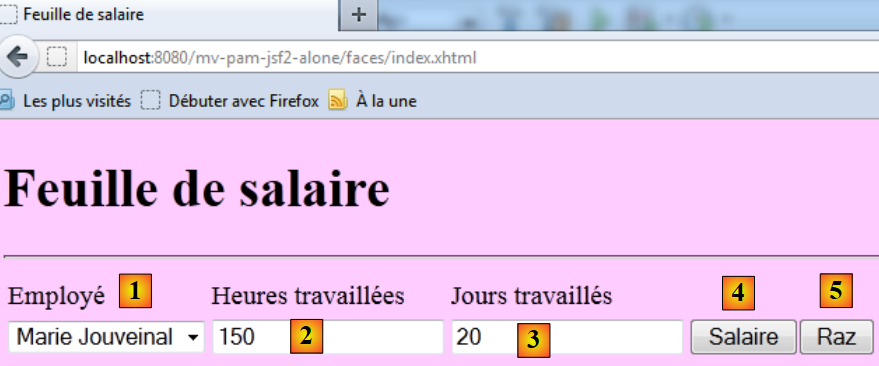 |
The input components are as follows:
id | JSF type | model | role | |
comboEmployees | <h:selectOneMenu> | String comboEmployeesValue List<Employee> getEmployees() | contains the list of employees in the format "first name last name". | |
hoursWorked | <h:inputText> | String hoursWorked | number of hours worked - real number | |
daysWorked | <h:inputText> | String daysWorked | number of days worked - integer | |
btnSalary | <h:commandButton> | starts the salary calculation | ||
btnReset | <h:commandButton> | resets the form to its initial state |
- The getEmployees method will return a list of employees retrieved from the [business] layer. The objects displayed by the combo box will have the itemValue attribute set to the employee's social security number and the itemLabel attribute set to a string consisting of the employee's first and last name.
- The [Salary] and [Clear] buttons will not be linked to event handlers for the time being.
- Input validity will be checked.
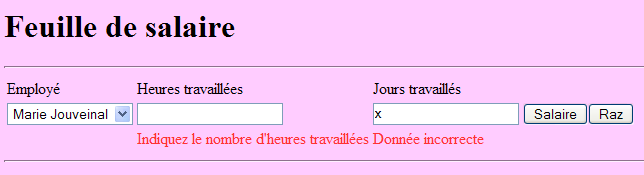
Test this version. In particular, verify that input errors are properly flagged.
Note: It is important that the ID attributes of the page components do not contain accented characters. With Glassfish 3.1.2, this causes the application to crash.
10.4.2. Step 2
Question: Complete the [index.xhtml] form and its [Form.java] template to display the following page once the [Salary] button has been clicked:
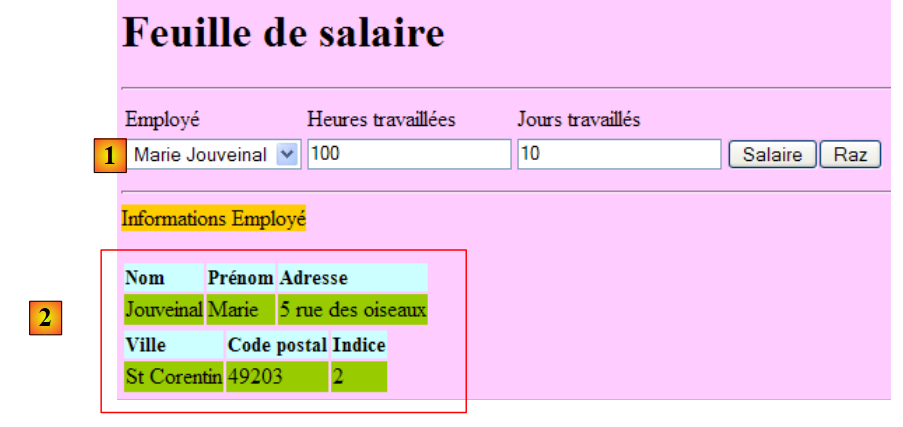 |
The [Salary] button will be connected to the model’s calculateSalary event handler. This method will use the calculatePaystub method from the [business] layer. This paystub will be generated for the employee selected in [1].
In the model, the pay stub will be represented by the following private field:
package metier;

...
public class Metier implements IMetierLocal {

  // employee dictionary indexed by n° SS
  private Map<String,Employe> hashEmployes=new HashMap<String,Employe>();
  // list of employees
  private List<Employe> listEmployes;

  // get your payslip
  public FeuilleSalaire calculerFeuilleSalaire(String SS,
    double nbHeuresTravaillées, int nbJoursTravaillés) {
    // we retrieve employee n° SS
    Employe e=hashEmployes.get(SS);
    // we make a fiictive payslip
    return new FeuilleSalaire(e,new Cotisation(3.49,6.15,9.39,7.88),new ElementsSalaire(100,100,100,100,100));
  }

  // list of employees
  public List<Employe> findAllEmployes() {
    if(listEmployes==null){
      // create a list of two employees
      listEmployes=new ArrayList<Employe>();
      listEmployes.add(new Employe("254104940426058","Jouveinal","Marie","5 rue des oiseaux","St Corentin","49203",new Indemnite(2,2.1,2.1,3.1,15)));
      listEmployes.add(new Employe("260124402111742","Laverti","Justine","La brûlerie","St Marcel","49014",new Indemnite(1,1.93,2,3,12)));
      // employee dictionary indexed by n° SS
      for(Employe e:listEmployes){
        hashEmployes.put(e.getSS(),e);
      }
    }
    // we return the list of employees
    return listEmployes;
  }
}
which has get and set methods.
To retrieve the information contained in this object, you can write expressions like the following in the JSF page:
private FeuilleSalaire feuilleSalaire;
The expression in the value attribute will be evaluated as follows:
[form].getPayrollSheet().getEmployee().getName() where [form] represents an instance of the [Form.java] class. The reader can verify that the get methods used here do indeed exist in the [Form], [PayrollSheet], and [Employee] classes, respectively. If this were not the case, an exception would be thrown when evaluating the expression.
Test this new version.
10.4.3. Step 3
Question: Complete the [index.xhtml] form and its template [Form.java] to obtain the following additional information:
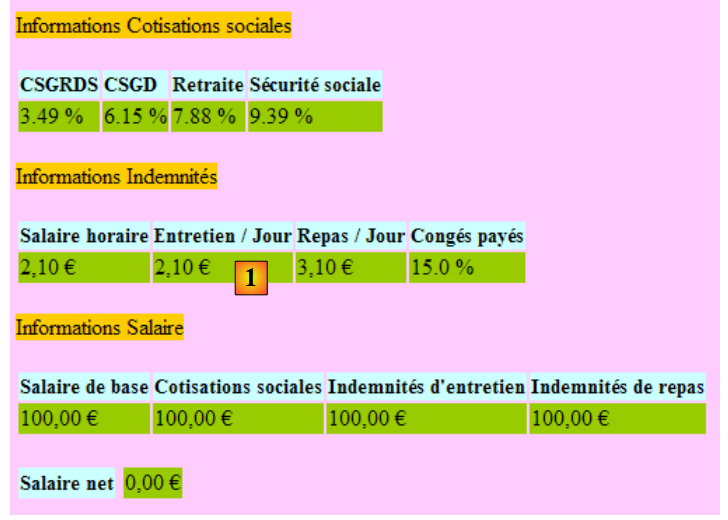 |
We will follow the same approach as before. There is an issue with the euro currency symbol found in [1], for example. In an internationalized application, it would be preferable to use the display format and currency symbol of the selected locale (en, de, fr, ...). This can be achieved as follows:
<h:outputText value="#{form.feuilleSalaire.employe.nom}"/>
We could have written:
          <h:outputFormat value="{0,number,currency}">
            <f:param value="#{form.feuilleSalaire.employe.indemnite.entretienJour}"/>
</h:outputFormat>
but with the en_GB locale (British English), the amount would still be displayed in euros when it should be in pounds (£). The <h:outputFormat> tag allows information to be displayed based on the locale of the displayed JSF page:
- line 1: displays the {0} parameter, which is a number representing a monetary amount
- line 2: the <f:param> tag assigns a value to the {0} parameter. A second <f:param> tag would assign a value to the parameter labeled {1}, and so on.
10.4.4. Step 4
Recommended reading: Example #7 (mv-jsf2-07) in [ref3].
Question: Complete the form [index.xhtml] and its template [Form.java] to handle the [Reset] button.
The [Reset] button restores the form to the state it was in when it was first requested via a GET request. There are several challenges here. Some have been explained in [ref3].
The form returned by the [Raz] button is not the entire form but only the entered portion of it:
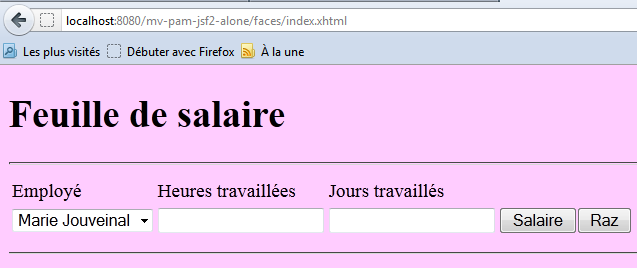
This result can be achieved using an <f:subview> tag as follows:
<h:outputText value="#{form.feuilleSalaire.employe.indemnite.entretienJour} є">
The <f:subview> tag encloses the entire portion of the form that can be displayed or hidden. Any component can be displayed or hidden using the rendered attribute. If rendered="true", the component is displayed; if rendered="false", it is not. If the rendered attribute takes its value from the model, then the display of the component can be controlled programmatically.
In the example above, we will control the display of the viewInfos view using the following field:
      <f:subview id="viewInfos" rendered="#{form.viewInfosIsRendered}">
... la partie du formulaire qu'on veut pouvoir ne pas afficher
</f:subview>
along with its get and set methods. The methods handling clicks on the [Salary] and [Clear] buttons will update this boolean depending on whether the viewInfos view should be displayed or not.