6. Version 2: OpenEJB / JPA Architecture
6.1. Introduction to Porting Principles
Here we present the principles that will govern the porting of a JPA / Spring / Hibernate application to a JPA / OpenEJB / EclipseLink application. We will wait until Section 6.2 to create the Maven projects.
6.1.1. The Two Architectures
The current implementation with Spring / Hibernate
 |
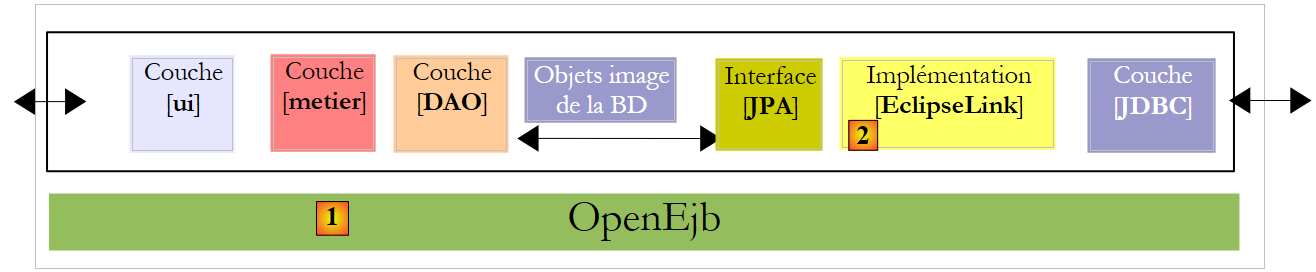
The implementation to be built with OpenEJB / EclipseLink
 |
6.1.2. Project libraries
- The [DAO] and [business] layers are no longer instantiated by Spring. They are instantiated by the OpenEJB container.
- The Spring container libraries and its configuration are replaced by the OpenEJB container libraries and its configuration.
- The JPA / Hibernate layer libraries are replaced by those of the JPA / EclipseLink layer
6.1.3. Configuration of the JPA / EclipseLink / OpenEJB layer
- The [META-INF/persistence.xml] file configuring the JPA layer becomes the following:
- Line 3: Transactions in an EJB container are of the JTA (Java Transaction API) type. They were of the RESOURCE_LOCAL type with Spring.
- line 9: The JPA implementation used is EclipseLink
- Lines 5–7: Entities managed by the JPA layer
- lines 11–13: EclipseLink provider properties
- line 12: tables will be created on each execution
The JDBC characteristics of the JTA data source used by the OpenEJB container will be specified by the following configuration file [conf/openejb.conf]:
- Line 3: We use the "Default JDBC Database" ID when working with an OpenEJB container embedded within the application itself.
- line 5: we use a MySQL database [dbpam_eclipselink]
6.1.4. Implementation of the [DAO] layer using EJBs
- The classes implementing the [DAO] layer become EJBs. Let’s take the example of the [CotisationDao] class:
The [ICotisationDao] interface in the Spring version was as follows:
The EJB will implement this same interface in two different forms: a local one and a remote one. The local interface can be used by a client running in the same JVM, while the remote interface can be used by a client running in a different JVM.
The local interface:
- Line 6: The [ICotisationDaoLocal] interface inherits from the [ICotisationDao] interface to adopt all of its methods. It does not add any new ones.
- line 5: the @Local annotation makes it a local interface for the EJB that will implement it.
The remote interface:
- Line 6: The [ICotisationDaoRemote] interface inherits from the [ICotisationDao] interface to adopt all of its methods. It does not add any new ones.
- line 5: The @Remote annotation makes it a remote interface for the EJB that will implement it.
The [DAO] layer is implemented by an EJB that implements both interfaces (this is not mandatory):
- line 1: the @Stateless annotation, which makes the class an EJB
- line 2: the @TransactionAttribute annotation, which ensures that every method in the class will execute within a transaction.
- line 5: the @PersistenceContext annotation, which injects the JPA layer’s EntityManager into the [CotisationDao] class. It is identical to what we had in the Spring version.
When the local interface of the [DAO] layer is used, the client of this interface runs in the same JVM.
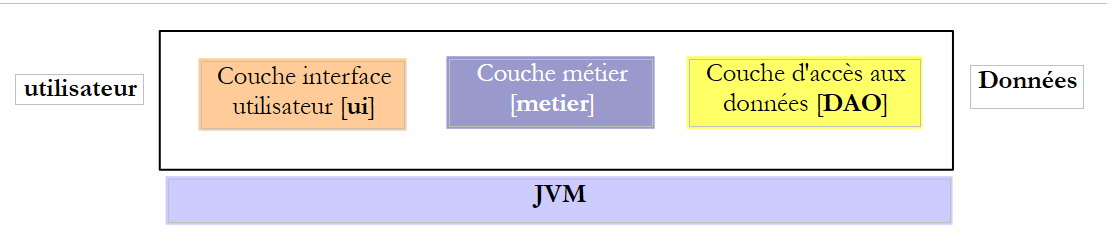 |
Above, the [business] and [DAO] layers exchange objects by reference. When one layer changes the shared object, the other layer sees this change.
When the remote interface of the [DAO] layer is used, the client of this interface usually runs in another JVM.
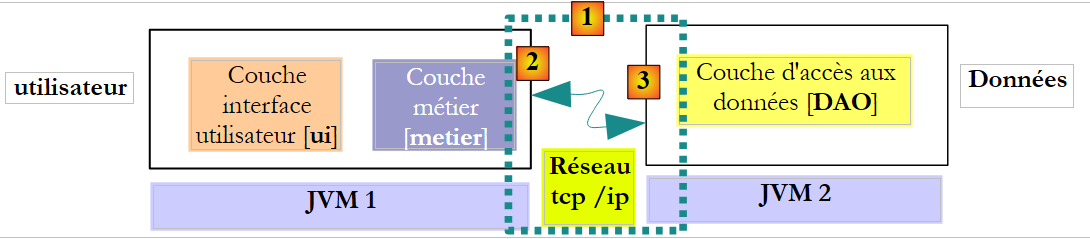 |
In the diagram above, the [business] and [DAO] layers exchange objects by value (serialization of the exchanged object). When one layer changes a shared object, the other layer only sees this change if the modified object is returned to it.
6.1.5. Implementation of the [business] layer using an EJB
- The class implementing the [business] layer also becomes an EJB implementing a local and remote interface. The initial [IMetier] interface was as follows:
We create a local interface and a remote interface based on the previous interface:
The EJB in the [business] layer implements these two interfaces:
- Lines 1-2: define an EJB in which each method runs within a transaction.
- line 7: a reference to the EJB's local interface [CotisationDao].
- line 6: the @EJB annotation instructs the EJB container to inject a reference to the EJB's local interface [CotisationDao].
- Lines 8–11: We do the same for the local interfaces of the EJBs [EmployeeDao] and [CompensationDao].
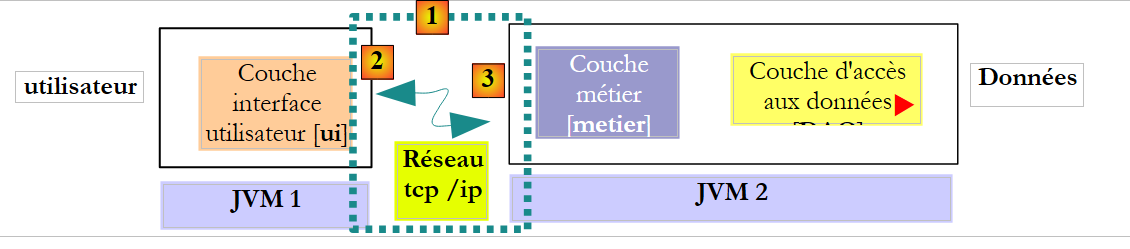
Ultimately, when the [Metier] EJB is instantiated, the fields in lines 7, 9, and 11 will be initialized with references to the local interfaces of the three EJBs in the [DAO] layer. We are therefore assuming here that the [business] and [DAO] layers will run in the same JVM.
 |
6.1.6. EJB Clients
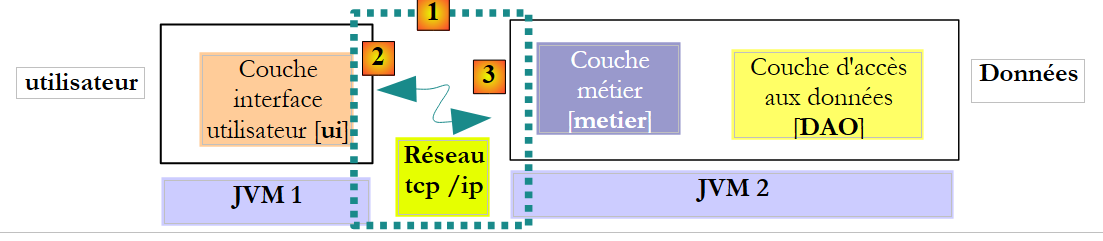 |
In the diagram above, to communicate with the [business] layer, the [ui] layer must obtain a reference to the remote interface of the EJB in the [business] layer.
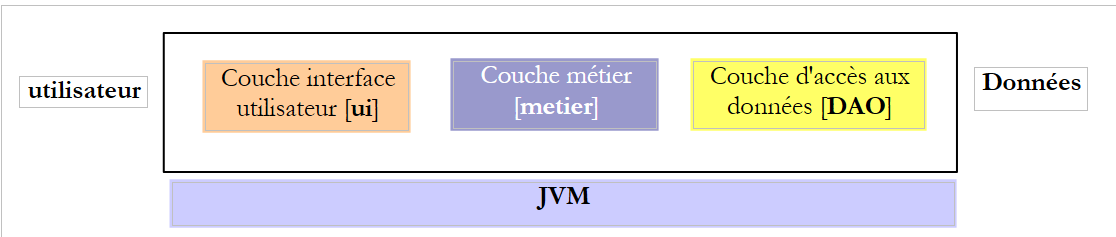 |
In the diagram above, to communicate with the [business] layer, the [UI] layer must obtain a reference to the local interface of the [business] layer’s EJB. The method for obtaining these references varies from one container to another. For the OpenEJB container, you can proceed as follows:
Reference to the local interface:
- Lines 2–5: The OpenEJB container is initialized.
- Line 5: We have a JNDI (Java Naming and Directory Interface) context that allows us to obtain references to the EJBs. Each EJB is identified by a JNDI name:
- (continued)
- for the local interface, add "Local" to the EJB name (lines 7-9)
- For the remote interface, we add "Remote" to the EJB name
With Java EE 5, these rules vary depending on the EJB container. This is a challenge. Java EE 6 introduced a JNDI notation that is portable across all application servers.
The previous code retrieves references to the local interfaces of EJBs via their JNDI names. We mentioned earlier that these could also be obtained via the @EJB annotation. So we might want to write:
The @EJB annotation is only honored if it belongs to a class loaded by the EJB container. This will be the case for the [Metier] class, for example. The code above, however, belongs to a console class that will not be loaded by the EJB container. We are therefore forced to use the EJBs’ JNDI names.
Below is the code to obtain a reference to the remote interface of the [Metier] EJB:
6.2. Practical Exercise
We propose to migrate the NetBeans Spring/Hibernate application to an OpenEJB/EclipseLink architecture.
The current implementation with Spring / Hibernate
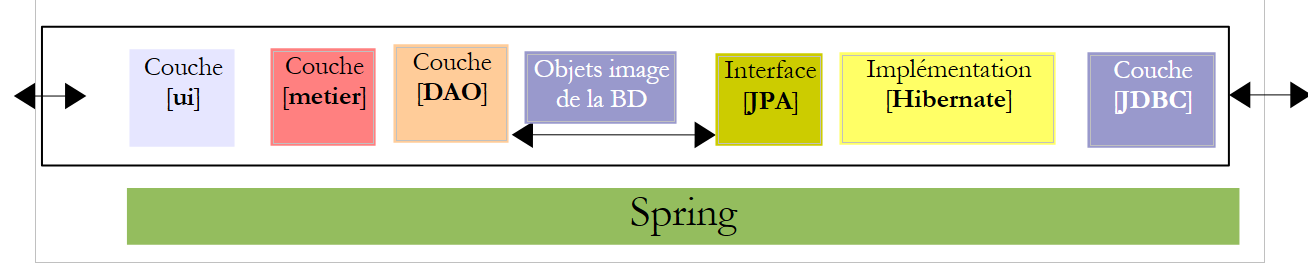 |
The implementation to be built with OpenEJB / EclipseLink
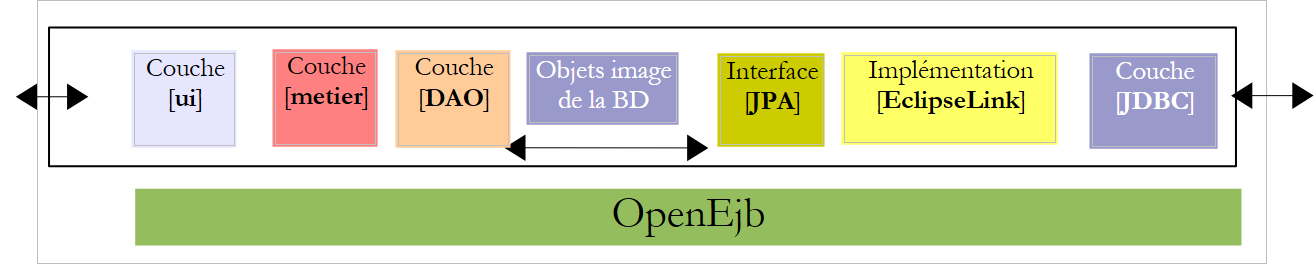 |
6.2.1. Setting up the database [ dbpam_eclipselink]
If it does not exist, create the MySQL database [dbpam_eclipselink]. If it exists, delete all its tables. Create a NetBeans connection to this database as described in section 6.2.1.
6.2.2. Initial configuration of the NetBeans project
- Load the Maven project [mv-pam-spring-hibernate]
- Create a new Maven Java project [mv-pam-openejb-eclipselink] [1]
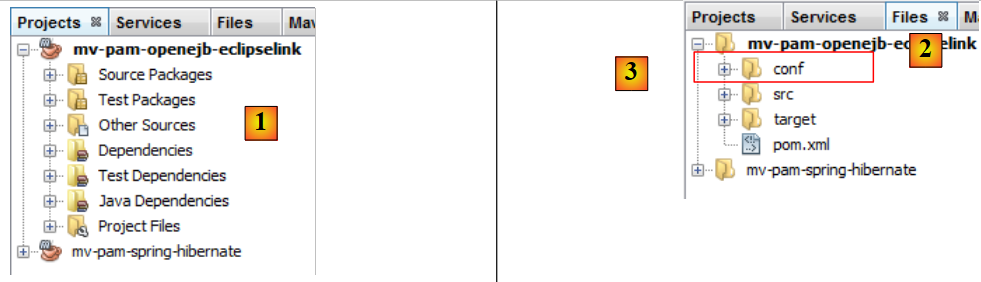 |
- In the [Files] tab [2], create a [conf] folder [3] under the project root
- Place the following [openejb.conf] file [4] in this folder:
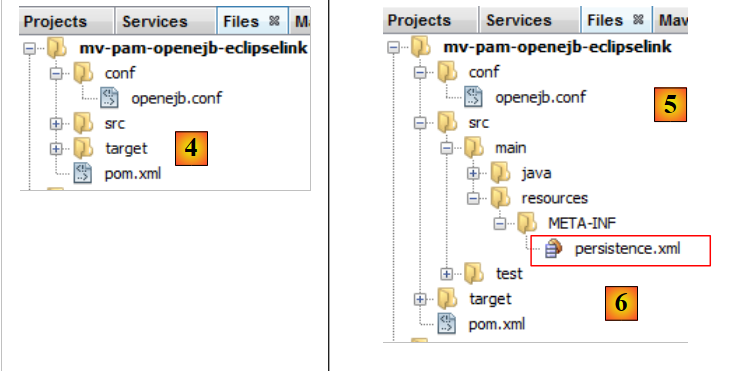 |
- Create the folder [src/main/resources/META-INF] [5]
- Place the following [persistence.xml] file [6] in it:
<?xml version="1.0" encoding="UTF-8"?>
<persistence version="1.0" xmlns="http://java.sun.com/xml/ns/persistence" xmlns:xsi="http://www.w3.org/2001/XMLSchema-instance" xsi:schemaLocation="http://java.sun.com/xml/ns/persistence              http://java.sun.com/xml/ns/persistence/persistence_1_0.xsd">
  <persistence-unit name="dbpam_eclipselinkPU" transaction-type="JTA">
    <!-- the supplier JPA is EclipseLink -->
    <provider>org.eclipse.persistence.jpa.PersistenceProvider</provider>
    <!-- jpa entities -->
    <class>jpa.Cotisation</class>
    <class>jpa.Employe</class>
    <class>jpa.Indemnite</class>
    <!-- properties provider EclipseLink -->
    <properties>
      <property name="eclipselink.logging.level" value="FINE"/>
      <property name="eclipselink.ddl-generation" value="drop-and-create-tables"/>
    </properties>
  </persistence-unit>
</persistence>
- Line 12: We request fine-grained logs from EclipseLink,
- line 13: tables will be created when the JPA layer is instantiated,
- Add the OpenEJB and EclipseLink libraries, as well as the MySQL JDBC driver, to the project's [pom.xml] file:
<project xmlns="http://maven.apache.org/POM/4.0.0" xmlns:xsi="http://www.w3.org/2001/XMLSchema-instance"
         xsi:schemaLocation="http://maven.apache.org/POM/4.0.0 http://maven.apache.org/xsd/maven-4.0.0.xsd">
  <modelVersion>4.0.0</modelVersion>

  <groupId>istia.st</groupId>
  <artifactId>mv-pam-openejb-eclipselink</artifactId>
  <version>1.0-SNAPSHOT</version>
  <packaging>jar</packaging>

  <name>mv-pam-openejb-eclipselink</name>
  <url>http://maven.apache.org</url>

  <properties>
    <project.build.sourceEncoding>UTF-8</project.build.sourceEncoding>
  </properties>

  <dependencies>
    <dependency>
      <groupId>org.apache.openejb</groupId>
      <artifactId>openejb-core</artifactId>
      <version>4.0.0</version>
    </dependency>
    <dependency>
      <groupId>junit</groupId>
      <artifactId>junit</artifactId>
      <version>4.10</version>
      <scope>test</scope>
      <type>jar</type>
    </dependency>
    <dependency>
      <groupId>org.eclipse.persistence</groupId>
      <artifactId>eclipselink</artifactId>
      <version>2.3.0</version>
    </dependency>
    <dependency>
      <groupId>org.eclipse.persistence</groupId>
      <artifactId>javax.persistence</artifactId>
      <version>2.0.3</version>
    </dependency>
    <dependency>
      <groupId>mysql</groupId>
      <artifactId>mysql-connector-java</artifactId>
      <version>5.1.6</version>
    </dependency>
    <dependency>
      <groupId>org.swinglabs</groupId>
      <artifactId>swing-layout</artifactId>
      <version>1.0.3</version>
    </dependency>
  </dependencies>

  <repositories>
    <repository>
      <url>http://download.eclipse.org/rt/eclipselink/maven.repo/</url>
      <id>eclipselink</id>
      <layout>default</layout>
      <name>Repository for library Library[eclipselink]</name>
    </repository>
  </repositories>

</project>
- lines 18–22: the OpenEJB dependency,
- lines 30–39: the EclipseLink dependencies,
- lines 41-44: the MySQL JDBC driver dependency
6.2.3. Porting the [DAO] layer
We will port the [DAO] layer by copying packages from the [mv-pam-spring-hibernate] project to the [mv-pam-openejb-eclipselink] project.
- Copy the [dao, exception, jpa] packages
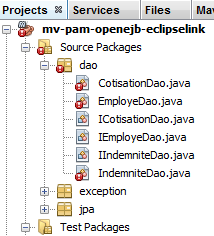 |
The errors reported above are due to the fact that the copied [DAO] layer uses Spring and the Spring libraries are no longer part of the project.
6.2.3.1. The EJB [CotisationDao]
We create the local and remote interfaces for the future EJB [CotisationDao]:
The local interface ICotisationDaoLocal:
To ensure the correct package imports, right-click on the code and select [Fix Imports].
The remote interface ICotisationDaoRemote:
Then we modify the [CotisationDao] class to turn it into an EJB:
The import that this class made on the Spring framework disappears. Perform a [Clean and Build] on the project:
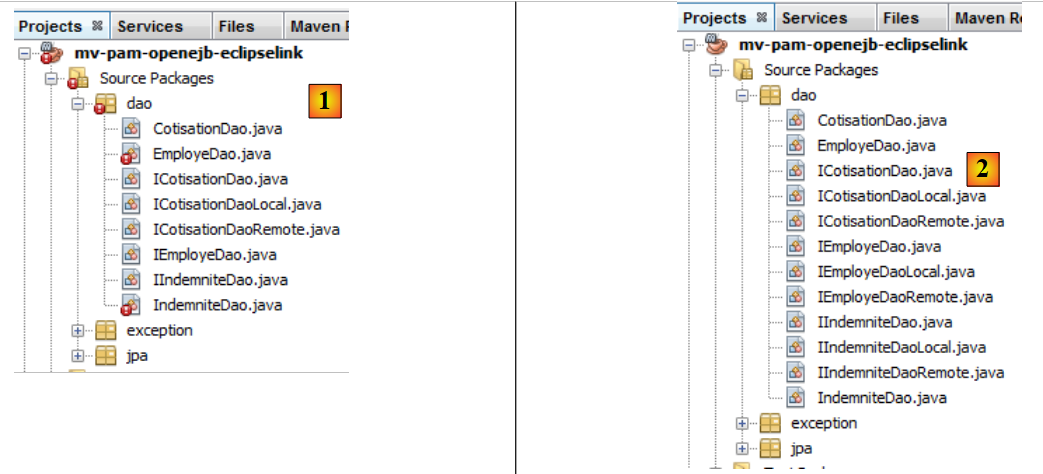 |
In [1], there are no longer any errors in the [CotisationDao] class.
6.2.3.2. The EJBs [EmployeDao] and [IndemniteDao]
We repeat the same process for the other elements of the [DAO] layer:
- interfaces IEmployeDaoLocal and IEmployeDaoRemote derived from IEmployeDao
- EJB `EmployeDao` implementing these two interfaces
- interfaces IIndemniteDaoLocal and IIndemniteDaoRemote derived from IIndemniteDao
- EJB IndemniteDao implementing these two interfaces
Once this is done, there are no more errors in the project [2].
6.2.3.3. The [PamException] class
The [PamException] class remains the same as before, with one minor change:
Line 5 has been added. To get the correct imports, click [Fix imports].
To understand the annotation on line 5, remember that every method in the EJBs of our [DAO] layer:
- runs within a transaction started and ended by the EJB container
- throws a [PamException] as soon as something goes wrong
 |
When the [business] layer calls a method M of the [DAO] layer, this call is intercepted by the EJB container. It is as if there were an intermediate class between the [business] layer and the [DAO] layer—here called [EJB Proxy]—intercepting all calls to the [DAO] layer. When the call to method M of the [DAO] layer is intercepted, the EJB Proxy starts a transaction and then hands control over to method M of the [DAO] layer, which then executes within that transaction. Method M may complete with or without an exception.
- If method M completes without an exception, control returns to the EJB proxy, which terminates the transaction by committing it. Control is then returned to the calling method in the [business] layer
- If method M terminates with an exception, execution returns to the EJB proxy, which terminates the transaction by rolling it back. Additionally, it wraps this exception in an EJBException. Execution then returns to the calling method in the [business] layer, which therefore receives an EJBException. The annotation on line 5 above prevents this encapsulation. The [business] layer will therefore receive a PamException. Furthermore, the rollback=true attribute instructs the EJB proxy that when it receives a PamException, it must roll back the transaction.
6.2.3.4. Testing the [DAO] layer
Our [DAO] layer implemented by EJBs can be tested. We start by copying the [dao] package from [Test Packages] in the [mv-pam-springhibernate] project into the project currently under development [1]:
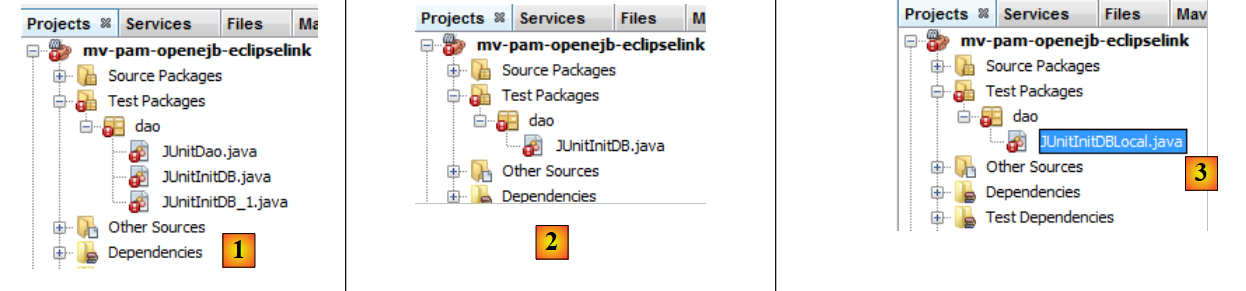 |
We keep only the [JUnitInitDB] test, which initializes the database with some data [2]. We rename the [JUnitInitDbLocal] class [3]. The [JUnitInitDBLocal] class will use the local interface of the [DAO] layer’s EJBs.
First, we modify the [JUnitInitDBLocal] class as follows:
- lines 3-5: references to the local interfaces of the EJBs in the [DAO] layer
- line 7: @BeforeClass annotates the method executed when the JUnit test starts
- lines 10-13: initialization of the OpenEJB container. This initialization is proprietary and varies with each EJB container.
- line 13: we have a JNDI (Java Naming and Directory Interface) context that allows access to EJBs via names. With OpenEJB, the local interface of an EJB is designated by ELocal and the remote interface by ERemote.
- Lines 15–17: We request a reference to the local interfaces of the EJBs [EmployeDao, CotisationDao, IndemniteDao] from the JNDI context.
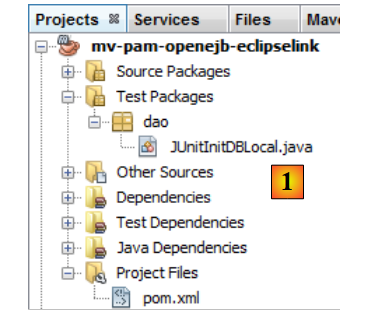 |
Build the project, start the MySQL server if necessary, and run the JUnitInitDBLocal test. Note that the [persistence.xml] file has been configured to recreate the tables on each run. Before running the test, it is best to delete any tables in the MySQL database [dbpam_eclipselink].
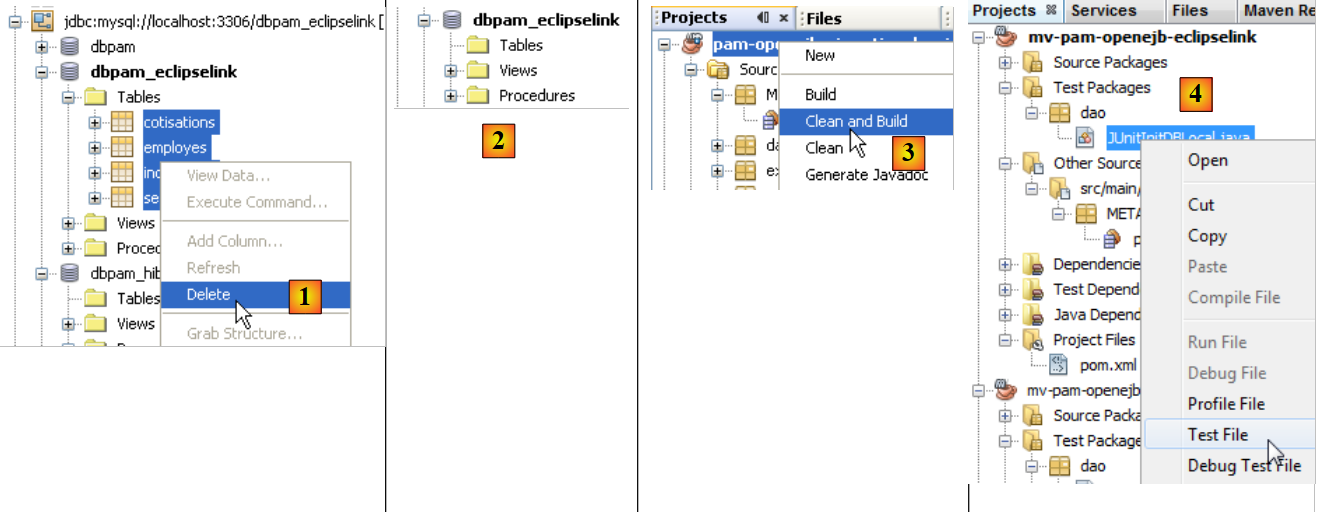 |
- In [1], on the [Services] tab, delete the tables from the NetBeans connection established in section 6.2.1.
- In [2], the [dbpam_eclipselink] database no longer contains any tables
- In [3], the project is built
- In [4], the JUnitInitDBLocal test is executed
 |
- In [5], the test passed
- In [6], refresh the NetBeans connection
- in [7], we see the 4 tables created by the JPA layer. The purpose of the test was to populate them. We view the contents of one of them
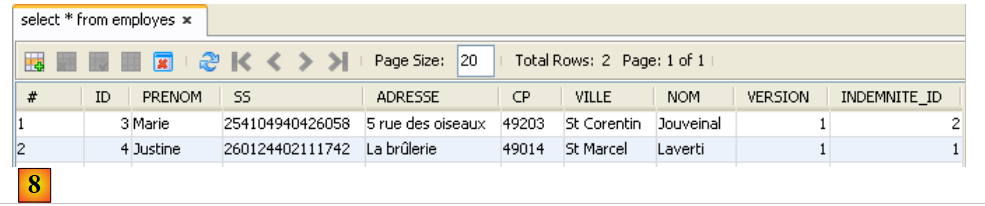 |
- in [8], the contents of the [EMPLOYEES] table
The OpenEJB container displayed logs in the console:
- lines 2-3: the two JNDI names of the EJB [CotisationDaoLocal],
- lines 4-5: the two JNDI names of the EJB [CotisationDaoRemote],
- lines 7-8: the two JNDI names of the EJB [EmployeDaoLocal],
- lines 9-10: the two JNDI names of the EJB [EmployeDaoRemote],
- lines 12-13: the two JNDI names of the EJB [IndemniteDaoLocal],
- lines 14–15: the two JNDI names of the EJB [EmployeeDaoRemote].
We run the same test again, this time using the EJBs’ remote interface.
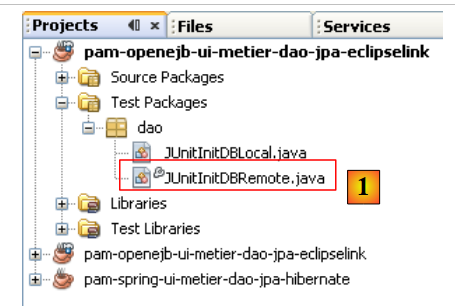 |
In [1], the [JUnitInitDBLocal] class has been duplicated (copy/paste) into [JUnitInitDBRemote]. In this class, we replace the local interfaces with the remote interfaces:
Once this is done, the new test class can be run. Before doing so, using the NetBeans connection [dbpam_eclipselink], delete the tables from the database [dbpam_eclipselink].
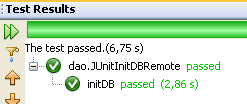 |
With the NetBeans connection [dbpam_eclipselink], verify that the database has been populated.
6.2.4. Porting the [business] layer
We will port the [business] layer by copying packages from the [mv-pam-spring-hibernate] project to the [mv-pam-openejb-eclipselink] project.
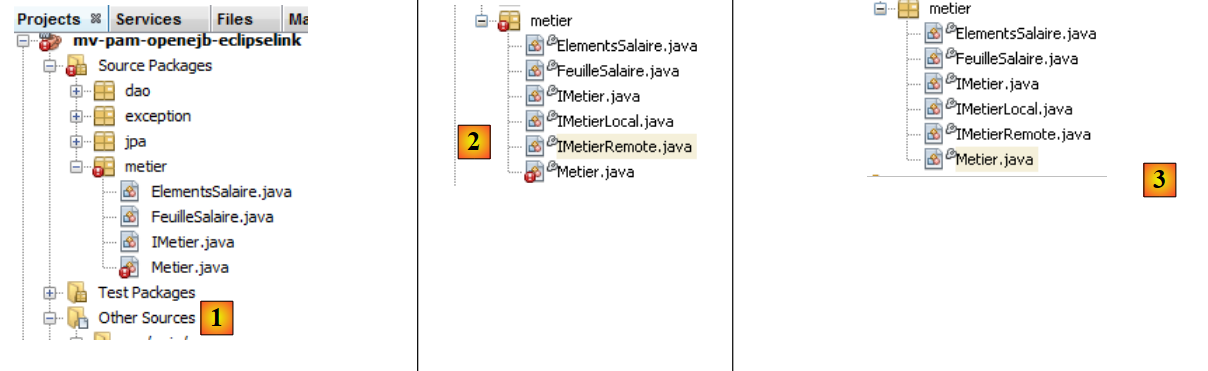 |
The errors reported above [1] are due to the fact that the copied [business] layer uses Spring and the Spring libraries are no longer part of the project.
6.2.4.1. The [Business] EJB
We follow the same procedure as described for the [CotisationDao] EJB. First, in [2], we create the local and remote interfaces for the future [Metier] EJB. Both derive from the initial [IMetier] interface.
Once this is done, in [3] we modify the [Business] class so that it becomes an EJB:
- line 1: the @Stateless annotation makes the class an EJB
- line 2: each method of the class will execute within a transaction
- line 3: the [Metier] EJB implements both the local and remote interfaces we just defined
- line 7: the [Metier] EJB will use the [CotisationDao] EJB via its local interface. This means that the [business] and [DAO] layers must run in the same JVM.
- Line 6: The @EJB annotation ensures that the EJB container injects the reference to the local interface of the [CotisationDao] EJB itself. The other approach we have encountered is to use a JNDI context.
- Lines 8–11: The same mechanism is used for the other two EJBs in the [DAO] layer.
6.2.4.2. Testing the [business] layer
Our [business] layer, implemented by an EJB, can be tested. We start by copying the [business] package from [Test Packages] in the [mv-pam-spring-hibernate] project into the project currently under construction [1]:
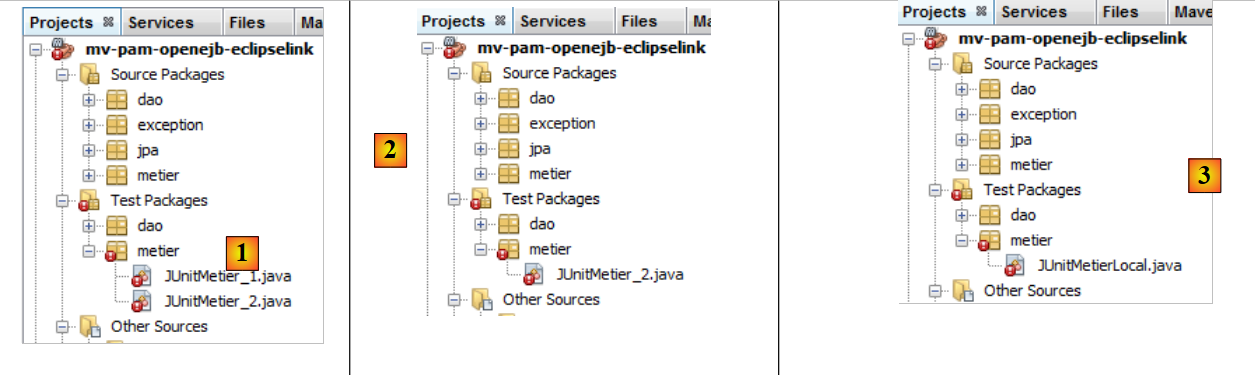 |
- in [1], the result of the copy
- in [2], we delete the first test
- in [3], the remaining test is renamed [JUnitMetierLocal]
The [JUnitMetierLocal] class becomes the following:
- line 4: a reference to the local interface of the EJB [Metier]
- lines 8-12: OpenEJB container configuration identical to that used in the [DAO] layer test
- lines 15–19: we request references from the JNDI context in line 12 to the three EJBs in the [DAO] layer and to the EJB in the [business] layer. The EJBs in the [DAO] layer will be used to initialize the database, and the EJB in the [business] layer will be used to perform salary calculation tests.
Running the [JUnitMetierLocal] test yields the following result [1]:
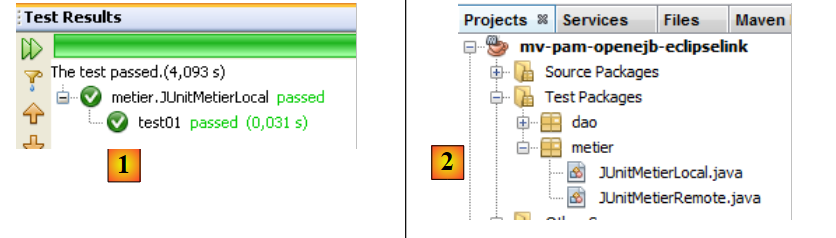 |
In [2], we duplicate [JUnitMetierLocal] as [JUnitMetierRemote] to test the remote interface of the [Metier] EJB this time. The code for [JUnitMetierRemote] is modified to use this remote interface. The rest remains unchanged.
- lines 4 and 19: we use the remote interface of the [Business] EJB.
- lines 15–17: we use the remote interfaces of the [DAO] layer
- lines 34–35: Because with remote interfaces, objects exchanged between the client and the server are passed by value, we must retrieve the result returned by the create(Indemnite i) method. This was not necessary with local interfaces, where objects are passed by reference.
Once this is done, the project can be built and the [JUnitMetierRemote] test executed:
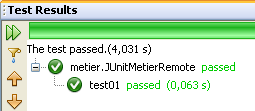 |
6.2.5. Porting the [console] layer
We will port the [console] layer by copying packages from the [mv-pam-spring-hibernate] project to the [mv-pam-openejb-eclipselink] project.
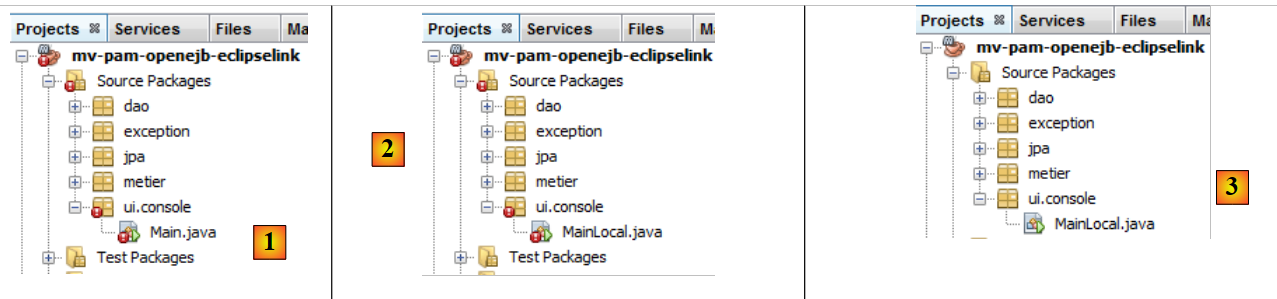 |
The errors reported above [1] stem from the fact that the copied [business] layer uses Spring, and the Spring libraries are no longer part of the project. In [2], the [Main] class is renamed [MainLocal]. It will use the local interface of the [Business] EJB.
The code for the [MainLocal] class changes as follows:
The changes are located in lines 13–25. This is how we obtain a reference to the [business] layer, which has changed (lines 17–22). We will not explain the new code, as it has already been covered in previous examples. Once these changes are made, the project no longer has any errors (see [3]).
We configure the project to run with arguments [1]:
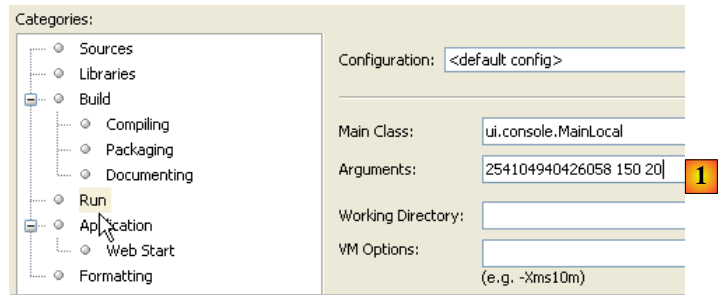 |
For the console application to run normally, there must be data in the database. To do this, you must modify the [META-INF/persistence.xml] file:
Line 14, which caused the database tables to be recreated on every run, is commented out. The project must be rebuilt (Clean and Build) for this change to take effect. Once this is done, the program can be run. If all goes well, the console output will look something like the following:
<?xml version="1.0" encoding="UTF-8"?>
<persistence version="1.0" xmlns="http://java.sun.com/xml/ns/persistence" xmlns:xsi="http://www.w3.org/2001/XMLSchema-instance" xsi:schemaLocation="http://java.sun.com/xml/ns/persistence              http://java.sun.com/xml/ns/persistence/persistence_1_0.xsd">
  <persistence-unit name="dbpam_eclipselinkPU" transaction-type="JTA">
    <!-- the supplier JPA is EclipseLink -->
    <provider>org.eclipse.persistence.jpa.PersistenceProvider</provider>
    <!-- jpa entities -->
    <class>jpa.Cotisation</class>
    <class>jpa.Employe</class>
    <class>jpa.Indemnite</class>
    <!-- properties provider EclipseLink -->
    <properties>
      <property name="eclipselink.logging.level" value="FINE"/>
      <!--
      <property name="eclipselink.ddl-generation" value="drop-and-create-tables"/>
      -->
    </properties>
  </persistence-unit>
</persistence>
Here, we used the local interface of the [business] layer. We now use its remote interface in a second console class:
|
In [1], the [MainLocal] class has been duplicated into [MainRemote]. The code in [MainRemote] is modified to use the remote interface of the [business] layer:
Changes have been made to lines 2 and 8. The project is configured [2] to run the [MainRemote] class. Running it produces the same results as before.
6.3. Conclusion
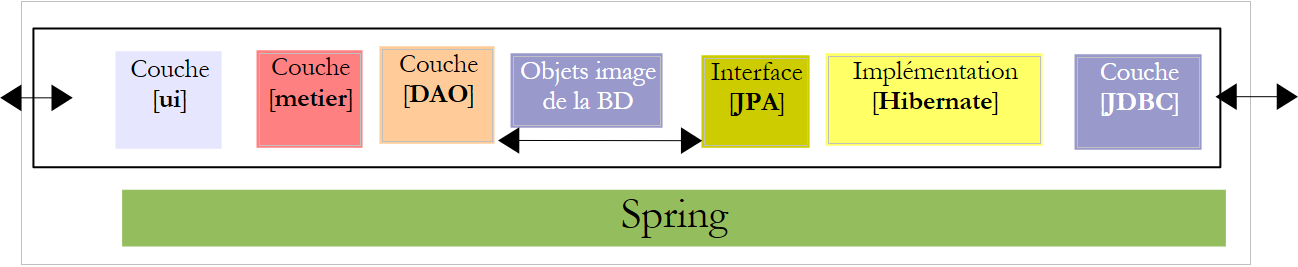
We have demonstrated how to migrate a Spring/Hibernate architecture to an OpenEJB/EclipseLink architecture.
The Spring/Hibernate architecture
 |
The OpenEJB/EclipseLink architecture
 |
The porting process went smoothly because the original application had been structured in layers. This point is important to understand.