4. JPA : An Overview
We aim to introduce JPA (Java Persistence API) with a few examples. JPA is covered in the course:
- Java 5 Persistence in Practice: [http://tahe.developpez.com/java/jpa] - provides the tools to build the data access layer with JPA
4.1. The Role of JPA in a Layered Architecture
Readers are encouraged to review the beginning of this document (paragraph 2), which explains the role of the JPA layer in a layered architecture. The JPA layer is part of the data access layers:
 |
The [DAO] layer interacts with the JPA specification. Regardless of the product that implements it, the interface of the JPA layer presented to the [DAO] layer remains the same. Below, we present a few examples from [ref1] that will help us build our own JPA layer.
4.2. JPA - Examples
4.2.1. Example 1 - Object representation of a single table
4.2.1.1. The [person] table
Consider a database with a single [person] table whose role is to store some information about individuals:
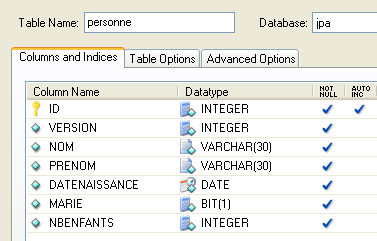 |
primary key of the table | |
version of the row in the table. Each time the person is modified, their version number is incremented. | |
person's last name | |
first name | |
their date of birth | |
integer 0 (unmarried) or 1 (married) | |
number of children |
4.2.1.2. The [Person] entity
We are in the following runtime environment:
 |
The JPA layer [5] must bridge the relational world of the database [7] and the object world [4] manipulated by Java programs [3]. This bridge is established through configuration, and there are two ways to do this:
- using XML files. This was virtually the only way to do it until the advent of JDK 1.5
- using Java annotations since JDK 1.5
In this document, we will use exclusively the second method.
The [Person] object representing the [person] table presented earlier could be as follows:
...

@SuppressWarnings("unused")
@Entity
@Table(name="Personne")
public class Personne implements Serializable{

    @Id
    @Column(name = "ID", nullable = false)
    @GeneratedValue(strategy = GenerationType.AUTO)
    private Integer id;

    @Column(name = "VERSION", nullable = false)
    @Version
    private int version;

    @Column(name = "NOM", length = 30, nullable = false, unique = true)
    private String nom;

    @Column(name = "PRENOM", length = 30, nullable = false)
    private String prenom;

    @Column(name = "DATENAISSANCE", nullable = false)
    @Temporal(TemporalType.DATE)
    private Date datenaissance;

    @Column(name = "MARIE", nullable = false)
    private boolean marie;

    @Column(name = "NBENFANTS", nullable = false)
    private int nbenfants;

    // manufacturers
    public Personne() {
    }

    public Personne(String nom, String prenom, Date datenaissance, boolean marie,
            int nbenfants) {
        setNom(nom);
        setPrenom(prenom);
        setDatenaissance(datenaissance);
        setMarie(marie);
        setNbenfants(nbenfants);
    }

    // toString
    public String toString() {
...
    }

    // getters and setters
...
}
Configuration is performed using Java annotations (@Annotation). Java annotations are either processed by the compiler or by specialized tools at runtime. Apart from the annotation on line 3 intended for the compiler, all annotations here are intended for the JPA implementation being used, Hibernate or Toplink. They will therefore be processed at runtime. In the absence of tools capable of interpreting them, these annotations are ignored. Thus, the [Person] class above could be used in a non-JPA context.
There are two distinct cases for using JPA annotations in a class C associated with a table T:
- the table T already exists: the JPA annotations must then replicate the existing structure (column names and definitions, integrity constraints, foreign keys, primary keys, etc.)
- Table T does not exist and will be created based on the annotations found in class C.
Case 2 is the easiest to handle. Using JPA annotations, we specify the structure of the table T we want. Case 1 is often more complex. Table T may have been created a long time ago outside of any JPA context. Its structure may therefore be ill-suited to JPA’s relational-to-object bridge. To simplify matters, we’ll focus on Case 2, where the table T associated with class C will be created based on the JPA annotations in class C.
Let’s examine the JPA annotations of the [Person] class:
- line 4: the @Entity annotation is the first essential annotation. It is placed before the line declaring the class and indicates that the class in question must be managed by the JPA persistence layer. Without this annotation, all other JPA annotations would be ignored.
- line 5: the @Table annotation designates the database table that the class represents. Its main argument is name, which specifies the table’s name. Without this argument, the table will be named after the class, in this case [Person]. In our example, the @Table annotation is therefore unnecessary.
- Line 8: The @Id annotation is used to designate the field in the class that corresponds to the table’s primary key. This annotation is mandatory. Here, it indicates that the id field on line 11 corresponds to the table’s primary key.
- Line 9: The @Column annotation is used to link a class field to the table column that the field represents. The name attribute specifies the name of the column in the table. If this attribute is omitted, the column is given the same name as the field. In our example, the name argument was therefore optional. The nullable=false argument specifies that the column associated with the field cannot have a NULL value and that the field must therefore have a value.
- Line 10: The @GeneratedValue annotation specifies how the primary key is generated when it is automatically generated by the DBMS. This will be the case in all our examples. It is not mandatory. Thus, our Person could have a student ID that serves as the primary key and is not generated by the DBMS but set by the application. In this case, the @GeneratedValue annotation would be omitted. The strategy argument specifies how the primary key is generated when generated by the DBMS. Not all DBMSs use the same technique for generating primary key values. For example:
uses a value generator called before each insertion | |
the primary key field is defined as having the Identity type. The result is similar to Firebird’s value generator, except that the key value is not known until after the row is inserted. | |
uses an object called SEQUENCE, which again acts as a value generator |
The JPA layer must generate different SQL statements depending on the DBMS to create the value generator. It is configured to specify the type of DBMS it must handle. As a result, it can determine the standard strategy for generating primary key values for that DBMS. The argument strategy = GenerationType.*****AUTO* instructs the JPA layer to use this standard strategy. This technique has worked in all examples in this document for the seven DBMSs used.
- Line 14: The @Version annotation designates the field used to manage concurrent access to the same row in the table.
To understand this issue of concurrent access to the same row in the [person] table, let’s assume a web application allows a person’s information to be updated and consider the following scenario:
At time T1, user U1 begins editing a person P. At this moment, the number of children is 0. He changes this number to 1, but before he submits his changes, user U2 begins editing the same person P. Since U1 has not yet submitted his changes, U2 sees the number of children as 0 on his screen. U2 changes the name of person P to uppercase. Then U1 and U2 save their changes in that order. U2’s change will take precedence: in the database, the name will be in uppercase and the number of children will remain at zero, even though U1 believes they changed it to 1.
The concept of a person’s version helps us solve this problem. Let’s revisit the same use case:
At time T1, a user U1 begins editing a person P. At this point, the number of children is 0 and the version is V1. They change the number of children to 1, but before they commit their change, a user U2 begins editing the same person P. Since U1 has not yet committed their change, U2 sees the number of children as 0 and the version as V1. U2 changes the name of person P to uppercase. Then U1 and U2 commit their changes in that order. Before committing a change, we verify that the user modifying person P holds the same version as the currently saved version of person P. This will be the case for user U1. Their change is therefore accepted, and we then change the version of the modified person from V1 to V2 to indicate that the person has undergone a change. When validating U2’s modification, we will notice that U2 has version V1 of person P, whereas the current version is V2. We can then inform user U2 that someone else acted before them and that they must start with the new version of person P. They will do so, retrieve a version V2 of person P who now has a child, capitalize the name, and validate. Their modification will be accepted if the registered person P is still version V2. Ultimately, the modifications made by U1 and U2 will be taken into account, whereas in the use case without versions, one of the modifications would have been lost.
The [DAO] layer of the client application can manage the version of the [Person] class itself. Every time an object P is modified, the version of that object will be incremented by 1 in the table. The @Version annotation allows this management to be transferred to the JPA layer. The field in question does not need to be named "version" as in the example. It can have any name.
The fields corresponding to the @Id and @Version annotations are present for persistence purposes. They would not be needed if the [Person] class did not need to be persisted. We can see, therefore, that an object is represented differently depending on whether or not it needs to be persisted.
- Line 17: Once again, the @Column annotation provides information about the column in the [person] table associated with the name field of the Person class. Here we find two new arguments:
- unique=true indicates that a person’s name must be unique. This will result in the addition of a uniqueness constraint on the NAME column of the [person] table in the database.
- length=30 sets the number of characters in the NAME column to 30. This means that the type of this column will be VARCHAR(30).
- Line 24: The @Temporal annotation is used to specify the SQL type for a date/time column or field. The type TemporalType.DATE denotes a date without an associated time. The other possible types are TemporalType.TIME for encoding a time and TemporalType.TIMESTAMP for encoding a date and time.
Let’s now comment on the rest of the code in the [Person] class:
- Line 6: The class implements the Serializable interface. Serialization of an object involves converting it into a sequence of bits. Deserialization is the reverse operation. Serialization/deserialization is particularly used in client/server applications where objects are exchanged over the network. Client or server applications are unaware of this operation, which is performed transparently by the JVMs. For this to be possible, however, the classes of the exchanged objects must be "tagged" with the Serializable keyword.
- Line 37: a constructor for the class. Note that the id and version fields are not included among the parameters. This is because these two fields are managed by the JPA layer and not by the application.
- Lines 51 and beyond: the get and set methods for each of the class’s fields. Note that JPA annotations can be placed on the fields’ get methods instead of on the fields themselves. The placement of the annotations indicates the mode JPA should use to access the fields:
- if the annotations are placed at the field level, JPA will access the fields directly to read or write them
- if the annotations are placed at the get level, JPA will access the fields via the get/set methods to read or write them
The position of the @Id annotation determines the placement of JPA annotations in a class. When placed at the field level, it indicates direct access to the fields; when placed at the get level, it indicates access to the fields via the get and set methods. The other annotations must then be placed in the same manner as the @Id annotation.
4.2.2. Configuring the JPA Layer
Tests of the JPA layer can be performed using the following architecture:
 |
- in [7]: the database that will be generated from the annotations of the [Person] entity as well as additional configurations made in a file called [persistence.xml]
- in [5, 6]: a JPA layer implemented by Hibernate
- in [4]: the [Person] entity
- in [3]: a console-based test program
The JPA layer is configured via the [META-INF/persistence.xml] file:
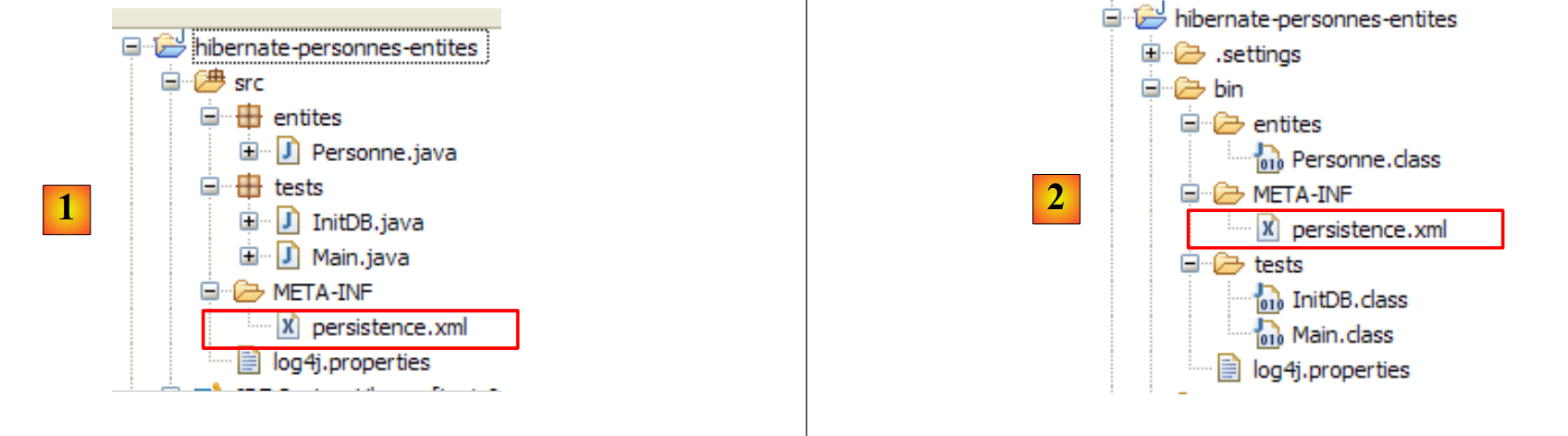 |
At runtime, the [META-INF/persistence.xml] file is searched for in the application’s classpath.
Let’s examine the JPA layer configuration in our project’s [persistence.xml] file:
<?xml version="1.0" encoding="UTF-8"?>
<persistence version="1.0" xmlns="http://java.sun.com/xml/ns/persistence">
    <persistence-unit name="jpa" transaction-type="RESOURCE_LOCAL">
        <!--  provider -->
        <provider>org.hibernate.ejb.HibernatePersistence</provider>
        <properties>
            <!-- Persistent classes -->
            <property name="hibernate.archive.autodetection" value="class, hbm" />
            <!-- logs SQL
                <property name="hibernate.show_sql" value="true"/>
                <property name="hibernate.format_sql" value="true"/>
                <property name="use_sql_comments" value="true"/>
            -->
            <!-- connection JDBC -->
            <property name="hibernate.connection.driver_class" value="com.mysql.jdbc.Driver" />
            <property name="hibernate.connection.url" value="jdbc:mysql://localhost:3306/jpa" />
            <property name="hibernate.connection.username" value="jpa" />
            <property name="hibernate.connection.password" value="jpa" />
            <!--  automatic schematic creation -->
            <property name="hibernate.hbm2ddl.auto" value="create" />
            <!-- Dialect -->
            <property name="hibernate.dialect" value="org.hibernate.dialect.MySQL5InnoDBDialect" />
            <!--  properties DataSource c3p0 -->
            <property name="hibernate.c3p0.min_size" value="5" />
            <property name="hibernate.c3p0.max_size" value="20" />
            <property name="hibernate.c3p0.timeout" value="300" />
            <property name="hibernate.c3p0.max_statements" value="50" />
            <property name="hibernate.c3p0.idle_test_period" value="3000" />
        </properties>
    </persistence-unit>
</persistence>
To understand this configuration, we need to revisit the data access architecture of our application:
 |
- the [persistence.xml] file configures layers [4, 5, 6]
- [4]: Hibernate implementation of JPA
- [5]: Hibernate accesses the database via a connection pool. A connection pool is a pool of open connections to the DBMS. A DBMS is accessed by multiple users, yet for performance reasons, it cannot exceed a limit N of open connections simultaneously. Well-written code opens a connection to the DBMS for the minimum amount of time: it executes SQL commands and closes the connection. It will do this repeatedly, every time it needs to work with the database. The cost of opening and closing a connection is not negligible, and this is where the connection pool comes in. When the application starts, the connection pool opens N1 connections to the DBMS. The application requests an open connection from the pool whenever it needs one. The connection is returned to the pool as soon as the application no longer needs it, preferably as quickly as possible. The connection is not closed and remains available for the next user. A connection pool is therefore a system for sharing open connections.
- [6]: the JDBC driver for the DBMS being used
Now let’s see how the [persistence.xml] file configures the layers [4, 5, 6] above:
- line 2: the root tag of the XML file is <persistence>.
- line 3: <persistence-unit> is used to define a persistence unit. There can be multiple persistence units. Each one has a name (name attribute) and a transaction type (transaction-type attribute). The application will access the persistence unit via its name, in this case jpa. The transaction type RESOURCE_LOCAL indicates that the application manages transactions with the DBMS itself. This will be the case here. When the application runs in an EJB3 container, it can use the container’s transaction service. In this case, we will set transaction-type=JTA (Java Transaction API). JTA is the default value when the transaction-type attribute is omitted.
- Line 5: The <provider> tag is used to define a class that implements the [javax.persistence.spi.PersistenceProvider] interface, which allows the application to initialize the persistence layer. Because we are using a JPA/Hibernate implementation, the class used here is a Hibernate class.
- Line 6: The <properties> tag introduces properties specific to the chosen provider. Thus, depending on whether you have chosen Hibernate, TopLink, Kodo, etc., you will have different properties. The following are specific to Hibernate.
- Line 8: Instructs Hibernate to scan the project’s classpath to find classes annotated with @Entity so that they can be managed. @Entity classes can also be declared using <class>class_name</class> tags, directly under the <persistence-unit> tag. This is what we will do with the JPA/Toplink provider.
- Lines 10–12, which are commented out here, configure Hibernate’s console logs:
- Line 10: to enable or disable the display of SQL statements issued by Hibernate to the DBMS. This is very useful during the learning phase. Due to the relational/object bridge, the application works on persistent objects to which it applies operations such as [persist, merge, remove]. It is very helpful to know which SQL statements are actually issued for these operations. By studying them, you gradually learn to anticipate the SQL statements Hibernate will generate when performing such operations on persistent objects, and the relational/object bridge begins to take shape in your mind.
- Line 11: The SQL statements displayed on the console can be formatted neatly to make them easier to read
- Line 12: The displayed SQL statements will also be annotated
- Lines 15–19 define the JDBC layer (layer [6] in the architecture):
- line 15: the JDBC driver class for the DBMS, here MySQL5
- line 16: the URL of the database being used
- Lines 17, 18: the connection username and password
- line 22: Hibernate needs to know which DBMS it is working with. This is because all DBMSs have proprietary SQL extensions—such as their own methods for automatically generating primary key values—which means Hibernate must identify the specific DBMS to send SQL statements that it can understand. [MySQL5InnoDBDialect] refers to the MySQL5 DBMS with InnoDB tables that support transactions.
- Lines 24–28 configure the c3p0 connection pool (layer [5] in the architecture):
- Lines 24, 25: the minimum (default 3) and maximum number of connections (default 15) in the pool. The default initial number of connections is 3.
- Line 26: maximum wait time in milliseconds for a connection request from the client. After this timeout, c3p0 will return an exception.
- Line 27: To access the database, Hibernate uses prepared SQL statements (PreparedStatement) that c3p0 can cache. This means that if the application requests a prepared SQL statement that is already in the cache a second time, it will not need to be prepared (preparing an SQL statement incurs a cost), and the one in the cache will be used. Here, we specify the maximum number of prepared SQL statements that the cache can hold, across all connections (a prepared SQL statement belongs to a single connection).
- Line 28: Frequency in milliseconds for checking the validity of connections. A connection in the pool can become invalid for various reasons (the JDBC driver invalidates the connection because it has been open too long, the JDBC driver has "bugs," etc.).
- Line 20: Here, we specify that when the persistence layer is initialized, the database schema for @Entity objects should be generated. Hibernate now has all the tools to generate the SQL statements for creating the database tables:
- the configuration of the @Entity objects allows it to determine which tables to generate
- Lines 15–18 and 24–28 allow it to establish a connection with the DBMS
- line 22 tells it which SQL dialect to use to generate the tables
Thus, the [persistence.xml] file used here recreates a new database each time the application is run. The tables are recreated (create table) after being dropped (drop table) if they existed. Note that this is obviously not something to do with a production database...
4.2.3. Example 2: One-to-many relationship
4.2.3.1. The database schema file [
1 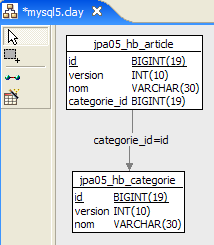 | 2 |
- in [1], the database, and in [2], its DDL (MySQL5)
An article A(id, version, name) belongs to exactly one category C(id, version, name). A category C can contain 0, 1, or more articles. We have a one-to-many relationship (Category -> Article) and the inverse many-to-one relationship (Article -> Category). This relationship is represented by the foreign key that the [article] table has on the [category] table (lines 24–28 of the DDL).
4.2.3.2. The @Entity objects representing the database
An article is represented by the following @Entity [Article]:
package entites;

...
@Entity
@Table(name="jpa05_hb_article")
public class Article implements Serializable {

    // fields
    @Id
    @GeneratedValue(strategy = GenerationType.AUTO)
    private Long id;

    @SuppressWarnings("unused")
    @Version
    private int version;

    @Column(length = 30)
    private String nom;

    // main relationship Article (many) -> Category (one)
    // implemented by a foreign key (categorie_id) in Article
    // 1 Article must have 1 Category (nullable=false)
    @ManyToOne(fetch=FetchType.LAZY)
    @JoinColumn(name = "categorie_id", nullable = false)
    private Categorie categorie;

    // manufacturers
    public Article() {
    }

    // getters and setters
    ...
    // toString
    public String toString() {
        return String.format("Article[%d,%d,%s,%d]", id, version, nom, categorie.getId());
    }

}
- lines 9-11: primary key of the @Entity
- lines 13-15: its version number
- lines 17-18: name of the article
- lines 20-25: many-to-one relationship linking the @Entity Article to the @Entity Category:
- line 23: the ManyToOne annotation. The Many refers to the @Entity Article in which we are located, and the One refers to the @Entity Category (line 25). A category (One) can have multiple articles (Many).
- line 24: the ManyToOne annotation defines the foreign key column in the [article] table. It will be named (name) categorie_id, and each row must have a value in this column (nullable=false).
- Line 25: The category to which the article belongs. When an article is added to the persistence context, we request that its category not be added immediately (fetch=FetchType.LAZY, line 23). We don’t know if this request makes sense. We’ll see.
A category is represented by the following @Entity [Category]:
package entites;
...
@Entity
@Table(name="jpa05_hb_categorie")
public class Categorie implements Serializable {

    // fields
    @Id
    @GeneratedValue(strategy = GenerationType.AUTO)
    private Long id;

    @SuppressWarnings("unused")
    @Version
    private int version;

    @Column(length = 30)
    private String nom;

    // inverse relationship Category (one) -> Article (many) from relationship Article (many) -> Category (one)
    // cascade insertion Category -> insertion Articles
    // cascade maj Category -> maj Articles
    // cascade delete Category -> delete Articles
    @OneToMany(mappedBy = "categorie", cascade = { CascadeType.ALL })
    private Set<Article> articles = new HashSet<Article>();

    // manufacturers
    public Categorie() {
    }

    // getters and setters
...
    // toString
    public String toString() {
        return String.format("Categorie[%d,%d,%s]", id, version, nom);
    }

    // bidirectional association Category <--> Article
    public void addArticle(Article article) {
        // the item is added to the collection of items in the category
        articles.add(article);
        // article changes category
        article.setCategorie(this);
    }
}
- lines 8-11: the primary key of the @Entity
- lines 12-14: its version
- lines 16-17: the category name
- lines 19-24: the set of articles in the category
- line 23: the @OneToMany annotation denotes a one-to-many relationship. The "One" refers to the @Entity [Category] we are in, and the "Many" refers to the [Article] type on line 24: one (One) category has many (Many) articles.
- line 23: the annotation is the inverse (mappedBy) of the ManyToOne annotation placed on the category field of the @Entity Article: mappedBy=category. The ManyToOne relationship placed on the category field of the @Entity Article is the primary relationship. It is essential. It implements the foreign key relationship that links the @Entity Article to the @Entity Category. The OneToMany relationship placed on the articles field of the @Entity Category is the inverse relationship. It is not essential. It is a convenience for retrieving the articles of a category. Without this convenience, these articles would be retrieved via a JPQL query.
- Line 23: cascadeType.ALL ensures that operations (persist, merge, remove) performed on a @Entity Category are cascaded to its articles.
- Line 24: The articles in a category will be placed in an object of type `Set<Article>`. The `Set` type does not allow duplicates. Thus, the same article cannot be added twice to the `Set<Article>` object. What does "the same article" mean? To indicate that article `a` is the same as article `b`, Java uses the expression `a.equals(b)`. In the Object class, the parent of all classes, a.equals(b) is true if a==b, i.e., if objects a and b have the same memory location. One might want to say that items a and b are the same if they have the same name. In this case, the developer must redefine two methods in the [Item] class:
- equals: which must return true if the two items have the same name
- hashCode: must return the same integer value for two objects [Article] that the equals method considers equal. Here, the value will therefore be constructed from the article's name. The value returned by hashCode can be any integer. It is used in various object containers, particularly dictionaries (Hashtable).
The OneToMany relationship can use types other than Set to store the Many, such as List objects. We will not cover these cases in this document. The reader can find them in [ref1].
- Line 38: The [addArticle] method allows us to add an article to a category. The method ensures that both ends of the OneToMany relationship linking [Category] to [Article] are updated.
4.3. The JPA Layer API
Let’s clarify the runtime environment of a JPA client:
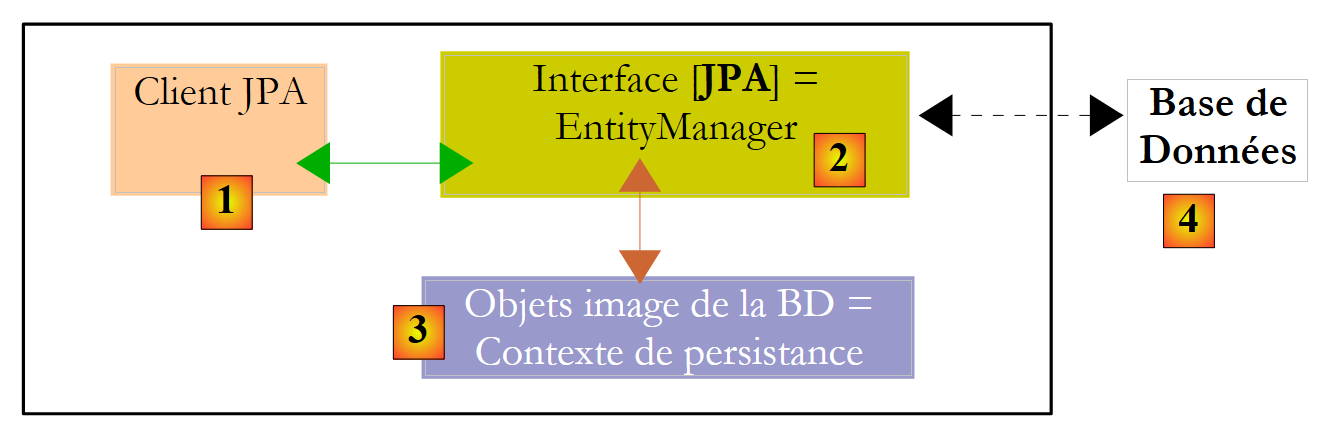 |
We know that the JPA layer [2] creates a bridge between the object [3] and relational [4] domains. The set of objects managed by the JPA layer within this object/relational bridge is called the "persistence context." To access data in the persistence context, a JPA client [1] must go through the JPA layer [2]:
- it can create an object and ask the JPA layer to make it persistent. The object then becomes part of the persistence context.
- it can request a reference to an existing persistent object from the [JPA] layer.
- it can modify a persistent object obtained from the JPA layer.
- it can ask the JPA layer to remove an object from the persistence context.
The JPA layer provides the client with an interface called [EntityManager] which, as its name suggests, allows for the management of @Entity objects in the persistence context. Below are the main methods of this interface:
Adds the entity to the persistence context | |
removes entity from the persistence context | |
merges an entity object from the client that is not managed by the persistence context with the entity object in the persistence context that has the same primary key. The result returned is the entity object from the persistence context. | |
places an object retrieved from the database into the persistence context via its primary key. The type T of the object allows the JPA layer to know which table to query. The persistent object thus created is returned to the client. | |
creates a Query object from a JPQL (Java Persistence Query Language). A JPQL query is analogous to an SQL query, except that it queries objects rather than tables. | |
A method similar to the previous one, except that queryText is an SQL query rather than a JPQL query. | |
A method identical to createQuery, except that the JPQL query queryText has been externalized into a configuration file and associated with a name. This name is the method’s parameter. |
An EntityManager object has a lifecycle that is not necessarily the same as that of the application. It has a beginning and an end. Thus, a JPA client can work successively with different EntityManager objects. The persistence context associated with an EntityManager has the same lifecycle as the EntityManager itself. They are inseparable from one another. When an EntityManager object is closed, its persistence context is, if necessary, synchronized with the database and then ceases to exist. A new EntityManager must be created to obtain a new persistence context.
The JPA client can create an EntityManager and thus a persistence context with the following statement:
EntityManagerFactory emf = Persistence.createEntityManagerFactory("nom d'une unité de persistance");
- javax.persistence.Persistence is a static class used to obtain a factory for EntityManager objects. This factory is associated with a specific persistence unit. Recall that the configuration file [META-INF/persistence.xml] is used to define persistence units, and that these units have a name:
<persistence-unit name="elections-dao-jpa-mysql-01PU" transaction-type="RESOURCE_LOCAL">
Above, the persistence unit is named elections-dao-jpa-mysql-01PU. It comes with its own specific configuration, including the DBMS it works with. The statement [Persistence.createEntityManagerFactory("elections-dao-jpa-mysql-01PU")] creates an EntityManagerFactory capable of providing EntityManager objects intended to manage persistence contexts associated with the persistence unit named elections-dao-jpa-mysql-01PU. An EntityManager object—and thus a persistence context—is obtained from the EntityManagerFactory object as follows:
The following methods of the [EntityManager] interface allow you to manage the lifecycle of the persistence context:
The persistence context is closed. Forces synchronization of the persistence context with the database:
| |
The persistence context is cleared of all its objects but not closed. | |
The persistence context is synchronized with the database as described for close() |
The JPA client can force synchronization of the persistence context with the database using the [EntityManager].flush method. Synchronization can be explicit or implicit. In the first case, it is up to the client to perform flush operations when it wants to synchronize; otherwise, synchronization occurs at specific times that we will specify. The synchronization mode is managed by the following methods of the [EntityManager] interface:
There are two possible values for flushMode: FlushModeType.AUTO (default): synchronization occurs before every SELECT query made on the database. FlushModeType.COMMIT: synchronization occurs only at the end of transactions on the database. | |
returns the current synchronization mode |
To summarize: In FlushModeType.AUTO mode, which is the default, the persistence context will be synchronized with the database at the following times:
- before each SELECT operation on the database
- at the end of a transaction on the database
- following a flush or close operation on the persistence context
In FlushModeType.COMMIT mode, the same applies except for operation 1, which does not occur. The normal mode of interaction with the JPA layer is transactional mode. The client performs various operations on the persistence context within a transaction. In this case, the synchronization points between the persistence context and the database are cases 1 and 2 above in AUTO mode, and case 2 only in COMMIT mode.
Let’s conclude with the Query interface API, which allows you to issue JPQL commands on the persistence context or SQL commands directly on the database to retrieve data. The Query interface is as follows:
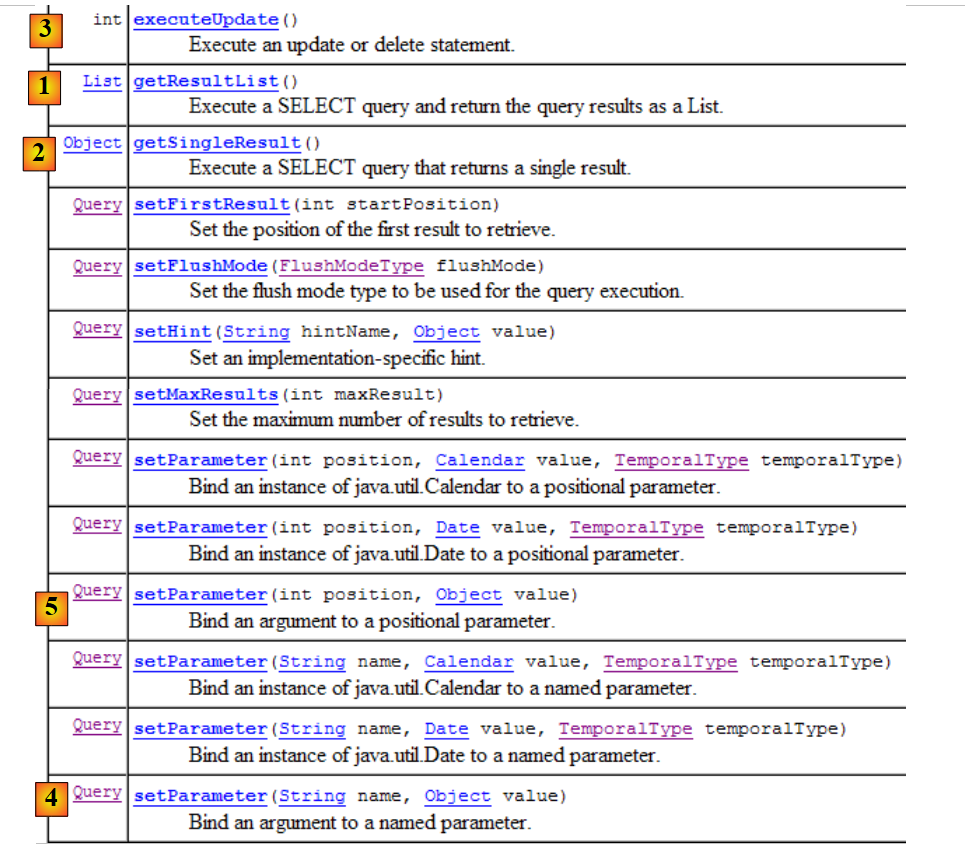 |
- 1 - The getResultList method executes a SELECT query that returns multiple objects. These are returned in a List object. This object is an interface. It provides an Iterator object that allows you to iterate through the elements of the list L as follows:
        Iterator iterator = L.iterator();
        while (iterator.hasNext()) {
            // exploiter l'objet iterator.next() qui représente l'élément courant de la liste
...
}
The list L can also be iterated over using a for loop:
        for (Object o : L) {
            // exploiter objet o
}
- 2 - The getSingleResult method executes a JPQL/SQL SELECT statement that returns a single object.
- 3 - The executeUpdate method executes an SQL UPDATE or DELETE statement and returns the number of rows affected by the operation.
- 4 - The setParameter(String, Object) method allows you to assign a value to a named parameter of a parameterized JPQL query
- 5 - The setParameter(int, Object) method sets the parameter, but the parameter is identified not by its name but by its position in the JPQL query.
4.4. s (JPQL)
JPQL (Java Persistence Query Language) is the query language of the JPA layer. The JPQL language is similar to the SQL language used in databases. While SQL works with tables, JPQL works with the objects representing those tables. We will examine an example within the following architecture:
 |
The database, which we will call [ dbrdvmedecins2], is a MySQL5 database with four tables:
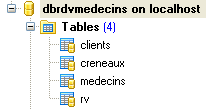 |
It collects information used to manage the appointments of a group of doctors.
4.4.1. The [MEDECINS] table
It contains information about the doctors.
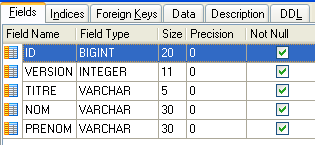 | 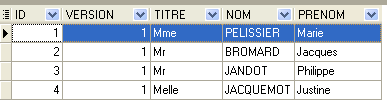 |
- ID: the doctor’s ID number—the table’s primary key
- VERSION: a number identifying the version of the row in the table. This number is incremented by 1 each time a change is made to the row.
- LAST_NAME: the doctor's last name
- FIRST NAME: the doctor's first name
- TITLE: their title (Ms., Mrs., Mr.)
4.4.2. The [CLIENTS] table
The clients of the various doctors are stored in the [CLIENTS] table:
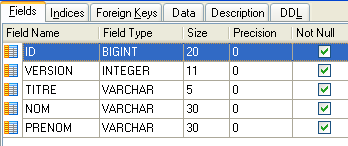 | 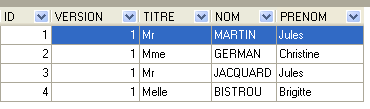 |
- ID: ID number identifying the client - primary key of the table
- VERSION: number identifying the version of the row in the table. This number is incremented by 1 each time a change is made to the row.
- LAST NAME: the client's last name
- FIRST NAME: the client’s first name
- TITLE: their title (Ms., Mrs., Mr.)
4.4.3. The [SLOTS] table
It lists the time slots when appointments are available:
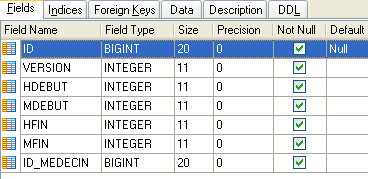 |
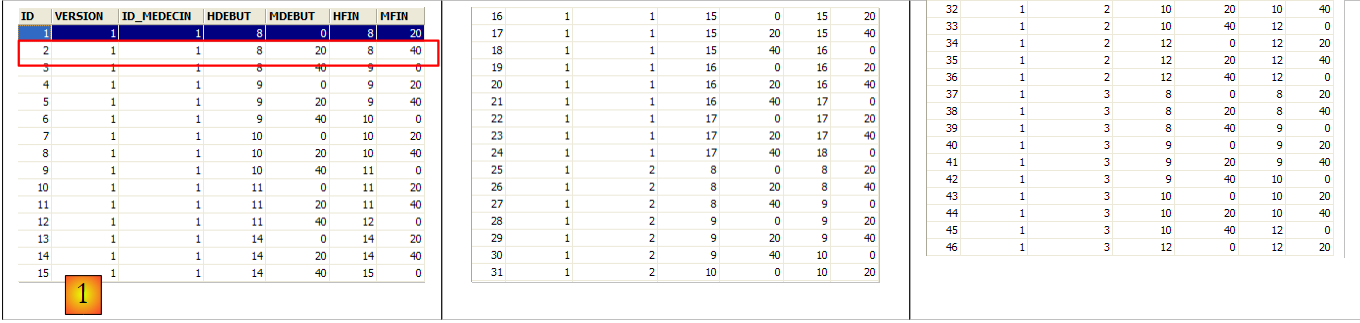 |
- ID: ID number for the time slot - primary key of the table (row 8)
- VERSION: number identifying the version of the row in the table. This number is incremented by 1 each time a change is made to the row.
- DOCTOR_ID: ID number identifying the doctor to whom this time slot belongs – foreign key on the DOCTORS(ID) column.
- START_TIME: start time of the time slot
- MSTART: Start minutes of the time slot
- HFIN: slot end time
- MFIN: End minutes of the slot
The second row of the [SLOTS] table (see [1] above) indicates, for example, that slot #2 begins at 8:20 a.m. and ends at 8:40 a.m. and belongs to doctor #1 (Ms. Marie PELISSIER).
4.4.4. The [RV] table
It lists the appointments made for each doctor:
 |
- ID: unique identifier for the appointment – primary key
- DAY: day of the appointment
- SLOT_ID: appointment time slot – foreign key on the [ID] field of the [SLOTS] table – determines both the time slot and the doctor involved.
- CLIENT_ID: ID of the client for whom the reservation is made – foreign key on the [ID] field of the [CLIENTS] table
This table has a uniqueness constraint on the values of the joined columns (DAY, SLOT_ID):
If a row in the [RV] table has the value (DAY1, SLOT_ID1) for the columns (DAY, SLOT_ID), this value cannot appear anywhere else. Otherwise, this would mean that two appointments were booked at the same time for the same doctor. From a Java programming perspective, the database’s JDBC driver throws an SQLException when this occurs.
The row with ID equal to 3 (see [1] above) means that an appointment was booked for slot #20 and client #4 on 08/23/2006. The [SLOTS] table tells us that slot no. 20 corresponds to the time slot 4:20 PM – 4:40 PM and belongs to doctor no. 1 (Ms. Marie PELISSIER). The [CLIENTS] table tells us that client no. 4 is Ms. Brigitte BISTROU.
4.4.5. Generating the database
To create the tables and populate them, you can use the script [dbrdvmedecins2.sql]. With [WampServer], you can proceed as follows:
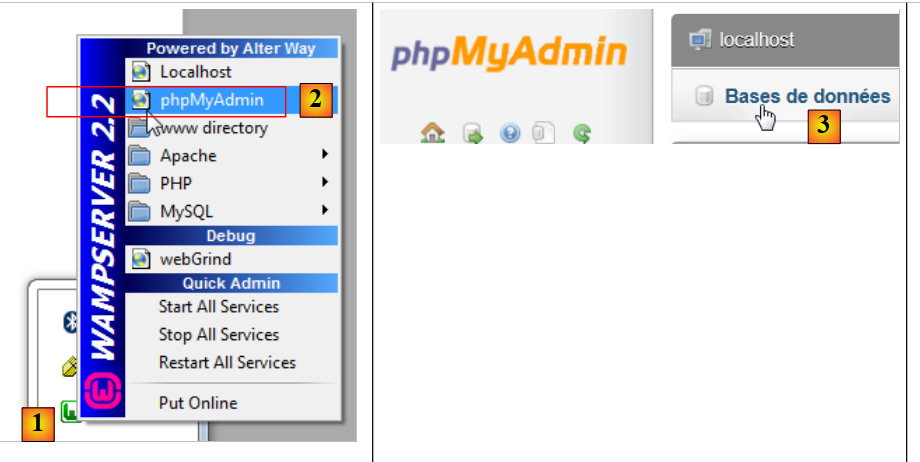 |
- In [1], click the [WampServer] icon and select the [PhpMyAdmin] option [2],
- In [3], in the window that opens, select the [Databases] link,
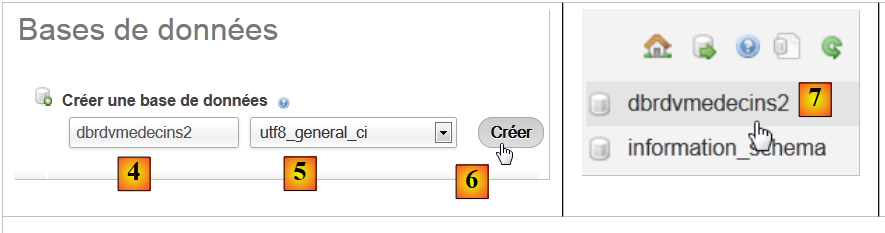 |
- In [2], create a database with the name [4] and encoding [5],
- In [7], the database has been created. Click on its link,
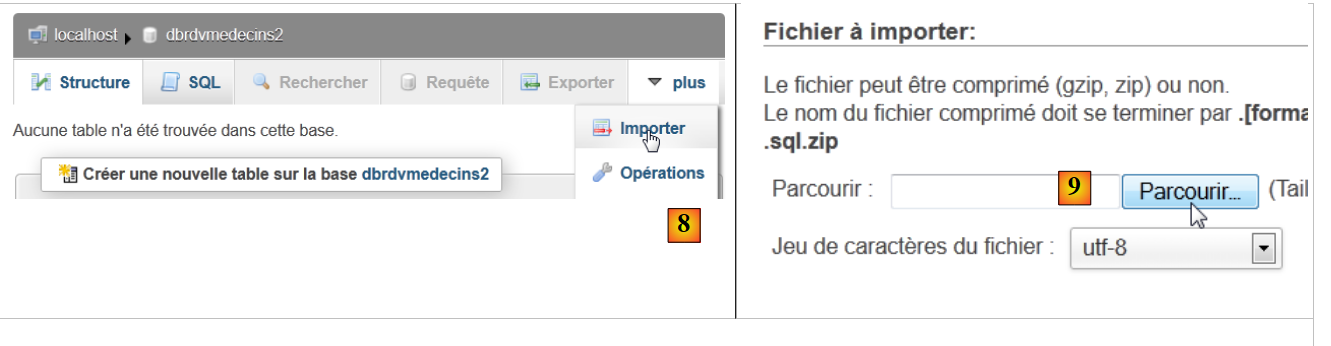 |
- in [8], import an SQL file,
- which you select from the file system using the [9] button,
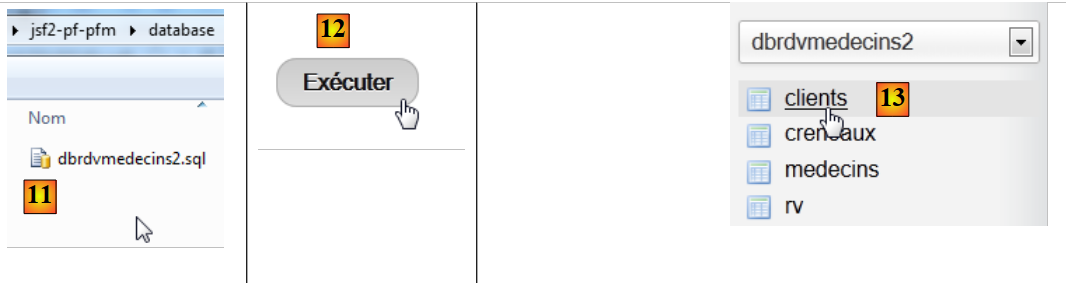 |
- in [11], select the SQL script and in [12] execute it,
- in [13], the four tables in the database have been created. Follow one of the links,
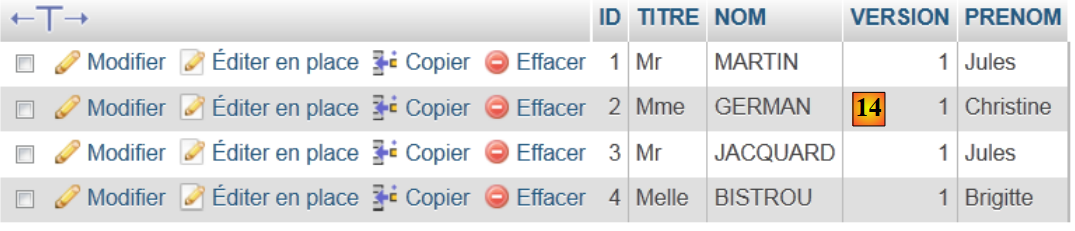 |
- in [14], the table’s contents.
We will not return to this database again. However, the reader is invited to follow its evolution throughout the programs, especially when things don’t work.
4.4.6. The [JPA] layer
Let’s return to the architecture of the example:
 |
We are now building the Maven project for the [JPA] layer.
4.4.7. The NetBeans project
Here is what it looks like:
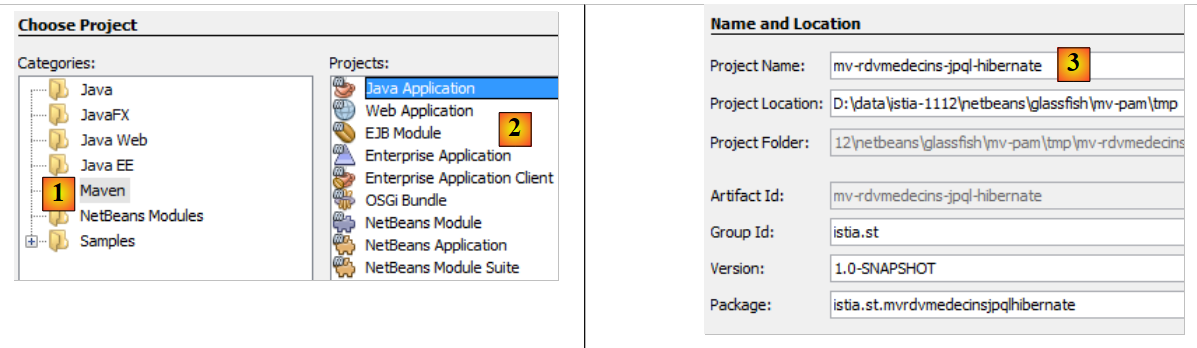 |
- In [1], we create a Maven project of type [Java Application] [2],
- in [3], we name the project,
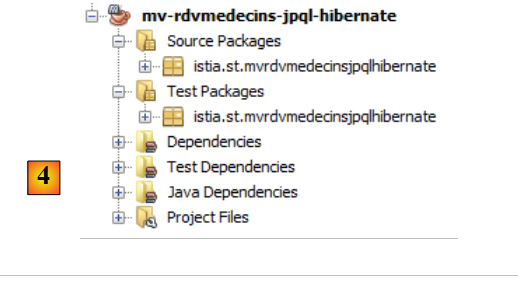 |
- in [4], the generated project.
4.4.8. Generating the [JPA] layer
Let’s return to the architecture we need to build:
 |
With NetBeans, it is possible to automatically generate the [JPA] layer. It is useful to be familiar with these automatic generation methods because the generated code provides valuable insights into how to write JPA entities.
4.4.9. Creating a NetBeans connection to the database
- Start the MySQL 5 DBMS so that the database is available,
- create a NetBeans connection to the [dbrdvmedecins2] database,
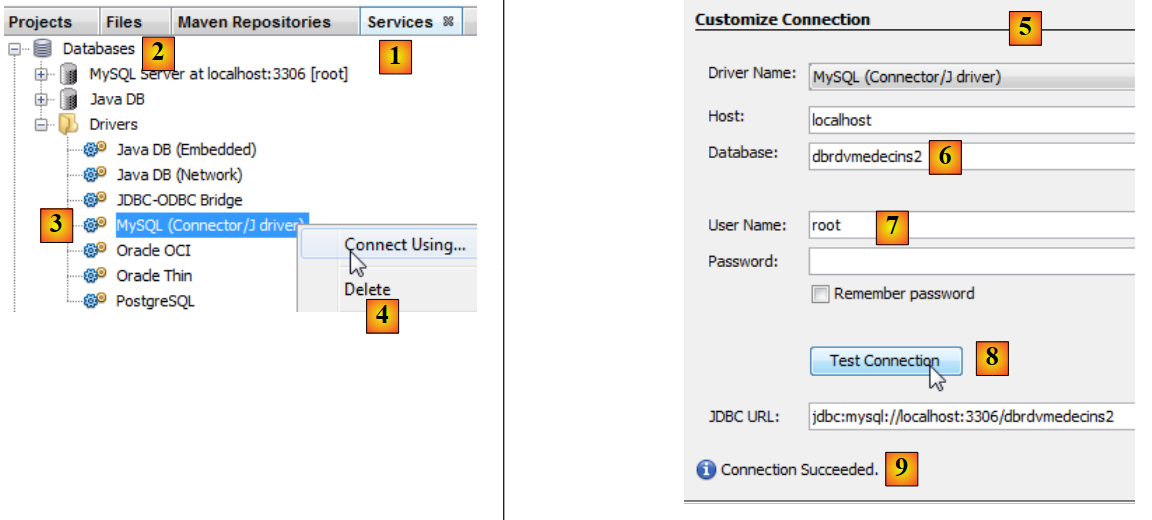 |
- in the [Services] tab [1], under the [Databases] section [2], select the MySQL JDBC driver [3],
- then select the [4] "Connect Using" option to create a connection to a MySQL database,
- in [5], enter the requested information. In [6], the database name; in [7], the database user and password;
- in [8], you can test the information you have provided,
- in [9], the expected message if the information is correct,
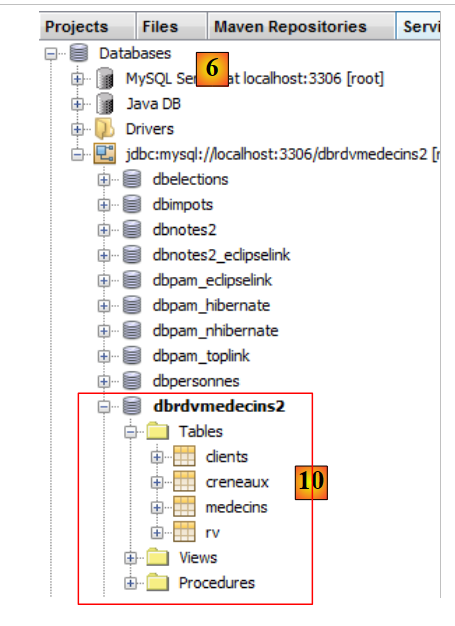 |
- in [10], the connection is established. You can see the four tables in the connected database.
4.4.10. Creating a persistence unit
Let’s return to the architecture we are building:
 |
We are currently building the [JPA] layer. Its configuration is done in a [persistence.xml] file where persistence units are defined. Each one requires the following information:
- the JDBC connection details (URL, username, password),
- the classes that will represent the database tables,
- the JPA implementation used. Indeed, JPA is a specification implemented by various products. Here, we will use Hibernate.
NetBeans can generate this persistence file using a wizard.
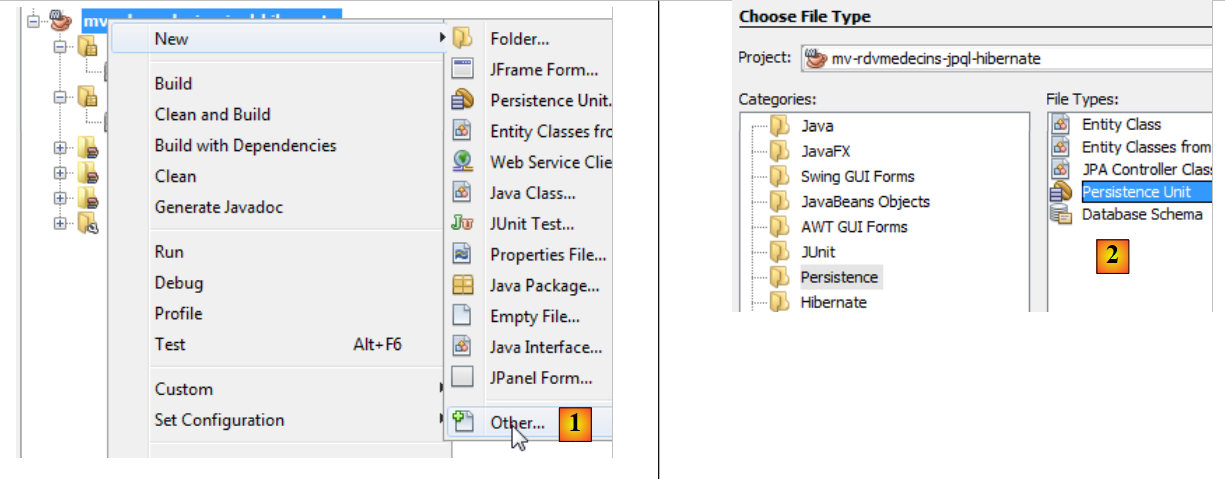 |
- Right-click on the project and select "Create Persistence Unit" [1],
- in [2], create a persistence unit,
|
- in [3], name the persistence unit you are creating,
- in [4], select the Hibernate JPA implementation (JPA 2.0),
- in [5], indicate that the database tables already exist and therefore do not need to be created. Confirm the wizard,
- in [6], the new project,
- in [7], the [persistence.xml] file has been generated in the [META-INF] folder,
- in [8], new dependencies have been added to the Maven project.
The generated [META-INF/persistence.xml] file is as follows:
<?xml version="1.0" encoding="UTF-8"?>
<persistence version="2.0" xmlns="http://java.sun.com/xml/ns/persistence" xmlns:xsi="http://www.w3.org/2001/XMLSchema-instance" xsi:schemaLocation="http://java.sun.com/xml/ns/persistence http://java.sun.com/xml/ns/persistence/persistence_2_0.xsd">
  <persistence-unit name="mv-rdvmedecins-jpql-hibernatePU" transaction-type="RESOURCE_LOCAL">
    <provider>org.hibernate.ejb.HibernatePersistence</provider>
    <properties>
      <property name="javax.persistence.jdbc.url" value="jdbc:mysql://localhost:3306/dbrdvmedecins2"/>
      <property name="javax.persistence.jdbc.password" value=""/>
      <property name="javax.persistence.jdbc.driver" value="com.mysql.jdbc.Driver"/>
      <property name="javax.persistence.jdbc.user" value="root"/>
      <property name="hibernate.cache.provider_class" value="org.hibernate.cache.NoCacheProvider"/>
    </properties>
  </persistence-unit>
</persistence>
It includes the information provided in the wizard:
- line 3: the name of the persistence unit,
- line 3: the type of database transactions. Here, RESOURCE_LOCAL indicates that the application will manage its own transactions,
- lines 6–9: the JDBC properties of the data source.
In the [Design] tab, you can see an overview of the [persistence.xml] file:
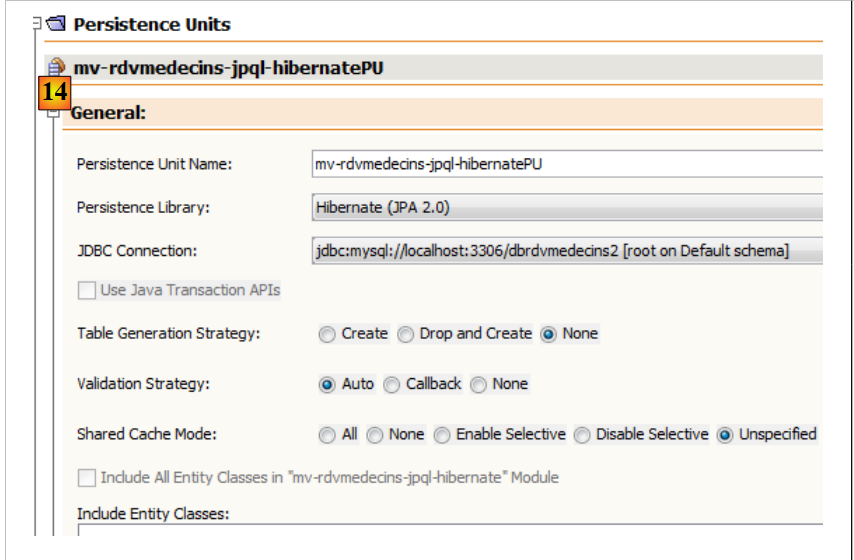 |
To enable Hibernate logging, we complete the [persistence.xml] file as follows:
<?xml version="1.0" encoding="UTF-8"?>
<persistence version="2.0" xmlns="http://java.sun.com/xml/ns/persistence" xmlns:xsi="http://www.w3.org/2001/XMLSchema-instance" xsi:schemaLocation="http://java.sun.com/xml/ns/persistence http://java.sun.com/xml/ns/persistence/persistence_2_0.xsd">
  <persistence-unit name="mv-rdvmedecins-jpql-hibernatePU" transaction-type="RESOURCE_LOCAL">
    <provider>org.hibernate.ejb.HibernatePersistence</provider>
    <properties>
      <property name="javax.persistence.jdbc.url" value="jdbc:mysql://localhost:3306/dbrdvmedecins2"/>
      <property name="javax.persistence.jdbc.password" value=""/>
      <property name="javax.persistence.jdbc.driver" value="com.mysql.jdbc.Driver"/>
      <property name="javax.persistence.jdbc.user" value="root"/>
      <property name="hibernate.cache.provider_class" value="org.hibernate.cache.NoCacheProvider"/>
      <property name="hibernate.show_sql" value="true"/>
      <property name="hibernate.format_sql" value="true"/>
    </properties>
  </persistence-unit>
</persistence>
- Line 11: We request to see the SQL statements issued by Hibernate,
- line 12: this property enables a formatted display of these statements.
Dependencies have been added to the project. The [pom.xml] file is as follows:
<project xmlns="http://maven.apache.org/POM/4.0.0" xmlns:xsi="http://www.w3.org/2001/XMLSchema-instance"
  xsi:schemaLocation="http://maven.apache.org/POM/4.0.0 http://maven.apache.org/xsd/maven-4.0.0.xsd">
  <modelVersion>4.0.0</modelVersion>

  <groupId>istia.st</groupId>
  <artifactId>mv-rdvmedecins-jpql-hibernate</artifactId>
  <version>1.0-SNAPSHOT</version>
  <packaging>jar</packaging>

  <name>mv-rdvmedecins-jpql-hibernate</name>
  <url>http://maven.apache.org</url>

  <properties>
    <project.build.sourceEncoding>UTF-8</project.build.sourceEncoding>
  </properties>

  <dependencies>
    <dependency>
      <groupId>junit</groupId>
      <artifactId>junit</artifactId>
      <version>3.8.1</version>
      <scope>test</scope>
    </dependency>
    <dependency>
      <groupId>org.hibernate</groupId>
      <artifactId>hibernate-entitymanager</artifactId>
      <version>4.1.2</version>
    </dependency>
    <dependency>
      <groupId>org.jboss.logging</groupId>
      <artifactId>jboss-logging</artifactId>
      <version>3.1.0.GA</version>
    </dependency>
    <dependency>
      <groupId>org.jboss.spec.javax.transaction</groupId>
      <artifactId>jboss-transaction-api_1.1_spec</artifactId>
      <version>1.0.0.Final</version>
    </dependency>
    <dependency>
      <groupId>org.hibernate</groupId>
      <artifactId>hibernate-core</artifactId>
      <version>4.1.2</version>
    </dependency>
    <dependency>
      <groupId>antlr</groupId>
      <artifactId>antlr</artifactId>
      <version>2.7.7</version>
    </dependency>
    <dependency>
      <groupId>dom4j</groupId>
      <artifactId>dom4j</artifactId>
      <version>1.6.1</version>
    </dependency>
    <dependency>
      <groupId>org.hibernate.javax.persistence</groupId>
      <artifactId>hibernate-jpa-2.0-api</artifactId>
      <version>1.0.1.Final</version>
    </dependency>
    <dependency>
      <groupId>org.javassist</groupId>
      <artifactId>javassist</artifactId>
      <version>3.15.0-GA</version>
    </dependency>
    <dependency>
      <groupId>org.hibernate.common</groupId>
      <artifactId>hibernate-commons-annotations</artifactId>
      <version>4.0.1.Final</version>
    </dependency>
  </dependencies>
</project>
The added dependencies all relate to the Hibernate ORM. We will add the MySQL JDBC driver dependency:
    <dependency>
      <groupId>mysql</groupId>
      <artifactId>mysql-connector-java</artifactId>
      <version>5.1.6</version>
    </dependency>
4.4.11. Generating JPA Entities
JPA entities can be generated using a NetBeans wizard:
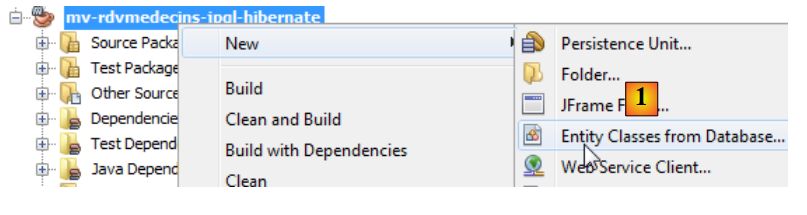 |
- In [1], create JPA entities from a database,
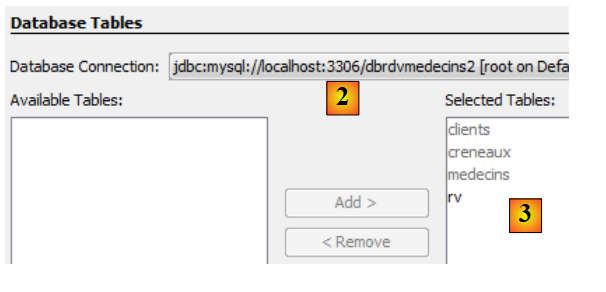 |
- in [2], select the previously created connection [dbrdvmedecins2],
- in [3], select all tables from the associated database,
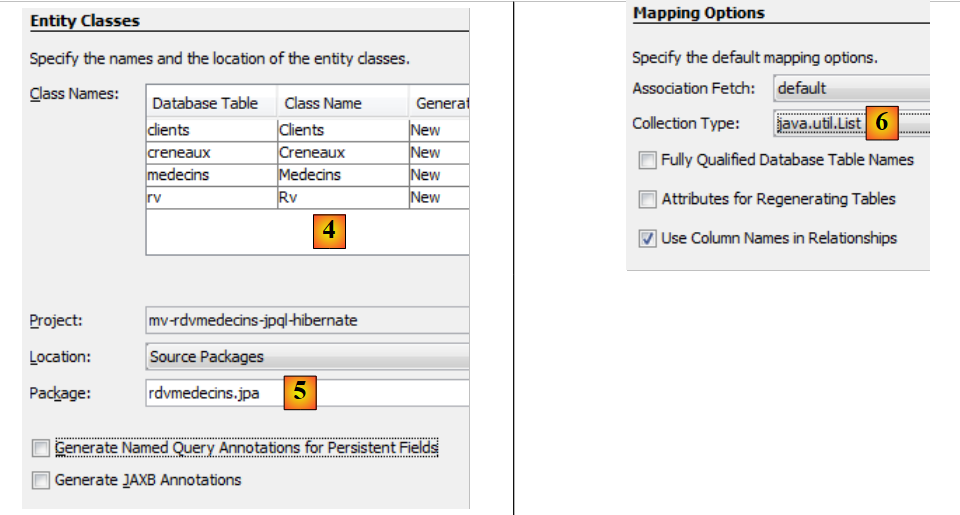 |
- in [4], name the Java classes associated with the four tables,
- as well as a package name [5],
- in [6], JPA groups rows from database tables into collections. We choose a list as the collection,
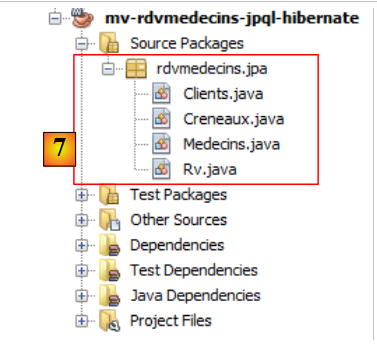 |
- in [7], the Java classes created by the wizard.
4.4.12. The generated JPA entities
The [Medecin] entity mirrors the [medecins] table. The Java class is littered with annotations that make the code difficult to read at first glance. If we keep only what is essential to understanding the entity’s role, we get the following code:
package rdvmedecins.jpa;

...
@Entity
@Table(name = "medecins")
public class Medecin implements Serializable {

@Id
  @GeneratedValue(strategy = GenerationType.IDENTITY)
  @Column(name = "ID")
  private Long id;

  @Column(name = "TITRE")
  private String titre;

  @Column(name = "NOM")
  private String nom;

  @Column(name = "VERSION")
  private int version;

  @Column(name = "PRENOM")
  private String prenom;

  @OneToMany(cascade = CascadeType.ALL, mappedBy = "idMedecin")
  private List<Creneau> creneauList;

// manufacturers
....

   // getters and setters
....

  @Override
  public int hashCode() {
  ...
  }

  @Override
  public boolean equals(Object object) {
  ...
  }

  @Override
  public String toString() {
    ...
  }

}
- Line 4: The @Entity annotation makes the [Medecin] class a JPA entity, i.e., a class linked to a database table via the JPA API.
- line 5, the name of the database table associated with the JPA entity. Each field in the table corresponds to a field in the Java class,
- line 6: the class implements the Serializable interface. This is necessary in client/server applications, where entities are serialized between the client and the server.
- lines 10–11: the id field of the [Doctor] class corresponds to the [ID] field (line 10) of the [doctors] table,
- lines 13–14: the title field of the [Doctor] class corresponds to the [TITLE] field (line 13) of the [doctors] table,
- lines 16–17: the `nom` field of the [Medecin] class corresponds to the `[NOM]` field (line 16) of the [medecins] table,
- rows 19-20: the version field of the [Medecin] class corresponds to the [VERSION] field (row 19) of the [doctors] table. Here, the wizard does not recognize that the column is actually a version column that must be incremented each time the row to which it belongs is modified. To assign this role to it, you must add the @Version annotation. We will do this in a later step,
- lines 22–23: the first_name field of the [Doctor] class corresponds to the [FIRST_NAME] field of the [doctors] table,
- lines 10–11: the id field corresponds to the primary key [ID] of the table. The annotations on lines 8–9 clarify this point,
- line 8: the @Id annotation indicates that the annotated field is associated with the table’s primary key,
- line 9: the [JPA] layer will generate the primary key for the rows it inserts into the [Doctors] table. There are several possible strategies. Here, the GenerationType.IDENTITY strategy indicates that the JPA layer will use the auto_increment mode of the MySQL table,
- lines 25–26: the [slots] table has a foreign key on the [doctors] table. A slot belongs to a doctor. Conversely, a doctor has several slots associated with them. We therefore have a one-to-many relationship (one doctor to many slots), a relationship qualified by the @OneToMany annotation in JPA (line 25). The field on line 26 will contain all of the doctor’s slots. This is achieved without any programming. To fully understand line 25, we need to introduce the [Creneau] class.
It is as follows:
package rdvmedecins.jpa;

import java.io.Serializable;
import java.util.List;
import javax.persistence.*;
import javax.validation.constraints.NotNull;

@Entity
@Table(name = "creneaux")
public class Creneau implements Serializable {
  @Id
  @GeneratedValue(strategy = GenerationType.IDENTITY)
  @Column(name = "ID")
  private Long id;

  @Column(name = "MDEBUT")
  private int mdebut;

  @Column(name = "HFIN")
  private int hfin;

  @Column(name = "HDEBUT")
  private int hdebut;

  @Column(name = "MFIN")
  private int mfin;

  @Column(name = "VERSION")
  private int version;

  @JoinColumn(name = "ID_MEDECIN", referencedColumnName = "ID")
  @ManyToOne(optional = false)
  private Medecin idMedecin;

  @OneToMany(cascade = CascadeType.ALL, mappedBy = "idCreneau")
  private List<Rv> rvList;

// manufacturers
...
// getters and setters
...

  @Override
  public int hashCode() {
    ...
  }

  @Override
  public boolean equals(Object object) {
    ...
  }

  @Override
  public String toString() {
    ...
  }

}
We only comment on the new annotations:
- we have specified that the [slots] table has a foreign key to the [doctors] table: a slot is associated with a doctor. Multiple slots can be associated with the same doctor. We have a relationship from the [slots] table to the [doctors] table that is defined as many-to-one (slots to doctor). The @ManyToOne annotation on line 32 is used to define the foreign key,
- line 31, with the @JoinColumn annotation, specifies the foreign key relationship: the [ID_MEDECIN] column in the [slots] table is a foreign key on the [ID] column in the [doctors] table,
- Line 33: a reference to the doctor who owns the slot. This is achieved here as well without any coding.
The foreign key relationship between the [Creneau] entity and the [Medecin] entity is therefore implemented by two annotations:
- in the [Creneau] entity:
@JoinColumn(name = "ID_MEDECIN", referencedColumnName = "ID")
  @ManyToOne(optional = false)
private Medecin idMedecin;
- in the [Doctor] entity:
@OneToMany(cascade = CascadeType.ALL, mappedBy = "idMedecin")
private List<Creneau> creneauList;
Both annotations reflect the same relationship: that of the foreign key from the [appointments] table to the [doctors] table. They are said to be inverses of each other. Only the @ManyToOne relationship is essential. It unambiguously defines the foreign key relationship. The @OneToMany relationship is optional. If present, it simply references the @ManyToOne relationship with which it is associated. This is the meaning of the mappedBy attribute on line 1 of the [Medecin] entity. The value of this attribute is the name of the field in the [Creneau] entity that has the @ManyToOne annotation specifying the foreign key. Also on line 1 of the [Medecin] entity, the cascade=CascadeType.ALL attribute defines the behavior of the [Medecin] entity with respect to the [Creneau] entity:
- if a new [Doctor] entity is inserted into the database, then the [TimeSlot] entities in the field on line 2 must also be inserted,
- if a [Doctor] entity is modified in the database, then the [Slot] entities in the field on line 2 must also be modified,
- if an [Doctor] entity is deleted from the database, then the [Slot] entities in the field on line 2 must also be deleted.
We provide the code for the other two entities without specific comments since they do not introduce any new notation.
The [Client] entity
package rdvmedecins.jpa;

...
@Entity
@Table(name = "clients")
public class Client implements Serializable {
  @Id
  @GeneratedValue(strategy = GenerationType.IDENTITY)
  @Column(name = "ID")
  private Long id;

  @Column(name = "TITRE")
  private String titre;

  @Column(name = "NOM")
  private String nom;

  @Column(name = "VERSION")
  private int version;

  @Column(name = "PRENOM")
  private String prenom;

  @OneToMany(cascade = CascadeType.ALL, mappedBy = "idClient")
  private List<Rv> rvList;

// manufacturers
...
// getters and setters
...

  @Override
  public int hashCode() {
    ...
  }

  @Override
  public boolean equals(Object object) {
    ...
  }

  @Override
  public String toString() {
    ...
  }

}
- Lines 24–25 reflect the foreign key relationship between the [rv] table and the [clients] table.
The [Rv] entity:
package rdvmedecins.jpa;

...
@Entity
@Table(name = "rv")
public class Rv implements Serializable {
  @Id
  @GeneratedValue(strategy = GenerationType.IDENTITY)
  @Column(name = "ID")
  private Long id;

  @Column(name = "JOUR")
  @Temporal(TemporalType.DATE)
  private Date jour;

  @JoinColumn(name = "ID_CRENEAU", referencedColumnName = "ID")
  @ManyToOne(optional = false)
  private Creneau idCreneau;

  @JoinColumn(name = "ID_CLIENT", referencedColumnName = "ID")
  @ManyToOne(optional = false)
  private Client idClient;

   // manufacturers
...

   // getters and setters
...

  @Override
  public int hashCode() {
    ...
  }

  @Override
  public boolean equals(Object object) {
    ...
  }

  @Override
  public String toString() {
    ...
  }

}
- Line 13 defines the `jour` field as a Java Date type. It specifies that in the [rv] table, the [JOUR] column (line 12) is of type date (without time),
- Lines 16–18: define the foreign key relationship from the [rv] table to the [slots] table,
- Lines 20–22: define the foreign key relationship from the [rv] table to the [clients] table.
The automatic generation of JPA entities provides us with a working foundation. Sometimes this is sufficient, sometimes it is not. This is the case here:
- we need to add the @Version annotation to the various version fields of the entities,
- we need to write toString methods that are more explicit than the generated ones,
- the [Medecin] and [Client] entities are analogous. We will have them derive from a [Person] class,
- we will remove the inverse @OneToMany relationships from the @ManyToOne relationships. They are not essential and introduce programming complications,
- we remove the @NotNull validation on the primary keys. When persisting a JPA entity with MySQL, the entity initially has a null primary key. It is only after persistence in the database that the primary key of the persisted entity has a value.
With these specifications, the various classes become as follows:
The Person class is used to represent doctors and clients:
package rdvmedecins.jpa;

import java.io.Serializable;
import javax.persistence.*;

@MappedSuperclass
public class Personne implements Serializable {
  private static final long serialVersionUID = 1L;
  @Id
  @GeneratedValue(strategy = GenerationType.IDENTITY)
  @Column(name = "ID")
  private Long id;

  @Basic(optional = false)
  @Column(name = "TITRE")
  private String titre;

  @Basic(optional = false)
  @Column(name = "NOM")
  private String nom;

  @Basic(optional = false)
  @Column(name = "VERSION")
  @Version
  private int version;

  @Basic(optional = false)
  @Column(name = "PRENOM")
  private String prenom;
// manufacturers
...

// getters and setters
  ...

  @Override
  public String toString() {
    return String.format("[%s,%s,%s,%s,%s]", id, version, titre, prenom, nom);
  }

}
- Line 6: Note that the [Person] class is not itself an entity (@Entity). It will serve as the parent class for entities. The @MappedSuperClass annotation indicates this.
The [Client] entity encapsulates the rows of the [clients] table. It derives from the previous [Person] class:
package rdvmedecins.jpa;

import java.io.Serializable;
import javax.persistence.*;

@Entity
@Table(name = "clients")
public class Client extends Personne implements Serializable {
  private static final long serialVersionUID = 1L;

// manufacturers
...

  @Override
  public int hashCode() {
...
  }

  @Override
  public boolean equals(Object object) {
  ...
  }

  @Override
  public String toString() {
    return String.format("Client[%s,%s,%s,%s]", getId(), getTitre(), getPrenom(), getNom());
  }

}
- Line 6: The [Client] class is a JPA entity,
- line 7: it is associated with the [clients] table,
- line 8: it derives from the [Person] class.
The [Doctor] entity, which encapsulates the rows of the [doctors] table, follows the same pattern:
package rdvmedecins.jpa;

import java.io.Serializable;
import javax.persistence.*;

@Entity
@Table(name = "medecins")
public class Medecin extends Personne implements Serializable {
  private static final long serialVersionUID = 1L;

  // manufacturers
...

  @Override
  public int hashCode() {
    ...
  }

  @Override
  public boolean equals(Object object) {
    ...
  }

  @Override
  public String toString() {
    return String.format("Médecin[%s,%s,%s,%s]", getId(), getTitre(), getPrenom(), getNom());
  }

}
The [Creneau] entity encapsulates the rows of the [creneaux] table:
package rdvmedecins.jpa;

import java.io.Serializable;
import java.util.List;
import javax.persistence.*;

@Entity
@Table(name = "creneaux")
public class Creneau implements Serializable {

  private static final long serialVersionUID = 1L;
  @Id
  @GeneratedValue(strategy = GenerationType.IDENTITY)
  @Basic(optional = false)
  @Column(name = "ID")
  private Long id;

  @Basic(optional = false)
  @Column(name = "MDEBUT")
  private int mdebut;

  @Basic(optional = false)
  @Column(name = "HFIN")
  private int hfin;

  @Basic(optional = false)
  @NotNull
  @Column(name = "HDEBUT")
  private int hdebut;

  @Basic(optional = false)
  @Column(name = "MFIN")
  private int mfin;

  @Basic(optional = false)
  @Column(name = "VERSION")
  @Version
  private int version;

  @JoinColumn(name = "ID_MEDECIN", referencedColumnName = "ID")
  @ManyToOne(optional = false)
  private Medecin medecin;

  // manufacturers
  ...

  // getters and setters
  ...

  @Override
  public int hashCode() {
    ...
  }

  @Override
  public boolean equals(Object object) {
    // TODO: Warning - this method won't work in the case the id fields are not set
    ...
  }

  @Override
  public String toString() {
    return String.format("Creneau [%s, %s, %s:%s, %s:%s,%s]", id, version, hdebut, mdebut, hfin, mfin, medecin);
  }
}
- Lines 40–42 model the "many-to-one" relationship between the [slots] table and the [doctors] table in the database: a doctor has multiple slots, and a slot belongs to a single doctor.
The [Rv] entity encapsulates the rows of the [rv] table:
package rdvmedecins.jpa;

import java.io.Serializable;
import java.util.Date;
import javax.persistence.*;

@Entity
@Table(name = "rv")
public class Rv implements Serializable {

  private static final long serialVersionUID = 1L;
  @Id
  @GeneratedValue(strategy = GenerationType.IDENTITY)
  @Basic(optional = false)
  @Column(name = "ID")
  private Long id;

  @Basic(optional = false)
  @Column(name = "JOUR")
  @Temporal(TemporalType.DATE)
  private Date jour;

  @JoinColumn(name = "ID_CRENEAU", referencedColumnName = "ID")
  @ManyToOne(optional = false)
  private Creneau creneau;

  @JoinColumn(name = "ID_CLIENT", referencedColumnName = "ID")
  @ManyToOne(optional = false)
  private Client client;

   // manufacturers
...

   // getters and setters
...

  @Override
  public int hashCode() {
    ...
  }

  @Override
  public boolean equals(Object object) {
    ...
  }

  @Override
  public String toString() {
    return String.format("Rv[%s, %s, %s]", id, creneau, client);
  }
}
- Lines 27–29 model the "many-to-one" relationship between the [rv] table and the [clients] table (a client can appear in multiple Rv entries) in the database, and lines 23–25 model the "many-to-one" relationship between the [rv] table and the [slots] table (a slot can appear in multiple Rv entries).
4.4.13. The data access code
We will now add the code for accessing data via the JPA layer to the project:
 |
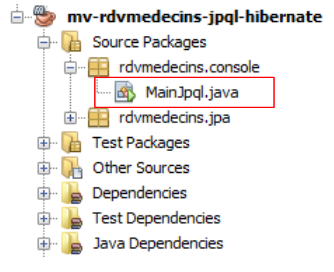 |
The [MainJpql] class is as follows:
package rdvmedecins.console;

import java.util.Scanner;
import javax.persistence.EntityManager;
import javax.persistence.EntityManagerFactory;
import javax.persistence.Persistence;

public class MainJpql {

  public static void main(String[] args) {
    // EntityManagerFactory
    EntityManagerFactory emf = Persistence.createEntityManagerFactory("mv-rdvmedecins-jpql-hibernatePU");
    // entityManager
    EntityManager em = emf.createEntityManager();
    // keyboard scanner
    Scanner clavier = new Scanner(System.in);
    // query entry loop JPQL
    System.out.println("Requete JPQL sur la base dbrdvmedecins2 (* pour arrêter) :");
    String requete = clavier.nextLine();
    while (!requete.trim().equals("*")) {
      try {
        // display query result
        for (Object o : em.createQuery(requete).getResultList()) {
          System.out.println(o);
        }
      } catch (Exception e) {
        System.out.println("L'exception suivante s'est produite : " + e);
      }
      // clear the persistence context
      em.clear();
      // new request
      System.out.println("---------------------------------------------");
      System.out.println("Requete JPQL sur la base dbrdvmedecins2 (* pour arrêter) :");
      requete = clavier.nextLine();
    }
    // resource closure
    em.close();
    emf.close();
  }
}
- Line 12: Creation of the EntityManagerFactory associated with the persistence unit we created earlier. The parameter of the `createEntityManagerFactory` method is the name of this persistence unit:
  <persistence-unit name="mv-rdvmedecins-jpql-hibernatePU" transaction-type="RESOURCE_LOCAL">
    ...
</persistence-unit>
- line 14: creation of the EntityManager that manages the persistence layer,
- Line 19: Enter a JPQL SELECT query,
- lines 23–28: display the query result,
- line 20: input stops when the user types *.
Question: Provide the JPQL queries to retrieve the following information:
- list of doctors in descending order by last name
- list of doctors whose title='Mr'
- list of Ms. Pelissier's appointment slots
- list of appointments in ascending order by date
- list of clients (last name) who made appointments with Ms. Pelissier on 08/24/2006
- Number of clients of Ms. Pelissier on 08/24/2006
- clients who have not made an appointment
- Doctors who do not have appointments
We will draw inspiration from the example in Section 2.7 of [ref1]. Here is an example of execution:
- line 2: the JPQL query,
- lines 3–11: the corresponding SQL query,
- lines 12–15: the result of the JPQL query.
4.5. Links between persistence context and DBMS
4.5.1. The Person class
4.5.2. The test program
1 2 3 4 5 6 7 8 9 10 11 12 13 14 15 16 17 18 19 20 21 22 23 24 25 26 27 28 29 30 31 32 33 34 35 36 37 38 39 40 41 42 43 44 45 46 47 48 49 50 51 52 53 54 55 56 57 58 59 60 61 62 63 64 65 66 67 68 69 70 71 72 73 74 75 76 77 78 79 80 81 82 83 84 85 86 87 88 89 90 91 92 93 94 95 96 97 98 99 100 101 102 103 104 105 106 107 108 109 110 111 112 113 114 115 116 117 118 119 120 121 122 123 124 125 126 127 128 129 130 131 132 133 134 135 136 137 | |
4.5.3. Hibernate Configuration
4.5.4. The log4j.properties configuration
4.5.5. Results
Question: Explain the relationship between the Java code and the displayed results.