5. Version 1: Spring / JPA Architecture
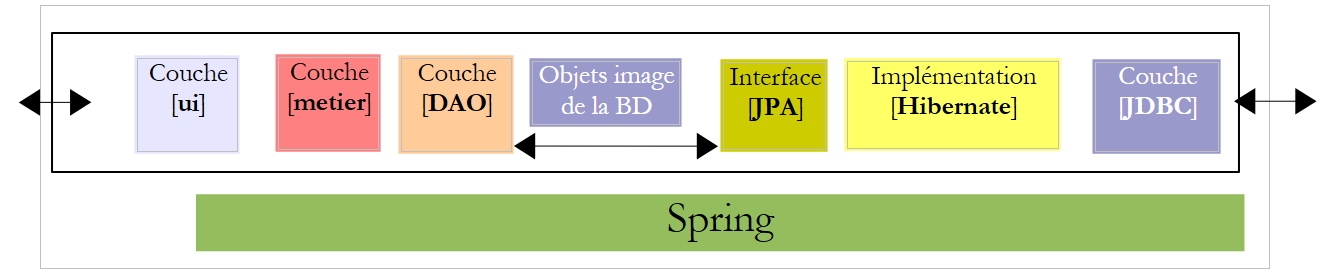
We propose to write a console application as well as a graphical application to generate pay stubs for child care providers employed by the "Maison de la petite enfance" in a municipality. This application will have the following architecture:
 |
5.1. DB The database
The static data needed to generate the pay stub will be stored in a database that we will refer to as dbpam. This database could contain the following tables:
Structure:
primary key | |
version number – increments with each modification of the row | |
Employee's Social Security number – unique | |
Employee's last name | |
first name | |
their address | |
his/her city | |
their ZIP code | |
Foreign key on the [ID] field of the [INDEMNITES] table |
Its content could be as follows:

Structure:
primary key | |
version number – increments with each modification of the row | |
Percentage: General Social Contribution + Contribution to Social Debt Repayment | |
percentage: deductible general social contribution | |
percentage: social security, widowhood, old age | |
percentage: supplemental pension + unemployment insurance |
Its content could be as follows:

Social security contribution rates are independent of the employee. The previous table has only one row.
primary key | ||
version number – increments with each modification of the row | ||
Processing index – unique | ||
Net price in euros for one hour of on-call duty | ||
daily allowance in euros per day of care | ||
Meal allowance in euros per day of care | ||
Paid vacation allowance. This is a percentage applied to the base salary. | ||
Its content could be as follows:

Note that allowances may vary from one child care provider to another. They are linked to a specific child care provider via their pay grade. Thus, Ms. Marie Jouveinal, who has a pay grade of 2 (EMPLOYEES table), has an hourly wage of 2.1 euros (INDEMNITES table).
5.2. Method for calculating a childminder’s salary
We will now present the method for calculating a childminder’s monthly salary. This is not intended to be the method actually used in practice. As an example, we will use the salary of Ms. Marie Jouveinal, who worked 150 hours over 20 days during the pay period.
The following factors are taken into account: | | |
The child care provider's base salary is given by the following formula: | ||
A certain amount of social security contributions must be deducted from this base salary : | | |
Total social security contributions: | ||
In addition, the child care provider is entitled to a daily living allowance and a meal allowance for each day worked. As such, she receives the following allowances: | ||
In the end, the net salary to be paid to the child care provider is as follows: |
5.3. How the console application works
Here is an example of running the console application in a DOS window:
We will write a program that will receive the following information:
- the childminder's social security number (254104940426058 in the example - line 1)
- Total number of hours worked (150 in the example - line 1)
- Total number of days worked (20 in the example - line 1)
We see that:
- lines 9–14: display information about the employee whose Social Security number was provided
- lines 17–20: display the rates for the various contributions
- lines 23–26: display the allowances associated with the employee’s pay grade (here, grade 2)
- lines 29–33: display the components of the salary to be paid
The application flags any errors:
Call without parameters:
dos>java -jar pam-spring-ui-metier-dao-jpa-eclipselink.jar
Syntaxe : pg num_securite_sociale nb_heures_travaillées nb_jours_travaillés
Call with incorrect data:
dos>java -jar pam-spring-ui-metier-dao-jpa-eclipselink.jar 254104940426058 150x 20x
Le nombre d'heures travaillées [150x] est erroné
Le nombre de jours travaillés [20x] est erroné
Call with an incorrect social security number:
dos>java -jar pam-spring-ui-metier-dao-jpa-eclipselink.jar xx 150 20
L'erreur suivante s'est produite : L'employé de n°[xx] est introuvable
5.4. How the graphical application works
The graphical application calculates the salaries of child care providers using a Swing form:
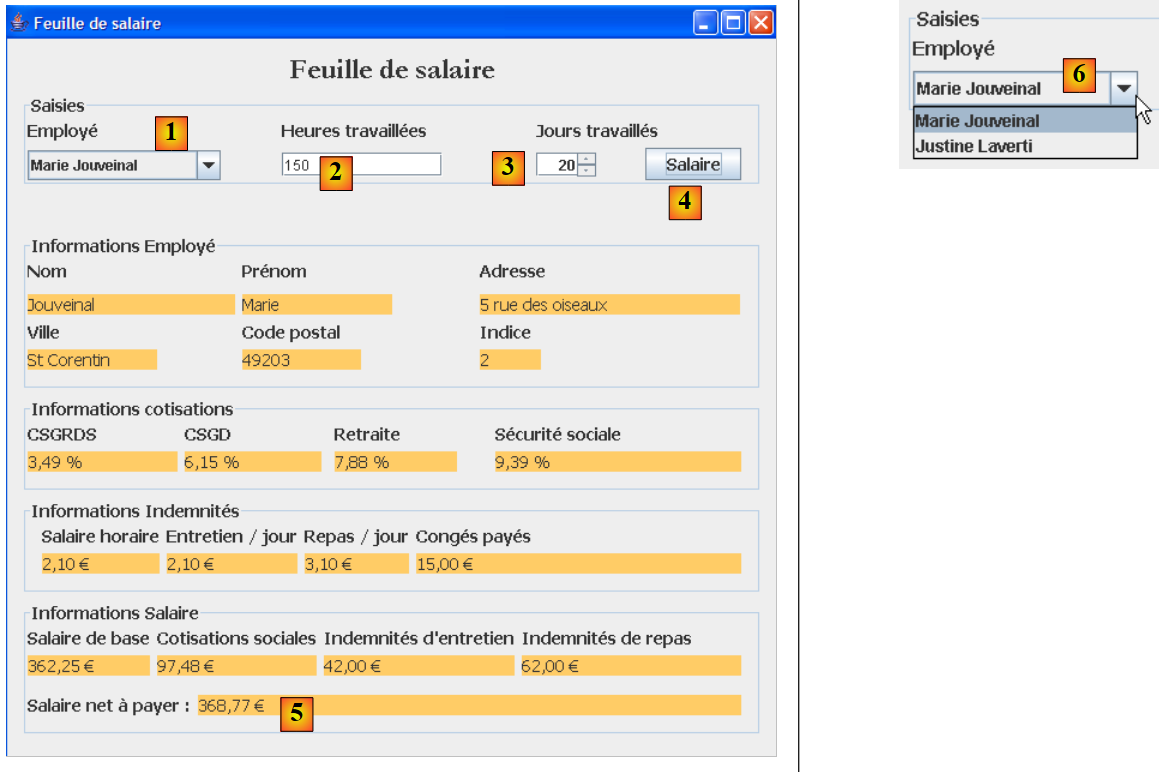 |
- The information passed as parameters to the console program is now entered using input fields [1, 2, 3].
- Button [4] initiates the salary calculation
- The form displays the various salary components up to the net salary to be paid [5]
The drop-down list [1, 6] does not display employees’ Social Security numbers but their first and last names. We assume here that no two employees have the same first and last names.
5.5. Creating the database
We launch WampServer and use the PhpMyAdmin tool [1]:
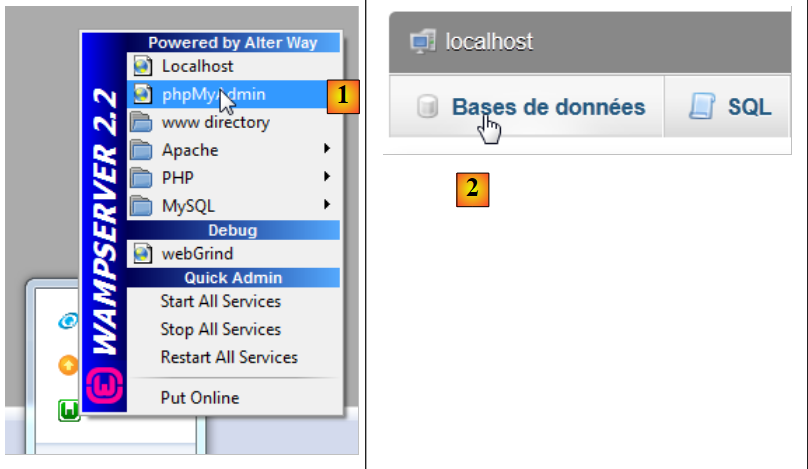 |
- in [2], select the [Databases] option,
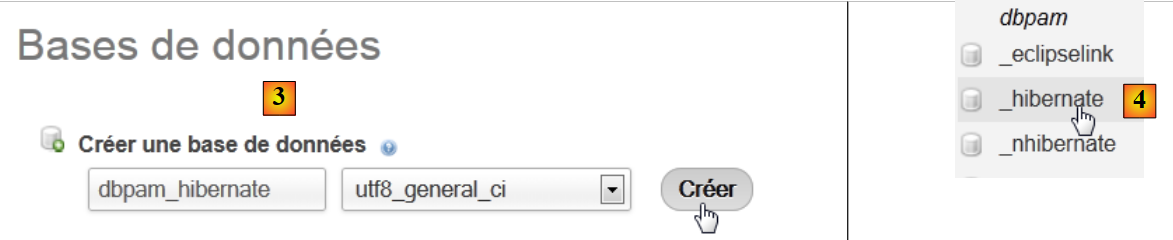 |
- in [3], create a database [dbpam_hibernate],
- in [4], the database is created. Select it,
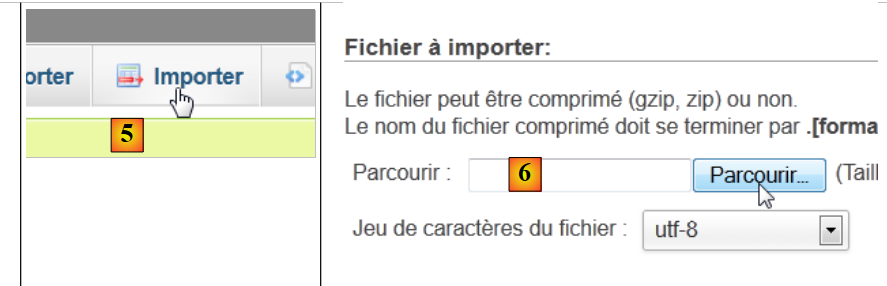 |
- in [5], we want to import an SQL script,
- in [6], use the [Browse] button to select the file,
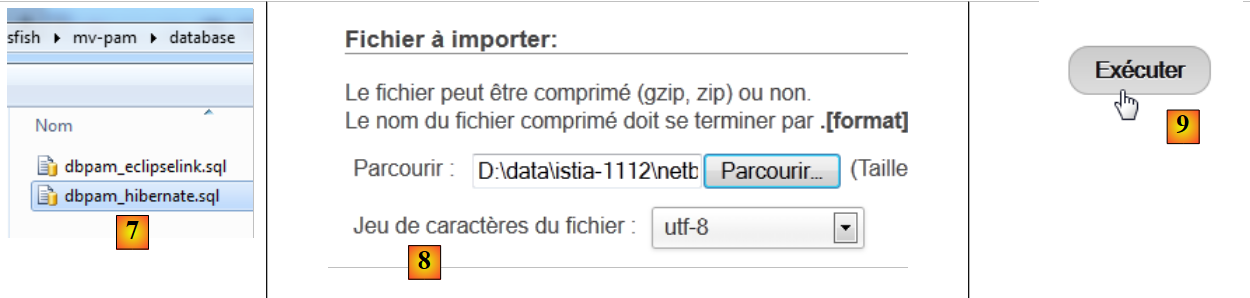 |
- In [7,8], select the SQL script,
- in [9], we execute it,
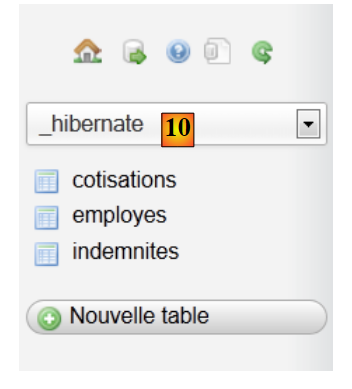 |
- In [10], the tables were created. Their contents are as follows:
EMPLOYEES table

table INDEMNITIES

table CONTRIBUTIONS

5.6. JPA Implementation
5.6.1. JPA / Hibernate Layer
We will configure the JPA layer in the following environment:
 |
A console program will work with the database. To do this, you need:
- have a database,
- have the JDBC driver for the DBMS, in this case MySQL,
- implement the JPA layer using Hibernate,
- write the console program.
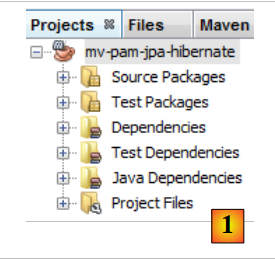
We create the Maven project [mv-pam-jpa-hibernate] [1]:
 |
In our application architecture, we need the following elements:
- the database,
- the JDBC driver for the MySQL DBMS,
- the JPA/Hibernate layer (entities and configuration),
- the test console program.
5.6.1.1. The database
First, let’s create an empty database. We launch WampServer and use the PhpMyAdmin tool [1]:
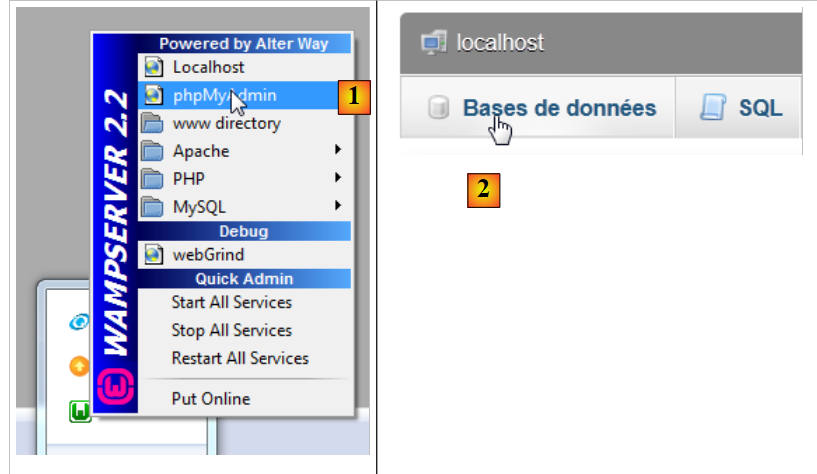 |
- in [2], select the [Databases] option,
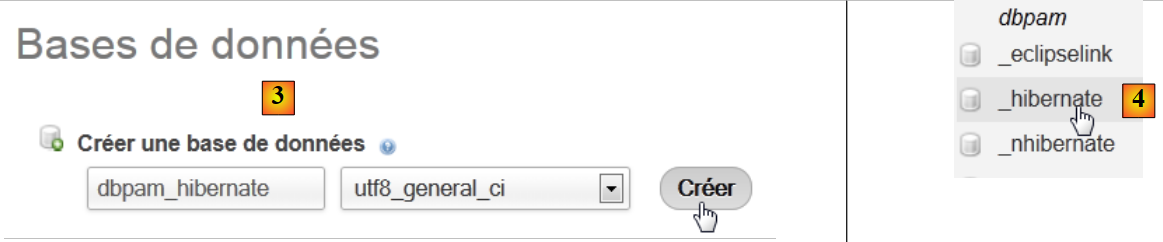 |
- in [3], create a database named [dbpam_hibernate],
- in [4], the database is created.
5.6.1.2. Configuring the JPA layer
The connection between the JDBC layer and the database is configured in the [persistence.xml] file, which configures the JPA layer. This file can be created using NetBeans:
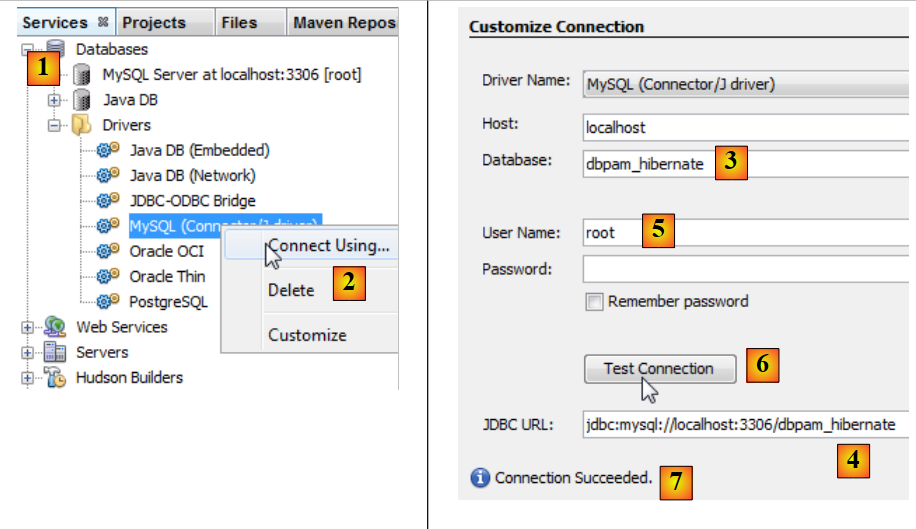 |
- in the [Services] tab [1], connect to the database using the MySQL JDBC driver [2],
- in [3], the name of the database you want to connect to.
- in [4], the database’s JDBC URL,
- in [5], log in as root without a password,
- in [6], you can test the connection,
- in [7], the connection was successful.
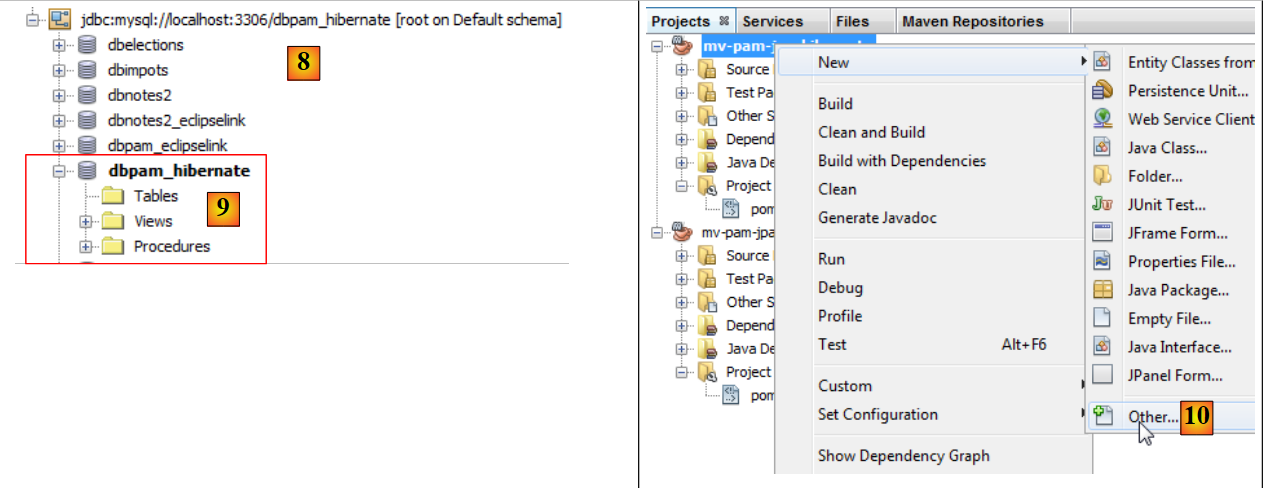 |
- The connection appears in [8] and [9],
- in [10], add a new element to the project,
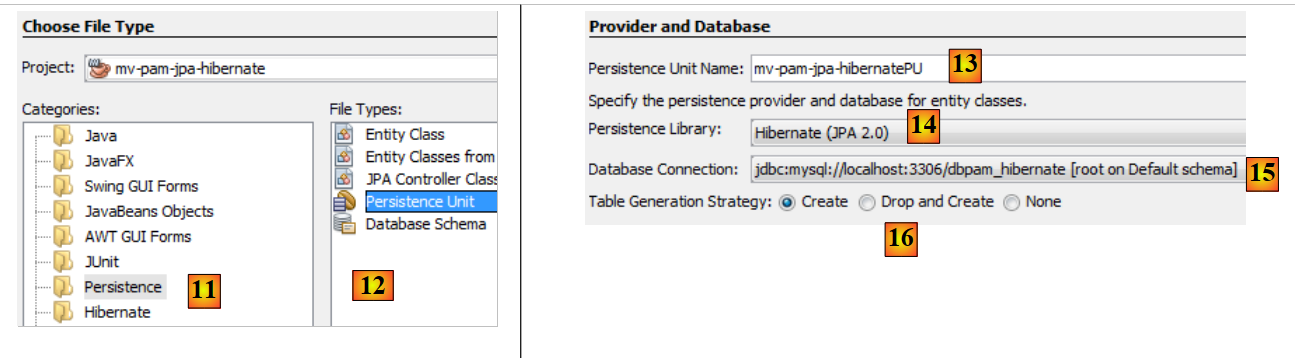 |
- in [11] select the [Persistence] category and in [12] the [Persistence Unit] element,
- in [13], name this persistence unit,
- in [14], we select a Hibernate implementation,
- in [15], specify the connection we just created to the MySQL database,
- In [16], specify that when the JPA layer is instantiated, it must create the tables corresponding to the project’s JPA entities.
The end of the wizard generates the [persistence.xml] file:
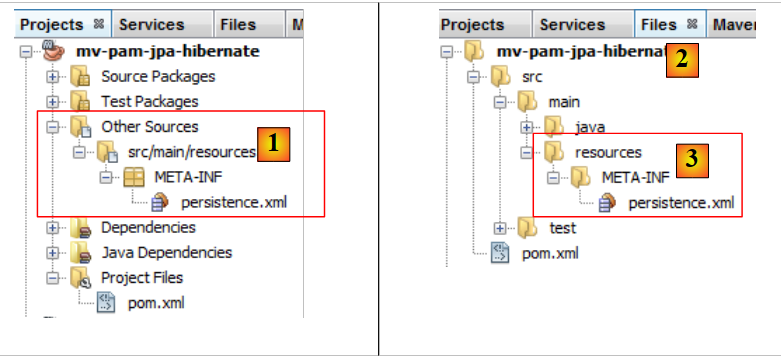 |
- the file appears in a new branch of the project, in a [META-INF] folder [1],
- which corresponds to the [src/main/resources] folder of the project [2,3].
Its content is as follows:
<?xml version="1.0" encoding="UTF-8"?>
<persistence version="2.0" xmlns="http://java.sun.com/xml/ns/persistence" xmlns:xsi="http://www.w3.org/2001/XMLSchema-instance" xsi:schemaLocation="http://java.sun.com/xml/ns/persistence http://java.sun.com/xml/ns/persistence/persistence_2_0.xsd">
<persistence-unit name="mv-pam-jpa-hibernatePU" transaction-type="RESOURCE_LOCAL">
<provider>org.hibernate.ejb.HibernatePersistence</provider>
<properties>
<property name="javax.persistence.jdbc.url" value="jdbc:mysql://localhost:3306/dbpam_hibernate"/>
<property name="javax.persistence.jdbc.password" value=""/>
<property name="javax.persistence.jdbc.driver" value="com.mysql.jdbc.Driver"/>
<property name="javax.persistence.jdbc.user" value="root"/>
<property name="hibernate.cache.provider_class" value="org.hibernate.cache.NoCacheProvider"/>
<property name="hibernate.hbm2ddl.auto" value="create-drop"/>
</properties>
</persistence-unit>
</persistence>
- Line 3: the name of the persistence unit and the transaction type. RESOURCE_LOCAL indicates that the project manages transactions itself. In this case, the console program will be responsible for doing so,
- line 4: the JPA implementation used is Hibernate,
- lines 6–9: the JDBC properties for the database connection,
- line 11: requests the creation of tables corresponding to the JPA entities. In fact, NetBeans generates an incorrect configuration here. The configuration should be as follows:
<property name="hibernate.hbm2ddl.auto" value="create"/>
With the create option, Hibernate, upon instantiation of the JPA layer, deletes and then creates the tables corresponding to the JPA entities. The create-drop option does the same thing but, at the end of the JPA layer’s lifecycle, it deletes all tables. There is another option:
<property name="hibernate.hbm2ddl.auto" value="update"/>
This option creates the tables if they do not exist, but does not delete them if they already exist.
We will add three more properties to the Hibernate configuration:
<property name="hibernate.show_sql" value="true"/>
<property name="hibernate.format_sql" value="true"/>
<property name="use_sql_comments" value="true"/>
These settings instruct Hibernate to display the SQL statements it sends to the database. The complete file is therefore as follows:
<?xml version="1.0" encoding="UTF-8"?>
<persistence version="2.0" xmlns="http://java.sun.com/xml/ns/persistence" xmlns:xsi="http://www.w3.org/2001/XMLSchema-instance" xsi:schemaLocation="http://java.sun.com/xml/ns/persistence http://java.sun.com/xml/ns/persistence/persistence_2_0.xsd">
<persistence-unit name="mv-pam-jpa-hibernatePU" transaction-type="RESOURCE_LOCAL">
<provider>org.hibernate.ejb.HibernatePersistence</provider>
<class>jpa.Cotisation</class>
<class>jpa.Employe</class>
<class>jpa.Indemnite</class>
<properties>
<property name="javax.persistence.jdbc.url" value="jdbc:mysql://localhost:3306/dbpam_hibernate"/>
<property name="javax.persistence.jdbc.password" value=""/>
<property name="javax.persistence.jdbc.driver" value="com.mysql.jdbc.Driver"/>
<property name="javax.persistence.jdbc.user" value="root"/>
<property name="hibernate.cache.provider_class" value="org.hibernate.cache.NoCacheProvider"/>
<property name="hibernate.hbm2ddl.auto" value="create"/>
<property name="hibernate.show_sql" value="true"/>
<property name="hibernate.format_sql" value="true"/>
<property name="use_sql_comments" value="true"/>
</properties>
</persistence-unit>
</persistence>
5.6.1.3. Dependencies
Let’s return to the project architecture:
 |
We configured the JPA layer via the [persistence.xml] file. The chosen implementation was Hibernate. This introduced dependencies into the project:
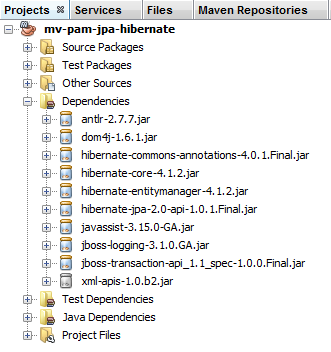 |
These dependencies are due to the inclusion of Hibernate in the project. We need to add another dependency: the MySQL JDBC driver, which implements the JDBC layer of the architecture. We update the [pom.xml] file as follows:
<dependencies>
<dependency>
<groupId>junit</groupId>
<artifactId>junit</artifactId>
<version>3.8.1</version>
<scope>test</scope>
</dependency>
<dependency>
<groupId>mysql</groupId>
<artifactId>mysql-connector-java</artifactId>
<version>5.1.6</version>
</dependency>
<dependency>
<groupId>org.hibernate</groupId>
<artifactId>hibernate-entitymanager</artifactId>
<version>4.1.2</version>
</dependency>
...
<dependency>
<groupId>org.hibernate.common</groupId>
<artifactId>hibernate-commons-annotations</artifactId>
<version>4.0.1.Final</version>
</dependency>
</dependencies>
Lines 8–12 add the dependency for the MySQL JDBC driver.
5.6.1.4. JPA Entities
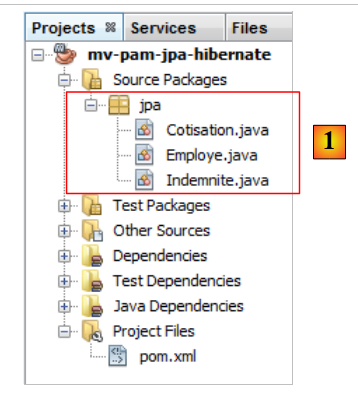 |
Question: Following the approach in the example in Section 4.4, generate the entities [Cotisation, Indemnite, Employe].
Notes:
- The entities will be part of a package named [jpa],
- each entity will have a version number,
- if two entities are linked by a relationship, only the primary @ManyToOne relationship will be created. The inverse @OneToMany relationship will not be created.
5.6.1.5. The code for the main class
We include the previously developed JPA entities [1] in the project:
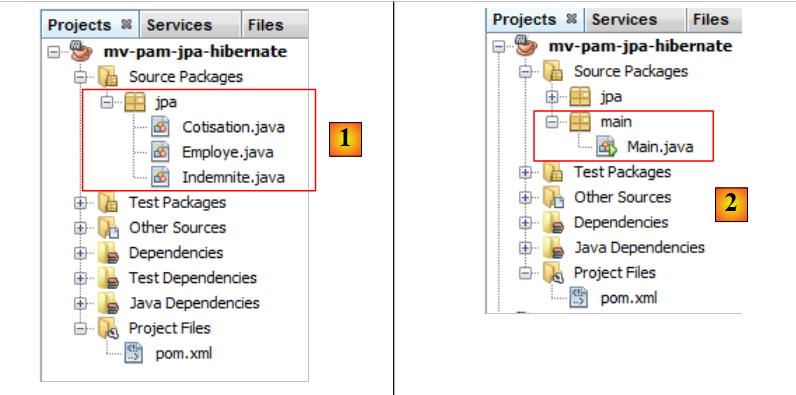 |
then we add [2], the following [main.Main] class:
package main;
import javax.persistence.EntityManager;
import javax.persistence.EntityManagerFactory;
import javax.persistence.Persistence;
public class Main {
public static void main(String[] args) {
// creating the Entity Manager is enough to build the JPA layer
EntityManagerFactory emf = Persistence.createEntityManagerFactory("mv-pam-jpa-hibernatePU");
EntityManager em=emf.createEntityManager();
// resource release
em.close();
emf.close();
}
}
- Line 10: We create the EntityManagerFactory for the persistence unit named [mv-pam-jpa-hibernatePU]. This name comes from the [persistence.xml] file:
<persistence-unit name="mv-pam-jpa-hibernatePU" transaction-type="RESOURCE_LOCAL">
...
</persistence-unit>
- Line 12: The EntityManager is created. This creates the JPA layer. The [persistence.xml] file will be used, and thus the database tables will be created.
- lines 14–15: resources are released.
5.6.1.6. Tests
Let’s return to our project’s architecture:
 |
All layers have been implemented. We run the project [2].
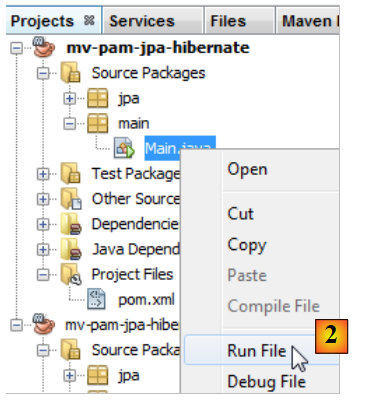 |
The console output is as follows:
1 2 3 4 5 6 7 8 9 10 11 12 13 14 15 16 17 18 19 20 21 22 23 24 25 26 27 28 29 30 31 32 33 34 35 36 37 38 39 40 41 42 43 44 45 46 47 48 49 50 51 52 53 54 55 56 57 58 59 60 61 62 63 64 65 66 67 68 69 70 71 72 73 74 75 76 77 78 79 80 81 82 83 84 85 86 87 88 89 90 91 92 93 94 95 96 97 98 99 100 101 102 103 104 105 | |
The console contains only Hibernate logs, since the executed program does nothing other than instantiate the JPA layer. Note the following points:
- line 43: Hibernate attempts to delete the foreign key from the [EMPLOYEES] table,
- lines 51–55: deletion of the three tables,
- line 57: creation of the [COTISATIONS] table,
- line 67: creation of the [EMPLOYEES] table,
- line 80: creation of the [INDEMNITIES] table,
- line 91: creation of the foreign key for the [EMPLOYEES] table.
In NetBeans, you can view the tables in the connection that was created earlier:
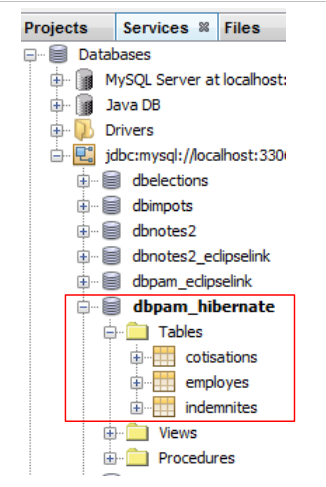 |
The tables created depend on both the JPA layer implementation used and the DBMS used. Thus, a JPA/EclipseLink implementation with the same database can generate different tables. That is what we will look at now.
5.6.2. JPA / EclipseLink Layer
We will build a new Maven project in the following environment:
 |
We will follow the steps from the previous section:
- create a MySQL database [dbpam_eclipselink]. We will use the script [dbpam_eclipselink.sql] to generate it,
- create the project’s [persistence.xml] file. Use the EclipseLink JPA 2.0 implementation,
- add the MySQL JDBC driver dependency to the generated dependencies,
- add the JPA entities and the console program,
- run the tests.
The [persistence.xml] file will be as follows:
<?xml version="1.0" encoding="UTF-8"?>
<persistence version="2.0" xmlns="http://java.sun.com/xml/ns/persistence" xmlns:xsi="http://www.w3.org/2001/XMLSchema-instance" xsi:schemaLocation="http://java.sun.com/xml/ns/persistence http://java.sun.com/xml/ns/persistence/persistence_2_0.xsd">
<persistence-unit name="pam-jpa-eclipselinkPU" transaction-type="RESOURCE_LOCAL">
<provider>org.eclipse.persistence.jpa.PersistenceProvider</provider>
<class>jpa.Cotisation</class>
<class>jpa.Employe</class>
<class>jpa.Indemnite</class>
<properties>
<property name="eclipselink.target-database" value="MySQL"/>
<property name="javax.persistence.jdbc.url" value="jdbc:mysql://localhost:3306/dbpam_eclipselink"/>
<property name="javax.persistence.jdbc.password" value=""/>
<property name="javax.persistence.jdbc.driver" value="com.mysql.jdbc.Driver"/>
<property name="javax.persistence.jdbc.user" value="root"/>
<property name="eclipselink.logging.level" value="FINE"/>
<property name="eclipselink.ddl-generation" value="drop-and-create-tables"/>
</properties>
</persistence-unit>
</persistence>
- Properties 9–13 were generated by the NetBeans wizard,
- Line 14: This property allows us to set the EclipseLink logging level. The FINE level allows us to see the SQL statements that EclipseLink will execute on the database,
- Line 15: When the JPA/EclipseLink layer is instantiated, the JPA entity tables will be dropped and then created.
The console output is as follows:
- lines 26-30: connection to the MySQL database,
- lines 31-34: confirmation that the connection was successful,
- line 36: delete the foreign key from the [EMPLOYEES] table,
- line 37: deleting the [COTISATIONS] table,
- line 38: creation of the [CONTRIBUTIONS] table. It is worth noting that the primary key ID does not have the MySQL auto_increment attribute. This means that MySQL does not generate the primary key values,
- line 39: dropping the [EMPLOYEES] table,
- line 40: create the [EMPLOYEES] table. Its primary key ID does not have the MySQL auto_increment attribute,
- line 41: delete the [INDEMNITIES] table,
- line 42: creation of the [INDEMNITIES] table. Its primary key ID does not have the MySQL auto_increment attribute,
- line 43: create a foreign key from the [EMPLOYEES] table to the [BENEFITS] table,
- line 44: creating a table [SEQUENCE]. It will be used to generate the primary keys for the three previous tables,
- line 47: an exception occurs because this table already existed,
- lines 51–53: initialization of the [SEQUENCE] table.
The existence of the generated tables can be verified in NetBeans [1]:
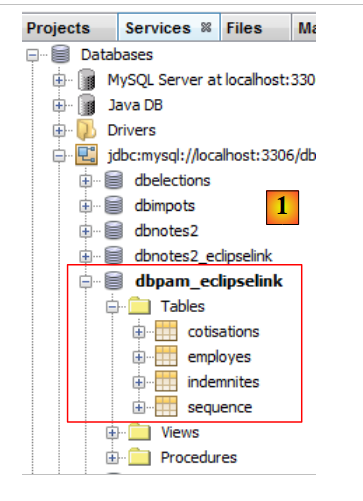 |
Therefore, based on the same JPA entities, the Hibernate and EclipseLink JPA implementations do not generate the same tables. In the remainder of this document, when the JPA implementation used is:
- Hibernate, we will use the [dbpam_hibernate] database,
- EclipseLink, we will use the database [dbpam_eclipselink].
5.6.3. Work to be done
Following the same procedure as before,
- create and test a project [mv-pam-jpa-hibernate-oracle] using a Hibernate JPA implementation and an Oracle DBMS,
- create and test a project [mv-pam-jpa-hibernate-mssql] using a Hibernate JPA implementation and an SQL Server DBMS,
- create and test a project [mv-pam-jpa-eclipselink-oracle] using an EclipseLink JPA implementation and an Oracle DBMS,
- create and test a project [mv-pam-jpa-eclipselink-mssql] using an EclipseLink JPA implementation and an SQL Server DBMS,
5.6.4. Lazy or Eager?
Let’s return to a possible definition of the [Employee] entity:
package jpa;
...
@Entity
@Table(name="EMPLOYES")
public class Employe implements Serializable {
@Id
@GeneratedValue(strategy = GenerationType.AUTO)
private Long id;
@Version
@Column(name="VERSION",nullable=false)
private int version;
@Column(name="SS", nullable=false, unique=true, length=15)
private String SS;
@Column(name="NOM", nullable=false, length=30)
private String nom;
@Column(name="PRENOM", nullable=false, length=20)
private String prenom;
@Column(name="ADRESSE", nullable=false, length=50)
private String adresse;
@Column(name="VILLE", nullable=false, length=30)
private String ville;
@Column(name="CP", nullable=false, length=5)
private String codePostal;
@ManyToOne(fetch= FetchType.LAZY)
@JoinColumn(name="INDEMNITE_ID",nullable=false)
private Indemnite indemnite;
...
}
Lines 27–29 define the foreign key from the [EMPLOYEES] table to the [INDEMNITIES] table. The fetch attribute on line 27 defines the retrieval strategy for the indemnity field on line 29. There are two modes:
- FetchType.LAZY: When an employee is queried, the corresponding indemnity is not retrieved. It will be retrieved when the [Employee].indemnity field is referenced for the first time.
- FetchType.EAGER: When an employee is searched for, the corresponding allowance is retrieved. This is the default mode when no mode is specified.
To understand the benefit of the FetchType.LAZY option, consider the following example. A list of employees without their compensation is displayed on a web page with a [Details] link. Clicking this link then displays the compensation for the selected employee. We see that:
- to display the first page, we do not need the employees along with their benefits. The FetchType.LAZY mode is therefore appropriate;
- to display the second page with the details, an additional query must be made to the database to retrieve the selected employee’s benefits.
The FetchType.LAZY mode prevents fetching too much data that the application does not need immediately. Let’s look at an example.
The [mv-pam-jpa-hibernate] project is duplicated:
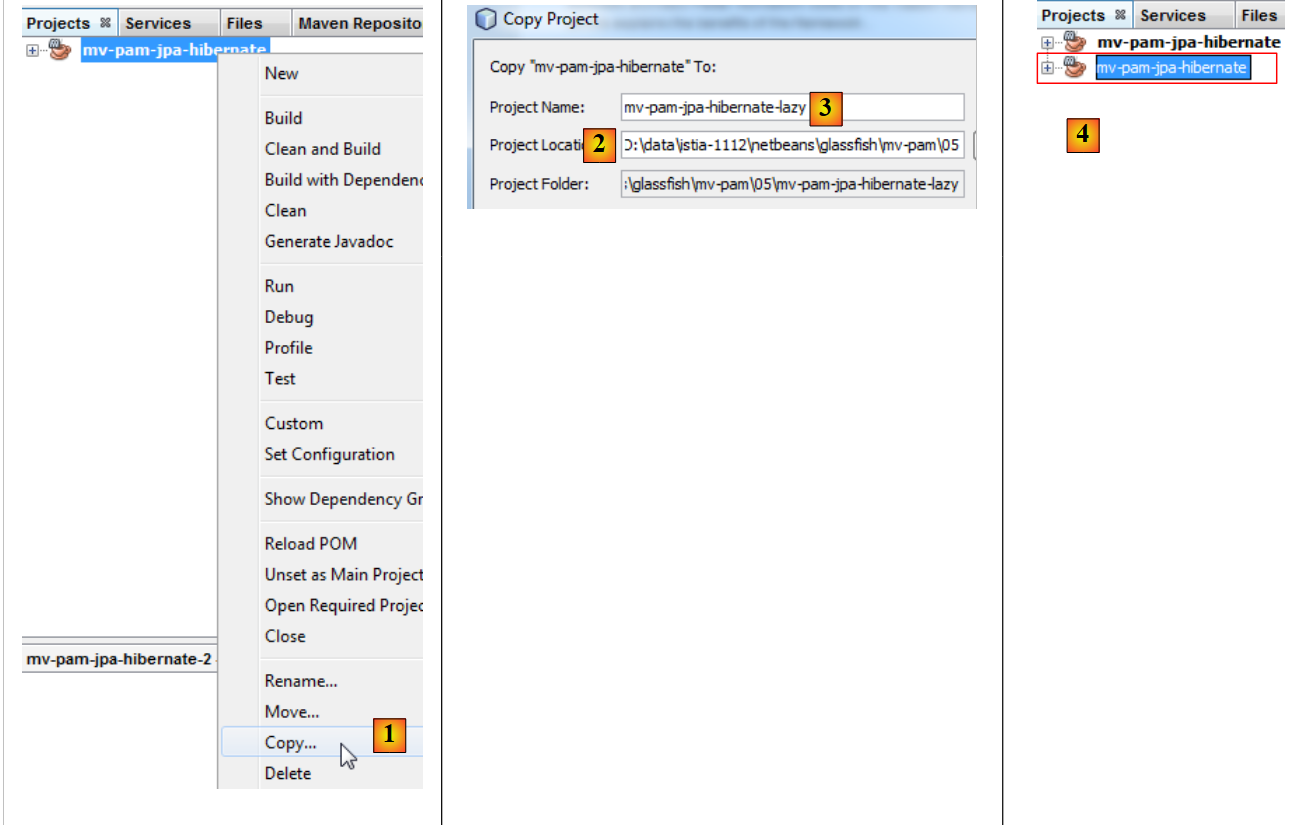 |
- in [1], the project is copied,
- in [2], we specify the folder for the copy, and in [3] its name,
- in [4], the new project has the same name as the old one. We change this:
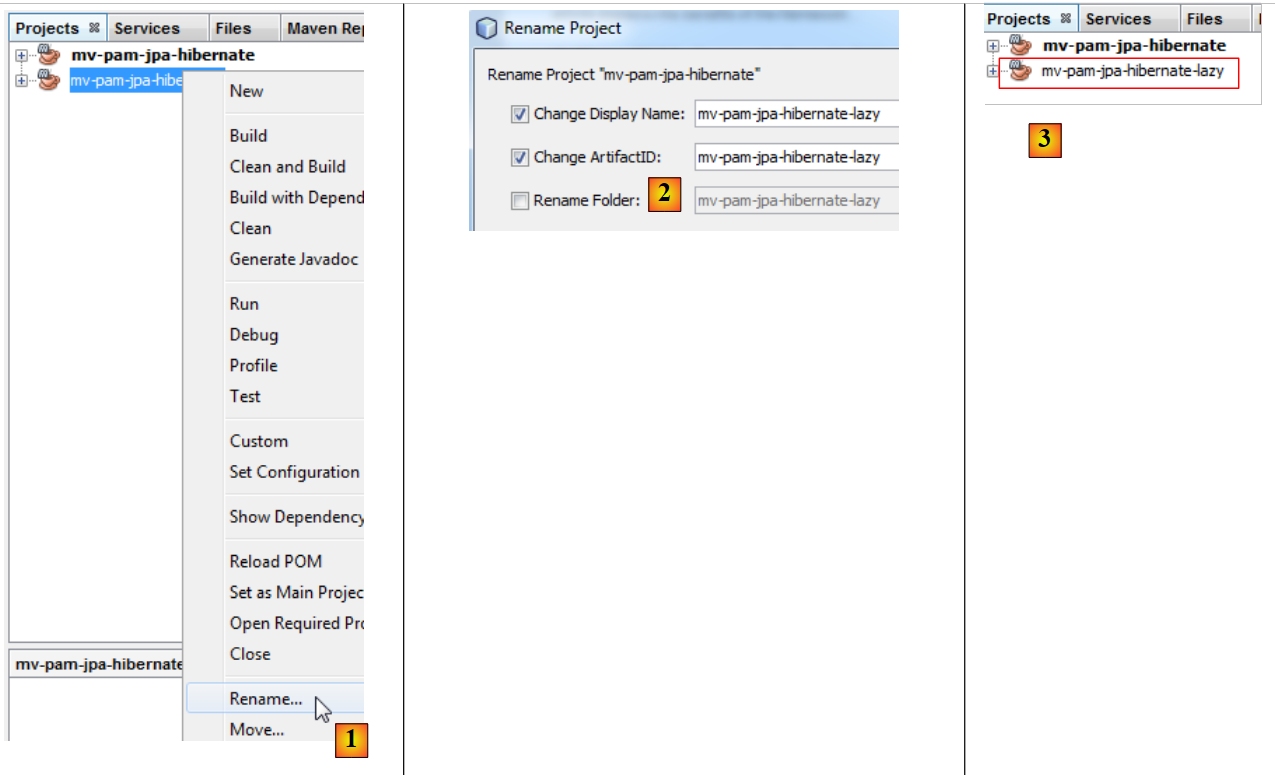 |
- in [1], we rename the project,
- in [2], rename the project and its artifactId,
- in [3], the new project.
We modify the [Main.java] program as follows:
package main;
import java.util.List;
import javax.persistence.EntityManager;
import javax.persistence.EntityManagerFactory;
import javax.persistence.Persistence;
import jpa.Employe;
public class Main {
// the JPQL query below brings back an employee
// the foreign key [Employe].indemnite is in FetchType.LAZY
public static void main(String[] args) {
// creating the Entity Manager is enough to build the JPA layer
EntityManagerFactory emf = Persistence.createEntityManagerFactory("pam-jpa-hibernatePU");
// first attempt
EntityManager em = emf.createEntityManager();
Employe employe = (Employe) em.createQuery("select e from Employe e where e.nom=:nom").setParameter("nom", "Jouveinal").getSingleResult();
em.close();
// we display the employee
try {
System.out.println(employe);
} catch (Exception ex) {
System.out.println(ex);
}
// second test
em = emf.createEntityManager();
employe = (Employe) em.createQuery("select e from Employe e left join fetch e.indemnite where e.nom=:nom").setParameter("nom", "Jouveinal").getSingleResult();
// free up resources
em.close();
// we display the employee
try {
System.out.println(employe);
} catch (Exception ex) {
System.out.println(ex);
}
// resource release
emf.close();
}
}
- line 15: we create the EntityManagerFactory for the JPA layer,
- line 17: we obtain the EntityManager, which allows us to interact with the JPA layer,
- line 18: we retrieve the employee named Jouveinal,
- line 19: we close the EntityManager. This closes the persistence context.
- line 22: we display the retrieved employee.
The [Employee] class is as follows:
package jpa;
...
@Entity
@Table(name="EMPLOYES")
public class Employe implements Serializable {
@Id
@GeneratedValue(strategy = GenerationType.AUTO)
private Long id;
@Version
@Column(name="VERSION",nullable=false)
private int version;
@Column(name="SS", nullable=false, unique=true, length=15)
private String SS;
@Column(name="NOM", nullable=false, length=30)
private String nom;
@Column(name="PRENOM", nullable=false, length=20)
private String prenom;
@Column(name="ADRESSE", nullable=false, length=50)
private String adresse;
@Column(name="VILLE", nullable=false, length=30)
private String ville;
@Column(name="CP", nullable=false, length=5)
private String codePostal;
@ManyToOne(fetch= FetchType.LAZY)
@JoinColumn(name="INDEMNITE_ID",nullable=false)
private Indemnite indemnite;
/**
* Returns a string representation of the object. This implementation constructs
* that representation based on the id fields.
* @return a string representation of the object.
*/
@Override
public String toString() {
return "jpa.Employe[id=" + getId()
+ ",version="+getVersion()
+",SS="+getSS()
+ ",nom="+getNom()
+ ",prenom="+getPrenom()
+ ",adresse="+getAdresse()
+",ville="+getVille()
+",code postal="+getCodePostal()
+",indice="+getIndemnite().getIndice()
+"]";
}
...
}
- line 27: the indemnite field is fetched in LAZY mode,
- line 47: uses the indemnite field. If the toString method is called while the indemnite field has not yet been fetched, it will be fetched at that point. Unless the persistence context has been closed, as in the example.
Let’s go back to the [Main] code:
- lines 21–25: we should get an exception. This is because the toString method will be called. It will use the indemnite field. This field will be looked up. Since the persistence context has been closed, the retrieved [Employee] entity no longer exists, hence the exception.
- line 27: we create a new EntityManager,
- line 28: we retrieve the employee Jouveinal by explicitly requesting the associated allowance in the JPQL query. This explicit request is necessary because the retrieval mode for this allowance is LAZY,
- Line 30: We close the EntityManager,
- Lines 32–36: We display the employee again. There should be no exception.
To run the project, you need a populated database. You will create it by following the steps in section 5.5. Additionally, the [persistence.xml] file must be modified:
<?xml version="1.0" encoding="UTF-8"?>
<persistence version="2.0" xmlns="http://java.sun.com/xml/ns/persistence" xmlns:xsi="http://www.w3.org/2001/XMLSchema-instance" xsi:schemaLocation="http://java.sun.com/xml/ns/persistence http://java.sun.com/xml/ns/persistence/persistence_2_0.xsd">
<persistence-unit name="mv-pam-jpa-hibernatePU" transaction-type="RESOURCE_LOCAL">
<provider>org.hibernate.ejb.HibernatePersistence</provider>
<class>jpa.Cotisation</class>
<class>jpa.Employe</class>
<class>jpa.Indemnite</class>
<properties>
<property name="javax.persistence.jdbc.url" value="jdbc:mysql://localhost:3306/dbpam_hibernate"/>
<property name="javax.persistence.jdbc.password" value=""/>
<property name="javax.persistence.jdbc.driver" value="com.mysql.jdbc.Driver"/>
<property name="javax.persistence.jdbc.user" value="root"/>
<property name="hibernate.cache.provider_class" value="org.hibernate.cache.NoCacheProvider"/>
</properties>
</persistence-unit>
</persistence>
- We removed the option that created the tables. The database here already exists and is populated,
- we have removed the options that caused Hibernate to log the SQL statements it sent to the database.
Running the project produces the following two messages in the console:
- Line 1: The exception that occurred when attempting to retrieve the missing compensation while the session was closed. We can see that the compensation was not fetched due to LAZY mode,
- line 2: the employee with their allowance retrieved via a query that bypassed the LAZY mode.
5.6.5. Work to be done
Following a procedure similar to the one just described, create a project [mv-pam-pa-eclipselink-lazy] that demonstrates EclipseLink’s behavior with LAZY mode.
The following results are obtained:
In LAZY mode, both queries returned the compensation along with the employee. When researching this anomaly online, we discover that the annotation [FetchType.LAZY] (line 1):
@ManyToOne(fetch= FetchType.LAZY)
@JoinColumn(name="INDEMNITE_ID",nullable=false)
private Indemnite indemnite;
is not a requirement but a suggestion. The JPA implementer is not obligated to follow it. We can see, therefore, that the code sometimes becomes dependent on the JPA implementation used. It is possible to configure EclipseLink to behave as expected in LAZY mode.
5.6.6. Moving forward
The architecture of the application to be built is as follows:
 |
For the rest of this document, we will duplicate the Maven project [mv-pam-jpa-hibernate] into the project [mv-pam-spring-hibernate] [1, 2, 3]:
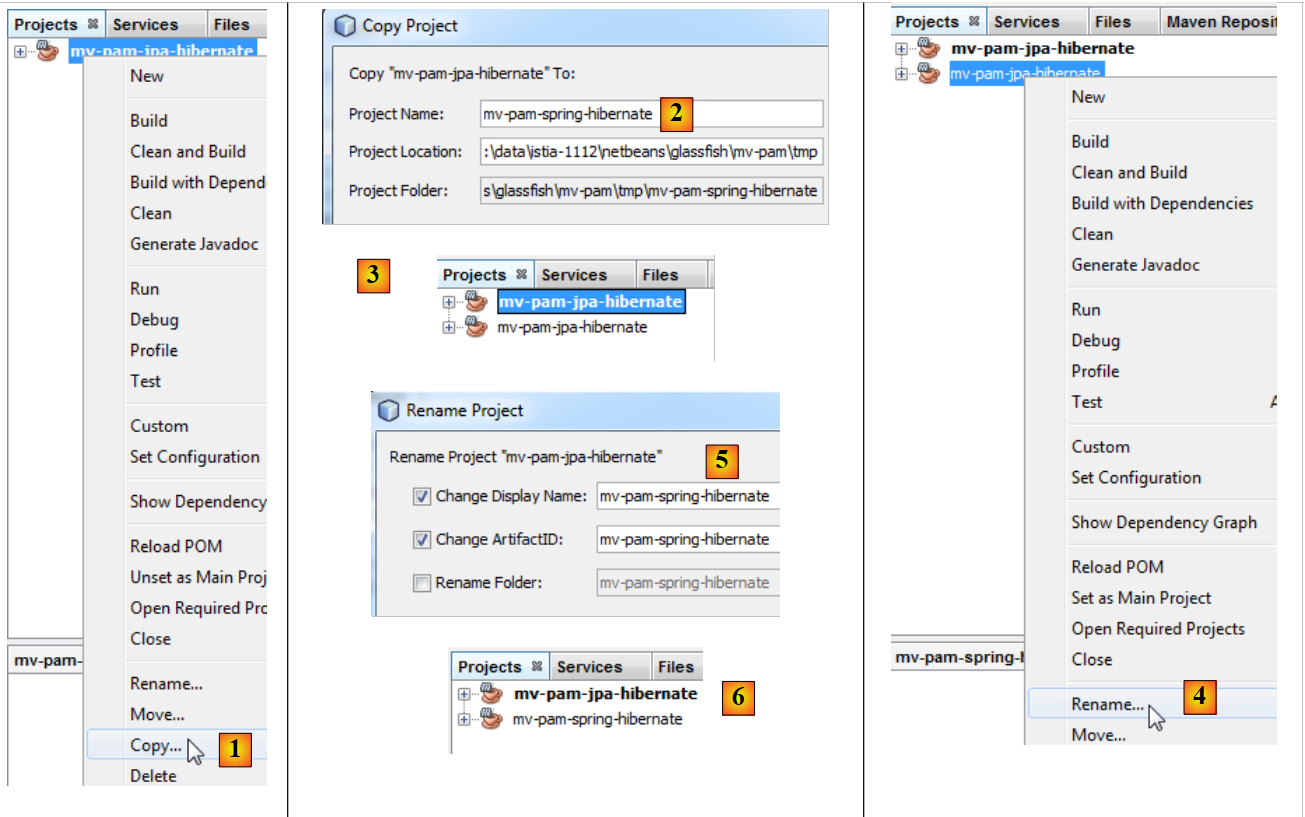 |
- then we will rename the new project [4, 5, 6].
We will change the dependencies of the new project. The [pom.xml] file becomes the following:
<project xmlns="http://maven.apache.org/POM/4.0.0" xmlns:xsi="http://www.w3.org/2001/XMLSchema-instance"
xsi:schemaLocation="http://maven.apache.org/POM/4.0.0 http://maven.apache.org/xsd/maven-4.0.0.xsd">
<modelVersion>4.0.0</modelVersion>
<groupId>istia.st</groupId>
<artifactId>mv-pam-spring-hibernate</artifactId>
<version>1.0-SNAPSHOT</version>
<packaging>jar</packaging>
<name>mv-pam-spring-hibernate</name>
<url>http://maven.apache.org</url>
<repositories>
<repository>
<url>http://repo1.maven.org/maven2/</url>
<id>swing-layout</id>
<layout>default</layout>
<name>Repository for library Library[swing-layout]</name>
</repository>
</repositories>
<properties>
<project.build.sourceEncoding>UTF-8</project.build.sourceEncoding>
</properties>
<dependencies>
<dependency>
<groupId>junit</groupId>
<artifactId>junit</artifactId>
<version>4.10</version>
<scope>test</scope>
<type>jar</type>
</dependency>
<dependency>
<groupId>commons-dbcp</groupId>
<artifactId>commons-dbcp</artifactId>
<version>1.2.2</version>
</dependency>
<dependency>
<groupId>commons-pool</groupId>
<artifactId>commons-pool</artifactId>
<version>1.6</version>
</dependency>
<dependency>
<groupId>org.springframework</groupId>
<artifactId>spring-tx</artifactId>
<version>3.1.1.RELEASE</version>
<type>jar</type>
</dependency>
<dependency>
<groupId>org.springframework</groupId>
<artifactId>spring-beans</artifactId>
<version>3.1.1.RELEASE</version>
<type>jar</type>
</dependency>
<dependency>
<groupId>org.springframework</groupId>
<artifactId>spring-context</artifactId>
<version>3.1.1.RELEASE</version>
<type>jar</type>
</dependency>
<dependency>
<groupId>org.springframework</groupId>
<artifactId>spring-orm</artifactId>
<version>3.1.1.RELEASE</version>
<type>jar</type>
</dependency>
<dependency>
<groupId>org.hibernate</groupId>
<artifactId>hibernate-entitymanager</artifactId>
<version>4.1.2</version>
<type>jar</type>
</dependency>
<dependency>
<groupId>mysql</groupId>
<artifactId>mysql-connector-java</artifactId>
<version>5.1.6</version>
</dependency>
<dependency>
<groupId>org.swinglabs</groupId>
<artifactId>swing-layout</artifactId>
<version>1.0.3</version>
</dependency>
</dependencies>
</project>
- lines 25–31: the dependency for JUnit tests,
- lines 32–41: dependencies for the Apache DBCP connection pool,
- lines 42–65: dependencies for the Spring framework,
- lines 67–71: dependencies for the JPA/Hibernate implementation,
- lines 72–76: the dependency for the MySQL JDBC driver,
- lines 77–81: the dependency for the Swing interface. This is automatically added by NetBeans when a Swing interface is added to the project.
In addition, we will generate the two MySQL databases:
- [dbpam_hibernate] from the [dbpam_hibernate.sql] script,
- [dbpam_eclipselink] from the script [dbpam_eclipselink.sql],
5.7. The interface im s for the [business] and [DAO] layers
Let’s return to the application architecture:
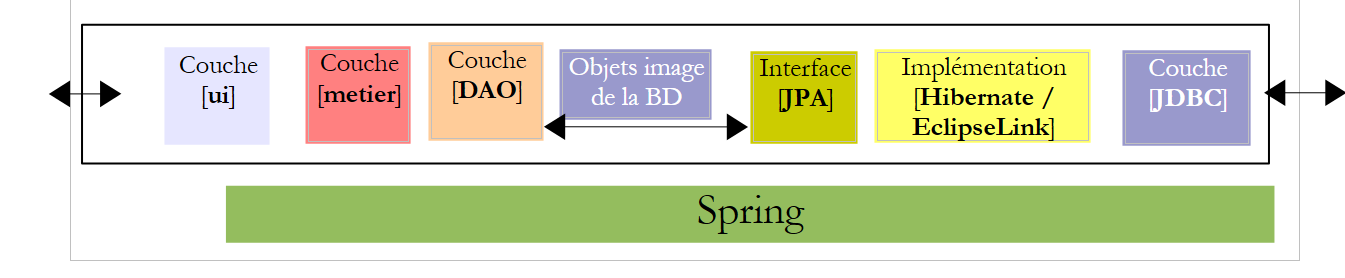 |
In the architecture above, what interface should the [DAO] layer provide to the [business] layer, and what interface should the [business] layer provide to the [UI] layer? A first approach to defining the interfaces of the different layers is to examine the application’s various use cases. Here we have two, depending on the chosen user interface: console or graphical form.
Let’s examine how the console application is used:
The app receives three pieces of information from the user (see line 1 above)
- the child care provider’s Social Security number
- the number of hours worked in the month
- the number of days worked in the month
Based on this information and other data stored in configuration files, the application displays the following information:
- lines 4–6: the entered values
- lines 8–10: information related to the employee whose Social Security number was provided
- lines 12–14: the rates for the various social security contributions
- lines 16–17: the various allowances paid to the child care provider
- lines 19–24: items on the child care provider’s pay stub
A certain amount of information must be provided by the [business] layer to the [UI] layer:
- information related to a child care provider identified by their Social Security number. This information is found in the [EMPLOYEES] table. This allows lines 6–8 to be displayed.
- the amounts of the various social security contribution rates to be deducted from the gross salary. This information is found in the [COTISATIONS] table. This allows lines 10–12 to be displayed.
- the amounts of the various allowances related to the role of childminder. This information is found in the [INDEMNITES] table. This allows lines 14–15 to be displayed.
- the components of the salary displayed in lines 18–22.
From this, we could decide on an initial implementation of the [IMetier] interface presented by the [metier] layer to the [ui] layer:
- line 1: the elements of the [business] layer are placed in the [business] package
- line 5: the [calculatePaystub] method takes as parameters the three pieces of information obtained by the [ui] layer and returns an object of type [Paystub] containing the information that the [ui] layer will display on the console. The [ Paystub] class could be as follows:
- line 9: the employee covered by the pay stub - information #1 displayed by the [ui] layer
- line 10: the various contribution rates - information #2 displayed by the [ui] layer
- line 11: the various allowances linked to the employee's index - information #3 displayed by the [ui] layer
- line 12: the components of their salary - information #4 displayed by the [ui] layer
A second use case for the [business] layer appears with the graphical interface:
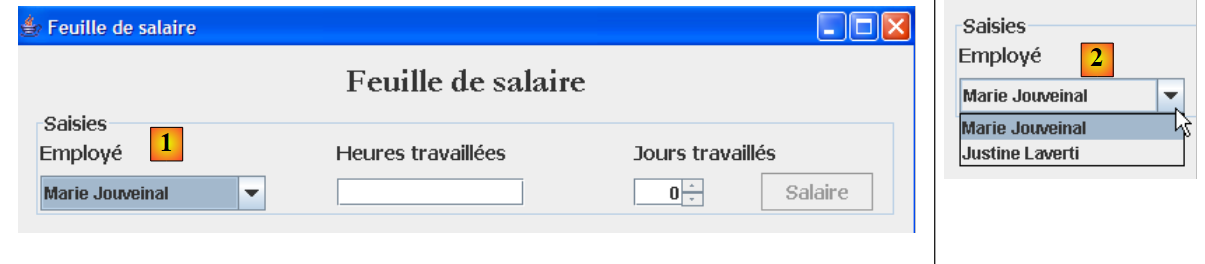 |
As shown above, the drop-down list [1, 2] displays all employees. This list must be requested from the [business] layer. The interface ace for this layer then evolves as follows:
- line [10]: the method that will allow the [UI] layer to request the list of all employees from the [Business] layer.
The [business] layer can only initialize the [Employee, Contribution, Allowance] fields of the [Payroll] object above by querying the [DAO] layer, as this information is stored in the database tables. The same applies to retrieving the list of all employees. We could create a single [DAO] interface to manage access to the three entities [Employee, Contribution, Allowance]. However, we have decided here to create one [DAO] interface per entity.
The [DAO] interface for accessing the [Contribution] entities in the [CONTRIBUTIONS] table will be as follows:
- Line 6: The [ICotisationDao] interface manages access to the [Cotisation] entity and thus to the [COTISATIONS] table in the database. Our application only needs the [findAll] method on line 16, which retrieves all the contents of the [COTISATIONS] table. Here, we wanted to address a more general case where all CRUD operations (Create, Read, Update, Delete) are performed on the entity.
- Line 8: The [create] method creates a new [Cotisation] entity
- Line 10: The [edit] method modifies an existing [Cotisation] entity
- Line 12: The [destroy] method deletes an existing [Cotisation] entity
- line 14: the [find] method retrieves an existing [Cotisation] entity using its id
- Line 16: The [findAll] method returns a list of all existing [Membership] entities
Let’s take a closer look at the signature of the [create] method:
The create method has a cotisation parameter of type Cotisation. The cotisation parameter must be persisted, i.e., stored in the [COTISATIONS] table. Before this persistence, the cotisation parameter has an id identifier with no value. After persistence, the id field has a value that is the primary key of the record added to the [COTISATIONS] table. The cotisation parameter is therefore an input/output parameter of the create method. It does not seem necessary for the create method to additionally return the cotisation parameter as a result. Since the calling method holds a reference to the [Cotisation cotisation] object, if it is modified, the calling method has access to the modified object because it holds a reference to it. It can therefore know the value that the create method assigned to the id field of the [Cotisation cotisation] object. The method signature could therefore be simplified to:
When writing an interface, it is important to remember that it can be used in two different contexts: local and remote . In the local context, the calling method and the called method are executed in the same JVM:
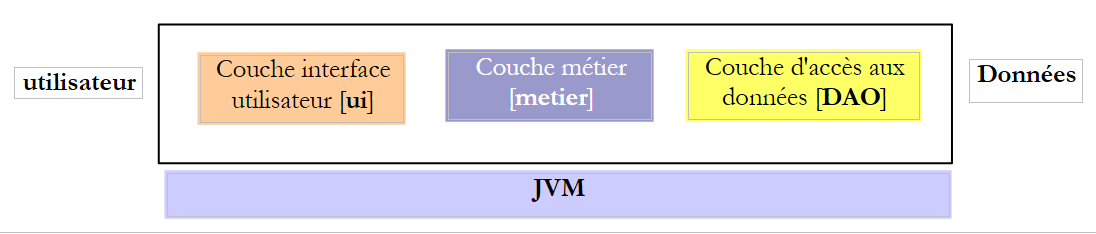 |
If the [business] layer calls the create method of the [DAO] layer, it does indeed have a reference to the [Membership membership] parameter that it passes to the method.
In the remote context, the calling method and the called method are executed in different JVMs:
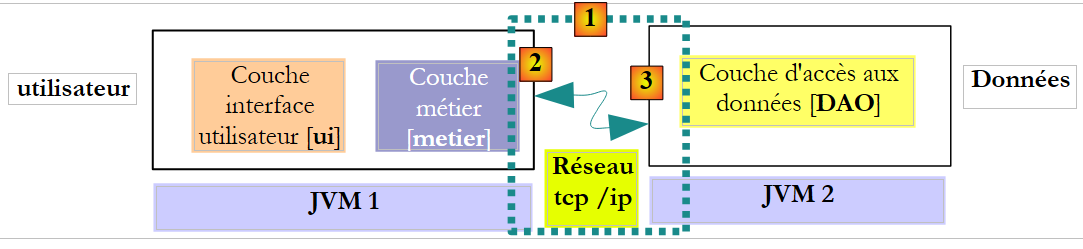 |
In the example above, the [business] layer runs in JVM 1 and the [DAO] layer in JVM 2 on two different machines. The two layers do not communicate directly. Between them lies a layer we will call the communication layer [1]. This consists of a transmission layer [2] and a reception layer [3]. The developer generally does not have to write these communication layers. They are automatically generated by software tools. The [business] layer is written as if it were running in the same JVM as the [DAO] layer. Therefore, no code changes are required.
The communication mechanism between the [business] layer and the [DAO] layer is as follows:
- the [business] layer calls the create method of the [DAO] layer, passing it the parameter [Contribution contribution1]
- this parameter is actually passed to the transmission layer [2]. This layer will transmit the value of the cotisation1 parameter over the network, not its reference. The exact form of this value depends on the communication protocol used.
- The [3] receiving layer retrieves this value and uses it to reconstruct a [Cotisation cotisation2] object that mirrors the initial parameter sent by the [business] layer. We now have two identical objects (in terms of content) in two different JVMs: cotisation1 and cotisation2.
- The presentation layer will pass the `contribution2` object to the `create` method of the [DAO] layer, which will persist it in the database. After this operation, the `id` field of the `contribution2` object has been initialized with the primary key of the record added to the [COTISATIONS] table. This is not the case for the `contribution1` object, to which the [business] layer has a reference. If we want the [business] layer to have a reference to the cotisation2 object, we must pass it to the layer. Therefore, we need to change the signature of the create method in the [DAO] layer:
- With this new signature, the create method will return the persisted object contribution2. This result is returned to the receiving layer [3] that called the [DAO] layer. The [DAO] layer will return the value (not the reference) of contribution2 to the sending layer [2].
- The sender layer [2] will retrieve this value and use it to reconstruct an object [Membership membership3] that mirrors the result returned by the create method of the [DAO] layer.
- The [Contribution contribution3] object is returned to the method in the [business] layer whose call to the [DAO] layer’s create method had initiated this entire mechanism. The [business] layer can therefore determine the primary key value assigned to the [Contribution contribution1] object for which it had requested persistence: this is the value of the id field in contribution3.
The previous architecture is not the most common. More frequently, the [business] and [DAO] layers are found in the same JVM:
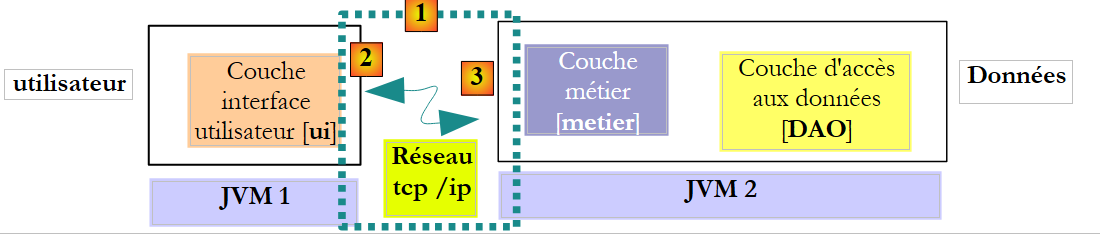 |
In this architecture, it is the methods of the [business] layer that must return results, not those of the [DAO] layer. Nevertheless, the following signature of the create method of the [DAO] layer:
allows us to avoid making assumptions about the actual architecture in place. Using signatures that will work regardless of the chosen architecture—whether local or remote—means that if a called method modifies some of its parameters:
- these must also be part of the result of the called method
- the calling method must use the result of the called method and not the references to the modified parameters it passed to the called method.
This allows us to transition from a local architecture to a remote architecture without modifying the code. Let’s revisit the [ICotisationDao] interface in this light:
- line 8: the case for the create method has been handled
- Line 10: The edit method uses its parameter [Cotisation cotisation1] to update the record in the [COTISATIONS] table that has the same primary key as the cotisation object. It returns the cotisation2 object, which is a representation of the modified record. The contribution1 parameter itself is not modified. The method must return contribution2 as the result, whether in a remote or local architecture.
- Line 12: The destroy method deletes the record from the [COTISATIONS] table that has the same primary key as the contribution object passed as a parameter. The contribution object is not modified. Therefore, it does not need to be returned.
- Line 14: The id parameter of the find method is not modified by the method. It does not need to be included in the result.
- Line 16: The findAll method has no parameters. We therefore do not need to examine it.
Ultimately, only the signature of the create method needs to be adapted to be usable within a remote architecture. The reasoning above applies to the other [DAO] interfaces. We will not repeat it here and will instead use signatures that are usable in both remote and local architectures.
The [DAO] interface for accessing [Indemnite] entities in the [INDEMNITES] table will be as follows:
- Line 6: The [IIndemniteDao] interface manages access to the [Indemnite] entity and thus to the [INDEMNITES] table in the database. Our application only needs the [findAll] method on line 16, which retrieves the entire contents of the [INDEMNITES] table. Here, we wanted to address a more general case where all CRUD operations (Create, Read, Update, Delete) are performed on the entity.
- Line 8: The [create] method creates a new [Indemnite] entity
- Line 10: The [edit] method modifies an existing [Indemnite] entity
- Line 12: The [destroy] method deletes an existing [Indemnite] entity
- line 14: the [find] method retrieves an existing [Indemnite] entity using its id
- Line 16: The [findAll] method returns a list of all existing [Indemnite] entities
The [DAO] interface for accessing [Employe] entities in the [EMPLOYES] table will be as follows:
- Line 6: The [IEmployeDao] interface manages access to the [Employee] entity and thus to the [EMPLOYEES] table in the database. Our application only needs the [findAll] method on line 16, which retrieves all the contents of the [EMPLOYEES] table. Here, we wanted to address a more general case where all CRUD operations (Create, Read, Update, Delete) are performed on the entity.
- Line 8: The [create] method creates a new [Employee] entity
- Line 10: The [edit] method modifies an existing [Employee] entity
- Line 12: The [destroy] method deletes an existing [Employee] entity
- line 14: the [find] method retrieves an existing [Employee] entity via its ID
- Line 16: The [find(String SS)] method retrieves an existing [Employee] entity using its SS number. We saw that this method was necessary for the console application.
- line 18: the [findAll] method returns a list of all existing [Employee] entities. We saw that this method was necessary for the graphical application.
5.8. The [PamException] class
The [DAO] layer will work with Java’s JDBC API. This API throws controlled [SQLException] exceptions, which have two drawbacks:
- they bloat the code, which must handle these exceptions using try/catch blocks.
- they must be declared in the method signatures of the [IDao] interface using "throws SQLException". This prevents the implementation of this interface by classes that would throw a controlled exception of a type other than [SQLException].
To address this issue, the [DAO] layer will only "propagate" unchecked exceptions of type [PamException].
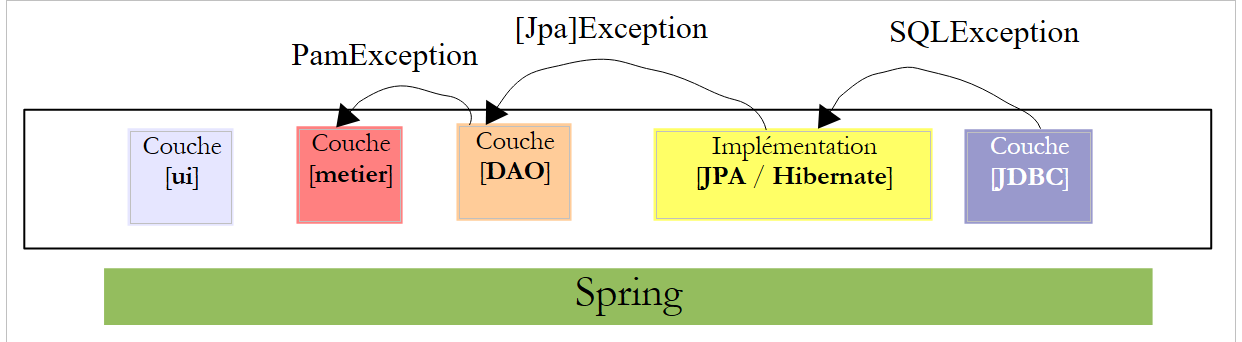 |
- The [JDBC] layer throws exceptions of type [SQLException]
- The [JPA] layer throws exceptions specific to the JPA implementation being used
- the [DAO] layer throws uncaught exceptions of type [PamException]
This has two consequences:
- The [business] layer will not be required to handle exceptions from the [DAO] layer using try/catch blocks. It can simply let them propagate up to the [UI] layer.
- The methods of the [IDao] interface do not need to specify the nature of the [PamException] in their signatures, which leaves open the possibility of implementing this interface with classes that would throw another type of uncaught exception.
The [PamException] class will be placed in the [exception] package of the NetBeans project:
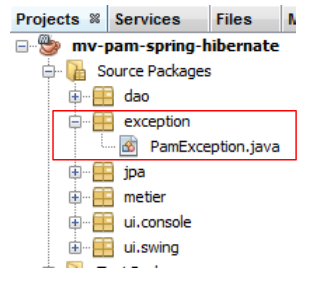 |
Its code is as follows:
- Line 4: [PamException] derives from [RuntimeException]. It is therefore a type of exception that the compiler does not require us to handle with a try/catch block or include in method signatures. For this reason, [PamException] is not included in the method signatures of the [IDao] interface. This allows the interface to be implemented by a class that throws a different type of exception, provided that it also derives from [RuntimeException].
- To distinguish between the errors that may occur, we use the error code in line 7. The three constructors in lines 14, 19, and 24 are those of the parent class [RuntimeException], to which we have added a parameter: the error code we want to assign to the exception.
The application’s behavior, from the perspective of exceptions, will be as follows:
- The [DAO] layer will encapsulate any exception encountered within a [PamException] and rethrow it to the [business] layer.
- The [business] layer will allow exceptions thrown by the [DAO] layer to propagate upward. It will wrap any exception occurring in the [business] layer into a [PamException] and rethrow it to the [UI] layer.
- The [UI] layer intercepts all exceptions propagated from the [business] and [DAO] layers. It will simply display the exception on the console or the graphical user interface.
Let’s now examine the implementation of the [DAO] and [business] layers in turn.
5.9. The [DAO] layer of the [PAM] application
We are working within the following architecture:
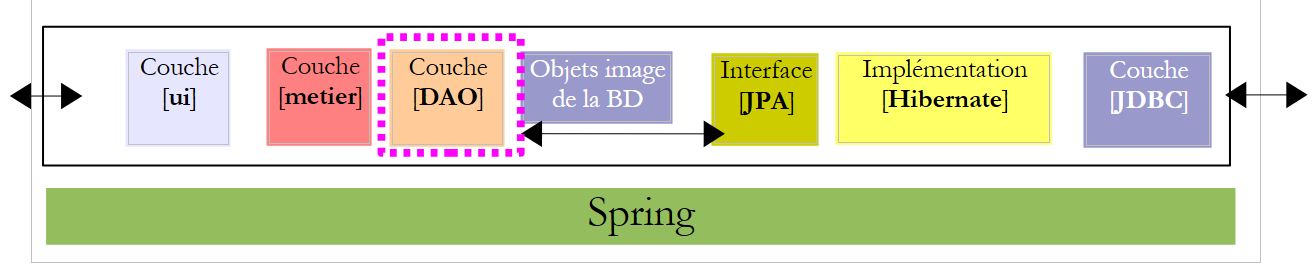 |
5.9.1. Implementation
Recommended reading: Section 3.1.3 of [ref1]
Question: Using Spring/JPA integration, write the classes [CotisationDao, IndemniteDao, EmployeDao] to implement the interfaces [ICotisationDao, IIndemniteDao, IEmployeDao]. Each class method will catch any exception and wrap it in a [PamException] with an error code specific to the caught exception.
The implementation classes will be part of the [dao] package:
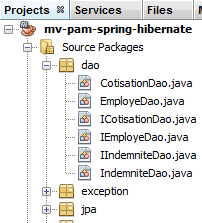 |
5.9.2. Configuration
Recommended reading: Section 3.1.5 of [ref1]
The DAO/JPA integration is configured by the Spring file [spring-config-dao.xml] and the JPA file [persistence.xml]:
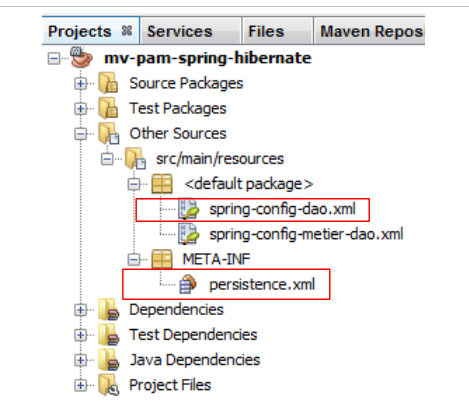 |
Question: Write the contents of these two files. We will assume that the database used is the MySQL5 database [dbpam_hibernate] generated by the SQL script [dbpam_hibernate.sql]. The Spring file will define the following three beans: employeDao of type EmployeDao, indemniteDao of type IndemniteDao, and cotisationDao of type CotisationDao. Furthermore, the JPA implementation used will be Hibernate.
5.9.3. Tests
Recommended reading: sections 3.1.6 and 3.1.7 of [ref1]
Now that the [DAO] layer is written and configured, we can test it. The test architecture will be as follows:
 |
5.9.4. InitDB
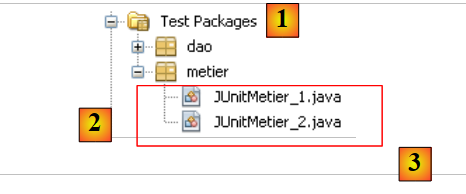
We will create two test programs for the [DAO] layer. These will be placed in the [dao] package [2] of the [Test Packages] branch [1] of the NetBeans project. This branch is not included in the project generated by the [Build project] option, which ensures that the test programs we place there will not be included in the project’s final .jar file.
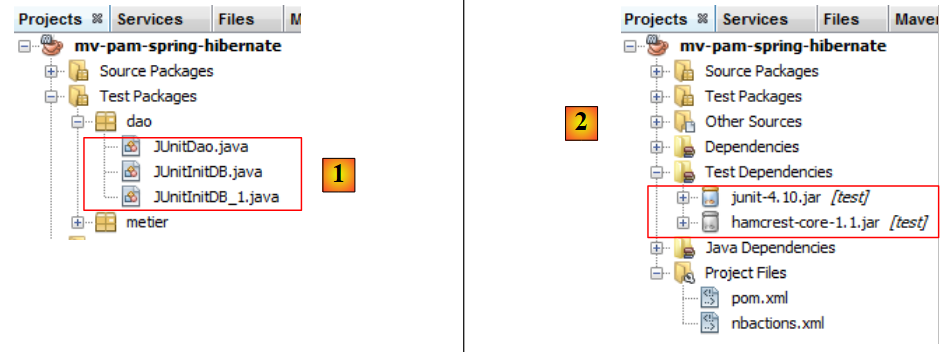 |
The classes placed in the [Test Packages] branch have access to the classes in the [Source Packages] branch as well as the project’s class libraries. If the tests require libraries other than those in the project, these must be declared in the [Test Libraries] branch [2].
The test classes use the JUnit unit testing tool:
- [JUnitInitDB] does not perform any tests. It populates the database with a few records and then displays them on the console.
- [JUnitDao] performs a series of tests and verifies their results.
The skeleton of the [JUnitInitDB] class is as follows:
- The [init] method is executed before the test suite begins (annotation @BeforeClass). It instantiates the [DAO] layer.
- The [clean] method is executed before each test (annotation @Before). It clears the database.
- The [initDB] method is a test (annotation @Test). It is the only one. A test must contain Assert.assertCondition assertion statements. Here, there will be none. The method is therefore a dummy test. Its purpose is to populate the database with a few rows and then display the database contents on the console. The create and findAll methods of the [DAO] layers are used here.
Question: Complete the code for the [JUnitInitDB] class. Use the example from Section 3.1.6 of [ref1] as a guide. The code will generate the output shown in Section 5.1.
5.9.5. Implementing the test
We are now ready to run [InitDB]. We describe the procedure using the MySQL5 DBMS:
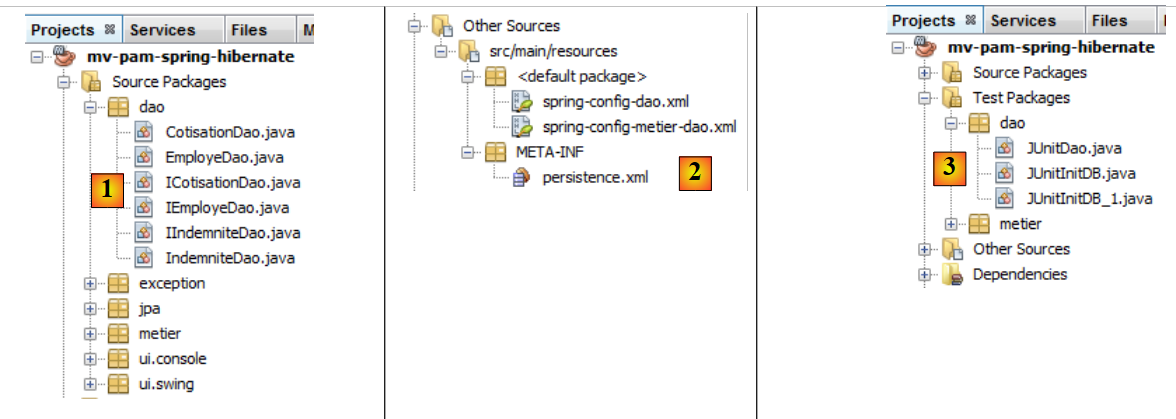 |
- the classes [1], the configuration files [2], and the test classes of the [DAO] layer [3] are set up,
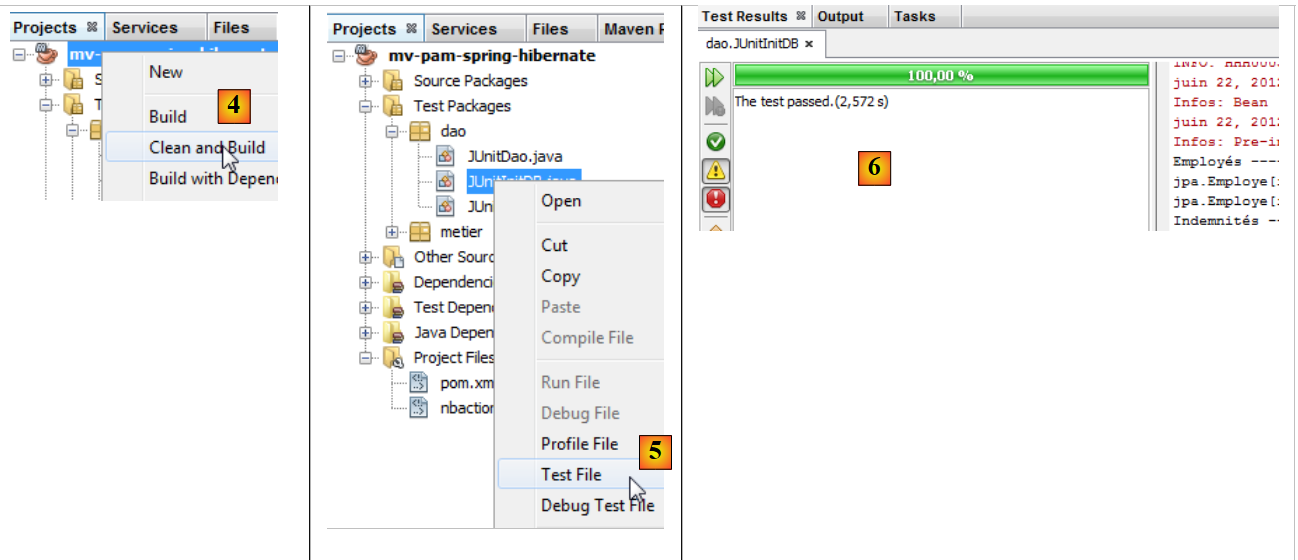 |
- the project is built [4]
- the [JUnitInitDB] class is executed [5]. The MySQL5 DBMS is launched with an existing [dbpam_hibernate] database,
- the [Test Results] window [6] indicates that the tests were successful. This message is not significant here, as the [JUnitInitDB] program contains no Assert.assertCondition assertion statements that could cause the test to fail. Nevertheless, it shows that no exceptions occurred during test execution.
The [Output] window contains the execution logs, including those from Spring and the test itself. The output generated by the [JUnitInitDB] class is as follows:
The tables [EMPLOYEES, ALLOWANCES, CONTRIBUTIONS] have been populated. This can be verified by connecting NetBeans to the [dbpam_hibernate] database.
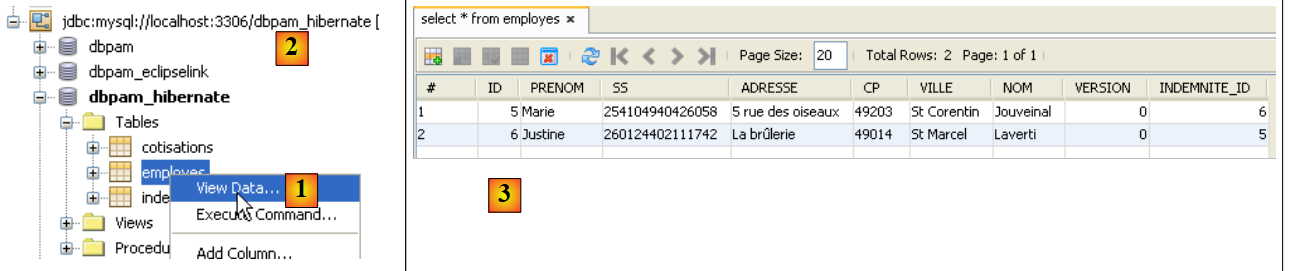 |
- In [1], in the [services] tab, you can view the data from the [employees] table of the [dbpam_hibernate] connection [2],
- in [3] the result.
5.9.6. JUnitD ao
We will now look at a second test class [JUnitDao]:
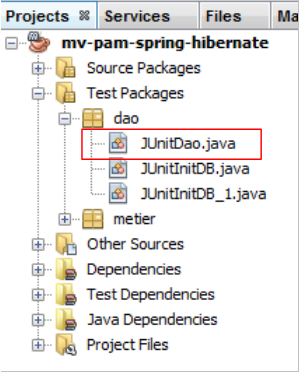 |
The class skeleton will be as follows:
1 2 3 4 5 6 7 8 9 10 11 12 13 14 15 16 17 18 19 20 21 22 23 24 25 26 27 28 29 30 31 32 33 34 35 36 37 38 39 40 41 42 43 44 45 46 47 48 49 50 51 52 53 54 55 56 57 58 59 60 61 62 63 64 65 66 67 68 69 70 71 72 73 74 75 76 77 78 79 80 81 82 83 84 85 86 87 88 89 90 91 92 93 94 95 96 97 98 99 100 101 102 103 104 105 106 107 108 109 110 111 112 113 114 115 116 117 118 119 120 121 122 123 124 125 126 127 128 129 130 131 132 133 134 135 136 137 138 139 140 141 142 143 144 145 146 147 148 149 150 151 152 153 154 155 156 157 158 159 160 161 162 163 164 165 166 167 168 169 170 171 172 173 174 175 176 177 178 179 180 181 182 183 184 185 186 187 | |
In the previous test class, the database is cleared before each test.
Question: Write the following methods:
1 - test02: based on test01
2 - test03: An employee has a field of type Indemnity. Therefore, create an Indemnity entity and an Employee entity
3 - test04.
By proceeding in the same way as for the [JUnitInitDB] test class, we obtain the following results:
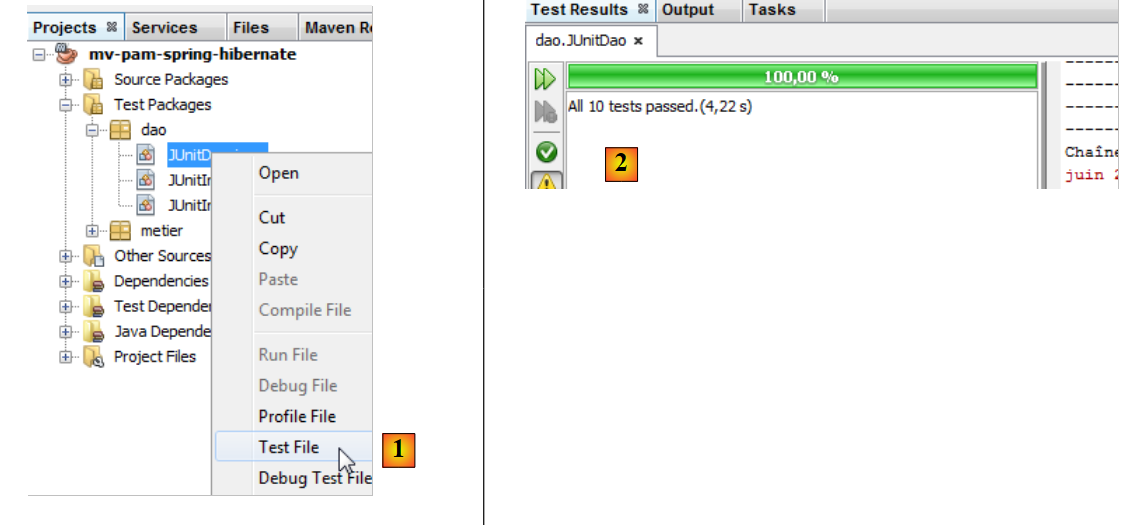 |
- In [1], we run the test class
- in [2], the test results in the [Test Results] window
Let’s trigger an error to see how it is reported on the results page:
Line 13: The assertion will cause an error, since the value of Csgrds is 3.49 (line 8). Running the test class yields the following results:
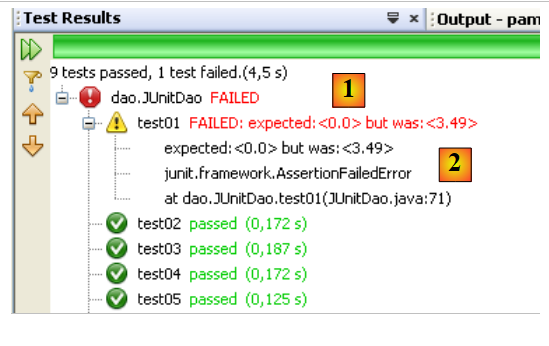 |
- The results page [1] now shows that some tests failed.
- In [2], a summary of the exception that caused the test to fail. It includes the line number in the Java code where the exception occurred.
5.10. The [business] layer of the [PAM] application
Now that the [DAO] layer has been written, we move on to studying the business layer [2]:
 |
5.10.1. The Java interface [IMetier]
This was described in section 5.7. We recall it below:
The implementation of the [business] layer will be done in a [business] package:
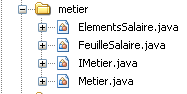 |
The [Business] package will include, in addition to the [IMetier] interface and its implementation [Metier], two other classes: [Payroll] and [PayrollItems]. The [Payroll] class was briefly introduced in Section 5.7. We will now revisit it.
5.10.2. The [Payroll] class
The [calculatePayStub] method of the [IMetier] interface returns an object of type [PayStub] that represents the various elements of a pay stub. Its definition is as follows:
- line 7: the class implements the Serializable interface because its instances may be exchanged over the network.
- line 9: the employee covered by the pay stub
- line 10: the various contribution rates
- line 11: the various allowances linked to the employee's index
- line 12: the components of their salary
- lines 14–22: the class’s two constructors
- lines 25–27: [toString] method identifying a specific [PayStub] object
- Lines 29 and beyond: public accessors to the class’s private fields
The [ElementsSalaire] class referenced in line 11 of the [FeuilleSalaire] class above contains the elements that make up a pay stub. Its definition is as follows:
- line 3: the class implements the Serializable interface because it is a component of the PayrollClass, which must be serializable.
- line 6: the base salary
- line 7: social security contributions paid on this base salary
- line 8: daily child support payments
- line 9: the daily child meal allowances
- line 10: the net salary to be paid to the child care provider
- lines 12–24: class constructors
- lines 27–31: [toString] method identifying a specific [ElementsSalaire] object
- Lines 34 and beyond: public accessors to the class's private fields
5.10.3. The [Metier] implementation class of the [business] layer
The implementation class [Metier] of the [business] layer could be as follows:
- line 5: The Spring @Transactional annotation ensures that every method in the class runs within a transaction.
- lines 9-10: references to the [DAO] layers of the [Cotisation, Employe, Indemnite] entities
- lines 14–17: the [calculatePayroll] method
- lines 20–22: the [findAllEmployees] method
- Line 24 and beyond: the public accessors for the class’s private fields
Question: Write the code for the [findAllEmployees] method.
Question: Write the code for the [calculatePayroll] method.
Note the following points:
- The method for calculating the salary was explained in section 5.2.
- If the [SS] parameter does not correspond to any employee (the [DAO] layer returned a null pointer), the method will throw a [PamException] with an appropriate error code.
5.10.4. Testing the [business] layer
We create two test programs:
 |
The test classes [3] are created in the [metier] package [2] within the [Test Packages] branch [1] of the project.
The [JUnitMetier_1] class could look like this:
There are no Assert.assertCondition assertions in the class. We are simply trying to calculate a few salaries so that we can then verify them manually. The screen output obtained by running the previous class is as follows:
- Line 4: Justine Laverti's pay stub
- line 5: Marie Jouveinal's pay stub
- line 6: the exception due to the fact that employee with SS number 'xx' does not exist.
Question: Line 17 of [JUnitMetier_1] uses the Spring bean named metier. Provide the definition of this bean in the file [spring-config-metier-dao.xml].
The class [JUnitMetier_2] could be as follows:
The [JUnitMetier_2] class is a copy of the [JUnitMetier_1] class, except that this time, assertions have been placed in the test01 method.
Question: Write the test01 method.
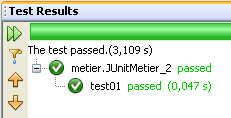
When executing the [JUnitMetier_2] class, the following results are obtained if everything goes well:
5.11. The [ui] layer of the [PAM] application – version console
Now that the [business] layer has been written, we still need to write the [ui] layer [1]:
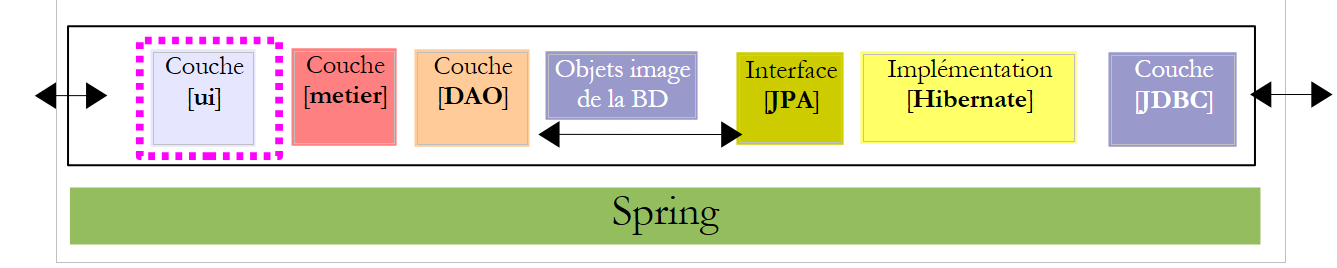 |
We will create two different implementations of the [ui] layer: a console version and a Swing GUI version:
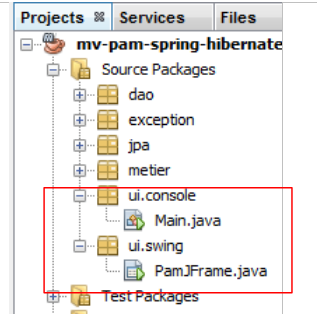 |
5.11.1. The [ ui.console.Main] class
We will first focus on the console application implemented by the [ui.console.Main] class above. Its operation was described in Section 5.3. The skeleton of the [Main] class could be as follows:
Question: Complete the code above.
5.11.2. Execution
To run the [ui.console.Main] class, proceed as follows:
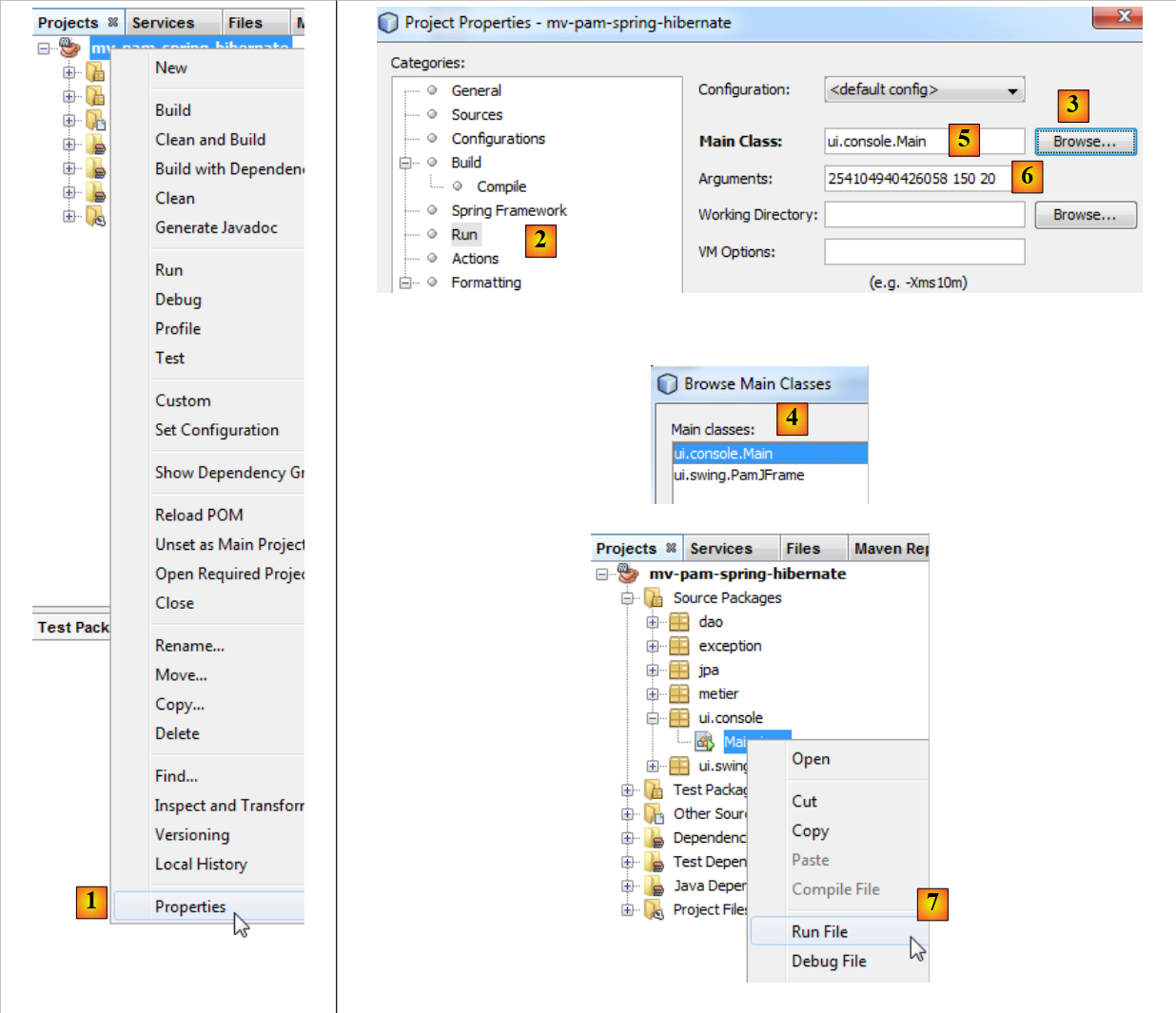 |
- In [1], select the project properties,
- in [2], select the [Run] property of the project,
- use the [3] button to specify the class (known as the main class) to run,
- select the class [4],
- the class appears in [5]. This class requires three arguments to run (SS number, number of hours worked, number of days worked). These arguments are entered in [6],
- once this is done, the project can be executed [7]. The previous configuration means that the [ui.console.Main] class will be executed.
The results of the execution are displayed in the [output] window:
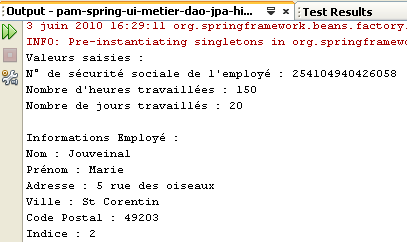 | 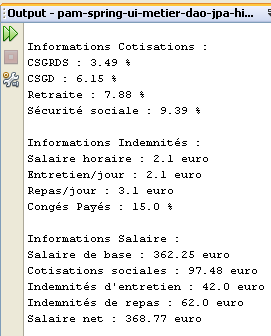 |
5.12. The [ui] layer of the [PAM] application – graphical version
We will now implement the [ui] layer with a graphical user interface:
 |
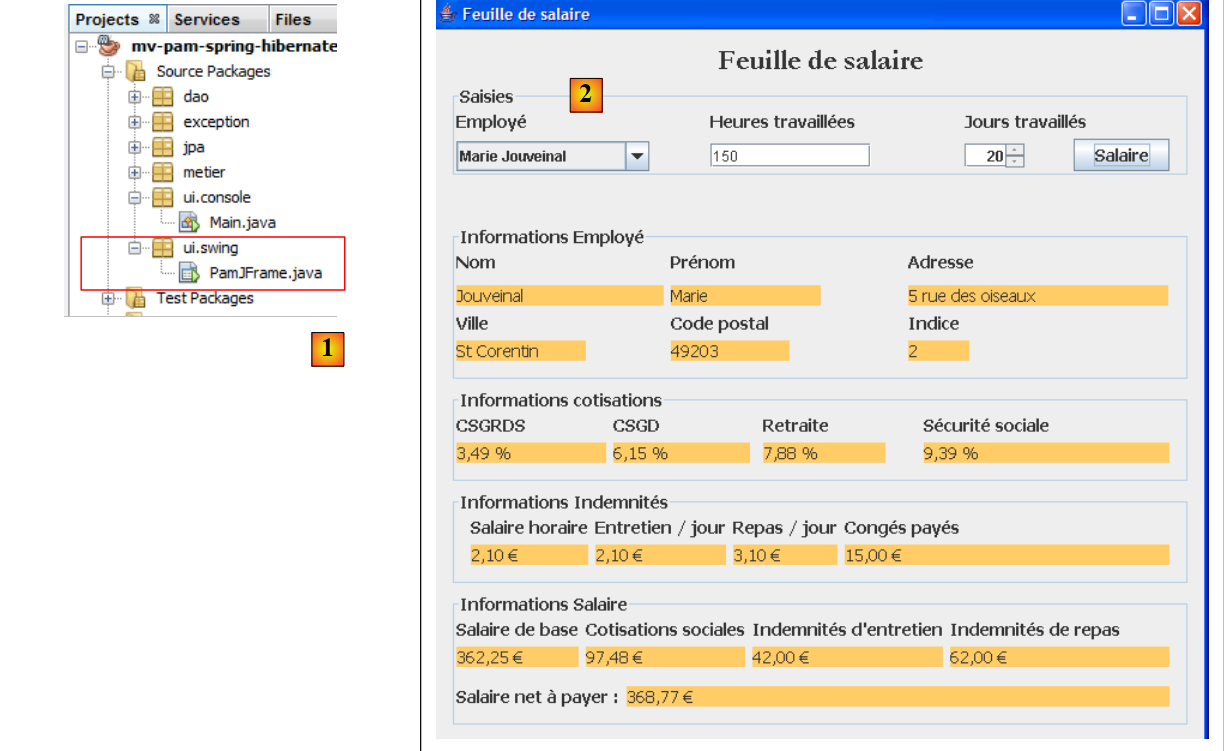 |
- in [1], the [PamJFrame] class of the graphical interface
- in [2]: the graphical user interface
5.12.1. A quick tutorial
To create the graphical user interface, proceed as follows:
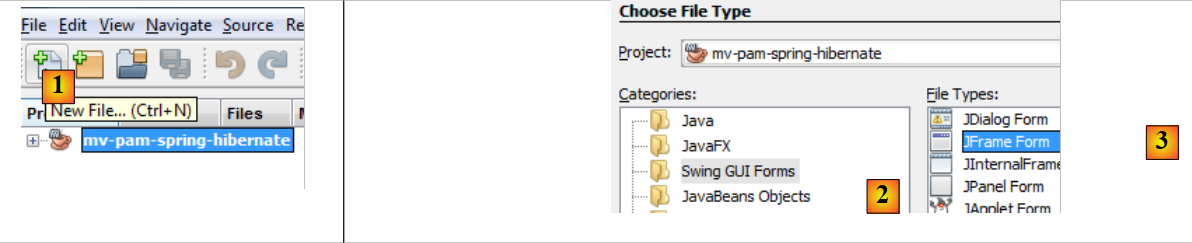 |
- [1]: Create a new file using the [1] [New File...] button
- [2]: Select the file category [Swing GUI Forms], i.e., graphical forms
- [3]: Select the type [JFrame Form], an empty form type
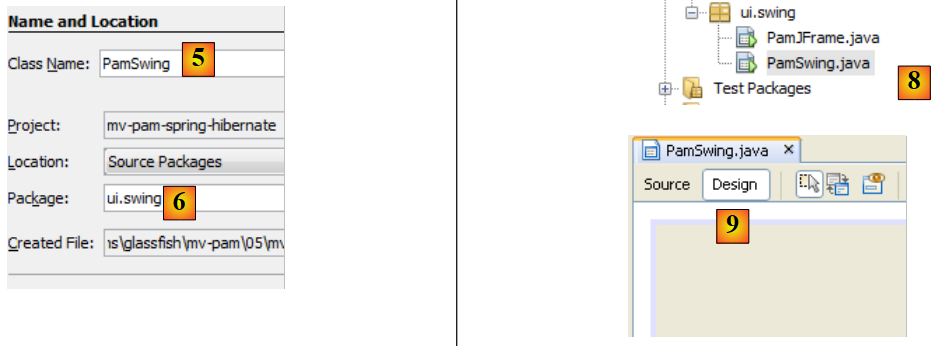 |
- [5]: Name the form; this will also be the class name
- [6]: Place the form in a package
- [8]: The form is added to the project tree
- [9]: The form is accessible via two views: [Design] [9], which allows you to design the form’s various components, and [Source] [10 below], which provides access to the form’s Java code. Ultimately, a form is a Java class like any other. The [Design] view is a tool for designing the form. Each time a component is added in [Design] mode, Java code is added in the [Source] view to account for it.
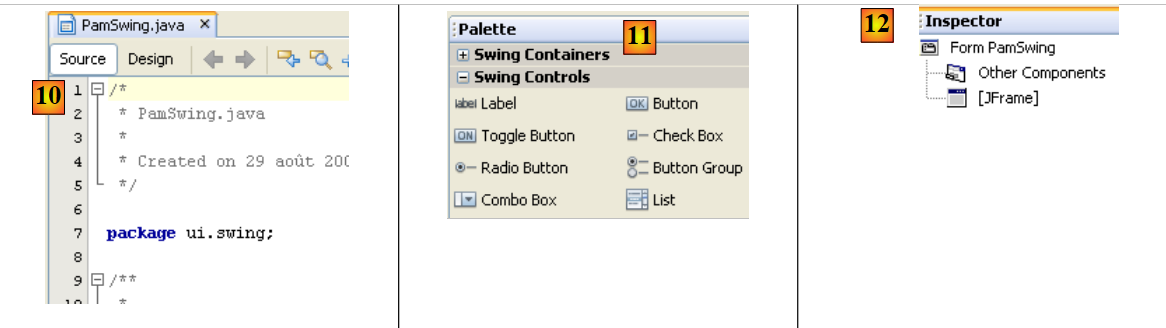 |
- [11]: The list of Swing components available for a form can be found in the [Palette] window.
- [12]: The [Inspector] window displays the tree structure of the form’s components. Components with a visual representation will be found in the [JFrame] branch; the others in the [Other Components] branch.
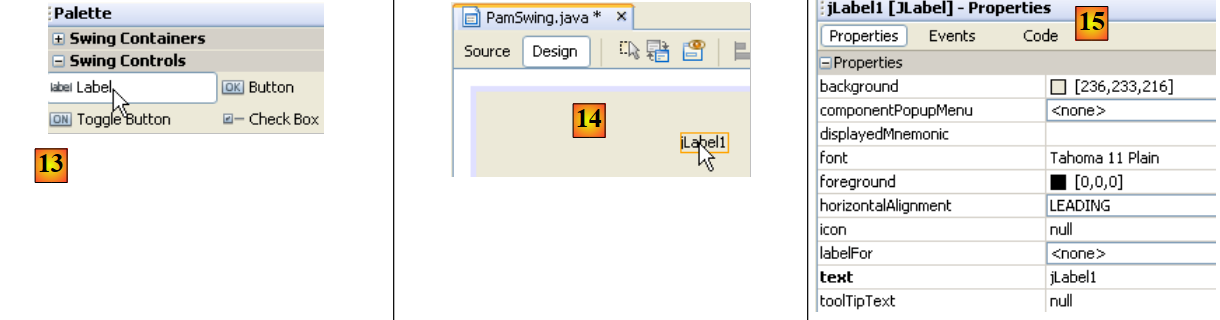 |
- In [13], we select a [JLabel] component with a single click
- In [14], we drop it onto the form in [Design] mode
- In [15], we define the JLabel’s properties (text, font).
 |
- In [16], the result.
- In [17], we request a preview of the form
- In [18], the result
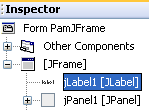
- In [19], the [JLabel1] label has been added to the component tree in the [Inspector] window
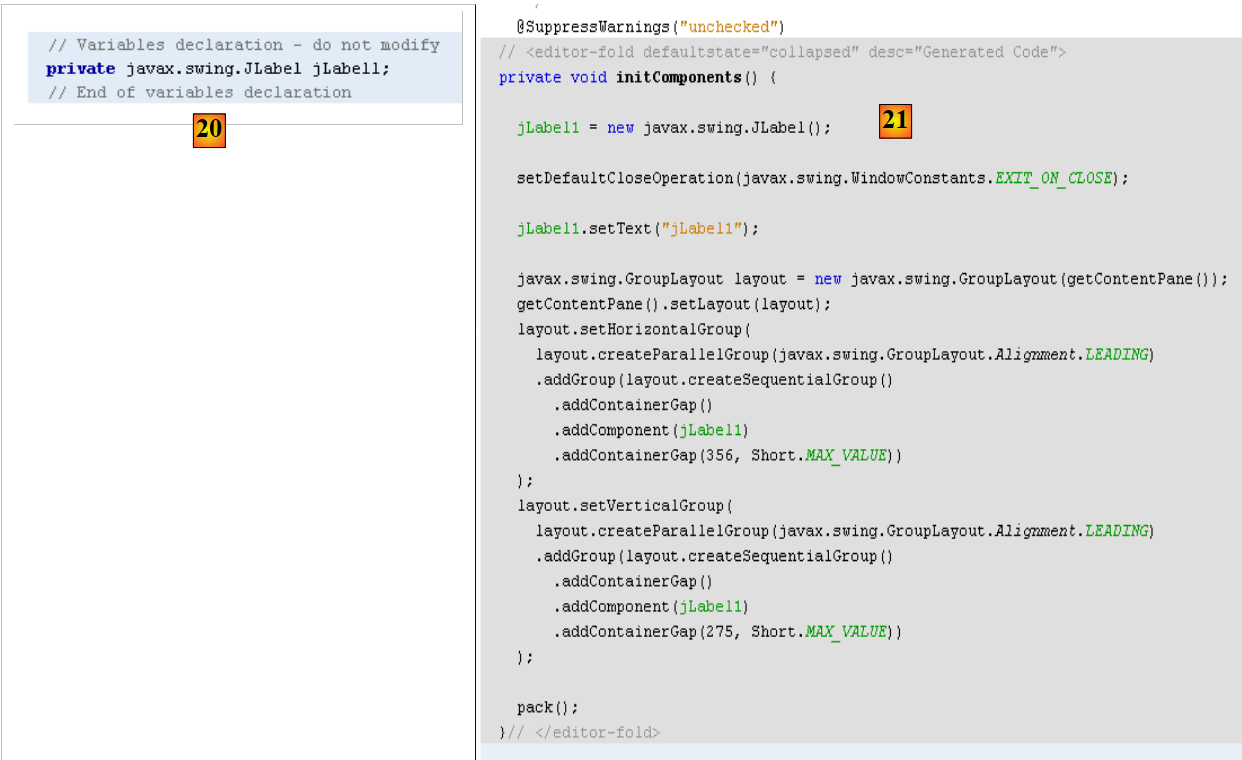 |
- In [20] and [21]: In the form’s [Source] view, Java code has been added to handle the added JLabel.
A tutorial on building forms with NetBeans is available at the URL [http://www.netbeans.org/kb/trails/matisse.html].
5.12.2. The [PamJFrame] GUI
We will build the following graphical user interface:
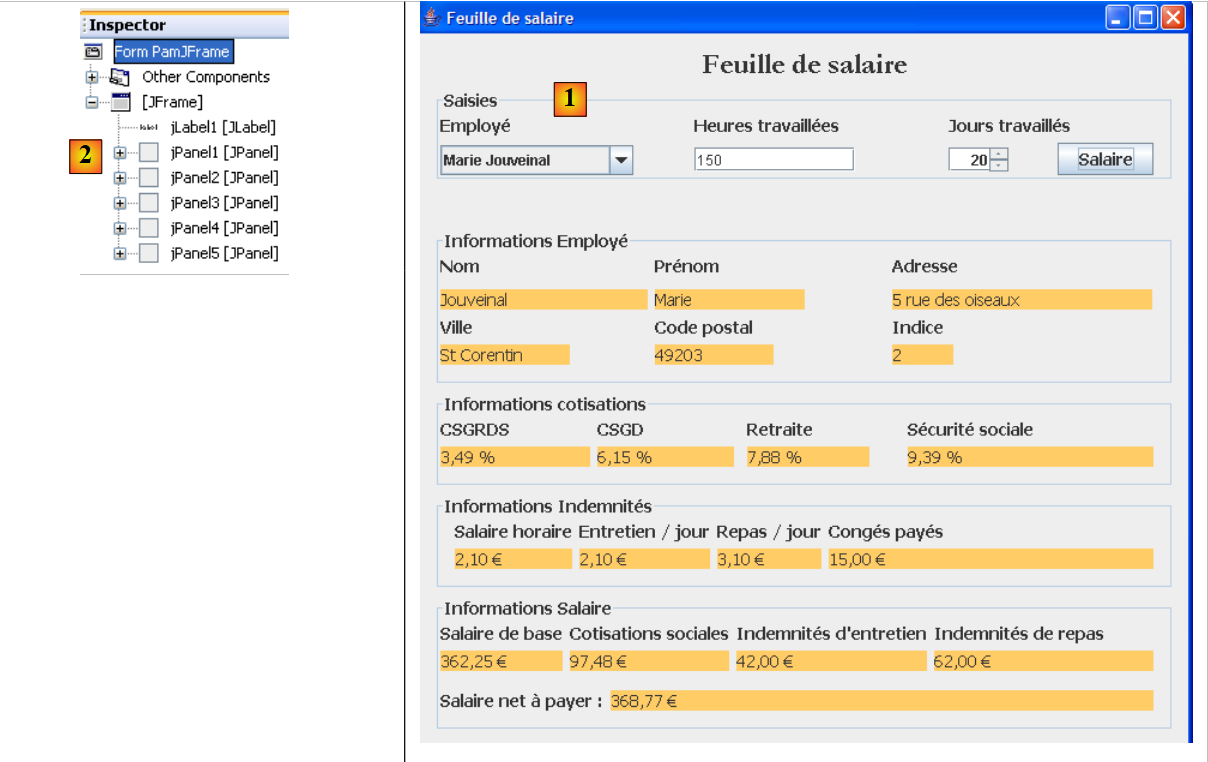 |
- in [1], the graphical user interface
- in [2], the tree structure of its components: a JLabel and six JPanel containers
JLabel1
 |  |
JPanel1
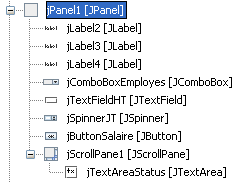 | 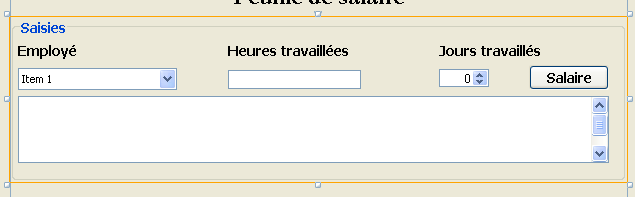 |
JPanel2
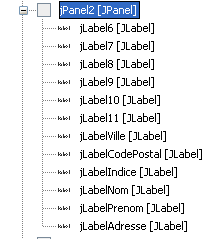 | 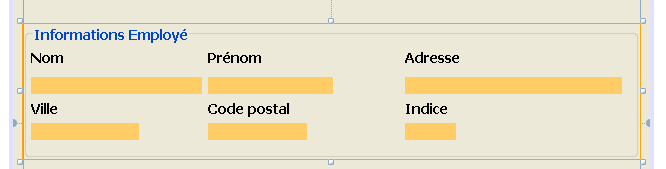 |
JPanel3
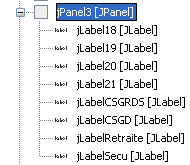 |  |
JPanel4
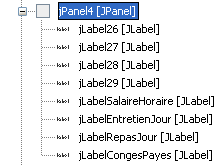 |  |
JPanel5
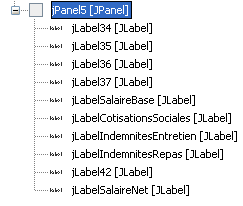 | 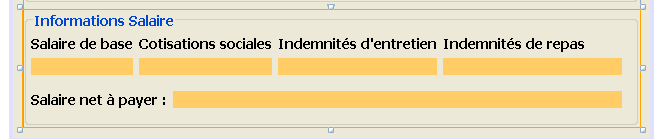 |
Practical exercise: Build the previous graphical interface using the tutorial [http://www.netbeans.org/kb/trails/matisse.html].
5.12.3. Graphical User Interface Events
Recommended reading: the [Graphical User Interfaces] chapter in [ref2].
We will handle the click on the [jButtonSalaire] button. To create the method to handle this event, we can proceed as follows:
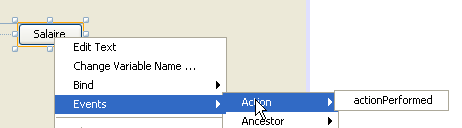 |
The handler for the click on the [JButtonSalaire] button is generated:
The Java code that associates the previous method with the click on the [JButtonSalaire] button is also generated:
Lines 2–5 specify that the click (evt of type ActionPerformed) on the [jButtonSalaire] button (line 2) must be handled by the [jButtonSalaireActionPerformed] method (line 4).
We will also handle the [caretUpdate] event (cursor movement) on the [jTextFieldHT] input field. To create the handler for this event, we proceed as before:
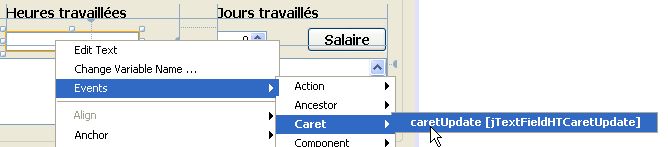 |
The handler for the [caretUpdate] event on the [jTextFieldHT] input field is generated:
The Java code that binds the previous method to the [caretUpdate] event on the [jTextFieldHT] text field is also generated:
Lines 1–4 indicate that the [caretUpdate] event (line 2) on the [jTextFieldHT] button (line 1) should be handled by the [jTextFieldHTCaretUpdate] method (line 3).
5.12.4. Initializing the GUI
Let’s return to our application’s architecture:
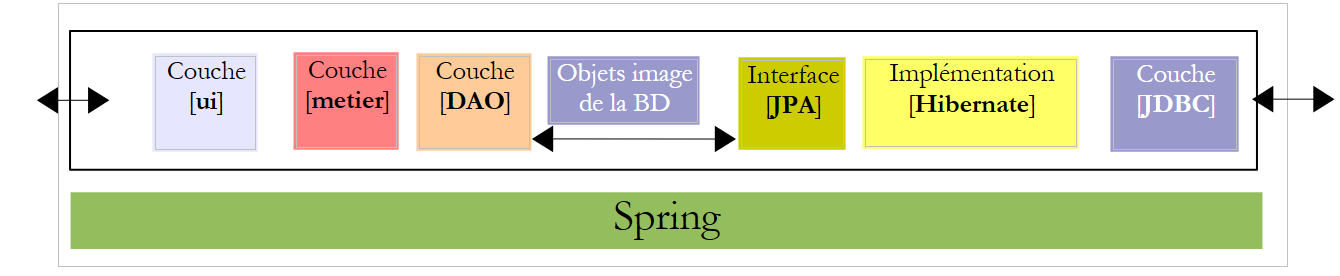 |
The [ui] layer needs a reference to the [business] layer. Let’s recall how this reference was obtained in the console application:
The method is the same in the GUI application. When the GUI application initializes, the [IMetier metier] reference from line 3 above must also be initialized. The code generated for the GUI is currently as follows:
- Lines 29–35: the static method [main] that launches the application
- line 32: an instance of the GUI [PamJFrame] is created and made visible.
- lines 7-9: the GUI constructor.
- line 8: call to the [initComponents] method defined on line 17. This method is auto-generated based on the work done in [Design] mode. Do not modify it.
- line 21: the method that will handle moving the input cursor in the [jTextFieldHT] field
- Line 25: The method that will handle the click on the [jButtonSalaire] button
To add our own initializations to the previous code, we can proceed as follows:
- Line 4: We call a custom method to perform our own initializations. These are defined by the code in lines 10–42
Question: Using the comments as a guide, complete the code for the [doMyInit] procedure.
5.12.5. Event Handlers
Question: Write the method [jTextFieldHTCaretUpdate]. This method must ensure that if the data in the [jTextFieldHT] field is not a real number >=0, then the [jButtonSalaire] button must be disabled.
Question: Write the [jButtonSalaireActionPerformed] method, which must display the pay stub for the employee selected in [jComboBoxEmployes].
5.12.6. Running the GUI
To run the GUI, modify the project’s [Run] configuration:
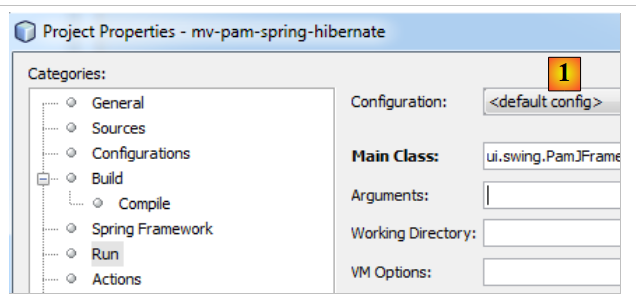 |
- In [1], enter the GUI class
The project must be complete with its configuration files (persistence.xml, spring-config-metier-dao.xml) and the GUI class. Launch the target DBMS before running the project.
5.13. Implementing the JPA layer with EclipseLink
We are interested in the following architecture where the JPA layer is now implemented by EclipseLink:
 |
5.13.1. The NetBeans project
The new NetBeans project is created by copying the previous project:
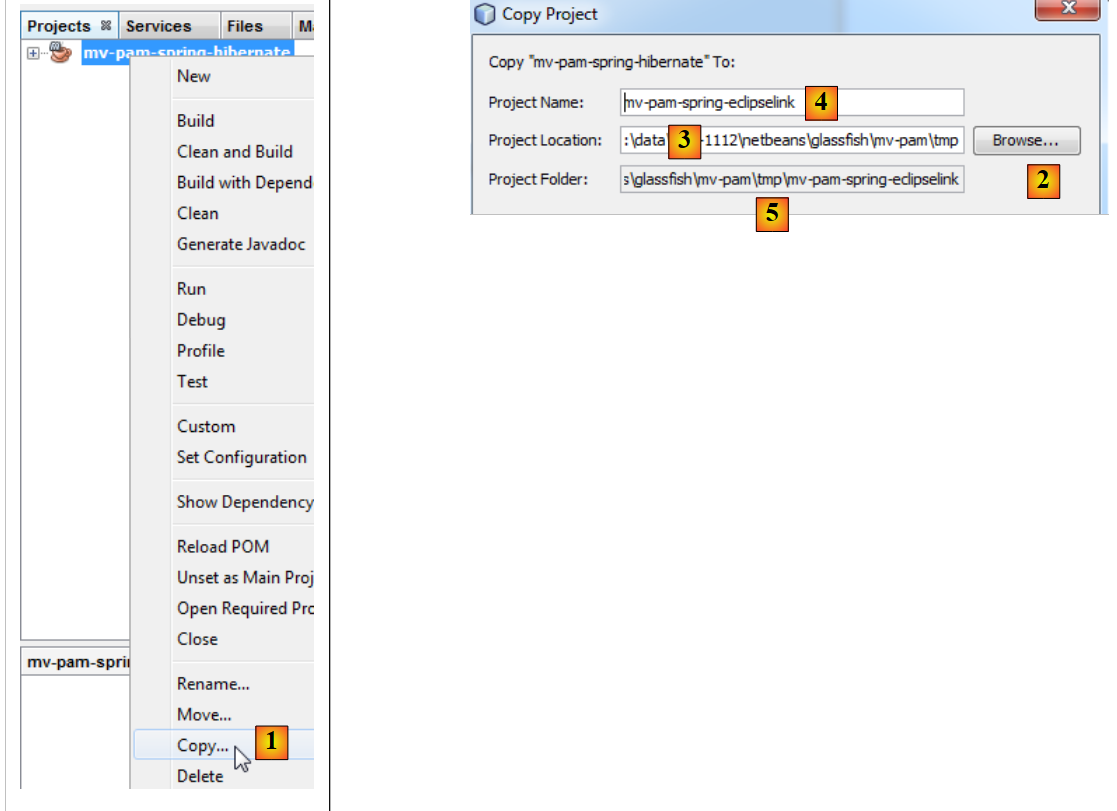 |
- in [1]: after right-clicking on the Hibernate project, select Copy
- using the [2] button, select the parent folder for the new project. The folder name appears in [3].
- in [4], name the new project
- in [5], the project folder name
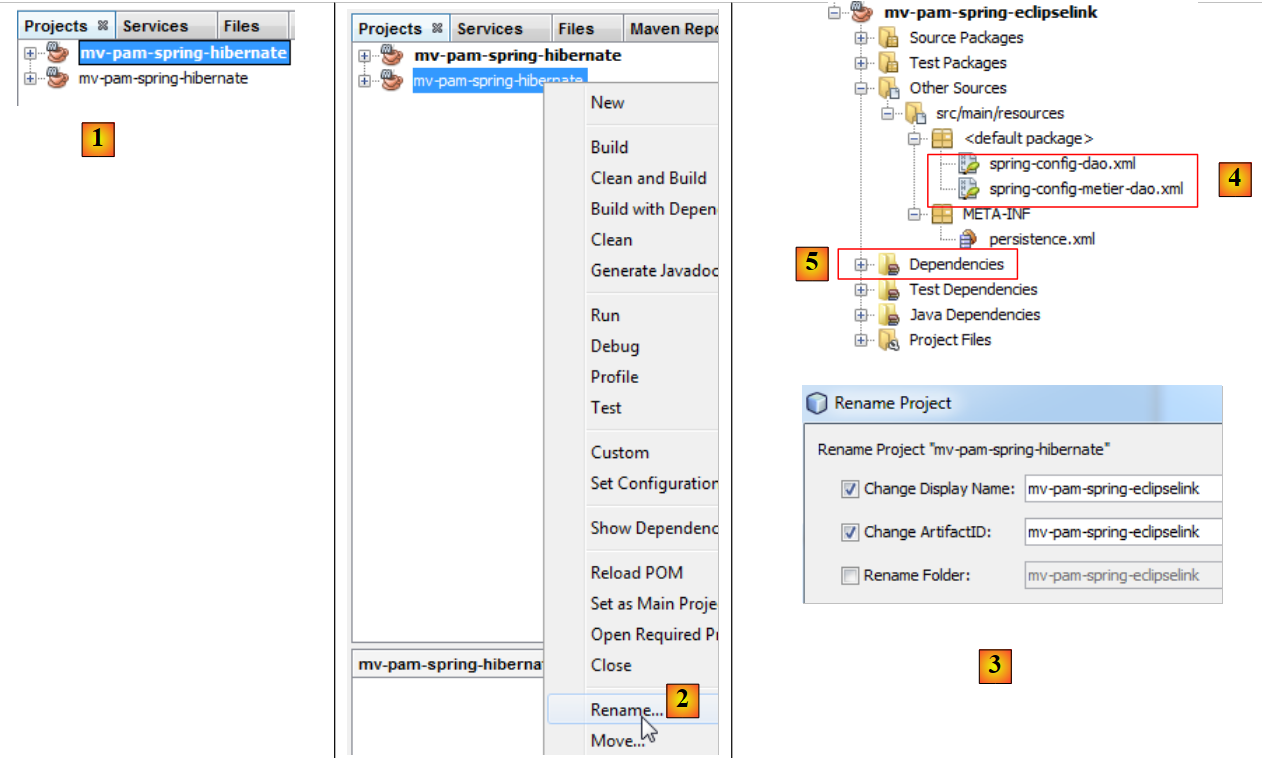 |
- in [1], the new project has been created. It has the same name as the original,
- in [2] and [3], rename it to [mv-pam-spring-eclipselink].
The project must be modified in two places to adapt it to the new JPA / EclipseLink layer:
- in [4], the Spring configuration files must be modified. This is where the JPA layer configuration is located.
- In [5], the project libraries must be modified: the Hibernate libraries must be replaced with those of EclipseLink.
Let’s start with the latter point. The [pom.xml] file for the new project will be as follows:
<project xmlns="http://maven.apache.org/POM/4.0.0" xmlns:xsi="http://www.w3.org/2001/XMLSchema-instance"
         xsi:schemaLocation="http://maven.apache.org/POM/4.0.0 http://maven.apache.org/xsd/maven-4.0.0.xsd">
  <modelVersion>4.0.0</modelVersion>

  <groupId>istia.st</groupId>
  <artifactId>mv-pam-spring-eclipselink</artifactId>
  <version>1.0-SNAPSHOT</version>
  <packaging>jar</packaging>

  <name>mv-pam-spring-eclipselink</name>
  <url>http://maven.apache.org</url>
  <repositories>
    <repository>
      <url>http://repo1.maven.org/maven2/</url>
      <id>swing-layout</id>
      <layout>default</layout>
      <name>Repository for library Library[swing-layout]</name>
    </repository>
    <repository>
      <url>http://download.eclipse.org/rt/eclipselink/maven.repo/</url>
      <id>eclipselink</id>
      <layout>default</layout>
      <name>Repository for library Library[eclipselink]</name>
    </repository>
  </repositories>

  <properties>
    <project.build.sourceEncoding>UTF-8</project.build.sourceEncoding>
  </properties>

  <dependencies>
    <dependency>
      <groupId>junit</groupId>
      <artifactId>junit</artifactId>
      <version>4.10</version>
      <scope>test</scope>
      <type>jar</type>
    </dependency>
    <dependency>
      <groupId>commons-dbcp</groupId>
      <artifactId>commons-dbcp</artifactId>
      <version>1.2.2</version>
    </dependency>
    <dependency>
      <groupId>commons-pool</groupId>
      <artifactId>commons-pool</artifactId>
      <version>1.6</version>
    </dependency>
    <dependency>
      <groupId>org.springframework</groupId>
      <artifactId>spring-tx</artifactId>
      <version>3.1.1.RELEASE</version>
      <type>jar</type>
    </dependency>
    <dependency>
      <groupId>org.springframework</groupId>
      <artifactId>spring-beans</artifactId>
      <version>3.1.1.RELEASE</version>
      <type>jar</type>
    </dependency>
    <dependency>
      <groupId>org.springframework</groupId>
      <artifactId>spring-context</artifactId>
      <version>3.1.1.RELEASE</version>
      <type>jar</type>
    </dependency>
    <dependency>
      <groupId>org.springframework</groupId>
      <artifactId>spring-orm</artifactId>
      <version>3.1.1.RELEASE</version>
      <type>jar</type>
    </dependency>
    <dependency>
      <groupId>org.eclipse.persistence</groupId>
      <artifactId>eclipselink</artifactId>
      <version>2.3.0</version>
    </dependency>
    <dependency>
      <groupId>org.eclipse.persistence</groupId>
      <artifactId>javax.persistence</artifactId>
      <version>2.0.3</version>
    </dependency>
    <dependency>
      <groupId>mysql</groupId>
      <artifactId>mysql-connector-java</artifactId>
      <version>5.1.6</version>
    </dependency>
    <dependency>
      <groupId>org.swinglabs</groupId>
      <artifactId>swing-layout</artifactId>
      <version>1.0.3</version>
    </dependency>
  </dependencies>
</project>
- lines 73–82: dependencies for the EclipseLink JPA implementation,
- lines 19–24: the Maven repository for EclipseLink.
The Spring configuration files must be modified to indicate that the JPA implementation has changed. In both files, only the section configuring the JPA layer changes. For example, in [spring-config-metier-dao.xml] we have:
Lines 19–36 configure the JPA layer. The JPA implementation used is Hibernate (line 22). Additionally, the target database is [dbpam_hibernate] (line 41).
To switch to a JPA/EclipseLink implementation, lines 19–35 above are replaced by the lines below:
- Line 5: The JPA implementation used is EclipseLink
- line 9: the databasePlatform property sets the target DBMS, in this case MySQL
- line 11: to generate the database tables when the JPA layer is instantiated. Here, the property is commented out.
- line 7: to display the SQL statements issued by the JPA layer on the console. Here, the property is commented out.
Additionally, the target database becomes [dbpam_eclipselink] (line 4 below):
5.13.2. Running the Tests
Before testing the entire application, it is a good idea to verify that the JUnit tests pass with the new JPA implementation. Before running them, we will start by deleting the tables from the database. To do this, in the [Runtime] tab of NetBeans, if necessary, create a connection to the dbpam_eclipselink / MySQL5 database. Once connected to the dbpam_eclipselink / MySQL5 database, you can proceed to delete the tables as shown below:
- [1]: before deletion
- [2]: after deletion
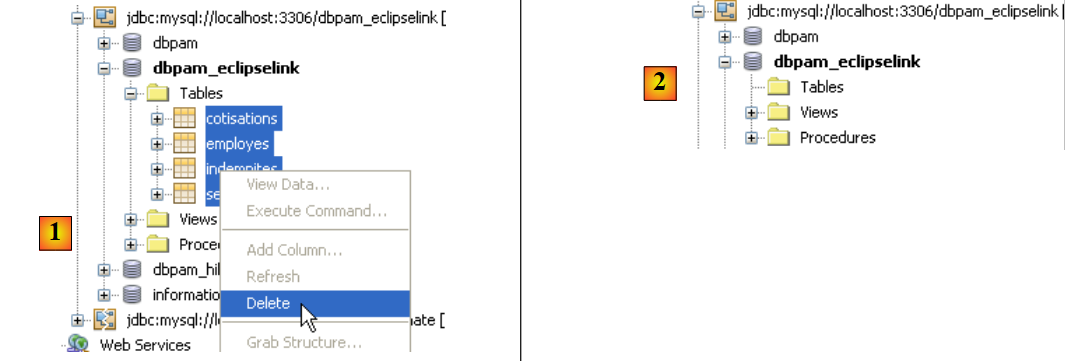 |
Once this is done, you can run the first test on the [DAO] layer: InitDB, which populates the database. To ensure that the tables previously deleted are recreated by the application, make sure that in the Spring JPA / EclipseLink configuration, the line:
exists and is not commented out.
We build the project and then run the [JUnit InitDB] test:
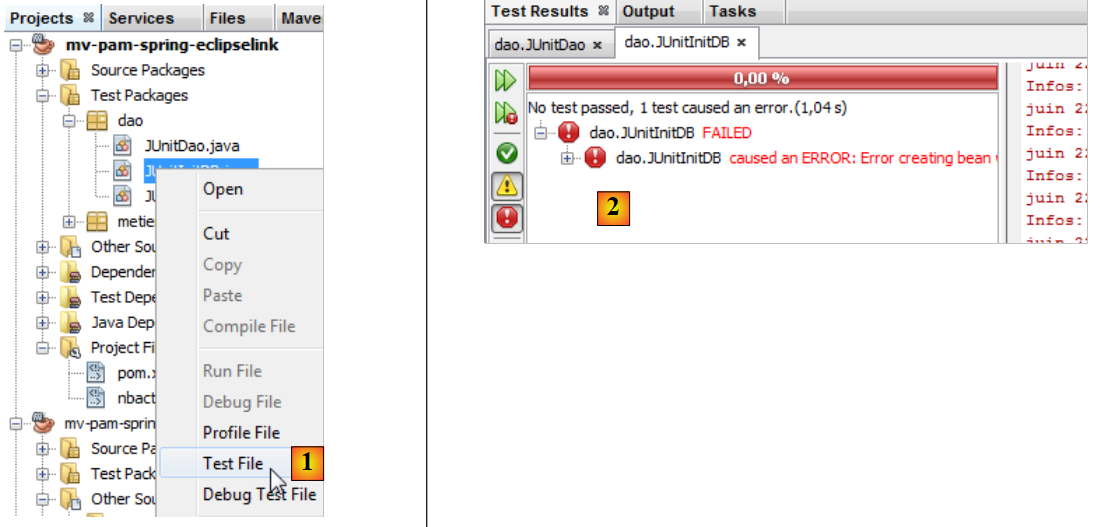 |
- In [1], the InitDB test runs.
- In [2], it fails. The exception is thrown by Spring and not by a test that failed.
Caused by: org.springframework.beans.factory.BeanCreationException: Error creating bean with name 'entityManagerFactory' defined in class path resource [spring-config-DAO.xml]: Invocation of init method failed; nested exception is java.lang.IllegalStateException: Must start with Java agent to use InstrumentationLoadTimeWeaver. See Spring documentation.
Spring indicates that there is a configuration issue. The message is unclear. The reason for the exception was explained in section 3.1.9 of [ref1]. For the Spring/EclipseLink configuration to work, the JVM running the application must be launched with a specific parameter, a Java agent. The format of this parameter is as follows:
[spring-agent.jar] is the Java agent required by the JVM to manage the Spring/EclipseLink configuration.
When running a project, it is possible to pass arguments to the JVM:
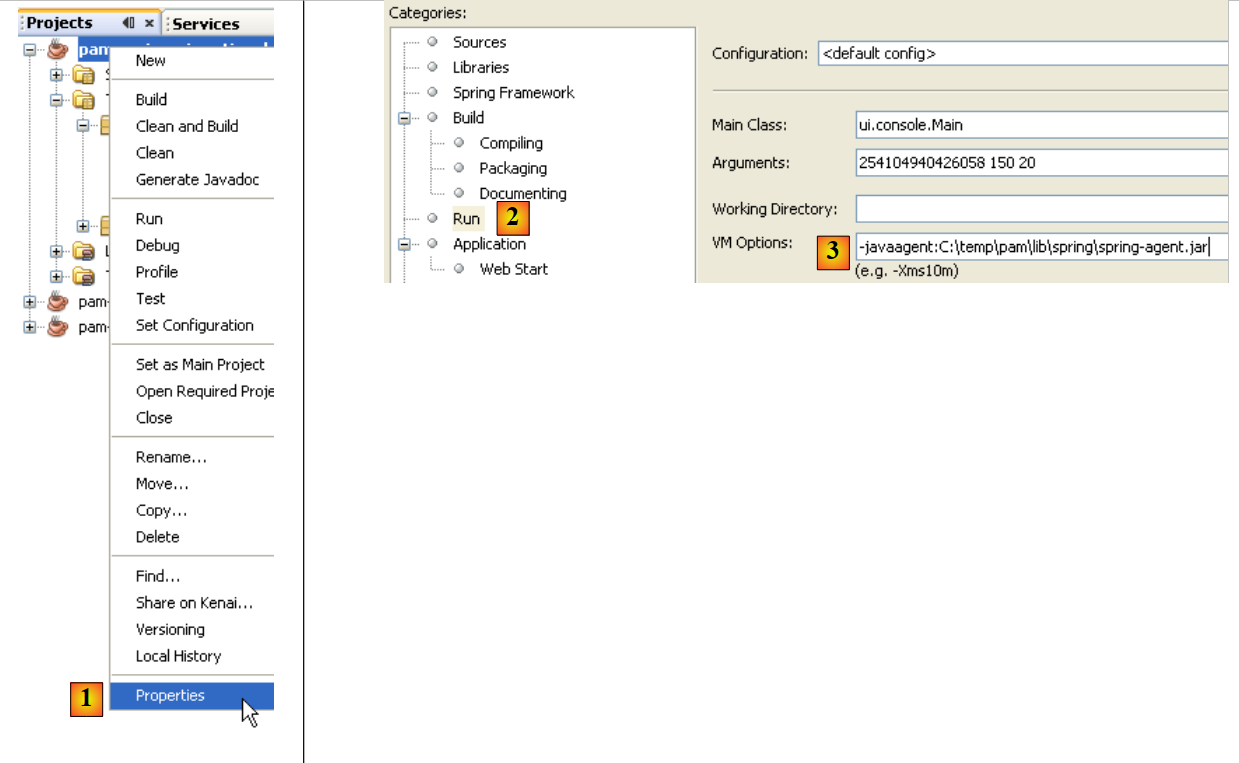 |
- In [1], you can access the project properties
- In [2], the Run properties
- In [3], pass the -javaagent parameter to the JVM
5.13.3. InitDB
Now we are ready to test [InitDB] again. This time, the results are as follows:
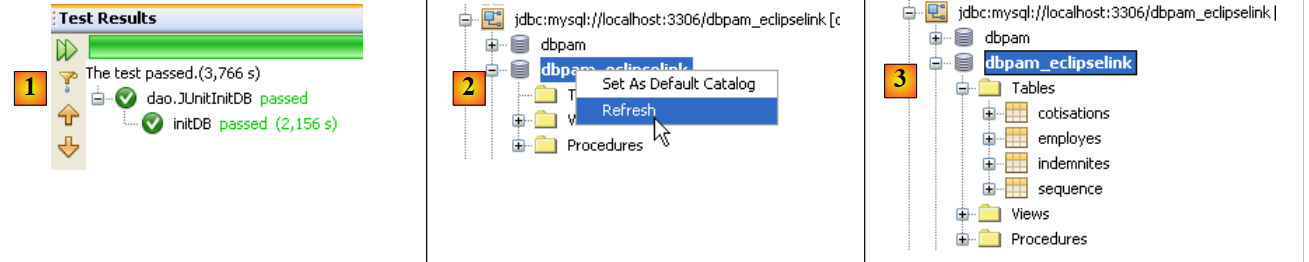 |
- In [1], the test was successful
- In [2], in the [Services] tab, we refresh NetBeans' connection to the [dbpam_eclipselink] database
- In [3], four tables were created
 |
- in [5], we view the contents of the [employees] table
- in [6], the result.
5.13.4. JUnitDao
The execution of the [JUnitDao] test class may fail, even though it succeeded with the JPA/Hibernate implementation. To understand why, let’s analyze an example.
The method being tested is the following IndemniteDao.create method:
- lines 15–22: the method being tested
The test method is as follows:
package dao;

...

public class JUnitDao {

// layers DAO
  static private IEmployeDao employeDao;
  static private IIndemniteDao indemniteDao;
  static private ICotisationDao cotisationDao;

  @BeforeClass
  public static void init() {
    // log
    log("init");
    // application configuration
    ApplicationContext ctx = new ClassPathXmlApplicationContext("spring-config-DAO.xml");
    // layers DAO
    employeDao = (IEmployeDao) ctx.getBean("employeDao");
    indemniteDao = (IIndemniteDao) ctx.getBean("indemniteDao");
    cotisationDao = (ICotisationDao) ctx.getBean("cotisationDao");
  }

  @Before()
  public void clean() {
    // empty the base
    for (Employe employe : employeDao.findAll()) {
      employeDao.destroy(employe);
    }
    for (Cotisation cotisation : cotisationDao.findAll()) {
      cotisationDao.destroy(cotisation);
    }
    for (Indemnite indemnite : indemniteDao.findAll()) {
      indemniteDao.destroy(indemnite);
    }
  }

  // logs
  private static void log(String message) {
    System.out.println("----------- " + message);
  }

  // tests
….
  @Test
  public void test05() {
    log("test05");
    // we create two allowances with the same index
    // violates index uniqueness constraint
    boolean erreur = true;
    Indemnite indemnite1 = null;
    Indemnite indemnite2 = null;
    Throwable th = null;
    try {
      indemnite1 = indemniteDao.create(new Indemnite(1, 1.93, 2, 3, 12));
      indemnite2 = indemniteDao.create(new Indemnite(1, 1.93, 2, 3, 12));
      erreur = false;
    } catch (PamException ex) {
      th = ex;
      // checks
      Assert.assertEquals(31, ex.getCode());
    } catch (Throwable th1) {
      th = th1;
    }
    // checks
    Assert.assertTrue(erreur);
    // exception chain
    System.out.println("Chaîne des exceptions --------------------------------------");
    System.out.println(th.getClass().getName());
    while (th.getCause() != null) {
      th = th.getCause();
      System.out.println(th.getClass().getName());
    }
    // the 1st allowance had to be continued
    Indemnite indemnite = indemniteDao.find(indemnite1.getId());
    // check
    Assert.assertNotNull(indemnite);
    Assert.assertEquals(1, indemnite.getIndice());
    Assert.assertEquals(1.93, indemnite.getBaseHeure(), 1e-6);
    Assert.assertEquals(2, indemnite.getEntretienJour(), 1e-6);
    Assert.assertEquals(3, indemnite.getRepasJour(), 1e-6);
    Assert.assertEquals(12, indemnite.getIndemnitesCP(), 1e-6);
    // the second indemnity should not have persisted
    List<Indemnite> indemnites = indemniteDao.findAll();
    int nbIndemnites = indemnites.size();
    Assert.assertEquals(nbIndemnites, 1);
  }

...
}
Question: Explain what the test05 test does and indicate the expected results.
The results obtained using a JPA/Hibernate layer are as follows:
The test passes, meaning that the assertions are verified and no exception is thrown from the test method.
Question: Explain what happened.
The results obtained with a JPA/EclipseLink layer are as follows:
As with Hibernate previously, the test passes, meaning that the assertions are verified and no exception is thrown from the test method.
Question: Explain what happened.
Question: From these two examples, what can we conclude about the interchangeability of JPA implementations? Is it complete here?
5.13.5. The other tests
Once the [DAO] layer has been tested and deemed correct, we can move on to testing the [business] layer and the project itself in its console or graphical version. Changing the JPA implementation has no effect on the [business] and [UI] layers; therefore, if these layers worked with Hibernate, they will work with EclipseLink with a few exceptions: the previous example shows that the exceptions thrown by the [DAO] layers may differ. Thus, in the case of the test, Spring / JPA / Hibernate throws a [PamException], an exception specific to the [pam] application, whereas Spring / JPA / EclipseLink throws a [TransactionSystemException], an exception from the Spring framework. If, in the test case, the [ui] layer expects a [PamException] because it was built with Hibernate, it will no longer work when switching to EclipseLink.
5.13.6. Work to be done
Practical task: Retest the console and Swing applications with different DBMS: MySQL5, Oracle XE, SQL Server.