14. Version 9: Implementing the Web Layer with Primefaces
Prerequisites: Read "Introduction to Primefaces" in [ref3].
Question 1: Create a new Maven project of type [Web Application] where the XHTML pages from the previous example would be built using Primefaces components. Do not make any changes to the beans.
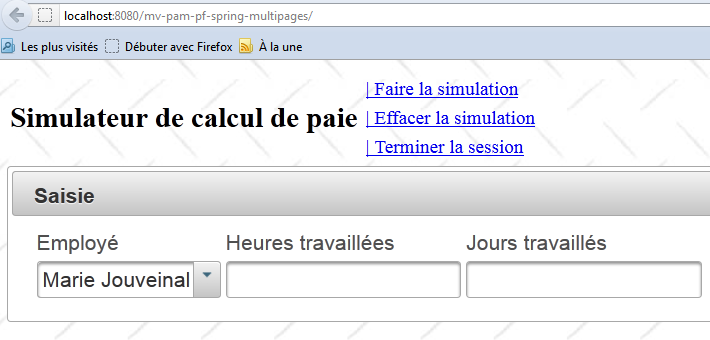
The home page uses the <p:panel>, <p:inputText>, <p:selectOneMenu>, and <p:message> components:
 |
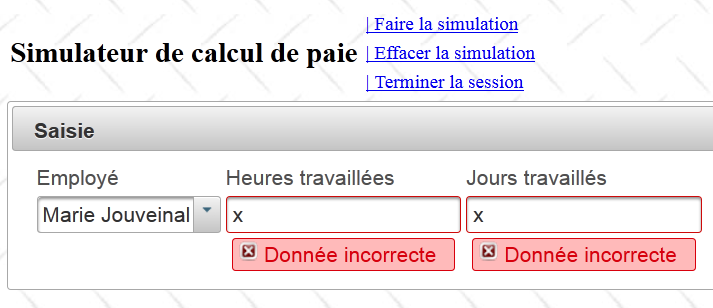
An incorrect entry:
 |
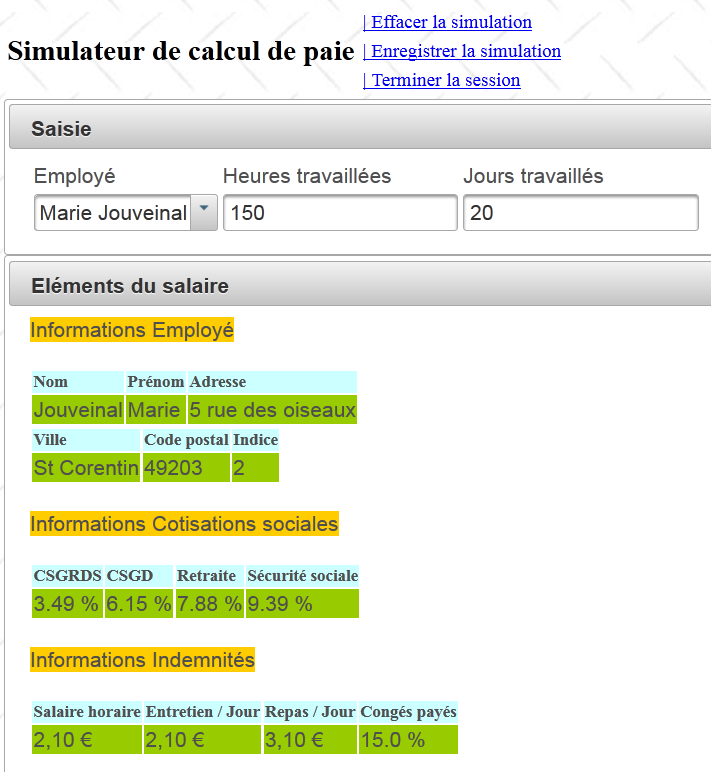
A simulation:
 |
The list of simulations uses the components <p:dataTable>, <p:commandLink>:
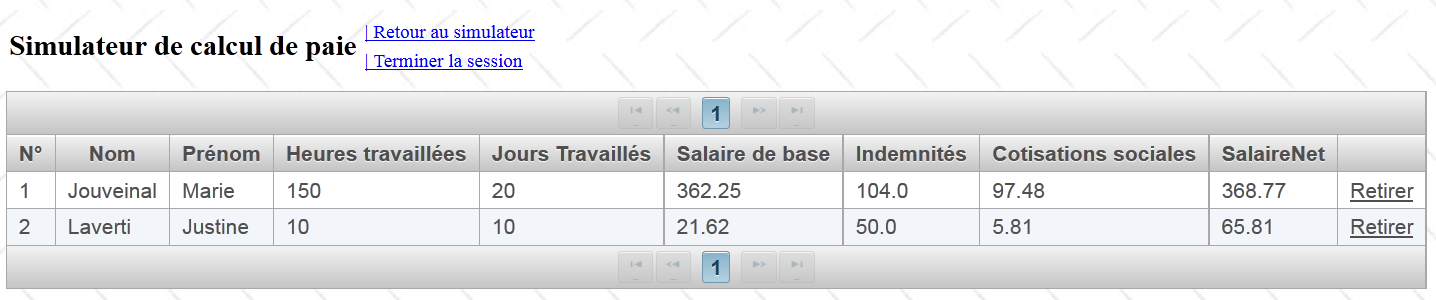 |
The AJAX methods will update the id='form' field, which includes the entire page (see line 11 below):
<?xml version='1.0' encoding='UTF-8' ?>
<!DOCTYPE html PUBLIC "-//W3C//DTD XHTML 1.0 Transitional//EN" "http://www.w3.org/TR/xhtml1/DTD/xhtml1-transitional.dtd">
<html xmlns="http://www.w3.org/1999/xhtml"
      xmlns:h="http://java.sun.com/jsf/html"
      xmlns:f="http://java.sun.com/jsf/core"
      xmlns:ui="http://java.sun.com/jsf/facelets">

  <f:view locale="#{sessionData.locale}">
    ...
    <h:body style="background-image: url('${request.contextPath}/resources/images/standard.jpg');">
      <h:form id="formulaire">
        <!-- entete -->
        <ui:include src="entete.xhtml" />
        <!-- content -->
        <ui:insert name="part1" >
          Gestion des assistantes maternelles
        </ui:insert>
        <ui:insert name="part2"/>
      </h:form>
    </h:body>
  </f:view>
</html>
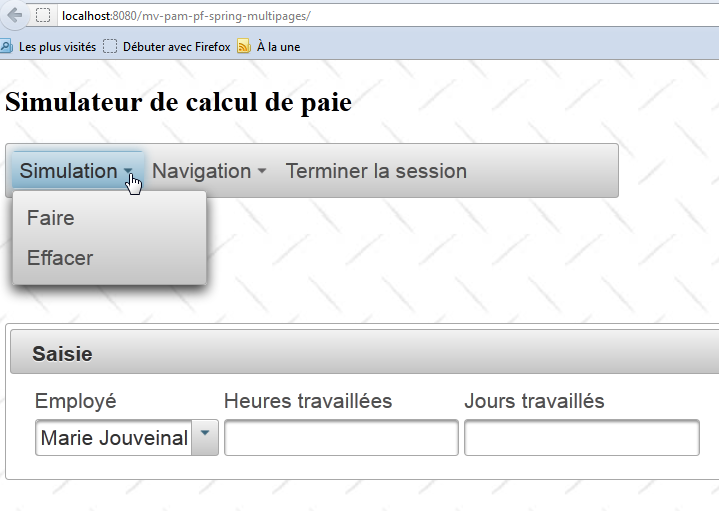
Once your application is working, replace the [entete.xhtml] page with the following page:
<?xml version='1.0' encoding='UTF-8' ?>
<!DOCTYPE html PUBLIC "-//W3C//DTD XHTML 1.0 Transitional//EN" "http://www.w3.org/TR/xhtml1/DTD/xhtml1-transitional.dtd">
<html xmlns="http://www.w3.org/1999/xhtml"
      xmlns:h="http://java.sun.com/jsf/html"
      xmlns:p="http://primefaces.org/ui"
      xmlns:f="http://java.sun.com/jsf/core"
      xmlns:ui="http://java.sun.com/jsf/facelets">


  <!-- entete -->
  <h:panelGroup>
    <h2><h:outputText value="#{msg['form.titre']}"/></h2>
  </h:panelGroup>

  <p:menubar id="menu" header="Menu" style="width: 500px">
    <p:submenu label="#{msg['form.menu.simulation']}">
      <p:menuitem  id="cmdFaireSimulation" style="width: 200px" value="#{msg['form.menu.faireSimulation']}" actionListener="#{form.faireSimulation}" rendered="#{sessionData.menu.faireSimulation}" update=":formulaire:contenu"/>
      <p:menuitem id="cmdEffacerSimulation" style="width: 200px" onclick="raz();" immediate="true" value="#{msg['form.menu.effacerSimulation']}" actionListener="#{form.effacerSimulation}" rendered="#{sessionData.menu.effacerSimulation}" update=":formulaire:contenu"/>
      <p:menuitem id="cmdEnregistrerSimulation" style="width: 200px" immediate="true" value="#{msg['form.menu.enregistrerSimulation']}" actionListener="#{form.enregistrerSimulation}" rendered="#{sessionData.menu.enregistrerSimulation}" update=":formulaire:contenu"/>
    </p:submenu>
    <p:submenu label="Navigation">
      <p:menuitem id="cmdRetourSimulateur" style="width: 200px" immediate="true" value="#{msg['form.menu.retourSimulateur']}" actionListener="#{form.retourSimulateur}" rendered="#{sessionData.menu.retourSimulateur}" update=":formulaire:contenu"/>
      <p:menuitem id="cmdVoirSimulations" style="width: 200px" immediate="true" value="#{msg['form.menu.voirSimulations']}" actionListener="#{form.voirSimulations}" rendered="#{sessionData.menu.voirSimulations}" update=":formulaire:contenu"/>
    </p:submenu>
    <p:menuitem id="cmdTerminerSession" immediate="true" value="#{msg['form.menu.terminerSession']}" actionListener="#{form.terminerSession}" rendered="#{sessionData.menu.terminerSession}" update=":formulaire:contenu"/>
  </p:menubar>

  <p:spacer height="50px"/>

</html>
- line 15: a Primefaces menu bar,
- line 16: a option menu item in this bar,
- line 17: an item in this option menu.
The template is not affected by this change. The new view is as follows: