5. Version 1: Spring Architecture / JPA
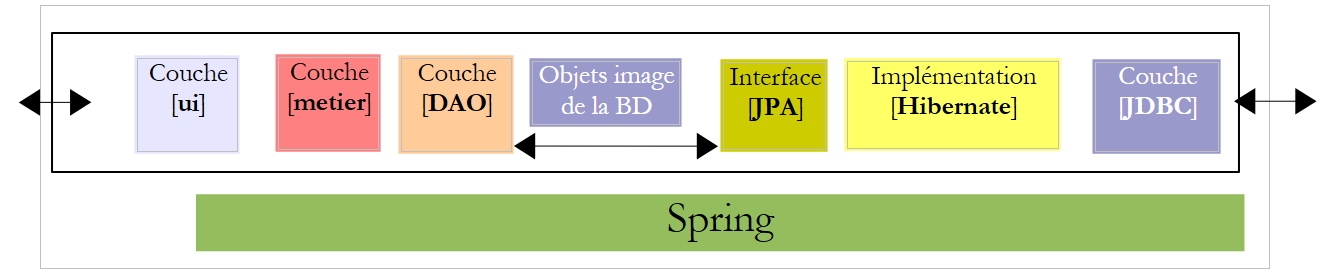
We propose to write a console application as well as a graphical application to generate pay stubs for child care providers employed by the "Maison de la petite enfance" in a municipality. This application will have the following architecture:
 |
5.1. BDLa database
The static data needed to generate the pay stub will be stored in a database that we will refer to as dbpam. This database could contain the following tables:
Structure:
primary key | |
version – increments with each row modification | |
Employee's Social Security number - unique | |
employee's last name | |
first name | |
their address | |
his/her city | |
his/her ZIP code | |
Foreign key on field [ID] in table [INDEMNITES] |
Its content could be as follows:

Structure:
Primary Key | |
version number – increments with each modification of the row | |
Percentage: General Social Contribution + Contribution to Social Debt Repayment | |
percentage: deductible general social contribution | |
Percentage: Social Security, Widow's Benefits, Old-Age Benefits | |
Percentage: supplemental pension + unemployment insurance |
Its content could be as follows:

Social security rates are independent of the employee. The previous table has only one row.
primary key | ||
version No. – increases with each modification of the row | ||
Processing index - unique | ||
net price in euros for one hour of on-call duty | ||
daily allowance in euros per day of care | ||
Meal allowance in euros per day of care | ||
Paid vacation allowance. This is a percentage applied to the base salary. | ||
Its content could be as follows:

Note that allowances may vary from one child care provider to another. They are linked to a specific child care provider via their pay grade. Thus, Ms. Marie Jouveinal, who has a pay grade of 2 (table EMPLOYES), has an hourly wage of 2.1 euros (table INDEMNITES).
5.2. Method for Calculating a Childcare Provider’s Salary
We will now present the method for calculating a childminder’s monthly salary. This is not intended to be the method actually used in practice. As an example, we will use the salary of Ms. Marie Jouveinal, who worked 150 hours over 20 days during the pay period.
The following factors are taken into account: | | |
The child care provider's base salary is given by the following formula: | ||
A number of social benefits must be deducted from this base salary : | | |
Total social security contributions: | ||
In addition, the child care provider is entitled to a daily allowance and a meal allowance for each day worked. As such, she receives the following allowances: | | |
In total, the salary net to be paid to the childminder is as follows: |
5.3. How the console application works
Here is an example of running the console application in a DOS window:
We will write a program that will receive the following information:
- the child care provider’s Social Security number (254104940426058 in the example—line 1)
- total number of hours worked (150 in the example - line 1)
- total number of days worked (20 in the example - line 1)
We see that:
- lines 9–14: display information about the employee whose Social Security number was provided
- lines 17–20: display the rates for the various cotisations
- lines 23–26: display the allowances associated with the employee’s pay grade (here, grade 2)
- lines 29-33: display the components of the salary to be paid
The application reports any errors:
Call without parameters:
dos>java -jar pam-spring-ui-metier-dao-jpa-eclipselink.jar
Syntaxe : pg num_securite_sociale nb_heures_travaillées nb_jours_travaillés
Call with incorrect data:
dos>java -jar pam-spring-ui-metier-dao-jpa-eclipselink.jar 254104940426058 150x 20x
Le nombre d'hours worked [150x] is incorrect
Le nombre de jours travaillés [20x] est erroné
Call with an incorrect social security number:
dos>java -jar pam-spring-ui-metier-dao-jpa-eclipselink.jar xx 150 20
L'the following error has occurred: Employee no. [xx] cannot be found
5.4. How the graphical application works
The graphical application calculates the salaries of child care providers using a Swing form:
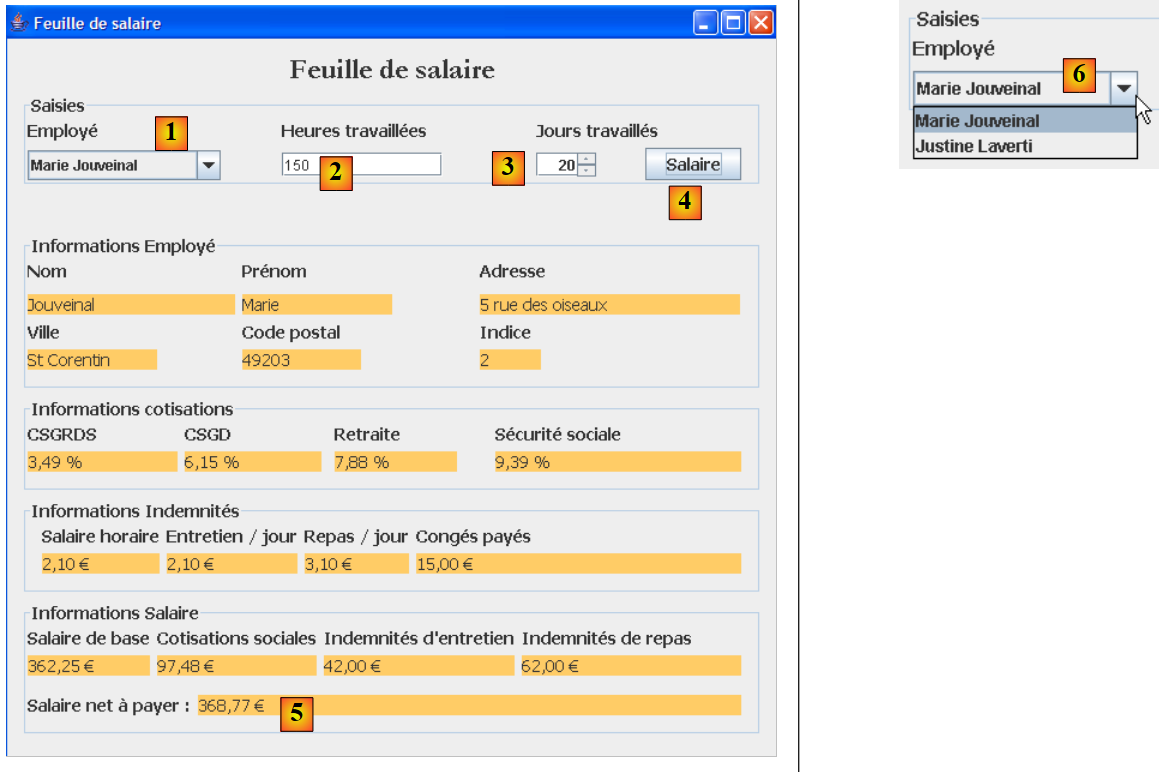 |
- The information passed as parameters to the console program is now entered using the [1, 2, 3] input fields.
- The [4] button initiates the salary calculation
- The form displays the various salary components up to the net salary to be paid [5]
The [1, 6] drop-down list does not display the employees’ ID numbers but their first and last names. We assume here that no two employees have the same first and last names.
5.5. Creating the database
We run WampServer and use the PhpMyAdmin tool [1]:
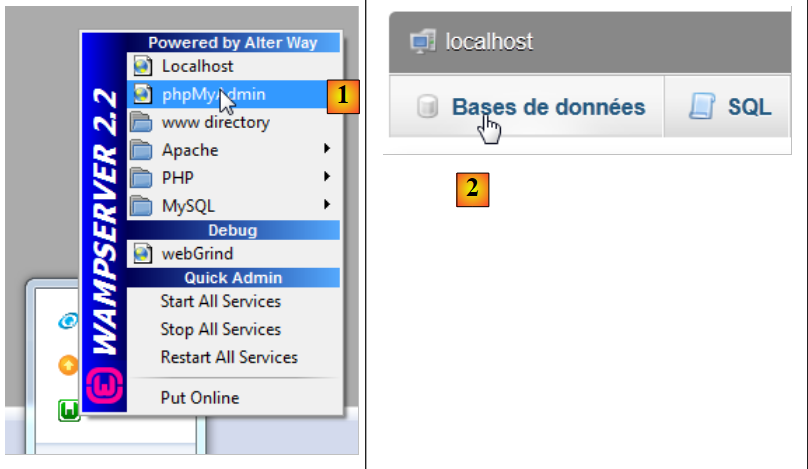 |
- in [2], we use option and [Bases de données],
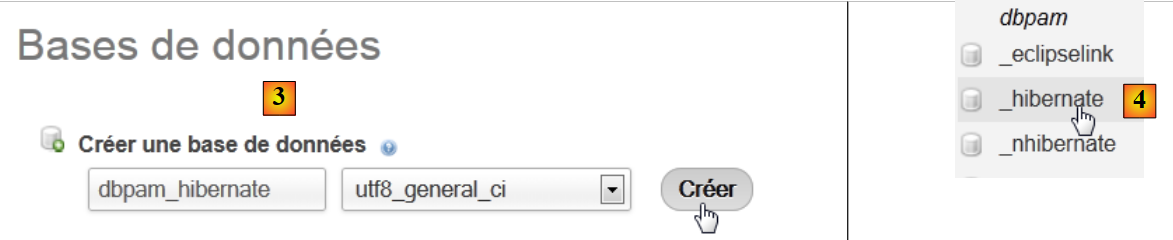 |
- in [3], we create a database [dbpam_hibernate],
- in [4], the database is created. We select it,
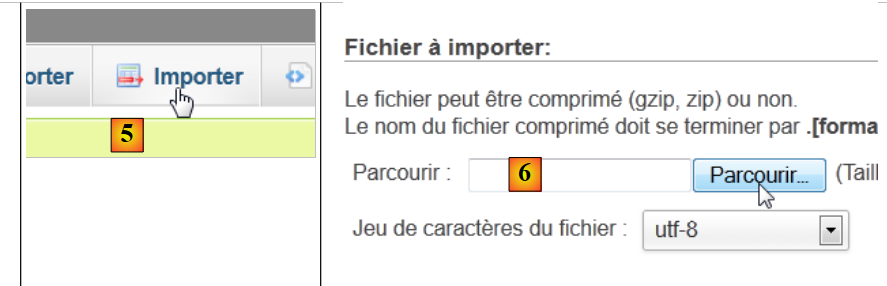 |
- in [5], we want to import a script SQL,
- in [6], use the button in [Parcourir] to select the file,
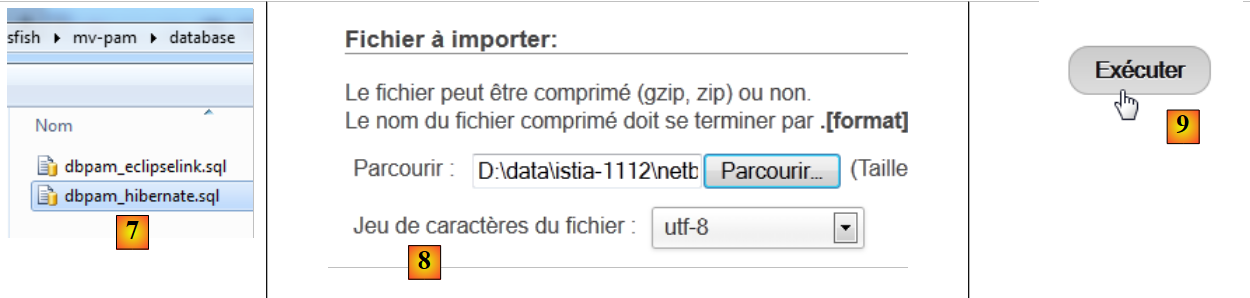 |
- in [7,8], select the script SQL,
- in [9], we run it,
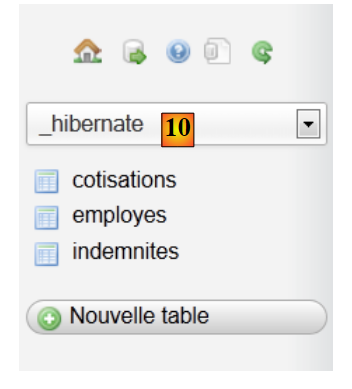 |
- In [10], the tables have been created. Their contents are as follows:
table EMPLOYES

table INDEMNITES

table COTISATIONS

5.6. Implementation JPA
5.6.1. Layer JPA / Hibernate
We will configure the JPA layer in the following environment:
 |
A console program will work with the database. To do this, you need:
- have a database,
- Obtain the JDBC driver from SGBD, here MySQL,
- implement the JPA layer with Hibernate,
- write the console program.
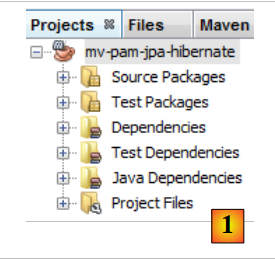
We create the Maven project [mv-pam-jpa-hibernate] [1]:
 |
In our application architecture, we need the following components:
- the database,
- the JDBC driver for SGBD and MySQL,
- the JPA / Hibernate layer (entities and configuration),
- the test console program.
5.6.1.1. The database
First, let’s create the empty database. We launch WampServer and use the PhpMyAdmin and [1] tools:
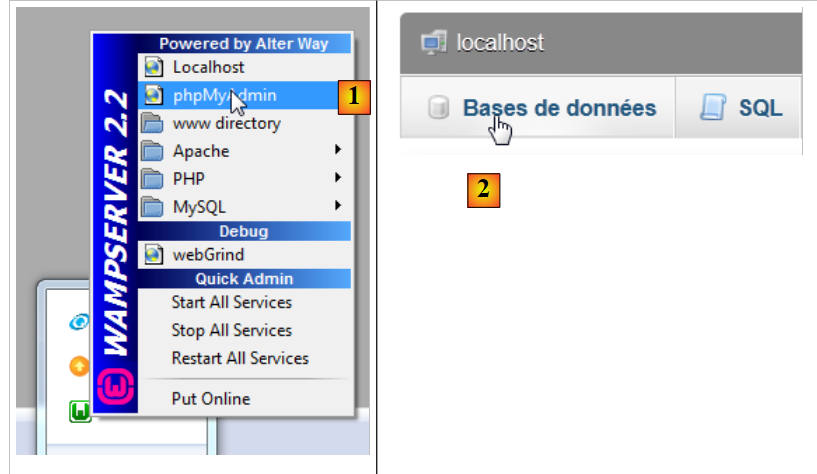 |
- in [2], we use option and [Bases de données],
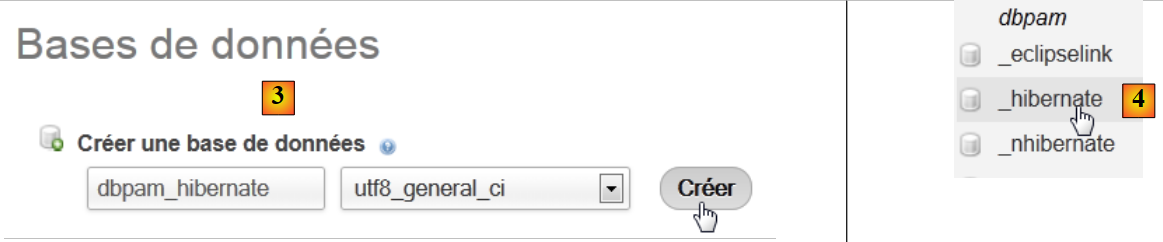 |
- in [3], we create a database [dbpam_hibernate],
- in [4], the database is created.
5.6.1.2. Configuration of layer JPA
The connection between layer JDBC and the database is established in file [persistence.xml], which configures layer JPA. This file can be created using Netbeans:
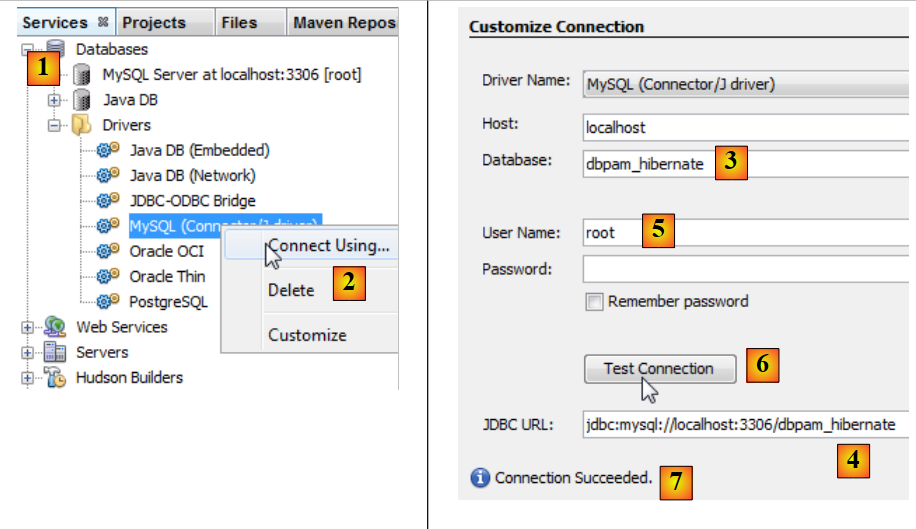 |
- In the [services] [1] tab, connect to the database using the JDBC driver from MySQL [2],
- in [3], the name of the database to which you want to connect.
- in [4], the database’s URL JDBC,
- in [5], log in as root without a password,
- In [6], you can test the connection,
- in [7], the connection was successful.
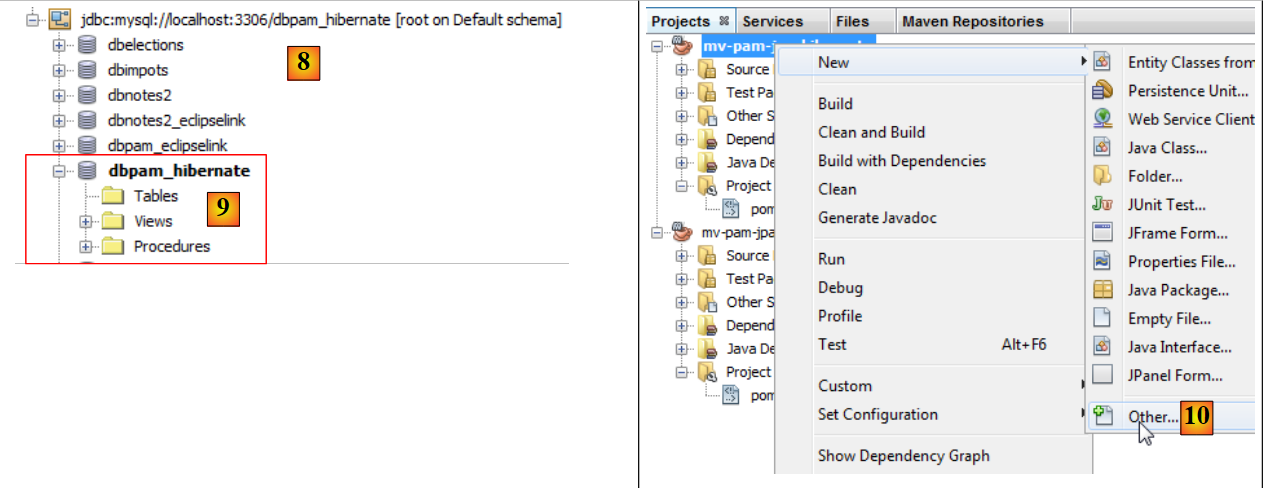 |
- The connection appears in [8] and [9],
- in [10], add a new item to the project,
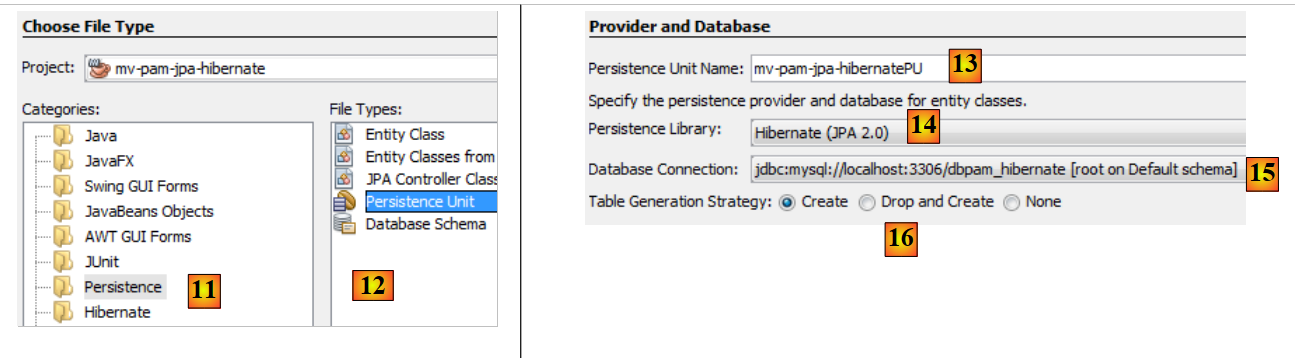 |
- in [11], we select the category [Persistence] and in [12] the element [Persistence Unit],
- in [13], we name this persistence unit,
- in [14], select a Hibernate implementation,
- in [15], we specify the connection we just created to the database MySQL,
- in [16], we specify that when the JPA layer is instantiated, it must create the tables corresponding to the JPA entities in the project.
At the end of the wizard, the file [persistence.xml] is generated:
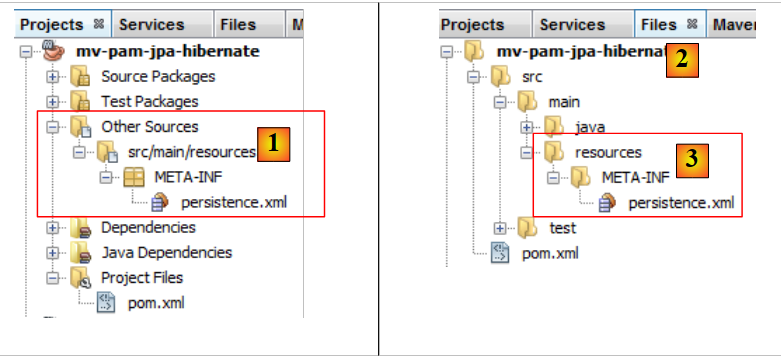 |
- the file appears in a new branch of the project, in a folder named [META-INF] [1],
- which corresponds to the [src/main/resources] folder in the [2,3] project.
Its content is as follows:
<?xml version="1.0" encoding="UTF-8"?>
<persistence version="2.0" xmlns="http://java.sun.com/xml/ns/persistence" xmlns:xsi="http://www.w3.org/2001/XMLSchema-instance" xsi:schemaLocation="http://java.sun.com/xml/ns/persistence http://java.sun.com/xml/ns/persistence/persistence_2_0.xsd">
<persistence-unit name="mv-pam-jpa-hibernatePU" transaction-type="RESOURCE_LOCAL">
<provider>org.hibernate.ejb.HibernatePersistence</provider>
<properties>
<property name="javax.persistence.jdbc.url" value="jdbc:mysql://localhost:3306/dbpam_hibernate"/>
<property name="javax.persistence.jdbc.password" value=""/>
<property name="javax.persistence.jdbc.driver" value="com.mysql.jdbc.Driver"/>
<property name="javax.persistence.jdbc.user" value="root"/>
<property name="hibernate.cache.provider_class" value="org.hibernate.cache.NoCacheProvider"/>
<property name="hibernate.hbm2ddl.auto" value="create-drop"/>
</properties>
</persistence-unit>
</persistence>
- Line 3: the name of the persistence unit and the transaction type. RESOURCE_LOCAL indicates that the project manages transactions itself. In this case, the console program will be responsible for doing so,
- line 4: the implementation JPA used is Hibernate,
- lines 6–9: the characteristics of the database connection,
- line 11: requests the creation of tables corresponding to the JPA entities. In fact, Netbeans generates an incorrect configuration here. The configuration should be as follows:
<property name="hibernate.hbm2ddl.auto" value="create"/>
With the option create, Hibernate, upon instantiation of the JPA layer, deletes and then creates the tables corresponding to the JPA entities. The option create-drop does the same thing, but at the end of the JPA layer’s lifecycle, it deletes all tables. There is another option:
<property name="hibernate.hbm2ddl.auto" value="update"/>
This option creates the tables if they do not exist, but it does not delete them if they already exist.
We will add three more properties to the Hibernate configuration:
<property name="hibernate.show_sql" value="true"/>
<property name="hibernate.format_sql" value="true"/>
<property name="use_sql_comments" value="true"/>
These instruct Hibernate to display the SQL statements it sends to the database. The complete file is therefore as follows:
<?xml version="1.0" encoding="UTF-8"?>
<persistence version="2.0" xmlns="http://java.sun.com/xml/ns/persistence" xmlns:xsi="http://www.w3.org/2001/XMLSchema-instance" xsi:schemaLocation="http://java.sun.com/xml/ns/persistence http://java.sun.com/xml/ns/persistence/persistence_2_0.xsd">
<persistence-unit name="mv-pam-jpa-hibernatePU" transaction-type="RESOURCE_LOCAL">
<provider>org.hibernate.ejb.HibernatePersistence</provider>
<class>jpa.Cotisation</class>
<class>jpa.Employe</class>
<class>jpa.Indemnite</class>
<properties>
<property name="javax.persistence.jdbc.url" value="jdbc:mysql://localhost:3306/dbpam_hibernate"/>
<property name="javax.persistence.jdbc.password" value=""/>
<property name="javax.persistence.jdbc.driver" value="com.mysql.jdbc.Driver"/>
<property name="javax.persistence.jdbc.user" value="root"/>
<property name="hibernate.cache.provider_class" value="org.hibernate.cache.NoCacheProvider"/>
<property name="hibernate.hbm2ddl.auto" value="create"/>
<property name="hibernate.show_sql" value="true"/>
<property name="hibernate.format_sql" value="true"/>
<property name="use_sql_comments" value="true"/>
</properties>
</persistence-unit>
</persistence>
5.6.1.3. Dependencies
Let’s return to the project architecture:
 |
We configured the JPA layer via the [persistence.xml] file. The chosen implementation was Hibernate. This introduced dependencies into the project:
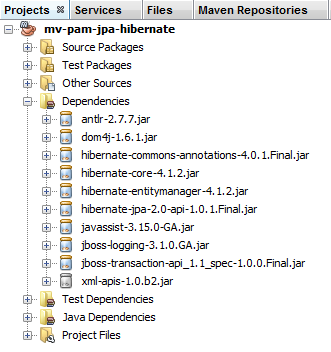 |
These dependencies are due to the inclusion of Hibernate in the project. We need to add another dependency: the JDBC driver for MySQL, which implements the JDBC layer of the architecture. We update the [pom.xml] file as follows:
<dependencies>
<dependency>
<groupId>junit</groupId>
<artifactId>junit</artifactId>
<version>3.8.1</version>
<scope>test</scope>
</dependency>
<dependency>
<groupId>mysql</groupId>
<artifactId>mysql-connector-java</artifactId>
<version>5.1.6</version>
</dependency>
<dependency>
<groupId>org.hibernate</groupId>
<artifactId>hibernate-entitymanager</artifactId>
<version>4.1.2</version>
</dependency>
...
<dependency>
<groupId>org.hibernate.common</groupId>
<artifactId>hibernate-commons-annotations</artifactId>
<version>4.0.1.Final</version>
</dependency>
</dependencies>
Lines 8–12 add the dependency for the JDBC driver from MySQL.
5.6.1.4. The JPA entities
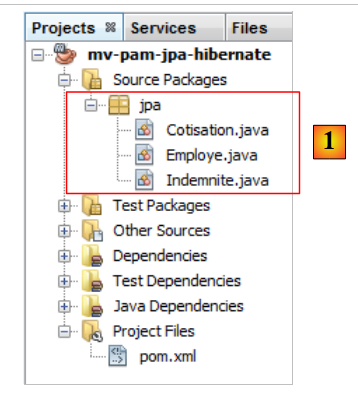 |
Question: Following the procedure in the example in section 4.4, generate the [Cotisation, Indemnite, Employe] entities.
Notes:
- the entities will be part of a package named [jpa],
- each entity will have the ID version,
- if two entities are linked by a relationship, only the primary relationship @ManyToOne will be created. The inverse relationship @OneToMany will not be created.
5.6.1.5. The code for the main class
We include the previously developed entities JPA and [1] in the project:
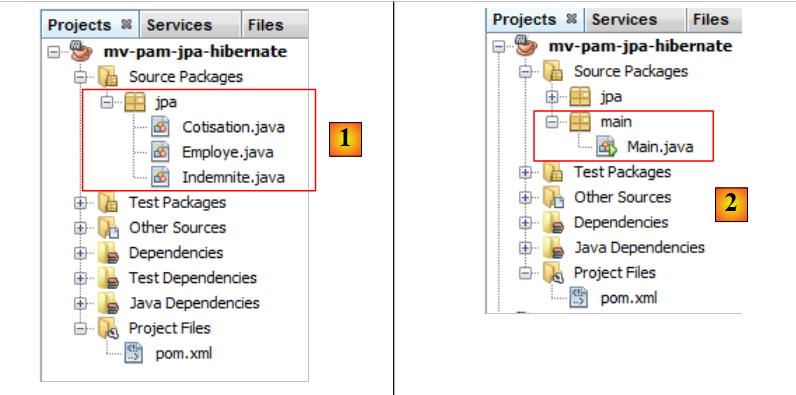 |
then we add [2], the following [main.Main] class:
package main;
import javax.persistence.EntityManager;
import javax.persistence.EntityManagerFactory;
import javax.persistence.Persistence;
public class Main {
public static void main(String[] args) {
// creating the Entity Manager is enough to build the JPA layer
EntityManagerFactory emf = Persistence.createEntityManagerFactory("mv-pam-jpa-hibernatePU");
EntityManager em=emf.createEntityManager();
// resource release
em.close();
emf.close();
}
}
- Line 10: We create the EntityManagerFactory persistence unit named [mv-pam-jpa-hibernatePU]. This name comes from the [persistence.xml] file:
<persistence-unit name="mv-pam-jpa-hibernatePU" transaction-type="RESOURCE_LOCAL">
...
</persistence-unit>
- line 12: EntityManager is created. This creation generates the JPA layer. The [persistence.xml] file will be processed, and thus the database tables will be created,
- lines 14-15: resources are released.
5.6.1.6. Tests
Let’s return to our project’s architecture:
 |
All layers have been implemented. We run the [2] project.
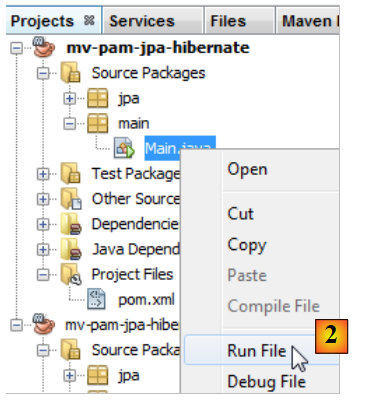 |
The console output is as follows:
1 2 3 4 5 6 7 8 9 10 11 12 13 14 15 16 17 18 19 20 21 22 23 24 25 26 27 28 29 30 31 32 33 34 35 36 37 38 39 40 41 42 43 44 45 46 47 48 49 50 51 52 53 54 55 56 57 58 59 60 61 62 63 64 65 66 67 68 69 70 71 72 73 74 75 76 77 78 79 80 81 82 83 84 85 86 87 88 89 90 91 92 93 94 95 96 97 98 99 100 101 102 103 104 105 | |
The console contains only Hibernate logs, since the executed program does nothing other than instantiate the JPA layer. Note the following points:
- line 43: Hibernate attempts to delete the foreign key from the [EMPLOYES] table,
- lines 51–55: deletion of the three tables,
- line 57: creation of the [COTISATIONS] table,
- line 67: creation of the table [EMPLOYES],
- line 80: creation of table [INDEMNITES],
- line 91: creation of the foreign key for table [EMPLOYES].
In Netbeans, you can see the tables in the connection that was created previously:
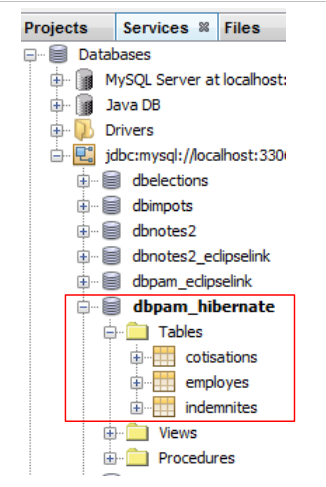 |
The tables created depend on both the implementation of the JPA layer used and the SGBD used. Thus, a JPA / EclipseLink implementation with the same database can generate different tables. This is what we will now examine.
5.6.2. JPA / EclipseLink Layer
We will build a new Maven project in the following environment:
 |
We will follow the steps outlined in the previous section:
- create a database named MySQL [dbpam_eclipselink]. We will use the script [dbpam_eclipselink.sql] to generate it,
- create the project file [persistence.xml]. Take the JPA 2.0 implementation EclipseLink,
- add the JDBC driver dependency from MySQL to the generated dependencies,
- add the JPA entities and the console program,
- run the tests.
The [persistence.xml] file will be as follows:
<?xml version="1.0" encoding="UTF-8"?>
<persistence version="2.0" xmlns="http://java.sun.com/xml/ns/persistence" xmlns:xsi="http://www.w3.org/2001/XMLSchema-instance" xsi:schemaLocation="http://java.sun.com/xml/ns/persistence http://java.sun.com/xml/ns/persistence/persistence_2_0.xsd">
<persistence-unit name="pam-jpa-eclipselinkPU" transaction-type="RESOURCE_LOCAL">
<provider>org.eclipse.persistence.jpa.PersistenceProvider</provider>
<class>jpa.Cotisation</class>
<class>jpa.Employe</class>
<class>jpa.Indemnite</class>
<properties>
<property name="eclipselink.target-database" value="MySQL"/>
<property name="javax.persistence.jdbc.url" value="jdbc:mysql://localhost:3306/dbpam_eclipselink"/>
<property name="javax.persistence.jdbc.password" value=""/>
<property name="javax.persistence.jdbc.driver" value="com.mysql.jdbc.Driver"/>
<property name="javax.persistence.jdbc.user" value="root"/>
<property name="eclipselink.logging.level" value="FINE"/>
<property name="eclipselink.ddl-generation" value="drop-and-create-tables"/>
</properties>
</persistence-unit>
</persistence>
- Properties 9–13 were generated by the Netbeans wizard,
- Line 14: This property allows us to set the log level for EclipseLink. The FINE level allows us to see the SQL commands that EclipseLink will issue to the database,
- Line 15: When the JPA / EclipseLink layer is instantiated, the JPA entity tables will be dropped and then created.
The console results obtained are as follows:
- lines 26-30: connection to the MySQL database,
- lines 31-34: confirmation that the connection was successful,
- line 36: deletion of the foreign key from table [EMPLOYES],
- line 37: deletion of table [COTISATIONS],
- line 38: creation of table [COTISATIONS]. It is worth noting that the primary key ID does not have the attribute MySQL auto_increment. This means that it is not MySQL that generates the primary key values,
- line 39: deletion of table [EMPLOYES],
- line 40: creation of table [EMPLOYES]. Its primary key ID does not have the attribute MySQL auto_increment,
- line 41: deletion of table [INDEMNITES],
- line 42: creation of table [INDEMNITES]. Its primary key ID does not have the attribute MySQL auto_increment,
- line 43: creation of the foreign key from table [EMPLOYES] to table [INDEMNITES],
- line 44: creation of a table [SEQUENCE]. It will be used to generate the primary keys for the three previous tables,
- line 47: an exception occurs because this table already existed,
- lines 51–53: initialization of table [SEQUENCE].
The existence of the generated tables can be verified in Netbeans and [1]:
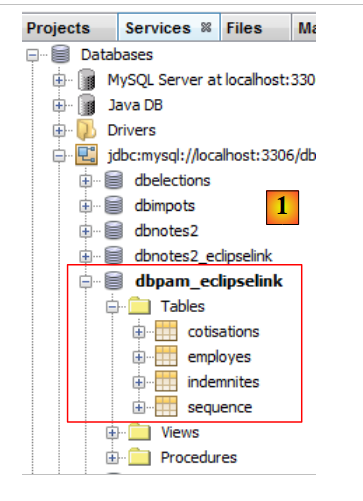 |
Therefore, based on the same JPA entities, the Hibernate implementation JPA and EclipseLink do not generate the same tables. In the rest of this document, when the JPA implementation used is:
- Hibernate, the [dbpam_hibernate] database will be used;
- EclipseLink, the [dbpam_eclipselink] database will be used.
5.6.3. Work to be done
Following the same procedure as before,
- create and test a [mv-pam-jpa-hibernate-oracle] project using a JPA Hibernate implementation and a SGBD Oracle implementation,
- create and test a [mv-pam-jpa-hibernate-mssql] project using a JPA Hibernate implementation and a SGBD SQL server,
- create and test a [mv-pam-jpa-eclipselink-oracle] project using a JPA EclipseLink implementation and an Oracle SGBD,
- create and test a [mv-pam-jpa-eclipselink-mssql] project using a JPA implementation, EclipseLink, and a SGBD, SQL server,
5.6.4. Lazy or Eager?
Let’s return to a possible definition of the [Employe] entity:
package jpa;
...
@Entity
@Table(name="EMPLOYES")
public class Employe implements Serializable {
@Id
@GeneratedValue(strategy = GenerationType.AUTO)
private Long id;
@Version
@Column(name="VERSION",nullable=false)
private int version;
@Column(name="SS", nullable=false, unique=true, length=15)
private String SS;
@Column(name="NOM", nullable=false, length=30)
private String nom;
@Column(name="PRENOM", nullable=false, length=20)
private String prenom;
@Column(name="ADRESSE", nullable=false, length=50)
private String adresse;
@Column(name="VILLE", nullable=false, length=30)
private String ville;
@Column(name="CP", nullable=false, length=5)
private String codePostal;
@ManyToOne(fetch= FetchType.LAZY)
@JoinColumn(name="INDEMNITE_ID",nullable=false)
private Indemnite indemnite;
...
}
Lines 27–29 define the foreign key from table [EMPLOYES] to table [INDEMNITES]. The fetch attribute on line 27 defines the retrieval strategy for the indemnite field on line 29. There are two modes:
- FetchType.LAZY: when an employee is searched for, the corresponding allowance is not returned. It will be returned when the field [Employe].indemnite is referenced for the first time.
- FetchType.EAGER: When an employee is searched for, the corresponding allowance is returned. This is the default mode when no mode is specified.
To understand the purpose of option and FetchType.LAZY, consider the following example. A list of employees without their allowances is displayed on a web page with a [Details] link. Clicking this link then displays the benefits for the selected employee. We see that:
- to display the first page, we do not need the employees and their allowances. The FetchType.LAZY mode is therefore suitable;
- to display the second page with details, an additional query must be made to the database to retrieve the selected employee’s allowances.
The FetchType.LAZY mode avoids retrieving too much data that the application does not need immediately. Let’s look at an example.
The project [mv-pam-jpa-hibernate] is duplicated:
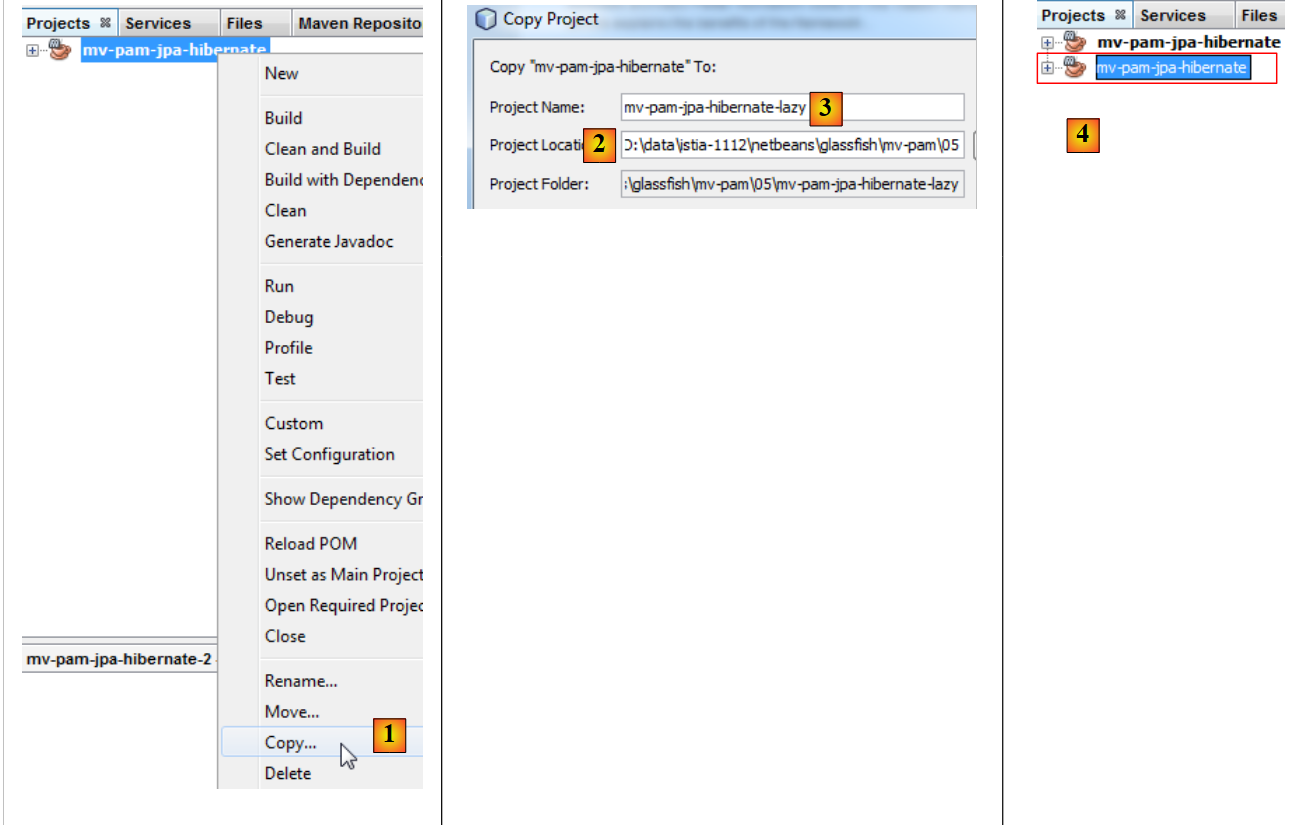 |
- in [1], the project is copied;
- in [2], we specify the folder for the copy, and in [3], its name,
- in [4], the new project has the same name as the old one. We change this:
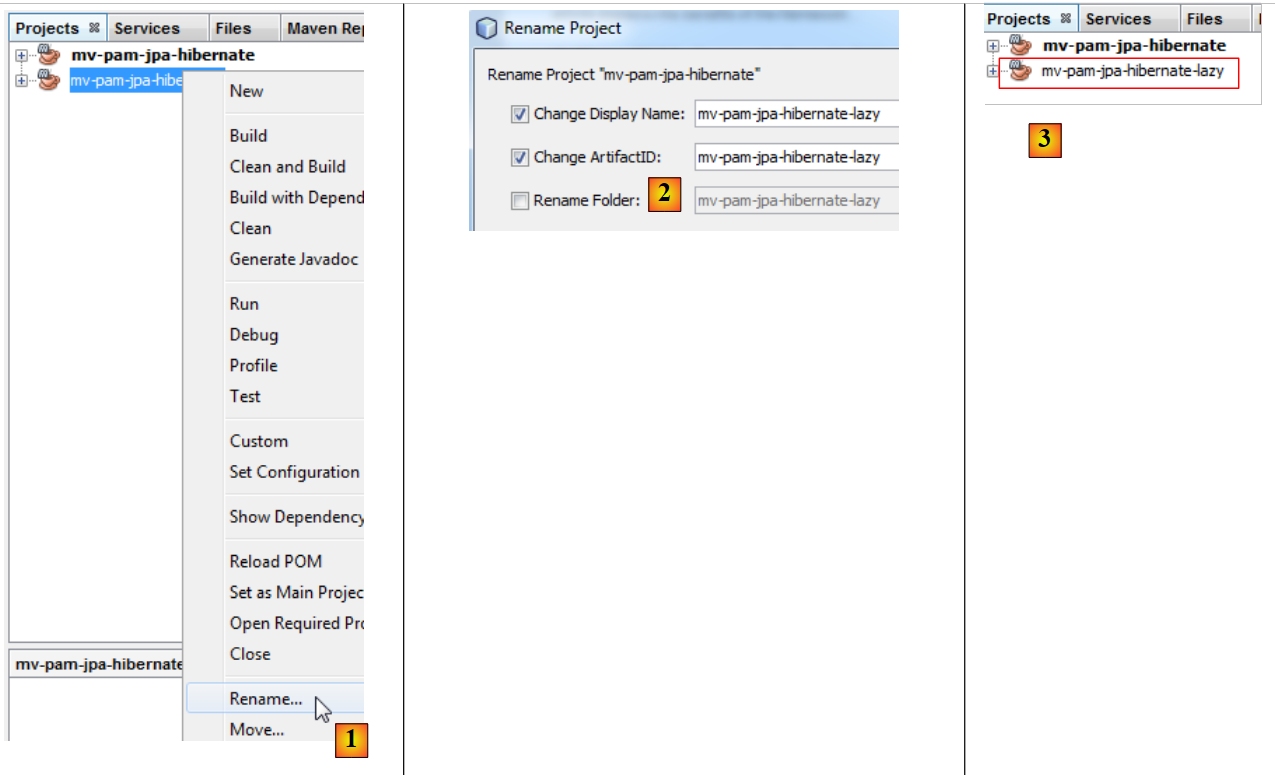 |
- In [1], rename the project,
- in [2], we rename the project and its artifactId,
- to [3], the new project.
We modify the program [Main.java] as follows:
package main;
import java.util.List;
import javax.persistence.EntityManager;
import javax.persistence.EntityManagerFactory;
import javax.persistence.Persistence;
import jpa.Employe;
public class Main {
// the JPQL query below brings back an employee
// the foreign key [Employe].indemnite is in FetchType.LAZY
public static void main(String[] args) {
// creating the Entity Manager is enough to build the JPA layer
EntityManagerFactory emf = Persistence.createEntityManagerFactory("pam-jpa-hibernatePU");
// first attempt
EntityManager em = emf.createEntityManager();
Employe employe = (Employe) em.createQuery("select e from Employe e where e.nom=:nom").setParameter("nom", "Jouveinal").getSingleResult();
em.close();
// we display the employee
try {
System.out.println(employe);
} catch (Exception ex) {
System.out.println(ex);
}
// second test
em = emf.createEntityManager();
employe = (Employe) em.createQuery("select e from Employe e left join fetch e.indemnite where e.nom=:nom").setParameter("nom", "Jouveinal").getSingleResult();
// free up resources
em.close();
// we display the employee
try {
System.out.println(employe);
} catch (Exception ex) {
System.out.println(ex);
}
// resource release
emf.close();
}
}
- line 15: we create the EntityManagerFactory from the JPA layer,
- line 17: we obtain the EntityManager, which allows us to interact with the JPA layer,
- line 18: we request the employee named Jouveinal,
- line 19: we close EntityManager. This closes the persistence context.
- Line 22: We display the retrieved employee.
The [Employe] class is as follows:
package jpa;
...
@Entity
@Table(name="EMPLOYES")
public class Employe implements Serializable {
@Id
@GeneratedValue(strategy = GenerationType.AUTO)
private Long id;
@Version
@Column(name="VERSION",nullable=false)
private int version;
@Column(name="SS", nullable=false, unique=true, length=15)
private String SS;
@Column(name="NOM", nullable=false, length=30)
private String nom;
@Column(name="PRENOM", nullable=false, length=20)
private String prenom;
@Column(name="ADRESSE", nullable=false, length=50)
private String adresse;
@Column(name="VILLE", nullable=false, length=30)
private String ville;
@Column(name="CP", nullable=false, length=5)
private String codePostal;
@ManyToOne(fetch= FetchType.LAZY)
@JoinColumn(name="INDEMNITE_ID",nullable=false)
private Indemnite indemnite;
/**
* Returns a string representation of the object. This implementation constructs
* that representation based on the id fields.
* @return a string representation of the object.
*/
@Override
public String toString() {
return "jpa.Employe[id=" + getId()
+ ",version="+getVersion()
+",SS="+getSS()
+ ",nom="+getNom()
+ ",prenom="+getPrenom()
+ ",adresse="+getAdresse()
+",ville="+getVille()
+",code postal="+getCodePostal()
+",indice="+getIndemnite().getIndice()
+"]";
}
...
}
- line 27: the indemnite field is retrieved in LAZY mode,
- line 47: uses the indemnite field. If the toString method is called before the indemnite field has been restored, it will be restored at that point. Unless the persistence context has been closed, as in the example.
Let’s return to the code for [Main]:
- lines 21–25: an exception should occur. This is because the toString method will be called. It will use the indemnite field. This field will be looked up. Since the persistence context has been closed, the returned [Employe] entity no longer exists, hence the exception.
- Line 27: A new EntityManager is created,
- line 28: we query for employee Jouveinal by explicitly requesting the corresponding allowance in the JPQL query. This explicit request is necessary because the search mode for this allowance is LAZY,
- line 30: close EntityManager,
- lines 32–36: we display the employee again. There should be no exceptions.
To run the project, you need a populated database. You will create it by following the steps in section 5.5. Additionally, the file [persistence.xml] must be modified:
<?xml version="1.0" encoding="UTF-8"?>
<persistence version="2.0" xmlns="http://java.sun.com/xml/ns/persistence" xmlns:xsi="http://www.w3.org/2001/XMLSchema-instance" xsi:schemaLocation="http://java.sun.com/xml/ns/persistence http://java.sun.com/xml/ns/persistence/persistence_2_0.xsd">
<persistence-unit name="mv-pam-jpa-hibernatePU" transaction-type="RESOURCE_LOCAL">
<provider>org.hibernate.ejb.HibernatePersistence</provider>
<class>jpa.Cotisation</class>
<class>jpa.Employe</class>
<class>jpa.Indemnite</class>
<properties>
<property name="javax.persistence.jdbc.url" value="jdbc:mysql://localhost:3306/dbpam_hibernate"/>
<property name="javax.persistence.jdbc.password" value=""/>
<property name="javax.persistence.jdbc.driver" value="com.mysql.jdbc.Driver"/>
<property name="javax.persistence.jdbc.user" value="root"/>
<property name="hibernate.cache.provider_class" value="org.hibernate.cache.NoCacheProvider"/>
</properties>
</persistence-unit>
</persistence>
- We removed the option that created the tables. The database here already exists and is populated,
- we have removed the options that caused Hibernate to log the SQL commands it sent to the database.
Running the project produces the following two messages in the console:
- Line 1: The exception that occurred when attempting to retrieve the missing compensation while the session was closed. We can see that the compensation was not retrieved due to the LAZY mode,
- line 2: the employee with their allowance obtained via a query that bypassed the LAZY mode.
5.6.5. Work to be done
Following a procedure similar to the one just described, create a project named [mv-pam-pa-eclipselink-lazy] that demonstrates the behavior of EclipseLink when compared to mode LAZY.
The following results are obtained:
In LAZY mode, both queries returned the compensation along with the employee. When inquiring about net regarding this anomaly, we discover that the annotation [FetchType.LAZY] (line 1):
@ManyToOne(fetch= FetchType.LAZY)
@JoinColumn(name="INDEMNITE_ID",nullable=false)
private Indemnite indemnite;
is not a requirement but a suggestion. The implementer JPA is not required to follow it. We can see, therefore, that the code sometimes becomes dependent on the JPA implementation used. It is possible to configure EclipseLink to behave as expected for the LAZY mode.
5.6.6. Moving forward
The architecture of the application to be built is as follows:
 |
For the rest of this document, we will duplicate the Maven project [mv-pam-jpa-hibernate] into the project [mv-pam-spring-hibernate] [1, 2, 3]:
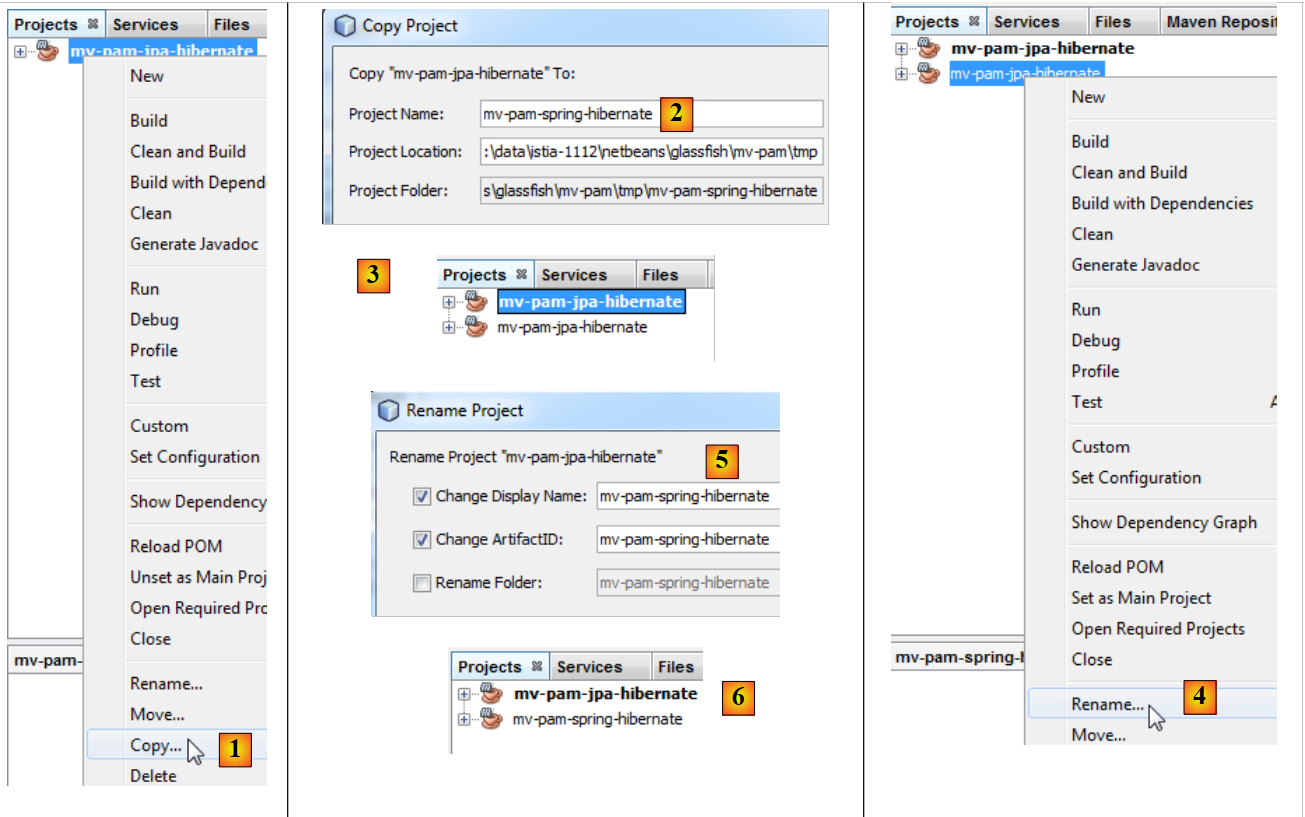 |
- then we will rename the new project to [4, 5, 6].
We will change the dependencies of the new project. The [pom.xml] file becomes the following:
<project xmlns="http://maven.apache.org/POM/4.0.0" xmlns:xsi="http://www.w3.org/2001/XMLSchema-instance"
xsi:schemaLocation="http://maven.apache.org/POM/4.0.0 http://maven.apache.org/xsd/maven-4.0.0.xsd">
<modelVersion>4.0.0</modelVersion>
<groupId>istia.st</groupId>
<artifactId>mv-pam-spring-hibernate</artifactId>
<version>1.0-SNAPSHOT</version>
<packaging>jar</packaging>
<name>mv-pam-spring-hibernate</name>
<url>http://maven.apache.org</url>
<repositories>
<repository>
<url>http://repo1.maven.org/maven2/</url>
<id>swing-layout</id>
<layout>default</layout>
<name>Repository for library Library[swing-layout]</name>
</repository>
</repositories>
<properties>
<project.build.sourceEncoding>UTF-8</project.build.sourceEncoding>
</properties>
<dependencies>
<dependency>
<groupId>junit</groupId>
<artifactId>junit</artifactId>
<version>4.10</version>
<scope>test</scope>
<type>jar</type>
</dependency>
<dependency>
<groupId>commons-dbcp</groupId>
<artifactId>commons-dbcp</artifactId>
<version>1.2.2</version>
</dependency>
<dependency>
<groupId>commons-pool</groupId>
<artifactId>commons-pool</artifactId>
<version>1.6</version>
</dependency>
<dependency>
<groupId>org.springframework</groupId>
<artifactId>spring-tx</artifactId>
<version>3.1.1.RELEASE</version>
<type>jar</type>
</dependency>
<dependency>
<groupId>org.springframework</groupId>
<artifactId>spring-beans</artifactId>
<version>3.1.1.RELEASE</version>
<type>jar</type>
</dependency>
<dependency>
<groupId>org.springframework</groupId>
<artifactId>spring-context</artifactId>
<version>3.1.1.RELEASE</version>
<type>jar</type>
</dependency>
<dependency>
<groupId>org.springframework</groupId>
<artifactId>spring-orm</artifactId>
<version>3.1.1.RELEASE</version>
<type>jar</type>
</dependency>
<dependency>
<groupId>org.hibernate</groupId>
<artifactId>hibernate-entitymanager</artifactId>
<version>4.1.2</version>
<type>jar</type>
</dependency>
<dependency>
<groupId>mysql</groupId>
<artifactId>mysql-connector-java</artifactId>
<version>5.1.6</version>
</dependency>
<dependency>
<groupId>org.swinglabs</groupId>
<artifactId>swing-layout</artifactId>
<version>1.0.3</version>
</dependency>
</dependencies>
</project>
- lines 25–31: the dependency for the JUnit tests,
- lines 32–41: the dependencies for the Apache connection pool DBCP,
- lines 42–65: dependencies for the Spring framework,
- lines 67-71: dependencies for the JPA / Hibernate implementation,
- lines 72-76: the dependency for the JDBC driver of MySQL,
- lines 77-81: the dependency for the Swing interface. This is automatically added by Netbeans when a Swing interface is added to the project.
In addition, the two databases MySQL will be generated:
- [dbpam_hibernate] from the script [dbpam_hibernate.sql],
- [dbpam_eclipselink] from the [dbpam_eclipselink.sql] script,
5.7. The [metier] and [DAO] layer interfaces
Let’s return to the application architecture:
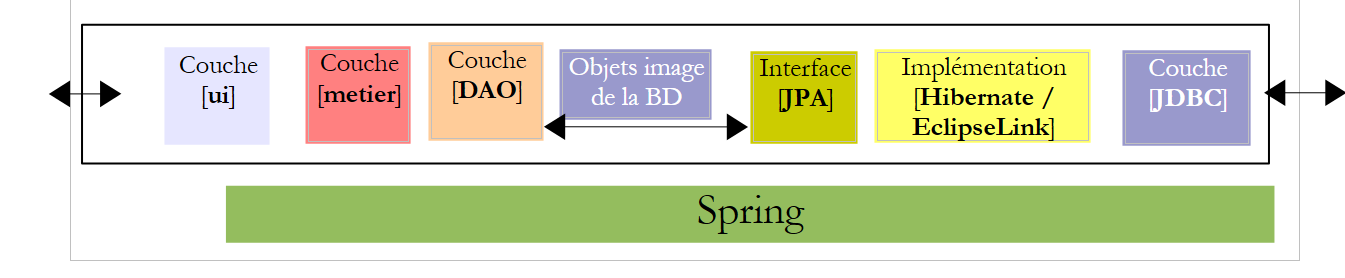 |
In the architecture above, what interface should the [DAO] layer provide to the [metier] layer, and what interface should the [metier] layer provide to the [ui] layer? A first approach to defining the interfaces of the different layers is to examine the application’s various use cases. Here we have two, depending on the chosen user interface: console or graphical form.
Let’s examine how the console application is used:
The app receives three pieces of information from the user (see line 1 above)
- the child care provider’s Social Security number
- the number of hours worked in the month
- the number of days worked in the month
Based on this information and other data stored in configuration files, the application displays the following information:
- lines 4–6: the entered values
- lines 8-10: information related to the employee whose Social Security number was provided
- lines 12–14: the rates for the various social security contributions
- lines 16–17: the various allowances paid to the child care provider
- lines 19–24: items on the child care provider’s pay stub
A certain amount of information must be provided by layer [metier] to layer [ui]:
- information related to a child care provider identified by their social security number. This information is found in table [EMPLOYES]. This allows lines 6–8 to be displayed.
- the amounts of the various social security rates to be deducted from the gross salary. This information is found in table [COTISATIONS]. This allows lines 10–12 to be displayed.
- the amounts of the various allowances related to the role of child care provider. This information is found in table [INDEMNITES]. This displays lines 14–15.
- the components of the salary displayed in lines 18–22.
Based on this, we could decide on an initial mapping from the [IMetier] interface presented by the [metier] layer to the [ui] layer:
- line 1: the elements of the [metier] layer are placed in the [metier] package
- line 5: the [ calculerFeuilleSalaire ] method takes as parameters the three pieces of information acquired by the [ui] layer and returns an object of type [FeuilleSalaire] containing the information that the [ui] layer will display on the console. The [FeuilleSalaire] class could be as follows:
- line 9: the employee covered by the pay slip - information #1 displayed by layer [ui]
- line 10: the various contribution rates - information no. 2 displayed by layer [ui]
- line 11: the various allowances linked to the employee's index - information #3 displayed by layer [ui]
- line 12: the components of their salary - information #4 displayed by layer [ui]
A second use case for layer [métier] appears in the graphical interface:
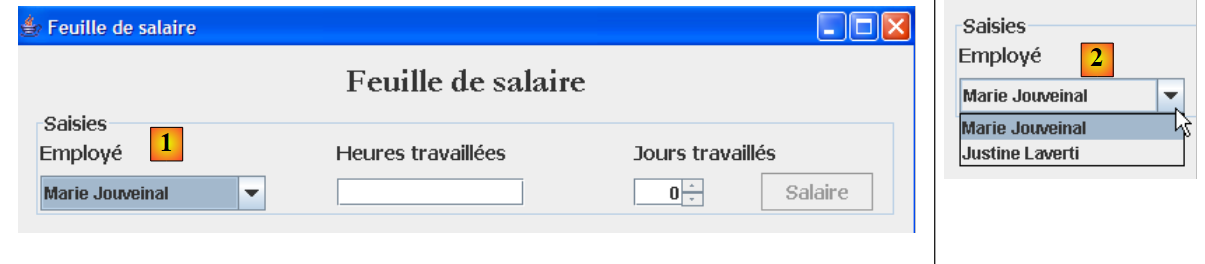 |
As shown above, the [1, 2] drop-down list displays all employees. This list must be requested from the [métier] layer. The interface for this layer then evolves as follows:
- line [10]: the method that will allow the [ui] layer to request the list of all employees from the [métier] layer.
The [metier] layer can only initialize the [Employe, Cotisation, Indemnite] fields of the [FeuilleSalaire] object above by querying the [DAO] layer, since this information is stored in the database tables. The same applies to obtaining the list of all employees. We could create a single [DAO] interface managing access to the three [Employe, Cotisation, Indemnite] entities. Instead, we have decided here to create a [DAO] interface per entity.
The interface [DAO] for accessing the entities [Cotisation] in the table [COTISATIONS] will be as follows:
- Line 6: The [ICotisationDao] interface manages access to the [Cotisation] entity and thus to the [COTISATIONS] table in the database. Our application only needs the [findAll] method from line 16, which retrieves all the content of the [COTISATIONS] table. Here, we wanted to consider a more general case where all CRUD operations (Create, Read, Update, Delete) are performed on the entity.
- Line 8: The [create] method creates a new [Cotisation] entity
- Line 10: The [edit] method modifies an existing [Cotisation] entity
- Line 12: The [destroy] method deletes an existing [Cotisation] entity
- line 14: the [find] method retrieves an existing [Cotisation] entity via its id identifier
- line 16: the [findAll] method returns a list of all existing [Cotisation] entities
Let’s take a closer look at the signature of the [create] method:
The create method has a contribution parameter of type Contribution. The contribution parameter must be persisted, c.a.d. Here, it is stored in the [COTISATIONS] table. Before this persistence, the contribution parameter has an identifier id with no value. After persistence, the field id has a value that is the primary key of the record added to the table [COTISATIONS]. The contribution parameter is therefore an input/output parameter of the create method. It does not seem necessary for the create method to additionally return the contribution parameter as a result. Since the calling method holds a reference to the object [Cotisation cotisation], if that object is modified, it has access to the modified object because it holds a reference to it. It can therefore determine the value that the create method assigned to the id field of the [Cotisation cotisation] object. The method signature could therefore be simplified to:
When writing an interface, it is important to remember that it can be used in two different contexts: local and remote . In the local context, the calling method and the called method are executed within the same JVM:
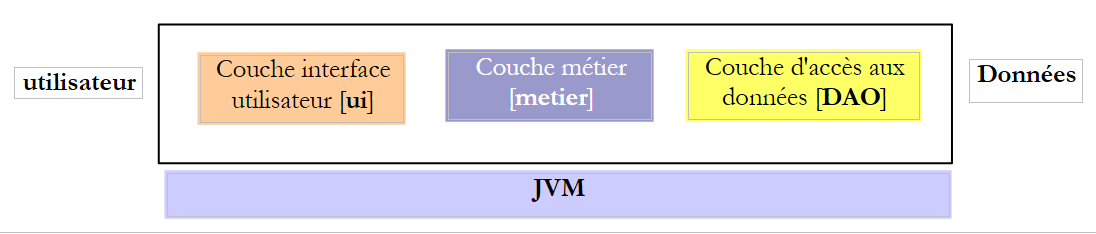 |
If the [metier] layer calls the create method of the [DAO] layer, it does indeed have a reference to the [Cotisation cotisation] parameter that it passes to the method.
In the remote context, the calling method and the called method are executed in different JVMs:
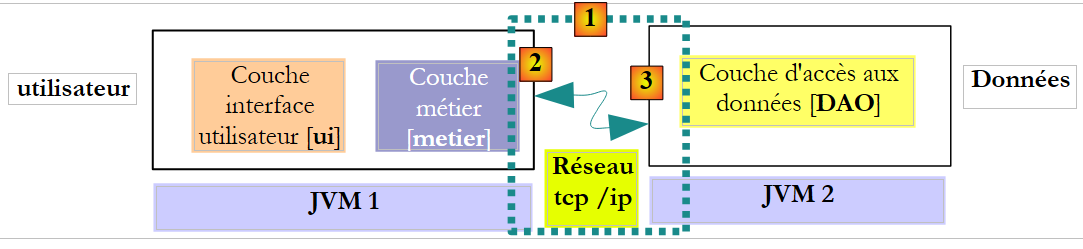 |
Above, layer [metier] runs in JVM 1 and layer [DAO] runs in JVM 2 on two different machines. The two layers do not communicate directly. Between them is an intermediate layer that we will call the [1] communication layer. This layer consists of a transmission layer [2] and a reception layer [3]. The developer generally does not have to write these communication layers. They are generated automatically by software tools. The [metier] layer is written as if it were running in the same JVM as the [DAO] layer. Therefore, there is no code modification.
The communication mechanism between the [metier] layer and the [DAO] layer is as follows:
- The [metier] layer calls the create method of the [DAO] layer, passing it the [Cotisation cotisation1] parameter
- this parameter is actually passed to the transmission layer [2]. This layer will transmit the value of the cotisation1 parameter over the network, not its reference. The exact format of this value depends on the communication protocol used.
- The receiving layer [3] will retrieve this value and use it to reconstruct a [Cotisation cotisation2] object that mirrors the initial parameter sent by the [metier] layer. We now have two identical objects (in terms of content) in two different JVM layers: contribution1 and contribution2.
- The receiving layer will pass the contribution2 object to the create method of the [DAO] layer, which will persist it in the database. After this operation, the id field of the contribution2 object has been initialized with the primary key of the record added to the [COTISATIONS] table. This is not the case for the cotisation1 object, to which the [metier] layer has a reference. If we want the [metier] layer to have a reference to the cotisation2 object, we must send it to the layer. Therefore, we need to change the signature of the create method of the [DAO] layer:
- With this new signature, the create method will return the persisted object contribution2 as its result. This result is returned to the receiving layer [3], which had called the layer [DAO]. This layer will return the value (not the reference) of contribution2 to the sending layer [2].
- The sending layer [2] will retrieve this value and use it to reconstruct a [Cotisation cotisation3] object that is an image of the result returned by the create method of the [DAO] layer.
- The [Cotisation cotisation3] object is returned to the method of the [metier] layer, whose call to the create method of the [DAO] layer had initiated this entire mechanism. The [metier] layer can therefore determine the primary key value assigned to the [Cotisation cotisation1] object for which it requested persistence: this is the value of the id field in cotisation3.
The previous architecture is not the most common. The layers [metier] and [DAO] are more frequently found within the same JVM:
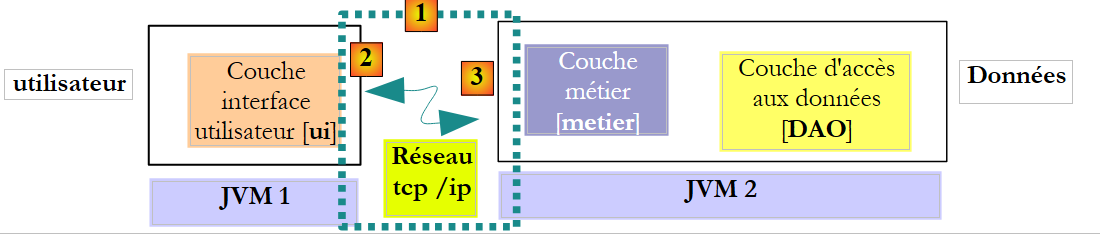 |
In this architecture, it is the methods of the [metier] layer that must return results, not those of the [DAO] layer. However, the following signature of the create method of the [DAO] layer:
allows us to avoid making assumptions about the actual architecture in place. Using signatures that will work regardless of the chosen architecture—whether local or remote—means that if a called method modifies some of its parameters:
- these must also be part of the result of the called method
- the calling method must use the result of the called method and not the references to the modified parameters that it passed to the called method.
This allows us to transition from a local architecture to a remote architecture without modifying the code. Let’s revisit, in this light, the [ICotisationDao] interface:
- line 8: the case for the create method has been handled
- Line 10: The edit method uses its parameter [Cotisation cotisation1] to update the record in table [COTISATIONS] that has the same primary key as the contribution object. It returns the contribution2 object, which is a representation of the modified record. The contribution1 parameter is not modified. The method must return contribution2 as the result, whether in a remote or local architecture.
- Line 12: The destroy method deletes the record from table [COTISATIONS] that has the same primary key as the contribution object passed as a parameter. The contribution object is not modified. Therefore, it does not need to be returned.
- Line 14: The parameter id of the find method is not modified by the method. It does not need to be included in the result.
- Line 16: The findAll method has no parameters. Therefore, it does not need to be examined.
Ultimately, only the signature of the create method needs to be adapted to be usable within a remote architecture. The reasoning above applies to the other [DAO] interfaces. We will not repeat it here and will instead use signatures that are usable in both remote and local architectures.
The [DAO] interface for accessing the [Indemnite] entities in the [INDEMNITES] table will be as follows:
- Line 6: The [IIndemniteDao] interface manages access to the [Indemnite] entity and thus to the [INDEMNITES] table in the database. Our application only needs the [findAll] method from line 16, which retrieves all the content of the [INDEMNITES] table. Here, we wanted to consider a more general case where all CRUD operations (Create, Read, Update, Delete) are performed on the entity.
- Line 8: The [create] method creates a new [Indemnite] entity
- Line 10: The [edit] method modifies an existing [Indemnite] entity
- Line 12: The [destroy] method deletes an existing [Indemnite] entity
- line 14: the [find] method retrieves an existing [Indemnite] entity via its identifier id
- line 16: the [findAll] method returns a list of all existing [Indemnite] entities
The [DAO] interface for accessing [Employe] entities in the [EMPLOYES] table will be as follows:
- Line 6: The [IEmployeDao] interface manages access to the [Employe] entity and, consequently, to the [EMPLOYES] table in the database. Our application only needs the [findAll] method on line 16, which retrieves all the content of the [EMPLOYES] table. Here, we wanted to consider a more general case where all CRUD operations (Create, Read, Update, Delete) are performed on the entity.
- Line 8: The [create] method creates a new [Employe] entity
- Line 10: The [edit] method modifies an existing [Employe] entity
- Line 12: The [destroy] method deletes an existing [Employe] entity
- line 14: the [find] method retrieves an existing [Employe] entity via its identifier id
- line 16: the [find(String SS)] method allows you to retrieve an existing [Employe] entity via its ID SS. We have seen that this method is necessary for the console application.
- Line 18: The [findAll] method returns a list of all existing [Employe] entities. We have seen that this method is required by the graphical application.
5.8. The [PamException] class
The [DAO] layer will work with the Java API and JDBC classes. This API throws controlled exceptions of type [SQLException], which have two drawbacks:
- they bloat the code, which must handle these exceptions using try/catch blocks.
- they must be declared in the method signatures of the [IDao] interface using "throws SQLException". This prevents classes that throw a checked exception of a type other than [SQLException] from implementing this interface.
To resolve this issue, the [DAO] layer will only "propagate" unchecked exceptions of type [PamException].
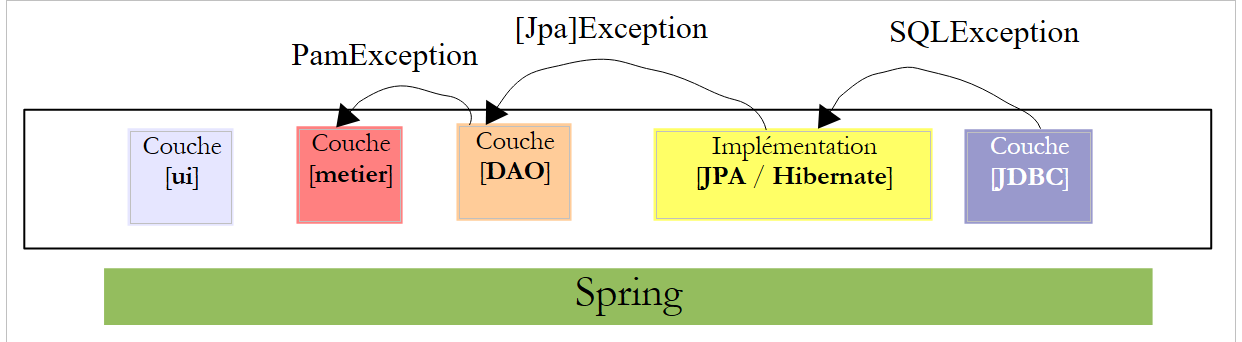 |
- The [JDBC] layer throws exceptions of type [SQLException]
- The [JPA] layer throws exceptions specific to the JPA implementation used
- The [DAO] layer throws uncaught exceptions of type [PamException]
This has two consequences:
- The [metier] layer will not be required to handle exceptions from the [DAO] layer using try/catch blocks. It can simply let them propagate up to the [ui] layer.
- the methods of the [IDao] interface do not need to include the nature of the [PamException] exception in their signature, which leaves open the possibility of implementing this interface with classes that would throw another type of unhandled exception.
The class [PamException] will be placed in the package [exception] of the project Netbeans:
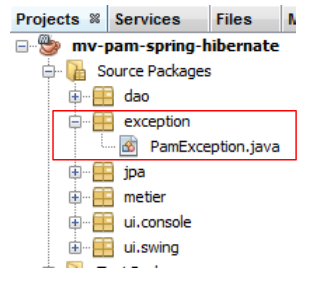 |
Its code is as follows:
- Line 4: [PamException] derives from [RuntimeException]. It is therefore a type of exception that the compiler does not require us to handle with a try/catch block or include in method signatures. For this reason, [PamException] is not included in the method signatures of the [IDao] interface. This allows this interface to be implemented by a class that throws a different type of exception, provided that the class also derives from [RuntimeException].
- To distinguish between the errors that may occur, the error code on line 7 is used. The three constructors on lines 14, 19, and 24 are those of the parent class [RuntimeException], to which a parameter has been added: the error code to be assigned to the exception.
From an exception handling perspective, the application will function as follows:
- The [DAO] layer will encapsulate any exception encountered within a [PamException] exception and re-throw it to the [métier] layer.
- The [métier] layer will allow exceptions thrown by the [DAO] layer to propagate upward. It will wrap any exception occurring in the [métier] layer into a [PamException] exception and rethrow the latter to the [ui] layer.
- The [ui] layer intercepts all exceptions that are propagated from the [métier] and [DAO] layers. It will simply display the exception on the console or the graphical interface.
Let’s now examine the implementation of the [DAO] and [metier] layers in turn.
5.9. The [DAO] layer of the [PAM] application
We are working within the following architecture:
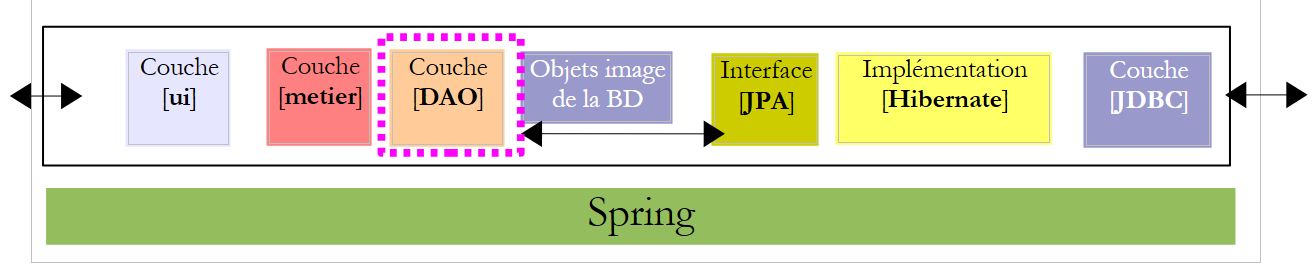 |
5.9.1. Implementation
Recommended reading: Section 3.1.3 of [ref1]
Question: Using the Spring / JPA integration, write the [CotisationDao, IndemniteDao, EmployeDao] classes that implement the [ICotisationDao, IIndemniteDao, IEmployeDao] interfaces. Each class method will catch any exception and wrap it in a [PamException] exception with an error code specific to the caught exception.
The implementation classes will be part of the [dao] package:
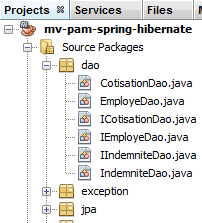 |
5.9.2. Configuration
Recommended reading: section 3.1.5 of [ref1]
The DAO / JPA integration is configured by the Spring file [spring-config-dao.xml] and the JPA [persistence.xml] file:
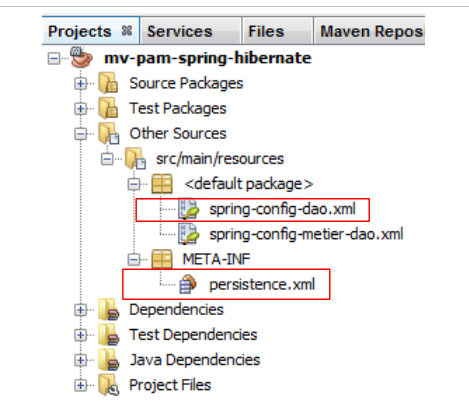 |
Question: Write the contents of these two files. We will assume that the database used is the MySQL5 [dbpam_hibernate] database generated by the SQL [dbpam_hibernate.sql] script. The Spring file will define the following three beans: employeDao of type EmployeDao, indemniteDao of type IndemniteDao, cotisationDao of type CotisationDao. Furthermore, the JPA implementation used will be Hibernate.
5.9.3. Tests
Recommended reading: sections 3.1.6 and 3.1.7 of [ref1]
Now that the [DAO] layer has been written and configured, we can test it. The test architecture will be as follows:
 |
5.9.4. InitDB
We will create two test programs for the [DAO] layer. These will be placed in the [dao] [2] package of the [Test Packages] [1] branch of the Netbeans project. This branch is not included in the project generated by option [Build project], which ensures that the test programs we place there will not be included in the final .jar of the project.
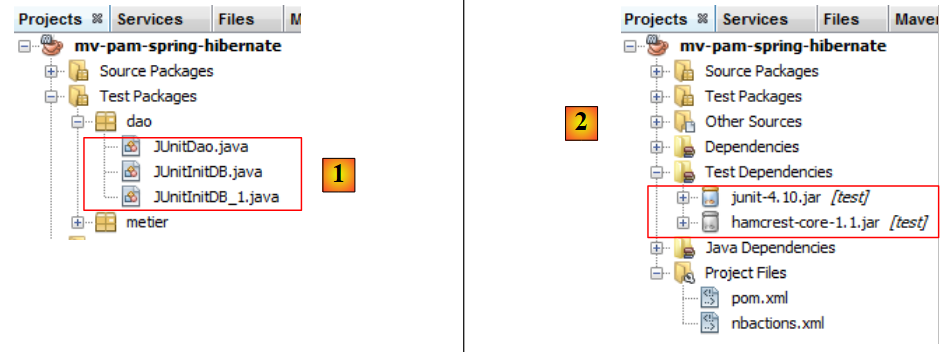 |
The classes placed in the [Test Packages] branch have access to the classes present in the [Source Packages] branch as well as the project’s class libraries. If the tests require libraries other than those in the project, these must be declared in the [Test Libraries] and [2] branches.
The test classes use the unit testing tool JUnit:
- [JUnitInitDB] does not perform any tests. It populates the database with a few records and then displays them on the console.
- [JUnitDao] performs a series of tests and verifies the results.
The skeleton of the [JUnitInitDB] class is as follows:
- The [init] method is executed before the test suite begins (annotation @BeforeClass). It instantiates the [DAO] layer.
- The [clean] method is executed before each test (annotation @Before). It clears the database.
- The [initDB] method is a test (annotation @Test). It is the only one. A test must contain Assert.assertCondition assertion statements. Here, there will be none. The method is therefore a dummy test. Its purpose is to populate the database with a few rows and then display the database contents on the console. The create and findAll methods of the [DAO] layers are used here.
Question: Complete the code for the [JUnitInitDB] class. Use the example from section 3.1.6 of [ref1] as a guide. The code will generate the content shown in section 5.1.
5.9.5. Implementati ation of tests
We are now ready to run [InitDB]. We describe the procedure using SGBD and MySQL5:
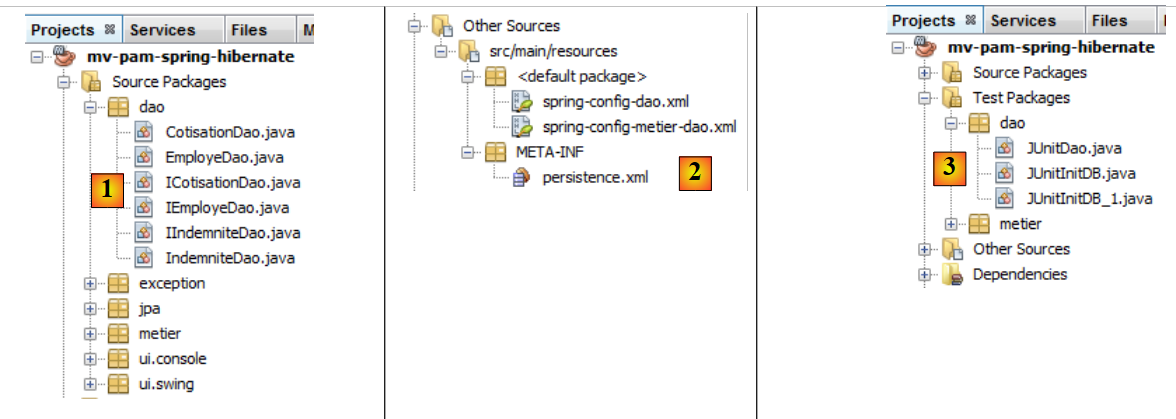 |
- the classes [1], the configuration files [2], and the test classes for the layer [DAO] and [3] are set up,
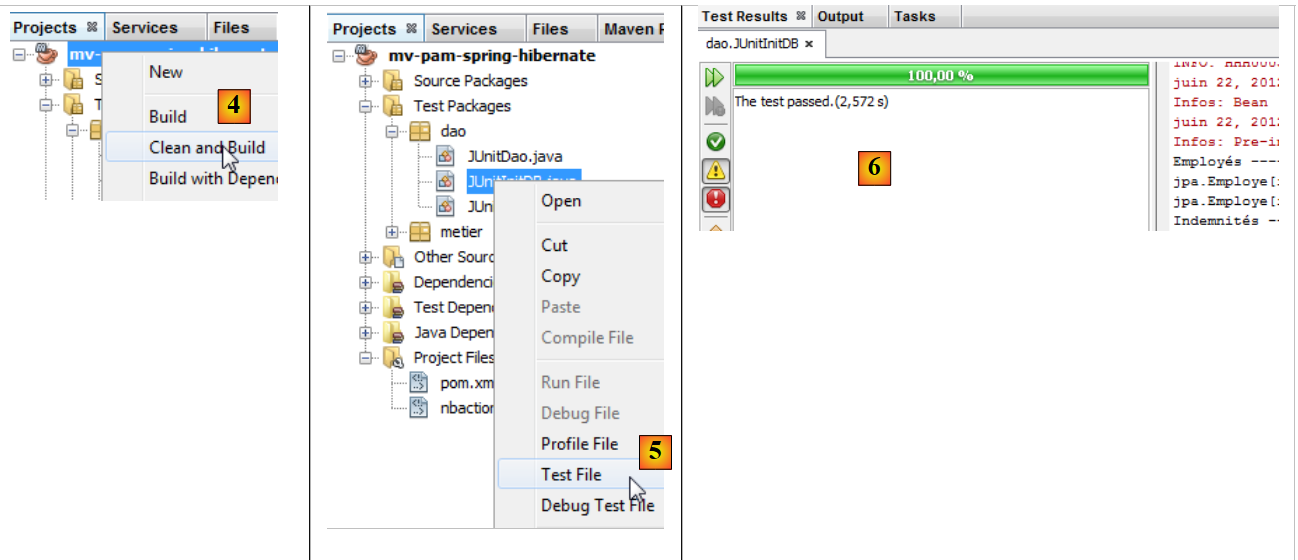 |
- the project is built [4]
- the class [JUnitInitDB] is executed [5]. SGBD MySQL5 is launched with an existing database [dbpam_hibernate],
- the [Test Results] and [6] windows indicate that the tests were successful. This message is not significant here, as the [JUnitInitDB] program contains no Assert.assertCondition assertion statements that could cause the test to fail. Nevertheless, it shows that no exceptions occurred during test execution.
The [Output] window contains the execution logs, the Spring logs, and the test logs. The output generated by the [JUnitInitDB] class is as follows:
The [EMPLOYES, INDEMNITES, COTISATIONS] tables have been populated. This can be verified by connecting to the [dbpam_hibernate] database using Netbeans.
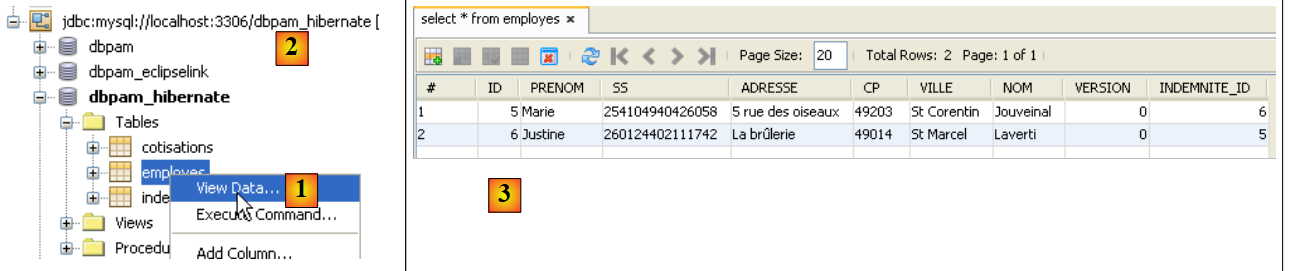 |
- In [1], on the [services] tab, you can view the data from table [employes] of connection [dbpam_hibernate] [2],
- in [3], the result.
5.9.6. JUnitDao
We will now look at a second test class, [JUnitDao]:
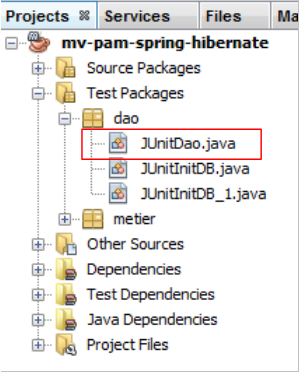 |
The class skeleton will be as follows:
1 2 3 4 5 6 7 8 9 10 11 12 13 14 15 16 17 18 19 20 21 22 23 24 25 26 27 28 29 30 31 32 33 34 35 36 37 38 39 40 41 42 43 44 45 46 47 48 49 50 51 52 53 54 55 56 57 58 59 60 61 62 63 64 65 66 67 68 69 70 71 72 73 74 75 76 77 78 79 80 81 82 83 84 85 86 87 88 89 90 91 92 93 94 95 96 97 98 99 100 101 102 103 104 105 106 107 108 109 110 111 112 113 114 115 116 117 118 119 120 121 122 123 124 125 126 127 128 129 130 131 132 133 134 135 136 137 138 139 140 141 142 143 144 145 146 147 148 149 150 151 152 153 154 155 156 157 158 159 160 161 162 163 164 165 166 167 168 169 170 171 172 173 174 175 176 177 178 179 180 181 182 183 184 185 186 187 | |
In the previous test class, the database is cleared before each test.
Question: Write the following methods:
1 - test02: based on test01
2 - test03: an employee has a field of type Indemnite. You must therefore create an Indemnite entity and an Employe entity
3 - test04.
By proceeding in the same way as for the test class [JUnitInitDB], we obtain the following results:
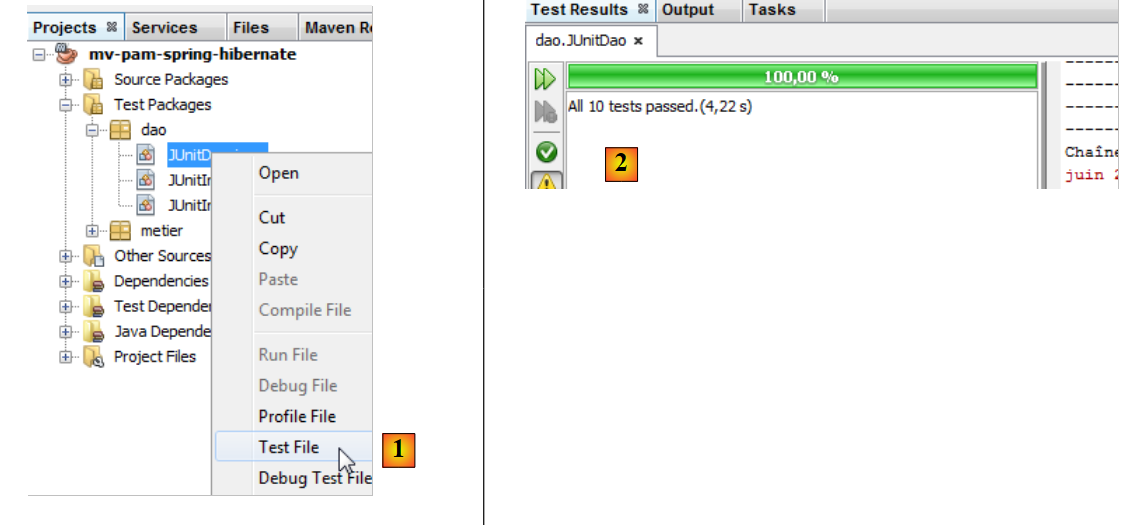 |
- In [1], run the test class
- In [2], the test results appear in the [Test Results] window
Let’s trigger an error to see how it is reported on the results page:
Line 13: the assertion will cause an error, since the value of Csgrds is 3.49 (line 8). Running the test class yields the following results:
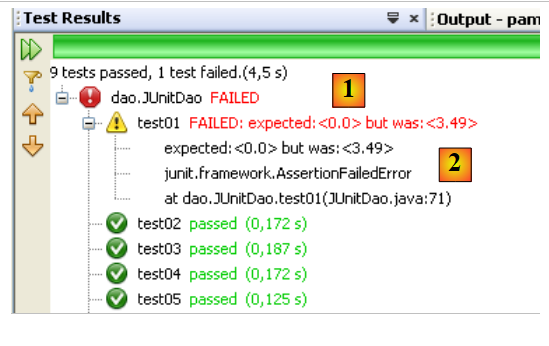 |
- The results page [1] now shows that some tests failed.
- In [2], a summary of the exception that caused the test to fail. It includes the line number in the Java code where the exception occurred.
5.10. The [metier] layer of the [PAM] application
Now that the [DAO] layer has been written, we move on to examining the business layer [2]:
 |
5.10.1. The Java interface [IMetier]
This was described in Section 5.7. We summarize it below:
The [metier] layer will be implemented in the [metier] package:
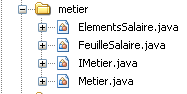 |
The [metier] package will include, in addition to the [IMetier] interface and its implementation [Metier], two other classes, [FeuilleSalaire] and [ElementsSalaire]. The class [FeuilleSalaire] was briefly introduced in Section 5.7. We will now revisit it.
5.10.2. The [FeuilleSalaire] class
The [calculerFeuilleSalaire] method of the [IMetier] interface returns an object of type [FeuilleSalaire] that represents the various elements of a pay stub. Its definition is as follows:
- line 7: the class implements the Serializable interface because its instances may be exchanged over the network.
- line 9: the employee covered by the pay stub
- line 10: the various contribution rates
- line 11: the various allowances linked to the employee's index
- line 12: the components of their salary
- lines 14–22: the class’s two constructors
- lines 25–27: method [toString] identifying a specific object [FeuilleSalaire]
- Lines 29 and beyond: public accessors to the class’s private fields
The class [ElementsSalaire] referenced in line 11 of the class [FeuilleSalaire] above contains the elements that make up a pay stub. Its definition is as follows:
- line 3: the class implements the Serializable interface because it is a component of the FeuilleSalaire class, which must be serializable.
- line 6: the base salary
- line 7: the social security contributions paid on this base salary
- line 8: daily child support payments
- line 9: daily child meal allowances
- line 10: the net salary to be paid to the child care provider
- lines 12–24: class constructors
- lines 27–31: method [toString] identifying a specific object [ElementsSalaire]
- lines 34 and beyond: the public accessors to the class's private fields
5.10.3. The implementation class [Metier] of the layer [metier]
The implementation class [Metier] of the layer [metier] could be as follows:
- line 5: the Spring @Transactional annotation ensures that every method in the class will run within a transaction.
- lines 9-10: references to the [DAO] layers of the [Cotisation, Employe, Indemnite] entities
- lines 14–17: the [calculerFeuilleSalaire] method
- lines 20–22: the [findAllEmployes] method
- line 24 and beyond: the public accessors for the class's private fields
Question: Write the code for the [findAllEmployes] method.
Question: Write the code for the [calculerFeuilleSalaire] method.
Note the following points:
- The method for calculating salary was explained in Section 5.2.
- If the parameter [SS] does not correspond to any employee (the layer [DAO] returned a null pointer), the method will throw an exception of type [PamException] with an appropriate error code.
5.10.4. Testing the [metier] layer
We create two test programs:
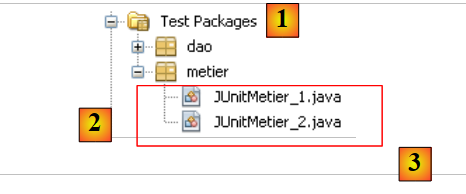 |
The [3] test classes are created in the [metier] [2] package of the [Test Packages] [1] branch of the project.
The [JUnitMetier_1] class could be as follows:
There is no Assert.assertCondition assertion in the class. We are simply trying to calculate a few salaries so that we can then verify them manually. The screen output obtained by running the previous class is as follows:
- line 4: Justine Laverti's pay stub
- line 5: Marie Jouveinal's pay stub
- line 6: the exception due to the fact that employee no. SS 'xx' does not exist.
Question: Line 17 of [JUnitMetier_1] uses the Spring bean named metier. Provide the definition of this bean in the file [spring-config-metier-dao.xml].
The class [JUnitMetier_2] could be as follows:
The class [JUnitMetier_2] is a copy of the class [JUnitMetier_1], except that this time, assertions have been added to the test01 method.
Question: Write the test01 method.
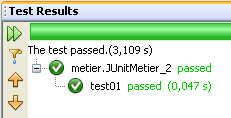
When executing the [JUnitMetier_2] class, the following results are obtained if everything goes well:
5.11. The [ui] layer of the [PAM] application – version console
Now that the [metier] layer has been written, we still need to write the [ui] and [1] layers:
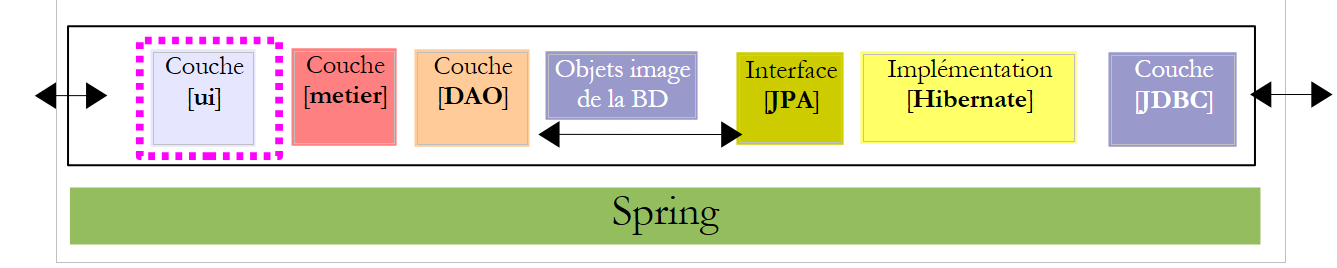 |
We will create two different implementations of the [ui] layer: a version console version and a version Swing GUI version:
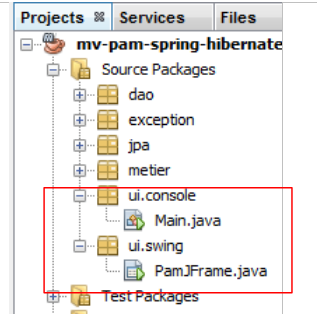 |
5.11.1. The [ui.console.Main] class
We will first focus on the console application implemented by the [ui.console.Main] class above. Its operation was described in Section 5.3. The skeleton of the [Main] class could be as follows:
Question: Complete the code above.
5.11.2. Execution
To execute the [ui.console.Main] class, proceed as follows:
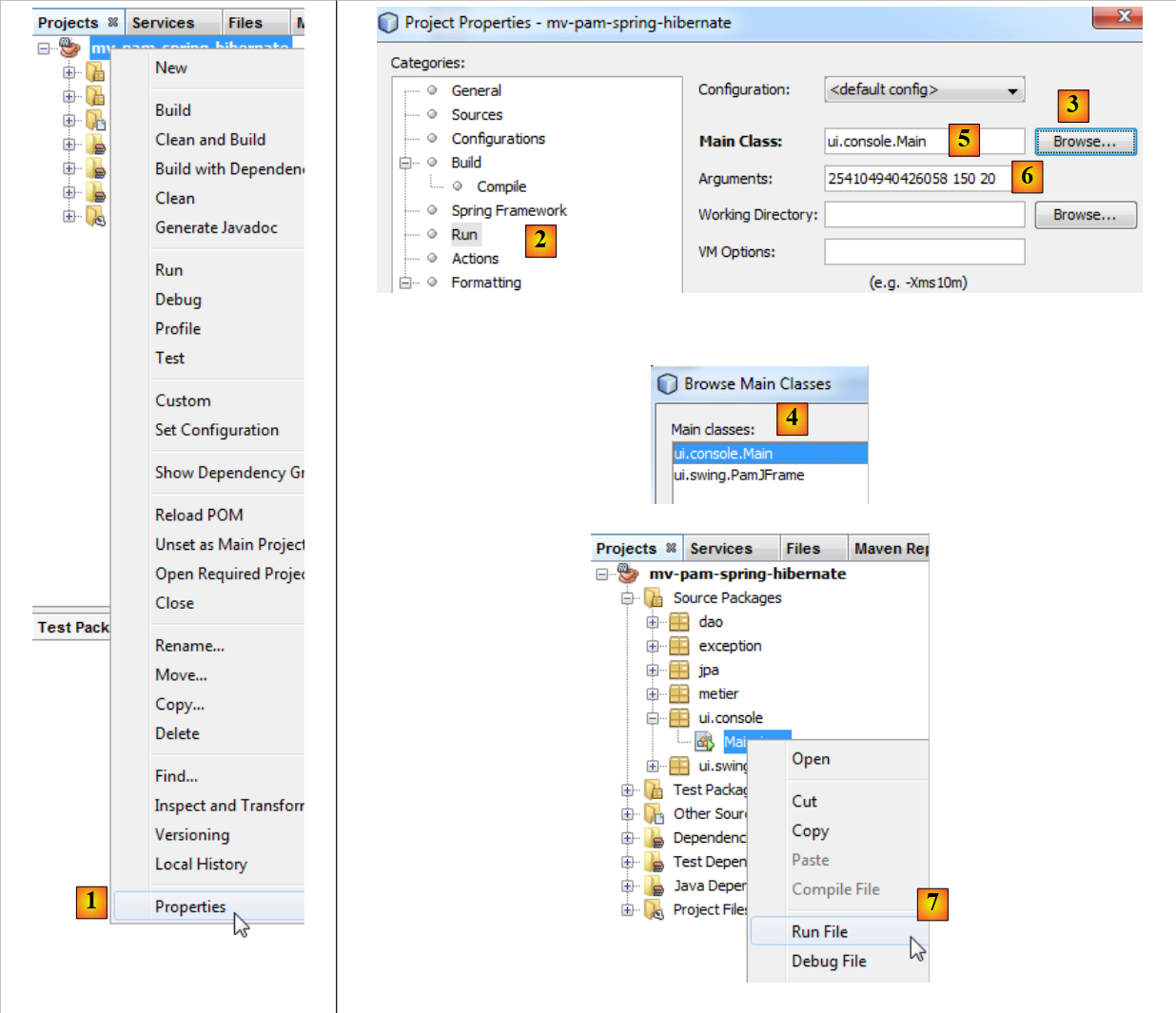 |
- In [1], select the project properties,
- In [2], select the [Run] property of the project,
- use the [3] button to specify the class (known as the main class) to be executed,
- select the class [4],
- The class appears as [5]. This class requires three arguments to run (SS, number of hours worked, number of days worked). These arguments are placed in [6],
- once this is done, the project [7] can be executed. The previous configuration means that the class [ui.console.Main] will be executed.
The results of the execution are displayed in the [output] window:
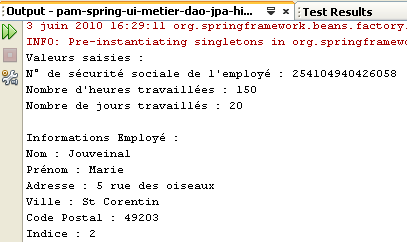 | 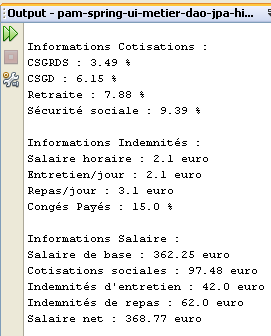 |
5.12. The [ui] layer of the [PAM] – version graphical application
We now implement the [ui] layer with a graphical user interface:
 |
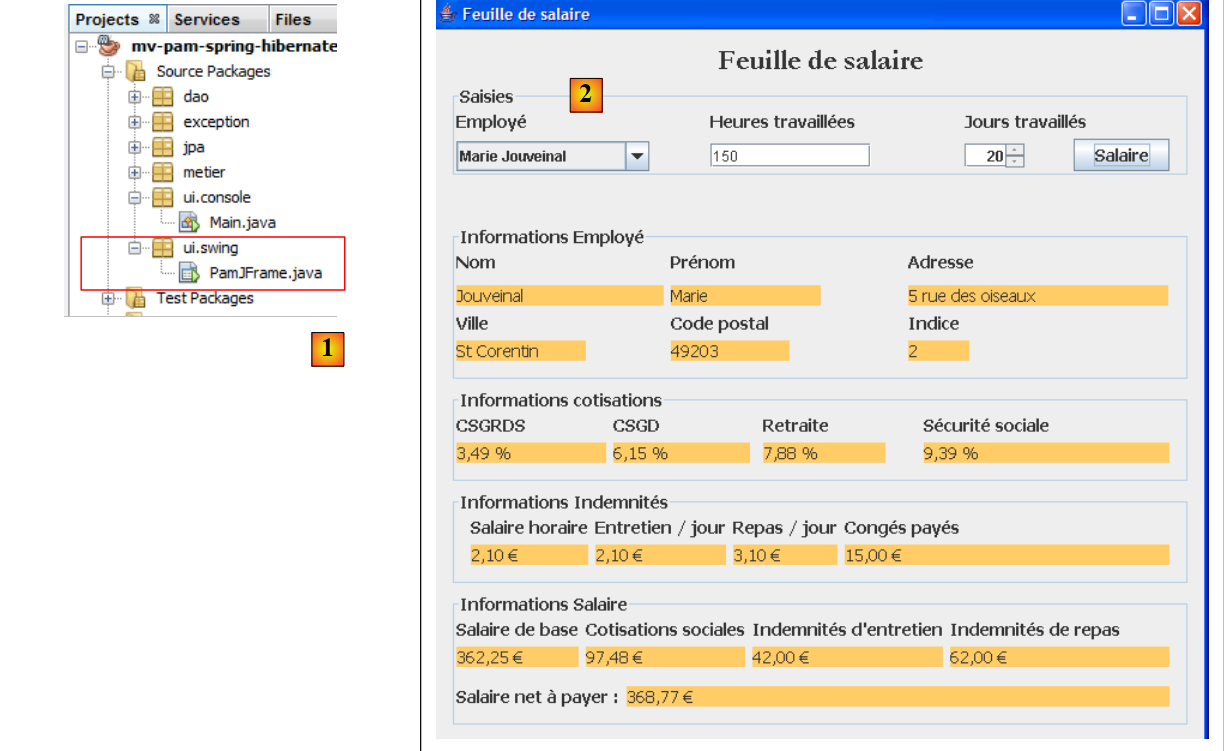 |
- in [1], the [PamJFrame] class of the graphical interface
- in [2]: the graphical interface
5.12.1. A quick tutorial
To create the graphical interface, proceed as follows:
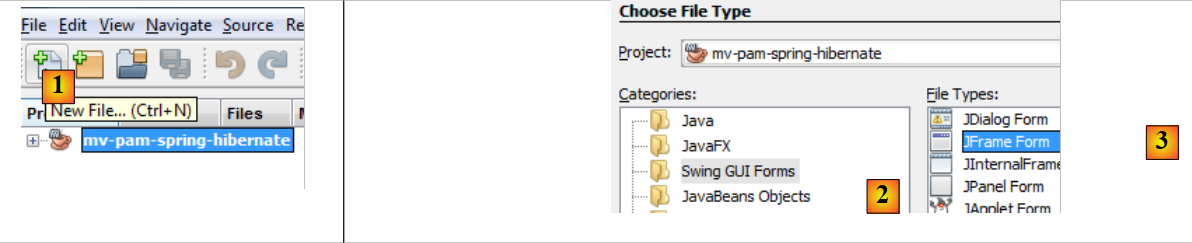 |
- [1]: create a new file using the [1] button [New File...]
- [2]: Select the file category [Swing GUI Forms], c.a.d. graphical forms
- [3]: Select the type [JFrame Form], an empty form type
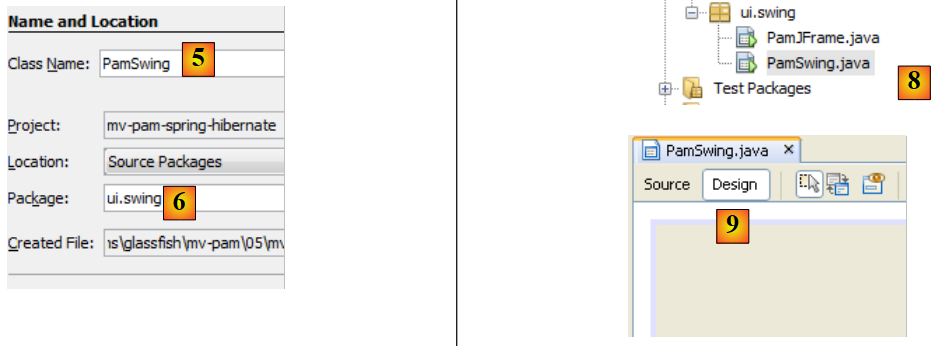 |
- [5]: Name the form; this name will also be its class
- [6]: Place the form in a package
- [8]: the form is added to the project tree
- [9]: The form is accessible through two perspectives: [Design] and [9], which allow you to design the form’s various components, and [Source] and [10 ci-dessous], which provide access to the form’s Java code. Ultimately, a form is a Java class like any other. The [Design] view is a tool for designing the form. Each time a component is added in [Design] mode, Java code is added in the [Source] view to account for it.
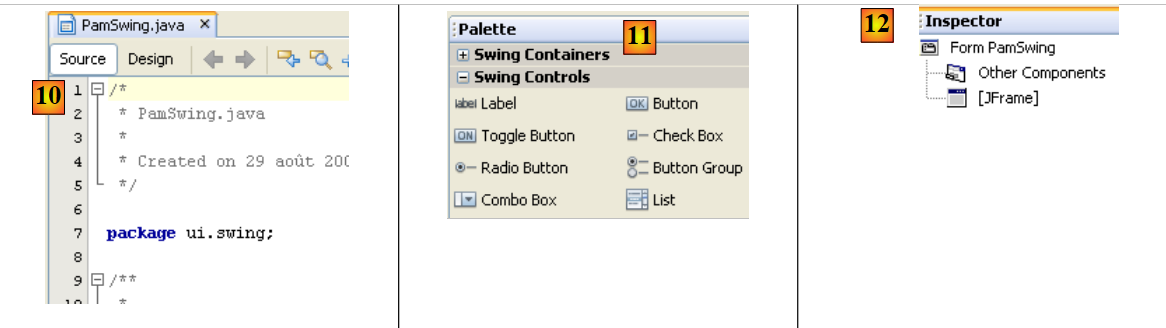 |
- [11]: The list of Swing components available for a form is found in the [Palette] window.
- [12]: The [Inspector] window displays the form component tree. Components with a visual representation will be found in the [JFrame] branch, while the others are in the [Other Components] branch.
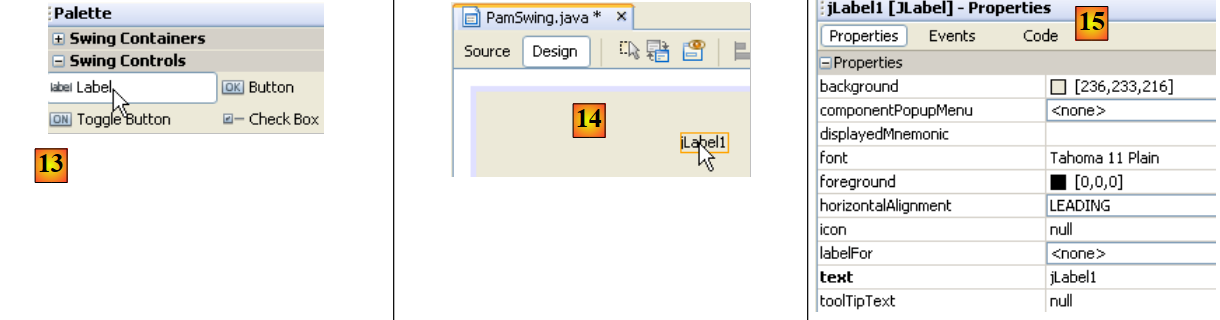 |
- In [13], we select a [JLabel] component with a single click
- In [14], we drop it onto the form in [Design] mode
- In [15], we define the properties of JLabel (text, font).
 |
- in [16], the resulting output.
- In [17], we request a preview of the form
- In [18], the result
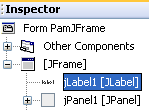
- In [19], the label [JLabel1] has been added to the component tree in the [Inspector] window
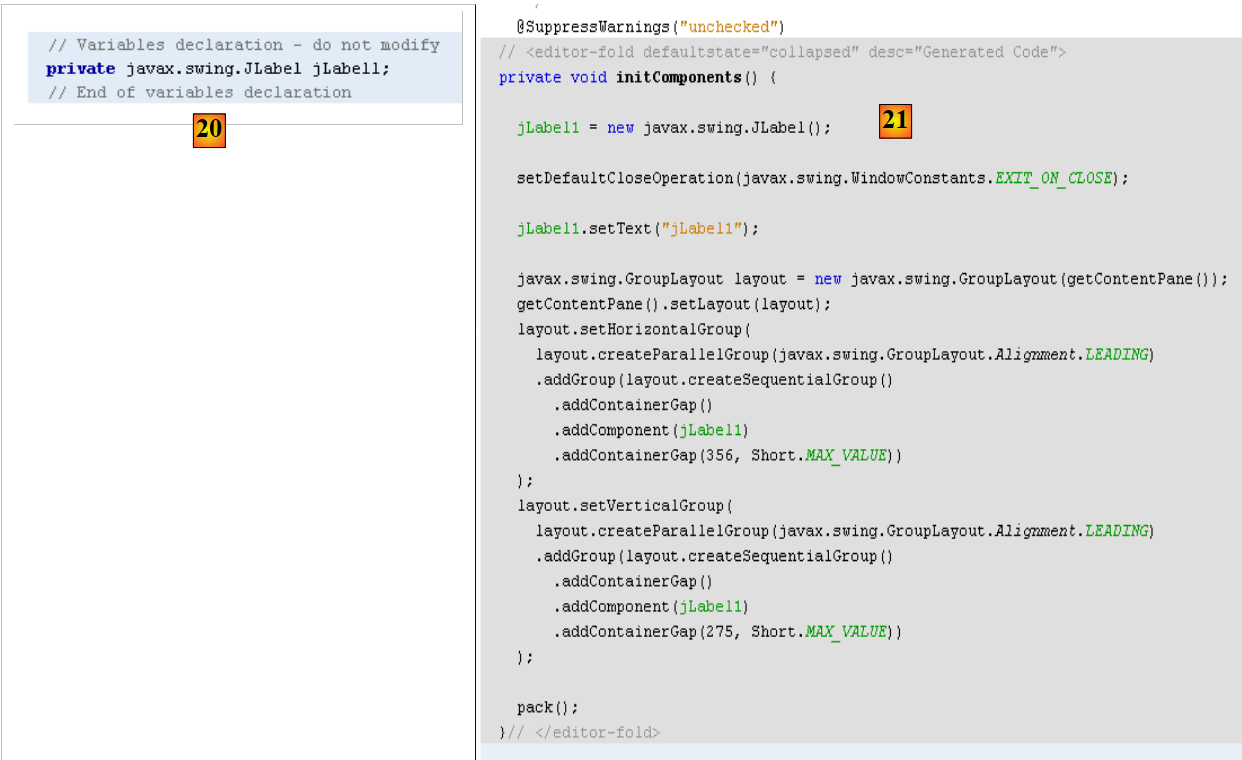 |
- in [20] and [21]: in the [Source] view of the form, Java code has been added to handle the added JLabel.
A tutorial on building forms with Netbeans is available at url [http://www.netbeans.org/kb/trails/matisse.html].
5.12.2. The [PamJFrame] GUI
We will build the following graphical interface:
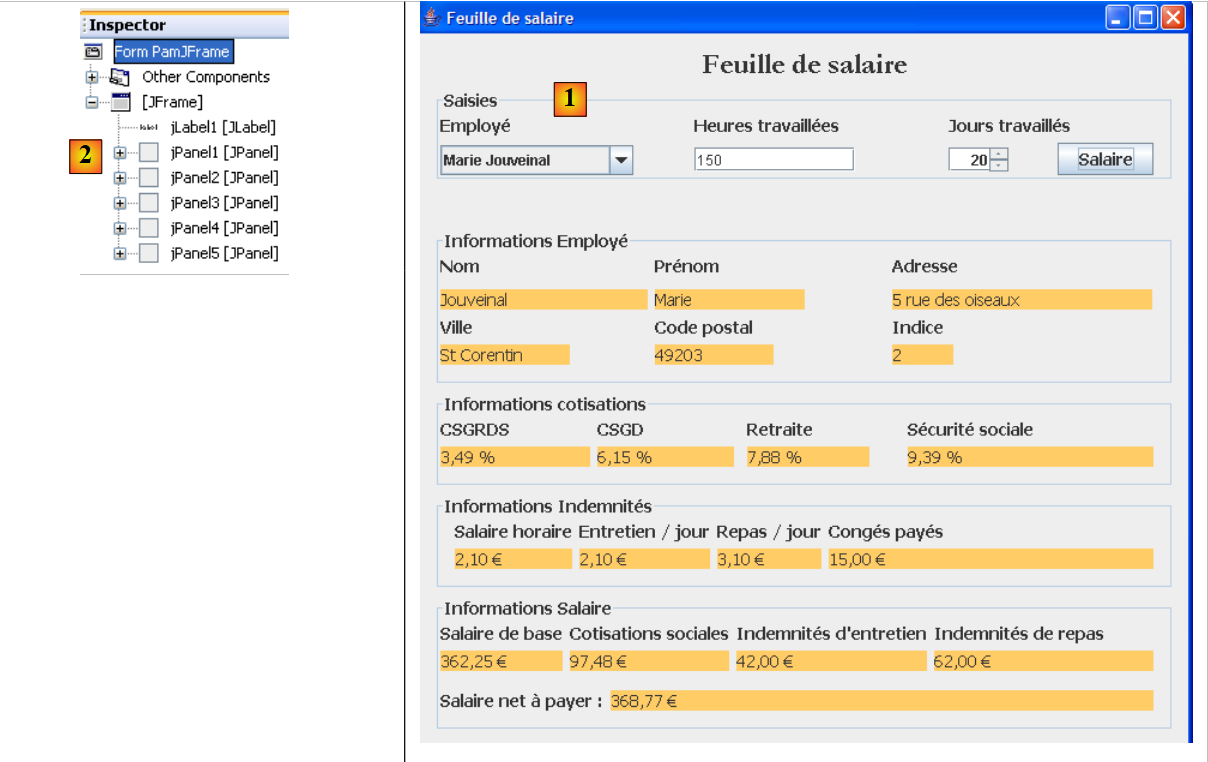 |
- in [1], the graphical interface
- in [2], the tree structure of its components: one JLabel and six JPanel containers
JLabel1
 |  |
JPanel1
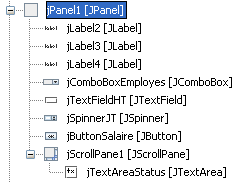 | 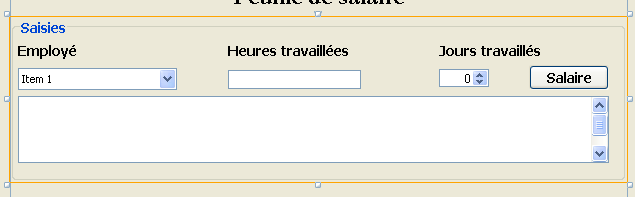 |
JPanel2
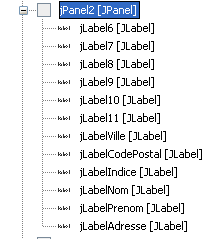 | 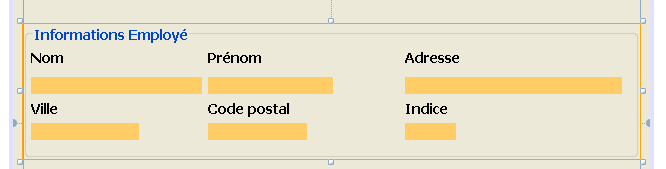 |
JPanel3
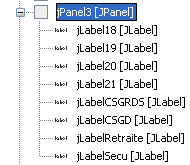 |  |
JPanel4
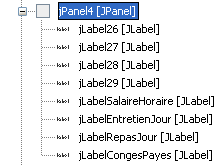 |  |
JPanel5
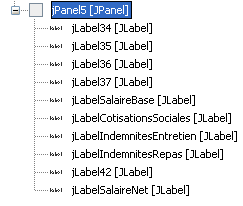 | 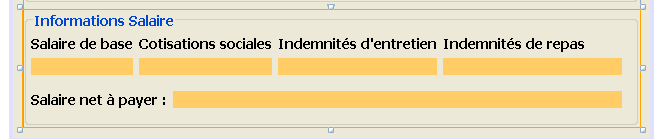 |
Practical exercise: Build the previous graphical interface using the tutorial [http://www.netbeans.org/kb/trails/matisse.html].
5.12.3. Graphical Interface Events
Recommended reading: Chapter [Interfaces graphiques] of [ref2].
We will handle the click on the [jButtonSalaire] button. To create the method for handling this event, proceed as follows:
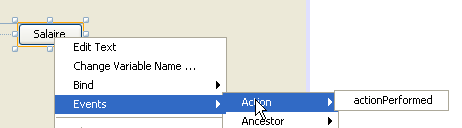 |
The click handler for the [JButtonSalaire] button is generated:
The Java code that associates the previous method with the click on the [JButtonSalaire] button is also generated:
Lines 2–5 specify that the click (event type ActionPerformed) on the button [jButtonSalaire] (line 2) must be handled by the method [jButtonSalaireActionPerformed] (line 4).
We will also handle the [caretUpdate] event (input cursor movement) on the [jTextFieldHT] input field. To create the handler for this event, we proceed as before:
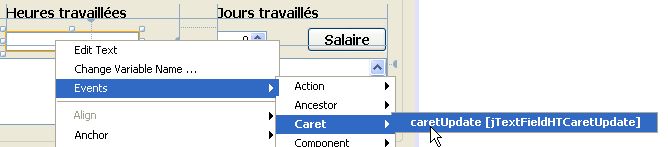 |
The handler for the [caretUpdate] event on the [jTextFieldHT] input field is generated:
The Java code that associates the previous method with the [caretUpdate] event on the [jTextFieldHT] input field is also generated:
Lines 1–4 indicate that the event [caretUpdate] (line 2) on the button [jTextFieldHT] (line 1) must be handled by the method [ jTextFieldHTCaretUpdate] (line 3).
5.12.4. Initializing the GUI
Let’s return to our application’s architecture:
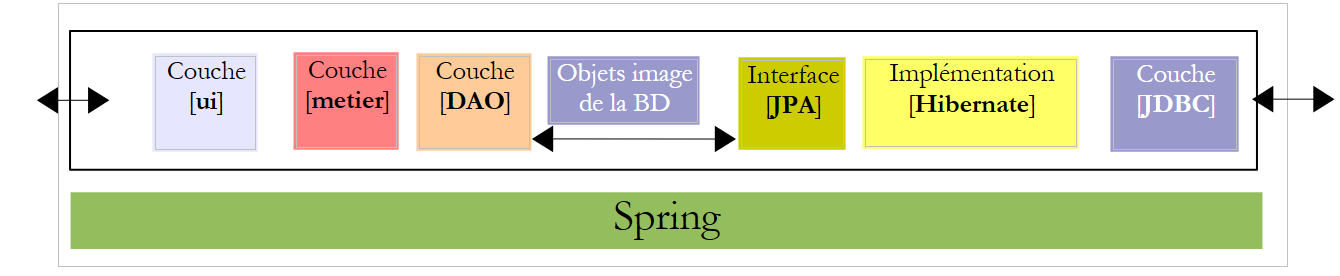 |
The [ui] layer requires a reference to the [metier] layer. Recall how this reference was obtained in the console application:
The method is the same in the GUI application. When the application initializes, the reference [IMetier metier] from line 3 above must also be initialized. The code generated for the GUI is currently as follows:
- lines 29–35: the static method [main] that launches the application
- line 32: an instance of the [PamJFrame] GUI is created and made visible.
- lines 7-9: the GUI constructor.
- Line 8: Call to the [initComponents] method defined on line 17. This method is auto-generated based on the work done in [Design] mode. Do not modify it.
- Line 21: The method that will handle moving the input cursor in the [jTextFieldHT] field
- Line 25: the method that will handle the click on the [jButtonSalaire] button
To add our own initializations to the previous code, we can proceed as follows:
- Line 4: We call a custom method to perform our own initializations. These are defined by the code in lines 10–42
Question: Using the comments as a guide, complete the code for procedure [doMyInit].
5.12.5. Event Handlers
Question: Write the method [jTextFieldHTCaretUpdate]. This method must ensure that if the data in the field [jTextFieldHT] is not a real number >=0, then the button [jButtonSalaire] must be disabled.
Question: Write the method [jButtonSalaireActionPerformed], which must display the pay stub for the employee selected in [jComboBoxEmployes].
5.12.6. Running the GUI
To run the GUI, modify the [Run] configuration of the project:
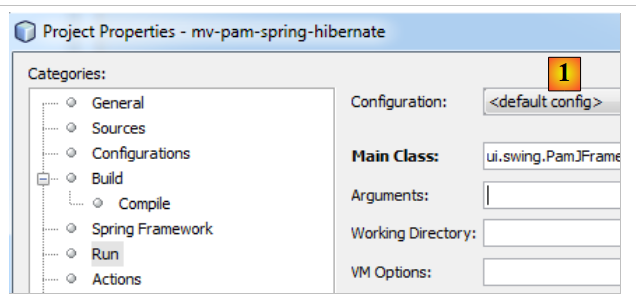 |
- In [1], set the GUI class
The project must be complete with its configuration files (persistence.xml, spring-config-business-dao.xml) and the GUI class. The SGBD target will be launched before running the project.
5.13. Implementation of the JPA layer with EclipseLink
We are interested in the following architecture where the JPA layer is now implemented by EclipseLink:
 |
5.13.1. The Netbeans project
The new project Netbeans is created by copying the previous project:
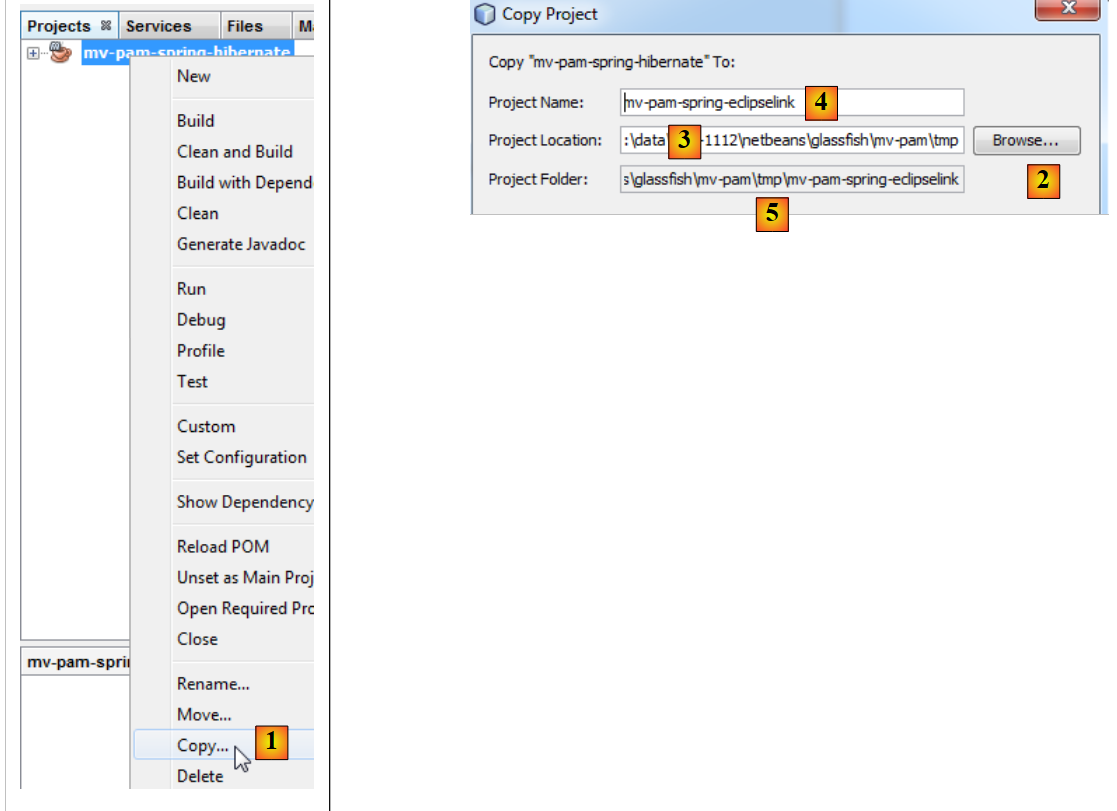 |
- to [1]: after right-clicking on the Hibernate project, select Copy
- using the [2] button, select the parent folder for the new project. The folder name appears in [3].
- in [4], name the new project
- in [5], the project folder name
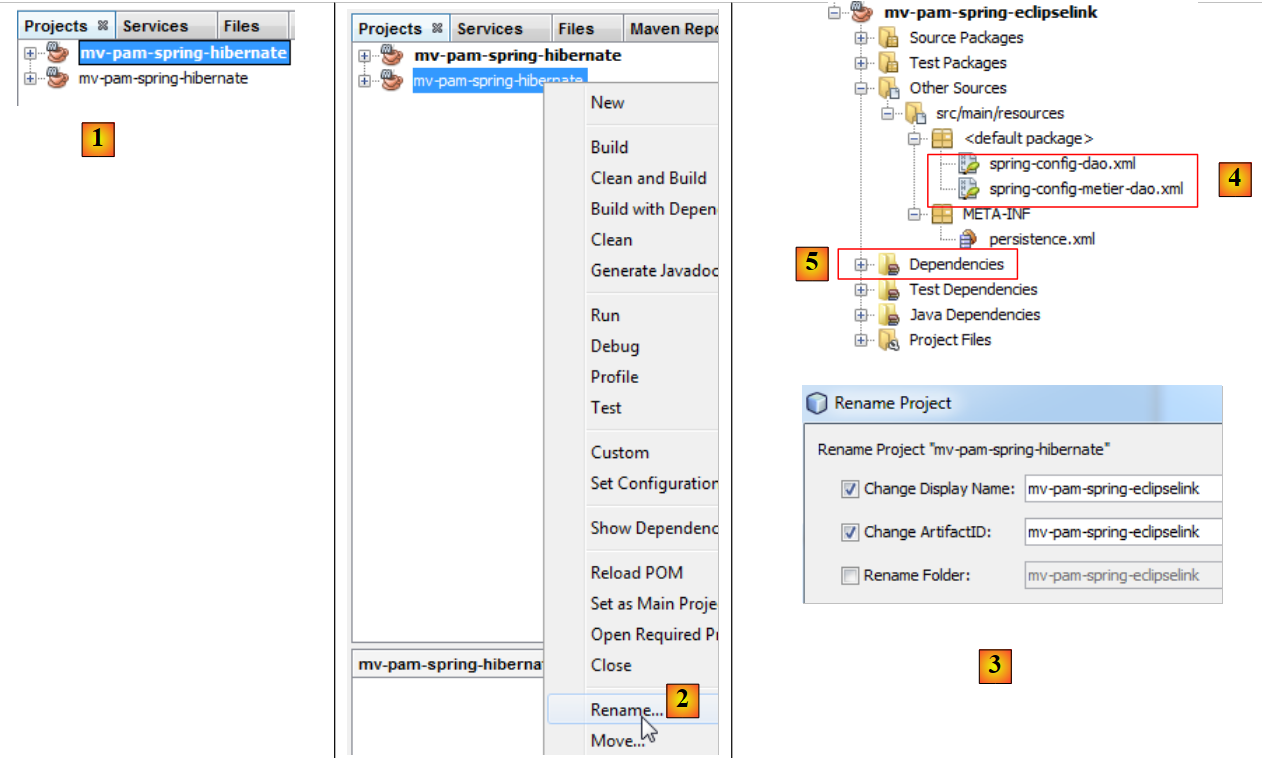 |
- in [1], the new project has been created. It has the same name as the original,
- in [2] and [3], we rename it to [mv-pam-spring-eclipselink].
The project must be modified in two places to adapt it to the new layer JPA / EclipseLink:
- In [4], the Spring configuration files must be modified. This is because they currently contain the configuration for the JPA layer.
- In [5], the project libraries must be modified: the Hibernate libraries must be replaced with those from EclipseLink.
Let’s start with this last point. The [pom.xml] file for the new project will be as follows:
<project xmlns="http://maven.apache.org/POM/4.0.0" xmlns:xsi="http://www.w3.org/2001/XMLSchema-instance"
         xsi:schemaLocation="http://maven.apache.org/POM/4.0.0 http://maven.apache.org/xsd/maven-4.0.0.xsd">
  <modelVersion>4.0.0</modelVersion>

  <groupId>istia.st</groupId>
  <artifactId>mv-pam-spring-eclipselink</artifactId>
  <version>1.0-SNAPSHOT</version>
  <packaging>jar</packaging>

  <name>mv-pam-spring-eclipselink</name>
  <url>http://maven.apache.org</url>
  <repositories>
    <repository>
      <url>http://repo1.maven.org/maven2/</url>
      <id>swing-layout</id>
      <layout>default</layout>
      <name>Repository for library Library[swing-layout]</name>
    </repository>
    <repository>
      <url>http://download.eclipse.org/rt/eclipselink/maven.repo/</url>
      <id>eclipselink</id>
      <layout>default</layout>
      <name>Repository for library Library[eclipselink]</name>
    </repository>
  </repositories>

  <properties>
    <project.build.sourceEncoding>UTF-8</project.build.sourceEncoding>
  </properties>

  <dependencies>
    <dependency>
      <groupId>junit</groupId>
      <artifactId>junit</artifactId>
      <version>4.10</version>
      <scope>test</scope>
      <type>jar</type>
    </dependency>
    <dependency>
      <groupId>commons-dbcp</groupId>
      <artifactId>commons-dbcp</artifactId>
      <version>1.2.2</version>
    </dependency>
    <dependency>
      <groupId>commons-pool</groupId>
      <artifactId>commons-pool</artifactId>
      <version>1.6</version>
    </dependency>
    <dependency>
      <groupId>org.springframework</groupId>
      <artifactId>spring-tx</artifactId>
      <version>3.1.1.RELEASE</version>
      <type>jar</type>
    </dependency>
    <dependency>
      <groupId>org.springframework</groupId>
      <artifactId>spring-beans</artifactId>
      <version>3.1.1.RELEASE</version>
      <type>jar</type>
    </dependency>
    <dependency>
      <groupId>org.springframework</groupId>
      <artifactId>spring-context</artifactId>
      <version>3.1.1.RELEASE</version>
      <type>jar</type>
    </dependency>
    <dependency>
      <groupId>org.springframework</groupId>
      <artifactId>spring-orm</artifactId>
      <version>3.1.1.RELEASE</version>
      <type>jar</type>
    </dependency>
    <dependency>
      <groupId>org.eclipse.persistence</groupId>
      <artifactId>eclipselink</artifactId>
      <version>2.3.0</version>
    </dependency>
    <dependency>
      <groupId>org.eclipse.persistence</groupId>
      <artifactId>javax.persistence</artifactId>
      <version>2.0.3</version>
    </dependency>
    <dependency>
      <groupId>mysql</groupId>
      <artifactId>mysql-connector-java</artifactId>
      <version>5.1.6</version>
    </dependency>
    <dependency>
      <groupId>org.swinglabs</groupId>
      <artifactId>swing-layout</artifactId>
      <version>1.0.3</version>
    </dependency>
  </dependencies>
</project>
- lines 73-82: dependencies for the JPA and EclipseLink implementations,
- lines 19-24: the Maven repository for EclipseLink.
The Spring configuration files must be modified to indicate that the JPA implementation has changed. In both files, only the section configuring the JPA layer changes. For example, in [spring-config-metier-dao.xml] we have:
Lines 19–36 configure the JPA layer. The JPA implementation used is Hibernate (line 22). Additionally, the target database is [dbpam_hibernate] (line 41).
To switch to a JPA / EclipseLink implementation, lines 19–35 above are replaced by the lines below:
- Line 5: The JPA implementation used is EclipseLink
- line 9: the databasePlatform property sets the target SGBD, here MySQL
- line 11: to generate the database tables when the JPA layer is instantiated. Here, the property is commented out.
- Line 7: to display the SQL commands issued by the JPA layer on the console. Here, the property is commented out.
Additionally, the target database becomes [dbpam_eclipselink] (line 4 below):
5.13.2. Running the tests
Before testing the entire application, it is a good idea to verify that the JUnit tests pass with the new JPA implementation. Before running them, we will start by deleting the tables from the database. To do this, in the [Runtime] tab of Netbeans, if necessary, create a connection to the dbpam_eclipselink / MySQL5 database. Once connected to the dbpam_eclipselink / MySQL5 database, you can proceed to delete the tables as shown below:
- [1]: before deletion
- [2]: after deletion
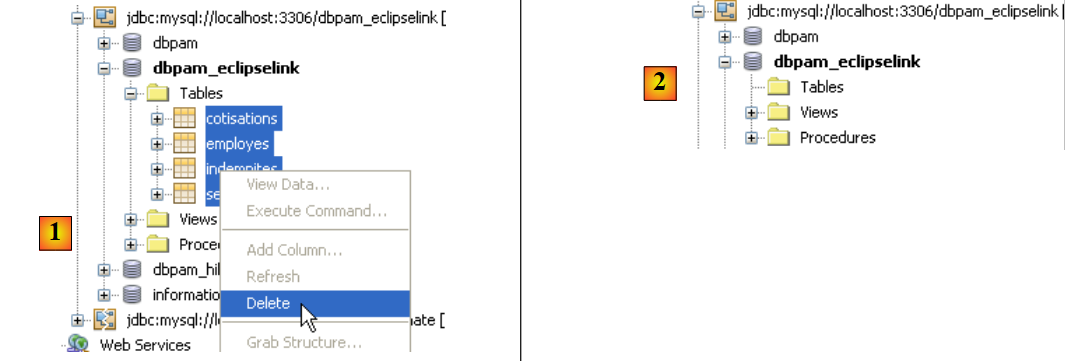 |
Once this is done, you can run the first test on the [DAO]:InitDB layer, which populates the database. To ensure that the tables previously deleted are recreated by the application, you must verify that in the Spring configuration for JPA / EclipseLink, the line:
exists and is not commented out.
We build the project and then run the [JUnitInitDB] test :
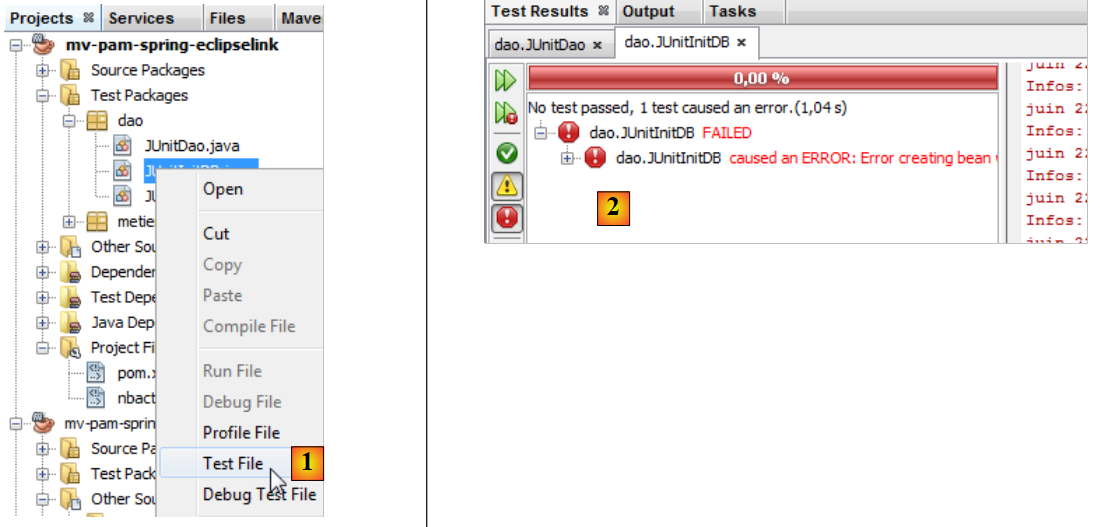 |
- In [1], the InitDB test is executed.
- In [2], it fails. The exception is thrown by Spring, not by a test that failed.
Caused by: org.springframework.beans.factory.BeanCreationException: Error creating bean with name 'entityManagerFactory' defined in class path resource [spring-config-DAO.xml]: Invocation of init method failed; nested exception is java.lang.IllegalStateException: Must start with Java agent to use InstrumentationLoadTimeWeaver. See Spring documentation.
Spring indicates that there is a configuration issue. The message is unclear. The reason for the exception was explained in section 3.1.9 of [ref1]. For the Spring / EclipseLink configuration to work, the JVM that runs the application must be launched with a specific parameter, a Java agent. The format of this parameter is as follows:
[spring-agent.jar] is the Java agent required by JVM to manage the Spring / EclipseLink configuration.
When running a project, it is possible to pass arguments to JVM:
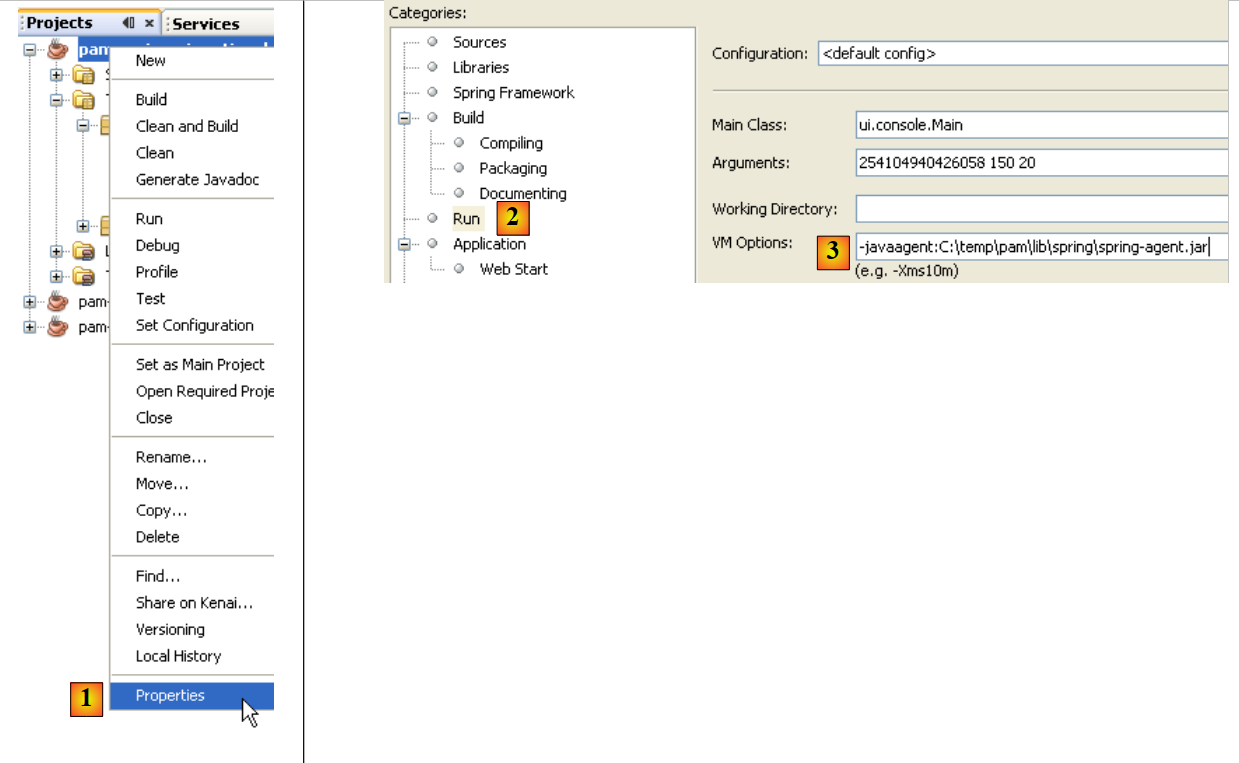 |
- in [1], you can access the project properties
- in [2], the Run properties
- in [3], you pass the -javaagent parameter to JVM
5.13.3. InitDB
Now we are ready to test again [InitDB]. This time, the results are as follows:
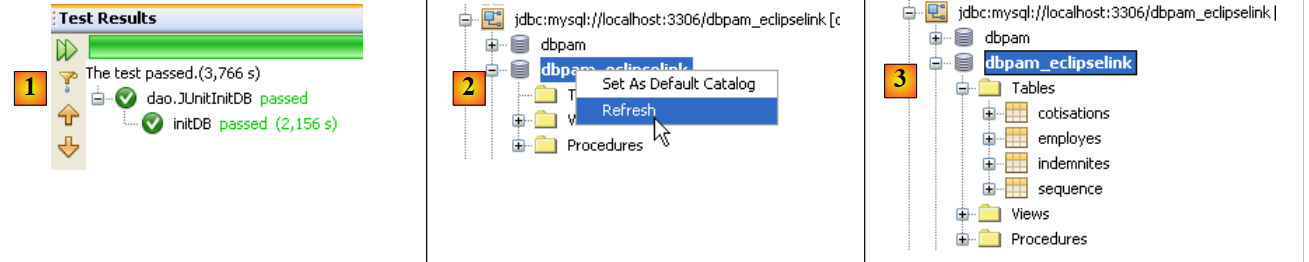 |
- In [1], the test was successful
- In [2], in the [Services] tab, we refresh the connection that Netbeans has with the [dbpam_eclipselink] database
- in [3], four tables were created
 |
- In [5], the contents of the [employes] table are displayed
- in [6], the result.
5.13.4. JUnitDao
The execution of the [JUnitDao] test class may fail, even though it succeeded with the JPA / Hibernate implementation. To understand why, let’s analyze an example.
The method being tested is the following IndemniteDao.create method:
- lines 15–22: the method being tested
The test method is as follows:
package dao;

...

public class JUnitDao {

// layers DAO
  static private IEmployeDao employeDao;
  static private IIndemniteDao indemniteDao;
  static private ICotisationDao cotisationDao;

  @BeforeClass
  public static void init() {
    // log
    log("init");
    // application configuration
    ApplicationContext ctx = new ClassPathXmlApplicationContext("spring-config-DAO.xml");
    // layers DAO
    employeDao = (IEmployeDao) ctx.getBean("employeDao");
    indemniteDao = (IIndemniteDao) ctx.getBean("indemniteDao");
    cotisationDao = (ICotisationDao) ctx.getBean("cotisationDao");
  }

  @Before()
  public void clean() {
    // empty the base
    for (Employe employe : employeDao.findAll()) {
      employeDao.destroy(employe);
    }
    for (Cotisation cotisation : cotisationDao.findAll()) {
      cotisationDao.destroy(cotisation);
    }
    for (Indemnite indemnite : indemniteDao.findAll()) {
      indemniteDao.destroy(indemnite);
    }
  }

  // logs
  private static void log(String message) {
    System.out.println("----------- " + message);
  }

  // tests
….
  @Test
  public void test05() {
    log("test05");
    // we create two allowances with the same index
    // violates index uniqueness constraint
    boolean erreur = true;
    Indemnite indemnite1 = null;
    Indemnite indemnite2 = null;
    Throwable th = null;
    try {
      indemnite1 = indemniteDao.create(new Indemnite(1, 1.93, 2, 3, 12));
      indemnite2 = indemniteDao.create(new Indemnite(1, 1.93, 2, 3, 12));
      erreur = false;
    } catch (PamException ex) {
      th = ex;
      // checks
      Assert.assertEquals(31, ex.getCode());
    } catch (Throwable th1) {
      th = th1;
    }
    // checks
    Assert.assertTrue(erreur);
    // exception chain
    System.out.println("Chaîne des exceptions --------------------------------------");
    System.out.println(th.getClass().getName());
    while (th.getCause() != null) {
      th = th.getCause();
      System.out.println(th.getClass().getName());
    }
    // the 1st allowance had to be continued
    Indemnite indemnite = indemniteDao.find(indemnite1.getId());
    // check
    Assert.assertNotNull(indemnite);
    Assert.assertEquals(1, indemnite.getIndice());
    Assert.assertEquals(1.93, indemnite.getBaseHeure(), 1e-6);
    Assert.assertEquals(2, indemnite.getEntretienJour(), 1e-6);
    Assert.assertEquals(3, indemnite.getRepasJour(), 1e-6);
    Assert.assertEquals(12, indemnite.getIndemnitesCP(), 1e-6);
    // the second indemnity should not have persisted
    List<Indemnite> indemnites = indemniteDao.findAll();
    int nbIndemnites = indemnites.size();
    Assert.assertEquals(nbIndemnites, 1);
  }

...
}
Question: Explain what the test05 test does and indicate the expected results.
The results obtained with a JPA / Hibernate layer are as follows:
The test passes, c.a.d. The assertions are verified, and no exceptions are thrown from the test method.
Question: Explain what happened.
The results obtained with a JPA / EclipseLink layer are as follows:
As with Hibernate previously, the test passes, c.a.d. The assertions are verified, and no exceptions are thrown from the test method.
Question: Explain what happened.
Question: From these two examples, what can we conclude about the interchangeability of implementations JPA? Is it complete here?
5.13.5. The other tests
Once the [DAO] layer has been tested and deemed correct, we can move on to testing the [metier] layer and the project itself in its version console or graphical interface. The change in the JPA implementation has no effect on the [metier] and [ui] layers, so if these layers worked with Hibernate, they will work with EclipseLink with a few exceptions: the previous example shows that the exceptions thrown by the [DAO] layers may differ. Thus, when running the test, Spring / JPA / Hibernate throws an exception of type [PamException], an exception specific to the [pam] application, whereas Spring / JPA / EclipseLink throws an exception of type [TransactionSystemException], an exception from the Spring framework. If, in the test use case, the [ui] layer expects a [PamException] exception because it was built with Hibernate, it will no longer work when switching to EclipseLink.
5.13.6. Work to be done
Practical exercise: Retest the console and Swing applications with different SGBD versions: MySQL5, Oracle XE, SQL Server.