12. Version 7 - PAM multi-view / multi-page web application
Here we return to the initial architecture where the [métier] layer was simulated. We now know that this can be easily replaced by the actual [métier] layer. The simulated [métier] layer facilitates testing.
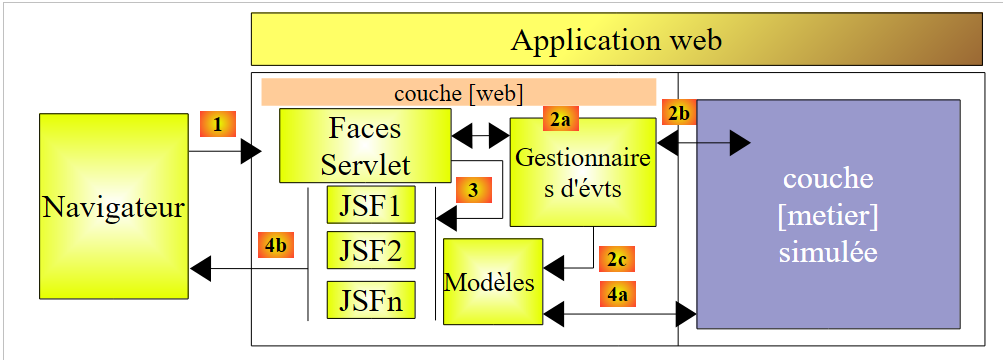 |
A JSF application is of the MVC type (Model-View-Controller):
- the [Faces Servlet] servlet is the generic controller provided by JSF. This controller is extended by application-specific event handlers. The event handlers encountered so far were methods of the classes serving as templates for the JSF pages
- The JSF pages send responses to the client browser. These are the application views.
- The JSF pages contain dynamic elements known as the page template. Note that for some authors, the model encompasses the entities manipulated by the application, such as the FeuilleSalaire or Employee classes. To distinguish between these two models, we can refer to the application model and the JSF page model.
In the JSF architecture, navigating from a JSFi page to a JSFj page can be problematic.
- The JSFi page has been displayed. From this page, the user triggers a POST via some event [1]
- in JSF, this POST will generally be handled by a C method of the Mi model of the page JSFi. We can say that the C method is a secondary controller.
- If, at the end of this method, the page JSFj needs to be displayed, controller C must:
- update [2c], the Mj template of page JSFj
- return [2a] to the main controller, the key for navigation that will enable the display of page JSFj
Step 1 requires that the Mi template for page JSFi reference the Mj template for page JSFj. This complicates matters somewhat, making the Mi templates dependent on one another. Indeed, the C manager for the Mi template that updates the Mj template must be aware of the latter. If the Mj template needs to be changed, the C handler for the Mi template will also need to be changed.
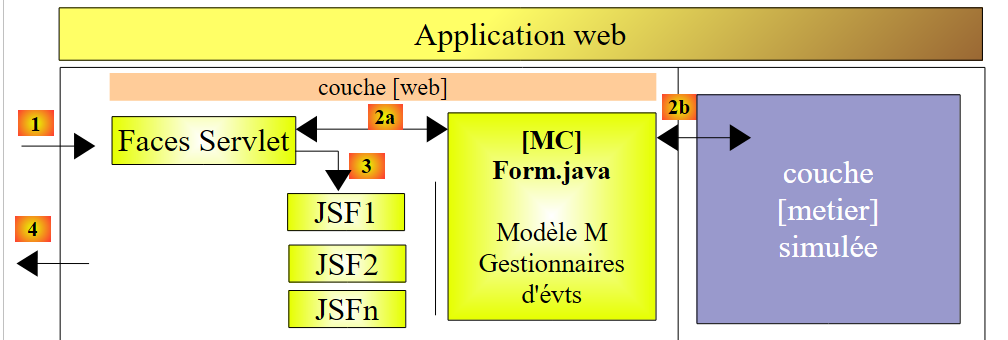
There is one case where model dependencies can be avoided: when there is a single M model used by all JSF pages. This architecture is only usable in applications with just a few views, but it is very simple to use. This is the one we are currently using.
In this context, the application architecture is as follows:
 |
12.1. The application views
The different views presented to the user will be as follows:
-
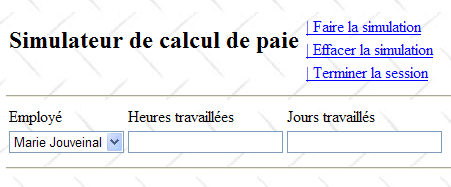
the [VueSaisies] view, which displays the simulation form
-
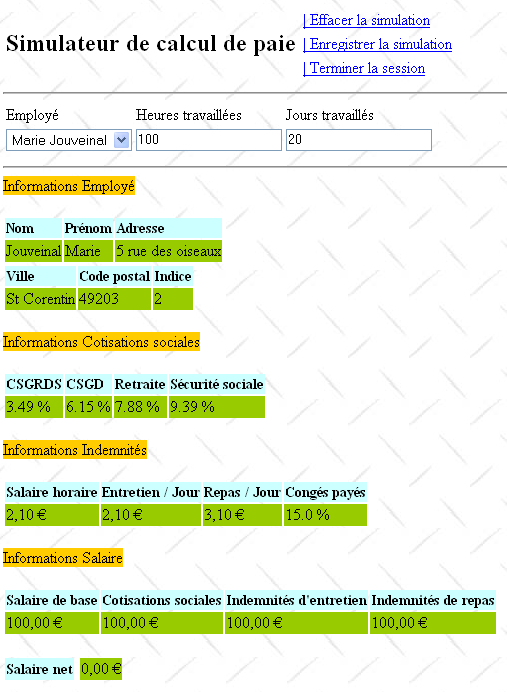
the [VueSimulation] view, used to display the detailed simulation results:
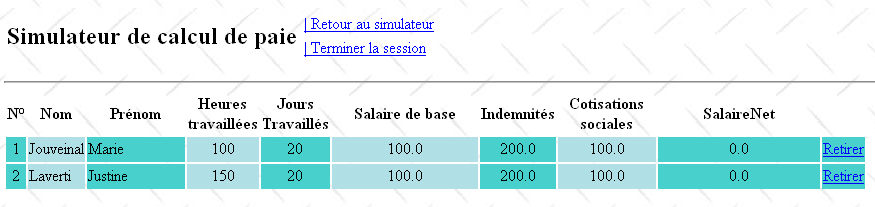
- the [VueSimulations] view, which lists the simulations performed by the customer
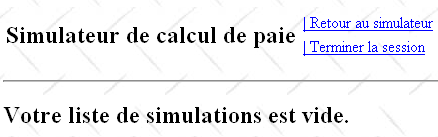
- the [VueSimulationsVides] view, which indicates that the customer has no simulations or no more simulations:
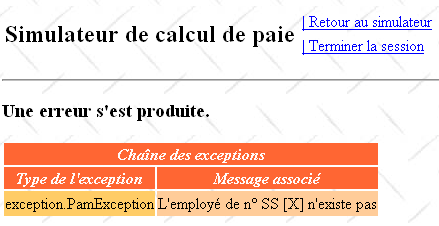
- the [VueErreur] view, which indicates one or more errors:
12.2. The Netbeans project of the [web] layer
The Netbeans project for this version will be the following Maven project:
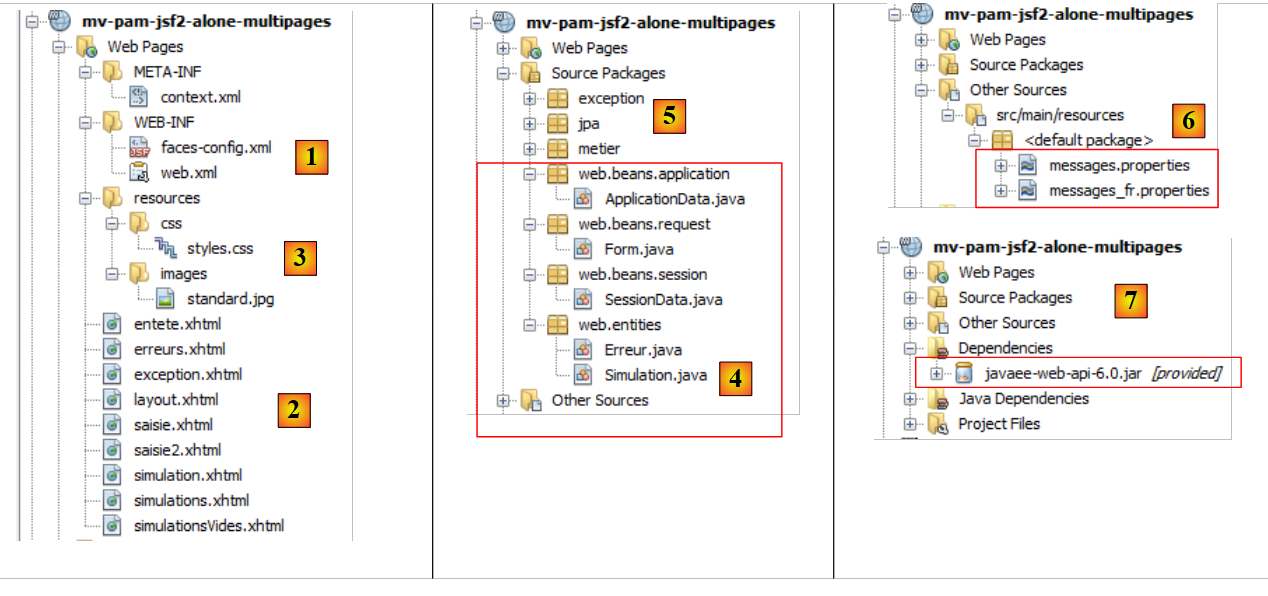 |
- in [1], the configuration files,
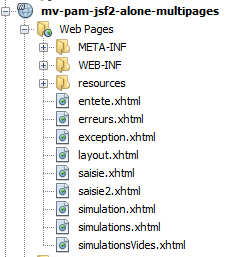
- in [2], the pages from JSF,
- in [3], the stylesheet and background image for the views,
- in [4], the classes of the layer [web],
- in [5], the application's lower layers,
- in [6], the message file for the application's internationalization,
- in [7], the project dependencies.
Let’s review some of these elements.
12.2.1. Configuration files
The files [web.xml] and [faces-config.xml] are identical to those in the previous project, with the exception of one detail in [web.xml]:
<?xml version="1.0" encoding="UTF-8"?>
<web-app version="3.0" xmlns="http://java.sun.com/xml/ns/javaee" xmlns:xsi="http://www.w3.org/2001/XMLSchema-instance" xsi:schemaLocation="http://java.sun.com/xml/ns/javaee http://java.sun.com/xml/ns/javaee/web-app_3_0.xsd">
  ...
  <welcome-file-list>
    <welcome-file>faces/saisie.xhtml</welcome-file>
  </welcome-file-list>
  ...
</web-app>
- lines 4-6: the home page is [saisie.xhtml]
12.2.2. The style sheet
The file [styles.css] is as follows:
.simulationsHeader {
   text-align: center;
   font-style: italic;
   color: Snow;
   background: Teal;
}

.simuNum {
   height: 25px;
   text-align: center;
   background: MediumTurquoise;
}
.simuNom {
   text-align: left;
   background: PowderBlue;
}
.simuPrenom {
   width: 6em;
   text-align: left;
   color: Black;
   background: MediumTurquoise;
}
.simuHT {
   width: 3em;
   text-align: center;
   color: Black;
   background: PowderBlue;
}
.simuJT {
   width: 3em;
   text-align: center;
   color: Black;
   background: MediumTurquoise;
}
.simuSalaireBase {
   width: 9em;
   text-align: center;
   color: Black;
   background: PowderBlue;
}
.simuIndemnites {
   width: 3em;
   text-align: center;
   color: Black;
   background: MediumTurquoise;
}
.simuCotisationsSociales {
   width: 6em;
   text-align: center;
   background: PowderBlue;
}

.simuSalaireNet {
   width: 10em;
   text-align: center;
   background: MediumTurquoise;
}

.erreursHeaders {
   background: Teal;
   background-color: #ff6633;
   color: Snow;
   font-style: italic;
   text-align: center

}

.erreurClasse {
   background: MediumTurquoise;
   background-color: #ffcc66;
   height: 25px;
   text-align: center
}

.erreurMessage {
   background: PowderBlue;
   background-color: #ffcc99;
   text-align: left
}
Here are some examples of JSF code using these styles:
Simulations View
          <h:dataTable value="#{form.simulations}" var="simulation"
                       headerClass="simulationsHeaders" columnClasses="simuNum,simuNom,simuPrenom,simuHT,simuJT,simuSalaireBase,simuIndemnites,simuCotisationsSociales,simuSalaireNet">
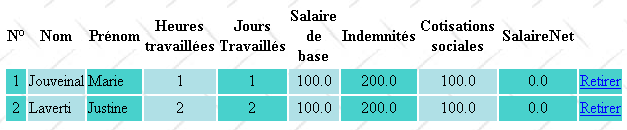
The result is as follows:
Error View
          <h:dataTable value="#{form.erreurs}" var="erreur"
                                 headerClass="erreursHeaders" columnClasses="erreurClasse,erreurMessage">

12.2.3. The message file
The message file [messages_fr.properties] is as follows:
form.titre=Simulateur de calcul de paie
form.comboEmployes.libell\u00e9=Employ\u00e9
form.heuresTravaill\u00e9es.libell\u00e9=Heures travaill\u00e9es
form.joursTravaill\u00e9s.libell\u00e9=Jours travaill\u00e9s
form.heuresTravaill\u00e9es.required=Indiquez le nombre d'hours worked
form.heuresTravaill\u00e9es.validation=Donn\u00e9e incorrecte
form.joursTravaill\u00e9s.required=Indiquez le nombre de jours travaill\u00e9s
form.joursTravaill\u00e9s.validation=Donn\u00e9e incorrecte
form.btnSalaire.libell\u00e9=Salaire
form.btnRaz.libell\u00e9=Raz
exception.header=L'the following exception occurred
exception.httpCode=Code HTTP de l'error
exception.message=Message de l'exception
exception.requestUri=Url demand\u00e9e lors de l'error
exception.servletName=Nom de la servlet demand\u00e9e lorsque l'error occurred
form.infos.employ\u00e9=Informations Employ\u00e9
form.employe.nom=Nom
form.employe.pr\u00e9nom=Pr\u00e9nom
form.employe.adresse=Adresse
form.employe.ville=Ville
form.employe.codePostal=Code postal
form.employe.indice=Indice
form.infos.cotisations=Informations Cotisations sociales
form.cotisations.csgrds=CSGRDS
form.cotisations.csgd=CSGD
form.cotisations.retraite=Retraite
form.cotisations.secu=S\u00e9curit\u00e9 sociale
form.infos.indemnites=Informations Indemnit\u00e9s
form.indemnites.salaireHoraire=Salaire horaire
form.indemnites.entretienJour=Entretien / Jour
form.indemnites.repasJour=Repas / Jour
form.indemnites.cong\u00e9sPay\u00e9s=Cong\u00e9s pay\u00e9s
form.infos.salaire=Informations Salaire
form.salaire.base=Salaire de base
form.salaire.cotisationsSociales=Cotisations sociales
form.salaire.entretien=Indemnit\u00e9s d'maintenance
form.salaire.repas=Indemnit\u00e9s de repas
form.salaire.net=Salaire net
form.menu.faireSimulation=| Faire la simulation
form.menu.effacerSimulation=| Effacer la simulation
form.menu.enregistrerSimulation=| Enregistrer la simulation
form.menu.retourSimulateur=| Retour au simulateur
form.menu.voirSimulations=| Voir les simulations
form.menu.terminerSession=| Terminer la session
simulations.headers.nom=Nom
simulations.headers.nom=Nom
simulations.headers.prenom=Pr\u00e9nom
simulations.headers.heuresTravaillees=Heures travaill\u00e9es
simulations.headers.joursTravailles=Jours Travaill\u00e9s
simulations.headers.salaireBase=Salaire de base
simulations.headers.indemnites=Indemnit\u00e9s
simulations.headers.cotisationsSociales=Cotisations sociales
simulations.headers.salaireNet=SalaireNet
simulations.headers.numero=N\u00b0
erreur.titre=Une erreur s'is produced.
erreur.exceptions=Cha\u00eene des exceptions
exception.type=Type de l'exception
exception.message=Message associ\u00e9
12.2.4. The [métier] layer
The simulated [métier] layer is modified as follows:
package metier;

...
public class Metier implements ImetierLocal, Serializable {

  // list of employees
  private Map<String,Employe> hashEmployes=new HashMap<String,Employe>();
  private List<Employe> listEmployes;

  // get your payslip
  public FeuilleSalaire calculerFeuilleSalaire(String SS,
    double nbHeuresTravaillées, int nbJoursTravaillés) {
    // we get the employee
    Employe e=hashEmployes.get(SS);
    // an exception is thrown if the employee does not exist
    if(e==null){
      throw new PamException(String.format("L'employé de n° SS [%s] n'existe pas",SS),1);
    }
    // a fictitious payslip is returned
    return new FeuilleSalaire(e,new Cotisation(3.49,6.15,9.39,7.88),e.getIndemnite(),new ElementsSalaire(100,100,100,100,100));
  }

  // list of employees
  public List<Employe> findAllEmployes() {
    if(listEmployes==null){
      // create a list of three employees
      listEmployes=new ArrayList<Employe>();
      listEmployes.add(new Employe("254104940426058","Jouveinal","Marie","5 rue des oiseaux","St Corentin","49203",new Indemnite(2,2.1,2.1,3.1,15)));
      listEmployes.add(new Employe("260124402111742","Laverti","Justine","La brûlerie","St Marcel","49014",new Indemnite(1,1.93,2,3,12)));
      // employee dictionary
      for(Employe e:listEmployes){
        hashEmployes.put(e.getSS(),e);
      }
      // we add an employee who doesn't exist in the dictionary
      listEmployes.add(new Employe("X","Y","Z","La brûlerie","St Marcel","49014",new Indemnite(1,1.93,2,3,12)));
    }
    // we return the list of employees
    return listEmployes;
  }
}
- line 8: the list of employees
- Line 7: The same list in the form of a dictionary indexed by the employee ID SS
- Lines 24–39: The findAllEmployes method, which returns the list of employees. This method creates a hard-coded list and references it via the employees field in line 8.
- Lines 27–33: A list and a dictionary of two employees are created
- Line 35: An employee is added to the employees list (line 8) but not to the hashEmployes dictionary (line 7). This is done so that the employee appears in the employee combo box but is not recognized by the calculerFeuilleSalaire method (line 14), causing it to throw an exception (line 17).
- lines 11–21: the calculerFeuilleSalaire method
- line 14: the employee is searched for in the dictionary hashEmployes using their ID SS. If not found, an exception is thrown (lines 16–18). Thus, we will have an exception for the employee with ID SS X added on line 35 to the employee list but not to the hashEmployes dictionary.
- On line 20, a dummy pay slip is created and returned.
12.3. The application beans
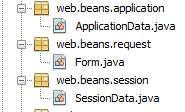
There will be three beans with three different scopes:
 |
12.3.1. The ApplicationData bean
The ApplicationData bean will have application scope:
package web.beans.application;

import java.io.Serializable;
import java.util.logging.Logger;
import javax.annotation.PostConstruct;
import javax.enterprise.context.ApplicationScoped;
import javax.inject.Named;
import metier.IMetierLocal;
import metier.Metier;

@Named
@ApplicationScoped
public class ApplicationData implements Serializable {

  // business layer
  private IMetierLocal metier = new Metier();
  // logger
  private boolean logsEnabled = true;
  private final Logger logger = Logger.getLogger("pam");

  public ApplicationData() {
  }

  @PostConstruct
  public void init() {
    // log
    if (isLogsEnabled()) {
      logger.info("ApplicationData");
    }
  }

  // getters and setters
...
}
- Line 11: The @Named annotation makes the class a managed bean. Note that, unlike in the previous project, we did not use the @ManagedBean annotation. The reason is that a reference to this class must be injected into another class using the @Inject annotation, and @Inject only injects classes with the @Named annotation.
- Line 12: The @ApplicationScoped annotation makes the class an application-scoped object. Note that the class of the annotation is [javax.enterprise.context.ApplicationScoped] (line 6) and not [javax.faces.bean.ApplicationScoped] as in the beans of the previous project.
The ApplicationData bean serves two purposes:
- line 16: maintains a reference to the [métier] layer,
- lines 18–19: define a logger that can be used by other beans to log to the Glassfish console.
12.3.2. The SessionData bean
The SessionData bean will have session scope:
package web.beans.session;

import java.io.Serializable;
import java.util.ArrayList;
import java.util.List;
import javax.annotation.PostConstruct;
import javax.enterprise.context.SessionScoped;
import javax.inject.Inject;
import javax.inject.Named;
import web.beans.application.ApplicationData;
import web.entities.Simulation;

@Named
@SessionScoped
public class SessionData implements Serializable {

  // application
  @Inject
  private ApplicationData applicationData;
  // simulations
  private List<Simulation> simulations = new ArrayList<Simulation>();
  private int numDerniereSimulation = 0;
  private Simulation simulation;
  // menus
  private boolean menuFaireSimulationIsRendered = true;
  private boolean menuEffacerSimulationIsRendered = true;
  private boolean menuEnregistrerSimulationIsRendered;
  private boolean menuVoirSimulationsIsRendered;
  private boolean menuRetourSimulateurIsRendered;
  private boolean menuTerminerSessionIsRendered = true;
  // local
  private String locale="fr_FR";

  // manufacturer
  public SessionData() {
  }

  @PostConstruct
  public void init() {
    // log
    if (applicationData.isLogsEnabled()) {
      applicationData.getLogger().info("SessionData");
    }
  }

  // menu management
  public void setMenu(boolean menuFaireSimulationIsRendered, boolean menuEnregistrerSimulationIsRendered, boolean menuEffacerSimulationIsRendered, boolean menuVoirSimulationsIsRendered, boolean menuRetourSimulateurIsRendered, boolean menuTerminerSessionIsRendered) {
    this.setMenuFaireSimulationIsRendered(menuFaireSimulationIsRendered);
    this.setMenuEnregistrerSimulationIsRendered(menuEnregistrerSimulationIsRendered);
    this.setMenuVoirSimulationsIsRendered(menuVoirSimulationsIsRendered);
    this.setMenuEffacerSimulationIsRendered(menuEffacerSimulationIsRendered);
    this.setMenuRetourSimulateurIsRendered(menuRetourSimulateurIsRendered);
    this.setMenuTerminerSessionIsRendered(menuTerminerSessionIsRendered);
  }

  // getters and setters
  ...
}
- line 13: the class SessionData is a managed bean (@Named) that can be injected into other managed beans,
- line 14: it has session scope (@SessionScoped),
- lines 18–19: a reference to the ApplicationData bean is injected into it (@Inject),
- lines 21–32: application data that must be persisted across sessions.
- line 21: the list of simulations performed by the user,
- line 22: the number of the last saved simulation,
- line 23: the last simulation that was performed,
- lines 25–30: the menu options,
- line 32: the application locale.
Lines 39–44: the init method is executed after instantiation of the class (@PostConstruct). Here, it is used only to log its execution. We must be able to verify that it is executed only once per user since the class is session-scoped. Line 42: the method uses the logger defined in the ApplicationData class. This is why we needed to inject a reference to this bean (lines 18–19).
12.3.3. The Form Bean
The Form bean is request-scoped:
package web.beans.request;

import java.util.ArrayList;
import java.util.List;
import javax.enterprise.context.RequestScoped;
import javax.faces.context.FacesContext;
import javax.inject.Inject;
import javax.inject.Named;
import javax.servlet.http.HttpServletRequest;
import jpa.Employe;
import metier.FeuilleSalaire;
import web.beans.application.ApplicationData;
import web.beans.session.*;
import web.entities.Erreur;
import web.entities.Simulation;

@Named
@RequestScoped
public class Form {

  public Form() {
  }
  // other beans
  @Inject
  private ApplicationData applicationData;
  @Inject
  private SessionData sessionData;
  // the view model
  private String comboEmployesValue = "";
  private String heuresTravaillées = "";
  private String joursTravaillés = "";
  private Integer numSimulationToDelete;
  private List<Erreur> erreurs = new ArrayList<Erreur>();
  private FeuilleSalaire feuilleSalaire;


  // list of employees
  public List<Employe> getEmployes(){
    return applicationData.getMetier().findAllEmployes();
  }

  // menu action
  public String faireSimulation() {
    ...
  }

  public String enregistrerSimulation() {
  ...
  }

  public String effacerSimulation() {
  ...
  }

  public String voirSimulations() {
  ...
  }

  public String retourSimulateur() {
   ...
  }

  public String terminerSession() {
  ...
  }

  public String retirerSimulation() {
 ...
  }

  private void razFormulaire() {
 ...
  }

// getters and setters
...
}
- line 17, the class is a managed bean (@Named),
- line 18, request-scoped (@RequestScoped),
- lines 24–25: injection of a reference to the application-scoped bean ApplicationData,
- lines 26-27: injection of a reference to the session-scoped bean SessionData.
12.4. The application pages
 |
12.4.1. [layout.xhtml]
The page [layout.xhtml] handles the layout of all views:
<?xml version='1.0' encoding='UTF-8' ?>
<!DOCTYPE html PUBLIC "-//W3C//DTD XHTML 1.0 Transitional//EN" "http://www.w3.org/TR/xhtml1/DTD/xhtml1-transitional.dtd">
<html xmlns="http://www.w3.org/1999/xhtml"
      xmlns:h="http://java.sun.com/jsf/html"
      xmlns:f="http://java.sun.com/jsf/core"
      xmlns:ui="http://java.sun.com/jsf/facelets">

  <f:view locale="#{sessionData.locale}">
    <h:head>
      <title><h:outputText value="#{msg['form.titre']}"/></title>
      <h:outputStylesheet library="css" name="styles.css"/>
    </h:head>
    <script type="text/javascript">
      function raz(){
        // on change les valeurs postées
        document.forms['formulaire'].elements['formulaire:comboEmployes'].value="0";
        document.forms['formulaire'].elements['formulaire:heuresTravaillees'].value="0";
        document.forms['formulaire'].elements['formulaire:joursTravailles'].value="0";
      }
    </script>
    <h:body style="background-image: url('${request.contextPath}/resources/images/standard.jpg');">
      <h:form id="formulaire">
        <!-- entete -->
        <ui:include src="entete.xhtml" />
        <!-- content -->
        <ui:insert name="part1" >
          Gestion des assistantes maternelles
        </ui:insert>
        <ui:insert name="part2"/>
      </h:form>
    </h:body>
  </f:view>
</html>
Every view consists of the following elements:
- a header displayed by the fragment [entete.xhtml] (line 24),
- a body consisting of two fragments named part1 (lines 26–28) and part2 (line 29),
- line 8: the locale attribute ensures the internationalization of the pages. Here there will be only one: fr_FR,
- lines 14–19: a code Javascript.
The display of the page [layout.xhtml] is as follows:
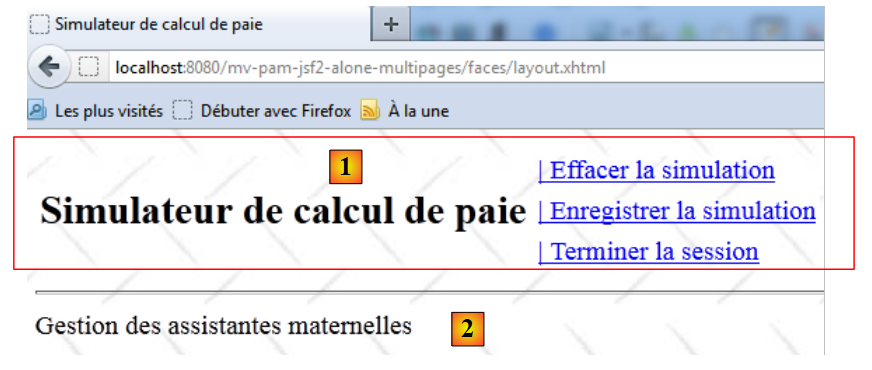 |
- in [1], the header [entete.xhtml],
- in [2], the fragment part1.
12.4.2. The header of [entete.xhtml]
The code for page [entete.xhtml] is as follows:
<?xml version='1.0' encoding='UTF-8' ?>
<!DOCTYPE html PUBLIC "-//W3C//DTD XHTML 1.0 Transitional//EN" "http://www.w3.org/TR/xhtml1/DTD/xhtml1-transitional.dtd">
<html xmlns="http://www.w3.org/1999/xhtml"
      xmlns:h="http://java.sun.com/jsf/html"
      xmlns:f="http://java.sun.com/jsf/core"
      xmlns:ui="http://java.sun.com/jsf/facelets">

  <ui:composition>
    <!-- entete -->
    <h:panelGrid columns="2">
      <h:panelGroup>
        <h2><h:outputText value="#{msg['form.titre']}"/></h2>
      </h:panelGroup>
      <h:panelGroup>
        <h:panelGrid columns="1">
          <h:commandLink id="cmdFaireSimulation" value="#{msg['form.menu.faireSimulation']}" action="#{form.faireSimulation}" rendered="#{sessionData.menuFaireSimulationIsRendered}"/>
          <h:commandLink id="cmdEffacerSimulation"  onclick="raz()" value="#{msg['form.menu.effacerSimulation']}" action="#{form.effacerSimulation}" rendered="#{sessionData.menuEffacerSimulationIsRendered}"/>
          <h:commandLink id="cmdEnregistrerSimulation" immediate="true" value="#{msg['form.menu.enregistrerSimulation']}" action="#{form.enregistrerSimulation}" rendered="#{sessionData.menuEnregistrerSimulationIsRendered}"/>
          <h:commandLink id="cmdVoirSimulations" immediate="true" value="#{msg['form.menu.voirSimulations']}" action="#{form.voirSimulations}" rendered="#{sessionData.menuVoirSimulationsIsRendered}"/>
          <h:commandLink id="cmdRetourSimulateur" immediate="true" value="#{msg['form.menu.retourSimulateur']}" action="#{form.retourSimulateur}" rendered="#{sessionData.menuRetourSimulateurIsRendered}"/>
          <h:commandLink id="cmdTerminerSession" immediate="true" value="#{msg['form.menu.terminerSession']}" action="#{form.terminerSession}" rendered="#{sessionData.menuTerminerSessionIsRendered}"/>
        </h:panelGrid>
      </h:panelGroup>
    </h:panelGrid>
    <hr/>
  </ui:composition>
</html>
- line 12: the application title,
- lines 16–21: the six links corresponding to the six actions the user can perform. These links are controlled (rendered attribute) by Booleans from the SessionData bean,
- line 17: clicking the [Effacer la simulation] link triggers the execution of the Javascript raz function. This function was defined in the [layout.xhtml] model,
- line 18: the attribute immediate=true ensures that data validity is not checked before the method [Form].enregistrerSimulation is executed. This is intentional. You may want to save the last simulation performed a minute ago even if the data entered in the form since then (but not yet validated) is invalid. The same applies to actions [Voir les simulations], [Effacer la simulation], [Retour au simulateur], and [Terminer la session].
12.5. Use cases for the application
12.5.1. Displaying the home page
The home page is the following [saisie.xhtml] page:
<?xml version='1.0' encoding='UTF-8' ?>
<!DOCTYPE html PUBLIC "-//W3C//DTD XHTML 1.0 Transitional//EN" "http://www.w3.org/TR/xhtml1/DTD/xhtml1-transitional.dtd">
<html xmlns="http://www.w3.org/1999/xhtml"
      xmlns:h="http://java.sun.com/jsf/html"
      xmlns:f="http://java.sun.com/jsf/core"
      xmlns:ui="http://java.sun.com/jsf/facelets">

  <ui:composition template="layout.xhtml">
    <ui:define name="part1">
      <ui:include src="saisie2.xhtml"/>
    </ui:define>
  </ui:composition>
</html>
- line 8: it is displayed within the page [layout.xhtml],
- line 9: in place of the fragment named part1. In this fragment, the page [saisie2.xhtml] is displayed:
<?xml version='1.0' encoding='UTF-8' ?>
<!DOCTYPE html PUBLIC "-//W3C//DTD XHTML 1.0 Transitional//EN" "http://www.w3.org/TR/xhtml1/DTD/xhtml1-transitional.dtd">
<html xmlns="http://www.w3.org/1999/xhtml"
      xmlns:h="http://java.sun.com/jsf/html"
      xmlns:f="http://java.sun.com/jsf/core"
      xmlns:ui="http://java.sun.com/jsf/facelets">

  <h:panelGrid columns="3">
    <h:outputText value="#{msg['form.comboEmployes.libellé']}"/>
    <h:outputText value="#{msg['form.heuresTravaillées.libellé']}"/>
    <h:outputText value="#{msg['form.joursTravaillés.libellé']}"/>
    <h:selectOneMenu id="comboEmployes" value="#{form.comboEmployesValue}">
      <f:selectItems .../>
    </h:selectOneMenu>
    <h:inputText id="heuresTravaillees" value="#{form.heuresTravaillées}" required="true" requiredMessage="#{msg['form.heuresTravaillées.required']}" validatorMessage="#{msg['form.heuresTravaillées.validation']}">
      <f:validateDoubleRange minimum="0" maximum="300"/>
    </h:inputText>
    <h:inputText id="joursTravailles" value="#{form.joursTravaillés}" required="true" requiredMessage="#{msg['form.joursTravaillés.required']}" validatorMessage="#{msg['form.joursTravaillés.validation']}">
      <f:validateLongRange minimum="0" maximum="31"/>
    </h:inputText>
    <h:panelGroup></h:panelGroup>
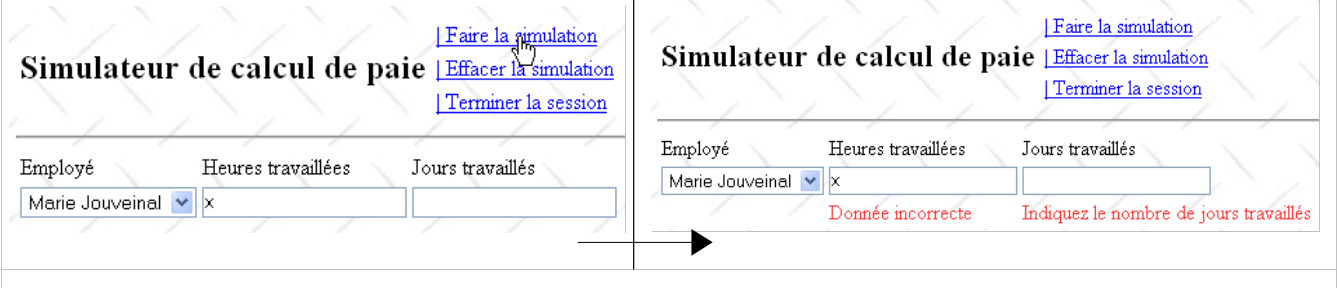
    <h:message for="heuresTravaillees" styleClass="error"/>
    <h:message for="joursTravailles" styleClass="error"/>
  </h:panelGrid>
  <hr/>
</html>
This code displays the following view:
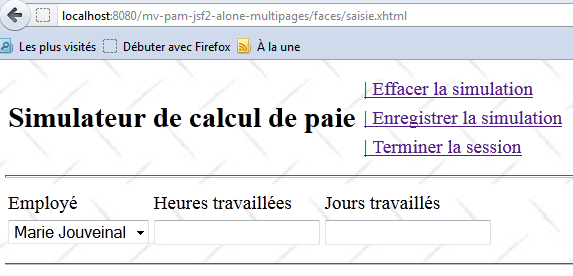 |
Question: Complete line 13 of the XHTML code. The list of items in the employee combo box is provided by a method of the [Form] bean. Write this method. The items displayed in the combo box will have their itemValue property set to the SS ID of an employee, and the itemLabel property will be a string consisting of the employee’s first and last names.
Question: How should the [SessionData] bean be initialized so that, when the initial GET request is made to the form, the header menu is the one shown above?
12.5.2. The action [faireSimulation]
The code JSF for the action [faireSimulation] is as follows:
<h:commandLink id="cmdFaireSimulation" value="#{msg['form.menu.faireSimulation']}" action="#{form.faireSimulation}" rendered="#{sessionData.menuFaireSimulationIsRendered}"/>
The [faireSimulation] action calculates a pay stub:
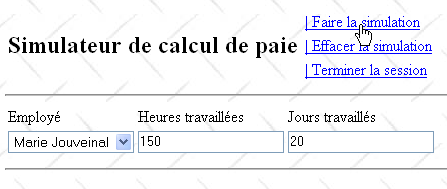
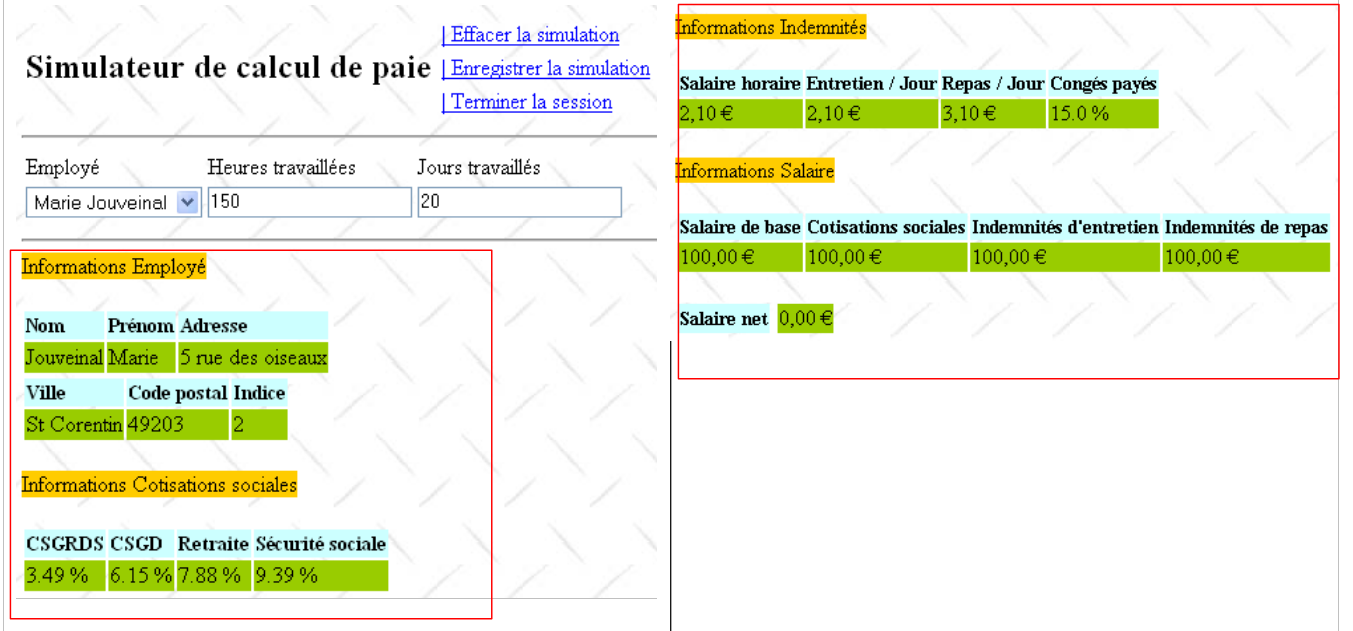
From the previous page, we obtain the following result:
 |
 |
The simulation is displayed on the following [simulation.xhtml] page:
<?xml version='1.0' encoding='UTF-8' ?>
<!DOCTYPE html PUBLIC "-//W3C//DTD XHTML 1.0 Transitional//EN" "http://www.w3.org/TR/xhtml1/DTD/xhtml1-transitional.dtd">
<html xmlns="http://www.w3.org/1999/xhtml"
      xmlns:h="http://java.sun.com/jsf/html"
      xmlns:f="http://java.sun.com/jsf/core"
      xmlns:ui="http://java.sun.com/jsf/facelets">

  <ui:composition template="layout.xhtml">
    <ui:define name="part1">
      <ui:include src="saisie2.xhtml"/>
    </ui:define>
    <ui:define name="part2">
      <h:outputText value="#{msg['form.infos.employé']}" styleClass="titreInfos"/>
      <br/><br/>
      <h:panelGrid columns="3" rowClasses="libelle,info">
        <h:outputText value="#{msg['form.employe.nom']}"/>
        <h:outputText value="#{msg['form.employe.prénom']}"/>
        <h:outputText value="#{msg['form.employe.adresse']}"/>
        <h:outputText value="#{form.feuilleSalaire.employe.nom}"/>
        <h:outputText value="#{form.feuilleSalaire.employe.prenom}"/>
        <h:outputText value="#{form.feuilleSalaire.employe.adresse}"/>
      </h:panelGrid>
      <h:panelGrid columns="3" rowClasses="libelle,info">
        <h:outputText value="#{msg['form.employe.ville']}"/>
        <h:outputText value="#{msg['form.employe.codePostal']}"/>
        <h:outputText value="#{msg['form.employe.indice']}"/>
        <h:outputText value="#{form.feuilleSalaire.employe.ville}"/>
        <h:outputText value="#{form.feuilleSalaire.employe.codePostal}"/>
        <h:outputText value="#{form.feuilleSalaire.employe.indemnite.indice}"/>
      </h:panelGrid>
      <br/>
      <h:outputText value="#{msg['form.infos.cotisations']}" styleClass="titreInfos"/>
      <br/><br/>
      <h:panelGrid columns="4" rowClasses="libelle,info">
        <h:outputText value="#{msg['form.cotisations.csgrds']}"/>
        <h:outputText value="#{msg['form.cotisations.csgd']}"/>
        <h:outputText value="#{msg['form.cotisations.retraite']}"/>
        <h:outputText value="#{msg['form.cotisations.secu']}"/>
        <h:outputText value="#{form.feuilleSalaire.cotisation.csgrds} %"/>
        <h:outputText value="#{form.feuilleSalaire.cotisation.csgd} %"/>
        <h:outputText value="#{form.feuilleSalaire.cotisation.retraite} %"/>
        <h:outputText value="#{form.feuilleSalaire.cotisation.secu} %"/>
      </h:panelGrid>
      <br/>
      <h:outputText value="#{msg['form.infos.indemnites']}" styleClass="titreInfos"/>
      <br/><br/>
      <h:panelGrid columns="4" rowClasses="libelle,info">
        <h:outputText value="#{msg['form.indemnites.salaireHoraire']}"/>
        <h:outputText value="#{msg['form.indemnites.entretienJour']}"/>
        <h:outputText value="#{msg['form.indemnites.repasJour']}"/>
        <h:outputText value="#{msg['form.indemnites.congésPayés']}"/>
        <h:outputFormat value="{0,number,currency}">
          <f:param value="#{form.feuilleSalaire.employe.indemnite.baseHeure}"/>
        </h:outputFormat>
        <h:outputFormat value="{0,number,currency}">
          <f:param value="#{form.feuilleSalaire.employe.indemnite.entretienJour}"/>
        </h:outputFormat>
        <h:outputFormat value="{0,number,currency}">
          <f:param value="#{form.feuilleSalaire.employe.indemnite.repasJour}"/>
        </h:outputFormat>
        <h:outputText value="#{form.feuilleSalaire.employe.indemnite.indemnitesCP} %"/>
      </h:panelGrid>
      <br/>
      <h:outputText value="#{msg['form.infos.salaire']}" styleClass="titreInfos"/>
      <br/><br/>
      <h:panelGrid columns="4" rowClasses="libelle,info">
        <h:outputText value="#{msg['form.salaire.base']}"/>
        <h:outputText value="#{msg['form.salaire.cotisationsSociales']}"/>
        <h:outputText value="#{msg['form.salaire.entretien']}"/>
        <h:outputText value="#{msg['form.salaire.repas']}"/>
        <h:outputFormat value="{0,number,currency}">
          <f:param value="#{form.feuilleSalaire.elementsSalaire.salaireBase}"/>
        </h:outputFormat>
        <h:outputFormat value="{0,number,currency}">
          <f:param value="#{form.feuilleSalaire.elementsSalaire.cotisationsSociales}"/>
        </h:outputFormat>
        <h:outputFormat value="{0,number,currency}">
          <f:param value="#{form.feuilleSalaire.elementsSalaire.indemnitesEntretien}"/>
        </h:outputFormat>
        <h:outputFormat value="{0,number,currency}">
          <f:param value="#{form.feuilleSalaire.elementsSalaire.indemnitesRepas}"/>
        </h:outputFormat>
      </h:panelGrid>
      <br/>
      <h:panelGrid columns="3" columnClasses="libelle,col2,info">
        <h:outputText value="#{msg['form.salaire.net']}"/>
        <h:panelGroup></h:panelGroup>
        <h:outputFormat value="{0,number,currency}">
          <f:param value="#{form.feuilleSalaire.elementsSalaire.salaireNet}"/>
        </h:outputFormat>
      </h:panelGrid>
    </ui:define>
  </ui:composition>
</html>
- Line 8: The page [simulation.xhtml] is inserted into the page [layout.xhtml],
- lines 9–11: the input area is displayed in the part1 fragment of the layout page,
- lines 12–91: the simulation is displayed in the part2 fragment of the layout page.
Question: Write the method [faireSimulation] of the class [Form]. The simulation will be saved in the bean SessionData.
12.5.3. Error Handling
We want to be able to properly handle exceptions that may occur during the calculation of a simulation. To do this, the code for the [faireSimulation] method will use a try/catch block:
  // menu action
  public String faireSimulation(){
    try{
      // we calculate the payslip
      feuilleSalaire= ...
      // simulation is displayed
      ...
      // update the menu
      ...
       // render the simulation view
      return "simulation";
    }catch(Throwable th){
      // clear the list of previous errors
      ...
      // create a new error list
      ...
      // view vueErreur is displayed
      ...
      // update the menu
      ...
       // the error view is displayed
      return "erreurs";
    }
}
The list of errors created on line 15 is as follows:
  // the view model
  ...
  private List<Erreur> erreurs=new ArrayList<Erreur>();
...
The Error class is defined as follows:
package web.entities;

public class Erreur {

  public Erreur() {
  }

  // field
  private String classe;
  private String message;

  // manufacturer
  public Erreur(String classe, String message){
    this.setClasse(classe);
    this.message=message;
  }

  // getters and setters
...
}
Errors will be exceptions whose class name is stored in the class field and whose message is stored in the message field.
The list of errors constructed in the [faireSimulation] method consists of:
- the initial exception th of type Throwable that occurred,
- its cause th.getCause() if it has one,
- the cause of the cause h.getCause().getCause() if it exists.
- ...
Here is an example of an error list:
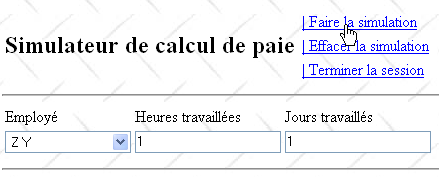
Above, the employee [Z Y] does not exist in the employee dictionary used by the simulated layer [métier]. In this case, the simulated layer [métier] throws an exception (line 6 below):
  public FeuilleSalaire calculerFeuilleSalaire(String SS, double nbHeuresTravaillées, int nbJoursTravaillés) {
    // we get the employee
    Employe e=hashEmployes.get(SS);
    // an exception is thrown if the employee does not exist
    if(e==null){
      throw new PamException(String.format("L'employé de n° SS [%s] n'existe pas",SS),1);
    }
...
}
The result is as follows:
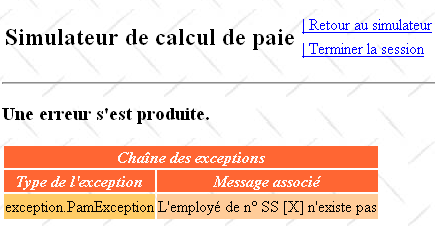
This view is displayed by the following page: [erreurs.xhtml]:
<?xml version='1.0' encoding='UTF-8' ?>
<!DOCTYPE html PUBLIC "-//W3C//DTD XHTML 1.0 Transitional//EN" "http://www.w3.org/TR/xhtml1/DTD/xhtml1-transitional.dtd">
<html xmlns="http://www.w3.org/1999/xhtml"
      xmlns:h="http://java.sun.com/jsf/html"
      xmlns:f="http://java.sun.com/jsf/core"
      xmlns:ui="http://java.sun.com/jsf/facelets">

  <ui:composition template="layout.xhtml">
    <ui:define name="part1">
      <h3><h:outputText value="#{msg['erreur.titre']}"/></h3>
      <h:dataTable value="#{form.erreurs}" var="erreur"
                   headerClass="erreursHeaders" columnClasses="erreurClasse,erreurMessage">
        <f:facet name="header">
          <h:outputText value="#{msg['erreur.exceptions']}"/>
        </f:facet>
        <h:column>
          <f:facet name="header">
            <h:outputText value="#{msg['exception.type']}"/>
          </f:facet>
          <h:outputText value="#{erreur.classe}"/>
        </h:column>
        <h:column>
          <f:facet name="header">
            <h:outputText value="#{msg['exception.message']}"/>
          </f:facet>
          <h:outputText value="#{erreur.message}"/>
        </h:column>
      </h:dataTable>
    </ui:define>
  </ui:composition>
</html>
Question: Modify the [faireSimulation] method so that, in the event of an exception, it displays the [vueErreur] view.
12.5.4. The [effacerSimulation] action
The [effacerSimulation] action allows the user to retrieve an empty form:
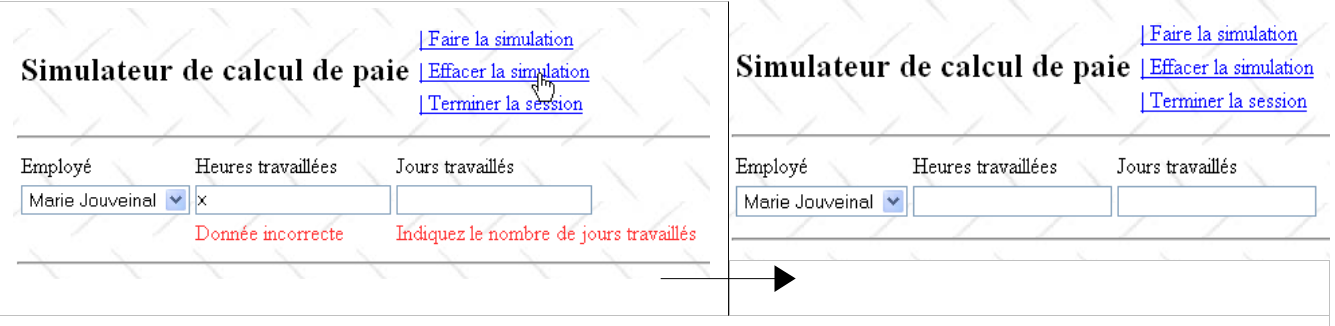 |
The code JSF for the link [effacerSimulation] is as follows:
<h:commandLink id="cmdEffacerSimulation" onclick="raz()" value="#{msg['form.menu.effacerSimulation']}" action="#{form.effacerSimulation}" rendered="#{sessionData.menuEffacerSimulationIsRendered}"/>
Clicking the link [EffacerSimulation] first triggers a call to the function Javascript raz(). This method is defined in the page [layout.xhtml]:
    <script type="text/javascript">
      function raz(){
        // change posted values
        document.forms['formulaire'].elements['formulaire:comboEmployes'].value="0";
        document.forms['formulaire'].elements['formulaire:heuresTravaillees'].value="0";
        document.forms['formulaire'].elements['formulaire:joursTravailles'].value="0";
      }
</script>
Lines 4–6 change the posted values. Note that
- the posted values are valid, c.a.d. they will pass the validation tests for the input fields heuresTravaillees and joursTravailles.
- the "raz" function does not submit the form. In fact, the form will be submitted via the link cmdEffacerSimulation. This post will occur after the "raz" function (Javascript) has been executed.
During the execution of post, the posted values will follow the normal flow: validation, then assignment to the model fields. These are as follows in the [Form] class:
  // the view model
  private String comboEmployesValue;
  private String heuresTravaillées;
  private String joursTravaillés;
  ...
These three fields will receive the three posted values {"0", "0", "0"}. Once this assignment is complete, the effacerSimulation method will be executed.
Question: Write the method [effacerSimulation] for the class [Form]. Ensure that:
-
only the input field is displayed,
-
the combo box is set to its first item,
-
the input fields heuresTravaillees and joursTravailles display empty strings.
12.5.5. The [enregistrerSimulation] action
The code JSF for the link [enregistrerSimulation] is as follows:
<h:commandLink id="cmdEnregistrerSimulation" immediate="true" value="#{msg['form.menu.enregistrerSimulation']}" action="#{form.enregistrerSimulation}" rendered="#{sessionData.menuEnregistrerSimulationIsRendered}"/>
The action [enregistrerSimulation] associated with the link allows the current simulation to be saved in a list of simulations maintained in the class [SessionData]:
private List<Simulation> simulations=new ArrayList<Simulation>();
The Simulation class is as follows:
package web.entities;

import metier.FeuilleSalaire;

public class Simulation {

  public Simulation() {
  }

  // simulation fields
  private Integer num;
  private FeuilleSalaire feuilleSalaire;
  private String heuresTravaillées;
  private String joursTravaillés;

  // manufacturer
  public Simulation(Integer num,String heuresTravaillées, String joursTravaillés, FeuilleSalaire feuilleSalaire){
    this.setNum(num);
    this.setFeuilleSalaire(feuilleSalaire);
    this.setHeuresTravaillées(heuresTravaillées);
    this.setJoursTravaillés(joursTravaillés);
  }

  public double getIndemnites(){
    return feuilleSalaire.getElementsSalaire().getIndemnitesEntretien()+ feuilleSalaire.getElementsSalaire().getIndemnitesRepas();
  }

  // getters and setters
...
}
This class allows you to save a simulation created by the user:
- line 11: the simulation number,
- line 12: the payslip that was calculated,
- line 13: the number of hours worked,
- line 14: the number of days worked.
Here is an example of a record:
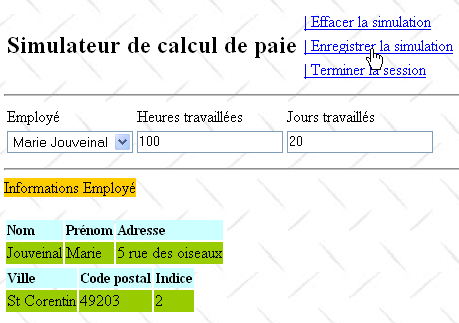
From the previous page, we obtain the following result:
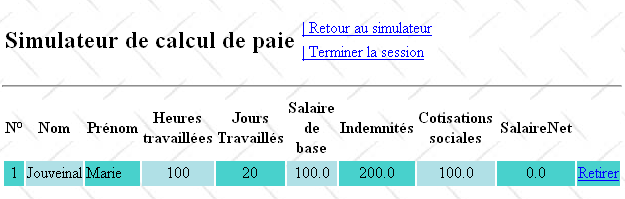
The simulation number is incremented with each new record. It belongs to the SessionData bean:
  // simulations
  private List<Simulation> simulations = new ArrayList<Simulation>();
  private int numDerniereSimulation = 0;
private Simulation simulation;
- line 2: the number of the last simulation performed.
The [enregistrerSimulation] method can proceed as follows:
- retrieve the number of the last simulation from the [SessionData] bean and increment it,
- add the new simulation to the list of simulations maintained by the [SessionData] class,
- display the simulation table:
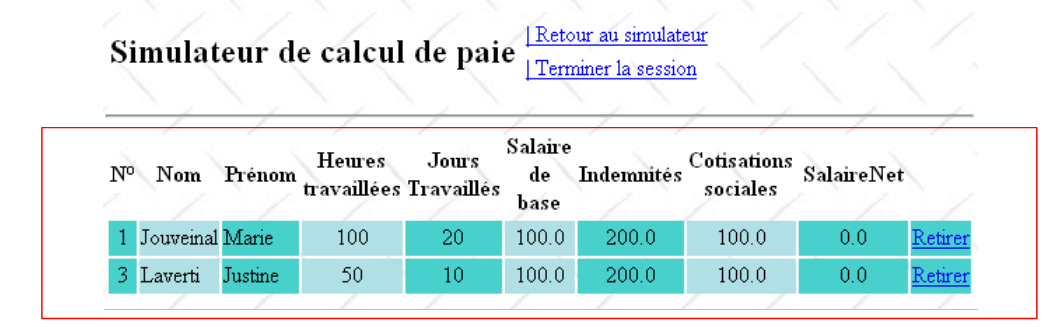 |
The simulation table is displayed by the [simulations.xhtml] page:
<?xml version='1.0' encoding='UTF-8' ?>
<!DOCTYPE html PUBLIC "-//W3C//DTD XHTML 1.0 Transitional//EN" "http://www.w3.org/TR/xhtml1/DTD/xhtml1-transitional.dtd">
<html xmlns="http://www.w3.org/1999/xhtml"
      xmlns:h="http://java.sun.com/jsf/html"
      xmlns:f="http://java.sun.com/jsf/core"
      xmlns:ui="http://java.sun.com/jsf/facelets">

  <ui:composition template="layout.xhtml">
    <ui:define name="part1">
      <!-- simulation table -->
      <h:dataTable value="#{sessionData.simulations}" var="simulation"
                   headerClass="simulationsHeaders" columnClasses="simuNum,simuNom,simuPrenom,simuHT,simuJT,simuSalaireBase,simuIndemnites,simuCotisationsSociales,simuSalaireNet">
        <h:column>
          <f:facet name="header">
            <h:outputText value="#{msg['simulations.headers.numero']}"/>
          </f:facet>
          <h:outputText value="#{simulation.num}"/>
        </h:column>
        <h:column>
          <f:facet name="header">
            <h:outputText value="#{msg['simulations.headers.nom']}"/>
          </f:facet>
          <h:outputText value="#{simulation.feuilleSalaire.employe.nom}"/>
        </h:column>
        <h:column>
          <f:facet name="header">
            <h:outputText value="#{msg['simulations.headers.prenom']}"/>
          </f:facet>
          <h:outputText value="#{simulation.feuilleSalaire.employe.prenom}"/>
        </h:column>
        <h:column>
          <f:facet name="header">
            <h:outputText value="#{msg['simulations.headers.heuresTravaillees']}"/>
          </f:facet>
          <h:outputText value="#{simulation.heuresTravaillées}"/>
        </h:column>
        <h:column>
          <f:facet name="header">
            <h:outputText value="#{msg['simulations.headers.joursTravailles']}"/>
          </f:facet>
          <h:outputText value="#{simulation.joursTravaillés}"/>
        </h:column>
        <h:column>
          <f:facet name="header">
            <h:outputText value="#{msg['simulations.headers.salaireBase']}"/>
          </f:facet>
          <h:outputText value="#{simulation.feuilleSalaire.elementsSalaire.salaireBase}"/>
        </h:column>
        <h:column>
          <f:facet name="header">
            <h:outputText value="#{msg['simulations.headers.indemnites']}"/>
          </f:facet>
          <h:outputText value="#{simulation.indemnites}"/>
        </h:column>
        <h:column>
          <f:facet name="header">
            <h:outputText value="#{msg['simulations.headers.cotisationsSociales']}"/>
          </f:facet>
          <h:outputText value="#{simulation.feuilleSalaire.elementsSalaire.cotisationsSociales}"/>
        </h:column>
        <h:column>
          <f:facet name="header">
            <h:outputText value="#{msg['simulations.headers.salaireNet']}"/>
          </f:facet>
          <h:outputText value="#{simulation.feuilleSalaire.elementsSalaire.salaireNet}"/>
        </h:column>
        <h:column>
          <h:commandLink value="Retirer" action="#{form.retirerSimulation}">
            <f:setPropertyActionListener target="#{form.numSimulationToDelete}" value="#{simulation.num}"/>
          </h:commandLink>
        </h:column>
      </h:dataTable>
    </ui:define>
  </ui:composition>
</html>
- On line 8, the page [simulations.xhtml] is inserted inside the page [layout.xhtml],
- line 9, in place of the fragment named part1,
- line 11, the <h:dataTable> tag uses the field #{sessionData.simulations} as its data source, c.a.d. the following field:
  // simulations
private List<Simulation> simulations;
-
the var="simulation" attribute sets the name of the variable representing the current simulation within the <h:datatable> tag
-
the attribute headerClass="simulationsHeaders" sets the style of the table column headers.
-
The attribute columnClasses="...." sets the style of each column in the table
Let’s examine one of the table columns and see how it is constructed:
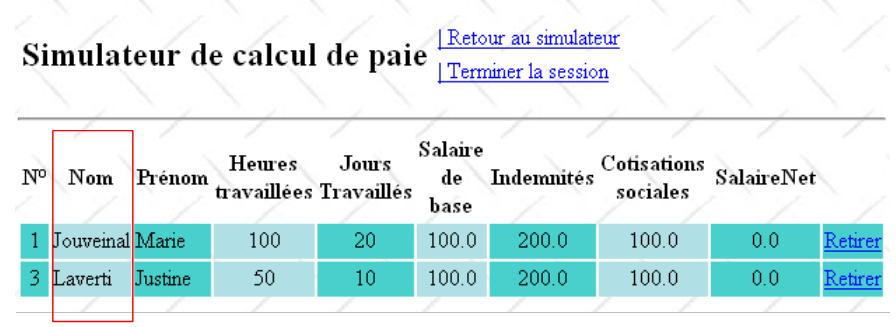 |
The code JSF for the Name column is as follows:
            <h:column>
              <f:facet name="header">
                <h:outputText value="#{msg['simulations.headers.nom']}"/>
              </f:facet>
              <h:outputText value="#{simulation.feuilleSalaire.employe.nom}"/>
</h:column>
- lines 2-4: the <f:facet name="header"> tag defines the column header
- line 5: the employee's name is written:
- simulation refers to the var attribute of the <h:dataTable ...> tag:
<h:dataTable value="#{sessionData.simulations}" var="simulation" ...>
simulation refers to the current simulation in the list of simulations: first the 1st, then the 2nd, …
- (continued)
- simulation.feuilleSalaire refers to the feuilleSalaire field of the current simulation
- simulation.feuilleSalaire.employe refers to the employee field of the feuilleSalaire field
- simulation.feuilleSalaire.employe.nom refers to the "name" field of the "employee" field
The same technique is repeated for all columns in the table. There is an issue with the Indemnities column, which is generated using the following code:
            <h:column>
              <f:facet name="header">
                <h:outputText value="#{msg['simulations.headers.indemnites']}"/>
              </f:facet>
              <h:outputText value="#{simulation.indemnites}"/>
</h:column>
Line 5 displays the value of simulation.indemnites. However, the Simulation class does not have a field named indemnites. It is important to note here that the field indemnites is not used directly but via the method simulation.getIndemnites(). Therefore, it is sufficient for this method to exist. The field indemnites, on the other hand, may not exist. The method getIndemnites must return the total of the employee’s allowances. This requires an intermediate calculation because this total is not directly available in the pay slip. The method getIndemnites is provided in Section 12.5.5.
Question: Write method [enregistrerSimulation] for class [Form].
12.5.6. Action [retourSimulateur]
The code JSF for the link [retourSimulateur] is as follows:
<h:commandLink id="cmdRetourSimulateur" immediate="true" value="#{msg['form.menu.retourSimulateur']}" action="#{form.retourSimulateur}" rendered="#{sessionData.menuRetourSimulateurIsRendered}"/>
The action [retourSimulateur] associated with the link allows the user to return from view [vueSimulations] to view [vueSaisies]:
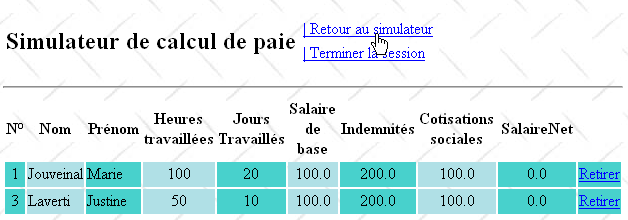
The result obtained:
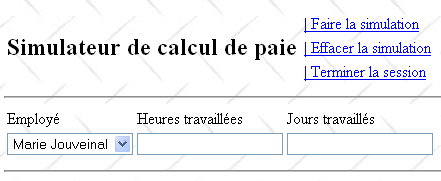
Question: Write the [retourSimulateur] method of the [Form] class. The input form shown must be empty, as above.
12.5.7. The action [voirSimulations]
The code JSF for the link [voirSimulations] is as follows:
<h:commandLink id="cmdVoirSimulations" immediate="true" value="#{msg['form.menu.voirSimulations']}" action="#{form.voirSimulations}" rendered="#{sessionData.menuVoirSimulationsIsRendered}"/>
The action [voirSimulations] associated with the link allows the user to view the simulation table, regardless of the status of their entries:
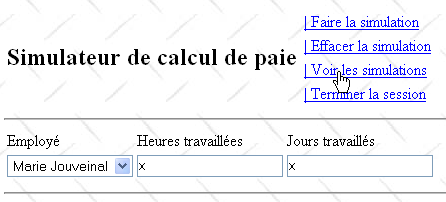
The result obtained:
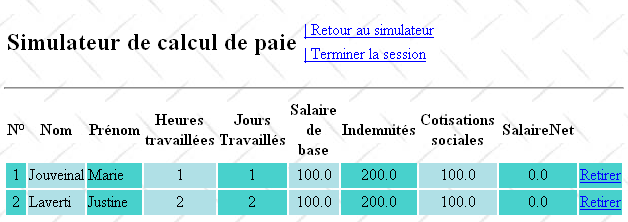
Question: Write the [voirSimulations] method of the [Form] class.
We will ensure that if the list of simulations is empty, the view displayed is [vueSimulationsVides]:
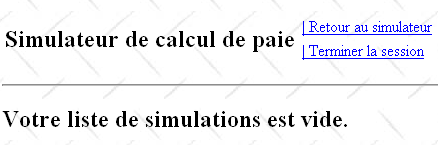
To display the view above, we will use the following [simulationsVides.xhtml] page:
<?xml version='1.0' encoding='UTF-8' ?>
<!DOCTYPE html PUBLIC "-//W3C//DTD XHTML 1.0 Transitional//EN" "http://www.w3.org/TR/xhtml1/DTD/xhtml1-transitional.dtd">
<html xmlns="http://www.w3.org/1999/xhtml"
      xmlns:h="http://java.sun.com/jsf/html"
      xmlns:f="http://java.sun.com/jsf/core"
      xmlns:ui="http://java.sun.com/jsf/facelets">

  <ui:composition template="layout.xhtml">
    <ui:define name="part1">
      <h2>Votre liste de simulations est vide.</h2>
    </ui:define>
  </ui:composition>
</html>
12.5.8. Action [retirerSimulation]
The user can remove simulations from their list:
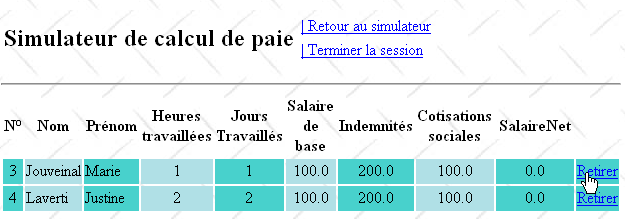
The result is as follows:
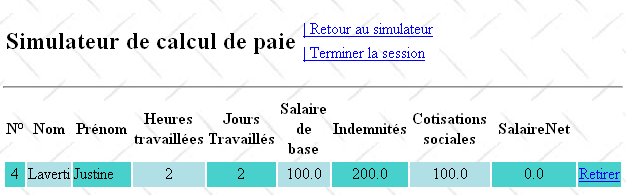
If we remove the last simulation from the list above, we will get the following result:
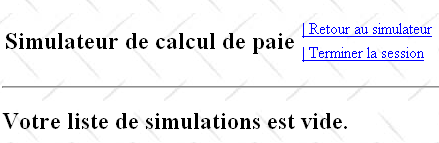
The code JSF in the [Retirer] column of the simulation table is as follows:
          <h:dataTable value="#{form.simulations}" var="simulation"
                       headerClass="simulationsHeaders" columnClasses="simuNum,simuNom,simuPrenom,simuHT,simuJT,simuSalaireBase,simuIndemnites,simuCotisationsSociales,simuSalaireNet">
...
            <h:column>
              <h:commandLink value="Retirer" action="#{form.retirerSimulation}">
                <f:setPropertyActionListener target="#{form.numSimulationToDelete}" value="#{simulation.num}"/>
              </h:commandLink>
            </h:column>
          </h:dataTable>
- Line 5: The link [Retirer] is associated with the method [retirerSimulation] of the class [Form]. This method needs to know the number of the simulation to be removed. This is provided by the <f:setPropertyActionListener> tag on line 8. This tag has two attributes, target and value: the target attribute designates a field in the model to which the value of the value attribute will be assigned. Here, the number of the simulation to be removed #{simulation.num} will be assigned to the field numSimulationToDelete of the class [Form]:
  // the view model
  ...
  private Integer numSimulationToDelete;
When the [retirerSimulation] method of the [Form] class is executed, it will be able to use the value previously stored in the numSimulationToDelete field.
Question: Write the [retirerSimulation] method of the [Form] class.
12.5.9. The [terminerSession] action
The code JSF for the link [Terminer la session] is as follows:
<h:commandLink id="cmdTerminerSession" immediate="true" value="#{msg['form.menu.terminerSession']}" action="#{form.terminerSession}" rendered="#{sessionData.menuTerminerSessionIsRendered}"/>
The action [terminerSession] associated with the link allows the user to log out and return to the empty data entry form:
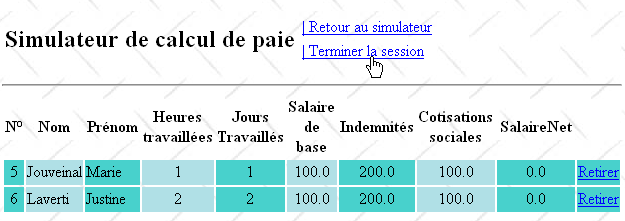
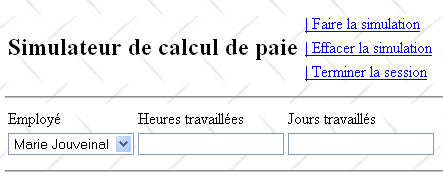
If the user had a list of simulations, it is cleared. Additionally, the simulation numbering resets to 1.
Question: Write the [terminerSession] method of the [Form] class.
12.6. Integration of the web layer into a 3-tier architecture JSF / EJB
The architecture of the previous web application was as follows:
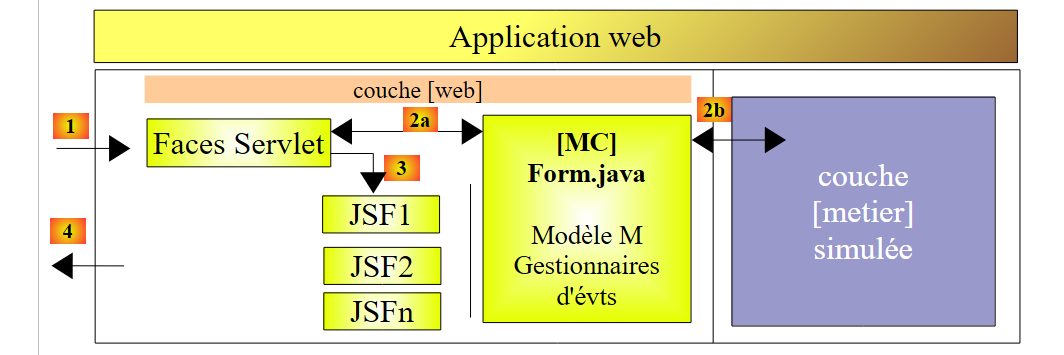 |
We replace the simulated [métier] layer with the [métier, DAO, jpa] layers implemented by EJB in Section 7.1:
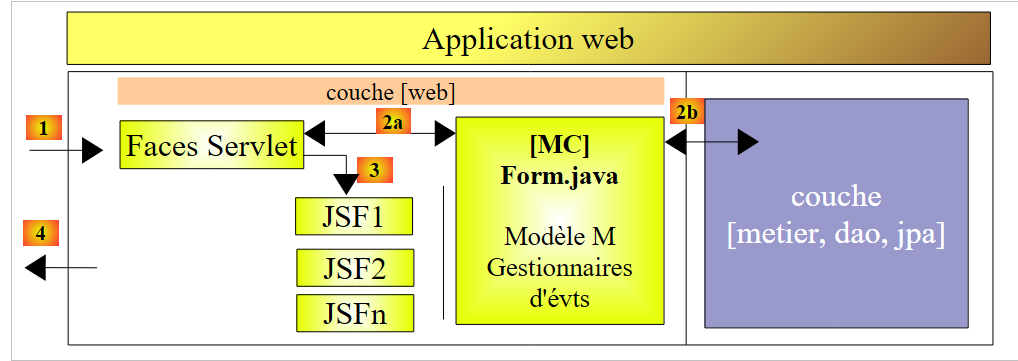 |
Practical exercise: Integrate the JSF and EJB layers following the methodology in Section 11.
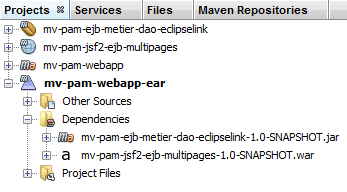 |