5. Routing
An application has multiple screens. On the web, each screen has an address (/ex17/doctors/2): it can be referenced, opened via a link, reloaded, or protected by guards. [Angular] manages these addresses using its router (the [@angular/router] package), which we’ve been using since the first example: The home page of the example app associates the address /ex01 with the page for Example 01, /ex02 with the page for Example 02, and so on. [Ionic] does not replace this router: it builds upon it and adds the functionality expected by a mobile app. Its [<ion-router-outlet>] component organizes pages into a stack: a new page is stacked on top of the previous one (with the Android animation), the phone’s Back button pops it off the stack, and the previous page—which remains in memory—reappears exactly as it was left. It combines the [Navigator] from [Flutter] and the [go_router] package.
5.1. Example 17: The Router
Example 17 has six pages: a home page, a list of doctors, a doctor’s profile, a search page, an “About” page loaded on demand, and a page for unknown addresses. The first five are grouped into a “shell,” with a tab bar at the bottom of the screen (four tabs: a doctor’s details page belongs to the Doctors tab).
5.1.1. The data
| // =========================================================================
// src/app/ex17-router/data.ts - the data of example 17
// -------------------------------------------------------------------------
// "Hard-coded" data, so as not to depend on a server in this example.
// =========================================================================
export interface Doctor {
id: number;
title: string;
firstName: string;
lastName: string;
specialty: string;
}
export const doctors: Doctor[] = [
{ id: 1, title: 'Mme', firstName: 'Marie', lastName: 'PELISSIER', specialty: 'general practitioner' },
{ id: 2, title: 'Mr', firstName: 'Paul', lastName: 'TATOU', specialty: 'pediatrician' },
{ id: 3, title: 'Melle', firstName: 'Sophie', lastName: 'DUPONT', specialty: 'general practitioner' },
];
|
"Hard-coded" data, so as not to depend on a server in this example: a table of objects described by the [Doctor] interface.
5.1.2. The routes
| // =========================================================================
// src/app/ex17-router/routes.ts - the ROUTES of example 17
// -------------------------------------------------------------------------
// An application has several screens ("pages"). Angular's ROUTER
// associates an ADDRESS (a path, as on the web: /ex17/doctors/2) with
// a page. Ionic relies on it: its <ion-router-outlet> turns it into a
// STACK of pages (we push, we pop, Android's Back button pops).
// These routes are the CHILDREN of the /ex17 route of app.routes.ts
// (loadChildren): their paths are relative to /ex17.
// 'doctors/:id' :id is a parameter (/ex17/doctors/2 -> id = "2");
// children routes displayed IN the "shell" (the top
// bar, the tab bar at the bottom);
// redirectTo a redirection: the old address leads to the new one;
// '**' the "wildcard": any address that no route recognizes;
// title the title of the document (browser tab);
// loadComponent DEFERRED loading: the code of the page is only
// downloaded on its first visit.
// =========================================================================
import { ResolveFn, Routes } from '@angular/router';
import { Shell } from './shell';
import { doctors } from './data';
import { Home } from './pages/home.page';
import { DoctorDetail } from './pages/doctor-detail.page';
import { DoctorList } from './pages/doctor-list.page';
import { NotFoundPage } from './pages/not-found.page';
import { Search } from './pages/search.page';
// the title of a doctor's page, computed from the :id parameter of the address
const doctorTitle: ResolveFn<string> = (route) => {
const doctor = doctors.find((m) => m.id === Number(route.paramMap.get('id')));
return doctor ? `${doctor.firstName} ${doctor.lastName}` : 'Unknown doctor';
};
export const routes: Routes = [
{
// the shell (Shell) contains the tab bar; its child
// routes are displayed IN the shell, above the bar
path: '',
component: Shell,
children: [
// /ex17 alone: we go to the home tab
{ path: '', redirectTo: 'home', pathMatch: 'full' },
{ path: 'home', title: 'Home', component: Home },
{ path: 'doctors', title: 'Doctors', component: DoctorList },
// a page with a PARAMETER: /ex17/doctors/2; it starts with
// 'doctors': it belongs to the Doctors tab, of which it
// pushes a page above the list
{ path: 'doctors/:id', title: doctorTitle, component: DoctorDetail },
// /ex17/search?q=pediatrician: the q parameter is a QUERY parameter
{ path: 'search', title: 'Search', component: Search },
// deferred loading: import() is a DYNAMIC import
// (a Promise); the code of the page is placed in a separate file
{
path: 'about',
title: 'About',
loadComponent: () => import('./pages/about.page').then((m) => m.About),
},
// a redirection: the route has no page, it sends to another address
{ path: 'physicians', redirectTo: 'doctors' },
],
},
// any other address under /ex17: the not-found page, OUTSIDE the shell
{ path: '**', title: 'Page not found', component: NotFoundPage },
];
|
A route associates a path with a page. The routes in Example 17 are stored in its folder, and the application’s /ex17 route loads them via [loadChildren] (discussed later): These are child routes of /ex17, and their paths are relative to /ex17 ([home] refers to the address /ex17/home).
- Lines 30–33: a function of type [ResolveFn<string>], which calculates the title of a doctor’s page based on the [:id] parameter of the URL ([route.paramMap.get('id')]). The [title] property of a route is the document title (the browser tab on the web): a string, or such a function. It is the counterpart to the [Title] widget of [Flutter];
- Lines 36–41: The example shell. The route does not have its own path ([path: '']); it displays the [Shell] component (the top bar and the tab bar), and its child routes ([children]) are displayed IN the shell. This is equivalent to [ShellRoute] from [go_router];
- line 43: the address /ex17 alone is redirected to /ex17/home. [pathMatch: 'full']: the route applies only if the remaining address is empty (otherwise, the empty path—which is the beginning of every address—would always apply);
- lines 44–45: a standard route: its path, its title, and its page component;
- line 49: a route with a parameter: [doctors/:id], where [:id] is a parameter ([/ex17/doctors/2]: [id] is equivalent to ["2"], which is always a string). With [go_router], this route was nested within the one in the list; here, it is adjacent to it. Its path begins with [doctors]: for [Ionic], it belongs to the Doctors tab, and its page is stacked above the list, in that tab’s stack;
- line 51: the search. Its query parameters (after [?]: [/ex17/search?q=pediatrician]) do not appear in the route’s path: any route can accept them;
- Lines 54–58: deferred loading. [loadComponent] is a function that returns a [Promise]: [import('./pages/about.page')] is a dynamic import of [JavaScript], which loads the file when executed, and [then] extracts the component from it. The compilation ([ng build]) then places the page’s code into a separate file, [JavaScript], which is downloaded on the first visit to the page. This is the counterpart to the import of [Dart] by [deferred as];
- line 60: a redirect: the route has no page; it redirects to another address. [redirectTo] can also be a function that calculates the address;
- line 64: the wildcard route [**] matches any address that no previous route has matched (the router tries the routes in order). It is placed outside the shell: the "page not found" page has its own header bar. This is the counterpart to [errorBuilder] from [go_router].
5.1.3. Startup
The router is set up once and for all, when the application starts, in the [main.ts] file:
| // the router: the list of routes (app.routes.ts);
// withComponentInputBinding: the parameters of a route are given to the
// inputs (input) of the page's component (see example 17)
provideRouter(routes, withComponentInputBinding()),
|
- line 32: [provideRouter] receives the list of routes from the application; the [withComponentInputBinding()] option provides the parameters for a route (those of the path, such as [:id], and those of the request, such as [?q=]) to the entries ([input()]) with the same name in the page component. This is what replaces [state.pathParameters['id']] with [go_router] here.
And the application route /ex17 (file [app.routes.ts]) loads the routes from the example:
| // examples 17 and 18 have their own routes, "children" of /ex17 and /ex18
{ path: 'ex17', loadChildren: () => import('./ex17-router/routes').then((m) => m.routes) },
{ path: 'ex18', loadChildren: () => import('./ex18-guards/routes').then((m) => m.routes) },
|
- line 31: [loadChildren]: like [loadComponent], a dynamic import; the example file [routes.ts], and everything it imports, is downloaded only the first time a URL beginning with /ex17 is visited.
5.1.4. The application shell
| // =========================================================================
// src/app/ex17-router/shell.ts - the "shell" of example 17
// -------------------------------------------------------------------------
// The top bar, the tab bar at the bottom, and, between the two, the page
// of the current route. It is Ionic's <ion-tabs> component:
// - <ion-tab-bar slot="bottom">: the tab bar, at the bottom;
// - <ion-tab-button tab="doctors">: a tab; touching it leads to
// the address /ex17/doctors. The active tab is the one whose name is the
// first segment of the address (after /ex17): /ex17/doctors/2 -> Doctors;
// - each tab has its OWN stack of pages: we can enter the
// detail of a doctor, switch to the Search tab, come back to the
// Doctors tab... and find the detail again.
// =========================================================================
import { Component, computed, inject } from '@angular/core';
import { Router } from '@angular/router';
import {
IonBackButton, IonButtons, IonHeader, IonIcon, IonLabel, IonTabBar, IonTabButton, IonTabs, IonTitle, IonToolbar,
} from '@ionic/angular';
import { addIcons } from 'ionicons';
import { home, informationCircle, people, search } from 'ionicons/icons';
import { DeferredLoading } from './pages/deferred-loading';
// the tabs: the name of the tab (= the path, after /ex17), the label, the icon
const tabs = [
{ tab: 'home', label: 'Home', icon: 'home' },
{ tab: 'doctors', label: 'Doctors', icon: 'people' },
{ tab: 'search', label: 'Search', icon: 'search' },
{ tab: 'about', label: 'About', icon: 'information-circle' },
];
@Component({
selector: 'app-ex17-shell',
imports: [
IonTabs, IonTabBar, IonTabButton, IonIcon, IonLabel, IonHeader, IonToolbar, IonButtons, IonBackButton, IonTitle,
DeferredLoading,
],
templateUrl: './shell.html',
styles: `
.address {
background: var(--ion-color-light);
color: var(--ion-color-light-contrast);
padding: 8px;
font-family: monospace;
font-size: 12px;
}
`,
})
export class Shell {
readonly tabs = tabs;
private readonly router = inject(Router);
// the current address. lastSuccessfulNavigation is a SIGNAL of the router:
// the last successful navigation; finalUrl: its address, after the
// redirections. decodeURIComponent: %20 becomes a space again
readonly address = computed(() => {
const navigation = this.router.lastSuccessfulNavigation();
return navigation?.finalUrl ? decodeURIComponent(this.router.serializeUrl(navigation.finalUrl)) : '';
});
constructor() {
// the icons used by the template
addIcons({ home, people, search, informationCircle });
}
}
|
| <!-- ======================================================================
shell.html - the shell of example 17: <ion-tabs>
====================================================================== -->
<ion-tabs>
<!-- slot="top": placed ABOVE the pages of the tabs -->
<ion-header slot="top">
<ion-toolbar color="primary">
<ion-buttons slot="start">
<!-- this Back button leaves the example: it pops the shell -->
<ion-back-button defaultHref="/" />
</ion-buttons>
<ion-title>Example 17 - the router</ion-title>
</ion-toolbar>
<div class="address">current address: {{ address() }}</div>
<!-- a progress bar, while a deferred page is loading -->
<app-deferred-loading />
</ion-header>
<!-- here, <ion-tabs> itself places an <ion-router-outlet>: the page of
the current child route -->
<!-- the tab bar, at the bottom: typical of a mobile application -->
<ion-tab-bar slot="bottom">
@for (tab of tabs; track tab.tab) {
<ion-tab-button [tab]="tab.tab">
<ion-icon [name]="tab.icon" />
<ion-label>{{ tab.label }}</ion-label>
</ion-tab-button>
}
</ion-tab-bar>
</ion-tabs>
|
The shell is component [<ion-tabs>] of [Ionic]: a tab bar, and, above it, the page of the selected tab.
- lines 25–30 (shell.ts): the tabs: a name (which is also the path after /ex17), a label, and an icon;
- lines 56–59 (shell.ts): the current address, a calculated signal ([computed]). The router exposes signals: [lastSuccessfulNavigation()], the last successful navigation, and [currentNavigation()], the current navigation (discussed later). [finalUrl] is the destination address, after redirects; [serializeUrl] converts it into a string; [decodeURIComponent] decodes the encoded characters ([%20] reverts to a space). Since the signal is re-read with each navigation, the displayed address follows;
- line 63 (shell.ts): the icons used by the template;
- lines 7–18 (shell.html): the top bar. [<ion-tabs>] places the elements marked [slot="top"] above the tab pages, and the others below. The Back button on this bar collapses the entire shell: it returns you to the examples menu;
- line 15 (shell.html): the current address;
- line 17 (shell.html): a progress bar, displayed during navigation (see below);
- lines 20–21 (shell.html): [<ion-tabs>] itself places, between the two bars, a [<ion-router-outlet>]: the current child route page. We do not write this;
- lines 24–31 (shell.html): the bottom tab bar ([<ion-tab-bar slot="bottom">]), typical of a mobile app, is the counterpart to [NavigationBar] of [Flutter]. Each [<ion-tab-button [tab]="...">] is a tab; tapping it leads to the address /ex17/<tab name>.
Two differences from [go_router]:
- the active tab is not calculated by the code: [<ion-tabs>] deduces it from the URL (the tab whose name is the first segment of the URL, after /ex17: [/ex17/doctors/2] refers to the [doctors] tab);
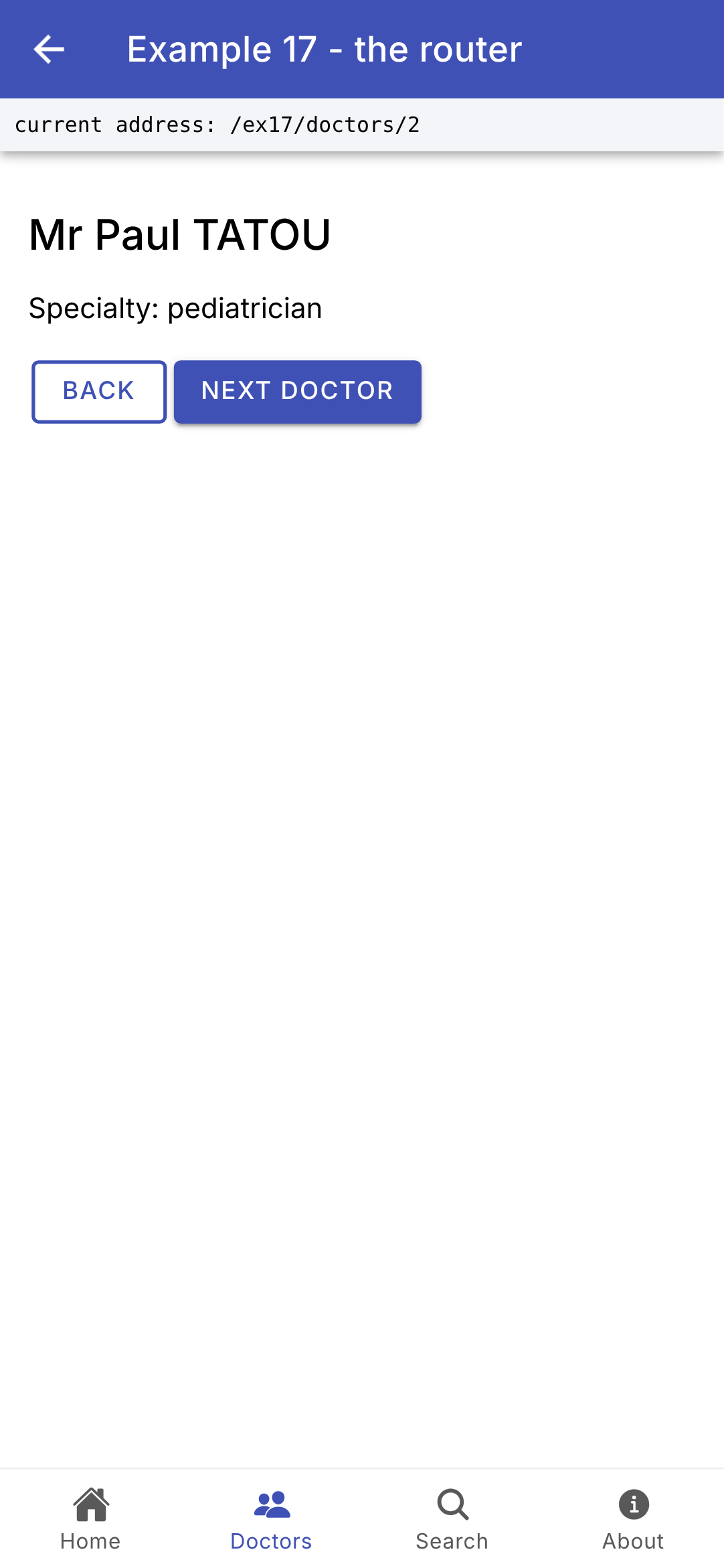
- Each tab has its own page stack. If you view a doctor’s details, switch to the Search tab, and then return to the Doctors tab, you’ll see the doctor’s details again, and the Back button takes you back to the list. This is the standard behavior for mobile apps (such as those for [Android] and [iOS]).
5.1.5. The pages
The pages in the tabs have only one [<ion-content>]: their top bar is that of the shell.
| // =========================================================================
// src/app/ex17-router/pages/home.page.ts - the home tab
// -------------------------------------------------------------------------
// routerLink: a LINK to an address; a tap leads there, like an
// <a href> link on the web, but without reloading the application.
// =========================================================================
import { Component } from '@angular/core';
import { RouterLink } from '@angular/router';
import { IonButton, IonContent } from '@ionic/angular';
@Component({
selector: 'app-ex17-home',
imports: [RouterLink, IonContent, IonButton],
templateUrl: './home.page.html',
})
export class Home {}
|
| <!-- ======================================================================
home.page.html - the home tab of example 17
====================================================================== -->
<!-- a tab page only has its content: the top bar is that of the shell -->
<ion-content class="ion-padding">
<p>
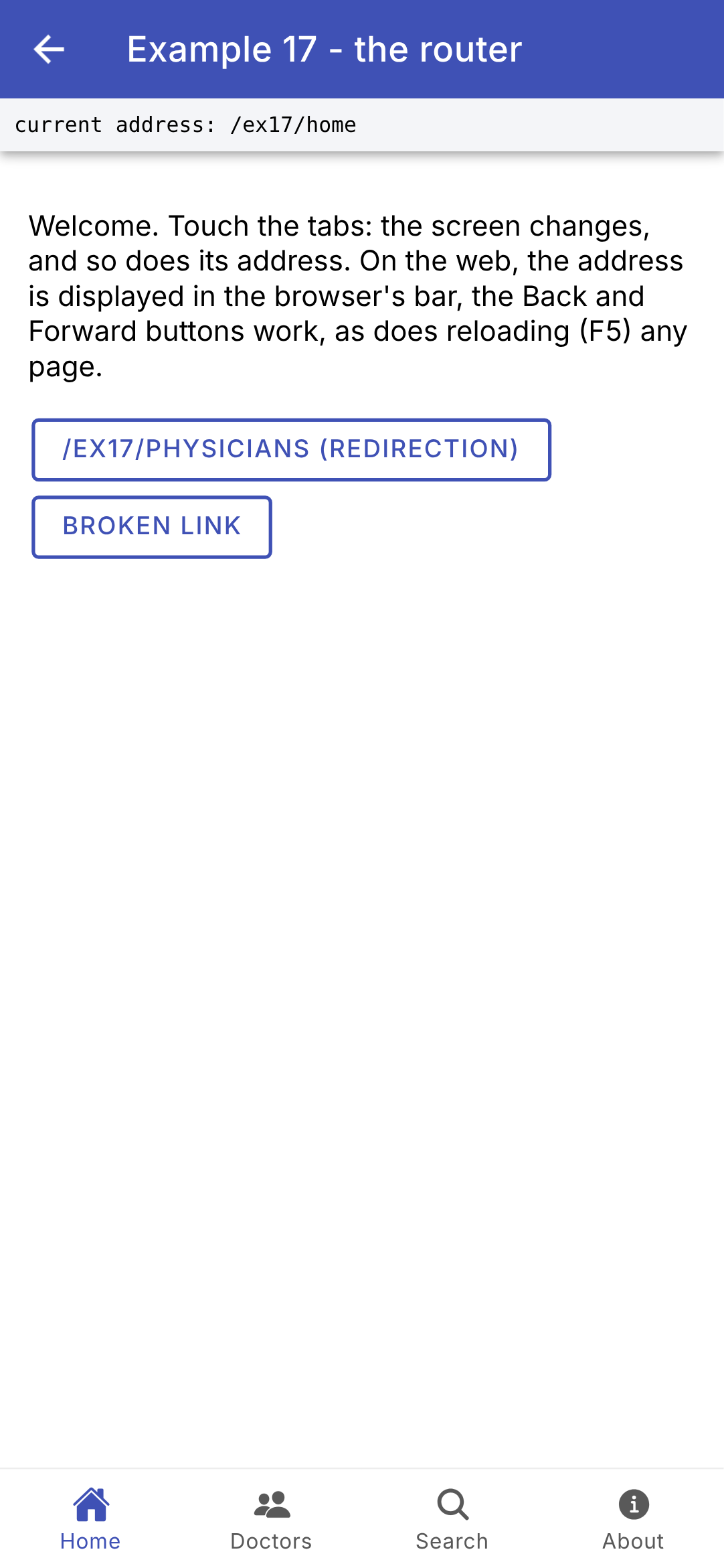
Welcome. Touch the tabs: the screen changes, and so does its address. On the web, the address
is displayed in the browser's bar, the Back and Forward buttons work, as does
reloading (F5) any page.
</p>
<!-- links to particular addresses -->
<ion-button fill="outline" routerLink="/ex17/physicians">/ex17/physicians (redirection)</ion-button>
<ion-button fill="outline" routerLink="/ex17/unknown-page">Broken link</ion-button>
</ion-content>
|
- lines 13–14 (HTML): two links. The [routerLink] directive from [Angular] (imported on line 9 of the .ts file) turns any element into a link: tapping it takes you to the specified address, just like a [<a href>] link on the web, but without reloading the application. The first leads to the /ex17/physicians redirect; the second, to an address that does not exist.
| // =========================================================================
// src/app/ex17-router/pages/doctor-list.page.ts - links with a parameter
// -------------------------------------------------------------------------
// [routerLink]="['/ex17/doctors', m.id]": the address is built from
// an array of segments: /ex17/doctors/2. The page of the doctor is
// PUSHED above the list: the Back button returns to it.
// =========================================================================
import { Component } from '@angular/core';
import { RouterLink } from '@angular/router';
import { IonContent, IonItem, IonLabel, IonList } from '@ionic/angular';
import { doctors } from '../data';
@Component({
selector: 'app-ex17-doctor-list',
imports: [RouterLink, IonContent, IonList, IonItem, IonLabel],
templateUrl: './doctor-list.page.html',
})
export class DoctorList {
readonly doctors = doctors;
}
|
| <!-- ======================================================================
doctor-list.page.html - the Doctors tab of example 17
====================================================================== -->
<ion-content>
<ion-list>
@for (m of doctors; track m.id) {
<!-- button: the item reacts to touch; detail: the > arrow on the right -->
<ion-item button detail [routerLink]="['/ex17/doctors', m.id]">
<ion-label>{{ m.title }} {{ m.firstName }} {{ m.lastName }}</ion-label>
</ion-item>
}
</ion-list>
</ion-content>
|
- Line 9 (HTML): a clickable list item ([button]), with a right arrow ([detail]). Its URL is constructed from an array of segments: [[routerLink]="['/ex17/doctors', m.id]"] yields /ex17/doctors/2. The doctor’s page is PUSHED above the list (a “forward” navigation step): the Back button returns to that page.
| // =========================================================================
// src/app/ex17-router/pages/doctor-detail.page.ts - a page with a parameter
// -------------------------------------------------------------------------
// The router gives the :id parameter of the address to the id INPUT of the page
// (input), a STRING ("2"): that is withComponentInputBinding() (main.ts).
// If we go from /ex17/doctors/1 to /ex17/doctors/2, Angular keeps the
// same page and only changes the value of the input: the displayed
// doctor, computed (computed) from it, follows.
// Navigation by CODE: NavController, Ionic's navigation service.
// =========================================================================
import { Component, computed, inject, input } from '@angular/core';
import { IonButton, IonContent, IonRouterOutlet, IonText, NavController } from '@ionic/angular';
import { doctors } from '../data';
@Component({
selector: 'app-ex17-doctor-detail',
imports: [IonContent, IonButton, IonText],
templateUrl: './doctor-detail.page.html',
})
export class DoctorDetail {
// the :id parameter of the address
readonly id = input.required<string>();
// Number("abc") is NaN: no doctor will be found (undefined)
readonly doctor = computed(() => doctors.find((m) => m.id === Number(this.id())));
// the number of the next doctor: 1 -> 2 -> 3 -> 1
readonly next = computed(() => ((this.doctor()?.id ?? 0) % doctors.length) + 1);
private readonly navCtrl = inject(NavController);
// the page stack of the tab (the <ion-router-outlet> that displays this page)
private readonly outlet = inject(IonRouterOutlet);
back(): void {
// canGoBack: is there a page underneath? (not if we arrived
// directly at this address, on the web)
if (this.outlet.canGoBack()) {
this.outlet.pop();
} else {
this.navCtrl.navigateBack('/ex17/doctors');
}
}
nextDoctor(): void {
// replaceUrl: the address REPLACES the current address in the history
// (no push: the Back button leads back to the list)
this.navCtrl.navigateForward(['/ex17/doctors', this.next()], { replaceUrl: true });
}
}
|
| <!-- ======================================================================
doctor-detail.page.html - the page of a doctor (example 17)
====================================================================== -->
<ion-content class="ion-padding">
<!-- @if (...; as m): the value of the test, named m, in the block -->
@if (doctor(); as m) {
<h2>{{ m.title }} {{ m.firstName }} {{ m.lastName }}</h2>
<p>Specialty: {{ m.specialty }}</p>
<ion-button fill="outline" (click)="back()">Back</ion-button>
<ion-button (click)="nextDoctor()">Next doctor</ion-button>
} @else {
<ion-text color="danger">Doctor no. {{ id() }} does not exist.</ion-text>
}
</ion-content>
|
- line 23 (.ts): the entry [id], which receives the parameter [:id] from the address ([withComponentInputBinding]). [input.required<string>()]: a required entry, of type string;
- Line 26 (.ts): the doctor, a signal calculated from the input. [Number("abc")] equals [NaN], which is not equal to any number: an incorrect [id] yields [undefined] (it was [int.tryParse] with [Dart]). If you navigate from /ex17/doctors/1 to /ex17/doctors/2, [Angular] keeps the same page and only changes the value of the entry: the displayed doctor follows;
- line 28 (.ts): the number of the next doctor (1, 2, 3, then 1);
- line 30 (.ts): [NavController], the navigation service for [Ionic]: navigation via CODE;
- line 32 (.ts): [IonRouterOutlet]: the page stack displaying this page (the one on the “Doctors” tab);
- lines 34–42 (.ts): the Back button on the page. If there is a page below it ([canGoBack()]), it is removed from the stack ([pop()]); otherwise (on the web, the user may have arrived directly at this address), the user is taken to the list with a “back” animation ([navigateBack]);
- lines 44–48 (.ts): the next doctor: a “forward” navigation ([navigateForward]), but [replaceUrl: true]: the new address REPLACES the current address in the history. No stack: the Back button returns to the list, not to the previous doctor (which was [context.pushReplacement] with [go_router]);
- Lines 7–14 (HTML): [@if (doctor(); as m)]: if the doctor exists, they are named [m] in the block; otherwise ([@else]), a message appears.
With [Ionic], there are three ways to navigate:
- via a link: [routerLink];
- via the [Angular] router: [router.navigate([...])] or [router.navigateByUrl('...')];
- via the [NavController] from [Ionic]: [navigateForward] (stacking a page was [context.push]), [navigateBack] (go back, by unstacking the pages on top), [navigateRoot] (start with a new stack—this used to be [context.go]), [back()] (like the Back button). These methods call the [Angular] router, specifying the DIRECTION of the navigation, on which the animation and stack management depend.
| // =========================================================================
// src/app/ex17-router/pages/search.page.ts - a page driven by the address
// -------------------------------------------------------------------------
// /ex17/search?q=pediatrician: the page is entirely described by its
// address. On the web, we can bookmark it, reload it, go
// back. Searching means GOING to the address /ex17/search?q=...:
// the page displays what the address says, and nothing else.
// The QUERY parameter q (after the ?) is also given to the input
// of the same name (withComponentInputBinding); it is undefined if absent.
// =========================================================================
import { Component, computed, inject, input } from '@angular/core';
import { Router } from '@angular/router';
import { IonContent, IonItem, IonLabel, IonList, IonSearchbar } from '@ionic/angular';
import { doctors } from '../data';
@Component({
selector: 'app-ex17-search',
imports: [IonContent, IonSearchbar, IonList, IonItem, IonLabel],
templateUrl: './search.page.html',
})
export class Search {
// the ?q=... parameter of the address
readonly q = input<string>();
// the results: recomputed when the address (hence q) changes
readonly results = computed(() => {
const text = (this.q() ?? '').toLowerCase();
return doctors.filter((m) => `${m.firstName} ${m.lastName} ${m.specialty}`.toLowerCase().includes(text));
});
private readonly router = inject(Router);
search(input: string): void {
// queryParams: the router builds the address, encoding what is
// needed (space -> %20)
this.router.navigate(['/ex17/search'], { queryParams: { q: input.trim() } });
}
}
|
| <!-- ======================================================================
search.page.html - the Search tab of example 17
====================================================================== -->
<ion-content class="ion-padding">
<!-- a NON-controlled field: [value] gives it the value of the address (and
gives it again if the address changes: browser's Back button);
#field: a reference to the component, to read its value;
enterkeyhint="search": the Enter key of the keyboard becomes a magnifying glass -->
<ion-searchbar
#field
placeholder="name or specialty"
enterkeyhint="search"
[value]="q() ?? ''"
(keyup.enter)="search(field.value ?? '')"
/>
<ion-list>
@for (m of results(); track m.id) {
<ion-item>
<ion-label>{{ m.firstName }} {{ m.lastName }} ({{ m.specialty }})</ion-label>
</ion-item>
} @empty {
<ion-item>
<ion-label color="medium">No result.</ion-label>
</ion-item>
}
</ion-list>
</ion-content>
|
- Line 24 (.ts): The [q] entry receives the [?q=...] request parameter. It may be missing: in that case, the input is [undefined], resulting in the type [input<string>()] (a string or [undefined]) and the [?? ''] values;
- lines 27–30 (.ts): the results, recalculated when the address (i.e., [q]) changes;
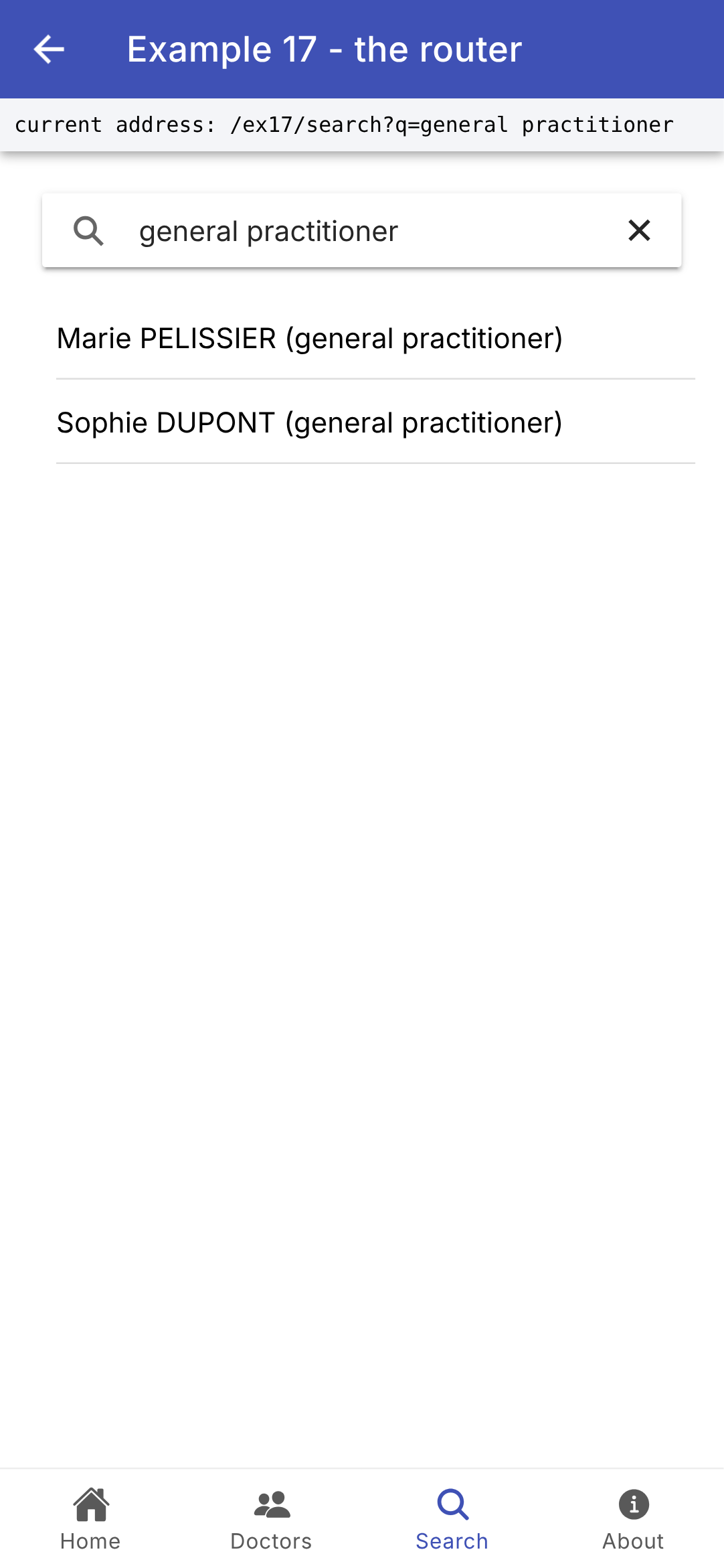
- lines 34–38 (.ts): search—this is GOING to the address /ex17/search?q=<input>. [router.navigate] receives the path, and [queryParams] receives the request parameters; it constructs the URL by encoding the necessary parts (a space becomes [%20]). The page is fully described by its address: on the web, you can bookmark it, reload it, or go back;
- Lines 10–16 (HTML): a search bar for [Ionic] ([<ion-searchbar>], with its magnifying glass and clear button). This is a NON-controlled field: [[value]] sets its value to the address and resets it if the address changes (via the browser’s Back button), just like the key [ValueKey(q)] for [Flutter]. [#field] is a template reference variable: it refers to the component whose value ([field.value]) is read when the Enter key ([(keyup.enter)]) is pressed. [enterkeyhint="search"]: The Enter key on the phone’s keyboard becomes a magnifying glass;
- lines 18–26 (html): the results; [@empty]: the content displayed when the list is empty.
| // =========================================================================
// src/app/ex17-router/pages/about.page.ts - a page loaded on demand
// -------------------------------------------------------------------------
// See loadComponent in routes.ts: the code of this page is placed, by
// the compilation (ng build), in a separate JavaScript file.
// =========================================================================
import { Component } from '@angular/core';
import { IonContent } from '@ionic/angular';
@Component({
selector: 'app-ex17-about',
imports: [IonContent],
templateUrl: './about.page.html',
})
export class About {}
|
| <!-- ======================================================================
about.page.html - the About tab of example 17
====================================================================== -->
<ion-content class="ion-padding">
<p>
On the web, the code of this page was downloaded on the first visit (Network tab of the
development tools: a chunk-XXXXXXXX.js file). On a phone, this file is
already in the application: it is read on the spot, without download.
</p>
</ion-content>
|
The page loaded on demand (see [loadComponent] in [routes.ts]) is nothing special: it’s the route that determines the deferred loading. The result of [ng build] displays its separate file (“Lazy chunk files ... about-page”). In the sample application, incidentally, all pages are loaded this way (see [app.routes.ts]): upon startup, only the menu is downloaded.
| // =========================================================================
// src/app/ex17-router/pages/deferred-loading.ts
// -------------------------------------------------------------------------
// A progress bar, displayed as long as a navigation is IN PROGRESS:
// during this time, the router downloads the code of a deferred page
// (loadComponent), or waits for the answer of a guard (example 18).
// currentNavigation is a SIGNAL of the router: the navigation in progress, or
// null when there is none.
// =========================================================================
import { Component, inject } from '@angular/core';
import { Router } from '@angular/router';
import { IonProgressBar } from '@ionic/angular';
@Component({
selector: 'app-deferred-loading',
imports: [IonProgressBar],
templateUrl: './deferred-loading.html',
})
export class DeferredLoading {
readonly router = inject(Router);
}
|
| <!-- ======================================================================
deferred-loading.html - an "indeterminate" progress bar
====================================================================== -->
@if (router.currentNavigation()) {
<ion-progress-bar type="indeterminate" />
}
|
With [Flutter], the [DeferredLoading] widget displayed a loading indicator while waiting for the page code. With [Angular], the router itself waits for the code before displaying the page: the previous page remains on the screen during this time. The [DeferredLoading] component therefore displays a progress bar as long as navigation is in progress:
- line 5 (html): [router.currentNavigation()] is a signal from the router: navigation in progress, or [null]. While a deferred page is being downloaded (or while waiting for a guard, example 18), the progress bar ([<ion-progress-bar type="indeterminate">], an endless animated bar) is displayed; at the end of the navigation, the signal reverts to [null], and it disappears. The shell places it below its top bar (line 17 of shell.html).
| // =========================================================================
// src/app/ex17-router/pages/not-found.page.ts - the unknown addresses
// -------------------------------------------------------------------------
// The page of the wildcard route '**' (routes.ts): it is OUTSIDE the
// shell, so it has its own top bar.
// =========================================================================
import { Component, computed, inject } from '@angular/core';
import { Router } from '@angular/router';
import { IonButton, IonContent, IonHeader, IonText, IonTitle, IonToolbar, NavController } from '@ionic/angular';
@Component({
selector: 'app-ex17-not-found-page',
imports: [IonHeader, IonToolbar, IonTitle, IonContent, IonText, IonButton],
templateUrl: './not-found.page.html',
})
export class NotFoundPage {
private readonly router = inject(Router);
private readonly navCtrl = inject(NavController);
// the requested address (see shell.ts)
readonly address = computed(() => {
const navigation = this.router.lastSuccessfulNavigation();
return navigation?.finalUrl ? decodeURIComponent(this.router.serializeUrl(navigation.finalUrl)) : '';
});
backHome(): void {
// navigateBack: a "backward" navigation (the animation goes from left
// to right); the not-found page is popped
this.navCtrl.navigateBack('/ex17/home');
}
}
|
| <!-- ======================================================================
not-found.page.html - the page of unknown addresses (example 17)
====================================================================== -->
<ion-header>
<ion-toolbar color="primary">
<ion-title>Page not found</ion-title>
</ion-toolbar>
</ion-header>
<ion-content class="ion-padding">
<p><ion-text color="danger">No page at the address {{ address() }}.</ion-text></p>
<ion-button (click)="backHome()">Back to home</ion-button>
</ion-content>
|
The unknown addresses page is outside the shell: it has its own top bar (lines 5–9 of the HTML). It displays the requested address (lines 22–25 of the .ts file, as in the shell), and its button takes the user back to the home page via a “back” navigation (line 30 of the .ts file): the “page not found” page is unstacked, and the shell, which remained in memory underneath, reappears.
5.1.6. Execution
The home page; a doctor’s profile (stacked above the list: the tab bar is still there, and the phone’s Back button returns to the list); the search results after typing “general practitioner” and pressing Enter; an unknown address (the broken link on the home page):
In a browser ([ng serve]), the address also appears in the address bar, the Back and Forward buttons work, and you can type an address manually: /ex17/doctors/3, /ex17/search?q=pediatrician, /ex17/physicians....
Compared to [go_router], the router in [Angular] is more declarative: routes are a simple list of objects, parameters are passed in the page’s input fields, and lazy loading is simply a property of the route. [Ionic] adds features specific to mobile devices: the page stack ([<ion-router-outlet>]), tabs with separate stacks ([<ion-tabs>]), navigation direction, and navigation animations ([NavController]). We’ll find exactly the same concepts in the [Angular] client of [RdvMedecins] (the routes, [routerLink], [router.navigate]): only the components of [Ionic] are specific to mobile devices.
5.2. Example 18: Navigation Restrictions
Certain pages should only be opened by a logged-in user, or by a user with a specific role. The router in [Angular] protects them with guards: functions it calls before proceeding to those pages.
5.2.1. The session
| // =========================================================================
// src/app/ex18-guards/session.ts - a SIMULATED session (without a server)
// -------------------------------------------------------------------------
// The logged-in user must be known to the PAGES (the top bar,
// the schedule) and to the GUARDS of the router (functions, which are not
// components). We store it in a SERVICE, a single object that everyone
// obtains with inject(Session) (see example 14):
// - a private signal, the state;
// - a read-only view of this signal;
// - methods to modify it.
// Those who read the signal (the templates) are notified when it changes.
// (Example 23 will do the same thing with a real server.)
// =========================================================================
import { Injectable, signal } from '@angular/core';
export type Role = 'ADMIN' | 'DOCTOR' | 'USER';
export interface User {
login: string;
role: Role;
}
// three "hard-coded" accounts (password = login)
const accounts: Record<string, Role> = { admin: 'ADMIN', pelissier: 'DOCTOR', martin: 'USER' };
// providedIn: 'root': ONE single instance, for the whole application
@Injectable({ providedIn: 'root' })
export class Session {
// the state: null, nobody is logged in
private readonly _user = signal<User | null>(null);
// asReadonly: we can read the signal, not modify it
readonly user = this._user.asReadonly();
logIn(login: string, password: string): boolean {
const role = accounts[login];
if (role === undefined || password !== login) {
return false;
}
this._user.set({ login, role });
return true;
}
logOut(): void {
this._user.set(null);
}
}
|
The logged-in user must be recognized by the pages (the top bar, the schedule) and the router guards—features that are not components. It is stored in a service (see Example 14), a single object that everyone obtains via [inject(Session)]:
- lines 17–22: the roles (a “union” type consisting of three strings) and the user;
- line 25: three “hard-coded” accounts (password = login): an object that associates a login with a role ([Record<string, Role>]);
- line 28: [providedIn: 'root']: a single instance of the service for the entire application;
- lines 31–33: the state, a private signal ([null]: no one is logged in), and its read-only view ([asReadonly()]): others can read it, but only the service’s methods can modify it;
- lines 35–42: the connection, simulated. It modifies the signal: everything that reads it (templates, calculated signals) follows suit. This is the [notifyListeners()] of the [ChangeNotifier] of [Flutter], without having to write it. (Example 23 will do the same thing with a real server.)
5.2.2. Guards and Protected Paths
| // =========================================================================
// src/app/ex18-guards/routes.ts - routes PROTECTED by guards
// -------------------------------------------------------------------------
// canActivate: the list of the GUARDS of a route, functions (of type
// CanActivateFn) that the router calls BEFORE going there. A guard receives
// the requested route and the state of the navigation (state.url: the requested
// address), and returns:
// - true: the navigation continues;
// - false: it is cancelled;
// - a UrlTree (an address built by the router): the navigation
// is replaced by a navigation to this address.
// A guard can use inject(): it is called in an "injection
// context".
//
// It is the client-side equivalent of the NestJS guards (JwtAuthGuard,
// RolesGuard) - with a FUNDAMENTAL difference: a client guard is
// only a convenience. The application is in the hands of the user, who
// can modify it at will. The real protection of the data remains that
// of the SERVER (see the chapter on the black box).
// =========================================================================
import { inject } from '@angular/core';
import { CanActivateFn, Router, Routes } from '@angular/router';
import { Shell } from './shell';
import { Home } from './pages/home.page';
import { Schedule } from './pages/schedule.page';
import { Login } from './pages/login.page';
import { Role, Session } from './session';
// the "login required" guard: not logged in -> to the login page,
// remembering where we wanted to go (returnUrl parameter)
export const loginRequired: CanActivateFn = (route, state) => {
if (inject(Session).user() === null) {
return inject(Router).createUrlTree(['/ex18/login'], { queryParams: { returnUrl: state.url } });
}
return true;
};
// the "role required" guard: a function that BUILDS a guard
export function roleRequired(...roles: Role[]): CanActivateFn {
return (route, state) => {
const u = inject(Session).user();
if (u === null || !roles.includes(u.role)) {
// logged in, but not with the right role: back to home, with a reason
return inject(Router).createUrlTree(['/ex18'], { queryParams: { denied: state.url } });
}
return true;
};
}
export const routes: Routes = [
{
path: '',
component: Shell,
children: [
{ path: '', pathMatch: 'full', component: Home },
{ path: 'login', component: Login },
{ path: 'schedule', canActivate: [loginRequired], component: Schedule },
{
path: 'administration',
// the guards, in order: the first one that does not return true wins
canActivate: [loginRequired, roleRequired('ADMIN')],
// the code of the page is only loaded once the guards are passed
loadComponent: () => import('./pages/administration.page').then((m) => m.Administration),
},
// any other address (no route matches): back to home
{ path: '**', redirectTo: '' },
],
},
];
|
An activation guard is a function of type [CanActivateFn], placed in a route’s list [canActivate]. The router calls it before proceeding to that route; it receives the requested route and the navigation state ([state.url]: the requested address), and returns:
- [true]: navigation continues;
- [false]: navigation is canceled;
- a [UrlTree], an address generated by the router ([router.createUrlTree]): navigation is replaced by navigation to that address.
A guard may also return a [Promise] or a [Observable] with one of these values (to query a server, for example). The code:
- lines 32–37: the “login required” guard: not logged in? Redirects to the login page, while retaining the intended destination (request parameter [returnUrl]). The guard uses [inject()]: the router calls it in an “injection context”;
- lines 40–49: the “role required” guard is BUILT by a function, which receives the permitted roles ([...roles]: as many parameters as desired, grouped in an array) and returns the guard. Logged in, but without the correct role: redirected to the home page, with a reason (parameter [denied]);
- lines 52–55: the shell and its child routes, as in Example 17;
- line 58: the schedule page requires the user to be logged in;
- lines 59–65: the administration requires the user to be logged in AND to have the role ADMIN. The guards in the list are called in order; the first one that does not return [true] wins (in this case, it was the chain from [??] to [go_router]). The page code is loaded ([loadComponent]) only after the guards have been passed;
- line 67: any other address under /ex18 redirects to the home page.
This is the client-side equivalent of the server safeguards [NestJS] ([JwtAuthGuard], [RolesGuard]), with one FUNDAMENTAL difference: a client-side safeguard is merely a convenience (to avoid displaying an unnecessary screen). The application is in the user’s hands, who can modify it at will; true data protection remains on the server, which re-verifies everything with each request (see the chapter on the black box).
A difference from [go_router]: its option [refreshListenable] re-evaluated the guards for the current page with every session change (you were redirected to the login page if you logged out from the calendar). The router in [Angular] only calls the guards when navigating. This is why logging out (as described later) is followed by navigation to the home page.
5.2.3. The shell and the pages
| // =========================================================================
// src/app/ex18-guards/shell.ts - the links, and the logged-in user
// -------------------------------------------------------------------------
// The page of example 18: the top bar (the logged-in user), a
// bar of links, and, below, the page of the current child route, placed
// by <router-outlet>. The template READS the signal of the session: it therefore
// follows the logged-in user.
// =========================================================================
import { Component, inject } from '@angular/core';
import { Router, RouterLink, RouterLinkActive, RouterOutlet } from '@angular/router';
import {
IonBackButton, IonButton, IonButtons, IonChip, IonContent, IonHeader, IonIcon, IonTitle, IonToolbar,
} from '@ionic/angular';
import { addIcons } from 'ionicons';
import { logOutOutline } from 'ionicons/icons';
import { DeferredLoading } from '../ex17-router/pages/deferred-loading';
import { Session } from './session';
@Component({
selector: 'app-ex18-shell',
imports: [
RouterOutlet, RouterLink, RouterLinkActive, IonHeader, IonToolbar, IonButtons, IonBackButton, IonTitle,
IonButton, IonChip, IonIcon, IonContent, DeferredLoading,
],
templateUrl: './shell.html',
styles: `
.links ion-button { text-transform: none; }
.links .active { font-weight: bold; }
`,
})
export class Shell {
readonly session = inject(Session);
private readonly router = inject(Router);
constructor() {
addIcons({ logOutOutline });
}
logOut(): void {
this.session.logOut();
this.router.navigateByUrl('/ex18');
}
}
|
| <!-- ======================================================================
shell.html - the shell of example 18
====================================================================== -->
<ion-header>
<ion-toolbar color="primary">
<ion-buttons slot="start">
<ion-back-button defaultHref="/" />
</ion-buttons>
<ion-title>Example 18 - guards</ion-title>
<ion-buttons slot="end">
<!-- @if (...; as u): the logged-in user, named u in the block -->
@if (session.user(); as u) {
<ion-chip outline color="light">{{ u.login }} {{ u.role }}</ion-chip>
<ion-button aria-label="logout" (click)="logOut()">
<ion-icon slot="icon-only" name="log-out-outline" />
</ion-button>
} @else {
<ion-button routerLink="/ex18/login">login</ion-button>
}
</ion-buttons>
</ion-toolbar>
<!-- the links; routerLinkActive: the CSS class "active" is set on the
link that designates the displayed page; exact: the whole address must
match (otherwise /ex18 would be "active" on all the pages) -->
<ion-toolbar class="links">
<ion-button fill="clear" size="small" routerLink="/ex18" routerLinkActive="active"
[routerLinkActiveOptions]="{ exact: true }">Home</ion-button>
<ion-button fill="clear" size="small" routerLink="/ex18/schedule" routerLinkActive="active">
Schedule (logged in)</ion-button>
<ion-button fill="clear" size="small" routerLink="/ex18/administration" routerLinkActive="active">
Administration (ADMIN)</ion-button>
</ion-toolbar>
<app-deferred-loading />
</ion-header>
<ion-content class="ion-padding">
<!-- the page of the current child route -->
<router-outlet />
</ion-content>
|
- line 17 (.ts): the shell reuses the progress bar from Example 17;
- lines 40–43 (.ts): logout, then the home page;
- Lines 11–21 (HTML): The top bar reads the session token; it tracks the logged-in user (it was [ListenableBuilder] with [Flutter]). When logged in, a [<ion-chip>] (a “chip”) displays the user’s login and role next to a logout button; otherwise, a link to the login page appears;
- lines 26–33 (HTML): a second bar containing the links. The [routerLinkActive="active"] directive applies the CSS class [active] (in bold, line 29 of the .ts file) to the link pointing to the displayed page. For the home page, [[routerLinkActiveOptions]="{ exact: true }"] requires that the full URL match: otherwise, since /ex18 is the beginning of all URLs in the example, this link would always be “active”;
- line 39 (html): [<router-outlet>], and that of [Angular]: the page of the current child path. These pages are merely snippets of the shell’s content, without the top bar or animation: the simple [<router-outlet>] from [Angular] is sufficient within the shell’s [<ion-content>]. The [<ion-router-outlet>] of [Ionic] is reserved for complete pages, which are stacked.
| // =========================================================================
// src/app/ex18-guards/pages/login.page.ts - the login page
// -------------------------------------------------------------------------
// After logging in, we send the user back to the page they wanted to
// open (?returnUrl=... parameter put there by the guard), or to home.
// =========================================================================
import { Component, inject, input, signal } from '@angular/core';
import { FormsModule } from '@angular/forms';
import { Router } from '@angular/router';
import { IonButton, IonCard, IonCardContent, IonInput, IonText } from '@ionic/angular';
import { Session } from '../session';
@Component({
selector: 'app-ex18-login',
imports: [FormsModule, IonCard, IonCardContent, IonInput, IonButton, IonText],
templateUrl: './login.page.html',
})
export class Login {
// the requested address, put there by the loginRequired guard
readonly returnUrl = input<string>();
// the fields of the form and the error: signals
readonly login = signal('');
readonly password = signal('');
readonly error = signal(false);
private readonly session = inject(Session);
private readonly router = inject(Router);
submit(): void {
if (!this.session.logIn(this.login().trim(), this.password())) {
this.error.set(true);
return;
}
// we only accept an INTERNAL path: it starts with /, but not with //
// (//site.com/... designates ANOTHER site) - no redirection to another site
const r = this.returnUrl();
const internal = r !== undefined && r.startsWith('/') && !r.startsWith('//');
this.router.navigateByUrl(internal ? r : '/ex18');
}
}
|
| <!-- ======================================================================
login.page.html - the login form (example 18)
====================================================================== -->
@if (returnUrl()) {
<ion-card color="warning">
<ion-card-content>Log in to open {{ returnUrl() }}.</ion-card-content>
</ion-card>
}
<!-- [(ngModel)]="login": the field and the login signal stay equal -->
<ion-input label="login" labelPlacement="floating" fill="outline" class="ion-margin-bottom" [(ngModel)]="login" />
<ion-input label="password" labelPlacement="floating" fill="outline" type="password"
[(ngModel)]="password" (keyup.enter)="submit()" />
<ion-button class="ion-margin-top" (click)="submit()">Log in</ion-button>
@if (error()) {
<p><ion-text color="danger">Incorrect login or password.</ion-text></p>
}
|
- line 21 (.ts): the requested address, entered by the guard in the [returnUrl] parameter;
- lines 24–26 (.ts): the form fields and the error: signals;
- lines 31–41 (.ts): the connection. If it fails, an error is returned; otherwise, the user is redirected to the page they wanted to open, or to the home page. Only an internal path is accepted: it begins with [/], but not with [//] ([//site.com/...] refers to ANOTHER site). On the web, a connection address generated by a third party ([/ex18/login?returnUrl=//pirate-site.com]) will therefore never lead anywhere else. [router.navigateByUrl] accepts a complete address, including its query parameters;
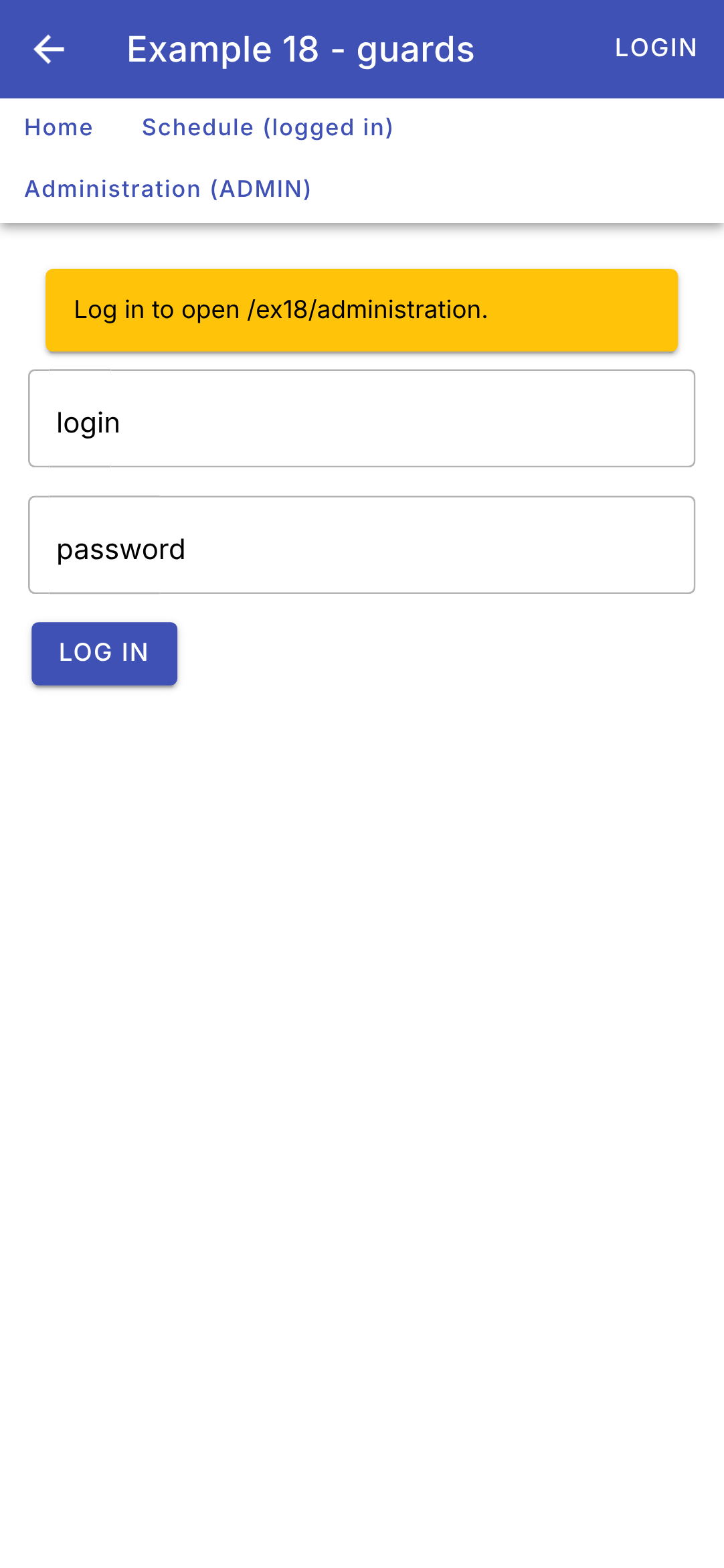
- lines 5–9 (HTML): the reason for the connection;
- lines 11–13 (html): [[(ngModel)]="login"] links the field to the [login] signal in both directions (see example 05); [(keyup.enter)] submits the form by pressing the Enter key.
The other pages are very simple:
| // =========================================================================
// src/app/ex18-guards/pages/home.page.ts - the public page
// -------------------------------------------------------------------------
// ?denied=...: put in the address by the roleRequired guard when the role
// does not fit; the router gives it to the denied input.
// =========================================================================
import { Component, input } from '@angular/core';
import { IonCard, IonCardContent } from '@ionic/angular';
@Component({
selector: 'app-ex18-home',
imports: [IonCard, IonCardContent],
templateUrl: './home.page.html',
})
export class Home {
readonly denied = input<string>();
}
|
| <!-- ======================================================================
home.page.html - the public page of example 18
====================================================================== -->
@if (denied()) {
<ion-card color="danger">
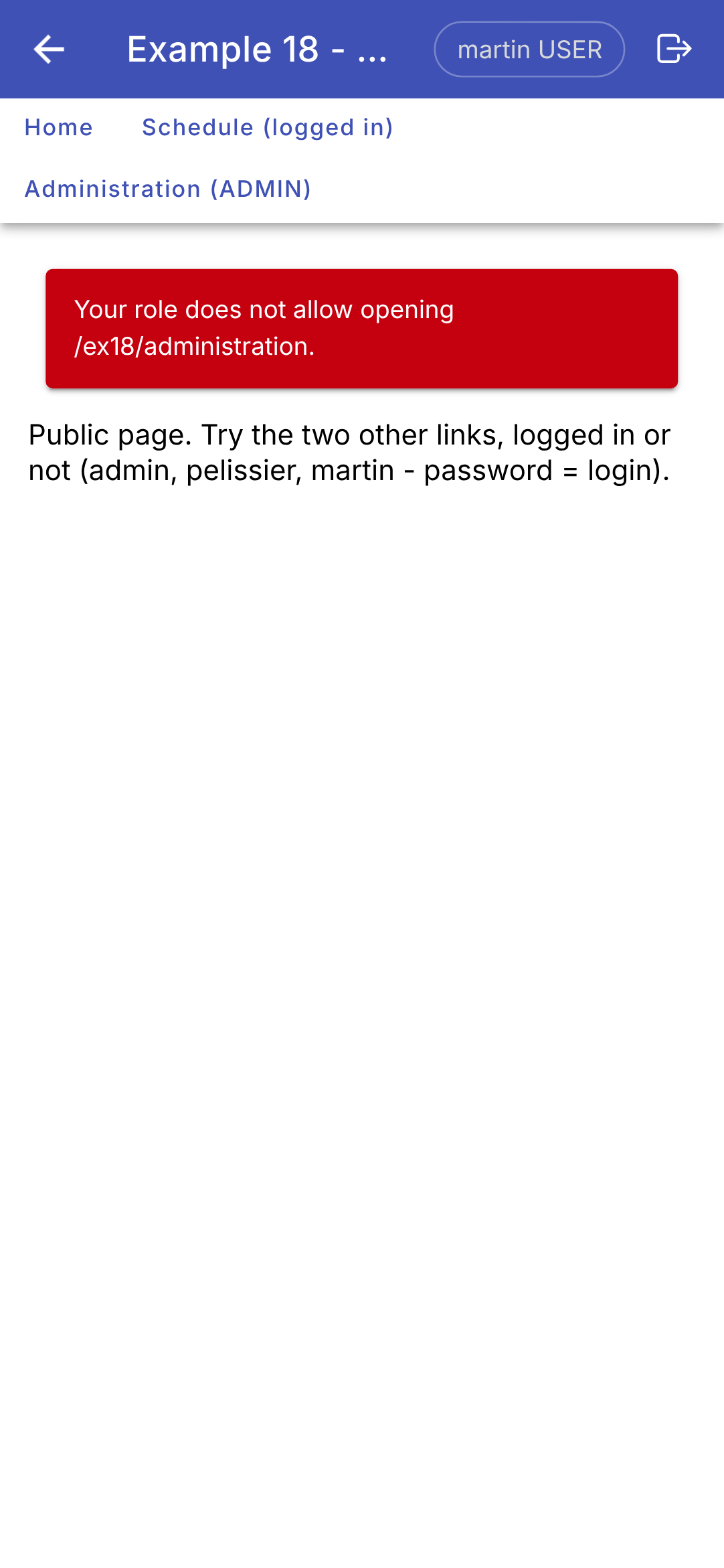
<ion-card-content>Your role does not allow opening {{ denied() }}.</ion-card-content>
</ion-card>
}
<p>Public page. Try the two other links, logged in or not (admin, pelissier, martin - password = login).</p>
|
| // =========================================================================
// src/app/ex18-guards/pages/schedule.page.ts - a page reserved for logged-in users
// =========================================================================
import { Component, inject } from '@angular/core';
import { Session } from '../session';
@Component({
selector: 'app-ex18-schedule',
templateUrl: './schedule.page.html',
})
export class Schedule {
readonly session = inject(Session);
}
|
| <!-- ======================================================================
schedule.page.html - the schedule page (example 18)
====================================================================== -->
<p>The schedule of <strong>{{ session.user()?.login }}</strong>: this page requires being logged in.</p>
|
| // =========================================================================
// src/app/ex18-guards/pages/administration.page.ts - reserved for the ADMIN role
// -------------------------------------------------------------------------
// Loaded on demand (loadComponent, in routes.ts): its code is only
// downloaded on the first visit, and only if the guards allowed it.
// =========================================================================
import { Component } from '@angular/core';
@Component({
selector: 'app-ex18-administration',
templateUrl: './administration.page.html',
})
export class Administration {}
|
| <!-- ======================================================================
administration.page.html - the administration page (example 18)
====================================================================== -->
<p>
Administration: page reserved for the ADMIN role, loaded on demand (on the web, its code is only
downloaded on the first visit, and only if the guards allowed it).
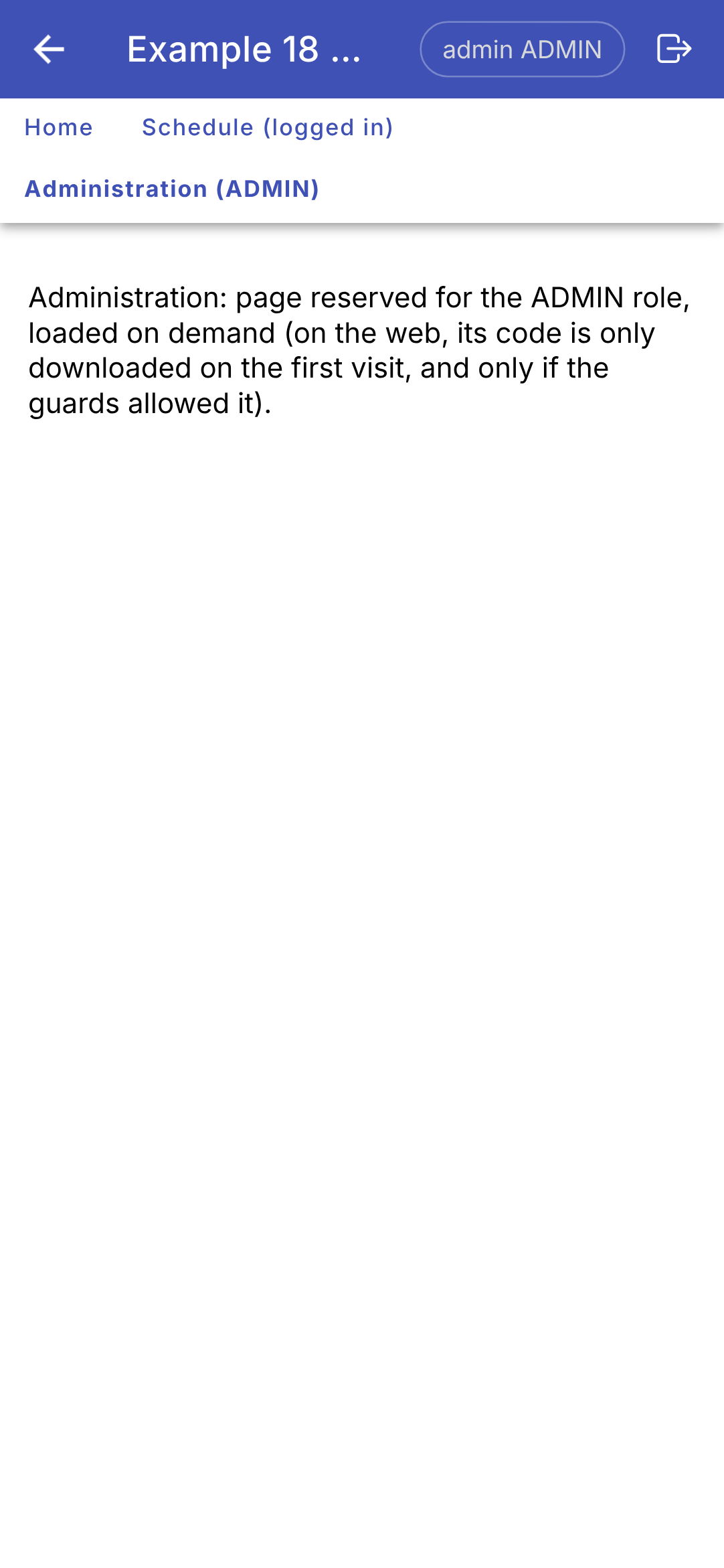
</p>
|
The home page receives the parameter [denied] set by the guard [roleRequired] (line 17 of the .ts file); the schedule page reads the session.
5.2.4. Execution
Without being logged in, we request the administration interface: the guard redirects us to the login page (on the left). We log in with the account [martin] (role USER): the login takes us back to the administration interface, where the second guard denies access (in the middle). We log out, request the administration page again, and log in with the account [admin]: the page opens (on the right):
The guards for [Angular] also exist in other forms: [canMatch] (the route isn’t even recognized if the guard refuses: its code isn’t downloaded), [canDeactivate] (leave the page: “Discard changes?”), [canActivateChild] (for all child routes of a route). The client [Angular] of [RdvMedecins] uses them in the same way: a client guard merely guides the user; it is the server that decides.