11. Case Study: The Ionic client for the RdvMedecins application
11.1. The Problem
The [RdvMedecins] application allows users to schedule appointments at a doctor’s office. The [NestJS] course wrote it as a HTML application, in which the server generated the pages; the [Vue.js], [Angular], and [React] courses wrote web clients for it, which generate the SAME pages in the browser using the JSON data from the server described in the chapter “The RdvMedecins Server, a Black Box”; the [Flutter] course has developed a mobile client. Here, we are developing the [Ionic] client: a mobile app ([Android]), built using [Angular] and [Capacitor], which is ALSO a web app, without making any changes.
The client must offer everything the others offered:
- a login screen, protected by a CAPTCHA, with the option to create a patient account;
- a doctor’s schedule for a given day, with appointment booking (patient selection window) and cancellation;
- for the administrator, management of doctors and clients (list, add, edit, delete);
- for the patient, a personal dashboard (showing upcoming appointments, which they can cancel) and account management;
- two languages: French and English;
- the same addresses as the web clients ([/schedule?doctorId=1&day=...]). On the phone, they are invisible but organize the app; on the web, users can reload them, bookmark them, and navigate the app using the browser’s Back/Forward buttons.
A mobile app adds its own requirements: a narrow screen (no five-column tables), a keyboard that hides half the screen, a Back button, a password manager, and HTTP requests that do not originate from a web page served by the server (where should the token cookie be stored?).
This is an opportunity to bring together everything the examples have presented separately: components and signals, forms, the router and guards, shared state, translations, and communication with the server.
11.2. Installation and Execution
The JSON server must be installed and running (see the chapter “The RdvMedecins Server: A Black Box”). The CAPTCHA test mode is not required: you can leave the [CAPTCHA_TEST] field blank in the server’s [.env] file.
In a console window open to the [rdvmedecins_ionic] folder:
- line 1: downloads the project packages ([node_modules] folder), described by [package.json];
- line 2: launches [ng serve], the development server for [Angular], at the address http://localhost:8100. It forwards /api requests to the JSON server (file [proxy.conf.json], as in examples 22 through 25). Open this URL in [Chrome], preferably using the development tools (F12) in “mobile device” mode (Ctrl+Shift+M), at the size of a phone.
As in the examples, any changes to a source file are compiled and reloaded immediately in the browser.
To try it out on [Android] (requires the [Android] SDK and [Android Studio]; see the chapter “Setting Up the Development Environment”):
| npx cap add android
npx ng build
npx cap sync android
npx cap run android
|
- Line 1: Once only: Creates the project [Android Studio] (folder [android/]). Using JDK from a recent [Android Studio] ([Java] 25), we then move the project to [Gradle] 9.1 (file [android/gradle/wrapper/gradle-wrapper.properties], see Example 01);
- line 2: compiles the web application into [dist/rdvmedecins_ionic/browser/];
- line 3: copies it to the [Android] project;
- line 4: runs it on the emulator or on a connected phone in USB (the command prompts you to choose which one). The emulator connects to the server at the address [10.0.2.2:8080] (see example 22); For a real phone, specify the computer’s address on the Wi-Fi network during compilation: [npx ng build --define "SERVER='http://192.168.1.20:8080'"] (see [config.ts]). The “Deployment” chapter details these steps.
The demo accounts are listed on the login screen (password = login).
11.3. Using the Application
The screenshots in this section are from a phone with a resolution of 1082 × 2342 pixels (412 × 892 dots). They were generated by the program [captures/captures.mjs] (see Example 01), which drives a [Chromium] browser at this resolution and runs, for each group of screens, a scenario from the [captures/scenarios/] folder.
11.3.1. The login screen
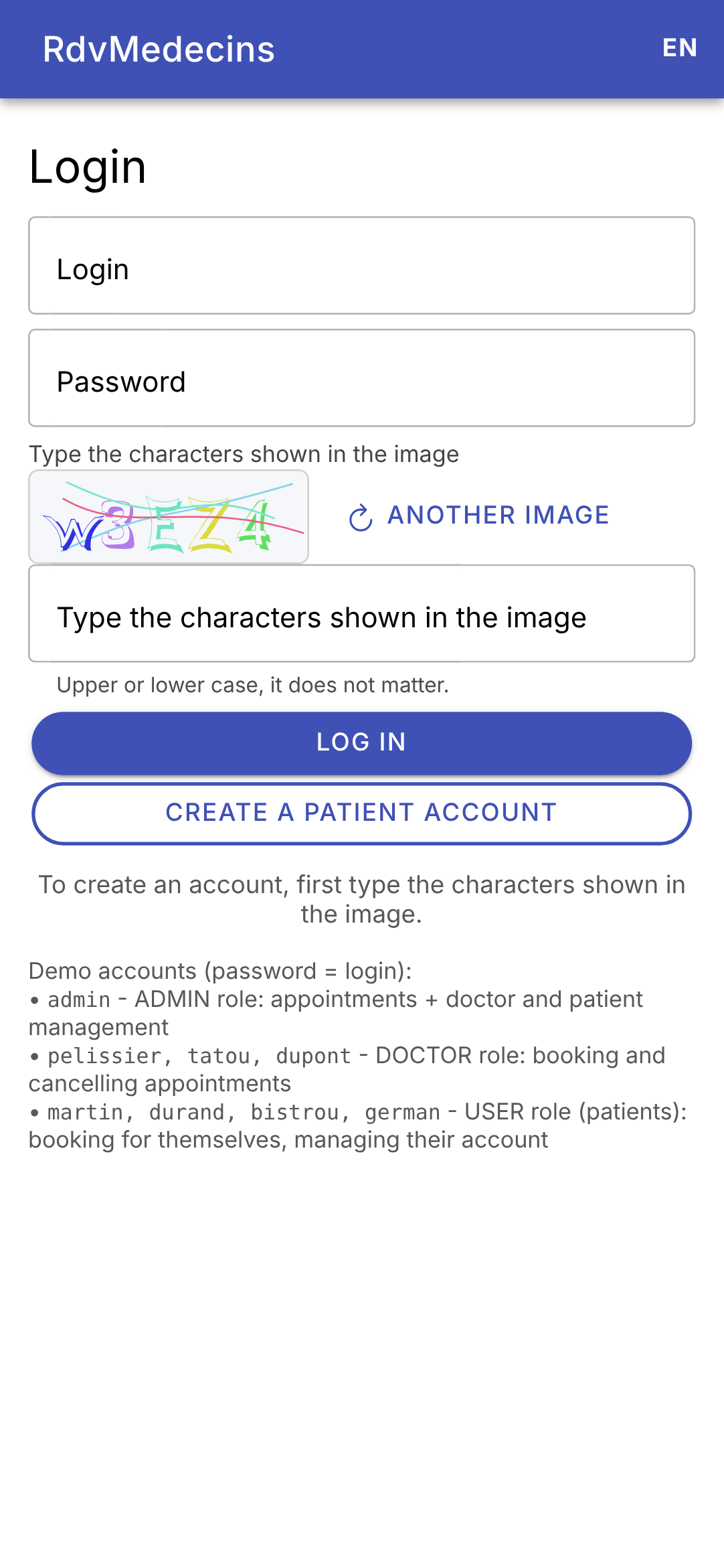
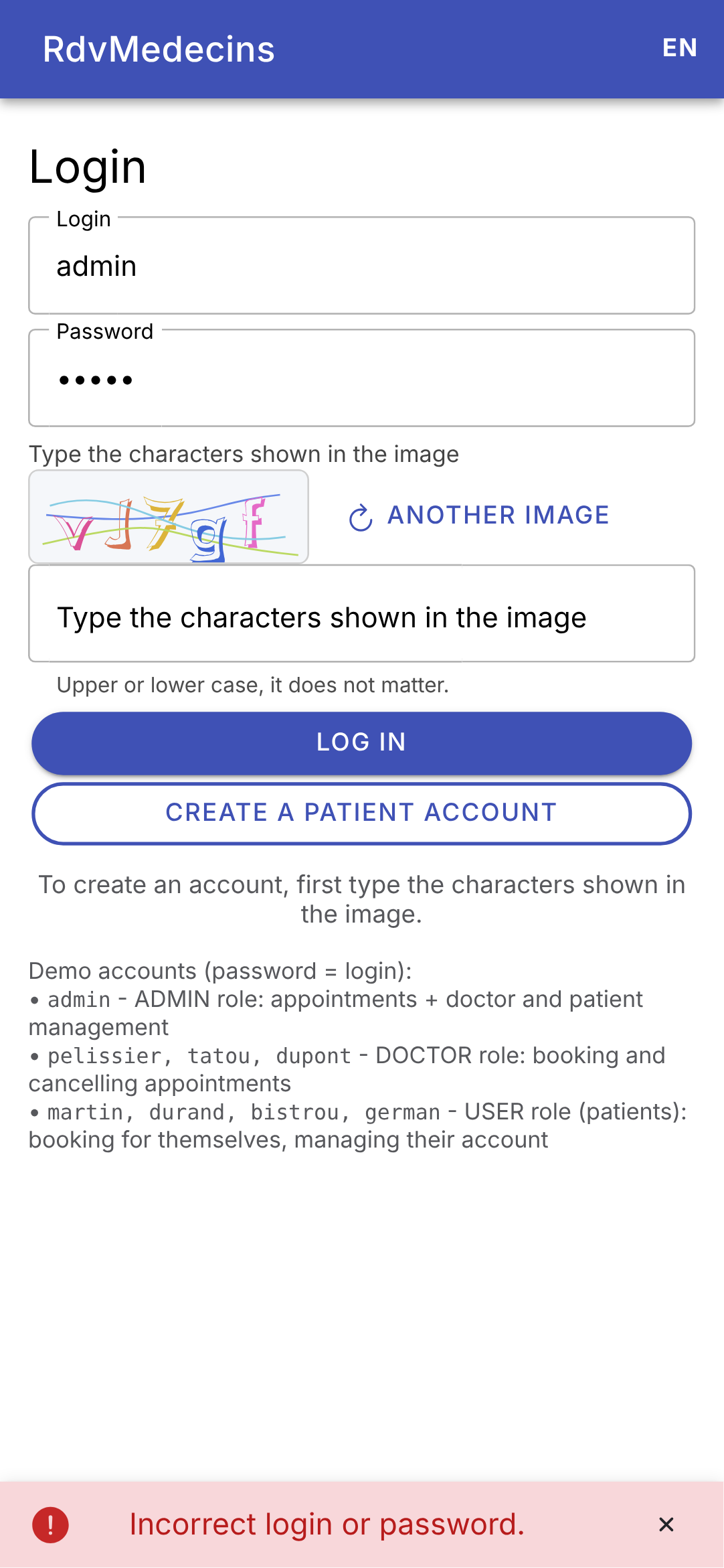
The login screen; an incorrect password: the message appears at the bottom of the screen, and a new image is displayed (each image is used only once):
11.3.2. The calendar, as seen by the administrator and doctors
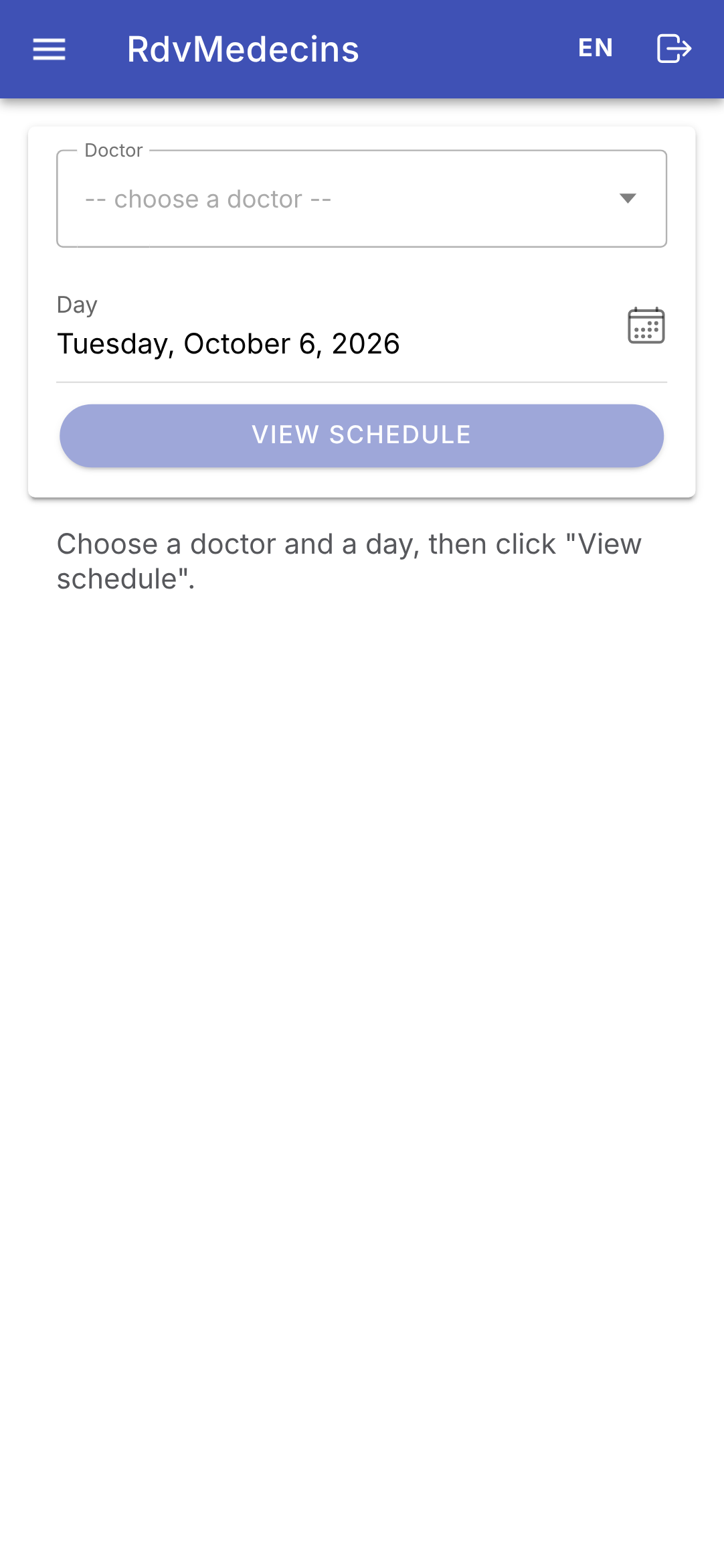
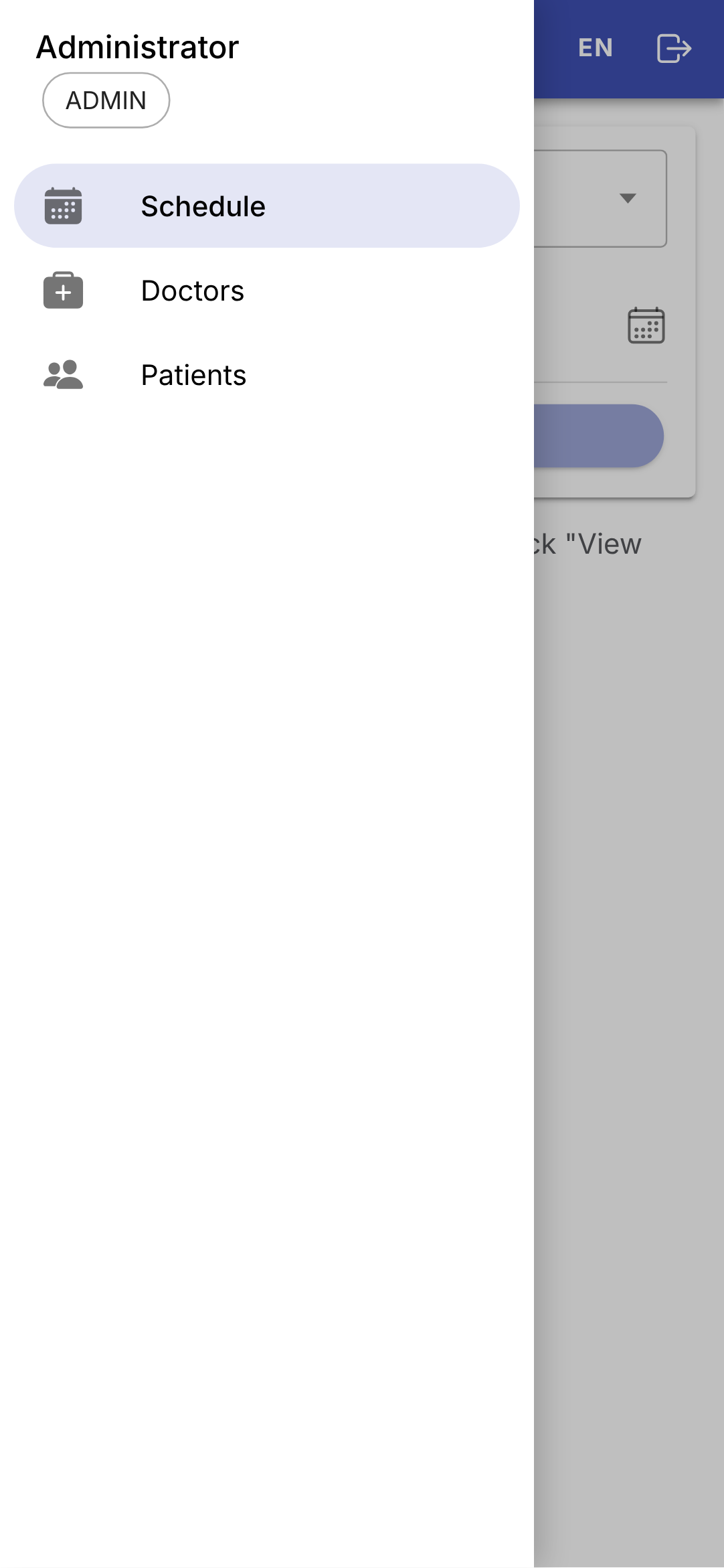
Logged in as [admin], you arrive at the calendar. The ☰ button opens the menu: the screens accessible to the administrator, and, at the top, who is logged in:
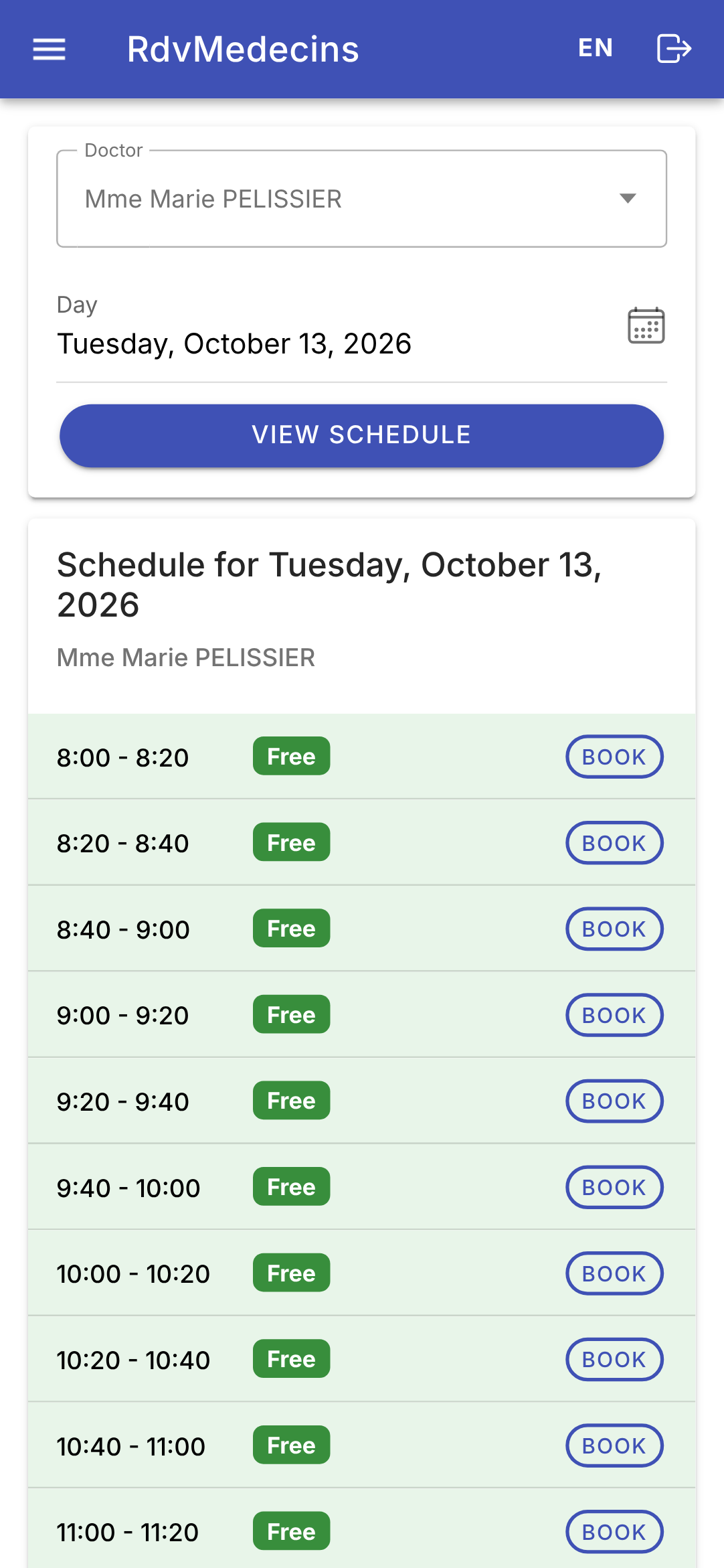
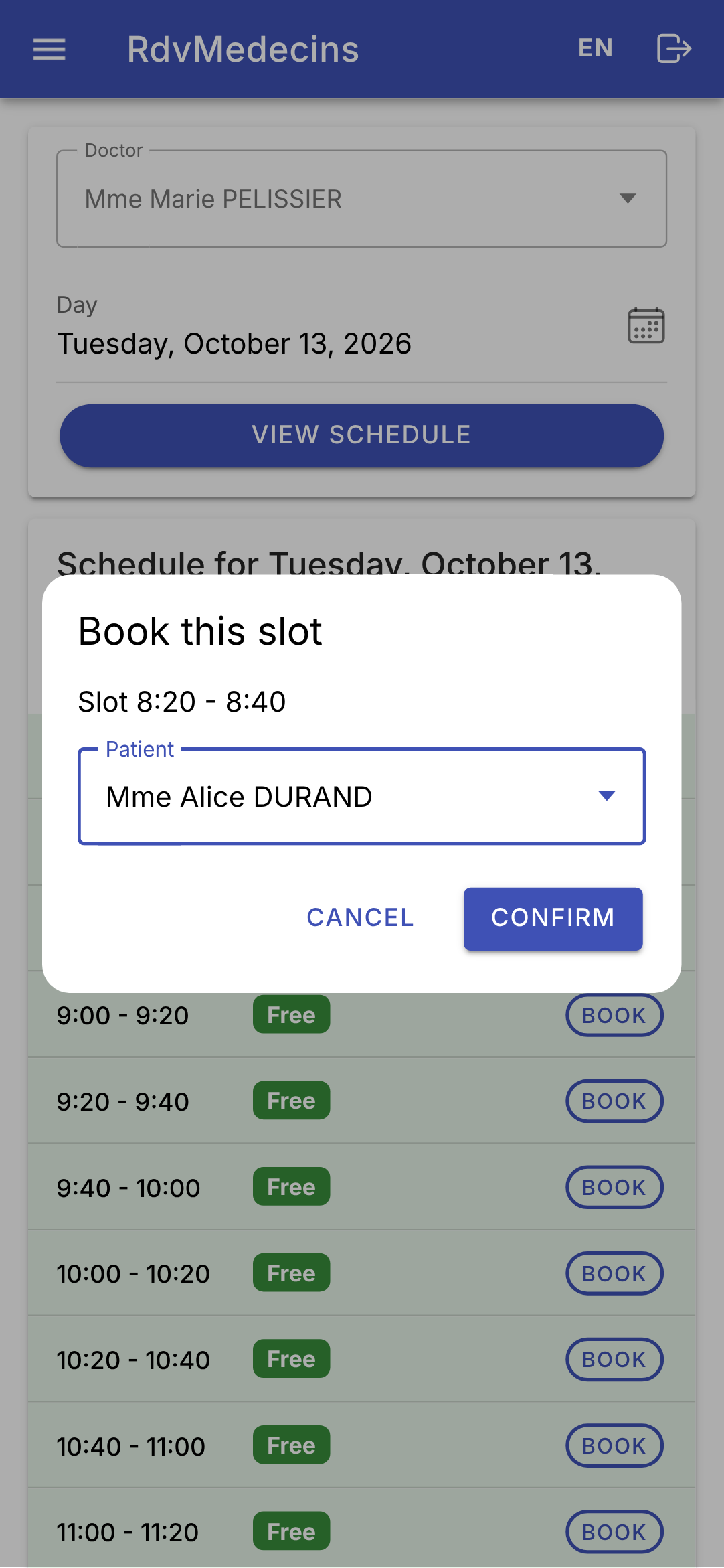
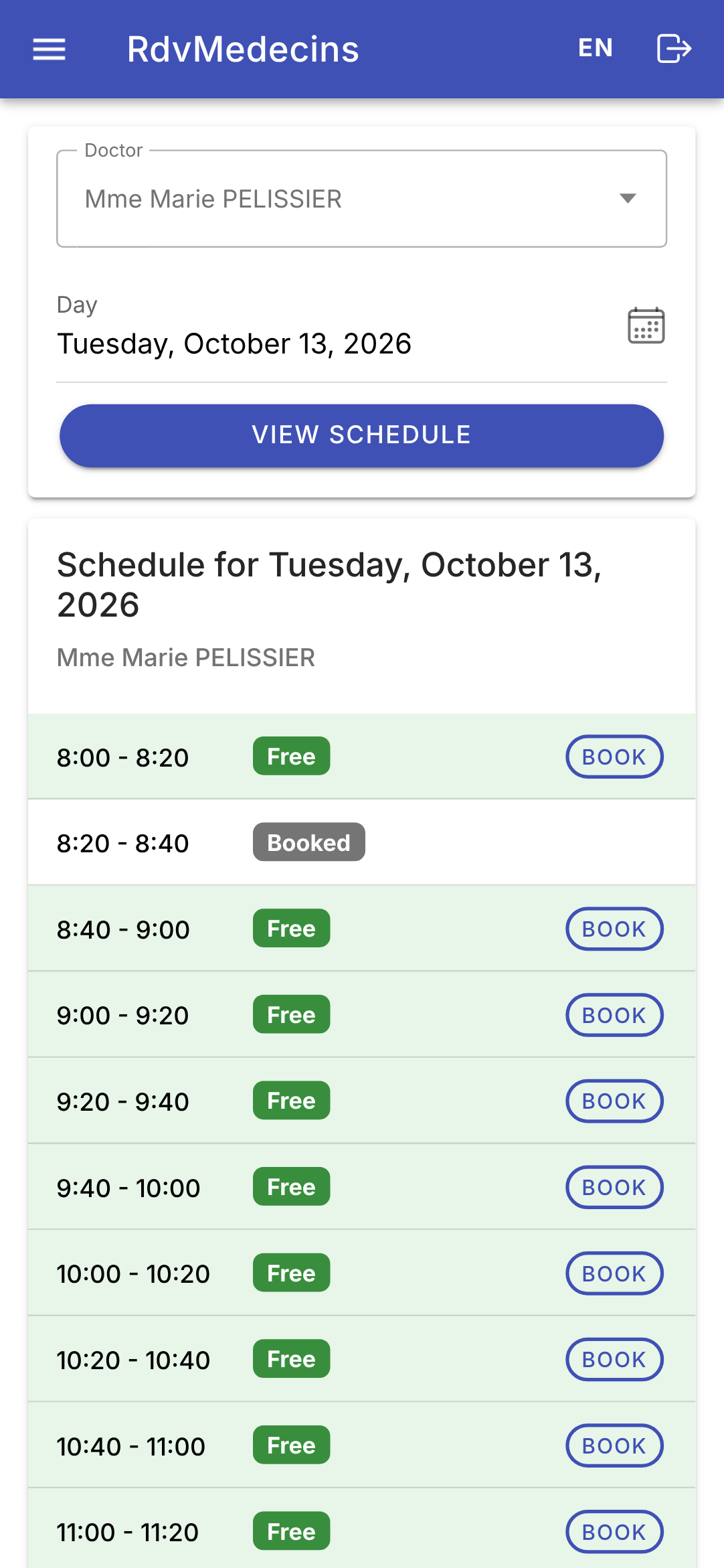
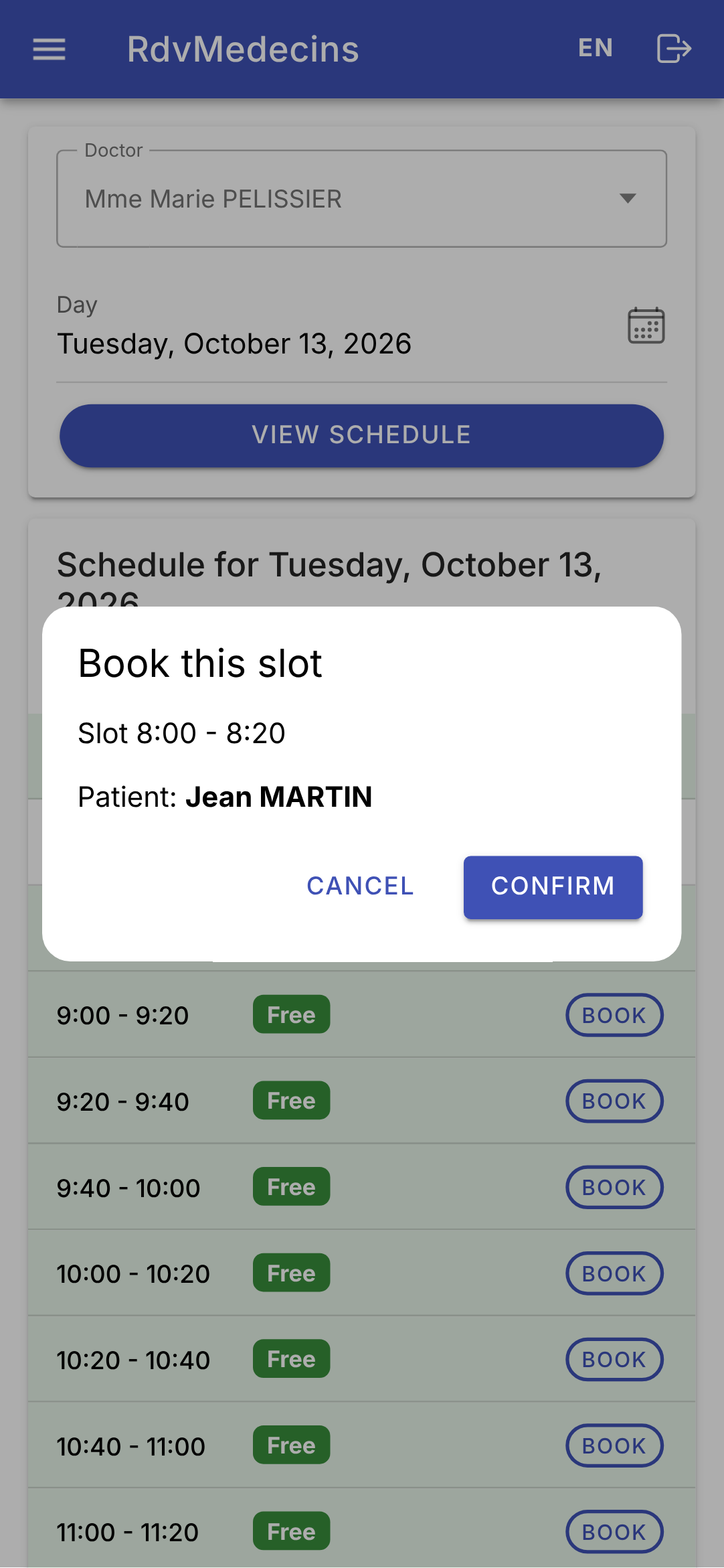
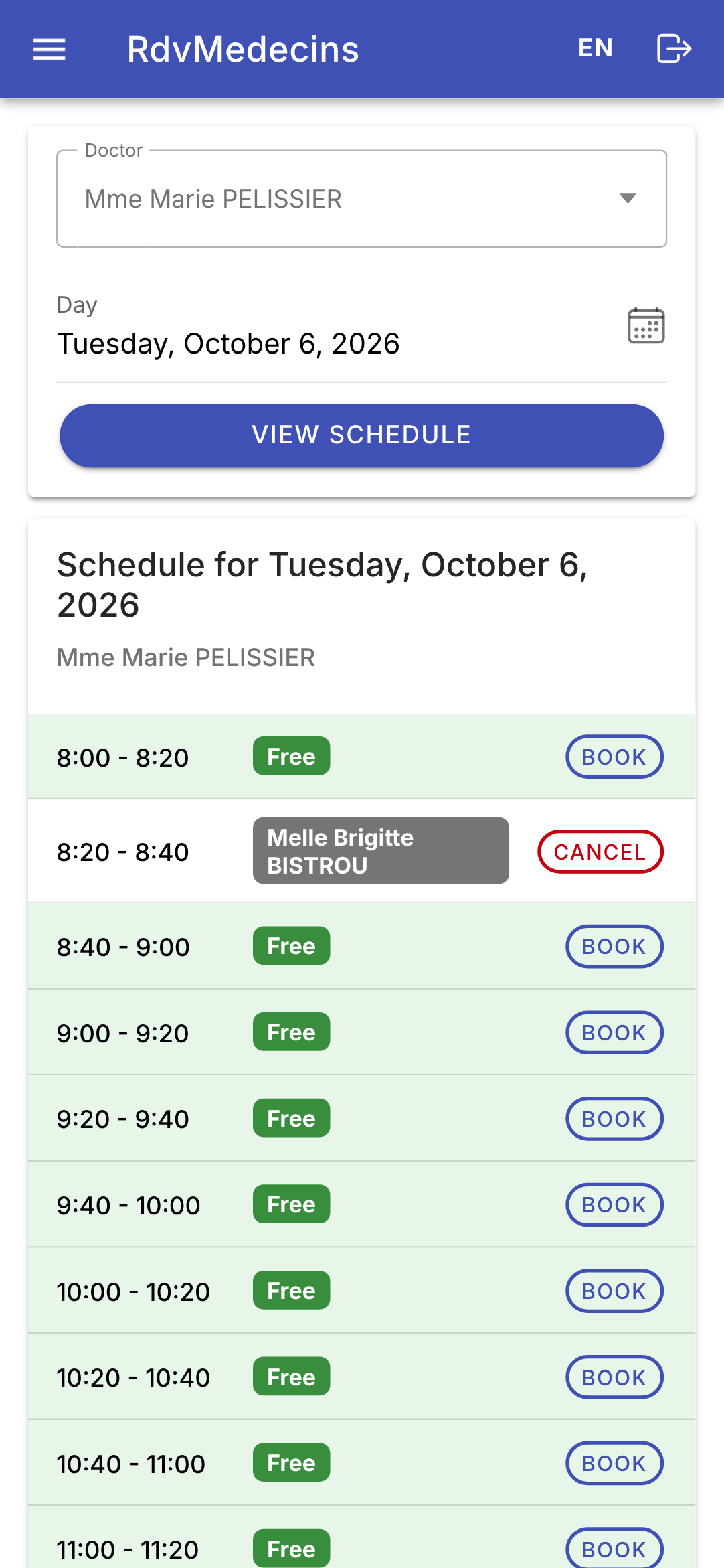
Select a doctor and a date (the date in a calendar), then click “View schedule.” The URL changes to [/schedule?doctorId=1&day=2026-10-13]. Clicking “Book” opens the booking window; the URL changes to [/schedule?doctorId=1&day=2026-10-13&book=2]:
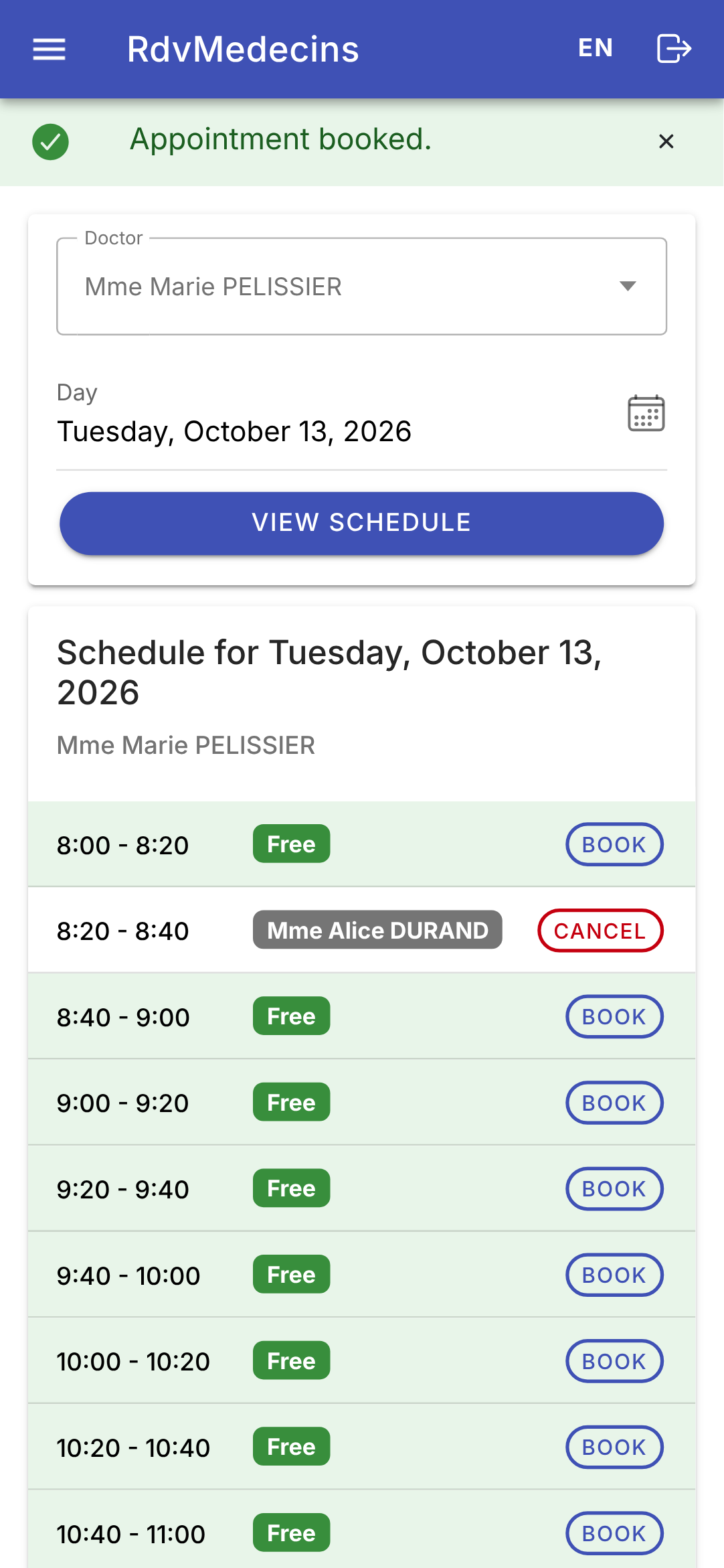
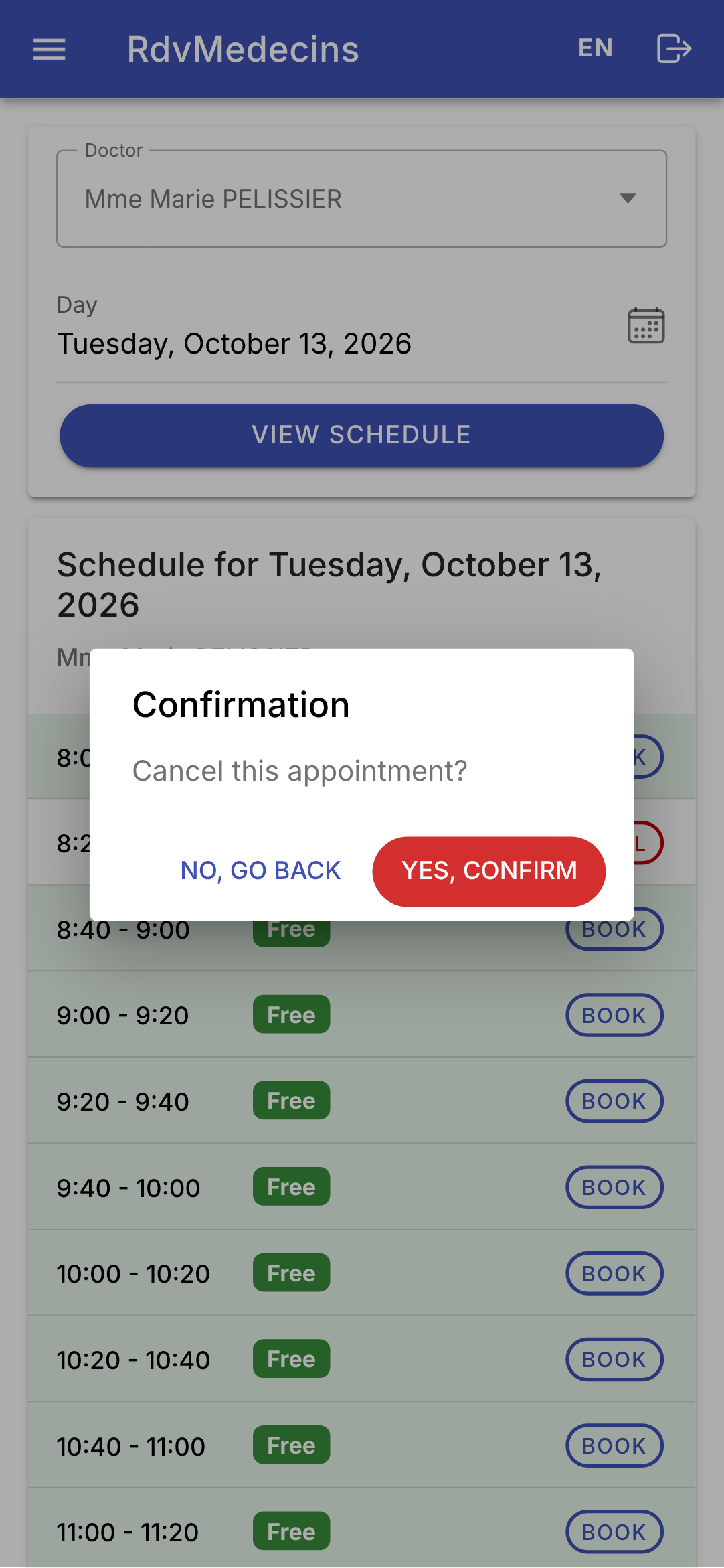
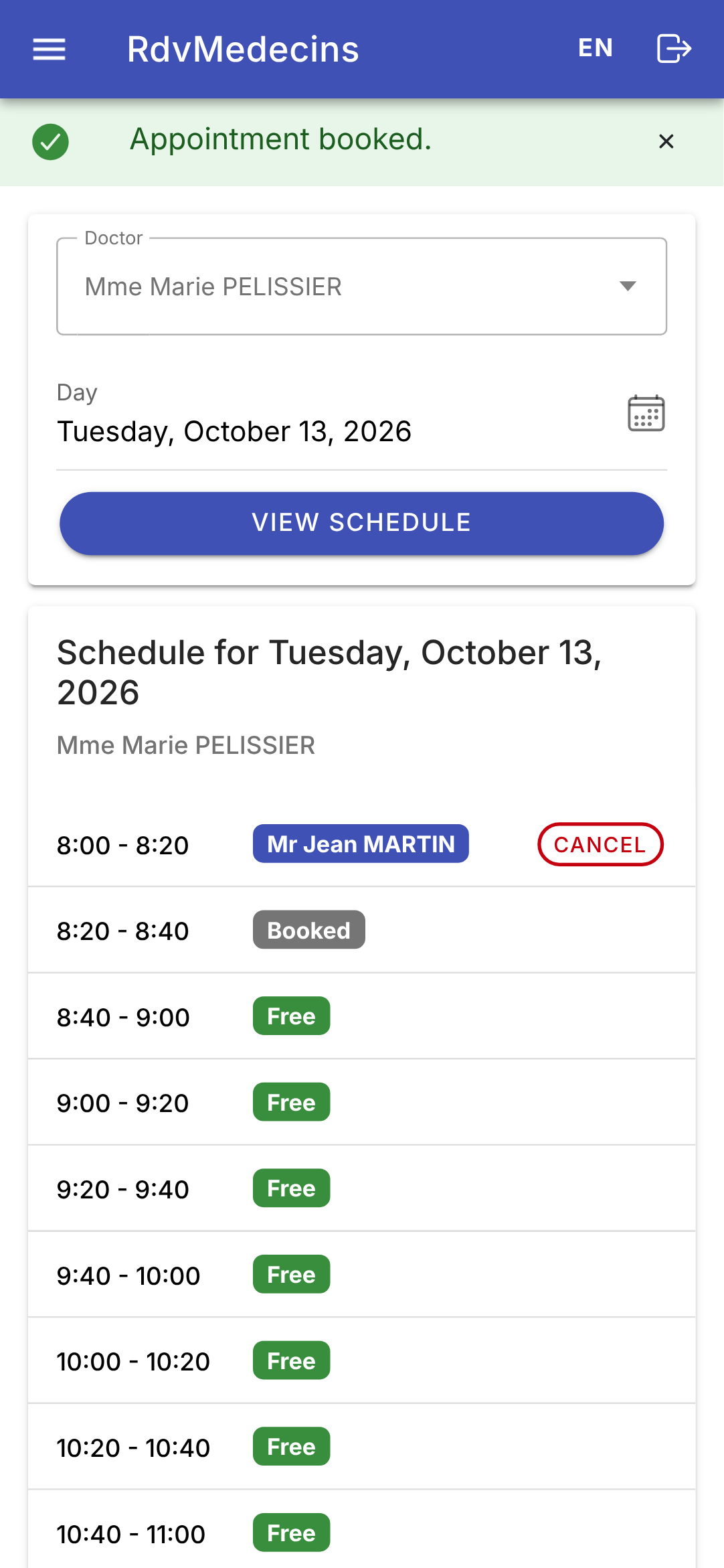
The appointment is saved; “Cancel” prompts for confirmation:
A doctor goes directly to HIS OR HER daily schedule:
11.3.3. The Patient’s Dashboard
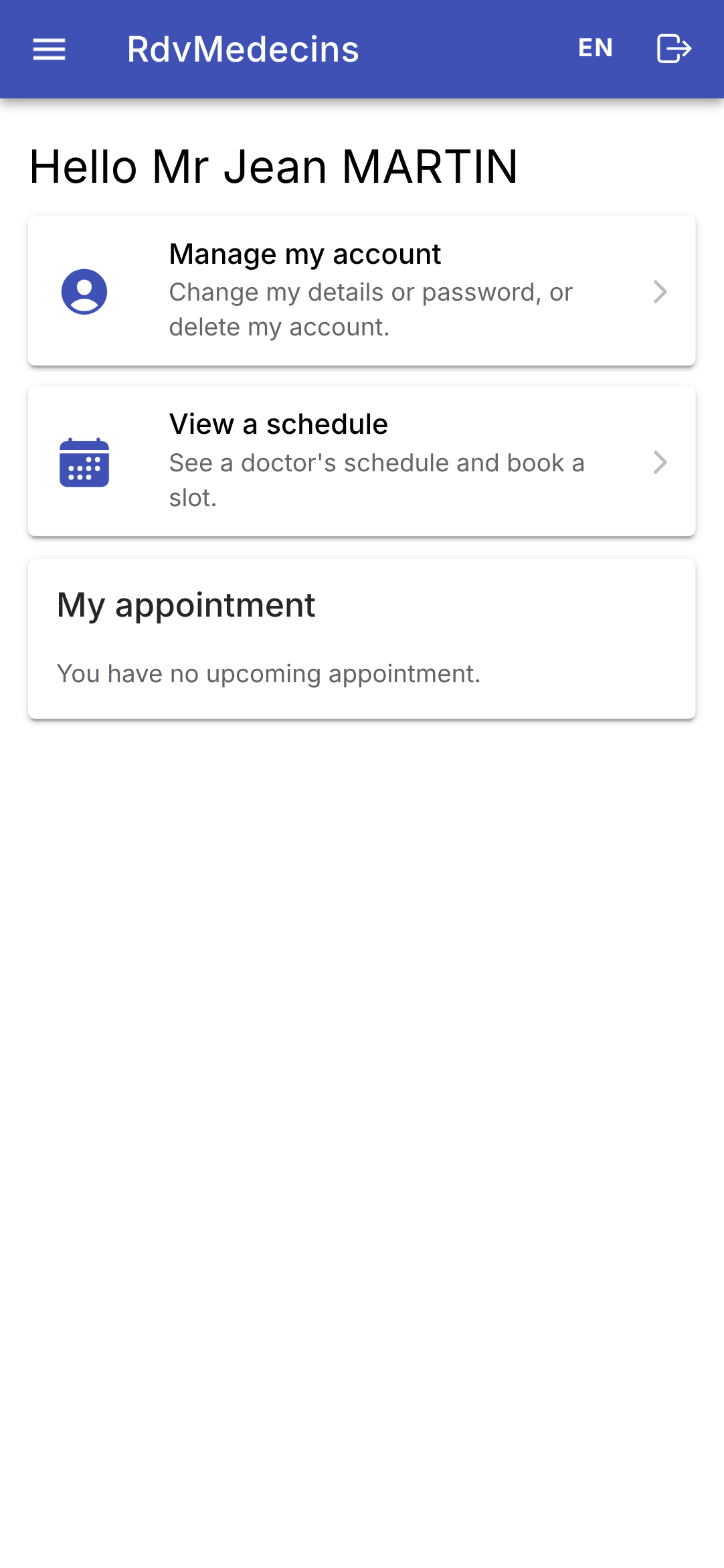
A patient ([martin]) accesses “My area.” In a calendar, they see “Booked” next to the time slots for other patients and book an appointment for themselves without selecting a specific patient:
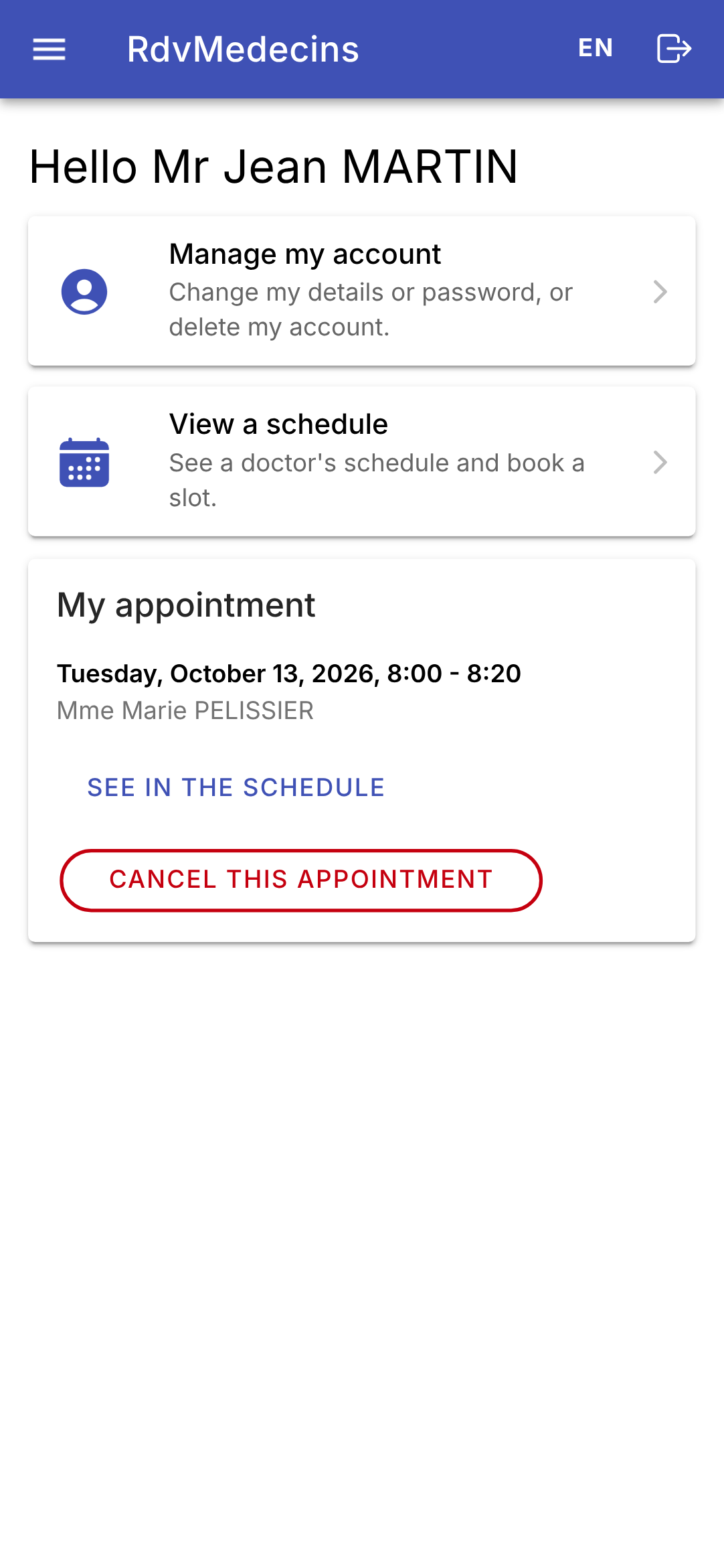
His appointment appears under his name; the “Book” button is no longer available (only one upcoming appointment). In another doctor’s calendar, where his appointment does not appear, a message would explain why he cannot book. His area shows the appointment:
“Manage my account”: Any changes require the current password; errors are server-side:
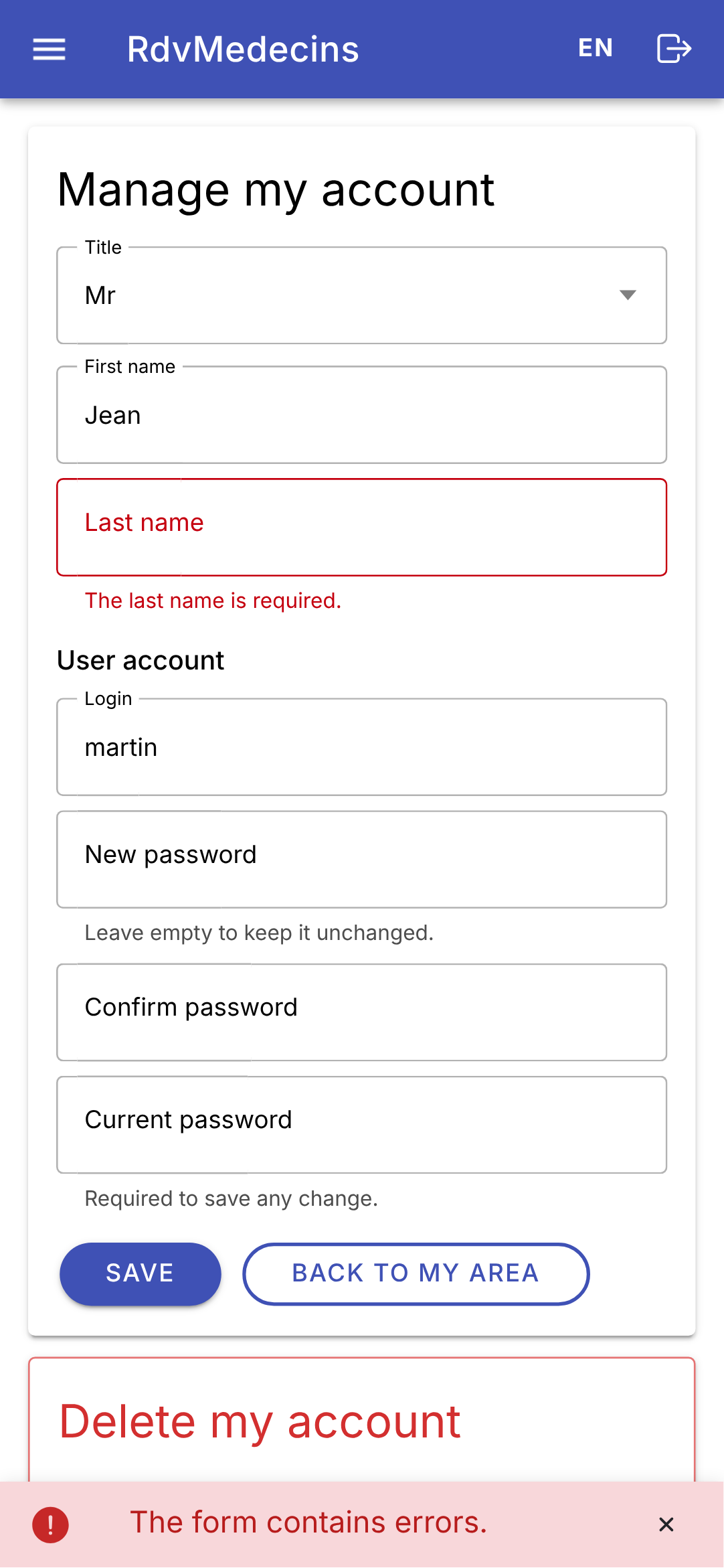
A patient’s menu does not have a “Doctors” entry. On the web, if they type the address /doctors themselves, the router’s guard displays a 403 error page (see [app.routes.ts]).
11.3.4. Managing Doctors and Clients
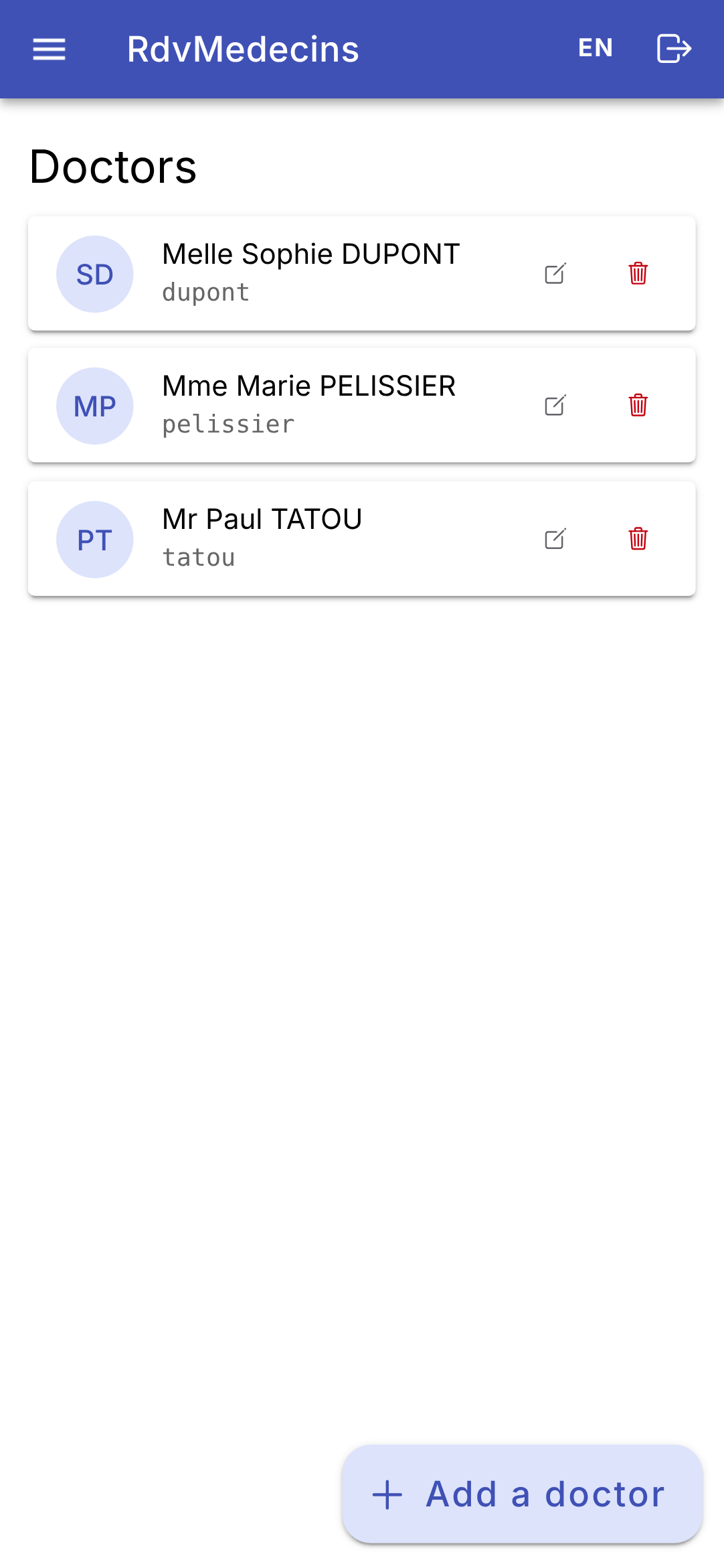
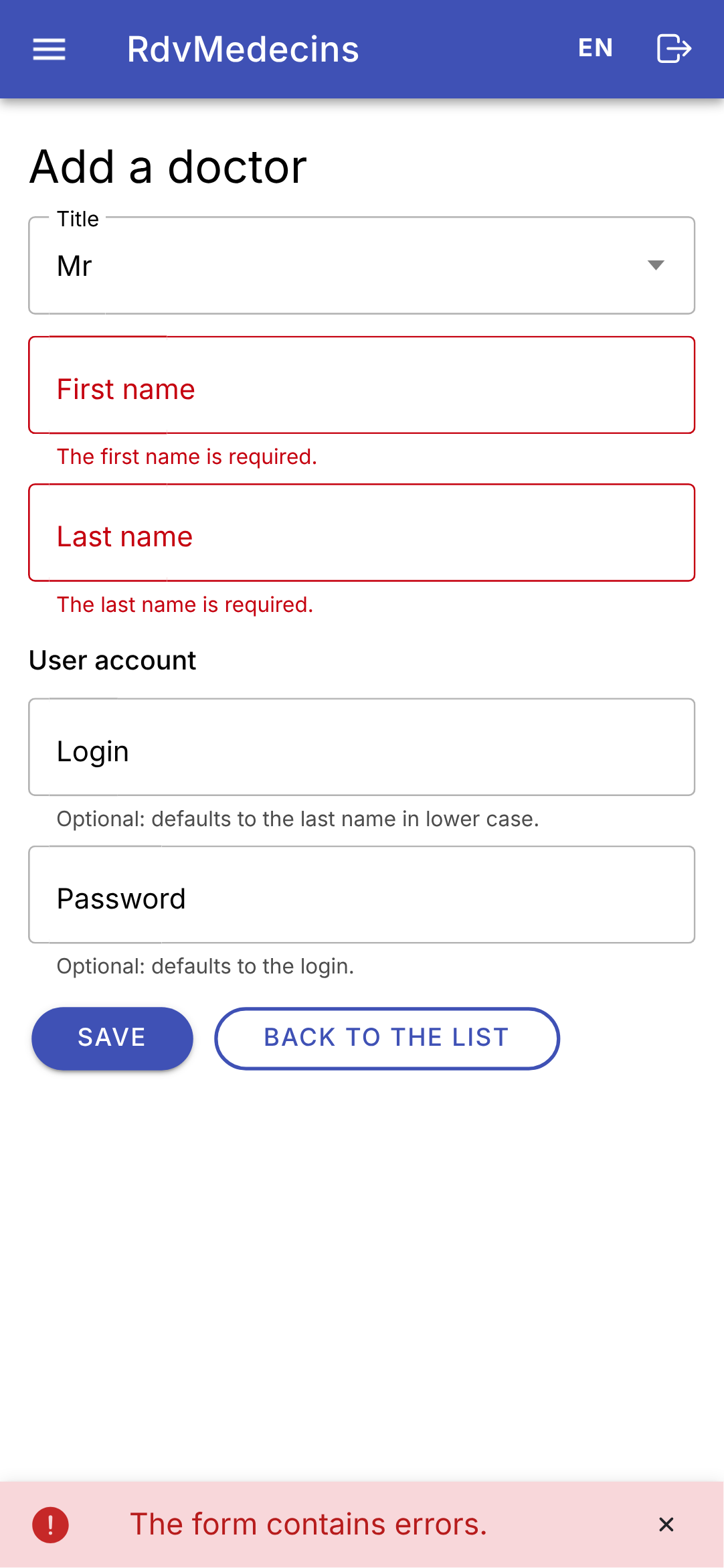
The list of doctors; an incorrectly filled-out entry:
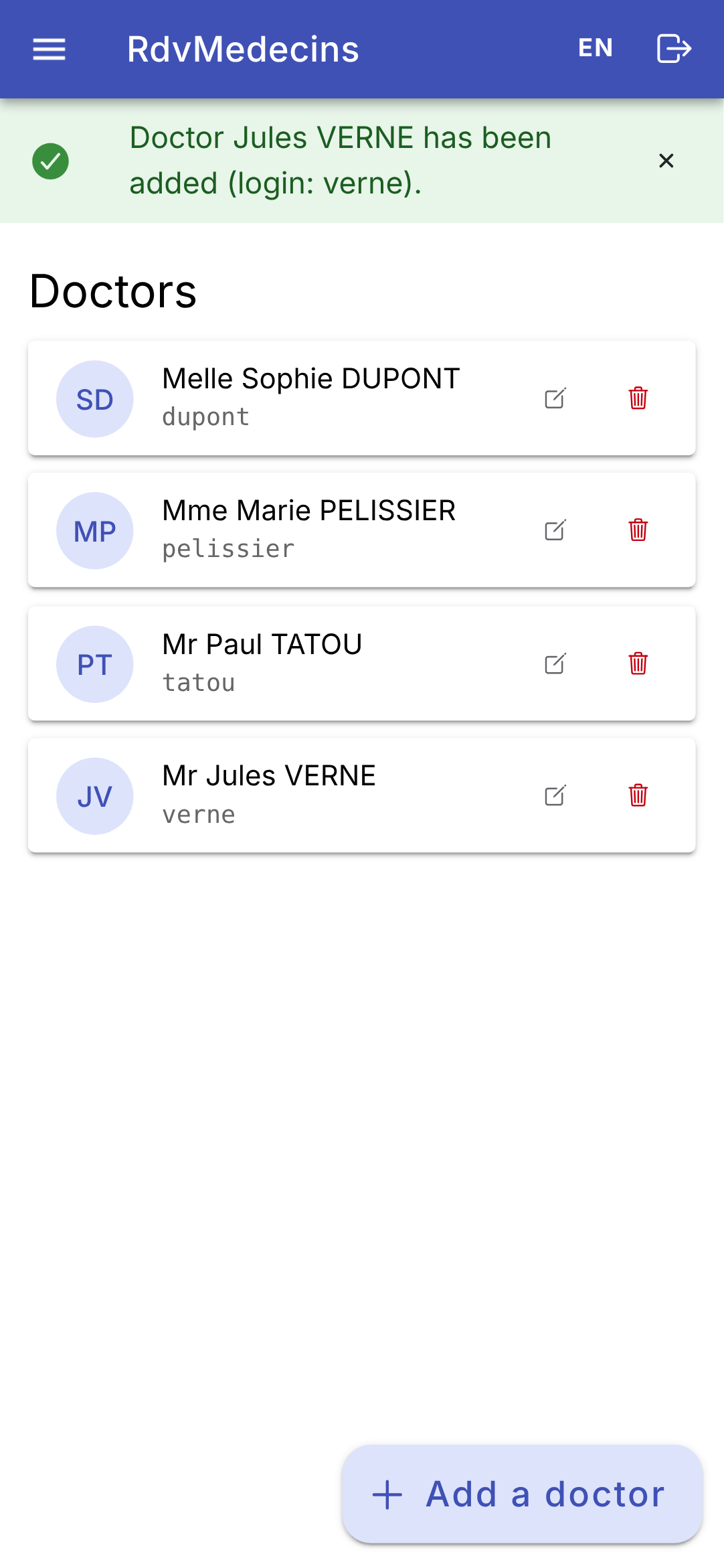
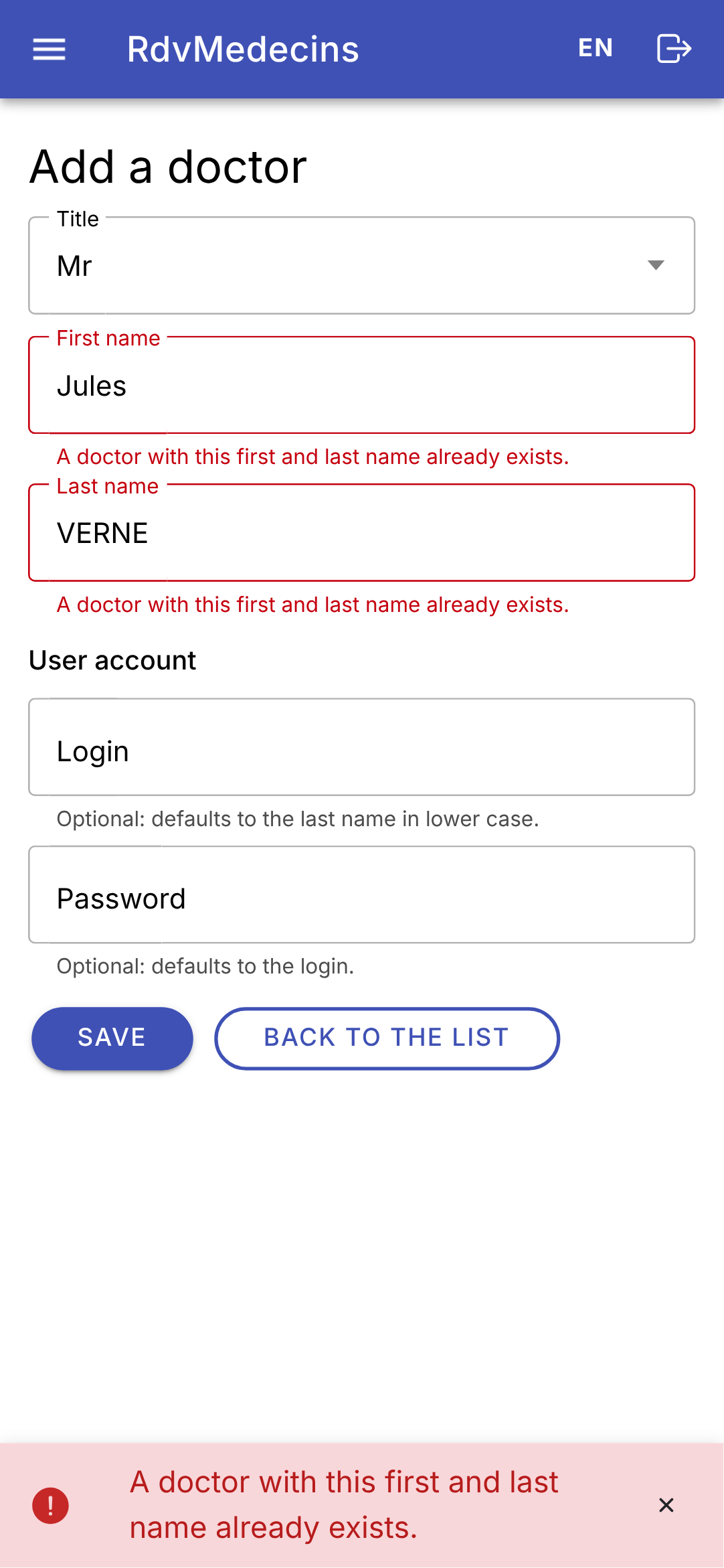
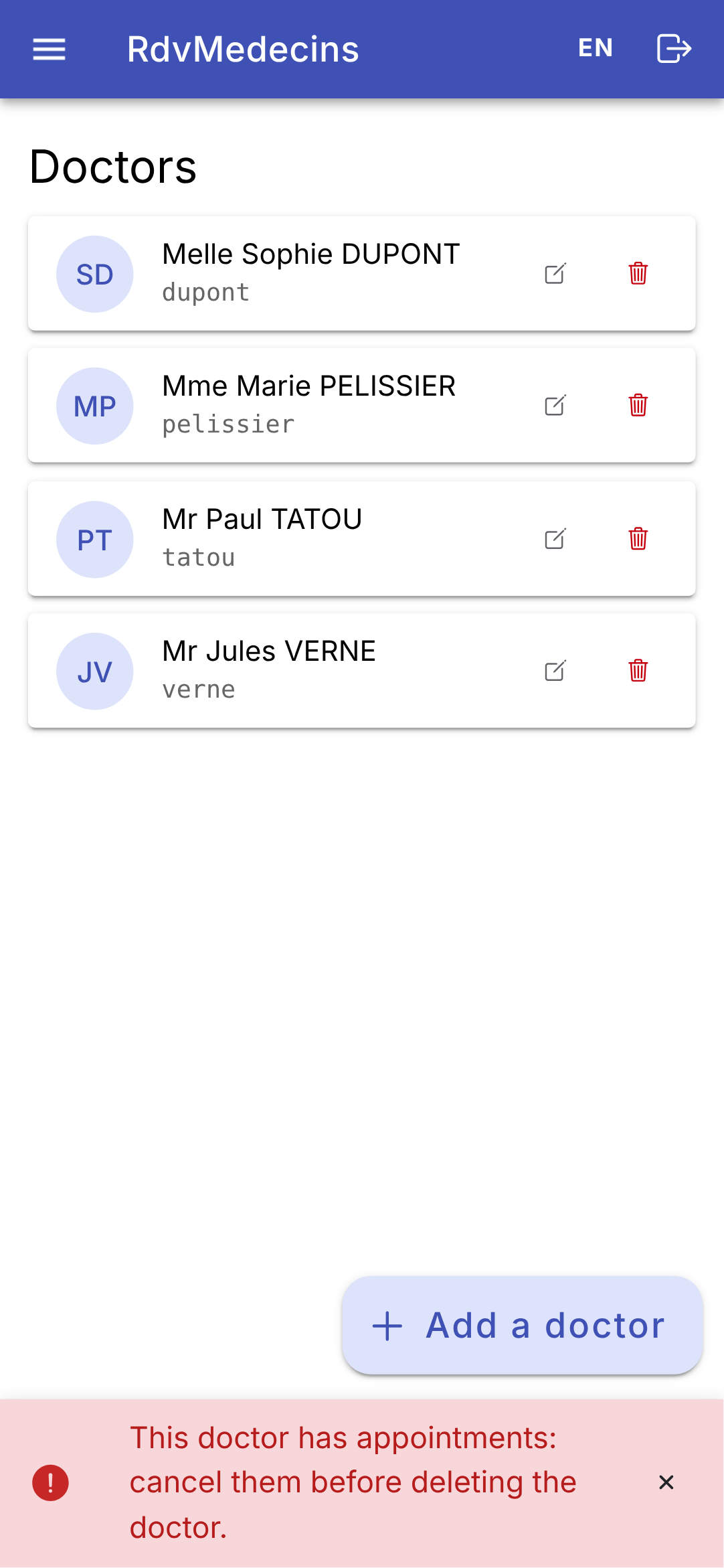
A successful addition; a namesake; the deletion of a doctor who has appointments is denied:
11.3.5. Creating an account
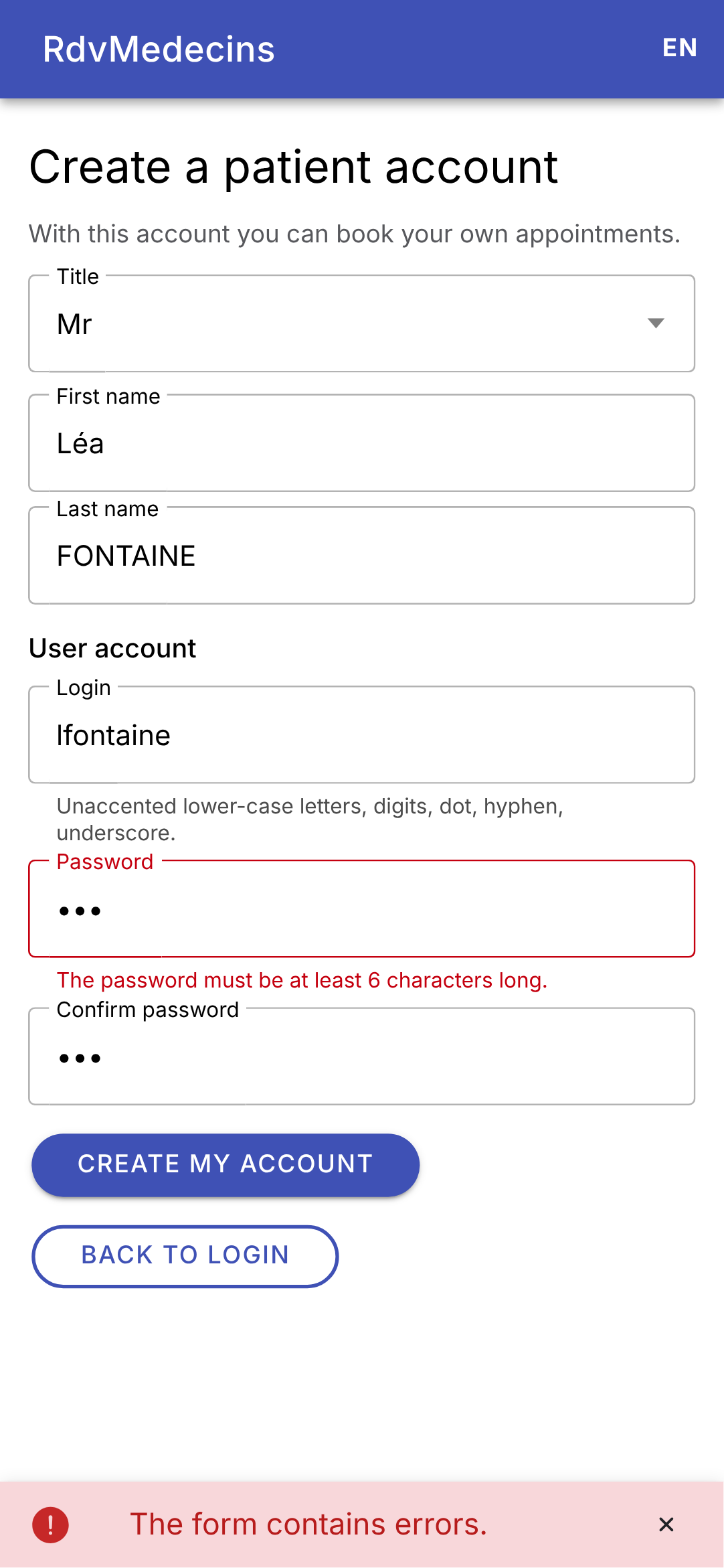
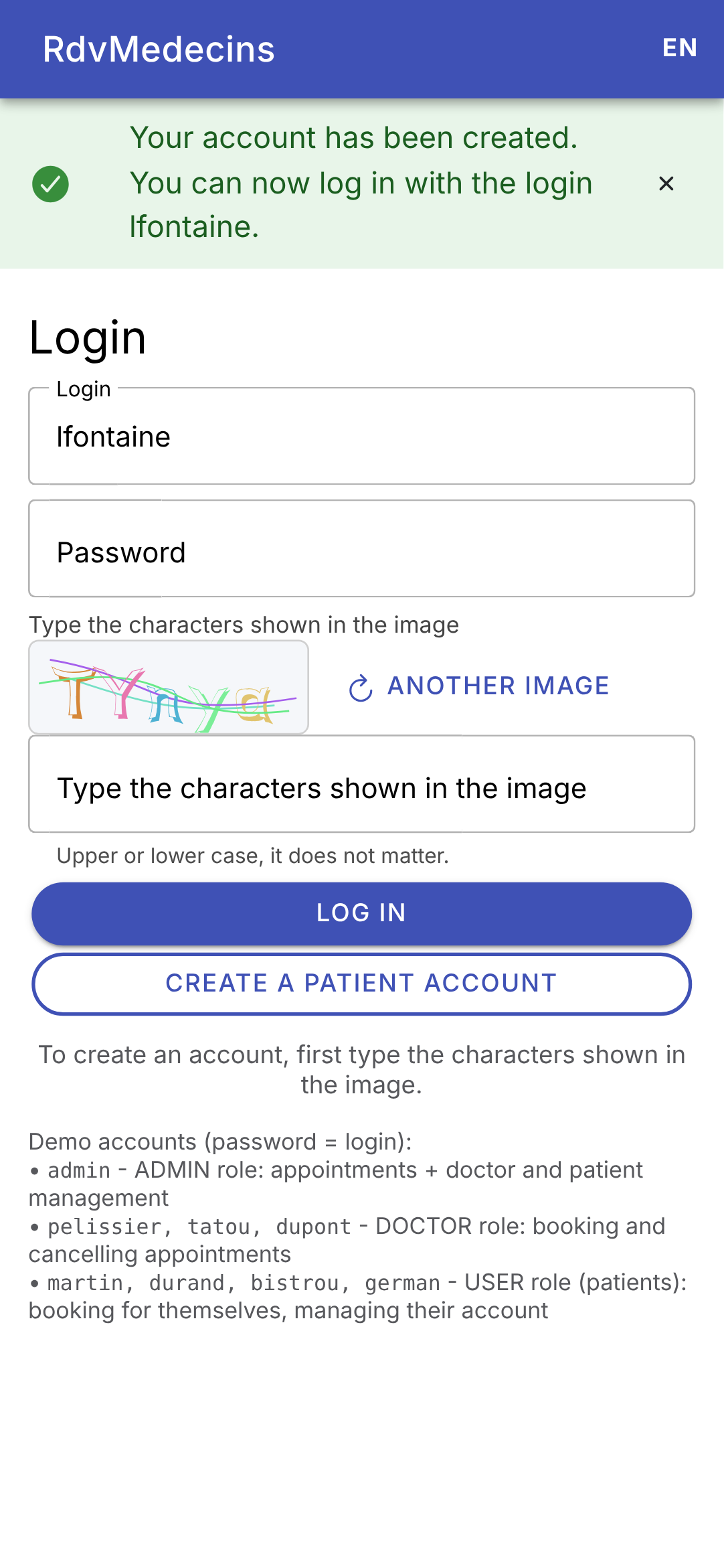
On the login screen, enter the CAPTCHA and then tap “Create a patient account.” The form is rejected by the server; once the account is created, you are returned to the login screen with the login information pre-filled:
11.3.6. In French, on a large screen
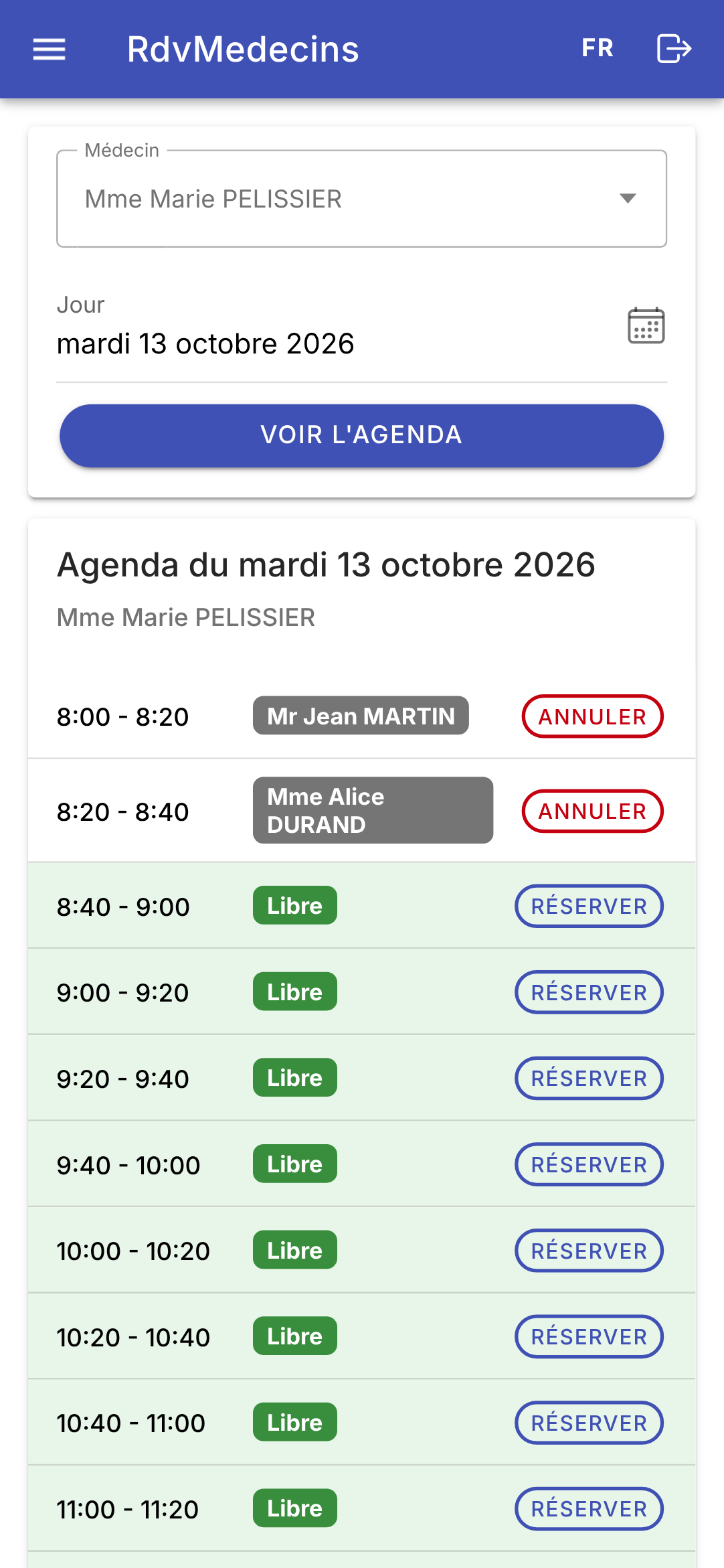
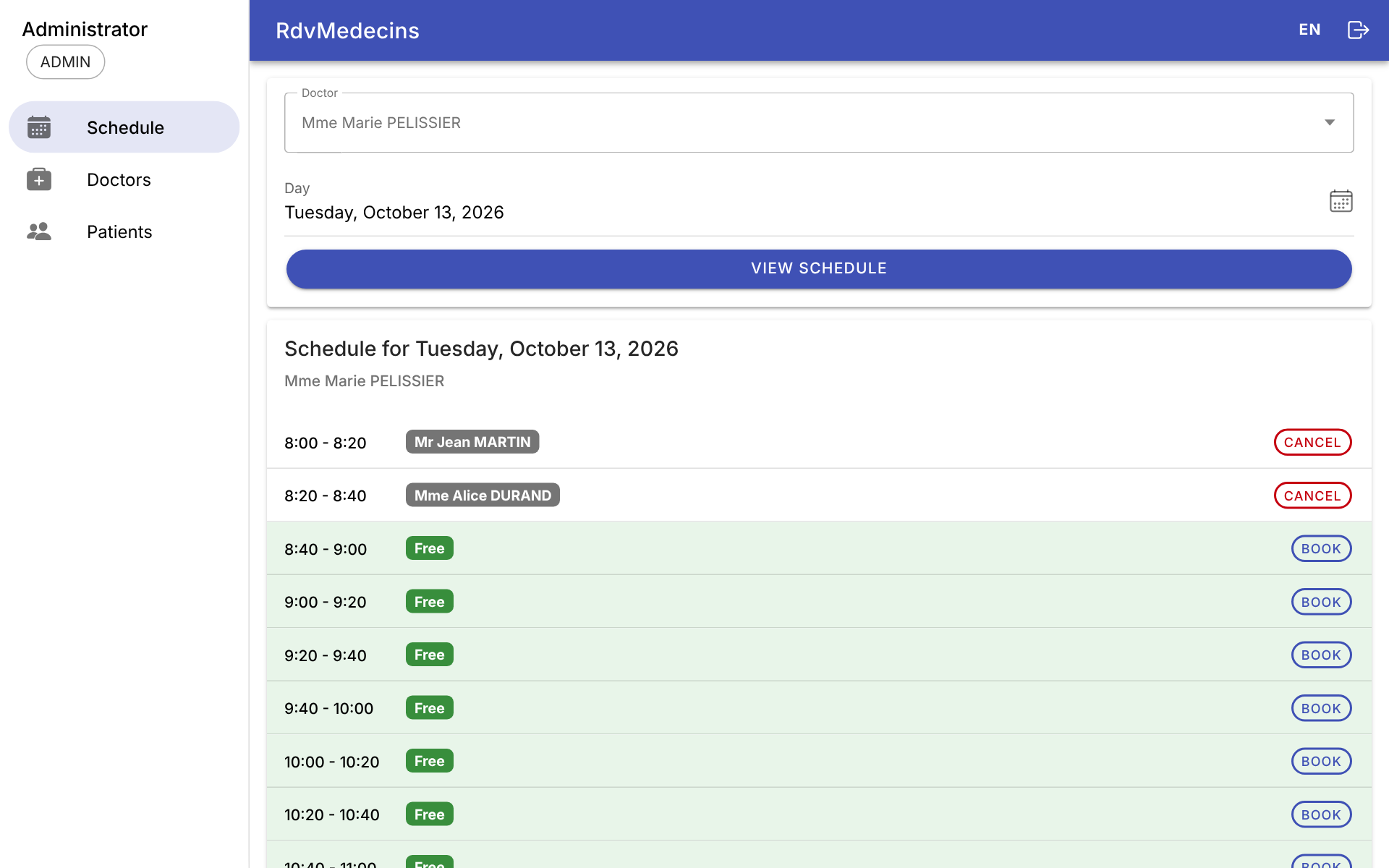
The FR / EN menu in the top bar re-renders the screen locally, without making any requests to the server, including the dates (“mardi 13 octobre 2026”). On a wide screen (the web, a tablet), the menu remains displayed on the left:
11.3.7. Session Expired
If the token expires (or if the cookie is deleted), the next request receives a 401 response; the application redirects to the login screen with a message:
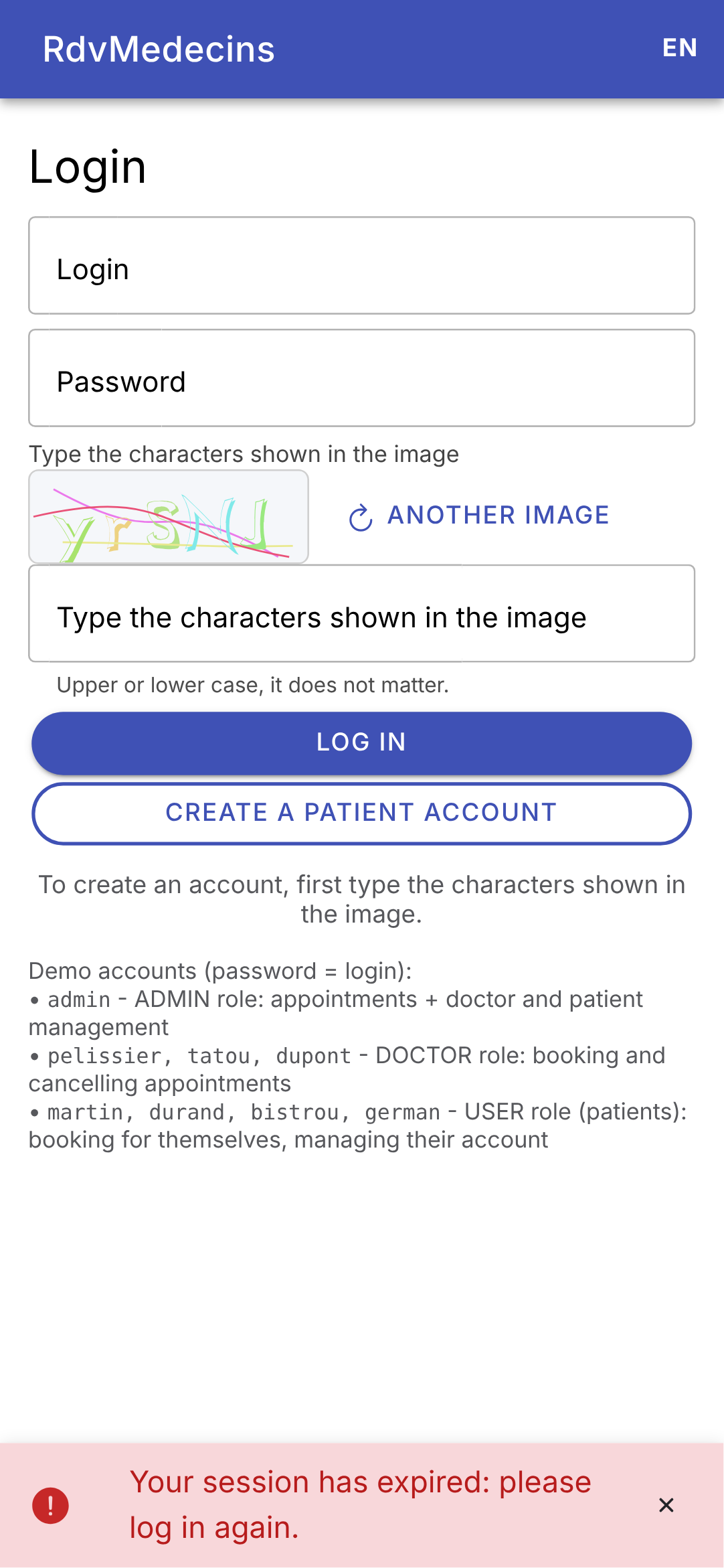
11.4. Client Architecture
| rdvmedecins_ionic/
├── package.json the packages, the scripts
├── angular.json the Angular project configuration
├── tsconfig.json the TypeScript configuration
├── proxy.conf.json the development server (/api relay)
├── capacitor.config.ts the Capacitor configuration (Android)
├── android/ the Android Studio project (after npx cap add android)
├── captures/ the making of the screenshots (Playwright)
├── public/
│ └── i18n/ the dictionaries fr.json, en.json
└── src/
├── index.html the page that hosts the application
├── main.ts the startup
├── styles.scss the common styles
└── app/
├── app.ts the root component
├── back-button.ts Android's Back button
├── app.routes.ts the screens, their addresses, their access rights
├── config.ts the address of the server
├── formatting.ts the formatting of times and days
├── api/ the API access layer
├── i18n/ the languages
├── state/ session, messages, cache (signal-based services)
├── components/ the layout and the reusable components
└── pages/ the screens
|
This is the file-by-file structure of client [Flutter], with the filenames from [Angular] (in lowercase, with words separated by hyphens):
- a data layer ([api/]): the only one that knows the client HTTP from [Angular], the URLs, and the JSON format;
- a state layer ([state/]): signal-based services, provided to the entire application via dependency injection, which the screens read;
- an interface layer ([pages/], [components/]): components that display the state and transmit user actions.
The following table compares the [Flutter] client with this client:
Concept | Flutter client | Ionic client |
Screens | widgets | Angular and Ionic components |
the elements surrounding the screens | [layout.dart], the widget of a [ShellRoute] | [layout.ts], surrounding [ion-router-outlet] |
the menu | [NavigationDrawer] / [NavigationRail] | [ion-menu] in [ion-split-pane] |
the addresses | [go_router] | the Angular router |
access rights | the [redirect] function of the router | A guard: [CanActivateFn] |
the token cookie | a HTTP client that manages cookies | the browser (web), [CapacitorHttp] (Android) |
the expired session (401) | a function assigned to [ApiClient] | an interceptor, [HttpInterceptorFn] |
the shared state | [ChangeNotifier] ([provider]) | signal services ([inject()]) |
asynchronous data | [FutureBuilder] | [resource()] |
data already read | [Cache] (a few lines) | [Cache] (a few lines) |
the stored language | [shared_preferences] | [@capacitor/preferences] |
form rejected | errors below the fields | same |
All of the client's files are listed below. They are extensively commented; these comments are part of the course material.
11.5. Project Configuration
The project was created in the same way as the examples (see Example 01): [ng new], followed by the addition of the packages [Ionic] and [Capacitor]. The files [angular.json] and [tsconfig.json] are the ones generated by [ng new]; they are identical to those in the examples, with two exceptions: in [angular.json], the development server port (8100) and the relay file ([proxyConfig]); in [tsconfig.json], the strict checks ([strict], [strictTemplates]).
11.5.1. package.json
| {
"name": "rdvmedecins-ionic",
"version": "0.0.0",
"scripts": {
"ng": "ng",
"start": "ng serve",
"build": "ng build",
"watch": "ng build --watch --configuration development",
"android": "ng build && cap sync android && cap run android",
"captures": "node captures/captures.mjs"
},
"private": true,
"packageManager": "npm@10.9.4",
"dependencies": {
"@angular/common": "^22.2.0",
"@angular/compiler": "^22.2.0",
"@angular/core": "^22.2.0",
"@angular/forms": "^22.2.0",
"@angular/platform-browser": "^22.2.0",
"@angular/router": "^22.2.0",
"@capacitor/android": "^8.5.2",
"@capacitor/app": "^8.1.2",
"@capacitor/core": "^8.5.2",
"@capacitor/preferences": "^8.0.1",
"@ionic/angular": "^9.0.6",
"ionicons": "^8.1.0",
"rxjs": "~7.8.0",
"tslib": "^2.3.0"
},
"devDependencies": {
"@angular/build": "^22.2.1",
"@angular/cli": "^22.2.1",
"@angular/compiler-cli": "^22.2.0",
"@capacitor/cli": "^8.5.2",
"playwright": "^1.56.1",
"prettier": "^3.8.1",
"typescript": "~6.0.2"
}
}
|
- Lines 4–11: The scripts: [npm start] starts the development server, [npm run build] compiles the application, [npm run android] compiles it, copies it to the [Android] project, and runs it on the phone; [npm run captures] generates the screenshots;
- lines 14–29: the application packages: [Angular] (without [@angular/animations] or [zone.js]: the application is “zoneless,” see Example 01), [Capacitor] (its core, the [Android] platform, the [App] plugin that provides access to the Back button, and the [Preferences] plugin that stores the language), [Ionic] and its icons; [rxjs] is the library for [Observable] of the HTTP client;
- lines 30–38: development tools: the [Angular] compiler, the [ng] command, the [cap] command from [Capacitor], [Playwright] for screenshots, [Prettier] for code formatting, [TypeScript].
There are NO additional packages beyond those of the examples: no translation, state management, or form libraries. Everything the application needs is in [Angular] and [Ionic], and in a few files written here.
11.5.2. proxy.conf.json
| {
"/api": {
"target": "http://localhost:8080",
"secure": false,
"changeOrigin": false,
"logLevel": "warn"
}
}
|
The one from Example 22: in web development, [ng serve] forwards /api requests to the JSON server. For the browser, the application, and API, the origin is the SAME (http://localhost:8100): no CORS authentication, and the token cookie is passed along.
11.5.3. capacitor.config.ts
| // =========================================================================
// capacitor.config.ts - the configuration of Capacitor
// -------------------------------------------------------------------------
// Capacitor turns the web application (the folder produced by ng build)
// into an Android application: it wraps it in an Android Studio project
// (android/ folder), where it is displayed by a "WebView", the engine of the
// phone's Chrome browser. Commands (see the Deployment chapter):
// npx cap add android (only once: creates the android/ folder)
// ng build (builds the web application)
// npx cap sync android (copies it into the Android project)
// npx cap run android (runs it on an emulator or a phone)
// =========================================================================
import type { CapacitorConfig } from '@capacitor/cli';
const config: CapacitorConfig = {
// the unique identifier of the application on the phone (and on the Play Store)
appId: 'fr.stahe.rdvmedecins',
// the name displayed under the icon
appName: 'RdvMedecins',
// the folder of the compiled web application (ng build)
webDir: 'dist/rdvmedecins_ionic/browser',
server: {
// allows unencrypted HTTP requests (http://10.0.2.2:8080) to
// the development JSON server (to be removed in production: HTTPS)
cleartext: true,
},
plugins: {
// CapacitorHttp: the HTTP requests of the application are no longer made
// by the WebView but by Android's native code. Consequences (see
// api/http-client.ts): no CORS check (the JSON server has nothing to
// allow), and the cookies (the one of the authentication token) are
// stored by Android and sent back automatically
CapacitorHttp: {
enabled: true,
},
},
};
export default config;
|
The configuration of [Capacitor] (see Example 01):
- line 18: the application ID on the phone (and on [Play Store]): that of the [Flutter] application. Therefore, the two cannot be installed at the same time on the same phone; to compare them, one would have to be changed;
- line 22: the folder for the compiled web application, which [npx cap sync] copies into the [Android] project;
- line 26: By default, [Android] rejects unencrypted requests from HTTP; these are allowed in order to connect to the development server ([http://10.0.2.2:8080]). In production, the server must be set to HTTPS;
- lines 34–36: the [CapacitorHttp] plugin (example 22): on the phone, HTTP requests are no longer made by [WebView] but by the native code of [Android]. The server therefore has no CORS rules to follow, and cookies are stored and sent back by [Android] itself. This is what allows the [Ionic] client to do without the HTTP client—which “manages cookies” for the [Flutter] client.
11.6. Launching the application
11.6.1. src/app/config.ts
| // =========================================================================
// src/app/config.ts - WHERE is the JSON server?
// -------------------------------------------------------------------------
// The question does not arise for a web application served by the
// server itself: the requests go to the SAME origin as the page
// (a relative address, /api/...). But a MOBILE application has no
// usable origin (on Android, the page is served by Capacitor
// from https://localhost): it must be given the full address of the server.
// - the Android emulator sees the computer running it at
// the address 10.0.2.2 (localhost, for it, is the emulator itself);
// - a real phone, connected to the same Wi-Fi network as the computer, must
// use the computer's address on this network (192.168.1.20...):
// it is given when building the application:
// ng build --define "SERVER='http://192.168.1.20:8080'"
// - in web development (ng serve), Angular's development
// server forwards the /api requests to the JSON server (file
// proxy.conf.json): a relative address is enough.
// =========================================================================
import { Capacitor } from '@capacitor/core';
// the value given by --define "SERVER='...'" when building
// (ng build, ng serve). The option replaces, in the compiled code, the word
// SERVER with the given value. Without it, SERVER does not exist: typeof
// lets us check it without causing an error
declare const SERVER: string | undefined;
const forcedServer = typeof SERVER === 'string' ? SERVER : '';
export const config = {
// Capacitor.isNativePlatform(): true in the Android (or iOS) application,
// false in a browser; Capacitor.getPlatform(): 'android', 'ios' or 'web'
serverUrl:
forcedServer !== ''
? forcedServer
: !Capacitor.isNativePlatform()
? '' // the web: same origin, relative addresses
: Capacitor.getPlatform() === 'android'
? 'http://10.0.2.2:8080'
: 'http://localhost:8080',
};
|
The server address, depending on the platform (see Example 22):
- Line 26: [declare const SERVER] declares a constant to the compiler [TypeScript] that the compiler does not see anywhere else; it is provided by the compilation command ([ng build --define "SERVER='...'"]). The option [--define] REPLACES, in the compiled code, the word [SERVER] with the given value: the address is written into the built application, just as with [--dart-define] from [Flutter];
- line 27: Without this option, [SERVER] does not exist, and attempting to read it would cause a runtime error; [typeof] is the only operator that accepts an unknown name (in which case it returns “undefined”);
- Lines 32–39: Otherwise, a relative web address (the development server, then the JSON server itself in production, serve the page AND the API), [10.0.2.2] on [Android] (the computer, as seen from the emulator), [localhost] elsewhere. [Capacitor.isNativePlatform()] indicates whether the application is running in the native environment of [Capacitor] (rather than in a browser), and [Capacitor.getPlatform()] specifies on which system.
11.6.2. src/main.ts
| // =========================================================================
// src/main.ts - the entry point of the application
// -------------------------------------------------------------------------
// An Angular application starts with bootstrapApplication: Angular creates
// the ROOT component (App) and inserts it into the <app-root> tag of the
// index.html page. The second parameter gives the "providers"
// of the whole application: Ionic, the router, the HTTP client and its
// interceptor, the title of the screens, and the loading of the language.
// The services (session, messages, cache, translations, API) do not have to
// be declared here: providedIn: 'root' provides them to the whole application.
// =========================================================================
import { provideHttpClient, withInterceptors } from '@angular/common/http';
import { inject, provideAppInitializer } from '@angular/core';
import { bootstrapApplication } from '@angular/platform-browser';
import { provideRouter, TitleStrategy, withComponentInputBinding } from '@angular/router';
import { provideIonicAngular } from '@ionic/angular';
import { apiInterceptor } from './app/api/http-client';
import { App } from './app/app';
import { routes } from './app/app.routes';
import { PageTitle } from './app/components/page-title';
import { Translations } from './app/i18n/translations';
bootstrapApplication(App, {
providers: [
// Ionic: 'md' mode (Material Design) = the look of Android, even in
// the browser of a computer
provideIonicAngular({ mode: 'md' }),
// the router: the list of routes (app.routes.ts);
// withComponentInputBinding: the parameters of a route (:id, ?day=...,
// data) are given to the inputs of the screen's component
provideRouter(routes, withComponentInputBinding()),
// Angular's HTTP client, each request of which goes through our interceptor
provideHttpClient(withInterceptors([apiInterceptor])),
// our screen titles are translation keys (see page-title.ts)
{ provide: TitleStrategy, useClass: PageTitle },
// before the first screen: the language (remembered, or the device's)
// and its dictionary. Angular waits for the end of the returned Promise
provideAppInitializer(() => inject(Translations).start()),
],
}).catch((err) => console.error(err));
|
Startup. There are only providers here: shared objects (the session, messages, cache, translations, and the API access layer) are [providedIn: 'root'] services, created by [Angular] upon their first injection (see Example 14).
- line 28: [Ionic], in [md] mode (the aspect of [Android]);
- line 32: the router; [withComponentInputBinding()] provides the address parameters ([?day=...], [:id]) and route data ([data]) to the inputs of the screen components (see Example 17). This way, the screens never have to read the address themselves;
- line 34: the client HTTP and its interceptor (see [api/http-client.ts]);
- line 36: the router’s “title strategy” is replaced by ours, which translates the titles (see [components/page-title.ts]);
- line 39: [provideAppInitializer]: a function executed BEFORE the first screen is displayed; if it returns a [Promise], [Angular] waits for it to finish. The source language dictionary is loaded here: the first screen is displayed directly in the correct language (this is the [await translations.start()] placed before [runApp] in the [Flutter] client).
11.6.3. src/app/app.ts
| // =========================================================================
// src/app/app.ts - the ROOT component of the application
// -------------------------------------------------------------------------
// It displays the layout (which contains the location of the screens), and links
// together the application's services through two mechanisms:
// 1. the session changes (login, logout, expired session): the
// data read for the previous user are worthless (the cache is
// cleared), and the router guards are re-evaluated for
// the current screen: they are the ones that leave the login screen
// after logging in, or that send back to it after a logout;
// 2. the "flash" messages: at the end of EACH navigation, the messages
// of the previous screen disappear, those left for the next
// screen appear (see state/messages.ts).
// The EXPIRED session (401 response) is handled by the interceptor
// (api/http-client.ts): it clears the session, and mechanism 1 does the rest.
// It also wires Android's Back button (see back-button.ts).
// =========================================================================
import { Component, computed, effect, inject, untracked } from '@angular/core';
import { takeUntilDestroyed } from '@angular/core/rxjs-interop';
import { NavigationEnd, Router } from '@angular/router';
import { IonApp, NavController } from '@ionic/angular';
import { filter } from 'rxjs';
import { handleBackButton } from './back-button';
import { Layout } from './components/layout';
import { Cache } from './state/cache';
import { Messages } from './state/messages';
import { Session } from './state/session';
@Component({
selector: 'app-root',
imports: [IonApp, Layout],
template: `
<ion-app>
<app-layout />
</ion-app>
`,
})
export class App {
private readonly session = inject(Session);
private readonly cache = inject(Cache);
private readonly messages = inject(Messages);
private readonly router = inject(Router);
private readonly navigation = inject(NavController);
// the role of the logged-in user (null: nobody). A new name
// (account update) does not change this signal: only logging in
// and logging out change it
private readonly role = computed(() => this.session.user()?.role ?? null);
private url = '';
constructor() {
// Android's Back button
handleBackButton();
// 1a. the session changes: the cache is cleared
effect(() => {
this.session.user();
untracked(() => this.cache.clear());
});
// 1b. login, logout: the guards are re-evaluated for the current
// address. navigateRoot: the displayed screen will replace the whole stack of
// Ionic's screens (those of the previous user disappear);
// onSameUrlNavigation: 'reload': even to the current address, the
// navigation takes place (and the guards run)
effect(() => {
this.role();
untracked(() => {
// not before the first navigation: it takes care of it
if (!this.router.navigated) return;
void this.navigation.navigateRoot(this.router.url, { onSameUrlNavigation: 'reload', replaceUrl: true });
});
});
// 2. at each completed navigation (the address has changed): new page
this.router.events
.pipe(
filter((e) => e instanceof NavigationEnd),
takeUntilDestroyed(),
)
.subscribe((e) => {
if (e.urlAfterRedirects !== this.url) {
this.url = e.urlAfterRedirects;
this.messages.newPage();
}
});
}
}
|
The root component: it displays the layout and links the application’s services together, just as [main.dart] did:
- lines 34–36: [ion-app], the container for the entire [Ionic] application, and the layout (see [components/layout.ts]), which contains the screen locations;
- line 48: the role of the logged-in user, calculated from the session. A calculated signal ([computed]) only notifies readers if its VALUE changes: changing its name (“Manage my account”) changes the user, but not their role;
- line 53: the Back button for [Android], linked by the function for [back-button.ts] (below);
- Lines 55–58: 1a. Every time the user changes, the cache is cleared: the data read for the previous user is irrelevant to the next one (a patient should not see the calendar viewed by the administrator). An effect ([effect]) is re-executed when a signal it has read changes: in this case, [this.session.user()]. [untracked]: what happens next is not a dependency of the effect;
- lines 64–71: 1b. On every login or logout, the system “navigates back” to the current address, which re-executes the router’s guards (see [app.routes.ts]): it is the guard that exits the login screen after a successful login, or returns to it after a logout or an expired session. This is the [refreshListenable] from [go_router], created manually. [navigateRoot] (from [NavController] of [Ionic]): the displayed screen replaces the WHOLE screen stack of [Ionic]; the previous user’s screens are destroyed. [onSameUrlNavigation: 'reload']: without this option, the router ignores navigation to the current address;
- line 68: at startup, the effect runs before the first navigation, which will execute the checks anyway: no action is taken;
- Lines 73–83: 2. Flash messages. The router publishes its events in a [Observable] ([router.events]); only the end-of-navigation events are retained ([filter]), and, if the address has changed, the system moves to a “new page”: the messages from the previous screen disappear, and those posted for this one appear (see [messages.ts]). The Back button, which closes the reservation window, changes the URL: it also clears the messages. [takeUntilDestroyed()]: the subscription ends with the component (in this case, with the application).
| // =========================================================================
// src/app/back-button.ts - Android's Back button
// -------------------------------------------------------------------------
// On the phone, Capacitor receives the press on the Back button. If it has
// no listener for this event, it just goes back in the
// WebView's history, then closes the application: Ionic knows nothing
// about it (an open dialog does not close, nor does the drawer menu).
// The @capacitor/app plugin lets us subscribe to it: as soon as there is a
// listener, Capacitor forwards the press to Ionic, which calls the handler
// with the highest priority:
// - 100: an open dialog (alert, ion-modal...) closes;
// - 99: the open drawer menu closes;
// - 1: (ours) we go back to the previous screen; if there is none,
// we quit the application.
// In the browser, there is no Back button: we do nothing.
// =========================================================================
import { inject } from '@angular/core';
import { NavController, Platform } from '@ionic/angular';
import { App as CapacitorApp } from '@capacitor/app';
import { Capacitor } from '@capacitor/core';
// to be called in the constructor of the root component (injection context)
export function handleBackButton(): void {
if (!Capacitor.isNativePlatform()) return;
const navigation = inject(NavController);
// an (empty) listener: Capacitor now forwards the press to Ionic
void CapacitorApp.addListener('backButton', () => {});
inject(Platform).backButton.subscribeWithPriority(1, async () => {
// pop(): back to the previous screen of Ionic's stack; false: the
// stack only contains the displayed screen, there is nothing left behind
if (!(await navigation.pop())) {
await CapacitorApp.exitApp();
}
});
}
|
The same file as in the examples (see Example 01, “The Android Back Button”). Here, it assigns the following functions to the phone’s Back button, in order: close an open window (the booking window, a confirmation request, the list of doctors, the calendar), close the drawer menu, return to the previous screen, and finally exit the app from the first screen.
11.6.5. src/styles.scss
| // =========================================================================
// src/styles.scss - the styles of the whole application
// -------------------------------------------------------------------------
// Ionic's style sheets: without them, its components do not have
// their look. core.css is essential; the others are utilities
// (margins, alignments, classes ion-padding, ion-text-center...).
// =========================================================================
@use '@ionic/angular/css/core.css';
@use '@ionic/angular/css/normalize.css';
@use '@ionic/angular/css/structure.css';
@use '@ionic/angular/css/typography.css';
@use '@ionic/angular/css/padding.css';
@use '@ionic/angular/css/float-elements.css';
@use '@ionic/angular/css/text-alignment.css';
@use '@ionic/angular/css/text-transformation.css';
@use '@ionic/angular/css/flex-utils.css';
@use '@ionic/angular/css/display.css';
// the main color of the application (buttons, top bar): an indigo,
// as in the course examples. Ionic derives from --ion-color-primary the
// lighter (tint) and darker (shade) variants
:root {
--ion-color-primary: #3f51b5;
--ion-color-primary-rgb: 63, 81, 181;
--ion-color-primary-contrast: #ffffff;
--ion-color-primary-contrast-rgb: 255, 255, 255;
--ion-color-primary-shade: #37479f;
--ion-color-primary-tint: #5262bc;
}
// -------------------------------------------------------------------------
// the styles common to the RdvMedecins screens
// -------------------------------------------------------------------------
// the title of a screen
h1 {
font-size: 26px;
font-weight: 400;
margin: 8px 0 12px;
}
// the title of a section ("User account")
h3 {
font-size: 15px;
font-weight: 500;
margin: 16px 0 12px;
}
// a help text, in gray
.help,
.intro {
font-size: 14px;
color: var(--ion-color-medium-shade);
}
// a little space under each drop-down list
ion-select {
margin-bottom: 12px;
}
// the buttons of a form, side by side (one under the other if they
// do not fit)
.buttons {
display: flex;
flex-wrap: wrap;
gap: 8px;
margin-top: 12px;
}
// the demo accounts of the login screen
.demo {
margin-top: 16px;
font-size: 13px;
color: var(--ion-color-medium-shade);
code {
font-family: 'Roboto Mono', monospace;
font-size: 12px;
}
}
// the confirmation box (AlertController, see confirmation.ts): a little
// wider, and its "Yes" button in red
ion-alert.confirmation {
--min-width: 310px;
--max-width: 340px;
}
ion-alert.confirmation button.danger-button {
background: #d32f2f;
color: white;
border-radius: 20px;
padding: 0 16px;
}
// a dialog (ion-modal) the size of its content, in the center of the screen,
// rather than over the whole screen (the default on a phone)
ion-modal.dialog {
--width: calc(100% - 48px);
--max-width: 420px;
--height: fit-content;
--border-radius: 16px;
}
|
Styles common to all screens:
- lines 9–18: the style sheets for [Ionic] (see Example 01);
- lines 23–30: the main color, indigo, and its variants;
- lines 37–60: titles, help text, and the space below the drop-down lists;
- lines 64–69: form buttons, side by side, or one below the other if they don’t fit ([Wrap] from [Flutter], in CSS: [flex-wrap: wrap]);
- lines 72–81: the demo accounts on the login screen, in small print; the usernames in a monospaced font;
- lines 85–95: the confirmation box, slightly wider than the one in [Ionic] (“No, go back” and “Yes, confirm” fit on one line), and its red button. The boxes created by [AlertController] are added to the end of the page, outside of any component: only a global stylesheet can affect them;
- Lines 99–104: A window ([ion-modal]) of class [dialog] takes on the size of its content and is centered on the screen. On a phone, a [Ionic] window occupies the entire screen by default; the booking and calendar windows thus resemble the [Material] dialog boxes. [fit-content]: the height of the content.
11.7. The API access layer
11.7.1. src/app/api/api-client.ts
| // =========================================================================
// src/app/api/api-client.ts - ALL the requests to the API go through here
// -------------------------------------------------------------------------
// Taken from the API layer of the examples (example 24): a single method,
// request(), which builds the full address (config.serverUrl + /api +
// url), sends the body as JSON, and returns a Promise of the response.
//
// Angular's HTTP client (HttpClient) passes each request through the
// application's INTERCEPTOR (http-client.ts), which converts any
// error into an ApiError and handles, in ONE single place, the 401 response
// (session expired).
// Some requests handle their 401 themselves (the login, GET
// /api/auth/me...): they are "public"; this is signalled to the
// interceptor through the request's CONTEXT (HttpContext).
// =========================================================================
import { HttpClient, HttpContext, HttpContextToken } from '@angular/common/http';
import { inject, Injectable } from '@angular/core';
import { firstValueFrom } from 'rxjs';
import { config } from '../config';
// a piece of information attached to a request, read by the interceptor. Its
// default value (false): a protected request
export const PUBLIC = new HttpContextToken<boolean>(() => false);
export type Method = 'GET' | 'POST' | 'PUT' | 'DELETE';
@Injectable({ providedIn: 'root' })
export class ApiClient {
private readonly http = inject(HttpClient);
// isPublic: true for the routes that handle the 401 themselves.
// On failure, the Promise is rejected with an ApiError
request<T>(method: Method, url: string, body?: unknown, isPublic = false): Promise<T> {
// http.request returns an Observable; firstValueFrom turns it into a
// Promise (the request is sent at that moment). The body object is sent
// as JSON (header content-type: application/json), the JSON response is
// decoded (null if its body is empty)
return firstValueFrom(
this.http.request<T>(method, `${config.serverUrl}/api${url}`, {
body,
context: new HttpContext().set(PUBLIC, isPublic),
}),
);
}
}
|
All requests go through the [request] method (see Example 24):
- line 24: a “context token”—information attached to a request that the interceptor can read. Its default value is provided by the function: [false], a protected request;
- line 34: a generic method: [request<Person[]>(...)] returns a [Promise<Person[]>]. [isPublic = false]: an optional parameter, with its default value;
- lines 39–44: [http.request] returns a [Observable] (example 22), which sends the request only when subscribed to it; [firstValueFrom] subscribes to it and returns a [Promise] with its initial value (the response). The body is a [JavaScript] object: the client HTTP sends it as JSON, with the appropriate [Content-Type] header; the response JSON is decoded (into UTF-8: the accents remain intact). The request context carries the “public” information.
The client [Flutter] handled errors and the 401 status code here; the client [Ionic] delegates them to the interceptor.
11.7.2. src/app/api/http-client.ts
| // =========================================================================
// src/app/api/http-client.ts - the INTERCEPTOR of the HTTP requests
// -------------------------------------------------------------------------
// An interceptor is a function through which EVERY request of Angular's
// HTTP client goes (it is declared in main.ts:
// provideHttpClient(withInterceptors([apiInterceptor]))). It receives the
// request and the "next" handler that sends it; it can modify the former and
// transform the response. Ours handles the ERRORS:
// - any error becomes an ApiError (see api-error.ts);
// - the 401 response of a protected request (session expired) is handled
// HERE, once and for all: the user is forgotten, the cache is
// cleared, the message for the login screen is prepared. The router
// guards, re-evaluated when the session changes (see app.ts), then send
// back to the login screen.
//
// And the COOKIE of the JWT token? The server puts it in a cookie
// (httpOnly). The application's code has NOTHING to do:
// - on the web, it is the browser that stores the cookie and sends it back;
// - on Android, the CapacitorHttp plugin (enabled in
// capacitor.config.ts) sends the requests through the native code
// of Android, which stores the cookies and sends them back too (and
// keeps them when the application is stopped then restarted).
// =========================================================================
import { HttpErrorResponse, HttpInterceptorFn } from '@angular/common/http';
import { inject } from '@angular/core';
import { catchError, throwError } from 'rxjs';
import { Cache } from '../state/cache';
import { Messages } from '../state/messages';
import { Session } from '../state/session';
import { PUBLIC } from './api-client';
import { ApiError } from './api-error';
export const apiInterceptor: HttpInterceptorFn = (request, next) => {
// inject(): only here, at the start of the function (later, in
// catchError, we are no longer in an "injection context")
const session = inject(Session);
const cache = inject(Cache);
const messages = inject(Messages);
const isPublic = request.context.get(PUBLIC);
// next(request): the request is sent; pipe(catchError(...)): what to
// do if it fails (the successful response passes through unchanged)
return next(request).pipe(
catchError((e: unknown) => {
// an error that does not come from the HTTP client: an anomaly, let it through
if (!(e instanceof HttpErrorResponse)) return throwError(() => e);
const error = ApiError.fromResponse(e);
if (error.statusCode === 401 && !isPublic) {
session.forget();
cache.clear();
messages.flash({ success: false, key: 'ERRORS.SESSION_EXPIRED' });
// the screen waiting for the response will display THIS message too
return throwError(() => new ApiError(401, 'ERRORS.SESSION_EXPIRED'));
}
return throwError(() => error);
}),
);
};
|
The request interceptor: it handles, in a SINGLE location, all errors, and in particular the 401 response.
- Line 34: An interceptor is a simple function ([HttpInterceptorFn]), declared in [main.ts]: it receives the request and the function [next], which forwards it (to the server, or to the next interceptor if there are multiple), and returns the response code [Observable];
- Lines 37–39: the services required by the interceptor. [inject()] is only allowed at the beginning of the function, within the “injection context” where [Angular] calls it: later, in [catchError], this context no longer exists;
- Line 40: Is the request public? (see [api-client.ts]);
- Lines 44–58: [next(request)] sends the request; [pipe(catchError(...))] processes the [Observable] from the response: a successful response passes through unchanged; an error is processed by the given function, which returns a new [Observable] (in this case, still an error: [throwError]);
- line 47: an error that does not originate from a HTTP response is a client anomaly: it is passed through as-is;
- line 48: any error response becomes a [ApiError] (see [api-error.ts]);
- Lines 49–55: A 401 on a protected request means the session has expired: the user is forgotten, the cache is cleared, and the message for the next screen is prepared. The screen transition, however, is handled by the router’s guards, which are reevaluated when the session changes (see [app.ts]). An error is still returned (the screen that was waiting for the response needs to know it didn’t arrive), with the key [ERRORS.SESSION_EXPIRED]: if that screen displays the error, it’s the same message.
What about the token cookie? The client doesn’t need to write ANYTHING: on the web, the browser stores it and sends it back; on [Android], [CapacitorHttp] routes requests through the native code, which also stores and resends it, and retains it when the application is stopped and then restarted (see Example 23). This is the main simplification compared to the [Flutter] client, which had to read the [Set-Cookie] header and write the [Cookie] header itself.
11.7.3. src/app/api/api-error.ts
| // =========================================================================
// src/app/api/api-error.ts - ONE class for all the API errors
// -------------------------------------------------------------------------
// All the error responses of the RdvMedecins server have the same shape:
// { "statusCode": 409, "key": "ERRORS.LOGIN_TAKEN", "params": {...}, "fields": {...} }
// But a request can also fail OTHERWISE: no response at all
// (network down, server stopped, wrong address), or a response that does not
// come from our server (an error page from a proxy). We convert
// all of this into ONE class, ApiError, which carries the translation key
// sent by the server (and, if there are any, its parameters and the error of
// each field).
// =========================================================================
import { HttpErrorResponse } from '@angular/common/http';
// an object { name: text }
export type Texts = Record<string, string>;
// "extends Error": a full-fledged JavaScript error (throw, catch, and
// the error() property of an Angular resource keeps it as is)
export class ApiError extends Error {
constructor(
readonly statusCode: number, // 0: the server did not respond
readonly key: string, // e.g. 'ERRORS.LOGIN_TAKEN'
readonly params: Texts = {},
readonly fields: Texts = {},
) {
super(`${statusCode} ${key}`);
this.name = 'ApiError';
}
// an error response of Angular's HTTP client -> an ApiError
static fromResponse(response: HttpErrorResponse): ApiError {
// status 0: no response (network down, server stopped, wrong address)
if (response.status === 0) {
return new ApiError(0, 'ERRORS.SERVER_UNREACHABLE');
}
// error: the body of the response, already decoded if it is JSON
const body: unknown = response.error;
if (isObject(body) && typeof body['key'] === 'string') {
return new ApiError(response.status, body['key'], texts(body['params']), texts(body['fields']));
}
// no key: the proxy or the network responded in its place
return new ApiError(
response.status,
response.status >= 500 ? 'ERRORS.SERVER_UNREACHABLE' : 'ERRORS.SERVER_ERROR',
);
}
}
function isObject(value: unknown): value is Record<string, unknown> {
return typeof value === 'object' && value !== null && !Array.isArray(value);
}
// a JSON object { "name": "ERRORS..." } -> Texts (empty otherwise)
function texts(json: unknown): Texts {
if (!isObject(json)) return {};
return Object.fromEntries(Object.entries(json).map(([key, value]) => [key, String(value)]));
}
|
The one from Example 24: any request that fails ends with a [ApiError], which contains the message’s translation key, its parameters, and the error for each field.
- Line 21: [extends Error]: a full-fledged [JavaScript] error. This is important for the resources of [Angular] ([resource()], discussed later): their [error()] signal preserves a [Error] as-is, but “wraps” any other rejected value;
- lines 22–27: constructor parameters preceded by [readonly] become properties of the object: this is a shorthand notation for [TypeScript];
- lines 35–37: [status] is 0 when no response has been received (network down, server down, incorrect address);
- lines 39–42: [response.error]: the body of the error response, already decoded by the client as HTTP if it is JSON. Its type is [unknown]: its format is verified ([isObject], a text-type key [key]) before it is used;
- lines 44–47: no key: the proxy or network responded instead of the server;
- line 51: [value is Record<string, unknown>]: a “type guard” function: when it returns [true], [TypeScript] knows, further down in the code, that the value is an object;
- lines 56–59: an object JSON ([params], [fields]) as a text object.
11.7.4. src/app/api/types.ts
| // =========================================================================
// src/app/api/types.ts - the JSON objects exchanged with the server
// -------------------------------------------------------------------------
// The translation, into TypeScript types, of the API described in the chapter "The
// server, a black box". They are only DESCRIPTIONS: they
// disappear at compile time, and check nothing during
// execution. They let the compiler check that the code
// only uses fields that exist, with the right type.
// =========================================================================
export type Role = 'ADMIN' | 'DOCTOR' | 'USER';
// POST /api/auth/login, GET /api/auth/me, PUT /api/my-account
export interface User {
login: string;
name: string; // displayed name: "Marie PELISSIER"
role: Role;
}
// GET /api/captcha
export interface Captcha {
id: string;
svg: string; // the image, in SVG format (text)
}
// a title, a first name, a last name
export interface Identity {
title: string;
firstName: string;
lastName: string;
}
// "Mme Alice DURAND"
export function label(i: Identity): string {
return `${i.title} ${i.firstName} ${i.lastName}`;
}
// a doctor or a client: GET /api/doctors, GET /api/clients/:id...
export interface Person extends Identity {
id: number;
version: number; // optimistic lock: to be sent back with an update
login?: string; // only for the ADMIN
}
// a time slot
export interface Slot {
id: number;
startHour: number;
startMinute: number;
endHour: number;
endMinute: number;
}
// a row of the schedule, with the RIGHTS of the logged-in user
export interface ScheduleSlot extends Slot {
free: boolean;
patient: Identity | null; // null: free, or taken by another patient
mine: boolean; // the appointment of the logged-in patient
bookable: boolean;
appointmentId: number | null; // set if the user can cancel
}
// GET /api/schedule?doctorId=...&day=...
export interface Schedule {
doctor: Person;
day: string; // "yyyy-MM-dd"
slots: ScheduleSlot[];
info: string | null; // translation key (patient who already has an appointment)
}
// an appointment of GET /api/my-area
export interface Appointment {
id: number;
day: string;
slot: Slot;
doctor: Person;
}
// GET /api/my-area
export interface MyArea {
patient: Identity;
appointments: Appointment[];
}
// GET /api/my-account
export interface MyAccount extends Identity {
login: string;
version: number;
}
|
The JSON objects from API, of type [TypeScript] (see Example 24). These are merely DESCRIPTIONS: they disappear during compilation and do not perform any checks during execution (the [Flutter] client, on the other hand, verified the format of each response by filtering through [Dart] 3). They allow the compiler and the editor to verify that the code uses only fields that exist, with the correct type.
- Line 11: a “text union” type: a role can only be one of these three strings, and the compiler verifies this ([u.role === 'ADMNI'] would be a compilation error);
- Lines 34–36: a function, since an interface cannot contain code: “Mme Alice DURAND”;
- lines 39–43: a doctor or a client: a [Identity], plus an identifier, a version (the optimistic lock: it will be sent back with a modification), and a login, which only the ADMIN receives (hence the question mark: an optional field);
- Lines 55–61: An entry in the calendar, showing the RIGHTS of the logged-in user, calculated by the server: [patient] is only displayed to those authorized to view it, [bookable] indicates whether the user can make a reservation; [appointmentId] is only provided to those who can cancel;
- Lines 86–89: the logged-in patient’s account: their identity, login, and version.
11.7.5. src/app/api/rdvmedecins-api.ts
| // =========================================================================
// src/app/api/rdvmedecins-api.ts - one method per route of the API
// -------------------------------------------------------------------------
// The client's "data access layer": the screens call these
// typed methods, without knowing anything about the URLs, the HTTP client or the JSON.
// If the API changes, only this file changes.
// Each method returns a Promise; on failure, it is rejected
// with an ApiError (see http-client.ts).
// The data sent (forms) are plain Data objects:
// their keys are the names of the fields expected by the server - and those
// of the errors it sends back (ApiError.fields).
// =========================================================================
import { inject, Injectable } from '@angular/core';
import { ApiClient } from './api-client';
import { Schedule, Captcha, MyAccount, MyArea, Person, User } from './types';
// /api/doctors or /api/clients: both are handled the same way
export type PersonType = 'doctors' | 'clients';
export type Data = Record<string, unknown>;
@Injectable({ providedIn: 'root' })
export class RdvMedecinsApi {
private readonly client = inject(ApiClient);
private get<T>(url: string, isPublic = false): Promise<T> {
return this.client.request<T>('GET', url, undefined, isPublic);
}
private post<T>(url: string, body: unknown, isPublic = false): Promise<T> {
return this.client.request<T>('POST', url, body, isPublic);
}
// ------------------------------------------------ login (public routes)
captcha(): Promise<Captcha> {
return this.get('/captcha', true);
}
me(): Promise<User> {
return this.get('/auth/me', true);
}
logIn(login: string, password: string, captchaId: string, captcha: string): Promise<User> {
return this.post('/auth/login', { login, password, captchaId, captcha }, true);
}
async logOut(): Promise<void> {
await this.post('/auth/logout', {}, true);
}
// ------------------------------------------------ account creation (public)
async registrationAccess(captchaId: string, captcha: string): Promise<void> {
await this.post('/register/access', { captchaId, captcha }, true);
}
async registrationAccessStatus(): Promise<boolean> {
const response = await this.get<{ valid?: boolean }>('/register/access', true);
return response?.valid === true;
}
async register(data: Data): Promise<string> {
const response = await this.post<{ login: string }>('/register', data, true);
return response.login;
}
// ------------------------------------------------ schedule and appointments
// doctorId undefined: for a logged-in doctor, HIS OR HER schedule
schedule(doctorId: number | undefined, day: string): Promise<Schedule> {
// URLSearchParams: "day=2026-10-05&doctorId=1", special characters encoded
const params = new URLSearchParams({ day });
if (doctorId !== undefined) params.set('doctorId', String(doctorId));
return this.get(`/schedule?${params}`);
}
async book(day: string, slotId: number, clientId: number | undefined): Promise<void> {
// clientId: undefined disappears from the JSON sent
await this.post('/appointments', { day, slotId, clientId });
}
async cancelAppointment(appointmentId: number): Promise<void> {
await this.client.request('DELETE', `/appointments/${appointmentId}`);
}
// ------------------------------------------------ doctors and clients
list(type: PersonType): Promise<Person[]> {
return this.get(`/${type}`);
}
read(type: PersonType, id: number): Promise<Person> {
return this.get(`/${type}/${id}`);
}
add(type: PersonType, data: Data): Promise<Person> {
return this.post(`/${type}`, data);
}
edit(type: PersonType, id: number, data: Data): Promise<Person> {
return this.client.request('PUT', `/${type}/${id}`, data);
}
async remove(type: PersonType, id: number): Promise<void> {
await this.client.request('DELETE', `/${type}/${id}`);
}
// ------------------------------------------------ the patient's area
myArea(): Promise<MyArea> {
return this.get('/my-area');
}
myAccount(): Promise<MyAccount> {
return this.get('/my-account');
}
editMyAccount(data: Data): Promise<User> {
return this.client.request('PUT', '/my-account', data);
}
async deleteMyAccount(currentPassword: string): Promise<void> {
await this.client.request('DELETE', '/my-account', { currentPassword });
}
}
|
One method per API route: this is the class from Example 24, expanded upon.
- Line 19: [/api/doctors] and [/api/clients] are handled the same way: the type—a union of two strings—is also the route name;
- line 21: form data: an object whose keys are strings and whose values can be anything;
- Lines 23–25: A service provided to the entire application, which receives the [ApiClient] via injection;
- lines 35–50: the public routes for the login: a 401 has its own specific meaning (“no one is logged in,” “incorrect password”) and does not mean that the session has expired;
- lines 48–50: a [async] method that returns nothing ([Promise<void>]): we’re not interested in the server’s response; only success matters;
- lines 57–60: Is the account creation token valid? [response?.valid]: The operator [?.] returns [undefined] if the response is empty, rather than triggering an error;
- lines 69–74: the address parameters, constructed by [URLSearchParams] (which encodes them). A logged-in doctor requests the calendar without [doctorId]: the server returns the doctor’s own calendar;
- line 78: similarly, [clientId] is sent only if it is known (a patient is booking for themselves): [JSON.stringify] omits the properties that correspond to [undefined];
- lines 86–104: the five operations involving doctors or clients: [/api/${type}];
- lines 107–121: the patient’s area. Deleting the account sends a body with a [DELETE] request (the current password): this is permitted by HTTP and by [http.request].
11.8. Languages
11.8.1. src/app/i18n/translations.ts
| // =========================================================================
// src/app/i18n/translations.ts - the dictionaries, the current language
// -------------------------------------------------------------------------
// Taken from example 21. The dictionaries (public/i18n/fr.json, en.json)
// are those of the Vue.js, Angular, React and Flutter clients: same keys,
// same conventions ({{param}}, plurals _one / _other). The server only
// sends back KEYS ("ERRORS.LOGIN_TAKEN"): it is here that they
// become text, in the language chosen by the user.
// - t('KEY', { param: value }) : the text of the current language;
// - changeLanguage('fr') : loads the other dictionary, and
// remembers the choice on the device.
// The language and the dictionary are SIGNALS: t() reads them, so any
// template that displays t('...') is updated when the language changes.
// =========================================================================
import { Injectable, signal } from '@angular/core';
import { Preferences } from '@capacitor/preferences';
export const languages = ['fr', 'en'] as const;
export type Language = (typeof languages)[number]; // 'fr' | 'en'
// a dictionary: texts, stored in nested sections
interface Dictionary {
[key: string]: string | Dictionary;
}
const LANGUAGE_KEY = 'rdvmedecins.language';
@Injectable({ providedIn: 'root' })
export class Translations {
private readonly _language = signal<Language>('en');
private readonly dictionary = signal<Dictionary>({});
readonly language = this._language.asReadonly();
// the starting language: the one remembered on the device, otherwise the one of the
// phone (if it is known), otherwise English. Called once,
// before the first screen is displayed (provideAppInitializer, main.ts)
async start(): Promise<void> {
// Preferences: a key / value storage on the device (the
// browser's localStorage on the web)
const { value: stored } = await Preferences.get({ key: LANGUAGE_KEY });
const device = navigator.language.slice(0, 2); // "en-US" -> "en"
await this.changeLanguage(stored ?? device);
}
async changeLanguage(requested: string): Promise<void> {
const language: Language = languages.find((l) => l === requested) ?? 'en';
// fetch: the files of the public/ folder are shipped with the application
// (on Android too: a RELATIVE address does not go through CapacitorHttp)
const response = await fetch(`i18n/${language}.json`);
this.dictionary.set((await response.json()) as Dictionary);
this._language.set(language);
await Preferences.set({ key: LANGUAGE_KEY, value: language });
}
// "AREA.HELLO" -> dictionary['AREA']['HELLO']; undefined if missing
private find(key: string): string | undefined {
let node: string | Dictionary | undefined = this.dictionary();
for (const part of key.split('.')) {
node = typeof node === 'object' ? node[part] : undefined;
}
return typeof node === 'string' ? node : undefined;
}
// an arrow function: it can be passed as is to the components
// (readonly t = inject(Translations).t), it keeps its "this"
readonly t = (key: string, params: Record<string, unknown> = {}): string => {
let text: string | undefined;
const count = params['count'];
if (typeof count === 'number') {
// Intl.PluralRules: the plural form, according to the rules of the
// language ('zero', 'one', 'other'...); 0 is 'one' in French
const form = new Intl.PluralRules(this._language()).select(count);
text = this.find(`${key}_${count === 0 ? 'zero' : form}`) ?? this.find(`${key}_${form}`);
}
text ??= this.find(key);
// an unknown key is displayed as is: what is missing is seen right away
if (text === undefined) return key;
// {{name}} -> the value of the parameter name
return text.replace(/\{\{(\w+)\}\}/g, (whole, name: string) => (name in params ? String(params[name]) : whole));
};
}
|
The [Translations] class from Example 21, now a service provided to the entire application and simplified: the dictionaries still have the same name ([public/i18n/fr.json]).
- Line 19: [as const]: the array is fixed, and its type is exactly [readonly ['fr', 'en']]; Line 20 infers the type [Language], ['fr' | 'en']: adding a language to the array adds it to the type;
- lines 23–25: a dictionary: texts organized into nested sections (a recursive type);
- lines 31–33: the language and the dictionary are SIGNALS. Anything that reads [t(...)] (a template, a calculated signal, an effect) also reads these signals and therefore updates itself when the language changes: it is the [notifyListeners()] of the [ChangeNotifier] of [Flutter], without writing anything. [asReadonly()]: the rest of the application can read the language, but only this service can change it;
- lines 38–44: the default language: the one selected during a previous session, otherwise the phone’s language if the app knows it, otherwise English. [Preferences] (the plugin for [Capacitor], see Example 20) stores key-value pairs on the device; in a browser, it uses [localStorage]. [navigator.language]: the system language (“en-US”);
- Lines 46–54: Change language: The dictionary is read by [fetch] from the files included with the application (the [public/] folder, copied as-is by [ng build]). On [Android], a URL RELATIVE ([i18n/fr.json]) is not redirected by [CapacitorHttp]: it is served by the application itself. The unknown language becomes English;
- lines 57–63: “AREA.HELLO” → [dictionary['AREA']['HELLO']], proceeding section by section;
- lines 67–81: the translation of a key, including plurals ([_zero], [_one], [_other]) and parameters ([{{name}}]), following the conventions of [i18next], which are the same as those used in other clients’ dictionaries. [Intl.PluralRules] knows the plural rules for each language (in French, 0 and 1 are singular). [t] is an arrow function, not a method: it retains its [this] when copied into a component ([readonly t = inject(Translations).t]), which all screens do.
11.8.2. Dictionaries
The dictionaries are those from the [Flutter] client, unchanged (themselves taken from the [React] client, supplemented with a few keys specific to the mobile app: the “My account” menu, “Choose the day,” etc.). The beginning of the French dictionary, [public/i18n/fr.json]:
| {
"APP": {
"TITLE": "RdvMedecins",
"LOGOUT": "Se déconnecter",
"MENU_SCHEDULE": "Agenda",
"MENU_DOCTORS": "Médecins",
"MENU_PATIENTS": "Clients",
"MENU_MY_AREA": "Mon espace",
"LOADING": "Chargement...",
"LANGUAGE": "Langue",
"MENU_ACCOUNT": "Mon compte",
"CONNECTED_AS": "Connecté : {{name}}",
"RETRY": "Réessayer"
},
"LOGIN": {
"TITLE": "Connexion",
"LOGIN_LABEL": "Login",
"PASSWORD_LABEL": "Mot de passe",
"SUBMIT": "Se connecter",
"ERROR": "Login ou mot de passe incorrect.",
"DEMO_ACCOUNTS": "Comptes de démonstration (mot de passe = login) :",
"DEMO_ADMIN": "rôle ADMIN : rendez-vous + gestion des médecins et des clients",
"DEMO_DOCTOR": "rôle DOCTOR : prise et annulation de rendez-vous",
"DEMO_USER": "rôle USER (patients) : réservation pour eux-mêmes, gestion de leur compte",
"CREATE_ACCOUNT": "Créer un compte client",
"CREATE_ACCOUNT_HELP": "Pour créer un compte, recopiez d'abord les caractères de l'image."
},
"DOCTOR_DAY_PICKER": {
"DOCTOR_LABEL": "Médecin",
"CHOOSE_DOCTOR": "-- choisir un médecin --",
"DAY_LABEL": "Jour",
"VIEW_SCHEDULE": "Voir l'agenda",
|
One file per language, with the same keys in each; one group of keys per screen; the keys [ERRORS.*] are those returned by the server.
11.9. The shared state
Three signal services, provided to the entire application ([providedIn: 'root']), like the one in Example 20.
11.9.1. src/app/state/session.ts
| // =========================================================================
// src/app/state/session.ts - WHO is logged in?
// -------------------------------------------------------------------------
// The logged-in user (or null), in a SERVICE with signals provided to
// the whole application (providedIn: 'root', see example 20): readable by
// the screens AND by the router guards, re-evaluated when it changes
// (see app.ts).
//
// The JWT token itself is NOT here: it is in a cookie (managed by the
// browser on the web, by Android's native code on the phone). The
// session only keeps the DESCRIPTION of the user ({ login, name, role }).
//
// When the application starts, the session is empty: check() asks
// the server, only once, who is logged in (GET /api/auth/me).
// =========================================================================
import { inject, Injectable, signal } from '@angular/core';
import { RdvMedecinsApi } from '../api/rdvmedecins-api';
import { User } from '../api/types';
@Injectable({ providedIn: 'root' })
export class Session {
private readonly api = inject(RdvMedecinsApi);
private readonly _user = signal<User | null>(null);
// the "read-only" version of the signal, for the rest of the application
readonly user = this._user.asReadonly();
// true after a WANTED logout (button, account deletion); false
// after an expired session. The guards take it into account (see app.routes.ts)
private _voluntaryExit = false;
// has the question "who is logged in?" already been asked to the server?
private checking?: Promise<void>;
get voluntaryExit(): boolean {
return this._voluntaryExit;
}
// only questions the server the first time (the Promise is kept)
check(): Promise<void> {
this.checking ??= this.api.me().then(
(u) => this.change(u),
() => this.change(null), // 401: nobody; or server unreachable
);
return this.checking;
}
async logIn(login: string, password: string, captchaId: string, captcha: string): Promise<void> {
this.change(await this.api.logIn(login, password, captchaId, captcha));
}
// the user has changed name or login (PUT /api/my-account)
update(u: User): void {
this.change(u);
}
async logOut(): Promise<void> {
try {
await this.api.logOut();
} finally {
this.forget(true);
}
}
// without asking the server anything: session expired, account deleted
forget(voluntary = false): void {
this.change(null, voluntary);
}
// the signal changes: everything that reads it (layout, guards...) is notified
private change(u: User | null, voluntary = false): void {
this._voluntaryExit = voluntary;
this._user.set(u);
}
}
// what is deduced from the user (null: nobody is logged in)
export const isAdmin = (u: User | null): boolean => u?.role === 'ADMIN';
export const isPatient = (u: User | null): boolean => u?.role === 'USER';
// ADMIN and DOCTOR: book and cancel the appointments of any patient
export const isManager = (u: User | null): boolean => u?.role === 'ADMIN' || u?.role === 'DOCTOR';
// the home page of each role, right after logging in
export const homePage = (u: User | null): string => (isPatient(u) ? '/my-area' : '/schedule');
|
Who is logged in? The session stores the user’s DESCRIPTION (login, name, role), not the token, which remains in the user’s cookie.
- Lines 24–26: the user, in a private, modifiable signal ([_user]), and its read-only version, for the rest of the application. The layout (which displays the user’s name), [app.ts] (which clears the cache and re-evaluates the guards), and the screens read this information;
- lines 38–44: the question “Who is logged in?”, sent to the server ([GET /api/auth/me]) is asked only ONCE, at startup: [??=] affects [Promise] only if [checking] is [undefined]. Subsequent calls return the same [Promise], which is already resolved: the router guard can call [check()] before each navigation at no cost. At startup, if the cookie contains a token that is still valid, the user remains logged in. [then(success, failure)]: a 401 (no one is logged in) or an unreachable server both result in an empty session;
- lines 46–48: the login: if the server refuses, [api.logIn] rejects its [Promise] with a [ApiError], [await] rethrows it, and [change] is not called;
- lines 55–61: logout—the user is forgotten even if the server does not respond ([finally]);
- lines 69–72: all changes go through here. [_voluntaryExit] distinguishes between an intentional logout and an expired session (see [app.routes.ts]); set BEFORE changing the signal, which the guards read;
- lines 76–81: what is inferred about the user, in terms of functions (the client [Flutter] was using an extension of [Dart]). [u?.role]: [undefined] if no one is logged in ([null]), without prior testing.
11.9.2. src/app/state/messages.ts
| // =========================================================================
// src/app/state/messages.ts - the messages displayed to the user
// -------------------------------------------------------------------------
// Same presentation as the other RdvMedecins clients:
// - a SUCCESS is displayed at the TOP of the screen (green banner);
// - an ERROR at the BOTTOM (pink banner), always visible.
// A message is a translation KEY (+ its parameters): it is therefore
// translated again on its own if the user changes language.
//
// The "flash" messages: an action that ends with a change of
// screen (booking, adding a doctor...) leaves its message with
// flash(); it will be displayed on the NEXT screen, then disappear at the
// navigation after that. It is app.ts that calls newPage() at the end of
// each navigation.
// =========================================================================
import { effect, inject, Injectable, Resource, signal, untracked } from '@angular/core';
import { ApiError, Texts } from '../api/api-error';
export interface Message {
key: string;
params: Texts;
}
@Injectable({ providedIn: 'root' })
export class Messages {
readonly success = signal<Message | null>(null);
readonly error = signal<Message | null>(null);
// the messages to display on the next screen
private pendingSuccess: Message | null = null;
private pendingError: Message | null = null;
showSuccess(key: string, params: Texts = {}): void {
this.success.set({ key, params });
this.error.set(null);
}
showError(key: string, params: Texts = {}): void {
this.error.set({ key, params });
this.success.set(null);
}
// an ApiError -> the screen's message; any other error is an
// anomaly of the client, which is let through
showApiError(e: unknown): void {
if (!(e instanceof ApiError)) throw e;
this.showError(e.key, e.params);
}
clear(): void {
this.success.set(null);
this.error.set(null);
}
// for the NEXT screen
flash({ success = true, key, params = {} }: { success?: boolean; key: string; params?: Texts }): void {
if (success) {
this.pendingSuccess = { key, params };
} else {
this.pendingError = { key, params };
}
}
// a new screen: the messages of the previous one disappear, the flash
// messages appear
newPage(): void {
this.success.set(this.pendingSuccess);
this.error.set(this.pendingError);
this.pendingSuccess = null;
this.pendingError = null;
}
}
// to be called in the constructor of a screen: the failure to read these
// resources (Angular resource) displays its message at the bottom of the screen
export function reportErrors(...resources: Resource<unknown>[]): void {
const messages = inject(Messages);
for (const resource of resources) {
// an effect: a function run again each time a signal it has read
// changes (here, the error of the resource)
effect(() => {
const error = resource.error();
// untracked: what follows must not become a dependency of the effect
if (error) untracked(() => messages.showApiError(error));
});
}
}
|
App messages: a success message at the top of the screen, an error message at the bottom (see [layout.html]).
- Lines 20–23: A message consists of a translation code (KEY) and its parameters. It is translated only when displayed; changing the language re-translates the displayed messages;
- Lines 27–28: The success and error messages displayed: two signals read by the layout;
- lines 45–48: a [ApiError] becomes the screen’s error message. Any other exception is a client-side issue: it is re-thrown so that it appears in the console during development, rather than being hidden;
- lines 56–62: a message for the NEXT screen: an action that ends with a screen change (a reservation, an addition, etc.) places its message here. The parameter is an “unpacked” object: [flash({ success: false, key: '...' })], with default values; these are the named parameters from [Dart];
- lines 66–71: called each time the address changes (see [app.ts]): messages from the previous screen disappear, and flash messages appear;
- lines 76–87: a function to be called in a screen’s constructor: if reading its resources fails ([resource()], see [schedule.ts]), its message is displayed at the bottom of the screen. For each resource, an effect reads its [error()] signal: it is re-executed with each new error. An effect can only be created within an injection context, such as [inject()]: hence the requirement to call the function within a constructor (or when initializing a field).
11.9.3. src/app/state/cache.ts
| // =========================================================================
// src/app/state/cache.ts - the data already read from the server
// -------------------------------------------------------------------------
// The list of doctors almost never changes: no need to read it again on
// each visit to the schedule. The cache keeps the Promise of each read,
// under a KEY ('doctors', 'schedule/1/2026-10-05'...):
//
// cache.read('doctors', () => api.list('doctors'))
//
// returns the Promise already kept, or starts the read and keeps it.
// After a change, the keys concerned are INVALIDATED (they will be
// read again at the next request): cache.invalidate('schedule').
// A failed read is not kept: the next one will try again.
// Each invalidation increments the version signal: a screen still
// alive (even hidden under another one in Ionic's stack) can thus
// read its data again (see reloadAfterInvalidation, below).
// This is, in a few lines, what the TanStack Query library of the
// React client does.
// =========================================================================
import { effect, inject, Injectable, signal, untracked, WritableResource } from '@angular/core';
@Injectable({ providedIn: 'root' })
export class Cache {
private readonly promises = new Map<string, Promise<unknown>>();
private readonly _version = signal(0);
readonly version = this._version.asReadonly();
read<T>(key: string, load: () => Promise<T>): Promise<T> {
let promise = this.promises.get(key) as Promise<T> | undefined;
if (promise === undefined) {
promise = load();
this.promises.set(key, promise);
// on failure, this Promise is forgotten (the next request will try again)
promise.catch(() => this.promises.delete(key));
}
return promise;
}
// forgets all the keys that start with prefix, and notifies the screens
invalidate(prefix: string): void {
for (const key of [...this.promises.keys()]) {
if (key.startsWith(prefix)) this.promises.delete(key);
}
this._version.update((v) => v + 1);
}
// change of user: everything is forgotten, WITHOUT notifying (the screens of
// the previous user are about to disappear, they must not read anything)
clear(): void {
this.promises.clear();
}
}
// to be called in the constructor of a screen: its resources are read again
// (reload) after each invalidation of the cache. reload() keeps the current
// value during the new read: the screen does not "flicker"
export function reloadAfterInvalidation(...resources: WritableResource<unknown>[]): void {
const cache = inject(Cache);
const start = cache.version();
effect(() => {
// the effect runs a first time when it is created: we wait for a
// REAL invalidation
if (cache.version() === start) return;
untracked(() => resources.forEach((r) => r.reload()));
});
}
|
Data already read from the server: the equivalent, in a few lines, of [TanStack Query] in the client [React], and of [Cache] in the client [Flutter].
- Line 25: The cache stores [Promise], not actual values: two screens requesting the same data while it is in transit receive the SAME [Promise], and only a single request is sent;
- Lines 29–38: A generic method: [read<Person[]>(...)] returns a [Promise<Person[]>] (the type [T] is inferred from the function [load]). A failed read is ignored ([catch]): the next request will retry;
- lines 41–46: After a modification, the affected keys are discarded, and the [version] signal is incremented: screens that read this signal are notified;
- lines 50–52: when the user changes, everything is cleared without notifying anyone: the previous user’s screens will disappear; they have nothing to re-read;
- lines 58–67: a function to be called in a screen’s constructor: its resources are re-read after each cache invalidation. The effect reads [cache.version()]: it is re-executed on each invalidation and re-reads the resources ([reload()]). The screens of [Ionic] remain active, hidden beneath the displayed screen (the Back button stack): after a change, they are already up to date when you return to them. [reload()] retains the current value during the re-read: the screen does not “flicker.”
| // =========================================================================
// src/app/formatting.ts - the display of times and days
// -------------------------------------------------------------------------
// The server sends RAW data (startHour: 8, startMinute: 0; day:
// "2026-10-05"); the formatting, which depends on the language, is the business
// of the client (see example 09). We use here JavaScript's Intl API,
// which knows the rules of all languages.
// =========================================================================
import { Slot } from './api/types';
const two = (n: number): string => n.toString().padStart(2, '0');
// "8:05" rather than "8:5"
export const time = (h: number, m: number): string => `${h}:${two(m)}`;
// "8:00 - 8:20"
export const timeRange = (s: Slot): string => `${time(s.startHour, s.startMinute)} - ${time(s.endHour, s.endMinute)}`;
// a date -> "yyyy-MM-dd" (the API's format), in the device's time zone
export const toDay = (d: Date): string => `${d.getFullYear()}-${two(d.getMonth() + 1)}-${two(d.getDate())}`;
export const today = (): string => toDay(new Date());
// "2026-10-05" -> October 5, 2026 at 0:00, local time (new Date("2026-10-05")
// would give 0:00 in universal time: the evening before, on another continent)
export function toDate(day: string): Date {
const [y, m, d] = day.split('-').map(Number);
return new Date(y, m - 1, d);
}
// true if day is a date that exists, in the yyyy-MM-dd format
export function isValidDate(day: string): boolean {
if (!/^\d{4}-\d{2}-\d{2}$/.test(day)) return false;
return toDay(toDate(day)) === day; // 2026-02-30 -> 2026-03-02: rejected
}
// "lundi 5 octobre 2026" / "Monday, October 5, 2026"
export function longDay(day: string, language: string): string {
return new Intl.DateTimeFormat(language, { weekday: 'long', day: 'numeric', month: 'long', year: 'numeric' }).format(
toDate(day),
);
}
|
Formatting the raw data from the server (see example 09):
- line 21: a date in the API format (“2026-10-05”), in the device’s time zone. [getMonth()] counts months starting from 0;
- lines 27–30: the reverse: “2026-10-05” → October 5 at 12:00 a.m., local time. [new Date('2026-10-05')] would indicate midnight in Coordinated Universal Time (UTC), i.e., west of Greenwich, the previous evening;
- lines 33–36: Is the date in the address valid? [new Date(2026, 1, 30)] yields March 2: we verify that the same string is returned;
- lines 39–43: “Monday, October 5, 2026,” depending on the language: [Intl.DateTimeFormat]—the formatting variant of [JavaScript]—supports all languages. The client [Flutter] required the package [intl] for this.
11.11. The router
11.11.1. src/app/app.routes.ts
| // =========================================================================
// src/app/app.routes.ts - the screens of the application and their access rights
// -------------------------------------------------------------------------
// The SAME addresses as the other clients (/login, /schedule, /doctors,
// /my-area...). On the web, they are displayed in the address bar;
// on the phone, they stay invisible, but organize the application
// just as much (and the stack of screens of the Back button).
//
// The GUARDS: the guard function (a CanActivateFn) is called before
// EACH navigation to each screen. It is asynchronous: the first
// time (application start, F5 on the web), it waits for the server's answer
// to the question "who is logged in?" (session.check()). Then
// it checks the rights of the requested screen (accessOf), and redirects if
// needed. runGuardsAndResolvers: 'always': the guards are also
// re-evaluated when we "navigate again" to the current address, which
// app.ts does when the session changes (login, logout, expiry).
// REMINDER: these checks are only a CONVENIENCE (not displaying a useless
// screen). The protection of the data is ensured by the server, which
// checks the token and the role again on EACH request.
// =========================================================================
import { inject } from '@angular/core';
import { CanActivateFn, CanMatchFn, Router, Routes } from '@angular/router';
import { RdvMedecinsApi, PersonType } from './api/rdvmedecins-api';
import { Role } from './api/types';
import { Messages } from './state/messages';
import { homePage, Session } from './state/session';
import { keys } from './pages/persons-config';
// the access rights of a screen: public (without logging in), or reserved for
// certain roles (roles absent: all logged-in roles)
interface Access {
public: boolean;
roles?: Role[];
}
export function accessOf(path: string): Access {
if (path === '/login' || path === '/register') return { public: true };
if (path.startsWith('/doctors') || path.startsWith('/clients')) return { public: false, roles: ['ADMIN'] };
if (path === '/my-area' || path === '/my-account') return { public: false, roles: ['USER'] };
if (path === '/schedule' || path === '/forbidden' || path === '/') return { public: false };
return { public: true }; // unknown address: the 404 page, for everyone
}
// only an INTERNAL path ("/doctors"): never "//other-site.com"
export function internalPath(r: string | undefined): string | undefined {
return r !== undefined && r.startsWith('/') && !r.startsWith('//') ? r : undefined;
}
// "3" -> 3; "", "abc", "-2", absent (undefined) -> undefined
export function positiveInteger(value: string | undefined): number | undefined {
if (value === undefined || !/^\d+$/.test(value)) return undefined;
const n = Number(value);
return n > 0 ? n : undefined;
}
// the guard of ALL the screens
export const guard: CanActivateFn = async (_route, state) => {
// inject() first: after an await, we are no longer in an injection context
const session = inject(Session);
const router = inject(Router);
await session.check();
const user = session.user();
// state.url: the requested address, parameters included ("/schedule?doctorId=1...")
const url = router.parseUrl(state.url);
const path = state.url.split(/[?#]/)[0];
const access = accessOf(path);
if (access.public) {
// logged in: the login screen no longer makes sense. It is HERE that it is
// left, right after logging in: the session has changed, the guards
// are re-evaluated. We go to the screen requested before logging in
// (?redirect=...), otherwise to the role's home page
if (path === '/login' && user !== null) {
return router.parseUrl(internalPath(url.queryParams['redirect']) ?? homePage(user));
}
return true;
}
if (user === null) {
// wanted logout: the login screen, quite simply
if (session.voluntaryExit) return router.parseUrl('/login');
// session expired, address opened without being logged in: the requested
// screen is remembered, to come back to it after logging in
return router.createUrlTree(['/login'], { queryParams: { redirect: state.url } });
}
if (path === '/') return router.parseUrl(homePage(user));
if (access.roles !== undefined && !access.roles.includes(user.role)) return router.parseUrl('/forbidden');
// true: the navigation goes on; a UrlTree: it is redirected
return true;
};
// a guard SPECIFIC to /register: without a pass (captcha solved on
// the login screen), back to the login screen
const registrationGuard: CanActivateFn = async () => {
const api = inject(RdvMedecinsApi);
const messages = inject(Messages);
const router = inject(Router);
const valid = await api.registrationAccessStatus().catch(() => false);
if (valid) return true;
messages.flash({ success: false, key: 'ERRORS.CAPTCHA_BEFORE_ACCOUNT' });
return router.parseUrl('/login');
};
// /doctors/abc/edit: this route does not "match" (canMatch);
// the router tries the following ones, up to the 404 page (**)
const validId: CanMatchFn = (_route, segments) => positiveInteger(segments[1]?.path) !== undefined;
// the three management screens of the doctors OR the clients (ADMIN);
// data: fixed values, given to the inputs of the component (type)
function personRoutes(type: PersonType): Routes {
const c = keys(type);
const list = () => import('./pages/persons').then((m) => m.PersonsPage);
const form = () => import('./pages/person-form').then((m) => m.PersonFormPage);
return [
{ path: type, title: c.title, data: { type }, loadComponent: list },
{ path: `${type}/add`, title: c.add, data: { type }, loadComponent: form },
{
path: `${type}/:id/edit`,
title: c.edit,
data: { type },
canMatch: [validId],
loadComponent: form,
},
];
}
// the screens, without their guards; title: a translation KEY (see
// components/page-title.ts); loadComponent: the code of the screen is only
// loaded on its first visit (a separate JavaScript file)
const screens: Routes = [
// "/": always redirected by the guard (role's home page, or login)
{ path: '', pathMatch: 'full', children: [] },
{
path: 'login',
title: 'LOGIN.TITLE',
loadComponent: () => import('./pages/login').then((m) => m.LoginPage),
},
{
path: 'schedule',
title: 'SCHEDULE.PAGE_TITLE',
loadComponent: () => import('./pages/schedule').then((m) => m.SchedulePage),
},
...personRoutes('doctors'),
...personRoutes('clients'),
{
path: 'register',
title: 'REGISTRATION.TITLE',
canActivate: [registrationGuard],
loadComponent: () => import('./pages/register').then((m) => m.RegisterPage),
},
{
path: 'my-area',
title: 'AREA.TITLE',
loadComponent: () => import('./pages/patient-area').then((m) => m.PatientAreaPage),
},
{
path: 'my-account',
title: 'MY_ACCOUNT.TITLE',
loadComponent: () => import('./pages/my-account').then((m) => m.MyAccountPage),
},
{
path: 'forbidden',
title: 'ERROR_PAGE.TITLE',
data: { code: 403 },
loadComponent: () => import('./pages/error-page').then((m) => m.ErrorPage),
},
// an address that no route describes: the 404 page
{
path: '**',
title: 'ERROR_PAGE.TITLE',
data: { code: 404 },
loadComponent: () => import('./pages/error-page').then((m) => m.ErrorPage),
},
];
// each screen receives the common guard (before its own guards)
export const routes: Routes = screens.map((r) => ({
...r,
canActivate: [guard, ...(r.canActivate ?? [])],
runGuardsAndResolvers: 'always',
}));
|
The application screens, their addresses, and their access rights (see examples 17 and 18).
- lines 32–35: a screen’s access rights: public, or restricted to certain roles (if [roles] is missing: all roles);
- lines 37–43: the permissions for each address, in ONE place;
- lines 46–48: The address [?redirect=] is only followed if it is a INTERNAL path: On the web, a [/login?redirect=//pirate-site.com] address sent by email should not take the user anywhere else after they log in;
- lines 51–55: The parameters of a URL are text strings that can be entered by anyone (on the web): “abc” or “-2” become [undefined];
- lines 58–89: THE guard, executed before navigating to any screen (see lines 176–180):
- line 62: the first time, the system waits for the server’s response to the question “who is connected?”; after that, this call incurs no cost. A guard can be asynchronous ([async]): the router waits for its response;
- lines 65–67: [state.url]: the requested address, including parameters; [router.parseUrl]: the breakdown (its path, its parameters [queryParams]);
- lines 68–77: a public screen is accessible to everyone; however, a logged-in user has no business on the login screen: they go to the screen they requested before logging in, or to the home screen for their role. This is how the application exits the login screen after a successful login: the login screen itself does not need to navigate. A guard that returns a [UrlTree] (a parsed address) REDIRECTS navigation;
- lines 78–84: no one is logged in: proceed to the login screen. After a session expires, or if a protected address (on the web) was opened directly, the requested screen ([?redirect=]) is retained to return to it after login; after an intentional logout, it is not. [createUrlTree] constructs the address by encoding the parameter;
- lines 85–88: [/] leads to the role’s home page; if the role is insufficient, it leads to a 403 page; otherwise, [true]: navigation continues;
- lines 93–101: A guard SPECIFIC to a path: account creation requires a pass, which the server issues once the CAPTCHA has been entered ([POST /api/register/access], see login screen). Without it, the user is returned to the login screen with a message;
- line 105: a guard [CanMatchFn] does not check whether you have the RIGHT to proceed to a screen, but rather whether the route MATCHES the address: [/doctors/abc/edit] does not match the route [doctors/:id/edit]; the router tries the following routes until it reaches the 404 page;
- lines 109–124: a function that generates the three routes for the doctors OR the clients: [/doctors], [/doctors/add], [/doctors/:id/edit]. [:id]: a path parameter, passed to the component’s [id] input; [data: { type }]: a fixed value, passed to its [type] input. [title]: the screen title (a translation key; see [page-title.ts]);
- lines 111–112: [loadComponent]: a screen’s code is loaded only on the first visit. [import()] loads a module on demand; [ng build] therefore stores each screen in a separate [JavaScript] file, and the application starts up faster;
- line 131: [/]: a route without a screen ([children: []]), always redirected by the guard;
- lines 132–136: [/login?login=jbernard] (after creating an account) pre-fills the login field: the parameter [login] is assigned to the input field of the same name on the login screen;
- lines 137–141: similarly, the three calendar parameters ([doctorId], [day], [book]) are assigned to the screen fields: the entire screen layout is contained in the address (see [schedule.ts]);
- lines 160–172: page 403 and, for any address not described by any route (the “wildcard” path, two asterisks), page 404: the same screen, with a different code ([data]);
- lines 176–180: each route receives the common guard before its own guards. [runGuardsAndResolvers: 'always']: the guards are executed on every navigation, even to the current address (by default, only when the path or its parameters change). This is what allows [app.ts] to re-evaluate them when the session changes.
These checks are merely a CONVENIENCE: they prevent an unnecessary screen from being displayed. Data protection is ensured by the server, which re-verifies the token and role with every request.
11.12. The components
11.12.1. src/app/components/layout.ts
| // =========================================================================
// src/app/components/layout.ts - the LAYOUT common to all the screens
// -------------------------------------------------------------------------
// The only component of the root component (see app.ts); it surrounds
// the location of the screens (<ion-router-outlet>):
// - the top bar: title, language (FR / EN), logout;
// - the side menu ("drawer", <ion-menu>), opened by the ☰ button: the
// screens allowed for the user's role. "Doctors" and "Patients"
// only appear for the ADMIN: a mere display convenience, the
// real protection being the server's;
// - a success message at the TOP;
// - the current screen (<ion-router-outlet>);
// - the error area at the BOTTOM.
// On a large screen (web, tablet), the menu is permanently displayed
// on the left: this is the job of <ion-split-pane>.
// =========================================================================
import { Component, computed, inject, signal } from '@angular/core';
import { toSignal } from '@angular/core/rxjs-interop';
import { NavigationEnd, Router, RouterLink } from '@angular/router';
import {
IonButton, IonButtons, IonChip, IonContent, IonFooter, IonHeader, IonIcon, IonItem, IonLabel, IonList,
IonMenu, IonMenuButton, IonMenuToggle, IonPopover, IonRouterLink, IonRouterOutlet, IonSplitPane, IonTitle,
IonToolbar,
} from '@ionic/angular';
import { addIcons } from 'ionicons';
import {
calendar, checkmarkCircle, close, alertCircle, home, logOutOutline, medkit, people, personCircle,
} from 'ionicons/icons';
import { filter, map } from 'rxjs';
import { User } from '../api/types';
import { Messages } from '../state/messages';
import { isAdmin, isPatient, Session } from '../state/session';
import { Language, languages, Translations } from '../i18n/translations';
// a menu entry: path, key of the label, icon
interface MenuEntry {
path: string;
key: string;
icon: string;
}
export function menuEntries(u: User | null): MenuEntry[] {
if (u === null) return [];
return [
...(isPatient(u) ? [{ path: '/my-area', key: 'APP.MENU_MY_AREA', icon: 'home' }] : []),
{ path: '/schedule', key: 'APP.MENU_SCHEDULE', icon: 'calendar' },
...(isAdmin(u)
? [
{ path: '/doctors', key: 'APP.MENU_DOCTORS', icon: 'medkit' },
{ path: '/clients', key: 'APP.MENU_PATIENTS', icon: 'people' },
]
: []),
...(isPatient(u) ? [{ path: '/my-account', key: 'APP.MENU_ACCOUNT', icon: 'person-circle' }] : []),
];
}
@Component({
selector: 'app-layout',
imports: [
RouterLink, IonRouterLink, IonSplitPane, IonMenu, IonMenuToggle, IonMenuButton, IonHeader, IonToolbar, IonTitle,
IonButtons, IonButton, IonIcon, IonContent, IonList, IonItem, IonLabel, IonChip, IonPopover, IonRouterOutlet,
IonFooter,
],
templateUrl: './layout.html',
styleUrl: './layout.scss',
})
export class Layout {
private readonly session = inject(Session);
private readonly translations = inject(Translations);
readonly messages = inject(Messages);
readonly t = this.translations.t;
readonly language = this.translations.language;
readonly languages = languages;
readonly user = this.session.user;
readonly entries = computed(() => menuEntries(this.user()));
// the current address, without its parameters: a signal built from
// the router's events (toSignal: Observable -> signal)
private readonly path = toSignal(
inject(Router).events.pipe(
filter((e) => e instanceof NavigationEnd),
map((e) => e.urlAfterRedirects.split('?')[0]),
),
{ initialValue: '' },
);
// the languages menu: open or not, and under which element
readonly languagesOpen = signal(false);
languagesEvent?: Event;
constructor() {
addIcons({ calendar, checkmarkCircle, close, alertCircle, home, logOutOutline, medkit, people, personCircle });
}
// the menu entry of the current screen
isActive(e: MenuEntry): boolean {
return this.path().startsWith(e.path);
}
// the language button: the languages menu opens under it
openLanguages(event: Event): void {
this.languagesEvent = event;
this.languagesOpen.set(true);
}
// FR / EN: no request to the server, the screen is translated again on the spot
changeLanguage(l: Language): void {
void this.translations.changeLanguage(l);
}
// the session is cleared; the router guards, re-evaluated, display
// the login screen. catch: even if the server does not respond
logOut(): void {
this.session.logOut().catch(() => undefined);
}
}
|
The component that surrounds all screens: the top bar, the menu, and the messages. It is the counterpart to the [ShellRoute] widget in the [Flutter] client.
- Lines 37–41: a menu entry: an interface;
- lines 43–56: the menu items permitted for the user’s role. [...(condition ? [entries] : [])]: the decomposition operator inserts zero, one, or more items into the array ([if] into a list of [Dart]);
- lines 69–76: the services, and what the template displays: the language, the user, the menu entries (a calculated value: it changes depending on the user);
- lines 80–86: the current address, to mark the active menu entry. [toSignal] converts a [Observable] (router events, reduced for navigation purposes) into a signal readable by the template; it must be given an initial value;
- lines 88–89: the language menu: open or closed, and the event (button press) that opens it;
- line 92: the icons used by the template, registered with [ionicons];
- lines 107–109: change language: no request is sent to the server; the dictionary changes, and everything that displays a translation is updated;
- lines 113–115: logout: the session is cleared, and the guards, re-evaluated (see [app.ts]), display the login screen. [catch]: even if the server does not respond, the user is considered logged out.
11.12.2. src/app/components/layout.html
| <!-- ======================================================================
layout.html - the layout common to all the screens
====================================================================== -->
<!-- ion-split-pane: beyond 800 pixels wide (when), the menu is
permanently displayed to the left of the content; below, it is a drawer.
contentId: the identifier of the main content. disabled: no menu
for a visitor who is not logged in -->
<ion-split-pane contentId="main" when="(min-width: 800px)" [disabled]="!user()">
<ion-menu contentId="main" [disabled]="!user()">
<ion-content>
@if (user(); as u) {
<!-- the header of the menu: who is logged in -->
<div class="who">
<div class="name">{{ u.name }}</div>
<ion-chip [outline]="true">{{ u.role }}</ion-chip>
</div>
<ion-list lines="none">
@for (e of entries(); track e.path) {
<!-- ion-menu-toggle: touching the entry closes the drawer;
routerDirection="root": the chosen screen replaces the whole
stack of screens (no going back to the previous screen) -->
<ion-menu-toggle [autoHide]="false">
<ion-item
[button]="true"
[detail]="false"
[routerLink]="e.path"
routerDirection="root"
[class.active]="isActive(e)"
>
<ion-icon slot="start" [name]="e.icon" />
<ion-label>{{ t(e.key) }}</ion-label>
</ion-item>
</ion-menu-toggle>
}
</ion-list>
}
</ion-content>
</ion-menu>
<!-- the main content: an Ionic "page" (class ion-page: in a column,
over the full height) -->
<div class="ion-page" id="main">
<ion-header>
<ion-toolbar color="primary">
<!-- ion-menu-button: the ☰ button, which opens the drawer. It hides
itself when the menu is disabled or permanently displayed -->
<ion-buttons slot="start">
<ion-menu-button />
</ion-buttons>
<ion-title>{{ t('APP.TITLE') }}</ion-title>
<ion-buttons slot="end">
<!-- the language button opens the popover declared below -->
<ion-button id="language-button" [title]="t('APP.LANGUAGE')" (click)="openLanguages($event)">
<strong>{{ language().toUpperCase() }}</strong>
</ion-button>
@if (user()) {
<ion-button [title]="t('APP.LOGOUT')" (click)="logOut()">
<ion-icon slot="icon-only" name="log-out-outline" />
</ion-button>
}
</ion-buttons>
</ion-toolbar>
</ion-header>
<!-- ion-popover: a small window, opened (isOpen) under the element
touched (event); dismissOnSelect: it closes when a choice is made;
didDismiss: it has closed (choice, or press beside it) -->
<ion-popover
[isOpen]="languagesOpen()"
[event]="languagesEvent"
[dismissOnSelect]="true"
(didDismiss)="languagesOpen.set(false)"
>
<ng-template>
<ion-list lines="none">
@for (l of languages; track l) {
<ion-item [button]="true" [detail]="false" (click)="changeLanguage(l)">
<ion-label>{{ l.toUpperCase() }}</ion-label>
</ion-item>
}
</ion-list>
</ng-template>
</ion-popover>
<!-- the success message, at the top -->
@if (messages.success(); as success) {
<ion-item class="message success" lines="none">
<ion-icon slot="start" name="checkmark-circle" />
<ion-label class="ion-text-wrap">{{ t(success.key, success.params) }}</ion-label>
<ion-button slot="end" fill="clear" color="dark" (click)="messages.clear()">
<ion-icon slot="icon-only" name="close" />
</ion-button>
</ion-item>
}
<!-- the current screen -->
<div class="screen">
<ion-router-outlet />
</div>
<!-- the error area, at the bottom: always visible, even if the screen scrolls.
ion-footer: above the phone's navigation bar -->
@if (messages.error(); as error) {
<ion-footer>
<ion-item class="message error" lines="none">
<ion-icon slot="start" name="alert-circle" />
<ion-label class="ion-text-wrap">{{ t(error.key, error.params) }}</ion-label>
<ion-button slot="end" fill="clear" color="dark" (click)="messages.clear()">
<ion-icon slot="icon-only" name="close" />
</ion-button>
</ion-item>
</ion-footer>
}
</div>
</ion-split-pane>
|
- line 9: [ion-split-pane]: on a large screen (here, wider than 800 pixels: [when], a “media query” CSS), the menu is displayed PERMANENTLY to the left of the content; on a small screen, it’s a drawer, opened by the ☰ button. The [Flutter] layout—created here by [Ionic] itself—made the choice between [NavigationDrawer] and [NavigationRail]. [contentId]: the identifier for the main content (line 43). No menu for a visitor who is not logged in ([disabled]);
- lines 10–39: [ion-menu]: the menu; at the top, for logged-in users (the name and role in a “bullet point,” [ion-chip]);
- lines 23–34: a menu item. [ion-menu-toggle] closes the drawer when the item is tapped ([autoHide] to [false]: the item remains visible when the menu is permanently displayed). [routerLink]: the screen address (see Example 17) ; [routerDirection="root"]: the selected screen REPLACES the entire stack of screens from [Ionic]: the Back button does not return to the previous screen (as in [context.go] and [go_router]). [class.active]: The class CSS [active] is set on the entry of the current screen;
- line 43: the main content: a “page” of [Ionic] (class [ion-page]: in a column, spanning the full height);
- lines 44–64: the top bar: the ☰ button ([ion-menu-button], which hides automatically when the menu is disabled or displayed permanently), the title, the language button (its text, “FR” or “EN”), and the logout button (only for a logged-in user);
- lines 69–84: [ion-popover]: a small window, open ([isOpen]) beneath the tapped element ([event]), which closes when ([dismissOnSelect]); [didDismiss]: it has closed, either by a selection or by tapping nearby. Its content is in a [ng-template]: it is constructed only upon opening;
- lines 87–95: the success message, at the top, if there is one. [@if (messages.success(); as success)]: the condition, and its value stored in a template variable;
- Lines 98–100: The screen locations, [ion-router-outlet] (see Example 17): The router displays the screen for the current address there. The screen labeled [Ionic] manages the transition between screens and keeps the previous screens in memory, hidden: the Back button returns to them without recreating them;
- lines 104–114: the error area at the bottom: [ion-footer], which remains visible even as the screen scrolls and is positioned above the phone’s navigation bar.
11.12.3. src/app/components/layout.scss
| // =========================================================================
// layout.scss - the styles of the layout
// =========================================================================
// the header of the menu. On the phone, the drawer extends under Android's
// status bar (the time, the battery): its height is added at the top
.who {
padding: calc(16px + var(--ion-safe-area-top, 0px)) 16px 8px 20px;
.name {
font-size: 18px;
font-weight: 500;
}
}
// the menu entry of the current screen: on a colored, rounded background
ion-item.active {
--background: rgba(var(--ion-color-primary-rgb), 0.14);
--border-radius: 28px;
margin: 0 8px;
font-weight: 500;
}
ion-menu-toggle ion-item {
margin: 0 8px;
}
// on a large screen: the width of the permanently displayed menu
ion-split-pane {
--side-width: 230px;
--side-min-width: 230px;
--side-max-width: 230px;
}
// the location of the screens: all the remaining height. <ion-router-outlet>
// is positioned "absolute": it fills this "relative" container
.screen {
position: relative;
flex: 1;
}
// the message banners
.message {
font-size: 17px;
}
.success {
--background: #e8f5e9;
--color: #1b5e20;
ion-icon[slot='start'] {
color: #388e3c;
}
}
.error {
--background: #f8d7da;
--color: #b71c1c;
ion-icon[slot='start'] {
color: #c62828;
}
}
|
The layout styles. They apply only to elements of [layout.html]: [Angular] “encapsulates” a component’s styles.
- Lines 7–8: the menu header (the user’s name and role). On the phone, the app takes up the entire screen, including the top bar where [Android] displays the time and battery level (the status bar): The toolbar for [Ionic] ([ion-toolbar]) automatically adjusts its position, but this simple [div] does not. The variable CSS [--ion-safe-area-top], provided by [Ionic], specifies the height of this bar (0 in a browser): it is added to the top margin. Without it, the name overlaps the time;
- lines 17–22: the active menu item, on a colored, rounded background, as in a [Material] 3 menu. [rgba(var(--ion-color-primary-rgb), 0.14)]: the main color, almost transparent;
- lines 29–33: the width of the permanently displayed menu (otherwise, 270 pixels);
- lines 37–40: [ion-router-outlet] is set to “absolute” (it fills its parent): it is placed in a container that takes up all the remaining height ([flex: 1]), between the messages;
- lines 47–63: the message banners: green for success, pink for an error, and the colors of other clients.
11.12.4. src/app/components/page-title.ts
| // =========================================================================
// src/app/components/page-title.ts - the title of the screen, translated
// -------------------------------------------------------------------------
// On the web: the title of the tab; on Android: the name of the application
// in the list of recent applications. "Schedule - RdvMedecins"
//
// Angular's router can give a title to each screen: the
// title property of a route (see app.routes.ts). After each navigation, it
// calls the "title strategy" (TitleStrategy). We replace Angular's
// (see main.ts) with this one: our titles are translation
// KEYS, and the title must also change when the language changes.
// =========================================================================
import { effect, inject, Injectable, signal } from '@angular/core';
import { Title } from '@angular/platform-browser';
import { RouterStateSnapshot, TitleStrategy } from '@angular/router';
import { Translations } from '../i18n/translations';
@Injectable()
export class PageTitle extends TitleStrategy {
private readonly title = inject(Title);
private readonly t = inject(Translations).t;
// the key of the title of the current screen
private readonly key = signal<string | undefined>(undefined);
constructor() {
super();
// run again when the key changes (navigation) OR when the language changes
// (t reads the dictionary, a signal)
effect(() => {
const key = this.key();
const application = this.t('APP.TITLE');
this.title.setTitle(key ? `${this.t(key)} - ${application}` : application);
});
}
// called by the router after each navigation; buildTitle: the
// title property of the displayed route
override updateTitle(state: RouterStateSnapshot): void {
this.key.set(this.buildTitle(state));
}
}
|
The screen title, translated: the document title, the tab title on the web. The [Angular] router knows how to assign a title to each screen: the [title] property of its route (see [app.routes.ts]); after each navigation, it calls the “title strategy” ([TitleStrategy]), which [main.ts] replaces with this one.
- line 19: [@Injectable()] without [providedIn]: the service is provided by [main.ts], instead of that of [Angular];
- Lines 30–34: An effect, re-executed when the title key changes (a navigation event) OR when the language changes ([t] reads the dictionary, a signal). [Title]: the service for [Angular] that writes the page title;
- lines 39–41: called by the router after each navigation; [buildTitle] sets the [title] property of the displayed route.
The [Flutter] client wraps each screen in a [PageTitle] widget; here, the titles are declared along with the routes.
| // =========================================================================
// src/app/components/form-submission.ts - sending a form to the server
// -------------------------------------------------------------------------
// All the forms of the application follow the same pattern as
// example 25: no rule is checked on the phone (they live
// in ONE single place, the server), and when rejected:
// - the error of each field (ApiError.fields) is displayed under the field;
// - the general message (ApiError.key) is displayed at the bottom of the screen.
// This class groups these steps. It is not a service: a screen
// creates one per form (new), with its own signals:
//
// readonly submission = new FormSubmission(inject(Messages));
// if (await this.submission.submit(() => api.register(form))) { ... }
// <app-input-field ... [error]="submission.errors()['lastName']" />
// =========================================================================
import { signal } from '@angular/core';
import { ApiError, Texts } from '../api/api-error';
import { Messages } from '../state/messages';
export class FormSubmission {
// the error of each field: a translation KEY
readonly errors = signal<Texts>({});
// the parameters of the error messages ({{min}}...), sent back by the server
readonly params = signal<Texts>({});
readonly inProgress = signal(false);
constructor(private readonly messages: Messages) {}
// runs the submission; returns true if it succeeded. On an ApiError, the
// errors are displayed and false is returned
async submit(action: () => Promise<unknown>): Promise<boolean> {
if (this.inProgress()) return false; // no double submission
this.errors.set({});
this.params.set({});
this.inProgress.set(true);
try {
await action();
return true;
} catch (e) {
// any other error is an anomaly: showApiError throws it again
this.messages.showApiError(e);
const error = e as ApiError;
this.errors.set(error.fields);
this.params.set(error.params);
return false;
} finally {
this.inProgress.set(false);
}
}
// the user changes a field: its error disappears
clearError(field: string): void {
if (field in this.errors()) {
// a NEW object, without this field: the signal changes value
const { [field]: _removed, ...others } = this.errors();
this.errors.set(others);
}
}
}
|
Submitting a form to the server: the [Command] from Example 23, supplemented with field errors (Example 25). This is not a service: each form creates its own ([new]), with its own signals.
- Lines 23–26: the error for each field (a translation key), the message parameters, and the submission in progress (the buttons become disabled). Three signals, which the templates read;
- line 28: [private readonly messages]: a constructor parameter that becomes a property (see [api-error.ts]);
- Lines 32–50: the submission: no duplicate submissions; if [ApiError] occurs, the general message at the bottom of the screen and the error for each field. [finally] runs in all cases, even after a [return];
- Lines 53–59: The user corrects a field; the error disappears. A NEW object is created, without that field ([const { [field]: _removed, ...others } = ...]: a destructuring assignment, the remainder of which, [others], contains all fields except that one): a signal only notifies its listeners if its value changes, and modifying the object itself would not change it.
| // =========================================================================
// src/app/components/input-field.ts - a complete form field
// -------------------------------------------------------------------------
// Label + field + help message OR error message. All the
// forms of the application use it:
//
// <app-input-field label="PERSONS.LASTNAME_LABEL" [maxLength]="20"
// [value]="form().lastName" (valueChange)="update('lastName', $event)"
// [error]="submission.errors()['lastName']" />
//
// It is a CONTROLLED component (see example 11): the value belongs to the
// parent form, which gives it (value input) and receives it on
// each keystroke (valueChange output). label, help and error are
// translation KEYS; params, the parameters of their messages ({{min}}...).
// =========================================================================
import { Component, inject, input, output } from '@angular/core';
import { InputCustomEvent, IonInput } from '@ionic/angular';
import type { AutocompleteTypes } from '@ionic/core';
import { Texts } from '../api/api-error';
import { Translations } from '../i18n/translations';
@Component({
selector: 'app-input-field',
imports: [IonInput],
templateUrl: './input-field.html',
styles: `
:host {
display: block;
margin-bottom: 8px;
}
`,
})
export class InputField {
readonly t = inject(Translations).t;
// input.required: a mandatory input (compilation error if the parent forgets it)
readonly label = input.required<string>();
readonly value = input.required<string>();
readonly error = input<string>();
readonly help = input<string>();
readonly params = input<Texts>({});
readonly secret = input(false); // a password: hidden characters
readonly maxLength = input<number>();
// for the phone's password manager ('username', 'current-password'...)
readonly autocomplete = input<AutocompleteTypes>('off');
readonly valueChange = output<string>();
// ionInput: on each keystroke (ionChange: only when the field loses focus)
change(event: InputCustomEvent): void {
this.valueChange.emit(event.detail.value ?? '');
}
}
|
A complete form field: label, field, help text, or error message. All forms use this.
- lines 38–46: the entries (see Example 10). The label, help text, and error message are translation KEYS. [input.required]: a required entry; if omitted by the parent, it causes a compilation error. [AutocompleteTypes]: the type, provided by [Ionic], of the allowed values for the HTML and [autocomplete] attributes;
- line 48: the output (see Example 11): the new value, with each keystroke. A CONTROLLED component: the value belongs to the parent, which provides it ([value]) and receives it ([valueChange]). When the parent changes it itself (the CAPTCHA is cleared after a failure), the field follows suit: there is nothing to write, unlike the client’s [didUpdateWidget] from [Flutter];
- lines 51–53: [ionInput]: the event from [ion-input] for each keystroke ([ionChange] occurs only when the field loses focus); [detail.value] can be [null] or [undefined]: in that case, an empty string is sent.
| <!-- ======================================================================
input-field.html - the template of a form field
====================================================================== -->
<!-- fill="outline": a framed field; labelPlacement="floating": the
label is in the empty field, and "floats" on the frame as soon as it has
the focus or a value;
helperText / errorText: the messages under the field. errorText is only
displayed (in red, instead of the help) if the field has the
classes ion-invalid AND ion-touched -->
<ion-input
[label]="t(label())"
fill="outline"
labelPlacement="floating"
[type]="secret() ? 'password' : 'text'"
[value]="value()"
[maxlength]="maxLength()"
[autocomplete]="autocomplete()"
[autocorrect]="secret() ? 'off' : 'on'"
[helperText]="help() ? t(help()!, params()) : undefined"
[errorText]="error() ? t(error()!, params()) : undefined"
[class.ion-invalid]="!!error()"
[class.ion-touched]="!!error()"
(ionInput)="change($event)"
/>
|
- lines 13–14: a framed field ([fill="outline"]), whose label is in the empty field, and which “floats” over the frame as soon as it has focus or a value;
- line 15: a password is hidden;
- lines 17–19: [maxlength] restricts input; [autocomplete] tells the phone’s password manager what the field contains (a username, a password, or a new password); the spell checker does not check passwords;
- lines 20–23: Help and error messages appear below the field. [ion-input] displays the error (in red, in place of the help text) only if the field has the classes CSS, [ion-invalid], and [ion-touched]: these are set when there is an error. These classes are usually set by the [Angular] forms (example 08); here, it is the SERVER that determines validity. What examples 07 and 11 advised against (setting these classes manually) works here: [Ionic] does indeed remove them on the next keystroke, but that keystroke also clears the error ([clearError]), which should no longer be displayed;
- Line 24: Each keystroke calls [change].
11.12.8. src/app/components/person-fields.ts
| // =========================================================================
// src/app/components/person-fields.ts - title, first name, last name
// -------------------------------------------------------------------------
// The identity fields, common to three forms: doctor / client of
// the ADMIN, "Create a patient account" and "Manage my account". The parent
// passes it the values, the errors, and receives each change:
// <app-person-fields [values]="form()" [errors]="submission.errors()"
// (fieldChange)="update($event.field, $event.value)" />
// =========================================================================
import { Component, inject, input, output } from '@angular/core';
import { IonSelect, IonSelectOption, SelectCustomEvent } from '@ionic/angular';
import { Texts } from '../api/api-error';
import { Data } from '../api/rdvmedecins-api';
import { Translations } from '../i18n/translations';
import { InputField } from './input-field';
export const titles = ['Mr', 'Mme', 'Melle'];
export interface FieldChange {
field: string;
value: string;
}
@Component({
selector: 'app-person-fields',
imports: [IonSelect, IonSelectOption, InputField],
templateUrl: './person-fields.html',
})
export class PersonFields {
readonly t = inject(Translations).t;
readonly titles = titles;
readonly values = input.required<Data>();
readonly errors = input.required<Texts>();
readonly fieldChange = output<FieldChange>();
// the value of a field, as text
value(field: string): string {
return String(this.values()[field] ?? '');
}
update(field: string, value: string): void {
this.fieldChange.emit({ field, value });
}
chooseTitle(event: SelectCustomEvent<string>): void {
this.update('title', event.detail.value);
}
}
|
The identity fields (title, first name, last name), common to the ADMIN forms, the account creation form, and the “Manage my account” form.
- lines 34–36: the parent passes the values and errors, and receives ONE output for any field: its name and its new value;
- lines 39–41: the value of a field, as text (form values are of type [unknown]);
- lines 47–49: the title selected from the list; [SelectCustomEvent<string>]: the event of [ion-select], whose value is text.
11.12.9. src/app/components/person-fields.html
| <!-- ======================================================================
person-fields.html - title, first name, last name
====================================================================== -->
<!-- ion-select: a drop-down list, with label and error message;
interface="popover": the list opens under the field -->
<ion-select
[label]="t('PERSONS.TITLE_LABEL')"
fill="outline"
labelPlacement="floating"
interface="popover"
[value]="value('title')"
[errorText]="errors()['title'] ? t(errors()['title']) : undefined"
[class.ion-invalid]="!!errors()['title']"
[class.ion-touched]="!!errors()['title']"
(ionChange)="chooseTitle($event)"
>
@for (title of titles; track title) {
<ion-select-option [value]="title">{{ title }}</ion-select-option>
}
</ion-select>
<app-input-field
label="PERSONS.FIRSTNAME_LABEL"
[maxLength]="20"
[value]="value('firstName')"
(valueChange)="update('firstName', $event)"
[error]="errors()['firstName']"
/>
<app-input-field
label="PERSONS.LASTNAME_LABEL"
[maxLength]="20"
[value]="value('lastName')"
(valueChange)="update('lastName', $event)"
[error]="errors()['lastName']"
/>
|
- lines 7–21: the title, in a drop-down list ([ion-select], see example 05), with label and error message, like an input field; [interface="popover"]: the list opens below the field (by default, in a dialog box);
- lines 23–36: first name and last name: two input fields. Error messages appear under the field name expected by the server ([errors()['firstName']]).
11.12.10. src/app/components/captcha-field.ts
| // =========================================================================
// src/app/components/captcha-field.ts - the captcha image and the input field
// -------------------------------------------------------------------------
// A display component: the image (svg), the "Other image" button
// (reload output), and the field, CONTROLLED by the parent form
// (value, valueChange). The image and its identifier are requested from the
// server by the login page, which needs them to send the answer.
// =========================================================================
import { Component, computed, inject, input, output } from '@angular/core';
import { IonButton, IonIcon } from '@ionic/angular';
import { addIcons } from 'ionicons';
import { refresh } from 'ionicons/icons';
import { Translations } from '../i18n/translations';
import { InputField } from './input-field';
@Component({
selector: 'app-captcha-field',
imports: [IonButton, IonIcon, InputField],
templateUrl: './captcha-field.html',
styles: `
.label {
font-size: 13px;
color: var(--ion-color-step-700, #444);
}
.row {
display: flex;
align-items: center;
gap: 8px;
}
.image {
width: 160px;
height: 54px;
background: #f5f7fa;
border: 1px solid #d0d0d0;
border-radius: 6px;
object-fit: contain;
}
`,
})
export class CaptchaField {
readonly t = inject(Translations).t;
readonly svg = input<string>();
readonly value = input.required<string>();
readonly error = input<string>();
readonly valueChange = output<string>();
readonly reload = output<void>();
// the SVG image (text) -> a "data:" address that an <img> tag can
// display. An image cannot run any script: it is safe
readonly source = computed(() => {
const svg = this.svg();
return svg ? `data:image/svg+xml;charset=utf-8,${encodeURIComponent(svg)}` : undefined;
});
constructor() {
addIcons({ refresh });
}
}
|
The CAPTCHA image, the “Another image” button, and the input field. The component does not call the server: the login screen requests the image because it needs its identifier to send the response.
- Lines 21–39: the component’s styles, written within the component itself ([styles]): they are short;
- line 48: an empty output ([output<void>()]): “the user wants another image”;
- Lines 52–55: The image SVG is received as text (Example 22). It is converted into a “data:” URL (the file’s content encoded within the URL itself), which a [img] tag can display. This is safe: an image cannot execute any scripts, whereas a SVG inserted into the page by [innerHTML] could ([Angular] would reject it, unless explicitly authorized).
11.12.11. src/app/components/captcha-field.html
| <!-- ======================================================================
captcha-field.html - the captcha image and the input field
====================================================================== -->
<div class="label">{{ t('CAPTCHA.LABEL') }}</div>
<div class="row">
@if (source(); as source) {
<!-- alt: what a screen reader reads instead of the image -->
<img class="image" [src]="source" [alt]="t('CAPTCHA.IMAGE_ALT')" />
} @else {
<div class="image"></div>
}
<ion-button fill="clear" (click)="reload.emit()">
<ion-icon slot="start" name="refresh" />
{{ t('CAPTCHA.NEW_IMAGE') }}
</ion-button>
</div>
<app-input-field
label="CAPTCHA.LABEL"
help="CAPTCHA.HELP"
[maxLength]="10"
[value]="value()"
(valueChange)="valueChange.emit($event)"
[error]="error()"
/>
|
- line 9: [alt]: what a screen reader reads ([TalkBack] from [Android]) in place of the image;
- lines 13–16: “Another image” outputs [reload];
- lines 18–25: the field, which is also controlled by the parent: the component transmits the value and any changes to it.
11.12.12. src/app/components/confirmation.ts
| // =========================================================================
// src/app/components/confirmation.ts - "Are you sure?"
// -------------------------------------------------------------------------
// Taken from example 16. A service, which opens an Ionic dialog box
// (AlertController). The message is a translation KEY:
// if (await this.confirmation.ask('SCHEDULE.CANCEL_CONFIRM')) { ... }
// "No, go back" rather than "Cancel": the question is sometimes "Cancel this
// appointment?", and a "Cancel" button there would be ambiguous.
// A new question clears the messages of the previous action.
// =========================================================================
import { inject, Injectable } from '@angular/core';
import { AlertController } from '@ionic/angular';
import { Messages } from '../state/messages';
import { Translations } from '../i18n/translations';
@Injectable({ providedIn: 'root' })
export class Confirmation {
private readonly alerts = inject(AlertController);
private readonly messages = inject(Messages);
private readonly t = inject(Translations).t;
async ask(key: string): Promise<boolean> {
this.messages.clear();
const alert = await this.alerts.create({
// a CSS class for the box: its width (see styles.scss)
cssClass: 'confirmation',
header: this.t('CONFIRMATION.TITLE'),
message: this.t(key),
buttons: [
// role 'cancel': the No button; a press outside the dialog or the phone's
// Back button give the role 'backdrop': only 'confirm' says yes
{ text: this.t('CONFIRMATION.NO'), role: 'cancel' },
// cssClass: the red button (see styles.scss)
{ text: this.t('CONFIRMATION.YES'), role: 'confirm', cssClass: 'danger-button' },
],
});
await alert.present();
// onDidDismiss: a Promise, resolved on closing, with the role of the button
const { role } = await alert.onDidDismiss();
return role === 'confirm';
}
}
|
The confirmation window from Example 16, rendered as: [if (await this.confirmation.ask('SCHEDULE.CANCEL_CONFIRM')) ...]. A service, since it has nothing to display on its own: it is the [AlertController] of [Ionic] that creates the dialog box.
- Line 24: A new question clears the messages from the previous action;
- line 27: a CSS class for the box: its width (see [styles.scss]);
- Lines 33–35: the buttons. Tapping outside the dialog box, or pressing the phone’s Back button, closes the dialog box using the [backdrop] role (see Example 16): only “Yes, confirm” ([confirm]) confirms;
- lines 38–41: [present()] displays the dialog box; [onDidDismiss()] returns a [Promise], resolved upon closing, with the role of the button that was tapped.
11.12.13. src/app/components/booking-dialog.ts
| // =========================================================================
// src/app/components/booking-dialog.ts - the content of the dialog for
// booking a slot
// -------------------------------------------------------------------------
// The dialog itself is an <ion-modal> of the schedule screen, opened
// when its ADDRESS asks for it (/schedule?...&book=7, see
// pages/schedule.ts): the address thus describes the whole screen, dialog included.
// This component is only its CONTENT.
//
// It does not talk to the server: it emits
// - confirm, with the chosen patient (undefined for a patient who
// books for themselves);
// - close.
// It is the schedule screen that decides what to do with them.
// =========================================================================
import { Component, inject, input, output, signal } from '@angular/core';
import { IonButton, IonSelect, IonSelectOption, SelectCustomEvent } from '@ionic/angular';
import { label, Person } from '../api/types';
import { Translations } from '../i18n/translations';
@Component({
selector: 'app-booking-dialog',
imports: [IonButton, IonSelect, IonSelectOption],
templateUrl: './booking-dialog.html',
styles: `
:host {
display: block;
padding: 20px;
}
h2 {
margin-top: 0;
font-size: 22px;
font-weight: 400;
}
.buttons {
display: flex;
justify-content: flex-end;
flex-wrap: wrap;
gap: 8px;
margin-top: 20px;
}
`,
})
export class BookingDialog {
readonly t = inject(Translations).t;
readonly label = label;
readonly timeRange = input.required<string>(); // "8:00 - 8:20"
// ADMIN / DOCTOR: the patients to choose from
readonly clients = input<Person[]>([]);
// USER: the patient is the user themselves
readonly patient = input<string>();
readonly submitting = input(false);
readonly confirm = output<number | undefined>();
readonly close = output<void>();
// the patient chosen in the list
readonly clientId = signal<number | undefined>(undefined);
choose(event: SelectCustomEvent<number>): void {
this.clientId.set(event.detail.value);
}
}
|
The content of the appointment booking window. The window itself is a [ion-modal] from the calendar screen, opened when its address requests it ([&book=7], see [schedule.html]).
- Lines 49–56: The component does not communicate with the server: it receives what it displays and sends two responses—one to confirm (with the selected patient) and one to close the window. When a patient books an appointment for themselves, they receive their own name ([patient]) and no list;
- Line 59: The patient selected from the list: the window’s state.
11.12.14. src/app/components/booking-dialog.html
| <!-- ======================================================================
booking-dialog.html - the content of the booking dialog
====================================================================== -->
<h2>{{ t('BOOKING_DIALOG.TITLE') }}</h2>
<p>{{ t('BOOKING_DIALOG.SLOT', { time: timeRange() }) }}</p>
<!-- a patient books for themselves: no list (and the server
would ignore any clientId anyway) -->
@if (patient(); as patient) {
<p>{{ t('BOOKING_DIALOG.PATIENT_LABEL') }}: <strong>{{ patient }}</strong></p>
} @else {
<!-- placeholder: the text displayed as long as no patient is chosen -->
<ion-select
[label]="t('BOOKING_DIALOG.PATIENT_LABEL')"
fill="outline"
labelPlacement="stacked"
interface="popover"
[placeholder]="t('BOOKING_DIALOG.CHOOSE_PATIENT')"
[value]="clientId()"
(ionChange)="choose($event)"
>
@for (c of clients(); track c.id) {
<ion-select-option [value]="c.id">{{ label(c) }}</ion-select-option>
}
</ion-select>
}
<div class="buttons">
<ion-button fill="clear" (click)="close.emit()">{{ t('BOOKING_DIALOG.CANCEL') }}</ion-button>
<ion-button [disabled]="submitting()" (click)="confirm.emit(clientId())">
{{ t('BOOKING_DIALOG.CONFIRM') }}
</ion-button>
</div>
|
- lines 10–11: a patient makes a reservation for themselves: their name, without a list;
- lines 14–26: the ADMIN or the doctor selects the patient from a drop-down list; [placeholder]: the text displayed as long as no patient is selected;
- lines 29–34: the buttons, right-aligned; “Confirm” is disabled during submission.
11.13. The Screens
Each screen is a component, loaded on demand by the router (see [app.routes.ts]), whose template begins with [ion-content]: the scrolling area, between the top bar and the error area of the layout.
11.13.1. src/app/pages/login.ts
| // =========================================================================
// src/app/pages/login.ts - the login screen (/login)
// -------------------------------------------------------------------------
// Same screen as in the other clients: login, password, captcha, and
// a second button "Create a patient account" which checks the SAME captcha
// before opening the account creation.
//
// /login?login=jbernard: the login field is pre-filled (right after the
// creation of an account).
// After a successful login, this screen does NOT navigate itself: the
// session changes, the router guards are re-evaluated (see app.ts), and
// it is the guard that leaves the login screen (to ?redirect=... or
// the role's home page, see app.routes.ts).
// =========================================================================
import { Component, inject, input, linkedSignal, signal } from '@angular/core';
import { Router } from '@angular/router';
import { IonButton, IonContent, ViewWillEnter } from '@ionic/angular';
import { RdvMedecinsApi } from '../api/rdvmedecins-api';
import { Captcha } from '../api/types';
import { CaptchaField } from '../components/captcha-field';
import { InputField } from '../components/input-field';
import { FormSubmission } from '../components/form-submission';
import { Messages } from '../state/messages';
import { Session } from '../state/session';
import { Translations } from '../i18n/translations';
// the demo accounts
const demoAccounts = [
{ accounts: 'admin', key: 'LOGIN.DEMO_ADMIN' },
{ accounts: 'pelissier, tatou, dupont', key: 'LOGIN.DEMO_DOCTOR' },
{ accounts: 'martin, durand, bistrou, german', key: 'LOGIN.DEMO_USER' },
];
@Component({
selector: 'app-login',
imports: [IonContent, IonButton, InputField, CaptchaField],
templateUrl: './login.html',
})
export class LoginPage implements ViewWillEnter {
private readonly api = inject(RdvMedecinsApi);
private readonly session = inject(Session);
private readonly router = inject(Router);
private readonly messages = inject(Messages);
readonly t = inject(Translations).t;
readonly submission = new FormSubmission(this.messages);
readonly demoAccounts = demoAccounts;
// the login of the address (?login=...), given by the router
// (withComponentInputBinding, see main.ts)
readonly login = input<string>();
// the form: a signal LINKED to the login input. It starts with it (30
// characters at most), can be modified afterwards, and starts again from it if
// the address changes
readonly form = linkedSignal(() => ({ login: (this.login() ?? '').slice(0, 30), password: '', captcha: '' }));
readonly captcha = signal<Captcha | null>(null);
// ionViewWillEnter: called by Ionic each time the screen is about to
// be displayed (the first time, and when coming back to it)
ionViewWillEnter(): void {
void this.reloadCaptcha();
}
// a new image: it is needed after EACH attempt, because an image is only
// used ONCE (the server forgets it as soon as it has checked it)
async reloadCaptcha(): Promise<void> {
try {
this.captcha.set(await this.api.captcha());
} catch {
this.captcha.set(null); // server unreachable: the login will fail with a clear message
}
}
update(field: 'login' | 'password' | 'captcha', value: string): void {
// a NEW object: the signal changes value
this.form.update((f) => ({ ...f, [field]: value }));
this.submission.clearError(field);
}
// the two buttons share this sequence: submission, then, on failure,
// error message and NEW image
private async attempt(action: () => Promise<void>): Promise<void> {
this.messages.clear();
const succeeded = await this.submission.submit(action);
if (!succeeded) {
this.form.update((f) => ({ ...f, captcha: '' }));
await this.reloadCaptcha();
}
}
// on success, nothing else to do here: the guard changes the screen
logIn(): Promise<void> {
const f = this.form();
return this.attempt(() => this.session.logIn(f.login.trim(), f.password, this.captcha()?.id ?? '', f.captcha));
}
createAccount(): Promise<void> {
return this.attempt(async () => {
await this.api.registrationAccess(this.captcha()?.id ?? '', this.form().captcha);
await this.router.navigateByUrl('/register');
});
}
}
|
The login screen.
- lines 29–33: the demo accounts, displayed below the form;
- lines 41–47: the services (received via [inject()]), form submission, and demo accounts;
- line 51: the address login ([/login?login=jbernard], after creating an account), assigned to this entry by the router;
- line 55: the entry: an object (field name → value) in a [linkedSignal]: a modifiable value, but LINKED to a calculation. It STARTS with the calculated value (the address login, up to 30 characters); it can be modified later, and the calculation restarts if the [login] entry changes. You cannot read an entry during a field’s initialization (it has not yet received its value): the [linkedSignal] resolves this issue;
- line 56: the received CAPTCHA (its ID and image);
- lines 60–62: [ionViewWillEnter]: a method that [Ionic] calls every time the screen is about to be displayed; the first time AND when returning to the screen (the screen, stored in memory, is not recreated). Here, a new image is requested: the one from the previous visit may have already been used;
- lines 66–72: a new image, upon opening the screen, upon request, and after EACH attempt (an image is used only once);
- Lines 74–78: a modified field: a NEW object ([{ ...f, [field]: value }]: a copy, in which one field changes), and the field error disappears. The parameter [field] accepts only the three names from the input: a typo would cause a compilation error;
- lines 82–89: both buttons follow this sequence: submission, then, if unsuccessful, the CAPTCHA is cleared and a new image is displayed;
- lines 92–95: the login. If successful, the screen does nothing else: the session changes, the guards are reevaluated, and it is the guard that exits the login screen (see [app.routes.ts]);
- lines 97–102: “Create a patient account”: the server verifies the CAPTCHA and issues a token (a cookie); the account creation screen then opens.
11.13.2. src/app/pages/login.html
| <!-- ======================================================================
login.html - the login screen
====================================================================== -->
<ion-content class="ion-padding">
<h1>{{ t('LOGIN.TITLE') }}</h1>
<!-- autocomplete: the phone's password manager can
fill in the form -->
<app-input-field
label="LOGIN.LOGIN_LABEL"
autocomplete="username"
[value]="form().login"
(valueChange)="update('login', $event)"
[error]="submission.errors()['login']"
/>
<app-input-field
label="LOGIN.PASSWORD_LABEL"
autocomplete="current-password"
[secret]="true"
[value]="form().password"
(valueChange)="update('password', $event)"
[error]="submission.errors()['password']"
/>
<app-captcha-field
[svg]="captcha()?.svg"
[value]="form().captcha"
(valueChange)="update('captcha', $event)"
(reload)="reloadCaptcha()"
[error]="submission.errors()['captcha']"
/>
<!-- expand="block": the full width -->
<ion-button expand="block" shape="round" [disabled]="submission.inProgress()" (click)="logIn()">
{{ t('LOGIN.SUBMIT') }}
</ion-button>
<ion-button expand="block" shape="round" fill="outline" [disabled]="submission.inProgress()" (click)="createAccount()">
{{ t('LOGIN.CREATE_ACCOUNT') }}
</ion-button>
<p class="ion-text-center help">{{ t('LOGIN.CREATE_ACCOUNT_HELP') }}</p>
<!-- the demo accounts -->
<div class="demo">
<div>{{ t('LOGIN.DEMO_ACCOUNTS') }}</div>
@for (d of demoAccounts; track d.key) {
<div>• <code>{{ d.accounts }}</code> - {{ t(d.key) }}</div>
}
</div>
</ion-content>
|
- lines 10–24: the username and password. [autocomplete]: the phone’s password manager fills them in and offers to save the account after logging in;
- lines 25–31: the CAPTCHA; its image is sent from the server after the screen is displayed: [captcha()?.svg] is equivalent to [undefined] until then;
- lines 34–39: the two buttons, spanning the full width ([expand="block"]), are disabled during submission;
- lines 43–48: the demo accounts: a loop [@for] (see example 03) on the array [login.ts]; [track d.key]: which identifies each element.
11.13.3. src/app/pages/schedule.ts
| // =========================================================================
// src/app/pages/schedule.ts - the schedule screen (/schedule)
// -------------------------------------------------------------------------
// Three blocks, as in the other clients:
// 1. the choice of the doctor and the day;
// 2. the schedule of this doctor on that day;
// 3. the dialog for booking a slot (an <ion-modal>).
//
// ALL the state of the screen is in its ADDRESS:
// /schedule?doctorId=1&day=2026-10-05 the schedule
// /schedule?doctorId=1&day=2026-10-05&book=7 + the booking dialog
// The router gives these three parameters to the inputs of the component
// (withComponentInputBinding); the screen DEDUCES from them what it displays (computed
// signals), and the user's actions change the address.
// On the web, one can therefore reload the page, bookmark it,
// use Back / Forward; on the phone, the Back button closes
// the booking dialog.
//
// What each one sees and can do is decided by the SERVER (fields
// patient, mine, bookable, appointmentId of each slot): the screen merely
// displays it. A patient does not even receive the names of the other patients.
// =========================================================================
import { Location } from '@angular/common';
import { Component, computed, effect, inject, input, linkedSignal, resource, signal } from '@angular/core';
import { Router } from '@angular/router';
import {
DatetimeCustomEvent, IonButton, IonCard, IonCardContent, IonCardHeader, IonCardSubtitle, IonCardTitle, IonContent,
IonDatetime, IonIcon, IonItem, IonLabel, IonList, IonModal, IonSelect, IonSelectOption, IonSpinner,
SelectCustomEvent,
} from '@ionic/angular';
import { addIcons } from 'ionicons';
import { calendarOutline } from 'ionicons/icons';
import { ApiError } from '../api/api-error';
import { RdvMedecinsApi } from '../api/rdvmedecins-api';
import { ScheduleSlot, label } from '../api/types';
import { positiveInteger } from '../app.routes';
import { Confirmation } from '../components/confirmation';
import { BookingDialog } from '../components/booking-dialog';
import { Cache, reloadAfterInvalidation } from '../state/cache';
import { Messages, reportErrors } from '../state/messages';
import { isManager, isPatient, Session } from '../state/session';
import { today, isValidDate, timeRange, longDay } from '../formatting';
import { Translations } from '../i18n/translations';
// the address of the schedule (without the booking dialog, or with it)
export function scheduleUrl(doctorId: number | undefined, day: string, book?: number): string {
const params = new URLSearchParams({ doctorId: String(doctorId ?? ''), day });
if (book !== undefined) params.set('book', String(book));
return `/schedule?${params}`;
}
@Component({
selector: 'app-schedule',
imports: [
IonContent, IonCard, IonCardContent, IonCardHeader, IonCardTitle, IonCardSubtitle, IonSelect, IonSelectOption,
IonItem, IonLabel, IonIcon, IonButton, IonList, IonSpinner, IonModal, IonDatetime, BookingDialog,
],
templateUrl: './schedule.html',
styleUrl: './schedule.scss',
})
export class SchedulePage {
private readonly api = inject(RdvMedecinsApi);
private readonly cache = inject(Cache);
private readonly messages = inject(Messages);
private readonly router = inject(Router);
private readonly location = inject(Location);
private readonly confirmation = inject(Confirmation);
private readonly translations = inject(Translations);
readonly t = this.translations.t;
readonly user = inject(Session).user;
readonly timeRange = timeRange;
readonly label = label;
// the parameters of the address, as they are (texts, possibly invalid)
readonly doctorId = input<string>();
readonly day = input<string>();
readonly book = input<string>();
// what is deduced from them: COMPUTED signals (computed), computed again when
// the address changes
readonly urlDoctorId = computed(() => positiveInteger(this.doctorId()));
private readonly bookId = computed(() => positiveInteger(this.book()));
// the day: the one of the address if it is valid, otherwise today
readonly invalidDay = computed(() => {
const day = this.day();
return day !== undefined && !isValidDate(day);
});
readonly shownDay = computed(() => (this.invalidDay() ? today() : (this.day() ?? today())));
// ------------------------------------------------ the data
// resource: an asynchronous read, described by signals. loader is
// called again each time params changes; an undefined params: nothing to read
readonly doctors = resource({
loader: () => this.cache.read('doctors', () => this.api.list('doctors')),
});
// the patients: only for those who have the right to read them (booking dialog)
readonly clients = resource({
params: () => (isManager(this.user()) ? true : undefined),
loader: () => this.cache.read('clients', () => this.api.list('clients')),
});
// without a doctor in the address, a DOCTOR sees HIS OR HER schedule (the server
// finds it from the token); the others see nothing
readonly schedule = resource({
params: () => {
const id = this.urlDoctorId();
if (this.invalidDay() || (id === undefined && this.user()?.role !== 'DOCTOR')) return undefined;
return { id, day: this.shownDay() };
},
loader: ({ params: { id, day } }) => this.cache.read(`schedule/${id}/${day}`, () => this.api.schedule(id, day)),
});
// the schedule received (undefined: not arrived yet, failed, or no schedule)
readonly s = computed(() => (this.schedule.hasValue() ? this.schedule.value() : undefined));
// the displayed doctor: the one of the address, or the one of the schedule received (DOCTOR)
readonly shownDoctorId = computed(() => this.urlDoctorId() ?? this.s()?.doctor.id);
// the slot whose booking dialog is open (&book=7),
// only if it is bookable by this user
readonly toBook = computed(() => this.s()?.slots.find((c) => c.id === this.bookId() && c.bookable));
// patient who already has an upcoming appointment: why there is no
// "Book" button; useless in the schedule that contains this appointment
readonly info = computed(() => {
const s = this.s();
return s?.info && !s.slots.some((c) => c.mine) ? s.info : undefined;
});
// USER: the name of the patient, displayed in the booking dialog
readonly patient = computed(() => {
const u = this.user();
return isPatient(u) ? u?.name : undefined;
});
// ------------------------------------------------ 1. the choice of the doctor and the day
// a small form, whose state is only used before submitting. linkedSignal:
// it STARTS with the values of the address, and goes back to them when it changes
readonly doctorChoice = linkedSignal(() => this.shownDoctorId());
readonly dayChoice = linkedSignal(() => this.shownDay());
readonly calendarOpen = signal(false);
// the language of the calendar (ion-datetime): 'fr-FR' or 'en-US'
readonly locale = computed(() => (this.translations.language() === 'fr' ? 'fr-FR' : 'en-US'));
// the chosen doctor must be in the list (otherwise: none)
readonly knownId = computed(() => {
const id = this.doctorChoice();
const list = this.doctors.hasValue() ? this.doctors.value() : [];
return list.some((d) => d.id === id) ? id : undefined;
});
readonly submitting = signal(false);
// true if the dialog was opened by the "Book" button of this screen
private openedHere = false;
constructor() {
addIcons({ calendarOutline });
// invalidated data (booking, cancellation): they are read again
reloadAfterInvalidation(this.doctors, this.clients, this.schedule);
// a failed read: its message, at the bottom of the screen
reportErrors(this.doctors, this.clients, this.schedule);
// an invalid day in the address: a message, displayed AFTER the end of
// the current navigation (setTimeout), which clears the messages of
// the previous screen (see app.ts)
effect(() => {
if (this.invalidDay()) setTimeout(() => this.messages.showError('ERRORS.INVALID_DATE'));
});
}
longDay(day: string): string {
return longDay(day, this.translations.language());
}
chooseDoctor(event: SelectCustomEvent<number>): void {
this.doctorChoice.set(event.detail.value);
}
// the calendar: "2026-10-05" (or "2026-10-05T00:00:00") -> "2026-10-05"
chooseDay(event: DatetimeCustomEvent): void {
const value = event.detail.value;
if (typeof value === 'string') this.dayChoice.set(value.slice(0, 10));
this.calendarOpen.set(false);
}
// "View schedule" changes the address; the router REUSES this component
// (same route): only its inputs change, and everything is computed again
view(): void {
void this.router.navigateByUrl(scheduleUrl(this.knownId(), this.dayChoice()));
}
// "Book" changes the ADDRESS (&book=...): the dialog opens
openBooking(c: ScheduleSlot): void {
this.openedHere = true;
void this.router.navigateByUrl(scheduleUrl(this.shownDoctorId(), this.shownDay(), c.id));
}
// closing the dialog: going back to the previous address
closeBooking(): void {
// the address already has no &book= any more (browser's Back button): nothing to do
if (this.bookId() === undefined) return;
if (this.openedHere) {
// like the Back button: the address with &book= is removed from the history
this.openedHere = false;
this.location.back();
} else {
// screen opened directly on this address: it is replaced
void this.router.navigateByUrl(scheduleUrl(this.shownDoctorId(), this.shownDay()), { replaceUrl: true });
}
}
// the server is the reference: after each action, the schedule is read again
// (and the patient's area, which shows his or her appointment). The invalidation
// notifies all the living schedule screens, including this one
private reload(): void {
this.cache.invalidate('my-area');
this.cache.invalidate('schedule');
}
async confirmBooking(slot: ScheduleSlot, clientId: number | undefined): Promise<void> {
const manager = isManager(this.user());
this.submitting.set(true);
try {
await this.api.book(this.shownDay(), slot.id, manager ? clientId : undefined);
this.messages.flash({ key: 'SCHEDULE.BOOKED' });
} catch (e) {
if (!(e instanceof ApiError)) throw e;
if (e.key === 'ERRORS.CHOOSE_PATIENT') {
// no patient chosen: the dialog stays open
this.messages.showError(e.key);
return; // (finally runs anyway)
}
// slot taken in the meantime, patient who already has an appointment...: the
// message will be displayed on the schedule, dialog closed
this.messages.flash({ success: false, key: e.key, params: e.params });
} finally {
this.submitting.set(false);
}
this.closeBooking();
this.reload();
}
async cancel(c: ScheduleSlot): Promise<void> {
if (c.appointmentId === null || !(await this.confirmation.ask('SCHEDULE.CANCEL_CONFIRM'))) return;
try {
await this.api.cancelAppointment(c.appointmentId);
this.messages.showSuccess('SCHEDULE.CANCELLED');
} catch (e) {
this.messages.showApiError(e);
}
this.reload();
}
goToMyArea(): void {
void this.router.navigateByUrl('/my-area');
}
}
|
The most feature-rich screen: selecting a doctor and a day, the calendar, and the booking window.
- lines 47–51: the calendar’s address. ALL of the screen’s state is contained in its address; user actions change it, and the screen determines what to display based on that;
- lines 76–78: the three parameters of the address, provided to the inputs by the router. These are text strings, as-is: they may be missing or invalid;
- lines 82–89: what is derived from them: COMPUTED signals, recalculated when the address changes. The date from the address, if valid; otherwise, today;
- lines 94–96: [resource()]: an asynchronous read, described by signals (it’s the [FutureBuilder] of [Flutter], but better). Its function [loader] returns a [Promise]; the resource exposes signals: [value()], [isLoading()], [error()], [status()]... The doctors are read from the cache: once for the entire session;
- Lines 98–101: [params]: a calculation on which the resource depends. Every time its value changes, [loader] is called with that new value; if it equals [undefined], there is nothing to read. Here: the patients, only if the user has permission to view them (for the appointment window);
- lines 104–111: the calendar; its parameters are the doctor and the day of the appointment. “View schedule” changes the address; the router REUSES the screen (same route) with new entries; [params] changes, and the calendar is re-read, without writing anything else (the client [Flutter] needed [didUpdateWidget]). If there is no doctor in the address, a logged-in doctor sees HIS OR HER calendar (the server retrieves it using the token); others see nothing;
- line 114: the received calendar. [hasValue()] first: reading [value()] from a failed resource would cause an error;
- line 119: the time slot for the booking window is that of the address ([&book=7]), only if it is bookable BY THIS USER (a time slot taken in the meantime, a manually created address: no booking window);
- lines 122–125: the server sends this message ([info]) along with ALL the calendars for a patient who already has an upcoming appointment; but in the calendar containing that appointment (a time slot [mine]), it is unnecessary—and even misleading—immediately after a booking: the patient sees their appointment, listed under their name, with a “Cancel” button. Therefore, it is displayed only in the other calendars. [some]: true if at least one element in the table satisfies the condition;
- lines 135–136: selecting the doctor and the day: a small form, whose state STARTS with the address values, and GOES BACK to them when the address changes (browser’s Back button): two [linkedSignal]. The client [Flutter] obtained this by recreating the widget (its key changed with the address);
- line 139: the calendar language, in the format expected by [ion-datetime];
- lines 141–145: the selected doctor must be in the list (otherwise: none, and “View schedule” is disabled);
- lines 154–156: invalidated data (booking, cancellation): the three resources are re-read; if a read operation fails, a message appears at the bottom of the screen (see [cache.ts] and [messages.ts]);
- lines 160–162: an invalid date in the address: a message. It is displayed AFTER the end of the current navigation ([setTimeout]: when the entire current code block and its subsequent code have finished executing); otherwise, moving to the “new page " (see [app.ts]) would immediately clear it;
- lines 174–178: the day selected in the calendar; [ion-datetime] returns a date in the format ISO (“2026-10-05,” sometimes followed by the time);
- lines 182–184: “View schedule” changes the address;
- lines 187–190: “Book” also changes the address ([&book=...]): a NEW entry is added to the browsing history; the booking window opens because the address requires it. [openedHere] records that this screen opened it;
- lines 193–204: close the window: return to the previous address. If this screen opened it, we go back in the history ([location.back()]), just like the Back button on a phone or the Back button in a browser. If the screen was opened directly at this address (on the web), there’s nothing behind it: we replace the address with the calendar’s address ([replaceUrl]). If the address no longer contains [&book=] (you’ve just navigated back), there’s nothing to do;
- lines 209–212: After a booking or cancellation, the server’s data takes precedence: the calendar (and the patient’s area) are invalidated; the cache notifies the calendar screens, which reload;
- lines 214–235: the booking. If no patient is selected, the window remains open, displaying the message. Any other action closes the window, and the message (success or error—such as a slot being taken in the meantime...) is a pop-up message that appears when the address reverts to the calendar’s address;
- lines 237–246: cancellation, after confirmation.
11.13.4. src/app/pages/schedule.html
| <!-- ======================================================================
schedule.html - the schedule screen
====================================================================== -->
<ion-content class="ion-padding">
<!-- 1. the choice of the doctor and the day -->
<ion-card class="picker">
<ion-card-content>
<ion-select
[label]="t('DOCTOR_DAY_PICKER.DOCTOR_LABEL')"
fill="outline"
labelPlacement="stacked"
interface="popover"
[placeholder]="t('DOCTOR_DAY_PICKER.CHOOSE_DOCTOR')"
[value]="knownId()"
(ionChange)="chooseDoctor($event)"
>
@if (doctors.hasValue()) {
@for (d of doctors.value(); track d.id) {
<ion-select-option [value]="d.id">{{ label(d) }}</ion-select-option>
}
}
</ion-select>
<!-- the day: a row that is touched to open the calendar -->
<ion-item class="day" [button]="true" [detail]="false" lines="full" (click)="calendarOpen.set(true)">
<ion-label>
<p>{{ t('DOCTOR_DAY_PICKER.DAY_LABEL') }}</p>
<h3>{{ longDay(dayChoice()) }}</h3>
</ion-label>
<ion-icon slot="end" name="calendar-outline" [attr.aria-label]="t('DOCTOR_DAY_PICKER.CHOOSE_DAY')" />
</ion-item>
<ion-button expand="block" shape="round" [disabled]="knownId() === undefined" (click)="view()">
{{ t('DOCTOR_DAY_PICKER.VIEW_SCHEDULE') }}
</ion-button>
</ion-card-content>
</ion-card>
<!-- the calendar, in a dialog; locale: the language of the names of the
days and months; showDefaultButtons: the Cancel / OK buttons -->
<ion-modal class="dialog" [isOpen]="calendarOpen()" (didDismiss)="calendarOpen.set(false)">
<ng-template>
<ion-datetime
presentation="date"
[value]="dayChoice()"
[locale]="locale()"
[firstDayOfWeek]="1"
min="2020-01-01"
max="2035-12-31"
[showDefaultButtons]="true"
[cancelText]="t('BOOKING_DIALOG.CANCEL')"
doneText="OK"
(ionChange)="chooseDay($event)"
/>
</ng-template>
</ion-modal>
<!-- patient who already has an upcoming appointment: why there is no "Book" button -->
@if (info(); as info) {
<ion-card class="info">
<ion-item lines="none" color="none">
<ion-label class="ion-text-wrap">{{ t(info) }}</ion-label>
<ion-button slot="end" fill="clear" (click)="goToMyArea()">{{ t('APP.MENU_MY_AREA') }}</ion-button>
</ion-item>
</ion-card>
}
<!-- 2. the schedule -->
@if (s(); as s) {
<ion-card class="schedule">
<ion-card-header>
<ion-card-title>{{ t('SCHEDULE.TITLE_PREFIX') }} {{ longDay(s.day) }}</ion-card-title>
<ion-card-subtitle>{{ label(s.doctor) }}</ion-card-subtitle>
</ion-card-header>
@if (s.slots.length === 0) {
<ion-card-content>{{ t('SCHEDULE.NO_SLOTS') }}</ion-card-content>
}
<ion-list lines="full">
@for (c of s.slots; track c.id) {
<!-- the bookable slots are slightly colored -->
<ion-item [class.bookable]="c.bookable">
<div slot="start" class="time-range">{{ timeRange(c) }}</div>
<ion-label>
@if (c.free) {
<span class="tag free">{{ t('SCHEDULE.FREE') }}</span>
} @else if (c.patient) {
<span class="tag" [class.mine]="c.mine">{{ label(c.patient) }}</span>
} @else {
<span class="tag">{{ t('SCHEDULE.BOOKED_BY_OTHER') }}</span>
}
</ion-label>
<!-- the buttons allowed by the SERVER (bookable, appointmentId) -->
@if (c.bookable) {
<ion-button slot="end" fill="outline" shape="round" (click)="openBooking(c)">
{{ t('SCHEDULE.BOOK') }}
</ion-button>
} @else if (c.appointmentId !== null) {
<ion-button slot="end" fill="outline" shape="round" color="danger" (click)="cancel(c)">
{{ t('SCHEDULE.CANCEL_APPOINTMENT') }}
</ion-button>
}
</ion-item>
}
</ion-list>
</ion-card>
} @else if (schedule.isLoading()) {
<div class="ion-text-center ion-padding"><ion-spinner /></div>
} @else if (schedule.status() === 'idle') {
<p class="empty">{{ t('SCHEDULE.EMPTY_STATE') }}</p>
}
<!-- 3. the booking dialog, open only if the address contains
&book=...; it closes (Back button, press beside it...):
didDismiss -->
<ion-modal class="dialog" [isOpen]="toBook() !== undefined" (didDismiss)="closeBooking()">
<ng-template>
@if (toBook(); as slot) {
<app-booking-dialog
[timeRange]="timeRange(slot)"
[clients]="clients.hasValue() ? clients.value() : []"
[patient]="patient()"
[submitting]="submitting()"
(confirm)="confirmBooking(slot, $event)"
(close)="closeBooking()"
/>
}
</ng-template>
</ion-modal>
</ion-content>
|
- lines 9–23: the list of doctors; [labelPlacement="stacked"]: the label remains above the field, so that the text “-- choose a doctor --” ([placeholder]) is visible as long as no doctor has been selected. The options await the list: [@if (doctors.hasValue())];
- lines 25–31: the day is displayed as a field (with its label above, the date spelled out in full, and a calendar icon), in a [ion-item] that you tap to open the calendar;
- lines 32–34: “View schedule,” disabled until a known doctor is selected;
- lines 40–55: the calendar, [ion-datetime], in a window ([ion-modal]) opened by the signal [calendarOpen]. [presentation="date"]: the date alone, without the time; [locale]: the language of the day and month names; [firstDayOfWeek]: the week starts on Monday; [showDefaultButtons]: the Cancel buttons / OK. “OK” sends [ionChange] with the selected date, then closes the window; [didDismiss]: the window has closed (OK, Cancel, tap outside the button, Back button);
- lines 58–65: a patient who already has an upcoming appointment: why there is no “Book” button (see [info], above);
- lines 68–104: the calendar. One line per time slot: the time, a label (available, the patient’s name, or “Booked” for another patient), and the button enabled by the SERVER ([bookable], [appointmentId]). [@else if]: the continuation of cases from a [@if];
- lines 105–109: the appointment calendar is loading: a spinning wheel ([ion-spinner]); no calendar to display (the resource is inactive, [idle]): a prompt to select a doctor and a date;
- lines 114–127: the booking window, open ([isOpen]) only if the address corresponds to a bookable time slot. It can also close on its own: the phone’s Back button, or a tap next to it; [didDismiss] then calls [closeBooking], which validates the address. Its content is a [ng-template]: it is created only upon opening and destroyed upon closing (the selected patient is forgotten).
The client [Flutter] drew the booking window itself (a [Stack], a gray background, a card); [ion-modal] provides all of this, along with the opening animation and handling of the Back button.
11.13.5. src/app/pages/schedule.scss
| // =========================================================================
// schedule.scss - the styles of the schedule screen
// =========================================================================
ion-card {
margin: 0 0 12px;
}
// the day: a row that looks like the input fields
ion-item.day {
--padding-start: 0;
--inner-padding-end: 0;
margin-bottom: 12px;
p {
font-size: 13px;
}
h3 {
font-size: 16px;
}
}
// the information meant for the patient
ion-card.info {
--background: #e1f5fe;
}
ion-card.schedule ion-card-title {
font-size: 19px;
}
// the bookable slots: a pale green background
ion-item.bookable {
--background: #e8f5e9;
}
.time-range {
width: 96px;
font-size: 14px;
font-weight: 500;
}
// a colored tag (the "badge" of the other clients); gray by default
.tag {
display: inline-block;
padding: 3px 8px;
border-radius: 6px;
color: white;
background: #757575;
font-size: 13px;
font-weight: bold;
white-space: normal;
&.free {
background: #388e3c;
}
&.mine {
background: var(--ion-color-primary);
}
}
.empty {
padding: 0 16px;
color: var(--ion-color-medium-shade);
}
|
Screen styles: Day view, patient information (pale blue background), bookable time slots (pale green background), schedule, and colored labels (lines 45–62: gray by default, green for an available time slot, indigo for the logged-in patient’s appointment).
11.13.6. src/app/pages/persons-config.ts
| // =========================================================================
// src/app/pages/persons-config.ts - doctors or clients?
// -------------------------------------------------------------------------
// The management screens of the doctors and of the clients are IDENTICAL: same
// list, same form. They are written ONCE (persons.ts,
// person-form.ts); only the address of the API and the
// keys of the labels change, described here. The router passes the type to each screen.
// =========================================================================
import { PersonType } from '../api/rdvmedecins-api';
import { Person } from '../api/types';
export interface PersonKeys {
title: string; // "Doctors"
add: string; // "Add a doctor"
edit: string; // "Edit a doctor"
empty: string; // "No doctor."
confirmDelete: string;
added: string; // "Doctor {{name}} has been added (login: {{login}})."
edited: string;
deleted: string;
notFound: string; // the record has been deleted in the meantime
}
// Record<PersonType, ...>: an object that has EXACTLY one property per
// type (the compiler checks that none is forgotten)
const allKeys: Record<PersonType, PersonKeys> = {
doctors: {
title: 'DOCTORS.TITLE',
add: 'DOCTORS.ADD',
edit: 'DOCTORS.EDIT',
empty: 'DOCTORS.EMPTY',
confirmDelete: 'DOCTORS.DELETE_CONFIRM',
added: 'DOCTORS.ADDED',
edited: 'DOCTORS.UPDATED',
deleted: 'DOCTORS.DELETED',
notFound: 'ERRORS.DOCTOR_NOT_FOUND',
},
clients: {
title: 'CLIENTS.TITLE',
add: 'CLIENTS.ADD',
edit: 'CLIENTS.EDIT',
empty: 'CLIENTS.EMPTY',
confirmDelete: 'CLIENTS.DELETE_CONFIRM',
added: 'CLIENTS.ADDED',
edited: 'CLIENTS.UPDATED',
deleted: 'CLIENTS.DELETED',
notFound: 'ERRORS.PATIENT_NOT_FOUND',
},
};
export const keys = (type: PersonType): PersonKeys => allKeys[type];
// {{name}} and {{login}} of the "added / edited / deleted" messages
export const messageParams = (p: Person): Record<string, string> => ({
name: `${p.firstName} ${p.lastName}`,
login: p.login ?? '',
});
|
The screens for doctors and clients are identical; only the label keys, described here, differ.
- lines 13–23: keys for a “person” type, described by an interface;
- lines 27–50: [Record<PersonType, PersonKeys>]: an object that has EXACTLY one property per person type. Adding a value to [PersonType] would cause a compilation error here, as long as its keys are not defined;
- lines 55–58: the parameters for the “added,” “modified,” and “deleted” messages.
11.13.7. src/app/pages/persons.ts
| // =========================================================================
// src/app/pages/persons.ts - the list of the doctors OR the clients (ADMIN)
// -------------------------------------------------------------------------
// A single screen for both: the type (doctors or clients) arrives as an
// input (the data property of the route, see app.routes.ts); the labels
// specific to each are in persons-config.ts.
// On a phone, a five-column table does not fit: one list
// row per person (name, login), with its two buttons; the round button
// "+" (<ion-fab>) adds a person.
// =========================================================================
import { Component, computed, inject, input, resource } from '@angular/core';
import { Router } from '@angular/router';
import {
IonButton, IonCard, IonContent, IonFab, IonIcon, IonItem, IonLabel, IonSpinner,
} from '@ionic/angular';
import { addIcons } from 'ionicons';
import { add, createOutline, trashOutline } from 'ionicons/icons';
import { RdvMedecinsApi, PersonType } from '../api/rdvmedecins-api';
import { label, Person } from '../api/types';
import { Confirmation } from '../components/confirmation';
import { Cache, reloadAfterInvalidation } from '../state/cache';
import { Messages, reportErrors } from '../state/messages';
import { Translations } from '../i18n/translations';
import { keys, messageParams } from './persons-config';
@Component({
selector: 'app-persons',
imports: [IonContent, IonCard, IonItem, IonLabel, IonButton, IonIcon, IonFab, IonSpinner],
templateUrl: './persons.html',
styleUrl: './persons.scss',
})
export class PersonsPage {
private readonly api = inject(RdvMedecinsApi);
private readonly cache = inject(Cache);
private readonly messages = inject(Messages);
private readonly router = inject(Router);
private readonly confirmation = inject(Confirmation);
readonly t = inject(Translations).t;
readonly label = label;
readonly type = input.required<PersonType>();
readonly c = computed(() => keys(this.type()));
// the list, from the cache; params: the type (the router could
// reuse the screen for the other type, /doctors -> /clients)
readonly list = resource({
params: () => this.type(),
loader: ({ params: type }) => this.cache.read(type, () => this.api.list(type)),
});
constructor() {
addIcons({ add, createOutline, trashOutline });
reloadAfterInvalidation(this.list);
reportErrors(this.list);
}
// "Mme Marie PELISSIER" -> "MP"
initials(p: Person): string {
return `${p.firstName.charAt(0)}${p.lastName.charAt(0)}`;
}
add(): void {
void this.router.navigateByUrl(`/${this.type()}/add`);
}
edit(p: Person): void {
void this.router.navigateByUrl(`/${this.type()}/${p.id}/edit`);
}
async remove(p: Person): Promise<void> {
const c = this.c();
if (!(await this.confirmation.ask(c.confirmDelete))) return;
try {
await this.api.remove(this.type(), p.id);
this.messages.showSuccess(c.deleted, messageParams(p));
} catch (e) {
// a doctor who still has appointments: 409 ERRORS.DOCTOR_HAS_APPOINTMENTS
this.messages.showApiError(e);
}
// the list is read again (reloadAfterInvalidation)
this.cache.invalidate(this.type());
}
}
|
The list of doctors or clients.
- line 42: the type (doctors or clients): the [data] property of the route, assigned to this entry;
- lines 47–50: the list, from the cache. If the router were to reuse the screen for the other type, [params] would change, and the other list would be read;
- lines 63–69: Adding and editing open the form using its address;
- lines 71–83: deletion, after confirmation. A doctor with existing appointments is rejected by the server (409 [DOCTOR_HAS_APPOINTMENTS]). In all cases, the list is invalidated and re-read.
11.13.8. src/app/pages/persons.html
| <!-- ======================================================================
persons.html - the list of the doctors or the clients
====================================================================== -->
<ion-content class="ion-padding">
<h1>{{ t(c().title) }}</h1>
@if (list.hasValue()) {
@for (p of list.value(); track p.id) {
<ion-card>
<ion-item lines="none">
<!-- the initials, in a circle -->
<div slot="start" class="initials">{{ initials(p) }}</div>
<ion-label>
<h2>{{ label(p) }}</h2>
<p class="login">{{ p.login }}</p>
</ion-label>
<ion-button slot="end" fill="clear" color="medium" [title]="t('PERSONS.EDIT')" (click)="edit(p)">
<ion-icon slot="icon-only" name="create-outline" />
</ion-button>
<ion-button slot="end" fill="clear" color="danger" [title]="t('PERSONS.DELETE')" (click)="remove(p)">
<ion-icon slot="icon-only" name="trash-outline" />
</ion-button>
</ion-item>
</ion-card>
} @empty {
<p>{{ t(c().empty) }}</p>
}
} @else if (list.isLoading()) {
<!-- not loaded yet (or loading failed: the message is at the bottom of the screen) -->
<div class="ion-text-center ion-padding"><ion-spinner /></div>
}
<!-- ion-fab: a floating button, fixed (slot="fixed") at the bottom right,
above the scrolling list -->
<ion-fab slot="fixed" vertical="bottom" horizontal="end">
<ion-button shape="round" size="large" class="extended-fab" (click)="add()">
<ion-icon slot="start" name="add" />
{{ t(c().add) }}
</ion-button>
</ion-fab>
</ion-content>
|
- lines 9–28: one card per person: their initials in a circle, their name, their login, and their two buttons. A five-column table, such as the one for web clients, would not fit on a phone. [@empty]: what a [@for] displays on an empty table;
- lines 36–41: [ion-fab]: a floating button, anchored at the bottom right ([slot="fixed"]: it does not scroll with the list), “+ Add a doctor.” The [FloatingActionButton.extended] from [Flutter] (an icon and text) has no ready-made equivalent in [Ionic] ([ion-fab-button] is round, for an icon alone): a standard rounded button is placed in [ion-fab].
11.13.9. src/app/pages/persons.scss
| // =========================================================================
// persons.scss - the styles of the list of the doctors or the clients
// =========================================================================
ion-card {
margin: 0 0 10px;
}
// the initials, in a colored circle
.initials {
width: 44px;
height: 44px;
border-radius: 50%;
display: flex;
align-items: center;
justify-content: center;
background: #dde3fb;
color: var(--ion-color-primary);
font-weight: 500;
}
.login {
font-family: 'Roboto Mono', monospace;
}
// some room at the bottom, so as not to hide the last row under the floating button
ion-content {
--padding-bottom: 96px;
}
// an "extended" floating button: icon and text, on a light background
.extended-fab {
--background: #dde3fb;
--color: var(--ion-color-primary);
--border-radius: 16px;
text-transform: none;
}
|
The initials in a circle, the login text in a monospaced font, space below the list (lines 27–29: otherwise the floating button would hide the last card), and the “expanded” floating button.
11.13.10. src/app/pages/person-form.ts
| // =========================================================================
// src/app/pages/person-form.ts - creation OR update of a
// doctor or a client (ADMIN)
// -------------------------------------------------------------------------
// /doctors/add -> creation (no id)
// /doctors/3/edit -> update (id = 3)
// (and the same addresses under /clients).
//
// For an update, the screen first reads the record; the form is only
// displayed once the record has been read, and STARTS with its values (a
// linkedSignal, without having to copy them later).
// No rule is checked here: the server validates everything, and its errors
// are displayed under the fields (see components/form-submission.ts).
// The VERSION read with the record goes back with the update: if another
// ADMIN has modified it in the meantime, the server responds 409 CONCURRENT_UPDATE.
// =========================================================================
import { Component, computed, effect, inject, input, linkedSignal, resource, untracked } from '@angular/core';
import { Router } from '@angular/router';
import { IonButton, IonContent, IonSpinner } from '@ionic/angular';
import { ApiError } from '../api/api-error';
import { Data, RdvMedecinsApi, PersonType } from '../api/rdvmedecins-api';
import { positiveInteger } from '../app.routes';
import { InputField } from '../components/input-field';
import { PersonFields } from '../components/person-fields';
import { FormSubmission } from '../components/form-submission';
import { Cache } from '../state/cache';
import { Messages } from '../state/messages';
import { Translations } from '../i18n/translations';
import { keys, messageParams } from './persons-config';
const empty: Data = { title: 'Mr', firstName: '', lastName: '', login: '', password: '' };
@Component({
selector: 'app-person-form',
imports: [IonContent, IonButton, IonSpinner, InputField, PersonFields],
templateUrl: './person-form.html',
})
export class PersonFormPage {
private readonly api = inject(RdvMedecinsApi);
private readonly cache = inject(Cache);
private readonly messages = inject(Messages);
private readonly router = inject(Router);
readonly t = inject(Translations).t;
readonly submission = new FormSubmission(this.messages);
// the type: the data property of the route; the id: the :id parameter of
// the address (absent for a creation; its validity is checked by the route)
readonly type = input.required<PersonType>();
readonly id = input<string>();
readonly recordId = computed(() => positiveInteger(this.id()));
readonly creating = computed(() => this.recordId() === undefined);
readonly c = computed(() => keys(this.type()));
// update: the record is read (including its version), WITHOUT cache: it
// must be up to date (otherwise the form would start with an outdated
// version: 409 CONCURRENT_UPDATE)
readonly record = resource({
params: () => {
const id = this.recordId();
return id === undefined ? undefined : { type: this.type(), id };
},
loader: ({ params: { type, id } }) => this.api.read(type, id),
});
// a modifiable COPY of the starting values (the record read, or empty)
readonly form = linkedSignal<Data>(() => {
if (!this.record.hasValue()) return { ...empty };
const p = this.record.value();
return { title: p.title, firstName: p.firstName, lastName: p.lastName, login: p.login ?? '', password: '', version: p.version };
});
// the form is displayed for a creation, or once the record has been read
readonly ready = computed(() => this.creating() || this.record.hasValue());
constructor() {
// record that does not exist (deleted in the meantime...): back to the list
effect(() => {
const e = this.record.error();
if (e instanceof ApiError) {
untracked(() => {
this.messages.flash({ success: false, key: e.key, params: e.params });
void this.router.navigateByUrl(`/${this.type()}`);
});
}
});
}
text(field: string): string {
return String(this.form()[field] ?? '');
}
update(field: string, value: string): void {
this.form.update((f) => ({ ...f, [field]: value }));
this.submission.clearError(field);
}
back(): void {
void this.router.navigateByUrl(`/${this.type()}`);
}
async save(): Promise<void> {
const type = this.type();
const c = this.c();
const id = this.recordId();
const succeeded = await this.submission.submit(async () => {
const p = id === undefined
? await this.api.add(type, this.form())
: await this.api.edit(type, id, this.form());
this.messages.flash({ key: this.creating() ? c.added : c.edited, params: messageParams(p) });
});
const key = this.messages.error()?.key;
if (succeeded) {
this.cache.invalidate(type); // the list has changed
this.back();
} else if (key === c.notFound) {
// deleted in the meantime by another ADMIN: back to the list
this.messages.flash({ success: false, key });
this.back();
}
}
}
|
Adding or editing a doctor or a client.
- lines 49–53: the type ([data] for the route) and the identifier (the [:id] parameter for the address, which is absent for an addition);
- lines 58–64: For a modification, the record is read WITHOUT the cache: it must be up to date. For an addition, [params] equals [undefined]: nothing to read;
- lines 67–71: The input STARTS with the values from the record (or empty values) once the record has been read: another [linkedSignal]. The client [Flutter] achieved this with two widgets (the second one created after the record was read);
- line 74: the form is displayed only during creation or after the record has been read;
- lines 78–86: a record not found (deleted in the meantime): return to the list, with a message;
- lines 102–121: saving the record: [POST] or [PUT], depending on whether an ID is present. The success message is a pop-up message: it will appear on the list. If a record has been deleted in the meantime by another ADMIN: return to the list.
11.13.11. src/app/pages/person-form.html
| <!-- ======================================================================
person-form.html - creation or update of a person
====================================================================== -->
<ion-content class="ion-padding">
<h1>{{ t(creating() ? c().add : c().edit) }}</h1>
@if (ready()) {
<app-person-fields
[values]="form()"
[errors]="submission.errors()"
(fieldChange)="update($event.field, $event.value)"
/>
<h3>{{ t('PERSONS.ACCOUNT_SECTION') }}</h3>
<app-input-field
label="PERSONS.LOGIN_LABEL"
[maxLength]="30"
[value]="text('login')"
(valueChange)="update('login', $event)"
[error]="submission.errors()['login']"
[help]="creating() ? 'PERSONS.LOGIN_HELP_CREATE' : 'PERSONS.LOGIN_HELP_EDIT'"
/>
<!-- never pre-filled: the password never comes back from the server -->
<app-input-field
label="PERSONS.PASSWORD_LABEL"
[secret]="true"
[maxLength]="72"
[value]="text('password')"
(valueChange)="update('password', $event)"
[error]="submission.errors()['password']"
[params]="submission.params()"
[help]="creating() ? 'PERSONS.PASSWORD_HELP_CREATE' : 'PERSONS.PASSWORD_HELP_EDIT'"
/>
<div class="buttons">
<ion-button shape="round" [disabled]="submission.inProgress()" (click)="save()">
{{ t('PERSONS.SAVE') }}
</ion-button>
<ion-button shape="round" fill="outline" (click)="back()">{{ t('PERSONS.BACK') }}</ion-button>
</div>
} @else {
<div class="ion-text-center ion-padding"><ion-spinner /></div>
}
</ion-content>
|
- lines 9–13: the identity fields (see [person-fields.ts]);
- lines 16–34: the username and password, with different prompts for creation and modification (leaving the password field blank does not change it). The password is never pre-filled: the server never returns it. [params]: password error message settings ([{{min}}]...).
11.13.12. src/app/pages/register.ts
| // =========================================================================
// src/app/pages/register.ts - "Create a patient account" (/register)
// -------------------------------------------------------------------------
// One only gets here after copying the captcha of the login screen
// ("Create a patient account" button): the server has then issued a
// pass (a cookie), which the guard of the route has checked (see
// app.routes.ts). Same fields as the ADMIN's form, but the login
// and the password are mandatory, with confirmation.
// =========================================================================
import { Component, computed, inject, signal } from '@angular/core';
import { Router } from '@angular/router';
import { IonButton, IonContent } from '@ionic/angular';
import { Data, RdvMedecinsApi } from '../api/rdvmedecins-api';
import { InputField } from '../components/input-field';
import { PersonFields } from '../components/person-fields';
import { FormSubmission } from '../components/form-submission';
import { Messages } from '../state/messages';
import { Translations } from '../i18n/translations';
// minimum length of a password chosen by a patient: same value
// as the server (which also sends back {min} with the PASSWORD_TOO_SHORT error)
const minPassword = '6';
@Component({
selector: 'app-register',
imports: [IonContent, IonButton, InputField, PersonFields],
templateUrl: './register.html',
})
export class RegisterPage {
private readonly api = inject(RdvMedecinsApi);
private readonly messages = inject(Messages);
private readonly router = inject(Router);
readonly t = inject(Translations).t;
readonly submission = new FormSubmission(this.messages);
readonly form = signal<Data>({
title: 'Mr',
firstName: '',
lastName: '',
login: '',
password: '',
confirmation: '',
});
// the parameters of the help message AND of the password errors
readonly passwordParams = computed(() => ({ min: minPassword, ...this.submission.params() }));
text(field: string): string {
return String(this.form()[field] ?? '');
}
update(field: string, value: string): void {
this.form.update((f) => ({ ...f, [field]: value }));
this.submission.clearError(field);
}
backToLogin(): void {
void this.router.navigateByUrl('/login');
}
async create(): Promise<void> {
let login = '';
const succeeded = await this.submission.submit(async () => {
login = await this.api.register(this.form());
});
if (succeeded) {
// back to the login screen, login pre-filled
this.messages.flash({ key: 'REGISTRATION.DONE', params: { login } });
void this.router.navigate(['/login'], { queryParams: { login } });
} else if (this.messages.error()?.key === 'ERRORS.CAPTCHA_BEFORE_ACCOUNT') {
// pass expired (15 minutes): back to the captcha
this.messages.flash({ success: false, key: 'ERRORS.CAPTCHA_BEFORE_ACCOUNT' });
this.backToLogin();
}
}
}
|
Creating a patient account, accessible with the pass issued by the login screen (see [registrationGuard] in [app.routes.ts]).
- line 23: the minimum password length; for the help message: the same value as the server (which also returns it with error [PASSWORD_TOO_SHORT]);
- Line 47: The settings for the help message and password error ([{{min}}]): the server's settings, if any, take precedence;
- Lines 62–76: Creation. Successful: returns to the login screen, with the username pre-filled ([/login?login=...]: [queryParams] constructs the parameter), along with a pop-up message. Failed because the pass has expired (15 minutes): returns to the CAPTCHA. Any other errors remain displayed below the fields.
11.13.13. src/app/pages/register.html
| <!-- ======================================================================
register.html - "Create a patient account"
====================================================================== -->
<ion-content class="ion-padding">
<h1>{{ t('REGISTRATION.TITLE') }}</h1>
<p class="intro">{{ t('REGISTRATION.INTRO') }}</p>
<app-person-fields
[values]="form()"
[errors]="submission.errors()"
(fieldChange)="update($event.field, $event.value)"
/>
<h3>{{ t('PERSONS.ACCOUNT_SECTION') }}</h3>
<app-input-field
label="PERSONS.LOGIN_LABEL"
autocomplete="username"
[maxLength]="30"
[value]="text('login')"
(valueChange)="update('login', $event)"
[error]="submission.errors()['login']"
help="REGISTRATION.LOGIN_HELP"
/>
<app-input-field
label="PERSONS.PASSWORD_LABEL"
autocomplete="new-password"
[secret]="true"
[maxLength]="72"
[value]="text('password')"
(valueChange)="update('password', $event)"
[error]="submission.errors()['password']"
[params]="passwordParams()"
help="REGISTRATION.PASSWORD_HELP"
/>
<app-input-field
label="ACCOUNT.CONFIRMATION_LABEL"
autocomplete="new-password"
[secret]="true"
[maxLength]="72"
[value]="text('confirmation')"
(valueChange)="update('confirmation', $event)"
[error]="submission.errors()['confirmation']"
/>
<div class="buttons">
<ion-button shape="round" [disabled]="submission.inProgress()" (click)="create()">
{{ t('REGISTRATION.SUBMIT') }}
</ion-button>
<ion-button shape="round" fill="outline" (click)="backToLogin()">
{{ t('REGISTRATION.BACK_TO_LOGIN') }}
</ion-button>
</div>
</ion-content>
|
- lines 16–44: a NEW account: [autocomplete="new-password"] prompts the password manager to suggest a strong password and save it.
11.13.14. src/app/pages/patient-area.ts
| // =========================================================================
// src/app/pages/patient-area.ts - "My area" (/my-area, USER role)
// -------------------------------------------------------------------------
// The patient's home screen, right after logging in:
// - two options: [Manage my account] and [View a schedule];
// - his or her upcoming appointment, if any, with the means to cancel it.
// =========================================================================
import { Component, inject, resource } from '@angular/core';
import { Router } from '@angular/router';
import {
IonButton, IonCard, IonCardContent, IonCardHeader, IonCardTitle, IonContent, IonIcon, IonItem, IonLabel,
IonSpinner,
} from '@ionic/angular';
import { addIcons } from 'ionicons';
import { calendar, personCircle } from 'ionicons/icons';
import { RdvMedecinsApi } from '../api/rdvmedecins-api';
import { label, Appointment } from '../api/types';
import { Confirmation } from '../components/confirmation';
import { Cache, reloadAfterInvalidation } from '../state/cache';
import { Messages, reportErrors } from '../state/messages';
import { timeRange, longDay } from '../formatting';
import { Translations } from '../i18n/translations';
import { scheduleUrl } from './schedule';
@Component({
selector: 'app-patient-area',
imports: [
IonContent, IonCard, IonCardHeader, IonCardTitle, IonCardContent, IonItem, IonLabel, IonIcon, IonButton,
IonSpinner,
],
templateUrl: './patient-area.html',
styleUrl: './patient-area.scss',
})
export class PatientAreaPage {
private readonly api = inject(RdvMedecinsApi);
private readonly cache = inject(Cache);
private readonly messages = inject(Messages);
private readonly router = inject(Router);
private readonly confirmation = inject(Confirmation);
private readonly translations = inject(Translations);
readonly t = this.translations.t;
readonly label = label;
readonly timeRange = timeRange;
readonly area = resource({
loader: () => this.cache.read('my-area', () => this.api.myArea()),
});
constructor() {
addIcons({ calendar, personCircle });
reloadAfterInvalidation(this.area);
reportErrors(this.area);
}
// "Monday, October 5, 2026, 8:00 - 8:20"
when(a: Appointment): string {
return `${longDay(a.day, this.translations.language())}, ${timeRange(a.slot)}`;
}
goTo(url: string): void {
void this.router.navigateByUrl(url);
}
// the doctor's schedule on that day: the patient sees his or her name in it
seeInSchedule(a: Appointment): void {
this.goTo(scheduleUrl(a.doctor.id, a.day));
}
async cancel(appointmentId: number): Promise<void> {
if (!(await this.confirmation.ask('SCHEDULE.CANCEL_CONFIRM'))) return;
try {
await this.api.cancelAppointment(appointmentId);
this.messages.showSuccess('SCHEDULE.CANCELLED');
} catch (e) {
this.messages.showApiError(e);
}
// the area AND the schedules have changed (the area is read again: reloadAfterInvalidation)
this.cache.invalidate('my-area');
this.cache.invalidate('schedule');
}
}
|
The patient area: two options and their upcoming appointment.
- lines 46–48: the patient’s dashboard, from the cache;
- lines 57–59: “Tuesday, October 13, 2026, 8:00–8:20”;
- lines 66–68: the doctor’s schedule for that day: the patient sees their name there;
- lines 70–81: cancellation of the patient’s appointment: the area AND the schedules have changed.
11.13.15. src/app/pages/patient-area.html
| <!-- ======================================================================
patient-area.html - "My area"
====================================================================== -->
<ion-content class="ion-padding">
@if (area.hasValue()) {
@let e = area.value();
<h1>{{ t('AREA.HELLO', { name: label(e.patient) }) }}</h1>
<!-- two option "cards", touched to open a screen;
detail: the > chevron on the right -->
<ion-card>
<ion-item [button]="true" [detail]="true" lines="none" (click)="goTo('/my-account')">
<ion-icon slot="start" name="person-circle" color="primary" />
<ion-label class="ion-text-wrap">
<h2>{{ t('AREA.MANAGE_ACCOUNT') }}</h2>
<p>{{ t('AREA.MANAGE_ACCOUNT_HELP') }}</p>
</ion-label>
</ion-item>
</ion-card>
<ion-card>
<ion-item [button]="true" [detail]="true" lines="none" (click)="goTo('/schedule')">
<ion-icon slot="start" name="calendar" color="primary" />
<ion-label class="ion-text-wrap">
<h2>{{ t('AREA.VIEW_SCHEDULE') }}</h2>
<p>{{ t('AREA.VIEW_SCHEDULE_HELP') }}</p>
</ion-label>
</ion-item>
</ion-card>
<ion-card>
<ion-card-header>
<ion-card-title>{{ t('AREA.MY_APPOINTMENT') }}</ion-card-title>
</ion-card-header>
<ion-card-content>
<!-- normally only one (rule "one upcoming appointment at a time"),
but the screen can display several -->
@for (a of e.appointments; track a.id) {
<div class="when">{{ when(a) }}</div>
<div>{{ label(a.doctor) }}</div>
<div class="buttons">
<ion-button fill="clear" (click)="seeInSchedule(a)">{{ t('AREA.SEE_IN_SCHEDULE') }}</ion-button>
<ion-button fill="outline" shape="round" color="danger" (click)="cancel(a.id)">
{{ t('AREA.CANCEL_APPOINTMENT') }}
</ion-button>
</div>
} @empty {
<p class="none">{{ t('AREA.NO_APPOINTMENT') }}</p>
}
</ion-card-content>
</ion-card>
} @else if (area.isLoading()) {
<div class="ion-text-center ion-padding"><ion-spinner /></div>
}
</ion-content>
|
- line 7: [@let]: a template variable, to avoid repeating [area.value()];
- lines 12–29: two options: cards that you tap to open a screen. [ion-item] and [button] respond to touch; [detail] adds the > arrow on the right;
- lines 38–49: the appointment, and two buttons: view the doctor’s schedule for that day, cancel; or, if there is no appointment ([@empty]), a message.
11.13.16. src/app/pages/patient-area.scss
| // =========================================================================
// patient-area.scss - the styles of "My area"
// =========================================================================
ion-card {
margin: 0 0 12px;
}
// the icons of the options, larger
ion-item ion-icon[slot='start'] {
font-size: 32px;
}
ion-item h2 {
font-weight: 500;
}
ion-card-title {
font-size: 19px;
}
.when {
font-weight: 600;
color: var(--ion-text-color, #000);
}
.none {
color: var(--ion-color-medium);
}
|
Cards without side margins (the screen already has its own), larger icons for the options, and the appointment date in bold.
11.13.17. src/app/pages/my-account.ts
| // =========================================================================
// src/app/pages/my-account.ts - "Manage my account" (/my-account, USER role)
// -------------------------------------------------------------------------
// Two independent forms:
// 1. the update (identity, login, optional new password);
// 2. the deletion of the account - which also cancels its appointments.
// Both require the CURRENT password (checked by the server).
// Two forms, hence two FormSubmission (two sets of errors). As
// for the persons form, the update is only displayed once
// the account has been read, and starts with its values.
// =========================================================================
import { Component, inject, linkedSignal, resource, signal } from '@angular/core';
import { Router } from '@angular/router';
import { IonButton, IonCard, IonCardContent, IonContent, IonSpinner } from '@ionic/angular';
import { Data, RdvMedecinsApi } from '../api/rdvmedecins-api';
import { InputField } from '../components/input-field';
import { PersonFields } from '../components/person-fields';
import { Confirmation } from '../components/confirmation';
import { FormSubmission } from '../components/form-submission';
import { Cache } from '../state/cache';
import { Messages, reportErrors } from '../state/messages';
import { Session } from '../state/session';
import { Translations } from '../i18n/translations';
@Component({
selector: 'app-my-account',
imports: [IonContent, IonCard, IonCardContent, IonButton, IonSpinner, InputField, PersonFields],
templateUrl: './my-account.html',
styleUrl: './my-account.scss',
})
export class MyAccountPage {
private readonly api = inject(RdvMedecinsApi);
private readonly session = inject(Session);
private readonly cache = inject(Cache);
private readonly messages = inject(Messages);
private readonly router = inject(Router);
private readonly confirmation = inject(Confirmation);
readonly t = inject(Translations).t;
// ------------------------------------------------ 1. the update
// read again on each visit, without cache: its version must be up to date
readonly account = resource({ loader: () => this.api.myAccount() });
readonly editing = new FormSubmission(this.messages);
readonly form = linkedSignal<Data>(() => {
if (!this.account.hasValue()) return {};
const a = this.account.value();
return {
title: a.title,
firstName: a.firstName,
lastName: a.lastName,
login: a.login,
password: '',
confirmation: '',
currentPassword: '',
version: a.version,
};
});
// ------------------------------------------------ 2. the deletion
readonly deletion = new FormSubmission(this.messages);
readonly deletePassword = signal('');
constructor() {
reportErrors(this.account);
}
text(field: string): string {
return String(this.form()[field] ?? '');
}
update(field: string, value: string): void {
this.form.update((f) => ({ ...f, [field]: value }));
this.editing.clearError(field);
}
back(): void {
void this.router.navigateByUrl('/my-area');
}
async save(): Promise<void> {
const succeeded = await this.editing.submit(async () => {
// the server has issued a NEW token (name, login): the top bar must follow
this.session.update(await this.api.editMyAccount(this.form()));
this.messages.flash({ key: 'MY_ACCOUNT.UPDATED' });
});
if (succeeded) {
this.cache.invalidate('my-area');
this.back();
} else {
// never a password left in the field after a rejected submission;
// the value is changed WITHOUT going through update(), so as not to clear
// the error that the server has just attached to it
this.form.update((f) => ({ ...f, currentPassword: '' }));
}
}
changeDeletePassword(value: string): void {
this.deletePassword.set(value);
this.deletion.clearError('currentPassword');
}
async deleteAccount(): Promise<void> {
if (!(await this.confirmation.ask('MY_ACCOUNT.DELETE_CONFIRM'))) return;
const succeeded = await this.deletion.submit(() => this.api.deleteMyAccount(this.deletePassword()));
if (succeeded) {
// the message first: it will be displayed on the login screen, where
// the guards take us as soon as the session is empty
this.messages.flash({ key: 'MY_ACCOUNT.DELETED' });
this.session.forget(true); // the server has deleted the token cookie
}
}
}
|
“Manage My Account”: two separate forms, each with its own [FormSubmission].
- Line 43: the account, re-read on each visit, without caching (its version must be up to date);
- Lines 45–58: Data entry begins with the account values, once the account has been read;
- lines 81–96: editing. The server returns the user with the updated information (and a new token in their cookie): the session is updated, and the name displayed in the menu is updated accordingly. After a failed login attempt, the current password is cleared from the field, without clearing the error message the server just attached to it;
- lines 103–112: account deletion, after confirmation. First, the message (a pop-up message); then the session is cleared, and the guards display the login screen, along with the message.
11.13.18. src/app/pages/my-account.html
| <!-- ======================================================================
my-account.html - "Manage my account"
====================================================================== -->
<ion-content class="ion-padding">
<!-- 1. the update -->
<ion-card>
<ion-card-content>
<h1>{{ t('MY_ACCOUNT.TITLE') }}</h1>
@if (account.hasValue()) {
<app-person-fields
[values]="form()"
[errors]="editing.errors()"
(fieldChange)="update($event.field, $event.value)"
/>
<h3>{{ t('PERSONS.ACCOUNT_SECTION') }}</h3>
<app-input-field
label="PERSONS.LOGIN_LABEL"
autocomplete="username"
[maxLength]="30"
[value]="text('login')"
(valueChange)="update('login', $event)"
[error]="editing.errors()['login']"
/>
<app-input-field
label="MY_ACCOUNT.NEW_PASSWORD_LABEL"
autocomplete="new-password"
[secret]="true"
[maxLength]="72"
[value]="text('password')"
(valueChange)="update('password', $event)"
[error]="editing.errors()['password']"
[params]="editing.params()"
help="PERSONS.PASSWORD_HELP_EDIT"
/>
<app-input-field
label="ACCOUNT.CONFIRMATION_LABEL"
autocomplete="new-password"
[secret]="true"
[maxLength]="72"
[value]="text('confirmation')"
(valueChange)="update('confirmation', $event)"
[error]="editing.errors()['confirmation']"
/>
<app-input-field
label="MY_ACCOUNT.CURRENT_PASSWORD_LABEL"
autocomplete="current-password"
[secret]="true"
[maxLength]="72"
[value]="text('currentPassword')"
(valueChange)="update('currentPassword', $event)"
[error]="editing.errors()['currentPassword']"
help="MY_ACCOUNT.CURRENT_PASSWORD_HELP"
/>
<div class="buttons">
<ion-button shape="round" [disabled]="editing.inProgress()" (click)="save()">
{{ t('PERSONS.SAVE') }}
</ion-button>
<ion-button shape="round" fill="outline" (click)="back()">{{ t('MY_ACCOUNT.BACK') }}</ion-button>
</div>
} @else {
<div class="ion-text-center ion-padding"><ion-spinner /></div>
}
</ion-card-content>
</ion-card>
<!-- 2. the deletion: a form with a single field -->
<ion-card class="danger">
<ion-card-content>
<h1>{{ t('MY_ACCOUNT.DELETE_TITLE') }}</h1>
<p class="help">{{ t('MY_ACCOUNT.DELETE_HELP') }}</p>
<app-input-field
label="MY_ACCOUNT.CURRENT_PASSWORD_LABEL"
autocomplete="current-password"
[secret]="true"
[maxLength]="72"
[value]="deletePassword()"
(valueChange)="changeDeletePassword($event)"
[error]="deletion.errors()['currentPassword']"
/>
<ion-button shape="round" color="danger" [disabled]="deletion.inProgress()" (click)="deleteAccount()">
{{ t('MY_ACCOUNT.DELETE_SUBMIT') }}
</ion-button>
</ion-card-content>
</ion-card>
</ion-content>
|
- lines 7–65: editing, in a card; the form appears only after the account has been read;
- lines 68–85: deletion, in a card with a red border: a single-field form.
11.13.19. src/app/pages/my-account.scss
| // =========================================================================
// my-account.scss - the styles of "Manage my account"
// =========================================================================
ion-card {
margin: 0 0 12px;
}
ion-card-content {
color: var(--ion-text-color, #000);
// the titles, as elsewhere (Ionic gives them other margins in a card)
h1 {
font-size: 26px;
margin: 8px 0 16px;
}
h3 {
font-size: 15px;
font-weight: 500;
margin: 16px 0 12px;
}
}
// the deletion card: a red frame, a red title
ion-card.danger {
border: 1px solid #e57373;
h1 {
color: #d32f2f;
}
}
|
The titles in the cards ([Ionic] gives them different sizes and margins in a [ion-card-content]), and the red border for deletion.
11.13.20. src/app/pages/error-page.ts
| // =========================================================================
// src/app/pages/error-page.ts - the error screen: 404 (unknown address)
// or 403 (insufficient role, see app.routes.ts)
// -------------------------------------------------------------------------
// The code (403 or 404) is given by the data property of the route.
// =========================================================================
import { Component, inject, input } from '@angular/core';
import { Router } from '@angular/router';
import { IonButton, IonContent } from '@ionic/angular';
import { Translations } from '../i18n/translations';
@Component({
selector: 'app-error-page',
imports: [IonContent, IonButton],
templateUrl: './error-page.html',
styles: `
.error {
color: #d32f2f;
}
`,
})
export class ErrorPage {
private readonly router = inject(Router);
readonly t = inject(Translations).t;
readonly code = input(404);
// "/": the guard redirects to the role's home page (or the login)
home(): void {
void this.router.navigateByUrl('/');
}
}
|
| <!-- ======================================================================
error-page.html - the error screen (403, 404)
====================================================================== -->
<ion-content class="ion-padding">
<h1 class="error">{{ t('ERROR_PAGE.TITLE') }} {{ code() }}</h1>
<p>{{ t(code() === 403 ? 'ERRORS.FORBIDDEN' : 'ERRORS.NOT_FOUND') }}</p>
<ion-button shape="round" (click)="home()">{{ t('ERROR_PAGE.BACK') }}</ion-button>
</ion-content>
|
The error page: 404 (unknown address) or 403 (insufficient permissions). The code is the route property [data], assigned at the entry point [code] (line 26 of [error-page.ts]). “Back to the home page” leads to [/], which the guard redirects to the role’s home page.
11.14. Flutter and Ionic: A Comparison
Both clients do exactly the same thing, with the same architecture, file by file. A few differences are worth noting:
- the token cookie: the [Flutter] client had to manage it itself on the phone (a HTTP client that reads [Set-Cookie] and writes [Cookie]); the client [Ionic] relies on the web browser and on the native code of [Android] ([CapacitorHttp]) on the phone;
- Status and updates: The [ChangeNotifier] signals from [Flutter] notify their listeners ([notifyListeners()]), and the widgets rebuild themselves; The signals from [Angular] know WHO reads them, and update only what depends on them. Calculated signals ([computed]), linked signals ([linkedSignal]), and resources ([resource]) replace a large portion of the [initState], [didUpdateWidget], and [FutureBuilder];
- Address: In both cases, the entire screen state is contained in the address; the [Angular] router passes it directly to the component inputs ([withComponentInputBinding]);
- pre-built components: [Ionic] provides the permanent menu on the large screen ([ion-split-pane]), the windows ([ion-modal], [ion-popover], [AlertController]) and the calendar ([ion-datetime]); [Flutter] provides its own ([NavigationRail], [showDatePicker]...), but the reservation window linked to the address was hand-drawn there;
- The web: the client [Ionic] IS a web application (based on HTML, a few hundred kilobytes); the [Flutter] client, compiled for the web, draws each pixel on a canvas and first downloads its rendering engine (a few megabytes). In contrast, on the phone, the [Flutter] application is compiled into machine code, while the [Ionic] application runs within the [WebView], the browser engine.