Skip to content

7. Internationalization

7.1. Example 21: A Bilingual Application

A bilingual application has three types of text to translate:

  • application text: labels and messages. These are stored in dictionaries, one per language;
  • dates and amounts: the [Intl] object from [JavaScript] formats them in the desired language (see Example 09);
  • text from [Ionic] itself: the months and days of its calendar, its buttons. The calendar ([<ion-datetime>]) receives the language via its [locale] attribute.

7.1.1. The dictionaries

{
  "APP": {
    "TITLE": "Exemple 21 - deux langues",
    "LANGUAGE": "Langue"
  },
  "HOME": {
    "HELLO": "Bonjour {{name}} !",
    "TODAY": "Nous sommes le {{date}}.",
    "PRICE": "Une consultation coûte {{price}}.",
    "APPOINTMENTS_zero": "aucun rendez-vous",
    "APPOINTMENTS_one": "un rendez-vous",
    "APPOINTMENTS_other": "{{count}} rendez-vous",
    "ADD": "Ajouter un rendez-vous",
    "REMOVE": "En retirer un",
    "CALENDAR": "Ouvrir le calendrier",
    "CALENDAR_OK": "OK",
    "CALENDAR_CANCEL": "Annuler"
  },
  "ERRORS": {
    "LOGIN_TAKEN": "Ce login est déjà utilisé par un autre compte.",
    "TOO_MANY_ATTEMPTS": "Trop de tentatives infructueuses. Réessayez dans {{minutes}} minute(s)."
  },
  "SERVER": {
    "TITLE": "Traduire une réponse du serveur",
    "EXPLANATION": "Le serveur RdvMedecins ne renvoie que des clés. C'est le client qui les traduit :"
  }
}

Each text has a key ("HOME.HELLO"). The parameters are written as [{{name}}]; a plural text has multiple keys: [_zero], [_one], [_other]. These are the conventions of the [JavaScript] [i18next] library, used by the [React] and [Vue.js] clients of [RdvMedecins]: The case study will use their dictionaries, supplemented with a few additional keys. The English dictionary has the same keys:

{
  "APP": {
    "TITLE": "Example 21 - two languages",
    "LANGUAGE": "Language"
  },
  "HOME": {
    "HELLO": "Hello {{name}}!",
    "TODAY": "Today is {{date}}.",
    "PRICE": "A consultation costs {{price}}.",
    "APPOINTMENTS_zero": "no appointment",
    "APPOINTMENTS_one": "one appointment",
    "APPOINTMENTS_other": "{{count}} appointments",
    "ADD": "Add an appointment",
    "REMOVE": "Remove one",
    "CALENDAR": "Open the calendar",
    "CALENDAR_OK": "OK",
    "CALENDAR_CANCEL": "Cancel"
  },
  "ERRORS": {
    "LOGIN_TAKEN": "This login is already used by another account.",
    "TOO_MANY_ATTEMPTS": "Too many failed attempts. Try again in {{minutes}} minute(s)."
  },
  "SERVER": {
    "TITLE": "Translating a server response",
    "EXPLANATION": "The RdvMedecins server only sends keys. The client translates them:"
  }
}

The files in the project’s [public/] folder are delivered as-is with the application (in a browser: at the address /i18n/ex21-fr.json; on [Android]: within the application itself). Compared to the dictionaries in the [Flutter] example, two keys have been added: [CALENDAR_OK] and [CALENDAR_CANCEL], which correspond to the calendar buttons (discussed below).

7.1.2. Translations

// =========================================================================
// src/app/ex21-i18n/translations.ts - dictionaries, a current language
// -------------------------------------------------------------------------
// Each language has its DICTIONARY, a JSON file shipped with
// the application (public/i18n/ex21-fr.json, ex21-en.json), where each text
// has a KEY ("HOME.HELLO"):
//   - t('HOME.HELLO', { name: 'Marie' }): the text of the CURRENT
//     language, whose parameters {{name}} are replaced;
//   - t('HOME.APPOINTMENTS', { count: n }): a text in the plural; we
//     choose the key APPOINTMENTS_zero, _one or _other according to n and the rules
//     of the language (in French, 0 and 1 are singular; in English,
//     only 1);
//   - changeLanguage('fr'): loads the other dictionary. The language and the
//     dictionary are SIGNALS: the templates that call t() are
//     updated, they translate themselves again.
// These are the conventions of the JavaScript library i18next: the
// dictionaries are those of the Vue.js, Angular and React clients of
// RdvMedecins... and the server, which only returns KEYS
// ("ERRORS.LOGIN_TAKEN"), uses them too.
// =========================================================================

import { signal } from '@angular/core';
import { Preferences as DeviceStorage } from '@capacitor/preferences';

export const languages = ['fr', 'en'];

// a dictionary: texts, or other dictionaries (nested JSON)
type Dictionary = { [key: string]: string | Dictionary };

export class Translations {
  private readonly _language = signal('en');
  private readonly _dictionary = signal<Dictionary>({});
  readonly language = this._language.asReadonly();

  // prefix: the start of the name of the dictionaries (public/i18n/<prefix>-<language>.json)
  constructor(private readonly prefix: string) {}

  // the starting language: the one stored on the device, otherwise that of the
  // phone (if it is known), otherwise English
  async start(): Promise<void> {
    const stored = (await DeviceStorage.get({ key: `${this.prefix}.language` })).value;
    const device = navigator.language.substring(0, 2); // "en-US" -> "en"
    await this.changeLanguage(stored ?? (languages.includes(device) ? device : 'en'));
  }

  async changeLanguage(language: string): Promise<void> {
    // fetch: reads a file shipped with the application (public/ folder)
    const response = await fetch(`i18n/${this.prefix}-${language}.json`);
    this._dictionary.set((await response.json()) as Dictionary);
    this._language.set(language);
    // the language of the page (screen readers, word hyphenation...)
    document.documentElement.lang = language;
    await DeviceStorage.set({ key: `${this.prefix}.language`, value: language });
  }

  // "HOME.HELLO" -> dictionary['HOME']['HELLO']; undefined if absent
  private find(key: string): string | undefined {
    let node: string | Dictionary | undefined = this._dictionary();
    for (const part of key.split('.')) {
      node = typeof node === 'object' ? node[part] : undefined;
    }
    return typeof node === 'string' ? node : undefined;
  }

  t(key: string, params: Record<string, string | number> = {}): string {
    let text: string | undefined;
    const count = params['count'];
    if (typeof count === 'number') {
      // Intl.PluralRules: the plural form ("one", "other"...), according to the
      // rules of the language; the _zero key, if it exists, wins for 0
      const form = new Intl.PluralRules(this._language()).select(count);
      text = (count === 0 ? this.find(`${key}_zero`) : undefined) ?? this.find(`${key}_${form}`);
    }
    text ??= this.find(key);
    // an unknown key is displayed as is: we immediately see what is missing
    if (text === undefined) return key;
    // {{name}} -> the value of the name parameter
    return text.replace(/\{\{(\w+)\}\}/g, (all, name: string) => String(params[name] ?? all));
  }
}
  • line 25: the application’s languages;
  • line 28: the type of a dictionary—an object where each property is either text or another dictionary (the type is recursive: it references itself);
  • lines 30–33: the translations store the current language and its dictionary in variables. A simple class, not a service [@Injectable]: each user creates it with their own prefix (line 36; Example 25 will have its dictionaries, [ex25-fr.json]...). It will be provided to the page by a “factory” (discussed later);
  • line 36: [private readonly prefix] in the constructor’s parameters declares AND initializes a field: a shortcut to [TypeScript];
  • lines 40–44: the source language: the one stored on the device (the [@capacitor/preferences] plugin from Example 20), otherwise the phone’s language ([navigator.language]: “en-US,” of which the first two letters are retained), if known; otherwise, English;
  • lines 46–54: change language: read the dictionary using [fetch], the function of [JavaScript] that reads an address (in this case, a file included with the application) and returns a [Promise] representing the response; decode its JSON content ([response.json()], another [Promise]); store the dictionary and language in their respective fields; update the page’s language (the [lang] attribute of the [<html>] tag, which is useful for screen readers); save the selection on the device. We could have used the HTTP client from [Angular] (Example 22): [fetch] avoids depending on it in a simple class;
  • lines 57–63: search for a key “HOME.HELLO” in the dictionary: we traverse down, part by part ([split('.')]), through the nested JSON objects. [typeof node === 'object'] is a type check that “narrows” the variable’s type in the branch where it is true: [TypeScript] then knows that [node] is a dictionary. Reading the signal ([this._dictionary()], line 58) is essential: a template that calls [t()] reads the signal in this way and will be updated when the dictionary changes;
  • Lines 65–79: the translation. For a plural (a numeric parameter [count]), [Intl.PluralRules] returns the plural form according to the rules of the language: [select(n)] results in [one] or [other] (other languages also have [two], [few], [many]). In French, 0 and 1 are singular ([one]); in English, only 1. The key [_zero], if it exists, takes precedence over 0 (line 72), just as with [i18next]. An unknown key is displayed as-is (line 76): you can immediately see what’s missing. Finally (line 78), each [{{name}}] is replaced with the value of the parameter: a regular expression, [/\{\{(\w+)\}\}/g], and a function that receives each match ([all]) and the name captured in parentheses ([name]).

Why not use the official [Angular] tool? [Angular] has its own internationalization system ([@angular/localize]): we mark up the template texts ([<p i18n>Hello</p>]), extract the translations into files, and the compilation produces ONE application for each language. This is the best solution for a website where all the text is known in advance. However, it does not switch languages “on the fly,” and our server returns keys (“ERRORS.LOGIN_TAKEN”) that must be translated at runtime: a dictionary, which is queried by the key, is much better suited for this purpose and allows us to share dictionaries with other clients. Libraries also do this for [Angular] ([ngx-translate], [Transloco]): our service is a minimal version of this.

7.1.3. The translated page

// =========================================================================
// src/app/ex21-i18n/ex21.page.ts - an application in two languages
// -------------------------------------------------------------------------
//   - the TEXTS of the application: the dictionaries (translations.ts),
//     provided to the page by dependency injection (providers);
//   - the dates and the amounts: JavaScript's Intl object, in the
//     current language (see example 09);
//   - the texts of Ionic ITSELF (the calendar): the locale attribute
//     of <ion-datetime>, and its buttons, translated by our dictionaries.
// Changing the language translates the whole screen again, without restarting.
// =========================================================================

import { Component, computed, effect, inject, signal } from '@angular/core';
import { Title } from '@angular/platform-browser';
import {
  IonBackButton, IonButton, IonButtons, IonCard, IonCardContent, IonCardHeader, IonCardSubtitle, IonContent,
  IonDatetime, IonHeader, IonIcon, IonLabel, IonModal, IonSegment, IonSegmentButton, IonTitle, IonToolbar,
  SegmentValue,
} from '@ionic/angular';
import { addIcons } from 'ionicons';
import { calendarOutline } from 'ionicons/icons';
import { languages, Translations } from './translations';

// what the RdvMedecins server would return (see the chapter on the black box)
const serverResponses: { statusCode: number; key: string; params: Record<string, string> }[] = [
  { statusCode: 409, key: 'ERRORS.LOGIN_TAKEN', params: {} },
  { statusCode: 429, key: 'ERRORS.TOO_MANY_ATTEMPTS', params: { minutes: '15' } },
];

@Component({
  selector: 'app-ex21',
  imports: [
    IonHeader, IonToolbar, IonButtons, IonBackButton, IonTitle, IonSegment, IonSegmentButton, IonLabel, IonContent,
    IonCard, IonCardHeader, IonCardSubtitle, IonCardContent, IonButton, IonIcon, IonModal, IonDatetime,
  ],
  templateUrl: './ex21.page.html',
  // a provider SPECIFIC to the page: the translations of the ex21-*.json dictionaries
  providers: [{ provide: Translations, useFactory: () => new Translations('ex21') }],
  styles: `
    ion-segment { width: 110px; margin-inline-end: 8px; }
    ion-segment-button { min-width: 50px; }
    ion-modal.calendar { --width: fit-content; --height: fit-content; --border-radius: 8px; }
    .code { font-family: monospace; font-size: 12px; }
  `,
})
export class Ex21Page {
  readonly tr = inject(Translations);
  readonly languages = languages;
  readonly serverResponses = serverResponses;
  readonly count = signal(2);
  private readonly today = new Date();

  // formatting in the CURRENT language: recomputed when it changes
  readonly date = computed(() =>
    new Intl.DateTimeFormat(this.tr.language(), { dateStyle: 'full' }).format(this.today),
  );
  readonly price = computed(() =>
    new Intl.NumberFormat(this.tr.language(), { style: 'currency', currency: 'EUR' }).format(1234.5),
  );
  // the language of ion-datetime: a complete "locale" (language-country)
  readonly locale = computed(() => (this.tr.language() === 'fr' ? 'fr-FR' : 'en-US'));

  constructor() {
    addIcons({ calendarOutline });
    this.tr.start();
    // the title of the document (browser tab), translated: an effect,
    // replayed when the language changes
    const title = inject(Title);
    effect(() => title.setTitle(this.tr.t('APP.TITLE')));
  }

  // the segment of the top bar: its value (of type SegmentValue: a
  // string or a number) is the chosen language
  chooseLanguage(value: SegmentValue | undefined): void {
    this.tr.changeLanguage(String(value));
  }
}
<!-- ======================================================================
     ex21.page.html - a page in two languages
     ====================================================================== -->

<ion-header>
  <ion-toolbar color="primary">
    <ion-buttons slot="start">
      <ion-back-button defaultHref="/" />
    </ion-buttons>
    <ion-title>{{ tr.t('APP.TITLE') }}</ion-title>
    <!-- the languages: a "segment", buttons of which only one is chosen -->
    <ion-segment slot="end" [value]="tr.language()" (ionChange)="chooseLanguage($event.detail.value)">
      @for (l of languages; track l) {
        <ion-segment-button [value]="l"><ion-label>{{ l.toUpperCase() }}</ion-label></ion-segment-button>
      }
    </ion-segment>
  </ion-toolbar>
</ion-header>

<ion-content class="ion-padding">
  <ion-card>
    <ion-card-content>
      <div>{{ tr.t('HOME.HELLO', { name: 'Marie' }) }}</div>
      <div>{{ tr.t('HOME.TODAY', { date: date() }) }}</div>
      <div>{{ tr.t('HOME.PRICE', { price: price() }) }}</div>
      <!-- count: chooses the plural form, and replaces {{count}} -->
      <p><strong>{{ tr.t('HOME.APPOINTMENTS', { count: count() }) }}</strong></p>
      <ion-button fill="clear" size="small" (click)="count.set(count() + 1)">
        {{ tr.t('HOME.ADD') }}</ion-button>
      <ion-button fill="clear" size="small" [disabled]="count() === 0" (click)="count.set(count() - 1)">
        {{ tr.t('HOME.REMOVE') }}</ion-button>
      <br />
      <!-- the button id="calendar" opens the modal dialog trigger="calendar" -->
      <ion-button id="calendar" fill="outline">
        <ion-icon slot="start" name="calendar-outline" />
        {{ tr.t('HOME.CALENDAR') }}
      </ion-button>
      <ion-modal class="calendar" trigger="calendar">
        <!-- ng-template: the content is only created when the dialog opens -->
        <ng-template>
          <!-- locale: the months and the days in the current language (Intl);
               firstDayOfWeek: Monday (1) in French, Sunday (0) in English -->
          <ion-datetime presentation="date" min="2026-01-01" max="2027-12-31"
            [locale]="locale()" [firstDayOfWeek]="tr.language() === 'fr' ? 1 : 0" [showDefaultButtons]="true"
            [doneText]="tr.t('HOME.CALENDAR_OK')" [cancelText]="tr.t('HOME.CALENDAR_CANCEL')" />
        </ng-template>
      </ion-modal>
    </ion-card-content>
  </ion-card>

  <ion-card>
    <ion-card-header>
      <ion-card-subtitle>{{ tr.t('SERVER.TITLE') }}</ion-card-subtitle>
    </ion-card-header>
    <ion-card-content>
      <p>{{ tr.t('SERVER.EXPLANATION') }}</p>
      <!-- the key of the server IS a key of the dictionary; params provides its parameters -->
      @for (r of serverResponses; track r.key) {
        <p class="code ion-margin-top">{{ r.statusCode }} {{ r.key }}</p>
        <p>→ {{ tr.t(r.key, r.params) }}</p>
      }
    </ion-card-content>
  </ion-card>
</ion-content>
  • lines 25–28 (.ts): what the server would return for [RdvMedecins]: a HTTP code, a key, and its parameters;
  • line 38 (.ts): a provider SPECIFIC to the page: [providers] in the decorator [@Component] creates an instance of the translations for this page (and its components), which is destroyed along with it. [useFactory] provides the function that creates it, along with its prefix;
  • lines 40–42 (.ts): the size of the language selection and that of the calendar window (a dialog box sized to fit its content, rather than a full page);
  • line 47 (.ts): the translations, obtained as a service;
  • lines 54–59 (.ts): the date and price, formatted in the current language by [Intl.DateTimeFormat] ([dateStyle: 'full']: “Tuesday, October 6, 2026,” “mardi 6 octobre 2026”) and [Intl.NumberFormat] ([style: 'currency']: “€1,234.50”, “1 234,50 €”). These are calculated signals: they detect the language and are recalculated when it changes. (The pipes [date] and [currency] from [Angular] also accept a language as a parameter, but in that case you must store the rules for each language, as [main.ts] does for French.)
  • line 61 (.ts): the calendar language, in the language-country format expected by [<ion-datetime>];
  • line 65 (.ts): the source language;
  • lines 68–69 (.ts): the document title (the browser tab), translated: the [Title] service of [Angular], called by an effect, which is replayed when the language changes;
  • lines 74–76 (.ts): language selection;
  • line 10 (html): the page title, translated;
  • lines 12–16 (html): the language selection in the top bar: a [<ion-segment>], consisting of buttons, only one of which is selected ([value]), the counterpart to the [SegmentedButton] of [Flutter];
  • lines 23–25 (HTML): parameterized text. The date and price, already formatted, are passed as parameters;
  • line 27 (html): [count] selects the plural form and replaces [{{count}}];
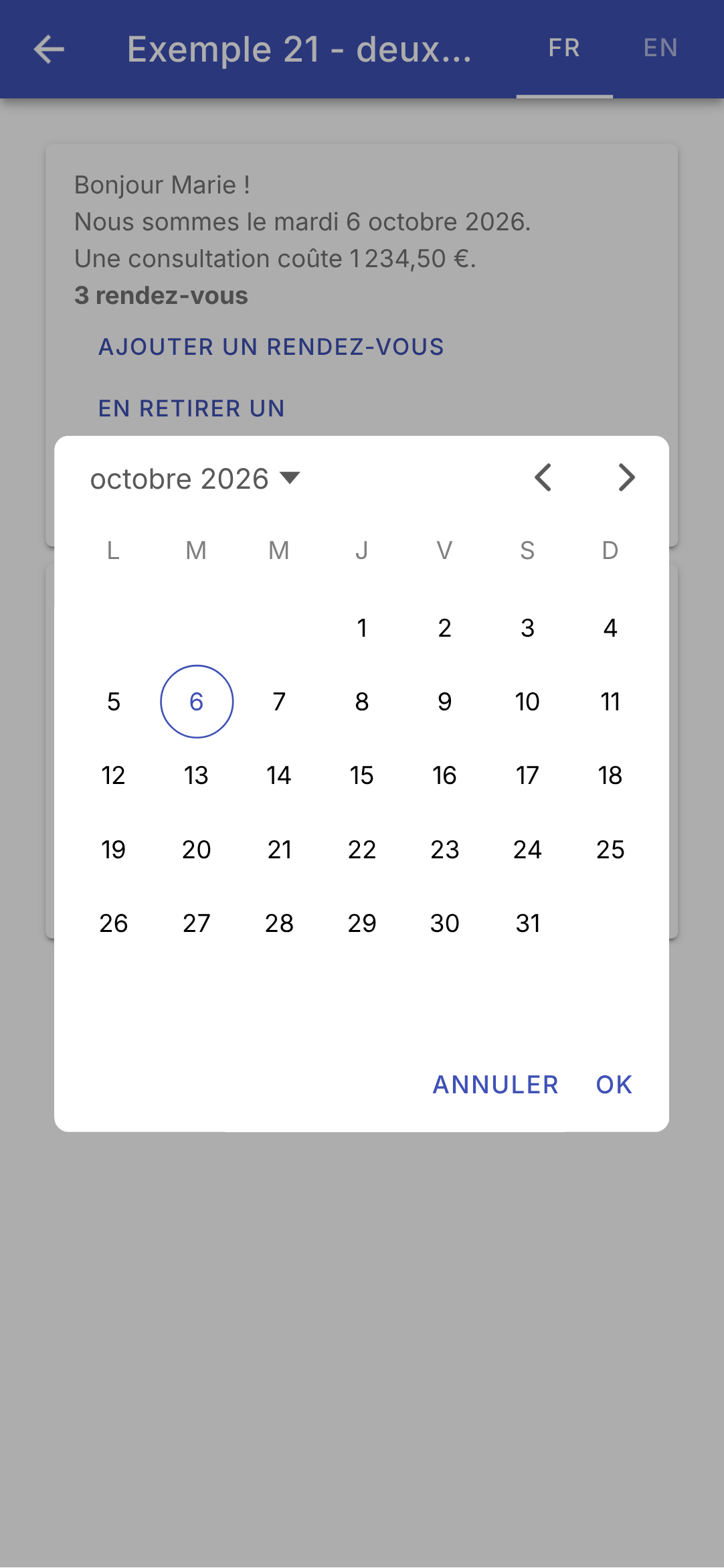
  • Lines 34–47 (html): the calendar, in a modal window ([<ion-modal>]) opened by the button whose [id] is specified by its [trigger] attribute. Its content, in a [<ng-template>], is created only when the window is opened. [<ion-datetime>] formats the months and days using [Intl], in the language specified by its [[locale]] attribute; [[firstDayOfWeek]]: the week begins on Monday in French and on Sunday in English. Its buttons (“Done,” “Cancel” by default) are not translated by [locale]: [[doneText]] and [[cancelText]] receive the texts from our dictionaries. This was the [flutter_localizations] package along with [Flutter];
  • lines 58–61 (html): what the [RdvMedecins] server would return. The server's key IS a dictionary key; its parameters are those of the text.

7.1.4. The output

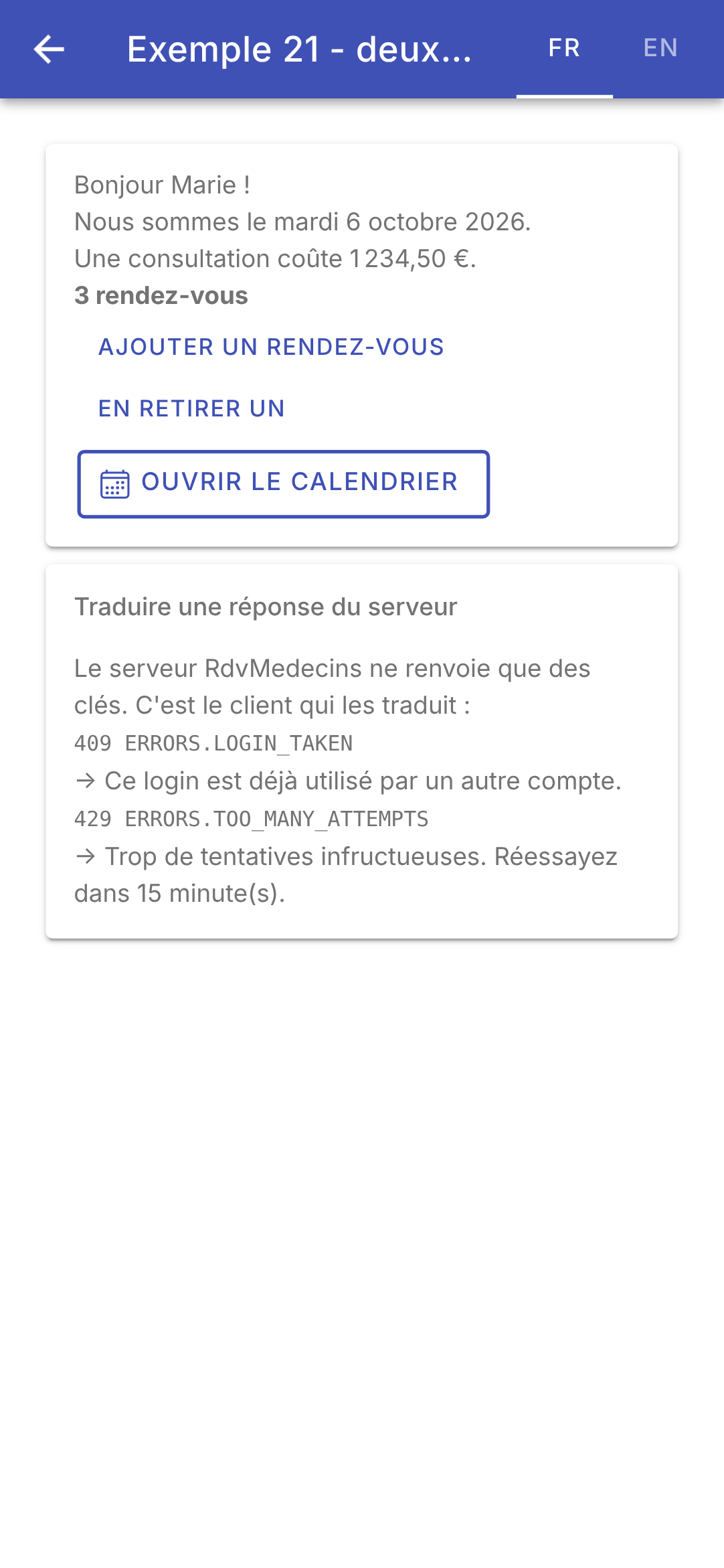
In English (left); in French, after an addition (middle); the calendar, in French (right):
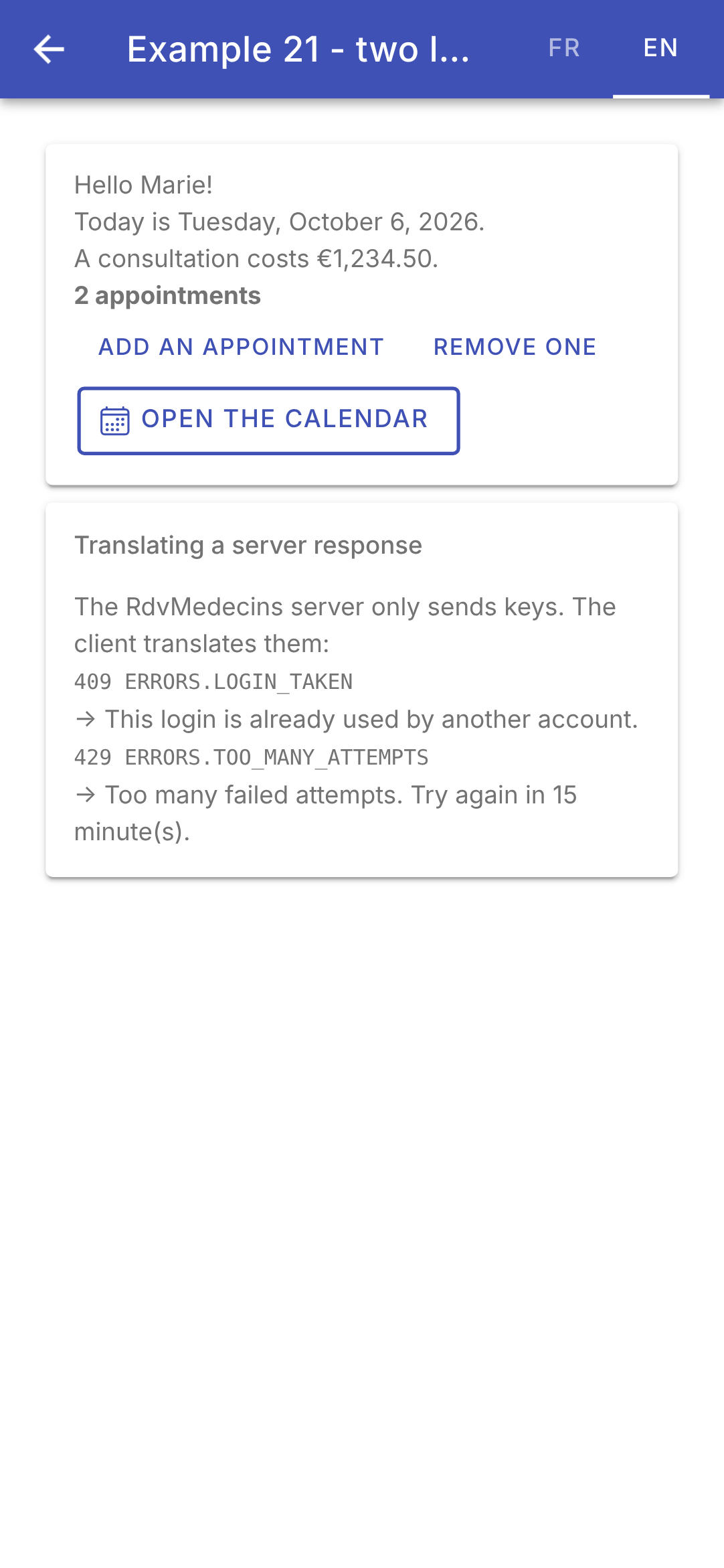
Changing the language re-translates the entire screen without restarting or making any requests to the server: the language and dictionary are signals, and everything that reads them (template text, date, price, title) follows suit. The selected language is stored on the device: relaunch the app (in the browser, reload the page), and it will open in the last selected language.