9. Communicating with the server
The JSON [RdvMedecins] server must now be started (port 8080), as explained in the previous chapter, preferably in captcha test mode ([CAPTCHA_TEST=test]), which allows you to respond with “test” to any image.
Examples 22 through 25 share a few files, located in the project's [src/app/common/] folder: the server address ([config.ts]), response types ([types.ts]), error classes ([api-error.ts]), the request service ([api.ts]), and a login bar ([login-bar.ts]). They are introduced throughout the examples as they become relevant.
9.1. Example 22: A First Request HTTP
9.1.1. Where is the server?
For a web client served by the server itself, the question doesn’t arise: requests are sent to the same origin as the page, using a relative address ([/api/captcha]). An app installed on a phone does not have a usable origin: its page is served by [Capacitor] itself, from https://localhost. You must provide the full server address, and this address depends on where the app is running:
| // =========================================================================
// src/app/common/config.ts - WHERE is the JSON server?
// -------------------------------------------------------------------------
// The question does not arise for a web application served by the
// server itself: the requests go to the SAME origin as the page
// (a relative address, /api/...). But a MOBILE application has no
// usable origin (on Android, the page is served by Capacitor
// from https://localhost): it must be given the full address of the server.
// - in web development (ng serve), Angular's development
// server forwards the /api requests to the JSON server (file
// proxy.conf.json): a relative address is enough;
// - the Android emulator sees the computer running it at
// the address 10.0.2.2 (localhost, for it, is the emulator itself);
// - a real phone, connected to the same Wi-Fi network as the computer, must
// use the address of the computer on this network (192.168.1.20...):
// it is given when building the application:
// ng build --define "SERVER='http://192.168.1.20:8080'"
// or else we change the androidServer constant below.
// =========================================================================
import { Capacitor } from '@capacitor/core';
// the address of the server for the Android application, when nothing else
// is imposed: the computer's, as seen from the emulator
const androidServer = 'http://10.0.2.2:8080';
// the value given by --define "SERVER='...'" at build time
// (ng build, ng serve). The option replaces, in the compiled code, the word
// SERVER with the given value. Without it, SERVER does not exist: typeof
// lets us check it without causing an error
declare const SERVER: string | undefined;
const forcedServer = typeof SERVER === 'string' ? SERVER : '';
export const config = {
// Capacitor.isNativePlatform(): true in the Android (or iOS) application,
// false in a browser; Capacitor.getPlatform(): 'android', 'ios' or 'web'
serverUrl:
forcedServer !== ''
? forcedServer
: !Capacitor.isNativePlatform()
? '' // the web: same origin, relative addresses
: Capacitor.getPlatform() === 'android'
? androidServer
: 'http://localhost:8080',
};
|
- line 21: [Capacitor], the object of [@capacitor/core] that provides information about the platform on which the application is running. It can be used anywhere, including in a browser;
- line 25: the default address is [Android]. The emulator is a standalone machine with its own network: for the emulator, [localhost] refers to the emulator itself. The special address [10.0.2.2] refers to the computer running it;
- lines 31–32: an address imposed during application build by the [--define] option of [Angular]: [ng build --define "SERVER='http://192.168.1.20:8080'"]. Compilation replaces the identifier [SERVER] in the code with the given value (a string, hence the apostrophes). Without this option, [SERVER] does not exist: [declare const] informs the [TypeScript] compiler that [SERVER] is an identifier it does not see declared, and [typeof SERVER] allows you to test for its existence without causing an error. This is the exact counterpart of [--dart-define] and [String.fromEnvironment] in [Flutter];
- lines 34–45: otherwise, an address specific to the platform. [Capacitor.isNativePlatform()] is true in the [Android] (or [iOS]) application, but false in a browser; [Capacitor.getPlatform()] returns 'android', 'ios', or 'web':
- in the browser (line 41): a relative URL (''), so the same origin as the app;
- in [Android] (line 43): the address from line 25;
- elsewhere (line 44, [iOS], which this course does not cover): [localhost].
A real phone, connected to the same Wi-Fi network as the server computer, must use the computer’s address on that network (the command [ipconfig] from [Windows] provides it): you can pass it via [--define] during compilation, or modify the constant on line 25. The computer’s firewall must also allow incoming connections on port 8080.
9.1.2. Android Project Settings
The [Flutter] client modified two lines in the [android/app/src/main/AndroidManifest.xml] file: the permission to use the network, and the authorization to communicate in unencrypted HTTP (“plaintext”). With [Capacitor], this file is not modified:
- the permission [android.permission.INTERNET] is already declared in the [Android] project created by [npx cap add android]: a [Capacitor] application is a web page, so it always requires network access;
- The permission for HTTP in plain text is a setting in the [capacitor.config.ts] file, located at the root of the project:
| // =========================================================================
// capacitor.config.ts - the Capacitor configuration
// -------------------------------------------------------------------------
// Capacitor turns the web application (the folder produced by ng build)
// into an Android application: it wraps it in an Android Studio project
// (android/ folder), where it is displayed by a "WebView", the engine of
// the phone's Chrome browser. Commands (see example 01, "Running"):
// npx cap add android (only once: creates the android/ folder)
// ng build (builds the web application)
// npx cap sync android (copies it into the Android project)
// npx cap run android (runs it on an emulator or a phone)
// =========================================================================
import type { CapacitorConfig } from '@capacitor/cli';
const config: CapacitorConfig = {
// the unique identifier of the application on the phone (and on the Play Store)
appId: 'fr.stahe.examples',
// the name displayed under the icon
appName: 'Ionic Examples',
// the folder of the compiled web application (ng build)
webDir: 'dist/examples_ionic/browser',
server: {
// allows unencrypted HTTP requests (http://10.0.2.2:8080) to
// the development JSON server (examples 22 to 25)
cleartext: true,
},
plugins: {
// CapacitorHttp: the HTTP requests of the application are no longer made
// by the WebView but by Android's native code. Consequences (see
// examples 22 and 23): no CORS check (the JSON server has nothing to
// allow), and the cookies (the one of the authentication token) are
// stored by Android and sent back automatically
CapacitorHttp: {
enabled: true,
},
},
};
export default config;
|
- Lines 23–27: [server.cleartext: true]. Starting with version 9 of [Android], an application is only allowed to communicate using HTTPS. Our development server uses HTTP: we allow it. The [npx cap sync android] command carries over this setting to the [Android] project (the [android:usesCleartextTraffic="true"] attribute, added to the manifest that [Capacitor] merges with the application’s manifest). In production, the server would be in HTTPS, and this setting would disappear;
- lines 28–37: the [CapacitorHttp] plugin. Requests from the application’s HTTP (those from the HTTP client of [Angular], just like those from [fetch]) are no longer sent by WebView but by the native code of [Android]. For a browser, the application (https://localhost) and the server (http://10.0.2.2:8080) would appear to have two different origins: the browser would require the server to provide a CORS authorization, which the server does not grant, and would refuse to include the token cookie. The native code does not have these rules. The app’s code [TypeScript], however, does not change: it is [Capacitor] that redirects the requests.
9.1.3. And in the browser?
During development, the application runs in the computer’s browser: [ng serve] serves it on port 8100, while the JSON server is on port 8080. Again, there are two origins, and [CapacitorHttp] does not operate within a browser. The solution is a proxy, configured in [angular.json] (option ["proxyConfig": "proxy.conf.json"] of the target [serve]):
| {
"/api": {
"target": "http://localhost:8080",
"secure": false,
"changeOrigin": false,
"logLevel": "warn"
}
}
|
- Line 2: Any request whose address begins with [/api]...
- line 3: ... is forwarded by the [Angular] development server to the JSON server, and its response is sent back to the browser. For the browser, the application, and the API, the origin is the same (http://localhost:8100): no CORS, and the cookie is passed along. This is exactly the role of the [Vite] proxy in the [React] course, and of the [web_dev_config.yaml] file in the [Flutter] course;
- line 4: [secure: false]: do not require a valid HTTPS certificate from the target (it’s in HTTP anyway); line 6: display only proxy warnings.
9.1.4. The request
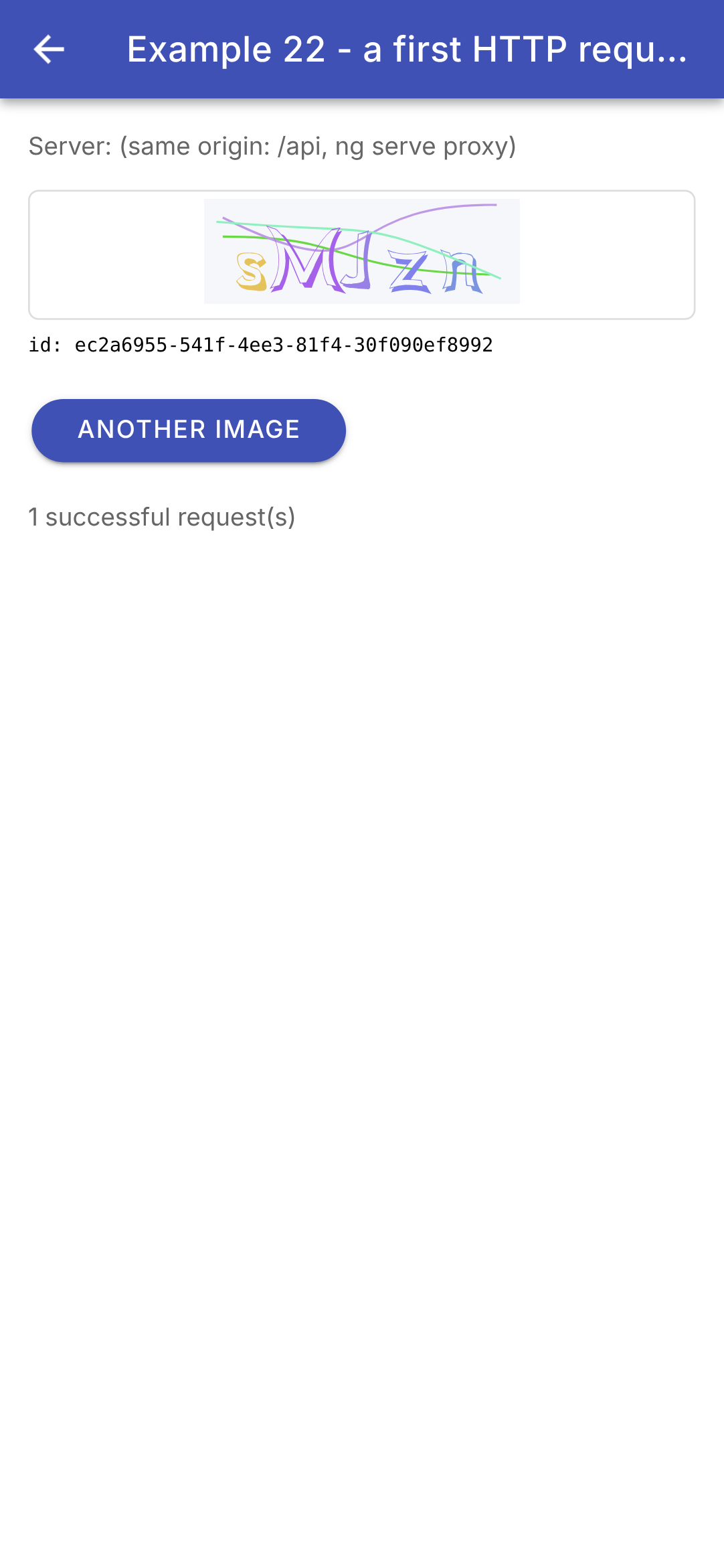
A CAPTCHA is requested from the server: [GET /api/captcha], which responds with [{ "id": "...", "svg": "<svg ...>" }].
| // =========================================================================
// src/app/ex22-http/ex22.page.ts - a first HTTP request to the server
// -------------------------------------------------------------------------
// The RdvMedecins JSON server must be running (port 8080). We ask it for
// a captcha: GET /api/captcha -> { "id": "...", "svg": "<svg ...>" }.
//
// - HttpClient: Angular's HTTP client (provided to the whole application
// by provideHttpClient(), in main.ts). http.get<T>(address) returns
// an Observable: the request is sent when we SUBSCRIBE to it (subscribe), and
// the response arrives later, its JSON body already decoded;
// - an error response (4xx, 5xx) or the absence of response arrive
// in the error function of the subscription;
// - the address of the server depends on where the application runs
// (browser, Android emulator, phone): see common/config.ts;
// - three states to display: loading, successful, in error;
// - the image of the captcha is SVG: an <img> tag can display it.
// =========================================================================
import { HttpClient, HttpErrorResponse } from '@angular/common/http';
import { Component, DestroyRef, inject, signal } from '@angular/core';
import {
IonBackButton, IonButton, IonButtons, IonCard, IonCardContent, IonContent, IonHeader, IonNote, IonProgressBar,
IonTitle, IonToolbar,
} from '@ionic/angular';
import { Subscription } from 'rxjs';
import { config } from '../common/config';
import { Captcha, captchaImage } from '../common/types';
@Component({
selector: 'app-ex22',
imports: [
IonHeader, IonToolbar, IonButtons, IonBackButton, IonTitle, IonContent, IonProgressBar, IonCard, IonCardContent,
IonButton, IonNote,
],
templateUrl: './ex22.page.html',
styles: `
.error { --background: #ffebee; --color: #333; margin: 12px 0; }
.image { border: 1px solid #ddd; border-radius: 6px; padding: 4px; text-align: center; }
.image img { height: 60px; }
.id { font-family: monospace; font-size: 11px; margin: 8px 0; }
`,
})
export class Ex22Page {
private readonly http = inject(HttpClient);
readonly server = config.serverUrl || '(same origin: /api, ng serve proxy)';
readonly captchaImage = captchaImage;
// the state of the screen: signals
readonly captcha = signal<Captcha | null>(null);
readonly loading = signal(true);
readonly error = signal<string | null>(null);
readonly requestCount = signal(0);
// the subscription to the request in progress (if there is one)
private request?: Subscription;
constructor() {
this.load(); // the first request, as soon as the page is created
// the page destroyed (Back button): the request in progress is abandoned
inject(DestroyRef).onDestroy(() => this.request?.unsubscribe());
}
load(): void {
// unsubscribing from a request still in progress CANCELS it: its response,
// now useless, will never be processed (no "stale" response)
this.request?.unsubscribe();
this.loading.set(true);
this.error.set(null);
// <Captcha>: the type of the expected JSON body (a promise made to the
// compiler: nothing is checked at run time)
this.request = this.http.get<Captcha>(`${config.serverUrl}/api/captcha`).subscribe({
// next: the response has arrived (code 2xx), its JSON body is decoded
next: (captcha) => {
this.captcha.set(captcha);
this.requestCount.update((n) => n + 1);
this.loading.set(false);
},
// error: an error response (4xx, 5xx), or no response at all
// (server stopped, wrong address: status is then 0)
error: (e: HttpErrorResponse) => {
this.error.set(e.status === 0 ? 'no response (status 0)' : `the server responded ${e.status}`);
this.captcha.set(null);
this.loading.set(false);
},
});
}
}
|
| <!-- ======================================================================
ex22.page.html - a captcha requested from the server
====================================================================== -->
<ion-header>
<ion-toolbar color="primary">
<ion-buttons slot="start">
<ion-back-button defaultHref="/" />
</ion-buttons>
<ion-title>Example 22 - a first HTTP request</ion-title>
</ion-toolbar>
</ion-header>
<ion-content class="ion-padding">
<ion-note>Server: {{ server }}</ion-note>
<!-- an "indeterminate" progress bar during the request -->
@if (loading()) {
<ion-progress-bar type="indeterminate" class="ion-margin-top" />
}
@if (error(); as error) {
<ion-card class="error">
<ion-card-content>
Unable to get a captcha: {{ error }}.<br />
Is the RdvMedecins JSON server running (port 8080)?
</ion-card-content>
</ion-card>
}
@if (captcha(); as captcha) {
@if (!loading()) {
<!-- the SVG image, in the form of a data: address (see common/types.ts) -->
<div class="image ion-margin-top">
<img [src]="captchaImage(captcha)" alt="captcha" />
</div>
<div class="id">id: {{ captcha.id }}</div>
}
}
<!-- disabled during a request -->
<ion-button class="ion-margin-top" shape="round" [disabled]="loading()" (click)="load()">Another image</ion-button>
<p><ion-note>{{ requestCount() }} successful request(s)</ion-note></p>
</ion-content>
|
- line 19 (.ts): [HttpClient], the client HTTP of [Angular]. It is provided to the entire application by [provideHttpClient()], within [main.ts], and the page obtains it via [inject(HttpClient)] (line 44);
- line 45 (.ts): the server address, displayed at the top of the screen; an empty address means “same origin”;
- lines 49–52 (.ts): the screen status, represented by signals: the received CAPTCHA (or [null]), the three request statuses (in progress, error, successful), and the number of successful requests;
- line 55 (.ts): the subscription ([Subscription]) to the current request;
- lines 57–61 (.ts): the first request is sent as soon as the page is loaded. [DestroyRef] signals when the page is closed (Back button): the subscription to the current request is then canceled;
- lines 63–86 (.ts): the request:
- line 71 (.ts): [this.http.get<Captcha>(address)] does not yet send the request; it returns a [Observable] (example 19) from the response. The request is sent when a subscription is made ([subscribe]). The type [<Captcha>] is that of the expected body JSON: a promise made to the compiler, which is not verified at runtime;
- Lines 73–77 (.ts): [next] receives the response if its status code is 2xx. Its body, JSON, has already been decoded: it is a [JavaScript] object (the [http] package from [Flutter] returned text, which had to be passed to [jsonDecode]);
- lines 80–84 (.ts): [error] receives a [HttpErrorResponse], indicating either an error response (4xx, 5xx) or no response (server down, incorrect address, network outage). These are distinguished by [e.status], which is 0 when the server has not responded. This differs from [http.get] and [Flutter], which treated a 4xx or 5xx response as an ordinary response, requiring the code to be checked;
- Line 66 (.ts): If the previous request is not complete, it is abandoned: unsubscribing from a HTTP request cancels it (the browser interrupts it), and its response will never be processed. This is where [Observable] demonstrates its advantage over [Promise], which cannot be canceled: the [Flutter] example had to number its requests to ignore stale responses;
- lines 18–20 (html): a progress bar ([<ion-progress-bar type="indeterminate">]) during the request;
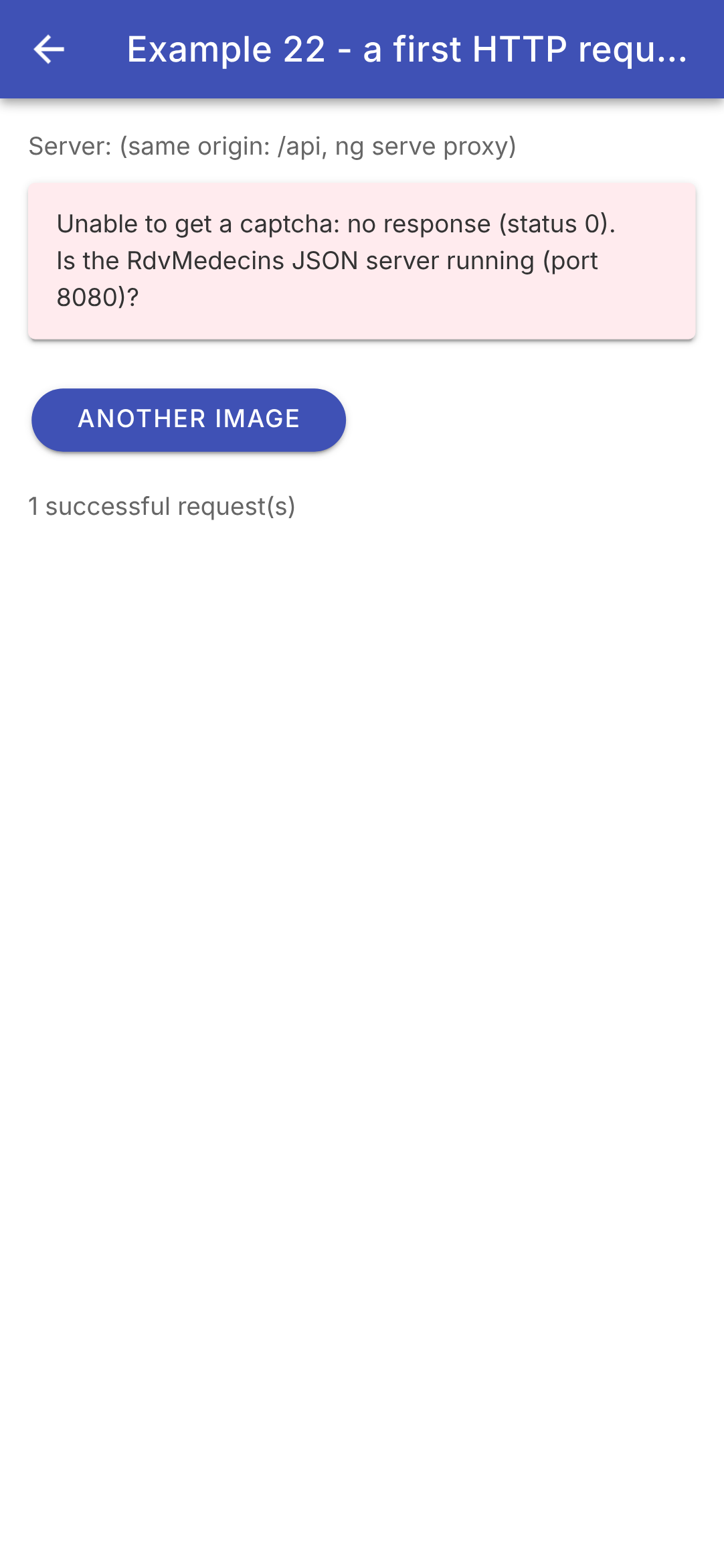
- lines 22–29 (html): the error, displayed in a card;
- lines 31–39 (html): the CAPTCHA. [@if (captcha(); as captcha)] assigns a name to the signal value when it is not [null];
- line 35 (html): the CAPTCHA image is SVG, in text form. A [<img>] tag can display it, provided it is given in the form of a URL; this is the role of the [captchaImage] function in [common/types.ts]:
| // the SVG text -> a "data:" address usable by <img [src]>: the image
// is IN the address. An SVG image displayed by <img> cannot run
// any script: no risk, even if its content were dubious
export function captchaImage(c: Captcha): string {
return `data:image/svg+xml;charset=utf-8,${encodeURIComponent(c.svg)}`;
}
|
- Line 32: A [data:] address contains the file itself: its type ([image/svg+xml]), followed by its content, encoded by [encodeURIComponent] so that it can appear in an address. Why not insert the text SVG directly into the page using [[innerHTML]]? [Angular] would reject it: a SVG may contain scripts, and [Angular] “cleans up” any HTML inserted in this way by removing tags it does not recognize as safe, including [<svg>]. We could force it ([DomSanitizer.bypassSecurityTrustHtml]), but an image is simpler and risk-free: an image displayed by [<img>] never executes any scripts. In [Flutter], it was the [flutter_svg] package that rendered the SVG;
- line 42 (html): “Another image,” disabled during a request.
In the browser, using the [ng serve] proxy; then the server does not respond (for this screenshot, the capture script causes the request to fail, just as a stopped server would):
The development tools for [Chrome] (F12), under the “Network” " tab, show each HTTP request from the application, along with its headers and body: here, [GET http://localhost:8100/api/captcha], transmitted via the proxy. On the phone, the application is inspected from the computer at the address [chrome://inspect] (see the “Deployment” chapter); requests passing through [CapacitorHttp]—that is, through the native code—are less visible there.
The client HTTP for [Angular] also offers, starting with version 19, [httpResource()]: the counterpart, for a GET request, to the [resource()] from Example 19. You provide it with the address, and it returns a signal object ([isLoading()], [value()], [error()], [reload()]): The entire management of the three states in this example could fit on a single line. For a first request, we chose to write these states ourselves; the case study will use [resource()].
9.2. Example 23: Login, Cookie, and Session
9.2.1. What about the cookie?
The server stores the token JWT in a cookie. The [Flutter] client had, at this point, to replace its HTTP client with one that reads the [Set-Cookie] header from each response, organizes the cookies (and stores them on the device), and sends them back in the [Cookie] header of each request: a [Flutter] application does not have a browser to do this for it.
A [Ionic] application, on the other hand, has nothing to write:
- in the computer’s browser, it is the browser that stores the cookie and sends it back, just as it does for any other website. The [ng serve] proxy assigns the same origin to both the application and API: the [SameSite=Strict] cookie is accepted and sent back. The application code cannot read or write this cookie ([HttpOnly]);
- for [Android], the [CapacitorHttp] plugin (example 22) routes requests through the native code. [Capacitor] sets up, upon application startup, the cookie manager from [Android] (the one from WebView) as the manager for native requests: Cookies received are stored there and sent back with subsequent requests to the same server. They are retained on the device (ours has a lifetime set by [Max-Age=7200]; only “session” cookies, which have no expiration time, are deleted when the app starts): you remain logged in when you close and then reopen the app.
The token is therefore never manipulated by the app’s code, nor is it stored in plain text on the device (the client [Flutter] stored it in [shared_preferences]).
9.2.2. A command
| // =========================================================================
// src/app/ex23-login/command.ts - an ACTION, its state, its result
// -------------------------------------------------------------------------
// An asynchronous action (logging in, saving...) has a state that
// the screen must show: is it RUNNING (button disabled)? has it
// ended with an ERROR (message)? It is the "Command" pattern of the
// architecture guides (Flutter's, for example), reduced to the essentials:
//
// readonly loginCommand = new Command();
// this.loginCommand.execute(() => this.logIn()); // starts the action
// loginCommand.running(), loginCommand.error() // its state
//
// Its state is made of SIGNALS: the template that reads them is updated
// when the command starts and when it ends.
// =========================================================================
import { signal } from '@angular/core';
export class Command {
private readonly _running = signal(false);
private readonly _error = signal<unknown>(null);
readonly running = this._running.asReadonly();
readonly error = this._error.asReadonly();
// executes the action, if another one is not already running
async execute(action: () => Promise<void>): Promise<void> {
if (this._running()) return; // no double submission (double tap on the button)
this._running.set(true);
this._error.set(null);
try {
await action();
} catch (e) {
this._error.set(e); // the error is KEPT, to be displayed
} finally {
// finally: executed in ALL cases, success or error
this._running.set(false);
}
}
clearError(): void {
this._error.set(null);
}
}
|
An asynchronous action (log in, save, etc.) has a status that the screen must display: is it in progress (button disabled)? Did it end with an error (message)? This is the “Command” model from the architecture guides (the one in [Flutter] calls it that), stripped down to the essentials. The [React] course used the “actions” from [React] 19 ([useActionState]) for this purpose.
- Lines 19–23: a simple class (each screen creates its own using [new]), whose state consists of two private signals, exposed as read-only. The template that reads [running()] or [error()] is updated when the command starts and when it ends: this is the role that [ChangeNotifier] and [ListenableBuilder] played in [Flutter];
- lines 26–38: execute an action: if another action is in progress, do nothing (line 27: prevent double submission if the button is pressed twice); otherwise, the command is set to “in progress”; in the event of an exception, the error is logged to be displayed (line 33); in all cases ([finally], lines 34–37), the command is no longer in progress. The error is of type [unknown]: in [JavaScript], any value can be passed, and [TypeScript] therefore has no knowledge of what [catch] captures.
9.2.3. The screen
| // =========================================================================
// src/app/ex23-login/ex23.page.ts - logging in to the RdvMedecins server
// -------------------------------------------------------------------------
// 1. at startup: GET /api/auth/me - are we already logged in?
// (the application may have been stopped; the server, for its part, reads the cookie
// that is presented to it);
// 2. login: POST /api/auth/login, JSON body { login, password,
// captchaId, captcha }. On success, the server sends the cookie
// of the JWT token (Set-Cookie header);
// 3. protected request: GET /api/doctors. The cookie goes with it;
// 4. logout: POST /api/auth/logout - the server deletes the cookie.
// And the cookie? The code has NOTHING to do: in a browser, it is the
// browser that stores it and sends it back; on Android, it is the native code
// (CapacitorHttp plugin, see capacitor.config.ts).
// =========================================================================
import { HttpClient, HttpErrorResponse } from '@angular/common/http';
import { Component, inject, signal } from '@angular/core';
import { FormsModule } from '@angular/forms';
import {
IonBackButton, IonButton, IonButtons, IonCard, IonCardContent, IonContent, IonHeader, IonInput, IonNote, IonText,
IonTitle, IonToolbar,
} from '@ionic/angular';
import { firstValueFrom } from 'rxjs';
import { config } from '../common/config';
import { Captcha, captchaImage } from '../common/types';
import { Command } from './command';
// the few messages this example needs (example 25 will use dictionaries)
const messages: Record<string, string> = {
'LOGIN.ERROR': 'Incorrect login or password.',
'ERRORS.WRONG_CAPTCHA': 'The characters you typed do not match the image.',
'ERRORS.TOO_MANY_ATTEMPTS': 'Too many failed attempts. Try again later.',
};
// what POST /api/auth/login and GET /api/auth/me return, and a row of GET /api/doctors
interface User {
login: string;
name: string;
role: string;
}
interface Doctor {
id: number;
title: string;
firstName: string;
lastName: string;
}
@Component({
selector: 'app-ex23',
imports: [
FormsModule, IonHeader, IonToolbar, IonButtons, IonBackButton, IonTitle, IonContent, IonCard, IonCardContent,
IonInput, IonButton, IonText, IonNote,
],
templateUrl: './ex23.page.html',
styles: `
.captcha { display: flex; align-items: center; margin-top: 12px; }
.captcha img { height: 50px; }
.error { --background: #ffebee; --color: #333; }
h3 { font-size: 14px; font-weight: bold; margin: 12px 0 4px; }
`,
})
export class Ex23Page {
private readonly http = inject(HttpClient);
readonly captchaImage = captchaImage;
readonly user = signal<User | null>(null); // null: nobody is logged in
readonly doctors = signal<Doctor[]>([]);
readonly captcha = signal<Captcha | null>(null);
readonly ready = signal(false); // is the starting check finished?
readonly serverError = signal<string | null>(null);
readonly loginCommand = new Command();
// the fields of the form, bound by [(ngModel)]
readonly login = signal('admin');
readonly password = signal('');
readonly captchaAnswer = signal('');
constructor() {
this.checkSession();
}
private url(path: string): string {
return `${config.serverUrl}/api${path}`;
}
// a GET request whose JSON body we want. A response that is not a
// 2xx (or the absence of response) rejects the Promise with an HttpErrorResponse
private read<T>(path: string): Promise<T> {
return firstValueFrom(this.http.get<T>(this.url(path)));
}
// a POST: the body object is sent as JSON (content-type: application/json header)
private post<T>(path: string, body: object): Promise<T> {
return firstValueFrom(this.http.post<T>(this.url(path), body));
}
async loadCaptcha(): Promise<void> {
this.captcha.set(await this.read<Captcha>('/captcha'));
this.captchaAnswer.set('');
}
private async loadDoctors(): Promise<void> {
this.doctors.set(await this.read<Doctor[]>('/doctors'));
}
// 1. who is logged in? 200 -> the user; 401 -> nobody
private async checkSession(): Promise<void> {
try {
this.user.set(await this.read<User>('/auth/me'));
await this.loadDoctors();
} catch (e) {
// instanceof: a TYPE test; e.status: the status code (0: no response)
if (e instanceof HttpErrorResponse && e.status === 401) {
await this.loadCaptcha();
} else if (e instanceof HttpErrorResponse && e.status !== 0) {
this.serverError.set(`The server responded ${e.status}.`);
} else {
this.serverError.set(`Is the RdvMedecins JSON server running (${config.serverUrl || 'port 8080'})?`);
}
}
this.ready.set(true);
}
// the "Log in" button: the Command executes the action and stores its error
submit(): void {
this.loginCommand.execute(() => this.logIn());
}
// 2. the login
private async logIn(): Promise<void> {
try {
const user = await this.post<User>('/auth/login', {
login: this.login().trim(),
password: this.password(),
captchaId: this.captcha()?.id,
captcha: this.captchaAnswer(),
});
this.password.set('');
this.user.set(user);
await this.loadDoctors();
} catch (e) {
if (!(e instanceof HttpErrorResponse)) throw e;
// e.error: the JSON body of the error response, { statusCode, key, ... }
const key: string = e.error?.key ?? 'ERRORS.SERVER_UNREACHABLE';
await this.loadCaptcha(); // each image is only used once
// the error the Command will keep
throw new Error(`${e.status} - ${messages[key] ?? key}`);
}
}
// the message of the error kept by the command
errorMessage(): string {
const error = this.loginCommand.error();
return error instanceof Error ? error.message : String(error);
}
// 4. the logout
async logOut(): Promise<void> {
await this.post('/auth/logout', {});
this.user.set(null);
this.doctors.set([]);
await this.loadCaptcha();
}
}
|
| <!-- ======================================================================
ex23.page.html - login, session, logout
====================================================================== -->
<ion-header>
<ion-toolbar color="primary">
<ion-buttons slot="start">
<ion-back-button defaultHref="/" />
</ion-buttons>
<ion-title>Example 23 - logging in to the server</ion-title>
</ion-toolbar>
</ion-header>
<ion-content class="ion-padding">
@if (!ready()) {
<ion-note>Checking the session...</ion-note>
} @else if (user(); as u) {
<!-- logged in -->
<ion-card>
<ion-card-content>
<div>Logged in: <strong>{{ u.name }}</strong> ({{ u.login }}), role {{ u.role }}</div>
<!-- 3. a protected request: the cookie went with it -->
<h3>GET /api/doctors</h3>
@for (m of doctors(); track m.id) {
<div>• {{ m.title }} {{ m.firstName }} {{ m.lastName }}</div>
}
<p class="ion-margin-top"><ion-note>Stop then restart the application: you stay logged in.</ion-note></p>
<ion-button fill="outline" shape="round" (click)="logOut()">Log out</ion-button>
</ion-card-content>
</ion-card>
} @else if (serverError() === null) {
<!-- not logged in: the form -->
<ion-card>
<ion-card-content>
<ion-input label="Login" labelPlacement="floating" [(ngModel)]="login" />
<ion-input label="Password" labelPlacement="floating" type="password" [(ngModel)]="password" />
<div class="captcha">
@if (captcha(); as c) {
<img [src]="captchaImage(c)" alt="captcha" />
}
<ion-button fill="clear" size="small" (click)="loadCaptcha()">Another image</ion-button>
</div>
<ion-input label="Copy the characters of the image" labelPlacement="floating" autocorrect="off"
autocapitalize="off" [(ngModel)]="captchaAnswer" />
<!-- the button follows the state of the command -->
<ion-button class="ion-margin-top" shape="round" [disabled]="loginCommand.running()"
(click)="submit()">
{{ loginCommand.running() ? 'Logging in...' : 'Log in' }}
</ion-button>
@if (loginCommand.error() !== null) {
<p><ion-text color="danger">{{ errorMessage() }}</ion-text></p>
}
<p><ion-note>Accounts: admin, pelissier, martin... (password = login).</ion-note></p>
</ion-card-content>
</ion-card>
}
@if (serverError(); as message) {
<ion-card class="error">
<ion-card-content>{{ message }}</ion-card-content>
</ion-card>
}
</ion-content>
|
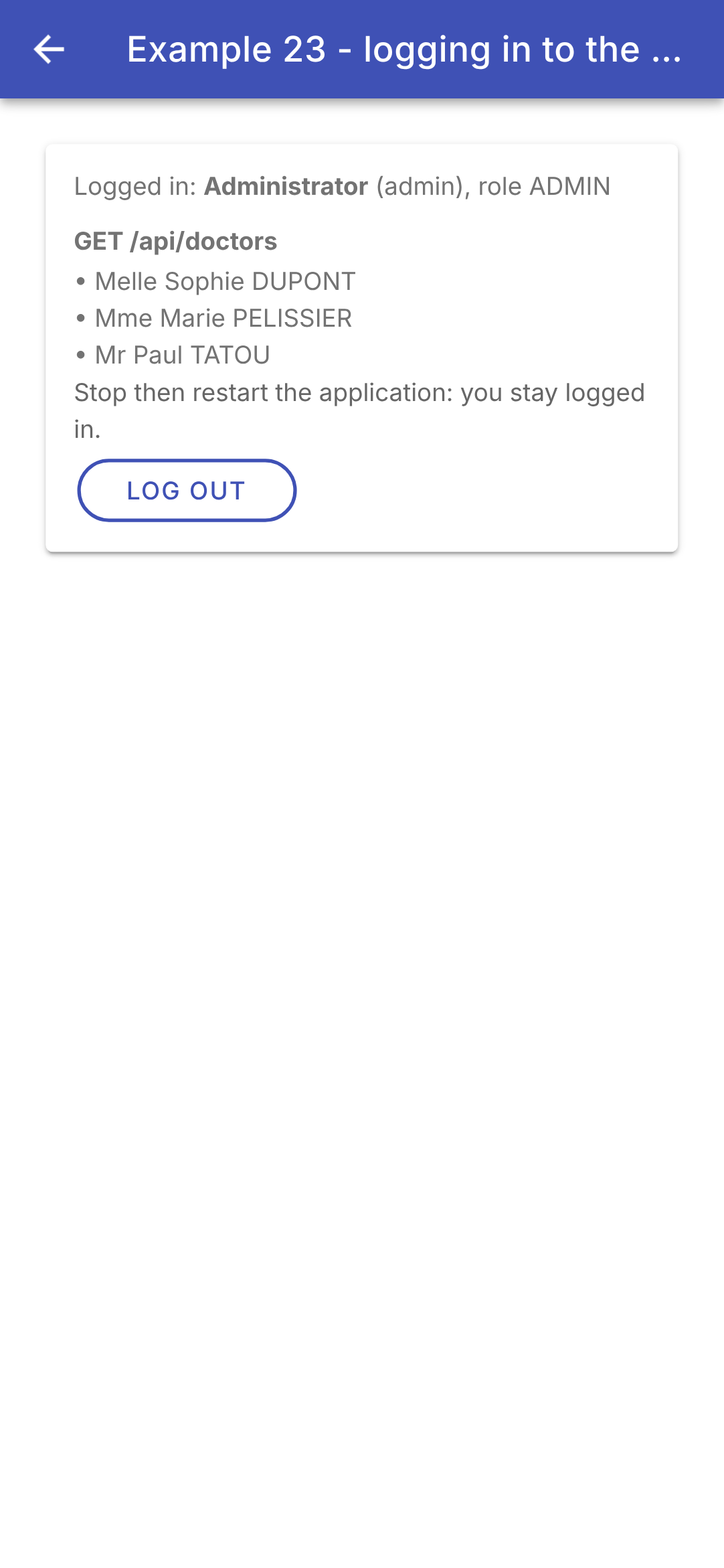
The screen goes through the four stages of a session: at startup, who is logged in?; the login; a secure request; and logout.
- lines 29–34 (.ts): the few messages this example requires (Example 25 will use dictionaries);
- lines 36–47 (.ts): the format of the responses used, described by two interfaces (Example 24 will store these types in [common/types.ts]);
- lines 67–76 (.ts): the state: the logged-in user ([null]: nobody), the doctors, the CAPTCHA, the completion of the initial verification, a server error, the login command, and the form fields;
- Lines 86–95 (.ts): two shortcuts. [firstValueFrom(observable)] (from [RxJS]) subscribes to the [Observable] from the request and returns a [Promise] with its first value, the response: it can then be expected with [await], in code that reads from top to bottom. If the request fails, the [Promise] is rejected along with the [HttpErrorResponse], and [await] throws it as an exception. For a POST (line 94), the body is an object: the client HTTP sends it to JSON, with the [Content-Type: application/json] header required by the server (otherwise: 415);
- lines 107–122 (.ts): 1. At startup, who is logged in? [GET /api/auth/me]: 200, the user (followed by the list of doctors); 401 (line 113), no one: a CAPTCHA is loaded for the form. [e instanceof HttpErrorResponse] is a type check: in the branch where it is true, [TypeScript] knows that [e] has a [status]. Another error code (lines 115–116) or no response at all (lines 117–119, [status] 0): a message;
- lines 125–127 (.ts): the “Log in” button delegates the action to the command;
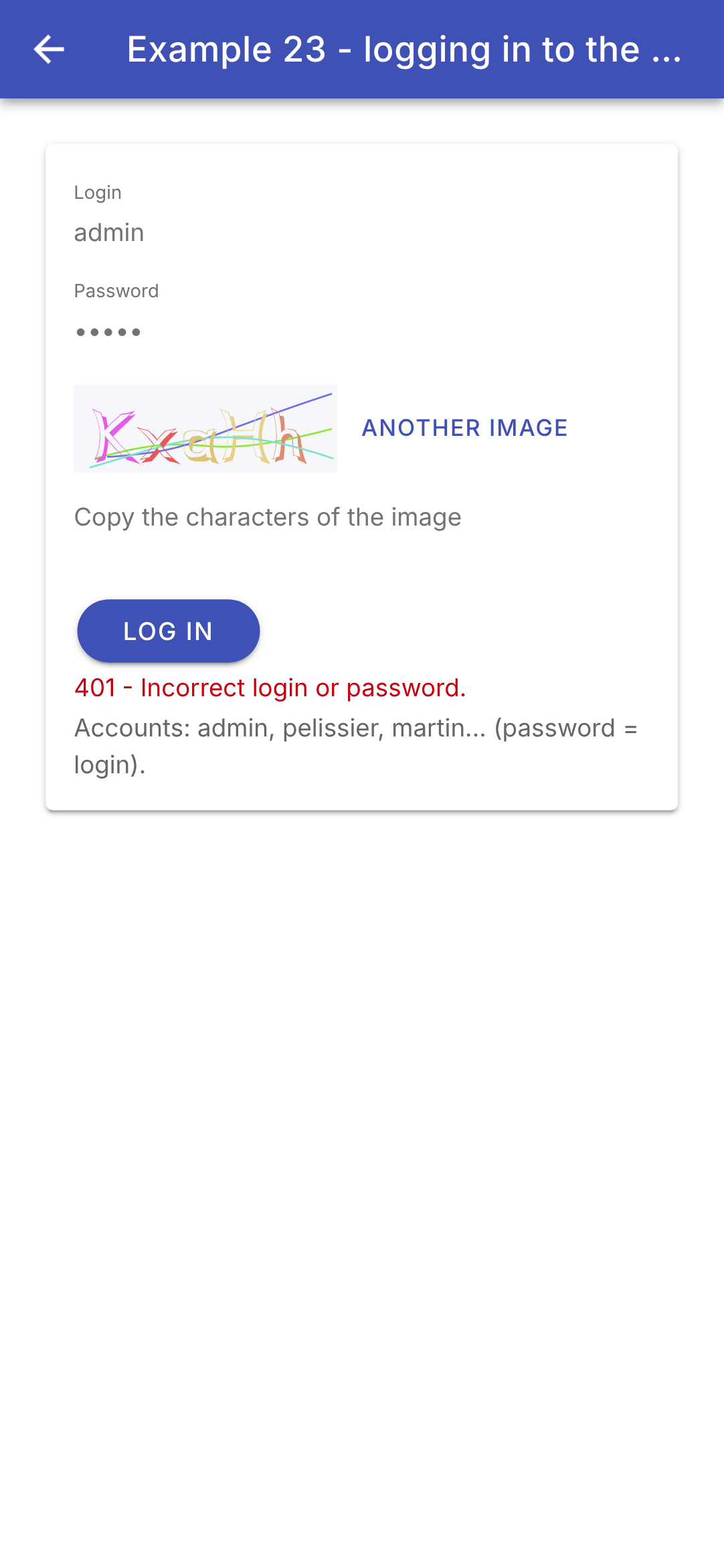
- lines 130–149 (.ts): 2. the connection: [POST /api/auth/login]. If successful, the browser (or [Android]) has stored the cookie: the user is retained, and the doctors are loaded. If the connection fails, [e.error] is the body of the error response, already decoded: it contains the message key (line 144; [?.] and [??]: a backup key if the body does not contain one). A new image is loaded (each is used only once), then an error is triggered whose message will be displayed (line 147): this is the command that captures and stores it. An exception that is not a [HttpErrorResponse] (an anomaly) is rethrown as-is (line 142);
- lines 152–155 (.ts): the error message retained by the command;
- lines 158–163 (.ts): 4. Logout: [POST /api/auth/logout]; the server deletes the cookie (it sends an empty cookie that has already expired), and the browser forgets it;
- lines 15–16 (html): as long as the initial verification is not complete;
- lines 17–30 (html): 3. logged in: the user and the list of doctors ([GET /api/doctors], a protected request: the cookie was included without a single line of code);
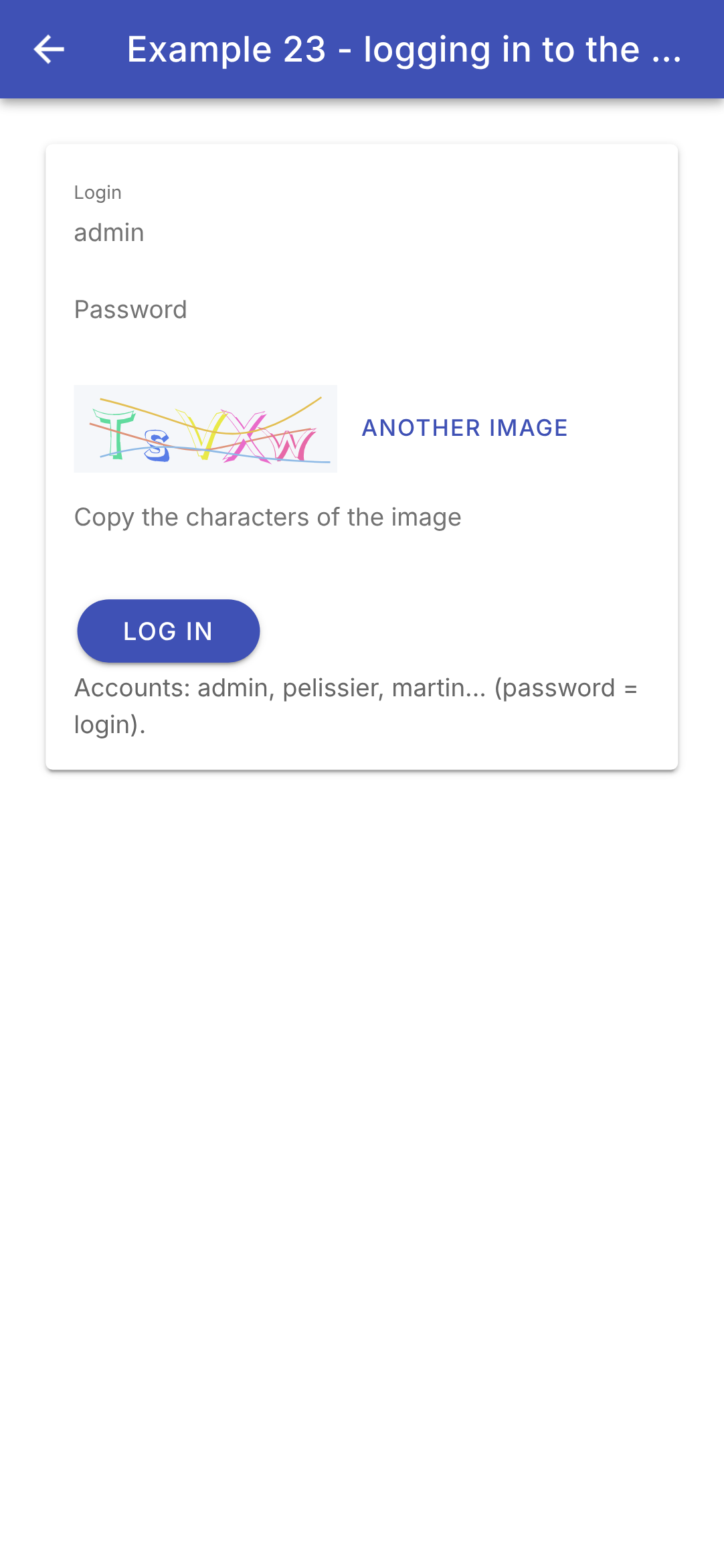
- lines 31–55 (HTML): not logged in: the form. The fields are linked to the signals via [[(ngModel)]] (example 05); the CAPTCHA is displayed as in example 22 (lines 38–40);
- lines 46–52 (HTML): the button reflects the status of the request: disabled and “Logging in...” while the request is being sent; any error message appears below;
- lines 58–62 (HTML): the server is not responding.
The login screen; an incorrect password; successful login:
Reload the browser page (or, on a phone, close and reopen the app): it opens while logged in. The cookie, stored by the browser (or by [Android]), is sent to [GET /api/auth/me], and the server responds with the user’s credentials. The token expires after two hours: [GET /api/auth/me] will then return a 401 response, and the login screen will reappear.
9.3. Example 24: An Access Layer for API
In Example 23, each request repeated the same steps. This example organizes them into three layers, which the case study will revisit.
9.3.1. The types
| // =========================================================================
// src/app/common/types.ts - the JSON objects exchanged with the RdvMedecins API
// (see the chapter on the black box, which describes each route)
// -------------------------------------------------------------------------
// The translation, into TypeScript types, of the server's responses. They are
// only DESCRIPTIONS: they disappear at compile time and do not
// check anything at run time. They let the compiler
// check that the code only uses fields that exist, with the right
// type (and let the editor suggest their names).
// =========================================================================
// a "union type" of strings: only these three values are allowed
export type Role = 'ADMIN' | 'DOCTOR' | 'USER';
// POST /api/auth/login, GET /api/auth/me
export interface User {
login: string;
name: string; // displayed name: "Marie PELISSIER"
role: Role;
}
// GET /api/captcha
export interface Captcha {
id: string;
svg: string; // the image, in SVG format (text)
}
// the SVG text -> a "data:" address usable by <img [src]>: the image
// is IN the address. An SVG image displayed by <img> cannot run
// any script: no risk, even if its content were dubious
export function captchaImage(c: Captcha): string {
  return `data:image/svg+xml;charset=utf-8,${encodeURIComponent(c.svg)}`;
}
// the name of a person, and nothing else
export interface Identity {
title: string;
firstName: string;
lastName: string;
}
// a doctor or a client (GET /api/doctors, GET /api/clients...)
// "extends": a Person has all the fields of an Identity, and others
export interface Person extends Identity {
id: number;
version: number; // optimistic lock: to be sent back with an update
login?: string; // optional (?): only for the ADMIN
}
// "Mme Alice DURAND"
export function fullName(i: Identity): string {
return `${i.title} ${i.firstName} ${i.lastName}`;
}
// a row of GET /api/schedule: a slot, and the RIGHTS of the logged-in user
export interface ScheduleSlot {
id: number;
startHour: number;
startMinute: number;
endHour: number;
endMinute: number;
free: boolean;
patient: Identity | null; // null: free, or taken by another patient
mine: boolean; // the appointment of the logged-in patient
bookable: boolean;
appointmentId: number | null; // set if the user can cancel
}
// "8:00 - 8:20"
export function timeRange(c: ScheduleSlot): string {
const hm = (h: number, m: number) => `${h}:${String(m).padStart(2, '0')}`;
return `${hm(c.startHour, c.startMinute)} - ${hm(c.endHour, c.endMinute)}`;
}
// GET /api/schedule?doctorId=...&day=...
export interface Schedule {
doctor: Person;
day: string; // "yyyy-MM-dd"
slots: ScheduleSlot[];
info: string | null; // translation key (patient who already has an appointment)
}
|
Server responses, described in [TypeScript]. These are merely descriptions: the interfaces are eliminated at compile time and do not perform any checks during execution. They allow the compiler to verify that the code uses only fields that exist, with the correct type, and enable the editor to suggest their names.
- line 13: a string union type: a variable of type [Role] can only be assigned one of these three strings. The compiler rejects [role === 'ADMN'];
- lines 16–20: the logged-in user ([POST /api/auth/login], [GET /api/auth/me]);
- lines 44–48: a person (doctor or client). [extends Identity]: it has all the fields of a [Identity] (lines 36–40), plus others; [login?]: an optional field (only the ADMIN contains it);
- lines 56–67: a calendar entry. [Identity | null], [number | null]: along with ["strict": true] and [TypeScript], this requires testing these values before using them;
- lines 51–53, 70–73: formatting functions: “Mme Alice DURAND,” “8:00 – 8:20.” These are not methods: the objects received from the server are ordinary [JavaScript] objects, without a class;
- lines 76–81: a doctor’s schedule for one day.
This is a fundamental difference from the [Flutter] client. In [Dart], the decoded JSON has no type ([dynamic]): each class had a constructor [fromJson], which verified the format of the JSON received through filtering by [Dart] 3 (“pattern matching”), and converted it into an object. Here, the compiler takes what it’s told at face value ([http.get<Schedule>(...)]): an unexpected response would only be detected when the display encountered a missing field. For a server under our control, this is standard practice. For an external API, we would verify the responses using a library of “schemas” ([Zod], [Valibot]), which performs at runtime what the filtering in [Dart] used to do.
9.3.2. Errors
| // =========================================================================
// src/app/common/api-error.ts - ONE class for all the errors of the API
// -------------------------------------------------------------------------
// All the error responses of the RdvMedecins server have the same shape:
// { "statusCode": 409, "key": "ERRORS.LOGIN_TAKEN", "params": {...}, "fields": {...} }
// But a request can also fail OTHERWISE: no response at all
// (network down, server stopped, wrong address), or a response that does not
// come from our server (an error page of a proxy). Angular's HTTP
// client reports all these failures with an HttpErrorResponse; we
// convert it into ONE class, ApiError, which carries the translation key
// sent by the server (and, if any, its parameters and the error of
// each field).
// =========================================================================
import { HttpErrorResponse } from '@angular/common/http';
// an object { name: text }
export type Texts = Record<string, string>;
// "extends Error": a full-fledged JavaScript error, which we throw
// (throw) and catch (catch); message is "409 ERRORS.LOGIN_TAKEN"
export class ApiError extends Error {
constructor(
readonly statusCode: number, // 0: the server did not respond
readonly key: string, // e.g.: 'ERRORS.LOGIN_TAKEN'
readonly params: Texts = {},
readonly fields: Texts = {},
) {
super(`${statusCode} ${key}`);
this.name = 'ApiError';
}
// an error response of Angular's HTTP client -> an ApiError
static fromResponse(response: HttpErrorResponse): ApiError {
// status 0: no response (network down, server stopped, wrong address)
if (response.status === 0) {
return new ApiError(0, 'ERRORS.SERVER_UNREACHABLE');
}
// error: the body of the response, already decoded if it is JSON
const body: unknown = response.error;
if (isObject(body) && typeof body['key'] === 'string') {
return new ApiError(response.status, body['key'], texts(body['params']), texts(body['fields']));
}
// no key: the proxy or the network responded in its place
return new ApiError(
response.status,
response.status >= 500 ? 'ERRORS.SERVER_UNREACHABLE' : 'ERRORS.SERVER_ERROR',
);
}
}
// a "type guard": if the function returns true, TypeScript knows that
// value is an object whose properties can be read
function isObject(value: unknown): value is Record<string, unknown> {
return typeof value === 'object' && value !== null && !Array.isArray(value);
}
// a JSON object { "name": "ERRORS..." } -> Texts (empty otherwise)
function texts(json: unknown): Texts {
if (!isObject(json)) return {};
return Object.fromEntries(Object.entries(json).map(([key, value]) => [key, String(value)]));
}
|
All error responses from the server have the same format. However, a request may also fail OTHERWISE: no response at all, or a response that does not come from our server. The HTTP client of [Angular] reports all these failures as a [HttpErrorResponse]; we convert them to ONE class, [ApiError].
- Line 18: [Record<string, string>]: an object whose properties are strings;
- lines 22–31: [extends Error]: a full-fledged [JavaScript] error, which is thrown ([throw]) and caught ([catch]), along with its call stack. The constructor parameters preceded by [readonly] declare and initialize the fields (a shorthand for [TypeScript]): a status (0: no response), a translation key, its parameters, and the error for each field. The error message (line 29) is “401 LOGIN.ERROR,” for quick display;
- lines 34–49: a [HttpErrorResponse] → a [ApiError]. Status 0: no response (lines 36–38). Otherwise, [response.error] is the body of the response, already decoded if it is JSON (line 40); if it has a string-type key [key], our server responded (lines 41–42). Otherwise, an intermediary (proxy, network) responded on its behalf (lines 45–48);
- lines 54–56: a type guard ([value is Record<string, unknown>])—a function whose result, [true], informs the compiler of the type of its parameter. After [isObject(body)], it knows that [body] is an object whose properties can be read. This is what the “if-case” statement in [Dart] used to do in a single step;
- lines 59–62: a JSON object { "name": "ERRORS..." } → text (empty if it is not an object).
9.3.3. The queries
| // =========================================================================
// src/app/common/api.ts - requests to the API, in one line
// -------------------------------------------------------------------------
// In example 23, each request repeated the same steps: address of the
// server, /api prefix, turning the Observable into a Promise, reading
// the error body... We group them here, in a SERVICE:
//
// const doctors = await this.api.get<Person[]>('/doctors');
// await this.api.post('/appointments', { day, slotId: 3 });
//
// - on success, the Promise returns the JSON body, DECODED;
// - on failure, it is rejected with an ApiError.
// All the requests go through the request method: it is the place where
// we would handle a problem COMMON to all of them (see the case study and the
// 401 response). Used by examples 24 and 25.
// =========================================================================
import { HttpClient, HttpErrorResponse } from '@angular/common/http';
import { inject, Injectable } from '@angular/core';
import { firstValueFrom } from 'rxjs';
import { config } from './config';
import { ApiError } from './api-error';
export type Method = 'GET' | 'POST' | 'PUT' | 'DELETE';
// providedIn: 'root': a single instance, for the whole application
@Injectable({ providedIn: 'root' })
export class Api {
private readonly http = inject(HttpClient);
// <T>: the type of the expected response, chosen by the caller
async request<T>(method: Method, url: string, body?: unknown): Promise<T> {
try {
// http.request returns an Observable; firstValueFrom turns it into a
// Promise (the request is sent at that moment). A body object is sent
// as JSON (content-type: application/json header, which the server requires
// for a POST); the JSON response is decoded (null if its body is empty)
return await firstValueFrom(this.http.request<T>(method, `${config.serverUrl}/api${url}`, { body }));
} catch (e) {
// the HTTP client reports ANY failure (4xx, 5xx, no response) with an
// HttpErrorResponse: we convert it. The rest (an anomaly) goes through as is
throw e instanceof HttpErrorResponse ? ApiError.fromResponse(e) : e;
}
}
get<T>(url: string): Promise<T> {
return this.request<T>('GET', url);
}
// a POST always has a JSON body: {} by default
post<T>(url: string, body: unknown = {}): Promise<T> {
return this.request<T>('POST', url, body);
}
put<T>(url: string, body: unknown): Promise<T> {
return this.request<T>('PUT', url, body);
}
delete<T>(url: string, body?: unknown): Promise<T> {
return this.request<T>('DELETE', url, body);
}
}
|
A service (Example 14) that performs, once and for all, the actions repeated in Example 23:
- line 27: [@Injectable({ providedIn: 'root' })]: a single instance, for the entire application, created on the first request;
- Lines 32–44: ALL requests are processed using this method: the server address and the prefix [/api], the body in JSON ([http.request] accepts all methods, and a body even for a DELETE), the decoded and expected response with [firstValueFrom] (line 38), errors converted to [ApiError] (line 42). The response type [<T>] is chosen by the caller ([api.get<Person[]>('/doctors')]). This is where a problem common to all requests would be handled (see the case study, and the 401 response for an expired session, which is handled in a client interceptor HTTP);
- lines 46–61: four shortcuts. A POST always has a body JSON: [{}] by default (line 51).
9.3.4. A connection bar
| // =========================================================================
// src/app/common/login-bar.ts - login / logout, in one bar
// -------------------------------------------------------------------------
// The form of example 23, reduced to a bar and rewritten with the
// Api service. The component emits the userChange event with
// the logged-in user (or null) each time it changes - including
// at startup, after querying GET /api/auth/me:
//
// <app-login-bar (userChange)="onUserChange($event)" />
//
// The Api service is obtained by dependency injection (inject).
// =========================================================================
import { Component, inject, output, signal } from '@angular/core';
import { FormsModule } from '@angular/forms';
import { IonButton, IonCard, IonCardContent, IonIcon, IonInput, IonLabel, IonText } from '@ionic/angular';
import { addIcons } from 'ionicons';
import { logInOutline, person } from 'ionicons/icons';
import { Api } from './api';
import { ApiError } from './api-error';
import { Captcha, captchaImage, User } from './types';
@Component({
selector: 'app-login-bar',
imports: [FormsModule, IonCard, IonCardContent, IonInput, IonButton, IonIcon, IonLabel, IonText],
templateUrl: './login-bar.html',
styles: `
ion-card { --background: #eceff1; margin: 0 0 8px; }
ion-card-content { padding: 8px 12px; }
.line { display: flex; align-items: center; gap: 8px; }
.line > ion-input, .line > ion-label { flex: 1; }
img { height: 40px; }
.error { font-size: 13px; }
`,
})
export class LoginBar {
private readonly api = inject(Api);
readonly captchaImage = captchaImage;
// the event emitted to the parent: the logged-in user, or null
readonly userChange = output<User | null>();
readonly user = signal<User | null>(null);
readonly captcha = signal<Captcha | null>(null);
readonly login = signal('admin');
readonly password = signal('');
readonly captchaAnswer = signal('');
readonly error = signal<string | null>(null);
constructor() {
addIcons({ person, logInOutline });
this.start();
}
private change(u: User | null): void {
this.user.set(u);
this.userChange.emit(u);
}
private async newCaptcha(): Promise<void> {
this.captcha.set(await this.api.get<Captcha>('/captcha'));
this.captchaAnswer.set('');
}
// at startup: are we already logged in?
private async start(): Promise<void> {
try {
this.change(await this.api.get<User>('/auth/me'));
} catch {
this.change(null); // 401: nobody is logged in
try {
await this.newCaptcha();
} catch {
this.error.set('Is the JSON server running (port 8080)?');
}
}
}
async logIn(): Promise<void> {
this.error.set(null);
try {
const u = await this.api.post<User>('/auth/login', {
login: this.login().trim(),
password: this.password(),
captchaId: this.captcha()?.id,
captcha: this.captchaAnswer(),
});
this.password.set('');
this.change(u);
} catch (e) {
// e.message: "401 LOGIN.ERROR" (example 25 will translate the key)
this.error.set(e instanceof ApiError ? e.message : String(e));
await this.newCaptcha();
}
}
async logOut(): Promise<void> {
await this.api.post('/auth/logout');
this.change(null);
await this.newCaptcha();
}
}
|
| <!-- ======================================================================
login-bar.html - the logged-in user, or a small form
====================================================================== -->
<ion-card>
<ion-card-content>
@if (user(); as u) {
<div class="line">
<ion-icon name="person" />
<ion-label>{{ u.name }} ({{ u.role }})</ion-label>
<ion-button fill="clear" size="small" (click)="logOut()">Log out</ion-button>
</div>
} @else {
<div class="line">
<ion-input label="login" labelPlacement="floating" [(ngModel)]="login" />
<ion-input label="password" labelPlacement="floating" type="password" [(ngModel)]="password" />
</div>
<div class="line">
<!-- the SVG image of the captcha, made by OUR server (see example 22) -->
@if (captcha(); as c) {
<img [src]="captchaImage(c)" alt="captcha" />
}
<ion-input label="captcha" labelPlacement="floating" autocorrect="off" autocapitalize="off"
[(ngModel)]="captchaAnswer" (keyup.enter)="logIn()" />
<ion-button fill="clear" aria-label="Log in" (click)="logIn()">
<ion-icon slot="icon-only" name="log-in-outline" />
</ion-button>
</div>
@if (error(); as message) {
<ion-text color="danger"><div class="error">{{ message }}</div></ion-text>
}
}
</ion-card-content>
</ion-card>
|
The form from Example 23, reduced to a bar and rewritten using the [Api] service. The component emits the [userChange] event whenever the logged-in user changes, including at startup.
- line 37 (.ts): the [Api] service, obtained by injection ([provider] from [Flutter]);
- line 41 (.ts): [output<User | null>()]: an event that the component emits to its parent (example 11), which subscribes to it via [(userChange)="..."];
- lines 55–58 (.ts): a user change: we retain it and notify the parent ([emit]);
- lines 66–77 (.ts): at startup, who is logged in? [await this.api.get<User>('/auth/me')]: a single line. Any error means “no one”: a CAPTCHA is then loaded; if that fails as well, the server is not responding. [catch] without a variable: the error itself is not used;
- lines 79–95 (.ts): the login process, in a few lines: errors appear as [ApiError], and the message is displayed (“401 LOGIN.ERROR”: Example 25 will explain the key);
- lines 7–12 (html): logged in: the user and their role, and the “Log out” button;
- lines 13–31 (HTML): the form, spanning two lines ([display: flex]); Pressing Enter in the CAPTCHA field submits the form ([(keyup.enter)], line 24); the button has only an icon and its name for screen readers ([aria-label]).
9.3.5. The access layer for API
| // =========================================================================
// src/app/ex24-api-layer/rdvmedecins.ts - the API access layer
// -------------------------------------------------------------------------
// One method per route of the API, typed. The screens know neither the
// addresses, nor the HTTP client, nor the JSON format: they call
// methods that return typed objects (Person, Schedule...).
// It is the client-side equivalent of the DAO layer on the server side: if the API
// changes (an address, a field name), we only modify this file.
// The architecture guides call this layer a "repository".
// =========================================================================
import { HttpParams } from '@angular/common/http';
import { inject, Injectable } from '@angular/core';
import { Api } from '../common/api';
import { Schedule, Person } from '../common/types';
@Injectable({ providedIn: 'root' })
export class RdvMedecins {
private readonly api = inject(Api);
getDoctors(): Promise<Person[]> {
return this.api.get<Person[]>('/doctors');
}
getClients(): Promise<Person[]> {
return this.api.get<Person[]>('/clients');
}
// HttpParams builds "doctorId=1&day=2030-01-15", encoding what is needed
getSchedule(doctorId: number, day: string): Promise<Schedule> {
const params = new HttpParams().set('doctorId', doctorId).set('day', day);
return this.api.get<Schedule>(`/schedule?${params.toString()}`);
}
// clientId?: an optional parameter. ...(condition && object): the
// clientId property is only placed in the body if clientId is given
async book(day: string, slotId: number, clientId?: number | null): Promise<void> {
await this.api.post('/appointments', { day, slotId, ...(clientId != null && { clientId }) });
}
async cancelAppointment(appointmentId: number): Promise<void> {
await this.api.delete(`/appointments/${appointmentId}`);
}
}
|
A method per route in API, typed. The screens are unaware of addresses, the client HTTP, or the format JSON: they call methods that return typed objects. If the API changes (an address, a field name), only this file is modified. Architecture guides refer to this layer as a “repository.”
- Line 19: The layer relies on the [Api] service, which it obtains via injection: [Angular] assembles the layers itself, whereas the [main] of the client [Flutter] created them one by one ([RdvMedecins(api)]);
- line 31: [HttpParams] generates the string “doctorId=1&day=2030-01-15” by encoding the necessary data;
- line 38: [clientId] is only placed in the body if it is provided. [...(condition && object)]: if the condition is false, [false] is “expanded,” which adds nothing; otherwise, the object [{ clientId }] (short form of [{ clientId: clientId }]) is expanded. It was [?clientId] in [Dart] 3.8. [clientId != null] (with [!=] and not [!==]) excludes both [null] and [undefined].
9.3.6. The view model
| // =========================================================================
// src/app/ex24-api-layer/schedule-model.ts - the "view model" of the screen
// -------------------------------------------------------------------------
// The architecture guides recommend separating:
// - the VIEW: the template and its class, which display and pass on the
// user's actions;
// - the VIEW MODEL (ViewModel): a service that contains the state of
// the screen (the chosen doctor, the day, the received schedule...) in
// SIGNALS, the actions (choose, book, cancel), and that calls the
// API access layer.
// The view no longer has any logic: it is simple to read; the view model
// has no template: it is simple to test.
// It is provided by the PAGE (providers: [ScheduleModel]): it is born and dies
// with it.
//
// It also does what we do not want to rewrite for each screen:
// - a CACHE: the schedule of each (doctor, day) already read is kept; coming
// back to it displays it at once, while it is read again in the background;
// - STALE responses are ignored (see example 19).
// =========================================================================
import { computed, inject, Injectable, signal } from '@angular/core';
import { ApiError } from '../common/api-error';
import { Schedule, ScheduleSlot, timeRange, Person, User } from '../common/types';
import { RdvMedecins } from './rdvmedecins';
// a date -> "2026-10-07" (the LOCAL day; toISOString would give the day in Greenwich)
export function formatDay(d: Date): string {
const twoDigits = (n: number) => String(n).padStart(2, '0');
return `${d.getFullYear()}-${twoDigits(d.getMonth() + 1)}-${twoDigits(d.getDate())}`;
}
// tomorrow: today's day, plus one
function tomorrow(): Date {
const d = new Date();
d.setDate(d.getDate() + 1);
return d;
}
export interface Message {
success: boolean;
text: string;
}
@Injectable()
export class ScheduleModel {
private readonly rdvmedecins = inject(RdvMedecins);
// ---- the state ----
readonly user = signal<User | null>(null);
readonly doctors = signal<Person[]>([]);
readonly clients = signal<Person[]>([]);
readonly doctorId = signal<number | null>(null);
readonly day = signal(formatDay(tomorrow()));
readonly clientId = signal<number | null>(null);
readonly schedule = signal<Schedule | null>(null);
readonly loading = signal(false);
readonly message = signal<Message | null>(null);
private readonly cache = new Map<string, Schedule>();
private readNumber = 0;
// ---- computed values ----
readonly loggedIn = computed(() => this.user() !== null);
readonly isManager = computed(() => this.loggedIn() && this.user()?.role !== 'USER');
// ---- the actions ----
async changeUser(u: User | null): Promise<void> {
this.user.set(u);
this.doctors.set([]);
this.clients.set([]);
this.schedule.set(null);
this.doctorId.set(null);
this.message.set(null);
this.cache.clear(); // the rights have changed: we forget everything
if (u === null) return;
this.doctors.set(await this.rdvmedecins.getDoctors());
// a USER would receive 403
if (this.isManager()) this.clients.set(await this.rdvmedecins.getClients());
}
chooseDoctor(id: number): void {
this.doctorId.set(id);
this.message.set(null);
this.readSchedule();
}
chooseDay(day: string): void {
this.day.set(day);
this.message.set(null);
this.readSchedule();
}
chooseClient(id: number | null): void {
this.clientId.set(id);
}
book(c: ScheduleSlot): Promise<void> {
return this.act(
() => this.rdvmedecins.book(this.day(), c.id, this.isManager() ? this.clientId() : null),
`Slot ${timeRange(c)} booked.`,
);
}
cancel(c: ScheduleSlot): Promise<void> {
return this.act(() => this.rdvmedecins.cancelAppointment(c.appointmentId!), `Appointment of ${timeRange(c)} cancelled.`);
}
// an action, then ALWAYS a new reading of the schedule: the SERVER is the reference
private async act(action: () => Promise<void>, success: string): Promise<void> {
try {
await action();
this.message.set({ success: true, text: success });
} catch (e) {
this.message.set({ success: false, text: e instanceof ApiError ? e.message : String(e) });
}
await this.readSchedule();
}
private async readSchedule(): Promise<void> {
const id = this.doctorId();
if (id === null) return;
const key = `${id}/${this.day()}`;
const number = ++this.readNumber;
// the cache first (or nothing), then the reading
this.schedule.set(this.cache.get(key) ?? null);
this.loading.set(true);
try {
const read = await this.rdvmedecins.getSchedule(id, this.day());
if (number !== this.readNumber) return; // a more recent reading has been started
this.cache.set(key, read);
this.schedule.set(read);
} catch (e) {
if (number !== this.readNumber) return;
this.schedule.set(null);
this.message.set({ success: false, text: e instanceof ApiError ? e.message : String(e) });
}
this.loading.set(false);
}
}
|
Architecture guides recommend separating the view (the template and its class, which display and transmit user actions) and the view model (a service that contains the screen's state and its actions, and that calls the API access layer). The view no longer contains any logic; the view model has no template: it can be tested without a screen.
- Lines 28–38: the day in server format (“2026-10-07”), and tomorrow. We do not use [toISOString()], which would return the day in Greenwich Mean Time: at 12:30 a.m. in Paris, it is still the previous day;
- line 45: [@Injectable()], without [providedIn]: the service is not provided to the entire application, but by the page that declares it in its [providers] (see the screen). It is created and destroyed along with that page;
- lines 50–58: the screen’s state, represented by signals;
- lines 60–61: a cache: the schedule for each (doctor, day) that has already been read is stored; returning to it displays it immediately while it is being reread. And the number of the last read, to ignore outdated responses (see example 19). This, in a few lines, is what the [TanStack Query] library from the [React] course does;
- lines 64–65: calculated values ([computed]): logged in? administrator (ADMIN or DOCTOR)?
- lines 68–80: a new user: we ignore everything (permissions have changed), then we read the doctors and, for ADMIN and DOCTOR, the clients (a USER would receive a 403);
- Lines 98–107: Book, cancel. The [!] from [c.appointmentId!] (line 106) tells the compiler that the value is not [null]: the “Cancel” button is displayed only in this case;
- lines 110–118: an action, ALWAYS followed by a re-read of the calendar: the server’s data takes precedence;
- lines 120–139: reading the calendar: first the cache, or nothing (line 126), then the server’s response, unless a more recent read has been initiated in the meantime (line 130).
9.3.7. The screen
| // =========================================================================
// src/app/ex24-api-layer/ex24.page.ts - a schedule, with the API access layer
// -------------------------------------------------------------------------
// Log in (top bar), choose a doctor and a day:
// the schedule is displayed. ADMIN and DOCTOR can book for a patient and
// cancel; a patient (martin...) books for themselves. Each action
// ends with a new reading of the schedule.
// Three layers, from the bottom to the top:
// Api (common/api.ts) the HTTP requests, the errors;
// RdvMedecins (rdvmedecins.ts) one typed method per route of the API;
// ScheduleModel (schedule-model.ts) the state and the actions of the screen;
// and the view (this class and its template), which only displays the model.
// =========================================================================
import { Component, inject } from '@angular/core';
import {
IonBackButton, IonButton, IonButtons, IonCard, IonCardContent, IonChip, IonContent, IonDatetime, IonHeader,
IonIcon, IonItem, IonLabel, IonList, IonModal, IonProgressBar, IonSelect, IonSelectOption, IonText, IonTitle,
IonToolbar,
} from '@ionic/angular';
import { addIcons } from 'ionicons';
import { addCircleOutline, calendarOutline, closeCircleOutline } from 'ionicons/icons';
import { LoginBar } from '../common/login-bar';
import { timeRange, fullName } from '../common/types';
import { ScheduleModel } from './schedule-model';
@Component({
selector: 'app-ex24',
imports: [
IonHeader, IonToolbar, IonButtons, IonBackButton, IonTitle, IonContent, IonSelect, IonSelectOption, IonButton,
IonIcon, IonModal, IonDatetime, IonCard, IonCardContent, IonProgressBar, IonText, IonList, IonItem, IonLabel,
IonChip, LoginBar,
],
templateUrl: './ex24.page.html',
// the view model is provided by the PAGE: one instance per page, destroyed with it
providers: [ScheduleModel],
styles: `
.day { display: flex; align-items: center; }
ion-modal.calendar { --width: fit-content; --height: fit-content; --border-radius: 8px; }
.message { margin: 8px 0; }
.success { --background: #e8f5e9; --color: #333; }
.failure { --background: #ffebee; --color: #333; }
.schedule-title { font-weight: bold; font-size: 14px; margin: 8px 0; }
.time-range { flex: 0 0 90px; font-size: 13px; }
.free { --background: #c8e6c9; }
.mine { --background: #c5cae9; }
.other { --background: #e0e0e0; }
ion-item ion-icon { font-size: 26px; }
`,
})
export class Ex24Page {
readonly model = inject(ScheduleModel);
readonly timeRange = timeRange;
readonly fullName = fullName;
constructor() {
addIcons({ calendarOutline, addCircleOutline, closeCircleOutline });
}
// ion-datetime returns "2026-10-07" (presentation="date"), or an array if
// several dates can be chosen: we only keep a string
chooseDay(value: string | string[] | null | undefined): void {
if (typeof value === 'string') this.model.chooseDay(value.substring(0, 10));
}
}
|
| <!-- ======================================================================
ex24.page.html - the view: it only displays the view model
====================================================================== -->
<ion-header>
<ion-toolbar color="primary">
<ion-buttons slot="start">
<ion-back-button defaultHref="/" />
</ion-buttons>
<ion-title>Example 24 - an API access layer</ion-title>
</ion-toolbar>
</ion-header>
<ion-content class="ion-padding">
<!-- the login bar notifies the view model -->
<app-login-bar (userChange)="model.changeUser($event)" />
@if (model.loggedIn()) {
<ion-select placeholder="-- choose a doctor --" interface="popover" class="doctor-choice" aria-label="doctor"
[value]="model.doctorId()" (ionChange)="model.chooseDoctor($event.detail.value)">
@for (m of model.doctors(); track m.id) {
<ion-select-option [value]="m.id">{{ fullName(m) }}</ion-select-option>
}
</ion-select>
<div class="day">
Day: {{ model.day() }}
<ion-button id="calendar24" fill="clear" aria-label="choose the day">
<ion-icon slot="icon-only" name="calendar-outline" />
</ion-button>
</div>
<ion-modal class="calendar" trigger="calendar24">
<ng-template>
<ion-datetime presentation="date" locale="en-US" [firstDayOfWeek]="1" [showDefaultButtons]="true"
doneText="OK" cancelText="Cancel" [value]="model.day()" (ionChange)="chooseDay($event.detail.value)" />
</ng-template>
</ion-modal>
<!-- ADMIN and DOCTOR: the patient for whom we book -->
@if (model.isManager()) {
<ion-select interface="popover" class="patient-choice" aria-label="patient" [value]="model.clientId()"
(ionChange)="model.chooseClient($event.detail.value)">
<ion-select-option [value]="null">-- patient to book --</ion-select-option>
@for (c of model.clients(); track c.id) {
<ion-select-option [value]="c.id">{{ fullName(c) }}</ion-select-option>
}
</ion-select>
}
@if (model.message(); as message) {
<ion-card class="message" [class.success]="message.success" [class.failure]="!message.success">
<ion-card-content>{{ message.text }}</ion-card-content>
</ion-card>
}
@if (model.loading()) {
<ion-progress-bar type="indeterminate" />
}
@if (model.schedule(); as schedule) {
<!-- info: the key sent by the server when a patient already has an upcoming appointment -->
@if (schedule.info) {
<ion-text color="primary"><div>{{ schedule.info }}</div></ion-text>
}
<div class="schedule-title">Schedule of {{ schedule.day }} - {{ fullName(schedule.doctor) }}</div>
<ion-list lines="none">
<!-- one row per slot: the time range, the occupant, the allowed button -->
@for (c of schedule.slots; track c.id) {
<ion-item>
<ion-label class="time-range">{{ timeRange(c) }}</ion-label>
@if (c.free) {
<ion-chip class="free">Free</ion-chip>
} @else {
<ion-chip [class.mine]="c.mine" [class.other]="!c.mine">
{{ c.patient ? fullName(c.patient) : 'Booked' }}
</ion-chip>
}
<!-- the buttons follow the rights computed by the server -->
@if (c.bookable) {
<ion-button slot="end" fill="clear" color="success" aria-label="Book" (click)="model.book(c)">
<ion-icon slot="icon-only" name="add-circle-outline" />
</ion-button>
} @else if (c.appointmentId !== null) {
<ion-button slot="end" fill="clear" color="danger" aria-label="Cancel" (click)="model.cancel(c)">
<ion-icon slot="icon-only" name="close-circle-outline" />
</ion-button>
}
</ion-item>
}
</ion-list>
}
}
</ion-content>
|
- line 36 (.ts): [providers: [ScheduleModel]]: the page provides the view model to itself and to the components it contains. The other two layers ([Api], [RdvMedecins]) are provided to the entire application ([providedIn: 'root']);
- line 52 (.ts): the view obtains the view model; it has no other state;
- lines 53–54 (.ts): the formatting functions, made accessible to the template (a template can only see members of its class);
- lines 62–64 (.ts): [ion-datetime] returns the selected date (“2026-10-07”), or an array if multiple dates could be selected: only one string is retained;
- line 16 (html): the login bar notifies the view model; [$event] is the value returned, either the user or [null];
- Lines 19–24 (HTML): the doctor selection: a [<ion-select>] whose list opens in a pop-up window ([interface="popover"]); its value is read from the view model, and each selection ([ionChange]) triggers an action of the view model;
- lines 26–37 (HTML): the day, and a calendar in a modal window (as in Example 21): [ion-datetime], in US English, with the week starting on Monday; its buttons OK and Cancel ([showDefaultButtons]) close the window, and OK confirms the day ([ionChange]);
- lines 40–48 (HTML): for ADMIN and DOCTOR, the patient for whom the appointment is being made;
- lines 50–57 (html): the message for the last action (green or red: [[class.success]] adds the class CSS when the condition is true), and the progress bar during reading;
- lines 61–63 (html): [info], the key sent by the server when the patient already has an upcoming appointment. It is displayed as-is: Example 25 will teach you how to decode the keys;
- lines 67–88 (HTML): one line per time slot: the time, a [<ion-chip>] (a “bullet”) labeled “Free” or the patient’s name (in indigo if it is the logged-in patient’s appointment), and the corresponding button. The buttons follow the permissions calculated by the server ([bookable], [appointmentId]): the screen does not make any decisions.
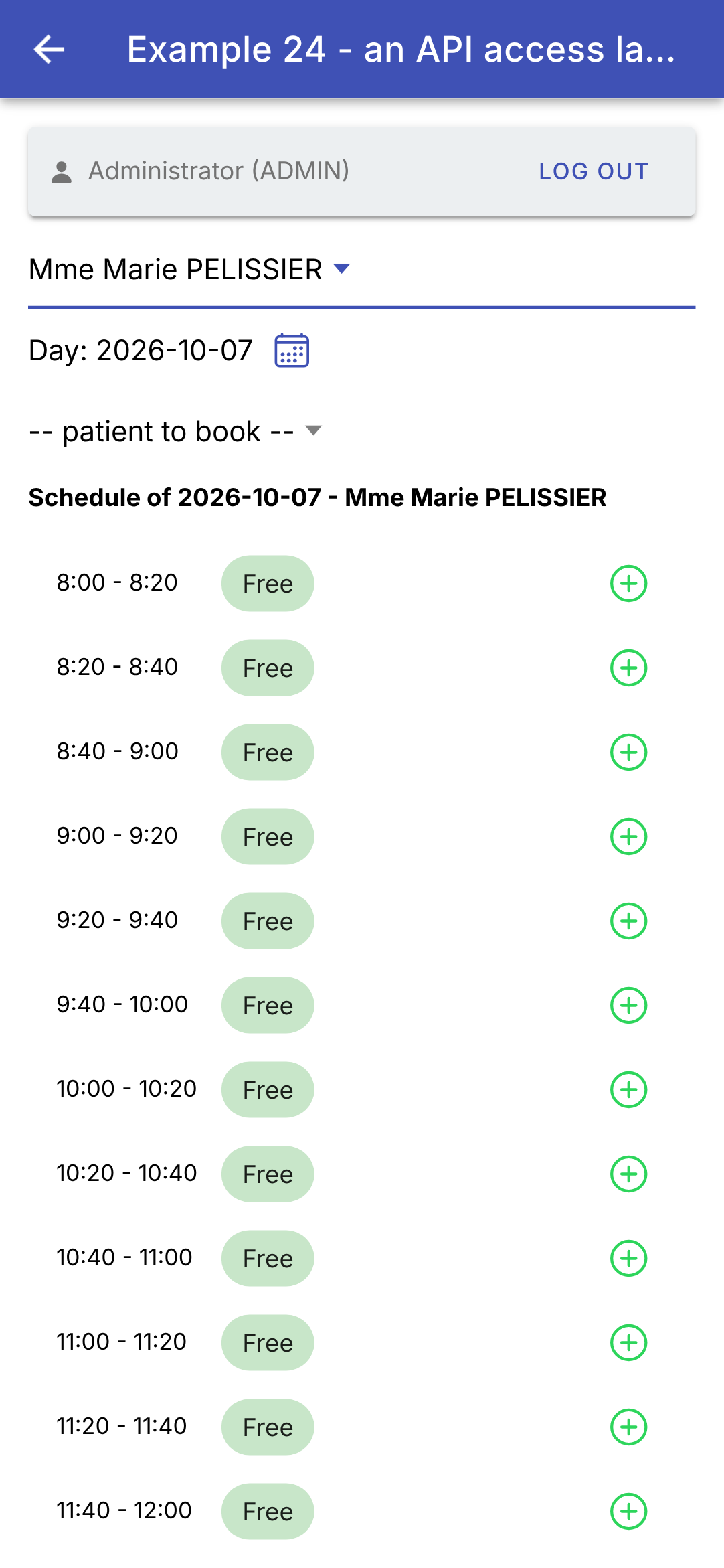
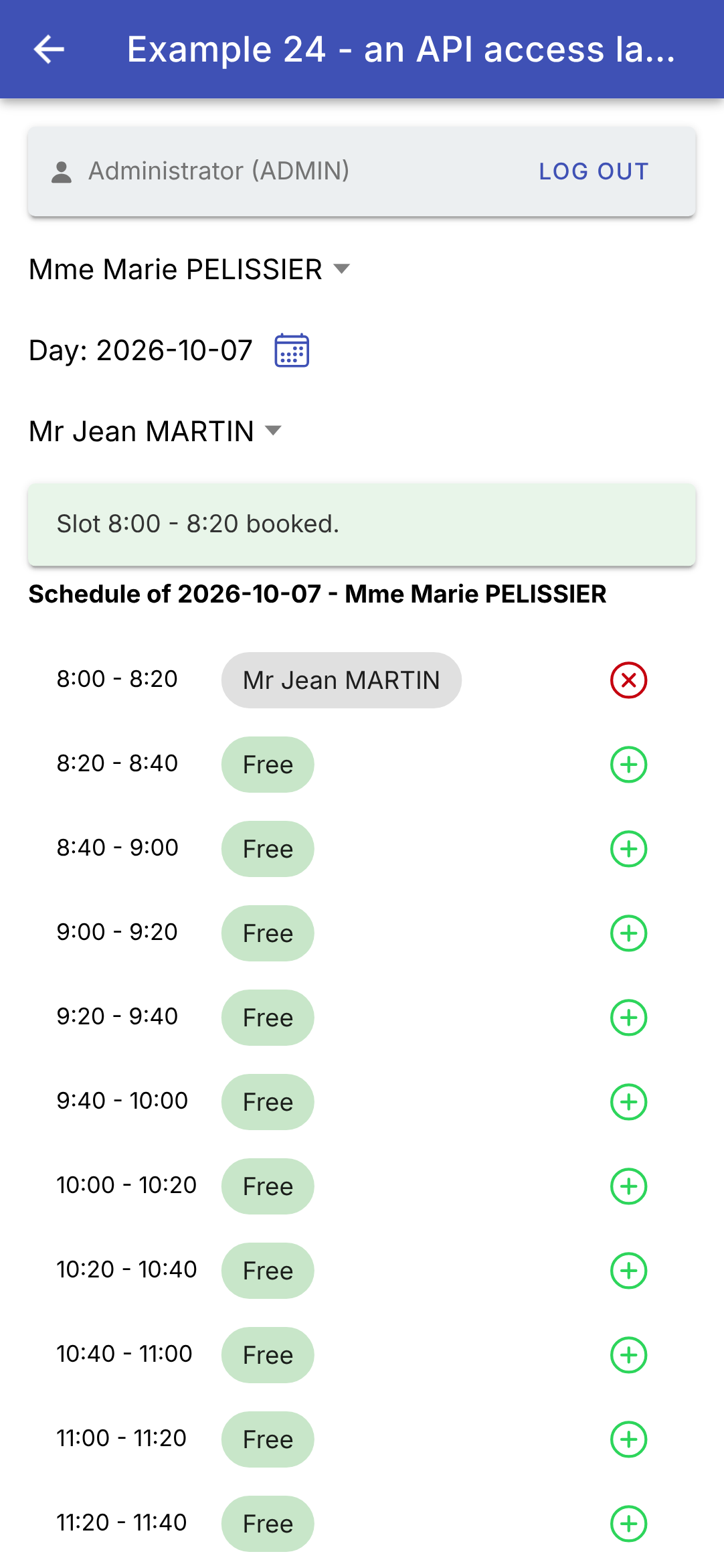
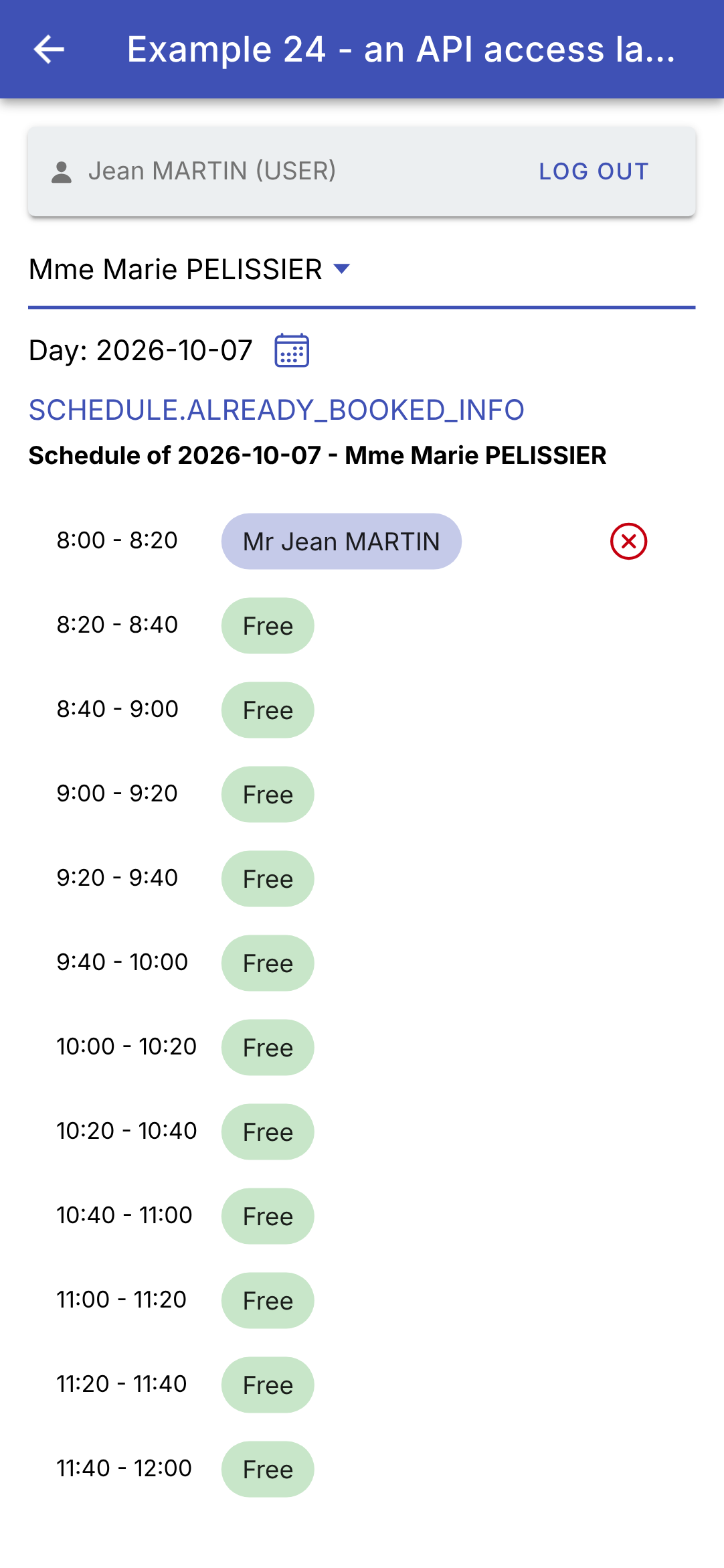
Logged in as [admin], Ms. PELISSIER’s calendar for the next day; a time slot is reserved for Mr. Jean MARTIN; logged in as [martin] (role USER), the same calendar:
Patient [martin] sees their appointment (in indigo, with the cancel button); the key [SCHEDULE.ALREADY_BOOKED_INFO] indicates that they already have an upcoming appointment: no other time slots are available for booking. An appointment for another patient would appear as “Booked,” without a name: the server does not send it to the user.
9.4. Example 25: Errors Returned by the Server
9.4.1. The dictionaries
| {
"FORM": {
"TITLE_ADD": "Ajouter un client",
"TITLE_EDIT": "Modifier un client",
"TITLE": "Titre",
"FIRSTNAME": "Prénom",
"LASTNAME": "Nom",
"LOGIN": "Login",
"PASSWORD": "Mot de passe",
"SAVE": "Enregistrer",
"CANCEL": "Annuler",
"EDIT": "Modifier",
"DELETE": "Supprimer",
"DELETE_CONFIRM": "Supprimer le client {{name}}, son compte et ses rendez-vous ?",
"ADDED": "Le client {{name}} a été ajouté (login : {{login}}).",
"UPDATED": "Le client {{name}} a été modifié.",
"DELETED": "Le client {{name}} a été supprimé.",
"ADMIN_ONLY": "Connectez-vous avec le compte admin : seul le rôle ADMIN gère les clients.",
"PAGE_TITLE": "Exemple 25 - les erreurs du serveur",
"NEW": "Nouveau client"
},
"ERRORS": {
"INVALID_FORM": "Le formulaire contient des erreurs.",
"INVALID_TITLE": "Choisissez un titre dans la liste.",
"FIRSTNAME_REQUIRED": "Le prénom est obligatoire.",
"FIRSTNAME_TOO_LONG": "Le prénom ne doit pas dépasser 20 caractères.",
"LASTNAME_REQUIRED": "Le nom est obligatoire.",
"LASTNAME_TOO_LONG": "Le nom ne doit pas dépasser 20 caractères.",
"INVALID_LOGIN": "30 caractères au plus : lettres minuscules non accentuées, chiffres, point, tiret, souligné.",
"PASSWORD_TOO_LONG": "Le mot de passe ne doit pas dépasser 72 caractères.",
"LOGIN_TAKEN": "Ce login est déjà utilisé par un autre compte.",
"PATIENT_ALREADY_EXISTS": "Un client portant ce prénom et ce nom existe déjà.",
"PATIENT_NOT_FOUND": "Ce client n'existe pas (ou plus).",
"CONCURRENT_UPDATE": "Cette fiche a été modifiée entre-temps par un autre utilisateur. Rechargez-la avant de recommencer.",
"FORBIDDEN": "Votre rôle ne vous permet pas cette action.",
"AUTH_REQUIRED": "Connectez-vous d'abord.",
"SESSION_EXPIRED": "Votre session a expiré : reconnectez-vous.",
"SERVER_UNREACHABLE": "Le serveur ne répond pas.",
"SERVER_ERROR": "Une erreur inattendue s'est produite.",
"WRONG_CAPTCHA": "Les caractères recopiés ne correspondent pas à l'image."
}
}
|
The server’s error messages are keys (“ERRORS.LASTNAME_REQUIRED”): the dictionary translates them. These are the dictionaries from the [Flutter] example, unchanged; the English dictionary, [ex25-en.json], has the same keys. Like those in Example 21, they are located in the project’s [public/i18n/] folder, which is delivered as-is with the application.
9.4.2. The screen
| // =========================================================================
// src/app/ex25-server-errors/ex25.page.ts - displaying the errors of the SERVER
// -------------------------------------------------------------------------
// The management of the clients (admin account). This form does
// DELIBERATELY no validation on the phone: everything is sent to the
// server, which answers, in case of refusal, with a JSON error (converted into
// an ApiError by common/api.ts):
//
// 400 { key: 'ERRORS.INVALID_FORM', fields: { lastName: 'ERRORS.LASTNAME_REQUIRED' } }
// 409 { key: 'ERRORS.PATIENT_ALREADY_EXISTS', fields: { firstName: ..., lastName: ... } }
// 409 { key: 'ERRORS.CONCURRENT_UPDATE' } (optimistic lock)
//
// The error of EACH field (ApiError.fields) is given to its form
// control (setErrors): ion-input displays it under the field (errorText).
// Its message is the KEY sent by the server, which the screen translates
// (dictionaries of example 21). Modifying a field clears its error.
// Try: an empty name, a title "Dr", a namesake (Alice DURAND), a
// login already taken (martin), the same record modified on two devices...
// =========================================================================
import { Component, inject, signal } from '@angular/core';
import { NonNullableFormBuilder, ReactiveFormsModule } from '@angular/forms';
import {
IonBackButton, IonButton, IonButtons, IonCard, IonCardContent, IonCardHeader, IonCardTitle, IonContent, IonHeader,
IonIcon, IonInput, IonItem, IonLabel, IonList, IonNote, IonPopover, IonSelect, IonSelectOption, IonText, IonTitle,
IonToolbar,
} from '@ionic/angular';
import { addIcons } from 'ionicons';
import { createOutline, languageOutline, trashOutline } from 'ionicons/icons';
import { Api } from '../common/api';
import { LoginBar } from '../common/login-bar';
import { ApiError, Texts } from '../common/api-error';
import { fullName, Person, User } from '../common/types';
import { injectConfirmation } from '../ex16-confirmation/confirmation';
import { languages, Translations } from '../ex21-i18n/translations';
import { Command } from '../ex23-login/command';
// the fields of the form, and a message to translate (a key and its parameters)
type Field = 'title' | 'firstName' | 'lastName' | 'login' | 'password';
interface Success {
key: string;
params: Texts;
}
@Component({
selector: 'app-ex25',
imports: [
ReactiveFormsModule, IonHeader, IonToolbar, IonButtons, IonBackButton, IonTitle, IonButton, IonIcon, IonPopover,
IonContent, IonList, IonItem, IonLabel, IonCard, IonCardHeader, IonCardTitle, IonCardContent, IonSelect,
IonSelectOption, IonInput, IonText, IonNote, LoginBar,
],
templateUrl: './ex25.page.html',
// the translations of the page, with the dictionaries ex25-fr.json and ex25-en.json
providers: [{ provide: Translations, useFactory: () => new Translations('ex25') }],
styles: `
.warning { --background: #fff8e1; --color: #333; }
.message { margin-top: 12px; }
.status { font-size: 12px; }
`,
})
export class Ex25Page {
private readonly api = inject(Api);
private readonly confirm = injectConfirmation();
readonly tr = inject(Translations);
readonly languages = languages;
readonly titles = ['Mr', 'Mme', 'Melle', 'Dr']; // "Dr": the server will refuse it
readonly fullName = fullName;
readonly user = signal<User | null>(null);
readonly clients = signal<Person[]>([]);
// the form: NO validation rule, everything is checked by the server
readonly form = inject(NonNullableFormBuilder).group({
title: ['Mr'],
firstName: [''],
lastName: [''],
login: [''],
password: [''],
});
// null: creation; otherwise, the id of the modified client, and the version read with its record
readonly editedId = signal<number | null>(null);
private version = 0;
// the general message of the last error, and that of a success
readonly pageError = signal<ApiError | null>(null);
readonly success = signal<Success | null>(null);
// the sending to the server: a Command (example 23), which tells whether it is running
readonly sending = new Command();
constructor() {
addIcons({ languageOutline, createOutline, trashOutline });
this.tr.start();
}
isAdmin(): boolean {
return this.user()?.role === 'ADMIN';
}
private async reload(): Promise<void> {
this.clients.set(await this.api.get<Person[]>('/clients'));
}
async onUserChange(u: User | null): Promise<void> {
this.user.set(u);
this.clients.set([]);
if (u?.role === 'ADMIN') await this.reload();
}
// the error of a field, returned by the server, translated ('': no error)
fieldError(field: Field): string {
const key = this.form.controls[field].errors?.['server'];
return typeof key === 'string' ? this.tr.t(key) : '';
}
private clearMessages(): void {
this.pageError.set(null);
this.success.set(null);
}
newForm(): void {
this.editedId.set(null);
this.version = 0;
// reset: the starting values, and no error anymore
this.form.reset();
this.clearMessages();
}
edit(c: Person): void {
this.editedId.set(c.id);
// the VERSION read with the record goes back with the modification: if someone
// has modified the record in the meantime, the server will answer 409 CONCURRENT_UPDATE
this.version = c.version;
this.form.reset({ title: c.title, firstName: c.firstName, lastName: c.lastName, login: c.login ?? '', password: '' });
this.clearMessages();
}
// the "Save" button
submit(): void {
this.sending.execute(() => this.save());
}
private async save(): Promise<void> {
this.clearMessages();
const input = { ...this.form.getRawValue(), version: this.version };
const id = this.editedId();
try {
const client =
id === null
? await this.api.post<Person>('/clients', input)
: await this.api.put<Person>(`/clients/${id}`, input);
this.newForm(); // form emptied, messages cleared...
// ... except this one
this.success.set({
key: id === null ? 'FORM.ADDED' : 'FORM.UPDATED',
params: { name: `${client.firstName} ${client.lastName}`, login: client.login ?? '' },
});
await this.reload();
} catch (e) {
if (!(e instanceof ApiError)) throw e;
this.pageError.set(e); // the general message
// the error of each field: it is given to its control, which
// becomes invalid (ng-invalid); markAsTouched marks it "touched"
// (ng-touched): Ionic then displays its errorText
for (const [field, key] of Object.entries(e.fields)) {
const control = this.form.get(field);
control?.setErrors({ server: key });
control?.markAsTouched();
}
}
}
async remove(c: Person): Promise<void> {
const name = `${c.firstName} ${c.lastName}`;
if (!(await this.confirm(this.tr.t('FORM.DELETE_CONFIRM', { name })))) return;
this.clearMessages();
try {
await this.api.delete(`/clients/${c.id}`);
this.success.set({ key: 'FORM.DELETED', params: { name } });
} catch (e) {
if (e instanceof ApiError) this.pageError.set(e);
}
await this.reload();
}
}
|
| <!-- ======================================================================
ex25.page.html - the management of the clients, and the server's errors
====================================================================== -->
<ion-header>
<ion-toolbar color="primary">
<ion-buttons slot="start">
<ion-back-button defaultHref="/" />
</ion-buttons>
<ion-title>{{ tr.t('FORM.PAGE_TITLE') }}</ion-title>
<!-- the language: a menu, in a pop-up window (ion-popover) -->
<ion-buttons slot="end">
<ion-button id="language25" aria-label="language">
<ion-icon slot="icon-only" name="language-outline" />
</ion-button>
</ion-buttons>
<ion-popover trigger="language25" [dismissOnSelect]="true">
<ng-template>
<ion-list>
@for (l of languages; track l) {
<ion-item [button]="true" (click)="tr.changeLanguage(l)">{{ l.toUpperCase() }}</ion-item>
}
</ion-list>
</ng-template>
</ion-popover>
</ion-toolbar>
</ion-header>
<ion-content class="ion-padding">
<app-login-bar (userChange)="onUserChange($event)" />
@if (user() !== null && !isAdmin()) {
<ion-card class="warning">
<ion-card-content>{{ tr.t('FORM.ADMIN_ONLY') }}</ion-card-content>
</ion-card>
}
@if (isAdmin()) {
<ion-list>
@for (c of clients(); track c.id) {
<ion-item>
<ion-label>
{{ fullName(c) }}
<p>{{ c.login }}</p>
</ion-label>
<ion-button slot="end" fill="clear" color="dark" [attr.aria-label]="tr.t('FORM.EDIT')"
(click)="edit(c)">
<ion-icon slot="icon-only" name="create-outline" />
</ion-button>
<ion-button slot="end" fill="clear" color="danger" [attr.aria-label]="tr.t('FORM.DELETE')"
(click)="remove(c)">
<ion-icon slot="icon-only" name="trash-outline" />
</ion-button>
</ion-item>
}
</ion-list>
<ion-card>
<ion-card-header>
<ion-card-title>{{ tr.t(editedId() === null ? 'FORM.TITLE_ADD' : 'FORM.TITLE_EDIT') }}</ion-card-title>
</ion-card-header>
<ion-card-content>
<!-- no (ngSubmit): the Save button calls submit() -->
<form [formGroup]="form">
<!-- errorText: the error of the field returned by the server, translated. Ionic
displays it when the control is invalid (ion-invalid) and touched (ion-touched) -->
<ion-select [label]="tr.t('FORM.TITLE')" labelPlacement="floating" interface="popover"
formControlName="title" [errorText]="fieldError('title')">
@for (t of titles; track t) {
<ion-select-option [value]="t">{{ t }}</ion-select-option>
}
</ion-select>
<ion-input [label]="tr.t('FORM.FIRSTNAME')" labelPlacement="floating" formControlName="firstName"
[errorText]="fieldError('firstName')" />
<ion-input [label]="tr.t('FORM.LASTNAME')" labelPlacement="floating" formControlName="lastName"
[errorText]="fieldError('lastName')" />
<ion-input [label]="tr.t('FORM.LOGIN')" labelPlacement="floating" formControlName="login"
[errorText]="fieldError('login')" />
<ion-input [label]="tr.t('FORM.PASSWORD')" labelPlacement="floating" type="password"
formControlName="password" [errorText]="fieldError('password')" />
</form>
<ion-button class="ion-margin-top" shape="round" [disabled]="sending.running()" (click)="submit()">
{{ tr.t('FORM.SAVE') }}
</ion-button>
<ion-button class="ion-margin-top" shape="round" fill="outline" (click)="newForm()">
{{ tr.t('FORM.CANCEL') }}
</ion-button>
@if (success(); as s) {
<div class="message"><ion-text color="success">{{ tr.t(s.key, s.params) }}</ion-text></div>
}
<!-- the general message, and the HTTP status, to understand -->
@if (pageError(); as e) {
<div class="message">
<ion-text color="danger">{{ tr.t(e.key, e.params) }}</ion-text>
<ion-note class="status"> ({{ e.message }})</ion-note>
</div>
}
</ion-card-content>
</ion-card>
}
</ion-content>
|
Customer management (admin account). This form performs no validation on the phone: everything is sent to the server, which responds—in case of rejection—with an error JSON, converted to [ApiError] by the service [Api].
- Lines 34–36 (.ts): The page reuses three tools from the previous examples by importing them from their respective folders: the confirmation from Example 16, the translations from Example 21, and the command from Example 23 (the [Flutter] client did the same). The [Translations] class from Example 21 was written for this purpose: it is not a singleton service, but a class configured by the prefix of its dictionaries. Line 54 creates an instance of it for this page, using the dictionaries [ex25-fr.json] and [ex25-en.json]. Why not move it to [common/]? It would fit there in an application; in this course, each example is read in order, and Example 21 remains the one that introduces it;
- line 63 (.ts): the confirmation function from Example 16 ([AlertController]);
- line 66 (.ts): a “Dr” title, which the server will reject: see [ERRORS.INVALID_TITLE];
- lines 73–79 (.ts): a reactive form (Example 08), WITHOUT any validation rules;
- lines 81–82 (.ts): the modified client ([null]: a new creation), and the version retrieved along with its record;
- lines 85–88 (.ts): the general message for the last error, the success message (a key and its parameters, translated for display: they follow a language change), and the submission, a [Command] (example 23);
- lines 110–113 (.ts): the error message for a field. The error is stored in the field’s validation logic under the name [server] (see below); its value is the key sent by the server, which is translated;
- lines 120–126 (.ts): a new customer: [form.reset()] restores the default values (the form is “non-nullable,” example 08) and clears all errors;
- lines 128–135 (.ts): edit a customer: the form receives the customer’s record. The version read from the record is updated with the change: if someone has modified the record in the meantime, the server will respond with a 409 [CONCURRENT_UPDATE] (the optimistic lock);
- lines 142–170 (.ts): saving: [POST /api/clients] (create) or [PUT /api/clients/:id] (update), with the form values and the version (line 144). If successful, the form is cleared, and a success message is displayed (lines 151–156). If rejected, [ApiError] displays the general message (line 160) and the error for each field (lines 164–168):
- [control.setErrors({ server: key })] returns an error during field validation: the field becomes invalid (class [ng-invalid]);
- [control.markAsTouched()] marks it as “affected” (class [ng-touched]), as if it had been exited;
- [Ionic] copies these two classes—[ion-invalid] and [ion-touched]—to the field (example 07): it then displays, below the field, the text from its [errorText], and highlights it in red;
- and editing the field clears the error without a single line of code: with every keystroke, [Angular] re-validates the field against its rules… and it has none. The manually set error disappears. This was a [onChanged] that had to be written for each field in the [Flutter] client;
- lines 172–183 (.ts): deletion, after confirmation (the confirmation message is translated, with the client name as a parameter);
- lines 11–25 (html): language: a button in the top bar that opens a [<ion-popover>] (a pop-up window associated with the button, whose [id] is given by [trigger]); [dismissOnSelect] closes it on the first selection. This was the [PopupMenuButton] of [Flutter];
- lines 32–36 (html): a logged-in user who is not ADMIN: a warning;
- lines 38–56 (html): the list of customers, with their “Edit” and “Delete” buttons;
- lines 64–81 (HTML): the form. Each field is linked to its control ([formControlName]); their labels are translated; [[errorText]] receives the server error, translated (lines 67–68: [<ion-select>] also has a [errorText]). The form does not have a [(ngSubmit)]: the “Save” button calls the command (lines 83–85);
- lines 90–99 (HTML): the success message and the general error message, translated; for clarity, the status HTTP and the key are shown in small print.
An empty form; a homonym (“Alice DURAND”); the same, in French:
Changing the language re-translates the entire screen, including errors already displayed: the screen stores the keys sent by the server—not the text—and translates them each time the screen is displayed. Also try: a “Dr” title, a username that’s already taken ([martin]), an invalid username (“Jean M”), or the same record edited on two devices (or in two browser tabs, or in the app and with [curl]).
The principle is the same as for all forms in the case study: the rules reside in only ONE place—the server; the app displays its responses in the user’s language. Of course, there’s nothing stopping you from also validating the fields on the phone (example 08) to respond more quickly to the user; however, the server must re-validate everything, and its verdict is final.
By comparing the two clients, we can see how much [Ionic] relies on the browser: the HTTP client directly returns [JavaScript] objects (JSON is the native language of [JavaScript]), the token cookie is passed without a single line of code, and a request can be canceled. In return, [TypeScript] does not validate the format of responses at runtime, which [Dart]’s filtering did naturally. The [Angular] client for [RdvMedecins] (course [Angular]) is written exactly like these examples: the same [HttpClient], the same services, the same reactive forms; only the display components differ, with those of [Ionic] mimicking those of a [Android] phone.