1. Introduction
The PDF in the document is HERE.
The code in this document is HERE.
This document is a product of Anthropic’s AI Claude. It follows the course “Step-by-Step Introduction to the Flutter Mobile Framework,” from which it borrows the outline, examples, and case study, and the course “Step-by-Step Introduction to the Angular Framework,” from which it borrows the tools:
- In the course [Flutter], the application is a mobile app written in [Dart], whose engine—[Flutter]—renders every pixel itself;
- In the [Angular] course, the application is a web application: HTML, CSS, and [TypeScript], executed by a browser;
- In this course, the application is BOTH: a web application, written using [Angular] and components from the [Ionic] framework, which the [Capacitor] tool packages into a [Android] application installed on the phone. The same code, without any changes, also runs in a browser.
The server, however, remains unchanged: it is the JSON [RdvMedecins] server from the previous lessons, written with [NestJS]. And the app’s screens are the ones readers of the other lessons are already familiar with (login with CAPTCHA, doctor’s schedule, appointment window, patient portal, doctor and client management, account creation, French and English), adapted for a phone screen.
The document follows the same structure as its predecessors: first, numerous short examples, each focusing on a concept from [Ionic] or [Angular], followed by a complete case study, the client [Ionic] for the application [RdvMedecins], for which all files are commented. The 25 examples have the same numbers and display the same screens as those in the [Flutter] course (and the [React] and [Vue.js] courses): Readers familiar with one of these frameworks will recognize the same examples, written in the style of [Ionic] and [Angular]. Each example also concludes with a comparison to [Flutter].
Readers are assumed to be familiar with the basics of the [TypeScript] language and the [Angular] framework: these are covered in the courses “Introduction to the TypeScript Language Through Examples” and “Step-by-Step Introduction to the Angular Framework.” However, the [Angular] concepts used (signals, templates, dependency injection, router, reactive forms, etc.) are reviewed throughout the examples as they are needed.
1.1. Ionic’s Role in a Client/Server Application
The application has two parts, which communicate with each other only through HTTP requests:
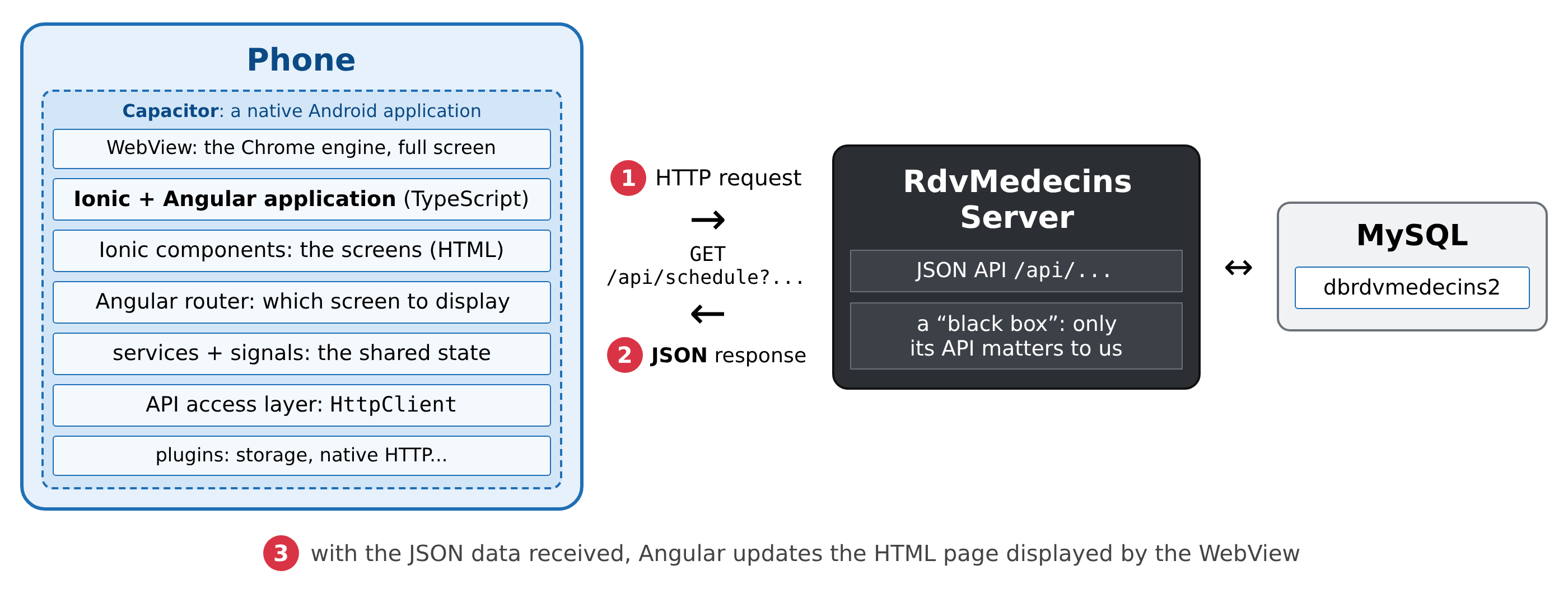
- 1: The [Ionic] application, running on the phone, sends a HTTP request to the server, for example, [GET /api/schedule?doctorId=1&day=2026-10-05];
- 2: The server responds with data JSON: this doctor’s schedule for that day. It does not generate any pages;
- 3: Using this data, [Angular] updates the phone’s screen.
This is exactly the architecture of the clients [Flutter], [React], [Vue.js], and [Angular]: the only difference is what generates the display. And in this regard, [Ionic] is the opposite of [Flutter]. [Flutter] is a rendering engine: it relies entirely on the browser and renders every pixel on the screen itself. [Ionic], on the other hand, does not render anything: it is a library of web components: new HTML elements—[<ion-button>], [<ion-input>], [<ion-list>], [<ion-tabs>]..., created using the [Stencil] tool from the [Ionic] team, which any browser can display. These components mimic the phone’s native components in two “modes”: [md] ([Material Design], the appearance of [Android]) and [ios] (the appearance of [iPhone]). This course enforces the [md] mode everywhere, including in the browser. Because these are simple HTML elements, the components of [Ionic] can be used with [Angular], [React], or [Vue.js]: This course uses them with [Angular] (the [@ionic/angular] package).
The application is therefore a standard web application: a HTML page, a stylesheet, and [JavaScript] code compiled from [TypeScript]. It is [Capacitor] (from the same team as [Ionic]) that turns it into a [Android] application:
- [Capacitor] generates a native [Android] project, whose sole screen is a WebView: the phone’s [Chrome] browser engine, full-screen, with no address bar. The compiled web app is copied into this project, and WebView loads it at startup. To the user, it’s just like any other app: an icon, a startup screen, and the Back button from [Android];
- the [JavaScript] code accesses the phone’s features (storage, camera, notifications, geolocation, etc.) through [Capacitor] plugins, which act as a bridge to the native code. This course uses two of them: [@capacitor/preferences] (a small key-value store on the device, example 20) and [CapacitorHttp] (HTTP requests made by the native code of [Android], examples 22 through 25);
- The same code runs in a browser, where the plugins have a web version (the [Capacitor] storage then uses the browser's [localStorage]). So we develop in [Chrome], at phone size, using its development tools, and then switch to [Android] to test.
The three layers of the application, and what they provide:
- [Angular]: the application framework. It provides the components (a [TypeScript] class and a HTML template), signals (the state, whose changes update the screen), dependency injection (services, shared state), the router (one address per screen), forms, the HTTP client, and “pipes” (formatting). Readers of the [Flutter] course will recognize the principle: the interface is a function of the state. We never modify the screen itself: we change the state, and [Angular] updates whatever depends on it;
- [Ionic]: the interface components, which resemble those of a mobile app (toolbars, lists, fields, floating buttons, tabs, alert windows, calendar, etc.), and the navigation of a mobile app: a stack of pages, animated as in [Android], which the Back button pops off the stack;
- [Capacitor]: the [Android] application and access to the phone.
Unlike [Flutter], no additional packages are needed for communication with a server: [Angular] provides the HTTP client, the router, forms, and dependency injection; [JavaScript], together with the [Intl] object, provides date and number formatting for each language; the [RxJS] library, included with [Angular], provides asynchronous data streams. The translations (Example 21) are handled by a small class written specifically for this purpose, which reads the JSON dictionaries.
1.2. Tools Used
The examples were written and tested using the following tools (their installation is described in the next chapter and in the appendix):
- [Node.js] 24 and its package manager [npm]: [Angular CLI] 22 requires [Node.js] 22.22.3 (or a more recent version 22), 24.15 or higher, or 26 and later. [Node.js] also serves the JSON server;
- [Angular CLI] 22.2 (the [ng] command), [Angular] 22.2, and [TypeScript] 6.0;
- [Ionic] 9.0 (the [@ionic/angular] 9.0.6 package) and its icons, [ionicons] 8.1;
- [Capacitor] 8.5 (the packages [@capacitor/core], [@capacitor/android], and [@capacitor/cli]), and its plugin [@capacitor/preferences] 8.0;
- the [Visual Studio Code] editor and its extensions [Angular Language Service] and [Ionic];
- [Android Studio], for SDK [Android], its JDK, and its emulator manager: a [Android] emulator (a simulated phone on the computer), or a real [Android] phone connected to the computer;
- the [Chrome] browser, for developing and debugging the application, both on the computer and on the phone;
- the [MySQL] DBMS (or [MariaDB]), for example, the one from [Laragon] under [Windows]: it is required for the JSON server, as described in the chapter introducing it;
- the command-line tool [curl], which displays the raw HTTP responses.
The packages used are those from the [package.json] files of the two [Ionic] projects, which are identical: the [@angular/...] 22.2, [@ionic/angular] 9.0, [ionicons] 8.1, [@capacitor/...] 8.5, [@capacitor/app] 8.1, [@capacitor/preferences] 8.0, [rxjs] 7.8, and, for development only, [typescript] 6.0, [prettier] 3 (code layout), and [playwright] 1.56 (screenshots).
1.3. Screenshots
The screenshots in this document were generated automatically by programs that use the [Playwright] library ([captures/] folders from both [Ionic] projects). The [captures/captures.mjs] program controls a [Chromium] browser (the free version of [Chrome]) at the size of a [Android] phone: 412 x 892 dots, at 2.625 pixels per dot, resulting in images of 1082 x 2342 pixels. For each example, it runs a “scenario” from the [captures/scenarios/] folder: it opens the example page, interacts with it as a user would (entering text, pressing buttons), and then saves the screen as an image file.
These are therefore actual screenshots of the application, rendered by the [Chrome] engine—the very same one used by the phone’s WebView; the only elements missing are the phone’s status bar (time, battery) and the on-screen keyboard. The reader can recreate them (the app must be running; see below):
- line 1: once only: downloads the [Chromium] browser used by [Playwright];
- line 2: recreates all screenshots in the [captures/images/] folder;
- line 3: recreates only those for examples 05 and 17.
The screenshots for examples 22 through 25 and the case study also require that the JSON server be running in “test mode” for the CAPTCHA (see the chapter that describes the server).
1.4. The Examples
The code in this document is organized into three folders:
The examples form a single project, [Ionic]: a home page, the examples menu, and one page per example, each in its own [src/app/] folder (Example 01 presents the project in detail):
The folders [node_modules/] (the packages) and [android/] (the [Android] project) are not provided: the first is populated by [npm install], and the second is generated by [Capacitor]. In a console opened on the [examples_ionic] folder (in [VS Code]: Terminal menu / New Terminal):
- Line 1: Once, for all examples: downloads the packages described by [package.json] into the [node_modules/] folder;
- line 2: launches [ng serve], the development server for [Angular], at the address [http://localhost:8100].
Open this address in [Chrome]: the home page lists the 25 examples, grouped by chapter; tapping an example opens it, and the Back button on its toolbar takes you back to the menu. You can also go directly to an example using its address: [http://localhost:8100/ex05] for example 05. To view the app at phone size, open the development tools (F12), then the device emulation bar (Ctrl+Shift+M). As long as [ng serve] is running, every file change is compiled and applied immediately in the browser; Ctrl+C stops it.
In [Android], the sample application installs in one go, along with its 25 examples and menu:
- Line 1: Run once: Create the [android/] folder and a complete [Android Studio] project;
- Line 2: Compiles the web application into the [dist/examples_ionic/browser/] folder;
- Line 3: Copies it to the [Android] project;
- line 4: builds the [Android] application, installs it on a running emulator or a connected phone (the command asks which one, if there are multiple), and launches it.
Lines 2 through 4 must be re-run after every code change. Example 01 also shows how to enable automatic reloading of [ng serve] on the phone.
Examples 22 through 25 query the JSON and [RdvMedecins] servers: you’ll need to have them installed and running, as explained in the chapter dedicated to them. In the browser, the development server sends them the requests [/api] (file [proxy.conf.json]); on the emulator, they connect to the server at the address [http://10.0.2.2:8080] (see Example 22).
1.5. Document Contents
Chapter | Contents | Examples |
Getting Started with Ionic | an Ionic project (Angular + Capacitor), Ionic components, state (signal, computed, effect), templates (@if, @for), events, all field types, a reducer, validation, reactive forms, formatting (Intl, pipes) | 01 to 09 |
Components | Inputs (input), outputs (output, model), composition (content projection, ng-template), lifecycle, dependency injection (services, inject), directives and animations, confirmation dialog (AlertController) | 10 to 16 |
Routing | Angular’s router and ion-router-outlet: routes, parameters, shell with ion-tabs, lazy loading, 404 page, guards | 17 and 18 |
Asynchronous Operations and Shared State | Promise, Observable (RxJS), timers, anti-bounce, expired responses, async pipe, toSignal, resource, a signal-based service, @capacitor/preferences, dark theme | 19 and 20 |
Internationalization | An App in French and English | 21 |
The RdvMedecins server, a black box | Installing the JSON server, its API, curl examples | - |
Interacting with the server | HttpClient, the development proxy, the server address, CapacitorHttp on Android, the httpOnly token cookie (stored by the browser or by Android), an access layer to API, server errors | 22 through 25 |
Case Study | the Ionic client of the RdvMedecins application | - |
Deployment | The compiled web client, served by the JSON server; the Android application | - |
Each example is presented with its complete code, commented line by line, and screenshots of its execution. The code itself is extensively commented: these comments are part of the course.