6. Asynchronous Operations and Shared State
6.1. Example 19: Promises, Observables, and Timers
Many things happen “later”: timer ticks, keystrokes, and server responses. A [Ionic] application has two types for this:
- [Promise<T>], that of [JavaScript]: ONE value, later (a server response, a selection made in a window). The keywords [async] and [await] allow you to wait for it without blocking the application. This is the [Future] of [Dart];
- [Observable<T>], which is derived from the [RxJS] library, shipped with [Angular]: a SEQUENCE of values, over time (ticks, keystrokes, messages...), which are transformed by operators ([map], [take], [debounceTime], [switchMap]...). This is the [Stream] derived from [Dart]. [JavaScript] also has its asynchronous counterparts: the asynchronous generators ([async function*]), which are the counterparts to the [async*] functions of [Dart].
To display them, [Angular] provides three tools, the counterparts of [FutureBuilder] and [StreamBuilder]: the pipe [async] (a [Observable] read from the template), [toSignal()] (a [Observable] converted into a signal), and [resource()] (a [Promise] converted into signals). And for what must happen after a delay: [setTimeout], or the timers from [RxJS] ([timer], [interval]).
6.1.1. The page
| // =========================================================================
// src/app/ex19-asynchronous/ex19.page.ts - promises, observables, timers
// -------------------------------------------------------------------------
// Many things happen "later": the ticks of a timer, the
// keystrokes, the response of a server. Two types are available:
// - Promise (JavaScript): ONE value, later (the response of a
// server); async / await to wait for it;
// - Observable (RxJS library, shipped with Angular): a SEQUENCE of
// values, over time (ticks, keystrokes...), which we transform
// with "operators" (map, take, debounceTime, switchMap...).
// To display them, Angular offers the async pipe (an Observable in the
// template), toSignal() (an Observable turned into a signal) and resource() (a
// Promise turned into a signal).
// =========================================================================
import { AsyncPipe } from '@angular/common';
import { Component, resource, signal } from '@angular/core';
import { takeUntilDestroyed, toSignal } from '@angular/core/rxjs-interop';
import {
IonBackButton, IonButtons, IonCard, IonCardContent, IonCardHeader, IonCardSubtitle, IonContent, IonHeader, IonInput,
IonNote, IonTitle, IonToolbar,
} from '@ionic/angular';
import { debounceTime, finalize, from, map, Observable, of, Subject, switchMap, take, tap, timer } from 'rxjs';
const doctors = ['Marie PELISSIER', 'Paul TATOU', 'Sophie DUPONT', 'Jacques DURAND', 'Martine PELLETIER'];
// a timer in the form of a Promise: it finishes after ms milliseconds
function wait(ms: number): Promise<void> {
return new Promise((resolve) => setTimeout(resolve, ms));
}
// a simulated "server": the response (a Promise) arrives after a random delay
async function search(text: string): Promise<string[]> {
await wait(200 + Math.floor(Math.random() * 600));
return doctors.filter((m) => m.toLowerCase().includes(text));
}
// 1a. an ASYNCHRONOUS GENERATOR (async function*, with a star): each
// yield SENDS a value to whoever iterates over it (for await...of)
async function* countdown(start: number): AsyncGenerator<number> {
for (let remaining = start; remaining >= 0; remaining--) {
yield remaining;
if (remaining > 0) await wait(1000);
}
}
// "15:30:45"
const currentTime = () => new Date().toTimeString().substring(0, 8);
@Component({
selector: 'app-ex19',
imports: [
AsyncPipe, IonHeader, IonToolbar, IonButtons, IonBackButton, IonTitle, IonContent, IonCard, IonCardHeader,
IonCardSubtitle, IonCardContent, IonInput, IonNote,
],
templateUrl: './ex19.page.html',
styles: `
.number { font-size: 2em; color: var(--ion-text-color); }
.log { font-size: 12px; }
`,
})
export class Ex19Page {
readonly log = signal<string[]>([]);
// 1a. the generator, turned into an Observable by from(); the template
// displays it with the async pipe. Created ONCE, in a field
readonly countdown$: Observable<number> = from(countdown(20));
// 1b. the same countdown, with RxJS operators: timer(0, 1000)
// emits 0, 1, 2... every second; take(21) stops after 21 values;
// map transforms them (0 -> 20, 1 -> 19...). toSignal: a signal whose value is
// the last value received (undefined before the first)
readonly countdown = toSignal(timer(0, 1000).pipe(take(21), map((i) => 20 - i)));
// 3. a Promise that finishes after one second, followed by resource():
// an object with signals (isLoading(), hasValue(), value(), error()...)
readonly message = resource({
loader: async () => {
await wait(1000);
return 'three (one second later)';
},
});
// 2. the search as you type: a Subject is an Observable into
// which we PUSH the values ourselves (next): here, each keystroke
private readonly keystrokes = new Subject<string>();
readonly results = signal<string[]>([]);
constructor() {
this.keystrokes
.pipe(
// the DEBOUNCE: a value is only passed on after 400 ms without
// a new keystroke; closer keystrokes are forgotten
debounceTime(400),
map((text) => text.trim().toLowerCase()),
// switchMap: each text starts a search (an Observable); a
// NEW search ABANDONS the previous one, whose response will
// never be passed on: no "stale" response
switchMap((text) => this.launch(text)),
// the subscription ends when the page is destroyed
takeUntilDestroyed(),
)
.subscribe((found) => this.results.set(found));
}
private trace(message: string): void {
this.log.update((lines) => [...lines, `${currentTime()} ${message}`]);
}
// called on each keystroke
input(text: string | null | undefined): void {
this.keystrokes.next(text ?? '');
}
private launch(text: string): Observable<string[]> {
// fewer than two letters: no search, no result
if (text.length < 2) {
return of([]);
}
this.trace(`search sent: "${text}"`);
let received = false;
// from(Promise): an Observable that emits the value of the Promise, then completes
return from(search(text)).pipe(
tap(() => (received = true)),
// finalize: called when the Observable completes OR when we unsubscribe from it
// (that is what switchMap does when a new search arrives)
finalize(() => {
if (!received) this.trace(`response ignored (stale): "${text}"`);
}),
);
}
}
|
| <!-- ======================================================================
ex19.page.html - promises, observables and timers
====================================================================== -->
<ion-header>
<ion-toolbar color="primary">
<ion-buttons slot="start">
<ion-back-button defaultHref="/" />
</ion-buttons>
<ion-title>Example 19 - asynchrony</ion-title>
</ion-toolbar>
</ion-header>
<ion-content class="ion-padding">
<ion-card>
<ion-card-header>
<ion-card-subtitle>Two countdowns (Observables)</ion-card-subtitle>
</ion-card-header>
<ion-card-content>
<!-- the async pipe subscribes to the Observable, displays each new
value, and unsubscribes when the page disappears; it is null
before the first value. @let: a template variable -->
@let n = countdown$ | async;
<p>async function* and async pipe: <span class="number">{{ n ?? '...' }}</span></p>
<!-- the signal: undefined before the first value -->
<p>RxJS and toSignal(): <span class="number">{{ countdown() ?? '...' }}</span></p>
</ion-card-content>
</ion-card>
<ion-card>
<ion-card-header>
<ion-card-subtitle>A search as you type (debounce, stale responses)</ion-card-subtitle>
</ion-card-header>
<ion-card-content>
<!-- (ionInput): on each keystroke -->
<ion-input placeholder="at least two letters: pel, dur..." (ionInput)="input($event.detail.value)" />
@for (r of results(); track r) {
<p>• {{ r }}</p>
} @empty {
<ion-note>no result</ion-note>
}
</ion-card-content>
</ion-card>
<ion-card>
<ion-card-header>
<ion-card-subtitle>Waiting for a Promise (resource)</ion-card-subtitle>
</ion-card-header>
<ion-card-content>
<!-- as long as the Promise is not finished: the waiting content -->
@if (message.hasValue()) {
<p>received: {{ message.value() }}</p>
} @else {
<ion-note>waiting...</ion-note>
}
</ion-card-content>
</ion-card>
<h6>Log</h6>
@for (line of log(); track $index) {
<div class="log">{{ $index + 1 }}. {{ line }}</div>
}
</ion-content>
|
Tools:
- lines 28–30 (.ts): a timer in the form of [Promise]. [new Promise(...)] receives a function that starts the task and will call [resolve] when it is finished; here, [setTimeout] calls it after [ms] milliseconds. [await wait(1000)] therefore waits for one second, without blocking the application (this was [Future.delayed] with [Dart]);
- lines 33–36 (.ts): a simulated “server”: a function [async], which returns a [Promise]; its response arrives after a random delay (between 200 and 800 milliseconds);
- lines 40–45 (.ts): an asynchronous generator: a function [async function*] (with an asterisk). Each [yield] assigns a value to the one traversing the generator; between two values, the function waits one second. It can be traversed using a loop [for await (const n of countdown(20))].
The first countdown:
- line 67 (.ts): the generator, converted to [Observable] by [from()], which accepts an asynchronous generator, a [Promise], an array... By convention, the name of a variable that contains a [Observable] ends with [$];
- Line 23 (HTML): The pipe [async] subscribes to [Observable], displays each new value, and unsubscribes automatically when the page is closed; it is set to [null] before the first value is received. [@let n = ...] declares a template variable, read on line 24 ([n ?? '...']: three dots as long as [n] is equal to [null]). As with [Flutter], [Observable] is created ONCE in a class field: if the template called a method that created it, every screen update would restart the countdown!
The second one, with the [RxJS] operators:
- line 73 (.ts): [timer(0, 1000)] outputs 0 immediately, then 1, 2, 3... every second; the [pipe] method applies operators to it, one after another: [take(21)] keeps only the first 21 values (then [Observable] ends); [map] transforms each value (0 becomes 20, 1 becomes 19...). [toSignal] subscribes to [Observable] and turns it into a signal, which is equal to the last value received ([undefined] before the first one); it unsubscribes when the page is destroyed;
- line 26 (HTML): the signal is read like any other signal.
The expected [Promise]:
- lines 77–82 (.ts): [resource()] receives a function [loader] that returns a [Promise], invokes it, and exposes its state as signals: [isLoading()], [hasValue()], [value()], [error()]. If we provided an option [params]—a function that reads signals—the resource would reload whenever they change (the [loader], however, is not monitored): we’ll use it to query a server;
- lines 51–55 (HTML): as long as [Promise] is not finished, the placeholder content; afterward, its value (which was [FutureBuilder] and [ConnectionState.done]).
Search as you type:
- line 86 (.ts): a [Subject] is a [Observable] into which we PUSH the values ourselves ([next]): here, each keystroke (lines 111–113, triggered by the field’s [(ionInput)] event, line 36 of the HTML);
- line 94 (.ts): debouncing: we wait for the user to pause before querying the server, rather than sending a request for every keystroke. The [debounceTime(400)] operator only sends a value after 400 milliseconds without a new value: keystrokes that occur too close together are ignored. With [Flutter], you had to manually cancel and restart a timer ([Timer]) with every keystroke;
- line 95 (.ts): the text, without spaces around it, in lowercase;
- line 99 (.ts): expired responses. A response that arrives AFTER another search has been launched must be ignored: otherwise, the slow response from an old search would overwrite that of the new one. The operator [switchMap] handles this: for each text, it calls [launch], which returns a [Observable] (the search); when a new text arrives, it UNSUBSCRIBES, cancelling the previous search—whose response will never be transmitted—and then launches the new one. With [Flutter], it was necessary to number the searches and compare the numbers;
- Line 101 (.ts): [takeUntilDestroyed()] terminates the subscription when the page is destroyed: without it, [Subject] and its operators would continue to exist (it was the [dispose] of [Flutter]). It must be called within an “injection context”: in this case, the constructor;
- line 103 (.ts): [subscribe] subscribes to [Observable]: nothing happens until someone subscribes. Each list of results is stored in a signal, which the template displays (lines 37–41 of the HTML);
- lines 117–119 (.ts): fewer than two letters: no search; [of([])] is a [Observable] that immediately returns an empty list;
- lines 123–130 (.ts): the search: the server’s [Promise], transformed into [Observable] by [from()]. [tap] performs an action in passing, without modifying the value: note that the response has arrived. [finalize] is called when [Observable] terminates, or when the user unsubscribes from it: if the response did not arrive, it means that [switchMap] abandoned this search, and this is logged.
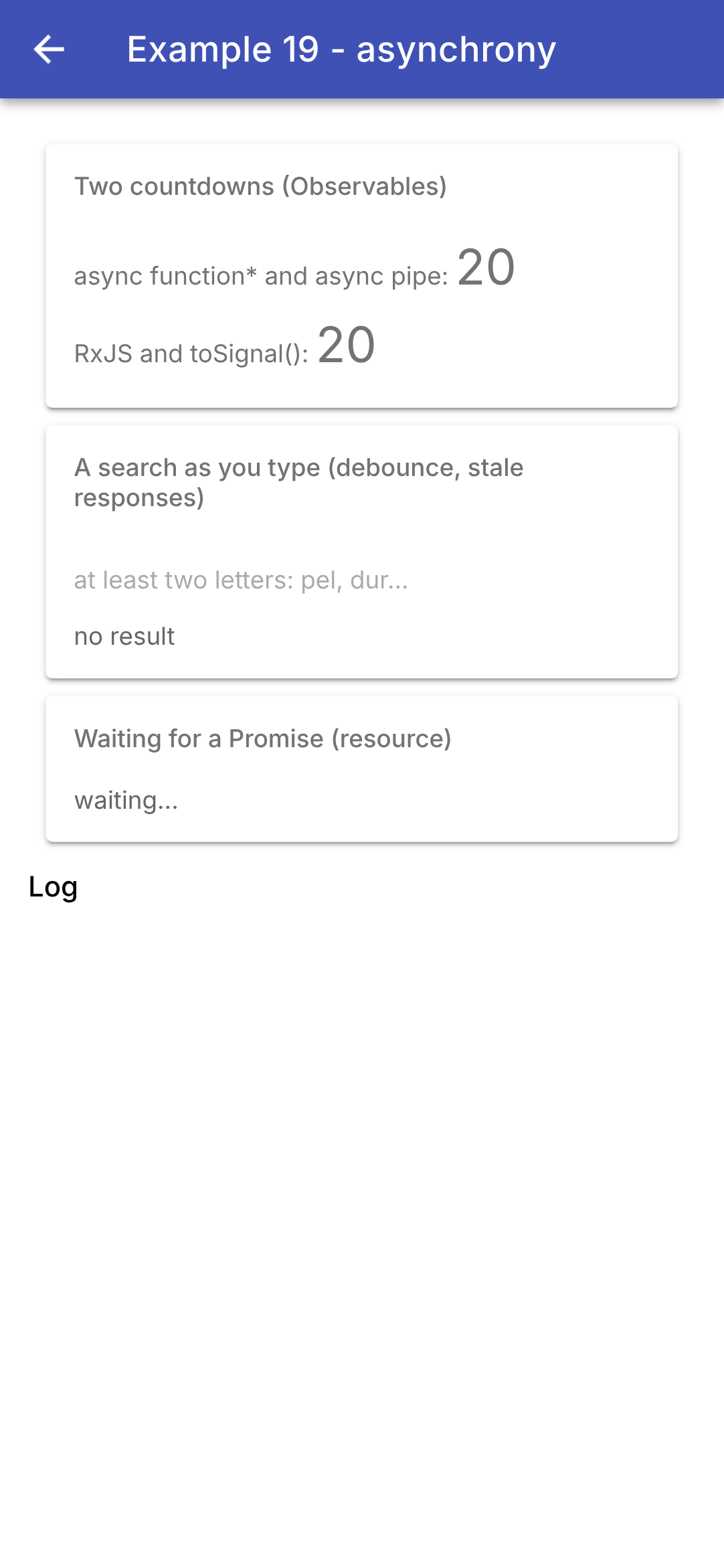
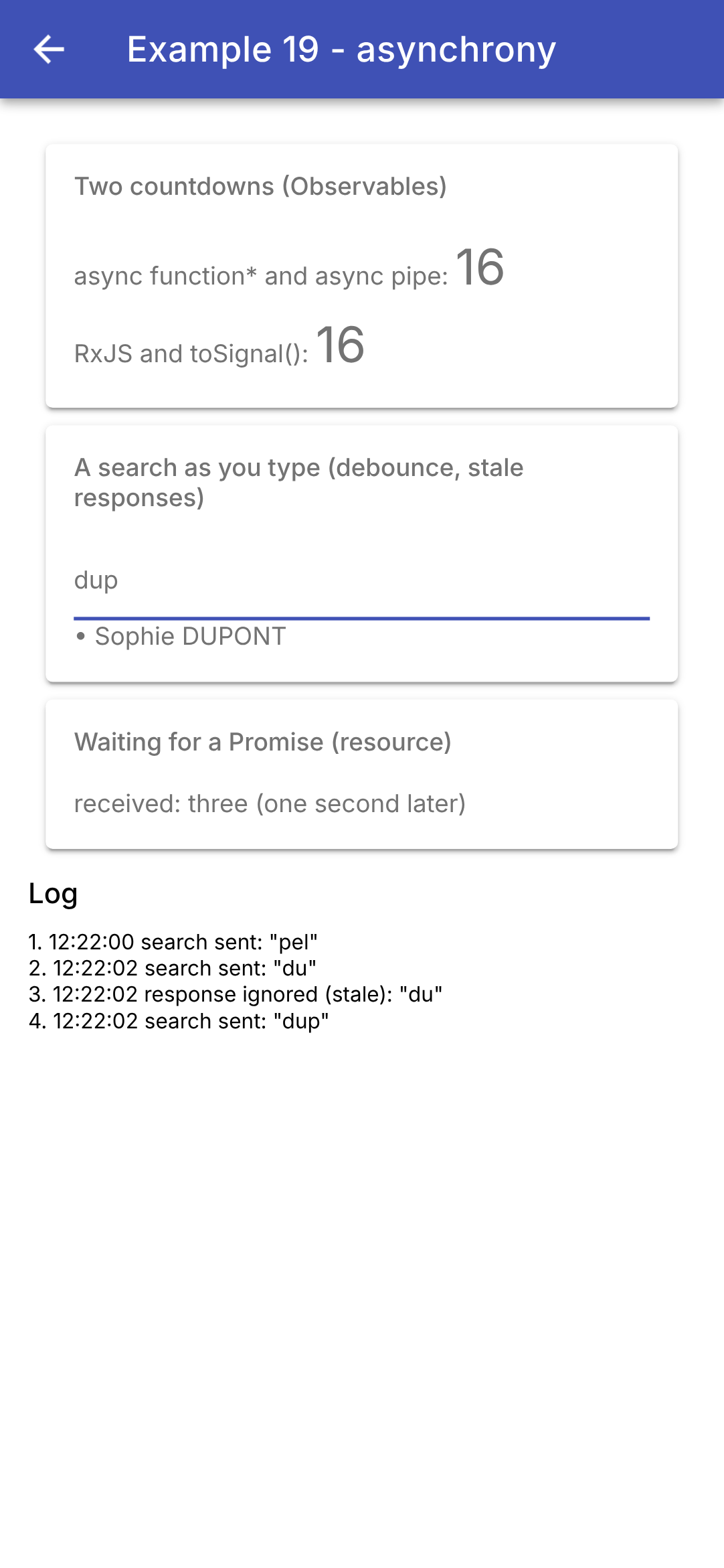
We type “p,” “pe,” and “pel” quickly: a single search is sent. Then “du,” followed by “dup” before the response to “du” arrives: the search for “du” is abandoned (its response is ignored) the moment the search for “dup” is sent. On the left, the page as it opens; on the right, five seconds later:
In the log, the line “response ignored” precedes the line “search sent: ‘dup’”: [switchMap] unsubscribes from the old search before launching the new one.
In [Dart], [Future], and [Stream] are in the base library, and [async], [await], [async*], [yield], and [await for] are in the language. In [JavaScript], [Promise], [async], [await], the asynchronous generators are also included in the language; but for value sequences, [Angular] relies on the [RxJS] library, whose hundred or so operators resolve issues such as debouncing and expired responses in a single line. The HTTP client of [Angular] (examples 22 through 25) also returns [Observable]. Since the arrival of signals, [Angular] reserves [RxJS] for event streams and uses [toSignal] or [resource] to display them.
6.2. Example 20: A Shared State
Same question as in previous lessons: what are the “scopes” for an application’s data?
- A component’s local state disappears when the component is destroyed;
- the state of a “store” is shared by all components and survives their removal… but not the application’s shutdown;
- State stored on the device survives when the application is shut down.
| // =========================================================================
// src/app/ex20-shared-state/stores/cart.ts - a SHARED STATE: a service
// -------------------------------------------------------------------------
// A "store" is a state that lives OUTSIDE the pages and the
// components, in ONE single instance, shared by all those who read it.
// With Angular, it is a SERVICE (see example 14) whose state is made of
// SIGNALS. Usual organization:
// - the STATE: PRIVATE signals (_items);
// - their reading: read-only views (asReadonly);
// - the ACTIONS: methods, the only ones to modify the state;
// - the computed values: computed signals.
// A component obtains it with inject(Cart); its template, which reads the
// signals, is updated when THEY change, and only them.
// providedIn: 'root': the service is created on its first request and lives
// as long as the application lives: it survives the removal of a component... but
// not the stopping of the application.
// =========================================================================
import { computed, Injectable, signal } from '@angular/core';
export interface Item {
label: string;
price: number;
}
@Injectable({ providedIn: 'root' })
export class Cart {
private readonly _items = signal<Item[]>([]);
// a NON-MODIFIABLE view of the state: only the actions change it
readonly items = this._items.asReadonly();
readonly count = computed(() => this._items().length);
readonly total = computed(() => this._items().reduce((s, a) => s + a.price, 0));
add(item: Item): void {
// a NEW array: the signal sees that its value has changed
this._items.update((items) => [...items, item]);
}
clear(): void {
this._items.set([]);
}
}
|
A store is a state that encompasses pages and components, existing as a single instance shared by all who access it. With [Angular], it is simply a service (see Example 14) whose state consists of signals: there is no library to add, whereas [Flutter] used the [provider] package around a [ChangeNotifier].
- line 26: [providedIn: 'root']: the service is created upon its first request ([inject(Cart)]), as a single instance, and remains active as long as the application is running;
- line 28: the state: a private signal;
- Line 30: a read-only view of the state ([asReadonly()]): only actions change it;
- Lines 31–32: calculated values: [computed] signals, recalculated only when the list of items changes;
- Lines 34–41: Actions: methods, which are the only ones that modify the state. Line 36: a NEW array ([...items] copies the items), not [push] as in the old version: a signal compares the old and new values ([===]) and notifies its subscribers only if they differ. There is no need to write [notifyListeners()]: the signal handles the notification.
6.2.2. Preferences
| // =========================================================================
// src/app/ex20-shared-state/stores/preferences.ts - a state that survives the stop
// -------------------------------------------------------------------------
// For a piece of data to survive the stopping of the application, it must be stored
// ON THE DEVICE. The @capacitor/preferences "plugin" offers a small
// key -> value dictionary (strings), specific to the application and
// kept on the device (Android: the SharedPreferences; in a
// browser: the localStorage). All its methods are ASYNCHRONOUS
// (they return a Promise):
// - at startup, we read the stored values;
// - on each change, we write them again.
// We NEVER store sensitive data there (password, token): they are
// written there in clear text.
// =========================================================================
import { effect, Injectable, signal } from '@angular/core';
// "as DeviceStorage": renamed, so as not to confuse it with our class
import { Preferences as DeviceStorage } from '@capacitor/preferences';
const darkKey = 'example20.dark';
const sizeKey = 'example20.size';
@Injectable({ providedIn: 'root' })
export class Preferences {
// the starting state: the default values, while waiting for the reading
private readonly _dark = signal(false);
private readonly _size = signal(16); // text size
readonly dark = this._dark.asReadonly();
readonly size = this._size.asReadonly();
constructor() {
this.load();
// an EFFECT: a function replayed each time a signal it reads
// changes. It applies the preferences to the WHOLE application:
// - the ion-palette-dark class on <html>: Ionic's dark theme
// (see styles.scss);
// - the font size of <html>: Ionic's components have
// sizes in rem (multiples of this size), they follow
effect(() => {
document.documentElement.classList.toggle('ion-palette-dark', this._dark());
document.documentElement.style.fontSize = `${this._size()}px`;
});
}
// what the device has stored (value is null if the key is absent)
private async load(): Promise<void> {
const dark = await DeviceStorage.get({ key: darkKey });
const size = await DeviceStorage.get({ key: sizeKey });
if (dark.value !== null) this._dark.set(dark.value === 'true');
if (size.value !== null) this._size.set(Number(size.value));
}
// one optional parameter per preference: we only change what is provided
update({ dark, size }: { dark?: boolean; size?: number }): void {
if (dark !== undefined) {
this._dark.set(dark);
DeviceStorage.set({ key: darkKey, value: String(dark) }); // writing on the device
}
if (size !== undefined) {
this._size.set(size);
DeviceStorage.set({ key: sizeKey, value: String(size) });
}
}
}
|
For data to survive after the application is closed, it must be stored on the device. The “plugin” [@capacitor/preferences] from [Capacitor] provides a small key-to-value dictionary (of strings), specific to the application and stored on the device: the [SharedPreferences] from [Android] (the ones used by the [shared_preferences] package from [Flutter]), and, in a browser, [localStorage]. All of its methods are asynchronous: they return a [Promise].
- line 18: the plugin is also named [Preferences]; [as DeviceStorage] renames it in this file to avoid confusion with our class;
- Lines 26–29: The initial state, with signals set to their default values, and their read-only views;
- line 32: Device reading begins when the service is created. It is asynchronous: for a brief moment, the default values apply;
- lines 39–42: an effect ([effect]): a function that is replayed every time a signal it reads changes. It applies the preferences to the WHOLE application: the CSS class [ion-palette-dark] on the [<html>] tag activates the dark theme in [Ionic] (defined in [styles.scss]); the font size in [<html>] enlarges the text, because the components in [Ionic] express their sizes in [rem] (as multiples of that size). An effect serves this purpose: to relay signals to the outside world (DOM, storage, etc.); it must not be used to calculate other signals ([computed] is designed for that);
- lines 46–51: device read operation: [DeviceStorage.get] returns a [Promise] from [{ value }], where [value] equals [null] if the key is missing. The values are strings: they are converted;
- lines 54–63: a single action with optional parameters (a destructured object: [{ dark, size }]): only the provided value is changed, and it is immediately written to the device ([DeviceStorage.set]). We do not wait for the write operation to complete: the signal has already changed.
NEVER store sensitive data (passwords, tokens) there: it is written in plain text. For this purpose, there are plugins that use the system’s vault ([Keystore] from [Android], [Keychain] from [iOS]).
6.2.3. The components
| // =========================================================================
// src/app/ex20-shared-state/components/shop.ts - ADDS to the shared cart
// -------------------------------------------------------------------------
// The shop only CALLS an action of the cart; its template reads
// no signal of the cart: it is not updated when the cart changes.
// =========================================================================
import { CurrencyPipe } from '@angular/common';
import { Component, inject } from '@angular/core';
import { IonButton, IonCard, IonCardContent, IonCardHeader, IonCardSubtitle, IonIcon } from '@ionic/angular';
import { addIcons } from 'ionicons';
import { add } from 'ionicons/icons';
import { Item, Cart } from '../stores/cart';
const products: Item[] = [
{ label: 'Consultation', price: 30 },
{ label: 'Vaccine', price: 12.5 },
];
@Component({
selector: 'app-ex20-shop',
imports: [CurrencyPipe, IonCard, IonCardHeader, IonCardSubtitle, IonCardContent, IonButton, IonIcon],
templateUrl: './shop.html',
})
export class Shop {
readonly products = products;
// the SAME cart as that of the other components (a single instance)
readonly cart = inject(Cart);
constructor() {
addIcons({ add });
}
}
|
| <!-- ======================================================================
shop.html - two products to add to the cart
====================================================================== -->
<ion-card>
<ion-card-header>
<ion-card-subtitle>Shop</ion-card-subtitle>
</ion-card-header>
<ion-card-content>
@for (p of products; track p.label) {
<ion-button fill="clear" (click)="cart.add(p)">
<ion-icon slot="start" name="add" />
{{ p.label }} ({{ p.price | currency: 'EUR' }})
</ion-button>
}
</ion-card-content>
</ion-card>
|
- line 28 (.ts): [inject(Cart)] returns the SAME shopping cart as the other components;
- line 11 (html): the shop simply calls an action. Its template does not read any signals from the shopping cart: it is not updated when the shopping cart changes (this was [context.read<Cart>()] with [provider]);
- line 13 (html): the [currency] pipe formats the price in the English style (see example 09).
| // =========================================================================
// src/app/ex20-shared-state/components/cart-summary.ts - READS the same cart
// -------------------------------------------------------------------------
// The template reads two signals of the cart, count() and total(): it is updated
// when ONE of them changes, and only then.
// =========================================================================
import { CurrencyPipe } from '@angular/common';
import { Component, inject } from '@angular/core';
import { IonButton, IonCard, IonIcon, IonItem, IonLabel } from '@ionic/angular';
import { addIcons } from 'ionicons';
import { cart } from 'ionicons/icons';
import { Cart } from '../stores/cart';
@Component({
selector: 'app-ex20-cart-summary',
imports: [CurrencyPipe, IonCard, IonItem, IonIcon, IonLabel, IonButton],
templateUrl: './cart-summary.html',
})
export class CartSummary {
readonly cart = inject(Cart);
constructor() {
addIcons({ cart });
}
}
|
| <!-- ======================================================================
cart-summary.html - the number of items and the total of the cart
====================================================================== -->
<ion-card>
<ion-item lines="none">
<ion-icon slot="start" name="cart" />
<ion-label>{{ cart.count() }} item(s), {{ cart.total() | currency: 'EUR' }}</ion-label>
<ion-button slot="end" fill="clear" [disabled]="cart.count() === 0" (click)="cart.clear()">
Clear
</ion-button>
</ion-item>
</ion-card>
|
- Lines 8–9 (HTML): The template reads two signals from the shopping cart, [count()] and [total()]: It is updated when either of them changes, and only then. With [provider], you had to choose between [context.watch] (the entire shopping cart) and [context.select] (a single item); with the signals, the precision is automatic: it depends on what is read.
| // =========================================================================
// src/app/ex20-shared-state/components/local-counter.ts - a LOCAL state
// -------------------------------------------------------------------------
// The clicks signal belongs to the component: it is born with it and disappears
// with it.
// =========================================================================
import { Component, input, signal } from '@angular/core';
import { IonButton, IonCard, IonItem, IonLabel } from '@ionic/angular';
@Component({
selector: 'app-ex20-local-counter',
imports: [IonCard, IonItem, IonLabel, IonButton],
templateUrl: './local-counter.html',
})
export class LocalCounter {
readonly title = input.required<string>();
readonly clicks = signal(0);
}
|
| <!-- ======================================================================
local-counter.html - a click counter
====================================================================== -->
<ion-card>
<ion-item lines="none">
<ion-label>{{ title() }}</ion-label>
<ion-button slot="end" fill="outline" (click)="clicks.set(clicks() + 1)">{{ clicks() }} click(s)</ion-button>
</ion-item>
</ion-card>
|
A local state (line 18 of the .ts file), which is created and destroyed along with the component.
6.2.4. The page
| // =========================================================================
// src/app/ex20-shared-state/ex20.page.ts - three "scopes" of data
// -------------------------------------------------------------------------
// - the LOCAL state of a component (LocalCounter) disappears with it;
// - the state of a SERVICE (the cart) is shared by all the components
// and survives their removal - but not the stopping of the application;
// - the state stored on the device (the preferences) survives the stop.
// And the CSS class ion-hide: the content is HIDDEN, but not removed; its
// local state is kept.
// Uncheck then check again "show the area", then stop and restart
// the application: compare.
// =========================================================================
import { Component, inject, signal } from '@angular/core';
import {
IonBackButton, IonButtons, IonCheckbox, IonContent, IonHeader, IonItem, IonLabel, IonList, IonRange, IonTitle,
IonToggle, IonToolbar,
} from '@ionic/angular';
import { Shop } from './components/shop';
import { LocalCounter } from './components/local-counter';
import { CartSummary } from './components/cart-summary';
import { Preferences } from './stores/preferences';
@Component({
selector: 'app-ex20',
imports: [
IonHeader, IonToolbar, IonButtons, IonBackButton, IonTitle, IonContent, IonList, IonItem, IonLabel, IonToggle,
IonRange, IonCheckbox, Shop, CartSummary, LocalCounter,
],
templateUrl: './ex20.page.html',
})
export class Ex20Page {
readonly preferences = inject(Preferences);
// a local state of the page
readonly areaVisible = signal(true);
}
|
| <!-- ======================================================================
ex20.page.html - a shared state
====================================================================== -->
<ion-header>
<ion-toolbar color="primary">
<ion-buttons slot="start">
<ion-back-button defaultHref="/" />
</ion-buttons>
<ion-title>Example 20 - a shared state</ion-title>
</ion-toolbar>
</ion-header>
<ion-content class="ion-padding">
<ion-list>
<ion-item>
<!-- [checked]: the value of the service; (ionChange): the action that modifies it -->
<ion-toggle [checked]="preferences.dark()"
(ionChange)="preferences.update({ dark: $event.detail.checked })">dark theme</ion-toggle>
</ion-item>
<ion-item>
<!-- snaps / ticks: notches, every step -->
<ion-range [min]="12" [max]="22" [step]="1" [snaps]="true" [ticks]="true" [value]="preferences.size()"
(ionChange)="preferences.update({ size: +$event.detail.value })">
<ion-label slot="label">text size: {{ preferences.size() }}</ion-label>
</ion-range>
</ion-item>
<ion-item>
<ion-checkbox [checked]="areaVisible()" (ionChange)="areaVisible.set($event.detail.checked)">
show the area</ion-checkbox>
</ion-item>
</ion-list>
<!-- removed: these components disappear, with their local state -->
@if (areaVisible()) {
<app-ex20-shop />
<app-ex20-cart-summary />
<app-ex20-local-counter title="Local state" />
}
<!-- hidden (ion-hide: display none): the component stays in memory, its state is kept -->
<app-ex20-local-counter title="Local state, hidden by a CSS class" [class.ion-hide]="!areaVisible()" />
<p>Outside the area, a second summary of the SAME cart (it stays there when the area disappears):</p>
<app-ex20-cart-summary />
</ion-content>
|
- line 33 (.ts): preferences, a service; it is created (and reads the device) on its first request;
- line 35 (.ts): a local state of the page: is the area displayed?
- lines 18–19 (html): a toggle switch ([<ion-toggle>]): [[checked]] receives the value from the service, and [(ionChange)] calls its action;
- lines 23–26 (html): a slider ([<ion-range>]) ranging from 12 to 22, with tick marks ([snaps], [ticks]); [+$event.detail.value] converts the value to a number;
- lines 29–30 (html): a checkbox, linked to the local state;
- lines 35–39 (HTML): removed ([@if]); the area disappears—its components are DESTROYED, along with their local state;
- line 41 (html): hidden by the class CSS [ion-hide] of [Ionic] ([display: none]); the component remains in memory: its state is preserved. [[class.ion-hide]="..."] sets the class when the expression is true. (This was previously [Visibility(maintainState: true)] of [Flutter].)
- Line 44 (html): a second summary of the same shopping cart, outside the area.
The shopping cart and preferences are shared across the entire application ([providedIn: 'root']). To make a service specific to a page (one instance per page, destroyed along with it), it is declared in the [providers] of its component, as shown in Example 21.
6.2.5. Execution
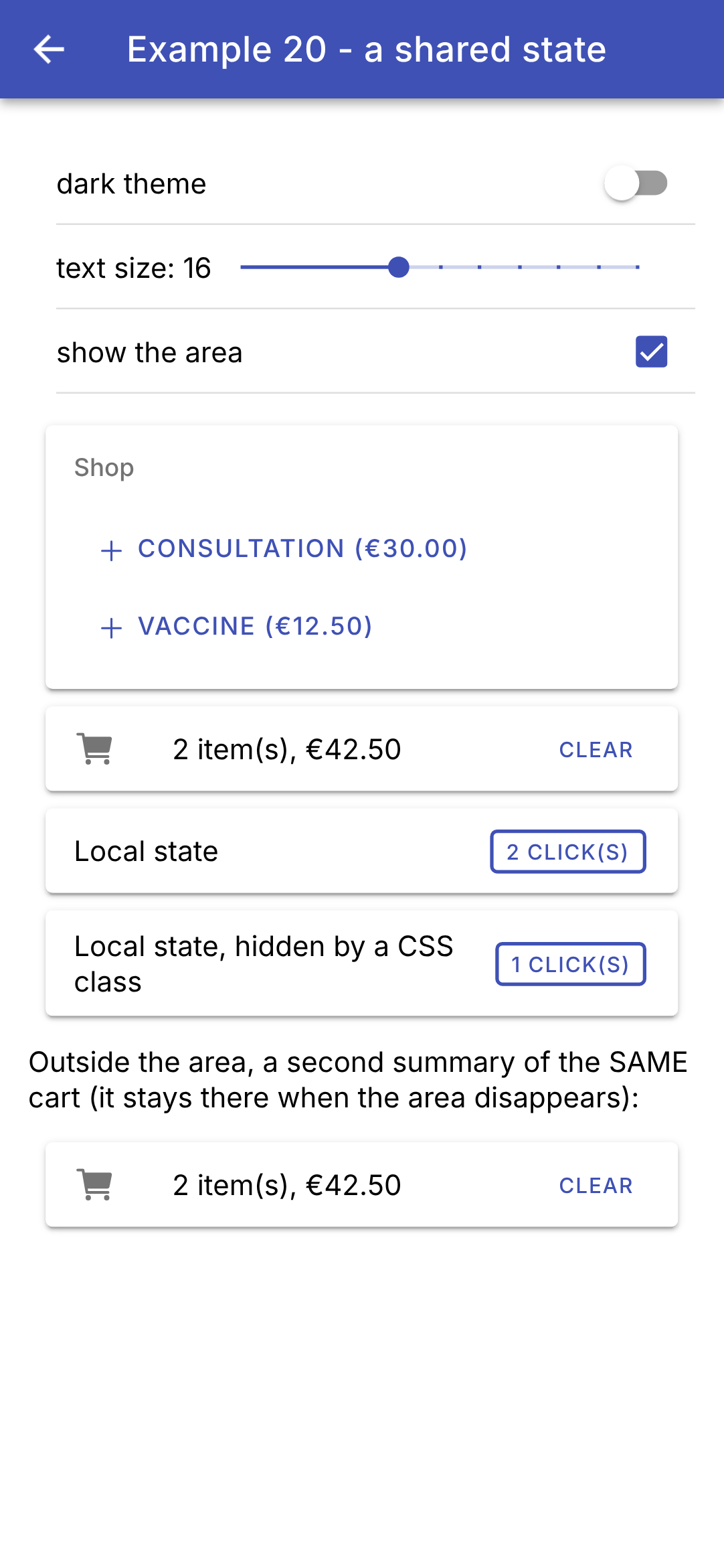
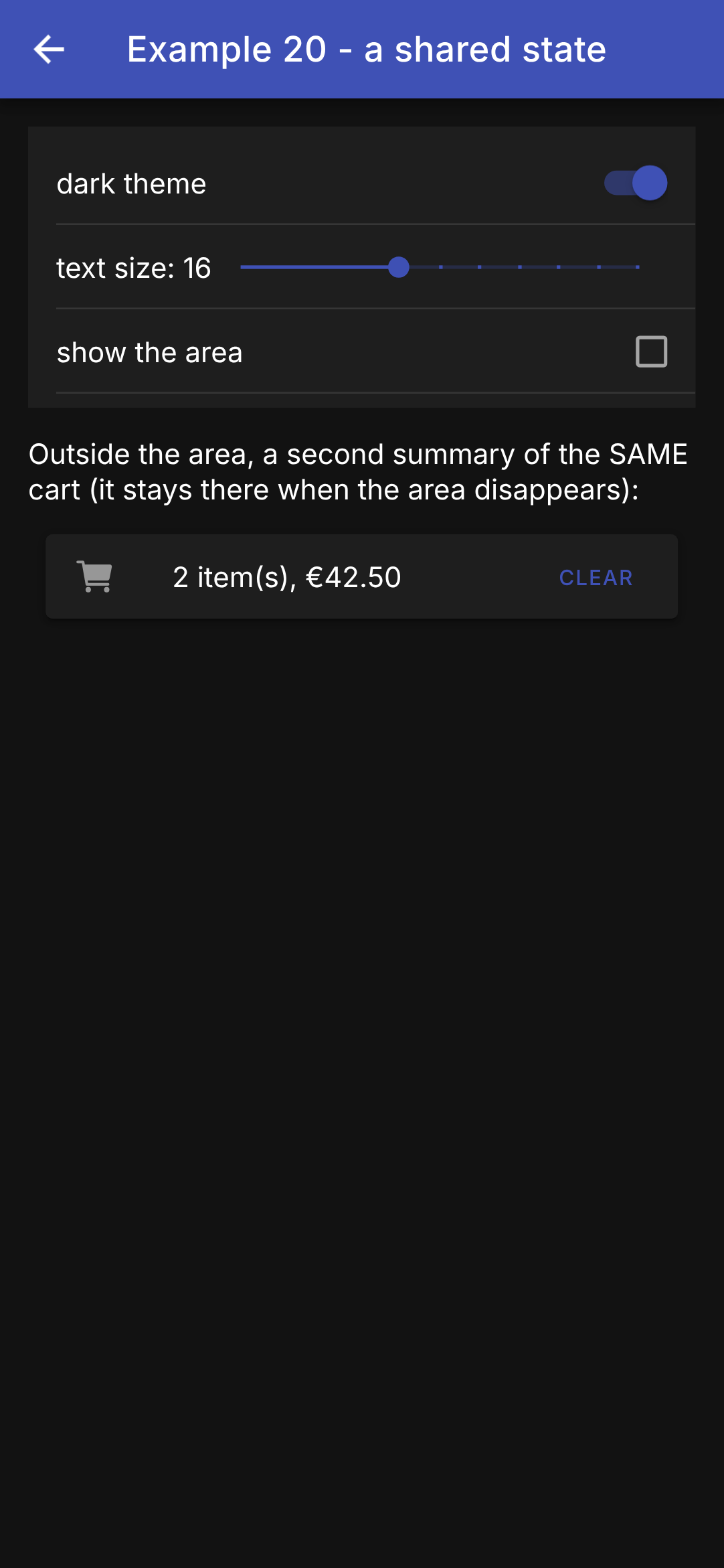
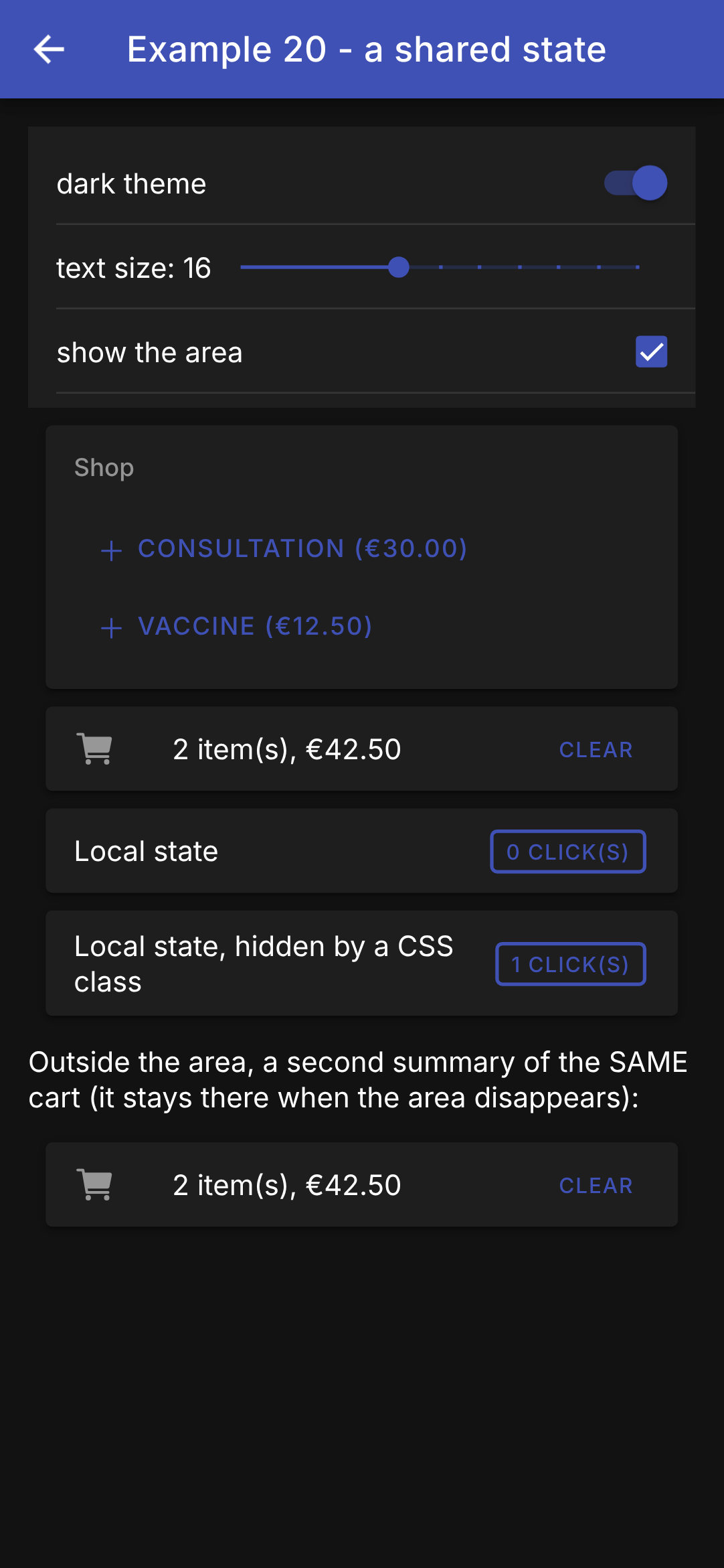
We add two items, click the first local counter twice and the second once (on the left); we remove the area and switch to the dark theme (in the middle); we restore the area (on the right):
The shopping cart survived the removal of the section (as shown in the second summary); the removed counter reset to zero; the hidden counter retained its value. Stop the application and restart it (in the browser: reload the page): the dark theme and text size are preserved, and the shopping cart is empty. The preferences apply to the entire application: when you return to the menu, it is also in dark mode.
Why not use a state management library? There are some available for [Angular] ([NgRx], its variant [SignalStore], [NGXS]...), just as there are for [Flutter] ([provider], [Riverpod], [Bloc]...). But dependency injection and signals already handle the essentials: a signal-based service is a store, and that is what the case study will use.