5. Routing
An application has multiple screens. [Flutter] manages them using [Navigator]: a stack of screens, where a new screen ([Navigator.push]) is pushed onto the stack and from which it is popped ([Navigator.pop], or the phone’s Back button). This is sufficient for a small mobile app. But as soon as you want URLs (/doctors/2)—that is, screens that can be referenced, opened from a link, reloaded on the web, and protected by guards—you use a router. The [go_router] package, maintained by the [Flutter] team and recommended in its documentation, is the most widely used.
5.1. Example 17: The Router
5.1.1. The data
| // "hard-coded" data, so as not to depend on a server in this example
typedef Doctor = ({int id, String title, String firstName, String lastName, String specialty});
const doctors = <Doctor>[
(id: 1, title: 'Mme', firstName: 'Marie', lastName: 'PELISSIER', specialty: 'general practitioner'),
(id: 2, title: 'Mr', firstName: 'Paul', lastName: 'TATOU', specialty: 'pediatrician'),
(id: 3, title: 'Melle', firstName: 'Sophie', lastName: 'DUPONT', specialty: 'general practitioner'),
];
|
"Hard-coded" data, to avoid relying on a server in this example: a list of records.
5.1.2. The routes
| // =========================================================================
// lib/ex17_router/routes.dart - the ROUTES of the application
// -------------------------------------------------------------------------
// An application has several screens ("pages"). The ROUTER associates an
// ADDRESS (a path, as on the web: /doctors/2) with a screen. Flutter
// provides the Navigator (a STACK of screens: we push, we pop); the
// go_router package, maintained by the Flutter team, adds the
// addresses to it: links, parameters, the browser's Back button
// and addresses typed by hand on the web, Android's Back button.
// '/doctors/:id' :id is a parameter (/doctors/2 -> id = "2");
// ShellRoute a common "shell" (top bar, bottom
// navigation bar) around the screens of its routes;
// redirect a redirect: the old address leads to the new one;
// errorBuilder the screen of an address that matches no route.
// =========================================================================
import 'package:go_router/go_router.dart';
import 'shell.dart';
import 'pages/home.dart';
// DEFERRED loading: on the web, the code of this page is only downloaded
// on the first visit (flutter build web makes a separate file of it)
import 'pages/about.dart' deferred as about;
import 'pages/deferred_loading.dart';
import 'pages/doctor_detail.dart';
import 'pages/doctor_list.dart';
import 'pages/not_found_page.dart';
import 'pages/search.dart';
final router = GoRouter(
// the starting address (on a phone: there is no address bar)
initialLocation: '/',
routes: [
ShellRoute(
// child: the screen of the current child route, placed IN the shell
builder: (context, state, child) => Shell(child: child),
routes: [
GoRoute(path: '/', builder: (context, state) => const Home()),
GoRoute(
path: '/doctors',
builder: (context, state) => const DoctorList(),
// a NESTED route: /doctors/2
routes: [
GoRoute(
path: ':id',
// pathParameters: the parameters of the path, always STRINGS
builder: (context, state) => DoctorDetail(id: state.pathParameters['id']!),
),
],
),
GoRoute(
path: '/search',
// uri.queryParameters: the parameters after the ? (/search?q=pediatrician)
builder: (context, state) => Search(q: state.uri.queryParameters['q'] ?? ''),
),
GoRoute(
path: '/about',
builder: (context, state) =>
DeferredLoading(load: about.loadLibrary, builder: () => about.About()),
),
// a redirect: the route has no screen, it returns another address
GoRoute(path: '/physicians', redirect: (context, state) => '/doctors'),
],
),
],
errorBuilder: (context, state) => NotFoundPage(address: state.uri.toString()),
);
|
A route associates a path with a screen.
- Line 23: a deferred import ([deferred]). On the web, this page’s code is compiled into a separate file, which is downloaded only on the first visit to the page ([about.loadLibrary()]). On a phone, all the code is already in the app: [loadLibrary()] terminates immediately;
- lines 30–32: the router, an object named [GoRouter], is created once, outside of any widget. [initialLocation]: the starting address (on a phone, there is no address bar to display it);
- lines 34–36: a [ShellRoute] is a common container for several screens: the top bar and the bottom navigation bar. Its [builder] receives [child]—the current route screen—and places it within the shell. This is equivalent to nested routes and the [<Outlet />] of [React Router];
- line 38: a route—its path—and a function that generates its screen. [state] ([GoRouterState]) describes the current navigation: the address and its parameters;
- lines 40–47: the list of doctors, and a nested route: [':id'] under ['/doctors'] provides the path [/doctors/:id], where [:id] is a parameter ([/doctors/2]: [id] equals ["2"]). [state.pathParameters] provides the path parameters, which are always strings;
- lines 52–54: [state.uri] is the full address; [queryParameters] contains the parameters following [?] ([/search?q=pediatrician]);
- lines 57–59: the page loaded on demand by the [DeferredLoading] widget (discussed later);
- line 62: a redirect—the route has no screen; its function [redirect] returns another address, to which navigation is redirected;
- line 66: the screen for an address that does not correspond to any route.
5.1.3. Startup
| // =========================================================================
// lib/ex17_router/main.dart
// -------------------------------------------------------------------------
// MaterialApp.router: the application no longer has ONE home screen (home),
// the router decides on the screen, from the address.
// usePathUrlStrategy(): on the web, "clean" addresses (/doctors/2)
// rather than the default form (/#/doctors/2). No effect elsewhere.
// =========================================================================
import 'package:flutter/material.dart';
import 'package:flutter_web_plugins/url_strategy.dart';
import 'routes.dart';
void main() {
usePathUrlStrategy();
runApp(
MaterialApp.router(
debugShowCheckedModeBanner: false,
theme: ThemeData(colorSchemeSeed: Colors.indigo),
routerConfig: router,
),
);
}
|
- line 16: on the web, “clean” addresses ([/doctors/2]) rather than the default form ([/#/doctors/2]). Has no effect on a phone;
- Lines 17–21: [MaterialApp.router]: the app no longer displays ONE home screen ([home]); the router determines the screen based on the address.
5.1.4. The app's shell
| // =========================================================================
// lib/ex17_router/shell.dart - the "shell" of the application
// -------------------------------------------------------------------------
// The top bar, the bottom navigation bar, and, between the two,
// the screen of the current route (child).
// - GoRouterState.of(context).uri : the current address;
// - context.go('/doctors') : going to an address. The stack of
// screens is REPLACED by the one of this address (a tab);
// - context.push('/doctors/2') : PUSHING a screen above the
// current screen; the Back button (or context.pop()) pops it.
// =========================================================================
import 'package:flutter/material.dart';
import 'package:go_router/go_router.dart';
// the tabs: (path, label, icon)
const tabs = [
('/', 'Home', Icons.home),
('/doctors', 'Doctors', Icons.people),
('/search?q=general practitioner', 'Search', Icons.search),
('/about', 'About', Icons.info),
];
class Shell extends StatelessWidget {
final Widget child;
const Shell({super.key, required this.child});
@override
Widget build(BuildContext context) {
final address = GoRouterState.of(context).uri;
// the active tab: the one whose path is the start of the current address
int active = 0;
for (final (i, (path, _, _)) in tabs.indexed) {
final start = Uri.parse(path).path;
if (start != '/' && address.path.startsWith(start)) active = i;
}
return Scaffold(
appBar: AppBar(title: const Text('Example 17 - the router')),
body: Column(
crossAxisAlignment: CrossAxisAlignment.stretch,
children: [
Container(
color: Colors.grey.shade100,
padding: const EdgeInsets.all(8),
// Uri.decodeFull: %20 becomes a space again
child: Text(
'current address: ${Uri.decodeFull(address.toString())}',
style: const TextStyle(fontFamily: 'RobotoMono', fontSize: 12),
),
),
Expanded(
child: Padding(padding: const EdgeInsets.all(16), child: child),
),
],
),
// NavigationBar: the bottom tab bar, typical of a mobile
bottomNavigationBar: NavigationBar(
selectedIndex: active,
onDestinationSelected: (i) => context.go(tabs[i].$1),
destinations: [
for (final (_, label, icon) in tabs) NavigationDestination(icon: Icon(icon), label: label),
],
),
);
}
}
|
- Lines 17–21: the tabs: records (path, label, icon);
- line 31: the current address. [GoRouterState.of(context)] is an inherited data read (see Example 14): the shell is reconstructed with each navigation;
- lines 33–36: the active tab: the one whose path is the beginning of the current address. [for (final (i, (path, _, _)) in tabs.indexed)] parses both the (rank, tab) pair and the tab record, retaining only the path ([_]: “ignored”);
- lines 48–49: the current address, displayed ([Uri.decodeFull]: [%20] becomes a space again);
- lines 53–54: the current route screen;
- lines 59–63: the bottom tab bar ([NavigationBar]), typical of a mobile app. [onDestinationSelected] receives the index of the tapped tab; [context.go(path)] leads to its address. [tabs[i].$1]: the first field of a positional record.
Two ways to navigate, using [go_router]:
- [context.go('/doctors')]: Go to an address. The screen stack is replaced by the one described by this address. This is what you do to switch tabs;
- [context.push('/doctors/2')]: Push the screen at this address onto the top of the current screen. The phone’s Back button (or [context.pop()]) pops it off the stack, and you return to where you were. This is how you “enter” a detail view.
5.1.5. The pages
| // lib/ex17_router/pages/home.dart
// Title: the title of the browser tab (web) or of the application in
// the list of recent applications (Android), as long as the page is displayed
import 'package:flutter/material.dart';
import 'package:go_router/go_router.dart';
class Home extends StatelessWidget {
const Home({super.key});
@override
Widget build(BuildContext context) {
return Title(
title: 'Home',
color: Colors.indigo,
child: ListView(
children: [
const Text(
'Welcome. Touch the tabs: the screen changes, and so does its address. On the web, '
"the address is displayed in the browser's bar, the Back and Forward buttons "
'work, as well as the reload (F5) of any page.',
),
const SizedBox(height: 16),
// links to particular addresses
Wrap(
spacing: 8,
children: [
OutlinedButton(onPressed: () => context.go('/physicians'), child: const Text('/physicians (redirect)')),
OutlinedButton(onPressed: () => context.go('/unknown-page'), child: const Text('Broken link')),
],
),
],
),
);
}
}
|
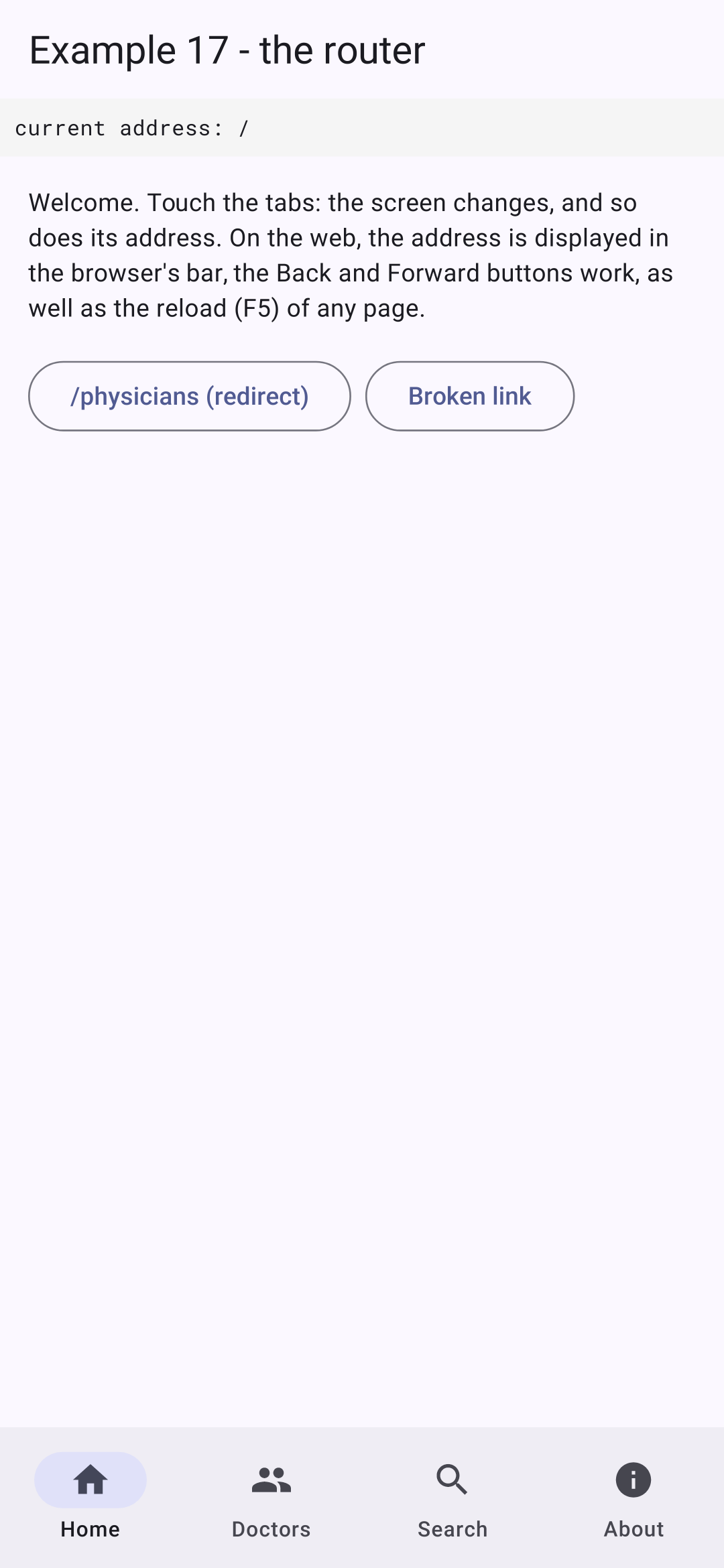
Each page places a [Title] widget: its title is that of the browser tab (on the web) or of the app in the list of recent apps (on [Android]), as long as the page is displayed. Two buttons lead to specific URLs: the redirect [/physicians], and a URL that does not exist.
| // lib/ex17_router/pages/doctor_list.dart - links with a parameter
import 'package:flutter/material.dart';
import 'package:go_router/go_router.dart';
import '../data.dart';
class DoctorList extends StatelessWidget {
const DoctorList({super.key});
@override
Widget build(BuildContext context) {
return Title(
title: 'Doctors',
color: Colors.indigo,
child: ListView(
children: [
for (final m in doctors)
ListTile(
title: Text('${m.title} ${m.firstName} ${m.lastName}'),
trailing: const Icon(Icons.chevron_right),
// push: the doctor's screen is PUSHED; the Back button returns here
onTap: () => context.push('/doctors/${m.id}'),
),
],
),
);
}
}
|
- Line 22: Tapping a doctor pushes its screen onto the stack.
| // =========================================================================
// lib/ex17_router/pages/doctor_detail.dart - a page with a parameter
// -------------------------------------------------------------------------
// The router passes it the :id parameter of the path, a STRING ("2").
// context.pop() pops the screen (like the Back button); context.go()
// leads to another address. If we go from /doctors/1 to /doctors/2,
// Flutter reuses the same screen, simply rebuilt with another id.
// =========================================================================
import 'package:flutter/material.dart';
import 'package:go_router/go_router.dart';
import '../data.dart';
class DoctorDetail extends StatelessWidget {
final String id;
const DoctorDetail({super.key, required this.id});
@override
Widget build(BuildContext context) {
// int.tryParse: null if id is not a number; firstWhere... orElse: not found
final number = int.tryParse(id);
final found = doctors.where((m) => m.id == number);
if (found.isEmpty) {
return Text('Doctor no. $id does not exist.', style: const TextStyle(color: Colors.red));
}
final doctor = found.first;
final next = doctor.id % doctors.length + 1;
return Title(
title: '${doctor.firstName} ${doctor.lastName}',
color: Colors.indigo,
child: Column(
crossAxisAlignment: CrossAxisAlignment.start,
children: [
Text('${doctor.title} ${doctor.firstName} ${doctor.lastName}', style: Theme.of(context).textTheme.titleLarge),
Text('Specialty: ${doctor.specialty}'),
const SizedBox(height: 16),
Wrap(
spacing: 8,
children: [
OutlinedButton(
// canPop: is there a screen below? (not if we arrived
// directly at this address, on the web)
onPressed: () => context.canPop() ? context.pop() : context.go('/doctors'),
child: const Text('Back'),
),
FilledButton(
// pushReplacement: replaces the current screen (no pushing)
onPressed: () => context.pushReplacement('/doctors/$next'),
child: const Text('Next doctor'),
),
],
),
],
),
);
}
}
|
- line 16: the path parameter [:id], which the router passes to the constructor;
- lines 23–26: [int.tryParse]: the numeric ID, or [null]; if a doctor cannot be found, a message is displayed;
- line 45: Back: the screen is popped off the stack if there is one below it ([canPop]); otherwise (if you arrived directly at this address via the web), you go to the list;
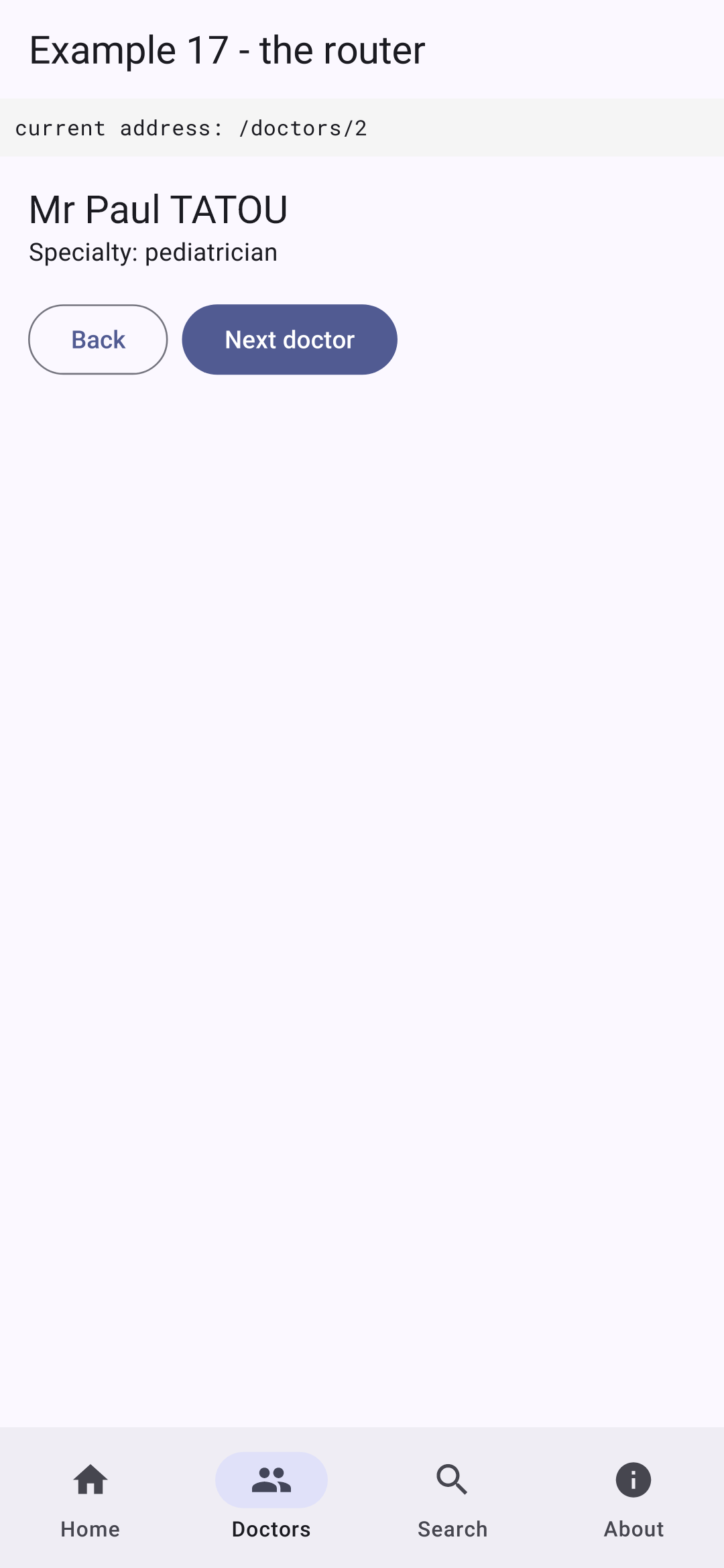
- line 50: the next doctor replaces the current screen (no stacking: the Back button returns to the list, not to the previous doctor).
| // =========================================================================
// lib/ex17_router/pages/search.dart - a page driven by the address
// -------------------------------------------------------------------------
// /search?q=pediatrician: the page is entirely described by its address.
// On the web, it can be bookmarked, reloaded, we can go
// back. Searching means GOING to the address /search?q=<input>:
// the page displays what the address says, and nothing else.
// =========================================================================
import 'package:flutter/material.dart';
import 'package:go_router/go_router.dart';
import '../data.dart';
class Search extends StatelessWidget {
final String q;
const Search({super.key, required this.q});
void _search(BuildContext context, String input) {
// Uri: builds the address, encoding what is needed (space -> %20)
context.go(Uri(path: '/search', queryParameters: {'q': input.trim()}).toString());
}
@override
Widget build(BuildContext context) {
final results = doctors
.where((m) => '${m.firstName} ${m.lastName} ${m.specialty}'.toLowerCase().contains(q.toLowerCase()))
.toList();
return Title(
title: 'Search',
color: Colors.indigo,
child: ListView(
children: [
// a NON-controlled field, which starts with the value of the address;
// key: ValueKey(q): if the address changes (Back button), Flutter
// recreates the field, which then takes the new value
TextFormField(
key: ValueKey(q),
initialValue: q,
decoration: const InputDecoration(hintText: 'name or specialty', suffixIcon: Icon(Icons.search)),
textInputAction: TextInputAction.search,
onFieldSubmitted: (input) => _search(context, input),
),
const SizedBox(height: 8),
for (final m in results) ListTile(title: Text('${m.firstName} ${m.lastName} (${m.specialty})')),
if (results.isEmpty)
const ListTile(
title: Text('No result.', style: TextStyle(color: Colors.grey)),
),
],
),
);
}
}
|
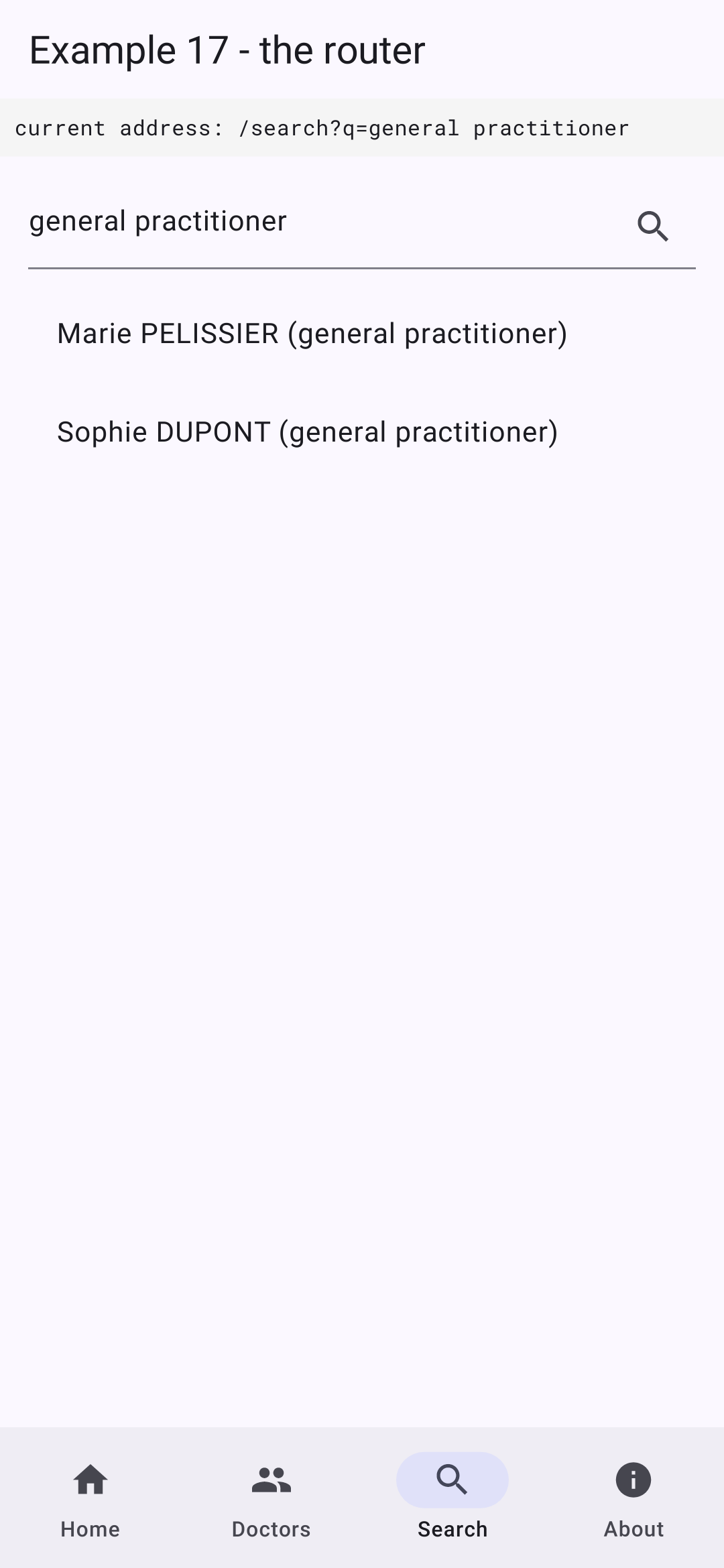
- Lines 20–22: Searching means GOING to the address [/search?q=<input>]. [Uri] generates the address by encoding the necessary information (a space becomes [%20]). The page is fully described by its address: on the web, you can bookmark it, reload it, or go back;
- lines 38–43: an unvalidated field that starts with the value of the URL. [key: ValueKey(q)]: if the URL changes (browser’s Back button), the key changes; [Flutter] recreates the field, which takes on the new value. [textInputAction: TextInputAction.search]: The Enter key on the phone’s keyboard acts as a magnifying glass.
| // =========================================================================
// lib/ex17_router/pages/deferred_loading.dart
// -------------------------------------------------------------------------
// A screen whose code is loaded on demand ("deferred" import):
// load() downloads the code (a Future), builder() builds the screen
// once the code has arrived. Meanwhile: a loading indicator.
// FutureBuilder rebuilds its content when the Future completes
// (see example 19).
// =========================================================================
import 'package:flutter/material.dart';
class DeferredLoading extends StatefulWidget {
final Future<void> Function() load;
final Widget Function() builder;
const DeferredLoading({super.key, required this.load, required this.builder});
@override
State<DeferredLoading> createState() => _DeferredLoadingState();
}
class _DeferredLoadingState extends State<DeferredLoading> {
// the Future is created ONCE (and not on each build)
late final Future<void> _loading = widget.load();
@override
Widget build(BuildContext context) {
return FutureBuilder(
future: _loading,
builder: (context, snapshot) => snapshot.connectionState == ConnectionState.done
? widget.builder()
: const Center(child: CircularProgressIndicator()),
);
}
}
|
- line 25: the code is loaded, initiated ONCE (a [late] field initialized on its first read): if it were initiated in [build], each reconstruction would trigger it again;
- Lines 29–33: [FutureBuilder] rebuilds its content when [Future] terminates: in the meantime, a loading indicator; then, the screen (see Example 19).
| // lib/ex17_router/pages/about.dart - a page loaded on demand
// (see the "deferred as about" import of routes.dart)
import 'package:flutter/material.dart';
class About extends StatelessWidget {
const About({super.key});
@override
Widget build(BuildContext context) {
return Title(
title: 'About',
color: Colors.indigo,
child: const Text(
'On the web, this page was downloaded on the first visit (Network tab '
'of the developer tools: a main.dart.js_1.part.js file). On a phone, '
'all the code is already in the application.',
),
);
}
}
|
| // lib/ex17_router/pages/not_found_page.dart - the screen of unknown addresses
import 'package:flutter/material.dart';
import 'package:go_router/go_router.dart';
class NotFoundPage extends StatelessWidget {
final String address;
const NotFoundPage({super.key, required this.address});
@override
Widget build(BuildContext context) {
return Title(
title: 'Page not found',
color: Colors.indigo,
child: Scaffold(
appBar: AppBar(title: const Text('Page not found')),
body: Padding(
padding: const EdgeInsets.all(16),
child: Column(
crossAxisAlignment: CrossAxisAlignment.start,
children: [
Text('No page at the address $address.', style: const TextStyle(color: Colors.red)),
const SizedBox(height: 16),
FilledButton(onPressed: () => context.go('/'), child: const Text('Back to home')),
],
),
),
),
);
}
}
|
The unknown addresses screen has its own [Scaffold]: it is constructed by [errorBuilder], outside the shell.
5.1.6. Execution
The home screen; a doctor’s details (stacked: the top bar hasn’t changed, but the phone’s Back button returns you to the list); the search; an unknown address:
On the web ([flutter run -d chrome]), the address appears in the browser bar, the Back and Forward buttons work, and you can type an address manually.
5.2. Example 18: Navigation guards
5.2.1. The session
| // =========================================================================
// lib/ex18_guards/session.dart - a SIMULATED session (without a server)
// -------------------------------------------------------------------------
// The logged-in user must be known to the SCREENS (the top bar,
// the schedule) and to the GUARDS of the router (functions, which are not
// widgets). It is stored in a single object, a ChangeNotifier:
// - a private field, the state;
// - methods to read and modify it;
// - notifyListeners(): notifies its subscribers (the router, the screens)
// when it changes.
// (Example 23 will do the same thing with a real server.)
// =========================================================================
import 'package:flutter/foundation.dart';
enum Role { admin, doctor, user }
typedef User = ({String login, Role role});
// three "hard-coded" accounts (password = login)
const _accounts = {'admin': Role.admin, 'pelissier': Role.doctor, 'martin': Role.user};
class Session extends ChangeNotifier {
User? _user; // the state: null, nobody is logged in
User? get user => _user;
bool logIn(String login, String password) {
final role = _accounts[login];
if (role == null || password != login) {
return false;
}
_user = (login: login, role: role);
notifyListeners();
return true;
}
void logOut() {
_user = null;
notifyListeners();
}
}
// the single session of the application
final session = Session();
|
The logged-in user must be recognized by the screens (the top bar, the schedule) and the router’s controls—features that are not widgets. It is stored in a single object, a [ChangeNotifier] (see Example 14):
- line 24: the status: a user, or [null];
- lines 28–35: the connection, simulated: three “hard-coded” accounts (password = login). It notifies its subscribers ([notifyListeners()]);
- line 45: the application’s single session, a global variable. (Example 23 will do the same thing with a real server.)
5.2.2. Guards and Protected Paths
| // =========================================================================
// lib/ex18_guards/routes.dart - routes PROTECTED by guards
// -------------------------------------------------------------------------
// redirect: a function that go_router calls BEFORE each navigation
// (the one of the GoRouter: for all the routes; the one of a GoRoute:
// for it alone). It receives the state of the navigation (state.uri:
// the requested address) and returns:
// - null: the navigation continues;
// - an address: the navigation is replaced by a navigation to
// this address.
// refreshListenable: an object to LISTEN to; when it notifies a
// change (the session: login, logout), the router re-evaluates
// its guards for the current screen.
//
// It is the client-side equivalent of the NestJS guards (JwtAuthGuard,
// RolesGuard) - with a FUNDAMENTAL difference: a client guard is
// only a convenience. The application is in the hands of the user, who
// can modify it at will. The real protection of the data remains that
// of the SERVER (see the chapter on the black box).
// =========================================================================
import 'package:go_router/go_router.dart';
import 'shell.dart';
import 'pages/home.dart';
import 'pages/administration.dart' deferred as administration;
import 'pages/schedule.dart';
import 'pages/login.dart';
import '../ex17_router/pages/deferred_loading.dart';
import 'session.dart';
// the "login required" guard: not logged in -> to the login page,
// remembering where the user wanted to go
String? requireLogin(GoRouterState state) {
if (session.user == null) {
return Uri(path: '/login', queryParameters: {'redirect': state.uri.toString()}).toString();
}
return null;
}
// the "role required" guard: a function that BUILDS a guard
String? Function(GoRouterState) requireRole(Set<Role> roles) {
return (state) {
final u = session.user;
if (u == null || !roles.contains(u.role)) {
// logged in, but not with the right role: back to home, with a reason
return Uri(path: '/', queryParameters: {'denied': state.uri.path}).toString();
}
return null;
};
}
final router = GoRouter(
refreshListenable: session,
routes: [
ShellRoute(
builder: (context, state, child) => Shell(child: child),
routes: [
GoRoute(
path: '/',
builder: (context, state) => Home(denied: state.uri.queryParameters['denied']),
),
GoRoute(
path: '/login',
builder: (context, state) => Login(redirectTo: state.uri.queryParameters['redirect']),
),
GoRoute(
path: '/schedule',
redirect: (context, state) => requireLogin(state),
builder: (context, state) => const Schedule(),
),
GoRoute(
path: '/administration',
// the guards, in order: the first one that returns an address wins
redirect: (context, state) => requireLogin(state) ?? requireRole({Role.admin})(state),
// the code of the page is only loaded once the guards are passed
builder: (context, state) =>
DeferredLoading(load: administration.loadLibrary, builder: () => administration.Administration()),
),
],
),
],
// any other address (no route matches): back to home
onException: (context, state, router) => router.go('/'),
);
|
With [go_router], a guard is a redirect function, called before each navigation (the one for [GoRouter]: for all routes; the one for [GoRoute]: for that route alone). It receives the navigation state and returns:
- [null]: the navigation continues;
- an address: the navigation is replaced by a navigation to that address.
The code:
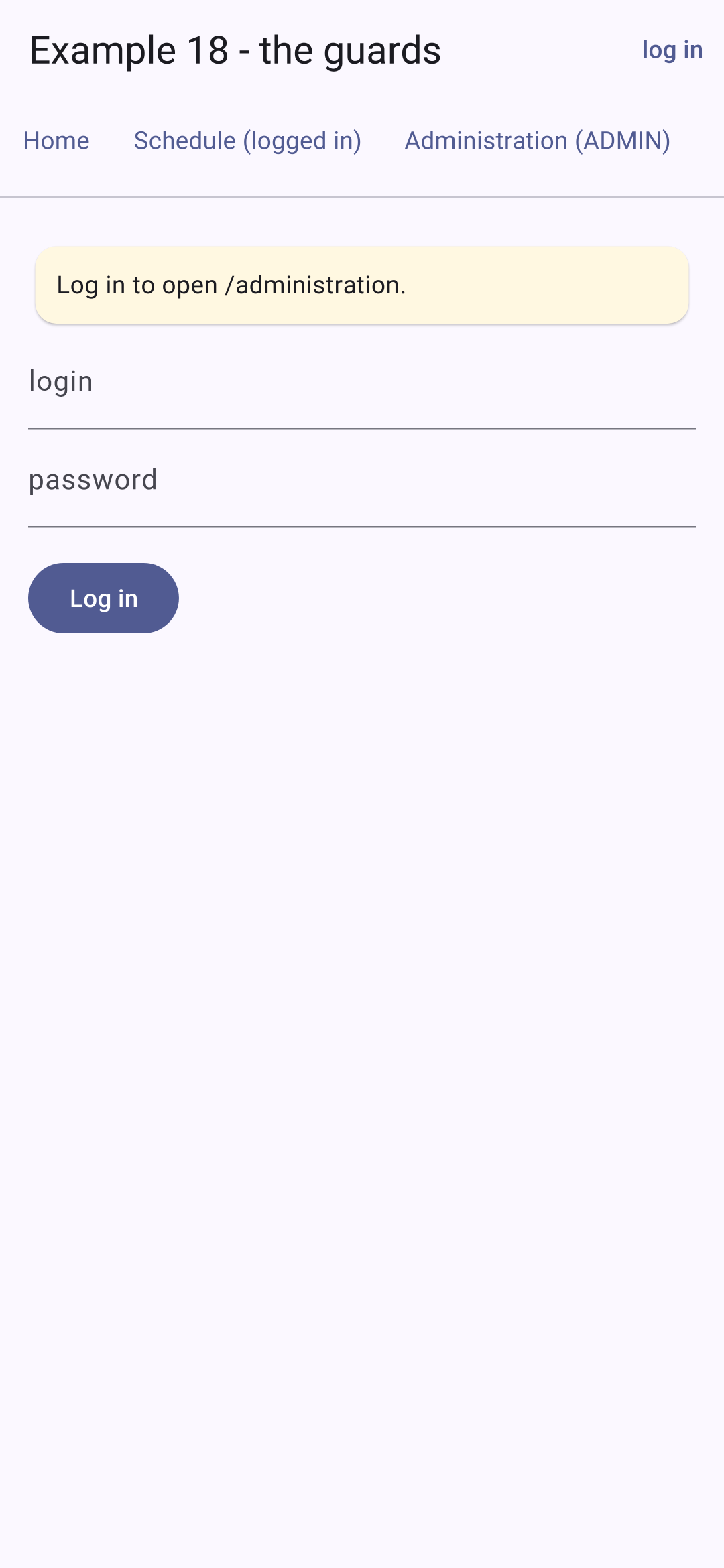
- lines 34–38: the “connection required” guard: not connected? Redirects to the login page, while retaining the intended destination (parameter [redirect]);
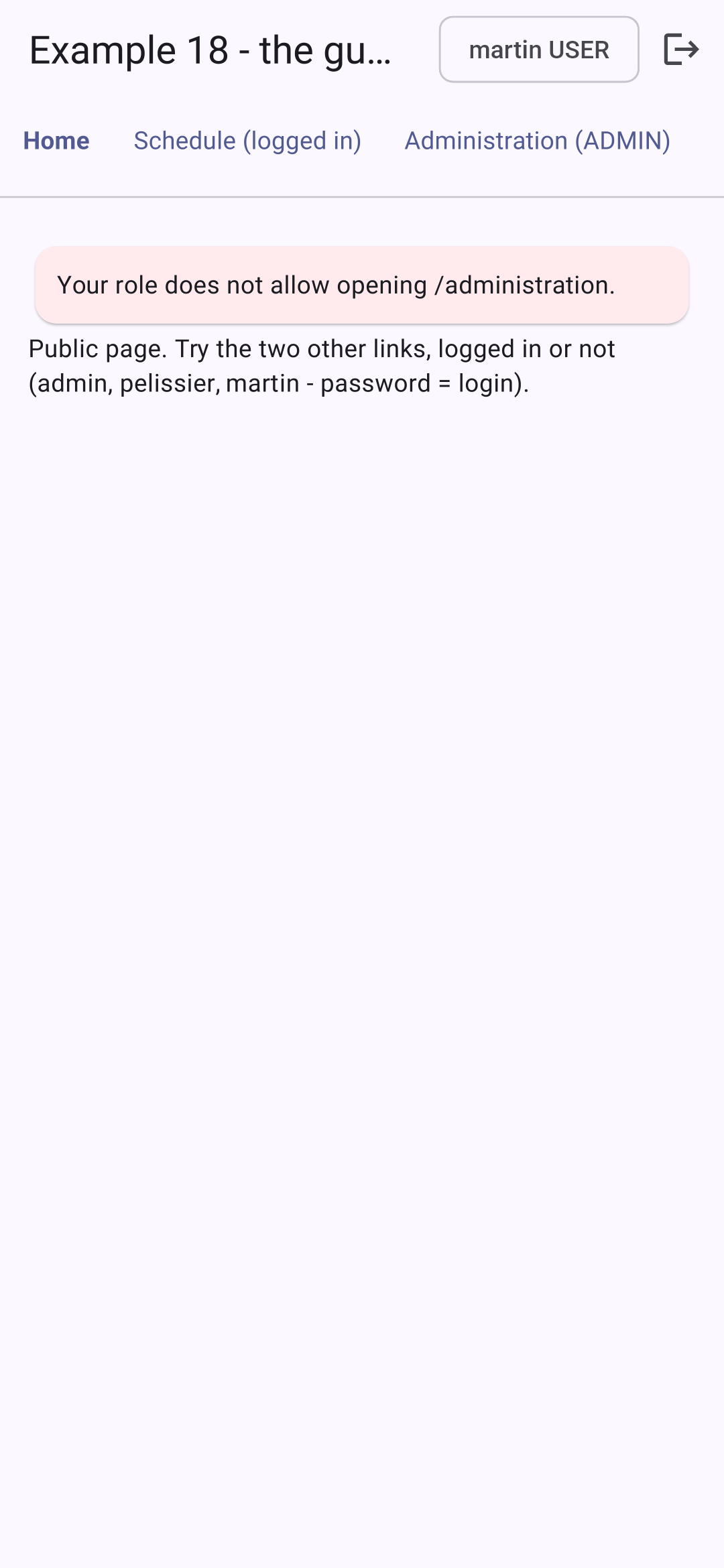
- lines 42–47: the “role required” guard is generated by a function that receives the permitted roles and returns the guard. Logged in, but without the correct role: redirect to the home page, with a reason (parameter [denied]);
- line 54: the router monitors the session: when it detects a change (login, logout), it reevaluates the guards for the current screen. If you log out from the schedule, you are immediately redirected to the login page;
- line 69: the schedule requires the user to be logged in;
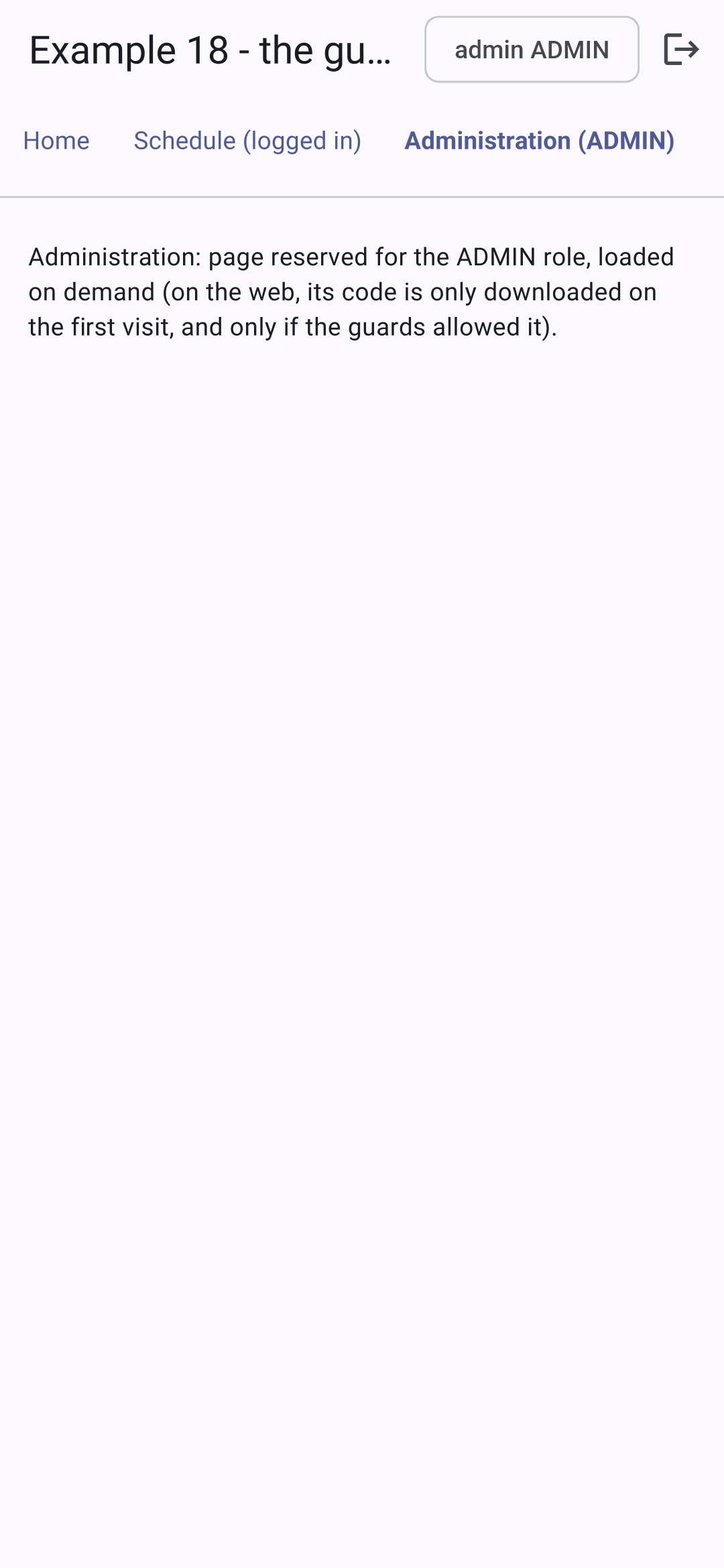
- line 75: the administration page requires the user to be logged in AND to have the role (ADMIN): the checks are chained with [??]; the first one that returns an address takes precedence;
- Lines 77–78: The code for the administration page is loaded only after the guards have been passed;
- line 84: any other address redirects to the home page.
This is the client-side equivalent of the server checks [NestJS] ([JwtAuthGuard], [RolesGuard]), with one FUNDAMENTAL difference: a client-side guard is merely a convenience (to avoid displaying an unnecessary screen). The application is in the user’s hands, who can modify it as they wish; true data protection remains on the server, which re-verifies everything with every request (see the chapter on the black box).
5.2.3. The shell and the pages
| // =========================================================================
// lib/ex18_guards/shell.dart - the links, and the logged-in user
// -------------------------------------------------------------------------
// ListenableBuilder: rebuilds its content each time the listened
// object (the session) notifies a change. The top bar therefore
// follows the logged-in user.
// =========================================================================
import 'package:flutter/material.dart';
import 'package:go_router/go_router.dart';
import 'session.dart';
class Shell extends StatelessWidget {
final Widget child;
const Shell({super.key, required this.child});
@override
Widget build(BuildContext context) {
final path = GoRouterState.of(context).uri.path;
// a link: in bold if it designates the displayed page
Widget link(String target, String label) => TextButton(
onPressed: () => context.go(target),
child: Text(label, style: TextStyle(fontWeight: path == target ? FontWeight.bold : FontWeight.normal)),
);
return Scaffold(
appBar: AppBar(
title: const Text('Example 18 - the guards'),
actions: [
ListenableBuilder(
listenable: session,
builder: (context, _) {
final u = session.user;
if (u == null) {
return TextButton(onPressed: () => context.go('/login'), child: const Text('log in'));
}
return Row(
children: [
Chip(label: Text('${u.login} ${u.role.name.toUpperCase()}')),
IconButton(
tooltip: 'log out',
icon: const Icon(Icons.logout),
onPressed: () {
session.logOut();
context.go('/');
},
),
],
);
},
),
],
),
body: Column(
crossAxisAlignment: CrossAxisAlignment.start,
children: [
Wrap(
children: [
link('/', 'Home'),
link('/schedule', 'Schedule (logged in)'),
link('/administration', 'Administration (ADMIN)'),
],
),
const Divider(),
Expanded(
child: Padding(padding: const EdgeInsets.all(16), child: child),
),
],
),
);
}
}
|
- lines 24–26: a local function that creates a link: in bold if it refers to the currently displayed page;
- lines 33–37: [ListenableBuilder] rebuilds its content every time the monitored object (the session) signals a change: the top bar follows the logged-in user;
- lines 46–48: logout, then the welcome page.
| // =========================================================================
// lib/ex18_guards/pages/login.dart
// -------------------------------------------------------------------------
// After logging in, the user is sent back to the page they wanted to
// open (?redirect=... parameter set by the guard), or to home.
// =========================================================================
import 'package:flutter/material.dart';
import 'package:go_router/go_router.dart';
import '../session.dart';
class Login extends StatefulWidget {
final String? redirectTo;
const Login({super.key, this.redirectTo});
@override
State<Login> createState() => _LoginState();
}
class _LoginState extends State<Login> {
final _login = TextEditingController();
final _password = TextEditingController();
bool _error = false;
@override
void dispose() {
_login.dispose();
_password.dispose();
super.dispose();
}
void _submit() {
if (!session.logIn(_login.text.trim(), _password.text)) {
setState(() => _error = true);
return;
}
// only an INTERNAL path is accepted: it starts with /, but not with //
// (//site.com/... designates ANOTHER site) - no redirect to another site
final r = widget.redirectTo;
final internal = r != null && r.startsWith('/') && !r.startsWith('//');
context.go(internal ? r : '/');
}
@override
Widget build(BuildContext context) {
return ListView(
children: [
if (widget.redirectTo != null)
Card(
color: Colors.amber.shade50,
child: Padding(
padding: const EdgeInsets.all(12),
child: Text('Log in to open ${widget.redirectTo}.'),
),
),
TextField(
controller: _login,
decoration: const InputDecoration(labelText: 'login'),
),
TextField(
controller: _password,
obscureText: true,
decoration: const InputDecoration(labelText: 'password'),
onSubmitted: (_) => _submit(),
),
const SizedBox(height: 16),
Align(
alignment: Alignment.centerLeft,
child: FilledButton(onPressed: _submit, child: const Text('Log in')),
),
if (_error)
const Padding(
padding: EdgeInsets.only(top: 8),
child: Text('Incorrect login or password.', style: TextStyle(color: Colors.red)),
),
],
);
}
}
|
- lines 41–43: After login, the user is redirected to the page they wanted to open (parameter [redirect] set by the guard), or to the home page. Only an internal path is accepted: it begins with [/], but not with [//] ([//site.com/...] refers to ANOTHER site). On the web, a login URL generated by a third party ([/login?redirect=//pirate-site.com]) will therefore never lead anywhere else.
The other pages are very simple:
| import 'package:flutter/material.dart';
class Home extends StatelessWidget {
// ?denied=...: set by the requireRole guard when the role does not fit
final String? denied;
const Home({super.key, this.denied});
@override
Widget build(BuildContext context) {
return ListView(
children: [
if (denied != null)
Card(
color: Colors.red.shade50,
child: Padding(padding: const EdgeInsets.all(12), child: Text('Your role does not allow opening $denied.')),
),
const Text(
'Public page. Try the two other links, logged in or not '
'(admin, pelissier, martin - password = login).',
),
],
);
}
}
|
| import 'package:flutter/material.dart';
import '../session.dart';
class Schedule extends StatelessWidget {
const Schedule({super.key});
@override
Widget build(BuildContext context) {
return Text.rich(
TextSpan(
children: [
const TextSpan(text: 'The schedule of '),
TextSpan(
text: session.user?.login,
style: const TextStyle(fontWeight: FontWeight.bold),
),
const TextSpan(text: ': this page requires being logged in.'),
],
),
);
}
}
|
| import 'package:flutter/material.dart';
class Administration extends StatelessWidget {
const Administration({super.key});
@override
Widget build(BuildContext context) {
return const Text(
'Administration: page reserved for the ADMIN role, loaded on demand (on the web, its '
'code is only downloaded on the first visit, and only if the guards allowed it).',
);
}
}
|
| // =========================================================================
// lib/ex18_guards/main.dart
// =========================================================================
import 'package:flutter/material.dart';
import 'package:flutter_web_plugins/url_strategy.dart';
import 'routes.dart';
void main() {
usePathUrlStrategy();
runApp(
MaterialApp.router(
debugShowCheckedModeBanner: false,
theme: ThemeData(colorSchemeSeed: Colors.indigo),
routerConfig: router,
),
);
}
|
5.2.4. Execution
Without being logged in, we request access to the administration interface: the guard redirects us to the login page (on the left). We log in with the account [martin] (role USER): the login takes us back to the administration interface, where the second guard denies access (in the middle). After logging in with the account [admin], the page opens (on the right):