6. Asynchronous Processing and Shared State
6.1. Example 19: Future, Stream, and Timers
Many things happen “later”: timer ticks, keystrokes, a server’s response. [Dart] has two types for this, at the core of the language:
- [Future<T>]: ONE value, later (a server’s response, a choice made in a window);
- [Stream<T>]: a SEQUENCE of values over time (ticks, messages, GPS positions...).
[Flutter] has a widget to display each one, rebuilding it when a value arrives: [FutureBuilder] and [StreamBuilder]. And for what must happen after a delay: [Timer].
| // =========================================================================
// lib/ex19_asynchronous/main.dart - Future, Stream, timers
// -------------------------------------------------------------------------
// Many things happen "later": the ticks of a timer, the
// keystrokes, the response of a server. Dart has two types for
// this, at the heart of the language:
// - Future<T>: ONE value, later (the response of a server);
// - Stream<T>: a SEQUENCE of values, over time (ticks,
// messages...).
// Flutter has a widget to display each one, rebuilding it when a
// value arrives: FutureBuilder and StreamBuilder.
// And for what must happen after a delay: Timer (dart:async).
// =========================================================================
import 'dart:async';
import 'dart:math';
import 'package:flutter/material.dart';
const doctors = ['Marie PELISSIER', 'Paul TATOU', 'Sophie DUPONT', 'Jacques DURAND', 'Martine PELLETIER'];
final _random = Random();
// a simulated "server": the response (a Future) arrives after a random delay
Future<List<String>> search(String text) async {
await Future<void>.delayed(Duration(milliseconds: 200 + _random.nextInt(600)));
return doctors.where((m) => m.toLowerCase().contains(text)).toList();
}
// 1. a Stream produced by an "async*" function: each yield SENDS a
// value to those who listen to the Stream
Stream<int> countdown(int start) async* {
for (var remaining = start; remaining >= 0; remaining--) {
yield remaining;
if (remaining > 0) await Future<void>.delayed(const Duration(seconds: 1));
}
}
String currentTime() => DateTime.now().toString().substring(11, 19);
void main() {
runApp(
MaterialApp(
debugShowCheckedModeBanner: false,
theme: ThemeData(colorSchemeSeed: Colors.indigo),
home: const AsynchronousPage(),
),
);
}
class AsynchronousPage extends StatefulWidget {
const AsynchronousPage({super.key});
@override
State<AsynchronousPage> createState() => _AsynchronousPageState();
}
class _AsynchronousPageState extends State<AsynchronousPage> {
final List<String> _log = [];
// the Stream and the Future are created ONCE (and not on each build:
// each call of build would restart the countdown!)
final Stream<int> _countdown = countdown(20);
// 3. a Future that completes after one second
final Future<String> _message = Future.delayed(const Duration(seconds: 1), () => 'three (one second later)');
// 2. the search as you type
Timer? _debounce;
int _requestNumber = 0; // the number of the LAST search launched
List<String> _results = [];
void _trace(String message) => setState(() => _log.add('${currentTime()} $message'));
// called on each keystroke
void _onInput(String text) {
// the DEBOUNCE: each keystroke cancels the timer of the previous
// keystroke; the search only starts after 400 ms without a keystroke
_debounce?.cancel();
_debounce = Timer(const Duration(milliseconds: 400), () => _launch(text.trim().toLowerCase()));
}
Future<void> _launch(String text) async {
// fewer than two letters: no search, no result
if (text.length < 2) {
_requestNumber++; // a response still expected will be ignored
setState(() => _results = []);
return;
}
// "stale": a response that arrives AFTER another search has been
// launched must be ignored (otherwise the slow response of an old
// search would overwrite the one of the new one)
final number = ++_requestNumber;
_trace('search sent: "$text"');
final found = await search(text);
if (!mounted) return;
if (number != _requestNumber) {
_trace('response ignored (stale): "$text"');
return;
}
setState(() => _results = found);
}
@override
void dispose() {
_debounce?.cancel();
super.dispose();
}
@override
Widget build(BuildContext context) {
final titleStyle = Theme.of(context).textTheme.titleSmall;
return Scaffold(
appBar: AppBar(title: const Text('Example 19 - asynchrony')),
body: ListView(
padding: const EdgeInsets.all(16),
children: [
Card(
child: Padding(
padding: const EdgeInsets.all(12),
child: Column(
crossAxisAlignment: CrossAxisAlignment.start,
children: [
Text('A countdown (a Stream and StreamBuilder)', style: titleStyle),
// StreamBuilder: rebuilds its content on each value of the Stream;
// snapshot.data: the last value received (null before the first one)
StreamBuilder<int>(
stream: _countdown,
builder: (context, snapshot) =>
Text(snapshot.hasData ? '${snapshot.data}' : '...', style: Theme.of(context).textTheme.displaySmall),
),
],
),
),
),
Card(
child: Padding(
padding: const EdgeInsets.all(12),
child: Column(
crossAxisAlignment: CrossAxisAlignment.start,
children: [
Text('A search as you type (debounce, stale responses)', style: titleStyle),
TextField(
decoration: const InputDecoration(hintText: 'at least two letters: pel, dur...'),
onChanged: _onInput,
),
for (final r in _results) Text('• $r'),
if (_results.isEmpty) const Text('no result', style: TextStyle(color: Colors.grey)),
],
),
),
),
Card(
child: Padding(
padding: const EdgeInsets.all(12),
child: Column(
crossAxisAlignment: CrossAxisAlignment.start,
children: [
Text('Waiting for a Future (FutureBuilder)', style: titleStyle),
// as long as the Future is not complete: the waiting content
FutureBuilder<String>(
future: _message,
builder: (context, snapshot) => switch (snapshot.connectionState) {
ConnectionState.done => Text('received: ${snapshot.data}'),
_ => const Text('waiting...', style: TextStyle(color: Colors.grey)),
},
),
],
),
),
),
Text('Log', style: titleStyle),
for (final (i, line) in _log.indexed) Text('${i + 1}. $line', style: const TextStyle(fontSize: 12)),
],
),
);
}
}
|
- lines 24–26: a simulated “server”: a function [async], whose response (a [Future]) arrives after a random delay. [await Future<void>.delayed(...)] waits for this delay without blocking the application;
- lines 31–34: a [Stream] generated by a function [async*] (with an asterisk): an asynchronous generator. Each [yield] sends a value to those listening to [Stream]; between values, the function waits one second;
- lines 61–63: the [Stream] and the [Future] are created ONCE, in fields of the [State] object, and not in [build]: each rebuild would restart the countdown! This is the most common error with [FutureBuilder] and [StreamBuilder];
- lines 66–68: the status of the search as the user types: a timer, the number of the last search initiated, and the results;
- lines 73–77: debouncing: the program waits for the user to pause before querying the server, rather than sending a request with every keystroke. Each keystroke resets the timer from the previous keystroke ([cancel()]) and starts a new one: the search is only triggered after 400 milliseconds without a keystroke;
- Lines 80–98: the search. An “out-of-date” response (one that arrives AFTER another search has been launched) must be ignored: otherwise, the slow response from an old search would override that of the new one. Each search is assigned a number ([++_requestNumber]); when its response arrives, if it is no longer the number of the most recent search, it is ignored. [if (!mounted) return;]: the screen may have disappeared while waiting;
- lines 102–104: the timer is stopped if the screen disappears;
- lines 124–127: [StreamBuilder] listens for [Stream] and reconstructs its content with each new value. [builder] receives a snapshot ([snapshot], an [AsyncSnapshot]): [snapshot.hasData], [snapshot.data] (the last value received), [snapshot.hasError], [snapshot.connectionState]. When the widget disappears, [StreamBuilder] unsubscribes on its own;
- lines 158–162: [FutureBuilder] waits for [Future]: until it is finished, the placeholder content; then, its value. [switch] on [snapshot.connectionState] chooses one or the other.
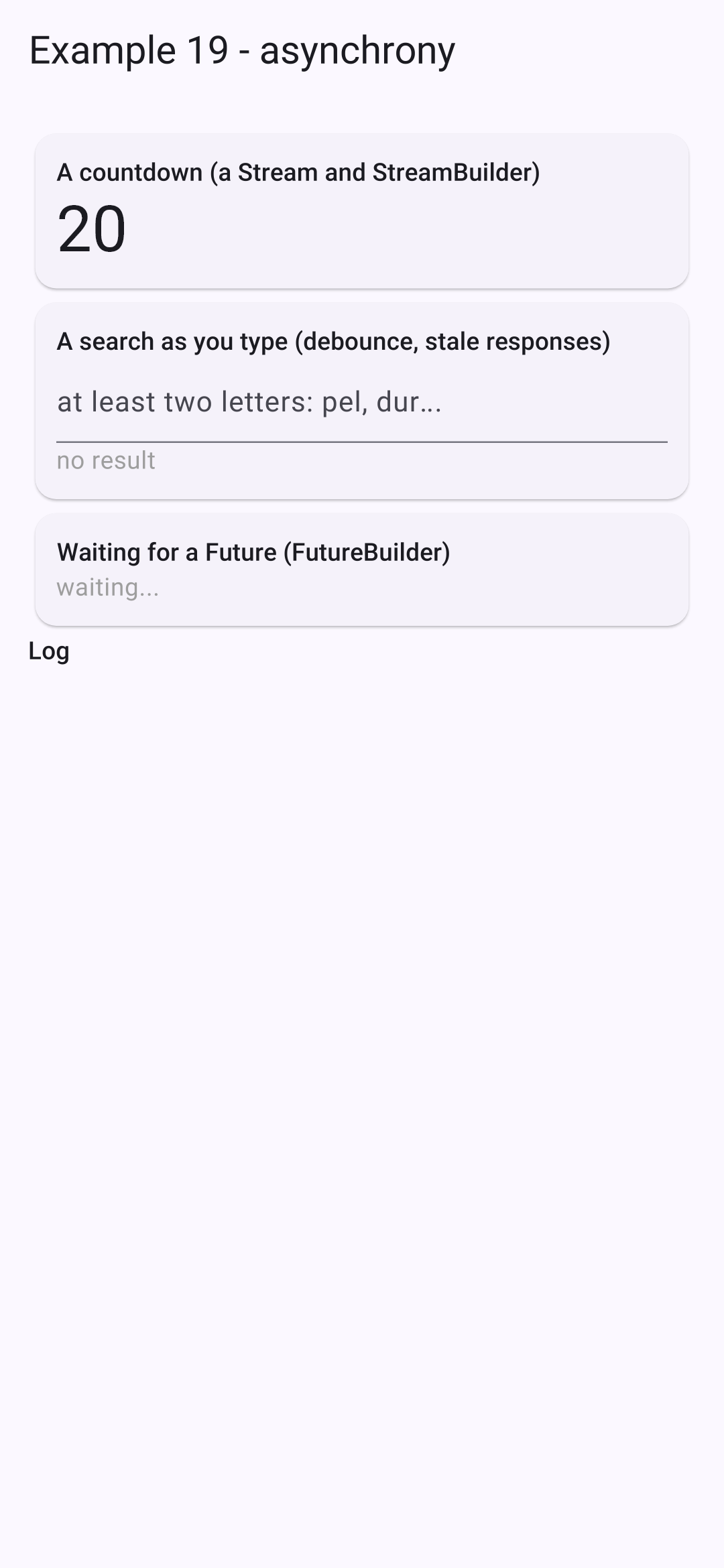
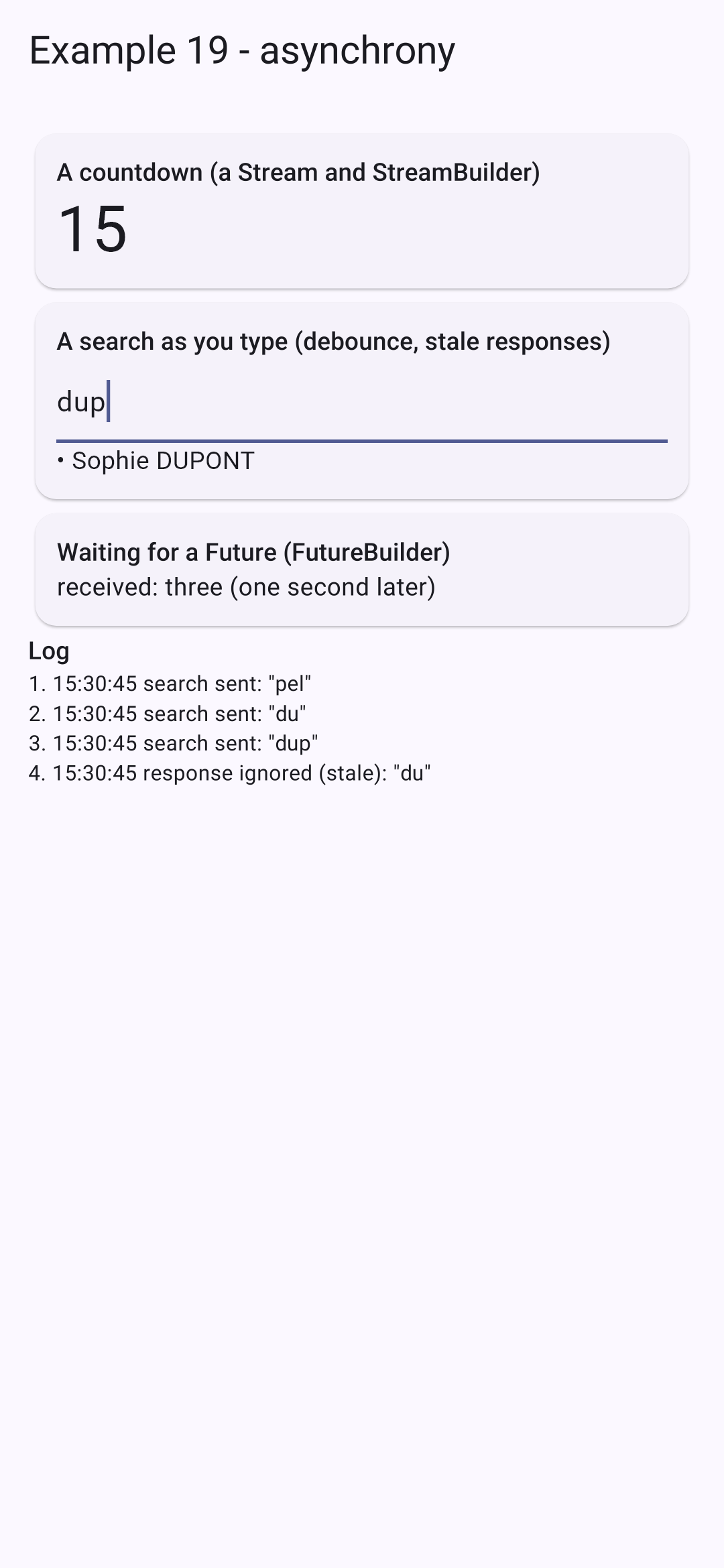
We type “p,” “pe,” “pel” quickly: only one search is sent. Then “du,” followed by “dup” before the response: the response to “du” arrives too late, and it is ignored if “dup” has already received its response:
In [JavaScript], the same thing is written using promises and timers; [Angular] adds the "observables" from [RxJS]. In [Dart], [Future] and [Stream] are in the base library, and [async], [await], [async*], [yield], and [await for] are in the language: this is why [Flutter] does not require a library for asynchronous operations.
6.2. Example 20: A Shared State
Same question as in previous lessons: what are the “scopes” for an application’s data?
- A widget’s local state disappears when the widget is removed;
- the state of a “store” is shared by all widgets and survives their removal… but not the application’s shutdown;
- State stored on the device survives when the application is shut down.
| // =========================================================================
// lib/ex20_shared_state/stores/cart.dart - a SHARED STATE, with provider
// -------------------------------------------------------------------------
// A "store" is a state that lives OUTSIDE the screens, in a SINGLE
// instance, shared by all those who read it. Example 14 did it
// by hand (InheritedNotifier); the provider package, the most used
// with Flutter (and recommended by its documentation), does the same thing
// in one line:
//
// ChangeNotifierProvider(create: (_) => Cart(), child: ...)
//
// The store is an ordinary ChangeNotifier. Usual organization:
// - the STATE: PRIVATE data (_items);
// - the ACTIONS: methods, the only ones to modify the state, which end
// with notifyListeners();
// - the computed values: getters.
// A widget accesses it through its context:
// - context.watch<Cart>() : read AND subscribe (rebuilt on each change);
// - context.read<Cart>() : read without subscribing (to call an action);
// - context.select<Cart, int>((p) => p.count) : subscribe to ONE value:
// rebuilt only if THIS value changes.
// The store lives as long as its provider lives: it survives the removal of a
// screen... but not the stopping of the application.
// =========================================================================
import 'package:flutter/foundation.dart';
typedef Item = ({String label, double price});
class Cart extends ChangeNotifier {
final List<Item> _items = [];
// a NON-MODIFIABLE view of the list: only the actions change it
List<Item> get items => List.unmodifiable(_items);
int get count => _items.length;
double get total => _items.fold(0, (s, a) => s + a.price);
void add(Item item) {
_items.add(item);
notifyListeners();
}
void clear() {
_items.clear();
notifyListeners();
}
}
|
A store is a state that spans multiple screens, existing as a single instance shared by all who access it. Example 14 implemented this manually. The [provider] package, the most commonly used one along with [Flutter] (and the one recommended in its documentation), does the same thing in a single line: [ChangeNotifierProvider(create: (_) => Cart(), child: ...)].
- Line 31: the state: private data;
- lines 34–36: calculated values: getters. [List.unmodifiable]: a read-only view of the list; only actions can modify it;
- lines 38–45: the actions: methods—the only ones that modify the state—which end with [notifyListeners()].
6.2.2. Preferences
| // =========================================================================
// lib/ex20_shared_state/stores/preferences.dart - a state that survives the stopping
// -------------------------------------------------------------------------
// For a piece of data to survive the stopping of the application, it must be stored
// ON THE DEVICE. The shared_preferences package offers a small dictionary
// key -> value (bool, int, double, String), specific to the application and
// kept on the device (on the web: in the browser's localStorage).
// - at startup, the stored values are read (main.dart);
// - on each change, they are written again.
// NEVER store sensitive data there (password, token): they are
// written in clear text.
// =========================================================================
import 'package:flutter/foundation.dart';
import 'package:shared_preferences/shared_preferences.dart';
class Preferences extends ChangeNotifier {
static const _darkKey = 'example20.dark';
static const _sizeKey = 'example20.size';
final SharedPreferences _storage;
bool _dark;
double _size; // size of the text
// the initial state: what the device has stored, otherwise the default values
Preferences(this._storage)
: _dark = _storage.getBool(_darkKey) ?? false,
_size = _storage.getDouble(_sizeKey) ?? 16;
bool get dark => _dark;
double get size => _size;
// one optional named parameter per preference: only what is provided changes
void update({bool? dark, double? size}) {
if (dark != null) {
_dark = dark;
_storage.setBool(_darkKey, dark); // writing on the device
}
if (size != null) {
_size = size;
_storage.setDouble(_sizeKey, size);
}
notifyListeners();
}
}
|
For data to survive after the application is shut down, it must be stored on the device. The [shared_preferences] package provides a small key->value dictionary ([bool], [int], [double], [String]), specific to the application and stored on the device (on the web: in the browser’s [localStorage]).
- Line 21: the storage data, received upon creation;
- lines 26–28: the initial state: what the device has stored, or default values otherwise. The fields are initialized by the constructor’s “initialization list” (after the colon), before the body;
- Lines 34–43: a single action, with optional named parameters: only the provided values are changed, and they are immediately written to the device ([setBool], [setDouble]).
NEVER store any sensitive data (passwords, tokens) there: such data is written in plain text. For this purpose, there is the [flutter_secure_storage] package, which uses the system’s vault ([Keystore] from [Android], [Keychain] from [iOS]).
| // lib/ex20_shared_state/components/shop.dart - ADDS to the shared cart
import 'package:flutter/material.dart';
import 'package:provider/provider.dart';
import '../stores/cart.dart';
const products = <Item>[(label: 'Consultation', price: 30), (label: 'Vaccine', price: 12.5)];
class Shop extends StatelessWidget {
const Shop({super.key});
@override
Widget build(BuildContext context) {
// read: we only CALL an action; Shop is not
// rebuilt when the cart changes
final cart = context.read<Cart>();
return Card(
child: Padding(
padding: const EdgeInsets.all(12),
child: Column(
crossAxisAlignment: CrossAxisAlignment.start,
children: [
Text('Shop', style: Theme.of(context).textTheme.titleSmall),
for (final p in products)
TextButton.icon(
icon: const Icon(Icons.add),
label: Text('${p.label} (${p.price} €)'),
onPressed: () => cart.add(p),
),
],
),
),
);
}
}
|
- Line 16: [context.read<Cart>()] reads the shopping cart provided above; WITHOUT subscribing: the store simply calls an action; it does not need to be rebuilt when the shopping cart changes.
| // lib/ex20_shared_state/components/cart_summary.dart - READS the same cart
import 'package:flutter/material.dart';
import 'package:provider/provider.dart';
import '../stores/cart.dart';
class CartSummary extends StatelessWidget {
const CartSummary({super.key});
@override
Widget build(BuildContext context) {
// select: rebuilds ONLY if the count or the total changes
final count = context.select<Cart, int>((p) => p.count);
final total = context.select<Cart, double>((p) => p.total);
return Card(
child: Padding(
padding: const EdgeInsets.all(12),
child: Row(
children: [
const Icon(Icons.shopping_cart),
const SizedBox(width: 8),
Expanded(child: Text('$count item(s), $total €')),
TextButton(
onPressed: count == 0 ? null : () => context.read<Cart>().clear(),
child: const Text('Clear'),
),
],
),
),
);
}
}
|
- Lines 13–14: [context.select] reads ONE value of the shopping cart and subscribes the widget to THAT value: it is rebuilt only if that value changes. [context.watch<Cart>()] would read and subscribe to the entire shopping cart.
| // lib/ex20_shared_state/components/local_counter.dart - a LOCAL state, which disappears with the widget
import 'package:flutter/material.dart';
class LocalCounter extends StatefulWidget {
final String title;
const LocalCounter({super.key, required this.title});
@override
State<LocalCounter> createState() => _LocalCounterState();
}
class _LocalCounterState extends State<LocalCounter> {
int _clicks = 0;
@override
Widget build(BuildContext context) {
return Card(
child: ListTile(
title: Text(widget.title),
trailing: OutlinedButton(onPressed: () => setState(() => _clicks++), child: Text('$_clicks click(s)')),
),
);
}
}
|
A local state that disappears with the widget.
6.2.4. The application
| // =========================================================================
// lib/ex20_shared_state/main.dart - three "scopes" of data
// -------------------------------------------------------------------------
// - the LOCAL state of a widget (LocalCounter) disappears with it;
// - the state of a STORE (the cart) is shared by all the widgets
// and survives their removal - but not the stopping of the application;
// - the state stored on the device (the preferences) survives the stopping.
// And Visibility(maintainState: true): the content is HIDDEN, but not
// removed; its local state is kept.
// Uncheck then check again "show the area", then stop and restart
// the application: compare.
// =========================================================================
import 'package:flutter/material.dart';
import 'package:provider/provider.dart';
import 'package:shared_preferences/shared_preferences.dart';
import 'components/shop.dart';
import 'components/local_counter.dart';
import 'components/cart_summary.dart';
import 'stores/cart.dart';
import 'stores/preferences.dart';
Future<void> main() async {
// essential before using a "plugin" (code specific to Android, iOS,
// web...) like shared_preferences, BEFORE runApp
WidgetsFlutterBinding.ensureInitialized();
final storage = await SharedPreferences.getInstance();
runApp(
// MultiProvider: several providers, nested in one another,
// above the whole application
MultiProvider(
providers: [
ChangeNotifierProvider(create: (_) => Cart()),
ChangeNotifierProvider(create: (_) => Preferences(storage)),
],
child: const Application(),
),
);
}
class Application extends StatelessWidget {
const Application({super.key});
@override
Widget build(BuildContext context) {
// watch: the application is rebuilt when the preferences change
final preferences = context.watch<Preferences>();
return MaterialApp(
debugShowCheckedModeBanner: false,
theme: ThemeData(colorSchemeSeed: Colors.indigo),
// the dark theme, and the choice between the two
darkTheme: ThemeData(colorSchemeSeed: Colors.indigo, brightness: Brightness.dark),
themeMode: preferences.dark ? ThemeMode.dark : ThemeMode.light,
// builder: wraps ALL the screens; here, the size of the text
builder: (context, child) => MediaQuery(
data: MediaQuery.of(context).copyWith(textScaler: TextScaler.linear(preferences.size / 16)),
child: child!,
),
home: const SharedStatePage(),
);
}
}
class SharedStatePage extends StatefulWidget {
const SharedStatePage({super.key});
@override
State<SharedStatePage> createState() => _SharedStatePageState();
}
class _SharedStatePageState extends State<SharedStatePage> {
bool _areaVisible = true;
@override
Widget build(BuildContext context) {
final preferences = context.watch<Preferences>();
return Scaffold(
appBar: AppBar(title: const Text('Example 20 - a shared state')),
body: ListView(
padding: const EdgeInsets.all(12),
children: [
SwitchListTile(
title: const Text('dark theme'),
value: preferences.dark,
onChanged: (v) => preferences.update(dark: v),
),
ListTile(
title: Text('text size: ${preferences.size.round()}'),
subtitle: Slider(
value: preferences.size,
min: 12,
max: 22,
divisions: 10,
onChanged: (v) => preferences.update(size: v),
),
),
CheckboxListTile(
title: const Text('show the area'),
value: _areaVisible,
onChanged: (v) => setState(() => _areaVisible = v!),
),
// removed: these widgets disappear, with their local state
if (_areaVisible) ...[const Shop(), const CartSummary(), const LocalCounter(title: 'Local state')],
// hidden: the widget stays in memory, its state is kept
Visibility(
visible: _areaVisible,
maintainState: true,
child: const LocalCounter(title: 'Local state, in a Visibility'),
),
const Padding(
padding: EdgeInsets.symmetric(vertical: 8),
child: Text('Outside the area, a second summary of the SAME cart (it stays there when the area disappears):'),
),
const CartSummary(),
],
),
);
}
}
|
- Lines 27–28: [shared_preferences] is a "plugin": it uses platform-specific code ([Android], web...). To use it BEFORE [runApp], you must first initialize [Flutter] ([ensureInitialized]). Reading from storage is asynchronous: [main] waits for it to complete;
- lines 32–35: [MultiProvider] places multiple providers, one inside the other, at the top of the entire application. [ChangeNotifierProvider] creates [ChangeNotifier] ([create]), provides it to its descendants, rebuilds those that subscribe to it when it changes, and releases it when it disappears;
- line 48: the application reads the preferences and subscribes to them; it is rebuilt when they change;
- lines 53–54: two themes, light and dark, and the option to choose between them ([themeMode]);
- lines 56–58: the [builder] from [MaterialApp] wraps ALL the screens. Here, the text size for the entire app is changed: [MediaQuery] describes the screen and the user’s settings (including [textScaler], the text magnification factor, which can also be adjusted in the phone’s accessibility settings);
- line 104: removed; the area disappears, along with the local state of its widgets;
- Lines 106–109: [Visibility] with [maintainState: true] HIDES its child without removing it: its state is preserved. (This is what [<Activity mode="hidden">] does in the [React] course.)
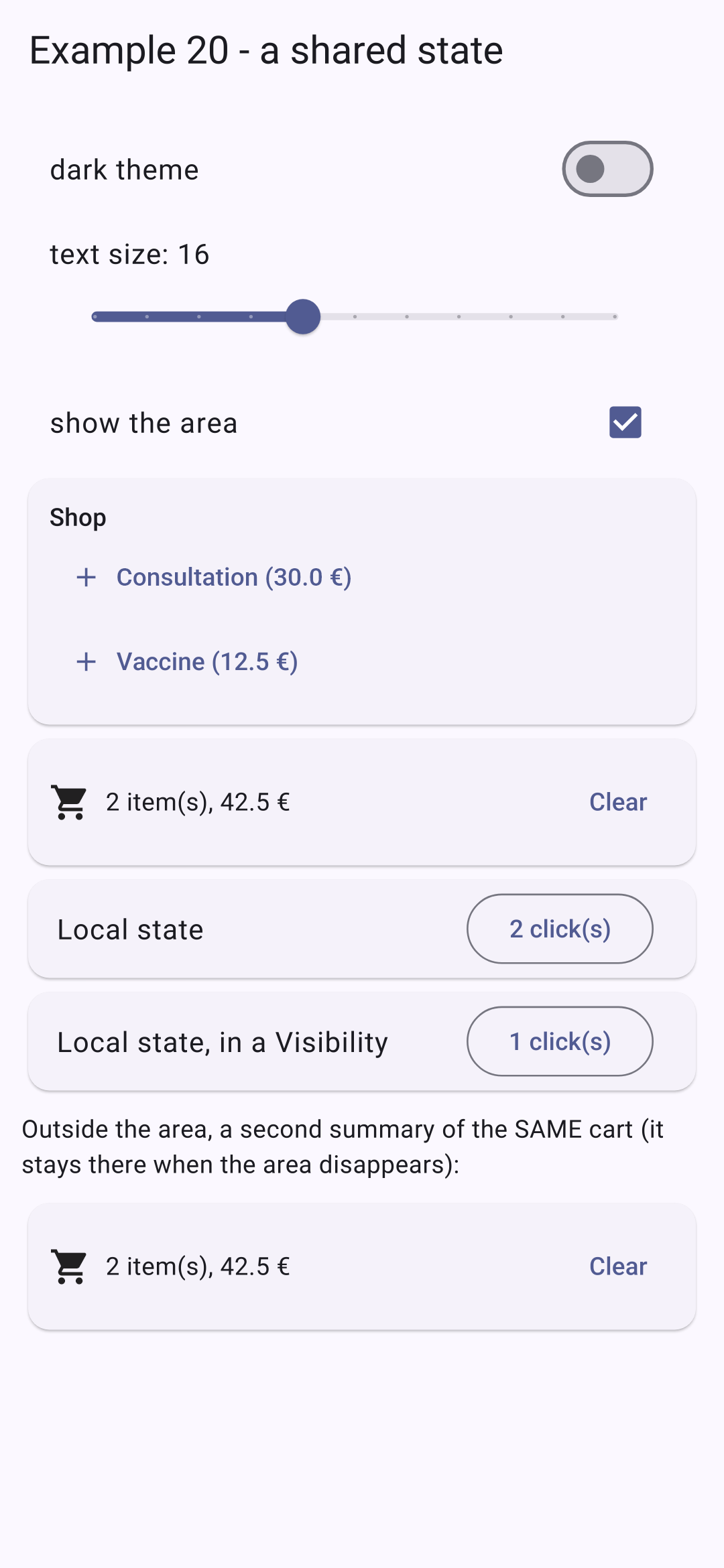
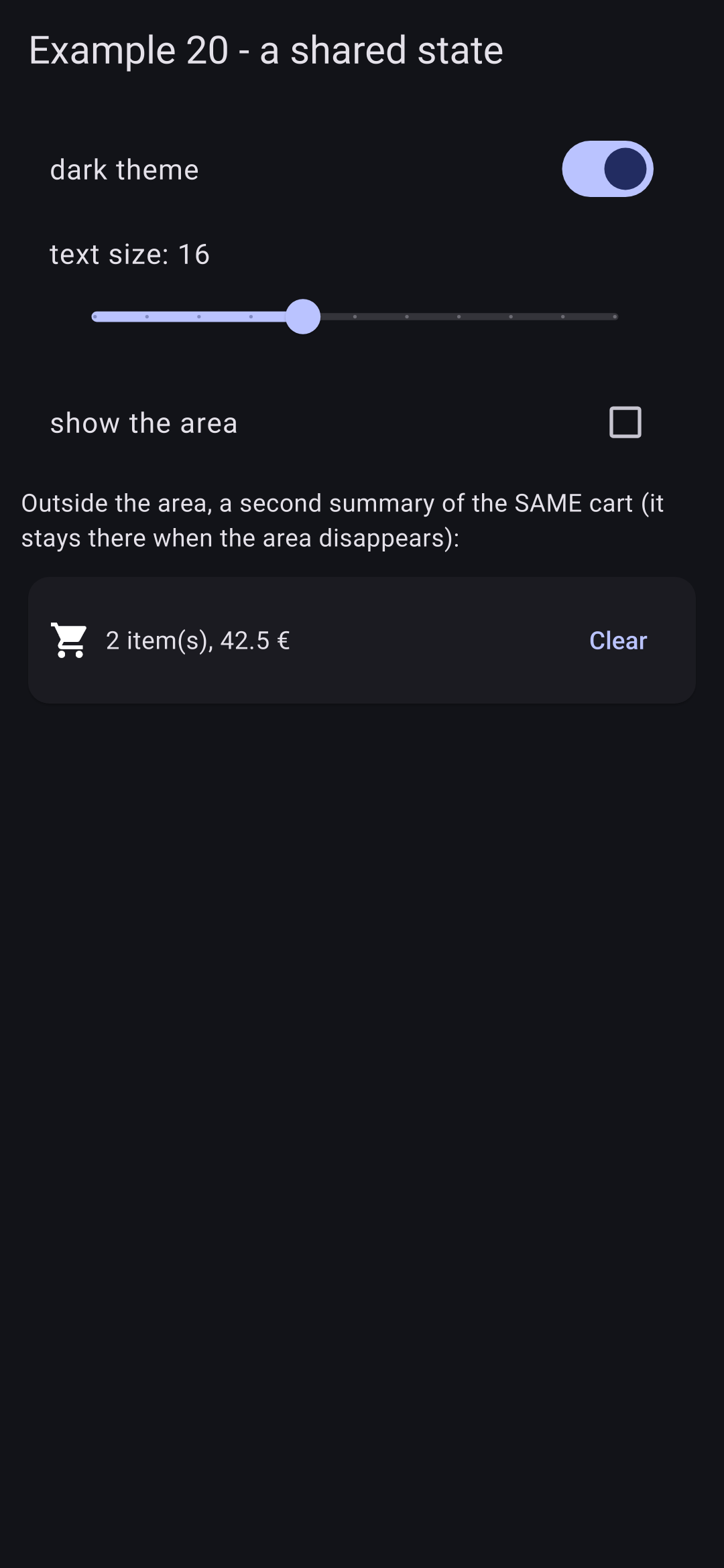
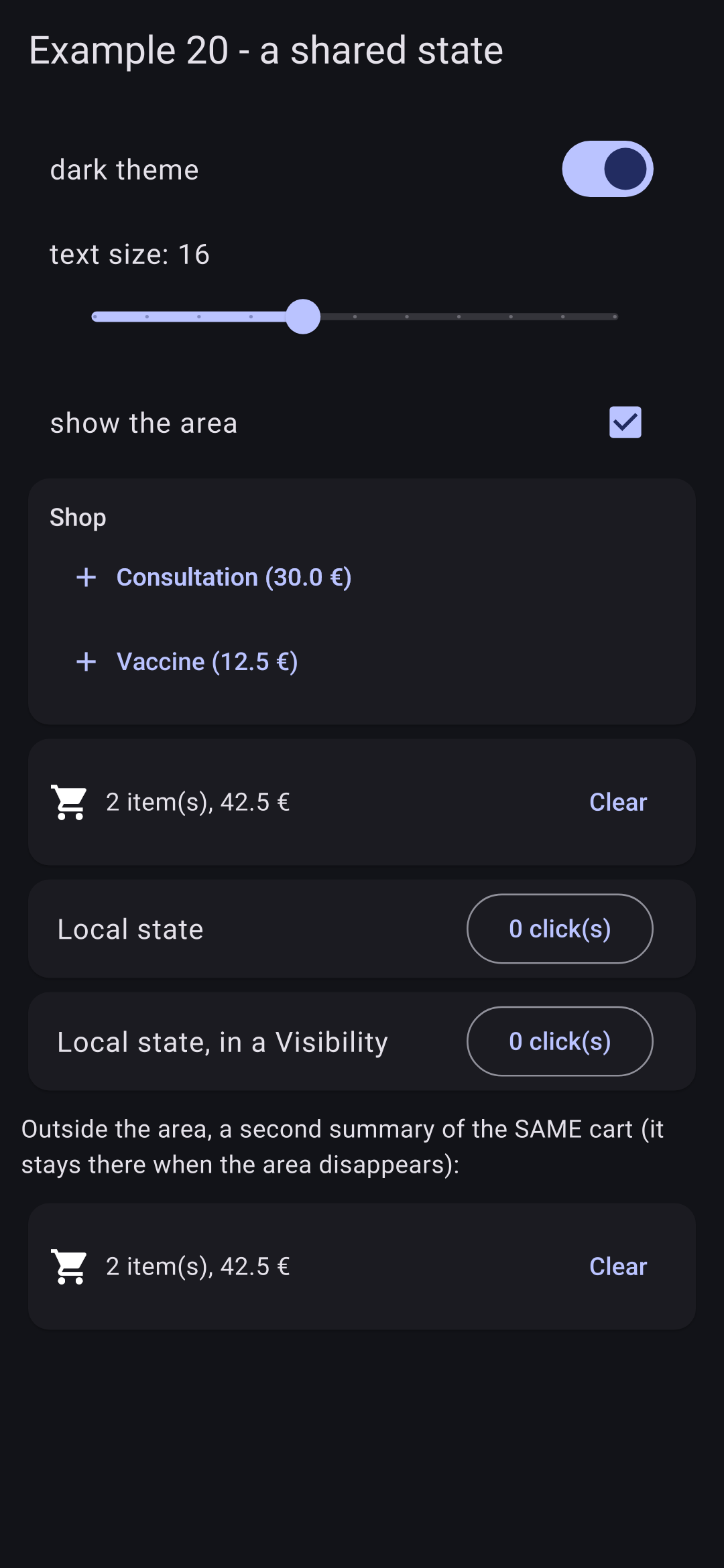
We add two items, click once on each local counter (on the left); we remove the area and switch to dark mode (in the middle); we restore the area (on the right):
The shopping cart survived the removal of the section (as shown in the second summary); the removed counter reset to zero; the hidden counter retained its value. Stop the app and restart it: the dark theme and text size are preserved, and the shopping cart is empty.
Why [provider]? There are many state management libraries for [Flutter] ([Riverpod], [Bloc], [GetX], [MobX]...). [provider] is the simplest: it is simply a convenient way to write the [InheritedWidget] from Example 14, based on the [ChangeNotifier] from [Flutter]. This is the one used in the architecture guide for the [Flutter] documentation, and the one that will be used in the case study.