11. Case Study: The Flutter client for the RdvMedecins application
11.1. The Problem
The [RdvMedecins] app allows users to schedule appointments at a doctor's office. The [NestJS] course developed it as a HTML application, in which the server generated the pages; the [Vue.js], [Angular], and [React] wrote web clients for it, which generate the SAME pages in the browser, based on the JSON data from the server presented in the chapter “The RdvMedecins Server, a Black Box.” Here we describe the [Flutter] client: a mobile application ([Android]), which can also be compiled for the web.
The client must provide everything the others did:
- a login screen, protected by a CAPTCHA, with the option to create a patient account;
- a doctor’s schedule for a given day, with appointment booking (patient selection window) and cancellation;
- for the administrator, management of doctors and clients (list, add, edit, delete);
- for the patient, a personal dashboard (showing upcoming appointments, which they can cancel) and account management;
- two languages: French and English;
- the same addresses as the web clients ([/schedule?doctorId=1&day=...]). On the phone, they are invisible but organize the app; on the web, users can reload them, bookmark them, and navigate the app using the browser’s Back/Forward buttons.
A mobile app adds its own requirements: a narrow screen (no five-column tables), a keyboard that hides half the screen, a Back button, a password manager, and the absence of a browser to store the token cookie.
11.2. Installation and Execution
The JSON server must be installed and running (see the chapter “The RdvMedecins Server: A Black Box”). You do not need the CAPTCHA test mode: you can leave the [CAPTCHA_TEST] field blank in the [.env] file on the server.
In a console window open to the [rdvmedecins_flutter] folder:
| flutter create --platforms=android,web --org fr.stahe --project-name rdvmedecins_flutter .
flutter pub get
|
The first command adds the platform-specific folders ([android/], [web/]) to the project, as in the examples; it does not modify any existing files, and the delivered [android/app/src/main/AndroidManifest.xml] file (the one from Example 22) is retained. Then, choose one of the following:
| flutter run -d emulator-5554
flutter run -d R58N12ABCDE --dart-define=SERVER=http://192.168.1.20:8080
flutter run -d chrome
|
- The first line launches the application on the [Android] emulator (the [flutter devices] command lists the available devices). The emulator connects to the server at the address [10.0.2.2:8080] (see Example 22);
- the second line runs the app on a real phone connected via USB (with “USB debugging” enabled in its developer options) or connected via Wi-Fi. The phone and computer must be on the same network; enter the computer’s address on this network ([ipconfig] under [Windows]). The firewall on [Windows] must allow incoming connections on port 8080;
- the third, on [Chrome], at the address http://localhost:5173: the web development server in [Flutter] forwards /api requests to the JSON server (file [web_dev_config.yaml]).
The demo accounts are listed on the login screen (password = login). While the application is running, the [r] key on the console performs a "hot reload" after a code change; [R] restarts it; [q] stops it.
11.3. Using the Application
The screenshots in this section are from a phone with a resolution of 1080 × 2340 pixels (412 × 891 dots).
11.3.1. The login screen
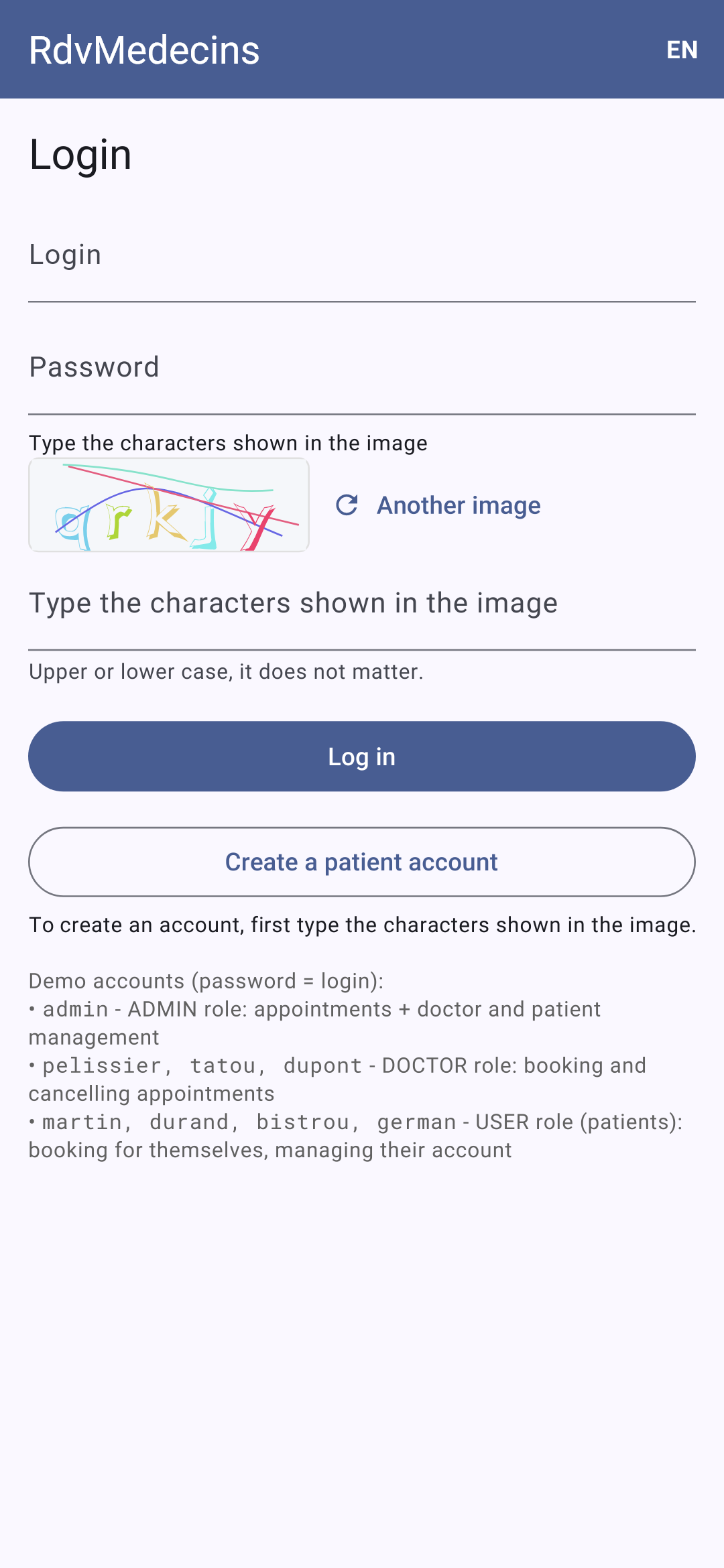
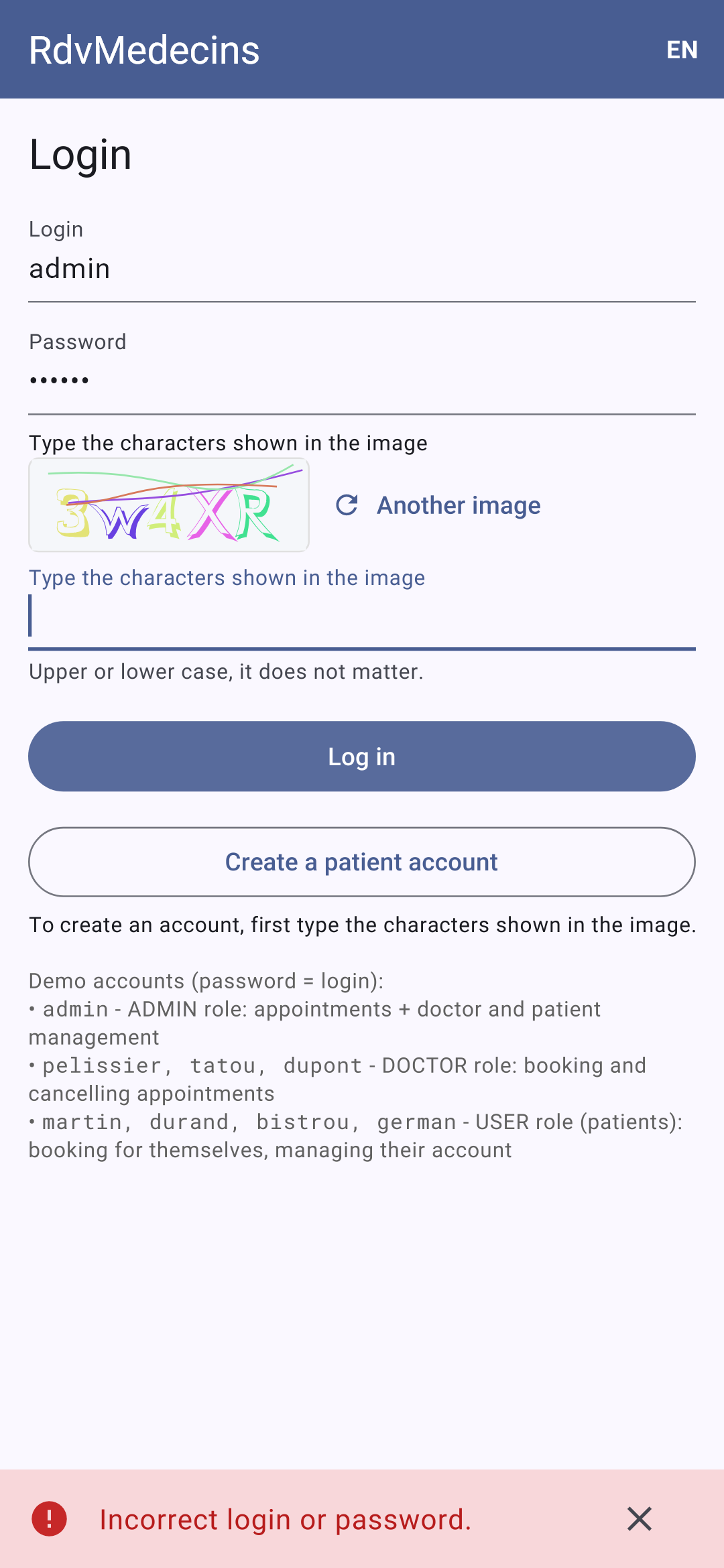
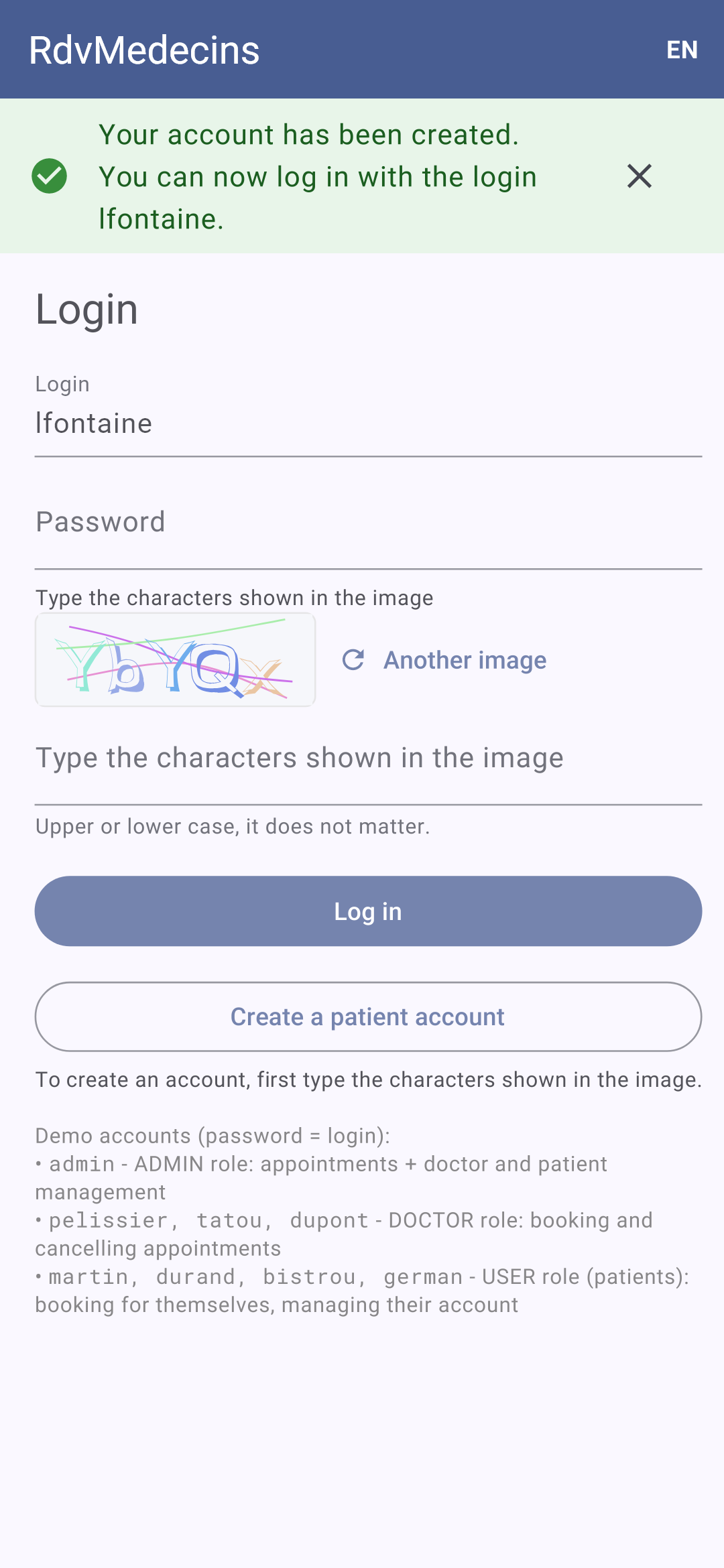
The login screen; incorrect password: the message appears at the bottom of the screen, and a new image is displayed (each image is used only once):
11.3.2. The calendar, as seen by the administrator and doctors
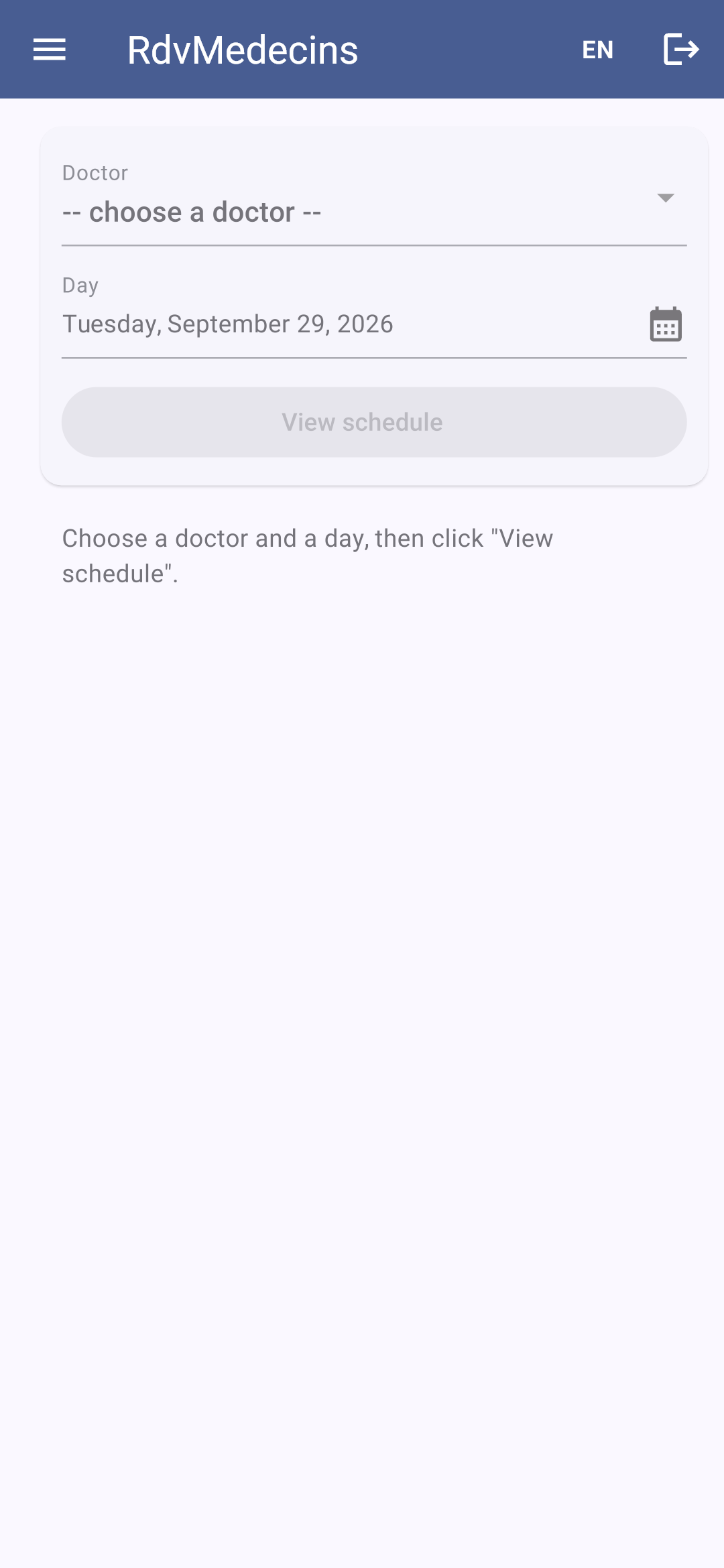
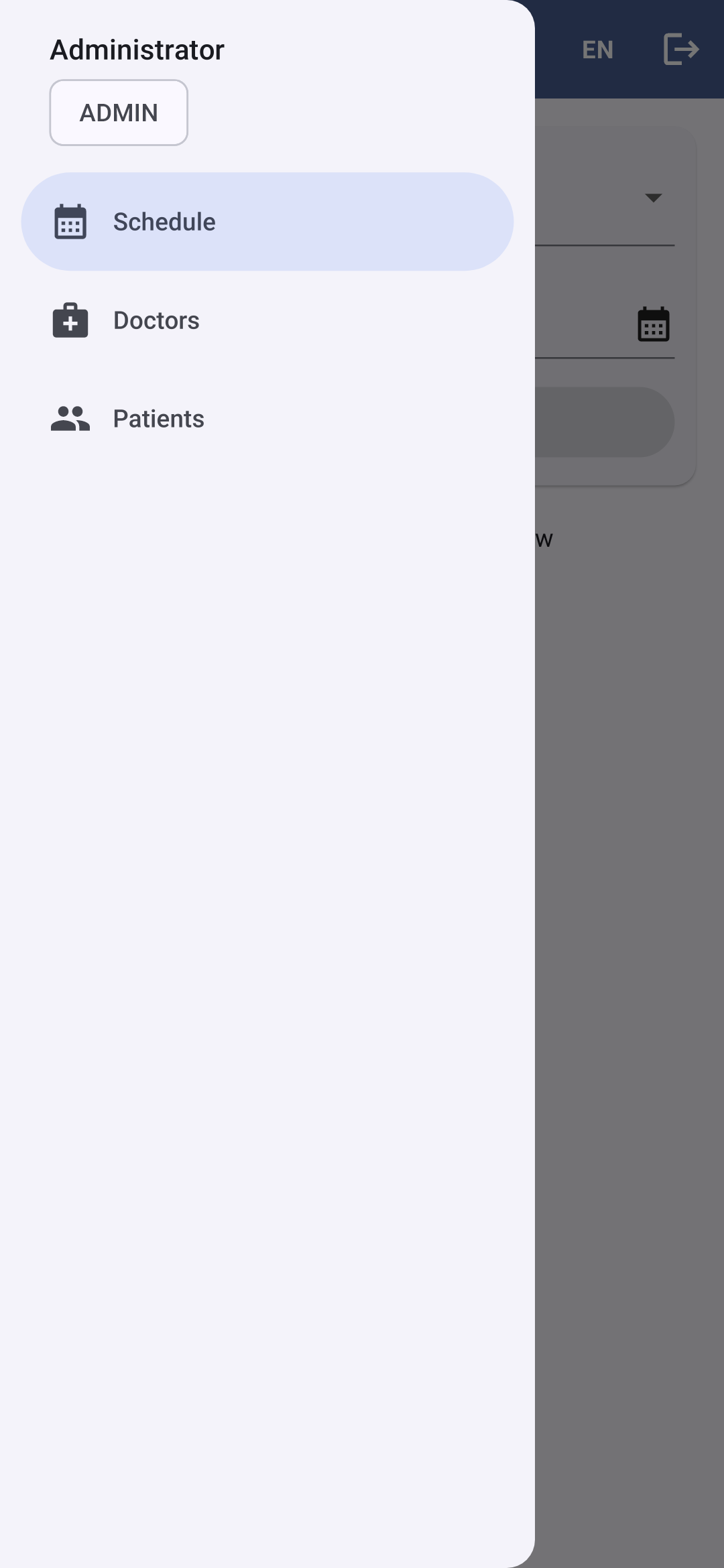
Logged in as [admin], you arrive at the calendar. The ☰ button opens the menu: the screens accessible to the administrator, and, at the top, who is logged in:
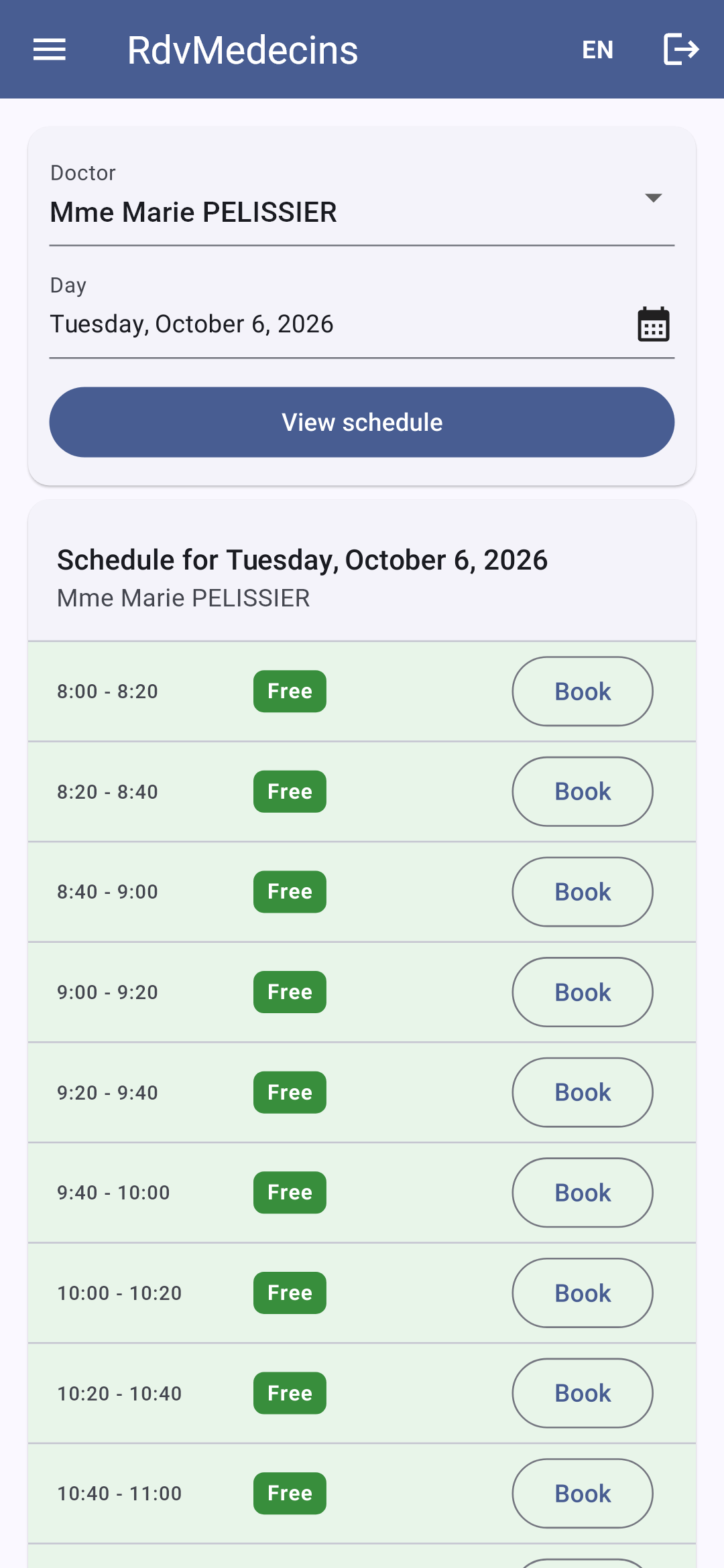
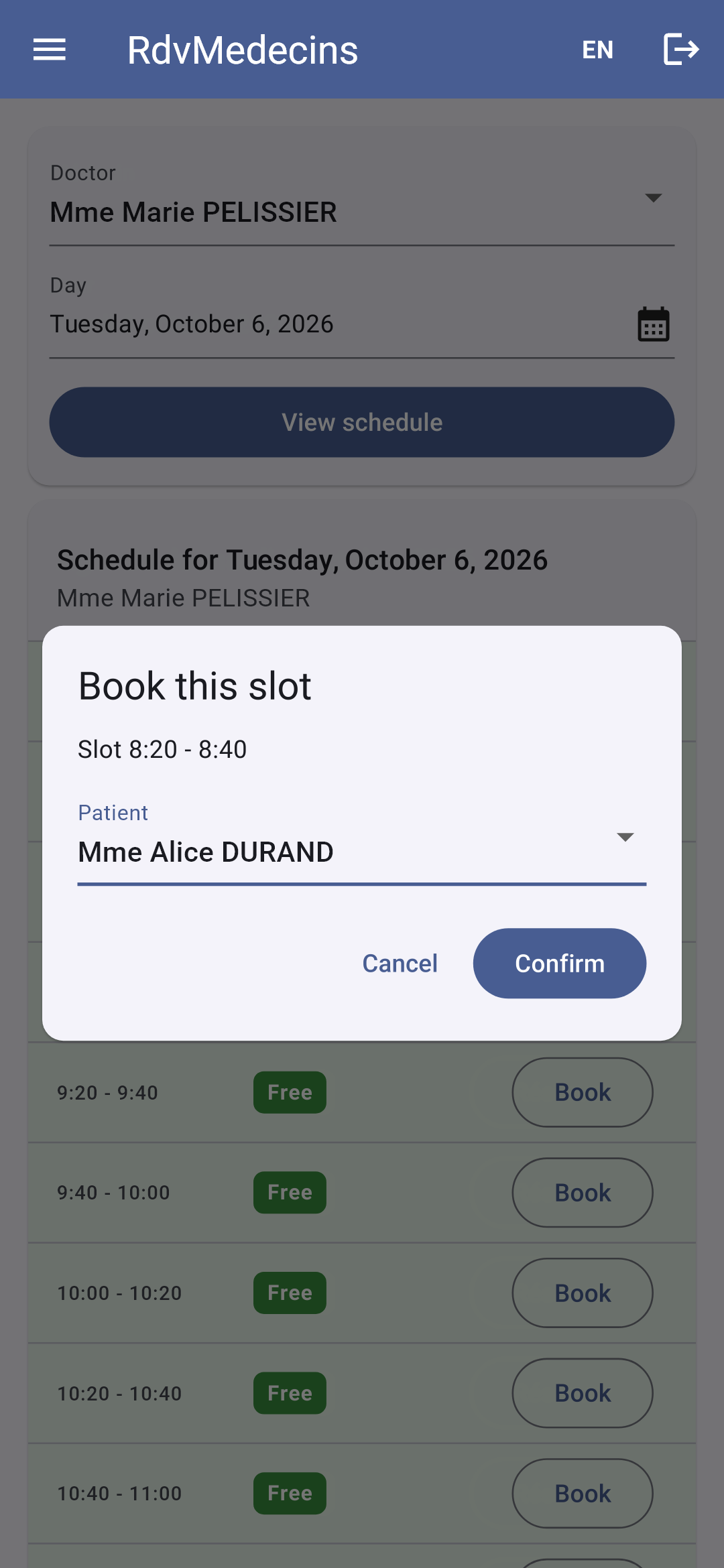
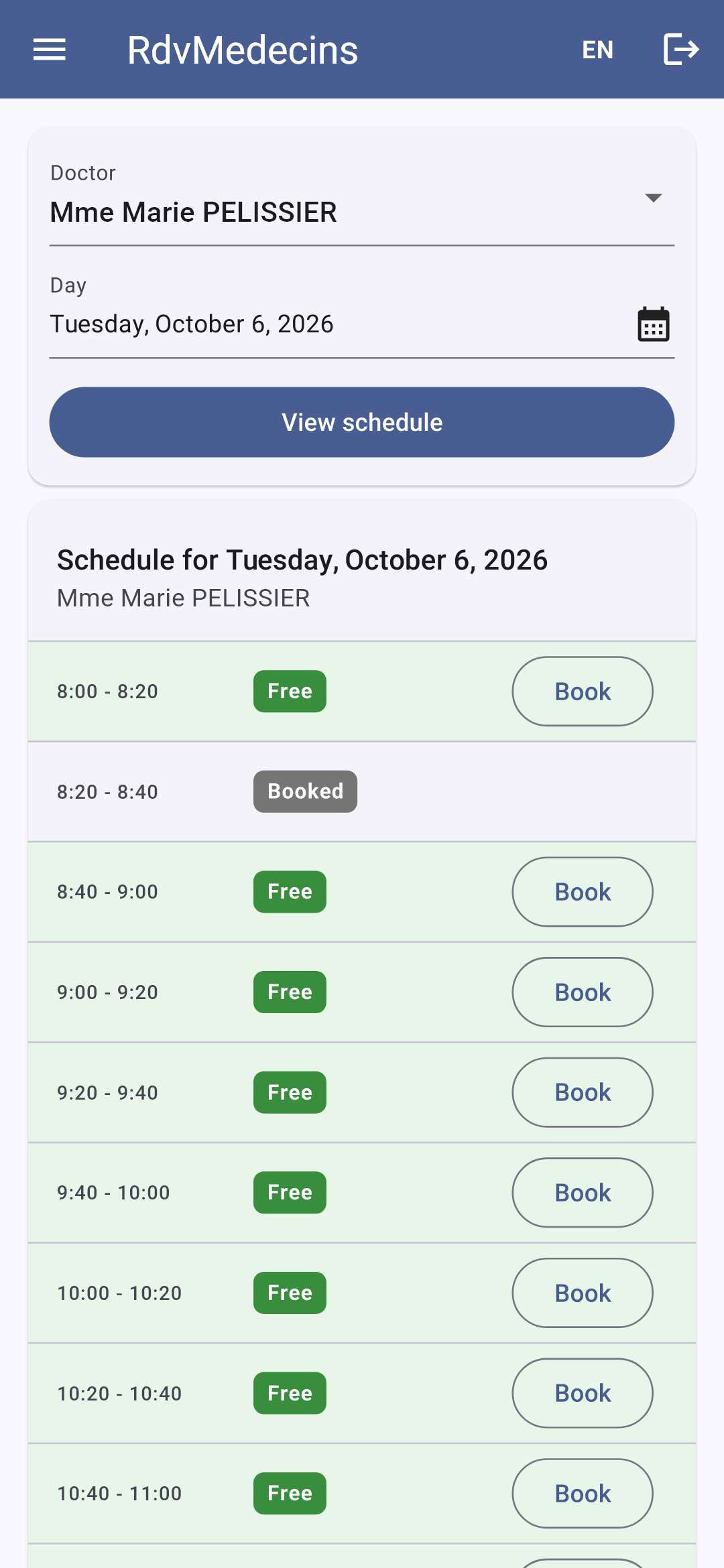
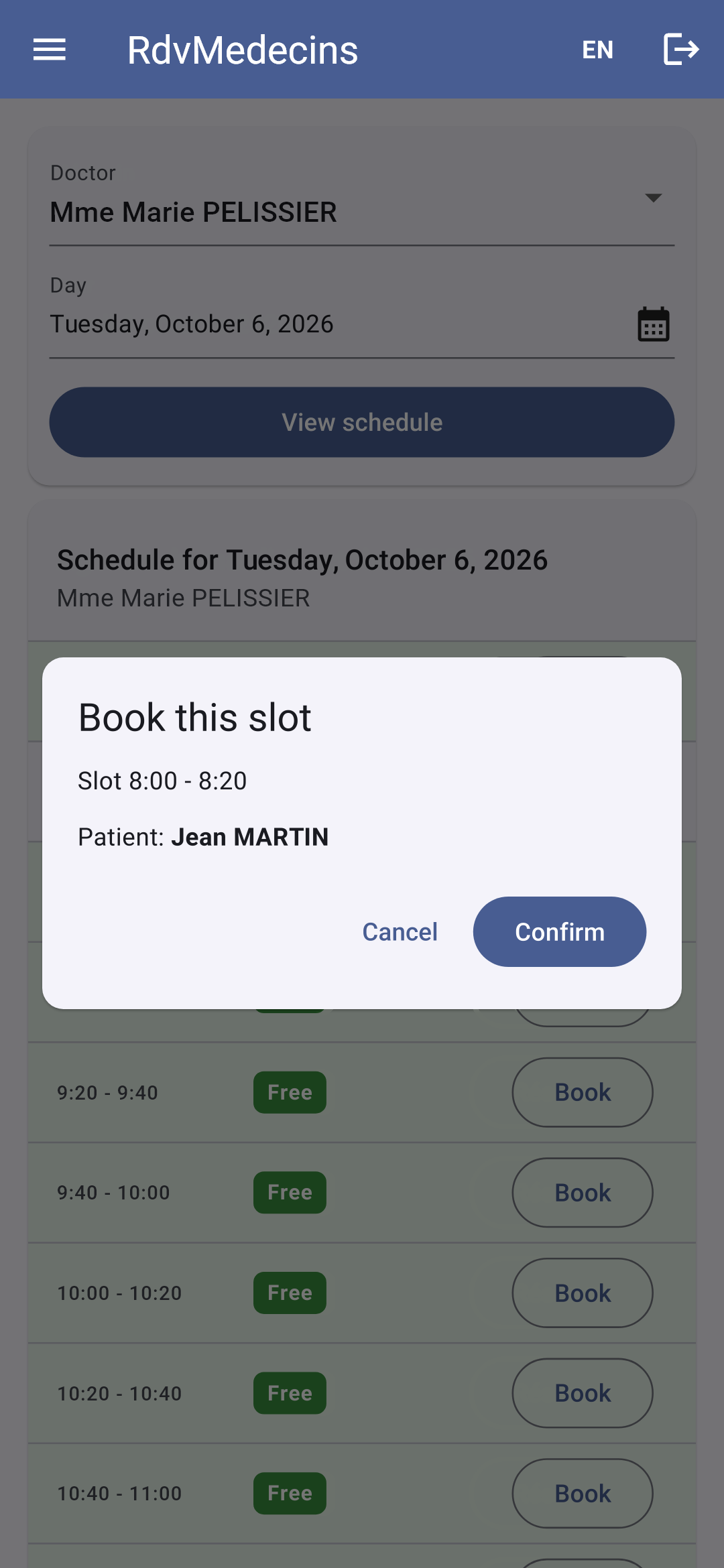
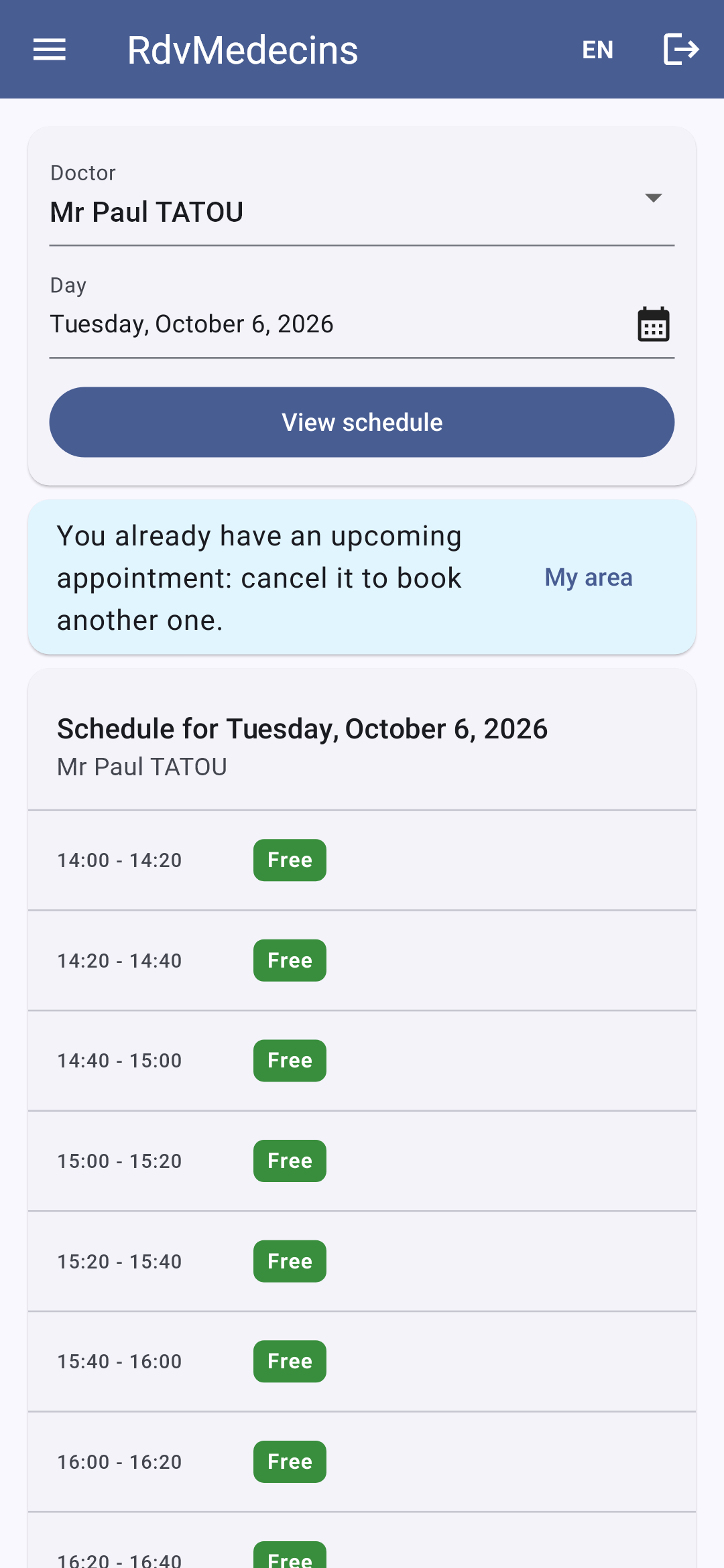
Select a doctor and a date (the date in a calendar), then click “View schedule.” The URL changes to [/schedule?doctorId=1&day=2026-10-05]. Clicking “Book” opens the booking window; the URL changes to [/schedule?doctorId=1&day=2026-10-05&book=3]:
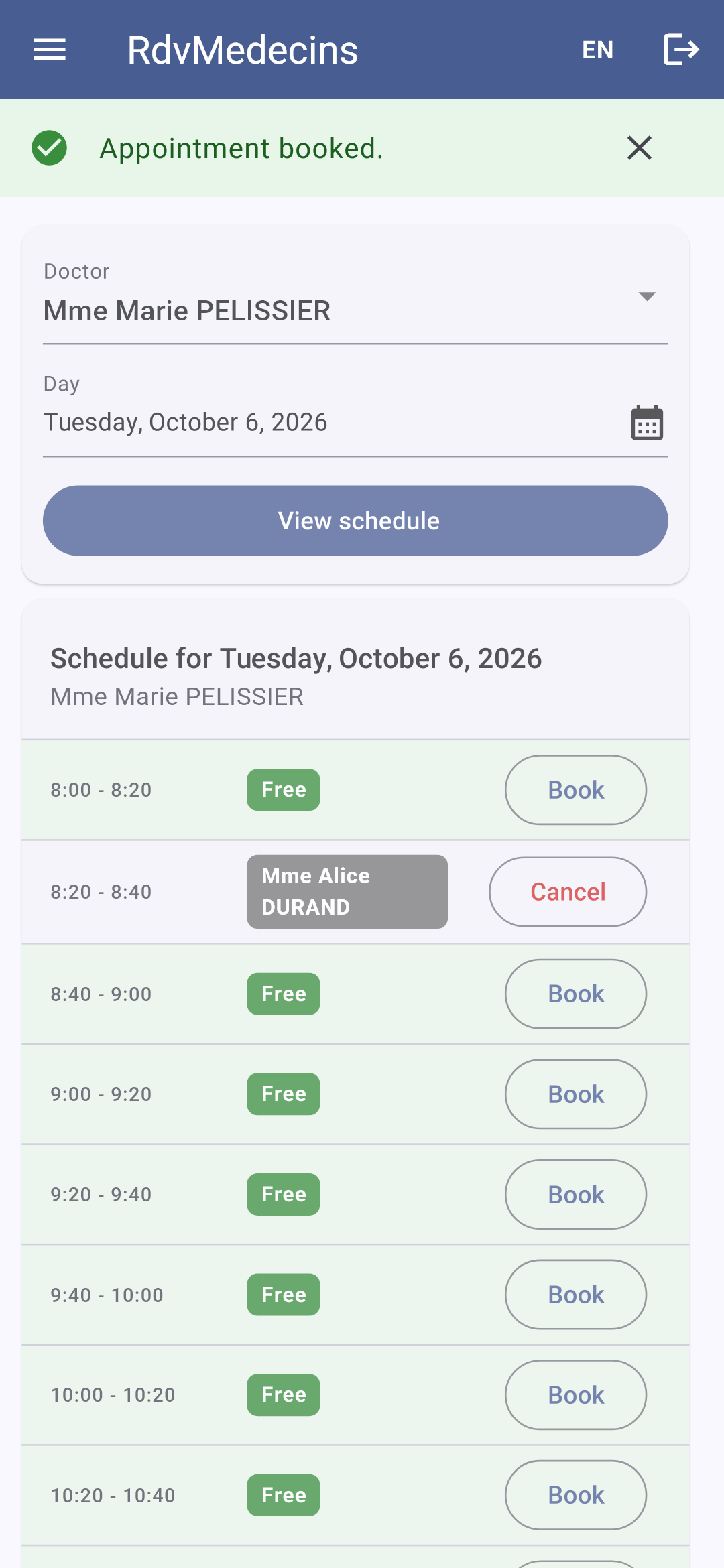
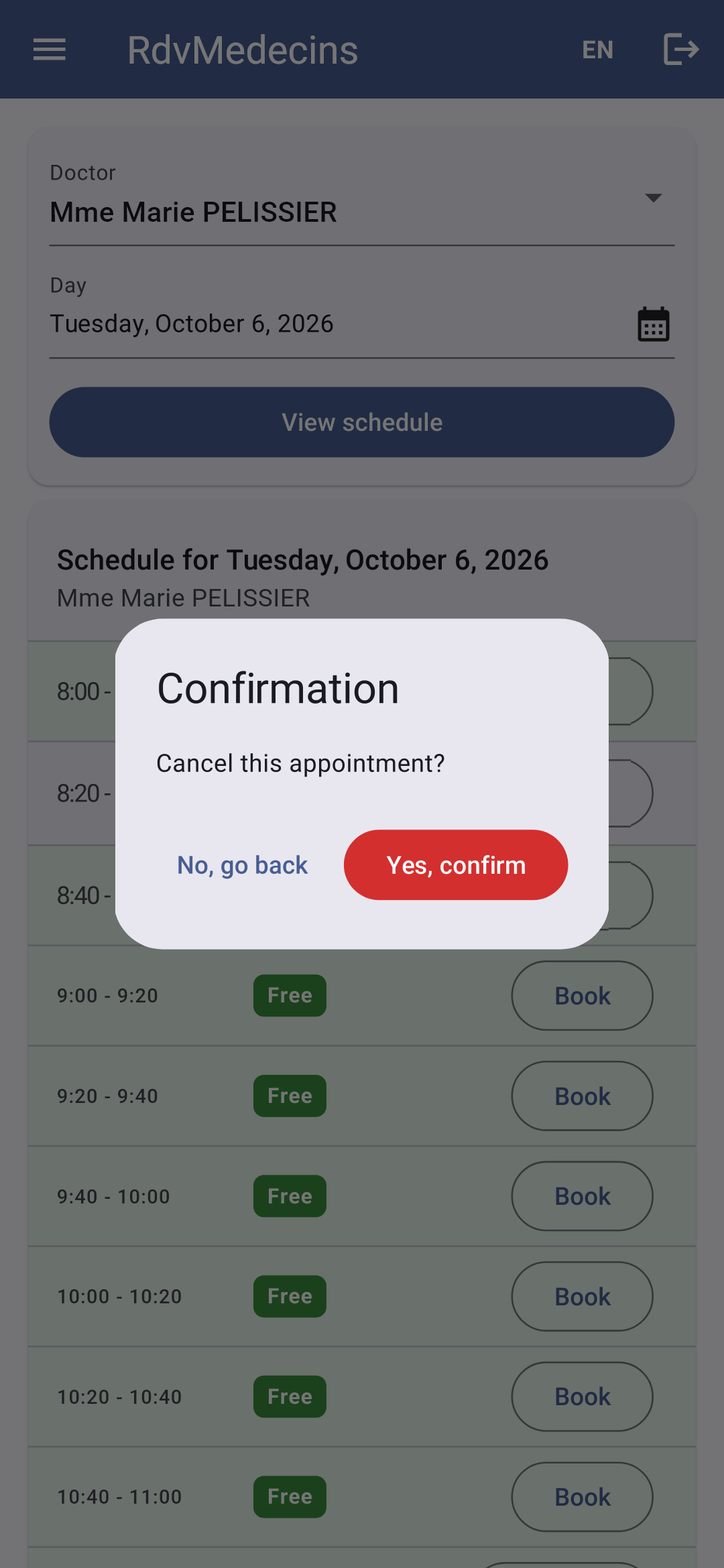
The appointment is saved; “Cancel” prompts for confirmation:
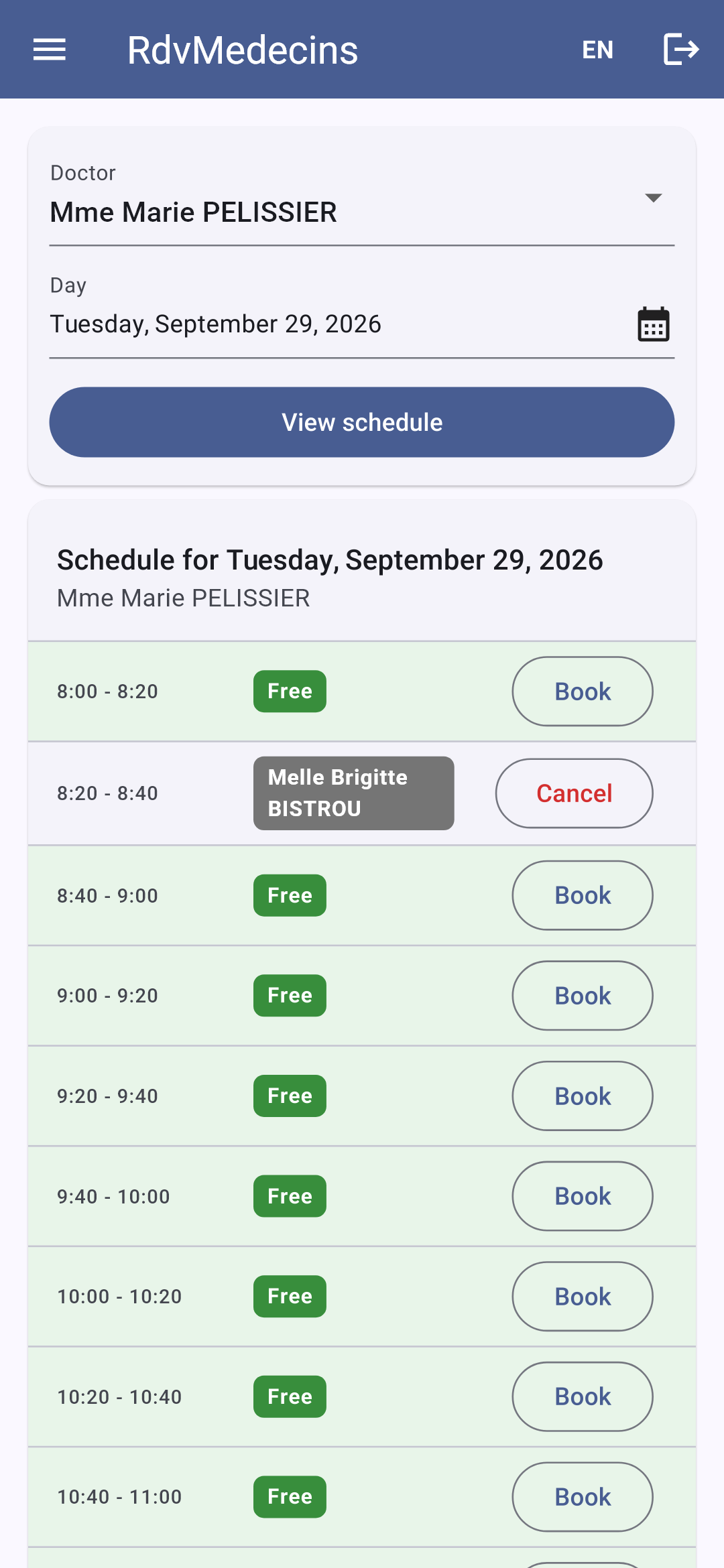
A doctor arrives directly at THEIR schedule for today:
11.3.3. The Patient Portal
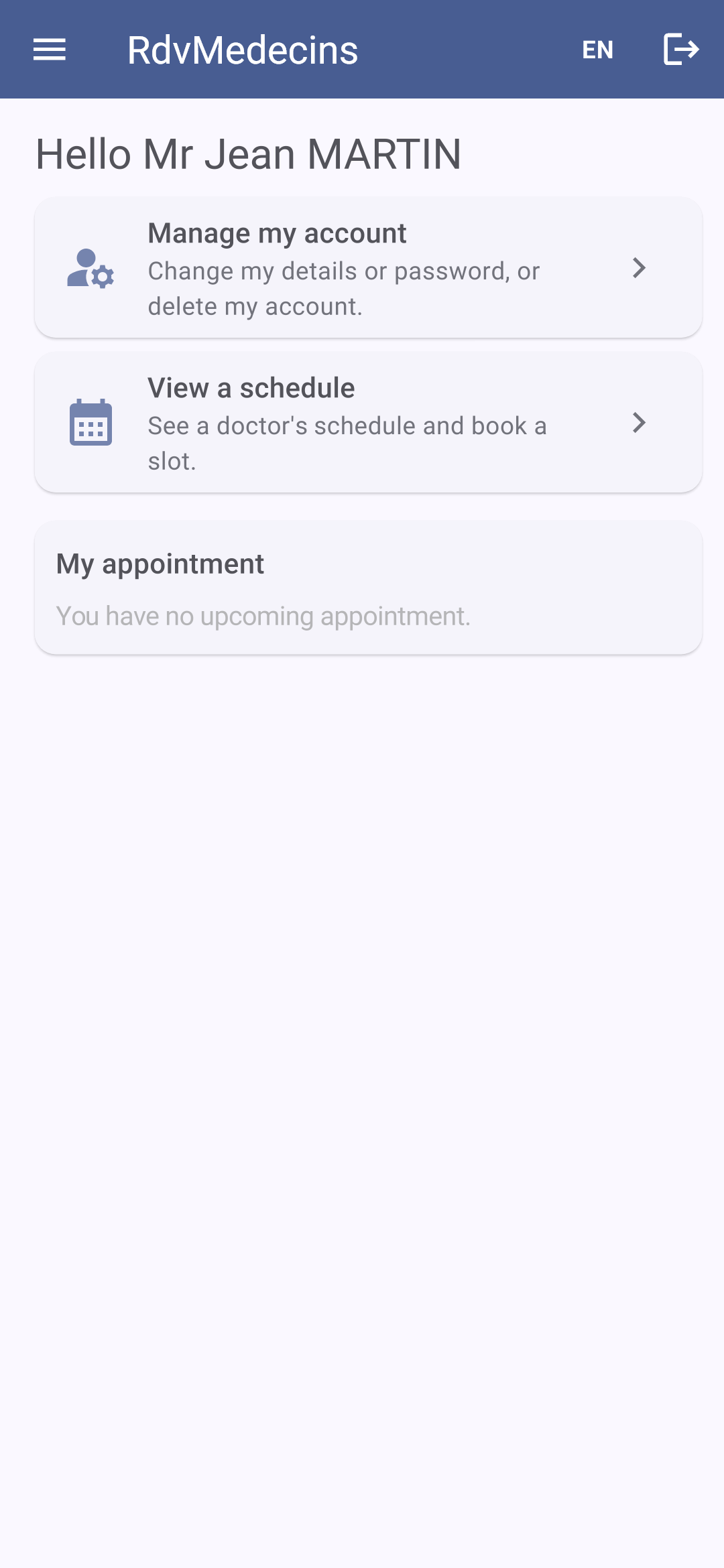
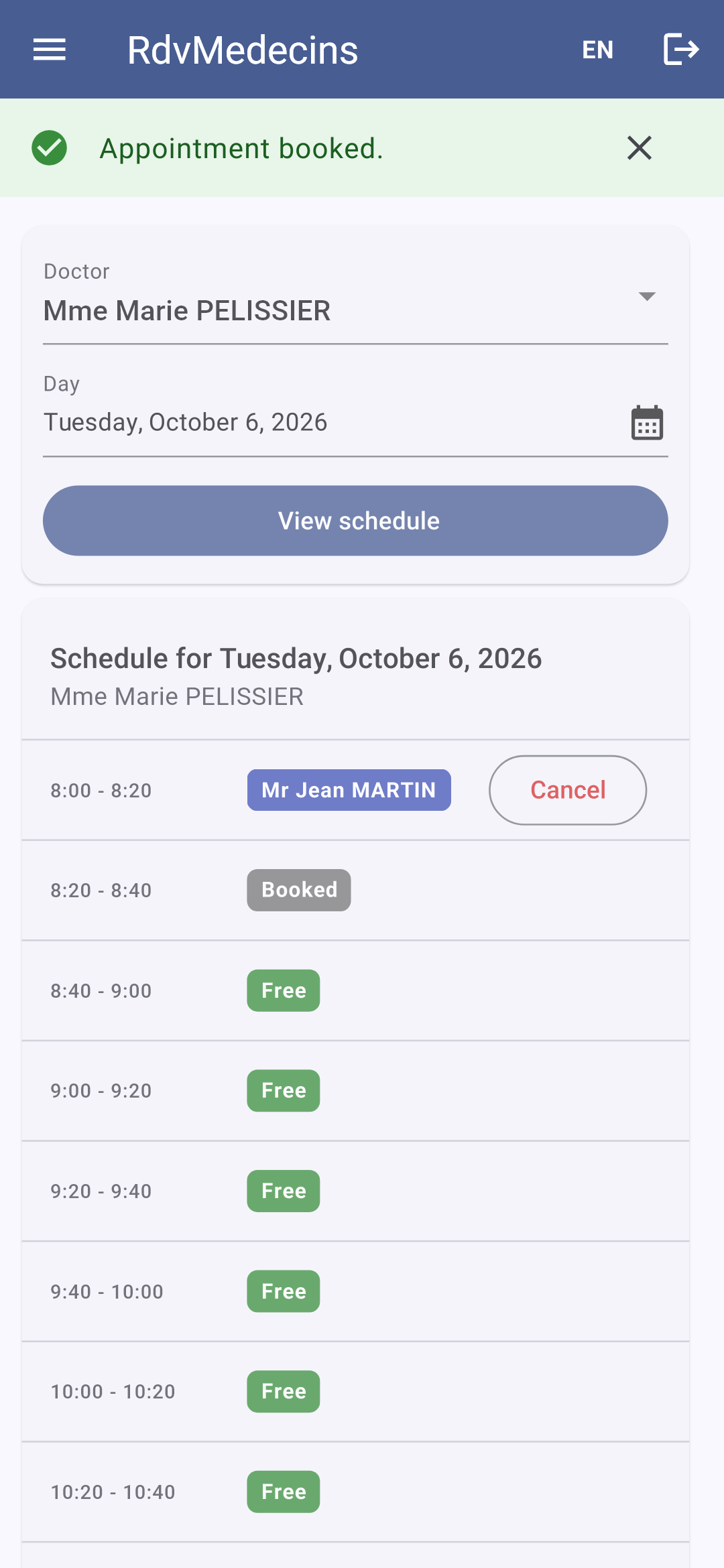
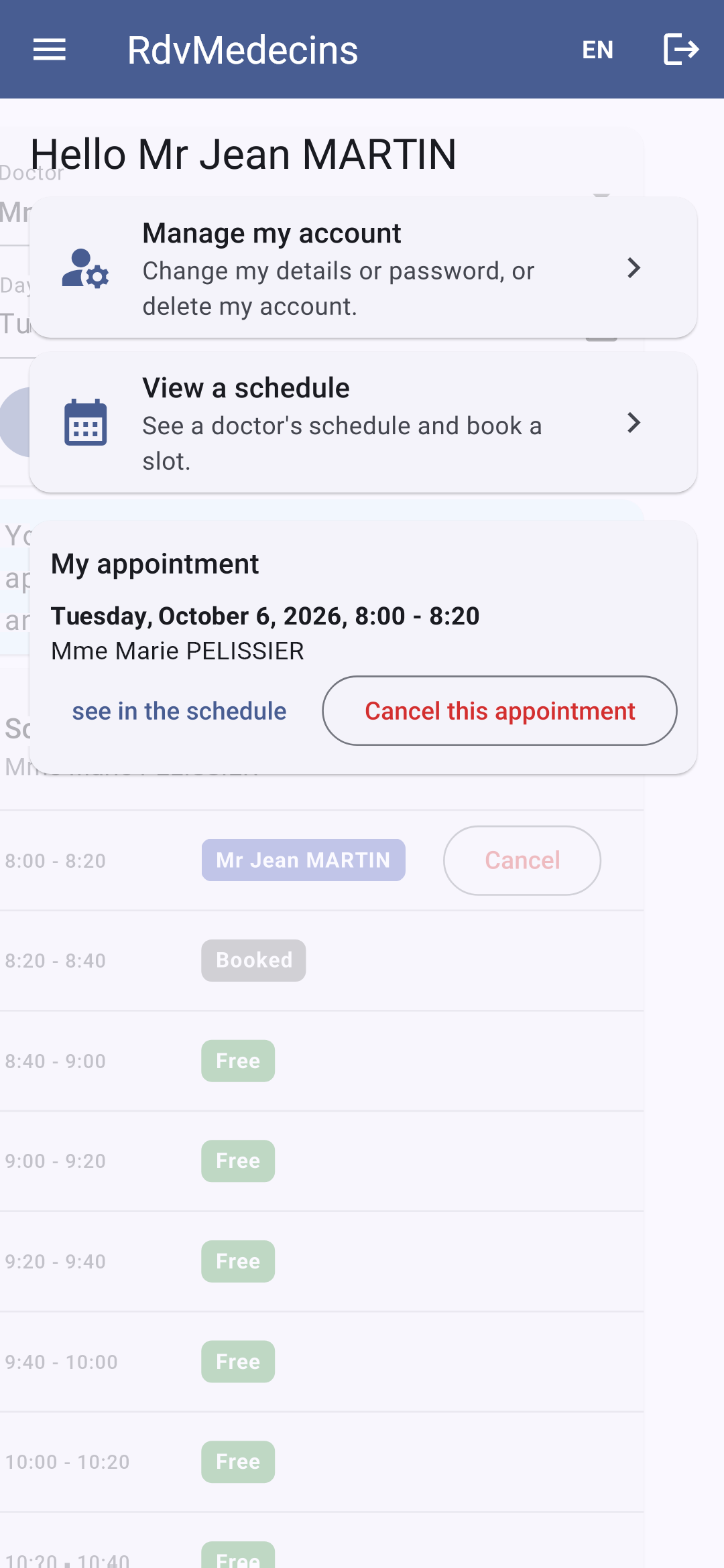
A patient ([martin]) accesses “My area.” In a calendar, they see “Booked” next to other patients’ time slots and book an appointment for themselves without selecting a specific patient:
His appointment appears under his name; the “Book” button is no longer available (only one upcoming appointment). In another doctor’s calendar, where his appointment does not appear, a message explains why he cannot book. His area (“My area”) shows the appointment:
“Manage my account”: Any changes require the current password; errors are server-related:
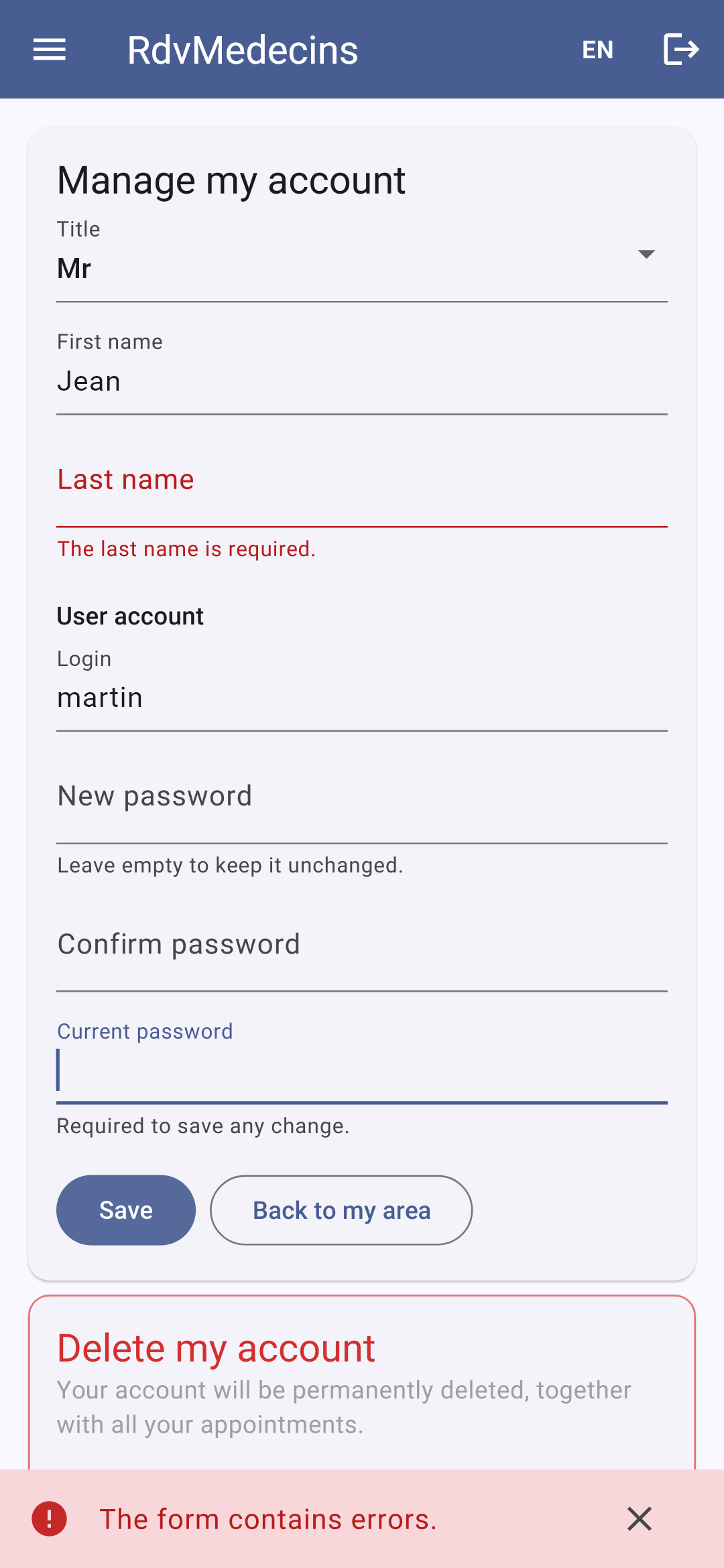
A patient’s menu does not include a “Doctors” entry. On the web, if the patient types the address /doctors themselves, the router displays a 403 error page (see [router.dart]).
11.3.4. Managing Doctors and Clients
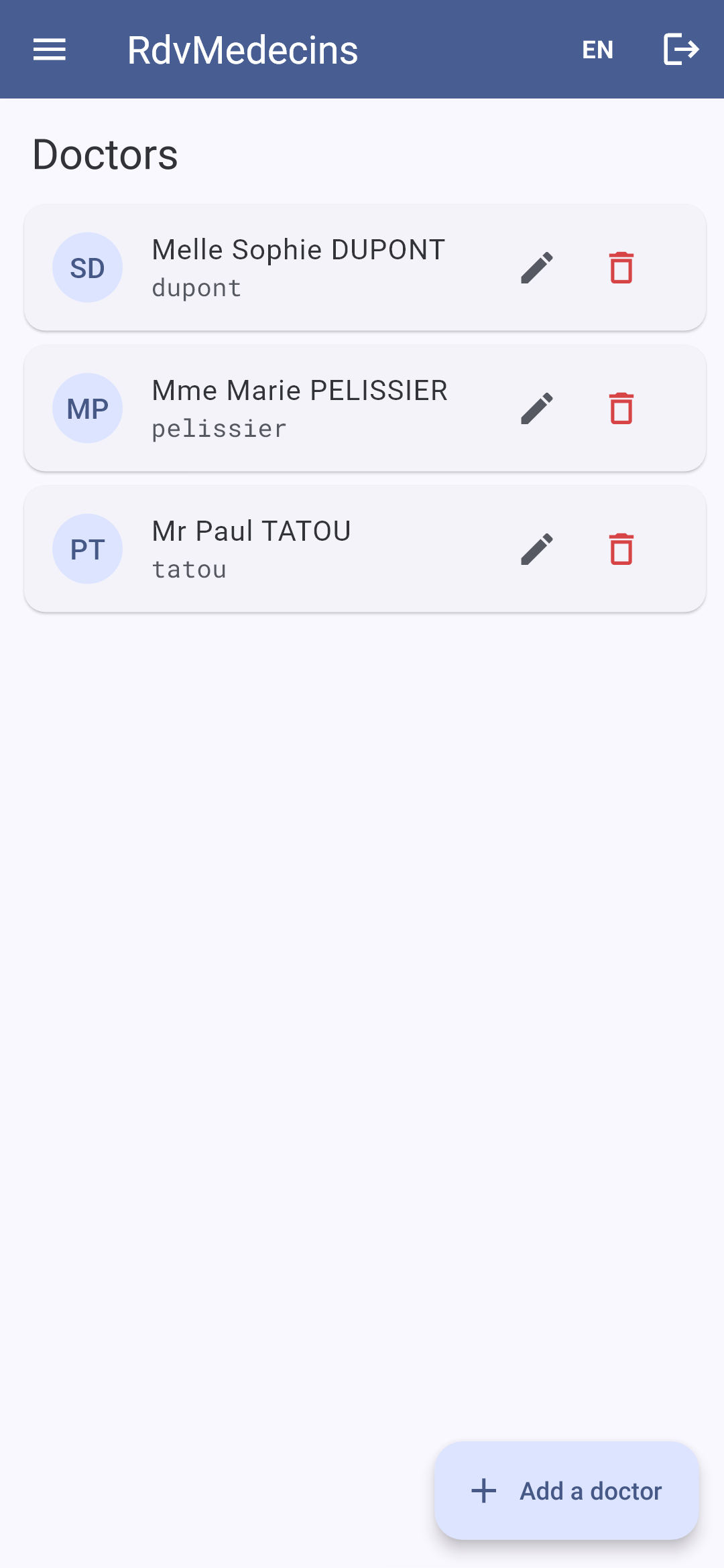
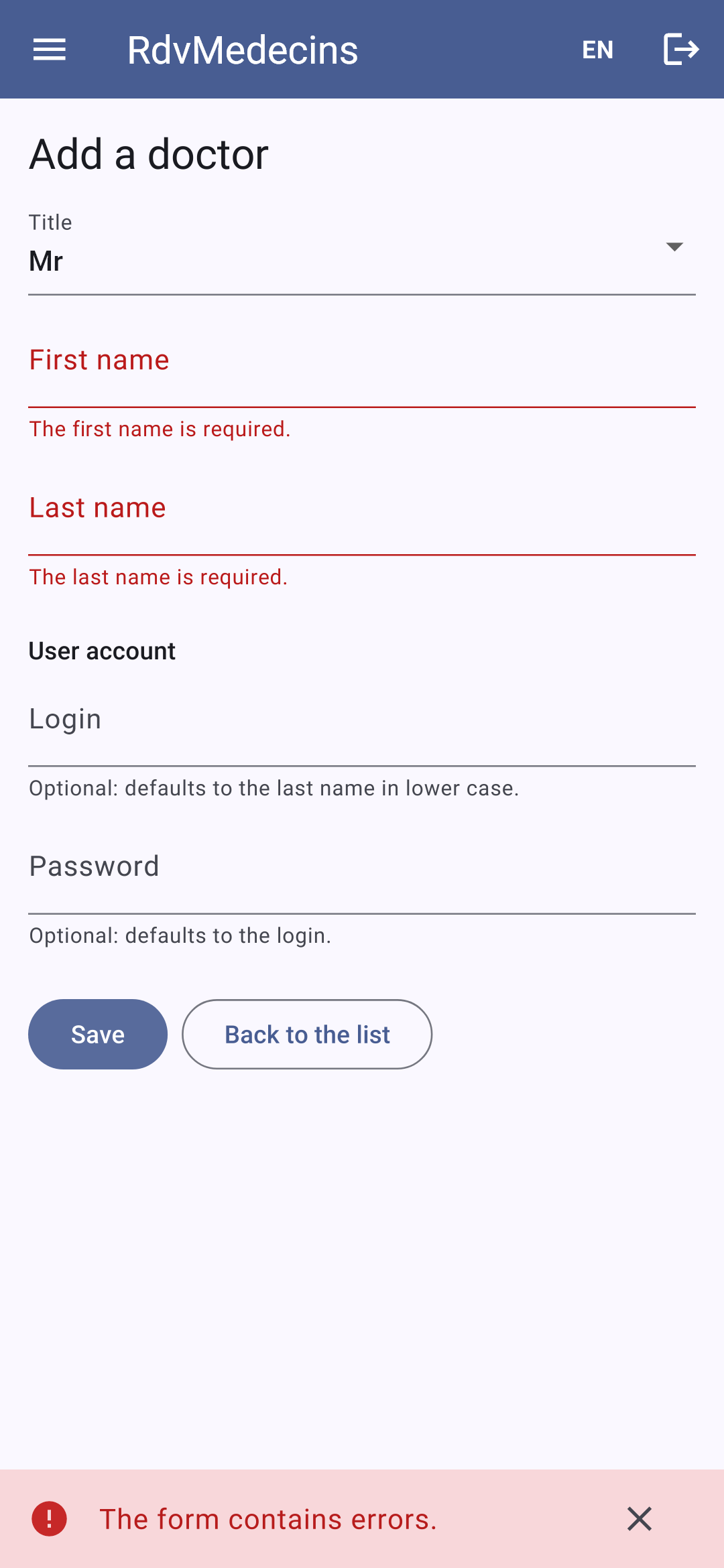
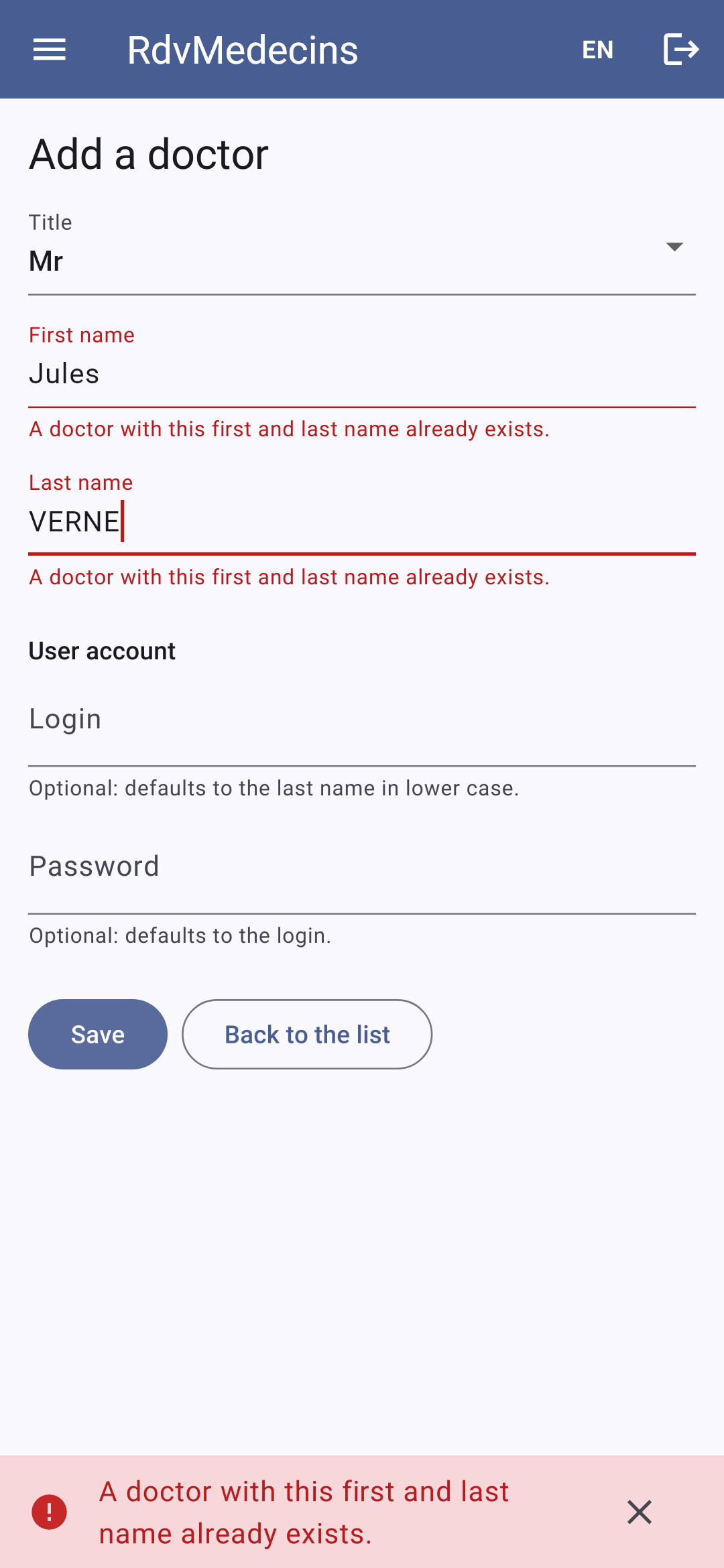
The list of doctors; an incorrectly filled-out entry:
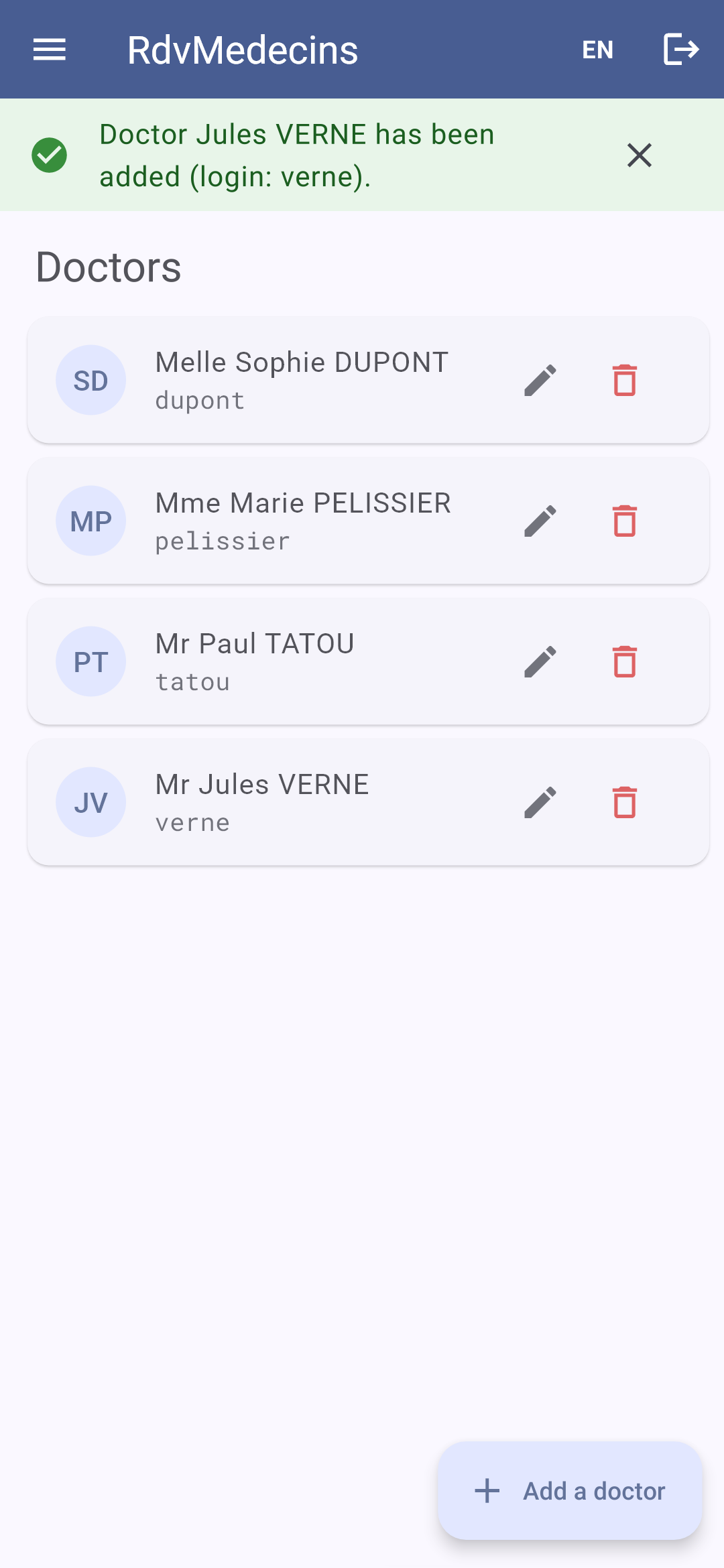
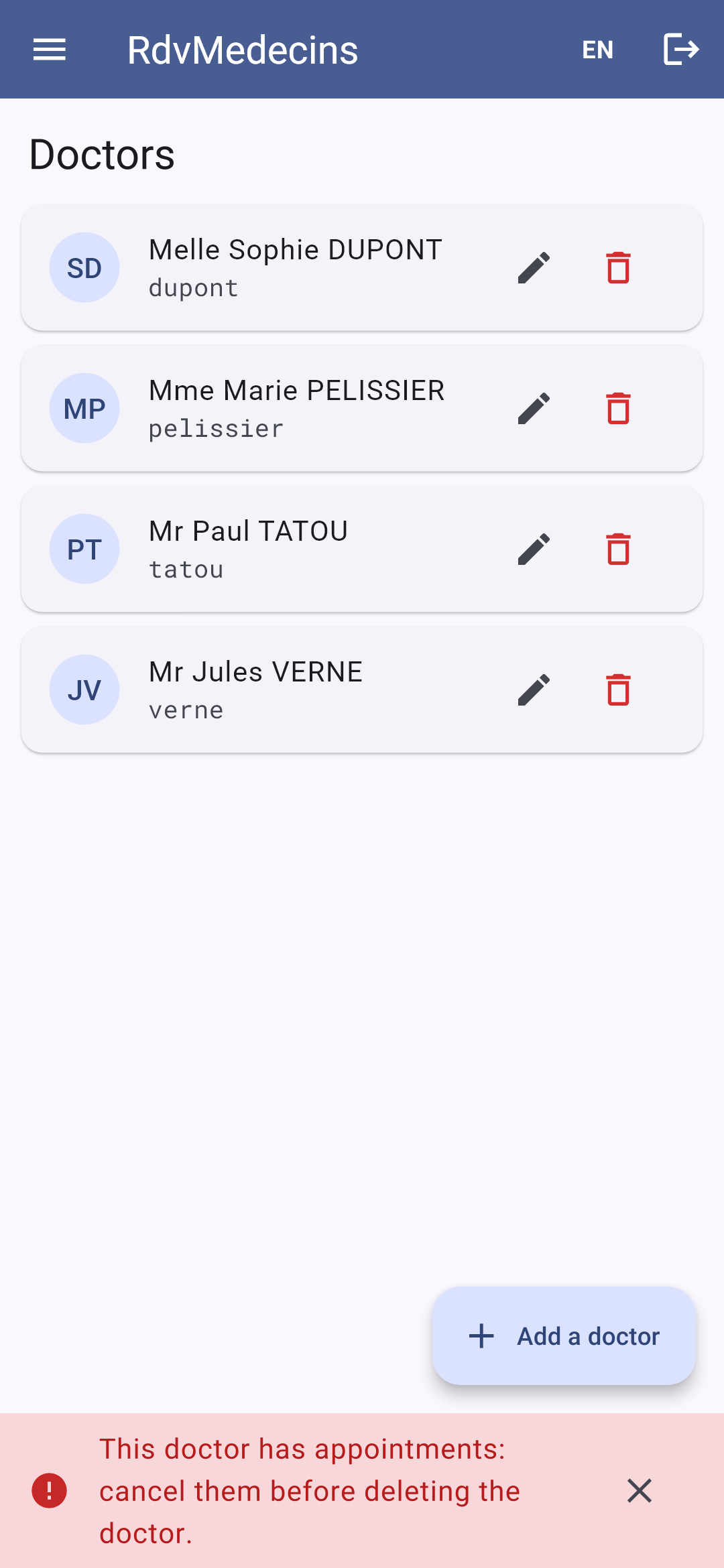
A successful addition; a namesake; the deletion of a doctor who has appointments is denied:
11.3.5. Creating an account
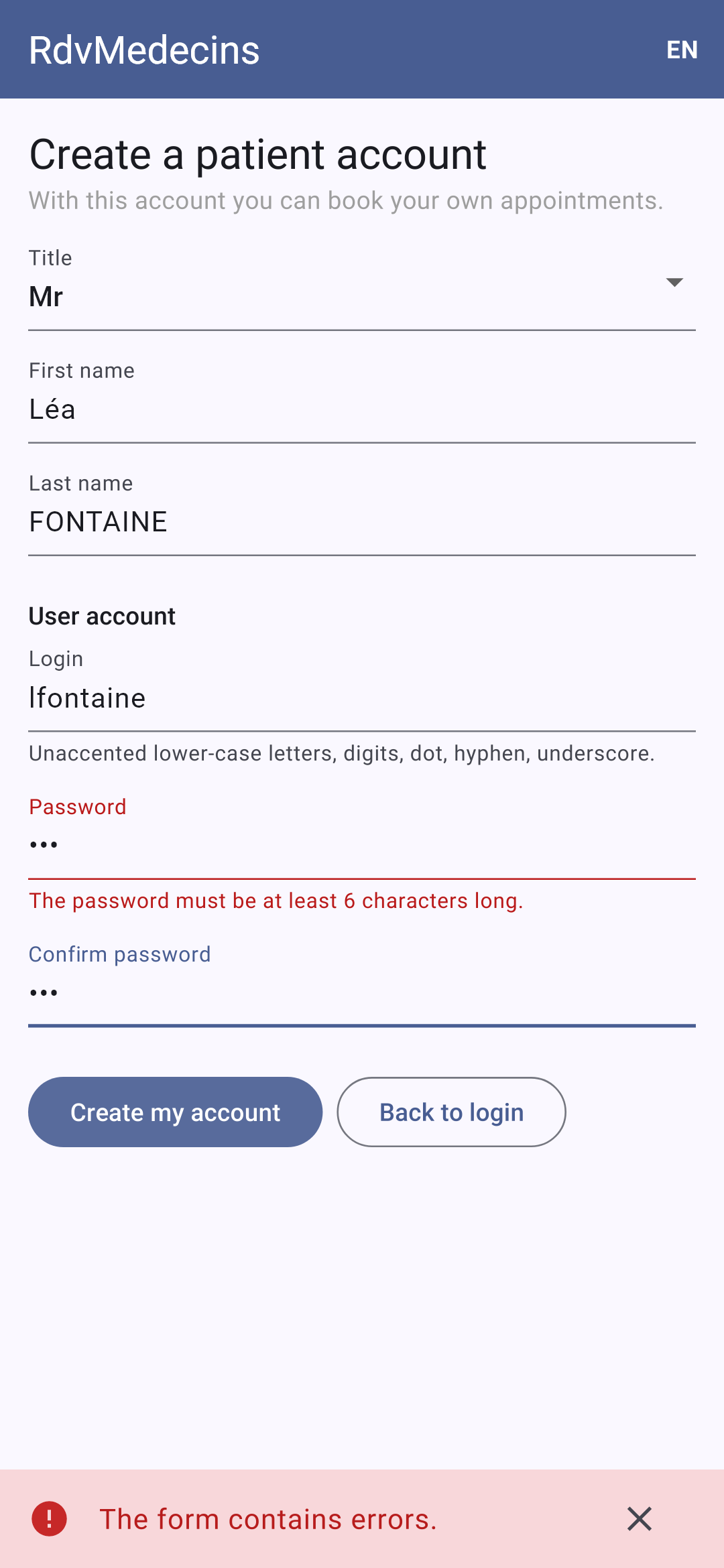
On the login screen, enter the CAPTCHA and then tap “Create a patient account.” The form is rejected by the server; once the account is created, you’re returned to the login screen with the login information pre-filled:
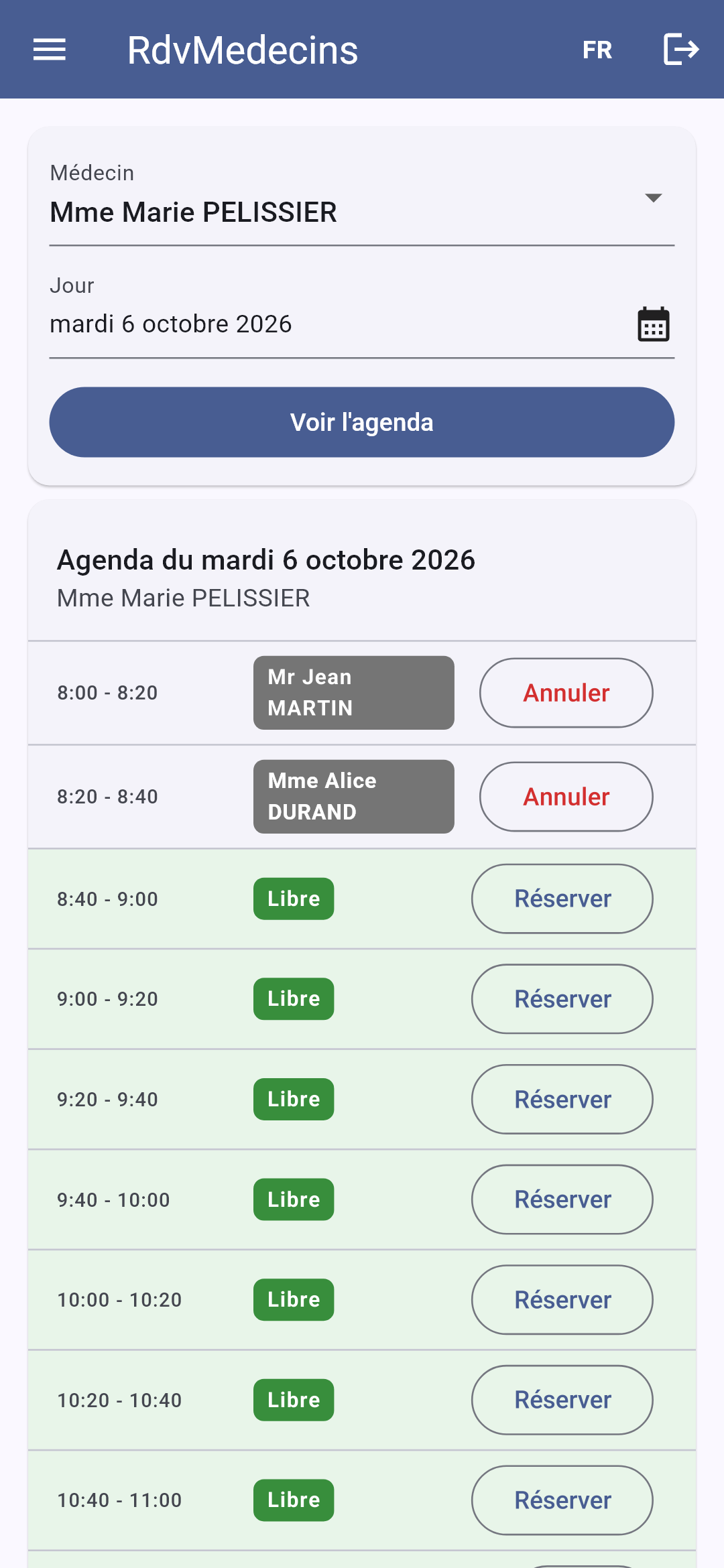
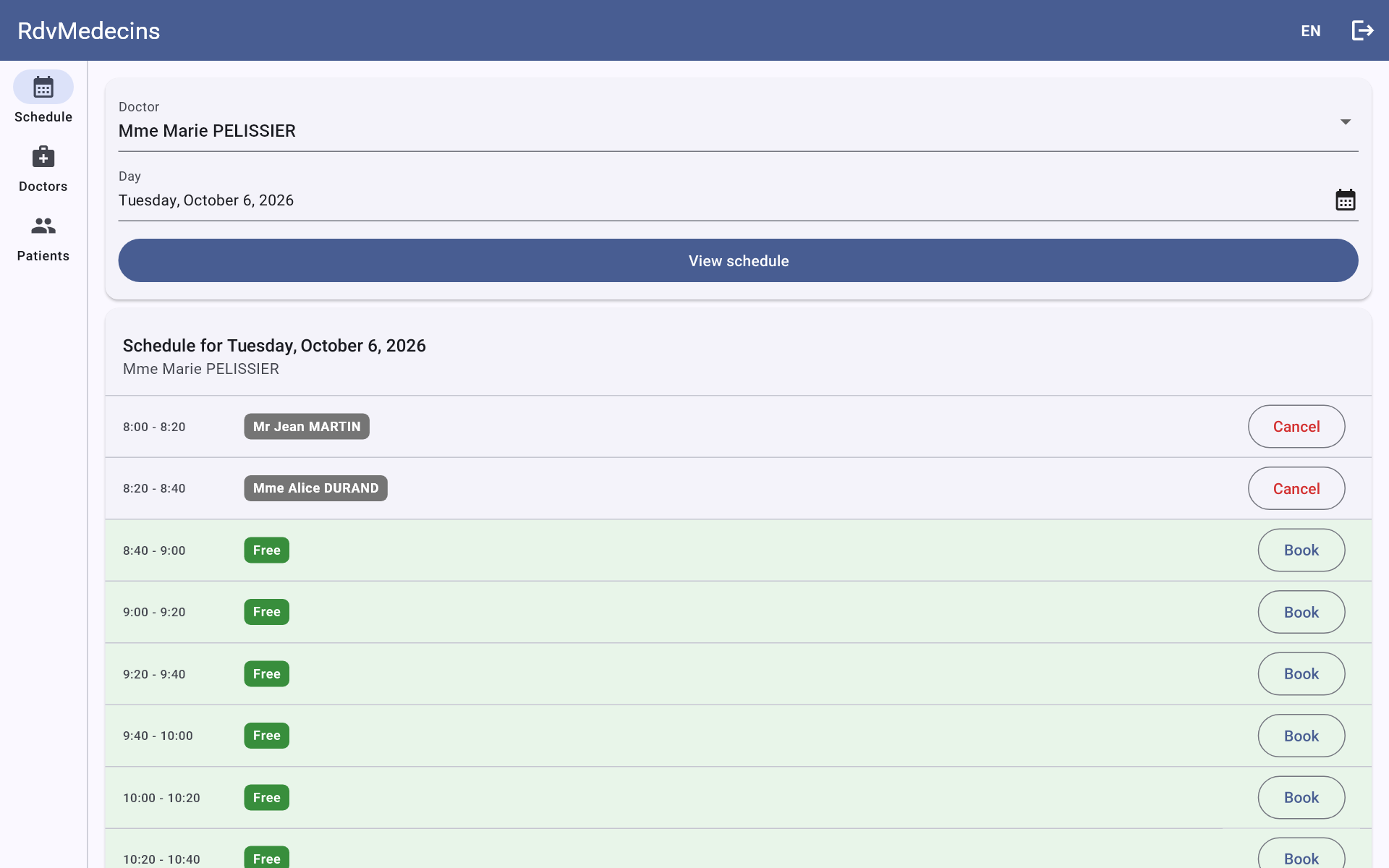
11.3.6. In French; on a large screen
The FR / EN menu in the top bar re-renders the screen locally, without making any requests to the server. On a wide screen (the web, a tablet), the menu remains displayed on the left:
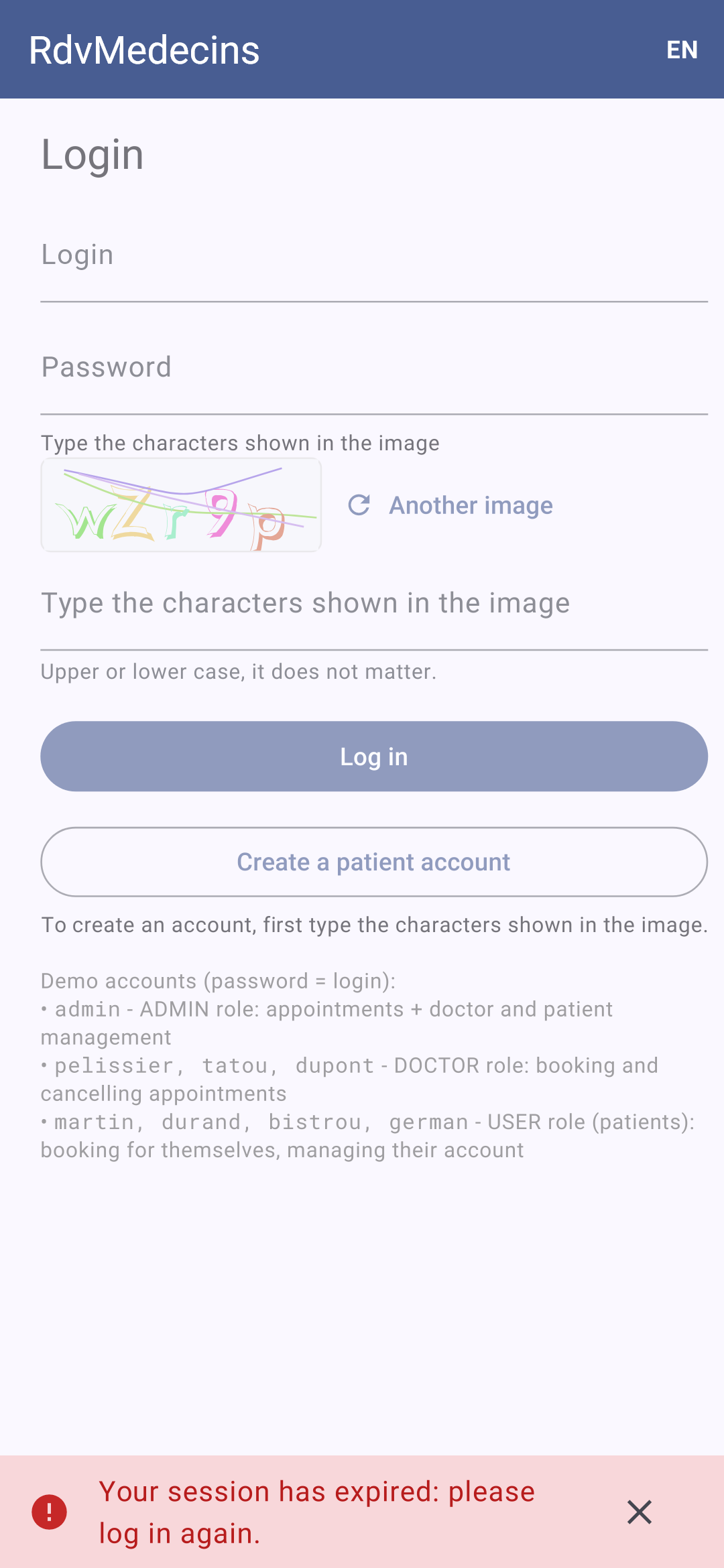
11.3.7. Session expired
If the token expires (or if the cookie is deleted), the next request receives a 401 response; the application redirects to the login screen:
11.4. Client Architecture
| rdvmedecins_flutter/
├── pubspec.yaml the libraries, the resources
├── analysis_options.yaml the rules of the code analyzer
├── web_dev_config.yaml the web development server (proxy /api)
├── android/ the Android project (including AndroidManifest.xml)
├── web/ the HTML page of the web version
├── assets/
│ ├── i18n/ the dictionaries fr.json, en.json
│ └── fonts/ the RobotoMono font
├── test/ unit tests; making of the screenshots
└── lib/
├── main.dart the startup
├── config.dart the server address
├── router.dart the screens, their addresses, their access rights
├── formatting.dart the formatting of times and days
├── api/ the API access layer
├── i18n/ the languages
├── state/ session, messages, cache (ChangeNotifier)
├── widgets/ the layout and the reusable widgets
└── pages/ the screens
|
This is the architecture recommended by the [Flutter] guide (“App architecture”), explained more simply:
- a data layer ([api/]): the only layer that knows the [http] package, the URLs, and the JSON;
- a state layer ([state/]): [ChangeNotifier] objects provided to the entire application ([provider]), which the screens monitor;
- an interface layer ([pages/], [widgets/]): widgets that display the state and transmit user actions.
The following table compares the HTML application from the [NestJS] course, the [React] client, and this client:
HTML application (NestJS) | React client | Flutter client |
The server renders each page ([res.render]) | Components render the pages in the browser | Widgets render the screens on the phone |
[views/layout.hbs] and its partial views | [Layout.tsx] and the components | [layout.dart] (a [ShellRoute]) and the widgets |
controller routes | [React Router] | [go_router] |
[JwtAuthGuard], [RolesGuard] | router guards (middleware) | The router's [redirect] function |
the token cookie, stored by the browser | same as above | A HTTP client that manages cookies (on the phone) |
flash message in a cookie | a store named [Zustand] | a [ChangeNotifier], [Messages] |
dictionaries read by the server | [i18next] | [Translations] (example 21) |
language stored in a cookie | in [localStorage] | in [shared_preferences] |
data already read | [TanStack Query] | [Cache] (a few lines) |
Form rejected: the server reloads the page | 400/409 response, errors below the fields | same as above |
All of the client’s files are presented below. They are extensively commented; their comments are part of the course.
11.5. Project configuration
11.5.1. pubspec.yaml
| # ==========================================================================
# pubspec.yaml - the Flutter client of the RdvMedecins application
# ==========================================================================
name: rdvmedecins_flutter
description: The Flutter client (Android, web) of the RdvMedecins appointment booking application.
publish_to: none
version: 1.0.0
environment:
sdk: ^3.12.0
dependencies:
flutter:
sdk: flutter
flutter_localizations:
sdk: flutter
flutter_web_plugins:
sdk: flutter
intl: any
go_router: ^16.2.0
provider: ^6.1.5
shared_preferences: ^2.5.3
http: ^1.5.0
flutter_svg: ^2.2.1
dev_dependencies:
flutter_test:
sdk: flutter
flutter_lints: ^6.0.0
flutter:
uses-material-design: true
assets:
- assets/i18n/
fonts:
- family: RobotoMono
fonts:
- asset: assets/fonts/RobotoMono-Regular.ttf
- asset: assets/fonts/RobotoMono-Bold.ttf
weight: 700
|
The example libraries, except for [flutter_svg]... which remains: the CAPTCHA is an image (SVG). The only resources are the dictionaries and the monospaced font for the demo accounts.
11.5.2. analysis_options.yaml
| # ==========================================================================
# analysis_options.yaml - the rules of the Dart code analyzer
# --------------------------------------------------------------------------
# The analyzer checks the code while it is typed (VS Code underlines the
# errors) and with the flutter analyze command. We start from the rules
# recommended by the Flutter team (flutter_lints package)...
# ==========================================================================
include: package:flutter_lints/flutter.yaml
analyzer:
language:
# ... made stricter: no implicit conversion of a dynamic type
strict-casts: true
strict-raw-types: true
linter:
rules:
# single quotes everywhere, as in the examples of the course
prefer_single_quotes: true
# "final" for a local variable that is never reassigned
prefer_final_locals: true
# character strings that are too long are allowed (texts of the UI)
lines_longer_than_80_chars: false
|
The parser’s rules, as shown in the examples:
- line 9: the rules recommended by the [Flutter] team;
- lines 14–15: stricter type checking: a [dynamic] (those returned by [jsonDecode]) cannot be used as a [String] without explicit conversion ([as String], or filtering by [Dart] 3);
- lines 20–24: three formatting rules.
The [flutter analyze] command applies these rules to the entire project; [VS Code] applies them as you type.
11.5.3. web_dev_config.yaml
| # ==========================================================================
# web_dev_config.yaml - Flutter's WEB development server
# --------------------------------------------------------------------------
# flutter run -d chrome serves the application on http://localhost:5173 and
# forwards any /api/... request to the RdvMedecins JSON server (port 8080):
# for the browser, the application and the API have the SAME origin (no
# CORS, and the token cookie travels).
# ==========================================================================
server:
host: localhost
port: 5173
proxy:
- target: "http://localhost:8080/"
prefix: "/api/"
|
The one from Example 22: in web development, /api requests are sent to the JSON server.
11.6. Starting the application
11.6.1. lib/config.dart
| // =========================================================================
// lib/config.dart - WHERE is the JSON server?
// -------------------------------------------------------------------------
// The question does not arise for a web application served by the
// server itself: the requests go to the SAME origin as the page
// (a relative address, /api/...). But a MOBILE application has no
// origin: it must be given the full address of the server.
// - the Android emulator sees the computer that runs it at
// the address 10.0.2.2 (localhost, for it, is the emulator itself);
// - a real phone, connected to the same Wi-Fi network as the computer, must
// use the address of the computer on this network (192.168.1.20...):
// it is given when the application is launched:
// flutter run --dart-define=SERVER=http://192.168.1.20:8080 ...
// - in web development (flutter run -d chrome), Flutter's development
// server forwards the /api requests to the JSON server
// (web_dev_config.yaml file): a relative address is enough;
// - on a computer (Windows, macOS, Linux): localhost.
// =========================================================================
import 'package:flutter/foundation.dart';
// the value given by --dart-define=SERVER=..., '' by default.
// String.fromEnvironment is evaluated at COMPILE time: it is a constant
const _forcedServer = String.fromEnvironment('SERVER');
class Config {
// kIsWeb: true if the application runs in a browser;
// defaultTargetPlatform: the system (android, iOS, windows...)
static String serverUrl = _forcedServer.isNotEmpty
? _forcedServer
: kIsWeb
? '' // same origin: relative addresses
: defaultTargetPlatform == TargetPlatform.android
? 'http://10.0.2.2:8080'
: 'http://localhost:8080';
}
|
The server address, depending on the platform (see Example 22):
- line 24: the value provided at launch by [--dart-define=SERVER=...]. [String.fromEnvironment] is evaluated at compile time: the address is embedded in the built application;
- lines 29–35: otherwise, a relative address on the web (the development server, then the JSON server itself in production, serve the page AND the API), [10.0.2.2] on [Android] (the computer, as seen from the emulator), [localhost] elsewhere. [static]: a class variable, not an object variable; not [final], so that the tests can modify it.
11.6.2. lib/main.dart
| // =========================================================================
// lib/main.dart - the startup of the application
// -------------------------------------------------------------------------
// We build, once and for all, the objects shared by the whole
// application, then we PROVIDE them to all the screens (provider):
// - the HTTP client (which handles the token cookie on the phone) and the
// API access layer;
// - the session (who is logged in?), the messages, the data cache;
// - the translations (French, English);
// - the router, which displays the screen of the current address.
// Two mechanisms link these objects together:
// 1. the 401 response of a protected request (session expired): we forget
// the user and prepare the message; the router, which listens to the
// session, then goes back to the login screen (see api/api_client.dart);
// 2. the "flash" messages: at the end of EACH navigation, the messages
// of the previous screen disappear, those left for the next
// screen appear (see state/messages.dart).
// =========================================================================
import 'package:flutter/material.dart';
import 'package:flutter_localizations/flutter_localizations.dart';
import 'package:flutter_web_plugins/url_strategy.dart';
import 'package:go_router/go_router.dart';
import 'package:intl/date_symbol_data_local.dart';
import 'package:provider/provider.dart';
import 'package:shared_preferences/shared_preferences.dart';
import 'api/api_client.dart';
import 'api/http_client.dart';
import 'api/rdvmedecins_api.dart';
import 'state/cache.dart';
import 'state/messages.dart';
import 'state/session.dart';
import 'i18n/translations.dart';
import 'router.dart';
Future<void> main() async {
WidgetsFlutterBinding.ensureInitialized();
usePathUrlStrategy(); // on the web: /schedule rather than /#/schedule
await initializeDateFormatting();
final storage = await SharedPreferences.getInstance();
final translations = Translations(storage);
await translations.start();
runApp(Application(storage: storage, translations: translations));
}
class Application extends StatefulWidget {
final SharedPreferences storage;
final Translations translations;
const Application({super.key, required this.storage, required this.translations});
@override
State<Application> createState() => _ApplicationState();
}
class _ApplicationState extends State<Application> {
late final ApiClient _client = ApiClient(CookieClient(widget.storage));
late final RdvMedecinsApi _api = RdvMedecinsApi(_client);
late final Session _session = Session(_api);
final Messages _messages = Messages();
final Cache _cache = Cache();
late final GoRouter _router = createRouter(_session, _messages, _api);
String? _address;
@override
void initState() {
super.initState();
// 1. the expired session
_client.onSessionExpired = () {
_session.forget();
_cache.clear();
_messages.flash(success: false, key: 'ERRORS.SESSION_EXPIRED');
// no _router.go('/login'): the router's guard takes care of it, and
// remembers the current screen (?redirect=...) to come back to it
};
// the session changes (login, logout): the data read for
// the previous user are no longer worth anything
_session.addListener(_cache.clear);
// 2. at each completed navigation (the address has changed): new page
_router.routerDelegate.addListener(() {
// state: the screen at the TOP of the stack (including a screen pushed by push)
final address = _router.state.uri.toString();
if (address != _address) {
_address = address;
_messages.newPage();
}
});
}
@override
void dispose() {
_router.dispose();
super.dispose();
}
@override
Widget build(BuildContext context) {
return MultiProvider(
providers: [
// ordinary objects...
Provider.value(value: _api),
// ... and objects that notify their changes
ChangeNotifierProvider.value(value: _cache),
ChangeNotifierProvider.value(value: _session),
ChangeNotifierProvider.value(value: _messages),
ChangeNotifierProvider.value(value: widget.translations),
],
child: Consumer<Translations>(
builder: (context, translations, _) => MaterialApp.router(
debugShowCheckedModeBanner: false,
onGenerateTitle: (context) => translations.t('APP.TITLE'),
theme: ThemeData(colorSchemeSeed: const Color(0xFF0D6EFD)),
// the texts of Flutter itself (calendar...) in the chosen language
locale: Locale(translations.language),
supportedLocales: [for (final l in languages) Locale(l)],
localizationsDelegates: GlobalMaterialLocalizations.delegates,
routerConfig: _router,
),
),
);
}
}
|
- lines 37–44: Before displaying anything, we prepare what needs to be prepared: web addresses without [#] (example 17), the names of days and months in all languages ([intl], example 09), the device’s storage, and the initial language's dictionary. [WidgetsFlutterBinding.ensureInitialized()]: These operations require the [Flutter] engine, so we start it before [runApp];
- lines 58–63: the shared objects, created ONCE, in the root widget’s state. Each receives the ones it needs upon creation: this is dependency injection, done manually. [late]: Initialization occurs upon first use, when [widget] already exists;
- lines 70–76: 1. the expired session. The API access layer is unaware of either the session or the messages; it is entrusted with this function, which it will call upon every 401 response. The user is forgotten, the cache is cleared, and the message for the next screen is prepared. The screen transition itself is handled by the router, which monitors the session;
- line 79: every time the user changes, the cache is cleared: the data read for the previous user is of no use to the next one (a patient should not see the calendar viewed by the administrator);
- Lines 81–88: 2. Flash messages. The router’s [routerDelegate] alerts its listeners with each transmission; the address is compared to the previous one ([_router.state]: the screen at the TOP of the stack, including a screen stacked by [push], such as the reservation window), and, if it has changed, the system moves to a “new page”: the messages from the previous screen disappear, and those placed on this one appear (see [messages.dart]);
- lines 99–107: shared objects are provided to all screens (Example 20). [.value]: the object already exists; the provider does not create it (and will not destroy it);
- lines 109–118: the application itself, rebuilt with every language change ([Consumer], see Example 20): the title ([onGenerateTitle]), and the language of the text in [Flutter] itself (the calendar, tooltips). [colorSchemeSeed]: a color from which [Material] derives the entire palette; this is the blue of [Bootstrap], the color used by web clients.
11.7. The access layer to the API
11.7.1. lib/api/http_client.dart
| // =========================================================================
// lib/api/http_client.dart - an HTTP client that handles COOKIES
// -------------------------------------------------------------------------
// The RdvMedecins server puts the JWT token in a COOKIE (httpOnly).
// In a browser, it is the browser that stores the cookies and sends them
// back with each request: the application code has nothing to do.
// On a phone, there is NO browser: it is up to the application to
// play its role, that is:
// 1. read the "Set-Cookie" header of each response, and store the cookies;
// 2. send them back in the "Cookie" header of each request.
// This HTTP client does it, by WRAPPING the client of the http package
// (http.BaseClient: writing the send method is enough). The cookies are
// also stored on the device (shared_preferences): we stay logged in
// when we stop and restart the application.
// On the web, it does nothing more than the ordinary client: the
// browser forbids the application to read or write these headers.
// =========================================================================
import 'dart:convert';
import 'package:flutter/foundation.dart';
import 'package:http/http.dart' as http;
import 'package:shared_preferences/shared_preferences.dart';
class CookieClient extends http.BaseClient {
static const _key = 'rdvmedecins.cookies';
final http.Client _inner = http.Client();
final SharedPreferences? _storage;
// cookie name -> its value
final Map<String, String> _cookies = {};
CookieClient([this._storage]) {
// the cookies stored during a previous use
final stored = _storage?.getString(_key);
if (stored != null) {
_cookies.addAll((jsonDecode(stored) as Map<String, Object?>).cast<String, String>());
}
}
@override
Future<http.StreamedResponse> send(http.BaseRequest request) async {
if (!kIsWeb && _cookies.isNotEmpty) {
// "rdvmedecins_jwt=eyJhbGci...; other=value"
request.headers['cookie'] = [for (final MapEntry(:key, :value) in _cookies.entries) '$key=$value'].join('; ');
}
final response = await _inner.send(request);
final setCookie = response.headers['set-cookie'];
if (!kIsWeb && setCookie != null) {
_store(setCookie);
}
return response;
}
// Set-Cookie: rdvmedecins_jwt=eyJ...; Max-Age=7200; Path=/api; Expires=Tue, 29 Sep 2026 ...; HttpOnly
// (several cookies are separated by commas). We only keep the
// name and the value of each cookie; an empty value (logout) deletes it
void _store(String setCookie) {
// a name followed by "=", at the start of the header or after a comma
for (final m in RegExp(r'(?:^|,)\s*([^=;,\s]+)=([^;]*)').allMatches(setCookie)) {
final name = m[1]!;
final value = m[2]!.trim();
if (value.isEmpty) {
_cookies.remove(name);
} else {
_cookies[name] = value;
}
}
_storage?.setString(_key, jsonEncode(_cookies));
}
@override
void close() => _inner.close();
}
|
The HTTP client from Example 23, unchanged: it stores the received cookies ([Set-Cookie] header) and sends them back ([Cookie] header) to the phone; on the web, it lets the browser handle it.
11.7.2. lib/api/api_client.dart
| // =========================================================================
// lib/api/api_client.dart - ALL the requests to the API go through here
// -------------------------------------------------------------------------
// Taken from common/api.dart of the examples, with something new: the
// centralized handling of the 401 response.
//
// A 401 can happen at any time: the token has expired (2 hours), the
// account has been deleted, the server has restarted with another secret
// key... Rather than handling this case in each screen, we handle it
// HERE, once. But this file knows neither the router nor the messages
// (it depends on nothing): it calls a function that was given to it at
// startup (onSessionExpired, see main.dart), which forgets the user and
// goes back to the login page.
//
// Some requests handle their 401 themselves (the login, GET
// /api/auth/me...): they are "public" (see rdvmedecins_api.dart).
// =========================================================================
import 'dart:convert';
import 'package:http/http.dart' as http;
import '../config.dart';
import 'api_error.dart';
class ApiClient {
final http.Client _client;
// what to do when the server responds 401 to a protected request
void Function() onSessionExpired = () {};
ApiClient(this._client);
// isPublic: true for the routes that handle the 401 themselves
Future<Object?> request(String method, String url, {Object? body, bool isPublic = false}) async {
final request = http.Request(method, Uri.parse('${Config.serverUrl}/api$url'));
if (body != null) {
request.headers['content-type'] = 'application/json';
request.body = jsonEncode(body);
}
final http.Response response;
try {
response = await http.Response.fromStream(await _client.send(request));
} catch (_) {
// no response: network down, server stopped, wrong address
throw const ApiError(0, 'ERRORS.SERVER_UNREACHABLE');
}
if (response.statusCode >= 400) {
final error = ApiError.fromResponse(response);
if (error.statusCode == 401 && !isPublic) {
onSessionExpired();
// the screen that was waiting for the response will display THIS message too
throw const ApiError(401, 'ERRORS.SESSION_EXPIRED');
}
throw error;
}
return response.bodyBytes.isEmpty ? null : jsonDecode(utf8.decode(response.bodyBytes));
}
}
|
The [common/api.dart] file from the examples, with a new feature: the 401 response.
- Line 29: a function to call in the event of a 401 error, specified at startup (see [main.dart]). By default, it does nothing;
- line 34: [isPublic] is a named, optional parameter (enclosed in curly braces): [request('GET', '/captcha', isPublic: true)];
- lines 35–38: the request, built piece by piece: method, address, header, and JSON body;
- lines 40–45: the request is sent. An exception here means that no response was received (network down, server down, incorrect address). [final http.Response response;]: a variable [final] declared without a value; [Dart] checks that it receives a value—only once—before being read;
- lines 47–54: an error response becomes an [ApiError]. A 401 on a protected request means the session has expired: [onSessionExpired] is called, then an error is triggered anyway (the screen that was waiting for the response must know that it did not arrive), using the key [ERRORS.SESSION_EXPIRED]: if this screen displays the error, it is the same message;
- line 56: a response with no body (204) yields [null]. We decode the bytes to UTF-8: without the header [charset], the [http] package would decode [response.body] in Latin-1, and the accents would be corrupted.
11.7.3. lib/api/api_error.dart
| // =========================================================================
// lib/api/api_error.dart - ONE class for all the errors of the API
// -------------------------------------------------------------------------
// All the error responses of the RdvMedecins server have the same shape:
// { "statusCode": 409, "key": "ERRORS.LOGIN_TAKEN", "params": {...}, "fields": {...} }
// But a request can also fail OTHERWISE: no response at all
// (network down, server stopped, wrong address), or a response that does not
// come from our server (an error page of a proxy). We convert
// all of this into ONE class, ApiError, which carries the translation key
// sent by the server (and, if there are any, its parameters and the error of
// each field).
// =========================================================================
import 'dart:convert';
import 'package:http/http.dart' as http;
// "implements Exception": an object that can be thrown (throw) and caught (catch)
class ApiError implements Exception {
final int statusCode; // 0: the server did not respond
final String key; // e.g. 'ERRORS.LOGIN_TAKEN'
final Map<String, String> params;
final Map<String, String> fields;
const ApiError(this.statusCode, this.key, {this.params = const {}, this.fields = const {}});
// an error response (4xx, 5xx) -> an ApiError
factory ApiError.fromResponse(http.Response response) {
Object? body;
try {
body = jsonDecode(utf8.decode(response.bodyBytes));
} on FormatException {
body = null; // not JSON: it is not our server that responded
}
// the "pattern matching" of a Map: if the body has a key
// "key" of type String, it is stored in the variable key
if (body case {'key': final String key}) {
final json = body as Map<String, Object?>;
return ApiError(response.statusCode, key, params: _strings(json['params']), fields: _strings(json['fields']));
}
// no key: the proxy or the network responded in its place
return ApiError(
response.statusCode,
response.statusCode >= 500 ? 'ERRORS.SERVER_UNREACHABLE' : 'ERRORS.SERVER_ERROR',
);
}
// a JSON object { "name": "ERRORS..." } -> Map<String, String> (empty otherwise)
static Map<String, String> _strings(Object? json) =>
json is Map<String, Object?> ? {for (final e in json.entries) e.key: '${e.value}'} : const {};
@override
String toString() => '$statusCode $key';
}
|
The one from Example 24: any request that fails ends with an [ApiError], which contains the message’s translation key, its parameters, and the error for each field.
11.7.4. lib/api/types.dart
| // =========================================================================
// lib/api/types.dart - the JSON objects exchanged with the server
// -------------------------------------------------------------------------
// The translation, into Dart classes, of the API described in the chapter "The
// server, a black box" (see common/types.dart of the examples). Each
// class reads its JSON with Dart 3 pattern matching: a response that does not
// have the expected shape is detected as soon as it is received.
// =========================================================================
enum Role { admin, doctor, user }
Role _role(String name) => Role.values.byName(name.toLowerCase());
Never _unexpected(String what, Object? json) => throw FormatException('unexpected $what: $json');
// POST /api/auth/login, GET /api/auth/me, PUT /api/my-account
class User {
final String login;
final String name; // displayed name: "Marie PELISSIER"
final Role role;
const User(this.login, this.name, this.role);
factory User.fromJson(Object? json) => switch (json) {
{'login': final String login, 'name': final String name, 'role': final String role} => User(
login,
name,
_role(role),
),
_ => _unexpected('User', json),
};
}
// GET /api/captcha
class Captcha {
final String id;
final String svg;
const Captcha(this.id, this.svg);
factory Captcha.fromJson(Object? json) => switch (json) {
{'id': final String id, 'svg': final String svg} => Captcha(id, svg),
_ => _unexpected('Captcha', json),
};
}
// a title, a first name, a last name
class Identity {
final String title;
final String firstName;
final String lastName;
const Identity(this.title, this.firstName, this.lastName);
factory Identity.fromJson(Object? json) => switch (json) {
{'title': final String title, 'firstName': final String firstName, 'lastName': final String lastName} => Identity(
title,
firstName,
lastName,
),
_ => _unexpected('Identity', json),
};
// "Mme Alice DURAND"
String get label => '$title $firstName $lastName';
}
// a doctor or a client: GET /api/doctors, GET /api/clients/:id...
class Person extends Identity {
final int id;
final int version; // optimistic lock: to be sent back with an update
final String? login; // only for the ADMIN
const Person(this.id, this.version, super.title, super.firstName, super.lastName, [this.login]);
factory Person.fromJson(Object? json) => switch (json) {
{
'id': final int id,
'version': final int version,
'title': final String title,
'firstName': final String firstName,
'lastName': final String lastName,
} =>
Person(id, version, title, firstName, lastName, (json as Map<String, Object?>)['login'] as String?),
_ => _unexpected('Person', json),
};
static List<Person> list(Object? json) => [for (final p in json as List<Object?>) Person.fromJson(p)];
}
// a time slot
class Slot {
final int id;
final int startHour;
final int startMinute;
final int endHour;
final int endMinute;
const Slot(this.id, this.startHour, this.startMinute, this.endHour, this.endMinute);
factory Slot.fromJson(Object? json) => switch (json) {
{'id': final int id, 'startHour': final int sh, 'startMinute': final int sm, 'endHour': final int eh, 'endMinute': final int em} =>
Slot(id, sh, sm, eh, em),
_ => _unexpected('Slot', json),
};
}
// a line of the schedule, with the RIGHTS of the logged-in user
class ScheduleSlot extends Slot {
final bool free;
final Identity? patient; // null: free, or taken by another patient
final bool mine; // the logged-in patient's appointment
final bool bookable;
final int? appointmentId; // set if the user can cancel
const ScheduleSlot(
super.id,
super.startHour,
super.startMinute,
super.endHour,
super.endMinute,
this.free,
this.patient,
this.mine,
this.bookable,
this.appointmentId,
);
factory ScheduleSlot.fromJson(Object? json) {
final s = Slot.fromJson(json);
return switch (json) {
{
'free': final bool free,
'patient': final Object? patient,
'mine': final bool mine,
'bookable': final bool bookable,
'appointmentId': final int? appointmentId,
} =>
ScheduleSlot(
s.id,
s.startHour,
s.startMinute,
s.endHour,
s.endMinute,
free,
patient == null ? null : Identity.fromJson(patient),
mine,
bookable,
appointmentId,
),
_ => _unexpected('Slot', json),
};
}
}
// GET /api/schedule?doctorId=...&day=...
class Schedule {
final Person doctor;
final String day; // "yyyy-MM-dd"
final List<ScheduleSlot> slots;
final String? info; // translation key (patient who already has an appointment)
const Schedule(this.doctor, this.day, this.slots, this.info);
factory Schedule.fromJson(Object? json) => switch (json) {
{
'doctor': final Object doctor,
'day': final String day,
'slots': final List<Object?> slots,
'info': final String? info,
} =>
Schedule(Person.fromJson(doctor), day, [for (final s in slots) ScheduleSlot.fromJson(s)], info),
_ => _unexpected('Schedule', json),
};
}
// an appointment of GET /api/my-area
class Appointment {
final int id;
final String day;
final Slot slot;
final Person doctor;
const Appointment(this.id, this.day, this.slot, this.doctor);
factory Appointment.fromJson(Object? json) => switch (json) {
{'id': final int id, 'day': final String day, 'slot': final Object slot, 'doctor': final Object doctor} =>
Appointment(id, day, Slot.fromJson(slot), Person.fromJson(doctor)),
_ => _unexpected('Appointment', json),
};
}
// GET /api/my-area
class MyArea {
final Identity patient;
final List<Appointment> appointments;
const MyArea(this.patient, this.appointments);
factory MyArea.fromJson(Object? json) => switch (json) {
{'patient': final Object patient, 'appointments': final List<Object?> a} => MyArea(Identity.fromJson(patient), [
for (final r in a) Appointment.fromJson(r),
]),
_ => _unexpected('Area', json),
};
}
// GET /api/my-account
class MyAccount extends Identity {
final String login;
final int version;
const MyAccount(super.title, super.firstName, super.lastName, this.login, this.version);
factory MyAccount.fromJson(Object? json) {
final i = Identity.fromJson(json);
return switch (json) {
{'login': final String login, 'version': final int version} => MyAccount(
i.title,
i.firstName,
i.lastName,
login,
version,
),
_ => _unexpected('Account', json),
};
}
}
|
The JSON objects of the API, in [Dart] classes (see Example 24):
- line 14: a function that never terminates normally (it throws an exception): its return type is [Never]. It can therefore serve as the final case for a [switch] of any type;
- lines 24–30: filtering a [Map]: this case applies if the JSON has (at least) these three keys, with values of these types, which are stored in variables along the way;
- lines 69–88: a doctor or a client: an [Identity], plus an identifier, a version (the optimistic lock: it is sent back with a modification), and a login, which only the ADMIN receives (hence the optional parameter in square brackets);
- Lines 109–114: An entry in the calendar, showing the RIGHTS of the logged-in user, calculated by the server: [patient] is only shown to those who have permission to view it, [bookable] indicates whether the user can make a reservation; [appointmentId] is only provided to those who can cancel;
- lines 129–151: first, the time slot itself ([Slot.fromJson]) is read, followed by its specific fields;
- lines 209–213: the logged-in patient’s account: their identity, login, and version. [super.title]: the parameter is passed as-is to the parent class constructor.
11.7.5. lib/api/rdvmedecins_api.dart
| // =========================================================================
// lib/api/rdvmedecins_api.dart - one method per route of the API
// -------------------------------------------------------------------------
// The "data access layer" of the client (a "repository", in the
// vocabulary of Flutter's architecture guide): the screens call
// these typed methods, knowing nothing about the URLs, the http package or the
// JSON. If the API changes, only this file changes.
// Each method returns a Future; on failure, it completes with an
// ApiError (see api_client.dart).
// The data sent (forms) are plain Map<String, Object?>:
// their keys are the names of the fields expected by the server - and those
// of the errors it sends back (ApiError.fields).
// =========================================================================
import 'api_client.dart';
import 'types.dart';
// /api/doctors or /api/clients: both are handled the same way
enum PersonType { doctors, clients }
typedef Data = Map<String, Object?>;
class RdvMedecinsApi {
final ApiClient _client;
RdvMedecinsApi(this._client);
Future<Object?> _get(String url, {bool isPublic = false}) => _client.request('GET', url, isPublic: isPublic);
Future<Object?> _post(String url, Object body, {bool isPublic = false}) =>
_client.request('POST', url, body: body, isPublic: isPublic);
// ------------------------------------------------ login (public routes)
Future<Captcha> captcha() async => Captcha.fromJson(await _get('/captcha', isPublic: true));
Future<User> me() async => User.fromJson(await _get('/auth/me', isPublic: true));
Future<User> logIn(String login, String password, String captchaId, String captcha) async =>
User.fromJson(
await _post('/auth/login', {
'login': login,
'password': password,
'captchaId': captchaId,
'captcha': captcha,
}, isPublic: true),
);
Future<void> logOut() => _post('/auth/logout', {}, isPublic: true);
// ------------------------------------------------ account creation (public)
Future<void> registrationAccess(String captchaId, String captcha) =>
_post('/register/access', {'captchaId': captchaId, 'captcha': captcha}, isPublic: true);
Future<bool> registrationAccessStatus() async => switch (await _get('/register/access', isPublic: true)) {
{'valid': true} => true,
_ => false,
};
Future<String> register(Data data) async => switch (await _post('/register', data, isPublic: true)) {
{'login': final String login} => login,
final other => throw FormatException('Unexpected response: $other'),
};
// ------------------------------------------------ schedule and appointments
// doctorId null: for a logged-in doctor, THEIR schedule
Future<Schedule> schedule(int? doctorId, String day) async {
final params = Uri(queryParameters: {'day': day, 'doctorId': ?doctorId?.toString()}).query;
return Schedule.fromJson(await _get('/schedule?$params'));
}
Future<void> book(String day, int slotId, int? clientId) =>
_post('/appointments', {'day': day, 'slotId': slotId, 'clientId': ?clientId});
Future<void> cancelAppointment(int appointmentId) => _client.request('DELETE', '/appointments/$appointmentId');
// ------------------------------------------------ doctors and clients
Future<List<Person>> list(PersonType type) async => Person.list(await _get('/${type.name}'));
Future<Person> read(PersonType type, int id) async => Person.fromJson(await _get('/${type.name}/$id'));
Future<Person> add(PersonType type, Data data) async =>
Person.fromJson(await _post('/${type.name}', data));
Future<Person> edit(PersonType type, int id, Data data) async =>
Person.fromJson(await _client.request('PUT', '/${type.name}/$id', body: data));
Future<void> remove(PersonType type, int id) => _client.request('DELETE', '/${type.name}/$id');
// ------------------------------------------------ the patient's area
Future<MyArea> myArea() async => MyArea.fromJson(await _get('/my-area'));
Future<MyAccount> myAccount() async => MyAccount.fromJson(await _get('/my-account'));
Future<User> editMyAccount(Data data) async =>
User.fromJson(await _client.request('PUT', '/my-account', body: data));
Future<void> deleteMyAccount(String currentPassword) =>
_client.request('DELETE', '/my-account', body: {'currentPassword': currentPassword});
}
|
One method per API route: this is the [RdvMedecins] class from Example 24, expanded.
- Line 19: [/api/doctors] and [/api/clients] are handled the same way: an enumeration, where the name of each value ([PersonType.doctors.name], “doctors”) is that of the route;
- Line 21: A type alias: a more descriptive name for an existing type;
- lines 33–47: the connection routes, which are public: a 401 has its own specific meaning (“no one is logged in,” “incorrect password”) and does not mean that the session has expired;
- line 53: Is the account creation token valid? A [switch] expression in the response: [true] only for [{"valid": true}];
- Lines 65–67: The address parameters, constructed by [Uri] (which encodes them). ['doctorId': ?doctorId?.toString()]: an optional element of [Map] ([Dart] 3.8): the key is added only if the value is not [null]. A logged-in doctor requests the calendar without [doctorId]: the server returns the doctor’s own calendar;
- line 71: similarly, [clientId] is sent only if it is known (a patient is making a reservation for themselves);
- lines 76–86: the five operations involving doctors or clients: [/api/${type.name}];
- lines 89–97: the patient’s area. Deleting the account sends a message body with a [DELETE] request (the current password): this is permitted by HTTP, and the [http] package also allows it, via a manually constructed [http.Request] (see [api_client.dart]).
11.8. Languages
11.8.1. lib/i18n/translations.dart
| // =========================================================================
// lib/i18n/translations.dart - the dictionaries, the current language
// -------------------------------------------------------------------------
// Taken from example 21. The dictionaries (assets/i18n/fr.json, en.json)
// are those of the Vue.js, Angular and React clients: same keys, same
// conventions ({{param}}, plurals _one / _other). The server only sends back
// KEYS ("ERRORS.LOGIN_TAKEN"): it is here that they become
// text, in the language chosen by the user.
// - t('KEY', {'param': value}) : the text of the current language;
// - changeLanguage('fr') : loads the other dictionary, notifies
// the screens (ChangeNotifier), stores
// the choice on the device.
// =========================================================================
import 'dart:convert';
import 'package:flutter/services.dart';
import 'package:flutter/widgets.dart';
import 'package:intl/intl.dart';
import 'package:shared_preferences/shared_preferences.dart';
const languages = ['fr', 'en'];
class Translations extends ChangeNotifier {
final SharedPreferences? _storage;
String _language = 'en';
Map<String, Object?> _dictionary = {};
Translations([this._storage]);
String get language => _language;
// the initial language: the one stored on the device, otherwise the one of the
// phone (if it is known), otherwise English
Future<void> start() async {
final stored = _storage?.getString('rdvmedecins.language');
final device = WidgetsBinding.instance.platformDispatcher.locale.languageCode;
await changeLanguage(stored ?? (languages.contains(device) ? device : 'en'));
}
Future<void> changeLanguage(String language) async {
// rootBundle: the files shipped with the application (assets section of the pubspec)
final json = await rootBundle.loadString('assets/i18n/$language.json');
_dictionary = jsonDecode(json) as Map<String, Object?>;
_language = language;
await _storage?.setString('rdvmedecins.language', language);
notifyListeners();
}
// "HOME.HELLO" -> dictionary['HOME']['HELLO']; null if missing
String? _find(String key) {
Object? node = _dictionary;
for (final part in key.split('.')) {
node = node is Map<String, Object?> ? node[part] : null;
}
return node is String ? node : null;
}
String t(String key, [Map<String, Object?> params = const {}]) {
String? text;
final count = params['count'];
if (count is int) {
// Intl.pluralLogic: the plural form, according to the rules of the language
text = Intl.pluralLogic(
count,
locale: _language,
zero: _find('${key}_zero'),
one: _find('${key}_one'),
other: _find('${key}_other'),
);
}
text ??= _find(key);
// an unknown key is displayed as is: we immediately see what is missing
if (text == null) return key;
// {{name}} -> the value of the parameter name
return text.replaceAllMapped(RegExp(r'\{\{(\w+)\}\}'), (m) => '${params[m[1]] ?? m[0]}');
}
}
|
The [Translations] class from Example 21, simplified: the dictionaries always have the same name ([assets/i18n/fr.json]).
- lines 35–38: the initial language: the one selected during a previous use, otherwise the phone’s language if the app knows it, otherwise English. [platformDispatcher.locale]: the system language;
- lines 59–76: the translation of a key, including plurals ([_zero], [_one], [_other]) and parameters ([{{name}}]), according to the conventions of [i18next], which are the same as those used in the dictionaries of other clients.
11.8.2. The Dictionaries
The dictionaries are those of the [React] client, supplemented with a few keys specific to the mobile app (the “My account” menu, “Choose the day,” etc.). The beginning of the French dictionary:
| {
"APP": {
"TITLE": "RdvMedecins",
"LOGOUT": "Se déconnecter",
"MENU_SCHEDULE": "Agenda",
"MENU_DOCTORS": "Médecins",
"MENU_PATIENTS": "Clients",
"MENU_MY_AREA": "Mon espace",
"LOADING": "Chargement...",
"LANGUAGE": "Langue",
"MENU_ACCOUNT": "Mon compte",
"CONNECTED_AS": "Connecté : {{name}}",
"RETRY": "Réessayer"
},
"LOGIN": {
"TITLE": "Connexion",
"LOGIN_LABEL": "Login",
"PASSWORD_LABEL": "Mot de passe",
"SUBMIT": "Se connecter",
"ERROR": "Login ou mot de passe incorrect.",
"DEMO_ACCOUNTS": "Comptes de démonstration (mot de passe = login) :",
"DEMO_ADMIN": "rôle ADMIN : rendez-vous + gestion des médecins et des clients",
"DEMO_DOCTOR": "rôle DOCTOR : prise et annulation de rendez-vous",
"DEMO_USER": "rôle USER (patients) : réservation pour eux-mêmes, gestion de leur compte",
"CREATE_ACCOUNT": "Créer un compte client",
"CREATE_ACCOUNT_HELP": "Pour créer un compte, recopiez d'abord les caractères de l'image."
},
"DOCTOR_DAY_PICKER": {
"DOCTOR_LABEL": "Médecin",
"CHOOSE_DOCTOR": "-- choisir un médecin --",
"DAY_LABEL": "Jour",
"VIEW_SCHEDULE": "Voir l'agenda",
"CHOOSE_DAY": "Choisir le jour"
},
|
One file per language, with the same keys in each; one group of keys per screen; the [ERRORS.*] keys are those returned by the server.
11.9. The shared state
Three [ChangeNotifier] entries, provided to the entire application by [main.dart].
11.9.1. lib/state/session.dart
| // =========================================================================
// lib/state/session.dart - WHO is logged in?
// -------------------------------------------------------------------------
// The logged-in user (or null), in a ChangeNotifier provided to the whole
// application (provider, see example 20): readable by the screens AND by
// the router, which listens to it to re-evaluate its guards (refreshListenable).
//
// The JWT token itself is NOT here: it is in a cookie (handled by the
// browser on the web, by CookieClient on the phone). The
// session only keeps the DESCRIPTION of the user ({ login, name, role }).
//
// When the application starts, the session is empty: check() asks
// the server, only once, who is logged in (GET /api/auth/me).
// =========================================================================
import 'package:flutter/foundation.dart';
import '../api/rdvmedecins_api.dart';
import '../api/types.dart';
class Session extends ChangeNotifier {
final RdvMedecinsApi _api;
User? _user;
// true after a WANTED logout (button, account deletion); false
// after an expired session. The router takes it into account (see router.dart)
bool _voluntaryLogout = false;
// has the question "who is logged in?" already been asked to the server?
Future<void>? _checking;
Session(this._api);
User? get user => _user;
bool get voluntaryLogout => _voluntaryLogout;
// only asks the server the first time (the Future is kept)
Future<void> check() => _checking ??= _api.me().then(
(u) => _change(u),
onError: (Object _) => _change(null), // 401: nobody; or server unreachable
);
Future<void> logIn(String login, String password, String captchaId, String captcha) async {
_change(await _api.logIn(login, password, captchaId, captcha));
}
// the user has changed their name or login (PUT /api/my-account)
void update(User u) => _change(u);
Future<void> logOut() async {
try {
await _api.logOut();
} finally {
forget(voluntary: true);
}
}
// without asking the server anything: session expired, account deleted
void forget({bool voluntary = false}) => _change(null, voluntary: voluntary);
// notifyListeners: the router (refreshListenable) re-evaluates its guards, and
// leaves on its own a screen that the new user is not allowed to see
void _change(User? u, {bool voluntary = false}) {
_user = u;
_voluntaryLogout = voluntary;
notifyListeners();
}
}
// what we deduce from the user: extensions ("getters" added to User?)
extension Rights on User? {
bool get isAdmin => this?.role == Role.admin;
bool get isPatient => this?.role == Role.user;
// ADMIN and DOCTOR: book and cancel the appointments of any patient
bool get isManager => this?.role == Role.admin || this?.role == Role.doctor;
// the home page of each role, just after logging in
String get homePage => isPatient ? '/my-area' : '/schedule';
}
|
Who is logged in? The session stores the user's DESCRIPTION (login, name, role), not the token, which remains in the user's cookie.
- Lines 36–38: The question “Who is logged in?” is sent to the server ([GET /api/auth/me]) only ONCE, at startup: [??=] only assigns the [Future] if [_checking] is [null]. Subsequent calls return the same [Future], which has already been completed: the router can call [check()] before each navigation at no cost. At startup, if the stored cookie contains a token that is still valid, the user remains logged in;
- lines 41–42: the connection: if the server refuses, [_api.logIn] throws an [ApiError], and [_change] is not called;
- lines 48–52: logout: the user is forgotten even if the server does not respond ([finally]);
- lines 61–64: all changes go through here, and notify the listeners: the screens displaying the user (the layout), the cache (which is cleared), and the router (which reevaluates its guards). [_voluntaryLogout] distinguishes between an intentional logout and an expired session (see [router.dart]);
- lines 69–75: an extension adds getters to an existing type, in this case [User?]: [session.user.isAdmin] is [false] if no one is logged in, without first checking for [null] ([this?.role]).
11.9.2. lib/state/messages.dart
| // =========================================================================
// lib/state/messages.dart - the messages displayed to the user
// -------------------------------------------------------------------------
// Same presentation as the other RdvMedecins clients:
// - a SUCCESS is displayed at the TOP of the screen (green banner);
// - an ERROR at the BOTTOM (pink banner), always visible.
// A message is a translation KEY (+ its parameters): it is therefore
// translated again on its own if the user changes the language.
//
// The "flash" messages: an action that ends with a change of
// screen (booking, adding a doctor...) leaves its message with
// flash(); it will be displayed on the NEXT screen, then disappear at the
// following navigation. It is the router that calls newPage() at the
// end of each navigation (see router.dart).
// =========================================================================
import 'package:flutter/foundation.dart';
import '../api/api_error.dart';
typedef Message = ({String key, Map<String, String> params});
class Messages extends ChangeNotifier {
Message? success;
Message? error;
// the messages to display on the next screen
Message? _pendingSuccess;
Message? _pendingError;
void showSuccess(String key, [Map<String, String> params = const {}]) {
success = (key: key, params: params);
error = null;
notifyListeners();
}
void showError(String key, [Map<String, String> params = const {}]) {
error = (key: key, params: params);
success = null;
notifyListeners();
}
// an ApiError -> the message of the screen; any other error is a
// bug of the client, which we let propagate
void showApiError(Object e) {
if (e is! ApiError) throw e;
showError(e.key, e.params);
}
void clear() {
success = null;
error = null;
notifyListeners();
}
// for the NEXT screen
void flash({bool success = true, required String key, Map<String, String> params = const {}}) {
if (success) {
_pendingSuccess = (key: key, params: params);
} else {
_pendingError = (key: key, params: params);
}
}
// a new screen: the messages of the previous one disappear, the flash
// messages appear
void newPage() {
success = _pendingSuccess;
error = _pendingError;
_pendingSuccess = null;
_pendingError = null;
notifyListeners();
}
}
|
Application messages: a success message at the top of the screen, an error message at the bottom (see [layout.dart]).
- Line 21: A message is a translation KEY and its parameters (a single record). It is translated only when displayed: changing the language re-translates the displayed messages;
- Lines 44–46: An [ApiError] becomes the screen’s error message. Any other exception is a client-side issue: we re-throw it so that it appears in the console during development, rather than hiding it;
- lines 56–60: a message for the NEXT screen: an action that ends with a screen change (a reservation, an addition, etc.) places its message here;
- lines 66–71: called every time the address changes (see [main.dart]): messages from the previous screen disappear, and flash messages appear.
11.9.3. lib/state/cache.dart
| // =========================================================================
// lib/state/cache.dart - the data already read from the server
// -------------------------------------------------------------------------
// The list of doctors almost never changes: no need to read it again at
// each visit of the schedule. The cache keeps the Future of each read,
// under a KEY ('doctors', 'schedule/1/2026-10-05'...):
//
// cache.read('doctors', () => api.list(PersonType.doctors))
//
// returns the Future already kept, or starts the read and keeps it.
// After a change, we INVALIDATE the keys concerned (they will be
// read again at the next request): cache.invalidate('schedule').
// A failed read is not kept: the next one will try again.
// The cache is a ChangeNotifier: invalidate() notifies its listeners. A
// screen still alive (even hidden under another one in the stack, like
// the schedule under its booking dialog) can thus read its data again.
// This is, in a few lines, what the TanStack Query library of the
// React client does.
// =========================================================================
import 'package:flutter/foundation.dart';
class Cache extends ChangeNotifier {
final Map<String, Future<Object?>> _futures = {};
Future<T> read<T>(String key, Future<T> Function() load) {
final future = _futures.putIfAbsent(key, () {
final f = load();
// on failure, we forget this Future (the next request will try again)
f.then((_) {}, onError: (Object _) => _futures.remove(key));
return f;
});
return future.then((v) => v as T);
}
// forgets all the keys that start with prefix, and notifies the screens
void invalidate(String prefix) {
_futures.removeWhere((key, _) => key.startsWith(prefix));
notifyListeners();
}
// change of user: we forget everything, WITHOUT notifying (the screens of
// the previous user are going to disappear, they must not read anything again)
void clear() => _futures.clear();
}
|
Data already read from the server: the equivalent, in a few lines, of [TanStack Query] in the [React] client.
- Line 24: The cache stores [Future], not actual values: two screens requesting the same data while it is in transit receive the SAME [Future], and only a single request is sent;
- Lines 26–33: A generic method: [read<List<Person>>(...)] returns a [Future<List<Person>>] (the type [T] is most often inferred from the function [load]). [putIfAbsent]: the value of the key, or, if the key is missing, the result of the function, stored under that key. A failed read is ignored: the next request will try again;
- lines 37–39: After a modification, the affected keys are discarded, and the screens are notified. The calendar screen listens for this: after a reservation, it reloads itself, even if hidden behind the reservation window;
- line 44: when the user changes, everything is cleared without notifying anyone: the previous user’s screens will disappear; they have nothing to reload.
| // =========================================================================
// lib/formatting.dart - the display of times and days
// -------------------------------------------------------------------------
// The server sends RAW data (startHour: 8, startMinute: 0; day:
// "2026-10-05"); the formatting, which depends on the language, is the business
// of the client (see example 09).
// =========================================================================
import 'package:intl/intl.dart';
import 'api/types.dart';
String _twoDigits(int n) => n.toString().padLeft(2, '0');
// "8:05" rather than "8:5"
String time(int h, int m) => '$h:${_twoDigits(m)}';
// "8:00 - 8:20"
String timeRange(Slot s) => '${time(s.startHour, s.startMinute)} - ${time(s.endHour, s.endMinute)}';
// a date -> "yyyy-MM-dd" (the format of the API)
String toDay(DateTime d) => '${d.year}-${_twoDigits(d.month)}-${_twoDigits(d.day)}';
String today() => toDay(DateTime.now());
// true if day is a date that exists, in the yyyy-MM-dd format
bool isValidDate(String day) {
if (!RegExp(r'^\d{4}-\d{2}-\d{2}$').hasMatch(day)) return false;
final d = DateTime.tryParse(day);
return d != null && toDay(d) == day; // 2026-02-30 -> 2026-03-02: refused
}
// "Monday, October 5, 2026" / "lundi 5 octobre 2026"
String longDate(String day, String language) => DateFormat.yMMMMEEEEd(language).format(DateTime.parse(day));
|
Formatting the raw data from the server (see example 09):
- line 22: a [DateTime] in the API format (“2026-10-05”);
- lines 27–30: Is the date in the address valid? [DateTime.tryParse] accepts “2026-02-30” (March 2): we verify that the same string is present;
- line 34: “Monday, October 5, 2026” or “lundi 5 octobre 2026,” depending on the language ([DateFormat.yMMMMEEEEd] derived from [intl]).
11.11. The router
11.11.1. lib/router.dart
| // =========================================================================
// lib/router.dart - the screens of the application and their access rights
// -------------------------------------------------------------------------
// The SAME addresses as the other clients (/login, /schedule, /doctors,
// /my-area...). On the web, they are displayed in the address bar;
// on the phone, they remain invisible, but organize the application
// just as much (and the stack of screens of the Back button).
//
// All the screens are in a ShellRoute, whose widget, AppLayout, displays
// them between the top bar and the error panel.
//
// The GUARDS: the redirect function of the GoRouter is called before EACH
// navigation. It can be asynchronous: the first time (startup of
// the application, F5 on the web), it waits for the server's answer to the
// question "who is logged in?" (session.check()). Then it checks the
// rights of the requested screen (rightsOf), and redirects if needed.
// REMINDER: these checks are only a CONVENIENCE (not displaying a useless
// screen). The protection of the data is ensured by the server, which
// checks the token and the role again with EACH request.
// =========================================================================
import 'package:go_router/go_router.dart';
import 'api/rdvmedecins_api.dart';
import 'api/types.dart';
import 'state/messages.dart';
import 'state/session.dart';
import 'pages/schedule.dart';
import 'pages/login.dart';
import 'pages/patient_area.dart';
import 'pages/register.dart';
import 'pages/my_account.dart';
import 'pages/error_page.dart';
import 'pages/person_form.dart';
import 'pages/persons.dart';
import 'widgets/layout.dart';
// the access rights of a screen: public (without login), or reserved to
// some roles (null: all logged-in roles)
typedef Rights = ({bool public, Set<Role>? roles});
Rights rightsOf(String path) => switch (path) {
'/login' || '/register' => (public: true, roles: null),
_ when path.startsWith('/doctors') || path.startsWith('/clients') => (public: false, roles: {Role.admin}),
'/my-area' || '/my-account' => (public: false, roles: {Role.user}),
'/schedule' || '/forbidden' || '/' => (public: false, roles: null),
_ => (public: true, roles: null), // unknown address: the 404 page, for everyone
};
// only an INTERNAL path ("/doctors"): never "//other-site.com"
String? internalPath(String? r) => r != null && r.startsWith('/') && !r.startsWith('//') ? r : null;
// "3" -> 3; "", "abc", "-2", missing (null) -> null
int? positiveInteger(String? value) {
final n = int.tryParse(value ?? '');
return n != null && n > 0 ? n : null;
}
GoRouter createRouter(Session session, Messages messages, RdvMedecinsApi api) {
// the three management screens of the doctors OR of the clients (ADMIN)
List<GoRoute> personRoutes(PersonType type) => [
GoRoute(
path: '/${type.name}',
builder: (_, _) => PersonsPage(type: type),
),
GoRoute(
path: '/${type.name}/add',
builder: (_, _) => PersonFormPage(type: type),
),
GoRoute(
path: '/${type.name}/:id/edit',
builder: (_, state) {
final id = positiveInteger(state.pathParameters['id']);
// /doctors/abc/edit: this address does not exist
return id == null ? const ErrorPage(code: 404) : PersonFormPage(type: type, id: id);
},
),
];
return GoRouter(
initialLocation: '/login',
// the session changes (login, logout, expiry): the guards
// are re-evaluated for the current screen
refreshListenable: session,
redirect: (context, state) async {
await session.check();
final user = session.user;
final path = state.uri.path;
final rights = rightsOf(path);
if (rights.public) {
// logged in: the login screen no longer makes sense. It is HERE that we
// leave it, just after logging in: the session has changed, the router
// (which listens to it) re-evaluates its guards. We go to the screen requested before
// the login (?redirect=...), otherwise to the home page of the role
if (path == '/login' && user != null) {
return internalPath(state.uri.queryParameters['redirect']) ?? user.homePage;
}
return null;
}
if (user == null) {
// wanted logout: the login screen, quite simply
if (session.voluntaryLogout) return '/login';
// expired session, address opened without being logged in: we remember
// the requested screen, to come back to it after logging in
return Uri(path: '/login', queryParameters: {'redirect': state.uri.toString()}).toString();
}
if (path == '/') return user.homePage;
if (rights.roles != null && !rights.roles!.contains(user.role)) return '/forbidden';
return null;
},
routes: [
ShellRoute(
builder: (context, state, child) => AppLayout(child: child),
routes: [
GoRoute(path: '/', builder: (_, _) => const ErrorPage(code: 404)), // (redirected above)
GoRoute(
path: '/login',
builder: (_, state) {
// the login of the address: 30 characters at most
final login = state.uri.queryParameters['login'] ?? '';
return LoginPage(login: login.length > 30 ? login.substring(0, 30) : login);
},
),
GoRoute(
path: '/schedule',
builder: (_, state) => SchedulePage(
doctorId: positiveInteger(state.uri.queryParameters['doctorId']),
day: state.uri.queryParameters['day'],
book: positiveInteger(state.uri.queryParameters['book']),
),
),
...personRoutes(PersonType.doctors),
...personRoutes(PersonType.clients),
GoRoute(
path: '/register',
// a guard SPECIFIC to this route: without a pass (captcha
// solved on the login screen), back to the login screen
redirect: (context, state) async {
final valid = await api.registrationAccessStatus().catchError((_) => false);
if (valid) return null;
messages.flash(success: false, key: 'ERRORS.CAPTCHA_BEFORE_ACCOUNT');
return '/login';
},
builder: (_, _) => const RegisterPage(),
),
GoRoute(path: '/my-area', builder: (_, _) => const PatientAreaPage()),
GoRoute(path: '/my-account', builder: (_, _) => const MyAccountPage()),
GoRoute(path: '/forbidden', builder: (_, _) => const ErrorPage(code: 403)),
],
),
],
// an address that no route describes: the 404 page, in the layout
errorBuilder: (context, state) => const AppLayout(child: ErrorPage(code: 404)),
);
}
|
The application screens, their addresses, and their access rights (see examples 17 and 18).
- Line 40: a screen’s access rights: public, or restricted to certain roles ([null]: all roles);
- Lines 42–47: the permissions for each address; in ONE place only: a [switch] string expression. ['/login' || '/register']: an “or” pattern; [_ when ...]: an “anything” pattern, with a condition (a guard);
- line 51: the address [?redirect=] is only followed if it is a INTERNAL path: on the web, an address [/login?redirect=//pirate-site.com] sent by email must not take the user elsewhere after they log in;
- lines 54–56: The parameters of an address are strings, written by anyone (on the web): “abc” or “-2” become [null];
- lines 61–78: a local function that generates the three routes for the doctors OR the clients: [/doctors], [/doctors/add], [/doctors/:id/edit]. [:id]: a path parameter, read by [state.pathParameters['id']];
- line 81: the initial screen on the phone (on the web, this is the address entered);
- line 84: the router monitors the session: with each change (connection, disconnection, expiration), it reevaluates its guards for the current screen and switches screens if necessary;
- lines 85–109: THE guard, called before each navigation:
- line 86: the first time, we wait for the server’s response to the question “who is logged in?”; after that, this call costs nothing;
- lines 90–98: A public screen is accessible to everyone; however, a logged-in user has no business being on the login screen: they go to the screen they requested before logging in, or to the home screen for their role. This is how the application exits the login screen after a successful login: the login screen itself does not need to navigate;
- lines 100–105: No one is logged in: proceed to the login screen. After a session has expired, or if a protected URL (on the web) was opened directly, the requested screen ([?redirect=]) is retained so that the user can return to it after logging in; after an intentional logout, it is not retained;
- lines 107–108: [/] leads to the role’s home page; an insufficient role leads to a 403 page;
- lines 112–113: All screens are displayed within the layout (the top bar, the menu, the messages);
- lines 117–121: [/login?login=jbernard] (after creating an account) pre-fills the login field;
- lines 125–129: the three calendar parameters, read from the URL; the entire screen state is present there (see [schedule.dart]);
- lines 135–142: a guard SPECIFIC to a route: account creation requires a pass, which the server issues once the CAPTCHA has been entered ([POST /api/register/access], see login screen). Without it, you are redirected to the login screen with a message;
- line 153: an address not mapped to any route: the 404 page, in the layout.
These safeguards are merely a formality: they prevent a useless screen from being displayed. Data protection is ensured by the server, which re-verifies the token and role with every request.
| // =========================================================================
// lib/widgets/layout.dart - the LAYOUT common to all the screens
// -------------------------------------------------------------------------
// The widget of the router's ShellRoute (see router.dart):
// - the top bar: title, language (FR / EN), logout;
// - the side menu ("drawer", Drawer), opened by the ☰ button: the
// screens allowed to the user's role. "Doctors" and "Patients"
// only appear for the ADMIN: a mere display convenience, the
// real protection being that of the server;
// - a success message at the TOP;
// - the current screen (child);
// - the error panel at the BOTTOM.
// On a large screen (web, tablet), the menu is displayed permanently
// on the left: a NavigationRail instead of the drawer.
// =========================================================================
import 'package:flutter/material.dart';
import 'package:go_router/go_router.dart';
import 'package:provider/provider.dart';
import '../state/messages.dart';
import '../state/session.dart';
import '../i18n/translations.dart';
// a menu entry: path, key of the label, icon
typedef MenuEntry = ({String path, String key, IconData icon});
List<MenuEntry> menuEntries(Session session) {
final u = session.user;
if (u == null) return const [];
return [
if (u.isPatient) (path: '/my-area', key: 'APP.MENU_MY_AREA', icon: Icons.home),
(path: '/schedule', key: 'APP.MENU_SCHEDULE', icon: Icons.calendar_month),
if (u.isAdmin) ...[
(path: '/doctors', key: 'APP.MENU_DOCTORS', icon: Icons.medical_services),
(path: '/clients', key: 'APP.MENU_PATIENTS', icon: Icons.people),
],
if (u.isPatient) (path: '/my-account', key: 'APP.MENU_ACCOUNT', icon: Icons.manage_accounts),
];
}
class AppLayout extends StatelessWidget {
final Widget child;
const AppLayout({super.key, required this.child});
@override
Widget build(BuildContext context) {
final translations = context.watch<Translations>();
final t = translations.t;
final session = context.watch<Session>();
final u = session.user;
final entries = menuEntries(session);
// the current address, as the router knows it
final path = GoRouter.of(context).routerDelegate.currentConfiguration.uri.path;
final active = entries.indexWhere((e) => path.startsWith(e.path));
// MediaQuery: the dimensions of the screen; from 800 points on, a large screen
final largeScreen = MediaQuery.sizeOf(context).width >= 800;
// the session becomes empty; the router, which listens to it, displays the login screen
Future<void> logOut() => session.logOut().catchError((_) {}); // even if the server does not respond
final content = Column(
crossAxisAlignment: CrossAxisAlignment.stretch,
children: [
const _SuccessMessage(),
Expanded(child: child),
const _ErrorPanel(),
],
);
return Scaffold(
appBar: AppBar(
title: Text(t('APP.TITLE')),
backgroundColor: Theme.of(context).colorScheme.primary,
foregroundColor: Theme.of(context).colorScheme.onPrimary,
actions: [
// FR / EN: no request to the server, the screen is translated again on the spot
PopupMenuButton<String>(
tooltip: t('APP.LANGUAGE'),
// the text, in the colour of the bar's icons (onPrimary)
icon: Text(
translations.language.toUpperCase(),
style: TextStyle(fontWeight: FontWeight.bold, color: Theme.of(context).colorScheme.onPrimary),
),
onSelected: translations.changeLanguage,
itemBuilder: (_) => [for (final l in languages) PopupMenuItem(value: l, child: Text(l.toUpperCase()))],
),
if (u != null) IconButton(tooltip: t('APP.LOGOUT'), icon: const Icon(Icons.logout), onPressed: logOut),
],
),
// the drawer: only when logged in, and only on a small screen
drawer: u == null || largeScreen
? null
: NavigationDrawer(
selectedIndex: active < 0 ? null : active,
onDestinationSelected: (i) {
Navigator.pop(context); // closes the drawer
context.go(entries[i].path);
},
children: [
// the header: who is logged in
Padding(
padding: const EdgeInsets.fromLTRB(28, 16, 16, 10),
child: Column(
crossAxisAlignment: CrossAxisAlignment.start,
children: [
Text(u.name, style: Theme.of(context).textTheme.titleMedium),
Chip(label: Text(u.role.name.toUpperCase())),
],
),
),
for (final e in entries) NavigationDrawerDestination(icon: Icon(e.icon), label: Text(t(e.key))),
],
),
body: u == null || !largeScreen
? content
: Row(
children: [
NavigationRail(
selectedIndex: active < 0 ? null : active,
labelType: NavigationRailLabelType.all,
onDestinationSelected: (i) => context.go(entries[i].path),
destinations: [
for (final e in entries) NavigationRailDestination(icon: Icon(e.icon), label: Text(t(e.key))),
],
),
const VerticalDivider(width: 1),
Expanded(child: content),
],
),
);
}
}
// the success message, at the top
class _SuccessMessage extends StatelessWidget {
const _SuccessMessage();
@override
Widget build(BuildContext context) {
final success = context.watch<Messages>().success;
if (success == null) return const SizedBox.shrink();
final t = context.watch<Translations>().t;
return Material(
color: Colors.green.shade50,
child: ListTile(
leading: Icon(Icons.check_circle, color: Colors.green.shade700),
title: Text(t(success.key, success.params), style: TextStyle(color: Colors.green.shade900)),
trailing: IconButton(icon: const Icon(Icons.close), onPressed: context.read<Messages>().clear),
),
);
}
}
// the error panel, at the bottom: always visible, even if the screen scrolls
class _ErrorPanel extends StatelessWidget {
const _ErrorPanel();
@override
Widget build(BuildContext context) {
final error = context.watch<Messages>().error;
if (error == null) return const SizedBox.shrink();
final t = context.watch<Translations>().t;
return Material(
color: const Color(0xFFF8D7DA),
// SafeArea: above the phone's navigation bar
child: SafeArea(
top: false,
child: ListTile(
leading: Icon(Icons.error, color: Colors.red.shade800),
title: Text(t(error.key, error.params), style: TextStyle(color: Colors.red.shade900)),
trailing: IconButton(icon: const Icon(Icons.close), onPressed: context.read<Messages>().clear),
),
),
);
}
}
|
The layout, the widget of the [ShellRoute]: the element that surrounds all screens.
- Line 26: a menu entry: a record;
- lines 28–38: entries permitted for the user’s role, via an [if] in a list (example 03). [...[...]]: the spread operator inserts multiple elements at once;
- line 55: the current address, to mark the active menu entry;
- line 58: the screen width, in points. Above 800 points (the web, a tablet in landscape mode), the menu will be displayed permanently;
- line 61: logout—the session is cleared, and the router, which is listening for this, displays the login screen. [catchError]: even if the server does not respond, the user is considered logged out;
- lines 63–68: the success message at the top, the screen in the middle ([Expanded]: all remaining space), the error at the bottom;
- lines 73–89: the top bar: the title, the language menu ([PopupMenuButton]: a button that opens a list; its icon here is text, “FR” or “EN”), the logout button;
- lines 93–113: on a small screen, a drawer ([NavigationDrawer]), which opens via the ☰ button that [Scaffold] automatically adds to the top bar. Tapping an entry closes the drawer ([Navigator.pop]) and changes the URL;
- Lines 116–129: On a large screen, a [NavigationRail]: the menu, arranged in a column to the left of the content;
- lines 137–154: the success message. [context.watch<Messages>()]: the widget is rebuilt every time the messages change; when there are no messages, it takes up no space ([SizedBox.shrink]);
- lines 168–169: the error area is at the bottom of the screen: [SafeArea] keeps it separate from the phone’s navigation bar (the buttons or gesture bar of [Android]).
11.12.2. lib/widgets/page_title.dart
| // =========================================================================
// lib/widgets/page_title.dart - the title of the screen, translated
// -------------------------------------------------------------------------
// On the web: the title of the tab; on Android: the name of the application
// in the list of recent applications. "Schedule - RdvMedecins"
// =========================================================================
import 'package:flutter/material.dart';
import 'package:provider/provider.dart';
import '../i18n/translations.dart';
class PageTitle extends StatelessWidget {
final String titleKey;
final Widget child;
const PageTitle({super.key, required this.titleKey, required this.child});
@override
Widget build(BuildContext context) {
final t = context.watch<Translations>().t;
return Title(title: '${t(titleKey)} - ${t('APP.TITLE')}', color: Theme.of(context).colorScheme.primary, child: child);
}
}
|
The screen title, translated ([Title], see example 02): the tab title on the web, the app name in the list of recent apps for [Android].
| // =========================================================================
// lib/widgets/form_submit.dart - sending a form to the server
// -------------------------------------------------------------------------
// All the forms of the application follow the same pattern as
// example 25: no rule is checked on the phone (they live
// in ONE place only, the server), and in case of refusal:
// - the error of each field (ApiError.fields) is displayed under the field;
// - the general message (ApiError.key) is displayed at the bottom of the screen.
// This class groups these steps (it is the Command of example 23,
// completed with the errors of the fields). A screen creates one per form:
//
// final _submit = FormSubmit(messages);
// if (await _submit.submit(() => api.register(input))) { ... }
// InputField(..., error: _submit.errors['lastName'])
// =========================================================================
import 'package:flutter/foundation.dart';
import '../api/api_error.dart';
import '../state/messages.dart';
class FormSubmit extends ChangeNotifier {
final Messages _messages;
// the error of each field: a translation KEY
Map<String, String> errors = {};
// the parameters of the error messages ({{min}}...), sent back by the server
Map<String, String> params = {};
bool submitting = false;
FormSubmit(this._messages);
// runs the submission; returns true if it succeeded. On an ApiError, the
// errors are displayed and we return false
Future<bool> submit(Future<void> Function() action) async {
if (submitting) return false; // no double submission
errors = {};
params = {};
submitting = true;
notifyListeners();
try {
await action();
return true;
} on ApiError catch (e) {
_messages.showApiError(e);
errors = e.fields;
params = e.params;
return false;
} finally {
submitting = false;
notifyListeners();
}
}
// the user changes a field: its error disappears
void clearError(String field) {
if (errors.containsKey(field)) {
errors = {...errors}..remove(field);
notifyListeners();
}
}
}
|
Submitting a form to the server: the [Command] from Example 23, supplemented with field errors (Example 25).
- Lines 34–50: Submission: no duplicate submissions; during submission, [submitting] (the buttons are disabled); on an [ApiError], the general message at the bottom of the screen and the error for each field are displayed. [finally] runs in all cases, even after a [return];
- lines 55–57: the user corrects a field; the error disappears. We replace the [Map] with a copy, rather than modifying it: the old one may have been provided by the server ([e.fields]), and a constant [Map] ([const {}]) does not change.
| // =========================================================================
// lib/widgets/input_field.dart - a complete form field
// -------------------------------------------------------------------------
// Label + field + help message OR error message. All the
// forms of the application use it:
//
// InputField(label: 'PERSONS.LASTNAME_LABEL', maxLength: 20,
// value: _input['lastName'], onChanged: (v) => _edit('lastName', v),
// error: _submit.errors['lastName'])
//
// It is a CONTROLLED widget (see example 11): the value belongs to the
// parent form; didUpdateWidget copies into the field a value that
// the parent has changed itself. label, help and error are translation
// KEYS; params, the parameters of their messages ({{min}}...).
// =========================================================================
import 'package:flutter/material.dart';
import 'package:provider/provider.dart';
import '../i18n/translations.dart';
class InputField extends StatefulWidget {
final String label;
final String value;
final ValueChanged<String> onChanged;
final String? error;
final String? help;
final Map<String, String> params;
final bool secret; // a password: hidden characters
final int? maxLength;
final bool autofocus;
final Iterable<String>? autofill; // for the phone's password manager
const InputField({
super.key,
required this.label,
required this.value,
required this.onChanged,
this.error,
this.help,
this.params = const {},
this.secret = false,
this.maxLength,
this.autofocus = false,
this.autofill,
});
@override
State<InputField> createState() => _InputFieldState();
}
class _InputFieldState extends State<InputField> {
late final _controller = TextEditingController(text: widget.value);
@override
void didUpdateWidget(InputField old) {
super.didUpdateWidget(old);
if (widget.value != _controller.text) _controller.text = widget.value;
}
@override
void dispose() {
_controller.dispose();
super.dispose();
}
@override
Widget build(BuildContext context) {
final t = context.watch<Translations>().t;
final error = widget.error;
return Padding(
padding: const EdgeInsets.only(bottom: 8),
child: TextField(
controller: _controller,
obscureText: widget.secret,
autocorrect: !widget.secret,
autofocus: widget.autofocus,
maxLength: widget.maxLength,
autofillHints: widget.autofill,
decoration: InputDecoration(
labelText: t(widget.label),
errorText: error == null ? null : t(error, widget.params),
helperText: widget.help == null ? null : t(widget.help!, widget.params),
helperMaxLines: 2,
errorMaxLines: 3,
counterText: '', // no "0/20" counter under the field
),
onChanged: widget.onChanged,
),
);
}
}
|
A complete form field: label, field, help text, or error message. All forms use this.
- lines 22–32: the parameters. The label, help text, and error message are translation KEYS;
- lines 53–58: a controlled widget (Example 11): the value belongs to the parent. If the parent changes it itself (the CAPTCHA cleared after a failure), [didUpdateWidget] copies it back into the field;
- lines 75–79: a password is masked, and the spell checker does not interfere; [autofillHints] tells the phone’s password manager what the field contains (a username, a password, a new password);
- lines 80–86: the label, the error message (which replaces the help text), and the help text. [maxLength] limits the input and would display a counter (“3/20”) below the field; [counterText: ''] hides it.
| // =========================================================================
// lib/widgets/person_fields.dart - title, first name, last name
// -------------------------------------------------------------------------
// The identity fields, common to three forms: the ADMIN's doctor / client
// form, "Create a patient account" and "Manage my account". The parent
// passes it the values, the errors, and the function that changes a field:
// PersonFields(values: _input, errors: _submit.errors, onChanged: _edit)
// =========================================================================
import 'package:flutter/material.dart';
import 'package:provider/provider.dart';
import '../i18n/translations.dart';
import 'input_field.dart';
const titles = ['Mr', 'Mme', 'Melle'];
class PersonFields extends StatelessWidget {
final Map<String, Object?> values;
final Map<String, String> errors;
final void Function(String field, String value) onChanged;
const PersonFields({super.key, required this.values, required this.errors, required this.onChanged});
@override
Widget build(BuildContext context) {
final t = context.watch<Translations>().t;
final titleError = errors['title'];
return Column(
crossAxisAlignment: CrossAxisAlignment.stretch,
children: [
// DropdownButtonFormField: a drop-down list with label and error
DropdownButtonFormField<String>(
// key: if the value is changed by the code, the field is re-created with it
key: ValueKey(values['title']),
initialValue: values['title'] as String,
decoration: InputDecoration(
labelText: t('PERSONS.TITLE_LABEL'),
errorText: titleError == null ? null : t(titleError),
),
items: [for (final title in titles) DropdownMenuItem(value: title, child: Text(title))],
onChanged: (title) => onChanged('title', title!),
),
const SizedBox(height: 8),
InputField(
label: 'PERSONS.FIRSTNAME_LABEL',
maxLength: 20,
value: values['firstName'] as String,
onChanged: (v) => onChanged('firstName', v),
error: errors['firstName'],
),
InputField(
label: 'PERSONS.LASTNAME_LABEL',
maxLength: 20,
value: values['lastName'] as String,
onChanged: (v) => onChanged('lastName', v),
error: errors['lastName'],
),
],
);
}
}
|
The identity fields (title, first name, last name), common to the ADMIN forms, the account creation form, and the “Manage my account” form.
- Line 21: The parent passes the values, the errors, and ONE function to modify any field;
- Lines 33–42: The title, in a drop-down list, with label and error message, like an input field. [initialValue] is read only when the field is created; the key ([ValueKey]) recreates it if the value changes via code.
| // =========================================================================
// lib/widgets/captcha_field.dart - the captcha image and the input field
// -------------------------------------------------------------------------
// A display widget: the image (svg), the "Another image" button
// (onReload), and the field, CONTROLLED by the parent form (value,
// onChanged). The image and its identifier are requested from the server by the
// login page, which needs them to send the answer.
// =========================================================================
import 'package:flutter/material.dart';
import 'package:flutter_svg/flutter_svg.dart';
import 'package:provider/provider.dart';
import '../i18n/translations.dart';
import 'input_field.dart';
class CaptchaField extends StatelessWidget {
final String? svg;
final String value;
final ValueChanged<String> onChanged;
final VoidCallback onReload;
final String? error;
const CaptchaField({
super.key,
required this.svg,
required this.value,
required this.onChanged,
required this.onReload,
this.error,
});
@override
Widget build(BuildContext context) {
final t = context.watch<Translations>().t;
return Column(
crossAxisAlignment: CrossAxisAlignment.start,
children: [
Text(t('CAPTCHA.LABEL'), style: Theme.of(context).textTheme.bodySmall),
Row(
children: [
Container(
height: 54,
width: 160,
decoration: BoxDecoration(
color: const Color(0xFFF5F7FA),
border: Border.all(color: Colors.grey.shade300),
borderRadius: BorderRadius.circular(6),
),
// Semantics: what a screen reader reads instead of the image
child: svg == null
? null
: Semantics(
label: t('CAPTCHA.IMAGE_ALT'),
child: SvgPicture.string(svg!, fit: BoxFit.contain),
),
),
TextButton.icon(
onPressed: onReload,
icon: const Icon(Icons.refresh),
label: Text(t('CAPTCHA.NEW_IMAGE')),
),
],
),
InputField(
label: 'CAPTCHA.LABEL',
help: 'CAPTCHA.HELP',
maxLength: 10,
value: value,
onChanged: onChanged,
error: error,
),
],
);
}
}
|
The CAPTCHA image, the “Another image” button, and the field. The widget does not call the server: the login screen requests the image because it needs its identifier to send the response.
- Lines 51–53: the SVG image, received as text ([SvgPicture.string], example 22). [Semantics]: what a screen reader reads ([TalkBack] from [Android]) in place of the image.
| // =========================================================================
// lib/widgets/confirmation.dart - "Are you sure?"
// -------------------------------------------------------------------------
// Taken from example 16. The message is a translation KEY:
// if (await confirm(context, 'SCHEDULE.CANCEL_CONFIRM')) { ... }
// "No, go back" rather than "Cancel": the question is sometimes "Cancel this
// appointment?", and a "Cancel" button would be ambiguous there. The focus is on
// "No": an absent-minded press on Enter deletes nothing.
// A new question clears the messages of the previous action.
// =========================================================================
import 'package:flutter/material.dart';
import 'package:provider/provider.dart';
import '../state/messages.dart';
import '../i18n/translations.dart';
Future<bool> confirm(BuildContext context, String key) async {
context.read<Messages>().clear();
final t = context.read<Translations>().t;
final yes = await showDialog<bool>(
context: context,
builder: (context) => AlertDialog(
title: Text(t('CONFIRMATION.TITLE')),
content: Text(t(key)),
actions: [
TextButton(autofocus: true, onPressed: () => Navigator.pop(context, false), child: Text(t('CONFIRMATION.NO'))),
FilledButton(
style: FilledButton.styleFrom(backgroundColor: Colors.red.shade700),
onPressed: () => Navigator.pop(context, true),
child: Text(t('CONFIRMATION.YES')),
),
],
),
);
return yes ?? false;
}
|
The confirmation window from Example 16, translated: [if (await confirm(context, 'SCHEDULE.CANCEL_CONFIRM')) ...]. The focus is on “No” ([autofocus]): on the web, accidentally pressing Enter does not delete anything.
| // =========================================================================
// lib/widgets/booking_dialog.dart - the booking dialog of a slot
// -------------------------------------------------------------------------
// A window above the schedule, grey background included. It is NOT
// opened by showDialog: it is part of the schedule screen, which
// displays it when its ADDRESS asks for it (/schedule?...&book=7, see
// pages/schedule.dart). The address thus describes the whole screen, dialog included.
//
// The widget does not talk to the server: it calls
// - onConfirm, with the chosen patient (null for a patient who books
// for themselves);
// - onClose.
// It is the schedule screen that decides what to do with them.
// =========================================================================
import 'package:flutter/material.dart';
import 'package:provider/provider.dart';
import '../api/types.dart';
import '../i18n/translations.dart';
class BookingDialog extends StatefulWidget {
final String time; // "8:00 - 8:20"
final List<Person> clients; // ADMIN / DOCTOR: the patients to choose from
final String? patient; // USER: the patient is the user themselves
final bool submitting;
final ValueChanged<int?> onConfirm;
final VoidCallback onClose;
const BookingDialog({
super.key,
required this.time,
required this.clients,
required this.patient,
required this.submitting,
required this.onConfirm,
required this.onClose,
});
@override
State<BookingDialog> createState() => _BookingDialogState();
}
class _BookingDialogState extends State<BookingDialog> {
int? _clientId;
@override
Widget build(BuildContext context) {
final t = context.watch<Translations>().t;
final patient = widget.patient;
return Stack(
children: [
// ModalBarrier: the grey background; touching it closes the dialog
ModalBarrier(color: Colors.black54, onDismiss: widget.onClose),
Center(
child: Card(
margin: const EdgeInsets.all(24),
child: Padding(
padding: const EdgeInsets.all(20),
child: Column(
mainAxisSize: MainAxisSize.min,
crossAxisAlignment: CrossAxisAlignment.stretch,
children: [
Text(t('BOOKING_DIALOG.TITLE'), style: Theme.of(context).textTheme.titleLarge),
const SizedBox(height: 12),
Text(t('BOOKING_DIALOG.SLOT', {'time': widget.time})),
const SizedBox(height: 12),
// a patient books for themselves: no list (and the server
// would ignore a possible clientId anyway)
if (patient != null)
Text.rich(
TextSpan(
children: [
TextSpan(text: '${t('BOOKING_DIALOG.PATIENT_LABEL')}: '),
TextSpan(
text: patient,
style: const TextStyle(fontWeight: FontWeight.bold),
),
],
),
)
else
DropdownButtonFormField<int?>(
initialValue: _clientId,
isExpanded: true,
decoration: InputDecoration(labelText: t('BOOKING_DIALOG.PATIENT_LABEL')),
items: [
DropdownMenuItem(value: null, child: Text(t('BOOKING_DIALOG.CHOOSE_PATIENT'))),
for (final c in widget.clients) DropdownMenuItem(value: c.id, child: Text(c.label)),
],
onChanged: (id) => setState(() => _clientId = id),
),
const SizedBox(height: 20),
// OverflowBar: the buttons side by side, one under the other if they do not fit
OverflowBar(
alignment: MainAxisAlignment.end,
spacing: 8,
children: [
TextButton(onPressed: widget.onClose, child: Text(t('BOOKING_DIALOG.CANCEL'))),
FilledButton(
onPressed: widget.submitting ? null : () => widget.onConfirm(_clientId),
child: Text(t('BOOKING_DIALOG.CONFIRM')),
),
],
),
],
),
),
),
),
],
);
}
}
|
The slot reservation window. It is NOT opened by [showDialog]: it is part of the calendar screen, which displays it when its address requests it ([&book=7]).
- Lines 23–28: The widget does not communicate with the server; it receives the data it displays, along with two functions called to confirm (with the selected patient) or close;
- lines 51–54: A [Stack] overlays its children: first, a [ModalBarrier]—with a grayed-out background—that covers the entire screen and blocks taps intended for the calendar (tapping closes the window), followed by the window itself, centered;
- lines 70–91: A patient makes a reservation for themselves: their name, without a list. Either the ADMIN or the doctor selects the patient from a drop-down list; the selection determines the window’s state;
- lines 95–102: the buttons ([OverflowBar]: side by side, or one below the other if they don’t fit); “Confirm” is disabled during submission.
11.13. The screens
11.13.1. lib/pages/login.dart
| // =========================================================================
// lib/pages/login.dart - the login screen (/login)
// -------------------------------------------------------------------------
// Same screen as in the other clients: login, password, captcha, and
// a second button "Create a patient account" which checks the SAME captcha
// before opening the account creation.
//
// /login?login=jbernard: the login field is pre-filled (just after the
// creation of an account).
// After a successful login, this screen does NOT navigate by itself: the
// session changes, and it is the router that leaves the login screen
// (to /login?redirect=... or the home page of the role, see router.dart).
// =========================================================================
import 'package:flutter/material.dart';
import 'package:go_router/go_router.dart';
import 'package:provider/provider.dart';
import '../api/rdvmedecins_api.dart';
import '../api/types.dart';
import '../state/messages.dart';
import '../state/session.dart';
import '../i18n/translations.dart';
import '../widgets/captcha_field.dart';
import '../widgets/input_field.dart';
import '../widgets/form_submit.dart';
import '../widgets/page_title.dart';
class LoginPage extends StatefulWidget {
final String login; // the login of the address (?login=...)
const LoginPage({super.key, this.login = ''});
@override
State<LoginPage> createState() => _LoginPageState();
}
class _LoginPageState extends State<LoginPage> {
late final _api = context.read<RdvMedecinsApi>();
late final _messages = context.read<Messages>();
late final _submit = FormSubmit(_messages);
late final Map<String, String> _input = {'login': widget.login, 'password': '', 'captcha': ''};
Captcha? _captcha;
@override
void initState() {
super.initState();
_reloadCaptcha();
}
@override
void dispose() {
_submit.dispose();
super.dispose();
}
// a new image: it is needed after EACH attempt, because an image can only
// be used ONCE (the server forgets it as soon as it has checked it)
Future<void> _reloadCaptcha() async {
Captcha? captcha;
try {
captcha = await _api.captcha();
} catch (_) {
captcha = null; // server unreachable: the login will fail with a clear message
}
if (mounted) setState(() => _captcha = captcha);
}
void _edit(String field, String value) {
setState(() => _input[field] = value);
_submit.clearError(field);
}
// the two buttons share this flow: sending, then, on failure,
// error message and a NEW image
Future<void> _attempt(Future<void> Function() action) async {
_messages.clear();
final succeeded = await _submit.submit(action);
if (!succeeded && mounted) {
setState(() => _input['captcha'] = '');
await _reloadCaptcha();
}
}
// on success, nothing else to do here: the router changes the screen
Future<void> _logIn() => _attempt(
() => context.read<Session>().logIn(
_input['login']!.trim(),
_input['password']!,
_captcha?.id ?? '',
_input['captcha']!,
),
);
Future<void> _createAccount() => _attempt(() async {
await _api.registrationAccess(_captcha?.id ?? '', _input['captcha']!);
if (mounted) context.go('/register');
});
@override
Widget build(BuildContext context) {
final t = context.watch<Translations>().t;
return PageTitle(
titleKey: 'LOGIN.TITLE',
child: ListenableBuilder(
listenable: _submit,
builder: (context, _) => ListView(
padding: const EdgeInsets.all(16),
children: [
Text(t('LOGIN.TITLE'), style: Theme.of(context).textTheme.headlineSmall),
const SizedBox(height: 12),
// AutofillGroup: the phone's password manager can fill in the form
AutofillGroup(
child: Column(
children: [
InputField(
label: 'LOGIN.LOGIN_LABEL',
value: _input['login']!,
onChanged: (v) => _edit('login', v),
error: _submit.errors['login'],
autofill: const [AutofillHints.username],
),
InputField(
label: 'LOGIN.PASSWORD_LABEL',
secret: true,
value: _input['password']!,
onChanged: (v) => _edit('password', v),
error: _submit.errors['password'],
autofill: const [AutofillHints.password],
),
],
),
),
CaptchaField(
svg: _captcha?.svg,
value: _input['captcha']!,
onChanged: (v) => _edit('captcha', v),
onReload: _reloadCaptcha,
error: _submit.errors['captcha'],
),
const SizedBox(height: 8),
FilledButton(onPressed: _submit.submitting ? null : _logIn, child: Text(t('LOGIN.SUBMIT'))),
const SizedBox(height: 12),
OutlinedButton(onPressed: _submit.submitting ? null : _createAccount, child: Text(t('LOGIN.CREATE_ACCOUNT'))),
Padding(
padding: const EdgeInsets.only(top: 4),
child: Text(
t('LOGIN.CREATE_ACCOUNT_HELP'),
textAlign: TextAlign.center,
style: Theme.of(context).textTheme.bodySmall,
),
),
const SizedBox(height: 16),
_DemoAccounts(t: t),
],
),
),
);
}
}
// the demo accounts
class _DemoAccounts extends StatelessWidget {
final String Function(String, [Map<String, Object?>]) t;
const _DemoAccounts({required this.t});
@override
Widget build(BuildContext context) {
const code = TextStyle(fontFamily: 'RobotoMono', fontSize: 12);
final style = Theme.of(context).textTheme.bodySmall!.copyWith(color: Colors.grey.shade700);
return DefaultTextStyle(
style: style,
child: Column(
crossAxisAlignment: CrossAxisAlignment.start,
children: [
Text(t('LOGIN.DEMO_ACCOUNTS')),
for (final (accounts, roleKey) in [
('admin', 'LOGIN.DEMO_ADMIN'),
('pelissier, tatou, dupont', 'LOGIN.DEMO_DOCTOR'),
('martin, durand, bistrou, german', 'LOGIN.DEMO_USER'),
])
Text.rich(
TextSpan(
children: [
const TextSpan(text: '• '),
TextSpan(text: accounts, style: code),
TextSpan(text: ' - ${t(roleKey)}'),
],
),
),
],
),
);
}
}
|
The login screen.
- Lines 39–43: status: the API access layer and messages (read ONCE, [late]: on first use), form submission, data entry (a [Map]: field name -> value), and the received CAPTCHA;
- lines 59–66: a new image, when the screen opens, upon request, and after EACH attempt (an image is used only once);
- lines 76–81: both buttons follow this sequence: submission, then, if unsuccessful, the CAPTCHA is cleared and a new image is displayed;
- lines 86–93: login. If successful, the screen does nothing else: the session changes, and the router, which is listening for it, exits the login screen (see [router.dart]);
- lines 95–97: “Create a patient account”: the server verifies the CAPTCHA and issues a token (a cookie); the account creation screen then opens;
- lines 105–106: the screen is reloaded when the submission status changes (in progress, errors);
- lines 113–129: [AutofillGroup] combines the username and password: the phone’s password manager fills them in together and offers to save the account after login;
- lines 163–195: demo accounts. [for (final (accounts, roleKey) in [...])]: a loop over a list of records, which are destructured in the process (example 03).
11.13.2. lib/pages/schedule.dart
| // =========================================================================
// lib/pages/schedule.dart - the schedule screen (/schedule)
// -------------------------------------------------------------------------
// Three blocks, as in the other clients:
// 1. the choice of the doctor and of the day;
// 2. the schedule of this doctor on that day;
// 3. the booking dialog of a slot.
//
// ALL the state of the screen is in its ADDRESS:
// /schedule?doctorId=1&day=2026-10-05 the schedule
// /schedule?doctorId=1&day=2026-10-05&book=7 + the booking dialog
// The router passes these three parameters to the widget; the screen DEDUCES
// from them what it displays, and the user's actions change the address
// (context.go, context.push). On the web, we can therefore reload the page,
// bookmark it, use Back / Forward; on the phone, the
// Back button closes the booking dialog.
//
// What each one sees and can do is decided by the SERVER (fields
// patient, mine, bookable, appointmentId of each slot): the screen just
// displays it. A patient does not even receive the name of the other patients.
// =========================================================================
import 'package:flutter/material.dart';
import 'package:go_router/go_router.dart';
import 'package:provider/provider.dart';
import '../api/api_error.dart';
import '../api/rdvmedecins_api.dart';
import '../api/types.dart';
import '../state/cache.dart';
import '../state/messages.dart';
import '../state/session.dart';
import '../formatting.dart';
import '../i18n/translations.dart';
import '../widgets/confirmation.dart';
import '../widgets/booking_dialog.dart';
import '../widgets/page_title.dart';
// the address of the schedule (without booking dialog, or with)
String scheduleAddress(int? doctorId, String day, [int? book]) => Uri(
path: '/schedule',
queryParameters: {'doctorId': '${doctorId ?? ''}', 'day': day, 'book': ?book?.toString()},
).toString();
class SchedulePage extends StatefulWidget {
final int? doctorId;
final String? day; // as is in the address: maybe invalid
final int? book;
const SchedulePage({super.key, this.doctorId, this.day, this.book});
@override
State<SchedulePage> createState() => _SchedulePageState();
}
class _SchedulePageState extends State<SchedulePage> {
late final _api = context.read<RdvMedecinsApi>();
late final _cache = context.read<Cache>();
late final _messages = context.read<Messages>();
Future<List<Person>>? _doctors;
List<Person> _clients = [];
Future<Schedule>? _schedule;
bool _submitting = false;
// the day: the one of the address if it is valid, otherwise today
bool get _invalidDay => widget.day != null && !isValidDate(widget.day!);
String get _day => widget.day != null && !_invalidDay ? widget.day! : today();
@override
void initState() {
super.initState();
final user = context.read<Session>().user;
_doctors = _cache.read('doctors', () => _api.list(PersonType.doctors));
// the patients: only for those who are allowed to read them (booking dialog)
if (user.isManager) {
_cache.read('clients', () => _api.list(PersonType.clients)).then((c) {
if (mounted) setState(() => _clients = c);
}, onError: _messages.showApiError);
}
if (_invalidDay) {
// after the screen is built: we do not change another state during a build
WidgetsBinding.instance.addPostFrameCallback((_) => _messages.showError('ERRORS.INVALID_DATE'));
}
_loadSchedule();
// invalidated data (booking, cancellation): we read the schedule again.
// Useful above all for the screen hidden UNDER the booking dialog (see _confirmBooking)
_cache.addListener(_loadSchedule);
}
@override
void dispose() {
_cache.removeListener(_loadSchedule);
super.dispose();
}
// the router reuses the screen with another address (other doctor, other day)
@override
void didUpdateWidget(SchedulePage old) {
super.didUpdateWidget(old);
if (old.doctorId != widget.doctorId || old.day != widget.day) _loadSchedule();
}
void _loadSchedule() {
final user = context.read<Session>().user;
// without a doctor in the address, a DOCTOR sees THEIR schedule (the server
// finds it from the token); the others see nothing
final withSchedule = !_invalidDay && (widget.doctorId != null || user?.role == Role.doctor);
setState(() {
_schedule = withSchedule
? _cache.read('schedule/${widget.doctorId}/$_day', () => _api.schedule(widget.doctorId, _day))
: null;
});
// a failed read: its message, at the bottom of the screen
_schedule?.then((_) {}, onError: (Object e) => _messages.showApiError(e));
}
// the server is the reference: after each action, we read the schedule again
// (and the patient's area, which shows their appointment). The invalidation
// notifies all the living schedule screens, including this one (_loadSchedule)
void _reload() {
_cache.invalidate('my-area');
_cache.invalidate('schedule');
}
void _closeBooking(int? doctorId) {
if (context.canPop()) {
context.pop();
} else {
context.go(scheduleAddress(doctorId, _day));
}
}
Future<void> _confirmBooking(ScheduleSlot slot, int? doctorId, int? clientId) async {
final manager = context.read<Session>().user.isManager;
setState(() => _submitting = true);
try {
await _api.book(_day, slot.id, manager ? clientId : null);
_messages.flash(key: 'SCHEDULE.BOOKED');
} on ApiError catch (e) {
if (e.key == 'ERRORS.CHOOSE_PATIENT') {
// no patient chosen: the dialog stays open
_messages.showError(e.key);
return; // (finally runs all the same)
}
// slot taken in the meantime, patient who already has an appointment...: the
// message will be displayed on the schedule, dialog closed
_messages.flash(success: false, key: e.key, params: e.params);
} finally {
if (mounted) setState(() => _submitting = false);
}
if (!mounted) return;
_closeBooking(doctorId);
_reload();
}
Future<void> _cancel(ScheduleSlot s) async {
if (s.appointmentId == null || !await confirm(context, 'SCHEDULE.CANCEL_CONFIRM')) return;
try {
await _api.cancelAppointment(s.appointmentId!);
_messages.showSuccess('SCHEDULE.CANCELLED');
} on ApiError catch (e) {
_messages.showApiError(e);
}
if (mounted) _reload();
}
@override
Widget build(BuildContext context) {
final translations = context.watch<Translations>();
final t = translations.t;
final user = context.watch<Session>().user;
return PageTitle(
titleKey: 'SCHEDULE.PAGE_TITLE',
// FutureBuilder: the schedule (null as long as it has not arrived, or if there is none)
child: FutureBuilder<Schedule>(
future: _schedule,
builder: (context, state) {
final s = state.data;
// the doctor displayed: the one of the address, or the one of the received schedule (DOCTOR)
final doctorId = widget.doctorId ?? s?.doctor.id;
// the slot whose booking dialog is open (&book=7),
// only if it is bookable by this user
final toBook = s?.slots.where((c) => c.id == widget.book && c.bookable).firstOrNull;
// the server's message to the patient who already has an upcoming appointment
// ("cancel it to book another one") explains nothing if THIS
// appointment is in the displayed schedule: we see it, under their name,
// with its "Cancel" button. It is only displayed in the OTHER schedules
final info = s != null && !s.slots.any((c) => c.mine) ? s.info : null;
final Widget content;
if (state.connectionState == ConnectionState.waiting) {
content = const Padding(
padding: EdgeInsets.all(24),
child: Center(child: CircularProgressIndicator()),
);
} else if (s != null) {
content = _Schedule(
schedule: s,
language: translations.language,
onBook: (c) => context.push(scheduleAddress(doctorId, _day, c.id)),
onCancel: _cancel,
);
} else {
content = Padding(padding: const EdgeInsets.all(16), child: Text(t('SCHEDULE.EMPTY_STATE')));
}
return Stack(
children: [
ListView(
padding: const EdgeInsets.all(12),
children: [
// 1. the choice of the doctor and of the day. Its key changes with the address:
// Flutter then re-creates it, and it starts again from the new values
FutureBuilder<List<Person>>(
future: _doctors,
builder: (context, doctors) => _DoctorDayPicker(
key: ValueKey('$doctorId|$_day'),
doctors: doctors.data ?? const [],
doctorId: doctorId,
day: _day,
onView: (id, day) => context.go(scheduleAddress(id, day)),
),
),
// patient who already has an upcoming appointment: why there is no "Book" button
if (info != null)
Card(
color: Colors.lightBlue.shade50,
child: ListTile(
title: Text(t(info)),
trailing: TextButton(
onPressed: () => context.go('/my-area'),
child: Text(t('APP.MENU_MY_AREA')),
),
),
),
content,
],
),
// 3. the booking dialog, only if the address contains &book=...
if (toBook != null)
BookingDialog(
time: timeRange(toBook),
clients: _clients,
patient: user.isPatient ? user!.name : null,
submitting: _submitting,
onConfirm: (clientId) => _confirmBooking(toBook, doctorId, clientId),
onClose: () => _closeBooking(doctorId),
),
],
);
},
),
);
}
}
// -------------------------------------------------------------------------
// 1. the choice of the doctor and of the day: a small form, whose state is
// only useful before sending. It STARTS with the values of the address.
// -------------------------------------------------------------------------
class _DoctorDayPicker extends StatefulWidget {
final List<Person> doctors;
final int? doctorId;
final String day;
final void Function(int? doctorId, String day) onView;
const _DoctorDayPicker({
super.key,
required this.doctors,
required this.doctorId,
required this.day,
required this.onView,
});
@override
State<_DoctorDayPicker> createState() => _DoctorDayPickerState();
}
class _DoctorDayPickerState extends State<_DoctorDayPicker> {
late int? _doctorId = widget.doctorId;
late String _day = widget.day;
Future<void> _pickDay() async {
final choice = await showDatePicker(
context: context,
initialDate: DateTime.parse(_day),
firstDate: DateTime(2020),
lastDate: DateTime(2035, 12, 31),
);
if (choice != null) setState(() => _day = toDay(choice));
}
@override
Widget build(BuildContext context) {
final translations = context.watch<Translations>();
final t = translations.t;
// the chosen doctor must be in the list (otherwise: none)
final knownId = widget.doctors.any((d) => d.id == _doctorId) ? _doctorId : null;
return Card(
child: Padding(
padding: const EdgeInsets.all(12),
child: Column(
crossAxisAlignment: CrossAxisAlignment.stretch,
children: [
DropdownButtonFormField<int?>(
key: ValueKey('${widget.doctors.length}/$knownId'),
initialValue: knownId,
isExpanded: true,
decoration: InputDecoration(labelText: t('DOCTOR_DAY_PICKER.DOCTOR_LABEL')),
items: [
DropdownMenuItem(value: null, child: Text(t('DOCTOR_DAY_PICKER.CHOOSE_DOCTOR'))),
for (final d in widget.doctors) DropdownMenuItem(value: d.id, child: Text(d.label)),
],
onChanged: (id) => setState(() => _doctorId = id),
),
const SizedBox(height: 8),
// the day: a button that opens the calendar
InputDecorator(
decoration: InputDecoration(labelText: t('DOCTOR_DAY_PICKER.DAY_LABEL')),
child: InkWell(
onTap: _pickDay,
child: Row(
children: [
Expanded(child: Text(longDate(_day, translations.language))),
const Icon(Icons.calendar_month),
],
),
),
),
const SizedBox(height: 12),
FilledButton(
onPressed: knownId == null ? null : () => widget.onView(knownId, _day),
child: Text(t('DOCTOR_DAY_PICKER.VIEW_SCHEDULE')),
),
],
),
),
);
}
}
// -------------------------------------------------------------------------
// 2. the schedule
// -------------------------------------------------------------------------
class _Schedule extends StatelessWidget {
final Schedule schedule;
final String language;
final ValueChanged<ScheduleSlot> onBook;
final ValueChanged<ScheduleSlot> onCancel;
const _Schedule({required this.schedule, required this.language, required this.onBook, required this.onCancel});
@override
Widget build(BuildContext context) {
final t = context.watch<Translations>().t;
final s = schedule;
return Card(
child: Padding(
padding: const EdgeInsets.symmetric(vertical: 8),
child: Column(
crossAxisAlignment: CrossAxisAlignment.stretch,
children: [
ListTile(
title: Text(
'${t('SCHEDULE.TITLE_PREFIX')} ${longDate(s.day, language)}',
style: Theme.of(context).textTheme.titleMedium,
),
subtitle: Text(s.doctor.label),
),
if (s.slots.isEmpty) Padding(padding: const EdgeInsets.all(16), child: Text(t('SCHEDULE.NO_SLOTS'))),
for (final c in s.slots) ...[
const Divider(height: 1),
ListTile(
// the bookable slots are slightly coloured
tileColor: c.bookable ? Colors.green.shade50 : null,
leading: SizedBox(
width: 96,
child: Text(timeRange(c), style: const TextStyle(fontWeight: FontWeight.w500)),
),
title: Align(
alignment: Alignment.centerLeft,
child: c.free
? _Badge(t('SCHEDULE.FREE'), Colors.green.shade700)
: c.patient != null
? _Badge(c.patient!.label, c.mine ? Colors.indigo : Colors.grey.shade600)
: _Badge(t('SCHEDULE.BOOKED_BY_OTHER'), Colors.grey.shade600),
),
// "Book" changes the ADDRESS (&book=...), which opens the booking dialog
trailing: c.bookable
? OutlinedButton(onPressed: () => onBook(c), child: Text(t('SCHEDULE.BOOK')))
: c.appointmentId != null
? OutlinedButton(
style: OutlinedButton.styleFrom(foregroundColor: Colors.red.shade700),
onPressed: () => onCancel(c),
child: Text(t('SCHEDULE.CANCEL_APPOINTMENT')),
)
: null,
),
],
],
),
),
);
}
}
// a coloured label (the "badge" of the other clients)
class _Badge extends StatelessWidget {
final String text;
final Color color;
const _Badge(this.text, this.color);
@override
Widget build(BuildContext context) {
return Container(
padding: const EdgeInsets.symmetric(horizontal: 8, vertical: 3),
decoration: BoxDecoration(color: color, borderRadius: BorderRadius.circular(6)),
child: Text(
text,
style: const TextStyle(color: Colors.white, fontSize: 12, fontWeight: FontWeight.bold),
),
);
}
}
|
The most feature-rich screen: selecting a doctor and a day, the calendar, and the booking window.
- lines 40–43: the calendar’s address. The screen’s ENTIRE state is contained in its address; user actions change it, and the screen determines what to display based on that;
- Lines 66–67: The day from the address, if valid; otherwise, today;
- lines 70–87: When the screen opens: the doctors (from the cache—they are loaded once for the entire session), the patients if the user has permission to view them (for the booking window), and the calendar. If the date in the address is invalid: a message is displayed AFTER the screen is built ([addPostFrameCallback]: another state is not modified during screen construction). Finally, the screen reads from the cache;
- lines 98–100: “View schedule” changes the address; the router REUSES the screen (same route) with new parameters: [didUpdateWidget] then re-reads the calendar;
- lines 103–114: the cache reads the schedule. If there is no doctor listed in the address, a logged-in doctor sees THEIR schedule (the server retrieves it using the token);
- lines 120–122: After a booking or cancellation, the server’s data takes precedence: the calendar (and the patient’s area) is invalidated; the cache notifies the calendar screens, which reload;
- lines 125–129: Close the window: return to the previous URL. “Book” PUSHED the URL with [&book=] ([context.push]): it is backtracked ([context.pop]), exactly as the phone’s Back button does. If the screen was opened directly at this address (on the web), there is nothing to backtrack: it goes to the calendar address;
- lines 133–153: the appointment booking. If no patient is selected, the window remains open, displaying the message. Any other action closes the window, and the message (success or error—such as a time slot being taken in the meantime...) appears as a pop-up message for the calendar. The calendar screen containing the window disappears; the one underneath reappears, thanks to the cache;
- lines 156–164: cancellation, after confirmation;
- lines 176–184: the screen displays the calendar ([FutureBuilder]). The time slot in the booking window is that of the address ([&book=7]), only if it is bookable BY THIS USER (a time slot taken in the meantime, a manually created address: no window);
- line 189: the server sends this message ([info]) along with ALL the calendars; but in the calendar containing the patient’s appointment (a time slot [mine]), it is unnecessary—and even misleading—immediately after a booking: the patient sees their appointment, listed under their name, with a “Cancel” button. Therefore, it is only displayed in the other calendars. [s.slots.any((c) => c.mine)]: true if at least one time slot meets the condition;
- lines 201–202: “Book” pushes the window’s address;
- lines 215–222: selection of the doctor and the day. Its key contains the doctor and the day from the URL: when the URL changes (the phone’s Back button, the browser’s Back button), [Flutter] recreates the widget, which starts over with the new values;
- lines 226–233: a patient who already has an upcoming appointment: why there is no “Book” button (see [info], above);
- lines 241–248: the booking window, above the calendar (in [Stack]);
- Lines 280–291: Selection of the doctor and the day: a short form, whose state STARTS with the address values. [late int? _doctorId = widget.doctorId;]: a field initialized from [widget], made possible by [late]. [showDatePicker] opens the calendar from [Material] in the application’s language;
- lines 319–326: the day is displayed as an input field ([InputDecorator]: the label and border of a field, surrounding any widget), which you tap to open the calendar;
- lines 346–406: the schedule. One line per time slot: the time, a label (custom text, the patient’s name, or “Booked” for another patient), and the button enabled by the SERVER ([bookable], [appointmentId]).
11.13.3. lib/pages/persons_config.dart
| // =========================================================================
// lib/pages/persons_config.dart - doctors or clients?
// -------------------------------------------------------------------------
// The management screens of the doctors and of the clients are IDENTICAL: same
// list, same form. We write them ONCE (persons.dart,
// person_form.dart); only the address of the API and the
// keys of the labels change, described here. The router passes the type to each screen.
// =========================================================================
import '../api/rdvmedecins_api.dart';
import '../api/types.dart';
typedef PersonKeys = ({
String title, // "Doctors"
String add, // "Add a doctor"
String edit, // "Edit a doctor"
String empty, // "No doctors."
String confirmDelete,
String added, // "Doctor {{name}} has been added (login: {{login}})."
String edited,
String deleted,
String notFound, // the record has been deleted in the meantime
});
PersonKeys keys(PersonType type) => switch (type) {
PersonType.doctors => (
title: 'DOCTORS.TITLE',
add: 'DOCTORS.ADD',
edit: 'DOCTORS.EDIT',
empty: 'DOCTORS.EMPTY',
confirmDelete: 'DOCTORS.DELETE_CONFIRM',
added: 'DOCTORS.ADDED',
edited: 'DOCTORS.UPDATED',
deleted: 'DOCTORS.DELETED',
notFound: 'ERRORS.DOCTOR_NOT_FOUND',
),
PersonType.clients => (
title: 'CLIENTS.TITLE',
add: 'CLIENTS.ADD',
edit: 'CLIENTS.EDIT',
empty: 'CLIENTS.EMPTY',
confirmDelete: 'CLIENTS.DELETE_CONFIRM',
added: 'CLIENTS.ADDED',
edited: 'CLIENTS.UPDATED',
deleted: 'CLIENTS.DELETED',
notFound: 'ERRORS.PATIENT_NOT_FOUND',
),
};
// {{name}} and {{login}} of the "added / updated / deleted" messages
Map<String, String> messageParams(Person p) => {'name': '${p.firstName} ${p.lastName}', 'login': p.login ?? ''};
|
The screens for doctors and clients are identical; only the label keys, described here, differ.
- lines 13–22: a record with named fields, which contains the keys for a type of person;
- lines 25–37: an expression on an enumeration: [Dart] ensures that all cases are handled. Adding a value to [PersonType] would cause a compilation error here;
- line 51: the parameters for the “added,” “modified,” and “deleted” messages.
11.13.4. lib/pages/persons.dart
| // =========================================================================
// lib/pages/persons.dart - the list of the doctors OR of the clients (ADMIN)
// -------------------------------------------------------------------------
// One screen for both: the type (doctors or clients) arrives as a
// parameter (see router.dart); the labels specific to each one are in
// persons_config.dart.
// On a phone, a five-column table does not fit: one list line
// per person (name, login), with its two buttons; the round button
// "+" (FloatingActionButton) adds a person.
// =========================================================================
import 'package:flutter/material.dart';
import 'package:go_router/go_router.dart';
import 'package:provider/provider.dart';
import '../api/api_error.dart';
import '../api/rdvmedecins_api.dart';
import '../api/types.dart';
import '../state/cache.dart';
import '../state/messages.dart';
import '../i18n/translations.dart';
import '../widgets/confirmation.dart';
import '../widgets/page_title.dart';
import 'persons_config.dart';
class PersonsPage extends StatefulWidget {
final PersonType type;
const PersonsPage({super.key, required this.type});
@override
State<PersonsPage> createState() => _PersonsPageState();
}
class _PersonsPageState extends State<PersonsPage> {
late final _api = context.read<RdvMedecinsApi>();
late final _cache = context.read<Cache>();
late final _messages = context.read<Messages>();
Future<List<Person>>? _list;
@override
void initState() {
super.initState();
_load();
}
// the router reuses the screen for the other type (/doctors -> /clients)
@override
void didUpdateWidget(PersonsPage old) {
super.didUpdateWidget(old);
if (old.type != widget.type) _load();
}
void _load() {
final type = widget.type;
setState(() {
_list = _cache.read(type.name, () => _api.list(type));
});
_list!.then((_) {}, onError: (Object e) => _messages.showApiError(e));
}
Future<void> _delete(Person p) async {
final k = keys(widget.type);
if (!await confirm(context, k.confirmDelete)) return;
try {
await _api.remove(widget.type, p.id);
_messages.showSuccess(k.deleted, messageParams(p));
} on ApiError catch (e) {
// a doctor who still has appointments: 409 ERRORS.DOCTOR_HAS_APPOINTMENTS
_messages.showApiError(e);
}
_cache.invalidate(widget.type.name);
if (mounted) _load();
}
@override
Widget build(BuildContext context) {
final t = context.watch<Translations>().t;
final k = keys(widget.type);
final type = widget.type.name;
return PageTitle(
titleKey: k.title,
// a Scaffold IN the layout: for its floating button
child: Scaffold(
floatingActionButton: FloatingActionButton.extended(
onPressed: () => context.go('/$type/add'),
icon: const Icon(Icons.add),
label: Text(t(k.add)),
),
body: FutureBuilder<List<Person>>(
future: _list,
builder: (context, state) {
final list = state.data;
if (list == null) {
// not loaded yet (or failed load: the message is at the bottom of the screen)
return state.hasError ? const SizedBox.shrink() : const Center(child: CircularProgressIndicator());
}
return ListView(
// room at the bottom, so as not to hide the last line under the floating button
padding: const EdgeInsets.fromLTRB(8, 8, 8, 88),
children: [
Padding(
padding: const EdgeInsets.all(8),
child: Text(t(k.title), style: Theme.of(context).textTheme.headlineSmall),
),
if (list.isEmpty) ListTile(title: Text(t(k.empty))),
for (final p in list)
Card(
child: ListTile(
leading: CircleAvatar(child: Text('${p.firstName[0]}${p.lastName[0]}')),
title: Text(p.label),
subtitle: Text(p.login ?? '', style: const TextStyle(fontFamily: 'RobotoMono')),
trailing: Row(
mainAxisSize: MainAxisSize.min,
children: [
IconButton(
tooltip: t('PERSONS.EDIT'),
icon: const Icon(Icons.edit),
onPressed: () => context.go('/$type/${p.id}/edit'),
),
IconButton(
tooltip: t('PERSONS.DELETE'),
icon: Icon(Icons.delete_outline, color: Colors.red.shade700),
onPressed: () => _delete(p),
),
],
),
),
),
],
);
},
),
),
);
}
}
|
The list of doctors or clients.
- lines 54–59: the list, from the cache. Be careful with the curly braces in [setState(() { ... })]: written with an arrow, [setState(() => _list = ...)], the function WOULD RETURN the assigned value, in this case a [Future], and [setState] rejects a function that returns a [Future] (the status update must be synchronous): [Flutter] signals this with an error;
- lines 62–73: deletion, after confirmation. A doctor with appointments is rejected by the server (409 [DOCTOR_HAS_APPOINTMENTS]);
- lines 84–88: a [Scaffold] within the layout’s [Scaffold], for its floating “+ Add” button ([FloatingActionButton]) in the lower right corner;
- lines 107–124: one list item per person ([ListTile]): an avatar with their initials, name, username, and two buttons. A five-column table, such as the one for web clients, would not fit on a phone.
11.13.5. lib/pages/person_form.dart
| // =========================================================================
// lib/pages/person_form.dart - creation OR update of a
// doctor or of a client (ADMIN)
// -------------------------------------------------------------------------
// /doctors/add -> creation (no id)
// /doctors/3/edit -> update (id = 3)
// (and the same addresses under /clients).
//
// Two widgets:
// - PersonFormPage reads the record to update (if there is one);
// - _Form is only displayed once the record has been read: it STARTS with
// its values (initial state), without having to copy them later.
// No rule is checked here: the server validates everything, and its errors
// are displayed under the fields (see widgets/form_submit.dart).
// The VERSION read with the record goes back with the update: if another
// ADMIN has changed it in the meantime, the server responds 409 CONCURRENT_UPDATE.
// =========================================================================
import 'package:flutter/material.dart';
import 'package:go_router/go_router.dart';
import 'package:provider/provider.dart';
import '../api/api_error.dart';
import '../api/rdvmedecins_api.dart';
import '../api/types.dart';
import '../state/cache.dart';
import '../state/messages.dart';
import '../i18n/translations.dart';
import '../widgets/input_field.dart';
import '../widgets/person_fields.dart';
import '../widgets/form_submit.dart';
import '../widgets/page_title.dart';
import 'persons_config.dart';
const _empty = <String, Object?>{'title': 'Mr', 'firstName': '', 'lastName': '', 'login': '', 'password': ''};
class PersonFormPage extends StatefulWidget {
final PersonType type;
final int? id; // null: creation
const PersonFormPage({super.key, required this.type, this.id});
@override
State<PersonFormPage> createState() => _PersonFormPageState();
}
class _PersonFormPageState extends State<PersonFormPage> {
Future<Person>? _details;
@override
void initState() {
super.initState();
final id = widget.id;
if (id != null) {
// update: we read the record (including its version), WITHOUT cache: it
// must be up to date (otherwise the form would start with an out-of-date
// version: 409 CONCURRENT_UPDATE)
_details = context.read<RdvMedecinsApi>().read(widget.type, id);
// record that does not exist (deleted in the meantime...): back to the list
_details!.then(
(_) {},
onError: (Object e) {
if (e is! ApiError || !mounted) return;
context.read<Messages>().flash(success: false, key: e.key, params: e.params);
context.go('/${widget.type.name}');
},
);
}
}
@override
Widget build(BuildContext context) {
final k = keys(widget.type);
return PageTitle(
titleKey: widget.id == null ? k.add : k.edit,
child: widget.id == null
? _Form(type: widget.type, id: null, initial: _empty)
: FutureBuilder<Person>(
future: _details,
builder: (context, state) {
final p = state.data;
if (p == null) return const Center(child: CircularProgressIndicator());
return _Form(
type: widget.type,
id: p.id,
initial: {
'title': p.title,
'firstName': p.firstName,
'lastName': p.lastName,
'login': p.login ?? '',
'password': '',
'version': p.version,
},
);
},
),
);
}
}
// the form itself
class _Form extends StatefulWidget {
final PersonType type;
final int? id;
final Map<String, Object?> initial;
const _Form({required this.type, required this.id, required this.initial});
@override
State<_Form> createState() => _FormState();
}
class _FormState extends State<_Form> {
late final _messages = context.read<Messages>();
late final _submit = FormSubmit(_messages);
// a modifiable COPY of the initial values
late final Map<String, Object?> _input = {...widget.initial};
bool get _creating => widget.id == null;
@override
void dispose() {
_submit.dispose();
super.dispose();
}
void _edit(String field, String value) {
setState(() => _input[field] = value);
_submit.clearError(field);
}
Future<void> _save() async {
final api = context.read<RdvMedecinsApi>();
final cache = context.read<Cache>();
final k = keys(widget.type);
final succeeded = await _submit.submit(() async {
final id = widget.id;
final p = id == null ? await api.add(widget.type, _input) : await api.edit(widget.type, id, _input);
_messages.flash(key: _creating ? k.added : k.edited, params: messageParams(p));
});
if (!mounted) return;
final errorKey = _messages.error?.key;
if (succeeded) {
cache.invalidate(widget.type.name); // the list has changed
context.go('/${widget.type.name}');
} else if (errorKey == k.notFound) {
// deleted in the meantime by another ADMIN: back to the list
_messages.flash(success: false, key: errorKey!);
context.go('/${widget.type.name}');
}
}
@override
Widget build(BuildContext context) {
final t = context.watch<Translations>().t;
final k = keys(widget.type);
return ListenableBuilder(
listenable: _submit,
builder: (context, _) => ListView(
padding: const EdgeInsets.all(16),
children: [
Text(t(_creating ? k.add : k.edit), style: Theme.of(context).textTheme.headlineSmall),
const SizedBox(height: 8),
PersonFields(values: _input, errors: _submit.errors, onChanged: _edit),
const SizedBox(height: 16),
Text(t('PERSONS.ACCOUNT_SECTION'), style: Theme.of(context).textTheme.titleSmall),
InputField(
label: 'PERSONS.LOGIN_LABEL',
maxLength: 30,
value: _input['login'] as String,
onChanged: (v) => _edit('login', v),
error: _submit.errors['login'],
help: _creating ? 'PERSONS.LOGIN_HELP_CREATE' : 'PERSONS.LOGIN_HELP_EDIT',
),
// never pre-filled: the password never comes back from the server
InputField(
label: 'PERSONS.PASSWORD_LABEL',
secret: true,
maxLength: 72,
value: _input['password'] as String,
onChanged: (v) => _edit('password', v),
error: _submit.errors['password'],
params: _submit.params,
help: _creating ? 'PERSONS.PASSWORD_HELP_CREATE' : 'PERSONS.PASSWORD_HELP_EDIT',
),
const SizedBox(height: 16),
Wrap(
spacing: 8,
children: [
FilledButton(onPressed: _submit.submitting ? null : _save, child: Text(t('PERSONS.SAVE'))),
OutlinedButton(onPressed: () => context.go('/${widget.type.name}'), child: Text(t('PERSONS.BACK'))),
],
),
],
),
);
}
}
|
Adding or modifying a doctor or a client.
- lines 54–65: To make a change, the record is read; WITHOUT cache: its version must be up to date. If a record cannot be found (deleted in the meantime): return to the list with a message;
- lines 78–92: The form is displayed only after the record has been read, and STARTS with its values; the user never has to re-enter them later;
- line 117: a modifiable COPY of the initial values ([...]: the decomposition operator, within a [Map]);
- lines 132–149: the record: [POST] or [PUT], depending on whether there is an identifier. The success message is a flash message: it will appear on the list. If a record has been deleted in the meantime by another ADMIN: return to the list;
- lines 167–184: the username and password, with different help messages for creation and modification (leaving the password field blank does not change the password). The password is never pre-filled: the server never returns it.
11.13.6. lib/pages/register.dart
| // =========================================================================
// lib/pages/register.dart - "Create a patient account" (/register)
// -------------------------------------------------------------------------
// We only get here after having copied the captcha of the login screen
// (button "Create a patient account"): the server has then issued a
// pass (a cookie), which the guard of the route has checked (see
// router.dart). Same fields as the ADMIN's form, but the login
// and the password are required, with confirmation.
// =========================================================================
import 'package:flutter/material.dart';
import 'package:go_router/go_router.dart';
import 'package:provider/provider.dart';
import '../api/rdvmedecins_api.dart';
import '../state/messages.dart';
import '../i18n/translations.dart';
import '../widgets/input_field.dart';
import '../widgets/person_fields.dart';
import '../widgets/form_submit.dart';
import '../widgets/page_title.dart';
// minimum length of a password chosen by a patient: same value
// as the server (which also sends back {min} with the PASSWORD_TOO_SHORT error)
const passwordMin = '6';
class RegisterPage extends StatefulWidget {
const RegisterPage({super.key});
@override
State<RegisterPage> createState() => _RegisterPageState();
}
class _RegisterPageState extends State<RegisterPage> {
late final _messages = context.read<Messages>();
late final _submit = FormSubmit(_messages);
final Map<String, Object?> _input = {
'title': 'Mr',
'firstName': '',
'lastName': '',
'login': '',
'password': '',
'confirmation': '',
};
@override
void dispose() {
_submit.dispose();
super.dispose();
}
void _edit(String field, String value) {
setState(() => _input[field] = value);
_submit.clearError(field);
}
Future<void> _create() async {
final api = context.read<RdvMedecinsApi>();
var login = '';
final succeeded = await _submit.submit(() async => login = await api.register(_input));
if (!mounted) return;
if (succeeded) {
// back to the login screen, login pre-filled
_messages.flash(key: 'REGISTRATION.DONE', params: {'login': login});
context.go(Uri(path: '/login', queryParameters: {'login': login}).toString());
} else if (_messages.error?.key == 'ERRORS.CAPTCHA_BEFORE_ACCOUNT') {
// pass expired (15 minutes): back to the captcha
_messages.flash(success: false, key: 'ERRORS.CAPTCHA_BEFORE_ACCOUNT');
context.go('/login');
}
}
@override
Widget build(BuildContext context) {
final t = context.watch<Translations>().t;
// the parameters of the help message AND of the password errors
final passwordParams = {'min': passwordMin, ..._submit.params};
return PageTitle(
titleKey: 'REGISTRATION.TITLE',
child: ListenableBuilder(
listenable: _submit,
builder: (context, _) => ListView(
padding: const EdgeInsets.all(16),
children: [
Text(t('REGISTRATION.TITLE'), style: Theme.of(context).textTheme.headlineSmall),
Text(t('REGISTRATION.INTRO'), style: const TextStyle(color: Colors.grey)),
const SizedBox(height: 8),
PersonFields(values: _input, errors: _submit.errors, onChanged: _edit),
const SizedBox(height: 16),
Text(t('PERSONS.ACCOUNT_SECTION'), style: Theme.of(context).textTheme.titleSmall),
InputField(
label: 'PERSONS.LOGIN_LABEL',
maxLength: 30,
value: _input['login'] as String,
onChanged: (v) => _edit('login', v),
error: _submit.errors['login'],
help: 'REGISTRATION.LOGIN_HELP',
autofill: const [AutofillHints.newUsername],
),
InputField(
label: 'PERSONS.PASSWORD_LABEL',
secret: true,
maxLength: 72,
value: _input['password'] as String,
onChanged: (v) => _edit('password', v),
error: _submit.errors['password'],
params: passwordParams,
help: 'REGISTRATION.PASSWORD_HELP',
autofill: const [AutofillHints.newPassword],
),
InputField(
label: 'ACCOUNT.CONFIRMATION_LABEL',
secret: true,
maxLength: 72,
value: _input['confirmation'] as String,
onChanged: (v) => _edit('confirmation', v),
error: _submit.errors['confirmation'],
),
const SizedBox(height: 16),
Wrap(
spacing: 8,
children: [
FilledButton(onPressed: _submit.submitting ? null : _create, child: Text(t('REGISTRATION.SUBMIT'))),
OutlinedButton(onPressed: () => context.go('/login'), child: Text(t('REGISTRATION.BACK_TO_LOGIN'))),
],
),
],
),
),
);
}
}
|
Creating a patient account, accessible with the pass issued by the login screen (see the route's guard in [router.dart]).
- line 25: the minimum password length; for the help message: the same value as the server (which also returns it with error [PASSWORD_TOO_SHORT]);
- Lines 57–69: Creation. Successful: returns to the login screen, with the username pre-filled ([/login?login=...]), along with a pop-up message. Failed because the pass has expired (15 minutes): returns to the CAPTCHA. Any other error remains displayed below the fields;
- line 77: the parameters for the help message and the password error ([{{min}}]);
- lines 98–109: a NEW account: the password manager can suggest a strong password and save it.
11.13.7. lib/pages/patient_area.dart
| // =========================================================================
// lib/pages/patient_area.dart - "My area" (/my-area, USER role)
// -------------------------------------------------------------------------
// The patient's home screen, just after logging in:
// - two options: [Manage my account] and [View a schedule];
// - their upcoming appointment, if they have one, with the means to cancel it.
// =========================================================================
import 'package:flutter/material.dart';
import 'package:go_router/go_router.dart';
import 'package:provider/provider.dart';
import '../api/api_error.dart';
import '../api/rdvmedecins_api.dart';
import '../api/types.dart';
import '../state/cache.dart';
import '../state/messages.dart';
import '../formatting.dart';
import '../i18n/translations.dart';
import '../widgets/confirmation.dart';
import '../widgets/page_title.dart';
import 'schedule.dart';
class PatientAreaPage extends StatefulWidget {
const PatientAreaPage({super.key});
@override
State<PatientAreaPage> createState() => _PatientAreaPageState();
}
class _PatientAreaPageState extends State<PatientAreaPage> {
late final _api = context.read<RdvMedecinsApi>();
late final _cache = context.read<Cache>();
late final _messages = context.read<Messages>();
Future<MyArea>? _area;
@override
void initState() {
super.initState();
_load();
}
void _load() {
// braces: an arrow function WOULD RETURN the assigned Future, and
// setState refuses a function that returns a Future
setState(() {
_area = _cache.read('my-area', _api.myArea);
});
_area!.then((_) {}, onError: (Object e) => _messages.showApiError(e));
}
Future<void> _cancel(int appointmentId) async {
if (!await confirm(context, 'SCHEDULE.CANCEL_CONFIRM')) return;
try {
await _api.cancelAppointment(appointmentId);
_messages.showSuccess('SCHEDULE.CANCELLED');
} on ApiError catch (e) {
_messages.showApiError(e);
}
// the area AND the schedules have changed
_cache.invalidate('my-area');
_cache.invalidate('schedule');
if (mounted) _load();
}
@override
Widget build(BuildContext context) {
final translations = context.watch<Translations>();
final t = translations.t;
return PageTitle(
titleKey: 'AREA.TITLE',
child: FutureBuilder<MyArea>(
future: _area,
builder: (context, state) {
final a = state.data;
if (a == null) return const Center(child: CircularProgressIndicator());
return ListView(
padding: const EdgeInsets.all(12),
children: [
Padding(
padding: const EdgeInsets.all(4),
child: Text(
t('AREA.HELLO', {'name': a.patient.label}),
style: Theme.of(context).textTheme.headlineSmall,
),
),
_Option(
icon: Icons.manage_accounts,
title: t('AREA.MANAGE_ACCOUNT'),
help: t('AREA.MANAGE_ACCOUNT_HELP'),
onTap: () => context.go('/my-account'),
),
_Option(
icon: Icons.calendar_month,
title: t('AREA.VIEW_SCHEDULE'),
help: t('AREA.VIEW_SCHEDULE_HELP'),
onTap: () => context.go('/schedule'),
),
const SizedBox(height: 8),
Card(
child: Padding(
padding: const EdgeInsets.all(12),
child: Column(
crossAxisAlignment: CrossAxisAlignment.start,
children: [
Text(t('AREA.MY_APPOINTMENT'), style: Theme.of(context).textTheme.titleMedium),
// normally only one (rule "one upcoming appointment at a
// time"), but the screen can display several
for (final ap in a.appointments) ...[
const SizedBox(height: 8),
Text(
'${longDate(ap.day, translations.language)}, ${timeRange(ap.slot)}',
style: const TextStyle(fontWeight: FontWeight.w600),
),
Text(ap.doctor.label),
Wrap(
spacing: 8,
children: [
// the doctor's schedule on that day: the patient sees their name in it
TextButton(
onPressed: () => context.go(scheduleAddress(ap.doctor.id, ap.day)),
child: Text(t('AREA.SEE_IN_SCHEDULE')),
),
OutlinedButton(
style: OutlinedButton.styleFrom(foregroundColor: Colors.red.shade700),
onPressed: () => _cancel(ap.id),
child: Text(t('AREA.CANCEL_APPOINTMENT')),
),
],
),
],
if (a.appointments.isEmpty)
Padding(
padding: const EdgeInsets.only(top: 8),
child: Text(t('AREA.NO_APPOINTMENT'), style: const TextStyle(color: Colors.grey)),
),
],
),
),
),
],
);
},
),
);
}
}
// an option "card", which you tap to open a screen
class _Option extends StatelessWidget {
final IconData icon;
final String title;
final String help;
final VoidCallback onTap;
const _Option({required this.icon, required this.title, required this.help, required this.onTap});
@override
Widget build(BuildContext context) {
return Card(
child: ListTile(
leading: Icon(icon, size: 32, color: Theme.of(context).colorScheme.primary),
title: Text(title, style: Theme.of(context).textTheme.titleMedium),
subtitle: Text(help),
trailing: const Icon(Icons.chevron_right),
onTap: onTap,
),
);
}
}
|
The patient’s home screen: two options, and their upcoming appointment.
- lines 52–63: Canceling the appointment: the area AND the schedules have changed;
- Lines 109–127: the appointment, and two buttons: view the doctor’s schedule for that day (the patient sees their name there), cancel;
- lines 150–166: an option: a card that you tap to open a screen.
11.13.8. lib/pages/my_account.dart
| // =========================================================================
// lib/pages/my_account.dart - "Manage my account" (/my-account, USER role)
// -------------------------------------------------------------------------
// Two independent forms:
// 1. the update (identity, login, optional new password);
// 2. the deletion of the account - which also cancels its appointments.
// Both require the CURRENT password (checked by the server).
// Two forms, hence two FormSubmit (two sets of errors). As
// for the persons form, the update is only displayed once
// the account has been read, and starts with its values.
// =========================================================================
import 'package:flutter/material.dart';
import 'package:go_router/go_router.dart';
import 'package:provider/provider.dart';
import '../api/rdvmedecins_api.dart';
import '../api/types.dart';
import '../state/cache.dart';
import '../state/messages.dart';
import '../state/session.dart';
import '../i18n/translations.dart';
import '../widgets/input_field.dart';
import '../widgets/person_fields.dart';
import '../widgets/confirmation.dart';
import '../widgets/form_submit.dart';
import '../widgets/page_title.dart';
class MyAccountPage extends StatefulWidget {
const MyAccountPage({super.key});
@override
State<MyAccountPage> createState() => _MyAccountPageState();
}
class _MyAccountPageState extends State<MyAccountPage> {
// read again at each visit, without cache: its version must be up to date
late final Future<MyAccount> _account = context.read<RdvMedecinsApi>().myAccount();
@override
Widget build(BuildContext context) {
return PageTitle(
titleKey: 'MY_ACCOUNT.TITLE',
child: ListView(
padding: const EdgeInsets.all(12),
children: [
FutureBuilder<MyAccount>(
future: _account,
builder: (context, state) => state.hasData
? _Update(account: state.data!)
: const Padding(
padding: EdgeInsets.all(24),
child: Center(child: CircularProgressIndicator()),
),
),
const _Deletion(),
],
),
);
}
}
// -------------------------------------------------------------------------
// 1. the update
// -------------------------------------------------------------------------
class _Update extends StatefulWidget {
final MyAccount account;
const _Update({required this.account});
@override
State<_Update> createState() => _UpdateState();
}
class _UpdateState extends State<_Update> {
late final _messages = context.read<Messages>();
late final _submit = FormSubmit(_messages);
late final Map<String, Object?> _input = {
'title': widget.account.title,
'firstName': widget.account.firstName,
'lastName': widget.account.lastName,
'login': widget.account.login,
'password': '',
'confirmation': '',
'currentPassword': '',
'version': widget.account.version,
};
@override
void dispose() {
_submit.dispose();
super.dispose();
}
void _edit(String field, String value) {
setState(() => _input[field] = value);
_submit.clearError(field);
}
Future<void> _save() async {
final api = context.read<RdvMedecinsApi>();
final session = context.read<Session>();
final cache = context.read<Cache>();
final succeeded = await _submit.submit(() async {
// the server has issued a NEW token (name, login): the top bar must follow
session.update(await api.editMyAccount(_input));
_messages.flash(key: 'MY_ACCOUNT.UPDATED');
});
if (!mounted) return;
if (succeeded) {
cache.invalidate('my-area');
context.go('/my-area');
} else {
// never a password left in the field after a refused submission;
// we change the value WITHOUT going through _edit(), so as not to clear
// the error that the server has just attached to it
setState(() => _input['currentPassword'] = '');
}
}
@override
Widget build(BuildContext context) {
final t = context.watch<Translations>().t;
return ListenableBuilder(
listenable: _submit,
builder: (context, _) => Card(
child: Padding(
padding: const EdgeInsets.all(16),
child: Column(
crossAxisAlignment: CrossAxisAlignment.stretch,
children: [
Text(t('MY_ACCOUNT.TITLE'), style: Theme.of(context).textTheme.titleLarge),
PersonFields(values: _input, errors: _submit.errors, onChanged: _edit),
const SizedBox(height: 12),
Text(t('PERSONS.ACCOUNT_SECTION'), style: Theme.of(context).textTheme.titleSmall),
InputField(
label: 'PERSONS.LOGIN_LABEL',
maxLength: 30,
value: _input['login'] as String,
onChanged: (v) => _edit('login', v),
error: _submit.errors['login'],
),
InputField(
label: 'MY_ACCOUNT.NEW_PASSWORD_LABEL',
secret: true,
maxLength: 72,
value: _input['password'] as String,
onChanged: (v) => _edit('password', v),
error: _submit.errors['password'],
params: _submit.params,
help: 'PERSONS.PASSWORD_HELP_EDIT',
),
InputField(
label: 'ACCOUNT.CONFIRMATION_LABEL',
secret: true,
maxLength: 72,
value: _input['confirmation'] as String,
onChanged: (v) => _edit('confirmation', v),
error: _submit.errors['confirmation'],
),
InputField(
label: 'MY_ACCOUNT.CURRENT_PASSWORD_LABEL',
secret: true,
maxLength: 72,
value: _input['currentPassword'] as String,
onChanged: (v) => _edit('currentPassword', v),
error: _submit.errors['currentPassword'],
help: 'MY_ACCOUNT.CURRENT_PASSWORD_HELP',
),
const SizedBox(height: 8),
Wrap(
spacing: 8,
children: [
FilledButton(onPressed: _submit.submitting ? null : _save, child: Text(t('PERSONS.SAVE'))),
OutlinedButton(onPressed: () => context.go('/my-area'), child: Text(t('MY_ACCOUNT.BACK'))),
],
),
],
),
),
),
);
}
}
// -------------------------------------------------------------------------
// 2. the deletion: a form with a single field
// -------------------------------------------------------------------------
class _Deletion extends StatefulWidget {
const _Deletion();
@override
State<_Deletion> createState() => _DeletionState();
}
class _DeletionState extends State<_Deletion> {
late final _messages = context.read<Messages>();
late final _submit = FormSubmit(_messages);
String _currentPassword = '';
@override
void dispose() {
_submit.dispose();
super.dispose();
}
Future<void> _delete() async {
final api = context.read<RdvMedecinsApi>();
final session = context.read<Session>();
if (!await confirm(context, 'MY_ACCOUNT.DELETE_CONFIRM')) return;
final succeeded = await _submit.submit(() => api.deleteMyAccount(_currentPassword));
if (succeeded) {
// the message first: it will be displayed on the login screen, where the
// router takes us as soon as the session is empty
_messages.flash(key: 'MY_ACCOUNT.DELETED');
session.forget(voluntary: true); // the server has cleared the token cookie
}
}
@override
Widget build(BuildContext context) {
final t = context.watch<Translations>().t;
return ListenableBuilder(
listenable: _submit,
builder: (context, _) => Card(
shape: RoundedRectangleBorder(
side: BorderSide(color: Colors.red.shade300),
borderRadius: BorderRadius.circular(12),
),
child: Padding(
padding: const EdgeInsets.all(16),
child: Column(
crossAxisAlignment: CrossAxisAlignment.stretch,
children: [
Text(
t('MY_ACCOUNT.DELETE_TITLE'),
style: Theme.of(context).textTheme.titleLarge!.copyWith(color: Colors.red.shade700),
),
Text(t('MY_ACCOUNT.DELETE_HELP'), style: const TextStyle(color: Colors.grey)),
InputField(
label: 'MY_ACCOUNT.CURRENT_PASSWORD_LABEL',
secret: true,
maxLength: 72,
value: _currentPassword,
onChanged: (v) {
setState(() => _currentPassword = v);
_submit.clearError('currentPassword');
},
error: _submit.errors['currentPassword'],
),
Align(
alignment: Alignment.centerLeft,
child: FilledButton(
style: FilledButton.styleFrom(backgroundColor: Colors.red.shade700),
onPressed: _submit.submitting ? null : _delete,
child: Text(t('MY_ACCOUNT.DELETE_SUBMIT')),
),
),
],
),
),
),
);
}
}
|
“Manage My Account”: two independent forms, each with its own [FormSubmit].
- line 38: the account, reloaded on every visit, without caching (its version must be up to date);
- lines 100–117: the modification. The server returns the updated user (and a new token in their cookie): the session is updated, and the name displayed in the menu is updated accordingly. After a rejection, the current password is cleared from the field;
- lines 207–216: account deletion, after confirmation. First, the message (a pop-up message); then the session is cleared, and the router displays the login screen, along with the message.
11.13.9. lib/pages/error_page.dart
| // =========================================================================
// lib/pages/error_page.dart - the error screen: 404 (unknown address) or
// 403 (insufficient role, see router.dart)
// =========================================================================
import 'package:flutter/material.dart';
import 'package:go_router/go_router.dart';
import 'package:provider/provider.dart';
import '../i18n/translations.dart';
import '../widgets/page_title.dart';
class ErrorPage extends StatelessWidget {
final int code; // 403 or 404
const ErrorPage({super.key, required this.code});
@override
Widget build(BuildContext context) {
final t = context.watch<Translations>().t;
return PageTitle(
titleKey: 'ERROR_PAGE.TITLE',
child: Padding(
padding: const EdgeInsets.all(24),
child: Column(
crossAxisAlignment: CrossAxisAlignment.start,
children: [
Text(
'${t('ERROR_PAGE.TITLE')} $code',
style: Theme.of(context).textTheme.headlineMedium!.copyWith(color: Colors.red.shade700),
),
const SizedBox(height: 8),
Text(t(code == 403 ? 'ERRORS.FORBIDDEN' : 'ERRORS.NOT_FOUND')),
const SizedBox(height: 16),
FilledButton(onPressed: () => context.go('/'), child: Text(t('ERROR_PAGE.BACK'))),
],
),
),
);
}
}
|
The error page: 404 (unknown address) or 403 (insufficient role). “Back to the home page” leads to [/], which the router redirects to the role’s home page.