Skip to content

7. Internationalization

7.1. Example 21: A Bilingual Application

A bilingual application has three types of text to translate:

  • application text: labels and messages. These are stored in dictionaries, one per language;
  • dates and amounts: the [intl] package (see Example 09), in the current language;
  • text from the [Flutter] package itself: the buttons on its windows, the days and months in its calendar. The [flutter_localizations] package provides these.

7.1.1. The dictionaries

{
  "APP": {
    "TITLE": "Exemple 21 - deux langues",
    "LANGUAGE": "Langue"
  },
  "HOME": {
    "HELLO": "Bonjour {{name}} !",
    "TODAY": "Nous sommes le {{date}}.",
    "PRICE": "Une consultation coûte {{price}}.",
    "APPOINTMENTS_zero": "aucun rendez-vous",
    "APPOINTMENTS_one": "un rendez-vous",
    "APPOINTMENTS_other": "{{count}} rendez-vous",
    "ADD": "Ajouter un rendez-vous",
    "REMOVE": "En retirer un",
    "CALENDAR": "Ouvrir le calendrier"
  },
  "ERRORS": {
    "LOGIN_TAKEN": "Ce login est déjà utilisé par un autre compte.",
    "TOO_MANY_ATTEMPTS": "Trop de tentatives infructueuses. Réessayez dans {{minutes}} minute(s)."
  },
  "SERVER": {
    "TITLE": "Traduire une réponse du serveur",
    "EXPLANATION": "Le serveur RdvMedecins ne renvoie que des clés. C'est le client qui les traduit :"
  }
}

Each text has a key ("HOME.HELLO"). The parameters are written as [{{name}}]; a plural text has multiple keys, such as [_zero], [_one], and [_other]. These are the conventions of the [JavaScript] [i18next] library, used by the [React] and [Vue.js] clients of [RdvMedecins]: The case study will use their dictionaries as-is. The English dictionary has the same keys:

{
  "APP": {
    "TITLE": "Example 21 - two languages",
    "LANGUAGE": "Language"
  },
  "HOME": {
    "HELLO": "Hello {{name}}!",
    "TODAY": "Today is {{date}}.",
    "PRICE": "A consultation costs {{price}}.",
    "APPOINTMENTS_zero": "no appointment",
    "APPOINTMENTS_one": "one appointment",
    "APPOINTMENTS_other": "{{count}} appointments",
    "ADD": "Add an appointment",
    "REMOVE": "Remove one",
    "CALENDAR": "Open the calendar"
  },
  "ERRORS": {
    "LOGIN_TAKEN": "This login is already used by another account.",
    "TOO_MANY_ATTEMPTS": "Too many failed attempts. Try again in {{minutes}} minute(s)."
  },
  "SERVER": {
    "TITLE": "Translating a server response",
    "EXPLANATION": "The RdvMedecins server only sends keys. The client translates them:"
  }
}

7.1.2. The translations

// =========================================================================
// lib/ex21_i18n/translations.dart - dictionaries, a current language
// -------------------------------------------------------------------------
// Each language has its DICTIONARY, a JSON file shipped with
// the application (assets/i18n/ex21_en.json, ex21_fr.json), where each text
// has a KEY ("HOME.HELLO"):
//   - t('HOME.HELLO', {'name': 'Marie'}): the text of the CURRENT
//     language, whose {{name}} parameters are replaced;
//   - t('HOME.APPOINTMENTS', {'count': n}): a text in the plural; we
//     choose the key APPOINTMENTS_zero, _one or _other according to n and the rules
//     of the language (in French, 0 and 1 are singular; in English,
//     only 1);
//   - changeLanguage('fr'): loads the other dictionary, and notifies the
//     screens (a ChangeNotifier), which translate themselves again.
// These are the conventions of the i18next JavaScript library: the
// dictionaries are those of the Vue.js, Angular and React clients of
// RdvMedecins... and the server, which only returns KEYS
// ("ERRORS.LOGIN_TAKEN"), uses them too.
// =========================================================================

import 'dart:convert';

import 'package:flutter/services.dart';
import 'package:flutter/widgets.dart';
import 'package:intl/intl.dart';
import 'package:shared_preferences/shared_preferences.dart';

const languages = ['en', 'fr'];

class Translations extends ChangeNotifier {
  final String _prefix; // the dictionaries: assets/i18n/<prefix>_<language>.json
  final SharedPreferences? _storage;
  String _language = 'en';
  Map<String, Object?> _dictionary = {};

  Translations(this._prefix, [this._storage]);

  String get language => _language;

  // the initial language: the one stored on the device, otherwise the one of the
  // phone (if it is known), otherwise English
  Future<void> start() async {
    final stored = _storage?.getString('$_prefix.language');
    final device = WidgetsBinding.instance.platformDispatcher.locale.languageCode;
    await changeLanguage(stored ?? (languages.contains(device) ? device : 'en'));
  }

  Future<void> changeLanguage(String language) async {
    // rootBundle: the files shipped with the application (assets section of the pubspec)
    final json = await rootBundle.loadString('assets/i18n/${_prefix}_$language.json');
    _dictionary = jsonDecode(json) as Map<String, Object?>;
    _language = language;
    await _storage?.setString('$_prefix.language', language);
    notifyListeners();
  }

  // "HOME.HELLO" -> dictionary['HOME']['HELLO']; null if missing
  String? _lookUp(String key) {
    Object? node = _dictionary;
    for (final part in key.split('.')) {
      node = node is Map<String, Object?> ? node[part] : null;
    }
    return node is String ? node : null;
  }

  String t(String key, [Map<String, Object?> params = const {}]) {
    String? text;
    final count = params['count'];
    if (count is int) {
      // Intl.pluralLogic: the plural form, according to the rules of the language
      text = Intl.pluralLogic(
        count,
        locale: _language,
        zero: _lookUp('${key}_zero'),
        one: _lookUp('${key}_one'),
        other: _lookUp('${key}_other'),
      );
    }
    text ??= _lookUp(key);
    // an unknown key is displayed as is: what is missing is seen right away
    if (text == null) return key;
    // {{name}} -> the value of the name parameter
    return text.replaceAllMapped(RegExp(r'\{\{(\w+)\}\}'), (m) => '${params[m[1]] ?? m[0]}');
  }
}
  • lines 30–34: the translations: a [ChangeNotifier] (the screens will be rebuilt when the language changes), which retains the current language and its dictionary;
  • lines 42–45: the source language: the one stored on the device, otherwise the phone’s language (if known), otherwise English;
  • lines 48–54: change language: load the dictionary, a JSON file included with the application ([rootBundle.loadString] reads a file from the [assets] section of [pubspec.yaml]), decode it ([jsonDecode]), save the selection, and update the screens;
  • lines 58–63: search for a key “HOME.HELLO” in the dictionary: it traverses, section by section, the nested JSON objects. [node is Map<String, Object?> ? ... : null]: a type check, which “promotes” the variable in the branch where it is true;
  • Lines 66–83: the translation. For a plural (an integer parameter [count]), [Intl.pluralLogic] chooses the form according to the language rules: in French, 0 and 1 are singular; in English, only 1. An unknown key is displayed as-is: you can immediately see what’s missing. Finally, each [{{name}}] is replaced by the parameter’s value.

Why not use the official [Flutter] tool? [Flutter] offers a generator ([flutter gen-l10n]) that creates, from [.arb] files, a class with one method per text ([AppLocalizations.of(context).hello('Marie')]): The keys are validated at compile time. This is the best solution for an application where all texts are known in advance. But our server returns keys (“ERRORS.LOGIN_TAKEN”) that need to be translated at runtime: a dictionary, which is queried by the key, is much better suited for this purpose and allows us to share dictionaries with other clients.

7.1.3. The translated page

// =========================================================================
// lib/ex21_i18n/main.dart - an application in two languages
// -------------------------------------------------------------------------
//   - the TEXTS of the application: the dictionaries (translations.dart),
//     provided to all the screens by provider (see example 20);
//   - the dates and amounts: the intl package, in the current language
//     (see example 09);
//   - the texts of Flutter ITSELF (the calendar, its buttons...): the
//     localization "delegates" of the flutter_localizations package, which
//     follow the locale property of MaterialApp.
// Changing the language translates the whole screen again, without restarting.
// =========================================================================

import 'package:flutter/material.dart';
import 'package:flutter_localizations/flutter_localizations.dart';
import 'package:intl/date_symbol_data_local.dart';
import 'package:intl/intl.dart';
import 'package:provider/provider.dart';
import 'package:shared_preferences/shared_preferences.dart';

import 'translations.dart';

// what the RdvMedecins server would return (see the chapter on the black box)
const serverResponses = [
  (statusCode: 409, key: 'ERRORS.LOGIN_TAKEN', params: <String, String>{}),
  (statusCode: 429, key: 'ERRORS.TOO_MANY_ATTEMPTS', params: {'minutes': '15'}),
];

// context.t('KEY'): a shortcut, through an extension of BuildContext
extension Translate on BuildContext {
  String t(String key, [Map<String, Object?> params = const {}]) => watch<Translations>().t(key, params);
}

Future<void> main() async {
  WidgetsFlutterBinding.ensureInitialized();
  await initializeDateFormatting();
  final translations = Translations('ex21', await SharedPreferences.getInstance());
  await translations.start();
  runApp(ChangeNotifierProvider.value(value: translations, child: const Application()));
}

class Application extends StatelessWidget {
  const Application({super.key});

  @override
  Widget build(BuildContext context) {
    return MaterialApp(
      debugShowCheckedModeBanner: false,
      // onGenerateTitle: the title of the application, translated
      onGenerateTitle: (context) => context.t('APP.TITLE'),
      theme: ThemeData(colorSchemeSeed: Colors.indigo),
      locale: Locale(context.watch<Translations>().language),
      supportedLocales: [for (final l in languages) Locale(l)],
      localizationsDelegates: GlobalMaterialLocalizations.delegates,
      home: const TranslatedPage(),
    );
  }
}

class TranslatedPage extends StatefulWidget {
  const TranslatedPage({super.key});

  @override
  State<TranslatedPage> createState() => _TranslatedPageState();
}

class _TranslatedPageState extends State<TranslatedPage> {
  int _count = 2;
  final _today = DateTime.now();

  @override
  Widget build(BuildContext context) {
    final translations = context.watch<Translations>();
    final language = translations.language;
    // formatters in the CURRENT language
    final date = DateFormat.yMMMMEEEEd(language).format(_today);
    final price = NumberFormat.currency(locale: language, name: 'EUR', symbol: '€').format(1234.5);

    return Scaffold(
      appBar: AppBar(
        title: Text(context.t('APP.TITLE')),
        actions: [
          // the languages: "segmented" buttons
          Padding(
            padding: const EdgeInsets.only(right: 8),
            child: SegmentedButton<String>(
              showSelectedIcon: false,
              segments: [for (final l in languages) ButtonSegment(value: l, label: Text(l.toUpperCase()))],
              selected: {language},
              onSelectionChanged: (choice) => translations.changeLanguage(choice.first),
            ),
          ),
        ],
      ),
      body: ListView(
        padding: const EdgeInsets.all(16),
        children: [
          Card(
            child: Padding(
              padding: const EdgeInsets.all(12),
              child: Column(
                crossAxisAlignment: CrossAxisAlignment.start,
                children: [
                  Text(context.t('HOME.HELLO', {'name': 'Marie'})),
                  Text(context.t('HOME.TODAY', {'date': date})),
                  Text(context.t('HOME.PRICE', {'price': price})),
                  const SizedBox(height: 8),
                  // count: chooses the plural form, and replaces {{count}}
                  Text(
                    context.t('HOME.APPOINTMENTS', {'count': _count}),
                    style: const TextStyle(fontWeight: FontWeight.bold),
                  ),
                  Wrap(
                    spacing: 8,
                    children: [
                      TextButton(onPressed: () => setState(() => _count++), child: Text(context.t('HOME.ADD'))),
                      TextButton(
                        onPressed: _count == 0 ? null : () => setState(() => _count--),
                        child: Text(context.t('HOME.REMOVE')),
                      ),
                    ],
                  ),
                  // Flutter's calendar: its texts follow the language of MaterialApp
                  OutlinedButton.icon(
                    icon: const Icon(Icons.calendar_month),
                    label: Text(context.t('HOME.CALENDAR')),
                    onPressed: () =>
                        showDatePicker(context: context, firstDate: DateTime(2026), lastDate: DateTime(2027, 12, 31)),
                  ),
                ],
              ),
            ),
          ),
          Card(
            child: Padding(
              padding: const EdgeInsets.all(12),
              child: Column(
                crossAxisAlignment: CrossAxisAlignment.start,
                children: [
                  Text(context.t('SERVER.TITLE'), style: Theme.of(context).textTheme.titleSmall),
                  Text(context.t('SERVER.EXPLANATION')),
                  const SizedBox(height: 8),
                  // the server's key IS a key of the dictionary; params provides its parameters
                  for (final r in serverResponses) ...[
                    Text('${r.statusCode} ${r.key}', style: const TextStyle(fontFamily: 'RobotoMono', fontSize: 12)),
                    Text('→ ${context.t(r.key, r.params)}'),
                    const SizedBox(height: 6),
                  ],
                ],
              ),
            ),
          ),
        ],
      ),
    );
  }
}
  • lines 30–31: an extension of [BuildContext] (see Example 09): [context.t('KEY')] reads the translations provided above, subscribes to updates, and performs the translation;
  • lines 36–38: initialization: the names of the days and months in all languages, followed by the translations;
  • line 39: [ChangeNotifierProvider.value] provides an object ALREADY created (by [main]);
  • line 50: the application title, translated;
  • lines 52–54: the language of [Flutter] itself follows that of the application;
  • lines 76–77: the date and price, formatted in the current language, then passed as parameters to the text strings;
  • lines 86–90: the language selection in the top bar;
  • line 110: [count] selects the plural form and replaces [{{count}}];
  • lines 124–128: the calendar for [Flutter]: its texts follow the language of [MaterialApp];
  • lines 144–146: what the server [RdvMedecins] would return: a key and its parameters. The key from the server IS a key from the dictionary.

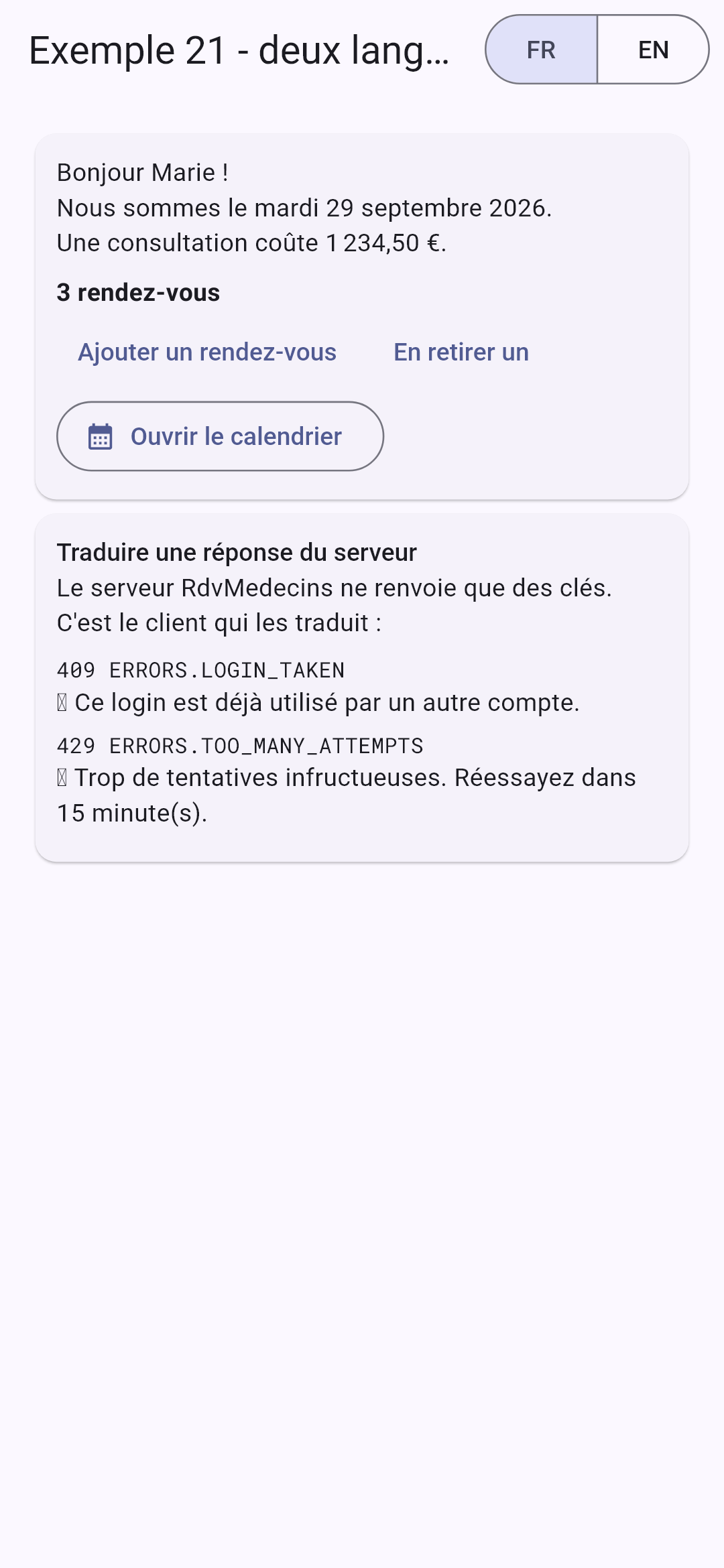
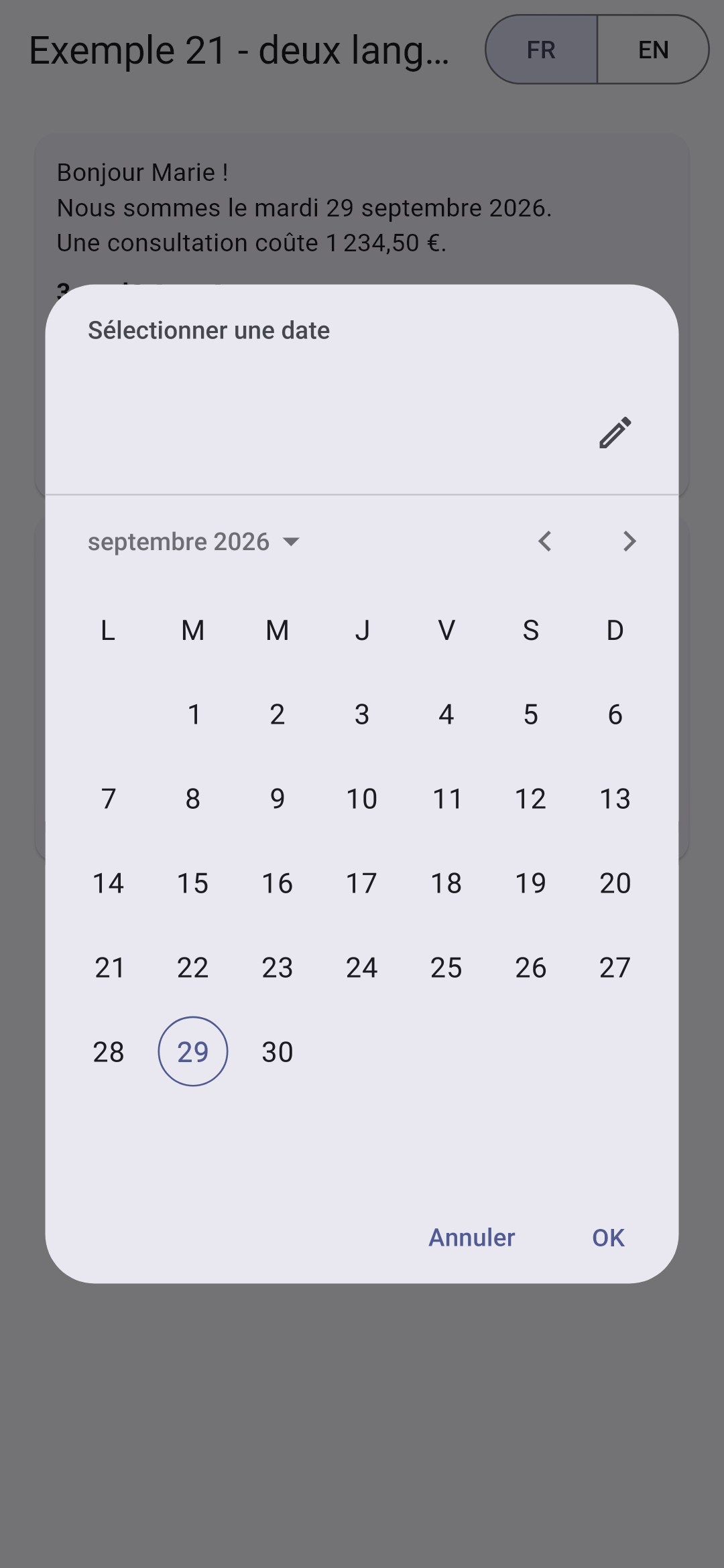
In English (left); in French, after an addition (middle); the calendar, in French (right):
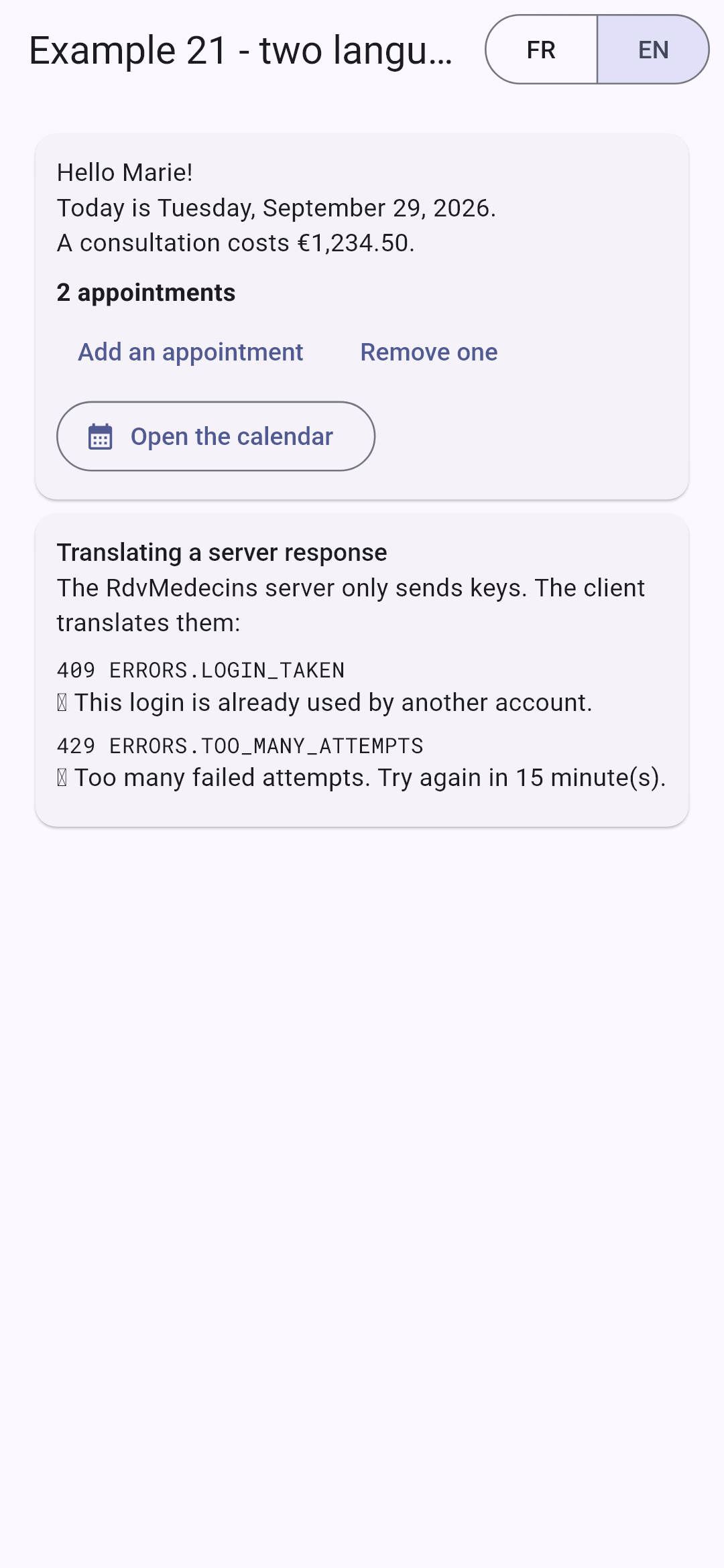
Changing the language re-renders the entire screen without restarting or making any requests to the server. The selected language is stored on the device.