9. Communicating with the server
The JSON [RdvMedecins] server must now be started (port 8080), as explained in the previous chapter.
9.1. Example 22: A First HTTP Request
9.1.1. Where is the server?
For a web client served by the server itself, the question doesn’t arise: requests are sent to the same origin as the page, using a relative address ([/api/captcha]). A mobile app doesn’t have an origin: you must provide it with the server’s full address. And this address depends on where the app is running:
| // =========================================================================
// lib/common/config.dart - WHERE is the JSON server?
// -------------------------------------------------------------------------
// The question does not arise for a web application served by the
// server itself: the requests go to the SAME origin as the page
// (a relative address, /api/...). But a MOBILE application has no
// origin: it must be given the complete address of the server.
// - the Android emulator sees the computer that runs it at
// the address 10.0.2.2 (localhost, for it, is the emulator itself);
// - a real phone, connected to the same Wi-Fi network as the computer, must
// use the address of the computer on this network (192.168.1.20...):
// it is given when the application is launched:
// flutter run --dart-define=SERVER=http://192.168.1.20:8080 ...
// - in web development (flutter run -d chrome), Flutter's development
// server forwards the /api requests to the JSON server
// (web_dev_config.yaml file): a relative address is enough;
// - on a computer (Windows, macOS, Linux): localhost.
// =========================================================================
import 'package:flutter/foundation.dart';
// the value given by --dart-define=SERVER=..., '' by default.
// String.fromEnvironment is evaluated at COMPILE time: it is a constant
const _forcedServer = String.fromEnvironment('SERVER');
class Config {
// kIsWeb: true if the application runs in a browser;
// defaultTargetPlatform: the system (android, iOS, windows...)
static String serverUrl = _forcedServer.isNotEmpty
? _forcedServer
: kIsWeb
? '' // same origin: relative addresses
: defaultTargetPlatform == TargetPlatform.android
? 'http://10.0.2.2:8080'
: 'http://localhost:8080';
}
|
- line 24: an address provided when the app launches, via the option [--dart-define]: [flutter run --dart-define=SERVER=http://192.168.1.20:8080 ...]. [String.fromEnvironment] is evaluated at compile time: it is a constant, “”, if the option is not provided;
- Lines 29–35: otherwise, a default address, depending on the platform. [kIsWeb] is true if the application is running in a browser; [defaultTargetPlatform] indicates which system it is running on ([TargetPlatform.android], [TargetPlatform.windows]...):
- on the web: a relative address (''), the same origin as the application;
- on the emulator [Android]: [http://10.0.2.2:8080]. The emulator is a standalone machine with its own network: to the emulator, [localhost] refers to the emulator itself. The special address [10.0.2.2] refers to the computer running it;
- on a computer ([Windows]...): [http://localhost:8080].
A real phone, connected to the same Wi-Fi network as the server computer, must use the computer’s address on that network (the command [ipconfig] from [Windows] provides it): this is passed via [--dart-define]. The computer’s firewall must also allow incoming connections on port 8080.
Two settings in the [Android] project are required, in the [android/app/src/main/AndroidManifest.xml] file:
| <manifest xmlns:android="http://schemas.android.com/apk/res/android">
<!-- network access (the JSON server) -->
<uses-permission android:name="android.permission.INTERNET" />
<application
android:label="examples_flutter"
android:name="${applicationName}"
android:icon="@mipmap/ic_launcher"
android:usesCleartextTraffic="true">
|
- line 3: permission to use the network. During development, [Flutter] adds this automatically (for hot reloading); it must be explicitly declared for the released application;
- Line 8: Starting with version 9 of [Android], an application is only allowed to communicate via HTTPS. Our development server uses HTTP (“unencrypted”): we allow this. In production, the server would use HTTPS, and this line would be removed.
And for the web: the [Flutter] ([flutter run -d chrome]) development server serves the application on its own port; the JSON server, on the other hand, is on port 8080. These are two different origins: the browser would refuse to include the cookie in requests and even to read it in responses (the server does not allow requests from a different origin, namely “CORS”). The [web_dev_config.yaml] file configures the [Flutter] web development server (since version 3.38):
| # ==========================================================================
# web_dev_config.yaml - Flutter's WEB development server
# --------------------------------------------------------------------------
# flutter run -d chrome serves the application on http://localhost:5173 and
# forwards every /api/... request to the RdvMedecins JSON server (port 8080):
# for the browser, the application and the API have the SAME origin (no
# CORS, and the token cookie travels). Examples 22 to 25.
# ==========================================================================
server:
host: localhost
port: 5173
proxy:
- target: "http://localhost:8080/"
prefix: "/api/"
|
- line 12: the web application is served on port 5173;
- lines 13–15: a proxy: any request to an address beginning with [/api/] is forwarded to the JSON server (port 8080), and its response is sent back to the browser. To the browser, the application and API have the same origin. This is exactly the role of the [Vite] proxy in the [React] course.
9.1.2. The request
| // =========================================================================
// lib/ex22_http/main.dart - a first HTTP request to the server
// -------------------------------------------------------------------------
// The RdvMedecins JSON server must be started (port 8080). We ask it for
// a captcha: GET /api/captcha -> { "id": "...", "svg": "<svg ...>" }.
//
// - http.get(uri): the function of the http package that sends a
// GET request. It returns a Future of the response (http.Response): its status
// code (statusCode), its headers (headers), its body (body);
// - jsonDecode(text): the JSON body -> Dart objects (Map, List...);
// - the address of the server depends on where the application runs
// (Android emulator, phone, browser...): see common/config.dart;
// - three states to display: in progress, succeeded, failed;
// - the image of the captcha is SVG: the flutter_svg package can draw it.
// =========================================================================
import 'dart:convert';
import 'package:flutter/material.dart';
import 'package:flutter_svg/flutter_svg.dart';
import 'package:http/http.dart' as http;
import '../common/config.dart';
void main() {
runApp(
MaterialApp(
debugShowCheckedModeBanner: false,
theme: ThemeData(colorSchemeSeed: Colors.indigo),
home: const CaptchaPage(),
),
);
}
class CaptchaPage extends StatefulWidget {
const CaptchaPage({super.key});
@override
State<CaptchaPage> createState() => _CaptchaPageState();
}
class _CaptchaPageState extends State<CaptchaPage> {
// what GET /api/captcha returns: a record
({String id, String svg})? _captcha;
bool _loading = true;
String? _error;
int _requestCount = 0;
int _requestNumber = 0; // the number of the last request
@override
void initState() {
super.initState();
_load(); // the first request, as soon as the screen appears
}
Future<void> _load() async {
final number = ++_requestNumber;
setState(() {
_loading = true;
_error = null;
});
try {
final response = await http.get(Uri.parse('${Config.serverUrl}/api/captcha'));
// http.get does NOT throw an exception for an error response (4xx,
// 5xx): the status code is tested
if (response.statusCode != 200) {
throw Exception('the server answered ${response.statusCode} ${response.reasonPhrase}');
}
final json = jsonDecode(response.body) as Map<String, dynamic>;
// the response of an OUTDATED request (a new one was made meanwhile), or
// one that arrived after the screen was closed: it is ignored
if (!mounted || number != _requestNumber) return;
setState(() {
_captcha = (id: json['id'] as String, svg: json['svg'] as String);
_requestCount++;
_loading = false;
});
} catch (e) {
// no response at all (server stopped, wrong address...), or an error
if (!mounted || number != _requestNumber) return;
setState(() {
_error = '$e';
_captcha = null;
_loading = false;
});
}
}
@override
Widget build(BuildContext context) {
final captcha = _captcha;
return Scaffold(
appBar: AppBar(title: const Text('Example 22 - a first HTTP request')),
body: ListView(
padding: const EdgeInsets.all(16),
children: [
Text(
'Server: ${Config.serverUrl.isEmpty ? '(same origin)' : Config.serverUrl}',
style: const TextStyle(color: Colors.grey),
),
const SizedBox(height: 12),
if (_loading) const LinearProgressIndicator(),
if (_error != null)
Card(
color: Colors.red.shade50,
child: Padding(
padding: const EdgeInsets.all(12),
child: Text(
'Unable to get a captcha: $_error.\n'
'Is the RdvMedecins JSON server started (port 8080)?',
),
),
),
if (captcha != null && !_loading) ...[
// SvgPicture.string: drawing an SVG image given as text
Container(
padding: const EdgeInsets.all(4),
decoration: BoxDecoration(
border: Border.all(color: Colors.grey.shade300),
borderRadius: BorderRadius.circular(6),
),
child: SvgPicture.string(captcha.svg, height: 60),
),
const SizedBox(height: 8),
Text('id: ${captcha.id}', style: const TextStyle(fontFamily: 'RobotoMono', fontSize: 11)),
],
const SizedBox(height: 12),
Align(
alignment: Alignment.centerLeft,
child: FilledButton(onPressed: _loading ? null : _load, child: const Text('Another image')),
),
const SizedBox(height: 8),
Text('$_requestCount successful request(s)', style: const TextStyle(color: Colors.grey)),
],
),
);
}
}
|
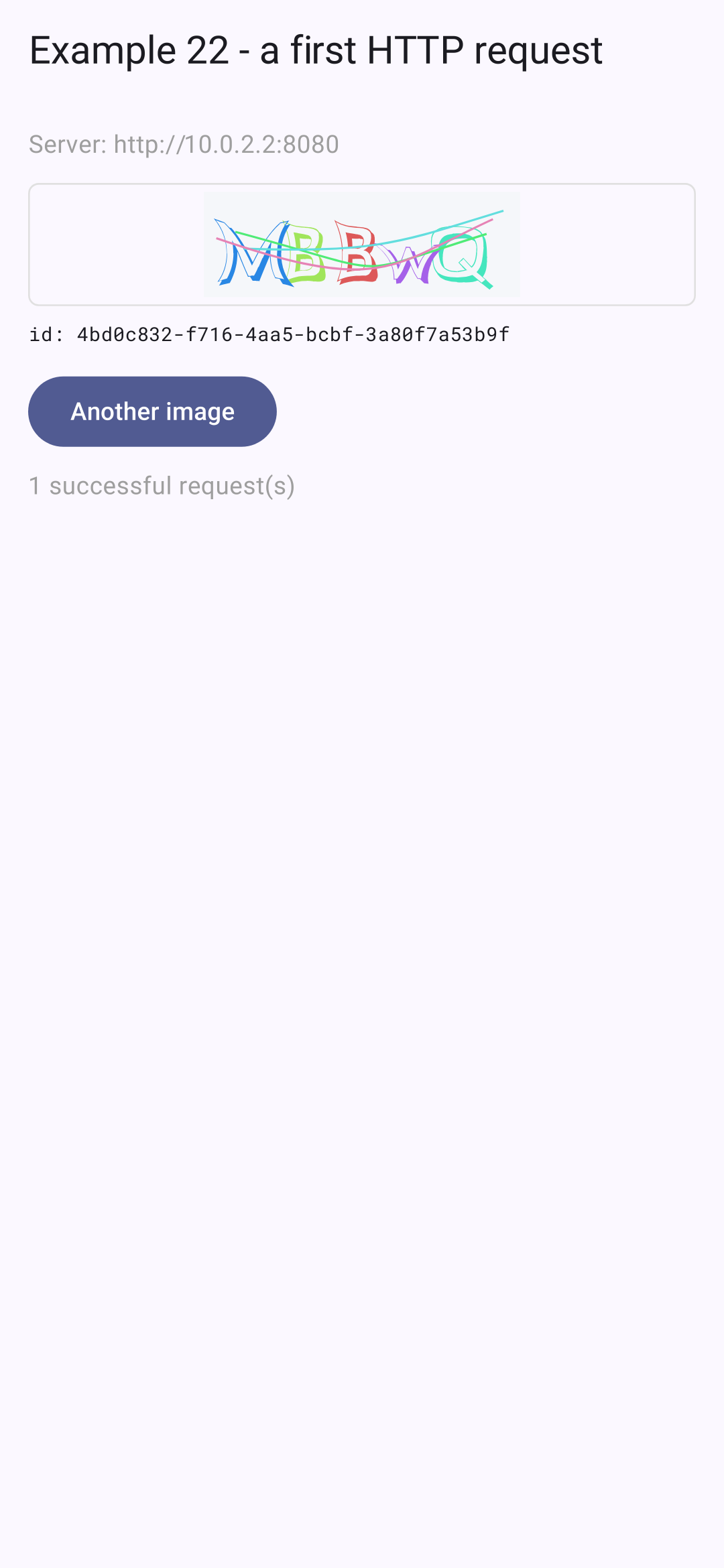
- line 21: the [http] package, the HTTP client from the [Dart] team. [as http]: Its functions are used with a prefix ([http.get], [http.Response]), which prevents their names from being confused with others;
- lines 44–48: the status: the received CAPTCHA (a record, or [null]), the three states of a request (in progress, error, successful), the number of successful requests;
- lines 51–53: the first request is sent as soon as the screen appears;
- lines 56–84: the request:
- line 63: [http.get] sends a GET request and later returns a [Future<http.Response>]: the response. [Uri.parse] constructs the address from a string;
- lines 66–67: [http.get] does NOT throw an exception for an error response (4xx, 5xx): it’s just another response. We check its status code;
- line 69: [response.body] is the body of the response, the text; [jsonDecode] converts it into [Dart] objects: in this case, a [Map];
- line 72: the response to an OUTDATED request (an image was requested again in the meantime), or one that arrives after the screen has closed, is ignored (see Example 19);
- line 74: JSON is of type [dynamic]: each value is converted to its corresponding type, resulting in [as];
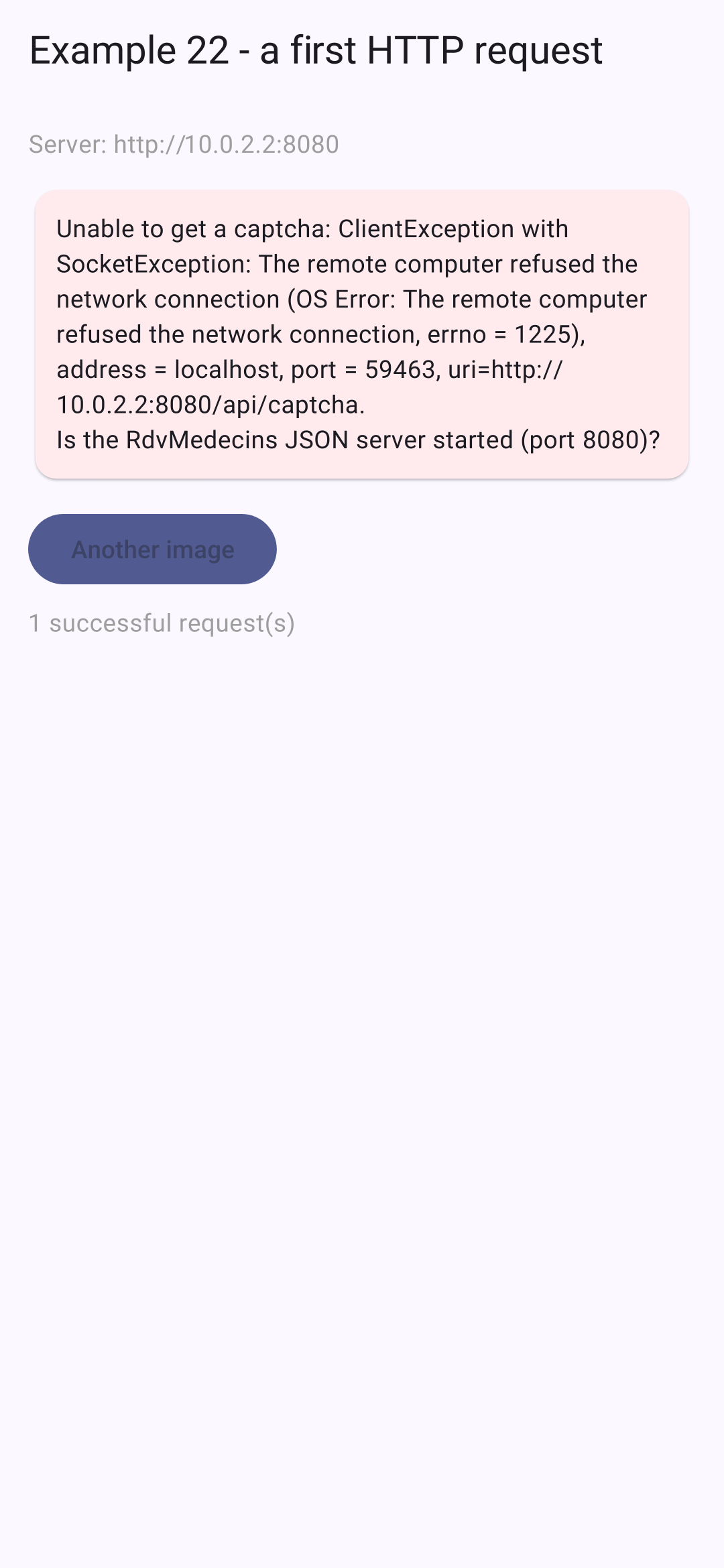
- lines 78–82: no response at all (server down, incorrect address, network disconnected): [http.get] throws an exception, which is caught and displayed;
- line 102: a progress bar during the request;
- line 122: the CAPTCHA image is from SVG, in text form: [SvgPicture.string] (package [flutter_svg]) renders it. It is generated by OUR server and contains nothing provided by a user;
- line 130: “Another image,” disabled during a request.
On the [Android] emulator; then, with the JSON server shut down:
The [Flutter DevTools] tool (launched by [VS Code], or via the address provided by [flutter run]) has a Network tab that displays each HTTP request from the application, along with its headers and body, similar to a browser’s developer tools.
9.2. Example 23: Login, Cookie, and Session
9.2.1. An HTTP client that handles cookies
The server stores the JWT token in a cookie. In a browser, the browser handles storing and sending cookies; the application code doesn’t need to do anything. On a phone, there is NO browser—it’s up to the application to handle this.
| // =========================================================================
// lib/common/http_client.dart - an HTTP client that handles COOKIES
// -------------------------------------------------------------------------
// The RdvMedecins server puts the JWT token in a COOKIE (httpOnly).
// In a browser, it is the browser that stores the cookies and sends them
// back with each request: the application code has nothing to do.
// On a phone, there is NO browser: it is up to the application to
// play its role, that is:
// 1. read the "Set-Cookie" header of each response, and store the cookies;
// 2. send them back in the "Cookie" header of each request.
// This HTTP client does it, by WRAPPING the client of the http package
// (http.BaseClient: writing the send method is enough). The cookies are
// also stored on the device (shared_preferences): we stay logged in
// when we stop and restart the application.
// On the web, it does nothing more than the ordinary client: the
// browser forbids the application to read or write these headers.
// =========================================================================
import 'dart:convert';
import 'package:flutter/foundation.dart';
import 'package:http/http.dart' as http;
import 'package:shared_preferences/shared_preferences.dart';
class CookieClient extends http.BaseClient {
static const _key = 'rdvmedecins.cookies';
final http.Client _inner = http.Client();
final SharedPreferences? _storage;
// cookie name -> its value
final Map<String, String> _cookies = {};
CookieClient([this._storage]) {
// the cookies stored during a previous use
final stored = _storage?.getString(_key);
if (stored != null) {
_cookies.addAll((jsonDecode(stored) as Map<String, Object?>).cast<String, String>());
}
}
@override
Future<http.StreamedResponse> send(http.BaseRequest request) async {
if (!kIsWeb && _cookies.isNotEmpty) {
// "rdvmedecins_jwt=eyJhbGci...; other=value"
request.headers['cookie'] = [for (final MapEntry(:key, :value) in _cookies.entries) '$key=$value'].join('; ');
}
final response = await _inner.send(request);
final setCookie = response.headers['set-cookie'];
if (!kIsWeb && setCookie != null) {
_store(setCookie);
}
return response;
}
// Set-Cookie: rdvmedecins_jwt=eyJ...; Max-Age=7200; Path=/api; Expires=Tue, 29 Sep 2026 ...; HttpOnly
// (several cookies are separated by commas). We only keep the
// name and the value of each cookie; an empty value (logout) deletes it
void _store(String setCookie) {
// a name followed by "=", at the start of the header or after a comma
for (final m in RegExp(r'(?:^|,)\s*([^=;,\s]+)=([^;]*)').allMatches(setCookie)) {
final name = m[1]!;
final value = m[2]!.trim();
if (value.isEmpty) {
_cookies.remove(name);
} else {
_cookies[name] = value;
}
}
_storage?.setString(_key, jsonEncode(_cookies));
}
@override
void close() => _inner.close();
}
|
- Line 25: The [http] package allows you to wrap your client: You inherit from [http.BaseClient], and all you need to do is implement the [send] method, through which all requests pass ([get], [post]...);
- lines 28–31: the wrapped client, the device’s storage (optional: [?]), and the cookies (name → value);
- lines 33–37: upon creation, the cookies stored during a previous use of the app. This keeps you logged in when you close and then reopen the app: on a phone, this is equivalent to a browser retaining its cookies from one visit to the next;
- lines 42–52: Each request receives the header [Cookie] (“rdvmedecins_jwt=eyJhbGci...; other=value”), then the [Set-Cookie] header from the response is read. [kIsWeb]: On the web, the app does nothing more than a regular client, because the browser prevents the app from reading or writing these headers (it handles them itself);
- lines 58–69: the [Set-Cookie] header. Several cookies are separated by commas, but the date [Expires] itself contains a comma (“Tue, 29 Sep 2026”): the regular expression matches only a name followed by [=], either at the beginning of the header or after a comma. Only the name and value of each cookie are retained; an empty value (logout: the server sends [rdvmedecins_jwt=; Expires=Thu, 01 Jan 1970...]) deletes the cookie. [_storage?.setString(...)]: The call is made only if [_storage] is not [null].
More comprehensive cookie management (domains, paths, expiration dates) is available in packages ([cookie_jar], with the client [dio]); our implementation, consisting of just a few lines, is sufficient for ONE server. Security note: The token is stored in plain text on the device here. A production application would use the [flutter_secure_storage] package (see Example 20).
9.2.2. A command
| // =========================================================================
// lib/ex23_login/command.dart - an ACTION, its state, its result
// -------------------------------------------------------------------------
// An asynchronous action (logging in, saving...) has a state that
// the screen must show: is it IN PROGRESS (button disabled, indicator)?
// did it end with an ERROR (message)? It is the "Command" pattern
// of Flutter's architecture guide, reduced to the essentials:
//
// final login = Command();
// login.execute(() => logIn(...)); // launches the action
// login.running, login.error // its state
//
// A Command is a ChangeNotifier: the screen listens to it (ListenableBuilder)
// and redraws itself when it starts and when it ends.
// =========================================================================
import 'package:flutter/foundation.dart';
class Command extends ChangeNotifier {
bool _running = false;
Object? _error;
bool get running => _running;
Object? get error => _error;
// executes the action, if another one is not already running
Future<void> execute(Future<void> Function() action) async {
if (_running) return; // no double send (double tap on the button)
_running = true;
_error = null;
notifyListeners();
try {
await action();
} catch (e) {
_error = e; // the error is KEPT, to be displayed
} finally {
// finally: executed in ALL cases, success or error
_running = false;
notifyListeners();
}
}
void clearError() {
_error = null;
notifyListeners();
}
}
|
An asynchronous action (log in, save, etc.) has a status that the screen must display: is it in progress (button disabled)? Did it end with an error (message)? This is the “Command” model from the [Flutter] architecture guide, stripped down to the essentials. The [React] course used the “actions” from [React] 19 ([useActionState]) for this purpose.
- Lines 27–39: Execute an action: if another action is in progress, do nothing (to prevent double-sending if the button is pressed twice); otherwise, the command changes to “in progress” and notifies its listeners; in the event of an exception, the error is logged for display; in all cases ([finally]), the command is no longer in progress.
9.2.3. The screen
| // =========================================================================
// lib/ex23_login/main.dart - logging in to the RdvMedecins server
// -------------------------------------------------------------------------
// 1. at startup: GET /api/auth/me - are we already logged in?
// (the application may have been stopped; the server, for its part, reads the cookie
// that is presented to it);
// 2. login: POST /api/auth/login, JSON body { login, password,
// captchaId, captcha }. On success, the server sends the cookie
// of the JWT token (Set-Cookie header);
// 3. protected request: GET /api/doctors. The cookie goes with it;
// 4. logout: POST /api/auth/logout - the server clears the cookie.
// On the phone, it is CookieClient (common/http_client.dart) that
// stores the cookie and sends it back; on the web, it is the browser.
// =========================================================================
import 'dart:convert';
import 'package:flutter/material.dart';
import 'package:flutter_svg/flutter_svg.dart';
import 'package:http/http.dart' as http;
import 'package:shared_preferences/shared_preferences.dart';
import '../common/http_client.dart';
import '../common/config.dart';
import 'command.dart';
// the few messages this example needs (example 25 will use dictionaries)
const messages = {
'LOGIN.ERROR': 'Incorrect login or password.',
'ERRORS.WRONG_CAPTCHA': 'The characters you typed do not match the image.',
'ERRORS.TOO_MANY_ATTEMPTS': 'Too many failed attempts. Try again later.',
};
Future<void> main() async {
WidgetsFlutterBinding.ensureInitialized();
final client = CookieClient(await SharedPreferences.getInstance());
runApp(
MaterialApp(
debugShowCheckedModeBanner: false,
theme: ThemeData(colorSchemeSeed: Colors.indigo),
home: LoginPage(client: client),
),
);
}
// a response that is not a 2xx becomes an exception, which keeps the response
class ErrorResponse implements Exception {
final http.Response response;
const ErrorResponse(this.response);
}
class LoginPage extends StatefulWidget {
final http.Client client;
const LoginPage({super.key, required this.client});
@override
State<LoginPage> createState() => _LoginPageState();
}
class _LoginPageState extends State<LoginPage> {
Map<String, dynamic>? _user; // null: nobody is logged in
List<dynamic> _doctors = [];
Map<String, dynamic>? _captcha;
bool _ready = false; // is the initial check finished?
String? _serverError;
final _loginCommand = Command();
final _login = TextEditingController(text: 'admin');
final _password = TextEditingController();
final _captchaAnswer = TextEditingController();
@override
void initState() {
super.initState();
_checkSession();
}
@override
void dispose() {
_loginCommand.dispose();
_login.dispose();
_password.dispose();
_captchaAnswer.dispose();
super.dispose();
}
Uri _url(String path) => Uri.parse('${Config.serverUrl}/api$path');
// a GET request whose JSON body we want; an exception if it is not a 2xx
Future<dynamic> _read(String path) async {
final response = await widget.client.get(_url(path));
if (response.statusCode >= 300) throw ErrorResponse(response);
return jsonDecode(utf8.decode(response.bodyBytes));
}
// a POST with a JSON body
Future<http.Response> _post(String path, Object body) {
return widget.client.post(
_url(path),
headers: {'content-type': 'application/json'}, // the body is JSON
body: jsonEncode(body),
);
}
Future<void> _loadCaptcha() async {
final captcha = await _read('/captcha') as Map<String, dynamic>;
_captchaAnswer.clear();
if (mounted) setState(() => _captcha = captcha);
}
Future<void> _loadDoctors() async {
final doctors = await _read('/doctors') as List<dynamic>;
if (mounted) setState(() => _doctors = doctors);
}
// 1. who is logged in? 200 -> the user; 401 -> nobody
Future<void> _checkSession() async {
try {
final user = await _read('/auth/me') as Map<String, dynamic>;
setState(() => _user = user);
await _loadDoctors();
} on ErrorResponse catch (e) {
// "on Type catch": catches ONLY this type of exception
if (e.response.statusCode == 401) {
await _loadCaptcha();
} else {
_serverError = 'The server answered ${e.response.statusCode}.';
}
} catch (_) {
_serverError = 'Is the RdvMedecins JSON server started (${Config.serverUrl})?';
}
if (mounted) setState(() => _ready = true);
}
// 2. the login: an action executed by the Command, which stores its error
Future<void> _logIn() async {
final response = await _post('/auth/login', {
'login': _login.text.trim(),
'password': _password.text,
'captchaId': _captcha?['id'],
'captcha': _captchaAnswer.text,
});
if (response.statusCode != 200) {
// the JSON body of the error response: { statusCode, key, ... }
final error = jsonDecode(response.body) as Map<String, dynamic>;
final key = error['key'] as String;
await _loadCaptcha(); // each image is only used once
throw '${response.statusCode} - ${messages[key] ?? key}'; // one can throw... a string
}
_password.clear();
setState(() => _user = jsonDecode(response.body) as Map<String, dynamic>);
await _loadDoctors();
}
// 4. the logout
Future<void> _logOut() async {
await _post('/auth/logout', {});
setState(() {
_user = null;
_doctors = [];
});
await _loadCaptcha();
}
@override
Widget build(BuildContext context) {
final Widget content;
final user = _user;
if (!_ready) {
content = const Text('Checking the session...', style: TextStyle(color: Colors.grey));
} else if (user != null) {
// logged in
content = Card(
child: Padding(
padding: const EdgeInsets.all(12),
child: Column(
crossAxisAlignment: CrossAxisAlignment.start,
children: [
Text.rich(
TextSpan(
children: [
const TextSpan(text: 'Logged in: '),
TextSpan(
text: '${user['name']}',
style: const TextStyle(fontWeight: FontWeight.bold),
),
TextSpan(text: ' (${user['login']}), role ${user['role']}'),
],
),
),
const SizedBox(height: 8),
Text('GET /api/doctors', style: Theme.of(context).textTheme.titleSmall),
for (final m in _doctors) Text('• ${m['title']} ${m['firstName']} ${m['lastName']}'),
const SizedBox(height: 8),
const Text(
'Stop then restart the application: you remain logged in.',
style: TextStyle(color: Colors.grey),
),
const SizedBox(height: 8),
OutlinedButton(onPressed: _logOut, child: const Text('Log out')),
],
),
),
);
} else if (_serverError == null) {
// not logged in: the form
content = Card(
child: Padding(
padding: const EdgeInsets.all(12),
child: Column(
crossAxisAlignment: CrossAxisAlignment.start,
children: [
TextField(
controller: _login,
decoration: const InputDecoration(labelText: 'Login'),
),
TextField(
controller: _password,
obscureText: true,
decoration: const InputDecoration(labelText: 'Password'),
),
const SizedBox(height: 12),
Row(
children: [
if (_captcha != null) SvgPicture.string('${_captcha!['svg']}', height: 50),
TextButton(onPressed: _loadCaptcha, child: const Text('Another image')),
],
),
TextField(
controller: _captchaAnswer,
autocorrect: false,
decoration: const InputDecoration(labelText: 'Type the characters of the image'),
),
const SizedBox(height: 16),
// ListenableBuilder: this piece follows the state of the command
ListenableBuilder(
listenable: _loginCommand,
builder: (context, _) => Column(
crossAxisAlignment: CrossAxisAlignment.start,
children: [
FilledButton(
onPressed: _loginCommand.running ? null : () => _loginCommand.execute(_logIn),
child: Text(_loginCommand.running ? 'Logging in...' : 'Log in'),
),
if (_loginCommand.error != null)
Padding(
padding: const EdgeInsets.only(top: 12),
child: Text('${_loginCommand.error}', style: const TextStyle(color: Colors.red)),
),
],
),
),
const SizedBox(height: 8),
const Text(
'Accounts: admin, pelissier, martin... (password = login).',
style: TextStyle(color: Colors.grey, fontSize: 12),
),
],
),
),
);
} else {
content = const SizedBox.shrink(); // an "empty" widget
}
return Scaffold(
appBar: AppBar(title: const Text('Example 23 - logging in to the server')),
body: ListView(
padding: const EdgeInsets.all(16),
children: [
content,
if (_serverError != null)
Card(
color: Colors.red.shade50,
child: Padding(padding: const EdgeInsets.all(12), child: Text(_serverError!)),
),
],
),
);
}
}
|
- lines 36–41: The HTTP client, which stores its cookies on the device, is created at startup and passed to the screen;
- lines 47–49: an exception that captures the response as an error (its status code can be read there). [implements Exception]: an object that can be thrown ([throw]);
- lines 90–93: a request (GET) from which we want the body (JSON), and an exception if the status code is not a 2xx. [widget.client.get(...)]: the client with cookies. [utf8.decode(response.bodyBytes)]: the body decoded to UTF-8 (the accents), regardless of what the response header says;
- lines 97–101: a POST: the header is [content-type: application/json] and the body is in JSON (the server rejects a POST that is not in JSON);
- Lines 117–132: 1. At startup: Who is connected? [GET /api/auth/me]: 200, the user; 401, no one. [on ErrorResponse catch (e)] catches ONLY this type of exception; the next one, [catch], all the others (no response at all);
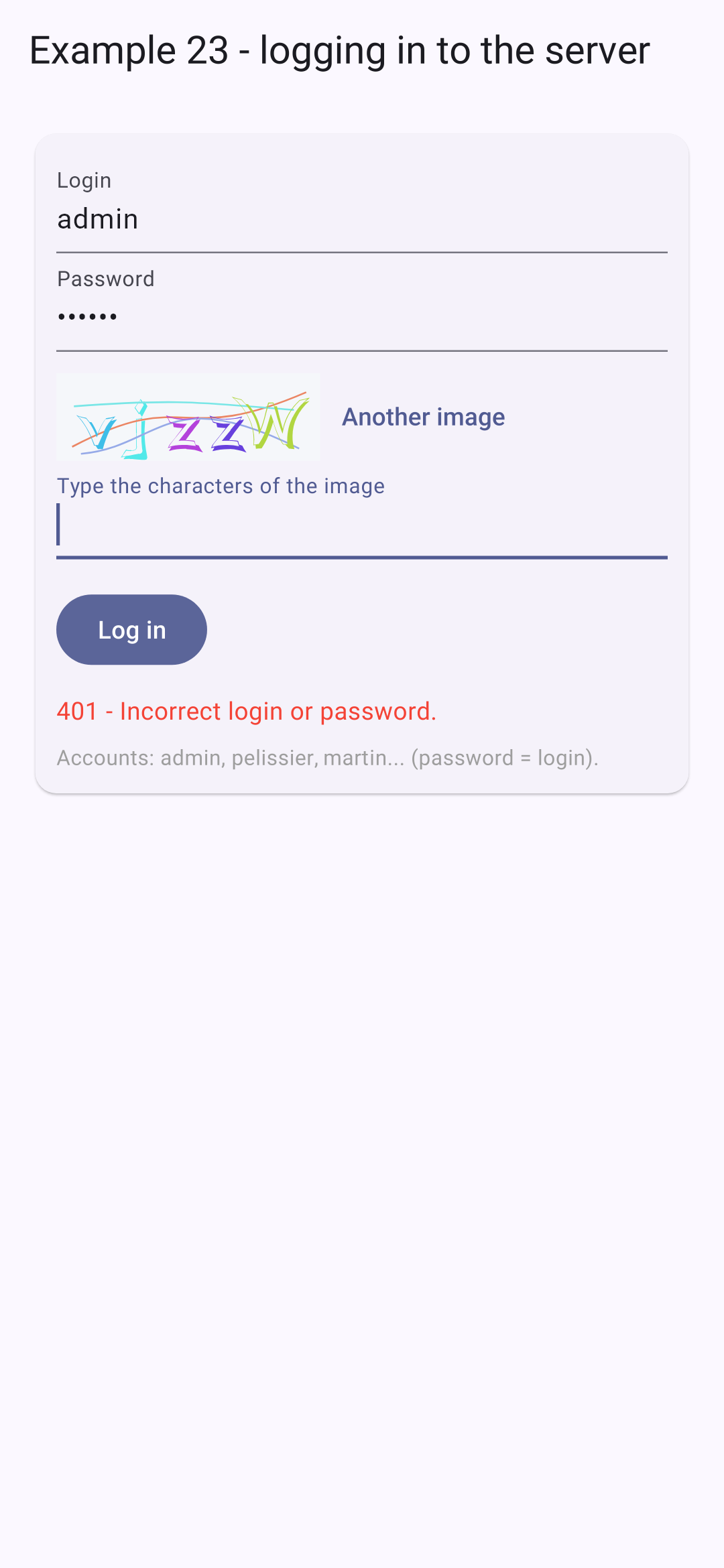
- lines 136–152: 2. connection: [POST /api/auth/login]. If the request is rejected, the body of the error response provides the message key; a new image is loaded (each one is used only once), then the message is thrown: in [Dart], any object can be thrown—in this case, a string. It is the command that captures and stores it;
- lines 156–162: 4. Logout: [POST /api/auth/logout]; the server deletes the cookie (and the client deletes its cookies as well);
- lines 193–197: 3. logged in: the list of doctors ([GET /api/doctors], a protected request: the cookie accompanies it);
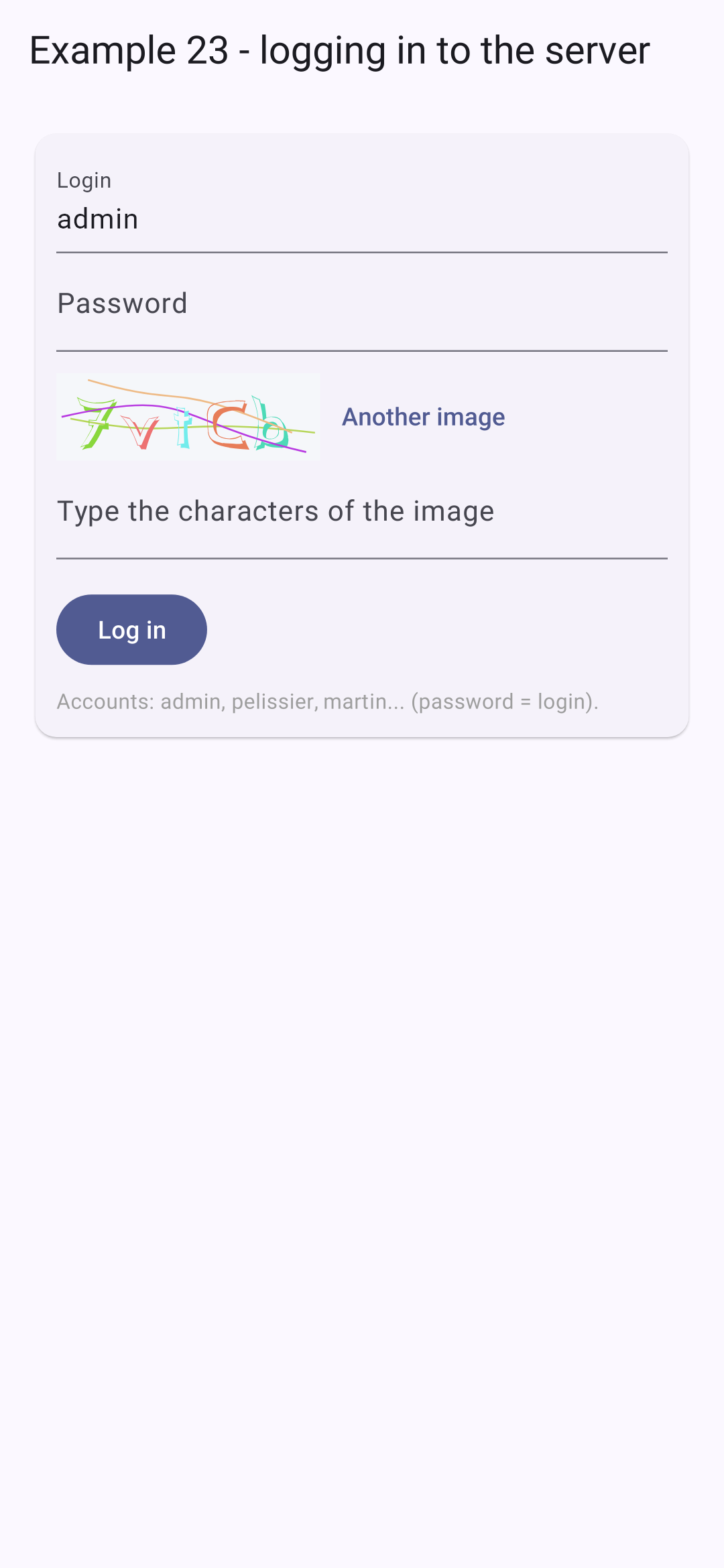
- lines 225–226: the CAPTCHA and its button;
- lines 236–248: the button reflects the status of the request: disabled and “Logging in...” while the request is being sent; any error message appears below.
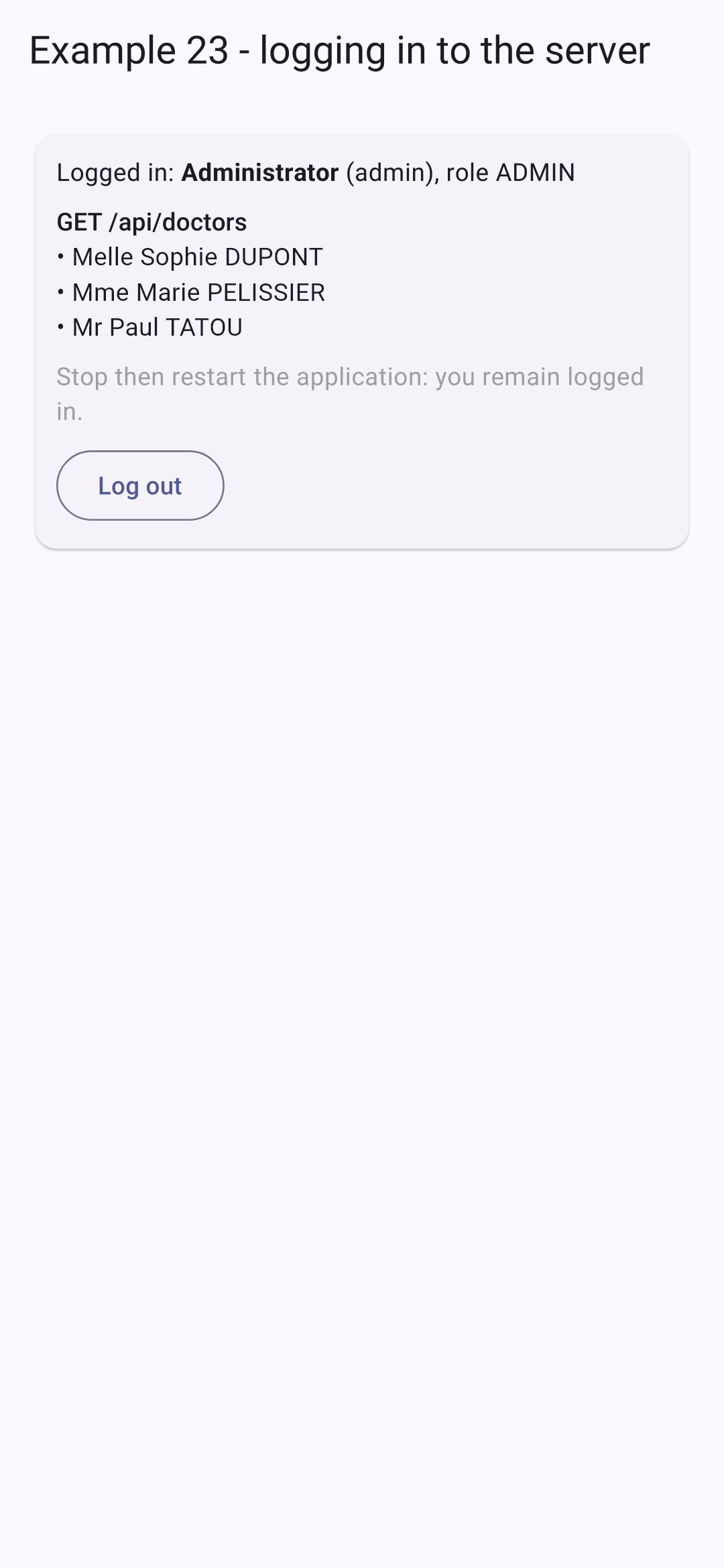
The login screen; an incorrect password; successful login:
Close and then restart the application: it will start up logged in. The cookie, stored on the device, is presented to [GET /api/auth/me], and the server responds with the user’s credentials. The token expires after two hours: [GET /api/auth/me] will then return a 401 response, and the login screen will reappear.
9.3. Example 24: An API Access Layer
In Example 23, each request repeated the same steps. This example organizes them into three layers, which the case study will revisit.
9.3.1. The types
| // =========================================================================
// lib/common/types.dart - the JSON objects exchanged with the RdvMedecins API
// (see the chapter on the black box, which describes each route)
// -------------------------------------------------------------------------
// The decoded JSON is not typed: Map<String, dynamic>, List...
// Each class has a "factory" constructor fromJson that CHECKS the shape
// of the received JSON, with Dart 3 "pattern matching":
//
// switch (json) {
// {'login': String login, 'name': String name} => ... // the expected shape
// _ => throw FormatException(...) // everything else
// }
//
// The pattern {'login': String login, ...} checks that json is a Map, that
// these keys exist, that their values have the right type, and stores these
// values in variables. An unexpected response is detected
// immediately, and not later, in the middle of the display.
// =========================================================================
enum Role { admin, doctor, user }
// "ADMIN" -> Role.admin
Role _role(String name) => Role.values.byName(name.toLowerCase());
// POST /api/auth/login, GET /api/auth/me
class User {
final String login;
final String name;
final Role role;
const User(this.login, this.name, this.role);
factory User.fromJson(Object? json) => switch (json) {
{'login': final String login, 'name': final String name, 'role': final String role} => User(
login,
name,
_role(role),
),
_ => throw FormatException('unexpected User: $json'),
};
}
// GET /api/captcha
class Captcha {
final String id;
final String svg;
const Captcha(this.id, this.svg);
factory Captcha.fromJson(Object? json) => switch (json) {
{'id': final String id, 'svg': final String svg} => Captcha(id, svg),
_ => throw FormatException('unexpected Captcha: $json'),
};
}
// a doctor or a client (GET /api/doctors, GET /api/clients...)
class Person {
final int id;
final int version;
final String title;
final String firstName;
final String lastName;
final String? login; // only for the ADMIN
const Person(this.id, this.version, this.title, this.firstName, this.lastName, [this.login]);
factory Person.fromJson(Object? json) => switch (json) {
{
'id': final int id,
'version': final int version,
'title': final String title,
'firstName': final String firstName,
'lastName': final String lastName,
} =>
// the "login" key is optional: it is read separately
Person(id, version, title, firstName, lastName, (json as Map<String, Object?>)['login'] as String?),
_ => throw FormatException('unexpected Person: $json'),
};
// a JSON list -> a list of persons
static List<Person> list(Object? json) => [for (final p in json as List<Object?>) Person.fromJson(p)];
String get fullName => '$title $firstName $lastName';
}
// the name of a person, and nothing else
class Identity {
final String title;
final String firstName;
final String lastName;
const Identity(this.title, this.firstName, this.lastName);
factory Identity.fromJson(Object? json) => switch (json) {
{'title': final String title, 'firstName': final String firstName, 'lastName': final String lastName} => Identity(
title,
firstName,
lastName,
),
_ => throw FormatException('unexpected Identity: $json'),
};
@override
String toString() => '$title $firstName $lastName';
}
// a line of GET /api/schedule
class ScheduleSlot {
final int id;
final int startHour;
final int startMinute;
final int endHour;
final int endMinute;
final bool free;
final Identity? patient;
final bool mine;
final bool bookable;
final int? appointmentId;
const ScheduleSlot(
this.id,
this.startHour,
this.startMinute,
this.endHour,
this.endMinute,
this.free,
this.patient,
this.mine,
this.bookable,
this.appointmentId,
);
factory ScheduleSlot.fromJson(Object? json) => switch (json) {
{
'id': final int id,
'startHour': final int startHour,
'startMinute': final int startMinute,
'endHour': final int endHour,
'endMinute': final int endMinute,
'free': final bool free,
'patient': final Object? patient,
'mine': final bool mine,
'bookable': final bool bookable,
'appointmentId': final int? appointmentId,
} =>
ScheduleSlot(
id,
startHour,
startMinute,
endHour,
endMinute,
free,
patient == null ? null : Identity.fromJson(patient),
mine,
bookable,
appointmentId,
),
_ => throw FormatException('unexpected ScheduleSlot: $json'),
};
// "8:00 - 8:20"
String get timeRange {
String hm(int h, int m) => '$h:${m.toString().padLeft(2, '0')}';
return '${hm(startHour, startMinute)} - ${hm(endHour, endMinute)}';
}
}
// GET /api/schedule?doctorId=...&day=...
class Schedule {
final Person doctor;
final String day;
final List<ScheduleSlot> slots;
final String? info;
const Schedule(this.doctor, this.day, this.slots, this.info);
factory Schedule.fromJson(Object? json) => switch (json) {
{
'doctor': final Object doctor,
'day': final String day,
'slots': final List<Object?> slots,
'info': final String? info,
} =>
Schedule(Person.fromJson(doctor), day, [for (final c in slots) ScheduleSlot.fromJson(c)], info),
_ => throw FormatException('unexpected Schedule: $json'),
};
}
|
The decoded JSON is untyped: [Map], [List], [dynamic]. Each class has a factory constructor [fromJson] that validates the format of the received JSON. A [factory] constructor does not necessarily create a new object: it is a function that returns an object of the class.
- Lines 33–39: [Dart] 3 pattern matching applied to JSON. The pattern [{'login': final String login, 'name': final String name, 'role': final String role}] verifies that [json] is a [Map], that these three keys exist, that their values are strings, and stores these values in three variables. If JSON has a different format, as is the case with [_], it is treated as an exception. An unexpected response is thus detected as soon as it is received, rather than later, in the middle of the display;
- line 23: “ADMIN” -> [Role.admin]: [byName] retrieves an enumeration value by its name;
- lines 67–76: the pattern checks for required keys; the optional key [login] is read separately;
- line 81: a list JSON -> a list of people;
- lines 133–144: [final Object? patient] accepts any value, including [null]; [final int? appointmentId], an integer, or [null];
- lines 162–164: a formatting getter.
9.3.2. Errors
| // =========================================================================
// lib/common/api_error.dart - ONE class for all the errors of the API
// -------------------------------------------------------------------------
// All the error responses of the RdvMedecins server have the same shape:
// { "statusCode": 409, "key": "ERRORS.LOGIN_TAKEN", "params": {...}, "fields": {...} }
// But a request can also fail OTHERWISE: no response at all
// (network down, server stopped, wrong address), or a response that does not
// come from our server (an error page of a proxy). We convert
// all of this into ONE class, ApiError, which carries the translation key
// sent by the server (and, if there are any, its parameters and the error of
// each field).
// =========================================================================
import 'dart:convert';
import 'package:http/http.dart' as http;
// "implements Exception": an object that can be thrown (throw) and caught (catch)
class ApiError implements Exception {
final int statusCode; // 0: the server did not respond
final String key; // e.g. 'ERRORS.LOGIN_TAKEN'
final Map<String, String> params;
final Map<String, String> fields;
const ApiError(this.statusCode, this.key, {this.params = const {}, this.fields = const {}});
// an error response (4xx, 5xx) -> an ApiError
factory ApiError.fromResponse(http.Response response) {
Object? body;
try {
body = jsonDecode(utf8.decode(response.bodyBytes));
} on FormatException {
body = null; // not JSON: it is not our server that responded
}
// the "pattern matching" of a Map: if the body has a key
// "key" of type String, it is stored in the variable key
if (body case {'key': final String key}) {
final json = body as Map<String, Object?>;
return ApiError(response.statusCode, key, params: _strings(json['params']), fields: _strings(json['fields']));
}
// no key: the proxy or the network responded in its place
return ApiError(
response.statusCode,
response.statusCode >= 500 ? 'ERRORS.SERVER_UNREACHABLE' : 'ERRORS.SERVER_ERROR',
);
}
// a JSON object { "name": "ERRORS..." } -> Map<String, String> (empty otherwise)
static Map<String, String> _strings(Object? json) =>
json is Map<String, Object?> ? {for (final e in json.entries) e.key: '${e.value}'} : const {};
@override
String toString() => '$statusCode $key';
}
|
All error responses from the server have the same format. However, a request may also fail OTHERWISE: no response at all, or a response that does not come from our server. We convert all of this into ONE class, [ApiError].
- Lines 19–23: a status (0: no response), a translation key, its parameters, and the error for each field;
- lines 28–44: an error response → an [ApiError]. [if (body case {'key': final String key})]: filtering in a [if] (“if-case”): if the body has a [key] key of type string, it is stored in the [key] variable. Otherwise, it was not our server that responded;
- line 53: “401 LOGIN.ERROR,” for quick display.
9.3.3. The requests
| // =========================================================================
// lib/common/api.dart - requests to the API, in one line
// -------------------------------------------------------------------------
// In example 23, each request repeated the same steps: address of the
// server, /api prefix, JSON header, test of the status code, reading of the
// error body... They are gathered here:
//
// final json = await api.get('/doctors');
// await api.post('/appointments', {'day': day, 'slotId': 3});
//
// - on success, the Future returns the JSON body, DECODED (Maps,
// Lists, Strings, numbers...);
// - on failure, it completes with an ApiError.
// All the requests go through the request method: it is the place where
// a problem COMMON to all of them would be handled (see the case study and the
// 401 response). Used by examples 24 and 25.
// =========================================================================
import 'dart:convert';
import 'package:http/http.dart' as http;
import 'config.dart';
import 'api_error.dart';
class Api {
final http.Client _client;
Api(this._client);
Future<Object?> request(String method, String url, [Object? body]) async {
final request = http.Request(method, Uri.parse('${Config.serverUrl}/api$url'));
if (body != null) {
// a JSON body (the server refuses a POST that does not have one)
request.headers['content-type'] = 'application/json';
request.body = jsonEncode(body);
}
final http.Response response;
try {
// send sends the request; fromStream waits for the complete body of the response
response = await http.Response.fromStream(await _client.send(request));
} catch (_) {
// NO response (network, server stopped, wrong address)
throw const ApiError(0, 'ERRORS.SERVER_UNREACHABLE');
}
if (response.statusCode >= 400) {
throw ApiError.fromResponse(response);
}
return response.bodyBytes.isEmpty ? null : jsonDecode(utf8.decode(response.bodyBytes));
}
Future<Object?> get(String url) => request('GET', url);
// a POST always has a JSON body: {} by default
Future<Object?> post(String url, [Object body = const {}]) => request('POST', url, body);
Future<Object?> put(String url, Object body) => request('PUT', url, body);
Future<Object?> delete(String url, [Object? body]) => request('DELETE', url, body);
}
|
- Lines 31–49: ALL requests go through this method: the server address and the prefix [/api], the body in JSON, the transmission ([_client.send], followed by [http.Response.fromStream], which waits for the complete body), errors converted to [ApiError], and the decoded response body. This is where we would handle a problem common to all requests (see the case study and the 401 response);
- lines 52–56: four shortcuts. A POST always has a body of JSON: [{}] by default.
9.3.4. A login bar
| // =========================================================================
// lib/common/login_bar.dart - logging in / out, in one bar
// -------------------------------------------------------------------------
// The form of example 23, reduced to a bar and rewritten with api.dart.
// The widget calls onUserChange with the logged-in user (or
// null) each time it changes - including at startup, after
// querying GET /api/auth/me. The Api object is read in the context
// (provided by provider, see the main of examples 24 and 25).
// =========================================================================
import 'package:flutter/material.dart';
import 'package:flutter_svg/flutter_svg.dart';
import 'package:provider/provider.dart';
import 'api.dart';
import 'api_error.dart';
import 'types.dart';
class LoginBar extends StatefulWidget {
final ValueChanged<User?> onUserChange;
const LoginBar({super.key, required this.onUserChange});
@override
State<LoginBar> createState() => _LoginBarState();
}
class _LoginBarState extends State<LoginBar> {
// late: read in the context, in initState
late final Api _api = context.read<Api>();
User? _user;
Captcha? _captcha;
final _login = TextEditingController(text: 'admin');
final _password = TextEditingController();
final _captchaAnswer = TextEditingController();
String? _error;
@override
void initState() {
super.initState();
_start();
}
@override
void dispose() {
_login.dispose();
_password.dispose();
_captchaAnswer.dispose();
super.dispose();
}
void _setUser(User? u) {
setState(() => _user = u);
widget.onUserChange(u);
}
Future<void> _newCaptcha() async {
final captcha = Captcha.fromJson(await _api.get('/captcha'));
_captchaAnswer.clear();
if (mounted) setState(() => _captcha = captcha);
}
// at startup: are we already logged in?
Future<void> _start() async {
try {
_setUser(User.fromJson(await _api.get('/auth/me')));
} on ApiError {
_setUser(null); // 401: nobody is logged in
try {
await _newCaptcha();
} on ApiError {
setState(() => _error = 'Is the JSON server started (port 8080)?');
}
}
}
Future<void> _logIn() async {
setState(() => _error = null);
try {
final u = User.fromJson(
await _api.post('/auth/login', {
'login': _login.text.trim(),
'password': _password.text,
'captchaId': _captcha?.id,
'captcha': _captchaAnswer.text,
}),
);
_password.clear();
_setUser(u);
} on ApiError catch (e) {
setState(() => _error = '$e'); // "401 LOGIN.ERROR"
await _newCaptcha();
}
}
Future<void> _logOut() async {
await _api.post('/auth/logout');
_setUser(null);
await _newCaptcha();
}
@override
Widget build(BuildContext context) {
final u = _user;
return Card(
color: Colors.blueGrey.shade50,
child: Padding(
padding: const EdgeInsets.all(8),
child: u != null
? Row(
children: [
const Icon(Icons.person),
const SizedBox(width: 8),
Expanded(child: Text('${u.name} (${u.role.name.toUpperCase()})')),
TextButton(onPressed: _logOut, child: const Text('Log out')),
],
)
: Column(
crossAxisAlignment: CrossAxisAlignment.start,
children: [
Row(
children: [
Expanded(
child: TextField(
controller: _login,
decoration: const InputDecoration(labelText: 'login', isDense: true),
),
),
const SizedBox(width: 8),
Expanded(
child: TextField(
controller: _password,
obscureText: true,
decoration: const InputDecoration(labelText: 'password', isDense: true),
),
),
],
),
Row(
children: [
// the SVG image of the captcha, produced by OUR server (see example 22)
if (_captcha != null) SvgPicture.string(_captcha!.svg, height: 40),
const SizedBox(width: 8),
Expanded(
child: TextField(
controller: _captchaAnswer,
autocorrect: false,
decoration: const InputDecoration(labelText: 'captcha', isDense: true),
),
),
IconButton(tooltip: 'Log in', icon: const Icon(Icons.login), onPressed: _logIn),
],
),
if (_error != null) Text(_error!, style: const TextStyle(color: Colors.red)),
],
),
),
);
}
}
|
The form from Example 23, reduced to a single bar and rewritten using [Api]. It calls [onUserChange] whenever the logged-in user changes, including at startup.
- Line 30: The object [Api] is provided earlier (by [provider]); [late]: It is read only upon its first use, in [initState];
- Lines 64–72: At startup, who is connected? [User.fromJson(await _api.get('/auth/me'))]: one line. Any [ApiError] means “no one”;
- lines 77–92: the connection, in a few lines: errors appear as [ApiError].
9.3.5. The API access layer
| // =========================================================================
// lib/ex24_api_layer/rdvmedecins.dart - the API access layer
// -------------------------------------------------------------------------
// One typed method per route of the API. The screens know neither the
// URLs, nor the http package, nor the JSON format: they call methods
// that return Dart objects (Person, Schedule...).
// It is the client-side equivalent of the DAO layer on the server side: if the API
// changes (a URL, a field name), only this file is modified.
// In Flutter's architecture guide, it is a "repository".
// =========================================================================
import '../common/api.dart';
import '../common/types.dart';
class RdvMedecins {
final Api _api;
RdvMedecins(this._api);
Future<List<Person>> getDoctors() async => Person.list(await _api.get('/doctors'));
Future<List<Person>> getClients() async => Person.list(await _api.get('/clients'));
// Uri builds "doctorId=1&day=2030-01-15", encoding what is needed
Future<Schedule> getSchedule(int doctorId, String day) async {
final params = Uri(queryParameters: {'doctorId': '$doctorId', 'day': day}).query;
return Schedule.fromJson(await _api.get('/schedule?$params'));
}
// [int? clientId]: an optional parameter. '?clientId' in the Map: the key
// is only placed in the Map if clientId is not null (Dart 3.8)
Future<void> book(String day, int slotId, [int? clientId]) =>
_api.post('/appointments', {'day': day, 'slotId': slotId, 'clientId': ?clientId});
Future<void> cancelAppointment(int appointmentId) => _api.delete('/appointments/$appointmentId');
}
|
A method per route of the API, typed. The screens are unaware of the addresses, the [http] package, or the JSON format: they call methods that return [Dart] objects. If the API changes (an address, a field name), only this file is modified. The [Flutter] architecture guide refers to this layer as a “repository.”
- Line 26: [Uri] constructs the string “doctorId=1&day=2030-01-15,” encoding the necessary data;
- line 33: ['clientId': ?clientId] within a literal [Map]: the key is placed in the [Map] only if [clientId] is not [null] (the “optional elements” of [Dart] 3.8).
9.3.6. The view model
| // =========================================================================
// lib/ex24_api_layer/schedule_model.dart - the "view model" of the screen
// -------------------------------------------------------------------------
// Flutter's architecture guide recommends separating:
// - the VIEW: the widgets, which display and pass on the actions of
// the user;
// - the VIEW MODEL (ViewModel): a ChangeNotifier that holds the state
// of the screen (the chosen doctor, the day, the received schedule...), the
// actions (choose, book, cancel), and that calls the API access
// layer.
// The view no longer has any logic: it is simple to read; the view model
// has no widgets: it is simple to test.
//
// It also does what we do not want to rewrite for each screen:
// - a CACHE: the schedule of each (doctor, day) already read is kept; going
// back to it displays it at once, while it is read again in the background;
// - the STALE responses are ignored (see example 19).
// =========================================================================
import 'package:flutter/foundation.dart';
import '../common/api_error.dart';
import '../common/types.dart';
import 'rdvmedecins.dart';
String _twoDigits(int n) => n.toString().padLeft(2, '0');
String formatDay(DateTime d) => '${d.year}-${_twoDigits(d.month)}-${_twoDigits(d.day)}';
class ScheduleModel extends ChangeNotifier {
final RdvMedecins _rdvmedecins;
ScheduleModel(this._rdvmedecins);
// ---- the state ----
User? user;
List<Person> doctors = [];
List<Person> clients = [];
int? doctorId;
String day = formatDay(DateTime.now().add(const Duration(days: 1))); // tomorrow
int? clientId;
Schedule? schedule;
bool loading = false;
({bool success, String text})? message;
final Map<String, Schedule> _cache = {};
int _readNumber = 0;
// ---- computed values ----
bool get loggedIn => user != null;
bool get isManager => loggedIn && user!.role != Role.user;
// ---- the actions ----
Future<void> changeUser(User? u) async {
user = u;
doctors = [];
clients = [];
schedule = null;
doctorId = null;
_cache.clear(); // the rights have changed: everything is forgotten
notifyListeners();
if (u == null) return;
doctors = await _rdvmedecins.getDoctors();
if (isManager) clients = await _rdvmedecins.getClients(); // a USER would receive 403
notifyListeners();
}
void chooseDoctor(int id) {
doctorId = id;
message = null;
_readSchedule();
}
void chooseDay(DateTime d) {
day = formatDay(d);
message = null;
_readSchedule();
}
void chooseClient(int? id) {
clientId = id;
notifyListeners();
}
Future<void> book(ScheduleSlot c) =>
_act(() => _rdvmedecins.book(day, c.id, isManager ? clientId : null), 'Slot ${c.timeRange} booked.');
Future<void> cancel(ScheduleSlot c) =>
_act(() => _rdvmedecins.cancelAppointment(c.appointmentId!), 'Appointment of ${c.timeRange} cancelled.');
// an action, then ALWAYS a new read of the schedule: the SERVER is the reference
Future<void> _act(Future<void> Function() action, String success) async {
try {
await action();
message = (success: true, text: success);
} on ApiError catch (e) {
message = (success: false, text: '$e');
}
await _readSchedule();
}
Future<void> _readSchedule() async {
final id = doctorId;
if (id == null) return;
final key = '$id/$day';
final number = ++_readNumber;
// the cache first (or nothing), then the read
schedule = _cache[key];
loading = true;
notifyListeners();
try {
final fetched = await _rdvmedecins.getSchedule(id, day);
if (number != _readNumber) return; // a more recent read has been launched
schedule = _cache[key] = fetched;
} on ApiError catch (e) {
if (number != _readNumber) return;
schedule = null;
message = (success: false, text: '$e');
}
loading = false;
notifyListeners();
}
}
|
The [Flutter] architecture guide recommends separating the view (the widgets, which display and transmit user actions) and the view model (a [ChangeNotifier] that contains the screen’s state and its actions, and which calls the API access layer). The view no longer contains any logic; the view model has no widgets: it can be tested without a screen.
- lines 35–43: the screen state;
- lines 45–46: a cache: the schedule for each (doctor, day) that has already been read is stored; returning to it displays it immediately while it is being reread. And the number of the last read entry, to ignore outdated responses (see Example 19). This, in a few lines, is what the [TanStack Query] library from the [React] course does;
- lines 49–50: calculated values;
- lines 53–64: a new user: we clear everything (permissions have changed), then read the doctors and, for ADMIN and DOCTOR, the clients (a USER would receive a 403);
- lines 91–98: an action (book, cancel), then ALWAYS a re-read of the calendar: the server’s response takes precedence;
- lines 101–120: retrieving the calendar: first from the cache (or nothing), then the server’s response, unless a more recent retrieval was initiated in the meantime.
9.3.7. The screen
| // =========================================================================
// lib/ex24_api_layer/main.dart - a schedule, with the API access layer
// -------------------------------------------------------------------------
// Log in (top bar), choose a doctor and a day:
// the schedule is displayed. ADMIN and DOCTOR can book for a patient and
// cancel; a patient (martin...) books for themselves. Each action
// ends with a new read of the schedule.
// Three layers, from bottom to top:
// Api (common/api.dart) the HTTP requests, the errors;
// RdvMedecins (rdvmedecins.dart) one typed method per route of the API;
// ScheduleModel (schedule_model.dart) the state and the actions of the screen;
// and the view, below, which only displays the model.
// =========================================================================
import 'package:flutter/material.dart';
import 'package:provider/provider.dart';
import 'package:shared_preferences/shared_preferences.dart';
import '../common/api.dart';
import '../common/login_bar.dart';
import '../common/http_client.dart';
import '../common/types.dart';
import 'schedule_model.dart';
import 'rdvmedecins.dart';
Future<void> main() async {
WidgetsFlutterBinding.ensureInitialized();
final api = Api(CookieClient(await SharedPreferences.getInstance()));
runApp(
MultiProvider(
providers: [
// Provider: provides an ordinary object (which notifies nothing)
Provider.value(value: api),
ChangeNotifierProvider(create: (_) => ScheduleModel(RdvMedecins(api))),
],
child: MaterialApp(
debugShowCheckedModeBanner: false,
theme: ThemeData(colorSchemeSeed: Colors.indigo),
home: const SchedulePage(),
),
),
);
}
class SchedulePage extends StatelessWidget {
const SchedulePage({super.key});
@override
Widget build(BuildContext context) {
final model = context.watch<ScheduleModel>();
final schedule = model.schedule;
final message = model.message;
return Scaffold(
appBar: AppBar(title: const Text('Example 24 - an API access layer')),
body: ListView(
padding: const EdgeInsets.all(12),
children: [
LoginBar(onUserChange: model.changeUser),
if (model.loggedIn) ...[
DropdownButton<int>(
isExpanded: true,
hint: const Text('-- choose a doctor --'),
value: model.doctorId,
items: [for (final m in model.doctors) DropdownMenuItem(value: m.id, child: Text(m.fullName))],
onChanged: (id) => model.chooseDoctor(id!),
),
Row(
children: [
Text('Day: ${model.day}'),
IconButton(
icon: const Icon(Icons.calendar_month),
onPressed: () async {
final d = await showDatePicker(
context: context,
initialDate: DateTime.parse(model.day),
firstDate: DateTime(2020),
lastDate: DateTime(2035),
);
if (d != null) model.chooseDay(d);
},
),
],
),
if (model.isManager)
DropdownButton<int?>(
isExpanded: true,
value: model.clientId,
items: [
const DropdownMenuItem(value: null, child: Text('-- patient to book for --')),
for (final c in model.clients) DropdownMenuItem(value: c.id, child: Text(c.fullName)),
],
onChanged: model.chooseClient,
),
if (message != null)
Card(
color: message.success ? Colors.green.shade50 : Colors.red.shade50,
child: Padding(padding: const EdgeInsets.all(10), child: Text(message.text)),
),
if (model.loading) const LinearProgressIndicator(),
if (schedule != null) ...[
// info: the key sent by the server when a patient already has an upcoming appointment
if (schedule.info != null) Text(schedule.info!, style: const TextStyle(color: Colors.blue)),
Padding(
padding: const EdgeInsets.symmetric(vertical: 8),
child: Text(
'Schedule of ${schedule.day} - ${schedule.doctor.fullName}',
style: Theme.of(context).textTheme.titleSmall,
),
),
for (final c in schedule.slots) _SlotRow(slot: c),
],
],
],
),
);
}
}
// a row of the schedule: the time range, the occupant, the allowed buttons
class _SlotRow extends StatelessWidget {
final ScheduleSlot slot;
const _SlotRow({required this.slot});
@override
Widget build(BuildContext context) {
final c = slot;
final model = context.read<ScheduleModel>();
final Widget status = c.free
? Chip(label: const Text('Free'), backgroundColor: Colors.green.shade100)
: Chip(
label: Text(c.patient?.toString() ?? 'Booked'),
backgroundColor: c.mine ? Colors.indigo.shade100 : Colors.grey.shade300,
);
return ListTile(
dense: true,
contentPadding: EdgeInsets.zero,
leading: SizedBox(width: 90, child: Text(c.timeRange)),
title: Align(alignment: Alignment.centerLeft, child: status),
// the buttons follow the rights computed by the server
trailing: c.bookable
? IconButton(
tooltip: 'Book',
icon: const Icon(Icons.add_circle_outline, color: Colors.green),
onPressed: () => model.book(c),
)
: c.appointmentId != null
? IconButton(
tooltip: 'Cancel',
icon: const Icon(Icons.cancel_outlined, color: Colors.red),
onPressed: () => model.cancel(c),
)
: null,
);
}
}
|
- lines 28–34: the three layers, assembled at startup: [Api] (the requests), [RdvMedecins] (the routes), [ScheduleModel] (the screen). [Provider.value] returns a regular object, which does not trigger any notifications;
- line 50: the view subscribes to the view model;
- line 58: the login bar notifies the model;
- the rest is just display: each widget reads the model’s state and, when the user takes action, calls one of its methods ([model.chooseDoctor(id!)], [model.book(c)]...);
- lines 120–153: a row in the calendar. The buttons follow the permissions calculated by the server ([bookable], [appointmentId]).
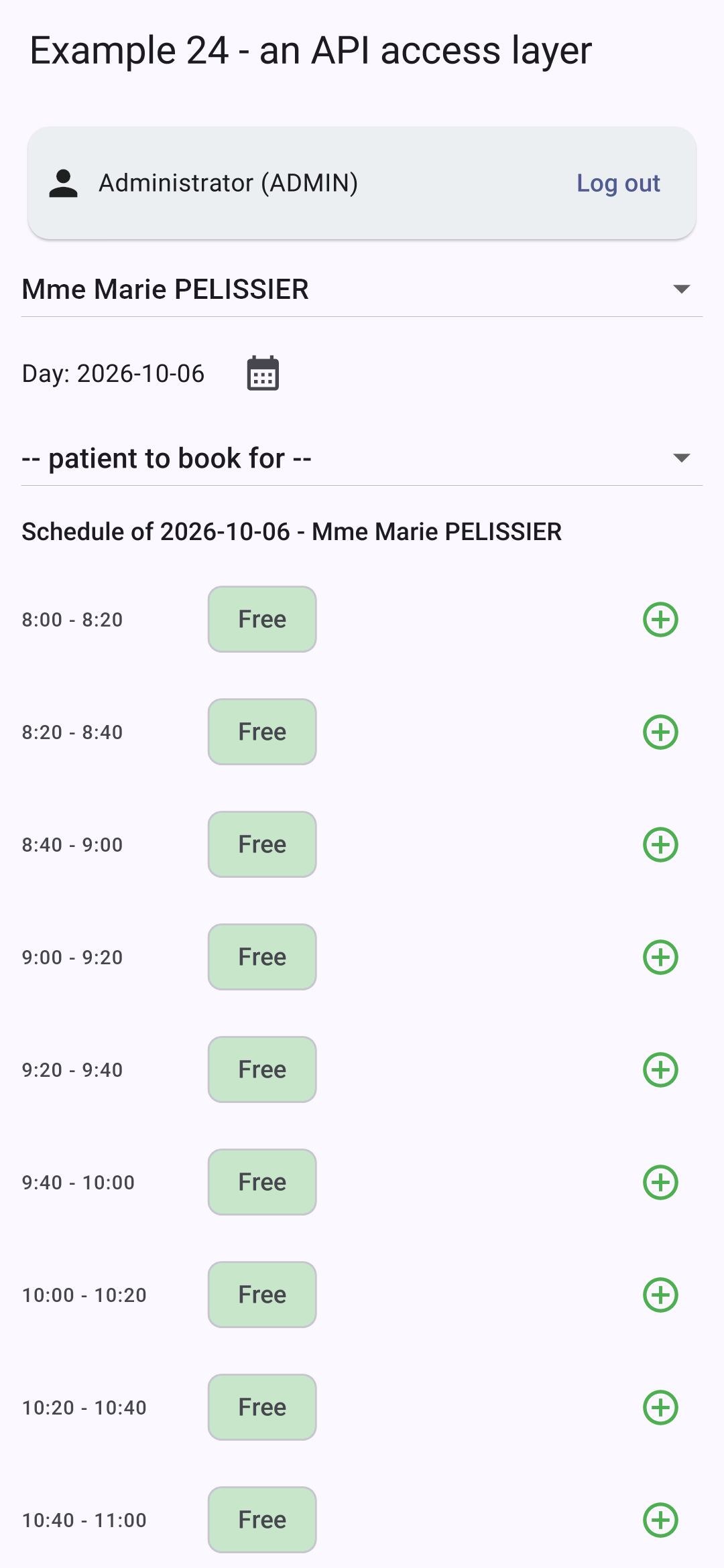
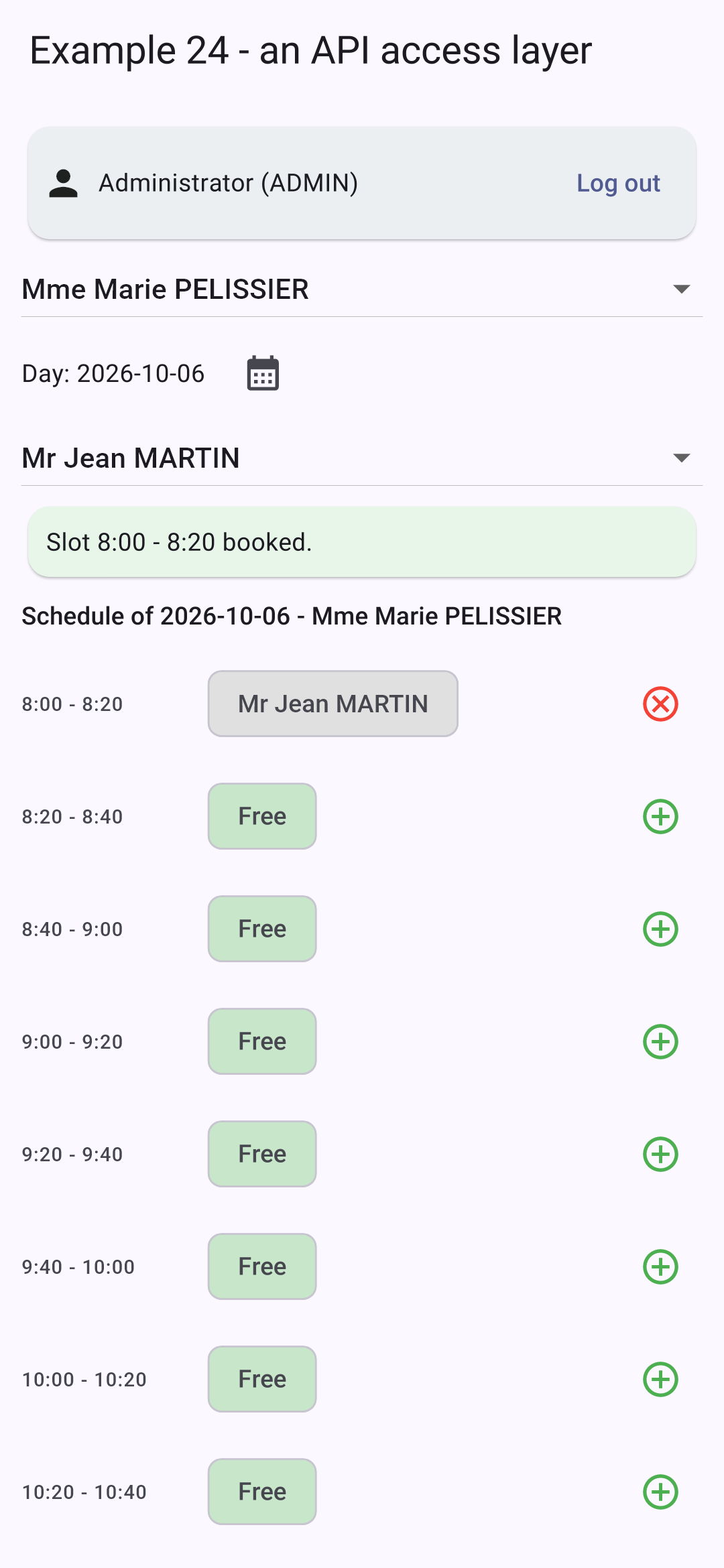
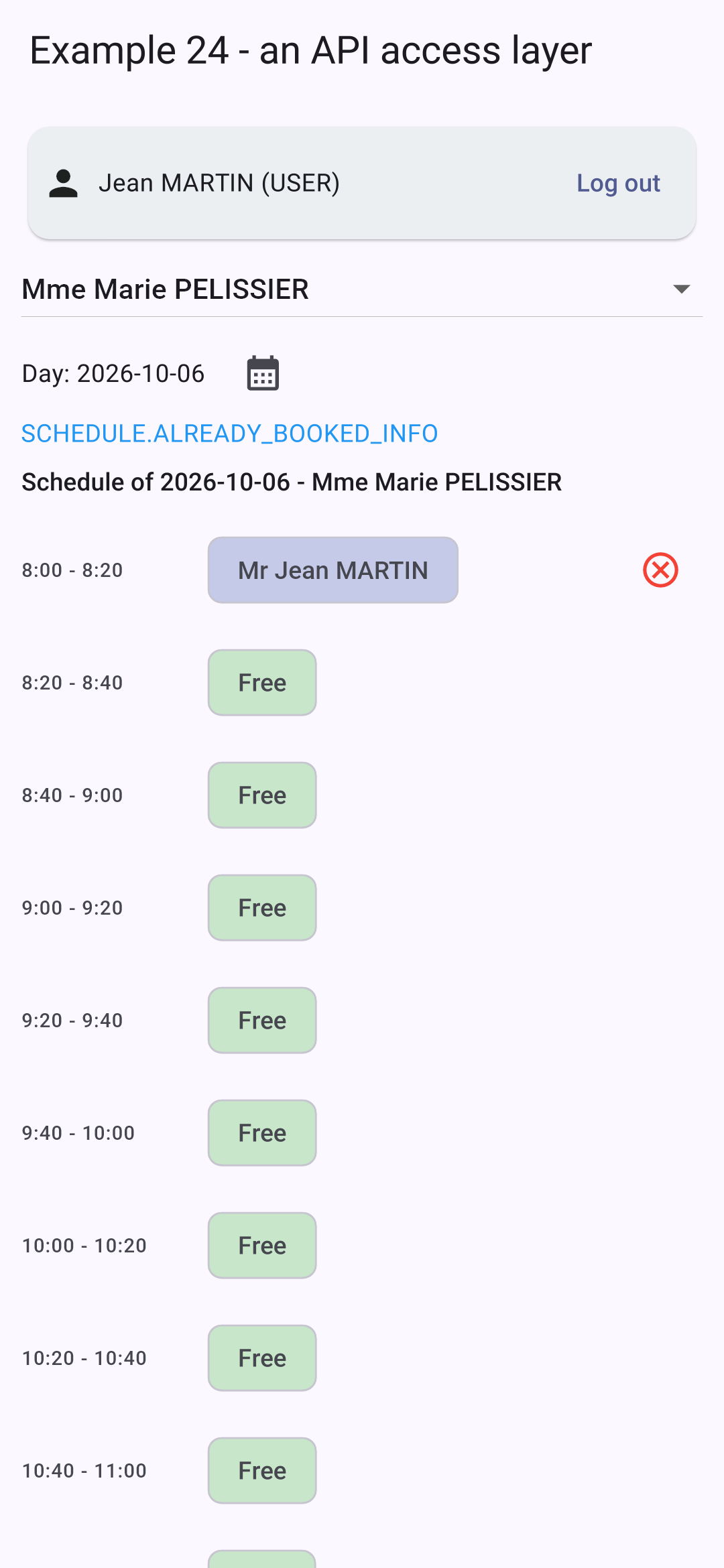
Logged in as [admin], Ms. PELISSIER’s calendar; a time slot is reserved for a patient; logged in as [martin] (role USER), the same calendar:
Patient [martin] cannot see the name of the patient for the reserved time slot: the server did not send it to him.
9.4. Example 25: Errors returned by the server
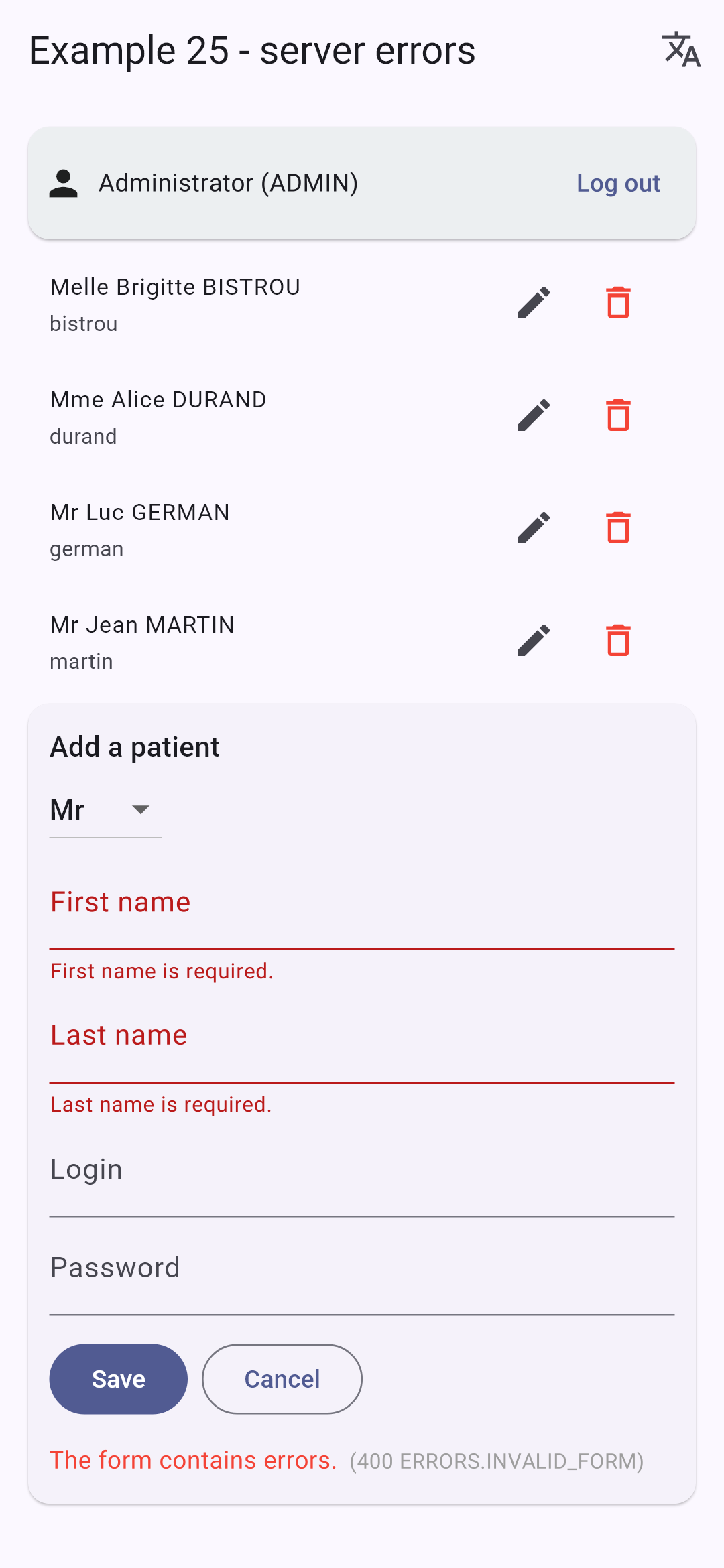
9.4.1. The dictionaries
| {
"FORM": {
"TITLE_ADD": "Ajouter un client",
"TITLE_EDIT": "Modifier un client",
"TITLE": "Titre",
"FIRSTNAME": "Prénom",
"LASTNAME": "Nom",
"LOGIN": "Login",
"PASSWORD": "Mot de passe",
"SAVE": "Enregistrer",
"CANCEL": "Annuler",
"EDIT": "Modifier",
"DELETE": "Supprimer",
"DELETE_CONFIRM": "Supprimer le client {{name}}, son compte et ses rendez-vous ?",
"ADDED": "Le client {{name}} a été ajouté (login : {{login}}).",
"UPDATED": "Le client {{name}} a été modifié.",
"DELETED": "Le client {{name}} a été supprimé.",
"ADMIN_ONLY": "Connectez-vous avec le compte admin : seul le rôle ADMIN gère les clients.",
"PAGE_TITLE": "Exemple 25 - les erreurs du serveur",
"NEW": "Nouveau client"
},
"ERRORS": {
"INVALID_FORM": "Le formulaire contient des erreurs.",
"INVALID_TITLE": "Choisissez un titre dans la liste.",
"FIRSTNAME_REQUIRED": "Le prénom est obligatoire.",
"FIRSTNAME_TOO_LONG": "Le prénom ne doit pas dépasser 20 caractères.",
"LASTNAME_REQUIRED": "Le nom est obligatoire.",
"LASTNAME_TOO_LONG": "Le nom ne doit pas dépasser 20 caractères.",
"INVALID_LOGIN": "30 caractères au plus : lettres minuscules non accentuées, chiffres, point, tiret, souligné.",
"PASSWORD_TOO_LONG": "Le mot de passe ne doit pas dépasser 72 caractères.",
"LOGIN_TAKEN": "Ce login est déjà utilisé par un autre compte.",
"PATIENT_ALREADY_EXISTS": "Un client portant ce prénom et ce nom existe déjà.",
"PATIENT_NOT_FOUND": "Ce client n'existe pas (ou plus).",
"CONCURRENT_UPDATE": "Cette fiche a été modifiée entre-temps par un autre utilisateur. Rechargez-la avant de recommencer.",
"FORBIDDEN": "Votre rôle ne vous permet pas cette action.",
"AUTH_REQUIRED": "Connectez-vous d'abord.",
"SESSION_EXPIRED": "Votre session a expiré : reconnectez-vous.",
"SERVER_UNREACHABLE": "Le serveur ne répond pas.",
"SERVER_ERROR": "Une erreur inattendue s'est produite.",
"WRONG_CAPTCHA": "Les caractères recopiés ne correspondent pas à l'image."
}
}
|
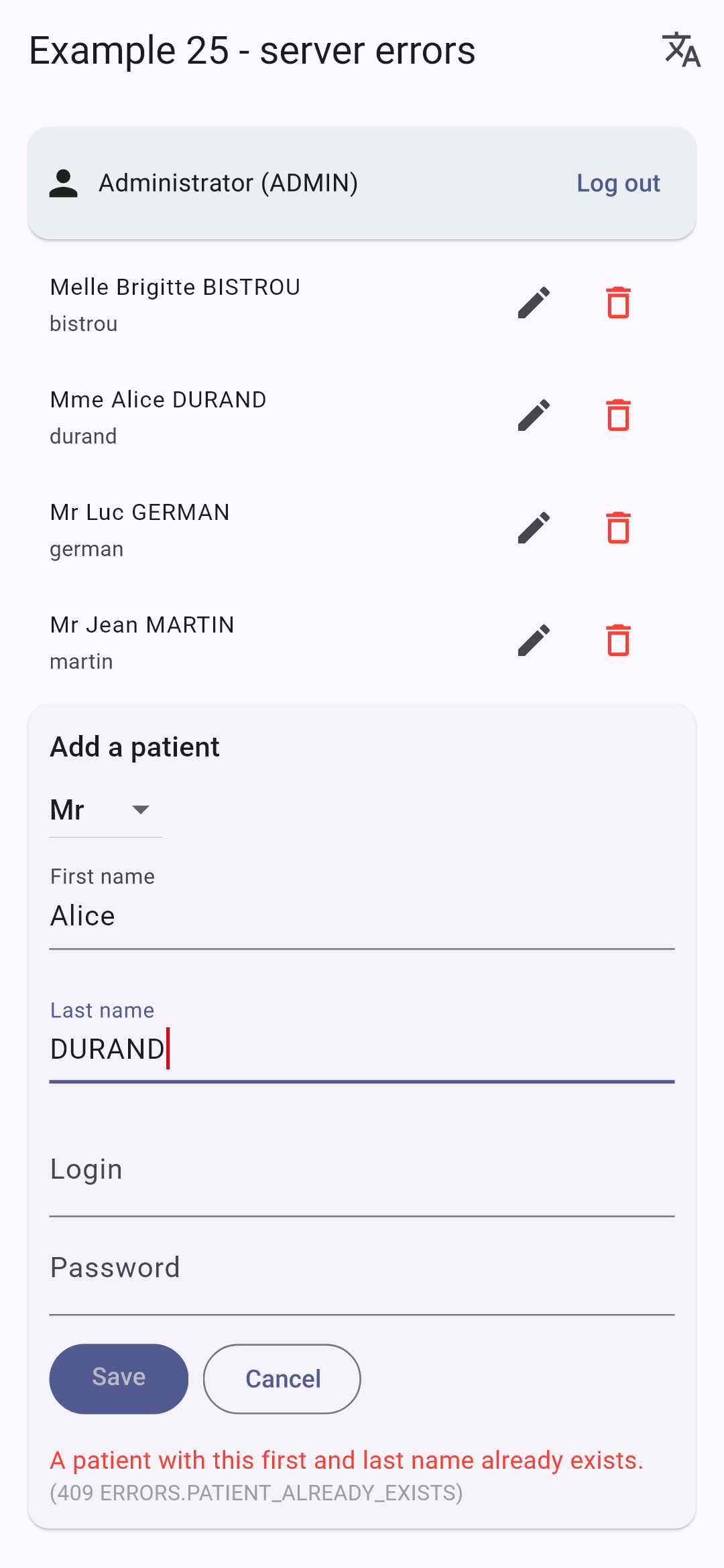
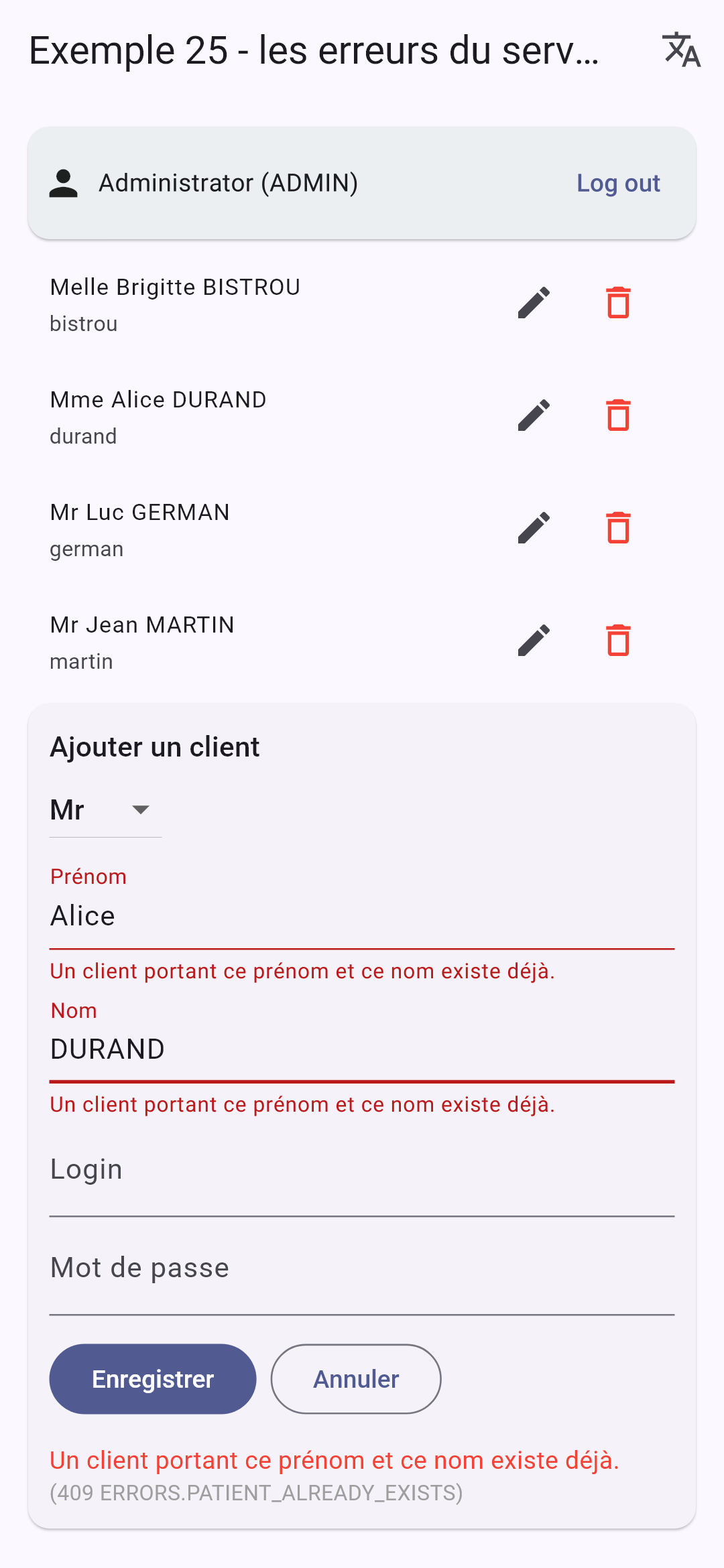
Server error messages are keys (“ERRORS.LASTNAME_REQUIRED”): the dictionary translates them.
9.4.2. The screen
| // =========================================================================
// lib/ex25_server_errors/main.dart - displaying the errors of the SERVER
// -------------------------------------------------------------------------
// The management of the clients (admin account). This form performs,
// DELIBERATELY, no validation on the phone: everything is sent to the
// server, which answers, in case of refusal, with a JSON error (converted into an
// ApiError by common/api.dart):
//
// 400 { key: 'ERRORS.INVALID_FORM', fields: { lastName: 'ERRORS.LASTNAME_REQUIRED' } }
// 409 { key: 'ERRORS.PATIENT_ALREADY_EXISTS', fields: { firstName: ..., lastName: ... } }
// 409 { key: 'ERRORS.CONCURRENT_UPDATE' } (optimistic lock)
//
// The error of EACH field (ApiError.fields) is stored in the state and
// displayed below the field (errorText); its message is the KEY sent by
// the server, which the screen translates (dictionaries of example 21).
// Modifying a field clears its error.
// Try: an empty last name, a "Dr" title, a namesake (Alice DURAND), a
// login already taken (martin), the same record modified on two devices...
// =========================================================================
import 'package:flutter/material.dart';
import 'package:provider/provider.dart';
import 'package:shared_preferences/shared_preferences.dart';
import '../common/api.dart';
import '../common/login_bar.dart';
import '../common/http_client.dart';
import '../common/api_error.dart';
import '../common/types.dart';
import '../ex16_confirmation/confirmation.dart';
import '../ex21_i18n/translations.dart';
import '../ex23_login/command.dart';
Future<void> main() async {
WidgetsFlutterBinding.ensureInitialized();
final storage = await SharedPreferences.getInstance();
final translations = Translations('ex25', storage);
await translations.start();
runApp(
MultiProvider(
providers: [
Provider.value(value: Api(CookieClient(storage))),
ChangeNotifierProvider.value(value: translations),
],
child: MaterialApp(
debugShowCheckedModeBanner: false,
theme: ThemeData(colorSchemeSeed: Colors.indigo),
home: const ClientsPage(),
),
),
);
}
// the fields of the form
enum Field { title, firstName, lastName, login, password }
class ClientsPage extends StatefulWidget {
const ClientsPage({super.key});
@override
State<ClientsPage> createState() => _ClientsPageState();
}
class _ClientsPageState extends State<ClientsPage> {
late final Api _api = context.read<Api>();
User? _user;
List<Person> _clients = [];
// the form: _editedId == null -> creation, otherwise update
int? _editedId;
int _version = 0;
String _title = 'Mr';
final _texts = {
for (final c in [Field.firstName, Field.lastName, Field.login, Field.password]) c: TextEditingController(),
};
// the error of each field (a translation KEY), returned by the server
Map<String, String> _errors = {};
// the general message of the last error, and the one of a success (key + parameters)
ApiError? _pageError;
({String key, Map<String, String> params})? _success;
// sending to the server: a Command (example 23), which tells whether it is in progress
final _sending = Command();
bool get _isAdmin => _user?.role == Role.admin;
@override
void dispose() {
for (final c in _texts.values) {
c.dispose();
}
_sending.dispose();
super.dispose();
}
Future<void> _reload() async {
final clients = Person.list(await _api.get('/clients'));
if (mounted) setState(() => _clients = clients);
}
Future<void> _onUserChange(User? u) async {
setState(() {
_user = u;
_clients = [];
});
if (u?.role == Role.admin) await _reload();
}
void _clearMessages() {
_errors = {};
_pageError = null;
_success = null;
}
void _newForm() {
setState(() {
_editedId = null;
_version = 0;
_title = 'Mr';
for (final c in _texts.values) {
c.clear();
}
_clearMessages();
});
}
void _edit(Person c) {
setState(() {
_editedId = c.id;
// the VERSION read with the record goes back with the update: if someone
// modified the record meanwhile, the server will answer 409 CONCURRENT_UPDATE
_version = c.version;
_title = c.title;
_texts[Field.firstName]!.text = c.firstName;
_texts[Field.lastName]!.text = c.lastName;
_texts[Field.login]!.text = c.login ?? '';
_texts[Field.password]!.clear();
_clearMessages();
});
}
Future<void> _save() async {
setState(_clearMessages);
final input = {
'title': _title,
for (final MapEntry(key: field, value: c) in _texts.entries) field.name: c.text,
'version': _version,
};
try {
final client = Person.fromJson(
_editedId == null ? await _api.post('/clients', input) : await _api.put('/clients/$_editedId', input),
);
final key = _editedId == null ? 'FORM.ADDED' : 'FORM.UPDATED';
_newForm(); // form cleared, messages cleared...
// ... except this one
setState(
() => _success = (key: key, params: {'name': '${client.firstName} ${client.lastName}', 'login': client.login ?? ''}),
);
await _reload();
} on ApiError catch (e) {
setState(() {
_pageError = e; // the general message
_errors = e.fields; // the error of each field
});
}
}
Future<void> _delete(Person c) async {
final t = context.read<Translations>().t;
final name = '${c.firstName} ${c.lastName}';
final yes = await confirm(context, t('FORM.DELETE_CONFIRM', {'name': name}));
if (!yes || !mounted) return;
setState(_clearMessages);
try {
await _api.delete('/clients/${c.id}');
setState(() => _success = (key: 'FORM.DELETED', params: {'name': name}));
} on ApiError catch (e) {
setState(() => _pageError = e);
}
await _reload();
}
@override
Widget build(BuildContext context) {
final translations = context.watch<Translations>();
final t = translations.t;
// an input field, with its error (a key of the server) translated
Widget field(Field c, {bool secret = false}) => TextField(
controller: _texts[c],
obscureText: secret,
decoration: InputDecoration(
labelText: t('FORM.${c.name.toUpperCase()}'),
errorText: _errors[c.name] == null ? null : t(_errors[c.name]!),
errorMaxLines: 2,
),
// a modified field: its error disappears
onChanged: (_) {
if (_errors.containsKey(c.name)) setState(() => _errors = {..._errors}..remove(c.name));
},
);
final success = _success;
final pageError = _pageError;
return Scaffold(
appBar: AppBar(
title: Text(t('FORM.PAGE_TITLE')),
actions: [
// the language: a menu
PopupMenuButton<String>(
icon: const Icon(Icons.translate),
onSelected: translations.changeLanguage,
itemBuilder: (_) => [for (final l in languages) PopupMenuItem(value: l, child: Text(l.toUpperCase()))],
),
],
),
body: ListView(
padding: const EdgeInsets.all(12),
children: [
LoginBar(onUserChange: _onUserChange),
if (_user != null && !_isAdmin)
Card(
color: Colors.amber.shade50,
child: Padding(padding: const EdgeInsets.all(12), child: Text(t('FORM.ADMIN_ONLY'))),
),
if (_isAdmin) ...[
for (final c in _clients)
ListTile(
dense: true,
title: Text(c.fullName),
subtitle: Text(c.login ?? ''),
trailing: Row(
mainAxisSize: MainAxisSize.min,
children: [
IconButton(tooltip: t('FORM.EDIT'), icon: const Icon(Icons.edit), onPressed: () => _edit(c)),
IconButton(
tooltip: t('FORM.DELETE'),
icon: const Icon(Icons.delete_outline, color: Colors.red),
onPressed: () => _delete(c),
),
],
),
),
Card(
child: Padding(
padding: const EdgeInsets.all(12),
child: Column(
crossAxisAlignment: CrossAxisAlignment.start,
children: [
Text(
t(_editedId == null ? 'FORM.TITLE_ADD' : 'FORM.TITLE_EDIT'),
style: Theme.of(context).textTheme.titleMedium,
),
// a "Dr" title that the server will refuse: to see ERRORS.INVALID_TITLE
DropdownButton<String>(
value: _title,
items: [
for (final title in ['Mr', 'Mme', 'Melle', 'Dr'])
DropdownMenuItem(value: title, child: Text(title)),
],
onChanged: (v) => setState(() {
_title = v!;
_errors = {..._errors}..remove('title');
}),
),
if (_errors['title'] != null)
Text(t(_errors['title']!), style: const TextStyle(color: Colors.red, fontSize: 12)),
field(Field.firstName),
field(Field.lastName),
field(Field.login),
field(Field.password, secret: true),
const SizedBox(height: 12),
ListenableBuilder(
listenable: _sending,
builder: (context, _) => Wrap(
spacing: 8,
children: [
FilledButton(
onPressed: _sending.running ? null : () => _sending.execute(_save),
child: Text(t('FORM.SAVE')),
),
OutlinedButton(onPressed: _newForm, child: Text(t('FORM.CANCEL'))),
],
),
),
if (success != null)
Padding(
padding: const EdgeInsets.only(top: 12),
child: Text(t(success.key, success.params), style: const TextStyle(color: Colors.green)),
),
// the general message, and the HTTP status, to understand
if (pageError != null)
Padding(
padding: const EdgeInsets.only(top: 12),
child: Text.rich(
TextSpan(
children: [
TextSpan(
text: t(pageError.key, pageError.params),
style: const TextStyle(color: Colors.red),
),
TextSpan(
text: ' ($pageError)',
style: const TextStyle(color: Colors.grey, fontSize: 12),
),
],
),
),
),
],
),
),
),
],
],
),
);
}
}
|
Patient management (admin account). This form does not perform any validation on the phone: everything is sent to the server, which responds—in case of rejection—with an error JSON, converted to [ApiError].
- Lines 37–43: the translations from Example 21, using the dictionaries from that example;
- line 77: the error for each field: a translation KEY, returned by the server;
- lines 79–82: the general message for the last error, the success message, and the [Command] sent to the server (Example 23);
- lines 126–131: the version read from the record is updated with the change: if someone has modified the record in the meantime, the server will respond with a 409 [CONCURRENT_UPDATE] (optimistic lock);
- lines 141–162: the save operation: [POST /api/clients] (creation) or [PUT /api/clients/:id] (update). If the operation is rejected, [ApiError] returns a general error message and the specific error for each field;
- lines 188–198: an input field: its error, a server key, is translated and displayed below the field ([errorText]); editing the field clears its error;
- lines 209–212: a menu in the top bar for language selection;
- line 257: a “Dr” title, which the server will reject: see [ERRORS.INVALID_TITLE];
- lines 291–302: the general message, translated, and, for context, the status HTTP and the key.
An empty form; a homonym (“Alice DURAND”); the same, in French:
Also try: a username that’s already taken ([martin]), an invalid username (“Jean M”), and the same record edited on two devices (or in the app and with [curl]).
The principle is the same as for all forms in the case study: the rules reside in ONE place—the server; the app displays the results in the user’s language.