14. 应用练习 – 第 6 版
我们刚刚实现了以下分层结构:
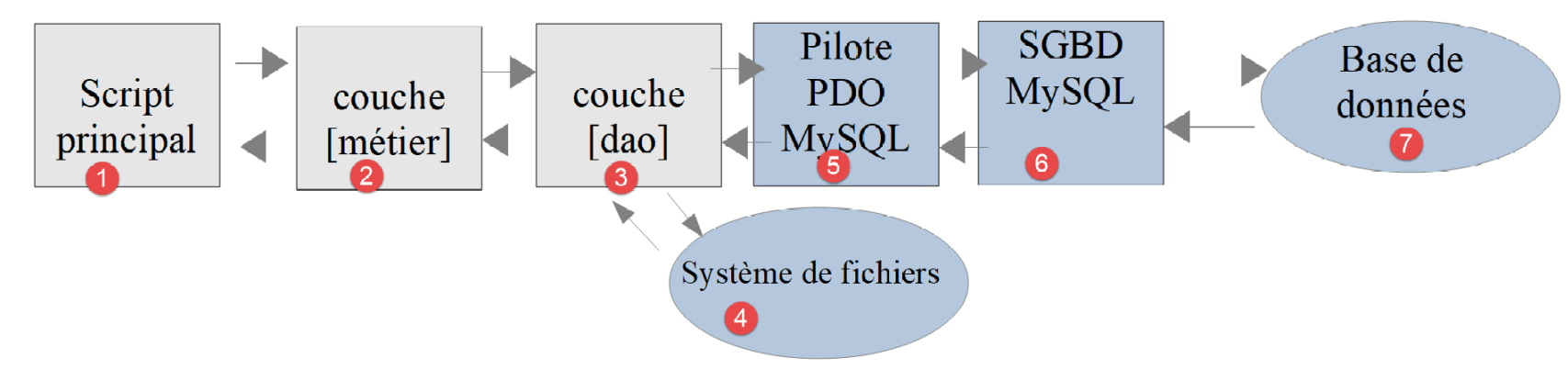
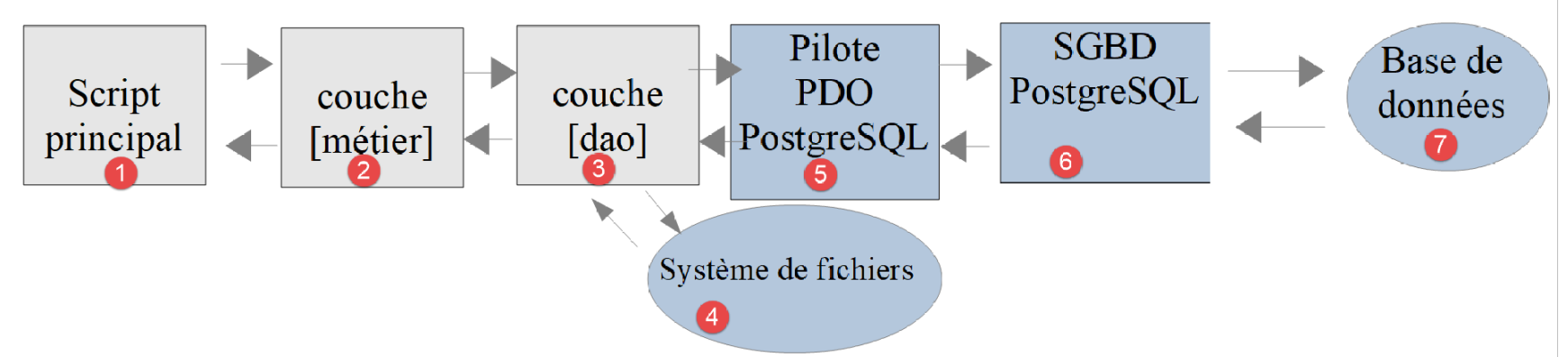
示例中使用的数据库管理系统(DBMS)是 MySQL。在“链接”部分,我们曾指出,实现 [dao] 层的类中没有任何内容表明正在使用特定的数据库管理系统。现在,我们将通过使用另一种数据库管理系统 PostgreSQL 来验证这一点。分层架构如下所示:
14.1. 安装 PostgreSQL 数据库管理系统
PostgreSQL 数据库管理系统(DBMS)的发行版可从 [https://www.postgresql.org/download/] 获取(2019年5月)。此处演示 64 位 Windows 版本的安装过程:
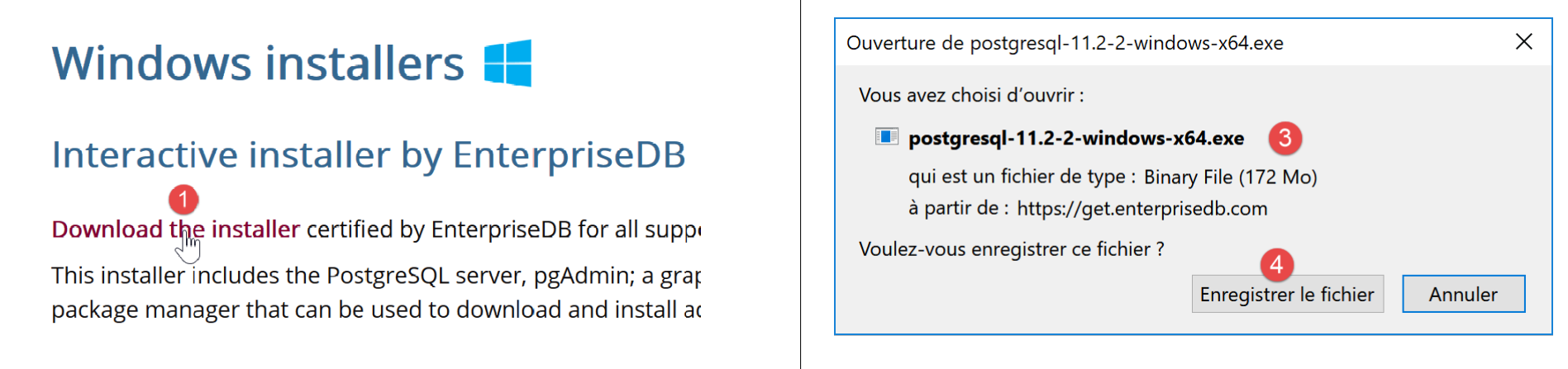

- 请访问 [1-4] 下载数据库管理系统安装程序;
运行下载的安装程序:
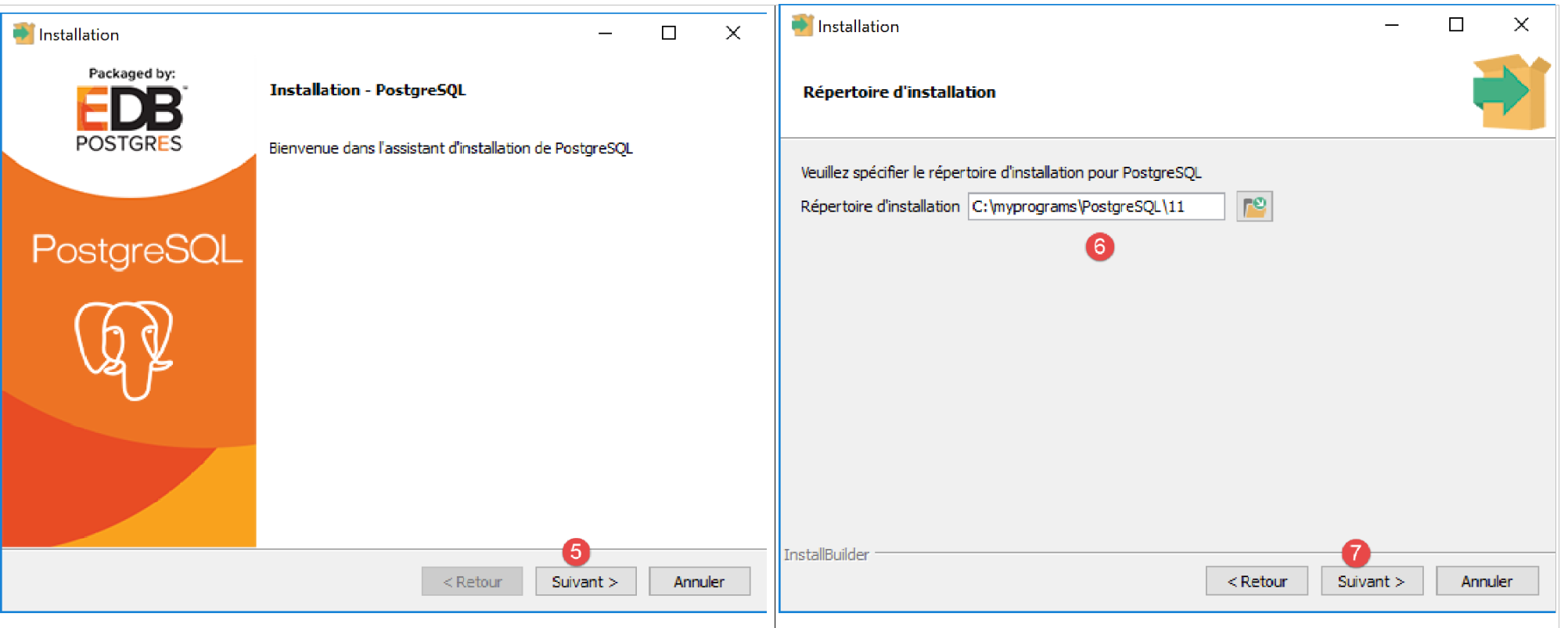
- 在 [6] 中,指定安装目录;
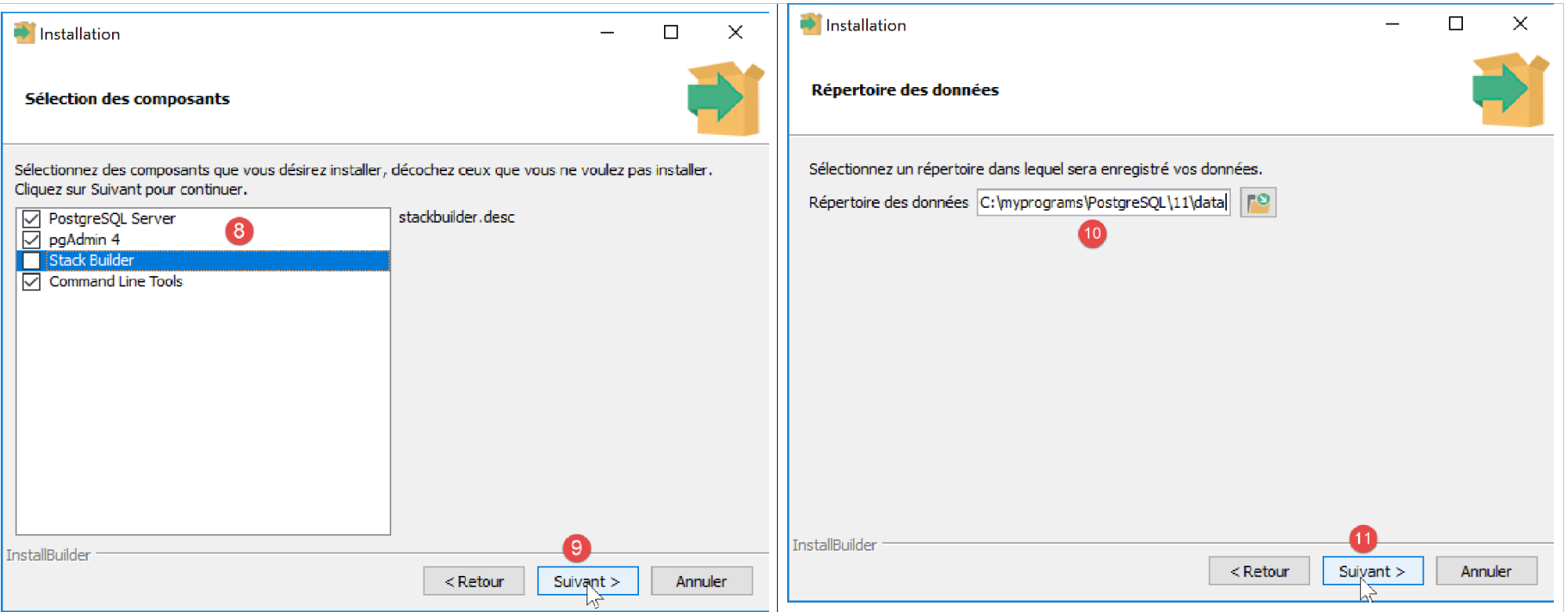
- 在 [8] 中,对于我们当前的操作,无需选择 [Stack Builder] 选项;
- 在 [10] 中,保留默认值;
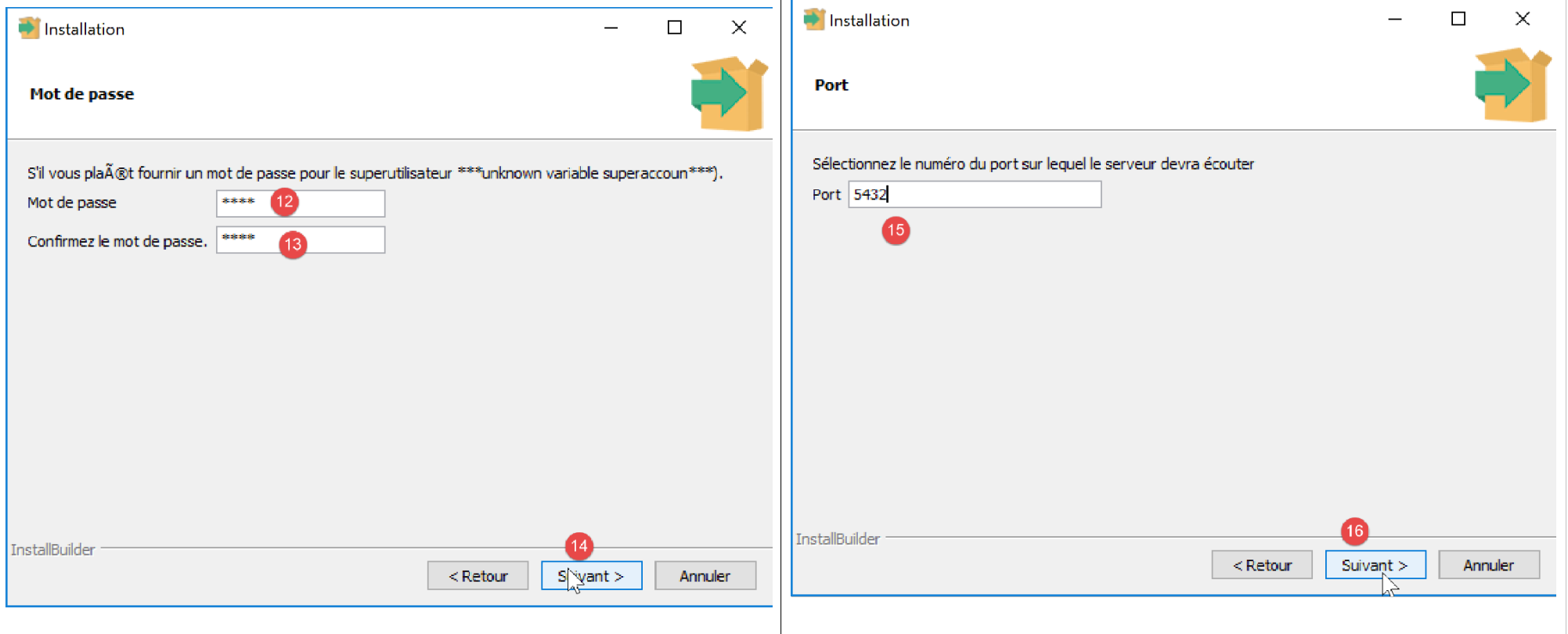
- 在 [12-13] 中,我们在此处输入了密码 [root]。这将是 DBMS 管理员(用户名为 [postgres])的密码。PostgreSQL 也将此用户称为超级用户;
- 在 [15] 中,保留默认值:这是 DBMS 的监听端口;
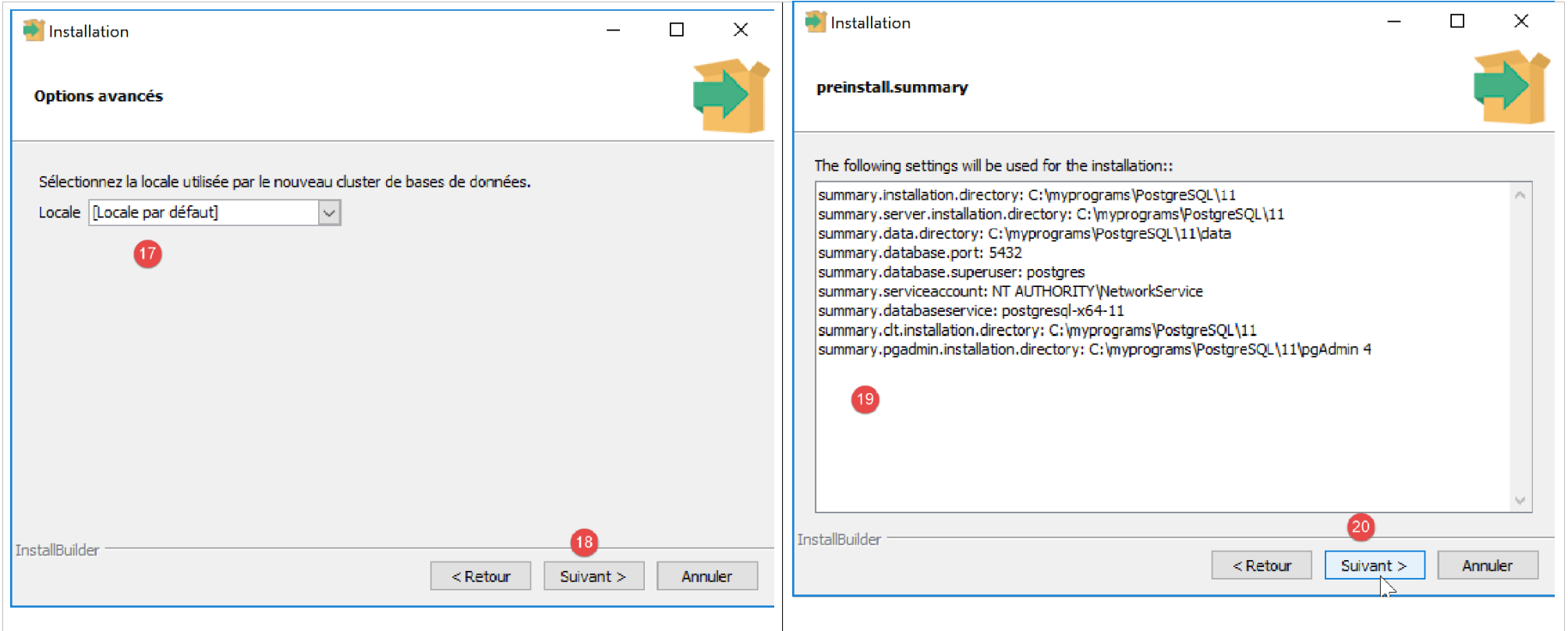
- 在 [17] 中,保留默认值;
- 在 [19] 中,显示安装配置的摘要;
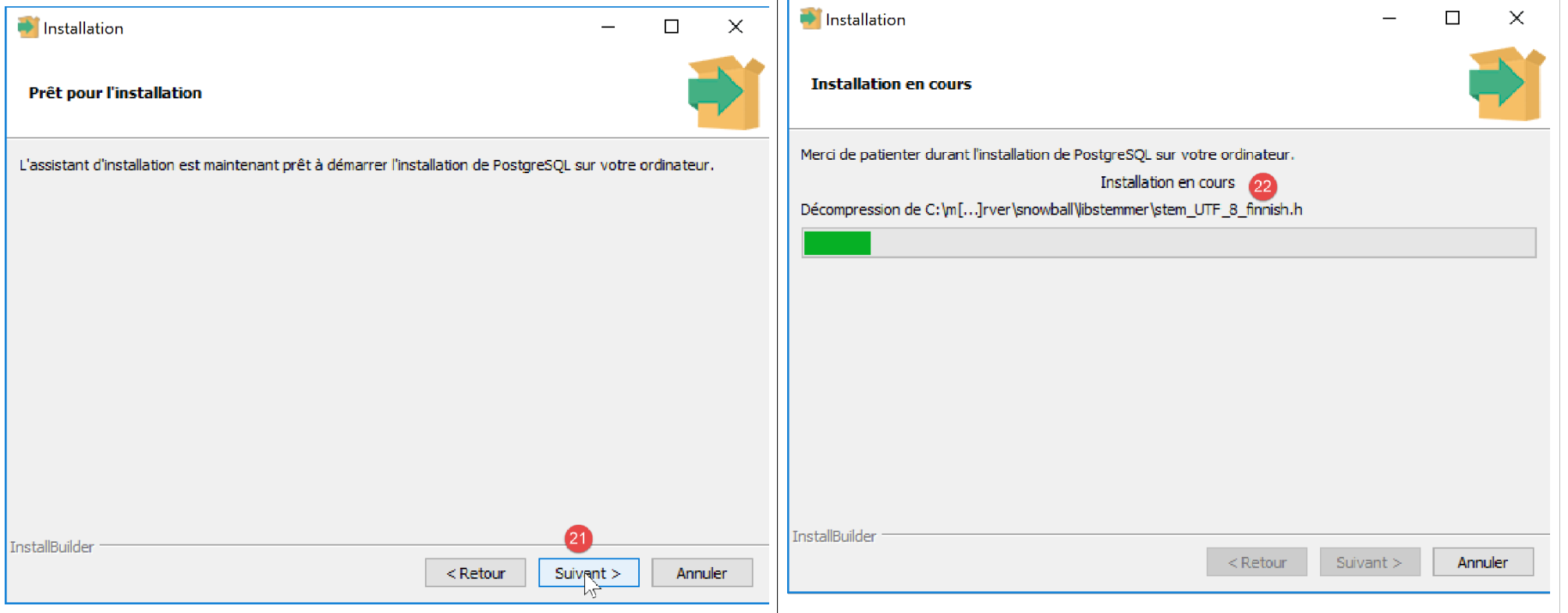
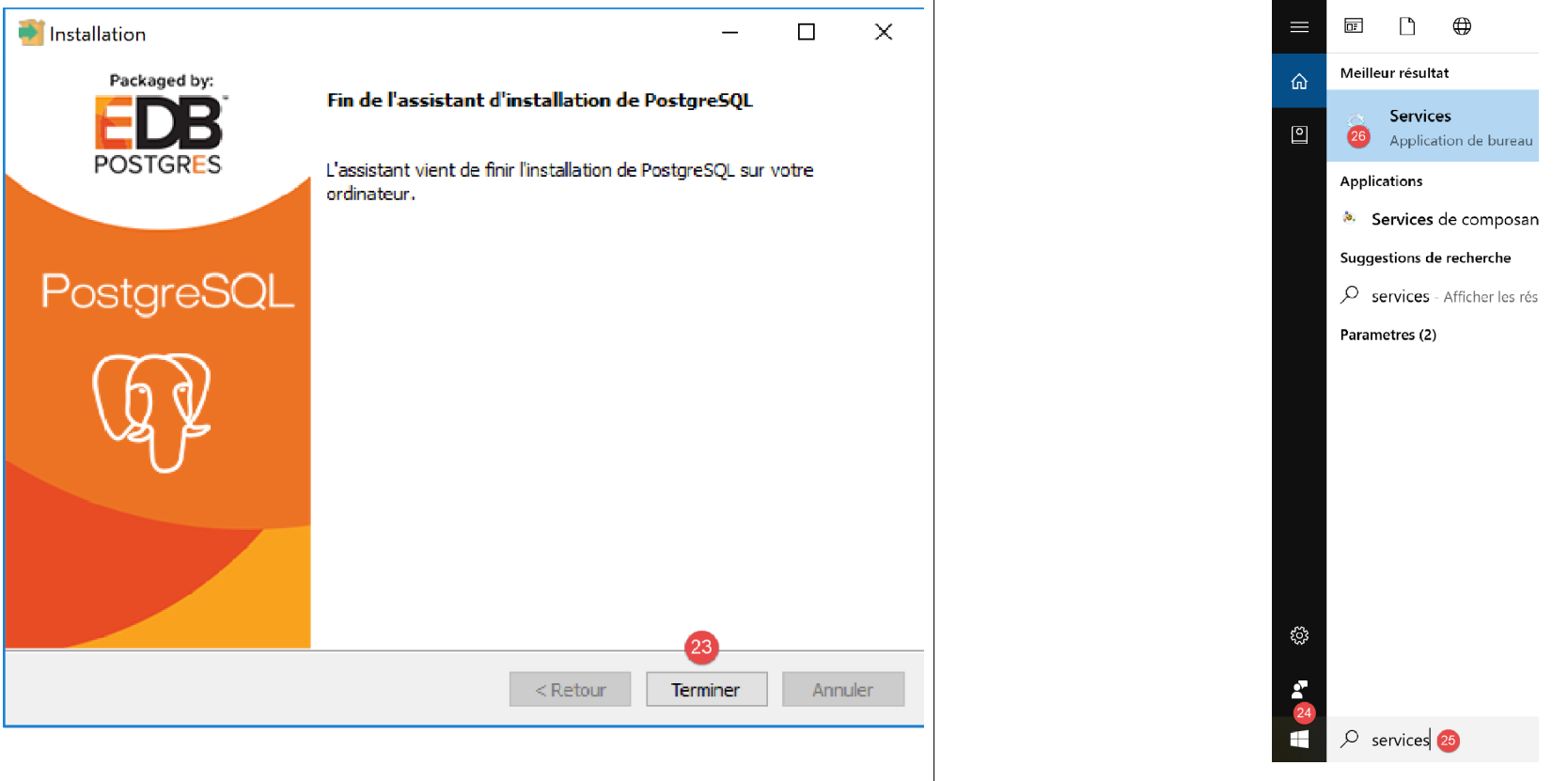
在 Windows 系统中,PostgreSQL 数据库管理系统会作为 Windows 服务安装并自动启动。大多数情况下,这并非理想状态。我们将修改此配置。在 Windows 搜索栏中输入 [services] [24-26]:
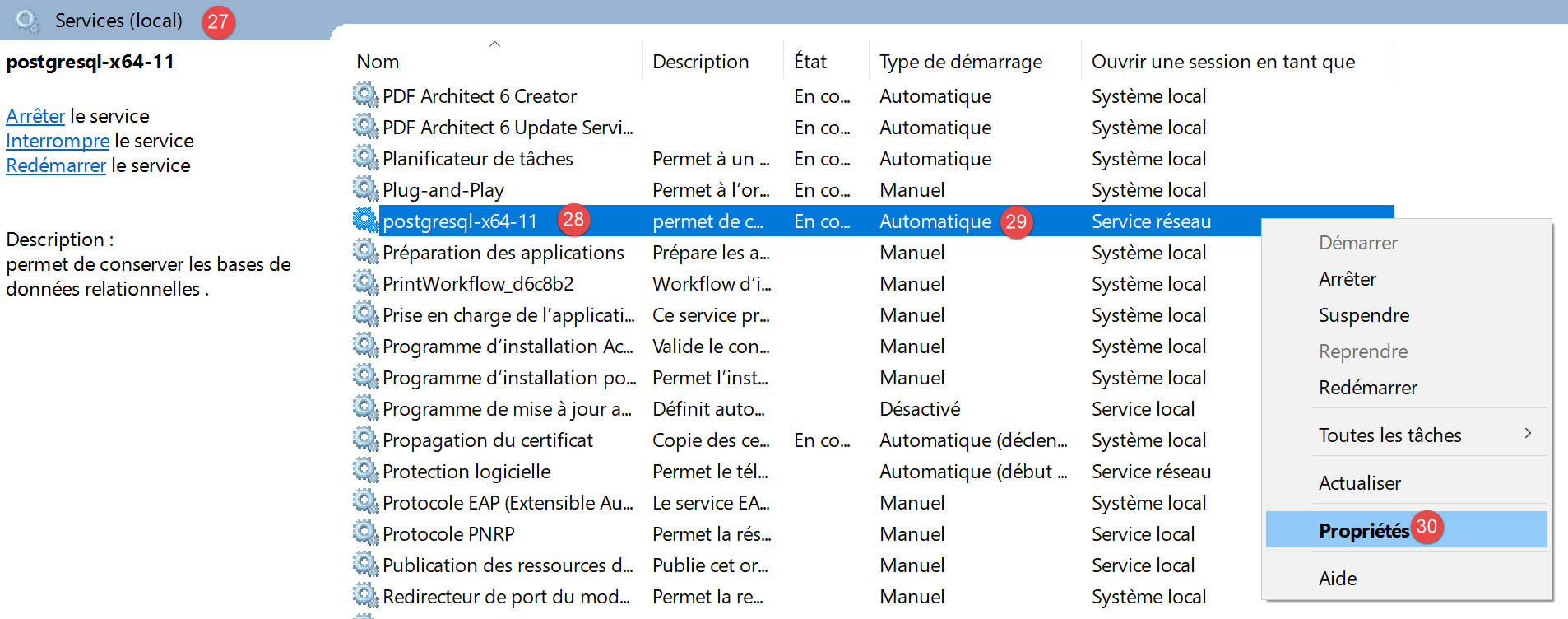
- 在 [29] 中,您可以看到 PostgreSQL 数据库管理系统服务被设置为“自动”启动。通过访问服务属性 [30] 来更改此设置:
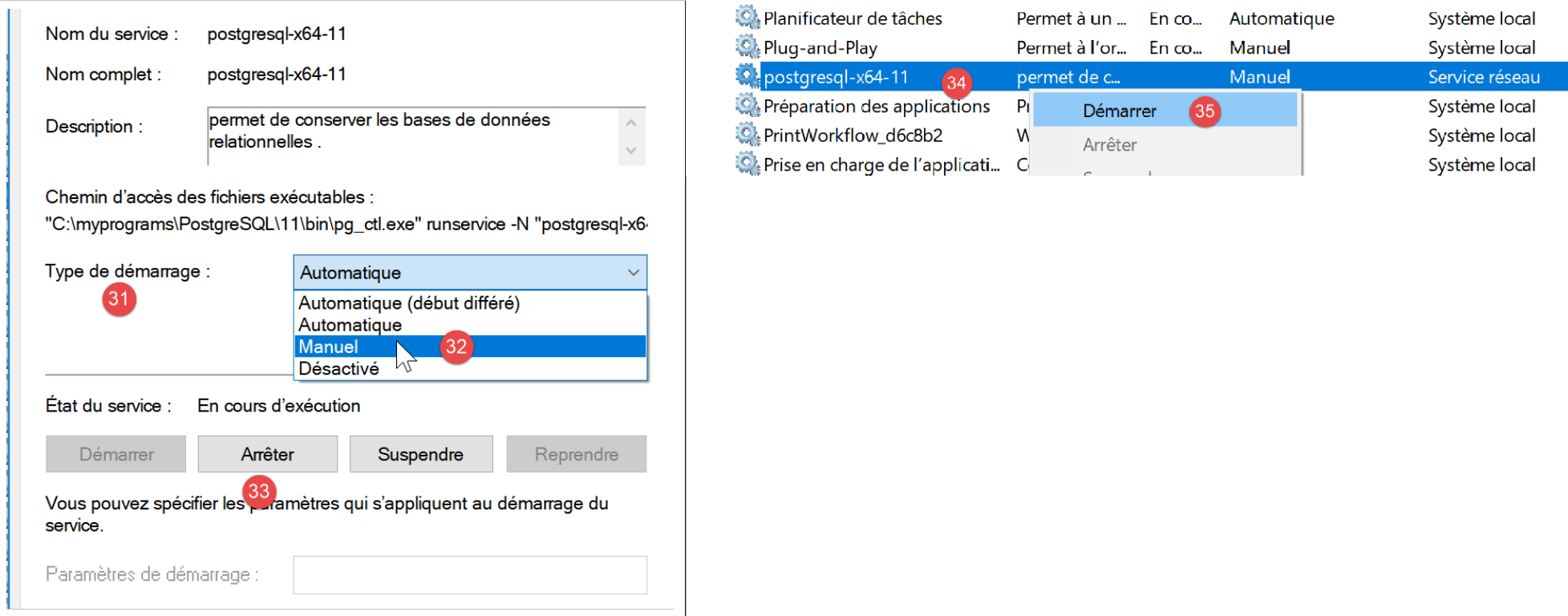
- 在 [31-32] 中,将启动类型设置为“手动”;
- 在 [33] 中,停止该服务;
当您需要手动启动数据库管理系统时,请返回 [服务] 应用程序,右键单击 [postgresql] 服务 (34),然后启动它 (35)。
14.2. 为 PostgreSQL DBMS 启用 PDO 扩展
我们将修改用于配置 PHP 的 [php.ini] 文件(参见相关章节):
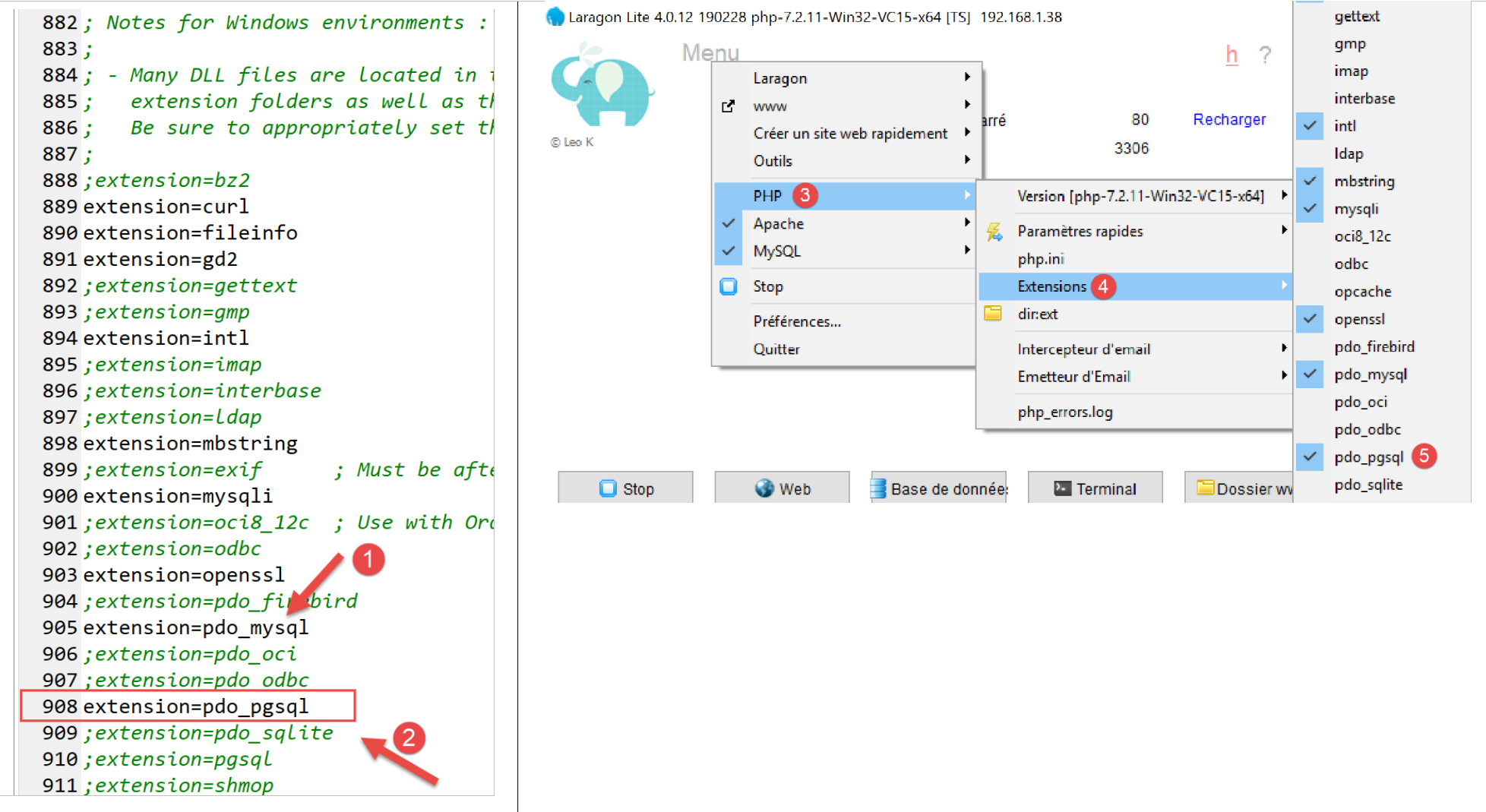
- 在 [2] 中,确认 PostgreSQL PDO 扩展已启用。完成后,保存更改并重启 Laragon 以确保更改生效。随后直接通过 Laragon 验证 PHP 配置 [3-5]。
14.3. 使用 [pgAdmin] 工具管理 PostgreSQL
启动 PostgreSQL DBMS 的 Windows 服务(参见相关章节)。接着,就像您启动 [services] 工具那样,启动 [pgadmin] 工具,该工具可用于管理 PostgreSQL DBMS [1-3]:
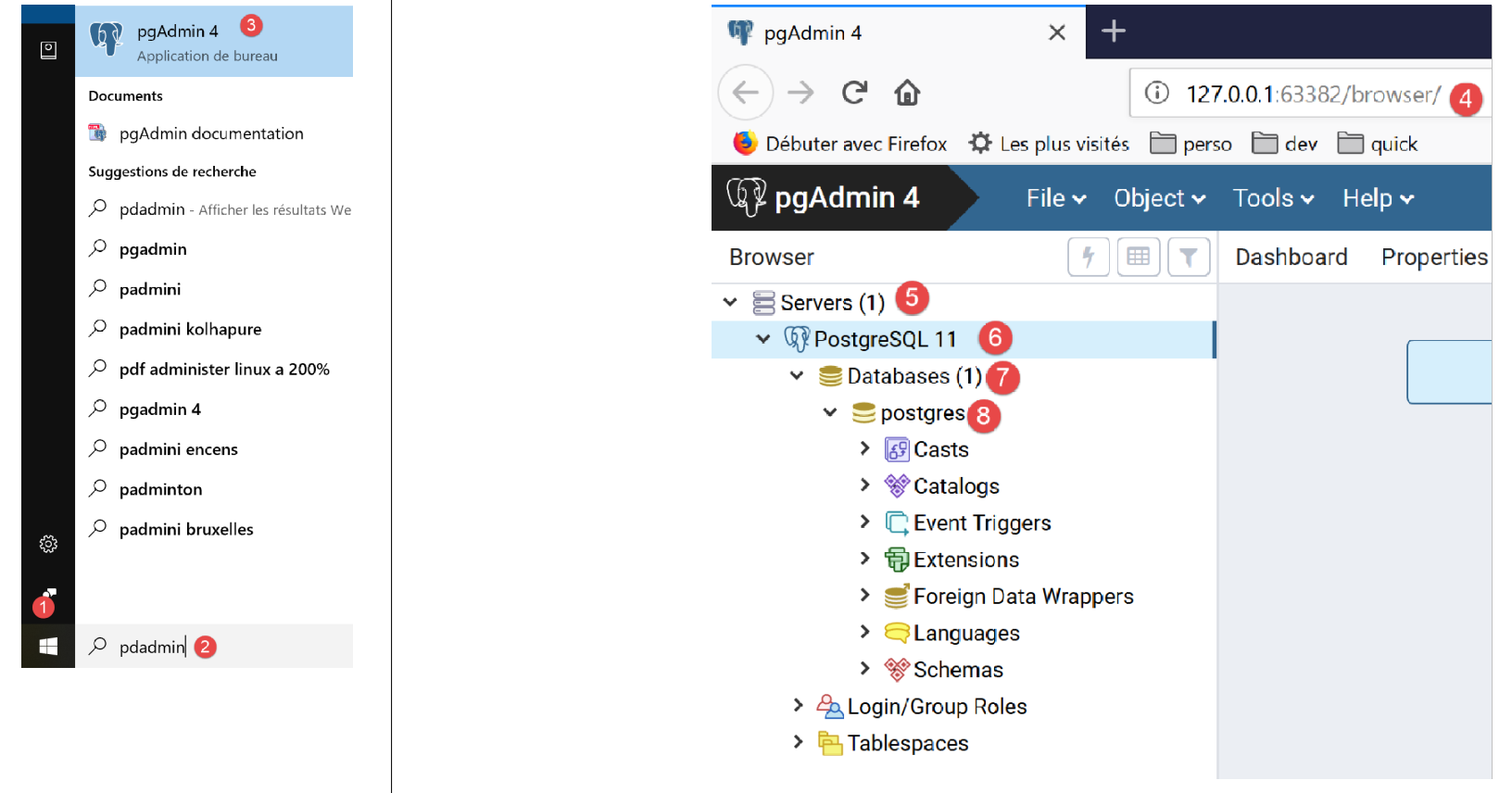
系统可能会在某个时候提示您输入超级用户密码。超级用户的名称为 [postgres]。您在安装数据库管理系统时设置了此密码。在本文档中,我们在安装过程中为超级用户设置了密码 [root]。
- 在 [4] 中,[pgAdmin] 是一个 Web 应用程序;
- 在 [5] 中,表示 [pgAdmin] 检测到的 PostgreSQL 服务器列表,此处为 1;
- 在 [6] 中,指我们启动的 PostgreSQL 服务器;
- 在 [7] 中,表示 DBMS 数据库,此处为 1;
- 在 [8] 中,[postgresql] 数据库由超级用户 [postgres] 管理;
首先,让我们创建一个用户 [admimpots],密码为 [mdpimpots]:

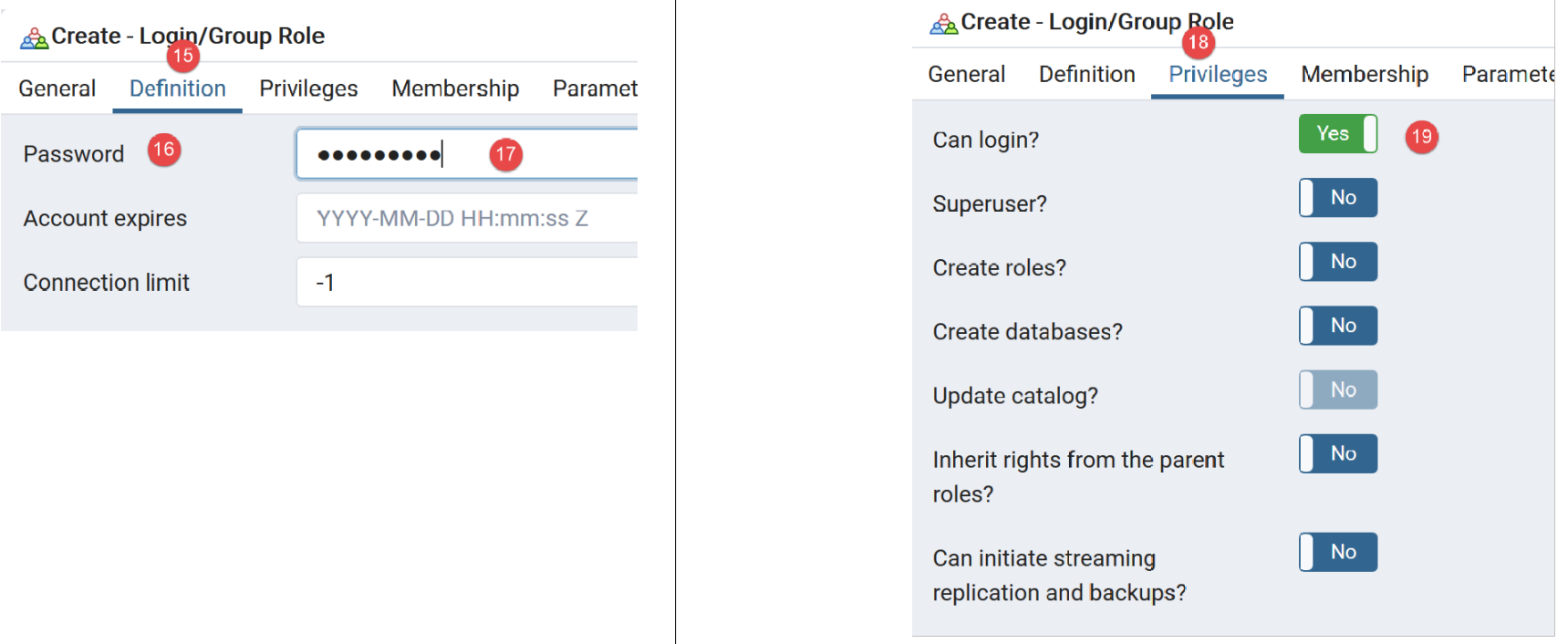
- 在 [17] 中,我们输入了 [mdpimpots];
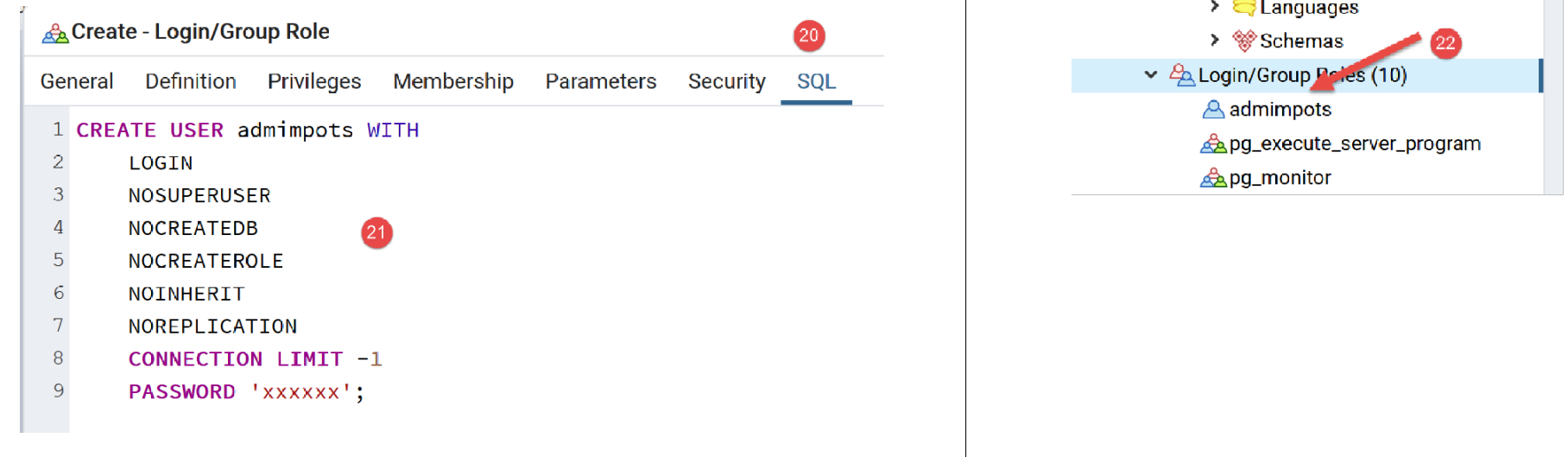
- 在 [21] 处,显示了 [pgAdmin] 工具将发送给 PostgreSQL 数据库管理系统 (DBMS) 的 SQL 代码。这是学习 PostgreSQL 专有 SQL 语言的一种方式;
- 在 [22] 中,通过 [Save] 向导确认后,用户 [admimpots] 已创建;
现在我们创建数据库 [dbimpots-2019]:
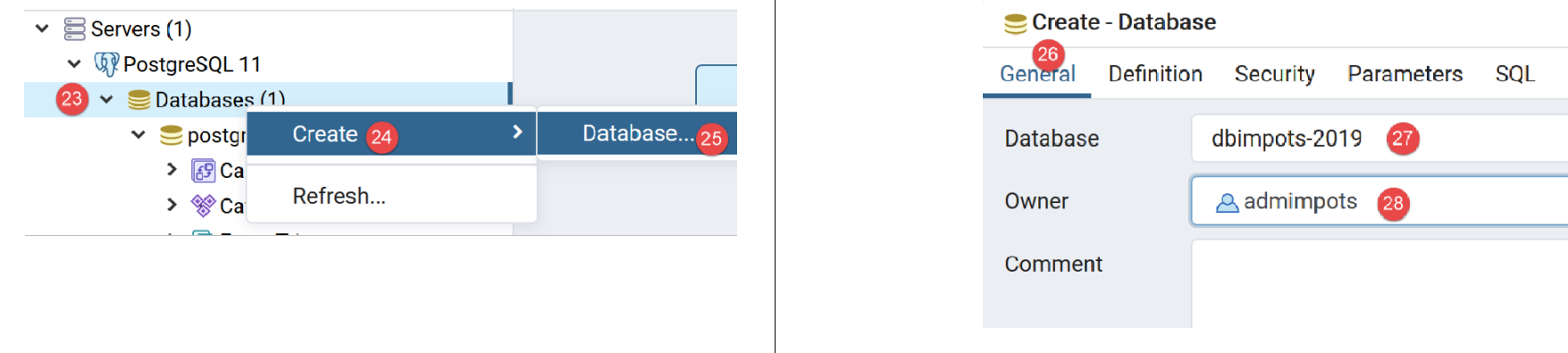
右键单击 [23],然后依次选择 [24-25] 创建新数据库。在 [26] 选项卡中,定义数据库名称 [27] 及其所有者 [admimpots] [28]。
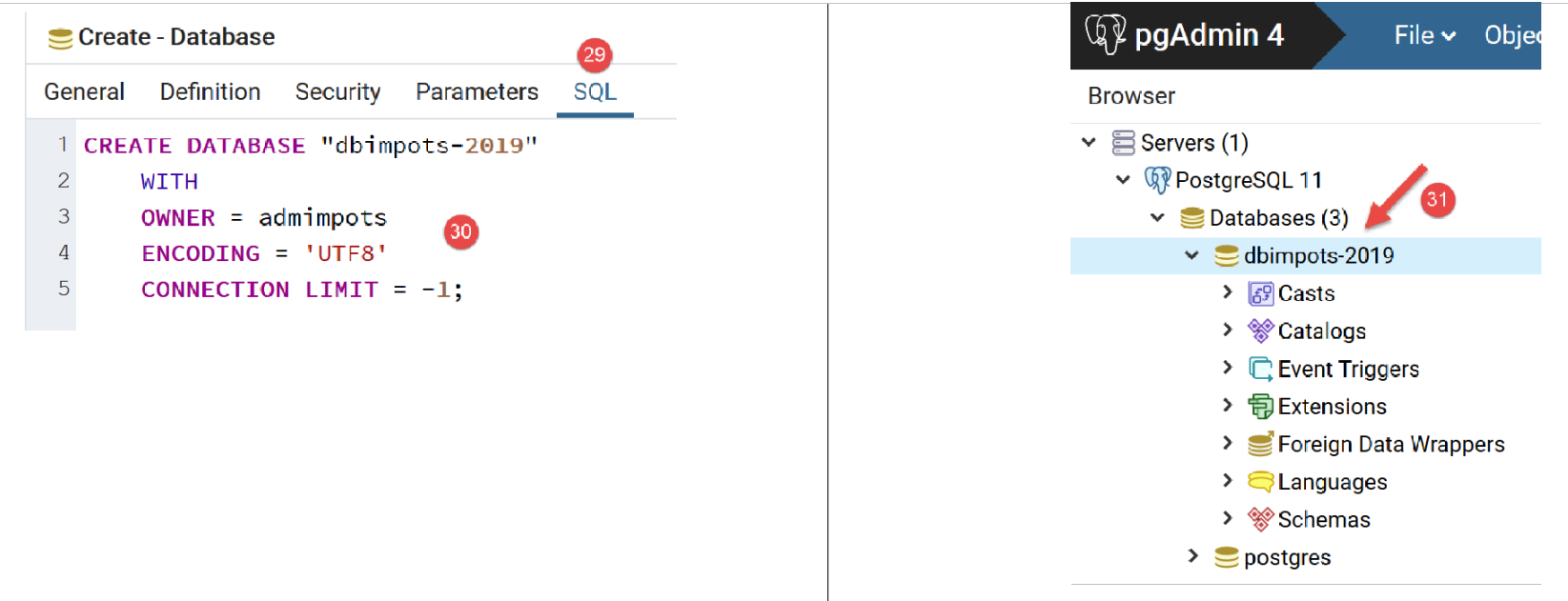
- 在 [30] 中,显示用于创建数据库的 SQL 代码;
- 在 [31] 中,通过 [保存] 向导确认后,数据库 [dbimpots-2019] 即创建完成;
现在,我们将创建表 [tbtranches],其列包含 [id, limites, coeffr, coeffn]。PostgreSQL 的一个显著特点是列名区分大小写(大写/小写),而其他数据库管理系统通常并不区分大小写。 因此,在 MySQL 中,即使 [tbtranches] 表中的实际列名为 [LIMITES, COEFFR, COEFFN],SQL 语句 [select limites, coeffR, coeffN from tbtranches] 依然有效。但在 PostgreSQL 中,该 SQL 语句将无法执行。 此时,有人可能会写成 [select LIMITES, COEFFR, COEFFN from tbtranches],但这仍然无法运行,因为 PostgreSQL 会执行查询 [select limites, coeffr, coeffn from tbtranches]:默认情况下,它会将列名转换为小写。 为避免此问题,必须写成:[select "LIMITES", "COEFFR", "COEFFN" from tbtranches],即必须将列名用引号括起来。基于这些原因,我们将为这些列赋予小写名称。 数据库对象的名称可能导致不同 DBMS 之间的不兼容,因为某些名称在某些 DBMS 中是保留字,而在其他 DBMS 中则不是。
我们创建表 [tbtranches]:
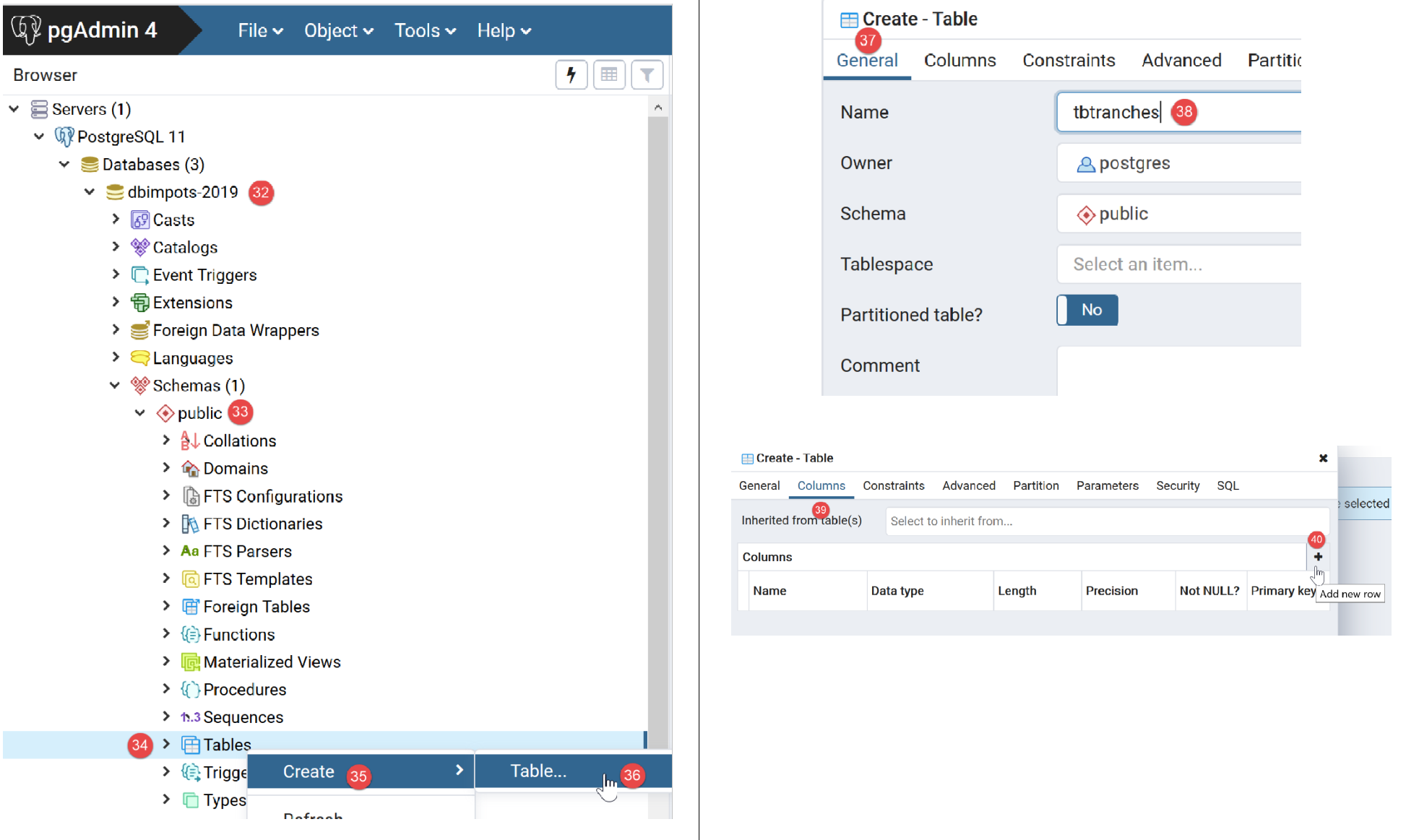
- 使用按钮 [40] 创建列;
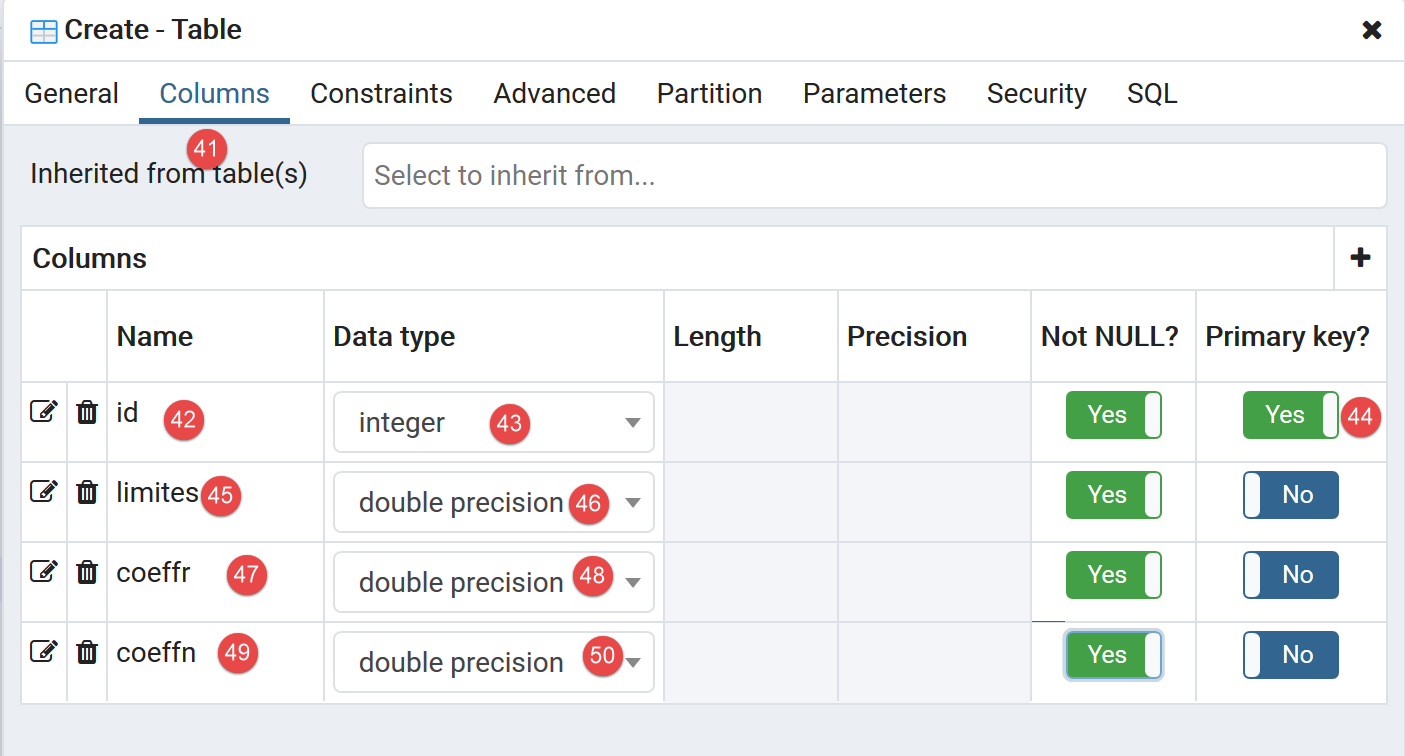
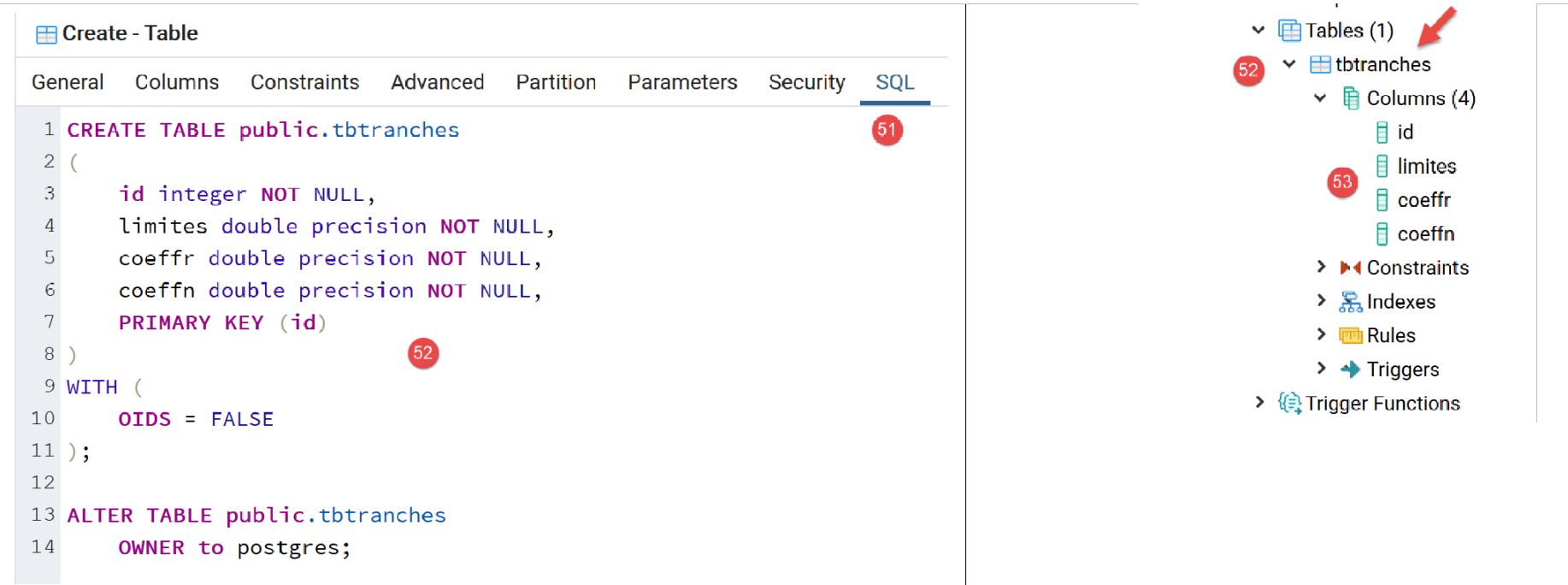
- 点击 [保存] 完成创建向导后,表 [tbtranches] 即创建完成 [52-53];
我们需要告知数据库管理系统,在向表中插入行时,由其自动生成主键 [id]:
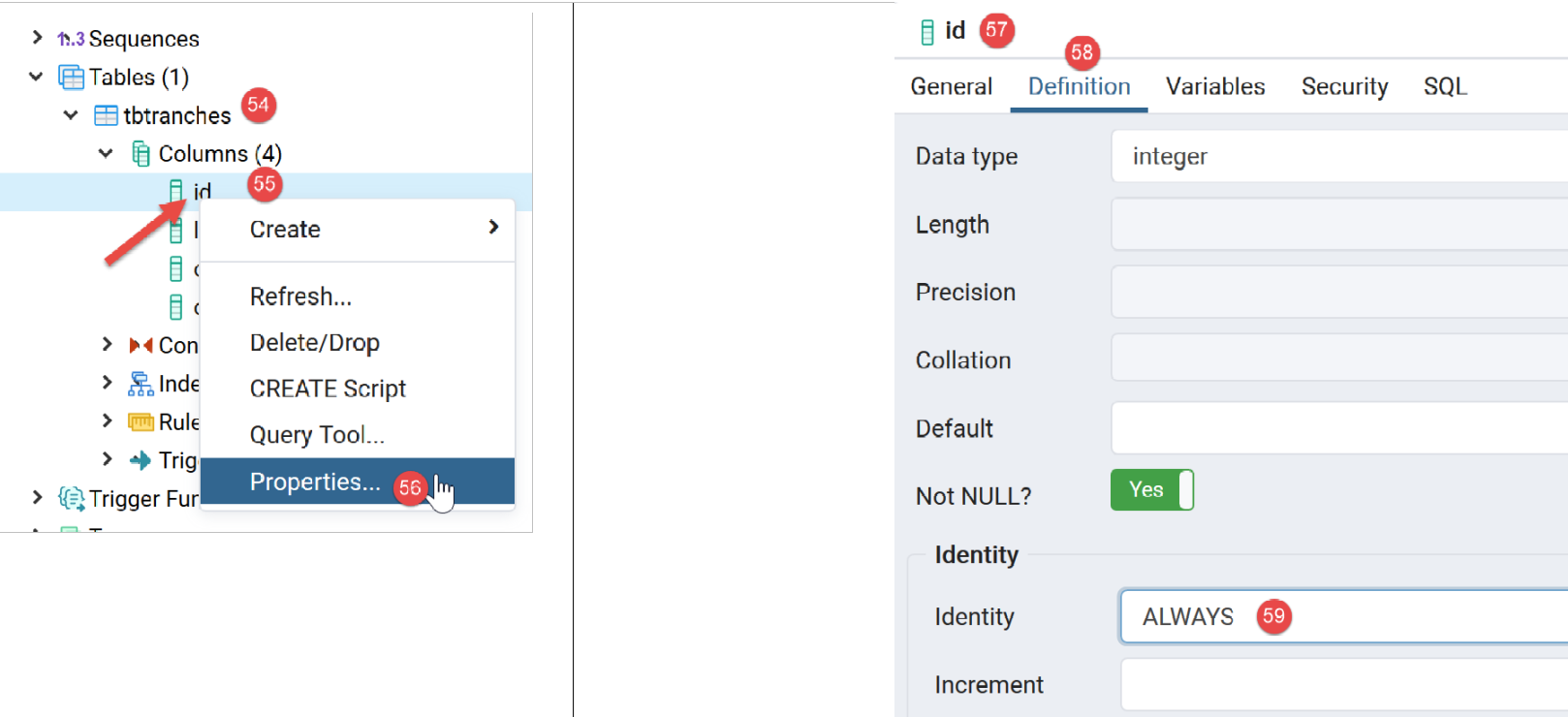
- 在 [56] 处,我们访问主键 [id] 的属性;
- 在 [59] 处,我们指定该列的类型为 [Identity]。这将导致 DBMS 自动生成主键值;
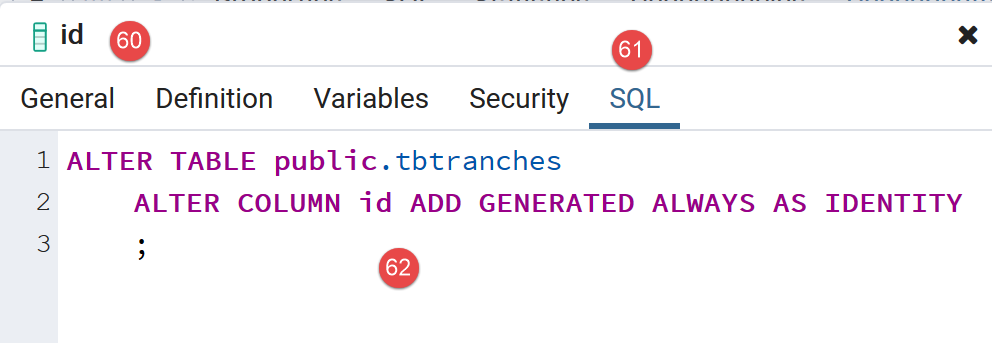
- 在[62]中,为该操作生成的SQL代码;
[tbtranches] 表现已准备就绪。
我们重复相同的步骤来创建 [tbconstantes] 表。以下是预期结果:
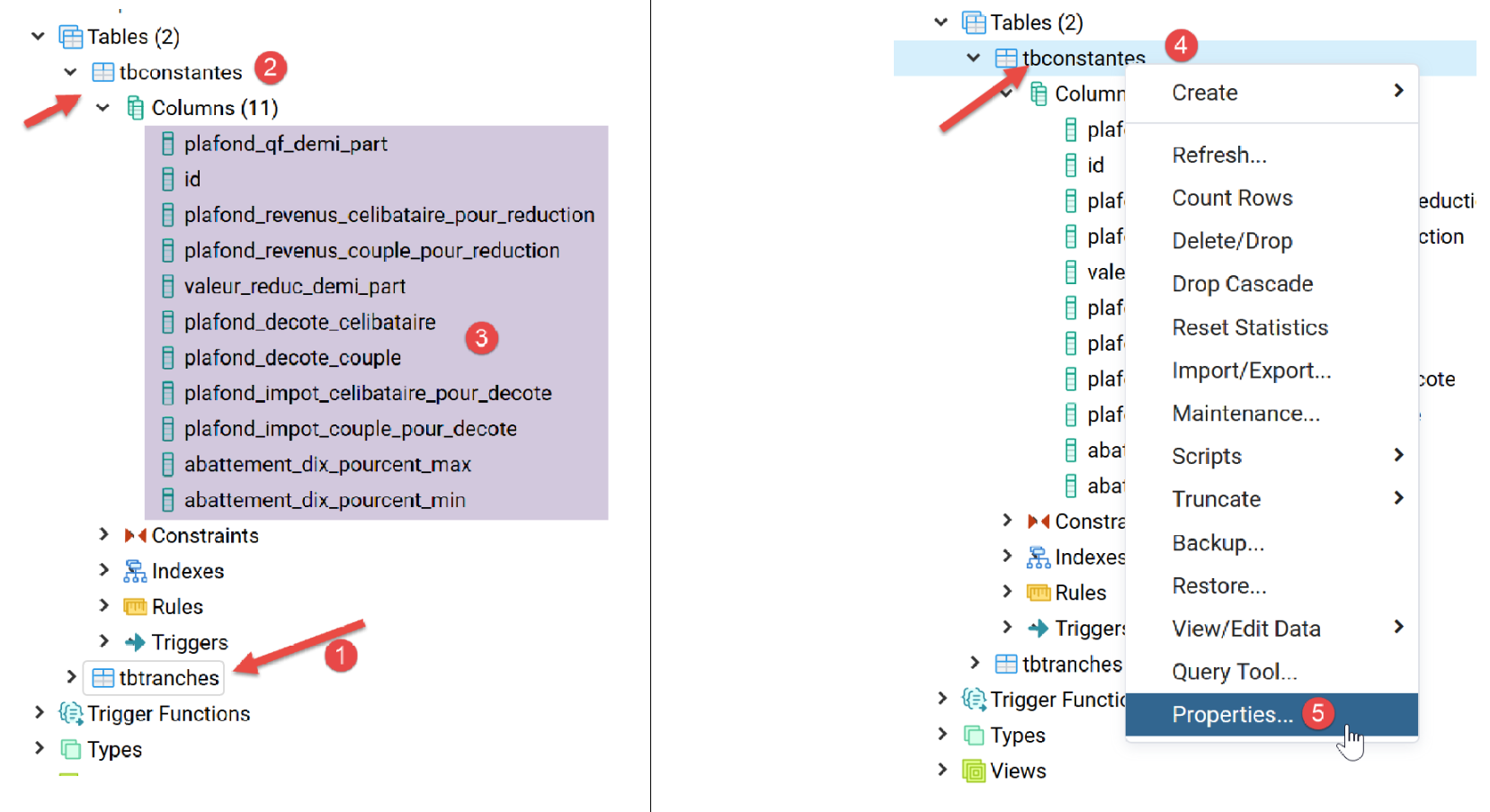
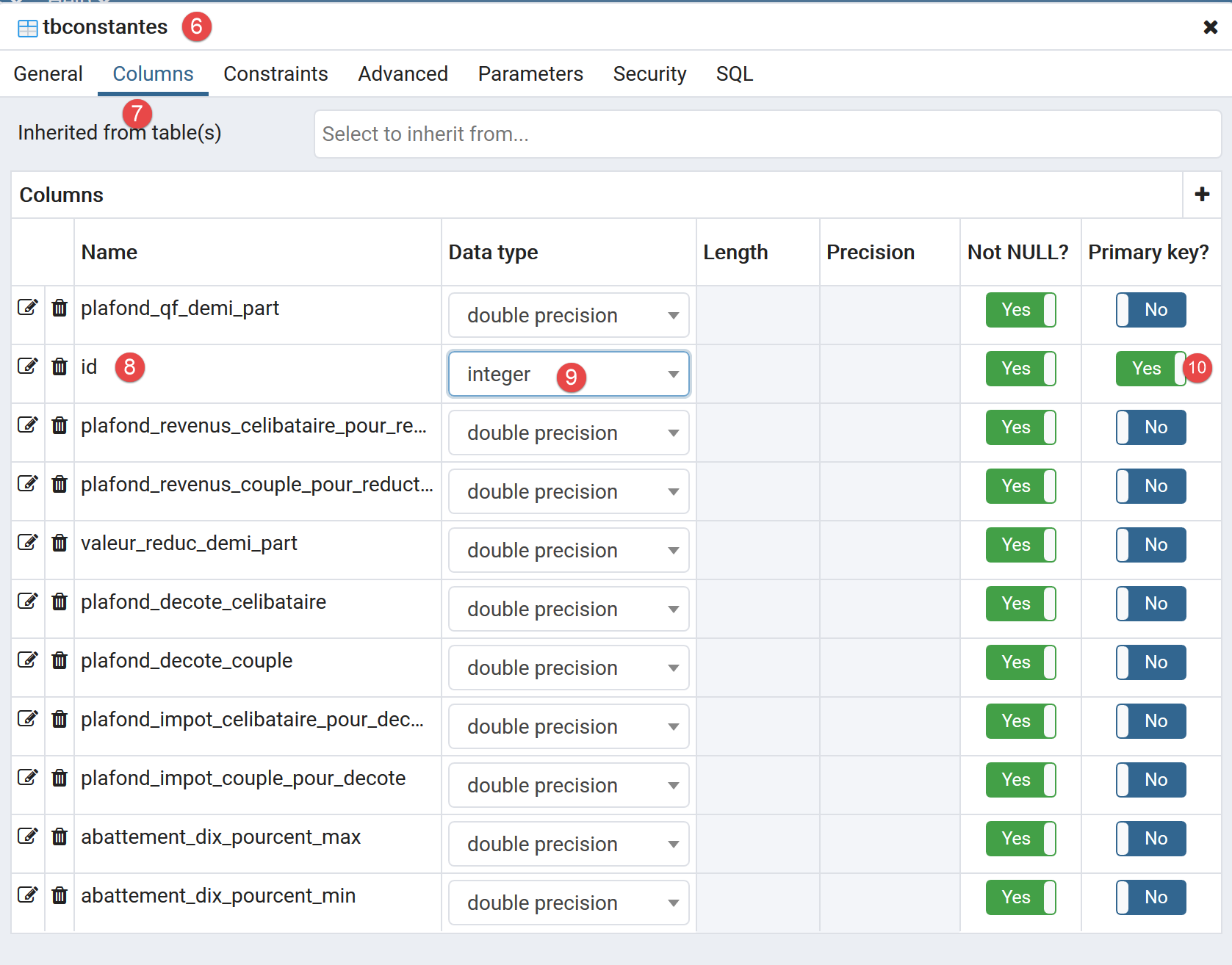
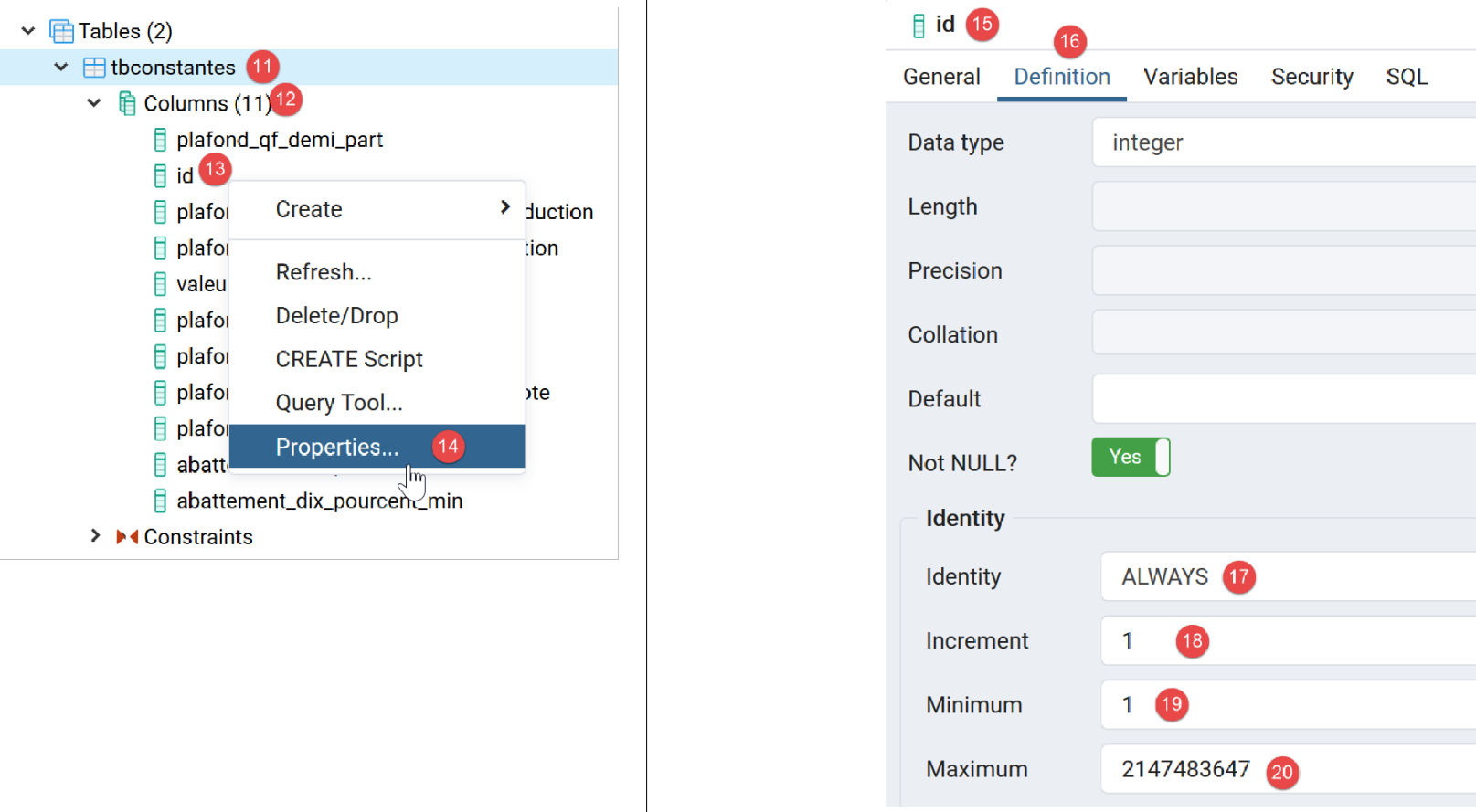
[dbimpots-2019] 数据库现已准备就绪。接下来我们将向其中导入数据。
与处理 MySQL 时一样,可以将 [dbimpots-2019] 数据库导出为 SQL 文件。如果数据库丢失或损坏,我们可以导入该 SQL 文件来重建数据库。在此,我们将仅导出数据库结构,而不导出其中的数据:
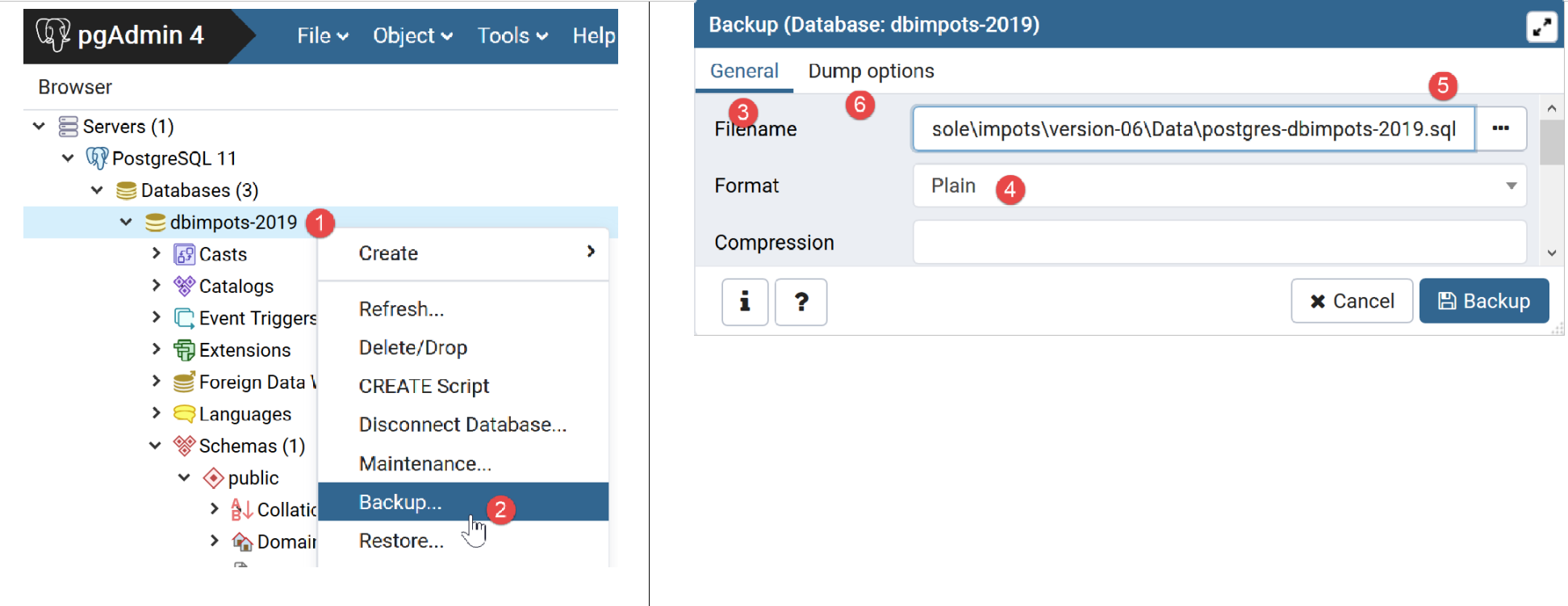
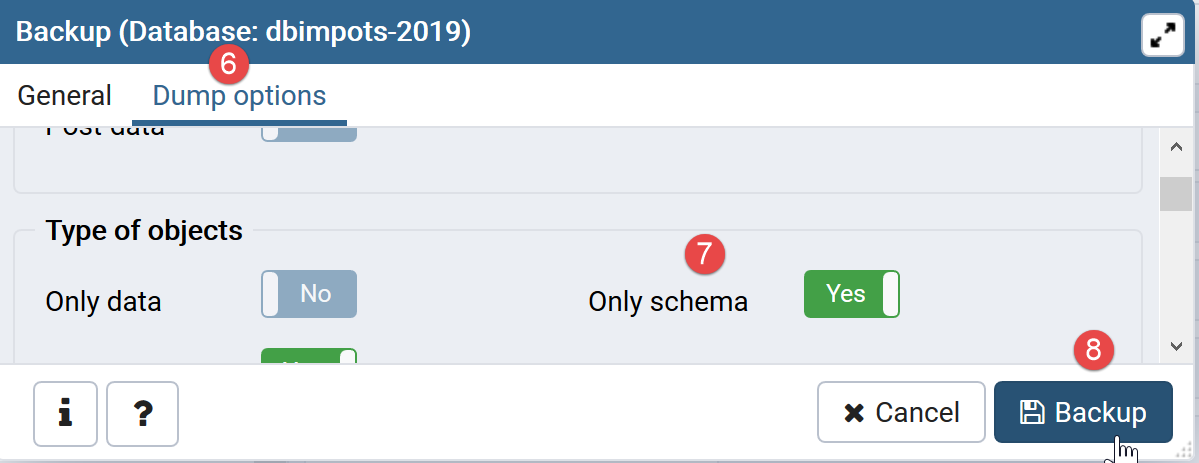
生成的文件如下:
--
-- PostgreSQL database dump
--

-- Dumped from database version 11.2
-- Dumped by pg_dump version 11.2

-- Started on 2019-07-04 08:20:31

SET statement_timeout = 0;
SET lock_timeout = 0;
SET idle_in_transaction_session_timeout = 0;
SET client_encoding = 'UTF8';
SET standard_conforming_strings = on;
SELECT pg_catalog.set_config('search_path', '', false);
SET check_function_bodies = false;
SET client_min_messages = warning;
SET row_security = off;

SET default_tablespace = '';

SET default_with_oids = false;

--
-- TOC entry 198 (class 1259 OID 16408)
-- Name: tbconstantes; Type: TABLE; Schema: public; Owner: postgres
--

CREATE TABLE public.tbconstantes (
    plafond_qf_demi_part double precision NOT NULL,
    id integer NOT NULL,
    plafond_revenus_celibataire_pour_reduction double precision NOT NULL,
    plafond_revenus_couple_pour_reduction double precision NOT NULL,
    valeur_reduc_demi_part double precision NOT NULL,
    plafond_decote_celibataire double precision NOT NULL,
    plafond_decote_couple double precision NOT NULL,
    plafond_impot_celibataire_pour_decote double precision NOT NULL,
    plafond_impot_couple_pour_decote double precision NOT NULL,
    abattement_dix_pourcent_max double precision NOT NULL,
    abattement_dix_pourcent_min double precision NOT NULL
);


ALTER TABLE public.tbconstantes OWNER TO postgres;

--
-- TOC entry 199 (class 1259 OID 16411)
-- Name: tbconstantes_id_seq; Type: SEQUENCE; Schema: public; Owner: postgres
--

ALTER TABLE public.tbconstantes ALTER COLUMN id ADD GENERATED ALWAYS AS IDENTITY (
    SEQUENCE NAME public.tbconstantes_id_seq
    START WITH 1
    INCREMENT BY 1
    NO MINVALUE
    NO MAXVALUE
    CACHE 1
);


--
-- TOC entry 196 (class 1259 OID 16399)
-- Name: tbtranches; Type: TABLE; Schema: public; Owner: admimpots
--

CREATE TABLE public.tbtranches (
    limites double precision NOT NULL,
    id integer NOT NULL,
    coeffr double precision NOT NULL,
    coeffn double precision NOT NULL
);


ALTER TABLE public.tbtranches OWNER TO admimpots;

--
-- TOC entry 197 (class 1259 OID 16404)
-- Name: tbimpots_id_seq; Type: SEQUENCE; Schema: public; Owner: admimpots
--

ALTER TABLE public.tbtranches ALTER COLUMN id ADD GENERATED ALWAYS AS IDENTITY (
    SEQUENCE NAME public.tbimpots_id_seq
    START WITH 1
    INCREMENT BY 1
    NO MINVALUE
    NO MAXVALUE
    CACHE 1
);


--
-- TOC entry 2694 (class 2606 OID 16429)
-- Name: tbconstantes tbconstantes_pkey; Type: CONSTRAINT; Schema: public; Owner: postgres
--

ALTER TABLE ONLY public.tbconstantes
    ADD CONSTRAINT tbconstantes_pkey PRIMARY KEY (id);


--
-- TOC entry 2692 (class 2606 OID 16403)
-- Name: tbtranches tbimpots_pkey; Type: CONSTRAINT; Schema: public; Owner: admimpots
--

ALTER TABLE ONLY public.tbtranches
    ADD CONSTRAINT tbimpots_pkey PRIMARY KEY (id);


--
-- TOC entry 2821 (class 0 OID 0)
-- Dependencies: 198
-- Name: TABLE tbconstantes; Type: ACL; Schema: public; Owner: postgres
--

GRANT ALL ON TABLE public.tbconstantes TO admimpots;


-- Completed on 2019-07-04 08:20:32

--
-- PostgreSQL database dump complete
--
14.4. 正在填充 [tbtranches] 表
我们在链接部分中已经使用 MySQL 数据库管理系统(DBMS)完成了这一步。我们只需修改描述该数据库的 [database.json] 文件即可:
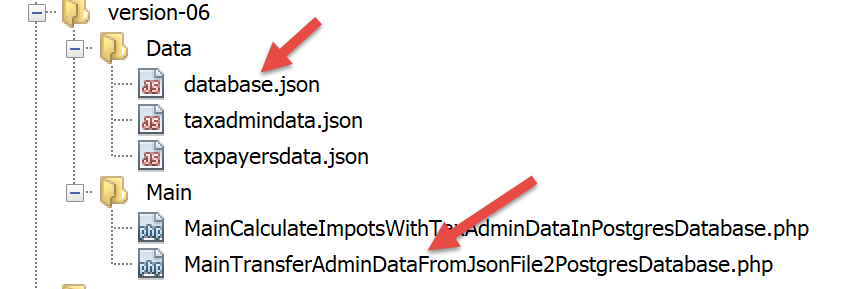
[database.json] 文件内容如下:
{
    "dsn": "pgsql:host=localhost;dbname=dbimpots-2019",
    "id": "admimpots",
    "pwd": "mdpimpots",
    "tableTranches": "public.tbtranches",
    "colLimites": "limites",
    "colCoeffR": "coeffr",
    "colCoeffN": "coeffn",
    "tableConstantes": "public.tbconstantes",
    "colPlafondQfDemiPart": "plafond_qf_demi_part",
    "colPlafondRevenusCelibatairePourReduction": "plafond_revenus_celibataire_pour_reduction",
    "colPlafondRevenusCouplePourReduction": "plafond_revenus_couple_pour_reduction",
    "colValeurReducDemiPart": "valeur_reduc_demi_part",
    "colPlafondDecoteCelibataire": "plafond_decote_celibataire",
    "colPlafondDecoteCouple": "plafond_decote_couple",
    "colPlafondImpotCelibatairePourDecote": "plafond_impot_celibataire_pour_decote",
    "colPlafondImpotCouplePourDecote": "plafond_impot_couple_pour_decote",
    "colAbattementDixPourcentMax": "abattement_dix_pourcent_max",
    "colAbattementDixPourcentMin": "abattement_dix_pourcent_min"
}
- 第 2 行:DSN 已更改;[pgsql] 表示我们正在处理 Postgres 数据库管理系统;
- 第 5 行和第 9 行:表名前已添加所属模式的名称 [public]。这并非绝对必要,因为当表名中未指定模式时,[public] 是默认模式;
- 第 6–8 行、第 10–19 行:列名已更改;
用于向 [dbimpots-2019] 数据库导入数据的脚本 [MainTransferAdminDataFromJsonFile2PostgresDatabase.php] 如下:
<?php

// strict adherence to declared types of function parameters
declare (strict_types=1);

// namespace
namespace Application;

// error handling by PHP
// ini_set("display_errors", "0");
// interface and class inclusion
require_once __DIR__ . "/../../version-05/Entities/BaseEntity.php";
require_once __DIR__ . "/../../version-05/Entities/TaxAdminData.php";
require_once __DIR__ . "/../../version-05/Entities/TaxPayerData.php";
require_once __DIR__ . "/../../version-05/Entities/Database.php";
require_once __DIR__ . "/../../version-05/Entities/ExceptionImpots.php";
require_once __DIR__ . "/../../version-05/Utilities/Utilitaires.php";
require_once __DIR__ . "/../../version-05/Dao/InterfaceDao.php";
require_once __DIR__ . "/../../version-05/Dao/TraitDao.php";
require_once __DIR__ . "/../../version-05/Dao/InterfaceDao4TransferAdminData2Database.php";
require_once __DIR__ . "/../../version-05/Dao/DaoTransferAdminDataFromJsonFile2Database.php";
//
// definition of constants
const DATABASE_CONFIG_FILENAME = "../Data/database.json";
const TAXADMINDATA_FILENAME = "../Data/taxadmindata.json";

//
try {
  // creation of the [dao] layer
  $dao = new DaoTransferAdminDataFromJsonFile2Database(DATABASE_CONFIG_FILENAME, TAXADMINDATA_FILENAME);
  // data transfer to the database
  $dao->transferAdminData2Database();
} catch (ExceptionImpots $ex) {
  // error is displayed
  print "L'erreur suivante s'est produite : " . utf8_encode($ex->getMessage()) . "\n";
}
// end
print "Terminé\n";
exit;
注释
只有第 12–21 行发生了变化,这些行负责加载运行应用程序所需的文件。之所以发生变化,是因为 [__DIR__] 的值发生了变化:它现在指向 [version-07/Main] 文件夹。
运行此脚本后,[tbtranches] 表中将得到以下结果:
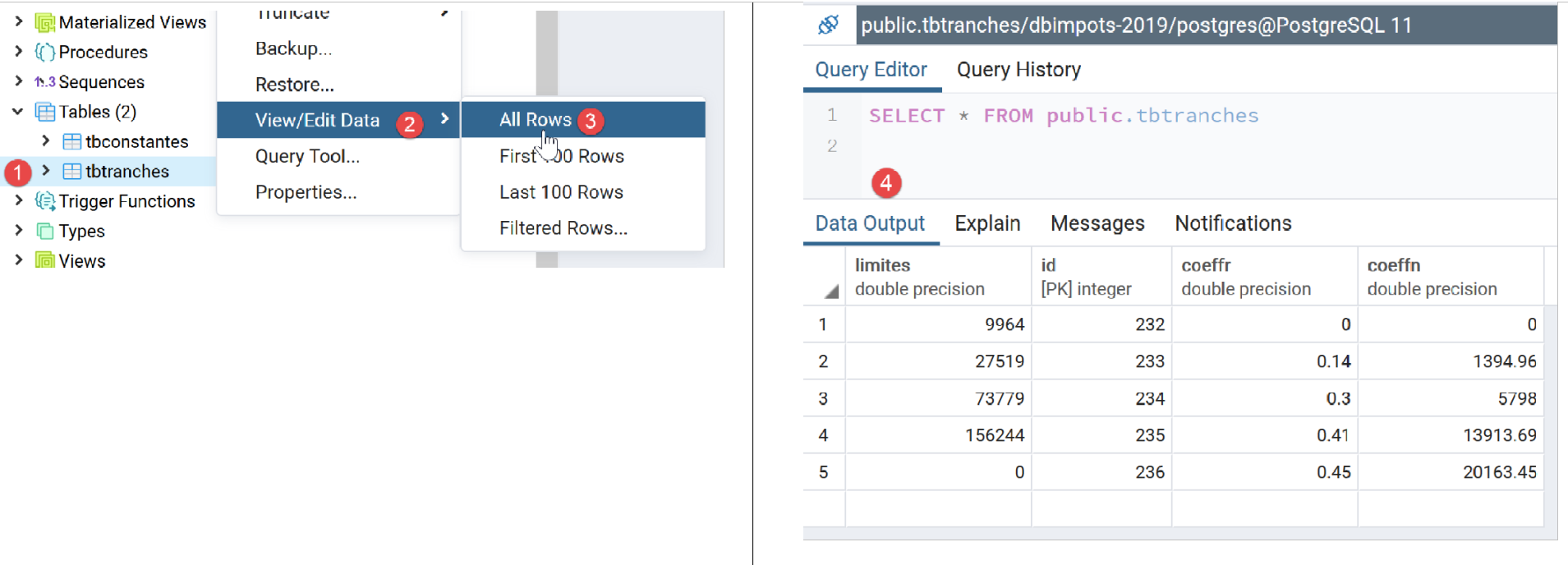
- 右键单击 [1],然后单击 [2-3];
- 在[4]中,我们可以看到税率区间数据;
我们对常量表 [tbconstantes] 重复相同的操作:
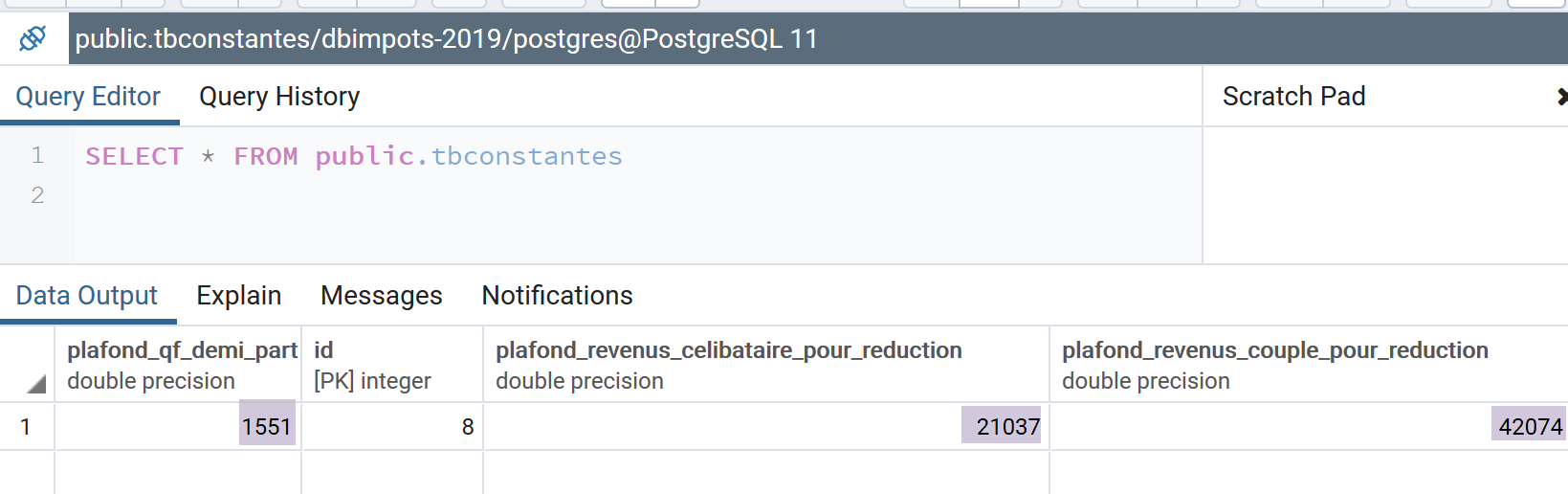
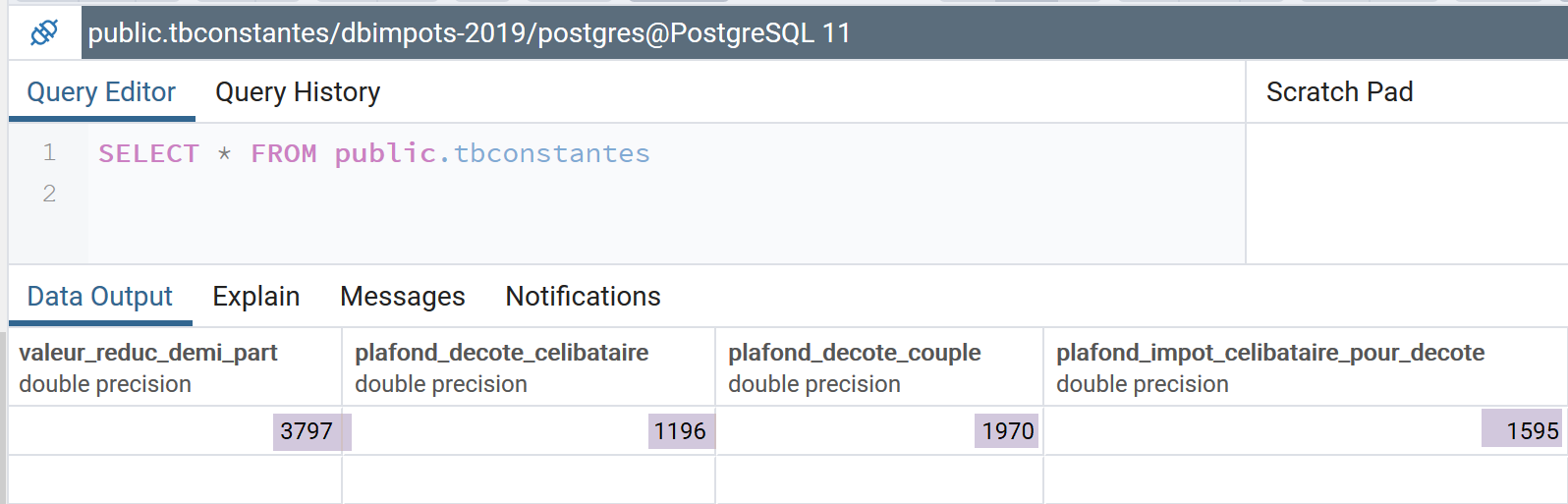
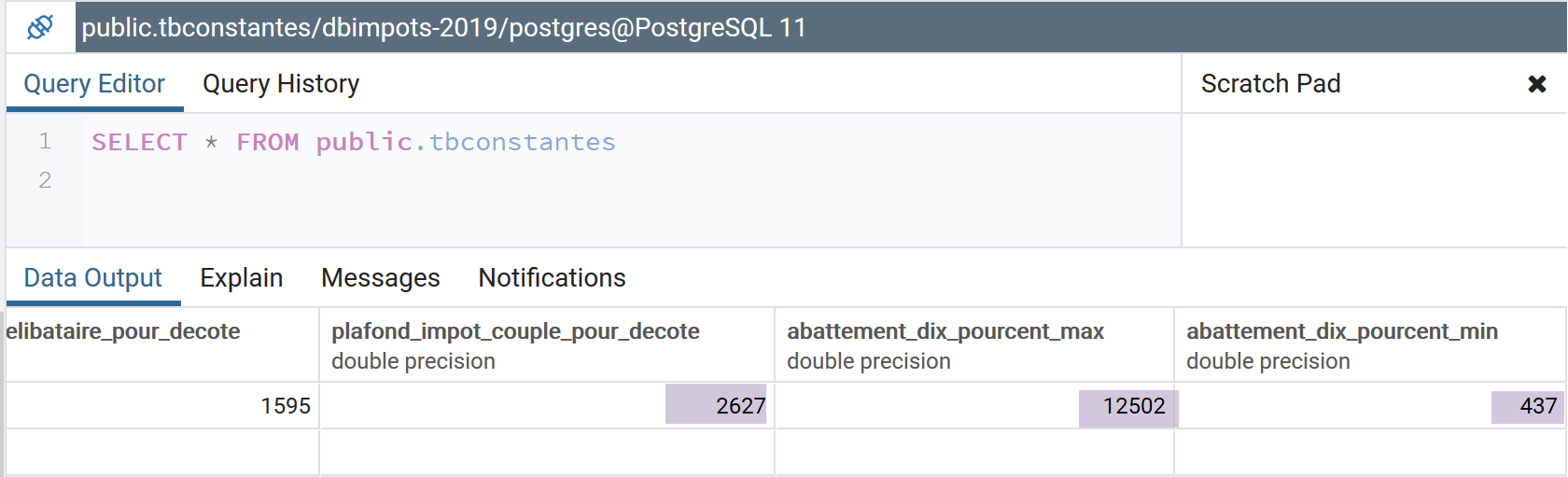
请注意,运行该脚本时,Laragon 应用程序无需处于活动状态:既不需要 Apache 服务器,也不需要 MySQL 数据库管理系统。我们仅需 PostgreSQL 数据库管理系统,为此我们已启动了 Windows 服务。
14.5. 税费计算
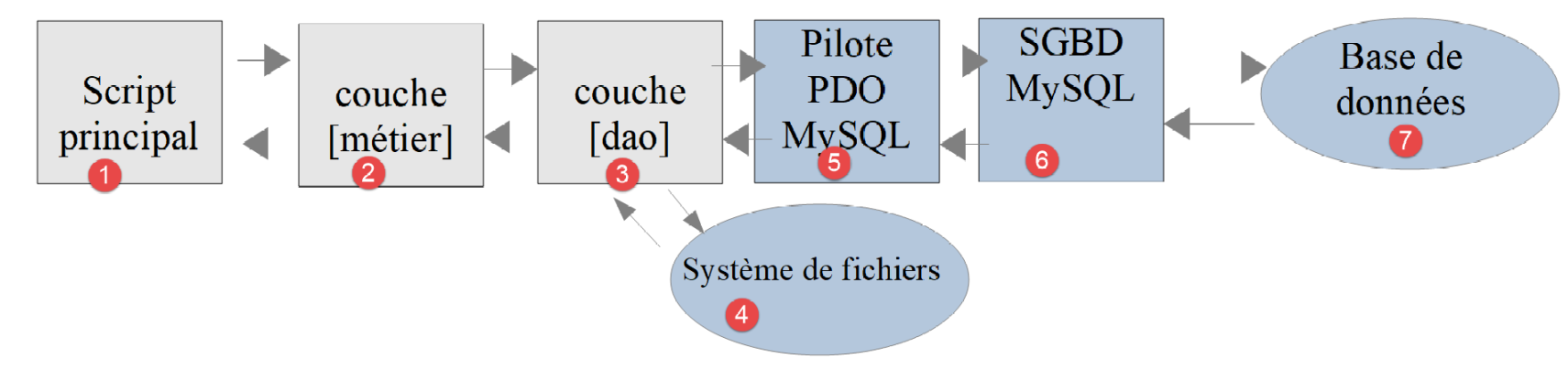
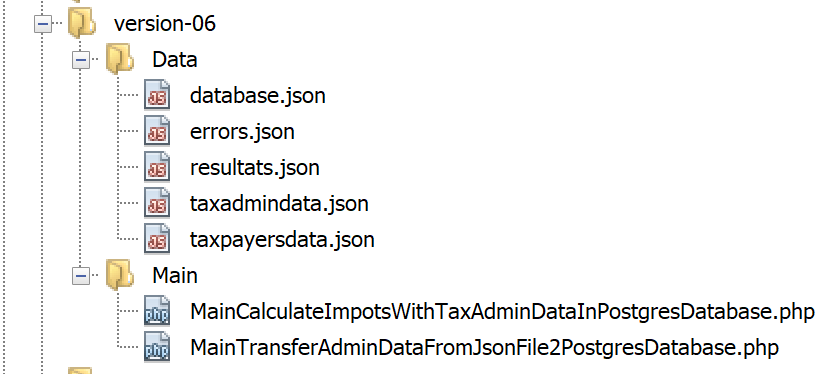
[DAO] (3) 和 [业务] (2) 层已经编写完成。 我们在前文链接的章节中已编写了针对 MySQL 数据库管理系统的主脚本。我们只需将脚本 [MainCalculateImpotsWithTaxAdminDataInMySQLDatabase.php] 稍作调整,使其适配 PostgreSQL 数据库管理系统。该脚本现更名为 [MainCalculateImpotsWithTaxAdminDataInPostgresDatabase.php]:
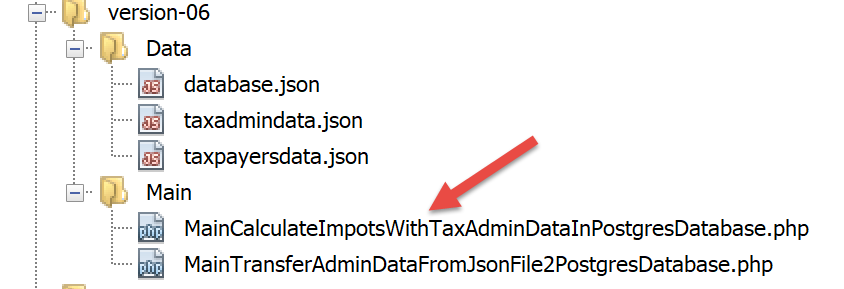
脚本 [MainCalculateImpotsWithTaxAdminDataInPostgresDatabase.php] 内容如下:
<?php

// strict adherence to declared types of function parameters
declare (strict_types=1);

// namespace
namespace Application;

// error handling by PHP
//ini_set("display_errors", "0");
// interface and class inclusion
require_once __DIR__ . "/../../version-05/Entities/BaseEntity.php";
require_once __DIR__ . "/../../version-05/Entities/TaxAdminData.php";
require_once __DIR__ . "/../../version-05/Entities/TaxPayerData.php";
require_once __DIR__ . "/../../version-05/Entities/Database.php";
require_once __DIR__ . "/../../version-05/Entities/ExceptionImpots.php";
require_once __DIR__ . "/../../version-05/Utilities/Utilitaires.php";
require_once __DIR__ . "/../../version-05/Dao/InterfaceDao.php";
require_once __DIR__ . "/../../version-05/Dao/TraitDao.php";
require_once __DIR__ . "/../../version-05/Dao/DaoImpotsWithTaxAdminDataInDatabase.php";
require_once __DIR__ . "/../../version-05/Métier/InterfaceMetier.php";
require_once __DIR__ . "/../../version-05/Métier/Metier.php";
//
// definition of constants
const DATABASE_CONFIG_FILENAME = "../Data/database.json";
const TAXADMINDATA_FILENAME = "../Data/taxadmindata.json";
const RESULTS_FILENAME = "../Data/resultats.json";
const ERRORS_FILENAME = "../Data/errors.json";
const TAXPAYERSDATA_FILENAME = "../Data/taxpayersdata.json";

try {
  // creation of the [dao] layer
  $dao = new DaoImpotsWithTaxAdminDataInDatabase(DATABASE_CONFIG_FILENAME);
  // creation of the [business] layer
  $métier = new Metier($dao);
  // tax calculation in batch mode
  $métier->executeBatchImpots(TAXPAYERSDATA_FILENAME, RESULTS_FILENAME, ERRORS_FILENAME);
} catch (ExceptionImpots $ex) {
  // error is displayed
  print "Une erreur s'est produite : " . utf8_encode($ex->getMessage()) . "\n";
}
// end
print "Terminé\n";
exit;
注释
只有第 12–22 行发生了变化,这些行负责加载运行应用程序所需的文件。之所以发生变化,是因为 [__DIR__] 的值发生了变化:它现在指向 [version-07/Main] 文件夹。
执行结果
与之前版本中获得的结果相同。
14.6. [Codeception] 测试
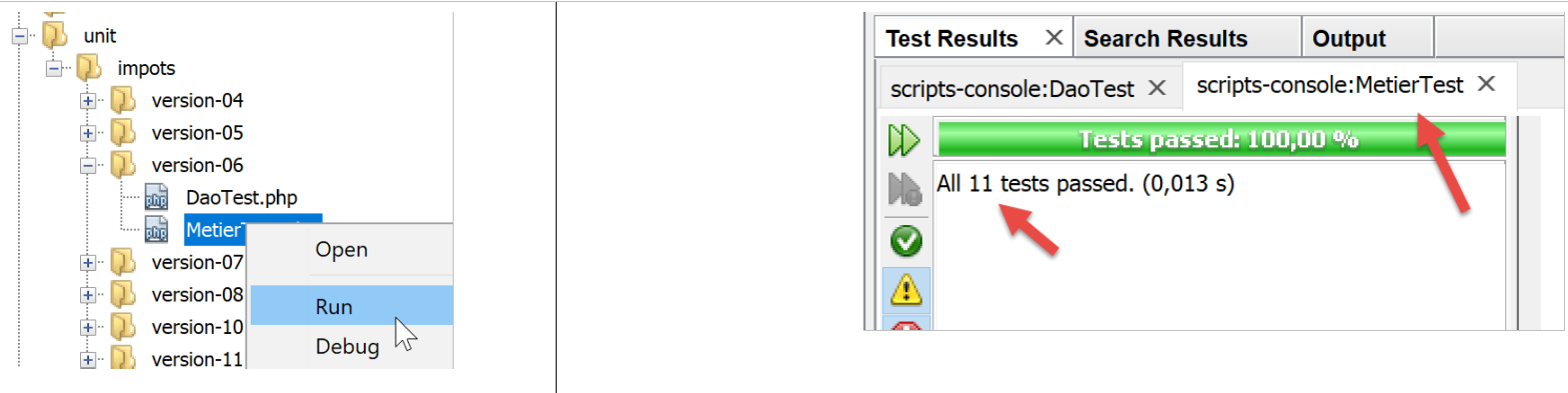
与之前版本一样,我们使用 [Codeception] 测试对本版本进行验证:
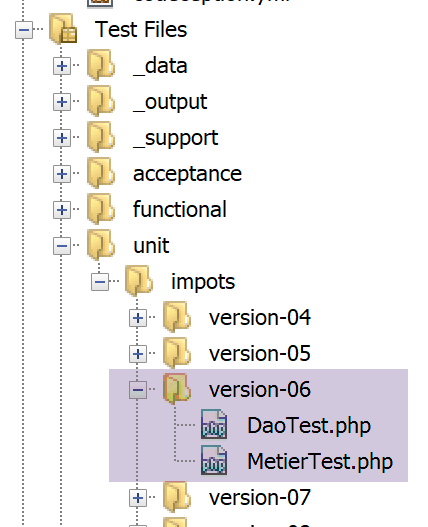
14.6.1. [DAO] 层测试
[DaoTest.php] 测试内容如下:
<?php

// strict adherence to declared types of function parameters
declare (strict_types=1);

// namespace
namespace Application;

// root directories
define("ROOT", "C:/Data/st-2019/dev/php7/poly/scripts-console/impots/version-06");
define("VENDOR", "C:/myprograms/laragon-lite/www/vendor");

// interface and class inclusion
require_once ROOT . "/../version-05/Entities/BaseEntity.php";
require_once ROOT . "/../version-05/Entities/TaxAdminData.php";
require_once ROOT . "/../version-05/Entities/TaxPayerData.php";
require_once ROOT . "/../version-05/Entities/Database.php";
require_once ROOT . "/../version-05/Entities/ExceptionImpots.php";
require_once ROOT . "/../version-05/Utilities/Utilitaires.php";
require_once ROOT . "/../version-05/Dao/InterfaceDao.php";
require_once ROOT . "/../version-05/Dao/TraitDao.php";
require_once ROOT . "/../version-05/Dao/DaoImpotsWithTaxAdminDataInDatabase.php";

// third-party libraries
require_once VENDOR . "/autoload.php";

// definition of constants
const DATABASE_CONFIG_FILENAME = ROOT ."../Data/database.json";

class DaoTest extends \Codeception\Test\Unit {
  // TaxAdminData
  private $taxAdminData;

  public function __construct() {
    parent::__construct();
    // creation of the [dao] layer
    $dao = new DaoImpotsWithTaxAdminDataInDatabase(DATABASE_CONFIG_FILENAME);
    $this->taxAdminData = $dao->getTaxAdminData();
  }

  // tests
  public function testTaxAdminData() {
    …
  }

}
评论
- 第 9–28 行:测试环境的定义。我们使用与链接部分中描述的主脚本 [MainCalculateImpotsWithTaxAdminDataInPostgresDatabase] 相同的环境,但不包含 [business] 层;
- 第 34–39 行:构建 [dao] 层;
- 第 38 行:[$this→taxAdminData] 属性包含待测试的数据;
- 第 42–44 行:[testTaxAdminData] 方法即链接部分中所述的方法;
测试结果如下:
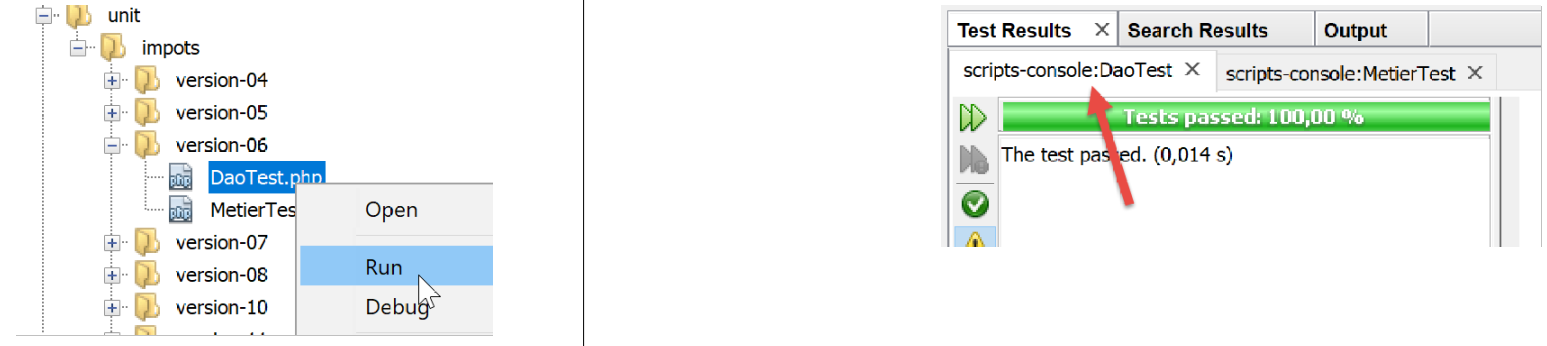
14.6.2. 测试 [business] 层
[MetierTest.php] 的测试内容如下:
<?php

// strict adherence to declared types of function parameters
declare (strict_types=1);

// namespace
namespace Application;

// root directories
define("ROOT", "C:/Data/st-2019/dev/php7/poly/scripts-console/impots/version-06");
define("VENDOR", "C:/myprograms/laragon-lite/www/vendor");

// interface and class inclusion
require_once ROOT . "/../version-05/Entities/BaseEntity.php";
require_once ROOT . "/../version-05/Entities/TaxAdminData.php";
require_once ROOT . "/../version-05/Entities/TaxPayerData.php";
require_once ROOT . "/../version-05/Entities/Database.php";
require_once ROOT . "/../version-05/Entities/ExceptionImpots.php";
require_once ROOT . "/../version-05/Utilities/Utilitaires.php";
require_once ROOT . "/../version-05/Dao/InterfaceDao.php";
require_once ROOT . "/../version-05/Dao/TraitDao.php";
require_once ROOT . "/../version-05/Dao/DaoImpotsWithTaxAdminDataInDatabase.php";
require_once ROOT . "/../version-05/Métier/InterfaceMetier.php";
require_once ROOT . "/../version-05/Métier/Metier.php";
// third-party libraries
require_once VENDOR . "/autoload.php";
// definition of constants
const DATABASE_CONFIG_FILENAME = ROOT . "../Data/database.json";

class MetierTest extends \Codeception\Test\Unit {
  // business layer
  private $métier;

  public function __construct() {
    parent::__construct();
    // creation of the [dao] layer
    $dao = new DaoImpotsWithTaxAdminDataInDatabase(DATABASE_CONFIG_FILENAME);
    // creation of the [business] layer
    $this->métier = new Metier($dao);
  }

  // tests
  public function test1() {
    …
  }
--------------------------------------------------------------------
  public function test11() {
    …
  }

}
评论
- 第9–28行:测试环境的定义。我们使用与链接部分中描述的主脚本[MainCalculateImpotsWithTaxAdminDataInPostgresDatabase]相同的环境;
- 第34–40行:构建[dao]和[business]层;
- 第 39 行:属性 [$this→business] 引用 [business] 层
- 第 43–49 行:方法 [test1, test2…, test11] 即链接部分中所述的方法;
测试结果如下: