13. 实践练习——第5版
我们已经编写了该练习的多个版本。最新版本采用了分层架构:

[dao] 层实现了 [InterfaceDao] 接口。我们构建了一个实现该接口的类:
- [DaoImportsWithTaxAdminDataInJsonFile],该类从 JSON 文件中读取税务数据;
我们将通过一个名为 [DaoImportsWithTaxAdminDataInDatabase] 的新类来实现 [InterfaceDao] 接口,该类将从 MySQL 数据库中检索税务管理数据。
13.1. 创建 [dbimpots-2019] 数据库
参照“链接”部分中的示例,我们创建一个名为 [dbimpots-2019] 的 MySQL 数据库,所有者为 [admimpots],密码为 [mdpimpots]:
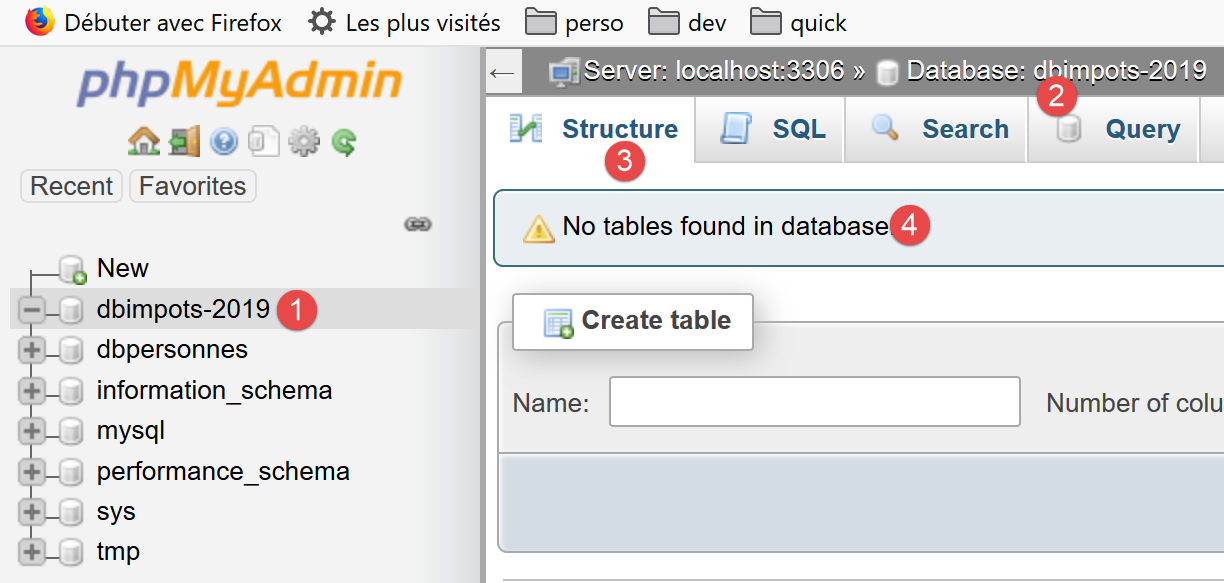
- 在上文的 [1-4] 中,我们可以看到数据库 [dbimpots-2019],该数据库目前尚无表;
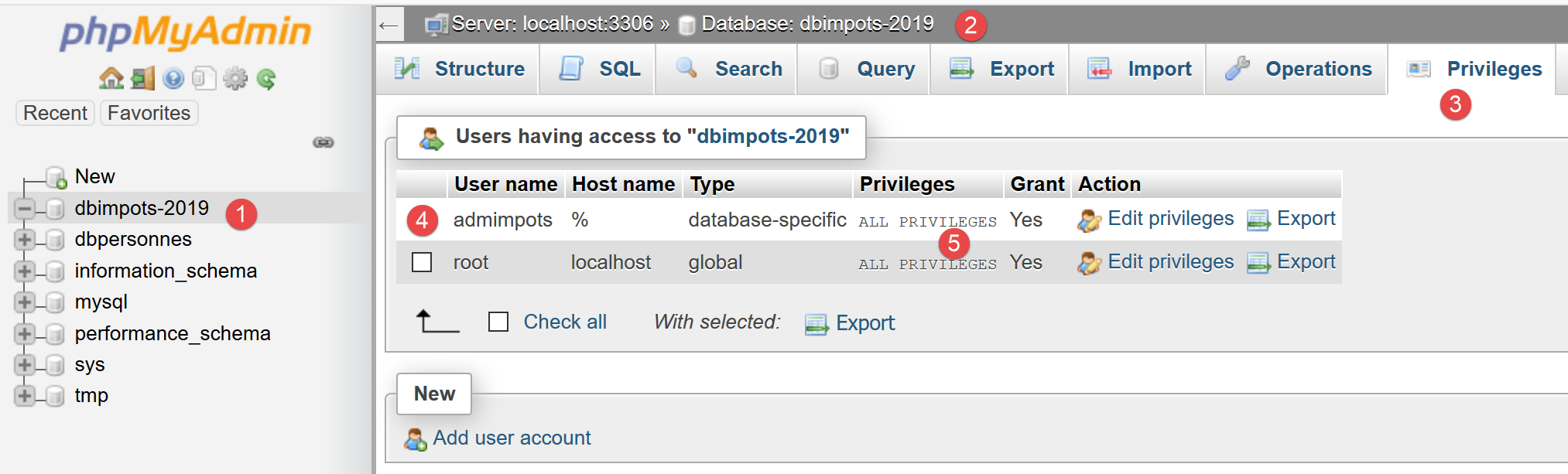
- 在上方的 [1-5] 中,我们可以看到用户 [admimpots] 对 [dbimpots-2019] 数据库拥有完全权限。但这里未显示的是,该用户的密码为 [admimpots];
现在我们将创建表 [tbtranches],该表将包含税率区间:
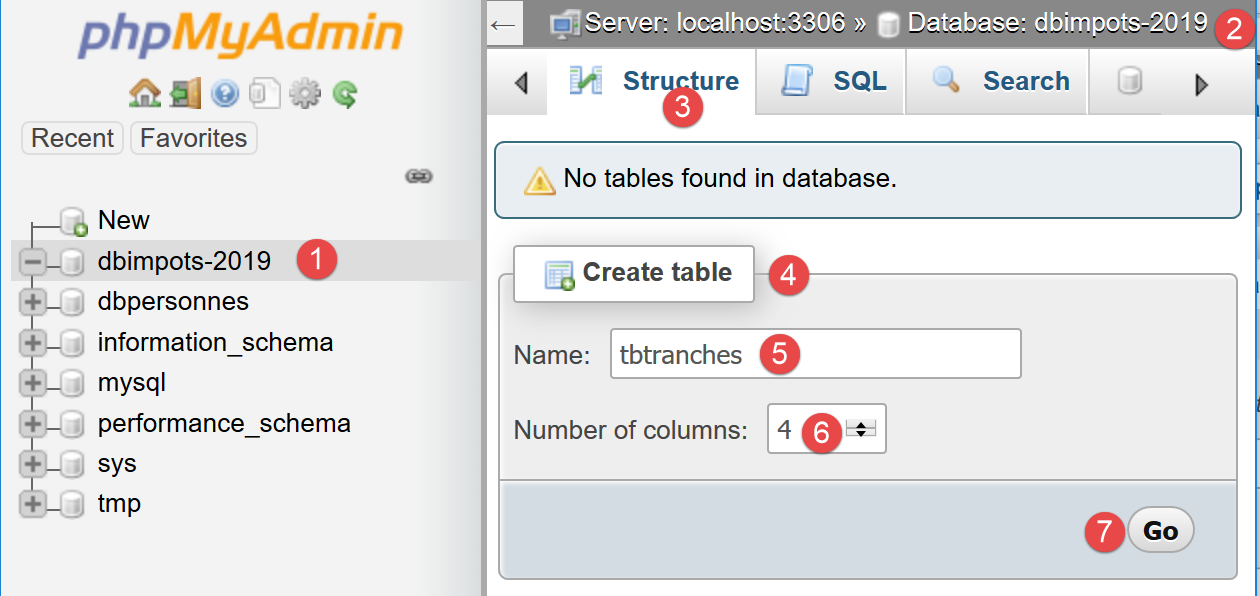
- 在 [1-7] 中,我们创建了一个名为 [tbtranches] 的表,包含 4 个列;
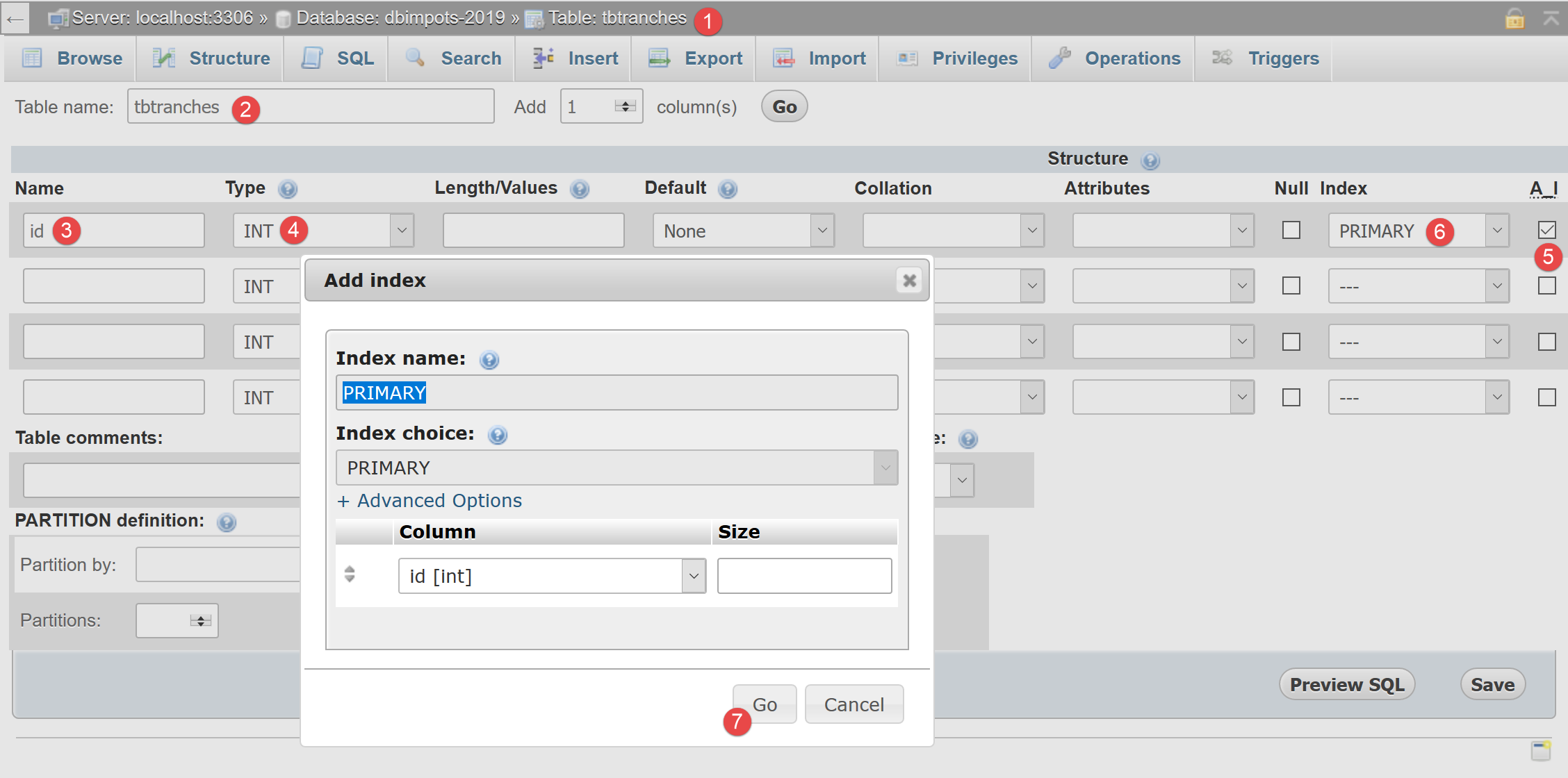
- 在 [3-6] 中,我们定义了一个名为 [id](3)的列,类型为整数 [int](4),该列将作为表的主键 [6],并由数据库管理系统 [DBMS] 自动递增 [5]。这意味着在插入数据时,MySQL 将自行管理主键值。 它会将值 1 分配给首次插入的主键,然后将 2 分配给下一次,依此类推;
- 在 [7] 中,向导提供了主键的额外配置选项。此处,我们直接接受 [7] 默认值;
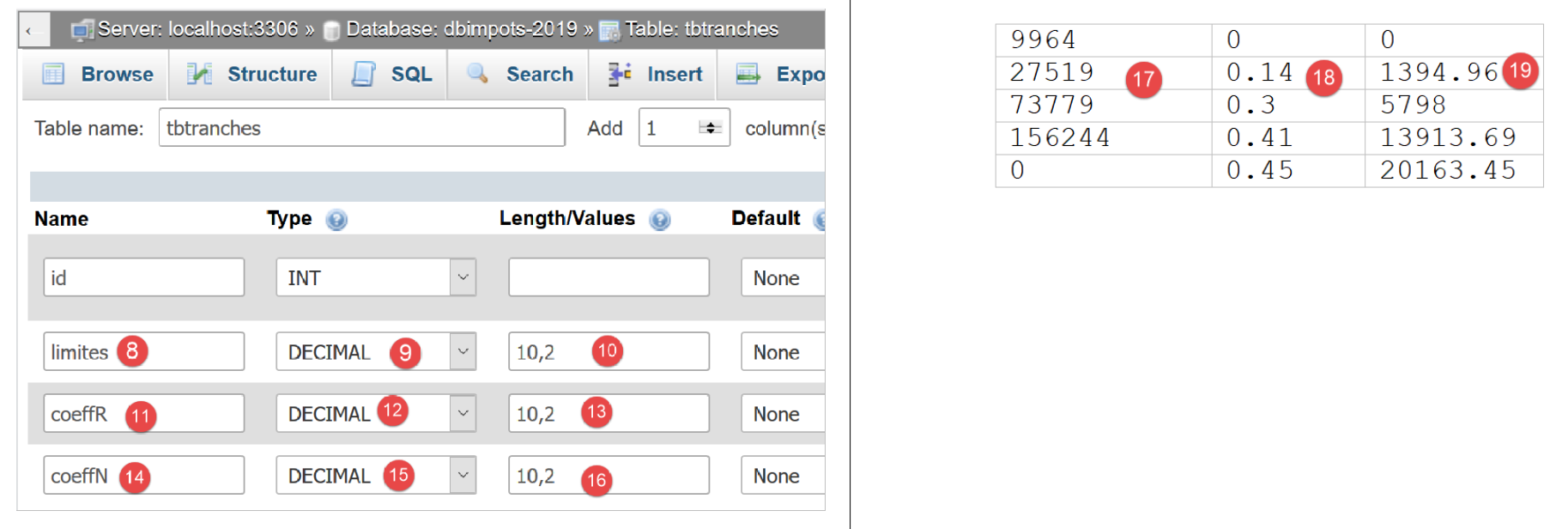
- 在 [8-16] 中,我们定义表的其他三列:
- [limits] (8),一个包含 10 位数字(9)且有 2 位小数(10)的小数,将包含税率表第 17 列的数值;
- [coeffR] (11),一个6位十进制数 (12),小数点后2位 (13),将包含税率表第18列的数值;
- [coeffN] (14),类型为10位十进制数(15),含2位小数(16),将包含税率表第19列的元素;
验证此结构后,我们得到以下结果:
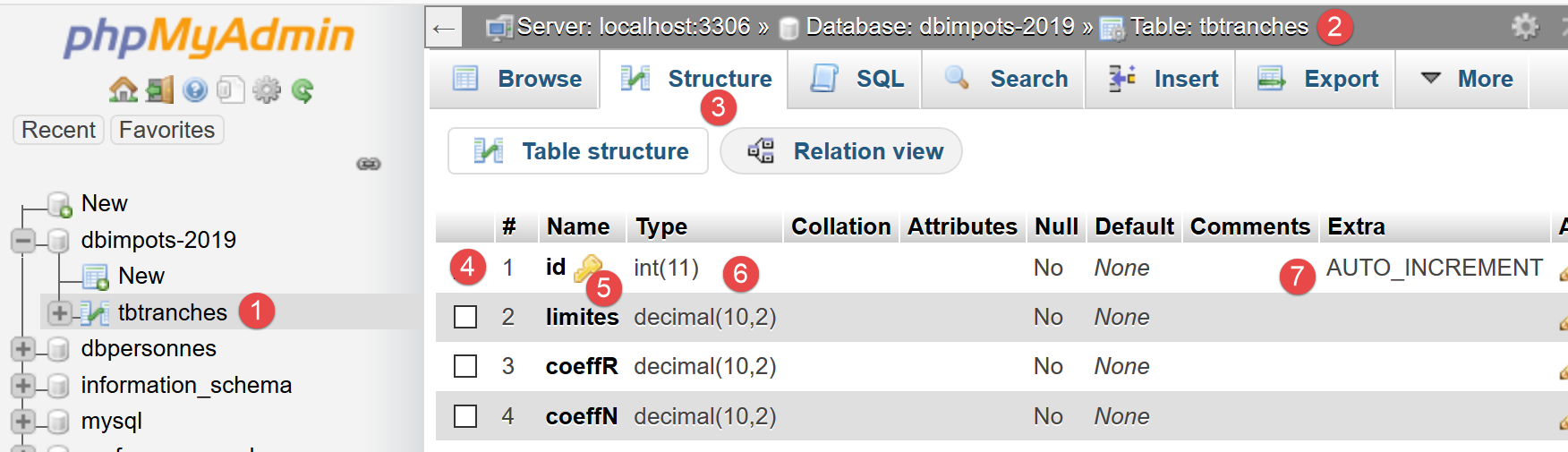
- 在 [5] 中,钥匙图标表示 [id] 列是主键。我们还可以看到,该主键的值类型为整数 (6),且由 MySQL 自动管理(自动递增);
与创建 [tbtranches] 表相同,我们构建 [tbconstantes] 表,该表将包含税费计算中使用的常量:
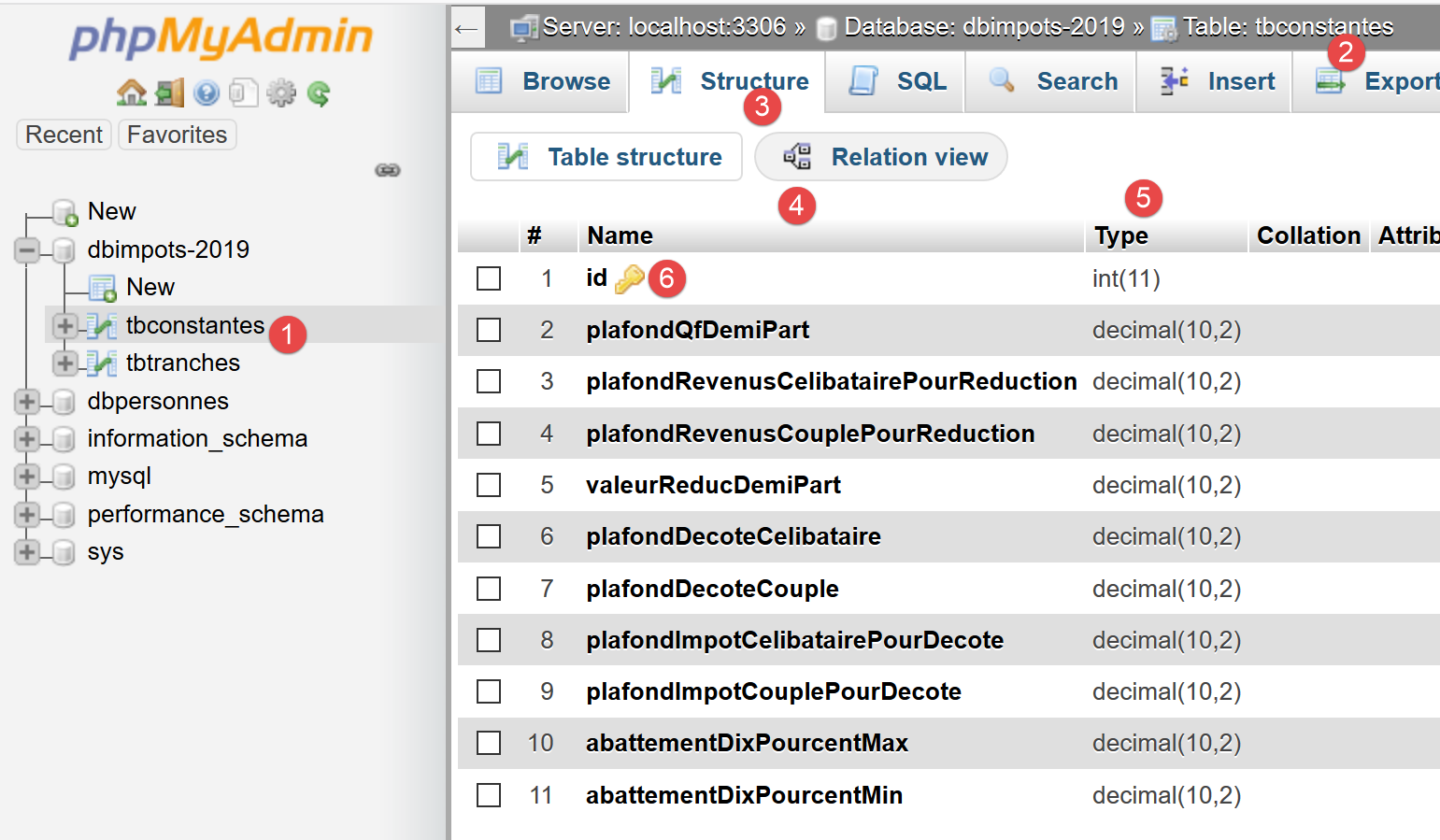
可以将数据库结构导出为文本文件,以一系列 SQL 语句的形式呈现:
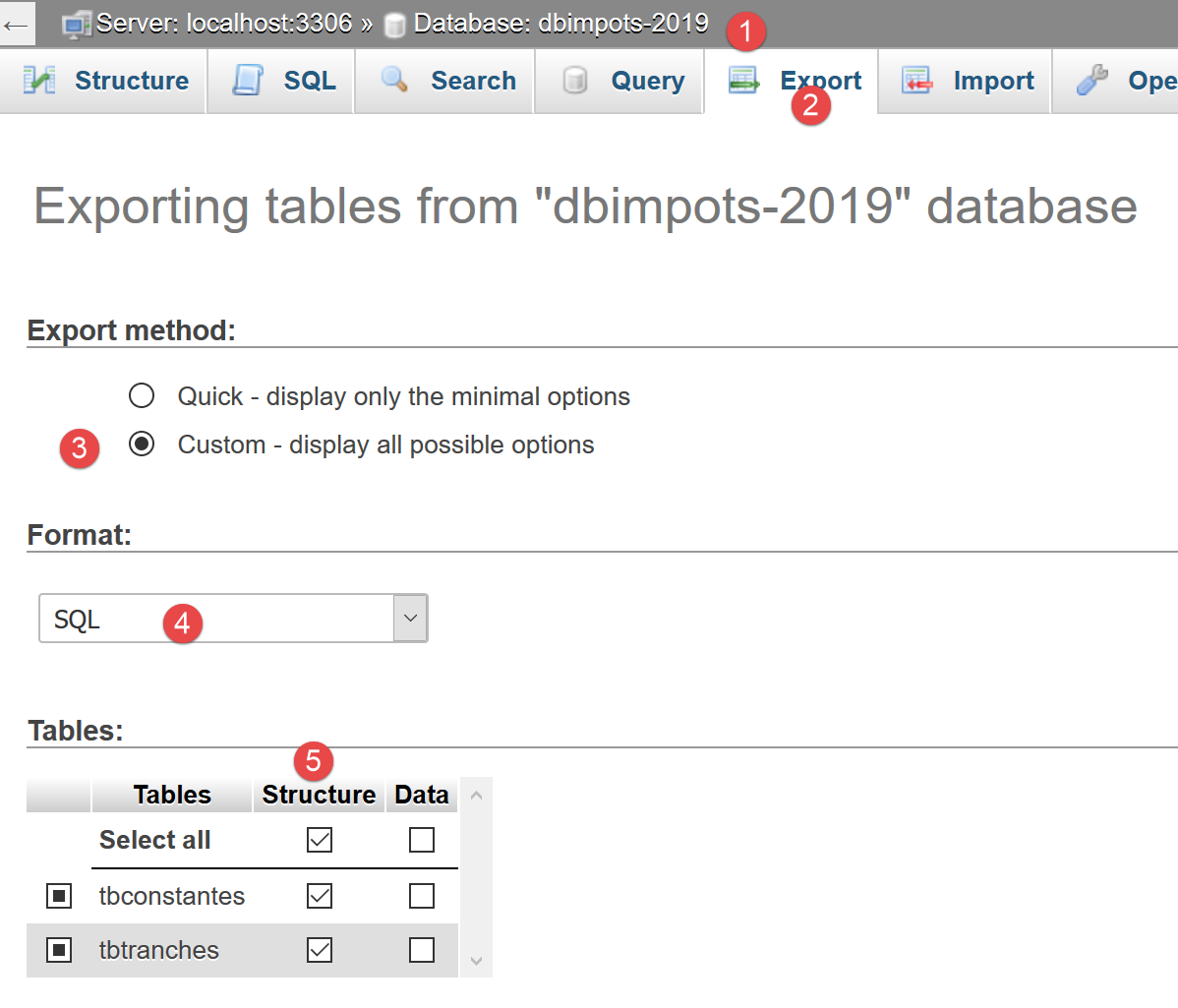
选项 [5] 仅导出数据库结构,不包含其内容。在本例中,数据库目前尚无任何内容。
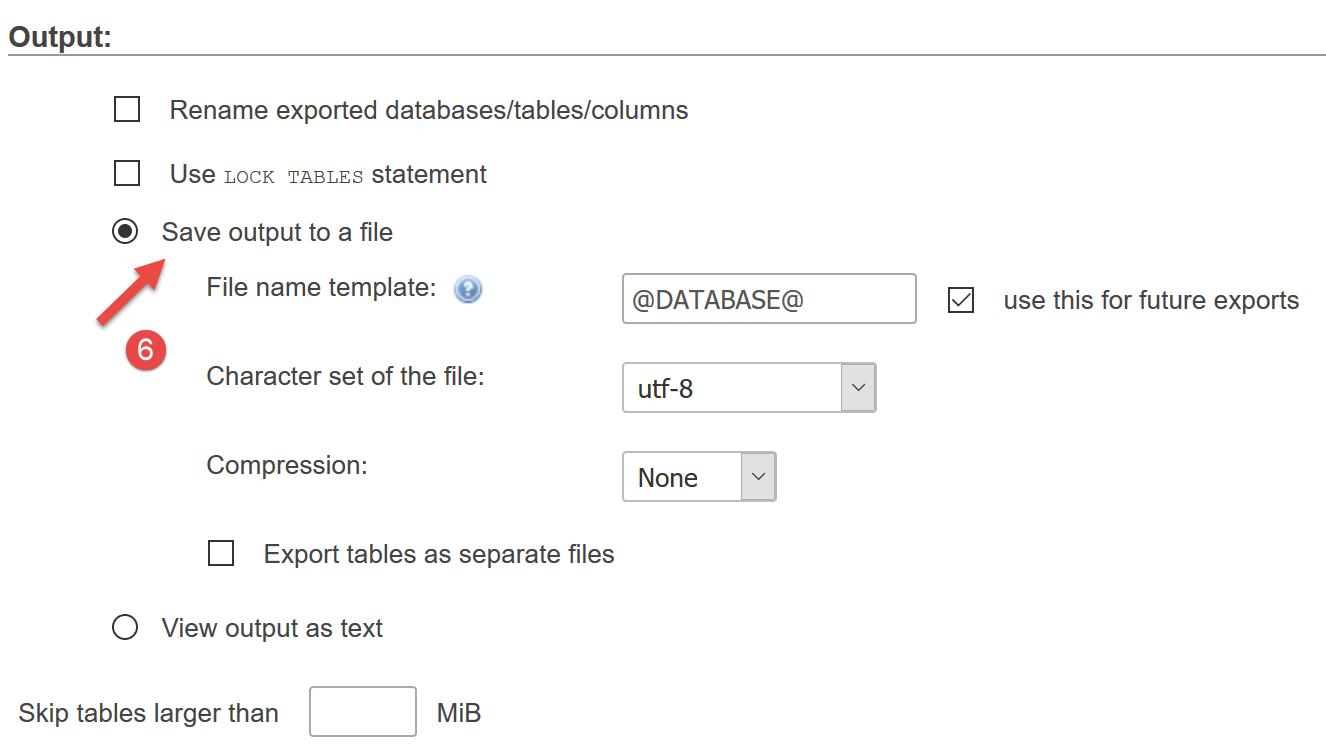
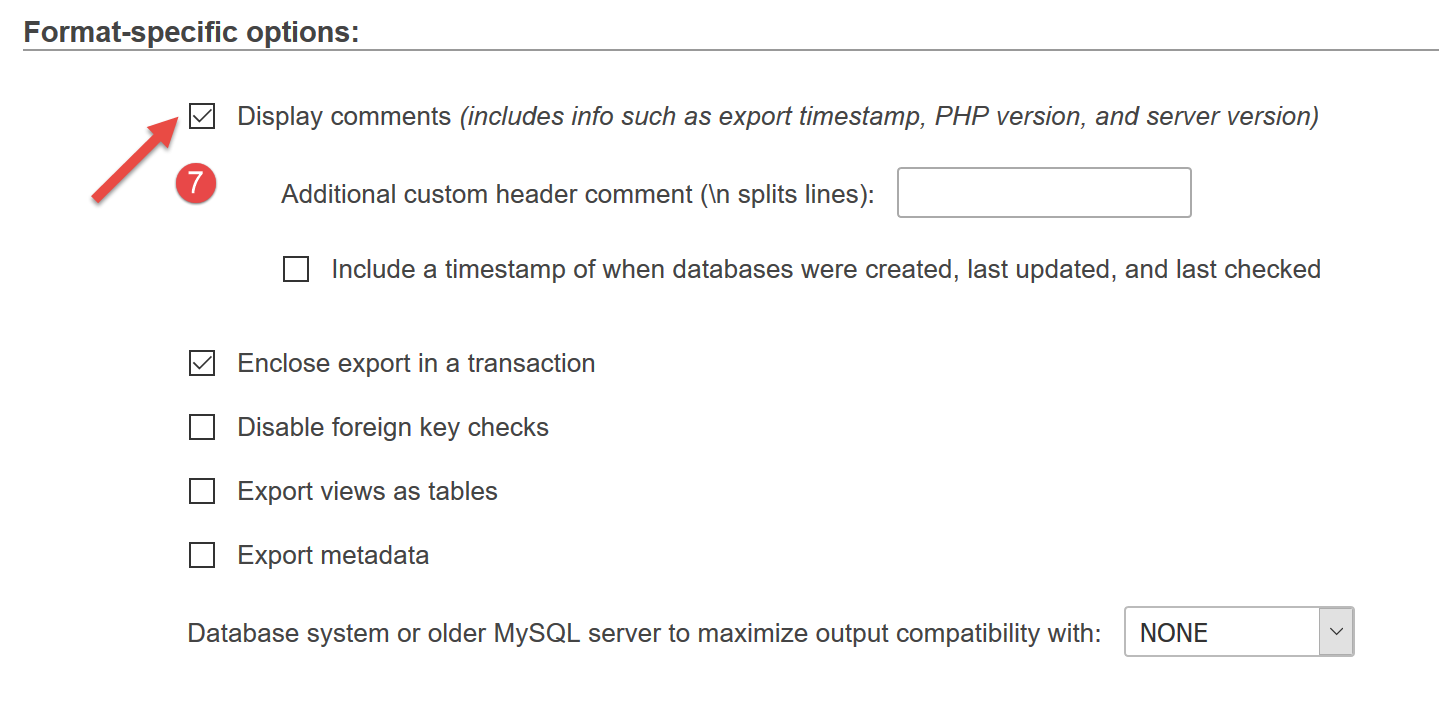
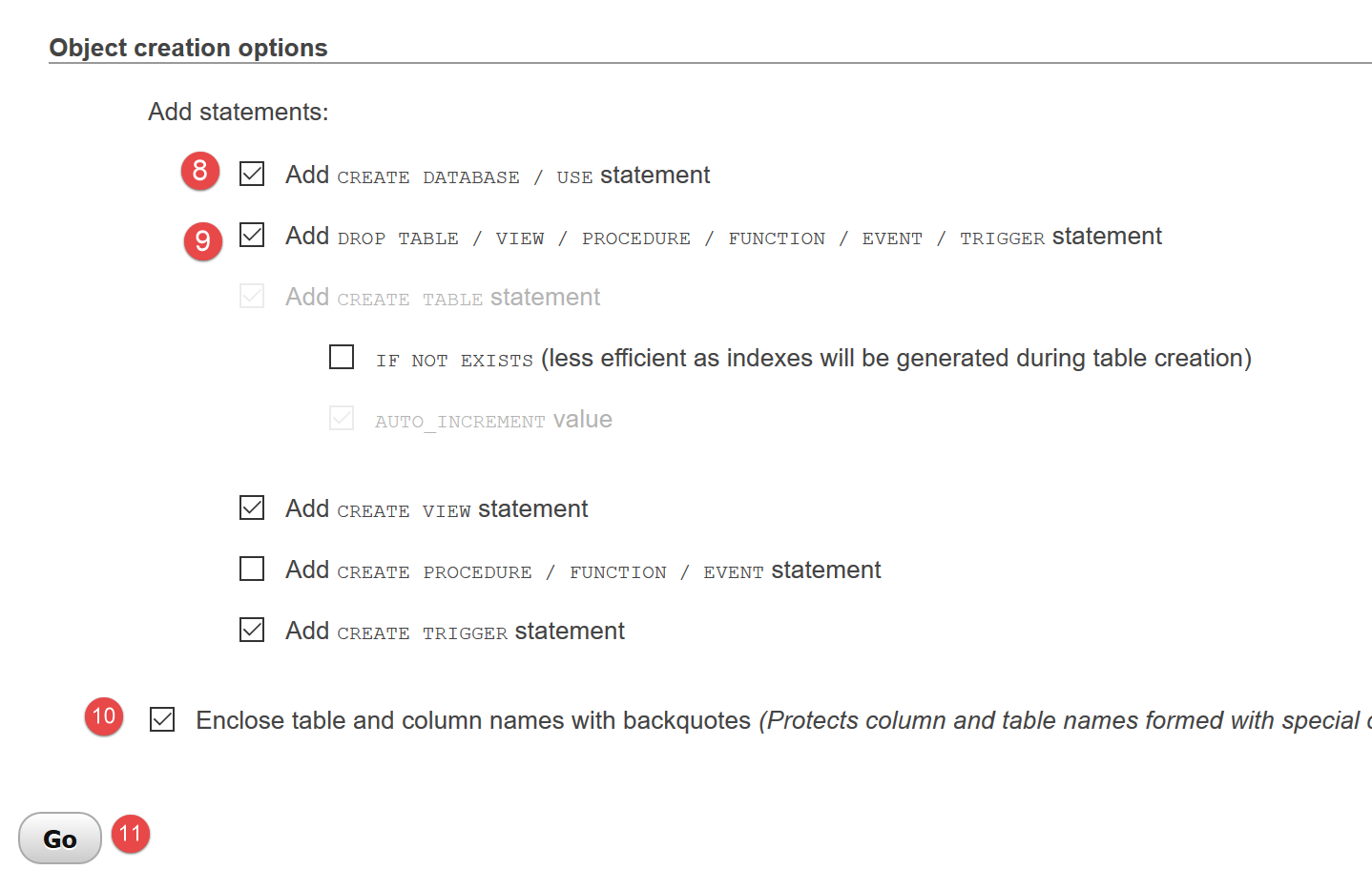
选项 [11] 将生成以下 SQL 文件 [dbimpots-2019.sql]:
-- phpMyAdmin SQL Dump
-- version 4.8.5
-- https://www.phpmyadmin.net/
--
-- Host: localhost:3306
-- Generation Time: Jun 30, 2019 at 01:10 PM
-- Server version: 5.7.24
-- PHP Version: 7.2.11

SET SQL_MODE = "NO_AUTO_VALUE_ON_ZERO";
SET AUTOCOMMIT = 0;
START TRANSACTION;
SET time_zone = "+00:00";


/*!40101 SET @OLD_CHARACTER_SET_CLIENT=@@CHARACTER_SET_CLIENT */;
/*!40101 SET @OLD_CHARACTER_SET_RESULTS=@@CHARACTER_SET_RESULTS */;
/*!40101 SET @OLD_COLLATION_CONNECTION=@@COLLATION_CONNECTION */;
/*!40101 SET NAMES utf8mb4 */;

--
-- Database: `dbimpots-2019`
--
CREATE DATABASE IF NOT EXISTS `dbimpots-2019` DEFAULT CHARACTER SET utf8 COLLATE utf8_general_ci;
USE `dbimpots-2019`;

-- --------------------------------------------------------

--
-- Table structure for table `tbconstantes`
--

DROP TABLE IF EXISTS `tbconstantes`;
CREATE TABLE `tbconstantes` (
  `id` int(11) NOT NULL,
  `plafondQfDemiPart` decimal(10,2) NOT NULL,
  `plafondRevenusCelibatairePourReduction` decimal(10,2) NOT NULL,
  `plafondRevenusCouplePourReduction` decimal(10,2) NOT NULL,
  `valeurReducDemiPart` decimal(10,2) NOT NULL,
  `plafondDecoteCelibataire` decimal(10,2) NOT NULL,
  `plafondDecoteCouple` decimal(10,2) NOT NULL,
  `plafondImpotCelibatairePourDecote` decimal(10,2) NOT NULL,
  `plafondImpotCouplePourDecote` decimal(10,2) NOT NULL,
  `abattementDixPourcentMax` decimal(10,2) NOT NULL,
  `abattementDixPourcentMin` decimal(10,2) NOT NULL
) ENGINE=InnoDB DEFAULT CHARSET=utf8;

-- --------------------------------------------------------

--
-- Table structure for table `tbtranches`
--

DROP TABLE IF EXISTS `tbtranches`;
CREATE TABLE `tbtranches` (
  `id` int(11) NOT NULL,
  `limites` decimal(10,2) NOT NULL,
  `coeffR` decimal(10,2) NOT NULL,
  `coeffN` decimal(10,2) NOT NULL
) ENGINE=InnoDB DEFAULT CHARSET=utf8;

--
-- Indexes for dumped tables
--

--
-- Indexes for table `tbconstantes`
--
ALTER TABLE `tbconstantes`
  ADD PRIMARY KEY (`id`);

--
-- Indexes for table `tbtranches`
--
ALTER TABLE `tbtranches`
  ADD PRIMARY KEY (`id`);

--
-- AUTO_INCREMENT for dumped tables
--

--
-- AUTO_INCREMENT for table `tbconstantes`
--
ALTER TABLE `tbconstantes`
  MODIFY `id` int(11) NOT NULL AUTO_INCREMENT;

--
-- AUTO_INCREMENT for table `tbtranches`
--
ALTER TABLE `tbtranches`
  MODIFY `id` int(11) NOT NULL AUTO_INCREMENT;
COMMIT;

/*!40101 SET CHARACTER_SET_CLIENT=@OLD_CHARACTER_SET_CLIENT */;
/*!40101 SET CHARACTER_SET_RESULTS=@OLD_CHARACTER_SET_RESULTS */;
/*!40101 SET COLLATION_CONNECTION=@OLD_COLLATION_CONNECTION */;
如果 [dbimpots-2019] 数据库已被删除或损坏,您可以使用此 SQL 文件重新生成该数据库。重新生成前无需手动删除数据库,因为 SQL 脚本会自动处理此步骤:
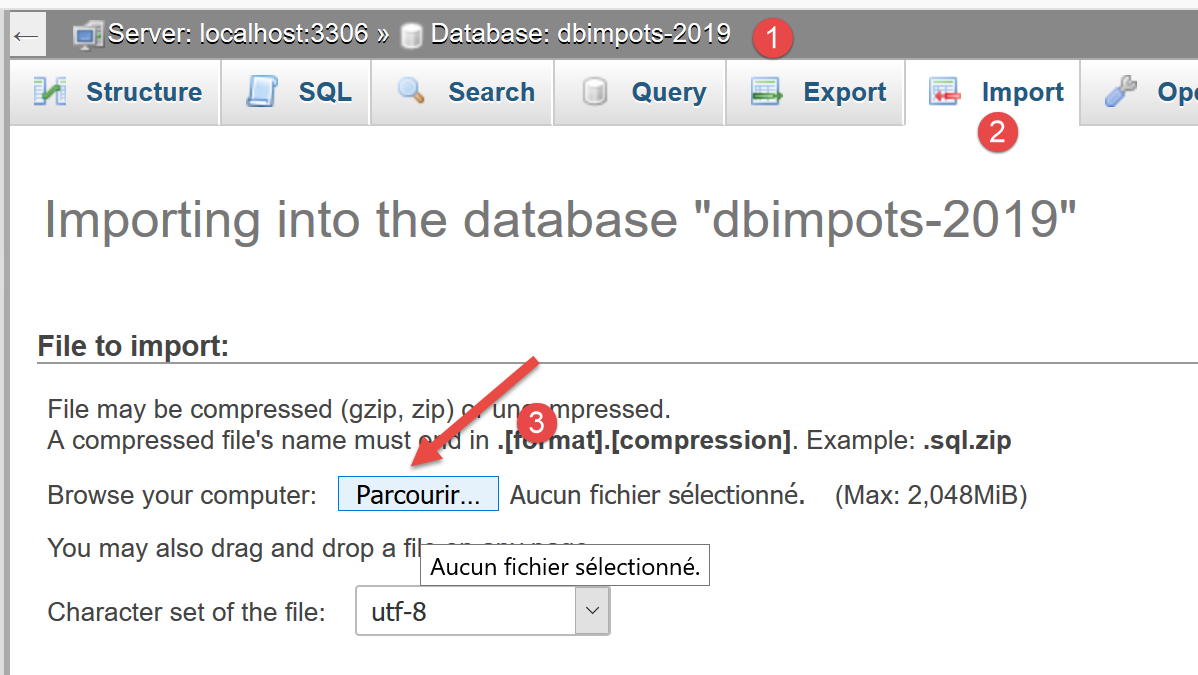
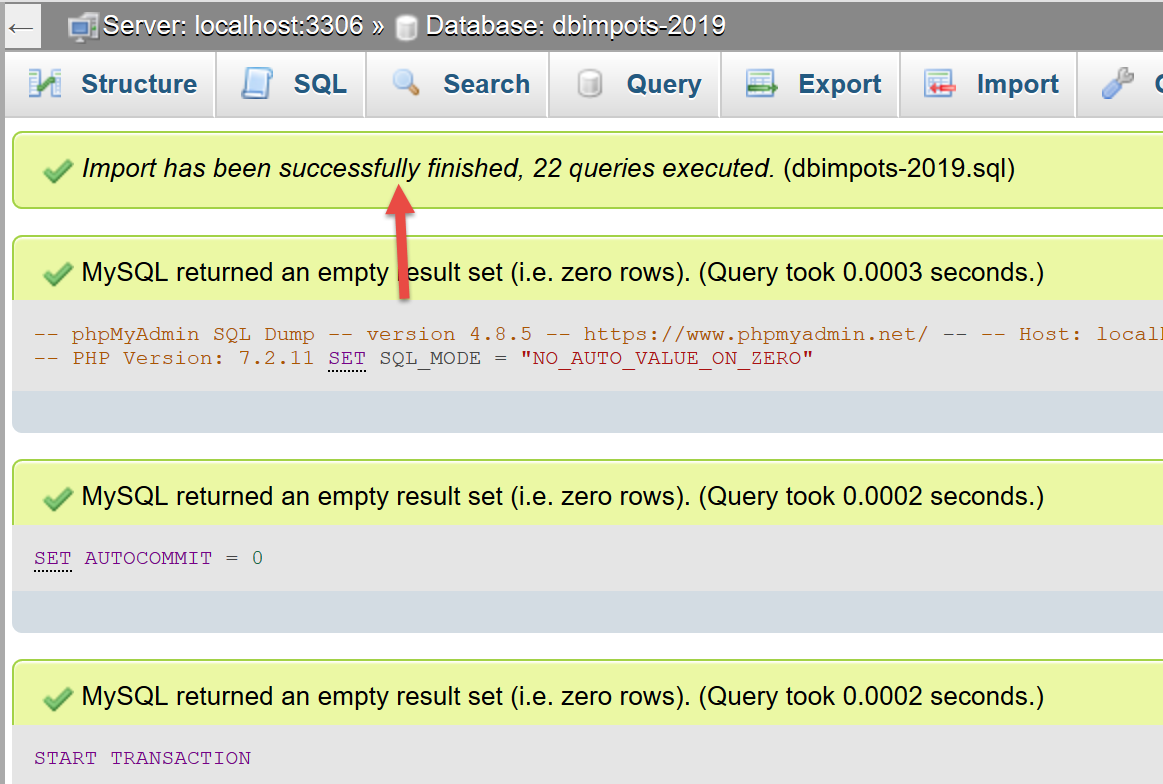
13.2. 代码组织
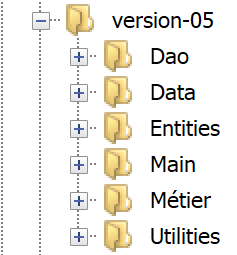
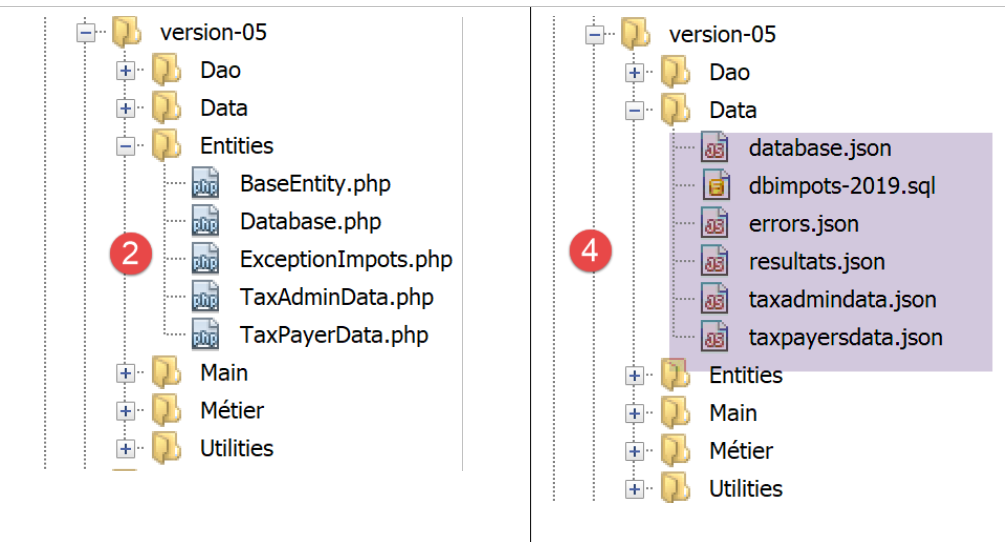
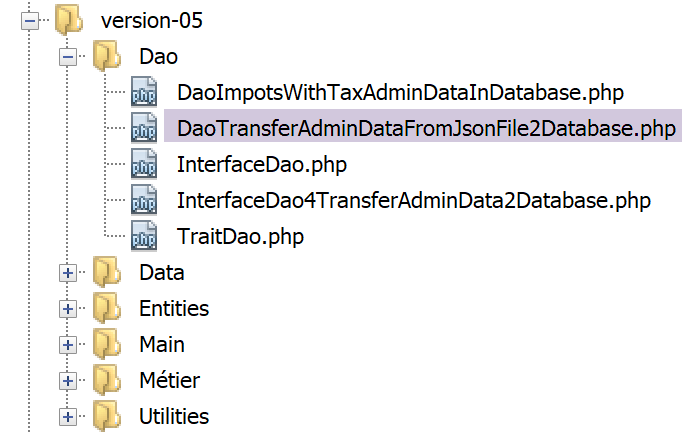
为了更好地说明我们正在编写的各种 PHP 脚本的作用,我们将代码组织到以下文件夹中:
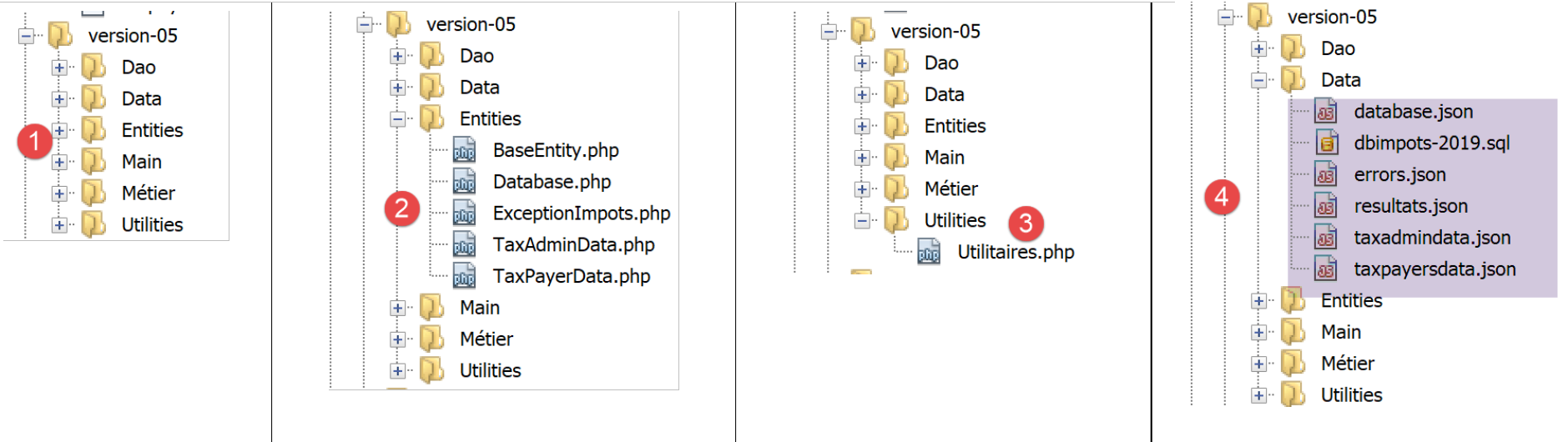
- 在 [1] 中,版本 05 的概述;
- 在[2]中,应用实体,即各层之间交换的实体;
- 在[3]中,指应用程序实用程序;
- 在[4]中,指应用程序使用或生成的数据。在此,我们决定仅使用JSON格式作为文本文件。这种格式具有以下优势:
- 它们被许多工具所识别;
- 这些工具支持语法高亮。此外,JSON 具有严格的规则。当这些规则未被遵守时,工具会进行标记。例如,基本文本文件中常见的错误是使用大写或小写字母 O 代替数字 0。如果发生此类错误,系统将进行标记。在 JSON 代码中:
"plafondRevenusCouplePourReduction": 42O74
其中 [42074] 中的零被无意间写成了大写字母 O,NetBeans 会标记此错误:

实际上,NetBeans 能识别大写字母 O,因此将 [49O74] 视为字符串。它推断语法应为 [4-5]:字符串 [47O74] 应加引号。这样,开发者的注意力就被吸引到该错误上,并可进行修正:要么添加引号,要么将 O 替换为数字 0;
版本 05 的其他功能如下:

- 在 [6] 中,[Dao] 层的接口和类;
- 在 [7] 中,[business] 层的接口和类;
- 在 [8] 中,版本 05 的主要脚本;
05 版有两个明确的目标:
- 将 JSON 文件 [Data/txadmindata.json] 的内容导入 MySQL 数据库 [dbimpots-2019];
- 利用现从 MySQL 数据库 [dbimpots-2019] 获取的税务数据实现税费计算;
我们将分别处理这两个目标。
13.3. 填充数据库 [dbimpots-2019]
13.3.1. 目标
文本文件 taxadmindata.json 包含来自税务机关的数据:
{
    "limites": [
        9964,
        27519,
        73779,
        156244,
        0
    ],
    "coeffR": [
        0,
        0.14,
        0.3,
        0.41,
        0.45
    ],
    "coeffN": [
        0,
        1394.96,
        5798,
        13913.69,
        20163.45
    ],
    "plafondQfDemiPart": 1551,
    "plafondRevenusCelibatairePourReduction": 21037,
    "plafondRevenusCouplePourReduction": 42074,
    "valeurReducDemiPart": 3797,
    "plafondDecoteCelibataire": 1196,
    "plafondDecoteCouple": 1970,
    "plafondImpotCouplePourDecote": 2627,
    "plafondImpotCelibatairePourDecote": 1595,
    "abattementDixPourcentMax": 12502,
    "abattementDixPourcentMin": 437
}
我们的目标是将这些数据导入之前创建的 MySQL 数据库 [dbimpots-2019] 中。
13.3.2. 实体
[Database] 实体将用于封装来自以下 JSON 文件 [database.json] 的数据:
{
    "dsn": "mysql:host=localhost;dbname=dbimpots-2019",
    "id": "admimpots",
    "pwd": "mdpimpots",
    "tableTranches": "tbtranches",
    "colLimites": "limites",
    "colCoeffR": "coeffr",
    "colCoeffN": "coeffn",
    "tableConstantes": "tbconstantes",
    "colPlafondQfDemiPart": "plafondQfDemiPart",
    "colPlafondRevenusCelibatairePourReduction": "plafondRevenusCelibatairePourReduction",
    "colPlafondRevenusCouplePourReduction": "plafondRevenusCouplePourReduction",
    "colValeurReducDemiPart": "valeurReducDemiPart",
    "colPlafondDecoteCelibataire": "plafondDecoteCelibataire",
    "colPlafondDecoteCouple": "plafondDecoteCouple",
    "colPlafondImpotCelibatairePourDecote": "plafondImpotCelibatairePourDecote",
    "colPlafondImpotCouplePourDecote": "plafondImpotCouplePourDecote",
    "colAbattementDixPourcentMax": "abattementDixPourcentMax",
    "colAbattementDixPourcentMin": "abattementDixPourcentMin"
}
[TaxAdminData] 实体将用于封装来自以下 JSON 文件 [taxadmindata.json] 的数据:
{
    "limites": [
        9964,
        27519,
        73779,
        156244,
        0
    ],
    "coeffR": [
        0,
        0.14,
        0.3,
        0.41,
        0.45
    ],
    "coeffN": [
        0,
        1394.96,
        5798,
        13913.69,
        20163.45
    ],
    "plafondQfDemiPart": 1551,
    "plafondRevenusCelibatairePourReduction": 21037,
    "plafondRevenusCouplePourReduction": 42074,
    "valeurReducDemiPart": 3797,
    "plafondDecoteCelibataire": 1196,
    "plafondDecoteCouple": 1970,
    "plafondImpotCouplePourDecote": 2627,
    "plafondImpotCelibatairePourDecote": 1595,
    "abattementDixPourcentMax": 12502,
    "abattementDixPourcentMin": 437
}
[TaxPayerData] 实体将用于封装来自以下 JSON 文件 [taxpayerdata.json] 的数据:
[
    {
        "marié": "oui",
        "enfants": 2,
        "salaire": 55555
    },
    {
        "marié": "ouix",
        "enfants": "2x",
        "salaire": "55555x"
    },
    {
        "marié": "oui",
        "enfants": "2",
        "salaire": 50000
    },
    {
        "marié": "oui",
        "enfants": 3,
        "salaire": 50000
    },
    {
        "marié": "non",
        "enfants": 2,
        "salaire": 100000
    },
    {
        "marié": "non",
        "enfants": 3,
        "salaire": 100000
    },
    {
        "marié": "oui",
        "enfants": 3,
        "salaire": 100000
    },
    {
        "marié": "oui",
        "enfants": 5,
        "salaire": 100000
    },
    {
        "marié": "non",
        "enfants": 0,
        "salaire": 100000
    },
    {
        "marié": "oui",
        "enfants": 2,
        "salaire": 30000
    },
    {
        "marié": "non",
        "enfants": 0,
        "salaire": 200000
    },
    {
        "marié": "oui",
        "enfants": 3,
        "salaire": 20000
    }
]
13.3.2.1. 基类 [BaseEntity]
为了简化实体代码,我们将采用以下规则:实体的属性名称应与该实体旨在封装的 JSON 文件中的属性名称保持一致。基于此规则,实体 [Database、TaxAdminData、TaxPayerData] 具有共同特征,这些特征可以归纳到一个父类中。该父类即为以下 [BaseEntity] 类:
<?php

namespace Application;

class BaseEntity {
  // attribute
  protected $arrayOfAttributes;

  // initialization from a jSON file
  public function setFromJsonFile(string $jsonFilename) {
    // retrieve the contents of the tax data file
    $fileContents = \file_get_contents($jsonFilename);
    $erreur = FALSE;
    // mistake?
    if (!$fileContents) {
      // we note the error
      $erreur = TRUE;
      $message = "Le fichier des données [$jsonFilename] n'existe pas";
    }
    if (!$erreur) {
      // retrieve the jSON code from the configuration file in an associative array
      $this->arrayOfAttributes = \json_decode($fileContents, true);
      // mistake?
      if ($this->arrayOfAttributes === FALSE) {
        // we note the error
        $erreur = TRUE;
        $message = "Le fichier de données jSON [$jsonFilename] n'a pu être exploité correctement";
      }
    }
    // mistake?
    if ($erreur) {
      // throw an exception
      throw new ExceptionImpots($message);
    }
    // initialization of class attributes
    foreach ($this->arrayOfAttributes as $key => $value) {
      $this->$key = $value;
    }
    // we return the object
    return $this;
  }

  public function checkForAllAttributes() {
    // check that all keys have been initialized
    foreach (\array_keys($this->arrayOfAttributes) as $key) {
      if ($key !== "arrayOfAttributes" && !isset($this->$key)) {
        throw new ExceptionImpots("L'attribut [$key] de la classe "
          . get_class($this) . " n'a pas été initialisé");
      }
    }
  }

  public function setFromArrayOfAttributes(array $arrayOfAttributes) {
    // initialize certain attributes of the
    foreach ($arrayOfAttributes as $key => $value) {
      $this->$key = $value;
    }
    // object is returned
    return $this;
  }

  // toString
  public function __toString() {
    // object attributes
    $arrayOfAttributes = \get_object_vars($this);
    // remove parent class attribute
    unset($arrayOfAttributes["arrayOfAttributes"]);
    // object's Json string
    return \json_encode($arrayOfAttributes, JSON_UNESCAPED_UNICODE);
  }

  // getter
  public function getArrayOfAttributes() {
    return $this->arrayOfAttributes;
  }

}
评论
- 第 5 行:[BaseEntity] 类旨在被 [Database、TaxAdminData、TaxPayerData] 类继承;
- 第 7 行:[$arrayOfAttributes] 属性是一个数组,包含继承自 [BaseEntity] 的子类的所有属性及其值;
- 第 9–41 行:通过作为参数传递的 JSON 文件 [$jsonFilename] 初始化 [$arrayOfAttributes] 属性。若无法读取 JSON 文件或该文件不是有效的 JSON 文件,则抛出 [ExceptionImpot] 异常;
- 第 36–38 行:这是子类执行时的特殊代码。在此情况下,[$this] 代表子类 [Database, TaxAdminData, TaxPayerData] 的实例,且在该场景中,第 36–38 行会初始化该子类的属性,前提是这些属性具有受保护(或公共)的可见性(参见相关章节)。 我们注意到,实体 [Database、TaxAdminData、TaxPayerData] 的属性与其封装的 JSON 文件中的属性完全一致。最后,[setFromJsonFile] 方法允许子类通过 JSON 文件初始化自身;
- 第 40 行:如果 [setFromJsonFile] 方法是由子类调用的,则对象 [$this] 将被设置为该子类的实例;
- 第 43–51 行:[checkForAllAttributes] 方法允许子类验证其所有属性是否已初始化。若未初始化,则抛出 [ExceptionImpots] 异常。该方法使子类能够验证其 JSON 文件是否遗漏了某些属性;
- 第 53–60 行:[setFromArrayOfAttributes] 方法允许子类从一个关联数组中初始化其全部或部分属性,该数组的键名与待初始化的子类属性名称相同;
- 第 63–70 行:[__toString] 方法提供子类的 JSON 表示形式;
13.3.2.2. [Database] 实体
[Database] 实体如下:
<?php

namespace Application;

class Database extends BaseEntity {
  // attributes
  protected $dsn;
  protected $id;
  protected $pwd;
  protected $tableTranches;
  protected $colLimites;
  protected $colCoeffR;
  protected $colCoeffN;
  protected $tableConstantes;
  protected $colPlafondQfDemiPart;
  protected $colPlafondRevenusCelibatairePourReduction;
  protected $colPlafondRevenusCouplePourReduction;
  protected $colValeurReducDemiPart;
  protected $colPlafondDecoteCelibataire;
  protected $colPlafondDecoteCouple;
  protected $colPlafondImpotCelibatairePourDecote;
  protected $colPlafondImpotCouplePourDecote;
  protected $colAbattementDixPourcentMax;
  protected $colAbattementDixPourcentMin;

 …

}
[Database] 类用于封装来自以下 JSON 文件 [database.json] 的数据:
{
    "dsn": "mysql:host=localhost;dbname=dbimpots-2019",
    "id": "admimpots",
    "pwd": "mdpimpots",
    "tableTranches": "tbtranches",
    "colLimites": "limites",
    "colCoeffR": "coeffr",
    "colCoeffN": "coeffn",
    "tableConstantes": "tbconstantes",
    "colPlafondQfDemiPart": "plafondQfDemiPart",
    "colPlafondRevenusCelibatairePourReduction": "plafondRevenusCelibatairePourReduction",
    "colPlafondRevenusCouplePourReduction": "plafondRevenusCouplePourReduction",
    "colValeurReducDemiPart": "valeurReducDemiPart",
    "colPlafondDecoteCelibataire": "plafondDecoteCelibataire",
    "colPlafondDecoteCouple": "plafondDecoteCouple",
    "colPlafondImpotCelibatairePourDecote": "plafondImpotCelibatairePourDecote",
    "colPlafondImpotCouplePourDecote": "plafondImpotCouplePourDecote",
    "colAbattementDixPourcentMax": "abattementDixPourcentMax",
    "colAbattementDixPourcentMin": "abattementDixPourcentMin"
}
该类和 JSON 文件具有相同的属性。这些属性描述了 MySQL 数据库 [dbimpots-2019] 的特征:
dsn | 数据库 DSN 名称 |
id | 数据库所有者 |
pwd | 其密码 |
tableTranches | 包含税率区间的表的名称 |
colLimits colRate colCoeffN | [tableTranches] 表中的列名 |
tableConstants | 包含税额计算常数的表的名称 |
colIncomeCeilingForHalfShare 单身减免的收入上限 colIncomeLimitCoupleForReduction 半额减免值 单身纳税抵免限额 col夫妻扣除上限 单身扣除收入上限 col夫妻扣除税额上限 col最高10%扣除额 col最低10%扣除额 | [tableConstants] 表中包含税费计算常数的列名 |
既然我们已经知道表和列的名称,且它们不太可能更改,为何还要为它们命名? 继 MySQL 数据库管理系统之后,我们将使用 PostgreSQL 数据库管理系统来存储税务管理数据。然而,PostgreSQL 的列名和表名并不遵循与 MySQL 相同的命名规则。我们将不得不使用不同的名称。对于其他数据库管理系统也是如此。如果我们希望代码在不同数据库管理系统之间具有可移植性,最好使用参数,而不是硬编码的表名和列名。
让我们回到 [Database] 类的代码:
<?php

namespace Application;

class Database extends BaseEntity {
  // attributes
  protected $dsn;
  protected $id;
  protected $pwd;
  protected $tableTranches;
  protected $colLimites;
  protected $colCoeffR;
  protected $colCoeffN;
  protected $tableConstantes;
  protected $colPlafondQfDemiPart;
  protected $colPlafondRevenusCelibatairePourReduction;
  protected $colPlafondRevenusCouplePourReduction;
  protected $colValeurReducDemiPart;
  protected $colPlafondDecoteCelibataire;
  protected $colPlafondDecoteCouple;
  protected $colPlafondImpotCelibatairePourDecote;
  protected $colPlafondImpotCouplePourDecote;
  protected $colAbattementDixPourcentMax;
  protected $colAbattementDixPourcentMin;

  // setter
  // initialization
  public function setFromJsonFile(string $jsonFilename) {
    // parent
    parent::setFromJsonFile($jsonFilename);
    // check that all attributes have been initialized
    parent::checkForAllAttributes();
    // object is returned
    return $this;
  }

  // getters and setters
  public function getDsn() {
    return $this->dsn;
  }

  …

  public function setDsn($dsn) {
    $this->dsn = $dsn;
    return $this;
  }

  …

}
评论
- 第 7–24 行:所有类属性均具有 [protected] 访问权限。这是为了使其能够从父类 [BaseEntity] 进行修改(参见相关章节);
- 第 28–35 行:[setFromJsonFile] 方法允许根据作为参数传递的 JSON 文件内容初始化 [Database] 类的属性。JSON 文件中的属性与 [Database] 类中的属性必须完全一致。如果 JSON 文件无法使用,将抛出异常;
- 第 30 行:父类执行初始化操作;
- 第 32 行:要求父类验证 [Database] 类的所有属性是否已初始化。若未初始化,则抛出异常;
- 第 34 行:返回刚刚初始化的 [Database] 实例;
- 第 37 行及之后:该类属性的 getter 和 setter 方法;
13.3.2.3. [TaxAdminData] 实体
[TaxAdminData] 实体如下:
<?php

namespace Application;

class TaxAdminData extends BaseEntity {
  // tax brackets
  protected $limites;
  protected $coeffR;
  protected $coeffN;
  // tax calculation constants
  protected $plafondQfDemiPart;
  protected $plafondRevenusCelibatairePourReduction;
  protected $plafondRevenusCouplePourReduction;
  protected $valeurReducDemiPart;
  protected $plafondDecoteCelibataire;
  protected $plafondDecoteCouple;
  protected $plafondImpotCouplePourDecote;
  protected $plafondImpotCelibatairePourDecote;
  protected $abattementDixPourcentMax;
  protected $abattementDixPourcentMin;

  …
}
[TaxAdminData] 类用于封装来自以下 JSON 文件 [taxadmindata.json] 的数据:
{
    "limites": [
        9964,
        27519,
        73779,
        156244,
        0
    ],
    "coeffR": [
        0,
        0.14,
        0.3,
        0.41,
        0.45
    ],
    "coeffN": [
        0,
        1394.96,
        5798,
        13913.69,
        20163.45
    ],
    "plafondQfDemiPart": 1551,
    "plafondRevenusCelibatairePourReduction": 21037,
    "plafondRevenusCouplePourReduction": 42074,
    "valeurReducDemiPart": 3797,
    "plafondDecoteCelibataire": 1196,
    "plafondDecoteCouple": 1970,
    "plafondImpotCouplePourDecote": 2627,
    "plafondImpotCelibatairePourDecote": 1595,
    "abattementDixPourcentMax": 12502,
    "abattementDixPourcentMin": 437
}
该类和 JSON 文件具有相同的属性。这些属性代表税务管理数据。[TaxAdminData] 类的其余代码如下:
<?php

namespace Application;

class TaxAdminData extends BaseEntity {
  // tax brackets
  protected $limites;
  protected $coeffR;
  protected $coeffN;
  // tax calculation constants
  protected $plafondQfDemiPart;
  protected $plafondRevenusCelibatairePourReduction;
  protected $plafondRevenusCouplePourReduction;
  protected $valeurReducDemiPart;
  protected $plafondDecoteCelibataire;
  protected $plafondDecoteCouple;
  protected $plafondImpotCouplePourDecote;
  protected $plafondImpotCelibatairePourDecote;
  protected $abattementDixPourcentMax;
  protected $abattementDixPourcentMin;

  // initialization
  public function setFromJsonFile(string $taxAdminDataFilename) {
    // parent
    parent::setFromJsonFile($taxAdminDataFilename);
    // check that all attributes have been initialized
    parent::checkForAllAttributes();
    // check that attribute values are real >=0
    foreach ($this as $key => $value) {
      if ($key !== "arrayOfAttributes") {
        // $value must be a real number >=0 or an array of reals >=0
        $result = $this->check($value);
        // mistake?
        if ($result->erreur) {
          // throw an exception
          throw new ExceptionImpots("La valeur de l'attribut [$key] est invalide");
        } else {
          // we note the value
          $this->$key = $result->value;
        }
      }
    }
    // we return the object
    return $this;
  }

  protected function check($value): \stdClass {
    // $value is an array of string elements or a single element
    if (!\is_array($value)) {
      $tableau = [$value];
    } else {
      $tableau = $value;
    }
    // transform the array of strings into an array of reals
    $newTableau = [];
    $result = new \stdClass();
    // table elements must be positive or zero decimal numbers
    $modèle = '/^\s*([+]?)\s*(\d+\.\d*|\.\d+|\d+)\s*$/';
    for ($i = 0; $i < count($tableau); $i ++) {
      if (preg_match($modèle, $tableau[$i])) {
        // put the float in newTableau
        $newTableau[] = (float) $tableau[$i];
      } else {
        // we note the error
        $result->erreur = TRUE;
        // we leave
        return $result;
      }
    }
    // we return the result
    $result->erreur = FALSE;
    if (!\is_array($value)) {
      // a single value
      $result->value = $newTableau[0];
    } else {
      // a list of values
      $result->value = $newTableau;
    }
    return $result;
  }

  // getters and setters
 …
}
注释
- 第 23 行:使用 [setFromJsonFile] 方法根据作为参数传递的 JSON 文件初始化 [TaxAdminData] 类的属性。JSON 文件中的属性名称必须与类中的属性名称一致;
- 第 25 行:父类执行此任务;
- 第 27 行:要求父类验证子类的所有属性是否已初始化;
- 第 29–42 行:我们本地验证所有属性是否为正实数或为 null。此验证已在版本 03 的“链接”部分中讨论过;
13.3.3. [dao] 层
现在我们可以编写代码,将文本文件 [taxadmindata.json] 中的数据导入 MySQL 数据库 [dbimpots-2019] 的表 [tbtranches, tbconstantes] 中。我们将采用以下架构:
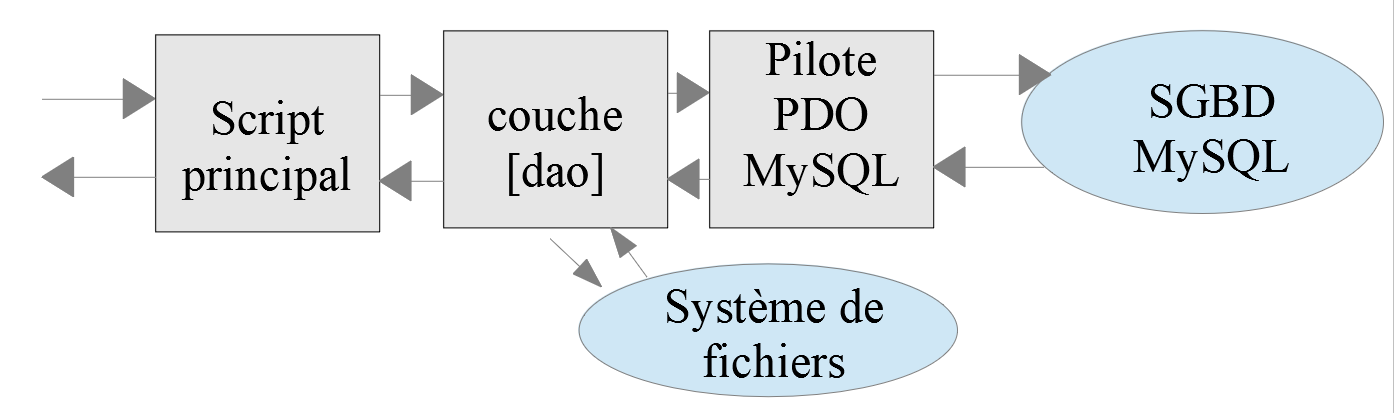
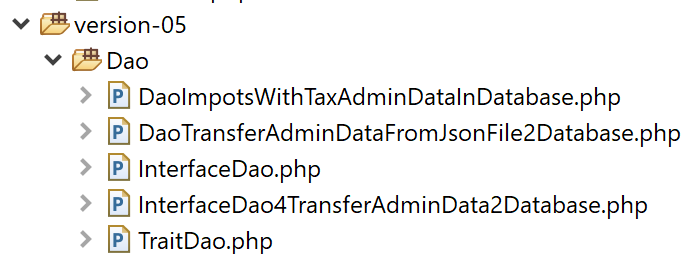
[dao]层将实现以下[InterfaceDao4TransferAdminDataFromFile2Database]接口:
<?php

// namespace
namespace Application;

interface InterfaceDao4TransferAdminData2Database {

  public function transferAdminData2Database(): void;
}
注释
- 第 8 行:[transferAdminData2Database] 方法负责将税务管理数据存储到数据库中;
[InterfaceDao4TransferAdminData2Database] 接口将由以下 [DaoTransferAdminDataFromJsonFile2Database] 类实现:
<?php

// namespace
namespace Application;

// definition of a TransferAdminDataFromFile2DatabaseDao class
class DaoTransferAdminDataFromJsonFile2Database implements InterfaceDao4TransferAdminData2Database {
  // target database attributes
  private $database;
  // tax administration data
  private $taxAdminData;

  // manufacturer
  public function __construct(string $databaseFilename, string $taxAdminDataFilename) {
    // save configuration
    $this->database = (new Database())->setFromJsonFile($databaseFilename);
    // tax data is stored
    $this->taxAdminData = (new TaxAdminData())->setFromJsonFile($taxAdminDataFilename);
  }

  // transfers tax bracket data from a text file
  // to database
  public function transferAdminData2Database(): void {
    // we work on the basis
    $database = $this->database;
    try {
      // open the database connection
      $connexion = new \PDO($database->getDsn(), $database->getId(), $database->getPwd());
      // we want every SGBD error to trigger an exception
      $connexion->setAttribute(\PDO::ATTR_ERRMODE, \PDO::ERRMODE_EXCEPTION);
      // start a transaction
      $connexion->beginTransaction();
      // fill in the tax bracket table
      $this->fillTableTranches($connexion);
      // fill in the constants table
      $this->fillTableConstantes($connexion);
      // the transaction is completed successfully
      $connexion->commit();
    } catch (\PDOException $ex) {
      // is there a transaction in progress?
      if (isset($connexion) && $connexion->inTransaction()) {
        // transaction ends in failure
        $connexion->rollBack();
      }
      // trace the exception back to the calling code
      throw new ExceptionImpots($ex->getMessage());
    } finally {
      // close the connection
      $connexion = NULL;
    }
  }


  // filling the tax bracket table
  private function fillTableTranches($connexion): void {
    …
  }

  // filling the constants table
  private function fillTableConstantes($connexion): void {
    …
  }

}
评论
在这里,我们将应用本章关于MySQL的内容。
- 第 7 行:类 [DaoTransferAdminDataFromJsonFile2Database] 实现了接口 [InterfaceDao4TransferAdminData2Database];
- 第 9 行:属性 [$database] 是类型为 [Database] 的对象,封装了来自 [database.json] 文件的数据;
- 第 11 行:属性 [$taxAdminData] 是类型为 [TaxAdminData] 的对象,封装了来自文件 [taxadmindata.json] 的数据;
- 第 14–19 行:构造函数接收文件 [database.json, taxadmindata.json] 的名称作为参数;
- 第 16 行:初始化 [$database] 属性;
- 第 18 行:初始化 [$taxAdminData] 属性;
- 第 23 行:实现了 [InterfaceDao4TransferAdminData2Database] 接口的唯一方法;
- 第 26–38 行:分两步填充 [tbtranches] 和 [tbconstantes] 表:
- 第 34 行:首先填充 [tbtranches] 表。此操作在事务内进行(第 32、38 行)。方法 [fillTableTranches](第 55 行)一旦出现错误即抛出异常。此时,执行流程将转至第 39–50 行的 catch / finally 代码块;
- 第 36 行:表 [tbconstantes] 通过方法 [fillTableConstantes](第 60 行)以相同方式填充;
- 第 39–47 行:代码抛出异常的情况;
- 第 41–44 行:如果存在事务,则将其回滚;
- 第 46 行:抛出类型为 [ExceptionImpots] 的异常,其消息为原始异常(类型不限)的内容;
- 第 47–50 行:在 [finally] 子句中,关闭连接;
[fillTableTranches] 方法的代码如下:
private function fillTableTranches($connexion): void {
    // raccourci pour la bd
    $database = $this->database;
    // les données à insérer dans la base de données
    $limites = $this->taxAdminData->getLimites();
    $coeffR = $this->taxAdminData->getCoeffR();
    $coeffN = $this->taxAdminData->getCoeffN();
    // on vide la table au cas où il y aurait qq chose dedans
    $statement = $connexion->prepare("delete from " . $database->getTableTranches());
    $statement->execute();
    // on prépare les insertions
    $sqlInsert = "insert into {$database->getTableTranches()} "
      . "({$database->getColLimites()}, {$database->getColCoeffR()},"
      . " {$database->getColCoeffN()}) values (:limites, :coeffR, :coeffN)";
    $statement = $connexion->prepare($sqlInsert);
    // on exécute l'ordre préparé avec les valeurs des tranches d'impôts
    for ($i = 0; $i < count($limites); $i++) {
      $statement->execute([
        "limites" => $limites[$i],
        "coeffR" => $coeffR[$i],
        "coeffN" => $coeffN[$i]]);
    }
  }
注释
- 第 1 行:[fillTableTranches] 方法将一个已打开的连接作为参数。我们还知道,该连接中已启动了一项事务;
- 第 5–7 行:要插入表中的值由 [$taxAdminData] 属性提供;
- 第 9–10 行:清空 [tbtranches] 表的当前内容;
- 第 12–15 行:我们准备向表中插入行。此处,我们使用 [$database] 属性提供的列名;
- 第 17–22 行:将第 12–15 行准备的插入语句执行所需次数;
[fillTableConstantes] 方法的代码如下:
private function fillTableConstantes($connexion): void {
    // raccourci
    $database = $this->database;
    // on vide la table au cas où il y aurait qq chose dedans
    $statement = $connexion->prepare("delete from {$database->getTableConstantes()}");
    $statement->execute();
    // on prépare l'insertion
    $taxAdminData = $this->taxAdminData;
    $sqlInsert = "insert into {$database->getTableConstantes()}"
      . " ({$database->getColPlafondQfDemiPart()},"
      . " {$database->getColPlafondRevenusCelibatairePourReduction()},"
      . " {$database->getColPlafondRevenusCouplePourReduction()},"
      . " {$database->getColValeurReducDemiPart()},"
      . " {$database->getColPlafondDecoteCelibataire()},"
      . " {$database->getColPlafondDecoteCouple()},"
      . " {$database->getColPlafondImpotCelibatairePourDecote()},"
      . " {$database->getColPlafondImpotCouplePourDecote()},"
      . " {$database->getColAbattementDixPourcentMax()},"
      . " {$database->getColAbattementDixPourcentMin()})"
      . " values ("
      . ":plafondQfDemiPart,"
      . ":plafondRevenusCelibatairePourReduction,"
      . ":plafondRevenusCouplePourReduction,"
      . ":valeurReducDemiPart,"
      . ":plafondDecoteCelibataire,"
      . ":plafondDecoteCouple,"
      . ":plafondImpotCelibatairePourDecote,"
      . ":plafondImpotCouplePourDecote,"
      . ":abattementDixPourcentMax,"
      . ":abattementDixPourcentMin)";
    $statement = $connexion->prepare($sqlInsert);
    // on exécute l'ordre préparé
    $statement->execute([
      "plafondQfDemiPart" => $taxAdminData->getPlafondQfDemiPart(),
      "plafondRevenusCelibatairePourReduction" => $taxAdminData->getPlafondRevenusCelibatairePourReduction(),
      "plafondRevenusCouplePourReduction" => $taxAdminData->getPlafondRevenusCouplePourReduction(),
      "valeurReducDemiPart" => $taxAdminData->getValeurReducDemiPart(),
      "plafondDecoteCelibataire" => $taxAdminData->getPlafondDecoteCelibataire(),
      "plafondDecoteCouple" => $taxAdminData->getPlafondDecoteCouple(),
      "plafondImpotCelibatairePourDecote" => $taxAdminData->getPlafondImpotCelibatairePourDecote(),
      "plafondImpotCouplePourDecote" => $taxAdminData->getPlafondImpotCouplePourDecote(),
      "abattementDixPourcentMax" => $taxAdminData->getAbattementDixPourcentMax(),
      "abattementDixPourcentMin" => $taxAdminData->getAbattementDixPourcentMin()
    ]);
  }
注释
- 第 1 行:[fillTableConstantes] 方法接收一个已打开的连接作为参数。我们还知道,该连接中已启动了一项事务;
- 第 5-6 行:清空 [tbconstantes] 表;
- 第 9–31 行:准备 SQL 插入语句。该操作较为复杂,因为此次插入操作需要初始化 10 个列,且列名必须从 [$database] 属性中获取;
- 第 33–44 行:执行插入语句。仅需插入一行数据。此处代码同样因需从 [$taxAdminData] 属性中获取待插入值而变得复杂;
13.3.4. 主脚本
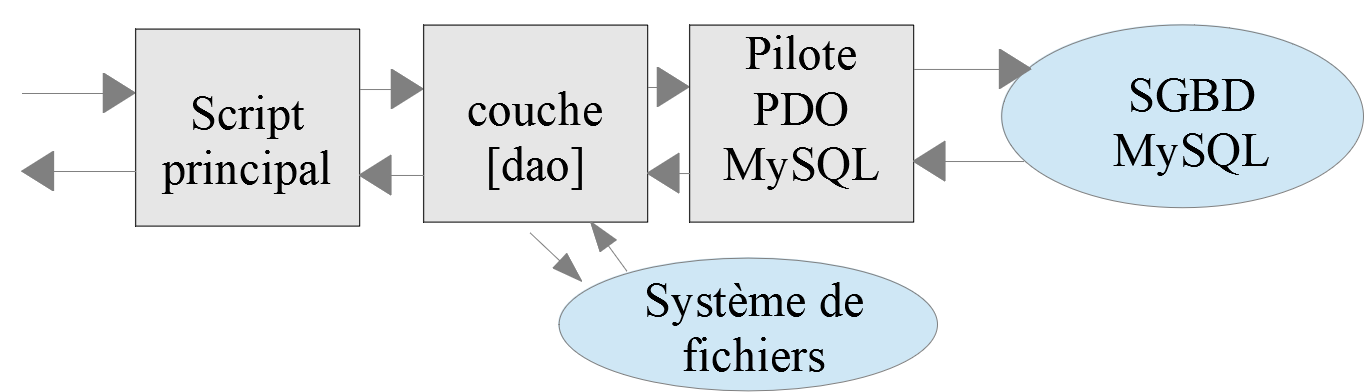
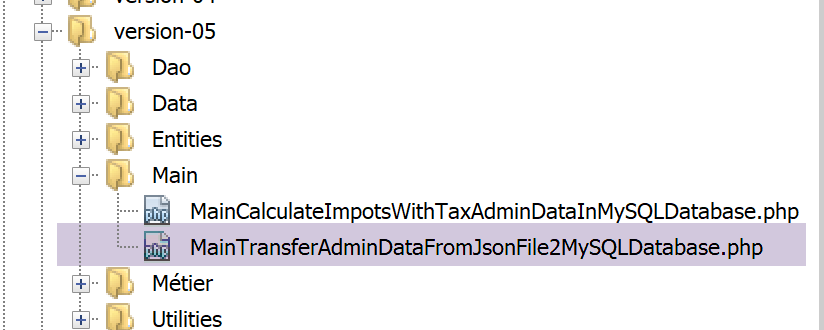
主脚本依赖于 [dao] 层来执行数据传输:
<?php

// strict adherence to declared types of function parameters
declare (strict_types=1);

// namespace
namespace Application;

// error handling by PHP
// ini_set("display_errors", "0");
// interface and class inclusion
require_once __DIR__ . "/../Entities/BaseEntity.php";
require_once __DIR__ . "/../Entities/TaxAdminData.php";
require_once __DIR__ . "/../Entities/TaxPayerData.php";
require_once __DIR__ . "/../Entities/Database.php";
require_once __DIR__ . "/../Entities/ExceptionImpots.php";
require_once __DIR__ . "/../Utilities/Utilitaires.php";
require_once __DIR__ . "/../Dao/InterfaceDao.php";
require_once __DIR__ . "/../Dao/TraitDao.php";
require_once __DIR__ . "/../Dao/InterfaceDao4TransferAdminData2Database.php";
require_once __DIR__ . "/../Dao/DaoTransferAdminDataFromJsonFile2Database.php";
//
// definition of constants
const DATABASE_CONFIG_FILENAME = "../Data/database.json";
const TAXADMINDATA_FILENAME = "../Data/taxadmindata.json";

//
try {
  // creation of the [dao] layer
  $dao = new DaoTransferAdminDataFromJsonFile2Database(DATABASE_CONFIG_FILENAME, TAXADMINDATA_FILENAME);
  // data transfer to the database
  $dao->transferAdminData2Database();
} catch (ExceptionImpots $ex) {
  // error is displayed
  print "L'erreur suivante s'est produite : " . utf8_encode($ex->getMessage()) . "\n";
}
// end
print "Terminé\n";
exit;
注释
- 第 12–21 行:加载应用程序的类和接口;
- 第 24–24 行:两个 JSON 文件;
- 第 30 行:通过将两个 JSON 文件传递给构造函数来实例化 [DAO] 层;
- 第 32 行:执行数据传输;
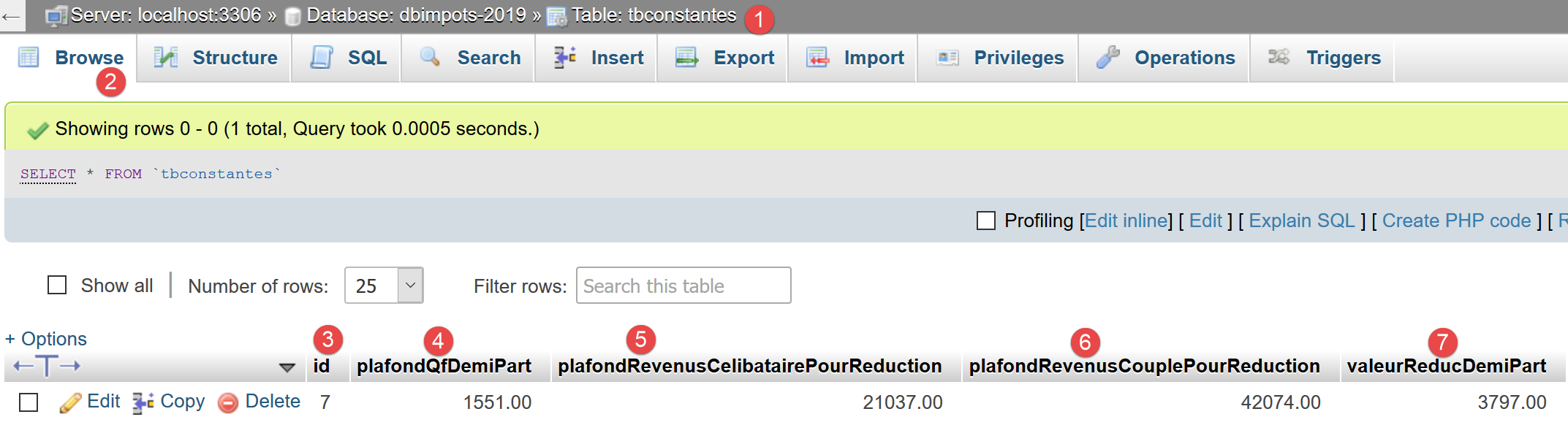
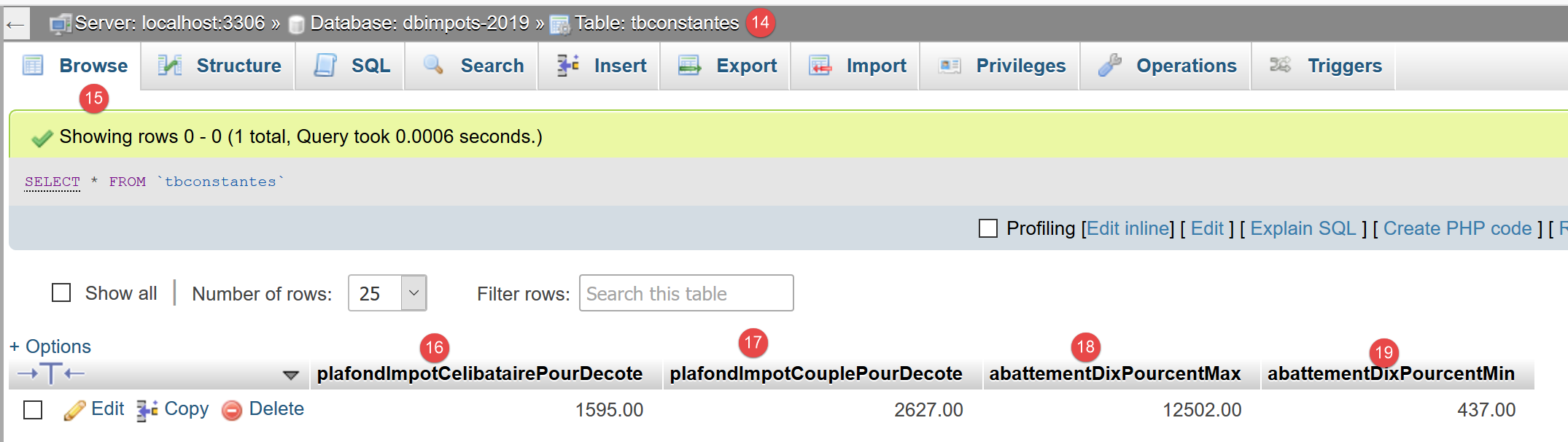
运行此代码后,数据库中将得到以下结果:
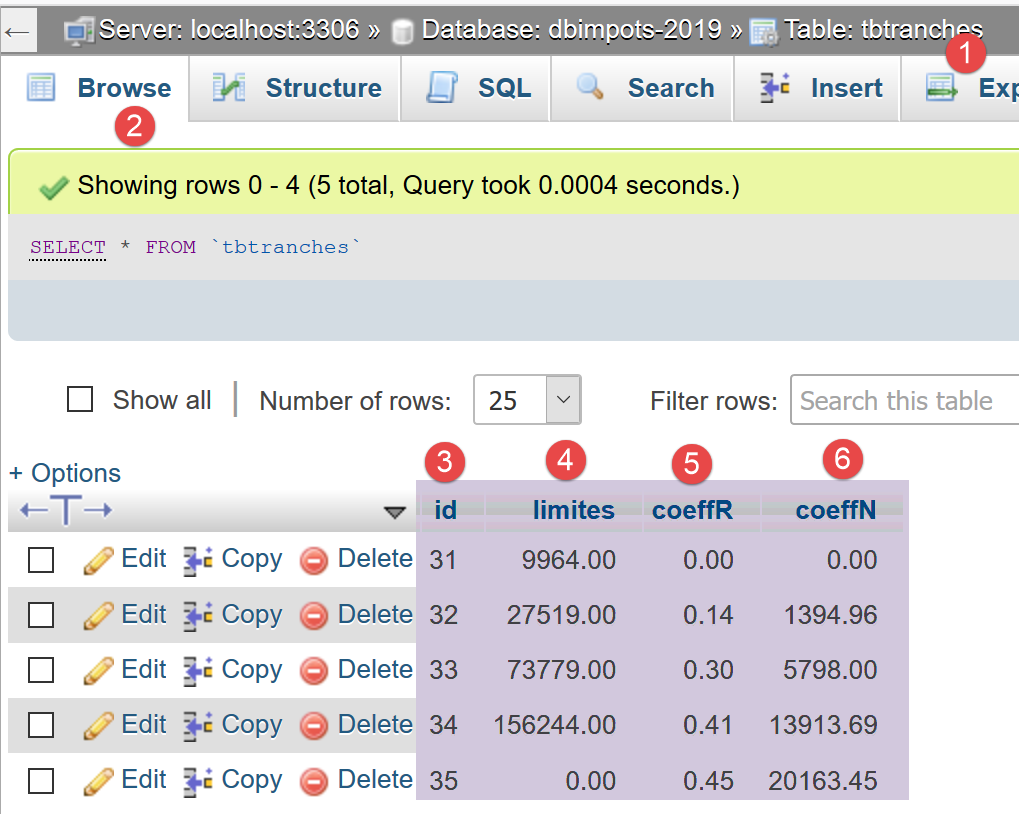
第 [3] 列显示了 MySQL 为主键 [id] 分配的值。编号从 1 开始。上图是在多次运行脚本后截取的。
13.4. 税费计算
13.4.1. 架构
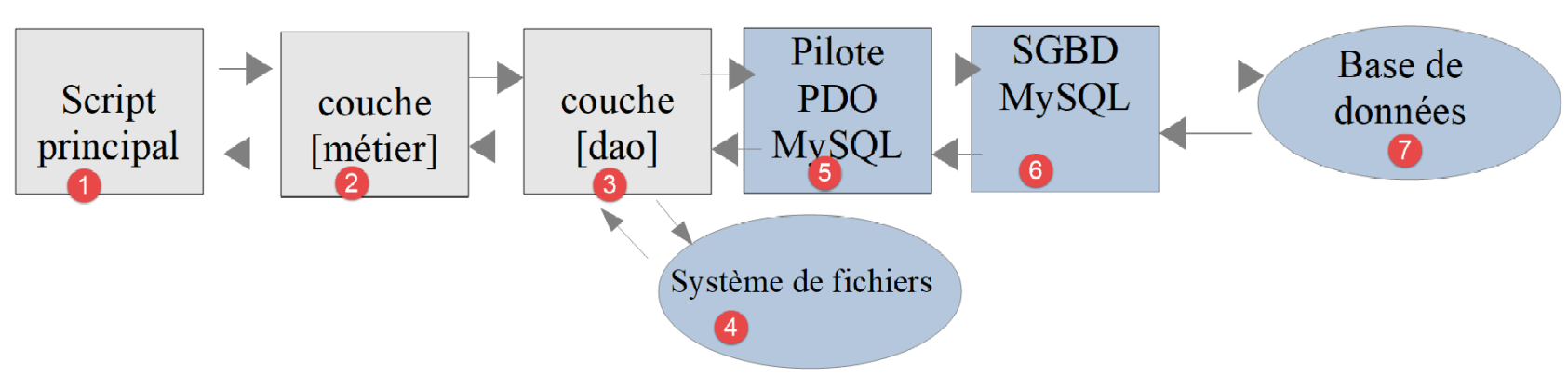
税费计算应用程序的 04 版采用分层架构:

[dao] 层实现了 [InterfaceDao] 接口。我们构建了一个实现该接口的类:
- [DaoImpotsWithTaxAdminDataInJsonFile],该类从 JSON 文件中读取税务数据。这就是第 04 版;
我们将使用一个新类 [DaoImpotsWithTaxAdminDataInDatabase] 来实现 [InterfaceDao] 接口,该类将从 MySQL 数据库中检索税务管理数据。与之前一样,[dao] 层将把结果和错误写入文本文件,并同样从 文本文件中检索纳税人数据。 只是这次,这些文本文件将变为 JSON 文件。此外,我们知道只要继续遵循 [InterfaceDao] 接口,[business] 层就无需进行修改。
13.4.2. [TaxPayerData] 实体
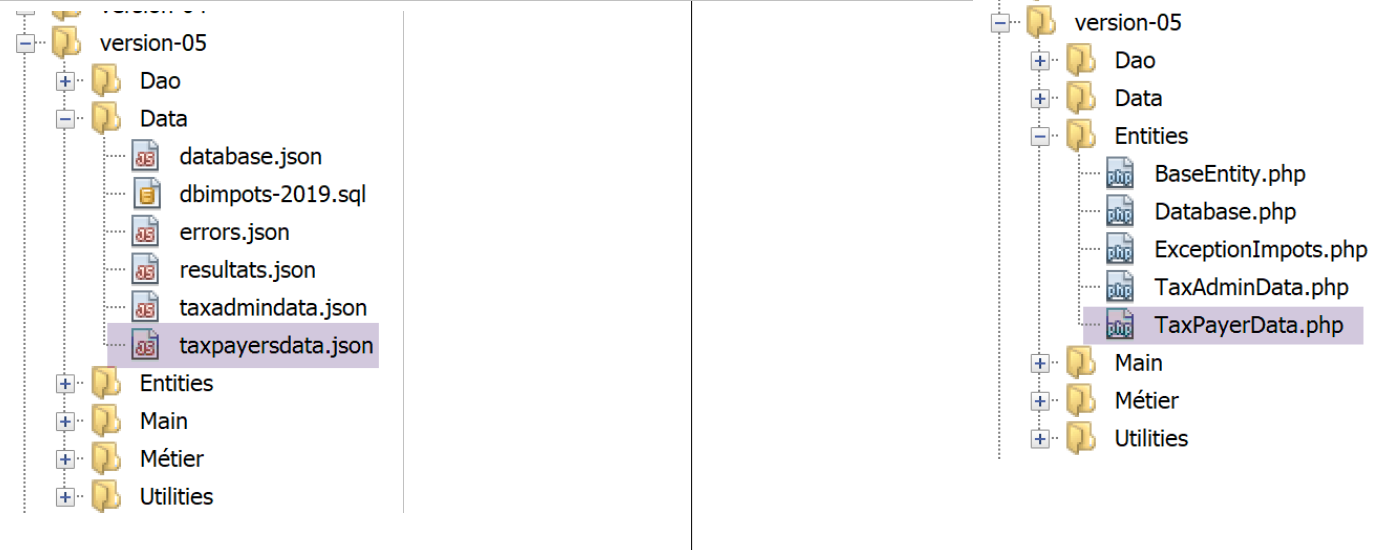
[TaxPayerData] 类用于将以下 JSON 文件 [taxpayersdata.json] 中的数据封装为一个类:
[
    {
        "marié": "oui",
        "enfants": 2,
        "salaire": 55555
    },
    {
        "marié": "ouix",
        "enfants": "2x",
        "salaire": "55555x"
    },
    {
        "marié": "oui",
        "enfants": "2",
        "salaire": 50000
    },
    {
        "marié": "oui",
        "enfants": 3,
        "salaire": 50000
    },
    {
        "marié": "non",
        "enfants": 2,
        "salaire": 100000
    },
    {
        "marié": "non",
        "enfants": 3,
        "salaire": 100000
    },
    {
        "marié": "oui",
        "enfants": 3,
        "salaire": 100000
    },
    {
        "marié": "oui",
        "enfants": 5,
        "salaire": 100000
    },
    {
        "marié": "non",
        "enfants": 0,
        "salaire": 100000
    },
    {
        "marié": "oui",
        "enfants": 2,
        "salaire": 30000
    },
    {
        "marié": "non",
        "enfants": 0,
        "salaire": 200000
    },
    {
        "marié": "oui",
        "enfants": 3,
        "salaire": 20000
    }
]
[TaxPayerData] 类的定义如下:
<?php

// namespace
namespace Application;

// data class
class TaxPayerData extends BaseEntity {
  // data required to calculate the taxpayer's tax liability
  protected $marié;
  protected $enfants;
  protected $salaire;
  // tax calculation results
  protected $impôt;
  protected $surcôte;
  protected $décôte;
  protected $réduction;
  protected $taux;

  // getters and setters
  …
}
注释
- 第 7 行:[TaxPayerData] 类继承自 [BaseEntity] 类。由于父类的方法已足够使用,[TaxPayerData] 类未定义任何自己的方法。请注意,[TaxPayerData] 类的属性与 JSON 文件 [taxpayersdata.json] 中的属性完全一致;
13.4.3. [dao] 层
13.4.3.1. [TraitDao] 特质
[TraitDao] 特质实现了 [InterfaceDao] 接口的一部分。让我们回顾一下:
<?php

// namespace
namespace Application;

interface InterfaceDao {

  // reading taxpayer data
  public function getTaxPayersData(string $taxPayersFilename, string $errorsFilename): array;

  // reading tax data (tax brackets)
  public function getTaxAdminData(): TaxAdminData;

  // recording results
  public function saveResults(string $resultsFilename, array $taxPayersData): void;
}
[TraitDao] 特质实现了 [InterfaceDao] 接口的 [getTaxPayersData] 和 [saveResults] 方法。由于 [TaxPayerData] 实体的定义在 04 版和 05 版之间发生了变化,我们需要更新 [TraitDao] 中的代码:
<?php

// namespace
namespace Application;

trait TraitDao {

  // reading taxpayer data
  public function getTaxPayersData(string $taxPayersFilename, string $errorsFilename): array {
    // retrieve taxpayer data in a table
    $baseEntity = new BaseEntity();
    $baseEntity->setFromJsonFile($taxPayersFilename);
    $arrayOfAttributes = $baseEntity->getArrayOfAttributes();
    // taxpayer data table
    $taxPayersData = [];
    // error table
    $errors = [];
    // we loop over the array of attributes of elements of type [TaxPayerData]
    $i = 0;
    foreach ($arrayOfAttributes as $attributesOfTaxPayerData) {
      // check
      $error = $this->check($attributesOfTaxPayerData);
      if (!$error) {
        // one more taxpayer
        $taxPayersData[] = (new TaxPayerData())->setFrOmArrayOfAttributes($attributesOfTaxPayerData);
      } else {
        // an error of + - the invalid data number is noted
        $error = ["numéro" => $i] + $error;
        $errors[] = $error;
      }
      // following
      $i++;
    }
    // save errors in a json file
    $string = "";
    foreach ($errors as $error) {
      $string .= \json_encode($error, JSON_UNESCAPED_UNICODE) . "\n";
    }
    $this->saveString($errorsFilename, $string);
    // function result
    return $taxPayersData;
  }

  private function check(array $attributesOfTaxPayerData): array {
    // check the data in [$taxPayerData]
    // the list of erroneous attributes
    $attributes = [];
    // marital status must be yes or no
    $marié = trim(strtolower($attributesOfTaxPayerData["marié"]));
    $erreur = ($marié !== "oui" and $marié !== "non");
    if ($erreur) {
      // we note the error
      $attributes[] = ["marié" => $marié];
    }
    // the number of children must be a positive integer or zero
    $enfants = trim($attributesOfTaxPayerData["enfants"]);
    if (!preg_match("/^\d+$/", $enfants)) {
      // we note the error
      $erreur = TRUE;
      $attributes[] = ["enfants" => $enfants];
    } else {
      $enfants = (int) $enfants;
    }

    // the salary must be a positive integer or zero (without euro cents)
    $salaire = trim($attributesOfTaxPayerData["salaire"]);
    if (!preg_match("/^\d+$/", $salaire)) {
      // we note the error
      $erreur = TRUE;
      $attributes[] = ["salaire" => $salaire];
    } else {
      $salaire = (int) $salaire;
    }

    // mistake?
    if ($erreur) {
      // return with error
      return ["erreurs" => $attributes];
    } else {
      // error-free return
      return [];
    }
  }

  // recording results
  public function saveResults(string $resultsFilename, array $taxPayersData): void {
    // save table [$taxPayersData] in text file [$resultsFileName]
    // if text file [$resultsFileName] does not exist, it is created
    // construction of the jSON results chain
    $string = "[" . implode(",
", $taxPayersData) . "]";
    // recording this channel
    $this->saveString($resultsFilename, $string);
  }

  // saving table results in a text file
  private function saveString(string $fileName, string $data): void {
    // save string [$data] in text file [$fileName]
    // if text file [$fileName] does not exist, it is created
    if (file_put_contents($fileName, $data) === FALSE) {
      throw new ExceptionImpots("Erreur lors de l'enregistrement de données dans le fichier texte [$fileName]");
    }
  }

}
评论
- [TraitDao] 实现了 [InterfaceDao] 接口的 [getTaxPayersData] 方法(第 9 行)和 [saveResults] 方法(第 86 行);
- 第 9 行:[getTaxPayersData] 方法接受以下参数:
- [$taxPayersFilename]:包含纳税人数据的 JSON 文件名称 [taxpayersdata.json];
- [$errorsFilename]:包含错误信息的 JSON 文件名称 [errors.json];
- 第 11–13 行:将包含纳税人数据的 JSON 文件内容转换为关联数组 [$arrayOfAttributes]。若 JSON 文件无法使用,则抛出 [ExceptionImpots] 异常;
- 第 15 行:数组 [$taxPayersData] 将包含封装在 [TaxPayerData] 类型对象中的纳税人数据;
- 第 17 行:错误信息被累积到数组 [$errors] 中;
- 第 99–33 行:构建数组 [$taxPayersData];
- 第 22 行:在将数据封装为 [TaxPayerData] 类型之前,会先对数据进行验证。[check] 方法返回:
- 若数据有误,则返回一个包含错误属性的数组 [‘errors’=>[…]];
- 若数据正确,则返回一个空数组;
- 第 25 行:当数据有效时,会创建一个新的 [TaxPayerData] 对象并将其添加到 [$taxPayersData] 数组中;
- 第 26–30 行:数据无效的情况。错误记录包含 JSON 文件中出错的 [TaxPayerData] 对象的 ID,以便用户定位,随后该错误被添加到 [$errors] 数组中;
- 第 35–39 行:将遇到的错误记录到第 9 行作为参数传递的 JSON 文件 [$errorsFilename] 中;
- 第 41 行:返回构建好的 [TaxPayerData] 对象数组:这是该方法的目标;
- 第 44–83 行:私有方法 [check] 验证作为第 44 行参数传递的数组 [$attributesOfTaxPayerData] 中参数 [married, children, salary] 的有效性。 如果存在任何无效属性,则将其收集到数组 [$attributes] 中(第 47、53、60、70 行),形式为数组 [‘invalid attribute’=> 无效属性的值];
- 第 78 行:如果存在错误,则返回数组 [‘errors’=>$attributes];
- 第 81 行:若无错误,则返回一个空的错误数组;
- 第 86–93 行:实现 [InterfaceDao] 接口的 [saveResults] 方法;
- 第 90 行:构建要保存到 JSON 文件 [$resultsFilename] 中的 JSON 字符串(该文件名作为参数在第 86 行传入)。必须从数组构建 JSON 字符串:
- 数组中的每个元素与下一个元素之间用逗号和换行符分隔;
- 整个数组用方括号 [] 包围;
- 第 92 行:将 JSON 字符串保存到 JSON 文件 [$resultsFilename] 中;
13.4.3.2. [DaoImpotsWithTaxAdminDataInDatabase] 类
类 [DaoImpotsWithTaxAdminDataInDatabase] 如下所示实现了 [InterfaceDao] 接口:
<?php

// namespace
namespace Application;

// definition of a ImpotsWithDataInDatabase class
class DaoImpotsWithTaxAdminDataInDatabase implements InterfaceDao {
  // use of a line
  use TraitDao;
  // the TaxAdminData object containing tax bracket data
  private $taxAdminData;
  // the [Database] type object containing the characteristics of the BD
  private $database;

  // manufacturer
  public function __construct(string $databaseFilename) {
    // store the jSON configuration of the bd
    $this->database = (new Database())->setFromJsonFile($databaseFilename);
    // we prepare the attribute
    $this->taxAdminData = new TaxAdminData();
    try {
      // open the database connection
      $connexion = new \PDO(
        $this->database->getDsn(),
        $this->database->getId(),
        $this->database->getPwd());
      // we want every SGBD error to trigger an exception
      $connexion->setAttribute(\PDO::ATTR_ERRMODE, \PDO::ERRMODE_EXCEPTION);
      // start a transaction
      $connexion->beginTransaction();
      // fill in the tax bracket table
      $this->getTranches($connexion);
      // fill in the constants table
      $this->getConstantes($connexion);
      // the transaction is completed successfully
      $connexion->commit();
    } catch (\PDOException $ex) {
      // is there a transaction in progress?
      if (isset($connexion) && $connexion->inTransaction()) {
        // transaction ends in failure
        $connexion->rollBack();
      }
      // trace the exception back to the calling code
      throw new ExceptionImpots($ex->getMessage());
    } finally {
      // close the connection
      $connexion = NULL;
    }
  }

  // reading data from the database
  private function getTranches($connexion): void {
    …
  }

  // reading the constants table
  private function getConstantes($connexion): void {
    …
  }

  // returns data for tax calculation
  public function getTaxAdminData(): TaxAdminData {
    return $this->taxAdminData;
  }

}
评论
- 第 4 行:我们保留了 [dao] 层其他实现中已使用的命名空间;
- 第 7 行:[DaoImportsWithTaxAdminDataInDatabase] 类实现了 [InterfaceDao] 接口;
- 第 9 行:我们导入了 [TraitDao] 特质。我们知道该特质实现了接口的一部分。唯一需要实现的方法是第 62–64 行中的 [getTaxAdminData] 方法。该方法仅返回第 11 行中的私有属性 [taxAdminData]。我们可以推断出构造函数必须初始化该属性。这就是它的唯一作用;
- 第 16 行:构造函数接收一个参数 [$databaseFilename],它是定义 MySQL 数据库 [dbimports-2019] 的 JSON 文件 [database.json] 的名称;
- 第 18 行:使用 JSON 文件 [$databaseFilename] 创建一个 [Database] 对象,该对象被构造并存储在第 13 行定义的 [$database] 属性中。如果无法正确处理 JSON 文件,则抛出 [ExceptionImpots] 异常;
- 第 20 行:创建对象 [$this→taxAdminData],该对象必须由构造函数初始化;
- 第 22–26 行:打开数据库连接。请注意 [\PDO] 这种写法是用来引用 PHP 的 [PDO] 类。由于我们处于 [Application] 命名空间中,如果只写 [PDO],这个相对名称会被当前命名空间作为前缀,从而得到类 [Application\PDO],而该类并不存在;
- 第 28 行:若发生错误,数据库管理系统将抛出 \PDOException 异常(第 37 行);
- 第 30 行:我们开始一个事务。这其实并非必要,因为仅会执行两条 SQL 语句,且这些语句不会修改数据库。不过,我们这样做是为了与其他数据库用户隔离;
- 第 32 行:通过第 52 行的私有方法 [getTranches] 读取税率区间表 [tbtranches];
- 第 34 行:通过第 57 行的私有方法 [getConstantes] 读取计算常量表 [tbconstantes];
- 第 36 行:若执行到此行,说明一切顺利。因此我们提交事务;
- 第 37–42 行:若到达此处,则表示发生了异常。因此,若事务正在进行中,则回滚事务(第 39–42 行)。第 44 行:为确保异常处理的一致性,我们将接收到的异常消息重新抛出,此次将其作为 [ExceptionImpots] 类型的异常;
- 第 45–48 行:无论是否发生异常,我们都关闭连接;
[getTranches] 方法如下:
private function getTranches($connexion): void {
    // raccourcis
    $database = $this->database;
    $taxAdminData = $this->taxAdminData;
    // on prépare la requête SELECT
    $statement = $connexion->prepare(
      "select {$database->getColLimites()}," .
      " {$database->getColCoeffR()}," .
      " {$database->getColCoeffN()}" .
      " from {$database->getTableTranches()}");
    // on exécute l'ordre préparé avec les valeurs des tranches d'impôts
    $statement->execute();
    // on exploite le résultat
    $limites = [];
    $coeffR = [];
    $coeffN = [];
    // remplissage des trois tableaux
    while ($tranche = $statement->fetch(\PDO::FETCH_OBJ)) {
      $limites[] = (float) $tranche->{$database->getColLimites()};
      $coeffR[] = (float) $tranche->{$database->getColCoeffR()};
      $coeffN[] = (float) $tranche->{$database->getColCoeffN()};
    }
    // on mémorise les données dans l'attribut [$taxAdminData] de la classe
    $taxAdminData->setFromArrayOfAttributes([
      "limites" => $limites,
      "coeffR" => $coeffR,
      "coeffN" => $coeffN
    ]);
  }
注释
- 第 1 行:该方法接收 [$connexion] 作为参数,这是一个正在进行事务的已打开连接;
- 第 2–4 行:创建了两个快捷方式,以避免在代码中反复书写 [$this->database] 和 [$taxAdminData = $this->taxAdminData]。这些是对象引用的副本,而非对象本身的副本;
- 第 6–10 行:准备 SELECT 语句,然后在第 12 行执行;
- 第 13–22 行:处理 SELECT 语句的结果。接收到的信息存储在三个数组 [limits, coeffR, coeffN] 中;
- 第 24–28 行:使用这三个数组初始化类的 [$this->taxAdminData] 属性;
私有方法 [getConstantes] 如下所示:
private function getConstantes($connexion): void {
    // raccourcis
    $database = $this->database;
    $taxAdminData = $this->taxAdminData;
    // on prépare la requête SELECT
    $select = "select {$database->getColPlafondQfDemiPart()}," .
      "{$database->getColPlafondRevenusCelibatairePourReduction()}," .
      "{$database->getColPlafondRevenusCouplePourReduction()}," . "{$database->getColValeurReducDemiPart()}," .
      "{$database->getColPlafondDecoteCelibataire()}," . "{$database->getColPlafondDecoteCouple()}," .
      "{$database->getColPlafondImpotCelibatairePourDecote()}," . "{$database->getColPlafondImpotCouplePourDecote()}," .
      "{$database->getColAbattementDixPourcentMax()}," . "{$database->getColAbattementDixPourcentMin()}" .
      " from {$database->getTableConstantes()}";
    $statement = $connexion->prepare($select);
    // on exécute l'ordre préparé
    $statement->execute();
    // on exploite le résultat - 1 seule ligne ici
    $row = $statement->fetch(\PDO::FETCH_OBJ);
    // on initialise l'attribut [$taxAdminData]
    $taxAdminData->setPlafondQfDemiPart($row->{$database->getColPlafondQfDemiPart()});
    $taxAdminData->setPlafondRevenusCelibatairePourReduction(
      $row->{$database->getColPlafondRevenusCelibatairePourReduction()});
    $taxAdminData->setPlafondRevenusCouplePourReduction($row->{$database->getColPlafondRevenusCouplePourReduction()});
    $taxAdminData->setValeurReducDemiPart($row->{$database->getColValeurReducDemiPart()});
    $taxAdminData->setPlafondDecoteCelibataire($row->{$database->getColPlafondDecoteCelibataire()});
    $taxAdminData->setPlafondDecoteCouple($row->{$database->getColPlafondDecoteCouple()});
    $taxAdminData->setPlafondImpotCelibatairePourDecote($row->{$database->getColPlafondImpotCelibatairePourDecote()});
    $taxAdminData->setPlafondImpotCouplePourDecote($row->{$database->getColPlafondImpotCouplePourDecote()});
    $taxAdminData->setAbattementDixPourcentMax($row->{$database->getColAbattementDixPourcentMax()});
    $taxAdminData->setAbattementDixPourcentMin($row->{$database->getColAbattementDixPourcentMin()});
  }
注释
- 第 1 行:该方法接收 [$connection] 作为参数,这是一个处于活动事务中的已打开连接;
- 第 2–4 行:创建了两个快捷方式,以避免在代码中反复书写 [$this->database] 和 [$taxAdminData = $this->taxAdminData]。这些是对象引用的副本,而非对象本身的副本;
- 第 6–15 行:准备 SELECT 语句,然后在第 15 行执行;
- 第 17–29 行:处理 SELECT 语句的结果。检索到的信息用于初始化类的 [$this->taxAdminData] 属性;
注意:请注意,该类并不依赖于 MySQL 数据库管理系统。是调用代码通过数据库 DSN 指定了所使用的数据库管理系统。
13.4.4. [业务]层
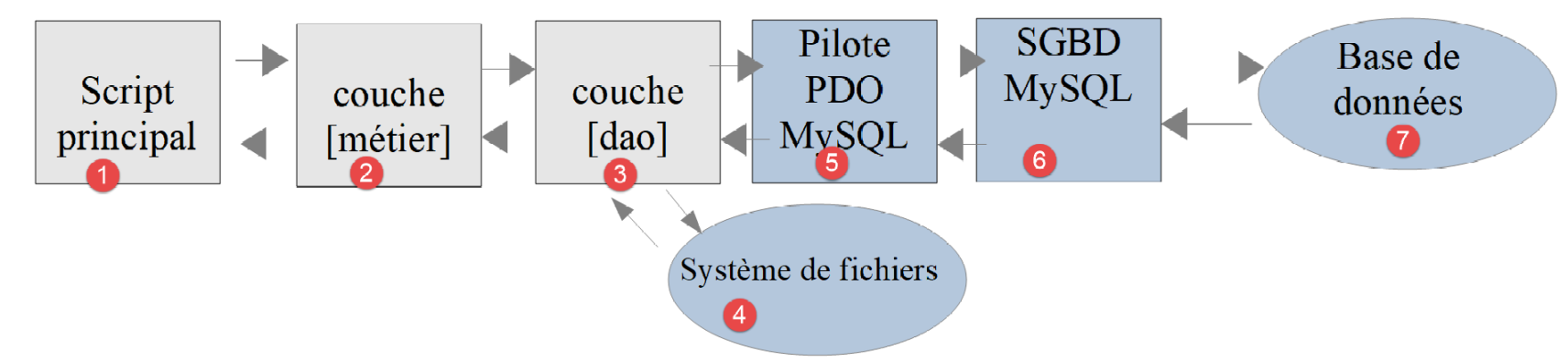
- 我们刚刚实现了 [DAO] 层 (3);
- 由于我们遵循了 [InterfaceDao] 接口,因此 [业务] 层 (2) 理论上可以保持不变。然而,我们不仅修改了 [DAO] 层,还修改了实体类,这些实体类被所有层共享;
[业务]层实现了以下[BusinessInterface]接口:
<?php

// namespace
namespace Application;

interface InterfaceMetier {

  // calculating a taxpayer's taxes
  public function calculerImpot(string $marié, int $enfants, int $salaire): array;

  // batch mode tax calculation
  public function executeBatchImpots(string $taxPayersFileName, string $resultsFileName, string $errorsFileName): void;
}
- 第 12 行:[executeBatchImports] 方法现在使用 JSON 文件 [$taxPayersFileName],而在 04 版本中,它使用的是普通文本文件。 ;
在 04 版本中,[executeBatchImports] 方法如下:
public function executeBatchImpots(string $taxPayersFileName, string $resultsFileName, string $errorsFileName): void {
    // we let the exceptions coming from the [dao] layer flow upwards
    // retrieve taxpayer data
    $taxPayersData = $this->dao->getTaxPayersData($taxPayersFileName, $errorsFileName);
    // results table
    $results = [];
    // we exploit them
    foreach ($taxPayersData as $taxPayerData) {
      // tax calculation
      $result = $this->calculerImpot(
        $taxPayerData->getMarié(),
        $taxPayerData->getEnfants(),
        $taxPayerData->getSalaire());
      // complete [$taxPayerData]
      $taxPayerData->setMontant($result["impôt"]);
      $taxPayerData->setDécôte($result["décôte"]);
      $taxPayerData->setSurCôte($result["surcôte"]);
      $taxPayerData->setTaux($result["taux"]);
      $taxPayerData->setRéduction($result["réduction"]);
      // put the result in the results table
      $results [] = $taxPayerData;
    }
    // recording results
    $this->dao->saveResults($resultsFileName, $results);
  }
- 第 15 行现在有误。在 [TaxPayerData] 类的新定义中,[setMontant] 方法已不存在;
在 05 版本中,[executeBatchImpots] 方法将如下所示:
public function executeBatchImpots(string $taxPayersFileName, string $resultsFileName, string $errorsFileName): void {
    // we let the exceptions coming from the [dao] layer flow upwards
    // retrieve taxpayer data
    $taxPayersData = $this->dao->getTaxPayersData($taxPayersFileName, $errorsFileName);
    // results table
    $results = [];
    // we exploit them
    foreach ($taxPayersData as $taxPayerData) {
      // tax calculation
      $result = $this->calculerImpot(
        $taxPayerData->getMarié(),
        $taxPayerData->getEnfants(),
        $taxPayerData->getSalaire());
      // complete [$taxPayerData]
      $taxPayerData->setFromArrayOfAttributes($result);
      // put the result in the results table
      $results [] = $taxPayerData;
    }
    // recording results
    $this->dao->saveResults($resultsFileName, $results);
  }
注释
- 第 15 行:不再使用 [TaxPayerData] 类的各个设置器,而是使用其全局设置器 [setFromArrayOfAttributes];
- 其余代码无需修改;
13.4.5. 主脚本
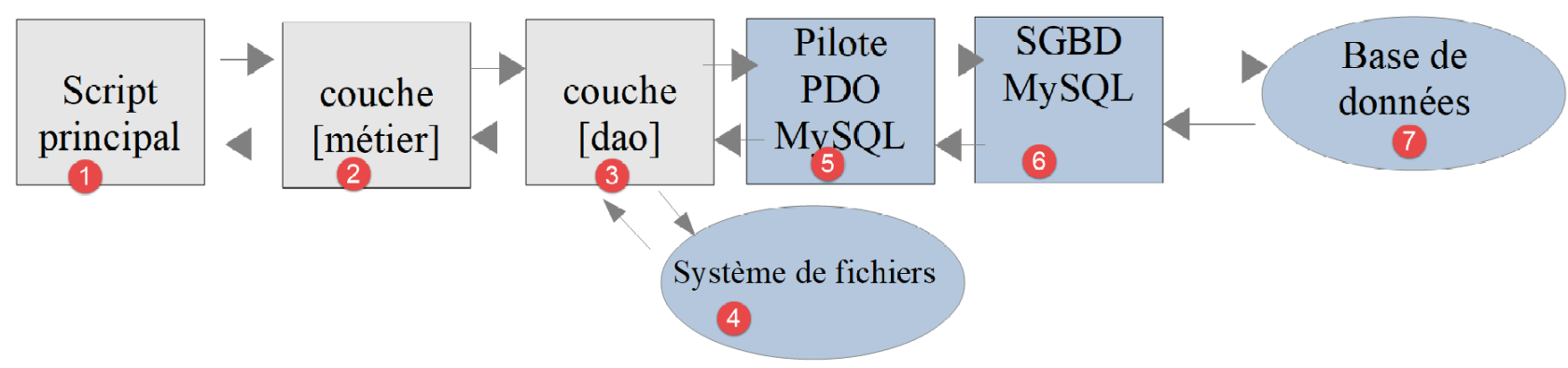
- 我们刚刚实现了 [DAO] (3) 和 [业务逻辑] (2) 层;
- 我们还需要编写主脚本 (1);
主脚本与 04 版本的类似:
<?php

// strict adherence to declared types of function parameters
declare (strict_types=1);

// namespace
namespace Application;

// error handling by PHP
//ini_set("display_errors", "0");
// interface and class inclusion
require_once __DIR__ . "/../Entities/BaseEntity.php";
require_once __DIR__ . "/../Entities/TaxAdminData.php";
require_once __DIR__ . "/../Entities/TaxPayerData.php";
require_once __DIR__ . "/../Entities/Database.php";
require_once __DIR__ . "/../Entities/ExceptionImpots.php";
require_once __DIR__ . "/../Utilities/Utilitaires.php";
require_once __DIR__ . "/../Dao/InterfaceDao.php";
require_once __DIR__ . "/../Dao/TraitDao.php";
require_once __DIR__ . "/../Dao/DaoImpotsWithTaxAdminDataInDatabase.php";
require_once __DIR__ . "/../Métier/InterfaceMetier.php";
require_once __DIR__ . "/../Métier/Metier.php";
//
// definition of constants
const DATABASE_CONFIG_FILENAME = "../Data/database.json";
const TAXADMINDATA_FILENAME = "../Data/taxadmindata.json";
const RESULTS_FILENAME = "../Data/resultats.json";
const ERRORS_FILENAME = "../Data/errors.json";
const TAXPAYERSDATA_FILENAME = "../Data/taxpayersdata.json";

try {
  // creation of the [dao] layer
  $dao = new DaoImpotsWithTaxAdminDataInDatabase(DATABASE_CONFIG_FILENAME);
  // creation of the [business] layer
  $métier = new Metier($dao);
  // tax calculation in batch mode
  $métier->executeBatchImpots(TAXPAYERSDATA_FILENAME, RESULTS_FILENAME, ERRORS_FILENAME);
} catch (ExceptionImpots $ex) {
  // error is displayed
  print "Une erreur s'est produite : " . utf8_encode($ex->getMessage()) . "\n";
}
// end
print "Terminé\n";
exit;
注释
- 第 12–22 行:加载版本 05 中的所有文件;
- 第 25–29 行:应用程序中各种 JSON 文件的名称;
- 第 33 行:构建 [DAO] 层;
- 第 35 行:构建 [business] 层;
- 第 37 行:调用 [business] 层的 [executeBatchImports] 方法;
结果
应用程序生成两个 JSON 文件:
- [results.json]:各项税费计算的结果;
- [errors.json]:报告在 JSON 文件 [taxpayersdata.json] 中发现的错误;
[errors.json] 文件内容如下:
{
    "numéro": 1,
    "erreurs": [
        {
            "marié": "ouix"
        },
        {
            "enfants": "2x"
        },
        {
            "salaire": "55555x"
        }
    ]
}
这意味着在 [taxpayersdata.json] 中,taxpayers 表中的第一条记录有误。该 [taxpayersdata.json] 文件内容如下:
[
    {
        "marié": "oui",
        "enfants": 2,
        "salaire": 55555
    },
    {
        "marié": "ouix",
        "enfants": "2x",
        "salaire": "55555x"
    },
    {
        "marié": "oui",
        "enfants": "2",
        "salaire": 50000
    },
    {
        "marié": "oui",
        "enfants": 3,
        "salaire": 50000
    },
    {
        "marié": "non",
        "enfants": 2,
        "salaire": 100000
    },
    {
        "marié": "non",
        "enfants": 3,
        "salaire": 100000
    },
    {
        "marié": "oui",
        "enfants": 3,
        "salaire": 100000
    },
    {
        "marié": "oui",
        "enfants": 5,
        "salaire": 100000
    },
    {
        "marié": "non",
        "enfants": 0,
        "salaire": 100000
    },
    {
        "marié": "oui",
        "enfants": 2,
        "salaire": 30000
    },
    {
        "marié": "non",
        "enfants": 0,
        "salaire": 200000
    },
    {
        "marié": "oui",
        "enfants": 3,
        "salaire": 20000
    }
]
结果文件 [results.json] 如下:
[
    {
        "marié": "oui",
        "enfants": 2,
        "salaire": 55555,
        "impôt": 2814,
        "surcôte": 0,
        "décôte": 0,
        "réduction": 0,
        "taux": 0.14
    },
    {
        "marié": "oui",
        "enfants": "2",
        "salaire": 50000,
        "impôt": 1384,
        "surcôte": 0,
        "décôte": 384,
        "réduction": 347,
        "taux": 0.14
    },
    {
        "marié": "oui",
        "enfants": 3,
        "salaire": 50000,
        "impôt": 0,
        "surcôte": 0,
        "décôte": 720,
        "réduction": 0,
        "taux": 0.14
    },
    {
        "marié": "non",
        "enfants": 2,
        "salaire": 100000,
        "impôt": 19884,
        "surcôte": 4480,
        "décôte": 0,
        "réduction": 0,
        "taux": 0.41
    },
    {
        "marié": "non",
        "enfants": 3,
        "salaire": 100000,
        "impôt": 16782,
        "surcôte": 7176,
        "décôte": 0,
        "réduction": 0,
        "taux": 0.41
    },
    {
        "marié": "oui",
        "enfants": 3,
        "salaire": 100000,
        "impôt": 9200,
        "surcôte": 2180,
        "décôte": 0,
        "réduction": 0,
        "taux": 0.3
    },
    {
        "marié": "oui",
        "enfants": 5,
        "salaire": 100000,
        "impôt": 4230,
        "surcôte": 0,
        "décôte": 0,
        "réduction": 0,
        "taux": 0.14
    },
    {
        "marié": "non",
        "enfants": 0,
        "salaire": 100000,
        "impôt": 22986,
        "surcôte": 0,
        "décôte": 0,
        "réduction": 0,
        "taux": 0.41
    },
    {
        "marié": "oui",
        "enfants": 2,
        "salaire": 30000,
        "impôt": 0,
        "surcôte": 0,
        "décôte": 0,
        "réduction": 0,
        "taux": 0
    },
    {
        "marié": "non",
        "enfants": 0,
        "salaire": 200000,
        "impôt": 64210,
        "surcôte": 7498,
        "décôte": 0,
        "réduction": 0,
        "taux": 0.45
    },
    {
        "marié": "oui",
        "enfants": 3,
        "salaire": 20000,
        "impôt": 0,
        "surcôte": 0,
        "décôte": 0,
        "réduction": 0,
        "taux": 0
    }
]
这些结果与 04 版的结果一致。
13.5. [Codeception] 测试
与版本 04 相关章节的做法一样,我们将为版本 05 编写 [Codeception] 测试。
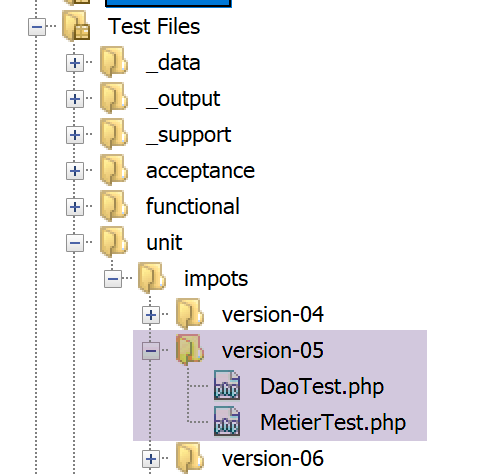
13.5.1. 测试 [dao] 层
[DaoTest.php] 测试代码如下:
<?php

// strict adherence to declared types of function parameters
declare (strict_types=1);

// namespace
namespace Application;

// root directories
define("ROOT", "C:/Data/st-2019/dev/php7/poly/scripts-console/impots/version-05");
define("VENDOR", "C:/myprograms/laragon-lite/www/vendor");

// interface and class inclusion
require_once ROOT . "/Entities/BaseEntity.php";
require_once ROOT . "/Entities/TaxAdminData.php";
require_once ROOT . "/Entities/TaxPayerData.php";
require_once ROOT . "/Entities/Database.php";
require_once ROOT . "/Entities/ExceptionImpots.php";
require_once ROOT . "/Utilities/Utilitaires.php";
require_once ROOT . "/Dao/InterfaceDao.php";
require_once ROOT . "/Dao/TraitDao.php";
require_once ROOT . "/Dao/DaoImpotsWithTaxAdminDataInDatabase.php";
require_once ROOT . "/Métier/InterfaceMetier.php";
require_once ROOT . "/Métier/Metier.php";
// third-party libraries
require_once VENDOR . "/autoload.php";

// definition of constants
const DATABASE_CONFIG_FILENAME = ROOT ."/Data/database.json";
const TAXADMINDATA_FILENAME = ROOT ."/Data/taxadmindata.json";
const RESULTS_FILENAME = ROOT ."/Data/resultats.json";
const ERRORS_FILENAME = ROOT ."/Data/errors.json";
const TAXPAYERSDATA_FILENAME = ROOT ."/Data/taxpayersdata.json";

class DaoTest extends \Codeception\Test\Unit {
  // TaxAdminData
  private $taxAdminData;

  public function __construct() {
    parent::__construct();
    // creation of the [dao] layer
    $dao = new DaoImpotsWithTaxAdminDataInDatabase(DATABASE_CONFIG_FILENAME);
    $this->taxAdminData = $dao->getTaxAdminData();
  }

  // tests
  public function testTaxAdminData() {
    // calculation constants
    $this->assertEquals(1551, $this->taxAdminData->getPlafondQfDemiPart());
    …
  }

}
评论
- 第 9–33 行:测试环境的定义。我们使用与链接部分中描述的主脚本 [MainCalculateImpotsWithTaxAdminDataInMySQLDatabase] 相同的环境;
- 第39–44行:构建[dao]层;
- 第 43 行:属性 [$this→taxAdminData] 包含待测试的数据;
- 第 47–51 行:[testTaxAdminData] 方法即链接部分中所述的方法;
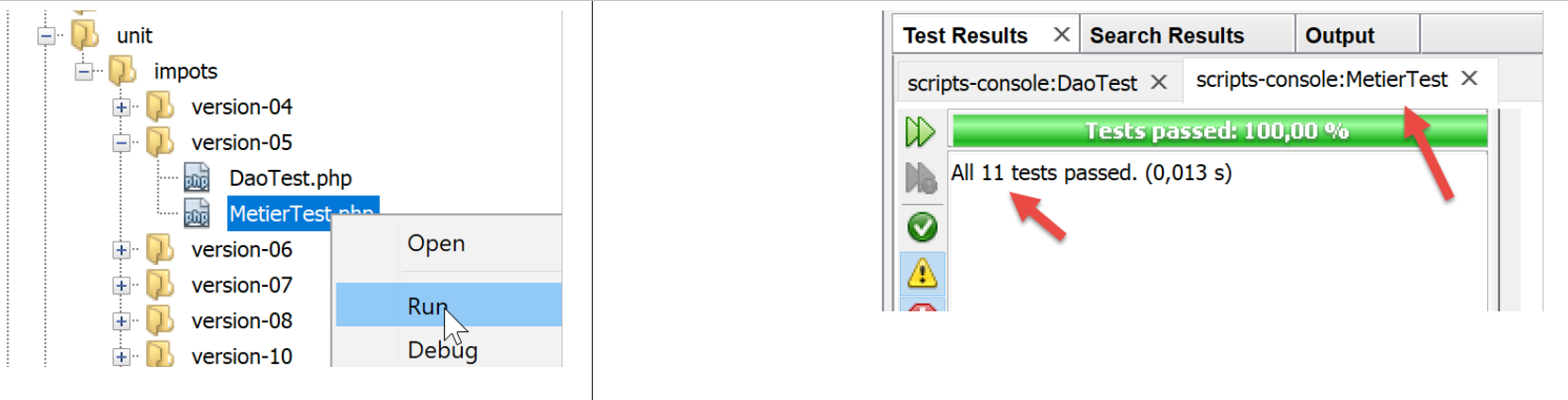
测试结果如下:
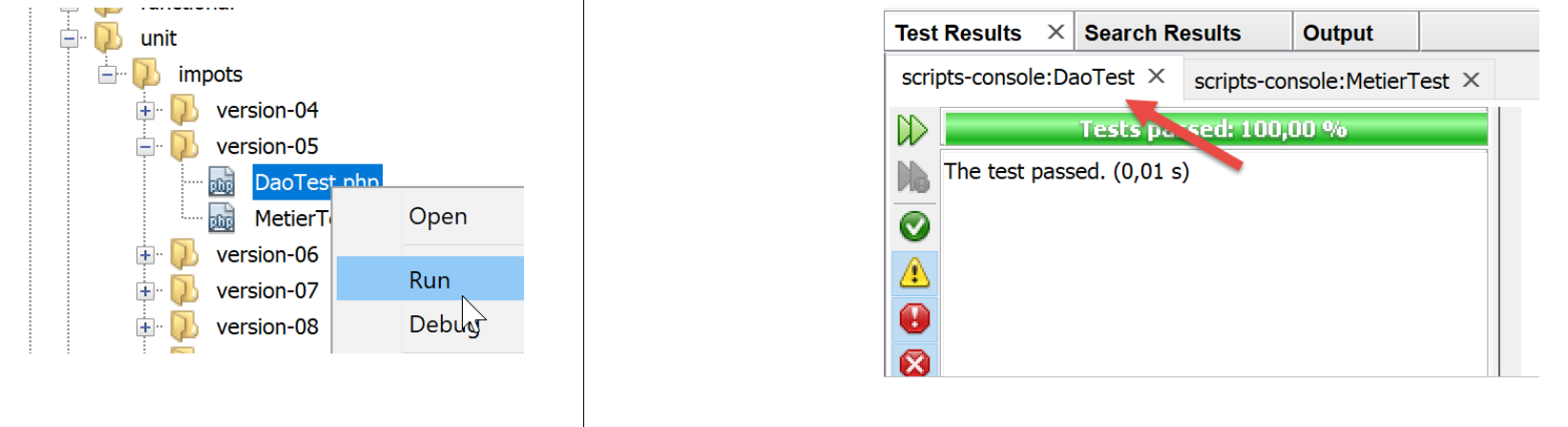
13.5.2. 测试 [business] 层
[MetierTest.php] 的测试代码如下:
<?php

// strict adherence to declared types of function parameters
declare (strict_types=1);

// namespace
namespace Application;

// root directories
define("ROOT", "C:/Data/st-2019/dev/php7/poly/scripts-console/impots/version-05");
define("VENDOR", "C:/myprograms/laragon-lite/www/vendor");

// interface and class inclusion
require_once ROOT . "/Entities/BaseEntity.php";
require_once ROOT . "/Entities/TaxAdminData.php";
require_once ROOT . "/Entities/TaxPayerData.php";
require_once ROOT . "/Entities/Database.php";
require_once ROOT . "/Entities/ExceptionImpots.php";
require_once ROOT . "/Utilities/Utilitaires.php";
require_once ROOT . "/Dao/InterfaceDao.php";
require_once ROOT . "/Dao/TraitDao.php";
require_once ROOT . "/Dao/DaoImpotsWithTaxAdminDataInDatabase.php";
require_once ROOT . "/Métier/InterfaceMetier.php";
require_once ROOT . "/Métier/Metier.php";
// third-party libraries
require_once VENDOR . "/autoload.php";

// definition of constants
const DATABASE_CONFIG_FILENAME = ROOT ."/Data/database.json";
const TAXADMINDATA_FILENAME = ROOT ."/Data/taxadmindata.json";
const RESULTS_FILENAME = ROOT ."/Data/resultats.json";
const ERRORS_FILENAME = ROOT ."/Data/errors.json";
const TAXPAYERSDATA_FILENAME = ROOT ."/Data/taxpayersdata.json";

class MetierTest extends \Codeception\Test\Unit {
  // business layer
  private $métier;

  public function __construct() {
    parent::__construct();
    // creation of the [dao] layer
    $dao = new DaoImpotsWithTaxAdminDataInDatabase(DATABASE_CONFIG_FILENAME);
    // creation of the [business] layer
    $this->métier = new Metier($dao);
  }

  // tests
  public function test1() {
    $result = $this->métier->calculerImpot("oui", 2, 55555);
    $this->assertEqualsWithDelta(2815, $result["impôt"], 1);
    $this->assertEqualsWithDelta(0, $result["surcôte"], 1);
    $this->assertEqualsWithDelta(0, $result["décôte"], 1);
    $this->assertEqualsWithDelta(0, $result["réduction"], 1);
    $this->assertEquals(0.14, $result["taux"]);
  }
…………………………………………………………………………………………………………………..
public function test11() {
    $result = $this->métier->calculerImpot("oui", 3, 200000);
    $this->assertEqualsWithDelta(42842, $result["impôt"], 1);
    $this->assertEqualsWithDelta(17283, $result["surcôte"], 1);
    $this->assertEqualsWithDelta(0, $result["décôte"], 1);
    $this->assertEqualsWithDelta(0, $result["réduction"], 1);
    $this->assertEquals(0.41, $result["taux"]);
  }

}
评论
- 第9–33行:测试环境的定义。我们使用与链接部分中描述的主脚本[MainCalculateImpotsWithTaxAdminDataInMySQLDatabase]相同的环境;
- 第 39–45 行:构建 [dao] 和 [business] 层;
- 第 44 行:属性 [$this→business] 引用 [business] 层;
- 第 47–64 行:方法 [test1, test2…, test11] 即链接部分中所述的方法;
测试结果如下: