22. 应用练习 – 第 11 版
目前,Web 服务仍常以 XML 流的形式发送响应,而非 jSON 流:
- jSON 数据流更为精简,但需要参考说明才能理解;
- XML 数据流虽然冗长,但具有自文档特性,可立即理解;
我们将客户端/服务器版本 11 进行了修改,使服务器现在向客户端发送 XML 数据流作为响应:
22.1. 服务器
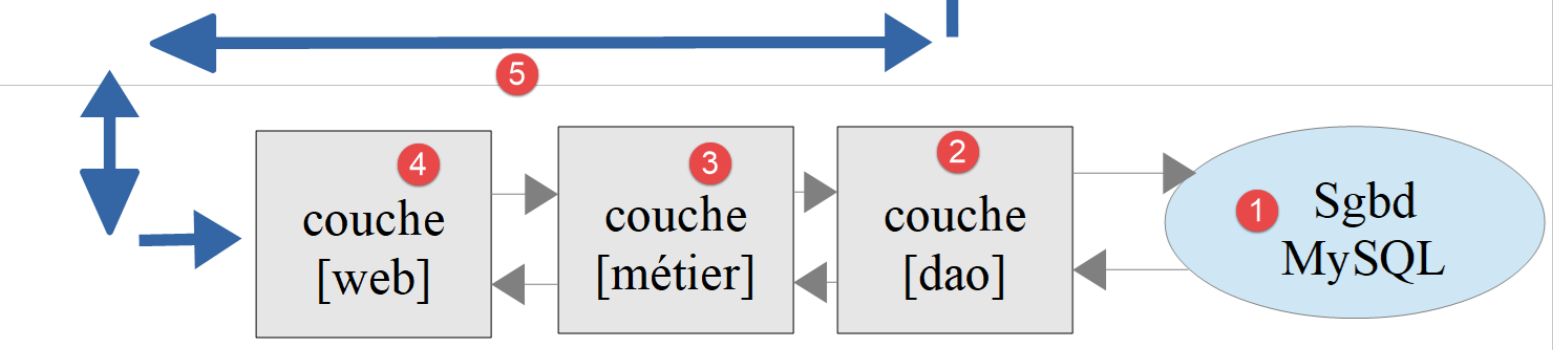
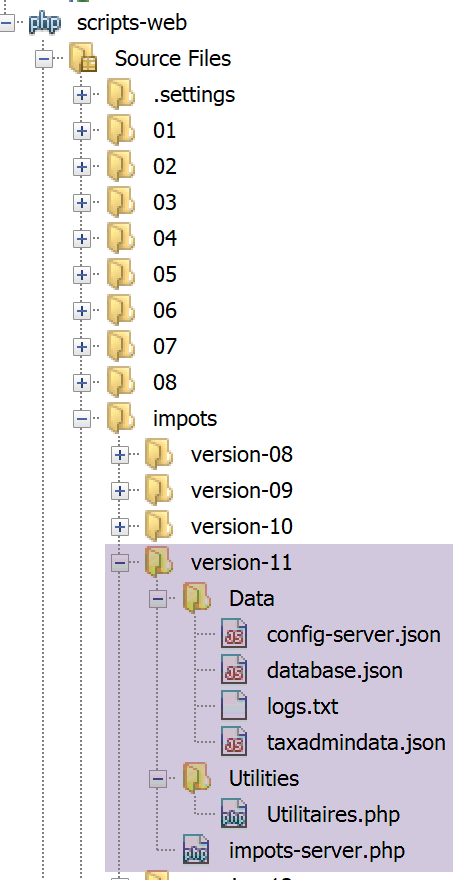
该架构将通过以下脚本实现:
22.1.1. [Utilitaires]类
我们沿用了自 03 版起使用的 [Utilitaires] 类(参见链接段落):
<?php

// 命名空间
namespace Application;

// 一个实用函数类
abstract class Utilitaires {

  public static function cutNewLinechar(string $ligne): string {
    …
  }


  // 来自 https://stackoverflow.com/questions/1397036/how-to-convert-array-to-simplexml
  public static function getXmlForArrayOfAttributes(array $arrayOfAttributes,
    \SimpleXmlElement &$node): void {
    // 扫描数组的属性
    foreach ($arrayOfAttributes as $attribute => $value) {
      // 该属性是数值型吗?
      if (is_numeric($attribute)) {
        // 数组索引的情况(但也包括其他情况)
        $attribute = 'i' . $attribute;
      }
      // $value 是否为数组?
      if (is_array($value)) {
        // 接下来我们将探索数组 [$value]
        // 向图 XML 添加一个节点
        $subnode = $node->addChild($attribute);
        // 通过递归调用探索数组 [$value]
        Utilitaires::getXmlForArrayOfAttributes($value, $subnode);
      } else {
        // 将该节点添加到图中 XML
        $node->addChild("$attribute", htmlspecialchars("$value"));
      }
    }
  }
}
注释
- 第 14-36 行:我们引入静态方法 [getXmlForArrayOfAttributes],该方法将作为参数传递的数组 [arrayOfAttributes] 中的字符串 XML 返回。 第二个参数是图 XML 中某个节点的引用,该节点类型为 [SimpleXmlElement]。 执行后,该节点将包含数组 [arrayOfAttributes] 中的图 XML;
我们编写以下测试用例 [testXml.php]:
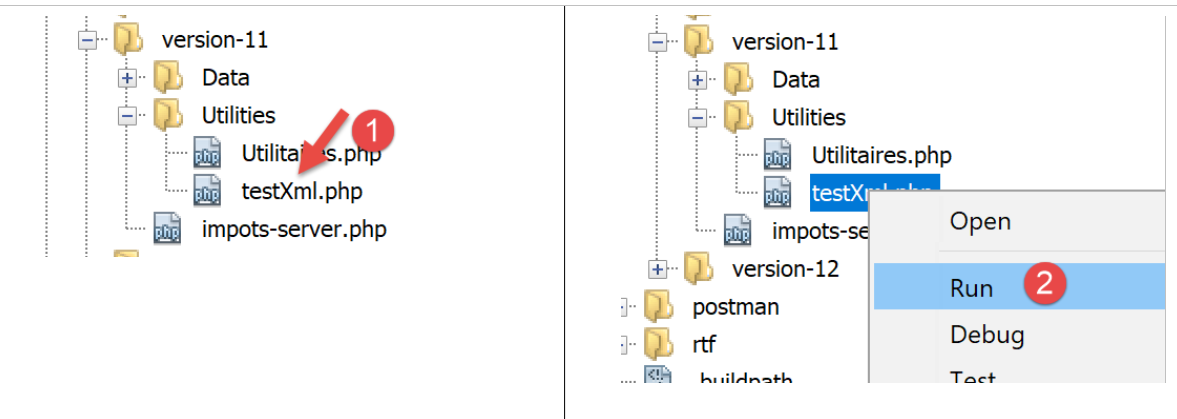
<?php

// 依赖关系
require __DIR__ . "/Utilitaires.php";
// 关联数组
$array = ["nom" => "amédée", "prénom" => "sylvain", "âge" => 40,
  "enfants" => [["nom" => "amédée", "prénom" => "béatrice", "âge" => 6],
    ["nom" => "amédée", "prénom" => "bertrand", "âge" => 4]]];
// xml
header("Content-Type: application/xml");
$node = new \SimpleXMLElement("<?xml version='1.0' encoding='UTF-8'?><root></root>");
\Application\Utilitaires::getXmlForArrayOfAttributes($array, $node);
print $node->asXML();
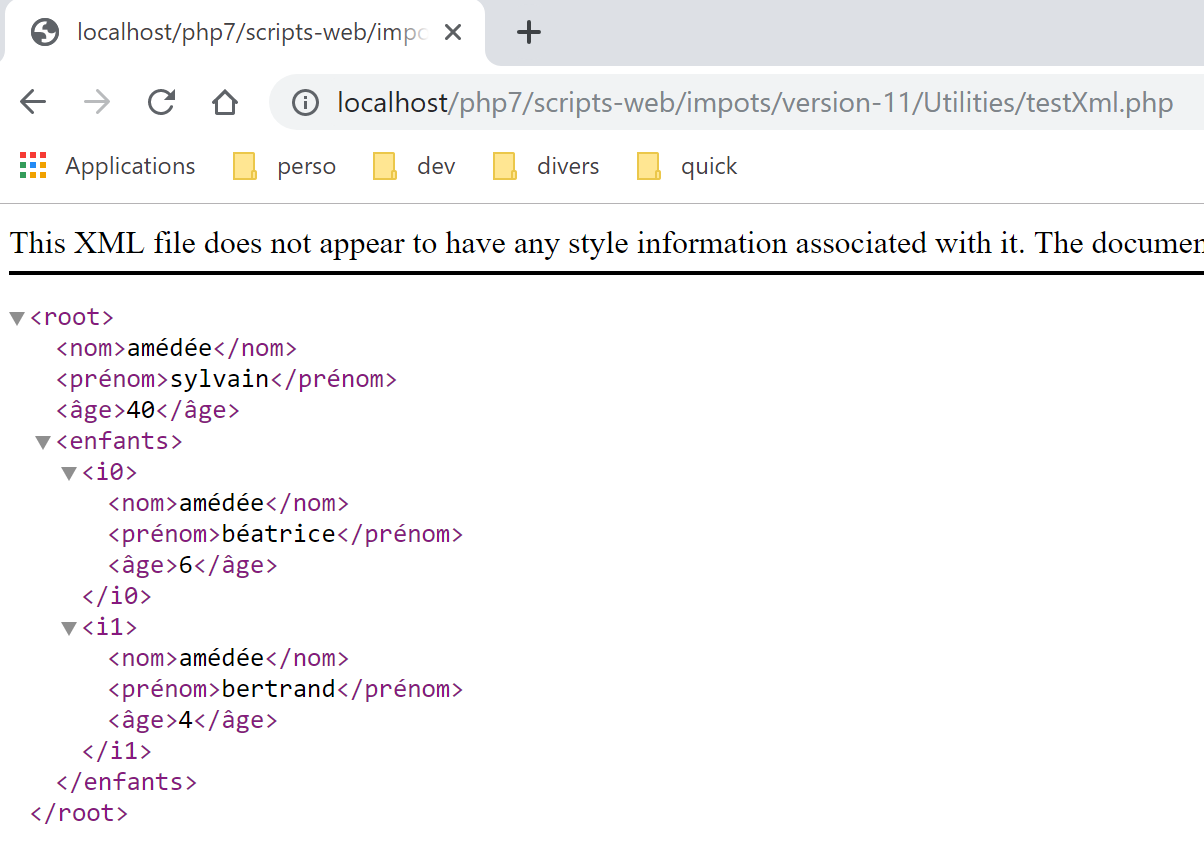
当执行此脚本 [2] 时,我们在 Chrome 浏览器中得到以下结果:
22.1.2. 服务器脚本
需修改服务器脚本 [impots-server.php] 及其配置文件 [config-server.json]:
{
    "rootDirectory": "C:/myprograms/laragon-lite/www/php7/scripts-web/impots/version-11",
    "databaseFilename": "Data/database.json",
    "relativeDependencies": [
        "/../version-08/Entities/BaseEntity.php",
        "/../version-08/Entities/ExceptionImpots.php",
        "/../version-08/Entities/TaxAdminData.php",
        "/../version-08/Entities/Database.php",
        "/../version-08/Dao/InterfaceServerDao.php",
        "/../version-08/Dao/ServerDao.php",
        "/../version-09/Dao/ServerDaoWithSession.php",
        "/../version-08/Métier/InterfaceServerMetier.php",
        "/../version-08/Métier/ServerMetier.php",
        "/../version-09/Utilities/Logger.php",
        "/../version-09/Utilities/SendAdminMail.php",
        "/Utilities/Utilitaires.php"
    ],
    "absoluteDependencies": [
        "C:/myprograms/laragon-lite/www/vendor/autoload.php",
        "C:/myprograms/laragon-lite/www/vendor/predis/predis/autoload.php"
    ],
    "users": [
        {
            "login": "admin",
            "passwd": "admin"
        }
    ],
    "adminMail": {
        "smtp-server": "localhost",
        "smtp-port": "25",
        "from": "guest@localhost",
        "to": "guest@localhost",
        "subject": "plantage du serveur de calcul d'impôts",
        "tls": "FALSE",
        "attachments": []
    },
    "logsFilename": "Data/logs.txt"
}
注释
- 项目的根目录现为版本 11 的文件夹;
- 第 16 行:引入了新类 [Utilitaires];
服务器脚本的修改如下:
<?php

// 严格遵守函数参数的声明类型
declare (strict_types=1);

// 命名空间
namespace Application;

…
// 准备服务器的响应 JSON
$response = new Response();
$response->headers->set("content-type", "application/xml");
$response->setCharset("utf-8");
…
// 创建 [métier] 层
$métier = new ServerMetier($dao);
// 计算税款
$result = $métier->calculerImpot($marié, (int) $enfants, (int) $salaire);
// 返回响应
sendResponse($response, $result, Response::HTTP_OK, [], $logger, $redis);
// 结束
exit;

function doInternalServerError(string $message, Response $response, array $infos,
  …
}

// 向客户发送响应 HTTP 的功能
function sendResponse(Response $response, array $result, int $statusCode,
  array $headers, Logger $logger = NULL, \Predis\Client $predisClient = NULL) {
  // $response:响应 HTTP
  // $result:结果表
  // $statusCode:响应状态 HTTP
  // $headers:应放入响应中的HTTP标头
  // $logger:应用程序日志记录器
  // $predisClient:一个客户端 [predis]
  //
  // 状态 HTTTP
  $response->setStatusCode($statusCode);
  // 正文 XML
  $node = new \SimpleXMLElement("<?xml version='1.0' encoding='UTF-8'?><réponse></réponse>");
  Utilitaires::getXmlForArrayOfAttributes($result, $node);
  $response->setContent($node->asXML());
  // 头部
  $response->headers->add($headers);
  // 发送
  $response->send();
  // 日志
  if ($logger != NULL) {
    // 日志jSON
    $log = \json_encode(["réponse" => $result], JSON_UNESCAPED_UNICODE);
    $logger->write("$log\n");
    $logger->close();
  }
  // 关闭连接 [redis]
  if ($predisClient != NULL) {
    $predisClient->disconnect();
  }
}
注释
- 第 12 行:指定响应类型为 [application/xml];
- 第29-59行:服务器响应现为XML;
- 第 41 行:创建图 XML 的根节点 [<réponse></réponse>];
- 第 42 行:将该图与待发送给客户端的结果表 [$result] 中的图 XML 合并;
- 第43行:将图XML转换为字符串XML,以便发送给客户端;
测试
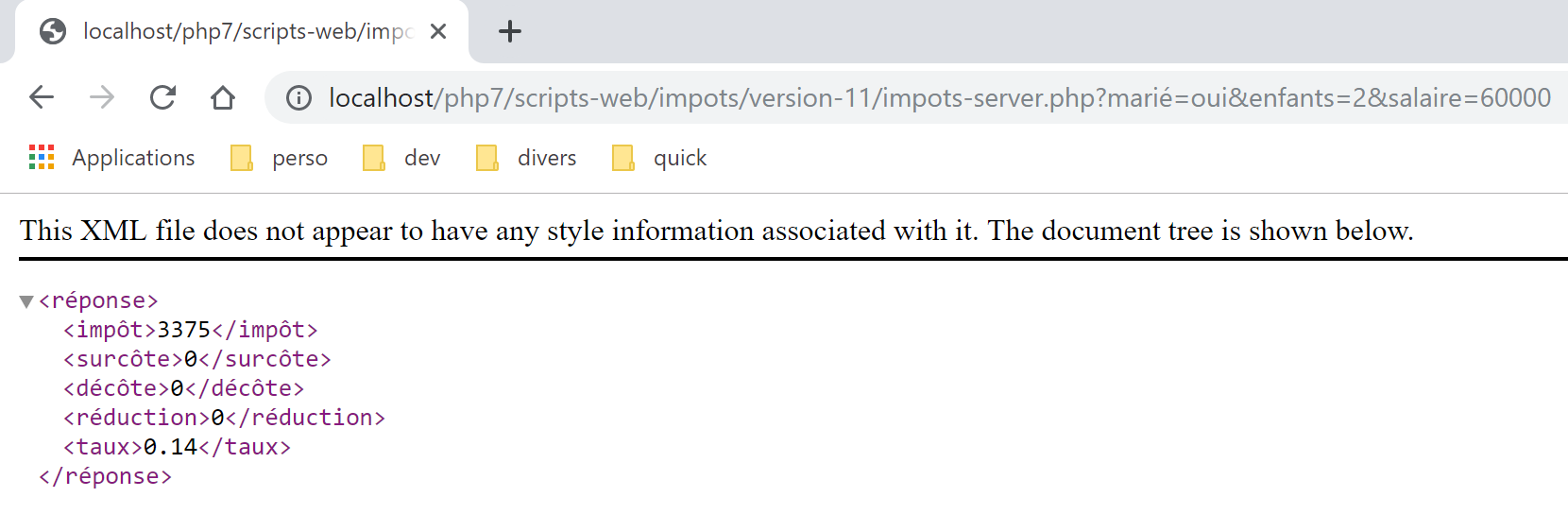
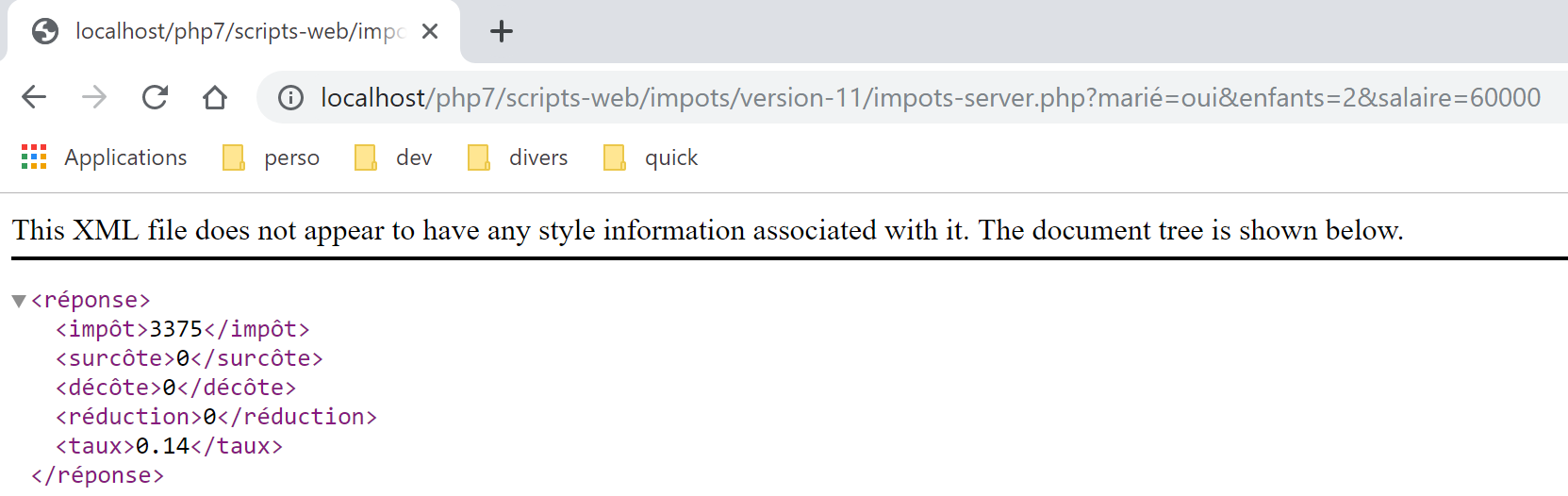
直接在 Chrome 浏览器中输入 URL [http://localhost/php7/scripts-web/impots/version-11/impots-server.php?mari%C3%A9=oui&enfants=2&salaire=60000]。在 Chrome 浏览器中得到以下结果 [1]:
22.2. 客户端
现在我们关注应用程序的客户端部分。
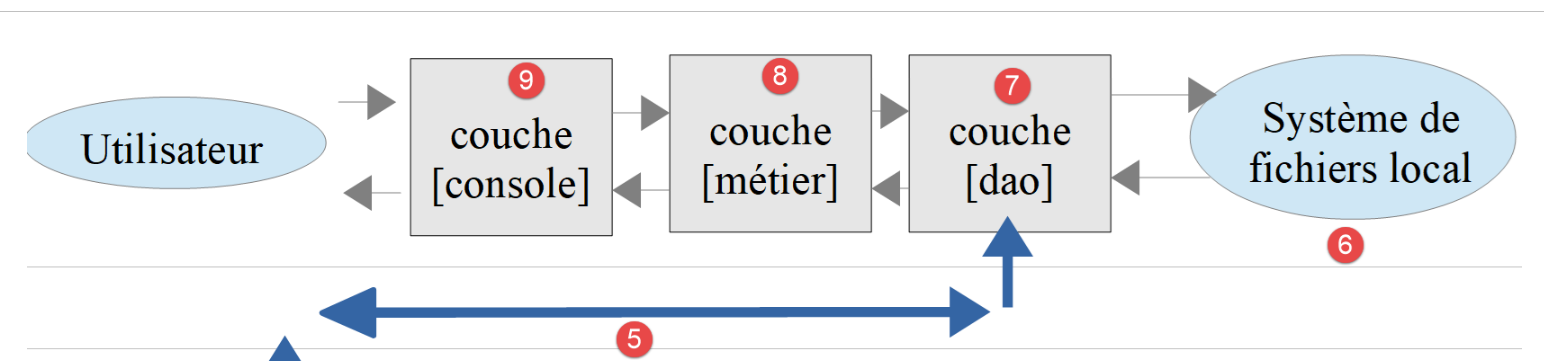
该架构将通过以下脚本实现:
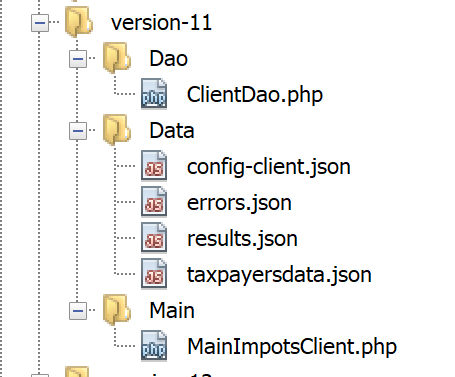
在新版本中,仅以下内容发生变更:
- 配置文件 [config-client.json];
- 客户端的 [dao] 层;
配置文件 [config-client.json] 变为如下内容:
{
    "rootDirectory": "C:/Data/st-2019/dev/php7/poly/scripts-console/impots/version-11",
    "taxPayersDataFileName": "Data/taxpayersdata.json",
    "resultsFileName": "Data/results.json",
    "errorsFileName": "Data/errors.json",
    "dependencies": [
        "/../version-08/Entities/BaseEntity.php",
        "/../version-08/Entities/TaxPayerData.php",
        "/../version-08/Entities/ExceptionImpots.php",
        "/../version-08/Utilities/Utilitaires.php",
        "/../version-08/Dao/InterfaceClientDao.php",
        "/../version-08/Dao/TraitDao.php",
        "/Dao/ClientDao.php",
        "/../version-08/Métier/InterfaceClientMetier.php",
        "/../version-08/Métier/ClientMetier.php"
    ],
    "absoluteDependencies": [
        "C:/myprograms/laragon-lite/www/vendor/autoload.php"
    ],
    "user": {
        "login": "admin",
        "passwd": "admin"
    },
    "urlServer": "https://localhost:443/php7/scripts-web/impots/version-11/impots-server.php"
}
22.2.1. [dao] 层
客户端 [ClientDao.php](上文第 13 行)已修改以适应新的响应格式。使用 [simpleXML] 来处理该响应:
<?php

namespace Application;

// 依赖项
use \Symfony\Component\HttpClient\HttpClient;

class ClientDao implements InterfaceClientDao {
  // 使用一个 Trait
  use TraitDao;
  // 属性
  private $urlServer;
  private $user;
  private $sessionCookie;

  // 构造函数
  public function __construct(string $urlServer, array $user) {
    $this->urlServer = $urlServer;
    $this->user = $user;
  }

  // 税额计算
  public function calculerImpot(string $marié, int $enfants, int $salaire): array {
    …
    // 获取响应XML
    $réponse = $response->getContent(false);
    $xml = new \SimpleXMLElement($réponse);
    // 日志
    // 打印 "$réponse\n";
    // 获取响应状态
    $statusCode = $response->getStatusCode();
    // 错误?
    if ($statusCode !== 200) {
      // 出现错误 - 抛出异常
      $message = \json_encode(["statut HTTP" => $statusCode, "réponse" => $xml], JSON_UNESCAPED_UNICODE);
      throw new ExceptionImpots($message);
    }
    if (!$this->sessionCookie) {
      // 获取会话cookie
      $headers = $response->getHeaders();
      if (isset($headers["set-cookie"])) {
        // 会话cookie?
        foreach ($headers["set-cookie"] as $cookie) {
          $match = [];
          $match = preg_match("/^PHPSESSID=(.+?);/", $cookie, $champs);
          if ($match) {
            $this->sessionCookie = "PHPSESSID=" . $champs[1];
          }
        }
      }
    }
    // 以数组形式返回响应
    return \json_decode(\json_encode($xml, JSON_UNESCAPED_UNICODE), true);
  }

}
注释
- 第 26-27 行:读取服务器响应。这是一个 XML [<réponse>…</réponse>] 文档。根据接收到的 XML 文档构建一个 [SimpleXMLElement] 对象;
- 第33-37行:若发生错误,异常消息将采用服务器响应中的字符串 jSON,而非收集到的字符串 XML。实际上,字符串 jSON 更为简洁;
- 第 53 行:分两步返回结果数组:
- 类型为 [\SimpleXMLElement] 的对象 [$xml] 被转换为 jSON;
- 将得到的字符串 jSON 转换为关联数组。这就是要返回的结果;
测试
如果在正确的环境(数据库、身份验证、日志)下启动客户端,将获得常规结果(请检查文件 [taxpayersdata.json, results.txt, errors.json])。在服务器端,日志如下:
06/07/19 07:41:32:877 :
---nouvelle requête
06/07/19 07:41:32:882 : Autentification en cours…
06/07/19 07:41:32:883 : Authentification réussie [admin, admin]
06/07/19 07:41:32:883 : paramètres ['marié'=>oui, 'enfants'=>2, 'salaire'=>55555] valides
06/07/19 07:41:32:908 : données fiscales prises en base de données
06/07/19 07:41:32:959 : {"réponse":{"impôt":2814,"surcôte":0,"décôte":0,"réduction":0,"taux":0.14}}
06/07/19 07:41:33:070 :
---nouvelle requête
06/07/19 07:41:33:077 : Authentification prise en session…
06/07/19 07:41:33:077 : paramètres ['marié'=>oui, 'enfants'=>2, 'salaire'=>50000] valides
06/07/19 07:41:33:099 : données fiscales prises dans redis
06/07/19 07:41:33:100 : {"réponse":{"impôt":1384,"surcôte":0,"décôte":384,"réduction":347,"taux":0.14}}
06/07/19 07:41:33:189 :
---nouvelle requête
06/07/19 07:41:33:202 : Authentification prise en session…
06/07/19 07:41:33:202 : paramètres ['marié'=>oui, 'enfants'=>3, 'salaire'=>50000] valides
06/07/19 07:41:33:233 : données fiscales prises dans redis
06/07/19 07:41:33:233 : {"réponse":{"impôt":0,"surcôte":0,"décôte":720,"réduction":0,"taux":0.14}}
06/07/19 07:41:33:318 :
…
22.2.2. 测试 [Codeception]
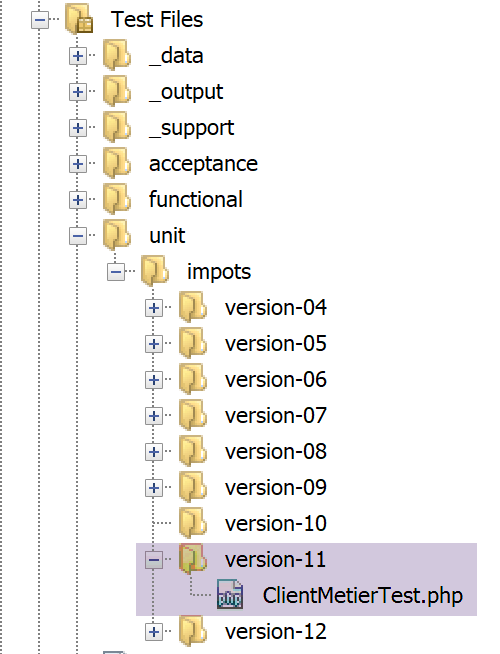
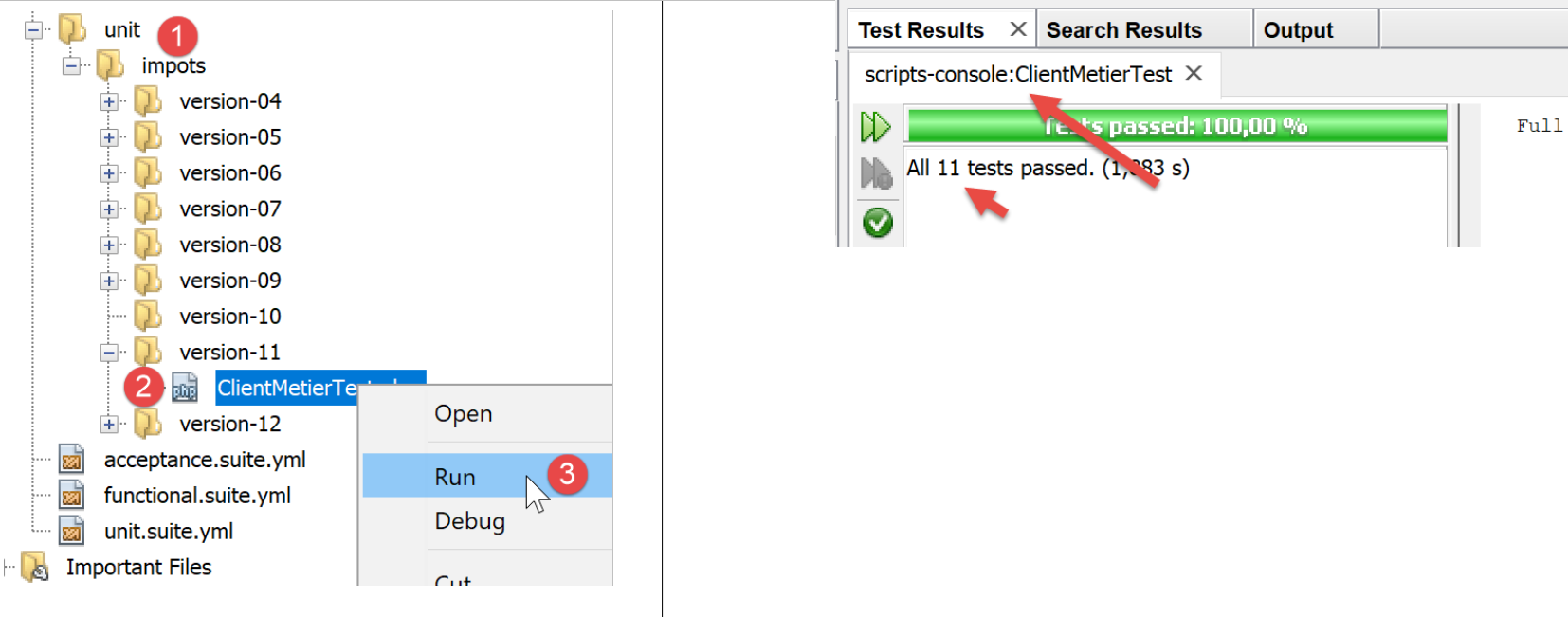
测试 [ClientMetierTest] 如下:
<?php

// 严格遵守函数参数的声明类型
declare (strict_types=1);

// 命名空间
namespace Application;

// 常量定义
define("ROOT", "C:/Data/st-2019/dev/php7/poly/scripts-console/impots/version-11");

// 配置文件路径
define("CONFIG_FILENAME", ROOT . "/Data/config-client.json");

// 读取配置
$config = \json_decode(file_get_contents(CONFIG_FILENAME), true);

…
// 测试类
class ClientMetierTest extends Unit {
  // 业务层
  private $métier;

  public function __construct() {
    parent::__construct();
    // 加载配置
    $config = \json_decode(\file_get_contents(CONFIG_FILENAME), true);
    // 创建 [dao] 层
    $clientDao = new ClientDao($config["urlServer"], $config["user"]);
    // 创建层[métier]
    $this->métier = new ClientMetier($clientDao);
  }

  // 测试
  …
}
测试结果如下: