16. 网络函数
接下来我们将讨论 PHP 的网络函数,这些函数使我们能够进行 TCP/IP(传输控制协议/互联网协议)编程。
16.1. 互联网编程的基础
16.1.1. 概述
考虑两台远程机器 A 和 B 之间的通信:
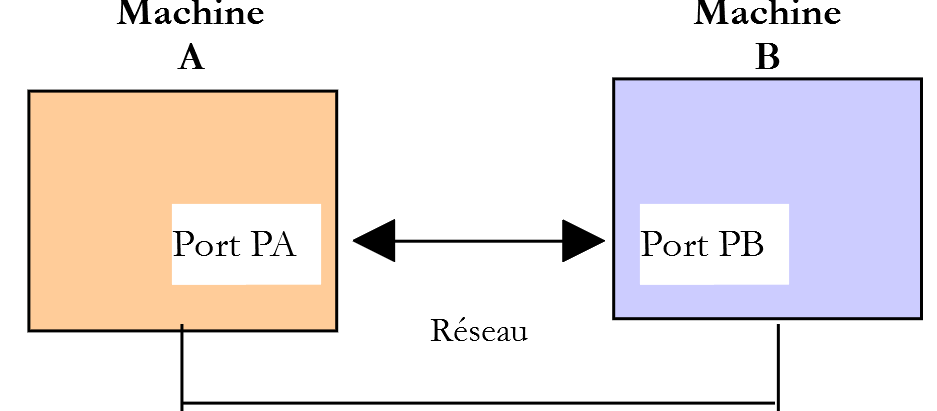
当机器 A 上的应用程序 AppA 想要通过互联网与机器 B 上的应用程序 AppB 进行通信时,它必须了解以下几点:
- 机器 B 的 IP(互联网协议)地址或名称;
- 应用程序 AppB 使用的端口号。事实上,机器 B 可能托管着许多在互联网上运行的应用程序。当它从网络接收信息时,必须知道该信息是发给哪个应用程序的。机器 B 上的应用程序通过接口(也称为通信端口)访问网络。这些信息包含在机器 B 接收的数据包中,以便将其传递给正确的应用程序;
- 机器B所支持的通信协议。在本研究中,我们将仅使用TCP-IP协议;
- 应用程序 AppB 所支持的通信协议。事实上,机器 A 和 B 将相互“通信”。它们交换的数据将被封装在 TCP/IP 协议中。然而,当链路末端的 AppB 应用程序接收到 AppA 应用程序发送的信息时,它必须能够对其进行解码。这类似于两个人 A 和 B 通过电话进行沟通的情况:他们的对话由电话传输。 电话A将语音编码为一系列信号,通过电话线传输,到达电话B后被解码( ),随后B才能听到语音。这就是通信协议概念发挥作用的地方:如果A说法语而B不懂该语言,A和B就无法有效沟通;
因此,两个通信应用程序必须就将使用的对话类型达成一致。例如,与FTP服务进行的对话与POP服务不同:这两项服务不接受相同的命令。它们采用不同的对话协议;
16.1.2. TCP 协议的特性
在此,我们将仅探讨使用 TCP 传输协议进行的网络通信,其主要特征如下:
- 希望传输数据的进程首先会与即将接收该信息的进程建立连接。该连接是在发送机器上的一个端口与接收机器上的一个端口之间建立的。由此,这两个端口之间形成了一条虚拟路径,该路径将专用于已建立连接的这两个进程;
- 源进程发送的所有数据包均沿此虚拟路径传输,并按发送顺序到达;
- 传输的信息呈现连续状态。发送进程按自身节奏发送信息。这些信息未必会立即发送:TCP协议会等待直至积累足够的数据量。数据被存储在一个称为TCP分段的结构中。一旦该分段填满,便会被传输至IP层,并在那里封装为IP数据包;
- TCP协议发送的每个分段都有序号。接收端的TCP协议会验证分段是否按顺序接收。对于每个正确接收的分段,它都会向发送方发送确认;
- 当发送方收到确认后,会通知发送进程。发送进程从而可以确认该分段已安全到达;
- 如果发送分段的 TCP 协议在经过一定时间后仍未收到确认,它将重传该分段,从而确保信息传输服务的质量;
- 两个通信进程之间建立的虚拟电路是全双工的:这意味着信息可以双向流动。因此,即使源进程仍在发送信息,目标进程也可以发送确认。这使得源TCP协议能够发送多个分段,而无需等待确认。 如果经过一段时间后,它发现尚未收到针对特定分段编号 n 的确认,它将从该点开始恢复发送分段;
16.1.3. 客户端-服务器关系
互联网上的通信通常是非对称的:机器 A 发起连接以向机器 B 请求服务,并指定希望与机器 B 上的服务 SB1 建立连接。机器 B 会接受或拒绝该请求。 若接受,机器A即可向服务SB1发送请求。这些请求必须符合服务SB1所理解的通信协议。由此,在被称为客户端的机器A与被称为服务器的机器B之间建立起请求-响应对话。双方中的一方将关闭连接。
16.1.4. 客户端架构
请求服务器应用程序服务的网络程序架构如下:
ouvrir la connexion avec le service SB1 de la machine B
si réussite alors
    tant que ce n'est pas fini
        préparer une demande
        l'émettre vers la machine B
        attendre et récupérer la réponse
        la traiter
    fin tant que
finsi
fermer la connexion
16.1.5. 服务器架构
提供服务的程序架构如下:
ouvrir le service sur la machine locale
tant que le service est ouvert
    se mettre à l'écoute des demandes de connexion sur un port dit port d'écoute
    lorsqu'il y a une demande, la faire traiter par une autre tâche sur un autre port dit port de service
fin tant que
服务器程序处理客户端的初始连接请求与后续的服务请求方式不同。 该程序本身并不提供服务。如果由它直接提供服务,那么在服务进行期间,它将无法继续监听连接请求,从而导致无法为客户端提供服务。因此,它采取了不同的处理方式:一旦在监听端口上收到连接请求并予以接受,服务器就会创建一个任务,负责提供客户端所请求的服务。该服务在服务器机器的另一个端口(称为服务端口)上提供。这样就可以同时为多个客户端提供服务。
一个服务任务将具有以下结构:
tant que le service n'a pas été rendu totalement
        attendre une demande sur le port de service
        lorsqu'il y en a une, élaborer la réponse
        transmettre la réponse via le port de service
fin tant que
libérer le port de service
16.2. 了解互联网通信协议
16.2.1. 简介
当客户端连接到服务器时,双方之间会建立通信通道。这种通信的性质即构成所谓的服务器通信协议。最常见的互联网协议包括以下几种:
- HTTP:超文本传输协议——用于与 Web 服务器(HTTP 服务器)通信的协议;
- SMTP:简单邮件传输协议——用于与电子邮件发送服务器(SMTP 服务器)通信的协议;
- POP:邮局协议——用于与电子邮件存储服务器(POP服务器)通信的协议。该协议用于检索已接收的电子邮件,而非发送邮件;
- IMAP:互联网邮件访问协议——用于与电子邮件存储服务器(IMAP服务器)通信的协议。该协议已逐渐取代了较早的POP协议;
- FTP:文件传输协议——用于与文件存储服务器(FTP服务器)通信的协议;
所有这些协议都是基于文本的:客户端和服务器之间交换的是文本行。如果你有一个能够:
- 与 TCP 服务器建立连接;
- 在控制台上显示服务器发送的文本行;
- 将用户在键盘上输入的文本行发送至服务器;
那么,只要我们了解该协议的规则,就能使用基于文本的协议与 TCP 服务器进行通信。
16.2.2. TCP 实用工具
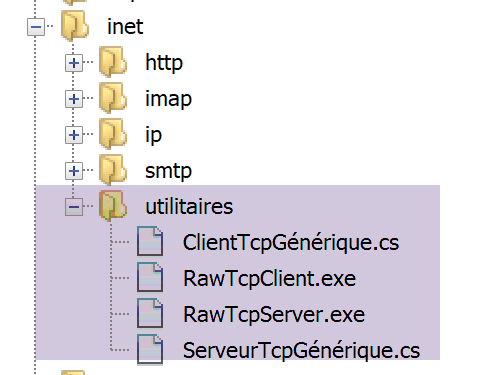
在本文档相关的代码中,包含两个 TCP 通信工具:
- [RawTcpClient] 允许您连接到服务器 S 的端口 P;
- [RawTcpServer] 创建一个在端口 P 上监听客户端的服务器;
TCP 服务器 [RawTcpServer] 通过语法 [RawTcpServer port] 调用,用于在本地机器(您正在使用的计算机)的 [port] 端口上创建一个 TCP 服务:
- 该服务器可同时服务多个客户端;
- 服务器会执行用户通过键盘输入的命令。这些命令如下:
- list:列出当前连接到服务器的客户端。显示格式为 [id=x-name=y]。[id] 字段用于标识客户端;
- send x [text]:向客户端 #x(id=x)发送文本。方括号 [] 不会被发送。它们是命令的必备组成部分,用于在视觉上划分发送给客户端的文本;
- close x:关闭与客户端 #x 的连接;
- quit:关闭所有连接并停止服务;
- 客户端发送给服务器的行将显示在控制台上;
- 所有通信记录都会保存在名为 [machine-portService.txt] 的文本文件中,其中
- [machine] 是运行该代码的机器名称;
- [port] 是响应客户端请求的服务端口;
使用语法 [RawTcpClient server port] 调用 TCP 客户端 [RawTcpClient],以连接到服务器 [server] 的端口 [port]:
- 用户在键盘上输入的行会被发送至服务器;
- 服务器发送的行会显示在控制台上;
- 所有通信内容都会记录在一个名为 [server-port.txt] 的文本文件中;
我们来看一个例子。打开两个 Windows 命令提示符窗口,并在每个窗口中导航至 utilities 文件夹。在其中一个窗口中,在端口 100 上启动 [RawTcpServer] 服务器:

- 在 [1] 中,我们位于 utilities 文件夹内;
- 在 [2] 中,我们在端口 100 上启动 TCP 服务器;
- 在 [3] 中,服务器正在等待 TCP 客户端;
- 在 [4] 中,服务器等待用户通过键盘输入命令;
在另一个命令窗口中,我们启动 TCP 客户端:

- 在 [5] 中,我们位于 utilities 文件夹内;
- 在 [6] 中,我们启动 TCP 客户端:指示其连接到本地机器(即您当前操作的这台机器)的 100 端口;
- 在 [7] 中,客户端已成功连接到服务器。显示了客户端的详细信息:它位于机器 [DESKTOP-528I5CU](本例中的本地机器)上,并使用端口 [50405] 与服务器通信:
- 在 [8] 中,客户端正在等待用户通过键盘输入的命令;
让我们回到服务器窗口。其内容已发生变化:

- 在 [9] 中,检测到一个客户端。服务器为其分配了编号 1。服务器已正确识别出远程客户端(主机和端口);
- 在[10]中,服务器重新开始等待新的客户端;
让我们回到客户端窗口,并向服务器发送一条命令:

- 在[11]中,向服务器发送了命令;
让我们回到服务器窗口。其内容已发生变化:
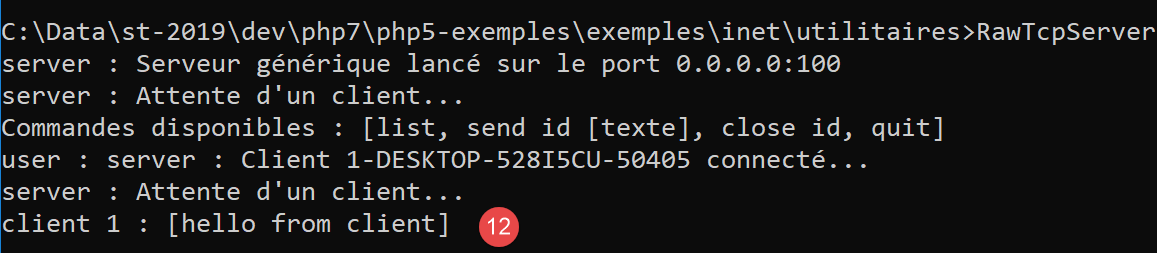
- 在 [12] 中,方括号内显示的是服务器接收到的消息;
现在向客户端发送一个响应:
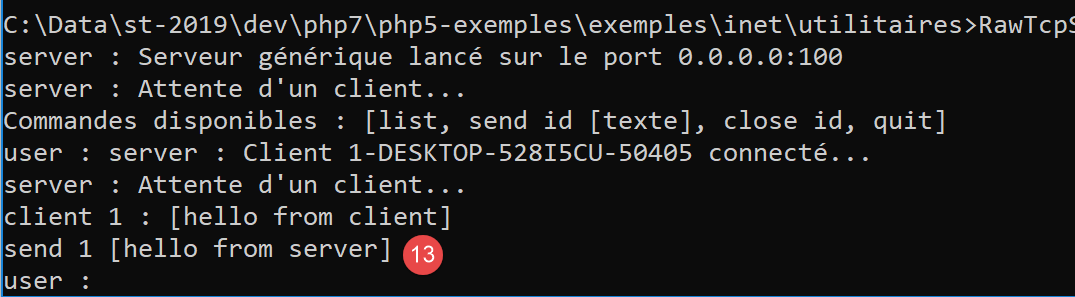
- 在 [13] 中,发送给客户端 1 的响应。仅发送方括号内的文本,不包括方括号本身;
让我们回到客户端窗口:

- 在 [14] 中,客户端接收到的响应。接收到的文本是方括号之间的内容;
让我们回到服务器窗口查看其他命令:
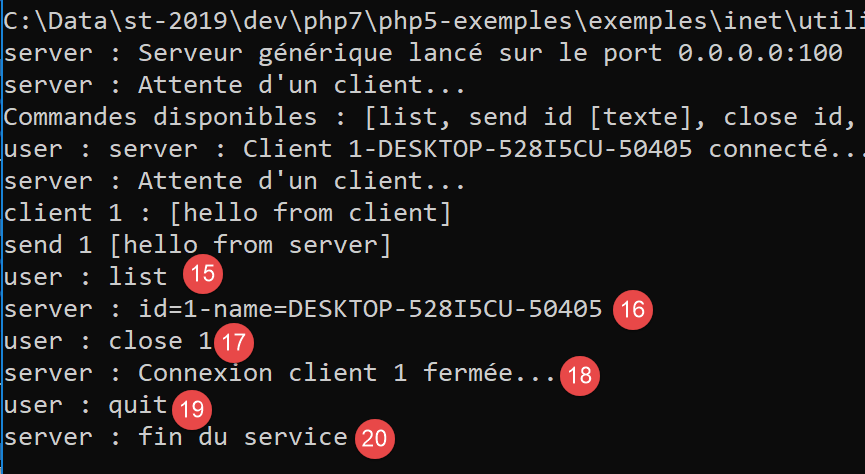
- 在 [15] 中,我们请求客户端列表;
- 在 [16] 中,响应;
- 在 [17] 中,我们关闭了与客户端 #1 的连接;
- 在 [18] 中,显示服务器的确认信息;
- 在 [19] 中,我们关闭服务器;
- 在 [20] 中,服务器的确认;
让我们回到客户端窗口:
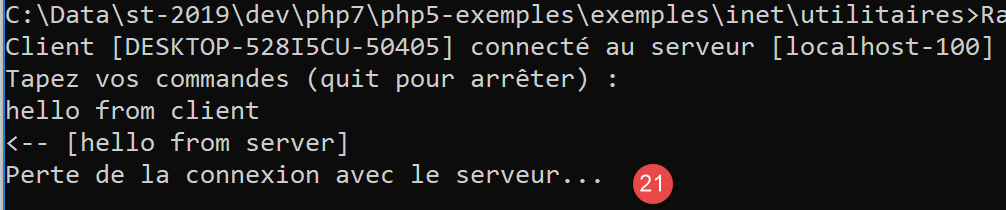
- 在 [21] 中,客户端检测到服务已结束;
已生成两个日志文件,一个用于服务器,一个用于客户端:
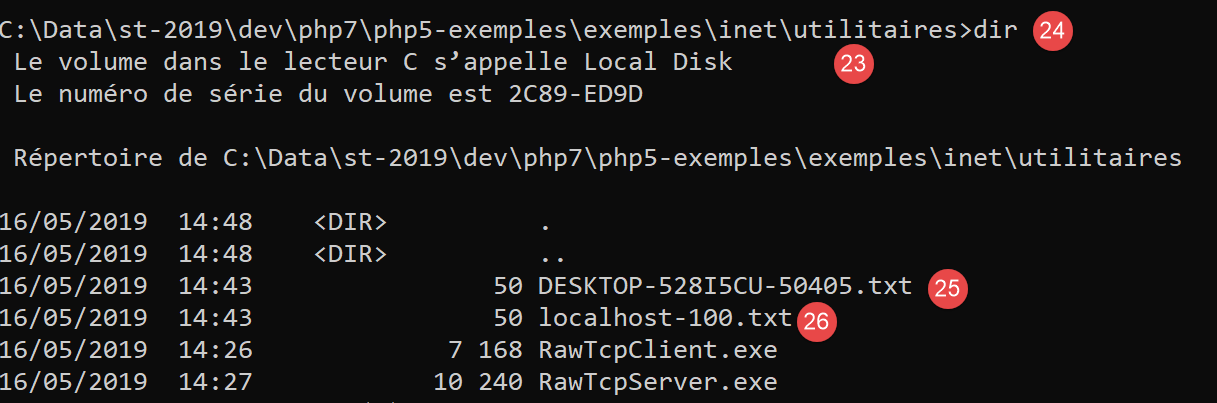
- 在[25]中,服务器日志:文件名为客户端名称[主机-端口];
- 在 [26] 中,客户端日志:文件名为服务器名称 [主机-端口];
服务器日志如下:
客户端日志如下:
16.3. 如何查找互联网上计算机的名称或 IP 地址
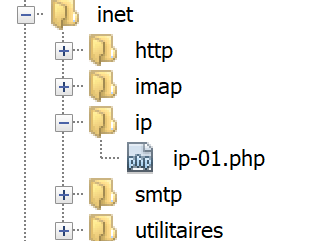
互联网上的计算机通过 IP 地址(IPv4 或 IPv6)进行标识,通常也会使用名称。但最终仅使用 IP 地址。因此,有时需要根据计算机名称来获取其 IP 地址。
[ip-01.php] 脚本如下:
<?php

// strict adherence to declared function parameter types
declare (strict_types=1);
//
// error management
error_reporting(E_ALL & E_STRICT);
ini_set("display_errors", "on");
//
// constants
$HOTES = array("istia.univ-angers.fr", "www.univ-angers.fr", "www.ibm.com", "localhost", "", "xx");
// IP addresses and $HOTES machine names
for ($i = 0; $i < count($HOTES); $i++) {
  getIPandName($HOTES[$i]);
}
// end
print "Terminé\n";
exit;

//------------------------------------------------
function getIPandName(string $nomMachine): void {
  //$nomMachine: name of the machine whose address is required IP: name of the machine whose address is required IP: name of the machine whose address is required
  //
  // nomMachine-->adresse IP
  $ip = gethostbyname($nomMachine);
  print "---------------\n";
  if ($ip !== $nomMachine) {
    print "ip[$nomMachine]=$ip\n";
    // address IP --> nomMachine
    $name = gethostbyaddr($ip);
    if ($name !== $ip) {
      print "name[$ip]=$name\n";
    } else {
      print "Erreur, machine[$ip] non trouvée\n";
    }
  } else {
    print "Erreur, machine[$nomMachine] non trouvée\n";
  }
}
注释
- 第 7-8 行:我们指示 PHP 报告所有错误(E_ALL 和 E_STRICT)并显示它们。仅建议在开发模式下使用此模式,以便利用 PHP 警告来改进代码。在生产环境中(第 8 行),我们会将其设置为“off”。自 PHP 5.4 起,E_STRICT 级别已包含在 E_ALL 中;
- 第 11 行:我们要获取其名称和 IP 地址的机器列表;
第21行的getIpandName函数使用了PHP的网络函数。
- 第 25 行:gethostbyname($name) 函数用于获取名为 $name 的机器的 IP 地址“ip3.ip2.ip1.ip0”。如果名为 $name 的机器不存在,该函数将返回 $name 作为结果;
- 第 30 行:gethostbyaddr($ip) 函数用于获取与 IP 地址 $ip 关联的机器名称,格式为 "ip3.ip2.ip1.ip0"。如果 $ip 对应的机器不存在,该函数将返回 $ip 作为结果;
结果:
---------------
ip[istia.univ-angers.fr]=193.49.144.41
name[193.49.144.41]=ametys-fo-2.univ-angers.fr
---------------
ip[www.univ-angers.fr]=193.49.144.41
name[193.49.144.41]=ametys-fo-2.univ-angers.fr
---------------
ip[www.ibm.com]=2.18.220.211
name[2.18.220.211]=a2-18-220-211.deploy.static.akamaitechnologies.com
---------------
ip[localhost]=127.0.0.1
name[127.0.0.1]=DESKTOP-528I5CU
---------------
ip[]=192.168.1.38
name[192.168.1.38]=DESKTOP-528I5CU.home
---------------
Erreur, machine[xx] non trouvée
Terminé
16.4. HTTP(超文本传输协议)
16.4.1. 示例 1
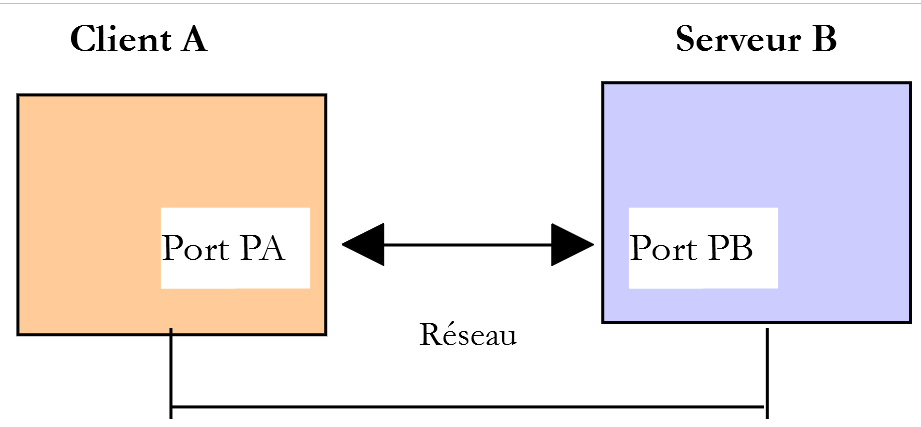
当浏览器显示一个 URL 时,它充当 Web 服务器的客户端,或者换句话说,是 HTTP 服务器的客户端。它主动发起请求,首先向服务器发送一系列命令。以下是第一个示例:
- 服务器将由 [RawTcpServer] 实用程序担任;
- 客户端将是一个浏览器;
首先,我们在 100 端口上启动服务器:

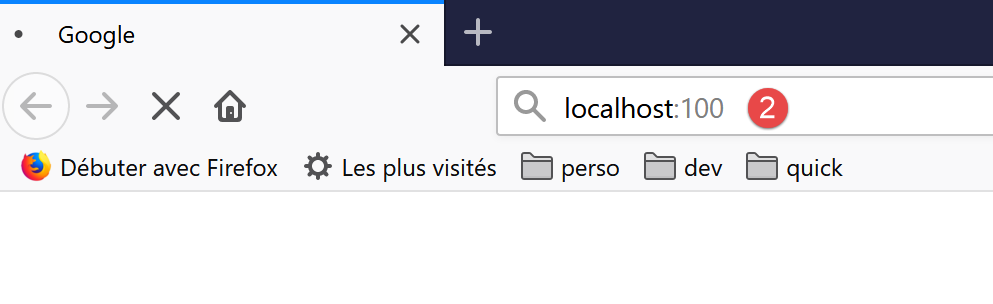
然后,使用浏览器请求 URL [localhost:100],这意味着我们指定要查询的 HTTP 服务器正在本地机器的 100 端口上运行:
让我们回到服务器窗口:
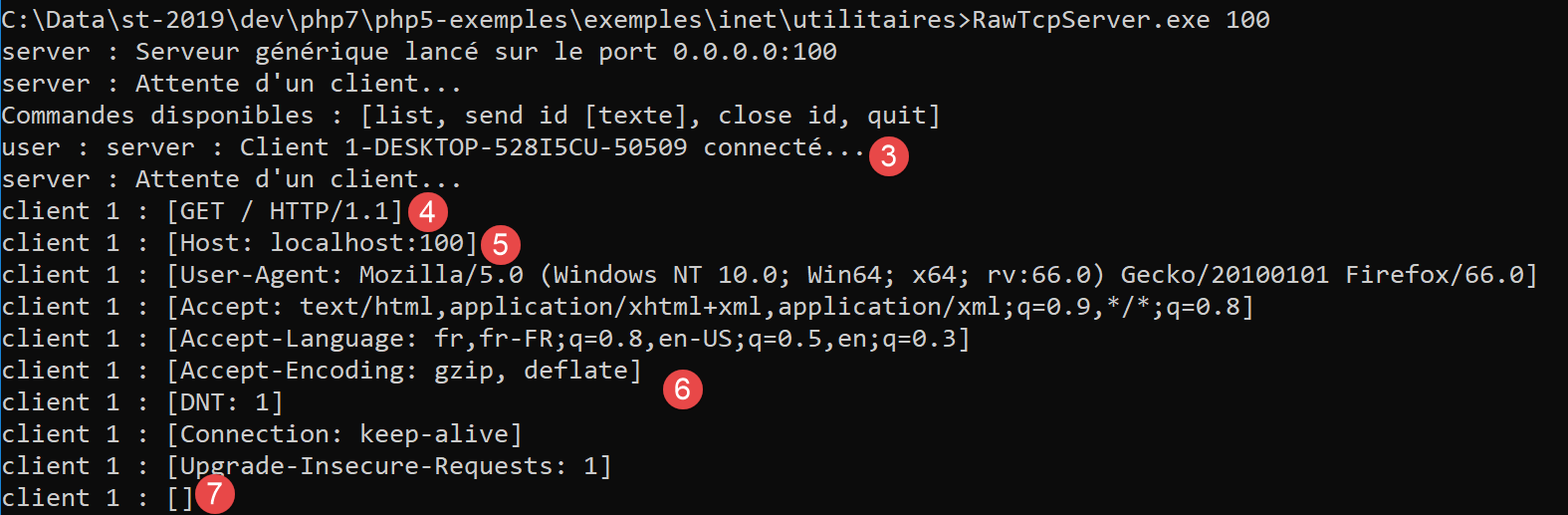
- 在 [3] 中,已连接的客户端;
- 在 [4-7] 中,显示了该客户端发送的一系列文本行:
- 在 [4]:该行格式为 [GET URL HTTP/1.1]。它请求 URL /,并指示服务器使用 HTTP 1.1 协议;
- 在 [5] 中:该行格式为 [Host: 服务器:端口]。[Host] 命令不区分大小写。请注意,客户端正在查询运行在 100 端口的本地服务器;
- [User-Agent] 命令用于标识客户端;
- [Accept] 命令指定客户端接受的文档类型;
- [Accept-Language] 指令用于指定当请求的文档存在多种语言版本时,希望获取的语言;
- [Connection] 命令指定所需的连接模式:[keep-alive] 表示连接必须保持直至通信完成;
- 在 [7] 中:客户端以空行结束其命令;
我们通过关闭服务器来终止连接:
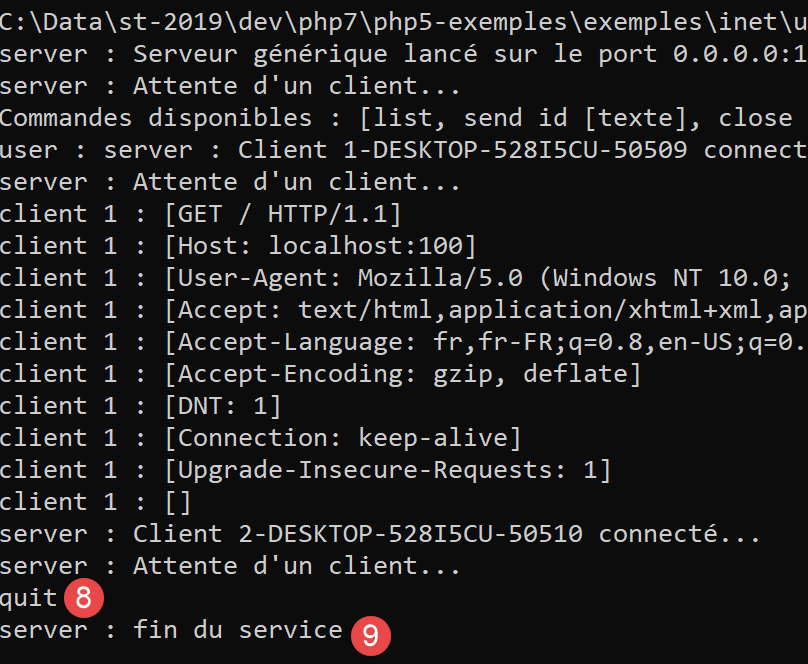
16.4.2. 示例 2
既然我们已经了解了浏览器发送的用于请求 URL 的命令,接下来我们将使用我们的 TCP 客户端 [RawTcpClient] 来请求该 URL。Laragon 的 Apache 服务器将作为我们的 Web 服务器。
让我们启动 Laragon,然后启动 Apache Web 服务器:
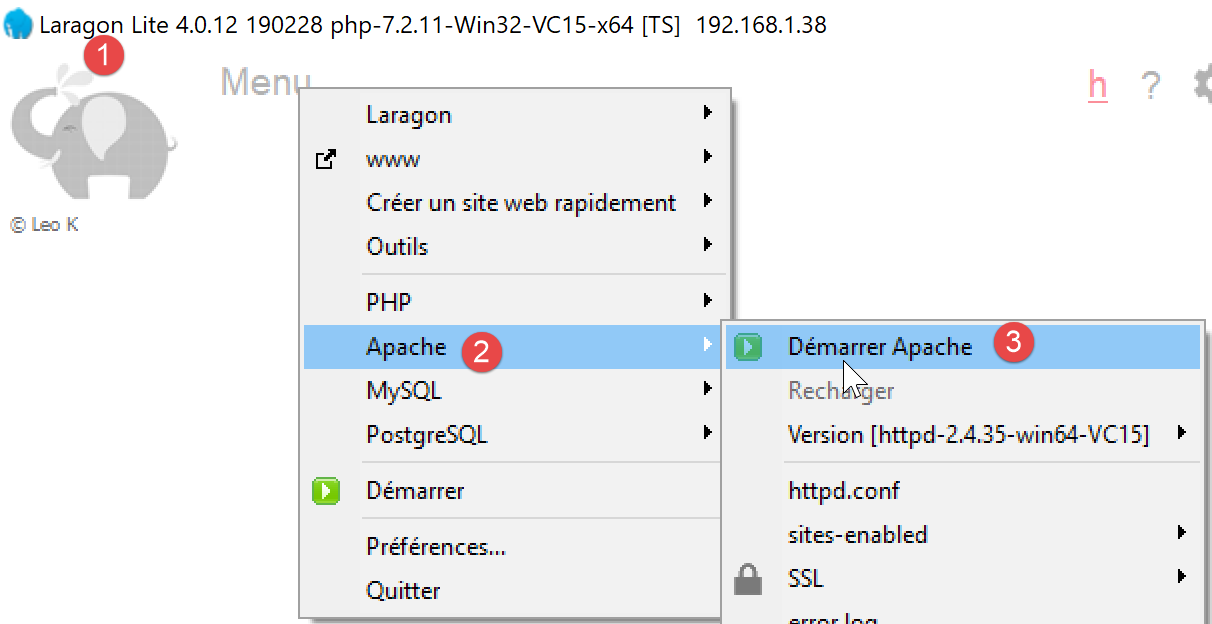
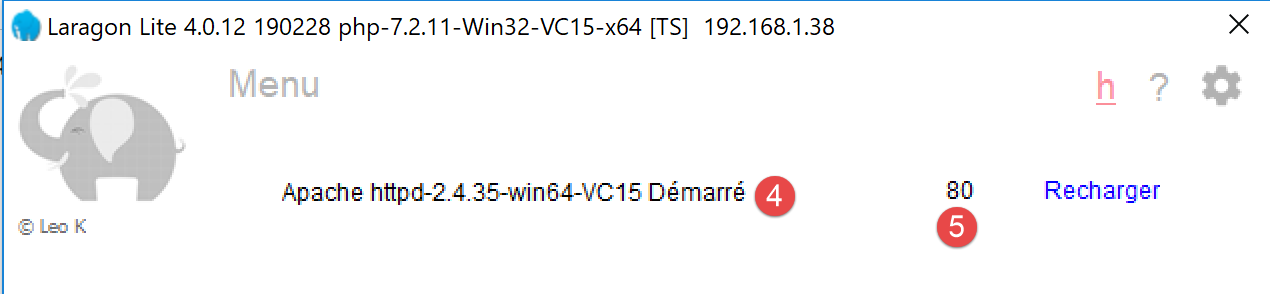
现在,使用浏览器访问 URL [http://localhost:80]。这里我们只指定了服务器 [localhost:80],而没有指定文档 URL。在这种情况下,请求的是 URL /,即 Web 服务器的根目录:
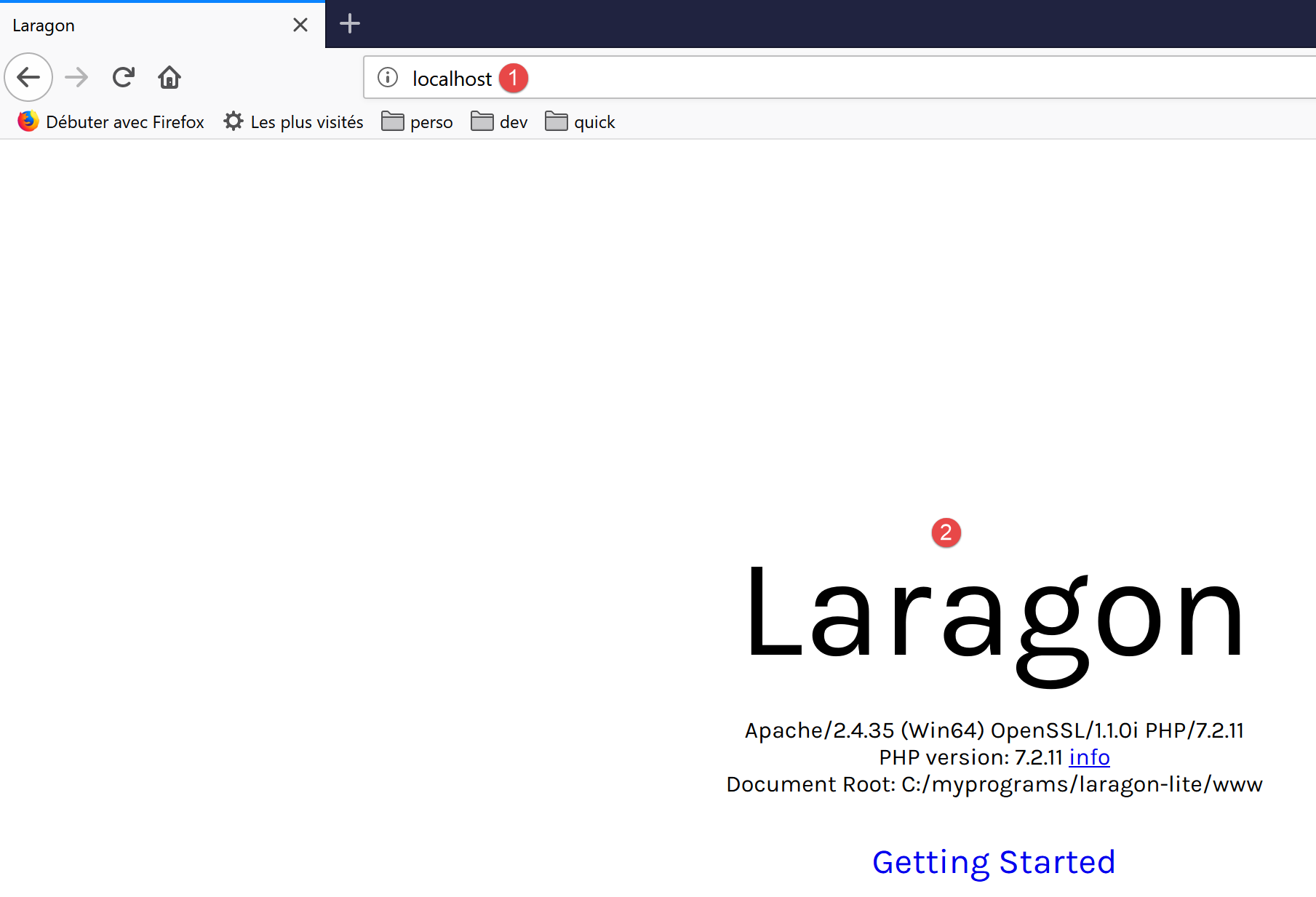
- 在 [1] 中,即请求的 URL。我们最初输入的是 [http://localhost:80],而浏览器(此处为 Firefox)将其直接转换为 [localhost],因为未指定协议时默认使用 [http] 协议,未指定端口时默认使用端口 [80];
- 在 [2] 中,所查询 Web 服务器的根页面 /;
现在,让我们查看浏览器接收到的文本:
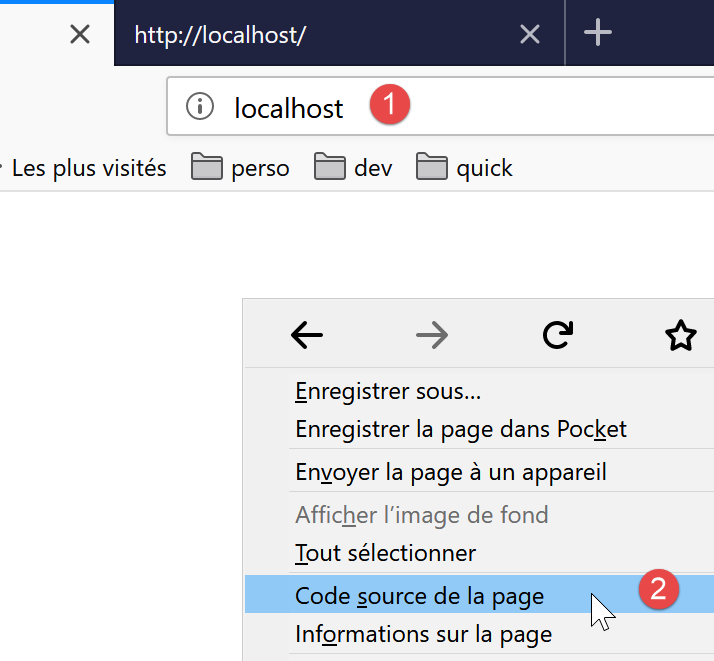
- 右键单击页面并选择选项 [2]。您将看到以下源代码:
<!DOCTYPE HTML>
<HTML>
    <head>
        <title>Laragon</title>

        <link href="https://fonts.googleapis.com/css?family=Karla:400" rel="stylesheet" type="text/css">

        <style>
            HTML, body {
                height: 100%;
            }

            body {
                margin: 0;
                padding: 0;
                width: 100%;
                display: table;
                font-weight: 100;
                font-family: 'Karla';
            }

            .container {
                text-align: center;
                display: table-cell;
                vertical-align: middle;
            }

            .content {
                text-align: center;
                display: inline-block;
            }

            .title {
                font-size: 96px;
            }

            .opt {
                margin-top: 30px;
            }

            .opt a {
              text-decoration: none;
              font-size: 150%;
            }

            a:hover {
              color: red;
            }
        </style>
    </head>
    <body>
        <div class="container">
            <div class="content">
                <div class="title" title="Laragon">Laragon</div>

                <div class="info"><br />
                      Apache/2.4.35 (Win64) OpenSSL/1.1.0i PHP/7.2.11<br />
                      PHP version: 7.2.11   <span><a title="phpinfo()" href="/?q=info">info</a></span><br />
                      Document Root: C:/myprograms/laragon-lite/www<br />

                </div>
                <div class="opt">
                  <div><a title="Getting Started" href="https://laragon.org/docs">Getting Started</a></div>
                </div>
            </div>

        </div>
    </body>
</HTML>
现在,让我们使用我们的 TCP 客户端请求 URL [http://localhost:80]:

- 在 [1] 中,我们连接到本地主机服务器的 80 端口。Laragon Web 服务器就在此处运行;
现在,我们输入上一段中发现的命令:
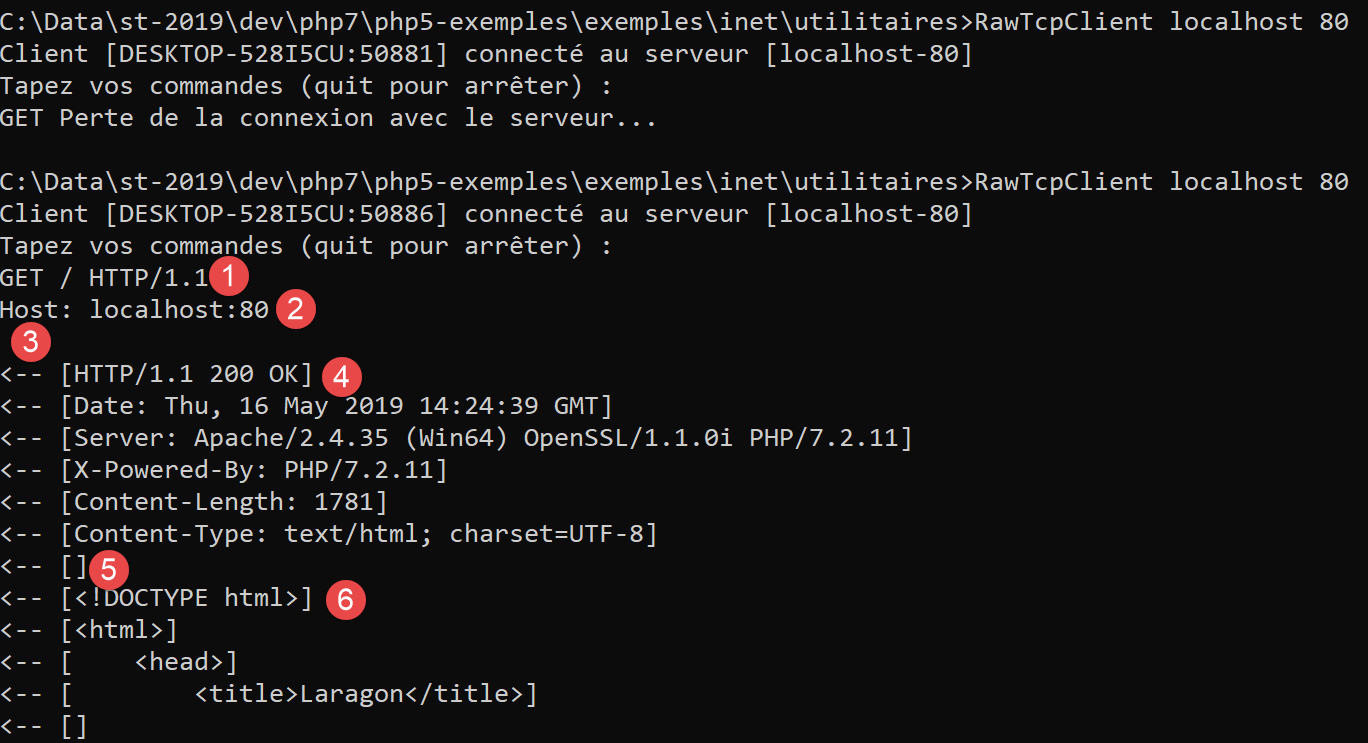
- 在 [1] 中,输入 [GET] 命令。我们请求 Web 服务器的根目录 /;
- 在 [2] 中,输入 [Host] 命令;
- 仅此两条是必不可少的命令。对于其他命令,Web 服务器将使用默认值;
- 在 [3] 中,必须以空行结束客户端命令;
- 第 3 行之后是 Web 服务器的响应;
- 在 [4] 至空行 [5] 之间是服务器响应的 HTTP 头部;
- 第 [5] 行之后是请求的 HTML 文档 [6];
我们输入 [quit] 退出客户端并下载日志文件 [localhost-80.txt]:
- 第 11–79 行:接收到的 HTML 文档。在上一个示例中,Firefox 接收到的也是同一个文档;
现在我们已经掌握了编写 TCP 客户端以请求 URL 的基础知识。
16.4.3. 示例 3
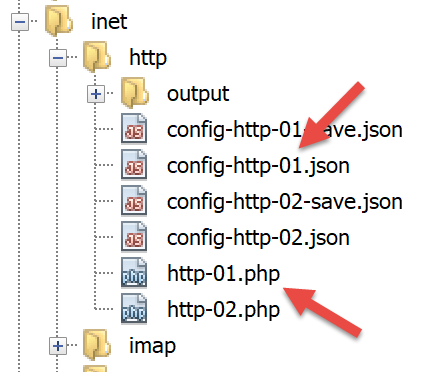
脚本 [http-01.php] 是一个由 JSON 文件 [config-http-01.json] 配置的 HTTP 客户端。该文件的内容如下:
- 第 2 行:要访问的 Web 服务器所在主机的名称;
- 第3行:该Web服务器运行的端口;
- 第4行:目标文档的URL;
- 第 5 行:目标机器,格式为 machine:port;
- 第 6 行:HTTP 客户端的标识:可输入任意内容;
- 第7行:客户端支持的文档类型,本例中为HTML文本;
- 第 8 行:请求文档所需的语言;
- 第 9 行:客户端发送的命令所使用的换行符:这取决于服务器是在 Unix 机器(\n)还是 Windows 机器(\r\n)上运行;
[http-01.php] 脚本如下:
<?php

// strict adherence to declared types of function parameters
declare (strict_types=1);
//
// error management
// error_reporting(E_ALL & E_STRICT);
// ini_set("display_errors", "on");
//
// constants
const CONFIG_FILE_NAME = "config-http-01.json";
//
// we retrieve the configuration
$config = \json_decode(\file_get_contents(CONFIG_FILE_NAME), true);
// otain the HTML text from the URL configuration file
foreach ($config as $site => $protocole) {
  // read site index page $ite
  $résultat = getURL($site, $protocole);
  // result display
  print "$résultat\n";
}//for
// end
exit;

//-----------------------------------------------------------------------
function getURL(string $site, array $protocole, $suivi = TRUE): string {
  // reads the URL $site["GET"] and stores it in the $site.HTML file
  // client/server dialog is based on the $protocole protocol
  //
  // open a connection on the $site port
  $erreurNumber = 0;
  $erreur = "";
  $connexion = fsockopen($site, $protocole["port"], $erreurNumber, $erreur);
  // return if error
  if ($connexion === FALSE) {
    return "Echec de la connexion au site (" . $site . " ," . $protocole["port"] . " : $erreur";
  }
  // $connexion represents a bidirectional communication flow
  // between the client (this program) and the contacted web server
  // this channel is used for the exchange of orders and information
  // the dialog protocol is HTTP
  //
  // creation of the $site.HTML file
  $HTML = fopen("output/$site.HTML", "w");
  if ($HTML === FALSE) {
    // close client/server connection
    fclose($connexion);
    // error return
    return "Erreur lors de la création du fichier $site.HTML";
  }
  // the client will start the HTTP dialog with the server
  if ($suivi) {
    print "Client : début de la communication avec le serveur [$site] ----------------------------\n";
  }
  // depending on the server, client lines must end with \nor \r\n
  $endOfLine = $protocole["endOfLine"];
  // for simplicity's sake, we don't test for errors in client/server communication
  // the customer sends the GET command to request the URL $protocole["GET"]
  // syntax GET URL HTTP/1.1
  $commande = "GET " . $protocole["GET"] . " HTTP/1.1$endOfLine";
  // followed?
  if ($suivi) {
    print "--> $commande";
  }
  // send the command to the server
  fputs($connexion, $commande);
  // issue other headers HTTP
  foreach ($protocole as $verb => $value) {
    if ($verb !== "GET" && $verb != "port"" && $verb !="endOfLine") {
      // we build the
      $commande = "$verb: $value$endOfLine";
      // followed?
      if ($suivi) {
        print "--> $commande";
      }
      // send the command to the server
      fputs($connexion, $commande);
    }
  }
  // protocol HTTP headers must end with an empty line
  fputs($connexion, $endOfLine);
  //
  // the server will now respond on channel $connexion. It will send all
  // then close the channel. The client therefore reads everything that arrives from $connexion
  // until the channel closes
  //
  // we first read the HTTP headers sent by the server
  // they also end with an empty line
  if ($suivi) {
    print "Réponse du serveur [$site] ----------------------------\n";
  }
  $fini = FALSE;
  while (!$fini && $ligne = fgets($connexion, 1000)) {
    // is there an empty line?
    $champs = [];
    preg_match("/^(.*?)\s+$/", $ligne, $champs);
    if ($champs[1] !== "") {
      if ($suivi) {
        // header HTTP is displayed
        print "<-- " . $champs[1] . "\n";
      }
    } else {
      // this was the empty line - HTTP headers are finished
      $fini = TRUE;
    }
  }
  // we read the HTML document that will follow the empty line
  while ($ligne = fgets($connexion, 1000)) {
    // we save the line in the HTML file on the site
    fputs($HTML, $ligne);
  }
  // the server has closed the connection - the client closes it in turn
  fclose($connexion);
  // close file $HTML
  fclose($HTML);
  // return
  return "Fin de la communication avec le site [$site]. Vérifiez le fichier [$site.HTML]";
}
代码注释:
- 第 14 行:使用配置文件创建一个字典:
- 字典的键是待查询的 Web 服务器;
- 其值指定要使用的 HTTP 协议;
- 第 16–21 行:我们遍历配置文件中的 Web 服务器列表;
- 第 26 行:getURL($site, $protocol, $log) 函数从 $site 网站获取文档,并将其保存到文本文件 $site.HTML 中。默认情况下,客户端/服务器交互会记录到控制台($log=TRUE);
- 第 33 行:fsockopen($site,$port,$errNumber,$error) 函数与运行在 $site 机器 $port 端口上的 TCP/IP 服务建立连接。如果连接失败,[$errNumber] 表示错误代码,[$error] 表示相关的错误信息。 一旦客户端/服务器连接建立,许多 TCP/IP 服务会交换文本行。此处采用的 HTTP(超文本传输协议)即属此类。此时,从服务器到客户端的数据流可视为使用 [fgets] 读取的文本文件。从客户端到服务器的数据流亦是如此,可使用 [fputs] 进行写入;
- 第 44–50 行:创建文件 [$site.HTML],用于存储接收到的 HTML 文档;
- 第 60 行:客户端的首个命令必须是 [GET URL HTTP/1.1];
- 第 66 行:fputs 函数允许客户端向服务器发送数据。此处发送的文本行含义如下:“我想要(GET)我所连接的网站的 [URL] 页面。我使用的是 HTTP 1.1 版本”;
- 第 68–79 行:发送其他 HTTP 协议行 [Host, User-Agent, Accept, Accept-Language]。它们的顺序无关紧要;
- 第 81 行:向服务器发送一个空行,表示客户端已发送完 HTTP 头部,现在正在等待所请求的文档;
- 第 92–106 行:服务器将首先发送一系列 HTTP 头部,提供有关所请求文档的各种详细信息。这些头部以空行结尾;
- 第 93 行:使用 PHP 函数 [fgets] 读取服务器发送的一行数据;
- 第 96 行:我们提取该行的正文内容,并去除行尾的空格(包括空白字符和换行符);
- 第 97 行:检查是否已获取到标记服务器发送的 HTTP 头部结束的空行;
- 第 98–101 行:若处于 [trace] 模式,则将接收到的 HTTP 头部显示在控制台中;
- 第 108–111 行:使用 while 循环逐行读取服务器响应的文本行,并将其保存到文本文件 [output/$site.HTML] 中。当 Web 服务器发送完请求的整个页面后,它会关闭与客户端的连接。在客户端,这将被检测为文件结束;
结果:
控制台显示以下日志:
Client : début de la communication avec le serveur [localhost] ----------------------------
--> GET / HTTP/1.1
--> Host: localhost:80
--> User-Agent: client PHP
--> Accept: text/HTML
--> Accept-Language: fr
Réponse du serveur [localhost] ----------------------------
<-- HTTP/1.1 200 OK
<-- Date: Thu, 16 May 2019 15:43:18 GMT
<-- Server: Apache/2.4.35 (Win64) OpenSSL/1.1.0i PHP/7.2.11
<-- X-Powered-By: PHP/7.2.11
<-- Content-Length: 1781
<-- Content-Type: text/HTML; charset=UTF-8
Fin de la communication avec le site [localhost]. Vérifiez le fichier [localhost.HTML]
在本示例中,收到的 [output/localhost.HTML] 文件如下:
<!DOCTYPE HTML>
<HTML>
    <head>
        <title>Laragon</title>

        <link href="https://fonts.googleapis.com/css?family=Karla:400" rel="stylesheet" type="text/css">

        <style>
            HTML, body {
                height: 100%;
            }

            body {
                margin: 0;
                padding: 0;
                width: 100%;
                display: table;
                font-weight: 100;
                font-family: 'Karla';
            }

            .container {
                text-align: center;
                display: table-cell;
                vertical-align: middle;
            }

            .content {
                text-align: center;
                display: inline-block;
            }

            .title {
                font-size: 96px;
            }

            .opt {
                margin-top: 30px;
            }

            .opt a {
              text-decoration: none;
              font-size: 150%;
            }

            a:hover {
              color: red;
            }
        </style>
    </head>
    <body>
        <div class="container">
            <div class="content">
                <div class="title" title="Laragon">Laragon</div>

                <div class="info"><br />
                      Apache/2.4.35 (Win64) OpenSSL/1.1.0i PHP/7.2.11<br />
                      PHP version: 7.2.11   <span><a title="phpinfo()" href="/?q=info">info</a></span><br />
                      Document Root: C:/myprograms/laragon-lite/www<br />

                </div>
                <div class="opt">
                  <div><a title="Getting Started" href="https://laragon.org/docs">Getting Started</a></div>
                </div>
            </div>

        </div>
    </body>
</HTML>
我们确实得到了与Firefox浏览器相同的文档。
16.4.4. 示例 4
在此示例中,我们将演示我们编写的 HTTP 客户端尚不完善。请按以下方式修改配置文件 [config-http-01.json]:
在此,我们将请求 URL [http://tahe.developpez.com:443/]。 服务器 [tahe.developpez.com] 的 443 端口是用于安全 HTTP 协议(即 HTTPS)的端口。在此协议中,客户端与服务器的交互始于确保连接安全的信息交换。因此,客户端必须使用 [HTTPS] 协议而非 [HTTP] 协议,而我们的客户端并未这样做。
使用此配置文件时,控制台输出如下:
Client : début de la communication avec le serveur [tahe.developpez.com] ----------------------------
--> GET / HTTP/1.1
--> Host: sergetahe.com:443
--> User-Agent: script PHP 7
--> Accept: text/HTML
--> Accept-Language: fr
Réponse du serveur [tahe.developpez.com] ----------------------------
<-- HTTP/1.1 400 Bad Request
<-- Date: Fri, 17 May 2019 13:02:26 GMT
<-- Server: Apache/2.4.25 (Debian)
<-- Content-Length: 454
<-- Connection: close
<-- Content-Type: text/HTML; charset=iso-8859-1
Fin de la communication avec le site [tahe.developpez.com]. Vérifiez le fichier [output/tahe.developpez.com.HTML]
- 第 8 行:服务器 [tahe.developpez.com] 响应称客户端的请求有误;
文件 [output/tahe.developpez.com.HTML] 的内容如下:
<!DOCTYPE HTML PUBLIC "-//IETF//DTD HTML 2.0//EN">
<HTML><head>
<title>400 Bad Request</title>
</head><body>
<h1>Bad Request</h1>
<p>Your browser sent a request that this server could not understand.<br />
Reason: You're speaking plain HTTP to an SSL-enabled server port.<br />
 Instead use the HTTPS scheme to access this URL, please.<br />
</p>
<hr>
<address>Apache/2.4.25 (Debian) Server at 2eurocents.developpez.com Port 443</address>
</body></HTML>
服务器明确指出我们未使用正确的协议。
现在让我们使用以下配置文件:
控制台输出如下:
Client : début de la communication avec le serveur [sergetahe.com] ----------------------------
--> GET /cours-tutoriels-de-programmation/ HTTP/1.1
--> Host: sergetahe.com:80
--> User-Agent: script PHP 7
--> Accept: text/HTML
--> Accept-Language: fr
Réponse du serveur [sergetahe.com] ----------------------------
<-- HTTP/1.1 200 OK
<-- Date: Fri, 17 May 2019 13:36:06 GMT
<-- Content-Type: text/HTML; charset=UTF-8
<-- Transfer-Encoding: chunked
<-- Server: Apache
<-- X-Powered-By: PHP/7.0
<-- Vary: Accept-Encoding
<-- Set-Cookie: SERVERID68971=2621207|XN64y|XN64y; path=/
<-- Cache-control: private
<-- X-IPLB-Instance: 17106
Fin de la communication avec le site [sergetahe.com]. Vérifiez le fichier [output/sergetahe.com.HTML]
- 第 11 行表明服务器正在分块发送文档;
这导致在发送给客户端的数据流中出现了数字:每个数字都告诉客户端,服务器接下来发送的数据块包含多少个字符。以下是文件 [output/sergetahe.com.HTML] 中的具体内容:
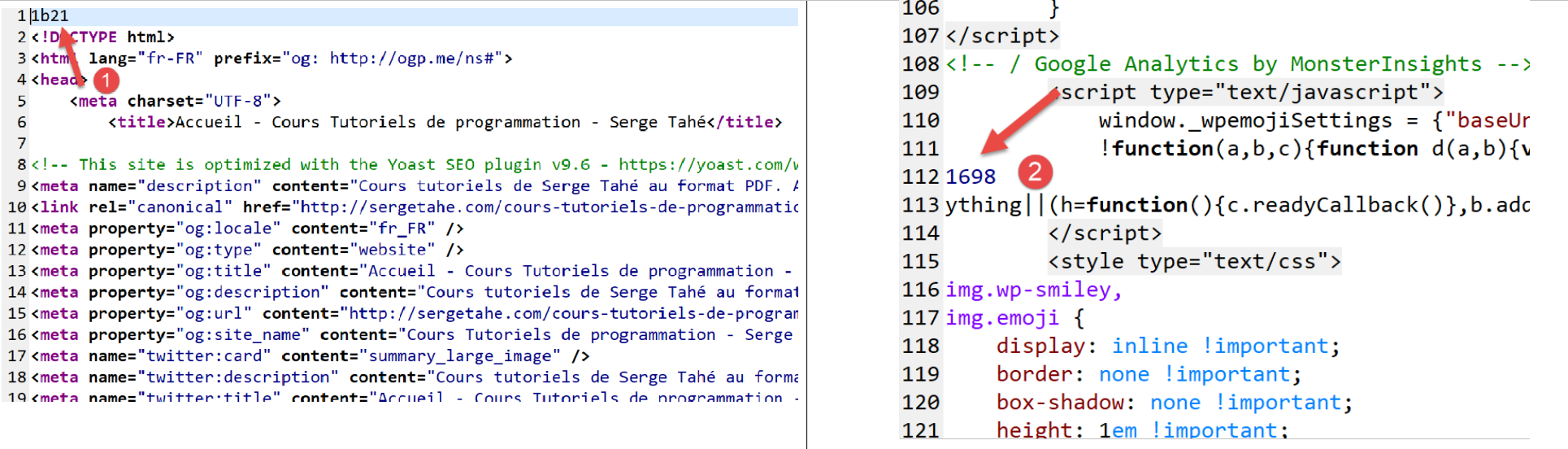
- [1] 和 [2] 分别表示文档中第 1 和第 2 个数据块的十六进制大小;
一个规范的 HTTP 客户端不应将这些数字保留在最终的 HTML 文档中。
以下是另一个示例:
它与前面的示例相似,但第 4 行请求的 URL 末尾没有 /。这两个 URL 并不相同。执行该 HTTP 客户端后,控制台会输出以下内容:
Client : début de la communication avec le serveur [sergetahe.com] ----------------------------
--> GET /cours-tutoriels-de-programmation HTTP/1.1
--> Host: sergetahe.com:80
--> User-Agent: script PHP 7
--> Accept: text/HTML
--> Accept-Language: fr
Réponse du serveur [sergetahe.com] ----------------------------
<-- HTTP/1.1 301 Moved Permanently
<-- Date: Fri, 17 May 2019 13:47:00 GMT
<-- Content-Type: text/HTML; charset=iso-8859-1
<-- Content-Length: 262
<-- Server: Apache
<-- Location: http://sergetahe.com:80/cours-tutoriels-de-programmation/
<-- Set-Cookie: SERVERID68971=2621207|XN67V|XN67V; path=/
<-- Cache-control: private
<-- X-IPLB-Instance: 17095
Fin de la communication avec le site [sergetahe.com]. Vérifiez le fichier [output/sergetahe.com.HTML]
- 第 8 行表明所请求的文档已更改其 URL。新 URL 位于第 13 行。请注意,这次新 URL 以 / 字符结尾;
文件 [output/serge.tahe.com.HTML] 内容如下:
<!DOCTYPE HTML PUBLIC "-//IETF//DTD HTML 2.0//EN">
<HTML><head>
<title>301 Moved Permanently</title>
</head><body>
<h1>Moved Permanently</h1>
<p>The document has moved <a href="http://sergetahe.com/cours-tutoriels-de-programmation/">here</a>.</p>
</body></HTML>
HTTP 客户端应能够跟随重定向。在这种情况下,它应自动请求新 URL [http://sergetahe.com/cours-tutoriels-de-programmation/]。
16.4.5. 示例 5
前面的示例表明,我们的 HTTP 客户端功能尚不完善。现在我们将介绍一个名为 [curl] 的工具,它允许您在处理上述挑战(如 HTTPS 协议、分块传输的文档、重定向等)的同时检索 Web 文档。该 [curl] 工具已随 Laragon 一起安装:
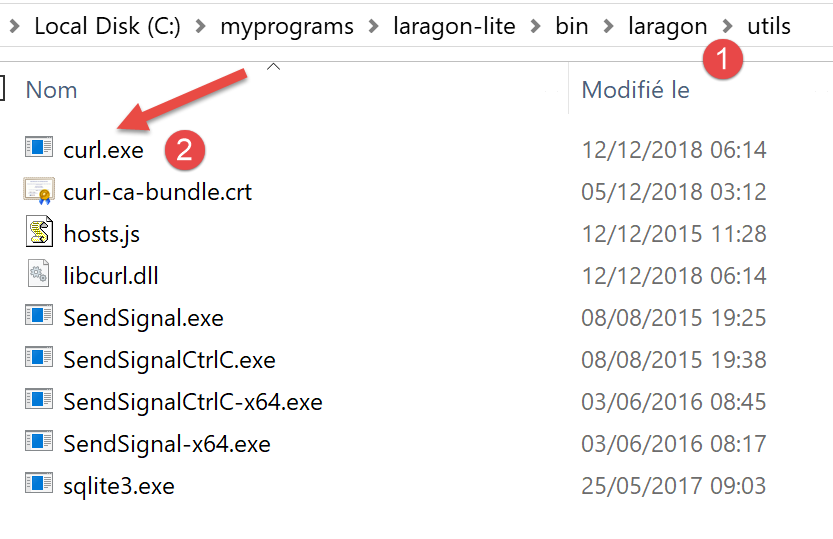
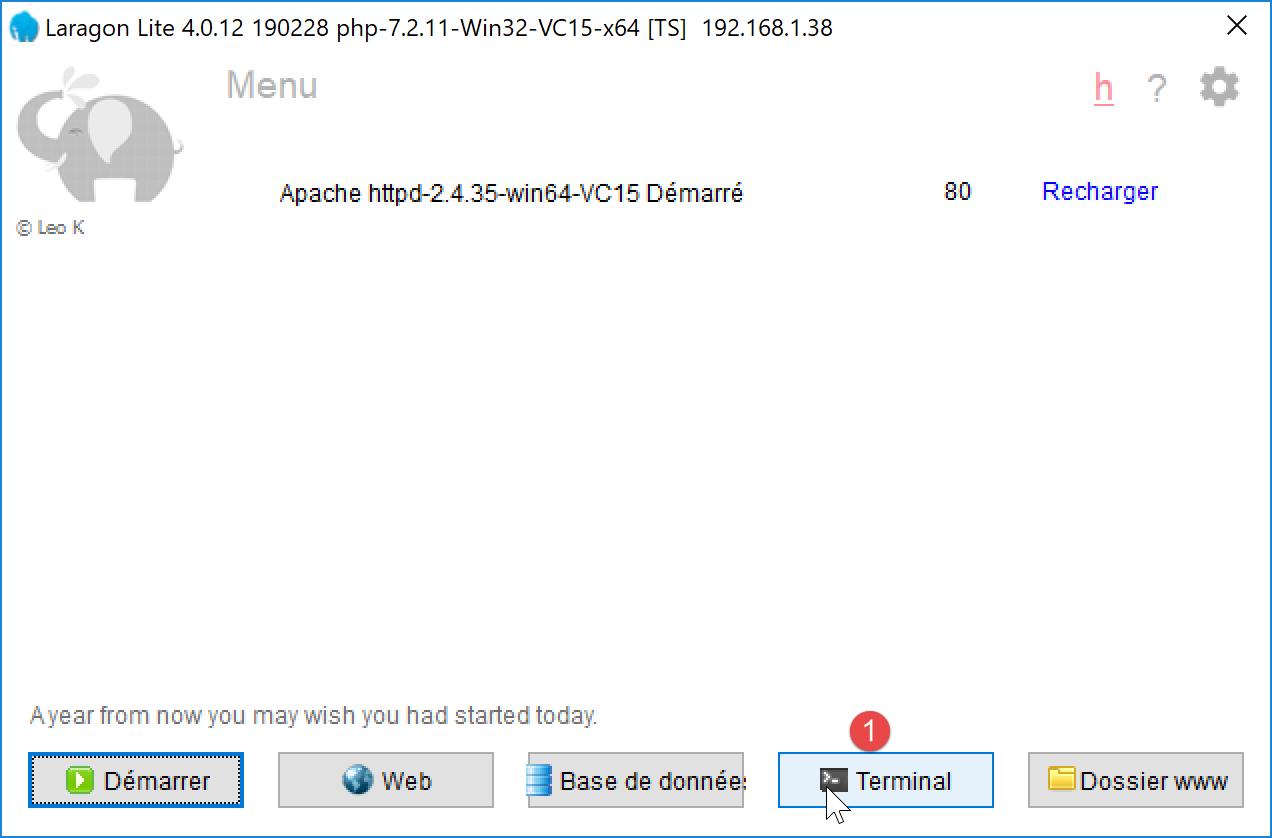
让我们打开 Laragon 终端 [1]:
在终端中,输入以下命令:
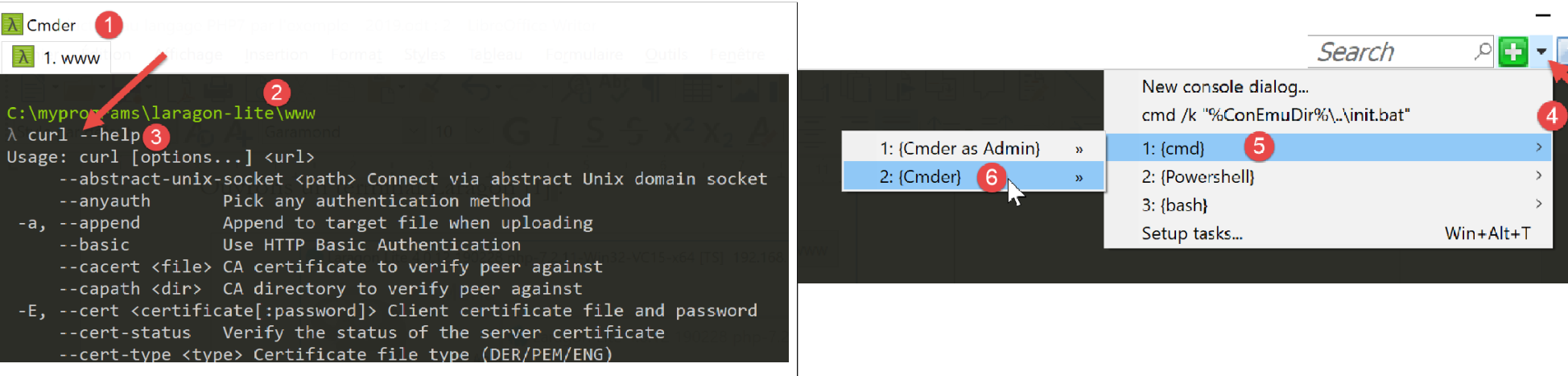
- 在 [1] 中,控制台类型;
- [2] 表示当前目录。该目录具有特殊性:它是 Laragon 的 Apache 服务器获取所请求文档的位置。因此,我们将避免让该目录变得杂乱;
- 在 [3] 中,输入的命令;
[curl --help] 命令可能会报错。最可能的原因是您的终端类型不正确。此时,请使用命令 [4-6] 打开另一个终端;
[curl --help] 命令会显示 [curl] 的所有配置选项。 这些选项多达数十种,但我们只会用到其中极少数。要请求一个 URL,只需输入命令 [curl URL]。该命令将在控制台上显示所请求的文档。若还想查看客户端与服务器之间的 HTTP 交互,请输入 [curl --verbose URL]。最后,若要将请求的 HTML 文档保存到文件中,请输入 [curl --verbose --output file URL]。
为避免杂乱 Laragon 的 [www] 文件夹,让我们移至文件系统中的另一个位置:
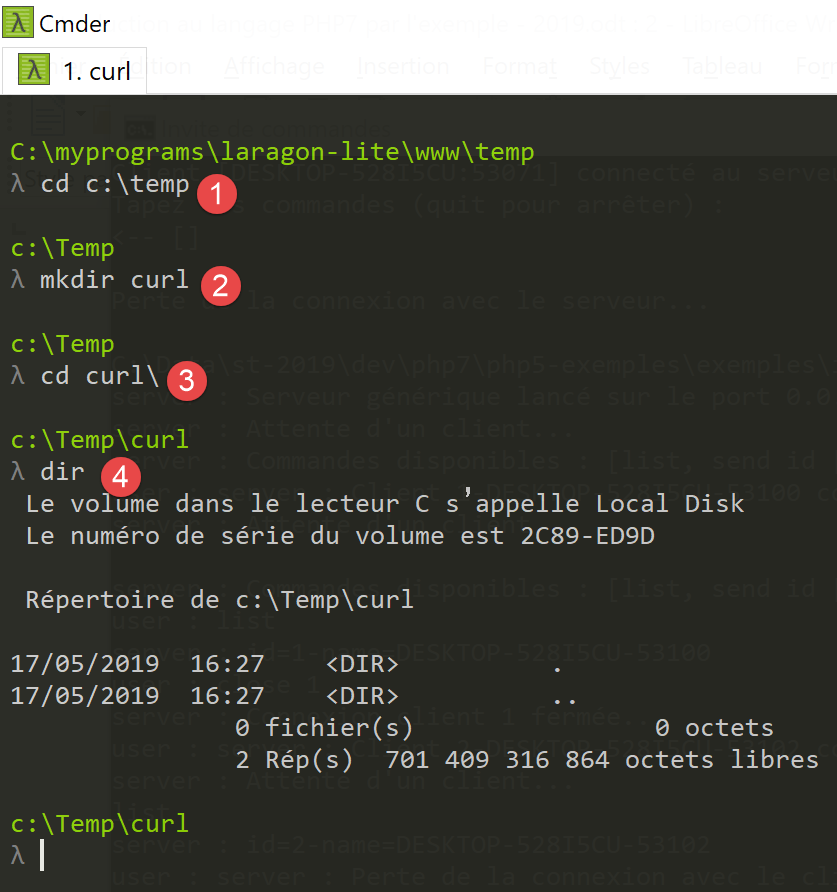
- 在 [1] 中,导航至 [c:\temp] 文件夹。如果该文件夹不存在,您可以创建它或选择另一个;
- 在 [2] 中,创建一个名为 [curl] 的文件夹;
- 在 [3] 中,进入该文件夹;
- 在 [4] 中,列出其内容。该文件夹为空;
确保 Laragon Apache 服务器正在运行,并使用 [curl] 通过命令 [curl –verbose –output localhost.HTML http://localhost/] 请求 URL [http://localhost/]。您将获得以下结果:
c:\Temp\curl
λ curl --verbose --output localhost.HTML http://localhost/
  % Total    % Received % Xferd  Average Speed   Time    Time     Time  Current
                                 Dload  Upload   Total   Spent    Left  Speed
  0     0    0     0    0     0      0      0 --:--:-- --:--:-- --:--:--     0*   Trying ::1…
* TCP_NODELAY set
* Connected to localhost (::1) port 80 (#0)
> GET / HTTP/1.1
> Host: localhost
> User-Agent: curl/7.63.0
> Accept: */*
>
< HTTP/1.1 200 OK
< Date: Fri, 17 May 2019 14:32:47 GMT
< Server: Apache/2.4.35 (Win64) OpenSSL/1.1.0i PHP/7.2.11
< X-Powered-By: PHP/7.2.11
< Content-Length: 1781
< Content-Type: text/HTML; charset=UTF-8
<
{ [1781 bytes data]
100  1781  100  1781    0     0  14248      0 --:--:-- --:--:-- --:--:-- 14248
* Connection #0 to host localhost left intact
- 第 8-12 行:[curl] 发送到 [localhost] 服务器的数据行。HTTP 协议已被识别;
- 第 13–19 行:服务器发回的响应内容;
- 第 13 行:表示已成功接收所请求的文档;
[localhost.HTML] 文件包含所请求的文档。您可以通过在文本编辑器中打开该文件来验证这一点。
现在让我们请求 URL [https://tahe.developpez.com:443/]。要获取此 URL,HTTP 客户端必须支持 HTTPS。而 [curl] 客户端正是如此。
控制台输出如下:
c:\Temp\curl
λ curl --verbose --output tahe.developpez.com.HTML https://tahe.developpez.com:443/
  % Total    % Received % Xferd  Average Speed   Time    Time     Time  Current
                                 Dload  Upload   Total   Spent    Left  Speed
  0     0    0     0    0     0      0      0 --:--:-- --:--:-- --:--:--     0*   Trying 87.98.130.52…
* TCP_NODELAY set
* Connected to tahe.developpez.com (87.98.130.52) port 443 (#0)
* ALPN, offering h2
* ALPN, offering http/1.1
* successfully set certificate verify locations:
*   CAfile: C:\myprograms\laragon-lite\bin\laragon\utils\curl-ca-bundle.crt
  CApath: none
} [5 bytes data]
* TLSv1.3 (OUT), TLS handshake, Client hello (1):
} [512 bytes data]
* TLSv1.3 (IN), TLS handshake, Server hello (2):
{ [108 bytes data]
* TLSv1.2 (IN), TLS handshake, Certificate (11):
{ [2558 bytes data]
* TLSv1.2 (IN), TLS handshake, Server key exchange (12):
{ [333 bytes data]
* TLSv1.2 (IN), TLS handshake, Server finished (14):
{ [4 bytes data]
* TLSv1.2 (OUT), TLS handshake, Client key exchange (16):
} [70 bytes data]
* TLSv1.2 (OUT), TLS change cipher, Change cipher spec (1):
} [1 bytes data]
* TLSv1.2 (OUT), TLS handshake, Finished (20):
} [16 bytes data]
* TLSv1.2 (IN), TLS handshake, Finished (20):
{ [16 bytes data]
* SSL connection using TLSv1.2 / ECDHE-RSA-AES128-GCM-SHA256
* ALPN, server accepted to use http/1.1
* Server certificate:
*  subject: CN=*.developpez.com
*  start date: Apr  4 08:25:09 2019 GMT
*  expire date: Jul  3 08:25:09 2019 GMT
*  subjectAltName: host "tahe.developpez.com" matched cert's "*.developpez.com"
*  issuer: C=US; O=Let's Encrypt; CN=Let's Encrypt Authority X3
*  SSL certificate verify ok.
} [5 bytes data]
> GET / HTTP/1.1
> Host: tahe.developpez.com
> User-Agent: curl/7.63.0
> Accept: */*
>
{ [5 bytes data]
< HTTP/1.1 200 OK
< Date: Fri, 17 May 2019 14:39:41 GMT
< Server: Apache/2.4.25 (Debian)
< X-Powered-By: PHP/5.3.29
< Vary: Accept-Encoding
< Transfer-Encoding: chunked
< Content-Type: text/HTML
<
{ [6 bytes data]
100 96559    0 96559    0     0   163k      0 --:--:-- --:--:-- --:--:--  163k
* Connection #0 to host tahe.developpez.com left intact
- 第 10–40 行:客户端与服务器之间为建立安全连接而进行的交互:该连接将被加密;
- 第 42–45 行:客户端 [curl] 发送给服务器的 HTTP 头部;
- 第 48 行:找到了请求的文档;
- 第 53 行:文档以分块形式发送;
[curl] 正确处理了安全的 HTTPS 协议,同时也正确处理了文档分块发送的情况。发送的文档可在此处的 [tahe.developpez.com.HTML] 文件中找到。
现在让我们请求 URL [http://sergetahe.com/cours-tutoriels-de-programmation]。我们看到,对于该 URL,存在一个重定向到 URL [http://sergetahe.com/cours-tutoriels-de-programmation/](末尾带有 /)。
控制台输出如下:
c:\Temp\curl
λ curl --verbose --output sergetahe.com.HTML --location http://sergetahe.com/cours-tutoriels-de-programmation
  % Total    % Received % Xferd  Average Speed   Time    Time     Time  Current
                                 Dload  Upload   Total   Spent    Left  Speed
  0     0    0     0    0     0      0      0 --:--:-- --:--:-- --:--:--     0*   Trying 87.98.154.146…
* TCP_NODELAY set
* Connected to sergetahe.com (87.98.154.146) port 80 (#0)
> GET /cours-tutoriels-de-programmation HTTP/1.1
> Host: sergetahe.com
> User-Agent: curl/7.63.0
> Accept: */*
>
< HTTP/1.1 301 Moved Permanently
< Date: Fri, 17 May 2019 15:13:03 GMT
< Content-Type: text/HTML; charset=iso-8859-1
< Content-Length: 262
< Server: Apache
< Location: http://sergetahe.com/cours-tutoriels-de-programmation/
< Set-Cookie: SERVERID68971=2621207|XN7Pg|XN7Pg; path=/
< Cache-control: private
< X-IPLB-Instance: 17095
<
* Ignoring the response-body
{ [262 bytes data]
100   262  100   262    0     0   1401      0 --:--:-- --:--:-- --:--:--  1401
* Connection #0 to host sergetahe.com left intact
* Issue another request to this URL: 'http://sergetahe.com/cours-tutoriels-de-programmation/'
* Found bundle for host sergetahe.com: 0x1c88548 [can pipeline]
* Could pipeline, but not asked to!
* Re-using existing connection! (#0) with host sergetahe.com
* Connected to sergetahe.com (87.98.154.146) port 80 (#0)
  0     0    0     0    0     0      0      0 --:--:-- --:--:-- --:--:--     0
> GET /cours-tutoriels-de-programmation/ HTTP/1.1
> Host: sergetahe.com
> User-Agent: curl/7.63.0
> Accept: */*
>
< HTTP/1.1 200 OK
< Date: Fri, 17 May 2019 15:13:04 GMT
< Content-Type: text/HTML; charset=UTF-8
< Transfer-Encoding: chunked
< Server: Apache
< X-Powered-By: PHP/7.0
< Vary: Accept-Encoding
< Set-Cookie: SERVERID68971=2621207|XN7Pg|XN7Pg; path=/
< Cache-control: private
< X-IPLB-Instance: 17095
<
{ [14205 bytes data]
100 43101    0 43101    0     0  78795      0 --:--:-- --:--:-- --:--:--  168k
* Connection #0 to host sergetahe.com left intact
- 第 2 行:使用 [--location] 选项表示我们希望跟随服务器发送的重定向;
- 第 13 行:服务器指示所请求文档的 URL 已发生变更;
- 第 18 行:它指明了所请求文档的新 URL;
- 第 27 行:[curl] 向新 URL 发送了一个新请求;
- 第 33 行:使用了新 URL;
- 第 38 行:服务器响应称已找到所请求的文档;
- 第 41 行:以分块形式发送该文档;
请求的文档可在文件 [sergetahe.com.HTML] 中找到。
16.4.6. 示例 6
PHP 有一个名为 [libcurl] 的扩展,它允许您在 PHP 程序中使用 [curl] 工具的功能。首先,请确保在链接部分所述的 [php.ini] 文件中启用了此扩展:
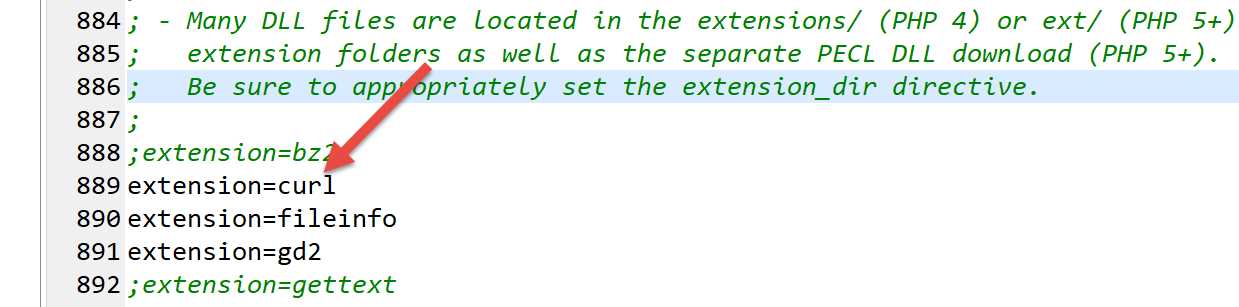
请确保上文第 889 行未被注释掉。
我们将编写一个脚本 [http-02.php],该脚本将使用以下 JSON 配置文件:
字典中的每个 [键, 值] 条目具有以下结构:
- 键:Web 服务器的名称;
- value 是一个包含以下键的字典:
- timeout:服务器响应的最大等待时间。超过此时间后,客户端将断开连接;
- url:所请求文档的 URL;
脚本代码 [http-02.php] 如下:
<?php

// strict adherence to declared types of function parameters
declare (strict_types=1);
//
// error management
//error_reporting(E_ALL & E_STRICT);
//ini_set("display_errors", "on");
//
// constants
const CONFIG_FILE_NAME = "config-http-02.json";
//
// we retrieve the configuration
$config = \json_decode(\file_get_contents(CONFIG_FILE_NAME), true);

// get the HTML text from the URL in the configuration file
foreach ($config as $site => $infos) {
  // reading URL from site $ite
  $résultat = getUrl($site, $infos["url"], $infos["timeout"]);
  // result display
  print "$résultat\n";
}//for
// end
exit;

//-----------------------------------------------------------------------
function getUrl(string $site, string $url, int $timeout, $suivi = TRUE): string {
  // reads the URL $url and stores it in the file output/$site.HTML
  //
  // follow-up
  print "Client : début de la communication avec le serveur [$site] ----------------------------\n";

  // Session initialization cURL
  $curl = curl_init($url);
  if ($curl === FALSE) {
    // there has been an error
    return "Erreur lors de l'initialisation de la session cURL pour le site [$site]";
  }
  // curl options
  $options = [
    // verbose mode
    CURLOPT_VERBOSE => true,
    // new connection - no cache
    CURLOPT_FRESH_CONNECT => true,
    // request timeout (in seconds)
    CURLOPT_TIMEOUT => $timeout,
    CURLOPT_CONNECTTIMEOUT => $timeout,
    // do not check the validity of SSL certificates
    CURLOPT_SSL_VERIFYPEER => false,
    // track redirects
    CURLOPT_FOLLOWLOCATION => true,
    // retrieve the requested document as a character string
    CURLOPT_RETURNTRANSFER => true
  ];

  // curl settings
  curl_setopt_array($curl, $options);
  // Executing the request
  $page_content = curl_exec($curl);
  // Close session cURL
  curl_close($curl);

  // income statement
  if ($page_content !== FALSE) {
    // save result in $site.HTML
    $result = file_put_contents("output/$site.HTML", $page_content);
    if ($result === FALSE) {
      // error return
      return "Erreur lors de la création du fichier [output/$site.HTML]";
    }
    // successful comeback
    return "Fin de la communication avec le serveur [$site]. Vérifiez le fichier [output/$site.HTML]";
  } else {
    // there has been a communication error
    return "Erreur de communication avec le serveur [$site]";
  }
}
注释
- 第 14 行:我们使用配置文件创建字典 [$config];
- 第 17–22 行:遍历配置中找到的网站列表;
- 第 19 行:对于每个网站,我们调用 [getUrl] 函数,该函数将下载 URL $infos["url"],超时时间为 $infos["timeout"];
- 第 34 行:我们启动一个 [curl] 会话。[curl_init] 此时尚未连接到 Web 服务器。它返回一个资源 [$curl],该资源将作为后续所有 [curl] 函数的参数;
- 第 35–38 行:如果 [curl] 会话初始化失败,[curl_init] 函数将返回布尔值 FALSE;
- 第 40–54 行:字典 [$options] 用于配置 [curl] 与服务器的连接;
- 第 57 行:将连接选项传递给 [$curl] 资源;
- 第 59 行:使用定义的选项连接到请求的 URL。由于 [CURLOPT_RETURNTRANSFER => true] 选项,[curl_exec] 函数将服务器发送的文档作为字符串返回。如果连接失败,[curl_exec] 函数返回 FALSE;
- 第 64 行:解析 [curl_exec] 的返回结果;
- 第 66 行:将接收到的页面保存到本地文件中;
- 第 69、72、75 行:返回 [getUrl] 函数的结果;
运行 [http-02.php] 脚本时,控制台将显示以下输出:
* Rebuilt URL to: http://sergetahe.com/
Client : début de la communication avec le serveur [sergetahe.com] ----------------------------
*   Trying 87.98.154.146…
* TCP_NODELAY set
* Connected to sergetahe.com (87.98.154.146) port 80 (#0)
> GET / HTTP/1.1
Host: sergetahe.com
Accept: */*

< HTTP/1.1 302 Found
< Date: Sat, 18 May 2019 08:46:38 GMT
< Content-Type: text/HTML; charset=UTF-8
< Transfer-Encoding: chunked
< Server: Apache
< X-Powered-By: PHP/7.0
< Location: http://sergetahe.com/cours-tutoriels-de-programmation
< Set-Cookie: SERVERID68971=2621236|XN/Gc|XN/Gc; path=/
< X-IPLB-Instance: 17097
<
* Ignoring the response-body
* Connection #0 to host sergetahe.com left intact
* Issue another request to this URL: 'http://sergetahe.com/cours-tutoriels-de-programmation'
* Found bundle for host sergetahe.com: 0x1fee4ebe090 [can pipeline]
* Re-using existing connection! (#0) with host sergetahe.com
* Connected to sergetahe.com (87.98.154.146) port 80 (#0)
> GET /cours-tutoriels-de-programmation HTTP/1.1
Host: sergetahe.com
Accept: */*

< HTTP/1.1 301 Moved Permanently
< Date: Sat, 18 May 2019 08:46:38 GMT
< Content-Type: text/HTML; charset=iso-8859-1
< Content-Length: 262
< Server: Apache
< Location: http://sergetahe.com/cours-tutoriels-de-programmation/
< Set-Cookie: SERVERID68971=2621236|XN/Gc|XN/Gc; path=/
< Cache-control: private
< X-IPLB-Instance: 17097
<
* Ignoring the response-body
* Connection #0 to host sergetahe.com left intact
* Issue another request to this URL: 'http://sergetahe.com/cours-tutoriels-de-programmation/'
* Found bundle for host sergetahe.com: 0x1fee4ebe090 [can pipeline]
* Re-using existing connection! (#0) with host sergetahe.com
* Connected to sergetahe.com (87.98.154.146) port 80 (#0)
> GET /cours-tutoriels-de-programmation/ HTTP/1.1
Host: sergetahe.com
Accept: */*

< HTTP/1.1 200 OK
< Date: Sat, 18 May 2019 08:46:39 GMT
< Content-Type: text/HTML; charset=UTF-8
< Transfer-Encoding: chunked
< Server: Apache
< X-Powered-By: PHP/7.0
< Link: <http://sergetahe.com/cours-tutoriels-de-programmation/wp-json/>; rel="https://api.w.org/"
< Link: <http://sergetahe.com/cours-tutoriels-de-programmation/>; rel=shortlink
< Vary: Accept-Encoding
< Set-Cookie: SERVERID68971=2621236|XN/Gc|XN/Gc; path=/
< Cache-control: private
< X-IPLB-Instance: 17097
<
Fin de la communication avec le serveur [sergetahe.com]. Vérifiez le fichier [output/sergetahe.com.HTML]
Client : début de la communication avec le serveur [tahe.developpez.com] ----------------------------
* Connection #0 to host sergetahe.com left intact
* Rebuilt URL to: https://tahe.developpez.com/
*   Trying 87.98.130.52…
* TCP_NODELAY set
* Connected to tahe.developpez.com (87.98.130.52) port 443 (#0)
* ALPN, offering http/1.1
* successfully set certificate verify locations:
*   CAfile: C:\myprograms\laragon-lite\etc\ssl\cacert.pem
  CApath: none
* SSL connection using TLSv1.2 / ECDHE-RSA-AES128-GCM-SHA256
* ALPN, server accepted to use http/1.1
* Server certificate:
*  subject: CN=*.developpez.com
*  start date: Apr  4 08:25:09 2019 GMT
*  expire date: Jul  3 08:25:09 2019 GMT
*  subjectAltName: host "tahe.developpez.com" matched cert's "*.developpez.com"
*  issuer: C=US; O=Let's Encrypt; CN=Let's Encrypt Authority X3
*  SSL certificate verify ok.
> GET / HTTP/1.1
Host: tahe.developpez.com
Accept: */*

< HTTP/1.1 200 OK
< Date: Sat, 18 May 2019 08:46:42 GMT
< Server: Apache/2.4.25 (Debian)
< X-Powered-By: PHP/5.3.29
< Vary: Accept-Encoding
< Transfer-Encoding: chunked
< Content-Type: text/HTML
<
Fin de la communication avec le serveur [tahe.developpez.com]. Vérifiez le fichier [output/tahe.developpez.com.HTML]
Client : début de la communication avec le serveur [www.polytech-angers.fr] ----------------------------
* Connection #0 to host tahe.developpez.com left intact
* Rebuilt URL to: http://www.polytech-angers.fr/
*   Trying 193.49.144.41…
* TCP_NODELAY set
* Connected to www.polytech-angers.fr (193.49.144.41) port 80 (#0)
> GET / HTTP/1.1
Host: www.polytech-angers.fr
Accept: */*

< HTTP/1.1 301 Moved Permanently
< Date: Sat, 18 May 2019 08:46:45 GMT
< Server: Apache/2.4.29 (Ubuntu)
< Location: http://www.polytech-angers.fr/fr/index.HTML
< Cache-Control: max-age=1
< Expires: Sat, 18 May 2019 08:46:46 GMT
< Content-Length: 339
< Content-Type: text/HTML; charset=iso-8859-1
<
* Ignoring the response-body
* Connection #0 to host www.polytech-angers.fr left intact
* Issue another request to this URL: 'http://www.polytech-angers.fr/fr/index.HTML'
* Found bundle for host www.polytech-angers.fr: 0x1fee4ebe390 [can pipeline]
* Re-using existing connection! (#0) with host www.polytech-angers.fr
* Connected to www.polytech-angers.fr (193.49.144.41) port 80 (#0)
> GET /fr/index.HTML HTTP/1.1
Host: www.polytech-angers.fr
Accept: */*

< HTTP/1.1 200
< Date: Sat, 18 May 2019 08:46:46 GMT
< Server: Apache/2.4.29 (Ubuntu)
< X-Cocoon-Version: 2.1.13-dev
< Accept-Ranges: bytes
< Last-Modified: Sat, 18 May 2019 08:01:36 GMT
< Content-Type: text/HTML; charset=UTF-8
< Content-Length: 47372
< Vary: Accept-Encoding
< Cache-Control: max-age=1
< Expires: Sat, 18 May 2019 08:46:47 GMT
< Content-Language: fr
<
* Connection #0 to host www.polytech-angers.fr left intact
Fin de la communication avec le serveur [www.polytech-angers.fr]. Vérifiez le fichier [output/www.polytech-angers.fr.HTML]
Client : début de la communication avec le serveur [localhost] ----------------------------
* Rebuilt URL to: http://localhost/
*   Trying ::1…
* TCP_NODELAY set
* Connected to localhost (::1) port 80 (#0)
> GET / HTTP/1.1
Host: localhost
Accept: */*

< HTTP/1.1 200 OK
< Date: Sat, 18 May 2019 08:46:47 GMT
< Server: Apache/2.4.35 (Win64) OpenSSL/1.1.0i PHP/7.2.11
< X-Powered-By: PHP/7.2.11
< Content-Length: 1781
< Content-Type: text/HTML; charset=UTF-8
<
* Connection #0 to host localhost left intact

Fin de la communication avec le serveur [localhost]. Vérifiez le fichier [output/localhost.HTML]
注释
- 我们得到的交互内容与 [curl] 工具相同;
- 绿色部分为脚本日志;
- 蓝色部分为发送给服务器的命令;
- 黄色部分为客户端收到的响应命令;
16.4.7. 结论
在本节中,我们探讨了HTTP协议,并编写了一个能够从网络下载URL的脚本[http-02.php]。
16.5. SMTP(简单邮件传输协议)
16.5.1. 简介
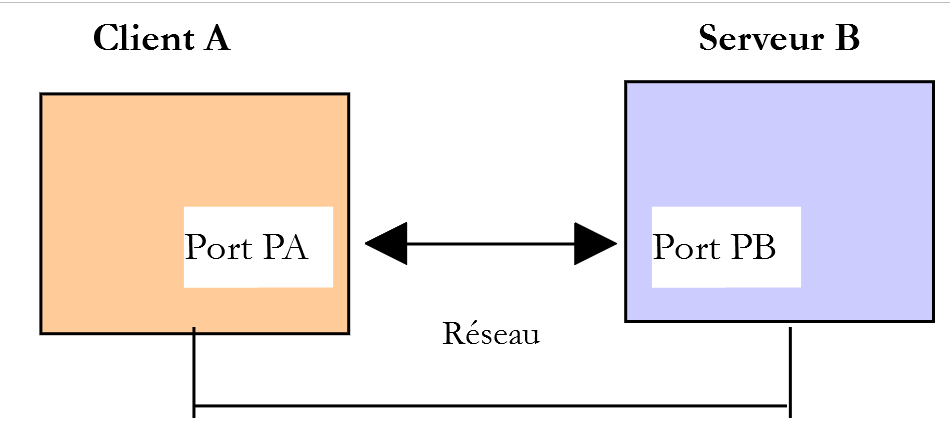
本章内容:
- [服务器 B] 将是我们即将安装的本地 SMTP 服务器;
- [客户端 A] 将以多种形式呈现的 SMTP 客户端:
- 使用 [RawTcpClient] 客户端来探索 SMTP 协议;
- 一个模拟 [RawTcpClient] 客户端 SMTP 协议的 PHP 脚本;
- 一个使用 [SwiftMailServer] 库发送各类电子邮件的 PHP 脚本;
16.5.2. 创建 [Gmail] 地址
为了进行 SMTP 测试,我们需要一个用于接收邮件的地址。为此,我们将在 Gmail 上创建一个地址:
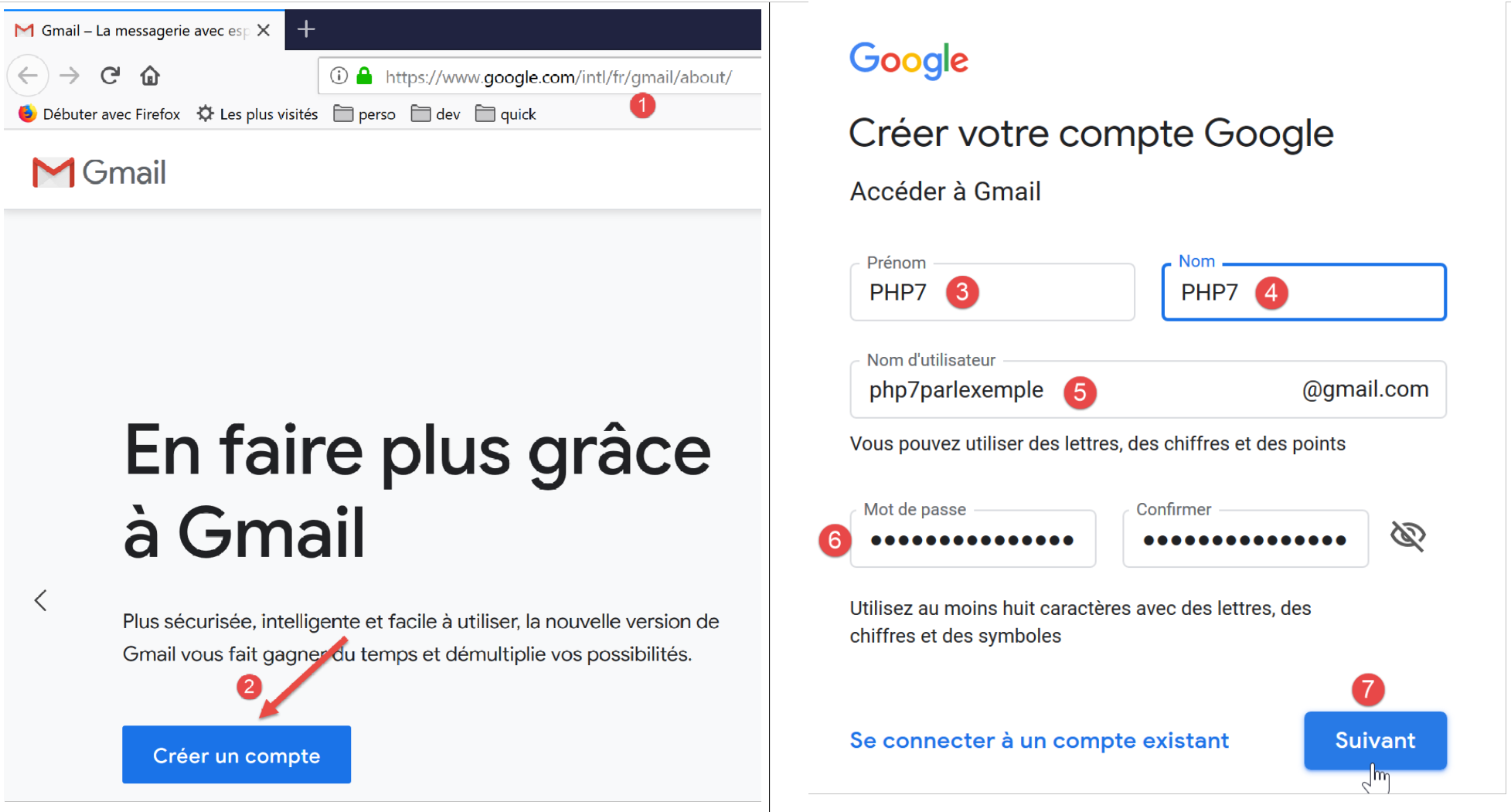
- 在 [5] 中,我们创建用户 [php7parlexemple](请选择其他名称);
- 在 [6] 中,密码设为 [PHP7parlexemple](请选择其他名称);
- 在 [7] 处,我们确认这些信息;
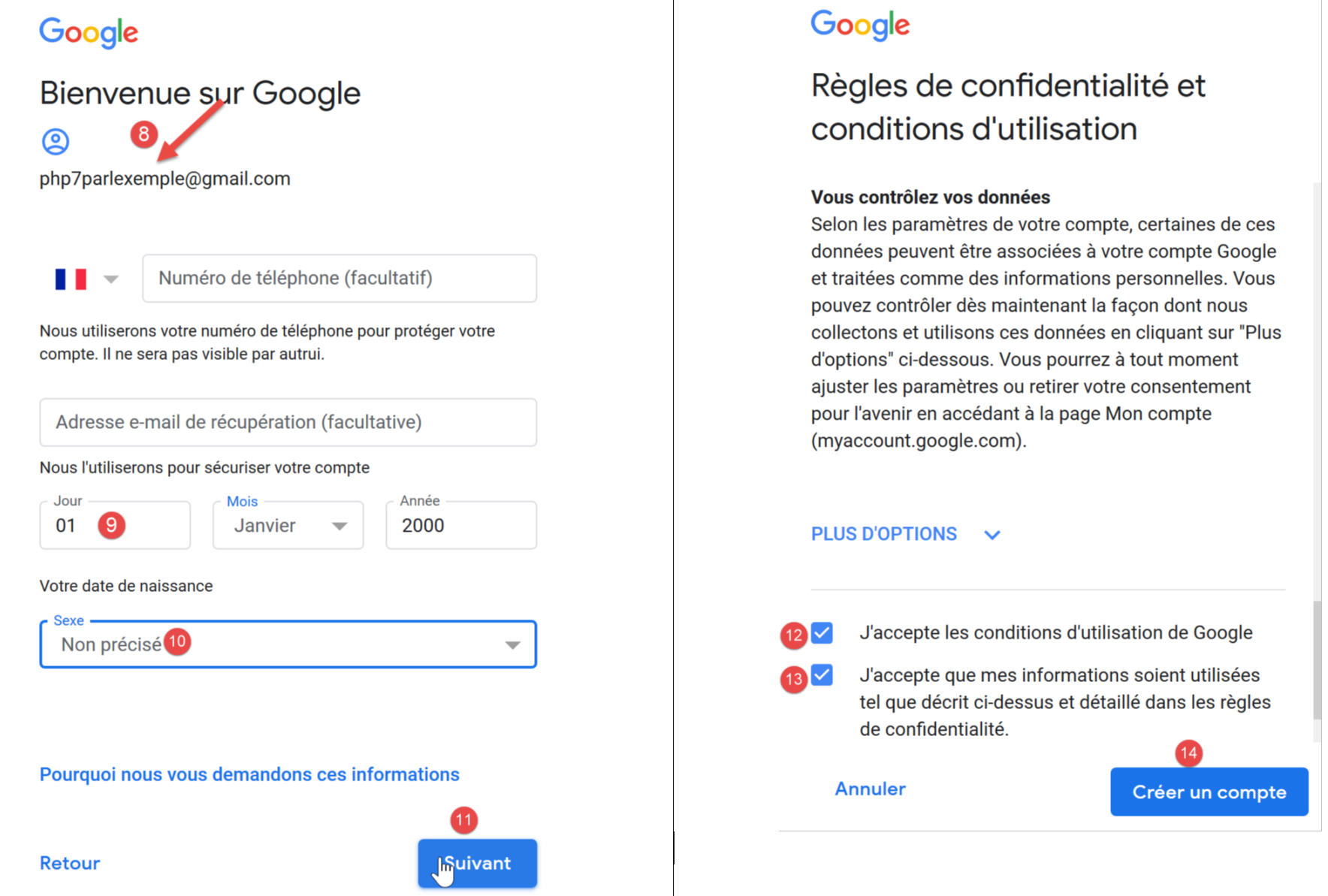
- 填写字段 [9-10] 后确认 (11);
- 接受 Google 的服务条款(12-13),然后确认(14);
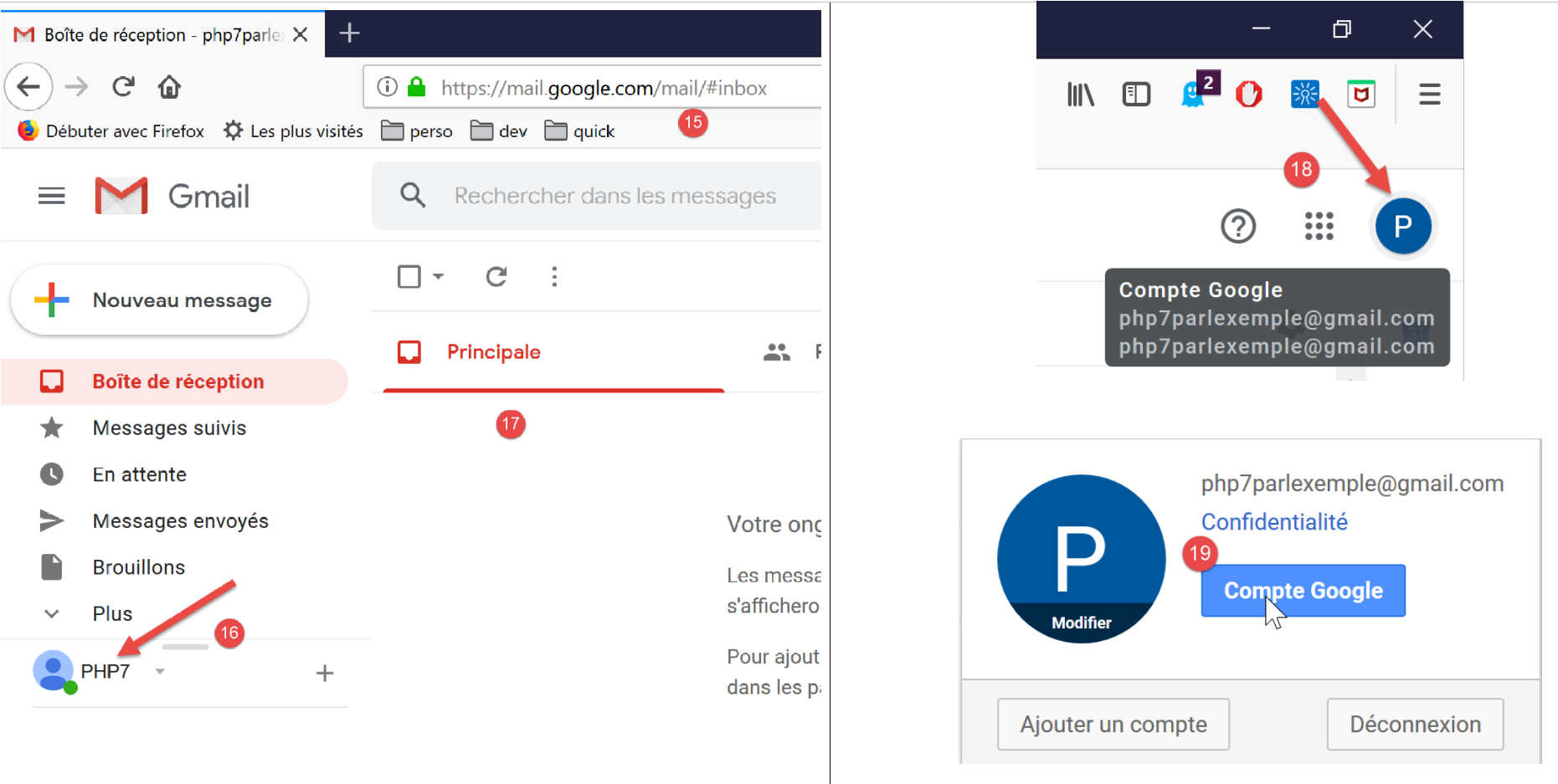
- 在 [15] 中,用户的收件箱 [PHP7] (16);
- 在 [17] 中,该用户的收件箱为空;
- 在 [18-19] 中,登录用户的 Google 账户 [php7parlexemple@gmail.com]。我们将配置该账户的安全设置;
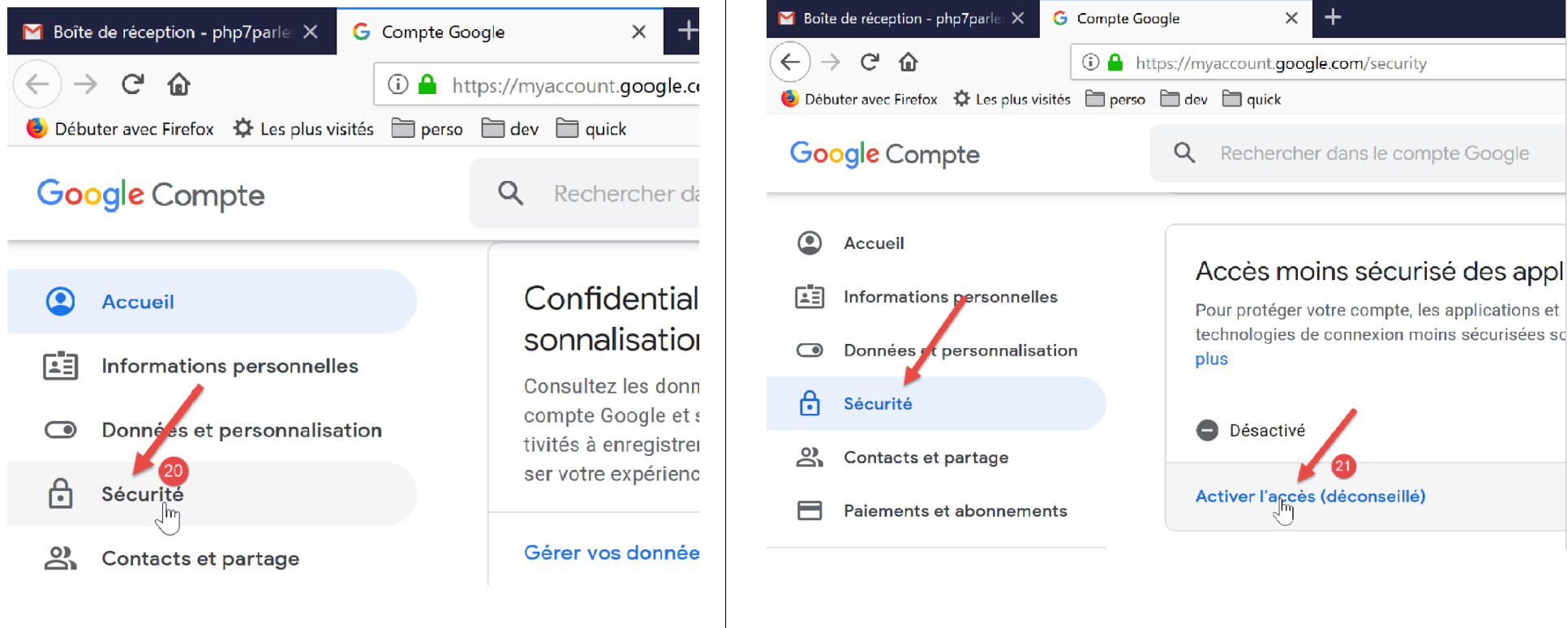
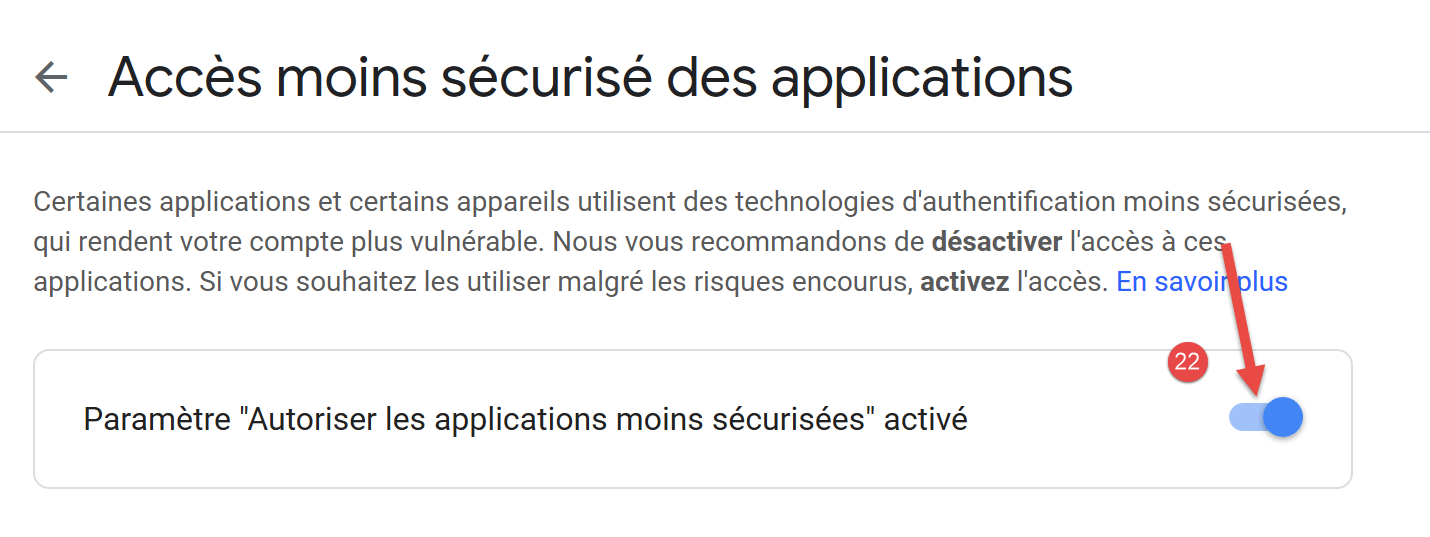
- 在 [21] 中,允许非 Google 应用访问该账户 [php7parlexemple]。如果不这样做,我们的本地邮件服务器 [hMailServer] 将无法与 Gmail 的 SMTP 服务器通信;
16.5.3. 设置 SMTP 服务器
在本次测试中,我们将安装 [hMailServer] 邮件服务器,它既可作为 SMTP 服务器用于发送邮件,也可作为 POP3(邮局协议)服务器用于检索服务器上存储的邮件,同时还兼具 IMAP(互联网邮件访问协议)服务器功能——后者同样支持检索服务器上的邮件,但提供了更多附加功能。特别是,它允许您管理服务器上的邮件存储空间。
[hMailServer] 邮件服务器可通过 URL [https://www.hmailserver.com/] 获取(2019 年 5 月)。
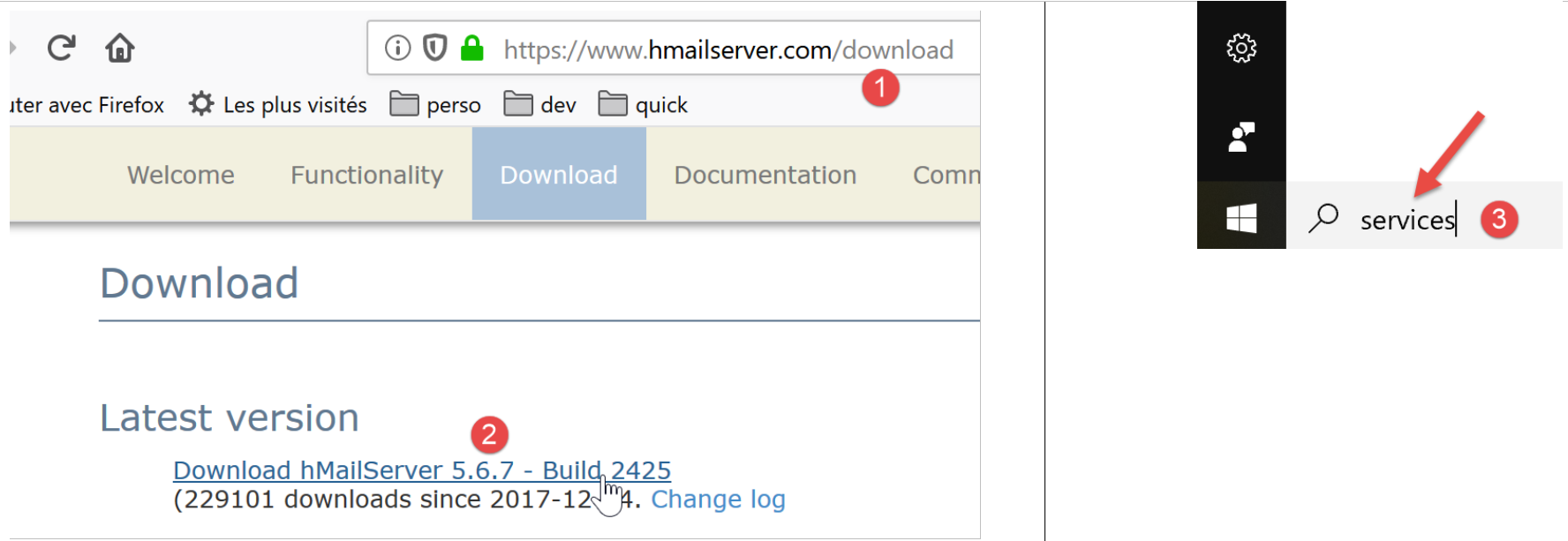
安装过程中,系统会要求您提供以下信息:
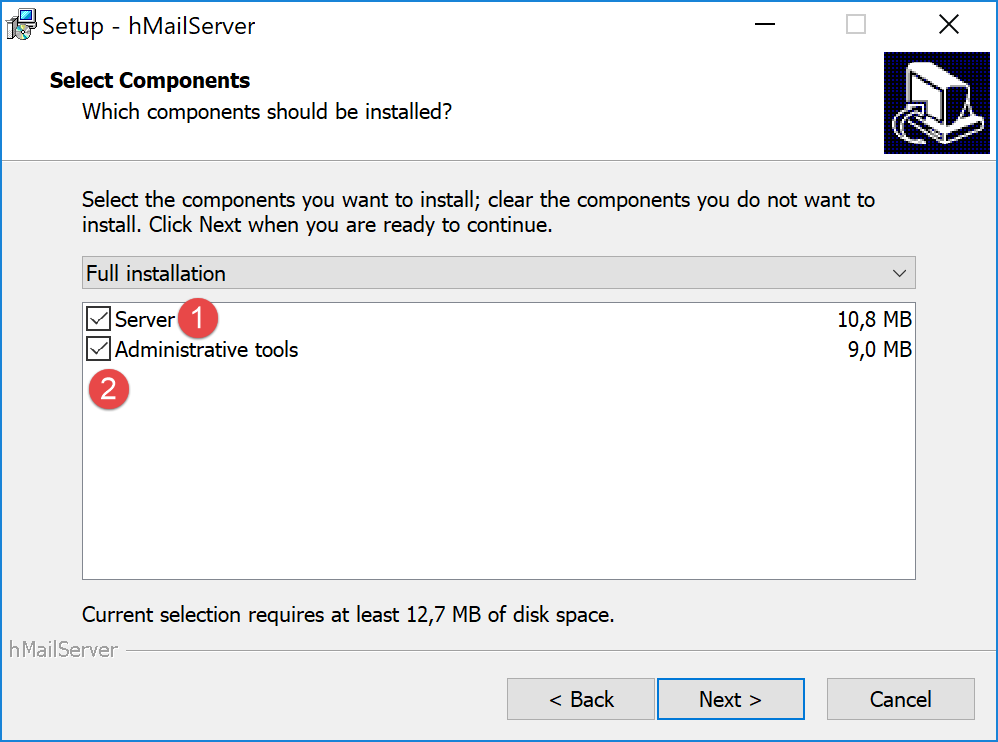
- 在 [1-2] 中,请同时选择邮件服务器及其管理工具;
- 安装过程中,系统会要求您输入管理员密码:请将其记录下来,因为您后续会用到;
[hMailServer] 安装后将作为 Windows 服务运行,并在计算机启动时自动启动。建议选择手动启动:
- 在 [3] 中,在任务栏的搜索框中输入 [services];
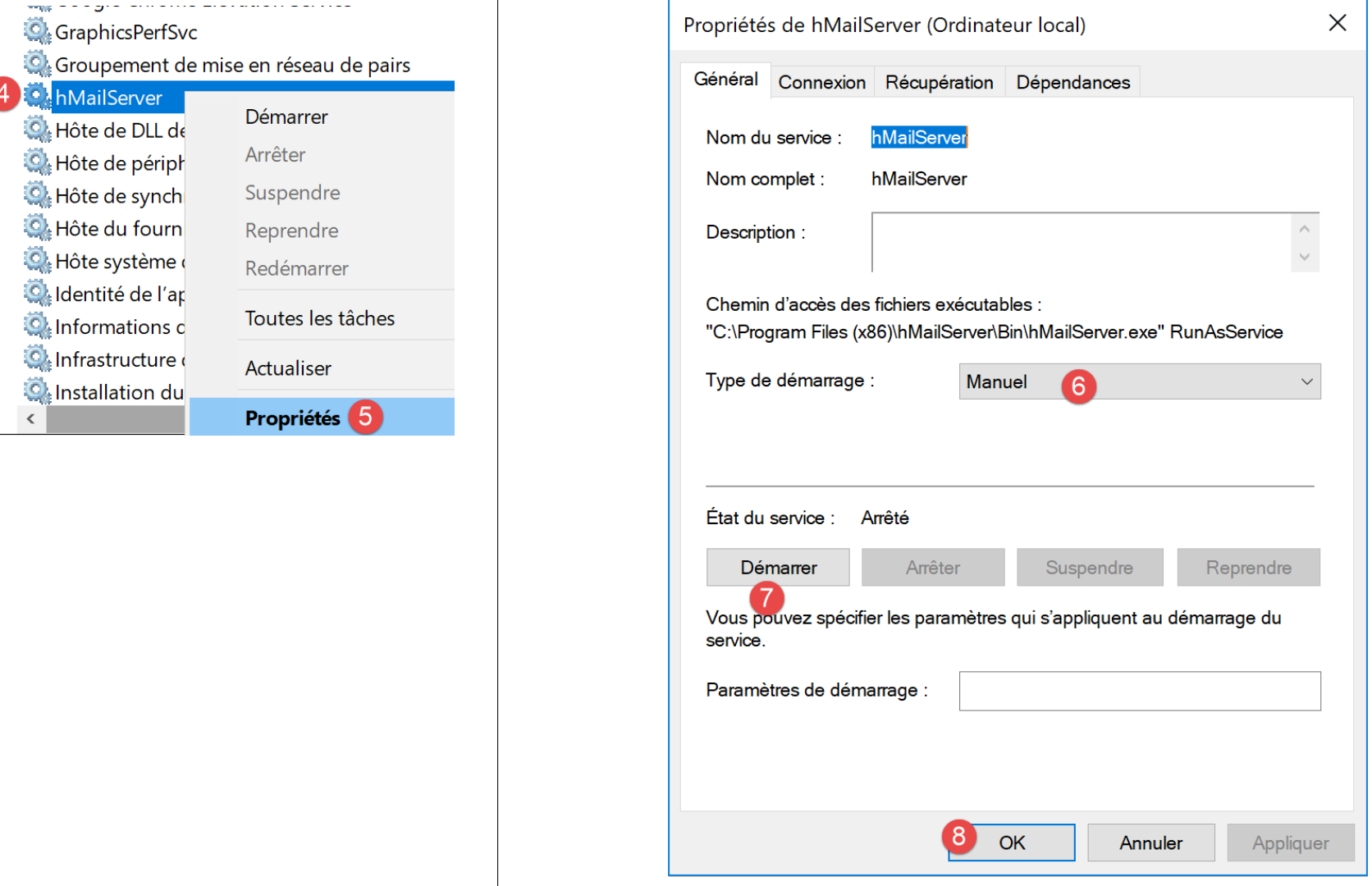
- 在[4-8]中,将服务设置为[手动]模式(6),然后启动它(7);
启动后,必须配置 [hMailServer]。该服务器随安装程序附带了一个管理程序 [hMailServer Administrator]:
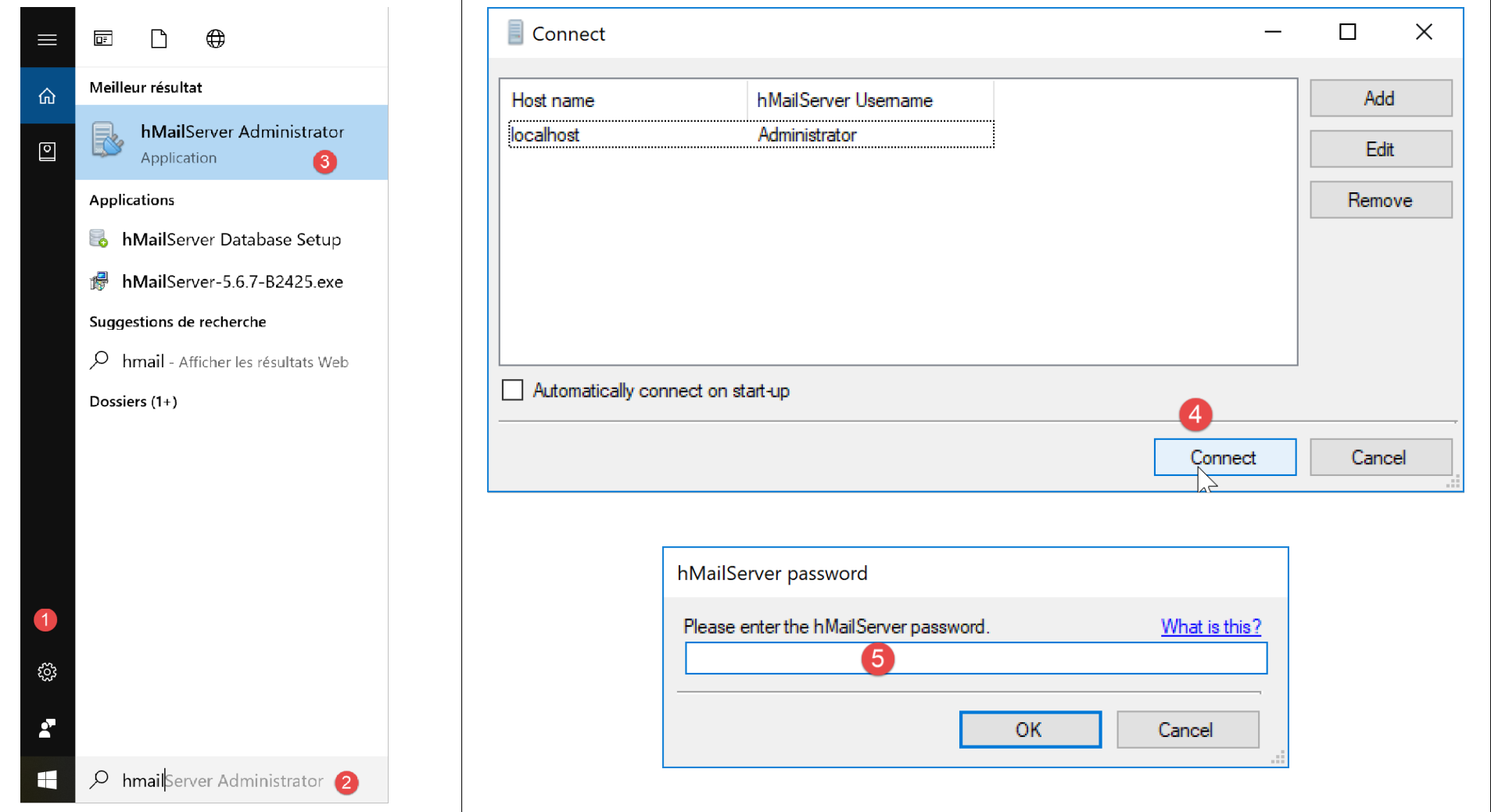
- 在 [2] 的状态栏输入框中,输入 [hmailserver];
- 在 [3] 中,启动管理程序;
- 在 [4] 中,将管理程序连接到 [hMailServer] 服务器;
- 在 [5] 中,输入安装 [hMailServer] 时设置的密码;
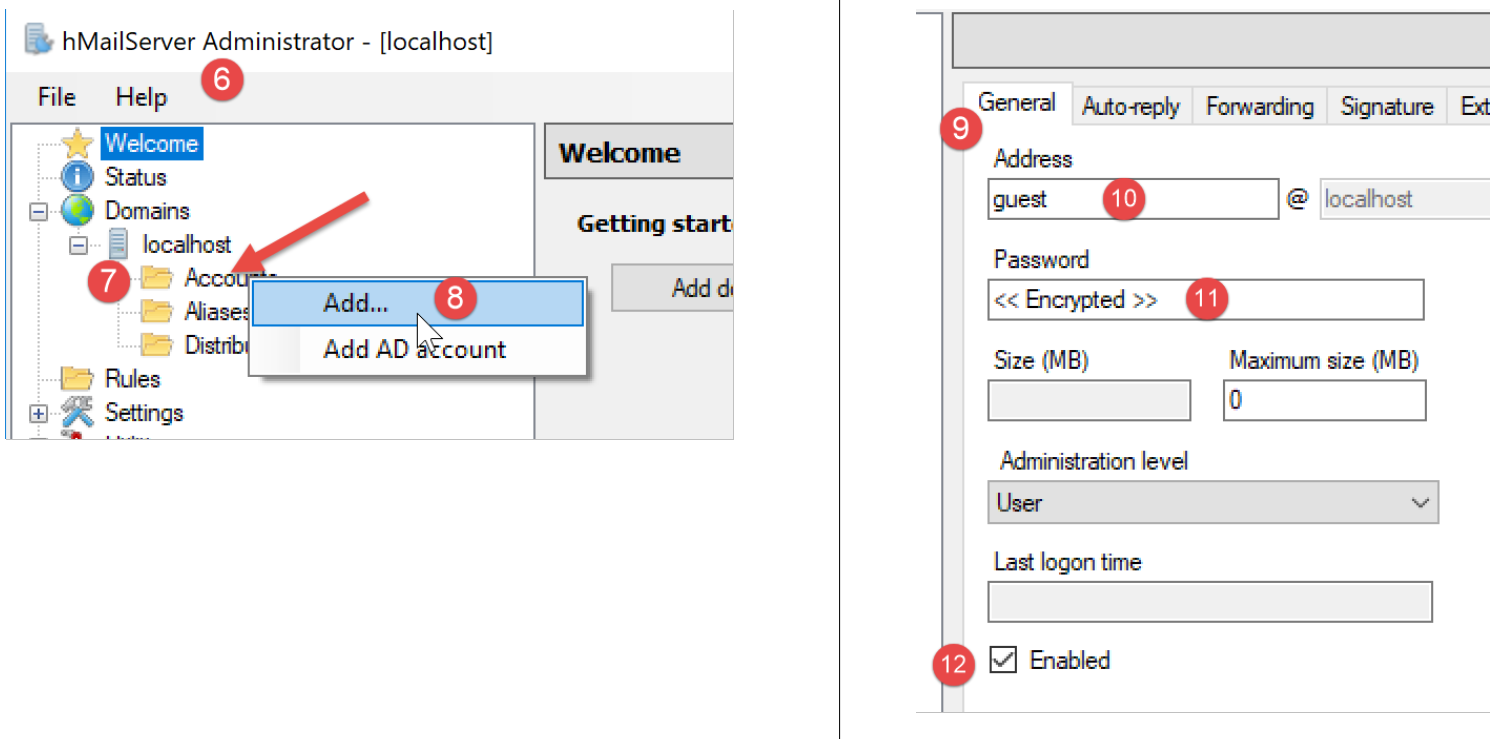
我们将创建一个用户账户:
- 右键单击 [Accounts] (7),然后 (8) 添加新用户;
- 在 [常规] 选项卡 (9) 中,我们定义一个名为 [guest] (10) 的用户,密码为 [guest] (11)。该用户的电子邮件地址为 [guest@localhost] (10);
- 在 [12] 中,已启用 [guest] 用户;
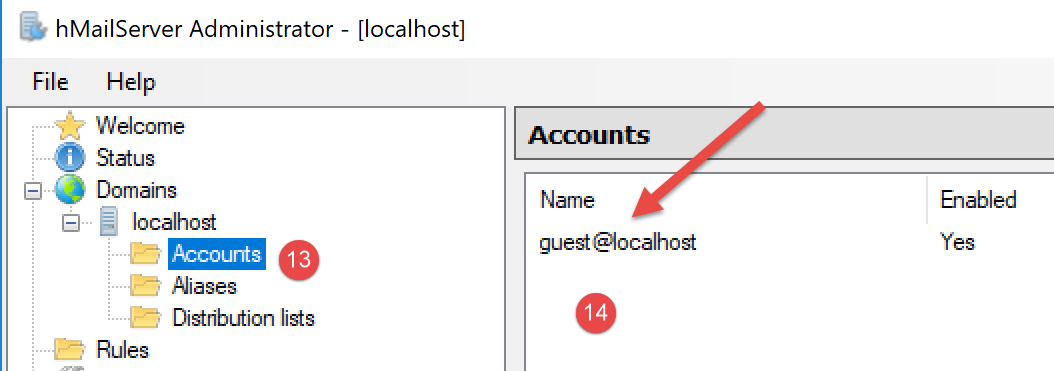
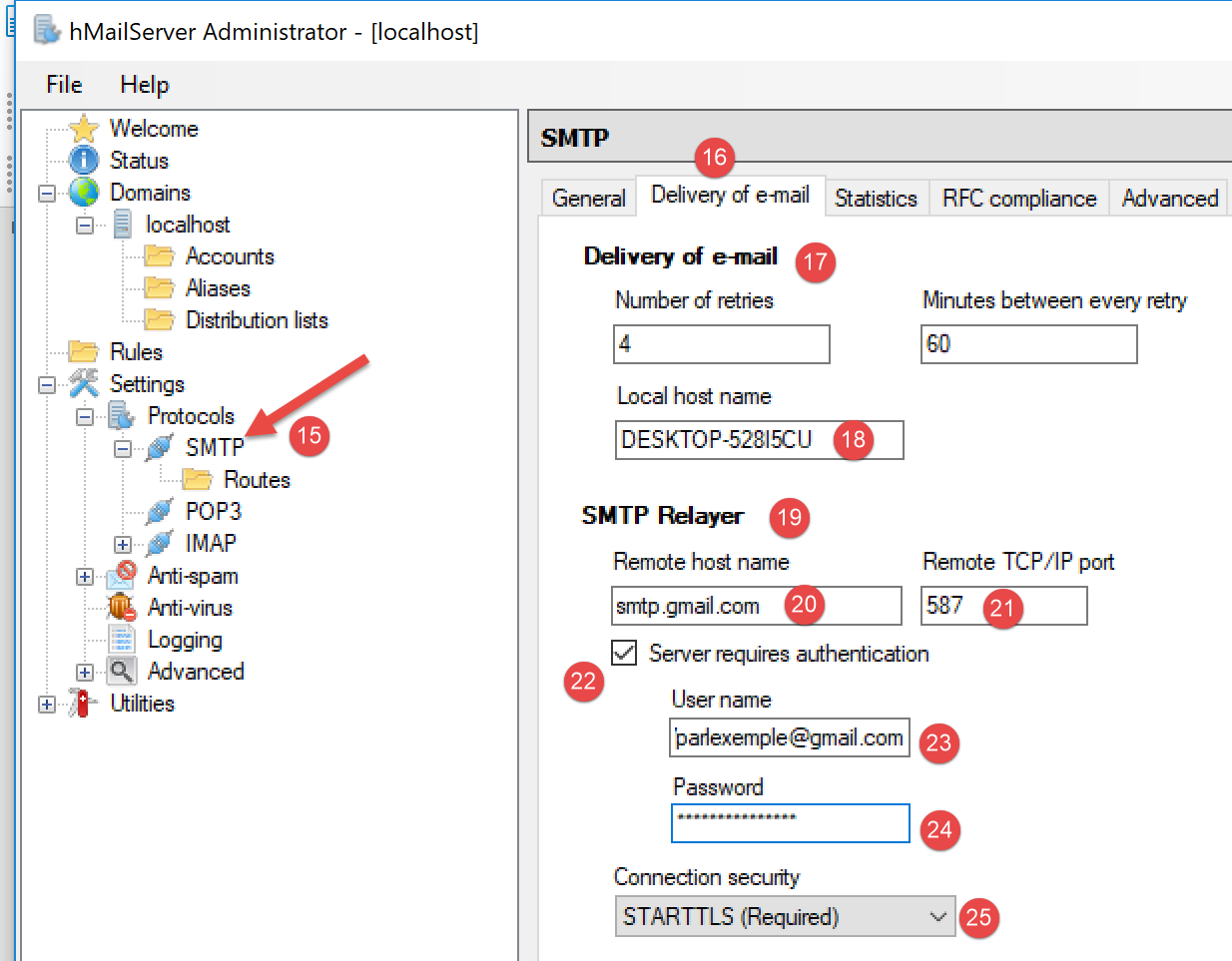
- 在 [15] 中,配置邮件服务器的 SMTP 协议;
- 在 [16] 中,我们配置电子邮件投递;
- 在 [17] 中,配置向主机(localhost)发送电子邮件;
- 在 [18] 中,输入本地主机的名称(localhost)。链接部分中的脚本可帮助您获取该名称;
- 在 [19] 中,我们配置 SMTP 中继服务器:该服务器将负责分发不发往本地主机(localhost)的电子邮件;
- 在 [20] 中,配置 Gmail SMTP 服务器。我们使用 Gmail 是因为已在链接部分创建了 Gmail 账户;
- 在 [21] 中,Gmail 的 SMTP 端口;
- 在 [22] 中,Gmail 的 SMTP 服务是安全服务:您需要一个 Gmail 账户才能访问它;
- 在 [23] 中,输入“链接”部分创建的用户 [php7parlexemple];
- 在 [24] 中,该用户的密码:[PHP7parlexemple],该用户在“链接”部分中创建;
- 在 [25] 中,指定 Gmail 使用的安全协议类型;
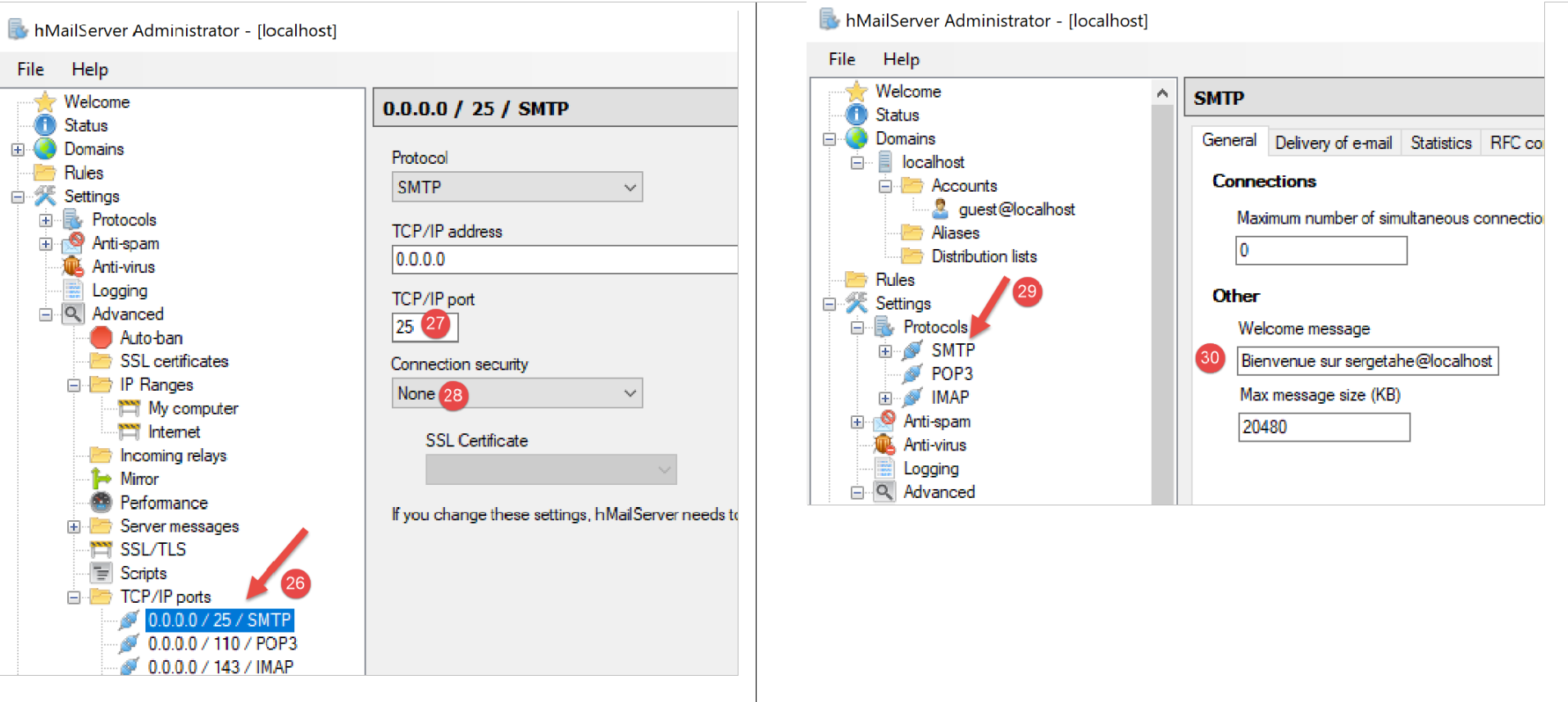
- 在 [27] 中,输入 SMTP 服务端口;
- 在 [28] 中,此服务无需身份验证;
- 在 [30] 中,输入 SMTP 服务器将发送给其客户端的欢迎信息;
16.5.4. SMTP 协议
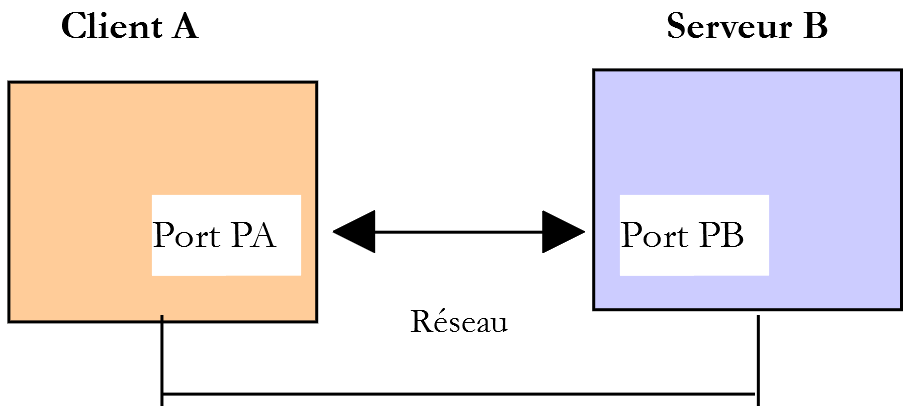
我们将使用以下环境来探讨 SMTP 协议:
- 客户端 A 将作为通用 TCP 客户端 [RawTcpClient];
- 服务器 B 将作为邮件服务器 [hMailServer];
- 客户端 A 将请求服务器 B 向用户 [php7parlexemple@gmail.com] 发送一封电子邮件;
- 我们将验证该用户是否确实收到了所发送的电子邮件;
我们按以下方式启动客户端:

- 在 [1] 中,我们连接到本地机器的 25 号端口,该端口上运行着 [hMailServer] 的 SMTP 服务。参数 [--quit bye] 表示用户可以通过输入命令 [bye] 退出程序。如果没有此参数,结束程序的命令是 [quit]。然而,[quit] 也是一个 SMTP 协议命令。因此,我们必须避免这种歧义;
- 在 [2] 中,客户端已成功连接;
- 在 [3] 中,客户端正在等待用户通过键盘输入命令;
- 在 [4] 中,服务器向客户端发送欢迎信息;
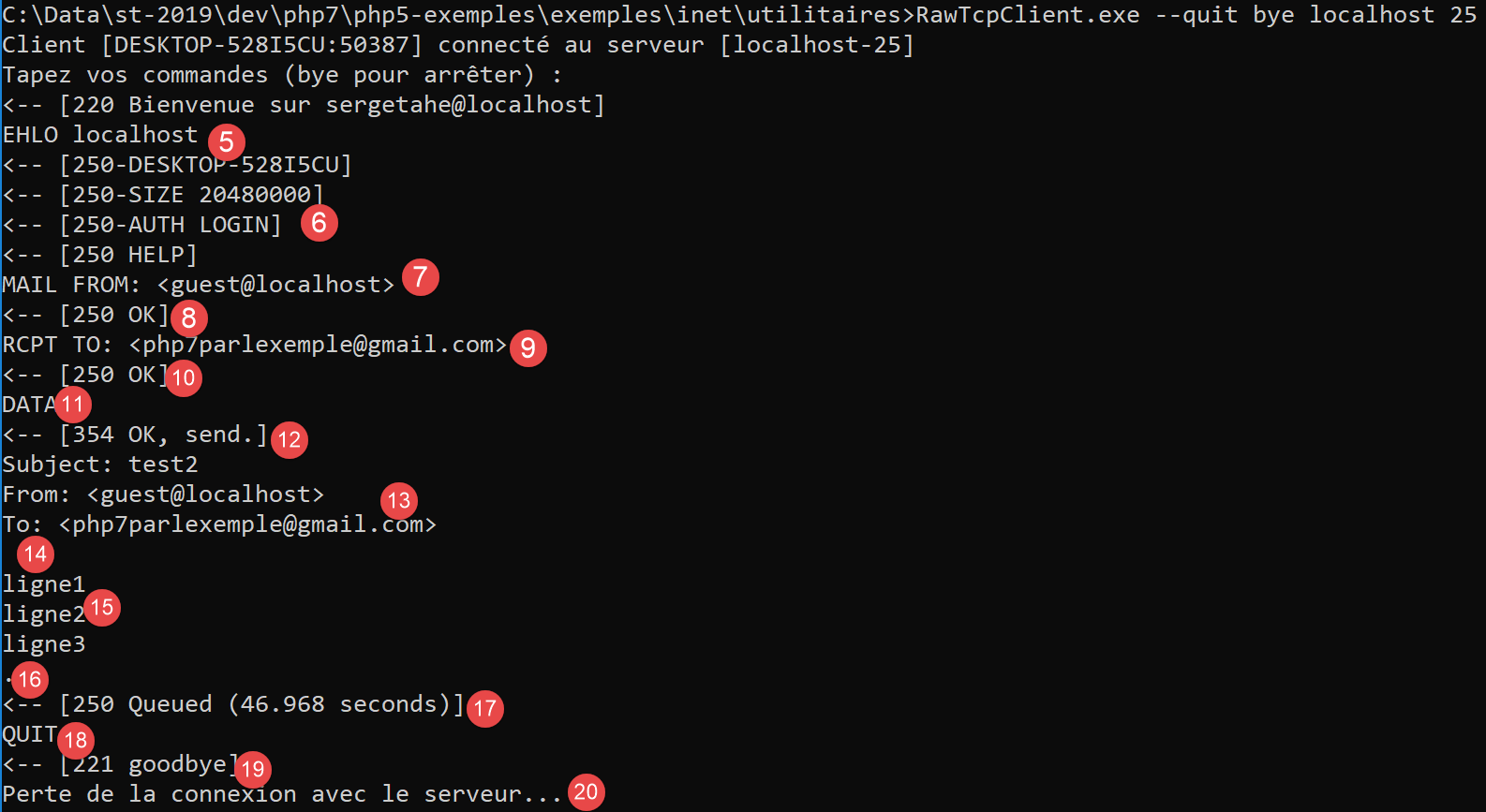
- 在 [5] 中,客户端发送命令 [EHLO 客户端机器名]。服务器以 [250-xx] 形式的一系列消息进行响应(6)。代码 [250] 表示客户端发送的命令成功;
- 在 [7] 中,客户端指定消息发送者,此处为 [guest@localhost]。该用户必须存在于邮件服务器 [hMailServer] 上。此处满足该条件,因为我们之前已创建了该用户;
- 在 [8] 中,服务器作出响应;
- 在 [9] 中,指定了邮件收件人,此处为 Gmail 用户 [php7parlexemple@gmail.com];
- 在 [10] 中,显示服务器的响应;
- 在 [11] 中,[DATA] 命令告知服务器客户端即将发送邮件正文;
- 在 [12] 中,服务器的响应;
- 在 [13-16] 中,客户端必须发送一组文本行,最后一行仅包含一个句点。消息可包含 [Subject:, From:, To:] 行(13),分别用于定义消息主题、发件人和收件人;
- 在 [14] 中,上述标头后必须跟一个空行;
- 在 [15] 中,消息正文;
- 在 [16] 中,仅包含一个句点的行,该行表示消息的结束;
- 在[17]中,一旦服务器接收到仅包含一个句点的行,便将消息放入队列;
- 在 [18] 中,客户端告知服务器操作已完成;
- 在 [19] 中,服务器的响应;
- 在 [20] 中,我们可以看到服务器已关闭与客户端的连接;
现在,让我们验证用户 [php7parlexemple@gmail.com] 是否确实收到了这条消息:
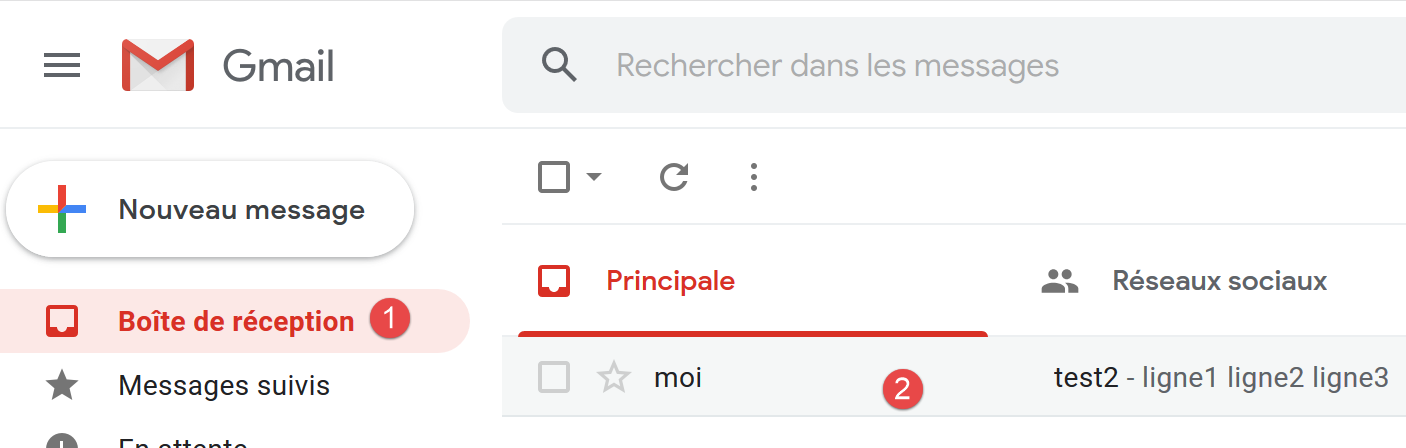
- 在 [2] 中,我们可以看到用户 [php7parlexemple@gmail.com] 确实已收到该消息;
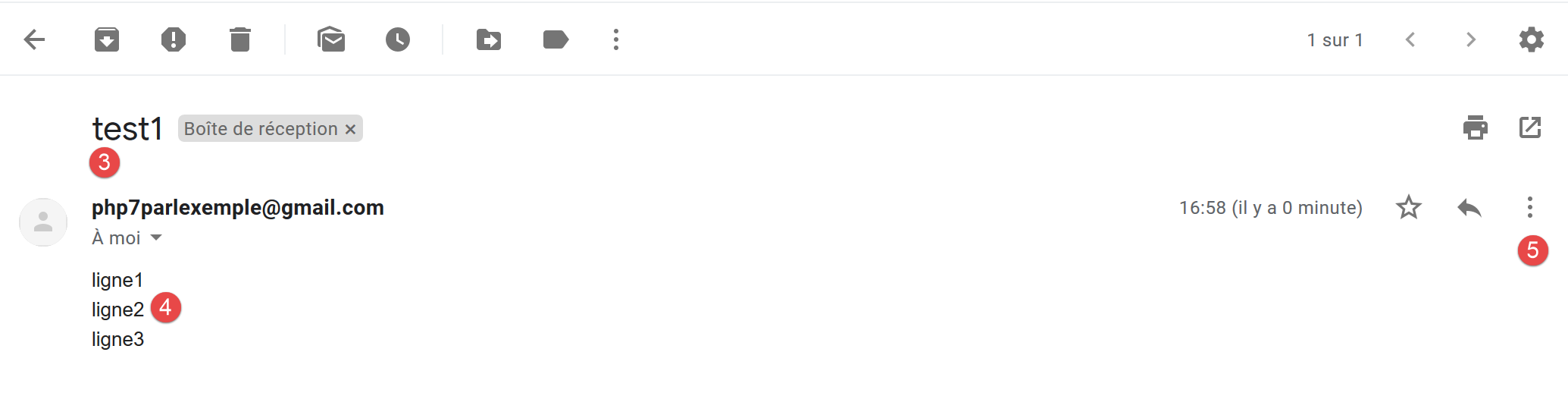
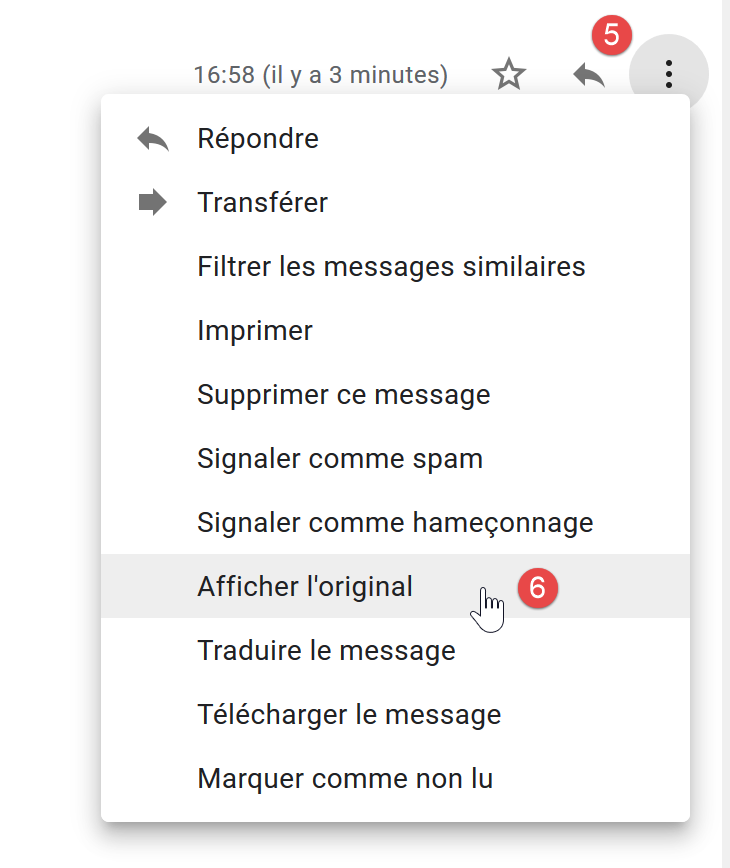
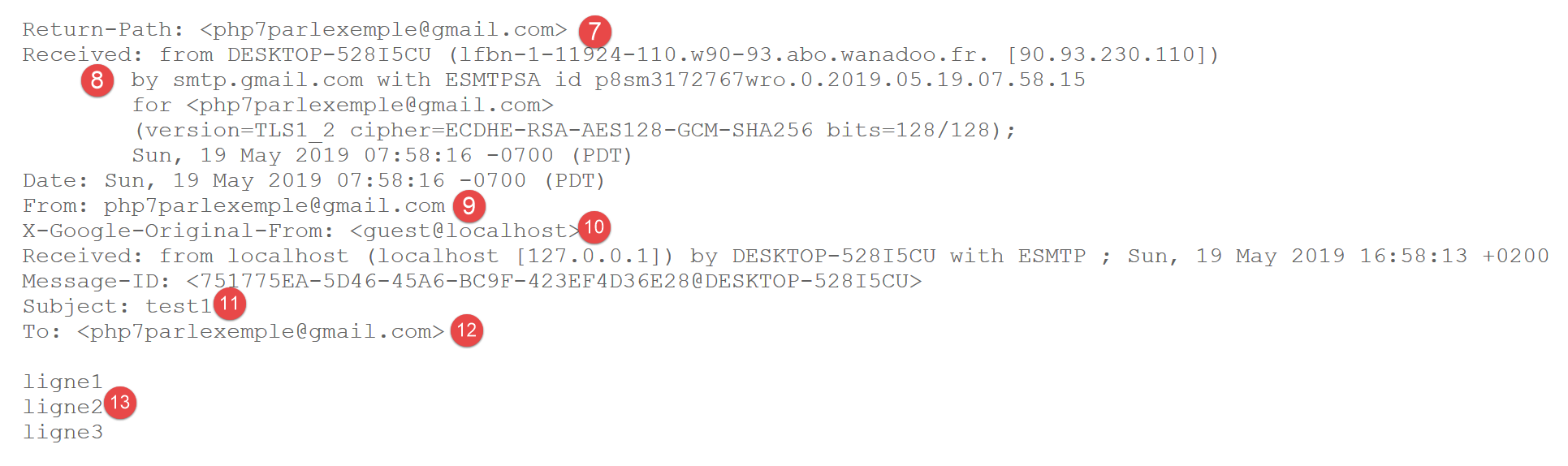
- 在 [7] 中,即邮件发件人。我们可以看到发件人并非 [guest@localhost]。这是因为 [hMailServer] 配置中定义的中继服务器投递了该邮件。然而,该中继服务器是 [smtp.gmail.com],其关联的凭据属于 Gmail 用户 [php7parlexemple@gmail.com]。 任何来自 [hMailServer] 的邮件都会显示为来自用户 [php7parlexemple@gmail.com]。这并非我们在此处的预期,但如果我们不使用该中继服务器,Gmail 的 SMTP 服务会拒绝 [hMailServer] 发送的邮件,因为 Gmail 的 SMTP 要求进行身份验证,而 [hMailServer] 无法提供此验证。 可能有办法解决这个问题,但我尚未找到;
- 在 [8] 中,我们可以看到该邮件是从托管 [hMailServer] 邮件服务器的机器 [DESKTOP-528I5CU] 接收的;
- 在[9]中,显示了邮件的发件人。我们可以看到,发件人并非[guest@localhost];
- 在 [10] 中,显示了邮件的原始发件人。这次确实是 [guest@localhost];
- 在 [11] 中,主题;
- 在 [12] 中,收件人;
- 在 [13] 中,是邮件正文;
最后,尽管我们在发件人方面遇到了一些问题,但我们的 [RawTcpClient] 仍成功发送了消息。现在,我们已经掌握了用 PHP 编写 SMTP 客户端的基础知识。
16.5.5. 用 PHP 编写的基本 SMTP 客户端
我们将用 PHP 实现之前所学的 SMTP 协议相关知识。
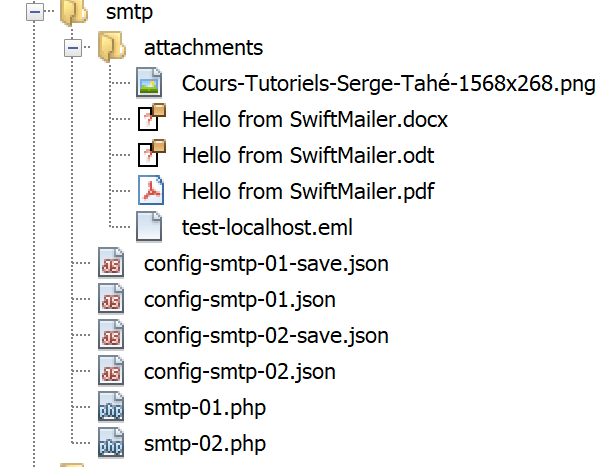
脚本 [smtp-01.php] 由以下 JSON 文件 [config-smtp-01.json] 进行配置:
{
    "mail to localhost via localhost": {
        "smtp-server": "localhost",
        "smtp-port": "25",
        "from": "guest@localhost",
        "to": "guest@localhost",
        "subject": "to localhost via localhost",
        "message": "ligne 1\nligne 2\nligne 3"
    },
    "mail to gmail via localhost": {
        "smtp-server": "localhost",
        "smtp-port": "25",
        "from": "guest@localhost",
        "to": "php7parlexemple@gmail.com",
        "subject": "to gmail via localhost",
        "message": "ligne 1\nligne 2\nligne 3"
    },
    "mail to gmail via gmail": {
        "smtp-server": "smtp.gmail.com",
        "smtp-port": "587",
        "from": "guest@localhost",
        "to": "php7parlexemple@gmail.com",
        "subject": "to gmail via gmail",
        "message": "ligne 1\nligne 2\nligne 3"
    }
}
[config-smtp-01.json] 是一个数组,其中每个元素都是一个 [名称=>信息] 类型的字典。[信息] 值本身是一个字典,包含以下键值对:
- [smtp-server]:要使用的 SMTP 服务器名称;
- [smtp-port]:SMTP 服务的端口号;
- [from]:邮件的发件人;
- [to]:邮件的收件人;
- [subject]: 邮件的主题;
- [message]: 待发送的消息;
- 第一个元素使用 SMTP 服务器 [localhost] 向 [localhost] 上的用户发送电子邮件;
- 第二个元素使用 SMTP 服务器 [localhost] 向 [Gmail] 上的用户发送电子邮件;
- 第三个元素使用 SMTP 服务器 [Gmail] 向 [Gmail] 上的用户发送电子邮件;
SMTP 客户端的 [smtp-01.php] 代码如下:
<?php

// client SMTP (SendMail Transfer Protocol) for sending a message
// communication protocol SMTP client-server
// -> client connects to smtp server port 25
// <- server sends him a welcome message
// -> customer sends command EHLO machine name
// <- server responds OK or not
// -> customer sends order MAIL FROM: <sender>
// <- server responds OK or not
// -> customer sends command RCPT TO: <recipient>
// <- server responds OK or not
// -> customer sends DATA command
// <- server responds OK or not
// -> client sends all the lines of its message and ends with a line containing the
// single character .
// <- server responds OK or not
// -> customer sends QUIT command
// <- server responds OK or not
// server responses have the form xxx text where xxx is a 3-digit number. All
// number xxx >=500 indicates an error.
// The answer may consist of several lines all beginning with xxx except the last one
// of the form xxx(space)
// text lines exchanged must end with the characters RC(#13) and LF(#10)
//
//  client SMTP (SendMail Transfer Protocol) for sending a message
//
// error management
//ini_set("error_reporting", E_ALL & ~ E_WARNING & ~E_DEPRECATED & ~E_NOTICE);
//ini_set("display_errors", "off");
//
// strict adherence to declared types of function parameters
declare (strict_types=1);
//
// mail settings
const CONFIG_FILE_NAME = "config-smtp-01.json";

// we retrieve the configuration
$mails = \json_decode(\file_get_contents(CONFIG_FILE_NAME), true);

// mail dispatch
foreach ($mails as $name => $infos) {
  // follow-up
  print "Envoi du mail [$name]\n";
  // mail dispatch
  $résultat = sendmail($name, $infos, TRUE);
  // result display
  print "$résultat\n";
}//for
// end
exit;

//sendmail
//-----------------------------------------------------------------------

function sendmail(string $name, array $infos, bool $verbose = TRUE): string {
  // envoie message[$name,$infos]. If $verbose=TRUE , tracks client-server exchanges
  // retrieve the customer's name
  $client = gethostbyaddr(gethostbyname(""));
  // open a connection with the SMTP server
  $connexion = fsockopen($infos["smtp-server"], (int) $infos["smtp-port"]);
  // return if error
  if ($connexion === FALSE) {
    return sprintf("Echec de la connexion au site (%s,%s) : %s", $infos["smtp-server"], $infos["smtp-port"]);
  }
  // $connexion represents a bidirectional communication flow
  // between the client (this program) and the smtp server contacted
  // this channel is used for the exchange of orders and information
  // after connection, the server sends a welcome message which is read as follows
  $erreur = sendCommand($connexion, "", $verbose, TRUE);
  if ($erreur !== "") {
    // closing the connection
    fclose($connexion);
    // return
    return $erreur;
  }
  // cmde EHLO
  $erreur = sendCommand($connexion, "EHLO $client", $verbose, TRUE);
  if ($erreur !== "") {
    // closing the connection
    fclose($connexion);
    // return
    return $erreur;
  }
  // cmde MAIL FROM:
  $erreur = sendCommand($connexion, sprintf("MAIL FROM: <%s>", $infos["from"]), $verbose, TRUE);
  if ($erreur !== "") {
    // closing the connection
    fclose($connexion);
    // return
    return $erreur;
  }
  // cmde RCPT TO:
  $erreur = sendCommand($connexion, sprintf("RCPT TO: <%s>", $infos["to"]), $verbose, TRUE);
  if ($erreur !== "") {
    // closing the connection
    fclose($connexion);
    // return
    return $erreur;
  }
  // cmde DATA
  $erreur = sendCommand($connexion, "DATA", $verbose, TRUE);
  if ($erreur !== "") {
    // closing the connection
    fclose($connexion);
    // return
    return $erreur;
  }
  // prepare message to send
  // it must contain the lines
  // From: expéditeur
  // To: recipient
  // Subject:
  // blank line
  // Message
  // .
  $data = sprintf("From: %s\r\nTo: %s\r\nSubject: %s\r\n\r\n%s\r\n.\r\n", $infos["from"], $infos["to"], $infos["subject"], $infos["message"]);
  $erreur = sendCommand($connexion, $data, $verbose, FALSE);
  if ($erreur !== "") {
    // closing the connection
    fclose($connexion);
    // return
    return $erreur;
  }
  // cmde quit
  $erreur = sendCommand($connexion, "QUIT", $verbose, TRUE);
  if ($erreur !== "") {
    // closing the connection
    fclose($connexion);
    // return
    return $erreur;
  }
  // end
  fclose($connexion);
  return "Message envoyé";
}

// --------------------------------------------------------------------------

function sendCommand($connexion, string $commande, bool $verbose, bool $withRCLF): string {
  // sends $commande to the $connexion channel
  // verbose mode if $verbose=1
  // if $withRCLF=1, adds sequence RCLF to exchange
  // data
  if ($withRCLF) {
    $RCLF = "\r\n";
  } else {
    $RCLF = "";
  }
  // send cmde if $commande not empty
  if ($commande!=="") {
    fputs($connexion, "$commande$RCLF");
    // possible echo
    if ($verbose) {
      affiche($commande, 1);
    }
  }//if
  // reading response
  $réponse = fgets($connexion, 1000);
  // possible echo
  if ($verbose) {
    affiche($réponse, 2);
  }
  // error code recovery
  $codeErreur = (int) substr($réponse, 0, 3);
  // last line of the answer?
  while (substr($réponse, 3, 1) === "-") {
    // reading response
    $réponse = fgets($connexion, 1000);
    // possible echo
    if ($verbose) {
      affiche($réponse, 2);
    }
  }//while
  // answer completed
  // error returned by the server?
  if ($codeErreur >= 500) {
    return substr($réponse, 4);
  }
// error-free return
  return "";
}

// --------------------------------------------------------------------------

function affiche($échange, $sens) {
  // displays $échange on screen
  // if $sens=1 displays -->$echange
  // if $sens=2 displays <-- $échange without the last 2 characters RCLF
  switch ($sens) {
    case 1:
      print "--> [$échange]\n";
      break;
    case 2:
      $L = strlen($échange);
      print "<-- [" . substr($échange, 0, $L - 2) . "]\n";
      break;
  }//switch
}
注释
- 第 39 行:处理配置文件;
- 第 42 行:遍历 [mails] 数组的元素。每个元素都是一个字典 [name=>infos],其中 [name] 是任意名称,[infos] 是一个包含发送电子邮件所需信息的字典;
- 第 46 行:使用 [sendmail] 函数发送电子邮件,该函数接受三个参数:
- $name:此电子邮件的名称;
- $infos:包含发送电子邮件所需信息的字典;
- verbose:一个布尔值,用于指示是否应在控制台记录客户端/服务器之间的交互;
- 第 46 行:[sendmail] 函数返回一个错误消息,若未发生错误则该消息为空;
- 第 56 行:[sendmail] 函数发送 SMTP 客户端必须发送的各种命令:
- 第 77–84 行:EHLO 命令;
- 第 85–92 行:MAIL FROM: 命令;
- 第 93–100 行:RCPT TO: 命令;
- 第 101–108 行:DATA 命令;
- 第 117–124 行:发送邮件(发件人、收件人、主题、正文);
- 第 125–132 行:QUIT 命令;
- 第 140 行:[sendCommand] 函数负责将客户端的命令发送至 SMTP 服务器。它接受四个参数:
- [$connection]:连接客户端与服务器的连接;
- [$command]:待发送的命令;
- [$verbose]:若为 TRUE,则将客户端/服务器交互记录到控制台;
- [$withRCLF]:若为 TRUE,则发送以 \r\n 字符串结尾的命令。此参数对所有 SMTP 协议命令均为必需,但 [sendCommand] 函数也用于发送消息。在此情况下,不会添加 \r\n 字符串;
- 第 150–157 行:将命令发送至服务器;
- 第 158–163 行:读取响应的第一行。响应可能包含多行。每行格式为 XXX-YYY,其中 XXX 是数字代码,但响应的最后一行除外,其格式为 XXX YYY(不带连字符);
- 第 167–174 行:读取响应的所有行;
- 第 177 行:如果数字代码 XXX 大于 500,则服务器返回了错误;
结果
执行该脚本将产生以下控制台输出:
Envoi du mail [mail to localhost via localhost]
<-- [220 Bienvenue sur sergetahe@localhost]
--> [EHLO DESKTOP-528I5CU.home]
<-- [250-DESKTOP-528I5CU]
<-- [250-SIZE 20480000]
<-- [250-AUTH LOGIN]
<-- [250 HELP]
--> [MAIL FROM: <guest@localhost>]
<-- [250 OK]
--> [RCPT TO: <guest@localhost>]
<-- [250 OK]
--> [DATA]
<-- [354 OK, send.]
--> [From: guest@localhost
To: guest@localhost
Subject: to localhost via localhost

ligne 1
ligne 2
ligne 3
.
]
<-- [250 Queued (0.016 seconds)]
--> [QUIT]
<-- [221 goodbye]
Message envoyé
Envoi du mail [mail to gmail via localhost]
<-- [220 Bienvenue sur sergetahe@localhost]
--> [EHLO DESKTOP-528I5CU.home]
<-- [250-DESKTOP-528I5CU]
<-- [250-SIZE 20480000]
<-- [250-AUTH LOGIN]
<-- [250 HELP]
--> [MAIL FROM: <guest@localhost>]
<-- [250 OK]
--> [RCPT TO: <php7parlexemple@gmail.com>]
<-- [250 OK]
--> [DATA]
<-- [354 OK, send.]
--> [From: guest@localhost
To: php7parlexemple@gmail.com
Subject: to gmail via localhost

ligne 1
ligne 2
ligne 3
.
]
<-- [250 Queued (0.000 seconds)]
--> [QUIT]
<-- [221 goodbye]
Message envoyé
Envoi du mail [mail to gmail via gmail]
<-- [220 smtp.gmail.com ESMTP d9sm21623375wro.26 - gsmtp]
--> [EHLO DESKTOP-528I5CU.home]
<-- [250-smtp.gmail.com at your service, [90.93.230.110]]
<-- [250-SIZE 35882577]
<-- [250-8BITMIME]
<-- [250-STARTTLS]
<-- [250-ENHANCEDSTATUSCODES]
<-- [250-PIPELINING]
<-- [250-CHUNKING]
<-- [250 SMTPUTF8]
--> [MAIL FROM: <guest@localhost>]
<-- [530 5.7.0 Must issue a STARTTLS command first. d9sm21623375wro.26 - gsmtp]
5.7.0 Must issue a STARTTLS command first. d9sm21623375wro.26 - gsmtp

Done.
- 第 1-26 行:使用 SMTP 服务器 [hMailServer] 向 [guest@localhost] 发送邮件正常;
- 第 27-52 行:使用 SMTP 服务器 [hMailServer] 向 [php7parlexemple@gmail.com] 发送邮件运行正常;
- 第 53-65 行:使用 SMTP 服务器 [Gmail] 向 [php7parlexemple@gmail.com] 发送邮件未成功:在第 65 行,SMTP 服务器返回错误代码 530 及错误信息。这表明 SMTP 客户端必须先通过安全连接进行身份验证。我们的客户端未执行此操作,因此被拒绝;
16.5.6. 使用 [SwiftMailer] 库编写的第二个 SMTP 客户端
前一个客户端至少存在两个缺陷:
- 若服务器要求使用安全连接,它无法满足该要求;
- 无法向邮件添加附件;
在我们的新脚本中,我们将使用 [SwiftMailer] 库 [https://swiftmailer.symfony.com/](2019年5月)。[SwiftMailer] 的安装步骤详见网址 [https://swiftmailer.symfony.com/docs/introduction.HTML](2019年5月)。
首先,启动 Laragon:
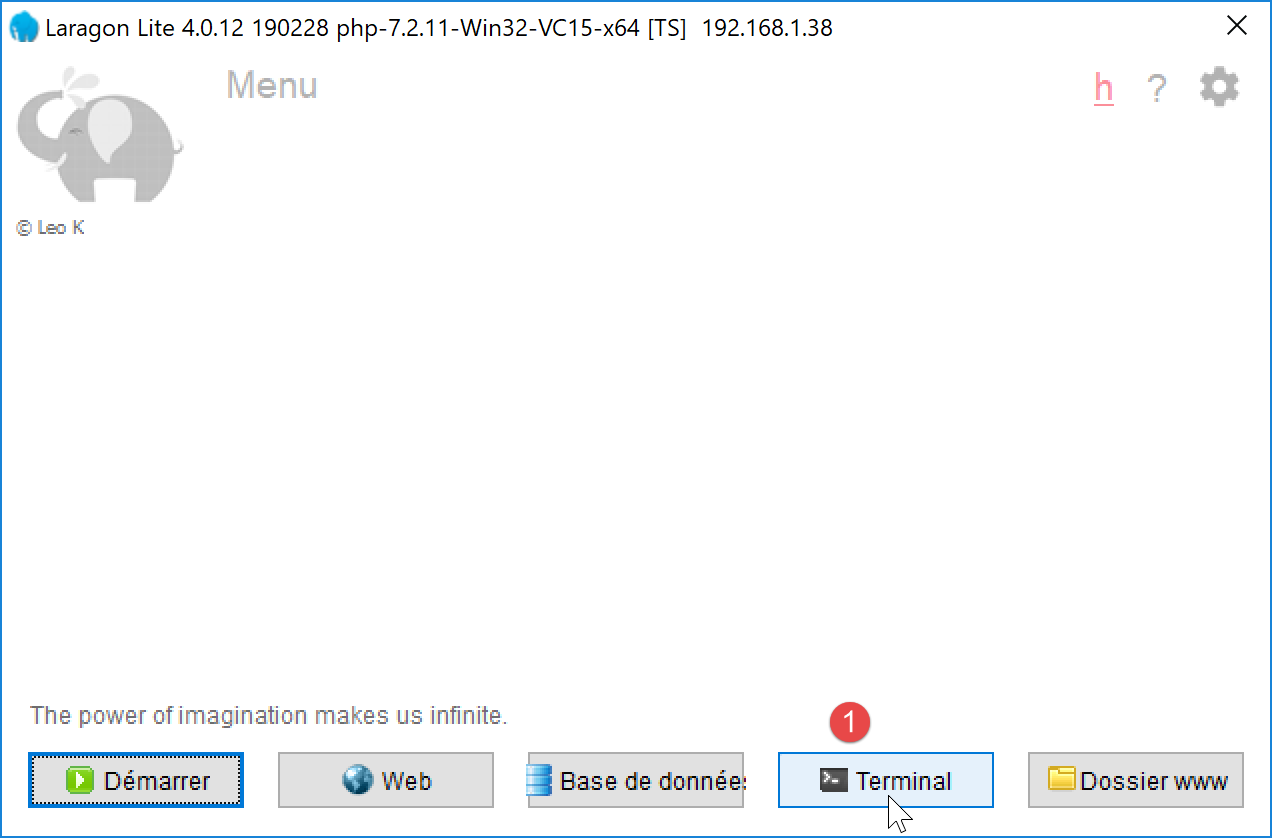
- 在 [1] 中,打开终端;
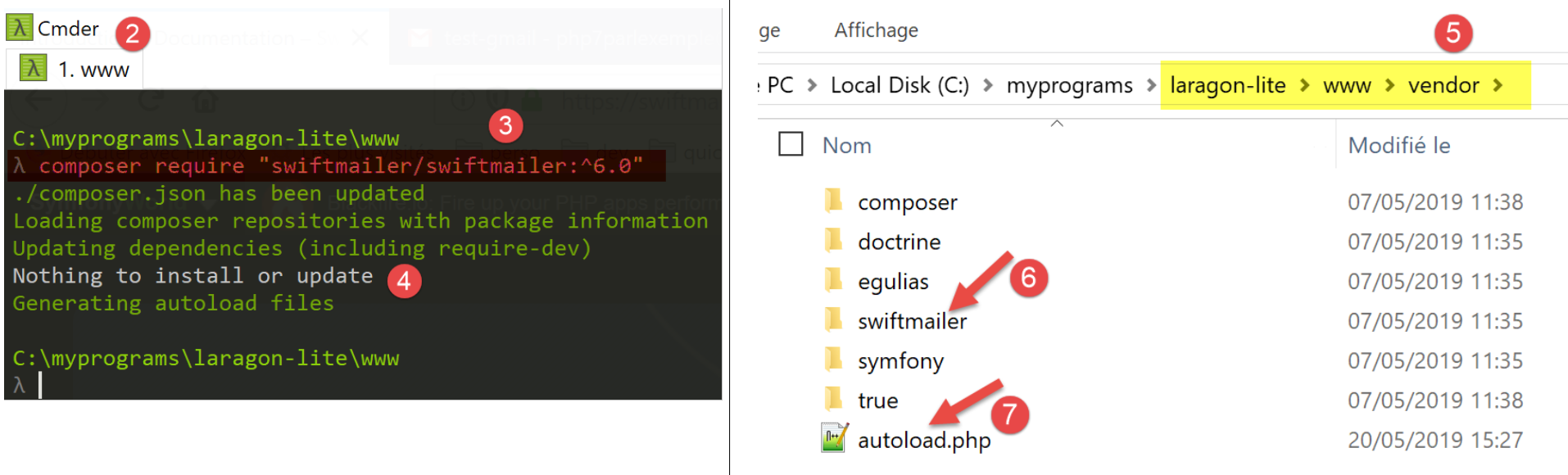
- 在 [3] 中,确认您当前位于 [<laragon>/www] 文件夹中,其中 <laragon> 是 Laragon 的安装文件夹;
- 在 [3] 中,输入所示命令(2019 年 5 月)。请在 URL [https://swiftmailer.symfony.com/docs/introduction.HTML] 上查看确切的命令;
- 在 [4] 中,提示未进行任何安装或更新。这是因为该库已安装在该机器上;
- 在 [5] 中,[swiftmailer] 的安装目录 [6];
- 在 [7] 中,这是一个我们在脚本中将需要的文件;
完成上述操作后,请确认 [<laragon>/www/vendor] [5] 文件夹已包含在 NetBeans 的 [包含路径] 中(参见相关章节)。
最后,[SwiftMailer] 库要求启用 PHP [mbstring] 扩展。为此,请检查 [php.ini] 文件(参见相关章节):
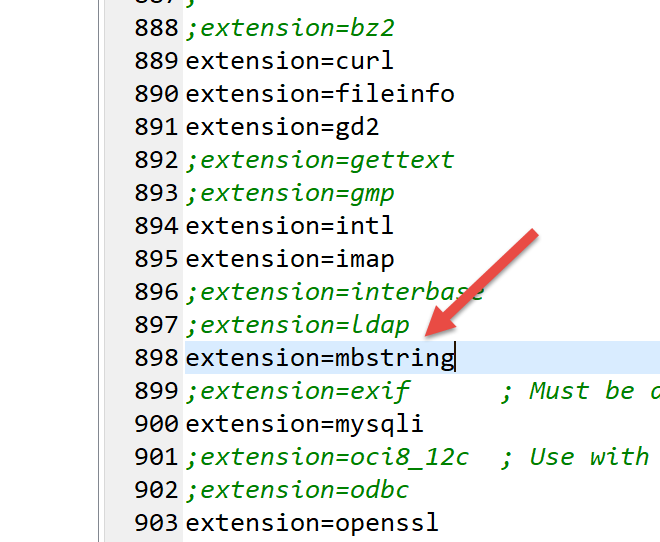
[smtp-02.php] 脚本将使用以下 JSON 配置文件 [config-smtp-02.json]:
该文件包含与 [config-smtp-01.json] 文件相同的字段,并额外增加了两个字段:
- [tls]:设置为 TRUE 表示必须使用安全连接连接到 SMTP 服务器。如果 [tls] 设置为 TRUE,则必须添加两个额外字段:
- [user]:用于验证连接的用户名;
- [password]: 用户的密码;
在本示例中,我们使用了用户 [php7parlexemple@gmail.com] 的凭据连接到 Gmail 服务器。请使用您自己的凭据;
- [attachments]:指定要附加到电子邮件中的文件名称;
[smtp-02.php] 脚本的代码如下:
<?php

// client SMTP (SendMail Transfer Protocol) for sending a message
//
// error management
//ini_set("error_reporting", E_ALL & ~ E_WARNING & ~E_DEPRECATED & ~E_NOTICE);
//ini_set("display_errors", "off");
//
// dependencies
require_once 'C:/myprograms/laragon-lite/www/vendor/autoload.php';
//
// mail settings
const CONFIG_FILE_NAME = "config-smtp-02.json";

// we retrieve the configuration
$mails = \json_decode(\file_get_contents(CONFIG_FILE_NAME), true);

// mail dispatch
foreach ($mails as $name => $infos) {
  // follow-up
  print "Envoi du mail [$name]\n";
  // mail dispatch
  $résultat = sendmail($name, $infos);
  // result display
  print "$résultat\n";
}//for
// end
exit;

//-----------------------------------------------------------------------

function sendmail($name, $infos) {

  // sends $infos[message] to smtp server $infos[smtp-server] on port $infos[smt-port]
  // if $infos[tls] is true, support TLS will be used
  // the mail is sent from $infos[from]
  // for the recipient $infos['to']
  // Document $info[attachment] is attached to the message
  // message has subject $infos[subject]
  //
  // message in HTML format
  $messageHTML = str_replace("\n", "<br/>", $infos["message"]);
  try {
    // message creation
    $message = (new \Swift_Message())
      // message subject
      ->setSubject($infos["subject"])
      // sender
      ->setFrom($infos["from"])
      // recipients with a dictionary (setTo/setCc/setBcc)
      ->setTo($infos["to"])
      // message text
      ->setBody($infos["message"])
      // html variant
      ->addPart("<b>$messageHTML</b>", 'text/html')
    ;
    // attachments
    foreach ($infos["attachments"] as $attachment) {
      // path of attachment
      $fileName = __DIR__ . $attachment;
      // check that the file exists
      if (file_exists($fileName)) {
        // attach the document to the message
        $message->attach(\Swift_Attachment::fromPath($fileName));
      } else {
        // error
        print "L'attachement [$fileName] n'existe pas\n";
      }
    }
    // protocol TLS ?
    if ($infos["tls"] === "TRUE") {
      // TLS
      $transport = (new \Swift_SmtpTransport($infos["smtp-server"], $infos["smtp-port"], 'tls'))
        ->setUsername($infos["user"])
        ->setPassword($infos["password"]);
    } else {
      // no TLS
      $transport = (new \Swift_SmtpTransport($infos["smtp-server"], $infos["smtp-port"]));
    }
    // the shipment manager
    $mailer = new \Swift_Mailer($transport);
    // sending the message
    $result = $mailer->send($message);
    // end
    return "Message [$name] envoyé";
  } catch (\Throwable $ex) {
    // error
    return "Erreur lors de l'envoi du message [$name] : " . $ex->getMessage();
  }
}
注释
- 第 10 行:我们加载位于 [<laragon>/www/vendor] 文件夹中的 [autoload.php] 文件,其中 <laragon> 是 Laragon 的安装目录。该文件会在首次使用 SwiftMailer 类时自动加载其类定义文件。这样就无需为我们将要使用的每个 SwiftMailer 类和接口都添加 [require] 语句;
- 第 32 行:新的 [sendmail] 函数,该函数有两个参数:
- [$name],用于区分不同消息;
- [$infos]:发送邮件给收件人所需的信息;
- 第 42 行:我们将生成两种版本的消息:一种是纯文本,另一种是 HTML 格式。在此,我们将换行符替换为 HTML 代码 <br/>;
- 第 45–69 行:我们使用 [\SwiftMessage] 类定义消息;
- 第 47 行:使用 [SwiftMessage→setSubject] 方法设置邮件主题;
- 第 49 行:使用 [SwiftMessage→setFrom] 方法设置消息发件人;
- 第 51 行:使用 [SwiftMessage→setTo] 方法设置消息收件人;
- 第 53 行:使用 [SwiftMessage→setBody] 方法设置邮件正文;
- 第 55 行:使用 [SwiftMessage→addPart] 方法设置消息的不同版本,此处为 HTML 格式的消息。当消息有多个版本时,邮件客户端会显示用户首选的版本;
- 第 58–69 行:[SwiftMessage→addAttachment] 方法(64)允许您向消息添加文件附件;
- 第 70–79 行:定义好待发送的消息后,必须指定发送方式。消息传输模式由 [\Swift_SmtpTransport] 类定义。至少需要提供两项信息:SMTP 服务器的名称和端口。还有第三项:SMTP 服务器是否需要安全认证?
- 第 73–75 行:用于与 SMTP 服务器建立安全连接的 [\Swift_SmtpTransport] 实例;
- 第 78 行:用于与 SMTP 服务器建立非安全连接的 [\Swift_SmtpTransport] 实例;
- 第 81 行:[\SwiftMailer] 类负责发送消息。必须向其传入所选的传输模式;
- 第 83 行:通过选定的 [\Swift_SmtpTransport] 发送 [\SwiftMessage] 消息。如果消息无法发送,[SwiftMailer→send] 方法将返回 FALSE;
- 第 86–89 行:一旦出现问题,[SwiftMailer] 库会立即抛出异常;
注意:请注意,[SwiftMailer] 库中类的命名空间为根 \。我们已明确标注了类 [\SwiftMessage、\Swift_SmtpTransport、\SwiftMailer] 以提醒您这一点;
结果
运行 [smtp-02.php] 脚本时,控制台将显示以下输出:
如果我们查看用户 [php7parlexemple] 的 Gmail 账户,会看到以下内容:
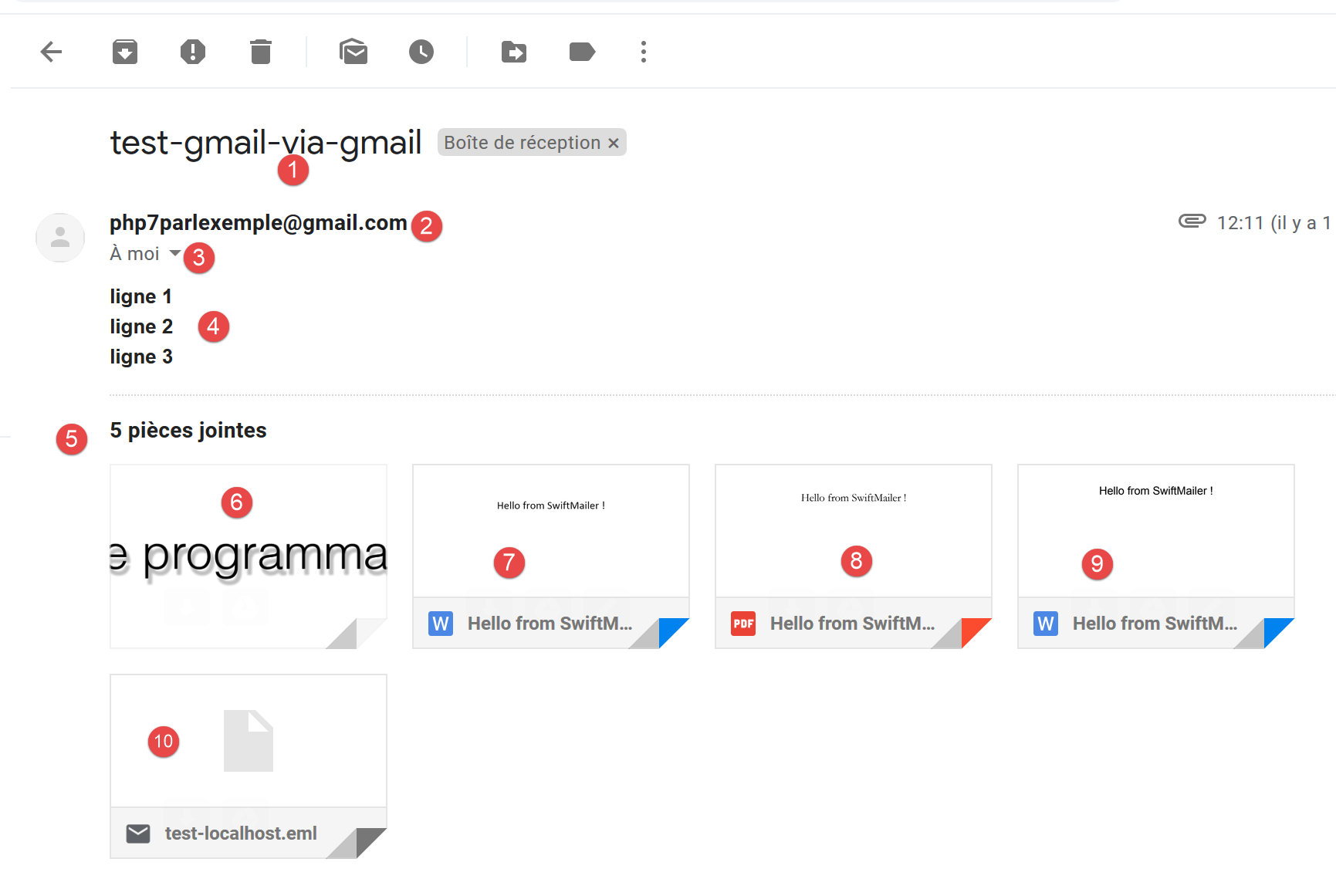
- 在 [1] 中,是主题;
- 在 [2] 处,是邮件主题;
- 在 [3] 处,收件人;
- 在 [4] 中,消息;
- 在 [5-10] 中,附件;
若您请求查看原始邮件,将获得以下文档:
Return-Path: <php7parlexemple@gmail.com>
Received: from [127.0.0.1] (lfbn-1-11924-110.w90-93.abo.wanadoo.fr. [90.93.230.110])
        by smtp.gmail.com with ESMTPSA id e14sm7773816wma.41.2019.05.26.03.11.53
        for <php7parlexemple@gmail.com>
        (version=TLS1_2 cipher=ECDHE-RSA-AES128-GCM-SHA256 bits=128/128);
        Sun, 26 May 2019 03:11:54 -0700 (PDT)
Message-ID: <e613c47a421a66e2cf7f8e319616ec49@swift.generated>
Date: Sun, 26 May 2019 10:11:53 +0000
Subject: test-gmail-via-gmail
From: php7parlexemple@gmail.com
To: php7parlexemple@gmail.com
MIME-Version: 1.0
Content-Type: multipart/mixed; boundary="_=_swift_1558865513_a3a939017128a4cfb867e968bce5df49_=_"

--_=_swift_1558865513_a3a939017128a4cfb867e968bce5df49_=_
Content-Type: multipart/alternative; boundary="_=_swift_1558865513_43c6d2a54065e4917fb06e3327f8d927_=_"

--_=_swift_1558865513_43c6d2a54065e4917fb06e3327f8d927_=_
Content-Type: text/plain; charset=utf-8
Content-Transfer-Encoding: quoted-printable

ligne 1
ligne 2
ligne 3

--_=_swift_1558865513_43c6d2a54065e4917fb06e3327f8d927_=_
Content-Type: text/HTML; charset=utf-8
Content-Transfer-Encoding: quoted-printable

<b>ligne 1<br/>ligne 2<br/>ligne 3</b>

--_=_swift_1558865513_43c6d2a54065e4917fb06e3327f8d927_=_--
--_=_swift_1558865513_a3a939017128a4cfb867e968bce5df49_=_
Content-Type: application/vnd.openxmlformats-officedocument.wordprocessingml.document; name="Hello from SwiftMailer.docx"
Content-Transfer-Encoding: base64
Content-Disposition: attachment; filename="Hello from SwiftMailer.docx"


--_=_swift_1558865513_a3a939017128a4cfb867e968bce5df49_=_
Content-Type: application/pdf; name="Hello from SwiftMailer.pdf"
Content-Transfer-Encoding: base64
Content-Disposition: attachment; filename="Hello from SwiftMailer.pdf"


--_=_swift_1558865513_a3a939017128a4cfb867e968bce5df49_=_
Content-Type: application/vnd.oasis.opendocument.text; name="Hello from SwiftMailer.odt"
Content-Transfer-Encoding: base64
Content-Disposition: attachment; filename="Hello from SwiftMailer.odt"


--_=_swift_1558865513_a3a939017128a4cfb867e968bce5df49_=_
Content-Type: image/png; name="Cours-Tutoriels-Serge-Tahé-1568x268.png"
Content-Transfer-Encoding: base64
Content-Disposition: attachment; filename="Cours-Tutoriels-Serge-Tahé-1568x268.png"


--_=_swift_1558865513_a3a939017128a4cfb867e968bce5df49_=_
Content-Type: message/rfc822; name=test-localhost.eml
Content-Transfer-Encoding: base64
Content-Disposition: attachment; filename=test-localhost.eml

Return-Path: guest@localhost
Received: from [127.0.0.1] (localhost [127.0.0.1]) by DESKTOP-528I5CU with ESMTP ; Sat, 25 May 2019 09:48:23 +0200
Message-ID: <620f4628882b011feebe4faa30b45092@swift.generated>
Date: Sat, 25 May 2019 07:48:22 +0000
Subject: test-localhost
From: guest@localhost
To: guest@localhost
MIME-Version: 1.0
Content-Type: multipart/mixed; boundary="_=_swift_1558770502_c4b808c99c27ded04595bd11f4bad11b_=_"

--_=_swift_1558770502_c4b808c99c27ded04595bd11f4bad11b_=_
Content-Type: multipart/alternative; boundary="_=_swift_1558770503_3561ca315f33bd15ef6556e98db4a5b8_=_"

--_=_swift_1558770503_3561ca315f33bd15ef6556e98db4a5b8_=_
Content-Type: text/plain; charset=utf-8
Content-Transfer-Encoding: quoted-printable

j'ai =C3=A9t=C3=A9 invit=C3=A9 =C3=A0 d=C3=A9je=C3=BBner

--_=_swift_1558770503_3561ca315f33bd15ef6556e98db4a5b8_=_
Content-Type: text/HTML; charset=utf-8
Content-Transfer-Encoding: quoted-printable

<b>j'ai =C3=A9t=C3=A9 invit=C3=A9 =C3=A0 d=C3=A9je=C3=BBner</b>

--_=_swift_1558770503_3561ca315f33bd15ef6556e98db4a5b8_=_--
--_=_swift_1558770502_c4b808c99c27ded04595bd11f4bad11b_=_
Content-Type: application/vnd.openxmlformats-officedocument.wordprocessingml.document; name="Hello from SwiftMailer.docx"
Content-Transfer-Encoding: base64
Content-Disposition: attachment; filename="Hello from SwiftMailer.docx"


--_=_swift_1558770502_c4b808c99c27ded04595bd11f4bad11b_=_
Content-Type: application/pdf; name="Hello from SwiftMailer.pdf"
Content-Transfer-Encoding: base64
Content-Disposition: attachment; filename="Hello from SwiftMailer.pdf"


--_=_swift_1558770502_c4b808c99c27ded04595bd11f4bad11b_=_
Content-Type: application/vnd.oasis.opendocument.text; name="Hello from SwiftMailer.odt"
Content-Transfer-Encoding: base64
Content-Disposition: attachment; filename="Hello from SwiftMailer.odt"


--_=_swift_1558770502_c4b808c99c27ded04595bd11f4bad11b_=_
Content-Type: image/png; name="Cours-Tutoriels-Serge-Tahé-1568x268.png"
Content-Transfer-Encoding: base64
Content-Disposition: attachment; filename="Cours-Tutoriels-Serge-Tahé-1568x268.png"


--_=_swift_1558770502_c4b808c99c27ded04595bd11f4bad11b_=_--

--_=_swift_1558865513_a3a939017128a4cfb867e968bce5df49_=_--
- 第9行:主题;
- 第10行:发件人;
- 第 11 行:收件人;
- 第13行:消息包含多个由 [--_=_swift_xx] 标签分隔的段落;
- 第 19–24 行:纯文本消息;
- 第 27–30 行:HTML 格式的邮件正文;
- 第 34–36 行:附件 [Hello from SwiftMailer.docx];
- 第 40–42 行:附件 [Hello from SwiftMailer.pdf];
- 第 46–48 行:附件 [Hello from SwiftMailer.odt];
- 第 58–60 行:附件 [Cours-Tutoriels-Serge-Tahé-1568x268.png];
- 第 58–60 行:附件 [test-localhost.eml];
- 第 62–114 行:附件 [test-localhost.eml] 本身是一封邮件,其内容显示在第 62–114 行。请注意,这封邮件本身包含附件;
16.6. POP3(邮局协议)和 IMAP(互联网邮件访问协议)
16.6.1. 简介
要读取存储在邮件服务器上的电子邮件,有两种协议:
- POP3(邮局协议),历史上首个协议,但如今已很少使用;
- IMAP(互联网邮件访问协议),该协议比 POP3 更新,目前应用最为广泛;
为了探讨 POP3 协议,我们将采用以下架构:
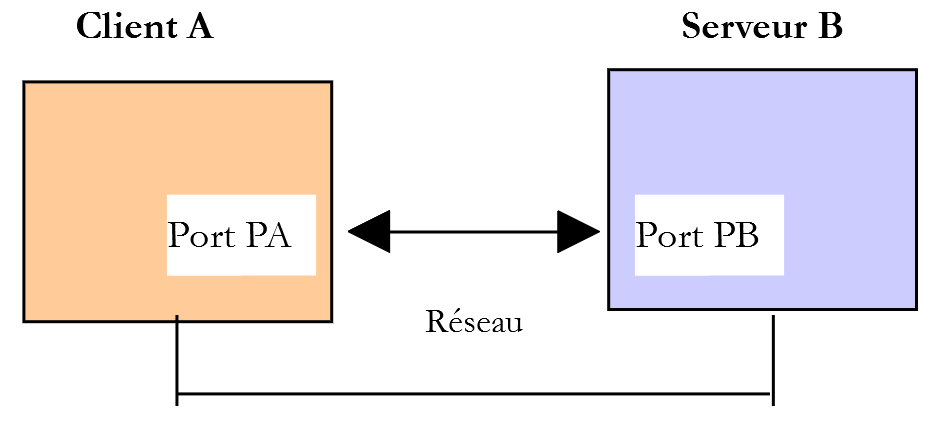
- [服务器 B] 将作为本地 POP3/IMAP 服务器,由 [hMailServer] 邮件服务器实现;
- [客户端 A] 将以多种形式呈现,作为 POP3/IMAP 客户端:
- 用于探索 POP3 协议的 [RawTcpClient] 客户端;
- 一个模拟 [RawTcpClient] 客户端 POP3 协议的 PHP 脚本;
- 一个使用 PHP IMAP 库的 PHP 脚本,该库支持实现 IMAP 和 POP3 客户端;
16.6.2. 探索 POP3 协议
首先,我们使用 [smtp-01.php] 脚本向用户 [guest@localhost] 发送一封电子邮件。如果您已运行了与该脚本相关的测试,该用户应该已收到邮件,但我们无法对此进行验证。要向其发送新邮件,请使用以下配置文件 [config-smtp-01.json],例如:
现在让我们看看如何使用 [RawTcpClient] 客户端读取用户 [guest@localhost] 的邮箱:
C:\Data\st-2019\dev\php7\php5-exemples\exemples\inet\utilitaires>RawTcpClient --quit bye localhost 110
Client [DESKTOP-528I5CU:55593] connecté au serveur [localhost-110]
Tapez vos commandes (bye pour arrêter) :
<-- [+OK Bienvenue sur sergetahe@localhost]
USER guest@localhost
<-- [+OK Send your password]
PASS guest
<-- [+OK Mailbox locked and ready]
LIST
<-- [+OK 2 messages (610 octets)]
<-- [1 305]
<-- [2 305]
<-- [.]
RETR 1
<-- [+OK 305 octets]
<-- [Return-Path: guest@localhost]
<-- [Received: from DESKTOP-528I5CU.home (localhost [127.0.0.1])]
<-- [   by DESKTOP-528I5CU with ESMTP]
<-- [   ; Tue, 21 May 2019 12:59:11 +0200]
<-- [Message-ID: <1356373A-33C9-4F31-BA43-2B119E128CE3@DESKTOP-528I5CU>]
<-- [From: guest@localhost]
<-- [To: guest@localhost]
<-- [Subject: to localhost via localhost]
<-- []
<-- [ligne 1]
<-- [ligne 2]
<-- [ligne 3]
<-- [.]
DELE 1
<-- [+OK msg deleted]
LIST
<-- [+OK 1 messages (305 octets)]
<-- [2 305]
<-- [.]
DELE 2
<-- [+OK msg deleted]
LIST
<-- [+OK 0 messages (0 octets)]
<-- [.]
QUIT
<-- [+OK POP3 server saying goodbye…]
Perte de la connexion avec le serveur…
- 第 1 行:POP3 服务器通常使用 110 端口。本例中也是如此;
- 第 5 行:[USER] 命令用于指定要读取其邮箱的用户;
- 第 7 行:[PASS] 命令用于指定密码;
- 第 9 行:[LIST] 命令用于请求该用户邮箱中的邮件列表;
- 第 14 行:[RETR] 命令用于请求指定编号的邮件;
- 第29行:[DELE] 命令用于删除指定编号的消息;
- 第 40 行:[QUIT] 命令告知服务器您已结束;
服务器的响应可能有以下几种形式:
- 以 [+OK] 开头的单行,表示客户端的上一条命令执行成功;
- 以 [-ERR] 开头的单行,表示客户端的上一条命令失败;
- 多行响应,其中:
- 第一行以 [+OK] 开头;
- 最后一行仅包含一个句点;
16.6.3. 一个实现 POP3 协议的基本脚本
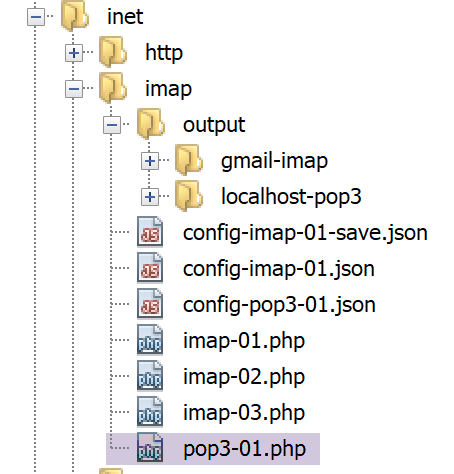
由于 POP3 协议与 SMTP 协议具有相同的结构,因此 [pop3-01.php] 脚本是 [smtp-01.php] 脚本的移植版本。它将拥有以下配置文件 [config-pop3-01.json]:
- 第3-4行:要查询的POP3服务器是本地服务器 [hMailServer];
- 第5-6行:我们要读取用户 [guest@localhost] 的邮箱;
- 第 7 行:我们将读取最多 5 封邮件;
脚本 [pop3-01.php] 如下:
<?php

// client POP3 (Post Office Protocol) for reading mailbox messages
// POP3 client-server communication protocol
// -> client connects to smtp server port 110
// <- server sends him a welcome message
// -> customer sends command USER user
// <- server responds OK or not
// -> customer sends PASS mot_de_passe order
// <- server responds OK or not
// -> customer sends LIST command
// <- server responds OK or not
// -> customer sends command RETR n° for each email
// <- server responds OK or not. If OK sends the requested mail content
// -> server sends all the mail lines and ends with a line containing the
// single character .
// -> customer sends command DELE n° to delete an e-mail
// <- server responds OK or not
// // -> client sends QUIT command to end dialog with server
// <- server responds OK or not
// server responses have the form +OK text where -ERR text
// The answer may consist of several lines. In this case, the last line consists of a single dot
// text lines exchanged must end with the characters RC(#13) and LF(#10)
//
//  POP3 client (SendMail Transfer Protocol) for reading e-mails
//
// error management
//ini_set("error_reporting", E_ALL & ~ E_WARNING & ~E_DEPRECATED & ~E_NOTICE);
//ini_set("display_errors", "off");
//
// strict adherence to declared types of function parameters
declare (strict_types=1);
//
// mail settings
const CONFIG_FILE_NAME = "config-pop3-01.json";

// we retrieve the configuration
$mailboxes = \json_decode(\file_get_contents(CONFIG_FILE_NAME), true);

// letterbox reading
foreach ($mailboxes as $name => $infos) {
  // follow-up
  print "Lecture de la boîte à lettres [$name]\n";
  // letterbox reading
  $résultat = readmail($name, $infos, TRUE);
  // result display
  print "$résultat\n";
}//for
// end
exit;

//readmail
//-----------------------------------------------------------------------

function readmail(string $name, array $infos, bool $verbose = TRUE): string {
  // reads the contents of the mailbox [$name]
  // import all messages
  // each message is deleted afterb being read
  // If $verbose=1, tracks client-server exchanges
  //
  // open a connection with the SMTP server
  $connexion = fsockopen($infos["server"], (int) $infos["port"]);
  // return if error
  if ($connexion === FALSE) {
    return sprintf("Echec de la connexion au site (%s,%s) : %s", $infos["smtp-server"], $infos["smtp-port"]);
  }
  // $connexion represents a bidirectional communication flow
  // between the client (this program) and the pop3 server contacted
  // this channel is used for the exchange of orders and information
  // after connection, the server sends a welcome message which is read as follows
  $erreur = sendCommand($connexion, "", $verbose, TRUE);
  if ($erreur !== "") {
    // closing the connection
    fclose($connexion);
    // return
    return $erreur;
  }
  // cmde USER
  $erreur = sendCommand($connexion, "USER {$infos["user"]}", $verbose, TRUE);
  if ($erreur !== "") {
    // closing the connection
    fclose($connexion);
    // return
    return $erreur;
  }
  // cmde PASS
  $erreur = sendCommand($connexion, "PASS {$infos["password"]}", $verbose, TRUE);
  if ($erreur !== "") {
    // closing the connection
    fclose($connexion);
    // return
    return $erreur;
  }
  // cmde LIST
  $premièreLigne = "";
  $erreur = sendCommand($connexion, "LIST", $verbose, TRUE, $premièreLigne);
  if ($erreur !== "") {
    // closing the connection
    fclose($connexion);
    // return
    return $erreur;
  }
  // analyze 1st line to determine number of messages
  $champs = [];
  preg_match("/^\+OK (\d+)/", $premièreLigne, $champs);
  $nbMessages = (int) $champs[1];
  // we loop on the messages
  $iMessage = 0;
  while ($iMessage < $nbMessages && $iMessage < $infos["maxmails"]) {
    // cmde RETR
    $erreur = sendCommand($connexion, "RETR " . ($iMessage + 1), $verbose, TRUE);
    if ($erreur !== "") {
      // closing the connection
      fclose($connexion);
      // return
      return $erreur;
    }
    // cmde DELE
    $erreur = sendCommand($connexion, "DELE " . ($iMessage + 1), $verbose, TRUE);
    if ($erreur !== "") {
      // closing the connection
      fclose($connexion);
      // return
      return $erreur;
    }
    // next msg
    $iMessage++;
  }
  // cmde QUIT
  $erreur = sendCommand($connexion, "QUIT", $verbose, TRUE);
  if ($erreur !== "") {
    // closing the connection
    fclose($connexion);
    // return
    return $erreur;
  }
  // end
  fclose($connexion);
  return "Terminé";
}

// --------------------------------------------------------------------------

function sendCommand($connexion, string $commande, bool $verbose, bool $withRCLF, string &$premièreLigne = ""): string {
  // sends $commande to the $connexion channel
  // verbose mode if $verbose=1
  // if $withRCLF=1, adds sequence RCLF to exchange
  // puts the 1st line of the answer in [$premièreLigne]
  // ]
  // data
  if ($withRCLF) {
    $RCLF = "\r\n";
  } else {
    $RCLF = "";
  }
  // send cmde if $commande not empty
  if ($commande !== "") {
    fputs($connexion, "$commande$RCLF");
    // possible echo
    if ($verbose) {
      affiche($commande, 1);
    }
  }//if
  // reading response
  $réponse = fgets($connexion, 1000);
  // memorize the 1st line
  $premièreLigne = $réponse;
  // possible echo
  if ($verbose) {
    affiche($réponse, 2);
  }
  // error code recovery
  $codeErreur = substr($réponse, 0, 1);
  if ($codeErreur === "-") {
    // there has been an error
    return substr($réponse, 5);
  }
  // special cases of cmdes RETR and LIST with multi-line responses
  $commande = substr(strtolower($commande), 0, 4);
  if ($commande === "list" || $commande === "retr") {
    // last line of the answer?
    $champs = [];
    $match = preg_match("/^\.\s+$/", $réponse, $champs);
    while (!$match) {
      // reading response
      $réponse = fgets($connexion, 1000);
      // possible echo
      if ($verbose) {
        affiche($réponse, 2);
      }
      // response analysis
      $champs = [];
      $match = preg_match("/^\.\s+$/", $réponse, $champs);
    }//while
  }
  // error-free return
  return "";
}

// --------------------------------------------------------------------------

function affiche($échange, $sens) {
  // displays $échange on screen
  // if $sens=1 displays -->$echange
  // if $sens=2 displays <-- $échange without last 2 characters RCLF
  switch ($sens) {
    case 1:
      print "--> [$échange]\n";
      break;
    case 2:
      $L = strlen($échange);
      print "<-- [" . substr($échange, 0, $L - 2) . "]\n";
      break;
  }//switch
}
注释
如前所述,[pop3-01.php] 是我们之前讨论过的 [smtp-01.php] 脚本的移植版本。我们仅就主要差异进行说明:
- 第 55 行:[readmail] 函数负责从邮箱中读取邮件。该邮箱的登录凭据存储在 [$infos] 字典中;
- 第 61–66 行:建立与 POP3 服务器的连接;
- 第 71–77 行:读取服务器发送的欢迎信息;
- 第 78–85 行:发送 [USER] 命令以指定需要获取其邮件的用户;
- 第 86–93 行:发送 [PASS] 命令以提供用户的密码;
- 第 94–102 行:发送 [LIST] 命令以确定该用户邮箱中包含多少封邮件。
- 第 96 行:将参数 [$firstLine] 添加到 [readmail] 函数的参数中。在对 LIST 命令的响应第一行中,服务器会指出邮箱中包含多少封邮件;
- 第 104–106 行:从响应的第一行中提取邮件数量;
- 第 109–128 行:循环遍历每封邮件。对于每封邮件,我们发出两条命令:
- RETR i:用于检索第 i 条邮件(第 111–117 行);
- DELE i:在读取后将其删除(第 118–125 行);
- 第 129–136 行:发送 [QUIT] 命令告知服务器操作已完成;
- 第 178–194 行:对于 [LIST] 和 [RETR] 命令,服务器的响应跨多行,最后一行仅包含一个句点;
结果
执行后,得到以下结果:
Lecture de la boîte à lettres [localhost:110]
<-- [+OK Bienvenue sur sergetahe@localhost]
--> [USER guest@localhost]
<-- [+OK Send your password]
--> [PASS guest]
<-- [+OK Mailbox locked and ready]
--> [LIST]
<-- [+OK 1 messages (305 octets)]
<-- [1 305]
<-- [.]
--> [RETR 1]
<-- [+OK 305 octets]
<-- [Return-Path: guest@localhost]
<-- [Received: from DESKTOP-528I5CU.home (localhost [127.0.0.1])]
<-- [    by DESKTOP-528I5CU with ESMTP]
<-- [    ; Tue, 21 May 2019 14:25:39 +0200]
<-- [Message-ID: <5F912826-F9C4-41B6-BDA7-4A29537781C9@DESKTOP-528I5CU>]
<-- [From: guest@localhost]
<-- [To: guest@localhost]
<-- [Subject: to localhost via localhost]
<-- []
<-- [ligne ]
<-- [ligne ]
<-- [ligne 3]
<-- [.]
--> [DELE 1]
<-- [+OK msg deleted]
--> [QUIT]
<-- [+OK POP3 server saying goodbye…]
Terminé
Done.
这里是一个基础的 POP3 客户端,它缺少某些功能:
- 与安全POP3服务器通信的能力;
- 读取邮件附件的能力;
我们将使用 PHP 的 [imap] 函数来实现第一项功能。
16.6.4. 使用 PHP 的 [imap] 函数实现的 POP3/IMAP 客户端
首先,我们需要验证当前使用的 PHP 版本是否支持 [imap] 函数。我们打开链接部分中提到的 [php.ini] 文件,查找提及 [imap] 的行:
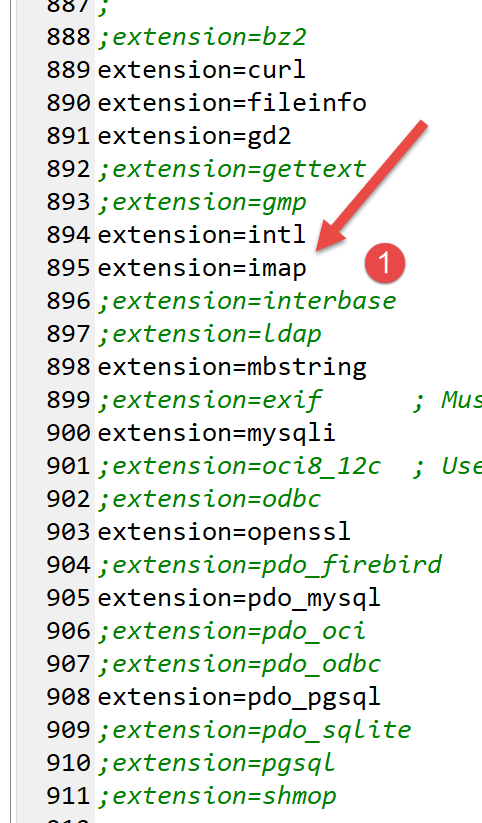
第 895 行:确认 [imap] 扩展已启用。
[imap-01.php] 脚本将使用以下 JSON 文件 [config-imap-01.json]:
[config-imap-01.json] 文件定义了一个要连接的 IMAP/POP3 服务器数组。每个元素都是一个 [键:值] 结构,其中:
- [key]:是要连接的服务器。这里有两个:
- [{imap.gmail.com:993/imap/ssl/novalidate-cert}INBOX]:指监听 993 端口的 [imap.gmail.com] 服务器。客户端/服务器协议为 IMAP。/ssl 参数表示 ,表明客户端与服务器的通信是安全的。/novalidate-cert 参数指示客户端不要验证服务器发送的安全证书。 最后,一个 IMAP 服务器管理着单个用户的若干邮箱。通过在 IMAP 服务器 URL 中指定 INBOX,我们表明我们关注名为 INBOX 的邮箱,新邮件通常会发送到该邮箱;
- [{localhost:110/pop3}INBOX]:指在 110 端口监听的 [localhost] 服务器。此处的客户端/服务器协议为 POP3;
- [value]:是一个字典,用于指定以下内容:
- [imap-server]:IMAP 或 POP3 服务器的名称;
- [imap-port]:IMAP 或 POP3 服务器的端口;
- [user]:您要读取其邮箱的所有者;
- [密码]:用户的密码;
- [输出目录]:应保存消息的文件夹;
- [prefix]: 邮件的文件名前缀,格式为 prefixN,其中 N 代表邮件编号;
- [pop3]: 布尔值,设为 TRUE 表示使用 POP3 协议。在此情况下,读取邮件后该邮件将被删除。这是 POP3 服务器通常的工作方式:已读邮件不会保留在服务器上;
[imap-01.php] 脚本如下:
<?php

// IMAP (Internet Message Access Protocol) client for reading e-mails
//
// strict adherence to declared types of function parameters
declare (strict_types=1);
// error management
error_reporting(E_ALL & ~ E_WARNING & ~E_DEPRECATED & ~E_NOTICE);
//ini_set("display_errors", "off");
//
//
// mail reading parameters
const CONFIG_FILE_NAME = "config-imap-01.json";

// we retrieve the configuration
$mailboxes = \json_decode(\file_get_contents(CONFIG_FILE_NAME), true);

// reading mailboxes
foreach ($mailboxes as $name => $infos) {
  // follow-up
  print "------------Lecture de la boîte à lettres [$name]\n";
  // reading the mailbox
  readmailbox($name, $infos);
}
// end
exit;

//-----------------------------------------------------------------------

function readmailbox(string $name, array $infos): void {
  // Connection attempt
  $imapResource = imap_open($name, $infos["user"], $infos["password"]);
  // Test on the return of the imap_open() function
  if (!$imapResource) {
    // Failure
    print "La connexion au serveur [$name] a échoué : " . imap_last_error() . "\n";
  } else {
    // Connection established
    print "Connexion établie avec le serveur [$name].\n";
    // total messages in mailbox
    $nbmsg = imap_num_msg($imapResource);
    print "Il y a [$nbmsg] messages dans la boîte à lettres [$name]\n";
    // unread messages in current mailbox
    if ($nbmsg > 0) {
      print "Récupération de la liste des messages non lus de la boîte à lettres [$name]\n";
      $msgNumbers = imap_search($imapResource, 'UNSEEN');
      if ($msgNumbers === FALSE) {
        print "Il n'y a pas de nouveaux messages dans la boîte à lettres [$name]\n";
      } else {
        foreach ($msgNumbers as $msgNumber) {
          // we retrieve information on message n° $msgNumber
          $infosMail = imap_headerinfo($imapResource, $msgNumber);
          if ($infosMail === FALSE) {
            print "Statut du message n° [$msgNumber] de la boîte à lettres [$name] non récupéré : " . imap_last_error() . "\n";
          } else {
            print "Statut du message n° [$msgNumber] de la boîte à lettres [$name]\n";
            print_r($infosMail);
          }
          // we retrieve the body of message n° $msgNumber
          getMailBody($imapResource, $msgNumber, $infos);

          // if the protocol is POP3, we delete the message
          $pop3 = $infos["pop3"];
          if ($pop3 !== NULL) {
            // delete the message in two steps
            imap_delete($imapResource, $msgNumber);
            imap_expunge($imapResource);
          }
        }
      }
    }
  }
  // closing the connection
  $imapClose = imap_close($imapResource);
  if (!$imapClose) {
    // Failure
    print "La fermeture de la connexion a échoué : " . imap_last_error() . "\n";
  } else {
    // success
    print "Fermeture de la connexion réussie.\n";
  }
}

function getMailBody($imapResource, int $msgNumber, array $infos): void {
  // we retrieve the body of message n° $msgNumber
  $corpsMail = imap_body($imapResource, $msgNumber);

  print "Enregistrement du message dans le fichier {$infos["output-dir"]}/{$infos["prefix"]}$msgNumber\n";
  // create the folder if necessary
  if (!file_exists($infos["output-dir"])) {
    mkdir($infos["output-dir"]);
  }
  // record the message
  if (!file_put_contents($infos["output-dir"] . "/" . $infos["prefix"] . $msgNumber, $corpsMail)) {
    print "Echec de l'enregistrement\n";
  }
}
注释
- 第 19–24 行:遍历配置文件中找到的所有服务器;
- 第 32 行:[readmailbox] 函数读取 [$name] 中指定的邮箱;
- 第 32 行:建立 IMAP 连接;
- 第一个参数是要读取的邮箱的 IMAP URL;
- 第二个参数是邮箱所有者的用户名;
- 第三个参数是其密码;
如果邮箱的 IMAP URL 包含 /ssl 参数,[imap_open] 函数将建立安全连接;
- 第 41 行:[imap_num_msg] 函数返回邮箱中的邮件总数;
- 第 46 行:[imap_search] 函数允许您搜索特定邮件。此处,我们正在搜索尚未阅读(UNSEEN)的邮件。第二个参数是筛选条件。共有约二十种筛选条件。 [imap_search] 函数返回一个消息 ID 数组。这些 ID 可以有两种形式:序列号或消息 UID。默认情况下,[imap_search] 函数返回一个序列号数组。如果添加第三个参数 [SE_UID],则将返回消息 UID;
- 第 47 行:若未找到任何邮件,[imap_search] 函数将返回布尔值 FALSE;
- 第 50 行:我们遍历所有未读邮件;
- 第 52 行:邮件带有标题,可通过 [imap_headerinfo] 函数获取。该函数的第二个参数通常是邮件序列号。若要使用邮件 UID,请将第三个参数设置为 [FT_UID];
- 第 53 行:若 [imap_headerinfo] 函数无法完成任务,则返回 FALSE。否则,它将返回一个复合对象,我们通过第 57 行的 [print_r] 函数将其显示出来;
- 第 60 行:获取完头部信息后,我们现在使用 [imap_body] 函数获取邮件正文。如果该函数无法完成任务,则返回 NULL;
- 第 84–87 行:我们将邮件正文保存到本地文件中;
- 第 63–68 行:如果使用的协议是 POP3,则删除刚刚读取的消息:
- [imap_delete] 函数会将邮件标记为“待删除”,但不会立即删除;
- [imap_expunge] 函数会物理删除所有已被标记为待删除的消息;
- 第 74 行:我们关闭与 IMAP 服务器的连接。为此,我们使用 [imap_close] 函数;
- 第 86 行:[imap_body] 函数根据邮件 ID 检索邮件正文;
现在运行 [smtp-02.json] 脚本,使 Gmail 用户 [php7parlexemple] 和 [localhost] 用户 [guest] 收到新邮件。完成后,运行 [imap-01.php] 脚本读取他们的邮箱。
控制台输出如下:
------------Lecture de la boîte à lettres [{imap.gmail.com:993/imap/ssl/novalidate-cert}INBOX]
Connexion établie avec le serveur [{imap.gmail.com:993/imap/ssl/novalidate-cert}INBOX].
Il y a [27] messages dans la boîte à lettres [{imap.gmail.com:993/imap/ssl/novalidate-cert}INBOX]
Récupération de la liste des messages non lus de la boîte à lettres [{imap.gmail.com:993/imap/ssl/novalidate-cert}INBOX]
Statut du message n° [26] de la boîte à lettres [{imap.gmail.com:993/imap/ssl/novalidate-cert}INBOX]
stdClass Object
(
    [date] => Wed, 22 May 2019 10:08:24 +0000
    [Date] => Wed, 22 May 2019 10:08:24 +0000
    [subject] => test-gmail-via-gmail
    [Subject] => test-gmail-via-gmail
    [message_id] => <d8405cac62d57bd9c531ea79c146c72d@swift.generated>
    [toaddress] => php7parlexemple@gmail.com
    [to] => Array
        (
            [0] => stdClass Object
                (
                    [mailbox] => php7parlexemple
                    [host] => gmail.com
                )

        )

    [fromaddress] => php7parlexemple@gmail.com
    [from] => Array
        (
            [0] => stdClass Object
                (
                    [mailbox] => php7parlexemple
                    [host] => gmail.com
                )

        )

    [reply_toaddress] => php7parlexemple@gmail.com
    [reply_to] => Array
        (
            [0] => stdClass Object
                (
                    [mailbox] => php7parlexemple
                    [host] => gmail.com
                )

        )

    [senderaddress] => php7parlexemple@gmail.com
    [sender] => Array
        (
            [0] => stdClass Object
                (
                    [mailbox] => php7parlexemple
                    [host] => gmail.com
                )

        )

    [Recent] =>
    [Unseen] => U
    [Flagged] =>
    [Answered] =>
    [Deleted] =>
    [Draft] =>
    [Msgno] =>   26
    [MailDate] => 22-May-2019 10:08:29 +0000
    [Size] => 19086
    [udate] => 1558519709
)
Enregistrement du message dans le fichier output/gmail-imap/message-26
Statut du message n° [27] de la boîte à lettres [{imap.gmail.com:993/imap/ssl/novalidate-cert}INBOX]
stdClass Object
(
    …
)
Enregistrement du message dans le fichier output/gmail-imap/message-27
Fermeture de la connexion réussie.
------------Lecture de la boîte à lettres [{localhost:110/pop3}]
Connexion établie avec le serveur [{localhost:110/pop3}].
Il y a [1] messages dans la boîte à lettres [{localhost:110/pop3}]
Récupération de la liste des messages non lus de la boîte à lettres [{localhost:110/pop3}]
Statut du message n° [1] de la boîte à lettres [{localhost:110/pop3}]
stdClass Object
(
    …
)
Enregistrement du message dans le fichier output/localhost-pop3/message-1
Fermeture de la connexion réussie.
Done.
如果我们在看到这些结果后立即重新运行 [imap-01.php] 脚本,结果如下:
------------Lecture de la boîte à lettres [{imap.gmail.com:993/imap/ssl/novalidate-cert}INBOX]
Connexion établie avec le serveur [{imap.gmail.com:993/imap/ssl/novalidate-cert}INBOX].
Il y a [27] messages dans la boîte à lettres [{imap.gmail.com:993/imap/ssl/novalidate-cert}INBOX]
Récupération de la liste des messages non lus de la boîte à lettres [{imap.gmail.com:993/imap/ssl/novalidate-cert}INBOX]
Il n'y a pas de nouveaux messages dans la boîte à lettres [{imap.gmail.com:993/imap/ssl/novalidate-cert}INBOX]
Fermeture de la connexion réussie.
------------Lecture de la boîte à lettres [{localhost:110/pop3}]
Connexion établie avec le serveur [{localhost:110/pop3}].
Il y a [0] messages dans la boîte à lettres [{localhost:110/pop3}]
Fermeture de la connexion réussie.
- 第 3 行:Gmail 邮箱中的邮件数量保持不变,但已无新的未读邮件(第 5 行)。这表明前一次执行将已读邮件的状态从“未读”更改为“已读”;
- 第 9 行:用户邮箱 [guest@localhost] 中已无邮件。这是因为在上一次运行中,[localhost] 上已读的邮件随后被删除了;
邮件已保存在本地:
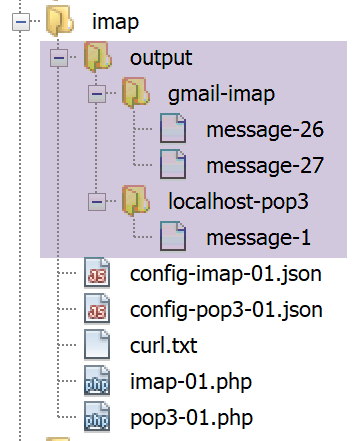
例如,如果查看 Gmail 中第 26 封邮件的内容,我们会看到如下内容:
--_=_swift_1558519704_f31b373d6e416dc88eb4db0e45fb3a95_=_
Content-Type: multipart/alternative;
 boundary="_=_swift_1558519706_9bffb48891232e50ab645383ca62242d_=_"


--_=_swift_1558519706_9bffb48891232e50ab645383ca62242d_=_
Content-Type: text/plain; charset=utf-8
Content-Transfer-Encoding: quoted-printable

ligne 1
ligne 2
ligne 3

--_=_swift_1558519706_9bffb48891232e50ab645383ca62242d_=_
Content-Type: text/HTML; charset=utf-8
Content-Transfer-Encoding: quoted-printable

<b>ligne 1<br/>ligne 2<br/>ligne 3</b>

--_=_swift_1558519706_9bffb48891232e50ab645383ca62242d_=_--


--_=_swift_1558519704_f31b373d6e416dc88eb4db0e45fb3a95_=_
Content-Type: application/pdf; name=Hello.pdf
Content-Transfer-Encoding: base64
Content-Disposition: attachment; filename=Hello.pdf

JVBERi0xLjUKJcOkw7zDtsOfCjIgMCBvYmoKPDwvTGVuZ3RoIDMgMCBSL0ZpbHRlci9GbGF0ZURl
Y29kZT4+CnN0cmVhbQp4nHWPuQoCQQyG+3mK1MKMyThHFoaAq7uF3cKAhdh5gIXgNr6+swcWshII
……………………………….…
OTQwODU4RDUzRDVENjU0QzJCNTM3Mjc+IF0KL0RvY0NoZWNrc3VtIC9DMjU3MUY1MUNDRjgwQ0Ex
ODU0OUI0RTQ4NDkwMDM3OAo+PgpzdGFydHhyZWYKMTIzMjYKJSVFT0YK

--_=_swift_1558519704_f31b373d6e416dc88eb4db0e45fb3a95_=_--
- 第11–13行:纯文本消息;
- 第19行:HTML消息;
- 第25行:附件;
让我们尝试改进这个脚本,使不同类型的邮件和附件分别存储在不同的文件中。
16.6.5. 改进的 POP3/IMAP 客户端
在 [imap-01.php] 脚本中,我们将第 i 条邮件的正文显示为一个文本文件,该文件同时包含不同类型的邮件内容以及各种附件的编码内容。通过解析邮件结构,我们可以识别出这些不同的部分。在 [imap-02.php] 脚本中,我们将 [getMailBody] 函数修改如下:
function getMailBody($imapResource, int $msgNumber, array $infos): void {
  // we retrieve the message structure
  $structure=imap_fetchstructure($imapResource, $msgNumber);
  // we display it
  print_r($structure);
}
- 第 3 行:我们请求消息结构;
- 第 5 行:我们显示它;
我们的目标是理解消息结构中所包含的信息,以便了解如何提取其中的各个部分。在本例中,消息由脚本 [smtp-02.php] 发送,其配置如下 [config-smtp-02.json]:
因此,一封带有五个附件的邮件被发送至 [guest@localhost](第 11–15 行)。[imap-02.php] 脚本在以下 [config-imap-01.json] 配置下被执行:
因此,系统使用了 [guest@localhost] 的邮箱(第 5 行)。随后,[imap-02.php] 脚本会显示由 [smtp-02.php] 发送的消息结构。该结构在控制台上显示如下:
stdClass Object
(
    [type] => 1
    [encoding] => 0
    [ifsubtype] => 1
    [subtype] => MIXED
    [ifdescription] => 0
    [ifid] => 0
    [bytes] => 253599
    [ifdisposition] => 0
    [ifdparameters] => 0
    [ifparameters] => 1
    [parameters] => Array
        (
            [0] => stdClass Object
                (
                    [attribute] => BOUNDARY
                    [value] => _=_swift_1558872295_5bc8ee2ca8b3723c0b39ca8bbfbebdeb_=_
                )

        )

    [parts] => Array
        (
            [0] => stdClass Object
                (
                    [type] => 1
                    [encoding] => 0
                    [ifsubtype] => 1
                    [subtype] => ALTERNATIVE
                    [ifdescription] => 0
                    [ifid] => 0
                    [bytes] => 429
                    [ifdisposition] => 0
                    [ifdparameters] => 0
                    [ifparameters] => 1
                    [parameters] => Array
                        (
                            [0] => stdClass Object
                                (
                                    [attribute] => BOUNDARY
                                    [value] => _=_swift_1558872296_1e51aae79dfca4e7e0af112489fe8734_=_
                                )

                        )

                    [parts] => Array
                        (
                            [0] => stdClass Object
                                (
                                    [type] => 0
                                    [encoding] => 4
                                    [ifsubtype] => 1
                                    [subtype] => PLAIN
                                    [ifdescription] => 0
                                    [ifid] => 0
                                    [lines] => 3
                                    [bytes] => 27
                                    [ifdisposition] => 0
                                    [ifdparameters] => 0
                                    [ifparameters] => 1
                                    [parameters] => Array
                                        (
                                            [0] => stdClass Object
                                                (
                                                    [attribute] => CHARSET
                                                    [value] => utf-8
                                                )

                                        )

                                )

                            [1] => stdClass Object
                                (
                                    [type] => 0
                                    [encoding] => 4
                                    [ifsubtype] => 1
                                    [subtype] => HTML
                                    [ifdescription] => 0
                                    [ifid] => 0
                                    [lines] => 1
                                    [bytes] => 40
                                    [ifdisposition] => 0
                                    [ifdparameters] => 0
                                    [ifparameters] => 1
                                    [parameters] => Array
                                        (
                                            [0] => stdClass Object
                                                (
                                                    [attribute] => CHARSET
                                                    [value] => utf-8
                                                )

                                        )

                                )

                        )

                )

            [1] => stdClass Object
                (
                    [type] => 3
                    [encoding] => 3
                    [ifsubtype] => 1
                    [subtype] => VND.OPENXMLFORMATS-OFFICEDOCUMENT.WORDPROCESSINGML.DOCUMENT
                    [ifdescription] => 0
                    [ifid] => 0
                    [bytes] => 16302
                    [ifdisposition] => 1
                    [disposition] => ATTACHMENT
                    [ifdparameters] => 1
                    [dparameters] => Array
                        (
                            [0] => stdClass Object
                                (
                                    [attribute] => FILENAME
                                    [value] => Hello from SwiftMailer.docx
                                )

                        )

                    [ifparameters] => 1
                    [parameters] => Array
                        (
                            [0] => stdClass Object
                                (
                                    [attribute] => NAME
                                    [value] => Hello from SwiftMailer.docx
                                )

                        )

                )

            [2] => stdClass Object
                (
                    [type] => 3
                    [encoding] => 3
                    [ifsubtype] => 1
                    [subtype] => PDF
                    [ifdescription] => 0
                    [ifid] => 0
                    [bytes] => 17514
                    [ifdisposition] => 1
                    [disposition] => ATTACHMENT
                    [ifdparameters] => 1
                    [dparameters] => Array
                        (
                            [0] => stdClass Object
                                (
                                    [attribute] => FILENAME
                                    [value] => Hello from SwiftMailer.pdf
                                )

                        )

                    [ifparameters] => 1
                    [parameters] => Array
                        (
                            [0] => stdClass Object
                                (
                                    [attribute] => NAME
                                    [value] => Hello from SwiftMailer.pdf
                                )

                        )

                )

            [3] => stdClass Object
                (
                    …
                )

            [4] => stdClass Object
                (
                    …

                )

            [5] => stdClass Object
                (
                    [type] => 2
                    [encoding] => 3
                    [ifsubtype] => 1
                    [subtype] => RFC822
                    [ifdescription] => 0
                    [ifid] => 0
                    [lines] => 1881
                    [bytes] => 146682
                    [ifdisposition] => 1
                    [disposition] => ATTACHMENT
                    [ifdparameters] => 1
                    [dparameters] => Array
                        (
                            [0] => stdClass Object
                                (
                                    [attribute] => FILENAME
                                    [value] => test-localhost.eml
                                )

                        )

                    [ifparameters] => 1
                    [parameters] => Array
                        (
                            [0] => stdClass Object
                                (
                                    [attribute] => NAME
                                    [value] => test-localhost.eml
                                )

                        )

                    [parts] => Array
                        (
                        …
                        )

                )

        )

)
评论
- PHP 文档中关于 [imap_fetch_structure] 函数的说明解释了该函数返回的对象中各个字段的含义:
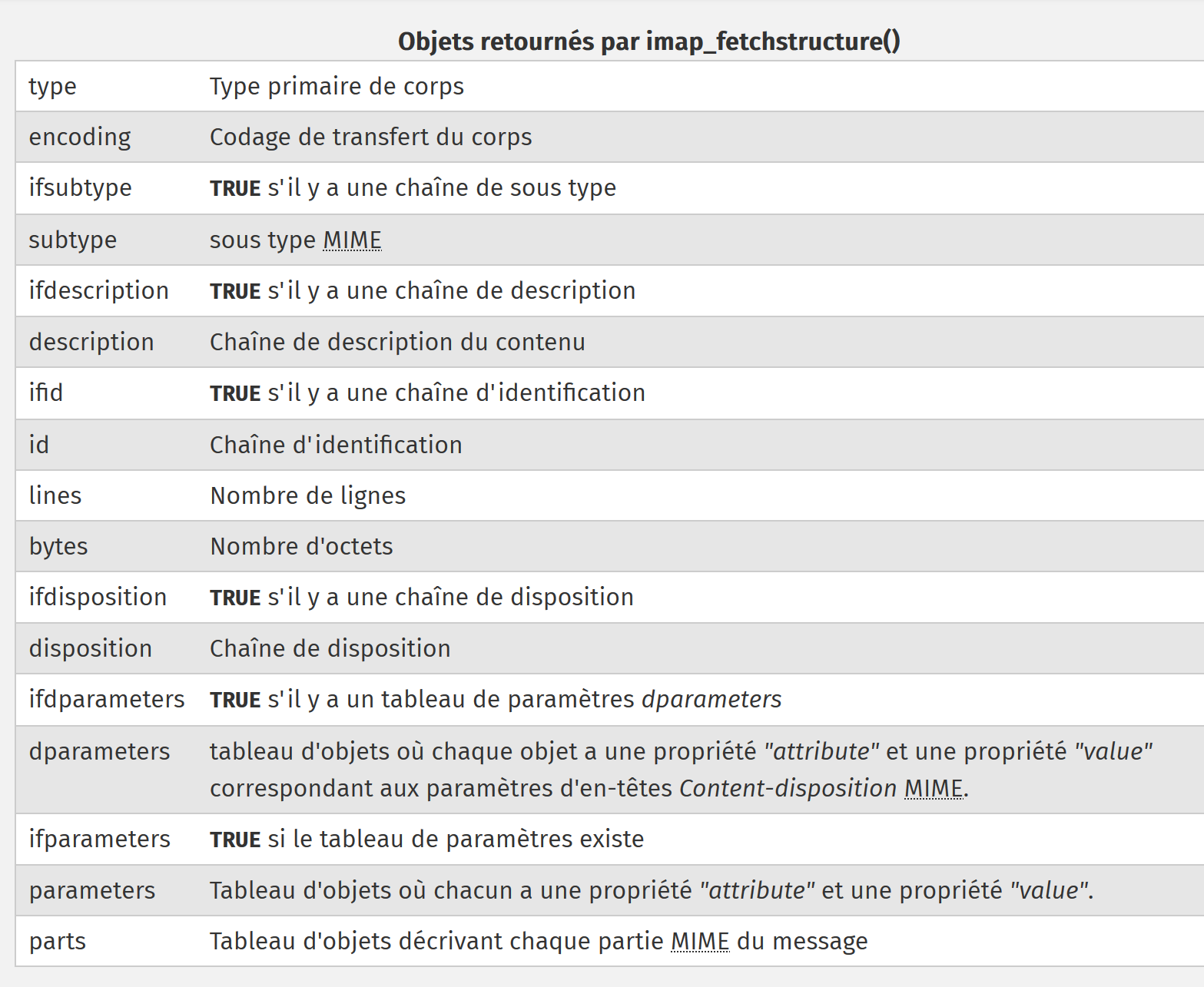
[type] 字段的数值具有以下含义:
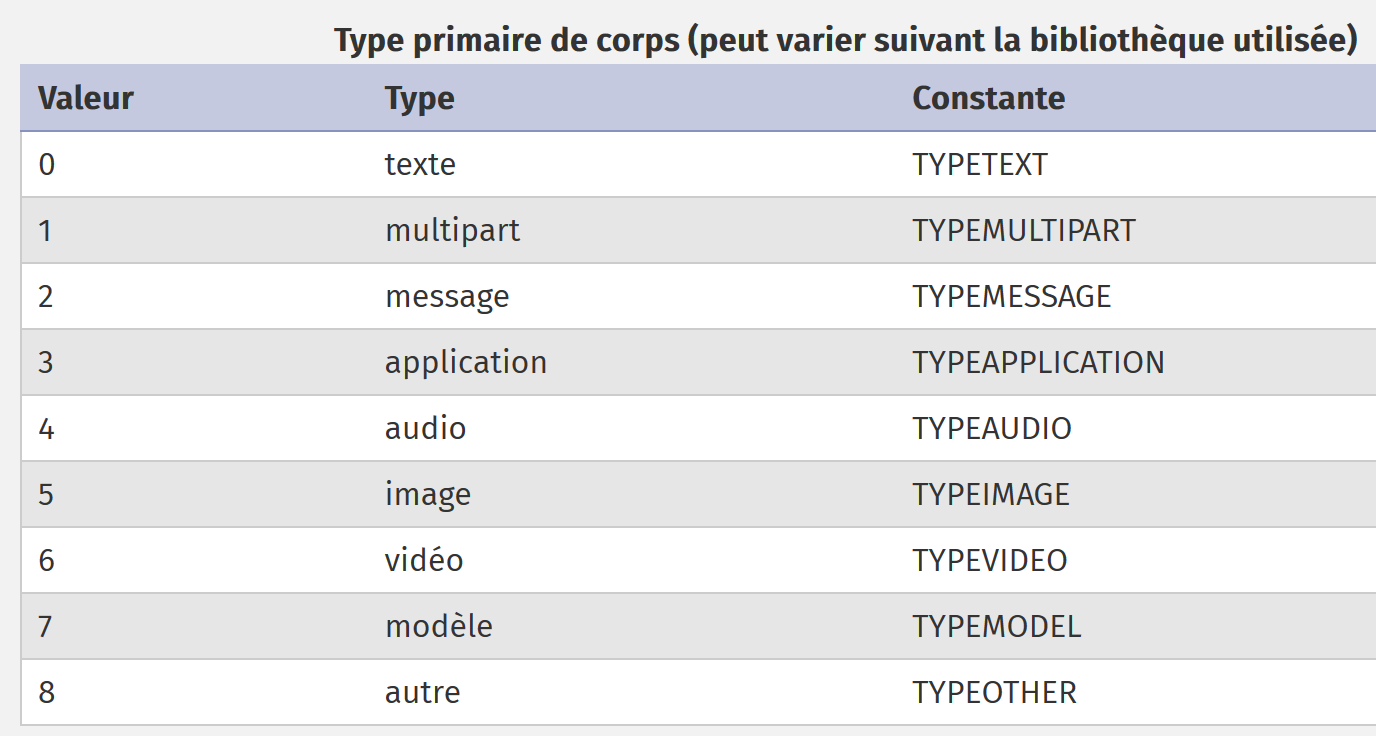
[encoding] 字段的数值含义如下:
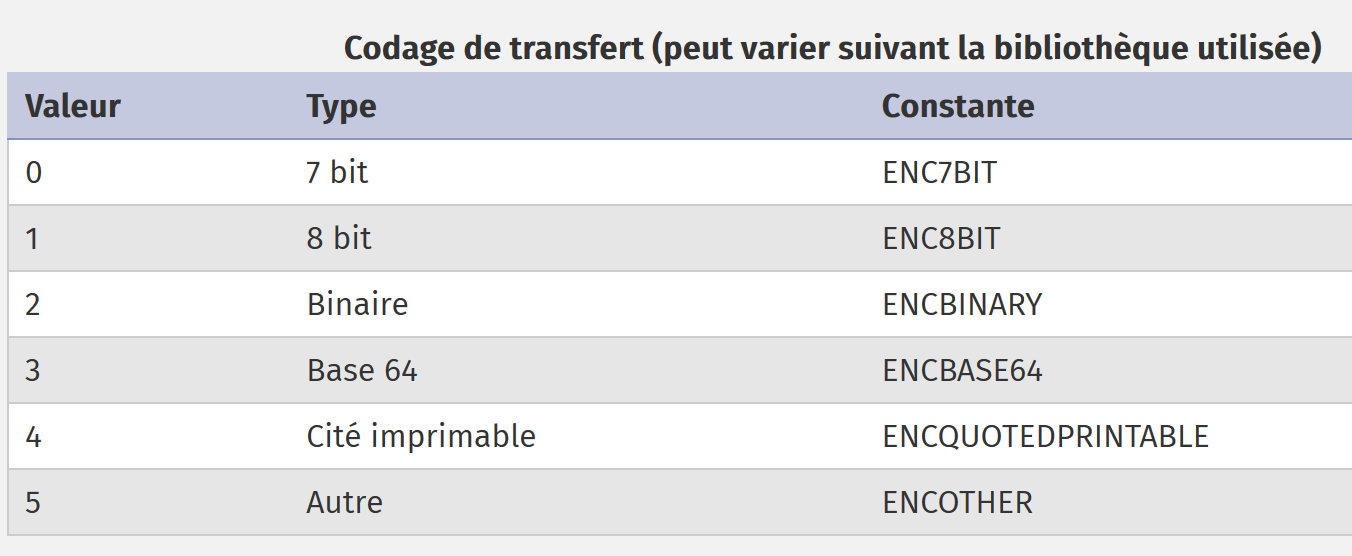
由 [imap-01.php] 记录的消息以以下内容开头:
Return-Path: <php7parlexemple@gmail.com>
Received: from [127.0.0.1] (lfbn-1-11924-110.w90-93.abo.wanadoo.fr. [90.93.230.110])
        by smtp.gmail.com with ESMTPSA id e14sm7773816wma.41.2019.05.26.03.11.53
        for <php7parlexemple@gmail.com>
        (version=TLS1_2 cipher=ECDHE-RSA-AES128-GCM-SHA256 bits=128/128);
        Sun, 26 May 2019 03:11:54 -0700 (PDT)
Message-ID: <e613c47a421a66e2cf7f8e319616ec49@swift.generated>
Date: Sun, 26 May 2019 10:11:53 +0000
Subject: test-gmail-via-gmail
From: php7parlexemple@gmail.com
To: php7parlexemple@gmail.com
MIME-Version: 1.0
Content-Type: multipart/mixed; boundary="_=_swift_1558865513_a3a939017128a4cfb867e968bce5df49_=_"

--_=_swift_1558865513_a3a939017128a4cfb867e968bce5df49_=_
Content-Type: multipart/alternative; boundary="_=_swift_1558865513_43c6d2a54065e4917fb06e3327f8d927_=_"

--_=_swift_1558865513_43c6d2a54065e4917fb06e3327f8d927_=_
Content-Type: text/plain; charset=utf-8
Content-Transfer-Encoding: quoted-printable

ligne 1
ligne 2
ligne 3

--_=_swift_1558865513_43c6d2a54065e4917fb06e3327f8d927_=_
Content-Type: text/HTML; charset=utf-8
Content-Transfer-Encoding: quoted-printable

<b>ligne 1<br/>ligne 2<br/>ligne 3</b>

--_=_swift_1558865513_43c6d2a54065e4917fb06e3327f8d927_=_--
--_=_swift_1558865513_a3a939017128a4cfb867e968bce5df49_=_
- 第15行和第33行界定了[multipart/mixed]消息(第m行);
- 第 18 行和第 16 行界定了消息的第一部分:纯文本消息;
- 第 26 行和第 32 行界定了消息的第二部分:HTML 消息;
我们可以在 [imap_fetchstructure] 返回的对象中找到上述消息中的各种信息:
stdClass Object
(
    [type] => 1
    [encoding] => 0
    [ifsubtype] => 1
    [subtype] => MIXED
    [ifdescription] => 0
    [ifid] => 0
    [bytes] => 253599
    [ifdisposition] => 0
    [ifdparameters] => 0
    [ifparameters] => 1
    [parameters] => Array
        (
            [0] => stdClass Object
                (
                    [attribute] => BOUNDARY
                    [value] => _=_swift_1558872295_5bc8ee2ca8b3723c0b39ca8bbfbebdeb_=_
                )

        )

    [parts] => Array
        (
            [0] => stdClass Object
                (
                    [type] => 1
                    [encoding] => 0
                    [ifsubtype] => 1
                    [subtype] => ALTERNATIVE
                    [ifdescription] => 0
                    [ifid] => 0
                    [bytes] => 429
                    [ifdisposition] => 0
                    [ifdparameters] => 0
                    [ifparameters] => 1
                    [parameters] => Array
                        (
                            [0] => stdClass Object
                                (
                                    [attribute] => BOUNDARY
                                    [value] => _=_swift_1558872296_1e51aae79dfca4e7e0af112489fe8734_=_
                                )

                        )

                    [parts] => Array
                        (
                            [0] => stdClass Object
                                (
                                    [type] => 0
                                    [encoding] => 4
                                    [ifsubtype] => 1
                                    [subtype] => PLAIN
                                    [ifdescription] => 0
                                    [ifid] => 0
                                    [lines] => 3
                                    [bytes] => 27
                                    [ifdisposition] => 0
                                    [ifdparameters] => 0
                                    [ifparameters] => 1
                                    [parameters] => Array
                                        (
                                            [0] => stdClass Object
                                                (
                                                    [attribute] => CHARSET
                                                    [value] => utf-8
                                                )

                                        )

                                )

                            [1] => stdClass Object
                                (
                                    [type] => 0
                                    [encoding] => 4
                                    [ifsubtype] => 1
                                    [subtype] => HTML
                                    [ifdescription] => 0
                                    [ifid] => 0
                                    [lines] => 1
                                    [bytes] => 40
                                    [ifdisposition] => 0
                                    [ifdparameters] => 0
                                    [ifparameters] => 1
                                    [parameters] => Array
                                        (
                                            [0] => stdClass Object
                                                (
                                                    [attribute] => CHARSET
                                                    [value] => utf-8
                                                )

                                        )

                                )

                        )

                )
- 第3行:该消息属于MIME(多用途互联网邮件扩展)[multipart]类型;
- 第 4 行:该邮件采用 7 位编码;
- 第 5 行:[ifsubtype]=1 表示结构中存在 [subtype] 字段;
- 第 6 行:[subtype] 字段指定 MIME 子类型,本例中为 [mixed] 类型。总体而言,文档的 MIME 类型为 [multipart/mixed];
- 第 7 行:[ifdescription]=0 表示结构中不存在 [description] 字段;
- 第 8 行:[ifid]=0 表示结构中不存在 [id] 字段;
- 第 10 行:[ifdisposition]=0 表示结构中不存在 [disposition] 字段;
- 第 11 行:[ifdparameters]=0 表示结构中不存在 [dparameters] 字段;
- 第 12 行:[ifparameters]=1 表示结构中存在 [parameters] 字段;
- 第 13 行:[parameters] 字段描述消息参数。此处仅有一个;
- 第 15–19 行:该对象描述了短信的下一行:
这些行用于划分消息。在 [imap-01.php] 检索到的消息中,上述描述的部分对应于第 m 行。由于截图对应的是同一条消息但发送时间不同,因此 [boundary] 属性并不相同;
- 第 23 行:消息各部分的结构从这里开始;
- 第 25–45 行:此第一部分的类型为 [multipart/alternative]。它对应于消息文本中的第 p) 行;
- 第 47 行:该第一部分本身包含子部分;
- 第 47–70 行:该第一子部分类型为 [text/plain](第 51、54 行),采用 [QUOTED-PRINTABLE] 编码(第 52 行),并带有 [charset=utf-8] 参数(第 66–67 行);
- 第 49–72 行描述了文本消息的第 s–x 行;
- 第 74–99 行:描述 [multipart/alternative] 部分的第二个子部分;
- 第 74–99 行:该第二子部分的类型为 [text/HTML](第 76、79 行),采用 [ENCQUOTEDPRINTABLE] 编码(第 77 行),并带有 [charset=utf-8] 参数(第 89–93 行);
- 第 74–99 行描述了文本消息的第 aa–ad 行;
[multipart/alternative] 部分现已完成。[application/vnd.openxmlformats-officedocument.wordprocessingml.document] 部分开始,其描述如下:
同样,这些信息可以在 [imap_fetchstructure] 函数返回的对象中找到:
[1] => stdClass Object
                (
                    [type] => 3
                    [encoding] => 3
                    [ifsubtype] => 1
                    [subtype] => VND.OPENXMLFORMATS-OFFICEDOCUMENT.WORDPROCESSINGML.DOCUMENT
                    [ifdescription] => 0
                    [ifid] => 0
                    [bytes] => 16302
                    [ifdisposition] => 1
                    [disposition] => ATTACHMENT
                    [ifdparameters] => 1
                    [dparameters] => Array
                        (
                            [0] => stdClass Object
                                (
                                    [attribute] => FILENAME
                                    [value] => Hello from SwiftMailer.docx
                                )

                        )

                    [ifparameters] => 1
                    [parameters] => Array
                        (
                            [0] => stdClass Object
                                (
                                    [attribute] => NAME
                                    [value] => Hello from SwiftMailer.docx
                                )

                        )

                )
- 第 1 行:这是整个消息的第二部分。回顾一下,第一部分的类型是 [multipart/alternative];
- 第3–6行:此第二部分的类型为 [application/vnd.openxmlformats-officedocument.wordprocessingml.document](第3行和第6行),并采用Base64编码(第4行);
- 第 11 行:这第二部分是一个附件(第 11 行),包含两个参数:[filename=Hello from SwiftMailer.docx](第 15–21 行)和 [name=Hello from SwiftMailer.docx](第 26–32 行)。 请注意,最后这个参数在文本消息中并不存在。因此,它是在 [imap_fetchstructure] 函数中添加的;
第 1–36 行会针对该邮件的五个附件分别重复执行。
因此,[imap_fetch_structure] 函数使我们能够获取邮件的结构。该结构定义了各部分,而这些部分本身可能包含子部分。要检索某一部分或子部分的正文,我们使用 [imap_fetchbody] 函数。
我们将用于获取邮件正文的 [getMailBody] 函数修改如下:
function getMailBody($imapResource, int $msgNumber, array $infos, object $infosMail): void {
  // on récupère la structure du message
  $structure = imap_fetchstructure($imapResource, $msgNumber);
  if ($structure !== FALSE) {
    // on récupère ces différentes parties
    getParts($imapResource, $msgNumber, $infos, $infosMail, $structure);
  }
}

function getParts($imapResource, int $msgNumber, array $infos, object $infosMail, stdclass $part, string $sectionNumber = "0"): void {
  // calcul du n° de section
  if (substr($sectionNumber, 0, 2) === "0.") {
    $sectionNumber = substr($sectionNumber, 2);
  }
  print "-----contenu de la partie n° [$sectionNumber]\n";
  // type de contenu
  print "Content-Type: ";
  switch ($part->type) {
    case TYPETEXT:
      print "TEXT/{$part->subtype}\n";
      break;
    case TYPEMULTIPART:
      print "MULTIPART/{$part->subtype}\n";
      break;
    case TYPEAPPLICATION:
      print "APPLICATION/{$part->subtype}\n";
      break;
    case TYPEMESSAGE:
      print "MESSAGE/{$part->subtype}\n";
      break;
    default:
      print "UNKNOWN/{$part->subtype}\n";
      break;
  }
  // type de codage
  $encodings=["7 bits", "8 bits", "binaire", "base 64", "quoted-printable", "autre"];
  print "Transfer-Encoding : ".$encodings[$part->encoding]."\n";

  // on passe aux sous-parties éventuelles
  if (isset($part->parts)) {
    for ($i = 1; $i <= count($part->parts); $i++) {
      // une nouvelle partie du message
      $subpart = $part->parts[$i - 1];
      // appel récursif - on demande le corps de la partie [$subpart]
      getParts($imapResource, $msgNumber, $infos, $infosMail, $subpart, "$sectionNumber.$i");
    }
  }
}
评论
- 第 3 行:我们获取消息结构;
- 第 6 行:我们请求查看其各个部分,这些部分位于结构的 [parts] 数组中;
- 第 10 行:[getParts] 函数接收以下参数:
- [$imapResource]:与 IMAP 服务器的连接;
- [$msgNumber]:我们要获取其各部分的消息序列号;
- [$infos]:用于指定在本地文件系统中存储检索到的各部分的位置;
- [$infosMail]:关于该电子邮件的一般信息(发件人、收件人、主题等);
- [$part]:表示邮件某一部分的对象;
- [$sectionNumber]:邮件的章节(或部分)编号;
- 第 17–34 行:显示消息部分 [$part] 的内容类型。为此,我们使用部分 [$part] 的 [$part→type] 和 [$part→subtype] 字段;
- 第 36–37 行:显示部分 [$sectionNumber] 的编码类型;
- 第 40–47 行:刚刚显示了信息的该部分可能还包含自己的子部分;
- 第 41–46 行:如果是这样,我们将请求刚才显示的该部分中各个子部分的内容类型。在此,我们对 [getParts] 函数进行递归调用;
我们再次使用脚本 [smtp-02.php] 向 Gmail 用户 [php7parlexemple@gmail.com] 发送一封电子邮件,并使用之前的脚本 [imap-02.php] 读取该邮件。这会产生以下控制台输出:
------------Lecture de la boîte à lettres [{localhost:110/pop3}]
Connexion établie avec le serveur [{localhost:110/pop3}].
Il y a [1] messages dans la boîte à lettres [{localhost:110/pop3}]
Récupération de la liste des messages non lus de la boîte à lettres [{localhost:110/pop3}]
-----contenu de la partie n° [0]
Content-Type: MULTIPART/MIXED
Transfer-Encoding : 7 bits
-----contenu de la partie n° [1]
Content-Type: MULTIPART/ALTERNATIVE
Transfer-Encoding : 7 bits
-----contenu de la partie n° [1.1]
Content-Type: TEXT/PLAIN
Transfer-Encoding : quoted-printable
-----contenu de la partie n° [1.2]
Content-Type: TEXT/HTML
Transfer-Encoding : quoted-printable
-----contenu de la partie n° [2]
Content-Type: APPLICATION/VND.OPENXMLFORMATS-OFFICEDOCUMENT.WORDPROCESSINGML.DOCUMENT
Transfer-Encoding : base 64
-----contenu de la partie n° [3]
Content-Type: APPLICATION/PDF
Transfer-Encoding : base 64
-----contenu de la partie n° [4]
Content-Type: APPLICATION/VND.OASIS.OPENDOCUMENT.TEXT
Transfer-Encoding : base 64
-----contenu de la partie n° [5]
Content-Type: UNKNOWN/PNG
Transfer-Encoding : base 64
-----contenu de la partie n° [6]
Content-Type: MESSAGE/RFC822
Transfer-Encoding : base 64
-----contenu de la partie n° [6.1]
Content-Type: TEXT/PLAIN
Transfer-Encoding : 7 bits
Fermeture de la connexion réussie.
我们可以检索到不同类型的消息内容及其编码类型。各部分的编号遵循以下规则:
- 第6-7行:代表整个消息的 [multipart/mixed] 部分编号为0。该对象的不同部分随后依次编号为1、2……
该消息总共包含五个部分:
- 第 9-10 行:[multipart/alternative] 部分,编号为 1;
- 第 17–18 行:[APPLICATION/VND.OPENXMLFORMATS-OFFICEDOCUMENT.WORDPROCESSINGML.DOCUMENT] 部分,编号为 2。这是一个 Word 文件附件;
- 第 20–21 行:[APPLICATION/PDF] 部分,编号为 3。这是一个 PDF 文件附件;
- 第 23–24 行:[APPLICATION/VND.OASIS.OPENDOCUMENT.TEXT] 部分,编号为 4。这是一个 OpenOffice 文件附件;
- 第 26–27 行:标记为 #5 的 [UNKNOWN/PNG] 部分。这是一个图像文件附件;
- 第 30–31 行:编号为 6 的 [MESSAGE/RFC822] 部分。这是一个电子邮件附件;
当一个部分包含子部分时,这些子部分的编号为 x.1、x.2…,其中 x 是其所属部分的编号。因此:
- 第 11–12 行:[multipart/alternative] 部分的第一部分编号为 1.1。其内容类型为 [text/plain]:即电子邮件正文;
- 第 14–15 行:[multipart/alternative] 部分的第二个部分编号为 1.2。其类型为 [text/HTML]:HTML 格式的电子邮件正文;
- 第32–33行:[MESSAGE/RFC822]附件的第一部分编号为6.1,其类型为[text/plain]。 实际上,根据 MIME 标准,电子邮件 [MESSAGE/RFC822] 附件各部分的编号规则与上述规则不同。因此,[MESSAGE/RFC822] 附件的第一部分编号并非 6.1,而是另一个编号;
既然我们已经知道如何识别电子邮件的不同部分和子部分,接下来需要检索它们的内容。
脚本代码演变如下:
function getParts($imapResource, int $msgNumber, array $infos, object $infosMail, stdclass $part, string $sectionNumber = "0"): void {
  // calcul du n° de section
  if (substr($sectionNumber, 0, 2) === "0.") {
    $sectionNumber = substr($sectionNumber, 2);
  }
  print "-----contenu de la partie n° [$sectionNumber]\n";
  // type de contenu
  print "Content-Type: ";
  switch ($part->type) {
    case TYPETEXT:
      print "TEXT/{$part->subtype}\n";
      break;
    case TYPEMULTIPART:
      print "MULTIPART/{$part->subtype}\n";
      break;
    case TYPEAPPLICATION:
      print "APPLICATION/{$part->subtype}\n";
      break;
    case TYPEMESSAGE:
      print "MESSAGE/{$part->subtype}\n";
      break;
    default:
      print "UNKNOWN/{$part->subtype}\n";
      break;
  }
  // type de codage
  $encodings = ["7 bits", "8 bits", "binaire", "base 64", "quoted-printable", "autre"];
  print "Transfer-Encoding : " . $encodings[$part->encoding] . "\n";

  // est-ce un message ?
  if ($part->type === TYPEMESSAGE) {
    // on ne va pas gérer les sous-parties de ce message (mail attaché)
    // on affiche le corps du mail attaché
    print imap_fetchbody($imapResource, $msgNumber, $sectionNumber);
  } else {
    // on passe aux sous-parties éventuelles
    if (isset($part->parts)) {
      for ($i = 1; $i <= count($part->parts); $i++) {
        // une nouvelle partie du message
        $subpart = $part->parts[$i - 1];
        // appel récursif - on demande le corps de la partie [$subpart]
        getParts($imapResource, $msgNumber, $infos, $infosMail, $subpart, "$sectionNumber.$i");
      }
    } else {
      // il n'y a pas de sous-parties - on affiche alors le corps du message
      print imap_fetchbody($imapResource, $msgNumber, $sectionNumber);
    }
  }
}
评论
- 第 46 行:[imap_fetchbody] 函数用于检索消息第 #[$sectionNumber] 部分的正文。消息部分的编号遵循前面解释的规则;
- 第 1 行:我们从“0”节开始;
- 第 41 行:该部分的子部分将被编号为“0.1”、“0.2”,而它们本应编号为“1”、“2”……
- 第 3–5 行:我们修正了这一异常;
- 第 37–43 行:如果当前部分有子部分,我们将遍历每个子部分(第 38–43 行)。它们的部分编号为 [$sectionNumber.$i];
- 第 44–47 行:当不再有子章节时,我们使用 [imap_fetchbody] 函数显示当前章节的主体内容。在本例中,这些内容包括 [text/plain]、[text/HTML] 部分以及附件;
运行此脚本将产生以下结果:
------------Lecture de la boîte à lettres [{localhost:110/pop3}]
Connexion établie avec le serveur [{localhost:110/pop3}].
Il y a [1] messages dans la boîte à lettres [{localhost:110/pop3}]
Récupération de la liste des messages non lus de la boîte à lettres [{localhost:110/pop3}]
-----contenu de la partie n° [0]
Content-Type: MULTIPART/MIXED
Transfer-Encoding : 7 bits
-----contenu de la partie n° [1]
Content-Type: MULTIPART/ALTERNATIVE
Transfer-Encoding : 7 bits
-----contenu de la partie n° [1.1]
Content-Type: TEXT/PLAIN
Transfer-Encoding : quoted-printable
ligne 1
ligne 2
ligne 3
-----contenu de la partie n° [1.2]
Content-Type: TEXT/HTML
Transfer-Encoding : quoted-printable
<b>ligne 1<br/>ligne 2<br/>ligne 3</b>
-----contenu de la partie n° [2]
Content-Type: APPLICATION/VND.OPENXMLFORMATS-OFFICEDOCUMENT.WORDPROCESSINGML.DOCUMENT
Transfer-Encoding : base 64
UEsDBBQABgAIAAAAIQDfpNJsWgEAACAFAAATAAgCW0NvbnRlbnRfVHlwZXNdLnhtbCCiBAIooAAC
AAAAAAAAAAAAAAAAAAAAAAAAAAAAAAAAAAAAAAAAAAAAAAAAAAAAAAAAAAAAAAAAAAAAAAAAAAAA
…
AAAAAAAAAF0mAABkb2NQcm9wcy9jb3JlLnhtbFBLAQItABQABgAIAAAAIQCdxkmwcgEAAMcCAAAQ
AAAAAAAAAAAAAAAAAAgpAABkb2NQcm9wcy9hcHAueG1sUEsFBgAAAAALAAsAwQIAALArAAAAAA==
-----contenu de la partie n° [3]
Content-Type: APPLICATION/PDF
Transfer-Encoding : base 64
JVBERi0xLjUKJcOkw7zDtsOfCjIgMCBvYmoKPDwvTGVuZ3RoIDMgMCBSL0ZpbHRlci9GbGF0ZURl
Y29kZT4+CnN0cmVhbQp4nHWNvQoCMRCE+zzF1sLF2WSTSyAEPD0Lu4OAhdj5AxaC1/j6Rk4s5GSa
…
PDcxQUJGQ0JGQURGODYxM0NBNUJDODNFMDNDNjI1QkQwPgo8NzFBQkZDQkZBREY4NjEzQ0E1QkM4
M0UwM0M2MjVCRDA+IF0KL0RvY0NoZWNrc3VtIC9DMTRCN0Q5N0YwNUU1OTYxQzhDODg0NEI3NkNF
OEIwRQo+PgpzdGFydHhyZWYKMTIzMTQKJSVFT0YK
-----contenu de la partie n° [4]
Content-Type: APPLICATION/VND.OASIS.OPENDOCUMENT.TEXT
Transfer-Encoding : base 64
UEsDBBQAAAgAAAs9uU5exjIMJwAAACcAAAAIAAAAbWltZXR5cGVhcHBsaWNhdGlvbi92bmQub2Fz
aXMub3BlbmRvY3VtZW50LnRleHRQSwMEFAAACAAACz25TgAAAAAAAAAAAAAAABwAAABDb25maWd1
…
AQIUABQACAgIAAs9uU42l0SORAQAABIRAAALAAAAAAAAAAAAAAAAAI8bAABjb250ZW50LnhtbFBL
AQIUABQACAgIAAs9uU4Uf52+LgEAACUEAAAVAAAAAAAAAAAAAAAAAAwgAABNRVRBLUlORi9tYW5p
ZmVzdC54bWxQSwUGAAAAABEAEQBlBAAAfSEAAAAA
-----contenu de la partie n° [5]
Content-Type: UNKNOWN/PNG
Transfer-Encoding : base 64
iVBORw0KGgoAAAANSUhEUgAABiAAAAEMCAYAAABN1n5OAAAACXBIWXMAAA7EAAAOxAGVKw4bAAAg
AElEQVR4nOy9e5TdV3Xn+Zm7aqprlBq1Rq1Wq7XU6opGrXaMMI6jAcfj9ihu4hAehkAghBASICF0
…
AAAAAAAAAAAAAAAAAAAAAAAAAAAAAAAAAAAAAAAAAAAAAAAAAAAAAAAAAAAAAAAAAAAAAAAAAAAA
AAAAAAAAAAAAAAAAAAAAAAAAAAAAAAAAAAAAAAAAAAAAAAAAAAAAAAAAAAAAAAAAAAAAAAAAAAAA
AAAA2Mb8f9Q5r2ohJn6/AAAAAElFTkSuQmCC
-----contenu de la partie n° [6]
Content-Type: MESSAGE/RFC822
Transfer-Encoding : base 64
UmV0dXJuLVBhdGg6IGd1ZXN0QGxvY2FsaG9zdA0KUmVjZWl2ZWQ6IGZyb20gWzEyNy4wLjAuMV0g
KGxvY2FsaG9zdCBbMTI3LjAuMC4xXSkNCglieSBERVNLVE9QLTUyOEk1Q1Ugd2l0aCBFU01UUA0K
…
cjJvaEpuNi9BQUFBQUVsRlRrU3VRbUNDDQotLV89X3N3aWZ0XzE1NTg3NzA1MDJfYzRiODA4Yzk5
YzI3ZGVkMDQ1OTViZDExZjRiYWQxMWJfPV8tLQ0K
Fermeture de la connexion réussie.
评论
- 第 14–16 行:采用 [quoted-printable] 编码的短信内容(第 13 行);
- 第 20 行:采用 [quoted-printable] 编码的 HTML 消息内容(第 19 行);
- 第 24–28 行:使用 [base64] 编码的 Word 文件内容(第 23 行);
- 第 32–37 行:PDF 文件的内容,采用 [base64] 编码(第 31 行);
- 第 41–45 行:以 [base64] 编码的 OpenOffice 文件内容(第 40 行);
- 第 50–55 行:图像文件的内容,采用 [base64] 编码(第 49 行);
- 第 59–63 行:以 [base64] 编码的电子邮件附件内容(第 58 行);
既然:
- 我们已知如何从电子邮件的不同部分提取文本;
- 我们已知这些文本的编码格式;
我们可以将这些文本保存到文件中。
代码演变如下:
function getParts($imapResource, int $msgNumber, array $infos, object $infosMail, stdclass $part, string $sectionNumber = "0"): void {
  // calcul du n° de section
  if (substr($sectionNumber, 0, 2) === "0.") {
    $sectionNumber = substr($sectionNumber, 2);
  }
  print "-----contenu de la partie n° [$sectionNumber]\n";
  // type de contenu
  print "Content-Type: ";
  switch ($part->type) {
    case TYPETEXT:
      print "TEXT/{$part->subtype}\n";
      break;
    case TYPEMULTIPART:
      print "MULTIPART/{$part->subtype}\n";
      break;
    case TYPEAPPLICATION:
      print "APPLICATION/{$part->subtype}\n";
      break;
    case TYPEMESSAGE:
      print "MESSAGE/{$part->subtype}\n";
      break;
    default:
      print "UNKNOWN/{$part->subtype}\n";
      break;
  }
  // type de codage
  $encodings = ["7 bits", "8 bits", "binaire", "base 64", "quoted-printable", "autre"];
  print "Transfer-Encoding : " . $encodings[$part->encoding] . "\n";

  // est-ce un message ?
  if ($part->type === TYPEMESSAGE) {
    // on ne va pas gérer les sous-parties de ce message
    savePart($imapResource, $msgNumber, $sectionNumber, $infos, $infosMail);
  } else {
    // on passe aux sous-parties éventuelles
    if (isset($part->parts)) {
      for ($i = 1; $i <= count($part->parts); $i++) {
        // une nouvelle partie du message
        $subpart = $part->parts[$i - 1];
        // appel récursif - on demande le corps de la partie [$subpart]
        getParts($imapResource, $msgNumber, $infos, $infosMail, $subpart, "$sectionNumber.$i");
      }
    } else {
      // il n'y a pas de sous-parties - on sauvegarde alors le corps du message
      savePart($imapResource, $msgNumber, $sectionNumber, $infos, $infosMail);
    }
  }
}
- 第 33 行和第 45 行:显示电子邮件中 [$imapResource, $msgNumber, $sectionNumber] 部分的文本,现已改为将其保存到文件中;
[savePart] 函数如下:
// sauvegarde d'une partie de message
function savePart($imapResource, int $msgNumber, string $sectionNumber, array $infos, object $infosMail): void {
  // dossier de sauvegarde
  $outputDir = $infos["output-dir"] . "/message-$msgNumber";
  // si le dossier n'existe pas, on le crée
  if (!file_exists($outputDir)) {
    mkdir($outputDir);
  }
  // structure de la partie à sauvegarder
  $struct = imap_bodystruct($imapResource, $msgNumber, $sectionNumber);
  // type de document
  $type = $struct->type;
  // sous-type de document
  $subtype = "";
  if (isset($struct->subtype)) {
    $subtype = strtolower($struct->subtype);
  }
  // on analyse le type de la partie
  switch ($type) {
    case TYPETEXT:
      // cas du message texte : text/xxx
      switch ($subtype) {
        case plain:
          saveText("$outputDir/message.txt", 0, imap_fetchBody($imapResource, $msgNumber, $sectionNumber), $infosMail, $struct);
          break;
        case HTML:
          saveText("$outputDir/message.HTML", 1, imap_fetchBody($imapResource, $msgNumber, $sectionNumber), $infosMail, $struct);
          break;
      }
      break;
    default:
      // autres cas - on ne s'intéresse qu'aux attachements
      if (isset($struct->disposition)) {
        $disposition = strtolower($struct->disposition);
        if ($disposition === "attachment") {
          // on a affaire à un attachement - on le sauvegarde
          saveAttachment($imapResource, $msgNumber, $sectionNumber, $outputDir, $struct);
        }
      } else {
        // on ne traitera pas cette partie
        print "Partie [$sectionNumber] ignorée\n";
      }
      break;
  }
}
- 第 3-8 行:创建备份文件夹。该文件夹以正在分析其分区的邮件编号命名;
- 第10行:待保存的消息部分由三个参数[$imapResource, $msgNumber, $sectionNumber]唯一确定。我们使用[imap_bodystruct]函数获取该部分的结构;
- 第12行:获取邮件分段的主类型;
- 第13–17行:获取其子类型;
- 第 20–30 行:处理两种内容类型:[text/plain](第 23–25 行)和 [text/HTML](第 26–28 行)。其他 [text/xx] 类型将被忽略;
- 第 24 行:[text/plain] 部分的文本将被 保存到名为 [message.txt] 的文件中;
- 第 27 行:来自 [text/HTML] 部分的文本将被 保存到名为 [message.HTML] 的文件中;
- 第 31–43 行:处理主类型非 [text] 的情况;
- 第 35 行:仅考虑消息附件;
- 第 37 行:使用 [saveAttachment] 函数将这些内容保存到文件中;
总结上述代码:
- 使用 [saveText] 函数保存 [text/plain] 和 [text/HTML] 部分。这些部分代表电子邮件的内容;
- 使用 [saveAttachment] 函数保存各种附件;
[saveText] 函数的工作原理如下:
// sauvegarde du texte [$text] du message
function saveText(string $fileName, int $type, string $text, object $infosMail, object $struct) {
  // préparation du texte à sauvegarder
  // $text est encodé - on le décode
  switch ($struct->encoding) {
    case ENCBASE64:
      $text = base64_decode($text);
      break;
    case ENCQUOTEDPRINTABLE:
      $text = quoted_printable_decode($text);
      break;
  }
  // entêtes du message
  // from
  $from = "From: ";
  foreach ($infosMail->from as $expéditeur) {
    $from .= $expéditeur->mailbox . "@" . $expéditeur->host . ";";
  }
  // to
  $to = "To: ";
  foreach ($infosMail->to as $destinataire) {
    $to .= $destinataire->mailbox . "@" . $destinataire->host . ";";
  }
  // subject
  $subject = "Subject: " . $infosMail->subject;
  // création du texte à enregistrer
  switch ($type) {
    case 0:
      // text/plain
      $contents = "$from\n$to\n$subject\n\n$text";
      break;
    case 1:
      // text/HTML
      $contents = "$from<br/>\n$to<br/>\n$subject<br/>\n<br/>\n$text";
      break;
  }
  // création du fichier
  print "sauvegarde d'un message dans [$fileName]\n";
  // création du fichier
  if (! file_put_contents($fileName, $contents)) {
    // échec de la création du fichier
    print "Impossible de créer le fichier [$fileName]\n";
  }
}
注释
- 第 1 行:
- [$fileName] 是将文本 [$text] 保存到的文件名;
- [$type]:0 表示文本文件,1 表示 HTML 文件;
- [$text]:是要保存的文本。但由于该文本经过编码,因此必须先进行解码;
- [$infosMail]:包含有关该电子邮件的一般信息。我们将使用 [from, to, subject] 字段;
- [$struct]:描述我们要保存的电子邮件部分的结构。这将使我们能够确定待保存文本的编码类型;
- 第 4–12 行:对待保存的文本进行解码;
- 第 13–25 行:从电子邮件中提取 [from, to, subject] 信息;
- 第 27–36 行:根据待保存文本的类型(0 或 1),构建纯文本(第 30 行)或 HTML 文本(第 34 行);
- 第 40 行:将整个文本保存到文件 [$fileName] 中;
附件使用以下 [saveAttachment] 函数进行保存:
// sauvegarde d'un attachement
function saveAttachment($imapResource, int $msgNumber, string $sectionNumber, string $outputDir, object $struct) {
  // on analyse la structure de l'attachement
  // on cherche à récupérer le nom du fichier dans lequel sauvegarder l'attachement
  // ce nom se trouve dans les [dparameters] de la structure
  if (isset($struct->dparameters)) {
    // on récupère les [dparameters]
    $dparameters = $struct->dparameters;
    $fileName = "";
    // on parcourt le tableau des [dparameters]
    foreach ($dparameters as $dparameter) {
      // chaque [dparameter] est un objet avec deux attributs [attribute, value]
      $attribute = strtolower($dparameter->attribute);
      // l'attribut [filename] correspond au nom du fichier à créer
      // dans ce cas le nom du fichier est dans [$dparameter->value]
      if ($attribute === "filename") {
        $fileName = $dparameter->value;
        break;
      }
    }
    // si on n'a pas trouvé de nom de fichier, on regarde dans l'attribut [parameters] de la structure
    if ($fileName === "" && isset($struct->parameters)) {
      // on récupère les [parameters]
      $parameters = $struct->parameters;
      foreach ($parameters as $parameter) {
        // chaque paramètre est un dictionnaire à deux clés [attribute, value]
        $attribute = strtolower($parameter->attribute);
        // si l'attribut est [name], alors le [value] est le nom du fichier
        if ($attribute === "name") {
          $fileName = $parameter->value;
          // le nom du fichier peut être encodé
          // par exemple =?utf-8?Q?Cours-Tutoriels-Serge-Tah=C3=A9-1568x268=2Ep
          // on récupère l'encodage avec une expression régulière
          $champs = [];
          $match = preg_match("/=\?(.+?)\?/", $fileName, $champs);
          // si concordance, alors on décode le nom du fichier
          if ($match) {
            $fileName = iconv_mime_decode($fileName, 0, $champs[1]);
          }
          break;
        }
      }
    }
  }
  // si on a trouvé un nom de fichier, alors on sauvegarde l'attachement
  if ($fileName !== "") {
    // sauvegarde de l'attachement
    $fileName = "$outputDir/$fileName";
    print "sauvegarde de l'attachement dans [$fileName]\n";
    // création fichier
    if ($file = fopen($fileName, "w")) {
      // on récupère le texte encodé de l'attachement
      $text = imap_fetchbody($imapResource, $msgNumber, $sectionNumber);
      // l'attachement est encodé - on le décode
      switch ($struct->encoding) {
        // base 64
        case ENCBASE64:
          $text = base64_decode($text);
          break;
        // quoted printable
        case ENCQUOTEDPRINTABLE:
          $text = quoted_printable_decode($text);
          break;
        default:
          // on ignore les autres cas
          break;
      }
      // écriture du texte dans le fichier
      fputs($file, $text);
      // fermeture fichier
      fclose($file);
    } else {
      // échec de la création du fichier
      print "L'attachement n'a pu être sauvegardé dans [$fileName]\n";
    }
  }
}
评论
- 第 2 行:[saveAttachment] 函数接受以下参数:
- [$imapResource, int $msgNumber, string $sectionNumber] 用于唯一标识待保存的 IMAP 部分;
- [string $outputDir] 是保存目录;
- [object $struct] 描述待保存邮件部分的结构;
- 第 6–44 行:我们查找与附件关联的文件名。我们将使用该文件名来保存附件。附件的文件名可在数组 [$struct→dparameters] 或数组 [$struct→parameters] 中找到,或两者皆有;
- 第 30–40 行:如果文件名包含未以 7 位编码的字符,则该文件名已被编码为 [quoted-printable] 格式。 在这种情况下,在 [$struct→dparameters] 中,该属性名为 [fileName*] 而非 [fileName]。这意味着它不满足第 16 行的条件。随后将在数组 [$struct→parameters] 中查找该文件名;
- 第 32 行:一个编码文件名的示例。其形式如下:=?原始编码?当前编码?编码后名称。 因此,名称 [=?utf-8?Q?Cours-Tutoriels-Serge-Tah=C3=A9-1568x268=2Ep] 表示该文件名原为 UTF-8 编码,当前处于 [quoted-printable] (Q) 编码状态;
- 第 38 行:使用 [iconv_mime_decode] 函数对文件名进行解码,该函数在此处接受三个参数:
- 待解码的字符串;
- 默认值为 0;
- 用于表示解码字符串的字符集。该参数存在于待解码的字符串中。它是在第34至35行通过正则表达式获取的;
- 第 45–75 行:将附件保存到一个文件中,文件名即为检索到的名称;
要测试 [imap-02.php] 脚本,请先向 [guest@localhost] 发送一封邮件,配置如下:
因此共有五个附件。
我们读取了使用 [imap-02.php] 及以下配置发送的电子邮件:
控制台输出如下:
------------Lecture de la boîte à lettres [{localhost:110/pop3}]
Connexion établie avec le serveur [{localhost:110/pop3}].
Il y a [1] messages dans la boîte à lettres [{localhost:110/pop3}]
Récupération de la liste des messages non lus de la boîte à lettres [{localhost:110/pop3}]
-----contenu de la partie n° [0]
Content-Type: MULTIPART/MIXED
Transfer-Encoding : 7 bits
-----contenu de la partie n° [1]
Content-Type: MULTIPART/ALTERNATIVE
Transfer-Encoding : 7 bits
-----contenu de la partie n° [1.1]
Content-Type: TEXT/PLAIN
Transfer-Encoding : quoted-printable
sauvegarde d'un message dans [output/localhost-pop3/message-1/message.txt]
-----contenu de la partie n° [1.2]
Content-Type: TEXT/HTML
Transfer-Encoding : quoted-printable
sauvegarde d'un message dans [output/localhost-pop3/message-1/message.HTML]
-----contenu de la partie n° [2]
Content-Type: APPLICATION/VND.OPENXMLFORMATS-OFFICEDOCUMENT.WORDPROCESSINGML.DOCUMENT
Transfer-Encoding : base 64
sauvegarde de l'attachement dans [output/localhost-pop3/message-1/Hello from SwiftMailer.docx]
-----contenu de la partie n° [3]
Content-Type: APPLICATION/PDF
Transfer-Encoding : base 64
sauvegarde de l'attachement dans [output/localhost-pop3/message-1/Hello from SwiftMailer.pdf]
-----contenu de la partie n° [4]
Content-Type: APPLICATION/VND.OASIS.OPENDOCUMENT.TEXT
Transfer-Encoding : base 64
sauvegarde de l'attachement dans [output/localhost-pop3/message-1/Hello from SwiftMailer.odt]
-----contenu de la partie n° [5]
Content-Type: UNKNOWN/PNG
Transfer-Encoding : base 64
sauvegarde de l'attachement dans [output/localhost-pop3/message-1/Cours-Tutoriels-Serge-Tahé-1568x268.png]
-----contenu de la partie n° [6]
Content-Type: MESSAGE/RFC822
Transfer-Encoding : base 64
sauvegarde de l'attachement dans [output/localhost-pop3/message-1/test-localhost.eml]
Fermeture de la connexion réussie.
Done.
已保存的文件位于 [output/localhost-pop3/message-N] 文件夹中:
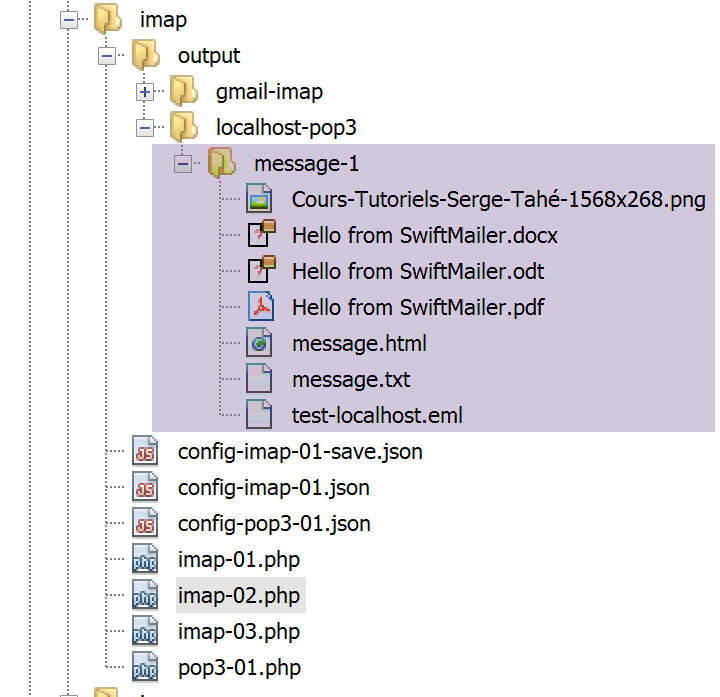
16.6.6. 使用 [php-mime-mail-parser] 库的 POP3/IMAP 客户端
在之前的脚本 [imap-02.php] 中,我们能够保存:
- 电子邮件的 [text/plain] 和 [text/HTML] 内容;
- 电子邮件附件;
对于类型为 [message/rfc822] 的附件,我们也已保存了附件的内容。然而,此类附件本身就是一封电子邮件,而这封电子邮件又包含 [text/plain] 和 [text/HTML] 内容以及附件。因此,我们可能会遇到以下情况:
- 一封结构类似于 [message/rfc822] 附件的 [邮件 1];
- 一封作为附件附加在电子邮件 1 上的 [电子邮件 2];
- 一封作为邮件 2 附件的 [邮件 3];
- 等等……
[imap-02.php]脚本保存了[邮件1]的内容(正文和附件)。它将[邮件2]保存为附件文档,但仅此而已。它不会尝试解析[邮件2]以提取其正文和附件。人们可能会认为,只需对[邮件2]应用与[邮件1]相同的处理方式即可。 此时,对处理 [邮件 1] 的方法进行递归调用,便足以获取所有嵌套邮件的内容。遗憾的是,[邮件 2] 的各部分编号逻辑与 [邮件 1] 不同,这使得无法在两种情况下使用相同的算法,除非采用相当复杂的逻辑来计算邮件的编号,而不管其在嵌套邮件集合中的位置如何。
[imap-02.php]脚本原本就已相当复杂。 为避免在处理嵌套邮件内容时使其变得更加复杂,我们将使用由 Vincent Dauce 编写、GitHub(2019 年 5 月)上可获取的 [php-mime-mail-parser] 库(网址:[https://github.com/php-mime-mail-parser/php-mime-mail-parser])。
16.6.6.1. 安装 [php-mime-mail-parser] 库
该库的概述页面说明了如何在 Windows 上安装它:

在 Windows 系统上,安装过程分为两个步骤:
télécharger une DLL ;
modifier le fichier [php.ini] qui configure PHP ;
[mailparse] 库的 DLL 文件可从 URL [http://pecl.php.net/package/mailparse] 获取(2019 年 5 月);
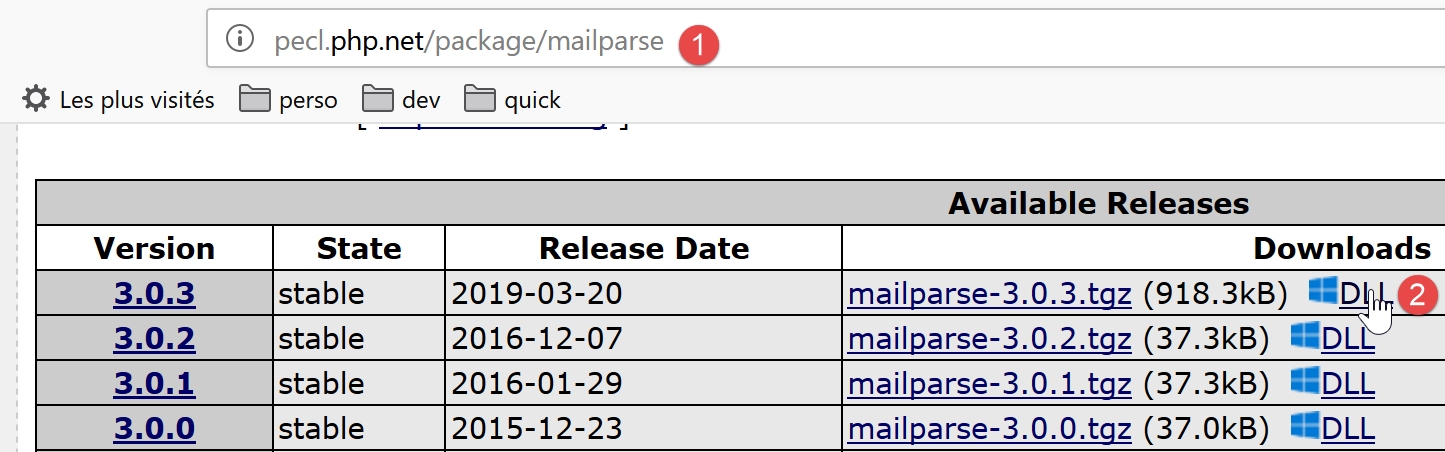
- 在 [2] 中,请选择该库的最新且稳定的版本;
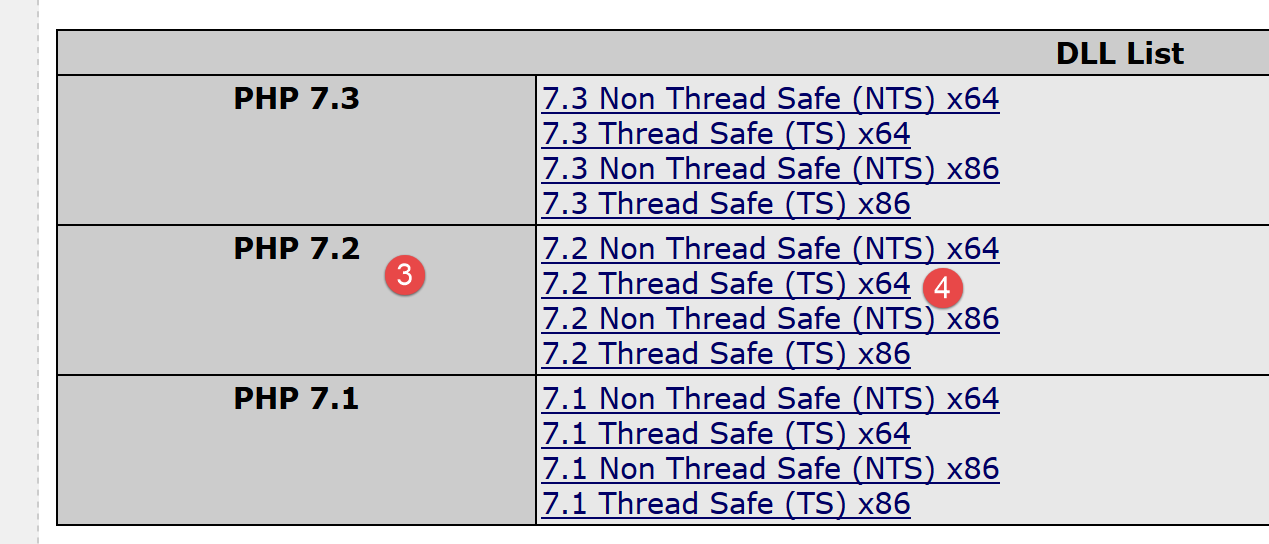
- 在 [3] 中,选择您正在使用的 PHP 版本(本文中为 PHP 7.2);
- 在 [4] 中,选择您的 Windows 操作系统版本(此处为 64 位 Windows)。请选择 [Thread Safe] 版本;
要查看 Laragon 随附的 PHP 版本,请在 Laragon 窗口中打开 [终端],并输入以下命令:
C:\myprograms\laragon-lite\www
λ php -v
PHP 7.2.11 (cli) (built: Oct 10 2018 02:04:07) ( ZTS MSVC15 (Visual C++ 2017) x64 )
Copyright (c) 1997-2018 The PHP Group
Zend Engine v3.2.0, Copyright (c) 1998-2018 Zend Technologies
第 3 行列出了 PHP 7.2.11 版本。同一行还列出了编译所使用的 Windows 版本(32 位或 64 位)。
获取 DLL 文件后,必须将其复制到 [<laragon>/bin/php/<php-version>/ext] 文件夹中 [5]:
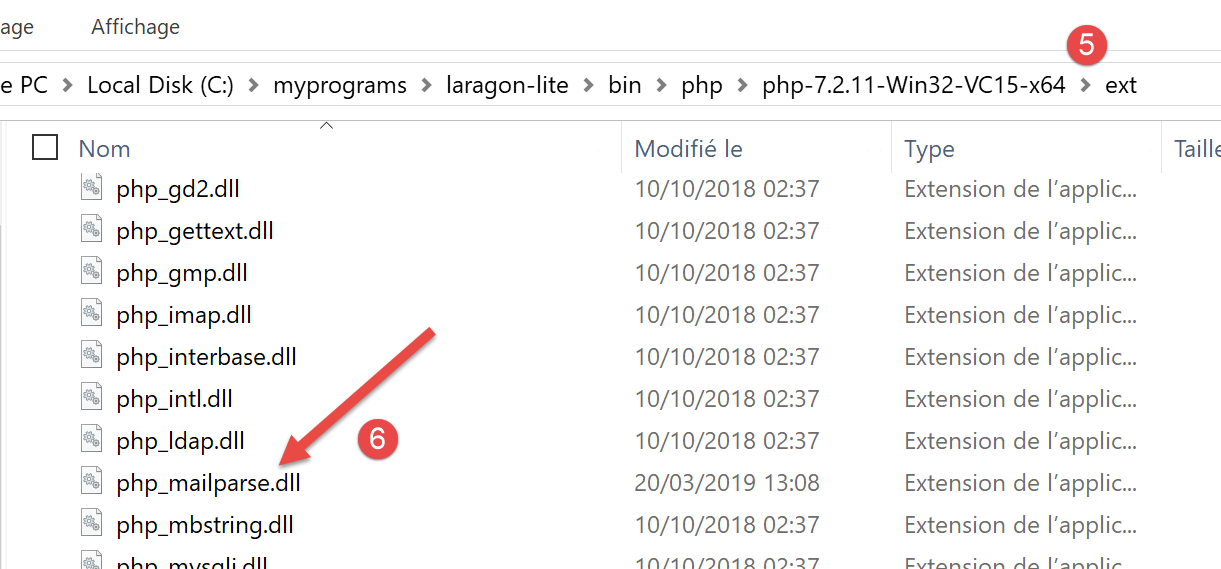
完成此操作后,您必须在配置 PHP 的 [php.ini] 文件中启用此扩展(参见相关章节):
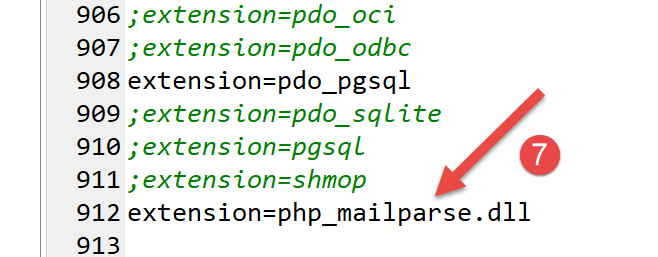
第 [7] 行很可能不存在,您需要自行添加。
启用扩展后,您可以在 Laragon 终端中输入以下命令来验证其有效性:
C:\myprograms\laragon-lite\www
λ php --ini
Configuration File (php.ini) Path: C:\windows
Loaded Configuration File:         C:\myprograms\laragon-lite\bin\php\php-7.2.11-Win32-VC15-x64\php.ini
Scan for additional .ini files in: (none)
Additional .ini files parsed:      (none)
[php –-ini] 命令会从第 4 行加载配置文件。随后,它将加载 [php.ini] 中启用的所有扩展的 DLL 文件。如果其中任何一个有误,系统将报告此情况。因此,将验证所添加的 DLL [php_mailparse.dll] 的有效性。它可能因各种原因被判定为不正确,其中最常见的原因如下:
- 您下载的 DLL 与当前使用的 PHP 版本不匹配;
- 您在运行 64 位 PHP 时下载了 32 位 DLL,或反之;
启用并验证该扩展后,即可继续安装 [php-mime-mail-parser] 库:
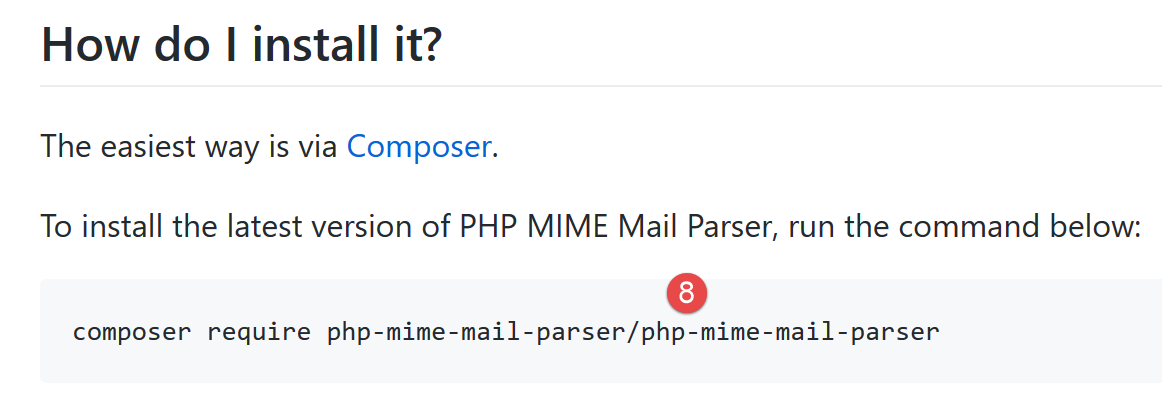
在 Laragon 终端中输入命令 [8](参见段落中的链接):
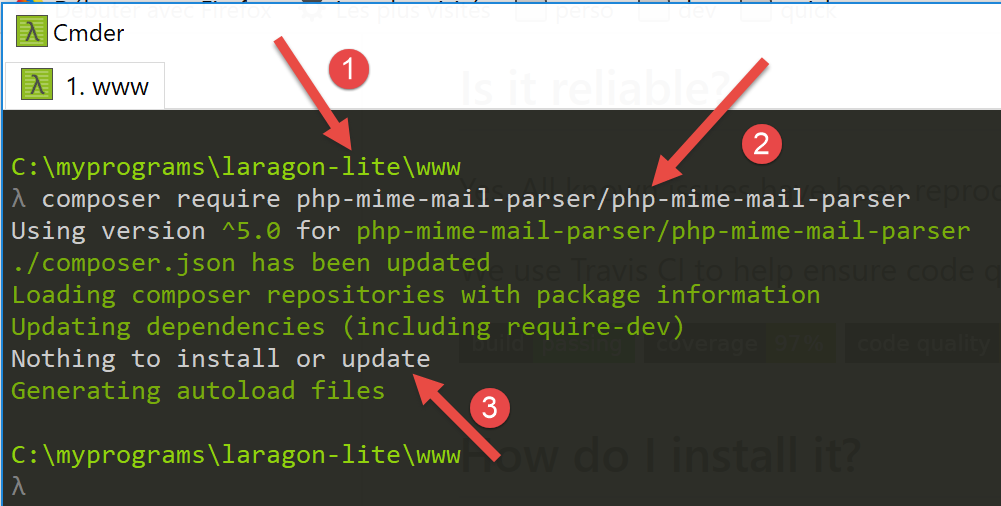
- 在 [1] 中,请确认您当前位于 [<laragon>/www] 目录下;
- 在 [2] 中,这是安装 [php-mime-mail-parser] 库的命令;
- 在 [3] 中,此处未安装任何内容,因为 [php-mime-mail-parser] 库已安装;
[php-mime-mail-parser] 库安装在 [<laragon>/www/vendor] 文件夹中:
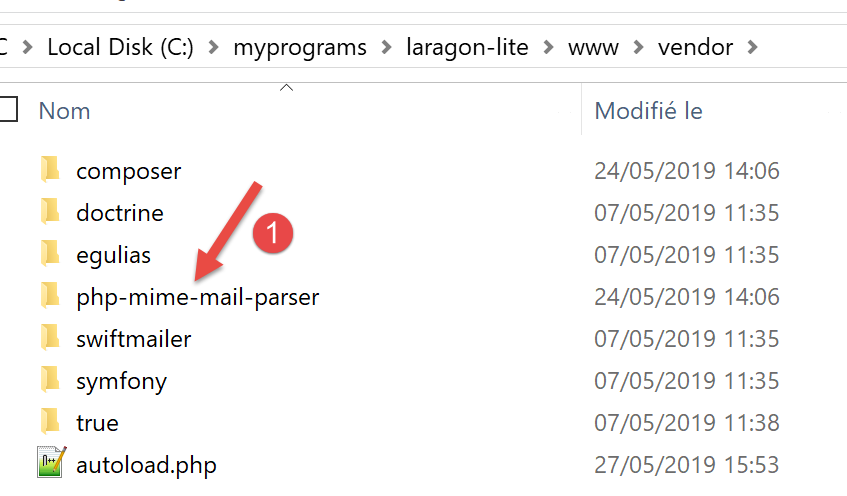
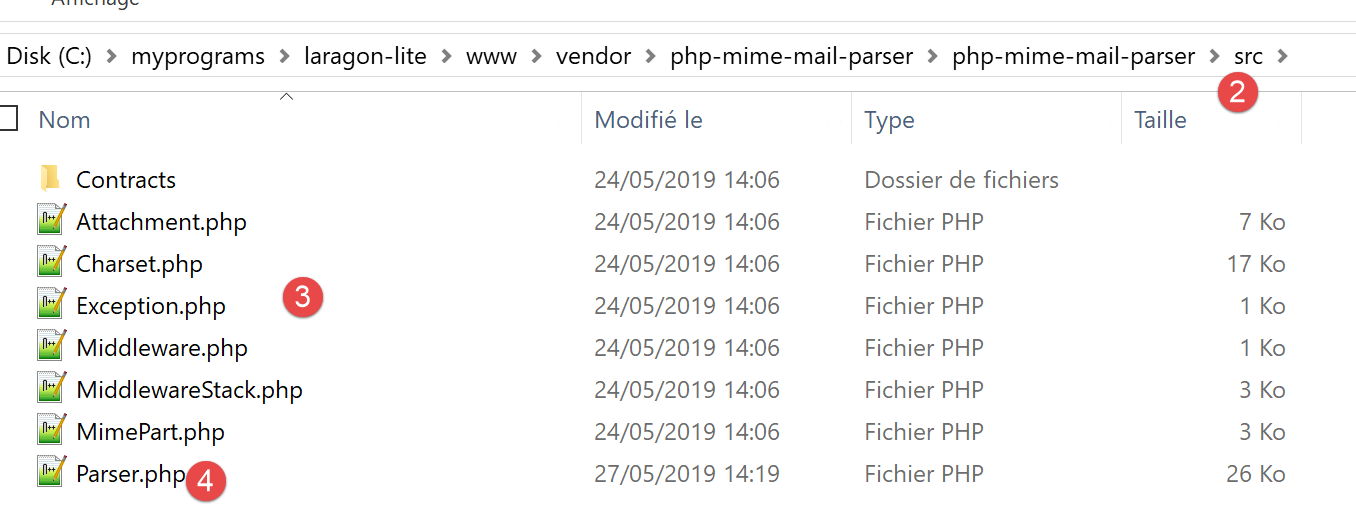
- 在 [2-3] 中,[php-mime-mail-parser] 库的源文件;
现在工作环境已经搭建完毕,我们可以开始编写 [imap-03.php] 脚本了。
16.6.6.2. [imap-03.php] 脚本
[imap-03.php] 脚本与之前的脚本使用相同的配置文件 [config-imap-01.json]:
[imap-03.php] 脚本如下:
<?php

// IMAP (Internet Message Access Protocol) client for reading e-mails
// written with the [php-mime-mail-parser] library
// available at URL [https://github.com/php-mime-mail-parser/php-mime-mail-parser] (May 2019)
//
// strict adherence to declared types of function parameters
declare (strict_types=1);
// error management
error_reporting(E_ALL & ~ E_WARNING & ~E_DEPRECATED & ~E_NOTICE);
//ini_set("display_errors", "off");
//
// dependencies
require_once 'C:/myprograms/laragon-lite/www/vendor/autoload.php';
// mail reading parameters
const CONFIG_FILE_NAME = "config-imap-01.json";

// we retrieve the configuration
if (!file_exists(CONFIG_FILE_NAME)) {
  print "Le fichier de configuration " . CONFIG_FILE_NAME . " n'existe pas";
  exit;
}
$mailboxes = \json_decode(\file_get_contents(CONFIG_FILE_NAME), true);

// letterbox reading
foreach ($mailboxes as $name => $infos) {
  // follow-up
  print "------------Lecture de la boîte à lettres [$name]\n";
  // reading the mailbox
  readmailbox($name, $infos);
}
// end
exit;
注释
- 第 18–23 行:配置文件的内容被放入 [$mailboxes] 字典中;
- 第 26–31 行:每个邮箱由 [readmailbox] 函数(第 30 行)读取。该函数实际上是从邮箱中读取未读邮件。一个邮箱对应于特定用户的电子邮件地址;
[readmailbox] 函数如下:
function readmailbox(string $name, array $infos): void {
  // we connect
  $imapResource = imap_open($name, $infos["user"], $infos["password"]);
  if (!$imapResource) {
    // failure
    print "La connexion au serveur [$name] a échoué : " . imap_last_error() . "\n";
    exit;
  }
  // Connection established
  print "Connexion établie avec le serveur [$name].\n";
  // total messages in mailbox
  $nbmsg = imap_num_msg($imapResource);
  print "Il y a [$nbmsg] messages dans la boîte à lettres [$name]\n";
  // unread messages in current mailbox
  if ($nbmsg > 0) {
    print "Récupération de la liste des messages non lus de la boîte à lettres [$name]\n";
    $msgNumbers = imap_search($imapResource, 'UNSEEN');
    if ($msgNumbers === FALSE) {
      print "Il n'y a pas de nouveaux messages dans la boîte à lettres [$name]\n";
    } else {
      // browse the list of unread messages
      foreach ($msgNumbers as $msgNumber) {
        print "---message n° [$msgNumber]\n";
        // we retrieve the body of message n° $msgNumber
        getMailBody($imapResource, $msgNumber, $infos);
        // if the protocol is POP3, we delete the message after retrieving it
        $pop3 = $infos["pop3"];
        if ($pop3 !== NULL) {
          // mark the message as "to be deleted
          imap_delete($imapResource, $msgNumber);
        }
      }
      // end unread messages
      if ($pop3 !== NULL) {
        // messages marked as "to be deleted" are deleted
        imap_expunge($imapResource);
      }
    }
  }
  // closing the connection
  $imapClose = imap_close($imapResource);
  if (!$imapClose) {
    // failure
    print "La fermeture de la connexion a échoué : " . imap_last_error() . "\n";
  } else {
    // success
    print "Fermeture de la connexion réussie.\n";
  }
}
注释
[readmailbox] 函数的代码与之前的脚本相同。
用于解析邮件正文(内容 + 附件)的 [getMailBody] 函数(第 25 行)如下:
// analyse du corps du message
function getMailBody($imapResource, int $msgNumber, array $infos): void {
  // on récupère le texte entier du message
  $text = imap_fetchbody($imapResource, $msgNumber, "");
  if ($text === FALSE) {
    print "Le corps du message [$msgNumber] n'a pu être récupéré";
    return;
  }
  // on crée un parseur qui va analyser le texte du message
  $parser = (new PhpMimeMailParser\Parser())->setText($text);
  // on récupère les différentes parties du message
  $outputDir = $infos["output-dir"] . "/message-$msgNumber";
  getParts($parser, $msgNumber, $outputDir);
}
注释
- 第 2 行:[getMailBody] 函数接受三个参数:
- [$imapResource]:您所连接的 IMAP 资源;
- [$msgNumber]:要处理的邮件编号(在邮箱中);
- [$infos]:关于正在处理的邮箱的各种信息;
- 第 4 行:检索整个邮件 #[$msgNumber];
- 第 5–8 行:处理邮件内容失败的情况;
- 第 10 行:开始使用 [php-mime-mail-parser] 库。[$parser] 对象将负责解析邮件正文;
- 第 12 行:[$outputDir] 将是保存邮件 #[$msgNumber] 的文本内容和附件的文件夹;
- 第 13 行:调用 [getParts] 函数,将消息 #[$msgNumber] 的各个部分(正文内容和附件)提取出来并保存到 [$outputDir] 文件夹中;
[getParts] 函数如下:
// récupération des différentes parties d'un message
function getParts(PhpMimeMailParser\Parser $parser, int $msgNumber, string $outputDir): void {
  // on crée le dossier de sauvegarde du message si besoin est
  if (!file_exists($outputDir)) {
    if (!mkdir($outputDir)) {
      print "Le dossier [$outputDir] n'a pu être créé\n";
      return;
    }
  }
  // on récupère les entêtes du message
  $arrayHeaders = $parser->getHeaders();
  // on sauvegarde les messages texte
  $parts = $parser->getInlineParts("text");
  for ($i = 1; $i <= count($parts); $i++) {
    print "-- Sauvegarde d'un message de type [text/plain]\n";
    saveMessage($parts[$i - 1], 0, $arrayHeaders, "$outputDir/message_$i.txt");
  }
  // on sauvegarde les messages html
  $parts = $parser->getInlineParts("html");
  for ($i = 1; $i <= count($parts); $i++) {
    print "-- Sauvegarde d'un message de type [text/html]\n";
    saveMessage($parts[$i - 1], 1, $arrayHeaders, "$outputDir/message_$i.html");
  }
  // on récupère les attachements du message
  $attachments = $parser->getAttachments();
  // n° de l'attachement
  $iAttachment = 0;
  // on parcourt la liste des attachements
  foreach ($attachments as $attachment) {
    // type d'attachement
    $fileType = $attachment->getContentType();
    print "-- Sauvegarde d'un attachement de type [$fileType] dans le fichier [$outputDir/{$attachment->getFilename()}]\n";
    // on sauvegarde l'attachement
    try {
      $attachment->save($outputDir, PhpMimeMailParser\Parser::ATTACHMENT_DUPLICATE_SUFFIX);
    } catch (Exception $e) {
      print "L'attachement n'a pu être sauvegardé : " . $e->getMessage() . "\n";
    }
    // cas particulier du type message/rfc822
    if ($fileType === "message/rfc822") {
      // l'attachement est lui-même un message - on va le parser lui aussi
      // on change de répertoire de sauvegarde
      $iAttachment++;
      $outputDir = $outputDir . "/rfc822-$iAttachment";
      // on change le contenu à parser
      $parser->setText($attachment->getContent());
      // on analyse le message de façon récursive
      getParts($parser, $msgNumber, $outputDir);
    }
  }
}
评论
- 第 2 行:[getParts] 函数接受三个参数:
- 一个解析器 [$parser],其中已传入了待解析消息的完整文本;
- [$msgNumber] 是当前正在分析的消息编号;
- [$outputDir] 是用于保存消息内容及附件的目录;
- 第 4–9 行:创建 [$outputDir] 文件夹;
- 第 11 行:获取正在分析的消息的头部信息(发件人、收件人、主题等);
- 第 13 行:提取类型为 [text/plain] 的邮件部分。获取一个数组;
- 第 14–17 行:将检索到的数组中的所有元素保存,并为每个元素分配不同的文件名;
- 第 19 行:提取类型为 [text/html] 的邮件部分。返回一个表格;
- 第 20–23 行:保存所获取数组的所有元素,并为每个元素分配不同的文件名;
- 第 25 行:获取待分析邮件的附件列表;
- 第 29 行:遍历该列表;
- 第 24 行:获取附件类型(Content-Type 属性);
- 第 34–38 行:将附件保存到 [$outputDir] 文件夹中。第二个参数 [PhpMimeMailParser\Parser::ATTACHMENT_DUPLICATE_SUFFIX] 是附件的命名策略。 如果 [$attachment→getFilename()] 的值为 X,且文件 X 已存在,则 [php-mime-mail-parser] 库会依次尝试 [X_1]、[X_2] 等名称,直到找到一个不存在的文件名;
- 第 40 行:我们检查附件是否为电子邮件;
- 第 41–48 行:如果是,则进一步解析该电子邮件以提取其内容和附件;
- 第 44 行:如果 [$outputDir] 设置为 X,且分析的邮件包含两个附件,则第一个将保存在 [$outputDir/rfc822-1] 文件夹中,第二个保存在 [$outputDir/rfc822-2] 文件夹中;
- 第 46 行:附件邮件的内容将成为待解析的新文本;
- 第 48 行:递归调用 [getParts] 函数来解析新文本;
[saveMessage] 函数将待解析消息的文本内容保存下来:
// sauvegarde d'un message texte
function saveMessage(string $text, int $type, array $arrayHeaders, string $filename): void {
  // contenu à sauvegarder
  $contents = "";
  // ajout des entêtes
  switch ($type) {
    case 0:
      // text/plain
      foreach ($arrayHeaders as $key => $value) {
        $contents .= "$key: $value\n";
      }
      $contents .= "\n";
      break;
    case 1:
      // text/HTML
      foreach ($arrayHeaders as $key => $value) {
        $contents .= "$key: $value<br/>\n";
      }
      $contents .= "<br/>\n";
  }
  // ajout du texte du message
  $contents .= $text;
  // sauvegarde du tout
  if (!file_put_contents($filename, $contents)) {
    // échec
    print "Le message n'a pu être sauvegardé dans le fichier [$filename]\n";
  } else {
    // réussite
    print "Le message a été sauvegardé dans le fichier [$filename]\n";
  }
}
注释
- [saveMessage] 函数接受以下参数:
- [$text]:待保存的文本;
- [$type]:文本类型(0:text/plain,1:text/HTML);
- [$arrayHeaders]:解析后消息的头部信息;
- [$filename]:用于保存 [$text] 的文件名;
- 第 4 行:[$contents] 将表示待保存的完整文本;
- 第 6–20 行:首先,将保存所有邮件头(发件人、收件人、主题等);
- 第 16–19 行:对于 HTML 文本,每行末尾添加 <br/> 标签,以便在浏览器中每个标题独占一行;
- 第 22 行:将待保存的邮件正文添加到标题中;
- 第 24–30 行:将整组内容保存到文件 [$filename] 中;
使用 [php-mime-mail-parser] 库大大简化了邮件读取脚本的编写。
[smtp-02.php] 脚本用于向用户 [guest@localhost] 发送电子邮件,配置如下:
- 第 11–15 行:共有五个附件;
- 第 15 行:[test-localhost-2.eml] 是一封结构如下所示的电子邮件:
- [test-localhost-2.eml] 包含 4 个附件(与第 11–14 行相同)以及一封附带的电子邮件;
- [test-localhost-2.eml] 所附的电子邮件包含 4 个附件(与第 11–14 行相同);
脚本 [imap-03.php] 用于读取用户 [guest@localhost] 的邮箱,配置如下:
执行后,[output/localhost-pop3] 文件夹的目录结构如下:
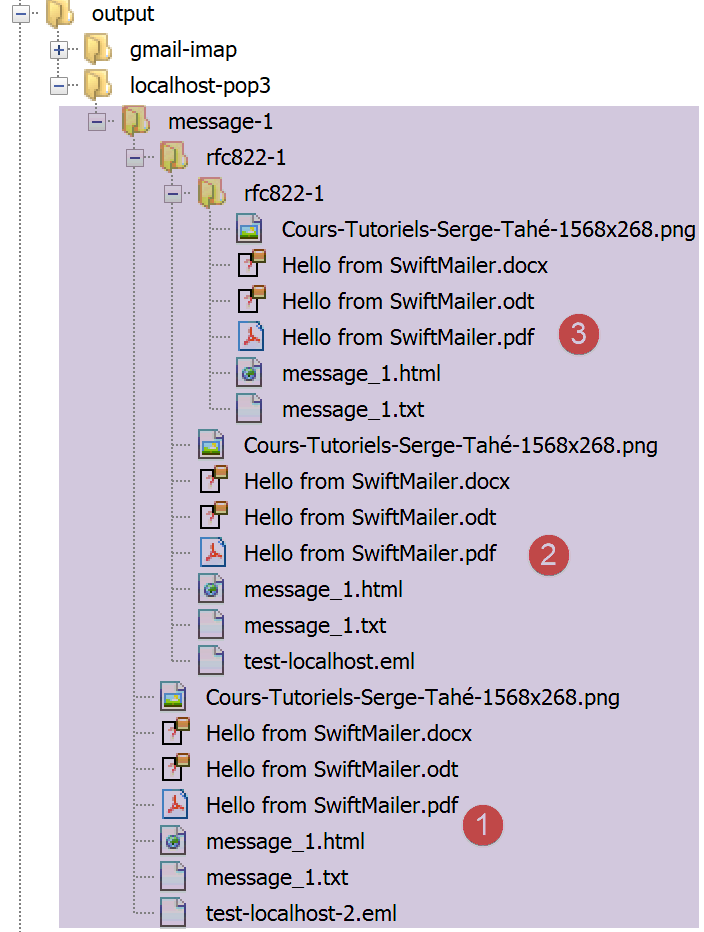
- 在 [1] 中,[guest@localhost] 收到的电子邮件中的 5 个附件;
- 在 [2] 中,来自 [1] 中邮件 [test-localhost-2.eml] 的 5 个附件;
- 在 [3] 中,来自 [2] 中 [test-localhost.eml] 邮件的 4 个附件;
控制台输出如下:
------------Lecture de la boîte à lettres [{localhost:110/pop3}]
Connexion établie avec le serveur [{localhost:110/pop3}].
Il y a [1] messages dans la boîte à lettres [{localhost:110/pop3}]
Récupération de la liste des messages non lus de la boîte à lettres [{localhost:110/pop3}]
---message n° [1]
-- Sauvegarde d'un message de type [text/plain]
Le message a été sauvegardé dans le fichier [output/localhost-pop3/message-1/message_1.txt]
-- Sauvegarde d'un message de type [text/html]
Le message a été sauvegardé dans le fichier [output/localhost-pop3/message-1/message_1.html]
-- Sauvegarde d'un attachement de type [application/vnd.openxmlformats-officedocument.wordprocessingml.document] dans le fichier [output/localhost-pop3/message-1/Hello from SwiftMailer.docx]
-- Sauvegarde d'un attachement de type [application/pdf] dans le fichier [output/localhost-pop3/message-1/Hello from SwiftMailer.pdf]
-- Sauvegarde d'un attachement de type [application/vnd.oasis.opendocument.text] dans le fichier [output/localhost-pop3/message-1/Hello from SwiftMailer.odt]
-- Sauvegarde d'un attachement de type [image/png] dans le fichier [output/localhost-pop3/message-1/Cours-Tutoriels-Serge-Tahé-1568x268.png]
-- Sauvegarde d'un attachement de type [message/rfc822] dans le fichier [output/localhost-pop3/message-1/test-localhost-2.eml]
-- Sauvegarde d'un message de type [text/plain]
Le message a été sauvegardé dans le fichier [output/localhost-pop3/message-1/rfc822-1/message_1.txt]
-- Sauvegarde d'un message de type [text/html]
Le message a été sauvegardé dans le fichier [output/localhost-pop3/message-1/rfc822-1/message_1.html]
-- Sauvegarde d'un attachement de type [application/vnd.openxmlformats-officedocument.wordprocessingml.document] dans le fichier [output/localhost-pop3/message-1/rfc822-1/Hello from SwiftMailer.docx]
-- Sauvegarde d'un attachement de type [application/pdf] dans le fichier [output/localhost-pop3/message-1/rfc822-1/Hello from SwiftMailer.pdf]
-- Sauvegarde d'un attachement de type [application/vnd.oasis.opendocument.text] dans le fichier [output/localhost-pop3/message-1/rfc822-1/Hello from SwiftMailer.odt]
-- Sauvegarde d'un attachement de type [image/png] dans le fichier [output/localhost-pop3/message-1/rfc822-1/Cours-Tutoriels-Serge-Tahé-1568x268.png]
-- Sauvegarde d'un attachement de type [message/rfc822] dans le fichier [output/localhost-pop3/message-1/rfc822-1/test-localhost.eml]
-- Sauvegarde d'un message de type [text/plain]
Le message a été sauvegardé dans le fichier [output/localhost-pop3/message-1/rfc822-1/rfc822-1/message_1.txt]
-- Sauvegarde d'un message de type [text/html]
Le message a été sauvegardé dans le fichier [output/localhost-pop3/message-1/rfc822-1/rfc822-1/message_1.html]
-- Sauvegarde d'un attachement de type [application/vnd.openxmlformats-officedocument.wordprocessingml.document] dans le fichier [output/localhost-pop3/message-1/rfc822-1/rfc822-1/Hello from SwiftMailer.docx]
-- Sauvegarde d'un attachement de type [application/pdf] dans le fichier [output/localhost-pop3/message-1/rfc822-1/rfc822-1/Hello from SwiftMailer.pdf]
-- Sauvegarde d'un attachement de type [application/vnd.oasis.opendocument.text] dans le fichier [output/localhost-pop3/message-1/rfc822-1/rfc822-1/Hello from SwiftMailer.odt]
-- Sauvegarde d'un attachement de type [image/png] dans le fichier [output/localhost-pop3/message-1/rfc822-1/rfc822-1/Cours-Tutoriels-Serge-Tahé-1568x268.png]
Fermeture de la connexion réussie.
如果您在浏览器中查看 [3] 中的 [message_1.HTML],将看到以下内容: