9. 错误与异常
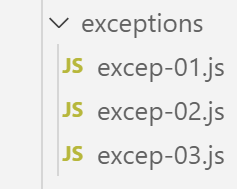
JavaScript 的异常处理机制并不十分完善。不过,它提供了 [throw] 语句用于报告错误,以及 try / catch / finally 结构用于捕获这些错误。
9.1. 脚本 [excep-01]
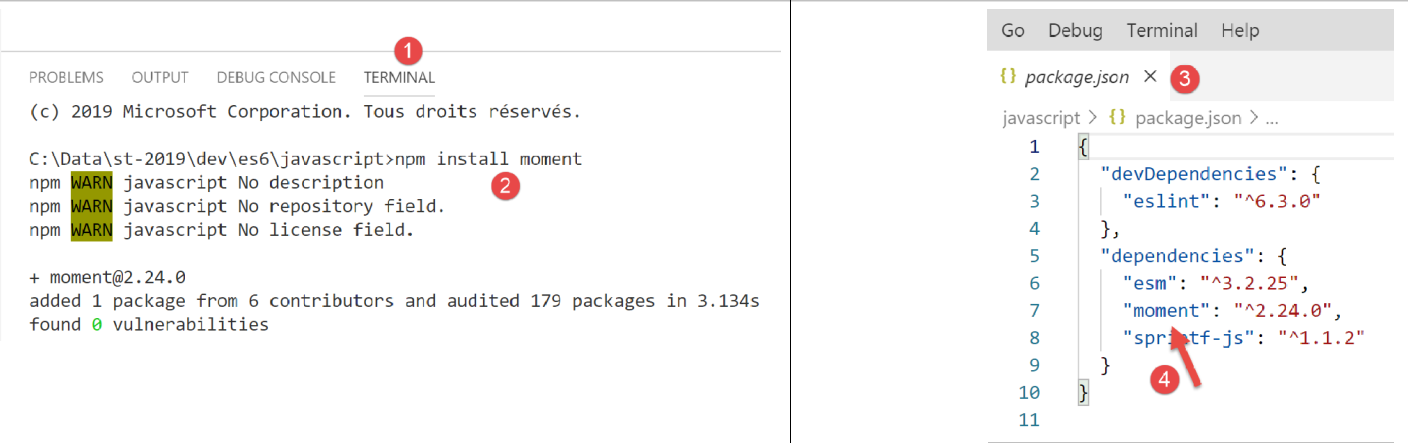
在下面的脚本中,我们将以 [heures:minutes:secondes:millisecondes] 的形式显示当前日期。为此,我们将使用一个名为 jS 的库。 我们像往常一样,使用 [npm] 工具进行安装:
脚本代码如下:
'use strict';

// moment 包
import moment from 'moment';

...
要了解第 4 行中 [import] 这一行的写法,可以查看模块 [moment] 的定义:
- 在 [1-2] 中,我们跳转到模块的定义;
- 在 [3] 中,我们看到的是一个 TypeScript 文件,而非 JavaScript。运行时,该 TypeScript 文件会被编译为 JavaScript 文件后才被使用;
- 在 [4] 中,搜索指令 [export](Ctrl-F);
- 在 [5] 中,该语句导出了对象 [moment]。该对象可通过以下方式导入到 ES6 中:
import moment from 'moment';
导入对象 [moment] 时可以使用任意名称,例如:
import m from 'moment';
让我们回到脚本代码:
'use strict';

// moment 包
import moment from 'moment';

// try / catch / finally 原理
for (let i = 0; i < 10; i++) {
  // 当前时间
  const now = Date.now();
  // 时间格式化以获取毫秒
  const time = moment(now).format("HH:mm:ss:SSS");
  // 毫秒
  const milli = Number(time.substr(time.length - 3));
  // 显示
  console.log("--------------------itération n° ", i, "à", time);
  try {
    // 根据当前时间变化的数字
    const nbre = milli % 2;
    if (nbre === 0) {
      // 触发错误消息
      throw "erreur";
    }
    // 如果到达此处,说明没有发生错误
    console.log("pas d'erreur");
  } catch (error) {
    // 如果到达此处,说明发生了错误
    console.log("erreur1=", error);
  } finally {
    // 无论是否出错,此代码都会执行
    console.log("finally")
  }
}
注释
- 第4行:导入[moment]库;
- 脚本的工作原理是循环10次(第7行)。每次循环时,获取当前时间并以[heures:minutes:secondes:millisecondes]格式存储(第8-13行);
- 如果毫秒数为偶数,则触发错误信息(第19-22行);
- 此处旨在理解 try / catch / finally 的工作原理
执行
[Running] C:\myprograms\laragon-lite\bin\nodejs\node-v10\node.exe -r esm "c:\Data\st-2019\dev\es6\javascript\exceptions\excep-01.js"
--------------------itération n° 0 à 17:57:04:440
erreur1= erreur
finally
--------------------itération n° 1 à 17:57:04:447
pas d'erreur
finally
--------------------itération n° 2 à 17:57:04:448
erreur1= erreur
finally
--------------------itération n° 3 à 17:57:04:448
erreur1= erreur
finally
--------------------itération n° 4 à 17:57:04:448
erreur1= erreur
finally
--------------------itération n° 5 à 17:57:04:448
erreur1= erreur
finally
--------------------itération n° 6 à 17:57:04:448
erreur1= erreur
finally
--------------------itération n° 7 à 17:57:04:448
erreur1= erreur
finally
--------------------itération n° 8 à 17:57:04:449
pas d'erreur
finally
--------------------itération n° 9 à 17:57:04:449
pas d'erreur
finally
可以看到,无论是否发生错误,[finally] 语句都会被执行。
9.2. 脚本 [excep-02]
该脚本由语句 [throw] 调用,可处理任意类型的数据,且该数据会被子句 [catch] 完整捕获。
'use strict';

// 几乎可以“抛出”(throw)任何内容来报告错误
let i = 0;
console.log("--------------------essai n° ", i);
// 抛出字符串
try {
  throw "msg d'erreur";
} catch (error) {
  // 发生了错误
  console.log("erreur=[", error, "], type=", typeof (error));
}
// 生成表格
i++;
console.log("--------------------essai n° ", i);
try {
  throw [1, 2, 3]
} catch (error) {
  // 发生错误
  console.log("erreur=[", error, "], type=", typeof (error));
}
// 抛出一个字面量对象
i++;
console.log("--------------------essai n° ", i);
try {
  throw { nom: "hercule", pays: "grèce antique" }
} catch (error) {
  // 发生错误
  console.log("erreur=[", error, "], type=", typeof (error));
}
// 抛出 Error 类型
i++;
console.log("--------------------essai n° ", i);
try {
  throw new Error("erreur de connexion au réseau");
} catch (error) {
  // 发生错误
  console.log("erreur=[", error, "], type=", typeof (error));
}
// 抛出 Error 类型
i++;
console.log("--------------------essai n° ", i);
try {
  throw new Error("erreur de connexion au réseau");
} catch (error) {
  // 发生错误 - 消息位于 [error.message]
  console.log("erreur.message=[", error.message, "], type(error)=", typeof (error));
}
注释
- 第 35、44 行:[Error] 是一个 JavaScript 类,其构造函数允许将错误消息作为第一个可选参数。该消息可通过属性 [Error.message](第 47 行)获取;
- 除 [Error] 之外,还有其他类可用于报告错误: [EvalError, InternalError, RangeError, ReferenceError, SyntaxError, TypeError, URIError);
执行
[Running] C:\myprograms\laragon-lite\bin\nodejs\node-v10\node.exe -r esm "c:\Data\st-2019\dev\es6\javascript\exceptions\excep-02.js"
--------------------essai n° 0
erreur=[ msg d'erreur ], type= string
--------------------essai n° 1
erreur=[ [ 1, 2, 3 ] ], type= object
--------------------essai n° 2
erreur=[ { nom: 'hercule', pays: 'grèce antique' } ], type= object
--------------------essai n° 3
erreur=[ Error: erreur de connexion au réseau
at Object.<anonymous> (c:\Data\st-2019\dev\es6\javascript\exceptions\excep-02.js:35:9)
at Object.<anonymous> (c:\Temp\19-09-01\javascript\node_modules\esm\esm.js:1:251206)
at c:\Temp\19-09-01\javascript\node_modules\esm\esm.js:1:245054
at Generator.next (<anonymous>)
at bl (c:\Temp\19-09-01\javascript\node_modules\esm\esm.js:1:245412)
at kl (c:\Temp\19-09-01\javascript\node_modules\esm\esm.js:1:247659)
at Object.u (c:\Temp\19-09-01\javascript\node_modules\esm\esm.js:1:287740)
at Object.o (c:\Temp\19-09-01\javascript\node_modules\esm\esm.js:1:287137)
at Object.<anonymous> (c:\Temp\19-09-01\javascript\node_modules\esm\esm.js:1:284879)
at Object.apply (c:\Temp\19-09-01\javascript\node_modules\esm\esm.js:1:199341) ], type= object
--------------------essai n° 4
erreur.message=[ erreur de connexion au réseau ], type(error)= object
9.3. 脚本 [excep-03]
该脚本表明,在 [catch] 中,可以区分由 [catch] 拦截的 [Error] 实例的类型:
'use strict';

// moment 包
import moment from 'moment';

// 将收到的 Error 实例解析为 [catch]
for (let i = 0; i < 10; i++) {
  // 当前时刻的日期和时间
  const now = Date.now();
  // 时间格式化以获取毫秒
  const time = moment(now).format("HH:mm:ss:SSS");
  // 毫秒
  const milli = Number(time.substr(time.length - 3));
  console.log("--------------------itération n° ", i);
  try {
    // 数量 [0, 1, 2]
    const nbre = milli % 3;
    switch (nbre) {
      case 0:
        throw new ReferenceError("erreur 1");
      case 1:
        throw new RangeError("erreur 2");
      default:
        throw new EvalError("erreur 3");
    }
  } catch (error) {
    // 发生错误
    if (error instanceof ReferenceError) {
      console.log("ReferenceError :", error.message);
    } else {
      if (error instanceof RangeError) {
        console.log("RangeError :", error.message);
      }
      else {
        if (error instanceof EvalError) {
          console.log("EvalError :", error.message);
        }
      }
    }
  }
}
执行
[Running] C:\myprograms\laragon-lite\bin\nodejs\node-v10\node.exe -r esm "c:\Data\st-2019\dev\es6\javascript\exceptions\excep-03.js"
--------------------itération n° 0
ReferenceError : erreur 1
--------------------itération n° 1
RangeError : erreur 2
--------------------itération n° 2
RangeError : erreur 2
--------------------itération n° 3
RangeError : erreur 2
--------------------itération n° 4
RangeError : erreur 2
--------------------itération n° 5
RangeError : erreur 2
--------------------itération n° 6
EvalError : erreur 3
--------------------itération n° 7
EvalError : erreur 3
--------------------itération n° 8
EvalError : erreur 3
--------------------itération n° 9
EvalError : erreur 3