12. JavaScript HTTP 函数
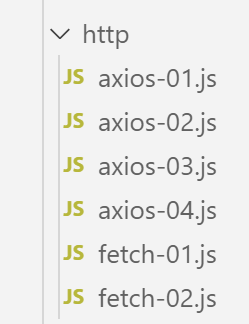
12.1. 选择 HTTP 库
我们在此选择了两个库:
ECMAScript 6 原生提供了一个名为 [fetch] 的 HTTP 函数,但 [node.js] 尚未实现该函数(截至 2019 年 9 月)。 有一个名为 [node-fetch] 的库,它允许你在 Node 中使用 [fetch] 函数。该库使用了某些 [node.js] 特有的 API。因此,[node-fetch] 的代码可能无法 100% 移植到非 [node] 环境,例如浏览器;
此外,还有一个名为 [axios] 的库,专门用于处理 HTTP 请求,且同时兼容 [node.js] 和浏览器。这正是我们最终将要使用的库。
我们将展示使用这两个库编写的相同脚本,以说明其编码方法是相似的。
12.2. 搭建开发环境
12.2.1. 安装税费计算服务器
最终,我们将编写一个具有以下架构的 Web 应用程序:
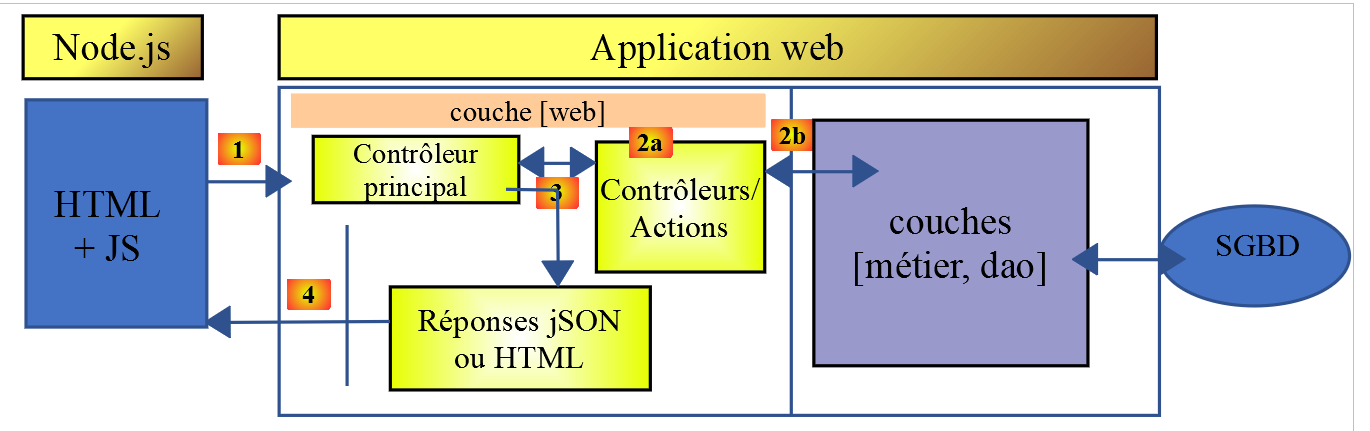
JS:JavaScript
JavaScript 代码位于客户端:
- 来自提供静态页面或片段的服务;
- 一个 JSON 服务;
因此,该 JavaScript 代码是一个 JSON 客户端,因此可以像我们用 PHP 编写的 JSON 客户端一样,划分为 [UI、业务逻辑、DAO] 层(UI:用户界面)。
服务器将采用我们已编写过 13 个版本的税费计算服务器。我们将编写第 14 个版本。因此,我们首先在 NetBeans 中将 version 13 文件夹复制为 version 14 文件夹:
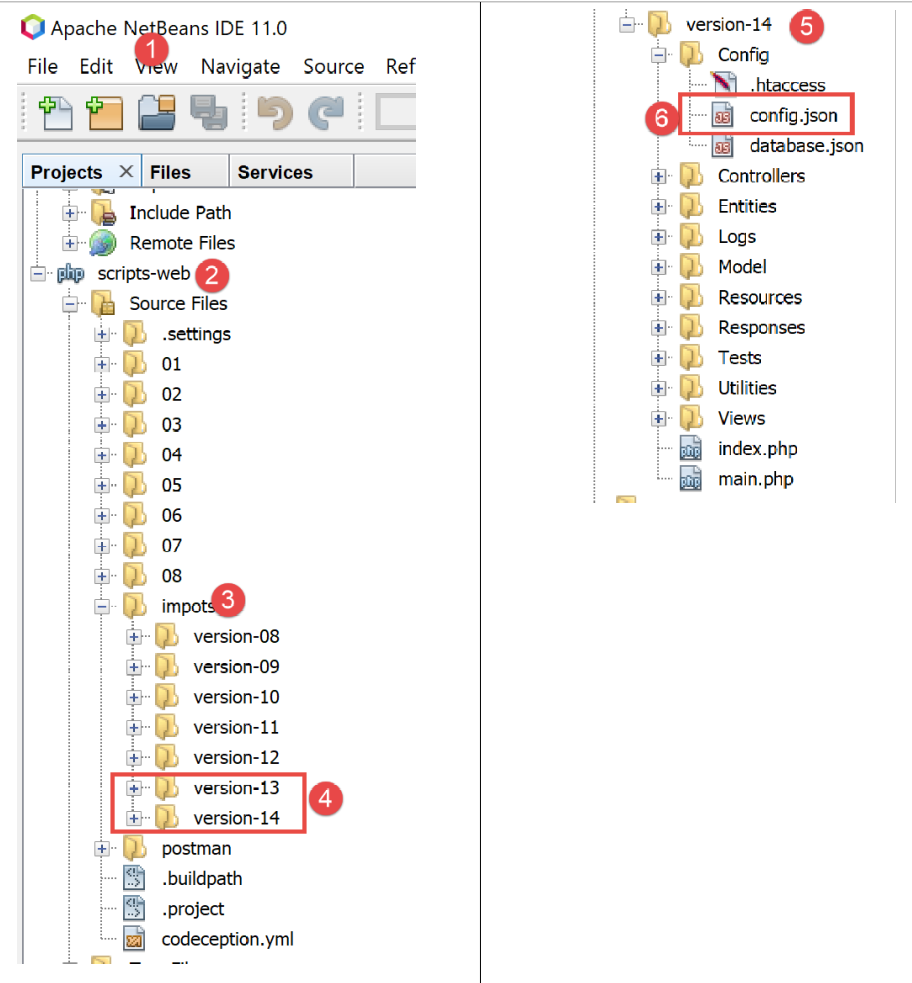
- 在 [6] 中,我们将第 14 版的 [config.json] 文件修改如下:
{
    "databaseFilename": "Config/database.json",
    "rootDirectory": "C:/myprograms/laragon-lite/www/php7/scripts-web/impots/version-14",
    "relativeDependencies": [

        "/Entities/BaseEntity.php",
        "/Entities/Simulation.php",
        ...
    "vues": {
        "vue-authentification.php": [700, 221, 400],
        "vue-calcul-impot.php": [200, 300, 341, 350, 800],
        "vue-liste-simulations.php": [500, 600]
    },
    "vue-erreurs": "vue-erreurs.php"
}
- 在第 3 行,我们将应用程序的根目录更改为;
要访问此服务器,您必须启动 [Laragon] 服务。
完成上述操作后,我们可以使用 [Postman](参见链接文章)来测试这个新版本的服务器——它目前与第 13 版完全相同。我们可以使用之前用于测试税费计算服务器第 12 版的请求集合:
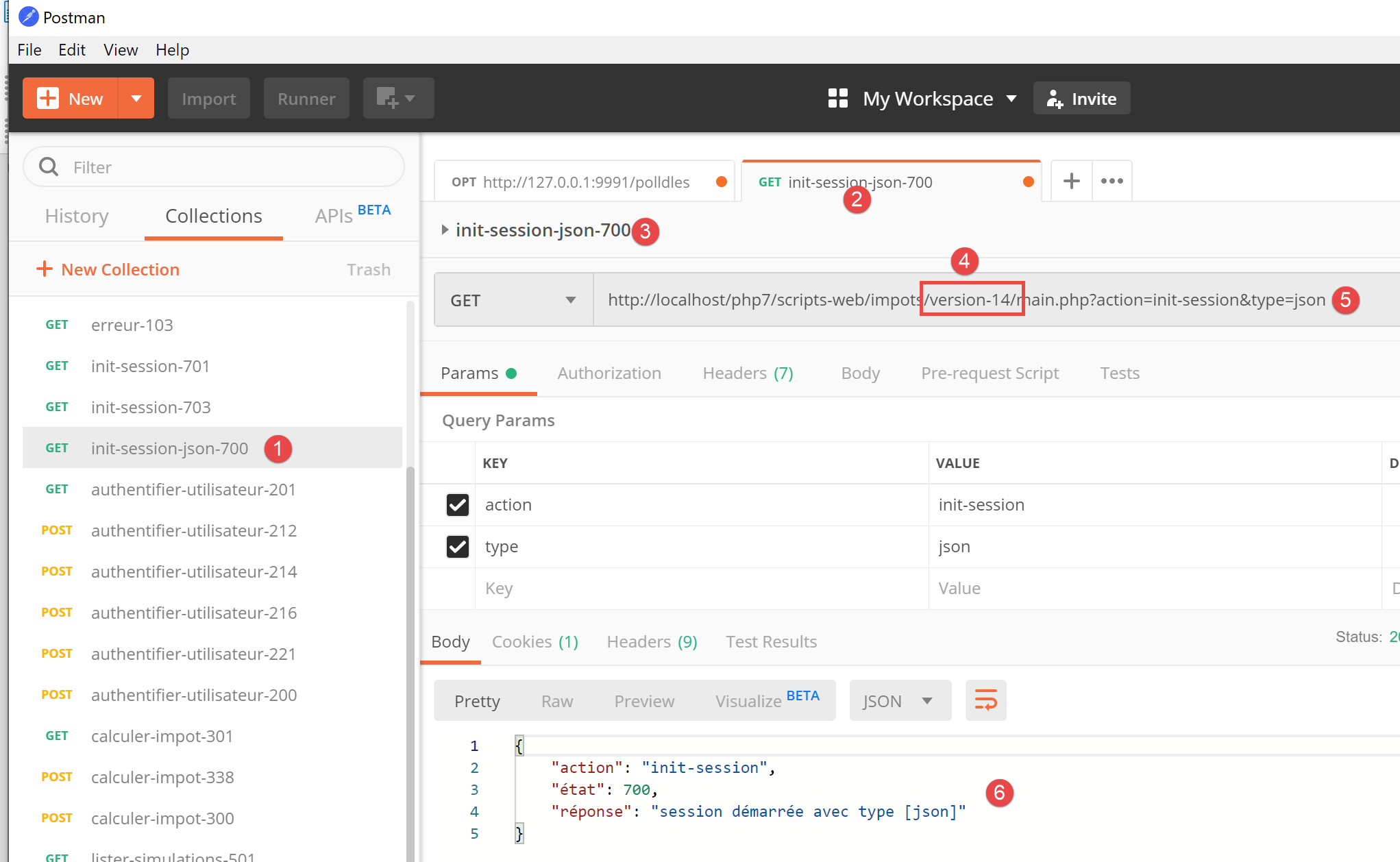
- 在 [1-4] 中,使用 [init-session-700] 请求初始化一个 JSON 会话;
- 在 [4-5] 中,将 [version-12] 替换为 [version-14] 以测试该项目的第 14 版;
- 执行后,我们应从服务器收到 JSON 响应 [6];
服务器第 14 版现已投入运行。我们需要对其进行一些微调。让我们回顾一下该服务器的 API:
操作 | 角色 | 执行上下文 |
init-session | 用于设置所需响应的类型(json、xml、html) | GET请求 main.php?action=init-session&type=x 可随时发送 |
authenticate-user | 授权或拒绝用户的登录 | POST 请求 main.php?action=authenticate-user 请求必须包含两个提交参数 [user, password] 仅当已知会话类型(json、xml、html)时才能发出 |
计算税款 | 执行税费计算模拟 | 向 main.php 发送 POST 请求,请求路径为 main.php?action=calculate-tax 请求必须包含三个提交参数 [married, children, salary] 仅当已知会话类型(json、xml、html)且用户已通过身份验证时才能发出 |
list-simulations | 请求查看自会话开始以来已执行的模拟列表 | GET 请求 main.php?action=list-simulations 该请求不接受任何其他参数 只有在已知会话类型(json、xml、html)且用户已通过身份验证的情况下才能发出 |
delete-simulation | 从模拟列表中删除一个模拟 | GET 请求 main.php?action=list-simulations&number=x 该请求不接受任何其他参数 仅在已知会话类型(json、xml、html)且用户已通过身份验证时才能发出 |
end-session | 结束模拟会话。 | 技术上,旧的 Web 会话将被删除,并创建一个新的会话 只有在已知会话类型(json、xml、html)且用户已通过身份验证的情况下才能发出 |
12.2.2. JavaScript 客户端 HTTP 库的安装
最初,我们将采用以下架构:
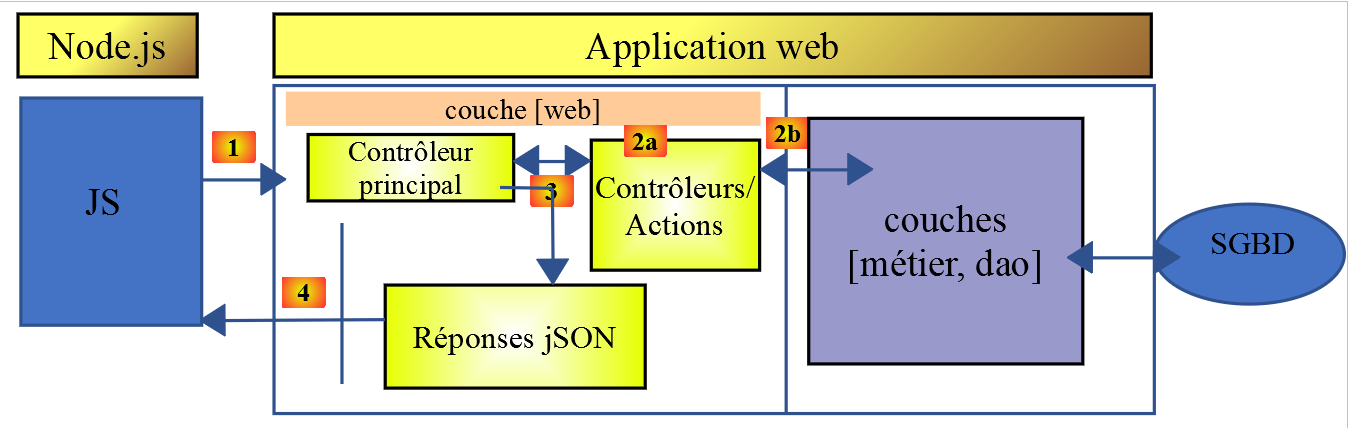
- 在 [1] 中,一个控制台脚本 [node.js] 向税费计算 JSON 服务器发起 HTTP 请求;
- 在[4]中,该脚本接收此响应并在控制台显示;
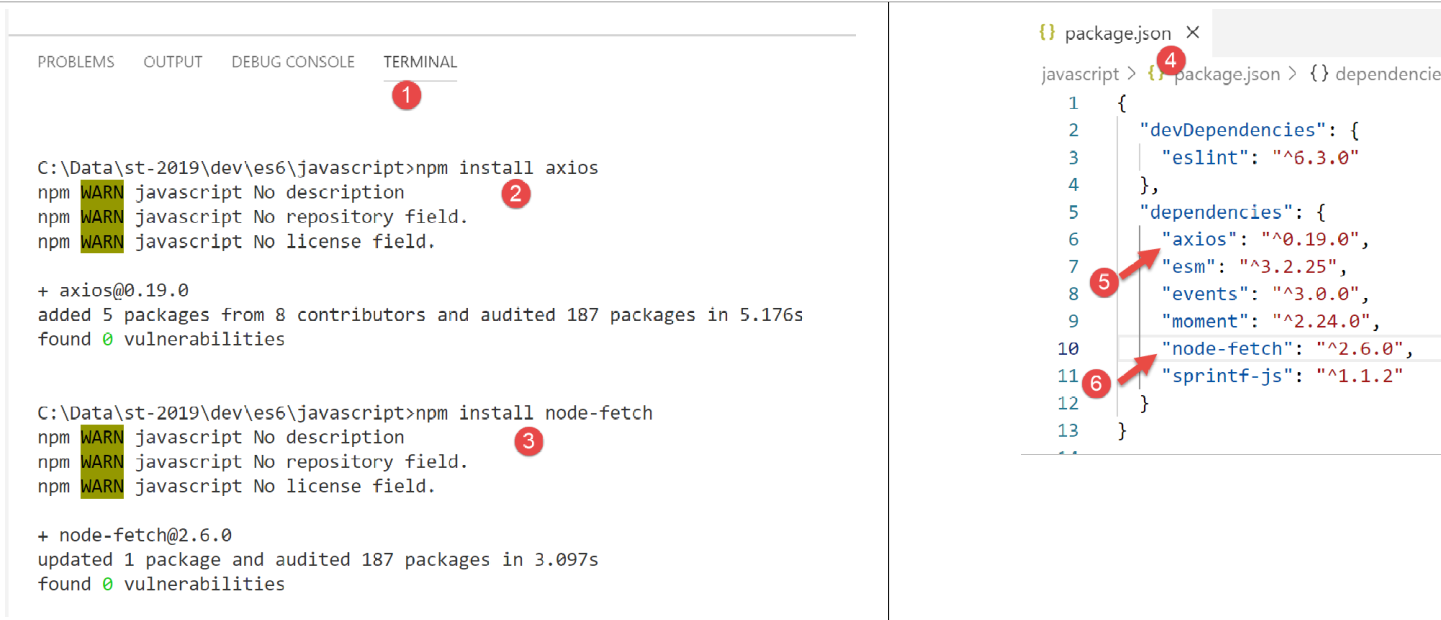
在示例 1 中,我们将使用 [node-fetch] 和 [axios] 库,随后在接下来的示例中仅保留 [axios]。现在,我们将通过 [VSCode] 终端安装这两个 JavaScript 库:
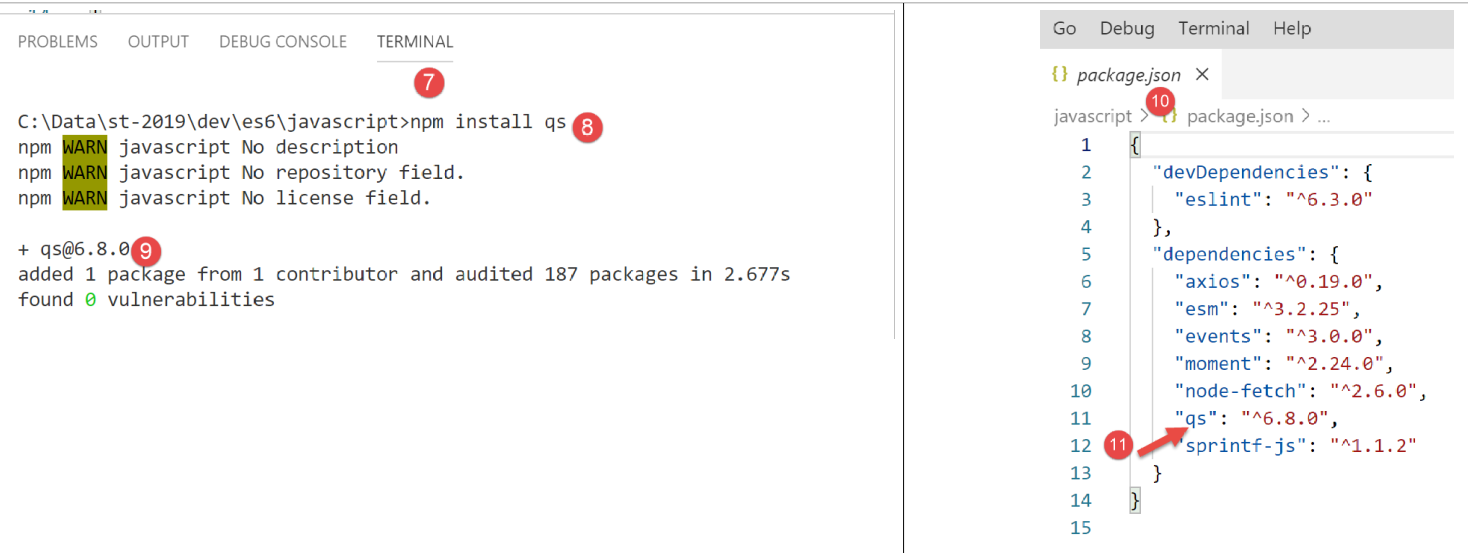
我们还将使用 [qs] 库,该库支持对字符串进行 URL 编码。请注意,这种编码方式用于对 HTTP GET 或 POST 请求的参数进行编码。
12.3. 脚本 [fetch-01]
[fetch-01] 脚本使用 [node-fetch] 库与税费计算服务器初始化一个 JSON 会话。其代码如下:
'use strict';

// imports
import fetch from 'node-fetch';
import qs from 'qs';
import { sprintf } from 'sprintf-js';
import moment from 'moment';


// URL base of tax calculation server
const baseUrl = 'http://localhost/php7/scripts-web/impots/version-14/main.php?';
// init session
async function initSession() {
  // query options HHTP [get /main.php?action=init-session&type=json]
  const options = {
    method: "GET",
    timeout: 2000
  };
  // execute query HTTP [get /main.php?action=init-session&type=json]
  let débutFetch;
  try {
    // asynchronous request - [fetch] makes a promise
    débutFetch = moment(Date.now());
    const response = await fetch(baseUrl + qs.stringify({
      action: 'init-session',
      type: 'json'
    }), options);
    // [response] is the entire HTTP response from the server (HTTP headers + response itself)
    // display this answer to see its structure
    console.log(sprintf("réponse fetch formatée en json,=%j, %s", response, heure(débutFetch)));
    console.log("réponse fetch en javascript=", response);
    // you can have HTTP headers
    console.log("entêtes de la réponse=", response.headers);
    // if application/json response, the server's json response is obtained with the asynchronous function [response.json()]
    // in which case the calling code obtains a [Promise] object
    // [await] allows you to obtain the server's [json] response rather than its promise
    const débutJson = moment(Date.now());
    const objet = await response.json();
    console.log(sprintf("réponse json=%j, type=%s, %s", objet, typeof (objet), heure(débutJson)));
    return objet;
    // if text / plain, the text response from the server is obtained with [response.text()]
    // in which case the calling code obtains a [Promise] object
    // [await] allows you to obtain the server's [text] response rather than its promise
    // const text = await response.text();
    // console.log("answer text=", text);
    // return text;
  } catch (error) {
    // we're here because the server has sent an error code [404 Not Found, ...] accompanied by an empty body - we display the error to see its structure
    // or because the [fetch] client has thrown an exception (network inaccessible, ...)
    // the error structure is displayed
    console.log(sprintf("error fetch en json=%j, %s", error, heure(débutFetch)));
    console.log("error fetch en javascript=", typeof (error), error);
    // launch the error message received
    throw error.message;
  }
}

// the main function executes the asynchronous function [initSession]
async function main() {
  try {
    console.log("requête HTTP vers le serveur en cours ---------------------------------------------");
    const response = await initSession();
    console.log("succès ---------------------------------------------");
    console.log("réponse=", response, typeof (response))
  } catch (error) {
    console.log("erreur ---------------------------------------------");
    console.log("erreur=", error, typeof (error));
  }
}

// test
main();

// time and duration display utility
function heure(début) {
  // current time
  const now = moment(Date.now());
  // time formatting
  let result = "heure=" + now.format("HH:mm:ss:SSS");
  // is it necessary to calculate a duration?
  if (début) {
    const durée = now - début;
    const milliseconds = durée % 1000;
    const seconds = Math.floor(durée / 1000);
    // format time + duration
    result = result + sprintf(", durée= %s seconde(s) et %s millisecondes", seconds, milliseconds);
  }
  // result
  return result;
}
注释
- JavaScript 的 HTTP 函数是异步函数。这里,我们应用了上一节所学的内容(参见链接);
- 第 24 行:为了等待异步函数 [fetch] 的响应在 [node.js] 事件循环中发布,我们使用关键字 [await]。我们知道,该语句必须位于以关键字 [async] 开头的代码块内(第 13 行);
- 第 13–56 行:我们将 HTTP 代码封装在异步函数 [initSession] 中;
- 第 59–69 行:使用第二个异步函数 [main] 以阻塞方式(async/await)调用异步函数 [initSession];
- 第 72 行:调用异步函数 [main];
- 尽管整个代码看起来像同步代码,但这些确实是异步函数,只是以阻塞方式执行;
- 第 19 行:要与税费计算服务器初始化 JSON 会话,必须向其发送 HTTP 请求 [get /main.php?action=init-session&type=json]。第 24–27 行的代码正是执行此操作。 [fetch] 的语法如下: [fetch(URL, options)],其中:
- [URL]:要查询的 URL;
- [options]:定义请求选项的对象。此处用于定义要发送给目标服务器的 HTTP 头部;
- 第 15–18 行:我们定义要发送的请求选项:
- [method]:我们希望执行 GET 请求;
- [timeout]:要求 [fetch] 客户端等待服务器响应的时间不超过 2 秒。若超时,[fetch] 将抛出异常;
- 第 24 行:为了获取 URL [/main.php?action=init-session&type=json],我们使用 [qs] 库来获取 GET 请求中 URL 编码的参数 [action,type]。生成的字符串是 [init-session&type=json],其实我们也可以自己构造这个字符串。我们只是想演示如何获取一个 URL 编码的字符串;
- 第 24 行:关键字 [await] 表示此处正在启动一个异步任务,且我们正在等待该任务在 [node.js] 事件循环中发布其响应;
- 第 24 行:在 [response] 中,我们获取了一个描述整个接收到的 HTTP 响应(包括头部和正文)的复杂对象;
- 第 30–31 行:我们打印 [response] 对象以查看其结构,先以字符串形式显示,再以 JavaScript 对象形式显示;
- 第 33 行:我们显示服务器发送的 HTTP 头部;
- 第 38 行:我们知道税费计算服务器将发送一个 JSON 字符串。该字符串封装在 [response] 对象中。我们可以使用 [response.json()] 方法获取它。但是,该方法是异步的。 因此,我们编写 [await response.json()] 来获取该 JSON 字符串,该字符串将在 [node.js] 事件循环中发布。实际上,我们获得的并非 JSON 字符串本身,而是由其表示的 JavaScript 对象;
- 第 39 行:显示接收到的 JSON 字符串;
- 第 40 行:返回接收到的 JavaScript 对象;
- 第 47 行:捕获 [fetch] 语句可能引发的任何错误。该语句仅在 HTTP 操作失败且未收到服务器响应时才会抛出异常。如果收到了响应(即使 HTTP 状态码不是 [200 OK]),[fetch] 也不会抛出异常,此时服务器响应可在第 38 行获取;
- 第 51–52 行:显示 [catch] 子句接收到的 [error] 对象,先以 JSON 字符串形式显示,然后以 JavaScript 对象形式显示;
- 第 54 行:来自 [fetch] 的错误消息存储在 [error.message] 中;
- 第 59–69 行:异步函数 [main] 以阻塞方式调用异步函数 [initSession](第 62 行中的 await);
- 第 72 行:启动异步函数 [main],随后主脚本代码执行完毕。当启动的异步任务将其结果发布到事件循环后,整个脚本即告完成;
执行结果如下:
情况 1:Laragon 服务器未运行
[Running] C:\myprograms\laragon-lite\bin\nodejs\node-v10\node.exe -r esm "c:\Data\st-2019\dev\es6\javascript\http\fetch-01.js"
requête HTTP vers le serveur en cours ---------------------------------------------
error fetch en json={"message":"network timeout at: http://localhost/php7/scripts-web/impots/version-14/main.php?action=init-session&type=json","type":"request-timeout"}, heure=10:08:48:180, durée= 2 seconde(s) et 62 millisecondes
error fetch en javascript= object { FetchError: network timeout at: http://localhost/php7/scripts-web/impots/version-14/main.php?action=init-session&type=json
    at Timeout.<anonymous> (c:\Data\st-2019\dev\es6\javascript\node_modules\node-fetch\lib\index.js:1448:13)
    at ontimeout (timers.js:436:11)
    at tryOnTimeout (timers.js:300:5)
    at listOnTimeout (timers.js:263:5)
    at Timer.processTimers (timers.js:223:10)
  message:
   'network timeout at: http://localhost/php7/scripts-web/impots/version-14/main.php?action=init-session&type=json',
  type: 'request-timeout' }
erreur ---------------------------------------------
erreur= network timeout at: http://localhost/php7/scripts-web/impots/version-14/main.php?action=init-session&type=json string

[Done] exited with code=0 in 2.804 seconds
注释
- 第 3 行:由于 HTTP 请求设置了 2 秒超时,该请求在 2 秒 62 毫秒后失败;
- 第 4–9 行:由 [catch(error)] 子句捕获的 JavaScript [error] 对象。该对象具有两个属性:
- [FetchError]:第 4 行;
- [message]:第 10–12 行;
- 第 14 行:异步函数 [main] 接收到的错误消息;
情况 2:Laragon 服务器正在运行
[Running] C:\myprograms\laragon-lite\bin\nodejs\node-v10\node.exe -r esm "c:\Data\st-2019\dev\es6\javascript\http\fetch-01.js"
requête HTTP vers le serveur en cours ---------------------------------------------
réponse fetch formatée en json,={"size":0,"timeout":2000}, heure=10:13:50:814, durée= 0 seconde(s) et 375 millisecondes
réponse fetch en javascript= Response {
  size: 0,
  timeout: 2000,
  [Symbol(Body internals)]:
   { body:
      PassThrough {
        _readableState: [ReadableState],
        readable: true,
        domain: null,
        _events: [Object],
        _eventsCount: 2,
        _maxListeners: undefined,
        _writableState: [WritableState],
        writable: false,
        allowHalfOpen: true,
        _transformState: [Object] },
     disturbed: false,
     error: null },
  [Symbol(Response internals)]:
   { url:
      'http://localhost/php7/scripts-web/impots/version-14/main.php?action=init-session&type=json',
     status: 200,
     statusText: 'OK',
     headers: Headers { [Symbol(map)]: [Object] },
     counter: 0 } }
entêtes de la réponse= Headers {
  [Symbol(map)]:
   [Object: null prototype] {
     date: [ 'Sat, 14 Sep 2019 08:13:50 GMT' ],
     server: [ 'Apache/2.4.35 (Win64) OpenSSL/1.1.0i PHP/7.2.11' ],
     'x-powered-by': [ 'PHP/7.2.11' ],
     'cache-control': [ 'max-age=0, private, must-revalidate, no-cache, private' ],
     'set-cookie': [ 'PHPSESSID=99q2iinusmhl55fa600aie2mmu; path=/' ],
     'content-length': [ '86' ],
     connection: [ 'close' ],
     'content-type': [ 'application/json' ] } }
réponse json={"action":"init-session","état":700,"réponse":"session démarrée avec type [json]"}, type=object, heure=10:13:50:825, durée= 0 seconde(s) et 1 millisecondes
succès ---------------------------------------------
réponse= { action: 'init-session',
  'état': 700,
  'réponse': 'session démarrée avec type [json]' } object

[Done] exited with code=0 in 1.022 seconds
评论
- 第 3 行:[fetch] 在 375 毫秒后收到服务器响应;
- 第 4–39 行:封装服务器响应的 JavaScript 对象 [response] 的结构。在其属性中,有些可能值得我们关注:
- [status](第 25 行):服务器响应的 HTTP 状态码;
- [statusText](第 26 行):与该状态码关联的文本;
- [headers](第 27 行):服务器响应的 HTTP 头部;
- [body](第 8 行):表示服务器发送的文档。[fetch] 语句提供了用于处理它的方法;
- 第 29–39 行:服务器响应的 HTTP 头部;
- 第 40 行:异步函数 [response.json()] 在 1 毫秒后返回了响应;
- 第 42–44 行:异步函数 [main] 接收到的 JavaScript 对象;
情况 3:Laragon 服务器正在运行,但向其发送了错误的命令:
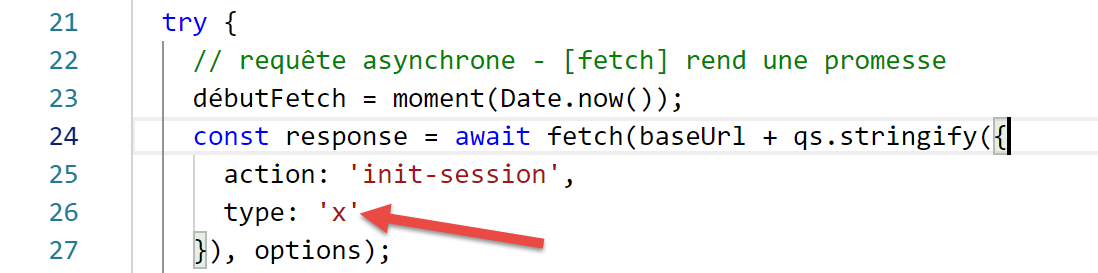
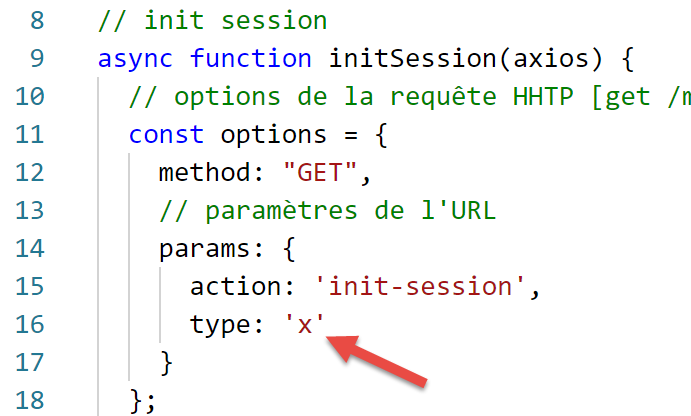
- 上文第 26 行,向服务器传递了错误的会话类型;
执行结果如下:
requête HTTP vers le serveur en cours ---------------------------------------------
réponse fetch formatée en json,={"size":0,"timeout":2000}, heure=10:27:54:114, durée= 0 seconde(s) et 136 millisecondes
réponse fetch en javascript= Response {
  size: 0,
  timeout: 2000,
  [Symbol(Body internals)]:
   { body:
      PassThrough {
        _readableState: [ReadableState],
        readable: true,
        domain: null,
        _events: [Object],
        _eventsCount: 2,
        _maxListeners: undefined,
        _writableState: [WritableState],
        writable: false,
        allowHalfOpen: true,
        _transformState: [Object] },
     disturbed: false,
     error: null },
  [Symbol(Response internals)]:
   { url:
      'http://localhost/php7/scripts-web/impots/version-14/main.php?action=init-session&type=x',
     status: 400,
     statusText: 'Bad Request',
     headers: Headers { [Symbol(map)]: [Object] },
     counter: 0 } }
entêtes de la réponse= Headers {
  [Symbol(map)]:
   [Object: null prototype] {
     date: [ 'Sat, 14 Sep 2019 08:27:54 GMT' ],
     server: [ 'Apache/2.4.35 (Win64) OpenSSL/1.1.0i PHP/7.2.11' ],
     'x-powered-by': [ 'PHP/7.2.11' ],
     'cache-control': [ 'max-age=0, private, must-revalidate, no-cache, private' ],
     'set-cookie': [ 'PHPSESSID=5ku9gfok81ikj98hia0meeum57; path=/' ],
     'content-length': [ '79' ],
     connection: [ 'close' ],
     'content-type': [ 'application/json' ] } }
réponse json={"action":"init-session","état":703,"réponse":"paramètre type=[x] invalide"}, type=object, heure=10:27:54:127, durée= 0 seconde(s) et 2 millisecondes
succès ---------------------------------------------
réponse= { action: 'init-session',
  'état': 703,
  'réponse': 'paramètre type=[x] invalide' } object

[Done] exited with code=0 in 0.712 seconds
- 服务器响应在第 2 行接收;
- 第 24 行:我们可以看到服务器响应的 HTTP 状态码为 400,这是一个错误码。然而,[fetch] 并未抛出异常。只要 [fetch] 接收到服务器的响应,它就会进行处理,而不会抛出异常;
- 第 41–43 行:异步函数 [main] 获取的响应;
12.4. 脚本 [fetch-02]
以下脚本复用了 [fetch-01] 脚本,同时去除了所有不必要的细节:
'use strict';

// imports
import fetch from 'node-fetch';
import qs from 'qs';

// URL base of tax calculation server
const baseUrl = 'http://localhost/php7/scripts-web/impots/version-14/main.php?';
// init session
async function initSession() {
  // query options HHTP [get /main.php?action=init-session&type=json]
  const options = {
    method: "GET",
    timeout: 2000
  };
  // execute query HTTP [get /main.php?action=init-session&type=json]
  const response = await fetch(baseUrl + qs.stringify({
    action: 'init-session',
    type: 'json'
  }), options);
  // result received in jSON
  return await response.json();
}

// the main function executes the asynchronous function [initSession]
async function main() {
  try {
    console.log("requête HTTP vers le serveur en cours ---------------------------------------------");
    const response = await initSession();
    console.log("succès ---------------------------------------------");
    console.log("réponse=", response)
  } catch (error) {
    console.log("erreur ---------------------------------------------");
    console.log("erreur=", error.message);
  }
}

// test
main();
正常执行的结果:
[Running] C:\myprograms\laragon-lite\bin\nodejs\node-v10\node.exe -r esm "c:\Data\st-2019\dev\es6\javascript\http\fetch-02.js"
requête HTTP vers le serveur en cours ---------------------------------------------
succès ---------------------------------------------
réponse= { action: 'init-session',
  'état': 700,
  'réponse': 'session démarrée avec type [json]' }

[Done] exited with code=0 in 0.56 seconds
发生异常的执行结果(停止 Laragon 服务器):
[Running] C:\myprograms\laragon-lite\bin\nodejs\node-v10\node.exe -r esm "c:\Data\st-2019\dev\es6\javascript\http\fetch-02.js"
requête HTTP vers le serveur en cours ---------------------------------------------
erreur ---------------------------------------------
erreur= network timeout at: http://localhost/php7/scripts-web/impots/version-14/main.php?action=init-session&type=json

[Done] exited with code=0 in 2.701 seconds
12.5. 脚本 [axios-01]
在此,我们将重新审视 [fetch-01] 脚本,并使用 [axios] 库对其进行重写。需要提醒的是,我们之所以关注该库,是因为它能在 [node.js] 环境和常见浏览器之间实现跨平台兼容。这使得我们可以:
- 在第一阶段,在 [Node.js] 环境中测试脚本;
- 在第二阶段,将其移植到浏览器中;
[axios-01] 脚本遵循了 [fetch-01] 脚本的结构:
'use strict';
import axios from 'axios';

// axios default configuration
axios.defaults.timeout = 2000;
axios.defaults.baseURL = 'http://localhost/php7/scripts-web/impots/version-14';

// init session
async function initSession(axios) {
  // query options HHTP [get /main.php?action=init-session&type=json]
  const options = {
    method: "GET",
    // URL parameters
    params: {
      action: 'init-session',
      type: 'json'
    }
  };
  // execute query HTTP [get /main.php?action=init-session&type=json]
  try {
    // asynchronous request
    const response = await axios.request('main.php', options);
    // response is the entire HTTP response from the server (HTTP headers + response itself)
    // display this answer to see its structure
    console.log("réponse axios=", response);
    // the server response is in [response.data]
    return response.data;
  } catch (error) {
    // we're here because the server has sent an error code [404 Not Found, 500 Internal Server Error, ...]
    // the [error] parameter is an exception instance - it can take various forms
    // display it to see its structure
    console.log("axios error=", typeof (error), error);
    if (error.response) {
      // the server reported an error in status HTTP but also sent a response
      // then it is found in [error.response.data]
      // we know that the server sends jSON responses with structure {action, status, response}
      // and that in the event of an error, the error msg is in [reply]
      return error.response.data;
    } else {
      // we launch the error
      throw error;
    }
  }
}

// the main function executes the asynchronous function [initSession]
async function main() {
  try {
    console.log("requête HTTP vers le serveur en cours ---------------------------------------------");
    const response = await initSession(axios);
    console.log("succès ---------------------------------------------");
    console.log("réponse=", response, typeof (response))
  } catch (error) {
    console.log("erreur ---------------------------------------------");
    console.log("erreur=", error.message);
  }
}

// test
main();
注释
- 第 2 行:我们导入了 [axios] 库;
- 第 5-6 行:HTTP 请求的默认配置。[axios.defaults] 选项适用于 [axios] 对象发送的所有 HTTP 请求,无需为每个新请求单独指定;
- 第 5 行:所有请求的超时时间为 2 秒;
- 第 6 行:所有 URL 均相对于基础 URL;
- 第 9 行:异步 [initSession] 函数;
- 第 11–18 行:待发送的 HTTP 请求的选项(除第 5–6 行已定义的默认选项外);
- 第 14–17 行:URL 参数 [action=init-session&type=json]。[params] 对象将自动转换为 URL 编码字符串;
- 第 22 行:对异步函数 [axios.request] 的阻塞调用。第一个参数是目标 URL,由第 6 行定义的基准 URL 后接 [main.php] 构成。第二个参数是第 11–18 行中的 [options] 对象;
- 第 25 行:[response] 是一个 JavaScript 对象,封装了来自服务器的完整 HTTP 响应(HTTP 头部 + 响应正文)。我们将其显示出来以查看其 JavaScript 结构;
- 第 27 行:如果服务器发送了文档,则可在 [response.data] 中找到。这里我们知道服务器发送的 JSON 响应附带了 HTTP 头部 [Content-type: application/json]。该头部的存在会导致 [axios] 自动将 [response.data] 反序列化为 JavaScript 对象;
- 第 28 行:[axios] 函数可能抛出异常。这是 [axios] 与 [fetch] 的区别所在。在以下情况下会抛出异常:
- 无法发送 HTTP 请求(客户端错误);
- 服务器返回了 HTTP 错误代码(400、404、500 等)(此行为实际上是可配置的)。请注意,如果该 HTTP 状态码附带响应数据,[fetch] 不会抛出异常,而 [axios] 会。但是,如果 HTTP 错误代码附带文档,该文档会被存放在 [error.response] 中;
- 第 32 行:我们展示了 [error] 对象的 JavaScript 结构;
- 第 33–38 行:如果 [error] 对象包含一个 [response] 对象,则将此响应返回给调用代码;
- 第 39–42 行:在所有其他情况下,将 [error] 对象传递回调用代码;
- 第 47–57 行:异步函数 [main];
- 第 50 行:对异步函数 [initSession] 的阻塞调用。从服务器获取的 JSON 响应被作为 JavaScript 对象返回;
- 第 53–56 行:处理任何错误。错误消息存储在 [error.message] 中;
执行结果如下:
情况 1:Laragon 服务器未运行
[Running] C:\myprograms\laragon-lite\bin\nodejs\node-v10\node.exe -r esm "c:\Data\st-2019\dev\es6\javascript\http\axios-01.js"
requête HTTP vers le serveur en cours ---------------------------------------------
axios error= object { Error: timeout of 2000ms exceeded
    at createError (c:\Data\st-2019\dev\es6\javascript\node_modules\axios\lib\core\createError.js:16:15)
    at Timeout.handleRequestTimeout (c:\Data\st-2019\dev\es6\javascript\node_modules\axios\lib\adapters\http.js:252:16)
    at ontimeout (timers.js:436:11)
    at tryOnTimeout (timers.js:300:5)
    at listOnTimeout (timers.js:263:5)
    at Timer.processTimers (timers.js:223:10)
  config:
   { url:
      'http://localhost/php7/scripts-web/impots/version-14/main.php',
     method: 'get',
     params: { action: 'init-session', type: 'json' },
     headers:
      { Accept: 'application/json, text/plain, */*',
        'User-Agent': 'axios/0.19.0' },
     baseURL: 'http://localhost/php7/scripts-web/impots/version-14',
     transformRequest: [ [Function: transformRequest] ],
     transformResponse: [ [Function: transformResponse] ],
     timeout: 2000,
     adapter: [Function: httpAdapter],
     xsrfCookieName: 'XSRF-TOKEN',
     xsrfHeaderName: 'X-XSRF-TOKEN',
     maxContentLength: -1,
     validateStatus: [Function: validateStatus],
     data: undefined },
  code: 'ECONNABORTED',
  request:
   Writable {
     _writableState:
      WritableState {
        objectMode: false,
        highWaterMark: 16384,
        finalCalled: false,
        needDrain: false,
        ending: false,
        ended: false,
        finished: false,
        destroyed: false,
        decodeStrings: true,
        defaultEncoding: 'utf8',
        length: 0,
        writing: false,
        corked: 0,
        sync: true,
        bufferProcessing: false,
        onwrite: [Function: bound onwrite],
        writecb: null,
        writelen: 0,
        bufferedRequest: null,
        lastBufferedRequest: null,
        pendingcb: 0,
        prefinished: false,
        errorEmitted: false,
        emitClose: true,
        bufferedRequestCount: 0,
        corkedRequestsFree: [Object] },
     writable: true,
     domain: null,
     _events:
      [Object: null prototype] {
        response: [Function: handleResponse],
        error: [Function: handleRequestError] },
     _eventsCount: 2,
     _maxListeners: undefined,
     _options:
      { protocol: 'http:',
        maxRedirects: 21,
        maxBodyLength: 10485760,
        path:
         '/php7/scripts-web/impots/version-14/main.php?action=init-session&type=json',
        method: 'GET',
        headers: [Object],
        agent: undefined,
        auth: undefined,
        hostname: 'localhost',
        port: null,
        nativeProtocols: [Object],
        pathname: '/php7/scripts-web/impots/version-14/main.php',
        search: '?action=init-session&type=json' },
     _redirectCount: 0,
     _redirects: [],
     _requestBodyLength: 0,
     _requestBodyBuffers: [],
     _onNativeResponse: [Function],
     _currentRequest:
      ClientRequest {
        domain: null,
        _events: [Object],
        _eventsCount: 6,
        _maxListeners: undefined,
        output: [],
        outputEncodings: [],
        outputCallbacks: [],
        outputSize: 0,
        writable: true,
        _last: true,
        chunkedEncoding: false,
        shouldKeepAlive: false,
        useChunkedEncodingByDefault: false,
        sendDate: false,
        _removedConnection: false,
        _removedContLen: false,
        _removedTE: false,
        _contentLength: 0,
        _hasBody: true,
        _trailer: '',
        finished: true,
        _headerSent: true,
        socket: [Socket],
        connection: [Socket],
        _header:
         'GET /php7/scripts-web/impots/version-14/main.php?action=init-session&type=json HTTP/1.1\r\nAccept: application/json, text/plain, */*\r\nUser-Agent: axios/0.19.0\r\nHost: localhost\r\nConnection: close\r\n\r\n',
        _onPendingData: [Function: noopPendingOutput],
        agent: [Agent],
        socketPath: undefined,
        timeout: undefined,
        method: 'GET',
        path:
         '/php7/scripts-web/impots/version-14/main.php?action=init-session&type=json',
        _ended: false,
        res: null,
        aborted: 1568528450762,
        timeoutCb: null,
        upgradeOrConnect: false,
        parser: [HTTPParser],
        maxHeadersCount: null,
        _redirectable: [Circular],
        [Symbol(isCorked)]: false,
        [Symbol(outHeadersKey)]: [Object] },
     _currentUrl:
      'http://localhost/php7/scripts-web/impots/version-14/main.php?action=init-session&type=json' },
  response: undefined,
  isAxiosError: true,
  toJSON: [Function] }
erreur ---------------------------------------------
erreur= timeout of 2000ms exceeded

[Done] exited with code=0 in 2.784 seconds
评论
- 第 33-136 行:[error] 对象包含大量信息;
- [Error],第 3-9 行:对所发生错误的描述;
- [config],第 10–27 行:导致此错误的 HTTP 请求配置;
- [config.url],第 11–12 行:目标 URL;
- [config.method],第 13 行:请求方法;
- [config.params],第 14 行:URL 参数;
- [config.headers],第 16–17 行:请求的 HTTP 头部;
- [config.baseURL],第 18 行:目标 URL 的基准 URL;
- [config.timeout],第 21 行:请求超时;
- [code],第 28 行:错误代码;
- [request],第 29–133 行:HTTP 请求的详细描述。请注意,大多数属性名前缀为下划线 (_),这表示它们是 [request] 对象的内部属性,不供开发人员直接使用;
- [response],第 134 行:服务器响应,此处为空;
- 第 138 行:由 [main] 函数显示的错误消息;
情况 2:Laragon 服务器正在运行
[Running] C:\myprograms\laragon-lite\bin\nodejs\node-v10\node.exe -r esm "c:\Data\st-2019\dev\es6\javascript\http\axios-01.js"
requête HTTP vers le serveur en cours ---------------------------------------------
réponse axios= { status: 200,
  statusText: 'OK',
  headers:
   { date: 'Sun, 15 Sep 2019 07:09:26 GMT',
     server: 'Apache/2.4.35 (Win64) OpenSSL/1.1.0i PHP/7.2.11',
     'x-powered-by': 'PHP/7.2.11',
     'cache-control': 'max-age=0, private, must-revalidate, no-cache, private',
     'set-cookie': [ 'PHPSESSID=uas6lugtblstktcifpd8e5irm6; path=/' ],
     'content-length': '86',
     connection: 'close',
     'content-type': 'application/json' },
  config:
   { url:
      'http://localhost/php7/scripts-web/impots/version-14/main.php',
     method: 'get',
     params: { action: 'init-session', type: 'json' },
     headers:
      { Accept: 'application/json, text/plain, */*',
        'User-Agent': 'axios/0.19.0' },
     baseURL: 'http://localhost/php7/scripts-web/impots/version-14',
     transformRequest: [ [Function: transformRequest] ],
     transformResponse: [ [Function: transformResponse] ],
     timeout: 2000,
     adapter: [Function: httpAdapter],
     xsrfCookieName: 'XSRF-TOKEN',
     xsrfHeaderName: 'X-XSRF-TOKEN',
     maxContentLength: -1,
     validateStatus: [Function: validateStatus],
     data: undefined },
  request:
   ClientRequest {
     domain: null,
     _events:
      [Object: null prototype] {
        socket: [Function],
        abort: [Function],
        aborted: [Function],
        error: [Function],
        timeout: [Function],
        prefinish: [Function: requestOnPrefinish] },
     _eventsCount: 6,
     _maxListeners: undefined,
     output: [],
     outputEncodings: [],
     outputCallbacks: [],
     outputSize: 0,
     writable: true,
     _last: true,
     chunkedEncoding: false,
     shouldKeepAlive: false,
     useChunkedEncodingByDefault: false,
     sendDate: false,
     _removedConnection: false,
     _removedContLen: false,
     _removedTE: false,
     _contentLength: 0,
     _hasBody: true,
     _trailer: '',
     finished: true,
     _headerSent: true,
     socket:
      Socket {
        connecting: false,
        _hadError: false,
        _handle: [TCP],
        _parent: null,
        _host: 'localhost',
        _readableState: [ReadableState],
        readable: true,
        domain: null,
        _events: [Object],
        _eventsCount: 7,
        _maxListeners: undefined,
        _writableState: [WritableState],
        writable: false,
        allowHalfOpen: false,
        _sockname: null,
        _pendingData: null,
        _pendingEncoding: '',
        server: null,
        _server: null,
        parser: null,
        _httpMessage: [Circular],
        [Symbol(asyncId)]: 6,
        [Symbol(lastWriteQueueSize)]: 0,
        [Symbol(timeout)]: null,
        [Symbol(kBytesRead)]: 0,
        [Symbol(kBytesWritten)]: 0 },
     connection:
      Socket {
        connecting: false,
        _hadError: false,
        _handle: [TCP],
        _parent: null,
        _host: 'localhost',
        _readableState: [ReadableState],
        readable: true,
        domain: null,
        _events: [Object],
        _eventsCount: 7,
        _maxListeners: undefined,
        _writableState: [WritableState],
        writable: false,
        allowHalfOpen: false,
        _sockname: null,
        _pendingData: null,
        _pendingEncoding: '',
        server: null,
        _server: null,
        parser: null,
        _httpMessage: [Circular],
        [Symbol(asyncId)]: 6,
        [Symbol(lastWriteQueueSize)]: 0,
        [Symbol(timeout)]: null,
        [Symbol(kBytesRead)]: 0,
        [Symbol(kBytesWritten)]: 0 },
     _header:
      'GET /php7/scripts-web/impots/version-14/main.php?action=init-session&type=json HTTP/1.1\r\nAccept: application/json, text/plain, */*\r\nUser-Agent: axios/0.19.0\r\nHost: localhost\r\nConnection: close\r\n\r\n',
     _onPendingData: [Function: noopPendingOutput],
     agent:
      Agent {
        domain: null,
        _events: [Object],
        _eventsCount: 1,
        _maxListeners: undefined,
        defaultPort: 80,
        protocol: 'http:',
        options: [Object],
        requests: {},
        sockets: [Object],
        freeSockets: {},
        keepAliveMsecs: 1000,
        keepAlive: false,
        maxSockets: Infinity,
        maxFreeSockets: 256 },
     socketPath: undefined,
     timeout: undefined,
     method: 'GET',
     path:
      '/php7/scripts-web/impots/version-14/main.php?action=init-session&type=json',
     _ended: true,
     res:
      IncomingMessage {
        _readableState: [ReadableState],
        readable: false,
        domain: null,
        _events: [Object],
        _eventsCount: 3,
        _maxListeners: undefined,
        socket: [Socket],
        connection: [Socket],
        httpVersionMajor: 1,
        httpVersionMinor: 0,
        httpVersion: '1.0',
        complete: true,
        headers: [Object],
        rawHeaders: [Array],
        trailers: {},
        rawTrailers: [],
        aborted: false,
        upgrade: false,
        url: '',
        method: null,
        statusCode: 200,
        statusMessage: 'OK',
        client: [Socket],
        _consuming: false,
        _dumped: false,
        req: [Circular],
        responseUrl:
         'http://localhost/php7/scripts-web/impots/version-14/main.php?action=init-session&type=json',
        redirects: [] },
     aborted: undefined,
     timeoutCb: null,
     upgradeOrConnect: false,
     parser: null,
     maxHeadersCount: null,
     _redirectable:
      Writable {
        _writableState: [WritableState],
        writable: true,
        domain: null,
        _events: [Object],
        _eventsCount: 2,
        _maxListeners: undefined,
        _options: [Object],
        _redirectCount: 0,
        _redirects: [],
        _requestBodyLength: 0,
        _requestBodyBuffers: [],
        _onNativeResponse: [Function],
        _currentRequest: [Circular],
        _currentUrl:
         'http://localhost/php7/scripts-web/impots/version-14/main.php?action=init-session&type=json' },
     [Symbol(isCorked)]: false,
     [Symbol(outHeadersKey)]:
      [Object: null prototype] { accept: [Array], 'user-agent': [Array], host: [Array] } },
  data:
   { action: 'init-session',
     'état': 700,
     'réponse': 'session démarrée avec type [json]' } }
succès ---------------------------------------------
réponse= { action: 'init-session',
  'état': 700,
  'réponse': 'session démarrée avec type [json]' } object

[Done] exited with code=0 in 1.115 seconds
评论
- 第 3–203 行:封装服务器 HTTP 响应的 JavaScript 对象 [response];
- 第 3 行,[status]:响应的 HTTP 状态码;
- 第 4 行,[statusText]:与前面的 HTTP 状态码关联的文本;
- 第 5–13 行,[headers]:响应的 HTTP 头部:
- 第 10 行,[Set-Cookie]:会话 Cookie;
- 第 13 行,[Content-Type]:服务器发送的文档类型;
- 第 14–31 行,[config]:发送的 HTTP 请求的配置;
- 第 32–199 行,[request]:详细描述所发送 HTTP 请求的 JavaScript 对象;
- 第 200–203 行,[request.data]:封装服务器 JSON 响应的 JavaScript 对象;
- 第 205–207 行:由异步函数 [main] 获取的响应;
情况 3:向 Laragon 服务器发送了错误的 [init-session] 请求;
执行结果如下:
[Running] C:\myprograms\laragon-lite\bin\nodejs\node-v10\node.exe -r esm "c:\Data\st-2019\dev\es6\javascript\http\axios-01.js"
requête HTTP vers le serveur en cours ---------------------------------------------
axios error= object { Error: Request failed with status code 400
   ...
  config:
   { url:
      'http://localhost/php7/scripts-web/impots/version-14/main.php',
     ...
     data: undefined },
  request:
   ...
     [Symbol(outHeadersKey)]:
      [Object: null prototype] { accept: [Array], 'user-agent': [Array], host: [Array] } },
  response:
   { status: 400,
     statusText: 'Bad Request',
     headers:
      { date: 'Sun, 15 Sep 2019 07:25:58 GMT',
        server: 'Apache/2.4.35 (Win64) OpenSSL/1.1.0i PHP/7.2.11',
        'x-powered-by': 'PHP/7.2.11',
        'cache-control': 'max-age=0, private, must-revalidate, no-cache, private',
        'set-cookie': [Array],
        'content-length': '79',
        connection: 'close',
        'content-type': 'application/json' },
     config:
      { url:
         'http://localhost/php7/scripts-web/impots/version-14/main.php',
        ...
        data: undefined },
     request:
      ...
        [Symbol(outHeadersKey)]: [Object] },
     data:
      { action: 'init-session',
        'état': 703,
        'réponse': 'paramètre type=[x] invalide' } },
  isAxiosError: true,
  toJSON: [Function] }
succès ---------------------------------------------
réponse= { action: 'init-session',
  'état': 703,
  'réponse': 'paramètre type=[x] invalide' } object

[Done] exited with code=0 in 0.69 seconds
由于服务器返回了 HTTP 400 状态码(第 15 行),[axios] 抛出了异常(同样,此行为可通过配置调整)。尽管 [axios] 抛出了异常,我们仍可在 [error.response](第 14 行)中获取来自服务器的 HTTP 响应,并在 [error.response.data](第 34 行)中获取发送的 JSON 文档。 第 41–43 行:[main] 函数正确地从服务器获取了 JSON 响应。
12.6. 脚本 [axios-02]
既然我们已经详细介绍了 [axios] 库在 HTTP 请求过程中处理的对象,现在可以将 [axios-01] 脚本重写为如下形式:
'use strict';
import axios from 'axios';

// axios default configuration
axios.defaults.timeout = 2000;
axios.defaults.baseURL = 'http://localhost/php7/scripts-web/impots/version-14';

// init session
async function initSession(axios) {
  // query options HHTP [get /main.php?action=init-session&type=json]
  const options = {
    method: "GET",
    // URL parameters
    params: {
      action: 'init-session',
      type: 'json'
    }
  };
  try {
    // execute query HTTP [get /main.php?action=init-session&type=json]
    const response = await axios.request('main.php', options);
    // the server response is in [response.data]
    return response.data;
  } catch (error) {
    // server response
    if (error.response) {
      // the answer jSON is in [error.response.data]
      return error.response.data;
    } else {
      // error restart
      throw error;
    }
  }
}

// the main function executes the asynchronous function [initSession]
async function main() {
  try {
    console.log("requête HTTP vers le serveur en cours ---------------------------------------------");
    const response = await initSession(axios);
    console.log("succès ---------------------------------------------");
    console.log("réponse=", response, typeof (response))
  } catch (error) {
    console.log("erreur ---------------------------------------------");
    console.log("erreur=", error.message);
  }
}

// test
main();
12.7. 脚本 [axios-03]
[axios-03] 脚本采用与 [axios-02] 脚本相同的方法。这次,我们向服务器添加了 [authenticate-user] HTTP 请求,该请求使用 POST 方法发送:
'use strict';
import axios from 'axios';
import qs from 'qs'

// axios configuration
axios.defaults.timeout = 2000;
axios.defaults.baseURL = 'http://localhost/php7/scripts-web/impots/version-14';


// init session
async function initSession(axios) {
  // query options HHTP [get /main.php?action=init-session&type=json]
  const options = {
    method: "GET",
    // URL parameters
    params: {
      action: 'init-session',
      type: 'json'
    }
  };
  try {
    // execute query HTTP [get /main.php?action=init-session&type=json]
    const response = await axios.request('main.php', options);
    // the server response is in [response.data]
    return response.data;
  } catch (error) {
    // server response
    if (error.response) {
      // the answer jSON is in [error.response.data]
      return error.response.data;
    } else {
      // error restart
      throw error;
    }
  }
}

async function authentifierUtilisateur(axios, user, password) {
  // query options HHTP [POST /main.php?action=authenticate-user]
  const options = {
    method: "POST",
    headers: {
      'Content-type': 'application/x-www-form-urlencoded',
    },
    // body of POST
    data: qs.stringify({
      user: user,
      password: password
    }),
    // URL parameters
    params: {
      action: 'authentifier-utilisateur'
    }
  };
  try {
    // execute query HTTP [post /main.php?action=authenticate-user]
    const response = await axios.request('main.php', options);
    // the server response is in [response.data]
    return response.data;
  } catch (error) {
    // server response
    if (error.response) {
      // the answer jSON is in [error.response.data]
      return error.response.data;
    } else {
      // error restart
      throw error;
    }
  }
}

// the main function executes asynchronous functions one by one
async function main() {
  try {
    // init-session
    console.log("action init-session en cours ---------------------------------------------");
    const response1 = await initSession(axios);
    console.log("succès ---------------------------------------------");
    console.log("réponse=", response1);
    // authenticate-user
    console.log("action authentifier-utilisateur en cours ---------------------------------------------");
    const response2 = await authentifierUtilisateur(axios, 'admin', 'admin');
    console.log("succès ---------------------------------------------");
    console.log("réponse=", response2)
  } catch (error) {
    console.log("erreur ---------------------------------------------");
    console.log("erreur=", error);
  }
}

// test
main();
注释
- 第 38-70 行:异步函数 [authenticateUser];
- 第 39 行:必须发出 [POST /main.php?action=authenticate-user] 请求;
- 第 40–54 行:HTTP 请求选项;
- 第 41 行:这是一个 POST 请求;
- 第 42–44 行:POST 参数将通过 URL 编码封装在客户端随请求发送的文档中;
- 第 46–49 行:[data] 属性必须包含 URL 编码后的 POST 字符串。为此,我们使用第 3 行导入的 [qs] 库;
- 第 55–69 行:为执行请求,我们使用与 [initSession] 方法中相同的代码;
- 第 73–89 行:[asynchrone] 方法以阻塞方式依次调用 [initSession] 和 [authentifierUtilisateur] 方法(第 77 行和第 82 行);
- 第 82 行:使用 (admin, admin) 作为登录凭据。我们知道服务器会识别这些凭据;
执行结果如下:
[Running] C:\myprograms\laragon-lite\bin\nodejs\node-v10\node.exe -r esm "c:\Data\st-2019\dev\es6\javascript\http\axios-03.js"
action init-session en cours ---------------------------------------------
succès ---------------------------------------------
réponse= { action: 'init-session',
  'état': 700,
  'réponse': 'session démarrée avec type [json]' }
action authentifier-utilisateur en cours ---------------------------------------------
succès ---------------------------------------------
réponse= { action: 'authentifier-utilisateur',
  'état': 103,
  'réponse':
   [ 'pas de session en cours. Commencer par action [init-session]' ] }

[Done] exited with code=0 in 0.834 seconds
- 第 9-12 行:用户认证失败:服务器未保留已初始化 JSON 会话的事实。这是因为对第一个 [init-session] 请求的响应中未发送会话 Cookie;
12.8. 脚本 [axios-04]
[axios-04]脚本对[axios-03]脚本进行了两项改进:
- 它处理了会话 Cookie;
- 将 [initSession] 和 [authenticateUser] 函数中的公共部分提取到 [getRemoteData] 函数中;
'use strict';
import axios from 'axios';
import qs from 'qs'

// axios configuration
axios.defaults.timeout = 2000;
axios.defaults.baseURL = 'http://localhost/php7/scripts-web/impots/version-14';

// session cookie
const sessionCookieName = "PHPSESSID";
let sessionCookie = '';

// init session
async function initSession(axios) {
  // query options HHTP [get /main.php?action=init-session&type=json]
  const options = {
    method: "GET",
    // URL parameters
    params: {
      action: 'init-session',
      type: 'json'
    }
  };
  // execute query HTTP
  return await getRemoteData(axios, options);
}

async function authentifierUtilisateur(axios, user, password) {
  // query options HHTP [post /main.php?action=authenticate-user]
  const options = {
    method: "POST",
    headers: {
      'Content-type': 'application/x-www-form-urlencoded',
    },
    // body of POST
    data: qs.stringify({
      user: user,
      password: password
    }),
    // URL parameters
    params: {
      action: 'authentifier-utilisateur'
    }
  };
  // execute query HTTP
  return await getRemoteData(axios, options);
}

async function getRemoteData(axios, options) {
  // for the session cookie
  if (!options.headers) {
    options.headers = {};
  }
  options.headers.Cookie = sessionCookie;
  // execute query HTTP
  let response;
  try {
    // asynchronous request
    response = await axios.request('main.php', options);
  } catch (error) {
    // the [error] parameter is an exception instance - it can take various forms
    if (error.response) {
      // the server response is in [error.response]
      response = error.response;
    } else {
      // error restart
      throw error;
    }
  }
  // response is the entire HTTP response from the server (HTTP headers + response itself)
  // retrieve the session cookie if it exists
  const setCookie = response.headers['set-cookie'];
  if (setCookie) {
    // setCookie is an array
    // look for the session cookie in this table
    let trouvé = false;
    let i = 0;
    while (!trouvé && i < setCookie.length) {
      // look for the session cookie
      const results = RegExp('^(' + sessionCookieName + '.+?);').exec(setCookie[i]);
      if (results) {
        // the session cookie is stored
        // eslint-disable-next-line require-atomic-updates
        sessionCookie = results[1];
        // we found
        trouvé = true;
      } else {
        // next item
        i++;
      }
    }
  }
  // the server response is in [response.data]
  return response.data;
}

// the main function executes asynchronous functions one by one
async function main() {
  try {
    // init-session
    console.log("action init-session en cours ---------------------------------------------");
    const response1 = await initSession(axios);
    console.log("succès ---------------------------------------------");
    console.log("réponse=", response1);
    // authenticate-user
    console.log("action authentifier-utilisateur en cours ---------------------------------------------");
    const response2 = await authentifierUtilisateur(axios, 'admin', 'admin');
    console.log("succès ---------------------------------------------");
    console.log("réponse=", response2)
  } catch (error) {
    console.log("erreur ---------------------------------------------");
    console.log("erreur=", error.message);
  }
}

// test
main();
注释
- 第 14–26 行:[initSession] 函数。它现在仅负责准备要发送至服务器的 HTTP 请求,但不会直接执行该请求。该任务由第 49–95 行的 [getRemoteDate] 方法负责;
- 第 28–47 行:[authentifierUtilisateur] 函数遵循相同的流程;
- 第 49 行:[getRemoteData] 函数接收了执行 HTTP 请求所需的两项信息:
- [axios],负责发送请求和接收响应的对象;
- [options],即发送给服务器的请求配置选项;
- 第 59 行:执行请求并等待其 JSON 响应;
- 第 60–68 行:处理任何异常;
- 第 64 行:获取响应,该响应可能封装在 error 对象中;
- 第 67 行:如果服务器抛出异常且未包含服务器响应,则将接收到的错误传播给调用代码;
- [getRemoteData] 函数负责管理会话 Cookie:
- 首次接收到 Cookie 时,将其存储在 [sessionCookie] 变量中(第 11 行);
- 随后在每次新的 HTTP 请求中返回该 Cookie;
- 第 72–92 行:[getRemoteData] 会分析每个服务器响应,以确定其是否发送了 [Set-Cookie] HTTP 头。我们知道服务器会发送一个名为 [PHPSESSID] 的会话 Cookie(第 10 行)。因此,这就是我们要查找的 Cookie(第 10 行);
- 第 72 行:若存在 [Set-Cookie] HTTP 头(不区分大小写),则将其检索出来。实际上可能存在多个 [Set-Cookie] 头,因此我们检索一个数组;
- 第 73 行:如果已获取到 Cookie 数组;
- 第 78–90 行:我们在数组中的所有 Cookie 中搜索会话 Cookie;
- 第 80 行:用于在第 i 个 Cookie 中搜索会话 Cookie 的关系表达式;
- 第 81 行:如果比较返回了结果;
- 第 84 行:结果数组 results[1] 中包含关系表达式模式的第一个括号,即 (PHPSESSID=xxxx),直至结束会话 Cookie 的闭合括号(不包含该括号);
- 第 50–54 行:每次请求时,会话 Cookie 都会包含在请求的 HTTP 头部中。首次请求时,该 Cookie 为空,因此将被服务器忽略;
执行结果如下:
[Running] C:\myprograms\laragon-lite\bin\nodejs\node-v10\node.exe -r esm "c:\Data\st-2019\dev\es6\javascript\http\axios-04.js"
action init-session en cours ---------------------------------------------
succès ---------------------------------------------
réponse= { action: 'init-session',
  'état': 700,
  'réponse': 'session démarrée avec type [json]' }
action authentifier-utilisateur en cours ---------------------------------------------
succès ---------------------------------------------
réponse= { action: 'authentifier-utilisateur',
  'état': 200,
  'réponse': 'Authentification réussie [admin, admin]' }

[Done] exited with code=0 in 0.982 seconds