14. 税费计算服务的 JavaScript HTTP 客户端
14.1. 简介
在此,我们计划为第 14 版税费计算服务编写一个 [Node.js] 客户端。客户端/服务器架构如下:
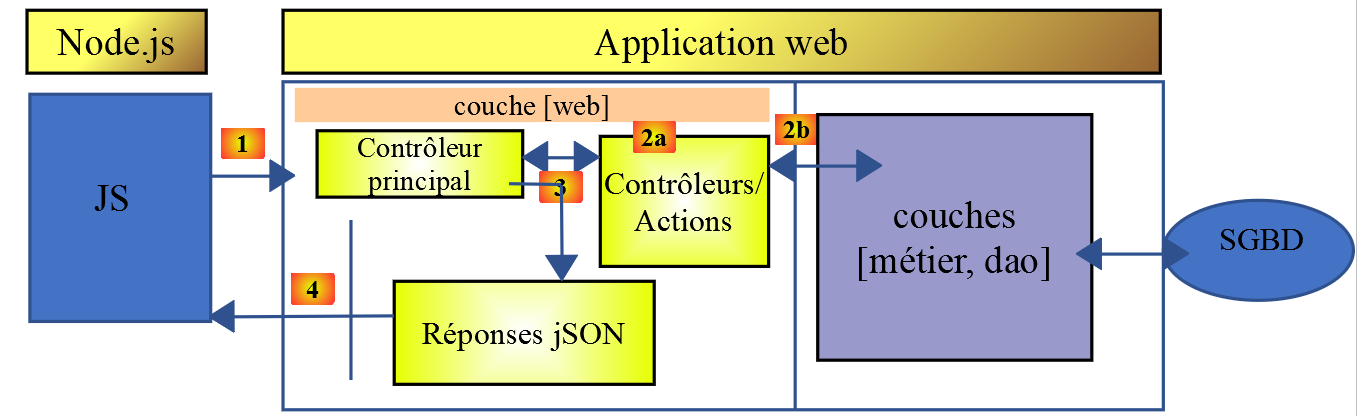
我们将探讨两种版本的客户端:
- 客户端第 1 版将采用以下 [主层、DAO] 分层结构:
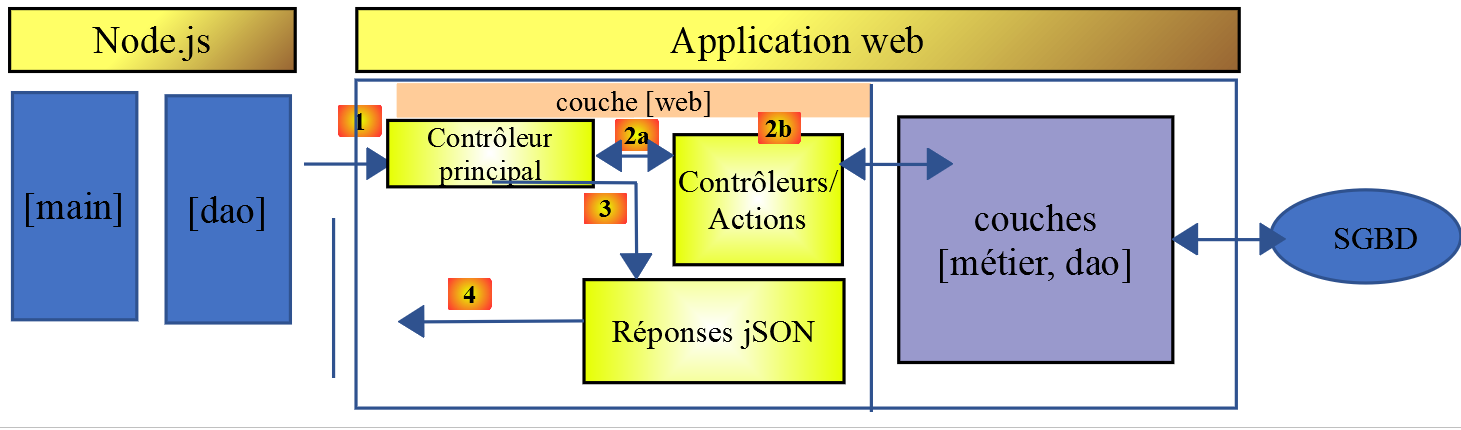
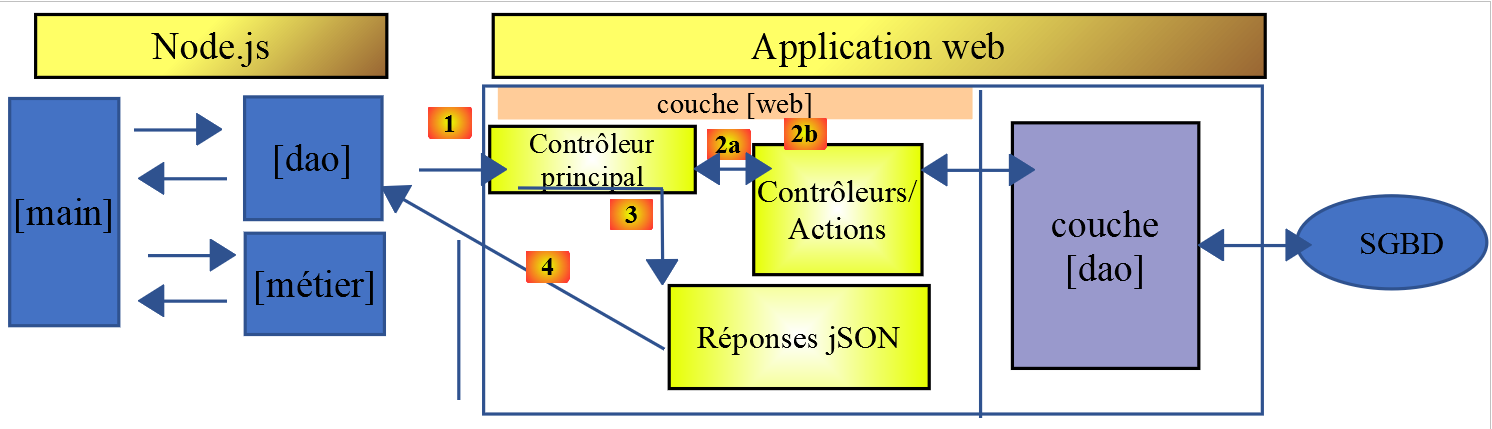
- 客户端的第 2 版将采用 [主层、业务逻辑层、DAO] 结构。服务器的 [业务逻辑] 层将移至客户端:
14.2. HTTP 客户端 1
如前所述,HTTP 1 客户端实现了以下客户端/服务器架构:
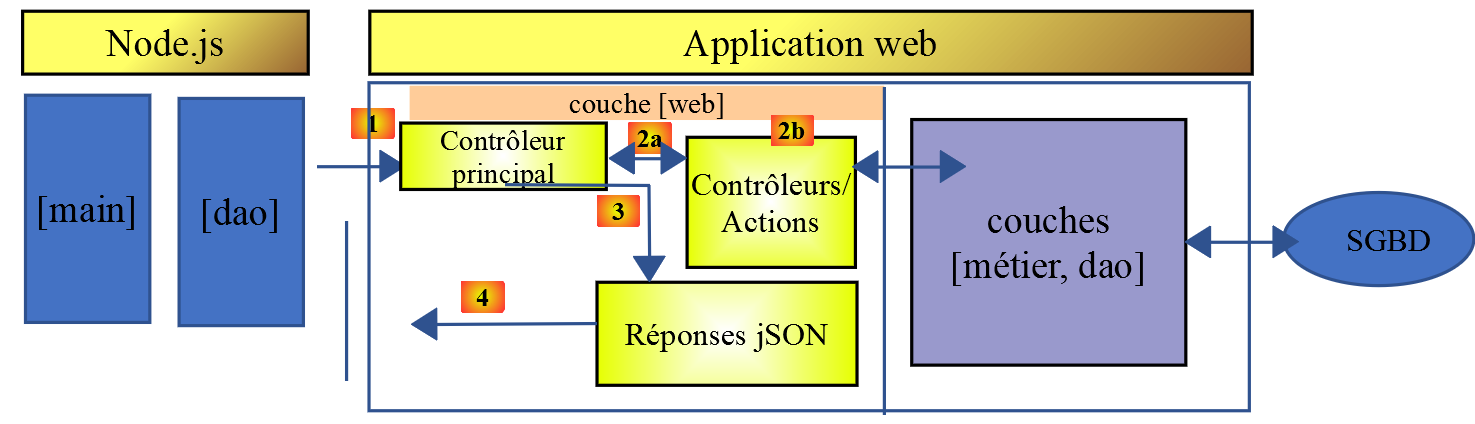
我们将实现:
- 将 [DAO] 层实现为一个类;
- 将 [main] 层实现为使用该类的脚本;
14.2.1. [dao] 层
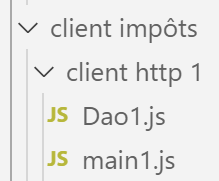
[dao]层将由以下类[Dao1.js]实现:
'use strict';

// imports
import qs from 'qs'

class Dao1 {

  // manufacturer
  constructor(axios) {
    // axios library for queries HTTP
    this.axios = axios;
    // session cookie
    this.sessionCookieName = "PHPSESSID";
    this.sessionCookie = '';
  }

  // init session
  async  initSession() {
    // query options HHTP [get /main.php?action=init-session&type=json]
    const options = {
      method: "GET",
      // URL parameters
      params: {
        action: 'init-session',
        type: 'json'
      }
    };
    // execute query HTTP
    return await this.getRemoteData(options);
  }

  async  authentifierUtilisateur(user, password) {
    // query options HHTP [post /main.php?action=authenticate-user]
    const options = {
      method: "POST",
      headers: {
        'Content-type': 'application/x-www-form-urlencoded',
      },
      // body of POST
      data: qs.stringify({
        user: user,
        password: password
      }),
      // URL parameters
      params: {
        action: 'authentifier-utilisateur'
      }
    };
    // execute query HTTP
    return await this.getRemoteData(options);
  }

  // tAX CALCULATION
  async  calculerImpot(marié, enfants, salaire) {
    // query options HHTP [post /main.php?action=calculate-tax]
    const options = {
      method: "POST",
      headers: {
        'Content-type': 'application/x-www-form-urlencoded',
      },
      // body of POST [married, children, salary]
      data: qs.stringify({
        marié: marié,
        enfants: enfants,
        salaire: salaire
      }),
      // URL parameters
      params: {
        action: 'calculer-impot'
      }
    };
    // execute query HTTP
    const data = await this.getRemoteData(options);
    // result
    return data;
  }

  // list of simulations
  async  listeSimulations() {
    // query options HHTP [get /main.php?action=lister-simulations]
    const options = {
      method: "GET",
      // URL parameters
      params: {
        action: 'lister-simulations'
      },
    };
    // execute query HTTP
    const data = await this.getRemoteData(options);
    // result
    return data;
  }

  // list of simulations
  async  supprimerSimulation(index) {
    // query options HHTP [get /main.php?action=suppress-simulation&number=index]
    const options = {
      method: "GET",
      // URL parameters
      params: {
        action: 'supprimer-simulation',
        numéro: index
      },
    };
    // execute query HTTP
    const data = await this.getRemoteData(options);
    // result
    return data;
  }

  async  getRemoteData(options) {
    // for the session cookie
    if (!options.headers) {
      options.headers = {};
    }
    options.headers.Cookie = this.sessionCookie;
    // execute query HTTP
    let response;
    try {
      // asynchronous request
      response = await this.axios.request('main.php', options);
    } catch (error) {
      // the [error] parameter is an exception instance - it can take various forms
      if (error.response) {
        // the server response is in [error.response]
        response = error.response;
      } else {
        // error restart
        throw error;
      }
    }
    // response is the entire HTTP response from the server (HTTP headers + response itself)
    // retrieve the session cookie if it exists
    const setCookie = response.headers['set-cookie'];
    if (setCookie) {
      // setCookie is an array
      // look for the session cookie in this table
      let trouvé = false;
      let i = 0;
      while (!trouvé && i < setCookie.length) {
        // look for the session cookie
        const results = RegExp('^(' + this.sessionCookieName + '.+?);').exec(setCookie[i]);
        if (results) {
          // the session cookie is stored
          // eslint-disable-next-line require-atomic-updates
          this.sessionCookie = results[1];
          // we found
          trouvé = true;
        } else {
          // next item
          i++;
        }
      }
    }
    // the server response is in [response.data]
    return response.data;
  }
}

// class export
export default Dao1;
- 这里我们运用了链接章节中学习的内容,该章节介绍了 [axios] 库,它允许我们在 [node.js] 和浏览器中发送 HTTP 请求。我们将重点关注链接章节中的脚本;
- 第 9–15 行:类构造函数。该类将包含三个属性:
- [axios]:用于发起 HTTP 请求的 [axios] 对象。该对象由调用代码传入;
- [sessionCookieName]:根据服务器的不同,会话 Cookie 的名称各异。此处为 [PHPSESSID];
- [sessionCookie]:由服务器发送并由客户端存储的会话 Cookie;
- 第 53–76 行:异步函数 [calculateTax] 通过提交参数 [married, children, salary] 发起请求 [post /main.php?action=calculate-tax]。它将服务器返回的 JSON 字符串转换为 JavaScript 对象;
- 第 79–92 行:异步函数 [listSimulations] 发起请求 [get /main.php?action=list-simulations]。它将服务器返回的 JSON 字符串转换为 JavaScript 对象;
- 第 95–109 行:异步函数 [deleteSimulation] 发起请求 [get /main.php?action=delete-simulation&number=index]。它将服务器返回的 JSON 字符串转换为 JavaScript 对象;
- 第 121 行:使用 [this.axios] 这种写法,是因为在此处,传递给构造函数的 [axios] 对象已被存储在 [this.axios] 属性中;
- 第 161 行:导出 [Dao1] 类以便使用;
14.2.2. [main1.js] 脚本
[main1.js] 脚本使用 [Dao1] 类向服务器发起了一系列调用:
- 初始化一个 JSON 会话;
- 使用 [admin, admin] 进行身份验证;
- 请求三项税费计算;
- 请求模拟列表;
- 删除其中一个;
代码如下:
// import axios
import axios from 'axios';
// dao1 class import
import Dao from './Dao1';

// asynchronous function [main]
async function main() {
  // axios configuration
  axios.defaults.timeout = 2000;
  axios.defaults.baseURL = 'http://localhost/php7/scripts-web/impots/version-14';
  // layer instantiation [dao]
  const dao = new Dao(axios);
  // using the [dao] layer
  try {
    // init session
    log("-----------init-session");
    let response = await dao.initSession();
    log(response);
    // authentication
    log("-----------authentifier-utilisateur");
    response = await dao.authentifierUtilisateur("admin", "admin");
    log(response);
    // tax calculations
    log("-----------calculer-impot x 3");
    response = await Promise.all([
      dao.calculerImpot("oui", 2, 45000),
      dao.calculerImpot("non", 2, 45000),
      dao.calculerImpot("non", 1, 30000)
    ]);
    log(response);
    // list of simulations
    log("-----------liste-des-simulations");
    response = await dao.listeSimulations();
    log(response);
    // deleting a simulation
    log("-----------suppression simulation n° 1");
    response = await dao.supprimerSimulation(1);
    log(response);
  } catch (error) {
    // we log the error
    console.log("erreur=", error.message);
  }
}

// log jSON
function log(object) {
  console.log(JSON.stringify(object, null, 2));
}

// execution
main();
注释
- 第 2 行:导入 [axios] 库;
- 第 4 行:导入 [Dao] 类;
- 第 7 行:与服务器通信的 [main] 函数是异步的;
- 第 9-10 行:发送至服务器的 HTTP 请求的默认配置:
- 第 9 行:超时 [timeout] 设置为 2 秒;
- 第 10 行:所有 URL 均以税费计算服务器第 14 版的基准 URL 为前缀;
- 第 12 行:构建 [Dao] 层。现在可以使用它了;
- 第46–48行:使用[log]函数以格式化方式显示JavaScript对象的JSON字符串:垂直排列并使用两个空格缩进(第3个参数);
- 第 15–18 行:初始化 JSON 会话;
- 第19–22行:身份验证;
- 第 23–30 行:并行请求了三项税费计算。得益于 [await Promise.all],执行将阻塞直至获得全部三项结果;
- 第 31–34 行:模拟列表;
- 第 35–38 行:删除一个模拟;
- 第 39–42 行:异常处理;
执行结果如下:
[Running] C:\myprograms\laragon-lite\bin\nodejs\node-v10\node.exe -r esm "c:\Data\st-2019\dev\es6\javascript\client impôts\client http 1\main1.js"
"-----------init-session"
{
  "action": "init-session",
  "état": 700,
  "réponse": "session démarrée avec type [json]"
}
"-----------authentifier-utilisateur"
{
  "action": "authentifier-utilisateur",
  "état": 200,
  "réponse": "Authentification réussie [admin, admin]"
}
"-----------calculer-impot x 3"
[
  {
    "action": "calculer-impot",
    "état": 300,
    "réponse": {
      "marié": "oui",
      "enfants": "2",
      "salaire": "45000",
      "impôt": 502,
      "surcôte": 0,
      "décôte": 857,
      "réduction": 126,
      "taux": 0.14
    }
  },
  {
    "action": "calculer-impot",
    "état": 300,
    "réponse": {
      "marié": "non",
      "enfants": "2",
      "salaire": "45000",
      "impôt": 3250,
      "surcôte": 370,
      "décôte": 0,
      "réduction": 0,
      "taux": 0.3
    }
  },
  {
    "action": "calculer-impot",
    "état": 300,
    "réponse": {
      "marié": "non",
      "enfants": "1",
      "salaire": "30000",
      "impôt": 1687,
      "surcôte": 0,
      "décôte": 0,
      "réduction": 0,
      "taux": 0.14
    }
  }
]
"-----------liste-des-simulations"
{
  "action": "lister-simulations",
  "état": 500,
  "réponse": [
    {
      "marié": "oui",
      "enfants": "2",
      "salaire": "45000",
      "impôt": 502,
      "surcôte": 0,
      "décôte": 857,
      "réduction": 126,
      "taux": 0.14,
      "arrayOfAttributes": null
    },
    {
      "marié": "non",
      "enfants": "2",
      "salaire": "45000",
      "impôt": 3250,
      "surcôte": 370,
      "décôte": 0,
      "réduction": 0,
      "taux": 0.3,
      "arrayOfAttributes": null
    },
    {
      "marié": "non",
      "enfants": "1",
      "salaire": "30000",
      "impôt": 1687,
      "surcôte": 0,
      "décôte": 0,
      "réduction": 0,
      "taux": 0.14,
      "arrayOfAttributes": null
    }
  ]
}
"-----------suppression simulation n° 1"
{
  "action": "supprimer-simulation",
  "état": 600,
  "réponse": [
    {
      "marié": "oui",
      "enfants": "2",
      "salaire": "45000",
      "impôt": 502,
      "surcôte": 0,
      "décôte": 857,
      "réduction": 126,
      "taux": 0.14,
      "arrayOfAttributes": null
    },
    {
      "marié": "non",
      "enfants": "1",
      "salaire": "30000",
      "impôt": 1687,
      "surcôte": 0,
      "décôte": 0,
      "réduction": 0,
      "taux": 0.14,
      "arrayOfAttributes": null
    }
  ]
}

[Done] exited with code=0 in 0.516 seconds
14.3. HTTP 2 客户端
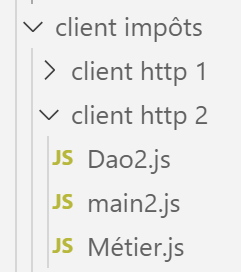
HTTP2 客户端的架构如下:
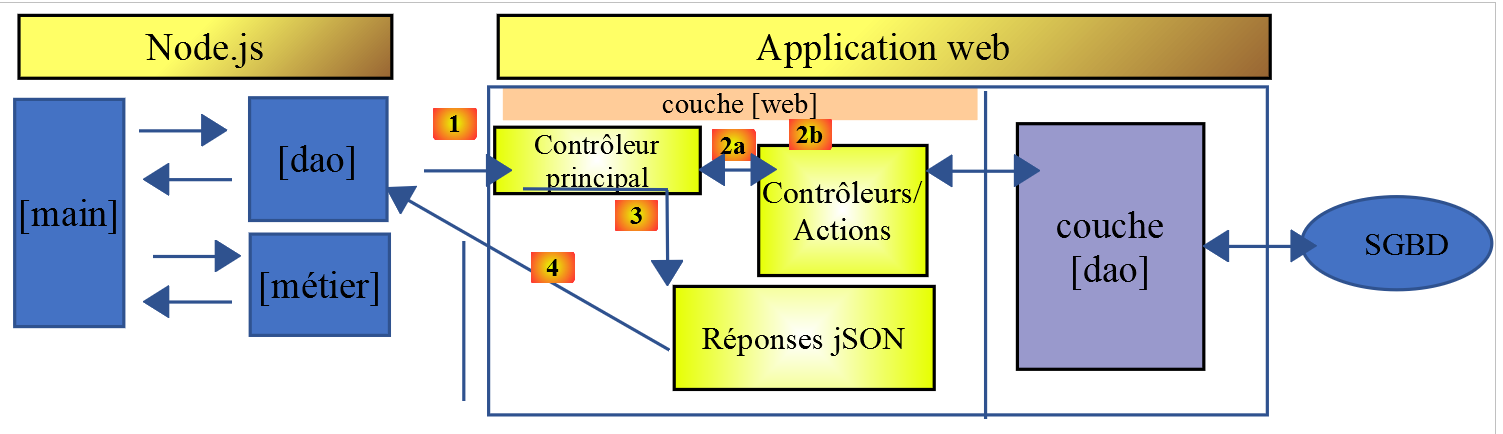
我们将 [business] 层从服务器移到了 JavaScript 客户端。与 PHP7 课程中的做法不同,[main] 层无需通过 [business] 层即可直接访问 [DAO] 层。我们将把这两个层作为专用组件使用:
- 当 [main] 层需要服务器端数据时,会通过 [DAO] 层进行调用;
- [主]层会请求[业务]层执行税费计算;
- [业务]层独立于[DAO]层,且绝不调用它;
14.3.1. JavaScript [Business] 类
PHP 中 [Business] 类的本质已在链接的文章中描述。这是一段相当复杂的代码,我们在此重提它,并非为了解释其原理,而是为了将其转换为 JavaScript:
<?php

// namespace
namespace Application;

class Metier implements InterfaceMetier {
  // dao layer
  private $dao;
  // tax administration data
  private $taxAdminData;

  //---------------------------------------------
  // setter couche [dao]
  public function setDao(InterfaceDao $dao) {
    $this->dao = $dao;
    return $this;
  }

  public function __construct(InterfaceDao $dao) {
    // a reference is stored on the [dao] layer
    $this->dao = $dao;
    // recover data for tax calculation
    // method [getTaxAdminData] may throw a ExceptionImpots exception
    // we then let it go back to the calling code
    $this->taxAdminData = $this->dao->getTaxAdminData();
  }

// tAX CALCULATION
// --------------------------------------------------------------------------
  public function calculerImpot(string $marié, int $enfants, int $salaire): array {
    // $marié : yes, no
    // $enfants : number of children
    // $salaire: annual salary
    // $this->taxAdminData: tax administration data
    //
    // we check that we have the correct data from the tax authorities
    if ($this->taxAdminData === NULL) {
      $this->taxAdminData = $this->getTaxAdminData();
    }
    // tax calculation with children
    $result1 = $this->calculerImpot2($marié, $enfants, $salaire);
    $impot1 = $result1["impôt"];
    // tax calculation without children
    if ($enfants != 0) {
      $result2 = $this->calculerImpot2($marié, 0, $salaire);
      $impot2 = $result2["impôt"];
      // application of the family allowance ceiling
      $plafonDemiPart = $this->taxAdminData->getPlafondQfDemiPart();
      if ($enfants < 3) {
        // $PLAFOND_QF_DEMI_PART euros for the first 2 children
        $impot2 = $impot2 - $enfants * $plafonDemiPart;
      } else {
        // $PLAFOND_QF_DEMI_PART euros for the first 2 children, double for subsequent children
        $impot2 = $impot2 - 2 * $plafonDemiPart - ($enfants - 2) * 2 * $plafonDemiPart;
      }
    } else {
      $impot2 = $impot1;
      $result2 = $result1;
    }
    // we take the highest tax
    if ($impot1 > $impot2) {
      $impot = $impot1;
      $taux = $result1["taux"];
      $surcôte = $result1["surcôte"];
    } else {
      $surcôte = $impot2 - $impot1 + $result2["surcôte"];
      $impot = $impot2;
      $taux = $result2["taux"];
    }
    // calculation of any discount
    $décôte = $this->getDecôte($marié, $salaire, $impot);
    $impot -= $décôte;
    // calculation of any tax reduction
    $réduction = $this->getRéduction($marié, $salaire, $enfants, $impot);
    $impot -= $réduction;
    // result
    return ["impôt" => floor($impot), "surcôte" => $surcôte, "décôte" => $décôte, "réduction" => $réduction, "taux" => $taux];
  }

// --------------------------------------------------------------------------
  private function calculerImpot2(string $marié, int $enfants, float $salaire): array {
    // $marié : yes, no
    // $enfants : number of children
    // $salaire: annual salary
    // $this->taxAdminData: tax administration data
    //
    // number of shares
    $marié = strtolower($marié);
    if ($marié === "oui") {
      $nbParts = $enfants / 2 + 2;
    } else {
      $nbParts = $enfants / 2 + 1;
    }
    // 1 part per child from the 3rd
    if ($enfants >= 3) {
      // an additional half share for each child from the 3rd onwards
      $nbParts += 0.5 * ($enfants - 2);
    }
    // taxable income
    $revenuImposable = $this->getRevenuImposable($salaire);
    // surcharge
    $surcôte = floor($revenuImposable - 0.9 * $salaire);
    // for rounding problems
    if ($surcôte < 0) {
      $surcôte = 0;
    }
    // family quotient
    $quotient = $revenuImposable / $nbParts;
    // tAX CALCULATION
    $limites = $this->taxAdminData->getLimites();
    $coeffR = $this->taxAdminData->getCoeffR();
    $coeffN = $this->taxAdminData->getCoeffN();
    // is set at the end of the limit array to stop the following loop
    $limites[count($limites) - 1] = $quotient;
    // tax rate search
    $i = 0;
    while ($quotient > $limites[$i]) {
      $i++;
    }
    // because $quotient has been placed at the end of the $limites array, the previous loop
    // cannot exceed the table $limites
    // now we can calculate the tax
    $impôt = floor($revenuImposable * $coeffR[$i] - $nbParts * $coeffN[$i]);
    // result
    return ["impôt" => $impôt, "surcôte" => $surcôte, "taux" => $coeffR[$i]];
  }

  // revenuImposable=annualwage-discount
  // the allowance has a minimum and a maximum
  private function getRevenuImposable(float $salaire): float {
    // 10% salary deduction
    $abattement = 0.1 * $salaire;
    // this allowance cannot exceed $this->taxAdminData->getAbattementDixPourCentMax()
    if ($abattement > $this->taxAdminData->getAbattementDixPourCentMax()) {
      $abattement = $this->taxAdminData->getAbattementDixPourcentMax();
    }
    // the allowance cannot be less than $this->taxAdminData->getAbattementDixPourcentMin()
    if ($abattement < $this->taxAdminData->getAbattementDixPourcentMin()) {
      $abattement = $this->taxAdminData->getAbattementDixPourcentMin();
    }
    // taxable income
    $revenuImposable = $salaire - $abattement;
    // result
    return floor($revenuImposable);
  }

// calculates any discount
  private function getDecôte(string $marié, float $salaire, float $impots): float {
    // at the outset, a zero discount
    $décôte = 0;
    // maximum tax amount to qualify for discount
    $plafondImpôtPourDécôte = $marié === "oui" ?
      $this->taxAdminData->getPlafondImpotCouplePourDecote() :
      $this->taxAdminData->getPlafondImpotCelibatairePourDecote();
    if ($impots < $plafondImpôtPourDécôte) {
      // maximum discount
      $plafondDécôte = $marié === "oui" ?
        $this->taxAdminData->getPlafondDecoteCouple() :
        $this->taxAdminData->getPlafondDecoteCelibataire();
      // theoretical discount
      $décôte = $plafondDécôte - 0.75 * $impots;
      // the discount cannot exceed the amount of tax due
      if ($décôte > $impots) {
        $décôte = $impots;
      }
      // no discount <0
      if ($décôte < 0) {
        $décôte = 0;
      }
    }
    // result
    return ceil($décôte);
  }

// calculates any reduction
  private function getRéduction(string $marié, float $salaire, int $enfants, float $impots): float {
    // the income ceiling to qualify for the 20% reduction
    $plafondRevenuPourRéduction = $marié === "oui" ?
      $this->taxAdminData->getPlafondRevenusCouplePourReduction() :
      $this->taxAdminData->getPlafondRevenusCelibatairePourReduction();
    $plafondRevenuPourRéduction += $enfants * $this->taxAdminData->getValeurReducDemiPart();
    if ($enfants > 2) {
      $plafondRevenuPourRéduction += ($enfants - 2) * $this->taxAdminData->getValeurReducDemiPart();
    }
    // taxable income
    $revenuImposable = $this->getRevenuImposable($salaire);
    // reduction
    $réduction = 0;
    if ($revenuImposable < $plafondRevenuPourRéduction) {
      // 20% discount
      $réduction = 0.2 * $impots;
    }
    // result
    return ceil($réduction);
  }

  // batch mode tax calculation
  public function executeBatchImpots(string $taxPayersFileName, string $resultsFileName, string $errorsFileName): void {
    // we let the exceptions coming from the [dao] layer flow upwards
    // retrieve taxpayer data
    $taxPayersData = $this->dao->getTaxPayersData($taxPayersFileName, $errorsFileName);
    // results table
    $results = [];
    // we exploit them
    foreach ($taxPayersData as $taxPayerData) {
      // tax calculation
      $result = $this->calculerImpot(
        $taxPayerData->getMarié(),
        $taxPayerData->getEnfants(),
        $taxPayerData->getSalaire());
      // complete [$taxPayerData]
      $taxPayerData->setMontant($result["impôt"]);
      $taxPayerData->setDécôte($result["décôte"]);
      $taxPayerData->setSurCôte($result["surcôte"]);
      $taxPayerData->setTaux($result["taux"]);
      $taxPayerData->setRéduction($result["réduction"]);
      // put the result in the results table
      $results [] = $taxPayerData;
    }
    // recording results
    $this->dao->saveResults($resultsFileName, $results);
  }

}
- 第 19–26 行:PHP 类的构造函数。既然我们提到要构建一个独立于 [DAO] 层的 [业务] 层,因此我们将对 JavaScript 中的这个构造函数进行两处修改:
- 它将不再接收 [DAO] 层的实例(它不再需要该实例);
- 它将不再向 [dao] 层的 [taxAdminData] 管理模块请求税费数据:调用代码会将这些数据传递给构造函数;
- 第 197–122 行:我们将不实现 [executeBatchImports] 方法,该方法的最终目的是将模拟结果保存到文本文件中。我们希望代码既能在 [node.js] 中运行,也能在浏览器中运行。然而,将数据保存到运行客户端浏览器的机器的文件系统中是不可能的;
鉴于这些限制,JavaScript [Métier] 类的代码如下:
'use strict';

// job class
class Métier {

  // manufacturer
  constructor(taxAdmindata) {
    // this.taxAdminData: tax administration data
    this.taxAdminData = taxAdmindata;
  }

  // tAX CALCULATION
  // --------------------------------------------------------------------------
  calculerImpot(marié, enfants, salaire) {
    // married: yes, no
    // children: number of children
    // salary: annual salary
    // this.taxAdminData: tax administration data
    //
    // tax calculation with children
    const result1 = this.calculerImpot2(marié, enfants, salaire);
    const impot1 = result1["impôt"];
    // tax calculation without children
    let result2, impot2, plafondDemiPart;
    if (enfants !== 0) {
      result2 = this.calculerImpot2(marié, 0, salaire);
      impot2 = result2["impôt"];
      // application of the family allowance ceiling
      plafondDemiPart = this.taxAdminData.plafondQfDemiPart;
      if (enfants < 3) {
        // PLAFOND_QF_DEMI_PART euros for the first 2 children
        impot2 = impot2 - enfants * plafondDemiPart;
      } else {
        // PLAFOND_QF_DEMI_PART euros for the first 2 children, double for subsequent children
        impot2 = impot2 - 2 * plafondDemiPart - (enfants - 2) * 2 * plafondDemiPart;
      }
    } else {
      // no tax recalculation
      impot2 = impot1;
      result2 = result1;
    }
    // we take the highest tax in [impot1, impot2]
    let impot, taux, surcôte;
    if (impot1 > impot2) {
      impot = impot1;
      taux = result1["taux"];
      surcôte = result1["surcôte"];
    } else {
      surcôte = impot2 - impot1 + result2["surcôte"];
      impot = impot2;
      taux = result2["taux"];
    }
    // calculation of any discount
    const décôte = this.getDecôte(marié, impot);
    impot -= décôte;
    // calculation of any tax reduction
    const réduction = this.getRéduction(marié, salaire, enfants, impot);
    impot -= réduction;
    // result
    return {
      "impôt": Math.floor(impot), "surcôte": surcôte, "décôte": décôte, "réduction": réduction,
      "taux": taux
    };
  }

  // --------------------------------------------------------------------------
  calculerImpot2(marié, enfants, salaire) {
    // married: yes, no
    // children: number of children
    // salary: annual salary
    // this->taxAdminData: tax administration data
    //
    // number of shares
    marié = marié.toLowerCase();
    let nbParts;
    if (marié === "oui") {
      nbParts = enfants / 2 + 2;
    } else {
      nbParts = enfants / 2 + 1;
    }
    // 1 part per child from the 3rd
    if (enfants >= 3) {
      // an additional half share for each child from the 3rd onwards
      nbParts += 0.5 * (enfants - 2);
    }
    // taxable income
    const revenuImposable = this.getRevenuImposable(salaire);
    // surcharge
    let surcôte = Math.floor(revenuImposable - 0.9 * salaire);
    // for rounding problems
    if (surcôte < 0) {
      surcôte = 0;
    }
    // family quotient
    const quotient = revenuImposable / nbParts;
    // tAX CALCULATION
    const limites = this.taxAdminData.limites;
    const coeffR = this.taxAdminData.coeffR;
    const coeffN = this.taxAdminData.coeffN;
    // is set at the end of the limit table to stop the following loop
    limites[limites.length - 1] = quotient;
    // tax rate search
    let i = 0;
    while (quotient > limites[i]) {
      i++;
    }
    // because we've placed quotient at the end of the limit array, the previous loop
    // cannot go beyond the limit table
    // now we can calculate the tax
    const impôt = Math.floor(revenuImposable * coeffR[i] - nbParts * coeffN[i]);
    // result
    return { "impôt": impôt, "surcôte": surcôte, "taux": coeffR[i] };
  }

  // revenuImposable=annualwage-discount
  // the allowance has a minimum and a maximum
  getRevenuImposable(salaire) {
    // 10% salary deduction
    let abattement = 0.1 * salaire;
    // this allowance cannot exceed taxAdminData.getAbattementDixPourCentMax()
    if (abattement > this.taxAdminData.abattementDixPourCentMax) {
      abattement = this.taxAdminData.abattementDixPourcentMax;
    }
    // the allowance cannot be less than taxAdminData.getAbattementDixPourcentMin()
    if (abattement < this.taxAdminData.abattementDixPourcentMin) {
      abattement = this.taxAdminData.abattementDixPourcentMin;
    }
    // taxable income
    const revenuImposable = salaire - abattement;
    // result
    return Math.floor(revenuImposable);
  }

  // calculates any discount
  getDecôte(marié, impots) {
    // at the outset, a zero discount
    let décôte = 0;
    // maximum tax amount to qualify for discount
    let plafondImpôtPourDécôte = marié === "oui" ?
      this.taxAdminData.plafondImpotCouplePourDecote :
      this.taxAdminData.plafondImpotCelibatairePourDecote;
    let plafondDécôte;
    if (impots < plafondImpôtPourDécôte) {
      // maximum discount
      plafondDécôte = marié === "oui" ?
        this.taxAdminData.plafondDecoteCouple :
        this.taxAdminData.plafondDecoteCelibataire;
      // theoretical discount
      décôte = plafondDécôte - 0.75 * impots;
      // the discount cannot exceed the amount of tax due
      if (décôte > impots) {
        décôte = impots;
      }
      // no discount <0
      if (décôte < 0) {
        décôte = 0;
      }
    }
    // result
    return Math.ceil(décôte);
  }

  // calculates any reduction
  getRéduction(marié, salaire, enfants, impots) {
    // the income ceiling to qualify for the 20% reduction
    let plafondRevenuPourRéduction = marié === "oui" ?
      this.taxAdminData.plafondRevenusCouplePourReduction :
      this.taxAdminData.plafondRevenusCelibatairePourReduction;
    plafondRevenuPourRéduction += enfants * this.taxAdminData.valeurReducDemiPart;
    if (enfants > 2) {
      plafondRevenuPourRéduction += (enfants - 2) * this.taxAdminData.valeurReducDemiPart;
    }
    // taxable income
    const revenuImposable = this.getRevenuImposable(salaire);
    // reduction
    let réduction = 0;
    if (revenuImposable < plafondRevenuPourRéduction) {
      // 20% discount
      réduction = 0.2 * impots;
    }
    // result
    return Math.ceil(réduction);
  }
}

// class export
export default Métier;
- JavaScript 代码与 PHP 代码非常接近;
- 第 187 行导出了 [Business] 类;
14.3.2. JavaScript 类 [Dao2]
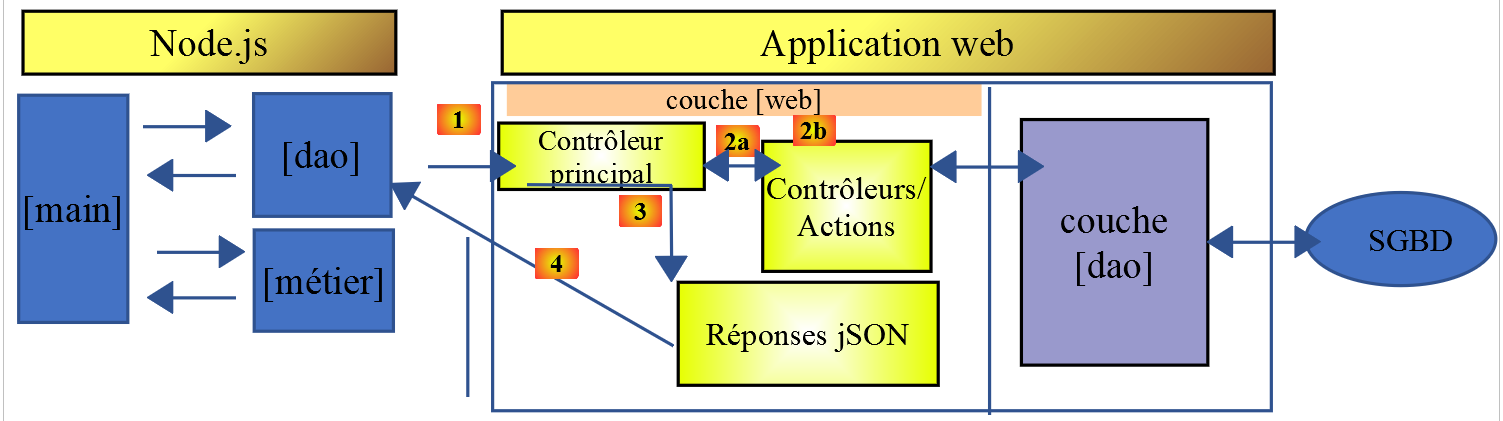
[Dao2] 类实现了上述 JavaScript 客户端的 [dao] 层,具体如下:
'use strict';

// imports
import qs from 'qs'

class Dao2 {

  // manufacturer
  constructor(axios) {
    this.axios = axios;
    // session cookie
    this.sessionCookieName = "PHPSESSID";
    this.sessionCookie = '';
  }

  // init session
  async  initSession() {
    // query options HHTP [get /main.php?action=init-session&type=json]
    const options = {
      method: "GET",
      // URL parameters
      params: {
        action: 'init-session',
        type: 'json'
      }
    };
    // execute query HTTP
    return await this.getRemoteData(options);
  }

  async  authentifierUtilisateur(user, password) {
    // query options HHTP [post /main.php?action=authenticate-user]
    const options = {
      method: "POST",
      headers: {
        'Content-type': 'application/x-www-form-urlencoded',
      },
      // body of POST
      data: qs.stringify({
        user: user,
        password: password
      }),
      // URL parameters
      params: {
        action: 'authentifier-utilisateur'
      }
    };
    // execute query HTTP
    return await this.getRemoteData(options);
  }

  async getAdminData() {
    // query options HHTP [get /main.php?action=get-admindata]
    const options = {
      method: "GET",
      // URL parameters
      params: {
        action: 'get-admindata'
      }
    };
    // execute query HTTP
    const data = await this.getRemoteData(options);
    // result
    return data;
  }

  async  getRemoteData(options) {
    // for the session cookie
    if (!options.headers) {
      options.headers = {};
    }
    options.headers.Cookie = this.sessionCookie;
    // execute query HTTP
    let response;
    try {
      // asynchronous request
      response = await this.axios.request('main.php', options);
    } catch (error) {
      // the [error] parameter is an exception instance - it can take various forms
      if (error.response) {
        // the server response is in [error.response]
        response = error.response;
      } else {
        // error restart
        throw error;
      }
    }
    // response is the entire HTTP response from the server (HTTP headers + response itself)
    // retrieve the session cookie if it exists
    const setCookie = response.headers['set-cookie'];
    if (setCookie) {
      // setCookie is an array
      // look for the session cookie in this table
      let trouvé = false;
      let i = 0;
      while (!trouvé && i < setCookie.length) {
        // look for the session cookie
        const results = RegExp('^(' + this.sessionCookieName + '.+?);').exec(setCookie[i]);
        if (results) {
          // the session cookie is stored
          // eslint-disable-next-line require-atomic-updates
          this.sessionCookie = results[1];
          // we found
          trouvé = true;
        } else {
          // next item
          i++;
        }
      }
    }
    // the server response is in [response.data]
    return response.data;
  }
}

// class export
export default Dao2;
注释
- [Dao2] 类仅实现了向税费计算服务器发送的三种可能请求:
- [init-session](第 17–29 行):用于初始化 JSON 会话;
- [authenticate-user](第 31–50 行):用于身份验证;
- [get-admindata](第 52–65 行):用于检索在客户端执行税务计算所需的税务管理数据;
- 第 52–65 行:我们向服务器引入了一个新的操作 [get-admindata]。该操作此前尚未实现,现将其实现。
14.3.3. 税费计算服务器的修改
税务计算服务器必须实现一个新操作。我们将在服务器的第 14 版中完成此项工作。待实现的操作具有以下特征:
- 由操作 [get /main.php?action=get-admindata] 调用;
- 它返回一个封装税务管理数据的对象的 JSON 字符串;
我们将探讨如何向服务器添加该操作。
该修改将在 NetBeans 中进行:
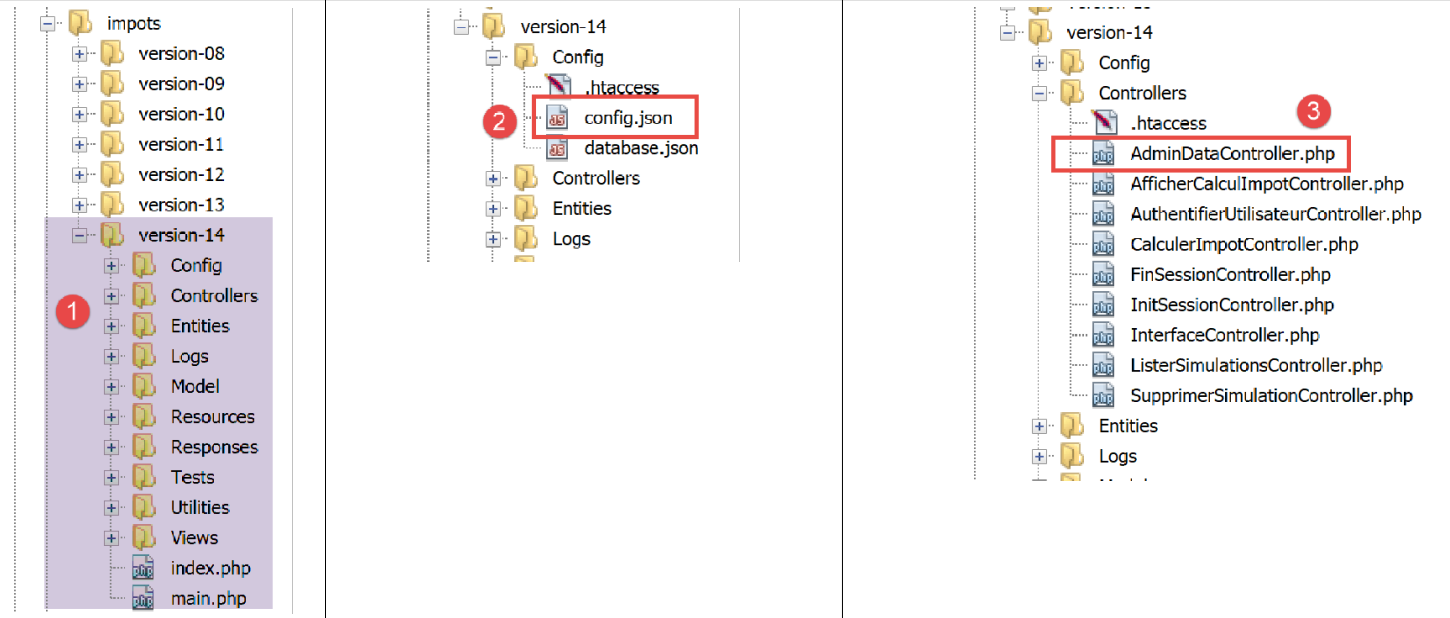
在 [2] 中,我们修改 [config.json] 文件以添加新操作:
{
    "databaseFilename": "Config/database.json",
    "corsAllowed": true,
    "rootDirectory": "C:/myprograms/laragon-lite/www/php7/scripts-web/impots/version-14",
    "relativeDependencies": [

        "/Entities/BaseEntity.php",
        "/Entities/Simulation.php",
        "/Entities/Database.php",
        "/Entities/TaxAdminData.php",
        "/Entities/ExceptionImpots.php",

        "/Utilities/Logger.php",
        "/Utilities/SendAdminMail.php",

        "/Model/InterfaceServerDao.php",
        "/Model/ServerDao.php",
        "/Model/ServerDaoWithSession.php",
        "/Model/InterfaceServerMetier.php",
        "/Model/ServerMetier.php",

        "/Responses/InterfaceResponse.php",
        "/Responses/ParentResponse.php",
        "/Responses/JsonResponse.php",
        "/Responses/XmlResponse.php",
        "/Responses/HtmlResponse.php",

        "/Controllers/InterfaceController.php",
        "/Controllers/InitSessionController.php",
        "/Controllers/ListerSimulationsController.php",
        "/Controllers/AuthentifierUtilisateurController.php",
        "/Controllers/CalculerImpotController.php",
        "/Controllers/SupprimerSimulationController.php",
        "/Controllers/FinSessionController.php",
        "/Controllers/AfficherCalculImpotController.php",
        "/Controllers/AdminDataController.php"
    ],
    "absoluteDependencies": [
        "C:/myprograms/laragon-lite/www/vendor/autoload.php",
        "C:/myprograms/laragon-lite/www/vendor/predis/predis/autoload.php"
    ],
    "users": [
        {
            "login": "admin",
            "passwd": "admin"
        }
    ],
    "adminMail": {
        "smtp-server": "localhost",
        "smtp-port": "25",
        "from": "guest@localhost",
        "to": "guest@localhost",
        "subject": "plantage du serveur de calcul d'impôts",
        "tls": "FALSE",
        "attachments": []
    },
    "logsFilename": "Logs/logs.txt",
    "actions":
            {
                "init-session": "\\InitSessionController",
                "authentifier-utilisateur": "\\AuthentifierUtilisateurController",
                "calculer-impot": "\\CalculerImpotController",
                "lister-simulations": "\\ListerSimulationsController",
                "supprimer-simulation": "\\SupprimerSimulationController",
                "fin-session": "\\FinSessionController",
                "afficher-calcul-impot": "\\AfficherCalculImpotController",
                "get-admindata": "\\AdminDataController"
            },
    "types": {
        "json": "\\JsonResponse",
        "html": "\\HtmlResponse",
        "xml": "\\XmlResponse"
    },
    "vues": {
        "vue-authentification.php": [700, 221, 400],
        "vue-calcul-impot.php": [200, 300, 341, 350, 800],
        "vue-liste-simulations.php": [500, 600]
    },
    "vue-erreurs": "vue-erreurs.php"
}
修改内容包括:
- 第 67 行:添加 [get-admindata] 操作并将其关联到一个控制器;
- 第 36 行:在 PHP 应用程序需加载的类列表中声明此控制器;
下一步是实现 [AdminDataController] 控制器 [3]:
<?php

namespace Application;

// symfony dependencies
use \Symfony\Component\HttpFoundation\Response;
use \Symfony\Component\HttpFoundation\Request;
use \Symfony\Component\HttpFoundation\Session\Session;
// layer alias [dao]
use \Application\ServerDaoWithSession as ServerDaoWithRedis;

class AdminDataController implements InterfaceController {

  // $config is the application configuration
  // traitement d'une requête Request
  // session and can modify it
  // $infos is additional information specific to each controller
  // renders an array [$statusCode, $état, $content, $headers]
  public function execute(
    array $config,
    Request $request,
    Session $session,
    array $infos = NULL): array {

    // you must have a single parameter GET
    $method = strtolower($request->getMethod());
    $erreur = $method !== "get" || $request->query->count() != 1;
    if ($erreur) {
      // we note the error
      $message = "il faut utiliser la méthode [get] avec l'unique paramètre [action] dans l'URL";
      $état = 1001;
      // return result to main controller
      return [Response::HTTP_BAD_REQUEST, $état, ["réponse" => $message], []];
    }

    // we can work
    // Redis
    \Predis\Autoloader::register();
    try {
      // customer [predis]
      $redis = new \Predis\Client();
      // connect to the server to see if it's there
      $redis->connect();
    } catch (\Predis\Connection\ConnectionException $ex) {
      // it didn't go well
      // return result with error to main controller
      $état = 1050;
      return [Response::HTTP_INTERNAL_SERVER_ERROR, $état,
        ["réponse" => "[redis], " . utf8_encode($ex->getMessage())], []];
    }

    // data recovery from tax authorities
    // first search the cache [redis]
    if (!$redis->get("taxAdminData")) {
      try {
        // retrieve tax data from the database
        $dao = new ServerDaoWithRedis($config["databaseFilename"], NULL);
        // taxAdminData
        $taxAdminData = $dao->getTaxAdminData();
        // put the recovered data into redis
        $redis->set("taxAdminData", $taxAdminData);
      } catch (\RuntimeException $ex) {
        // it didn't go well
        // return result with error to main controller
        $état = 1041;
        return [Response::HTTP_INTERNAL_SERVER_ERROR, $état,
          ["réponse" => utf8_encode($ex->getMessage())], []];
      }
    } else {
      // tax data are taken from the [redis] memory of the [application] scope
      $arrayOfAttributes = \json_decode($redis->get("taxAdminData"), true);
      // we instantiate an object [TaxAdminData] from the previous attribute array
      $taxAdminData = (new TaxAdminData())->setFromArrayOfAttributes($arrayOfAttributes);
    }

    // return result to main controller
    $état = 1000;
    return [Response::HTTP_OK, $état, ["réponse" => $taxAdminData], []];
  }

}
评论
- 第 12 行:与服务器的其他控制器一样,[AdminDataController] 实现了 [InterfaceController] 接口,该接口包含第 19–79 行中的 [execute] 方法;
- 第 78 行:与服务器上的其他控制器一样,[AdminDataController.execute] 方法返回一个数组 [$status, $status, [‘response’=>$response]],其中:
- [$status]:HTTP 响应状态码;
- [$état]:一个内部应用程序代码,表示执行客户端请求后服务器的状态;
- [$response]:封装了将发送给客户端的响应的数组。此处,该数组稍后将被转换为 JSON 字符串;
- 第 25–34 行:我们验证客户端的 [get-admindata] 操作在语法上是否正确;
- 第 37–74 行:检索 [TaxAdminData] 对象,该对象来自:
- 第 56–59 行:若未在 [redis] 缓存中找到,则从数据库中检索;
- 第 70–73 行:若在 [redis] 缓存中找到;
此代码摘自链接文章中介绍的 [CalculerImpotController] 控制器。实际上,该控制器还需要检索封装税务管理数据的 [TaxAdminData] 对象。
在测试 JavaScript 客户端时,当 [redis] 缓存中存在 [TaxAdminData] 对象时,其 JSON 格式会引发问题。为了解原因,让我们来分析该对象在 [redis] 中的存储方式:
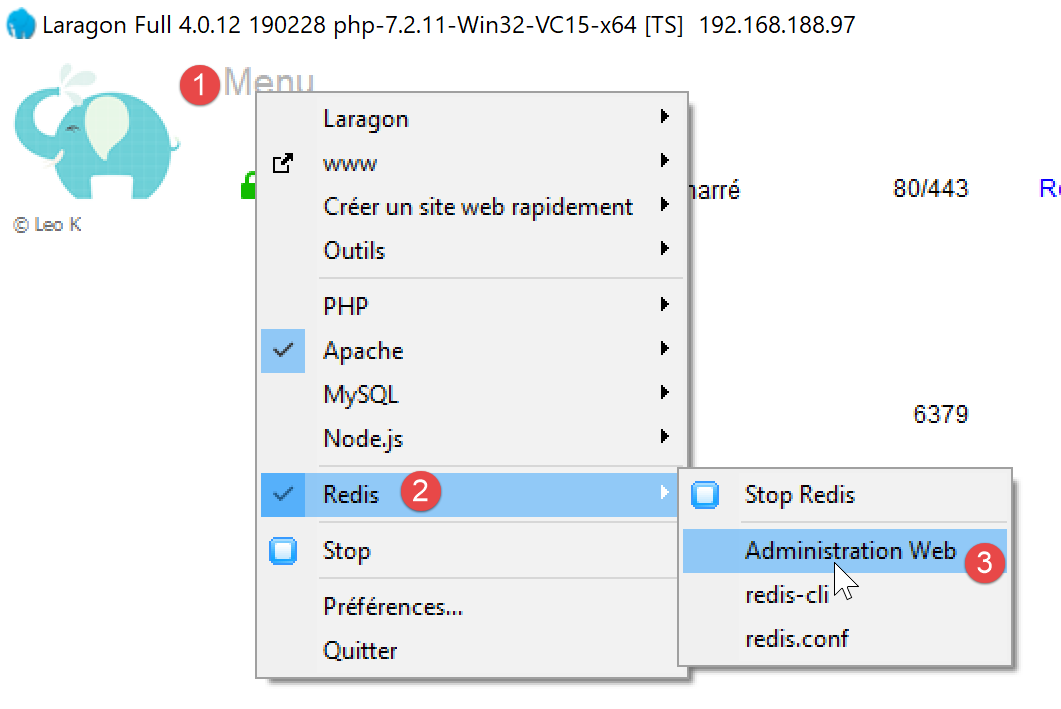
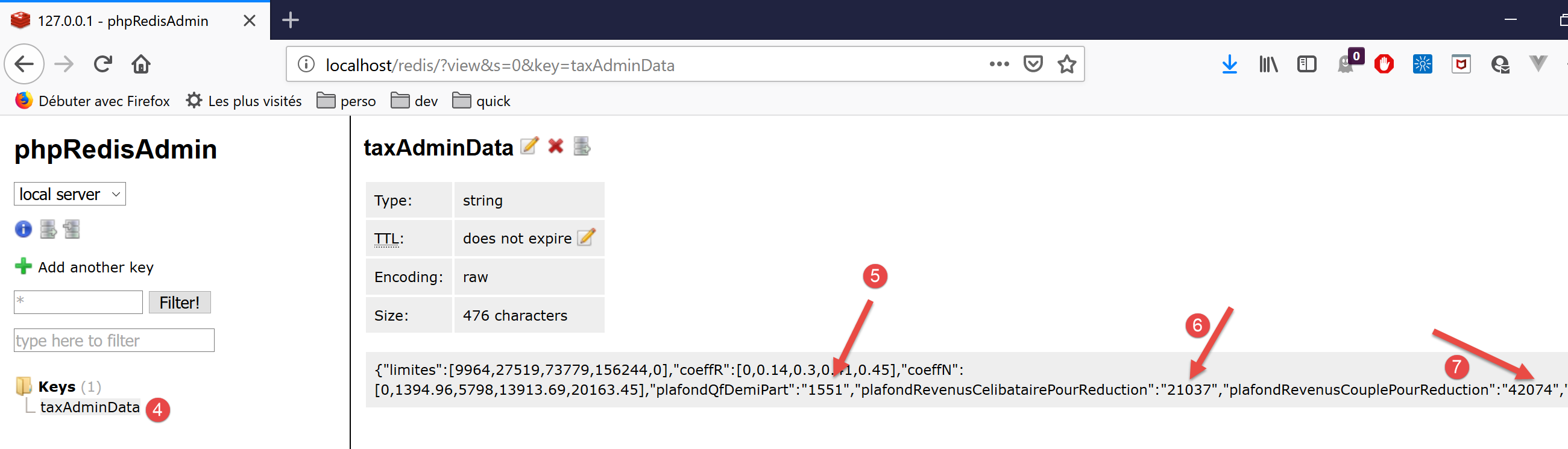
- 在[5-7]中,我们可以看到数值被存储为字符串。PHP能够处理这种情况,因为在涉及数字和字符串的计算中,+运算符会隐式地将字符串转换为数字。但JavaScript的做法恰恰相反:在涉及数字和字符串的计算中,+运算符会隐式地将数字转换为字符串。因此,JavaScript [Métier]类中的计算结果是不正确的;
要解决此问题,我们需要修改控制器第 71 行中使用的 [TaxAdminData.setFromArrayOfAttributes] 方法,使其能够根据 [redis] 缓存中的 JSON 字符串实例化一个 [TaxAdminData] 对象(参见文章):
<?php

namespace Application;

class TaxAdminData extends BaseEntity {
  // tax brackets
  protected $limites;
  protected $coeffR;
  protected $coeffN;
  // tax calculation constants
  protected $plafondQfDemiPart;
  protected $plafondRevenusCelibatairePourReduction;
  protected $plafondRevenusCouplePourReduction;
  protected $valeurReducDemiPart;
  protected $plafondDecoteCelibataire;
  protected $plafondDecoteCouple;
  protected $plafondImpotCouplePourDecote;
  protected $plafondImpotCelibatairePourDecote;
  protected $abattementDixPourcentMax;
  protected $abattementDixPourcentMin;

  // initialization
  public function setFromJsonFile(string $taxAdminDataFilename) {
    // parent
    parent::setFromJsonFile($taxAdminDataFilename);
    // check attribute values
    $this->checkAttributes();
    // we return the object
    return $this;
  }

  protected function check($value): \stdClass {
    // $value is an array of string elements or a single element
    if (!\is_array($value)) {
      $tableau = [$value];
    } else {
      $tableau = $value;
    }
    // transform the array of strings into an array of reals
    $newTableau = [];
    $result = new \stdClass();
    // table elements must be positive or zero decimal numbers
    $modèle = '/^\s*([+]?)\s*(\d+\.\d*|\.\d+|\d+)\s*$/';
    for ($i = 0; $i < count($tableau); $i ++) {
      if (preg_match($modèle, $tableau[$i])) {
        // put the float in newTableau
        $newTableau[] = (float) $tableau[$i];
      } else {
        // we note the error
        $result->erreur = TRUE;
        // we leave
        return $result;
      }
    }
    // we return the result
    $result->erreur = FALSE;
    if (!\is_array($value)) {
      // a single value
      $result->value = $newTableau[0];
    } else {
      // a list of values
      $result->value = $newTableau;
    }
    return $result;
  }

  // initialization by an array of attributes
  public function setFromArrayOfAttributes(array $arrayOfAttributes) {
    // parent
    parent::setFromArrayOfAttributes($arrayOfAttributes);
    // check attribute values
    $this->checkAttributes();
    // we return the object
    return $this;
  }

  // checking attribute values
  protected function checkAttributes() {
    // check that attribute values are real >=0
    foreach ($this as $key => $value) {
      if (is_string($value)) {
        // $value must be a real number >=0 or an array of reals >=0
        $result = $this->check($value);
        // mistake?
        if ($result->erreur) {
          // throw an exception
          throw new ExceptionImpots("La valeur de l'attribut [$key] est invalide");
        } else {
          // we note the value
          $this->$key = $result->value;
        }
      }
    }

    // we return the object
    return $this;
  }

  // getters and setters
  ...

}
评论
- 第 5 行:[TaxAdminData] 类继承自 [BaseEntity] 类,而 [BaseEntity] 类本身已包含 [setFromArrayOfAttributes] 方法。由于该方法不适用,我们在第 67–75 行对其进行了重定义;
- 第 70 行:首先使用父类的 [setFromArrayOfAttributes] 方法来初始化该类的属性;
- 第 72 行:[checkAttributes] 方法验证关联的值是否确实为数字。如果是字符串,则将其转换为数字;
- 第 74 行:生成的 [$this] 对象此时已成为一个属性值为数值的对象;
- 第 78–93 行:[checkAttributes] 方法验证对象属性的关联值是否确实为数值;
- 第 80 行:遍历属性列表;
- 第 81 行:如果某个属性的值类型为 [string];
- 第 83 行:则检查该字符串是否表示一个数字;
- 第 90 行:如果是,则将该字符串转换为数字并赋值给正在测试的属性;
- 第 85–86 行:若非如此,则抛出异常;
- 第 32–65 行:[check] 函数的功能略多于实际所需。它既处理数组也处理单个值。然而,此处调用它仅是为了检查 [string] 类型的值。它返回一个包含 [error, value] 属性的对象,其中:
- [error] 是一个布尔值,表示是否发生错误;
- [value] 是第 32 行传入的 [value] 参数,根据情况转换为数字或数字数组;
此前拥有名为 [arrayOfAttributes] 属性的 [BaseEntity] 类已进行修改,删除了该属性:该属性曾导致 [TaxAdminData] JSON 字符串出现问题。该类已重写如下:
<?php

namespace Application;

class BaseEntity {

  // initialization from a JSON file
  public function setFromJsonFile(string $jsonFilename) {
    // retrieve the contents of the tax data file
    $fileContents = \file_get_contents($jsonFilename);
    $erreur = FALSE;
    // mistake?
    if (!$fileContents) {
      // we note the error
      $erreur = TRUE;
      $message = "Le fichier des données [$jsonFilename] n'existe pas";
    }
    if (!$erreur) {
      // retrieve the JSON code from the configuration file in an associative array
      $arrayOfAttributes = \json_decode($fileContents, true);
      // mistake?
      if ($arrayOfAttributes === FALSE) {
        // we note the error
        $erreur = TRUE;
        $message = "Le fichier de données JSON [$jsonFilename] n'a pu être exploité correctement";
      }
    }
    // mistake?
    if ($erreur) {
      // throw an exception
      throw new ExceptionImpots($message);
    }
    // initialization of class attributes
    foreach ($arrayOfAttributes as $key => $value) {
      $this->$key = $value;
    }
    // we check the presence of all attributes
    $this->checkForAllAttributes($arrayOfAttributes);
    // we return the object
    return $this;
  }

  public function checkForAllAttributes($arrayOfAttributes) {
    // check that all keys have been initialized
    foreach (\array_keys($arrayOfAttributes) as $key) {
      if (!isset($this->$key)) {
        throw new ExceptionImpots("L'attribut [$key] de la classe "
          . get_class($this) . " n'a pas été initialisé");
      }
    }
  }

  public function setFromArrayOfAttributes(array $arrayOfAttributes) {
    // initialize certain class attributes (not necessarily all)
    foreach ($arrayOfAttributes as $key => $value) {
      $this->$key = $value;
    }
    // object is returned
    return $this;
  }

  // toString
  public function __toString() {
    // object attributes
    $arrayOfAttributes = \get_object_vars($this);
    // string jSON of object
    return \json_encode($arrayOfAttributes, JSON_UNESCAPED_UNICODE);
  }

}
评论
- 第 20 行:属性 [$this→arrayOfAttributes] 已被转换为一个变量,现在必须将其传递给第 38 行的 [checkForAllAttributes] 方法,该方法此前操作的是属性 [$this→arrayOfAttributes];
由于 [BaseEntity] 的这一变更,[Database] 类也必须稍作修改:
<?php

namespace Application;

class Database extends BaseEntity {
  // attributes
  protected $dsn;
  protected $id;
  protected $pwd;
  protected $tableTranches;
  protected $colLimites;
  protected $colCoeffR;
  protected $colCoeffN;
  protected $tableConstantes;
  protected $colPlafondQfDemiPart;
  protected $colPlafondRevenusCelibatairePourReduction;
  protected $colPlafondRevenusCouplePourReduction;
  protected $colValeurReducDemiPart;
  protected $colPlafondDecoteCelibataire;
  protected $colPlafondDecoteCouple;
  protected $colPlafondImpotCelibatairePourDecote;
  protected $colPlafondImpotCouplePourDecote;
  protected $colAbattementDixPourcentMax;
  protected $colAbattementDixPourcentMin;

  // setter
  // initialization
  public function setFromJsonFile(string $jsonFilename) {
    // parent
    parent::setFromJsonFile($jsonFilename);
    // object is returned
    return $this;
  }

  // getters and setters
  ...
}
注释
- 在原始代码中,第 30 行之后调用了 [parent::checkForAllAttributes] 方法。由于该操作现已被 [parent::setFromJsonFile($jsonFilename)] 方法自动处理,因此不再需要此调用;
14.3.4. [Postman] 服务器测试
在相关文章中介绍了 [Postman]。
我们使用以下 Postman 测试:

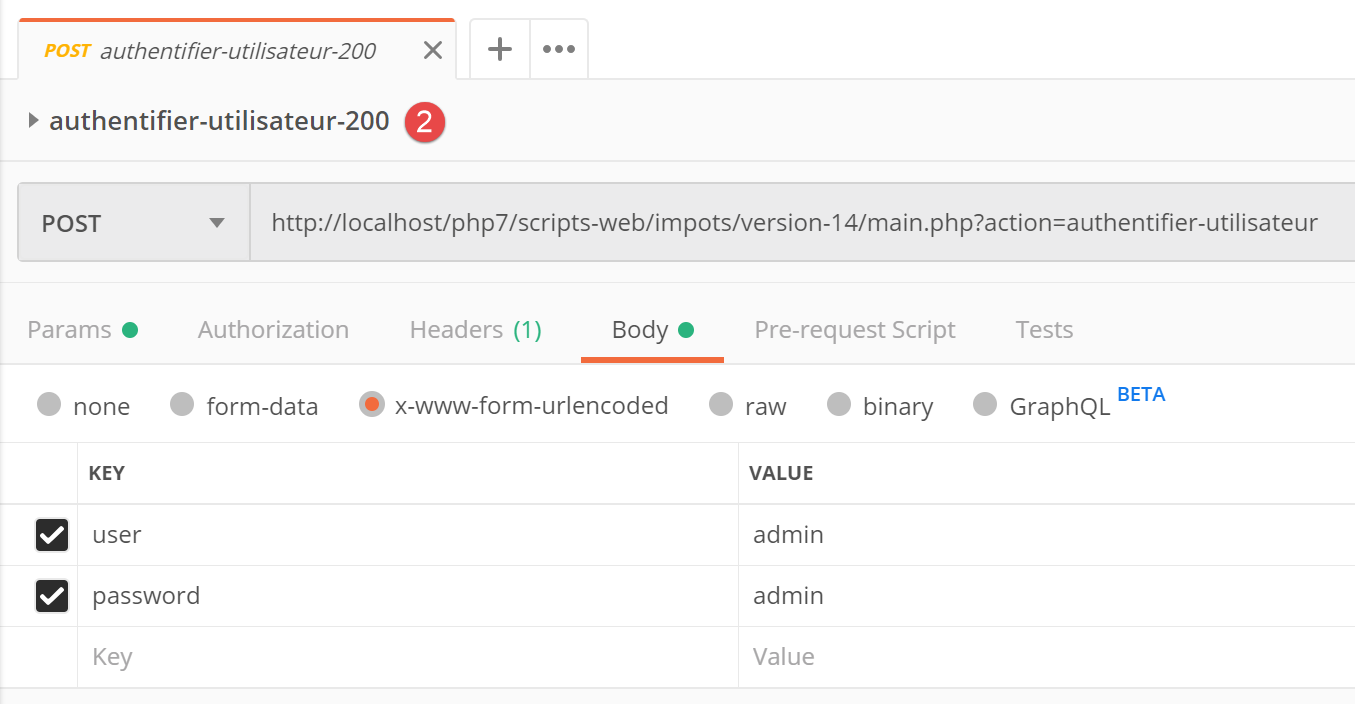
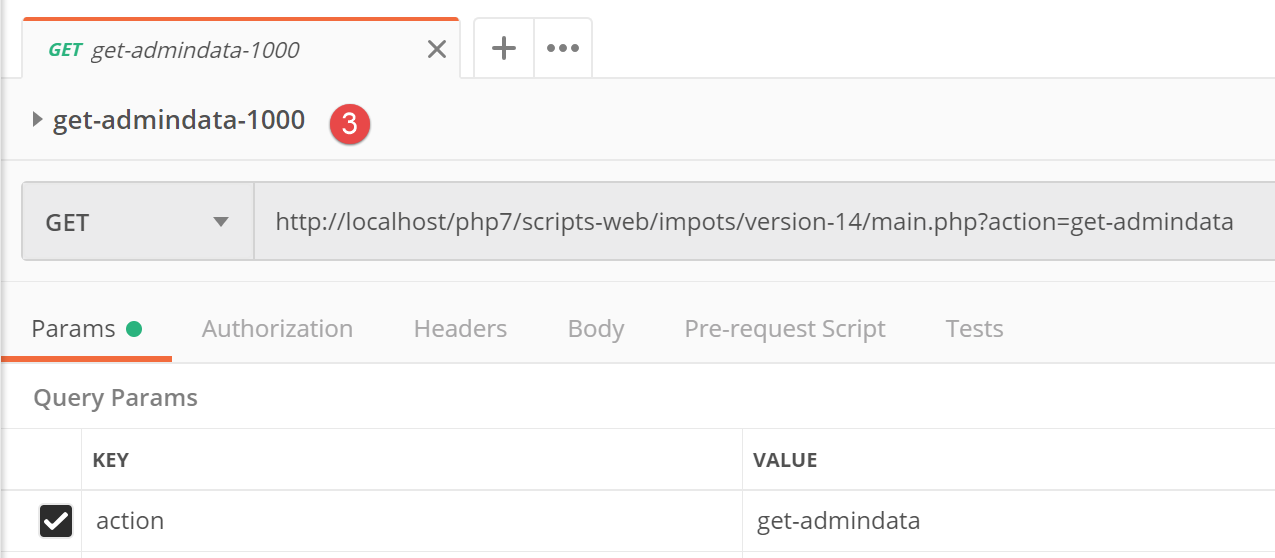
最后一次请求的 JSON 结果如下:
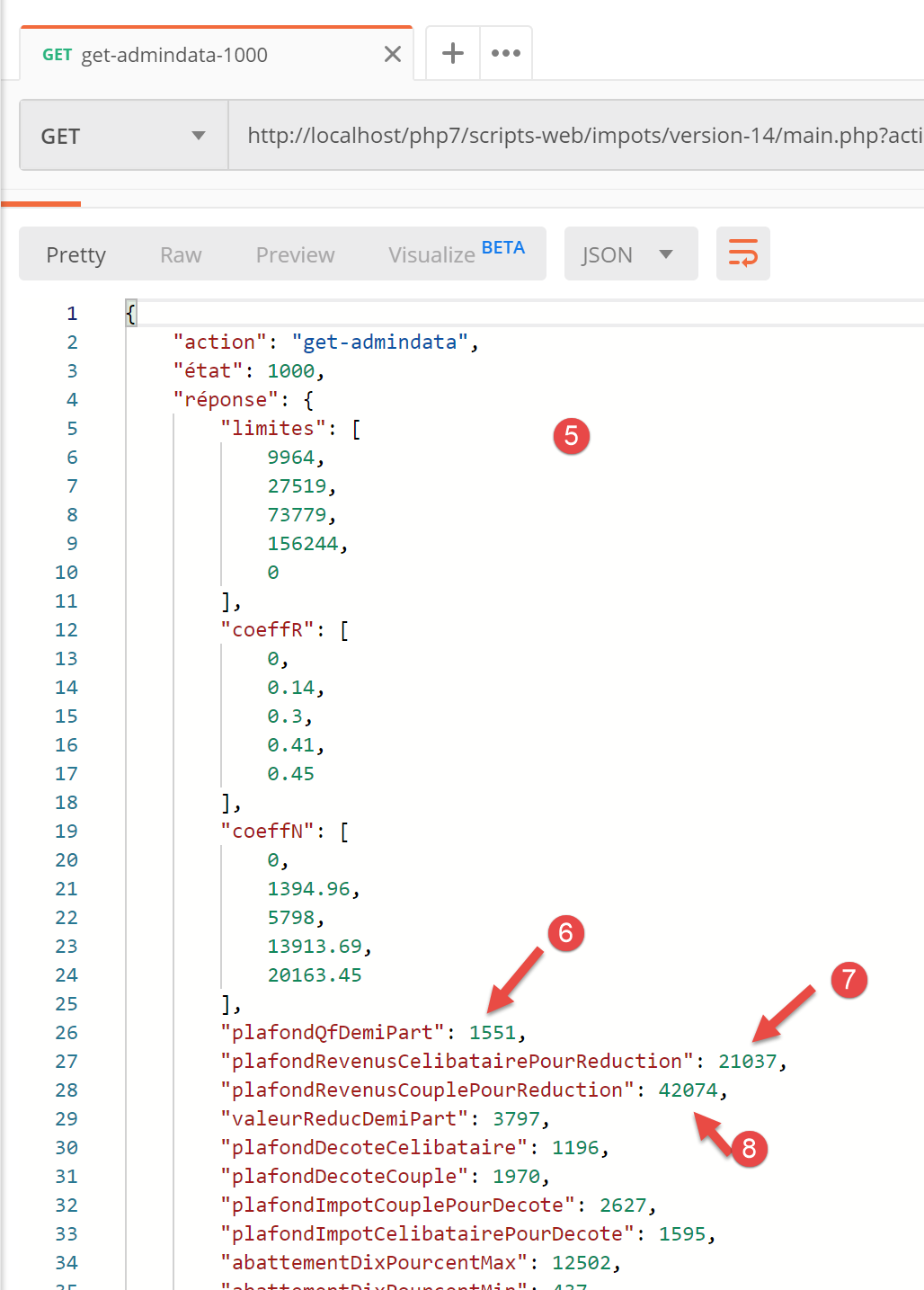
- 在 [5-8] 中,您可以看到 JSON 字符串中的属性确实具有数值(而非字符串)。此结果将使 JavaScript [Business] 类能够正常执行;
14.3.5. 主脚本 [main]
JavaScript 客户端的主脚本 [main] 如下所示:
// imports
import axios from 'axios';

// imports
import Dao from './Dao2';
import Métier from './Métier';

// asynchronous function [main]
async function main() {
  // axios configuration
  axios.defaults.timeout = 2000;
  axios.defaults.baseURL = 'http://localhost/php7/scripts-web/impots/version-14';
  // layer instantiation [dao]
  const dao = new Dao(axios);
  // requests HTTP
  let taxAdminData;
  try {
    // init session
    log("-----------init-session");
    let response = await dao.initSession();
    log(response);
    // authentication
    log("-----------authentifier-utilisateur");
    response = await dao.authentifierUtilisateur("admin", "admin");
    log(response);
    // tax information
    log("-----------get-admindata");
    response = await dao.getAdminData();
    log(response);
    taxAdminData = response.réponse;
  } catch (error) {
    // we log the error
    console.log("erreur=", error.message);
    // end
    return;
  }

  // instantiation layer [business]
  const métier = new Métier(taxAdminData);

  // tax calculations
  log("-----------calculer-impot x 3");
  const simulations = [];
  simulations.push(métier.calculerImpot("oui", 2, 45000));
  simulations.push(métier.calculerImpot("non", 2, 45000));
  simulations.push(métier.calculerImpot("non", 1, 30000));
  // list of simulations
  log("-----------liste-des-simulations");
  log(simulations);
  // deleting a simulation
  log("-----------suppression simulation n° 1");
  simulations.splice(1, 1);
  log(simulations);
}

// log jSON
function log(object) {
  console.log(JSON.stringify(object, null, 2));
}

// execution
main();
注释
- 第 5-6 行:导入 [Dao] 和 [Business] 类;
- 第 9 行:异步函数 [main],该函数将使用 [Dao] 类处理与服务器的通信,并请求 [Business] 类执行税费计算;
- 第10-36行:脚本以阻塞方式依次调用[Dao]层的[initSession、authenticateUser、getAdminData]方法;
- 第 38 行:我们不再需要 [dao] 层。现在已具备运行 JavaScript 客户端 [business] 层所需的所有元素;
- 第 41–46 行:我们执行三项税费计算,并将结果存储在 [simulations] 数组中;
- 第 49 行:我们显示 simulations 数组;
- 第 52 行:移除其中一项;
运行主脚本的结果如下:
[Running] C:\myprograms\laragon-lite\bin\nodejs\node-v10\node.exe -r esm "c:\Data\st-2019\dev\es6\javascript\client impôts\client http 2\main2.js"
"-----------init-session"
{
  "action": "init-session",
  "état": 700,
  "réponse": "session démarrée avec type [json]"
}
"-----------authentifier-utilisateur"
{
  "action": "authentifier-utilisateur",
  "état": 200,
  "réponse": "Authentification réussie [admin, admin]"
}
"-----------get-admindata"
{
  "action": "get-admindata",
  "état": 1000,
  "réponse": {
    "limites": [
      9964,
      27519,
      73779,
      156244,
      0
    ],
    "coeffR": [
      0,
      0.14,
      0.3,
      0.41,
      0.45
    ],
    "coeffN": [
      0,
      1394.96,
      5798,
      13913.69,
      20163.45
    ],
    "plafondQfDemiPart": 1551,
    "plafondRevenusCelibatairePourReduction": 21037,
    "plafondRevenusCouplePourReduction": 42074,
    "valeurReducDemiPart": 3797,
    "plafondDecoteCelibataire": 1196,
    "plafondDecoteCouple": 1970,
    "plafondImpotCouplePourDecote": 2627,
    "plafondImpotCelibatairePourDecote": 1595,
    "abattementDixPourcentMax": 12502,
    "abattementDixPourcentMin": 437
  }
}
"-----------calculer-impot x 3"
"-----------liste-des-simulations"
[
  {
    "impôt": 502,
    "surcôte": 0,
    "décôte": 857,
    "réduction": 126,
    "taux": 0.14
  },
  {
    "impôt": 3250,
    "surcôte": 370,
    "décôte": 0,
    "réduction": 0,
    "taux": 0.3
  },
  {
    "impôt": 1687,
    "surcôte": 0,
    "décôte": 0,
    "réduction": 0,
    "taux": 0.14
  }
]
"-----------suppression simulation n° 1"
[
  {
    "impôt": 502,
    "surcôte": 0,
    "décôte": 857,
    "réduction": 126,
    "taux": 0.14
  },
  {
    "impôt": 1687,
    "surcôte": 0,
    "décôte": 0,
    "réduction": 0,
    "taux": 0.14
  }
]

[Done] exited with code=0 in 0.583 seconds
14.4. HTTP 3 客户端
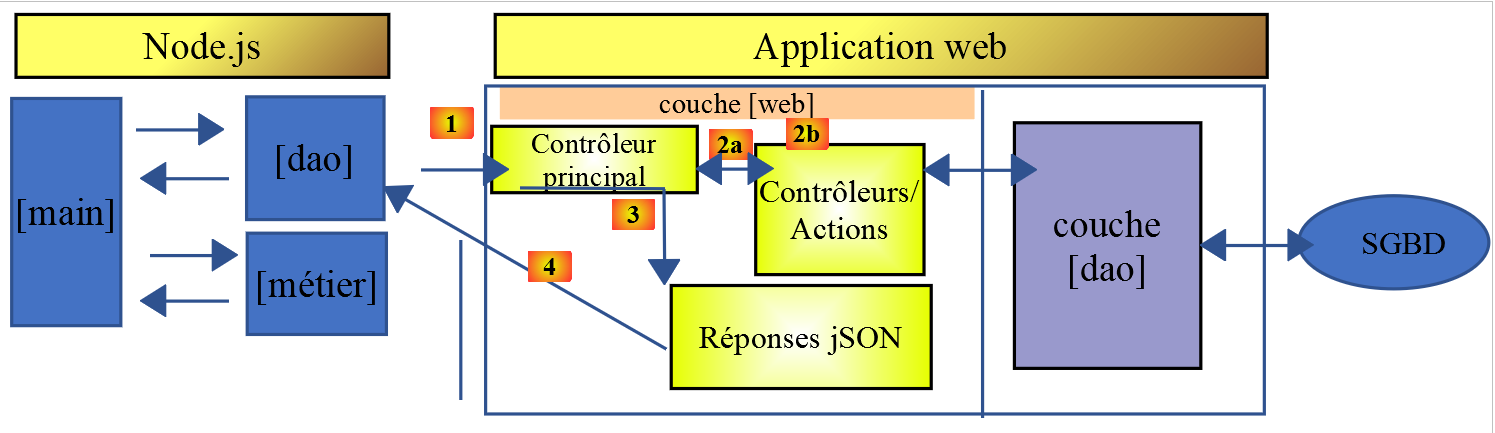
在本节中,我们将使用以下架构将 [HTTP 客户端 2] 应用程序移植到浏览器上:
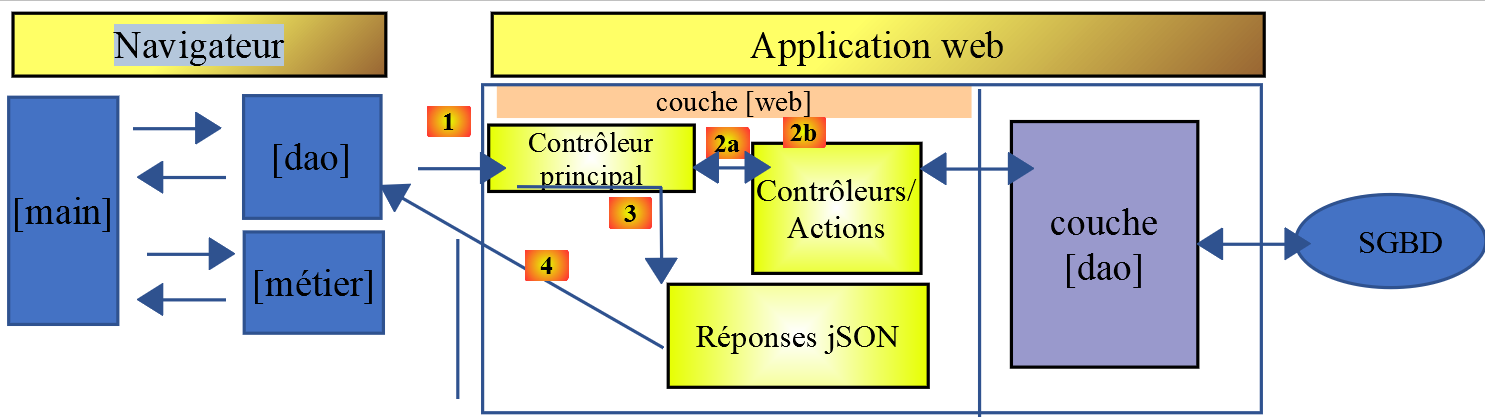
移植过程并非一蹴而就。虽然 [node.js] 可以执行 ES6 JavaScript,但浏览器通常无法直接支持。因此,我们必须使用能够将 ES6 代码转换为现代浏览器可识别的 ES5 代码的工具。幸运的是,这些工具既功能强大又相当易于使用。
在此,我们参考了文章 [如何编写可在浏览器中安全运行的 ES6 代码 - Web Developer's Journal]。
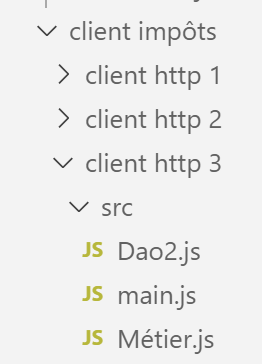
在 [client HTTP 3/src] 文件夹中,我们放置了来自刚刚开发的 [Client Http 2] 应用程序的 [main.js、Métier.js、Dao2.js] 文件。
14.4.1. 初始化项目
我们将在 [client http 3] 文件夹中进行操作。在 [VSCode] 中打开终端,并导航至该文件夹:

我们使用 [npm init] 命令初始化该项目,并对提示的问题接受默认选项:
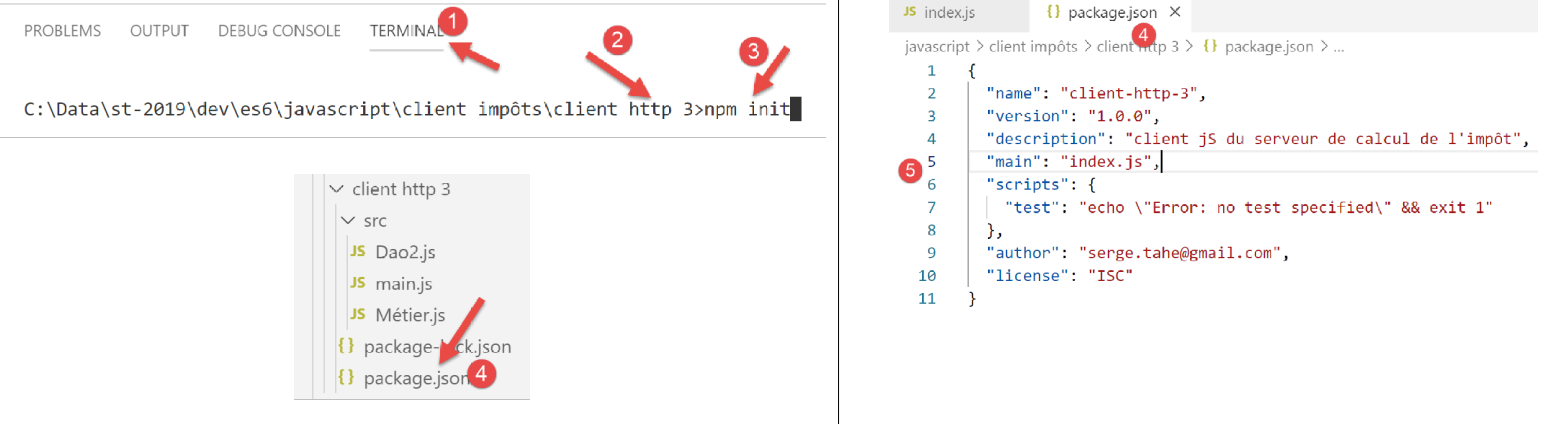
- 在 [4-5] 中,根据提供的各种答案生成了项目配置文件 [package.json];
14.4.2. 安装项目依赖项
我们将安装以下依赖项:
- [@babel/core]:[Babel] 工具 [https://babeljs.io] 的核心组件,用于将 ES 2015+ 代码转换为可在现代及旧版浏览器上运行的代码;
- [@babel/preset-env]:Babel 工具集的一部分。在 ES6 → ES5 转译之前运行;
- [babel-loader]:此依赖项使 [webpack] 工具能够调用 [Babel] 工具;
- [webpack]:协调器。正是 [webpack] 调用 Babel 将 ES6 代码转译为 ES5,然后将所有生成的文件合并为一个文件;
- [webpack-cli]:[webpack] 所需;
- [@webpack-cli/init]:用于配置 [webpack];
- [webpack-dev-server]:提供一个默认运行在 8080 端口的开发 Web 服务器。当源文件被修改时,它会自动重新加载 Web 应用程序;
在 [VSCode] 终端中,项目依赖项的安装步骤如下:
npm --save-dev install @babel/core @babel/preset-env babel-loader webpack webpack-cli webpack-dev-server @webpack-cli/init

安装依赖项后,[package.json] 文件已更新如下:
{
  "name": "client-http-3",
  "version": "1.0.0",
  "description": "client jS du serveur de calcul de l'impôt",
  "main": "index.js",
  "scripts": {
    "test": "echo \"Error: no test specified\" && exit 1"
  },
  "author": "serge.tahe@gmail.com",
  "license": "ISC",
  "devDependencies": {
    "@babel/core": "^7.6.0",
    "@babel/preset-env": "^7.6.0",
    "@webpack-cli/init": "^0.2.2",
    "babel-loader": "^8.0.6",
    "cross-env": "^6.0.0",
    "webpack": "^4.40.2",
    "webpack-cli": "^3.3.9",
    "webpack-dev-server": "^3.8.1"
  }
}
- 第 12–19 行:项目的依赖项属于 [devDependencies]:我们在开发阶段需要它们,但在生产环境中则不需要。在生产环境中,使用的是 [dist/main.js] 文件。该文件采用 ES5 编写,因此不再需要工具将 ES6 代码转译为 ES5;
我们需要向该项目添加两个依赖项:
- [core-js]:包含 ECMAScript 2019 的“polyfills”。polyfill 允许像 ECMAScript 2019(2019 年 9 月)这样的最新代码在旧版浏览器上运行;
- [regenerator-runtime]:根据该库的官网说明 --> [一种源代码转换器,可在当前的 JavaScript 环境中启用 ECMAScript 6 生成器函数];
从 Babel 7 开始,这两个依赖项取代了 [@babel/polyfill] 依赖项,后者此前曾用于此目的,现已(2019 年 9 月)弃用。安装方法如下:

随后 [package.json] 文件将按以下方式修改:
{
  "name": "client-http-3",
  "version": "1.0.0",
  "description": "My webpack project",
  "main": "index.js",
  "scripts": {
    "test": "echo \"Error: no test specified\" && exit 1",
    "build": "webpack",
    "start": "webpack-dev-server"
  },
  "author": "serge.tahe@gmail.com",
  "license": "ISC",
  "devDependencies": {
    "@babel/core": "^7.6.0",
    "@babel/preset-env": "^7.6.0",
    "@webpack-cli/init": "^0.2.2",
    "babel-loader": "^8.0.6",
    "babel-plugin-syntax-dynamic-import": "^6.18.0",
    "html-webpack-plugin": "^3.2.0",
    "webpack": "^4.40.2",
    "webpack-cli": "^3.3.9",
    "webpack-dev-server": "^3.8.1"
  },
  "dependencies": {
    "core-js": "^3.2.1",
    "regenerator-runtime": "^0.13.3"
  }
}
要使用 [core-js, regenerator-runtime] 依赖项,需要在主脚本 [src/main.js] 中添加以下 [imports](第 3–4 行):
// imports
import axios from 'axios';
import "core-js/stable";
import "regenerator-runtime/runtime";

// imports
import Dao from './Dao2';
import Métier from './Métier';
14.4.3. [webpack] 配置
[webpack] 是一个负责:
- 将项目中所有 JavaScript 文件从 ES6 转译为 ES5;
- 将生成的文件打包成一个文件;
该工具由配置文件 [webpack.config.js] 控制,可通过名为 [@webpack-cli/init] 的依赖项生成(2019年9月)。该依赖项已与“链接”部分中提到的其他依赖项一同安装。
我们在 [VSCode] 终端中运行命令 [npx webpack-cli init]:
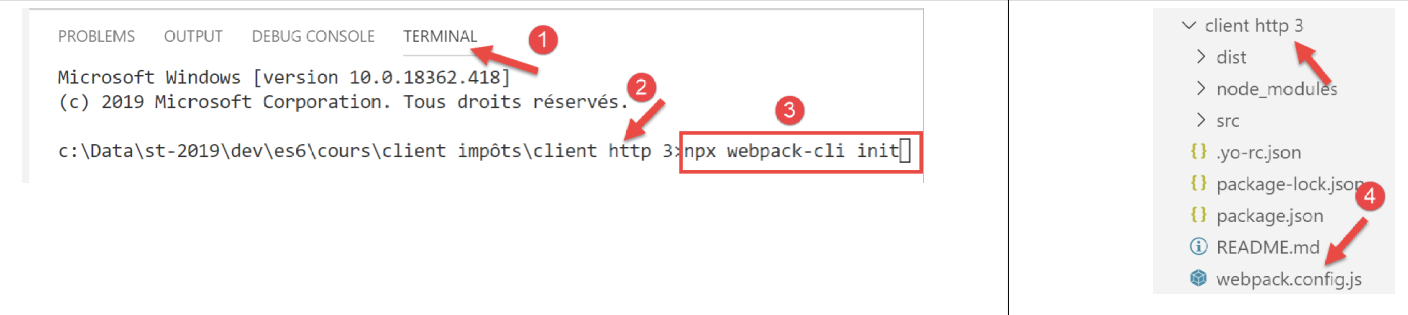
回答完各项问题(其中大部分可接受默认答案)后,项目根目录下将生成一个 [webpack.config.js] 文件 [4]:
[webpack.config.js] 文件内容如下:
/* eslint-disable */

const path = require('path');
const webpack = require('webpack');

/*
 * SplitChunksPlugin is enabled by default and replaced
 * deprecated CommonsChunkPlugin. It automatically identifies modules which
 * should be splitted of chunk by heuristics using module duplication count and
 * module category (i. e. node_modules). And splits the chunks…
 *
 * It is safe to remove "splitChunks" from the generated configuration
 * and was added as an educational example.
 *
 * https://webpack.js.org/plugins/split-chunks-plugin/
 *
 */

const HtmlWebpackPlugin = require('html-webpack-plugin');

/*
 * We've enabled HtmlWebpackPlugin for you! This generates a html
 * page for you when you compile webpack, which will make you start
 * developing and prototyping faster.
 *
 * https://github.com/jantimon/html-webpack-plugin
 *
 */

module.exports = {
    mode: 'development',
    entry: './src/index.js',

    output: {
        filename: '[name].[chunkhash].js',
        path: path.resolve(__dirname, 'dist')
    },

    plugins: [new webpack.ProgressPlugin(), new HtmlWebpackPlugin()],

    module: {
        rules: [
            {
                test: /.(js|jsx)$/,
                include: [path.resolve(__dirname, 'src')],
                loader: 'babel-loader',

                options: {
                    plugins: ['syntax-dynamic-import'],

                    presets: [
                        [
                            '@babel/preset-env',
                            {
                                modules: false
                            }
                        ]
                    ]
                }
            }
        ]
    },

    optimization: {
        splitChunks: {
            cacheGroups: {
                vendors: {
                    priority: -10,
                    test: /[\\/]node_modules[\\/]/
                }
            },

            chunks: 'async',
            minChunks: 1,
            minSize: 30000,
            name: true
        }
    },

    devServer: {
        open: true
    }
};
我并不完全理解这个文件的所有细节,但有几点特别引人注目:
- 第 1 行:该文件不包含 ES6 代码。[Eslint] 却报告了错误,这些错误一直传播到了 [javascript] 项目的根目录。这很烦人。要阻止 Eslint 分析某个文件,只需将第 1 行注释掉即可;
- 第 31 行:我们当前处于 [development] 模式;
- 第 32 行:入口脚本位于此处 [src/index.js]。我们需要修改这一点;
- 第 36 行:[webpack] 的输出文件将放置在 [dist] 文件夹中;
- 第 46 行:可以看到 [webpack] 使用了 [babel-loader],这是我们安装的依赖项之一;
- 第 54 行:我们看到 [webpack] 使用了 [@babel-preset/env],这是我们安装的依赖项之一;
初始化 [webpack] 已修改了 [package.json] 文件(它会请求权限):
{
  "name": "client-http-3",
  "version": "1.0.0",
  "description": "My webpack project",
  "main": "index.js",
  "scripts": {
    "test": "echo \"Error: no test specified\" && exit 1",
    "build": "webpack",
    "start": "webpack-dev-server"
  },
  "author": "serge.tahe@gmail.com",
  "license": "ISC",
  "devDependencies": {
    "@babel/core": "^7.6.0",
    "@babel/preset-env": "^7.6.0",
    "@webpack-cli/init": "^0.2.2",
    "babel-loader": "^8.0.6",
    "babel-plugin-syntax-dynamic-import": "^6.18.0",
    "html-webpack-plugin": "^3.2.0",
    "webpack": "^4.40.2",
    "webpack-cli": "^3.3.9",
    "webpack-dev-server": "^3.8.1"
  },
  "dependencies": {
    "core-js": "^3.2.1",
    "regenerator-runtime": "^0.13.3"
  }
}
- 第 4 行:已修改;
- 第 8–9 行、第 18–19 行:这些已被添加;
- 第 8 行:用于编译项目的 [npm] 任务;
- 第 9 行:用于运行该项目的 [npm] 任务;
- 第 18 行:?
- 第 19 行:生成一个 [dist/index.html] 文件,该文件会自动嵌入由 [webpack] 生成的 [dist/main.js] 脚本,而运行项目时使用的正是该文件;
最后,[webpack] 配置生成了一个文件 [src/index.js]:
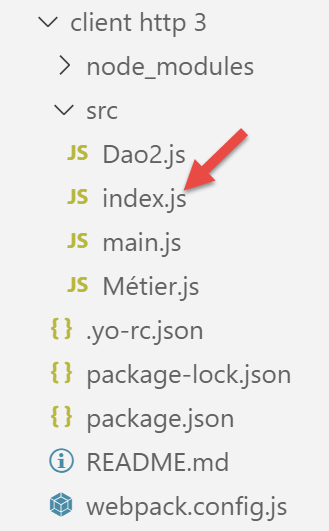
[index.js] 的内容如下(2019年9月):
console.log("Hello World from your main file!");
14.4.4. 编译并运行该项目
[package.json] 文件包含三个 [npm] 任务:
"scripts": {
    "test": "echo \"Error: no test specified\" && exit 1",
    "build": "webpack",
    "start": "webpack-dev-server"
},
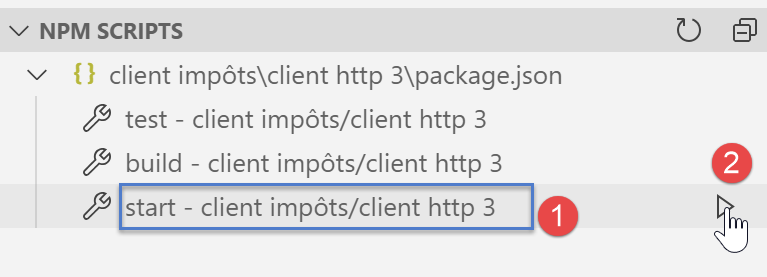
这些任务会被 [VSCode] 识别,并提供执行选项:
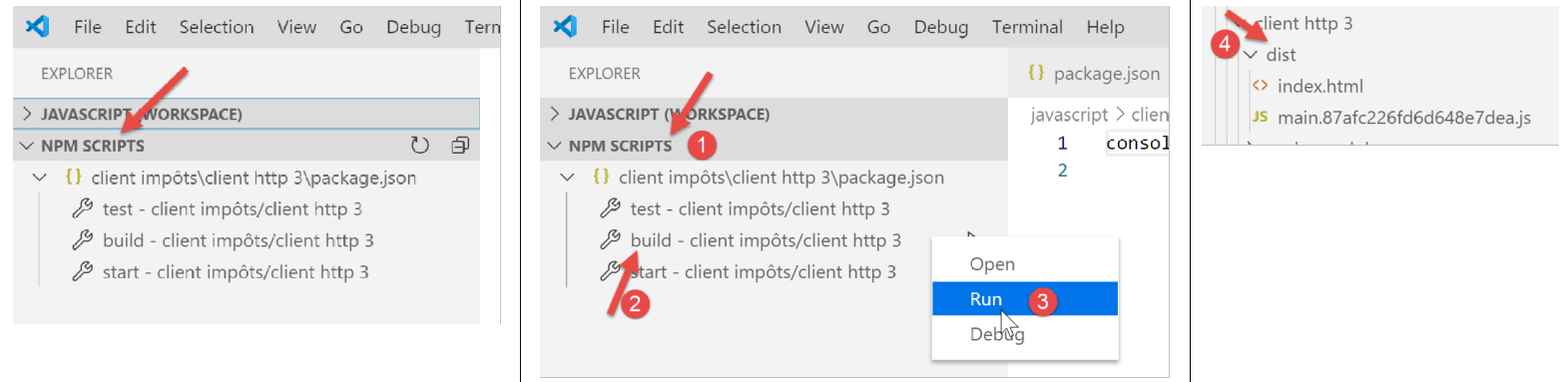
- 在 [1-3] 中,项目被编译;
- 在 [4] 中:将项目编译为 [dist/main.hash.js] 并生成 [dist/index.html] 页面;
生成的 [index.html] 页面如下:
<!DOCTYPE html>
<html>
  <head>
    <meta charset="UTF-8">
    <title>Webpack App</title>
  </head>
  <body>
  <script type="text/javascript" src="main.87afc226fd6d648e7dea.js"></script></body>
</html>
本页面仅封装了由 [webpack] 生成的 [main.hash.js] 文件。
该项目通过 [start] 任务运行:
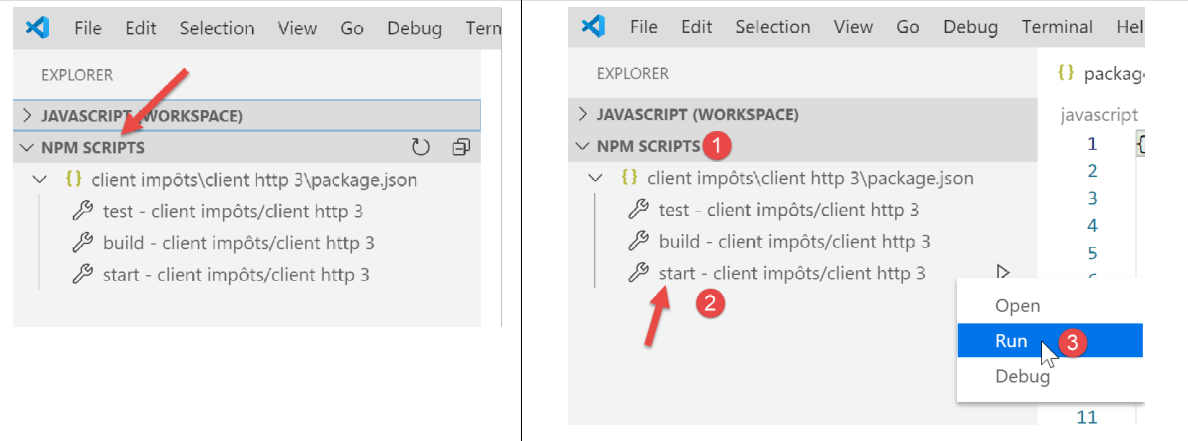
随后,[dist/index.html] 页面会被加载到 [webpack] 套件中的一部分——运行在本地机器 8080 端口的服务器上,并通过该机器的默认浏览器进行显示:
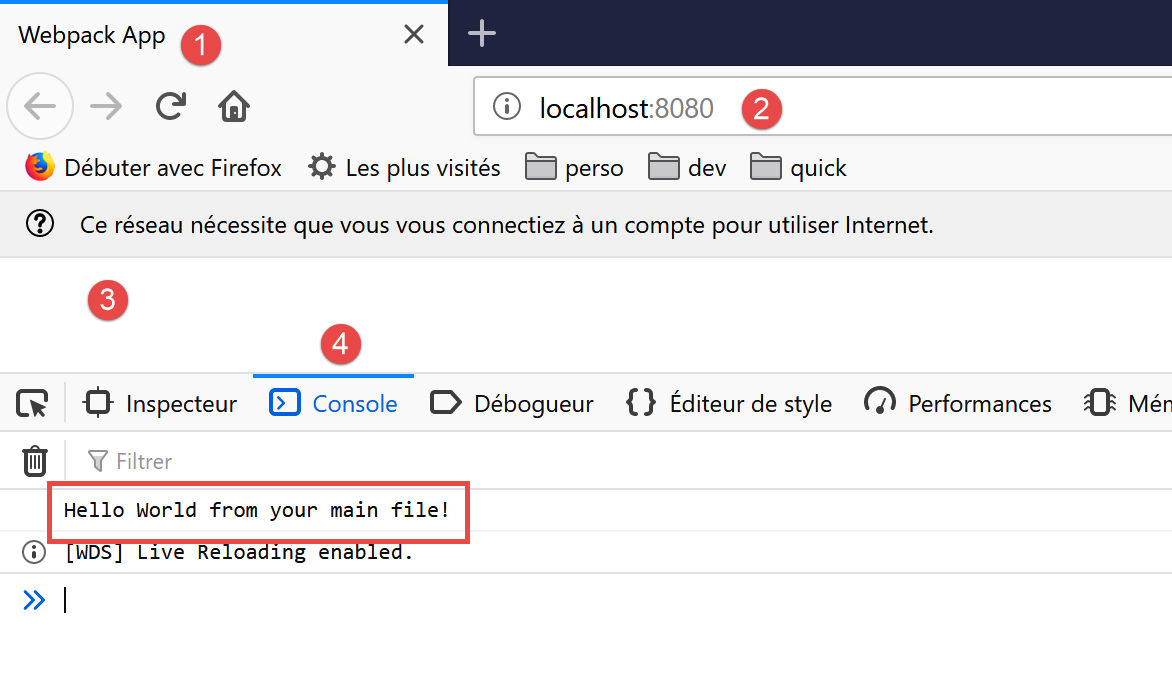
- 在 [2] 中,即 [webpack] Web 服务器的服务端口;
- 在 [3] 中,[dist/index.html] 页面的主体内容为空;
- 在 [4] 中,即浏览器开发者工具的 [控制台] 标签页,此处为 Firefox(F12);
- 在 [5] 中,是执行 [src/index.js] 文件后的结果。回顾一下,其内容如下:
现在,我们将此内容修改为以下这一行:
系统会自动(无需重新编译)生成新文件 [main.js, index.html],并将新的 [index.html] 文件加载到浏览器中:
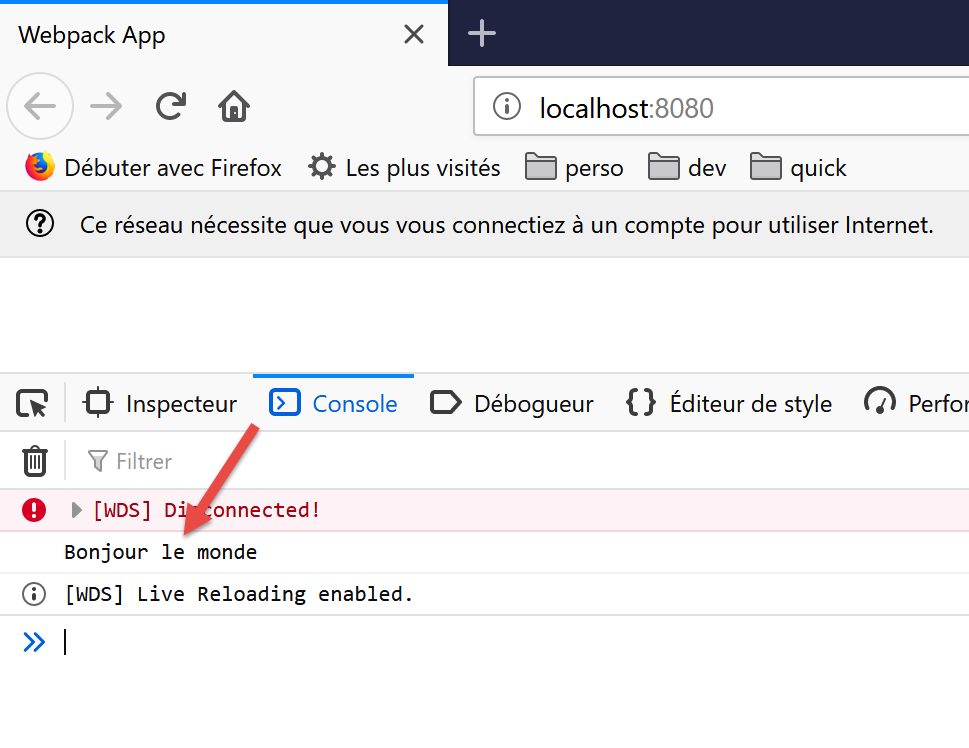
无需在 [start] 任务之前运行 [build] 任务:后者会首先编译项目。它不会将此次编译的输出存储在 [dist] 文件夹中。要验证这一点,只需删除该文件夹即可。 随后我们会发现,[start] 任务在编译并运行项目时并未创建 [dist] 文件夹。其生成的输出文件 [index.html, main.hash.js] 似乎存储在 [webpackdev-server] 专属的文件夹中。这种行为对于我们的测试而言已足够。
当开发服务器运行时,项目文件的任何保存更改都会触发重新编译。因此,我们需要禁用 [VSCode] 的 [自动保存] 模式。我们不希望每次在项目文件中输入字符时都重新编译项目,而仅希望在保存更改时才进行重新编译:
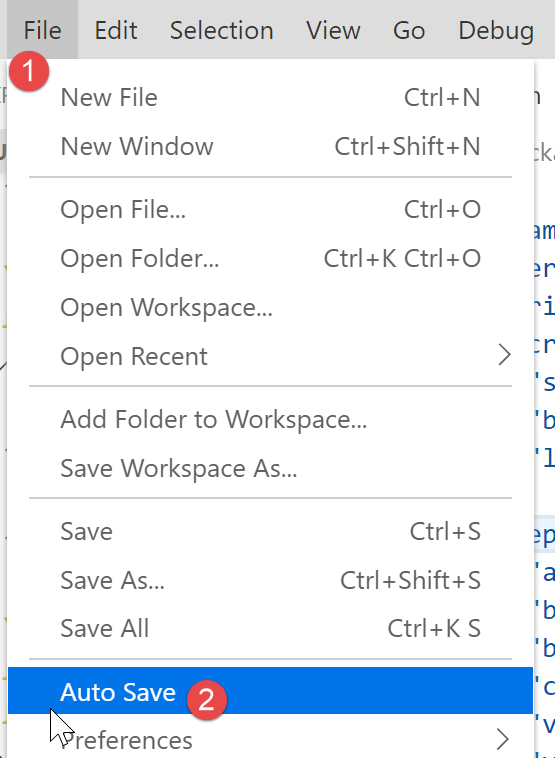
- 在 [2] 中,[自动保存] 选项必须保持未勾选;
14.4.5. 测试税费计算服务器的 JavaScript 客户端
要测试税费计算服务器的 JavaScript 客户端,您必须在 [webpack.config.js] 文件 [2-3] 中将 [main.js] [1] 指定为项目的入口点:
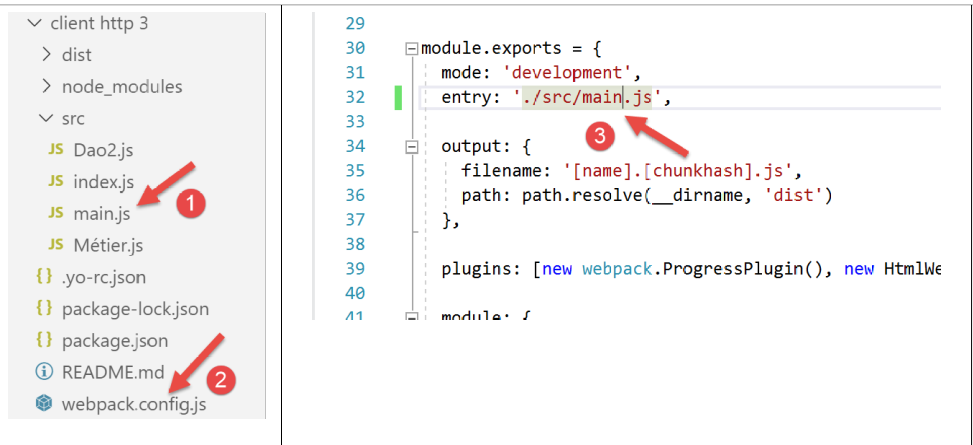
请注意,与 [HTTP Client 2] 中的版本相比,[main.js] 脚本必须额外包含两个导入:
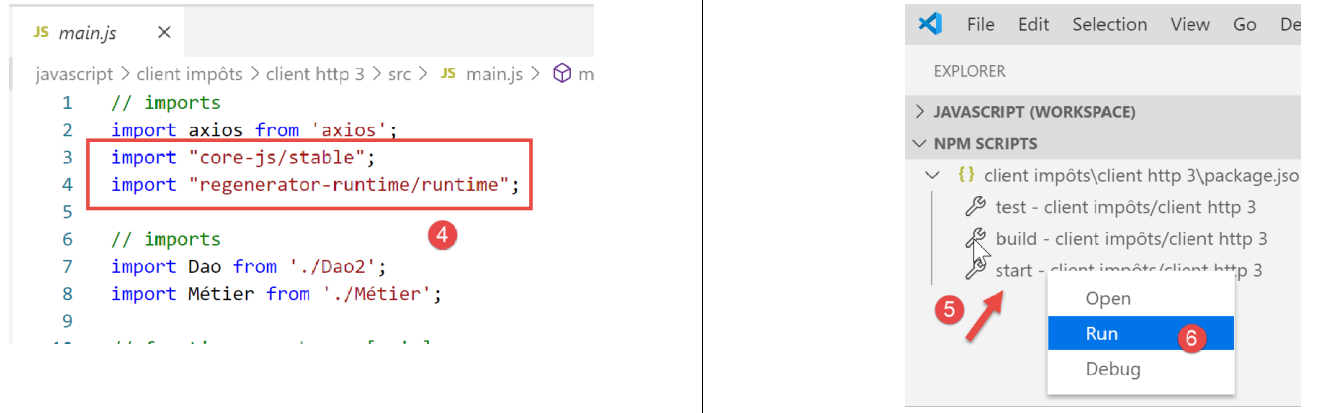
此外,我们还对代码进行了微调,以处理服务器可能发出的错误:
// imports
import axios from 'axios';
import "core-js/stable";
import "regenerator-runtime/runtime";

// imports
import Dao from './Dao2';
import Métier from './Métier';

// asynchronous function [main]
async function main() {
  // axios configuration
  axios.defaults.timeout = 2000;
  axios.defaults.baseURL = 'http://localhost/php7/scripts-web/impots/version-14';
  // layer instantiation [dao]
  const dao = new Dao(axios);
  // requests HTTP
  let taxAdminData;
  try {
    // init session
    log("-----------init-session");
    let response = await dao.initSession();
    log(response);
    if (response.état != 700) {
      throw new Error(JSON.stringify(response.réponse));
    }
    // authentication
    log("-----------authentifier-utilisateur");
    response = await dao.authentifierUtilisateur("admin", "admin");
    log(response);
    if (response.état != 200) {
      throw new Error(JSON.stringify(response.réponse));
    }
    // tax information
    log("-----------get-admindata");
    response = await dao.getAdminData();
    log(response);
    if (response.état != 1000) {
      throw new Error(JSON.stringify(response.réponse));
    }
    taxAdminData = response.réponse;
  } catch (error) {
    // we log the error
    console.log("erreur=", error.message);
    // end
    return;
  }

  // instantiation layer [business]
  const métier = new Métier(taxAdminData);

  // tax calculations
  log("-----------calculer-impot x 3");
  const simulations = [];
  simulations.push(métier.calculerImpot("oui", 2, 45000));
  simulations.push(métier.calculerImpot("non", 2, 45000));
  simulations.push(métier.calculerImpot("non", 1, 30000));
  // list of simulations
  log("-----------liste-des-simulations");
  log(simulations);
  // deleting a simulation
  log("-----------suppression simulation n° 1");
  simulations.splice(1, 1);
  log(simulations);
}

// log jSON
function log(object) {
  console.log(JSON.stringify(object, null, 2));
}

// execution
main();
注释
- 在第 [24-26] 行、[31-33] 行和 [38-40] 行中,我们检查了服务器 JSON 响应中发送的代码 [response.status]。如果该代码表示发生错误,则会抛出一个异常,并将服务器响应中的 JSON 字符串 [response.response] 作为错误消息;
完成上述操作后,我们执行项目 [5-6]。
随后生成 [index.html] 页面并加载到浏览器中:
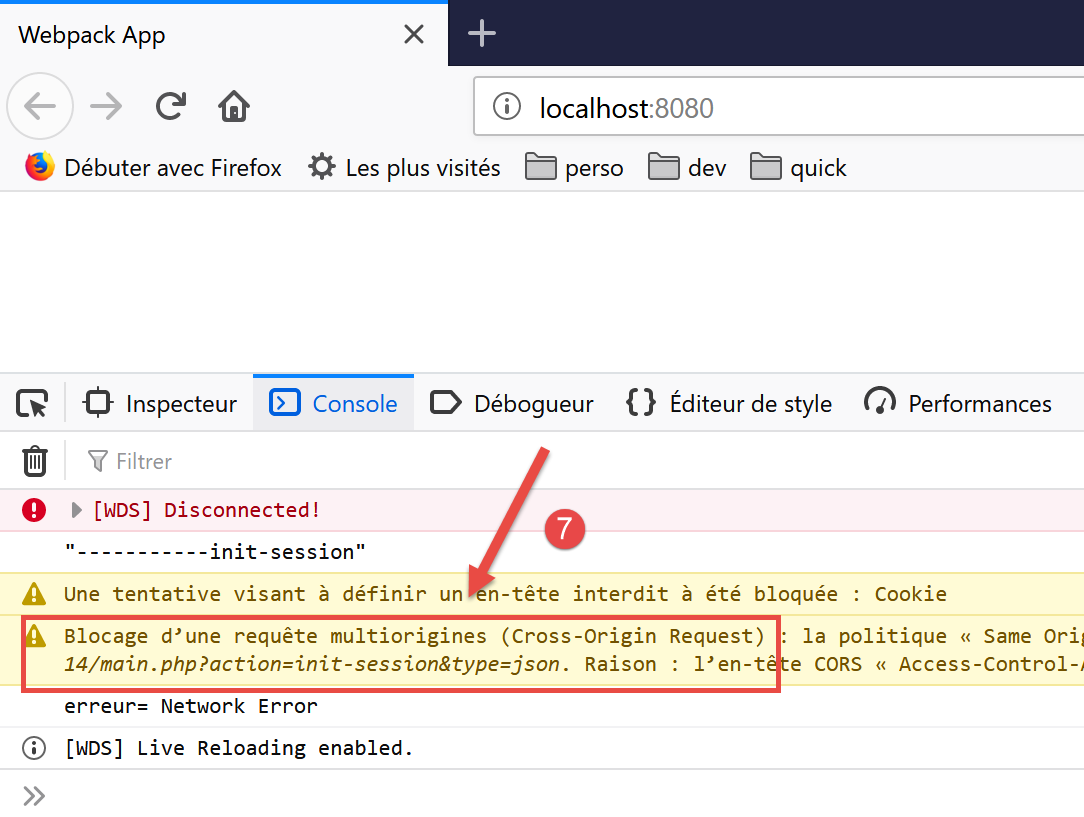
- 在 [7] 中,我们可以看到由于 [CORS](跨源资源共享)问题,[init-session] 操作无法完成;
该 CORS 问题源于客户端与服务端之间的关系:
- 我们的 JavaScript 客户端已下载到机器 [http://localhost:8080] 上;
- 税费计算服务器运行在 [http://localhost:80] 这台机器上;
- 因此客户端和服务器不在同一域名下(同一台机器但端口不同);
- 运行 JavaScript 客户端的浏览器是从 [http://localhost:8080] 这台机器加载的,它会阻止任何不指向 [http://localhost:80] 的请求。这是一项安全措施。因此,它会阻止客户端向运行在 [http://localhost:80] 这台机器上的服务器发出的请求;
实际上,浏览器并未完全阻止该请求。它实际上是在等待服务器“告知”其接受跨域请求。如果收到此授权,浏览器才会转发该跨域请求。
服务器通过发送特定的 HTTP 头部来授予授权:
- 第 1 行:JavaScript 客户端运行在 [http://localhost:8080] 域名下。服务器必须明确响应表示接受该域名;
- 第 2 行:JavaScript 客户端将在其请求中使用 [Accept, Content-Type] 这些 HTTP 头部:
- [Accept]:此标头在每次请求中都会发送;
- [Content-Type]:此标头用于 POST 操作,用于指定 POST 参数的类型;
服务器必须明确接受这两个 HTTP 头;
- 第 3 行:JavaScript 客户端将使用 GET 和 POST 请求。服务器必须明确接受这两种类型的请求;
- 第 4 行:JavaScript 客户端将发送会话 Cookie。服务器通过第 4 行中的标头接受这些 Cookie;
因此,我们需要修改服务器。我们将在 [NetBeans] 中进行此操作。CORS 问题仅在开发模式下才会出现。在生产环境中,客户端和服务器将在同一域名 [http://localhost:80] 内运行,因此不会出现 CORS 问题。因此,我们需要一种通过服务器配置来启用或禁用 CORS 请求的方法。
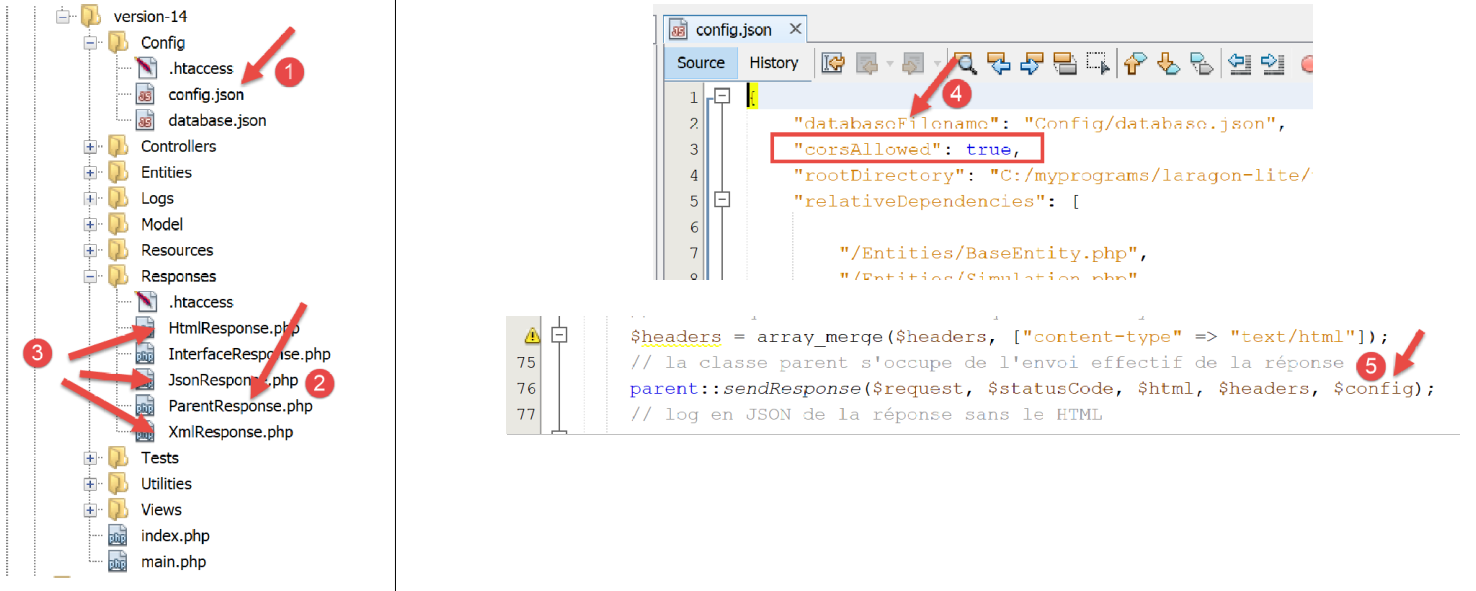
服务器修改主要涉及以下三个方面:
- [1, 4]:在配置文件 [config.json] 中设置一个布尔值,用于控制是否接受跨域请求;
- [2]:在 [ParentResponse] 类中,该类负责将响应发送给 JavaScript 客户端。该类将发送客户端浏览器所期望的 CORS 头部;
- [3]:在 [HtmlResponse、JsonResponse、XmlResponse] 类中,它们分别用于生成 [html、json、xml] 会话的响应。这些类必须将 [4] 中定义的 [corsAllowed] 布尔值传递给其父类 [2]。这一操作在 [5] 中完成,通过将 JSON 文件 [2] 中的图像数组进行传递;
[ParentResponse] 类 [2] 的演变过程如下:
<?php

namespace Application;

// symfony dependencies
use Symfony\Component\HttpFoundation\Response;
use Symfony\Component\HttpFoundation\Request;

class ParentResponse {

  // int $statusCode: HTTP response status code
  // string $content: the body of the response to be sent
  // depending on the case, this is a JSON, XML, HTML string
  // array $headers: HTTP headers to be added to the response

  public function sendResponse(
    Request $request,
    int $statusCode,
    string $content,
    array $headers,
    array $config): void {

    // preparing the server's text response
    $response = new Response();
    $response->setCharset("utf-8");
    // status code
    $response->setStatusCode($statusCode);
    // headers for cross-domain requests
    if ($config['corsAllowed']) {
      $origin = $request->headers->get("origin");
      if (strpos($origin, "http://localhost") === 0) {
        $headers = array_merge($headers,
          ["Access-Control-Allow-Origin" => $origin,
            "Access-Control-Allow-Headers" => "Accept, Content-Type",
            "Access-Control-Allow-Methods" => "GET, POST",
            "Access-Control-Allow-Credentials" => "true"
        ]);
      }
    }
    foreach ($headers as $text => $value) {
      $response->headers->set($text, $value);
    }
    // special case of the [OPTIONS] method
    // only the headers are important in this case
    $method = strtolower($request->getMethod());
    if ($method === "options") {
      $content = "";
      $response->setStatusCode(Response::HTTP_OK);
    }
    // we send the answer
    $response->setContent($content);
    $response->send();
  }

}
- 第 29 行:我们检查是否需要处理跨域请求。如果需要,即使当前请求并非跨域请求,我们也会生成 CORS HTTP 头部(第 33–37 行)。在后一种情况下,CORS 头部将不再必要,客户端也不会使用它们;
- 第 30 行:在跨域请求中,向服务器发送请求的客户端浏览器会发送一个 HTTP 头 [Origin: http://localhost:8080](以我们的 JavaScript 客户端为例)。在第 30 行,我们从请求 [$request] 中获取此 HTTP 头;
- 第 31 行:我们仅接受源自 [http://localhost] 机器的跨域请求。请注意,此类请求仅在项目的开发模式下发生;
- 第 32–36 行:我们将 CORS 头部添加到数组 [$headers] 中已有的头部中;
- 第 45–49 行:客户端浏览器请求 CORS 权限的方式可能因所用浏览器而异。有时客户端浏览器会通过 HTTP [OPTIONS] 请求来获取这些权限。这对我们的服务器来说是一个新场景,因为它原本仅设计用于处理 [GET] 和 [POST] 请求。遇到 [OPTIONS] 请求时,服务器目前会返回错误响应。 第 46–49 行:我们在最后时刻修正了这一问题:如果第 46 行判断出当前请求是 [OPTIONS] 请求,则为客户端生成以下内容:
- 第 47、51 行:一个空的 [$content] 响应;
- 第 48 行:返回 200 状态码,表示请求成功。对于此请求,唯一重要的是在第 33–36 行发送 CORS 头部。这是客户端浏览器所期望的;
对服务器进行上述修正后,JavaScript客户端运行更顺畅,但会显示一个新错误:
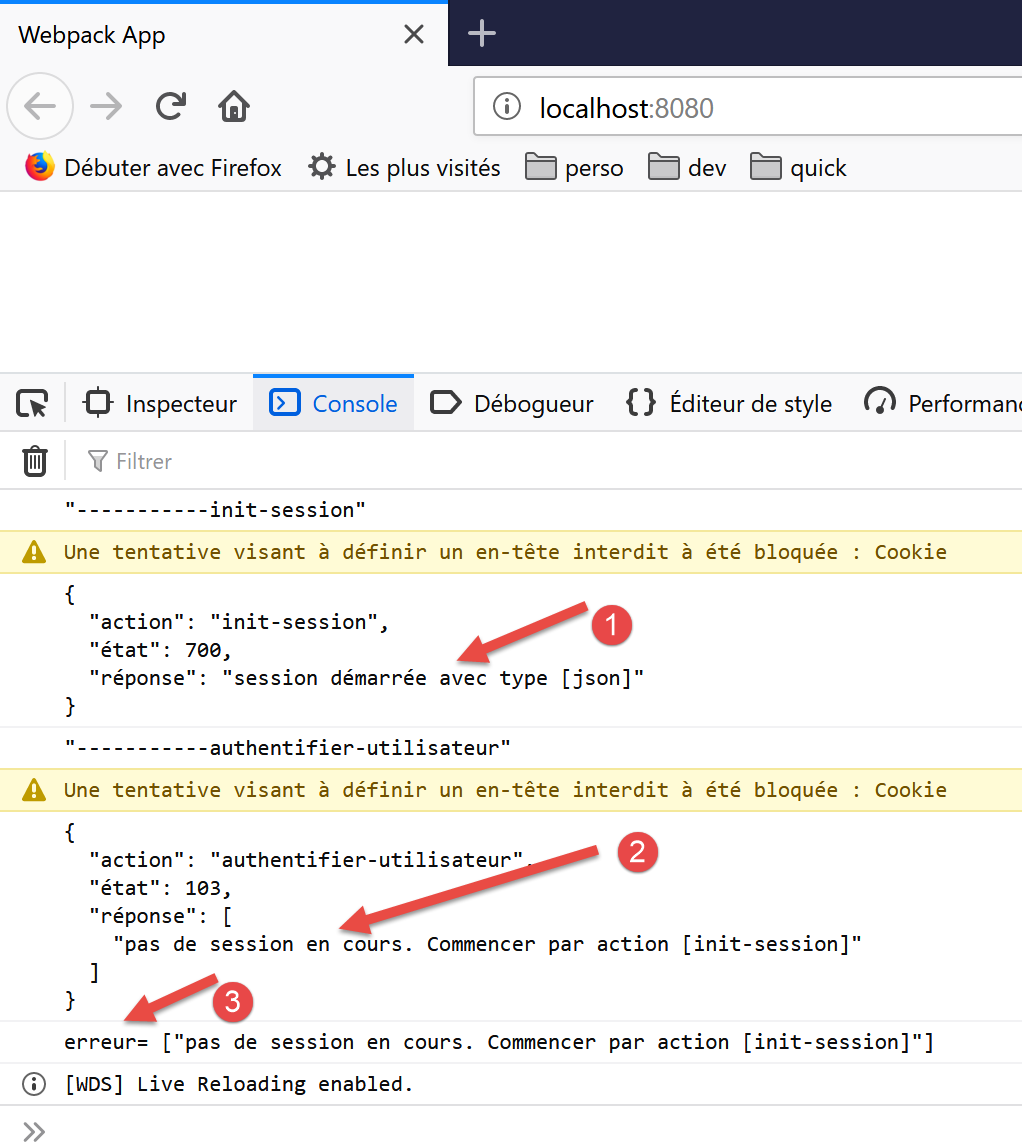
- 在 [1] 中,JSON 会话已正确初始化;
- 在 [2] 中,[authenticate-user] 操作失败:服务器提示不存在活动会话。这意味着 JavaScript 客户端未能正确回传其在 [init-session] 操作期间发送的会话 Cookie;
让我们来看看当时发生的网络交流:
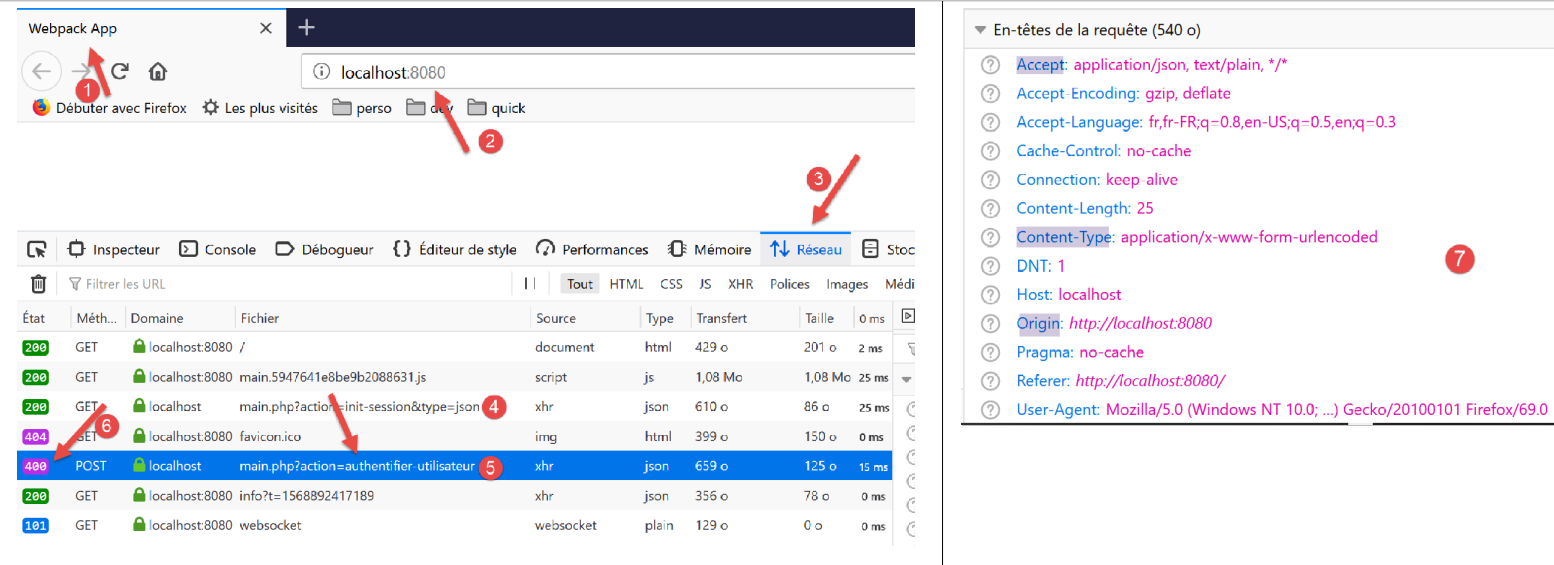
- 在 [4] 中,[init-session] 请求。该请求成功完成,响应状态码为 200;
- 在 [5] 中,[authenticate-user] 请求。该请求失败,响应返回 400(请求错误)状态码 [6];
如果我们检查请求 [5] 的 HTTP 头 [7],可以看到 JavaScript 客户端未发送 [Cookie] HTTP 头,而该头本应使其能够返回服务器最初发送的会话 Cookie。这就是服务器报告不存在会话的原因。
要让客户端发送会话 Cookie,你需要在 [axios] 对象中添加一项配置:
// imports
import axios from 'axios';
import "core-js/stable";
import "regenerator-runtime/runtime";

// imports
import Dao from './Dao2';
import Métier from './Métier';

// asynchronous function [main]
async function main() {
  // axios configuration
  axios.defaults.timeout = 2000;
  axios.defaults.baseURL = 'http://localhost/php7/scripts-web/impots/version-14';
  axios.defaults.withCredentials = true;
  // layer instantiation [dao]
  const dao = new Dao(axios);
  // requests HTTP
  let taxAdminData;
...
第 15 行要求将 Cookie 包含在 [axios] 请求的 HTTP 头部中。请注意,在 [node.js] 环境中这并非必要。因此,这两个环境之间的代码存在差异。
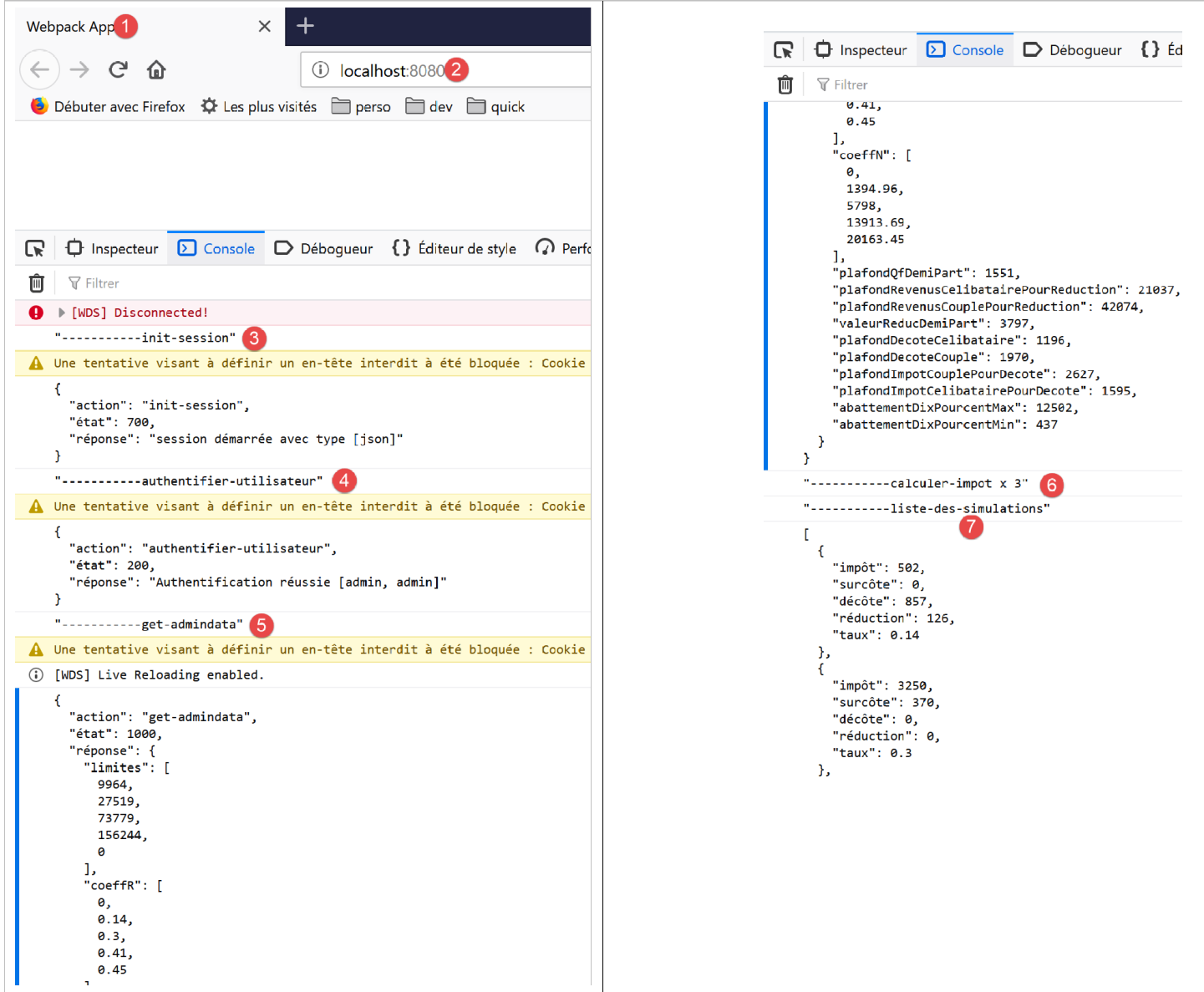
修复此错误后,JavaScript 客户端即可正常运行:
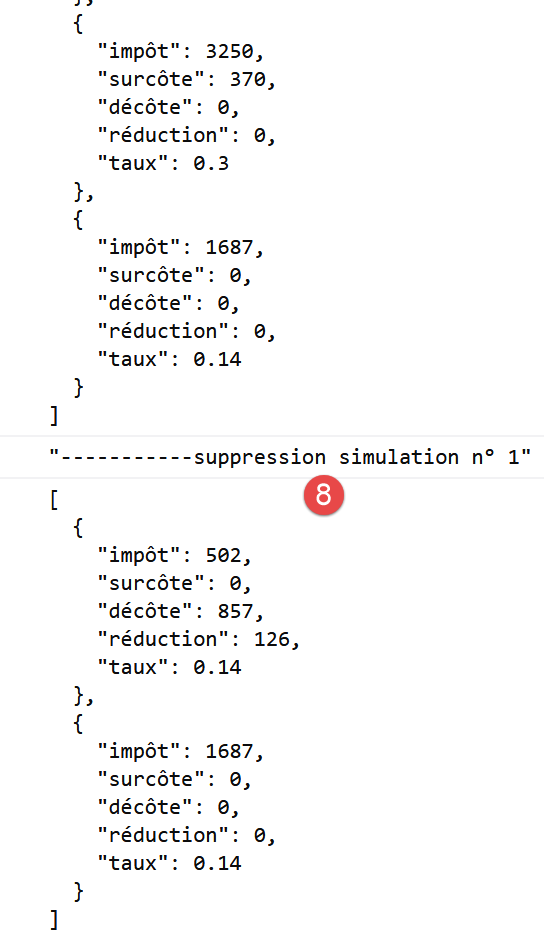
14.5. HTTP 客户端的改进 3
当之前的 [Dao2] 类在浏览器中运行时,无需进行会话 Cookie 管理。这是因为托管 [dao] 层的浏览器会自动管理会话 Cookie:它会自动将服务器发送的任何 Cookie 发回给客户端。因此,[Dao2] 类可以重写为以下 [Dao3] 类:
"use strict";

// imports
import qs from "qs";

class Dao3 {
  // manufacturer
  constructor(axios) {
    this.axios = axios;
  }

  // init session
  async initSession() {
    // query options HHTP [get /main.php?action=init-session&type=json]
    const options = {
      method: "GET",
      // URL parameters
      params: {
        action: "init-session",
        type: "json"
      }
    };
    // execute query HTTP
    return await this.getRemoteData(options);
  }

  async authentifierUtilisateur(user, password) {
    // query options HHTP [post /main.php?action=authenticate-user]
    const options = {
      method: "POST",
      headers: {
        "Content-type": "application/x-www-form-urlencoded"
      },
      // body of POST
      data: qs.stringify({
        user: user,
        password: password
      }),
      // URL parameters
      params: {
        action: "authentifier-utilisateur"
      }
    };
    // execute query HTTP
    return await this.getRemoteData(options);
  }

  async getAdminData() {
    // query options HHTP [get /main.php?action=get-admindata]
    const options = {
      method: "GET",
      // URL parameters
      params: {
        action: "get-admindata"
      }
    };
    // execute query HTTP
    const data = await this.getRemoteData(options);
    // result
    return data;
  }

  async getRemoteData(options) {
    // execute query HTTP
    let response;
    try {
      // asynchronous request
      response = await this.axios.request("main.php", options);
    } catch (error) {
      // the [error] parameter is an exception instance - it can take various forms
      if (error.response) {
        // the server response is in [error.response]
        response = error.response;
      } else {
        // error restart
        throw error;
      }
    }
    // response is the entire HTTP response from the server (HTTP headers + response itself)
    // the server response is in [response.data]
    return response.data;
  }
}

// class export
export default Dao3;
与管理管理 Cookie 相关的所有内容均已消失。
我们将之前的项目修改如下:
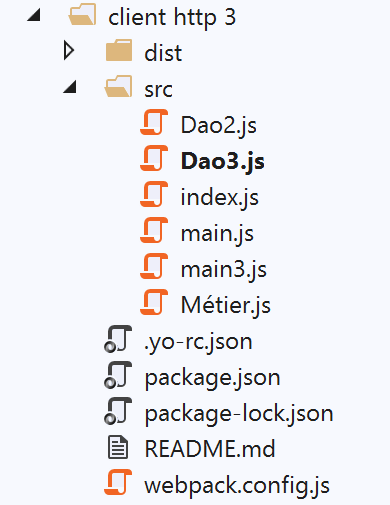
在 [src] 文件夹中,我们添加了两个文件:
- 刚刚引入的 [Dao3] 类;
- 负责启动新版本的 [main3] 文件;
[main3] 文件与上一版本的 [main] 文件完全相同,但现在使用了 [Dao3] 类:
// imports
import axios from "axios";
import "core-js/stable";
import "regenerator-runtime/runtime";

// imports
import Dao from "./Dao3";
import Métier from "./Métier";

// asynchronous function [main]
async function main() {
  // axios configuration
  axios.defaults.timeout = 2000;
  axios.defaults.baseURL =
    "http://localhost/php7/scripts-web/impots/version-14";
  axios.defaults.withCredentials = true;
  // layer instantiation [dao]
  const dao = new Dao(axios);
  // requests HTTP
  ...
}

// log jSON
function log(object) {
  console.log(JSON.stringify(object, null, 2));
}

// execution
main();
已修改 [webpack.config] 文件,使其现在运行 [main3] 脚本:
/* eslint-disable */

const path = require("path");
const webpack = require("webpack");

/*
 * SplitChunksPlugin is enabled by default and replaced
 * deprecated CommonsChunkPlugin. It automatically identifies modules which
 * should be splitted of chunk by heuristics using module duplication count and
 * module category (i. e. node_modules). And splits the chunks…
 *
 * It is safe to remove "splitChunks" from the generated configuration
 * and was added as an educational example.
 *
 * https://webpack.js.org/plugins/split-chunks-plugin/
 *
 */

const HtmlWebpackPlugin = require("html-webpack-plugin");

/*
 * We've enabled HtmlWebpackPlugin for you! This generates a html
 * page for you when you compile webpack, which will make you start
 * developing and prototyping faster.
 *
 * https://github.com/jantimon/html-webpack-plugin
 *
 */

module.exports = {
  mode: "development",
  //entry: "./src/mainjs",
  entry: "./src/main3.js",
  output: {
    filename: "[name].[chunkhash].js",
    path: path.resolve(__dirname, "dist")
  },

  plugins: [new webpack.ProgressPlugin(), new HtmlWebpackPlugin()],
...
};
完成上述操作后,我们在启动税务计算服务器后运行该项目:
浏览器控制台中显示的结果与上一版本完全一致。
14.6. 结论
现在,我们已经掌握了开发 Web 应用程序所需的全部 JavaScript 工具。我们可以:
- 使用最新的 ECMAScript 代码;
- 在 [node.js] 环境中测试代码的独立部分,这更便于调试和测试;
- 随后利用 [babel] 和 [webpack] 将代码移植到浏览器中;