5. 字面量对象
此处所指的“字面量对象”是指在代码中直接定义的对象。JavaScript 包含类和类实例对象的概念,因此我们目前讨论的并非此类对象。
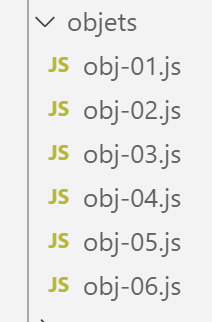
5.1. 脚本 [obj-01]
本文将介绍字面量对象的基本特性。其主要特征在于,该对象是通过指针进行操作的。
'use strict';
// 一个空对象
const obj1={};
// 可以动态创建对象的属性
obj1.prop1="abcd";
console.log('obj1=',obj1);
// 另一个属性
obj1.prop2=[1,2,3];
console.log("obj1=",obj1);
// 使用不同语法定义的另一个属性
obj1['prop3']=true;
console.log("obj1=",obj1);
// obj1 是对象的引用(指针),而非对象本身
const obj2=obj1;
// obj2 和 obj1 指向同一个对象
obj2.prop1="xyzt";
console.log("obj1=",obj1);
console.log("obj2=",obj2);
// 属性可以是变量
const var1='prop1';
console.log('prop1=',obj1[var1]);
执行
[Running] C:\myprograms\laragon-lite\bin\nodejs\node-v10\node.exe "c:\Temp\19-09-01\javascript\objets\obj-01.js"
obj1=[object Object]
obj1= { prop1: 'abcd', prop2: [ 1, 2, 3 ] }
obj1= { prop1: 'abcd', prop2: [ 1, 2, 3 ], prop3: true }
obj1= { prop1: 'xyzt', prop2: [ 1, 2, 3 ], prop3: true }
obj2= { prop1: 'xyzt', prop2: [ 1, 2, 3 ], prop3: true }
prop1= xyzt
注释
- 代码第3行:对象是通过指针进行操作的。因此 [obj1] 是一个指针。修改被指针指向的对象不会改变指针 [obj1]。 因此,与数组类似,使用关键字 [const] 声明了一个对象引用;
- 代码第 6 行:与数组类似,[console.log] 能够显示对象;
- 代码第11行:obj1.prop3 可以重写为 obj1.[‘prop3’]。当“prop3”实际上是一个变量(第20-21行)时,这种写法非常有用;
- 代码第13-18行:表明指令 [obj2=obj1] 是对象的引用副本,而非对象本身;
5.2. 脚本 [obj-02]
该脚本表明,对象的属性可以取对象作为值。这样就形成了多级对象。此外,还引入了全局对象 [JSON],用于实现对象与字符串之间的转换。
'use strict';
// 多层级对象
const personne = {
  prénom: "martin",
  âge: 12,
  père: {
    prénom: "paul",
    âge: 45
  },
  mère: {
    prénom: "micheline",
    âge: 42
  }
}
// 访问属性
console.log("prénom personne=", personne.prénom);
console.log("prénom mère=", personne.mère.prénom);
personne.mère.âge = 40;
console.log("âge mère=", personne.mère.âge);
// console.log 能够显示对象
console.log("personne=", personne);
console.log("mère=", personne.mère);
// 还可以显示对象的字符串 jSON
let json = JSON.stringify(personne);
console.log("jSON=", json);
// 可以重新读取 jSON
let personne2 = JSON.parse(json);
console.log("père=", personne2.père);
注释
- 第 24 行:将 JavaScript 对象转换为字符串 jSON;
- 第 27 行:将字符串 jSON 转换为 JavaScript 对象;
执行
[Running] C:\myprograms\laragon-lite\bin\nodejs\node-v10\node.exe "c:\Temp\19-09-01\javascript\objets\obj-02.js"
prénom personne= martin
prénom mère= micheline
âge mère= 40
personne= { 'prénom': 'martin',
'年龄': 12,
'父亲': { '名字': 'paul', '年龄': 45 },
'母亲': { '名字': '米歇琳', '年龄': 40 } }
mère= { 'prénom': 'micheline', 'âge': 40 }
jSON= {"prénom":"martin","âge":12,"père":{"prénom":"paul","âge":45},"mère":{"prénom":"micheline","âge":40}}
père= { 'prénom': 'paul', 'âge': 45 }
注释
- 第 10 行:在字符串 jSON 中,属性必须用引号括起来,字符串类型的值也必须用引号括起来;
5.3. 脚本 [obj-03]
该脚本介绍了对象属性获取器/设置器的概念:
'use strict';
// 对象的getter和setter
const personne = {
  // getter
  get nom() {
    console.log("getter nom");
    return this._nom;
  },
  // setter
  set nom(unNom) {
    console.log("setter nom");
    this._nom = unNom;
  }
};
// 设置器
personne.nom = "Hercule";
// 获取器
console.log(personne.nom);
// 对象本身
console.log("personne=", personne);
// 这并不妨碍直接访问属性 [_nom]
personne._nom = "xyz";
console.log("personne=", personne);
注释
- 第 5-7 行:定义了一个 [getter],这是一个通常返回对象属性值但实际上可以返回任何内容的函数。关键字 [function] 被关键字 [get] 替换;
- 第 7 行:该 getter 返回属性 [_nom]。可以看到该属性无需声明;
- 第10-13行:定义了一个名为[setter]的函数,该函数通常会将接收到的值赋给对象的某个属性,但实际上可以执行任何操作。 关键字 [function] 被关键字 [set] 替换。[setter] 可用于验证传递给 [setter] 的参数值的有效性;
- 第 16 行:将隐式调用函数 [set nom];
- 第 18 行:将隐式调用函数 [get nom];
- 第 22 行:表明是否使用 getter/setter 取决于开发人员的意愿。如果开发人员知道由它们管理的属性名称,则可以直接访问该属性;
执行
[Running] C:\myprograms\laragon-lite\bin\nodejs\node-v10\node.exe "c:\Temp\19-09-01\javascript\objets\obj-03.js"
setter nom
getter nom
Hercule
personne= { nom: [Getter/Setter], _nom: 'Hercule' }
personne= { nom: [Getter/Setter], _nom: 'xyz' }
请注意第 5-6 行,[console.log] 也会显示那些作为函数的属性。
5.4. 脚本 [obj-04]
该脚本展示了三种编写对象属性名称的方法以及两种访问属性名称的方法。
'use strict';
// 对象的属性名称  可以是字面量 [nom],也可以用单引号 ['nom']
// 或双引号 ["nom"]

// 字面量
const obj1 = {
  nom: "martin",
  prénom: "jean"
};
console.log("prénom=", obj1.prénom);

// 被单引号包围
const obj2 = {
  '姓氏': "martin",
  '姓': "jean"
};
console.log("nom=", obj2.nom);

// 用引号包围
const obj3 = {
  "nom": "martin",
  "prénom": "jean"
};

// 访问该属性的两种可能语法 [nom]
console.log("nom=", obj3.nom);
console.log("nom=", obj3['nom']);
运行
[Running] C:\myprograms\laragon-lite\bin\nodejs\node-v10\node.exe "c:\Temp\19-09-01\javascript\objets\obj-04.js"
prénom= jean
nom= martin
nom= martin
nom= martin
5.5. 脚本 [obj-05]
该脚本展示了字面量对象的属性可以是函数。这与具有属性和方法的类实例对象非常接近。
'use strict';

// 一个对象可以拥有类型为 [function] 的属性
const personne = {
  // 属性
  prénom: "martin",
  âge: 12,
  père: {
    prénom: "paul",
    âge: 45
  },
  mère: {
    prénom: "micheline",
    âge: 42
  },
  // 方法
  toString: function () {
    return JSON.stringify(this);
  }
}

// 用法
console.log("personne=", personne);
console.log("personne.toString=", personne.toString());
- 第 17-19 行:对象的内部方法。在此方法中,通过关键字 [this](第 18 行)访问对象的属性。 [this] 指代对象本身,[this.prénom] 指代该对象的属性 [prénom];
执行
[Running] C:\myprograms\laragon-lite\bin\nodejs\node-v10\node.exe "c:\Temp\19-09-01\javascript\objets\obj-05.js"
personne= { 'prénom': 'martin',
''年龄': 12,
'父亲': { '名字': '保罗', '年龄': 45 },
'母亲': { '名字': '米歇琳', '年龄': 42 },
toString: [Function: toString] }
personne.toString= {"prénom":"martin","âge":12,"père":{"prénom":"paul","âge":45},"mère":{"prénom":"micheline","âge":42}}
5.6. 脚本 [obj-06]
该脚本演示了在事先不知道属性名称的情况下如何访问对象的属性。
'use strict';

// 一个对象可以具有 [function] 类型的属性
let personne = {
  // 属性
  prénom: "martin",
  âge: 12,
  père: {
    prénom: "paul",
    âge: 45
  },
  mère: {
    prénom: "micheline",
    âge: 42
  },
  // 方法
  toString: function () {
    return JSON.stringify(this);
  }
}

// 用法
console.log(personne);
// 属性
console.log("-----------------------");
for (const key in personne) {
  if (personne.hasOwnProperty(key)) {
    const element = personne[key];
    console.log(key, "=", element);
  }
}
// 用于规避 eslint 警告 (1)
console.log("-----------------------");
for (const key in personne) {
  if (Object.prototype.hasOwnProperty.call(personne, key)) {
    const element = personne[key];
    console.log(key, "=", element);
  }
}
// 用于规避 eslint 警告 (2)
console.log("-----------------------");
for (const key in personne) {
  // eslint-disable-next-line no-prototype-builtins
  if (personne.hasOwnProperty(key)) {
    const element = personne[key];
    console.log(key, "=", element);
  }
}
注释
- 第 26-31 行:用于获取对象属性列表(不包括方法)的代码。此代码会触发 ESLint 的警告:
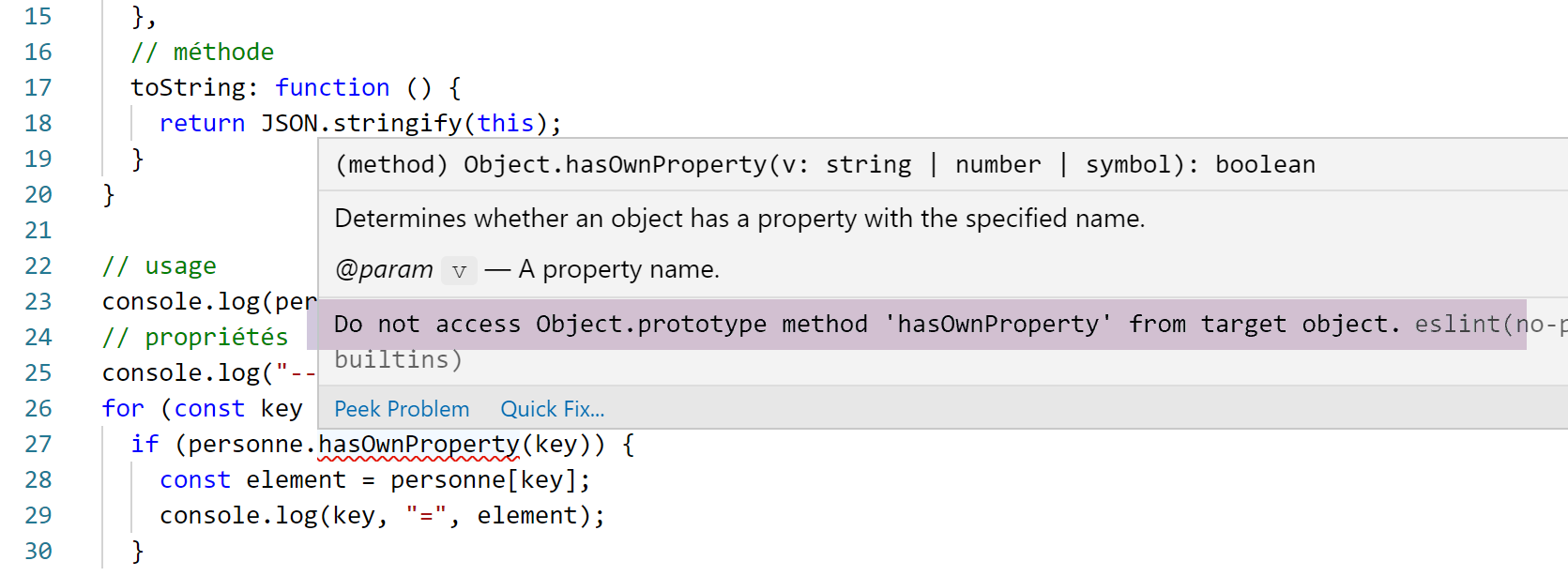
- 第 32-39 行:用于规避 ESLint 警告的代码。通过 [Object] 类的原型实现;
- 第 41-47 行:或者直接禁用该警告(第 43 行);
5.7. 脚本 [obj-07]
脚本 [obj-07] 展示了拆解对象的可能性:
'use strict';
// 解构

// 字面量
const obj1 = {
  nom: "martin",
  prénom: "jean"
};

// 将 obj1 解构到变量中 [n,p]
const { nom: n, prénom: p } = obj1;
console.log("n=", n, "p=", p);

// 将 obj1 解构到变量中 [n2,p2]
function f({ nom: n2, prénom: p2 }) {
  console.log("f-n2=", n2, "f-p2=", p2);
}
f(obj1);

// 将 obj1 解构到变量中 [nom,prénom]
function g({ nom: nom, prénom: prénom }) {
  console.log("g-nom=", nom, "g-prénom=", prénom);
}
g(obj1);

// 将 obj1 解构到变量中 [nom,prénom]
// 使用等同于 h({姓:姓,名:名}) 的简写形式
function h({ nom, prénom }) {
  console.log("h-nom=", nom, "h-prénom=", prénom);
}
h(obj1);
注释
- 第11行:正是大括号 {} 使得解构成为可能。语法
const { nom: n, prénom: p } = obj1
会创建两个变量 [n] 和 [p],其效果等同于:
const n = obj1.nom
const p = obj1.prénom
该声明可读作:
const { nom => n, prénom => p } = obj1
以提醒 [nom, prénom] 属性的值将赋给变量 [n, p];
- 解构操作在第 15、21 和 28 行重复出现。每次出现大括号 {} 都表示将对一个对象进行解构并赋值给变量;
- 第28行可能会让人感到困惑。这是以下语法的简写形式:
function h({ nom : nom, prénom : prénom })
执行结果如下:
5.8. 脚本 [obj-08]
脚本 [obj-08] 演示了如何获取对象的副本:
'use strict'

// 对象克隆
const obj1 = {
  nom: "martin",
  prénom: "jean"
};

// 使用展开运算符克隆(复制)obj1
const obj2 = { ...obj1 }

// 验证
// obj2 指向 obj1 的副本
console.log("obj2===obj1 :", obj1 === obj2)
console.log("obj2=", obj2)
- 第 10 行:对象 [obj1] 的复制操作。运算符 ... 被称为展开运算符;
执行结果如下:
- 第 1 行:表明引用 [obj1] 和 [obj2] 指向的不是同一个对象;
- 第 2 行:表明 [obj2] 所指向的对象是 [obj1] 所指向对象的副本;
5.9. Conclusion
本节的脚本表明,JavaScript 的字面量对象与面向对象语言中的类实例对象非常相似。 可以在其中定义属性、方法以及 getter/setter。这是一个动态对象,可以在运行时定义其属性。此时它表现得像一个字典,其元素可以是任何类型,特别是 [fonction] 类型。