6. 字符串
JavaScript 的字符串与 PHP 的字符串非常相似。
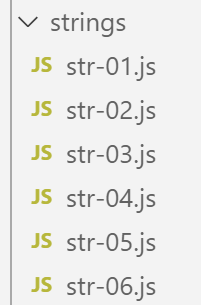
6.1. 脚本 [str-01]
首先需要理解的是,字符串一旦创建,就无法再进行修改。虽然有许多方法可以基于原始字符串生成新的字符串,但原始字符串始终保持不变。此外,字符串有两种类型:
- [string](当使用字符串字面量初始化时);
- [object] 当作为 [String] 类的实例创建时;
'use strict';

// 字符串为只读(无法修改)

// 一个字符串
const chaîne1 = "abcd ";
// 类型
console.log("typeof(chaîne1)=", typeof (chaîne1));
// 第2个字符
console.log("chaîne1[2]=", chaîne1[2]);
// 引发错误
chaîne1[2] = "0";
执行
[Running] C:\myprograms\laragon-lite\bin\nodejs\node-v10\node.exe -r esm "c:\Temp\19-09-01\javascript\strings\str-01.js"
typeof(chaîne1)= string
chaîne1[2]= c
c:\Temp\19-09-01\javascript\strings\str-01.js:1
TypeError: Cannot assign to read only property '2' of string 'abcd '
at Object.<anonymous> (c:\Temp\19-09-01\javascript\strings\str-01.js:12:12)
at Generator.next (<anonymous>)
6.2. 脚本 [str-02]
该脚本展示了构建字符串的两种方法。
'use strict';

// 字符串可分为两类

// 字符串常量
const chaîne1 = "abcd ";
// 类型
console.log("typeof(chaîne1)=", typeof (chaîne1));
// String 实例
const chaîne2 = new String("xyzt");
// 类型
console.log("typeof(chaîne2)=", typeof (chaîne2));
// 其他写法(不带 new)——类型为 [string],而非 [object]
const chaîne3 = String("12 34");
// 类型
console.log("typeof(chaîne3)=", typeof (chaîne3));
// 类型 [string] 和类型 [object] 提供相同的方法,即 String 类的方法
console.log("chaîne1.length=", chaîne1.length);
console.log("chaîne2.length=", chaîne2.length);
注释
- 第 6 行:定义字符串的常规方法。[chaîne1] 的类型为 [string];
- 第10行:可以使用[String]类的构造函数来构建字符串。[chaîne2]的类型为[object];
执行
[Running] C:\myprograms\laragon-lite\bin\nodejs\node-v10\node.exe "c:\Temp\19-09-01\javascript\strings\str-02.js"
typeof(chaîne1)= string
typeof(chaîne2)= object
typeof(chaîne3)= string
chaîne1.length= 5
chaîne2.length= 4
类型 [string] 继承了类 [String] 的方法。
6.3. 脚本 [str-03]
该脚本展示了一个包含变量插值的特定字符串。
'use strict';

// 字符串
const chaîne = "Introduction à Javascript par l'exemple";
// 带变量插值的字符串
const str = `[${chaîne}].substr(3, 2)=` + chaîne.substr(3, 2)
console.log(str);
注释
- 第 6 行:字符串中可以包含 ${variable} 表达式,这些表达式将被变量的值替换。这与 PHP 字符串中的 $ 变量遵循相同的逻辑。 需注意此类字符串的书写格式:其两端需用“反引号”(法语键盘上的 AltGr-7)包围;
执行
[Running] C:\myprograms\laragon-lite\bin\nodejs\node-v10\node.exe -r esm "c:\Temp\19-09-01\javascript\strings\tempCodeRunnerFile.js"
[Introduction à Javascript par l'exemple].substr(3, 2)=ro
6.4. 脚本 [str-04]
带变量插值的字符串仍显不足。事实上,无法在 ${variable} 表达式中用一个表达式替换变量。对于有 C 语言编程经验的人来说,没有什么能比 [printf, sprintf] 这类函数更适合编写或构建格式化字符串了。 数百名开发者开发了数千个 JavaScript 包,构成了一个庞大的生态系统。当 JavaScript 本身无法满足某种需求时,就该寻找能满足该需求的包了。为此,我们使用包管理器 [npm]。 该管理器提供了一个 [search] 选项,可用于在包描述中搜索字符串。[npm] 会返回符合搜索条件的包列表。因此,我们将搜索包描述中是否包含字符串 [sprintf]:
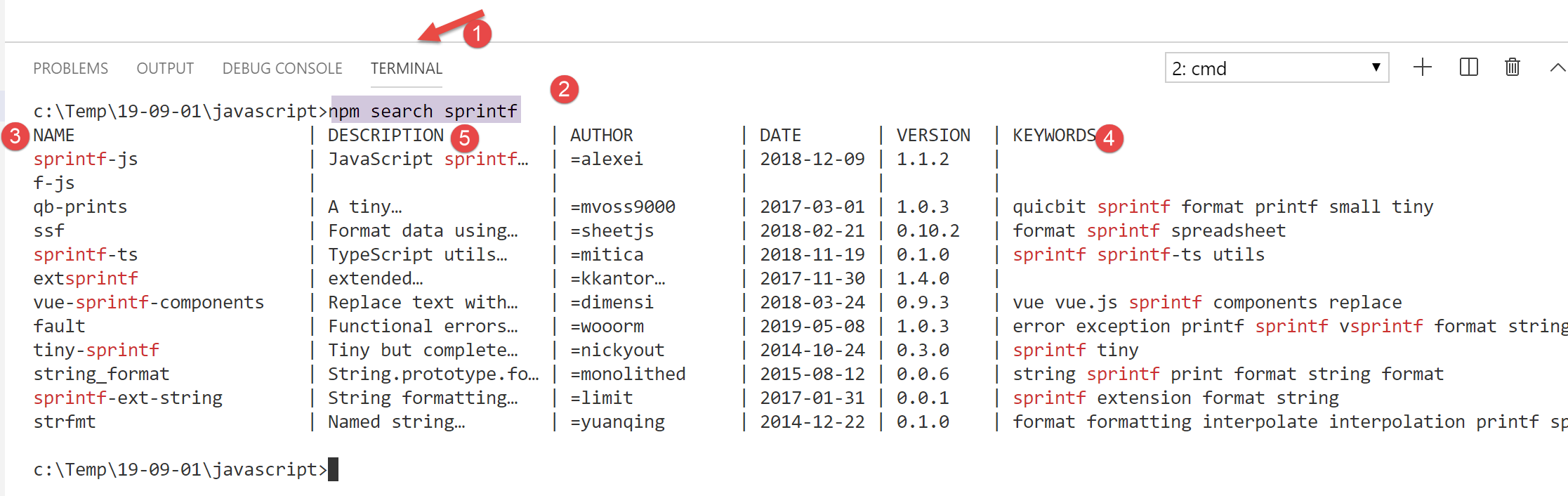
- 在 [4] 列中,显示 [3] 列中包的关键词;
- 在 [5] 列中,显示 [3] 列中软件包的描述;
下一步是访问 [npm]、[https://www.npmjs.com/] 工具的网站,并阅读软件包的描述:
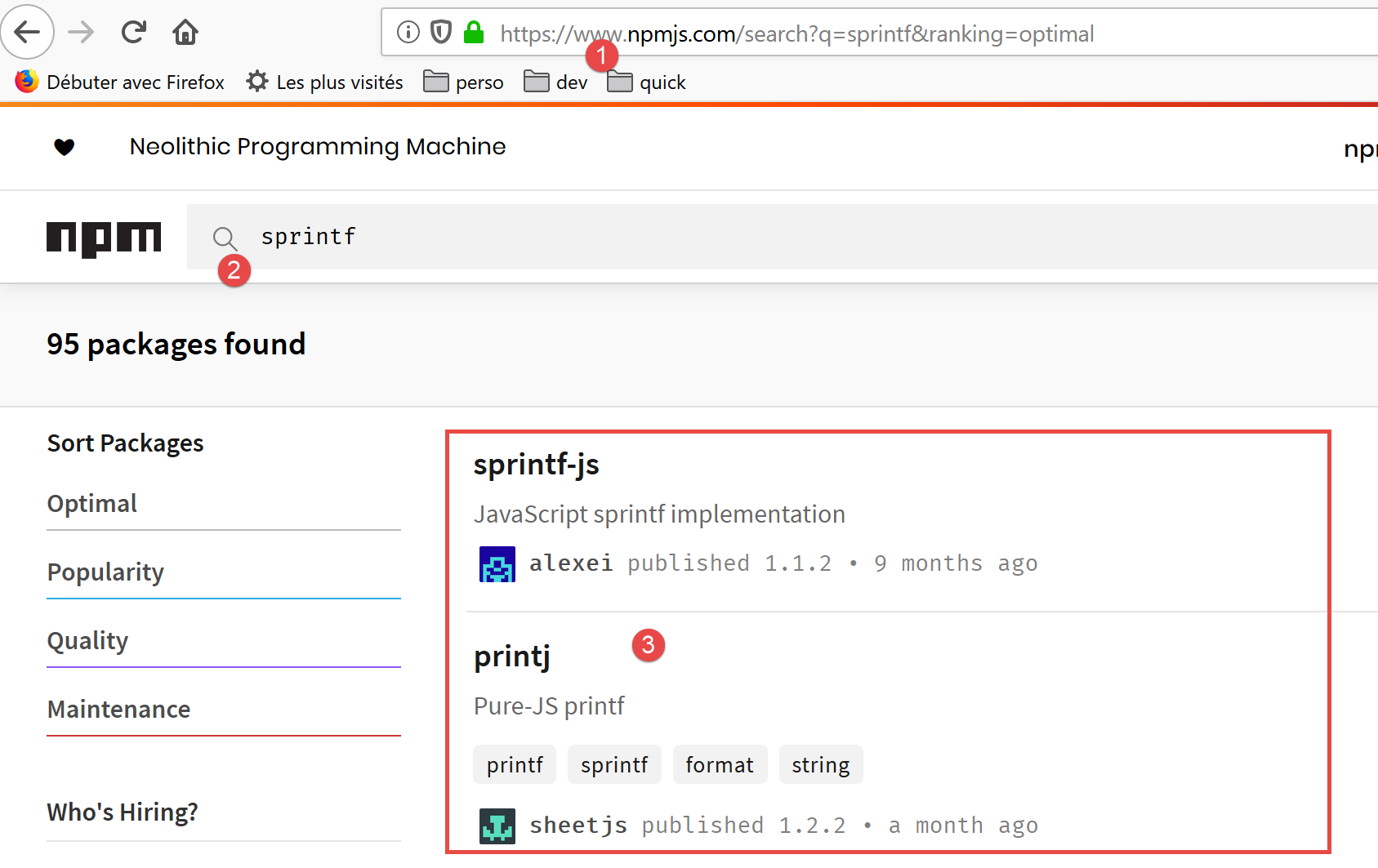
在 [3] 中,查看包列表并选择其中一个。
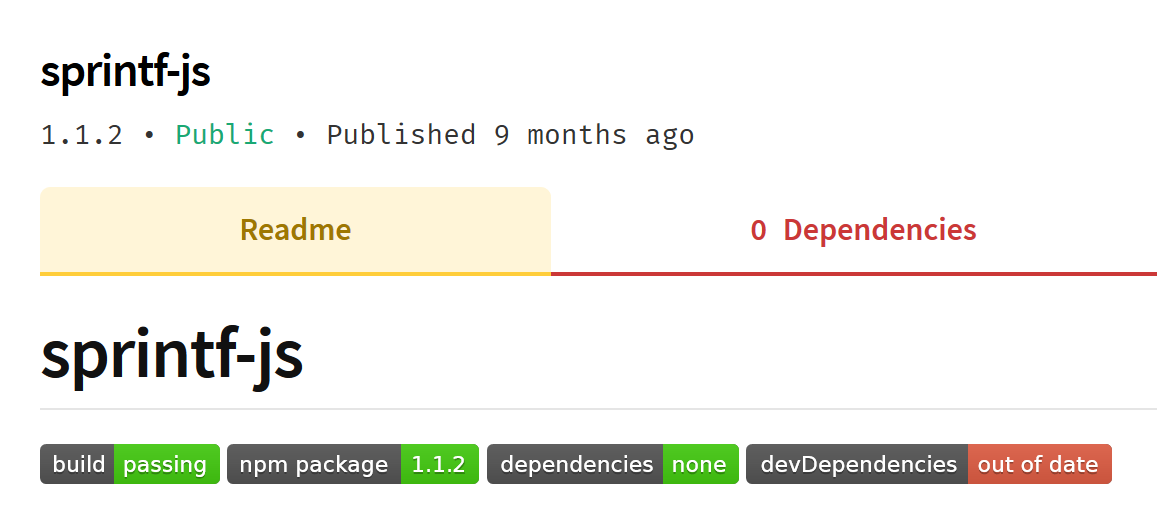
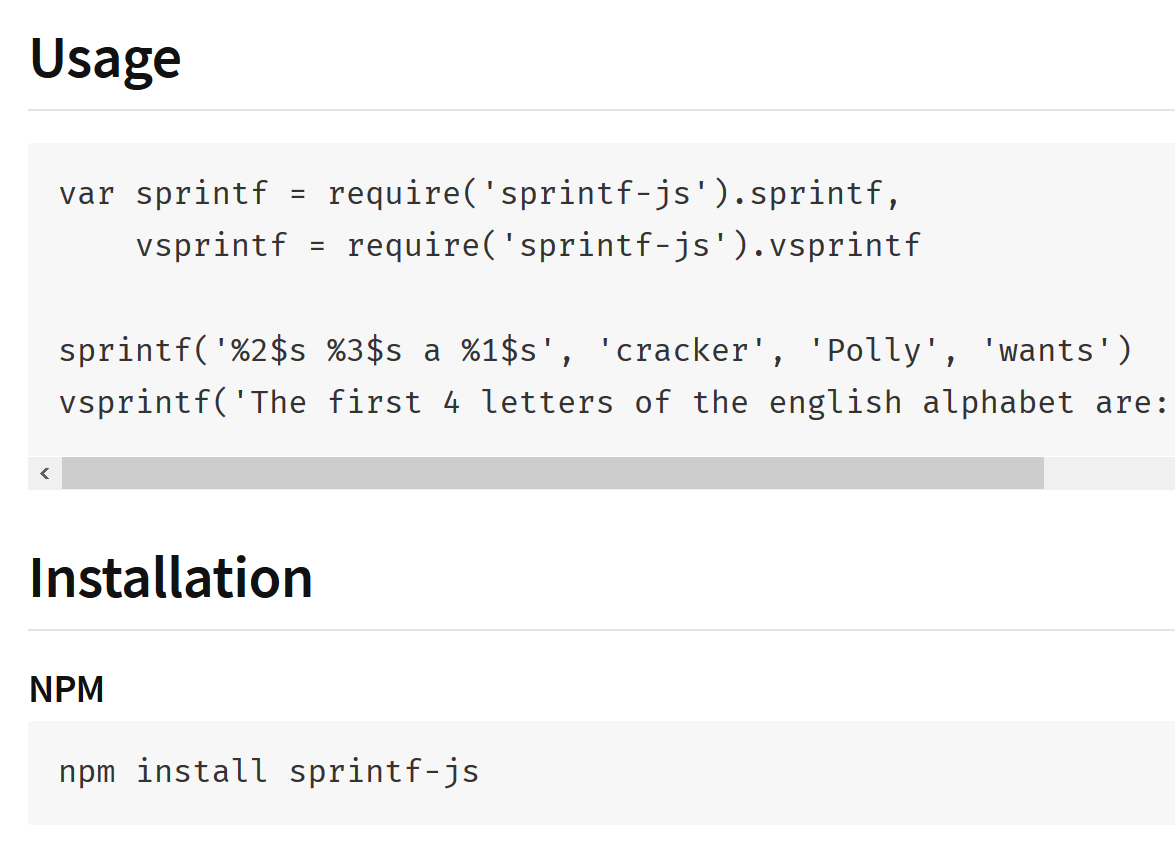
在软件包描述中,可查阅安装和使用说明:
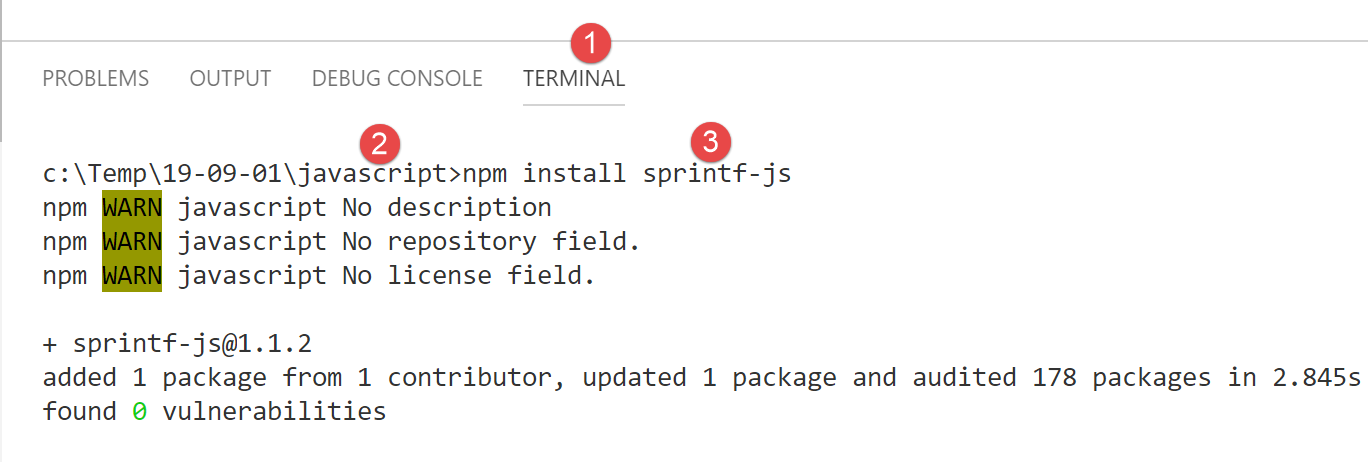
我们在 [VSCode] 终端中安装 [sprintf-js] 软件包:
此次安装将修改位于 [javascript] [2] 文件夹根目录下的 [package.json] 文件:
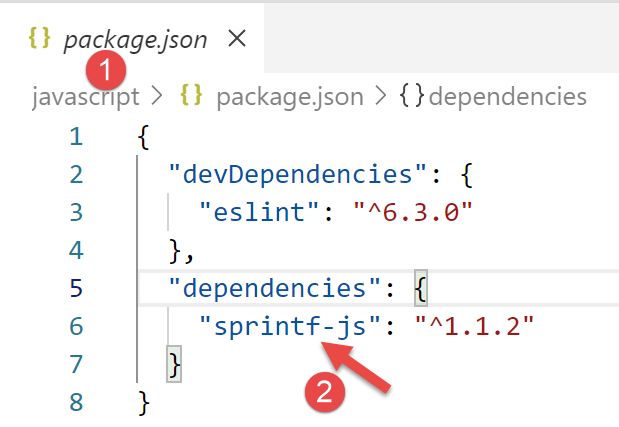
上文可见,该包已安装在 [dependencies] 中,即安装在项目运行所需的包中。 需要提醒的是,仅在项目开发期间才将所需包放入 [devDependencies] 中。这些包在运行时不会被使用。当需要创建项目的最终版本以投入生产环境时,这一区别至关重要。现有工具可用于:
- 将所有运行所需的 jS 文件合并为一个文件。因此,[devDependencies] 中的包不会包含在此最终文件中;
- 对该文件进行压缩,即尽可能减小其体积。例如,为此会删除所有注释;
- “混淆”代码,使其难以理解。例如,变量 taux、salaire、impôt 将被替换为变量 a、b、c;
- 进行其他优化;
对项目 jS 的最终文件进行此类优化,主要应用于 Web 编程。一个 Web 应用程序可能依赖于大量 JavaScript 文件。浏览器加载这些文件可能会延缓应用程序首页的显示速度。 上述优化旨在缩短加载时间。如果用户认为加载时间过长,将不会使用该应用程序。
既然我们已经拥有了 [sprintf-js] 包,接下来就需要使用它。这就是 [str-04] 脚本:
'use strict';
// 使用外部包来调用 sprintf 函数
import { sprintf } from 'sprintf-js';
// 字符串
const chaîne = "Introduction à Javascript par l'exemple";
// 方法
console.log(sprintf("[%s].substr(3,2)=[%s]", chaîne, chaîne.substr(3, 2)));
在 ECMAScript 6 中,我们使用关键字 [import] 来导入由包导出的对象。要了解该包导出了什么,可以查看其代码:
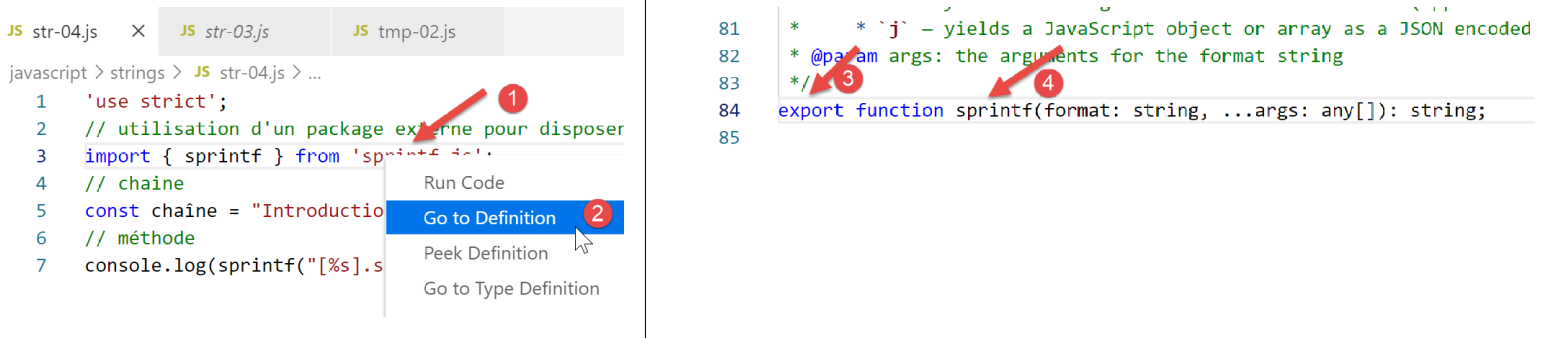
- 在 [1] 中,右键单击导入的包;
- 在 [2] 中,若想查看其定义;
- 在 [3-4] 中,可以看到该包导出了一个名为 [sprintf] 的函数;
[sprintf-js] 包中的 [sprintf] 函数通过以下语句导入:
import { sprintf } from 'sprintf-js';
完整代码:
'use strict';
// 使用外部包以获取 sprintf 函数
import { sprintf } from 'sprintf-js';
// 字符串
const chaîne = "Introduction à Javascript par l'exemple";
// 方法
console.log(sprintf("[%s].substr(3,2)=[%s]", chaîne, chaîne.substr(3, 2)));
生成以下结果:
[Running] C:\myprograms\laragon-lite\bin\nodejs\node-v10\node.exe "c:\Temp\19-09-01\javascript\strings\str-04.js"
c:\Temp\19-09-01\javascript\strings\str-04.js:3
import { sprintf } from 'sprintf-js';
^

SyntaxError: Unexpected token {
at new Script (vm.js:79:7)
at createScript (vm.js:251:10)
at Object.runInThisContext (vm.js:303:10)
at Module._compile (internal/modules/cjs/loader.js:657:28)
第3行,无法识别指令 [import]。 这是因为本课程(2019年9月)使用的 [node.js] 版本 10.15.1 尚未遵循 ECMAScript 标准,该标准用于导入称为模块的包。 2019年,[node.js]遵循名为CommonJS的模块标准。ECMAScript对[node.js]模块的集成预计于2020年实现。 在此背景下,开发者们已着手开发相关软件包,使得 ES6 模块与 [node.js] 模块可在当前(2019年)立即协同使用。
我们将使用一个名为 [esm](ECMAScript 模块)的软件包。将其安装到 [javascript] 项目的终端中:
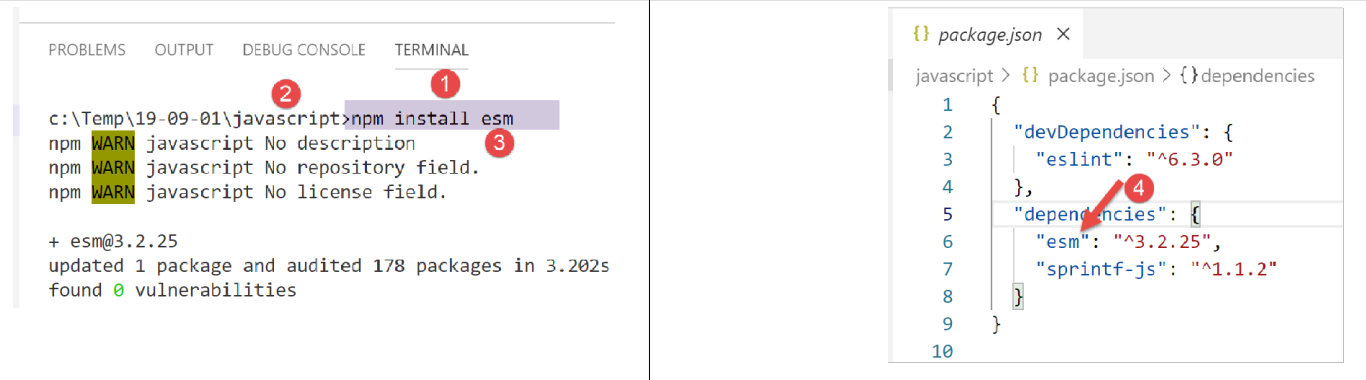
在 [4] 中,我们可以看到 [esm] 和 [1-3] 包的安装已修改了 [javascript/package.json] 文件。
我们还没完成。为了让 [esm] 模块被 [node.js] 使用,必须使用 [-r esm] 参数来启动它。
因此,我们将修改 [VSCode] 扩展 [Code Runner] 的配置:
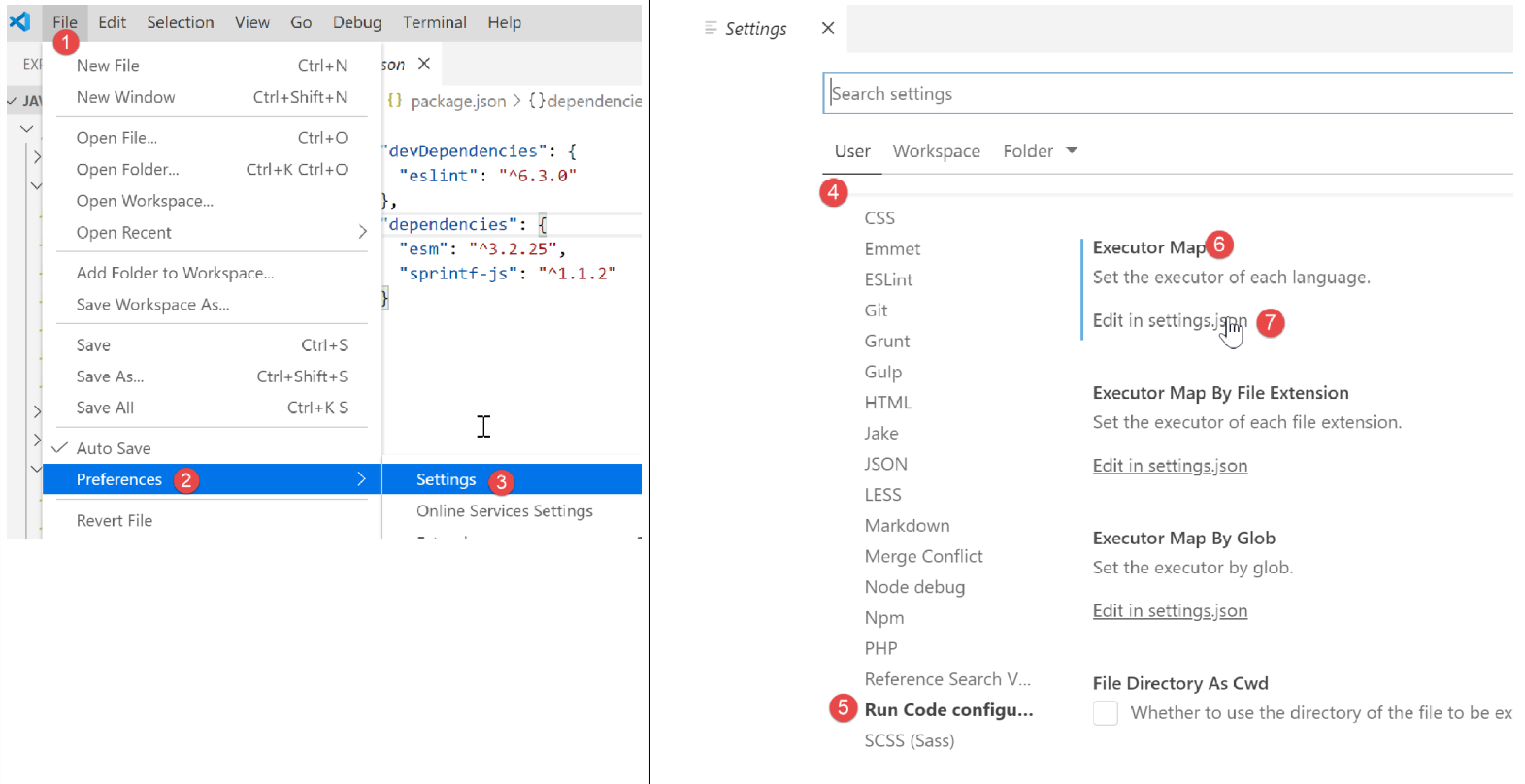
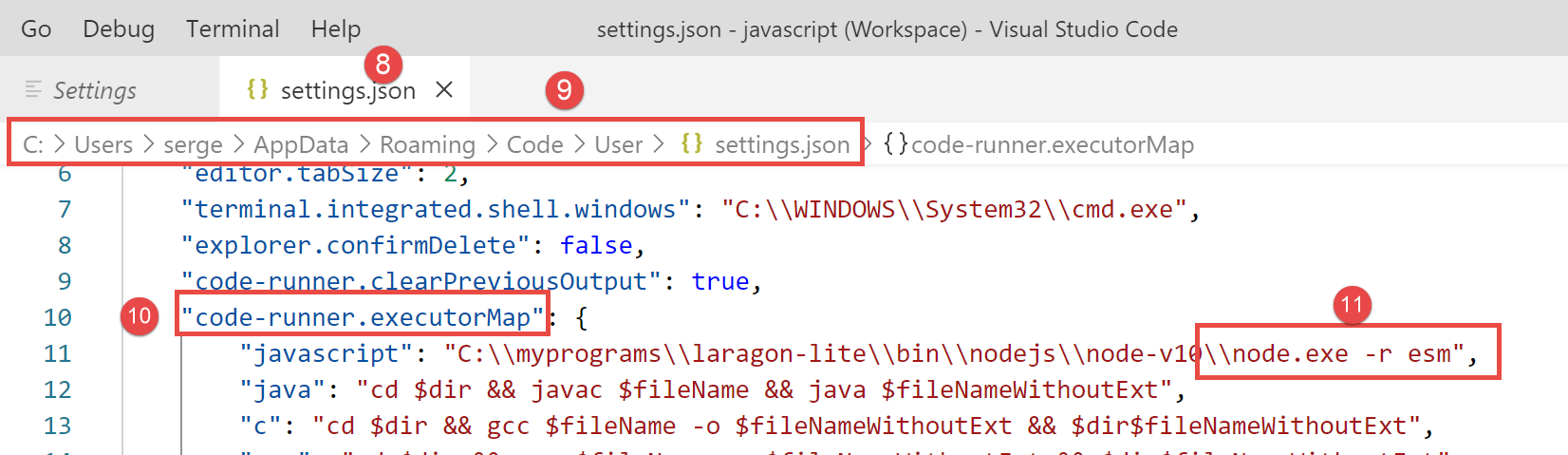
在 [11] 中,添加参数 [-r esm],并保存(Ctrl-S)配置。
现在,我们可以运行脚本 [str-04]:
'use strict';
// 使用外部包以获取 sprintf 函数
import { sprintf } from 'sprintf-js';
// 字符串
const chaîne = "Introduction à Javascript par l'exemple";
// substr 方法
console.log(sprintf("[%s].substr(3,2)=[%s]", chaîne, chaîne.substr(3, 2)));

6.5. 脚本 [str-05]
以下是关于函数 [sprintf] 的文档说明:
格式字符串中的占位符以 % 开头,后跟一个或多个以下元素,顺序如下:
- 一个可选的数字,后跟 $ 符号,用于指定从哪个参数索引获取值。如果未指定,参数将按与输入字符串中占位符相同的顺序放置。
- 一个可选的 + 符号,用于强制在数值结果前添加正号或负号。默认情况下,仅对负数使用 - 符号。
- 一个可选的填充指定符,用于指定填充字符(若指定)。可能的值为 0 或任何以 '(单引号)开头的字符。默认使用空格进行填充。
- 一个可选的 - 符号,用于使 sprintf 将此占位符的结果左对齐。默认情况下,结果为右对齐。
- 一个可选的数字,用于指定结果应包含多少个字符。如果要返回的值短于该数字,结果将被补齐。当与 j (JSON) 类型指定符一起使用时,补齐长度指定用于缩进的制表符大小。
- 一个可选的精度修饰符,由一个 .(点)后跟一个数字组成,用于指定浮点数应显示的位数。当与 g 类型指定符一起使用时,它指定有效位数。当用于字符串时,它会导致结果被截断。
- 一种类型限定符,可以是以下任意一种:
- % — 返回字符 %
- b — 生成一个二进制整数
- c — 生成一个整数,作为具有该 ASCII 值的字符
- d 或 i — 返回一个带符号的十进制整数
- e — 生成采用科学记数法的浮点数
- u — 返回一个无符号十进制整数
- f — 直接返回浮点数;请参阅上文关于精度的说明
- g — 直接返回浮点数;参见上文关于精度的说明
- o — 返回一个八进制整数
- s — 直接返回字符串
- t — 返回 true 或 false
- T — 返回参数1的类型
- v — 返回指定参数的原始值
- x — 返回一个十六进制整数(小写)
- X — 返回一个十六进制整数(大写)
- j — 返回一个 JavaScript 对象或数组,作为 JSON 编码的字符串
[script-05] 脚本实现了其中几种格式:
'use strict';
// 使用外部包以获取 sprintf 函数
import { sprintf } from 'sprintf-js';
// 字符串
const chaîne = "Javascript";
// 字符串
console.log(sprintf("[%s, %%s]=>[%s]", chaîne, chaîne));
console.log(sprintf("[%s, %%20s]=>[%20s]", chaîne, chaîne));
console.log(sprintf("[%s, %%-20s]=>[%-20s]", chaîne, chaîne));
// 整数
console.log(sprintf("[%d, %%d]=>[%d]", 10, 10));
console.log(sprintf("[%d, %%4d]=>[%4d]", 10, 10));
console.log(sprintf("[%d, %%-4d]=>[%-4d]", 10, 10));
console.log(sprintf("[%d, %%04d]=>[%04d]", 10, 10));
// 实数
console.log(sprintf("[%f, %%f]=>[%f]", -10.5, -10.5));
console.log(sprintf("[%f, %%10.2f]=>[%10.2f]", -10.5, -10.5));
console.log(sprintf("[%f, %%-10.2f]=>[%-10.2f]", -10.5, -10.5));
console.log(sprintf("[%f, %%010.3f]=>[%010.3f]", -10.5, -10.5));
// json
console.log(sprintf("personne (%%j)=%j", { nom: "mathieu", âge: 34 }));
// 类型
console.log(sprintf("type personne (%%T)=%T", { nom: "mathieu", âge: 34 }));
// 布尔值
console.log(sprintf("booléen (%%t)=%t", 4 === 4));
执行
[Running] C:\myprograms\laragon-lite\bin\nodejs\node-v10\node.exe -r esm "c:\Data\st-2019\dev\es6\javascript\strings\str-05.js"
[Javascript, %s]=>[Javascript]
[Javascript, %20s]=>[ Javascript]
[Javascript, %-20s]=>[Javascript ]
[10, %d]=>[10]
[10, %4d]=>[ 10]
[10, %-4d]=>[10 ]
[10, %04d]=>[0010]
[-10.5, %f]=>[-10.5]
[-10.5, %10.2f]=>[ -10.50]
[-10.5, %-10.2f]=>[-10.50 ]
[-10.5, %010.3f]=>[-00010.500]
personne (%j)={"nom":"mathieu","âge":34}
type personne (%T)=object
booléen (%t)=true
6.6. [str-06] 脚本
脚本 [str-06] 展示了 [String] 类中的若干方法,这些方法也可用于类型 [string]:
'use strict';
// 使用外部包来获取 sprintf 函数
import { sprintf } from 'sprintf-js';
// 字符串
const chaîne = "  Introduction à Javascript ";
// 若干方法
// substr(10,2):从第10个字符开始截取2个字符
console.log(sprintf("[%s].substr(10,2)=[%s]", chaîne, chaîne.substr(10, 2)));
// trim:去除字符串首尾的空格(空格=\b \t \r \n \f)
console.log(sprintf("[%s].trim()=[%s]", chaîne, chaîne.trim()));
// toLowerCase:转换为小写
console.log(sprintf("[%s].toLowerCase=[%s]", chaîne, chaîne.toLowerCase()));
// toUpperCase:转换为大写
console.log(sprintf("[%s].toUpperCase=[%s]", chaîne, chaîne.toUpperCase()));
// indexOf:目标字符串在字符串中的位置,若子字符串不存在则返 回 -1
console.log(sprintf("[%s].indexOf('Java')=[%s]", chaîne, chaîne.indexOf('Java')));
console.log(sprintf("[%s].trim().indexOf('abcd')=[%s]", chaîne, chaîne.indexOf('abcd')));
// includes:若被查找的字符串存在于字符串中,则返回 true
console.log(sprintf("[%s].includes('Java')=[%s]", chaîne, chaîne.includes('Java')));
// length:字符串长度 - 不是方法而是属性
console.log(sprintf("[%s].length=[%s]", chaîne, chaîne.length));
// slice (7,10):第 7 至 9 个字符的字符串
console.log(sprintf("[%s].slice(7,10)=[%s]", chaîne, chaîne.slice(7, 10)));
// match:在字符串中搜索一个表达式——该表达式可以是正则表达式
// /intro/i:正则表达式,匹配字符串 [intro](不区分大小写)
// 返回找到的字符串
console.log(sprintf("[%s].match(/intro/i)=[%s]", chaîne, chaîne.match(/intro/i)));
// replace:将字符串1替换为字符串2
// 将字符串中的第一个 i 替换为 x
console.log(sprintf("[%s].replace('i','x')=[%s]", chaîne, chaîne.replace('i', 'x')));
// 将所有 i 替换为 x
// /i/g 是一个正则表达式,表示所有 (g) 出现 i 的位置
console.log(sprintf("[%s].replace(/i/g,'x')=[%s]", chaîne, chaîne.replace(/i/g, 'x')));
// split:将字符串按 split 参数分隔为单词
// 返回这些单词的数组
// /\s*/:由零个或多个空格分隔的单词
console.log(sprintf("[%s].split(/\\s*/)=[%s]", chaîne, chaîne.split(/\s*/)));
// /\s+/:由一个或多个空格分隔的单词
console.log(sprintf("[%s].split(/\\s+/)=[%s]", chaîne, chaîne.split(/\s+/)));
执行
[Running] C:\myprograms\laragon-lite\bin\nodejs\node-v10\node.exe -r esm "c:\Data\st-2019\dev\es6\javascript\strings\str-06.js"
[ Introduction à Javascript ].substr(10,2)=[ti]
[ Introduction à Javascript ].trim()=[Introduction à Javascript]
[ Introduction à Javascript ].toLowerCase=[ introduction à javascript ]
[ Introduction à Javascript ].toUpperCase=[ INTRODUCTION À JAVASCRIPT ]
[ Introduction à Javascript ].indexOf('Java')=[17]
[ Introduction à Javascript ].trim().indexOf('abcd')=[-1]
[ Introduction à Javascript ].includes('Java')=[true]
[ Introduction à Javascript ].length=[28]
[ Introduction à Javascript ].slice(7,10)=[duc]
[ Introduction à Javascript ].match(/intro/i)=[Intro]
[ Introduction à Javascript ].replace('i','x')=[ Introductxon à Javascript ]
[ Introduction à Javascript ].replace(/i/g,'x')=[ Introductxon à Javascrxpt ]
[ Introduction à Javascript ].split(/\s*/)=[,I,n,t,r,o,d,u,c,t,i,o,n,à,J,a,v,a,s,c,r,i,p,t,]
[ Introduction à Javascript ].split(/\s+/)=[,Introduction,à,Javascript,]