11. 事件驱动编程与异步函数
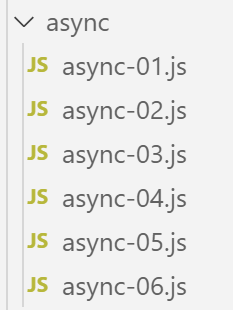
异步函数是指已启动执行但无需等待结果的函数。当执行完成时,异步函数会触发一个事件,并通过该事件传递其结果。
这种工作模式非常适合在网页浏览器中运行。事实上,在浏览器中运行的应用程序本质上是基于事件的:应用程序会对事件做出响应,这些事件主要由用户触发(如点击、鼠标移动、输入文本等)。 在浏览器中运行的 JavaScript 应用程序需要通过 HTTP 协议与外部服务进行交互。 JavaScript 的原生 HTTP 函数是异步的:它们被调用后,获取所请求外部服务响应的结果将通过一个事件来通知,该事件会被添加到应用程序管理的事件集合中。
以下脚本将由 [node.js] 执行,而非由浏览器执行。[node.js] 同样采用基于事件的执行模式:
- [node.js] 如同浏览器一样,使用事件循环来执行脚本;
- 脚本主代码的执行是第一个被触发的事件;
- 如果该主代码启动了异步任务,则在这些异步任务完成之前,执行将持续进行。这些任务在完成时会触发一个事件。这些事件会被放入事件循环的队列中;
- 主脚本必须订阅这些事件,才能获取异步操作的结果;
- 只有当脚本发出的所有事件均被处理完毕后,脚本才算结束;
11.1. 脚本 [async-01]
以下脚本展示了包含异步操作的脚本的行为。
'use strict';

// 导入
import moment from 'moment';
import { sprintf } from 'sprintf-js';

// 开始
const débutScript = moment(Date.now());
console.log("[début du script],", heure());

// setTimeout 设置一个 1000 毫秒的定时器(第二个参数),并立即返回该定时器的编号
// 当定时器计时满 1000 毫秒时,它会触发一个事件,该事件会被放入运行时的队列中
// 当运行时处理该事件时,将执行该函数(第一个参数)
setTimeout(function () {
  // 当计时器倒计时至 0 时,将执行此代码
  console.log("[fin de l'action asynchrone setTimeout],", heure(débutScript));
}, 1000)

// 将在定时器内部函数的消息之前显示
console.log("[fin du code principal du script],", heure(débutScript));

// 显示时间和持续时间的工具
function heure(début) {
  // 当前时间
  const now = moment(Date.now());
  // 时间格式化
  let result = "heure=" + now.format("HH:mm:ss:SSS");
  // 是否需要计算时长?
  if (début) {
    const durée = now - début;
    const milliseconds = durée % 1000;
    const seconds = Math.floor(durée / 1000);
    // 时间+时长格式化
    result = result + sprintf(", durée= %s seconde(s) et %s millisecondes", seconds, milliseconds);
  }
  // 结果
  return result;
}
- 第 4 行:导入库 [moment],以便格式化日期(第 27 行);
- 第 5 行:导入库 [sprintf-js],以便格式化时间(第 34 行);
- 第 8 行:记录脚本的开始时间;
- 第 9 行:使用第 20-34 行中的 [heure] 方法将其显示出来;
- 第14-17行:函数[setTimeout]有两个参数(f, 时长):f是一个函数,当经过[durée]毫秒后执行;
- 第14行:脚本执行时,将调用函数[setTimeout]:
- 第 17 行:一个 1000 毫秒的定时器被启动,并开始倒计时,直至后续计数为 0。一旦定时器初始化并开始倒计时,函数 [setTimeout] 即告结束。 该函数不会等待倒计时结束,而是返回一个标识所用定时器的编号,随后执行流程跳转至下一条指令(第20行)。在此处,[setTimeout]函数的结果并未被使用;
- 第 16 行:该消息将在 [setTimeout] 函数的 1000 毫秒延迟结束时显示;
- 第15-16行:函数f(即函数[setTimeout]的第一个参数)将在1000毫秒延迟结束后执行。随后将显示第16行的消息;
- 第20行:该消息将在第16行的消息之前显示;
时间函数:
- 第23行:该函数接受一个可选参数[heure],即需显示其持续时间的操作的开始时间;
- 第25-27行:计算并格式化当前时间;
- 第29行:如果存在参数[début],则需计算持续时间;
- 第 30 行:计算操作的持续时间。结果为毫秒数;
- 第31-32行:将该毫秒数拆分为秒和毫秒;
- 第34行:将时长加到时间上;
执行
[Running] C:\myprograms\laragon-lite\bin\nodejs\node-v10\node.exe -r esm "c:\Data\st-2019\dev\es6\javascript\async\async-01.js"
[début du script], heure=09:26:40:238
[fin du code principal du script], heure=09:26:40:246, durée= 0 seconde(s) et 11 millisecondes
[fin de l'action asynchrone setTimeout], heure=09:26:41:249, durée= 1 seconde(s) et 14 millisecondes

[Done] exited with code=0 in 1.672 seconds
- 第4行,可以看到异步操作[setTimeOut]在脚本主代码结束约1秒后完成;
- 第6行:第3行显示的时间是主代码结束的时间。如果主代码启动了异步任务,则脚本只有在所有异步任务执行完毕后才算结束。第6行显示的时长是脚本的总执行时长(主代码 + 异步任务);
函数 [setTimeout] 将使我们能够在 [node.js] 环境中模拟异步任务。实际上,函数 [setTimeout] 的行为就像一个异步任务:
- 它通过函数的常规机制(return)立即返回结果,此处为一个定时器编号;
- 它还可能在后续(上述情况尚不属于此类)通过事件返回其他结果,这些事件随后将由 [node.js] 的事件循环进行处理;
- 在后续的大多数情况下,这类事件将有两个:
- 一个可称为 [success] 的事件,由成功完成预定任务的异步任务触发。该事件关联着一项数据,即任务的结果;
- 另一个事件可称为 [failure],由未能完成预定任务的异步任务触发。该事件通常关联一个数据对象,该对象描述了错误详情。 例如,在异步网络任务中可能出现的错误包括“网络不可用”、“服务器不存在”、“超时”等。
- 启动异步任务的主代码可以订阅该任务可能发出的事件。当其中一个事件被触发时,主代码会收到通知,并可触发执行一个专门用于处理该事件的函数。该函数会接收异步任务关联到该事件的数据作为参数;
11.2. 脚本 [async-02]
在此脚本中,异步函数 [setTimeout] 将发布事件,向已订阅这些事件的代码传递数据。
访问 [node.js] 的事件需要额外的库。我们选择 [events] 库,并将其与 [npm] 一起安装:
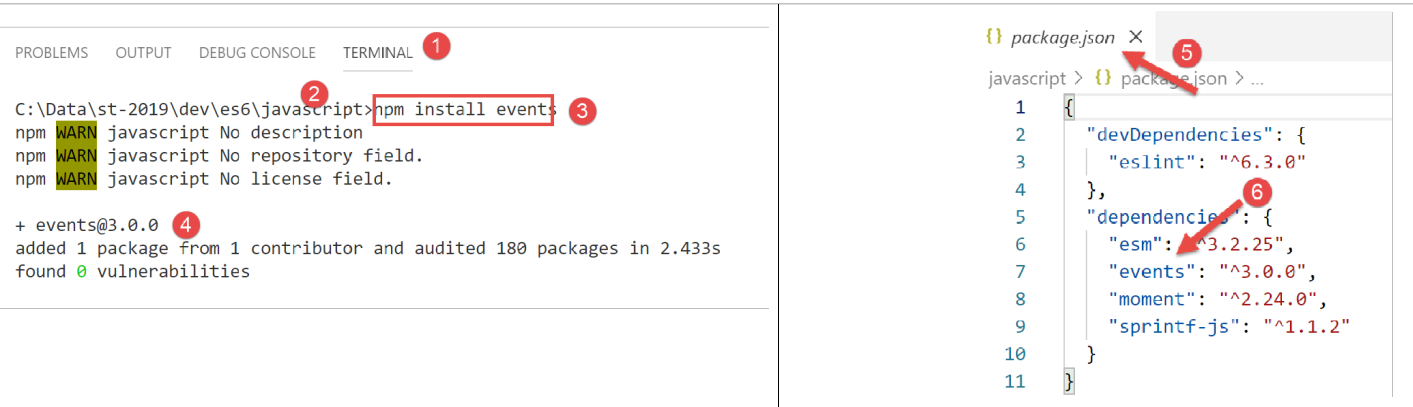
[async-02]脚本如下:
'use strict';

// 异步函数可以通过触发事件返回结果
// 主代码可以通过订阅发布的事件来获取这些结果

// 导入
import moment from 'moment';
import { sprintf } from 'sprintf-js';
import EventEmitter from 'events';

// 开始
const débutScript = moment(Date.now());
console.log("[début du script],", heure());
// 一个事件发布器
const eventEmitter = new EventEmitter();

// setTimeout 设置一个 1000 毫秒的定时器(第二个参数),并立即返回该定时器的编号
// 当计时器耗尽 1000 毫秒时,它会触发一个事件,该事件会被放入运行时的队列中
// 当运行时处理该事件时,将执行该函数(第一个参数)
setTimeout(function () {
  // 当计时器倒计时至0时,将执行此代码
  console.log("[setTimeout, fin du timer d'1 s],", heure(débutScript));
  // 触发事件以通知结果已可用
  eventEmitter.emit("timer1Success", { success: 4 });
  // 触发另一个事件,表示另有结果可用
  eventEmitter.emit("timer1Failure", { failure: 6 });
}, 1000)

// 订阅事件 [timer1Success]
eventEmitter.on('timer1Success', (result) => {
  console.log(sprintf("la fonction asynchrone du timer a rendu le résultat [%j], %s, via l'événement [timer1Success]", result, heure(débutScript)));
});

// 订阅事件 [timer1Failure]
eventEmitter.on('timer1Failure', (result) => {
  console.log(sprintf("la fonction asynchrone du timer a rendu le résultat [%j], %s, via l'événement [timer1Failure]", result, heure(débutScript)));
});

// 将在由 [timer1] 关联函数发出的事件消息之前显示
console.log("[fin du code principal du script],", heure(débutScript));

// 显示时间和持续时间的实用程序
function heure(début) {
  // 当前时间
  const now = moment(Date.now());
  // 时间格式化
  let result = "heure=" + now.format("HH:mm:ss:SSS");
  // 是否需要计算时长?
  if (début) {
    const durée = now - début;
    const milliseconds = durée % 1000;
    const seconds = Math.floor(durée / 1000);
    // 时间+时长格式化
    result = result + sprintf(", durée= %s seconde(s) et %s millisecondes", seconds, milliseconds);
  }
  // 结果
  return result;
}
注释
- 第 9 行,从库 [events] 中导入类 [EventEmitter]。这是一项新功能:此前我们仅导入过字面量对象和函数;
- 第 15 行:通过使用关键字 [new] 实例化类 [EventEmitter],创建了一个事件发射器 [node.js];
- 第20-27行:异步函数 [setTimeout]。该函数在执行时将触发两个事件:
- 第 24 行,事件 [timer1Success],其关联值为对象 {success : 4};
- 第 26 行,事件 [timer1Failure],其关联值为对象 {failure : 6};
- 一个异步函数可以触发任意数量的事件。此前我们提到,通常它只会触发两个事件中的一个([success, failure]),而不是像这里这样同时触发两个;
- 第 20 行:[setTimeout] 的执行是即时的:一个定时器被启动,其编号返回给调用方代码。事件的触发将在稍后进行,此处为 1 秒后;
- 如果事件发生时没有代码来处理它们,那么触发事件就没有意义。因此,如果主代码想要管理这两个事件(特别是获取与这些事件相关的数据),就必须订阅这两个事件 [timer1Success, timer1Failure];
- 第30-32行:主代码订阅了事件[timer1Success]。当事件源[node.js]处理该事件时, 它将调用作为 [eventEmitter.on] 方法第二个参数的函数,并向其传递与事件 [timer1Success] 相关的数据(此处称为 [result]);
- 第 31 行:事件处理函数将显示与该事件关联的数据的 jSON 以及当前时间;
- 第35-37行:通过类似的代码,主程序订阅事件[timer1Failure];
- 订阅事件(第一个参数)不会立即执行函数 [callback](第二个参数)中的代码。该函数仅在事件发生后才会被执行;
- 第40行:脚本的主代码已执行完毕,但脚本本身尚未结束,因为主代码启动了一个异步任务。只有在该异步任务完成后,整个脚本才会结束;
以下结果即说明了这一点:
[Running] C:\myprograms\laragon-lite\bin\nodejs\node-v10\node.exe -r esm "c:\Data\st-2019\dev\es6\javascript\async\async-02.js"
[début du script], heure=09:34:58:909
[fin du code principal du script], heure=09:34:58:916, durée= 0 seconde(s) et 10 millisecondes
[setTimeout, fin du timer d'1 s], heure=09:34:59:929, durée= 1 seconde(s) et 23 millisecondes
la fonction asynchrone du timer a rendu le résultat [{"success":4}], heure=09:34:59:931, durée= 1 seconde(s) et 25 millisecondes, via l'événement [timer1Success]
la fonction asynchrone du timer a rendu le résultat [{"failure":6}], heure=09:34:59:932, durée= 1 seconde(s) et 26 millisecondes, via l'événement [timer1Failure]

[Done] exited with code=0 in 1.627 seconds
- 第3行:脚本开始10毫秒后,主代码结束;
- 第4行:封装在1000毫秒定时器中的函数开始执行,距脚本开始约1秒;
- 第5行:处理事件[‘timer1Success’],2毫秒后;
- 第6行:处理事件[‘timer1Failure’],比事件[‘timer1Success’]晚1毫秒;
- 第 8 行:全局脚本结束,总耗时 1.627 秒;
11.3. 脚本 [async-03]
以下脚本展示了 [node.js] 事件循环的另一个方面:
- 该循环依次执行事件,通常按事件到达的顺序进行。某些 OS 会为事件分配优先级,此时事件按优先级顺序处理,而非按到达顺序;
- 该循环每次仅处理一个事件。只有当前一个事件的处理完成后,才会处理下一个事件。因此,在事件驱动系统中,应避免编写长期独占处理器的代码,因为这样会导致事件在发生时无法被处理,而要等到事件循环轮到它们时才处理。这将导致应用程序“响应性”较差;
脚本 [async-03] 展示了这一现象的示例:
'use strict';

// 异步函数可以通过触发事件返回结果
// 主代码可以通过订阅发布的事件来获取这些结果

// 导入
import moment from 'moment';
import { sprintf } from 'sprintf-js';
import EventEmitter from 'events';

// 开始
const débutScript = moment(Date.now());
console.log("[début du script],", heure());
// 一个事件发布器
const eventEmitter = new EventEmitter();

// setTimeout 设置一个 1000 毫秒的定时器(第二个参数),并立即返回该定时器的编号
// 当计时器耗尽 1000 毫秒时,它会触发一个事件,该事件会被放入运行时的队列中
// 当运行时处理该事件时,将执行该函数(第一个参数)
setTimeout(function () {
  // 当计时器达到0时,将执行此代码
  console.log("[setTimeout, fin du timer d'1 s],", heure(débutScript));
  // 触发事件以通知结果已可用
  eventEmitter.emit("timer1Success", { success: 4 });
  // 触发另一个事件,表示又有结果可用
  eventEmitter.emit("timer1Failure", { failure: 6 });
}, 1000)

// 订阅事件 [timer1Success]
eventEmitter.on('timer1Success', (result) => {
  console.log(sprintf("la fonction asynchrone du timer a rendu le résultat [%j], %s, via l'événement [timer1Success]", result, heure(débutScript)));
});

// 订阅事件 [timer1Failure]
eventEmitter.on('timer1Failure', (result) => {
  console.log(sprintf("la fonction asynchrone du timer a rendu le résultat [%j], %s, via l'événement [timer1Failure]", result, heure(débutScript)));
});

// 一段稍显耗时的同步代码,导致主代码无法在 [timer1] 结束前完成
for (let i = 0; i < 1000000; i++) {
  for (let j = 0; j < 10000; j++) {
    i + i ^ 2 + i ^ 3;
  }
}

// 将显示在由与 [timer1] 关联的函数发出的事件消息之前
console.log("[fin du script],", heure(débutScript));

// 显示时间和持续时间的实用程序
function heure(début) {
 ...
}
注释
- 此代码基于前例 [async-02],并在其中添加了第 39-44 行;
- 第20-27行:函数[setTimeout]被编程为在一秒后执行一个内部异步函数。 一秒钟后,定时器的异步函数不会立即执行:系统会在执行循环中放置一个事件以请求执行。如果执行循环正忙于处理其他事件,定时器的异步函数执行将不得不等待;
- 第20-27行:一旦函数[setTimeout]将定时器设置为一秒延迟后,它便释放处理器并控制权交还给调用方代码。调用方代码继续执行第30-37行,这些是事件订阅操作,其执行时间可以忽略不计;
- 主代码随后执行第40-44行,构成一个1010次迭代的循环。当定时器触发“1秒倒计时结束”事件时,该代码正处于执行中。该事件会被放入事件循环中,但必须等到脚本主代码执行完毕才有机会被处理;
- 第47行:脚本主代码结束。只有在完成最后一次输出后,定时器结束事件才能被处理,[setTimeout]内部的异步函数才能被执行;
脚本输出结果如下:
[Running] C:\myprograms\laragon-lite\bin\nodejs\node-v10\node.exe -r esm "c:\Data\st-2019\dev\es6\javascript\async\async-03.js"
[début du script], heure=08:55:02:665
[fin du code principal du script], heure=08:55:11:789, durée= 9 seconde(s) et 131 millisecondes
[setTimeout, fin du timer d'1 s], heure=08:55:11:794, durée= 9 seconde(s) et 136 millisecondes
la fonction asynchrone du timer a rendu le résultat [{"success":4}], heure=08:55:11:794, durée= 9 seconde(s) et 136 millisecondes, via l'événement [timer1Success]
la fonction asynchrone du timer a rendu le résultat [{"failure":6}], heure=08:55:11:794, durée= 9 seconde(s) et 136 millisecondes, via l'événement [timer1Failure]

[Done] exited with code=0 in 9.796 seconds
注释
- 第3行:可见脚本主代码的执行耗时9秒。在此期间可能发生的事件已被暂存于事件循环中;
- 第4行:可见事件[fin du timer]在主代码结束5毫秒后被处理。该事件在脚本开始约1秒后触发,但需额外等待8秒才最终被处理;
从这个例子中可以得出,在基于事件的系统中,代码绝不能长时间占用处理器。如果遇到执行时间较长的同步代码,必须设法将其分解为更短的异步任务,这些任务将通过事件来通知其完成。
11.4. 脚本 [async-04]
脚本 [async-04] 展示了一种名为 [Promise] 的机制,即结果承诺。该机制避免了显式管理 [node.js] 事件。这些操作是隐式完成的,因此开发人员可以忽略这些事件的存在。 不过,理解这些事件将有助于开发者更好地掌握 [Promise] 的工作原理,该机制乍看之下较为复杂。
[Promise] 类型是一个 JavaScript 类。其构造函数接受一个异步函数作为参数,并向该函数传递两个通常称为 [resolve] 和 [reject] 的参数。这些参数可能有其他名称;
- [Promise] 的构造函数执行两项操作:
- 它会创建一个事件来触发作为参数传递的 [function(resolve, reject)] 函数的执行,但不会等待其结果,而是立即向调用方返回一个 [Promise] 对象。该对象可能处于以下四种状态:
- [pending]:导致 [Promise] 的异步操作尚未完成;
- [fulfilled]:生成 [Promise] 的异步操作已成功完成;
- [rejected]:生成 [Promise] 的异步操作以失败告终;
- [settled]:返回 [Promise] 的异步操作已完成;
- 它会创建一个事件来触发作为参数传递的 [function(resolve, reject)] 函数的执行,但不会等待其结果,而是立即向调用方返回一个 [Promise] 对象。该对象可能处于以下四种状态:
当构造函数返回结果时,创建的 [Promise] 对象处于 [pending] 状态,正在等待异步函数的结果;
- (续)
- 第 2-5 行中的异步任务会立即启动。异步任务通常是输入/输出异步任务,其结构如下:
- 执行同步代码以启动与另一个组件(例如远程服务器)的I/O操作;
- 等待该组件的响应;
- 处理该响应;
- 第 2-5 行中的异步任务会立即启动。异步任务通常是输入/输出异步任务,其结构如下:
其中,等待处理器外部组件的第2阶段耗时最长。与其等待:
- 通过事件通知已收到向外部组件请求的数据;
- 在紧随阶段1之后的同步代码中(示例代码第7行),我们将订阅该事件,随后在适当时候返回[node.js]的事件循环。此时,事件列表中下一个待处理的事件将被处理;
- 在第2阶段,虽然存在并行执行,但分别在不同的设备上进行:
- 处理器负责事件循环;
- 外部组件(磁盘、数据库、远程服务器)负责检索所需数据;
- 在第2阶段结束时,当I/O操作获取到所需数据后,将触发一个事件以指示I/O结果已就绪。该事件随后将加入事件队列;
- 轮到它时,该事件将被处理。与该事件关联的函数(示例代码第7行)随即被执行;
这种工作模式有助于避免空闲时间:即处理器等待比自身运行速度更慢的外设响应所造成的等待时间;
- (续)
- 当第2行和第5行的异步任务启动并完成工作后,它可以通过构造函数[Promise]传递的两个参数函数[resolve, reject],向调用代码返回结果。约定如下:
- 异步任务通过 [resolve(result)] 函数报告成功。 这相当于在 [node.js] 的事件循环中,添加一个可命名为 [resolved] 的事件,并将其关联数据设为 [result];
- 异步任务通过 [reject(error)] 报告失败。 这相当于在 [node.js] 的事件循环中,添加一个可命名为 [rejected] 的事件,其关联数据为 [error](通常是一个详细描述所发生错误的对象);
- 因此,调用方必须订阅这两个事件,以便在异步函数的结果可用时收到通知;
- 当第2行和第5行的异步任务启动并完成工作后,它可以通过构造函数[Promise]传递的两个参数函数[resolve, reject],向调用代码返回结果。约定如下:
当封装在 [Promise] 中的异步任务执行完成后,由构造函数 [Promise(…)] 返回的对象 [promise] 的状态会发生变化:
- 事件 [resolved] 将其状态从 [pending] 切换至 [resolved];
- 事件 [rejected] 将其状态从 [pending] 切换为 [rejected];
订阅异步任务的事件 [resolved] 和 [rejected] 需使用 [Promise] 类的相关方法,语法如下:
promise.then(f1).catch(f2).finally(f3) ;
其中:
- f1 是一个在 [promise] 的状态从 [pending] 切换到 [resolved] 时执行的函数,即当异步任务成功完成工作时。 该函数接收由异步任务的 [resolve(result)] 指令传递的 [result] 值作为参数;
- f2 是在 [promise] 的状态从 [pending] 切换到 [rejected] 时执行的函数,即当异步任务未能完成其工作时。 该函数接收由异步任务中的 [reject(errror)] 指令传递的 [error] 值作为参数;
- f3 是在执行完 [then] 或 [catch] 方法后执行的函数,因此总是会被执行。它不接收任何参数;
这种语法完全隐藏了所订阅的事件。但这确实是一种订阅,与前面的示例一样,它不会立即执行 [f1, f2, f3] 函数。这些函数将在订阅的 [resolved, rejected] 事件之一发生时执行或不执行。
脚本 [async-04] 展示了这一机制:
'use strict';

// 可以获取异步函数的结果(成功、失败)
// 借助 [Promise] 类,无需显式使用事件
// 该类隐式使用了事件,但在代码中无法直接看到

// 导入
import moment from 'moment';
import { sprintf } from 'sprintf-js';

// 开始
const débutScript = moment(Date.now());
console.log("[début du script],", heure(débutScript));

// 使用 Promise 定义异步任务 [Promise]
// 异步任务是构造函数的参数 [Promise]
const débutPromise1 = moment(Date.now());
const promise1 = new Promise(function (resolve) {
  // 日志
  console.log("[début fonction asynchrone de promise1],", heure(débutPromise1));
  // 异步代码
  setTimeout(function () {
    console.log("[fin fonction asynchrone de promise1],", heure(débutPromise1));
    // 异步任务通过函数返回结果 [resolve]
    // 此时,该 Promise 成功
    resolve('[réussite]');
  }, 1000)
});

// 可以获取该 Promise 的结果 [promise1]
// 当该承诺被解析(resolve)或拒绝(reject)时
// 随后的指令是通过方法 [then] 订阅事件 [resolved]
// 以及通过方法 [catch] 订阅事件 [rejected]
// 无论是在 then 还是 catch 之后,都会执行 [finally] 方法
promise1.then(result => {
  // 承诺成功的情况  [evt resolved]
  console.log(sprintf("[promise1.then], %s, result=%s", heure(débutPromise2), result));
}).catch(result => {
  // 错误情况  [evt rejected]
  console.log(sprintf("[promise1.catch], %s, result=%s", heure(débutPromise2), result));
}).finally(() => {
  // 在所有情况下均执行
  console.log("[promise1.finally]", heure(débutPromise1));
});

// 使用 Promise 定义异步任务 [Promise]
const débutPromise2 = moment(Date.now());
const promise2 = new Promise(function (resolve, reject) {
  // 日志
  console.log("[début fonction asynchrone de promise2],", heure(débutPromise1));
  // 异步任务
  setTimeout(function () {
    console.log("[fin fonction asynchrone de promise2],", heure(débutPromise2));
    // 异步任务通过函数返回结果 [reject]
    // 此时该承诺失败
    reject('[échec]');
  }, 2000)
});

// 可以获取 [promise2] 承诺的结果
// 当该承诺被解析(resolve)或拒绝(reject)时
promise2.then(result => {
  // 承诺成功的情况 [evt resolved]
  console.log(sprintf("[promise2.then], %s, result=%s", heure(débutPromise2), result));
}).catch(result => {
  // 发生错误的情况 [evt rejected]
  console.log(sprintf("[promise2.catch], %s, result=%s", heure(débutPromise2), result));
}).finally(() => {
  // 在所有情况下均执行
  console.log(sprintf("[promise2.finally], %s", heure(débutPromise2)));
});

// 将在异步函数的消息和相关事件的消息之前显示
console.log("[fin du code principal du script],", heure(débutScript));

// 实用程序
function heure(début) {
  // 当前时间
  const now = moment(Date.now());
  // 时间格式
  let result = "heure=" + now.format("HH:mm:ss:SSS");
  if (début) {
    const durée = now - début;
    const milliseconds = durée % 1000;
    const seconds = Math.floor(durée / 1000);
    // 时间格式
    result = result + sprintf(", durée= %s seconde(s) et %s millisecondes", seconds, milliseconds);
  }
  // 结果
  return result;
}
注释
- 第 18-28 行:创建 [Promise promise1]。其异步函数会在 1 秒后通过事件返回结果。一旦启动该异步操作(触发定时器),我们不会等待其返回结果,而是立即跳转至第 35 行的代码;
- 第35-44行:订阅[promise1]内部异步函数可能发出的两个[resolved, rejected]事件;
- 第46-71行:针对第二个[promise2]承诺,重复执行与之前相同的代码序列;
- 第 74 行:脚本的主体代码已执行完毕,但整个脚本尚未结束,因为有两个异步操作已被触发。此时返回事件循环,在某个时刻,[promise1, promise2] 承诺中的某个 [resolved, rejected] 事件将会发生。该事件随后将被处理;
- 随后将返回事件循环。此时,当 [promise1, promise2] 承诺中的第二个事件 [resolved, rejected] 发生时,它将被处理;
执行
[Running] C:\myprograms\laragon-lite\bin\nodejs\node-v10\node.exe -r esm "c:\Data\st-2019\dev\es6\javascript\async\async-04.js"
[début du script], heure=09:39:05:950, durée= 0 seconde(s) et 3 millisecondes
[début fonction asynchrone de promise1], heure=09:39:05:958, durée= 0 seconde(s) et 0 millisecondes
[début fonction asynchrone de promise2], heure=09:39:05:959, durée= 0 seconde(s) et 1 millisecondes
[fin du code principal du script], heure=09:39:05:960, durée= 0 seconde(s) et 13 millisecondes
[fin fonction asynchrone de promise1], heure=09:39:06:977, durée= 1 seconde(s) et 19 millisecondes
[promise1.then], heure=09:39:06:980, durée= 1 seconde(s) et 21 millisecondes, result=[réussite]
[promise1.finally] heure=09:39:06:982, durée= 1 seconde(s) et 24 millisecondes
[fin fonction asynchrone de promise2], heure=09:39:07:976, durée= 2 seconde(s) et 17 millisecondes
[promise2.catch], heure=09:39:07:978, durée= 2 seconde(s) et 19 millisecondes, result=[échec]
[promise2.finally], heure=09:39:07:980, durée= 2 seconde(s) et 21 millisecondes

[Done] exited with code=0 in 2.589 seconds
注释
- 第 3 行:启动 [promise1] 的异步函数,但不等待其结束(结束将由事件通知);
- 第 4 行:启动 [promise2] 的异步函数,但不等待其结束(结束将由事件通知);
- 第 5 行:主代码结束,返回事件循环;
- 第 6 行:处理事件 [fin fonction asynchrone de promise1]。[promise1] 的状态将变为 [resolved]。一个事件会通知此状态变化;
- 第7行:由于[promise2]尚未完成处理, 刚刚被放入循环的事件 [promise1 resolved] 将由方法 [promise1.then] 处理,随后由方法 [promise.finally] 处理(第 8 行);
- 第9-11行:当[promise2]从状态[pending]切换到[resolved]时,同样的机制也会发生;
11.5. 脚本 [async-05]
让我们回到 [Promise] 对象构造函数的代码:
第 2 行,[Promise] 的异步任务被启动。它通常需要比封装它的函数传递的 [resolve, reject] 参数更多的参数。 在这种情况下,我们将 [Promise] 的创建封装在一个函数中,该函数会向其传递其异步任务所需的参数:
以下脚本:
- 定义了两个异步函数,返回一个 [Promise];
- 并行启动它们的执行,并在两者都完成后执行某项操作;
'use strict';

// 可以定义返回类型为 [Promise] 的异步函数
// 随后可用关键字 [async] 对其进行标记

// 导入
import moment from 'moment';
import { sprintf } from 'sprintf-js';

// 开始
const débutScript = moment(Date.now());
console.log("[début du script],", heure());

// 一个返回 Promise 的异步函数 [Promise]
function async01(p1) {
  return new Promise((resolve) => {
    console.log("[début de la tâche asynchrone async01]");
    // 异步任务
    const débutAsync01 = moment(Date.now());
    setTimeout(function () {
      console.log("[fin de la tâche asynchrone async01],", heure(débutAsync01));
      // 异步任务可能返回复杂结果
      resolve({
        prop1: [10, 20, 30],
        prop2: "abcd",
        prop3: p1,
      });
    }, 1000)
  });
}

// 一个返回 Promise 的异步函数 [Promise]
function async02(p1, p2) {
  return new Promise(resolve => {
    console.log("[début de la tâche asynchrone async02]");
    // 异步任务
    const débutAsync02 = moment(Date.now());
    setTimeout(function () {
      console.log("[fin de la tâche asynchrone async02],", heure(débutAsync02));
      // 异步任务可能返回复杂的结果
      resolve({
        prop1: [11, 21, 31],
        prop2: "xyzt",
        prop3: p1 + p2
      });
    }, 2000)
  })
}

// 并行调用这两个异步函数
// 并等待它们全部完成
// 只有当两个函数都触发了事件时,then 才会执行 [resolved]
// 只要两个函数中的任一个触发了事件,catch 块就会立即执行 [rejected]
Promise.all([async01(10), async02(10, 20)])
  // 结果是一个数组 [result1, result2],其中 [result1] 是由 [resolve] 发出的结果,该 [resolve] 来自 [async01]
  // ,而 [result2] 则是 [async02] 中的某个 [resolve] 所输出的结果
  .then(result => {
    console.log(sprintf("[promise-all success], %s, result=%j", heure(débutScript), result));
  })
  // error 是两个异步函数中任一函数的第一个 [reject] 发出的结果
  .catch(error => {
    console.log(sprintf("[promise-all error], %s, erreur=%j", heure(débutScript), error));
  })
  // finally 将在 then 或 catch 之后执行
  .finally(() => {
    console.log(sprintf("[promise-all finally], %s", heure(débutScript)));
  });

// 将显示在异步函数和相关事件的消息之前
console.log("[fin du code principal du script],", heure(débutScript));

// 实用工具
function heure(début) {
  // 当前时间
  const now = moment(Date.now());
  // 时间格式化
  let result = "heure=" + now.format("HH:mm:ss:SSS");
  if (début) {
    const durée = now - début;
    const milliseconds = durée % 1000;
    const seconds = Math.floor(durée / 1000);
    // 时间格式
    result = result + sprintf(", durée= %s seconde(s) et %s millisecondes", seconds, milliseconds);
  }
  // 结果
  return result;
}
注释
- 第15-30行:定义了一个函数 [async01],该函数通过定时器事件在1秒后返回结果。第26行中使用了该函数的返回值;
- 第33-47行:对函数[async02]进行类似处理,该函数通过定时器事件在2秒后返回结果。函数[async02]接受两个参数,这些参数在其第44行的结果中被使用;
- 当调用这两个函数 [async01, async02] 时:
- 将被启动;
- 将向调用方返回两个 [promise1, promise2] 承诺;
- 随后执行控制将返回给调用方代码,继续执行后续流程;
- 大约1秒后,[async01]将触发一个事件,表示其已完成工作。该事件将被放入与[async01]传递的结果关联的事件循环中;
- 大约2秒后,[async02]也将经历相同的流程;
- 第 54 行:直到此时,异步函数 [async01, async02] 才被执行(标记为 async01(10) 和 async02(10,20))。它们是在作为参数传递给 [Promise.all] 方法的数组中执行的。 已知 [async01, async02] 都会向调用方返回一个 Promise。因此,[Promise.all] 的参数是一个包含两个 Promise 的数组;
- [Promise.all([promise1, promise2, …, promisen]).then(f1).catch(f2).finally(f3)] 是一个事件订阅:
- [Promise.all] 的类型为 [Promise];
- 当方法 [all] 的参数数组中所有 [promise1, promise2, …, promisen] 承诺都从状态 [pending] 转换为状态 [resolved] 时,方法 [then] 的函数 [f1] 将会被执行。换言之,当数组中的所有承诺均成功完成时,[f1] 将会被执行;
- 只要数组中的任意一个 Promise 从状态 [pending] 切换到状态 [rejected],方法 [catch] 中的函数 [f2] 就会被执行。 换言之,只要数组中的任一承诺失败,[f2] 就会被执行;
- 方法 [finally] 中的函数 [f3] 将在方法 [then, catch] 中的任一方法执行之后执行,因此始终会被执行;
代码执行结果如下:
[Running] C:\myprograms\laragon-lite\bin\nodejs\node-v10\node.exe -r esm "c:\Data\st-2019\dev\es6\javascript\async\async-05.js"
[début du script], heure=12:17:17:367
[début de la tâche asynchrone async01]
[début de la tâche asynchrone async02]
[fin du code principal du script], heure=12:17:17:375, durée= 0 seconde(s) et 10 millisecondes
[fin de la tâche asynchrone async01], heure=12:17:18:391, durée= 1 seconde(s) et 17 millisecondes
[fin de la tâche asynchrone async02], heure=12:17:19:389, durée= 2 seconde(s) et 14 millisecondes
[promise-all success], heure=12:17:19:390, durée= 2 seconde(s) et 25 millisecondes, result=[{"prop1":[10,20,30],"prop2":"abcd","prop3":10},{"prop1":[11,21,31],"prop2":"xyzt","prop3":30}]
[promise-all finally], heure=12:17:19:392, durée= 2 seconde(s) et 27 millisecondes

[Done] exited with code=0 in 2.572 seconds
- 第 6-7 行:两个异步任务 [async01, async02] 被启动。它们并行运行。并非它们的代码执行是并行的,而是它们各自对所需数据的等待同时发生;
- 第 5 行:脚本的主体代码已执行完毕。接下来只需等待两个异步任务 [async01, async02] 结束;
- 第 6 行:异步任务 [async01] 在启动约 1 秒后结束。 该任务通过函数 [resolve] 返回结果,因此代码第 56 行数组中的其 Promise 状态从 [pending] 变为 [resolved]。 这还不足以触发代码第59-60行的[then]方法;
- 第7行:异步任务[async02]在启动后约2秒结束。 该任务通过函数 [resolve] 返回结果,因此代码第 56 行数组中的其 Promise 状态从 [pending] 变为 [resolved]。 一旦事件循环允许,方法 [then] 就会被执行;
- 第8行: ,执行了[Promise.all]的[then]方法。 它接收一个名为 [result1, result2] 的数组作为参数,其中 [result1] 是 [async01] 发出的结果, 而 [result2] 则是 [async02] 输出的结果;
- 第 9 行:执行 [Promise.all] 中的 [finally] 方法;
11.6. 脚本 [async-06]
这个新脚本展示了如何通过结合使用 [async / await] 关键字,使异步代码看起来像同步代码。事件处理被完全封装,从而简化了代码的理解。
我们沿用前面的示例,并进行以下修改:
- 添加了第三个异步函数 [async03],该函数通过方法 [Promise.reject] 返回结果,从而向事件循环发出“任务失败”的信号;
- 依次执行三个异步函数 [async01, async02, async03]。在前面的示例中,我们曾并行执行了异步函数 [async01, async02];
- 在出现关键字 [async/await] 之前,异步操作的顺序执行是通过相互嵌套的 [Promise] 实现的。 一旦需要以这种方式执行多个异步操作,承诺的数量就会相应增加,代码的可读性也会降低;
- 使用关键字 [async/await] 时,异步任务的顺序执行采用与同步任务执行相同的语法:
// 异步函数 - async / await 的使用
async function main() {
  // 异步任务的顺序执行
  try {
    // 带等待的执行 [async01]
    const result1 = await async01(...);
    console.log("[async01 result]=", result1);
    // 带等待的执行 [async02]
    const result2 = await async02(...);
    console.log("[async02 result]=", result2);
    // 等待 [async03] 执行
    const result3 = await async03(...);
    console.log("[async03 result]=", result3);
  } catch (error) {
    // 其中一项异步操作失败
    console.log(sprintf("[sequential error]= %j, %s", error));
  } finally {
    // 已完成
    console.log("[fin exécution séquentielle des tâches asynchrones],");
  }
- 第 6 行:启动异步函数 [async01](使用 await 关键字),并等待其通过 [Promise.resolve, Promise.reject] 方法之一发布结果。因此这是一项阻塞操作;
- 第 6 行:关键字 [await] 将异步操作 [async01] 转换为阻塞操作。我们知道操作 [async01] 有两种返回结果的方式:
- 它几乎立即向调用方代码返回一个 [Promise] 对象;
- 随后通过 [Promise.resolve, Promise.reject] 方法在事件循环中发布结果。第 6 行中的 [result1] 获取的就是后者。[async01] 操作的事件处理已不可见;
- 如果 [Promise.resolve(result)] 发布了 [async01] 的结果 [result],则该结果会被分配给第 6 行的 [result1],执行流程随后继续到第 7 行;
- 如果 [async01] 的结果由 [Promise.reject] 发布,这将引发异常,代码执行将跳转至第 14 行,即 catch 语句所在的位置。 [catch] 子句的参数是 [async01] 发布的错误对象(error),其表达式为 [Promise.reject(error)]。 异步任务也可通过 [throw(error)] 发布错误。[error] 对象是在 [catch(error)] 中获取的;
- 关键字 [await] 必须位于第 2 行中以关键字 [async] 开头的函数内。该关键字表明函数 [main] 是一个异步函数;
- 在表达式 [await f(…)] 中,[f] 必须是一个异步函数,该函数向调用方返回对象 [Promise];
- 对于第 9 行的异步操作 [async02] 和第 12 行的 [async03],也采用同样的处理方式;
同样使用关键字 [async / await],可以通过以下语法实现异步任务的并行执行:
try {
    // 并行执行异步任务
    const result = await Promise.all([async01(...), async02(...), async03(...)]);
    console.log(sprintf("[parallel success], %s, result=%j", heure(débutParallel), result));
  } catch (error) {
    // 其中一个异步操作失败
    console.log(sprintf("[parallel error], %s, erreur=%j", heure(débutParallel), error));
  } finally {
    // 已完成
    console.log(sprintf("[fin exécution parallèle des tâches asynchrones],%s", heure(débutParallel)));
}
- 第3行:这是一个阻塞操作:等待数组[async01(..), async02(..), async03(..)]中的三个异步任务通过[Promise.resolve, Promise.reject]中的任一方法在事件循环中发布结果;
- 如果这三个异步任务使用 [Promise.resolve] 发布结果,则常量 [result] 即为数组 [result1, result2, result3],其中:
- [result1] 是 [async01] 使用表达式 [Promise.resolve(result1)] 发布的结果;
- [result2] 是 [async02] 使用表达式 [Promise.resolve(result2)] 发布的结果;
- [result3] 是 [async03] 使用表达式 [Promise.resolve(result3)] 发布的结果;
- 如果这三个任务中的任何一个使用表达式 [Promise.reject(error)] 发布其结果,则会引发异常;
- 第 3 行中的常量 [result] 未获得其值;
- 执行流程直接跳转至第 5 行中的 [catch];
- catch 语句中的 (error) 参数,即为表达式 [Promise.reject(error)] 发布的 (error) 对象;
通过混合使用这两种语法,可以随心所欲地以顺序或并行方式执行异步任务,且语法与同步代码类似。因此,应优先采用这种比之前语法更易读的写法。 [async / await] 语法仅在 ECMAScript 的第 6 版中才可用。目前仍有大量 JavaScript 代码使用 [Promise] 式的 Promise。因此,理解后者的工作原理同样至关重要。
[async-06]脚本的完整代码如下:
'use strict';

// 多个异步任务的并行或顺序执行
// 使用 async / await 关键字

// 导入
import moment from 'moment';
import { sprintf } from 'sprintf-js';

// 开始
const débutScript = moment(Date.now());
console.log("[début du code principal du script],", heure());

// 返回 [Promise] 的异步函数
function async01(débutAsync01) {
  return new Promise(function (resolve) {
    console.log("[début fonction asynchrone async01],", heure());
    // 异步函数
    setTimeout(function () {
      console.log("[fin fonction asynchrone async01],", heure(débutAsync01));
      // 异步操作可能返回一个复杂的结果
      // 此处成功
      resolve({
        prop1: [11, 21, 31],
        prop2: "abcd"
      });
    }, 1000)
  });
}

// 一个返回 [Promise] 的异步函数
function async02(débutAsync02) {
  console.log("[début fonction asynchrone async02],", heure());
  return new Promise(function (resolve) {
    // 异步函数
    setTimeout(function () {
      console.log("[fin fonction asynchrone async02],", heure(débutAsync02));
      // 异步操作可能返回复杂的结果
      // 此处成功
      resolve({
        prop1: [12, 22, 32],
        prop2: "xyzt"
      });
    }, 2000)
  })
}

// 一个返回 [Promise] 的异步函数
function async03(débutAsync03) {
  console.log("[début fonction asynchrone async03],", heure());
  return new Promise((resolve, reject) => {
    // 异步函数
    setTimeout(function () {
      console.log("[fin fonction asynchrone async03],", heure(débutAsync03));
      // 异步操作可能返回复杂的结果
      // 此处失败
      reject({
        prop1: [13, 23, 33],
        prop2: "échec"
      });
    }, 3000)
  })
}

// 异步函数 - 使用 async / await
async function main() {
  const débutSequential = moment(Date.now());
  // 异步任务的顺序执行
  console.log("------------ exécution séquentielle des tâches asynchrones lancée ------------------------")
  try {
    // 带等待的执行 [async01]
    const débutAsync01 = moment(Date.now());
    const result1 = await async01(débutAsync01);
    console.log("[async01 result]=", result1);
    // 带等待的执行 [async02]
    const débutAsync02 = moment(Date.now());
    console.log("début async02-------------", heure());
    const result2 = await async02(débutAsync02);
    console.log("[async02 result]=", result2);
    // 等待 [async03] 执行
    const débutAsync03 = moment(Date.now());
    console.log("début async03-------------", heure());
    const result3 = await async03(débutAsync03);
    console.log("[async03 result]=", result3);
  } catch (error) {
    // 其中一项异步操作失败
    console.log(sprintf("[sequential error]= %j, %s", error, heure(débutSequential)));
  } finally {
    // 已完成
    console.log("[fin exécution séquentielle des tâches asynchrones],", heure(débutSequential));
  }

  const débutParallel = moment(Date.now());
  // 并行执行异步任务
  console.log("------------ exécution parallèle des tâches asynchrones lancée ------------------------")
  try {
    const result = await Promise.all([async01(débutParallel), async02(débutParallel), async03(débutParallel)]);
    console.log(sprintf("[parallel success], %s, result=%j", heure(débutParallel), result));
  } catch (error) {
    // 其中一个异步操作失败
    console.log(sprintf("[parallel error], %s, erreur=%j", heure(débutParallel), error));
  } finally {
    // 已完成
    console.log(sprintf("[fin exécution parallèle des tâches asynchrones],%s", heure(débutParallel)));
  }

  // 已完成
  console.log("[fin de la fonction main],", heure(débutSequential));
}
// 异步函数 main 已执行
main();

// 将显示在各种异步函数及其事件的消息之前
console.log("[fin du code principal du script],", heure(débutScript));

// 实用程序
function heure(début) {
  // 当前时间
  const now = moment(Date.now());
  // 时间格式化
  let result = "heure=" + now.format("HH:mm:ss:SSS");
  if (début) {
    const durée = now - début;
    const milliseconds = durée % 1000;
    const seconds = Math.floor(durée / 1000);
    // 时间格式
    result = result + sprintf(", durée= %s seconde(s) et %s millisecondes", seconds, milliseconds);
  }
  // 结果
  return result;
}
执行结果如下:
[Running] C:\myprograms\laragon-lite\bin\nodejs\node-v10\node.exe -r esm "c:\Data\st-2019\dev\es6\javascript\async\async-06.js"
[début du code principal du script], heure=15:02:00:152
------------ exécution séquentielle des tâches asynchrones lancée ------------------------
[début fonction asynchrone async01], heure=15:02:00:161
[fin du code principal du script], heure=15:02:00:164, durée= 0 seconde(s) et 15 millisecondes
[fin fonction asynchrone async01], heure=15:02:01:165, durée= 1 seconde(s) et 4 millisecondes
[async01 result]= { prop1: [ 11, 21, 31 ], prop2: 'abcd' }
début async02------------- heure=15:02:01:253
[début fonction asynchrone async02], heure=15:02:01:254
[fin fonction asynchrone async02], heure=15:02:03:265, durée= 2 seconde(s) et 12 millisecondes
[async02 result]= { prop1: [ 12, 22, 32 ], prop2: 'xyzt' }
début async03------------- heure=15:02:03:268
[début fonction asynchrone async03], heure=15:02:03:268
[fin fonction asynchrone async03], heure=15:02:06:285, durée= 3 seconde(s) et 18 millisecondes
[sequential error]= {"prop1":[13,23,33],"prop2":"échec"}, heure=15:02:06:289, durée= 6 seconde(s) et 129 millisecondes
[fin exécution séquentielle des tâches asynchrones], heure=15:02:06:291, durée= 6 seconde(s) et 131 millisecondes
------------ exécution parallèle des tâches asynchrones lancée ------------------------
[début fonction asynchrone async01], heure=15:02:06:292
[début fonction asynchrone async02], heure=15:02:06:293
[début fonction asynchrone async03], heure=15:02:06:294
[fin fonction asynchrone async01], heure=15:02:07:294, durée= 1 seconde(s) et 2 millisecondes
[fin fonction asynchrone async02], heure=15:02:08:298, durée= 2 seconde(s) et 6 millisecondes
[fin fonction asynchrone async03], heure=15:02:09:297, durée= 3 seconde(s) et 5 millisecondes
[parallel error], heure=15:02:09:298, durée= 3 seconde(s) et 6 millisecondes, erreur={"prop1":[13,23,33],"prop2":"échec"}
[fin exécution parallèle des tâches asynchrones],heure=15:02:09:299, durée= 3 seconde(s) et 7 millisecondes
[fin de la fonction main], heure=15:02:09:300, durée= 9 seconde(s) et 140 millisecondes

[Done] exited with code=0 in 9.668 seconds