12. JavaScript 函数 HTTP
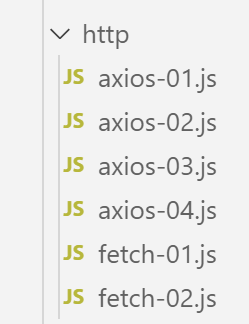
12.1. 选择库 HTTP
在此我们选择了两个库:
EcmaScript 6 原生包含一个名为 [fetch] 的 HTTP 函数,该函数在 [node.js] 中未实现(2019 年 9 月)。 存在一个名为 [node-fetch] 的库,它允许在 Node 环境下使用 [fetch] 函数。该库使用了某些 API 特有的 [node.js] 功能。 因此,[node-fetch]代码在非[node]环境(例如浏览器中)可能无法完全移植;
此外,还有一款名为 [axios] 的库,专门用于处理 HTTP 请求,既兼容 [node.js],也兼容各类浏览器。最终我们将使用该库。
我们将展示使用这两个库编写的相同脚本,以说明使用它们进行编码的方法是相似的。
12.2. 搭建工作环境
12.2.1. 安装税务计算服务器
最终,我们将编写一个具有以下架构的Web应用程序:
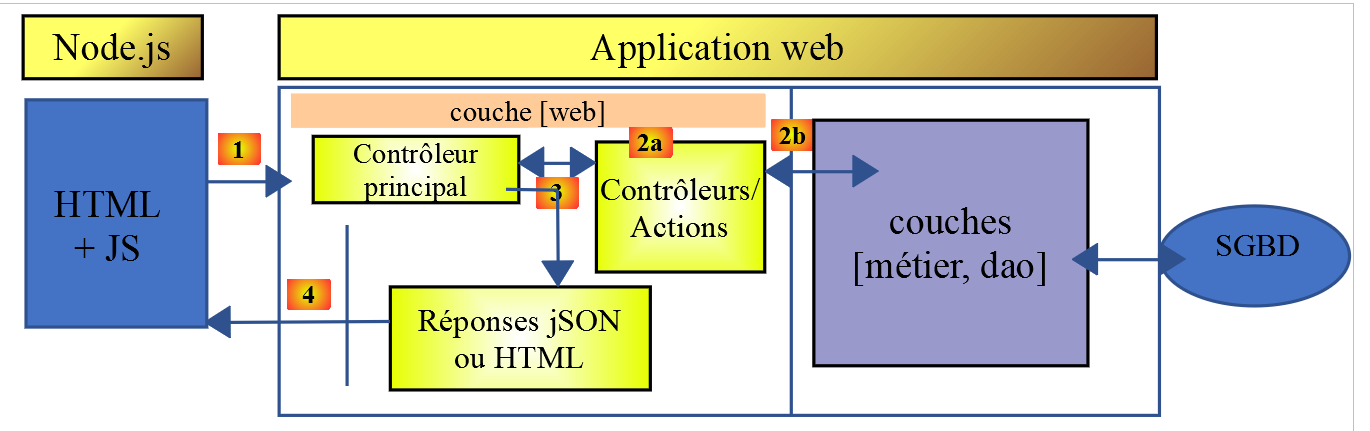
JS:JavaScript
JavaScript 代码位于客户端:
- 静态页面或片段服务;
- jSON 服务;
因此,JavaScript代码是jSON的客户端,并可像我们用jSON编写的客户端一样,按层组织 (UI:用户界面),这与我们用PHP编写的jSON客户端的架构方式一致。
服务器将采用我们已开发过13个版本的税款计算服务器。我们将开发第14个版本。因此,我们首先在NetBeans中将第13个版本的文件夹复制到第14个版本的文件夹中:
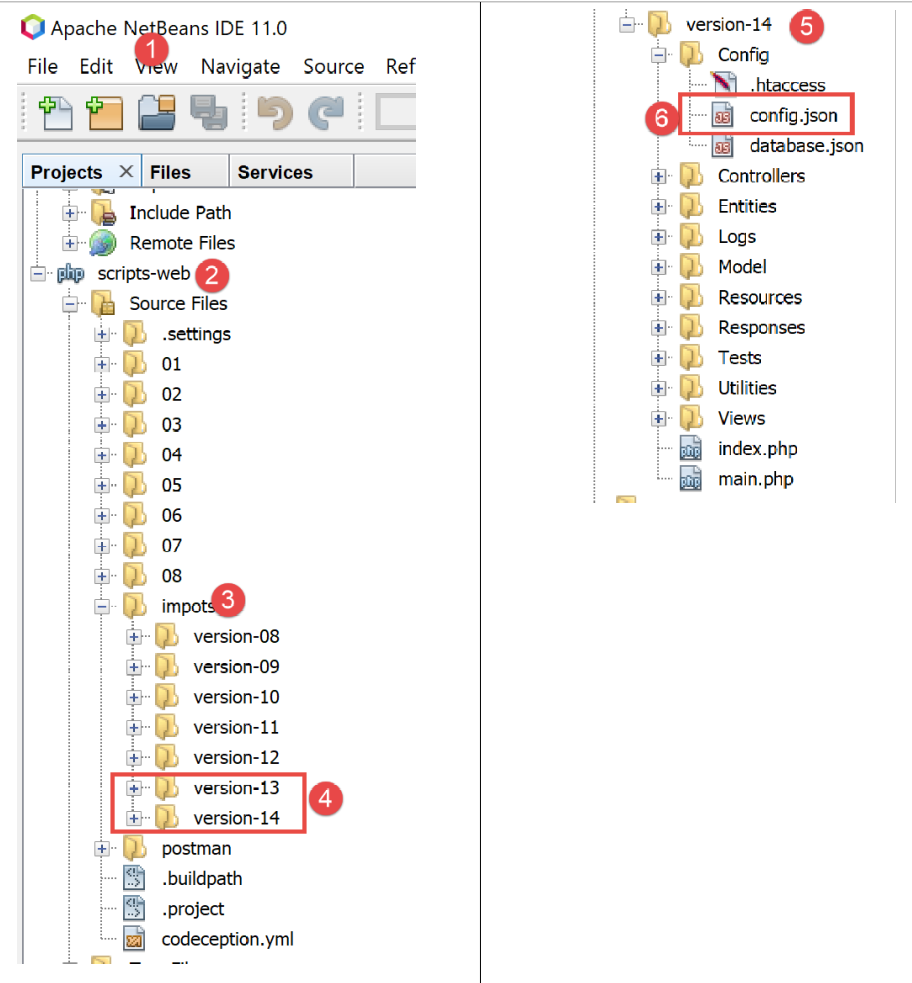
- 并将其重命名为 [6],随后按以下方式修改第 14 版的 [config.json] 文件:
{
    "databaseFilename": "Config/database.json",
    "rootDirectory": "C:/myprograms/laragon-lite/www/php7/scripts-web/impots/version-14",
    "relativeDependencies": [

        "/Entities/BaseEntity.php",
        "/Entities/Simulation.php",
        ...
    "vues": {
        "vue-authentification.php": [700, 221, 400],
        "vue-calcul-impot.php": [200, 300, 341, 350, 800],
        "vue-liste-simulations.php": [500, 600]
    },
    "vue-erreurs": "vue-erreurs.php"
}
- 第 3 行,我们更改了应用程序的根目录;
要访问该服务器,需启动 [Laragon] 服务。
完成上述操作后,我们可以使用 [Postman](参见链接文章)来测试该服务器的新版本,该版本目前与第 13 版完全相同。我们可以使用之前用于测试第 12 版税费计算服务器的请求集合:
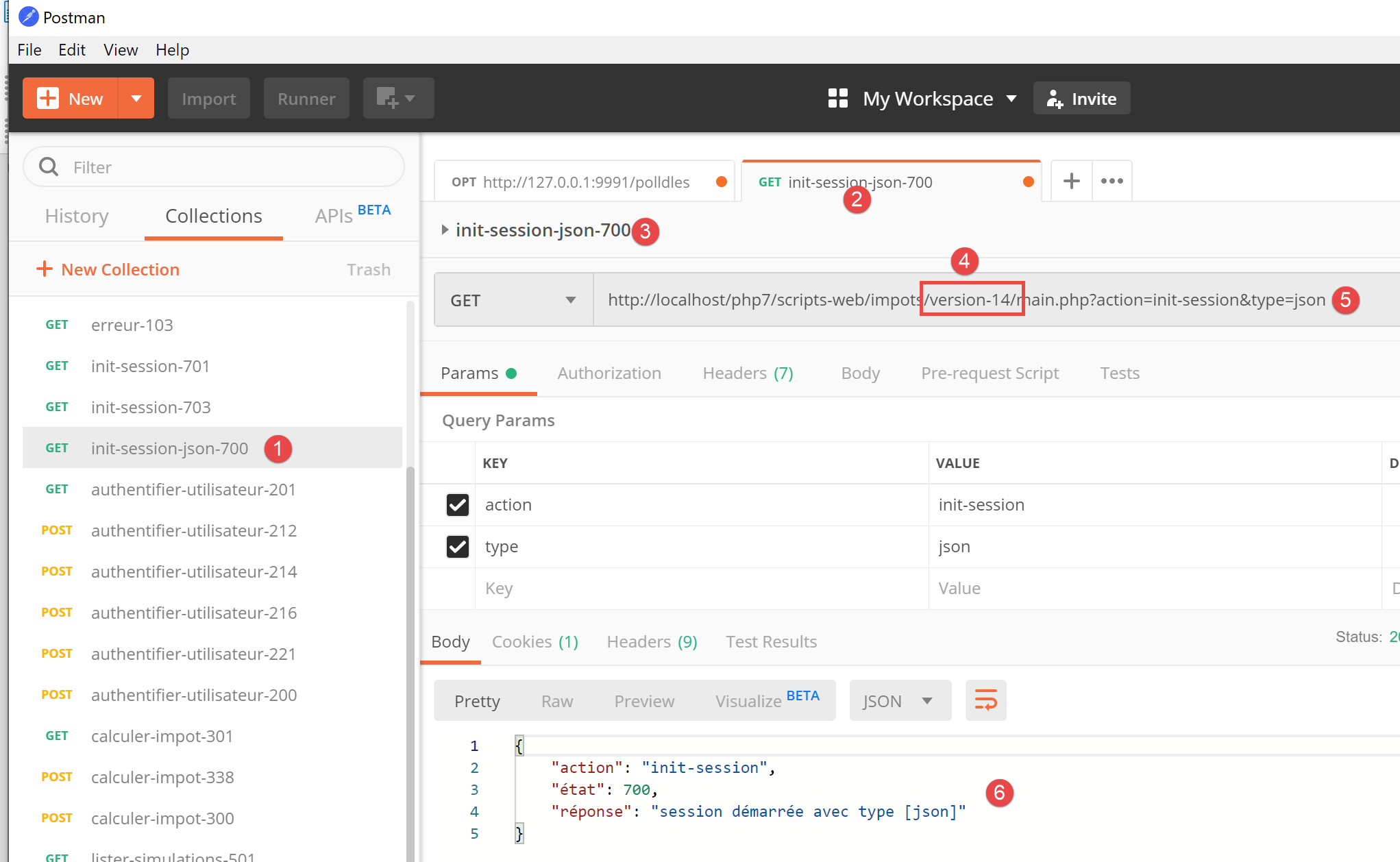
- 在 [1-4] 中,使用查询 [init-session-700] 初始化会话 jSON;
- 在 [4-5] 中,将 [version-12] 替换为 [version-14] 以测试该项目的第 14 版;
- 运行时应收到服务器返回的响应 jS0N [6];
服务器第14版现已投入运行。我们将对其进行微调。请注意该服务器的API:
操作 | 角色 | 执行上下文 |
init-session | 用于设定所需响应的类型(json、xml、html) | 请求 GET main.php?action=init-session&type=x 可随时发出 |
authentifier-utilisateur | 授权或拒绝用户登录 | 请求 POST main.php?action=authentifier-utilisateur 该请求必须包含两个POST参数 [user, password] 仅当会话类型(json、xml、html)已知时才能发出 |
计算税款 | 进行税额计算模拟 | 请求 POST main.php?action=calculer-impot 该请求必须包含三个POST参数 [marié, enfants, salaire] 仅当已知会话类型(json、xml、html)且用户已通过身份验证时方可发出 |
lister-simulations | 请求查看自会话开始以来执行的模拟列表 | 请求 GET main.php?action=lister-simulations 该请求不接受任何其他参数 仅当会话类型(json、xml、html)已知且用户已通过身份验证时,才可发出 |
删除模拟 | 从模拟列表中删除一个模拟 | 请求 GET main.php?action=lister-simulations&numéro=x 该请求不接受任何其他参数 仅当会话类型(json、xml、html)已知且用户已通过身份验证时,方可发出 |
结束会话 | 结束模拟会话。 | 从技术上讲,旧的 Web 会话将被删除,并创建一个新的会话 仅当已知会话类型(json、xml、html)且用户已通过身份验证时,才可发出 |
12.2.2. 安装客户端 JavaScript 库 HTTP
首先,我们将采用以下架构:
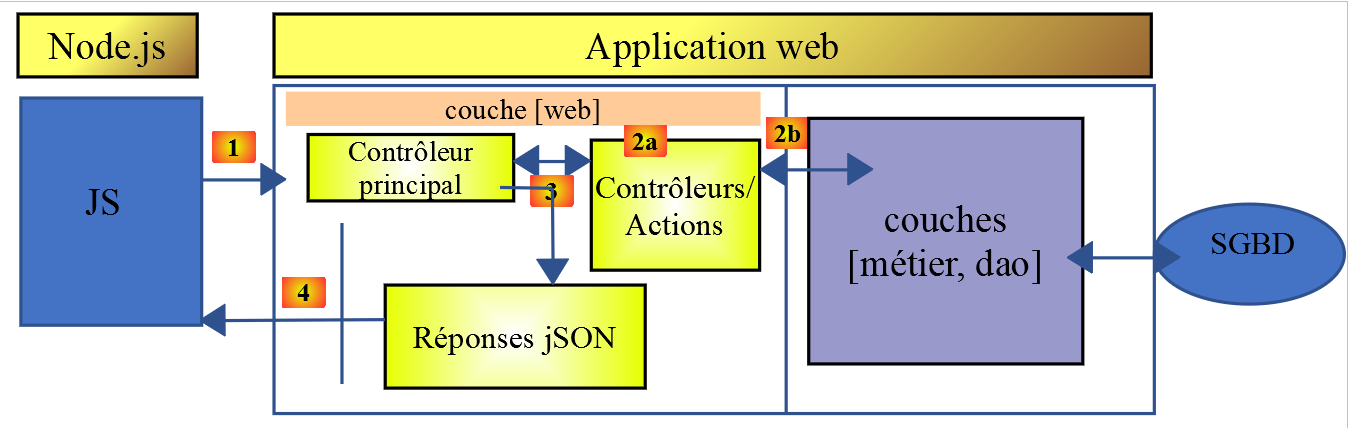
- 在 [1] 中,一个 [node.js] 控制台脚本向税费计算服务器 jSON 发出请求 HTTP;
- 在 [4] 中,它接收该响应并将其显示在控制台上;
在示例 1 中,我们将使用 [node-fetch] 和 [axios] 这两个库,随后在接下来的示例中仅保留 [axios]。 现在,我们从 [VSCode] 终端安装这两个 JavaScript 库:
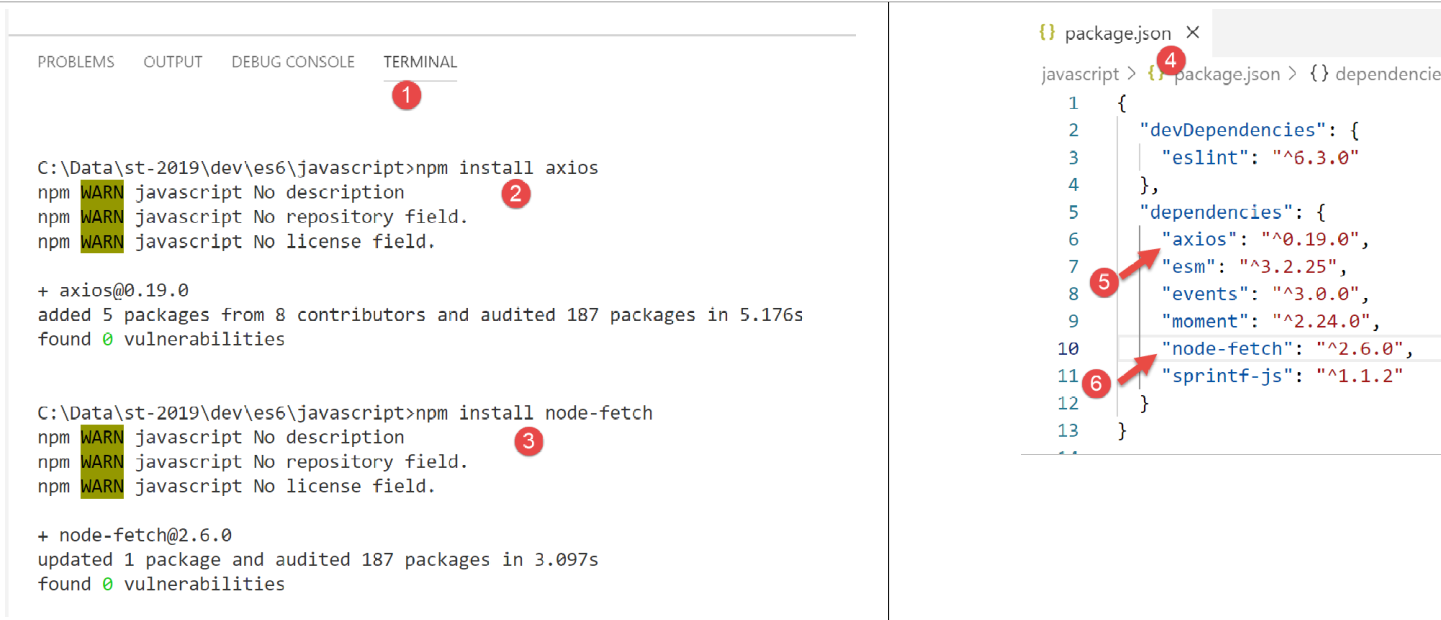
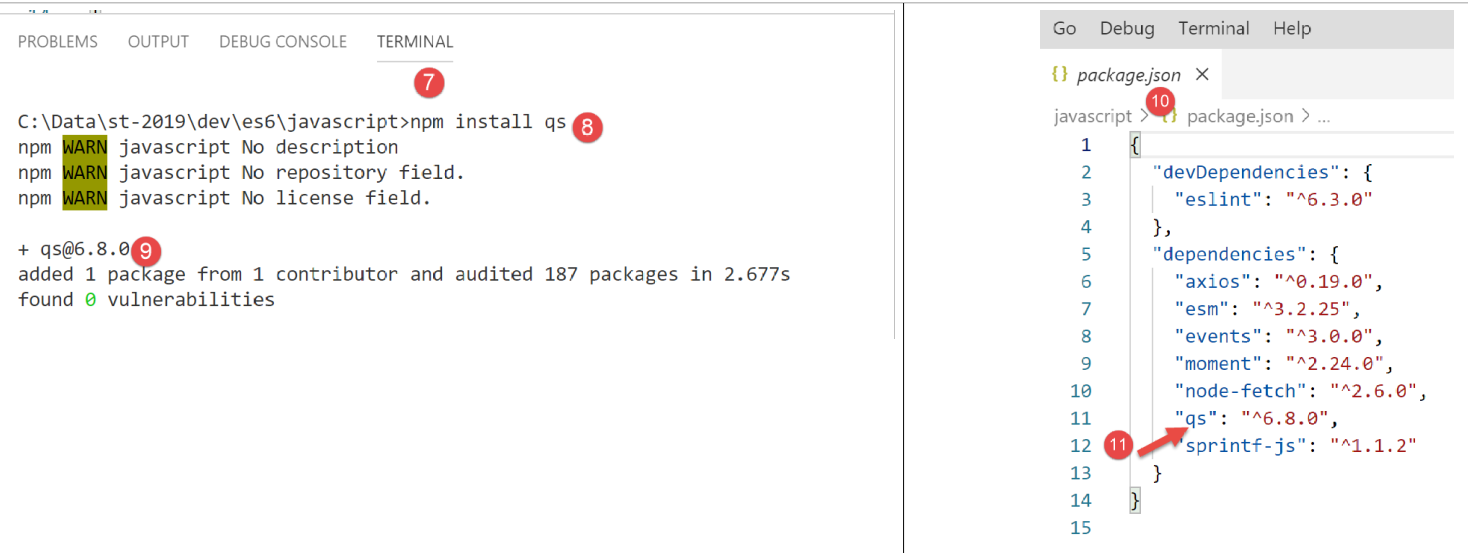
我们还将使用 [qs] 库,该库支持对字符串进行 URL 编码。 需要提醒的是,该编码用于编码 HTTP、GET 或 POST 请求的参数。
12.3. 脚本 [fetch-01]
脚本 [fetch-01] 使用库 [node-fetch] 来初始化与税费计算服务器的会话 jSON。其代码如下:
'use strict';

// 导入
import fetch from 'node-fetch';
import qs from 'qs';
import { sprintf } from 'sprintf-js';
import moment from 'moment';


// URL 基础税务计算服务器
const baseUrl = 'http://localhost/php7/scripts-web/impots/version-14/main.php?';
// 初始化会话
async function initSession() {
  // 请求选项 HHTP [get /main.php?action=init-session&type=json]
  const options = {
    method: "GET",
    timeout: 2000
  };
  // 执行请求 HTTP [get /main.php?action=init-session&type=json]
  let débutFetch;
  try {
    // 异步请求 - [fetch] 返回一个 Promise
    débutFetch = moment(Date.now());
    const response = await fetch(baseUrl + qs.stringify({
      action: 'init-session',
      type: 'json'
    }), options);
    // [response] 是服务器响应 HTTP 的完整内容(包含 HTTP 头部信息及响应主体)
    // 显示此响应以查看其结构
    console.log(sprintf("réponse fetch formatée en json,=%j, %s", response, heure(débutFetch)));
    console.log("réponse fetch en javascript=", response);
    // 可获取 HTTP 的头部信息
    console.log("entêtes de la réponse=", response.headers);
    // 若响应类型为 application/json,则可通过异步函数 [response.json()] 获取服务器的 JSON 响应
    // 在此情况下,调用方将获得一个 [Promise] 对象
    // [await] 允许直接获取服务器的响应 [json],而非其 Promise
    const débutJson = moment(Date.now());
    const objet = await response.json();
    console.log(sprintf("réponse json=%j, type=%s, %s", objet, typeof (objet), heure(débutJson)));
    return objet;
    // 若响应类型为 text/plain,则通过 [response.text()] 获取服务器的文本响应
    // 在此情况下,调用方代码将获得一个 [Promise] 对象
    // [await] 可直接获取服务器的响应 [texte],而非其 Promise
    // const text = await response.text();
    // console.log("文本响应=", text);
    // return text;
  } catch (error) {
    // 出现此情况是因为服务器发送了一个错误代码 [404 Not Found, ...] 并附带一个空正文——我们显示该错误以查看其结构
    // 或者因为客户端 [fetch] 抛出了异常(网络不可用等)
    // 显示错误的结构
    console.log(sprintf("error fetch en json=%j, %s", error, heure(débutFetch)));
    console.log("error fetch en javascript=", typeof (error), error);
    // 触发接收到的错误消息
    throw error.message;
  }
}

// main 函数执行异步函数 [initSession]
async function main() {
  try {
    console.log("requête HTTP vers le serveur en cours ---------------------------------------------");
    const response = await initSession();
    console.log("succès ---------------------------------------------");
    console.log("réponse=", response, typeof (response))
  } catch (error) {
    console.log("erreur ---------------------------------------------");
    console.log("erreur=", error, typeof (error));
  }
}

// 测试
main();

// 显示时间和持续时间的工具
function heure(début) {
  // 当前时间
  const now = moment(Date.now());
  // 时间格式化
  let result = "heure=" + now.format("HH:mm:ss:SSS");
  // 是否需要计算时长?
  if (début) {
    const durée = now - début;
    const milliseconds = durée % 1000;
    const seconds = Math.floor(durée / 1000);
    // 时间+时长格式化
    result = result + sprintf(", durée= %s seconde(s) et %s millisecondes", seconds, milliseconds);
  }
  // 结果
  return result;
}
注释
- JavaScript 中的 HTTP 函数是异步函数。此处我们运用了上一节(参见链接)所学的内容;
- 第 24 行:为了等待异步函数 [fetch] 的响应发布到 [node.js] 的事件循环中,我们使用了关键字 [await]。 我们知道,该语句必须位于以关键字 [async] 为前缀的代码块中(第 13 行);
- 第13-56行:我们将代码HTTP封装在异步函数[initSession]中;
- 第 59-69 行:使用第二个异步函数 [main] 以阻塞方式(async/await)调用异步函数 [initSession];
- 第 72 行:调用异步函数 [main];
- 尽管整个代码看起来像同步代码,但实际上执行的确实是异步函数,只是以阻塞方式执行;
- 第 19 行:要与税费计算服务器初始化 jSON 会话,必须向其发送命令 HTTP [get /main.php?action=init-session&type=json]。第 24-27 行的代码正是执行此操作。 [fetch]的语法如下:[fetch(URL, options)],其中:
- [URL]:被查询的 URL;
- [options]:一个定义查询选项的对象。特别是,这里定义了要发送给目标机器的 HTTP 报头;
- 第15-18行:定义要执行的请求选项:
- [method]:我们希望执行一个 GET;
- [timeout]:要求客户端 [fetch] 等待服务器响应的时间不超过 2 秒。若超过此时间,[fetch] 将抛出异常;
- 第24行:要获得URL和[/main.php?action=init-session&type=json], 我们使用库 [qs] 来获取 GET 的参数 [action,type] 的编码 URL。 得到的字符串是 [init-session&type=json],其实我们完全可以自己构建出来。我们只是想演示如何获取一个经过编码的 URL 字符串;
- 第 24 行:关键字 [await] 表明此处启动了一个异步任务,且该任务的响应将发布到 [node.js] 的事件循环中;
- 第 24 行:在 [response] 中,我们获得了一个复杂对象,该对象描述了接收到的完整 HTTP 响应(包括头部和文档);
- 第30-31行:显示对象[response]以查看其结构,先以字符串形式显示,再以JavaScript对象形式显示;
- 第 33 行:显示服务器发送的 HTTP 头部;
- 第 38 行:已知税费计算服务器将发送字符串 jSON。该字符串封装在对象 [response] 中。可通过方法 [response.json()] 获取该对象。但该方法为异步操作。 因此,我们调用 [await response.json()] 来获取字符串 jSON,该字符串将被发布到 [node.js] 的事件循环中。 实际上,我们获得的并非字符串 jSON,而是由该字符串表示的 JavaScript 对象;
- 第 39 行:显示接收到的字符串 jSON;
- 第 40 行:返回接收到的 JavaScript 对象;
- 第 47 行:捕获 [fetch] 语句可能引发的错误。该语句仅在 HTTP 操作未成功且未收到服务器响应时才会抛出异常。 如果已收到响应(即使 HTTP 代码与 [200 OK] 不同),[fetch] 也不会抛出异常,且服务器响应将在第 38 行可用;
- 第 51-52 行:显示由 [catch] 子句接收的 [error] 对象,首先作为字符串 jSON 显示,随后作为 JavaScript 对象显示;
- 第 54 行:[fetch] 的错误消息位于 [error.message] 中;
- 第59-69行:异步函数[main]以阻塞方式调用异步函数[initSession](第62行await);
- 第 72 行:异步函数 [main] 被调用,此时脚本的主体代码执行完毕。当已调用的异步任务将结果发布到事件循环时,整个脚本才算结束;
执行结果如下:
情况 1:Laragon 服务器未启动
[Running] C:\myprograms\laragon-lite\bin\nodejs\node-v10\node.exe -r esm "c:\Data\st-2019\dev\es6\javascript\http\fetch-01.js"
requête HTTP vers le serveur en cours ---------------------------------------------
error fetch en json={"message":"network timeout at: http://localhost/php7/scripts-web/impots/version-14/main.php?action=init-session&type=json","type":"request-timeout"}, heure=10:08:48:180, durée= 2 seconde(s) et 62 millisecondes
error fetch en javascript= object { FetchError: network timeout at: http://localhost/php7/scripts-web/impots/version-14/main.php?action=init-session&type=json
    at Timeout.<anonymous> (c:\Data\st-2019\dev\es6\javascript\node_modules\node-fetch\lib\index.js:1448:13)
    at ontimeout (timers.js:436:11)
    at tryOnTimeout (timers.js:300:5)
    at listOnTimeout (timers.js:263:5)
    at Timer.processTimers (timers.js:223:10)
  message:
   '网络超时:http://localhost/php7/scripts-web/impots/version-14/main.php?action=init-session&type=json',
  type: 'request-timeout' }
erreur ---------------------------------------------
erreur= network timeout at: http://localhost/php7/scripts-web/impots/version-14/main.php?action=init-session&type=json 字符串

[Done] exited with code=0 in 2.804 seconds
注释
- 第 3 行:由于对请求 HTTP 设置了 2 秒超时,请求 HTTP 在 2 秒 62 毫秒后失败;
- 第4-9行:JavaScript对象[error]被子句[catch(error)]拦截。该对象具有两个属性:
- [FetchError]:第 4 行;
- [message]:第 10-12 行;
- 第 14 行:异步函数 [main] 接收到的错误消息;
情况 2:Laragon 服务器已启动
[Running] C:\myprograms\laragon-lite\bin\nodejs\node-v10\node.exe -r esm "c:\Data\st-2019\dev\es6\javascript\http\fetch-01.js"
requête HTTP vers le serveur en cours ---------------------------------------------
réponse fetch formatée en json,={"size":0,"timeout":2000}, heure=10:13:50:814, durée= 0 seconde(s) et 375 millisecondes
réponse fetch en javascript= Response {
  size: 0,
  timeout: 2000,
  [Symbol(Body internals)]:
   { body:
      PassThrough {
        _readableState: [ReadableState],
        readable: true,
        domain: null,
        _events: [Object],
        _eventsCount: 2,
        _maxListeners: undefined,
        _writableState: [WritableState],
        writable: false,
        allowHalfOpen: true,
        _transformState: [Object] },
     disturbed: false,
     error: null },
  [Symbol(Response internals)]:
   { url:
      'http://localhost/php7/scripts-web/impots/version-14/main.php?action=init-session&type=json',
     status: 200,
     statusText: 'OK',
     headers: Headers { [Symbol(map)]: [Object] },
     counter: 0 } }
entêtes de la réponse= Headers {
  [Symbol(map)]:
   [Object: null prototype] {
     date: [ 'Sat, 14 Sep 2019 08:13:50 GMT' ],
     server: [ 'Apache/2.4.35 (Win64) OpenSSL/1.1.0i PHP/7.2.11' ],
     'x-powered-by': [ 'PHP/7.2.11' ],
     'cache-control': [ 'max-age=0, private, must-revalidate, no-cache, private' ],
     'set-cookie': [ 'PHPSESSID=99q2iinusmhl55fa600aie2mmu; path=/' ],
     'content-length': [ '86' ],
     connection: [ 'close' ],
     'content-type': [ 'application/json' ] } }
réponse json={"action":"init-session","état":700,"réponse":"session démarrée avec type [json]"}, type=object, heure=10:13:50:825, durée= 0 seconde(s) et 1 millisecondes
succès ---------------------------------------------
réponse= { action: 'init-session',
  '状态': 700,
  '响应:'已启动会话,类型为 [json]' } object

[Done] exited with code=0 in 1.022 seconds
注释
- 第 3 行:[fetch] 在 375 毫秒后收到服务器的响应;
- 第4-39行:封装服务器响应的JavaScript对象[response]的结构。在其属性中,某些属性可能值得关注:
- [status](第25行):服务器响应中的代码HTTP;
- [statusText](第26行):与该代码关联的文本;
- [headers](第27行):服务器响应的HTTP头部;
- [body](第 8 行):代表服务器发送的文档。指令 [fetch] 提供了对其进行处理的方法;
- 第29-39行:服务器响应的HTTP头部;
- 第 40 行:异步函数 [response.json()] 在 1 毫秒后返回了响应;
- 第42-44行:异步函数[main]接收的JavaScript对象;
情况 3:Laragon 服务器已启动,但向其发送了错误的命令:
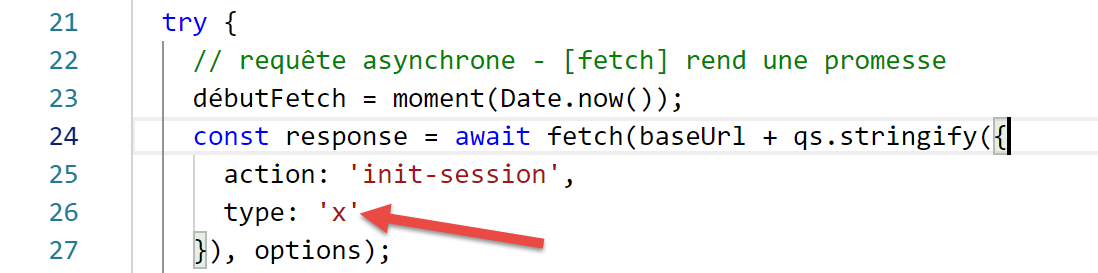
- 上文第26行,向服务器传递了错误类型的会话;
执行结果如下:
requête HTTP vers le serveur en cours ---------------------------------------------
réponse fetch formatée en json,={"size":0,"timeout":2000}, heure=10:27:54:114, durée= 0 seconde(s) et 136 millisecondes
réponse fetch en javascript= Response {
  size: 0,
  timeout: 2000,
  [Symbol(Body internals)]:
   { body:
      PassThrough {
        _readableState: [ReadableState],
        readable: true,
        domain: null,
        _events: [Object],
        _eventsCount: 2,
        _maxListeners: undefined,
        _writableState: [WritableState],
        writable: false,
        allowHalfOpen: true,
        _transformState: [Object] },
     disturbed: false,
     error: null },
  [Symbol(Response internals)]:
   { url:
      'http://localhost/php7/scripts-web/impots/version-14/main.php?action=init-session&type=x',
     status: 400,
     statusText: 'Bad Request',
     headers: Headers { [Symbol(map)]: [Object] },
     counter: 0 } }
entêtes de la réponse= Headers {
  [Symbol(map)]:
   [Object: null prototype] {
     date: [ 'Sat, 14 Sep 2019 08:27:54 GMT' ],
     server: [ 'Apache/2.4.35 (Win64) OpenSSL/1.1.0i PHP/7.2.11' ],
     'x-powered-by': [ 'PHP/7.2.11' ],
     'cache-control': [ 'max-age=0, private, must-revalidate, no-cache, private' ],
     'set-cookie': [ 'PHPSESSID=5ku9gfok81ikj98hia0meeum57; path=/' ],
     'content-length': [ '79' ],
     connection: [ 'close' ],
     'content-type': [ 'application/json' ] } }
réponse json={"action":"init-session","état":703,"réponse":"paramètre type=[x] invalide"}, type=object, heure=10:27:54:127, durée= 0 seconde(s) et 2 millisecondes
succès ---------------------------------------------
réponse= { action: 'init-session',
  '状态': 703,
  '响应:'type=[x] 参数无效' } 对象

[Done] exited with code=0 in 0.712 seconds
- 第 2 行接收到了服务器的响应;
- 第24行:可以看到服务器响应中的代码HTTP为400,这是一个错误代码。然而,[fetch]并未抛出异常。 只要 [fetch] 收到服务器响应,它就会处理该响应且不会抛出异常;
- 第 41-43 行:异步函数 [main] 获取的响应;
12.4. 脚本 [fetch-02]
以下脚本基于脚本 [fetch-01],并去除了所有不必要的细节:
'use strict';

// 导入
import fetch from 'node-fetch';
import qs from 'qs';

// URL 税费计算服务器基础
const baseUrl = 'http://localhost/php7/scripts-web/impots/version-14/main.php?';
// 初始化会话
async function initSession() {
  // 请求选项 HHTP [get /main.php?action=init-session&type=json]
  const options = {
    method: "GET",
    timeout: 2000
  };
  // 执行请求 HTTP [get /main.php?action=init-session&type=json]
  const response = await fetch(baseUrl + qs.stringify({
    action: 'init-session',
    type: 'json'
  }), options);
  // 在 jSON 中收到结果
  return await response.json();
}

// main 函数调用异步函数 [initSession]
async function main() {
  try {
    console.log("requête HTTP vers le serveur en cours ---------------------------------------------");
    const response = await initSession();
    console.log("succès ---------------------------------------------");
    console.log("réponse=", response)
  } catch (error) {
    console.log("erreur ---------------------------------------------");
    console.log("erreur=", error.message);
  }
}

// 测试
main();
正常执行的结果:
[Running] C:\myprograms\laragon-lite\bin\nodejs\node-v10\node.exe -r esm "c:\Data\st-2019\dev\es6\javascript\http\fetch-02.js"
requête HTTP vers le serveur en cours ---------------------------------------------
succès ---------------------------------------------
réponse= { action: 'init-session',
  '状态:700,
  '响应:'已启动类型为 [json] 的会话' }

[Done] exited with code=0 in 0.56 seconds
发生异常时的执行结果(停止 Laragon 服务器):
[Running] C:\myprograms\laragon-lite\bin\nodejs\node-v10\node.exe -r esm "c:\Data\st-2019\dev\es6\javascript\http\fetch-02.js"
requête HTTP vers le serveur en cours ---------------------------------------------
erreur ---------------------------------------------
erreur= network timeout at: http://localhost/php7/scripts-web/impots/version-14/main.php?action=init-session&type=json

[Done] exited with code=0 in 2.701 seconds
12.5. 脚本 [axios-01]
这里我们重新编写脚本 [fetch-01],并使用库 [axios] 进行重构。需要说明的是,我们关注该库的原因在于它能在 [node.js] 环境与常用浏览器环境之间实现移植。这使得:
- 在第一阶段,在 [node.js] 环境中测试脚本;
- 在第二阶段,将其移植到浏览器上;
脚本 [axios-01] 沿用了脚本 [fetch-01] 的结构:
'use strict';
import axios from 'axios';

// axios 的默认配置
axios.defaults.timeout = 2000;
axios.defaults.baseURL = 'http://localhost/php7/scripts-web/impots/version-14';

// 初始化会话
async function initSession(axios) {
  // 请求选项 HHTP [get /main.php?action=init-session&type=json]
  const options = {
    method: "GET",
    // URL的参数
    params: {
      action: 'init-session',
      type: 'json'
    }
  };
  // 执行请求 HTTP [get /main.php?action=init-session&type=json]
  try {
    // 异步请求
    const response = await axios.request('main.php', options);
    // response 是服务器 HTTP 请求的完整响应(包含 HTTP 请求头 + 响应正文)
    // 显示此响应以查看其结构
    console.log("réponse axios=", response);
    // 服务器的响应位于 [response.data]
    return response.data;
  } catch (error) {
    // 我们之所以在此,是因为服务器发送了错误代码 [404 Not Found, 500 Internal Server Error, ...]
    // 参数 [error] 是一个异常实例——它可能有各种形式
    // 显示该参数以查看其结构
    console.log("axios error=", typeof (error), error);
    if (error.response) {
      // 服务器在状态 HTTP 中报告了错误,但同时也发送了响应
      // 因此该响应位于 [error.response.data] 中
      // 已知服务器发送的响应 jSON 采用 {操作, 状态, 响应} 的结构
      // 且发生错误时,错误消息位于 [réponse]
      return error.response.data;
    } else {
      // 触发错误
      throw error;
    }
  }
}

// main 函数执行异步函数 [initSession]
async function main() {
  try {
    console.log("requête HTTP vers le serveur en cours ---------------------------------------------");
    const response = await initSession(axios);
    console.log("succès ---------------------------------------------");
    console.log("réponse=", response, typeof (response))
  } catch (error) {
    console.log("erreur ---------------------------------------------");
    console.log("erreur=", error.message);
  }
}

// 测试
main();
注释
- 第 2 行:导入 [axios] 库;
- 第 5-6 行:HTTP 请求的默认配置。 [axios.defaults] 选项适用于由对象 [axios] 发出的所有 HTTP 请求,无需在每次新请求时重新调用;
- 第 5 行:所有请求的超时时间为 2 秒;
- 第6行:所有URL请求均以基础URL为基准;
- 第 9 行:异步函数 [initSession];
- 第11-18行:即将发出的HTTP请求的选项(除第5-6行已定义的默认选项外);
- 第 14-17 行:URL 的参数 [action=init-session&type=json]。对象 [params] 将自动转换为编码字符串 URL;
- 第22行:对异步函数[axios.request]的阻塞调用。 第一个参数是目标对象 URL,其构造方式为 [main.php] 加上第 6 行定义的基础对象 URL。 第二个参数是第11-18行中的[options]对象;
- 第25行:[response]是一个JavaScript对象,封装了服务器响应HTTP的全部内容(HTTP头部信息 + 响应文档)。将其显示出来以便查看其JavaScript结构;
- 第27行:如果服务器发送了文档,则该文档位于[response.data]中。 在此我们得知,服务器发送的响应为 jSON,并附带 HTTP 和 [Content-type : application/json] 这两个头部。 该头部的存在导致 [axios] 会自动将 [response.data] 反序列化为一个 JavaScript 对象;
- 第 28 行:函数 [axios] 可能抛出异常。这正是 [axios] 与 [fetch] 的区别所在。在以下情况下会抛出异常:
- 无法发出 HTTP 请求(客户端错误);
- 服务器返回了错误代码 HTTP(400、404、500 等)(此项实际上是可以配置的)。 需要指出的是,如果该 HTTP 错误代码附带响应,[fetch] 不会触发异常,而 [axios] 则会触发异常。 然而,如果错误代码 HTTP 附带文档,该文档会被放入 [error.response] 中;
- 第 32 行:显示对象 [error] 的 JavaScript 结构;
- 第33-38行:如果对象[error]包含对象[response],则将此响应返回给调用代码;
- 第39-42行:在其他情况下,将对象[error]返回给调用方;
- 第 47-57 行:异步函数 [main];
- 第 50 行:对异步函数 [initSession] 进行阻塞调用。将服务器返回的响应 jSON 作为 JavaScript 对象获取;
- 第 53-56 行:捕获可能出现的错误。错误消息位于 [error.message] 中;
执行结果如下:
情况 1:Laragon 服务器未启动
[Running] C:\myprograms\laragon-lite\bin\nodejs\node-v10\node.exe -r esm "c:\Data\st-2019\dev\es6\javascript\http\axios-01.js"
requête HTTP vers le serveur en cours ---------------------------------------------
axios error= object { Error: timeout of 2000ms exceeded
    at createError (c:\Data\st-2019\dev\es6\javascript\node_modules\axios\lib\core\createError.js:16:15)
    at Timeout.handleRequestTimeout (c:\Data\st-2019\dev\es6\javascript\node_modules\axios\lib\adapters\http.js:252:16)
    at ontimeout (timers.js:436:11)
    at tryOnTimeout (timers.js:300:5)
    at listOnTimeout (timers.js:263:5)
    at Timer.processTimers (timers.js:223:10)
  config:
   { url:
      'http://localhost/php7/scripts-web/impots/version-14/main.php',
     method: 'get',
     params: { action: 'init-session', type: 'json' },
     headers:
      { Accept: 'application/json, text/plain, */*',
        'User-Agent': 'axios/0.19.0' },
     baseURL: 'http://localhost/php7/scripts-web/impots/version-14',
     transformRequest: [ [Function: transformRequest] ],
     transformResponse: [ [Function: transformResponse] ],
     timeout: 2000,
     adapter: [Function: httpAdapter],
     xsrfCookieName: 'XSRF-TOKEN',
     xsrfHeaderName: 'X-XSRF-TOKEN',
     maxContentLength: -1,
     validateStatus: [Function: validateStatus],
     data: undefined },
  code: 'ECONNABORTED',
  request:
   Writable {
     _writableState:
      WritableState {
        objectMode: false,
        highWaterMark: 16384,
        finalCalled: false,
        needDrain: false,
        ending: false,
        ended: false,
        finished: false,
        destroyed: false,
        decodeStrings: true,
        defaultEncoding: 'utf8',
        length: 0,
        writing: false,
        corked: 0,
        sync: true,
        bufferProcessing: false,
        onwrite: [Function: bound onwrite],
        writecb: null,
        writelen: 0,
        bufferedRequest: null,
        lastBufferedRequest: null,
        pendingcb: 0,
        prefinished: false,
        errorEmitted: false,
        emitClose: true,
        bufferedRequestCount: 0,
        corkedRequestsFree: [Object] },
     writable: true,
     domain: null,
     _events:
      [Object: null prototype] {
        response: [Function: handleResponse],
        error: [Function: handleRequestError] },
     _eventsCount: 2,
     _maxListeners: undefined,
     _options:
      { protocol: 'http:',
        maxRedirects: 21,
        maxBodyLength: 10485760,
        path:
         '/php7/scripts-web/impots/version-14/main.php?action=init-session&type=json',
        method: 'GET',
        headers: [Object],
        agent: undefined,
        auth: undefined,
        hostname: 'localhost',
        port: null,
        nativeProtocols: [Object],
        pathname: '/php7/scripts-web/impots/version-14/main.php',
        search: '?action=init-session&type=json' },
     _redirectCount: 0,
     _redirects: [],
     _requestBodyLength: 0,
     _requestBodyBuffers: [],
     _onNativeResponse: [Function],
     _currentRequest:
      ClientRequest {
        domain: null,
        _events: [Object],
        _eventsCount: 6,
        _maxListeners: undefined,
        output: [],
        outputEncodings: [],
        outputCallbacks: [],
        outputSize: 0,
        writable: true,
        _last: true,
        chunkedEncoding: false,
        shouldKeepAlive: false,
        useChunkedEncodingByDefault: false,
        sendDate: false,
        _removedConnection: false,
        _removedContLen: false,
        _removedTE: false,
        _contentLength: 0,
        _hasBody: true,
        _trailer: '',
        finished: true,
        _headerSent: true,
        socket: [Socket],
        connection: [Socket],
        _header:
         'GET /php7/scripts-web/impots/version-14/main.php?action=init-session&type=json HTTP/1.1\r\nAccept: application/json, text/plain, */*\r\nUser-Agent: axios/0.19.0\r\nHost: localhost\r\nConnection: close\r\n\r\n',
        _onPendingData: [Function: noopPendingOutput],
        agent: [Agent],
        socketPath: undefined,
        timeout: undefined,
        method: 'GET',
        path:
         '/php7/scripts-web/impots/version-14/main.php?action=init-session&type=json',
        _ended: false,
        res: null,
        aborted: 1568528450762,
        timeoutCb: null,
        upgradeOrConnect: false,
        parser: [HTTPParser],
        maxHeadersCount: null,
        _redirectable: [Circular],
        [Symbol(isCorked)]: false,
        [Symbol(outHeadersKey)]: [Object] },
     _currentUrl:
      'http://localhost/php7/scripts-web/impots/version-14/main.php?action=init-session&type=json' },
  response: undefined,
  isAxiosError: true,
  toJSON: [Function] }
erreur ---------------------------------------------
erreur= timeout of 2000ms exceeded

[Done] exited with code=0 in 2.784 seconds
注释
- 第 33-136 行:对象 [error] 包含大量信息;
- [Error],第 3-9 行:对所发生错误的描述;
- [config],第 10-27 行:导致此错误的 HTTP 请求的配置;
- [config.url],第 11-12 行:目标 URL;
- [config.method],第 13 行:请求方法;
- [config.params],第 14 行:URL 的参数;
- [config.headers],第 16-17 行:请求的 HTTP 头部;
- [config.baseURL],第 18 行:目标 URL 的基础 URL;
- [config.timeout],第 21 行:请求超时;
- [code],第 28 行:一个错误代码;
- [request],第 29-133 行:对请求 HTTP 的详细描述。 值得注意的是,大多数属性前缀为下划线 _,这表明它们是 [request] 对象的内部属性,不供开发人员直接使用;
- [response],第 134 行:服务器的响应,此处为空;
- 第 138 行:由函数 [main] 显示的错误信息;
情况 2:已启动 Laragon 服务器
[Running] C:\myprograms\laragon-lite\bin\nodejs\node-v10\node.exe -r esm "c:\Data\st-2019\dev\es6\javascript\http\axios-01.js"
requête HTTP vers le serveur en cours ---------------------------------------------
réponse axios= { status: 200,
  statusText: 'OK',
  headers:
   { date: 'Sun, 15 Sep 2019 07:09:26 GMT',
     server: 'Apache/2.4.35 (Win64) OpenSSL/1.1.0i PHP/7.2.11',
     'x-powered-by': 'PHP/7.2.11',
     'cache-control': 'max-age=0, private, must-revalidate, no-cache, private',
     'set-cookie': [ 'PHPSESSID=uas6lugtblstktcifpd8e5irm6; path=/' ],
     'content-length': '86',
     connection: 'close',
     'content-type': 'application/json' },
  config:
   { url:
      'http://localhost/php7/scripts-web/impots/version-14/main.php',
     method: 'get',
     params: { action: 'init-session', type: 'json' },
     headers:
      { Accept: 'application/json, text/plain, */*',
        'User-Agent': 'axios/0.19.0' },
     baseURL: 'http://localhost/php7/scripts-web/impots/version-14',
     transformRequest: [ [Function: transformRequest] ],
     transformResponse: [ [Function: transformResponse] ],
     timeout: 2000,
     adapter: [Function: httpAdapter],
     xsrfCookieName: 'XSRF-TOKEN',
     xsrfHeaderName: 'X-XSRF-TOKEN',
     maxContentLength: -1,
     validateStatus: [Function: validateStatus],
     data: undefined },
  request:
   ClientRequest {
     domain: null,
     _events:
      [Object: null prototype] {
        socket: [Function],
        abort: [Function],
        aborted: [Function],
        error: [Function],
        timeout: [Function],
        prefinish: [Function: requestOnPrefinish] },
     _eventsCount: 6,
     _maxListeners: undefined,
     output: [],
     outputEncodings: [],
     outputCallbacks: [],
     outputSize: 0,
     writable: true,
     _last: true,
     chunkedEncoding: false,
     shouldKeepAlive: false,
     useChunkedEncodingByDefault: false,
     sendDate: false,
     _removedConnection: false,
     _removedContLen: false,
     _removedTE: false,
     _contentLength: 0,
     _hasBody: true,
     _trailer: '',
     finished: true,
     _headerSent: true,
     socket:
      Socket {
        connecting: false,
        _hadError: false,
        _handle: [TCP],
        _parent: null,
        _host: 'localhost',
        _readableState: [ReadableState],
        readable: true,
        domain: null,
        _events: [Object],
        _eventsCount: 7,
        _maxListeners: undefined,
        _writableState: [WritableState],
        writable: false,
        allowHalfOpen: false,
        _sockname: null,
        _pendingData: null,
        _pendingEncoding: '',
        server: null,
        _server: null,
        parser: null,
        _httpMessage: [Circular],
        [Symbol(asyncId)]: 6,
        [Symbol(lastWriteQueueSize)]: 0,
        [Symbol(timeout)]: null,
        [Symbol(kBytesRead)]: 0,
        [Symbol(kBytesWritten)]: 0 },
     connection:
      Socket {
        connecting: false,
        _hadError: false,
        _handle: [TCP],
        _parent: null,
        _host: 'localhost',
        _readableState: [ReadableState],
        readable: true,
        domain: null,
        _events: [Object],
        _eventsCount: 7,
        _maxListeners: undefined,
        _writableState: [WritableState],
        writable: false,
        allowHalfOpen: false,
        _sockname: null,
        _pendingData: null,
        _pendingEncoding: '',
        server: null,
        _server: null,
        parser: null,
        _httpMessage: [Circular],
        [Symbol(asyncId)]: 6,
        [Symbol(lastWriteQueueSize)]: 0,
        [Symbol(timeout)]: null,
        [Symbol(kBytesRead)]: 0,
        [Symbol(kBytesWritten)]: 0 },
     _header:
      'GET /php7/scripts-web/impots/version-14/main.php?action=init-session&type=json HTTP/1.1\r\nAccept: application/json, text/plain, */*\r\nUser-Agent: axios/0.19.0\r\nHost: localhost\r\nConnection: close\r\n\r\n',
     _onPendingData: [Function: noopPendingOutput],
     agent:
      Agent {
        domain: null,
        _events: [Object],
        _eventsCount: 1,
        _maxListeners: undefined,
        defaultPort: 80,
        protocol: 'http:',
        options: [Object],
        requests: {},
        sockets: [Object],
        freeSockets: {},
        keepAliveMsecs: 1000,
        keepAlive: false,
        maxSockets: Infinity,
        maxFreeSockets: 256 },
     socketPath: undefined,
     timeout: undefined,
     method: 'GET',
     path:
      '/php7/scripts-web/impots/version-14/main.php?action=init-session&type=json',
     _ended: true,
     res:
      IncomingMessage {
        _readableState: [ReadableState],
        readable: false,
        domain: null,
        _events: [Object],
        _eventsCount: 3,
        _maxListeners: undefined,
        socket: [Socket],
        connection: [Socket],
        httpVersionMajor: 1,
        httpVersionMinor: 0,
        httpVersion: '1.0',
        complete: true,
        headers: [Object],
        rawHeaders: [Array],
        trailers: {},
        rawTrailers: [],
        aborted: false,
        upgrade: false,
        url: '',
        method: null,
        statusCode: 200,
        statusMessage: 'OK',
        client: [Socket],
        _consuming: false,
        _dumped: false,
        req: [Circular],
        responseUrl:
         'http://localhost/php7/scripts-web/impots/version-14/main.php?action=init-session&type=json',
        redirects: [] },
     aborted: undefined,
     timeoutCb: null,
     upgradeOrConnect: false,
     parser: null,
     maxHeadersCount: null,
     _redirectable:
      Writable {
        _writableState: [WritableState],
        writable: true,
        domain: null,
        _events: [Object],
        _eventsCount: 2,
        _maxListeners: undefined,
        _options: [Object],
        _redirectCount: 0,
        _redirects: [],
        _requestBodyLength: 0,
        _requestBodyBuffers: [],
        _onNativeResponse: [Function],
        _currentRequest: [Circular],
        _currentUrl:
         'http://localhost/php7/scripts-web/impots/version-14/main.php?action=init-session&type=json' },
     [Symbol(isCorked)]: false,
     [Symbol(outHeadersKey)]:
      [Object: null prototype] { accept: [Array], 'user-agent': [Array], host: [Array] } },
  data:
   { action: 'init-session',
     '状态': 700,
     '响应:'已启动会话,类型为 [json]' } }
succès ---------------------------------------------
réponse= { action: 'init-session',
  '状态': 700,
  '响应:'已启动类型为 [json] 的会话' } 对象

[Done] exited with code=0 in 1.115 seconds
注释
- 第 3-203 行:封装服务器响应 HTTP 的 JavaScript 对象 [response];
- 第 3 行,[status]:响应的代码 HTTP;
- 第 4 行,[statusText]:与前面的代码 HTTP 关联的文本;
- 第5-13行,[headers]:响应的HTTP标头:
- 第 10 行,[Set-Cookie]:会话 Cookie;
- 第 13 行,[Content-Type]:服务器发送的文档类型;
- 第 14-31 行,[config]:已发送的 HTTP 请求的配置;
- 第 32-199 行,[request]:详细描述已发送请求 HTTP 的 JavaScript 对象;
- 第 200-203 行,[request.data]:封装服务器响应 jSON 的 JavaScript 对象;
- 第 205-207 行:由异步函数 [main] 获取的响应;
情况 3:向 Laragon 服务器发送了一个错误的 [init-session] 请求;
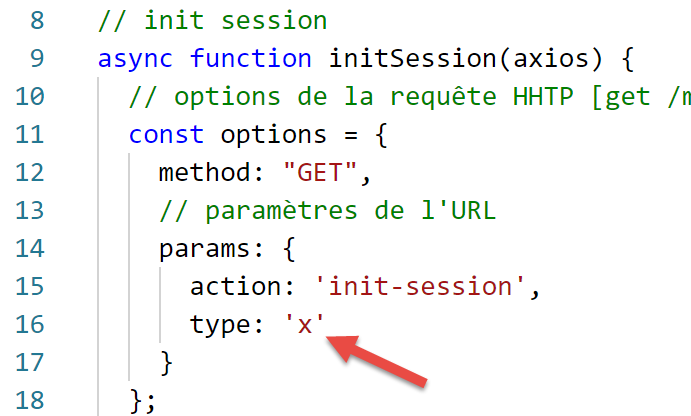
执行结果如下:
[Running] C:\myprograms\laragon-lite\bin\nodejs\node-v10\node.exe -r esm "c:\Data\st-2019\dev\es6\javascript\http\axios-01.js"
requête HTTP vers le serveur en cours ---------------------------------------------
axios error= object { Error: Request failed with status code 400
   ...
  config:
   { url:
      'http://localhost/php7/scripts-web/impots/version-14/main.php',
     ...
     data: undefined },
  request:
   ...
     [Symbol(outHeadersKey)]:
      [Object: null prototype] { accept: [Array], 'user-agent': [Array], host: [Array] } },
  response:
   { status: 400,
     statusText: 'Bad Request',
     headers:
      { date: 'Sun, 15 Sep 2019 07:25:58 GMT',
        server: 'Apache/2.4.35 (Win64) OpenSSL/1.1.0i PHP/7.2.11',
        'x-powered-by': 'PHP/7.2.11',
        'cache-control': 'max-age=0, private, must-revalidate, no-cache, private',
        'set-cookie': [Array],
        'content-length': '79',
        connection: 'close',
        'content-type': 'application/json' },
     config:
      { url:
         'http://localhost/php7/scripts-web/impots/version-14/main.php',
        ...
        data: undefined },
     request:
      ...
        [Symbol(outHeadersKey)]: [Object] },
     data:
      { action: 'init-session',
        '状态': 703,
        '响应:'type=[x] 参数无效' } },
  isAxiosError: true,
  toJSON: [Function] }
succès ---------------------------------------------
réponse= { action: 'init-session',
  '状态': 703,
  '响应:'type=[x] 参数无效' } 对象

[Done] exited with code=0 in 0.69 seconds
由于服务器返回了状态码 HTTP 400(第 15 行),[axios] 抛出了异常(同样,此行为可通过配置调整)。尽管 [axios] 抛出了异常, 但在 [error.response](第 14 行)中确实收到了服务器的 HTTP 响应,并且 jSON 文档已发送至 [error.response.data](第 34 行)。 第 41-43 行:函数 [main] 正确地从服务器获取了响应 jSON。
12.6. 脚本 [axios-02]
现在我们已经详细说明了 [axios] 库在处理 HTTP 请求时所操作的对象,因此可以将 [axios-01] 脚本重写为如下形式:
'use strict';
import axios from 'axios';

// axios 的默认配置
axios.defaults.timeout = 2000;
axios.defaults.baseURL = 'http://localhost/php7/scripts-web/impots/version-14';

// 初始化会话
async function initSession(axios) {
  // 请求选项 HHTP [get /main.php?action=init-session&type=json]
  const options = {
    method: "GET",
    // URL 的参数
    params: {
      action: 'init-session',
      type: 'json'
    }
  };
  try {
    // 执行请求 HTTP [get /main.php?action=init-session&type=json]
    const response = await axios.request('main.php', options);
    // 服务器响应位于 [response.data]
    return response.data;
  } catch (error) {
    // 服务器响应
    if (error.response) {
      // 响应 jSON 位于 [error.response.data]
      return error.response.data;
    } else {
      // 重新抛出错误
      throw error;
    }
  }
}

// main 函数执行异步函数 [initSession]
async function main() {
  try {
    console.log("requête HTTP vers le serveur en cours ---------------------------------------------");
    const response = await initSession(axios);
    console.log("succès ---------------------------------------------");
    console.log("réponse=", response, typeof (response))
  } catch (error) {
    console.log("erreur ---------------------------------------------");
    console.log("erreur=", error.message);
  }
}

// 测试
main();
12.7. 脚本 [axios-03]
脚本 [axios-03] 沿用了脚本 [axios-02] 的方法。 此次向服务器添加了 HTTP 和 [authentifier-utilisateur] 请求,该操作通过 POST 实现:
'use strict';
import axios from 'axios';
import qs from 'qs'

// axios 配置
axios.defaults.timeout = 2000;
axios.defaults.baseURL = 'http://localhost/php7/scripts-web/impots/version-14';


// 初始化会话
async function initSession(axios) {
  // 请求选项 HHTP [get /main.php?action=init-session&type=json]
  const options = {
    method: "GET",
    // URL的参数
    params: {
      action: 'init-session',
      type: 'json'
    }
  };
  try {
    // 执行请求 HTTP [get /main.php?action=init-session&type=json]
    const response = await axios.request('main.php', options);
    // 服务器响应位于 [response.data]
    return response.data;
  } catch (error) {
    // 服务器响应
    if (error.response) {
      // 响应 jSON 位于 [error.response.data]
      return error.response.data;
    } else {
      // 重新触发错误
      throw error;
    }
  }
}

async function authentifierUtilisateur(axios, user, password) {
  // 请求选项 HHTP [POST /main.php?action=authentifier-utilisateur]
  const options = {
    method: "POST",
    headers: {
      'Content-type': 'application/x-www-form-urlencoded',
    },
    // POST 的正文
    data: qs.stringify({
      user: user,
      password: password
    }),
    // URL的参数
    params: {
      action: 'authentifier-utilisateur'
    }
  };
  try {
    // 请求执行 HTTP [post /main.php?action=authentifier-utilisateur]
    const response = await axios.request('main.php', options);
    // 服务器响应位于 [response.data]
    return response.data;
  } catch (error) {
    // 服务器响应
    if (error.response) {
      // 响应 jSON 位于 [error.response.data]
      return error.response.data;
    } else {
      // 重新抛出错误
      throw error;
    }
  }
}

// main 函数依次执行异步函数
async function main() {
  try {
    // 初始化会话
    console.log("action init-session en cours ---------------------------------------------");
    const response1 = await initSession(axios);
    console.log("succès ---------------------------------------------");
    console.log("réponse=", response1);
    // 用户认证
    console.log("action authentifier-utilisateur en cours ---------------------------------------------");
    const response2 = await authentifierUtilisateur(axios, 'admin', 'admin');
    console.log("succès ---------------------------------------------");
    console.log("réponse=", response2)
  } catch (error) {
    console.log("erreur ---------------------------------------------");
    console.log("erreur=", error);
  }
}

// 测试
main();
注释
- 第 38-70 行:异步函数 [authentifierUtilisateur];
- 第 39 行:需执行 [POST /main.php?action=authentifier-utilisateur] 请求;
- 第40-54行:HTTP请求的选项;
- 第41行:这是一个POST;
- 第42-44行:POST的参数将被编码为URL,并包含在客户端随请求发送的文档中;
- 第46-49行:该属性必须包含已编码的字符串。 为此,此处使用了第3行导入的[qs]库;
- 第55-69行:执行查询时,代码与方法[initSession]中的相同;
- 第73-89行:方法[asynchrone]以阻塞方式依次调用方法[initSession, authentifierUtilisateur](第77行和第82行);
- 第82行:使用(admin, admin)作为登录凭据。已知服务器能够识别该凭据;
执行结果如下:
[Running] C:\myprograms\laragon-lite\bin\nodejs\node-v10\node.exe -r esm "c:\Data\st-2019\dev\es6\javascript\http\axios-03.js"
action init-session en cours ---------------------------------------------
succès ---------------------------------------------
réponse= { action: 'init-session',
  '状态:700,
  '响应:'已启动会话,类型为 [json]' }
action authentifier-utilisateur en cours ---------------------------------------------
succès ---------------------------------------------
réponse= { action: 'authentifier-utilisateur',
  '状态:103,
  '响应':
   [ 'pas de session en cours. Commencer par action [init-session]' ] }

[Done] exited with code=0 in 0.834 seconds
- 第9-12行:用户身份验证失败:服务器未记录我们已启动jSON会话的事实。 这是因为未返回对第一个请求 [init-session] 的响应中发送的会话 Cookie;
12.8. 脚本 [axios-04]
脚本 [axios-04] 对脚本 [axios-03] 进行了两项改进:
- 它管理会话 Cookie;
- 将函数 [initSession] 和 [authentifierUtilisateur] 中的公共部分提取到函数 [getRemoteData] 中;
'use strict';
import axios from 'axios';
import qs from 'qs'

// axios 配置
axios.defaults.timeout = 2000;
axios.defaults.baseURL = 'http://localhost/php7/scripts-web/impots/version-14';

// 会话cookie
const sessionCookieName = "PHPSESSID";
let sessionCookie = '';

// 初始化会话
async function initSession(axios) {
  // 请求选项 HHTP [get /main.php?action=init-session&type=json]
  const options = {
    method: "GET",
    // URL的参数
    params: {
      action: 'init-session',
      type: 'json'
    }
  };
  // 执行查询 HTTP
  return await getRemoteData(axios, options);
}

async function authentifierUtilisateur(axios, user, password) {
  // 请求选项 HHTP [post /main.php?action=authentifier-utilisateur]
  const options = {
    method: "POST",
    headers: {
      'Content-type': 'application/x-www-form-urlencoded',
    },
    // POST 的正文
    data: qs.stringify({
      user: user,
      password: password
    }),
    // URL的参数
    params: {
      action: 'authentifier-utilisateur'
    }
  };
  // HTTP 请求的执行
  return await getRemoteData(axios, options);
}

async function getRemoteData(axios, options) {
  // 用于会话cookie
  if (!options.headers) {
    options.headers = {};
  }
  options.headers.Cookie = sessionCookie;
  // 执行请求 HTTP
  let response;
  try {
    // 异步请求
    response = await axios.request('main.php', options);
  } catch (error) {
    // 参数 [error] 是一个异常实例——它可能有各种形式
    if (error.response) {
      // 服务器响应位于 [error.response]
      response = error.response;
    } else {
      // 重新抛出该错误
      throw error;
    }
  }
  // response 包含服务器响应的全部内容(HTTP 头部信息 + 响应正文)
  // 若存在,则获取会话cookie
  const setCookie = response.headers['set-cookie'];
  if (setCookie) {
    // setCookie 是一个数组
    // 在此数组中查找会话cookie
    let trouvé = false;
    let i = 0;
    while (!trouvé && i < setCookie.length) {
      // 查找会话cookie
      const results = RegExp('^(' + sessionCookieName + '.+?);').exec(setCookie[i]);
      if (results) {
        // 保存会话cookie
        // eslint-disable-next-line require-atomic-updates
        sessionCookie = results[1];
        // 已找到
        trouvé = true;
      } else {
        // 下一个元素
        i++;
      }
    }
  }
  // 服务器响应位于 [response.data]
  return response.data;
}

// main 函数依次执行异步函数
async function main() {
  try {
    // init-session
    console.log("action init-session en cours ---------------------------------------------");
    const response1 = await initSession(axios);
    console.log("succès ---------------------------------------------");
    console.log("réponse=", response1);
    // 用户认证
    console.log("action authentifier-utilisateur en cours ---------------------------------------------");
    const response2 = await authentifierUtilisateur(axios, 'admin', 'admin');
    console.log("succès ---------------------------------------------");
    console.log("réponse=", response2)
  } catch (error) {
    console.log("erreur ---------------------------------------------");
    console.log("erreur=", error.message);
  }
}

// 测试
main();
注释
- 第 14-26 行:函数 [initSession]。 该函数现仅负责准备要发送至服务器的 HTTP 查询,但不执行该查询。它将此任务交由第 49-95 行中的 [getRemoteDate] 方法处理;
- 第28-47行:函数[authentifierUtilisateur]遵循相同流程;
- 第49行:函数[getRemoteData]接收两项信息,从而能够执行请求HTTP:
- [axios],负责发送请求并接收响应的对象;
- [options],即发送至服务器的请求配置选项;
- 第 59 行:执行请求并阻塞等待其响应 jSON;
- 第 60-68 行:处理可能出现的异常;
- 第 64 行:获取响应,该响应可能封装在错误对象中;
- 第 67 行:如果服务器抛出的异常中未包含服务器响应,则将接收到的错误上报给调用方;
- 函数 [getRemoteData] 负责管理会话 Cookie:
- 当它第一次接收到该数据时,将其存储在变量 [sessionCookie] 中(第 11 行);
- 随后在每次新的请求中将其返回给 HTTP;
- 第72-92行:[getRemoteData]会分析服务器的每次响应,以确认其是否发送了HTTP和[Set-Cookie]这两个头部。 已知服务器会发送一个名为 [PHPSESSID] 的会话 Cookie(第 10 行)。因此,我们要查找的就是这个 Cookie(第 10 行);
- 第72行:若存在,则获取HTTP和[Set-Cookie]这两个头部(区分大小写)。 实际上可能存在多个 [Set-Cookie] 头部,因此我们获取的是一个数组;
- 第 73 行:如果获取到了一个 Cookie 数组;
- 第78-90行:在数组中的所有Cookie中查找会话Cookie;
- 第 80 行:用于在第 i 个 Cookie 中查找会话 Cookie 的关系表达式;
- 第 81 行:如果比较返回了结果;
- 第84行:在results[1]中,包含关系表达式模式的第一个括号,即(PHPSESSID=xxxx)直至结束会话cookie的(不包含);
- 第50-54行:每次请求时,会话cookie都会包含在请求的HTTP头部中。第一次发送时,该cookie为空,因此将被服务器忽略;
执行结果如下:
[Running] C:\myprograms\laragon-lite\bin\nodejs\node-v10\node.exe -r esm "c:\Data\st-2019\dev\es6\javascript\http\axios-04.js"
action init-session en cours ---------------------------------------------
succès ---------------------------------------------
réponse= { action: 'init-session',
  '状态:700,
  '响应:'已启动会话,类型为 [json]' }
action authentifier-utilisateur en cours ---------------------------------------------
succès ---------------------------------------------
réponse= { action: 'authentifier-utilisateur',
  '状态:200,
  '响应': '认证成功 [admin, admin]' }

[Done] exited with code=0 in 0.982 seconds