14. HTTP 客户端 税费计算服务的 JavaScript
14.1. Introduction
本文将编写第14版税费计算服务的客户端[node.js]。客户端/服务器架构如下:
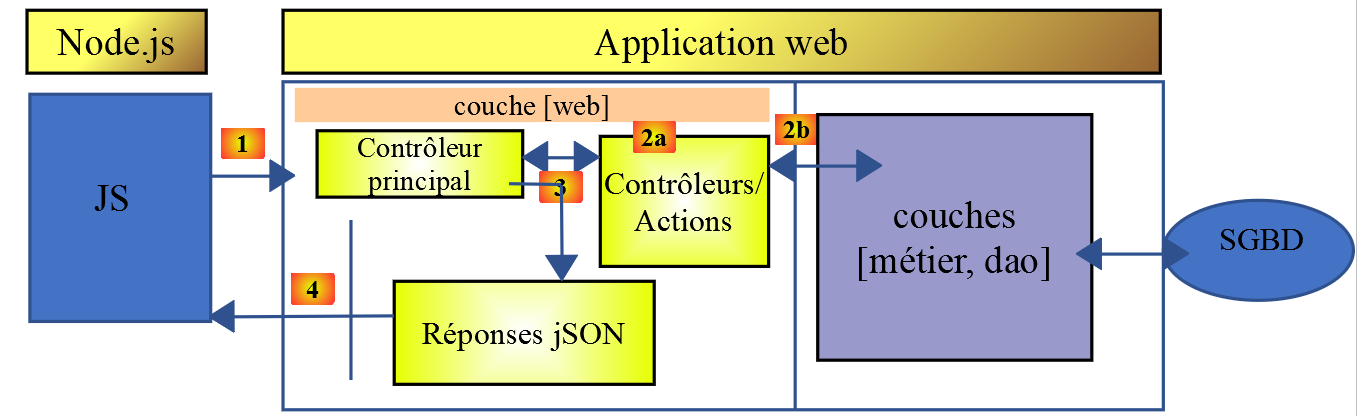
我们将研究客户端的两个版本:
- 客户端第1版将采用以下分层结构:
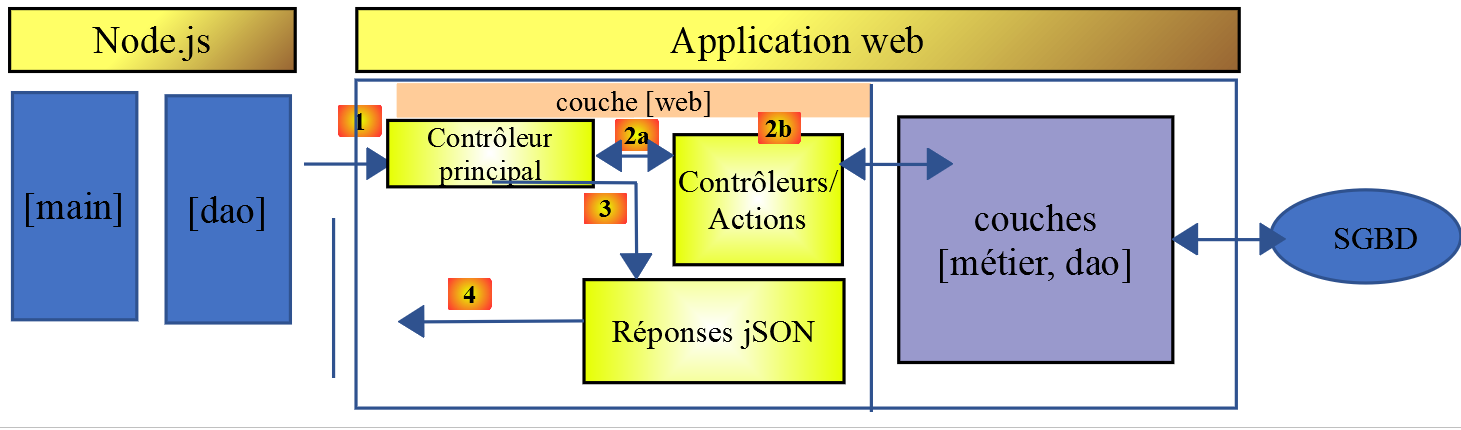
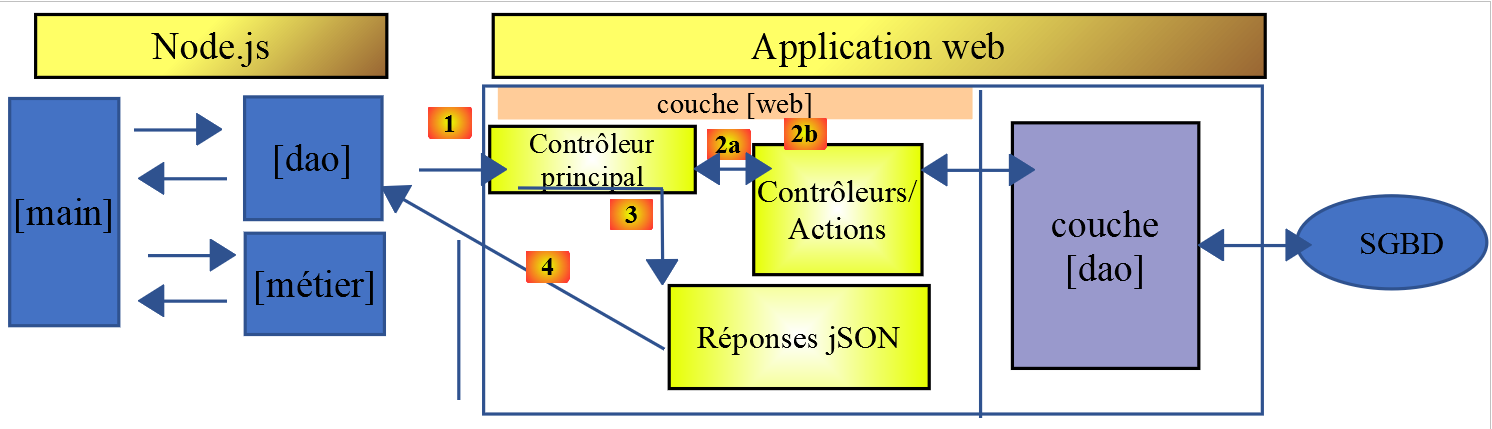
- 客户端第2版将采用[main, métier, dao]结构。服务器的[métier]层将转移至客户端:
14.2. 客户端 HTTP 1
如前所述,客户端 HTTP 1 实现了以下客户端/服务器架构:
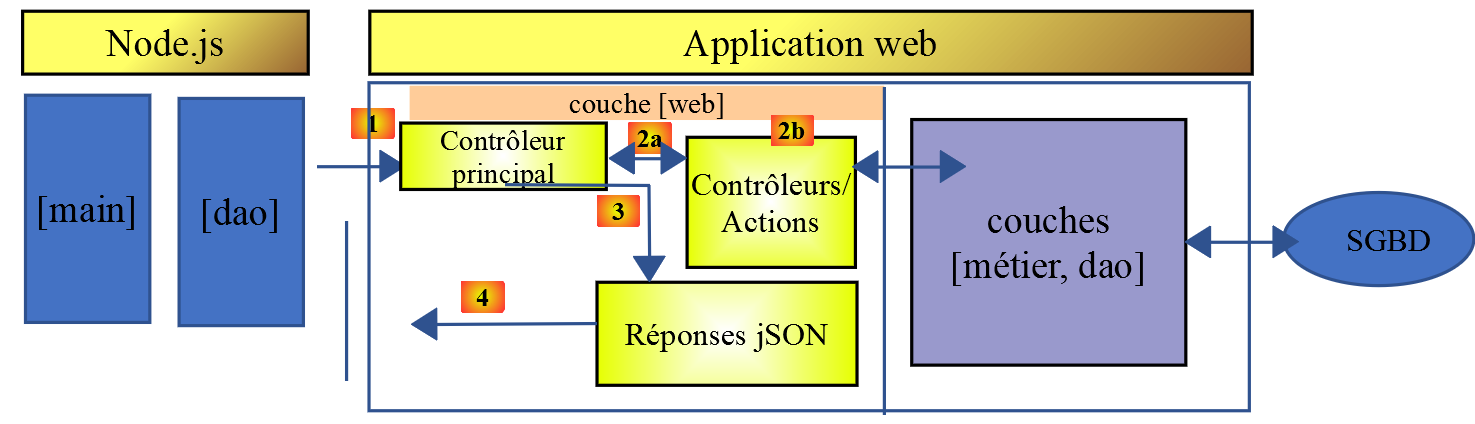
我们将实现:
- [dao] 层,以类形式实现;
- 将 [main] 层实现为使用该类的脚本;
14.2.1. [dao] 层
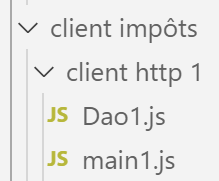
[dao] 层将由以下类 [Dao1.js] 实现:
'use strict';

// 导入
import qs from 'qs'

class Dao1 {

  // 构造函数
  constructor(axios) {
    // 用于发送请求的 axios 库HTTP
    this.axios = axios;
    // 会话cookie
    this.sessionCookieName = "PHPSESSID";
    this.sessionCookie = '';
  }

  // 初始化会话
  async  initSession() {
    // 请求选项 HHTP [get /main.php?action=init-session&type=json]
    const options = {
      method: "GET",
      // URL的参数
      params: {
        action: 'init-session',
        type: 'json'
      }
    };
    // 执行查询 HTTP
    return await this.getRemoteData(options);
  }

  async  authentifierUtilisateur(user, password) {
    // 请求选项 HHTP [post /main.php?action=authentifier-utilisateur]
    const options = {
      method: "POST",
      headers: {
        'Content-type': 'application/x-www-form-urlencoded',
      },
      // POST 的正文
      data: qs.stringify({
        user: user,
        password: password
      }),
      // URL的参数
      params: {
        action: 'authentifier-utilisateur'
      }
    };
    // HTTP 请求的执行
    return await this.getRemoteData(options);
  }

  // 税款计算
  async  calculerImpot(marié, enfants, salaire) {
    // 请求选项 HHTP [post /main.php?action=calculer-impot]
    const options = {
      method: "POST",
      headers: {
        'Content-type': 'application/x-www-form-urlencoded',
      },
      // POST 的正文 [marié, enfants, salaire]
      data: qs.stringify({
        marié: marié,
        enfants: enfants,
        salaire: salaire
      }),
      // URL 的参数
      params: {
        action: 'calculer-impot'
      }
    };
    // 执行查询 HTTP
    const data = await this.getRemoteData(options);
    // 结果
    return data;
  }

  // 模拟列表
  async  listeSimulations() {
    // 查询选项 QZXW2HTMLCSEhUUAZQX[get /main.php?action=lister-simulations]
    const options = {
      method: "GET",
      // URL 的参数
      params: {
        action: 'lister-simulations'
      },
    };
    // 查询执行 HTTP
    const data = await this.getRemoteData(options);
    // 结果
    return data;
  }

  // 模拟列表
  async  supprimerSimulation(index) {
    // 查询选项 HHTP  [get /main.php?action=supprimer-simulation&numéro=index]
    const options = {
      method: "GET",
      // URL 的参数
      params: {
        action: 'supprimer-simulation',
        numéro: index
      },
    };
    // 执行查询 HTTP
    const data = await this.getRemoteData(options);
    // 结果
    return data;
  }

  async  getRemoteData(options) {
    // 用于会话 Cookie
    if (!options.headers) {
      options.headers = {};
    }
    options.headers.Cookie = this.sessionCookie;
    // 执行请求 HTTP
    let response;
    try {
      // 异步请求
      response = await this.axios.request('main.php', options);
    } catch (error) {
      // 参数 [error] 是一个异常实例——它可能有各种形式
      if (error.response) {
        // 服务器响应位于 [error.response]
        response = error.response;
      } else {
        // 重新抛出该错误
        throw error;
      }
    }
    // response 包含服务器响应的全部内容 HTTP(HTTP 头部 + 响应正文)
    // 若存在,则获取会话cookie
    const setCookie = response.headers['set-cookie'];
    if (setCookie) {
      // setCookie 是一个数组
      // 在此数组中查找会话cookie
      let trouvé = false;
      let i = 0;
      while (!trouvé && i < setCookie.length) {
        // 查找会话cookie
        const results = RegExp('^(' + this.sessionCookieName + '.+?);').exec(setCookie[i]);
        if (results) {
          // 保存会话cookie
          // eslint-disable-next-line require-atomic-updates
          this.sessionCookie = results[1];
          // 已找到
          trouvé = true;
        } else {
          // 下一个元素
          i++;
        }
      }
    }
    // 服务器响应位于 [response.data]
    return response.data;
  }
}

// 导出类
export default Dao1;
- 此处我们将运用“链接”一节中所学内容,该节介绍了 [axios] 库,该库支持在 [node.js] 环境及浏览器中执行 HTTP 请求。我们将重点关注“链接”一节中的脚本;
- 第9-15行:类的构造函数。该类将拥有三个属性:
- [axios]:用于执行 HTTP 请求的 [axios] 对象。该对象由调用方代码传递;
- [sessionCookieName]:根据服务器的不同,会话cookie的名称各异。此处为[PHPSESSID];
- [sessionCookie]:由服务器发送并由客户端存储的会话cookie;
- 第53-76行:异步函数 [calculerImpot] 通过提交参数 [marié, enfants, salaire] 发起请求 [post /main.php?action=calculer-impot]。 该函数将服务器传输的字符串 jSON 转换为 JavaScript 对象;
- 第 79-92 行:异步函数 [listeSimulations] 发起请求 [$status, $état, [‘réponse’=>$response]]。 它将服务器传来的字符串 jSON 转换为 JavaScript 对象;
- 第 95-109 行:异步函数 [supprimerSimulation] 发起请求 [get /main.php?action=supprimer-simulation&numéro=index]。它将服务器返回的字符串 jSON 转换为 JavaScript 对象;
- 第 121 行:此处使用 [this.axios] 这种写法,因为传递给构造函数的 [axios] 对象已被存储在 [this.axios] 属性中;
- 第 161 行:导出类 [Dao1] 以便使用;
14.2.2. 脚本 [main1.js]
脚本 [main1.js] 使用类 [Dao1] 向服务器发起了一系列调用:
- 初始化 jSON 会话;
- 使用 [admin, admin] 进行身份验证;
- 请求三份税款计算;
- 请求模拟列表;
- 删除其中一项;
代码如下:
// 导入 axios
import axios from 'axios';
// 导入 Dao1 类
import Dao from './Dao1';

// 异步函数 [main]
async function main() {
  // axios配置
  axios.defaults.timeout = 2000;
  axios.defaults.baseURL = 'http://localhost/php7/scripts-web/impots/version-14';
  // [dao] 层实例化
  const dao = new Dao(axios);
  // 使用 [dao] 层
  try {
    // 初始化会话
    log("-----------init-session");
    let response = await dao.initSession();
    log(response);
    // 身份验证
    log("-----------authentifier-utilisateur");
    response = await dao.authentifierUtilisateur("admin", "admin");
    log(response);
    // 税款计算
    log("-----------calculer-impot x 3");
    response = await Promise.all([
      dao.calculerImpot("oui", 2, 45000),
      dao.calculerImpot("non", 2, 45000),
      dao.calculerImpot("non", 1, 30000)
    ]);
    log(response);
    // 模拟列表
    log("-----------liste-des-simulations");
    response = await dao.listeSimulations();
    log(response);
    // 删除模拟
    log("-----------suppression simulation n° 1");
    response = await dao.supprimerSimulation(1);
    log(response);
  } catch (error) {
    // 记录错误
    console.log("erreur=", error.message);
  }
}

// 日志jSON
function log(object) {
  console.log(JSON.stringify(object, null, 2));
}

// 执行
main();
注释
- 第2行:导入库[axios];
- 第 4 行:导入类 [Dao];
- 第 7 行:与服务器交互的函数 [main] 为异步函数;
- 第9-10行:对将发送至服务器的HTTP请求进行默认配置:
- 第 9 行:[timeout] 的超时时间为 2 秒;
- 第10行:所有URL请求均以URL为前缀,该前缀是第14版税费计算服务器的基准前缀;
- 第12行:构建了[Dao]层。现在可以使用它了;
- 第46-48行:函数[log]用于将JavaScript对象的字符串jSON以美化形式显示:采用垂直排列,并使用两个空格进行缩进(第3个参数);
- 第15-18行:初始化会话jSON;
- 第19-22行:身份验证;
- 第23-30行:并行请求三项税款计算。借助[await Promise.all],在获得全部三项结果之前,程序执行将被阻塞;
- 第 31-34 行:模拟列表;
- 第35-38行:删除模拟;
- 第39-42行:处理可能出现的异常;
执行结果如下:
[Running] C:\myprograms\laragon-lite\bin\nodejs\node-v10\node.exe -r esm "c:\Data\st-2019\dev\es6\javascript\client impôts\client http 1\main1.js"
"-----------init-session"
{
  "action": "init-session",
  "état": 700,
  "réponse": "session démarrée avec type [json]"
}
"-----------authentifier-utilisateur"
{
  "action": "authentifier-utilisateur",
  "état": 200,
  "réponse": "Authentification réussie [admin, admin]"
}
"-----------calculer-impot x 3"
[
  {
    "action": "calculer-impot",
    "état": 300,
    "réponse": {
      "marié": "oui",
      "enfants": "2",
      "salaire": "45000",
      "impôt": 502,
      "surcôte": 0,
      "décôte": 857,
      "réduction": 126,
      "taux": 0.14
    }
  },
  {
    "action": "calculer-impot",
    "état": 300,
    "réponse": {
      "marié": "non",
      "enfants": "2",
      "salaire": "45000",
      "impôt": 3250,
      "surcôte": 370,
      "décôte": 0,
      "réduction": 0,
      "taux": 0.3
    }
  },
  {
    "action": "calculer-impot",
    "état": 300,
    "réponse": {
      "marié": "non",
      "enfants": "1",
      "salaire": "30000",
      "impôt": 1687,
      "surcôte": 0,
      "décôte": 0,
      "réduction": 0,
      "taux": 0.14
    }
  }
]
"-----------liste-des-simulations"
{
  "action": "lister-simulations",
  "état": 500,
  "réponse": [
    {
      "marié": "oui",
      "enfants": "2",
      "salaire": "45000",
      "impôt": 502,
      "surcôte": 0,
      "décôte": 857,
      "réduction": 126,
      "taux": 0.14,
      "arrayOfAttributes": null
    },
    {
      "marié": "non",
      "enfants": "2",
      "salaire": "45000",
      "impôt": 3250,
      "surcôte": 370,
      "décôte": 0,
      "réduction": 0,
      "taux": 0.3,
      "arrayOfAttributes": null
    },
    {
      "marié": "non",
      "enfants": "1",
      "salaire": "30000",
      "impôt": 1687,
      "surcôte": 0,
      "décôte": 0,
      "réduction": 0,
      "taux": 0.14,
      "arrayOfAttributes": null
    }
  ]
}
"-----------suppression simulation n° 1"
{
  "action": "supprimer-simulation",
  "état": 600,
  "réponse": [
    {
      "marié": "oui",
      "enfants": "2",
      "salaire": "45000",
      "impôt": 502,
      "surcôte": 0,
      "décôte": 857,
      "réduction": 126,
      "taux": 0.14,
      "arrayOfAttributes": null
    },
    {
      "marié": "non",
      "enfants": "1",
      "salaire": "30000",
      "impôt": 1687,
      "surcôte": 0,
      "décôte": 0,
      "réduction": 0,
      "taux": 0.14,
      "arrayOfAttributes": null
    }
  ]
}

[Done] exited with code=0 in 0.516 seconds
14.3. 客户端 HTTP 2
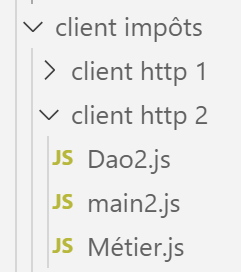
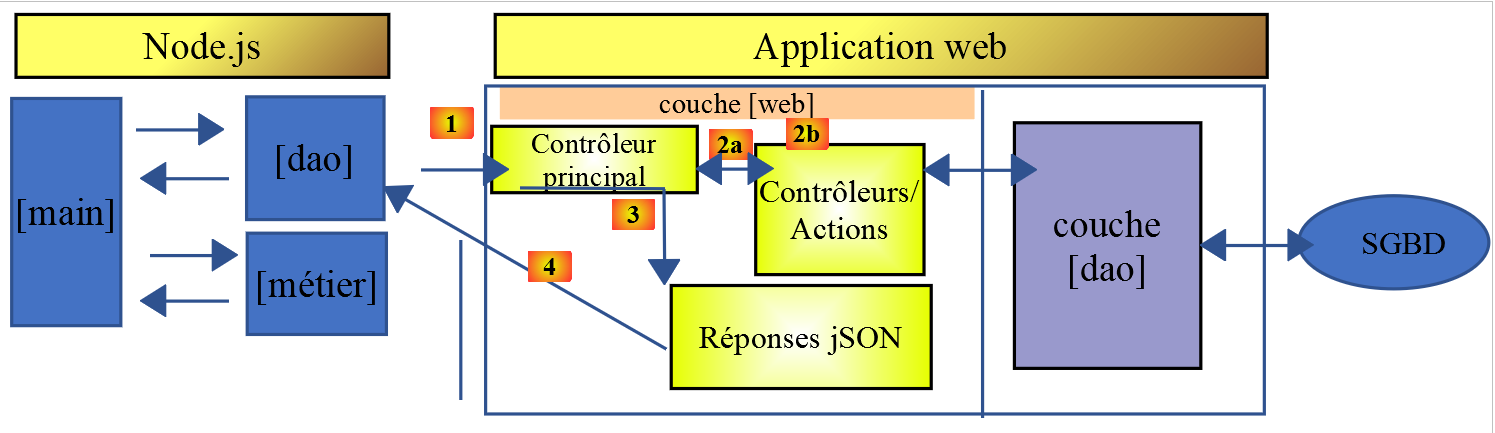
客户端 HTTP2 的架构如下:
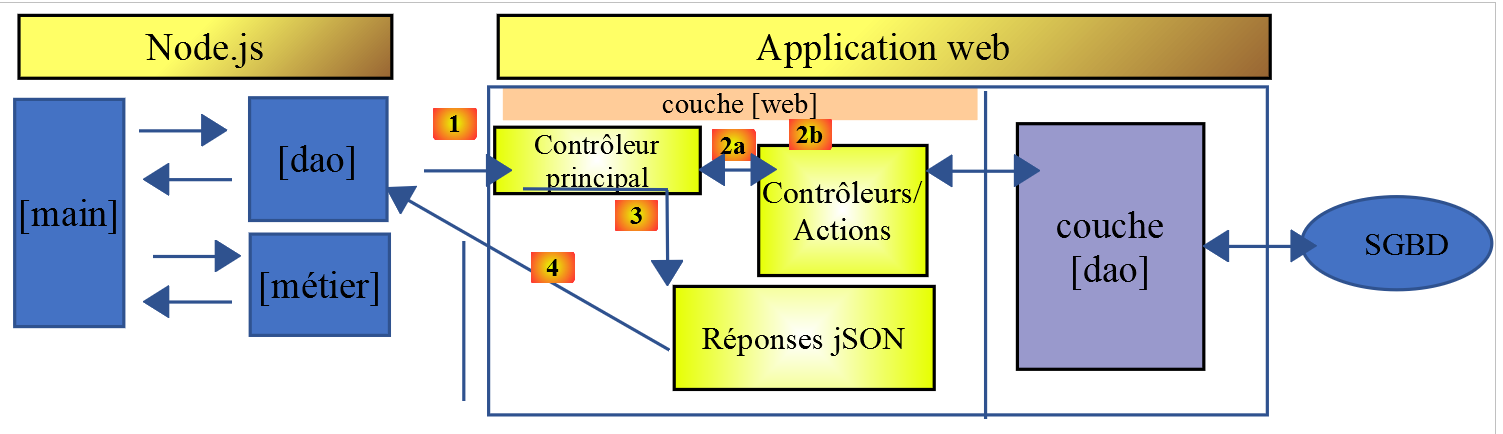
我们将 [métier] 层从服务器迁移到了 JavaScript 客户端。 与我们在课程 PHP7 中所做的情况不同,[main] 层在此无需通过 [métier] 层即可到达 [dao] 层。 我们将把这两个层作为能力中心:
- 当 [main] 层需要服务器上的数据时,会通过 [dao] 层;
- [main]层请求[métier]层进行税款计算;
- [métier]层独立于[dao]层,且从未调用该层;
14.3.1. JavaScript 类 [Métier]
[Métier] 类在 PHP 中的本质已在链接文章中描述。这是一个相当复杂的代码,在此重述并非为了解释,而是为了将其转换为 JavaScript:
<?php

// 命名空间
namespace Application;

class Metier implements InterfaceMetier {
  // Dao 层
  private $dao;
  // 税务管理数据
  private $taxAdminData;

  //---------------------------------------------
  // [dao] 层的设置器
  public function setDao(InterfaceDao $dao) {
    $this->dao = $dao;
    return $this;
  }

  public function __construct(InterfaceDao $dao) {
    // 在 [dao] 层中存储一个引用
    $this->dao = $dao;
    // 检索用于计算税款的数据
    // 方法 [getTaxAdminData] 可能抛出异常 ExceptionImpots
    // 随后将其回传至调用方
    $this->taxAdminData = $this->dao->getTaxAdminData();
  }

// 计算税额
// --------------------------------------------------------------------------
  public function calculerImpot(string $marié, int $enfants, int $salaire): array {
    // $marié:是,否
    // $enfants:子女数量
    // $salaire:年薪
    // $this->taxAdminData:税务部门数据
    //
    // 验证是否已获取税务部门数据
    if ($this->taxAdminData === NULL) {
      $this->taxAdminData = $this->getTaxAdminData();
    }
    // 计算含子女的税额
    $result1 = $this->calculerImpot2($marié, $enfants, $salaire);
    $impot1 = $result1["impôt"];
    // 计算不含子女的税额
    if ($enfants != 0) {
      $result2 = $this->calculerImpot2($marié, 0, $salaire);
      $impot2 = $result2["impôt"];
      // 应用家庭商数上限
      $plafonDemiPart = $this->taxAdminData->getPlafondQfDemiPart();
      if ($enfants < 3) {
        // $PLAFOND_QF_DEMI_PART 欧元(前两名子女)
        $impot2 = $impot2 - $enfants * $plafonDemiPart;
      } else {
        // 前两名子女为 $PLAFOND_QF_DEMI_PART 欧元,后续子女为该金额的两倍
        $impot2 = $impot2 - 2 * $plafonDemiPart - ($enfants - 2) * 2 * $plafonDemiPart;
      }
    } else {
      $impot2 = $impot1;
      $result2 = $result1;
    }
    // 采用税率较高的税种
    if ($impot1 > $impot2) {
      $impot = $impot1;
      $taux = $result1["taux"];
      $surcôte = $result1["surcôte"];
    } else {
      $surcôte = $impot2 - $impot1 + $result2["surcôte"];
      $impot = $impot2;
      $taux = $result2["taux"];
    }
    // 计算可能的减免额
    $décôte = $this->getDecôte($marié, $salaire, $impot);
    $impot -= $décôte;
    // 计算可能的减税额
    $réduction = $this->getRéduction($marié, $salaire, $enfants, $impot);
    $impot -= $réduction;
    // 结果
    return ["impôt" => floor($impot), "surcôte" => $surcôte, "décôte" => $décôte, "réduction" => $réduction, "taux" => $taux];
  }

// --------------------------------------------------------------------------
  private function calculerImpot2(string $marié, int $enfants, float $salaire): array {
    // $marié:是,否
    // $enfants:子女人数
    // $salaire:年薪
    // $this->taxAdminData:税务数据
    //
    // 份额数
    $marié = strtolower($marié);
    if ($marié === "oui") {
      $nbParts = $enfants / 2 + 2;
    } else {
      $nbParts = $enfants / 2 + 1;
    }
    // 从第三个孩子起,每个孩子计1份
    if ($enfants >= 3) {
      // 第3个及以后的每个孩子额外增加半份
      $nbParts += 0.5 * ($enfants - 2);
    }
    // 应税收入
    $revenuImposable = $this->getRevenuImposable($salaire);
    // 附加费
    $surcôte = floor($revenuImposable - 0.9 * $salaire);
    // 用于四舍五入问题
    if ($surcôte < 0) {
      $surcôte = 0;
    }
    // 家庭系数
    $quotient = $revenuImposable / $nbParts;
    // 税额计算
    $limites = $this->taxAdminData->getLimites();
    $coeffR = $this->taxAdminData->getCoeffR();
    $coeffN = $this->taxAdminData->getCoeffN();
    // 位于限值表末尾,用于终止后续循环
    $limites[count($limites) - 1] = $quotient;
    // 查找税率
    $i = 0;
    while ($quotient > $limites[$i]) {
      $i++;
    }
    // 由于将 $quotient 放置在 $limites 表的末尾,因此前面的循环
    // 不能超出表 $limites 的范围
    // 现在可以计算税款
    $impôt = floor($revenuImposable * $coeffR[$i] - $nbParts * $coeffN[$i]);
    // 结果
    return ["impôt" => $impôt, "surcôte" => $surcôte, "taux" => $coeffR[$i]];
  }

  // revenuImposable=年薪-免税额
  // 免税额有最低和最高限额
  private function getRevenuImposable(float $salaire): float {
    // 工资的10%作为免税额
    $abattement = 0.1 * $salaire;
    // 该扣除额不得超过 $this->taxAdminData->getAbattementDixPourCentMax()
    if ($abattement > $this->taxAdminData->getAbattementDixPourCentMax()) {
      $abattement = $this->taxAdminData->getAbattementDixPourcentMax();
    }
    // 该减免额不得低于 $this->taxAdminData->getAbattementDixPourcentMin()
    if ($abattement < $this->taxAdminData->getAbattementDixPourcentMin()) {
      $abattement = $this->taxAdminData->getAbattementDixPourcentMin();
    }
    // 应税收入
    $revenuImposable = $salaire - $abattement;
    // 结果
    return floor($revenuImposable);
  }

// 计算可能的折价
  private function getDecôte(string $marié, float $salaire, float $impots): float {
    // 初始折让为零
    $décôte = 0;
    // 享受减免的最高税额
    $plafondImpôtPourDécôte = $marié === "oui" ?
      $this->taxAdminData->getPlafondImpotCouplePourDecote() :
      $this->taxAdminData->getPlafondImpotCelibatairePourDecote();
    if ($impots < $plafondImpôtPourDécôte) {
      // 折扣上限
      $plafondDécôte = $marié === "oui" ?
        $this->taxAdminData->getPlafondDecoteCouple() :
        $this->taxAdminData->getPlafondDecoteCelibataire();
      // 理论折扣
      $décôte = $plafondDécôte - 0.75 * $impots;
      // 减免额不得超过应纳税额
      if ($décôte > $impots) {
        $décôte = $impots;
      }
      // 不适用<0的减免
      if ($décôte < 0) {
        $décôte = 0;
      }
    }
    // 结果
    return ceil($décôte);
  }

// 计算可能的减免
  private function getRéduction(string $marié, float $salaire, int $enfants, float $impots): float {
    // 享受20%减免的收入上限
    $plafondRevenuPourRéduction = $marié === "oui" ?
      $this->taxAdminData->getPlafondRevenusCouplePourReduction() :
      $this->taxAdminData->getPlafondRevenusCelibatairePourReduction();
    $plafondRevenuPourRéduction += $enfants * $this->taxAdminData->getValeurReducDemiPart();
    if ($enfants > 2) {
      $plafondRevenuPourRéduction += ($enfants - 2) * $this->taxAdminData->getValeurReducDemiPart();
    }
    // 应税收入
    $revenuImposable = $this->getRevenuImposable($salaire);
    // 减免
    $réduction = 0;
    if ($revenuImposable < $plafondRevenuPourRéduction) {
      // 20%的减免
      $réduction = 0.2 * $impots;
    }
    // 结果
    return ceil($réduction);
  }

  // 批处理模式下的税款计算
  public function executeBatchImpots(string $taxPayersFileName, string $resultsFileName, string $errorsFileName): void {
    // 允许上报来自 [dao] 层的异常
    // 获取纳税人数据
    $taxPayersData = $this->dao->getTaxPayersData($taxPayersFileName, $errorsFileName);
    // 结果表
    $results = [];
    // 对结果进行处理
    foreach ($taxPayersData as $taxPayerData) {
      // 计算税款
      $result = $this->calculerImpot(
        $taxPayerData->getMarié(),
        $taxPayerData->getEnfants(),
        $taxPayerData->getSalaire());
      // 完成[$taxPayerData]
      $taxPayerData->setMontant($result["impôt"]);
      $taxPayerData->setDécôte($result["décôte"]);
      $taxPayerData->setSurCôte($result["surcôte"]);
      $taxPayerData->setTaux($result["taux"]);
      $taxPayerData->setRéduction($result["réduction"]);
      // 将结果填入结果表
      $results [] = $taxPayerData;
    }
    // 保存结果
    $this->dao->saveResults($resultsFileName, $results);
  }

}
- 第19-26行:类PHP的构造函数。由于我们之前提到要构建一个独立于[dao]层的[métier]层,因此我们将对该构造函数进行两处JavaScript修改:
- 它将不再接收 [dao] 层的实例(它不再需要该实例);
- 它不会向 [dao] 层请求 [taxAdminData] 管理层的税务数据:由调用方代码将该数据传递给构造函数;
- 第 197-122 行:我们将不实现 [executeBatchImpots] 方法,该方法的最终目的是将模拟结果保存到文本文件中。 我们需要一段既能在 [node.js] 环境下运行,又能在浏览器中运行的代码。然而,无法将数据保存到运行客户端浏览器的机器的文件系统中;
鉴于这些限制,JavaScript 类 [Métier] 的代码如下:
'use strict';

// 业务类
class Métier {

  // 构造函数
  constructor(taxAdmindata) {
    // this.taxAdminData:税务管理数据
    this.taxAdminData = taxAdmindata;
  }

  // 税款计算
  // --------------------------------------------------------------------------
  calculerImpot(marié, enfants, salaire) {
    // 已婚:是,否
    // 子女:子女人数
    // 工资:年薪
    // this.taxAdminData:税务部门数据
    //
    // 含子女的税额计算
    const result1 = this.calculerImpot2(marié, enfants, salaire);
    const impot1 = result1["impôt"];
    // 无子女的税款计算
    let result2, impot2, plafondDemiPart;
    if (enfants !== 0) {
      result2 = this.calculerImpot2(marié, 0, salaire);
      impot2 = result2["impôt"];
      // 家庭系数上限的适用
      plafondDemiPart = this.taxAdminData.plafondQfDemiPart;
      if (enfants < 3) {
        // PLAFOND_QF_DEMI_PART 欧元(前两名子女)
        impot2 = impot2 - enfants * plafondDemiPart;
      } else {
        // PLAFOND_QF_DEMI_PART 欧元(前两名子女),后续子女金额加倍
        impot2 = impot2 - 2 * plafondDemiPart - (enfants - 2) * 2 * plafondDemiPart;
      }
    } else {
      // 不重新计算税款
      impot2 = impot1;
      result2 = result1;
    }
    // 取 [impot1, impot2] 中的最高税额
    let impot, taux, surcôte;
    if (impot1 > impot2) {
      impot = impot1;
      taux = result1["taux"];
      surcôte = result1["surcôte"];
    } else {
      surcôte = impot2 - impot1 + result2["surcôte"];
      impot = impot2;
      taux = result2["taux"];
    }
    // 计算可能的减免
    const décôte = this.getDecôte(marié, impot);
    impot -= décôte;
    // 计算可能的减税额
    const réduction = this.getRéduction(marié, salaire, enfants, impot);
    impot -= réduction;
    // 结果
    return {
      "impôt": Math.floor(impot), "surcôte": surcôte, "décôte": décôte, "réduction": réduction,
      "taux": taux
    };
  }

  // --------------------------------------------------------------------------
  calculerImpot2(marié, enfants, salaire) {
    // 已婚:是,否
    // 子女:子女人数
    // 工资:年薪
    // this->taxAdminData:税务部门数据
    //
    // 份额数
    marié = marié.toLowerCase();
    let nbParts;
    if (marié === "oui") {
      nbParts = enfants / 2 + 2;
    } else {
      nbParts = enfants / 2 + 1;
    }
    // 从第3个孩子起,每个孩子1份
    if (enfants >= 3) {
      // 第3个及以后的每个孩子额外增加半份
      nbParts += 0.5 * (enfants - 2);
    }
    // 应税收入
    const revenuImposable = this.getRevenuImposable(salaire);
    // 附加费
    let surcôte = Math.floor(revenuImposable - 0.9 * salaire);
    // 用于处理四舍五入问题
    if (surcôte < 0) {
      surcôte = 0;
    }
    // 家庭分摊额
    const quotient = revenuImposable / nbParts;
    // 税额计算
    const limites = this.taxAdminData.limites;
    const coeffR = this.taxAdminData.coeffR;
    const coeffN = this.taxAdminData.coeffN;
    // 位于限值表末尾,用于终止后续循环
    limites[limites.length - 1] = quotient;
    // 查找税率
    let i = 0;
    while (quotient > limites[i]) {
      i++;
    }
    // 由于将家庭收入商置于限值表末尾,因此前面的循环
    // 不会超出限值数组范围
    // 现在可以计算税额
    const impôt = Math.floor(revenuImposable * coeffR[i] - nbParts * coeffN[i]);
    // 结果
    return { "impôt": impôt, "surcôte": surcôte, "taux": coeffR[i] };
  }

  // revenuImposable=年薪-免税额
  // 免税额有最低和最高限额
  getRevenuImposable(salaire) {
    // 工资的10%作为免税额
    let abattement = 0.1 * salaire;
    // 该扣除额不得超过 taxAdminData.getAbattementDixPourCentMax()
    if (abattement > this.taxAdminData.abattementDixPourCentMax) {
      abattement = this.taxAdminData.abattementDixPourcentMax;
    }
    // 扣除额不得低于 taxAdminData.getAbattementDixPourcentMin()
    if (abattement < this.taxAdminData.abattementDixPourcentMin) {
      abattement = this.taxAdminData.abattementDixPourcentMin;
    }
    // 应税收入
    const revenuImposable = salaire - abattement;
    // 结果
    return Math.floor(revenuImposable);
  }

  // 计算可能的折价
  getDecôte(marié, impots) {
    // 初始折让为零
    let décôte = 0;
    // 享受减免的最高税额
    let plafondImpôtPourDécôte = marié === "oui" ?
      this.taxAdminData.plafondImpotCouplePourDecote :
      this.taxAdminData.plafondImpotCelibatairePourDecote;
    let plafondDécôte;
    if (impots < plafondImpôtPourDécôte) {
      // 折扣上限
      plafondDécôte = marié === "oui" ?
        this.taxAdminData.plafondDecoteCouple :
        this.taxAdminData.plafondDecoteCelibataire;
      // 理论折扣
      décôte = plafondDécôte - 0.75 * impots;
      // 减免额不得超过应纳税额
      if (décôte > impots) {
        décôte = impots;
      }
      // 无折减 <0
      if (décôte < 0) {
        décôte = 0;
      }
    }
    // 结果
    return Math.ceil(décôte);
  }

  // 计算可能的减免
  getRéduction(marié, salaire, enfants, impots) {
    // 享受20%减免的收入上限
    let plafondRevenuPourRéduction = marié === "oui" ?
      this.taxAdminData.plafondRevenusCouplePourReduction :
      this.taxAdminData.plafondRevenusCelibatairePourReduction;
    plafondRevenuPourRéduction += enfants * this.taxAdminData.valeurReducDemiPart;
    if (enfants > 2) {
      plafondRevenuPourRéduction += (enfants - 2) * this.taxAdminData.valeurReducDemiPart;
    }
    // 应税收入
    const revenuImposable = this.getRevenuImposable(salaire);
    // 减免
    let réduction = 0;
    if (revenuImposable < plafondRevenuPourRéduction) {
      // 20%的减免
      réduction = 0.2 * impots;
    }
    // 结果
    return Math.ceil(réduction);
  }
}

// 导出类
export default Métier;
- 该 JavaScript 代码严格遵循 PHP 的代码;
- 导出类 [Métier],第 187 行;
14.3.2. JavaScript类 [Dao2]
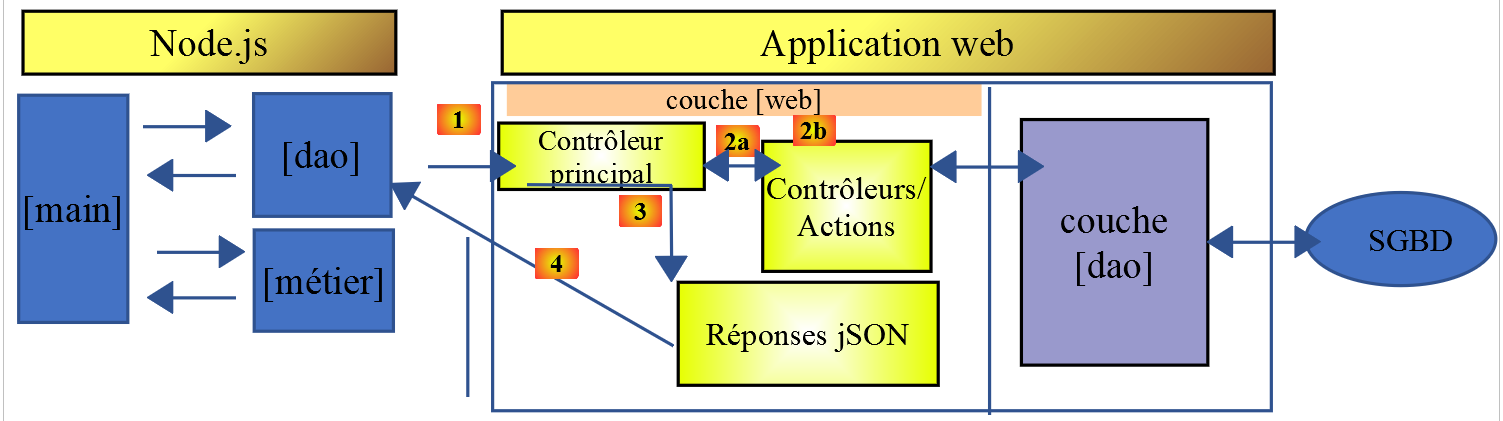
类 [Dao2] 以如下方式实现了上述 JavaScript 客户端的 [dao] 层:
'use strict';

// 导入
import qs from 'qs'

class Dao2 {

  // 构造函数
  constructor(axios) {
    this.axios = axios;
    // 会话cookie
    this.sessionCookieName = "PHPSESSID";
    this.sessionCookie = '';
  }

  // 初始化会话
  async  initSession() {
    // 请求选项 HHTP [get /main.php?action=init-session&type=json]
    const options = {
      method: "GET",
      // URL 的参数
      params: {
        action: 'init-session',
        type: 'json'
      }
    };
    // 执行查询 HTTP
    return await this.getRemoteData(options);
  }

  async  authentifierUtilisateur(user, password) {
    // 请求选项 HHTP [post /main.php?action=authentifier-utilisateur]
    const options = {
      method: "POST",
      headers: {
        'Content-type': 'application/x-www-form-urlencoded',
      },
      // POST 的正文
      data: qs.stringify({
        user: user,
        password: password
      }),
      // URL的参数
      params: {
        action: 'authentifier-utilisateur'
      }
    };
    // HTTP 请求的执行
    return await this.getRemoteData(options);
  }

  async getAdminData() {
    // HHTP 查询选项[get /main.php?action=get-admindata]
    const options = {
      method: "GET",
      // URL 的参数
      params: {
        action: 'get-admindata'
      }
    };
    // 查询执行 HTTP
    const data = await this.getRemoteData(options);
    // 结果
    return data;
  }

  async  getRemoteData(options) {
    // 用于会话cookie
    if (!options.headers) {
      options.headers = {};
    }
    options.headers.Cookie = this.sessionCookie;
    // 执行请求 HTTP
    let response;
    try {
      // 异步请求
      response = await this.axios.request('main.php', options);
    } catch (error) {
      // 参数 [error] 是一个异常实例——它可能有各种形式
      if (error.response) {
        // 服务器响应位于 [error.response]
        response = error.response;
      } else {
        // 重新抛出该错误
        throw error;
      }
    }
    // response 包含服务器响应的全部内容 HTTP(HTTP 头部 + 响应正文)
    // 若存在,则获取会话cookie
    const setCookie = response.headers['set-cookie'];
    if (setCookie) {
      // setCookie 是一个数组
      // 在此数组中查找会话cookie
      let trouvé = false;
      let i = 0;
      while (!trouvé && i < setCookie.length) {
        // 查找会话cookie
        const results = RegExp('^(' + this.sessionCookieName + '.+?);').exec(setCookie[i]);
        if (results) {
          // 存储会话cookie
          // eslint-disable-next-line require-atomic-updates
          this.sessionCookie = results[1];
          // 已找到
          trouvé = true;
        } else {
          // 下一个元素
          i++;
        }
      }
    }
    // 服务器响应位于 [response.data]
    return response.data;
  }
}

// 导出类
export default Dao2;
注释
- 类 [Dao2] 仅实现了向税费计算服务器发送的三种可能请求:
- [init-session](第 17-29 行):用于初始化 jSON 会话;
- [authentifier-utilisateur](第31-50行):用于身份验证;
- [get-admindata](第52-65行):用于获取税务管理部门的数据,以便在客户端进行税款计算;
- 第52-65行:我们向服务器引入了一个新的操作[get-admindata]。该操作此前尚未实现,现予以实现。
14.3.3. 税款计算服务器的修改
税款计算服务器需实现一项新操作。我们将针对服务器第14版进行此项工作。待实现的操作具有以下特征:
- 由操作 [get /main.php?action=get-admindata] 调用;
- 该操作返回字符串 jSON,该字符串封装了税务管理数据;
接下来我们将回顾如何向服务器添加操作。
修改将在NetBeans中进行:
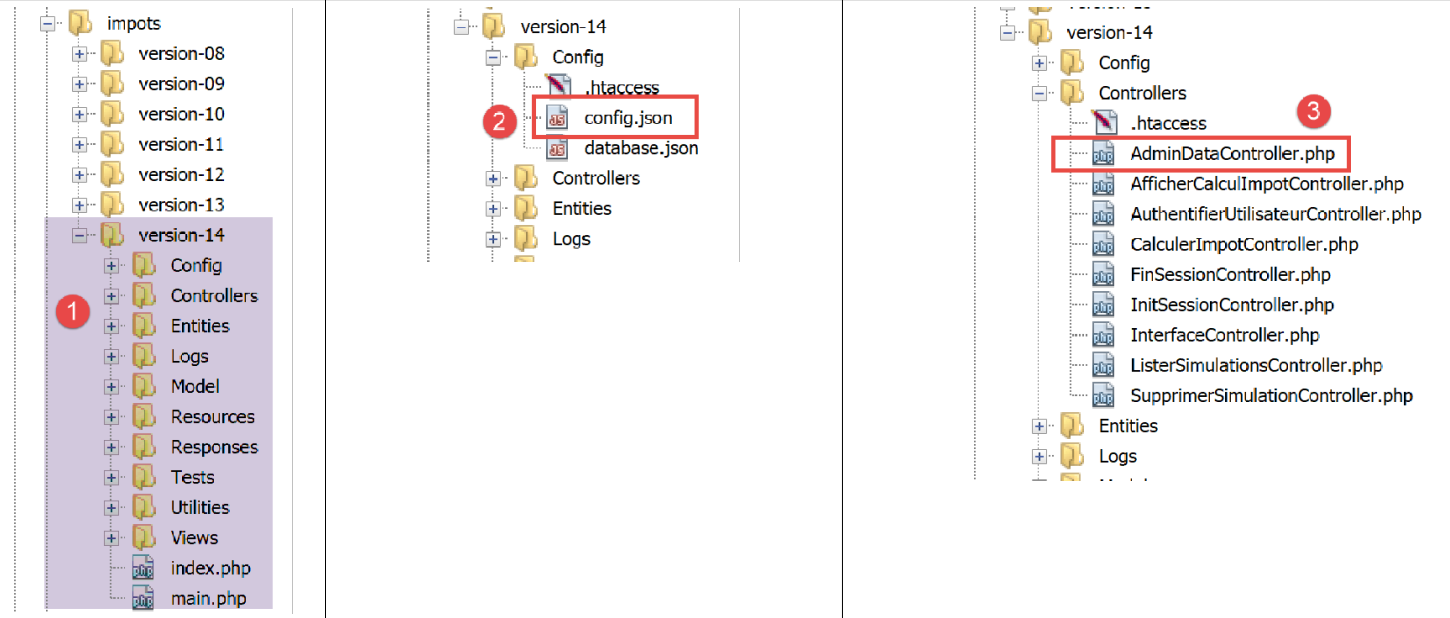
在 [2] 中,我们修改文件 [config.json] 以添加新操作:
{
    "databaseFilename": "Config/database.json",
    "corsAllowed": true,
    "rootDirectory": "C:/myprograms/laragon-lite/www/php7/scripts-web/impots/version-14",
    "relativeDependencies": [

        "/Entities/BaseEntity.php",
        "/Entities/Simulation.php",
        "/Entities/Database.php",
        "/Entities/TaxAdminData.php",
        "/Entities/ExceptionImpots.php",

        "/Utilities/Logger.php",
        "/Utilities/SendAdminMail.php",

        "/Model/InterfaceServerDao.php",
        "/Model/ServerDao.php",
        "/Model/ServerDaoWithSession.php",
        "/Model/InterfaceServerMetier.php",
        "/Model/ServerMetier.php",

        "/Responses/InterfaceResponse.php",
        "/Responses/ParentResponse.php",
        "/Responses/JsonResponse.php",
        "/Responses/XmlResponse.php",
        "/Responses/HtmlResponse.php",

        "/Controllers/InterfaceController.php",
        "/Controllers/InitSessionController.php",
        "/Controllers/ListerSimulationsController.php",
        "/Controllers/AuthentifierUtilisateurController.php",
        "/Controllers/CalculerImpotController.php",
        "/Controllers/SupprimerSimulationController.php",
        "/Controllers/FinSessionController.php",
        "/Controllers/AfficherCalculImpotController.php",
        "/Controllers/AdminDataController.php"
    ],
    "absoluteDependencies": [
        "C:/myprograms/laragon-lite/www/vendor/autoload.php",
        "C:/myprograms/laragon-lite/www/vendor/predis/predis/autoload.php"
    ],
    "users": [
        {
            "login": "admin",
            "passwd": "admin"
        }
    ],
    "adminMail": {
        "smtp-server": "localhost",
        "smtp-port": "25",
        "from": "guest@localhost",
        "to": "guest@localhost",
        "subject": "plantage du serveur de calcul d'impôts",
        "tls": "FALSE",
        "attachments": []
    },
    "logsFilename": "Logs/logs.txt",
    "actions":
            {
                "init-session": "\\InitSessionController",
                "authentifier-utilisateur": "\\AuthentifierUtilisateurController",
                "calculer-impot": "\\CalculerImpotController",
                "lister-simulations": "\\ListerSimulationsController",
                "supprimer-simulation": "\\SupprimerSimulationController",
                "fin-session": "\\FinSessionController",
                "afficher-calcul-impot": "\\AfficherCalculImpotController",
                "get-admindata": "\\AdminDataController"
            },
    "types": {
        "json": "\\JsonResponse",
        "html": "\\HtmlResponse",
        "xml": "\\XmlResponse"
    },
    "vues": {
        "vue-authentification.php": [700, 221, 400],
        "vue-calcul-impot.php": [200, 300, 341, 350, 800],
        "vue-liste-simulations.php": [500, 600]
    },
    "vue-erreurs": "vue-erreurs.php"
}
修改内容如下:
- 第 67 行:添加操作 [get-admindata] 并将其关联到一个控制器;
- 第 36 行:在应用程序 PHP 需加载的类列表中声明该控制器;
下一步是实现控制器 [AdminDataController] [3]:
<?php

namespace Application;

// Symfony 依赖项
use \Symfony\Component\HttpFoundation\Response;
use \Symfony\Component\HttpFoundation\Request;
use \Symfony\Component\HttpFoundation\Session\Session;
// [dao] 层的别名
use \Application\ServerDaoWithSession as ServerDaoWithRedis;

class AdminDataController implements InterfaceController {

  // $config 是应用程序的配置
  // 处理一个 Request 请求
  // 使用会话 Session 并可对其进行修改
  // $infos 是每个控制器特有的附加信息
  // 返回一个数组 [$statusCode, $état, $content, $headers]
  public function execute(
    array $config,
    Request $request,
    Session $session,
    array $infos = NULL): array {

    // 必须仅有一个参数 GET
    $method = strtolower($request->getMethod());
    $erreur = $method !== "get" || $request->query->count() != 1;
    if ($erreur) {
      // 记录错误
      $message = "il faut utiliser la méthode [get] avec l'unique paramètre [action] dans l'URL";
      $état = 1001;
      // 将结果返回给主控制器
      return [Response::HTTP_BAD_REQUEST, $état, ["réponse" => $message], []];
    }

    // 可以运行
    // Redis
    \Predis\Autoloader::register();
    try {
      // 客户端 [predis]
      $redis = new \Predis\Client();
      // 连接服务器以检查其是否在线
      $redis->connect();
    } catch (\Predis\Connection\ConnectionException $ex) {
      // 出错了
      // 向主控制器返回带错误的结果
      $état = 1050;
      return [Response::HTTP_INTERNAL_SERVER_ERROR, $état,
        ["réponse" => "[redis], " . utf8_encode($ex->getMessage())], []];
    }

    // 从税务部门获取数据
    // 首先在缓存中查找 [redis]
    if (!$redis->get("taxAdminData")) {
      try {
        // 从数据库中检索税务数据
        $dao = new ServerDaoWithRedis($config["databaseFilename"], NULL);
        // taxAdminData
        $taxAdminData = $dao->getTaxAdminData();
        // 将检索到的数据存入 Redis
        $redis->set("taxAdminData", $taxAdminData);
      } catch (\RuntimeException $ex) {
        // 操作失败
        // 将带错误的结果返回给主控制器
        $état = 1041;
        return [Response::HTTP_INTERNAL_SERVER_ERROR, $état,
          ["réponse" => utf8_encode($ex->getMessage())], []];
      }
    } else {
      // 税务数据从作用域为 [application] 的内存 [redis] 中获取
      $arrayOfAttributes = \json_decode($redis->get("taxAdminData"), true);
      // 根据前一个属性表实例化一个 [TaxAdminData] 对象
      $taxAdminData = (new TaxAdminData())->setFromArrayOfAttributes($arrayOfAttributes);
    }

    // 将结果返回给主控制器
    $état = 1000;
    return [Response::HTTP_OK, $état, ["réponse" => $taxAdminData], []];
  }

}
注释
- 第 12 行:与服务器上的其他控制器一样,[AdminDataController] 实现了由第 19-79 行中的 [execute] 方法构成的 [InterfaceController] 接口;
- 第78行:与服务器上的其他控制器一样,方法 [AdminDataController.execute] 返回一个数组 [$status, $état, [‘réponse’=>$response]],其中:
- [$status]:响应的状态码HTTP;
- [$état]:应用程序内部代码,表示执行客户端请求后服务器的状态;
- [$response]:一个封装待发送给客户端响应的数组。此处,该数组随后将被转换为字符串 jSON;
- 第25-34行:验证客户端操作[get-admindata]的语法是否正确;
- 第37-74行:检索一个[TaxAdminData]对象,该对象可通过以下方式获取:
- 第 56-59 行:若未在缓存 [redis] 中找到,则从数据库中检索;
- 第 70-73 行:从缓存中检索 [redis];
此代码沿用了链接文章中所述的控制器 [CalculerImpotController] 的代码。实际上,该控制器同样需要获取封装税务管理数据的对象 [TaxAdminData]。
在测试JavaScript客户端时,当在缓存[redis]中找到该对象时,[TaxAdminData]的变体jSON引发了问题。 为理解这一现象,让我们查看该对象在 [redis] 中以何种形式存储:
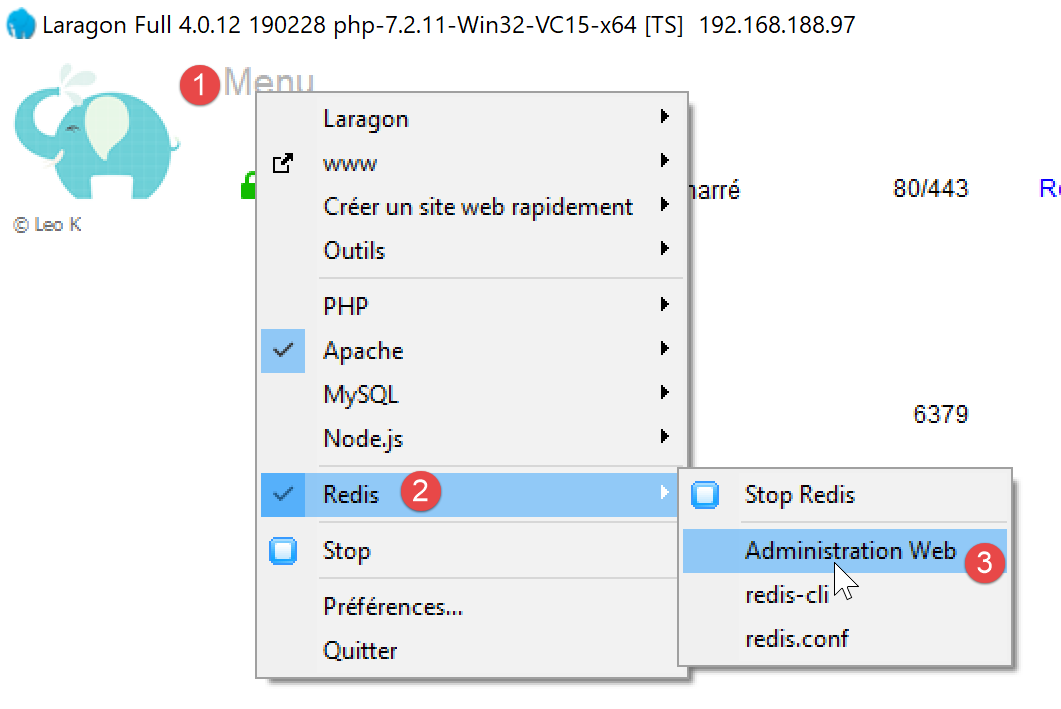
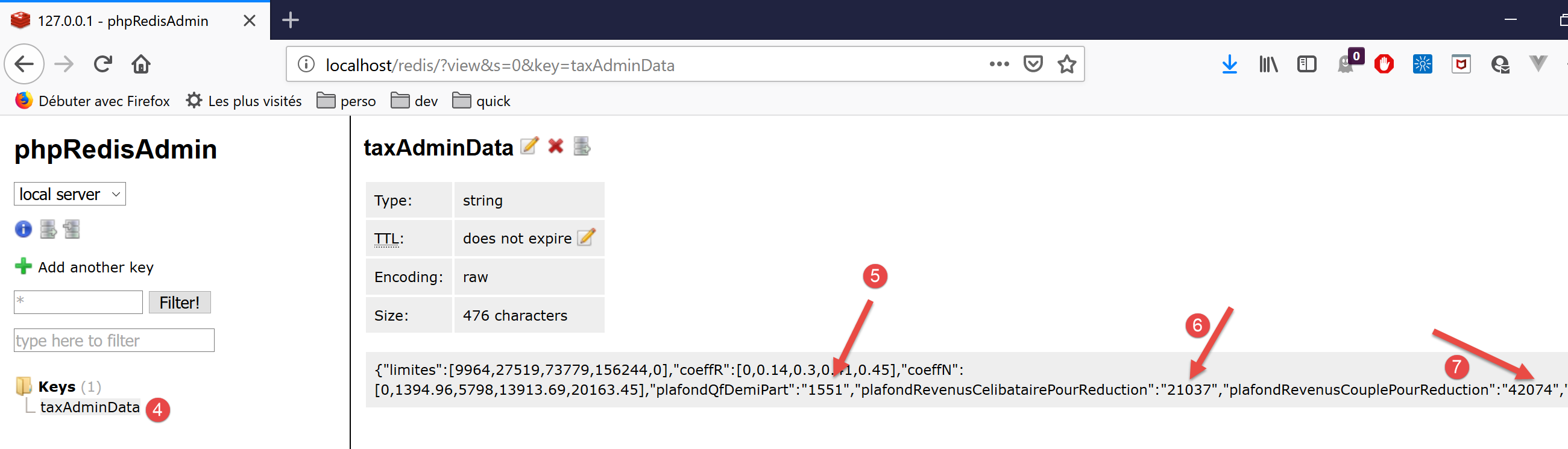
- 在 [5-7] 中,可以看到数值被以字符串的形式存储。PHP 能够处理这种情况,因为在数字与字符串的运算中,+ 运算符会隐式地将字符串的类型转换为数字。 但 JavaScript 则相反:在数字与字符串的运算中,+ 运算符会隐式地将数字类型转换为字符串类型。因此,JavaScript 类 [Métier] 中的计算结果出现了错误;
为解决此问题,我们将控制器第 71 行中使用的 [TaxAdminData.setFromArrayOfAttributes] 方法修改为实例化 [TaxAdminData] 对象 (参见文章):
<?php

namespace Application;

class TaxAdminData extends BaseEntity {
  // 税率区间
  protected $limites;
  protected $coeffR;
  protected $coeffN;
  // 税额计算常数
  protected $plafondQfDemiPart;
  protected $plafondRevenusCelibatairePourReduction;
  protected $plafondRevenusCouplePourReduction;
  protected $valeurReducDemiPart;
  protected $plafondDecoteCelibataire;
  protected $plafondDecoteCouple;
  protected $plafondImpotCouplePourDecote;
  protected $plafondImpotCelibatairePourDecote;
  protected $abattementDixPourcentMax;
  protected $abattementDixPourcentMin;

  // 初始化
  public function setFromJsonFile(string $taxAdminDataFilename) {
    // 父级
    parent::setFromJsonFile($taxAdminDataFilename);
    // 检查属性值
    $this->checkAttributes();
    // 返回对象
    return $this;
  }

  protected function check($value): \stdClass {
    // $value 是一个字符串类型的数组或单个元素
    if (!\is_array($value)) {
      $tableau = [$value];
    } else {
      $tableau = $value;
    }
    // 将字符串数组转换为实数数组
    $newTableau = [];
    $result = new \stdClass();
    // 数组中的元素必须是正数或零
    $modèle = '/^\s*([+]?)\s*(\d+\.\d*|\.\d+|\d+)\s*$/';
    for ($i = 0; $i < count($tableau); $i ++) {
      if (preg_match($modèle, $tableau[$i])) {
        // 将浮点数放入 newTableau
        $newTableau[] = (float) $tableau[$i];
      } else {
        // 记录错误
        $result->erreur = TRUE;
        // 退出
        return $result;
      }
    }
    // 返回结果
    $result->erreur = FALSE;
    if (!\is_array($value)) {
      // 单个值
      $result->value = $newTableau[0];
    } else {
      // 返回值列表
      $result->value = $newTableau;
    }
    return $result;
  }

  // 通过属性数组初始化
  public function setFromArrayOfAttributes(array $arrayOfAttributes) {
    // 父级
    parent::setFromArrayOfAttributes($arrayOfAttributes);
    // 验证属性值
    $this->checkAttributes();
    // 返回对象
    return $this;
  }

  // 验证属性值
  protected function checkAttributes() {
    // 验证属性值是否为 >=0 的实数
    foreach ($this as $key => $value) {
      if (is_string($value)) {
        // $value 必须是 >=0 的实数或 >=0 的实数数组
        $result = $this->check($value);
        // 错误?
        if ($result->erreur) {
          // 抛出异常
          throw new ExceptionImpots("La valeur de l'attribut [$key] est invalide");
        } else {
          // 记录该值
          $this->$key = $result->value;
        }
      }
    }

    // 返回对象
    return $this;
  }

  // 获取器和设置器
  ...

}
注释
- 第 5 行:类 [TaxAdminData] 继承自类 [BaseEntity],而该类已包含方法 [setFromArrayOfAttributes]。由于该方法不适用,我们在第 67-75 行对其进行了重定义;
- 第70行:首先使用父类的[setFromArrayOfAttributes]方法来初始化该类的属性;
- 第 72 行:方法 [checkAttributes] 验证关联的值是否确实为数字。如果是字符串,则将其转换为数字;
- 第 74 行:生成的 [$this] 对象此时是一个具有数值属性的对象;
- 第 78-93 行:方法 [checkAttributes] 验证对象属性的关联值是否确实为数值;
- 第 80 行:遍历属性列表;
- 第 81 行:如果某个属性的值类型为 [string];
- 第 83 行:则验证该字符串是否为数字;
- 第 90 行:如果是,则将该字符串转换为数字并赋值给被测试的属性;
- 第85-86行:若非如此,则抛出异常;
- 第 32-65 行:函数 [check] 的实现略显冗余。它既处理数组,也处理单个值。 但在此处,调用该函数仅是为了验证一个 [string] 类型的值。它返回一个具有 [erreur, value] 属性的对象,其中:
- [erreur] 是一个布尔值,用于指示是否发生错误;
- [value] 是第 32 行中的参数 [value],根据具体情况转换为数字或数字数组;
类 [BaseEntity] 原本可能包含一个名为 [arrayOfAttributes] 的属性,现已修改为不再包含该属性:因为该属性会污染字符串 jSON 中的 [TaxAdminData]。 该类重写如下:
<?php

namespace Application;

class BaseEntity {

  // 从文件初始化JSON
  public function setFromJsonFile(string $jsonFilename) {
    // 从税务数据文件中提取内容
    $fileContents = \file_get_contents($jsonFilename);
    $erreur = FALSE;
    // 错误?
    if (!$fileContents) {
      // 记录错误
      $erreur = TRUE;
      $message = "Le fichier des données [$jsonFilename] n'existe pas";
    }
    if (!$erreur) {
      // 从配置文件中提取代码 JSON 并存入关联数组
      $arrayOfAttributes = \json_decode($fileContents, true);
      // 错误?
      if ($arrayOfAttributes === FALSE) {
        // 记录错误
        $erreur = TRUE;
        $message = "Le fichier de données JSON [$jsonFilename] n'a pu être exploité correctement";
      }
    }
    // 错误?
    if ($erreur) {
      // 抛出异常
      throw new ExceptionImpots($message);
    }
    // 初始化类属性
    foreach ($arrayOfAttributes as $key => $value) {
      $this->$key = $value;
    }
    // 检查所有属性是否存在
    $this->checkForAllAttributes($arrayOfAttributes);
    // 返回对象
    return $this;
  }

  public function checkForAllAttributes($arrayOfAttributes) {
    // 验证所有键是否已初始化
    foreach (\array_keys($arrayOfAttributes) as $key) {
      if (!isset($this->$key)) {
        throw new ExceptionImpots("L'attribut [$key] de la classe "
          . get_class($this) . " n'a pas été initialisé");
      }
    }
  }

  public function setFromArrayOfAttributes(array $arrayOfAttributes) {
    // 初始化类中的某些属性(不一定是全部)
    foreach ($arrayOfAttributes as $key => $value) {
      $this->$key = $value;
    }
    // 返回对象
    return $this;
  }

  // toString
  public function __toString() {
    // 对象的属性
    $arrayOfAttributes = \get_object_vars($this);
    // 对象的字符串 jSON
    return \json_encode($arrayOfAttributes, JSON_UNESCAPED_UNICODE);
  }

}
注释
- 第 20 行:属性 [$this→arrayOfAttributes] 已转换为变量,该变量现需传递给第 38 行的方法 [checkForAllAttributes],该方法此前操作的是属性 [$this→arrayOfAttributes];
由于 [BaseEntity] 的这一变更,[Database] 类也需稍作修改:
<?php

namespace Application;

class Database extends BaseEntity {
  // 属性
  protected $dsn;
  protected $id;
  protected $pwd;
  protected $tableTranches;
  protected $colLimites;
  protected $colCoeffR;
  protected $colCoeffN;
  protected $tableConstantes;
  protected $colPlafondQfDemiPart;
  protected $colPlafondRevenusCelibatairePourReduction;
  protected $colPlafondRevenusCouplePourReduction;
  protected $colValeurReducDemiPart;
  protected $colPlafondDecoteCelibataire;
  protected $colPlafondDecoteCouple;
  protected $colPlafondImpotCelibatairePourDecote;
  protected $colPlafondImpotCouplePourDecote;
  protected $colAbattementDixPourcentMax;
  protected $colAbattementDixPourcentMin;

  // 设置器
  // 初始化
  public function setFromJsonFile(string $jsonFilename) {
    // 父对象
    parent::setFromJsonFile($jsonFilename);
    // 返回对象
    return $this;
  }

  // 获取器和设置器
  ...
}
注释
- 在原始代码中,第 30 行之后曾调用 [parent::checkForAllAttributes] 方法。现在无需再执行此操作,因为该功能已由 [parent::setFromJsonFile($jsonFilename)] 方法自动处理;
14.3.4. 服务器端 [Postman] 测试
[Postman]已在链接文章中介绍。
我们使用以下 Postman 测试:

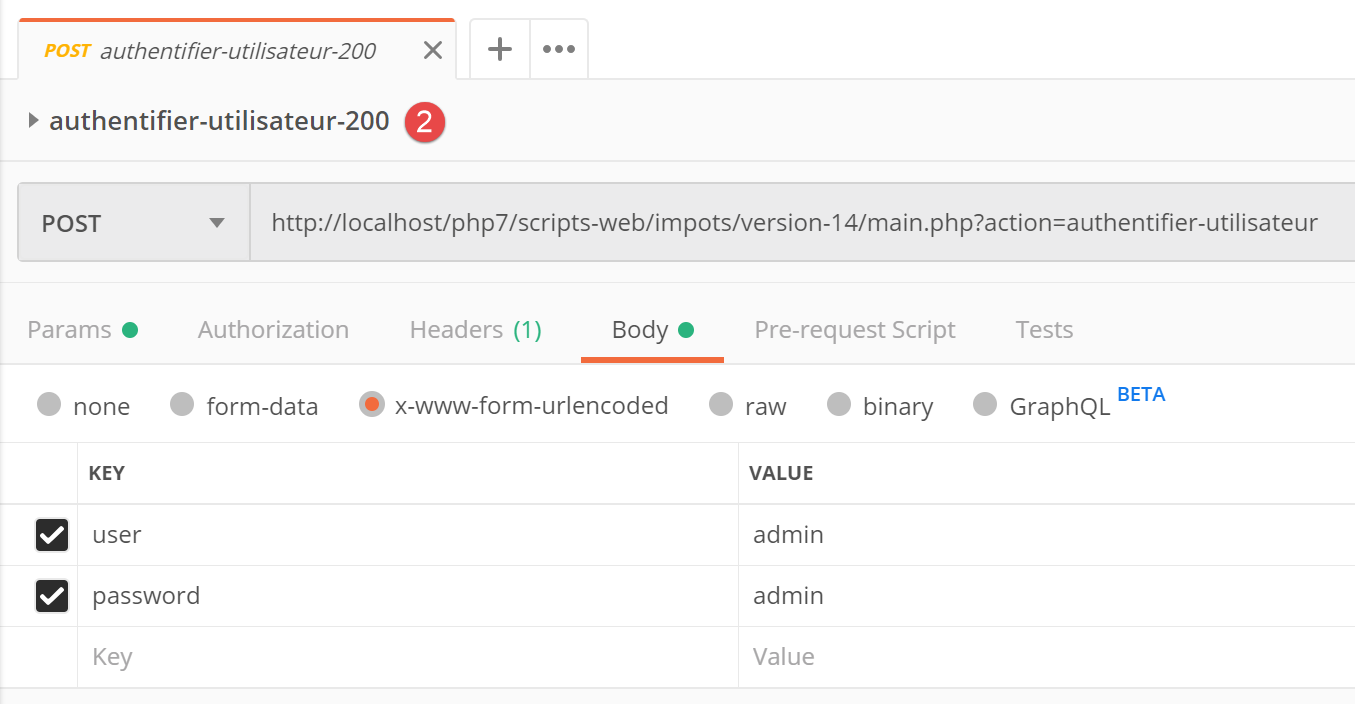
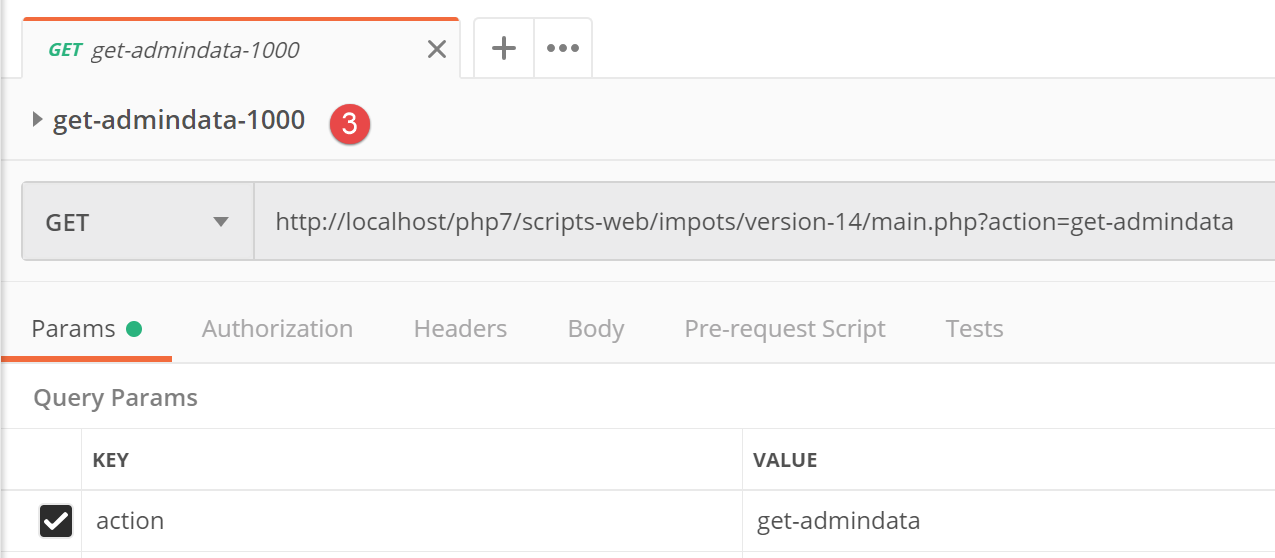
最后一个请求 jSON 的结果如下:
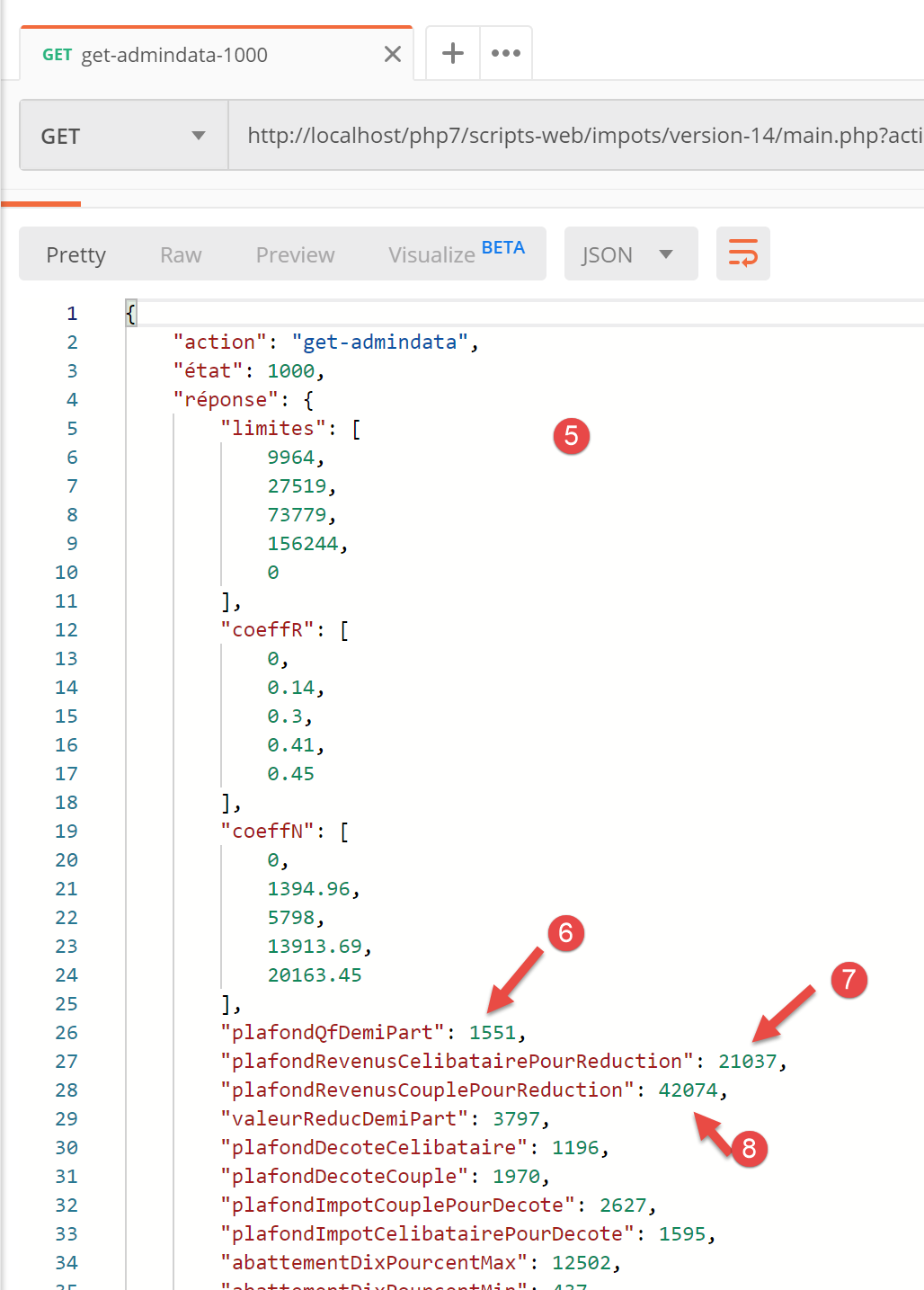
- 在 [5-8] 中,可以注意到字符串 jSON 的属性确实具有数值(而非字符串)。该结果将使 JavaScript 类 [Métier] 能够正常执行;
14.3.5. 主脚本 [main]
JavaScript客户端的主脚本[main]如下:
// 导入
import axios from 'axios';

// 导入
import Dao from './Dao2';
import Métier from './Métier';

// 异步函数[main]
async function main() {
  // axios 配置
  axios.defaults.timeout = 2000;
  axios.defaults.baseURL = 'http://localhost/php7/scripts-web/impots/version-14';
  // [dao] 层实例化
  const dao = new Dao(axios);
  // 请求 HTTP
  let taxAdminData;
  try {
    // 初始化会话
    log("-----------init-session");
    let response = await dao.initSession();
    log(response);
    // 身份验证
    log("-----------authentifier-utilisateur");
    response = await dao.authentifierUtilisateur("admin", "admin");
    log(response);
    // 税务数据
    log("-----------get-admindata");
    response = await dao.getAdminData();
    log(response);
    taxAdminData = response.réponse;
  } catch (error) {
    // 记录错误
    console.log("erreur=", error.message);
    // 结束
    return;
  }

  // [métier] 层实例化
  const métier = new Métier(taxAdminData);

  // 税款计算
  log("-----------calculer-impot x 3");
  const simulations = [];
  simulations.push(métier.calculerImpot("oui", 2, 45000));
  simulations.push(métier.calculerImpot("non", 2, 45000));
  simulations.push(métier.calculerImpot("non", 1, 30000));
  // 模拟列表
  log("-----------liste-des-simulations");
  log(simulations);
  // 删除模拟
  log("-----------suppression simulation n° 1");
  simulations.splice(1, 1);
  log(simulations);
}

// 日志jSON
function log(object) {
  console.log(JSON.stringify(object, null, 2));
}

// 执行
main();
注释
- 第 5-6 行:导入类 [Dao] 和 [Métier];
- 第 9 行:异步函数 [main],该函数将通过类 [Dao] 组织与服务器的交互,并请求类 [Métier] 进行税款计算;
- 第10-36行:脚本以阻塞方式依次调用[dao]层的[initSession, authentifierUtilisateur, getAdminData]方法;
- 第 38 行:不再需要 [dao] 层。现在已具备所有必要元素,可让 JavaScript 客户端的 [métier] 层开始工作;
- 第41-46行:执行三项税额计算,并将结果汇总到[simulations]数组中;
- 第 49 行:显示模拟结果表;
- 第52行:删除其中一项;
主脚本的执行结果如下:
[Running] C:\myprograms\laragon-lite\bin\nodejs\node-v10\node.exe -r esm "c:\Data\st-2019\dev\es6\javascript\client impôts\client http 2\main2.js"
"-----------init-session"
{
  "action": "init-session",
  "état": 700,
  "réponse": "session démarrée avec type [json]"
}
"-----------authentifier-utilisateur"
{
  "action": "authentifier-utilisateur",
  "état": 200,
  "réponse": "Authentification réussie [admin, admin]"
}
"-----------get-admindata"
{
  "action": "get-admindata",
  "état": 1000,
  "réponse": {
    "limites": [
      9964,
      27519,
      73779,
      156244,
      0
    ],
    "coeffR": [
      0,
      0.14,
      0.3,
      0.41,
      0.45
    ],
    "coeffN": [
      0,
      1394.96,
      5798,
      13913.69,
      20163.45
    ],
    "plafondQfDemiPart": 1551,
    "plafondRevenusCelibatairePourReduction": 21037,
    "plafondRevenusCouplePourReduction": 42074,
    "valeurReducDemiPart": 3797,
    "plafondDecoteCelibataire": 1196,
    "plafondDecoteCouple": 1970,
    "plafondImpotCouplePourDecote": 2627,
    "plafondImpotCelibatairePourDecote": 1595,
    "abattementDixPourcentMax": 12502,
    "abattementDixPourcentMin": 437
  }
}
"-----------calculer-impot x 3"
"-----------liste-des-simulations"
[
  {
    "impôt": 502,
    "surcôte": 0,
    "décôte": 857,
    "réduction": 126,
    "taux": 0.14
  },
  {
    "impôt": 3250,
    "surcôte": 370,
    "décôte": 0,
    "réduction": 0,
    "taux": 0.3
  },
  {
    "impôt": 1687,
    "surcôte": 0,
    "décôte": 0,
    "réduction": 0,
    "taux": 0.14
  }
]
"-----------suppression simulation n° 1"
[
  {
    "impôt": 502,
    "surcôte": 0,
    "décôte": 857,
    "réduction": 126,
    "taux": 0.14
  },
  {
    "impôt": 1687,
    "surcôte": 0,
    "décôte": 0,
    "réduction": 0,
    "taux": 0.14
  }
]

[Done] exited with code=0 in 0.583 seconds
14.4. 客户端 HTTP 3
在本节中,我们将应用程序 [Client HTTP 2] 部署到浏览器中,架构如下:
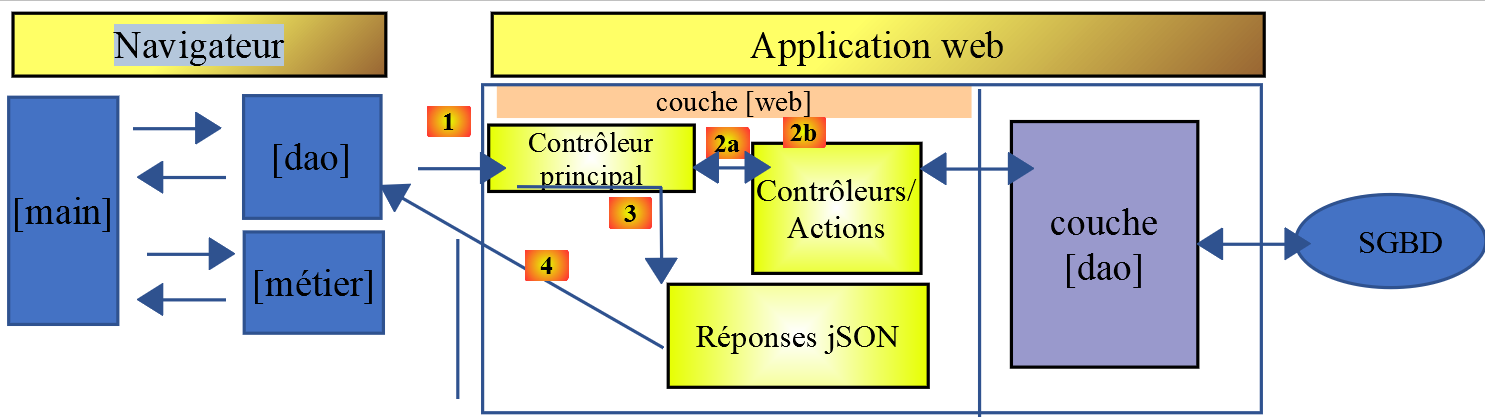
移植并非立竿见影。虽然 [node.js] 能够执行 JavaScript ES6,但浏览器通常无法直接处理。 因此需要使用工具,将 ES6 代码转换为现代浏览器可识别的 ES5 代码。幸运的是,这些工具既功能强大又相对简单易用。
本文参考了[How to write ES6 code that’s safe to run in the browser - Web Developer's Journal]这篇文章。
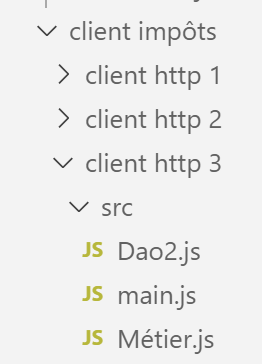
在 [client HTTP 3/src] 文件夹中,我们放置了刚刚开发的 [Client Http 2] 应用程序的 [main.js, Métier.js, Dao2.js] 组件。
14.4.1. 项目初始化
我们将在此文件夹 [client http 3] 中进行操作。在 [VSCode] 中打开终端,并切换至该文件夹:

我们使用命令 [npm init] 初始化该项目,并针对系统提出的问题接受默认选项:
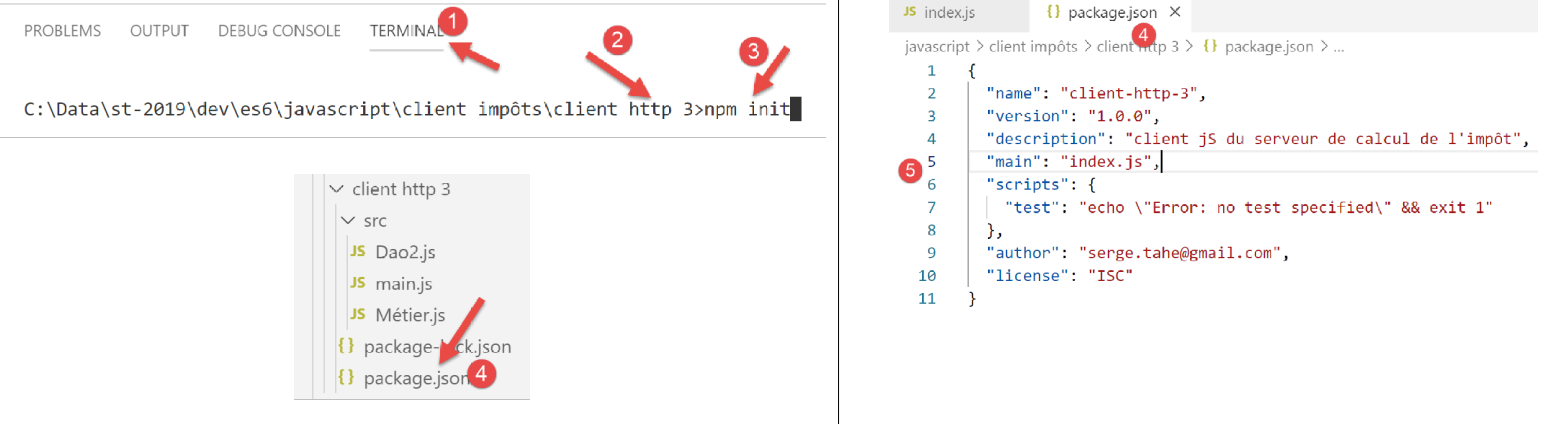
- 在 [4-5] 中,项目配置文件 [package.json] 根据所给出的不同答案生成;
14.4.2. 安装项目依赖项
我们将安装以下依赖项:
- [@babel/core]:[Babel] [https://babeljs.io] 工具的核心,用于将 2015 年及以后的 ES 代码转换为可在新旧浏览器上运行的可执行代码;
- [@babel/preset-env]:属于 Babel 工具集。在 ES6 → ES5 的转译之前运行;
- [babel-loader]:此依赖项使工具 [webpack] 能够调用工具 [Babel];
- [webpack]:总协调者。 [webpack] 调用 Babel 进行代码转译(ES6 → ES5),随后将其生成的所有文件合并为一个文件;
- [webpack-cli]:[webpack] 所必需的;
- [@webpack-cli/init]:用于配置 [webpack];
- [webpack-dev-server]:提供一个默认运行在8080端口的开发Web服务器。当源文件发生更改时,会自动重新加载Web应用程序;
在 [VSCode] 的终端中,项目依赖项的安装方式如下:
npm --save-dev install @babel/core @babel/preset-env babel-loader webpack webpack-cli webpack-dev-server @webpack-cli/init

安装依赖项后,文件 [package.json] 已更新如下:
{
  "name": "client-http-3",
  "version": "1.0.0",
  "description": "client jS du serveur de calcul de l'impôt",
  "main": "index.js",
  "scripts": {
    "test": "echo \"Error: no test specified\" && exit 1"
  },
  "author": "serge.tahe@gmail.com",
  "license": "ISC",
  "devDependencies": {
    "@babel/core": "^7.6.0",
    "@babel/preset-env": "^7.6.0",
    "@webpack-cli/init": "^0.2.2",
    "babel-loader": "^8.0.6",
    "cross-env": "^6.0.0",
    "webpack": "^4.40.2",
    "webpack-cli": "^3.3.9",
    "webpack-dev-server": "^3.8.1"
  }
}
- 第 12-19 行:项目的依赖项是 [devDependencies]:开发阶段需要这些依赖,但在生产环境中则不再需要。实际上,在生产环境中使用的是 [dist/main.js] 文件。 该文件采用 ES5 编码,因此不再需要将代码从 ES6 转换为 ES5 的工具;
我们需要向项目中添加两个依赖项:
- [core-js]:包含针对 ECMAScript 2019 版本的“polyfills”。 polyfill 允许在旧版浏览器上运行新版代码,例如 ECMAScript 2019(2019年9月);
- [regenerator-runtime]:根据库官网信息 --> [Source transformer enabling ECMAScript 6 generator functions in JavaScript-of-today];
从 Babel 7 开始,这两个依赖项取代了此前承担此功能的 [@babel/polyfill] 依赖项,后者现已(2019 年 9 月)被弃用。它们的安装方式如下:

文件 [package.json] 的演变如下:
{
  "name": "client-http-3",
  "version": "1.0.0",
  "description": "My webpack project",
  "main": "index.js",
  "scripts": {
    "test": "echo \"Error: no test specified\" && exit 1",
    "build": "webpack",
    "start": "webpack-dev-server"
  },
  "author": "serge.tahe@gmail.com",
  "license": "ISC",
  "devDependencies": {
    "@babel/core": "^7.6.0",
    "@babel/preset-env": "^7.6.0",
    "@webpack-cli/init": "^0.2.2",
    "babel-loader": "^8.0.6",
    "babel-plugin-syntax-dynamic-import": "^6.18.0",
    "html-webpack-plugin": "^3.2.0",
    "webpack": "^4.40.2",
    "webpack-cli": "^3.3.9",
    "webpack-dev-server": "^3.8.1"
  },
  "dependencies": {
    "core-js": "^3.2.1",
    "regenerator-runtime": "^0.13.3"
  }
}
使用 [core-js, regenerator-runtime] 依赖项时,必须将以下 [imports](第 3-4 行)放入主脚本 [src/main.js] 中:
// 导入
import axios from 'axios';
import "core-js/stable";
import "regenerator-runtime/runtime";

// 导入
import Dao from './Dao2';
import Métier from './Métier';
14.4.3. [webpack]的配置
[webpack] 是负责驱动以下操作的工具:
- 将项目中所有 JavaScript 文件从 ES6 转换为 ES5;
- 将生成的文件合并为单个文件;
该工具由配置文件 [webpack.config.js] 控制,该文件可通过名为 [@webpack-cli/init] 的依赖项生成(2019年9月)。该依赖项已随“链接”部分中的其他依赖项一同安装。
我们在终端中执行命令 [npx webpack-cli init]:
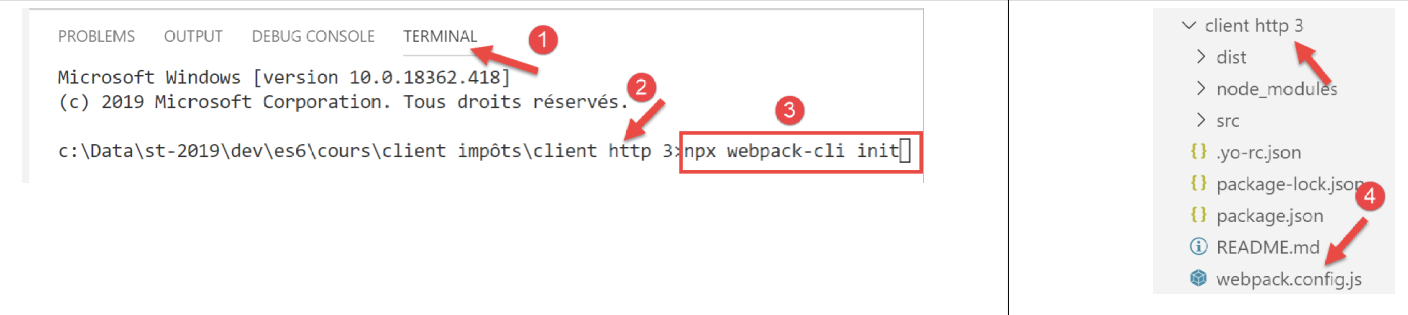
回答完各项问题(其中大部分默认答案均可接受)后,项目根目录下将生成文件 [webpack.config.js]:
[webpack.config.js] 文件内容如下:
/* eslint-disable */

const path = require('path');
const webpack = require('webpack');

/*
 * SplitChunksPlugin is enabled by default and replaced
 * deprecated CommonsChunkPlugin. It automatically identifies modules which
 * should be splitted of chunk by heuristics using module duplication count and
 * module category (i. e. node_modules). And splits the chunks…
 *
 * It is safe to remove "splitChunks" from the generated configuration
 * and was added as an educational example.
 *
* https://webpack.js.org/plugins/split-chunks-plugin/
 *
 */

const HtmlWebpackPlugin = require('html-webpack-plugin');

/*
 * We've enabled HtmlWebpackPlugin for you! This generates a html
 * page for you when you compile webpack, which will make you start
 * developing and prototyping faster.
 *
* https://github.com/jantimon/html-webpack-plugin
 *
 */

module.exports = {
    mode: 'development',
    entry: './src/index.js',

    output: {
        filename: '[name].[chunkhash].js',
        path: path.resolve(__dirname, 'dist')
    },

    plugins: [new webpack.ProgressPlugin(), new HtmlWebpackPlugin()],

    module: {
        rules: [
            {
                test: /.(js|jsx)$/,
                include: [path.resolve(__dirname, 'src')],
                loader: 'babel-loader',

                options: {
                    plugins: ['syntax-dynamic-import'],

                    presets: [
                        [
                            '@babel/preset-env',
                            {
                                modules: false
                            }
                        ]
                    ]
                }
            }
        ]
    },

    optimization: {
        splitChunks: {
            cacheGroups: {
                vendors: {
                    priority: -10,
                    test: /[\\/]node_modules[\\/]/
                }
            },

            chunks: 'async',
            minChunks: 1,
            minSize: 30000,
            name: true
        }
    },

    devServer: {
        open: true
    }
};
虽然我不完全理解该文件的所有细节,但可以注意到以下几点:
- 第 1 行:该文件不包含 ES6 的代码。因此,[Eslint] 报告的错误会追溯到项目根目录下的 [javascript]。这很麻烦。 若要阻止 Eslint 分析某个文件,只需将第 1 行注释掉即可;
- 第 31 行:当前工作模式为 [développement];
- 第32行:此处的输入脚本为[src/index.js]。我们后续需要修改这一点;
- 第36行:[webpack]生成的文件将保存在[dist]文件夹中;
- 第46行:可以看到[webpack]依赖于[babel-loader],这是我们已安装的依赖项之一;
- 第 54 行:可以看到 [webpack] 使用了 [@babel-preset/env],这是我们已安装的依赖项之一;
[webpack] 的初始化修改了文件 [package.json](它正在请求权限):
{
  "name": "client-http-3",
  "version": "1.0.0",
  "description": "My webpack project",
  "main": "index.js",
  "scripts": {
    "test": "echo \"Error: no test specified\" && exit 1",
    "build": "webpack",
    "start": "webpack-dev-server"
  },
  "author": "serge.tahe@gmail.com",
  "license": "ISC",
  "devDependencies": {
    "@babel/core": "^7.6.0",
    "@babel/preset-env": "^7.6.0",
    "@webpack-cli/init": "^0.2.2",
    "babel-loader": "^8.0.6",
    "babel-plugin-syntax-dynamic-import": "^6.18.0",
    "html-webpack-plugin": "^3.2.0",
    "webpack": "^4.40.2",
    "webpack-cli": "^3.3.9",
    "webpack-dev-server": "^3.8.1"
  },
  "dependencies": {
    "core-js": "^3.2.1",
    "regenerator-runtime": "^0.13.3"
  }
}
- 第 4 行:已被修改;
- 第8-9行、第18-19行:这些行是后来添加的;
- 第8行:任务[npm],用于编译该项目;
- 第 9 行:任务 [npm],用于执行该项目;
- 第18行:?
- 第19行:用于生成文件[dist/index.html],该文件会自动嵌入由[webpack]生成的脚本[dist/main.js],而项目运行时调用的正是该脚本;
最后,[webpack]的配置生成了一个名为[src/index.js]的文件:
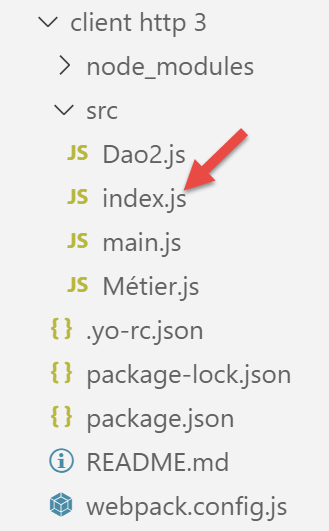
[index.js] 的内容如下(2019年9月):
console.log("Hello World from your main file!");
14.4.4. 项目的编译与运行
文件 [package.json] 包含三个任务 [npm]:
"scripts": {
    "test": "echo \"Error: no test specified\" && exit 1",
    "build": "webpack",
    "start": "webpack-dev-server"
},
这些任务由 [VSCode] 包含,并提交执行:
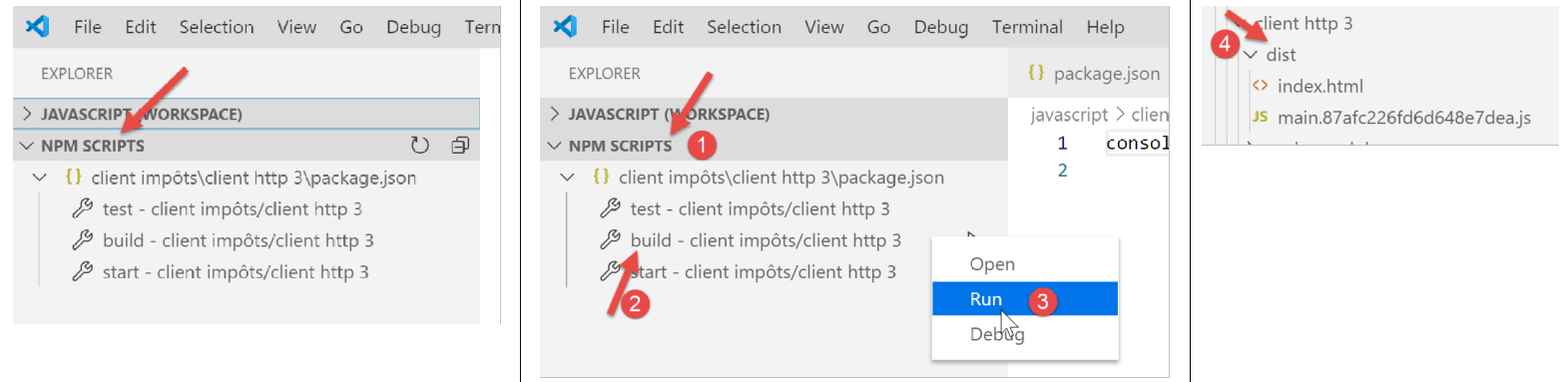
- 在 [1-3] 中,对项目进行编译;
- 在 [4] 中:项目已在 [dist/main.hash.js] 中编译完成,并生成页面 [dist/index.html];
生成的页面 [index.html] 如下:
<!DOCTYPE html>
<html>
  <head>
    <meta charset="UTF-8">
    <title>Webpack App</title>
  </head>
  <body>
  <script type="text/javascript" src="main.87afc226fd6d648e7dea.js"></script></body>
</html>
因此,该页面仅封装了由 [webpack] 生成的文件 [main.hash.js]。
该项目由任务 [start] 执行:
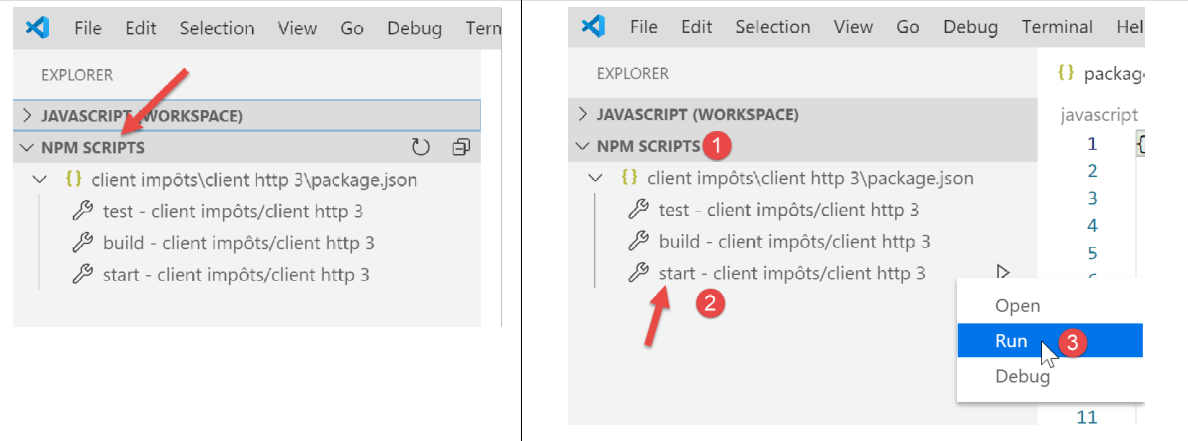
随后,页面 [dist/index.html] 会被加载到一个服务器上,该服务器属于 [webpack] 系列,运行在本地机器的 8080 端口,并通过机器的默认浏览器显示:
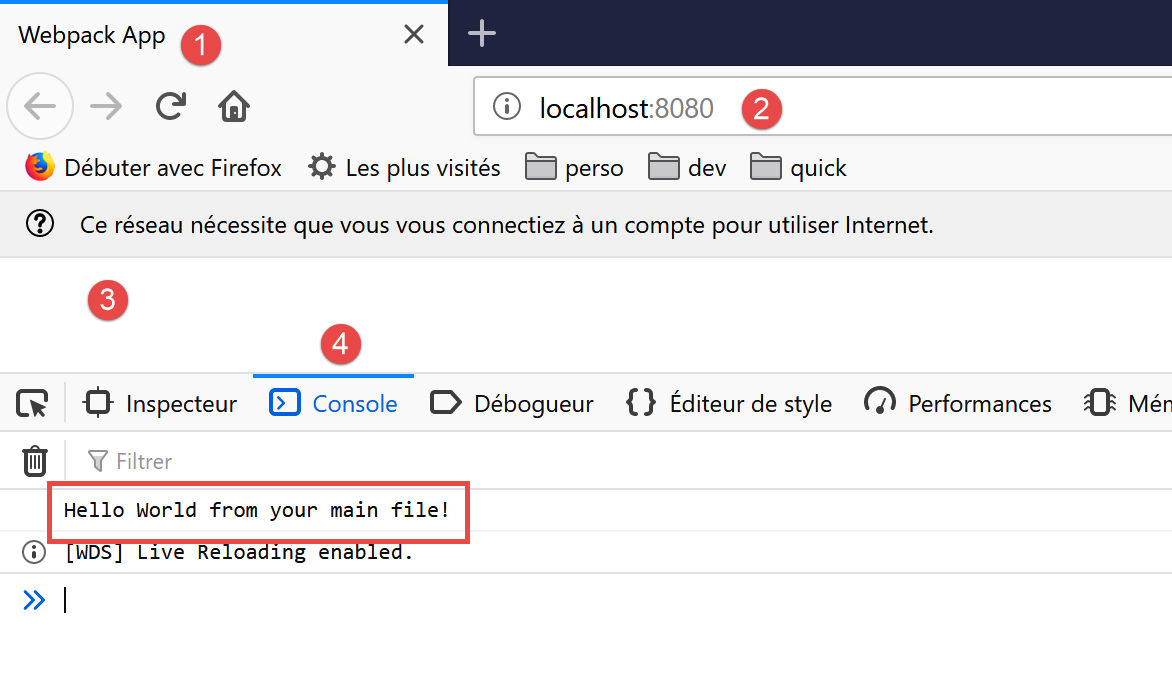
- 在 [2] 中,[webpack] 的 Web 服务器服务端口;
- 变为 [3],页面 [dist/index.html] 的主体内容为空;
- 在 [4] 中,浏览器开发工具(此处为 Firefox)的 [console] 选项卡(F12);
- 在 [5] 中,是文件 [src/index.js] 执行后的结果。需要说明的是,该文件的内容如下:
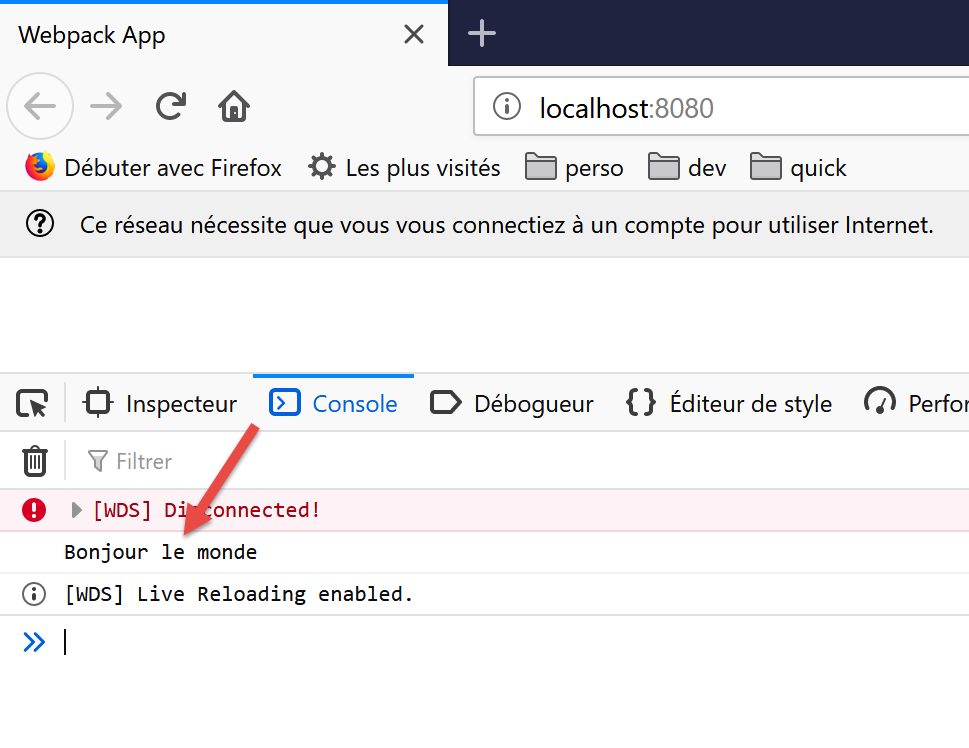
现在,我们将该内容更改为以下内容:
系统会自动(无需重新编译)生成新的 [main.js, index.html] 文件,并将新文件 [index.html] 加载到浏览器中:
无需在任务 [start] 之前执行任务 [build]:后者会先编译该项目。它不会将此次编译的产物存储在文件夹 [dist] 中。 要验证这一点,只需删除该文件夹即可。此时会发现,任务 [start] 会编译并执行该项目,而不会创建文件夹 [dist]。 它似乎将[index.html, main.hash.js]的输出结果存储在[webpackdev-server]专属的文件夹中。这种行为对于我们的测试而言已足够。
当开发服务器启动时,项目中任何文件的保存操作都会触发重新编译。因此,我们将[VSCode]的[Auto Save]模式设为禁用。因为我们不希望在项目文件中输入字符时立即触发重新编译。 我们仅希望在保存修改时才进行重新编译:
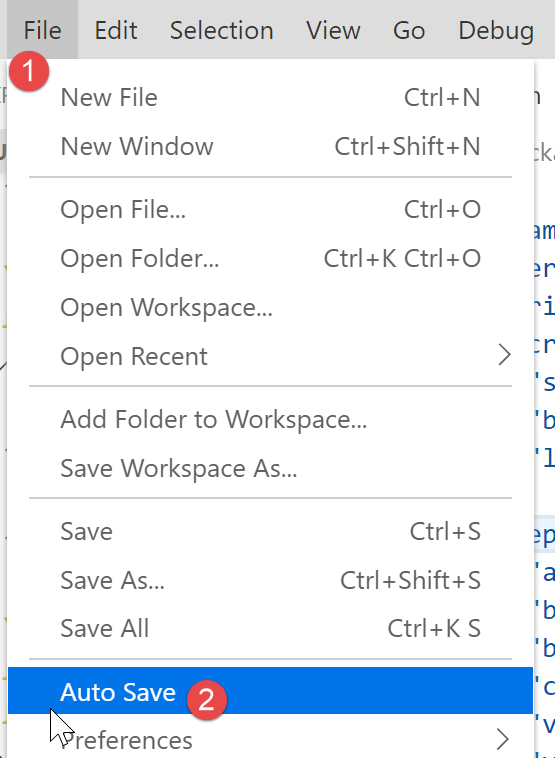
- 在 [2] 中,选项 [Auto Save] 不得被勾选;
14.4.5. 税费计算服务器的JavaScript客户端测试
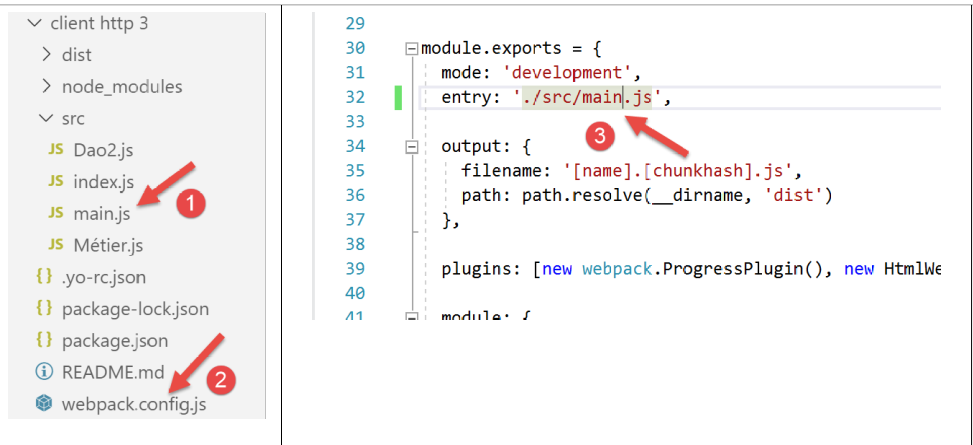
要测试税费计算服务器的 JavaScript 客户端,需在文件 [webpack.config.js] [2-3] 中将 [main.js] [1] 指定为项目的入口点:
请注意,与 [Client http 2] 中的版本相比,脚本 [main.js] 还需额外包含两项导入:
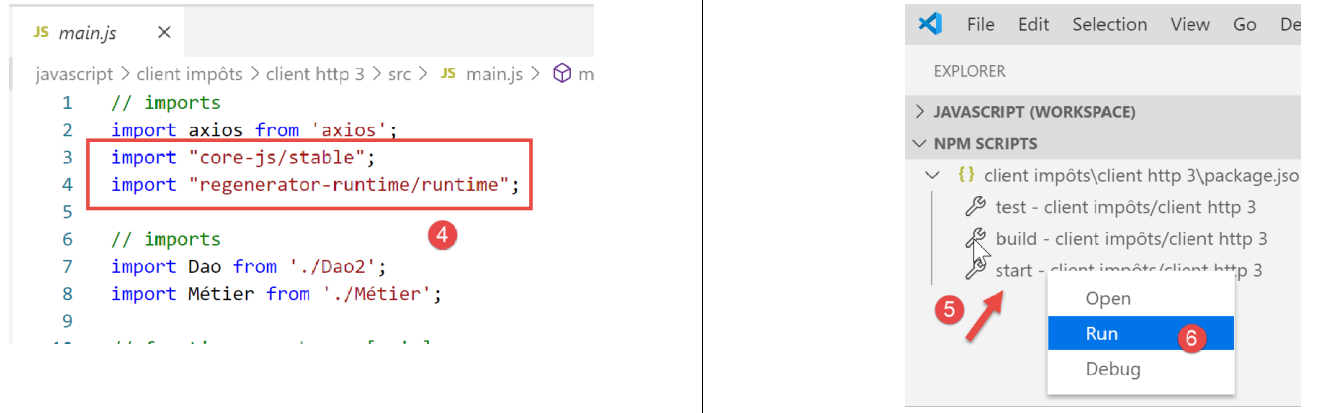
此外,我们还对代码进行了微调,以处理服务器可能返回的错误:
// imports
import axios from 'axios';
import "core-js/stable";
import "regenerator-runtime/runtime";

// 导入
import Dao from './Dao2';
import Métier from './Métier';

// 异步函数 [main]
async function main() {
  // axios 配置
  axios.defaults.timeout = 2000;
  axios.defaults.baseURL = 'http://localhost/php7/scripts-web/impots/version-14';
  // [dao] 层实例化
  const dao = new Dao(axios);
  // 请求 HTTP
  let taxAdminData;
  try {
    // 初始化会话
    log("-----------init-session");
    let response = await dao.initSession();
    log(response);
    if (response.état != 700) {
      throw new Error(JSON.stringify(response.réponse));
    }
    // 身份验证
    log("-----------authentifier-utilisateur");
    response = await dao.authentifierUtilisateur("admin", "admin");
    log(response);
    if (response.état != 200) {
      throw new Error(JSON.stringify(response.réponse));
    }
    // 税务数据
    log("-----------get-admindata");
    response = await dao.getAdminData();
    log(response);
    if (response.état != 1000) {
      throw new Error(JSON.stringify(response.réponse));
    }
    taxAdminData = response.réponse;
  } catch (error) {
    // 记录错误
    console.log("erreur=", error.message);
    // 结束
    return;
  }

  // QZXW2HTML 层实例化BW23DqXRpZXJdZQX
  const métier = new Métier(taxAdminData);

  // 税额计算
  log("-----------calculer-impot x 3");
  const simulations = [];
  simulations.push(métier.calculerImpot("oui", 2, 45000));
  simulations.push(métier.calculerImpot("non", 2, 45000));
  simulations.push(métier.calculerImpot("non", 1, 30000));
  // 模拟列表
  log("-----------liste-des-simulations");
  log(simulations);
  // 删除模拟
  log("-----------suppression simulation n° 1");
  simulations.splice(1, 1);
  log(simulations);
}

// 日志jSON
function log(object) {
  console.log(JSON.stringify(object, null, 2));
}

// 执行
main();
注释
- 在 [24-26]、[31-33]、[38-40] 这几行中,我们对服务器在 jSON 响应中发送的 [response.état] 代码进行了验证。 如果该代码表示存在错误,则会抛出一个异常,其错误消息为服务器响应 [response.réponse] 中的字符串 jSON;
完成上述操作后,我们执行项目 [5-6]。
随后生成页面 [index.html] 并加载到浏览器中:
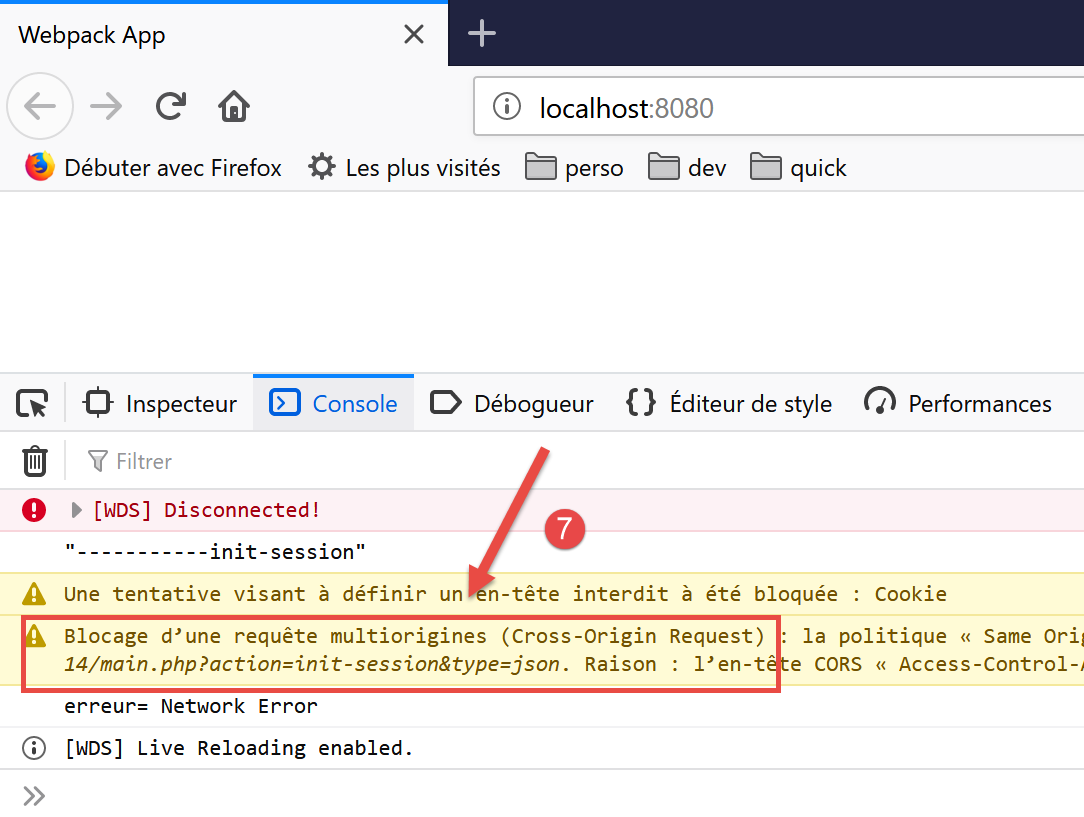
- 在 [7] 中,可以看到由于 [CORS] 问题(跨源资源共享),操作 [init-session] 未能完成;
问题 CORS 源于客户端与服务器的通信:
- 我们的 JavaScript 客户端已下载到 [http://localhost:8080] 机器上;
- 税费计算服务器运行在 [http://localhost:80] 机器上;
- 因此客户端和服务器不在同一域内(虽然在同一台机器上,但端口不同);
- 运行从 [http://localhost:8080] 机器加载的 JavaScript 客户端的浏览器会阻止所有目标不是 [http://localhost:80] 的请求。这是一项安全措施。 因此,它会阻止客户端发往运行在 [http://localhost:80] 机器上的服务器的请求;
实际上,浏览器并未完全阻止该请求。它实际上是在等待服务器“告知”其接受跨域请求。如果获得此授权,浏览器将转发该跨域请求。
服务器通过发送特定的 HTTP 头部来给予授权:
- 第 1 行:JavaScript 客户端在 [http://localhost:8080] 域上运行。服务器必须明确响应接受该域;
- 第2行:JavaScript客户端将在其请求中使用HTTP和[Accept, Content-Type]头部:
- [Accept]:该标头在所有请求中都会发送;
- [Content-Type]:该标头用于 POST 操作中,以指示 POST 参数的类型;
服务器必须明确接受这两个 HTTP 头部;
- 第 3 行:JavaScript 客户端将使用 GET 和 POST 请求。服务器必须明确接受这两种类型的请求;
- 第4行:JavaScript客户端将发送会话cookie。服务器通过第4行的头部接受这些cookie;
因此我们需要修改服务器。我们将在 [Netbeans] 中进行此操作。CORS 的问题仅在开发模式下出现。 在生产环境中,客户端和服务器将在同一域 [http://localhost:80] 内工作,因此不会出现 CORS 问题。因此,我们需要通过服务器配置来决定是否允许 CORS 请求。
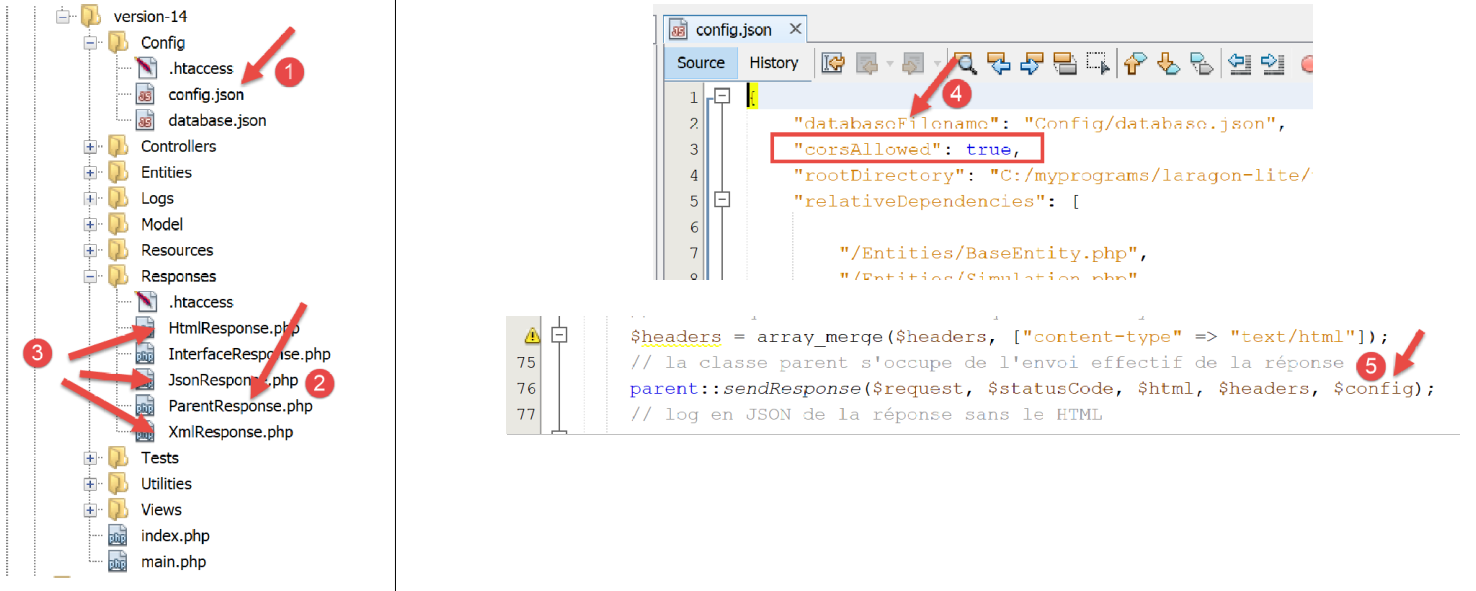
服务器配置的修改涉及三个位置:
- [1, 4]:在配置文件[config.json]中添加一个布尔值,用于控制是否接受跨域请求;
- [2]:在向 JavaScript 客户端发送响应的类 [ParentResponse] 中。该类将发送客户端浏览器所期望的 CORS 请求头;
- [3]:位于 [HtmlResponse, JsonResponse, XmlResponse] 类中,该类分别针对 [html, json, xml] 会话生成响应。 这些类必须将其在 [4] 中找到的布尔值 [corsAllowed] 传递给其父类 [2]。 此操作在 [5] 中完成,通过传递来自 jSON 和 [2] 文件的图像数组;
[ParentResponse] 和 [2] 类的演变如下:
<?php

namespace Application;

// Symfony 依赖项
use Symfony\Component\HttpFoundation\Response;
use Symfony\Component\HttpFoundation\Request;

class ParentResponse {

  // int $statusCode:响应状态码 HTTP
  // 字符串 $content:待发送的响应正文
  // 根据具体情况,可能是字符串 JSON、XML 或 HTML
  // 数组 $headers:需添加到响应中的标头 HTTP

  public function sendResponse(
    Request $request,
    int $statusCode,
    string $content,
    array $headers,
    array $config): void {

    // 准备服务器的文本响应
    $response = new Response();
    $response->setCharset("utf-8");
    // 状态码
    $response->setStatusCode($statusCode);
    // 跨域请求的头部
    if ($config['corsAllowed']) {
      $origin = $request->headers->get("origin");
      if (strpos($origin, "http://localhost") === 0) {
        $headers = array_merge($headers,
          ["Access-Control-Allow-Origin" => $origin,
            "Access-Control-Allow-Headers" => "Accept, Content-Type",
            "Access-Control-Allow-Methods" => "GET, POST",
            "Access-Control-Allow-Credentials" => "true"
        ]);
      }
    }
    foreach ($headers as $text => $value) {
      $response->headers->set($text, $value);
    }
    // 方法 [OPTIONS] 的特例
    // 在此情况下仅头部信息重要
    $method = strtolower($request->getMethod());
    if ($method === "options") {
      $content = "";
      $response->setStatusCode(Response::HTTP_OK);
    }
    // 发送响应
    $response->setContent($content);
    $response->send();
  }

}
- 第 29 行:检查是否需要处理跨域请求。如果需要,则会生成 HTTP CORS 头部(第 33-37 行),即使当前请求并非跨域请求。 在后一种情况下,CORS 头部将无用,且不会被客户端使用;
- 第 30 行:在跨域请求中,向服务器发送请求的客户端浏览器会发送 HTTP [Origin: http://localhost:8080] 头部(以我们的 JavaScript 客户端为例)。 第30行,我们在请求[$request]中获取了该HTTP标头;
- 第31行:仅接受来自[http://localhost]主机的跨域请求。需注意,此类请求仅在项目开发模式下发生;
- 第 32-36 行:将 CORS 头部添加到 [$headers] 数组中已有的头部中;
- 第45-49行:客户端浏览器请求CORS权限的方式可能因所运行的客户端而异。有时,客户端浏览器会使用HTTP [OPTIONS]命令来请求这些权限。 这对我们的服务器来说是一个新情况,因为该服务器最初仅设计用于处理 [GET, POST] 命令。 对于 [OPTIONS] 命令,服务器目前会生成错误响应。在第 46-49 行,我们进行了最后时刻的修正:如果第 46 行检测到当前命令是 [OPTIONS],则为客户端生成:
- 第47、51行:生成一个空的[$content]响应;
- 第48行:返回状态码200,表示请求成功。对于此请求,唯一重要的是发送第33-36行中的CORS请求头。这是客户端浏览器所期望的;
对服务器进行上述修正后,JavaScript客户端运行更顺畅,但出现了新的错误:
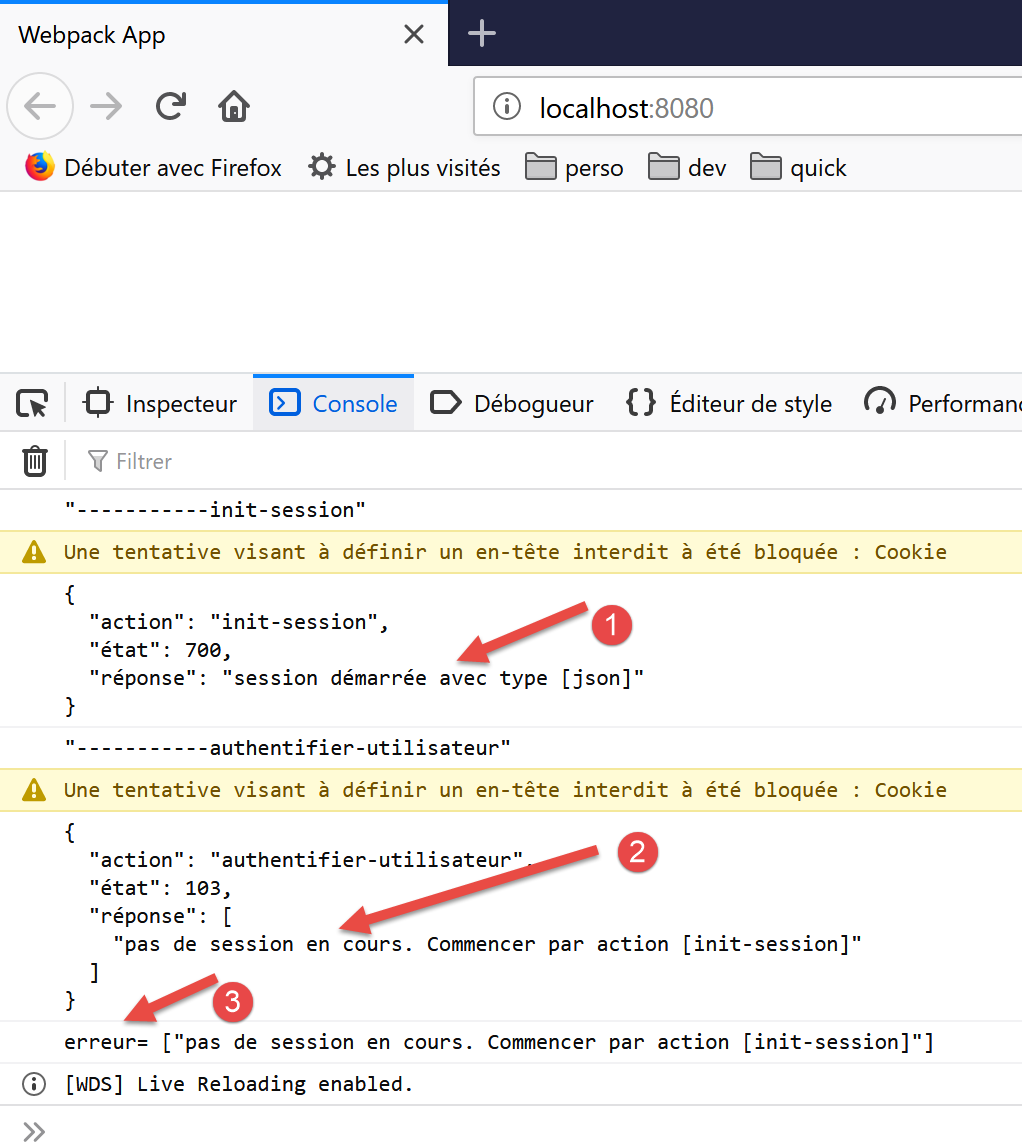
- 在 [1] 中,jSON 会话已正确初始化;
- 在 [2] 时,操作 [authentifier-utilisateur] 失败:服务器提示当前没有会话。 这意味着 JavaScript 客户端未正确回传其在操作 [init-session] 时发送的会话 Cookie;
让我们来分析一下发生的网络通信:
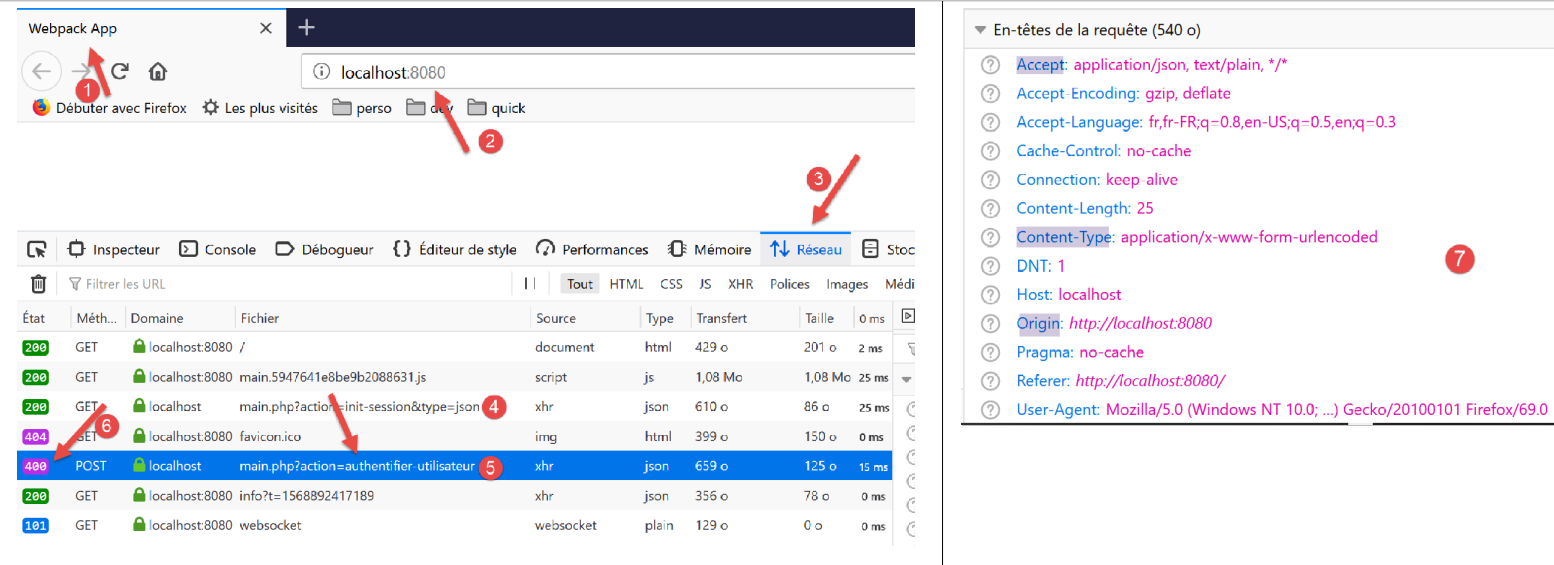
- 在 [4] 中,请求 [init-session]。该请求执行正常,响应状态码为 200;
- 在 [5] 中,请求为 [authentifier-utilisateur]。该请求失败,响应状态码为 400(Bad Request)[6];
若检查请求 [5] 的头部信息 HTTP [7], 可以发现,JavaScript客户端未发送HTTP和[Cookie]这两个头部,而正是这些头部本应使其能够回传服务器最初发送的会话cookie。这就是服务器声明不存在会话的原因。
为了让客户端发送会话cookie,需要在 [axios] 对象中添加以下配置:
// 导入
import axios from 'axios';
import "core-js/stable";
import "regenerator-runtime/runtime";

// 导入
import Dao from './Dao2';
import Métier from './Métier';

// 异步函数[main]
async function main() {
  // axios 配置
  axios.defaults.timeout = 2000;
  axios.defaults.baseURL = 'http://localhost/php7/scripts-web/impots/version-14';
  axios.defaults.withCredentials = true;
  // [dao] 层实例化
  const dao = new Dao(axios);
  // 请求 HTTP
  let taxAdminData;
...
第 15 行要求将 Cookie 包含在请求 [axios] 的 HTTP 请求头中。请注意,在 [node.js] 环境中并不需要这样做。 因此,这两个环境之间的代码存在差异。
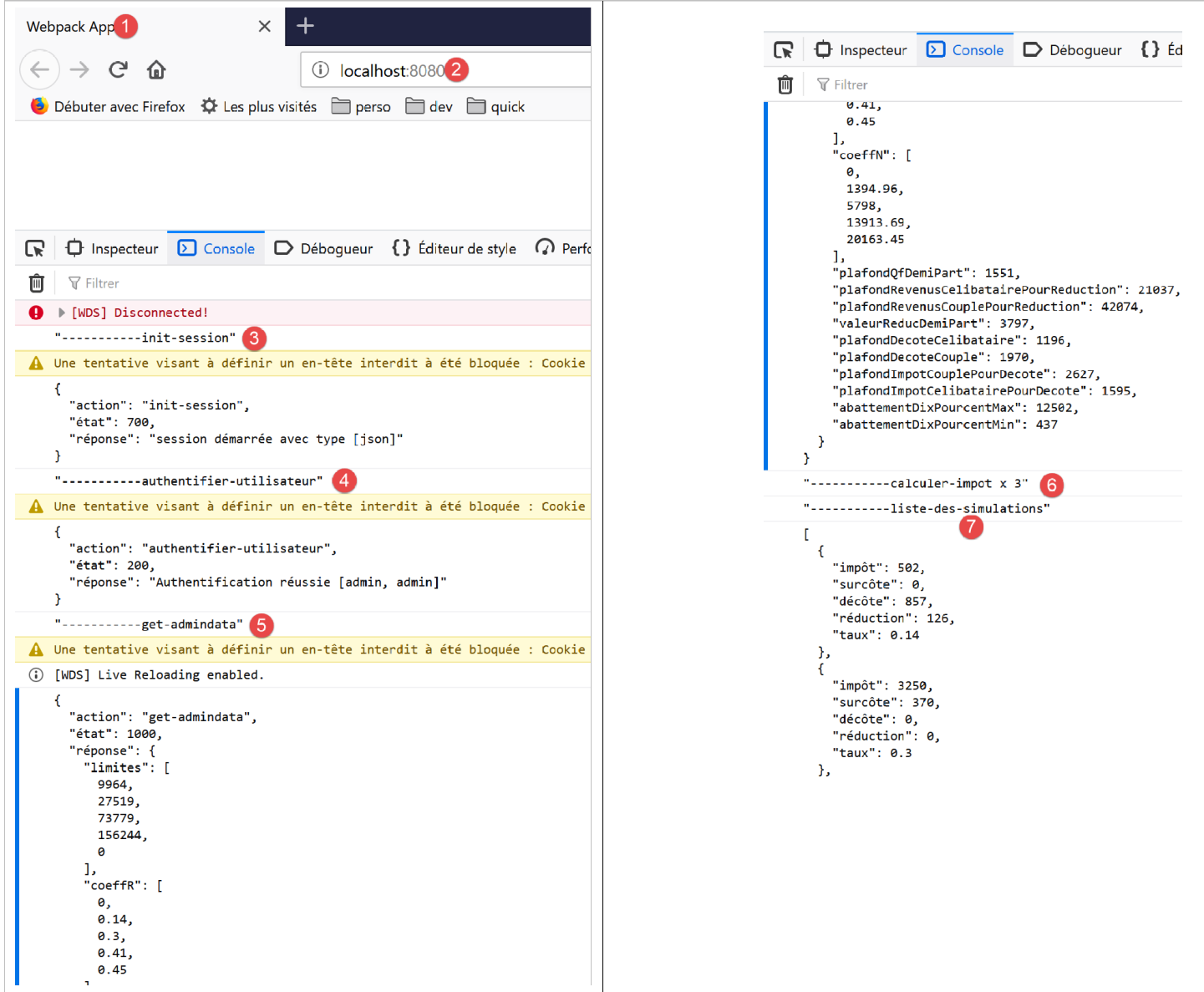
修复此错误后,JavaScript客户端即可正常运行:
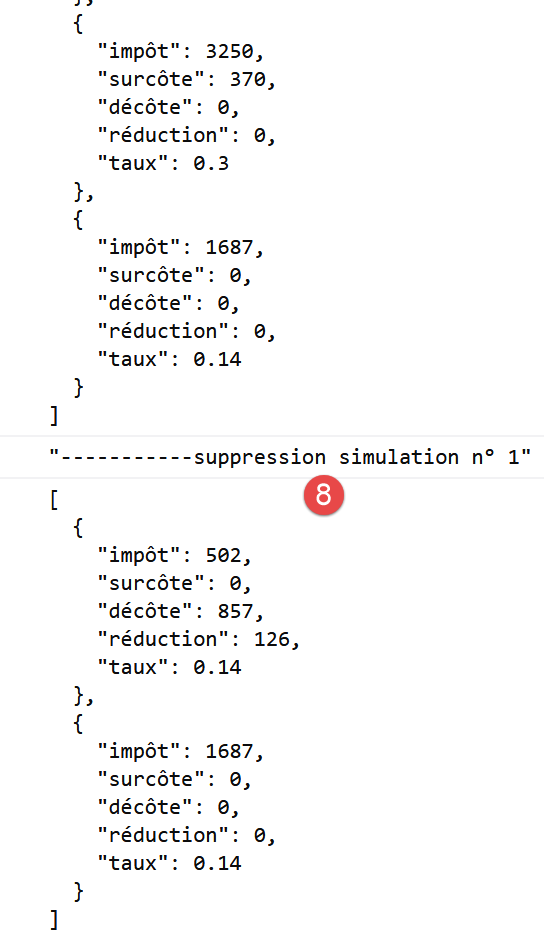
14.5. HTTP 3 客户端的改进
当上述类 [Dao2] 在浏览器中运行时,无需管理会话 Cookie。实际上,托管 [dao] 层的浏览器会负责管理会话 Cookie:它会自动返回服务器发送的任何 Cookie。 因此,类 [Dao2] 可以重写为以下类 [Dao3]:
"use strict";

// 导入
import qs from "qs";

class Dao3 {
  // 构造函数
  constructor(axios) {
    this.axios = axios;
  }

  // 初始化会话
  async initSession() {
    // 请求选项 HHTP [get /main.php?action=init-session&type=json]
    const options = {
      method: "GET",
      // URL的参数
      params: {
        action: "init-session",
        type: "json"
      }
    };
    // 执行查询 HTTP
    return await this.getRemoteData(options);
  }

  async authentifierUtilisateur(user, password) {
    // 查询选项 HHTP [post /main.php?action=authentifier-utilisateur]
    const options = {
      method: "POST",
      headers: {
        "Content-type": "application/x-www-form-urlencoded"
      },
      // 正文 POST
      data: qs.stringify({
        user: user,
        password: password
      }),
      // URL的参数
      params: {
        action: "authentifier-utilisateur"
      }
    };
    // 查询执行 HTTP
    return await this.getRemoteData(options);
  }

  async getAdminData() {
    // HHTP 查询选项  [get /main.php?action=get-admindata]
    const options = {
      method: "GET",
      // URL 的参数
      params: {
        action: "get-admindata"
      }
    };
    // 执行请求 HTTP
    const data = await this.getRemoteData(options);
    // 结果
    return data;
  }

  async getRemoteData(options) {
    // 查询执行 HTTP
    let response;
    try {
      // 异步请求
      response = await this.axios.request("main.php", options);
    } catch (error) {
      // 参数 [error] 是一个异常实例——它可能有各种形式
      if (error.response) {
        // 服务器响应位于 [error.response]
        response = error.response;
      } else {
        // 重新抛出该错误
        throw error;
      }
    }
    // response 包含服务器响应的全部内容 HTTP(HTTP 头部 + 响应正文)
    // 服务器的响应位于 [response.data] 中
    return response.data;
  }
}

// 导出类
export default Dao3;
所有与管理 Cookie 相关的代码均已移除。
我们将前一个项目修改如下:
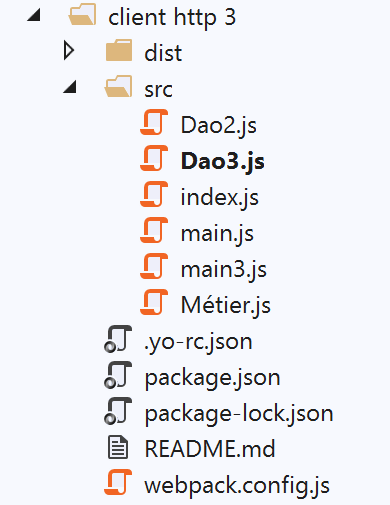
在 [src] 文件夹中,我们添加了两个文件:
- 前面介绍过的类文件 [Dao3];
- 负责启动新版本的文件 [main3];
文件 [main3] 与上一版本的 [main] 保持一致,但现在它使用类 [Dao3]:
// 导入
import axios from "axios";
import "core-js/stable";
import "regenerator-runtime/runtime";

// 导入
import Dao from "./Dao3";
import Métier from "./Métier";

// 异步函数 [main]
async function main() {
  // axios 配置
  axios.defaults.timeout = 2000;
  axios.defaults.baseURL =
    "http://localhost/php7/scripts-web/impots/version-14";
  axios.defaults.withCredentials = true;
  // [dao] 层实例化
  const dao = new Dao(axios);
  // 请求 HTTP
  ...
}

// 日志 jSON
function log(object) {
  console.log(JSON.stringify(object, null, 2));
}

// 执行
main();
文件 [webpack.config] 已修改,现用于执行脚本 [main3]:
/* eslint-disable */

const path = require("path");
const webpack = require("webpack");

/*
 * SplitChunksPlugin is enabled by default and replaced
 * deprecated CommonsChunkPlugin. It automatically identifies modules which
 * should be splitted of chunk by heuristics using module duplication count and
 * module category (i. e. node_modules). And splits the chunks…
 *
 * It is safe to remove "splitChunks" from the generated configuration
 * and was added as an educational example.
 *
* https://webpack.js.org/plugins/split-chunks-plugin/
 *
 */

const HtmlWebpackPlugin = require("html-webpack-plugin");

/*
 * We've enabled HtmlWebpackPlugin for you! This generates a html
 * page for you when you compile webpack, which will make you start
 * developing and prototyping faster.
 *
* https://github.com/jantimon/html-webpack-plugin
 *
 */

module.exports = {
  mode: "development",
  //入口:"./src/mainjs",
  entry: "./src/main3.js",
  output: {
    filename: "[name].[chunkhash].js",
    path: path.resolve(__dirname, "dist")
  },

  plugins: [new webpack.ProgressPlugin(), new HtmlWebpackPlugin()],
...
};
完成上述操作后,在启动税款计算服务器后执行该项目:
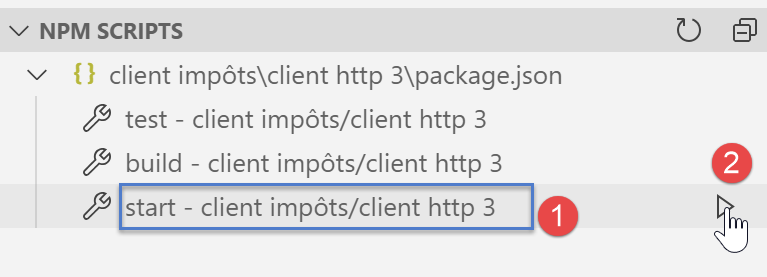
在浏览器控制台中获得的结果与上一版本完全一致。
14.6. Conclusion
现在,我们已具备开发Web应用程序JavaScript代码所需的所有工具。我们可以:
- 使用最新的 ECMAScript 代码;
- 在更简便的 [node.js] 环境中测试该代码的独立组件,以便于调试和测试;
- 随后借助 [babel] 和 [webpack] 工具将该代码移植到浏览器中;