9. Using the DOCX → HTML Converter
The command for converting a Word DOCX document is very similar to that for converting a LibreOffice ODT document. We will modify the document title style in [config.py]:
STYLES = {
    "style_names": [
        "Title"
    ]
}
- line 3: enter ‘Title’. This is the style of the DOCX document you are going to convert. We’ll see this in the converter’s debug logs.
Still in the PyCharm terminal, type the following command:
PS C:\Data\st-2025\GitHub Pages\word-odt-to-html\v2> python .\convert_docx_v18.py .\word-odt-to-html-jan-2026.docx .\config.py
C:\Data\st-2025\GitHub Pages\word-odt-to-html\v2\convert_docx_v18.py:976: SyntaxWarning: invalid escape sequence '\h'
- REF Bookmark \h
--- DOCX to MkDocs Converter V16 ---
Copied: google5179c0eaff293e02.html
Copied: robots.txt
Copied: word-odt-to-html-jan-2026.pdf
Copied: word-odt-to-html-jan-2026.zip
[DEBUG PRE-H1] style=Standard heading=None rebase=0 numId=None ilvl=None list=None:0/None txt='...'
[DEBUG PRE-H1] style=Standard heading=None rebase=0 numId=None ilvl=None list=None:0/None txt='...'
[DEBUG PRE-H1] style=Standard heading=None rebase=0 numId=None ilvl=None list=None:0/None txt='...'
[DEBUG PRE-H1] style=Standard heading=None rebase=0 numId=None ilvl=None list=None:0/None txt='...'
[DEBUG PRE-H1] style=Standard heading=None rebase=0 numId=None ilvl=None list=None:0/None txt='...'
[DEBUG PRE-H1] style=Standard heading=None rebase=0 numId=None ilvl=None list=None:0/None txt='...'
[DEBUG PRE-H1] style=Standard heading=None rebase=0 numId=None ilvl=None list=None:0/None txt='...'
[DEBUG PRE-H1] style=Standard heading=None rebase=0 numId=None ilvl=None list=None:0/None txt='...'
[DEBUG PRE-H1] style=Standard heading=None rebase=0 numId=None ilvl=None list=None:0/None txt='...'
[DEBUG PRE-H1] style=StandardWW heading=None rebase=0 numId=None ilvl=None list=None:0/None txt='...'
[DEBUG PRE-H1] style=StandardWW heading=None rebase=0 numId=None ilvl=None list=None:0/None txt='...'
[DEBUG PRE-H1] style=Title heading=None rebase=0 numId=None ilvl=None list=None:0/None txt='<span>Convert a Word or ODT document to a Mk-compatible static HTML site...'
[DEBUG PRE-H1] style=Standard heading=None rebase=0 numId=None ilvl=None list=None:0/None txt='...'
[DEBUG PRE-H1] style=Standard heading=None rebase=0 numId=None ilvl=None list=None:0/None txt='...'
[DEBUG PRE-H1] style=Standard heading=None rebase=0 numId=None ilvl=None list=None:0/None txt='...'
[DEBUG PRE-H1] style=Standard heading=None rebase=0 numId=None ilvl=None list=None:0/None txt='<b>Serge Tahé</b><span>, January 2026</span>...'
[DEBUG PRE-H1] style=Standard heading=None rebase=0 numId=None ilvl=None list=None:0/None txt='...'
[DEBUG PRE-H1] style=Standard heading=None rebase=0 numId=None ilvl=None list=None:0/None txt='...'
[DEBUG PRE-H1] style=Standard heading=None rebase=0 numId=None ilvl=None list=None:0/None txt='...'
[DEBUG PRE-H1] style=StandardWW heading=None rebase=0 numId=None ilvl=None list=None:0/None txt='...'
[DEBUG PRE-H1] style=StandardWW heading=None rebase=0 numId=None ilvl=None list=None:0/None txt='...'
[DEBUG PRE-H1] style=StandardWW heading=None rebase=0 numId=None ilvl=None list=None:0/None txt='...'
[DEBUG PRE-H1] style=StandardWW heading=None rebase=0 numId=None ilvl=None list=None:0/None txt='<b>This site was created using the [Word or ODT - > HTML] converter cr...'
[DEBUG PRE-H1] style=Title1 heading=1 rebase=0 numId=1 ilvl=0 list=numPr:1/ordered txt='<span>Introduction</span>...'
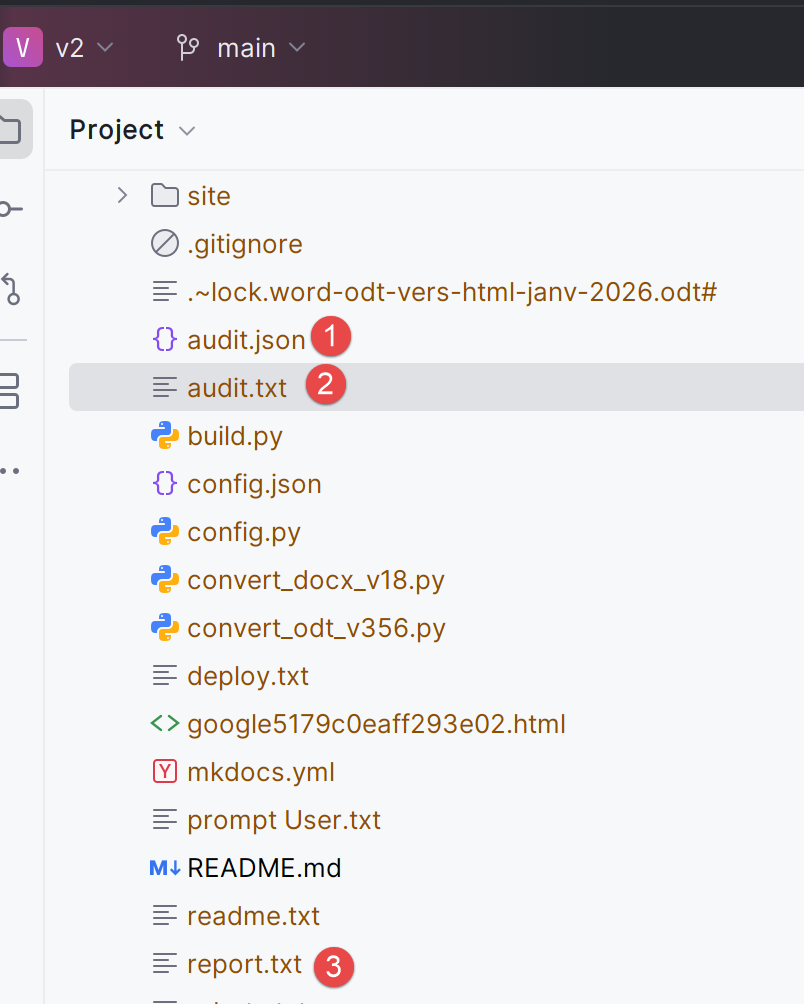
Done. (audit.json, audit.txt, report.txt generated)
- line 1: the command is as follows: [python .\convert_docx_v18.py .\word-odt-to-html-jan-2026.docx .\config.py] (Adjust the version number (here 18) to the version you downloaded.):
- the first parameter [.\convert_docx_v18.py] is the DOCX → HTML converter
- the second parameter [.\word-odt-to-html-jan-2026.docx] is the name of the DOCX document to be converted;
- the third parameter [.\config.py] is the configuration file;
- Line 33: The converter reports that three files have been generated:
 |
The [audit.txt] file is as follows:
Version: V16
Paragraphs: 2029
Tables: 97
Images (blips): 2
Headings detected (raw): 53
Minimum heading level detected (raw): 1
Rebase offset applied: 0

Top paragraph styles:
  - SourceCodenumrot: 1054
  - StandardWW: 594
  - Standard: 146
  - Paragraphedeliste: 113
  - SourceCodenumRotResults: 33
  - new code: 28
  - Title2: 25
  - Heading 1: 14
  - Title 3: 14
  - StandardWWWW: 6
  - Plain text: 1
  - Heading: 1

List paragraphs:
  - with numbering: 1329
  - by style fallback: 49
  - Not recognized: 0
- line 2: the number of paragraphs in the Word document;
- line 3: the number of tables;
- lines 9–21: the styles found in the document;
- lines 10, 14, 15: the style of the code blocks. A single style would probably have sufficed;
- lines 11–12, 19: the style of standard paragraphs. A single style would likely have sufficed;
- lines 16–18, 21: the styles of the document’s headings. On line 21, we see that only one paragraph has the ‘Heading’ style. This is the document title that precedes the first ‘Heading 1’;
This audit of the Word document is a good way to assess the document's quality. Here I can see that I've used too many different styles for the same thing in my Word document.
The [audit.json] file is identical to the [audit.txt] file but in JSON format:
{
  "version": "V16",
  "file": "word-odt-to-html-jan-2026.docx",
  "counts": {
    "paragraphs": 2029,
    "tables": 97,
    "image_blips": 2,
    "headings_raw": 53
  },
  "lists": {
    "with_numpr": 1329,
    "by_style": 49,
    "unrecognized": 0
  },
  "heading": {
    "min_level_raw": 1,
    "rebase_offset": 0
  },
  "top_styles": [
    [
      "SourceCodenumrot",
      1054
    ],
    [
      "StandardWW",
      594
    ],
    [
      "Standard",
      146
    ],
    [
      "ListParagraph",
      113
    ],
    [
      "SourceCodeNumberResults",
      33
    ],
    [
      "newcode",
      28
    ],
    [
      "Title2",
      25
    ],
    [
      "Title1",
      14
    ],
    [
      "Title3",
      14
    ],
    [
      "StandardWWWW",
      6
    ],
    [
      "PlainText",
      1
    ],
    [
      "Title",
      1
    ]
  ]
}
The [report.txt] file is as follows:
[SUMMARY] Lists detected via "by style" fallback (aggregated)
  - Paragraphedeliste -> level=1 type=unordered: 49

[SUMMARY] Ignored Word blocks (aggregated)
  - <w:sectPr>: 1
I didn’t understand that…
It is possible to request only an audit of the Word document to assess its quality using the [--audit] parameter:
python .\convert_docx_v18.py .\word-odt-to-html-jan-2026.docx .\config.py --audit
In this case, only the document audit is performed. The MkDocs site is not generated.
As shown earlier, you can view the MkDocs site generated by the converter:
PS C:\Data\st-2025\GitHub Pages\word-odt-to-html\v2> python -m mkdocs serve
INFO    -  Building documentation...
INFO    -  Cleaning site directory
INFO    -  Documentation built in 0.59 seconds
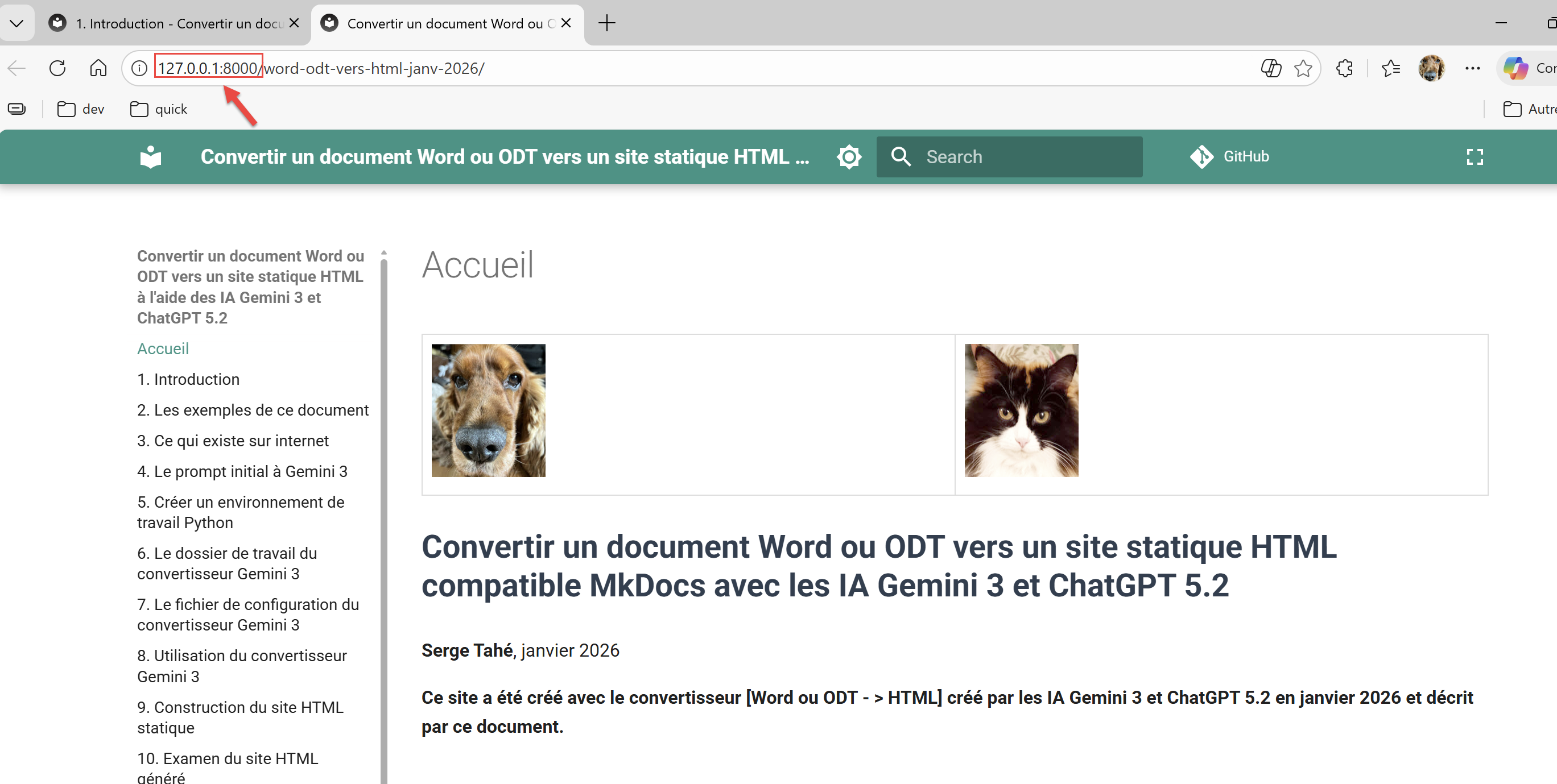
INFO    -  [06:05:48] Serving on http://127.0.0.1:8000/word-odt-vers-html-janv-2026/
Ctrl-Click on the URL in line 5:
 |