6. The converter’s working directory
You can download the working directory |HERE|.
The working directory is as follows:
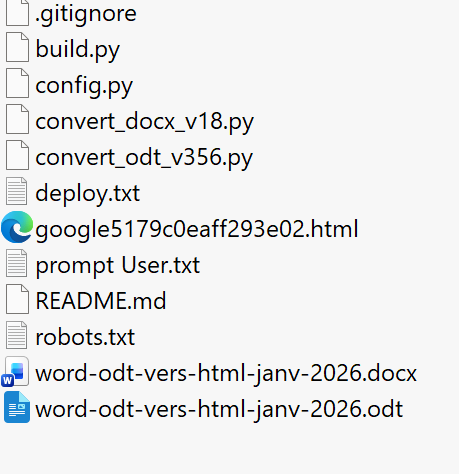 |
- For now, we will ignore the following files [.gitignore, deploy.txt, google*.html, README.md, robots.txt, deploy.txt]. These are files that will be used to deploy the locally generated HTML site to GitHub;
- [prompt User.txt] is the prompt I used to start the iterations with Gemini;
- The file [word-odt-vers-html-janv-2026.odt] is the ODT document for this article. It is converted to HTML by the script [convert_odt_v356.py];
- The file [word-odt-to-html-jan-2026.docx] is the DOCX document for this same article. It is converted to HTML by the script [convert_docx_v18.py];
- The scripts [convert*.py] and [build.py] are the two Python scripts generated by the AI;
- [convert*] converts an ODT or DOCX document into a [MkDocs] site. A MkDocs site is a static site whose pages are written using [Markdown] syntax. [MkDocs] provides a server capable of displaying MkDocs sites;
- [build] converts the MkDocs site into a standard static HTML site. At the end of this conversion, it opens a browser to display the site’s root directory;
At no point will we look at the generated Python code. We will treat both scripts as black boxes. At no point did I modify the code manually. I always asked Gemini / ChatGPT to correct its own script. That is why it is not necessary to know Python to use the converter.
- [config.py] is a configuration file for the [convert*] scripts. Initially, [convert*] did not have a configuration file. Then, as I switched between documents to convert, I gradually realized that there were elements I was asking the AI to generate (for example, the site name, which changes for each document) that would be better placed in a configuration file that the user could modify themselves. I built this file as well through iterations with the AI;