2. Examples from this document
I’d like to write a short article. The interactions between an AI and a user are presented in the article [Generating a Python Script with AI Tools], which I’ll refer to from now on as [ref1]. Interactions with Gemini and ChatGPT will only be mentioned briefly. In any case, it was impossible to present all the iterations.
I will now present examples of the specific features of my ODT/DOCX documents that the Gemini/ChatGPT converter handles correctly. It is this very document that we will submit for HTML conversion to the Gemini/ChatGPT script. We’ll see what it does with it.
2.1. Lists
The Gemini/ChatGPT converter can handle bulleted and numbered lists, even if they are nested:
2.1.1. Bulleted lists s
- Item 1;
- Item 2:
- Item 3;
- Item 3.1;
- Item 3.1.1
- Element 3.1.2
- Element 3.1.2.1
- Element 3.1.2.2
- Element 3.2;
- Item 3.1;
- Element 4;
2.1.2. Numbered lists
- Element 1;
- Element 2;
- Element 2.1
- Element 2.1.1
- Element 2.1.1.1
- Element 2.1.1.2
- Element 2.1.2
- Element 2.1.1
- Element 2.2
- Element 2.1
- Element 3;
2.1.3. Mixed lists 1
- Element 1;
- Element 2:
- Element 3;
- Element 3.1;
- Element 3.1.1
- Element 3.1.2
- Element 3.1.2.1
- Element 3.1.2.2
- Element 3.2;
- Element 3.1;
- Element 4;
2.1.4. Mixed lists 2
- Element 1;
- Element 2;
- Element 2.1
- Element 2.1.1
- Element 2.1.1.1
- Element 2.1.1.2
- Element 2.1.2
- Element 2.1.1
- Element 2.2
- Element 2.1
- Element 3;
2.1.5. Manually numbered lists
Manual numbering here means that the user sets the number of a numbered paragraph: [right-click on the numbered paragraph / Paragraph / Paragraph / Restart Numbering / Start With].
I start a list with a number other than 1.
- Element 6
- Element 7
Here I break the list to say something, but then I want to continue the numbering.
- Item 8
- Item 9
Then I start a new numbered list:
- item 11
- item 12
2.2. Code blocks
My courses contain a lot of code blocks. These are often formatted code (bold, keyword colors) from IDEs (Eclipse, PyCharm, WebStorm, NetBeans). This formatted code is rendered identically by the converter.
When the code is not formatted (code from Notepad or similar), the Gemini/ChatGPT converter recognizes it (Java, C#, XML, HTML, etc.) using language keywords specified in a configuration file. When it recognizes a language, it inserts a marker (fence) for MkDocs so that MkDocs can adapt the syntax highlighting of the code to the language used in the code block.
2.2.1. Enriched code blocks (Eclipse, Visual Studio, etc.)
Here are code blocks enhanced by various IDEs:
Java
package istia.st.spring.core;

import java.util.ArrayList;
import java.util.List;

import org.springframework.context.ApplicationContext;
import org.springframework.context.support.ClassPathXmlApplicationContext;

public class Demo01 {

    @SuppressWarnings({ "unchecked", "resource" })
    public static void main(String[] args) {
        // Retrieve the Spring context
        ApplicationContext ctx = new ClassPathXmlApplicationContext("config-01.xml");
        // Retrieve the beans
        Person p01 = ctx.getBean("person_01", Person.class);
        Person p02 = ctx.getBean("person_02", Person.class);
        List<Person> club = ctx.getBean("club", new ArrayList<Person>().getClass());
        Apartment apt01 = ctx.getBean(Apartment.class);
...
C#
using System;

namespace Chap1 {
    class Taxes {
        static void Main(string[] args) {
            // Data arrays needed to calculate the tax
            decimal[] limits = { 4962M, 8382M, 14753M, 23888M, 38868M, 47932M, 0M };
            decimal[] coeffR = { 0M, 0.068M, 0.191M, 0.283M, 0.374M, 0.426M, 0.481M };
            decimal[] coeffN = { 0M, 291.09M, 1322.92M, 2668.39M, 4846.98M, 6883.66M, 9505.54M };

            // retrieve marital status
            bool OK = false;
            string response = null;
            while (!OK) {
                Console.Write("Are you married (Y/N)?");
                response = Console.ReadLine().Trim().ToLower();
                if (response != "y" && response != "n")
                    Console.Error.WriteLine("Incorrect answer. Please try again");
                else OK = true;
            }//while
            bool marie = response == "y";
...
Python
# ----------------------------------
def display(string):
    # displays string
    print("string=%s" % string)


# ----------------------------------
def display_type(variable):
    # displays the variable type
    print("type[%s]=%s" % (variable, type(variable)))


# ----------------------------------
def f1(param):
    # adds 10 to param
    return param + 10


# ----------------------------------
def f2():
    # returns a tuple of 3 values
    return "one", 0, 100


# -------------------------------- main program ------------------------------------
...
PHP
<?php

// strict types for function parameters
declare(strict_types=1);

// global constants
define("HALF-RATE_INCOME_LIMIT", 1551);
define("INCOME_LIMIT_SINGLE_PERSON_FOR_REDUCTION", 21037);
define("INCOME_LIMIT_FOR_COUPLES_FOR_REDUCTION", 42074);
define("REDUCTION_VALUE_HALF_PORTION", 3797);
define("SINGLE_PERSON_DISCOUNT_LIMIT", 1196);
define("COUPLE_DEDUCTION_LIMIT", 1970);
define("COUPLE_INCOME_THRESHOLD_FOR_DEDUCTION", 2627);
define("SINGLE_TAX_CAP_FOR_DEDUCTION", 1595);
define("MAXIMUM_10_PERCENT_DEDUCTION", 12502);
define("MINIMUM_10_PERCENT_DEDUCTION", 437);

// definition of local constants
$DATA = "taxpayersdata.txt";
$RESULTS = "results.txt";
$limits = array(9964, 27519, 73779, 156244, 0);
$coeffR = array(0, 0.14, 0.3, 0.41, 0.45);
$coeffN = array(0, 1394.96, 5798, 13913.69, 20163.45);

// read data
$data = fopen($DATA, "r");
if (!$data) {
  print "Unable to open the data file [$DATA] for reading\n";
  exit;
}

...
ECMAScript
'use strict';
// this is a comment
// constant
const name = "dupont";
// display on screen
console.log("name: ", name);
// an array with elements of different types
const array = ["one", "two", 3, 4];
// its number of elements
let n = array.length;
// a loop
for (let i = 0; i < n; i++) {
  console.log("array[", i, "] = ", array[i]);
}
// Initializing 2 variables with the contents of an array
let [string1, string2] = ["string1", "string2"];
// concatenating the two strings
const string3 = string1 + string2;
// display result
console.log([string1, string2, string3]);
...
VBScript
' Calculating a taxpayer's tax
' the program must be called with three parameters: married children salary
' married: character O if married, N if unmarried
' children: number of children
' salary: annual salary without cents

' mandatory variable declaration
  Option Explicit
  Dim error

' retrieve the arguments and check their validity
  Dim wife, children, salary
  error = GetArguments(wife, children, salary)
  ' error?
  If error(0) <> 0 Then wscript.echo error(1) : wscript.quit error(0)

' Retrieve the data needed to calculate the tax
  Dim limits, coeffR, coeffN
  error = getData(limits, coeffR, coeffN)
  ' error?
  If error(0) ≠ 0 Then wscript.echo error(1) : wscript.quit 5

  ' Display the result
  wscript.echo "tax=" & calculateTax(spouse,children,salary,limits,coeffR,coeffN)

  ' exit without error
  wscript.quit 0
XML
<?xml version="1.0" encoding="utf-8" ?>
<configuration>

  <configSections>
    <sectionGroup name="spring">
      <section name="context" type="Spring.Context.Support.ContextHandler, Spring.Core" />
      <section name="objects" type="Spring.Context.Support.DefaultSectionHandler, Spring.Core" />
    </sectionGroup>
  </configSections>

  <spring>
    <context>
      <resource uri="config://spring/objects" />
    </context>
    <objects xmlns="http://www.springframework.net">
      <object name="dao" type="Dao.DataBaseImpot, ImpotsV7-dao">
        <constructor-arg index="0" value="MySql.Data.MySqlClient"/>
        <constructor-arg index="1" value="Server=localhost;Database=bdimpots;Uid=admimpots;Pwd=mdpimpots;"/>
        <constructor-arg index="2" value="select limit, coeffr, coeffn from tranches"/>
      </object>
      <object name="job" type="Job.JobTax, TaxesV7-job">
        <constructor-arg index="0" ref="dao"/>
      </object>
    </objects>
  </spring>
</configuration>
2.2.2. Plain text code blocks
Here are some examples of plain text:
Execution results
Note that the code does not start on line 1.
This case required dozens of iterations. The converter could never find the line number of the first line of code. Finally, I asked Gemini how to format the code block so that it would recognize it. Here is what it replied:
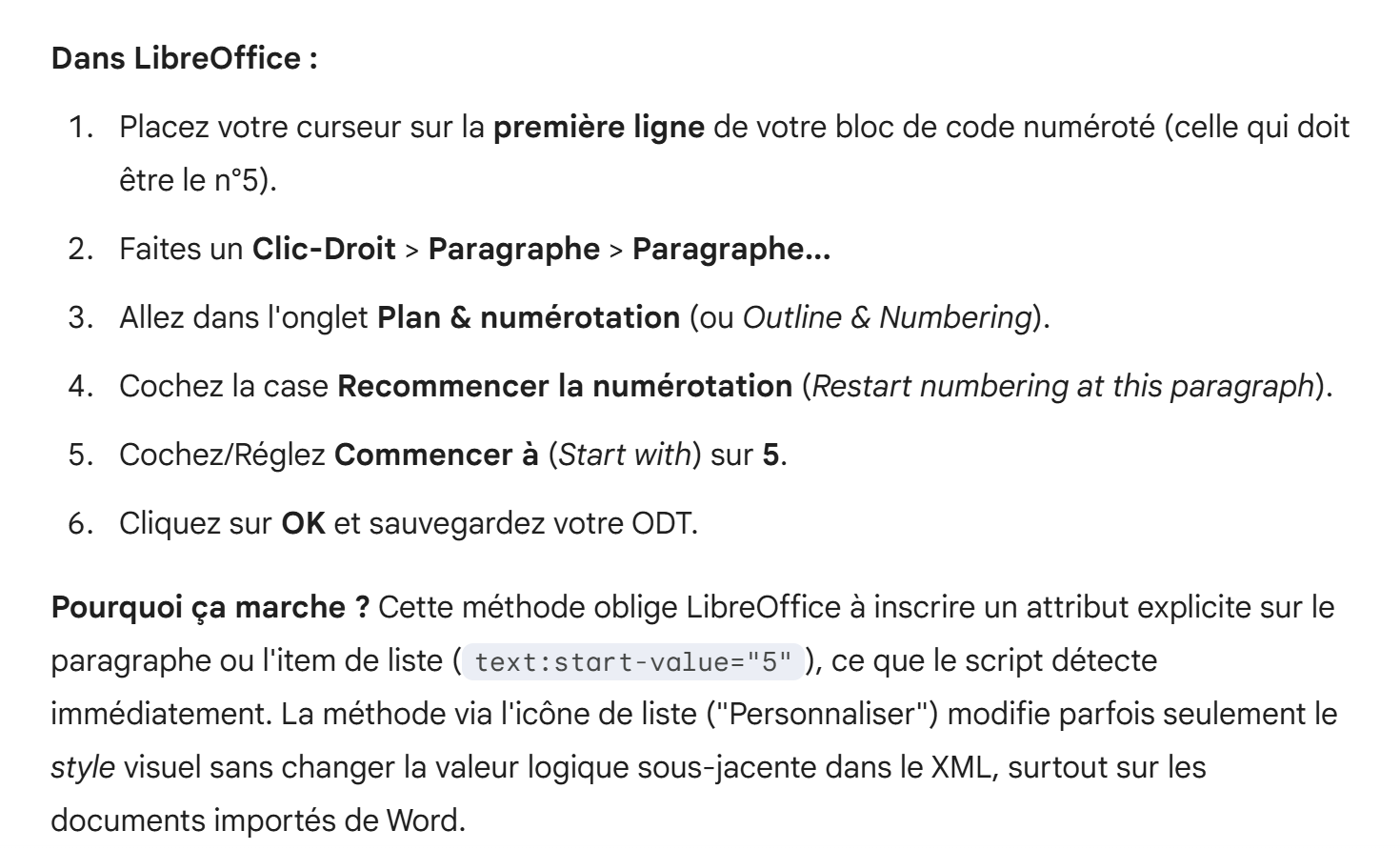
I followed these steps and it worked. I was using the method via the list icon (Customize). So you may need to modify certain elements of the ODT/DOCX document to get the result you want.
The converter can handle unnumbered code blocks.
Here are the same examples as in the "2.2.1 " section, but without additional information. In this case, the keywords in the configuration file will guide the converter to the correct language.
Java
C#
Python
PHP
ECMAScript
VBScript
XML
HTML
2.3. Links
The Gemini / ChatGPT converter preserves external links in ODT / DOCX documents. For example, Gemini 3 or [Generate a Python script with AI tools].
It can handle a link to a chapter Link to a chapter
A reference to a chapter:2.1.1 .
A reference to a preceding text marker:
A reference to a text anchor that follows: GitHub
2.4. Text formatting
The converter supports bold, italic, underlined, and highlighted text. It preserves the highlight color.
Text with words in bold, italics, underlined, or highlighted.
This also applies to links: [Generate a Python script with AI tools].
The converter also handles character colors.
It also handles the top and bottom borders of paragraphs.
It also handles the top and bottom borders of paragraphs.- It also handles the top and bottom borders of paragraphs.
- It also handles the top and bottom borders of paragraphs.
It also handles the top and bottom borders of paragraphs.- It also manages the top and bottom borders of paragraphs.
- It also handles the top and bottom borders of paragraphs.
- Text with words in bold, italics, underlined, or highlighted.
- This also applies to links: [Generate a Python script with AI tools].
- The converter also handles character colors.
- A text with words in bold, italics, underlined, or highlighted.
- This also applies to links: [Generate a Python script using AI tools].
- The converter also handles character colors.
- It also handles the paragraph background
- It also handles the paragraph background
2.5. A title can also be enhanced.
2.6. Images
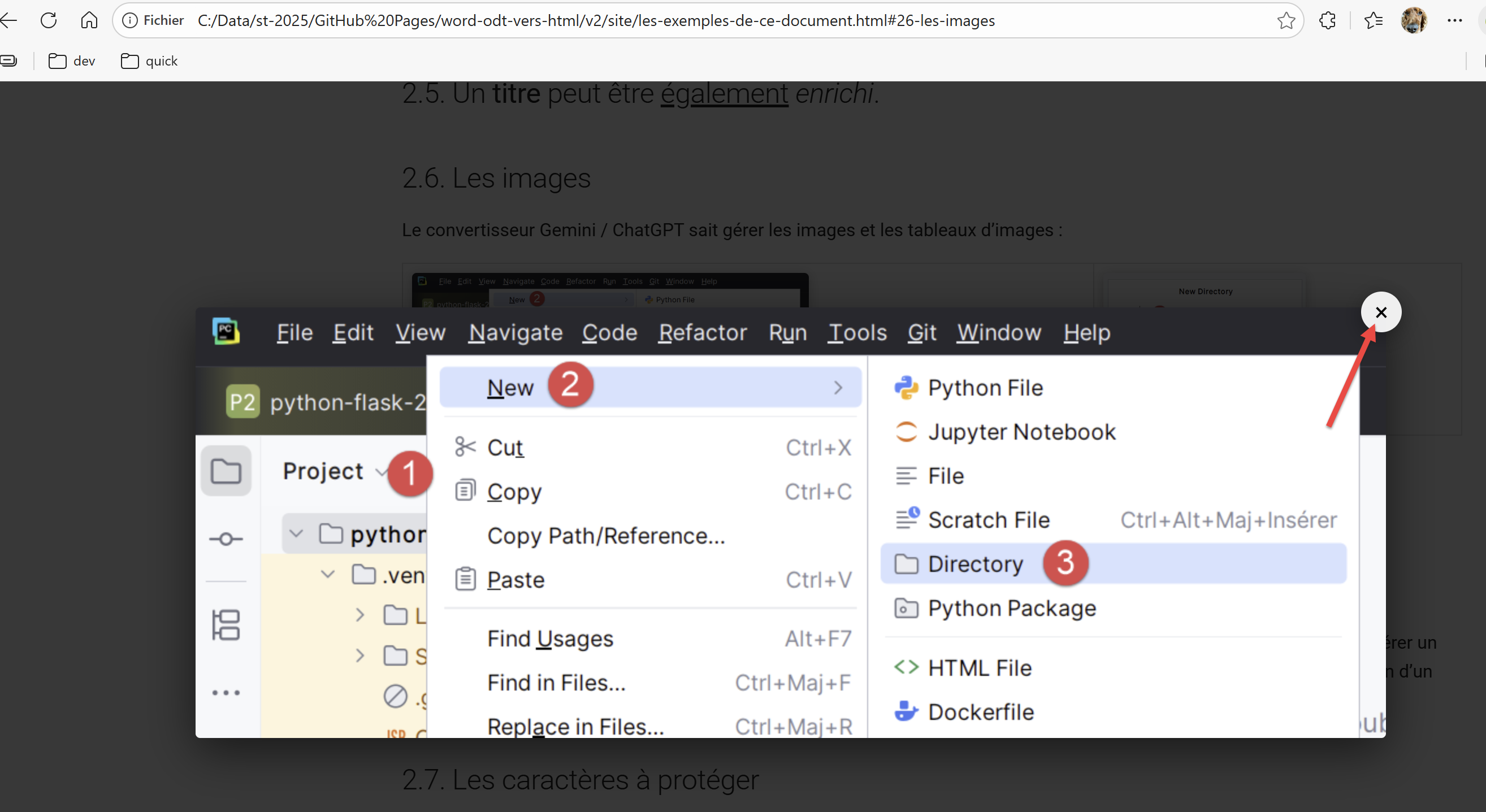
The Gemini/ChatGPT converter can handle images and image tables:
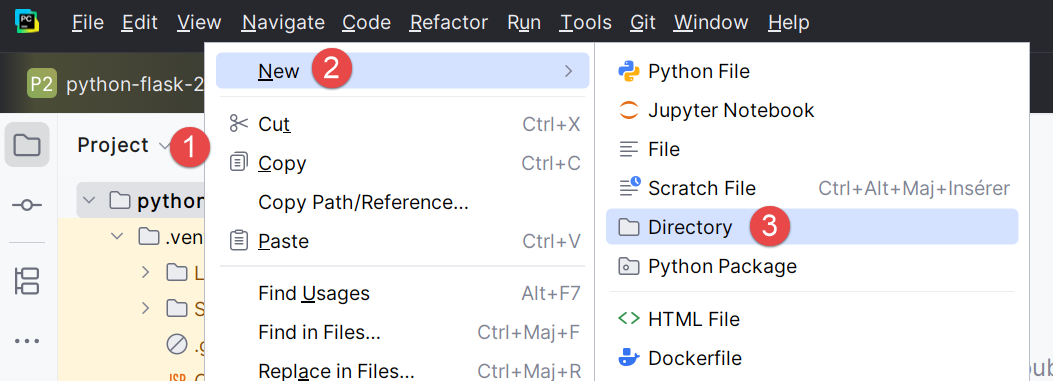 | 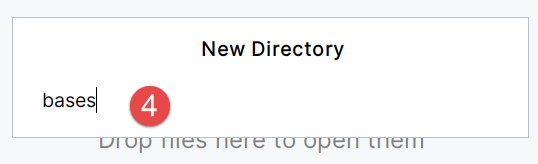 |
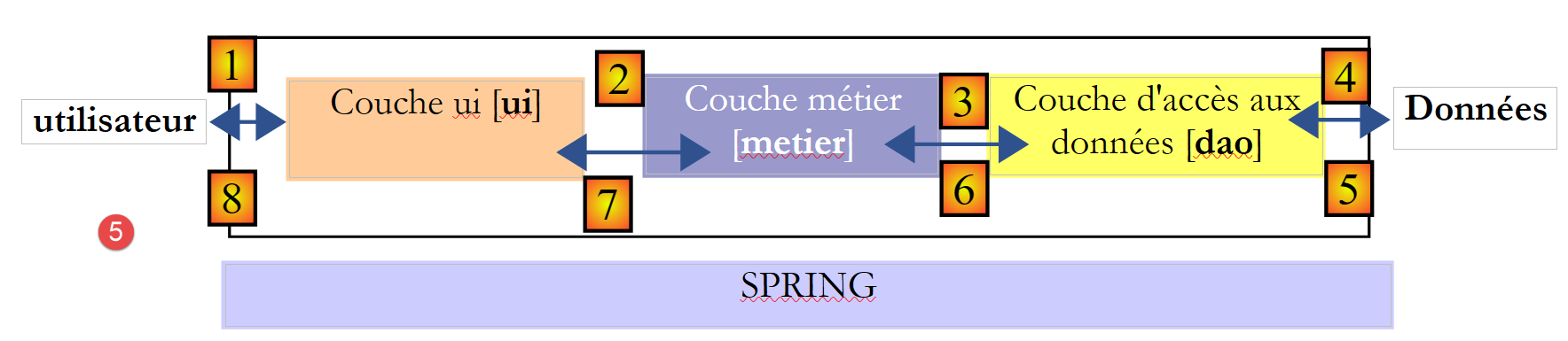
In ODT documents, it is common to have drawings. Despite dozens of attempts, Gemini was unable to generate a script that would produce an image (such as a screenshot) of the drawing. Thus, in the example above, Image 5 is a screenshot of a drawing from an ODT document.
All images are clickable to enlarge. If you click on image [1-3] above, you get the following enlarged view:
 |
2.7. Characters to protect
A MkDocs site1 has pages whose content is not HTML but Markdown. If the ODT/DOCX document contains characters that exist in Markdown, they may be interpreted by MkDocs and therefore not render as expected. Here are two examples:
The asterisk * has a Markdown meaning. The following line may therefore be misinterpreted:
The tax I is then equal to 0.15*R – 2072.5*nbParts.
Another example is when you want to insert a Markdown code block into your document like this:
2.8. Tables
A table can contain various types of content:
1 | 2 |  | |
3 | 4 |  | |
An array containing links:
The Gemini / ChatGPT converter preserves external links from the ODT / DOCX document. For example Gemini 3 or It can handle a link to a chapter Link to a chapter | A reference to a chapter:2.1.1 . A reference to a text marker that follows: GitHub |
A table whose cells contain another table:
is used both to generate the HTML tag <form> and to provide information to the controller that will process this form:
Note that the method used to send form parameters (GET/POST) to the controller is not specified. This could be done using the method attribute. If this attribute is missing, the POST method is used by default. | |||||||
Used to generate the <input type="text" value="..."> tag:
|
It also manages the background of the paragraph within a table
|
2.9. Footnotes
The Gemini2 / ChatGPT converter handles footnotes. Here is another footnote3 .
-
Footnote ↩