7. The converters’ configuration files
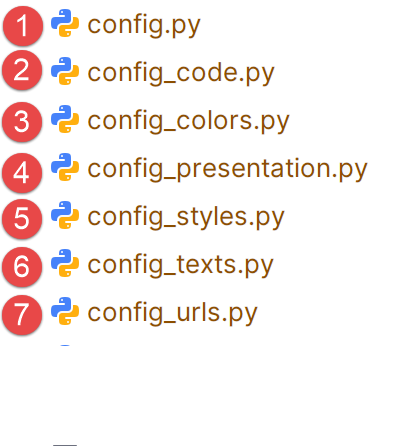 |
The configuration file [config.py] collects the information that may vary from one document to another. It uses six other configuration files. These files contain the settings most likely to change when switching between documents for conversion.
The [config.py] file imports the contents of the six other configuration files:
from config_urls import URLS
from config_texts import TEXTS
from config_code import CODE
from config_styles import STYLES
from config_colors import COLORS
from config_presentation import PRESENTATION
config_urls
This file contains the three URLs from the [config.py] configuration. These change with each document.
URLS = {
"site_url": "https://stahe.github.io/word-odt-vers-html-janv-2026/",
"repo_url": "https://stahe.github.io/word-odt-vers-html-janv-2026",
"author_site": "https://tahe.developpez.com",
}
- line 2: the URL of the website where you will deploy the HTML site generated by the converter;
- line 3: the URL of your Git repository (see section12 );
- line 4: the website of the site creator. This URL is placed at the bottom of the website’s pages. May be empty.
config_texts
This file contains the texts from [config.py] that may change when the language of the generated HTML site is changed.
TEXTS = {
"home_label": "Home",
"site_name": "Convert a Word or ODT document to a MkDocs-compatible static HTML site using Gemini 3 and ChatGPT 5.2 AI",
"site_description": "Convert a Word or ODT document to a MkDocs-compatible static HTML site with Gemini 3 and ChatGPT 5.2 AI",
"toggle_to_dark": "Switch to dark mode",
"toggle_to_light": "Switch to light mode",
"footer_license_sentence": (
"This tutorial written by <strong>Serge Tahé</strong> is made available to the public under the terms of the\n"
"        <em>Creative Commons Attribution-NonCommercial-\n"
"        ShareAlike 3.0 Unported</em>.\n"
),
"copy_label": "Copy",
"copy_copied_label": "Copied",
}
- line 2: the name of the first link in the table of contents. Its content includes everything in the document before the first Level 1 heading (Heading 1). This is the beginning of the document;
- line 3: the document title. It is displayed in the top banner of the generated website;
- line 4: also the document title, this time intended for search engines;
- lines 5–6: the tooltips displayed when you hover over the icon in the top bar of the site to switch from light mode to dark mode or vice versa;
- lines 7–11: the site’s license. It is displayed in the footer of the generated site;
- lines 12–13: the code displayed on the site, accompanied by a button that allows you to copy the code to the clipboard. Line 12 is the button label before copying, line 13 is the label after the code has been copied;
Here is what this file looks like for an English version of the document:
TEXTS = {
    "home_label": "Welcome",
    "site_name": "Convert a Word or ODT document into a static HTML website using Gemini 3 and ChatGPT 5.2",
    "site_description": "Convert a Word or ODT document into a static HTML website using Gemini 3 and ChatGPT 5.2 AI",
    "toggle_to_dark": "Switch to dark mode",
    "toggle_to_light": "Switch to light mode",
    "footer_license_sentence": (
        'This tutorial written by <strong>Serge Tahé</strong> is made available to the public under the terms of the\n'
        '<em>Creative Commons Attribution – Non-Commercial –\n'
        'ShareAlike 3.0 Unported</em>.'
    ),
    "copy_label": "Copy",
    "copy_copied_label": "Copied",
}
config_styles
This file is used to specify the style name for the document title. For a DOCX document, this is usually "Title," but for an ODT document, it varies by document.
STYLES = {
"style_names": [
"P1"
]
}
- Line 2: [styles_names] is an array. You can put the names of the styles that the document title can have in it;
- line 3: the document [word-odt-to-html-jan-2026.odt] has a title with the P1 style;
config_code
Code blocks in the DOCX or ODT document can be found in two forms:
- rich text (colors, bold, italics, etc.). In this case, it is copied as-is into the HTML page;
- plain text. In this case, instructions are provided to the converters so they can identify the language used in the code block themselves. To do this, keywords are provided:
CODE = {
# Automatic language detection rules based on content
"detection_rules": {
"csharp": [
"using", "Console.WriteLine", "public static void Main", "WebMethod",
"TryParse", "EventArgs", "String.Format", "System.Web.Services"
],
"java": [
"System.out.println", "public static void main(String", "package",
"JUnitTest", "Class.forName", "PreparedStatement", "private static void",
"private void", "getAgendaMedecinJour", "@PostConstruct", "@ResponseBody",
"@RequestMapping", "getDoctor", "@Entity", "@Autowired", "@Bean",
"Serializable", "getClient", "getTimeSlot", "getAppointment", "PostAddAppointment",
"PostDeleteAppointment", "@EnableJpaRepositories", "@Component", "getDoctorScheduleToday",
"getResponse", "getMessagesForException", "getBase64", "addAppointment",
"Response", "getPartialViewAgenda", "setModelForAgenda", "ActionContext",
"getActionContext", "PostLang", "PostUser", "PostGetAgenda", "@NotNull",
"@EnableAutoConfiguration", "HttpSecurity"
],
"html": [
"<html>", "</div>", "<body>", "<script>", "href=", "<span>", "<p>",
"<h2>", "<form", "<table", "<input"
],
"sql": [
"SELECT", "INSERT INTO", "UPDATE", "DELETE FROM", "WHERE",
"CREATE TABLE", "ALTER TABLE"
],
"python": [
"def", "import", "print(", "from"
],
"xml": [
"<?xml", "<project", "<version>", "<configuration>", "<build>",
"<dependency>", "<properties>", "<configuration>", "<start-class>"
],
"javascript": [
"use strict", "console.log", "let", "constructor", "async", "export"
],
"php": [
"<?php", "declare", "require"
],
"vbscript": [
"Option", "Dim", "Explicit"
],
"markdown": [
"# ", "## ", "### ", "**", "__", "; "
"backdrop-filter:saturate(180%) blur(6px); "
"cursor:pointer; user-select:none; "
"transition:transform .08s ease, box-shadow .12s ease, background .12s ease; "
"z-index:5;"
),
"btn_hover": (
"box-shadow: 0 3px 10px rgba(0,0,0,.18); "
"transform:translateY(-1px);"
),
"btn_copied": "opacity: 0.85;"
},
# -------------------------------------------------------------------------
# Images
# -------------------------------------------------------------------------
"images": {
"shadow": {
"enabled": True,
"border_radius": "8px"
}
},
# -------------------------------------------------------------------------
# Frame / header border
# -------------------------------------------------------------------------
"frame": {
"header_top_border_width": "4px"
}
}
If you wish, you can modify the appearance:
- lines 5–10: the document title;
- lines 15–19: the rich text lines;
- lines 24–45: the [Copy] button, which allows you to copy code to the clipboard;
- lines 50–55: the shadows of the images;
- lines 60–62: the border around the top bar of the site’s pages;
config_colors
This is the file where you control your site’s colors, primarily the background color of the top banner on the pages:
COLORS = {
    "theme": {
        "palette": {
            "light": {
                "media": "(prefers-color-scheme: light)",
                "scheme": "default",
                "primary": "teal",
                "accent": "purple"
            },
            "dark": {
                "media": "(prefers-color-scheme: dark)",
                "scheme": "slate",
                "primary": "teal",
                "accent": "purple"
            }
        }
    },

    "frame": {
        # "header_bg_light": "#1E88E5", (blue)
        "header_bg_light": "",
        "header_bg_dark": "",
        "header_top_border_light": "",
        "header_top_border_dark": ""
    },

    "document_title": {
        "color": "#2c3e50"
    },

    "copy_button": {
        "border": "rgba(0,150,136,.45)",
        "background": "rgba(0,150,136,.12)",
        "text": "rgb(0,150,136)",
        "background_hover": "rgba(0,150,136,.20)"
    },

    "images": {
        "shadow": {
            "zoomable": "0 8px 24px rgba(0,0,0,.28), 0 18px 60px rgba(0,0,0,.20)",
            "zoomable_hover": "0 12px 30px rgba(0,0,0,.32), 0 26px 80px rgba(0,0,0,.22)",
            "lightbox": "0 24px 80px rgba(0,0,0,.65)"
        }
    }
}
Here, you need to know a little bit about CSS, which I don’t. I only used the colors from lines 7 and 13, which set the color of the top banner.
config_files_to_copy
This file lists the files that must be copied to the root of the generated website:
FILES_TO_COPY =[
    "google5179c0eaff293e02.html",
    "robots.txt",
    "word-odt-to-html-jan-2026.pdf",
    "word-odt-to-html-jan-2026.zip"
]
- lines 2-3: are required for Google to track the generated site (see section13 );
- lines 4-5: the files you want to copy to the root of your website to make them available to your visitors;
config
The [config.py] file is the configuration file used by both converters. It contains all the information they need. This is a file that should normally never be modified. It is complex, which is why we decided to extract the configuration parameters that are likely to change and place them in external files.
from config_urls import URLS
from config_texts import TEXTS
from config_code import CODE
from config_styles import STYLES
from config_colors import COLORS
from config_presentation import PRESENTATION
from config_files_to_copy import FILES_TO_COPY

config = {
    "toc": {
        "home_label": TEXTS["home_label"]
    },

    "mkdocs": {
        "site_name": TEXTS["site_name"],
        "site_url": URLS["site_url"],
        "site_description": TEXTS["site_description"],
        "site_author": "Serge Tahé",
        "repo_url": URLs["repo_url"],
        "repo_name": "GitHub",
        "use_directory_urls": False,

        "theme": {
            "name": "material",
            "custom_dir": "overrides",
            "features": [
                "navigation.sections",
                "navigation.indexes",
                "navigation.expand",
                "toc.integrate",
                "navigation.top"
            ],
            "palette": [
                {
                    "media": COLORS["theme"]["palette"]["light"]["media"],
                    "scheme": COLORS["theme"]["palette"]["light"]["scheme"],
                    "primary": COLORS["theme"]["palette"]["light"]["primary"],
                    "accent": COLORS["theme"]["palette"]["light"]["accent"],
                    "toggle": {
                        "icon": "material/brightness-7",
                        "name": TEXTS["toggle_to_dark"]
                    }
                },
                {
                    "media": COLORS["theme"]["palette"]["dark"]["media"],
                    "scheme": COLORS["theme"]["palette"]["dark"]["scheme"],
                    "primary": COLORS["theme"]["palette"]["dark"]["primary"],
                    "accent": COLORS["theme"]["palette"]["dark"]["accent"],
                    "toggle": {
                        "icon": "material/brightness-4",
                        "name": TEXTS["toggle_to_light"]
                    }
                }
            ]
        },

        "markdown_extensions": [
            "admonition",
            "attr_list",
            "pymdownx.superfences",
            "pymdownx.mark",
            {
                "pymdownx.highlight": {
                    "anchor_linenums": True,
                    "linenums": None
                }
            },
            "md_in_html",
            "footnotes"
        ],

        "extra_javascript": [
            "javascripts/focus.js"
        ],
        "extra_css": [
            "stylesheets/focus.css"
        ]
    },

    "footer": (
        "{% block footer %}\n"
        "  <div class=\"md-footer-meta md-typeset\">\n"
        "    <div class=\"md-footer-meta__inner\">\n\n"
        "      <div>\n"
        f"        <a href=\"{URLS['author_site']}\" target=\"_blank\">\n"
        f"          {URLS['author_site']}\n"
        "        </a>\n"
        "        <br>\n"
        f"        {TEXTS['footer_license_sentence']}\n"
        "      </div>\n\n"
        "    </div>\n"
        "  </div>\n"
        "{% endblock %}"
    ),

    "extra": {
        "analytics": {
            "provider": "google",
            "property": "G-XXXXXXXX"
        }
    },

    "document_title": {
        "style_names": STYLES["style_names"],
        "css": (
            f"font-size: {PRESENTATION['document_title']['font_size']}; "
            f"font-weight: {PRESENTATION['document_title']['font_weight']}; "
            f"margin-bottom: {PRESENTATION['document_title']['margin_bottom']}; "
            f"line-height: {PRESENTATION['document_title']['line_height']}; "
            f"color: {COLORS['document_title']['color']};"
        )
    },

    "code": {
        "case_insensitive_languages": ["sql", "html", "vbnet", "vbscript"],
        "style_keywords": ["code"],
        "default_language": "text",
        "rich_line_height": PRESENTATION["code"]["rich_line_height"],
        "rich_font_family": PRESENTATION["code"]["rich_font_family"],
        "rich_font_size": PRESENTATION["code"]["rich_font_size"],
        "detection_rules": CODE["detection_rules"],
        "copy_button": True,
        "copy_label": TEXTS["copy_label"],
        "copy_copied_label": TEXTS["copy_copied_label"],
        "copy_only_recognized_language": True,
        "copy_min_lines": 4,
        "copy_allow_pygments_heuristic": True,
        "copy_style": {
            "container": PRESENTATION["copy_button"]["container"],
            "btn": (
                PRESENTATION["copy_button"]["btn"]
                + f"border:1px solid {COLORS['copy_button']['border']}; "
                + f"background:{COLORS['copy_button']['background']}; "
                + f"color:{COLORS['copy_button']['text']}; "
            ),
            "btn_hover": (
                f"background:{COLORS['copy_button']['background_hover']}; "
                + STYLE["copy_button"]["btn_hover"]
            ),
            "btn_copied": STYLE["copy_button"]["btn_copied"]
        }
    },

    "images": {
        "shadow": {
            "enabled": PRESENTATION["images"]["shadow"]["enabled"],
            "border_radius": PRESENTATION["images"]["shadow"]["border_radius"],
            "zoomable": COLORS["images"]["shadow"]["zoomable"],
            "zoomable_hover": COLORS["images"]["shadow"]["zoomable_hover"],
            "lightbox": COLORS["images"]["shadow"]["lightbox"],
        }
    },

    "frame": {
        "header_bg_light": COLORS["frame"]["header_bg_light"],
        "header_bg_dark": COLORS["frame"]["header_bg_dark"],
        "header_top_border_light": COLORS["frame"]["header_top_border_light"],
        "header_top_border_dark": COLORS["frame"]["header_top_border_dark"],
        "header_top_border_width": PRESENTATION["frame"]["header_top_border_width"]
    },

    "files_to_copy": FILES_TO_COPY,

    "debug": True
}
- lines 1-7: all configuration files are imported;
- line 9: the configuration file is a Python script. It defines a single variable [config]. This is a dictionary that will contain all the configuration values;
- line 11: the label for the "Home" link;
- line 14: the [mkdocs] dictionary configures the [mkdocs.yml] file generated by the Gemini/ChatGPT converter. This file is then used by the [build] script to build an HTML site from the MkDocs site generated by the converter;
- lines 15–20: configure the GitHub site that will host the HTML site created from the ODT/DOCX document (see section12 )
- line 21: this line is important. If it is missing, instead of displaying an HTML page, the browser will open the folder for that page;
- line 24: MkDocs offers several themes for a MkDocs/HTML site. Here we have chosen the “material” theme, line 24;
- lines 27–31: configuration of site navigation. This will be done using a table of contents located in the left column of the displayed page (line 30);
- lines 33–54: define two color palettes: light mode (lines 35–42) or dark mode (lines 45–52). An icon in the top bar of the displayed pages allows you to switch between them;
- lines 57–70: extensions to the Markdown language used by MkDocs. These extensions were generated by Gemini following some of my requests;
- line 73: the [focus.js] script is a JavaScript script generated by Gemini. It is associated with the button in the site’s top bar to show or hide the table of contents;
- line 76: the CSS used by this button;
- lines 80–95: the definition of the HTML site’s footer. It was generated by Gemini based on a sample text I provided;
- lines 97–100: definition of the Google Analytics (GA) tag, which will track site visits;
- line 99: insert your GA tag here;
- lines 103–112: the style of the document title, the one present in the ODT/DOCX document before the first level-1 heading. The style specified on line 104 changes with each ODT document. However, it can be constant (“Title”) for DOCX documents. By default, the converter logs the styles of all paragraphs in the ODT/DOCX document that precede the first level-1 heading. You must therefore run the script once, identify the style of the paragraph you want to use as the title, and then add it to the [config_styles] file;
- lines 105–111: the CSS style you want to apply to the document title. This title appears on the “Home” page, the first page displayed when the site opens;
- line 115: enter case-insensitive keywords here (upper/lowercase);
- line 116: code blocks are identified by their styles in the ODT/DOCX document. There may be several. On line 116, list all the keywords that allow a code style to be detected. In my documents, all my code styles have the word “code” in their names. And no other styles have this word in their names. So I can simply use a single keyword. If there are multiple, list them separated by commas on line 116;
- line 117: sets the default language. In the case of a “plain text” code block, if no language is detected, the default language will be “text.” For MkDocs, this means a code block without syntax highlighting. This is the case, for example, with execution results;
- line 121: this configuration is used for "plain text" code that does not initially have syntax highlighting. These lines are intended to apply highlighting based on the language used in the code block. Note that if all your code is formatted because it comes from an IDE such as Eclipse, Visual Studio, etc., and you have no “plain text” code blocks associated with a language, then you have nothing to enter in this part of the configuration. You can leave the tables associated with the languages empty. All of this is done in the code configuration file [config_code];
- lines 118–120: these lines concern formatted code blocks (bold, italics, underlining, highlighting, character color). These blocks are not processed in the same way as “plain text” code blocks. They are rendered exactly as they appear in the HTML;
- line 118: sets the line height for code lines;
- line 119: sets the CSS font for the code block;
- line 120: sets the font size;
- lines 144–152: set the appearance of images;
- lines 154–160: set the appearance of the frame in which the web page is displayed;
- Line 162: the list of files to copy to the root directory of the HTML site;
- line 164: setting [debug] to True enables logging of the styles of the paragraphs preceding the first Level 1 heading in the ODT/DOCX document. These logs will reveal the exact style of the paragraph to be used as the title on the site’s home page;
Ultimately, when switching from one ODT/DOCX document to another, you will not need to change anything in the [config.py] file. You will only need to modify the other configuration files.