10. Web Services
10.1. Introduction
In the previous chapter, we presented several tcp-ip client-server applications. Since the clients and the server exchange lines of text, they can be written in any language. The client simply needs to know the communication protocol expected by the server. Web services are tcp-ip server applications with the following characteristics:
- They are hosted by web servers, and the client-server exchange protocol is therefore HTTP (HyperText Transport Protocol), a protocol built on top of TCP-IP.
- The web service has a standard communication protocol regardless of the service provided. A web service offers various services S1, S2, .., Sn. Each of them expects parameters provided by the client and returns a result to the client. For each service, the client needs to know:
- the exact name of the service If
- the list of parameters to be provided and their types
- the type of result returned by the service
Once these elements are known, the client-server interaction follows the same format regardless of the web service being queried. The notation clients is thus standardized.
- For security reasons regarding attacks from the Internet, many organizations have private networks and open only certain ports on their servers to the Internet: primarily port 80 for the web service. All other ports are locked. Consequently, client-server applications such as those presented in the previous chapter are built within the private network (intranet) and are generally not accessible from the outside. Hosting a service on a web server makes it accessible to the entire Internet community.
- The web service can be modeled as a remote object. The services offered then become methods of this object. A client can access this remote object as if it were local. This hides the entire network communication layer and allows for the development of a client independent of that layer. If the layer changes, the client does not need to be modified. This is a huge advantage and likely the main benefit of web services.
- As with the tcp-ip client-server applications presented in the previous chapter, the client and server can be written in any language. They exchange lines of text. These consist of two parts:
- the headers required by the HTTP protocol
- the message body. For a server response to the client, the body is in XML format (eXtensible Markup Language). For a client request to the server, the message body can take several forms, including XML. The client’s XML request may have a specific format called SOAP (Simple Object Access Protocol). In this case, the server’s response also follows the SOAP format.
10.2. Browsers and XML
Web services send XML to their clients. Browsers may react differently when receiving this XML stream. Internet Explorer has a predefined style sheet that allows it to be displayed. Netscape Communicator does not have this style sheet and does not display the received XML code. You must view the source code of the received page to access the XML. Here is an example for the following XML code:
<?xml version="1.0" encoding="utf-8"?>
<string xmlns="st.istia.univ-angers.fr">bonjour de nouveau !</string>
Internet Explorer will display the following page:

while Netscape Navigator will display:

If we view the source code of the page received by Netscape, we get:

Netscape did indeed receive the same content as Internet Explorer, but it displayed it differently. From here on, we will use Internet Explorer for the screenshots.
10.3. A First Web Service
We will explore web services through a very simple example available in three versions.
10.3.1. Version 1
For this first version, we will use VS.NET, which has the advantage of being able to generate a web service skeleton that is immediately operational. Once we understand this architecture, we can start standing on our own two feet. That will be the focus of the following versions.
Using VS.NET, let’s build a new project with option and [Fichier/Nouveau/Projet]:
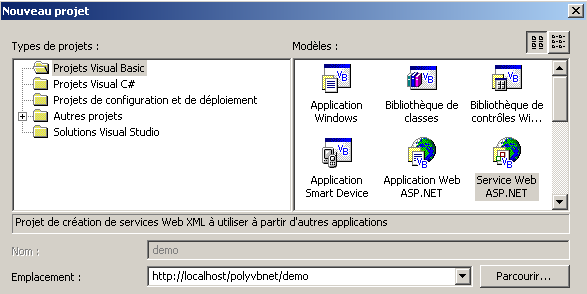
Note the following points:
- the project type is Visual Basic (left pane)
- the project template is ASP.NET Web Service (right pane)
- The location is unspecified. Here, the web service will be hosted by a local IIS web server. Its URL will therefore be URL://localhost/[chemin], where [chemin] is to be defined. Here, we choose the path http://localhost/polyvbnet/demo. VS.NET will then create a folder for this project. Where? The IIS server has a root directory for the web document tree it serves. Let’s call this root <IISroot>. It corresponds to URL http://localhost. We can deduce that URL http://localhost/polyvbnet/demo will be associated with the folder <IISroot>/polyvbnet/demo. <IISroot> is normally the \inetpub\wwwroot folder on the drive where IIS was installed. In our example, this is drive E. The folder created by VS.NET is therefore the folder e:\inetpub\wwwroot\polyvbnet\demo:
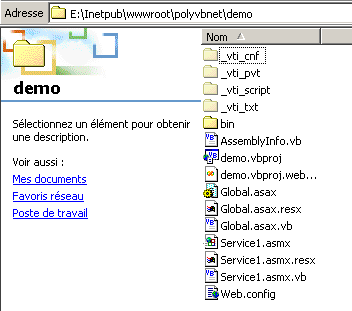
As always, there is an abundance of folders created. They are not always useful. We will only explain the ones we need at any given time. VS.NET has created a project:
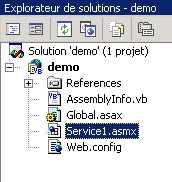
We find some of the files that are present in the project's physical folder. The most interesting one for us is the file with the .asmx extension. This is the extension for web services. A web service is managed by VS.NET as a Windows application, c.a.d—an application that has a graphical user interface and code to manage it. That is why we have a design window:
A web service normally does not have a graphical user interface. It represents an object that can be called remotely. It has methods, and applications call these methods. We will therefore view it as a classic object with the particular feature that it can be instantiated remotely over the network. Therefore, we will not use the design window provided by VS.NET. Instead, let’s focus on the service’s code using the option View/Code:

Several points are worth noting:
- the file is named Service1.asmx.vb, not Service1.asmx. We will return to the contents of the Service1.asmx file a little later.
- We see a code window similar to the one we had when building Windows applications with VS.NET
The code generated by VS.NET is as follows:
Imports System.Web.Services

<System.Web.Services.WebService(Namespace := "http://tempuri.org/demo/Service1")> _
Public Class Service1
    Inherits System.Web.Services.WebService

#Region "Code generated by the Web Services Designer

    Public Sub New()
        MyBase.New()

        'This call is required by the Web Services Designer.
        InitializeComponent()

        'Add your initialization code after the InitializeComponent() call

    End Sub

    'Required by the Web Services Designer
    Private components As System.ComponentModel.IContainer

    'REMARQUE: the following procedure is required by the Web Services Designer
    'It can be modified using the Web Services Designer.
    'Do not modify it using the code editor.
    <System.Diagnostics.DebuggerStepThrough()> Private Sub InitializeComponent()
        components = New System.ComponentModel.Container()
    End Sub

    Protected Overloads Overrides Sub Dispose(ByVal disposing As Boolean)
        'CODEGEN: this procedure is required by the Web Services Designer
        'Do not modify it using the code editor.
        If disposing Then
            If Not (components Is Nothing) Then
                components.Dispose()
            End If
        End If
        MyBase.Dispose(disposing)
    End Sub

#End Region

    ' EXEMPLE DE SERVICE WEB
    ' The HelloWorld() service example returns the string Hello World.
    ' To generate, leave the following lines uncommented, then save and generate the project.
    ' To test this Web service, make sure that the .asmx file is the start page
    ' and press F5.
    '
    '<WebMethod()> Public Function HelloWorld() As String
    '    HelloWorld = "Hello World
    ' End Function

End Class
First, note that we have a class here, the Service1 class, which derives from the WebService class:
This leads us to import the System.Web.Services namespace:
Imports System.Web.Services
The class declaration is preceded by a compilation attribute:
<System.Web.Services.WebService(Namespace := "http://tempuri.org/demo/Service1")> _
Public Class Service1
    Inherits System.Web.Services.WebService
The System.Web.Services.WebService() attribute indicates that the following class is a web service. This attribute accepts various parameters, including one called NameSpace. It is used to place the web service in a namespace. Indeed, one can imagine that there are several web services named "meteo" in the world. We need a way to differentiate them. Namespaces make this possible. One could be named [espacenom1].meteo and another [espacenom2].meteo. This concept is analogous to class namespaces. VS.NET automatically generated code that it placed in a region of the source:
If we look at this code, it is the same code that the designer generated when building Windows applications. This is code that we can simply delete if we don’t have a graphical user interface, which will be the case for web services.
The class ends with an example of what a web service might look like:
#End Region

    ' EXEMPLE DE SERVICE WEB
    ' The HelloWorld() service example returns the string Hello World.
    ' To generate, leave the following lines uncommented, then save and generate the project.
    ' To test this Web service, make sure that the .asmx file is the start page
    ' and press F5.
    '
    '<WebMethod()> Public Function HelloWorld() As String
    '    HelloWorld = "Hello World
    ' End Function
Based on what has just been said, we clean up the code so that it becomes the following:
Imports System.Web.Services

<System.Web.Services.WebService(Namespace:="st.istia.univ-angers.fr")> _
Public Class Bonjour
    Inherits System.Web.Services.WebService

    <WebMethod()> Public Function Bonjour() As String
        Return "bonjour !"
    End Function
End Class
Now things are a little clearer.
- A web service is a class derived from the WebService class
- The class is qualified by the attribute <System.Web.Services.WebService(Namespace:="st.istia.univ-angers.fr")>. We therefore place our service in the st.istia.univ-angers.fr namespace.
- The class methods are qualified by the attribute <WebMethod()>, indicating that we are dealing with a method that can be called remotely over the network
The class providing our web service is therefore called Bonjour and has a single method, also named Bonjour, which returns a string. We are ready for an initial test.
- Let’s start the IIS web server if we haven’t already
- use option Debug/Run Without Debugging. VS.NET
VS.NET will then compile the entire application, launch a browser (often Internet Explorer if available), and display url http://localhost/polyvbnet/demo/Service1.asmx :
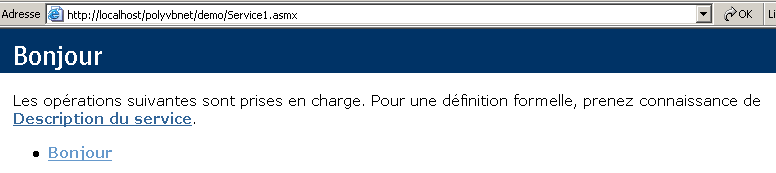
Why the url http://localhost/polyvbnet/demo/Service1.asmx? Because it was the only .asmx file in the project:
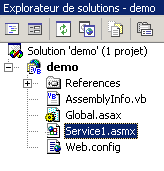
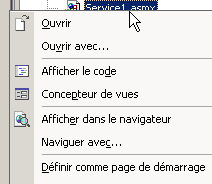
If there had been multiple .asmx files, we would have had to specify which one should be executed first. This is done by right-clicking on the relevant .asmx file and selecting the option [Définir comme page de démarrage] option.
You might be interested in knowing what the service1.asmx file contains. In fact, with VS.NET, we worked on the service1.asmx.vb file and not on the service1.asmx file. This file is located in the project folder:
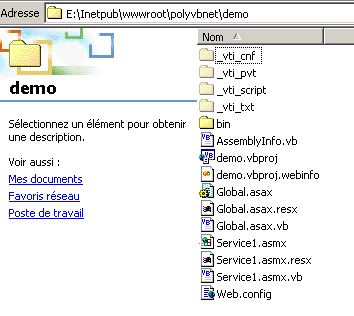
Let’s open it with a text editor (Notepad or another). We get the following content:
The file contains a simple directive for the IIS server indicating:
- that this is a web service (keyword WebService)
- that the language of this service’s class is Visual Basic (Language="vb")
- that the source for this class is located in the file Service1.asmx.vb (Codebehind="Service1.asmx.vb")
- that the class implementing the service is named demo.Bonjour (Class="demo.Bonjour"). Note that VS.NET has placed the Bonjour class in the demo namespace, which is also the name of the project.
Let’s return to the page generated at url http://localhost/polyvbnet/demo/Service1.asmx:
Who wrote the code for the page above? Not us—we know that. It’s IIS, which presents web services in a standard way. This page offers us two links. Let’s follow the first one:
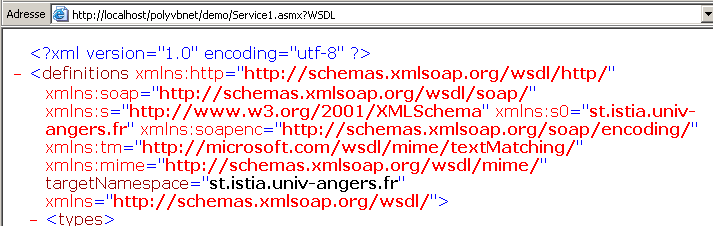
Oops... that’s some pretty obscure XML. Still, let’s note the URL
http://localhost/polyvbnet/demo/Service1.asmx?WSDL. Open a browser and type this url directly. You’ll get the same result as before. So, remember that url http://serviceweb?WSDL provides access to the XML description of the web service. Let’s return to the home page and click the [Bonjour] link. Recall that Bonjour is a method of the web service. If there had been multiple methods, they would all have been listed here. We get the following new page:
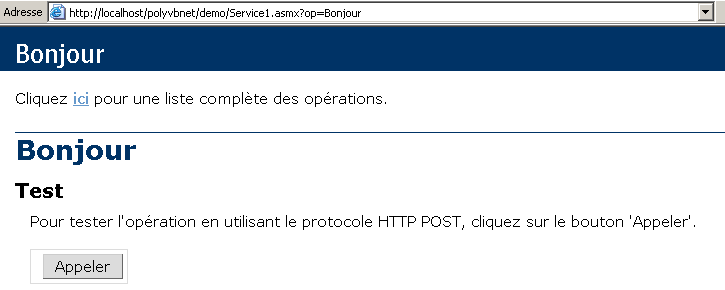
We have intentionally truncated the resulting page to keep our demonstration concise. Note again the url obtained:
If we type this url directly into a browser, we’ll get the same result as above. We’re prompted to use the [Appeler] button. Let’s do that. We get a new page:

It’s XML again. We find two pieces of information that were present in our web service:
- the namespace st.istia.univ-angers.fr of our service
<System.Web.Services.WebService(Namespace:="st.istia.univ-angers.fr")>
- the value returned by the Bonjour method:
Return "bonjour !"
What have we learned?
- how to write an S web service
- how to call it
We are now looking at how to write a web service without using VS.NET.
10.3.2. Version 2
In the previous example, VS.NET did a lot of things on its own. Is it possible to build a web service without this tool? The answer is yes, and we’ll show you how now. Using a text editor, we’ll build the following web service:
Imports System.Web.Services

<System.Web.Services.WebService(Namespace:="st.istia.univ-angers.fr")> _
Public Class Bonjour2
    Inherits System.Web.Services.WebService

    <WebMethod()> Public Function getBonjour() As String
        Return "bonjour de nouveau !"
    End Function
End Class
The class is called Bonjour2 and has a method called getBonjour. It has been placed in the file demo2.vb, which is itself located in the IIS server tree in the folder E:\Inetpub\wwwroot\polyvbnet\demo2. It is a standard VB.NET class that can therefore be compiled:
dos>vbc /out:demo2 /t:library /r:system.dll /r:system.web.services.dll demo2.vb

dos>dir
02/03/2004  18:04                  286 demo2.vb
02/03/2004  18:10                   77 demo2.asmx
02/03/2004  18:12                3 072 demo2.dll
We place the demo2.dll assembly in a bin folder (this name is required):
We now create the file demo2.asmx. This is the file that will be called by the clients web. Its contents are as follows:
We have already encountered this directive. It indicates that:
- the web service class is named Bonjour2 and is located in the demo2.dll assembly. IIS will search for this assembly in various locations, including the web service’s bin folder. That is why we placed the demo2.dll assembly there.
Now we can perform various tests. We make sure that IIS is active and request url http://localhost/polyvbnet/demo2/demo2.asmx using a browser:
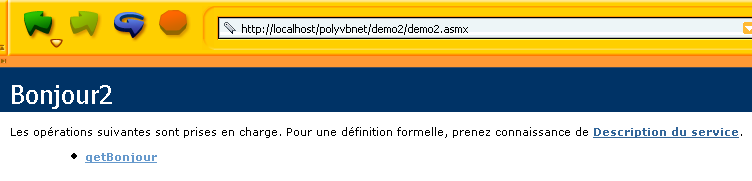
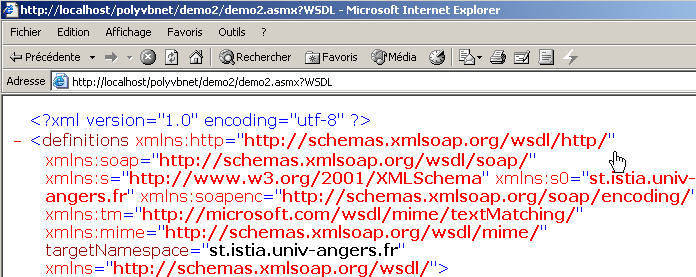
Then url http://localhost/polyvbnet/demo2/demo2.asmx?WSDL
Then URL http://localhost/polyvbnet/demo2/demo2.asmx?op=getBonjour, where getBonjour is the name of our web service’s unique method:
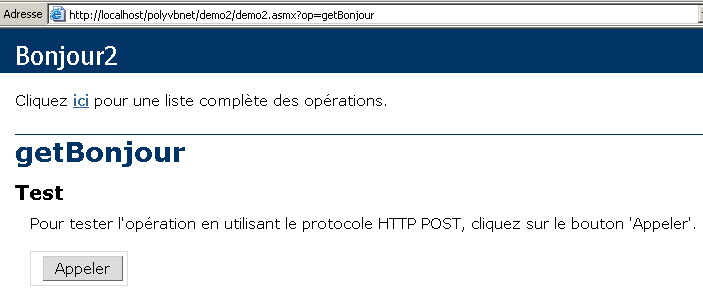
We use the [Appeler] button above:

We successfully obtain the result of the call to the getBonjour method of the web service. We now know how to build a web service without vs.net. From here on, we will disregard how the web service is built and focus solely on the fundamental files.
10.3.3. Version 3
The two previous versions of the [Bonjour] web service used two files:
- an .asmx file, the web service’s entry point
- a .vb file, the web service’s source code
Here we show that a single .asmx file is sufficient. The code for the demo3.asmx service is as follows:
We can see that the service source code is now directly in the source file demo3.asmx. The directive
no longer references a class in an external assembly, but a class located in the same source file. Let’s place this file in the <IISroot>\polyvbnet\demo3 folder:
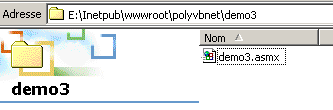
Let’s run IIS and request url http://localhost/polyvbnet/demo3/demo3.asmx:
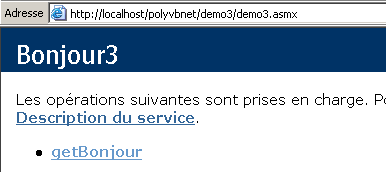
We notice a significant difference from the previous version: we did not have to compile the service's VB code. IIS performed this compilation itself using the VB.NET compiler installed on the same machine. It then delivered the page. If there is a compilation error, it will be reported by IIS:
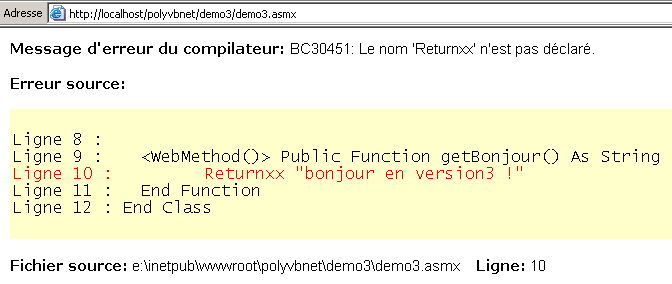
10.3.4. Version 4
Here we are interested in the configuration of the IIS server. Up until now, we have always placed our web services in the root directory <IISroot> of the IIS server, here [e:\inetpub\wwwroot]. Here we demonstrate that we can place the web service anywhere. This is done using the virtual directories of IIS. Let’s place our service in the following directory:
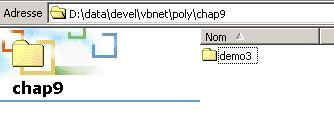
The [D:\data\devel\vbnet\poly\chap9\demo3] folder is not located in the directory tree of the IIS server. We must indicate this to the server by creating a virtual folder named IIS. Let’s launch IIS and take a look at the option and [Avancé] below:
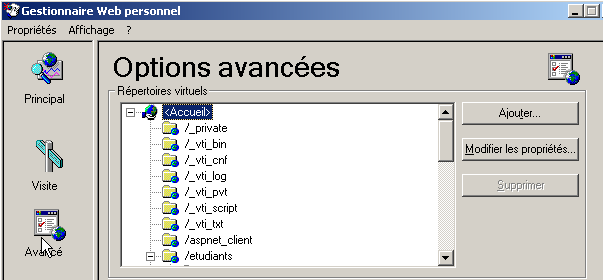
We are presented with a list of virtual directories. We won’t dwell on this. We create a new virtual directory using the [Ajouter] button above:
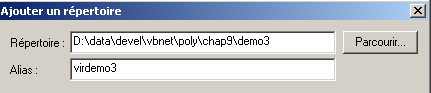
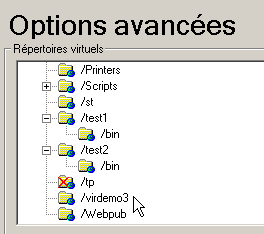
Using the [Parcourir] button, we specify the physical folder containing the web service, in this case the [D:\data\devel\vbnet\poly\chap9\demo3] folder. We give this folder a logical (virtual) name: [virdemo3]. This means that the documents inside the physical folder [D:\data\devel\vbnet\poly\chap9\demo3] will be accessible on the network via url [http://<machine>/virdemo3]. The dialog box above contains other settings that we leave as is. We click OK. The new virtual folder appears in the list of virtual folders under IIS:
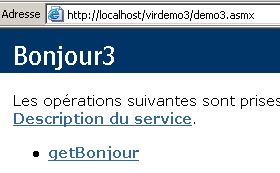
Now, we open a browser and request the url [http://localhost/virdemo3/demo3.asmx]. We get the same result as before:
10.3.5. Conclusion
We have demonstrated several ways to create a web service. Moving forward, we will use method 3 for creating the service and method 4 for its localization. This way, we won’t need VS.NET. Nevertheless, it’s worth noting the benefits of using VS.NET for the debugging assistance it provides. There are free tools available for developing web applications, notably the WebMatrix product sponsored by Microsoft, which can be found at URL [http://www.asp.net/webmatrix]. It is an excellent tool for getting started with web programming without any upfront investment.
10.4. A Web Service for Operations
Consider a web service that offers five functions:
- add(a,b), which returns a+b
- subtract(a,b), which returns a-b
- multiply(a,b), which returns a*b
- divide(a,b), which returns a/b
- doall(a,b), which returns the array [a+b, a-b, a*b, a/b]
The VB.NET code for this service is as follows:
<%@ WebService language="VB" class=operations %>

imports system.web.services

<WebService(Namespace:="st.istia.univ-angers.fr")> _
   Public Class operations
      Inherits WebService

      <WebMethod>  _
      Function ajouter(a As Double, b As Double) As Double
         Return a + b
      End Function

      <WebMethod>  _
      Function soustraire(a As Double, b As Double) As Double
         Return a - b
      End Function

      <WebMethod>  _
      Function multiplier(a As Double, b As Double) As Double
         Return a * b
      End Function

      <WebMethod>  _
      Function diviser(a As Double, b As Double) As Double
         Return a / b
      End Function

      <WebMethod>  _
      Function toutfaire(a As Double, b As Double) As Double()
         Return New Double() {a + b, a - b, a * b, a / b}
      End Function
   End Class
We are repeating here some explanations that have already been given but that are worth revisiting or expanding upon. The operations class resembles a VB.NET class, with a few points to note:
- methods are preceded by a <WebMethod()> attribute that tells the compiler which methods should be "published" c.a.d—made available to the client. A method not preceded by this attribute would be invisible to remote clients. This could be an internal method used by other methods but not intended to be published.
- The class derives from the WebService class defined in the System.Web.Services namespace. This inheritance is not always required. In this example, in particular, it could be omitted.
- The class itself is preceded by an attribute <WebService(Namespace="st.istia.univ-angers.fr")> intended to provide a namespace for the web service. A class vendor assigns a namespace to its classes to give them a unique name and thus avoid conflicts with classes from other vendors that might have the same name. The same applies to web services. Each web service must be identifiable by a unique name, in this case st.istia.univ-angers.fr.
- We have not defined a constructor. Therefore, the parent class’s constructor will be used implicitly.
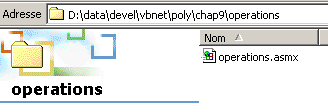
The source code above is not intended directly for the VB.NET compiler, but for the IIS web server. It must have the .asmx extension and be saved in the web server directory. Here, we save it as operations.asmx in the <IISroot>\polyvbnet\operations folder:
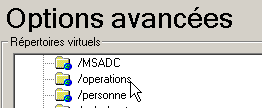
We associate the virtual folder IIS [operations] with this physical folder:
 |  |
Access the service using a browser. The URl to request is [http://localhost/operations/operations.asmx]:
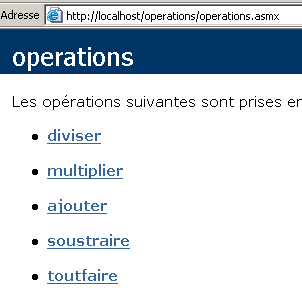
We obtain a web document with a link for each of the methods defined in the operations web service. Let’s follow the “add” link:
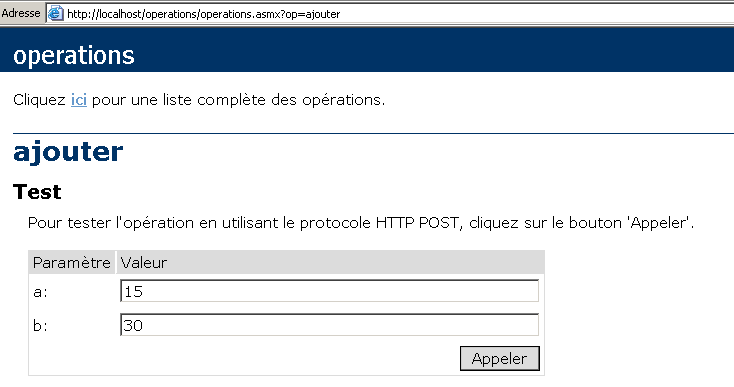
The page that appears invites us to test the add method by providing it with the two arguments, a and b, that it requires. Let’s review the definition of the add method:
Note that the page has used the argument names a and b from the method definition. Click the Call button, and the following response appears in a separate browser window:

If we enter [Affichage/Source] above, we get the following code:

Let’s repeat the operation for the method [toutfaire]:
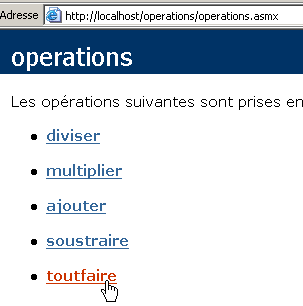
We get the following page:
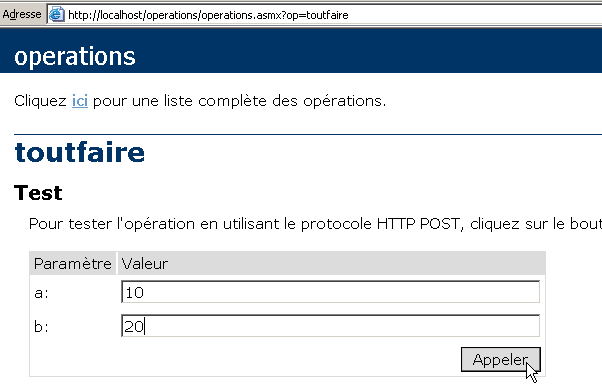
Let’s use the [Appeler] button above:
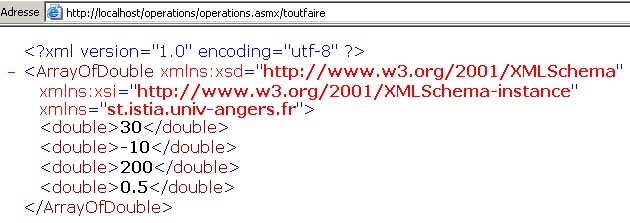
In all cases, the server response has the following format:
- the response is in XML format
- Line 1 is standard and is always present in the response
- The following lines depend on the result type (double, ArrayOfDouble), the number of results, and the web service namespace (st.istia.univ-angers.fr here).
There are several methods for querying a web service and obtaining its response. Let’s return to the service’s URL:
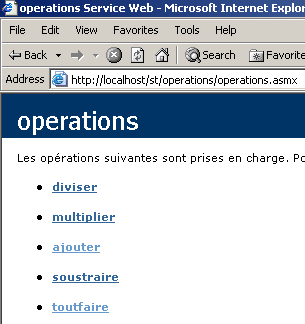
and follow the link [ajouter]. On the page displayed, two methods for querying the [ajouter] function of the web service are shown:
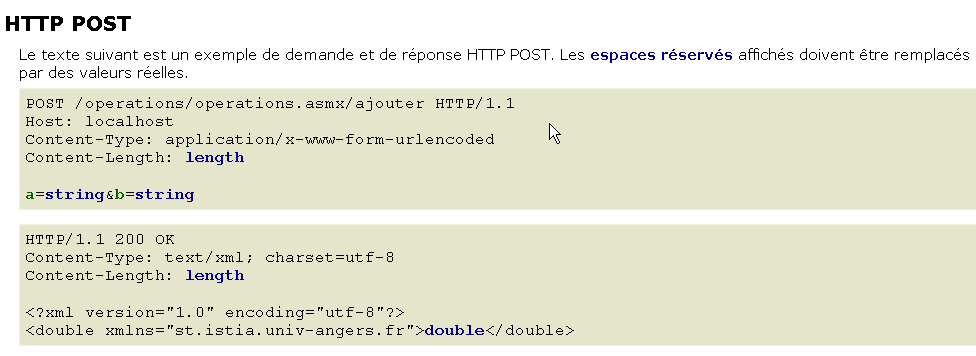
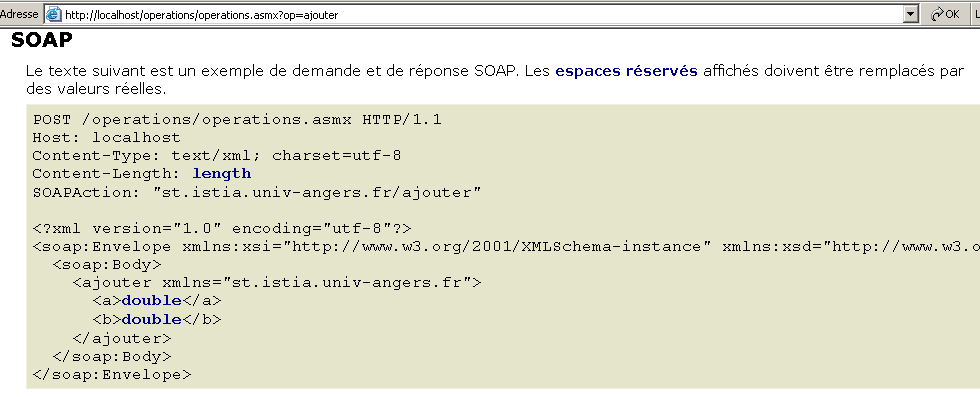
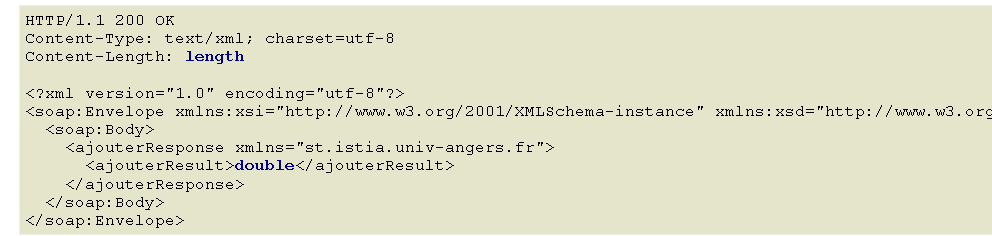
These two methods for accessing a web service’s functions are called, respectively: HTTP-POST and SOAP. We will now examine them one by one.
Note: In early versions of VS.NET, there was a third method called HTTP-GET. As of the date of this document (March 2004), this method no longer appears to be available. This means that the web service generated by VS.NET does not accept GET requests. This does not mean that it is impossible to write web services that accept GET requests, particularly using tools other than VS.NET or simply by hand.
10.5. A HTTP-POST client
We follow the method proposed by the web service:
Let’s break down what’s written. First, the web client must send the following headers:
The web client makes a request to the endpoint /operations/add endpoint using the HTTP/1.1 protocol | |
Specify the target machine for the request. Here, localhost. This header was made mandatory by version 1.1 of the HTTP protocol | |
This specifies that after the HTTP headers, additional parameters will be sent in urlencoded format. This format replaces certain characters with their hexadecimal codes. | |
This is the character count of the parameter string that will be sent after the HTTP headers. |
The HTTP headers are followed by a blank line, then by the parameter string of POST, consisting of [Content-Length] characters in the form a=XX&b=YY where XX and YY are the "url-encoded" strings of the values of parameters a and b. We know enough to reproduce the above with our generic client tcp, already used in the chapter on programming tcp-ip:
- We are launching IIS
- The service is available at url [http://localhost/operations/operations.asmx]
- We use the generic client tcp in a window DOS
dos>clttcpgenerique localhost 80
Commandes :
POST /operations/operations.asmx/ajouter HTTP/1.1
HOST: localhost
Connection: close
Content-Type: application/x-www-form-urlencoded
Content-length: 7
<-- HTTP/1.1 100 Continuous
<-- Server: Microsoft-IIS/5.0
<-- Date: Wed, 03 Mar 2004 13:55:17 GMT
<-- X-Powered-By: ASP.NET
<--
a=2&b=3
<-- HTTP/1.1 200 OK
<-- Server: Microsoft-IIS/5.0
<-- Date: Wed, 03 Mar 2004 13:55:26 GMT
<-- X-Powered-By: ASP.NET
<-- Connection: close
<-- X-AspNet-Version: 1.1.4322
<-- Cache-Control: private, max-age=0
<-- Content-Type: text/xml; charset=utf-8
<-- Content-Length: 90
<--
<-- <?xml version="1.0" encoding="utf-8"?>
<-- <double xmlns="st.istia.univ-angers.fr">5</double>
[fin du thread de lecture des réponses du serveur]
fin
[fin du thread d'envoi des commandes au serveur]
First, note that we added the header [Connection: close] to instruct the server to close the connection after sending the response. This is necessary here. If we do not specify this, by default the server will keep the connection open. However, its response is a sequence of text lines, the last of which is not terminated by a line-end character. It turns out that our generic TCP client reads text lines terminated by a line-end character using the ReadLine method. If the server does not close the connection after sending the last line, the client is blocked because it is waiting for an end-of-line character that never arrives. If the server closes the connection, the client’s ReadLine method terminates and the client is not blocked.
Immediately after receiving the empty line signaling the end of the headers (HTTP), the server (IIS) sends an initial response:
<-- HTTP/1.1 100 Continuous
<-- Server: Microsoft-IIS/5.0
<-- Date: Wed, 03 Mar 2004 13:55:17 GMT
<-- X-Powered-By: ASP.NET
<--
This response, consisting solely of headers HTTP, tells the client that it can send the 7 characters it said it wanted to send. What we do:
Note here that our client tcp sends more than 7 characters since it sends them with a line-end marker (WriteLine). This does not bother the server, which will only take the first 7 characters from the received data and then close the connection (Connection: close). These extra characters would have been problematic if the connection had remained open, as they would then have been interpreted as part of the client’s next command. Once the parameters are received, the server sends its response:
<-- HTTP/1.1 200 OK
<-- Server: Microsoft-IIS/5.0
<-- Date: Wed, 03 Mar 2004 13:55:26 GMT
<-- X-Powered-By: ASP.NET
<-- Connection: close
<-- X-AspNet-Version: 1.1.4322
<-- Cache-Control: private, max-age=0
<-- Content-Type: text/xml; charset=utf-8
<-- Content-Length: 90
<--
<-- <?xml version="1.0" encoding="utf-8"?>
<-- <double xmlns="st.istia.univ-angers.fr">5</double>
We now have the elements to write a client program for our web service. It will be a console client called httpPost2 and used as follows:
dos>httpPost2 http://localhost/operations/operations.asmx
Tapez vos commandes au format : [ajouter|soustraire|multiplier|diviser] a b
ajouter 6 7
--> POST /operations/operations.asmx/add HTTP/1.1
--> Host: localhost:80
--> Content-Type: application/x-www-form-urlencoded
--> Content-Length: 7
--> Connection: Keep-Alive
-->
<-- HTTP/1.1 100 Continuous
<-- Server: Microsoft-IIS/5.0
<-- Date: Wed, 03 Mar 2004 14:56:38 GMT
<-- X-Powered-By: ASP.NET
<--
--> a=6&b=7
<-- HTTP/1.1 200 OK
<-- Server: Microsoft-IIS/5.0
<-- Date: Wed, 03 Mar 2004 14:56:38 GMT
<-- X-Powered-By: ASP.NET
<-- X-AspNet-Version: 1.1.4322
<-- Cache-Control: private, max-age=0
<-- Content-Type: text/xml; charset=utf-8
<-- Content-Length: 91
<--
<-- <?xml version="1.0" encoding="utf-8"?>
<-- <double xmlns="st.istia.univ-angers.fr">13</double>
[résultat=13]
soustraire 8 9
--> POST /operations/operations.asmx/subtract HTTP/1.1
--> Host: localhost:80
--> Content-Type: application/x-www-form-urlencoded
--> Content-Length: 7
--> Connection: Keep-Alive
-->
<-- HTTP/1.1 100 Continuous
<-- Server: Microsoft-IIS/5.0
<-- Date: Wed, 03 Mar 2004 14:56:47 GMT
<-- X-Powered-By: ASP.NET
<--
--> a=8&b=9
<-- HTTP/1.1 200 OK
<-- Server: Microsoft-IIS/5.0
<-- Date: Wed, 03 Mar 2004 14:56:47 GMT
<-- X-Powered-By: ASP.NET
<-- X-AspNet-Version: 1.1.4322
<-- Cache-Control: private, max-age=0
<-- Content-Type: text/xml; charset=utf-8
<-- Content-Length: 91
<--
<-- <?xml version="1.0" encoding="utf-8"?>
<-- <double xmlns="st.istia.univ-angers.fr">-1</double>
[résultat=-1]
fin
dos>
The client is called by passing it the URL from the web service:
Next, the client reads the commands typed on the keyboard and executes them. These are in the format:
where function is the web service function being called (add, subtract, multiply, divide) and a and b are the values on which this function will operate. For example:
From there, the client will send the necessary HTTP request to the web server and receive a response. The client-server exchanges are displayed on the screen to help you better understand the process:
ajouter 6 7
--> POST /operations/operations.asmx/add HTTP/1.1
--> Host: localhost:80
--> Content-Type: application/x-www-form-urlencoded
--> Content-Length: 7
--> Connection: Keep-Alive
-->
<-- HTTP/1.1 100 Continuous
<-- Server: Microsoft-IIS/5.0
<-- Date: Wed, 03 Mar 2004 14:56:38 GMT
<-- X-Powered-By: ASP.NET
<--
--> a=6&b=7
<-- HTTP/1.1 200 OK
<-- Server: Microsoft-IIS/5.0
<-- Date: Wed, 03 Mar 2004 14:56:38 GMT
<-- X-Powered-By: ASP.NET
<-- X-AspNet-Version: 1.1.4322
<-- Cache-Control: private, max-age=0
<-- Content-Type: text/xml; charset=utf-8
<-- Content-Length: 91
<--
<-- <?xml version="1.0" encoding="utf-8"?>
<-- <double xmlns="st.istia.univ-angers.fr">13</double>
[résultat=13]
The exchange shown above is the same as the one previously encountered with the generic client tcp, with one difference: the HTTP Connection: Keep-Alive header instructs the server not to close the connection. The connection therefore remains open for the client’s next operation, so the client does not need to reconnect to the server. However, this requires the client to use a method other than ReadLine() to read the server’s response, since we know that the response consists of a series of lines, the last of which does not end with a line break. Once the entire server response has been obtained, the client parses it to find the result of the requested operation and display it:
Let’s examine our client’s code:
' namespaces
Imports System
Imports System.Net.Sockets
Imports System.IO
Imports System.Text.RegularExpressions
Imports System.Collections
Imports Microsoft.VisualBasic
Imports System.Web
' web operations client
Public Module clientPOST
Public Sub Main(ByVal args() As String)
' syntax
Const syntaxe As String = "pg URI"
Dim fonctions As String() = {"ajouter", "soustraire", "multiplier", "diviser"}
' number of arguments
If args.Length <> 1 Then
erreur(syntaxe, 1)
End If
' note the URI required
Dim URIstring As String = args(0)
' connect to the server
Dim uri As Uri = Nothing ' the URI of the web service
Dim client As TcpClient = Nothing ' the tcp link between the client and the server
Dim [IN] As StreamReader = Nothing ' the customer's reading flow
Dim OUT As StreamWriter = Nothing ' the customer's writing flow
Try
' server connection
uri = New Uri(URIstring)
client = New TcpClient(uri.Host, uri.Port)
' create customer input/output flows TCP
[IN] = New StreamReader(client.GetStream())
OUT = New StreamWriter(client.GetStream())
OUT.AutoFlush = True
Catch ex As Exception
' URI incorrect or other problem
erreur("L'erreur suivante s'est produite : " + ex.Message, 2)
End Try
' creation of a dictionary of web service functions
Dim dicoFonctions As New Hashtable
Dim i As Integer
For i = 0 To fonctions.Length - 1
dicoFonctions.Add(fonctions(i), True)
Next i
' user requests are typed on the keyboard
' as function a b
' they are terminated with the command fin
Dim commande As String = Nothing ' keyboard command
Dim champs As String() = Nothing ' command line fields
Dim fonction As String = Nothing ' name of a web service function
Dim a, b As String ' web service function arguments
' invites the user
Console.Out.WriteLine("Tapez vos commandes au format : [ajouter|soustraire|multiplier|diviser] a b")
' error management
Dim erreurCommande As Boolean
Try
' keyboard command input loop
While True
' no error at start
erreurCommande = False
' read command
commande = Console.In.ReadLine().Trim().ToLower()
' finished?
If commande Is Nothing Or commande = "fin" Then
Exit While
End If
' breaking down the order into fields
champs = Regex.Split(commande, "\s+")
Try
' three fields are required
If champs.Length <> 3 Then
Throw New Exception
End If
' field 0 must be a recognized function
fonction = champs(0)
If Not dicoFonctions.ContainsKey(fonction) Then
Throw New Exception
End If
' field 1 must be a valid number
a = champs(1)
Double.Parse(a)
' field 2 must be a valid number
b = champs(2)
Double.Parse(b)
Catch
' invalid order
Console.Out.WriteLine("syntaxe : [ajouter|soustraire|multiplier|diviser] a b")
erreurCommande = True
End Try
' make a request to the web service
If Not erreurCommande Then executeFonction([IN], OUT, uri, fonction, a, b)
End While
Catch e As Exception
Console.Out.WriteLine(("L'erreur suivante s'est produite : " + e.Message))
End Try
' end of client-server link
Try
[IN].Close()
OUT.Close()
client.Close()
Catch
End Try
End Sub
...........
' error display
Public Sub erreur(ByVal msg As String, ByVal exitCode As Integer)
' error display
System.Console.Error.WriteLine(msg)
' stop with error
Environment.Exit(exitCode)
End Sub
End Module
These are elements we've encountered several times before and that don't require any special comments. Let's now examine the code for the executeFonction method, which contains the new features:
' executeFonction
Public Sub executeFonction(ByVal [IN] As StreamReader, ByVal OUT As StreamWriter, ByVal uri As Uri, ByVal fonction As String, ByVal a As String, ByVal b As String)
' execute function(a,b) on the URI uri web service
' client-server exchanges take place via IN and OUT flows
' the result of the function is in the line
' <double xmlns="st.istia.univ-angers.fr">double</double>
' sent by the server
' query chain construction
Dim requête As String = "a=" + HttpUtility.UrlEncode(a) + "&b=" + HttpUtility.UrlEncode(b)
Dim nbChars As Integer = requête.Length
' construction of header table HTTP to be sent
Dim entetes(5) As String
entetes(0) = "POST " + uri.AbsolutePath + "/" + fonction + " HTTP/1.1"
entetes(1) = "Host: " & uri.Host & ":" & uri.Port
entetes(2) = "Content-Type: application/x-www-form-urlencoded"
entetes(3) = "Content-Length: " & nbChars
entetes(4) = "Connection: Keep-Alive"
entetes(5) = ""
' send HTTP headers to the server
Dim i As Integer
For i = 0 To entetes.Length - 1
' send to server
OUT.WriteLine(entetes(i))
' screen echo
Console.Out.WriteLine(("--> " + entetes(i)))
Next i
' we read the 1st web server response HTTP/1.1 100
Dim ligne As String = Nothing
' a line in the read stream
ligne = [IN].ReadLine()
While ligne <> ""
'echo
Console.Out.WriteLine(("<-- " + ligne))
' next line
ligne = [IN].ReadLine()
End While
'last line echo
Console.Out.WriteLine(("<-- " + ligne))
' send request parameters
OUT.Write(requête)
' echo
Console.Out.WriteLine(("--> " + requête))
' construction of the regular expression to find the response size XML
' in the web server response stream
Dim modèleLength As String = "^Content-Length: (.+?)\s*$"
Dim RegexLength As New Regex(modèleLength) '
Dim MatchLength As Match = Nothing
Dim longueur As Integer = 0
' read the second response from the web server after sending the request
' the value of the Content-Length line is stored
ligne = [IN].ReadLine()
While ligne <> ""
' screen echo
Console.Out.WriteLine(("<-- " + ligne))
' Content-Length ?
MatchLength = RegexLength.Match(ligne)
If MatchLength.Success Then
longueur = Integer.Parse(MatchLength.Groups(1).Value)
End If
' next line
ligne = [IN].ReadLine()
End While
' last line echo
Console.Out.WriteLine("<--")
' build the regular expression to retrieve the result
' in the web server response stream
Dim modèle As String = "<double xmlns=""st.istia.univ-angers.fr"">(.+?)</double>"
Dim ModèleRésultat As New Regex(modèle)
Dim MatchRésultat As Match = Nothing
' we read the rest of the web server response
Dim chrRéponse(longueur) As Char
[IN].Read(chrRéponse, 0, longueur)
Dim strRéponse As String = New [String](chrRéponse)
' the answer is broken down into lines of text
Dim lignes As String() = Regex.Split(strRéponse, ControlChars.Lf)
' scroll through the lines of text looking for the result
Dim strRésultat As String = "?" ' function result
For i = 0 To lignes.Length - 1
' follow-up
Console.Out.WriteLine(("<-- " + lignes(i)))
' compare current line to model
MatchRésultat = ModèleRésultat.Match(lignes(i))
' have we found?
If MatchRésultat.Success Then
' we note the result
strRésultat = MatchRésultat.Groups(1).Value
End If
Next i
' the result is displayed
Console.Out.WriteLine(("[résultat=" + strRésultat + "]" + ControlChars.Lf))
End Sub
First, the client HTTP-POST sends its request in the format POST:
' query chain construction
Dim requête As String = "a=" + HttpUtility.UrlEncode(a) + "&b=" + HttpUtility.UrlEncode(b)
Dim nbChars As Integer = requête.Length
' construction of header table HTTP to be sent
Dim entetes(5) As String
entetes(0) = "POST " + uri.AbsolutePath + "/" + fonction + " HTTP/1.1"
entetes(1) = "Host: " & uri.Host & ":" & uri.Port
entetes(2) = "Content-Type: application/x-www-form-urlencoded"
entetes(3) = "Content-Length: " & nbChars
entetes(4) = "Connection: Keep-Alive"
entetes(5) = ""
' send HTTP headers to the server
Dim i As Integer
For i = 0 To entetes.Length - 1
' send to server
OUT.WriteLine(entetes(i))
' screen echo
Console.Out.WriteLine(("--> " + entetes(i)))
Next i
In the header
you must specify the size of the parameters that will be sent by the client behind the headers HTTP:
To do this, use the following code:
' query chain construction
Dim requête As String = "a=" + HttpUtility.UrlEncode(a) + "&b=" + HttpUtility.UrlEncode(b)
Dim nbChars As Integer = requête.Length
The HttpUtility.UrlEncode(string string) method converts certain characters in a string to %n1n2, where n1n2 is the ASCII code for the converted character. The characters targeted by this transformation are all characters that have a specific meaning in a POST query (space, =, &, etc.). Here, the HttpUtility.UrlEncode method is normally unnecessary since a and b are numbers that do not contain any of these specific characters. It is used here as an example. It requires the System.Web namespace. Once the client has sent its HTTP headers:
--> POST /operations/operations.asmx/add HTTP/1.1
--> Host: localhost:80
--> Content-Type: application/x-www-form-urlencoded
--> Content-Length: 7
--> Connection: Keep-Alive
-->
The server responds with the header HTTP 100 Continue:
<-- HTTP/1.1 100 Continuous
<-- Server: Microsoft-IIS/5.0
<-- Date: Wed, 03 Mar 2004 14:56:47 GMT
<-- X-Powered-By: ASP.NET
<--
The code simply reads and displays this first response on the screen:
' we read the 1st web server response HTTP/1.1 100
Dim ligne As String = Nothing
' a line in the read stream
ligne = [IN].ReadLine()
While ligne <> ""
'echo
Console.Out.WriteLine(("<-- " + ligne))
' next line
ligne = [IN].ReadLine()
End While
'last line echo
Console.Out.WriteLine(("<-- " + ligne))
Once this first response has been read, the client must send its parameters:
It does so with the following code:
The server will then send its response. This response consists of two parts:
- HTTP headers followed by a blank line
- the response in XML format
<-- HTTP/1.1 200 OK
<-- Server: Microsoft-IIS/5.0
<-- Date: Wed, 03 Mar 2004 14:56:38 GMT
<-- X-Powered-By: ASP.NET
<-- X-AspNet-Version: 1.1.4322
<-- Cache-Control: private, max-age=0
<-- Content-Type: text/xml; charset=utf-8
<-- Content-Length: 91
<--
<-- <?xml version="1.0" encoding="utf-8"?>
<-- <double xmlns="st.istia.univ-angers.fr">13</double>
First, the client reads the headers HTTP to find the Content-Length line and retrieve the size of the response XML (here 90). This is retrieved using a regular expression. We could have done this differently and likely more efficiently.
' construction of the regular expression to find the response size XML
' in the web server response stream
Dim modèleLength As String = "^Content-Length: (.+?)\s*$"
Dim RegexLength As New Regex(modèleLength) '
Dim MatchLength As Match = Nothing
Dim longueur As Integer = 0
' read the second response from the web server after sending the request
' the value of the Content-Length line is stored
ligne = [IN].ReadLine()
While ligne <> ""
' screen echo
Console.Out.WriteLine(("<-- " + ligne))
' Content-Length ?
MatchLength = RegexLength.Match(ligne)
If MatchLength.Success Then
longueur = Integer.Parse(MatchLength.Groups(1).Value)
End If
' next line
ligne = [IN].ReadLine()
End While
' last line echo
Console.Out.WriteLine("<--")
Once we have the length N of the response XML, we simply need to read N characters from the IN stream of the server's response. This string of N characters is broken down into lines of text for the purposes of screen monitoring. Among these lines, we look for the line containing the result:
again using a regular expression. Once the result is found, it is displayed.
The end of the client code is as follows:
' construction of the regular expression to retrieve the result
' in the web server response stream
Dim modèle As String = "<double xmlns=""st.istia.univ-angers.fr"">(.+?)</double>"
Dim ModèleRésultat As New Regex(modèle)
Dim MatchRésultat As Match = Nothing
' we read the rest of the web server response
Dim chrRéponse(longueur) As Char
[IN].Read(chrRéponse, 0, longueur)
Dim strRéponse As String = New [String](chrRéponse)
' the answer is broken down into lines of text
Dim lignes As String() = Regex.Split(strRéponse, ControlChars.Lf)
' scroll through the lines of text looking for the result
Dim strRésultat As String = "?" ' function result
For i = 0 To lignes.Length - 1
' follow-up
Console.Out.WriteLine(("<-- " + lignes(i)))
' compare current line to model
MatchRésultat = ModèleRésultat.Match(lignes(i))
' have we found?
If MatchRésultat.Success Then
' we note the result
strRésultat = MatchRésultat.Groups(1).Value
End If
Next i
' the result is displayed
Console.Out.WriteLine(("[résultat=" + strRésultat + "]" + ControlChars.Lf))
End Sub
10.6. A SOAP client
Here we examine a second client that uses a SOAP (Simple Object Access Protocol) client-server dialogue. An example of a dialogue is presented for the add function:
The client’s request is a POST request. We will therefore see some of the same mechanisms as in the previous client. The main difference is that while the HTTP-POST client sent the parameters a and b in the form
the client SOAP sends them in a more complex XML format:
POST /operations/operations.asmx HTTP/1.1
Host: localhost
Content-Type: text/xml; charset=utf-8
Content-Length: length
SOAPAction: "st.istia.univ-angers.fr/ajouter"
<?xml version="1.0" encoding="utf-8"?>
<soap:Envelope xmlns:xsi="http://www.w3.org/2001/XMLSchema-instance" xmlns:xsd="http://www.w3.org/2001/XMLSchema" xmlns:soap="http://schemas.xmlsoap.org/soap/envelope/">
<soap:Body>
<ajouter xmlns="st.istia.univ-angers.fr">
<a>double</a>
<b>double</b>
</ajouter>
</soap:Body>
</soap:Envelope>
It receives a response XML in return, which is also more complex than the responses seen previously:
HTTP/1.1 200 OK
Content-Type: text/xml; charset=utf-8
Content-Length: length
<?xml version="1.0" encoding="utf-8"?>
<soap:Envelope xmlns:xsi="http://www.w3.org/2001/XMLSchema-instance" xmlns:xsd="http://www.w3.org/2001/XMLSchema" xmlns:soap="http://schemas.xmlsoap.org/soap/envelope/">
<soap:Body>
<ajouterResponse xmlns="st.istia.univ-angers.fr">
<ajouterResult>double</ajouterResult>
</ajouterResponse>
</soap:Body>
</soap:Envelope>
Even though the request and response are more complex, this is indeed the same HTTP mechanism as for the HTTP-POST client. The code for the SOAP client can thus be modeled after that of the HTTP-POST client. Here is an example of execution:
dos>clientsoap1 http://localhost/operations/operations.asmx
Tapez vos commandes au format : [ajouter|soustraire|multiplier|diviser] a b
ajouter 3 4
--> POST /operations/operations.asmx HTTP/1.1
--> Host: localhost:80
--> Content-Type: text/xml; charset=utf-8
--> Content-Length: 321
--> Connection: Keep-Alive
--> SOAPAction: "st.istia.univ-angers.fr/add"
-->
<-- HTTP/1.1 100 Continuous
<-- Server: Microsoft-IIS/5.0
<-- Date: Thu, 04 Mar 2004 07:28:29 GMT
<-- X-Powered-By: ASP.NET
<--
--> <?xml version="1.0" encoding="utf-8"?>
<soap:Envelope xmlns:xsi="http://www.w3.org/2001/XMLSchema-instance" xmlns:xsd="http://www.w3.org/2001/XMLSchema" xmlns:soap="http://schemas.xmlsoap.org/soap/envelope/">
<soap:Body>
<ajouter xmlns="st.istia.univ-angers.fr">
<a>3</a>
<b>4</b>
</ajouter>
</soap:Body>
</soap:Envelope>
<-- HTTP/1.1 200 OK
<-- Server: Microsoft-IIS/5.0
<-- Date: Thu, 04 Mar 2004 07:28:33 GMT
<-- X-Powered-By: ASP.NET
<-- X-AspNet-Version: 1.1.4322
<-- Cache-Control: private, max-age=0
<-- Content-Type: text/xml; charset=utf-8
<-- Content-Length: 345
<--
<-- <?xml version="1.0" encoding="utf-8"?><soap:Envelope xmlns:soap="http://schemas.xmlsoap.org/soap/envelope/" xmlns:xsi="http://www.w3.org/2001/XMLSchema-inst
ance" xmlns:xsd="http://www.w3.org/2001/XMLSchema"><soap:Body><ajouterResponse xmlns="st.istia.univ-angers.fr"><ajouterResult>7</ajouterResult></ajouterResponse
></soap:Body></soap:Envelope>
[résultat=7]
Only the executeFonction method changes. The SOAP client sends the HTTP headers for its request. They are simply a bit more complex than those of HTTP-POST:
ajouter 3 4
--> POST /operations/operations.asmx HTTP/1.1
--> Host: localhost:80
--> Content-Type: text/xml; charset=utf-8
--> Content-Length: 321
--> Connection: Keep-Alive
--> SOAPAction: "st.istia.univ-angers.fr/add"
-->
The code that generates them:
' executeFonction
Public Sub executeFonction(ByVal [IN] As StreamReader, ByVal OUT As StreamWriter, ByVal uri As Uri, ByVal fonction As String, ByVal a As String, ByVal b As String)
' execute function(a,b) on the URI uri web service
' client-server exchanges take place via IN and OUT flows
' the result of the function is in the line
' <double xmlns="st.istia.univ-angers.fr">double</double>
' sent by the server
' construction of query string SOAP
Dim requêteSOAP As String = "<?xml version=" + """1.0"" encoding=""utf-8""?>" + ControlChars.Lf
requêteSOAP += "<soap:Envelope xmlns:xsi=""http://www.w3.org/2001/XMLSchema-instance"" xmlns:xsd=""http://www.w3.org/2001/XMLSchema"" xmlns:soap=""http://schemas.xmlsoap.org/soap/envelope/"">" + ControlChars.Lf
requêteSOAP += "<soap:Body>" + ControlChars.Lf
requêteSOAP += "<" + fonction + " xmlns=""st.istia.univ-angers.fr"">" + ControlChars.Lf
requêteSOAP += "<a>" + a + "</a>" + ControlChars.Lf
requêteSOAP += "<b>" + b + "</b>" + ControlChars.Lf
requêteSOAP += "</" + fonction + ">" + ControlChars.Lf
requêteSOAP += "</soap:Body>" + ControlChars.Lf
requêteSOAP += "</soap:Envelope>"
Dim nbCharsSOAP As Integer = requêteSOAP.Length
' construction of header table HTTP to be sent
Dim entetes(6) As String
entetes(0) = "POST " + uri.AbsolutePath + " HTTP/1.1"
entetes(1) = "Host: " & uri.Host & ":" & uri.Port
entetes(2) = "Content-Type: text/xml; charset=utf-8"
entetes(3) = "Content-Length: " & nbCharsSOAP
entetes(4) = "Connection: Keep-Alive"
entetes(5) = "SOAPAction: ""st.istia.univ-angers.fr/" + fonction + """"
entetes(6) = ""
' send HTTP headers to the server
Dim i As Integer
For i = 0 To entetes.Length - 1
' send to server
OUT.WriteLine(entetes(i))
' screen echo
Console.Out.WriteLine(("--> " + entetes(i)))
Next i
Upon receiving this request, the server sends its first response, which the client displays:
<-- HTTP/1.1 100 Continuous
<-- Server: Microsoft-IIS/5.0
<-- Date: Thu, 04 Mar 2004 07:28:29 GMT
<-- X-Powered-By: ASP.NET
<--
The code for reading this first response is as follows:
' we read the 1st web server response HTTP/1.1 100
Dim ligne As String = Nothing
' a line in the read stream
ligne = [IN].ReadLine()
While ligne <> ""
'echo
Console.Out.WriteLine(("<-- " + ligne))
' next line
ligne = [IN].ReadLine()
End While 'while
'last line echo
Console.Out.WriteLine(("<-- " + ligne))
The client will now send its parameters in XML format in what is called a SOAP envelope:
--> <?xml version="1.0" encoding="utf-8"?>
<soap:Envelope xmlns:xsi="http://www.w3.org/2001/XMLSchema-instance" xmlns:xsd="http://www.w3.org/2001/XMLSchema" xmlns:soap="http://schemas.xmlsoap.org/soap/envelope/">
<soap:Body>
<ajouter xmlns="st.istia.univ-angers.fr">
<a>3</a>
<b>4</b>
</ajouter>
</soap:Body>
</soap:Envelope>
The code:
The server will then send its final response:
<-- HTTP/1.1 200 OK
<-- Server: Microsoft-IIS/5.0
<-- Date: Thu, 04 Mar 2004 07:28:33 GMT
<-- X-Powered-By: ASP.NET
<-- X-AspNet-Version: 1.1.4322
<-- Cache-Control: private, max-age=0
<-- Content-Type: text/xml; charset=utf-8
<-- Content-Length: 345
<--
<-- <?xml version="1.0" encoding="utf-8"?><soap:Envelope xmlns:soap="http://schemas.xmlsoap.org/soap/envelope/" xmlns:xsi="http://www.w3.org/2001/XMLSchema-inst
ance" xmlns:xsd="http://www.w3.org/2001/XMLSchema"><soap:Body><ajouterResponse xmlns="st.istia.univ-angers.fr"><ajouterResult>7</ajouterResult></ajouterResponse
></soap:Body></soap:Envelope>
The client displays the received HTTP headers on the screen while searching for the Content-Length line:
' construction of the regular expression to find the response size XML
' in the web server response stream
Dim modèleLength As String = "^Content-Length: (.+?)\s*$"
Dim RegexLength As New Regex(modèleLength) '
Dim MatchLength As Match = Nothing
Dim longueur As Integer = 0
' read the second response from the web server after sending the request
' the value of the Content-Length line is stored
ligne = [IN].ReadLine()
While ligne <> ""
' screen echo
Console.Out.WriteLine(("<-- " + ligne))
' Content-Length ?
MatchLength = RegexLength.Match(ligne)
If MatchLength.Success Then
longueur = Integer.Parse(MatchLength.Groups(1).Value)
End If
' next line
ligne = [IN].ReadLine()
End While 'while
' last line echo
Console.Out.WriteLine("<--")
Once the size N of the response XML is known, the client reads N characters from the server's response stream, splits the retrieved string into lines of text to display them on the screen, and searches for the XML tag in the result: <ajouterResult>7</ajouterResult> and displays it:
' build the regular expression to retrieve the result
' in the web server response stream
Dim modèle As String = "<" + fonction + "Result>(.+?)</" + fonction + "Result>"
Dim ModèleRésultat As New Regex(modèle)
Dim MatchRésultat As Match = Nothing
' we read the rest of the web server response
Dim chrRéponse(longueur) As Char
[IN].Read(chrRéponse, 0, longueur)
Dim strRéponse As String = New [String](chrRéponse)
' the answer is broken down into lines of text
Dim lignes As String() = Regex.Split(strRéponse, ControlChars.Lf)
' scroll through the lines of text looking for the result
Dim strRésultat As String = "?" ' function result
For i = 0 To lignes.Length - 1
' follow-up
Console.Out.WriteLine(("<-- " + lignes(i)))
' compare current line to model
MatchRésultat = ModèleRésultat.Match(lignes(i))
' have we found?
If MatchRésultat.Success Then
' we note the result
strRésultat = MatchRésultat.Groups(1).Value
End If
'next line
Next i
' the result is displayed
Console.Out.WriteLine(("[résultat=" + strRésultat + "]" + ControlChars.Lf))
End Sub
10.7. Encapsulation of client-server communication
Let’s imagine that our web service operations is used by various applications. It would be useful to provide these applications with a class that acts as an interface between the client application and the web service, hiding most of the network communication, which is not trivial for most developers. This would result in the following architecture:
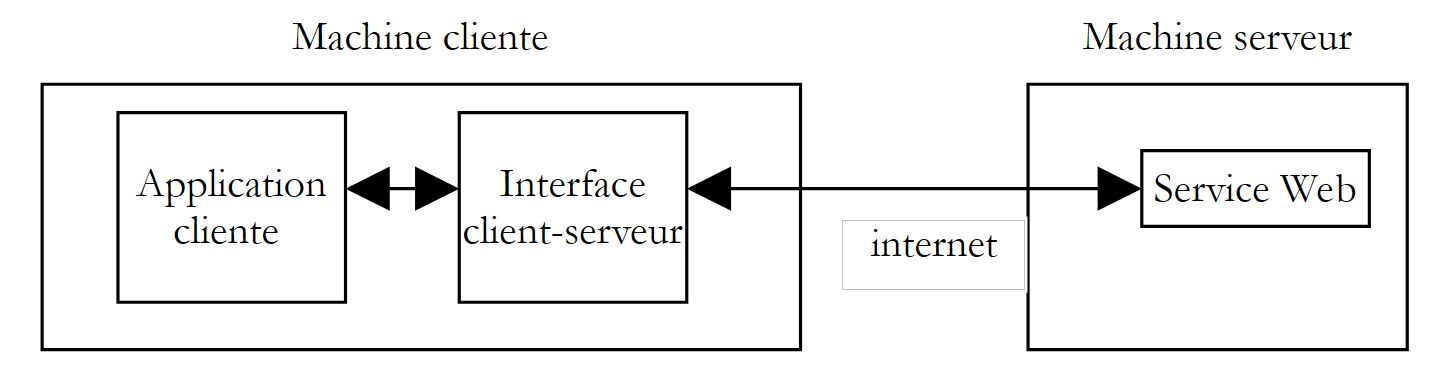 |
The client application would address the client-server interface to make its requests to the web service. The interface would handle all necessary network communication with the server and return the result to the client application. The client application would no longer have to deal with communication with the server, which would greatly simplify its implementation.
10.7.1. The Encapsulation Class
Based on what we’ve covered in the previous sections, we now have a good understanding of the network communication between the client and the server. We’ve even looked at three methods. We’ve chosen to encapsulate the method SOAP. The class is as follows:
' namespaces
Imports System
Imports System.Net.Sockets
Imports System.IO
Imports System.Text.RegularExpressions
Imports System.Collections
Imports System.Web
Imports Microsoft.VisualBasic
' clientSOAP of the Web operations service
Public Class clientSOAP
' instance variables
Private uri As uri = Nothing ' l'URI du service web
Private client As TcpClient = Nothing ' la liaison tcp du client avec le serveur
Private [IN] As StreamReader = Nothing ' le flux de lecture du client
Private OUT As StreamWriter = Nothing ' le flux d'écriture du client
' function dictionary
Private dicoFonctions As New Hashtable
' function list
Private fonctions As String() = {"ajouter", "soustraire", "multiplier", "diviser"}
' verbose
Private verbose As Boolean = False ' à vrai, affiche à l'écran les échanges client-serveur
' manufacturer
Public Sub New(ByVal uriString As String, ByVal verbose As Boolean)
' we note verbose
Me.verbose = verbose
' server connection
uri = New Uri(uriString)
client = New TcpClient(uri.Host, uri.Port)
' create customer input/output flows TCP
[IN] = New StreamReader(client.GetStream())
OUT = New StreamWriter(client.GetStream())
OUT.AutoFlush = True
' create a dictionary of web service functions
Dim i As Integer
For i = 0 To fonctions.Length - 1
dicoFonctions.Add(fonctions(i), True)
Next i
End Sub
' close server connection
Public Sub Close()
' end of client-server link
[IN].Close()
OUT.Close()
client.Close()
End Sub
' executeFonction
Public Function executeFonction(ByVal fonction As String, ByVal a As String, ByVal b As String) As String
' execute function(a,b) on the URI uri web service
' client-server exchanges take place via IN and OUT flows
' the result of the function is in the line
' <double xmlns="st.istia.univ-angers.fr">double</double>
' sent by the server
' valid function?
fonction = fonction.Trim().ToLower()
If Not dicoFonctions.ContainsKey(fonction) Then
Return "[fonction [" + fonction + "] indisponible : (ajouter, soustraire,multiplier,diviser)]"
End If
' valid arguments a and b?
Dim doubleA As Double = 0
Try
doubleA = Double.Parse(a)
Catch
Return "[argument [" + a + "] incorrect (double)]"
End Try
Dim doubleB As Double = 0
Try
doubleB = Double.Parse(b)
Catch
Return "[argument [" + b + "] incorrect (double)]"
End Try
' division by zero?
If fonction = "diviser" And doubleB = 0 Then
Return "[division par zéro]"
End If
' construction of query string SOAP
Dim requêteSOAP As String = "<?xml version=" + """1.0"" encoding=""utf-8""?>" + ControlChars.Lf
requêteSOAP += "<soap:Envelope xmlns:xsi=""http://www.w3.org/2001/XMLSchema-instance"" xmlns:xsd=""http://www.w3.org/2001/XMLSchema"" xmlns:soap=""http://schemas.xmlsoap.org/soap/envelope/"">" + ControlChars.Lf
requêteSOAP += "<soap:Body>" + ControlChars.Lf
requêteSOAP += "<" + fonction + " xmlns=""st.istia.univ-angers.fr"">" + ControlChars.Lf
requêteSOAP += "<a>" + a + "</a>" + ControlChars.Lf
requêteSOAP += "<b>" + b + "</b>" + ControlChars.Lf
requêteSOAP += "</" + fonction + ">" + ControlChars.Lf
requêteSOAP += "</soap:Body>" + ControlChars.Lf
requêteSOAP += "</soap:Envelope>"
Dim nbCharsSOAP As Integer = requêteSOAP.Length
' construction of header table HTTP to be sent
Dim entetes(6) As String
entetes(0) = "POST " + uri.AbsolutePath + " HTTP/1.1"
entetes(1) = "Host: " + uri.Host + ":" + uri.Port.ToString
entetes(2) = "Content-Type: text/xml; charset=utf-8"
entetes(3) = "Content-Length: " + nbCharsSOAP.ToString
entetes(4) = "Connection: Keep-Alive"
entetes(5) = "SOAPAction: ""st.istia.univ-angers.fr/" + fonction + """"
entetes(6) = ""
' send HTTP headers to the server
Dim i As Integer
For i = 0 To entetes.Length - 1
' send to server
OUT.WriteLine(entetes(i))
' screen echo
If verbose Then
Console.Out.WriteLine(("--> " + entetes(i)))
End If
Next i
' we read the 1st web server response HTTP/1.1 100
Dim ligne As String = Nothing
' a line in the read stream
ligne = [IN].ReadLine()
While ligne <> ""
'echo
If verbose Then
Console.Out.WriteLine(("<-- " + ligne))
End If
' next line
ligne = [IN].ReadLine()
End While
'last line echo
If verbose Then
Console.Out.WriteLine(("<-- " + ligne))
End If
' send request parameters
OUT.Write(requêteSOAP)
' echo
If verbose Then
Console.Out.WriteLine(("--> " + requêteSOAP))
End If
' construction of the regular expression to find the response size XML
' in the web server response stream
Dim modèleLength As String = "^Content-Length: (.+?)\s*$"
Dim RegexLength As New Regex(modèleLength) '
Dim MatchLength As Match = Nothing
Dim longueur As Integer = 0
' read the second response from the web server after sending the request
' the value of the Content-Length line is stored
ligne = [IN].ReadLine()
While ligne <> ""
' screen echo
If verbose Then
Console.Out.WriteLine(("<-- " + ligne))
End If
' Content-Length ?
MatchLength = RegexLength.Match(ligne)
If MatchLength.Success Then
longueur = Integer.Parse(MatchLength.Groups(1).Value)
End If
' next line
ligne = [IN].ReadLine()
End While
' last line echo
If verbose Then
Console.Out.WriteLine("<--")
End If
' build the regular expression to retrieve the result
' in the web server response stream
Dim modèle As String = "<" + fonction + "Result>(.+?)</" + fonction + "Result>"
Dim ModèleRésultat As New Regex(modèle)
Dim MatchRésultat As Match = Nothing
' we read the rest of the web server response
Dim chrRéponse(longueur) As Char
[IN].Read(chrRéponse, 0, longueur)
Dim strRéponse As String = New [String](chrRéponse)
' the answer is broken down into lines of text
Dim lignes As String() = Regex.Split(strRéponse, ControlChars.Lf)
' scroll through the lines of text looking for the result
Dim strRésultat As String = "?" ' résultat de la fonction
For i = 0 To lignes.Length - 1
' follow-up
If verbose Then
Console.Out.WriteLine(("<-- " + lignes(i)))
End If ' comparaison ligne courante au modèle
MatchRésultat = ModèleRésultat.Match(lignes(i))
' have we found?
If MatchRésultat.Success Then
' we note the result
strRésultat = MatchRésultat.Groups(1).Value
End If
Next i
' return the result
Return strRésultat
End Function
End Class
There is nothing new here compared to what we have already seen. We simply took the code from client SOAP that we studied and rearranged it slightly to turn it into a class. This class has a constructor and two methods:
' manufacturer
Public Sub New(ByVal uriString As String, ByVal verbose As Boolean)
' executeFonction
Public Function executeFonction(ByVal fonction As String, ByVal a As String, ByVal b As String) As String
' close server connection
Public Sub Close()
and has the following attributes:
' instance variables
Private uri As Uri = Nothing ' l'URI du service web
Private client As TcpClient = Nothing ' la liaison tcp du client avec le serveur
Private [IN] As StreamReader = Nothing ' le flux de lecture du client
Private OUT As StreamWriter = Nothing ' le flux d'écriture du client
' function dictionary
Private dicoFonctions As New Hashtable
' function list
Private fonctions As String() = {"ajouter", "soustraire", "multiplier", "diviser"}
' verbose
Private verbose As Boolean = False ' à vrai, affiche à l'écran les échanges client-serveur
We pass two parameters to the constructor:
- the URI of the web service it must connect to
- a Boolean verbose parameter which, when set to true, requests that network exchanges be displayed on the screen; otherwise, they will not be displayed.
During construction, the IN network read stream, the OUT network write stream, and the dictionary of functions managed by the service are created. Once the object is constructed, the client-server connection is opened and its IN and OUT streams are ready for use.
The Close method is used to close the connection to the server.
The ExecuteFonction method is the one we wrote for the SOAP client we studied, with a few minor differences:
- The parameters uri, IN, and OUT, which were previously passed as parameters to the method, no longer need to be passed, since they are now instance attributes accessible to all methods of the instance
- The method ExecuteFonction, which previously returned a void type and displayed the function’s result on the screen, now returns this result and thus a string type.
Typically, a client will use the clientSOAP class as follows:
- creating a clientSOAP object that establishes the connection to the web service
- repeatedly calling the executeFonction method
- closing the connection to the web service using the Close method.
Let’s look at a first client.
10.7.2. A console client
Here we revisit the SOAP client studied when the clientSOAP class did not exist, and we redesign it so that it now uses this class:
' namespaces
Imports System
Imports System.IO
Imports System.Text.RegularExpressions
Imports Microsoft.VisualBasic
Public Module testClientSoap
' requests the URI of the operations web service
' interactively executes keyboard commands
Public Sub Main(ByVal args() As String)
' syntax
Const syntaxe As String = "pg URI [verbose]"
' number of arguments
If args.Length <> 1 And args.Length <> 2 Then
erreur(syntaxe, 1)
End If
' verbose?
Dim verbose As Boolean = False
If args.Length = 2 Then
verbose = args(1).ToLower() = "verbose"
End If
' connect to the web service
Dim client As clientSOAP = Nothing
Try
client = New clientSOAP(args(0), verbose)
Catch ex As Exception
' connection error
erreur("L'erreur suivante s'est produite lors de la connexion au service web : " + ex.Message, 2)
End Try
' user requests are typed on the keyboard
' in the form function a b - they end with the command fin
Dim commande As String = Nothing ' keyboard command
Dim champs As String() = Nothing ' command line fields
' invites the user
Console.Out.WriteLine("Tapez vos commandes au format : [ajouter|soustraire|multiplier|diviser] a b" + ControlChars.Lf)
' error management
Dim erreurCommande As Boolean
Try
' keyboard command input loop
While True
' initially no error
erreurCommande = False
' read command
commande = Console.In.ReadLine().Trim().ToLower()
' finished?
If commande Is Nothing Or commande = "fin" Then
Exit While
End If
' breaking down the order into fields
champs = Regex.Split(commande, "\s+")
' three fields are required
If champs.Length <> 3 Then
Console.Out.WriteLine("syntaxe : [ajouter|soustraire|multiplier|diviser] a b")
' we note the error
erreurCommande = True
End If
' make a request to the web service
If Not erreurCommande Then Console.Out.WriteLine(("résultat=" + client.executeFonction(champs(0).Trim().ToLower(), champs(1).Trim(), champs(2).Trim())))
' next request
End While
Catch e As Exception
Console.Out.WriteLine(("L'erreur suivante s'est produite : " + e.Message))
End Try
' end of client-server link
Try
client.Close()
Catch
End Try
End Sub
' error display
Public Sub erreur(ByVal msg As String, ByVal exitCode As Integer)
' error display
System.Console.Error.WriteLine(msg)
' stop with error
Environment.Exit(exitCode)
End Sub
End Module
The client is now considerably simpler and contains no network communication. The client accepts two parameters:
- the URI of the web service operations
- the optional verbose keyword. If present, network traffic will be displayed on the screen.
These two parameters are used to create a clientSOAP object that will handle communication with the web service.
' connect to the web service
Dim client As clientSOAP = Nothing
Try
client = New clientSOAP(args(0), verbose)
Catch ex As Exception
' connection error
erreur("L'erreur suivante s'est produite lors de la connexion au service web : " + ex.Message, 2)
End Try
Once the connection to the web service is established, the client can send its requests. These are typed on the keyboard, parsed, and then sent to the server by calling the executeFonction method of the clientSOAP object.
' request the web service
If Not erreurCommande Then Console.Out.WriteLine(("résultat=" + client.executeFonction(champs(0).Trim().ToLower(), champs(1).Trim(), champs(2).Trim())))
The clientSOAP class is compiled into an "assembly":
dos>vbc /r:clientSOAP.dll testClientSOAP.vb
dos>dir
04/03/2004 08:46 6 913 clientSOAP.vb
04/03/2004 09:07 7 168 clientSOAP.dll
The client application testClientSoap is then compiled using:
dos>vbc /r:clientSOAP.dll /r:system.dll testClientSOAP.vb
dos>dir
04/03/2004 09:08 2 711 testClientSOAP.vb
04/03/2004 09:08 4 608 testClientSOAP.exe
Here is an example of a non-verbose execution:
dos>testclientsoap http://localhost/st/operations/operations.asmx
Tapez vos commandes au format : [ajouter|soustraire|multiplier|diviser] a b
ajouter 1 3
résultat=4
soustraire 6 7
résultat=-1
multiplier 4 5
résultat=20
diviser 1 2
résultat=0.5
x
syntaxe : [ajouter|soustraire|multiplier|diviser] a b
x 1 2
résultat=[fonction [x] indisponible : (ajouter, soustraire,multiplier,diviser)]
ajouter a b
résultat=[argument [a] incorrect (double)]
ajouter 1 b
résultat=[argument [b] incorrect (double)]
diviser 1 0
résultat=[division par zéro]
fin
You can monitor network traffic by requesting a "verbose" execution:
dos>testClientSOAP http://localhost/operations/operations.asmx verbose
Tapez vos commandes au format : [ajouter|soustraire|multiplier|diviser] a b
ajouter 4 8
--> POST /operations/operations.asmx HTTP/1.1
--> Host: localhost:80
--> Content-Type: text/xml; charset=utf-8
--> Content-Length: 321
--> Connection: Keep-Alive
--> SOAPAction: "st.istia.univ-angers.fr/add"
-->
<-- HTTP/1.1 100 Continuous
<-- Server: Microsoft-IIS/5.0
<-- Date: Thu, 04 Mar 2004 08:15:25 GMT
<-- X-Powered-By: ASP.NET
<--
--> <?xml version="1.0" encoding="utf-8"?>
<soap:Envelope xmlns:xsi="http://www.w3.org/2001/XMLSchema-instance" xmlns:xsd="http://www.w3.org/2001/XMLSchema" xmlns:soap="http://schemas.xmlsoap.org/soap/envelope/">
<soap:Body>
<ajouter xmlns="st.istia.univ-angers.fr">
<a>4</a>
<b>8</b>
</ajouter>
</soap:Body>
</soap:Envelope>
<-- HTTP/1.1 200 OK
<-- Server: Microsoft-IIS/5.0
<-- Date: Thu, 04 Mar 2004 08:15:25 GMT
<-- X-Powered-By: ASP.NET
<-- X-AspNet-Version: 1.1.4322
<-- Cache-Control: private, max-age=0
<-- Content-Type: text/xml; charset=utf-8
<-- Content-Length: 346
<--
<-- <?xml version="1.0" encoding="utf-8"?><soap:Envelope xmlns:soap="http://schemas.xmlsoap.org/soap/envelope/" xmlns:xsi="http://www.w3.org/2001/XMLSchema-inst
ance" xmlns:xsd="http://www.w3.org/2001/XMLSchema"><soap:Body><ajouterResponse xmlns="st.istia.univ-angers.fr"><ajouterResult>12</ajouterResult></ajouterResponse></soap:Body></soap:Envelope>
résultat=12
fin
Now let's build a graphical client.
10.7.3. A Windows graphical client
We will now query our web service using a graphical client that will also use the clientSOAP class. The graphical interface will be as follows:
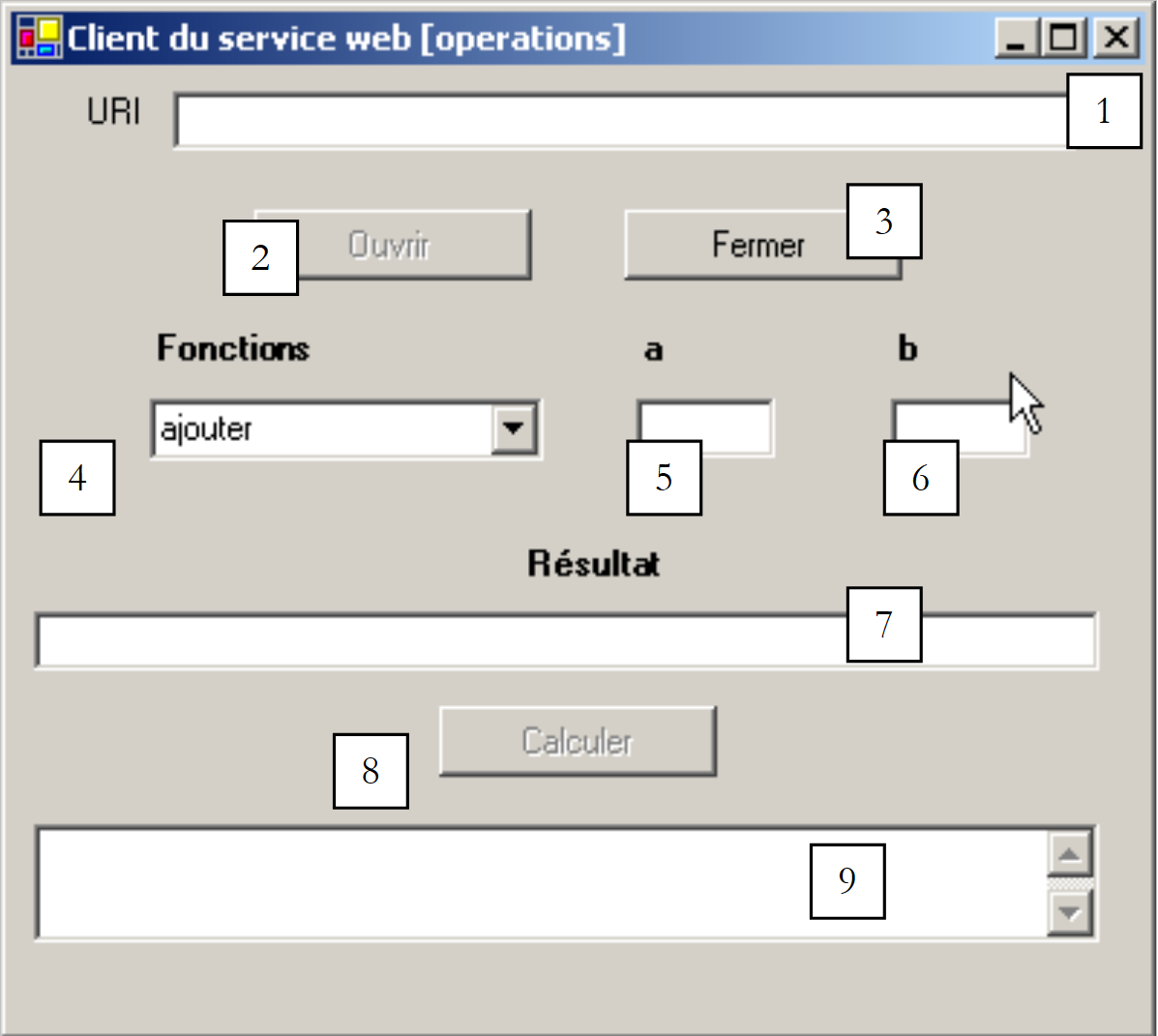 |
The controls are as follows:
No. | Type | name | role |
TextBox | txtURI | URI from the Web Operations department | |
Button | btnOuvrir | opens the connection to the Web service | |
Button | btnFermer | closes the connection to the web service | |
ComboBox | cmbFonctions | List of functions (add, subtract, multiply, divide) | |
TextBox | txtA | the arguments of the functions | |
TextBox | txtB | argument b of the functions | |
TextBox | txtRésultat | the result of the function (a, b) | |
Button | btnCalculer | Starts the calculation of function(a,b) | |
TextBox | txtErreur | displays a connection status message |
There are a few operational constraints:
- The btnOuvrir button is active only if the txtURI field is not empty and a connection is not already open
- The btnFermer button is active only when a connection to the web service has been opened
- The btnCalculer button is active only when a connection is open and the txtA and txtB fields are not empty
- The fields txtRésultat and txtErreur have the attribute ReadOnly set to true
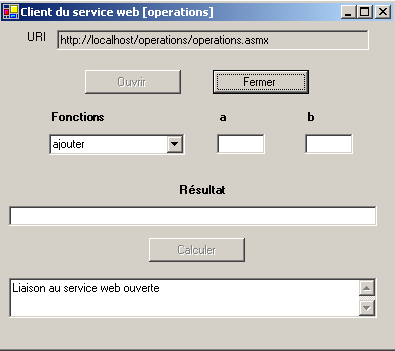
The client begins by opening a connection to the web service using the [Ouvrir] button:
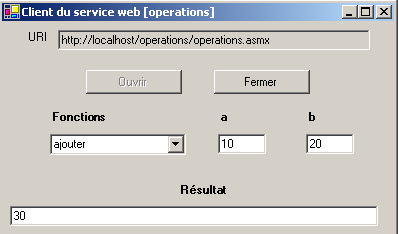
The user can then select a function and values for a and b:
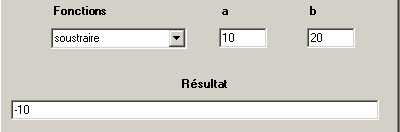
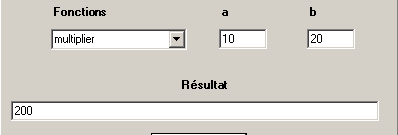
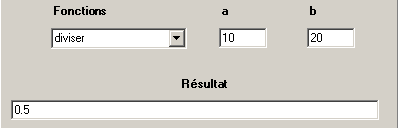
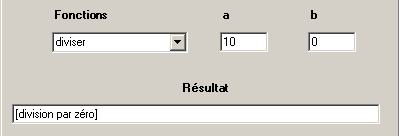
The application code follows. We have omitted the form code, which is not relevant here.
'namespaces
Imports System
Imports System.Windows.Forms
' the form class
Public Class FormClientSOAP
Inherits System.Windows.Forms.Form
' instance attributes
Dim client As clientSOAP ' client SOAP du service web operations
#Region "Code generated by the Windows Form Designer
Public Sub New()
MyBase.New()
'This call is required by the Windows Form Designer.
InitializeComponent()
' other initializations
myInit()
End Sub
'The substituted method Disposes of the form to clean up the list of components.
Protected Overloads Overrides Sub Dispose(ByVal disposing As Boolean)
....
End Sub
...
Private Sub InitializeComponent()
....
End Sub
#End Region
Private Sub myInit()
' init form
cmbFonctions.SelectedIndex = 0
btnOuvrir.Enabled = False
btnFermer.Enabled = True
btnCalculer.Enabled = False
End Sub
Private Sub txtURI_TextChanged(ByVal sender As Object, ByVal e As System.EventArgs) Handles txtURI.TextChanged
' the content of the input field has changed - set the state of the open button
btnOuvrir.Enabled = txtURI.Text.Trim <> ""
End Sub
Private Sub btnOuvrir_Click(ByVal sender As Object, ByVal e As System.EventArgs) Handles btnOuvrir.Click
' request to open a connection with the web service
Try
' creation of a [clientSOAP] type object
client = New clientSOAP(txtURI.Text.Trim, False)
' button status
btnOuvrir.Enabled = False
btnFermer.Enabled = True
' the URI can no longer be modified
txtURI.ReadOnly = True
' customer status
txtErreur.Text = "Liaison au service web ouverte"
Catch ex As Exception
' there has been an error - it is displayed
txtErreur.Text = ex.Message
End Try
End Sub
Private Sub btnFermer_Click(ByVal sender As Object, ByVal e As System.EventArgs) Handles btnFermer.Click
' closing the web service connection
client.Close()
' button states
btnOuvrir.Enabled = True
btnFermer.Enabled = False
' URI
txtURI.ReadOnly = False
' customer status
txtErreur.Text = "Liaison au service web fermée"
End Sub
Private Sub btnCalculer_Click(ByVal sender As Object, ByVal e As System.EventArgs) Handles btnCalculer.Click
' calculating a function f(a,b)
' delete the previous result
txtRésultat.Text = ""
Try
txtRésultat.Text = client.executeFonction(cmbFonctions.Text, txtA.Text.Trim, txtB.Text.Trim)
Catch ex As Exception
' there has been a network error
txtErreur.Text = ex.Message
' we close the link
btnFermer_Click(Nothing, Nothing)
End Try
End Sub
Private Sub txtA_TextChanged(ByVal sender As Object, ByVal e As System.EventArgs) Handles txtA.TextChanged
' change in the value of A
btnCalculer.Enabled = txtA.Text.Trim <> "" And txtB.Text.Trim <> ""
End Sub
Private Sub txtB_TextChanged(ByVal sender As Object, ByVal e As System.EventArgs) Handles txtB.TextChanged
' change in the value of B
txtA_TextChanged(Nothing, Nothing)
End Sub
' main method
Public Shared Sub main()
Application.Run(New FormClientSOAP)
End Sub
End Class
Here again, the clientSOAP class hides the entire network aspect of the application. The application was built as follows:
- the assembly clientSOAP.dll containing the class clientSOAP was placed in the project folder
- the clientsoapgui.vb GUI was built with VS.NET and then compiled in a DOS window:
dos>vbc /r:system.dll /r:system.windows.forms.dll /r:system.drawing.dll /r:clientSOAP.dll clientsoapgui.vb
dos>dir
04/03/2004 09:13 7 168 clientSOAP.dll
04/03/2004 16:44 9 866 clientsoapgui.vb
04/03/2004 16:44 11 264 clientsoapgui.exe
The graphical interface was then launched by:
10.8. A proxy client
Let’s recap what we’ve just done. We created an intermediate class that encapsulates network exchanges between a client and a web service according to the diagram below:
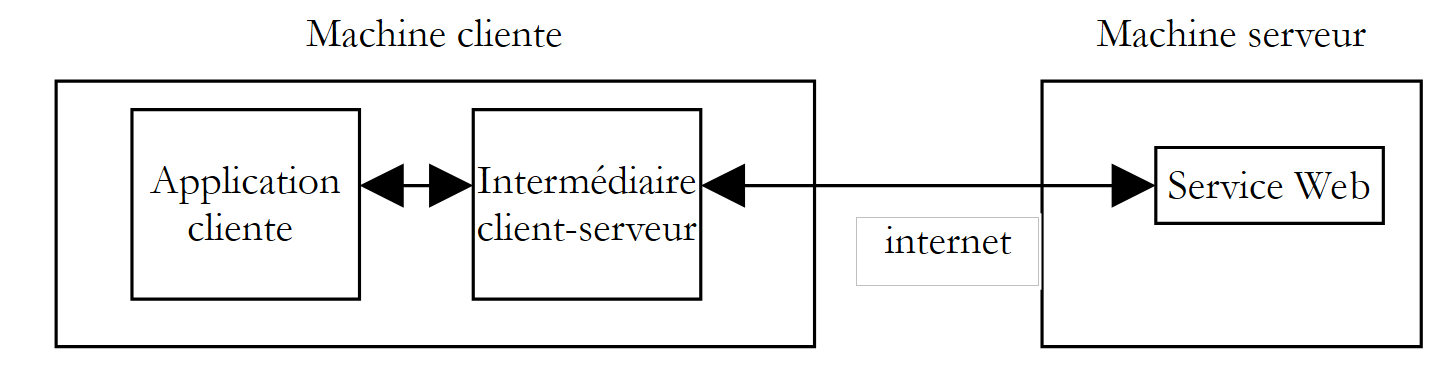 |
The .NET platform takes this logic a step further. Once the target web service is known, we can automatically generate the class that will serve as an intermediary to access the web service’s functions and hide the entire network layer. This class is called a proxy for the web service for which it was generated.
How do you generate a web service proxy class? A web service is always accompanied by a description file in the XML format. If the URI for our web service operations is http://localhost/operations/operations.asmx, its description file is available at URL http://localhost/operations/operations.asmx?wsdl as shown in the following screenshot:

This is a XML file that precisely describes all the functions of the web service, including for each one the type and number of parameters, and the type of result. This file is called the service’s WSDL file because it uses the WSDL language (Web Services Description Language). From this file, a proxy class can be generated using the wsdl tool:
dos>wsdl http://localhost/operations/operations.asmx?wsdl /language=vb
Microsoft (R) Web Services Description Language Utility
[Microsoft (R) .NET Framework, Version 1.1.4322.573]
Copyright (C) Microsoft Corporation 1998-2002. All rights reserved.
Écriture du fichier 'D:\data\devel\vbnet\poly\chap9\clientproxy\operations.vb'.
dos>dir
04/03/2004 17:17 6 663 operations.vb
The wsdl tool generates a source file named VB.NET (option /language=vb) with the name of the class implementing the web service, in this case operations. Let's examine part of the generated code:
'------------------------------------------------------------------------------
' <autogenerated>
' This code was generated by a tool.
' Runtime Version: 1.1.4322.573
'
' Changes to this file may cause incorrect behavior and will be lost if
' the code is regenerated.
' </autogenerated>
'------------------------------------------------------------------------------
Option Strict Off
Option Explicit On
Imports System
Imports System.ComponentModel
Imports System.Diagnostics
Imports System.Web.Services
Imports System.Web.Services.Protocols
Imports System.Xml.Serialization
'
'This source code has been té automatically généré by wsdl, Version=1.1.4322.573.
'
'<remarks/>
<System.Diagnostics.DebuggerStepThroughAttribute(), _
System.ComponentModel.DesignerCategoryAttribute("code"), _
System.Web.Services.WebServiceBindingAttribute(Name:="operationsSoap", [Namespace]:="st.istia.univ-angers.fr")> _
Public Class operations
Inherits System.Web.Services.Protocols.SoapHttpClientProtocol
'<remarks/>
Public Sub New()
MyBase.New
Me.Url = "http://localhost/operations/operations.asmx"
End Sub
'<remarks/>
<System.Web.Services.Protocols.SoapDocumentMethodAttribute("st.istia.univ-angers.fr/ajouter", RequestNamespace:="st.istia.univ-angers.fr", ResponseNamespace:="st.istia.univ-angers.fr", Use:=System.Web.Services.Description.SoapBindingUse.Literal, ParameterStyle:=System.Web.Services.Protocols.SoapParameterStyle.Wrapped)> _
Public Function ajouter(ByVal a As Double, ByVal b As Double) As Double
Dim results() As Object = Me.Invoke("ajouter", New Object() {a, b})
Return CType(results(0),Double)
End Function
'<remarks/>
Public Function Beginajouter(ByVal a As Double, ByVal b As Double, ByVal callback As System.AsyncCallback, ByVal asyncState As Object) As System.IAsyncResult
Return Me.BeginInvoke("ajouter", New Object() {a, b}, callback, asyncState)
End Function
'<remarks/>
Public Function Endajouter(ByVal asyncResult As System.IAsyncResult) As Double
Dim results() As Object = Me.EndInvoke(asyncResult)
Return CType(results(0),Double)
End Function
....
This code may seem a bit complex at first glance. We don’t need to understand the details to use it. Let’s first examine the class declaration:
The class is named operations after the web service for which it was built. It derives from the SoapHttpClientProtocol class:
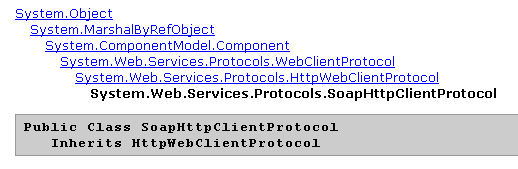
Our proxy class has a single constructor:
The constructor assigns the URL from the web service associated with the proxy to the url attribute. The operations class above does not define the url attribute itself. This attribute is inherited from the class from which the proxy derives: System.Web.Services.Protocols.SoapHttpClientProtocol. Let’s now examine what relates to the add method:
Public Function ajouter(ByVal a As Double, ByVal b As Double) As Double
Dim results() As Object = Me.Invoke("ajouter", New Object() {a, b})
Return CType(results(0),Double)
End Function
We can see that it has the same signature as in the WebMethods service, where it was defined as follows:
      <WebMethod>  _
      Function ajouter(a As Double, b As Double) As Double
         Return a + b
End Function 'ajouter
The way this class interacts with the web service is not shown here. This interaction is entirely handled by the parent class System.Web.Services.Protocols.SoapHttpClientProtocol. The proxy contains only what distinguishes it from other proxies:
- the URL of the associated web service
- the definition of the associated service's methods.
To use the methods of the operations web service, a client only needs the operations proxy class generated earlier. Let’s compile this class into an assembly file:
Now let’s write a console client. It is called without parameters and executes the requests typed on the keyboard:
dos>testclientproxy
Tapez vos commandes au format : [ajouter|soustraire|multiplier|diviser|toutfaire] a b
ajouter 4 5
résultat=9
soustraire 9 8
résultat=1
multiplier 10 4
résultat=40
diviser 6 7
résultat=0,857142857142857
toutfaire 10 20
résultats=[30,-10,200,0,5]
diviser 5 0
résultat=+Infini
fin
The client's code is as follows:
' namespaces
Imports System
Imports System.IO
Imports System.Text.RegularExpressions
Imports System.Collections
Imports Microsoft.VisualBasic
Public Module testClientProxy
' interactively executes keyboard commands
' and sends them to the web operations service
Public Sub Main()
' there are no more arguments - the web service's URL is hard-coded in the proxy
' creation of a dictionary of web service functions
Dim fonctions As String() = {"ajouter", "soustraire", "multiplier", "diviser", "toutfaire"}
Dim dicoFonctions As New Hashtable
Dim i As Integer
For i = 0 To fonctions.Length - 1
dicoFonctions.Add(fonctions(i), True)
Next i
' create a proxy operations object
Dim myOperations As operations = Nothing
Try
myOperations = New operations
Catch ex As Exception
' connection error
erreur("L'erreur suivante s'est produite lors de la connexion au proxy dy service web : " + ex.Message, 2)
End Try
' user requests are typed on the keyboard
' in the form function a b - they end with the command fin
Dim commande As String = Nothing ' keyboard command
Dim champs As String() = Nothing ' command line fields
' invites the user
Console.Out.WriteLine("Tapez vos commandes au format : [ajouter|soustraire|multiplier|diviser|toutfaire] a b" + ControlChars.Lf)
' some local data
Dim erreurCommande As Boolean
Dim fonction As String
Dim a, b As Double
' keyboard command input loop
While True
' initially no error
erreurCommande = False
' read command
commande = Console.In.ReadLine().Trim().ToLower()
' finished?
If commande Is Nothing Or commande = "fin" Then
Exit While
End If
' breaking down the order into fields
champs = Regex.Split(commande, "\s+")
Try
' three fields are required
If champs.Length <> 3 Then
Throw New Exception
End If
' field 0 must be a recognized function
fonction = champs(0)
If Not dicoFonctions.ContainsKey(fonction) Then
Throw New Exception
End If
' field 1 must be a valid number
a = Double.Parse(champs(1))
' field 2 must be a valid number
b = Double.Parse(champs(2))
Catch
' invalid order
Console.Out.WriteLine("syntaxe : [ajouter|soustraire|multiplier|diviser] a b")
erreurCommande = True
End Try
' request the web service
If Not erreurCommande Then
Try
Dim résultat As Double
Dim résultats() As Double
If fonction = "ajouter" Then
résultat = myOperations.ajouter(a, b)
Console.Out.WriteLine(("résultat=" + résultat.ToString))
End If
If fonction = "soustraire" Then
résultat = myOperations.soustraire(a, b)
Console.Out.WriteLine(("résultat=" + résultat.ToString))
End If
If fonction = "multiplier" Then
résultat = myOperations.multiplier(a, b)
Console.Out.WriteLine(("résultat=" + résultat.ToString))
End If
If fonction = "diviser" Then
résultat = myOperations.diviser(a, b)
Console.Out.WriteLine(("résultat=" + résultat.ToString))
End If
If fonction = "toutfaire" Then
résultats = myOperations.toutfaire(a, b)
Console.Out.WriteLine(("résultats=[" + résultats(0).ToString + "," + résultats(1).ToString + "," + _
résultats(2).ToString + "," + résultats(3).ToString + "]"))
End If
Catch e As Exception
Console.Out.WriteLine(("L'erreur suivante s'est produite : " + e.Message))
End Try
End If
End While
End Sub
' error display
Public Sub erreur(ByVal msg As String, ByVal exitCode As Integer)
' error display
System.Console.Error.WriteLine(msg)
' stop with error
Environment.Exit(exitCode)
End Sub
End Module
We are only examining the code specific to using the proxy class. First, a proxy operations object is created:
' create a proxy operations object
Dim myOperations As operations = Nothing
Try
myOperations = New operations
Catch ex As Exception
' connection error
erreur("L'erreur suivante s'est produite lors de la connexion au proxy dy service web : " + ex.Message, 2)
End Try
Lines a and b are typed on the keyboard. Based on this information, the appropriate proxy methods are called:
' make a request to the web service
If Not erreurCommande Then
Try
Dim résultat As Double
Dim résultats() As Double
If fonction = "ajouter" Then
résultat = myOperations.ajouter(a, b)
Console.Out.WriteLine(("résultat=" + résultat.ToString))
End If
If fonction = "soustraire" Then
résultat = myOperations.soustraire(a, b)
Console.Out.WriteLine(("résultat=" + résultat.ToString))
End If
If fonction = "multiplier" Then
résultat = myOperations.multiplier(a, b)
Console.Out.WriteLine(("résultat=" + résultat.ToString))
End If
If fonction = "diviser" Then
résultat = myOperations.diviser(a, b)
Console.Out.WriteLine(("résultat=" + résultat.ToString))
End If
If fonction = "toutfaire" Then
résultats = myOperations.toutfaire(a, b)
Console.Out.WriteLine(("résultats=[" + résultats(0).ToString + "," + résultats(1).ToString + "," + _
résultats(2).ToString + "," + résultats(3).ToString + "]"))
End If
Catch e As Exception
Console.Out.WriteLine(("L'erreur suivante s'est produite : " + e.Message))
End Try
Here, we are dealing for the first time with the all-in-one operation that performs all four operations. It had been ignored until now because it returns an array of numbers encapsulated in a XML wrapper, which is more complicated to handle than the simple XML responses from the other functions, which return only a single result. We can see that here, with the proxy class, using the all-in-one method is no more complicated than using the other methods. The application was compiled in a DOS window as follows:
dos>vbc /r:operations.dll /r:system.dll /r:system.web.services.dll testClientProxy.vb
dos>dir
04/03/2004  17:17                6 663 operations.vb
04/03/2004  17:24                7 680 operations.dll
04/03/2004 17:41 4 099 testClientProxy.vb
04/03/2004 17:41 5 632 testClientProxy.exe
10.9. Configuring a Web Service
A web service may require configuration information to initialize correctly. With the IIS server, this information can be placed in a file named web.config and located in the same folder as the web service. Suppose we want to create a web service that requires two pieces of information to initialize: a name and an age. These two pieces of information can be placed in the web.config file in the following format:
<?xml version="1.0" encoding="UTF-8" ?>
<configuration>
  <appSettings>
    <add key="nom" value="tintin"/>
    <add key="age" value="27"/>
  </appSettings>
</configuration>
The initialization parameters are placed in a XML envelope:
An initialization parameter named P with the value V will be declared with the line:
<add key="P" value="V"/>
How does the web service retrieve this information? When IIS loads a web service, it checks to see if there is a file named web.config in the same folder. If so, it reads it. The value V of a parameter P is obtained using the statement:
where ConfigurationSettings is a class in the System.Configuration namespace.
Let’s test this technique on the following web service:
<%@ WebService language="VB" class=personne %>

Imports System.Web.Services
imports System.Configuration

<WebService([Namespace] := "st.istia.univ-angers.fr")> _
Public Class personne
   Inherits WebService

   ' attributes
   Private nom As String
   Private age As Integer

   ' manufacturer
   Public Sub New()
      ' init attributes
      nom = ConfigurationSettings.AppSettings("nom")
      age = Integer.Parse(ConfigurationSettings.AppSettings("age"))
   End Sub

   <WebMethod>  _
   Function id() As String
      Return "[" + nom + "," + age.ToString + "]"
   End Function

End Class
The Person web service has two attributes, name and age, which are initialized in its parameterless constructor using values read from the Person service's web configuration file, web.config. This file is as follows:
<configuration>
    <appSettings>
        <add key="nom" value="tintin"/>
        <add key="age" value="27"/>
    </appSettings>
</configuration>
The web service also has a <WebMethod> id without parameters that simply returns the name and age attributes. The service is registered in the source file personne.asmx, which is located along with its configuration file in the folder c:\inetpub\wwwroot\st\personne:
Let’s associate a virtual folder IIS /config with the previous physical folder. Let’s launch IIS, then use a browser to request the url http://localhost/config/personne.asmx from the “person” service:
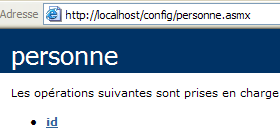
Let’s follow the link for the single method id:
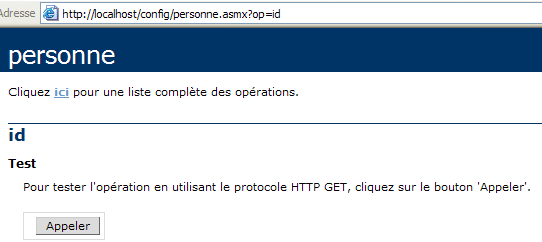
The id method has no parameters. Let’s use the Call button:
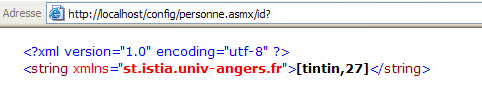
We have successfully retrieved the information stored in the service's web.config file.
10.10. The IMPOTS Web Service
We’re revisiting the now-familiar IMPOTS application. The last time we worked with it, we turned it into a remote server that could be called over the internet. We’re now turning it into a web service.
10.10.1. The Web Service
We start with the tax class created in the chapter on databases, which is built from the information contained in a database named ODBC:
' options
Option Strict On
Option Explicit On

' namespaces
Imports System
Imports System.Data
Imports Microsoft.Data.Odbc
Imports System.Collections

Public Class impôt
    ' data required for tax calculation
    ' come from an external source
    Private limites(), coeffR(), coeffN() As Decimal

    ' manufacturer
    Public Sub New(ByVal LIMITES() As Decimal, ByVal COEFFR() As Decimal, ByVal COEFFN() As Decimal)
        ' we check that the 3 tablaeux are the same size
        Dim OK As Boolean = LIMITES.Length = COEFFR.Length And LIMITES.Length = COEFFN.Length
        If Not OK Then
            Throw New Exception("Les 3 tableaux fournis n'ont pas la même taille(" & LIMITES.Length & "," & COEFFR.Length & "," & COEFFN.Length & ")")
        End If
        ' it's good
        Me.limites = LIMITES
        Me.coeffR = COEFFR
        Me.coeffN = COEFFN
    End Sub

    ' builder 2
    Public Sub New(ByVal DSNimpots As String, ByVal Timpots As String, ByVal colLimites As String, ByVal colCoeffR As String, ByVal colCoeffN As String)
        ' initialise les trois tableaux limites, coeffR, coeffN à partir
        ' the contents of the Timpots table in the ODBC DSNimpots database
        ' colLimites, colCoeffR, colCoeffN are the three columns of this table
        ' can throw an exception
        Dim connectString As String = "DSN=" + DSNimpots + ";"        ' base connection chain
        Dim impotsConn As OdbcConnection = Nothing        ' the connection
        Dim sqlCommand As OdbcCommand = Nothing        ' the SQL command
        ' the SELECT query
        Dim selectCommand As String = "select " + colLimites + "," + colCoeffR + "," + colCoeffN + " from " + Timpots
        ' tables to retrieve data
        Dim tLimites As New ArrayList
        Dim tCoeffR As New ArrayList
        Dim tCoeffN As New ArrayList

        ' attempt to access the database
        impotsConn = New OdbcConnection(connectString)
        impotsConn.Open()
        ' create a command object
        sqlCommand = New OdbcCommand(selectCommand, impotsConn)
        ' execute the query
        Dim myReader As OdbcDataReader = sqlCommand.ExecuteReader()
        ' Using the recovered table
        While myReader.Read()
            ' the data of the current line are put in the tables
            tLimites.Add(myReader(colLimites))
            tCoeffR.Add(myReader(colCoeffR))
            tCoeffN.Add(myReader(colCoeffN))
        End While
        ' freeing up resources
        myReader.Close()
        impotsConn.Close()

        ' dynamic tables are placed in static tables
        Me.limites = New Decimal(tLimites.Count) {}
        Me.coeffR = New Decimal(tLimites.Count) {}
        Me.coeffN = New Decimal(tLimites.Count) {}
        Dim i As Integer
        For i = 0 To tLimites.Count - 1
            limites(i) = Decimal.Parse(tLimites(i).ToString())
            coeffR(i) = Decimal.Parse(tCoeffR(i).ToString())
            coeffN(i) = Decimal.Parse(tCoeffN(i).ToString())
        Next i
    End Sub

    ' tAX CALCULATION
    Public Function calculer(ByVal marié As Boolean, ByVal nbEnfants As Integer, ByVal salaire As Integer) As Long
        ' calculating the number of shares
        Dim nbParts As Decimal
        If marié Then
            nbParts = CDec(nbEnfants) / 2 + 2
        Else
            nbParts = CDec(nbEnfants) / 2 + 1
        End If
        If nbEnfants >= 3 Then
            nbParts += 0.5D
        End If
        ' calculation of taxable income & family quota
        Dim revenu As Decimal = 0.72D * salaire
        Dim QF As Decimal = revenu / nbParts
        ' tAX CALCULATION
        limites((limites.Length - 1)) = QF + 1
        Dim i As Integer = 0
        While QF > limites(i)
            i += 1
        End While
        ' return result
        Return CLng(revenu * coeffR(i) - nbParts * coeffN(i))
    End Function
End Class
In the web service, only a parameterless constructor can be used. Therefore, the class constructor will become the following:
    ' manufacturer
    Public Sub New()
        ' initialise les trois tableaux limites, coeffR, coeffN à partir
        ' the contents of the Timpots table in the ODBC DSNimpots database
        ' colLimites, colCoeffR, colCoeffN are the three columns of this table
        ' can throw an exception

        ' retrieve the service configuration parameters
        Dim DSNimpots As String = ConfigurationSettings.AppSettings("DSN")
        Dim Timpots As String = ConfigurationSettings.AppSettings("TABLE")
        Dim colLimites As String = ConfigurationSettings.AppSettings("COL_LIMITES")
        Dim colCoeffR As String = ConfigurationSettings.AppSettings("COL_COEFFR")
        Dim colCoeffN As String = ConfigurationSettings.AppSettings("COL_COEFFN")

        ' database operation
        Dim connectString As String = "DSN=" + DSNimpots + ";"     ' base connection chain
The five parameters of the constructor from the previous class are now read from the service's web.config file. The code in the impots.asmx source file is as follows. It includes most of the previous code. We have simply highlighted the portions of code specific to the web service:
<%@ WebService language="VB" class=impots %>

' creation of a tax web service
Imports System
Imports System.Data
Imports Microsoft.Data.Odbc
Imports System.Collections
Imports System.Configuration
Imports System.Web.Services

<WebService([Namespace]:="st.istia.univ-angers.fr")> _
Public Class impôt
    Inherits WebService

    ' data required for tax calculation
    ' come from an external source
    Private limites(), coeffR(), coeffN() As Decimal
    Private OK As Boolean = False
    Private errMessage As String = ""


    ' manufacturer
    Public Sub New()
        ' initialise les trois tableaux limites, coeffR, coeffN à partir
        ' the contents of the Timpots table in the ODBC DSNimpots database
        ' colLimites, colCoeffR, colCoeffN are the three columns of this table
        ' can throw an exception

        ' retrieve the service configuration parameters
        Dim DSNimpots As String = ConfigurationSettings.AppSettings("DSN")
        Dim Timpots As String = ConfigurationSettings.AppSettings("TABLE")
        Dim colLimites As String = ConfigurationSettings.AppSettings("COL_LIMITES")
        Dim colCoeffR As String = ConfigurationSettings.AppSettings("COL_COEFFR")
        Dim colCoeffN As String = ConfigurationSettings.AppSettings("COL_COEFFN")

        ' database operation
        Dim connectString As String = "DSN=" + DSNimpots + ";"     ' chaîne de connexion à la base
        Dim impotsConn As OdbcConnection = Nothing     ' la connexion
        Dim sqlCommand As OdbcCommand = Nothing     ' la commande SQL
        Dim myReader As OdbcDataReader     ' lecteur de données Odbc

        ' the SELECT query
        Dim selectCommand As String = "select " + colLimites + "," + colCoeffR + "," + colCoeffN + " from " + Timpots

        ' tables to retrieve data
        Dim tLimites As New ArrayList
        Dim tCoeffR As New ArrayList
        Dim tCoeffN As New ArrayList

        ' attempt to access the database
        Try
            impotsConn = New OdbcConnection(connectString)
            impotsConn.Open()
            ' create a command object
            sqlCommand = New OdbcCommand(selectCommand, impotsConn)
            ' execute the query
            myReader = sqlCommand.ExecuteReader()
            ' Using the recovered table
            While myReader.Read()
                ' the data of the current line are put in the tables
                tLimites.Add(myReader(colLimites))
                tCoeffR.Add(myReader(colCoeffR))
                tCoeffN.Add(myReader(colCoeffN))
            End While
            ' freeing up resources
            myReader.Close()
            impotsConn.Close()

            ' dynamic tables are placed in static tables
            Me.limites = New Decimal(tLimites.Count) {}
            Me.coeffR = New Decimal(tLimites.Count) {}
            Me.coeffN = New Decimal(tLimites.Count) {}
            Dim i As Integer
            For i = 0 To tLimites.Count - 1
                limites(i) = Decimal.Parse(tLimites(i).ToString())
                coeffR(i) = Decimal.Parse(tCoeffR(i).ToString())
                coeffN(i) = Decimal.Parse(tCoeffN(i).ToString())
            Next i
            ' it's good
            OK = True
            errMessage = ""
        Catch ex As Exception
            ' error
            OK = False
            errMessage += "[" + ex.Message + "]"
        End Try
    End Sub

    ' tAX CALCULATION
    <WebMethod()> _
    Function calculer(ByVal marié As Boolean, ByVal nbEnfants As Integer, ByVal salaire As Integer) As Long
        ' calculating the number of shares
        Dim nbParts As Decimal
        If marié Then
            nbParts = CDec(nbEnfants) / 2 + 2
        Else
            nbParts = CDec(nbEnfants) / 2 + 1
        End If
        If nbEnfants >= 3 Then
            nbParts += 0.5D
        End If
        ' calculation of taxable income & family quota
        Dim revenu As Decimal = 0.72D * salaire
        Dim QF As Decimal = revenu / nbParts
        ' tAX CALCULATION
        limites((limites.Length - 1)) = QF + 1
        Dim i As Integer = 0
        While QF > limites(i)
            i += 1
        End While
        ' return result
        Return CLng(revenu * coeffR(i) - nbParts * coeffN(i))
    End Function

    ' id
    <WebMethod()> _
    Function id() As String
        ' to see if everything is OK
        Return "[" + OK + "," + errMessage + "]"
    End Function
End Class
Let’s explain the few changes made to the impots class beyond those required to turn it into a web service:
- Reading the database in the constructor may fail. So we have added two attributes to our class and a method:
- the boolean OK is true if the database could be read, false otherwise
- The string errMessage contains an error message if the database could not be read.
- The parameterless method id retrieves the values of these two attributes.
- To handle any potential database access errors, the portion of the constructor code related to this access has been enclosed in a try-catch block.
The web.config service configuration file is as follows:
<configuration>
    <appSettings>
        <add key="DSN" value="mysql-impots" />
        <add key="TABLE" value="timpots" />
        <add key="COL_LIMITES" value="limites" />
        <add key="COL_COEFFR" value="coeffr" />
        <add key="COL_COEFFN" value="coeffn" />
    </appSettings>
</configuration>
During an initial attempt to load the impots service, the compiler reported that it could not find the Microsoft.Data.Odbc namespace used in the directive:
After consulting the documentation
- a compilation directive was added to web.config to specify that the Microsoft.Data.odbc assembly should be used
- a copy of the file microsoft.data.odbc.dll was placed in the project’s bin folder. This folder is systematically scanned by the web service compiler when it searches for an “assembly.”
Other solutions seem possible but have not been explored here. The configuration file has therefore become:
<configuration>
    <appSettings>
        <add key="DSN" value="mysql-impots" />
        <add key="TABLE" value="timpots" />
        <add key="COL_LIMITES" value="limites" />
        <add key="COL_COEFFR" value="coeffr" />
        <add key="COL_COEFFN" value="coeffn" />
    </appSettings>
    <system.web>
        <compilation>
            <assemblies>
                <add assembly="Microsoft.Data.Odbc" />
            </assemblies>
        </compilation>
    </system.web>
</configuration>
The contents of the impots\bin folder:
The service and its configuration file have been placed in impots:
The physical folder of the web service has been associated with the virtual folder /impots of IIS. The service page is then as follows:
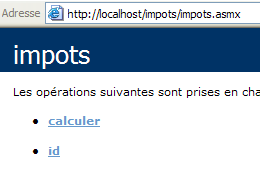
If you follow the link id:
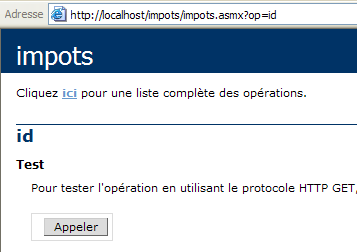
If you use the Call button:
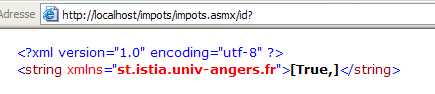
The previous result displays the values of the attributes OK (true) and errMessage (""). In this example, the database was loaded correctly. This has not always been the case, which is why we added the id method to access the error message. The error was that the database name DSN had been defined as a user name (DSN) when it should have been defined as a system name (DSN). This distinction is made in the 32-bit ODBC source manager:
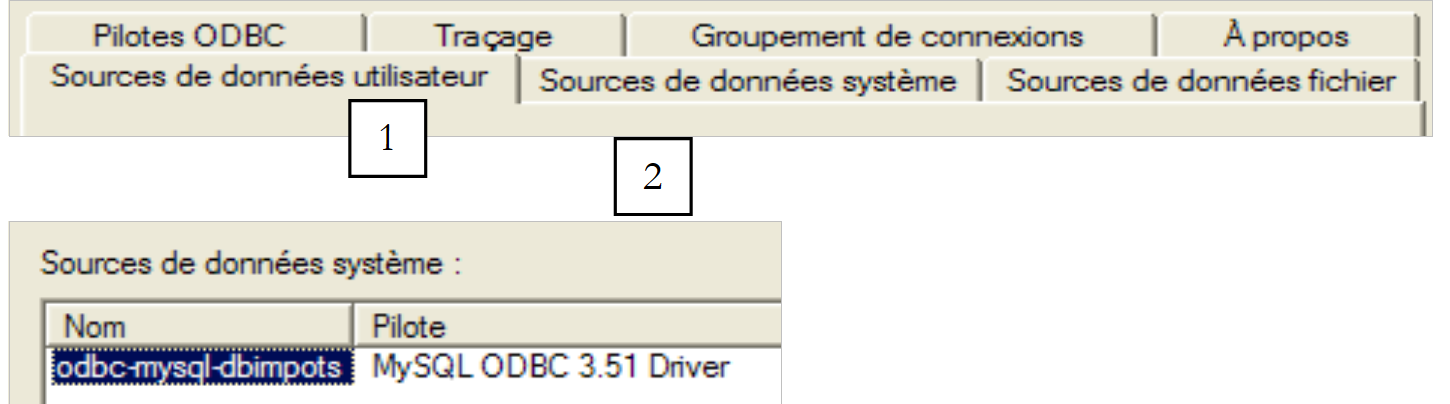 |
Let’s return to the service page:
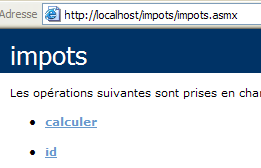
Let’s follow the “Calculate” link:
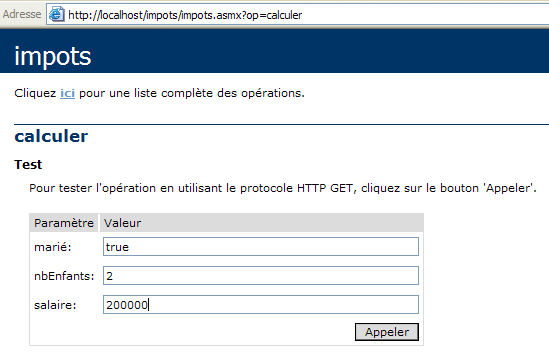
We define the call parameters and execute the call:

The result is correct.
10.10.2. Generate the proxy for the impots service
Now that we have a working impots web service, we can generate its proxy class. Remember that this will be used by client applications to access the impots web service transparently. First, we use the wsdl utility to generate the source file for the proxy class, which is then compiled into a DLL.
dos>wsdl /language=vb http://localhost/impots/impots.asmx
Microsoft (R) Web Services Description Language Utility
[Microsoft (R) .NET Framework, Version 1.1.4322.573]
Copyright (C) Microsoft Corporation 1998-2002. All rights reserved.

Écriture du fichier 'D:\data\serge\devel\vbnet\poly\chap9\impots\impots.vb'.

D:\data\serge\devel\vbnet\poly\chap9\impots>dir
09/03/2004  10:20    <REP>          bin
09/03/2004  10:58             4 651 impots.asmx
09/03/2004  11:05             3 364 impots.vb
09/03/2004  10:19               431 web.config

dos>vbc /t:library /r:system.dll /r:system.web.services.dll /r:system.xml.dll impots.vb
Compilateur Microsoft (R) Visual Basic .NET version 7.10.3052.4
pour Microsoft (R) .NET Framework version 1.1.4322.573
Copyright (C) Microsoft Corporation 1987-2002. Tous droits réservés.

dos>dir
09/03/2004  10:20    <REP>          bin
09/03/2004  10:58             4 651 impots.asmx
09/03/2004  11:09             5 120 impots.dll
09/03/2004  11:05             3 364 impots.vb
09/03/2004  10:19               431 web.config
10.10.3. Using the proxy with a client
In the chapter on databases, we created a console application to calculate taxes:
dos>dir
27/02/2004  16:56             5 120 impots.dll
27/02/2004  17:12             3 586 impots.vb
27/02/2004  17:08             6 144 testimpots.exe
27/02/2004  17:18             3 328 testimpots.vb

dos>testimpots
pg DSNimpots tabImpots colLimites colCoeffR colCoeffN

dos>testimpots odbc-mysql-dbimpots impots limites coeffr coeffn
Paramètres du calcul de l'impôt au format marié nbEnfants salaire ou rien pour arrêter :o 2 200000
impôt=22504 F
The testimpots program then used the standard tax class contained in the impots.dll file. The code for the testimpots.vb program was as follows:
Option Explicit On
Option Strict On

' namespaces
Imports System
Imports Microsoft.VisualBasic

' test pg
Module testimpots
    Sub Main(ByVal arguments() As String)
        ' interactive tax calculator
        ' the user enters three data points on the keyboard: married nbEnfants salary
        ' the program then displays the tax payable
        Const syntaxe1 As String = "pg DSNimpots tabImpots colLimites colCoeffR colCoeffN"
        Const syntaxe2 As String = "syntaxe : marié nbEnfants salaire" + ControlChars.Lf + "marié : o pour marié, n pour non marié" + ControlChars.Lf + "nbEnfants : nombre d'enfants" + ControlChars.Lf + "salaire : salaire annuel en F"

        ' checking program parameters
        If arguments.Length <> 5 Then
            ' error msg
            Console.Error.WriteLine(syntaxe1)
            ' end
            Environment.Exit(1)
        End If        'if
        ' retrieve the arguments
        Dim DSNimpots As String = arguments(0)
        Dim tabImpots As String = arguments(1)
        Dim colLimites As String = arguments(2)
        Dim colCoeffR As String = arguments(3)
        Dim colCoeffN As String = arguments(4)

        ' tax object creation
        Dim objImpôt As impôt = Nothing
        Try
            objImpôt = New impôt(DSNimpots, tabImpots, colLimites, colCoeffR, colCoeffN)
        Catch ex As Exception
            Console.Error.WriteLine(("L'erreur suivante s'est produite : " + ex.Message))
            Environment.Exit(2)
        End Try

        ' infinite loop
        While True
            ' initially no errors
            Dim erreur As Boolean = False

            ' tax calculation parameters are requested
            Console.Out.Write("Paramètres du calcul de l'impôt au format marié nbEnfants salaire ou rien pour arrêter :")
            Dim paramètres As String = Console.In.ReadLine().Trim()

            ' anything to do?
            If paramètres Is Nothing Or paramètres = "" Then
                Exit While
            End If

            ' check the number of arguments in the input line
            Dim args As String() = paramètres.Split(Nothing)
            Dim nbParamètres As Integer = args.Length
            If nbParamètres <> 3 Then
                Console.Error.WriteLine(syntaxe2)
                erreur = True
            End If
            Dim marié As String
            Dim nbEnfants As Integer
            Dim salaire As Integer
            If Not erreur Then
                ' checking the validity of parameters
                ' married
                marié = args(0).ToLower()
                If marié <> "o" And marié <> "n" Then
                    Console.Error.WriteLine((syntaxe2 + ControlChars.Lf + "Argument marié incorrect : tapez o ou n"))
                    erreur = True
                End If
                ' nbEnfants
                nbEnfants = 0
                Try
                    nbEnfants = Integer.Parse(args(1))
                    If nbEnfants < 0 Then
                        Throw New Exception
                    End If
                Catch
                    Console.Error.WriteLine(syntaxe2 + "\nArgument nbEnfants incorrect : tapez un entier positif ou nul")
                    erreur = True
                End Try
                ' salary
                salaire = 0
                Try
                    salaire = Integer.Parse(args(2))
                    If salaire < 0 Then
                        Throw New Exception
                    End If
                Catch
                    Console.Error.WriteLine(syntaxe2 + "\nArgument salaire incorrect : tapez un entier positif ou nul")
                    erreur = True
                End Try
            End If
            If Not erreur Then
                ' parameters are correct - tax is calculated
                Console.Out.WriteLine(("impôt=" & objImpôt.calculer(marié = "o", nbEnfants, salaire).ToString + " F"))
            End If
        End While
    End Sub
End Module
We’ll use the same program to now have it use the impots web service through the impots proxy class created earlier. We have to modify the code slightly:
- whereas the original tax class had a constructor with five arguments, the tax proxy class has a constructor with no parameters. As we have seen, the five parameters are now set in the web service configuration file.
- there is therefore no longer any need to pass these five parameters as arguments to the test program
The new code is as follows:
Imports System
Imports Microsoft.VisualBasic

' test pg
Module testimpots

    Public Sub Main(ByVal arguments() As String)
        ' interactive tax calculator
        ' the user enters three data points on the keyboard: married nbEnfants salary
        ' the program then displays the tax payable
        Const syntaxe2 As String = "syntaxe : marié nbEnfants salaire" + ControlChars.Lf + "marié : o pour marié, n pour non marié" + ControlChars.Lf + "nbEnfants : nombre d'enfants" + ControlChars.Lf + "salaire : salaire annuel en F"

        ' tax object creation
        Dim objImpôt As impôt = Nothing
        Try
            objImpôt = New impôt
        Catch ex As Exception
            Console.Error.WriteLine(("L'erreur suivante s'est produite : " + ex.Message))
            Environment.Exit(2)
        End Try

        ' infinite loop
        Dim erreur As Boolean
        While True
            ' initially no error
            erreur = False
            ' tax calculation parameters are requested
            Console.Out.Write("Paramètres du calcul de l'impôt au format marié nbEnfants salaire ou rien pour arrêter :")
            Dim paramètres As String = Console.In.ReadLine().Trim()
            ' anything to do?
            If paramètres Is Nothing Or paramètres = "" Then
                Exit While
            End If
            ' check the number of arguments in the input line
            Dim args As String() = paramètres.Split(Nothing)
            Dim nbParamètres As Integer = args.Length
            If nbParamètres <> 3 Then
                Console.Error.WriteLine(syntaxe2)
                erreur = True
            End If
            If Not erreur Then
                ' checking the validity of parameters
                ' married
                Dim marié As String = args(0).ToLower()
                If marié <> "o" And marié <> "n" Then
                    Console.Error.WriteLine((syntaxe2 + ControlChars.Lf + "Argument marié incorrect : tapez o ou n"))
                    erreur = True
                End If
                ' nbEnfants
                Dim nbEnfants As Integer = 0
                Try
                    nbEnfants = Integer.Parse(args(1))
                    If nbEnfants < 0 Then
                        Throw New Exception
                    End If
                Catch
                    Console.Error.WriteLine((syntaxe2 + ControlChars.Lf + "Argument nbEnfants incorrect : tapez un entier positif ou nul"))
                    erreur = True
                End Try
                ' salary
                Dim salaire As Integer = 0
                Try
                    salaire = Integer.Parse(args(2))
                    If salaire < 0 Then
                        Throw New Exception
                    End If
                Catch
                    Console.Error.WriteLine((syntaxe2 + ControlChars.Lf + "Argument salaire incorrect : tapez un entier positif ou nul"))
                    erreur = True
                End Try
                ' if the parameters are correct - the tax is calculated
                If Not erreur Then Console.Out.WriteLine(("impôt=" + objImpôt.calculer(marié = "o", nbEnfants, salaire).ToString + " F"))
            End If
        End While
    End Sub
End Module
We have the impots.dll proxy and the testimpots source in the same folder.
dos>dir
09/03/2004  11:28    <REP>          bin
09/03/2004  11:09             5 120 impots.dll
09/03/2004  11:34             3 396 testimpots.vb
09/03/2004  10:19               431 web.config
We are compiling the source testimpots.vb:
dos>vbc /r:impots.dll /r:microsoft.visualbasic.dll /r:system.web.services.dll /r:system.dll testimpots.vb
dos>dir
09/03/2004  11:28    <REP>          bin
09/03/2004  11:09             5 120 impots.dll
09/03/2004  11:05             3 364 impots.vb
09/03/2004  11:35             5 632 testimpots.exe
09/03/2004  11:34             3 396 testimpots.vb
09/03/2004  10:19               431 web.config
then run it:
dos>testimpots
Paramètres du calcul de l'impôt au format marié nbEnfants salaire ou rien pour arrêter :o 2 200000
impôt=22504 F
We get the expected result.