9. TCP/IP Programming
9.1. General Information
9.1.1. Internet Protocols
Here we provide an introduction to Internet communication protocols, also known as the TCP/IP protocol suite (Transmission Control Protocol / Internet Protocol), named after the two main protocols. It is advisable for the reader to have a general understanding of how networks work, and in particular of TCP/IP protocols, before tackling the development of distributed applications.
The following text is a partial translation of a text found in the document "LAN Workplace for DOS - Administrator's Guide" by NOVELL, a document from the early 1990s.
The general concept of creating a network of heterogeneous computers stems from research conducted by DARPA (Defense Advanced Research Projects Agency) in the United States. DARPA developed the suite of protocols known as TCP/IP, which allows heterogeneous machines to communicate with one another. These protocols were tested on a network called ARPAnet, which later became the Internet. The TCP/IP protocols define formats and rules for transmission and reception that are independent of the network architecture and the hardware used.
The network designed by DARPA and managed by TCP/IP protocols is a packet-switched network. Such a network transmits information over the network in small pieces called packets. Thus, if a computer transmits a large file, it will be broken down into small pieces that are sent over the network to be reassembled at the destination. TCP/IP defines the format of these packets, namely:
- source of the packet
- destination
- length
- type
9.1.2. The OSI Model
TCP/IP protocols generally follow the open network model known as OSI (Open Systems Interconnection Reference Model) defined by the ISO (International Standards Organization). This model describes an ideal network where communication between machines can be represented by a seven-layer model:
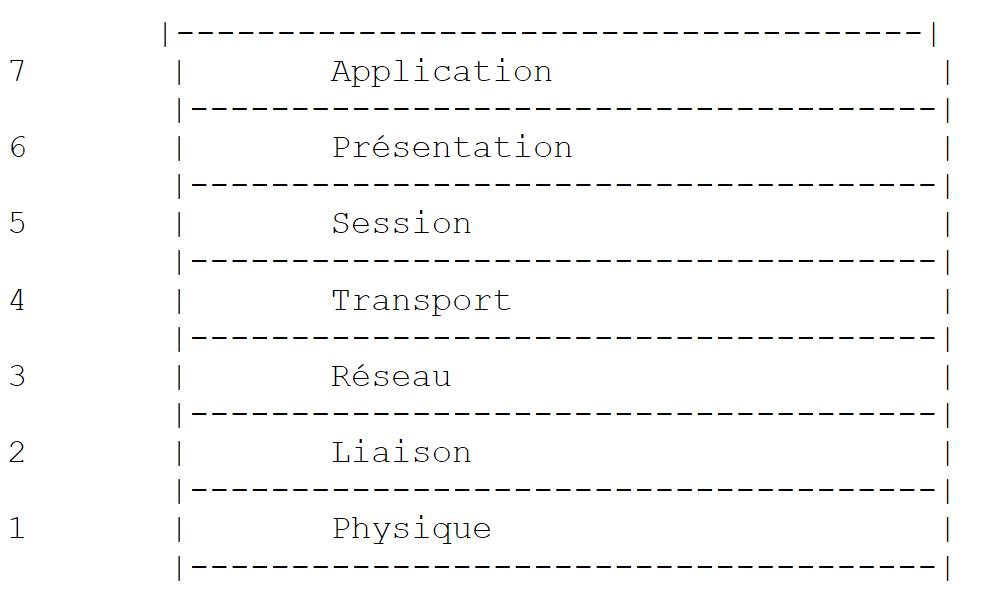 |
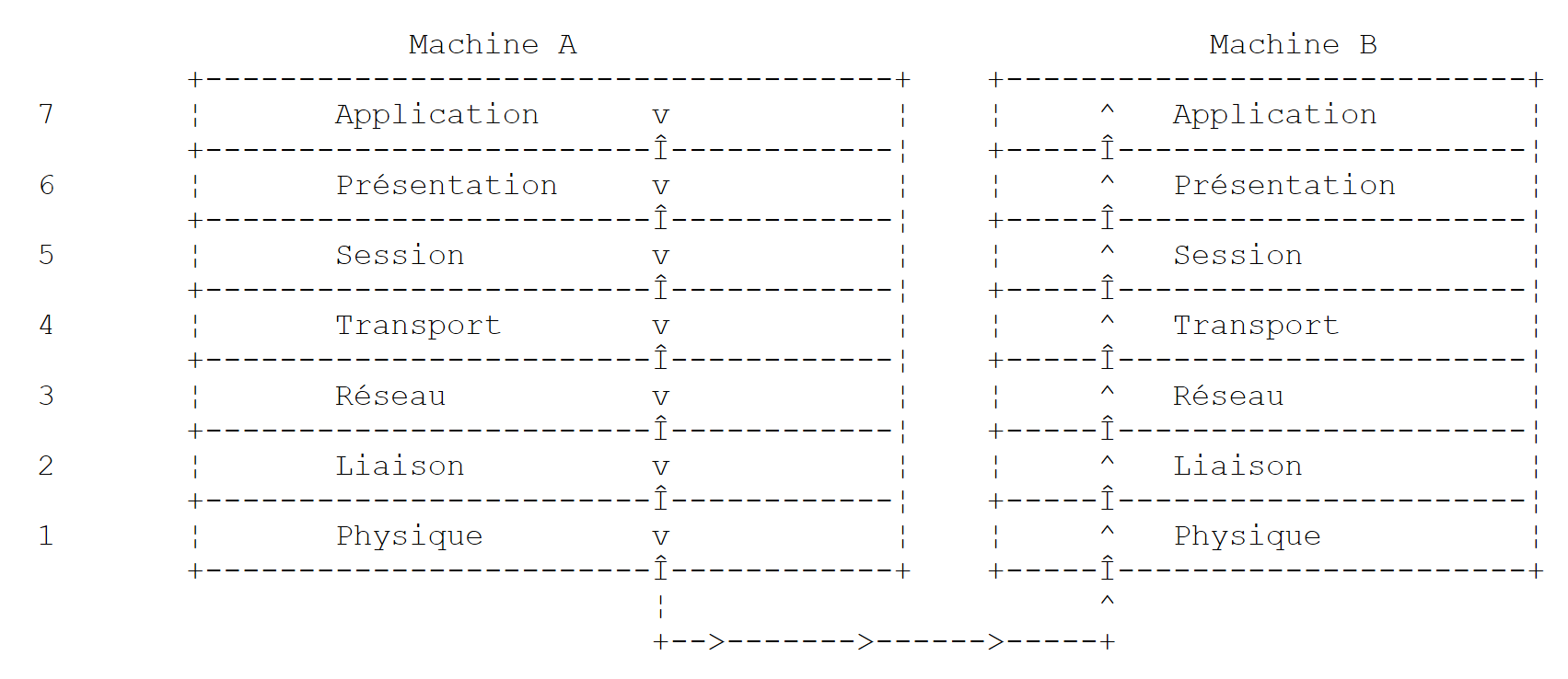
Each layer receives services from the layer below it and provides its own services to the layer above it. Suppose two applications located on different machines A and B want to communicate: they do so at the Application layer. They do not need to know all the details of how the network works: each application passes the information it wishes to transmit to the layer below it: the Presentation layer. The application therefore only needs to know the rules for interfacing with the Presentation layer.
Once the information is in the Presentation layer, it is passed according to other rules to the Session layer, and so on, until the information reaches the physical medium and is physically transmitted to the destination machine. There, it will undergo the reverse process of what it underwent on the sending machine.
At each layer, the sender process responsible for sending the information sends it to a receiver process on the other machine belonging to the same layer as itself. It does so according to certain rules known as the layer protocol. We therefore have the following final communication diagram:
 |
The roles of the different layers are as follows:
Ensures the transmission of bits over a physical medium. This layer includes data processing terminal equipment (DPTE) such as terminals or computers, as well as data circuit termination equipment (DCTE) such as modulators/demodulators, multiplexers, and concentrators. Key points at this level are: . the choice of information encoding (analog or digital) . the choice of transmission mode (synchronous or asynchronous). | |
Hides the physical characteristics of the Physical Layer. Detects and corrects transmission errors. | |
Manages the path that information sent over the network must follow. This is called routing: determining the route that information must take to reach its destination. | |
Enables communication between two applications, whereas the previous layers only allowed communication between machines. A service provided by this layer can be multiplexing: the transport layer can use a single network connection (from machine to machine) to transmit data belonging to multiple applications. | |
This layer provides services that allow an application to open and maintain a working session on a remote machine. | |
It aims to standardize the representation of data across different machines. Thus, data originating from machine A will be "formatted" by machine A’s Presentation layer according to a standard format before being sent over the network. Upon reaching the Presentation layer of the destination machine B, which will recognize them thanks to their standard format, they will be formatted differently so that the application on machine B can recognize them. | |
At this level, we find applications that are generally close to the user, such as email or file transfer. |
9.1.3. The TCP/IP Model
The OSI model is an ideal model that has never been fully realized. The TCP/IP protocol suite approximates it in the following way:
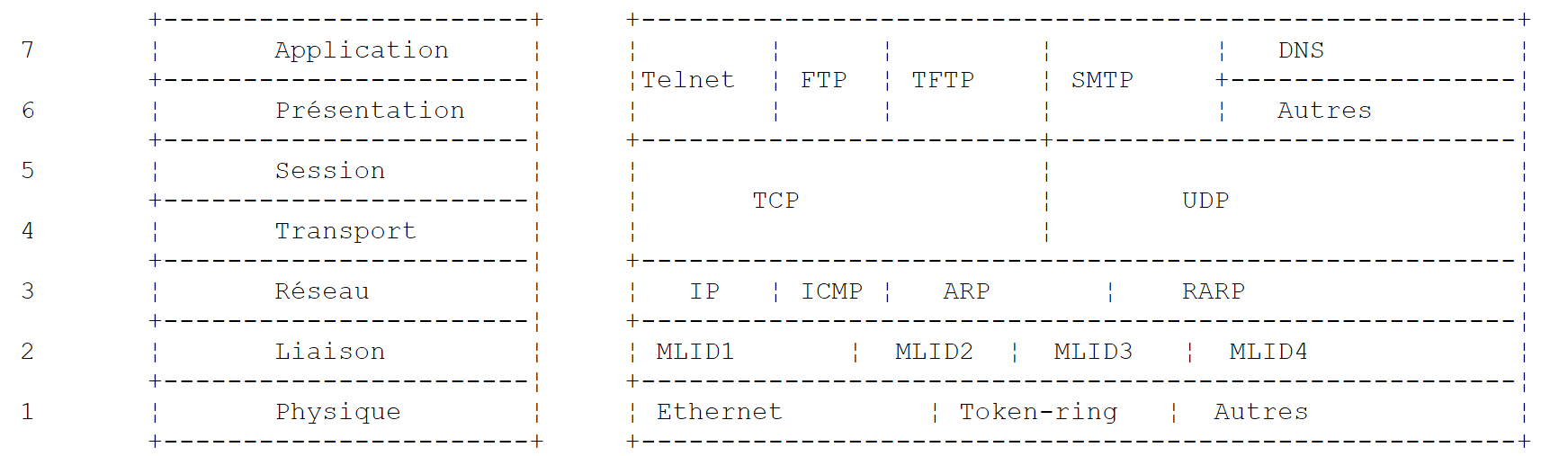 |
Physical Layer
In local area networks, Ethernet or Token Ring technology is generally used. We will focus here solely on Ethernet technology.
Ethernet
This is the name given to a packet-switched local area network technology invented at Xerox PARC in the early 1970s and standardized by Xerox, Intel, and Digital Equipment in 1978. The network physically consists of a coaxial cable approximately 1.27 cm in diameter and up to 500 m in length. It can be extended using repeaters, with no more than two repeaters separating any two machines. The cable is passive: all active components are located on the machines connected to the cable. Each machine is connected to the cable via a network access card comprising:
- a transceiver that detects the presence of signals on the cable and converts analog signals to digital signals and vice versa.
- a coupler that receives digital signals from the transceiver and transmits them to the computer for processing, or vice versa.
The main features of Ethernet technology are as follows:
- Capacity of 10 megabits per second.
- Bus topology: all machines are connected to the same cable
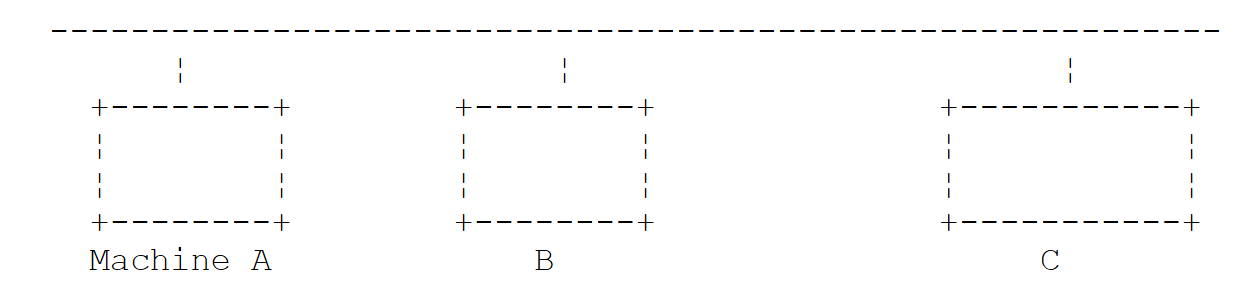 |
- Broadcast network—A transmitting machine sends information over the cable with the address of the receiving machine. All connected machines then receive this information, and only the intended recipient retains it.
- The access method is as follows: the transmitter wishing to transmit listens to the cable—it then detects whether or not a carrier wave is present, the presence of which would indicate that a transmission is in progress. This is the CSMA (Carrier Sense Multiple Access) technique. In the absence of a carrier, a transmitter may decide to transmit in turn. Several transmitters may make this decision. The transmitted signals mix together: this is called a collision. The transmitter detects this situation: while transmitting over the cable, it also listens to what is actually passing through it. If it detects that the information traveling over the cable is not the one it transmitted, it concludes that a collision has occurred and will stop transmitting. The other transmitters that were transmitting will do the same. Each will resume transmission after a random delay depending on the individual transmitter. This technique is called CD (Collision Detect). The access method is thus called CSMA/CD.
- 48-bit addressing. Each machine has an address, referred to here as a physical address, which is written on the card connecting it to the cable. This address is called the machine’s Ethernet address.
Network Layer
At this layer, we find the IP, ICMP, ARP, and RARP protocols.
Delivers packets between two network nodes | |
ICMP facilitates communication between the IP protocol program on one machine and that on another machine. It is therefore a message exchange protocol within the IP protocol itself. | |
maps a machine's Internet address to its physical address | |
maps a machine's physical address to its Internet address |
Transport/Session Layers
This layer includes the following protocols:
Ensures reliable delivery of information between two clients | |
Ensures unreliable delivery of information between two clients |
Application/Presentation/Session Layers
Various protocols are found here:
A terminal emulator that allows machine A to connect to machine B as a terminal | |
Enables file transfers | |
enables file transfers | |
enables the exchange of messages between network users | |
converts a machine name into the machine's Internet address | |
Created by Sun Microsystems, it specifies a standard, machine-independent data representation | |
Also defined by Sun, this is a communication protocol between remote applications, independent of the transport layer. This protocol is important: it frees the programmer from having to know the details of the transport layer and makes applications portable. This protocol is based on the XDR protocol | |
Also defined by Sun, this protocol allows one machine to "see" the file system of another machine. It is based on the RPC protocol mentioned above |
9.1.4. How Internet Protocols Work
Applications developed in the TCP/IP environment generally use several of the protocols in this environment. An application program communicates with the highest layer of the protocols. This layer passes the information to the layer below it, and so on, until it reaches the physical medium. There, the information is physically transferred to the destination machine, where it will pass through the same layers again, in the opposite direction this time, until it reaches the application intended to receive the sent information. The following diagram shows the path of the information:
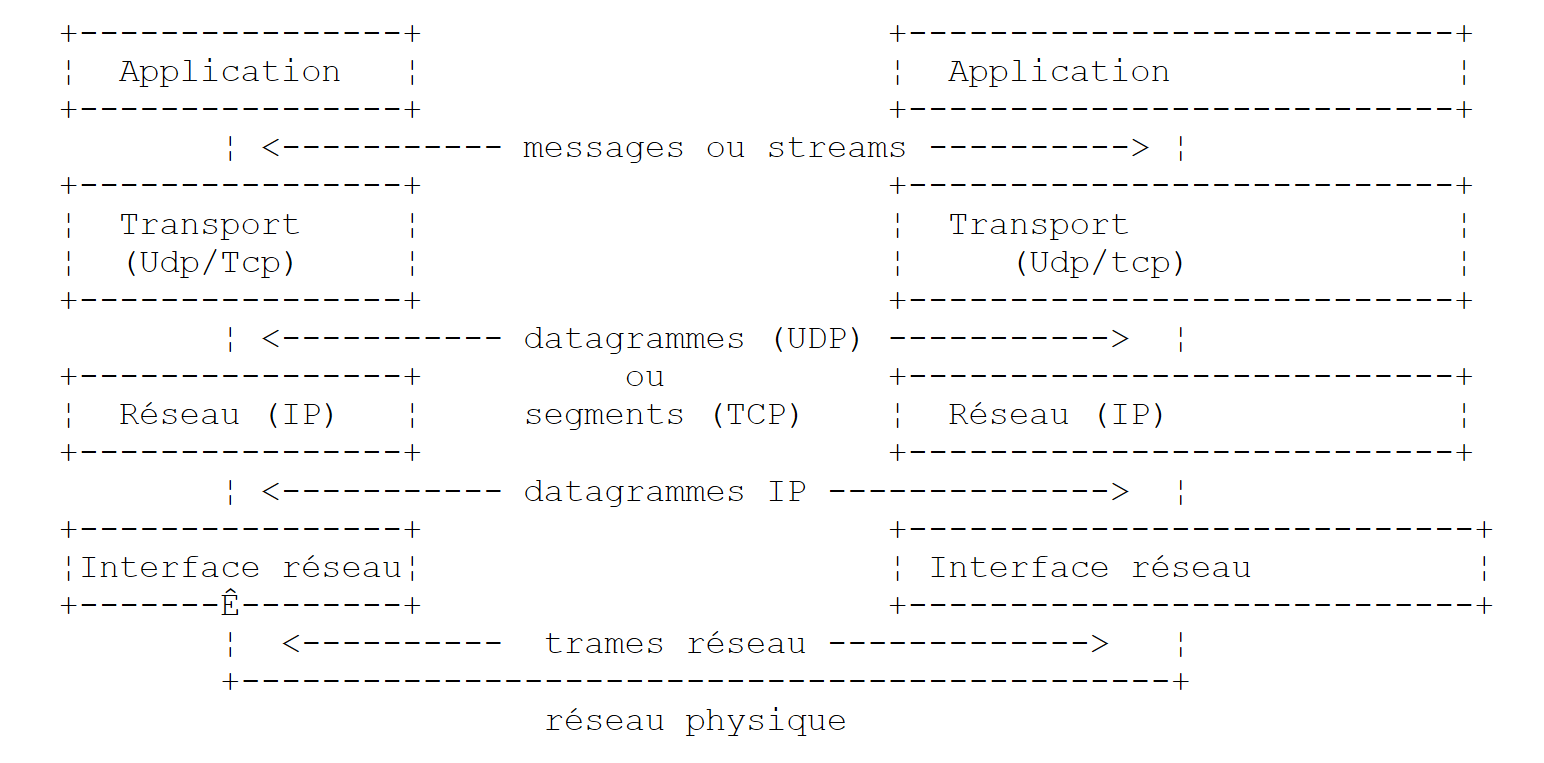 |
Let’s take an example: the FTP application, defined at the Application layer, which enables file transfers between machines.
- The application delivers a sequence of bytes to be transmitted to the transport layer.
- The transport layer divides this sequence of bytes into TCP segments and adds the segment number to the beginning of each segment. The segments are passed to the Network layer, which is governed by the IP protocol.
- The IP layer creates a packet encapsulating the received TCP segment. At the header of this packet, it places the Internet addresses of the source and destination machines. It also determines the physical address of the destination machine. The entire packet is passed to the Data Link & Physical Layer, that is, to the network card that connects the machine to the physical network.
- There, the IP packet is in turn encapsulated in a physical frame and sent to its destination over the cable.
- On the receiving machine, the Data Link & Physical Layer does the opposite: it decapsulates the IP packet from the physical frame and passes it to the IP layer.
- The IP layer verifies that the packet is valid: it calculates a checksum based on the received bits, which must match the checksum in the packet header. If it does not, the packet is discarded.
- If the packet is deemed valid, the IP layer decapsulates the TCP segment contained within it and passes it up to the transport layer.
- The transport layer—the TCP layer in our example—examines the segment number to ensure the segments are in the correct order.
- It also calculates a checksum for the TCP segment. If it is found to be correct, the TCP layer sends an acknowledgment to the source machine; otherwise, the TCP segment is rejected.
- All that remains for the TCP layer to do is to transmit the data portion of the segment to the application intended to receive it in the layer above.
9.1.5. Addressing on the Internet
A network node can be a computer, a smart printer, a file server—anything, in fact, that can communicate using TCP/IP protocols. Each node has a physical address with a format that depends on the type of network. On an Ethernet network, the physical address is encoded over 6 bytes. An X.25 network address is a 14-digit number.
A node’s Internet address is a logical address: it is independent of the hardware and the network used. It is a 4-byte address that identifies both a local network and a node on that network. The Internet address is usually represented as four numbers—the values of the four bytes—separated by a dot. Thus, the address of the machine Lagaffe at the Faculty of Sciences in Angers is 193.49.144.1, and that of the machine Liny is 193.49.144.9. From this, we can deduce that the Internet address of the local network is 193.49.144.0. There can be up to 254 nodes on this network.
Because Internet addresses (IP addresses) are independent of the network, a machine on network A can communicate with a machine on network B without concerning itself with the type of network it is on: it simply needs to know its IP address. The IP protocol of each network handles the conversion between IP address and physical address, in both directions.
All IP addresses must be unique. In France, INRIA is responsible for assigning IP addresses. In fact, this organization assigns an address to your local network, for example 193.49.144.0 for the network of the Faculty of Sciences in Angers. The administrator of this network can then assign the IP addresses 193.49.144.1 through 193.49.144.254 as they see fit. This address is generally stored in a specific file on each machine connected to the network.
9.1.5.1. IP Address Classes
An IP address is a sequence of 4 bytes, often written as I1.I2.I3.I4, which actually contains two addresses:
- the network address
- the address of a node on that network
Depending on the size of these two fields, IP addresses are divided into 3 classes: classes A, B, and C.
Class A
The IP address: I1.I2.I3.I4 has the form R1.N1.N2.N3 where
R1 | is the network address |
N1.N2.N3 | is the address of a machine on that network |
More precisely, the format of a Class A IP address is as follows:
 |
The network address is 7 bits long and the host address is 24 bits long. There can therefore be 127 Class A networks, each containing up to 2²⁴ hosts.
Class B
Here, the IP address: I1.I2.I3.I4 has the form R1.R2.N1.N2 where
R1.R2 | is the network address |
N1.N2 | is the address of a machine on that network |
More precisely, the format of a Class B IP address is as follows:
 |
The network address is 2 bytes (14 bits exactly), as is the node address. There can therefore be 2¹⁴ Class B networks, each containing up to 2¹⁶ nodes.
Class C
In this class, the IP address: I1.I2.I3.I4 has the form R1.R2.R3.N1 where
R1.R2.R3 | is the network address |
N1 | is the address of a machine on that network |
More precisely, the format of a Class C IP address is as follows:
 |
The network address spans 3 bytes (minus 3 bits) and the host address spans 1 byte. There can therefore be 2²¹ Class C networks, each containing up to 256 hosts.
Since the address of the Lagaffe machine at the Angers Faculty of Sciences is 193.49.144.1, we see that the most significant byte is 193, which is 11000001 in binary. We can deduce that the network is a Class C network.
Reserved Addresses
- Some IP addresses are network addresses rather than node addresses within the network. These are the ones where the node address is set to 0. Thus, the address 193.49.144.0 is the IP address of the Angers Faculty of Sciences network. Consequently, no node in a network can have the address zero.
- When the node address in an IP address consists entirely of 1s, it is a broadcast address: this address refers to all nodes on the network.
- In a Class C network, which theoretically allows for 2⁸ = 256 nodes, if we remove the two prohibited addresses, we are left with only 254 authorized addresses.
9.1.5.2. Internet Address <--> Physical Address Conversion Protocols
We have seen that when data is transmitted from one machine to another, it is encapsulated into packets as it passes through the IP layer. These packets have the following form:
 |
The IP packet therefore contains the Internet addresses of the source and destination machines. When this packet is transmitted to the layer responsible for sending it over the physical network, additional information is added to form the physical frame that will ultimately be sent over the network. For example, the format of a frame on an Ethernet network is as follows:
 |
In the final frame, there are the physical addresses of the source and destination machines. How are they obtained?
The sending machine, knowing the IP address of the machine it wants to communicate with, obtains that machine's physical address using a specific protocol called ARP (Address Resolution Protocol).
- It sends a special type of packet called an ARP packet containing the IP address of the machine whose physical address is being sought. It also includes its own IP address and physical address in the packet.
- This packet is sent to all nodes on the network.
- These nodes recognize the special nature of the packet. The node that recognizes its IP address in the packet responds by sending its physical address to the packet’s sender. How can it do this? It found the sender’s IP and physical addresses in the packet.
- The sender thus receives the physical address it was looking for. It stores it in memory so it can use it later if other packets need to be sent to the same recipient.
A machine’s IP address is normally stored in one of its configuration files, which it can consult to retrieve it. This address can be changed: simply edit the file. The physical address, however, is stored in the network card’s memory and cannot be changed.
When an administrator wants to reorganize the network, they may need to change the IP addresses of all the nodes and thus edit the various configuration files for each node. This can be tedious and prone to errors if there are many machines. One method involves not assigning an IP address to the machines: instead, a special code is entered into the file where the machine would normally find its IP address. Upon discovering it has no IP address, the machine requests one using a protocol called RARP (Reverse Address Resolution Protocol). It then sends a special packet called a RARP packet over the network—similar to the previous ARP packet—containing its physical address. This packet is sent to all nodes that recognize a RARP packet. One of them, called the RARP server, maintains a file containing the physical address <--> IP address mappings for all nodes. It then responds to the sender of the RARP packet by sending back its IP address. An administrator wishing to reconfigure their network therefore only needs to edit the RARP server’s mapping file. The RARP server must normally have a fixed IP address that it must be able to know without having to use the RARP protocol itself.
9.1.6. The network layer, known as the Internet Protocol (IP) layer
The IP (Internet Protocol) defines the format that packets must take and how they must be handled during transmission or reception. This specific type of packet is called an IP datagram. We have already discussed it:
 |
The important point is that, in addition to the data to be transmitted, the IP datagram contains the Internet addresses of the source and destination machines. Thus, the receiving machine knows who is sending it a message.
Unlike a network frame, whose length is determined by the physical characteristics of the network it travels over, the length of the IP datagram is fixed by the software and will therefore be the same across different physical networks. We have seen that as we move down from the network layer to the physical layer, the IP datagram is encapsulated within a physical frame. We gave the example of the physical frame of an Ethernet network:
 |
Physical frames travel from node to node toward their destination, which may not be on the same physical network as the sending machine. The IP packet can therefore be successively encapsulated in different physical frames at the nodes that connect two networks of different types. It is also possible that the IP packet is too large to be encapsulated in a single physical frame. The IP software on the node where this problem occurs then breaks the IP packet into fragments according to specific rules, each of which is then sent over the physical network. They will only be reassembled at their final destination.
9.1.6.1. Routing
Routing is the method of directing IP packets to their destination. There are two methods: direct routing and indirect routing.
Direct routing
Direct routing refers to the transmission of an IP packet directly from the sender to the recipient within the same network:
- The machine sending an IP datagram has the recipient’s IP address.
- It obtains the recipient’s physical address via the ARP protocol or from its tables, if that address has already been obtained.
- It sends the packet over the network to that physical address.
Indirect routing
Indirect routing refers to the transmission of an IP packet to a destination located on a network other than the one to which the sender belongs. In this case, the network address portions of the source and destination machines’ IP addresses are different. The source machine recognizes this. It then sends the packet to a special node called a router, a node that connects a local network to other networks and whose IP address it finds in its tables—an address initially obtained either from a file, from permanent memory, or via information circulating on the network.
A router is connected to two networks and has an IP address within both of these networks.
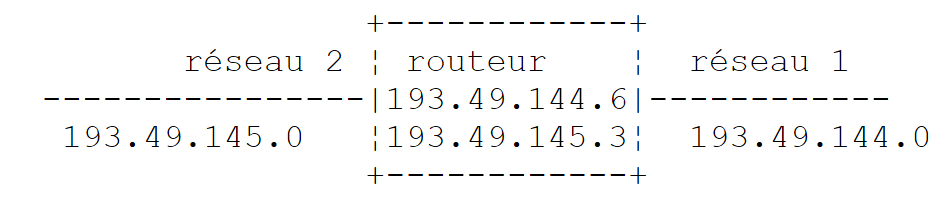 |
In our example above:
- Network No. 1 has the Internet address 193.49.144.0 and Network No. 2 has the address 193.49.145.0.
- Within network #1, the router has the address 193.49.144.6 and the address 193.49.145.3 within network #2.
The router’s role is to take the IP packet it receives—which is contained within a physical frame typical of network #1—and place it into a physical frame that can travel over network #2. If the IP address of the packet’s destination is within network #2, the router will send the packet directly to it; otherwise, it will send it to another router, connecting network #2 to network #3, and so on.
9.1.6.2. Error and Control Messages
Also within the network layer—at the same level as the IP protocol—is the ICMP (Internet Control Message Protocol). It is used to send messages regarding the internal operation of the network: failed nodes, congestion at a router, etc. ICMP messages are encapsulated in IP packets and sent over the network. The IP layers of the various nodes take appropriate actions based on the ICMP messages they receive. Thus, an application itself never sees these network-specific issues. A node will use the ICMP information to update its routing tables.
9.1.7. The transport layer: the UDP and TCP protocols
9.1.7.1. The UDP protocol: User Datagram Protocol
The UDP protocol allows for an unreliable exchange of data between two points, meaning that the successful delivery of a packet to its destination is not guaranteed. The application, if it chooses, can handle this itself, for example by waiting for an acknowledgment after sending a message before sending the next one.
So far, at the network level, we have discussed machine IP addresses. However, on a single machine, different processes can coexist simultaneously, all of which can communicate. Therefore, when sending a message, it is necessary to specify not only the IP address of the destination machine but also the "name" of the destination process. This name is actually a number, called a port number. Certain numbers are reserved for standard applications: port 69 for the TFTP (Trivial File Transfer Protocol) application, for example. Packets handled by the UDP protocol are also called datagrams. They have the following form:
 |
These datagrams will be encapsulated in IP packets, then in physical frames.
9.1.7.2. The TCP Protocol: Transmission Control Protocol
For secure communications, the UDP protocol is insufficient: the application developer must create a protocol themselves to ensure that packets are routed correctly.
The TCP (Transmission Control Protocol) avoids these problems. Its characteristics are as follows:
- The process that wishes to send data first establishes a connection with the process that will receive the data. This connection is made between a port on the sending machine and a port on the receiving machine. A virtual path is thus created between the two ports, which is reserved exclusively for the two processes that have established the connection.
- All packets sent by the source process follow this virtual path and arrive in the order in which they were sent, which was not guaranteed in the UDP protocol since packets could follow different paths.
- The transmitted data appears continuous. The sending process sends data at its own pace. This data is not necessarily sent immediately: the TCP protocol waits until it has enough to send. It is stored in a structure called a TCP segment. Once this segment is full, it is transmitted to the IP layer, where it is encapsulated in an IP packet.
- Each segment sent by the TCP protocol is numbered. The receiving TCP protocol verifies that it is receiving the segments in sequence. For each segment received correctly, it sends an acknowledgment to the sender.
- When the sender receives this acknowledgment, it notifies the sending process. The sending process can thus confirm that a segment has arrived safely, which was not possible with the UDP protocol.
- If, after a certain amount of time, the TCP protocol that sent a segment does not receive an acknowledgment, it retransmits the segment in question, thereby ensuring the quality of the information delivery service.
- The virtual circuit established between the two communicating processes is full-duplex: this means that information can flow in both directions. Thus, the destination process can send acknowledgments even while the source process continues to send information. This allows, for example, the source TCP protocol to send multiple segments without waiting for an acknowledgment. If, after a certain amount of time, it realizes it has not received an acknowledgment for a specific segment No. n, it will resume sending segments from that point.
9.1.8. The Application Layer
Above the UDP and TCP protocols, there are various standard protocols:
TELNET
This protocol allows a user on machine A on the network to connect to machine B (often called the host machine). TELNET emulates a so-called universal terminal on machine A. The user therefore behaves as if they had a terminal connected to machine B. Telnet relies on the TCP protocol.
FTP: (File Transfer Protocol)
This protocol enables the exchange of files between two remote machines as well as file operations such as creating directories, for example. It relies on the TCP protocol.
TFTP: (Trivial File Transfer Protocol)
This protocol is a variant of FTP. It relies on the UDP protocol and is less sophisticated than FTP.
DNS: (Domain Name System)
When a user wants to exchange files with a remote machine, via FTP for example, they must know that machine’s Internet address. For instance, to use FTP on the Lagaffe machine at the University of Angers, you would need to run FTP as follows: FTP 193.49.144.1
This requires a directory mapping machines to IP addresses. In this directory, the machines would likely be designated by symbolic names such as:
DPX2/320 machine at the University of Angers
Sun machine at ISERPA in Angers
It is clear that it would be more convenient to refer to a machine by a name rather than by its IP address. This raises the issue of name uniqueness: there are millions of interconnected machines. One might imagine a centralized body assigning the names. That would undoubtedly be quite cumbersome. Control over names has in fact been distributed across domains. Each domain is managed by a generally very lean organization that has complete freedom in choosing machine names. Thus, machines in France belong to the fr domain, which is managed by Inria in Paris. To further simplify matters, control is distributed even further: domains are created within the fr domain. Thus, the University of Angers belongs to the univ-Angers domain. The department managing this domain has complete freedom to name the machines on the University of Angers network. For now, this domain has not been subdivided. But in a large university with many networked machines, it could be.
The DPX2/320 machine at the University of Angers has been named Lagaffe, while a 486DX50 PC has been named liny. How do you reference these machines from the outside? By specifying the hierarchy of domains to which they belong. Thus, the full name of the Lagaffe machine will be:
Lagaffe.univ-Angers.fr
Within domains, relative names can be used. Thus, within the fr domain and outside the univ-Angers domain, the Lagaffe machine can be referenced as
Lagaffe.univ-Angers
Finally, within the univ-Angers domain, it can be referenced simply as
Lagaffe
An application can therefore refer to a machine by its name. Ultimately, however, you still need to obtain the machine’s IP address. How is this done? Suppose that from machine A, we want to communicate with machine B.
- If machine B belongs to the same domain as machine A, its IP address will likely be found in a file on machine A.
- Otherwise, machine A will find, in another file or the same one as before, a list of several name servers with their IP addresses. A name server is responsible for mapping a machine name to its IP address. Machine A will send a special request to the first name server on its list, known as a DNS query, which includes the name of the machine being sought. If the queried server has that name in its records, it will send the corresponding IP address to machine A. Otherwise, the server will also find in its files a list of name servers it can query. It will then do so. Thus, a number of name servers will be queried, not haphazardly but in a way that minimizes the number of requests. If the machine is finally found, the response will be sent back to machine A.
XDR: (eXternal Data Representation)
Created by Sun Microsystems, this protocol specifies a standard, machine-independent data representation.
RPC: (Remote Procedure Call)
Also defined by Sun, this is a communication protocol between remote applications, independent of the transport layer. This protocol is important: it relieves the programmer of the need to know the details of the transport layer and makes applications portable. This protocol is based on the XDR protocol
NFS: Network File System
Also defined by Sun, this protocol allows one machine to "see" the file system of another machine. It is based on the RPC protocol mentioned above.
9.1.9. Conclusion
In this introduction, we have presented some of the main features of Internet protocols. To explore this field further, readers may consult Douglas Comer’s excellent book:
Title | TCP/IP: Architecture, Protocols, Applications. |
Author | Douglas COMER |
Publisher | InterEditions |
9.2. Network Address Management
A machine on the Internet is uniquely identified by an IP (Internet Protocol) address in the form I1.I2.I3.I4, where I1 is a number between 1 and 254. It can also be identified by a unique name. This name is not required, as applications ultimately always use the machines' IP addresses. These names are there to make life easier for users. Thus, it is easier to use a browser to request the URL http://www.ibm.com than the URL http://129.42.17.99, although both methods are possible. The IP address <--> machine name mapping is handled by a distributed Internet service called DNS (Domain Name System). The .NET platform provides the Dns class to manage Internet addresses:
Most of the class’s methods are static. Let’s look at the ones that interest us:
Returns an IPHostEntry from an IP address in the form "I1.I2.I3.I4". Throws an exception if the machine address cannot be found. | |
returns an IPHostEntry from a machine name. Throws an exception if the machine name cannot be found. | |
returns the name of the machine on which the program executing this instruction is running |
IPHostEntry network addresses have the following format:
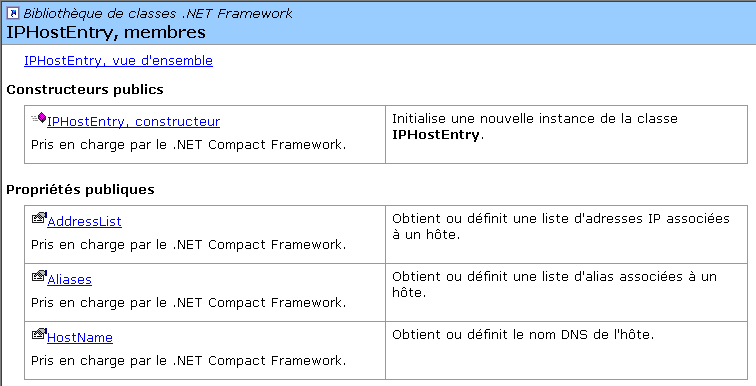 |
The properties of interest to us:
List of a machine's IP addresses. While an IP address identifies one and only one physical machine, a physical machine may have multiple IP addresses. This is the case if it has multiple network cards connecting it to different networks. | |
List of aliases for a machine, which can be identified by a primary name and aliases | |
The machine's name, if it has one |
From the IPAddress class, we will use the following constructor, properties, and methods:
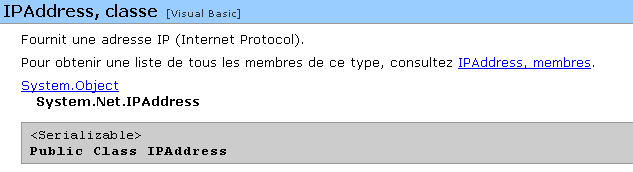
An [IPAddress] object can be converted to the string I1.I2.I3.I4 using the ToString() method. Conversely, an IPAddress object can be obtained from the string I1.I2.I3.I4 using the static method IPAddress.Parse("I1.I2.I3.I4"). Consider the following program, which displays the name of the machine on which it is running and then interactively provides the IP address <--> machine name mappings:
dos>address1
Machine Locale=tahe

Machine recherchée (fin pour arrêter) : istia.univ-angers.fr
Machine : istia.univ-angers.fr
Adresses IP : 193.49.146.171

Machine recherchée (fin pour arrêter) : 193.49.146.171
Machine : istia.istia.univ-angers.fr
Adresses IP : 193.49.146.171
Alias : 171.146.49.193.in-addr.arpa

Machine recherchée (fin pour arrêter) : www.ibm.com
Machine : www.ibm.com
Adresses IP : 129.42.17.99,129.42.18.99,129.42.19.99,129.42.16.99

Machine recherchée (fin pour arrêter) : 129.42.17.99
Machine : www.ibm.com
Adresses IP : 129.42.17.99

Machine recherchée (fin pour arrêter) : x.y.z
Impossible de trouver la machine [x.y.z]

Machine recherchée (fin pour arrêter) : localhost
Machine : tahe
Adresses IP : 127.0.0.1

Machine recherchée (fin pour arrêter) : 127.0.0.1
Machine : tahe
Adresses IP : 127.0.0.1

Machine recherchée (fin pour arrêter) : tahe
Machine : tahe
Adresses IP : 127.0.0.1

Machine recherchée (fin pour arrêter) : fin
The program is as follows:
' options
Option Explicit On
Option Strict On

' namespaces
Imports System
Imports System.Net
Imports System.Text.RegularExpressions

' test module
Public Module adresses

    Sub Main()
        ' displays the name of the local machine
        ' then interactively provides information on network machines
        ' identified by name or address IP
        ' local machine
        Dim localHost As String = Dns.GetHostName()
        Console.Out.WriteLine(("Machine Locale=" + localHost))

        ' interactive Q&A
        Dim machine As String
        Dim adresseMachine As IPHostEntry
        While True
            ' enter the name of the machine you are looking for
            Console.Out.Write("Machine recherchée (fin pour arrêter) : ")
            machine = Console.In.ReadLine().Trim().ToLower()
            ' finished?
            If machine = "fin" Then
                Exit While
            End If

            ' address I1.I2.I3.I4 or machine name?
            Dim isIPV4 As Boolean = Regex.IsMatch(machine, "^\s*\d{1,3}\.\d{1,3}\.\d{1,3}\.\d{1,3}\s*$")
            ' management exception
            Try
                If isIPV4 Then
                    adresseMachine = Dns.GetHostByAddress(machine)
                Else
                    adresseMachine = Dns.GetHostByName(machine)
                End If
                ' the name
                Console.Out.WriteLine(("Machine : " + adresseMachine.HostName))
                ' IP addresses
                Console.Out.Write(("Adresses IP : " + adresseMachine.AddressList(0).ToString))
                Dim i As Integer
                For i = 1 To adresseMachine.AddressList.Length - 1
                    Console.Out.Write(("," + adresseMachine.AddressList(i).ToString))
                Next i
                Console.Out.WriteLine()
                ' aliases
                If adresseMachine.Aliases.Length <> 0 Then
                    Console.Out.Write(("Alias : " + adresseMachine.Aliases(0)))
                    For i = 1 To adresseMachine.Aliases.Length - 1
                        Console.Out.Write(("," + adresseMachine.Aliases(i)))
                    Next i
                    Console.Out.WriteLine()
                End If
            Catch
                ' the machine doesn't exist
                Console.Out.WriteLine("Impossible de trouver la machine [" + machine + "]")
            End Try
        End While
    End Sub
End Module
9.3. TCP/IP Programming
9.3.1. General Information
Consider communication between two remote machines A and B:
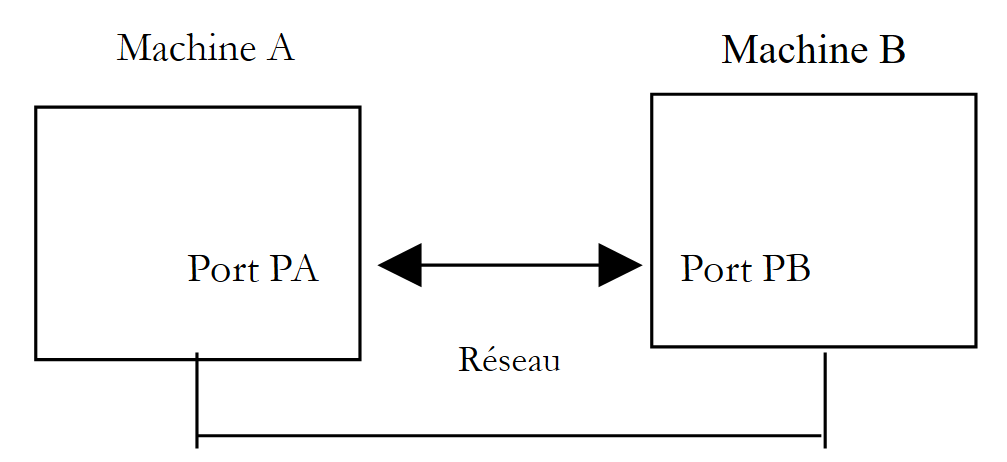 |
When an application AppA on machine A wants to communicate with an application AppB on machine B on the Internet, it must know several things:
- the IP address or hostname of machine B
- the port number used by application AppB. Indeed, machine B may host many applications running on the Internet. When it receives information from the network, it must know which application the information is intended for. The applications on machine B access the network through interfaces also known as communication ports. This information is contained in the packet received by machine B so that it can be delivered to the correct application.
- The communication protocols understood by machine B. In our study, we will use only TCP-IP protocols.
- The communication protocol accepted by application AppB. Indeed, machines A and B will "talk" to each other. What they say will be encapsulated within the TCP/IP protocols. However, when, at the end of the chain, the AppB application receives the information sent by the AppA application, it must be able to interpret it. This is analogous to the situation where two people, A and B, communicate by telephone: their conversation is carried by the telephone. Speech is encoded as signals by phone A, transmitted over telephone lines, and arrives at phone B to be decoded. Person B then hears the words. This is where the concept of a communication protocol comes into play: if A speaks French and B does not understand that language, A and B will not be able to communicate effectively.
Therefore, the two communicating applications must agree on the type of communication protocol they will use. For example, communication with an FTP service is not the same as with a POP service: these two services do not accept the same commands. They have different communication protocols.
9.3.2. Characteristics of the TCP Protocol
Here, we will only examine network communications using the TCP transport protocol. Let us review its characteristics:
- The process wishing to transmit data first establishes a connection with the process that will receive the information it is about to transmit. This connection is made between a port on the sending machine and a port on the receiving machine. A virtual path is thus created between the two ports, which will be reserved exclusively for the two processes that have established the connection.
- All packets sent by the source process follow this virtual path and arrive in the order in which they were sent
- The transmitted data appears continuous. The sending process sends data at its own pace. This data is not necessarily sent immediately: the TCP protocol waits until it has enough to send. It is stored in a structure called a TCP segment. Once this segment is full, it is transmitted to the IP layer, where it is encapsulated in an IP packet.
- Each segment sent by the TCP protocol is numbered. The receiving TCP protocol verifies that it is receiving the segments in sequence. For each segment received correctly, it sends an acknowledgment to the sender.
- When the sender receives this acknowledgment, it notifies the sending process. The sending process can thus confirm that a segment has arrived safely.
- If, after a certain amount of time, the TCP protocol that sent a segment does not receive an acknowledgment, it retransmits the segment in question, thereby ensuring the quality of the information delivery service.
- The virtual circuit established between the two communicating processes is full-duplex: this means that information can flow in both directions. Thus, the destination process can send acknowledgments even while the source process continues to send information. This allows, for example, the source TCP protocol to send multiple segments without waiting for an acknowledgment. If, after a certain amount of time, it realizes it has not received an acknowledgment for a specific segment No. n, it will resume sending segments from that point.
9.3.3. The client-server relationship
Communication over the Internet is often asymmetric: machine A initiates a connection to request a service from machine B, specifying that it wants to open a connection with service SB1 on machine B. Machine B accepts or refuses. If it accepts, machine A can send its requests to service SB1. These requests must comply with the communication protocol understood by service SB1. A request-response dialogue is thus established between machine A, known as the client machine, and machine B, known as the server machine. One of the two partners will close the connection.
9.3.4. Client Architecture
The architecture of a network program requesting the services of a server application will be as follows:
ouvrir la connexion avec le service SB1 de la machine B
si réussite alors
    tant que ce n'est pas fini
        préparer une demande
        l'émettre vers la machine B
        attendre et récupérer la réponse
        la traiter
    fin tant que
finsi
9.3.5. Server Architecture
The architecture of a program offering services will be as follows:
ouvrir le service sur la machine locale
tant que le service est ouvert
        se mettre à l'écoute des demandes de connexion sur un port dit port d'écoute
lorsqu'il y a une demande, la faire traiter par une autre tâche sur un autre port dit port de service
fin tant que
The server program handles a client’s initial connection request differently from its subsequent requests for service. The program does not provide the service itself. If it did, it would no longer be listening for connection requests while the service was in progress, and clients would not be served. It therefore proceeds differently: as soon as a connection request is received on the listening port and then accepted, the server creates a task responsible for providing the service requested by the client. This service is provided on another port of the server machine called the service port. This allows multiple clients to be served at the same time. A service task will have the following structure:
tant que le service n'a pas été rendu totalement
        attendre une demande sur le port de service
        lorsqu'il y en a une, élaborer la réponse
        transmettre la réponse via le port de service
fin tant que
     libérer le port de service
9.3.6. The TcpClient class
The TcpClient class is the appropriate class for representing a TCP service client. It is defined as follows:
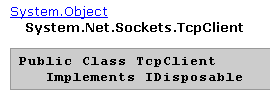
The constructors, methods, and properties of interest to us are as follows:
creates a TCP connection with the server running on the specified port (port) of the specified machine (hostname). For example, new TcpClient("istia.univ-angers.fr", 80) to connect to port 80 of the machine istia.univ-angers.fr | |
closes the connection to the TCP server | |
Obtains a NetworkStream for reading from and writing to the server. This stream enables client-server communication. |
9.3.7. The NetworkStream class
The NetworkStream class represents the network stream between the client and the server. The class is defined as follows:
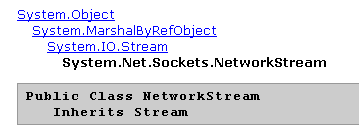
The NetworkStream class is derived from the Stream class. Many client-server applications exchange lines of text terminated by the line-end characters "\r\n". Therefore, it is useful to use StreamReader and StreamWriter objects to read and write these lines in the network stream. When two machines communicate, there is a TcpClient object at each end of the connection. The GetStream method of this object provides access to the network stream (NetworkStream) connecting the two machines. Thus, if a machine M1 has established a connection with a machine M2 using a TcpClient object client1 and they are exchanging lines of text, it can create its read and write streams as follows:
Dim in1 as StreamReader=new StreamReader(client1.GetStream())
Dim out1 as StreamWriter=new StreamWriter(client1.GetStream())
out1.AutoFlush=true
The statement
means that the write stream from client1 will not pass through an intermediate buffer but will go directly to the network. This point is important. Generally, when client1 sends a line of text to its partner, it expects a response. This response will never arrive if the line was actually buffered on machine M1 and never sent. To send a line of text to machine M2, we write:
To read the response from M2, we write:
9.3.8. Basic architecture of an Internet client
We now have the elements to write the basic architecture of an Internet client:
    Dim client As TcpClient = Nothing     ' the customer
    Dim [IN] As StreamReader = Nothing ' the customer's reading flow
    Dim OUT As StreamWriter = Nothing     ' the customer's writing flow
    Dim demande As String = Nothing         ' customer request
    Dim réponse As String = Nothing         ' server response

    Try
      ' connect to the service running on port P of machine M
      client = New TcpClient(nomServeur, port)

      ' create customer input/output flows TCP
      [IN] = New StreamReader(client.GetStream())
      OUT = New StreamWriter(client.GetStream())
      OUT.AutoFlush = True

      ' request-response loop
      While True
        ' preparing the application
        demande = ...
        ' we send it to the server
        OUT.WriteLine(demande)
        ' we read the server response
        réponse = [IN].ReadLine()
        ' the answer is processed
        ...
            End While
            ' it's over
            client.Close()
        Catch ex As Exception
      ' we handle the exception
...
        End Try
9.3.9. The TcpListener class
The TcpListener class is the appropriate class for representing a TCP service. It is defined as follows:
The constructors, methods, and properties of interest to us are as follows:
creates a TCP service that will listen for client requests on a port passed as a parameter (port), known as the listening port of the local machine with IP address localaddr. | |
accepts a client request. Returns a TcpClient object associated with another port, called the service port. | |
Starts listening for client requests | |
stops listening for client requests |
9.3.10. Basic Architecture of an Internet Server
From what we have seen previously, we can deduce the basic structure of a server:
    ' we create the listening service
    Dim ecoute As TcpListener = Nothing
    Dim port As Integer = ...
    Try
      ' create the service
      ecoute = New TcpListener(IPAddress.Parse("127.0.0.1"), port)
      ' launch it
      ecoute.Start()
      ' service loop
      Dim liaisonClient As TcpClient = Nothing
            While not fini
                ' waiting for a customer
                liaisonClient = ecoute.AcceptTcpClient()
                ' the service is provided by another task
                Dim tache As Thread = New Thread(New ThreadStart(AddressOf [méthode]))
                tache.Start()
            End While
        Catch ex As Exception
            ' we report the error
....
        End Try
        ' end of service
        ecoute.Stop()
The Service class is a thread that might look like this:
Public Class Service

    Private liaisonClient As TcpClient    ' customer liaison
    Private [IN] As StreamReader    ' iNPUTS
    Private OUT As StreamWriter    ' output flow

    ' manufacturer
    Public Sub New(ByVal liaisonClient As TcpClient, ...)
        Me.liaisonClient = liaisonClient
        ...
    End Sub

    ' run method
    Public Sub Run()
        ' renders service to the customer
        Try
            ' iNPUTS
            [IN] = New StreamReader(liaisonClient.GetStream())
            ' output flow
            OUT = New StreamWriter(liaisonClient.GetStream())
            OUT.AutoFlush = True
            ' loop read request/write response
            Dim demande As String = Nothing
            Dim reponse As String = Nothing
            demande = [IN].ReadLine
            While Not (demande Is Nothing)
                ' we process demand
                ...
                ' we send the answer
                reponse = "[" + demande + "]"
                OUT.WriteLine(reponse)
                ' following request
                demande = [IN].ReadLine
            End While
            ' end link
            liaisonClient.Close()
        Catch e As Exception
            ...
        End Try
        ' end of service
    End Sub
9.4. Examples
9.4.1. Echo server
We will write an echo server that will be launched from a DOS window using the command:
The server runs on the port passed as a parameter. It simply sends back to the client the request that the client sent to it. The program is as follows:
' options
Option Explicit On
Option Strict On

' namespaces
Imports System.Net.Sockets
Imports System.Net
Imports System
Imports System.IO
Imports System.Threading
Imports Microsoft.VisualBasic

' call: serveurEcho port
' echo server
' returns the line sent to the customer

Public Class serveurEcho
  Private Shared syntaxe As String = "Syntaxe : serveurEcho port"

  ' main program
  Public Shared Sub Main(ByVal args() As String)

    ' is there an argument
    If args.Length <> 1 Then
      erreur(syntaxe, 1)
    End If
    ' this argument must be integer >0
    Dim port As Integer = 0
    Dim erreurPort As Boolean = False
    Dim E As Exception = Nothing
    Try
      port = Integer.Parse(args(0))
    Catch ex As Exception
      E = ex
      erreurPort = True
    End Try
    erreurPort = erreurPort Or port <= 0
    If erreurPort Then
      erreur(syntaxe + ControlChars.Lf + "Port incorrect (" + E.ToString + ")", 2)
    End If
    ' we create the listening service
    Dim ecoute As TcpListener = Nothing
    Dim nbClients As Integer = 0 ' of customers handled
    Try
      ' create the service
      ecoute = New TcpListener(IPAddress.Parse("127.0.0.1"), port)
      ' launch it
      ecoute.Start()
      ' follow-up
      Console.Out.WriteLine(("Serveur d'écho lancé sur le port " & port))
      Console.Out.WriteLine(ecoute.LocalEndpoint)

      ' service loop
      Dim liaisonClient As TcpClient = Nothing
            While True
                ' infinite loop - will be stopped by Ctrl-C
                ' waiting for a customer
                liaisonClient = ecoute.AcceptTcpClient()

                ' the service is provided by another task
                nbClients += 1
                Dim tache As Thread = New Thread(New ThreadStart(AddressOf New traiteClientEcho(liaisonClient, nbClients).Run))
                tache.Start()
            End While
            ' back to listening to requests
        Catch ex As Exception
            ' we report the error
            erreur("L'erreur suivante s'est produite : " + ex.Message, 3)
        End Try
        ' end of service
        ecoute.Stop()
    End Sub

    ' error display
    Public Shared Sub erreur(ByVal msg As String, ByVal exitCode As Integer)
        ' error display
        System.Console.Error.WriteLine(msg)
        ' stop with error
        Environment.Exit(exitCode)
    End Sub
End Class

' -------------------------------------------------------
' provides service to an echo server client
Public Class traiteClientEcho

    Private liaisonClient As TcpClient    ' customer liaison
    Private numClient As Integer    ' customer no
    Private [IN] As StreamReader    ' iNPUTS
    Private OUT As StreamWriter    ' output flow

    ' manufacturer
    Public Sub New(ByVal liaisonClient As TcpClient, ByVal numClient As Integer)
        Me.liaisonClient = liaisonClient
        Me.numClient = numClient
    End Sub

    ' run method
    Public Sub Run()
        ' renders service to the customer
        Console.Out.WriteLine(("Début de service au client " & numClient))
        Try
            ' iNPUTS
            [IN] = New StreamReader(liaisonClient.GetStream())
            ' output flow
            OUT = New StreamWriter(liaisonClient.GetStream())
            OUT.AutoFlush = True
            ' loop read request/write response
            Dim demande As String = Nothing
            Dim reponse As String = Nothing
            demande = [IN].ReadLine
            While Not (demande Is Nothing)
                ' follow-up
                Console.Out.WriteLine(("Client " & numClient & " : " & demande))
                ' the service stops when the client sends an end-of-file marker
                reponse = "[" + demande + "]"
                OUT.WriteLine(reponse)
                ' service stops when client sends "end
                If demande.Trim().ToLower() = "fin" Then
                    Exit While
                End If
                ' following request
                demande = [IN].ReadLine
            End While
            ' end link
            liaisonClient.Close()
        Catch e As Exception
            erreur("Erreur lors de la fermeture de la liaison client (" + e.ToString + ")", 2)
        End Try
        ' end of service
        Console.Out.WriteLine(("Fin de service au client " & numClient))
    End Sub

    ' error display
    Public Shared Sub erreur(ByVal msg As String, ByVal exitCode As Integer)
        ' error display
        System.Console.Error.WriteLine(msg)
        ' stop with error
        Environment.Exit(exitCode)
    End Sub
End Class
The server structure conforms to the general architecture of TCP servers.
9.4.2. A client for the echo server
We will now write a client for the previous server. It will be called as follows:
It connects to the machine servername on port port and then sends lines of text to the server, which echoes them back.
' options
Option Explicit On
Option Strict On

' namespaces
Imports System.Net.Sockets
Imports System.Net
Imports System
Imports System.IO
Imports System.Threading
Imports Microsoft.VisualBasic

Public Class clientEcho

  ' connects to an echo server
  ' any line typed on the keyboard is then received as an echo
  Public Shared Sub Main(ByVal args() As String)
    ' syntax
    Const syntaxe As String = "pg machine port"

    ' number of arguments
    If args.Length <> 2 Then
      erreur(syntaxe, 1)
    End If
    ' note the server name
    Dim nomServeur As String = args(0)

    ' port must be integer >0
    Dim port As Integer = 0
    Dim erreurPort As Boolean = False
    Dim E As Exception = Nothing
    Try
      port = Integer.Parse(args(1))
    Catch ex As Exception
      E = ex
      erreurPort = True
    End Try
    erreurPort = erreurPort Or port <= 0
    If erreurPort Then
      erreur(syntaxe + ControlChars.Lf + "Port incorrect (" + E.ToString + ")", 2)
    End If

        ' we can work
    Dim client As TcpClient = Nothing ' the customer
    Dim [IN] As StreamReader = Nothing ' the customer's reading flow
    Dim OUT As StreamWriter = Nothing ' the customer's writing flow
    Dim demande As String = Nothing ' customer request
    Dim réponse As String = Nothing ' server response
    Try
      ' connect to the service running on port P of machine M
      client = New TcpClient(nomServeur, port)

      ' create customer input/output flows TCP
      [IN] = New StreamReader(client.GetStream())
      OUT = New StreamWriter(client.GetStream())
      OUT.AutoFlush = True

      ' request-response loop
      While True
        ' demand comes from the keyboard
        Console.Out.Write("demande (fin pour arrêter) : ")
        demande = Console.In.ReadLine()
        ' we send it to the server
        OUT.WriteLine(demande)
        ' we read the server response
        réponse = [IN].ReadLine()
        ' the answer is processed
        Console.Out.WriteLine(("Réponse : " + réponse))
        ' finished?
        If demande.Trim().ToLower() = "fin" Then
          Exit While
                End If
            End While
            ' it's over
            client.Close()
        Catch ex As Exception
      ' we handle the exception
      erreur(ex.Message, 3)
        End Try
    End Sub

    ' error display
    Public Shared Sub erreur(ByVal msg As String, ByVal exitCode As Integer)
        ' error display
        System.Console.Error.WriteLine(msg)
        ' stop with error
        Environment.Exit(exitCode)
    End Sub
End Class
The structure of this client conforms to the general architecture of TCP clients. Here are the results obtained in the following configuration:
- The server is running on port 100 in a DOS window
- On the same machine, two clients are launched in two other DOS windows
In the Client 1 window, we have the following results:
dos>clientEcho localhost 100
demande (fin pour arrêter) : ligne1
Réponse : [ligne1]
demande (fin pour arrêter) : ligne1B
Réponse : [ligne1B]
demande (fin pour arrêter) : ligne1C
Réponse : [ligne1C]
demande (fin pour arrêter) : fin
Réponse : [fin]
In client 2:
dos>clientEcho localhost 100
demande (fin pour arrêter) : ligne2A
Réponse : [ligne2A]
demande (fin pour arrêter) : ligne2B
Réponse : [ligne2B]
demande (fin pour arrêter) : fin
Réponse : [fin]
On the server side:
dos>serveurEcho 100
Serveur d'écho lancé sur le port 100
0.0.0.0:100
Début de service au client 1
Client 1 : ligne1
Début de service au client 2
Client 2 : ligne2A
Client 2 : ligne2B
Client 1 : ligne1B
Client 1 : ligne1C
Client 2 : fin
Fin de service au client 2
Client 1 : fin
Fin de service au client 1
^C
Note that the server was indeed able to serve two clients simultaneously.
9.4.3. A generic TCP client
Many services created at the dawn of the Internet operate according to the echo server model discussed earlier: client-server exchanges consist of exchanging lines of text. We will write a generic TCP client that will be launched as follows: cltgen server port
This TCP client will connect to port port on server server. Once connected, it will create two threads:
- a thread responsible for reading commands typed on the keyboard and sending them to the server
- a thread responsible for reading the server’s responses and displaying them on the screen
Why two threads when this wasn’t necessary in the previous application? In that application, the communication protocol was fixed: the client sent a single line, and the server responded with a single line. Each service has its own specific protocol, and we also encounter the following situations:
- the client must send several lines of text before receiving a response
- a server’s response may contain multiple lines of text
Therefore, the loop that sends a single line to the server and receives a single line from the server is not always suitable. We will therefore create two separate loops:
- a loop to read commands typed on the keyboard to be sent to the server. The user will signal the end of the commands with the keyword "fin".
- a loop to receive and display the server’s responses. This will be an infinite loop that will only be interrupted by the server closing the network connection or by the user typing the “end” command at the keyboard.
To have these two separate loops, we need two independent threads. Let’s look at an example of execution where our generic TCP client connects to an SMTP (Simple Mail Transfer Protocol) service. This service is responsible for routing email to recipients. It operates on port 25 and uses a text-based exchange protocol.
dos>cltgen istia.univ-angers.fr 25
Commandes :
<-- 220 istia.univ-angers.fr ESMTP Sendmail 8.11.6/8.9.3; Mon, 13 May 2002 08:37:26 +0200
help
<-- 502 5.3.0 Sendmail 8.11.6 -- HELP not implemented
mail from: machin@univ-angers.fr
<-- 250 2.1.0 machin@univ-angers.fr... Sender ok
rcpt to: serge.tahe@istia.univ-angers.fr
<-- 250 2.1.5 serge.tahe@istia.univ-angers.fr... Recipient ok
data
<-- 354 Enter mail, end with "." on a line by itself
Subject: test

ligne1
ligne2
ligne3
.
<-- 250 2.0.0 g4D6bks25951 Message accepted for delivery
quit
<-- 221 2.0.0 istia.univ-angers.fr closing connection
[fin du thread de lecture des réponses du serveur]
fin
[fin du thread d'envoi des commandes au serveur]
Let's comment on these client-server exchanges:
- The SMTP service sends a welcome message when a client connects to it:
- Some services have a "help" command that provides information on the commands available for that service. That is not the case here. The SMTP commands used in the example are as follows:
- mail from: sender, to specify the sender’s email address
- rcpt to: recipient, to specify the email address of the message’s recipient. If there are multiple recipients, the rcpt to: command is repeated as many times as necessary for each recipient.
- data that signals to the SMTP server that a message is about to be sent. As indicated in the server's response, this data consists of a series of lines ending with a line containing only a period. A message may have headers separated from the message body by a blank line. In our example, we included a subject using the Subject: keyword:
- Once the message is sent, you can tell the server that you are done using the quit command. The server then closes the network connection. The read thread can detect this event and stop.
- The user then types "end" on the keyboard to also stop the thread reading the commands typed on the keyboard.
If we check the received email, we see the following (Outlook):
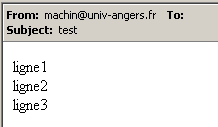
Note that the SMTP service cannot detect whether a sender is valid or not. Therefore, you can never trust the "From" field of a message. Here, the sender machin@univ-angers.fr did not exist. This generic TCP client allows us to discover the communication protocol of Internet services and, from there, build specialized classes for clients of these services. Let’s explore the communication protocol of the POP (Post Office Protocol) service, which allows users to retrieve their emails stored on a server. It operates on port 110.
dos>cltgen istia.univ-angers.fr 110
Commandes :
<-- +OK Qpopper (version 4.0.3) at istia.univ-angers.fr starting.
help
<-- -ERR Unknown command: "help".
user st
<-- +OK Password required for st.
pass monpassword
<-- +OK st has 157 visible messages (0 hidden) in 11755927 octets.
list
<-- +OK 157 visible messages (11755927 octets)
<-- 1 892847
<-- 2 171661
...
<-- 156 2843
<-- 157 2796
<-- .
retr 157
<-- +OK 2796 octets
<-- Received: from lagaffe.univ-angers.fr (lagaffe.univ-angers.fr [193.49.144.1])
<--     by istia.univ-angers.fr (8.11.6/8.9.3) with ESMTP id g4D6wZs26600;
<--     Mon, 13 May 2002 08:58:35 +0200
<-- Received: from jaume ([193.49.146.242])
<--     by lagaffe.univ-angers.fr (8.11.1/8.11.2/GeO20000215) with SMTP id g4D6wSd37691;
<--     Mon, 13 May 2002 08:58:28 +0200 (CEST)
...
<-- ------------------------------------------------------------------------
<-- NOC-RENATER2                  Tl.  : 0800 77 47 95
<-- Fax : (+33) 01 40 78 64 00 ,  Email : noc-r2@cssi.renater.fr
<-- ------------------------------------------------------------------------
<--
<-- .
quit
<-- +OK Pop server at istia.univ-angers.fr signing off.
[fin du thread de lecture des réponses du serveur]
fin
[fin du thread d'envoi des commandes au serveur]
The main commands are as follows:
- user login, where you enter your login on the machine that hosts your emails
- pass password, where you enter the password associated with the previous login
- list, to get a list of messages in the format number, size in bytes
- retr i, to read message number i
- quit, to end the session.
Now let’s explore the communication protocol between a client and a web server, which typically runs on port 80:
dos>cltgen istia.univ-angers.fr 80
Commandes :
GET /index.html HTTP/1.0

<-- HTTP/1.1 200 OK
<-- Date: Mon, 13 May 2002 07:30:58 GMT
<-- Server: Apache/1.3.12 (Unix)  (Red Hat/Linux) PHP/3.0.15 mod_perl/1.21
<-- Last-Modified: Wed, 06 Feb 2002 09:00:58 GMT
<-- ETag: "23432-2bf3-3c60f0ca"
<-- Accept-Ranges: bytes
<-- Content-Length: 11251
<-- Connection: close
<-- Content-Type: text/html
<--
<-- <html>
<--
<-- <head>
<-- <meta http-equiv="Content-Type"
<-- content="text/html; charset=iso-8859-1">
<-- <meta name="GENERATOR" content="Microsoft FrontPage Express 2.0">
<-- <title>Bienvenue a l'ISTIA - Universite d'Angers</title>
<-- </head>
....
<-- face="Verdana"> - Dernire mise  jour le <b>10 janvier 2002</b></font></p>
<-- </body>
<-- </html>
<--
[fin du thread de lecture des réponses du serveur]
fin
[fin du thread d'envoi des commandes au serveur]
A web client sends its commands to the server according to the following pattern:
The web server responds only after receiving the empty line. In this example, we used only one command:
which requests the URL /index.html from the server and indicates that it is using HTTP version 1.0. The most recent version of this protocol is 1.1. The example shows that the server responded by sending the contents of the index.html file and then closed the connection, as we can see the response reading thread terminating. Before sending the contents of the index.html file, the web server sent a series of headers followed by an empty line:
<-- HTTP/1.1 200 OK
<-- Date: Mon, 13 May 2002 07:30:58 GMT
<-- Server: Apache/1.3.12 (Unix)  (Red Hat/Linux) PHP/3.0.15 mod_perl/1.21
<-- Last-Modified: Wed, 06 Feb 2002 09:00:58 GMT
<-- ETag: "23432-2bf3-3c60f0ca"
<-- Accept-Ranges: bytes
<-- Content-Length: 11251
<-- Connection: close
<-- Content-Type: text/html
<--
<-- <html>
The line <html> is the first line of the /index.html file. The preceding text is called HTTP (HyperText Transfer Protocol) headers. We won’t go into detail about these headers here, but keep in mind that our generic client provides access to them, which can be helpful for understanding them. For example, the first line:
indicates that the contacted web server supports the HTTP/1.1 protocol and that it successfully found the requested file (200 OK), where 200 is an HTTP response code. The lines
tell the client that it will receive 11,251 bytes of HTML (HyperText Markup Language) text and that the connection will be closed once the data has been sent. So here we have a very handy TCP client. In fact, this client already exists on machines where it is called telnet, but it was interesting to write it ourselves. The generic TCP client program is as follows:
' namespaces
Imports System
Imports System.Net.Sockets
Imports System.IO
Imports System.Threading
Imports Microsoft.VisualBasic
' the class
Public Class clientTcpGénérique
' receives the characteristics of a service as a parameter in the form
' server port
' connects to the service
' creates a thread to read keyboard commands
' these will be sent to the
' creates a thread to read server responses
' these will be displayed on the screen
' the whole thing ends with the command end typed on the keyboard
Public Shared Sub Main(ByVal args() As String)
' syntax
Const syntaxe As String = "pg serveur port"
' number of arguments
If args.Length <> 2 Then
erreur(syntaxe, 1)
End If
' note the server name
Dim serveur As String = args(0)
' port must be integer >0
Dim port As Integer = 0
Dim erreurPort As Boolean = False
Dim E As Exception = Nothing
Try
port = Integer.Parse(args(1))
Catch ex As Exception
E = ex
erreurPort = True
End Try
erreurPort = erreurPort Or port <= 0
If erreurPort Then
erreur(syntaxe + ControlChars.Lf + "Port incorrect (" + E.ToString + ")", 2)
End If
Dim client As TcpClient = Nothing
' there may be problems
Try
' connect to the service
client = New TcpClient(serveur, port)
Catch ex As Exception
' error
Console.Error.WriteLine(("Impossible de se connecter au service (" & serveur & "," & port & "), erreur : " & ex.Message))
' end
Return
End Try
' create read/write threads
Dim thReceive As New Thread(New ThreadStart(AddressOf New clientReceive(client).Run))
Dim thSend As New Thread(New ThreadStart(AddressOf New clientSend(client).Run))
' start execution of both threads
thSend.Start()
thReceive.Start()
' end of main thread
Return
End Sub
' error display
Public Shared Sub erreur(ByVal msg As String, ByVal exitCode As Integer)
' error display
System.Console.Error.WriteLine(msg)
' stop with error
Environment.Exit(exitCode)
End Sub
End Class
Public Class clientSend
' class for reading keyboard commands
' and send them to a server via a tcp client passed to the
Private client As TcpClient ' tcp client
' manufacturer
Public Sub New(ByVal client As TcpClient)
' we note the tcp client
Me.client = client
End Sub
' thread Run method
Public Sub Run()
' local data
Dim OUT As StreamWriter = Nothing ' network write streams
Dim commande As String = Nothing ' command read from keyboard
' error management
Try
' create network write stream
OUT = New StreamWriter(client.GetStream())
OUT.AutoFlush = True
' order entry-send loop
Console.Out.WriteLine("Commandes : ")
While True
' read command typed on keyboard
commande = Console.In.ReadLine().Trim()
' finished?
If commande.ToLower() = "fin" Then
Exit While
End If
' send order to server
OUT.WriteLine(commande)
End While
Catch ex As Exception
' error
Console.Error.WriteLine(("L'erreur suivante s'est produite : " + ex.Message))
End Try
' end - we close the feeds
Try
OUT.Close()
client.Close()
Catch
End Try
' signals the end of the thread
Console.Out.WriteLine("[fin du thread d'envoi des commandes au serveur]")
End Sub
End Class
Public Class clientReceive
' class responsible for reading lines of text intended for a
' tcp client passed to builder
Private client As TcpClient ' tcp client
' manufacturer
Public Sub New(ByVal client As TcpClient)
' we note the tcp client
Me.client = client
End Sub
'manufacturer
' thread Run method
Public Sub Run()
' local data
Dim [IN] As StreamReader = Nothing ' network read stream
Dim réponse As String = Nothing ' server response
' error management
Try
' create network read stream
[IN] = New StreamReader(client.GetStream())
' loop read text lines from IN stream
While True
' network streaming
réponse = [IN].ReadLine()
' closed flow?
If réponse Is Nothing Then
Exit While
End If
' display
Console.Out.WriteLine(("<-- " + réponse))
End While
Catch ex As Exception
' error
Console.Error.WriteLine(("L'erreur suivante s'est produite : " + ex.Message))
End Try
' end - close flows
Try
[IN].Close()
client.Close()
Catch
End Try
' signals the end of the thread
Console.Out.WriteLine("[fin du thread de lecture des réponses du serveur]")
End Sub
End Class
9.4.4. A generic TCP server
Now we'll look at a server
- that displays the commands sent by its clients on the screen
- sends them the text entered by a user via the keyboard. The user therefore acts as the server.
The program is launched by: srvgen listeningPort, where listeningPort is the port to which clients must connect. Client service will be handled by two threads:
- one thread dedicated exclusively to reading the lines of text sent by the client
- a thread dedicated exclusively to reading the responses typed by the user. This thread will signal, using the fin command, that it is closing the connection with the client.
The server creates two threads per client. If there are n clients, there will be 2n active threads at the same time. The server itself never stops unless the user presses Ctrl-C on the keyboard. Let’s look at a few examples.
The server is running on port 100, and we use the generic client to communicate with it. The client window looks like this:
dos>cltgen localhost 100
Commandes :
commande 1 du client 1
<-- réponse 1 au client 1
commande 2 du client 1
<-- réponse 2 au client 1
fin
L'erreur suivante s'est produite : Impossible de lire les données de la connexion de transport.
[fin du thread de lecture des réponses du serveur]
[fin du thread d'envoi des commandes au serveur]
Lines beginning with <-- are those sent from the server to the client; the others are from the client to the server. The server window is as follows:
dos>srvgen 100
Serveur générique lancé sur le port 100
Thread de lecture des réponses du serveur au client 1 lancé
1 : Thread de lecture des demandes du client 1 lancé
<-- commande 1 du client 1
réponse 1 au client 1
1 : <-- commande 2 du client 1
réponse 2 au client 1
1 : [fin du Thread de lecture des demandes du client 1]
fin
[fin du Thread de lecture des réponses du serveur au client 1]
Lines beginning with <-- are those sent from the client to the server. Lines N: are those sent from the server to client N. The server above is still active even though client 1 has finished. We launch a second client for the same server:
dos>cltgen localhost 100
Commandes :
commande 3 du client 2
<-- réponse 3 au client 2
fin
L'erreur suivante s'est produite : Impossible de lire les données de la connexion de transport.
[fin du thread de lecture des réponses du serveur]
[fin du thread d'envoi des commandes au serveur]
The server window now looks like this:
dos>srvgen 100
Serveur générique lancé sur le port 100
Thread de lecture des réponses du serveur au client 1 lancé
1 : Thread de lecture des demandes du client 1 lancé
<-- commande 1 du client 1
réponse 1 au client 1
1 : <-- commande 2 du client 1
réponse 2 au client 1
1 : [fin du Thread de lecture des demandes du client 1]
fin
[fin du Thread de lecture des réponses du serveur au client 1]
Thread de lecture des réponses du serveur au client 2 lancé
2 : Thread de lecture des demandes du client 2 lancé
<-- commande 3 du client 2
réponse 3 au client 2
2 : [fin du Thread de lecture des demandes du client 2]
fin
[fin du Thread de lecture des réponses du serveur au client 2]
^C
Now let's simulate a web server by running our generic server on port 88:
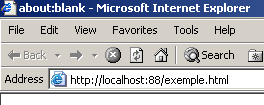
Now let’s open a browser and request the URL http://localhost:88/exemple.html. The browser will then connect to port 88 on the localhost machine and request the /example.html page:
Now let’s look at our server window:
dos>srvgen 88
Serveur générique lancé sur le port 88
Thread de lecture des réponses du serveur au client 2 lancé
2 : Thread de lecture des demandes du client 2 lancé
<-- GET /exemple.html HTTP/1.1
<-- Accept: image/gif, image/x-xbitmap, image/jpeg, image/pjpeg, application/msword, */*
<-- Accept-Language: fr
<-- Accept-Encoding: gzip, deflate
<-- User-Agent: Mozilla/4.0 (compatible; MSIE 6.0; Windows NT 5.0; .NET CLR 1.0.3705; .NET CLR 1.0.2
914)
<-- Host: localhost:88
<-- Connection: Keep-Alive
<--
This is how we see the HTTP headers sent by the browser. This allows us to gradually learn about the HTTP protocol. In a previous example, we created a web client that sent only a single GET request. That was sufficient. Here we see that the browser sends other information to the server. This information is intended to tell the server what type of client it is dealing with. We also see that the HTTP headers end with a blank line. Let’s craft a response for our client. The user at the keyboard is the actual server here and can craft a response manually. Let’s recall the response sent by a web server in a previous example:
<-- HTTP/1.1 200 OK
<-- Date: Mon, 13 May 2002 07:30:58 GMT
<-- Server: Apache/1.3.12 (Unix) (Red Hat/Linux) PHP/3.0.15 mod_perl/1.21
<-- Last-Modified: Wed, 06 Feb 2002 09:00:58 GMT
<-- ETag: "23432-2bf3-3c60f0ca"
<-- Accept-Ranges: bytes
<-- Content-Length: 11251
<-- Connection: close
<-- Content-Type: text/html
<--
<-- <html>
Let's try to provide a similar response:
...
<-- Host: localhost:88
<-- Connection: Keep-Alive
<--
2 : HTTP/1.1 200 OK
2 : Server: serveur tcp generique
2 : Connection: close
2 : Content-Type: text/html
2 :
2 : <html>
2 :   <head><title>Serveur generique</title></head>
2 :   <body>
2 :     <center>
2 :       <h2>Reponse du serveur generique</h2>
2 :     </center>
2 :    </body>
2 : </html>
2 : fin
L'erreur suivante s'est produite : Impossible de lire les données de la connexion de transport.
[fin du Thread de lecture des demandes du client 2]
[fin du Thread de lecture des réponses du serveur au client 2]
Lines beginning with 2: are sent from the server to client #2. The end command closes the connection from the server to the client. In our response, we have limited ourselves to the following HTTP headers:
HTTP/1.1 200 OK
2 : Server: serveur tcp generique
2 : Connection: close
2 : Content-Type: text/html
2 :
We do not specify the size of the file we are sending (Content-Length), but simply indicate that we will close the connection (Connection: close) after sending it. This is sufficient for the browser. Upon seeing the connection closed, it will know that the server’s response is complete and will display the HTML page that was sent to it. The page is as follows:
2 : <html>
2 :   <head><title>Serveur generique</title></head>
2 :   <body>
2 :     <center>
2 :       <h2>Reponse du serveur generique</h2>
2 :     </center>
2 :    </body>
2 : </html>
The user then closes the connection to the client by typing the "fin" command. The browser then knows that the server's response is complete and can display it:
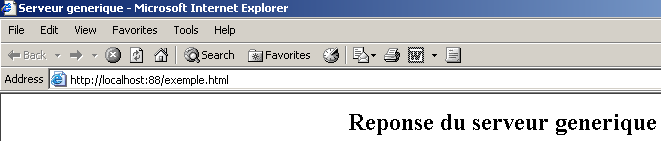
If, in the example above, you select View/Source to see what the browser received, you get:
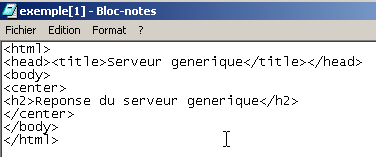
that is, exactly what was sent from the generic server. The code for the generic TCP server is as follows:
' namespaces
Imports System
Imports System.Net
Imports System.Net.Sockets
Imports System.IO
Imports System.Threading
Imports Microsoft.VisualBasic

Public Class serveurTcpGénérique

    ' main program
    Public Shared Sub Main(ByVal args() As String)

        ' receives the port of listening to customer requests
        ' creates a thread to read client requests
        ' these will be displayed on the screen
        ' creates a thread to read keyboard commands
        ' these will be sent as a reply to the customer
        ' the whole thing ends with the command end typed on the keyboard

        Const syntaxe As String = "Syntaxe : pg port"

        ' is there an argument
        If args.Length <> 1 Then
            erreur(syntaxe, 1)
        End If
        ' this argument must be integer >0
        Dim port As Integer = 0
        Dim erreurPort As Boolean = False
        Dim E As Exception = Nothing
        Try
            port = Integer.Parse(args(0))
        Catch ex As Exception
            E = ex
            erreurPort = True
        End Try
        erreurPort = erreurPort Or port <= 0
        If erreurPort Then
            erreur(syntaxe + ControlChars.Lf + "Port incorrect (" + E.ToString + ")", 2)
        End If
        ' we create the listening service
        Dim ecoute As TcpListener = Nothing
        Dim nbClients As Integer = 0     ' of customers handled
        Try
            ' create the service
            ecoute = New TcpListener(IPAddress.Parse("127.0.0.1"), port)
            ' launch it
            ecoute.Start()
            ' follow-up
            Console.Out.WriteLine(("Serveur générique lancé sur le port " & port))

            ' customer service loop
            Dim client As TcpClient = Nothing
            While True        ' infinite loop - will be stopped by Ctrl-C
                ' waiting for a customer
                client = ecoute.AcceptTcpClient()

                ' the service is provided by separate threads
                nbClients += 1
                ' thread for reading customer requests
                Dim thReceive As New Thread(New ThreadStart(AddressOf New serveurReceive(client, nbClients).Run))
                ' thread for reading responses typed on the keyboard by the user
                Dim thSend As New Thread(New ThreadStart(AddressOf New serveurSend(client, nbClients).Run))

                ' start execution of both threads
                thSend.Start()
                thReceive.Start()
            End While
            ' back to listening to requests
        Catch ex As Exception
            ' we report the error
            erreur("L'erreur suivante s'est produite : " + ex.Message, 3)
        End Try
    End Sub

    ' error display
    Public Shared Sub erreur(ByVal msg As String, ByVal exitCode As Integer)
        ' error display
        System.Console.Error.WriteLine(msg)
        ' stop with error
        Environment.Exit(exitCode)
    End Sub
End Class


Public Class serveurSend
    ' class responsible for reading typed responses
    ' and send them to a client via a tcp client passed to the
    Private client As TcpClient    ' tcp client
    Private numClient As Integer    ' customer no

    ' manufacturer
    Public Sub New(ByVal client As TcpClient, ByVal numClient As Integer)
        ' we note the tcp client
        Me.client = client
        ' and its
        Me.numClient = numClient
    End Sub

    ' thread Run method
    Public Sub Run()

        ' local data
        Dim OUT As StreamWriter = Nothing        ' network write streams
        Dim réponse As String = Nothing        ' answer read from keyboard
        ' follow-up
        Console.Out.WriteLine(("Thread de lecture des réponses du serveur au client " & numClient & " lancé"))
        ' error management
        Try
            ' network write stream creation
            OUT = New StreamWriter(client.GetStream())
            OUT.AutoFlush = True
            ' order entry-send loop
            While True
                ' customer identification
                Console.Out.Write((numClient & " : "))
                ' read response typed on keyboard
                réponse = Console.In.ReadLine().Trim()
                ' finished?
                If réponse.ToLower() = "fin" Then
                    Exit While
                End If
                ' send response to server
                OUT.WriteLine(réponse)
            End While
            ' following response
        Catch ex As Exception
            ' error
            Console.Error.WriteLine(("L'erreur suivante s'est produite : " + ex.Message))
        End Try
        ' end - close flows
        Try
            OUT.Close()
            client.Close()
        Catch
        End Try
        ' signals the end of the thread
        Console.Out.WriteLine(("[fin du Thread de lecture des réponses du serveur au client " & numClient & "]"))
    End Sub
End Class

Public Class serveurReceive
    ' class responsible for reading text lines sent to the server
    ' via a tcp client passed to the builder
    Private client As TcpClient     ' tcp client
    Private numClient As Integer    ' customer no

    ' manufacturer
    Public Sub New(ByVal client As TcpClient, ByVal numClient As Integer)
        ' we note the tcp client
        Me.client = client
        ' and its
        Me.numClient = numClient
    End Sub

    ' thread Run method
    Public Sub Run()
        ' local data
        Dim [IN] As StreamReader = Nothing        ' network read stream
        Dim réponse As String = Nothing        ' server response
        ' follow-up
        Console.Out.WriteLine(("Thread de lecture des demandes du client " & numClient & " lancé"))
        ' error management
        Try
            ' create network read stream
            [IN] = New StreamReader(client.GetStream())
            ' loop read text lines from IN stream
            While True
                ' network streaming
                réponse = [IN].ReadLine()
                ' closed flow?
                If réponse Is Nothing Then
                    Exit While
                End If
                ' display
                Console.Out.WriteLine(("<-- " + réponse))
            End While
        Catch ex As Exception
            ' error
            Console.Error.WriteLine(("L'erreur suivante s'est produite : " + ex.Message))
        End Try
        ' end - close flows
        Try
            [IN].Close()
            client.Close()
        Catch
        End Try
        ' signals the end of the thread
        Console.Out.WriteLine(("[fin du Thread de lecture des demandes du client " & numClient & "]"))
    End Sub
End Class
9.4.5. A Web client
In the previous example, we saw some of the HTTP headers sent by a browser:
<-- GET /exemple.html HTTP/1.1
<-- Accept: image/gif, image/x-xbitmap, image/jpeg, image/pjpeg, application/msword, */*
<-- Accept-Language: fr
<-- Accept-Encoding: gzip, deflate
<-- User-Agent: Mozilla/4.0 (compatible; MSIE 6.0; Windows NT 5.0; .NET CLR 1.0.3705; .NET CLR 1.0.2
914)
<-- Host: localhost:88
<-- Connection: Keep-Alive
<--
We will write a web client that takes a URL as a parameter and displays the text sent by the server on the screen. We will assume that the server supports the HTTP 1.1 protocol. From the headers listed above, we will use only the following:
- The first header indicates which page we want
- the second specifies which server we are querying
- The third indicates that we want the server to close the connection after responding to us.
If we replace GET with HEAD in the example above, the server will send us only the HTTP headers and not the HTML page.
Our web client will be called as follows: webclient URL cmd, where URL is the desired URL and cmd is one of the two keywords GET or HEAD to indicate whether we want only the headers (HEAD) or also the page content (GET). Let’s look at a first example. We start the IIS server and then the web client on the same machine:
dos>clientweb http://localhost HEAD
HTTP/1.1 302 Object moved
Server: Microsoft-IIS/5.0
Date: Mon, 13 May 2002 09:23:37 GMT
Connection: close
Location: /IISSamples/Default/welcome.htm
Content-Length: 189
Content-Type: text/html
Set-Cookie: ASPSESSIONIDGQQQGUUY=HMFNCCMDECBJJBPPBHAOAJNP; path=/
Cache-control: private
The response
means that the requested page has moved (and therefore has a new URL). The new URL is provided by the Location: header
If we use GET instead of HEAD in the call to the web client:
dos>clientweb http://localhost GET
HTTP/1.1 302 Object moved
Server: Microsoft-IIS/5.0
Date: Mon, 13 May 2002 09:33:36 GMT
Connection: close
Location: /IISSamples/Default/welcome.htm
Content-Length: 189
Content-Type: text/html
Set-Cookie: ASPSESSIONIDGQQQGUUY=IMFNCCMDAKPNNGMGMFIHENFE; path=/
Cache-control: private

<head><title>L'objet a changé d'emplacement</title></head>
<body><h1>L'objet a changé d'emplacement</h1>Cet objet peut être trouvé <a HREF="/IISSamples/Default/we
lcome.htm">ici</a>.</body>
We get the same result as with HEAD, plus the body of the HTML page. The program is as follows:
' namespaces
Imports System
Imports System.Net.Sockets
Imports System.IO


Public Class clientWeb1

    ' requests a URL
    ' displays its contents on the screen
    Public Shared Sub Main(ByVal args() As String)
        ' syntax
        Const syntaxe As String = "pg URI GET/HEAD"

        ' number of arguments
        If args.Length <> 2 Then
            erreur(syntaxe, 1)
        End If
        ' note the URI required
        Dim URIstring As String = args(0)
        Dim commande As String = args(1).ToUpper()

        ' URI validity check
        Dim uri As Uri = Nothing
        Try
            uri = New Uri(URIstring)
        Catch ex As Exception
            ' URI incorrect
            erreur("L'erreur suivante s'est produite : " + ex.Message, 2)
        End Try
        ' order verification
        If commande <> "GET" And commande <> "HEAD" Then
            ' incorrect order
            erreur("Le second paramètre doit être GET ou HEAD", 3)
        End If

        ' we can work
        Dim client As TcpClient = Nothing        ' the customer
        Dim [IN] As StreamReader = Nothing        ' the customer's reading flow
        Dim OUT As StreamWriter = Nothing        ' the customer's writing flow
        Dim réponse As String = Nothing        ' server response
        Try
            ' connect to the server
            client = New TcpClient(uri.Host, uri.Port)

            ' create customer input/output flows TCP
            [IN] = New StreamReader(client.GetStream())
            OUT = New StreamWriter(client.GetStream())
            OUT.AutoFlush = True

            ' request URL - send HTTP headers
            OUT.WriteLine((commande + " " + uri.PathAndQuery + " HTTP/1.1"))
            OUT.WriteLine(("Host: " + uri.Host + ":" & uri.Port))
            OUT.WriteLine("Connection: close")
            OUT.WriteLine()
            ' we read the answer
            réponse = [IN].ReadLine()
            While Not (réponse Is Nothing)
                ' the answer is processed
                Console.Out.WriteLine(réponse)
                ' we read the answer
                réponse = [IN].ReadLine()
            End While
            ' it's over
            client.Close()
        Catch e As Exception
            ' we handle the exception
            erreur(e.Message, 4)
        End Try
    End Sub

    ' error display
    Public Shared Sub erreur(ByVal msg As String, ByVal exitCode As Integer)
        ' error display
        System.Console.Error.WriteLine(msg)
        ' stop with error
        Environment.Exit(exitCode)
    End Sub
End Class
The only new feature in this program is the use of the Uri class. The program receives a URL (Uniform Resource Locator) or URI (Uniform Resource Identifier) in the form http://serveur:port/cheminPageHTML?param1=val1;param2=val2;.... The Uri class allows us to break down the URL string into its various components. A Uri object is constructed from the URIstring received as a parameter:
        ' URI validity check
        Dim uri As Uri = Nothing
        Try
            uri = New Uri(URIstring)
        Catch ex As Exception
            ' URI incorrect
            erreur("L'erreur suivante s'est produite : " + ex.Message, 2)
        End Try
If the URI string received as a parameter is not a valid URI (missing protocol, server, etc.), an exception is thrown. This allows us to verify the validity of the received parameter. Once the URI object is constructed, we have access to its various elements. Thus, if the URI object from the previous code was constructed from the string http://serveur:port/cheminPageHTML?param1=val1;param2=val2;..., we will have:
uri.Host=server, uri.Port=port, uri.Path=HTMLPagePath, uri.Query=param1=val1;param2=val2;..., uri.pathAndQuery=HTMLPagePath?param1=val1;param2=val2;..., uri.Scheme=http.
9.4.6. Web client handling redirects
The previous web client does not handle any possible redirection of the URL it requested. The following client does handle it.
- It reads the first line of the HTTP headers sent by the server to check if it contains the string "302 Object moved," which indicates a redirect
- It reads the following headers. If there is a redirect, it looks for the line "Location: url" which provides the new URL of the requested page and notes this URL.
- It displays the rest of the server's response. If there is a redirect, steps 1 through 3 are repeated with the new URL. The program does not accept more than one redirect. This limit is defined by a constant that can be modified.
Here is an example:
dos>clientweb2 http://localhost GET
HTTP/1.1 302 Object moved
Server: Microsoft-IIS/5.0
Date: Mon, 13 May 2002 11:38:55 GMT
Connection: close
Location: /IISSamples/Default/welcome.htm
Content-Length: 189
Content-Type: text/html
Set-Cookie: ASPSESSIONIDGQQQGUUY=PDGNCCMDNCAOFDMPHCJNPBAI; path=/
Cache-control: private

<head><title>L'objet a chang d'emplacement</title></head>
<body><h1>L'objet a chang d'emplacement</h1>Cet objet peut tre trouv <a HREF="/IISSamples/Default/we
lcome.htm">ici</a>.</body>

<--Redirection vers l'URL http://localhost:80/IISSamples/Default/welcome.htm-->

HTTP/1.1 200 OK
Server: Microsoft-IIS/5.0
Connection: close
Date: Mon, 13 May 2002 11:38:55 GMT
Content-Type: text/html
Accept-Ranges: bytes
Last-Modified: Mon, 16 Feb 1998 21:16:22 GMT
ETag: "0174e21203bbd1:978"
Content-Length: 4781

<html>

<head>
<title>Bienvenue dans le Serveur Web personnel</title>
</head>
....
</body>
</html>
The program is as follows:
' namespaces
Imports System
Imports System.Net.Sockets
Imports System.IO
Imports System.Text.RegularExpressions
Imports Microsoft.VisualBasic

' web client class
Public Class clientWeb

  ' requests a URL and displays its contents on the screen
  Public Shared Sub Main(ByVal args() As String)
    ' syntax
    Const syntaxe As String = "pg URI GET/HEAD"

    ' number of arguments
    If args.Length <> 2 Then
      erreur(syntaxe, 1)
    End If
    ' note the URI required
    Dim URIstring As String = args(0)
    Dim commande As String = args(1).ToUpper()

    ' URI validity check
    Dim uri As Uri = Nothing
    Try
      uri = New Uri(URIstring)
    Catch ex As Exception
      ' URI incorrect
      erreur("L'erreur suivante s'est produite : " + ex.Message, 2)
    End Try 'catch
    ' order verification
    If commande <> "GET" And commande <> "HEAD" Then
      ' incorrect order
      erreur("Le second paramètre doit être GET ou HEAD", 3)
    End If

    ' we can work
    Dim client As TcpClient = Nothing ' the customer
    Dim [IN] As StreamReader = Nothing ' the customer's reading flow
    Dim OUT As StreamWriter = Nothing ' the customer's writing flow
    Dim réponse As String = Nothing ' server response
    Const nbRedirsMax As Integer = 1 ' no more than one redirection accepted
    Dim nbRedirs As Integer = 0 ' number of redirects in progress
    Dim premièreLigne As String ' 1st line of the answer
    Dim redir As Boolean = False ' indicates redirection or not
    Dim locationString As String = "" ' the URI string of a possible redirection
    ' regular expression to find a URL redirect
    Dim location As New Regex("^Location: (.+?)$") '

        ' error management
    Try
      ' you may have several URL to request if there are redirections
      While nbRedirs <= nbRedirsMax
        ' connect to the server
        client = New TcpClient(uri.Host, uri.Port)

        ' create customer input/output flows TCP
        [IN] = New StreamReader(client.GetStream())
        OUT = New StreamWriter(client.GetStream())
        OUT.AutoFlush = True

        ' we send HTTP headers to request URL
        OUT.WriteLine((commande + " " + uri.PathAndQuery + " HTTP/1.1"))
        OUT.WriteLine(("Host: " + uri.Host + ":" & uri.Port))
        OUT.WriteLine("Connection: close")
        OUT.WriteLine()

        ' read the first line of the answer
        premièreLigne = [IN].ReadLine()
        ' screen echo
        Console.Out.WriteLine(premièreLigne)

        ' redirection?
        If Regex.IsMatch(premièreLigne, "302 Object moved$") Then
          ' there is a redirection
          redir = True
          nbRedirs += 1
                End If

                ' next HTTP headers until you find the empty line signalling the end of the headers
                Dim locationFound As Boolean = False
                réponse = [IN].ReadLine()
                While réponse <> ""
                    ' the answer is displayed
                    Console.Out.WriteLine(réponse)
                    ' if there is a redirection, we search for the Location header
                    If redir And Not locationFound Then
                        ' compare the line with the relational expression location
                        Dim résultat As Match = location.Match(réponse)
                        If résultat.Success Then
                            ' if found, note the URL of redirection
                            locationString = résultat.Groups(1).Value
                            ' we note that we found
                            locationFound = True
                        End If
                    End If
                    ' next line
                    réponse = [IN].ReadLine()
                End While

                ' following lines of the answer
                Console.Out.WriteLine(réponse)
                réponse = [IN].ReadLine()
                While Not (réponse Is Nothing)
                    ' the answer is displayed
                    Console.Out.WriteLine(réponse)
                    ' next line
                    réponse = [IN].ReadLine()
                End While

                ' close the connection
                client.Close()
                ' are we done?
                If Not locationFound Or nbRedirs > nbRedirsMax Then
                    Exit While
                End If

                ' there is a redirection to be made - we build the new Uri
                URIstring = uri.Scheme + "://" & uri.Host & ":" & uri.Port & locationString
                uri = New Uri(URIstring)
                ' follow-up
                Console.Out.WriteLine((ControlChars.Lf + "<--Redirection vers l'URL " + URIstring + "-->" + ControlChars.Lf))
            End While
        Catch e As Exception
      ' we handle the exception
      erreur(e.Message, 4)
        End Try
    End Sub

    ' error display
    Public Shared Sub erreur(ByVal msg As String, ByVal exitCode As Integer)
        ' error display
        System.Console.Error.WriteLine(msg)
        ' stop with error
        Environment.Exit(exitCode)
    End Sub
End Class
9.4.7. Tax Calculation Server
We are revisiting the TAXES exercise, which has already been covered in various forms. Let’s review the latest version. A tax class has been created. Its attributes are three arrays of numbers:
Public Class impôt
    ' les données nécessaires au calcul de l'impôt
    ' proviennent d'une source extérieure
    Private limites(), coeffR(), coeffN() as double
The class has two constructors:
- a constructor that takes the three data arrays needed to calculate the tax
    // constructeur 1
    Public Sub New(ByVal LIMITES() As Decimal, ByVal COEFFR() As Decimal, ByVal COEFFN() As Decimal)
        ' initializes the three limit arrays, coeffR, coeffN from
        ' parameters passed to the constructor
- a constructor to which we pass the DSN name of an ODBC database
    ' builder 2
    Public Sub New(ByVal DSNimpots As String, ByVal Timpots As String, ByVal colLimites As String, ByVal colCoeffR As String, ByVal colCoeffN As String)
        ' initializes the three limit arrays, coeffR, coeffN from
        ' the contents of the Timpots table in the ODBC DSNimpots database
        ' colLimites, colCoeffR, colCoeffN are the three columns of this table
        ' can throw an exception
A test program was written:
dos>vbc /r:impots.dll testimpots.vb

dos>test mysql-impots timpots limites coeffr coeffn
Paramètres du calcul de l'impôt au format marié nbEnfants salaire ou rien pour arrêter :o 2 200000
impôt=22506 F
Paramètres du calcul de l'impôt au format marié nbEnfants salaire ou rien pour arrêter :n 2 200000
impôt=33388 F
Paramètres du calcul de l'impôt au format marié nbEnfants salaire ou rien pour arrêter :o 3 200000
impôt=16400 F
Paramètres du calcul de l'impôt au format marié nbEnfants salaire ou rien pour arrêter :n 3 300000
impôt=50082 F
Paramètres du calcul de l'impôt au format marié nbEnfants salaire ou rien pour arrêter :n 3 200000
impôt=22506 F
Here, the test program and the tax object were on the same machine. We propose to place the test program and the tax object on different machines. We will have a client-server application where the remote tax object will be the server. The new class is called TaxServer and is derived from the tax class:
Public Class ServeurImpots
    Inherits impôt

    ' attributes
    Private portEcoute As Integer    ' the ability to listen to customer requests
    Private actif As Boolean    ' server status

    ' manufacturer
    Public Sub New(ByVal portEcoute As Integer, ByVal DSNimpots As String, ByVal Timpots As String, ByVal colLimites As String, ByVal colCoeffR As String, ByVal colCoeffN As String)
        MyBase.New(DSNimpots, Timpots, colLimites, colCoeffR, colCoeffN)
        ' we note the listening port
        Me.portEcoute = portEcoute
        ' currently inactive
        actif = False
        ' creates and launches a thread for reading keyboard commands
        ' the server will be managed using these commands
        Dim threadLecture As Thread = New Thread(New ThreadStart(AddressOf admin))
        threadLecture.Start()
    End Sub
The only new parameter in the constructor is the port for listening to client requests. The other parameters are passed directly to the base tax class. The tax server is controlled by keyboard commands. Therefore, we create a thread to read these commands. There will be two possible commands: start to launch the service, and stop to shut it down permanently. The admin method that handles these commands is as follows:
    Public Sub admin()
        ' reads server administration commands typed from the keyboard
        ' in an endless loop
        Dim commande As String = Nothing
        While True
            ' invite
            Console.Out.Write("Serveur d'impôts>")
            ' read command
            commande = Console.In.ReadLine().Trim().ToLower()
            ' order execution
            If commande = "start" Then
                ' active?
                If actif Then
                    'error
                    Console.Out.WriteLine("Le serveur est déjà actif")
                Else
                    ' we launch the listening service
                    Dim threadEcoute As Thread = New Thread(New ThreadStart(AddressOf ecoute))
                    threadEcoute.Start()
                End If
            Else
                If commande = "stop" Then
                    ' end of all execution threads
                    Environment.Exit(0)
                Else
                    ' error
                    Console.Out.WriteLine("Commande incorrecte. Utilisez (start,stop)")
                End If
            End If
        End While
    End Sub
If the command entered via the keyboard is "start", a thread that listens for client requests is launched. If the command entered is "stop", all threads are stopped. The listening thread executes the "ecoute" method:
    Public Sub ecoute()
        ' thread for listening to customer requests
        ' we create the listening service
        Dim ecoute As TcpListener = Nothing
        Try
            ' create the service
            ecoute = New TcpListener(IPAddress.Parse("127.0.0.1"), portEcoute)
            ' launch it
            ecoute.Start()
            ' follow-up
            Console.Out.WriteLine(("Serveur d'écho lancé sur le port " & portEcoute))

            ' service loop
            Dim liaisonClient As TcpClient = Nothing
            While True            ' infinite loop
                ' waiting for a customer
                liaisonClient = ecoute.AcceptTcpClient()
                ' the service is provided by another task
                Dim threadClient As Thread = New Thread(New ThreadStart(AddressOf New traiteClientImpots(liaisonClient, Me).Run))
                threadClient.Start()
            End While
            ' back to listening to requests
        Catch ex As Exception
            ' we report the error
            erreur("L'erreur suivante s'est produite : " + ex.Message, 3)
        End Try
    End Sub

    ' error display
    Public Shared Sub erreur(ByVal msg As String, ByVal exitCode As Integer)
        ' error display
        System.Console.Error.WriteLine(msg)
        ' stop with error
        Environment.Exit(exitCode)
    End Sub
Here we have a classic TCP server listening on the portEcoute port. Client requests are handled by the Run method of an object to which two parameters are passed:
- the TcpClient object, which allows access to the client
- the tax object this, which provides access to the tax calculation method this.calculate.
' -------------------------------------------------------
' provides service to a tax server client
Public Class traiteClientImpots

    Private liaisonClient As TcpClient    ' customer liaison
    Private [IN] As StreamReader    ' iNPUTS
    Private OUT As StreamWriter    ' output flow
    Private objImpôt As impôt     ' object Tax

    ' manufacturer
    Public Sub New(ByVal liaisonClient As TcpClient, ByVal objImpôt As impôt)
        Me.liaisonClient = liaisonClient
        Me.objImpôt = objImpôt
    End Sub
The Run method processes client requests. These can take two forms:
- calculateMarried(y/n) numChildren annualSalary
- endCalculations
Form 1 calculates a tax, while Form 2 closes the client-server connection.
    ' run method
    Public Sub Run()
        ' renders service to the customer
        Try
            ' iNPUTS
            [IN] = New StreamReader(liaisonClient.GetStream())
            ' output flow
            OUT = New StreamWriter(liaisonClient.GetStream())
            OUT.AutoFlush = True
            ' send a welcome message to the customer
            OUT.WriteLine("Bienvenue sur le serveur d'impôts")

            ' loop read request/write response
            Dim demande As String = Nothing
            Dim champs As String() = Nothing            ' elements of the request
            Dim commande As String = Nothing            ' customer order: calculation or fincalculs
            demande = [IN].ReadLine()
            While Not (demande Is Nothing)
                ' demand is broken down into fields
                champs = Regex.Split(demande.Trim().ToLower(), "\s+")
                ' two successful applications: calcul and fincalculs
                commande = champs(0)
                Dim erreur As Boolean = False
                If commande <> "calcul" And commande <> "fincalculs" Then
                    ' customer error
                    OUT.WriteLine("Commande incorrecte. Utilisez (calcul,fincalculs).")
                End If
                If commande = "calcul" Then
                    calculerImpôt(champs)
                End If
                If commande = "fincalculs" Then
                    ' good-bye message to customer
                    OUT.WriteLine("Au revoir...")
                    ' freeing up resources
                    Try
                        OUT.Close()
                        [IN].Close()
                        liaisonClient.Close()
                    Catch
                    End Try
                    ' end
                    Return
                End If
                ' new request
                demande = [IN].ReadLine()
            End While
        Catch e As Exception
            erreur("L'erreur suivante s'est produite (" + e.ToString + ")", 2)
        End Try
    End Sub
The tax calculation is performed by the CalculateTax method, which takes the array of fields from the customer's request as a parameter. The validity of the request is verified, and if valid, the tax is calculated and returned to the customer.
    ' tax calculation
    Public Sub calculerImpôt(ByVal champs() As String)
        ' processing the application: calculation married nbEnfants salaireAnnuel
        ' broken down into fields in the fields table
        Dim marié As String = Nothing
        Dim nbEnfants As Integer = 0
        Dim salaireAnnuel As Integer = 0

        ' validity of arguments
        Try
            ' at least 4 fields are required
            If champs.Length <> 4 Then
                Throw New Exception
            End If
            ' married
            marié = champs(1)
            If marié <> "o" And marié <> "n" Then
                Throw New Exception
            End If
            ' children
            nbEnfants = Integer.Parse(champs(2))
            ' salary
            salaireAnnuel = Integer.Parse(champs(3))
        Catch
            OUT.WriteLine(" syntaxe : calcul marié(O/N) nbEnfants salaireAnnuel")
            ' finish
            Exit Sub
        End Try
        ' tax can be calculated
        Dim impot As Long = objImpôt.calculer(marié = "o", nbEnfants, salaireAnnuel)
        ' we send the response to the client
        OUT.WriteLine(impot.ToString)
    End Sub

    ' error display
    Public Shared Sub erreur(ByVal msg As String, ByVal exitCode As Integer)
        ' error display
        System.Console.Error.WriteLine(msg)
        ' stop with error
        Environment.Exit(exitCode)
    End Sub
This class is compiled by
where impots.dll contains the code for the impôt class. A test program might look like this:
' namespaces
Imports System
Imports System.IO
Imports Microsoft.VisualBasic

Public Class testServeurImpots
    Public Shared syntaxe As String = "Syntaxe : pg port dsnImpots Timpots colLimites colCoeffR colCoeffN"

    ' main program
    Public Shared Sub Main(ByVal args() As String)

        ' you need6 arguments
        If args.Length <> 6 Then
            erreur(syntaxe, 1)
        End If
        ' port must be integer >0
        Dim port As Integer = 0
        Dim erreurPort As Boolean = False
        Dim E As Exception = Nothing
        Try
            port = Integer.Parse(args(0))
        Catch ex As Exception
            E = ex
            erreurPort = True
        End Try
        erreurPort = erreurPort Or port <= 0
        If erreurPort Then
            erreur(syntaxe + ControlChars.Lf + "Port incorrect (" + E.ToString + ")", 2)
        End If
        ' we create the tax server
        Try
            Dim srvimots As ServeurImpots = New ServeurImpots(port, args(1), args(2), args(3), args(4), args(5))
        Catch ex As Exception
            'error
            Console.Error.WriteLine(("L'erreur suivante s'est produite : " + ex.Message))
        End Try
    End Sub

    ' error display
    Public Shared Sub erreur(ByVal msg As String, ByVal exitCode As Integer)
        ' error display
        System.Console.Error.WriteLine(msg)
        ' stop with error
        Environment.Exit(exitCode)
    End Sub
End Class
We pass the data required to construct a ServeurImpots object to the test program, and from there it creates this object. This test program is compiled by:
Here is an initial test:
dos>testimpots 124 odbc-mysql-dbimpots impots limites coeffr coeffn
Serveur d'impôts>Serveur d'impôts>start
Serveur d'impôts>Serveur d'écho lancé sur le port 124
stop
The line
creates a TaxServer object that is not yet listening for client requests. It is the start command typed at the keyboard that starts this listening process. The stop command stops the server. Let’s now use a client. We will use the generic client created earlier. The server is started:
dos>testimpots 124 odbc-mysql-dbimpots impots limites coeffr coeffn
Serveur d'impôts>Serveur d'impôts>start
Serveur d'impôts>Serveur d'écho lancé sur le port 124
The generic client is launched in another DOS window:
We can see that the client has successfully received the welcome message from the server. We send other commands:
x
<-- Commande incorrecte. Utilisez (calcul,fincalculs).
calcul
<--  syntaxe : calcul marié(O/N) nbEnfants salaireAnnuel
calcul o 2 200000
<-- 22506
calcul n 2 200000
<-- 33388
fincalculs
<-- Au revoir...
[fin du thread de lecture des réponses du serveur]
fin
[fin du thread d'envoi des commandes au serveur]
We return to the server window to stop it: