7. Database access
7.1. General
There are many databases available for Windows platforms. To access them, applications use programs called drivers.
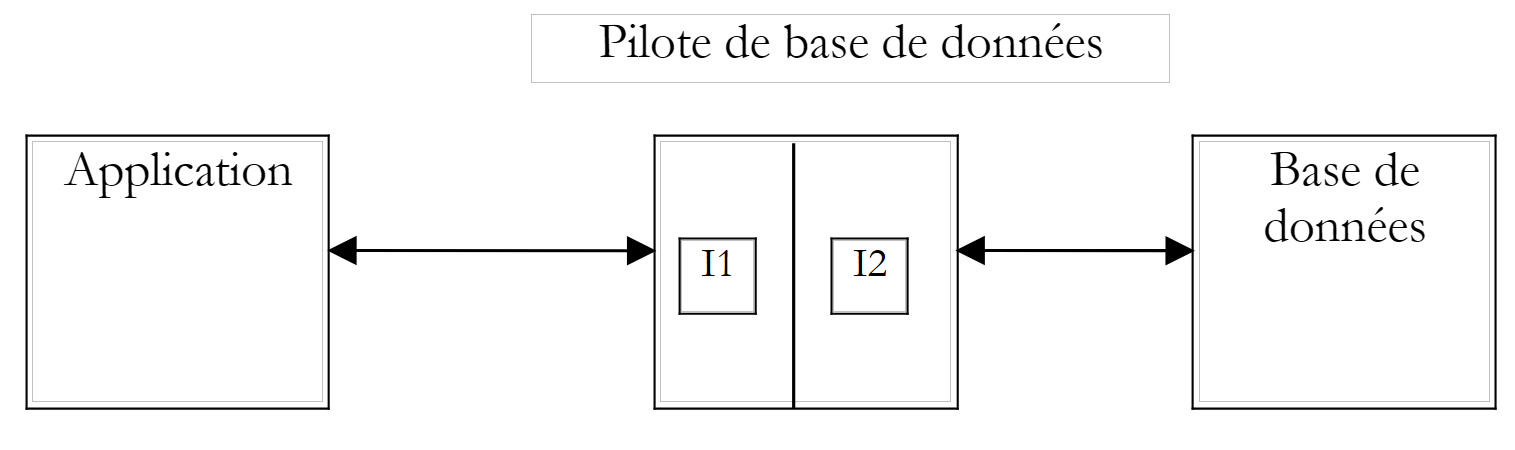 |
In the diagram above, the driver has two interfaces:
- the I1 interface presented to the application
- the I2 interface to the database
To prevent an application written for database B1 from having to be rewritten when migrating to a different database B2, standardization efforts have been made on interface I1. If databases using "standardized" drivers are employed, database B1 will be provided with driver P1, database B2 with driver P2, and the I1 interface of these two drivers will be identical. Thus, the application will not need to be rewritten. For example, you can migrate a ACCESS database to a MySQL database without changing the application.
There are two types of standardized drivers:
- the ODBC drivers (Open DataBase Connectivity)
- OLE and DB drivers (Object Linking and Embedding DataBase)
The ODBC drivers provide access to databases. The data sources for the OLE and DB drivers are more varied: databases, email systems, directories, etc. There are no limits. Any data source can be the subject of a OLE or DB driver if a publisher so decides. The benefit is obviously significant: you have uniform access to a wide variety of data.
The .NET platform comes with two types of data access classes:
- the SQL and Server.NET classes
- the OLE Db.NET classes
The first classes allow direct access to Microsoft's SGBD SQL Server without an intermediate driver. The second classes allow access to OLE DB data sources.
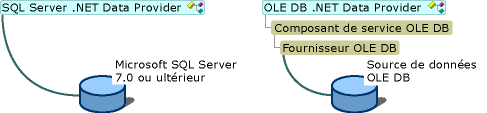
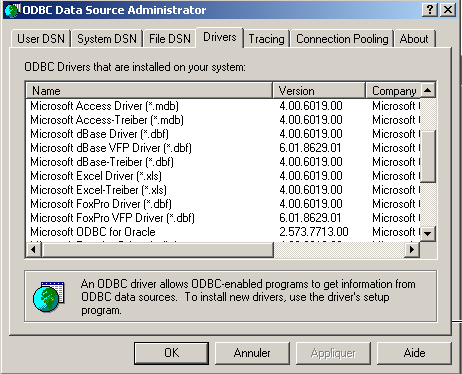
The .NET platform is shipped (May 2002) with three drivers: OLE, DB, and SQL, for SQL Server, Oracle, and Microsoft Jet (Access), respectively. If you want to work with a database that has a ODBC driver but no OLE or DB driver, you cannot. Thus, you cannot work with SGBD or MySQL, which (as of May 2002) do not provide drivers for OLE or DB. However, there is a set of classes that allow access to ODBC data sources: the odbc.net classes. They are not included by default with SDK and must be downloaded from the Microsoft website. In the examples that follow, we will primarily use these ODBC classes because most Windows databases come with such a driver. Here, for example, is a list of ODBC drivers installed on a Windows 2000 machine (Start Menu/Settings/Control Panel/Administrative Tools):
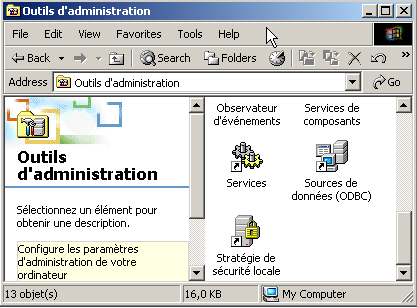
Select the ODBC data source icon:
7.2. The two modes of operating a data source
The .NET platform allows you to use a data source in two different ways:
- connected mode
- offline mode
In connected mode, the application
- opens a connection to the data source
- works with the data source in read/write mode
- closes the connection
In offline mode, the application
- opens a connection to the data source
- retrieves a memory copy of all or part of the data from the source
- closes the connection
- works with the in-memory copy of the data in read/write mode
- when the work is finished, opens a connection, sends the modified data to the data source so it can be updated, and closes the connection
In both cases, it is the process of processing and updating the data that takes time. Imagine that these updates are performed by a user entering data; this process can take tens of minutes. During this entire time, in connected mode, the connection to the database is maintained and changes are reflected immediately. In offline mode, there is no connection to the database while the data is being updated. Changes are made only to the in-memory copy. They are reflected in the data source all at once when everything is finished.
What are the advantages and disadvantages of the two methods?
- A connection consumes system resources. If there are many simultaneous connections, offline mode helps minimize their duration. This is the case for web applications with thousands of users.
- The disadvantage of offline mode is the delicate handling of concurrent updates. User U1 retrieves data at time T1 and begins modifying it. At time T2, user U2 also accesses the data source and retrieves the same data. In the meantime, user U1 has modified some data but has not yet transmitted it to the data source. U2 therefore works with data, some of which is incorrect. The .NET classes offer solutions to manage this problem, but it is not easy to resolve.
- In connected mode, simultaneous data updates by multiple users do not normally pose a problem. Since the connection to the database is maintained, the database itself manages these simultaneous updates. Thus, Oracle locks a row in the database as soon as a user modifies it. It will remain locked—and therefore inaccessible to other users—until the user who modified it commits the change or rolls it back.
- If data needs to be transferred over the network, the disconnected mode should be chosen. It allows you to have a snapshot of the data in an object called a dataset, which represents a database in its own right. This object can be transferred over the network between machines.
We will first examine connected mode.
7.3. Accessing Data in Connected Mode
7.3.1. The databases in the example
We consider a database named ACCESS, referred to as articles.mdb, containing a single table named ARTICLES with the following structure:
name | type |
code | 4-character item code |
name | its name (string) |
price | its price (actual) |
stock_actuel | current stock (integer) |
stock_minimum | the minimum stock (integer) below which the item must be restocked |
Its initial content is as follows:
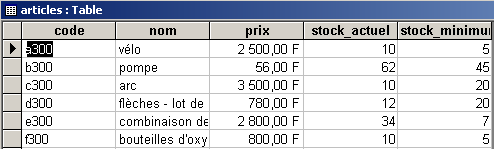
We will use this database with both a ODBC driver anda OLE DB driver to demonstrate the similarity of the two approaches and because we have both types of drivers available for ACCESS.
We will also use a database MySQL DBARTICLES containing the same single table ARTICLES, the same content, and accessed via a driver ODBC, to demonstrate that the application written to use the database ACCESS does not need to be modified to use the database MySQL. The DBARTICLES database is accessible to a user named admarticles with the password mdparticles. The following screenshot shows the contents of the MySQL database:
C:\mysql\bin>mysql --database=dbarticles --user=admarticles --password=mdparticles
Welcome to the MySQL monitor.  Commands end with ; or \g.
Your MySQL connection id is 3 to server version: 3.23.49-max-debug

Type 'help' for help.


mysql> show tables;
+----------------------+
| Tables_in_dbarticles |
+----------------------+
| articles             |
+----------------------+
1 row in set (0.01 sec)

mysql> select * from articles;
+------+--------------------------------+------+--------------+---------------+
| code | nom                            | prix | stock_actuel | stock_minimum |
+------+--------------------------------+------+--------------+---------------+
| a300 | vÚlo                           | 2500 |           10 |             5 |
| b300 | pompe                          |   56 |           62 |            45 |
| c300 | arc                            | 3500 |           10 |            20 |
| d300 | flÞches - lot de 6             |  780 |           12 |            20 |
| e300 | combinaison de plongÚe         | 2800 |           34 |             7 |
| f300 | bouteilles d'oxygÞne           |  800 |           10 |             5 |
+------+--------------------------------+------+--------------+---------------+
6 rows in set (0.02 sec)

mysql> describe articles;
+---------------+-------------+------+-----+---------+-------+
| Field         | Type        | Null | Key | Default | Extra |
+---------------+-------------+------+-----+---------+-------+
| code          | text        | YES  |     | NULL    |       |
| nom           | text        | YES  |     | NULL    |       |
| prix          | double      | YES  |     | NULL    |       |
| stock_actuel  | smallint(6) | YES  |     | NULL    |       |
| stock_minimum | smallint(6) | YES  |     | NULL    |       |
+---------------+-------------+------+-----+---------+-------+
5 rows in set (0.00 sec)

mysql> exit
Bye
To define the ACCESS database as the ODBC data source, proceed as follows:
- activate the ODBC data source administrator as shown above and select the User tab DSN (DSN=Data Source Name)
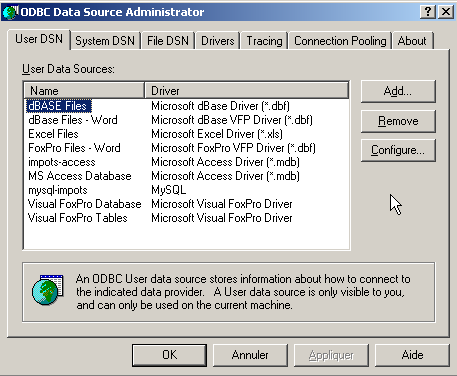
- Add a source using the Add button, specify that this source is accessible via an Access driver, and click Finish:
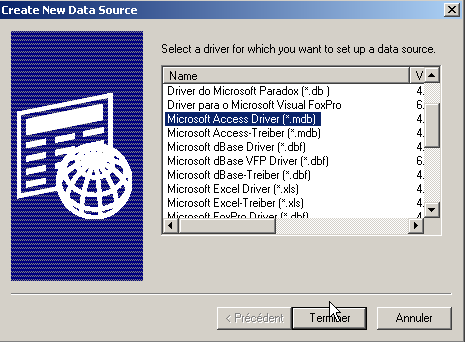
- Name the data source "articles-access," enter a custom description, and use the Select button to specify the database's .mdb file. Finish with OK.
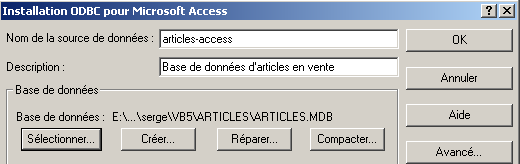
The new data source will then appear in the user's list of DSN sources:
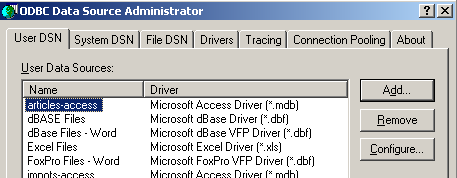
To define the database MySQL DBARTICLES as the data source for ODBC, follow these steps:
- Open the ODBC data source manager as shown above and select the User tab (DSN). Add a new data source using Add and select the driver ODBC from MySQL.
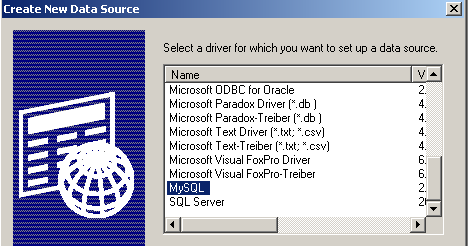
- Click Finish. A configuration page for the MySQL source will then appear:
54321
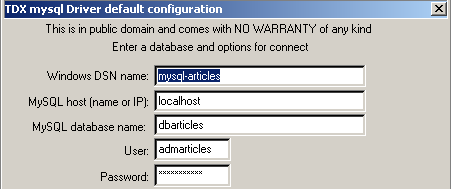
- In (1), give a name to your ODBC data source
- In (2), specify the machine on which the server MySQL is located. Here, we enter localhost to indicate that it is on the same machine as our application. If the server MySQL were on a remote machine M, we would enter its name here, and our application would then work with a remote database without any changes.
- In (3), enter the database name. Here, it is called DBARTICLES.
- In (4), enter the username "adarticles" and in (5), the password "mdparticles".
7.3.2. Using a ODBC driver
In an application using a database in connected mode, the following steps are generally involved:
- Connecting to the database
- Sending queries to the database
- Receiving and processing the results of these queries
- Closing the connection
Steps 2 and 3 are performed repeatedly; the connection is closed only at the end of database operations. This is a relatively standard pattern that you may be familiar with if you have used a database interactively. These steps are the same whether the database is accessed via a ODBC driver or a OLE or DB driver. Below is an example using the .NET classes for managing ODBC data sources. The program is called list and accepts as a parameter the name DSN of a data source ODBC containing a table ARTICLES. It then displays the contents of this table:
dos>liste
syntaxe : pg dsnArticles

dos>liste articles-access

----------------------------------------
code,nom,prix,stock_actuel,stock_minimum
----------------------------------------

a300 vélo                           2500 10 5
b300 pompe                          56 62 45
c300 arc                            3500 10 20
d300 flèches - lot de 6             780 12 20
e300 combinaison de plongée         2800 34 7
f300 bouteilles d'oxygène           800 10 5

dos>liste mysql-artices
Erreur d'exploitation de la base de données (ERROR [IM002] [Microsoft][ODBC Driver Manager] Data source name not found and no default driver specified)

dos>liste mysql-articles

----------------------------------------
code,nom,prix,stock_actuel,stock_minimum
----------------------------------------

a300 vélo                           2500 10 5
b300 pompe                          56 62 45
c300 arc                            3500 10 20
d300 flèches - lot de 6             780 12 20
e300 combinaison de plongée         2800 34 7
f300 bouteilles d'oxygène           800 10 5
From the results above, we can see that the program listed the contents of both database ACCESS and database MySQL. Let’s now examine the code for this program:
' options
Option Explicit On
Option Strict On

' namespaces
Imports System
Imports System.Data
Imports Microsoft.Data.Odbc
Imports Microsoft.VisualBasic

Module db1
    Sub main(ByVal args As String())
        ' application console
        ' displays the contents of a ARTICLES table in a DSN database
        ' whose name is passed in parameter
        Const syntaxe As String = "syntaxe : pg dsnArticles"
        Const tabArticles As String = "articles"        ' table of articles

        ' parameter verification
        ' do we have 1 parameter
        If args.Length <> 1 Then
            ' error msg
            Console.Error.WriteLine(syntaxe)
            ' end
            Environment.Exit(1)
        End If

        ' parameter is retrieved
        Dim dsnArticles As String = args(0)                ' the DSN database
        ' preparing the connection to the comic
        Dim articlesConn As OdbcConnection = Nothing        ' the connection
        Dim myReader As OdbcDataReader = Nothing            ' the data reader

        ' attempt to access the database
        Try
            ' base connection chain
            Dim connectString As String = "DSN=" + dsnArticles + ";"
            articlesConn = New OdbcConnection(connectString)
            articlesConn.Open()

            ' execution of a SQL command
            Dim sqlText As String = "select * from " + tabArticles
            Dim myOdbcCommand As New OdbcCommand(sqlText)
            myOdbcCommand.Connection = articlesConn
            myReader = myOdbcCommand.ExecuteReader()

            ' Using the recovered table
            ' column display
            Dim ligne As String = ""
            Dim i As Integer
            For i = 0 To (myReader.FieldCount - 1) - 1
                ligne += myReader.GetName(i) + ","
            Next i
            ligne += myReader.GetName(i)
            Console.Out.WriteLine((ControlChars.Lf + "".PadLeft(ligne.Length, "-"c) + ControlChars.Lf + ligne + ControlChars.Lf + "".PadLeft(ligne.Length, "-"c) + ControlChars.Lf))

            ' data display
            While myReader.Read()
                ' current line operation
                ligne = ""
                For i = 0 To myReader.FieldCount - 1
                    ligne += myReader(i).ToString + " "
                Next i
                Console.WriteLine(ligne)
            End While
        Catch ex As Exception
            Console.Error.WriteLine(("Erreur d'exploitation de la base de données " + ex.Message + ")"))
            Environment.Exit(2)
        Finally
            ' drive lock
            myReader.Close()
            ' locking connection
            articlesConn.Close()
        End Try
    End Sub
End Module
The ODBC source management classes are located in the Microsoft.Data.Odbc namespace, which must therefore be imported. In addition, a number of classes are located in the System.Data namespace.
Imports System.Data
Imports Microsoft.Data.Odbc
The namespaces used by the program are in different assemblies. We compile the program with the following command:
dos>vbc /r:microsoft.data.odbc.dll /r:microsoft.visualbasic.dll /r:system.dll /r:system.data.dll db1.vb
7.3.2.1. The connection phase
A ODBC connection uses the OdbcConnection class. The constructor of this class accepts what is called a connection string as a parameter. This is a string of characters that defines all the parameters necessary for the database connection to be established. There can be many such parameters, making the string complex. The string has the form "param1=value1;param2=value2;...;paramj=valuej;". Here are some possible paramj parameters:
username of the user who will access the database | |
this user's password | |
database name (if any) | |
name of the database being accessed | |
If a data source is defined as data source ODBC using the ODBC data source administrator, these parameters have already been specified and saved. All you need to do is pass the parameter DSN, which provides the name DSN of the data source. This is what is done here:
        ' preparing the connection to the comic
        Dim articlesConn As OdbcConnection = Nothing        ' la connexion
        Dim myReader As OdbcDataReader = Nothing        ' le lecteur de données
        Try
            ' attempt to access the database
            ' base connection chain
            Dim connectString As String = "DSN=" + dsnArticles + ";"
            articlesConn = New OdbcConnection(connectString)
            articlesConn.Open()
Once the OdbcConnection object is created, we open the connection using the Open method. This operation may fail, just like any other database operation. That is why the entire database access code is enclosed in a try-catch block. Once the connection is established, we can issue SQL queries to the database.
7.3.2.2. Sending SQL queries
To issue SQL queries, we need a Command object—more specifically, a OdbcCommand object, since we are using a ODBC data source. The OdbcCommand class has several constructors:
- OdbcCommand(): creates an empty Command object. To use it, you will need to specify various properties later:
- CommandText: the text of the SQL query to be executed
- Connection: the OdbcConnection object representing the connection to the database on which the query will be executed
- CommandType: the type of the SQL query. There are three possible values
- CommandType.Text: The property CommandText contains the text of a query SQL (default value)
- CommandType.StoredProcedure: The CommandText property contains the name of a stored procedure in the database
- CommandType.TableDirect: The CommandText property contains the name of a table T. Equivalent to `SELECT * FROM T`. Exists only for the OLE and DB drivers.
- OdbcCommand(string sqlText): the parameter sqlText will be assigned to the property CommandText. This is the text of the SQL query to be executed. The connection must be specified in the Connection property.
- OdbcCommand(string sqlText, OdbcConnection connection): the parameter sqlText will be assigned to the property CommandText and the connection parameter to the Connection property.
To issue the SQL query, there are two methods available:
- OdbcdataReader ExecuteReader(): sends the SELECT query from CommandText to the Connection connection and creates a OdbcDataReader object that allows access to all rows in the result table of the SELECT
- int ExecuteNOnQuery(): sends the update query (INSERT, UPDATE, DELETE) from CommandText to the Connection and returns the number of rows affected by this update.
In our example, after opening the database connection, we issue a SQL SELECT query to retrieve the contents of the ARTICLES table:
            ' execution of a SQL command
            Dim sqlText As String = "select * from " + tabArticles
            Dim myOdbcCommand As New OdbcCommand(sqlText)
            myOdbcCommand.Connection = articlesConn
            myReader = myOdbcCommand.ExecuteReader()
A query is typically of the following type:
Only the keywords in the first line are required; the others are optional. There are other keywords not shown here.
- A join is performed with all tables listed after the `FROM` keyword
- Only the columns following the `select` keyword are retained
- Only the rows that satisfy the condition of the `where` keyword are retained
- The resulting rows, sorted according to the expression in the `ORDER BY` keyword, form the result of the query.
The result of a *SELECT* is a table. If we consider the previous table ARTICLES and want the names of the items whose current stock is below the minimum threshold, we would write:
If you want them sorted alphabetically by name, you would write:
7.3.2.3. Analyzing the results of a query SELECT
The result of a SELECT query in offline mode is a DataReader object; here, it is a OdbcDataReader object. This object allows you to retrieve all rows of the result sequentially and obtain information about the columns in those results. Let’s examine some properties and methods of this class:
the number of columns in the table | |
Item(i) represents column number i of the current row in the result | |
the value of column i of the current row, returned as type XXX(Int16, Int32, Int64, Double, String, Boolean, ...) | |
name of column no. i | |
closes the OdbcdataReader object and releases the associated resources | |
moves forward one row in the result table. Returns false if this is not possible. The new row becomes the current row of the reader. |
Processing the result of a SELECT statement is typically a sequential operation similar to that of text files: you can only move forward in the table, not backward:
While myReader.Read()
    ' we have a line - we use it
    ....
    ' next line
end while
These explanations are sufficient to understand the following code in our example:
            ' Using the recovered table
            ' column display
            Dim ligne As String = ""
            Dim i As Integer
            For i = 0 To (myReader.FieldCount - 1) - 1
                ligne += myReader.GetName(i) + ","
            Next i
            ligne += myReader.GetName(i)
            Console.Out.WriteLine((ControlChars.Lf + "".PadLeft(ligne.Length, "-"c) + ControlChars.Lf + ligne + ControlChars.Lf + "".PadLeft(ligne.Length, "-"c) + ControlChars.Lf))

            ' data display
            While myReader.Read()
                ' current line operation
                ligne = ""
                For i = 0 To myReader.FieldCount - 1
                    ligne += myReader(i).ToString + " "
                Next i
                Console.WriteLine(ligne)
            End While
The only difficulty lies in the statement where the values of the different columns in the current row are concatenated:
                For i = 0 To myReader.FieldCount - 1
                    ligne += myReader(i).ToString + " "
                Next i
The notation line+=myReader(i).ToString is translated to line+=myReader.Item(i).ToString() where Item(i) is the value of column i of the current row.
7.3.2.4. Resource Release
The classes OdbcReader and OdbcConnection both have a Close() method that releases the resources associated with the objects thus closed.
7.3.3. Using a OLE driver DB
We'll use the same example, this time with a database accessed via a OLE DB driver. The .NET platform provides such a driver for ACCESS databases. So we will use the same articles.mdb database as before. We aim to show here that while the classes may change, the concepts remain the same:
- the connection is represented by a OleDbConnection object
- a query SQL is issued via an object OleDbCommand
- if this query is a clause SELECT, we will receive a OleDbDataReader object in return to access the rows of the result table
These classes are in the System.Data.OleDb namespace. The previous program can be easily modified to handle a OLE DB database:
- replace OdbcXX with OleDbXX everywhere
- modify the connection string. For a ACCESS database without a login/password, the connection string is Provider=Microsoft.JET.OLEDB.4.0;Data Source=[fichier.mdb]. The configurable part of this string is the name of the ACCESS file to be used. We will modify our program so that it accepts the name of this file as a parameter.
- The namespace to import is now System.Data.OleDb.
Our program becomes the following:
' options
Option Explicit On
Option Strict On
' namespaces
Imports System
Imports System.Data
Imports Microsoft.Data.Odbc
Imports Microsoft.VisualBasic
Imports System.Data.OleDb
Module db2
Public Sub Main(ByVal args() As String)
' application console
' displays the contents of a ARRTICLES table in a DSN database
' whose name is passed in parameter
Const syntaxe As String = "syntaxe : pg base_access_articles"
Const tabArticles As String = "articles" ' table of articles
' parameter verification
' do we have 1 parameter
If args.Length <> 1 Then
' error msg
Console.Error.WriteLine(syntaxe)
' end
Environment.Exit(1)
End If
' parameter is retrieved
Dim dbArticles As String = args(0) ' the database
' preparing the connection to the comic
Dim articlesConn As OleDbConnection = Nothing ' the connection
Dim myReader As OleDbDataReader = Nothing ' the data reader
' attempt to access the database
Try
' base connection chain
Dim connectString As String = "Provider=Microsoft.JET.OLEDB.4.0;Data Source=" + dbArticles + ";"
articlesConn = New OleDbConnection(connectString)
articlesConn.Open()
' execution of a SQL command
Dim sqlText As String = "select * from " + tabArticles
Dim myOleDbCommand As New OleDbCommand(sqlText)
myOleDbCommand.Connection = articlesConn
myReader = myOleDbCommand.ExecuteReader()
' Using the recovered table
' column display
Dim ligne As String = ""
Dim i As Integer
For i = 0 To (myReader.FieldCount - 1) - 1
ligne += myReader.GetName(i) + ","
Next i
ligne += myReader.GetName(i)
Console.Out.WriteLine((ControlChars.Lf + "".PadLeft(ligne.Length, "-"c) + ControlChars.Lf + ligne + ControlChars.Lf + "".PadLeft(ligne.Length, "-"c) + ControlChars.Lf))
' data display
While myReader.Read()
' current line operation
ligne = ""
For i = 0 To myReader.FieldCount - 1
ligne += myReader(i).ToString + " "
Next i
Console.WriteLine(ligne)
End While
Catch ex As Exception
Console.Error.WriteLine(("Erreur d'exploitation de la base de données (" + ex.Message + ")"))
Environment.Exit(2)
Finally
                ' drive lock
                myReader.Close()
                ' locking connection
                articlesConn.Close()
End Try
' end
Environment.Exit(0)
End Sub
End Module
The results obtained:
dos>vbc liste.vb

E:\data\serge\MSNET\vb.net\adonet\6>dir
07/05/2002  15:09                2 325 liste.CS
07/05/2002  15:09                4 608 liste.exe
20/08/2001  11:54               86 016 ARTICLES.MDB

dos>liste articles.mdb

----------------------------------------
code,nom,prix,stock_actuel,stock_minimum
----------------------------------------

a300 vélo                           2500 10 5
b300 pompe                          56 62 45
c300 arc                            3500 10 20
d300 flèches - lot de 6             780 12 20
e300 combinaison de plongée         2800 34 7
f300 bouteilles d'oxygène           800 10 5
7.3.4. Updating a Table
The previous examples simply listed the contents of a table. We will modify our item database management program so that it can modify the database. The program is named sql. We pass it the name DSN of the item database to be managed as a parameter. The user types SQL commands directly on the keyboard, which the program executes, as shown by the following results obtained from the MySQL product database:
dos>vbc /r:microsoft.data.odbc.dll sql.vb

dos>sql mysql-articles

Requête SQL (fin pour arrêter) : select * from articles

----------------------------------------
code,nom,prix,stock_actuel,stock_minimum
----------------------------------------

a300 vélo                           2500 10 5
b300 pompe                          56 62 45
c300 arc                            3500 10 20
d300 flèches - lot de 6             780 12 20
e300 combinaison de plongée         2800 34 7
f300 bouteilles d'oxygène           800 10 5

Requête SQL (fin pour arrêter) : select * from articles where stock_actuel<stock_minimum

----------------------------------------
code,nom,prix,stock_actuel,stock_minimum
----------------------------------------

c300 arc                            3500 10 20
d300 flèches - lot de 6             780 12 20

Requête SQL (fin pour arrêter) : insert into articles values ("1","1",1,1,1)
Il y a eu 1 ligne(s) modifiée(s)

Requête SQL (fin pour arrêter) : select * from articles

----------------------------------------
code,nom,prix,stock_actuel,stock_minimum
----------------------------------------

a300 vélo                           2500 10 5
b300 pompe                          56 62 45
c300 arc                            3500 10 20
d300 flèches - lot de 6             780 12 20
e300 combinaison de plongée         2800 34 7
f300 bouteilles d'oxygène           800 10 5
1 1 1 1 1

Requête SQL (fin pour arrêter) : update articles set nom="2" where nom="1"
Il y a eu 1 ligne(s) modifiée(s)

Requête SQL (fin pour arrêter) : select * from articles

----------------------------------------
code,nom,prix,stock_actuel,stock_minimum
----------------------------------------

a300 vélo                           2500 10 5
b300 pompe                          56 62 45
c300 arc                            3500 10 20
d300 flèches - lot de 6             780 12 20
e300 combinaison de plongée         2800 34 7
f300 bouteilles d'oxygène           800 10 5
1 2 1 1 1

Requête SQL (fin pour arrêter) : delete from articles where code="1"
Il y a eu 1 ligne(s) modifiée(s)

Requête SQL (fin pour arrêter) : select * from articles

----------------------------------------
code,nom,prix,stock_actuel,stock_minimum
----------------------------------------

a300 vélo                           2500 10 5
b300 pompe                          56 62 45
c300 arc                            3500 10 20
d300 flèches - lot de 6             780 12 20
e300 combinaison de plongée         2800 34 7
f300 bouteilles d'oxygène           800 10 5

Requête SQL (fin pour arrêter) : select * from articles order by nom asc

----------------------------------------
code,nom,prix,stock_actuel,stock_minimum
----------------------------------------

c300 arc                            3500 10 20
f300 bouteilles d'oxygène           800 10 5
e300 combinaison de plongée         2800 34 7
d300 flèches - lot de 6             780 12 20
b300 pompe                          56 62 45
a300 vélo                           2500 10 5

Requête SQL (fin pour arrêter) : fin
The program is as follows:
' options
Option Explicit On
Option Strict On

' namespaces
Imports System
Imports System.Data
Imports Microsoft.Data.Odbc
Imports System.Data.OleDb
Imports System.Text.RegularExpressions
Imports System.Collections
Imports Microsoft.VisualBasic

Module db3
    Public Sub Main(ByVal args() As String)

        ' application console
        ' executes SQL requests typed on the keyboard on a
        ' table ARTICLES from a database DSN whose name is passed as a parameter
        Const syntaxe As String = "syntaxe : pg dsnArticles"

        ' parameter verification
        ' do we have 2 parameters
        If args.Length <> 1 Then
            ' error msg
            Console.Error.WriteLine(syntaxe)
            ' end
            Environment.Exit(1)
        End If        'if
        ' parameter is retrieved
        Dim dsnArticles As String = args(0)
        ' base connection chain
        Dim connectString As String = "DSN=" + dsnArticles + ";"

        ' preparing the connection to the comic
        Dim articlesConn As OdbcConnection = Nothing
        Dim sqlCommand As OdbcCommand = Nothing
        Try
            ' attempt to access the database
            articlesConn = New OdbcConnection(connectString)
            articlesConn.Open()
            ' create a command object
            sqlCommand = New OdbcCommand("", articlesConn)
            'try
        Catch ex As Exception
            ' error msg
            Console.Error.WriteLine(("Erreur d'exploitation de la base de données (" + ex.Message + ")"))
            ' freeing up resources
            Try
                articlesConn.Close()
            Catch
            End Try
            Environment.Exit(2)
        End Try        'catch
        ' build a dictionary of accepted sql commands
        Dim commandesSQL() As String = {"select", "insert", "update", "delete"}
        Dim dicoCommandes As New Hashtable
        Dim i As Integer
        For i = 0 To commandesSQL.Length - 1
            dicoCommandes.Add(commandesSQL(i), True)
        Next i

        ' read-execute SQL commands typed on the keyboard
        Dim requête As String = Nothing        ' query text SQL
        Dim champs() As String        ' query fields
        Dim modèle As New Regex("\s+")
        ' input-execution loop for SQL commands typed on keyboard
        While True
            ' no error at start
            Dim erreur As Boolean = False
            ' request for query
            Console.Out.Write(ControlChars.Lf + "Requête SQL (fin pour arrêter) : ")
            requête = Console.In.ReadLine().Trim().ToLower()
            ' finished?
            If requête = "fin" Then
                Exit While
            End If
            ' the query is broken down into fields
            champs = modèle.Split(requête)
            ' valid request?
            If champs.Length = 0 Or Not dicoCommandes.ContainsKey(champs(0)) Then
                ' error msg
                Console.Error.WriteLine("Requête invalide. Utilisez select, insert, update, delete")
                ' following request
                erreur = True
            End If
            If Not erreur Then
                ' prepare object Command to execute query
                sqlCommand.CommandText = requête
                ' query execution
                Try
                    If champs(0) = "select" Then
                        executeSelect(sqlCommand)
                    Else
                        executeUpdate(sqlCommand)
                    End If
                Catch ex As Exception
                    ' error msg
                    Console.Error.WriteLine(("Erreur d'exploitation de la base de données (" + ex.Message + ")"))
                End Try
            End If
        End While
        ' freeing up resources
        Try
            articlesConn.Close()
        Catch
        End Try
        Environment.Exit(0)
    End Sub

    ' execute an update request
    Sub executeUpdate(ByVal sqlCommand As OdbcCommand)
        ' executes sqlCommand, update request
        Dim nbLignes As Integer = sqlCommand.ExecuteNonQuery()
        ' display
        Console.Out.WriteLine(("Il y a eu " & nbLignes & " ligne(s) modifiée(s)"))
    End Sub

    ' execute a Select query
    Sub executeSelect(ByVal sqlCommand As OdbcCommand)
        ' executes sqlCommand, select query
        Dim myReader As OdbcDataReader = sqlCommand.ExecuteReader()
        ' Using the recovered table
        ' column display
        Dim ligne As String = ""
        Dim i As Integer
        For i = 0 To (myReader.FieldCount - 1) - 1
            ligne += myReader.GetName(i) + ","
        Next i
        ligne += myReader.GetName(i)
        Console.Out.WriteLine((ControlChars.Lf + "".PadLeft(ligne.Length, "-"c) + ControlChars.Lf + ligne + ControlChars.Lf + "".PadLeft(ligne.Length, "-"c) + ControlChars.Lf))
        ' data display
        While myReader.Read()
            ' current line operation
            ligne = ""
            For i = 0 To myReader.FieldCount - 1
                ligne += myReader(i).ToString + " "
            Next i
            ' display
            Console.WriteLine(ligne)
        End While
        ' freeing up resources
        myReader.Close()
    End Sub
End Module
We will only comment here on what is new compared to the previous program:
- We build a dictionary of accepted sql commands:
        ' build a dictionary of accepted sql commands
        Dim commandesSQL() As String = {"select", "insert", "update", "delete"}
        Dim dicoCommandes As New Hashtable
        Dim i As Integer
        For i = 0 To commandesSQL.Length - 1
            dicoCommandes.Add(commandesSQL(i), True)
        Next i
which then allows us to simply check if the first word (champs[0]) of the typed query is one of the four accepted commands:
            ' valid request?
            If champs.Length = 0 Or Not dicoCommandes.ContainsKey(champs(0)) Then
                ' error msg
                Console.Error.WriteLine("Requête invalide. Utilisez select, insert, update, delete")
                ' following request
                erreur = True
            End If            'if
- Previously, the query had been split into fields using the Split method of the RegEx class:
        Dim modèle As New Regex("\s+")
....
            ' the query is broken down into fields
            champs = modèle.Split(requête)
The words making up the query can be separated by any number of spaces.
- Executing a SELECT query does not use the same method as an update query (INSERT, UPDATE, DELETE). Therefore, we must perform a check and execute a different function for each of these two cases:
                ' prepare object Command to execute query
                sqlCommand.CommandText = requête
                ' query execution
                Try
                    If champs(0) = "select" Then
                        executeSelect(sqlCommand)
                    Else
                        executeUpdate(sqlCommand)
                    End If                    'try
                Catch ex As Exception
                    ' error msg
                    Console.Error.WriteLine(("Erreur d'exploitation de la base de données (" + ex.Message + ")"))
                End Try
Executing a SQL query may generate an exception, which is handled here.
- The executeSelect function incorporates everything covered in the previous examples.
- The executeUpdate function uses the ExecuteNonQuery method of the OdbcCommand class, which returns the number of rows affected by the command.
7.3.5. IMPOTS
We’ll revisit the tax object created in a previous chapter:
' options
Option Strict On
Option Explicit On

' namespaces
Imports System

Public Class impôt
    ' data required for tax calculation
    ' come from an external source
    Private limites(), coeffR(), coeffN() As Decimal

    ' manufacturer
    Public Sub New(ByVal LIMITES() As Decimal, ByVal COEFFR() As Decimal, ByVal COEFFN() As Decimal)
        ' we check that the 3 tablaeux are the same size
        Dim OK As Boolean = LIMITES.Length = COEFFR.Length And LIMITES.Length = COEFFN.Length
        If Not OK Then
            Throw New Exception("Les 3 tableaux fournis n'ont pas la même taille(" & LIMITES.Length & "," & COEFFR.Length & "," & COEFFN.Length & ")")
        End If
        ' it's good
        Me.limites = LIMITES
        Me.coeffR = COEFFR
        Me.coeffN = COEFFN
    End Sub

    ' tAX CALCULATION
    Public Function calculer(ByVal marié As Boolean, ByVal nbEnfants As Integer, ByVal salaire As Integer) As Long
        ' calculating the number of shares
        Dim nbParts As Decimal
        If marié Then
            nbParts = CDec(nbEnfants) / 2 + 2
        Else
            nbParts = CDec(nbEnfants) / 2 + 1
        End If
        If nbEnfants >= 3 Then
            nbParts += 0.5D
        End If
        ' calculation of taxable income & family quota
        Dim revenu As Decimal = 0.72D * salaire
        Dim QF As Decimal = revenu / nbParts
        ' tAX CALCULATION
        limites((limites.Length - 1)) = QF + 1
        Dim i As Integer = 0
        While QF > limites(i)
            i += 1
        End While
        ' return result
        Return CLng(revenu * coeffR(i) - nbParts * coeffN(i))
    End Function
End Class
We add a new constructor to initialize the limit arrays, coeffR and coeffN, from a database named ODBC:
Imports System.Data
Imports Microsoft.Data.Odbc
Imports System.Collections
...
    ' builder 2
    Public Sub New(ByVal DSNimpots As String, ByVal Timpots As String, ByVal colLimites As String, ByVal colCoeffR As String, ByVal colCoeffN As String)
        ' initialise les trois tableaux limites, coeffR, coeffN à partir
        ' the contents of the Timpots table in the ODBC DSNimpots database
        ' colLimites, colCoeffR, colCoeffN are the three columns of this table
        ' can throw an exception
        Dim connectString As String = "DSN=" + DSNimpots + ";"        ' chaîne de connexion à la base
        Dim impotsConn As OdbcConnection = Nothing        ' la connexion
        Dim sqlCommand As OdbcCommand = Nothing        ' la commande SQL
        ' the SELECT query
        Dim selectCommand As String = "select " + colLimites + "," + colCoeffR + "," + colCoeffN + " from " + Timpots
        ' tables to retrieve data
        Dim tLimites As New ArrayList
        Dim tCoeffR As New ArrayList
        Dim tCoeffN As New ArrayList

        ' attempt to access the database
        impotsConn = New OdbcConnection(connectString)
        impotsConn.Open()
        ' create a command object
        sqlCommand = New OdbcCommand(selectCommand, impotsConn)
        ' execute the query
        Dim myReader As OdbcDataReader = sqlCommand.ExecuteReader()
        ' Using the recovered table
        While myReader.Read()
            ' the data of the current line are put in the tables
            tLimites.Add(myReader(colLimites))
            tCoeffR.Add(myReader(colCoeffR))
            tCoeffN.Add(myReader(colCoeffN))
        End While
        ' freeing up resources
        myReader.Close()
        impotsConn.Close()

        ' dynamic tables are placed in static tables
        Me.limites = New Decimal(tLimites.Count) {}
        Me.coeffR = New Decimal(tLimites.Count) {}
        Me.coeffN = New Decimal(tLimites.Count) {}
        Dim i As Integer
        For i = 0 To tLimites.Count - 1
            limites(i) = Decimal.Parse(tLimites(i).ToString())
            coeffR(i) = Decimal.Parse(tCoeffR(i).ToString())
            coeffN(i) = Decimal.Parse(tCoeffN(i).ToString())
        Next i
    End Sub
The test program is as follows: it receives as arguments the parameters to be passed to the tax class constructor. After constructing a tax object, it calculates the tax due:
Option Explicit On
Option Strict On

' namespaces
Imports System
Imports Microsoft.VisualBasic

' test pg
Module testimpots
    Sub Main(ByVal arguments() As String)
        ' interactive tax calculator
        ' the user enters three data points on the keyboard: married nbEnfants salary
        ' the program then displays the tax payable
        Const syntaxe1 As String = "pg DSNimpots tabImpots colLimites colCoeffR colCoeffN"
        Const syntaxe2 As String = "syntaxe : marié nbEnfants salaire" + ControlChars.Lf + "marié : o pour marié, n pour non marié" + ControlChars.Lf + "nbEnfants : nombre d'enfants" + ControlChars.Lf + "salaire : salaire annuel en F"

        ' checking program parameters
        If arguments.Length <> 5 Then
            ' error msg
            Console.Error.WriteLine(syntaxe1)
            ' end
            Environment.Exit(1)
        End If        'if
        ' retrieve the arguments
        Dim DSNimpots As String = arguments(0)
        Dim tabImpots As String = arguments(1)
        Dim colLimites As String = arguments(2)
        Dim colCoeffR As String = arguments(3)
        Dim colCoeffN As String = arguments(4)

        ' tax object creation
        Dim objImpôt As impôt = Nothing
        Try
            objImpôt = New impôt(DSNimpots, tabImpots, colLimites, colCoeffR, colCoeffN)
        Catch ex As Exception
            Console.Error.WriteLine(("L'erreur suivante s'est produite : " + ex.Message))
            Environment.Exit(2)
        End Try

        ' infinite loop
        While True
            ' initially no errors
            Dim erreur As Boolean = False

            ' tax calculation parameters are requested
            Console.Out.Write("Paramètres du calcul de l'impôt au format marié nbEnfants salaire ou rien pour arrêter :")
            Dim paramètres As String = Console.In.ReadLine().Trim()

            ' anything to do?
            If paramètres Is Nothing Or paramètres = "" Then
                Exit While
            End If

            ' check the number of arguments in the input line
            Dim args As String() = paramètres.Split(Nothing)
            Dim nbParamètres As Integer = args.Length
            If nbParamètres <> 3 Then
                Console.Error.WriteLine(syntaxe2)
                erreur = True
            End If
            Dim marié As String
            Dim nbEnfants As Integer
            Dim salaire As Integer
            If Not erreur Then
                ' checking the validity of parameters
                ' married
                marié = args(0).ToLower()
                If marié <> "o" And marié <> "n" Then
                    Console.Error.WriteLine((syntaxe2 + ControlChars.Lf + "Argument marié incorrect : tapez o ou n"))
                    erreur = True
                End If
                ' nbEnfants
                nbEnfants = 0
                Try
                    nbEnfants = Integer.Parse(args(1))
                    If nbEnfants < 0 Then
                        Throw New Exception
                    End If
                Catch
                    Console.Error.WriteLine(syntaxe2 + "\nArgument nbEnfants incorrect : tapez un entier positif ou nul")
                    erreur = True
                End Try
                ' salary
                salaire = 0
                Try
                    salaire = Integer.Parse(args(2))
                    If salaire < 0 Then
                        Throw New Exception
                    End If
                Catch
                    Console.Error.WriteLine(syntaxe2 + "\nArgument salaire incorrect : tapez un entier positif ou nul")
                    erreur = True
                End Try
            End If
            If Not erreur Then
                ' parameters are correct - tax is calculated
                Console.Out.WriteLine(("impôt=" & objImpôt.calculer(marié = "o", nbEnfants, salaire).ToString + " F"))
            End If
        End While
    End Sub
End Module
The database used is a MySQL database named DSN mysql-impots:
C:\mysql\bin>mysql --database=impots --user=admimpots --password=mdpimpots
Welcome to the MySQL monitor.  Commands end with ; or \g.
Your MySQL connection id is 5 to server version: 3.23.49-max-debug

Type 'help' for help.

mysql> show tables;
+------------------+
| Tables_in_impots |
+------------------+
| timpots          |
+------------------+

mysql> select * from timpots;
+---------+--------+---------+
| limites | coeffR | coeffN  |
+---------+--------+---------+
|   12620 |      0 |       0 |
|   13190 |   0.05 |     631 |
|   15640 |    0.1 |  1290.5 |
|   24740 |   0.15 |  2072.5 |
|   31810 |    0.2 |  3309.5 |
|   39970 |   0.25 |    4900 |
|   48360 |    0.3 |    6898 |
|   55790 |   0.35 |  9316.5 |
|   92970 |    0.4 |   12106 |
|  127860 |   0.45 |   16754 |
|  151250 |    0.5 | 23147.5 |
|  172040 |   0.55 |   30710 |
|  195000 |    0.6 |   39312 |
|       0 |   0.65 |   49062 |
+---------+--------+---------+
Running the test program yields the following results:
dos>D:\data\devel\vbnet\poly\chap6\impots>vbc /r:system.data.dll /r:microsoft.data.odbc.dll /r:system.dll /t:library impots.vb

dos>vbc /r:impots.dll testimpots.vb

dos>test mysql-impots timpots limites coeffr coeffn
Paramètres du calcul de l'impôt au format marié nbEnfants salaire ou rien pour arrêter :o 2 200000
impôt=22506 F
Paramètres du calcul de l'impôt au format marié nbEnfants salaire ou rien pour arrêter :n 2 200000
impôt=33388 F
Paramètres du calcul de l'impôt au format marié nbEnfants salaire ou rien pour arrêter :o 3 200000
impôt=16400 F
Paramètres du calcul de l'impôt au format marié nbEnfants salaire ou rien pour arrêter :n 3 300000
impôt=50082 F
Paramètres du calcul de l'impôt au format marié nbEnfants salaire ou rien pour arrêter :n 3 200000
impôt=22506 F
Paramètres du calcul de l'impôt au format marié nbEnfants salaire ou rien pour arrêter :