8. Execution threads
8.1. Introduction
When an application is launched, it runs in an execution flow called a thread. The class .NET modeling a thread is the class System.Threading.Thread and has the following definition:
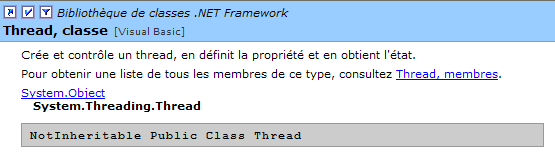
We will use only some of this class’s properties and methods:
returns the thread currently running | |
thread name | |
indicates whether the thread is active (true) or not (false) | |
starts the execution of a thread | |
permanently stops a thread's execution | |
pauses a thread for n milliseconds | |
temporarily suspends the execution of a thread | |
resumes the execution of a suspended thread | |
blocking operation - waits for the thread to finish before proceeding to the next instruction |
Let’s look at a simple application that demonstrates the existence of a main execution thread, the one in which a class’s Main function runs:
' use of threads
Imports System
Imports System.Threading

Public Module thread1
    Public Sub Main()
        ' init current thread
        Dim main As Thread = Thread.CurrentThread
        ' display
        Console.Out.WriteLine(("Thread courant : " + main.Name))
        ' we change the name
        main.Name = "main"
        ' check
        Console.Out.WriteLine(("Thread courant : " + main.Name))
        ' infinite loop
        While True
            ' display
            Console.Out.WriteLine((main.Name + " : " + DateTime.Now.ToString("hh:mm:ss")))
            ' temporary shutdown
            Thread.Sleep(1000)
        End While
    End Sub
End Module
Screen output:
dos>thread1
Thread courant :
Thread courant : main
main : 06:13:55
main : 06:13:56
main : 06:13:57
main : 06:13:58
main : 06:13:59
The previous example illustrates the following points:
- the Main function runs correctly in a thread
- we can access the characteristics of this thread via Thread.CurrentThread
- the role of the Sleep method. Here, the thread executing Main sleeps for 1 second between each display.
8.2. Creating execution threads
It is possible to have applications where pieces of code run "simultaneously" in different execution threads. When we say that threads run simultaneously, we are often using the term loosely. If the machine has only one processor, as is still often the case, the threads share this processor: they each have access to it, in turn, for a brief moment (a few milliseconds). This is what creates the illusion of parallel execution. The amount of time allocated to a thread depends on various factors, including its priority, which has a default value but can also be set programmatically. When a thread has the processor, it normally uses it for the entire time allotted to it. However, it can release it early:
- by waiting for an event (wait, join, suspend)
- by sleeping for a specified period of time (sleep)
- A thread T is first created by its constructor
ThreadStart is of type delegate and defines the prototype of a function with no parameters:
A typical construction is as follows:
The run function passed as a parameter will be executed when the thread is launched.
- The execution of thread T is initiated by T.Start(): The [run] function passed to the T constructor will then be executed by thread T. The program executing the T.start() instruction does not wait for task T to finish: it immediately moves on to the next instruction. We then have two tasks running in parallel. They often need to be able to communicate with each other to know the status of the shared work to be done. This is the problem of thread synchronization.
- Once launched, the thread runs autonomously. It will stop when the start function it is executing has finished its work.
- We can send certain signals to task T:
- T.Suspend() tells it to pause temporarily
- T.Resume() tells it to resume its work
- T.Abort() tells it to stop permanently
- We can also wait for it to finish executing using T.join(). This is a blocking instruction: the program executing it is blocked until task T has finished its work. This is a means of synchronization.
Let’s examine the following program:
' options
Option Strict On
Option Explicit On

' namespaces
Imports System
Imports System.Threading

Module thread2
    Public Sub Main()
        ' init Current thread
        Dim main As Thread = Thread.CurrentThread
        ' name the Thread
        main.Name = "main"

        ' creation of execution threads
        Dim tâches(4) As Thread
        Dim i As Integer
        For i = 0 To tâches.Length - 1
            ' create thread i
            tâches(i) = New Thread(New ThreadStart(AddressOf affiche))
            ' set the thread name
            tâches(i).Name = "tache_" & i
            ' start execution of thread i
            tâches(i).Start()
        Next i
        ' end of hand
        Console.Out.WriteLine(("fin du thread " + main.Name))
    End Sub

    Public Sub affiche()
        ' display start of execution
        Console.Out.WriteLine(("Début d'exécution de la méthode affiche dans le Thread " + Thread.CurrentThread.Name + " : " + DateTime.Now.ToString("hh:mm:ss")))
        ' sleep for 1 s
        Thread.Sleep(1000)
        ' display end of run
        Console.Out.WriteLine(("Fin d'exécution de la méthode affiche dans le Thread " + Thread.CurrentThread.Name + " : " + DateTime.Now.ToString("hh:mm:ss")))
    End Sub
End Module
The main thread, the one that executes the Main function, creates 5 other threads responsible for executing the static method display. The results are as follows:
dos>thread2
fin du thread main
Début d'exécution de la méthode affiche dans le Thread tache_0 : 05:27:53
Début d'exécution de la méthode affiche dans le Thread tache_1 : 05:27:53
Début d'exécution de la méthode affiche dans le Thread tache_2 : 05:27:53
Début d'exécution de la méthode affiche dans le Thread tache_3 : 05:27:53
Début d'exécution de la méthode affiche dans le Thread tache_4 : 05:27:53
Fin d'exécution de la méthode affiche dans le Thread tache_0 : 05:27:54
Fin d'exécution de la méthode affiche dans le Thread tache_1 : 05:27:54
Fin d'exécution de la méthode affiche dans le Thread tache_2 : 05:27:54
Fin d'exécution de la méthode affiche dans le Thread tache_3 : 05:27:54
Fin d'exécution de la méthode affiche dans le Thread tache_4 : 05:27:54
These results are very informative:
- First, we see that starting a thread’s execution is not blocking. The Main method started the execution of 5 threads in parallel and finished executing before they did. The
triggers the execution of the thread tâches[i], but once this is done, execution immediately continues with the next statement without waiting for the thread to finish.
- All created threads must execute the display method. The order of execution is unpredictable. Even though in the example, the order of execution appears to follow the order of execution requests, no general conclusions can be drawn from this. The operating system here has 6 threads and one processor. It will allocate the processor to these 6 threads according to its own rules.
- The results show a consequence of the Sleep method. In the example, thread 0 is the first to execute the display method. The start-of-execution message is displayed, then it executes the Sleep method, which suspends it for 1 second. It then loses the processor, which becomes available to another thread. The example shows that thread 1 will obtain it. Thread 1 will follow the same path as the other threads. When the one-second sleep period for thread 0 ends, its execution can resume. The system grants it the processor, and it can complete the execution of the display method.
Let’s modify our program to end the Main method with the following instructions:
Executing the new program yields:
The threads created by the Main function are not executed. It is the statement
that does this: it terminates all threads in the application, not just the Main thread. The solution to this problem is for the Main method to wait for the threads it created to finish executing before terminating itself. This can be done using the Join method of the Thread class:
' wait for all threads to finish executing
For i = 0 To tâches.Length - 1
' wait for thread i to finish execution
tâches(i).Join()
Next i 'for
        ' end of hand
        Console.Out.WriteLine(("fin du thread " + main.Name))
        Environment.Exit(0)
This produces the following results:
Début d'exécution de la méthode affiche dans le Thread tache_1 : 05:34:48
Début d'exécution de la méthode affiche dans le Thread tache_2 : 05:34:48
Début d'exécution de la méthode affiche dans le Thread tache_3 : 05:34:48
Début d'exécution de la méthode affiche dans le Thread tache_4 : 05:34:48
Début d'exécution de la méthode affiche dans le Thread tache_0 : 05:34:48
Fin d'exécution de la méthode affiche dans le Thread tache_2 : 05:34:50
Fin d'exécution de la méthode affiche dans le Thread tache_1 : 05:34:50
Fin d'exécution de la méthode affiche dans le Thread tache_3 : 05:34:50
Fin d'exécution de la méthode affiche dans le Thread tache_0 : 05:34:50
Fin d'exécution de la méthode affiche dans le Thread tache_4 : 05:34:50
fin du thread main
8.3. Benefits of threads
Now that we have highlighted the existence of a default thread—the one that executes the Main method—and we know how to create others, let’s consider the benefits of threads for us and why we are presenting them here. There is a type of application that lends itself well to the use of threads: client-server Internet applications. In such an application, a server located on machine S1 responds to requests from clients located on remote machines C1, C2, ..., Cn.
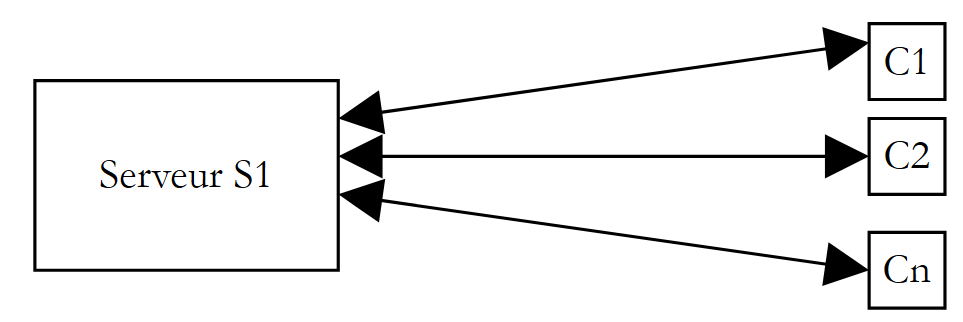 |
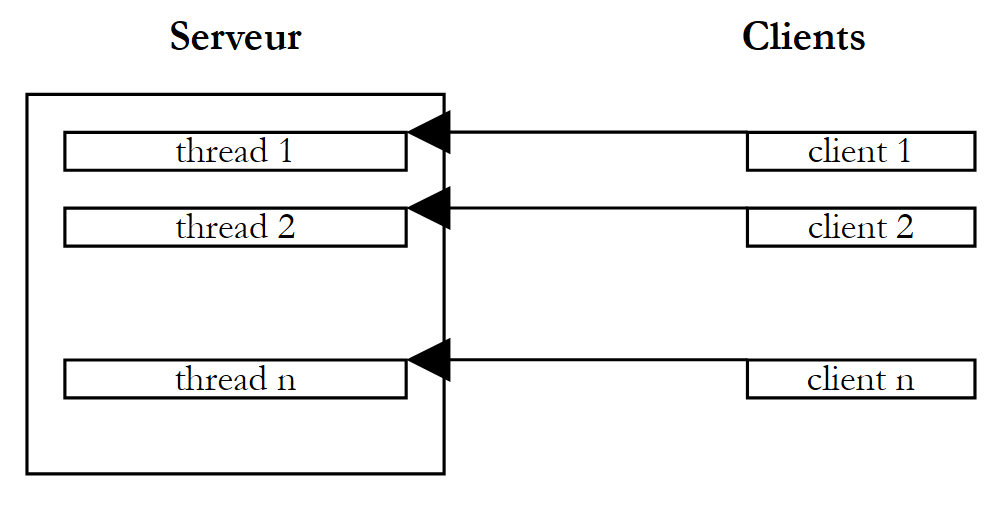
We use Internet applications that follow this pattern every day: web services, email, forum browsing, file transfer... In the diagram above, server S1 must serve the clients clients simultaneously. If we take the example of a FTP (File Transfer Protocol) server that delivers files to its clients clients, we know that a file transfer can sometimes take several hours. It is, of course, out of the question for a single client to monopolize the server for such a long period. What is usually done is that the server creates as many execution threads as there are clients clients. Each thread is then responsible for handling a specific client. Since the processor is cyclically shared among all active threads on the machine, the server spends a little time with each client, thereby ensuring the concurrency of the service.
 |
8.4. Access to shared resources
In the client-server example mentioned above, each thread serves a client largely independently. However, threads may need to cooperate to provide the requested service to their client, particularly when accessing shared resources. The diagram above resembles the counters of a large government office, such as a post office, where an agent at each counter serves a customer. Suppose that from time to time these agents need to make photocopies of documents brought in by their customers, and there is only one photocopier. Two agents cannot use the photocopier at the same time. If agent i finds the photocopier in use by agent j, they will have to wait. This situation is called access to a shared resource, and in computer science, it is quite tricky to manage. Consider the following example:
- an application will generate n threads, where n is passed as a parameter
- the shared resource is a counter that must be incremented by each generated thread
- at the end of the application, the counter’s value is displayed. We should therefore get n.
The program is as follows:
' options
Option Explicit On
Option Strict On

' use of threads
Imports System
Imports System.Threading

Public Class thread3
    ' class variables
    Private Shared cptrThreads As Integer = 0

    Public Overloads Shared Sub Main(ByVal args() As [String])
        ' instructions for use
        Const syntaxe As String = "pg nbThreads"
        Const nbMaxThreads As Integer = 100

        ' verification no. of arguments
        If args.Length <> 1 Then
            ' error
            Console.Error.WriteLine(syntaxe)
            ' stop
            Environment.Exit(1)
        End If
        ' argument quality check
        Dim nbThreads As Integer = 0
        Try
            nbThreads = Integer.Parse(args(0))
            If nbThreads < 1 Or nbThreads > nbMaxThreads Then
                Throw New Exception
            End If
        Catch
            ' error
            Console.Error.WriteLine("Nombre de threads incorrect (entre 1 et " & nbMaxThreads & ")")
            ' end
            Environment.Exit(2)
        End Try
        ' thread creation and generation
        Dim threads(nbThreads - 1) As Thread
        Dim i As Integer
        For i = 0 To nbThreads - 1
            ' creation
            threads(i) = New Thread(New ThreadStart(AddressOf incrémente))
            ' naming
            threads(i).Name = "tache_" & i
            ' launch
            threads(i).Start()
        Next i
        ' waiting for threads to finish
        For i = 0 To nbThreads - 1
            threads(i).Join()
        Next i        ' counter display
        Console.Out.WriteLine(("Nombre de threads générés : " & cptrThreads))
    End Sub

    Public Shared Sub incrémente()
        ' increases thread counter
        ' meter reading
        Dim valeur As Integer = cptrThreads
        ' follow-up
        Console.Out.WriteLine(("A " + DateTime.Now.ToString("hh:mm:ss") & ", le thread " & Thread.CurrentThread.Name & " a lu la valeur du compteur : " & cptrThreads))
        ' waiting
        Thread.Sleep(1000)
        ' counter incrementation
        cptrThreads = valeur + 1
        ' follow-up
        Console.Out.WriteLine(("A " & DateTime.Now.ToString("hh:mm:ss") & ", le thread " & Thread.CurrentThread.Name & " a écrit la valeur du compteur : " & cptrThreads))
    End Sub
End Class
We won’t dwell on the thread creation part, which we’ve already covered. Let’s focus instead on the Increment method, used by each thread to increment the static counter cptrThreads.
- The counter is read
- the thread pauses for 1 second. It therefore loses the CPU
- the counter is incremented
Step 2 is only there to force the thread to lose the processor. The processor will be given to another thread. In practice, there is no guarantee that a thread will not be interrupted between the moment it reads the counter and the moment it increments it. There is a risk of losing the processor between the moment the counter value is read and the moment its value, incremented by 1, is written. Indeed, the increment operation will involve several basic instructions at the processor level that can be interrupted. Step 2, the one-second sleep, is therefore only there to systematize this risk. The results obtained are as follows:
dos>thread3 5
A 05:44:34, le thread tache_0 a lu la valeur du compteur : 0
A 05:44:34, le thread tache_1 a lu la valeur du compteur : 0
A 05:44:34, le thread tache_2 a lu la valeur du compteur : 0
A 05:44:34, le thread tache_3 a lu la valeur du compteur : 0
A 05:44:34, le thread tache_4 a lu la valeur du compteur : 0
A 05:44:35, le thread tache_0 a écrit la valeur du compteur : 1
A 05:44:35, le thread tache_1 a écrit la valeur du compteur : 1
A 05:44:35, le thread tache_2 a écrit la valeur du compteur : 1
A 05:44:35, le thread tache_3 a écrit la valeur du compteur : 1
A 05:44:35, le thread tache_4 a écrit la valeur du compteur : 1
Nombre de threads générés : 1
Looking at these results, it is clear what is happening:
- A first thread reads the counter. It finds 0.
- It pauses for 1 second, thus yielding the CPU
- A second thread then takes the CPU and also reads the counter value. It is still 0 since the previous thread has not yet incremented it. It also pauses for 1 second.
- In 1 second, all 5 threads have time to run and read the value 0.
- When they wake up one after another, they will increment the value 0 they read and write the value 1 to the counter, which is confirmed by the main program (Main).
Where does the problem come from? The second thread read an incorrect value because the first thread was interrupted before it finished its task, which was to update the counter in the window. This brings us to the concept of critical resources and critical sections in a program:
- a critical resource is a resource that can be held by only one thread at a time. Here, the critical resource is the counter.
- A critical section of a program is a sequence of instructions in a thread’s execution flow during which it accesses a critical resource. We must ensure that during this critical section, it is the only one with access to the resource.
8.5. Exclusive access to a shared resource
In our example, the critical section is the code located between reading the counter and writing its new value:
        ' meter reading
        Dim valeur As Integer = cptrThreads
        ' waiting
        Thread.Sleep(1000)
        ' counter incrementation
        cptrThreads = valeur + 1
To execute this code, a thread must be guaranteed to be alone. It may be interrupted, but during that interruption, no other thread must be able to execute this same code. The .NET platform offers several tools to ensure single-threaded entry into critical sections of code. We will use the Mutex class:
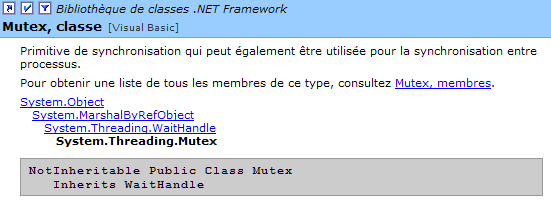
Here, we will use only the following constructors and methods:
creates a synchronization object M | |
Thread T1, which executes the operation M.WaitOne(), requests ownership of the synchronization object M. If the Mutex M is not held by any thread (which is the case initially), it is "given" to thread T1, which requested it. If, a little later, thread T2 attempts the same operation, it will be blocked. This is because a mutex can belong to only one thread at a time. It will be released when thread T1 releases the mutex M it holds. Thus, multiple threads can be blocked while waiting for mutex M. | |
The thread T1 performing the operation M.ReleaseMutex() relinquishes ownership of the mutex M.Lorsque; thread T1 will lose the processor, and the system may grant it to one of the threads waiting for the mutex M. Only one will obtain it in turn; the others waiting for M will remain blocked |
A mutex M controls access to a shared resource R. A thread requests resource R via M.WaitOne() and returns it via M.ReleaseMutex(). A critical section of code that must be executed by only one thread at a time is a shared resource. Synchronization of the critical section’s execution can be done as follows:
where M is a Mutex object. Of course, you must never forget to release a Mutex that is no longer needed so that another thread can enter the critical section; otherwise, threads waiting for a Mutex that is never released will never gain access to the processor. Furthermore, you must avoid deadlock situations in which two threads wait for each other. Consider the following actions occurring in sequence:
- a thread T1 acquires ownership of a Mutex M1 to access a shared resource R1
- a thread T2 acquires a Mutex M2 to access a shared resource R2
- Thread T1 requests Mutex M2. It is blocked.
- Thread T2 requests Mutex M1. It is blocked.
Here, threads T1 and T2 are waiting for each other. This situation occurs when threads require two shared resources: resource R1 controlled by Mutex M1 and resource R2 controlled by Mutex M2. One possible solution is to acquire both resources simultaneously using a single Mutex M. However, this is not always feasible if, for example, it results in a prolonged lock on a costly resource. Another solution is for a thread holding M1 that cannot obtain M2 to release M1 to avoid deadlock. If we apply what we just saw to the previous example, our application becomes as follows:
' options
Option Explicit On
Option Strict On

' use of threads
Imports System
Imports System.Threading

Public Class thread4
    ' class variables
    Private Shared cptrThreads As Integer = 0    ' thread counter
    Private Shared autorisation As Mutex

    Public Overloads Shared Sub Main(ByVal args() As [String])
        ' instructions for use
        Const syntaxe As String = "pg nbThreads"
        Const nbMaxThreads As Integer = 100

        ' verification no. of arguments
        If args.Length <> 1 Then
            ' error
            Console.Error.WriteLine(syntaxe)
            ' stop
            Environment.Exit(1)
        End If
        ' argument quality check
        Dim nbThreads As Integer = 0
        Try
            nbThreads = Integer.Parse(args(0))
            If nbThreads < 1 Or nbThreads > nbMaxThreads Then
                Throw New Exception
            End If
        Catch
        End Try

        ' initialize access authorization to a critical section
        autorisation = New Mutex

        ' thread creation and generation
        Dim threads(nbThreads) As Thread
        Dim i As Integer
        For i = 0 To nbThreads - 1
            ' creation
            threads(i) = New Thread(New ThreadStart(AddressOf incrémente))
            ' naming
            threads(i).Name = "tache_" & i
            ' launch
            threads(i).Start()
        Next i
        ' waiting for threads to finish
        For i = 0 To nbThreads - 1
            threads(i).Join()
        Next i
        ' counter display
        Console.Out.WriteLine(("Nombre de threads générés : " & cptrThreads))
    End Sub

    Public Shared Sub incrémente()
        ' increases thread counter
        ' we request permission to enter the critical secton
        autorisation.WaitOne()
        ' meter reading
        Dim valeur As Integer = cptrThreads
        ' follow-up
        Console.Out.WriteLine(("A " & DateTime.Now.ToString("hh:mm:ss") & ", le thread " & Thread.CurrentThread.Name & " a lu la valeur du compteur : " & cptrThreads))
        ' waiting
        Thread.Sleep(1000)
        ' counter incrementation
        cptrThreads = valeur + 1
        ' follow-up
        Console.Out.WriteLine(("A " & DateTime.Now.ToString("hh:mm:ss") & ", le thread " & Thread.CurrentThread.Name & " a écrit la valeur du compteur : " & cptrThreads))
        ' access authorization is returned
        autorisation.ReleaseMutex()
    End Sub
End Class
The results obtained are as expected:
dos>thread4 5
A 05:51:10, le thread tache_0 a lu la valeur du compteur : 0
A 05:51:11, le thread tache_0 a écrit la valeur du compteur : 1
A 05:51:11, le thread tache_1 a lu la valeur du compteur : 1
A 05:51:12, le thread tache_1 a écrit la valeur du compteur : 2
A 05:51:12, le thread tache_2 a lu la valeur du compteur : 2
A 05:51:13, le thread tache_2 a écrit la valeur du compteur : 3
A 05:51:13, le thread tache_3 a lu la valeur du compteur : 3
A 05:51:14, le thread tache_3 a écrit la valeur du compteur : 4
A 05:51:14, le thread tache_4 a lu la valeur du compteur : 4
A 05:51:15, le thread tache_4 a écrit la valeur du compteur : 5
Nombre de threads générés : 5
8.6. Event-based synchronization
Consider the following scenario, sometimes referred to as the producer-consumer scenario.
- We have an array into which some processes deposit data (the producers) and others read it (the consumers).
- The producers are equal to one another but exclusive: only one producer at a time can deposit data into the array.
- The consumers are equal to one another but mutually exclusive: only one reader at a time can read the data stored in the array.
- A consumer can only read data from the array when a producer has written it there, and a producer can only write new data to the array when the existing data has been consumed.
In this discussion, we can distinguish two shared resources:
- the writable table
- the read-only array
Access to these two shared resources can be controlled by mutexes, as seen previously, one for each resource. Once a consumer has obtained the read-only table, it must verify that there is indeed data in it. An event will be used to notify it of this. Similarly, a producer that has obtained the write-only table must wait until a consumer has emptied it. An event will be used here as well.
The events used will be part of the AutoResetEvent class:
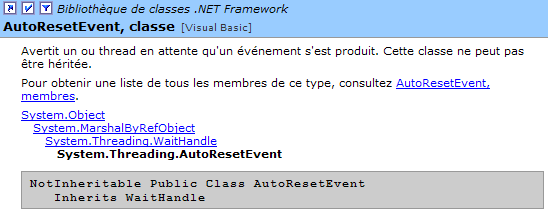
This type of event is analogous to a Boolean but avoids active or semi-active waits. Thus, if write permission is controlled by a Boolean peutEcrire, a producer will execute code like the following before writing:
or
In the first method, the thread unnecessarily ties up the processor. In the second, it checks the state of the boolean peutEcrire every 100 ms. The AutoResetEvent class allows for further improvement: the thread will request to be woken up when the event it is waiting for occurs:
AutoEvent peutEcrire=new AutoResetEvent(false)        ' peutEcrire=false;
....
peutEcrire.WaitOne() ' le thread attend que l'évt peutEcrire passe à vrai
The operation
sets the boolean peutEcrire to false. The operation
executed by a thread causes it to proceed if the boolean peutEcrire is true; otherwise, it is blocked until it becomes true. Another thread will set it to true via the operation peutEcrire.Set() or to false via the operation peutEcrire.Reset().
The producer-consumer program is as follows:
' use of reader and writer threads
' illustrates the simultaneous use of shared resources and synchronization

' options
Option Explicit On
Option Strict On

' use of threads
Imports System
Imports System.Threading

Public Class lececr

    ' class variables
    Private Shared data(5) As Integer    ' resource shared between reader and writer threads
    Private Shared lecteur As Mutex    ' synchronization variable to read the table
    Private Shared écrivain As Mutex    ' synchronization variable to write to the table
    Private Shared objRandom As New Random(DateTime.Now.Second)    ' a random number generator
    Private Shared peutLire As AutoResetEvent    ' indicates that the contents of data can be read
    Private Shared peutEcrire As AutoResetEvent

    Public Shared Sub Main(ByVal args() As [String])

        ' number of threads to generate
        Const nbThreads As Integer = 3

        ' flag initialization
        peutLire = New AutoResetEvent(False)        ' cannot be read yet
        peutEcrire = New AutoResetEvent(True)        ' we can already write

        ' initialization of synchronization variables
        lecteur = New Mutex         ' synchronizes drives
        écrivain = New Mutex         ' synchronizes writers

        ' creation of reader threads
        Dim lecteurs(nbThreads) As Thread
        Dim i As Integer
        For i = 0 To nbThreads - 1
            ' creation
            lecteurs(i) = New Thread(New ThreadStart(AddressOf lire))
            lecteurs(i).Name = "lecteur_" & i
            ' launch
            lecteurs(i).Start()
        Next i

        ' creating writer threads
        Dim écrivains(nbThreads) As Thread
        For i = 0 To nbThreads - 1
            ' creation
            écrivains(i) = New Thread(New ThreadStart(AddressOf écrire))
            écrivains(i).Name = "écrivain_" & i
            ' launch
            écrivains(i).Start()
        Next i

        'end of hand
        Console.Out.WriteLine("fin de Main...")
    End Sub

    ' read the contents of the table
    Public Shared Sub lire()
        ' review section
        lecteur.WaitOne()        ' a single reader can pass
        peutLire.WaitOne()        ' you must be able to read

        ' table reading
        Dim i As Integer
        For i = 0 To data.Length - 1
            'wait 1 s
            Thread.Sleep(1000)
            ' display
            Console.Out.WriteLine((DateTime.Now.ToString("hh:mm:ss") & " : Le lecteur " & Thread.CurrentThread.Name & " a lu le nombre " & data(i)))
        Next i

        ' we can no longer read
        peutLire.Reset()
        ' we can write
        peutEcrire.Set()
        ' end of critical section
        lecteur.ReleaseMutex()
    End Sub

    ' write in the table
    Public Shared Sub écrire()
        ' review section
        ' only one writer can pass
        écrivain.WaitOne()
        ' we have to wait for write authorization
        peutEcrire.WaitOne()

        ' writing table
        Dim i As Integer
        For i = 0 To data.Length - 1
            'wait 1 s
            Thread.Sleep(1000)
            ' display
            data(i) = objRandom.Next(0, 1000)
            Console.Out.WriteLine((DateTime.Now.ToString("hh:mm:ss") & " : L'écrivain " & Thread.CurrentThread.Name & " a écrit le nombre " & data(i)))
        Next i

        ' we can no longer write
        peutEcrire.Reset()
        ' you can read
        peutLire.Set()
        'end of critical section
        écrivain.ReleaseMutex()
    End Sub
End Class
Execution yields the following results:
dos>lececr
fin de Main...
05:56:56 : L'écrivain écrivain_0 a écrit le nombre 459
05:56:57 : L'écrivain écrivain_0 a écrit le nombre 955
05:56:58 : L'écrivain écrivain_0 a écrit le nombre 212
05:56:59 : L'écrivain écrivain_0 a écrit le nombre 297
05:57:00 : L'écrivain écrivain_0 a écrit le nombre 37
05:57:01 : L'écrivain écrivain_0 a écrit le nombre 623
05:57:02 : Le lecteur lecteur_0 a lu le nombre 459
05:57:03 : Le lecteur lecteur_0 a lu le nombre 955
05:57:04 : Le lecteur lecteur_0 a lu le nombre 212
05:57:05 : Le lecteur lecteur_0 a lu le nombre 297
05:57:06 : Le lecteur lecteur_0 a lu le nombre 37
05:57:07 : Le lecteur lecteur_0 a lu le nombre 623
05:57:08 : L'écrivain écrivain_1 a écrit le nombre 549
05:57:09 : L'écrivain écrivain_1 a écrit le nombre 34
05:57:10 : L'écrivain écrivain_1 a écrit le nombre 781
05:57:11 : L'écrivain écrivain_1 a écrit le nombre 555
05:57:12 : L'écrivain écrivain_1 a écrit le nombre 812
05:57:13 : L'écrivain écrivain_1 a écrit le nombre 406
05:57:14 : Le lecteur lecteur_1 a lu le nombre 549
05:57:15 : Le lecteur lecteur_1 a lu le nombre 34
05:57:16 : Le lecteur lecteur_1 a lu le nombre 781
05:57:17 : Le lecteur lecteur_1 a lu le nombre 555
05:57:18 : Le lecteur lecteur_1 a lu le nombre 812
05:57:19 : Le lecteur lecteur_1 a lu le nombre 406
05:57:20 : L'écrivain écrivain_2 a écrit le nombre 442
05:57:21 : L'écrivain écrivain_2 a écrit le nombre 83
^C
The following points can be noted:
- there is indeed only one reader at a time, even though it loses the CPU in the critical read section
- there is indeed only one writer at a time, even though the writer loses the CPU in the critical write section
- A reader only reads when there is something to read in the array
- a writer writes only when the array has been fully read