2. The Basics of the VB.NET Language
2.1. Introduction
We will first treat VB.NET as a traditional programming language. We will cover objects later.
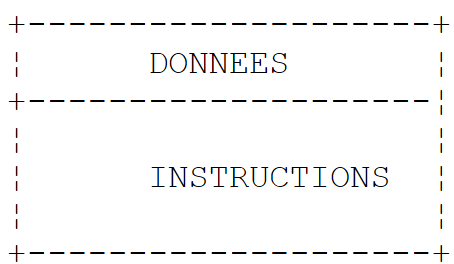
In a program, there are two things
- data
- the instructions that manipulate it
We generally strive to separate data from instructions:
 |
2.2. The data in VB.NET
VB.NET uses the following data types:
- integers, reals, and decimals
- characters and character strings
- Booleans
- dates
- objects
2.2.1. Predefined data types
Type VB | Equivalent type .NET | Size | Value range |
Boolean | System.Boolean | 2 bytes | True or False. |
Byte | System.Byte | 1 byte | 0 to 255 (unsigned). |
Char | System.Char | 2 bytes | 0 to 65,535 (unsigned). |
Date | System.DateTime | 8 bytes | 0:00:00 on January 1, 0001, to 23:59:59 on December 31, 9999. |
Decimal | System.Decimal | 16 bytes | 0 to +/-79,228,162,514,264,337,593,543,950,335 without decimals; 0 to +/-7.9228162514264337593543950335 with 28 decimals; the smallest non-zero number being +/-0.0000000000000000000000000001 (+/-1E-28). |
Double | System.Double | 8 bytes | -1.79769313486231E+308 to -4.94065645841247E-324 for negative values; 4.94065645841247E-324 to 1.79769313486231E+308 for positive values. |
Integer | System.Int32 | 4 bytes | -2,147,483,648 to 2,147,483,647. |
Long | System.Int64 | 8 bytes | -9,223,372,036,854,775,808 to 9,223,372,036,854,775,807. |
Object | System.Object | 4 bytes | Any type can be stored in a variable of type Object. |
Short | System.Int16 | 2 bytes | -32,768 to 32,767. |
Single | System.Single | 4 bytes | -3.402823E+38 to -1.401298E-45 for negative values; 1.401298E-45 to 3.402823E+38 for positive values. |
String | System.String (class) | 0 to approximately 2 billion Unicode characters. |
In the table above, we see that there are two possible types for a 32-bit integer: Integer and System.Int32. The two types are interchangeable. The same applies to the other types VB and their equivalents in the .NET platform. Here is a sample program:
Module types
    Sub Main()
        ' whole numbers
        Dim var1 As Integer = 100
        Dim var2 As Long = 10000000000L
        Dim var3 As Byte = 100
        Dim var4 As Short = 4
        ' real numbers
        Dim var5 As Decimal = 4.56789D
        Dim var6 As Double = 3.4
        Dim var7 As Single = -0.000103F
        ' date
        Dim var8 As Date = New Date(2003, 1, 1, 12, 8, 4)
        ' boolean
        Dim var9 As Boolean = True
        ' character
        Dim var10 As Char = "A"c
        ' character string
        Dim var11 As String = "abcde"
        ' object
        Dim var12 As Object = New Object
        ' displays
        Console.Out.WriteLine("var1=" + var1.ToString)
        Console.Out.WriteLine("var2=" + var2.ToString)
        Console.Out.WriteLine("var3=" + var3.ToString)
        Console.Out.WriteLine("var4=" + var4.ToString)
        Console.Out.WriteLine("var5=" + var5.ToString)
        Console.Out.WriteLine("var6=" + var6.ToString)
        Console.Out.WriteLine("var7=" + var7.ToString)
        Console.Out.WriteLine("var8=" + var8.ToString)
        Console.Out.WriteLine("var9=" + var9.ToString)
        Console.Out.WriteLine("var10=" + var10)
        Console.Out.WriteLine("var11=" + var11)
        Console.Out.WriteLine("var12=" + var12.ToString)
    End Sub
End Module
Execution yields the following results:
var1=100
var2=10000000000
var3=100
var4=4
var5=4,56789
var6=3,4
var7=-0,000103
var8=01/01/2003 12:08:04
var9=True
var10=A
var11=abcde
var12=System.Object
2.2.2. Literal data notation
145, -7, &FF (hexadecimal) | |
100000L | |
134.789, -45E-18 (-45 × 10⁻¹⁸) | |
134.789F, -45E-18F (-45 × 10⁻¹⁸) | |
100000D | |
"A"c | |
"today" | |
true, false | |
New Date(2003, 1, 1) for 01/01/2003 |
Note the following points:
- 100000L, where L indicates that the number is treated as an integer long
- 134.789F, where F means the number is treated as a single-precision floating-point number
- 100000D, where D indicates that the number is treated as a decimal real
- "A"c, to convert the character string "A" to the character 'A'
- The string is enclosed in the character ". If the string must contain the character ", it is doubled, as in "abcd""e", to represent the string [abcd"e].
2.2.3. Data declaration
2.2.3.1. Role of declarations
A program manipulates data identified by a name and a type. This data is stored in memory. When the program is compiled, the compiler assigns each piece of data a memory location identified by an address and a size. It does this based on the declarations made by the programmer. Furthermore, these declarations allow the compiler to detect programming errors. Thus, the operation x=x*2 will be flagged as an error if x is a string, for example.
2.2.3.2. Declaration of Constants
The syntax for declaring a constant is as follows:
const identifier as type=value
for example, [const PI as double=3.141592]. Why declare constants?
- The program will be easier to read if the constant is given a meaningful name: [const taux_tva as single=0.186F]
- Modifying the program will be easier if the "constant" needs to be changed. Thus, in the previous case, if the VAT rate changes to 33%, the only modification needed will be to change the statement defining its value: [const taux_tva as single=0.336F]. If 0.186 had been used explicitly in the program, numerous statements would need to be modified.
2.2.3.3. Variable Declaration
A variable is identified by a name and refers to a data type. VB.NET is not case-sensitive. Thus, the variables FIN and fin are identical. Variables can be initialized when they are declared. The syntax for declaring one or more variables is:
dim variable1,variable2,...,variablen as type_identifier
where identificateur_de_type is a predefined type or a type defined by the programmer.
2.2.4. Conversions between numbers and character strings
number.ToString or "" & number or CType(number,String) | |
object.ToString | |
Integer.Parse(string) or Int32.Parse | |
Long.Parse(string) or Int64.Parse | |
Double.Parse(string) | |
Single.Parse(string) |
Converting a string to a number may fail if the string does not represent a valid number. In this case, a fatal error called an exception is generated in VB.NET. This error can be handled by the following try/catch block:
try
        appel de la fonction susceptible de générer l'exception
 catch e as Exception
        traiter l'exception e
end try
instruction suivante
If the function does not throw an exception, the program proceeds to the next statement; otherwise, it enters the body of the catch clause and then proceeds to the next statement. We will return to exception handling later. Here is a program demonstrating the main techniques for converting between numbers and strings. In this example, the function display prints the value of its parameter to the screen. Thus, display(S) prints the value of S to the screen.
' guidelines
Option Strict On

' imported namespaces
Imports System

' the test module
Module Module1

    Sub Main()
        ' main proceedings
        ' local data
        Dim S As String
        Const i As Integer = 10
        Const l As Long = 100000
        Const f As Single = 45.78F
        Dim d As Double = -14.98

        ' number --> string
        affiche(CType(i, String))
        affiche(CType(l, String))
        affiche(CType(f, String))
        affiche(CType(d, String))

        'boolean --> string
        Const b As Boolean = False
        affiche(b.ToString)

        ' string --> int
        Dim i1 As Integer = Integer.Parse("10")
        affiche(i1.ToString)
        Try
            i1 = Integer.Parse("10.67")
            affiche(i1.ToString)
        Catch e As Exception
            affiche("Erreur [10.67] : " + e.Message)
        End Try

        ' string --> long
        Dim l1 As Long = Long.Parse("100")
        affiche("" + l1.ToString)
        Try
            l1 = Long.Parse("10.675")
            affiche("" & l1)
        Catch e As Exception
            affiche("Erreur [10.675] : " + e.Message)
        End Try

        ' chain --> double
        Dim d1 As Double = Double.Parse("100,87")
        affiche(d1.ToString)
        Try
            d1 = Double.Parse("abcd")
            affiche("" & d1)
        Catch e As Exception
            affiche("Erreur [abcd] : " + e.Message)
        End Try

        ' chain --> single
        Dim f1 As Single = Single.Parse("100,87")
        affiche(f1.ToString)
        Try
            d1 = Single.Parse("abcd")
            affiche(f1.ToString)
        Catch e As Exception
            affiche("Erreur [abcd] : " + e.Message)
        End Try
    End Sub

    ' poster
    Public Sub affiche(ByVal S As String)
        Console.Out.WriteLine("S=" + S)
    End Sub
End Module
The results are as follows:
S=10
S=100000
S=45,78
S=-14,98
S=False
S=10
S=Erreur [10.67] : Le format de la chaîne d'entrée est incorrect.
S=100
S=Erreur [10.675] : Le format de la chaîne d'entrée est incorrect.
S=100,87
S=Erreur [abcd] : Le format de la chaîne d'entrée est incorrect.
S=100,87
S=Erreur [abcd] : Le format de la chaîne d'entrée est incorrect.
Note that real numbers represented as strings must use a comma rather than a decimal point. Thus, you would write Dim d As Double = -14.98 but Dim d1 As Double = Double.Parse("100.87")
2.2.5. Data Arrays
An array VB.NET is an object that allows data of the same type to be grouped under a single identifier. It is declared as follows:
Dim Array(n) as type or Dim Array() as type=New type(n) {}
where n is the index of the last array element. The syntax Array(i) refers to data item i, where i belongs to the range [0,n]. Any reference to the data Array(i) where i does not belong to the interval [0,n] will cause an exception. An array can be initialized at the same time it is declared. In this case, there is no need to specify the number of the last element.
Dim entiers() As Integer = {0, 10, 20, 30}
Arrays have a Length property, which is the number of elements in the array. Here is an example program:
Module tab0
    Sub Main()
        ' a first picture
        Dim tab0(5) As Integer
        For i As Integer = 0 To UBound(tab0)
            tab0(i) = i
        Next
        For i As Integer = 0 To UBound(tab0)
            Console.Out.WriteLine("tab0(" + i.ToString + ")=" + tab0(i).tostring)
        Next

        ' a second panel
        Dim tab1() As Integer = New Integer(5) {}
        For i As Integer = 0 To tab1.Length - 1
            tab1(i) = i * 10
        Next
        For i As Integer = 0 To tab1.Length - 1
            Console.Out.WriteLine("tab1(" + i.ToString + ")=" + tab1(i).tostring)
        Next
    End Sub
End Module
and its execution:
tab0(0)=0
tab0(1)=1
tab0(2)=2
tab0(3)=3
tab0(4)=4
tab0(5)=5
tab1(0)=0
tab1(1)=10
tab1(2)=20
tab1(3)=30
tab1(4)=40
tab1(5)=50
A two-dimensional array can be declared as follows:
Dim Array(n,m) as Type or Dim Array(,) as Type=New Type(n,m) {}
where n+1 is the number of rows, m+1 the number of columns. The syntax Array(i,j) refers to element j in row i of Array. The two-dimensional array can also be initialized at the same time it is declared:
Dim réels(,) As Double = {{0.5, 1.7}, {8.4, -6}}
The number of elements in each dimension can be obtained using the method GetLenth(i), where i=0 represents the dimension corresponding to the first index, i=1 the dimension corresponding to the second index, …Here is a sample program:
Module Module2
    Sub Main()
        ' a first picture
        Dim tab0(2, 1) As Integer
        For i As Integer = 0 To UBound(tab0)
            For j As Integer = 0 To tab0.GetLength(1) - 1
                tab0(i, j) = i * 10 + j
            Next
        Next
        For i As Integer = 0 To UBound(tab0)
            For j As Integer = 0 To tab0.GetLength(1) - 1
                Console.Out.WriteLine("tab0(" + i.ToString + "," + j.ToString + ")=" + tab0(i, j).tostring)
            Next
        Next

        ' a second table
        Dim tab1(,) As Integer = New Integer(2, 1) {}
        For i As Integer = 0 To tab1.GetLength(0) - 1
            For j As Integer = 0 To tab1.GetLength(1) - 1
                tab1(i, j) = i * 100 + j
            Next
        Next
        For i As Integer = 0 To tab1.GetLength(0) - 1
            For j As Integer = 0 To tab1.GetLength(1) - 1
                Console.Out.WriteLine("tab1(" + i.ToString + "," + j.ToString + ")=" + tab1(i, j).tostring)
            Next
        Next
    End Sub
End Module
and the results of its execution:
tab0(0)=0
tab0(1)=1
tab0(2)=2
tab0(3)=3
tab0(4)=4
tab0(5)=5
tab1(0)=0
tab1(1)=10
tab1(2)=20
tab1(3)=30
tab1(4)=40
tab1(5)=50
An array of arrays is declared as follows:
Dim Array(n)() as Type or Dim Array()() as Type=new Type(n)()
The declaration above creates an array of n+1 rows. Each element Array(i) is a one-dimensional array reference. These arrays are not created during the declaration above. The example below illustrates the creation of an array of arrays:
        ' a table of tables
        Dim noms()() As String = New String(3)() {}
        ' initialization
        For i = 0 To noms.Length - 1
            noms(i) = New String(i) {}
            For j = 0 To noms(i).Length - 1
                noms(i)(j) = "nom" & i & j
            Next
        Next
Here, names(i) is an array of i+1 elements. Since names(i) is an array, names(i).Length is the number of its elements. Here is an example combining the three types of arrays we just presented:
' guidelines
Option Strict On
Option Explicit On

' imports
Imports System

' test class
Module test
    Sub main()
        ' an initialized 1-dimensional array
        Dim entiers() As Integer = {0, 10, 20, 30}
        Dim i As Integer
        For i = 0 To entiers.Length - 1
            Console.Out.WriteLine("entiers[" & i & "]=" & entiers(i))
        Next

        ' an initialized 2-dimensional array
        Dim réels(,) As Double = {{0.5, 1.7}, {8.4, -6}}
        Dim j As Integer
        For i = 0 To réels.GetLength(0) - 1
            For j = 0 To réels.GetLength(1) - 1
                Console.Out.WriteLine("réels[" & i & "," & j & "]=" & réels(i, j))
            Next
        Next

        ' an array°of arrays
        Dim noms()() As String = New String(3)() {}

        ' initialization
        For i = 0 To noms.Length°- 1
            noms(i) =°New String(i) {}
            For j = 0 To noms(i).Length - 1
                noms(i)(j) = "nom" & i & j
            Next
        Next

        ' display
        For i = 0 To noms.Length°- 1
            For j = 0 To noms(i).Length - 1
                Console.Out.WriteLine("noms[" & i & "][" & j & "]=" & noms(i)(j))
            Next
        Next
    End Sub
End Module
When executed, we get the following results:
entiers[0]=0
entiers[1]=10
entiers[2]=20
entiers[3]=30
réels[0,0]=0,5
réels[0,1]=1,7
réels[1,0]=8,4
réels[1,1]=-6
noms[0][0]=nom00
noms[1][0]=nom10
noms[1][1]=nom11
noms[2][0]=nom20
noms[2][1]=nom21
noms[2][2]=nom22
noms[3][0]=nom30
noms[3][1]=nom31
noms[3][2]=nom32
noms[3][3]=nom33
2.3. The basic instructions of VB.NET
We distinguish
1 the basic instructions executed by the computer.
2 instructions that control the program's flow.
Basic instructions become clear when we consider the structure of a microcomputer and its peripherals.
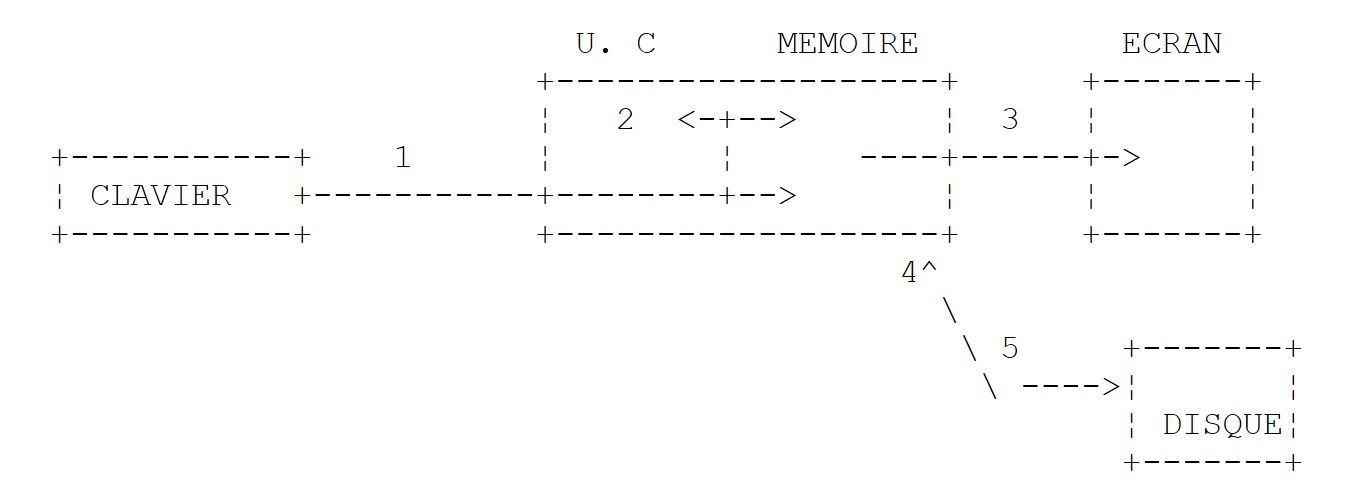 |
-
reading information from the keyboard
-
processing information
-
Writing information to the screen
-
Reading information from a disk file
-
Writing information to a disk file
2.3.1. Writing to the screen
There are several commands for writing to the screen:
Console.Out.WriteLine(expression)
Console.WriteLine(expression)
Console.Error.WriteLine (expression)
where expression is any data type that can be converted to a string to be displayed on the screen. In the examples seen so far, we have only used the Console.Out.WriteLine(expression) statement.
The System.Console class provides access to screen write operations (Write, WriteLine). The Console class has two properties, Out and Error, which are write streams of type StreamWriter:
- Console.WriteLine() is equivalent to Console.Out.WriteLine() and writes to the Out stream, which is usually associated with the screen.
- Console.Error.WriteLine() writes to the Error stream, which is also usually associated with the screen.
The Out and Error streams are associated with the screen by default. However, they can be redirected to text files at runtime, as we will see shortly.
2.3.2. Reading data typed on the keyboard
The data stream from the keyboard is represented by the Console.In object of type StreamReader. This type of object allows you to read a line of text using the ReadLine method:
Dim ligne As String = Console.In.ReadLine()
The line typed on the keyboard is stored in the variable line and can then be processed by the programme.Le In stream, which can be redirected to a file like the Out and Error streams.
2.3.3. Input/Output Example
Here is a short program illustrating keyboard/screen input-output operations:
' options
Option Explicit On
Option Strict On

' namespaces
Imports System

' module
Module io1
    Sub Main()
        ' write to Out feed
        Dim obj As New Object
        Console.Out.WriteLine(("" & obj.ToString))

        ' write to Error stream
        Dim i As Integer = 10
        Console.Error.WriteLine(("i=" & i))

        ' reading a line entered on the keyboard
        Console.Out.Write("Tapez une ligne : ")
        Dim ligne As String = Console.In.ReadLine()
        Console.Out.WriteLine(("ligne=" + ligne))
    End Sub
End Module
and the execution results:
The instructions
        Dim obj As New Object
        Console.Out.WriteLine(obj.ToString)
are only there to show that any object can be displayed. We will not attempt here to explain the meaning of what is displayed.
2.3.4. I/O Redirection
In DOS/Windows, there are three standard devices called:
- standard input device—by default refers to the keyboard and is numbered 0
- standard output device—by default refers to the screen and is numbered 1
- standard error device—by default refers to the screen and is numbered 2
In VB.NET, the write stream Console.Out writes to device 1, the Console write stream.Error writes to device 2, and the read stream Console.In reads data from device 0. When launching a program in a DOS window under Windows, you can specify which devices will be 0, 1, and 2 for the running program. Consider the following command line:
After the arguments argi of the pg program, you can redirect the standard I/O devices to files:
Standard input stream #0 is redirected to the file in.txt. In the program, the stream Console.In will therefore take its data from the file in.txt. | ||||
redirects output stream #1 to the file out.txt. This means that in the program, the stream Console.Out will write its data to the file out.txt | ||||
Same as above, but the written data is appended to the current contents of the file out.txt. | ||||
Redirects output #2 to the file error.txt. This means that in the program, the Console.Error stream will write its data to the file error.txt | ||||
Same as above, but the written data is appended to the current contents of the file error.txt. | ||||
Devices 1 and 2 are both redirected to files | ||||
Note that to redirect the I/O streams of the pg program to files, the pg program does not need to be modified. It is OS that determines the nature of devices 0, 1, and 2. Consider the following program:
' options
Option Explicit On
Option Strict On

' namespaces
Imports System

' redirections
Module console2
    Sub Main()
        ' read In stream
        Dim data As String = Console.In.ReadLine()
        ' write Out feed
        Console.Out.WriteLine(("écriture dans flux Out : " + data))
        ' write stream Error
        Console.Error.WriteLine(("écriture dans flux Error : " + data))
    End Sub
End Module
Let's compile this program:
dos>vbc es2.vb
Compilateur Microsoft (R) Visual Basic .NET version 7.10.3052.4 pour Microsoft (R) .NET Framework version 1.1.4322.573
Copyright (C) Microsoft Corporation 1987-2002. Tous droits réservés.

dos>dir
24/02/2004  15:39                  416 es2.vb
11/03/2004  08:20                3 584 es2.exe
Let's run it for the first time:
dos>es2.exe
un premier test
écriture dans flux Out : un premier test
écriture dans flux Error : un premier test
The previous run does not redirect any of the standard I/O streams In, Out, or Error. We will now redirect all three streams. The In stream will be redirected to a file named in.txt, the Out stream to the file out.txt, and the Error stream to the file error.txt. This redirection is performed on the command line as follows:
The execution yields the following results:
dos>more in.txt
un second test

dos>es2.exe 0<in.txt 1>out.txt 2>error.txt

dos>more out.txt
écriture dans flux Out : un second test

dos>more error.txt
écriture dans flux Error : un second test
It is clear that the Out and Error streams do not write to the same devices.
2.3.5. Assigning the value of an expression to a variable
Here we are interested in the operation variable=expression. The expression can be of the following types: arithmetic, relational, Boolean, or string.
2.3.5.1. List of operators
Action | Language element |
^, –, *, /, \, Mod, +, = | |
=, ^=, *=, /=, \=, +=, -=, &= | |
=, <>, <, >, <=, >=, Like, Is | |
&, + | |
Not, And, Or, Xor, AndAlso, OrElse | |
AddressOf, GetType |
2.3.5.2. Arithmetic expression
The operators for arithmetic expressions are as follows:
^, –, *, /, \, Mod, +, = |
+: addition, -: subtraction, *: multiplication, /: floating-point division, \: integer division quotient, Mod: integer division remainder, ^: exponentiation. Thus, the following program:
' arithmetic operators
Module operateursarithmetiques
    Sub Main()
        Dim i, j As Integer
        i = 4 : j = 3
        Console.Out.WriteLine(i & "/" & j & "=" & (i / j))
        Console.Out.WriteLine(i & "\" & j & "=" & (i \ j))
        Console.Out.WriteLine(i & " mod " & j & "=" & (i Mod j))

        Dim r1, r2 As Double
        r1 = 4.1 : r2 = 3.6
        Console.Out.WriteLine(r1 & "/" & r2 & "=" & (r1 / r2))
        Console.Out.WriteLine(r1 & "^2=" & (r1 ^ 2))
        Console.Out.WriteLine(Math.Cos(3))
    End Sub
End Module
gives the following results:
There are various mathematical functions. Here are a few:
| square root |
| Cosine |
| Sine |
| Tangent |
| x to the power of y (x>0) |
| Exponential |
| Natural logarithm |
| Absolute value |
All these functions are defined in a class named .NET called Math. When using them, you must prefix them with the name of the class where they are defined. Thus, you would write:
The complete definition of the Math class is as follows:
Represents the natural logarithm base specified by the constant e. | ||||
Represents the ratio of a circle’s circumference to its diameter, specified by the constant π. | ||||
Overloaded. Returns the absolute value of a specified number. | ||||
Returns the angle whose cosine is the specified number. | ||||
Returns the angle whose sine is the specified number. | ||||
Returns the angle whose tangent is the specified number. | ||||
Returns the angle whose tangent is the quotient of two specified numbers. | ||||
Generates the integer product of two 32-bit numbers. | ||||
Returns the smallest integer greater than or equal to the specified number. | ||||
Returns the cosine of the specified angle. | ||||
Returns the hyperbolic cosine of the specified angle. | ||||
Overloaded. Returns the quotient of two numbers, passing the remainder as an output parameter. | ||||
Returns e raised to the specified power. | ||||
Returns the largest integer less than or equal to the specified number. | ||||
Returns the remainder of the division of one number by another. | ||||
Overloaded. Returns the logarithm of a specified number. | ||||
Returns the base-10 logarithm of a specified number. | ||||
Overloaded. Returns the larger of two specified numbers. | ||||
Overloaded. Returns the smaller of two numbers. | ||||
Returns a specified number raised to the specified power. | ||||
Overloaded. Returns the number closest to the specified value. | ||||
Overloaded. Returns a value indicating the sign of a number. | ||||
Returns the sine of the specified angle. | ||||
Returns the hyperbolic sine of the specified angle. | ||||
Returns the square root of a specified number. | ||||
Returns the tangent of the specified angle. | ||||
Returns the hyperbolic tangent of the specified angle. | ||||
When a function is declared "overloaded," it means it exists for various types of parameters. For example, the function Abs(x) exists for x of type Integer, Long, Decimal, Single, Float. For each of these types, there is a separate definition of the Abs function. It is then said to be overloaded.
2.3.5.3. Operators in the evaluation of arithmetic expressions
The precedence of operators when evaluating an arithmetic expression is as follows (from highest to lowest):
Category | Operators |
All expressions without operators: functions, parentheses | |
^ | |
+, - | |
*, / | |
\ | |
Mod | |
+, - |
2.3.5.4. Relational expressions
The operators are as follows:
=, <>, <, >, <=, >=, Like, Is |
=: equal to, <>: not equal to, <: less than (strictly), >: greater than (strictly), <=: less than or equal to, >=: greater than or equal to, Like: matches a pattern, Is: object identity. All these operators have the same precedence. They are evaluated from left to right. The result of a relational expression is a Boolean.
String comparison: consider the following program:
' namespaces
Imports System

Module string1
    Sub main()
        Dim ch1 As Char = "A"c
        Dim ch2 As Char = "B"c
        Dim ch3 As Char = "a"c
        Console.Out.WriteLine("A<B=" & (ch1 < ch2))
        Console.Out.WriteLine("A<a=" & (ch1 < ch3))
        Dim chat As String = "chat"
        Dim chien As String = "chien"
        Dim chaton As String = "chaton"
        Dim chat2 As String = "CHAT"
        Console.Out.WriteLine("chat<chien=" & (chat < chien))
        Console.Out.WriteLine("chat<chaton=" & (chat < chaton))
        Console.Out.WriteLine("chat<CHAT=" & (chat < chat2))
        Console.Out.WriteLine("chaton like chat*=" & ("chaton" Like "chat*"))
    End Sub
End Module
and the result of its execution:
Let there be two characters C1 and C2. They can be compared using the operators: <, <=, =, <>, >, >=. It is their Unicode values—which are numbers—that are compared. According to the Unicode order, the following relationships hold:
space < .. < '0' < '1' < .. < '9' < .. < 'A' < 'B' < .. < 'Z' < .. < 'a' < 'b' < .. < 'z'
Strings are compared character by character. The first inequality encountered between two characters implies an inequality of the same sign for the strings. With these explanations, the reader is invited to examine the results of the previous program.
2.3.5.5. Boolean expressions
The operators are as follows:
Not, And, Or, Xor, AndAlso, OrElse |
Not: logical AND, Or: logical OR, Not: negation, Xor: exclusive OR.
op1 AndAlso op2: if op1 is false, op2 is not evaluated and the result is false.
op1 OrElse op2: if op1 is true, op2 is not evaluated and the result is true.
The precedence of these operators relative to one another is as follows:
Not | |
AND, AndAlso | |
OR, OrElse | |
XOR |
The result of a Boolean expression is a Boolean.
2.3.5.6. Bitwise operations
On the one hand, we find the same operators as the Boolean operators with the same precedence. We also find two shift operators: << and >>. Let i and j be two integers.
shifts i n bits to the left. The incoming bits are zeros. | |
shifts i n bits to the right. If i is a signed integer (signed char, int, long), the sign bit is preserved. | |
performs a bitwise logical AND of i and j. | |
performs a bitwise logical OR of i and j. | |
complements i to 1 | |
performs the OU EXCLUSIF operation on i and j |
Consider the following program:
Module operationsbit
    Sub main()
        ' bit manipulation
        Dim i As Short = &H123F
        Dim k As Short = &H7123
        Console.Out.WriteLine("i<<4=" & (i << 4).ToString("X"))
        Console.Out.WriteLine("i>>4=" & (i >> 4).ToString("X"))
        Console.Out.WriteLine("k>>4=" & (k >> 4).ToString("X"))
        Console.Out.WriteLine("i and 4=" & (i And 4).ToString("X"))
        Console.Out.WriteLine("i or 4 =" & (i Or 4).ToString("X"))
        Console.Out.WriteLine("not i=" & (Not i).ToString("X"))
    End Sub
End Module
Executing this code produces the following results:
2.3.5.7. Operator associated with assignment
It is possible to write a+=b, which means a=a+b. The list of operators that can be combined with the assignment operation is as follows:
^=, *=, /=, \=, +=, -=, &= |
2.3.5.8. General operator precedence
Category | Operators |
All expressions without operators | |
^ | |
+, - | |
*, / | |
\ | |
Mod | |
+, - | |
& | |
<<, >> | |
=, <>, <, >, <=, >=, Like, Is, TypeOf...Is | |
Not | |
And, AndAlso | |
OR, OrElse | |
XOR |
When an operand is placed between two operators of the same precedence, the associativity of the operators governs the order in which the operations are performed. All operators are left-associative, meaning that operations are performed from left to right. Precedence and associativity can be controlled using expressions in parentheses.
2.3.5.9. Type conversions
There are a number of predefined functions that allow you to convert from one data type to another. The list is as follows:
These functions accept a numeric expression or a string as an argument. The result type is shown in the following table:
function | Result | Range of values for the function parameter |
Boolean | Any valid string or numeric expression. | |
Byte | 0 to 255; fractions are rounded. | |
Char | Any valid String expression; the value can be between 0 and 65,535. | |
Date | Any valid representation of the date and time. | |
Double | -1.79769313486231E+308 to -4.94065645841247E-324 for negative values; 4.94065645841247E-324 to 1.79769313486231E+308 for positive values. | |
Decimal | +/-79,228,162,514,264,337,593,543,950,335 for integers. The range of values for 28-digit numbers is +/-7.9228162514264337593543950335. The smallest non-zero number is 0.0000000000000000000000000001. | |
Integer | -2,147,483,648 to 2,147,483,647; fractions are rounded. | |
Long | -9,223,372,036,854,775,808 to 9,223,372,036,854,775,807; fractions are rounded. | |
Object | Any valid expression. | |
Short | -32,768 to 32,767; fractions are rounded. | |
Single | -3.402823E+38 to -1.401298E-45 for negative values; 1.401298E-45 to 3.402823E+38 for positive values. | |
String | The values returned by the Cstr function depend on the expression argument. |
Here is a sample program:
Module conversion
    Sub main()
        Dim var1 As Boolean = CBool("true")
        Dim var2 As Byte = CByte("100")
        Dim var3 As Char = CChar("A")
        Dim var4 As Date = CDate("30 janvier 2004")
        Dim var5 As Double = CDbl("100,45")
        Dim var6 As Decimal = CDec("1000,67")
        Dim var7 As Integer = CInt("-30")
        Dim var8 As Long = CLng("456")
        Dim var9 As Short = CShort("-14")
        Dim var10 As Single = CSng("56,78")
        Console.Out.WriteLine("var1=" & var1)
        Console.Out.WriteLine("var2=" & var2)
        Console.Out.WriteLine("var3=" & var3)
        Console.Out.WriteLine("var4=" & var4)
        Console.Out.WriteLine("var5=" & var5)
        Console.Out.WriteLine("var6=" & var6)
        Console.Out.WriteLine("var7=" & var7)
        Console.Out.WriteLine("var8=" & var8)
        Console.Out.WriteLine("var9=" & var9)
        Console.Out.WriteLine("var10=" & var10)
    End Sub
End Module
and the results of its execution:
var1=True
var2=100
var3=A
var4=30/01/2004
var5=100,45
var6=1000,67
var7=-30
var8=456
var9=-14
var10=56,78
You can also use the function CType(expression, type) as shown in the following program:
Module ctype1
    Sub main()
        Dim var1 As Boolean = CType("true", Boolean)
        Dim var2 As Byte = CType("100", Byte)
        Dim var3 As Char = CType("A", Char)
        Dim var4 As Date = CType("30 janvier 2004", Date)
        Dim var5 As Double = CType("100,45", Double)
        Dim var6 As Decimal = CType("1000,67", Decimal)
        Dim var7 As Integer = CType("-30", Integer)
        Dim var8 As Long = CType("456", Long)
        Dim var9 As Short = CType("-14", Short)
        Dim var10 As Single = CType("56,78", Single)
        Dim var11 As String = CType("47,89", String)
        Dim var12 As String = 47.89.ToString
        Dim var13 As String = "" & 47.89
        Console.Out.WriteLine("var1=" & var1)
        Console.Out.WriteLine("var2=" & var2)
        Console.Out.WriteLine("var3=" & var3)
        Console.Out.WriteLine("var4=" & var4)
        Console.Out.WriteLine("var5=" & var5)
        Console.Out.WriteLine("var6=" & var6)
        Console.Out.WriteLine("var7=" & var7)
        Console.Out.WriteLine("var8=" & var8)
        Console.Out.WriteLine("var9=" & var9)
        Console.Out.WriteLine("var10=" & var10)
        Console.Out.WriteLine("var11=" & var11)
        Console.Out.WriteLine("var12=" & var12)
        Console.Out.WriteLine("var13=" & var13)
    End Sub
End Module
which produces the following results:
var1=True
var2=100
var3=A
var4=30/01/2004
var5=100,45
var6=1000,67
var7=-30
var8=456
var9=-14
var10=56,78
var11=47,89
var12=47,89
var13=47,89
2.4. Program flow control statements
2.4.1. Stop
The Exit method defined in the Environment class allows you to stop the execution of a program:
[Visual Basic]
Public Shared Sub Exit(ByVal exitCode As Integer )
stops the current process and returns the value exitCode to the parent process. The value exitCode can be used by the parent process. Under DOS, this status variable is returned to DOS in the system variable ERRORLEVEL, whose value can be checked in a batch file. On Unix, the $? variable retrieves the value of exitCode.
will terminate the program with a status value of 0.
2.4.2. Simple decision structure
- Each action is on a separate line
- The else clause may be omitted.
You can nest decision structures as shown in the following example:
' options
Option Explicit On
Option Strict On

' namespaces
Imports System

Module if1
    Sub main()
        Dim i As Integer = 10
        If i > 4 Then
            Console.Out.WriteLine(i & " est > " & 4)
        Else
            If i = 4 Then
                Console.Out.WriteLine(i & " est = " & 4)
            Else
                Console.Out.WriteLine(i & " est < " & 4)
            End If
        End If
    End Sub
End Module
The result obtained:
2.4.3. Case structure
The syntax is as follows:
select case expression
    case liste_valeurs1
        actions1
case liste_valeurs2
        actions2
...
case else
        actions_sinon
end select
- The type of [expression] must be one of the following types:
- The clause [case else] may be missing.
- [liste_valeursi] are possible values for the expression. [listes_valeursi] represents a list of conditions condition1, condition2, ..., conditionx. If [expression] satisfies one of the conditions, the actions following the clause [liste_valeursi] are executed. The conditions can take the following form:
- val1 to val2: true if [expression] belongs to the domain [val1,val2]
- val1: true if [expression] is equal to val1
- is > val1: true if [expression] > val1. The keyword [is] may be omitted
- The same applies to the operators =, <, <=, >, >=, <>
- only the actions associated with the first verified condition are executed.
Consider the following program:
' options
Option Explicit On
Option Strict On

' namespaces
Imports System

Module selectcase1
    Sub main()
        Dim i As Integer = 10
        Select Case i
            Case 1 To 4, 7 To 8
                Console.Out.WriteLine("i est dans l'intervalle [1,4] ou [7,8]")
            Case Is > 12
                Console.Out.WriteLine("i est > 12")
            Case Is < 15
                Console.Out.WriteLine("i est < 15")
            Case Is < 20
                Console.Out.WriteLine("i est < 20")
        End Select
    End Sub
End Module
It produces the following results:
2.4.4. Loop structure
2.4.4.1. Known number of iterations
For counter [ As datatype ] = start To end [ Step step ]
   actions
Next [ counter ]
The actions are performed for each value taken by the variable [counter]. Consider the following program:
' options
Option Explicit On
Option Strict On

' namespaces
Imports System

Module for1
    Sub main()
        Dim somme As Integer = 0
        Dim résultat As String = "somme("
        For i As Integer = 0 To 10 Step 2
            somme += i
            résultat += " " + i.ToString
        Next
        résultat += ")=" + somme.ToString
        Console.Out.WriteLine(résultat)
    End Sub
End Module
The results:
Another iteration structure with a known number of iterations is as follows:
For Each element [ As datatype ] In groupe
   [ actions ]
Next [ element ]
- group is a collection of objects. The collection of objects we are already familiar with is the array
- datatype is the type of the objects in the collection. For an array, this would be the type of the array elements
- element is a variable local to the loop that will successively take on the values of the collection.
Thus, the following code:
' options
Option Explicit On
Option Strict On

' namespaces
Imports System

Module foreach1
    Sub main()
        Dim amis() As String = {"paul", "hélène", "jacques", "sylvie"}
        For Each nom As String In amis
            Console.Out.WriteLine(nom)
        Next
    End Sub
End Module
would display:
2.4.4.2. Number of repetitions unknown
There are many structures in VB.NET for this case.
Do { While | Until } condition
   [ statements ]
Loop
The loop continues as long as the condition is true (while) or until the condition is true (until). The loop may never be executed.
Do
   [ statements ]
Loop { While | Until } condition
The loop continues as long as the condition is true (while) or until the condition is true (until). The loop is always executed at least once.
While condition
   [ statements ]
End While
The loop continues as long as the condition is true. The loop may never be executed. The following loops all calculate the sum of the first 10 integers.
' options
Option Explicit On
Option Strict On

' namespaces
Imports System

Module boucles1
    Sub main()
        Dim i, somme As Integer
        i = 0 : somme = 0
        Do While i < 11
            somme += i
            i += 1
        Loop
        Console.Out.WriteLine("somme=" + somme.ToString)
        i = 0 : somme = 0
        Do Until i = 11
            somme += i
            i += 1
        Loop
        Console.Out.WriteLine("somme=" + somme.ToString)
        i = 0 : somme = 0
        Do
            somme += i
            i += 1
        Loop Until i = 11
        Console.Out.WriteLine("somme=" + somme.ToString)
        i = 0 : somme = 0
        Do
            somme += i
            i += 1
        Loop While i < 11
        Console.Out.WriteLine("somme=" + somme.ToString)
    End Sub
End Module
2.4.4.3. Loop control statements
exits a do loop ... loop | |
Exits a for loop |
2.5. The structure of a VB.NET program
A VB.NET program that does not use user-defined classes or functions other than the main function Main may have the following structure:
' options
Option Explicit On
Option Strict On

' namespaces
Imports espace1
Imports ....

Module nomDuModule
    Sub main()
....
    End Sub
End Module
- The [Option Explicit on] directive enforces variable declaration. In VB.NET, this is not mandatory. An undeclared variable is then of type Object.
- The [Option Strict on] directive prohibits any data type conversions that could result in data loss and any conversions between numeric types and strings. Conversion functions must therefore be used explicitly.
- The program imports all the namespaces it needs. We have not yet introduced this concept. In previous programs, we have often encountered statements like:
We should actually have written:
where System is the namespace containing the [Console] class. By importing the [System] namespace with an Imports statement, VB.NET will systematically search it whenever it encounters a class it does not recognize. It will repeat the search across all declared namespaces until it finds the class in question. We then write:
' namespaces
Imports System
....

        Console.Out.WriteLine(unechaine)
An example program might look like this:
' options
Option Explicit On
Option Strict On

'namespaces
Imports System

' main module
Module main1
    Sub main()
        Console.Out.WriteLine("main1")
    End Sub
End Module
The same program can be written as follows:
' options
Option Explicit On
Option Strict On

'namespaces
Imports System

' test class
Public Class main2
    Public Shared Sub main()
        Console.Out.WriteLine("main2")
    End Sub
End Class
Here, we are using the concept of a class, which will be introduced in the next chapter. When such a class contains a static (shared) procedure named main, it is executed. We include this code here because C#, the sister language of VB.NET, recognizes only the concept of classes, meaning that all executed code must belong to a class. The concept of classes is part of object-oriented programming. Imposing it in the design of every program is somewhat cumbersome. We see this here in the version 2 of the previous program, where we are led to introduce the concepts of classes and static methods where they are not needed. Therefore, from now on, we will only introduce the concept of a class when it is necessary. In other cases, we will use the concept of a module, as in version 1 above.
2.6. Compiling and Running a VB.NET Program
Compiling a VB.NET program requires only the SDK.NET file. Consider the following program:
' options
Option Explicit On
Option Strict On

' namespaces
Imports System

Module boucles1
    Sub main()
        Dim i, somme As Integer
        i = 0 : somme = 0
        Do While i < 11
            somme += i
            i += 1
        Loop
        Console.Out.WriteLine("somme=" + somme.ToString)
        i = 0 : somme = 0
        Do Until i = 11
            somme += i
            i += 1
        Loop
        Console.Out.WriteLine("somme=" + somme.ToString)
        i = 0 : somme = 0
        Do
            somme += i
            i += 1
        Loop Until i = 11
        Console.Out.WriteLine("somme=" + somme.ToString)
        i = 0 : somme = 0
        Do
            somme += i
            i += 1
        Loop While i < 11
        Console.Out.WriteLine("somme=" + somme.ToString)
    End Sub
End Module
Suppose it is in a file named [boucles1.vb]. To compile it, we proceed as follows:
dos>dir boucles1.vb
11/03/2004  15:55                  583 boucles1.vb

dos>vbc boucles1.vb
Compilateur Microsoft (R) Visual Basic .NET version 7.10.3052.4
pour Microsoft (R) .NET Framework version 1.1.4322.573
Copyright (C) Microsoft Corporation 1987-2002. Tous droits réservés.

dos>dir boucles1.*
11/03/2004  16:04                  601 boucles1.vb
11/03/2004  16:04                3 584 boucles1.exe
The program vbc.exe is the compiler VB.NET. Here, it was in the PATH of the DOS:
dos>path
PATH=E:\Program Files\Microsoft Visual Studio .NET 2003\Common7\IDE;E:\Program Files\Microsoft Visual Studio .NET 2003\VC7\BIN;E:\Program Files\Microsoft Visual Studio .NET 2003\Common7\Tools;E:\Program Files\Microsoft Visual Studio .NET 2003\Common7\Tools\bin\prerelease;E:\Program Files\Microsoft Visual Studio .NET 2003\Common7\Tools\bin;E:\Program Files\Microsoft Visual Studio .NET 2003\SDK\v1.1\bin;E:\WINNT\Microsoft.NET\Framework\v1.1.4322;e:\winnt\system32;e:\winnt;
dos>dir E:\WINNT\Microsoft.NET\Framework\v1.1.4322\vbc.exe
21/02/2003  10:20              737 280 vbc.exe
The [vbc] compiler produces an .exe file executable by the .NET virtual machine:
2.7. Example IMPOTS
We propose to write a program to calculate a taxpayer's tax. We consider the simplified case of a taxpayer who has only their salary to report:
- we calculate the number of shares for the employee nbParts=nbEnfants/2 +1 if they are unmarried, nbEnfants/2+2 if they are married, where nbEnfants is the number of children.
- if he has at least three children, he has an additional half-share
- his taxable income is calculated as R=0.72*S, where S is his annual salary
- we calculate his family coefficient QF = R / nbParts
- We calculate his tax I. Consider the following table:
12,620.0 | 0 | 0 |
13,190 | 0.05 | 631 |
15,640 | 0.1 | 1290.5 |
24,740 | 0.15 | 2,072.5 |
31,810 | 0.2 | 3,309.5 |
39,970 | 0.25 | 4900 |
48,360 | 0.3 | 6898.5 |
55,790 | 0.35 | 9,316.5 |
92,970 | 0.4 | 12,106 |
127,860 | 0.45 | 16,754.5 |
151,250 | 0.50 | 23,147.5 |
172,040 | 0.55 | 30,710 |
195,000 | 0.60 | 39,312 |
0 | 0.65 | 49,062 |
Each row has 3 fields. To calculate tax I, we look for the first row where QF <= field1. For example, if QF = 23000, we will find the row
Tax I is then equal to 0.15*R - 2072.5*nbParts. If QF is such that the relation QF<=field1 is never satisfied, then the coefficients of the last line are used. Here:
which gives the tax I=0.65*R - 49062*nbParts. The corresponding program VB.NET is as follows:
' options
Option Explicit On
Option Strict On

' namespaces
Imports System

Module impots
    ' ------------ hand
    Sub Main()

        ' data tables required for tax calculation
        Dim Limites() As Decimal = {12620D, 13190D, 15640D, 24740D, 31810D, 39970D, 48360D, 55790D, 92970D, 127860D, 151250D, 172040D, 195000D, 0D}
        Dim CoeffN() As Decimal = {0D, 631D, 1290.5D, 2072.5D, 3309.5D, 4900D, 6898.5D, 9316.5D, 12106D, 16754.5D, 23147.5D, 30710D, 39312D, 49062D}

        ' marital status is restored
        Dim OK As Boolean = False
        Dim reponse As String = Nothing
        While Not OK
            Console.Out.Write("Etes-vous marié(e) (O/N) ? ")
            reponse = Console.In.ReadLine().Trim().ToLower()
            If reponse <> "o" And reponse <> "n" Then
                Console.Error.WriteLine("Réponse incorrecte. Recommencez")
            Else
                OK = True
            End If
        End While
        Dim Marie As Boolean = reponse = "o"

        ' number of children
        OK = False
        Dim NbEnfants As Integer = 0
        While Not OK
            Console.Out.Write("Nombre d'enfants : ")
            reponse = Console.In.ReadLine()
            Try
                NbEnfants = Integer.Parse(reponse)
                If NbEnfants >= 0 Then
                    OK = True
                Else
                    Console.Error.WriteLine("Réponse incorrecte. Recommencez")
                End If
            Catch
                Console.Error.WriteLine("Réponse incorrecte. Recommencez")
            End Try
        End While
        ' salary
        OK = False
        Dim Salaire As Integer = 0
        While Not OK
            Console.Out.Write("Salaire annuel : ")
            reponse = Console.In.ReadLine()
            Try
                Salaire = Integer.Parse(reponse)
                If Salaire >= 0 Then
                    OK = True
                Else
                    Console.Error.WriteLine("Réponse incorrecte. Recommencez")
                End If
            Catch
                Console.Error.WriteLine("Réponse incorrecte. Recommencez")
            End Try
        End While
        ' calculating the number of shares
        Dim NbParts As Decimal
        If Marie Then
            NbParts = CDec(NbEnfants) / 2 + 2
        Else
            NbParts = CDec(NbEnfants) / 2 + 1
        End If
        If NbEnfants >= 3 Then
            NbParts += 0.5D
        End If
        ' taxable income
        Dim Revenu As Decimal
        Revenu = 0.72D * Salaire

        ' family quotient
        Dim QF As Decimal
        QF = Revenu / NbParts

        ' search for tax bracket corresponding to QF
        Dim i As Integer
        Dim NbTranches As Integer = Limites.Length
        Limites((NbTranches - 1)) = QF
        i = 0
        While QF > Limites(i)
            i += 1
        End While
        ' tax
        Dim impots As Integer = CInt(i * 0.05D * Revenu - CoeffN(i) * NbParts)

        ' the result is displayed
        Console.Out.WriteLine(("Impôt à payer : " & impots))
    End Sub
End Module
The program is compiled in a DOS window using:
dos>vbc impots1.vb
Compilateur Microsoft (R) Visual Basic .NET version 7.10.3052.4 pour Microsoft (R) .NET Framework version 1.1.4322.573

dos>dir impots1.exe
24/02/2004  15:42                5 632 impots1.exe
The compilation produces an executable file named impots.exe. Note that impots.exe is not directly executable by the processor. It actually contains intermediate code that is only executable on a .NET platform. The results obtained are as follows:
dos>impots1
Etes-vous marié(e) (O/N) ? o
Nombre d'enfants : 3
Salaire annuel : 200000
Impôt à payer : 16400
dos>impots1
Etes-vous marié(e) (O/N) ? n
Nombre d'enfants : 2
Salaire annuel : 200000
Impôt à payer : 33388
dos>impots1
Etes-vous marié(e) (O/N) ? w
Réponse incorrecte. Recommencez
Etes-vous marié(e) (O/N) ? q
Réponse incorrecte. Recommencez
Etes-vous marié(e) (O/N) ? o
Nombre d'enfants : q
Réponse incorrecte. Recommencez
Nombre d'enfants : 2
Salaire annuel : q
Réponse incorrecte. Recommencez
Salaire annuel : 1
Impôt à payer : 0
2.8. Main program arguments
The main procedure Main can accept an array of strings as a parameter:
Sub main(ByVal args() As String)
The args parameter is an array of strings that receives the arguments passed on the command line when the program is called.
- args.Length is the number of elements in the args array
- args(i) is the i-th element of the array
If we run program P with the command: P arg0 arg1 … argn and if the Main procedure of program P is declared as follows:
Sub main(ByVal args() As String)
we will have arg(0)="arg0", arg(1)="arg1" … Here is an example:
' guidelines
Option Strict On
Option Explicit On

' namespaces
Imports System

Module arg
    Sub main(ByVal args() As String)
        ' number of arguments
        console.out.writeline("Il y a " & args.length & " arguments")
        Dim i As Integer
        For i = 0 To args.Length - 1
            Console.Out.WriteLine("argument n° " & i & "=" & args(i))
        Next
    End Sub
End Module
The execution produces the following results:
2.9. Enumerations
An enumeration is a data type whose value range is a set of integer constants. Consider a program that needs to handle exam grades. There would be five: Passable,AssezBien,Good,TrèsBien,Excellent. We could then define an enumeration for these five constants:
    Enum mention
        Passable
        AssezBien
        Bien
        TrésBien
        Excellent
    End Enum
Internally, these five constants are represented by consecutive integers starting with 0 for the first constant, 1 for the next, and so on. A variable can be declared to take on these values in the enumeration:
        ' a variable that takes its values from the enumeration mentioned
        Dim maMention As mention = mention.Passable
You can compare a variable to the different possible values of the enumeration:
        ' test with enumeration value
        If (maMention = mention.Passable) Then
            Console.Out.WriteLine("Peut mieux faire")
        End If
You can retrieve all the values in the enumeration:
        For Each m In mention.GetValues(maMention.GetType)
            Console.Out.WriteLine(m)
        Next
Just as the simple Integer type is equivalent to the Int32 structure, the simple Enum type is equivalent to the Enum structure. This class has a static method GetValues that allows you to retrieve all values of an enumerated type passed as a parameter. This must be an object of type Type, which is a class providing information about a data type. The type of a variable v is obtained via v.GetType(). So here, maMention.GetType() returns the Type object for the mentions enumeration, and Enum.GetValues(maMention.GetType()) returns the list of values for the mentions enumeration.
This is demonstrated by the following program:
' guidelines
Option Strict On
Option Explicit On

' namespaces
Imports System

Public Module enum2

    ' an enumeration
    Enum mention
        Passable
        AssezBien
        Bien
        TrèsBien
        Excellent
    End Enum

    ' test pg
    Sub Main()

        ' a variable that takes its values from the enumeration mentioned
        Dim maMention As mention = mention.Passable

        ' variable value display
        Console.Out.WriteLine("mention=" & maMention)

        ' test with enumeration value
        If (maMention = mention.Passable) Then
            Console.Out.WriteLine("Peut mieux faire")
        End If

        ' list of literal mentions
        For Each m As mention In [Enum].GetValues(maMention.GetType)
            Console.Out.WriteLine(m.ToString)
        Next

        ' list of full mentions
        For Each m As Integer In [Enum].GetValues(maMention.GetType)
            Console.Out.WriteLine(m)
        Next
    End Sub
End Module
The execution results are as follows:
dos>enum2
mention=0
Peut mieux faire
Passable
AssezBien
Bien
TrèsBien
Excellent
0
1
2
3
4
2.10. Exception Handling
Many VB.NET functions are capable of generating exceptions, i.e., errors. When a function is capable of generating an exception, the programmer should handle it in order to create programs that are more resilient to errors: you should always avoid an application "crashing" unexpectedly.
Exception handling follows the following pattern:
try
    appel de la fonction susceptible de générer l'exception
catch  e as Exception e)
    traiter l'exception e
end try
instruction suivante
If the function does not throw an exception, execution proceeds to the next statement; otherwise, it proceeds to the body of the catch clause and then to the next statement. Note the following points:
- e is an object derived from the Exception type. We can be more specific by using types such as IOException, SystemException, etc.: there are several types of exceptions. By writing `catch e as Exception`, we indicate that we want to handle all types of exceptions. If the code in the `try` block is likely to generate multiple types of exceptions, we may want to be more specific by handling the exception with multiple `catch` clauses:
try
    appel de la fonction susceptible de générer l'exception
catch e as IOException
    traiter l'exception e
catch  e as SystemException
    traiter l'exception e
end try
instruction suivante
- You can add a finally clause to the try/catch clauses:
try
    appel de la fonction susceptible de générer l'exception
catch  e as Exception
    traiter l'exception e
finally
    code exécuté après try ou catch
end try
instruction suivante
Whether an exception occurs or not, the code in the finally clause will always be executed.
- In the catch clause, you may not want to use the available Exception object. Instead of writing catch e as Exception, you write catch.
- The Exception class has a Message property that contains a message detailing the error that occurred. So if you want to display this message, you would write:
catch e as Exception
    Console.Error.WriteLine("L'erreur suivante s'est produite : "+e.Message);
    ...
end try
- The Exception class has a method ToString that returns a string indicating the exception type and the value of the Message property. We can therefore write:
catch  ex as Exception
    Console.Error.WriteLine("L'erreur suivante s'est produite : "+ex.ToString)
    ...
end try
The following example shows an exception generated by using a non-existent array element:
' options
Option Explicit On
Option Strict On

' namespaces
Imports System

Module tab1
    Sub Main()
        ' declaring & initializing an array
        Dim tab() As Integer = {0, 1, 2, 3}
        Dim i As Integer

        ' table display with for
        For i = 0 To tab.Length - 1
            Console.Out.WriteLine(("tab[" & i & "]=" & tab(i)))
        Next i

        ' affichage tableau avec un for each
        Dim élmt As Integer
        For Each élmt In tab
            Console.Out.WriteLine(élmt)
        Next élmt

        ' generating an exception
        Try
            tab(100) = 6
        Catch e As Exception
            Console.Error.WriteLine(("L'erreur suivante s'est produite : " & e.Message))
        End Try
    End Sub
End Module
Running the program produces the following results:
dos>exception1
tab[0]=0
tab[1]=1
tab[2]=2
tab[3]=3
0
1
2
3
L'erreur suivante s'est produite : L'index se trouve en dehors des limites du tableau.
Here is another example where we handle the exception caused by assigning a string to a number when the string does not represent a number:
' options
Option Strict On
Option Explicit On

'imports
Imports System

Public Module console1
  Public Sub Main()
    ' We ask for the name
    System.Console.Write("Nom : ")

        ' reading response
    Dim nom As String = System.Console.ReadLine()

        ' age requested
    Dim age As Integer
    Dim ageOK As Boolean = False
    Do While Not ageOK
      ' question
      Console.Out.Write("âge : ")
      ' read-verify answer
      Try
        age = Int32.Parse(System.Console.ReadLine())
        If age < 0 Then Throw New Exception
        ageOK = True
      Catch
        Console.Error.WriteLine("Age incorrect, recommencez...")
      End Try
    Loop

        ' final display
    Console.Out.WriteLine("Vous vous appelez [" & nom & "] et vous avez [" & age & "] ans")
  End Sub
End Module
Some execution results:
dos>console1
Nom : dupont
âge : xx
Age incorrect, recommencez...
âge : 12
Vous vous appelez dupont et vous avez 12 ans
2.11. Passing Parameters to a Function
Here we are interested in how parameters are passed to a function. Consider the function:
    Sub changeInt(ByVal a As Integer)
        a = 30
        Console.Out.WriteLine(("Paramètre formel a=" & a))
    End Sub
In the function definition, a is called a formal parameter. It is there solely for the purposes of defining the function changeInt. It could just as easily have been named b. Let’s now consider an example of using this function:
    Sub Main()
        Dim age As Integer = 20
        changeInt(age)
        Console.Out.WriteLine(("Paramètre effectif age=" & age))
    End Sub
Here, in the statement changeInt(age), age is the actual parameter that will pass its value to the formal parameter a. We are interested in how a formal parameter retrieves the value of the corresponding actual parameter.
2.11.1. Pass-by-value
The following example shows that the parameters of a function/procedure are passed by value by default: that is, the value of the actual parameter is copied into the corresponding formal parameter. These are two distinct entities. If the function modifies the formal parameter, the actual parameter remains unchanged.
' options
Option Explicit On
Option Strict On

' passing parameters by value to a function
Imports System

Module param1
    Sub Main()
        Dim age As Integer = 20
        changeInt(age)
        Console.Out.WriteLine(("Paramètre effectif age=" & age))
    End Sub

    Sub changeInt(ByVal a As Integer)
        a = 30
        Console.Out.WriteLine(("Paramètre formel a=" & a))
    End Sub
End Module
The results obtained are as follows:
The value 20 of the actual parameter was copied into the formal parameter a. The formal parameter was then modified. The actual parameter remained unchanged. This passing method is suitable for the input parameters of a function.
2.11.2. Pass-by-reference
In a pass-by-reference, the actual parameter and the formal parameter are one and the same entity. If the function modifies the formal parameter, the actual parameter is also modified. In VB.NET, the formal parameter must be preceded by the keyword ByRef. Here is an example:
' options
Option Explicit On
Option Strict On

' passing parameters by value to a function
Imports System

Module param2
    Sub Main()
        Dim age As Integer = 20
        changeInt(age)
        Console.Out.WriteLine(("Paramètre effectif age=" & age))
    End Sub

    Sub changeInt(ByRef a As Integer)
        a = 30
        Console.Out.WriteLine(("Paramètre formel a=" & a))
    End Sub
End Module
and the execution results:
The actual parameter followed the change in the formal parameter. This passing method is suitable for a function's output parameters.