6. In-Depth Look at the SQL Language
6.1. Introduction
In this chapter, we present
- additional syntaxes for the SELECT command that make it a very powerful query command, particularly for querying multiple tables at once.
- extended syntaxes of commands already studied
To illustrate the various commands, we will work with the following tables used for order management in a PME book distribution system:
6.1.1. the table CLIENTS
It stores information about the clients from the PME:
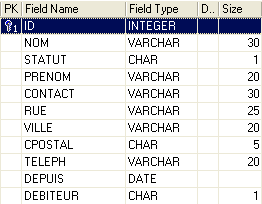 |
A unique identifier for the customer - primary key | |
customer name | |
I=Individual, E=Business, A=Government | |
first name for individuals | |
Name of the contact person at the client’s location (in the case of a business or government agency) | |
Client address - street | |
City | |
ZIP | |
Phone | |
Since when have you been a customer? | |
Y (Yes) if the customer owes money to the company and N (No) otherwise. |
6.1.2. Table ARTICLES
It stores information about the products sold, in this case books. Its structure is as follows:
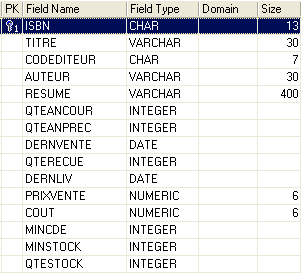
A number that uniquely identifies a book (ISBN = International Standard Book Number) - primary key | |
Title of the book | |
Code uniquely identifying a publisher | |
Author's name | |
Book summary | |
Quantity sold this year | |
Quantity sold the previous year | |
Date of last sale | |
Quantity of the last delivery | |
Date of last delivery | |
Selling price | |
Purchase cost | |
Minimum Order Quantity | |
Minimum stock level | |
Quantity in stock |
Its contents could be as follows:

6.1.3. the table COMMANDES
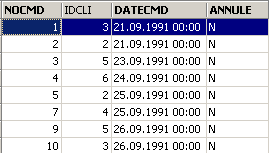
It stores information about orders placed by clients. Its structure is as follows:
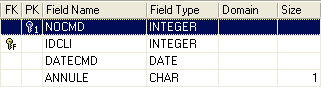
Number uniquely identifying an order - primary key | |
Customer ID for the order - foreign key - reference CLIENTS(ID) | |
Date this order was entered | |
O (Yes) if the order was canceled and N (No) otherwise. |
6.1.4. The DETAILS table
It contains the details of an order, i.e., the item numbers and quantities of the books ordered. Its structure is as follows:
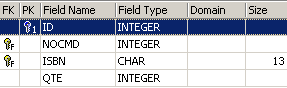
Order number - foreign key referencing column NOCMD in table COMMANDES | |
Ordered book number - foreign key referencing column ISBN in table LIVRES | |
Ordered quantity |
Its contents could be as follows:
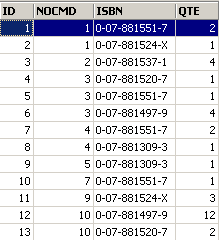
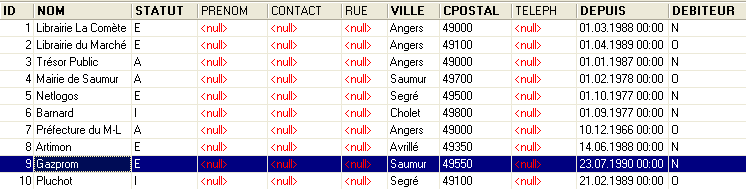
Above, we see that order no. 3 (NOCMD) involves three books. This means that the customer ordered three books at the same time. This customer’s references can be found in the [COMMANDES] table, where we see that order no. 3 was placed by customer no. 5. Table [CLIENTS] tells us that customer No. 5 is the company NetLogos in Segré.
6.2. Order SELECT
Here, we aim to deepen our understanding of order SELECT by presenting new syntaxes for it.
6.2.1. Syntax of a multi-table query
SELECT column1, column2, ... FROM table1, table2, ..., tablep WHERE condition ORDER BY ... | |
The novelty here is that the columns column1, column2, ... come from multiple tables table1, table2, ... If two tables have columns with the same name, the ambiguity is resolved using the notation tablei.colonnej. The condition can apply to columns from different tables. |
How it works
The Cartesian product of tables table1, table2, ..., tablep is constructed. If n1 is the number of rows in table1, the constructed table has n1*n2*...*np rows containing all the columns from the different tables. | |
The condition WHERE is applied to this table. A new table is thus produced | |
This table is sorted according to the mode specified in ORDER. | |
The columns requested in SELECT are displayed. |
Examples
We use the tables presented earlier. We want to see the details of orders placed after September 25:
SQL>select details.nocmd,isbn,qte from commandes,details
  where commandes.datecmd>'25-sep-91'
  and details.nocmd=commandes.nocmd
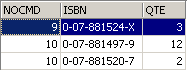
Note that after FROM, we list the names of all the tables whose columns are referenced. In the previous example, the selected columns all belong to the table DETAILS. However, the condition refers to the table COMMANDES. Hence the need to name the latter after FROM. The operation that tests for equality between columns from two different tables is often called an equijoin.
The query SELECT could also have been written as follows:
SQL> select details.nocmd,isbn,qte from commandes
    inner join details on details.nocmd=commandes.nocmd
    where commandes.datecmd>'25-sep-91'
Let’s continue with our examples. We want the same result as before but with the title of the ordered book, rather than its number ISBN:
SQL>select commandes.nocmd, articles.titre, details.qte
  from commandes,articles,details
  where commandes.datecmd>'25-sep-91'
  and details.nocmd=commandes.nocmd
  and details.isbn=articles.isbn
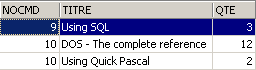
The same result is obtained with the following, less readable query SQL:
SQL> select details.nocmd,articles.titre,details.qte from details
    inner join commandes on details.nocmd=commandes.nocmd
    inner join articles on  details.isbn=articles.isbn
    where commandes.datecmd>'25-sep-91'
Above, two inner joins are performed with the table [DETAILS]:
- one with the table [COMMANDES] to access the order date of a book
- one with the table [ARTICLES] to access the title of the ordered book
We also want the name of the customer placing the order:
SQL>select commandes.nocmd, articles.titre, qte ,clients.nom
  from commandes,details,articles,clients
  where commandes.datecmd>'25-sep-91'
  and details.nocmd=commandes.nocmd
  and details.isbn=articles.isbn
  and commandes.idcli=clients.id
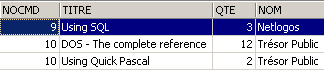
We also want the order dates and a display of these dates in descending order:
SQL>select commandes.nocmd, commandes.datecmd, articles.titre, qte ,clients.nom
    from commandes,details,articles,clients
    where commandes.datecmd>'25-sep-91'
    and details.nocmd=commandes.nocmd
    and details.isbn=articles.isbn
    and commandes.idcli=clients.id
    order by commandes.datecmd descending

Here are a few rules to follow when joining tables:
- After SELECT, list the columns you want to display. If the column exists in multiple tables, precede it with the table name.
- After FROM, list all the tables that will be queried by SELECT, i.e., the tables containing the columns listed after SELECT and WHERE.
6.2.2. Self-join
We want to find the books that have a retail price higher than that of the book 'Using SQL':
SQL>select a.titre from articles a, articles b
  where b.titre='Using SQL'
  and a.prixvente>b.prixvente
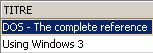
The two tables in the join are identical here: the articles table. To distinguish them, we give them aliases: from articles a, articles b. The alias for the first table is a, and the alias for the second is b. This syntax can be used even if the tables are different. When using an alias, it must be used throughout the SELECT command in place of the table it refers to.
6.2.3. Outer Join
We want to know which clients records purchased something in September, along with the order date. The other clients records are displayed without this date:
SQL>select clients.nom,commandes.datecmd from clients
    left outer join commandes  on clients.id=commandes.idcli
    where datecmd between '01-sep-91' and '30-sep-91'
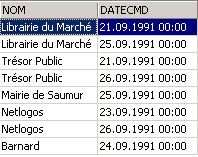
It is surprising here that we do not get the correct result. We should have all the clients records present in the [CLIENTS] table, which is not the case. When we consider how the outer join works, we realize that the clients records that did not make a purchase were associated with an empty row in the COMMANDES table and therefore with an empty date (value NULL in SQL terminology). This date does not satisfy the condition set on the date, so the corresponding customer is not displayed. Let’s try something else:
SQL>select clients.nom,commandes.datecmd from clients
    left outer join commandes  on clients.id=commandes.idcli
    where (commandes.datecmd between '01-sep-91' and '30-sep-91')
        or (commandes.datecmd is null)
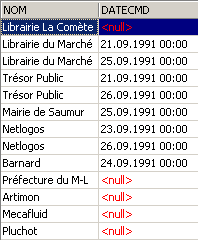
This time, we get the correct answer to our question.
6.2.4. Nested queries
SELECT column[s] FROM table[s] WHERE expression operator query ORDER BY ... | |
A query is a command SELECT that returns a set of 0, 1, or more values. We then have a condition WHERE of the type expression operator (val1, val2, ..., vali) expression and vali must be of the same type. If the query returns a single value, we are reduced to a condition of the type expression operator value which we are familiar with. If the query returns a list of values, we can use the following operators:
expression IN (val1, val2, ..., vali): true if expression has a value that is one of the elements in the list vali.
inverse of IN
must be preceded by =, !=, >, >=, <, <= expression >= ANY (val1, val2, .., valn): true if expression is >= one of the values vali in the list
must be preceded by =, !=, >, >=, <, <= expression >= ALL (val1, val2, ..., valn): true if expression is greater than or equal to all valid values in the list
query: true if the query returns at least one row. |
Examples
We revisit the question already solved by an equijoin: display titles with a selling price higher than that of the book 'Using SQL'.
SQL>select titre from ARTICLES
    where prixvente > (select prixvente from ARTICLES where titre='Using SQL')
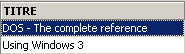
This solution seems more intuitive than the equijoin approach. We perform an initial filter using 'SELECT', then a second filter on the resulting set. We can perform multiple filters in sequence in this way.
We want to find the titles with a selling price higher than the average selling price:
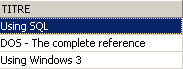
Which clientss ordered the items returned by the previous query?
SQL>select distinct idcli from COMMANDES,DETAILS
    where DETAILS.isbn in
    (select isbn from ARTICLES where prixvente
        > (select avg(prixvente) from ARTICLES))
    and COMMANDES.nocmd=DETAILS.nocmd

Explanations
- We select from the DETAILS table the codes ISBN found among the books with a price higher than the average book price.
- In the rows selected in the previous step, the customer code IDCLI is not present. It is found in the table COMMANDES. The link between the two tables is established by the order number NOCMD, hence the join COMMANDES.nocmd=DETAILS.nocmd.
- A single customer may have purchased one of the books in question multiple times, in which case their code IDCLI will appear multiple times. To avoid this, we place the key DISTINCT after SELECT. DISTINCT generally eliminates duplicates in the result rows of a SELECT.
- To obtain the customer name, we would need to perform an additional equijoin between the tables COMMANDES and CLIENTS, as shown in the following query.
SQL> select distinct CLIENTS.nom from COMMANDES,DETAILS,CLIENTS
    where DETAILS.isbn in
    (select isbn from ARTICLES where prixvente
        > (select avg(prixvente) from ARTICLES))
    and COMMANDES.nocmd=DETAILS.nocmd
    and COMMANDES.IDCLI=CLIENTS.ID

Find the clients customers who haven't placed an order since September 24:
SQL>select nom from CLIENTS
    where clients.id not in
    (select distinct commandes.idcli from commandes where datecmd>='24-sep-91')
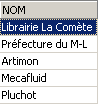
We have seen that we can filter rows in ways other than using the WHERE clause: by using the HAVING clause in conjunction with the GROUP and BY clauses. The HAVING clause filters groups of rows.
Similar to the WHERE clause, the syntax
HAVING expression opérateur requête
is possible, with the previously mentioned constraint that expression must be one of the expressions expri in the clause
GROUP BY expr1, expr2, ...
Examples
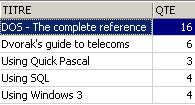
What are the sales figures for books priced over 200F?
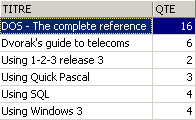
First, let’s display the quantities sold by title:
SQL>select ARTICLES.titre,sum(qte) QTE from ARTICLES, DETAILS
    where DETAILS.isbn=ARTICLES.isbn
    group by titre
Now, let’s filter the titles:
SQL> select ARTICLES.titre,sum(qte) QTE from ARTICLES, DETAILS
    where DETAILS.isbn=ARTICLES.isbn
    group by titre
    having titre in (select titre from ARTICLES where prixvente>200)
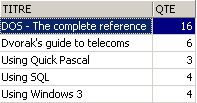
Perhaps more obviously, we could have written:
SQL>select ARTICLES.titre,sum(qte) QTE from ARTICLES, DETAILS
    where DETAILS.isbn=ARTICLES.isbn
    and ARTICLES.prixvente>200
    group by titre
6.2.5. Nested queries
In the case of nested queries, there is a parent query (the outermost query) and a child query (the innermost query). The parent query is evaluated only after the child query has been fully evaluated.
Correlated queries have the same syntax, with the following minor difference: the child query performs a join on the parent query’s table. In this case, the parent-child query pair is evaluated repeatedly for each row in the parent table.
Example
Let’s revisit the example where we want the names of the clients users who haven’t placed an order since September 24:
SQL>
select nom from clients
    where not exists
        (select idcli from commandes
            where datecmd>='24-sep-91'
                and commandes.idcli=clients.id)
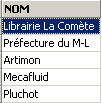
The parent query is executed on the table clients. The child query performs a join between the tables clients and orders. This is therefore a correlated query. For each row in the clients table, the child query runs: it searches for the customer’s id code in orders placed after September 24. If it does not find one (not exists), the customer’s name is displayed. Then, we move on to the next row in the clients table.
6.2.6. Selection criteria for writing SELECT
We have seen, on several occasions, that it is possible to obtain the same result through different writes to SELECT. Let’s take an example: Display the clients records that have placed an order:
Join
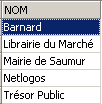
Nested queries
gives the same result.
Correlated queries
SQL>
select nom from clients
    where exists (select * from commandes where commandes.idcli=clients.id)
returns the same result.
Authors Christian MAREE and Guy LEDANT, in their book 'SQL, Introduction, Programming, and Mastery,' suggest a few selection criteria:
Performance
The user does not know how the SGBD "manages" to find the results they request. It is therefore only through experience that they will discover that one query is more efficient than another. MAREE and LEDANT assert from experience that correlated queries generally seem slower than nested queries or joins.
Formulation
Formulation using nested queries is often more readable and intuitive than joins. However, it is not always usable. Two points in particular should be noted:
- The tables containing the argument columns of SELECT (SELECT col1, col2, ...) must be listed after the FROM keyword. The Cartesian product of these tables is then performed, which is known as a join.
- When the query displays results from a single table, and filtering the rows of that table requires consulting another table, nested queries can be used.
6.3. Syntax Extensions
For convenience, we have most often presented abbreviated syntaxes for the various commands. In this section, we present their expanded syntaxes. They are self-explanatory because they are analogous to those of the widely studied SELECT command.
INSERT
INSERT INTO table (col1, col2, ..) VALUES (val1, val2, ...) | |
INSERT INTO table (col1, col2, ..) (query) | |
These two syntaxes have been presented |
DELETE
DELETE FROM table WHERE condition | |
This syntax is familiar. Note that the condition can contain a query using the syntax WHERE expression operator (query) |
UPDATE
UPDATE table SET col1=expr1, col2=expr2, ... WHERE condition | |
This syntax has already been presented. Note that the condition may contain a query using the syntax WHERE expression operator (query) |
UPDATE table SET (col1, col2, ..) = query1, (cola, colb, ..) = query2, ... WHERE condition | |
The values assigned to the various columns can come from a query. |