4. Expressions in the SQL language
4.1. Introduction
In most SQL commands, it is possible to use an expression. Take, for example, the SELECT command:
SELECT expr1, expr2, ... from table WHERE expression |
SELECT selects the rows for which expression is true and displays the values of expr1 for each of them.
Examples
In this section, we will explain the concept of an expression. A basic expression is of the form:
operand1 operator operand2
or
function(parameters)
Example
In the expression GENRE = 'ROMAN'
- GENRE is operand1
- 'ROMAN' is operand 2
- = is the operator
In the expression upper(gender)
- upper is a function
- type is a parameter of this function.
We will first cover expressions with operators, then we will present the functions available in Firebird.
4.2. Expressions with operators
We will classify expressions with operators according to the type of their operands:
- numeric
- string
- date
- Boolean or logical
4.2.1. Expressions with numeric operands
4.2.1.1. List of operators
Let number1, number2, and number3 be numbers. The following operators can be used:
Relational operators
: number1 is greater than number2 | |
: number1 is greater than or equal to number2 | |
: number1 is smaller than number2 | |
: number1 is less than or equal to number2 | |
: number1 is equal to number2 | |
: number1 is not equal to number2 | |
: same as | |
: number1 is within the range [nombre2,nombre3] | |
: number1 belongs to list of numbers | |
: number1 has no value | |
: number1 has a value |
Arithmetic operators
: addition | |
: subtraction | |
: multiplication | |
: division |
4.2.1.2. Relational operators
A relational expression expresses a relationship that is either true or false. The result of such an expression is therefore a Boolean or logical value.
Examples:
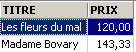
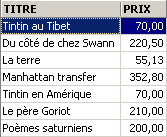
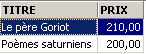
4.2.1.3. Arithmetic operators
We are familiar with arithmetic expressions. They express a calculation to be performed on numerical data. We have already encountered such expressions: we assume that the price stored in the records of the BIBLIO file is a pre-tax price. We want to display each title with its price TTC for a tax rate of 18.6%:
If prices are to increase by 3%, the command will be
An expression can contain multiple arithmetic operators, as well as functions and parentheses. These elements are processed according to different priorities:
1 | <---- highest priority | |
2 | ||
3 | ||
4 | <---- lower priority |
When two operators with the same precedence appear in an expression, the one on the far left is evaluated first.
Examples
The expression PRIX*TAUX+TAXES will be evaluated as (PRIX*TAUX)+TAXES. This is because the multiplication operator is used first. The expression PRIX*TAUX/100 will be evaluated as (PRIX*TAUX)/100.
4.2.2. Expressions with character operands
4.2.2.1. List of operators
The following operators can be used:
Let string1, string2, string3, and string pattern
: string1 is greater than string2 | |
: string1 is greater than or equal to string2 | |
: string1 is less than string2 | |
: string1 is less than or equal to string2 | |
: string1 equals string2 | |
: string1 is not equal to string2 | |
: same | |
: string1 is within the range [chaine2,chaine3] | |
: string1 belongs to list of strings | |
: string1 has no value | |
: channel1 has a value | |
: string1 matches pattern |
Concatenation operator
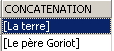
string1 || string2 : string2 concatenated to string1
4.2.2.2. Relational operators
What does it mean to compare strings using operators such as <, <=, etc.?
Every character is encoded as an integer. When comparing two characters, it is their integer codes that are compared. The encoding used follows the natural order of the dictionary:
Numbers come before letters, and uppercase letters before lowercase letters.
4.2.2.3. Comparison of two strings
Consider the relation 'CHAT' < 'CHIEN'. Is it true or false? To perform this comparison, the SGBD compares the two strings character by character based on their integer codes. As soon as two characters are found to be different, the string containing the smaller of the two is considered smaller than the other string. In our example, 'CHAT' is compared to 'CHIEN'. We get the following successive results:
After this last comparison, the string 'CHAT' is determined to be shorter than the string 'CHIEN'. The relation 'CHAT' < 'CHIEN' is therefore true.
Now let's compare 'CHAT' and 'chat'.
After this comparison, the relation 'CHAT' < 'chat' is declared true.
Examples
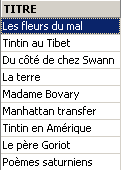
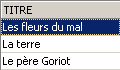
4.2.2.4. The LIKE operator
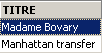
The LIKE operator is used as follows: string LIKE pattern
The relation is true if string matches pattern. The pattern is a character string that may contain two wildcard characters:
which denotes any sequence of characters | |
which denotes any single character |
Examples

4.2.2.5. The concatenation operator
4.2.3. Expressions with date-type operands
Let date1, date2, and date3 be dates. The following operators can be used:
Relational operators
is true if date1 is earlier than date2 | |
is true if date1 is earlier than or equal to date2 | |
is true if date1 is later than date2 | |
is true if date1 is on or after date2 | |
is true if date1 and date2 are identical | |
is true if date1 and date2 are different. | |
same as | |
is true if date1 is between date2 and date3 | |
is true if date1 is in the list of dates | |
is true if date1 has no value | |
is true if date1 has a value | |
is true if date1 matches the pattern | |
Arithmetic operators
: number of days between date1 and date2 | |
: date2 such that date1 - date2 = number | |
: date2 such that date2 - date1 = number |
Examples
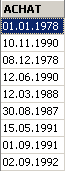

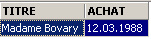
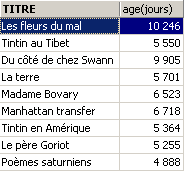
How old are the books in the library?
4.2.4. Expressions with Boolean operands
Recall that a Boolean or logical value has two possible values: true or false. The logical operand is often the result of a relational expression.
Let boolean1 and boolean2 be two booleans. There are three possible operators, which are, in order of precedence:
| is true if both boolean1 and boolean2 are true. |
| is true if either boolean1 or boolean2 is true. |
| has a value that is the inverse of the value of boolean1. |
Examples
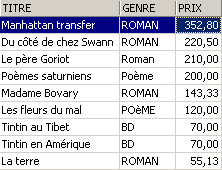
We are searching for books within a price range:

Reverse search:
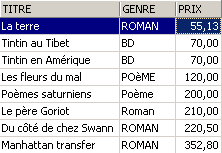
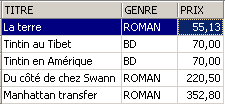
Be careful with operator precedence!
SQL> select titre,genre,prix from biblio
  where genre='ROMAN' and prix>200 or prix<100
  order by prix asc
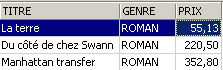
We use parentheses to control operator precedence:
SQL> select titre,genre,prix from biblio
  where genre='ROMAN' and (prix>200 or prix<100)
  order by prix asc
4.3. Firebird's predefined functions
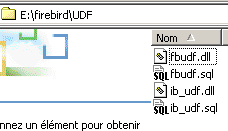
Firebird has predefined functions. They are not immediately usable in SQL commands. You must first run the script SQL <firebird>\UDF\ib_udf.sql where <firebird> refers to the installation directory of SGBD Firebird:
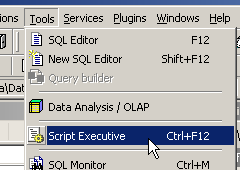
With IBExpert, we proceed as follows:
- we use the [Script Excecutive] tool obtained via option [Tools/ Script Executive]:
- once the tool is present, we load the script <firebird>\UDF\ib_udf.sql:
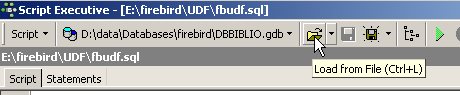
- then we run the script:
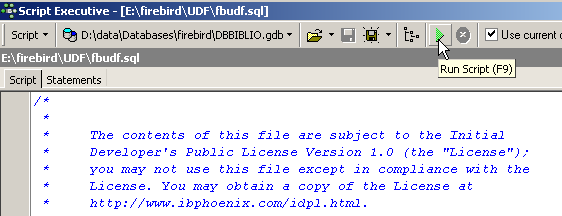
Once this is done, Firebird’s predefined functions are available for the database to which we were connected when the script was executed. To verify this, simply go to the database explorer and click on the [UDF] node of the database into which the functions were imported:
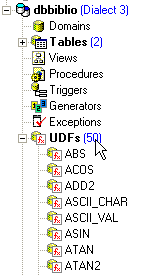
Above are the functions available in the database. To test them, it is convenient to have a one-row table. Let’s call it TEST:
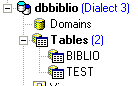
and define it as follows (right-click on Tables / New Table):
Let’s add a single row to this table:
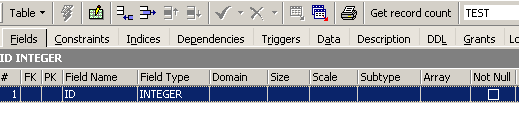
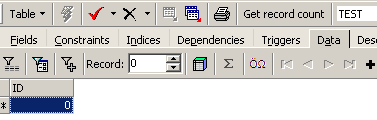
Now let’s go to the SQL editor (F12) and issue the following SQL command:
which uses the predefined cos (cosine) function. The command above evaluates cos(0) for each row in the TEST table, so in fact for a single row. Therefore, it simply displays the value of cos(0):

UDF functions (User-Defined Functions) are functions that users can create, and libraries of UDF functions can be found on the web. Here we describe only some of those available with the downloadable version from Firebird (2005). We classify them according to the predominant type of their parameters or according to their role:
- functions with numeric parameters
- Functions with string-type parameters
4.3.1. Functions with numeric parameters
| absolute value of number abs(-15)=15 |
| the smallest integer greater than or equal to number ceil(15.7) = 16 |
| the largest integer less than or equal to number floor(14.3) = 14 |
| quotient of the integer division (the quotient is an integer) of number1 by number2 div(7,3)=2 |
| remainder of the integer division (the quotient is an integer) of number1 by number2 mod(7,3)=1 |
| -1 if number < 0 0 if number=0 +1 if number > 0 sign(-6) = -1 |
| square root of number if number >= 0 -1 if number < 0 sqrt(16) = 4 |
4.3.2. Functions with string parameters
ascii_char(number) | character code ASCII number ascii_char(65) = 'A' |
lower(string) | converts string to lowercase lower('INFO')='info' |
ltrim(string) | Left Trim - Spaces preceding the text in string are removed: ltrim(' kitten')='kitten' |
replace(string1, string2, string3) | Replaces string2 with string3 in string1. replace('cat and dog','cat','**')='**at and **og' |
rtrim(string1, string2) | Right Trim - same as ltrim but on the right rtrim('cat ')='cat' |
substr(string, p, q) | substring of string starting at position p and ending at position q. substr('kitten',3,5)='to' |
ascii_val(character) | ASCII code of character ascii_val('A') = 65 |
strlen(string) | number of characters in string strlen('kitten')=6 |