5. Relationships between tables
5.1. Foreign keys
A relational database is a set of tables linked together by relationships. Let’s take an example inspired by the previous table [BIBLIO], which had the following structure:
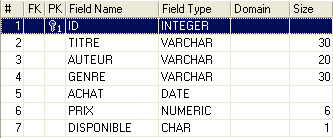
An example of the content was as follows:
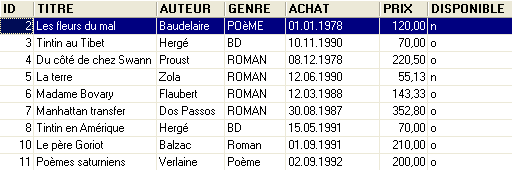
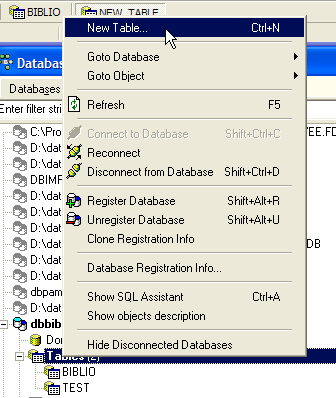
We might want information about the various authors of these works, such as their first and last names, date of birth, and nationality. Let’s create such a table. Right-click on [DBBIBLIO / Tables], then select option [New Table]:
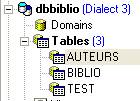
Now let’s build the following table, [AUTEURS]:
 | 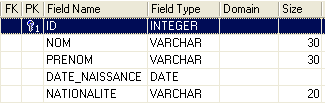 |
primary key of the table—used to uniquely identify a row | |
author's last name | |
author's first name, if applicable | |
date of birth | |
country of origin |
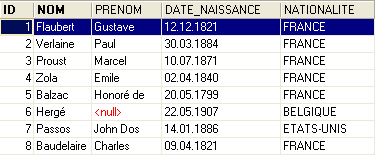
The contents of table [AUTEURS] could be as follows:
Let’s return to the table [BIBLIO] and its contents:
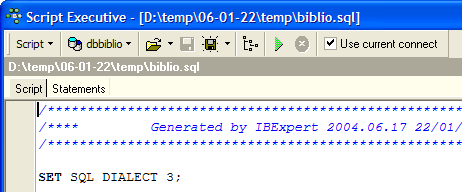
In the [AUTEUR] column of the table, it is no longer necessary to include the author’s name. Instead, it is preferable to include the number (id) assigned to them in the [AUTEURS] table. Let’s create a new table called [LIVRES]. To create it, we will use the [biblio.sql] script created in section 3.14. We load this script using the [Script Executive, Ctrl-F12] tool:
We modify the table creation script BIBLIO to match that of the table LIVRES:
We only comment on the changes:
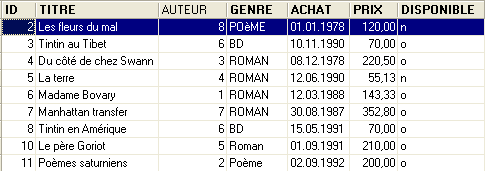
- line 4: the [AUTEUR] field in the table becomes an integer. This number references one of the authors in the previously created [AUTEURS] table.
- lines 11–19: the authors’ names have been replaced by their author numbers.
- line 29: the constraint name has been changed. It was previously called [ UNQ1_BIBLIO ]. It is now called [ UNQ1_LIVRES ]. This name can be anything. However, it is preferable that it be meaningful. Here, this effort was not made. Constraints on different fields and different tables within a database must be distinguished by different names. Recall that the constraint in line 29 requires that a title be unique within the table.
- Line 36: Renaming the constraint on the primary key to ID.
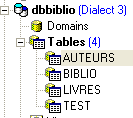
Let’s run this script. If it succeeds, we get the following new table [LIVRES]:
 |  |
One might wonder if we’ve actually gained anything in the end. Indeed, the table [LIVRES] lists author numbers instead of their names. Since there are thousands of authors, linking a book to its author seems difficult. Fortunately, the SQL language is there to help us. It allows us to query multiple tables at the same time. For this example, we present the query SQL, which allows us to retrieve the titles of the books in the library, along with their authors’ information. Let’s use the SQL editor (F12) to issue the following SQL command:
SQL> select LIVRES.titre, AUTEURS.nom, AUTEURS.prenom,AUTEURS.date_naissance
FROM LIVRES inner join AUTEURS on LIVRES.AUTEUR=AUTEURS.ID
ORDER BY AUTEURS.nom asc
It is too early to explain this SQL query. We will revisit it shortly. The result of this query is as follows:
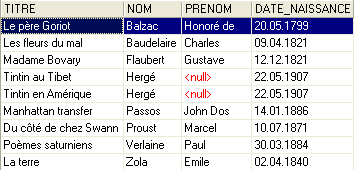
Each book has been correctly associated with its author and the information linked to it.
Let’s summarize what we’ve just done:
- we have two tables containing different types of information:
- the AUTEURS table contains information about authors
- the LIVRES table contains information about books purchased by the library
- these tables are linked to each other. A book must have an author. It may even have several. This scenario has not been considered here. The [AUTEUR] field in the [LIVRES] table references a row in the [AUTEURS] table. This is called a relationship.
The relationship linking the [LIVRES] table to the [AUTEURS] table is actually a form of constraint: a row in table [LIVRES] must always have an author ID that exists in table [AUTEURS]. If a row in [LIVRES] had an author ID that does not exist in the table [AUTEURS], we would be in an abnormal situation where we would be unable to identify the author of a book.
The SGBD is capable of ensuring that this constraint is always satisfied. To do this, we will add a constraint to the [LIVRES] table:
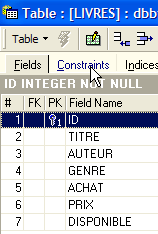 | 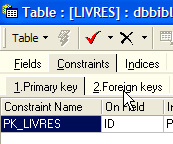 | 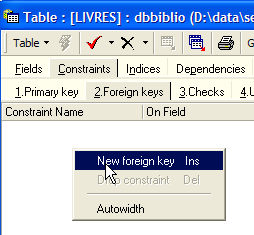 |
The link connecting the [AUTEUR] field in the [LIVRES] table to the [ID] field in the [AUTEURS] table is called a foreign key link. The field [AUTEUR] in table [LIVRES] is referred to as a "foreign key" in the wizard above. Defining a foreign key means that the value of a column [c1] in a table [T1] must exist in the column [c2] of the table [T2]. The column [c1] is referred to as the "foreign key" of table T1 on the column [c2] of table [T2]. The column [c2] is often the primary key of table [T2], but this is not mandatory.
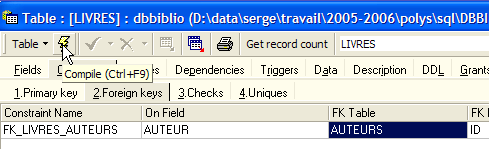
We define the foreign key [AUTEUR] from table [LIVRES] on the field [ID] in table [AUTEURS] as follows:
 |
- constraint name: free
- "Foreign Key" column, here the column [AUTEUR] in table [LIVRES]
- table referenced by the foreign key. Here, the column [AUTEUR] in table [LIVRES] must have a value in the column [ID] in table [AUTEURS]. Therefore, the table [AUTEURS] is referenced.
- Column referenced by the foreign key. Here, the column [ID] in table [AUTEURS].
We validate this constraint:
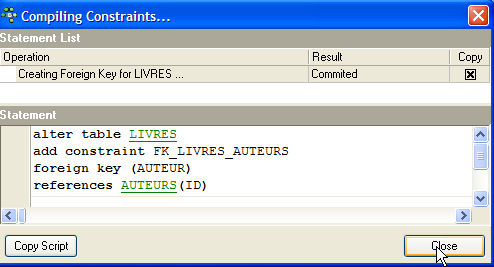
If all goes well, it is accepted:
What is the consequence of this new foreign key constraint? Using the SQL editor (F12), let’s try to insert a row into the LIVRES table with a non-existent author ID:
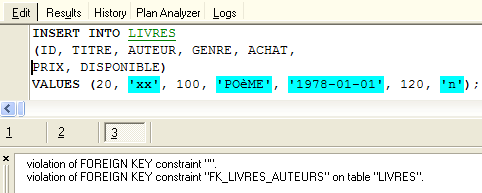
The operation [INSERT] above attempted to insert a book with a non-existent author ID (100). The query execution failed. The associated error message indicates that there was a violation of the foreign key constraint "FK_LIVRES_AUTEURS". This is the one we just defined.
5.2. Join operations between two tables
Still in the [DBBIBLIO] database (or any other database), let’s create two test tables named TA and TB and defined as follows:
Table TA
 - ID: primary key of table TA - DATA: arbitrary data |  |
Table TB
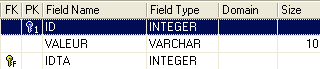 - ID: primary key of table TB - IDTA: foreign key of table TB referencing column ID of table TA. Thus, a value from the IDTA column of the TA table must exist in the ID column of the TA table - VALEUR: any data | 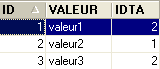 |
In the SQL editor (F12), we will issue SQL commands that simultaneously process both tables TA and TB.
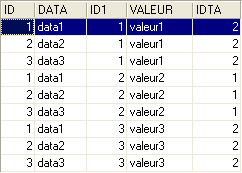
The SQL command uses the two tables TA and TB behind the FROM keyword. The operation FROM TA, TB will cause a new temporary table to be created in which each row of the table TA will be associated with each row of the table TB. Thus, if table TA has NA rows and table TB has NB rows, the resulting table will have NA × NB rows. This is shown in the screenshot above. Furthermore, each row contains the columns from both tables. The columns specified in the [SELECT col1, col2, ... FROM ...] query indicate which ones to retain. Here, the * wildcard indicates that all columns of the resulting table are requested. It is sometimes said that the resulting table from the previous query SQL is the Cartesian product of the tables TA and TB.
Above, each row of table TA has been matched with each row of table TB. In general, we want to associate with a row in TA the rows in TB that have a relationship with it. This relationship often takes the form of a foreign key constraint. This is the case here. For a row in table TA, we can associate the rows from table TB that satisfy the relationship TB.IDTA=TA.ID. There are several ways to query this:
The previous SQL query is similar to the previous one, with two differences:
- the result rows of the Cartesian product TA x TB are filtered by a clause WHERE that associates with a row in table TA, only the rows in table TB that satisfy the relationship TB.IDTA=TA.ID
- only certain columns are requested using the syntax [T.col], where T is the name of a table and col is the name of a column in that table. This syntax resolves any ambiguity that might arise if two tables had columns with the same name. When this ambiguity does not exist, you can use the syntax [col] without specifying the table for that column.
The result is as follows:
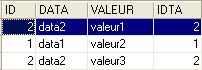
The same result can be obtained with the following SQL command:
The term [inner join] gives rise to the name "inner join" given to this type of operation between two tables. We will see that there is also an "outer join." In an inner join, the order of the tables in the query has no effect on the result: FROM TA inner join TB is equivalent to FROM TB inner join TA.
The previous query SQL includes in the result table only those rows from table TA that are referenced by at least one row in table TB. Thus, the row TA [3, data3] does not appear in the result because it is not referenced by a row in TB. You may want all rows from TA, regardless of whether they are referenced by a row in TB. In that case, you use a left outer join between the two tables:
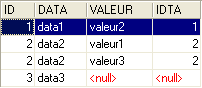
Here we have a "left outer join". To understand the term "FROM TA left outer join TB", imagine a join with the table TA on the left and the table TB on the right. All rows from the left table appear in the result of a left outer join, even those for which the join condition is not satisfied. This join condition is not necessarily a foreign key constraint, although that is nevertheless the most common case.
In the following order:
the table TB is on the "left" side of the outer join. Therefore, all rows from TB will appear in the result:
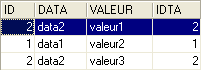
Unlike an inner join, the order of the tables matters here. There are also right outer joins:
- FROM TA left outer join TB is equivalent to FROM TB right outer join TA: the table TA is on the left
- FROM TB left outer join TA is equivalent to FROM TA right outer join TB: the table TB is on the left
Now that we understand the basics of querying multiple tables simultaneously, we can move on to more complex database queries.